Welcome Guest ( Log In | Register )

Bump Topic Topic Closed RSS Feed
22 Pages  1 2 3 > » Bottom

Outline · [ Standard ] · Linear+

TIME [OFFICIAL] TIME Fibre Broadband™ v3.o, 500 Mbps of rocket science

views
     
TSezinger
post Apr 4 2016, 11:45 PM, updated 8y ago

butter cookies
******
Senior Member
1,536 posts

Joined: Jan 2005

user posted image
user posted image


QUOTE(jjj2 @ Apr 5 2018, 12:56 PM)
Hi Guys,

For your convenience, please kindly proceed to https://modification.time.com.my
if you want to modify the followings :

1) Amend / Add-on Call Forwarding/Call Divert feature

2) Change your TIME Home Voice Number (Eg. 03-5039 xxxx / 04-293 xxxx)

3) Upgrade or Downgrade your TIME Home Voice package

4) Merge/Split your existing accounts

5) Relocation (Indoor/Outdoor)


For more details, please kindly contact Customer Service @ 1800 18 1818 .

Thanks.
*
QUOTE(jjj2 @ Sep 23 2017, 09:12 AM)
D-LINK DIR850L ROUTER -- FIRMWARE AVAILABLE FOR DOWNLOAD (PATCHING ZERO DAY FLAWS)


DOWNLOAD HERE

NOTE :
--- Please first upgrade the Router with the transitional firmware, DIR-850L Bx_FW208SGb01
--- And proceed with the DIR-850L Bx_FW210SGb01 firmware upgrade
*Please read the enclosed DIR-850L HW B Firmware upgrade guide .
Problems Resolved:
Fixed the security issues reported by Researcher Pierre Kim on Sep 8th, 2017.
• Firmware Protection
• WAN && LAN - Retrieving admin password, gaining full access using the custom mydlink Cloud protocol (CVE-2017-14417, CVE-2017-14418)
• WAN - Weak Cloud protocol (CVE-2017-14419, CVE-2017-14420)
• LAN - Backdoor access (CVE-2017-14421)
• WAN && LAN - Stunnel private keys (CVE-2017-14422)
• Local - Weak files permission and credentials stored in clear text
(CVE-2017-14424, CVE-2017-14425, CVE-2017-14426, CVE-2017-14427, CVE-2017-14428)
• WAN - Pre-Auth RCEs as root (L2)
(CVE-2017-14429)
• LAN - DoS attack against some daemons (CVE-2017-14430)

SUMMARY OF PREVIOUS 0-DAY FLAWS FOUND ON DLINK DIR850L ROUTER (RevA & RevB)

1) Weak or NO protection on Firmware.
2) Weak File permissions are stored in clear text.
3) Cross-site scriting flaws which enables attacker to steal the authentication cookies.
4) Vulnerabilities in MyDLink cloud protocol enables attacker to gain full access to the Router.
5) RevB backdoor access.
6) Hardcoded private keys in the firmware RevA & RevB enables MiTM attcks.
7) DNS Hijack on RevA.
8) Vulnerabilities in RevB enables command injection attacks.
9) DOS flaws in some daemons running in both RevA & RevB can be crashed via LAN.
* If you would like to wait for Telco-specific firmware, suggest you to wait for their own release. The above upgrade & patch has been tested on v2.07TT firmware by my team & it works fine.
*
QUOTE(jjj2 @ Dec 24 2015, 06:14 AM)
Hi Bro,

For sure at this moment any p2p traffic is Not blocked.

But you have reasons to believe some forms of traffic shaping is happening.
This is what happened to other ISP like TM as well.

But one of the easy way to bypass is to alter your computer/Router/any pppoe dialing device's DNS.

Commonly used Public DNS are Google & OpenDNS :

There are 2 Ways to change your DNS,
I) Via Router Configurations
You can access the Router by default 192.168.1.1  or 192.168.0.1 (Assuming it's not changed).
Feel Free PM me if you need the standard login credentials for Time Routers.

II) Via Network Adapters.
Please refer this Step by Step guideline.
Google DNS https://developers.google.com/speed/public-dns/docs/using
OpenDNS https://use.opendns.com/
We have a tool to detect whether the ISP is actually shaping your traffic.
Feel free to PM me should you need that.

Thanks.
*
QUOTE(jjj2 @ Dec 24 2015, 06:14 AM)
FEEDBACK & REPORT NEEDED

Dear All FTTX Users,

Lately there has been quite a number of cases reported that carry the following symptoms :

1) Slow Download, Fast Upload
Happens mostly at night hours.

2) Speed Test to local servers are fine, but when performing actual downloads, speed is far far more slower that it should at least be.

Please kindly provide the following info :
1) Screenshots of Speedtest,TraceRoute results or any related evidences.
2) Account No / Service No of yours.

In order to provide satisfactory services to all valuable customers & users, as a full service pioneer team, we are striving our best to assist you all in every possible aspect, your priceless feedbacks are very much appreciated.

Feel free to pm or email us should you require further assistance.
*
History
v1 - https://forum.lowyat.net/topic/2189931
v2 - https://forum.lowyat.net/topic/3247871

This post has been edited by ezinger: Apr 12 2018, 11:38 PM
TSezinger
post Apr 4 2016, 11:48 PM

butter cookies
******
Senior Member
1,536 posts

Joined: Jan 2005
Disclaimer: I have been maintaining the TIME thread for more than two years. Suddenly some jackoff just copies my entire post without crediting me or even asking for permission. I would like to continue maintaining the thread and avoid any reseller bias. The other thread was opened by a TIME reseller.

P/S: I am not a reseller.

UPDATE
@Braxton has pm'ed me and apologized. He also agreed to keep this thread instead.

This post has been edited by ezinger: Apr 5 2016, 03:19 PM
Jason Tan1996
post Apr 4 2016, 11:50 PM

Getting Started
**
Junior Member
84 posts

Joined: Feb 2016
QUOTE(ezinger @ Apr 4 2016, 11:48 PM)
Disclamer: I have been maintaining the TIME thread for more than two years. Suddenly some jackoff just copies my entire post without crediting me or even asking for permission. I would like to continue maintaining the thread and avoid any reseller bias. The other thread was opened by a TIME reseller.
*
Damn, that's rough, thanks for reopening the new thread

PoPoBear
post Apr 5 2016, 12:36 AM

Casual
***
Junior Member
418 posts

Joined: Mar 2010
Hi , may I know what's the total payment that i need to pay if i want to subscribe TIME at my apartment ? (Suriamas Apartment) . Last time they wanted to charge RM1K+.. i wonder if TIME has an apps to calculate forecast total payment upon subscription
jjj2
post Apr 5 2016, 12:59 AM

Look at all my stars!!
*******
Senior Member
3,605 posts

Joined: Feb 2006
We will continue to provide all sorts of support, knowledge sharing, latest updates etc on this Official Thread.

Thanks.
jjj2
post Apr 5 2016, 01:03 AM

Look at all my stars!!
*******
Senior Member
3,605 posts

Joined: Feb 2006
QUOTE(PoPoBear @ Apr 5 2016, 12:36 AM)
Hi , may I know what's the total payment that i need to pay if i want to subscribe TIME at my apartment ? (Suriamas Apartment) . Last time they wanted to charge RM1K+.. i wonder if TIME has an apps to calculate forecast total payment upon subscription
*
Hi Bro,

Yes this was previously required due to NSI (Non Standard Installation) building.

But this has been eliminated subject to T&Cs.

Thanks.
tritonite
post Apr 5 2016, 01:14 AM

Casual
***
Junior Member
337 posts

Joined: Feb 2009
QUOTE(PoPoBear @ Apr 5 2016, 12:36 AM)
Hi , may I know what's the total payment that i need to pay if i want to subscribe TIME at my apartment ? (Suriamas Apartment) . Last time they wanted to charge RM1K+.. i wonder if TIME has an apps to calculate forecast total payment upon subscription
*
Based on my experience with the Time Fibre Broadband deployment in my development, I'm afraid that there's no one answer to your question.

A lot of the time this is due to disagreements between TIME and the apartment/condo management, and sometimes even 3rd party contractors, about whose responsibility it is to perform and pay for the 'last mile' bit of the fibre cabling. Asking around other developments at the time when my condo blocks was being wired up, it was clear that when Time says their fibre broadband is available in a development, it just means that their fibre cable has been pulled off the street and into the comms room of the respective block or blocks (usually in the basement). It's usually a grey area as to whether the cabling has been pulled up through the risers and ducted all the way to right outside each unit of each floor in a block.

If that is not sorted out between all parties involved, and you are desperate to have their broadband service, the cost of pulling the cabling up from the basement up through the riser to your unit is passed on to you, the potential subscriber. That's probably where your RM1K+ quotation is coming from... And even that sounds low, so I assume that you're living on quite a low floor in your block.

Rather than TIME, I would suggest you take up the issue with your apartment or condo management, and clarify as to why they haven't paid for fibre to be pulled up through the risers to each unit. They'll probably say that the cost is too much and cannot be justified, especially if they think the potential uptake is going to be low.. which, in my opinion, seems fair. Prudent management don't like to waste funds.

If they can even be convinced that there will be a 30% uptake, they won't hesitate to do that 'last mile'. Heck, I think then even TIME will be willing to foot the entire cost all on their own. wink.gif
sailou
post Apr 5 2016, 01:22 AM

On my way
****
Senior Member
617 posts

Joined: Mar 2005
From: Mars


Time Fibre Broadband should come to Setapak where all the TARC students are cramped up. I believe TM and Maxis will be wiped out from the map in a matter of time.
R4yMoNd
post Apr 5 2016, 01:29 AM

Regular
******
Senior Member
1,139 posts

Joined: Aug 2006
Welcome to V3.

- Happy Time Customer
PoPoBear
post Apr 5 2016, 06:57 AM

Casual
***
Junior Member
418 posts

Joined: Mar 2010
» Click to show Spoiler - click again to hide... «


thanks for the replies !
jjj2
post Apr 5 2016, 09:02 AM

Look at all my stars!!
*******
Senior Member
3,605 posts

Joined: Feb 2006
QUOTE(PoPoBear @ Apr 5 2016, 06:57 AM)
» Click to show Spoiler - click again to hide... «

thanks for the replies !
*
Welcome smile.gif


yeapch01
post Apr 5 2016, 09:03 AM

Regular
******
Senior Member
1,916 posts

Joined: Mar 2008


QUOTE(PoPoBear @ Apr 5 2016, 01:36 AM)
Hi , may I know what's the total payment that i need to pay if i want to subscribe TIME at my apartment ? (Suriamas Apartment) . Last time they wanted to charge RM1K+.. i wonder if TIME has an apps to calculate forecast total payment upon subscription
*
Dear bro

Thanks for your interest in time fibre , the non standard installation fee previously incurred has been abolished since 2015 until further notice.

Thanks
fruitie
post Apr 5 2016, 09:10 AM

Rise and Shine
Group Icon
Staff
72,804 posts

Joined: Sep 2005
From: KUL

Hmm. Interesting. Opened another thread without our consent. I'll look into this when I'm in office.
fruitie
post Apr 5 2016, 10:31 AM

Rise and Shine
Group Icon
Staff
72,804 posts

Joined: Sep 2005
From: KUL

Folks, lesson learnt. First, open a new thread when the time is up and you will not know when the moderating team will come and close your thread. Then, start PM-ing and telling us your justification. Most of the time, it doesn't work with me.

Second, I wish to inform that everybody is allowed to open a thread here; whether you are a reseller or not a reseller, seriously I don't bother. What matters to me is the quality of discussion in the thread. I remembered I mentioned before in my PM to someone here if TS has started posting anything biased or to gain more sales, feel free to report and we will take action. Where is it now? Why suddenly opened a new thread?

Third, you can ask previous TS to edit and add in credit for you if you really want it. I also agree it is not good to copy other's work without proper consent.

Fourth, since the previous TS dropped me a PM to close his thread, I will then remove it and allow this thread to continue.

Fifth, my previous post is still valid in this thread and future thread(s). This is not a sales thread. Please report if there are posts like PM-ed you and similar sales related posts, we will take necessary action. This thread is for discussion and not sales thread.

Anything don't understand, feel free to PM me.
jinhan108
post Apr 5 2016, 10:46 AM

Getting Started
**
Junior Member
160 posts

Joined: Dec 2005


Okay, so again on TIME's definition of availability in condo developments: What is the current practice now, given that the 'non-standard installation fees' have been abolished? Will TIME be wiring fibre to individual units automatically or will it be done whenever someone subscribes to a package? This is if it is an older condo development without TIME originally by the way.
jjj2
post Apr 5 2016, 10:59 AM

Look at all my stars!!
*******
Senior Member
3,605 posts

Joined: Feb 2006
QUOTE(jinhan108 @ Apr 5 2016, 10:46 AM)
Okay, so again on TIME's definition of availability in condo developments: What is the current practice now, given that the 'non-standard installation fees' have been abolished? Will TIME be wiring fibre to individual units automatically or will it be done whenever someone subscribes to a package? This is if it is an older condo development without TIME originally by the way.
*
Hi Bro,

First of all, your condo has to be ready for TIME infra..which means both incoming & internal infra have to be constructed.


Then based on individual subscription, Installer will pull in fibre into the unit & activate the service.

Feel free to submit your condo to TIME via http://www.time.com.my/we-hear-you
Alternatively, please email me, I will help you on this.


Thanks.
Calvin871989
post Apr 5 2016, 12:30 PM

Im Batman
******
Senior Member
1,256 posts

Joined: May 2008
From: Gotham City


Hi,

I still want to know if spending rm1000 and above on a high end router will give constant speed of 100mbps ?

I still see a lot of people here not utilizing the full speed on wifi or another case can't get full speed.

I have a total of 4 laptop and 4 phones connecting to the internet at home via wifi. Not interested in using any LAN cable.

Thanks

This post has been edited by Calvin871989: Apr 5 2016, 12:31 PM
AsuKi
post Apr 5 2016, 12:33 PM

♥C.S.I♥
******
Senior Member
1,144 posts

Joined: Jan 2003
From: Republik Of Kelantanese

QUOTE(fruitie @ Apr 5 2016, 10:31 AM)
Folks, lesson learnt. First, open a new thread when the time is up and you will not know when the moderating team will come and close your thread. Then, start PM-ing and telling us your justification. Most of the time, it doesn't work with me.

Second, I wish to inform that everybody is allowed to open a thread here; whether you are a reseller or not a reseller, seriously I don't bother. What matters to me is the quality of discussion in the thread. I remembered I mentioned before in my PM to someone here if TS has started posting anything biased or to gain more sales, feel free to report and we will take action. Where is it now? Why suddenly opened a new thread?

Third, you can ask previous TS to edit and add in credit for you if you really want it. I also agree it is not good to copy other's work without proper consent.

Fourth, since the previous TS dropped me a PM to close his thread, I will then remove it and allow this thread to continue.

Fifth, my previous post is still valid in this thread and future thread(s). This is not a sales thread. Please report if there are posts like PM-ed you and similar sales related posts, we will take necessary action. This thread is for discussion and not sales thread.

Anything don't understand, feel free to PM me.
*
rclxms.gif notworthy.gif notworthy.gif
emperor^10
post Apr 5 2016, 12:52 PM

---ManUtd Forever---
******
Senior Member
1,159 posts

Joined: Aug 2006
From: Malacca & KL


Happy user here... Credits to Yeap for the good service!!!


Attached thumbnail(s)
Attached Image
pigduck
post Apr 5 2016, 01:03 PM

Casual
***
Junior Member
422 posts

Joined: Apr 2006
is astro iptv going to upgrade their Time packages to the new time speeds? We are paying a few % more as well.
jjj2
post Apr 5 2016, 01:08 PM

Look at all my stars!!
*******
Senior Member
3,605 posts

Joined: Feb 2006
QUOTE(pigduck @ Apr 5 2016, 01:03 PM)
is astro iptv going to upgrade their Time packages to the new time speeds? We are paying a few % more as well.
*
Hi Bro..

No official announcement yet.. will keep you informed.

Cheers smile.gif
Senrose
post Apr 5 2016, 01:11 PM

Getting Started
**
Junior Member
71 posts

Joined: Mar 2016

Time Broadband should enlarge their coverage to kajang-bangi-nilai since its already cover some area in cyberjaya.

Please, im tired with currently ISP with lagg bad network connection. hmm cry.gif
chris_7617
post Apr 5 2016, 01:13 PM

Getting Started
**
Junior Member
61 posts

Joined: Sep 2008
time broadband available in the place where unifi available?
jjj2
post Apr 5 2016, 01:14 PM

Look at all my stars!!
*******
Senior Member
3,605 posts

Joined: Feb 2006
QUOTE(Calvin871989 @ Apr 5 2016, 12:30 PM)
Hi,

I still want to know if spending rm1000 and above on a high end router will give constant speed of 100mbps ?

I still see a lot of people here not utilizing the full speed on wifi or another case can't get full speed.

I have a total of 4 laptop and 4 phones connecting to the internet at home via wifi. Not interested in using any LAN cable.

Thanks
*
Hi Bro,

Even the most high end router cannot guarantee "constant" wifi speed... fluctuation within the acceptable range does occur...

Go for the followings :

1) Asus RT-AC87U
2) Asus RT-AC68U
3) [Special Offer] Linksys EA6350
* Buy Linksys EA6350 from TIME & get it installed for you for FREE. Covers support as well.

Thanks.


jjj2
post Apr 5 2016, 01:16 PM

Look at all my stars!!
*******
Senior Member
3,605 posts

Joined: Feb 2006
QUOTE(chris_7617 @ Apr 5 2016, 01:13 PM)
time broadband available in the place where unifi available?
*
Yes Bro...2 independent provider... in fact this is good to encourage competition.

But mostly on MDU, a lot lesser coverage on SDU.

Thanks.
pigduck
post Apr 5 2016, 01:19 PM

Casual
***
Junior Member
422 posts

Joined: Apr 2006
QUOTE(jjj2 @ Apr 5 2016, 01:08 PM)
Hi Bro..

No official announcement yet.. will keep you informed.

Cheers smile.gif
*
Why are they so slow? vmad.gif
They need to hurry up. It's really not worth it otherwise.
Astro's taking people for a ride. They should have done a faster announcement.

This post has been edited by pigduck: Apr 5 2016, 01:19 PM
chris_7617
post Apr 5 2016, 01:20 PM

Getting Started
**
Junior Member
61 posts

Joined: Sep 2008
QUOTE(jjj2 @ Apr 5 2016, 01:16 PM)
Yes Bro...2 independent provider... in fact this is good to encourage competition.

But mostly on MDU, a lot lesser coverage on SDU.

Thanks.
*
attractive package but too bad i am contract to unfi recently sad.gif
sabrateur
post Apr 5 2016, 01:22 PM

Getting Started
**
Junior Member
236 posts

Joined: Aug 2005


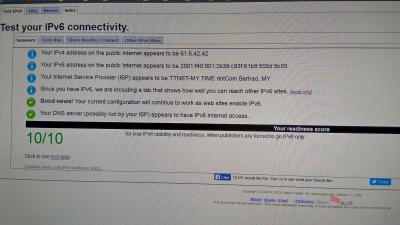
Just got my 100mbps TIME installation done today. Quite happy with the speed. However, unable to get IPv6.

Does TIME not provide IPv6?
mintgadget
post Apr 5 2016, 01:49 PM

Casual
***
Junior Member
328 posts

Joined: Jun 2008
Finally managed to tweaked RT-88U for optimal performance with Asus Merlin firmware.

Attached Image

Awesome!!! biggrin.gif
AsuKi
post Apr 5 2016, 01:52 PM

♥C.S.I♥
******
Senior Member
1,144 posts

Joined: Jan 2003
From: Republik Of Kelantanese

QUOTE(emperor^10 @ Apr 5 2016, 12:52 PM)
Happy user here... Credits to Yeap for the good service!!!
*
bro cuba speedtest ke luar negara. EU/NA
Senrose
post Apr 5 2016, 01:52 PM

Getting Started
**
Junior Member
71 posts

Joined: Mar 2016

QUOTE(mintgadget @ Apr 5 2016, 01:49 PM)
Finally managed to tweaked RT-88U for optimal performance with Asus Merlin firmware.

Attached Image

Awesome!!!  biggrin.gif
*
that speed... im so jelous icon_question.gif
nexona88
post Apr 5 2016, 02:07 PM

The Royal Club Member
*********
All Stars
48,441 posts

Joined: Sep 2014
From: REality
QUOTE(mintgadget @ Apr 5 2016, 01:49 PM)
Finally managed to tweaked RT-88U for optimal performance with Asus Merlin firmware.

Attached Image

Awesome!!!  biggrin.gif
*
wow so nice speed thumbsup.gif flex.gif
budak minyak
post Apr 5 2016, 02:08 PM

Getting Started
**
Junior Member
257 posts

Joined: Jan 2014
If I were you, I will make the change immediately. Worth every single cent plus higher bandwidth.

They will pay for your penalty (Max : RM500), above that u need to pay.
yeapch01
post Apr 5 2016, 02:14 PM

Regular
******
Senior Member
1,916 posts

Joined: Mar 2008


QUOTE(chris_7617 @ Apr 5 2016, 02:20 PM)
attractive package but too bad i am contract to unfi recently  sad.gif
*
Dear Bro


Dun worry Bro .


Thanks

This post has been edited by yeapch01: Apr 5 2016, 09:14 PM
Calvin871989
post Apr 5 2016, 02:16 PM

Im Batman
******
Senior Member
1,256 posts

Joined: May 2008
From: Gotham City


QUOTE(jjj2 @ Apr 5 2016, 01:14 PM)
Hi Bro,

Even the most high end router cannot guarantee "constant" wifi speed... fluctuation within the acceptable range does occur...

Go for the followings :

1) Asus RT-AC87U
2) Asus RT-AC68U
3) [Special Offer] Linksys EA6350
* Buy Linksys EA6350 from TIME & get it installed for you for FREE. Covers support as well.

Thanks.
*
Well not constant but 80% of the speed and above.
Calvin871989
post Apr 5 2016, 02:18 PM

Im Batman
******
Senior Member
1,256 posts

Joined: May 2008
From: Gotham City


QUOTE(sabrateur @ Apr 5 2016, 01:22 PM)
Just got my 100mbps TIME installation done today. Quite happy with the speed. However, unable to get IPv6.

Does TIME not provide IPv6?
*
What brand is your router ?

You using wifi or Lan cable ?

Can take a speed test and post here ?

I have 100mbps but using wifi I'm getting 30mbps below
yeapch01
post Apr 5 2016, 02:22 PM

Regular
******
Senior Member
1,916 posts

Joined: Mar 2008


QUOTE(pigduck @ Apr 5 2016, 02:03 PM)
is astro iptv going to upgrade their Time packages to the new time speeds? We are paying a few % more as well.
*
Dear Bro


Until to date , we do not receive any update of the changes of Astro IPTV Plan

Once available We will Update everybody here.


Thanks
tofuwizard
post Apr 5 2016, 02:24 PM

Getting Started
**
Junior Member
166 posts

Joined: Mar 2008
QUOTE(jjj2 @ Apr 5 2016, 01:08 PM)
Hi Bro..

No official announcement yet.. will keep you informed.

Cheers smile.gif
*
So nothing for IPTV users to expect in the near future? or is there internal announcement/news but just not ready to announced to the public yet officially in the near future.
Senrose
post Apr 5 2016, 02:27 PM

Getting Started
**
Junior Member
71 posts

Joined: Mar 2016

QUOTE(yeapch01 @ Apr 5 2016, 02:14 PM)
Dear Bro
Dun worry Bro . Time Will have easy switch promo for current Unifi User.
Thanks
*
Hi, is there any possible way to get TIME covered my area (Bandar Seri Putra, Bangi)? Im really want to convert from Unifi but it is not covered at the momment
yeapch01
post Apr 5 2016, 02:33 PM

Regular
******
Senior Member
1,916 posts

Joined: Mar 2008


QUOTE(Senrose @ Apr 5 2016, 03:27 PM)
Hi, is there any possible way to get TIME covered my area (Bandar Seri Putra, Bangi)? Im really want to convert from Unifi but it is not covered at the momment
*
Dear Bro

Thanks for your interest in Time Fibre, can you be more specific , may i know are u refer to landed property or high rise building.

Thanks
scflyk
post Apr 5 2016, 02:35 PM

New Member
*
Junior Member
36 posts

Joined: Jan 2006
QUOTE(yeapch01 @ Apr 5 2016, 02:33 PM)
Dear Bro

Thanks for your interest in Time Fibre, can you be more specific , may i know are u refer to landed property or high rise building.

Thanks
*
does it covers landed property in Bandar Puteri Puchong? Please advise. Thanks.
Senrose
post Apr 5 2016, 02:36 PM

Getting Started
**
Junior Member
71 posts

Joined: Mar 2016

QUOTE(yeapch01 @ Apr 5 2016, 02:33 PM)
Dear Bro

Thanks for your interest in Time Fibre, can you be more specific , may i know are u refer to landed property or high rise building.

Thanks
*
landed property. Bandar Seri Putra, Bangi.
yeapch01
post Apr 5 2016, 02:37 PM

Regular
******
Senior Member
1,916 posts

Joined: Mar 2008


QUOTE(Senrose @ Apr 5 2016, 03:27 PM)
Hi, is there any possible way to get TIME covered my area (Bandar Seri Putra, Bangi)? Im really want to convert from Unifi but it is not covered at the momment
*
Dear Bro

Thanks for your interest in Time Fibre, can you be more specific , may i know are u refer to landed property or high rise building.

Thanks
yeapch01
post Apr 5 2016, 02:45 PM

Regular
******
Senior Member
1,916 posts

Joined: Mar 2008


QUOTE(Senrose @ Apr 5 2016, 03:36 PM)
landed property. Bandar Seri Putra, Bangi.
*
Dear Bro

Sorry to inform you that Time coverage in landed property is still limited and not extended to your area yet.

We will update if there is any changes in the near future.

Basically i believe at the moment Time coverage in landed property is more than new housing project

Thanks


yeapch01
post Apr 5 2016, 02:48 PM

Regular
******
Senior Member
1,916 posts

Joined: Mar 2008


QUOTE(tofuwizard @ Apr 5 2016, 03:24 PM)
So nothing for IPTV users to expect in the near future? or is there internal announcement/news but just not ready to announced to the public yet officially in the near future.
*
Dear Bro

So far we do not hear any update on the changes , whether on internally or official yet.


Anyway , Once we do receive any update , we will give everybody here some updates

Thanks
pigduck
post Apr 5 2016, 02:58 PM

Casual
***
Junior Member
422 posts

Joined: Apr 2006
QUOTE(tofuwizard @ Apr 5 2016, 02:24 PM)
So nothing for IPTV users to expect in the near future? or is there internal announcement/news but just not ready to announced to the public yet officially in the near future.
*
I'm ready to sign out if they aren't going to do any upgrade
pigduck
post Apr 5 2016, 02:58 PM

Casual
***
Junior Member
422 posts

Joined: Apr 2006
QUOTE(tofuwizard @ Apr 5 2016, 02:24 PM)
So nothing for IPTV users to expect in the near future? or is there internal announcement/news but just not ready to announced to the public yet officially in the near future.
*
I'm ready to sign out if they aren't going to do any upgrade
Jason Tan1996
post Apr 5 2016, 03:17 PM

Getting Started
**
Junior Member
84 posts

Joined: Feb 2016
I have a question, what ISP does Astro IPTV use?
I went to https://www.astro.com.my/iptv/packagespricing.aspx and saw their packages and pricing but they never tell what ISP they will be providing. If it's Time broadband(because it's pink?), how does one subscribe if Time doesn't have coverage in their area?
SUSGreenSamurai
post Apr 5 2016, 03:18 PM

The Green One
*******
Senior Member
2,150 posts

Joined: Feb 2006


QUOTE(Jason Tan1996 @ Apr 5 2016, 03:17 PM)
I have a question, what ISP does Astro IPTV use?
I went to https://www.astro.com.my/iptv/packagespricing.aspx and saw their packages and pricing but they never tell what ISP they will be providing. If it's Time broadband(because it's pink?), how does one subscribe if Time doesn't have coverage in their area?
*
Then you'll be using Maxis that's all.
Jason Tan1996
post Apr 5 2016, 03:21 PM

Getting Started
**
Junior Member
84 posts

Joined: Feb 2016
QUOTE(GreenSamurai @ Apr 5 2016, 03:18 PM)
Then you'll be using Maxis that's all.
*
But my area don't have Maxis FDP box.
yeapch01
post Apr 5 2016, 03:31 PM

Regular
******
Senior Member
1,916 posts

Joined: Mar 2008


QUOTE(Jason Tan1996 @ Apr 5 2016, 04:21 PM)
But my area don't have Maxis FDP box.
*
Dear Bro

Maxis infact is using TM unifi Backone. May i Know where you stay

Thanks
Jason Tan1996
post Apr 5 2016, 03:35 PM

Getting Started
**
Junior Member
84 posts

Joined: Feb 2016
QUOTE(yeapch01 @ Apr 5 2016, 03:31 PM)
Dear Bro

Maxis infact is using TM unifi Backone. May i Know where you stay

Thanks
*
Klang, Taman Melawis.

darksider
post Apr 5 2016, 03:56 PM

Enthusiast
*****
Senior Member
868 posts

Joined: Apr 2006
had connection error to rocket league game since yesterday, anyone experiences this as well?
vicyow
post Apr 5 2016, 04:11 PM

Getting Started
**
Junior Member
81 posts

Joined: Apr 2007
QUOTE(jjj2 @ Apr 5 2016, 07:14 AM)
Hi Bro,

Even the most high end router cannot guarantee "constant" wifi speed... fluctuation within the acceptable range does occur...

Go for the followings :

1) Asus RT-AC87U
2) Asus RT-AC68U
3) [Special Offer] Linksys EA6350
* Buy Linksys EA6350 from TIME & get it installed for you for FREE. Covers support as well.

Thanks.
*
Hi, if I wanto change from time router (dlink router) to Linksys EA6350. What should I do before the installer come?
What is the step?
SUSTXSim
post Apr 5 2016, 04:33 PM

TIME Fibre Assistant and Wi-Fi Router Assistant
*******
Senior Member
2,137 posts

Joined: Oct 2015


Congratulations on new thread
Braxton
post Apr 5 2016, 05:03 PM

On my way
****
Junior Member
592 posts

Joined: Nov 2012


QUOTE(vicyow @ Apr 5 2016, 04:11 PM)
Hi, if I wanto change from time router (dlink router) to Linksys EA6350. What should I do before the installer come?
What is the step?
*
you just need purchase the router from selfcare> account info>router upgrade..

if you still haven't install, you can call 1800181818 ask them change and pay the balance
szewei84
post Apr 5 2016, 05:08 PM

Getting Started
**
Junior Member
60 posts

Joined: Dec 2006


When can Time Fibre be available for landed house!!! I want to subscribe!!!!!! hahaha.. Cannot tahan with the price and speed
Senrose
post Apr 5 2016, 07:23 PM

Getting Started
**
Junior Member
71 posts

Joined: Mar 2016

QUOTE(szewei84 @ Apr 5 2016, 05:08 PM)
When can Time Fibre be available for landed house!!! I want to subscribe!!!!!! hahaha..  Cannot tahan with the price and speed
*
I feel u bro. sabar jela vmad.gif
nexona88
post Apr 5 2016, 08:21 PM

The Royal Club Member
*********
All Stars
48,441 posts

Joined: Sep 2014
From: REality
QUOTE(szewei84 @ Apr 5 2016, 05:08 PM)
When can Time Fibre be available for landed house!!! I want to subscribe!!!!!! hahaha..  Cannot tahan with the price and speed
*
well it's take time. be patience icon_rolleyes.gif
SUSTXSim
post Apr 5 2016, 08:43 PM

TIME Fibre Assistant and Wi-Fi Router Assistant
*******
Senior Member
2,137 posts

Joined: Oct 2015


QUOTE(nexona88 @ Apr 5 2016, 08:21 PM)
well it's take time. be patience  icon_rolleyes.gif
*
Yeah.

Keep calm and be patience.
terence_nwb
post Apr 5 2016, 09:30 PM

Look at all my stars!!
*******
Senior Member
7,016 posts

Joined: Jul 2012
From: Kuala Lumpur


International bandwidth test during peak hours cool2.gif

» Click to show Spoiler - click again to hide... «

abusive123
post Apr 5 2016, 09:31 PM

Getting Started
**
Junior Member
182 posts

Joined: Nov 2013
From: Subang Jaya


my utorrent download is so slow D: i'm on a 500 mbps connection but i'm only getting 500 kbps downloads. does anyone know if TIME is throttling torrents?.

This post has been edited by abusive123: Apr 5 2016, 09:38 PM
infin
post Apr 5 2016, 10:02 PM

Getting Started
**
Junior Member
274 posts

Joined: Jan 2003
From: Damansara Perdana


Still waiting for a speedtest from overseas servers... anyone? I seriously doubt that Time has the international link bandwidth to give a 100mbps subscriber 100mbps to, say, US. Let alone 500mbps subscribers...


sailou
post Apr 5 2016, 10:02 PM

On my way
****
Senior Member
617 posts

Joined: Mar 2005
From: Mars


Will Time consider coming into old condos?
terence_nwb
post Apr 5 2016, 10:06 PM

Look at all my stars!!
*******
Senior Member
7,016 posts

Joined: Jul 2012
From: Kuala Lumpur


QUOTE(infin @ Apr 5 2016, 10:02 PM)
Still waiting for a speedtest from overseas servers... anyone? I seriously doubt that Time has the international link bandwidth to give a 100mbps subscriber 100mbps to, say, US. Let alone 500mbps subscribers...
*
The result is just right above your post sweat.gif
abusive123
post Apr 5 2016, 10:13 PM

Getting Started
**
Junior Member
182 posts

Joined: Nov 2013
From: Subang Jaya


QUOTE(abusive123 @ Apr 5 2016, 09:31 PM)
my utorrent download is so slow D: i'm on a 500 mbps connection but i'm only getting 500 kbps downloads. does anyone know if TIME is throttling torrents?.
*
anyone?
infin
post Apr 5 2016, 10:18 PM

Getting Started
**
Junior Member
274 posts

Joined: Jan 2003
From: Damansara Perdana


QUOTE(terence_nwb @ Apr 5 2016, 10:06 PM)
The result is just right above your post  sweat.gif
*
Oops! Missed that.

So it looks like 200-300+ mbps to the US at introduction. Once more subscribers jump in, that goes down. So the most bang for buck right now is the 300mbps plan, in the future it will be the 100mbps plan.
infin
post Apr 5 2016, 10:21 PM

Getting Started
**
Junior Member
274 posts

Joined: Jan 2003
From: Damansara Perdana


QUOTE(abusive123 @ Apr 5 2016, 10:13 PM)
anyone?
*
I will save you the 2 seconds it takes to google it and tell you to try a different tcp port and make sure that you have encryption enabled on all incoming and outgoing connections. If that still doesn't work then either there's not enough seeders/seeders full on bandwidth or you're being throttled. If you add more torrents from different trackers and it's the same, then you are definitely throttled.
soonwai
post Apr 5 2016, 10:22 PM


********
All Stars
11,456 posts

Joined: Oct 2007
From: KL


QUOTE(terence_nwb @ Apr 5 2016, 09:30 PM)
International bandwidth test during peak hours  cool2.gif
*
Very nice! What router are you using?

What's the highest you can get with a local speedtest server?

This post has been edited by soonwai: Apr 5 2016, 10:25 PM
terence_nwb
post Apr 5 2016, 10:28 PM

Look at all my stars!!
*******
Senior Member
7,016 posts

Joined: Jul 2012
From: Kuala Lumpur


QUOTE(abusive123 @ Apr 5 2016, 10:13 PM)
anyone?
*
Mind to share which torrent file you are trying to download? I can test for you with my connection if you want.

QUOTE(infin @ Apr 5 2016, 10:18 PM)
Oops! Missed that.

So it looks like 200-300+ mbps to the US at introduction. Once more subscribers jump in, that goes down. So the most bang for buck right now is the 300mbps plan, in the future it will be the 100mbps plan.
*
Even if it is just 100Mbps, it is still cheaper than UniFi laugh.gif
terence_nwb
post Apr 5 2016, 10:30 PM

Look at all my stars!!
*******
Senior Member
7,016 posts

Joined: Jul 2012
From: Kuala Lumpur


QUOTE(soonwai @ Apr 5 2016, 10:22 PM)
Very nice! What router are you using?

What's the highest you can get with a local speedtest server?
*
I am using Asus RT-AC3200.

Local speedtest server results

user posted image

user posted image
SUSTXSim
post Apr 5 2016, 10:34 PM

TIME Fibre Assistant and Wi-Fi Router Assistant
*******
Senior Member
2,137 posts

Joined: Oct 2015


QUOTE(terence_nwb @ Apr 5 2016, 10:30 PM)
I am using Asus RT-AC3200.

Local speedtest server results

user posted image

user posted image
*
Wow! Great speed you have.
infin
post Apr 5 2016, 10:34 PM

Getting Started
**
Junior Member
274 posts

Joined: Jan 2003
From: Damansara Perdana


QUOTE(terence_nwb @ Apr 5 2016, 10:28 PM)
Mind to share which torrent file you are trying to download? I can test for you with my connection if you want.
Even if it is just 100Mbps, it is still cheaper than UniFi  laugh.gif
*
For sure. Even before the cable break Unifi has been pretty crappy. I will switch just to have my Tidal, Youtube and Netflix stream properly.
Senrose
post Apr 5 2016, 10:35 PM

Getting Started
**
Junior Member
71 posts

Joined: Mar 2016

QUOTE(terence_nwb @ Apr 5 2016, 09:30 PM)
International bandwidth test during peak hours  cool2.gif

» Click to show Spoiler - click again to hide... «

*
wow im quite impress with the speed thumbup.gif
but, here Im still stuck with my 10Mb unifi.....
TSezinger
post Apr 5 2016, 10:38 PM

butter cookies
******
Senior Member
1,536 posts

Joined: Jan 2005
QUOTE(terence_nwb @ Apr 5 2016, 09:30 PM)
International bandwidth test during peak hours  cool2.gif

» Click to show Spoiler - click again to hide... «

*
i never get passed 10Mbps on any US speedtest, what is going on shocking.gif
infin
post Apr 5 2016, 10:46 PM

Getting Started
**
Junior Member
274 posts

Joined: Jan 2003
From: Damansara Perdana


QUOTE(ezinger @ Apr 5 2016, 10:38 PM)
i never get passed 10Mbps on any US speedtest, what is going on  shocking.gif
*
It's dependent on the specific speedtest server as each is hosted by their respective ISPs...can you try the exact servers that terence_nwb used? And are UK, SG, JPN ok?

Otherwise it would be something best reported to Time support. Might want to provide his speedtest results and ask them to explain why this is happening...that would be an interesting answer to know rclxms.gif
nexona88
post Apr 5 2016, 11:15 PM

The Royal Club Member
*********
All Stars
48,441 posts

Joined: Sep 2014
From: REality
QUOTE(terence_nwb @ Apr 5 2016, 10:30 PM)
I am using Asus RT-AC3200.

Local speedtest server results

user posted image

user posted image
*
wow that speed thumbsup.gif thumbup.gif
abusive123
post Apr 5 2016, 11:28 PM

Getting Started
**
Junior Member
182 posts

Joined: Nov 2013
From: Subang Jaya


QUOTE(terence_nwb @ Apr 5 2016, 10:30 PM)
I am using Asus RT-AC3200.

Local speedtest server results

user posted image

user posted image
*
how is everyone getting such good speedtest results. mine isnt even reaching 500 mbps on an ASUS AC68U

user posted image
soonwai
post Apr 5 2016, 11:44 PM


********
All Stars
11,456 posts

Joined: Oct 2007
From: KL


QUOTE(terence_nwb @ Apr 5 2016, 10:30 PM)
I am using Asus RT-AC3200.

Local speedtest server results
...
*
That's just amazing!

QUOTE(abusive123 @ Apr 5 2016, 11:28 PM)
how is everyone getting such good speedtest results. mine isnt even reaching 500 mbps on an ASUS AC68U
...
*
The AC68U according to smallnetbuilder is slightly faster than the AC3200. Are you running on a clean config? Any port forwards or QOS or filters on?

This post has been edited by soonwai: Apr 5 2016, 11:46 PM
yeapch01
post Apr 5 2016, 11:45 PM

Regular
******
Senior Member
1,916 posts

Joined: Mar 2008


QUOTE(abusive123 @ Apr 6 2016, 12:28 AM)
how is everyone getting such good speedtest results. mine isnt even reaching 500 mbps on an ASUS AC68U

user posted image
*
Bro

Actually your result is equally great.
nexona88
post Apr 5 2016, 11:47 PM

The Royal Club Member
*********
All Stars
48,441 posts

Joined: Sep 2014
From: REality
QUOTE(abusive123 @ Apr 5 2016, 11:28 PM)
how is everyone getting such good speedtest results. mine isnt even reaching 500 mbps on an ASUS AC68U

user posted image
*
yours already good enuf lor wub.gif
AsuKi
post Apr 5 2016, 11:50 PM

♥C.S.I♥
******
Senior Member
1,144 posts

Joined: Jan 2003
From: Republik Of Kelantanese

QUOTE(terence_nwb @ Apr 5 2016, 09:30 PM)
International bandwidth test during peak hours  cool2.gif

» Click to show Spoiler - click again to hide... «

*
notworthy.gif notworthy.gif notworthy.gif thanks man!
infin
post Apr 6 2016, 12:13 AM

Getting Started
**
Junior Member
274 posts

Joined: Jan 2003
From: Damansara Perdana


QUOTE(abusive123 @ Apr 5 2016, 11:28 PM)
how is everyone getting such good speedtest results. mine isnt even reaching 500 mbps on an ASUS AC68U

user posted image
*
It's likely one these things:
1. Your router needs a reboot or firmware update.
1. Your local cabling is not optimal. (Try switching out cables with new ones)
1. The connection from your apartment to your building switch is not optimal.
2. The connection between your building switch and the telco exchange is not optimal.

*I have the AC68U too and there's a Jan 2016 firmware update. Can even give the March beta update a try too. Solid kit but I use it just for the access point.
luckykid5
post Apr 6 2016, 08:12 AM

Getting Started
**
Junior Member
217 posts

Joined: Mar 2010


I'm using maxis 10mb fibre and paying rm148 a month. Just saw this and if I pay rm149 I can get 100mb instead!!!

Wow... Maxis has a lot to catch up... The thing is, is this line stable? Any catch point consider it so cheap? For 100mb maxis charge rm3xx per month.
yeapch01
post Apr 6 2016, 08:54 AM

Regular
******
Senior Member
1,916 posts

Joined: Mar 2008


QUOTE(luckykid5 @ Apr 6 2016, 09:12 AM)
I'm using maxis 10mb fibre and paying rm148 a month. Just saw this and if I pay rm149 I can get 100mb instead!!!

Wow... Maxis has a lot to catch up... The thing is, is this line stable? Any catch point consider it so cheap? For 100mb maxis charge rm3xx per month.
*
Dear bro

TIME is the only Fibre optic provider that provide 100 percent fibre optic solution with own infrastructure and do not share with TM like what some other provider do.

Anyway i believe you should go for a try to experince it yourself.

Thanks
luckykid5
post Apr 6 2016, 09:06 AM

Getting Started
**
Junior Member
217 posts

Joined: Mar 2010


QUOTE(yeapch01 @ Apr 6 2016, 08:54 AM)
Dear bro

TIME is the only Fibre optic provider that provide 100 percent fibre optic solution with own infrastructure and do not share with TM like what some other provider do.

Anyway i believe you should go for a try to experince it yourself.

Thanks
*
Are you using it? Got try unify or maxis before? I'm still contractually bind to maxis. If I terminate it and pay for the penalty, I hope that it make it worth my while. So am asking experience sharing here
yeapch01
post Apr 6 2016, 09:27 AM

Regular
******
Senior Member
1,916 posts

Joined: Mar 2008


QUOTE(luckykid5 @ Apr 6 2016, 10:06 AM)
Are you using it? Got try unify or maxis before? I'm still contractually bind to maxis. If I terminate it and pay for the penalty, I hope that it make it worth my while. So am asking experience sharing here
*
Dear bro


Yes . we are Time FTTO customer , was TM ex customer. Once use time , We never turn back.

Thanks
infin
post Apr 6 2016, 11:44 AM

Getting Started
**
Junior Member
274 posts

Joined: Jan 2003
From: Damansara Perdana


QUOTE(luckykid5 @ Apr 6 2016, 08:12 AM)
I'm using maxis 10mb fibre and paying rm148 a month. Just saw this and if I pay rm149 I can get 100mb instead!!!

Wow... Maxis has a lot to catch up... The thing is, is this line stable? Any catch point consider it so cheap? For 100mb maxis charge rm3xx per month.
*
It looks like the catch is that the service coverage is limited to the specified condos only. If your condo is not covered, then bad luck cry.gif

The other catch is that once subscribers start signing up, international traffic during peak hours will be congested and you will not be getting the full bandwidth as per your plan (unless the international links are upgraded). Keep in mind that this is true for other ISPs with new offerings - Unifi was awesome during launch 5 years ago, but now is just meh and plainly over-subscribed in some areas.


tritonite
post Apr 6 2016, 12:39 PM

Casual
***
Junior Member
337 posts

Joined: Feb 2009
QUOTE(infin @ Apr 6 2016, 11:44 AM)
It looks like the catch is that the service coverage is limited to the specified condos only. If your condo is not covered, then bad luck  cry.gif

The other catch is that once subscribers start signing up, international traffic during peak hours will be congested and you will not be getting the full bandwidth as per your plan (unless the international links are upgraded). Keep in mind that this is true for other ISPs with new offerings - Unifi was awesome during launch 5 years ago, but now is just meh and plainly over-subscribed in some areas.
*
The awful truth with most ISPs is that about 6% of the subscribers will use up 90% of the available bandwidth, mostly the streamers, downloaders and torrenters who go at it 24/7.

The situation with TIME Fibre Broadband will be somewhat better for the exact reason you mentioned. Being only limited to certain mid- to high-end condos means the subscriber cross-section is smaller - way lower proportion of high-bandwidth consumers.


AsuKi
post Apr 6 2016, 12:46 PM

♥C.S.I♥
******
Senior Member
1,144 posts

Joined: Jan 2003
From: Republik Of Kelantanese

QUOTE(tritonite @ Apr 6 2016, 12:39 PM)
The awful truth with most ISPs is that about 6% of the subscribers will use up 90% of the available bandwidth, mostly the streamers, downloaders and torrenters who go at it 24/7.

The situation with TIME Fibre Broadband will be somewhat better for the exact reason you mentioned. Being only limited to certain mid- to high-end condos means the subscriber cross-section is smaller - way lower proportion of high-bandwidth consumers.
*
seminggu dua je tu guna 90% bila dah habis semua benda dia download mula la rasa bosan tak tahu nak buat apa dengan kelajuan tu cry.gif
eternalwee
post Apr 6 2016, 01:00 PM

Getting Started
**
Junior Member
138 posts

Joined: Dec 2014


Hi, previously i was in 100mbps rm179 package. My router was Linksys x3500. Does it support for 300Mbps which is entitled for my package now?

Another question, for the 2000 minutes voice package, what will happened after 1 year contract? It will automatically renew or I need to subscribe again. Thx.
tritonite
post Apr 6 2016, 01:17 PM

Casual
***
Junior Member
337 posts

Joined: Feb 2009
QUOTE(AsuKi @ Apr 6 2016, 12:46 PM)
seminggu dua je tu guna 90% bila dah habis semua benda dia download mula la rasa bosan tak tahu nak buat apa dengan kelajuan tu  cry.gif
*
yang dua minggu lagi tu, did sewa keluar kelajuan tu kepada para sahabat handai dia tu yang masih tinggal di kawasan Streamyx 1MB.
diablo2
post Apr 6 2016, 01:56 PM

Getting Started
**
Junior Member
76 posts

Joined: Mar 2005
QUOTE(mintgadget @ Apr 5 2016, 01:49 PM)
Finally managed to tweaked RT-88U for optimal performance with Asus Merlin firmware.

Attached Image

Awesome!!!  biggrin.gif
*
Wow...nice speed bro. rclxms.gif
Is this on Wifi or lan?

Did u need to change any settings or just flash the firmware only.

Thanks
R4yMoNd
post Apr 6 2016, 02:24 PM

Regular
******
Senior Member
1,139 posts

Joined: Aug 2006
QUOTE(infin @ Apr 6 2016, 12:13 AM)
It's likely one these things:
1. Your router needs a reboot or firmware update.
1. Your local cabling is not optimal. (Try switching out cables with new ones)
1. The connection from your apartment to your building switch is not optimal.
2. The connection between your building switch and the telco exchange is not optimal.

*I have the AC68U too and there's a Jan 2016 firmware update. Can even give the March beta update a try too. Solid kit but I use it just for the access point.
*
I use Merlin latest firmware.. quite good bro
R4yMoNd
post Apr 6 2016, 02:28 PM

Regular
******
Senior Member
1,139 posts

Joined: Aug 2006
QUOTE(luckykid5 @ Apr 6 2016, 08:12 AM)
I'm using maxis 10mb fibre and paying rm148 a month. Just saw this and if I pay rm149 I can get 100mb instead!!!

Wow... Maxis has a lot to catch up... The thing is, is this line stable? Any catch point consider it so cheap? For 100mb maxis charge rm3xx per month.
*
Time available in limited area, and mostly high rise building..

Maxis using TM infrastructure.. thats the point.
mintgadget
post Apr 6 2016, 02:54 PM

Casual
***
Junior Member
328 posts

Joined: Jun 2008
QUOTE(diablo2 @ Apr 6 2016, 01:56 PM)
Wow...nice speed bro.  rclxms.gif
Is this on Wifi or lan?

Did u need to change any settings or just flash the firmware only.

Thanks
*
Screenshot from my phone lei of course WiFI. LOL

Flash firmware then tweak you own settings where necessary. LAN is pretty easy to hit those speeds, any decent router can give you full speed.
chuahcs79
post Apr 6 2016, 03:30 PM

Look at all my stars!!
Group Icon
Elite
6,931 posts

Joined: Apr 2011
From: Bolehland for sure ^_^


Any user of Time fiber who using tplink ac1750 can feed back a bit about the stability on the dual band wifi performances? Thx ..
nexona88
post Apr 6 2016, 03:50 PM

The Royal Club Member
*********
All Stars
48,441 posts

Joined: Sep 2014
From: REality
QUOTE(mintgadget @ Apr 5 2016, 01:49 PM)
Finally managed to tweaked RT-88U for optimal performance with Asus Merlin firmware.

Attached Image

Awesome!!!  biggrin.gif
*
Wow...nice speed thumbsup.gif rclxm9.gif
luckykid5
post Apr 6 2016, 04:49 PM

Getting Started
**
Junior Member
217 posts

Joined: Mar 2010


yaiks, i'm staying in landed property... sigh...

so this service meant for condo only?
SUSTXSim
post Apr 6 2016, 05:25 PM

TIME Fibre Assistant and Wi-Fi Router Assistant
*******
Senior Member
2,137 posts

Joined: Oct 2015


QUOTE(luckykid5 @ Apr 6 2016, 04:49 PM)
yaiks, i'm staying in landed property... sigh...

so this service meant for condo only?
*
Yes. Only for apartments and condominiums.
yeapch01
post Apr 6 2016, 05:46 PM

Regular
******
Senior Member
1,916 posts

Joined: Mar 2008


QUOTE(luckykid5 @ Apr 6 2016, 05:49 PM)
yaiks, i'm staying in landed property... sigh...

so this service meant for condo only?
*
Dear bro


May i know which landed property ?

Thanks
PaperClips
post Apr 6 2016, 05:51 PM

Getting Started
**
Junior Member
265 posts

Joined: Apr 2010


Any coverage at Bandar Utama 7 ?
Condoliza
post Apr 6 2016, 06:55 PM

Getting Started
**
Junior Member
68 posts

Joined: Feb 2014
Just installed Time 100 ..get stable full 100 mbps with lan to 9 yr old lap top ...wifi to same lap top only 56 mbps due to only 'b/g' .

Also around 50 mbps with wifi on Samsung Mega .

So far so good i guess.
hensky
post Apr 6 2016, 07:57 PM

On my way
****
Senior Member
644 posts

Joined: Nov 2008
QUOTE(sailou @ Apr 5 2016, 10:02 PM)
Will Time consider coming into old condos?
*
yes, they already install in my 16 yrs old condo. rclxms.gif

today they updated the coverage map, do check if ur condo is in the list.
infin
post Apr 6 2016, 08:17 PM

Getting Started
**
Junior Member
274 posts

Joined: Jan 2003
From: Damansara Perdana


QUOTE(R4yMoNd @ Apr 6 2016, 02:24 PM)
I use Merlin latest firmware.. quite good bro
*
Yep, it is bro but I'm keeping the firmware stock for my use. Had enough experience with custom firmware and don't need the extra features for now.
TSezinger
post Apr 6 2016, 10:28 PM

butter cookies
******
Senior Member
1,536 posts

Joined: Jan 2005
so i just realized i started the TIME thread 4 years ago....and in the disclaimer i thought it was 2 years..

can't believe i've been using TIME for 4 years now

source: https://forum.lowyat.net/topic/2189931
Victor3010
post Apr 6 2016, 10:35 PM

Regular
******
Senior Member
1,567 posts

Joined: Aug 2007


Will time come to rawang?

This post has been edited by Victor3010: Apr 6 2016, 10:35 PM
khuen72
post Apr 6 2016, 10:37 PM

Getting Started
**
Junior Member
236 posts

Joined: Mar 2008


Hi Guys, I just purchased TP-Link WR1043ND, It is rated 300Mbps Wireless N, but I am only able to achieve around 80Mbps on my phone, My phone is a galaxy s7 edge, I feel that the shop is not entirely honest with me.

Anyone else using this router? please help thanks in advance
mavric
post Apr 6 2016, 10:39 PM

Getting Started
**
Junior Member
104 posts

Joined: Oct 2007


Hi guys,

Need some advice. I've been on Time for the past 2 years. It was 8Mbps when I first signed up with the 24 month contract. Then upgraded automatically to 10Mbps and recently got the email of another upgrade to 100Mbps. Naturally I was quite excited when I saw that email from Time.

But my joy was short lived. My modem and router is in the hall right next to my living room, literally 2 feet away from my sofa without any walls etc. blocking or interfering with the signal.

When I am on Wifi and I run Speedtest, the result is around 30 - 40Mbps for download and upload speed respectively. However, when I plug in my LAN cable, it can hit up to 80++ Mbps for upload and download.

Modem: Huawei HG8240
Router: Linksys E1200

Both were given to me 2 years ago when I signed up wit Time.

Any advice? Suggestions?

Thanks in advance.
solou123
post Apr 6 2016, 10:43 PM

Getting Started
**
Junior Member
239 posts

Joined: Apr 2010
guys ..any 1 here use time for gaming like dota 2? how about the performance?
SUSTXSim
post Apr 6 2016, 11:05 PM

TIME Fibre Assistant and Wi-Fi Router Assistant
*******
Senior Member
2,137 posts

Joined: Oct 2015


QUOTE(mavric @ Apr 6 2016, 10:39 PM)
Hi guys,

Need some advice. I've been on Time for the past 2 years. It was 8Mbps when I first signed up with the 24 month contract. Then upgraded automatically to 10Mbps and recently got the email of another upgrade to 100Mbps. Naturally I was quite excited when I saw that email from Time.

But my joy was short lived. My modem and router is in the hall right next to my living room, literally 2 feet away from my sofa without any walls etc. blocking or interfering with the signal.

When I am on Wifi and I run Speedtest, the result is around 30 - 40Mbps for download and upload speed respectively. However, when I plug in my LAN cable, it can hit up to 80++ Mbps for upload and download.

Modem: Huawei HG8240
Router: Linksys E1200

Both were given to me 2 years ago when I signed up wit Time.

Any advice? Suggestions?

Thanks in advance.
*
Wi-Fi Router is the issue. Can't achieve full speed.
TSezinger
post Apr 6 2016, 11:23 PM

butter cookies
******
Senior Member
1,536 posts

Joined: Jan 2005
QUOTE(khuen72 @ Apr 6 2016, 10:37 PM)
Hi Guys, I just purchased TP-Link WR1043ND, It is rated 300Mbps Wireless N, but I am only able to achieve around 80Mbps on my phone, My phone is a galaxy s7 edge, I feel that the shop is not entirely honest with me.

Anyone else using this router? please help thanks in advance
*
You will almost never get the full 300Mbps on most routers. Different routers have different throughput depending on the components in the router.
terence_nwb
post Apr 6 2016, 11:33 PM

Look at all my stars!!
*******
Senior Member
7,016 posts

Joined: Jul 2012
From: Kuala Lumpur


QUOTE(solou123 @ Apr 6 2016, 10:43 PM)
guys ..any 1 here use time for gaming like dota 2? how about the performance?
*
Absolutely no problem at all.

» Click to show Spoiler - click again to hide... «

mavric
post Apr 6 2016, 11:40 PM

Getting Started
**
Junior Member
104 posts

Joined: Oct 2007


QUOTE(TXSim @ Apr 6 2016, 11:05 PM)
Wi-Fi Router is the issue. Can't achieve full speed.
*
Hmm but the Linksys E1200 is a Wireless N Router capable of up to 300Mbps. At least that's what it claims on the box and in Linksys website.


TSezinger
post Apr 7 2016, 12:07 AM

butter cookies
******
Senior Member
1,536 posts

Joined: Jan 2005
QUOTE(mavric @ Apr 6 2016, 11:40 PM)
Hmm but the Linksys E1200 is a Wireless N Router capable of up to 300Mbps. At least that's what it claims on the box and in Linksys website.
*
QUOTE(ezinger @ Apr 6 2016, 11:23 PM)
You will almost never get the full 300Mbps on most routers. Different routers have different throughput depending on the components in the router.
*
solou123
post Apr 7 2016, 12:08 AM

Getting Started
**
Junior Member
239 posts

Joined: Apr 2010
QUOTE(terence_nwb @ Apr 6 2016, 11:33 PM)
Absolutely no problem at all.

» Click to show Spoiler - click again to hide... «

*
nice..you working with time? can check coverage area with u?
mavric
post Apr 7 2016, 12:59 AM

Getting Started
**
Junior Member
104 posts

Joined: Oct 2007


QUOTE(ezinger @ Apr 7 2016, 12:07 AM)

*
so what's the best router in the market now that could easily hit 100Mbps?
suggestions are welcome rclxms.gif
yeapch01
post Apr 7 2016, 03:02 AM

Regular
******
Senior Member
1,916 posts

Joined: Mar 2008


QUOTE(PaperClips @ Apr 6 2016, 06:51 PM)
Any coverage at Bandar Utama 7 ?
*
Dear bro

Thanks for your interest in time fibre, may I know which condo/apartment you stay ?

Thanks
yeapch01
post Apr 7 2016, 03:05 AM

Regular
******
Senior Member
1,916 posts

Joined: Mar 2008


QUOTE(solou123 @ Apr 7 2016, 01:08 AM)
nice..you working with time? can check coverage area with u?
*
Dear bro

Thanks for your interest with time fibre, we can help you to check coverage here .


Thanks
terence_nwb
post Apr 7 2016, 07:42 AM

Look at all my stars!!
*******
Senior Member
7,016 posts

Joined: Jul 2012
From: Kuala Lumpur


QUOTE(solou123 @ Apr 7 2016, 12:08 AM)
nice..you working with time? can check coverage area with u?
*
Nope, just go to www.time.com.my and check the coverage, it is listed on TIME website.
infin
post Apr 7 2016, 09:17 AM

Getting Started
**
Junior Member
274 posts

Joined: Jan 2003
From: Damansara Perdana


QUOTE(mavric @ Apr 6 2016, 11:40 PM)
Hmm but the Linksys E1200 is a Wireless N Router capable of up to 300Mbps. At least that's what it claims on the box and in Linksys website.
*
Wifi signals will vary wildly depending on the wall configuration of your place. There will be sweet spots where you can achieve high wifi bandwidth but also black holes where the signal is weakest.

However, the biggest negative impact on the quality of your wifi signal is this - all the other wifi routers/access point around you. In condos, that means that both your wifi router and PC/devices will have to fight with X number of other wifi devices for the same range of radio signals, worse still if your wifi router doesn't have a good algorithm to dynamically change wifi channels so that it doesn't conflict with other wifi users. In a condo environment it is like a very loud restaurant/club - everyone is shouting to be heard over everyone else and you can't really hear what the people at your table are saying...

What you can try to do is to find out what channels other wifi routers are using and configure your wifi router to a channel that isn't used or one that provides you with the best signal strength.

Otherwise look into triple/quad band wifi AC routers but keep in mind that your PC and devices must also be able to speak the same language and be AC and triple/quad band compatible. For PCs, this means adding a Wifi dongle that matches the spec.
mambojambo
post Apr 7 2016, 10:10 AM

New Member
*
Junior Member
39 posts

Joined: Oct 2004


I just installed 300Mbps Time in my house on 2nd Apr 2016.

I used direct cable connection and did speed test on Time's own speed test page.

The average I can get is around 260Mbps (down) / 280Mbps (up).

It's the Huawei modem with D-Link DIR-850L.

Is this normal?
TSezinger
post Apr 7 2016, 10:34 AM

butter cookies
******
Senior Member
1,536 posts

Joined: Jan 2005
QUOTE(mavric @ Apr 7 2016, 12:59 AM)
so what's the best router in the market now that could easily hit 100Mbps?
suggestions are welcome  rclxms.gif
*
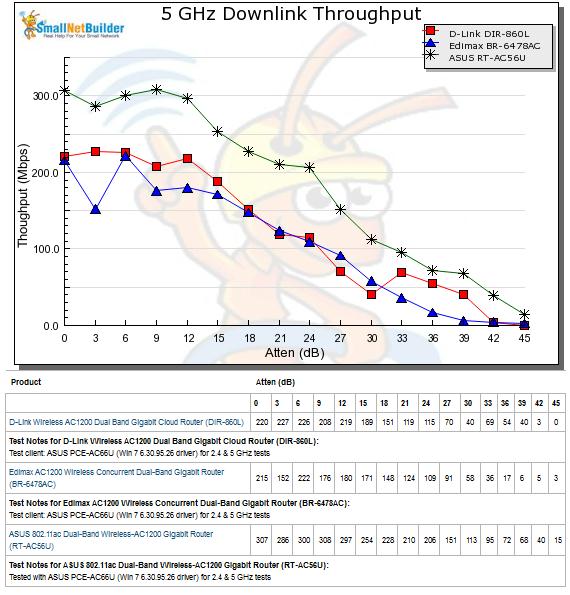
Most AC1200 routers can easily get 100 Mbps throughput but it still depends on your wireless environment.

user posted image
jjj2
post Apr 7 2016, 10:40 AM

Look at all my stars!!
*******
Senior Member
3,605 posts

Joined: Feb 2006
QUOTE(mambojambo @ Apr 7 2016, 10:10 AM)
I just installed 300Mbps Time in my house on 2nd Apr 2016.

I used direct cable connection and did speed test on Time's own speed test page.

The average I can get is around 260Mbps (down) / 280Mbps (up).

It's the Huawei modem with D-Link DIR-850L.

Is this normal?
*
Hi Bro,

Not to worry..this is normal... try to test using different speedtest servers and take a mean.

Thanks.
soonwai
post Apr 7 2016, 11:43 AM


********
All Stars
11,456 posts

Joined: Oct 2007
From: KL


QUOTE(mambojambo @ Apr 7 2016, 10:10 AM)
I just installed 300Mbps Time in my house on 2nd Apr 2016.

I used direct cable connection and did speed test on Time's own speed test page.

The average I can get is around 260Mbps (down) / 280Mbps (up).

It's the Huawei modem with D-Link DIR-850L.

Is this normal?
*
That's pretty good but DIR-850L should be able to handle full 300mbps. Someone on the Mikrotik thread managed 433mbps on TIME 500 with it.
https://forum.lowyat.net/index.php?showtopi...post&p=79327930
mambojambo
post Apr 7 2016, 11:50 AM

New Member
*
Junior Member
39 posts

Joined: Oct 2004


QUOTE(soonwai @ Apr 7 2016, 11:43 AM)
That's pretty good but DIR-850L should be able to handle full 300mbps. Someone on the Mikrotik thread managed 433mbps on TIME 500 with it.
https://forum.lowyat.net/index.php?showtopi...post&p=79327930
*
I called Time and they told me it's supposed to get around 70-80% of the speed only. On Unifi, my 20Mbps package can get me full 20Mbps.

Then, they told me they only guarantee the speed up to the modem only (even though the router was provided by them) and asked me to speedtest using direct cable connection to the Huawei modem.

I just tried that and no difference. Beginning to wonder whether Time is over promising....
tritonite
post Apr 7 2016, 12:05 PM

Casual
***
Junior Member
337 posts

Joined: Feb 2009
QUOTE(mambojambo @ Apr 7 2016, 11:50 AM)
I called Time and they told me it's supposed to get around 70-80% of the speed only. On Unifi, my 20Mbps package can get me full 20Mbps.

Then, they told me they only guarantee the speed up to the modem only (even though the router was provided by them) and asked me to speedtest using direct cable connection to the Huawei modem.

I just tried that and no difference. Beginning to wonder whether Time is over promising....
*
For the same price you are paying to get your 'full' 20Mbps Unifi, you are getting 70-80% of a 300Mbps line, which simple maths well tell you is WAAAYY more than 20Mbps. Even if it was operating at 50% capacity, you're still ahead.

People need to put things into perspective and look at the overall, bigger value-for-money picture.

No, I'm not presently a TIME subscriber, but it is definitely leaning that way once I am convinced that when their subscriber numbers reaches saturation with their new packages, their performance level is still good enough for my home office requirements.

mambojambo
post Apr 7 2016, 12:21 PM

New Member
*
Junior Member
39 posts

Joined: Oct 2004


QUOTE(tritonite @ Apr 7 2016, 12:05 PM)
For the same price you are paying to get your 'full' 20Mbps Unifi, you are getting 70-80% of a 300Mbps line, which simple maths well tell you is WAAAYY more than 20Mbps. Even if it was operating at 50% capacity, you're still ahead.

People need to put things into perspective and look at the overall, bigger value-for-money picture.

No, I'm not presently a TIME subscriber, but it is definitely leaning that way once I am convinced that when their subscriber numbers reaches saturation with their new packages, their performance level is still good enough for my home office requirements.
*
I don't think you are wrong to think that way. Yes, value for money wise, it is way better than TM. But that is using TM to justify the means, which I don't agree.

The fact is, I paid for 300Mbps and I think I should be getting the full speed. Of course, there are stuff like degradation along the cables and etc. But then... if they can offer 500Mbps on the same cable, then I don't see why my speed cannot get full.

If that is the way fibre works where the actual speed is always 80% of the "port" speed, then they should make sure their port is set to 375Mbps. Customer got no control over the quality of fibre cables (which are owned by Time).

I'm not an expert in fibre, but i definitely know that I paid for 300Mbps but I'm only getting 260Mbps.
TSezinger
post Apr 7 2016, 12:26 PM

butter cookies
******
Senior Member
1,536 posts

Joined: Jan 2005
QUOTE(mambojambo @ Apr 7 2016, 12:21 PM)
I don't think you are wrong to think that way. Yes, value for money wise, it is way better than TM. But that is using TM to justify the means, which I don't agree.

The fact is, I paid for 300Mbps and I think I should be getting the full speed. Of course, there are stuff like degradation along the cables and etc. But then... if they can offer 500Mbps on the same cable, then I don't see why my speed cannot get full.

If that is the way fibre works where the actual speed is always 80% of the "port" speed, then they should make sure their port is set to 375Mbps. Customer got no control over the quality of fibre cables (which are owned by Time).

I'm not an expert in fibre, but i definitely know that I paid for 300Mbps but I'm only getting 260Mbps.
*
Do you mind taking a screenshot of your speedtest from the time website?
nexona88
post Apr 7 2016, 12:29 PM

The Royal Club Member
*********
All Stars
48,441 posts

Joined: Sep 2014
From: REality
QUOTE(mambojambo @ Apr 7 2016, 10:10 AM)
I just installed 300Mbps Time in my house on 2nd Apr 2016.

I used direct cable connection and did speed test on Time's own speed test page.

The average I can get is around 260Mbps (down) / 280Mbps (up).

It's the Huawei modem with D-Link DIR-850L.

Is this normal?
*
the speed is kinda good for me thumbsup.gif

still better to get full 300Mbps sweat.gif
R4yMoNd
post Apr 7 2016, 12:31 PM

Regular
******
Senior Member
1,139 posts

Joined: Aug 2006
QUOTE(mambojambo @ Apr 7 2016, 12:21 PM)
I don't think you are wrong to think that way. Yes, value for money wise, it is way better than TM. But that is using TM to justify the means, which I don't agree.

The fact is, I paid for 300Mbps and I think I should be getting the full speed. Of course, there are stuff like degradation along the cables and etc. But then... if they can offer 500Mbps on the same cable, then I don't see why my speed cannot get full.

If that is the way fibre works where the actual speed is always 80% of the "port" speed, then they should make sure their port is set to 375Mbps. Customer got no control over the quality of fibre cables (which are owned by Time).

I'm not an expert in fibre, but i definitely know that I paid for 300Mbps but I'm only getting 260Mbps.
*
In my experience & opinion as follow:

Facts:
1. When i subscribe for 15Mbps connection Time will give around 17Mbps
2. When i upgrade to 20Mbps Time will give around 22-23Mbps
3. When Time upgrade me to 300Mbps from 20Mbps Time will give 300Mbps and my Speedtest shows max 297 (never above 300)

I realize even when you are using cable, some cable perform less than it claimed to be. perhaps you can try change the cable.

Speedtest results might affected by the speedtest host server & server connection performance.

Try speedtest direct from modem (ensuring no one else or any apps using the net in the background)

Or do the speedtest right after yo ureset the router and modem as soon as the connection back online.


I think they give 100% but what we receive around 85-90% and in my case i receive 98% icon_rolleyes.gif

This post has been edited by R4yMoNd: Apr 7 2016, 12:32 PM
TSezinger
post Apr 7 2016, 12:38 PM

butter cookies
******
Senior Member
1,536 posts

Joined: Jan 2005
Poor quality or a degraded LAN cable can affect your speed too or even your NIC.
infin
post Apr 7 2016, 12:44 PM

Getting Started
**
Junior Member
274 posts

Joined: Jan 2003
From: Damansara Perdana


QUOTE(mambojambo @ Apr 7 2016, 12:21 PM)
I don't think you are wrong to think that way. Yes, value for money wise, it is way better than TM. But that is using TM to justify the means, which I don't agree.

The fact is, I paid for 300Mbps and I think I should be getting the full speed. Of course, there are stuff like degradation along the cables and etc. But then... if they can offer 500Mbps on the same cable, then I don't see why my speed cannot get full.

If that is the way fibre works where the actual speed is always 80% of the "port" speed, then they should make sure their port is set to 375Mbps. Customer got no control over the quality of fibre cables (which are owned by Time).

I'm not an expert in fibre, but i definitely know that I paid for 300Mbps but I'm only getting 260Mbps.
*
There is minimal signal drop on fiber. Where the signal drops and noise comes in is between the building switch and your phone line outlet, when this last link is not fiber and is just standard phone cable. You should take a look at your floor's telephony room - it has likely become a jungle of wires with loose connections here and there. Older condos can even have compromised wiring to each apartment and don't forget your own sockets and cables.

Also, no provider will be updating the default firmware on the equipment that they provide, which is something that a savvy user should be doing first thing.

These factors will definitely give you the 80% of bandwidth that is actually useable in any network environment. Do also bear in mind that providing 300mbps over long distance is a different prospect from providing 20mbps - there are different network hardware/hardware protocols and a much higher sensitivity to line noise, since the same pipe is being used to send much more data.

That said, I'd love to see you succeed in getting them to over provision for your case.
mambojambo
post Apr 7 2016, 01:53 PM

New Member
*
Junior Member
39 posts

Joined: Oct 2004


QUOTE(infin @ Apr 7 2016, 12:44 PM)
There is minimal signal drop on fiber. Where the signal drops and noise comes in is between the building switch and your phone line outlet, when this last link is not fiber and is just standard phone cable. You should take a look at your floor's telephony room - it has likely become a jungle of wires with loose connections here and there. Older condos can even have compromised wiring to each apartment and don't forget your own sockets and cables.

Also, no provider will be updating the default firmware on the equipment that they provide, which is something that a savvy user should be doing first thing.

These factors will definitely give you the 80% of bandwidth that is actually useable in any network environment. Do also bear in mind that providing 300mbps over long distance is a different prospect from providing 20mbps - there are different network hardware/hardware protocols and a much higher sensitivity to line noise, since the same pipe is being used to send much more data.

That said, I'd love to see you succeed in getting them to over provision for your case.
*
My Unifi is like what you described. Fibre only to building switch, but re-use existing phone copper cable to provide the connection between modem and building switch.

But in my case of Time, it is fibre all the way to modem, which is why I couldn't accept cable degradation. Furthermore, these are brand new fibre cables recently installed (including the one they dug up the main road in front of the condo).

I will see what I can do about the firmware. Currently, it is the latest version from Dlink.

I have lodged a complaint with Time. Will see how they handle this.


tritonite
post Apr 7 2016, 02:03 PM

Casual
***
Junior Member
337 posts

Joined: Feb 2009
QUOTE(mambojambo @ Apr 7 2016, 12:21 PM)
I don't think you are wrong to think that way. Yes, value for money wise, it is way better than TM. But that is using TM to justify the means, which I don't agree.

The fact is, I paid for 300Mbps and I think I should be getting the full speed. Of course, there are stuff like degradation along the cables and etc. But then... if they can offer 500Mbps on the same cable, then I don't see why my speed cannot get full.

If that is the way fibre works where the actual speed is always 80% of the "port" speed, then they should make sure their port is set to 375Mbps. Customer got no control over the quality of fibre cables (which are owned by Time).

I'm not an expert in fibre, but i definitely know that I paid for 300Mbps but I'm only getting 260Mbps.
*
And this is exactly how some countries, like Germany and Norway, market their broadband. Due to EU regulalatory blah blah, most of them offer speeds LOWER than what the port is set to, to account for 'bleed', signal fade or whatever other reason, regardless whether it's on the provider end or the subscriber end.

What TIME should have done, in my opinion, is to market their package as 80Mbps and 250Mbps, while still keeping the ports set at 100Mbps and 300Mbps. That way, when their customers find that they are getting more than the advertised limit, they are very pleased and TIME would probably be their friend for life!

It's not even false advertising, but more of 'underpromising and overdelivering'. However, let's face it, this is Malaysia where large number matters, be it WIFI speeds, cellular coverage, broadband speeds and car engine capacities.

Ask yourself, would you not have subscribed to TIME if they had instead offered 80Mbps for RM149 and 250Mbps for RM189?

My point being it's all a matter of perspective, managing of expectation and the fact that service providers here (not only broadband) fail at knowing what they can deliver vs what is likely possible.


Lord_Ashe
post Apr 7 2016, 02:09 PM

Old Treasure Hunter Sidekick
******
Senior Member
1,495 posts

Joined: Sep 2005
From: Damansara Perdana - KL


Wow so much talk now on overprovisioning etc.

I dropped Unifi when I moved houses and got Astro IPTV with 10Mbps.
From Unifi 5Mbps to 10 with 30 hours free boost up to 50Mbps - I was blown away.
Then I canceled astro and settled for 20Mbps from Time.
Within 2 months I now get 100Mbps (out of supposed 300 from my ZTE stock router on LAN).

Now I am paying the same I ever did - which was RM179. To get a consistent 5x speed boost over what I paid for, with kids on youtube, wife on netflix and I can iflix at the same time...I dunno. I'm okay with it.

I'll upgrade my router later - but coming from Jaring, TMnet, streamyx, unifi and now TIME, i can tell you consistency wins every time.
kmrdeva
post Apr 7 2016, 02:20 PM

Look at all my stars!!
*******
Senior Member
4,776 posts

Joined: Jan 2003
QUOTE(Lord_Ashe @ Apr 7 2016, 02:09 PM)
Wow so much talk now on overprovisioning etc.

I dropped Unifi when I moved houses and got Astro IPTV with 10Mbps.
From Unifi 5Mbps to 10 with 30 hours free boost up to 50Mbps - I was blown away.
Then I canceled astro and settled for 20Mbps from Time.
Within 2 months I now get 100Mbps (out of supposed 300 from my ZTE stock router on LAN).

Now I am paying the same I ever did - which was RM179. To get a consistent 5x speed boost  over what I paid for, with kids on youtube, wife on netflix and I can iflix at the same time...I dunno. I'm okay with it.

I'll upgrade my router later - but coming from Jaring, TMnet, streamyx, unifi and now TIME, i can tell you consistency wins every time.
*
Aha, I feel the same way. When I first signed up with Time, I tried the RM129 8Mb plan. Was blown away by how much consistently speedier Time was than my RM140 4Mb streamyx. Went to RM179 15Mb, then tried the RM179 100Mb. Finally settled on RM249 50Mb which is now 500Mb!!

Am getting 470-480 Mbps if directly connected to my Asus router. Way way more than the 50Mb I initially paid for. Concurrent Netflix HD, youtube HD (wife and son on their own devices) and Bittorrent downloads with oodles of internet bandwidth to spare. Not getting 500Mb per Time's plan but I'm not complaining.. rclxm9.gif

This post has been edited by kmrdeva: Apr 7 2016, 02:20 PM
mintgadget
post Apr 7 2016, 02:25 PM

Casual
***
Junior Member
328 posts

Joined: Jun 2008
QUOTE(kmrdeva @ Apr 7 2016, 02:20 PM)
Aha, I feel the same way. When I first signed up with Time, I tried the RM129 8Mb plan. Was blown away by how much consistently speedier Time was than my RM140 4Mb streamyx. Went to RM179 15Mb, then tried the RM179 100Mb. Finally settled on RM249 50Mb which is now 500Mb!!

Am getting 470-480 Mbps if directly connected to my Asus router. Way way more than the 50Mb I initially paid for. Concurrent Netflix HD, youtube HD (wife and son on their own devices) and Bittorrent downloads with oodles of internet bandwidth to spare. Not getting 500Mb per Time's plan but I'm not complaining..  rclxm9.gif
*
you are right we are also not paying their full rate. be thankful.
donhue
post Apr 7 2016, 02:30 PM

On my way
****
Senior Member
586 posts

Joined: Jul 2007


QUOTE(Lord_Ashe @ Apr 7 2016, 02:09 PM)
Wow so much talk now on overprovisioning etc.

I dropped Unifi when I moved houses and got Astro IPTV with 10Mbps.
From Unifi 5Mbps to 10 with 30 hours free boost up to 50Mbps - I was blown away.
Then I canceled astro and settled for 20Mbps from Time.
Within 2 months I now get 100Mbps (out of supposed 300 from my ZTE stock router on LAN).

Now I am paying the same I ever did - which was RM179. To get a consistent 5x speed boost  over what I paid for, with kids on youtube, wife on netflix and I can iflix at the same time...I dunno. I'm okay with it.

I'll upgrade my router later - but coming from Jaring, TMnet, streamyx, unifi and now TIME, i can tell you consistency wins every time.
*
I think this will be the main difference between old & new subscribers..

Old subscribers like us are happy that we're getting at least 5x the speed than what we initially signed up for (at no extra charge)..

But new subscribers are signing up based on the expectation that they'll get exactly what they signed up for.. So definitely won't be happy when they see a 10% loss..
kmrdeva
post Apr 7 2016, 02:33 PM

Look at all my stars!!
*******
Senior Member
4,776 posts

Joined: Jan 2003
QUOTE(mintgadget @ Apr 7 2016, 02:25 PM)
you are right we are also not paying their full rate. be thankful.
*
It's up to the individual though, no right or wrong here. If a consumer is not happy, he/she has the right to ask for clarification and support from the provider.

As for me, I expect Time to provide me at least 85-90% of their advertised speed. So far so good. thumbsup.gif

Also, I don't realistically demand full speed connection to everwhere. I don't really know if Time can even guarantee full speed to every internet server in the world. Lots more factors at play here.
tritonite
post Apr 7 2016, 02:34 PM

Casual
***
Junior Member
337 posts

Joined: Feb 2009
QUOTE(donhue @ Apr 7 2016, 02:30 PM)
I think this will be the main difference between old & new subscribers..

Old subscribers like us are happy that we're getting at least 5x the speed than what we initially signed up for (at no extra charge)..

But new subscribers are signing up based on the expectation that they'll get exactly what they signed up for.. So definitely won't be happy when they see a 10% loss..
*
And you, sir, have pretty much hit the nail on the head.

I could say you've won the Internet, but I'm not in the position or power to offer it biggrin.gif

Lord_Ashe
post Apr 7 2016, 02:34 PM

Old Treasure Hunter Sidekick
******
Senior Member
1,495 posts

Joined: Sep 2005
From: Damansara Perdana - KL


QUOTE(donhue @ Apr 7 2016, 02:30 PM)
I think this will be the main difference between old & new subscribers..

Old subscribers like us are happy that we're getting at least 5x the speed than what we initially signed up for (at no extra charge)..

But new subscribers are signing up based on the expectation that they'll get exactly what they signed up for.. So definitely won't be happy when they see a 10% loss..
*
haha, I guess we are showing our age thumbup.gif
ralyon
post Apr 7 2016, 04:34 PM

Getting Started
**
Junior Member
234 posts

Joined: Jan 2005


Any idea how to change pppoe logon password?
Lego Warfare
post Apr 7 2016, 04:51 PM

Look at all my stars!!
*******
Senior Member
4,676 posts

Joined: Sep 2012
Is Time Fibre still only for Condo and apartments?
Can landed houses also apply?

And is there coverage for TTDI?
chuahcs79
post Apr 7 2016, 05:17 PM

Look at all my stars!!
Group Icon
Elite
6,931 posts

Joined: Apr 2011
From: Bolehland for sure ^_^


QUOTE(donhue @ Apr 7 2016, 02:30 PM)
I think this will be the main difference between old & new subscribers..

Old subscribers like us are happy that we're getting at least 5x the speed than what we initially signed up for (at no extra charge)..

But new subscribers are signing up based on the expectation that they'll get exactly what they signed up for.. So definitely won't be happy when they see a 10% loss..
*
Totally agree on this..

Glad to have any extra speed than original speed of 10mbps..


SUSLordDenning
post Apr 7 2016, 05:21 PM

peanut butter jelly
******
Senior Member
1,502 posts

Joined: Oct 2012
Hi bros

Can anyone check if Parklane OUG is covered by Time?

If NO, can you get an expected time/date/year that Time would be coming?

Cause now for Parklane OUG, Unifi is coming in in May.
and if Time not planning to come soon or what then I forced to go with Unifi. But the thing is, if sign up with Unifi got contract of 2 years.. So even if want change to Time later also a bit susah have to pay fine all..

If Time has plans to come anytime soon, then I would definitely wait for Time.
SUSTXSim
post Apr 7 2016, 07:27 PM

TIME Fibre Assistant and Wi-Fi Router Assistant
*******
Senior Member
2,137 posts

Joined: Oct 2015


QUOTE(ralyon @ Apr 7 2016, 04:34 PM)
Any idea how to change pppoe logon password?
*
No one can change it.
solou123
post Apr 7 2016, 08:09 PM

Getting Started
**
Junior Member
239 posts

Joined: Apr 2010
QUOTE(terence_nwb @ Apr 7 2016, 07:42 AM)
Nope, just go to www.time.com.my and check the coverage, it is listed on TIME website.
*

ok thx bro..
ray9292
post Apr 7 2016, 11:47 PM

Getting Started
**
Junior Member
256 posts

Joined: Mar 2010
From: Malaysia - Setapak
Hi, does anyone using this broadband in Kuala Lumpur setapak? I wish to apply this but I found that it's not available in setapak. 😭
infin
post Apr 8 2016, 12:40 AM

Getting Started
**
Junior Member
274 posts

Joined: Jan 2003
From: Damansara Perdana


QUOTE(donhue @ Apr 7 2016, 02:30 PM)
I think this will be the main difference between old & new subscribers..

Old subscribers like us are happy that we're getting at least 5x the speed than what we initially signed up for (at no extra charge)..

But new subscribers are signing up based on the expectation that they'll get exactly what they signed up for.. So definitely won't be happy when they see a 10% loss..
*
I would say that's down to the principal of things more than anything and your level of kiasu-ness. At which point would you complain that you're not getting the promised bandwidth? 50% less? 90% less? 99% less?

There's all this talk about accepting and being thankful about what we get. This is the reason why we're firmly stuck in the second or even third world.

Keep in mind I'm not complaining about not getting what is being advertised, that's the other guy.


....
Rocking the internet since 28.8kbps.


Chrono-Trigger
post Apr 8 2016, 12:41 AM

BY SELF ONE IS DEFILED AND PURIFIED
*******
Senior Member
4,308 posts

Joined: Aug 2013
Hi how is Time connection to singapore servers? Dota 2 stable? Time is available in my condo. I'm considering switching.

This post has been edited by Chrono-Trigger: Apr 8 2016, 12:43 AM
infin
post Apr 8 2016, 12:43 AM

Getting Started
**
Junior Member
274 posts

Joined: Jan 2003
From: Damansara Perdana


QUOTE(Chrono-Trigger @ Apr 8 2016, 12:41 AM)
Hi how is Time connection to singapore servers? Dota 2 stable?
*
Dude, read through the thread. The question has been asked and answered. You can get a 15+ ms ping to the SG servers.
Chrono-Trigger
post Apr 8 2016, 12:52 AM

BY SELF ONE IS DEFILED AND PURIFIED
*******
Senior Member
4,308 posts

Joined: Aug 2013
QUOTE(infin @ Apr 8 2016, 12:43 AM)
Dude, read through the thread. The question has been asked and answered. You can get a 15+ ms ping to the SG servers.
*
Good. Any promo now? 1 month free still available?
Chrono-Trigger
post Apr 8 2016, 12:54 AM

BY SELF ONE IS DEFILED AND PURIFIED
*******
Senior Member
4,308 posts

Joined: Aug 2013
One question , does the dlink router provided by Time capable of 100mbps wirelessly?

This post has been edited by Chrono-Trigger: Apr 8 2016, 12:55 AM
kmrdeva
post Apr 8 2016, 06:30 AM

Look at all my stars!!
*******
Senior Member
4,776 posts

Joined: Jan 2003
QUOTE(infin @ Apr 8 2016, 12:40 AM)
There's all this talk about accepting and being thankful about what we get. This is the reason why we're firmly stuck in the second or even third world.
*
I don't think it's so much about being thankful and accepting. More about setting my own expectation more realistically. Not even Google Fiber in the US gives users actual 1024 megabits per second as advertised, I believe.

DSLReports-GoogleFiber

QUOTE
Near Gbit speeds across the country (typically over 900M anytime of day)


This post has been edited by kmrdeva: Apr 8 2016, 06:32 AM
mintgadget
post Apr 8 2016, 07:09 AM

Casual
***
Junior Member
328 posts

Joined: Jun 2008
are you joking speeds up to 500mbps is "second or third world country" LOL. the old"er" users ought to be happy because they are paying less than what is advertise and getting the "FREE" upgrade.
Braxton
post Apr 8 2016, 07:26 AM

On my way
****
Junior Member
592 posts

Joined: Nov 2012


QUOTE(Chrono-Trigger @ Apr 8 2016, 12:52 AM)
Good. Any promo now? 1 month free still available?
*
Ya, still available

QUOTE(Chrono-Trigger @ Apr 8 2016, 12:54 AM)
One question , does the dlink router provided by Time capable of 100mbps wirelessly?
*
dir 850L can support 100Mb, but ur wireless device/receive need have ac
for LAN, 300Mb also not a problem
yeapch01
post Apr 8 2016, 07:27 AM

Regular
******
Senior Member
1,916 posts

Joined: Mar 2008


QUOTE(Chrono-Trigger @ Apr 8 2016, 01:52 AM)
Good. Any promo now? 1 month free still available?
*
Dear bro

Thanks for your interest in time fibre, yes dlink 850l router given by time is capable of getting 100mb at wireless mode.

Also one month free is still available.

Thanks
jjj2
post Apr 8 2016, 09:00 AM

Look at all my stars!!
*******
Senior Member
3,605 posts

Joined: Feb 2006
QUOTE(ray9292 @ Apr 7 2016, 11:47 PM)
Hi, does anyone using this broadband in Kuala Lumpur setapak? I wish to apply this but I found that it's not available in setapak. 😭
*
Not yet Bro.
ray9292
post Apr 8 2016, 09:19 AM

Getting Started
**
Junior Member
256 posts

Joined: Mar 2010
From: Malaysia - Setapak
QUOTE(jjj2 @ Apr 8 2016, 09:00 AM)
Not yet Bro.
*
Too bad 😭
Unifi at my place sucks. That's y I wan to try time
yeapch01
post Apr 8 2016, 09:46 AM

Regular
******
Senior Member
1,916 posts

Joined: Mar 2008


QUOTE(ray9292 @ Apr 8 2016, 10:19 AM)
Too bad 😭
Unifi at my place sucks. That's y I wan to try time
*
Dear bro

Dont worry bro . We will update you once time fibre expand the covetage wing at setapak


Thanks
ray9292
post Apr 8 2016, 10:24 AM

Getting Started
**
Junior Member
256 posts

Joined: Mar 2010
From: Malaysia - Setapak
QUOTE(yeapch01 @ Apr 8 2016, 09:46 AM)
Dear bro

Dont worry bro . We will update you once time fibre expand the covetage wing at setapak
Thanks
*
Good to hear that. Thanks!
playboy88
post Apr 8 2016, 10:46 AM

Getting Started
**
Junior Member
225 posts

Joined: Sep 2008
From: Kelana Jaya


hi everyone...if we buy the router D-Link DIR-850L at outside and install to our time will it difficult?

if better get from time online, they come install directly?
Majinity
post Apr 8 2016, 10:48 AM

Enthusiast
*****
Senior Member
792 posts

Joined: May 2006


Any plans to have coverage in Vista Alam, Seksyen 14 Shah Alam? I'll be your first subscriber here if you do, TIME.
yeapch01
post Apr 8 2016, 10:53 AM

Regular
******
Senior Member
1,916 posts

Joined: Mar 2008


QUOTE(playboy88 @ Apr 8 2016, 11:46 AM)
hi everyone...if we buy the router D-Link DIR-850L at outside and install to our time will it difficult?

if better get from time online, they come install directly?
*
Dear Bro

I suggest you better get it thru Time selfcare, it would be cheaper and easier to get support form Time customer services. Moreover the intstallation on site is free.

Thanks

yeapch01
post Apr 8 2016, 10:54 AM

Regular
******
Senior Member
1,916 posts

Joined: Mar 2008


QUOTE(Majinity @ Apr 8 2016, 11:48 AM)
Any plans to have coverage in Vista Alam, Seksyen 14 Shah Alam? I'll be your first subscriber here if you do, TIME.
*
Dear Bro


Thanks for your interest in Time fibre , We are are hearing you.

Thanks
tritonite
post Apr 8 2016, 03:20 PM

Casual
***
Junior Member
337 posts

Joined: Feb 2009
Wow! It's like I'm psychic!

Right after I mentioned yesterday about overcapping ports so as to be able to underpromise and overdeliver, it seems that TIME overcapped my father-in-law's 100Mbps package.

It is sustaining around 108Mbps via LAN at the moment, and using the equipment provided, as well.

That said, I probably shouldn't be too surprised. I've been told that back when the packages were 4/8/15Mbps, TIME were frequently capping the ports at 5/10/20Mbps, at least here in the PJ area.

terence_nwb
post Apr 8 2016, 03:23 PM

Look at all my stars!!
*******
Senior Member
7,016 posts

Joined: Jul 2012
From: Kuala Lumpur


QUOTE(tritonite @ Apr 8 2016, 03:20 PM)
Wow! It's like I'm psychic!

Right after I mentioned yesterday about overcapping ports so as to be able to underpromise and overdeliver, it seems that TIME overcapped my father-in-law's  100Mbps package.

It is sustaining around 108Mbps via LAN at the moment, and using the equipment provided, as well.

That said, I probably shouldn't be too surprised. I've been told that back when the packages were 4/8/15Mbps, TIME were frequently capping the ports at 5/10/20Mbps, at least here in the PJ area.
*
Not too surprised for me, my 500 Mbps line always can get > 550 Mbps download speed, good guy TIME notworthy.gif
tritonite
post Apr 8 2016, 03:34 PM

Casual
***
Junior Member
337 posts

Joined: Feb 2009
QUOTE(terence_nwb @ Apr 8 2016, 03:23 PM)
Not too surprised for me, my 500 Mbps line always can get > 550 Mbps download speed, good guy TIME  notworthy.gif
*
I'm going to conjecture that, for the lucky people at least, the ports for the new packages are actually capped at 120,350 and 600Mbps then. I will probably try to verify that at some stage as soon as I can ask a broad enough cross-section of subscribers locally.

It may just be that we're living in the vicinity of some TIME senior management personnel or major shareholders, and we got the spillover effects. Technical probably doesn't want to piss them off wink.gif

Here's hoping mine will be similarly overcapped when I subscribe.

This post has been edited by tritonite: Apr 8 2016, 03:38 PM
Ree73
post Apr 8 2016, 04:26 PM

Enthusiast
*****
Senior Member
761 posts

Joined: Jan 2003
some sharing on WIFI AC... I tried the TPLINK T4u, found out that the speed can go > 220mbps/200mbps with no prob, just maybe DC...(driver issue)

For Asus PCE-68, it will connect at 280mbps/300 and it will drop to 100mbps.... ( still driver issue!)

So, better use LAN cable...
kmrdeva
post Apr 8 2016, 05:29 PM

Look at all my stars!!
*******
Senior Member
4,776 posts

Joined: Jan 2003
QUOTE(Ree73 @ Apr 8 2016, 04:26 PM)
some sharing on WIFI AC... I tried the TPLINK T4u, found out that the speed can go > 220mbps/200mbps with no prob, just maybe DC...(driver issue)

For Asus PCE-68, it will connect at 280mbps/300 and it will drop to 100mbps.... ( still driver issue!)

So, better use LAN cable...
*
I'm using tp-link t4uh with my win10 pc (usb 2.0 only) in my study room. 1 wall and at least 8m away from my ac68u router. No random disconnects, consistent at least 200mb up and down. Cable will definitely be better but not practical for me.. Happy so far, it was a simple rm130 dongle solution. smile.gif

This post has been edited by kmrdeva: Apr 8 2016, 05:31 PM
mambojambo
post Apr 8 2016, 05:35 PM

New Member
*
Junior Member
39 posts

Joined: Oct 2004


QUOTE(terence_nwb @ Apr 8 2016, 03:23 PM)
Not too surprised for me, my 500 Mbps line always can get > 550 Mbps download speed, good guy TIME  notworthy.gif
*
Damn nice leh... I'm still waiting for Time to revert back to me.
mambojambo
post Apr 8 2016, 05:39 PM

New Member
*
Junior Member
39 posts

Joined: Oct 2004


QUOTE(kmrdeva @ Apr 8 2016, 06:30 AM)
I don't think it's so much about being thankful and accepting. More about setting my own expectation more realistically. Not even Google Fiber in the US gives users actual 1024 megabits per second as advertised, I believe.

DSLReports-GoogleFiber
*
Agree, we have to be realistic. Afterall, we're not paying enterprise-price for some 99.99% uptime SLA/SLG.

My own expectation for Time's fibre is 90-95% of the advertised speed. And after seeing quite a few people in Lowyat forum claiming to reach speeds of 100+, 300+ and 500+, makes me even more convinced I should not settle down for 70% average.
kmrdeva
post Apr 8 2016, 05:45 PM

Look at all my stars!!
*******
Senior Member
4,776 posts

Joined: Jan 2003
QUOTE(mambojambo @ Apr 8 2016, 05:39 PM)
Agree, we have to be realistic. Afterall, we're not paying enterprise-price for some 99.99% uptime SLA/SLG.

My own expectation for Time's fibre is 90-95% of the advertised speed. And after seeing quite a few people in Lowyat forum claiming to reach speeds of 100+, 300+ and 500+, makes me even more convinced I should not settle down for 70% average.
*
Agree with you. 70% of advertised rate on a wired connection is poor.
RagingCandy
post Apr 8 2016, 06:14 PM

Getting Started
**
Junior Member
205 posts

Joined: Sep 2014
Is it possible to setup the provided router (ZTE ZXHN H298N) as wireless bridge
Vintage
post Apr 8 2016, 06:58 PM

Getting Started
**
Junior Member
229 posts

Joined: Sep 2007


Where do I find information on coverage in KL? I can't seem to find any info regarding it on their website.

If anyone here could assist me, I live in Cheras (specifically Taman Connaught).
yeapch01
post Apr 8 2016, 07:00 PM

Regular
******
Senior Member
1,916 posts

Joined: Mar 2008


QUOTE(Vintage @ Apr 8 2016, 07:58 PM)
Where do I find information on coverage in KL? I can't seem to find any info regarding it on their website.

If anyone here could assist me, I live in Cheras (specifically Taman Connaught).
*
Dear bro

Thanks for your intetest in time fibre , sorry time fibre is not ready for services at your apartment

Thanks
Vintage
post Apr 8 2016, 07:02 PM

Getting Started
**
Junior Member
229 posts

Joined: Sep 2007


QUOTE(yeapch01 @ Apr 8 2016, 07:00 PM)
Dear bro

Thanks for your intetest in time fibre , sorry time fibre is not ready for services at your apartment

Thanks
*
Okay cool. Then may I know the extent of the coverage in KL, just for general knowledge?
RagingCandy
post Apr 8 2016, 08:31 PM

Getting Started
**
Junior Member
205 posts

Joined: Sep 2014
user posted image

TIME Package: 100Mbps
Router: Netgear WPN824N
Connection Mode: Wireless
Wireless Network Card: Intel Wireless Centrino N1000

Consider Good? blink.gif
doomx
post Apr 8 2016, 08:47 PM

Look at mah stars
*******
Senior Member
2,801 posts

Joined: Dec 2006


Where to subscribe? I'm from damansara perdana thinking of changing. Unifi too bodoh for me.
yeapch01
post Apr 8 2016, 09:03 PM

Regular
******
Senior Member
1,916 posts

Joined: Mar 2008


QUOTE(doomx @ Apr 8 2016, 09:47 PM)
Where to subscribe? I'm from damansara perdana thinking of changing. Unifi too bodoh for me.
*
Dear bro

Thanks for your interest in time fibre , we can help u.

Thanks
tritonite
post Apr 8 2016, 09:04 PM

Casual
***
Junior Member
337 posts

Joined: Feb 2009
QUOTE(doomx @ Apr 8 2016, 08:47 PM)
Where to subscribe? I'm from damansara perdana thinking of changing. Unifi too bodoh for me.
*
If you go to the management office, you will probably find some flyers and brochures with the name of the designated agent for your development. If you can't find any, there will probably be at least one stuck on your main noticeboard. If there still isn't, I would clarify with your condo management that your development does indeed have TIME Fibre Broadband service.

Since you mentioned Damansara Perdana, if you are living at Met Sq or Armanee Terrace, I am definitely sure you have coverage.

I would emphasise doing it through the designated agent on the brochure or flyer, rather than a reseller here, some of whom are terribly fond of telling you to read your PM, as though it's some sort of secret mission needing secret handshakes and codewords.

This post has been edited by tritonite: Apr 8 2016, 09:05 PM
cheese86
post Apr 8 2016, 10:08 PM

Enthusiast
*****
Senior Member
790 posts

Joined: Jan 2006
any coverage for Taman Tun Dr Ismail ?

2 street away from TTDI Hill
SUSTXSim
post Apr 8 2016, 10:50 PM

TIME Fibre Assistant and Wi-Fi Router Assistant
*******
Senior Member
2,137 posts

Joined: Oct 2015


QUOTE(wengjoe @ Apr 8 2016, 10:08 PM)
any coverage for Taman Tun Dr Ismail ?

2 street away from TTDI Hill
*
Landed atau High Rise?
mambojambo
post Apr 8 2016, 11:04 PM

New Member
*
Junior Member
39 posts

Joined: Oct 2004


QUOTE(tritonite @ Apr 8 2016, 09:04 PM)
If you go to the management office, you will probably find some flyers and brochures with the name of the designated agent for your development. If you can't find any, there will probably be at least one stuck on your main noticeboard. If there still isn't, I would clarify with your condo management that your development does indeed have TIME Fibre Broadband service.

Since you mentioned Damansara Perdana, if you are living at Met Sq or Armanee Terrace, I am definitely sure you have coverage.

I would emphasise doing it through the designated agent on the brochure or flyer, rather than a reseller here, some of whom are terribly fond of telling you to read your PM, as though it's some sort of secret mission needing secret handshakes and codewords.
*
...and the tendency to call everyone bro biggrin.gif
mambojambo
post Apr 8 2016, 11:29 PM

New Member
*
Junior Member
39 posts

Joined: Oct 2004


QUOTE(ezinger @ Apr 7 2016, 12:26 PM)
Do you mind taking a screenshot of your speedtest from the time website?
*
Just did the below test 1 min ago:

Attached Image
Braxton
post Apr 9 2016, 12:14 AM

On my way
****
Junior Member
592 posts

Joined: Nov 2012


QUOTE(mambojambo @ Apr 8 2016, 11:29 PM)
Just did the below test 1 min ago:

Attached Image
*
Wireless or downloading file?
mambojambo
post Apr 9 2016, 12:27 AM

New Member
*
Junior Member
39 posts

Joined: Oct 2004


QUOTE(Braxton @ Apr 9 2016, 12:14 AM)
Wireless or downloading file?
*
Direct cable from laptop to router. I also disabled both 2.4Ghz and 5Ghz SSID just to make sure no devices were connected through Wifi.

Above was more or less the kind of result the installer got when he was testing mine. Unfortunately, he gave up and told me to escalate to Time call centre.
Braxton
post Apr 9 2016, 12:52 AM

On my way
****
Junior Member
592 posts

Joined: Nov 2012


QUOTE(mambojambo @ Apr 9 2016, 12:27 AM)
Direct cable from laptop to router. I also disabled both 2.4Ghz and 5Ghz SSID just to make sure no devices were connected through Wifi.

Above was more or less the kind of result the installer got when he was testing mine. Unfortunately, he gave up and told me to escalate to Time call centre.
*
Ya, you should call TIME CS, 300Mb package should get 290Mb+ in speestest via LAN
cheese86
post Apr 9 2016, 07:24 AM

Enthusiast
*****
Senior Member
790 posts

Joined: Jan 2006
QUOTE(TXSim @ Apr 8 2016, 10:50 PM)
Landed atau High Rise?
*
landed property


yeapch01
post Apr 9 2016, 08:32 AM

Regular
******
Senior Member
1,916 posts

Joined: Mar 2008


QUOTE(wengjoe @ Apr 9 2016, 08:24 AM)
landed property
*
Dear bro

Landed property is limited and not available at your place.

Thanks
jjj2
post Apr 9 2016, 08:43 AM

Look at all my stars!!
*******
Senior Member
3,605 posts

Joined: Feb 2006
QUOTE(playboy88 @ Apr 8 2016, 10:46 AM)
hi everyone...if we buy the router D-Link DIR-850L at outside and install to our time will it difficult?

if better get from time online, they come install directly?
*
Not difficult, in fact it's pretty straight forward by just configuring the PPPOE settings.

Still advisable to purchase from TIME if it's not too hurry & afterall RM270 is not too expensive compared to outside, as it covers support & SI will come & install for you.

Thanks.
party
post Apr 9 2016, 08:45 AM

Enthusiast
*****
Senior Member
813 posts

Joined: May 2013


QUOTE(tritonite @ Apr 8 2016, 09:04 PM)
If you go to the management office, you will probably find some flyers and brochures with the name of the designated agent for your development. If you can't find any, there will probably be at least one stuck on your main noticeboard. If there still isn't, I would clarify with your condo management that your development does indeed have TIME Fibre Broadband service.

Since you mentioned Damansara Perdana, if you are living at Met Sq or Armanee Terrace, I am definitely sure you have coverage.

I would emphasise doing it through the designated agent on the brochure or flyer, rather than a reseller here, some of whom are terribly fond of telling you to read your PM, as though it's some sort of secret mission needing secret handshakes and codewords.
*
If u read the 1st few pages in this thread tink u might get an idea why they pm and not publicly replying.

jjj2
post Apr 9 2016, 08:46 AM

Look at all my stars!!
*******
Senior Member
3,605 posts

Joined: Feb 2006
QUOTE(tritonite @ Apr 8 2016, 03:20 PM)
Wow! It's like I'm psychic!

Right after I mentioned yesterday about overcapping ports so as to be able to underpromise and overdeliver, it seems that TIME overcapped my father-in-law's  100Mbps package.

It is sustaining around 108Mbps via LAN at the moment, and using the equipment provided, as well.

That said, I probably shouldn't be too surprised. I've been told that back when the packages were 4/8/15Mbps, TIME were frequently capping the ports at 5/10/20Mbps, at least here in the PJ area.
*
QUOTE(terence_nwb @ Apr 8 2016, 03:23 PM)
Not too surprised for me, my 500 Mbps line always can get > 550 Mbps download speed, good guy TIME  notworthy.gif
*
Hi Guys,

Please continue to monitor & feedback ya.

Appreciate that.
jjj2
post Apr 9 2016, 09:12 AM

Look at all my stars!!
*******
Senior Member
3,605 posts

Joined: Feb 2006
QUOTE(kmrdeva @ Apr 8 2016, 05:29 PM)
I'm using tp-link t4uh with my win10 pc (usb 2.0 only) in my study room. 1 wall and at least 8m away from my ac68u router. No random disconnects, consistent at least 200mb up and down. Cable will definitely be better but not practical for me.. Happy so far, it was a simple rm130 dongle solution. smile.gif
*
Hi Bro...I remember our team tested Tplink T2U & T4U (USB), both also performing relatively good..


jjj2
post Apr 9 2016, 09:18 AM

Look at all my stars!!
*******
Senior Member
3,605 posts

Joined: Feb 2006
QUOTE(mambojambo @ Apr 9 2016, 12:27 AM)
Direct cable from laptop to router. I also disabled both 2.4Ghz and 5Ghz SSID just to make sure no devices were connected through Wifi.

Above was more or less the kind of result the installer got when he was testing mine. Unfortunately, he gave up and told me to escalate to Time call centre.
*
Have you tested bypassing the Router ? Also please try to test on several speedtest servers and take a mean.

For further help in troubleshooting, you can text/whatsapp me.

Thanks.
K4iz3n
post Apr 9 2016, 09:31 AM

Getting Started
**
Junior Member
212 posts

Joined: May 2010
Any special offer Time is offering for new customers?
SUSTXSim
post Apr 9 2016, 09:32 AM

TIME Fibre Assistant and Wi-Fi Router Assistant
*******
Senior Member
2,137 posts

Joined: Oct 2015


QUOTE(K4iz3n @ Apr 9 2016, 09:31 AM)
Any special offer Time is offering for new customers?
*
New speed.

1 month free or RM 500 rebate.
yeapch01
post Apr 9 2016, 09:44 AM

Regular
******
Senior Member
1,916 posts

Joined: Mar 2008


QUOTE(K4iz3n @ Apr 9 2016, 10:31 AM)
Any special offer Time is offering for new customers?
*
Dear bro

Thanks for your interest in time fibre, may I know which condo/apartment you stay?

Thanks
phoenixxx
post Apr 9 2016, 10:07 AM

Sesquipedalian hittin' the quasihemdemisemiquaver
******
Senior Member
1,241 posts

Joined: Mar 2005
TIME technician just came and changed my modem this morning.

user posted image

Download able to reach 100mbps liao rclxms.gif

Thanks for help in arranging for the contractor to come.

Still waiting for TIME coverage in Uptown / Damansara Kim area....
luckykid5
post Apr 9 2016, 11:05 AM

Getting Started
**
Junior Member
217 posts

Joined: Mar 2010


Tropicana Indah or Damansara Indah has this time fibre?
yeapch01
post Apr 9 2016, 11:15 AM

Regular
******
Senior Member
1,916 posts

Joined: Mar 2008


QUOTE(luckykid5 @ Apr 9 2016, 12:05 PM)
Tropicana Indah or Damansara Indah has this time fibre?
*
Dear bro

Thanks for your interest in time fibre , if u refer to indah damansara , it is ready for time fibre services.

Anyway not for tropicana indah.

Thanks
richard1226
post Apr 9 2016, 11:20 AM

Getting Started
**
Junior Member
189 posts

Joined: Dec 2010
If you're not covering landed property, how about adding a disclaimer in all your ads

*Only for High End Condo only because more money /s

Anyway, any idea when is it really, as in REALLY REALLY COMING to landed property? No Hi blah blah thank you blah blah BS, We want ETA on When. Is. It. Coming. To. Landed. Property.

P/S: Bandar Botanic, Klang if you're wondering
vernon91
post Apr 9 2016, 11:50 AM

Maki-chan
*******
Senior Member
4,549 posts

Joined: Nov 2009
just wondering is TIME FIBRE available in Sterling Condo, Kelana Jaya? I checked the coverage map it seems does
Braxton
post Apr 9 2016, 12:20 PM

On my way
****
Junior Member
592 posts

Joined: Nov 2012


QUOTE(vernon91 @ Apr 9 2016, 11:50 AM)
just wondering is TIME FIBRE available in Sterling Condo, Kelana Jaya? I checked the coverage map it seems does
*
ya..Sterling Condo, Kelana Jaya got TIME service
paqralos
post Apr 9 2016, 12:33 PM

p@qY
*******
Senior Member
4,476 posts

Joined: Jan 2003
From: Subang Jaya


Hi guys,

I am using TIME broadband at the moment.
My house has multiple ethernet ports for LAN cable including my rooms. The issue is how am I getting these ethernet ports workable or accessible to the internet?

At the moment the fiber optics go straight to the modem which was given by TIME then router.

Please advise.

Thank you.

This post has been edited by paqralos: Apr 9 2016, 12:38 PM
Braxton
post Apr 9 2016, 12:45 PM

On my way
****
Junior Member
592 posts

Joined: Nov 2012


QUOTE(paqralos @ Apr 9 2016, 12:33 PM)
Hi guys,

I am using TIME broadband at the moment.
My house has multiple ethernet ports for LAN cable including my rooms. The issue is how am I getting these ethernet ports workable or accessible to the internet?

At the moment the fiber optics go straight to the modem which was given by TIME then router.

Please advise.

Thank you.
*
you need connect the ethernet ports to ur router
paqralos
post Apr 9 2016, 12:50 PM

p@qY
*******
Senior Member
4,476 posts

Joined: Jan 2003
From: Subang Jaya


QUOTE(Braxton @ Apr 9 2016, 12:45 PM)
you need connect the ethernet ports to ur router
*
The ports are all the same.. which one should i port in?

party
post Apr 9 2016, 02:16 PM

Enthusiast
*****
Senior Member
813 posts

Joined: May 2013


Hi,

My time is 300mbps. Should I get the dir850l or linksys ea6350?

My house device is 2dekstop, multiple laptops (at least 4), and ard 7 hp.

Apartment house with 1k sq.

Was tempting to just get linksys but nt sure if realli needed anot.
yeapch01
post Apr 9 2016, 02:57 PM

Regular
******
Senior Member
1,916 posts

Joined: Mar 2008


QUOTE(party @ Apr 9 2016, 03:16 PM)
Hi,

My time is 300mbps. Should I get the dir850l or linksys ea6350?

My house device is 2dekstop, multiple laptops (at least 4), and ard 7 hp.

Apartment house with 1k sq.

Was tempting to just get linksys but nt sure if realli needed anot.
*
Dear bro

If u have budget , shud go for linksys .

Thanks
party
post Apr 9 2016, 03:11 PM

Enthusiast
*****
Senior Member
813 posts

Joined: May 2013


QUOTE(yeapch01 @ Apr 9 2016, 02:57 PM)
Dear bro

If u have budget , shud go for linksys .

Thanks
*
Thanks bro. Ordered linksys..awaiting them to call for installation apointment. biggrin.gif
Braxton
post Apr 9 2016, 03:16 PM

On my way
****
Junior Member
592 posts

Joined: Nov 2012


QUOTE(paqralos @ Apr 9 2016, 12:50 PM)
The ports are all the same.. which one should i port in?
*
all also can
nexona88
post Apr 9 2016, 03:44 PM

The Royal Club Member
*********
All Stars
48,441 posts

Joined: Sep 2014
From: REality
QUOTE(party @ Apr 9 2016, 03:11 PM)
Thanks bro. Ordered linksys..awaiting them to call for installation apointment. biggrin.gif
*
nice rclxms.gif don't forget to update here tongue.gif
wil-i-am
post Apr 9 2016, 04:27 PM

10k Club
********
Senior Member
10,001 posts

Joined: May 2013
Went to my fren's apt in Shah Alam today
Ppl bz handout brochure promoting 500Mbps @ RM299/mth
paqralos
post Apr 9 2016, 04:27 PM

p@qY
*******
Senior Member
4,476 posts

Joined: Jan 2003
From: Subang Jaya


QUOTE(Braxton @ Apr 9 2016, 03:16 PM)
all also can
*
means i port in anyone also can??? It will work either way right?


thanks.
infin
post Apr 9 2016, 05:12 PM

Getting Started
**
Junior Member
274 posts

Joined: Jan 2003
From: Damansara Perdana


QUOTE(richard1226 @ Apr 9 2016, 11:20 AM)
If you're not covering landed property, how about adding a disclaimer in all your ads

*Only for High End Condo only because more money /s

Anyway, any idea when is it really, as in REALLY REALLY COMING to landed property? No Hi blah blah thank you blah blah BS, We want ETA on When. Is. It. Coming. To. Landed. Property.

P/S: Bandar Botanic, Klang if you're wondering
*
This is something that you'll need to accept. Time fiber has a very specific and exclusive market, it had something like 10 or so condos in their coverage when they first started out many years ago. By the look of things, they will not be expanding to have 100% coverage and won't be changing their business model anytime soon.

So if you want that 500mbps, your only recourse is to move to a condo within Time coverage.

Otherwise you need to wait till TM invests to upgrade their infra and provides the same. For 100mbps, it seems like it's just a matter of time, since they already have the Unifi Biz offering.
herojack41
post Apr 9 2016, 05:25 PM

Master Of Trouble Maker
*******
Senior Member
5,697 posts

Joined: Nov 2007
From: A Place Where God And Master Of TroubleMaker Exist


QUOTE(infin @ Apr 9 2016, 05:12 PM)
This is something that you'll need to accept. Time fiber has a very specific and exclusive market, it had something like 10 or so condos in their coverage when they first started out many years ago. By the look of things, they will not be expanding to have 100% coverage and won't be changing their business model anytime soon.

So if you want that 500mbps, your only recourse is to move to a condo within Time coverage.

Otherwise you need to wait till TM invests to upgrade their infra and provides the same. For 100mbps, it seems like it's just a matter of time, since they already have the Unifi Biz offering.
*
the infra is ready for unifi FTTH *landed*

is fibre to fibre for cabling. is up to them if they wanted to gave such speed
SUSTXSim
post Apr 9 2016, 05:34 PM

TIME Fibre Assistant and Wi-Fi Router Assistant
*******
Senior Member
2,137 posts

Joined: Oct 2015


QUOTE(paqralos @ Apr 9 2016, 04:27 PM)
means i port in anyone also can??? It will work either way right?
thanks.
*
All lan ports on the Wi-Fi Router can access to internet.


paqralos
post Apr 9 2016, 06:26 PM

p@qY
*******
Senior Member
4,476 posts

Joined: Jan 2003
From: Subang Jaya


QUOTE(TXSim @ Apr 9 2016, 05:34 PM)
All lan ports on the Wi-Fi Router can access to internet.
*
I am not referring to the ethernet port on the router.
My condo has multiple wall ethernet ports, I want to know how do I get the ports to have internet connections?
hotfloppy
post Apr 9 2016, 06:28 PM

Getting Started
**
Junior Member
95 posts

Joined: Oct 2004
From: Baker Street, NW


QUOTE(paqralos @ Apr 9 2016, 12:33 PM)
Hi guys,

I am using TIME broadband at the moment.
My house has multiple ethernet ports for LAN cable including my rooms. The issue is how am I getting these ethernet ports workable or accessible to the internet?

At the moment the fiber optics go straight to the modem which was given by TIME then router.

Please advise.

Thank you.
*
Do you mean the ethernet port on the wall? If it is, then you need to know where is the other end of those cable and connect those end to your router. For multiple cables (more than available port on router), you might need to get a proper ethernet switch, connect all those cables to the switch and 1 cable from switch to router.

This post has been edited by hotfloppy: Apr 9 2016, 06:28 PM
paqralos
post Apr 9 2016, 06:29 PM

p@qY
*******
Senior Member
4,476 posts

Joined: Jan 2003
From: Subang Jaya


QUOTE(hotfloppy @ Apr 9 2016, 06:28 PM)
Do you mean the ethernet port on the wall? If it is, then you need to know where is the other end of those cable and connect those end to your router. For multiple cable (more than available port on router), you might need to get a proper ethernet switch, connect all cables to the switch and 1 cable from switch to router.
*
Hmm... i guess all i need is to call the management next week for more information. Hopefully they can assist me then.

Thanks anyway.
hotfloppy
post Apr 9 2016, 06:32 PM

Getting Started
**
Junior Member
95 posts

Joined: Oct 2004
From: Baker Street, NW


QUOTE(paqralos @ Apr 9 2016, 06:29 PM)
Hmm... i guess all i need is to call the management next week for more information. Hopefully they can assist me then.

Thanks anyway.
*
Yeah, easier to call your management and ask about those ethernet faceplate. It's common in office environment but never saw it in houses. But it's convenient tho if can properly setup cos everyone can get LAN connection instead of WiFi. wink.gif
Braxton
post Apr 9 2016, 06:45 PM

On my way
****
Junior Member
592 posts

Joined: Nov 2012


QUOTE(paqralos @ Apr 9 2016, 04:27 PM)
means i port in anyone also can??? It will work either way right?
thanks.
*
yup, you can connect port 1 to 4
Nymi
post Apr 9 2016, 06:50 PM

New Member
*
Junior Member
47 posts

Joined: Jul 2009
Just got Time Fibre 100 Mbps, so for looks good.
However I'm not really impressed with the D-link DIR-850L router.

I have my own TP-Link Archer C7 router and want to use it instead. I had UniFi before this.

The tech guy who installed told me that all I should have to do is to change the PPPoE username and password and then I should be good to go.

Unfortunately I cannot connect. If I switch back to the D-link router (with the almost no settings) it just works...
Time Support just refers me to the manufacturer for support instead of giving me info enough for me to solve it on my own.

Anyone else in here using TP-Link with their Time Fibre who cares to share?
SUSTXSim
post Apr 9 2016, 06:52 PM

TIME Fibre Assistant and Wi-Fi Router Assistant
*******
Senior Member
2,137 posts

Joined: Oct 2015


QUOTE(Nymi @ Apr 9 2016, 06:50 PM)
Just got Time Fibre 100 Mbps, so for looks good.
However I'm not really impressed with the D-link DIR-850L router.

I have my own TP-Link Archer C7 router and want to use it instead. I had UniFi before this.

The tech guy who installed told me that all I should have to do is to change the PPPoE username and password and then I should be good to go.

Unfortunately I cannot connect. If I switch back to the D-link router (with the almost no settings) it just works...
Time Support just refers me to the manufacturer for support instead of giving me info enough for me to solve it on my own.

Anyone else in here using TP-Link with their Time Fibre who cares to share?
*
You have to reset the old Wi-Fi router to use.

tritonite
post Apr 9 2016, 06:58 PM

Casual
***
Junior Member
337 posts

Joined: Feb 2009
QUOTE(Nymi @ Apr 9 2016, 06:50 PM)
Just got Time Fibre 100 Mbps, so for looks good.
However I'm not really impressed with the D-link DIR-850L router.

I have my own TP-Link Archer C7 router and want to use it instead. I had UniFi before this.

The tech guy who installed told me that all I should have to do is to change the PPPoE username and password and then I should be good to go.

Unfortunately I cannot connect. If I switch back to the D-link router (with the almost no settings) it just works...
Time Support just refers me to the manufacturer for support instead of giving me info enough for me to solve it on my own.

Anyone else in here using TP-Link with their Time Fibre who cares to share?
*
In addition to the PPPoE username and password, you probably have to change the PPPoE settings for it to work. Do what TXSim suggested and do a reset of the router first.

Then, when setting up the router again for TIME, there should be a setting somewhere BEFORE you put in the username and password where you have to specify the PPPoE settings to be used. It should be drop-down menu somewhere where you can select 'Unifi Home' (which is probably what it was set to before), 'Unifi Biz', 'Maxis Home', etc. There should be one for 'TIME' somewhere, since I seem to remember that the Archer C7 has a fat 'TIME Fibre Broadband compatible' sticker on the box at the shops.

This post has been edited by tritonite: Apr 9 2016, 07:02 PM
Andy72
post Apr 9 2016, 07:01 PM

Getting Started
**
Junior Member
106 posts

Joined: Dec 2008
QUOTE(Nymi @ Apr 9 2016, 06:50 PM)
Just got Time Fibre 100 Mbps, so for looks good.
However I'm not really impressed with the D-link DIR-850L router.

I have my own TP-Link Archer C7 router and want to use it instead. I had UniFi before this.

The tech guy who installed told me that all I should have to do is to change the PPPoE username and password and then I should be good to go.

Unfortunately I cannot connect. If I switch back to the D-link router (with the almost no settings) it just works...
Time Support just refers me to the manufacturer for support instead of giving me info enough for me to solve it on my own.

Anyone else in here using TP-Link with their Time Fibre who cares to share?
*
Since you were using your TPlink with unifi previously, your router is still probably using unifi profile with vlan tagging. You need to unselect this feature to use the router with TIME.
Nymi
post Apr 9 2016, 07:07 PM

New Member
*
Junior Member
47 posts

Joined: Jul 2009
QUOTE(tritonite @ Apr 9 2016, 06:58 PM)
In addition to the PPPoE username and password, you probably have to change the PPPoE settings for it to work. Do what TXSim suggested and do a reset of the router first.

Then, when setting up the router again for TIME, there should be a setting somewhere BEFORE you put in the username and password where you have to specify the PPPoE settings to be used. It should be drop-down menu somewhere where you can select 'Unifi Home' (which is probably what it was set to before), 'Unifi Biz', 'Maxis Home', etc. There should be one for 'TIME' somewhere, since I seem to remember that the Archer C7 has a fat 'TIME Fibre Broadband compatible' sticker on the box at the shops.
*
OK, I'll set reset the router to clean out any incompatible settins from before.
However there is no pre made TIME setting when setting up the router. Only UniFi and Maxis exists in the options menu. I already tried the wizard when I tried setting up the router a second time.

Maybe I need to update the firmware, mine is a version 2, about 1 year old and bought at a time when there was no TIME logo on the packaging. smile.gif
Nymi
post Apr 9 2016, 07:09 PM

New Member
*
Junior Member
47 posts

Joined: Jul 2009
QUOTE(Andy72 @ Apr 9 2016, 07:01 PM)
Since you were using your TPlink with unifi previously, your router is still probably using unifi profile with vlan tagging. You need to unselect this feature to use the router with TIME.
*
When I tried doing a more "cleaner" setup, my router would not exept a NULL value for the VLAN tagging. All PPPoE profiles are required to have the tags. As far as I could tell. I tried the "other PPPoE service provider" option in the router when setting it up

tritonite
post Apr 9 2016, 07:14 PM

Casual
***
Junior Member
337 posts

Joined: Feb 2009
QUOTE(Nymi @ Apr 9 2016, 07:07 PM)
OK, I'll set reset the router to clean out any incompatible settins from before.
However there is no pre made TIME setting when setting up the router. Only UniFi and Maxis exists in the options menu. I already tried the wizard when I tried setting up the router a second time.

Maybe I need to update the firmware, mine is a version 2, about 1 year old and bought at a time when there was no TIME logo on the packaging. smile.gif
*
Yes, please try to update the firmware first.

I assume you are seeing what is described in the process listed here - http://www.tp-link.com/en/faq-704.html

If after you update your firmware, and there still isn't a 'TIME mode', you may have to use 'Custom Mode' and ask your installer/technician to help... if you still have his number.

I know that when we had trouble with my parents-in-law's installation, the technician came back the next morning to help even though it was a Saturday, and it was his day off. Even declined to accept a tip my father-in-law offered him for his trouble. Nice guy! I am going to specifically REQUEST that he come do my installation as well, just so he gets the commission, incentive payment or whatever helps the broadband installers along.


raul88
post Apr 9 2016, 09:44 PM

░░Madridista ░░
*******
Senior Member
2,280 posts

Joined: Jul 2008
From: マレーシア


U guys so lucky got time
The rest of us so pity stucked with this Tm crap
tritonite
post Apr 9 2016, 10:09 PM

Casual
***
Junior Member
337 posts

Joined: Feb 2009
QUOTE(raul88 @ Apr 9 2016, 09:44 PM)
U guys so lucky got time
The rest of us so pity stucked with this Tm crap
*
Stop feeling sorry for yourself, and start seeing things for what they are.

TIME is not wonderful, as some of the less than good opinions voiced in the previous pages have proven. They are doing just a good enough job at the moment with decent service and performance to make TM seem like mud. They have to, because they are the underdogs trying to build their customer base, and thus their income to offset their expenditure.

As not even a TIME subscriber presently, but having close family members and friends who are, I just hope TIME keeps working hard enough and not become complacent.

At the moment, they may seem like they are 5 or 10 times better than Unifi and Maxis, but as soon as they decide that being 1.1 or 1.2 times as good - i.e. just slightly better than Unifi and Maxis is enough, then it won't bode well for their subscribers.

As for the state of Unifi, it may be a bitter pill to swallow, but I still stand by my statement in the other thread about the subscribers bringing it on themselves by falling for their 'sucker born every minute' strategy. But I rest my case since most people are not willing to listen or agree. So, it'll just go downhill, but hopefully hit bottom soon.

Me, I look forward to being a TIME subscriber in late-September or early-October.

This post has been edited by tritonite: Apr 10 2016, 12:31 AM
SUSTXSim
post Apr 9 2016, 10:58 PM

TIME Fibre Assistant and Wi-Fi Router Assistant
*******
Senior Member
2,137 posts

Joined: Oct 2015


QUOTE(Nymi @ Apr 9 2016, 07:07 PM)
OK, I'll set reset the router to clean out any incompatible settins from before.
However there is no pre made TIME setting when setting up the router. Only UniFi and Maxis exists in the options menu. I already tried the wizard when I tried setting up the router a second time.

Maybe I need to update the firmware, mine is a version 2, about 1 year old and bought at a time when there was no TIME logo on the packaging. smile.gif
*
Hi. Have you tried setting up?
Do have manual PPPoE?
AsuKi
post Apr 10 2016, 10:36 AM

♥C.S.I♥
******
Senior Member
1,144 posts

Joined: Jan 2003
From: Republik Of Kelantanese

QUOTE(raul88 @ Apr 9 2016, 09:44 PM)
U guys so lucky got time
The rest of us so pity stucked with this Tm crap
*
cry.gif cry.gif cry.gif
ralyon
post Apr 10 2016, 10:51 AM

Getting Started
**
Junior Member
234 posts

Joined: Jan 2005


QUOTE(Nymi @ Apr 9 2016, 06:50 PM)
Just got Time Fibre 100 Mbps, so for looks good.
However I'm not really impressed with the D-link DIR-850L router.

I have my own TP-Link Archer C7 router and want to use it instead. I had UniFi before this.

The tech guy who installed told me that all I should have to do is to change the PPPoE username and password and then I should be good to go.

Unfortunately I cannot connect. If I switch back to the D-link router (with the almost no settings) it just works...
Time Support just refers me to the manufacturer for support instead of giving me info enough for me to solve it on my own.

Anyone else in here using TP-Link with their Time Fibre who cares to share?
*
You don't need to setup VLAN for TIME. Go to "Quick Setup", you should see following options, choose Normal mode and then continue with the rest of setup process.

Normal Mode - You don't have applied any IPTV or VOIP service
Unifi Mode - You have applied TM Unifi service
Maxis Mode - You have applied Maxis Fiber service
Other Mode - You have applied some other ISP's service which should be configured with VLAN information.

Then go to Network -> WAN and setup as follow:
WAN Connection Type: PPPoE/Russia PPPoE
Secondary Connection: Disabled
Wan Connection Mode: Connect Automatically
mavric
post Apr 10 2016, 01:14 PM

Getting Started
**
Junior Member
104 posts

Joined: Oct 2007


QUOTE(infin @ Apr 7 2016, 09:17 AM)
Wifi signals will vary wildly depending on the wall configuration of your place. There will be sweet spots where you can achieve high wifi bandwidth but also black holes where the signal is weakest.

However, the biggest negative impact on the quality of your wifi signal is this -  all the other wifi routers/access point around you. In condos, that means that both your wifi router and PC/devices will have to fight with X number of other wifi devices for the same range of radio signals, worse still if your wifi router doesn't have a good algorithm to dynamically change wifi channels so that it doesn't conflict with other wifi users. In a condo environment it is like a very loud restaurant/club - everyone is shouting to be heard over everyone else and you can't really hear what the people at your table are saying...

What you can try to do is to find out what channels other wifi routers are using and configure your wifi router to a channel that isn't used or one that provides you with the best signal strength.

Otherwise look into triple/quad band wifi AC routers but keep in mind that your PC and devices must also be able to speak the same language and be AC and triple/quad band compatible. For PCs, this means adding a Wifi dongle that matches the spec.
*
QUOTE(ezinger @ Apr 7 2016, 10:34 AM)
Most AC1200 routers can easily get 100 Mbps throughput but it still depends on your wireless environment.

user posted image
*
My router placement in my condo is just 1 feet away from where my sofa is so pretty sure that's the sweetest spot in the house smile.gif Tried fidgeting with the channels, upgraded to the latest firmware available, reset and reconfigured the router but the results are the same. On the current Time 100Mbps line, I am only able to achieve around 40+Mbps on wifi but can hit 80-90+ Mbps on LAN. Since the fibre was pulled all the way to my modem and not the last-mile-copper types, that rules out any cabling issues considering my speed on LAN is very much acceptable.

Of course I tried my luck emailing Time Support and complained about the Linksys E1200 router they gave me 2 years ago. Here's their response:

"Please be inform that the given Cisco Linksys E1200 router is run on 2.4Ghz radio frequency band which can support up to 40Mbps on WiFi. We regret to inform that we do not offer any router replacement. You may purchase the dual band router on your own or purchase the router from TIME through our selfcare portal."

So all things considered, does this mean I really need to get a new router to hit the promised land of 100Mbps and stop flogging the old E1200?

Checked the official link here: http://www.linksys.com/my/p/P-E1200/

Still find it hard to accept the E1200 can only support up to 40Mbps on WiFi.


Braxton
post Apr 10 2016, 01:49 PM

On my way
****
Junior Member
592 posts

Joined: Nov 2012


QUOTE(mavric @ Apr 10 2016, 01:14 PM)
My router placement in my condo is just 1 feet away from where my sofa is so pretty sure that's the sweetest spot in the house smile.gif Tried fidgeting with the channels, upgraded to the latest firmware available, reset and reconfigured the router but the results are the same. On the current Time 100Mbps line, I am only able to achieve around 40+Mbps on wifi but can hit 80-90+ Mbps on LAN. Since the fibre was pulled all the way to my modem and not the last-mile-copper types, that rules out  any cabling issues considering my speed on LAN is very much acceptable.

Of course I tried my luck emailing Time Support and complained about the Linksys E1200 router they gave me 2 years ago. Here's their response:

"Please be inform that the given Cisco Linksys E1200 router is run on 2.4Ghz radio frequency band  which can support up to 40Mbps on WiFi. We regret to inform that we do not offer any router replacement. You may purchase the dual band router on your own or purchase the router from TIME through our selfcare portal."

So all things considered, does this mean I really need to get a new router to hit the promised land of 100Mbps and stop flogging the old E1200?

Checked the official link here: http://www.linksys.com/my/p/P-E1200/

Still find it hard to accept the E1200 can only support up to 40Mbps on WiFi.
*
Just buy a new AC dual band router.
but also make sure ur wiless device got AC or 5G signal
durian
post Apr 10 2016, 04:25 PM

Getting Started
**
Junior Member
75 posts

Joined: Feb 2007
got upgraded to 300 Mbps. ori modem and TL-WR1043ND V2 router.
Still cannot get advertised speed (240Mbps) on wifi.
i get around 60++ download and 70+ upload.
anyone knows whats the issue?
anyone got 300 mbps?

Braxton
post Apr 10 2016, 05:34 PM

On my way
****
Junior Member
592 posts

Joined: Nov 2012


QUOTE(durian @ Apr 10 2016, 04:25 PM)
got upgraded to 300 Mbps. ori modem and TL-WR1043ND V2 router.
Still cannot get advertised speed (240Mbps) on wifi.
i get around 60++ download and 70+ upload.
anyone knows whats the issue?
anyone got 300 mbps?
*
because it is single band wifi router..
2.4G max can get 9xMbps
durian
post Apr 10 2016, 05:57 PM

Getting Started
**
Junior Member
75 posts

Joined: Feb 2007
QUOTE(Braxton @ Apr 10 2016, 05:34 PM)
because it is single band wifi router..
2.4G max can get 9xMbps
*
sorry ar boss but the specs says

4 10/100/1000Mbps LAN Ports
11n: Up to 450Mbps(dynamic)

so it doesn't really makes sense to me >.<
anything useful i can read up?
infin
post Apr 10 2016, 06:52 PM

Getting Started
**
Junior Member
274 posts

Joined: Jan 2003
From: Damansara Perdana


QUOTE(herojack41 @ Apr 9 2016, 05:25 PM)
the infra is ready for unifi FTTH *landed*

is fibre to fibre for cabling. is up to them if they wanted to gave such speed
*
That is Unifi, not Time.

And besides, even if Time used the existing TM fiber infrastructure (at who knows what price), they would still need to provide the international bandwidth, which has most definitely been sized for the current subscriber coverage.

It all comes down to cost. Right now it is more profitable for Time to cater to condos due to the higher density when compared to landed properties. I can assure you that someone there is thinking about whether or not they can make a profit providing broadband to landed properties - and right now it looks like the answer is no. Any landed properties they do provide service for are most likely linked to VIPs from inside and outside of their company - or they happen to be developments that signed Time up for telecoms infra.

They most certainly are not doing all this as a public community service.
herojack41
post Apr 10 2016, 07:09 PM

Master Of Trouble Maker
*******
Senior Member
5,697 posts

Joined: Nov 2007
From: A Place Where God And Master Of TroubleMaker Exist


QUOTE(infin @ Apr 10 2016, 06:52 PM)
That is Unifi, not Time.

And besides, even if Time used the existing TM fiber infrastructure (at who knows what price), they would still need to provide the international bandwidth, which has most definitely been sized for the current subscriber coverage.

It all comes down to cost. Right now it is more profitable for Time to cater to condos due to the higher density when compared to landed properties. I can assure you that someone there is thinking about whether or not they can make a profit providing broadband to landed properties - and right now it looks like the answer is no. Any landed properties they do provide service for are most likely linked to VIPs from inside and outside of their company - or they happen to be developments that signed Time up for telecoms infra.

They most certainly are not doing all this as a public community service.
*
QUOTE
Otherwise you need to wait till TM invests to upgrade their infra and provides the same. For 100mbps, it seems like it's just a matter of time, since they already have the Unifi Biz offering.


u mention TM invest to upgrade their infra in your previous post hmm.gif


tritonite
post Apr 10 2016, 07:16 PM

Casual
***
Junior Member
337 posts

Joined: Feb 2009
QUOTE(infin @ Apr 10 2016, 06:52 PM)
That is Unifi, not Time.

And besides, even if Time used the existing TM fiber infrastructure (at who knows what price), they would still need to provide the international bandwidth, which has most definitely been sized for the current subscriber coverage.

It all comes down to cost. Right now it is more profitable for Time to cater to condos due to the higher density when compared to landed properties. I can assure you that someone there is thinking about whether or not they can make a profit providing broadband to landed properties - and right now it looks like the answer is no. Any landed properties they do provide service for are most likely linked to VIPs from inside and outside of their company - or they happen to be developments that signed Time up for telecoms infra.

They most certainly are not doing all this as a public community service.
*
This is correct, and the sooner people realise this, the better.

TIME could spend the millions to fibre up a typical small taman of 200-300 households, but with only a 15-20% uptake, they'd already be operating at a loss providing the service. And typical modern Malaysians being the ungrateful, self-entitled lot as they are, 2-3 months down the road, they'll start demanding Google Fibre standards of performance and service at 3rd world prices.

Malaysia needs a few more Unifi-level fiascos before they will truly appreciate it when good broadband comes along.

... or maybe not, if LYN represents an accurate cross-section of Malaysian society.

ralyon
post Apr 10 2016, 07:21 PM

Getting Started
**
Junior Member
234 posts

Joined: Jan 2005


QUOTE(durian @ Apr 10 2016, 04:25 PM)
got upgraded to 300 Mbps. ori modem and TL-WR1043ND V2 router.
Still cannot get advertised speed (240Mbps) on wifi.
i get around 60++ download and 70+ upload.
anyone knows whats the issue?
anyone got 300 mbps?
*
Yea, I get close to 300mbps if the speedtest server is capable.
You only mention your router, but who knows what device you are using?
One thing I can tell you is that even if you have N 450mbps capable device, you won't get even close to 200mbps over wifi.
To get more or less stable 300mbps via wifi, use AC1750 or better router and device.

opteron82
post Apr 10 2016, 07:28 PM

Getting Started
**
Junior Member
52 posts

Joined: Aug 2006
I test with my TPLINK AC1750 modem with different device.
get the below result. All result test by time server.
not only buy a expensive modem, good wifi adapter also very important.

download/upload
USB Wifi adapter(5Ghz AC867Mhz) = 98mbps / 99mbps
phone (5Ghz N150mbps) = 47mbps / 74mbps
pad (5Ghz N72.2mbps) = 28mbps / 29mbps
phone (5Ghz AC200mbps) = 70mbps / 95mbps

This post has been edited by opteron82: Apr 10 2016, 07:31 PM
infin
post Apr 10 2016, 07:29 PM

Getting Started
**
Junior Member
274 posts

Joined: Jan 2003
From: Damansara Perdana


QUOTE(herojack41 @ Apr 10 2016, 07:09 PM)
u mention TM invest to upgrade their infra in your previous post  hmm.gif
*
That part was referring to their international links, which is as important as the FTTH portion is. They have enough international bandwidth for their business customers but it doesn't seem like they have enough to cover their consumer needs. This would all go away if they added more international links, which requires significant investment on their part.

But they are big and slow to adapt - and would rather sit on their profits than improve customer service for the everyday Malaysian.

durian
post Apr 10 2016, 08:04 PM

Getting Started
**
Junior Member
75 posts

Joined: Feb 2007
QUOTE(ralyon @ Apr 10 2016, 07:21 PM)
Yea, I get close to 300mbps if the speedtest server is capable.
You only mention your router, but who knows what device you are using?
One thing I can tell you is that even if you have N 450mbps capable device, you won't get even close to 200mbps over wifi.
To get more or less stable 300mbps via wifi, use AC1750 or better router and device.
*
Pardon me for being an airhead. XD
Here is the equipment that I am using:

Wireless Router : (TP link) TL-WR1043ND
Wireless USB Adapter : (TP link) TL-WN8200ND
Modem : Huawei Time default modem

I have a media PC connected to the router via LAN cable
and a PC for games etc etc in my room connected via wireless (thus the TL-WN8200ND)
the router is advertised up to 450 Mbps and the adapter up to 300 Mbps
however both speedtested via TIME server approx 60ish dl and 70ish ul
so i am wondering why i could get the speed as per stated.

is there something wrong with my setup? because it is a single band as per mention by other forum dweller?
if i want to fix it? how?
should i need to acquire new equipment to get the maximum speed. what should they be?
my budget is up to 1k (inclusive of modem, adapter, router)
please do recommend me the goods. thanks in advance
opteron82
post Apr 10 2016, 08:12 PM

Getting Started
**
Junior Member
52 posts

Joined: Aug 2006
QUOTE(durian @ Apr 10 2016, 08:04 PM)
Pardon me for being an airhead. XD
Here is the equipment that I am using:

Wireless Router : (TP link) TL-WR1043ND
Wireless USB Adapter : (TP link) TL-WN8200ND
Modem : Huawei Time default modem

I have a media PC connected to the router via LAN cable
and a PC for games etc etc in my room connected via wireless (thus the TL-WN8200ND)
the router is advertised up to 450 Mbps and the adapter up to 300 Mbps
however both speedtested via TIME server approx 60ish dl and 70ish ul
so i am wondering why i could get the speed as per stated.

is there something wrong with my setup? because it is a single band as per mention by other forum dweller?
if i want to fix it? how?
should i need to acquire new equipment to get the maximum speed. what should they be?
my budget is up to 1k (inclusive of modem, adapter, router)
please do recommend me the goods. thanks in advance
*
your 2.4Ghz bandwidth is set 20Mhz or 40Mhz?
guyguy
post Apr 10 2016, 08:24 PM

Getting Started
**
Junior Member
68 posts

Joined: Feb 2009
the 100mbps residential plan have any download quota?
durian
post Apr 10 2016, 08:24 PM

Getting Started
**
Junior Member
75 posts

Joined: Feb 2007
QUOTE(opteron82 @ Apr 10 2016, 08:12 PM)
your 2.4Ghz bandwidth is set 20Mhz or 40Mhz?
*
channel width is 40MHz
opteron82
post Apr 10 2016, 08:32 PM

Getting Started
**
Junior Member
52 posts

Joined: Aug 2006
QUOTE(durian @ Apr 10 2016, 08:24 PM)
channel width is 40MHz
*
your PC wireless connection Speed is show 300Mbps?
I have test before with 2.4Ghz N300 Mbps speed, speed test upload and download can over 90mbps.
pap55
post Apr 10 2016, 08:52 PM

Getting Started
**
Junior Member
93 posts

Joined: Jul 2007


http://www.speedguide.net/faq/what-is-the-...of-wireless-374
durian
post Apr 10 2016, 08:55 PM

Getting Started
**
Junior Member
75 posts

Joined: Feb 2007
QUOTE(pap55 @ Apr 10 2016, 08:52 PM)
thanks
ralyon
post Apr 10 2016, 09:12 PM

Getting Started
**
Junior Member
234 posts

Joined: Jan 2005


QUOTE(durian @ Apr 10 2016, 08:04 PM)
Pardon me for being an airhead. XD
Here is the equipment that I am using:

Wireless Router : (TP link) TL-WR1043ND
Wireless USB Adapter : (TP link) TL-WN8200ND
Modem : Huawei Time default modem

I have a media PC connected to the router via LAN cable
and a PC for games etc etc in my room connected via wireless (thus the TL-WN8200ND)
the router is advertised up to 450 Mbps and the adapter up to 300 Mbps
however both speedtested via TIME server approx 60ish dl and 70ish ul
so i am wondering why i could get the speed as per stated.

is there something wrong with my setup? because it is a single band as per mention by other forum dweller?
if i want to fix it? how?
should i need to acquire new equipment to get the maximum speed. what should they be?
my budget is up to 1k (inclusive of modem, adapter, router)
please do recommend me the goods. thanks in advance
*
Nothing much you can do, that's more or less the speed you can with N300 adapter.

To get 300Mbps, you need to upgrade router and wifi adapter.
I am using the following, getting 300Mbps is not a problem for me:
Router - TP-LINK Archer C7, RM400+/-
Wifi adapter - TP-LINK Archer T8E - RM200+/-
SUSTXSim
post Apr 10 2016, 09:42 PM

TIME Fibre Assistant and Wi-Fi Router Assistant
*******
Senior Member
2,137 posts

Joined: Oct 2015


QUOTE(guyguy @ Apr 10 2016, 08:24 PM)
the 100mbps residential plan have any download quota?
*
Time Fibre Home Broadband don't have quota.

Unlimited quota for all plans.

This post has been edited by TXSim: Apr 10 2016, 09:45 PM
yeapch01
post Apr 10 2016, 09:43 PM

Regular
******
Senior Member
1,916 posts

Joined: Mar 2008


QUOTE(guyguy @ Apr 10 2016, 09:24 PM)
the 100mbps residential plan have any download quota?
*
Dear bro

Thanks for your interest in time fibre , for the new time fibre home broadband packages , all plan don not have quota limit .


Thanks
JanqEs
post Apr 11 2016, 12:18 AM

New Member
*
Junior Member
33 posts

Joined: Apr 2010
hey I wanted to ask a thing or two. is time fibre is stable? If i wanna apply one how much is the first payment would be? is there any additional charges?
chicaman
post Apr 11 2016, 12:30 AM

( ;゚Д゚) t(-.-t)
*******
Senior Member
9,706 posts

Joined: Feb 2005
From: Why U wana know? Status: Meditating™
Their coverage is pretty bad, only cover a few buildings
yeapch01
post Apr 11 2016, 03:25 AM

Regular
******
Senior Member
1,916 posts

Joined: Mar 2008


QUOTE(JanqEs @ Apr 11 2016, 01:18 AM)
hey I wanted to ask a thing or two. is time fibre is stable? If i wanna apply one how much is the first payment would be? is there any additional charges?
*
Dear bro

Thanks for your interest in time fibre, for new application , there is no upfront fee. In fact , there is s promo that first month broadband is waived at the moment.

Thus first month charges is upon received first bill is stamp duty rm10.

Thanks
djazmy
post Apr 11 2016, 08:55 AM

Getting Started
**
Junior Member
89 posts

Joined: Jul 2005


QUOTE(doomx @ Apr 8 2016, 08:47 PM)
Where to subscribe? I'm from damansara perdana thinking of changing. Unifi too bodoh for me.
*
join the revolution.. im in damansara perdana too and just changed from unibodoh to Time ... so far so good
yeapch01
post Apr 11 2016, 09:02 AM

Regular
******
Senior Member
1,916 posts

Joined: Mar 2008


QUOTE(djazmy @ Apr 11 2016, 09:55 AM)
join the revolution.. im in damansara perdana too and just changed from unibodoh to Time ... so far so good
*
Dear bro

Welcome on board. Kindly share your user experince in Time fibre compare to unifi.

Thanks
RasWong
post Apr 11 2016, 09:38 AM

Getting Started
**
Junior Member
235 posts

Joined: Mar 2012


Hi,

Is the promotion to change other ISP service to TIME still available? Just recently know TIME has increase the bandwidth really interested right now.
TSezinger
post Apr 11 2016, 09:40 AM

butter cookies
******
Senior Member
1,536 posts

Joined: Jan 2005
QUOTE(mavric @ Apr 10 2016, 01:14 PM)
My router placement in my condo is just 1 feet away from where my sofa is so pretty sure that's the sweetest spot in the house smile.gif Tried fidgeting with the channels, upgraded to the latest firmware available, reset and reconfigured the router but the results are the same. On the current Time 100Mbps line, I am only able to achieve around 40+Mbps on wifi but can hit 80-90+ Mbps on LAN. Since the fibre was pulled all the way to my modem and not the last-mile-copper types, that rules out  any cabling issues considering my speed on LAN is very much acceptable.

Of course I tried my luck emailing Time Support and complained about the Linksys E1200 router they gave me 2 years ago. Here's their response:

"Please be inform that the given Cisco Linksys E1200 router is run on 2.4Ghz radio frequency band  which can support up to 40Mbps on WiFi. We regret to inform that we do not offer any router replacement. You may purchase the dual band router on your own or purchase the router from TIME through our selfcare portal."

So all things considered, does this mean I really need to get a new router to hit the promised land of 100Mbps and stop flogging the old E1200?

Checked the official link here: http://www.linksys.com/my/p/P-E1200/

Still find it hard to accept the E1200 can only support up to 40Mbps on WiFi.
*
The E1200 doesn't even have a gigabit port. I think it's safe to say that a minimum of a dual band router would easily let you reach 100 Mbps on LAN and possible around the same on WiFi.
djazmy
post Apr 11 2016, 09:48 AM

Getting Started
**
Junior Member
89 posts

Joined: Jul 2005


QUOTE(yeapch01 @ Apr 11 2016, 09:02 AM)
Dear bro

Welcome on board. Kindly share your user experince in  Time fibre compare to unifi.

Thanks
*
blistering fast, low ping icon_idea.gif
jjj2
post Apr 11 2016, 10:27 AM

Look at all my stars!!
*******
Senior Member
3,605 posts

Joined: Feb 2006
QUOTE(RasWong @ Apr 11 2016, 09:38 AM)
Hi,

Is the promotion to change other ISP service to TIME still available?  Just recently know TIME has increase the bandwidth really interested right now.
*
Yes Bro, it subjects to T&Cs.


yeapch01
post Apr 11 2016, 10:52 AM

Regular
******
Senior Member
1,916 posts

Joined: Mar 2008


QUOTE(RasWong @ Apr 11 2016, 10:38 AM)
Hi,

Is the promotion to change other ISP service to TIME still available?  Just recently know TIME has increase the bandwidth really interested right now.
*
Dear Bro


Thanks for your interest in Time fibre , yes we can help you on the above promo.


Thanks
jjj2
post Apr 11 2016, 10:54 AM

Look at all my stars!!
*******
Senior Member
3,605 posts

Joined: Feb 2006
QUOTE(mavric @ Apr 10 2016, 01:14 PM)
My router placement in my condo is just 1 feet away from where my sofa is so pretty sure that's the sweetest spot in the house smile.gif Tried fidgeting with the channels, upgraded to the latest firmware available, reset and reconfigured the router but the results are the same. On the current Time 100Mbps line, I am only able to achieve around 40+Mbps on wifi but can hit 80-90+ Mbps on LAN. Since the fibre was pulled all the way to my modem and not the last-mile-copper types, that rules out  any cabling issues considering my speed on LAN is very much acceptable.

Of course I tried my luck emailing Time Support and complained about the Linksys E1200 router they gave me 2 years ago. Here's their response:

"Please be inform that the given Cisco Linksys E1200 router is run on 2.4Ghz radio frequency band  which can support up to 40Mbps on WiFi. We regret to inform that we do not offer any router replacement. You may purchase the dual band router on your own or purchase the router from TIME through our selfcare portal."

So all things considered, does this mean I really need to get a new router to hit the promised land of 100Mbps and stop flogging the old E1200?

Checked the official link here: http://www.linksys.com/my/p/P-E1200/

Still find it hard to accept the E1200 can only support up to 40Mbps on WiFi.
*
Hi Mavric,

Don't waste time with E1200, its hardware barrier just won't let you increase your performance..

Try to purchase a Router either from the Selfcare Portal or from outside computer store... make sure its Gigabit WAN/LAN. For current & upcoming bandwidth optimization concerns, get at least an AC1200 Router.
At the same time, make sure your receiving devices (Eg. Laptop, Mobiles, Tablets etc) all are able to support at least Dual Band, better if it supports Wifi 802.11AC.

If you need Router placement advise for your unit, kindly buzz me.

Thanks.


jjj2
post Apr 11 2016, 11:02 AM

Look at all my stars!!
*******
Senior Member
3,605 posts

Joined: Feb 2006
QUOTE(paqralos @ Apr 9 2016, 12:33 PM)
Hi guys,

I am using TIME broadband at the moment.
My house has multiple ethernet ports for LAN cable including my rooms. The issue is how am I getting these ethernet ports workable or accessible to the internet?

At the moment the fiber optics go straight to the modem which was given by TIME then router.

Please advise.

Thank you.
*
Hi Bro,

This is very common design where all your Ethernet cables will be linked back to a centralized location (usually will be a DB/Centralized Switch), commonly this is also where the fibre termination point will be.

Some buildings are designed in a different way where your Fibre Wall Socket/Termination Point is situated at a different location.

Best if you could let me know more details about the cable routes of your unit.
We'd able to advise you with the best solutions to utilize those Ethernet Ports.

Thanks.
djhenry91
post Apr 11 2016, 12:03 PM

Slow and Steady
*******
Senior Member
6,779 posts

Joined: Jan 2009
From: SEGI Heaven


try call CS to chg installation date but still no one pick up..
thn my condo management call me whether Time call me to book a date for installation but i them they just send notification email to me without call me at all..
my condo management help me to call installer can chg to other date or not..
i hate my condo management..dont ask me why..very complicated story..fuuu
jjj2
post Apr 11 2016, 12:17 PM

Look at all my stars!!
*******
Senior Member
3,605 posts

Joined: Feb 2006
QUOTE(Nymi @ Apr 9 2016, 06:50 PM)
Just got Time Fibre 100 Mbps, so for looks good.
However I'm not really impressed with the D-link DIR-850L router.

I have my own TP-Link Archer C7 router and want to use it instead. I had UniFi before this.

The tech guy who installed told me that all I should have to do is to change the PPPoE username and password and then I should be good to go.

Unfortunately I cannot connect. If I switch back to the D-link router (with the almost no settings) it just works...
Time Support just refers me to the manufacturer for support instead of giving me info enough for me to solve it on my own.

Anyone else in here using TP-Link with their Time Fibre who cares to share?
*
Hi Nymi,

Login to your Archer C7 (check your hardware version), go to Quick Setup, under WAN Connection Type, choose PPPoE/Russian PPPoE, then key in the given Username & Password (given to you on the Work Completion Form)...and you are up to go.

Thanks.


jjj2
post Apr 11 2016, 12:18 PM

Look at all my stars!!
*******
Senior Member
3,605 posts

Joined: Feb 2006
QUOTE(djhenry91 @ Apr 11 2016, 12:03 PM)
try call CS to chg installation date but still no one pick up..
thn my condo management call me whether Time call me to book a date for installation but i them they just send notification email to me without call me at all..
my condo management help me to call installer can chg to other date or not..
i hate my condo management..dont ask me why..very complicated story..fuuu
*
Hi Bro,

The new system, the Sales people who signs you up will be calling you to arrange for Installation Date & Time .

Thanks.
djhenry91
post Apr 11 2016, 12:19 PM

Slow and Steady
*******
Senior Member
6,779 posts

Joined: Jan 2009
From: SEGI Heaven


QUOTE(jjj2 @ Apr 11 2016, 12:18 PM)
Hi Bro,

The new system, the Sales people who signs you up will be calling you to arrange for Installation Date & Time .

Thanks.
*
hmm..weird thing is no one call me at all..
jjj2
post Apr 11 2016, 12:19 PM

Look at all my stars!!
*******
Senior Member
3,605 posts

Joined: Feb 2006
QUOTE(tritonite @ Apr 10 2016, 07:16 PM)
This is correct, and the sooner people realise this, the better.

TIME could spend the millions to fibre up a typical small taman of 200-300 households, but with only a 15-20% uptake, they'd already be operating at a loss providing the service. And typical modern Malaysians being the ungrateful,  self-entitled lot as they are, 2-3 months down the road, they'll start demanding Google Fibre standards of performance and service at 3rd world prices.

Malaysia needs a few more Unifi-level fiascos before they will truly appreciate it when good broadband comes along.

... or maybe not, if LYN represents an accurate cross-section of Malaysian society.
*
Agree Bro smile.gif
misaka
post Apr 11 2016, 12:55 PM

Casual
***
Junior Member
452 posts

Joined: Jan 2016
QUOTE(raul88 @ Apr 9 2016, 09:44 PM)
U guys so lucky got time
The rest of us so pity stucked with this Tm crap
*
lel tm crap ? try p1 my apartment here dont even have fiber internet yet .

This post has been edited by misaka: Apr 11 2016, 01:00 PM
paqralos
post Apr 11 2016, 01:34 PM

p@qY
*******
Senior Member
4,476 posts

Joined: Jan 2003
From: Subang Jaya


QUOTE(jjj2 @ Apr 11 2016, 11:02 AM)
Hi Bro,

This is very common design where all your Ethernet cables will be linked back to a centralized location (usually will be a DB/Centralized Switch), commonly this is also where the fibre termination point will be.

Some buildings are designed in a different way where your Fibre Wall Socket/Termination Point is situated at a different location.

Best if you could let me know more details about the cable routes of your unit.
We'd able to advise you with the best solutions to utilize those Ethernet Ports.

Thanks.
*
Hi bro,

Thank you so much for your assistance.

I have figured out myself by trial and error. It is just beside a box where the fiber comes in smile.gif

Anyway, Thank you again notworthy.gif
durian
post Apr 11 2016, 02:18 PM

Getting Started
**
Junior Member
75 posts

Joined: Feb 2007
QUOTE(jjj2 @ Apr 11 2016, 10:54 AM)
Hi Mavric,

Don't waste time with E1200, its hardware barrier just won't let you increase your performance..

Try to purchase a Router either from the Selfcare Portal or from outside computer store... make sure its Gigabit WAN/LAN. For current & upcoming bandwidth optimization concerns, get at least an AC1200 Router.
At the same time, make sure your receiving devices (Eg. Laptop, Mobiles, Tablets etc) all are able to support at least Dual Band, better if it supports Wifi 802.11AC.

If you need Router placement advise for your unit, kindly buzz me.

Thanks.
*
should i follow this chart for router ranking?
if so TP link Archer C8 would be the top recommendation right
jjj2
post Apr 11 2016, 02:28 PM

Look at all my stars!!
*******
Senior Member
3,605 posts

Joined: Feb 2006
QUOTE(paqralos @ Apr 11 2016, 01:34 PM)
Hi bro,

Thank you so much for your assistance.

I have figured out myself by trial and error. It is just beside a box where the fiber comes in smile.gif

Anyway, Thank you again notworthy.gif
*
Great Bro...feel free to buzz me if further help needed.

Thanks.
doomx
post Apr 11 2016, 02:38 PM

Look at mah stars
*******
Senior Member
2,801 posts

Joined: Dec 2006


QUOTE(djazmy @ Apr 11 2016, 08:55 AM)
join the revolution.. im in damansara perdana too and just changed from unibodoh to Time ... so far so good
*
hows the ping in general? u play lots of games?
zkhin
post Apr 11 2016, 02:57 PM

Getting Started
**
Junior Member
184 posts

Joined: Nov 2011


hi guys. i have a question. i checked for coverage from time's website. it appears that my area has a time dot in it. My area has no tall buildings, mostly landed and it is not a housing area. However i realise, unlike other Time dots, the one in my area is not clickable and nothing shows even after pointing cursor to it. So i want to ask whether Time is available in my area.

Location: Amoy Lane, 10050 Georgetown , Penang.

Thanks in advance!
donhue
post Apr 11 2016, 03:09 PM

On my way
****
Senior Member
586 posts

Joined: Jul 2007


QUOTE(zkhin @ Apr 11 2016, 02:57 PM)
hi guys. i have a question. i checked for coverage from time's website. it appears that my area has a time dot in it. My area has no tall buildings, mostly landed and it is not a housing area. However i realise, unlike other Time dots, the one in my area is not clickable and nothing shows even after pointing cursor to it. So i want to ask whether Time is available in my area.

Location: Amoy Lane, 10050 Georgetown , Penang. 

Thanks in advance!
*
Are you currently at home? I tried from office and the unclickable time dot shows up where my office is..
zkhin
post Apr 11 2016, 03:10 PM

Getting Started
**
Junior Member
184 posts

Joined: Nov 2011


QUOTE(donhue @ Apr 11 2016, 03:09 PM)
Are you currently at home? I tried from office and the unclickable time dot shows up where my office is..
*
so that dot is suppose to show where we are? mega_shok.gif
donhue
post Apr 11 2016, 03:13 PM

On my way
****
Senior Member
586 posts

Joined: Jul 2007


QUOTE(zkhin @ Apr 11 2016, 03:10 PM)
so that dot is suppose to show where we are?  mega_shok.gif
*
I think it's a Google Maps feature where it pinpoints your current location.. Unfortunately, on the time website, it re-uses the same "availability" dot..

if you go to maps.google.com, you will also see a blue dot where you are right now..

This post has been edited by donhue: Apr 11 2016, 03:14 PM
zkhin
post Apr 11 2016, 03:15 PM

Getting Started
**
Junior Member
184 posts

Joined: Nov 2011


QUOTE(donhue @ Apr 11 2016, 03:13 PM)
I think it's a Google Maps feature where it pinpoints your current location.. Unfortunately, on the time website, it re-uses the same "availability" dot..
*
i felt like i got conned. i got so excited for half an hour. *False alarm* thanks =(.
Any idea how can we convince time to provide their service in our area? eg, minumum households to subscibe.
mavric
post Apr 11 2016, 03:35 PM

Getting Started
**
Junior Member
104 posts

Joined: Oct 2007


QUOTE(ezinger @ Apr 11 2016, 09:40 AM)
The E1200 doesn't even have a gigabit port. I think it's safe to say that a minimum of a dual band router would easily let you reach 100 Mbps on LAN and possible around the same on WiFi.
*
QUOTE(jjj2 @ Apr 11 2016, 10:54 AM)
Hi Mavric,

Don't waste time with E1200, its hardware barrier just won't let you increase your performance..

Try to purchase a Router either from the Selfcare Portal or from outside computer store... make sure its Gigabit WAN/LAN. For current & upcoming bandwidth optimization concerns, get at least an AC1200 Router.
At the same time, make sure your receiving devices (Eg. Laptop, Mobiles, Tablets etc) all are able to support at least Dual Band, better if it supports Wifi 802.11AC.

If you need Router placement advise for your unit, kindly buzz me.

Thanks.
*
Hey guys,

I'm gonna replace the E1200 with this: https://www.asus.com/Networking/RTAC68U/specifications/
The AC68U has rave reviews from what I read. Anyone got hands-on real life experience with it?

Right now I have 2 laptops at home, both have WLAN a/b/g/n
One more new laptop coming soon, with dual band WLAN ac.
Both mobile phones already have WLAN a/b/g/n/ac.

This morning slept at 4am for one final round of tweaking on the E1200.
On LAN, hitting 80+ to 90 Mbps no problem on the E1200. Very acceptable since ISP gives me 100Mpbs.
On WLAN, 30+ to 40+ Mbps only. Unacceptable. So I will welcome AC68U real soon.


djazmy
post Apr 11 2016, 03:41 PM

Getting Started
**
Junior Member
89 posts

Joined: Jul 2005


QUOTE(doomx @ Apr 11 2016, 02:38 PM)
hows the ping in general? u play lots of games?
*
yeah online on my ps4, though just using cat5e lan cable, the ping usually less than 10 (~5) ms
and no more lag! rclxms.gif
party
post Apr 11 2016, 05:14 PM

Enthusiast
*****
Senior Member
813 posts

Joined: May 2013


QUOTE(mavric @ Apr 11 2016, 03:35 PM)
Hey guys,

I'm gonna replace the E1200 with this: https://www.asus.com/Networking/RTAC68U/specifications/
The AC68U has rave reviews from what I read. Anyone got hands-on real life experience with it?

Right now I have 2 laptops at home, both have WLAN a/b/g/n
One more new laptop coming soon, with dual band WLAN ac.
Both mobile phones already have WLAN a/b/g/n/ac.

This morning slept at 4am for one final round of tweaking on the E1200.
On LAN, hitting 80+ to 90 Mbps no problem on the E1200. Very acceptable since ISP gives me 100Mpbs.
On WLAN, 30+ to 40+ Mbps only. Unacceptable. So I will welcome AC68U real soon.
*
If yours is 100mbps package don't think need such router. Unless you are thiking of upgrading in the future
durian
post Apr 11 2016, 05:22 PM

Getting Started
**
Junior Member
75 posts

Joined: Feb 2007
It seems like my modem is a bout to die as well. sometimes need to smack the bugger only comes back to life. if i need to replace it what modem i should get?
RagingCandy
post Apr 11 2016, 06:08 PM

Getting Started
**
Junior Member
205 posts

Joined: Sep 2014
QUOTE(mavric @ Apr 11 2016, 03:35 PM)
Hey guys,

I'm gonna replace the E1200 with this: https://www.asus.com/Networking/RTAC68U/specifications/
The AC68U has rave reviews from what I read. Anyone got hands-on real life experience with it?

Right now I have 2 laptops at home, both have WLAN a/b/g/n
One more new laptop coming soon, with dual band WLAN ac.
Both mobile phones already have WLAN a/b/g/n/ac.

This morning slept at 4am for one final round of tweaking on the E1200.
On LAN, hitting 80+ to 90 Mbps no problem on the E1200. Very acceptable since ISP gives me 100Mpbs.
On WLAN, 30+ to 40+ Mbps only. Unacceptable. So I will welcome AC68U real soon.
*
Have u try to tweak ur wireless adapter?
http://www.intel.com/content/www/us/en/sup.../000005544.html

I manage to get around 90Mbps with my 4 years old laptop (intel centrino Wireless N1000) with 4 years old router (netgear WPN824N)

This post has been edited by RagingCandy: Apr 11 2016, 06:16 PM
jjj2
post Apr 11 2016, 06:21 PM

Look at all my stars!!
*******
Senior Member
3,605 posts

Joined: Feb 2006
QUOTE(mavric @ Apr 11 2016, 03:35 PM)
Hey guys,

I'm gonna replace the E1200 with this: https://www.asus.com/Networking/RTAC68U/specifications/
The AC68U has rave reviews from what I read. Anyone got hands-on real life experience with it?

Right now I have 2 laptops at home, both have WLAN a/b/g/n
One more new laptop coming soon, with dual band WLAN ac.
Both mobile phones already have WLAN a/b/g/n/ac.

This morning slept at 4am for one final round of tweaking on the E1200.
On LAN, hitting 80+ to 90 Mbps no problem on the E1200. Very acceptable since ISP gives me 100Mpbs.
On WLAN, 30+ to 40+ Mbps only. Unacceptable. So I will welcome AC68U real soon.
*
Hi Mavric,


We've tested this unit as Router, AP, Repeater Mode...all functioning fantastically well. Unless your unit is over 2,000 sq ft and multi storey, if for a 1000--1300 sq ft condo, this unit is a bit overkill.

Just like party Bro said, unless you planning for future upgrade.

Else try go for lower end model such as AC66U.

Thanks.

This post has been edited by jjj2: Apr 12 2016, 09:01 AM
jjj2
post Apr 11 2016, 06:23 PM

Look at all my stars!!
*******
Senior Member
3,605 posts

Joined: Feb 2006
QUOTE(durian @ Apr 11 2016, 05:22 PM)
It seems like my modem is a bout to die as well. sometimes need to smack the bugger only comes back to life. if i need to replace it what modem i should get?
*
Hi,

I suppose you are referring to Router.... as the ONU carries lifetime warranty.

Router would depending on your budget & your unit size to cover.

Thanks.
hhl118
post Apr 11 2016, 06:40 PM

New Member
*
Junior Member
19 posts

Joined: Mar 2009
From: Penang Island


Hi,

I'm from Penang staying in landed house. I'm interested to signup 100mbps package, but my house got no coverage. Pulse and Oasis condo opposite my house within 1km has got covered, may I know if I can get coverage as well?
mavric
post Apr 11 2016, 07:01 PM

Getting Started
**
Junior Member
104 posts

Joined: Oct 2007


QUOTE(jjj2 @ Apr 11 2016, 06:21 PM)
Hi Mavric,
We've tested this unit as Router, AP, Repeater Mode...all functioning fantastically well. Unless your unit is over 2,000 sq ft and multi storey, if for a 1000--1300 sq ft condo, this unit is a bit overkill.

Just like party Bor said, unless you planning for future upgrade.

Else try go for lower end model such as AC66U.

Thanks.
*
Thanks for the advice bro. Apparently it is a bit of a challenge to source for AC66U. Went to a few shops but they only have AC68U. I believe 100Mbps is just the start, I guess I'll go for AC68U with an eye for future upgrade.


QUOTE(RagingCandy @ Apr 11 2016, 06:08 PM)
Have u try to tweak ur wireless adapter?
http://www.intel.com/content/www/us/en/sup.../000005544.html

I manage to get around 90Mbps with my 4 years old laptop (intel centrino Wireless N1000) with 4 years old router (netgear WPN824N)
*
I've tweaked my receiver settings.

You can easily check all the radio types that is turned on on your laptop/desktop:

Load the 'cmd' shell. Then 'netsh wlan show drivers'


PsychoJoe
post Apr 11 2016, 07:43 PM

Casual
***
Junior Member
334 posts

Joined: Dec 2008
QUOTE(mavric @ Apr 11 2016, 07:01 PM)
Thanks for the advice bro. Apparently it is a bit of a challenge to source for AC66U. Went to a few shops but they only have AC68U. I believe 100Mbps is just the start, I guess I'll go for AC68U with an eye for future upgrade.
If it helps, I saw some AC66U @ Viewnet Lowyat.

mavric
post Apr 11 2016, 07:52 PM

Getting Started
**
Junior Member
104 posts

Joined: Oct 2007


QUOTE(PsychoJoe @ Apr 11 2016, 07:43 PM)
If it helps, I saw some AC66U @ Viewnet Lowyat.
*
where exactly is viewnet in lowyat?
mavric
post Apr 11 2016, 07:53 PM

Getting Started
**
Junior Member
104 posts

Joined: Oct 2007


QUOTE(PsychoJoe @ Apr 11 2016, 07:43 PM)
If it helps, I saw some AC66U @ Viewnet Lowyat.
*
where exactly is viewnet in lowyat?
terence_nwb
post Apr 11 2016, 08:32 PM

Look at all my stars!!
*******
Senior Member
7,016 posts

Joined: Jul 2012
From: Kuala Lumpur


QUOTE(mavric @ Apr 11 2016, 07:52 PM)
where exactly is viewnet in lowyat?
*
Third floor bro, in between Jayacom & ALL IT.
ralyon
post Apr 11 2016, 09:03 PM

Getting Started
**
Junior Member
234 posts

Joined: Jan 2005


QUOTE(mavric @ Apr 11 2016, 07:01 PM)
Thanks for the advice bro. Apparently it is a bit of a challenge to source for AC66U. Went to a few shops but they only have AC68U. I believe 100Mbps is just the start, I guess I'll go for AC68U with an eye for future upgrade.

*
IMO, between AC1750 and AC1900, AC1900 is pointless. Both support AC1300, difference is that AC1750 supports N 450, while AC1900 supports N 600. Common devices rarely are N600 capable and in real life, N450 and N600 has no obvious difference. Besides, in the future you would be using AC band instead of N.
kmrdeva
post Apr 11 2016, 09:14 PM

Look at all my stars!!
*******
Senior Member
4,776 posts

Joined: Jan 2003
QUOTE(ralyon @ Apr 11 2016, 09:03 PM)
IMO, between AC1750 and AC1900, AC1900 is pointless. Both support AC1300, difference is that AC1750 supports N 450, while AC1900 supports N 600. Common devices rarely are N600 capable and in real life, N450 and N600 has no obvious difference. Besides, in the future you would be using AC band instead of N.
*
Valid points. However most if not all AC1900 routers have dual core SoCs vs AC1750 routers. I'd recommend a more future proof device if one can stretch one's budget for it, especially since most people don't upgrade routers very often.
Braxton
post Apr 11 2016, 10:06 PM

On my way
****
Junior Member
592 posts

Joined: Nov 2012


QUOTE(kmrdeva @ Apr 11 2016, 09:14 PM)
Valid points. However most if not all AC1900 routers have dual core SoCs vs AC1750 routers. I'd recommend a more future proof device if one can stretch one's budget for it, especially since most people don't upgrade routers very often.
*
ya, because we not always upgrade router, 1 time pain, can use few years
doomx
post Apr 12 2016, 01:52 PM

Look at mah stars
*******
Senior Member
2,801 posts

Joined: Dec 2006


QUOTE(djazmy @ Apr 11 2016, 03:41 PM)
yeah online on my ps4, though just using cat5e lan cable, the ping usually less than 10 (~5) ms
and no more lag!  rclxms.gif
*
alright im sold. lol
djazmy
post Apr 12 2016, 03:33 PM

Getting Started
**
Junior Member
89 posts

Joined: Jul 2005


QUOTE(doomx @ Apr 12 2016, 01:52 PM)
alright im sold. lol
*
confirm You'll be happy with your choice.. no more calling tm for sudden sluggish internet performance
hellfire8888
post Apr 12 2016, 04:07 PM

Look at all my stars!!
*******
Senior Member
3,196 posts

Joined: Feb 2006
shah alam tak de?
SUSTXSim
post Apr 12 2016, 04:32 PM

TIME Fibre Assistant and Wi-Fi Router Assistant
*******
Senior Member
2,137 posts

Joined: Oct 2015


QUOTE(hellfire8888 @ Apr 12 2016, 04:07 PM)
shah alam tak de?
*
Not available.
yeapch01
post Apr 12 2016, 04:57 PM

Regular
******
Senior Member
1,916 posts

Joined: Mar 2008


QUOTE(hellfire8888 @ Apr 12 2016, 05:07 PM)
shah alam tak de?
*
Dear bro


Thanks for your interest in time fibre , may i know which part of Shah Alam


Thanks
insane.kill
post Apr 12 2016, 08:49 PM

Getting Started
**
Junior Member
209 posts

Joined: May 2007
From: mars

hi, i just sign up for 100mbps, going to install on 26th april. Do i need to change the router to other router? if yes, whats the best router for condo with 2200sqft?
SUSTXSim
post Apr 12 2016, 09:04 PM

TIME Fibre Assistant and Wi-Fi Router Assistant
*******
Senior Member
2,137 posts

Joined: Oct 2015


QUOTE(insane.kill @ Apr 12 2016, 08:49 PM)
hi, i just sign up for 100mbps, going to install on 26th april. Do i need to change the router to other router? if yes, whats the best router for condo with 2200sqft?
*
D-Link 850L should be fine with 100Mbps.

tritonite
post Apr 12 2016, 09:26 PM

Casual
***
Junior Member
337 posts

Joined: Feb 2009
QUOTE(insane.kill @ Apr 12 2016, 08:49 PM)
hi, i just sign up for 100mbps, going to install on 26th april. Do i need to change the router to other router? if yes, whats the best router for condo with 2200sqft?
*
It depends on the dimensions and the layout of your condo, and where the router will be located.

A wired connection to the provided router will get you close to 100mbps, but WIFI from it will probably be an issue since 2200sq ft is big, and if there's the router is in the living room where the BTU is probably going to be, the room at the far end of the condo is going to get a weak, if any, WIFI signal.

Bear in mind that no router out there regardless of how much you are willing to pay is going to be able to cover a 2200sqft condo with a strong wifi signal more than 20 feet or so away from it, and walls, especially thick ones, will have a dire effect on signal strength.

insane.kill
post Apr 12 2016, 09:32 PM

Getting Started
**
Junior Member
209 posts

Joined: May 2007
From: mars

QUOTE(tritonite @ Apr 12 2016, 09:26 PM)
It depends on the dimensions and the layout of your condo, and where the router will be located.

A wired connection to the provided router will get you close to 100mbps, but WIFI from it will probably be an issue since 2200sq ft is big, and if there's the router is in the living room where the BTU is probably going to be, the room at the far end of the condo is going to get a weak, if any, WIFI signal.

Bear in mind that no router out there regardless of how much you are willing to pay is going to be able to cover a 2200sqft condo with a strong wifi signal more than 20 feet or so away from it, and walls, especially thick ones, will have a dire effect on signal strength.
*
Thanks for replying. My modem will be install next to my maid room. so i think i will have problem on master bedroom and 2nd room. do i need to install another router or modem at my living hall just to boost the signal? hmm.gif
r47z
post Apr 12 2016, 09:34 PM

On my way
****
Senior Member
686 posts

Joined: Mar 2005
Does anyone knows where I can get the DR850L? I tried finding in digital mall over the weekend and no one have stock..
Braxton
post Apr 12 2016, 09:47 PM

On my way
****
Junior Member
592 posts

Joined: Nov 2012


QUOTE(r47z @ Apr 12 2016, 09:34 PM)
Does anyone knows where I can get the DR850L? I tried finding in digital mall over the weekend and no one have stock..
*
TIME selfcare got sell RM270
tritonite
post Apr 12 2016, 10:12 PM

Casual
***
Junior Member
337 posts

Joined: Feb 2009
QUOTE(insane.kill @ Apr 12 2016, 09:32 PM)
Thanks for replying. My modem will be install next to my maid room. so i think i will have problem on master bedroom and 2nd room. do i need to install another router or modem at my living hall just to boost the signacl? hmm.gif
*
Hmmm, seems like an unusual place to put the equipment. Is it by choice? Are you trying to hide them away out of sight? Or is your maid that good that you're giving her the best wifi reception in the house? tongue.gif

Most people keep the modem (BTU) and router in the living room near where the fibre cable is pulled into the unit from the riser outside. At least then, the living room and the adjacent dining area will have good wifi coverage.

That aside, I guess you need to ask yourself how many places do you need a wired connection at and how many places do you need good wifi at. A lot of people don't realise that a wired LAN cable will ALWAYS provide a better and more reliable broadband connection than a wifi signal. So, if there's a PC in your study or something, it's always best to connect it using the LAN port than using wifi.

The best solution is usually to have structured cabling put in, i.e. pull network cables all over your condo and putting LAN points in each room, and then use access points and switches from there.

However, that can get expensive, so the next best thing is to use homeplugs. A lot of people sneer and look down on them, but they work pretty well especially when you are only in 100Mbps.

Finally, wifi repeaters can be used to increase the range and strength of wifi signals all over, but performance is subjective and very much dependent on the layout and location of power sockets.


simplyjackass
post Apr 13 2016, 12:08 AM

New Member
*
Newbie
1 posts

Joined: Apr 2016


What is the procedure if I want to port out from other isp? Am interested with TIME.
SUSTXSim
post Apr 13 2016, 12:11 AM

TIME Fibre Assistant and Wi-Fi Router Assistant
*******
Senior Member
2,137 posts

Joined: Oct 2015


QUOTE(simplyjackass @ Apr 13 2016, 12:08 AM)
What is the procedure if I want to port out from other isp? Am interested with TIME.
*
Rebate RM 500.

May I know is your building covered?

This post has been edited by TXSim: Apr 13 2016, 12:12 AM
yeapch01
post Apr 13 2016, 07:38 AM

Regular
******
Senior Member
1,916 posts

Joined: Mar 2008


QUOTE(simplyjackass @ Apr 13 2016, 01:08 AM)
What is the procedure if I want to port out from other isp? Am interested with TIME.
*
Dear bro


Thanks for your interest in time fibre, may I know your condo/apartment name?

Thanks
jjj2
post Apr 13 2016, 08:52 AM

Look at all my stars!!
*******
Senior Member
3,605 posts

Joined: Feb 2006
QUOTE(insane.kill @ Apr 12 2016, 08:49 PM)
hi, i just sign up for 100mbps, going to install on 26th april. Do i need to change the router to other router? if yes, whats the best router for condo with 2200sqft?
*
Hi Bro,

I assume you signed up 100Mbps@RM149 package which comes with Dlink DIR850L Router.

Also please furnish me with more details about your unit.

2200 sq ft single storey ? Placement of the Router ?
Your Budget ?

Full coverage of your unit ?
An upgrade of the Router mayb needed.

Thanks.
stasio
post Apr 13 2016, 11:41 AM

10k Club
********
All Stars
18,503 posts

Joined: Oct 2007
From: P.Jaya
QUOTE(r47z @ Apr 12 2016, 09:34 PM)
Does anyone knows where I can get the DR850L? I tried finding in digital mall over the weekend and no one have stock..
*
http://www.lazada.com.my/d-link-dir-850l-w...ter-587219.html
PJusa
post Apr 13 2016, 11:54 AM

Look at all my stars!!
*******
Senior Member
2,027 posts

Joined: Jan 2003
From: PJ
I hear TIME will cover icon city - any chances nearby residential area will also be covered? i would be very interested to get TIME in SS1, PJ.
ClaraAnnabelle
post Apr 13 2016, 12:08 PM

Getting Started
**
Junior Member
123 posts

Joined: Mar 2016
I'm interested to port out from current one to TIME.

Sri Rampai area. Is it available? And how should I apply for it?


yeapch01
post Apr 13 2016, 12:28 PM

Regular
******
Senior Member
1,916 posts

Joined: Mar 2008


QUOTE(ClaraAnnabelle @ Apr 13 2016, 01:08 PM)
I'm interested to port out from current one to TIME.

Sri Rampai area. Is it available? And how should I apply for it?
*
Dear bro

Thanks for your interest in Time fibre , we are time fibre distributor that can help on registration.


May i know your condo name


Thanks
Ree73
post Apr 13 2016, 12:30 PM

Enthusiast
*****
Senior Member
761 posts

Joined: Jan 2003
QUOTE(stasio @ Apr 13 2016, 11:41 AM)
Digital match like selling something like <270 flex.gif
yeapch01
post Apr 13 2016, 12:31 PM

Regular
******
Senior Member
1,916 posts

Joined: Mar 2008


QUOTE(PJusa @ Apr 13 2016, 12:54 PM)
I hear TIME will cover icon city - any chances nearby residential area will also be covered? i would be very interested to get TIME in SS1, PJ.
*
Dear bro

Thanks for your interest in time fibre , do u refer to landed property in ss1, PJ ?

Thanks
yeapch01
post Apr 13 2016, 12:35 PM

Regular
******
Senior Member
1,916 posts

Joined: Mar 2008


QUOTE(PJusa @ Apr 13 2016, 12:54 PM)
I hear TIME will cover icon city - any chances nearby residential area will also be covered? i would be very interested to get TIME in SS1, PJ.
*
Dear bro

Thanks for your interest in time fibre , do u refer to landed property in ss1, PJ ?

Thanks
zerko
post Apr 13 2016, 01:29 PM

Getting Started
**
Junior Member
163 posts

Joined: Oct 2008
From: Kuala Lumpur


I just called to Astro IPTV to cancel my account.
Reason - I have been calling them for more than 3 weeks and they still can't give an answer whether my internet speed will be upgraded to 100mbps.

I told them they charging me RM156 and I get 10mbps but if I use Time (same internet provider) I pay RM149 for 100mbps.

If you are already out of contract I suggest you also cancel.
After all, if they come out with new package then can still sign up again - some more new Router and decoder.

PJusa
post Apr 13 2016, 03:44 PM

Look at all my stars!!
*******
Senior Member
2,027 posts

Joined: Jan 2003
From: PJ
QUOTE(yeapch01 @ Apr 13 2016, 12:35 PM)
Dear bro

Thanks for your interest in time fibre , do u refer to landed property  in ss1, PJ ?

Thanks
*
yes landed. was just wondering if its possible to piggy-back on icon city. i probably would even chip in some of the costs to get the cable to my place (depending on the cost for that - i have no idea how expesive that is...)
soonwai
post Apr 13 2016, 05:05 PM


********
All Stars
11,456 posts

Joined: Oct 2007
From: KL


QUOTE(r47z @ Apr 12 2016, 09:34 PM)
Does anyone knows where I can get the DR850L? I tried finding in digital mall over the weekend and no one have stock..
*
Try gemfive.

http://www.gemfive.com/my/d-link-dir-850l-...uter-1?___SID=U

You should be able to get another 20%-25% off the RM279 with one of their promotions. I got my DAP-1665 from here for RM195 (279 less 30%). Thanks to khalid21!
SUSTXSim
post Apr 13 2016, 05:13 PM

TIME Fibre Assistant and Wi-Fi Router Assistant
*******
Senior Member
2,137 posts

Joined: Oct 2015


Hi, today I checked my TIME bill.
Have RM 20 discount with description written "because you're awesome."

Existing 10 Mbps upgraded to 100Mbps.
luthfangoeswild
post Apr 13 2016, 05:40 PM

New Member
*
Junior Member
12 posts

Joined: Sep 2012


Hey guys im interested to apply TIME internet at my apartment may i know how to apply? can someone explain to me? thanks. I live in cyberjaya and already check my apart service available for TIME to put. sorry for my bad english
yeapch01
post Apr 13 2016, 05:42 PM

Regular
******
Senior Member
1,916 posts

Joined: Mar 2008


QUOTE(luthfangoeswild @ Apr 13 2016, 06:40 PM)
Hey guys im interested to apply TIME internet at my apartment may i know how to apply? can someone explain to me? thanks. I live in cyberjaya and already check my apart service available for TIME to put. sorry for my bad english
*
Dear bro


Thanks for your interest in time fibre , yes we are time fibre distributor that can help u on time registration.


Thanks
rivendell
post Apr 13 2016, 09:00 PM

Getting Started
**
Junior Member
100 posts

Joined: Dec 2006


Hello guys. I'm installing TIME soon. But my landlord forbids any drilling inside the house. Is it possible for the installation to be done without drilling? Thanks.
SUSTXSim
post Apr 13 2016, 09:05 PM

TIME Fibre Assistant and Wi-Fi Router Assistant
*******
Senior Member
2,137 posts

Joined: Oct 2015


QUOTE(rivendell @ Apr 13 2016, 09:00 PM)
Hello guys. I'm installing TIME soon. But my landlord forbids any drilling inside the house. Is it possible for the installation to be done without drilling? Thanks.
*
Installation can't be done without drilling.
rivendell
post Apr 13 2016, 09:21 PM

Getting Started
**
Junior Member
100 posts

Joined: Dec 2006


QUOTE(TXSim @ Apr 13 2016, 09:05 PM)
Installation can't be done without drilling.
*
Would it be technically possible to lay the cable free on the floor?
SUSTXSim
post Apr 13 2016, 09:38 PM

TIME Fibre Assistant and Wi-Fi Router Assistant
*******
Senior Member
2,137 posts

Joined: Oct 2015


QUOTE(rivendell @ Apr 13 2016, 09:21 PM)
Would it be technically possible to lay the cable free on the floor?
*
On the floor would be possible. Cable will be easily torn when stepping or pulling.
terence_nwb
post Apr 13 2016, 09:41 PM

Look at all my stars!!
*******
Senior Member
7,016 posts

Joined: Jul 2012
From: Kuala Lumpur


Mine was installed without drilling, the technician routed the fiber cable through the ceiling.
SUSTXSim
post Apr 13 2016, 09:43 PM

TIME Fibre Assistant and Wi-Fi Router Assistant
*******
Senior Member
2,137 posts

Joined: Oct 2015


QUOTE(terence_nwb @ Apr 13 2016, 09:41 PM)
Mine was installed without drilling, the technician routed the fiber cable through the ceiling.
*
The fibre lay from outside to inside by putting on the main entrance door?
r47z
post Apr 13 2016, 09:45 PM

On my way
****
Senior Member
686 posts

Joined: Mar 2005
mine was installed without any drilling, it was held against the lower part of the wall with a holder.
terence_nwb
post Apr 13 2016, 09:48 PM

Look at all my stars!!
*******
Senior Member
7,016 posts

Joined: Jul 2012
From: Kuala Lumpur


QUOTE(TXSim @ Apr 13 2016, 09:43 PM)
The fibre lay from outside to inside by putting on the main entrance door?
*
Nope, outside to inside is also via ceiling.
SUSTXSim
post Apr 13 2016, 09:50 PM

TIME Fibre Assistant and Wi-Fi Router Assistant
*******
Senior Member
2,137 posts

Joined: Oct 2015


QUOTE(terence_nwb @ Apr 13 2016, 09:48 PM)
Nope, outside to inside is also via ceiling.
*
No drilling or hole?
SUSTXSim
post Apr 13 2016, 09:51 PM

TIME Fibre Assistant and Wi-Fi Router Assistant
*******
Senior Member
2,137 posts

Joined: Oct 2015


QUOTE(r47z @ Apr 13 2016, 09:45 PM)
mine was installed without any drilling, it was held against the lower part of the wall with a holder.
*
Where is the lower part of the wall located?
r47z
post Apr 13 2016, 09:55 PM

On my way
****
Senior Member
686 posts

Joined: Mar 2005
QUOTE(TXSim @ Apr 13 2016, 09:51 PM)
Where is the lower part of the wall located?
*
it travels from outside ceiling of the unit and into the apartment from the top then travels down, travels along the wall on the bottom part.
SUSTXSim
post Apr 13 2016, 09:58 PM

TIME Fibre Assistant and Wi-Fi Router Assistant
*******
Senior Member
2,137 posts

Joined: Oct 2015


QUOTE(r47z @ Apr 13 2016, 09:55 PM)
it travels from outside ceiling of the unit and into the apartment from the top then travels down, travels along the wall on the bottom part.
*
Thanks for your info.
terence_nwb
post Apr 13 2016, 09:59 PM

Look at all my stars!!
*******
Senior Member
7,016 posts

Joined: Jul 2012
From: Kuala Lumpur


QUOTE(TXSim @ Apr 13 2016, 09:50 PM)
No drilling or hole?
*
Just one small hole in my store room so the cable can connect to the modem.
rivendell
post Apr 13 2016, 10:19 PM

Getting Started
**
Junior Member
100 posts

Joined: Dec 2006


QUOTE(r47z @ Apr 13 2016, 09:45 PM)
mine was installed without any drilling, it was held against the lower part of the wall with a holder.
*
May I know which type of holder is that? My landlord has warned against any damage to the wall surface.
rivendell
post Apr 13 2016, 10:24 PM

Getting Started
**
Junior Member
100 posts

Joined: Dec 2006


QUOTE(terence_nwb @ Apr 13 2016, 09:41 PM)
Mine was installed without drilling, the technician routed the fiber cable through the ceiling.
*
How do they secure the cable in place on the ceiling?

This post has been edited by rivendell: Apr 13 2016, 10:24 PM
SUSTXSim
post Apr 13 2016, 10:36 PM

TIME Fibre Assistant and Wi-Fi Router Assistant
*******
Senior Member
2,137 posts

Joined: Oct 2015


QUOTE(rivendell @ Apr 13 2016, 10:24 PM)
How do they secure the cable in place on the ceiling?
*
They applied super glue over the cable.
SUSTXSim
post Apr 13 2016, 10:36 PM

TIME Fibre Assistant and Wi-Fi Router Assistant
*******
Senior Member
2,137 posts

Joined: Oct 2015


QUOTE(terence_nwb @ Apr 13 2016, 09:59 PM)
Just one small hole in my store room so the cable can connect to the modem.
*
OK. Thanks. biggrin.gif biggrin.gif
de_moschino
post Apr 14 2016, 12:01 AM

Getting Started
**
Junior Member
68 posts

Joined: Jan 2003


can anyone share DIR-850L admin password to me?
Thank in advance
Dennis66
post Apr 14 2016, 12:54 AM

New Member
*
Newbie
4 posts

Joined: Jun 2006
I've finally got a proper broadband service for my condo which is being rented out on a short let basis. It's the 100Mb service, the slowest of the fastest offered by Time...but it flies compared to my old unifi service.

So, it has been time immemorial that Time is available at my condo but my previous attempts some years back, to subscribe to the service has been met with "After New Year la ...3 or 4 weeks" Some of the other Time sales contact numbers I got from the management office just didn't bother to call back. Such front line service troubled me and I didn't bother until recently.

The price of the 100Mb service being the same as the old unifi 5 Mb service was something I could not resist. My condo has just been renovated and just as it became ready for occupation last week, I got a last minute message last Tue that someone was interested to rent it in 2 days . I had no internet connection as I said bye bye to unifi during the renovations. What should I do?

On that same Tuesday night, I looked for help on lowyat - thanks guys for all the information that you post here - it's a life saver. At random, I decided to get in touch with one of the time distributors (Thanks a lot Yeapch01) and not expecting much, I proceeded to register with him. I must have asked him a dozen times - when can it be installed???

To cut a long story short, the installation was done that same week on Saturday morning, so my tenants did not miss out on that much surfing on the net. Done in 3 days...not bad huh?

The freelance installer guy was efficient and on time but a little bit condescending. Otherwise, the whole Time experience has been good and I look forward to consistent speedy connection.

Anyone has any stories to swap. Btw, sorry about being so long winded.
r47z
post Apr 14 2016, 11:10 AM

On my way
****
Senior Member
686 posts

Joined: Mar 2005
QUOTE(rivendell @ Apr 13 2016, 10:19 PM)
May I know which type of holder is that? My landlord has warned against any damage to the wall surface.
*
These types

user posted image
jjj2
post Apr 14 2016, 11:17 AM

Look at all my stars!!
*******
Senior Member
3,605 posts

Joined: Feb 2006
QUOTE(rivendell @ Apr 13 2016, 10:19 PM)
May I know which type of holder is that? My landlord has warned against any damage to the wall surface.
*
No worries, standard Installation we don't use wire holder... that means there will be no nailing on the wall...

Minor drillings might be needed in order to route the fibre cable into your unit.

Feel free to send me some pics of your unit, we will be able to advise you with the best route.

Thanks.
jjj2
post Apr 14 2016, 11:17 AM

Look at all my stars!!
*******
Senior Member
3,605 posts

Joined: Feb 2006
QUOTE(de_moschino @ Apr 14 2016, 12:01 AM)
can anyone share DIR-850L admin password to me?
Thank in advance
*
Just leave it blank smile.gif
djhenry91
post Apr 14 2016, 04:26 PM

Slow and Steady
*******
Senior Member
6,779 posts

Joined: Jan 2009
From: SEGI Heaven


hmm..my homeplug mcam need tukar..my PC only get 50mbps lol
speed8081
post Apr 14 2016, 04:40 PM

New Member
*
Junior Member
10 posts

Joined: Feb 2009
QUOTE(Nymi @ Apr 9 2016, 06:50 PM)
Just got Time Fibre 100 Mbps, so for looks good.
However I'm not really impressed with the D-link DIR-850L router.

I have my own TP-Link Archer C7 router and want to use it instead. I had UniFi before this.

The tech guy who installed told me that all I should have to do is to change the PPPoE username and password and then I should be good to go.

Unfortunately I cannot connect. If I switch back to the D-link router (with the almost no settings) it just works...
Time Support just refers me to the manufacturer for support instead of giving me info enough for me to solve it on my own.

Anyone else in here using TP-Link with their Time Fibre who cares to share?
*
Hi Nymi, did you manage to get your TP-link router to work with TIME ?

I bought a TP-Link P5 (AC1900) router and wanted to use it for TIME fibre too instead of the D-link DIR-850L router, however after i entered the PPPoE username and password to the TP-link P5 and connect the modem to it, not able to connect to the internet. (Even tried reboot the modem and tp link router).

When i connect the modem cable back to the D-link DIR-850L router, the internet works.

Guys, did i miss some setting somewhere in the TP-link router ? confused.gif


SUSTXSim
post Apr 14 2016, 04:43 PM

TIME Fibre Assistant and Wi-Fi Router Assistant
*******
Senior Member
2,137 posts

Joined: Oct 2015


QUOTE(speed8081 @ Apr 14 2016, 04:40 PM)
Hi Nymi, did you manage to get your TP-link router to work with TIME ?

I bought a TP-Link P5 (AC1900) router and wanted to use it for TIME fibre too instead of the D-link DIR-850L router, however after i entered the PPPoE username and password to the TP-link P5 and connect  the modem to it, not able to connect to the internet. (Even tried reboot the modem and tp link router).

When i connect the modem cable back to the D-link DIR-850L router, the internet works.

Guys, did i miss some setting somewhere in the TP-link router ?  :confused:
*
Put on LAN 1 of the ONU and do you put PPPoE ID and password correct?

speed8081
post Apr 14 2016, 04:56 PM

New Member
*
Junior Member
10 posts

Joined: Feb 2009
QUOTE(TXSim @ Apr 14 2016, 04:43 PM)
Put on LAN 1 of the ONU and do you put PPPoE ID and password correct?
*
Yes i double checked on the PPPoE ID and password and they are correct.

LAN 1 of the ONU ??
I connected the cable from modem to the "Internet" port (blue) of tp-link router. Is that correct?

user posted image


SUSTXSim
post Apr 14 2016, 05:11 PM

TIME Fibre Assistant and Wi-Fi Router Assistant
*******
Senior Member
2,137 posts

Joined: Oct 2015


QUOTE(speed8081 @ Apr 14 2016, 04:56 PM)
Yes i double checked on the PPPoE ID and password and they are correct.

LAN 1 of the ONU ??
I connected the cable from modem to the "Internet" port (blue) of tp-link router. Is that correct?

user posted image
*
From the Lan 1 on the ONU aka Modem to the LAN blue on the Wi-Fi router.

Make sure you have to put ID as XXX@timebb.
Password : XXX.

This post has been edited by TXSim: Apr 14 2016, 05:14 PM
Ricky300
post Apr 14 2016, 07:21 PM

Regular
******
Senior Member
1,514 posts

Joined: Jan 2003
From: Earth


Service down at Damansara?
Restarted my modem but doesn't help
SUSTXSim
post Apr 14 2016, 07:26 PM

TIME Fibre Assistant and Wi-Fi Router Assistant
*******
Senior Member
2,137 posts

Joined: Oct 2015


QUOTE(Ricky300 @ Apr 14 2016, 07:21 PM)
Service down at Damansara?
Restarted my modem but doesn't help
*
Hi, LOS blinking?
yeapch01
post Apr 14 2016, 07:38 PM

Regular
******
Senior Member
1,916 posts

Joined: Mar 2008


QUOTE(Ricky300 @ Apr 14 2016, 08:21 PM)
Service down at Damansara?
Restarted my modem but doesn't help
*
Dear bro

Sorry we do not received any notice on services outage at damansara.

I suggest u make a report to time cs @ 1800181818 as maybe an isolated case

Thanks
Ricky300
post Apr 14 2016, 08:06 PM

Regular
******
Senior Member
1,514 posts

Joined: Jan 2003
From: Earth


QUOTE(TXSim @ Apr 14 2016, 07:26 PM)
Hi, LOS blinking?
*
Yes
SUSTXSim
post Apr 14 2016, 08:12 PM

TIME Fibre Assistant and Wi-Fi Router Assistant
*******
Senior Member
2,137 posts

Joined: Oct 2015


QUOTE(Ricky300 @ Apr 14 2016, 08:06 PM)
Yes
*
Please seek yeapch01..

Braxton
post Apr 14 2016, 08:15 PM

On my way
****
Junior Member
592 posts

Joined: Nov 2012


QUOTE(Ricky300 @ Apr 14 2016, 08:06 PM)
Yes
*
maybe is fibre cut issue, call 1800181818
klwoon
post Apr 14 2016, 08:21 PM

Getting Started
**
Junior Member
159 posts

Joined: Nov 2004
Can anyone help on dlink 850L settings for port forward? I've added the rules but still shown as 'close' (http://www.yougetsignal.com/tools/open-ports/).

Thanks in advance

Attached Image Attached Image

This post has been edited by klwoon: Apr 14 2016, 08:47 PM
Ricky300
post Apr 14 2016, 08:38 PM

Regular
******
Senior Member
1,514 posts

Joined: Jan 2003
From: Earth


QUOTE(Braxton @ Apr 14 2016, 08:15 PM)
maybe is fibre cut issue, call 1800181818
*
Waited 15mins finally someone picked up.
Filed the complaint, cs told me technical team shall visit my place by tomorrow
tingalvin
post Apr 14 2016, 08:51 PM

New Member
*
Junior Member
23 posts

Joined: Feb 2005
if planning to switch to Time from Unifi still under contract, do Time offer to pay off Unifi termination cost?
Braxton
post Apr 14 2016, 08:54 PM

On my way
****
Junior Member
592 posts

Joined: Nov 2012


QUOTE(Ricky300 @ Apr 14 2016, 08:38 PM)
Waited 15mins finally someone picked up.
Filed the complaint, cs told me technical team shall visit my place by tomorrow
*
good, hope ur problem can solve ASAP
Braxton
post Apr 14 2016, 08:56 PM

On my way
****
Junior Member
592 posts

Joined: Nov 2012


QUOTE(tingalvin @ Apr 14 2016, 08:51 PM)
if planning to switch to Time from Unifi still under contract, do Time offer to pay off Unifi termination cost?
*
if you in contract with maxis or TM will have rm500 rebate from TIME.
djhenry91
post Apr 14 2016, 09:05 PM

Slow and Steady
*******
Senior Member
6,779 posts

Joined: Jan 2009
From: SEGI Heaven


hmm...should i change existing homeplug which got 200mbps to newer 500 mbps??
coz if run speedtest on pc only get 5X mbps if use phone with AC capability 100mbps..
all lan cable is 5e
SUSTXSim
post Apr 14 2016, 09:11 PM

TIME Fibre Assistant and Wi-Fi Router Assistant
*******
Senior Member
2,137 posts

Joined: Oct 2015


QUOTE(djhenry91 @ Apr 14 2016, 09:05 PM)
hmm...should i change existing homeplug which got 200mbps to newer 500 mbps??
coz if run speedtest on pc only get 5X mbps if use phone with AC capability 100mbps..
all lan cable is 5e
*
I think you should change it.
yeapch01
post Apr 14 2016, 09:12 PM

Regular
******
Senior Member
1,916 posts

Joined: Mar 2008


QUOTE(djhenry91 @ Apr 14 2016, 10:05 PM)
hmm...should i change existing homeplug which got 200mbps to newer 500 mbps??
coz if run speedtest on pc only get 5X mbps if use phone with AC capability 100mbps..
all lan cable is 5e
*
Dear bro

If u have budget h go for it

Tks
kmrdeva
post Apr 14 2016, 09:23 PM

Look at all my stars!!
*******
Senior Member
4,776 posts

Joined: Jan 2003
QUOTE(TXSim @ Apr 14 2016, 09:11 PM)
I think you should change it.
*
Bro, you know anyone in Malaysia selling AV2000 homeplugs? My AV600 units are good enough to give me 180-200Mbps speedtest results with my 500Mbps connection, but am looking for an upgrade.
SUSTXSim
post Apr 14 2016, 09:23 PM

TIME Fibre Assistant and Wi-Fi Router Assistant
*******
Senior Member
2,137 posts

Joined: Oct 2015


Hi, anyone need TIME.

Kindly PM me building name to check coverage.

Kindly PM me contact number if your building covered and needed to sign up.
Braxton
post Apr 14 2016, 09:29 PM

On my way
****
Junior Member
592 posts

Joined: Nov 2012


QUOTE(kmrdeva @ Apr 14 2016, 09:23 PM)
Bro, you know anyone in Malaysia selling AV2000 homeplugs? My AV600 units are good enough to give me 180-200Mbps speedtest results with my 500Mbps connection, but am looking for an upgrade.
*
it depends on ur surrounded adapter, extension also got effect, house electric wire also got effect.

kmrdeva
post Apr 14 2016, 09:56 PM

Look at all my stars!!
*******
Senior Member
4,776 posts

Joined: Jan 2003
QUOTE(Braxton @ Apr 14 2016, 09:29 PM)
it depends on ur surrounded adapter, extension also got effect, house electric wire also got effect.
*
Yes, I understand that. Don't use extensions or power strips at home, all points straight to the wall socket. Even side by side, I get 330Mbps on the TP-Link utility, and 200Mbps via internet speedtest.

I know AV1200 is available locally, but AV2000 would be sweeter.
SUSTXSim
post Apr 14 2016, 10:12 PM

TIME Fibre Assistant and Wi-Fi Router Assistant
*******
Senior Member
2,137 posts

Joined: Oct 2015


QUOTE(kmrdeva @ Apr 14 2016, 09:56 PM)
Yes, I understand that. Don't use extensions or power strips at home, all points straight to the wall socket. Even side by side, I get 330Mbps on the TP-Link utility, and 200Mbps via internet speedtest.

I know AV1200 is available locally, but AV2000 would be sweeter.
*
Yes, you're right.
de_moschino
post Apr 14 2016, 11:22 PM

Getting Started
**
Junior Member
68 posts

Joined: Jan 2003


QUOTE(jjj2 @ Apr 14 2016, 11:17 AM)
Just leave it blank smile.gif
*
Thanks you. rclxms.gif
djhenry91
post Apr 14 2016, 11:29 PM

Slow and Steady
*******
Senior Member
6,779 posts

Joined: Jan 2009
From: SEGI Heaven


what is the ipv6 configuration for dlink DIR-850L
mine mcam not work
speed8081
post Apr 14 2016, 11:37 PM

New Member
*
Junior Member
10 posts

Joined: Feb 2009
QUOTE(TXSim @ Apr 14 2016, 05:11 PM)
From the Lan 1 on the ONU aka Modem to the LAN blue on the Wi-Fi router.

Make sure you have to put ID as XXX@timebb.
Password : XXX.
*
Yes the cable on my modem is on LAN 1. I didnt remove the cable from modem, only unplug it from D-link DIR-850L router and plug in to tp-link router.

Yes I copied the same PPPoE ID (XXX@timebb) and password (XXXXXX) from d-link router to tp-link as well... but it just doesnt connect to the internet.. confused.gif ranting.gif

BadBadtz-Maru
post Apr 14 2016, 11:37 PM

Getting Started
**
Junior Member
55 posts

Joined: May 2006
Hi guys, which router and receiver (usb adapter also can) recommended for 700sqft space, around 5-8 devices connected. My TIME package is 300Mbps.
SUSTXSim
post Apr 15 2016, 12:04 AM

TIME Fibre Assistant and Wi-Fi Router Assistant
*******
Senior Member
2,137 posts

Joined: Oct 2015


QUOTE(speed8081 @ Apr 14 2016, 11:37 PM)
Yes the cable on my modem is on LAN 1. I didnt remove the cable from modem, only unplug it from D-link DIR-850L router and plug in to tp-link router.

Yes I copied the same PPPoE ID (XXX@timebb) and password (XXXXXX) from d-link router to tp-link as well... but it just doesnt connect to the internet..  :confused:   ranting.gif
*
You set via Router mode and set as PPPoE?

What does the Wi-Fi router said that not connected.

This post has been edited by TXSim: Apr 15 2016, 12:07 AM
jjj2
post Apr 15 2016, 01:11 AM

Look at all my stars!!
*******
Senior Member
3,605 posts

Joined: Feb 2006
QUOTE(djhenry91 @ Apr 14 2016, 09:05 PM)
hmm...should i change existing homeplug which got 200mbps to newer 500 mbps??
coz if run speedtest on pc only get 5X mbps if use phone with AC capability 100mbps..
all lan cable is 5e
*
Hi Bro,

More precisely, you need to test the actual bandwidth that you got using the software provided by the powerline adapter.

Thanks.
djhenry91
post Apr 15 2016, 01:14 AM

Slow and Steady
*******
Senior Member
6,779 posts

Joined: Jan 2009
From: SEGI Heaven


QUOTE(jjj2 @ Apr 15 2016, 01:11 AM)
Hi Bro,

More precisely, you need to test the actual bandwidth that you got using the software provided by the powerline adapter.

Thanks.
*
btw..can u show ipv6 configuration? mine not work..
DIR 850L Dlink router..i still scratch my head how to make it work
jjj2
post Apr 15 2016, 01:20 AM

Look at all my stars!!
*******
Senior Member
3,605 posts

Joined: Feb 2006
QUOTE(speed8081 @ Apr 14 2016, 11:37 PM)
Yes the cable on my modem is on LAN 1. I didnt remove the cable from modem, only unplug it from D-link DIR-850L router and plug in to tp-link router.

Yes I copied the same PPPoE ID (XXX@timebb) and password (XXXXXX) from d-link router to tp-link as well... but it just doesnt connect to the internet..  confused.gif  ranting.gif
*
Login to your P5 Router, under Internet Connection Type, select PPPOE, then fill in your Username & Password (xxxxxx@timebb), and proceed to Test Your Internet Connection.

Buzz me if need more help.

Thanks.


Andy72
post Apr 15 2016, 05:40 AM

Getting Started
**
Junior Member
106 posts

Joined: Dec 2008
QUOTE(speed8081 @ Apr 14 2016, 11:37 PM)
Yes the cable on my modem is on LAN 1. I didnt remove the cable from modem, only unplug it from D-link DIR-850L router and plug in to tp-link router.

Yes I copied the same PPPoE ID (XXX@timebb) and password (XXXXXX) from d-link router to tp-link as well... but it just doesnt connect to the internet..  confused.gif  ranting.gif
*
If you were using Maxis/UniFi previously with your TP-Link router, perhaps the Maxis/UniFi profile is still selected?
jjj2
post Apr 15 2016, 09:17 AM

Look at all my stars!!
*******
Senior Member
3,605 posts

Joined: Feb 2006
QUOTE(djhenry91 @ Apr 15 2016, 01:14 AM)
btw..can u show ipv6 configuration? mine not work..
DIR 850L Dlink router..i still scratch my head how to make it work
*
Hi Bro,

Please email me your IPv6 configurations.

Let me check.

Thanks.
djhenry91
post Apr 15 2016, 09:30 AM

Slow and Steady
*******
Senior Member
6,779 posts

Joined: Jan 2009
From: SEGI Heaven


QUOTE(jjj2 @ Apr 15 2016, 09:17 AM)
Hi Bro,

Please email me your IPv6 configurations.

Let me check.

Thanks.
*
tonight i send..now in office..i not sure i set wrong mode or wat..
pentel
post Apr 15 2016, 10:45 AM

Getting Started
**
Junior Member
59 posts

Joined: Jun 2009
I've checked and my condo (PJ, Selangor) is covered by Time. Any promotion currently? Would it be faster if i sign up through Time's website?
djhenry91
post Apr 15 2016, 10:47 AM

Slow and Steady
*******
Senior Member
6,779 posts

Joined: Jan 2009
From: SEGI Heaven


QUOTE(pentel @ Apr 15 2016, 10:45 AM)
I've checked and my condo (PJ, Selangor) is covered by Time. Any promotion currently? Would it be faster if i sign up through Time's website?
*
u pm yeapch01 he can help u
yeapch01
post Apr 15 2016, 11:52 AM

Regular
******
Senior Member
1,916 posts

Joined: Mar 2008


QUOTE(pentel @ Apr 15 2016, 11:45 AM)
I've checked and my condo (PJ, Selangor) is covered by Time. Any promotion currently? Would it be faster if i sign up through Time's website?
*
Dear bro


Thanks for your interest in time fibre , we are time fibre distributor ca help on registration .


Thanks
jjj2
post Apr 15 2016, 11:59 AM

Look at all my stars!!
*******
Senior Member
3,605 posts

Joined: Feb 2006
QUOTE(djhenry91 @ Apr 15 2016, 09:30 AM)
tonight i send..now in office..i not sure i set wrong mode or wat..
*
Ok Bro.
gu~wak_zhai
post Apr 15 2016, 12:30 PM

Lecturer
******
Senior Member
1,186 posts

Joined: Nov 2004


Finally get decent speed above above 50~70mbps after connecting LAN cable to my android tv, maybe due to peak hours so can't get full 100mbps.
kayzie
post Apr 15 2016, 03:15 PM

Getting Started
**
Junior Member
136 posts

Joined: Apr 2008


Hi guys, I'm planning to change to timet net sometime this month. My only concern is how do i watch local tv channels (8tv, ntv7)? I'm using mi box to watch china contents. Any app which i need to manually install to watch local tv stations? Tried kodi and cloud tv, both doesn't work.
chuahcs79
post Apr 15 2016, 03:18 PM

Look at all my stars!!
Group Icon
Elite
6,931 posts

Joined: Apr 2011
From: Bolehland for sure ^_^


Currently using TL-MR3420 V2 old router. Able to achieve this speed via wireless N 40MHz channel 11 after Time free upgrade 100mbps . Quite satisfy.. lan cable cat5e pink can hit 100mbps stabe. .

This post has been edited by chuahcs79: Apr 15 2016, 03:19 PM


Attached thumbnail(s)
Attached Image
sohlican
post Apr 15 2016, 03:48 PM

Casual
***
Junior Member
340 posts

Joined: Jan 2003
From: Malaysia


I just got time installed. Anyone have any success in doing IP reservation on that DIR-850L?
Braxton
post Apr 15 2016, 03:56 PM

On my way
****
Junior Member
592 posts

Joined: Nov 2012


QUOTE(chuahcs79 @ Apr 15 2016, 03:18 PM)
Currently using TL-MR3420 V2 old router. Able to achieve this speed via wireless N 40MHz channel 11 after Time free upgrade 100mbps . Quite satisfy.. lan cable cat5e pink can hit 100mbps stabe. .
*
before that u using 10 or 20 mbps package?
yeapch01
post Apr 15 2016, 04:01 PM

Regular
******
Senior Member
1,916 posts

Joined: Mar 2008


QUOTE(kayzie @ Apr 15 2016, 04:15 PM)
Hi guys, I'm planning to change to timet net sometime this month.  My only concern is how do i watch local tv channels (8tv, ntv7)? I'm using mi box to watch china contents. Any app which i need to manually install to watch local tv stations? Tried kodi and cloud tv, both doesn't work.
*
Dear bro


Thanks for your interest in Time fibre , as per my understanding KOdi and cloud tv has some apps can support local tv channel.


hlmilk112
post Apr 15 2016, 06:23 PM

Getting Started
**
Junior Member
106 posts

Joined: Sep 2010
I have a question. I'm previous 10mb user (still in contract for 2 years), can i upgrade to latest plan 100mb and get the D-link Router (or exchange my current ZTE router). What is the procedure? my contract will be extend?
SUSTXSim
post Apr 15 2016, 07:36 PM

TIME Fibre Assistant and Wi-Fi Router Assistant
*******
Senior Member
2,137 posts

Joined: Oct 2015


QUOTE(hlmilk112 @ Apr 15 2016, 06:23 PM)
I have a question. I'm previous 10mb user (still in contract for 2 years), can i upgrade to latest plan 100mb and get the D-link Router (or exchange my current ZTE router). What is the procedure? my contract will be extend?
*
Hi, you don't have free upgrade?
SUSTXSim
post Apr 15 2016, 07:39 PM

TIME Fibre Assistant and Wi-Fi Router Assistant
*******
Senior Member
2,137 posts

Joined: Oct 2015


QUOTE(hlmilk112 @ Apr 15 2016, 06:23 PM)
I have a question. I'm previous 10mb user (still in contract for 2 years), can i upgrade to latest plan 100mb and get the D-link Router (or exchange my current ZTE router). What is the procedure? my contract will be extend?
*
Hi, you don't have free upgrade?
party
post Apr 15 2016, 07:46 PM

Enthusiast
*****
Senior Member
813 posts

Joined: May 2013


QUOTE(hlmilk112 @ Apr 15 2016, 06:23 PM)
I have a question. I'm previous 10mb user (still in contract for 2 years), can i upgrade to latest plan 100mb and get the D-link Router (or exchange my current ZTE router). What is the procedure? my contract will be extend?
*
Bro..ita auto upgrade to 100mbps but u wont get the router. Need to buy it.

Still havent receive call from tm to install my new router..😭
SUSTXSim
post Apr 15 2016, 07:48 PM

TIME Fibre Assistant and Wi-Fi Router Assistant
*******
Senior Member
2,137 posts

Joined: Oct 2015


QUOTE(party @ Apr 15 2016, 07:46 PM)
Bro..ita auto upgrade to 100mbps but u wont get the router. Need to buy it.

Still havent receive call from tm to install my new router..😭
*
Hi, currently you on TIME or TM?
Andy72
post Apr 15 2016, 08:02 PM

Getting Started
**
Junior Member
106 posts

Joined: Dec 2008
QUOTE(kayzie @ Apr 15 2016, 03:15 PM)
Hi guys, I'm planning to change to timet net sometime this month.  My only concern is how do i watch local tv channels (8tv, ntv7)? I'm using mi box to watch china contents. Any app which i need to manually install to watch local tv stations? Tried kodi and cloud tv, both doesn't work.
*
You can watch local TV channels at tonton.com.my. Just register for a free account. Probably need to stream to a PC but display to your TV or use the browser on your TV if you have smart TV
party
post Apr 15 2016, 08:05 PM

Enthusiast
*****
Senior Member
813 posts

Joined: May 2013


QUOTE(TXSim @ Apr 15 2016, 07:48 PM)
Hi, currently you on TIME or TM?
*
Sorry bro. Type too fast.😁

On time..pre-ordered new router. Still waiting call from time to install my new router. Was hoping can get it as fast as possible.
SUSTXSim
post Apr 15 2016, 08:16 PM

TIME Fibre Assistant and Wi-Fi Router Assistant
*******
Senior Member
2,137 posts

Joined: Oct 2015


QUOTE(party @ Apr 15 2016, 08:05 PM)
Sorry bro. Type too fast.😁

On time..pre-ordered new router. Still waiting call from time to install my new router. Was hoping can get it as fast as possible.
*
OK. Ordered D-Link 850L.

After Wi-Fi Router installed. Do a speed test via Wi-Fi.

nod.gif nod.gif
djhenry91
post Apr 15 2016, 09:41 PM

Slow and Steady
*******
Senior Member
6,779 posts

Joined: Jan 2009
From: SEGI Heaven


QUOTE(jjj2 @ Apr 15 2016, 09:17 AM)
Hi Bro,

Please email me your IPv6 configurations.

Let me check.

Thanks.
*
can u pm me ur email? so tht i can send ipv6 configurations image to u
sohlican
post Apr 15 2016, 10:03 PM

Casual
***
Junior Member
340 posts

Joined: Jan 2003
From: Malaysia


Anyone here with DIR-850L can test and see if LAN IP reservation works? I have been trying to configure the whole day and it does not take effect at all.
yeapch01
post Apr 15 2016, 10:23 PM

Regular
******
Senior Member
1,916 posts

Joined: Mar 2008


QUOTE(djhenry91 @ Apr 15 2016, 10:41 PM)
can u pm me ur email? so tht i can send ipv6 configurations image to u
*
Dear bro

U can email to me yeapch@gmail.com

Thanks
djhenry91
post Apr 15 2016, 10:29 PM

Slow and Steady
*******
Senior Member
6,779 posts

Joined: Jan 2009
From: SEGI Heaven


QUOTE(yeapch01 @ Apr 15 2016, 10:23 PM)
Dear bro

U can email to me yeapch@gmail.com

Thanks
*
ok..thx bro..i email u now..
chuahcs79
post Apr 15 2016, 10:34 PM

Look at all my stars!!
Group Icon
Elite
6,931 posts

Joined: Apr 2011
From: Bolehland for sure ^_^


QUOTE(Braxton @ Apr 15 2016, 03:56 PM)
before that u using 10 or 20 mbps package?
*
10mbps.. wink.gif
audiocool
post Apr 15 2016, 11:05 PM

On my way
****
Senior Member
587 posts

Joined: Jan 2006
how to get time infrastructure installed in Condo?
Like Penang D'Piazaa is installed after few years Unifi.

The best thing for Time is using full fibre. so future upgrade is possible. Unlike unifi that used vdsl2 will stuck at 30mbps.

This post has been edited by audiocool: Apr 15 2016, 11:06 PM
SUSTXSim
post Apr 15 2016, 11:19 PM

TIME Fibre Assistant and Wi-Fi Router Assistant
*******
Senior Member
2,137 posts

Joined: Oct 2015


QUOTE(audiocool @ Apr 15 2016, 11:05 PM)
how to get time infrastructure installed in Condo?
Like Penang D'Piazaa is installed after few years Unifi.

The best thing for Time is using full fibre. so future upgrade is possible. Unlike unifi that used vdsl2 will stuck at 30mbps.
*
Do you mean new coverage area suggestion?

New area suggestion link.
http://www.time.com.my/we-hear-you

This post has been edited by TXSim: Apr 15 2016, 11:21 PM
tritonite
post Apr 15 2016, 11:27 PM

Casual
***
Junior Member
337 posts

Joined: Feb 2009
QUOTE(audiocool @ Apr 15 2016, 11:05 PM)
how to get time infrastructure installed in Condo?
Like Penang D'Piazaa is installed after few years Unifi.

The best thing for Time is using full fibre. so future upgrade is possible. Unlike unifi that used vdsl2 will stuck at 30mbps.
*
1) Don't live in a development that is low- to medium-cost.
TIME is not interested unless there will be a high uptake rate. TIME is not going to put in infrastructure just for you and 3-4 of your neighbours.

2) Don't live in a development that is far away from an existing development with TIME.
TIME is not going to pull cable from 10+KM from their nearest node just to wire up your development

3) Don't live in a development where the management is cheapskate.
TIME is not going to pay for everything, including internal block cabling in risers, conduits, etc, as well as ongoing maintenance costs of equipment. The development management has to agree to share the cost.

4) Don't live in a development where the management only wants to do things their way.
TIME is not going to bend over backwards to accommodate near-sighted and unreasonable demands from development management. There needs to be a degree of give and take.

5) Don't live in a development where even Unifi is not available.
If even TM is not touching it, TIME ain't got time for that!

If your checklist is fine, ask your development management to inquire and request that TIME become a broadband service provider.

djhenry91
post Apr 15 2016, 11:39 PM

Slow and Steady
*******
Senior Member
6,779 posts

Joined: Jan 2009
From: SEGI Heaven


yeapch01 and jjj2 problem solve..
suddenly ipv6 work..
thx for help..
btw yeapch01 thx for help me register time as well thumbsup.gif
SUSTXSim
post Apr 15 2016, 11:39 PM

TIME Fibre Assistant and Wi-Fi Router Assistant
*******
Senior Member
2,137 posts

Joined: Oct 2015


QUOTE(djhenry91 @ Apr 15 2016, 11:39 PM)
yeapch01 and jjj2 problem solve..
suddenly ipv6 work..
thx for help..
btw yeapch01 thx for help me register time as well  thumbsup.gif
*
IPv6 results is the same as IPv4?
yeapch01
post Apr 15 2016, 11:40 PM

Regular
******
Senior Member
1,916 posts

Joined: Mar 2008


QUOTE(audiocool @ Apr 16 2016, 12:05 AM)
how to get time infrastructure installed in Condo?
Like Penang D'Piazaa is installed after few years Unifi.

The best thing for Time is using full fibre. so future upgrade is possible. Unlike unifi that used vdsl2 will stuck at 30mbps.
*
Dear bro

Thanks for your interested in time fibre , kindly pm the building, we can help u to.propose if fulfile certain criteria.

Thanks
djhenry91
post Apr 15 2016, 11:44 PM

Slow and Steady
*******
Senior Member
6,779 posts

Joined: Jan 2009
From: SEGI Heaven


QUOTE(TXSim @ Apr 15 2016, 11:39 PM)
IPv6 results is the same as IPv4?
*
i follow klseet setting..restart router few time cant get it work and DIR850L really cacat..
once u chg setting on IPV6 or IPV4 once they reboot and it hang there for browser end up i have to turn off and turn on the router..
SUSTXSim
post Apr 15 2016, 11:45 PM

TIME Fibre Assistant and Wi-Fi Router Assistant
*******
Senior Member
2,137 posts

Joined: Oct 2015


QUOTE(djhenry91 @ Apr 15 2016, 11:44 PM)
i follow klseet setting..restart router few time cant get it work and DIR850L really cacat..
once u chg setting on IPV6 or IPV4 once they reboot and it hang there for browser end up i have to turn off and turn on the router..
*
OK. Which settings is better? IPv6 is slower/faster than IPv4?
djhenry91
post Apr 16 2016, 12:04 AM

Slow and Steady
*******
Senior Member
6,779 posts

Joined: Jan 2009
From: SEGI Heaven


QUOTE(TXSim @ Apr 15 2016, 11:45 PM)
OK. Which settings is better? IPv6 is slower/faster than IPv4?
*
U mean speed wise?
SUSTXSim
post Apr 16 2016, 12:08 AM

TIME Fibre Assistant and Wi-Fi Router Assistant
*******
Senior Member
2,137 posts

Joined: Oct 2015


QUOTE(djhenry91 @ Apr 16 2016, 12:04 AM)
U mean speed wise?
*
Yes.
djhenry91
post Apr 16 2016, 12:11 AM

Slow and Steady
*******
Senior Member
6,779 posts

Joined: Jan 2009
From: SEGI Heaven


QUOTE(TXSim @ Apr 16 2016, 12:08 AM)
Yes.
*
almost the same if test lan cable to PC..
if phone with 5Ghz capability like redmi note 3 keep drop speed no idea why..
SUSTXSim
post Apr 16 2016, 12:14 AM

TIME Fibre Assistant and Wi-Fi Router Assistant
*******
Senior Member
2,137 posts

Joined: Oct 2015


QUOTE(djhenry91 @ Apr 16 2016, 12:11 AM)
almost the same if test lan cable to PC..
if phone with 5Ghz capability like redmi note 3 keep drop speed no idea why..
*
Last time Braxton told me that IPv6 is slower than IPv4.

This post has been edited by TXSim: Apr 16 2016, 12:16 AM
djhenry91
post Apr 16 2016, 01:04 AM

Slow and Steady
*******
Senior Member
6,779 posts

Joined: Jan 2009
From: SEGI Heaven


QUOTE(TXSim @ Apr 16 2016, 12:14 AM)
Last time Braxton told me that IPv6 is slower than IPv4.
*
no idea..haha...for me mcam same je
R4yMoNd
post Apr 16 2016, 01:23 AM

Regular
******
Senior Member
1,139 posts

Joined: Aug 2006
QUOTE(TXSim @ Apr 16 2016, 12:14 AM)
Last time Braxton told me that IPv6 is slower than IPv4.
*
from what i know using iPv6 will reveal more information about your browsing info the ISP
SUSTXSim
post Apr 16 2016, 07:57 AM

TIME Fibre Assistant and Wi-Fi Router Assistant
*******
Senior Member
2,137 posts

Joined: Oct 2015


QUOTE(R4yMoNd @ Apr 16 2016, 01:23 AM)
from what i know using iPv6 will reveal more information about your browsing info the ISP
*
I don't know about that. You can ask Braxton.
jjj2
post Apr 16 2016, 09:32 AM

Look at all my stars!!
*******
Senior Member
3,605 posts

Joined: Feb 2006
QUOTE(djhenry91 @ Apr 15 2016, 11:44 PM)
i follow klseet setting..restart router few time cant get it work and DIR850L really cacat..
once u chg setting on IPV6 or IPV4 once they reboot and it hang there for browser end up i have to turn off and turn on the router..
*
Hi Bro,

Let me look at your settings. This may not be the Router problem, some browsers when handles IPv6 DNS..looks for IPv6 address in priority.. if it doesn't handles prefetching algo or it can't find the IPv6 address, it reverts back to IPv4...this causes delays...

After you save the settings and the Router rebooted (60 secs), type in the IP that you set (default 192.168.0.1) only , remove the home.html at the back... it will bring you to the login screen again.

After that, test it at http://test-ipv6.com/


jjj2
post Apr 16 2016, 09:42 AM

Look at all my stars!!
*******
Senior Member
3,605 posts

Joined: Feb 2006
QUOTE(audiocool @ Apr 15 2016, 11:05 PM)
how to get time infrastructure installed in Condo?
Like Penang D'Piazaa is installed after few years Unifi.

The best thing for Time is using full fibre. so future upgrade is possible. Unlike unifi that used vdsl2 will stuck at 30mbps.
*
Hi Bro,

Email me more details about your requested project...we will assist you.

Note : vdsl2 (G993.2) thereotically capable of up to 300Mbps (pratically 100Mbps) ...

Thanks.
Braxton
post Apr 16 2016, 11:31 AM

On my way
****
Junior Member
592 posts

Joined: Nov 2012


QUOTE(TXSim @ Apr 16 2016, 07:57 AM)
I don't know about that. You can ask Braxton.
*
for now i prefer ipv4, but future sure ipv6..
SUSTXSim
post Apr 16 2016, 11:46 AM

TIME Fibre Assistant and Wi-Fi Router Assistant
*******
Senior Member
2,137 posts

Joined: Oct 2015


QUOTE(Braxton @ Apr 16 2016, 11:31 AM)
for now i prefer ipv4, but future sure ipv6..
*
OK.
djhenry91
post Apr 16 2016, 12:47 PM

Slow and Steady
*******
Senior Member
6,779 posts

Joined: Jan 2009
From: SEGI Heaven


QUOTE(jjj2 @ Apr 16 2016, 09:32 AM)
Hi Bro,

Let me look at your settings. This may not be the Router problem, some browsers when handles IPv6 DNS..looks for IPv6 address in priority.. if it doesn't handles prefetching algo or it can't find the IPv6 address, it reverts back to IPv4...this causes delays...

After you save the settings and the Router rebooted (60 secs), type in the IP that you set (default 192.168.0.1) only , remove the home.html at the back... it will bring you to the login screen again.

After that, test it at http://test-ipv6.com/
*
Attached Image
leonongkeko
post Apr 16 2016, 03:38 PM

New Member
*
Newbie
2 posts

Joined: Mar 2015
Can anyone try to ping these sg servers for steam games? Curious what ping will I get if I switch to time.
Thanks.

103.28.54.1
103.10.124.1
yeapch01
post Apr 16 2016, 03:43 PM

Regular
******
Senior Member
1,916 posts

Joined: Mar 2008


QUOTE(leonongkeko @ Apr 16 2016, 04:38 PM)
Can anyone try to ping these sg servers for steam games? Curious what ping will I get if I switch to time.
Thanks.

103.28.54.1
103.10.124.1
*
dear bro


thanks for your interest interest in time fibre , kindly whatapss me @ 012 4380601 , i already have results in my phone.


Thanks
terence_nwb
post Apr 16 2016, 03:53 PM

Look at all my stars!!
*******
Senior Member
7,016 posts

Joined: Jul 2012
From: Kuala Lumpur


QUOTE(leonongkeko @ Apr 16 2016, 03:38 PM)
Can anyone try to ping these sg servers for steam games? Curious what ping will I get if I switch to time.
Thanks.

103.28.54.1
103.10.124.1
*
» Click to show Spoiler - click again to hide... «

Ricky300
post Apr 16 2016, 04:41 PM

Regular
******
Senior Member
1,514 posts

Joined: Jan 2003
From: Earth


Minor issue frombthe contractor, till now haven't resolved.

Contractor told me that my modem is unable to cope with existing 100mbps package (black huawei)

Any comment on this?
The~Joker
post Apr 16 2016, 06:18 PM

Casual
***
Junior Member
456 posts

Joined: Jan 2012
Hey guys, i have a question, I am currently subscribed to time 300Mbps,

I upgraded to DIR-850L router, the ethernet cable included in the router box is able to bring me up to 296mbps speed (according to speedtest.net)

But when I use other cable I have at home, maximum speed I get is 90+mbps

Which type of cable should I buy? Cat 5e?
And where to buy?
jjj2
post Apr 16 2016, 06:46 PM

Look at all my stars!!
*******
Senior Member
3,605 posts

Joined: Feb 2006
QUOTE(The~Joker @ Apr 16 2016, 06:18 PM)
Hey guys, i have a question, I am currently subscribed to time 300Mbps,

I upgraded to DIR-850L router, the ethernet cable included in the router box is able to bring me up to 296mbps speed (according to speedtest.net)

But when I use other cable I have at home, maximum speed I get is 90+mbps

Which type of cable should I buy?  Cat 5e?
And where to buy?
*
Hi Bro,

You may get Cat5e / Cat6 network cable.
Its can easily be obtained at computer shop or networking products shops.

Thanks.
jjj2
post Apr 16 2016, 06:54 PM

Look at all my stars!!
*******
Senior Member
3,605 posts

Joined: Feb 2006
QUOTE(Ricky300 @ Apr 16 2016, 04:41 PM)
Minor issue frombthe contractor, till now haven't resolved.

Contractor told me that my modem is unable to cope with existing 100mbps package (black huawei)

Any comment on this?
*
Not true Bro... ths are GE ports.

Buzz me ya if you need any further clarification.

Thanks.
lollipop8
post Apr 17 2016, 11:10 AM

New Member
*
Newbie
3 posts

Joined: Mar 2009
is Time available at

block 31B Taman Pekaka,
Lorong Pekaka 1
Sg Dua
11700 Gelugor?

SUSTXSim
post Apr 17 2016, 11:21 AM

TIME Fibre Assistant and Wi-Fi Router Assistant
*******
Senior Member
2,137 posts

Joined: Oct 2015


QUOTE(lollipop8 @ Apr 17 2016, 11:10 AM)
is Time available at

block 31B Taman Pekaka,
Lorong Pekaka 1
Sg Dua
11700 Gelugor?
*
Sorry, TIME is not available.

Kindly submit the request here.

http://www.time.com.my/we-hear-you

This post has been edited by TXSim: Apr 17 2016, 11:22 AM
lollipop8
post Apr 17 2016, 11:40 AM

New Member
*
Newbie
3 posts

Joined: Mar 2009
QUOTE(TXSim @ Apr 17 2016, 11:21 AM)
Sorry, TIME is not available.

Kindly submit the request here.

http://www.time.com.my/we-hear-you
*
Thank you
SUSTXSim
post Apr 17 2016, 11:41 AM

TIME Fibre Assistant and Wi-Fi Router Assistant
*******
Senior Member
2,137 posts

Joined: Oct 2015


QUOTE(lollipop8 @ Apr 17 2016, 11:40 AM)
Thank you
*
You're welcome bro.
choongkhay
post Apr 17 2016, 01:31 PM

New Member
*
Junior Member
6 posts

Joined: Dec 2006


Hey guys,
Been upgraded to 500Mbps. Installed a mikrotik RB951 router. All working but I never get a connected speed of more than 290mbps. Any solution? Thanks.
soonwai
post Apr 17 2016, 02:31 PM


********
All Stars
11,456 posts

Joined: Oct 2007
From: KL


QUOTE(choongkhay @ Apr 17 2016, 01:31 PM)
Hey guys,
Been upgraded to 500Mbps. Installed a mikrotik RB951 router. All working but I never get a connected speed of more than 290mbps. Any solution? Thanks.
*
First ensure you testing on LAN and not Wifi.

RB951 can route around 300mbps and 600mbps with ROS v6.35. But that's with more or less default config, no qos and few firewall rules. Did the person who sold it to you say it was good for 500mbps?

Anyway what version of ROS are you using? If older than 6.35, update and try again.

Are you on default config? Can you post it?
CODE
/export hide-sensitive


This post has been edited by soonwai: Apr 17 2016, 02:47 PM
alch
post Apr 17 2016, 03:23 PM

Getting Started
**
Junior Member
165 posts

Joined: Sep 2005


Is the coverage list in the Timecom exhaustive ?

I will be moving in the Camellia Service Suite which is next of The Park Residence and I am wondering if Camellia is covered as the website shows only The Park Residence Block A and B is covered.
R4yMoNd
post Apr 17 2016, 03:44 PM

Regular
******
Senior Member
1,139 posts

Joined: Aug 2006
QUOTE(leonongkeko @ Apr 16 2016, 03:38 PM)
Can anyone try to ping these sg servers for steam games? Curious what ping will I get if I switch to time.
Thanks.

103.28.54.1
103.10.124.1
*
my results..

Attached Image

Attached Image
SUSTXSim
post Apr 17 2016, 03:49 PM

TIME Fibre Assistant and Wi-Fi Router Assistant
*******
Senior Member
2,137 posts

Joined: Oct 2015


QUOTE(alch @ Apr 17 2016, 03:23 PM)
Is the coverage list in the Timecom exhaustive ?

I will be moving in the Camellia Service Suite which is next of The Park Residence and I am wondering if Camellia is covered as the website shows only The Park Residence Block A and B is covered.
*
It is not available.

It is not advisable to use fibre cable splitter from another building.

Kindly submit the request form here
http://www.time.com.my/we-hear-you
choongkhay
post Apr 17 2016, 06:18 PM

New Member
*
Junior Member
6 posts

Joined: Dec 2006


QUOTE(soonwai @ Apr 17 2016, 02:31 PM)
First ensure you testing on LAN and not Wifi.

RB951 can route around 300mbps and 600mbps with ROS v6.35. But that's with more or less default config, no qos and few firewall rules. Did the person who sold it to you say it was good for 500mbps?

Anyway what version of ROS are you using? If older than 6.35, update and try again.

Are you on default config? Can you post it?
CODE
/export hide-sensitive

*
Yes its connected via LAN. I just upgraded my RB951G to ROSv6.35. Still the same speed. All my settings are default config straight out of the box. The only thing I adjusted was PPPoE settings. This RB951G should support 500mb bcos it comes with 1GBps ports.
timcook
post Apr 17 2016, 10:58 PM

Getting Started
**
Junior Member
70 posts

Joined: Oct 2011
Hi guys,

please help to see what am i missing here for not getting optimum speed. I subscribed to RM178 package and was told to get 300mb upgrade. But I only get about 30mb max.

below are my settings:

1. TIME Huawei original modem (came with initial registration)

2. Asus RT-N12HP_B1

3. Wireless N300 USB Adapter (Connected to USB3 port currently)

Thanks for help in advance!

R4yMoNd
post Apr 17 2016, 11:17 PM

Regular
******
Senior Member
1,139 posts

Joined: Aug 2006
QUOTE(timcook @ Apr 17 2016, 10:58 PM)
Hi guys,

please help to see what am i missing here for not getting optimum speed. I subscribed to RM178 package and was told to get 300mb upgrade. But I only get about 30mb max.

below are my settings:

1. TIME Huawei original modem (came with initial registration)

2. Asus RT-N12HP_B1

3. Wireless N300 USB Adapter (Connected to USB3 port currently)

Thanks for help in advance!
*
Try use lan cable and see the speed
soonwai
post Apr 18 2016, 12:15 AM


********
All Stars
11,456 posts

Joined: Oct 2007
From: KL


QUOTE(choongkhay @ Apr 17 2016, 06:18 PM)
Yes its connected via LAN. I just upgraded my RB951G to ROSv6.35. Still the same speed. All my settings are default config straight out of the box. The only thing I adjusted was PPPoE settings. This RB951G should support 500mb bcos it comes with 1GBps ports.
*
The routing speed of the RB951G has nothing to do with the GBe ports. It is determined by how fast the CPU can route. Someone in the Mikrotik thread here tested the RB2011 at 680mbps (with PPPoE & NAT). But it's only able to achieve this speed if Fasttrack/Fastpath is active. Without that, about 300mbps max. The CPU is just not fast enough

Without more insight into your router's config, it's difficult to say why you're only getting 290mbps.

Whoever recommended you the RB951G for 500mbps is misinformed. Even if you can get it to run at 680mbps, that doesn't give you much space to work with. A few QOS or firewall rules will push it back down.

Unfortunately I don't have TIME Fibre to fully test it out.

Further reading:
http://wiki.mikrotik.com/wiki/Manual:Wiki/Fasttrack
https://forum.lowyat.net/index.php?showtopi...post&p=79277123


This post has been edited by soonwai: Apr 18 2016, 04:03 AM
jjj2
post Apr 18 2016, 09:25 AM

Look at all my stars!!
*******
Senior Member
3,605 posts

Joined: Feb 2006
QUOTE(timcook @ Apr 17 2016, 10:58 PM)
Hi guys,

please help to see what am i missing here for not getting optimum speed. I subscribed to RM178 package and was told to get 300mb upgrade. But I only get about 30mb max.

below are my settings:

1. TIME Huawei original modem (came with initial registration)

2. Asus RT-N12HP_B1

3. Wireless N300 USB Adapter (Connected to USB3 port currently)

Thanks for help in advance!
*
Hi Bro,

What is the model of the ONU ?

Please test using a Cat5e/Cat6 network cable connected to your Asus Router to see how much actual speed that you can get...
This Router is not a Gigabit router... try to test with one that equipped with GE port.

Thanks.


Ricky300
post Apr 18 2016, 02:17 PM

Regular
******
Senior Member
1,514 posts

Joined: Jan 2003
From: Earth


QUOTE(Ricky300 @ Apr 16 2016, 04:41 PM)
Minor issue frombthe contractor, till now haven't resolved.

Contractor told me that my modem is unable to cope with existing 100mbps package (black huawei)

Any comment on this?
*
Issue with contractor again! Keep postponing....

Luckily bro jjj2 gave a helping hand, settled the connection problem by this morning =)

jjj2 is my saviour.... at least my sis and tenant will not keep mumbling about no connection tonight! tongue.gif tongue.gif tongue.gif
infin
post Apr 18 2016, 03:26 PM

Getting Started
**
Junior Member
274 posts

Joined: Jan 2003
From: Damansara Perdana


Just got my 300mbps package installed today. For my condo they had to pull some fiber from the floor switch to my apartment, extra RM70 charge by the contractor at RM10 per metre for every metre past 15 metres. It took about 4 hours all said and done but the guys did a good job.

Results using my own RT-AC68U as router+APi.

Local
user posted image

San Francisco
user posted image


For some reason my RT-N65U could not dial PPOE - even a Windows machine could connect.
yeapch01
post Apr 18 2016, 04:11 PM

Regular
******
Senior Member
1,916 posts

Joined: Mar 2008


QUOTE(infin @ Apr 18 2016, 04:26 PM)
Just got my 300mbps package installed today. For my condo they had to pull some fiber from the floor switch to my apartment, extra RM70 charge by the contractor at RM10 per metre for every metre past 15 metres. It took about 4 hours all said and done but the guys did a good job.

Results using my own RT-AC68U as router+APi.

Local
user posted image

San Francisco
user posted image
For some reason my RT-N65U could not dial PPOE - even a Windows machine could connect.
*
Dear Bro

Welcome on board . Do let us know if TIME for perform better than UNIFI.

I hope you not regret on the Jump Ship

Thanks
CapKapak
post Apr 18 2016, 04:16 PM

Getting Started
**
Junior Member
240 posts

Joined: Oct 2005
From: Around the World


Those on Time's 500Mb package, what routers are you using to fully achieve the symmetrical speeds? Anyone tested Ubiquiti's ERL with some NAT/Firewall rules on this?
timcook
post Apr 18 2016, 04:18 PM

Getting Started
**
Junior Member
70 posts

Joined: Oct 2011
QUOTE(R4yMoNd @ Apr 17 2016, 11:17 PM)
Try use lan cable and see the speed
*
Bought CAT6 lan cable and tested today. Result came back with improvement but still not getting half of what i subsribed. Only 90mb instead of 300mb.. sad.gif

QUOTE(jjj2 @ Apr 18 2016, 09:25 AM)
Hi Bro,

What is the model of the ONU ?

Please test using a Cat5e/Cat6 network cable connected to your Asus Router to see how much actual speed that you can get...
This Router is not a Gigabit router... try to test with one that equipped with GE port.

Thanks.
*
Sorry bro, whats ONU?
So that means i need i need to change router? doh.gif
tritonite
post Apr 18 2016, 04:23 PM

Casual
***
Junior Member
337 posts

Joined: Feb 2009
QUOTE(infin @ Apr 18 2016, 03:26 PM)
Just got my 300mbps package installed today. For my condo they had to pull some fiber from the floor switch to my apartment, extra RM70 charge by the contractor at RM10 per metre for every metre past 15 metres. It took about 4 hours all said and done but the guys did a good job.
*
Unusual that you were charged extra. 15m is usually enough for most installations dragged to the living room.

If they were counting the 22 metres from the riser, I would have a word with your condo management.

Normally, the 15m is counted from the conduit point right outside your front door. Any cabling between there and the riser/comms point is usually not your responsibility, it being the common area outside your unit.

And from the distance involved, it sounds like you are living at Armanee Terrace?

Anyway, if you're happy with it and don't mind paying the extra, I guess it doesn't matter.

This post has been edited by tritonite: Apr 18 2016, 04:25 PM
djhenry91
post Apr 18 2016, 04:25 PM

Slow and Steady
*******
Senior Member
6,779 posts

Joined: Jan 2009
From: SEGI Heaven


QUOTE(tritonite @ Apr 18 2016, 04:23 PM)
Unusual that you were charged extra. 15m is usually enough for most installations dragged to the living room.

If they were counting the 22 metres from the riser, I would have a word with your condo management.

Normally, the 15m is counted from the conduit point right outside your front door. Any cabling between there and the riser/comms point is usually not your responsibility, it being the common area outside your unit.

Anyway, if you're happy with it and don't mind paying the extra, I guess it doesn't matter.
*
mine kena charge RM30 from my door side to ONU 15metre used up
SUSMatrix
post Apr 18 2016, 04:28 PM

King of Char Siew!
********
Senior Member
15,022 posts

Joined: Jan 2003
From: Damansara Jaya/Bandar Utama


QUOTE(timcook @ Apr 17 2016, 10:58 PM)
Hi guys,

please help to see what am i missing here for not getting optimum speed. I subscribed to RM178 package and was told to get 300mb upgrade. But I only get about 30mb max.

below are my settings:

1. TIME Huawei original modem (came with initial registration)

2. Asus RT-N12HP_B1

3. Wireless N300 USB Adapter (Connected to USB3 port currently)

Thanks for help in advance!
*
You use old WIFI N, sure cannot get full speed. Even latest AC might not get full speed. Test with LAN cable first to confirm.

Just some feedback btw.

After the initial upgrade to 100Mbps for the first 1 week or so. It was quiet patchy with the streaming quality not up to par for NETFLIX/HULU. Maybe it was the underwater cable thingy then...not sure.

But anyway, for the last 2 or 3 weeks, things has being going much better.

Torrent can download almost full speed of 10 MB/s.

Streaming Hulu/Netflix/Xfinity all top notch and in HD where available.

Symantec updates....< 100MB file i think...the download just a few seconds.

Everythings running great. thumbup.gif
SUSTXSim
post Apr 18 2016, 04:29 PM

TIME Fibre Assistant and Wi-Fi Router Assistant
*******
Senior Member
2,137 posts

Joined: Oct 2015


QUOTE(timcook @ Apr 18 2016, 04:18 PM)
Bought CAT6 lan cable and tested today. Result came back with improvement but still not getting half of what i subsribed. Only 90mb instead of 300mb.. sad.gif
Sorry bro, whats ONU?
So that means i need i need to change router?  doh.gif
*
ONU is the modem that connect fibre cable.

For improvements, suggested to change Wi-Fi router.
fireballs
post Apr 18 2016, 04:31 PM

10101
*******
Senior Member
5,647 posts

Joined: Mar 2012
tim have u bypass the router and connect to the modem straight with pc?

tritonite
post Apr 18 2016, 04:32 PM

Casual
***
Junior Member
337 posts

Joined: Feb 2009
QUOTE(djhenry91 @ Apr 18 2016, 04:25 PM)
mine kena charge RM30 from my door side to ONU 15metre used up
*
Your condo must be huge... or you had to snake it up and down walls to make it stay hidden?

I mean I would be ok with it if it actually takes 15m from your doorway, but @infin said it was from the floor switch, for which I feel the cost should have been borne by the condo management. Some of the corridors of these developments are long, and if your unit is the furthest away from the riser, it just sounds unfortunate.

djhenry91
post Apr 18 2016, 04:38 PM

Slow and Steady
*******
Senior Member
6,779 posts

Joined: Jan 2009
From: SEGI Heaven


QUOTE(tritonite @ Apr 18 2016, 04:32 PM)
Your condo must be huge... or you had to snake it up and down walls to make it stay hidden?

I mean I would be ok with it if it actually takes 15m from your doorway, but @infin said it was from the floor switch, for which I feel the cost should have been borne by the condo management. Some of the corridors of these developments are long, and if your unit is the furthest away from the riser, it just sounds unfortunate.
*
1200sqft maybe large abit..my condo management already appoint one fix contractor to do piping from Ground floor to each floor..each floor done piping to each unit..we no need to pay on tht
tritonite
post Apr 18 2016, 04:44 PM

Casual
***
Junior Member
337 posts

Joined: Feb 2009
QUOTE(djhenry91 @ Apr 18 2016, 04:38 PM)
1200sqft maybe large abit..my condo management already appoint one fix contractor to do piping from Ground floor to each floor..each floor done piping to each unit..we no need to pay on tht
*
Yes, that is standard practice, and it's the same here at my condo.

Again, just sounded like @infin had to pay extra for the piping from his riser, comms cabinet, floor switch or whatever you want to call it, to his unit. I would query my condo management if it happened to me.

15m just sounds more than enough to me, unless you wanted the ONU located somewhere other than where people are usually happy to have it - i.e. living room, behind the TV table.


sohlican
post Apr 18 2016, 08:23 PM

Casual
***
Junior Member
340 posts

Joined: Jan 2003
From: Malaysia


Is TP-Link Archer C7 compatible with Time?
jjj2
post Apr 18 2016, 08:38 PM

Look at all my stars!!
*******
Senior Member
3,605 posts

Joined: Feb 2006
QUOTE(sohlican @ Apr 18 2016, 08:23 PM)
Is TP-Link Archer C7 compatible with Time?
*
Yes smile.gif
jjj2
post Apr 18 2016, 08:41 PM

Look at all my stars!!
*******
Senior Member
3,605 posts

Joined: Feb 2006
QUOTE(timcook @ Apr 18 2016, 04:18 PM)
Bought CAT6 lan cable and tested today. Result came back with improvement but still not getting half of what i subsribed. Only 90mb instead of 300mb.. sad.gif
Sorry bro, whats ONU?
So that means i need i need to change router?  doh.gif
*
ONU also known as your Fibre Modem...let me know the model that you are using.

Yes, this Router that you are using won't give you optimal performance based on your 300Mbps package.

Thanks.
takizo
post Apr 18 2016, 08:42 PM

Getting Started
**
Junior Member
248 posts

Joined: Sep 2004
From: Kuala Lumpur


QUOTE(jjj2 @ Apr 18 2016, 08:38 PM)
Yes smile.gif
*
How is the performance?
takizo
post Apr 18 2016, 08:53 PM

Getting Started
**
Junior Member
248 posts

Joined: Sep 2004
From: Kuala Lumpur


QUOTE(timcook @ Apr 17 2016, 10:58 PM)
Hi guys,

please help to see what am i missing here for not getting optimum speed. I subscribed to RM178 package and was told to get 300mb upgrade. But I only get about 30mb max.

below are my settings:

1. TIME Huawei original modem (came with initial registration)

2. Asus RT-N12HP_B1

3. Wireless N300 USB Adapter (Connected to USB3 port currently)

Thanks for help in advance!
*
Best to test with lan cable


QUOTE(infin @ Apr 18 2016, 03:26 PM)
Just got my 300mbps package installed today. For my condo they had to pull some fiber from the floor switch to my apartment, extra RM70 charge by the contractor at RM10 per metre for every metre past 15 metres. It took about 4 hours all said and done but the guys did a good job.

Results using my own RT-AC68U as router+APi.

Local
user posted image

San Francisco
user posted image
For some reason my RT-N65U could not dial PPOE - even a Windows machine could connect.
*
Impressive!

QUOTE(timcook @ Apr 18 2016, 04:18 PM)
Bought CAT6 lan cable and tested today. Result came back with improvement but still not getting half of what i subsribed. Only 90mb instead of 300mb.. sad.gif
Sorry bro, whats ONU?
So that means i need i need to change router?  doh.gif
*
ONU also called setup.where the fiber directly connected onto.

BTW guys, sometime the speed also depend on fiber into your unit. Sometime the db on the fiber got noise will reduce the speed.

sohlican
post Apr 18 2016, 09:11 PM

Casual
***
Junior Member
340 posts

Joined: Jan 2003
From: Malaysia


QUOTE(jjj2 @ Apr 18 2016, 08:38 PM)
Yes smile.gif
*
Terima kasih! notworthy.gif
yeapch01
post Apr 18 2016, 11:39 PM

Regular
******
Senior Member
1,916 posts

Joined: Mar 2008


QUOTE(sohlican @ Apr 18 2016, 09:23 PM)
Is TP-Link Archer C7 compatible with Time?
*
Dear bro

It is compatible with time fibre, and we have a lot customers is using it.

Thanks
yeapch01
post Apr 18 2016, 11:42 PM

Regular
******
Senior Member
1,916 posts

Joined: Mar 2008


QUOTE(takizo @ Apr 18 2016, 09:42 PM)
How is the performance?
*
Dear bro

Tp link archer c7 have good coverage in wireless and very stable .

If is considered one of the mid range popular router.

Go for it if u have budget below rm 500.

Thanks
takizo
post Apr 18 2016, 11:51 PM

Getting Started
**
Junior Member
248 posts

Joined: Sep 2004
From: Kuala Lumpur


QUOTE(yeapch01 @ Apr 18 2016, 11:42 PM)
Dear bro

Tp link archer c7 have good coverage in wireless and very stable .

If is considered one of the mid range popular router.

Go for it if u have budget below rm 500.

Thanks
*
Cool. I am using super old Asus RT-N66U. Thinking if Archer C7 does perform the same. Thanks
choongkhay
post Apr 19 2016, 12:13 AM

New Member
*
Junior Member
6 posts

Joined: Dec 2006


QUOTE(soonwai @ Apr 18 2016, 12:15 AM)
The routing speed of the RB951G has nothing to do with the GBe ports. It is determined by how fast the CPU can route. Someone in the Mikrotik thread here tested the RB2011 at 680mbps (with PPPoE & NAT). But it's only able to achieve this speed if Fasttrack/Fastpath is active. Without that, about 300mbps max. The CPU is just not fast enough

Without more insight into your router's config, it's difficult to say why you're only getting 290mbps.

Whoever recommended you the RB951G for 500mbps is misinformed. Even if you can get it to run at 680mbps, that doesn't give you much space to work with. A few QOS or firewall rules will push it back down.

Unfortunately I don't have TIME Fibre to fully test it out.

Further reading:
http://wiki.mikrotik.com/wiki/Manual:Wiki/Fasttrack
https://forum.lowyat.net/index.php?showtopi...post&p=79277123
*
ok thanks for your insights.
soonwai
post Apr 19 2016, 12:15 AM


********
All Stars
11,456 posts

Joined: Oct 2007
From: KL


QUOTE(choongkhay @ Apr 19 2016, 12:13 AM)
ok thanks for your insights.
*
No worries, let me know if you want to sell your RB951G.
party
post Apr 19 2016, 02:01 AM

Enthusiast
*****
Senior Member
813 posts

Joined: May 2013


How long does it takes to get the installer to come to install the new router that I pre-ordered? Looks like some of those that new sign-up also get installed already. hmm.gif hmm.gif
jjj2
post Apr 19 2016, 08:24 AM

Look at all my stars!!
*******
Senior Member
3,605 posts

Joined: Feb 2006
QUOTE(party @ Apr 19 2016, 02:01 AM)
How long does it takes to get the installer to come to install the new router that I pre-ordered? Looks like some of those that new sign-up also get installed already.  hmm.gif  hmm.gif
*
H, please let me know your purchase details, will assist you to follow up.

Thanks.
MonkeyDLuffy
post Apr 19 2016, 10:43 AM

Getting Started
**
Junior Member
288 posts

Joined: Sep 2011


I am Astro IPTV user with TIME. stuck with the mediocre speed and cannot upgrade. I so so so so so wanted to upgrade but dont know what sorts of alternative I have.

1. How to configure TV Box so that my mum can continue watching her sports channel, TVB Drama Series and 8TV? My dad loves Golf and also Documentary. If I were to switch back to Astro Sattelite, raining how?
2. Do I have to pay penalty for terminating IPTV?

I am not getting the maximum value out of the dollar that I pay now. Some advice will be great.
zerko
post Apr 19 2016, 10:46 AM

Getting Started
**
Junior Member
163 posts

Joined: Oct 2008
From: Kuala Lumpur


QUOTE(MonkeyDLuffy @ Apr 19 2016, 10:43 AM)
I am Astro IPTV user with TIME. stuck with the mediocre speed and cannot upgrade. I so so so so so wanted to upgrade but dont know what sorts of alternative I have.

1. How to configure TV Box so that my mum can continue watching her sports channel, TVB Drama Series and 8TV? My dad loves Golf and also Documentary. If I were to switch back to Astro Sattelite, raining how?
2. Do I have to pay penalty for terminating IPTV?

I am not getting the maximum value out of the dollar that I pay now. Some advice will be great.
*
Sign up for Time at 100Mbps RM149
Sign up for Netflix HD RM42 (RM33 without HD)
Total = RM191

You get 100Mbps and much, much more Movies and Drama than Astro.
Also on demand, whenever you feel like watching, instead of following their schedule or having to record

With Astro Superpack 4 and 10Mbps you will pay more than RM270.
How ??


Only thing lacking is Sports, but (on the dark side) there is subscription to DirectTV ( https://forum.lowyat.net/index.php?showtopi...6313&hl=netflix )

Cut Astro off ! Let them wake up as they have been fleecing us all this while.

** Only problem will be getting TVB Drama

This post has been edited by zerko: Apr 19 2016, 10:47 AM
MonkeyDLuffy
post Apr 19 2016, 10:53 AM

Getting Started
**
Junior Member
288 posts

Joined: Sep 2011


QUOTE(zerko @ Apr 19 2016, 10:46 AM)
Sign up for Time at 100Mbps RM149
Sign up for Netflix HD RM42 (RM33 without HD)
Total = RM191

You get 100Mbps and much, much more Movies and Drama than Astro.
Also on demand, whenever you feel like watching, instead of following their schedule or having to record

With Astro Superpack 4 and 10Mbps you will pay more than RM270.
How ??
Only thing lacking is Sports, but (on the dark side) there is subscription to DirectTV ( https://forum.lowyat.net/index.php?showtopi...6313&hl=netflix )

Cut Astro off ! Let them wake up as they have been fleecing us all this while.

** Only problem will be getting TVB Drama
*
Thats the thing. My parents already familiar and hooked to Astro. Do i need a TV Box to subscribe to Netflix? What about iFlix? One more thing is to switch to Satellite version of Astro lor but raining cannot watch and my parents will scream at me everytime it rains.
zerko
post Apr 19 2016, 11:00 AM

Getting Started
**
Junior Member
163 posts

Joined: Oct 2008
From: Kuala Lumpur


QUOTE(MonkeyDLuffy @ Apr 19 2016, 10:53 AM)
Thats the thing. My parents already familiar and hooked to Astro. Do i need a TV Box to subscribe to Netflix? What about iFlix? One more thing is to switch to Satellite version of Astro lor but raining cannot watch and my parents will scream at me everytime it rains.
*
Thats the problem with Astro. Their business practice resemble Maxis - no thoughts of their existing subscribers. Only when customers start leaving and the matter becomes viral on the internet then they wake up.

I also called them for nearly a month. Standard reply - "In discussion...."
Ask them how long need to discuss, they replied unsure but in discussion....

I don't think they understand the meaning of the word discussion.

Not easy to give answer for your situation. If don't want Satellite reception then it's either stick to AstroIptv or those Android Box for illegal Astro.
As for Netflix, its already available in Malaysia legally, just go to their website to subscribe.

This post has been edited by zerko: Apr 19 2016, 11:10 AM
infin
post Apr 19 2016, 11:13 AM

Getting Started
**
Junior Member
274 posts

Joined: Jan 2003
From: Damansara Perdana


QUOTE(yeapch01 @ Apr 18 2016, 04:11 PM)
Dear Bro

Welcome on board . Do let us know if TIME for perform  better than UNIFI.

I hope you not regret on the Jump Ship

Thanks
*
It's all good so far. I will have to wait and see how reliability is like but so far it's looking good. Tidal, Spotify, Netflix and Youtube are all streaming nicely with no problems - at 1080p. With Unifi it was hit and miss, usually a miss and that was even before the reccent cable break.

The international ping times are nice too, great for online gaming.

Either way, 300mbps for the price of 30mbps? There's no way I could pass that up.


QUOTE(tritonite @ Apr 18 2016, 04:23 PM)
Unusual that you were charged extra. 15m is usually enough for most installations dragged to the living room.

If they were counting the 22 metres from the riser, I would have a word with your condo management.

Normally, the 15m is counted from the conduit point right outside your front door. Any cabling between there and the riser/comms point is usually not your responsibility, it being the common area outside your unit.

And from the distance involved, it sounds like you are living at Armanee Terrace?

Anyway, if you're happy with it and don't mind paying the extra, I guess it doesn't matter.
*
I don't mind at all, it was a good job.

MonkeyDLuffy
post Apr 19 2016, 11:22 AM

Getting Started
**
Junior Member
288 posts

Joined: Sep 2011


QUOTE(zerko @ Apr 19 2016, 11:00 AM)
Thats the problem with Astro. Their business practice resemble Maxis - no thoughts of their existing subscribers. Only when customers start leaving and the matter becomes viral on the internet then they wake up.

I also called them for nearly a month. Standard reply - "In discussion...."
Ask them how long need to discuss, they replied unsure but in discussion....

I don't think they understand the meaning of the word discussion.

Not easy to give answer for your situation. If don't want Satellite reception then it's either stick to AstroIptv or those Android Box for illegal Astro.
As for Netflix, its already available in Malaysia legally, just go to their website to subscribe.
*
Totally agree. I had a chat with TIME fella and they said its Astro who is unable to provide the upgrade for their IPTV Clients. If we are under the 10mb plan, then maximum that the Astro Box can handle is 30mb. I really dont understand what that means. All these while I though the faster the speed, the better it can stream right? Why limit to just 30mb is beyond my imagination.
djhenry91
post Apr 19 2016, 11:24 AM

Slow and Steady
*******
Senior Member
6,779 posts

Joined: Jan 2009
From: SEGI Heaven


next month i plan to buy android media player for my dad use..hope satisfy my dad need hmm.gif
jjj2
post Apr 19 2016, 11:57 AM

Look at all my stars!!
*******
Senior Member
3,605 posts

Joined: Feb 2006
QUOTE(MonkeyDLuffy @ Apr 19 2016, 10:43 AM)
I am Astro IPTV user with TIME. stuck with the mediocre speed and cannot upgrade. I so so so so so wanted to upgrade but dont know what sorts of alternative I have.

1. How to configure TV Box so that my mum can continue watching her sports channel, TVB Drama Series and 8TV? My dad loves Golf and also Documentary. If I were to switch back to Astro Sattelite, raining how?
2. Do I have to pay penalty for terminating IPTV?

I am not getting the maximum value out of the dollar that I pay now. Some advice will be great.
*
HI Bro,

It depends on the type of TV Box, not worry much, usually the seller will configure for you or include step by step instructions for you to get it up running.

Prorated of RM2400 penalty applies.


MonkeyDLuffy
post Apr 19 2016, 12:55 PM

Getting Started
**
Junior Member
288 posts

Joined: Sep 2011


QUOTE(jjj2 @ Apr 19 2016, 11:57 AM)
HI Bro,

It depends on the type of TV Box, not worry much, usually the seller will configure for you or include step by step instructions for you to get it up running.

Prorated of RM2400 penalty applies.
*
Rm2400 penalty? What is this... I have been using IPTV for quite some times already. Still got penalty?
yeapch01
post Apr 19 2016, 02:19 PM

Regular
******
Senior Member
1,916 posts

Joined: Mar 2008


QUOTE(MonkeyDLuffy @ Apr 19 2016, 01:55 PM)
Rm2400 penalty? What is this... I have been using IPTV for quite some times already. Still got penalty?
*
Dear Bro

If you astro IPTV contract is over, still need give one month notice for termination

Thanks
jjj2
post Apr 19 2016, 02:38 PM

Look at all my stars!!
*******
Senior Member
3,605 posts

Joined: Feb 2006
QUOTE(MonkeyDLuffy @ Apr 19 2016, 12:55 PM)
Rm2400 penalty? What is this... I have been using IPTV for quite some times already. Still got penalty?
*
2 years contract, RM2400 is prorated for 24 months, which means RM100/month.

Pls ring up 03 9543 1543 to confirm about your contract terms.

Thanks.
zhiyuen91
post Apr 19 2016, 03:07 PM

New Member
*
Junior Member
15 posts

Joined: Jul 2013
Hi all I am having problems with my time fiber. Just got it installed today and the speed test at 2pm using LAN cable was 233 Mbps. I resetted my dlink router cause the installer didn't give me the router password settings. After that, it just gives me the following speed 7Mbps. Anyone got any idea what's wrong?


Attached thumbnail(s)
Attached Image Attached Image
djhenry91
post Apr 19 2016, 03:29 PM

Slow and Steady
*******
Senior Member
6,779 posts

Joined: Jan 2009
From: SEGI Heaven


QUOTE(zhiyuen91 @ Apr 19 2016, 03:07 PM)
Hi all I am having problems with my time fiber. Just got it installed today and the speed test at 2pm using LAN cable was 233 Mbps. I resetted my dlink router cause the installer didn't give me the router password settings. After that, it just gives me the following speed 7Mbps. Anyone got any idea what's wrong?
*
what router model u use?
SUSMatrix
post Apr 19 2016, 03:39 PM

King of Char Siew!
********
Senior Member
15,022 posts

Joined: Jan 2003
From: Damansara Jaya/Bandar Utama


QUOTE(MonkeyDLuffy @ Apr 19 2016, 10:53 AM)
Thats the thing. My parents already familiar and hooked to Astro. Do i need a TV Box to subscribe to Netflix? What about iFlix? One more thing is to switch to Satellite version of Astro lor but raining cannot watch and my parents will scream at me everytime it rains.
*
Currently i won't recommend NETFLIX because it's getting hard to switch to US region.

If your parents hook on Astro, i suggest 2 alternatives:
1) Subsribe to one of those "China" IPTV services using Android Box. (RM 2xx to RM 4xx per year, depending on which service). This will have all ASTRO and much much more. Quallity is not as good as ASTRO HD though. You get what you pay.
2) Subscribe to XFINITY (RM 160/year - get it from this dude izzuredcoba in Garage sales). This will have LIVE SPORTS IN HD and quiet a lot of ENGLISH channels. The best thing is, you can watch back previous episodes (time limited though) like HULUPLUS/NETFLIX.

Total still cheaper than Assteruk.

If you have questions, can PM me.

I am on mission to destroy MAXIS/ASTRO. LOL.

This post has been edited by Matrix: Apr 19 2016, 03:41 PM
yeapch01
post Apr 19 2016, 03:43 PM

Regular
******
Senior Member
1,916 posts

Joined: Mar 2008


QUOTE(zhiyuen91 @ Apr 19 2016, 04:07 PM)
Hi all I am having problems with my time fiber. Just got it installed today and the speed test at 2pm using LAN cable was 233 Mbps. I resetted my dlink router cause the installer didn't give me the router password settings. After that, it just gives me the following speed 7Mbps. Anyone got any idea what's wrong?
*
Dear bro

Sorry for the hassle u faced, Kindly furnish your Time account no ,we can help you to monitor .

Thanks
LeoLilieno
post Apr 19 2016, 05:00 PM

On my way
****
Senior Member
542 posts

Joined: Oct 2008


QUOTE(Matrix @ Apr 19 2016, 03:39 PM)
Currently i won't recommend NETFLIX because it's getting hard to switch to US region.

If your parents hook on Astro, i suggest 2 alternatives:
1) Subsribe to one of those "China" IPTV services using Android Box. (RM 2xx to RM 4xx per year, depending on which service). This will have all ASTRO and much much more. Quallity is not as good as ASTRO HD though. You get what you pay.
2) Subscribe to XFINITY (RM 160/year - get it from this dude izzuredcoba in Garage sales). This will have LIVE SPORTS IN HD and quiet a lot of ENGLISH channels. The best thing is, you can watch back previous episodes (time limited though) like HULUPLUS/NETFLIX.

Total still cheaper than Assteruk.

If you have questions, can PM me.

I am on mission to destroy MAXIS/ASTRO. LOL.
*
You have issue with AK? By the way, I am also Astro IPTV with TIME customer. Same intention with Monkey. Wanna change BUT mother in law literally hooked with Astro. If getting Android Box and Xfinity can solve the problem, I dont mind. Can anyone contact me on this?
yeapch01
post Apr 19 2016, 05:02 PM

Regular
******
Senior Member
1,916 posts

Joined: Mar 2008


QUOTE(LeoLilieno @ Apr 19 2016, 06:00 PM)
You have issue with AK? By the way, I am also Astro IPTV with TIME customer. Same intention with Monkey. Wanna change BUT mother in law literally hooked with Astro. If getting Android Box and Xfinity can solve the problem, I dont mind. Can anyone contact me on this?
*
Dear bro

Thanks for your interest with time fibre , we may have solution for u.


Thanks
jjj2
post Apr 19 2016, 05:03 PM

Look at all my stars!!
*******
Senior Member
3,605 posts

Joined: Feb 2006
QUOTE(zhiyuen91 @ Apr 19 2016, 03:07 PM)
Hi all I am having problems with my time fiber. Just got it installed today and the speed test at 2pm using LAN cable was 233 Mbps. I resetted my dlink router cause the installer didn't give me the router password settings. After that, it just gives me the following speed 7Mbps. Anyone got any idea what's wrong?
*
Hi Bro,

After you reset the Router, you need to configure back the PPPOE Username & Password, usually it's written on the Work Completion Form by the Installer.

I think your speed test was not actually testing your TIME line, could it be your mobile line ?

Thanks.
zhiyuen91
post Apr 19 2016, 05:07 PM

New Member
*
Junior Member
15 posts

Joined: Jul 2013
QUOTE(yeapch01 @ Apr 19 2016, 03:43 PM)
Dear bro

Sorry for the hassle u faced, Kindly furnish your Time account no ,we can help you to monitor .

Thanks
*
Hi bro,
i haven't received my first billing yet, so I don't have a time account no with me. I pmed u my details as registered with time. Please check.
yeapch01
post Apr 19 2016, 05:09 PM

Regular
******
Senior Member
1,916 posts

Joined: Mar 2008


QUOTE(zhiyuen91 @ Apr 19 2016, 06:07 PM)
Hi bro,
i haven't received my first billing yet, so I don't have a time account no with me. I pmed u my details as registered with time. Please check.
*
Dear bro


not received . We need your detail also

Thanks
jjj2
post Apr 19 2016, 05:10 PM

Look at all my stars!!
*******
Senior Member
3,605 posts

Joined: Feb 2006
QUOTE(zhiyuen91 @ Apr 19 2016, 05:07 PM)
Hi bro,
i haven't received my first billing yet, so I don't have a time account no with me. I pmed u my details as registered with time. Please check.
*
Hi Bro,

Please take a snapshot of your Work Completion Sheet...we will be able to track your Account Number for you.

Thanks.
zhiyuen91
post Apr 19 2016, 05:13 PM

New Member
*
Junior Member
15 posts

Joined: Jul 2013
QUOTE(jjj2 @ Apr 19 2016, 05:10 PM)
Hi Bro,

Please take a snapshot of your Work Completion Sheet...we will be able to track your Account Number for you.

Thanks.
*
Hi bro,
As attached in the email I sent u

This post has been edited by zhiyuen91: Apr 19 2016, 05:19 PM


Attached thumbnail(s)
Attached Image
zhiyuen91
post Apr 19 2016, 05:18 PM

New Member
*
Junior Member
15 posts

Joined: Jul 2013
QUOTE(jjj2 @ Apr 19 2016, 05:03 PM)
Hi Bro,

After you reset the Router, you need to configure back the PPPOE Username & Password, usually it's written on the Work Completion Form by the Installer.

I think your speed test was not actually testing your TIME line, could it be your mobile line ?

Thanks.
*
Hi bro,
No I get the same results for my desktop that is connected to the router directly using LAN
yeapch01
post Apr 19 2016, 05:19 PM

Regular
******
Senior Member
1,916 posts

Joined: Mar 2008


QUOTE(zhiyuen91 @ Apr 19 2016, 06:13 PM)
Hi bro,
As attached in the email I sent u
*
Dear bro

Kindly send email to yeapch@gmail.com
zhiyuen91
post Apr 19 2016, 05:25 PM

New Member
*
Junior Member
15 posts

Joined: Jul 2013
QUOTE(djhenry91 @ Apr 19 2016, 03:29 PM)
what router model u use?
*
Bro using Dlink Dir 850l


22 Pages  1 2 3 > » Top
Topic ClosedOptions
 

Change to:
| Lo-Fi Version
0.1893sec    0.37    6 queries    GZIP Disabled
Time is now: 4th December 2025 - 11:55 PM