Welcome Guest ( Log In | Register )

Bump Topic Topic Closed RSS Feed
5 Pages  1 2 3 > » Bottom

Outline · [ Standard ] · Linear+

Unifi Official TM UniFi High Speed Broadband Thread V16, Now with online submission

views
     
TSrattan
post Jul 12 2012, 09:38 PM, updated 13y ago

Droid
Group Icon
Trade Dispute
3,379 posts

Joined: Apr 2006
From: KL


UniFi

user posted image

The UniFi Project
» Click to show Spoiler - click again to hide... «


ONLINE UniFi Submission user posted image
CLICK HERE


Interested in applying/upgrading to UniFi?
» Click to show Spoiler - click again to hide... «


* Have any useful information that will able to help our fellow unifi users and feels the need to be included in this post ? sent me a pm.
* Got a poll question and/or along with the poll choices related to Unifi that you want to see feature in the next thread ? sent me a pm.

Note: Only selected poll will be choosen if any | Poll status submitted by users for thread V15: 0
PLEASE READ BEFORE YOU PROCEED
10 Things You Should Know About Unifi

1. This service is a 24- month contract and a termination fee of RM500 is chargeable for termination of service within the contract period.

2. If your premises reside in high rise building served via copper, you must terminate your existing Streamyx service (if any).

3. Minimal drilling is required for fibre installation to the premise. You will be responsible for providing TV and 4-socket extension cord to complete the installation. No installation appointment will be made for premises under renovation.

4. All triple play services (internet, voice and TV) must be activated during service installation. Partial service activation is not allowed.

5. UniFi is a wired broadband service. Wireless connectivity is an option and is subject to interference and obstructions factor.

6. UniFi account owner or authorised contact person must be available during the service installation. For high rise premises, owners are required to make arrangement with Building Management Office for installation permission, internal cabling and access to telecommunication room.

7. Installation fee includes external cable entrance up to the internal wiring with maximum of 15 metres for fiber cable, 15 meters for Ethernet/phone cables and 30 metres for casing (raceway). Additional charges will be applied for cable more than 15 metres and 30 metres casing (raceway) and charges will be included in your UniFi bill.

8. For other non-standard installation e.g. wiring above ceiling, underground and conceal wiring, you may appoint your own contractor or deal directly with TM appointed contractor. Payment will be made directly to the contractor.

9. Please provide correct and valid Billing Address / Postal Address. Select either paper bill or e-mail bill (please provide valid and preferred e-mail address). Bill is also accessible at myUniFi (https://occ.unifi.my). TM may impose a minimal monthly charge for paper bill with notification given.

10. All UniFi equipment provided by TM is subject to 12 months warranty period
IMPORTANT NOTES (MUST READ)


Internal Wiring
Minimal drilling is required for fibre installation to the premise to allow fibre cable entrance into the house.  Internal concealed wiring will not be carried out by TM. However, customers can arrange their own or choose from TM’s authorised list of contractors at their own expense. TM shall propose the recommended list of contractor for the concealed wiring (wall or ceiling). As this is beyond the job scope of RNO, customer will deal and make payment directly to the contractor. Operationally, reappointment is to be arranged when the conceal wiring is completed. Customer is required to inform TM for installation appointment.
Premise currently under renovation
During installation day, TM will not proceed if the customer premise is under renovation unless insist by customer, TM will charge customer accordingly if request for other appointment time. Customers who are having their home renovated are advised to inform TM prior setting service installation appointment.  TM shall not be responsible for any damages resulted from construction and renovation done by customer through third party during or after the installation.
Customer Unreachable and Change of Appointment
Premise inaccessibility or deferment of installation appointment upon the installation team’s arrival at a customer’s premise will be subject to a charge of RM100.  Re-appointment will be subject to time slot availability.
High-Rise VDSL & FTTH 
For high-rise (condos, apartment, office building) ,TM would require to access the MDF/SDF room to physically activate the port which normally locked by the Building Management/Maintenance.  Therefore, customers are required to communicate and make arrangement with your Building Management/Maintenance Office to ensure someone is available to grant  the access to TM UniFi Installer to MDF/SDF room during the installation time.  Without the access to MDF/SDF room, installation cannot be performed and TM has to revisit which will incur unnecessary cost to customer.
In the case of copper wired building that uses VDSL2 technology, successful delivery of UniFi services is subject to technical testing. TM has the right to cancel the order should the building copper wire is deemed as not passing the technical test  or not ready to deliver the service.


Customer's requirements for installation
» Click to show Spoiler - click again to hide... «


The fibre of UniFi: http://www.themalaysianinsider.com/feature...fibre-of-unifi/
Getting Unified – A walkthrough: http://www.themalaysianinsider.com/feature...-a-walkthrough/
The Unifi Installation – My Experience: http://www.shaolintiger.com/2010/12/29/the...-my-experience/

UniFi Set Up
» Click to show Spoiler - click again to hide... «


* Thanks to TM twitter for the tweets, links to the article, blog (ShaolinTiger) & video (TheXMagellan)

http://klseet.com/

klseet website for information on TM-Unifi
user posted image

http://unifi.athena.my/

rizvanrp website of the unofficial HSBB (Unifi) "handbook".

UPDATE 10th September 2011 : Added ASUS router reviews and updated router compatibility list!
UPDATE 27th January 2011 : Updated the site with details regarding the new 7.09 router firmware. Added port forwarding guide to the Router Config section
UPDATE 20th January 2011 : Added the official TM DIR-615 G2/7.05B firmware file to the Downloads page (untested).
UPDATE 15th January 2011 : Happy new year! Added a Router Compatibility List (with configuration information) for routers that natively work with Unifi. Do drop me a PM if you have any updates for the list
UPDATE 31st October 2010 : Switched to lite UI due to security issues.
UPDATE 14th October 2010 : Added DIR-615 config.bin file format spec to the router password dumping guide.
UPDATE 10th October 2010 : Added router password dumping guide for the TM DIR-615 G1/G2 which is compatible with all firmware revisions as of now (7.05 + 7.05b). Don't bother calling the TM support hotline for your account/router details anymore smile.gif!
UPDATE 3rd October 2010 : TM has upgraded the stock router to rev G2 (DIR-615 G2) with Firmware 7.05B. Current guides are not compatible with this new model AFAIK. Do not attempt to downgrade/reflash as the hardware revision change may indicate a different platform.Thanks to LYN-er IcEMoCHa for this information!
UPDATE 23rd August 2010 : Added the MikroTik RB250GS Unifi configuration guide. It completely replaces the DIR-615 G1 without any issues. Thanks klseet!
UPDATE 9th August 2010 : Added a Router Config (DIR-615) section for info/guides related to the DIR-615 stock firmware. Fixed the iPod/iTouch/iPad w/ TM DIR-615 G1 bug!
UPDATE 9th August 2010 : Due to popular demand, I've added a DD-WRT firmware flashing and configuration guide for the TM DIR-615 G1 router.
UPDATE 28 July 2010 : Unifi/TM is sending out text messages to customers telling them that it is 'encouraged' to enable the remote management option for troubleshooting issues. This should only be enabled when you call in to perform troubleshooting and they request access to your router and immediately disabled after that. The router firmware itself is bugged and allows an attacker to download the configuration file off your router without using the correct username/password combination so it is recommended that you DO NOT enable this option.
UPDATE 19th June 2010 : Unifi network seems to be okay again. Massive network downtime from 4pm 18th June till about 1pm today due to some 'load balacing' issues (?). ( http://forum.lowyat.net/topic/1407338/+1100 )
UPDATE 12th June 2010 : Added a new security notification to the router security (DIR-615) guide & added DIR-615 G1 stock factory firmware to downloads section
UPDATE 11th June 2010 : Switched over to a nicer webhost smile.gif Thanks for the suggestion mylinear !
UPDATE 9th June 2010 : Added Method 2 to custom router configuration guide
UPDATE 9th June 2010 : Added IPTV information and configuration article
UPDATE 5th June 2010 : Added firewall configuration to the DIR-615 security configuration guide
UPDATE 4th June 2010 : Added FTTH wiring information and pics from old LYN threads
UPDATE 3rd June 2010 : Included removal of TR-069 protocol in the DIR-615 security configuration guide
UPDATE 31st May 2010 : Added custom router guide (1st method) for TM DIR-615 VLAN bridging
UPDATE 30th May 2010 : Highlighted DIR-615 security flaw + added security configuration guide

* A very big thank you to rizvanrp for his guides & contribution!  notworthy.gif

Unifi Users

VIP5

» Click to show Spoiler - click again to hide... «


VIP10

» Click to show Spoiler - click again to hide... «


VIP20

» Click to show Spoiler - click again to hide... «


BIZ5

» Click to show Spoiler - click again to hide... «


BIZ10

» Click to show Spoiler - click again to hide... «


BIZ20

» Click to show Spoiler - click again to hide... «


* Want to see your name in the list ? then give me a shout out in your post or sent me a private message
To give me a shout out, please follow the format below.
example,

Unifi User: Calvin871989 - VIP5

http://forum.lowyat.net/index.php?showuser=58779
TM UniFi High Speed Broadbrand News

(21 January 2011) http://twitter.com/TMCorp/status/28417285165158400
UniFi installation promo 15 Jan-15 Feb.RM200 installation fee waived 4all new successful subscriber registrations

(12 January 2011) http://twitter.com/TMCorp/status/25338087773052928
Online registration for UniFi now available.Customers who reg. online get a FREE 1 mnth UniFi package subscription fee.

(28 September 2010) http://twitter.com/TMCorp/status/25777240517
Current Promotion - VIP 20 and BIZ20 packages will have the installation fee waived until 31 December 2010.

(22 September 2010) http://twitter.com/TMCorp/status/25182201785
Beginning 1 October 2010, an installation fee of RM200 will be imposed for UniFi installation orders.

(30 August 2010) http://twitter.com/TMCorp/status/22508389157
Get UNIFI before 30 September and enjoy RM200 off! TM to begin charging for installation from 1 October.

(26 March 2010) http://twitter.com/TMCorp/status/11073868275
LATEST: NO volume cap 4 all #unifi packages 4 now.Decision due to public feedback.TMwill only monitor usage pattern 4 time being
Important: Please read the Frequently Asked Questions (FAQ) & Terms & Conditions (T&C), Thank You.


user posted image user posted image

Welcome To The Official TM UniFi High Speed Broadband Thread V16

Previous UniFi threads

V1 V2 V3 V4 V5 V6 V7 V8 V9 V10 V11 V12 V13

Official TM Website
Official UniFi Website
Official UniFi Youtube
Official TM Twitter
UniFi HyppTV
UniFi Wikipedia
myUniFi
myEMAIL

About UniFi
» Click to show Spoiler - click again to hide... «


Help & Support

» Click to show Spoiler - click again to hide... «


Billing & payment guide
» Click to show Spoiler - click again to hide... «


UniFi installation
» Click to show Spoiler - click again to hide... «


Installation Guide

From making an appointment to the signing-off of the Service Acceptance Form, here is a complete step-by-step process of how we bring UniFi into your home or office.

Step 1: Appointment

Appointment is made at the point of registration. You may choose your preferred date and time for UniFi installation but please note that installation for FTTx (Fibre to the Home or Office) is expected to take between 4-8 hours, and for VDSL2, 2-3 hours.

24 hours prior to the agreed installation date and time, the TM UniFi Centre will call you for a final confirmation. Our UniFi technician will also call you just before he goes to the agreed address of installation.

Step 2: Site Assessment

Upon arrival at your home or office, our technician will brief you on the step-by-step process of the entire installation. This includes:

(i) Site assessessment (outdoor and indoor)
(ii) Cable entrance (drilling point for FTTx)
(iii) Equipment termination point
(iv) Route of wiring

In the case of FTTx installation, our technician will determine the location of the Fibre Distribution Point (FDP), whether it is located on an overhead pole, or underground. If the underground fibre access is blocked due to any home or office renovation, it may require a longer installation period than for overhead fibre access installation.

For VDSL2, site assessment is much quicker since our technician need only access the building’s MDF room and perform the necessary cabling there.
Note: VDSL2 - your existing Streamyx or Business Broadband access will be disabled during this exercise.

Step 3: Installation

It's time to complete the installation process. As part of this process, some minimal drilling may be required. After laying the cables we will determine which modem is suitable for your home. Indoor installation requires more time as our technician needs to lay the internal fibre optic cable. Cables of sufficient length will be provided. However, in cases where additional cable lengths are required, some minimal charges will be incurred. To prevent unsightly wiring, wires and cables will be housed in proper casings.

However, if you wish it to be a drill-free installation, and if the fibre optic cables are required to be pulled through your home or office ceiling, we have a panel of contractors that you can work with, the costs of which will be borne by you.

VDSL2 does not require drilling since UniFi connection will come from the existing phone jack in your home or office. For this premise type, indoor installation requires minimal setup time.

Step 4: Equipment Setup

After laying all the cables, it’s time to connect the equipment. Our technician will first set up the BTU followed by Premise Gateway, Set-top-Box (for Residential package only) and DECT Phone. Once the equipment is tested and works properly, our technician will then show you that all the services are in working order.

Step 5: Completion

You are required to sign-off a Service Acceptance Form (SAF) as part of the process to complete the installation work. For a complete understanding of what TM UniFi service is, please read the terms and conditions in your service agreement. If you require more information or encounter any problems with the services, please contact us through any of the following avenues:
TM Unifi centres – call 1 300 88 1221
Email us at unifi@tm.com.my
Your nearest TMpoint outlet

Technical Assistance 24/7

24/7 Technical Assistance

We are ready to assist you 24/7. Please call our Technical Support team: 1 300 88 1221

Initial steps you can take:

If possible, always try to troubleshoot or do a quick check by yourself first, such as:

1. Ensure that all equipment are switched on and properly connected to the power points.
2. Ensure that all equipment are correctly connected to each other, no loose cable connections.
3. If you think your Internet connection is slow or erratic, you may want to test your Internet speed at the UniFi Speedtest first.
+ If the results return as normal, the problem may be caused by the website or server you are accessing.
+ If the results return as unsatisfactory, call us immediately for assistance.

Things you SHOULD NOT DO:

Do not carry out any of the following without any advice from the TM UniFi Centre or TM Technicians:

1. Hard reset or reconfigure the following equipment:
+ Broadband Termination Unit (BTU)
+ Residential/Premise Gateway (RG/PG)
+ Set-Top-Box (STB)

2. Hard resetting the above equipment may cause service interruption
3. Unplug or move existing wiring especially cables that connect the Fibre Wall Socket (FWS) to the BTU and BTU to the RG/BG.

Frequently Asked Questions -> http://www.unifi.my/unifi/index.php?option...d=51&Itemid=203
UniFi RESIDENTIAL GENERAL TERMS AND CONDITIONS -> http://www.unifi.my/unifi/index.php?option...d=68&Itemid=214

HyppTV

Official HyppTV Website

What is Hypp TV?
» Click to show Spoiler - click again to hide... «


HyppTV - Entertainment All The Time
» Click to show Spoiler - click again to hide... «


How To Retreive PPOE password from DLINK Router
» Click to show Spoiler - click again to hide... «


Frequently Asked Questions -> http://www.unifi.my/hypptv/index.php?optio...id=48&Itemid=64

*


This post has been edited by rattan: Oct 24 2012, 02:09 PM
coolstore
post Jul 12 2012, 09:40 PM

Regular
******
Senior Member
1,524 posts

Joined: Apr 2008
wow, V16 already, congratulation.

wonder pcfair tomorrow got any special 3 day unifi offer?
TSrattan
post Jul 12 2012, 09:50 PM

Droid
Group Icon
Trade Dispute
3,379 posts

Joined: Apr 2006
From: KL


QUOTE(coolstore @ Jul 12 2012, 09:40 PM)
wow, V16 already, congratulation.

wonder pcfair tomorrow got any special 3 day unifi offer?
*
I dont think anything is happening.
the100308
post Jul 12 2012, 09:53 PM

Regular
******
Senior Member
1,849 posts

Joined: Sep 2007


1st page... hehe

(yea I know I know, no life yea? But first time, forgive me la...)

This post has been edited by the100308: Jul 12 2012, 09:54 PM
TSrattan
post Jul 12 2012, 09:59 PM

Droid
Group Icon
Trade Dispute
3,379 posts

Joined: Apr 2006
From: KL


QUOTE(the100308 @ Jul 12 2012, 09:53 PM)
1st page... hehe

(yea I know I know, no life yea? But first time, forgive me la...)
*
As long as you are happy tongue.gif

This post has been edited by rattan: Jul 12 2012, 10:00 PM
Neo|ofGeo
post Jul 12 2012, 11:14 PM

Stop Complaining and Read
Group Icon
Elite
3,142 posts

Joined: Nov 2010


Bro rattan
add me on Unifi 20 users
IwanAGP
post Jul 12 2012, 11:29 PM

Nothing is Possible!
*******
Senior Member
9,590 posts

Joined: Jan 2008
From: S'wak||KL||SG


Too early V16 la... Not 2.5k post only change version?
jolmy
post Jul 12 2012, 11:40 PM

Meow
******
Senior Member
1,182 posts

Joined: Jan 2003


Glad that I am sticking to UniFi 5Mbps for RM149/month even when Maxis' RM118/month for 10Mbps (now RM138) looks tempting ...

But I do hope TM will consider reducing the monthly subscription fees in the near future, and that should be applicable to all existing subscribers.
-PatheticSoul-
post Jul 13 2012, 12:09 AM

Casual
***
Junior Member
302 posts

Joined: May 2006


A question here if you dont mind. Is monthly limit already started or they have not started it yet?thanks
TSrattan
post Jul 13 2012, 02:19 AM

Droid
Group Icon
Trade Dispute
3,379 posts

Joined: Apr 2006
From: KL


QUOTE(-PatheticSoul- @ Jul 13 2012, 12:09 AM)
A question here if you dont mind. Is monthly limit already started or they have not started it yet?thanks
*
Not yet.
djhenry91
post Jul 13 2012, 08:25 AM

Slow and Steady
*******
Senior Member
6,779 posts

Joined: Jan 2009
From: SEGI Heaven


sooo fast????
DM3
post Jul 13 2012, 08:57 AM

INSPIRATOR
*******
Senior Member
6,617 posts

Joined: Jun 2009
QUOTE(jolmy @ Jul 12 2012, 11:40 PM)
Glad that I am sticking to UniFi 5Mbps for RM149/month even when Maxis' RM118/month for 10Mbps (now RM138) looks tempting ...

But I do hope TM will consider reducing the monthly subscription fees in the near future, and that should be applicable to all existing subscribers.
*
not sure bout that as recently TM mentioned they are aware of fierce competition from maxis and they say can only add some channels to the hypptv etc
jolmy
post Jul 13 2012, 10:07 AM

Meow
******
Senior Member
1,182 posts

Joined: Jan 2003


QUOTE(DM3 @ Jul 13 2012, 08:57 AM)
not sure bout that as recently TM mentioned they are aware of fierce competition from maxis and they say can only add some channels to the hypptv etc
*
Perhaps they can consider giving us a speed boost with quota.

E.g. every subscriber gets extra 5Mbps a month with a quota of 20GB, after that speed reduce to your normal package speed.
weichieh007
post Jul 13 2012, 11:21 AM

Casual
***
Junior Member
378 posts

Joined: Apr 2006
From: Kuala Lumpur


QUOTE(jolmy @ Jul 13 2012, 10:07 AM)
Perhaps they can consider giving us a speed boost with quota.

E.g. every subscriber gets extra 5Mbps a month with a quota of 20GB, after that speed reduce to your normal package speed.
*
Nice idea! I second that!
Gilthoniel
post Jul 13 2012, 02:41 PM

the Doctor is IN!
******
Senior Member
1,718 posts

Joined: Jan 2003
QUOTE(jolmy @ Jul 12 2012, 11:40 PM)
Glad that I am sticking to UniFi 5Mbps for RM149/month even when Maxis' RM118/month for 10Mbps (now RM138) looks tempting ...

But I do hope TM will consider reducing the monthly subscription fees in the near future, and that should be applicable to all existing subscribers.
*
Hi, why do you say that you are glad about sticking with Unifi and not maxis? Seems like massive savings for the maxis one although I'm not sure if when promo ends, whether current subscribers have to pay full price?

I myself thinking of switching over since it's cheaper and faster than my Unifi 5mbps.

Hope you can enlighten me on the potential pitfalls of subscribing to maxis

Otherwise, my Unifi 5 is working like a charm at the moment. Only problem is I occasionally need to reset my router otherwise some new devices can't connect to it. I wonder why
yushin
post Jul 13 2012, 02:55 PM

Look at all my stars!!
*******
Senior Member
3,327 posts

Joined: Jan 2003
From: Selangor


I would be happy if TM allow VIP users to add fixed public IP to their account with some additional fee. Maybe additional rm100 per month?
Neo|ofGeo
post Jul 13 2012, 03:11 PM

Stop Complaining and Read
Group Icon
Elite
3,142 posts

Joined: Nov 2010


QUOTE(Gilthoniel @ Jul 13 2012, 02:41 PM)
Hi, why do you say that you are glad about sticking with Unifi and not maxis? Seems like massive savings for the maxis one although I'm not sure if when promo ends, whether current subscribers have to pay full price?

I myself thinking of switching over since it's cheaper and faster than my Unifi 5mbps.

Hope you can enlighten me on the potential pitfalls of subscribing to maxis

Otherwise, my Unifi 5 is working like a charm at the moment. Only problem is I occasionally need to reset my router otherwise some new devices can't connect to it. I wonder why
*
There are a quote saying
''If it ain't broken don't fix it''
you are riding same backbone but different management,so it depends on you to choose which one
Maxis or Telekom Malaysia
archonixm
post Jul 13 2012, 03:31 PM

Enthusiast
*****
Senior Member
774 posts

Joined: Jan 2003
From: Prontera's Inn


QUOTE(Gilthoniel @ Jul 13 2012, 02:41 PM)
Hi, why do you say that you are glad about sticking with Unifi and not maxis? Seems like massive savings for the maxis one although I'm not sure if when promo ends, whether current subscribers have to pay full price?

I myself thinking of switching over since it's cheaper and faster than my Unifi 5mbps.

Hope you can enlighten me on the potential pitfalls of subscribing to maxis

Otherwise, my Unifi 5 is working like a charm at the moment. Only problem is I occasionally need to reset my router otherwise some new devices can't connect to it. I wonder why
*
If you are gamers playing SG servers, stick to Unifi, else go for Maxis. Coz Maxis routing to SG sux, no comment bout their US routing.
Gilthoniel
post Jul 13 2012, 03:40 PM

the Doctor is IN!
******
Senior Member
1,718 posts

Joined: Jan 2003
The only thing stopping me is the penalty, and also the fact that maxis doesn't have their own network of fibre optics right? Is all provided by TM right?

Just thinking that things will start to slow down once more and more people sign up
toh2020
post Jul 13 2012, 03:43 PM

Casual
***
Junior Member
493 posts

Joined: Apr 2011
QUOTE(Gilthoniel @ Jul 13 2012, 02:41 PM)
Hi, why do you say that you are glad about sticking with Unifi and not maxis? Seems like massive savings for the maxis one although I'm not sure if when promo ends, whether current subscribers have to pay full price?

I myself thinking of switching over since it's cheaper and faster than my Unifi 5mbps.

Hope you can enlighten me on the potential pitfalls of subscribing to maxis

Otherwise, my Unifi 5 is working like a charm at the moment. Only problem is I occasionally need to reset my router otherwise some new devices can't connect to it. I wonder why
*
massive saving on maxis 10Mbps never give you internet stability at price of rm138 per mth. their thompson router sucks bad time. what more your phone connects to that freaking router. why? unstable wifi, hanging, overheating, public wifi. some users log in without you knowing which u had no control. because u agree to maxis terms. temporary workaround disable thomspson wifi. connect AP to that device.

a real frustrating experience honestly. you can change router but lose your voip & phone. for this you can get your facts from maxsi ftth thread. not even asus has certified router yet that can work with maxis.

the default dir-615 just better than their thompson. if u want quality ones can opt tplink, asus or etc which certified working for unifi. just change it your prob solved.

what i see maxis fiber has the potiential. if only certified maxis fiber replacment router with voip are available. then everyone will of course terminate their unifi vip for rm500 & jump bandwagon. at moment is not possible.

This post has been edited by toh2020: Jul 13 2012, 03:48 PM
Gilthoniel
post Jul 13 2012, 06:44 PM

the Doctor is IN!
******
Senior Member
1,718 posts

Joined: Jan 2003
QUOTE(toh2020 @ Jul 13 2012, 03:43 PM)
massive saving on maxis 10Mbps never give you internet stability at price of rm138 per mth. their thompson router sucks bad time. what more your phone connects to that freaking router. why? unstable wifi, hanging, overheating, public wifi. some users log in without you knowing which u had no control. because u agree to maxis terms. temporary workaround disable thomspson wifi. connect AP to that device.

a real frustrating experience honestly. you can change router but lose your voip & phone. for this you can get your facts from maxsi ftth thread. not even asus has certified router yet that can work with maxis.

the default dir-615 just better than their thompson. if u want quality ones can opt tplink, asus or etc which certified working for unifi. just change it your prob solved.

what i see maxis fiber has the potiential. if only certified maxis fiber replacment router with voip are available. then everyone will of course terminate their unifi vip for rm500 & jump bandwagon. at moment is not possible.
*
Thanks for the heads up. I knew it was too good to be true...

So you mean there's no way to secure your maxis router at home? Anyone can join your network?
jolmy
post Jul 13 2012, 07:08 PM

Meow
******
Senior Member
1,182 posts

Joined: Jan 2003


QUOTE(Gilthoniel @ Jul 13 2012, 02:41 PM)
Hi, why do you say that you are glad about sticking with Unifi and not maxis? Seems like massive savings for the maxis one although I'm not sure if when promo ends, whether current subscribers have to pay full price?

I myself thinking of switching over since it's cheaper and faster than my Unifi 5mbps.

Hope you can enlighten me on the potential pitfalls of subscribing to maxis

Otherwise, my Unifi 5 is working like a charm at the moment. Only problem is I occasionally need to reset my router otherwise some new devices can't connect to it. I wonder why
*
From feedback I got from some friends as well as some threads about it here:
1) Crappy Thomson router, even the crappy DIR-615 for TM is better.
2) Random disconnections
3) Recently, have this problem of your web access got redirected to MyLaunchPad page for unknown reasons.
4) Long wait for installation appointment
5) Private IP address, unless you specifically request for public IP with reasons.

IMHO, the low price offer by Maxis is a tactic to increase their subscriber base, and looks like they are quite successful in doing that at the time being.


Added on July 13, 2012, 7:10 pm
QUOTE(yushin @ Jul 13 2012, 02:55 PM)
I would be happy if TM allow VIP users to add fixed public IP to their account with some additional fee. Maybe additional rm100 per month?
*
I suppose when we migrate to IPv6, well, everyone can have lots of IP addresses for free or a small fee.

This post has been edited by jolmy: Jul 13 2012, 07:10 PM
FauxHawk
post Jul 14 2012, 02:23 AM

<3
******
Senior Member
1,340 posts

Joined: Sep 2006
From: Selangor


No idea why but recently my modem seems to be buggy. Sometimes I can't even access the modem page, it just times out.

And from like last week, wireless connection to both my brother and my phone seems to be getting crappy. Randomly we get disconnected even though I am just like 1 meter away from it. Was wondering how good is the tplink modem something 841. Is it a big improvement over the tm dlink one?
jolmy
post Jul 14 2012, 09:11 AM

Meow
******
Senior Member
1,182 posts

Joined: Jan 2003


QUOTE(FauxHawk @ Jul 14 2012, 02:23 AM)
No idea why but recently my modem seems to be buggy. Sometimes I can't even access the modem page, it just times out.

And from like last week, wireless connection to both my brother and my phone seems to be getting crappy. Randomly we get disconnected even though I am just like 1 meter away from it. Was wondering how good is the tplink modem something 841. Is it a big improvement over the tm dlink one?
*
I suppose you mean the wireless router, NOT the modem.

Well ya, the TL-WR841ND is way better than TM's DIR-615. It cost around RM80-90, so its worth to just replace it.
Eisenmeteor
post Jul 14 2012, 11:49 AM

Night Ghost
******
Senior Member
1,484 posts

Joined: Aug 2005
From: Kuala Lumpur


Ive been having problems with the Motorola phone..seems like cant call anyone at all..doesnt get through at all..zzz
toh2020
post Jul 15 2012, 12:40 AM

Casual
***
Junior Member
493 posts

Joined: Apr 2011
QUOTE(Gilthoniel @ Jul 13 2012, 06:44 PM)
Thanks for the heads up. I knew it was too good to be true...

So you mean there's no way to secure your maxis router at home? Anyone can join your network?
*
of cause if maxis were give u good routers. it's impossible for them charge u rm138 per mth. too good to be true anyhow.

securing your router is not issue. no one can join your network, but ppl who subscribe to maxis public wifi. THEY CAN JOIN. because the router was design in a way maxis can do their thingy there. there is a security hole where the router manufacturer does customized for maxis biz interest.


Added on July 15, 2012, 12:47 amand because they offer you prices too good to be true. they are making back the cost from public wifi. where your thomson wifi resource are shared to general public...

This post has been edited by toh2020: Jul 15 2012, 12:49 AM
tech_frix
post Jul 15 2012, 11:48 AM

Boo Yah!
*******
Senior Member
5,656 posts

Joined: Sep 2007
From: wheres d oil price is higher than condoms..

just signed VIP5...
looking forward for 24th July for installation..
already drilled some hole for their convenient..
VeilSidex
post Jul 15 2012, 12:11 PM

Getting Started
**
Junior Member
177 posts

Joined: Aug 2008
guys possible to chg the unifi modem antenna by our own?
Qamarzamsyawal
post Jul 15 2012, 08:56 PM

New Member
*
Junior Member
15 posts

Joined: Aug 2009
Guys, wanna ask something. How many vlan id is the default TM DIR-615 shud have? I mean, on WAN setting, I only know there shud be 2 Vlan Tag which is vlan500 and vlan600 rite? My dir-615 router ahve another 2 vlan which is Vlan209 and Vlan700.What is that for? Shud i erased it? Thks in advance
Gilthoniel
post Jul 16 2012, 12:20 AM

the Doctor is IN!
******
Senior Member
1,718 posts

Joined: Jan 2003
QUOTE(toh2020 @ Jul 15 2012, 12:40 AM)
of cause if maxis were give u good routers. it's impossible for them charge u rm138 per mth. too good to be true anyhow.

securing your router is not issue. no one can join your network, but ppl who subscribe to maxis public wifi. THEY CAN JOIN. because the router was design in a way maxis can do their thingy there.  there is a security hole where the router manufacturer does customized for maxis biz interest.


Added on July 15, 2012, 12:47 amand because they offer you prices too good to be true. they are making back the cost from public wifi. where your thomson wifi resource are shared to general public...
*
Sounds bad.

I'm sure ppl who sign up for maxis fibre won't know abt this
andrew9292
post Jul 16 2012, 02:59 PM

-/Livin' On A Prayer/-
*****
Senior Member
955 posts

Joined: Sep 2008
From: Petaling Jaya


TL-WR841ND still need to flash custom firmware for unifi? or just plug n play WAN port to STB lan port 1?
IwanAGP
post Jul 16 2012, 03:51 PM

Nothing is Possible!
*******
Senior Member
9,590 posts

Joined: Jan 2008
From: S'wak||KL||SG


QUOTE(Qamarzamsyawal @ Jul 15 2012, 08:56 PM)
Guys, wanna ask something. How many vlan id is the default TM DIR-615 shud have? I mean, on WAN setting,  I only know there shud be 2 Vlan Tag which is vlan500 and vlan600 rite? My dir-615 router ahve another 2 vlan which is Vlan209 and Vlan700.What is that for? Shud i erased it? Thks in advance
*
Don't touch it... I remember one is for WAN then one IPTV another Internet. One more not that sure.
You try erase it see can you online or not doh.gif
Don't hand itchy yaaa wink.gif
Ahn3hn3h
post Jul 16 2012, 04:52 PM

Getting Started
**
Junior Member
82 posts

Joined: Aug 2011
From: Kg. Buah Pala


QUOTE(Gilthoniel @ Jul 16 2012, 12:20 AM)
Sounds bad.

I'm sure ppl who sign up for maxis fibre won't know abt this
*
What's the problem since it's fine to allocate separate bandwidth for different services on fibre?

If they can separate 8mbps for IPTV outside your Unifi internet use meaning they do not share the same VLAN pipe, Maxis can also separate their public hotspot bandwidth from yuor internet use by allocating maybe say another 4mbps outside your subscribed speed?

That means you get separate bandwidth for:

Internet - 10mbps
Public Hotspot - 2-4mbps
IPTV - 10mbps

The total only occupy 24mbps on each user side.
IwanAGP
post Jul 16 2012, 05:03 PM

Nothing is Possible!
*******
Senior Member
9,590 posts

Joined: Jan 2008
From: S'wak||KL||SG


QUOTE(Ahn3hn3h @ Jul 16 2012, 04:52 PM)
What's the problem since it's fine to allocate separate bandwidth for different services on fibre?

If they can separate 8mbps for IPTV outside your Unifi internet use meaning they do not share the same VLAN pipe, Maxis can also separate their public hotspot bandwidth from yuor internet use by allocating maybe say another 4mbps outside your subscribed speed?

That means you get separate bandwidth for:

Internet - 10mbps
Public Hotspot - 2-4mbps
IPTV - 10mbps

The total only occupy 24mbps on each user side.
*
But still, it's insecure.
It's like a fence, two roads on each side of the fence. If I allow you to walk on the left lane, not on the right lane. If the fence is made of wood, You can just break it easily. The security is confirmed at risk as outsiders have access to your router.

Btw, can you imagine if the 'outsider' not hack into your system but use the wifi to Bit Torrent? That's a huge load for your router anyway.
jolmy
post Jul 16 2012, 07:11 PM

Meow
******
Senior Member
1,182 posts

Joined: Jan 2003


QUOTE(toh2020 @ Jul 15 2012, 12:40 AM)
securing your router is not issue. no one can join your network, but ppl who subscribe to maxis public wifi. THEY CAN JOIN. because the router was design in a way maxis can do their thingy there.  there is a security hole where the router manufacturer does customized for maxis biz interest.


Added on July 15, 2012, 12:47 amand because they offer you prices too good to be true. they are making back the cost from public wifi. where your thomson wifi resource are shared to general public...
*
Well, sounds interesting, but can you share any source of this info you hear from? I am interested to find out.
Qamarzamsyawal
post Jul 16 2012, 09:22 PM

New Member
*
Junior Member
15 posts

Joined: Aug 2009
QUOTE(IwanAGP @ Jul 16 2012, 04:51 PM)
Don't touch it... I remember one is for WAN then one IPTV another Internet. One more not that sure.
You try erase it see can you online or not  doh.gif
Don't hand itchy yaaa  wink.gif
*
Hand itchy ar..experimenting biggrin.gif
I just open network place on my xp and scan for upnp device, it detect 2 device dir-615 with the same default gateway. I guess the HSBB & HyppTV use dif vlan pipe but share same gateway, no wonder the router get so hot if watching iptv and using the net.TM shud replace the DIR-615 with something better atleast provide a modem cooler fan whistling.gif

toh2020
post Jul 17 2012, 02:06 AM

Casual
***
Junior Member
493 posts

Joined: Apr 2011
QUOTE(jolmy @ Jul 16 2012, 07:11 PM)
Well, sounds interesting, but can you share any source of this info you hear from? I am interested to find out.
*
from maxis thread itself

http://forum.lowyat.net/topic/2409634/+240


Added on July 17, 2012, 2:14 ammore facts why how anonymous id signon to maxis router.

http://www.maxis.com.my/home/pdf/home_inte...general_T&C.pdf

6. You accept and acknowledge that Maxis reserves the right to leverage onto your residential WiFi modem to
cater to the Maxis Hotspot service which may be accessible by the general public who are subscribed to the
service. The Maxis WiFi Hotspot service does not increase your available bandwidth and will not impact your
internet quota nor will it cause degradation of the Service performance, security or risk issue

This post has been edited by toh2020: Jul 17 2012, 02:14 AM
KAHAK
post Jul 17 2012, 08:53 AM

Getting Started
**
Junior Member
181 posts

Joined: Mar 2010
Oh god can speed up coverage for Perak cause now streamyx is worse then ever...
azizul1975
post Jul 17 2012, 09:01 AM

Regular
******
Senior Member
1,081 posts

Joined: Nov 2005


emm.. not sure why people talk about maxis home 10mbps in unifi thread, but anyway....

this bad perception of maxis can only do good to the early subscriber of rm118/month.... because, then less people will subscribe to maxis , means less people will hog the resources...

so far the service is all well for me... hopefully it stays that way with less people subscribing....


djhenry91
post Jul 17 2012, 09:39 AM

Slow and Steady
*******
Senior Member
6,779 posts

Joined: Jan 2009
From: SEGI Heaven


maxis marketing strategy success but..
their equipment oh mai...
my friend want to subcribe maxis fibre too but make him dissapointed takda port..LOL
jolmy
post Jul 17 2012, 09:52 AM

Meow
******
Senior Member
1,182 posts

Joined: Jan 2003


QUOTE(djhenry91 @ Jul 17 2012, 09:39 AM)
maxis marketing strategy success but..
their equipment oh mai...
my friend want to subcribe maxis fibre too but make him dissapointed takda port..LOL
*
which is why, I stick to TM UniFi.

Once I was in Maxis TTDI, that was even before the RM118 promotion started, the staff there kept persuading me to sign up Maxis Fiber, and when I said I was already a TM UniFi user still under 2-year contract, the guy kept telling me what savings I will get, free stuff, etc. that can cover the RM500 termination penalty!

Then at least 1 or 2 phone calls from Maxis telemarketing team telling me the same! This also happened before the RM118 promotion started.
Ahn3hn3h
post Jul 17 2012, 02:15 PM

Getting Started
**
Junior Member
82 posts

Joined: Aug 2011
From: Kg. Buah Pala


QUOTE(IwanAGP @ Jul 16 2012, 05:03 PM)
But still, it's insecure.
It's like a fence, two roads on each side of the fence. If I allow you to walk on the left lane, not on the right lane. If the fence is made of wood, You can just break it easily. The security is confirmed at risk as outsiders have access to your router.

Btw, can you imagine if the 'outsider' not hack into your system but use the wifi to Bit Torrent? That's a huge load for your router anyway.
*
No it's not much of a concern.

Many EU countries and even Japan has implemented this method via the LA FONERA to encourage more public hotspots around the country.
http://en.wikipedia.org/wiki/FON

If security is your concern, then Unifi equipments are just as subsceptible to it since they share the same network and termination equipments.

By sharing your bandwidth with for a small amount of bandwidth, you get to use other peer hotspots for free across the world or country. You can also buy passes and top up your credit for non members to use this widely available network.

Your neighbour might have one set up in future. This is what a modern day mesh network will look like one day.

The other thing is if the public network is on a reserved VLAN, what does it concern me of my internet usage? Absolutely none because my bandwidth is untouched. If you can hack their EAP based security, you might as well attempt the prepaid top up coupons of your mobile provider.

jolmy
post Jul 17 2012, 03:16 PM

Meow
******
Senior Member
1,182 posts

Joined: Jan 2003


QUOTE(Ahn3hn3h @ Jul 17 2012, 02:15 PM)
No it's not much of a concern.

Many EU countries and even Japan has implemented this method via the LA FONERA to encourage more public hotspots around the country.
http://en.wikipedia.org/wiki/FON

If security is your concern, then Unifi equipments are just as subsceptible to it since they share the same network and termination equipments.

By sharing your bandwidth with for a small amount of bandwidth, you get to use other peer hotspots for free across the world or country. You can also buy passes and top up your credit for non members to use this widely available network.

Your neighbour might have one set up in future. This is what a modern day mesh network will look like one day.

The other thing is if the public network is on a reserved VLAN, what does it concern me of my internet usage? Absolutely none because my bandwidth is untouched. If you can hack their EAP based security, you might as well attempt the prepaid top up coupons of your mobile provider.
*
Well, I don't really like this idea of sharing my hotspot with others publicly, even if its on a separate SSID. Imagine sharing the same airspace on your physical access point with others.
TSrattan
post Jul 17 2012, 03:26 PM

Droid
Group Icon
Trade Dispute
3,379 posts

Joined: Apr 2006
From: KL


QUOTE(Ahn3hn3h @ Jul 17 2012, 02:15 PM)
No it's not much of a concern.

Many EU countries and even Japan has implemented this method via the LA FONERA to encourage more public hotspots around the country.
http://en.wikipedia.org/wiki/FON

If security is your concern, then Unifi equipments are just as subsceptible to it since they share the same network and termination equipments.

By sharing your bandwidth with for a small amount of bandwidth, you get to use other peer hotspots for free across the world or country. You can also buy passes and top up your credit for non members to use this widely available network.

Your neighbour might have one set up in future. This is what a modern day mesh network will look like one day.

The other thing is if the public network is on a reserved VLAN, what does it concern me of my internet usage? Absolutely none because my bandwidth is untouched. If you can hack their EAP based security, you might as well attempt the prepaid top up coupons of your mobile provider.
*
Well it will take a while for Malaysians to adopt to the idea. Most developed countries already been doing this for a very long time. Soon or later it will be a common thing and wont feel so "taboo".

I am glad, my country is prospering ahead. Lets all embrace this new concept and put it forward to implementation. After all if everyone is going to benefit from this ideology, why not. icon_rolleyes.gif

This post has been edited by rattan: Jul 17 2012, 05:50 PM
Qamarzamsyawal
post Jul 17 2012, 07:38 PM

New Member
*
Junior Member
15 posts

Joined: Aug 2009
yep,totally agree.New ideas, new service,new infra n new subscribers.Proceed
Chyan
post Jul 17 2012, 07:44 PM

Look at all my stars!!
*******
Senior Member
4,222 posts

Joined: Apr 2007

Unifi better come to Sarawak soon. But I see a lot of grounding wor for those huge black cables. Presumely fibre optics. Are they black and huge? yawn.gif
archonixm
post Jul 17 2012, 08:12 PM

Enthusiast
*****
Senior Member
774 posts

Joined: Jan 2003
From: Prontera's Inn


QUOTE(Chyan @ Jul 17 2012, 07:44 PM)
Unifi better come to Sarawak soon. But I see a lot of grounding wor for those huge black cables. Presumely fibre optics. Are they black and huge? yawn.gif
*
LOL tongue.gif U know what i mean? tongue.gif

I think its black and yellow and small
IwanAGP
post Jul 17 2012, 08:30 PM

Nothing is Possible!
*******
Senior Member
9,590 posts

Joined: Jan 2008
From: S'wak||KL||SG


QUOTE(Chyan @ Jul 17 2012, 07:44 PM)
Unifi better come to Sarawak soon. But I see a lot of grounding wor for those huge black cables. Presumely fibre optics. Are they black and huge? yawn.gif
*
hmm.gif That sounds like normal water pipe laugh.gif
Ahn3hn3h
post Jul 17 2012, 09:05 PM

Getting Started
**
Junior Member
82 posts

Joined: Aug 2011
From: Kg. Buah Pala


QUOTE(rattan @ Jul 17 2012, 03:26 PM)
Well it will take a while for Malaysians to adopt to the idea. Most developed countries already been doing this for a very long time. Soon or later it will be a common thing and wont feel so "taboo".

I am glad, my country is prospering ahead. Lets all embrace this new concept and put it forward to implementation. After all if everyone is going to benefit from this ideology, why not.  icon_rolleyes.gif
*
I'm starting to see "Streamyx Mobility_xxyyzz" hotspots around broadcasted by my neighbours TM supplied modems besides their own SSID.

Are they supposed to be the hidden public hotspots similar to what Maxis is implementing?


Added on July 17, 2012, 9:07 pm
QUOTE(jolmy @ Jul 17 2012, 03:16 PM)
Well, I don't really like this idea of sharing my hotspot with others publicly, even if its on a separate SSID. Imagine sharing the same airspace on your physical access point with others.
*
It is on separated SSID with dedicated bandwidth assigned with different VLAN ID.

Authentication will be from Maxis's own RADIUS database. Why is it insecure?

This post has been edited by Ahn3hn3h: Jul 17 2012, 09:07 PM
SSJBen
post Jul 18 2012, 01:33 AM

Stars deez nuts.
*******
Senior Member
4,522 posts

Joined: Apr 2006


Hey guys, just a quick question to anyone who has encountered this... well, don't know if it's an issue or not yet.

The POTS light on my BTU (the white Alcatel model) just lit up for no apparent reason. Now I know when you pick up the phone, the POTS light will be lit up, but my phone is NOT connected to my BTU, not a single phone is.

So it's very weird that it is lighting up now.
Only thing connected to the BTU is my router.

Never happened before until 10 minutes ago. My connection even went down all of a sudden for no apparent reason.

On Unifi BIZ btw. Have already restarted the BTU and router a couple of times as well.
Any suggestions?

Thanks in advance.

This post has been edited by SSJBen: Jul 18 2012, 01:37 AM
eternity4av
post Jul 18 2012, 09:32 AM

♥ ♥ ♥ taeyeon
*******
Senior Member
2,269 posts

Joined: Nov 2004
back to the question, watching IPTV from LCD Monitor, bro rattan did replied me that the STB allows connection from LCD Monitor, which is great, but what about the sound connectivity? The particular monitor that I'm currently referring to DellTM ST2320L which does not comes with audio output. Any idea?
SnoWFisH
post Jul 18 2012, 10:35 AM

Look at all my stars!!
*******
Senior Member
2,250 posts

Joined: Jan 2003
From: Penang / Bentong, Pahang / Genting


QUOTE(eternity4av @ Jul 18 2012, 09:32 AM)
back to the question, watching IPTV from LCD Monitor, bro rattan did replied me that the STB allows connection from LCD Monitor, which is great, but what about the sound connectivity? The particular monitor that I'm currently referring to DellTM  ST2320L which does not comes with audio output. Any idea?
*
Just buy a RCA - 3.5mm cable, connect 1 side to the RCA jack at the back on ur STB and the other to ur speakers...
weichieh007
post Jul 18 2012, 10:53 AM

Casual
***
Junior Member
378 posts

Joined: Apr 2006
From: Kuala Lumpur


QUOTE(Ahn3hn3h @ Jul 17 2012, 09:05 PM)
I'm starting to see "Streamyx Mobility_xxyyzz" hotspots around broadcasted by my neighbours TM supplied modems besides their own SSID.

Are they supposed to be the hidden public hotspots similar to what Maxis is implementing?


Added on July 17, 2012, 9:07 pm

It is on separated SSID with dedicated bandwidth assigned with different VLAN ID.

Authentication will be from Maxis's own RADIUS database. Why is it insecure?
*
For the time being, I'm gonna let others be the tikus putih first. whistling.gif
jolmy
post Jul 18 2012, 11:26 AM

Meow
******
Senior Member
1,182 posts

Joined: Jan 2003


QUOTE(Ahn3hn3h @ Jul 17 2012, 09:05 PM)
It is on separated SSID with dedicated bandwidth assigned with different VLAN ID.

Authentication will be from Maxis's own RADIUS database. Why is it insecure?
*
http://www.securedgenetworks.com/secure-ed...cess-point-have

Imagine you are at a high density area and many people are using your access point. It will come to a point that it hits the recommended capacity and affects the stability of your own wireless connection.
jack2
post Jul 18 2012, 11:26 AM

Mr
********
All Stars
15,192 posts

Joined: Oct 2004
UniFi now has quota liao?
weichieh007
post Jul 18 2012, 12:47 PM

Casual
***
Junior Member
378 posts

Joined: Apr 2006
From: Kuala Lumpur


QUOTE(jack2 @ Jul 18 2012, 11:26 AM)
UniFi now has quota liao?
*
Not yet..
Ahn3hn3h
post Jul 18 2012, 01:22 PM

Getting Started
**
Junior Member
82 posts

Joined: Aug 2011
From: Kg. Buah Pala


QUOTE(weichieh007 @ Jul 18 2012, 10:53 AM)
For the time being, I'm gonna let others be the tikus putih first. whistling.gif
*
I hope they don't go pointing fingers at others but do it themselves.

This weird hotspots I get to see them from now with SSIDs Streamyx Mobility_ followed by a 5 digit Hex code or something like that.

You also have weird trade going on that says FREE internet one time wireless modem purchase. But the device once and get lifetime FREE internet access.

Is this the device to access those rogue Streamyx wifi APs?
Angel of Deth
post Jul 18 2012, 03:08 PM

Regular
******
Senior Member
1,242 posts

Joined: Sep 2008
From: Cheras


Can somebody clarify to me what will happen after HyppTV RM30 package expired? If my memory serve right, the contract is only for one year. Will TM charged all those 30 channels individually to my account after the promo expire? I've read the T&C but this never been stated there. This concern me a little.
Chyan
post Jul 18 2012, 03:08 PM

Look at all my stars!!
*******
Senior Member
4,222 posts

Joined: Apr 2007

Any pictures on the fibre optics cables then? hmm.gif
TSrattan
post Jul 18 2012, 03:19 PM

Droid
Group Icon
Trade Dispute
3,379 posts

Joined: Apr 2006
From: KL


Anyone want to inquire about maxis hsbb i can also help no problem guys... so u guys can compare for the best deal in town. Just PM me ill help answer your queries.
Masamune
post Jul 18 2012, 03:21 PM

Just A Kid
******
Senior Member
1,228 posts

Joined: Nov 2006
From: Moscow,Russia and Klang,Selangor


Guys, my IPTV acting up since yesterday. Keep showing this error message

app exception error code 139

I'm using a TP-Link router btw. I try restarting everything but also no luck. Any ideas?
toh2020
post Jul 18 2012, 03:34 PM

Casual
***
Junior Member
493 posts

Joined: Apr 2011
QUOTE(jolmy @ Jul 18 2012, 11:26 AM)
http://www.securedgenetworks.com/secure-ed...cess-point-have

Imagine you are at a high density area and many people are using your access point. It will come to a point that it hits the recommended capacity and affects the stability of your own wireless connection.
*
this is very true case at residential area by mega campus. where lotsa students are staying. which has a handful of foreigners. hackers are abundant in such areas. who can easily access your router resource for illegal means.


kimyee73
post Jul 18 2012, 03:44 PM

Regular
******
Senior Member
1,007 posts

Joined: Oct 2006
From: island up north


QUOTE(Qamarzamsyawal @ Jul 15 2012, 08:56 PM)
Guys, wanna ask something. How many vlan id is the default TM DIR-615 shud have? I mean, on WAN setting,  I only know there shud be 2 Vlan Tag which is vlan500 and vlan600 rite? My dir-615 router ahve another 2 vlan which is Vlan209 and Vlan700.What is that for? Shud i erased it? Thks in advance
*
Should not be a problem to delete them. I'm using Mikrotik router and have to create vlan 500 and 600. I certainly don't have vlan 209 and 700 and everything still working fine.
Qamarzamsyawal
post Jul 18 2012, 05:44 PM

New Member
*
Junior Member
15 posts

Joined: Aug 2009
QUOTE(kimyee73 @ Jul 18 2012, 04:44 PM)
Should not be a problem to delete them. I'm using Mikrotik router and have to create vlan 500 and 600. I certainly don't have vlan 209 and 700 and everything still working fine.
*
yeah sorry, it's not 209 and 700 but 209 and 400. That's VoiP vlan pipe.If u del them it will install back. Figure out u have to untag those to put it away forever. Didnt use the phone much as well.Unnecessary service for me but since unifi give it free, wat the heck..i just let it on lah. tQ


Added on July 18, 2012, 10:32 pmso anyone here tried the TP-Link N750 TL-WDR4300 yet? How's the performance?

This post has been edited by Qamarzamsyawal: Jul 18 2012, 10:32 PM
SSJBen
post Jul 18 2012, 11:22 PM

Stars deez nuts.
*******
Senior Member
4,522 posts

Joined: Apr 2006


QUOTE(SSJBen @ Jul 18 2012, 01:33 AM)
Hey guys, just a quick question to anyone who has encountered this... well, don't know if it's an issue or not yet.

The POTS light on my BTU (the white Alcatel model) just lit up for no apparent reason. Now I know when you pick up the phone, the POTS light will be lit up, but my phone is NOT connected to my BTU, not a single phone is.

So it's very weird that it is lighting up now.
Only thing connected to the BTU is my router.

Never happened before until 10 minutes ago. My connection even went down all of a sudden for no apparent reason.

On Unifi BIZ btw. Have already restarted the BTU and router a couple of times as well.
Any suggestions?

Thanks in advance.
*
Anybody? notworthy.gif
azahari
post Jul 19 2012, 08:00 PM

Getting Started
**
Junior Member
82 posts

Joined: Nov 2007
From: Silicon Valley


anyone knows how to use the USB port function on the "RG TMRND Gen1.0" ?
Jeremy_John
post Jul 19 2012, 08:32 PM

Getting Started
**
Junior Member
147 posts

Joined: Jan 2010
From: Selangor


QUOTE(SSJBen @ Jul 18 2012, 01:33 AM)
Hey guys, just a quick question to anyone who has encountered this... well, don't know if it's an issue or not yet.

The POTS light on my BTU (the white Alcatel model) just lit up for no apparent reason. Now I know when you pick up the phone, the POTS light will be lit up, but my phone is NOT connected to my BTU, not a single phone is.

So it's very weird that it is lighting up now.
Only thing connected to the BTU is my router.

Never happened before until 10 minutes ago. My connection even went down all of a sudden for no apparent reason.

On Unifi BIZ btw. Have already restarted the BTU and router a couple of times as well.
Any suggestions?

Thanks in advance.
*
Should be the new firmware update...
POTS light go ON = connected to VOIP account.
POTS light BLINKING = using phone line.
..my BTU is the same, nothing to worry about smile.gif
jtleon
post Jul 19 2012, 08:52 PM

Getting Started
**
Junior Member
266 posts

Joined: Nov 2009
From: Kuala Lumpur


question on landed property installation.
there is a telephone box in my wet kitchen.
the TM green box (DP) is near my back lane.

so the unifi technician just need to activate the port in DP, connect it underground (main hole)....it will connect to my telephone box in my wet kitchen.

my second floor family room has phone port. if my modem/router is placed there, i actually do not need any wiring right?

FTB would be my telephone box in my wet kitchen, and my modem/router can connect to the phone port (used as FWS) in my 2nd family room, right?

thanks

This post has been edited by jtleon: Jul 19 2012, 09:05 PM
tch9
post Jul 20 2012, 09:33 AM

New Member
*
Junior Member
17 posts

Joined: Dec 2005
GPL source code released for DIR-615 revision G2 version 7.12
tsd.dlink.com.tw
shinchan^^
post Jul 20 2012, 11:04 AM

K66
*********
All Stars
21,256 posts

Joined: Jan 2003
From: Pekopon


I had just submitted UNIFI subscribtion via online and we would like to cancel due to some reason
is it subjected to penalty already?
kimyee73
post Jul 20 2012, 11:37 AM

Regular
******
Senior Member
1,007 posts

Joined: Oct 2006
From: island up north


QUOTE(jtleon @ Jul 19 2012, 08:52 PM)
question on landed property installation.
there is a telephone box in my wet kitchen.
the TM green box (DP) is near my back lane.

so the unifi technician just need to activate the port in DP, connect it underground (main hole)....it will connect to my telephone box in my wet kitchen.

my second floor family room has phone port.  if my modem/router is placed there, i actually do not need any wiring right?

FTB would be my telephone box in my wet kitchen, and my modem/router can connect to the phone port (used as FWS) in my 2nd family room, right?

thanks
*
By your question above, I think you were thinking that UniFi is same as Streamyx. Unfortunately it is not, they don't use phone line to connect from FTB to BTU (aka "Modem") for landed property. They use VSDL modem only for high rise building.

I don't it is that simple for you. How big is your phone box? TM could probably pull the black fibre cable from green DP and out thru your phone box and mount the FTB beside it or inside it if your phone box is very big with lots of space. Then they need to connect the FTB to a BTU using white fibre cable. If you plan to have the BTU and Router in the family room upstairs, TM will need to pull the white fibre cable from FTB to your family room. How easy for TM to pull the white fibre cable from your kitchen to family room? Is there existing conduit? If not, there would be some hacking and drilling by TM contractor.


jssc
post Jul 20 2012, 11:55 AM

New Member
*
Newbie
0 posts

Joined: Apr 2005


QUOTE(tch9 @ Jul 20 2012, 09:33 AM)
GPL source code released for DIR-615 revision G2 version 7.12
tsd.dlink.com.tw
*
Last week I Saw one of my friend. The dlink already upgrade to 7.13. And password still same ask 7.12
jtleon
post Jul 20 2012, 04:01 PM

Getting Started
**
Junior Member
266 posts

Joined: Nov 2009
From: Kuala Lumpur


QUOTE(kimyee73 @ Jul 20 2012, 11:37 AM)
By your question above, I think you were thinking that UniFi is same as Streamyx. Unfortunately it is not, they don't use phone line to connect from FTB to BTU (aka "Modem") for landed property. They use VSDL modem only for high rise building.

I don't it is that simple for you. How big is your phone box? TM could probably pull the black fibre cable from green DP and out thru your phone box and mount the FTB beside it or inside it if your phone box is very big with lots of space. Then they need to connect the FTB to a BTU using white fibre cable. If you plan to have the BTU and Router in the family room upstairs, TM will need to pull the white fibre cable from FTB to your family room. How easy for TM to pull the white fibre cable from your kitchen to family room? Is there existing conduit? If not, there would be some hacking and drilling by TM contractor.
*
thanks for your reply.

QUOTE
Is there existing conduit?

No, seems very hard to prepare, as I don't know how they are going to run the wire.....
if i pre-hack or run conduit, and they cannot use it....it would be headache sad.gif

thanks...at least i now know what to prepare.

if non-standard installation, then there will be fees being charged?
DecaPix
post Jul 20 2012, 04:45 PM

5 star monkey
*******
Senior Member
3,000 posts

Joined: Aug 2008
From: PeeJay
the easiest and less messy approach will be to put the BTU and stuff upstairs in 1 of the bedrooms.
easier to pull the white cable up to ceiling and come down to any other room.
This will be non standard installation and if you kao tim with the contractor is about RM 200.
The IPTV you can use home plug to connect to your TV downstairs
HoNeYdEwBoY
post Jul 20 2012, 06:09 PM

Regular
******
Senior Member
1,762 posts

Joined: Sep 2007
From: White Base


i dunno i should ask here, but can i use DIR-615 as AP ?
8431
post Jul 20 2012, 07:18 PM

Henshin
*******
Senior Member
2,157 posts

Joined: Jan 2003
QUOTE(shinchan^^ @ Jul 20 2012, 11:04 AM)
I had just submitted UNIFI subscribtion via online and we would like to cancel due to some reason
is it subjected to penalty already?
*
call customer service to cancel. penalty only valid once they came for device installation and your subscription to the service started.
jtleon
post Jul 20 2012, 10:59 PM

Getting Started
**
Junior Member
266 posts

Joined: Nov 2009
From: Kuala Lumpur


QUOTE(DecaPix @ Jul 20 2012, 04:45 PM)
This will be non standard installation and if you kao tim with the contractor is about RM 200.
*
the charge is not fixed by TM, and could be vary between different TM technician? rclxub.gif sweat.gif
isn't the non-standard installation pricing is as shown in first post of this thread?
they do issue receipt right?

This post has been edited by jtleon: Jul 20 2012, 11:00 PM
DecaPix
post Jul 21 2012, 01:00 AM

5 star monkey
*******
Senior Member
3,000 posts

Joined: Aug 2008
From: PeeJay
of course not standard price by TM la..
already said kao tim ma! how to have receipt?
if TM standard then it'll be from 315 onwards...
palmjack
post Jul 21 2012, 05:24 AM

Getting Started
**
Junior Member
84 posts

Joined: Feb 2005
Youtube video playback seems to be horrible today. Lots of stuttering.
Unifi 5
jolmy
post Jul 21 2012, 08:59 AM

Meow
******
Senior Member
1,182 posts

Joined: Jan 2003


QUOTE(HoNeYdEwBoY @ Jul 20 2012, 06:09 PM)
i dunno i should ask here, but can i use DIR-615 as AP ?
*
Connect the DIR-615 via one of the LAN Ports (EXCEPT Port 4 which is VLAN-tagged for IPTV) to your router LAN ports or switch.

Disable DHCP on the DIR-615.
duabijitelur
post Jul 21 2012, 11:24 AM

iPhone 6 :D
******
Senior Member
1,951 posts

Joined: Jun 2008
From: Mars


just wanna ask is tp link 85mbps starter kit homeplug works well for STB and router?
cos my [BTU - Router - Computer - Dect Phone] is upstairs and [STB - TV] is on ground floor

This post has been edited by duabijitelur: Jul 21 2012, 11:26 AM
hahaboy
post Jul 21 2012, 06:05 PM

Getting Started
**
Junior Member
238 posts

Joined: Dec 2004
the latest tomatoUSB toastman firmware can use wif unifi ? this firmware can set vlan > 15. how should i setup ?

klampers
post Jul 21 2012, 09:51 PM

Getting Started
**
Junior Member
126 posts

Joined: Feb 2009
From: deep inside damansara.....
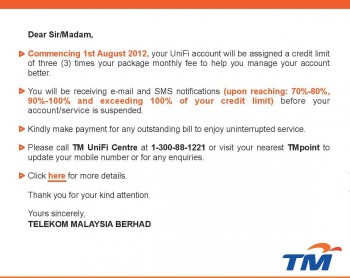
anyone received this msg from unifi??

" starting 1/8/12 u will be assigned a credit limit of 3 times yr unifi package fee. pls make payment to avoid service disruption. ???

what does credit limit mean??

This post has been edited by klampers: Jul 21 2012, 09:51 PM
big2me
post Jul 21 2012, 10:04 PM

Casual
***
Junior Member
369 posts

Joined: Feb 2005
From: KL


QUOTE(klampers @ Jul 21 2012, 09:51 PM)
anyone received this msg from unifi??

" starting 1/8/12  u will be assigned a credit limit of 3 times yr unifi package fee. pls make payment to avoid service disruption. ???

what does credit limit mean??
*
Hutang money koh.... blush.gif
if got error u have to go tm point tell them.
klampers
post Jul 21 2012, 10:49 PM

Getting Started
**
Junior Member
126 posts

Joined: Feb 2009
From: deep inside damansara.....
QUOTE(big2me @ Jul 21 2012, 10:04 PM)
Hutang money koh....  blush.gif
if got error u have to go tm point tell them.
*
no la... payment cantik since day 1.. hahaha

already browse tm website n found this

user posted image
hahaboy
post Jul 21 2012, 10:59 PM

Getting Started
**
Junior Member
238 posts

Joined: Dec 2004
QUOTE(hahaboy @ Jul 21 2012, 06:05 PM)
the latest tomatoUSB toastman firmware can use wif unifi ? this firmware can set vlan > 15. how should i setup ?
*
anyway to make tomatousb toastman firmware to run unifi , i need tomatousb to run on my rt-n16.
rjb123
post Jul 21 2012, 11:29 PM

Regular
******
Senior Member
1,820 posts

Joined: May 2010
From: Kuala Lumpur


QUOTE(klampers @ Jul 21 2012, 10:49 PM)
no la... payment cantik since day 1.. hahaha

already browse tm website n found this

user posted image
*
I received the same message when I logged in today to pay the latest Invoices, I guess it means if you don't pay for 3 months ... your line gets cut.

Or if you use the phone a lot, once your bill reaches 3 months of your default plan without payment - then your line will be cut.

Anyway, I always pay a few days after I get the invoice in E-mail so not worried about this
SUSRaikkonen
post Jul 22 2012, 08:22 AM

I'll be your ♡ ☁ ☼ ☂
*******
Senior Member
8,635 posts

Joined: Jun 2006
From: Jeonju/Jeollabuk-do


Received this in my mail.

More and more reason to throw Unifi in the garbage bin.

Going to unsubscribe before August 1st.


user posted image

This post has been edited by Raikkonen: Jul 22 2012, 08:26 AM
Neo|ofGeo
post Jul 22 2012, 08:56 AM

Stop Complaining and Read
Group Icon
Elite
3,142 posts

Joined: Nov 2010


QUOTE(Raikkonen @ Jul 22 2012, 08:22 AM)


Received this in my mail.

More and more reason to throw Unifi in the garbage bin.

Going to unsubscribe before August 1st.

user posted image
*
its a warning system that i think is fair since they will sent sms and e-mail as reminder,
if you keep using for months and keep delayed the payment aren't that well...pathetic to do?

djhenry91
post Jul 22 2012, 10:04 AM

Slow and Steady
*******
Senior Member
6,779 posts

Joined: Jan 2009
From: SEGI Heaven


QUOTE(Raikkonen @ Jul 22 2012, 08:22 AM)


Received this in my mail.

More and more reason to throw Unifi in the garbage bin.

Going to unsubscribe before August 1st.

user posted image
*
is a reminder who dint pay for few month..
u throw away unifi for wat??
subcribe maxis??
unless u got TIME broadband ready on ur house thn go unsubcribe..
skylinelover
post Jul 22 2012, 11:25 AM

Future Crypto Player😄👊Driver Abamsado😎😎
********
All Stars
11,248 posts

Joined: Jul 2005
haha i think is good idea laugh.gif rclxms.gif
ericpires
post Jul 22 2012, 11:26 AM

Arsenal FC
*******
Senior Member
2,657 posts

Joined: Feb 2008
From: Highbury House, 75 Drayton Park, London


Why izzit that UNIFI have not reduced their price? They have already many users suscribe alredi. I for one, would like to see it reduced to a RM100 range.
SUSRaikkonen
post Jul 22 2012, 11:46 AM

I'll be your ♡ ☁ ☼ ☂
*******
Senior Member
8,635 posts

Joined: Jun 2006
From: Jeonju/Jeollabuk-do


By the way, my payment history are excellent.

No outstanding or late payment.


QUOTE(djhenry91 @ Jul 22 2012, 10:04 AM)
is a reminder who dint pay for few month..
u throw away unifi for wat??
subcribe maxis??
unless u got TIME broadband ready on ur house thn go unsubcribe..
*
Been planning to unsubscribe for a while now.

Money issues.

Save me a good RM149 monthly.

I'll just surf at the Cyber Cafe.

happy.gif

This post has been edited by Raikkonen: Jul 22 2012, 11:47 AM
christina1
post Jul 22 2012, 03:25 PM

Never stop learning, because life never stops teaching.
*******
Senior Member
2,104 posts

Joined: Sep 2008
when Unifi will be introducing 30mbps or higher for home user. Maxis already started 30mbps for home user.
barca96
post Jul 22 2012, 05:12 PM

Enthusiast
*****
Senior Member
980 posts

Joined: Apr 2010


.

This post has been edited by barca96: Jul 22 2012, 05:13 PM
prasys
post Jul 22 2012, 05:15 PM

Heros Never Die
Group Icon
VIP
12,925 posts

Joined: Mar 2005
From: Kuala Lumpur
QUOTE(christina1 @ Jul 22 2012, 03:25 PM)
when Unifi will be introducing 30mbps or higher for home user. Maxis already started 30mbps for home user.
*
With their block-this-and-that policy. No thanks

I've heard rumours (via twitter)

https://twitter.com/sweemeng/status/226965421851570176

Unifi might implement cap of some sort. Ill dig up more if I find any


FauxHawk
post Jul 22 2012, 08:07 PM

<3
******
Senior Member
1,340 posts

Joined: Sep 2006
From: Selangor


Likely is referring to that credit limit thing (which i think is a good thing, why want to hutang so many months?)

Also the person asking about homeplug, im using a pair but the 200mbps tp link one for my tv box
kimyee73
post Jul 22 2012, 09:56 PM

Regular
******
Senior Member
1,007 posts

Joined: Oct 2006
From: island up north


QUOTE(jtleon @ Jul 20 2012, 04:01 PM)
thanks for your reply.
No, seems very hard to prepare, as I don't know how they are going to run the wire.....
if i pre-hack or run conduit, and they cannot use it....it would be headache sad.gif

thanks...at least i now know what to prepare.

if non-standard installation, then there will be fees being charged?
*
Do you have a phone pit inside your kitchen before it goes to your phone box. It kind of like a small manhole on the floor. If there is none, there is also potential of blockage in conduit due to construction material. It happen to me when the fibre cable unable to pass from the pit to phone box. They hack the floor and let fibre cable come out from pit onto the wall instead. Fortunately the pit is in my store room and not kitchen. Look at that potential as well and plan for alternate solution.
waikikizzz
post Jul 22 2012, 10:32 PM

Getting Started
**
Junior Member
157 posts

Joined: Dec 2006


hi guys..i've just upgrade my streamyx to unifi 5m service..but i discover my speed wont reach 5m..sometimes it will only reach 2.8 or 4.6 max download speed , which same as upload speed..sometimes i keep changing ip until it get 4.6mb ...wat can i do?? sad.gif the "box" just opposite 2 tiang infront of my house..y still so slow?

user posted image user posted image

This post has been edited by waikikizzz: Jul 22 2012, 10:41 PM
debbierowe
post Jul 22 2012, 10:41 PM

so fast 6 stars di...
******
Senior Member
1,107 posts

Joined: May 2009
slow now... sad.gif browsing US and china sites
pelvin
post Jul 22 2012, 10:42 PM

On my way
****
Senior Member
521 posts

Joined: May 2006


hi guys.. quick question.. do you guys still dl full speed on torrent? im using thunder and i feel its slow... dl now less tehn 100kb... but direct dl are all 500kb...
waikikizzz
post Jul 22 2012, 10:42 PM

Getting Started
**
Junior Member
157 posts

Joined: Dec 2006


QUOTE(debbierowe @ Jul 22 2012, 10:41 PM)
slow now... sad.gif browsing US and china sites
*
mine no matter browse where oso slow...even i off the firewall.. sad.gif
muok
post Jul 22 2012, 11:14 PM

On my way
****
Junior Member
546 posts

Joined: Jan 2003
From: Within the Solar System
Why is there such huge packet loss after the 1st hop? WTF are they doing?!?!?!!?

CODE
HOST:                             Loss%   Snt   Last   Avg  Best  Wrst StDev
 1. unknown                       0.0%    10    0.5   0.5   0.5   0.7   0.1
 2. 115.132.110.22               70.0%    10   13.7  10.2   6.5  13.7   3.6
 3. 60.53.174.245                 0.0%    10   20.1  17.0   4.2  79.7  22.7
 4. 10.55.32.120                  0.0%    10    6.0  18.7   4.2  66.4  21.4
 5. 58.27.105.154                 0.0%    10    6.9  13.0   6.9  48.3  12.8
 6. 209.85.242.246                0.0%    10   72.6  29.8   6.0  72.6  26.5
 7. 209.85.242.125                0.0%    10   19.2  18.2   5.8  77.9  21.5
 8. 66.249.94.126                 0.0%    10   24.9  28.6   8.8 104.7  28.6
 9. nx-in-f102.1e100.net          0.0%    10    8.1  18.8   7.5  94.5  26.8


This post has been edited by muok: Jul 22 2012, 11:17 PM
yushin
post Jul 22 2012, 11:15 PM

Look at all my stars!!
*******
Senior Member
3,327 posts

Joined: Jan 2003
From: Selangor


Guys, just want to report that Aztech HL110EP(A) homeplug can work on carrying VLAN signal.
Now my ps3 and iptv can use the same homeplug. smile.gif

1st floor (router, NAS, PC) --- homeplug --- ground floor(IPTV-vlan600,PS3-vlan1)
pelvin
post Jul 22 2012, 11:23 PM

On my way
****
Senior Member
521 posts

Joined: May 2006


QUOTE(yushin @ Jul 22 2012, 11:15 PM)
Guys, just want to report that Aztech HL110EP(A) homeplug can work on carrying VLAN signal.
Now my ps3 and iptv can use the same homeplug. smile.gif

1st floor (router, NAS, PC) --- homeplug --- ground floor(IPTV-vlan600,PS3-vlan1)
*
how u do that bro.. cos now currently im using individual home plug, 1 for iptv and 1 for internet.. means 4 homeplug sad.gif
yushin
post Jul 22 2012, 11:51 PM

Look at all my stars!!
*******
Senior Member
3,327 posts

Joined: Jan 2003
From: Selangor


QUOTE(pelvin @ Jul 22 2012, 11:23 PM)
how u do that bro.. cos now currently im using individual home plug, 1 for iptv and 1 for internet.. means 4 homeplug sad.gif
*
You will need 2 unit of vlan capable switch.
One to combine the Vlan before sending it to homeplug.
Another one to split the vlan after it comes out from the homeplug.

This solution is more useful if you plan to have many devices beside your TV. (IPTV, PS3, XB360, media player)
christina1
post Jul 23 2012, 08:13 AM

Never stop learning, because life never stops teaching.
*******
Senior Member
2,104 posts

Joined: Sep 2008
QUOTE(prasys @ Jul 22 2012, 05:15 PM)
With their block-this-and-that policy. No thanks

I've heard rumours (via twitter)

https://twitter.com/sweemeng/status/226965421851570176

Unifi might implement cap of some sort. Ill dig up more if I find any
*
dont get wat u mean ..will they plan to introduce 30mbps or higher in future?
nabielz
post Jul 23 2012, 12:38 PM

cbr_akra
*****
Senior Member
903 posts

Joined: May 2009


dafuq is this???

user posted image

This post has been edited by nabielz: Jul 23 2012, 12:38 PM
Angel of Deth
post Jul 23 2012, 01:24 PM

Regular
******
Senior Member
1,242 posts

Joined: Sep 2008
From: Cheras


http://www.tm.com.my/Documents/FAQ_UniFi_Credit_Limit.pdf

I think people with outstanding fees or have trouble to pay monthly bill will find it troublesome. But i think the credit limit for each package is a little bit low. What about customer that uses additional services (phone, HyppTV, VoD etc.)?

This post has been edited by Angel of Deth: Jul 23 2012, 01:33 PM
barca96
post Jul 23 2012, 02:23 PM

Enthusiast
*****
Senior Member
980 posts

Joined: Apr 2010


QUOTE(jolmy @ Jul 13 2012, 07:08 PM)
From feedback I got from some friends as well as some threads about it here:
1) Crappy Thomson router, even the crappy DIR-615 for TM is better.
2) Random disconnections
3) Recently, have this problem of your web access got redirected to MyLaunchPad page for unknown reasons.
4) Long wait for installation appointment
5) Private IP address, unless you specifically request for public IP with reasons.

IMHO, the low price offer by Maxis is a tactic to increase their subscriber base, and looks like they are quite successful in doing that at the time being.
Could you please list out the issues with Unifi?

I am really loving my Streamyx.
I am using a 4mb though at only RM88.
Got it under the UniPack promo back in September 2010.
But the contract will end on 16/09/12.

Now I need to either jump onto the Maxis Home or Unifi as if I want to enjoy a similar speed on Streamyx, I would need to spend >RM200! Which is crazy.
So I've decided on Maxis as it is much cheaper at RM118 compared to Unifi's VIP5 at RM150.

If Unifi VIP5 costs the same as Maxis 10mb, I would've taken Unifi hands down but
to save RM30 at twice the speed, it just seemed like a no brainer.
That's a huge saving!

However, I still don't mind paying the RM200 penalty for cancelling my subscription.
I've arranged for them to only fix Maxis early September so that I have enough time to monitor the situation at the Maxis thread

djhenry91
post Jul 23 2012, 03:59 PM

Slow and Steady
*******
Senior Member
6,779 posts

Joined: Jan 2009
From: SEGI Heaven


QUOTE(barca96 @ Jul 23 2012, 02:23 PM)
Could you please list out the issues with Unifi?

I am really loving my Streamyx.
I am using a 4mb though at only RM88.
Got it under the UniPack promo back in September 2010.
But the contract will end on 16/09/12.

Now I need to either jump onto the Maxis Home or Unifi as if I want to enjoy a similar speed on Streamyx, I would need to spend >RM200! Which is crazy.
So I've decided on Maxis as it is much cheaper at RM118 compared to Unifi's VIP5 at RM150.

If Unifi VIP5 costs the same as Maxis 10mb, I would've taken Unifi hands down but
to save RM30 at twice the speed, it just seemed like a no brainer.
That's a huge saving!

However, I still don't mind paying the RM200 penalty for cancelling my subscription.
I've arranged for them to only fix Maxis early September so that I have enough time to monitor the situation at the Maxis thread
*
i think u need read all maxis fibre thread before u cancel...
i hope Time broadband is ready in my unit so tht i can cancel unifi..haiz too bad
Angel of Deth
post Jul 23 2012, 04:10 PM

Regular
******
Senior Member
1,242 posts

Joined: Sep 2008
From: Cheras


QUOTE(djhenry91 @ Jul 23 2012, 03:59 PM)
i think u need read all maxis fibre thread before u cancel...
i hope Time broadband is ready in my unit so tht i can cancel unifi..haiz too bad
*
What is Time broadband?
skylinelover
post Jul 23 2012, 05:03 PM

Future Crypto Player😄👊Driver Abamsado😎😎
********
All Stars
11,248 posts

Joined: Jul 2005
QUOTE(christina1 @ Jul 23 2012, 08:13 AM)
dont get wat u mean ..will they plan to introduce 30mbps or higher in future?
*
keep waiting laugh.gif singapore already have 50mbps 4 less than 100 bucks only rclxms.gif
duabijitelur
post Jul 23 2012, 05:32 PM

iPhone 6 :D
******
Senior Member
1,951 posts

Joined: Jun 2008
From: Mars


hi there, just wanna ask is tp link 85mbps starter kit homeplug works well for STB and router?
cos my [BTU - Router - Computer - Dect Phone] is upstairs and [STB - TV] is on ground floor
Angel of Deth
post Jul 23 2012, 05:35 PM

Regular
******
Senior Member
1,242 posts

Joined: Sep 2008
From: Cheras


QUOTE(skylinelover @ Jul 23 2012, 05:03 PM)
keep waiting laugh.gif singapore already have 50mbps 4 less than 100 bucks only rclxms.gif
*
Singapore is small country and has different terrain than Malaysia. That's one of valid reason if we discount the usual politic talk. This is what my lecturer used to says, i don't know the detail.

This post has been edited by Angel of Deth: Jul 23 2012, 05:36 PM
christina1
post Jul 23 2012, 06:32 PM

Never stop learning, because life never stops teaching.
*******
Senior Member
2,104 posts

Joined: Sep 2008
QUOTE(skylinelover @ Jul 23 2012, 05:03 PM)
keep waiting laugh.gif singapore already have 50mbps 4 less than 100 bucks only rclxms.gif
*
yeah Singapore is much more advance then here.
athur
post Jul 23 2012, 07:26 PM

Getting Started
**
Junior Member
85 posts

Joined: May 2006
U throw away for what?

It just natural if they want to have cap on the limit,for those who nvr pay their monthly fees. it happen to any other operator! let me know if any other operator dont have credit limit?


QUOTE(Raikkonen @ Jul 22 2012, 09:22 AM)


Received this in my mail.

More and more reason to throw Unifi in the garbage bin.

Going to unsubscribe before August 1st.

user posted image
*
djhenry91
post Jul 23 2012, 07:41 PM

Slow and Steady
*******
Senior Member
6,779 posts

Joined: Jan 2009
From: SEGI Heaven


QUOTE(Angel of Deth @ Jul 23 2012, 04:10 PM)
What is Time broadband?
*
u try google time fibre broadband.
andrew9292
post Jul 23 2012, 08:21 PM

-/Livin' On A Prayer/-
*****
Senior Member
955 posts

Joined: Sep 2008
From: Petaling Jaya


After reading some information from klseet n rizvanrp... decided to configure my DIR-615 C2 (not TM's 615) with dd-wrt firmware direct to the fibrehome

FYI, i already was using DD-WRT with my Streamxy previously, so it's a matter of changing the settings only
Remember this settings are for DIR-615 C1 or C2 only. Because REV.C uses the same DDWRT firmware despite the numbers. These are NOT for DIR-615 G1/G2 (TM's version)

» Click to show Spoiler - click again to hide... «


[attachmentid=2962438]

[attachmentid=2962440]

[attachmentid=2962442]

[attachmentid=2962446]

I dont use IPTV yet so this solution will be alright for now... = )
Shall anyone attempt this pls do read everything on KLSEET and UNIFI ATHENA

Difference can be felt most when using wifi. It really outperforms the stock router many times especially in multiple user extra demanding situations. Not to mention there's no delay anymore when u type in www.xxxxxxx.com and hit enter.

I wasnt used to the stock router, whenever u hit the enter key or clicked a link, there will be some sort of small delay and the page loads in stages. Streaming's fine tho. With my old baby things just come in like poof nod.gif icon_rolleyes.gif

Not complaning tho, really no complaints on UniFi. It just so happens i have a better router than theirs. The installation was quick under 1 and 1/2hrs. Service was activated immediately n it was really no frills. Good job!

This post has been edited by andrew9292: Jul 23 2012, 08:41 PM
aspire2oo6
post Jul 24 2012, 12:14 AM

Banned
*********
All Stars
35,468 posts

Joined: Oct 2006

My unifi just went down the optical just show red
johnleeisme2004
post Jul 24 2012, 12:22 AM

Getting Started
**
Junior Member
86 posts

Joined: Oct 2007
Sorry if this is a noob question...I just got my unifi installed today. I forgot to ask the installer what the password for my unifi email account is and I couldn't find it anywhere in the docs left by that the installer. Do I have to make a call to TM to ask for it or the password is a generic one like "tm123" or something?
aspire2oo6
post Jul 24 2012, 12:30 AM

Banned
*********
All Stars
35,468 posts

Joined: Oct 2006

It should be written in the document which you register
mikecmy
post Jul 24 2012, 12:34 AM

Enthusiast
*****
Senior Member
734 posts

Joined: Oct 2007

anyone facing slowdown? mine max 100kbps.. or i kena throttle d sweat.gif
andrew9292
post Jul 24 2012, 01:17 AM

-/Livin' On A Prayer/-
*****
Senior Member
955 posts

Joined: Sep 2008
From: Petaling Jaya


QUOTE(aspire2oo6 @ Jul 24 2012, 12:14 AM)
My unifi just went down the optical just show red
*
Same thing just happened, and now at my fiberhome POTS light which is the phone line light, lit up. And it blinks when i pick up the line. Previously it's just dead but i do have the line. Alcatel fiberhome unit tho. Not the Huawei one...
blackbox14
post Jul 24 2012, 07:22 AM

Casual
***
Junior Member
346 posts

Joined: Jul 2012
Hello, new guy here.

Today, my Unifi modem's (white modem) POTS light is suddenly on all the time instead of only blinking when the phone is used. I think this was talked about in V14, but because it seems to have no effect on the phone or internet line, the problem was just dismissed.

Is anyone else facing the same issue, and should I contact Unifi Customer Service about it?
aspire2oo6
post Jul 24 2012, 07:32 AM

Banned
*********
All Stars
35,468 posts

Joined: Oct 2006

i did call UNIFI they said there is a huge maintainance. Then i ask why no announcement he said not enough staff hgahah

He said maintenance is from 12 am to 6am seems like its up already
blackbox14
post Jul 24 2012, 07:39 AM

Casual
***
Junior Member
346 posts

Joined: Jul 2012
QUOTE(aspire2oo6 @ Jul 24 2012, 07:32 AM)
i did call UNIFI they said there is a huge maintainance. Then i ask why no announcement he said not enough staff hgahah

He said maintenance is from 12 am to 6am seems like its up already
*
So the POTS light being on permanently might be because of this maintenance? I notice that when I receive calls on the Panasonic phone now, the numbers are just displayed without the 603 code at the end too.

e.g. 78881234603

Now it's just: 78881234
bad melatonin
post Jul 24 2012, 08:28 AM

Insomnia
******
Senior Member
1,677 posts

Joined: Sep 2007
From: Pills & Thrills


guys, recently i change my tmnut router to tplink TL-WR1043ND. so problem is after d router been up for quite smtimes (1~2days), im unable to login to d router thru 192.168.1.1/tplinklogin.net. i tried all sort of connection which was via lan cable/wifi but to no avail. d only solutions to solve it is on/off d router. kinda tedious to on/off d router every 1 or 2days.
so i wonder is there any user of TL-WR1043ND here dat hv similar problem? what is ur solution to solve it?
christina1
post Jul 24 2012, 08:38 AM

Never stop learning, because life never stops teaching.
*******
Senior Member
2,104 posts

Joined: Sep 2008
Ppl say 5mb speed is more then enough for home user no need to upgrade or wait for 30mbps and above but the problem is 5mb here is not stable at all.

We need 30mbps and above to download untouched blu ray (30-50gb) otherwise using 5mb to download need to wait for days to complete downloads
CloudTen
post Jul 24 2012, 10:14 AM

Getting Started
**
Junior Member
51 posts

Joined: May 2012
QUOTE(bad melatonin @ Jul 24 2012, 08:28 AM)
guys, recently i change my tmnut router to tplink TL-WR1043ND. so problem is after d router been up for quite smtimes (1~2days), im unable to login to d router thru 192.168.1.1/tplinklogin.net. i tried all sort of connection which was via lan cable/wifi but to no avail. d only solutions to solve it is on/off d router. kinda tedious to on/off d router every 1 or 2days.
so i wonder is there any user of TL-WR1043ND here dat hv similar problem? what is ur solution to solve it?
*
What is your firmware version? My stock router came with 3.13.5 Build 110906 Rel.72204n which caused me troubles like yours. My problem solved by downgrading to the one from TP-Link official website 3.13.4 110906
johnleeisme2004
post Jul 24 2012, 10:17 AM

Getting Started
**
Junior Member
86 posts

Joined: Oct 2007
May I ask if I change my unifi login password at occ.unifi.my, do I need to update the same in the D-Link wireless router DIR-615? It seems the customer service couldn't give me a firm answer. They said the DIR-615 password is different from the unifi login password which I doubt so.
Xu3r
post Jul 24 2012, 10:26 AM

Getting Started
**
Junior Member
134 posts

Joined: Nov 2011


They are making quota limited at august 1st

no more unlimited data omg


Added on July 24, 2012, 10:27 amDear Valued Customers,

Telekom Malaysia Berhad ™ wishes to inform that commencing 1st August 2012, TM will update all its UniFi customers regularly on the status of their accounts. This is to help customers to manage their account payments better.

In line with this, we will be introducing a credit limit policy where we will assign a credit limit to all UniFi accounts. This credit limit will be equivalent to three (3) times the package monthly fee.

TM will be sending out email and SMS notifications to alert you on the status of your account usage upon reaching 70%-80%, 90%-100% and upon exceeding 100% of your credit limit.

Following the introduction of this credit limit policy, customers are advised to make timely bill payments to ensure that the outstanding amount does not exceed the stipulated credit limit so they will continue to enjoy uninterrupted service. We wish to highlight that TM will proceed to suspend the customers' account if no payment is received within 24 hours upon exceeding their credit limit.

This post has been edited by Xu3r: Jul 24 2012, 10:27 AM
skylinelover
post Jul 24 2012, 10:44 AM

Future Crypto Player😄👊Driver Abamsado😎😎
********
All Stars
11,248 posts

Joined: Jul 2005
QUOTE(Xu3r @ Jul 24 2012, 10:26 AM)
They are making quota limited at august 1st

no more unlimited data omg
*
cheh...credit quota better ma...no good hutang tayilong TM wey laugh.gif rclxms.gif
andrew9292
post Jul 24 2012, 12:33 PM

-/Livin' On A Prayer/-
*****
Senior Member
955 posts

Joined: Sep 2008
From: Petaling Jaya


QUOTE(Xu3r @ Jul 24 2012, 10:26 AM)
They are making quota limited at august 1st

no more unlimited data omg
sesat ah... that's for bill payment, cant exceed owing them 3 months. I do wonder does this happen when u overuse the phone line, and exceed 3mths of 'credit'

QUOTE
http://twitter.com/TMCorp/status/226314468890644481

Our broadband products, both UniFi & Streamyx, offer unlimited download & upload. No data capping until further notice. You read that right
Reply  Retweet  Favorite
6:55 AM - 20 Jul 12

djhenry91
post Jul 24 2012, 01:34 PM

Slow and Steady
*******
Senior Member
6,779 posts

Joined: Jan 2009
From: SEGI Heaven


QUOTE(Xu3r @ Jul 24 2012, 10:26 AM)
They are making quota limited at august 1st

no more unlimited data omg


Added on July 24, 2012, 10:27 amDear Valued Customers,

Telekom Malaysia Berhad ™ wishes to inform that commencing 1st August 2012, TM will update all its UniFi customers regularly on the status of their accounts. This is to help customers to manage their account payments better.

In line with this, we will be introducing a credit limit policy where we will assign a credit limit to all UniFi accounts. This credit limit will be equivalent to three (3) times the package monthly fee.

TM will be sending out email and SMS notifications to alert you on the status of your account usage upon reaching 70%-80%, 90%-100% and upon exceeding 100% of your credit limit.

Following the introduction of this credit limit policy, customers are advised to make timely bill payments to ensure that the outstanding amount does not exceed the stipulated credit limit so they will continue to enjoy uninterrupted service. We wish to highlight that TM will proceed to suspend the customers' account if no payment is received within 24 hours upon exceeding their credit limit.
*
baca betul betul..
tis wan dunno ask many time ingat is quota start already
Xu3r
post Jul 24 2012, 02:01 PM

Getting Started
**
Junior Member
134 posts

Joined: Nov 2011


omg.... quota damn little if start ...
jovial
post Jul 24 2012, 02:35 PM

carpe diem
*******
Senior Member
2,129 posts

Joined: Jan 2003
From: Somewhere only we know..

Just received this SMS

Planned Maintenance Work for UniFi in Kuala Lumpur & Selangor on 30th July 2012 from 22.00 pm until 6.00am. UniFi customers may experience Telephony (VoBB) service interruption. Apologies for any inconvenience caused
weichieh007
post Jul 24 2012, 07:00 PM

Casual
***
Junior Member
378 posts

Joined: Apr 2006
From: Kuala Lumpur


QUOTE(Xu3r @ Jul 24 2012, 02:01 PM)
omg.... quota damn little if start ...
*
That one is not download quota la. It's your monthly bill payment quota.
cielBleu
post Jul 24 2012, 07:07 PM

Casual
***
Junior Member
320 posts

Joined: Sep 2007
i got a question
who need to be at home when the installation?
the account is on my name, can my housemate be there instead of me?
jovenne
post Jul 24 2012, 07:38 PM

Getting Started
**
Junior Member
117 posts

Joined: Nov 2004


QUOTE(cielBleu @ Jul 24 2012, 07:07 PM)
i got a question
who need to be at home when the installation?
the account is on my name, can my housemate be there instead of me?
*
tongue.gif tongue.gif Yes can can.
That will be good as no need to change appointment date smile.gif

This post has been edited by jovenne: Jul 24 2012, 07:47 PM
s[H]sIkuA
post Jul 24 2012, 09:10 PM

live in the present
*******
Senior Member
2,162 posts

Joined: Sep 2004


Anyone having problem watching twitch tv lately? Damn laggy for me, weird though since other site like own3d is working fine
stasio
post Jul 24 2012, 09:11 PM

10k Club
********
All Stars
18,503 posts

Joined: Oct 2007
From: P.Jaya
Browsing very slow,hope will improve soon. hmm.gif
HeavensGift
post Jul 24 2012, 10:14 PM

Getting Started
**
Junior Member
57 posts

Joined: Mar 2009
QUOTE(sHsIkuA @ Jul 24 2012, 09:10 PM)
Anyone having problem watching twitch tv lately? Damn laggy for me, weird though since other site like own3d is working fine
*
you're not alone bro. johor here. where you at?
s[H]sIkuA
post Jul 24 2012, 10:19 PM

live in the present
*******
Senior Member
2,162 posts

Joined: Sep 2004


QUOTE(HeavensGift @ Jul 24 2012, 10:14 PM)
you're not alone bro. johor here. where you at?
*
KL here.
HeavensGift
post Jul 24 2012, 10:26 PM

Getting Started
**
Junior Member
57 posts

Joined: Mar 2009
i believe it's twitch server routing to malaysia not good. that's why only that web lag while own3d is fine.
prasys
post Jul 25 2012, 01:00 AM

Heros Never Die
Group Icon
VIP
12,925 posts

Joined: Mar 2005
From: Kuala Lumpur
Could someone double check if TM blocks port 80 , for some reason its not working
s[H]sIkuA
post Jul 25 2012, 01:10 AM

live in the present
*******
Senior Member
2,162 posts

Joined: Sep 2004


QUOTE(prasys @ Jul 25 2012, 01:00 AM)
Could someone double check if TM blocks port 80 , for some reason its not working
*
Yeah blocked for me too, tried to forward, fail
MX510
post Jul 25 2012, 01:36 AM

Love Me Sin Hate Me Sinner
*******
Senior Member
4,038 posts

Joined: Aug 2005
From: Earth


Sneak peak from @TMCorp

http://www.digitalnewsasia.com/enterprise-...-bandwidth-hogs

UniFi VIP data caps are coming soon walauweihhhhhhhhhhhh
tech_frix
post Jul 25 2012, 05:25 AM

Boo Yah!
*******
Senior Member
5,656 posts

Joined: Sep 2007
From: wheres d oil price is higher than condoms..

damn it..just installed unifi and now got quota...shyt!!


Added on July 25, 2012, 5:26 am
QUOTE(stasio @ Jul 24 2012, 09:11 PM)
Browsing very slow,hope will improve soon.  hmm.gif
*
same case with me bro.. sweat.gif

This post has been edited by tech_frix: Jul 25 2012, 05:26 AM
Blackened
post Jul 25 2012, 07:37 AM

Regular
******
Senior Member
1,068 posts

Joined: Dec 2004
From: Madrid
Does anyone know the NOVA helpdesk contact number? my unifi application has been pending for more than 14 business days already. *(can't subscribe due to previous unifi account still active in system, terminated 3 weeks ago)
debbierowe
post Jul 25 2012, 08:40 AM

so fast 6 stars di...
******
Senior Member
1,107 posts

Joined: May 2009
QUOTE(stasio @ Jul 24 2012, 09:11 PM)
Browsing very slow,hope will improve soon.  hmm.gif
*
overseas website lor.. sad.gif downloads too.. tried to download novel ebook from china web, slow... and dc


Added on July 25, 2012, 8:45 am
QUOTE(MX510 @ Jul 25 2012, 01:36 AM)
Sneak peak from @TMCorp

http://www.digitalnewsasia.com/enterprise-...-bandwidth-hogs

UniFi VIP data caps are coming soon walauweihhhhhhhhhhhh
*
QUOTE
    At least 2% of customers consume between 500GB to 1TB of traffic monthly
    TM group CEO says ISPs call this “unfair” user behaviour that diminishes experience of other users

2%???

what if these users are biz package user anyway... and they have no cap anyway... then cap only affect poor vip package tongue.gif tongue.gif

This post has been edited by debbierowe: Jul 25 2012, 08:45 AM
SUSkhalpowers
post Jul 25 2012, 09:47 AM

Regular
******
Senior Member
1,966 posts

Joined: Dec 2009
QUOTE(MX510 @ Jul 25 2012, 02:36 AM)
Sneak peak from @TMCorp

http://www.digitalnewsasia.com/enterprise-...-bandwidth-hogs

UniFi VIP data caps are coming soon walauweihhhhhhhhhhhh
*
fuhhhhh.....luckily "sedut sampai muntah" ..now bored ady.. biggrin.gif
Neptern
post Jul 25 2012, 04:24 PM

On my way
****
Junior Member
518 posts

Joined: Aug 2005
QUOTE(MX510 @ Jul 25 2012, 01:36 AM)
Sneak peak from @TMCorp

http://www.digitalnewsasia.com/enterprise-...-bandwidth-hogs

UniFi VIP data caps are coming soon walauweihhhhhhhhhhhh
*
The bandwidth hog thing is just rubbish IMHO.It is just the matter of managing the peak and non-peak hours to provide optimal internet experience to the consumers.

Usage caps are just ways for ISPs to make more money.
SnoWFisH
post Jul 25 2012, 04:29 PM

Look at all my stars!!
*******
Senior Member
2,250 posts

Joined: Jan 2003
From: Penang / Bentong, Pahang / Genting


Well, in the very same article the CEO assured that no caps will be imposed......yet.

The statistics seems to be exagerrated...i mati mati download also, veri hard to hit 500GB =.=.
djhenry91
post Jul 25 2012, 05:12 PM

Slow and Steady
*******
Senior Member
6,779 posts

Joined: Jan 2009
From: SEGI Heaven


500GB?? i cant even achieve tht also...
cstkl1
post Jul 25 2012, 05:58 PM

Look at all my stars!!
Group Icon
Elite
6,799 posts

Joined: Jan 2003

QUOTE(bad melatonin @ Jul 24 2012, 08:28 AM)
guys, recently i change my tmnut router to tplink TL-WR1043ND. so problem is after d router been up for quite smtimes (1~2days), im unable to login to d router thru 192.168.1.1/tplinklogin.net. i tried all sort of connection which was via lan cable/wifi but to no avail. d only solutions to solve it is on/off d router. kinda tedious to on/off d router every 1 or 2days.
so i wonder is there any user of TL-WR1043ND here dat hv similar problem? what is ur solution to solve it?
*
Try changing ure wifi channel. And its just 192.168.1.1

QUOTE(MX510 @ Jul 25 2012, 01:36 AM)
Sneak peak from @TMCorp

http://www.digitalnewsasia.com/enterprise-...-bandwidth-hogs

UniFi VIP data caps are coming soon walauweihhhhhhhhhhhh
*
Lol. Yeah we are forced to make tm successful.
Also start capping when the price of package is reasonable.
Overall having broadband in malaysia still expensive

Btw tested no block on port 80. Tested on unifi vip20 and biz20


Added on July 25, 2012, 6:05 pm
QUOTE(SnoWFisH @ Jul 25 2012, 04:29 PM)
Well, in the very same article the CEO assured that no caps will be imposed......yet.

The statistics seems to be exagerrated...i mati mati download also, veri hard to hit 500GB =.=.
*
Also i think the trend of dowloading is alot in the beginning. After first two months nothing much to download lol

QUOTE(djhenry91 @ Jul 25 2012, 05:12 PM)
500GB?? i cant even achieve tht also...
*
Y not. Unifi vip20.
8gb per hour
192gb per day
1344gb per week

No prob. Alot of ppl are downloading bdrip mt2s files. Norm is 50gb per movie.


This post has been edited by cstkl1: Jul 25 2012, 06:05 PM
djhenry91
post Jul 25 2012, 07:16 PM

Slow and Steady
*******
Senior Member
6,779 posts

Joined: Jan 2009
From: SEGI Heaven


QUOTE(cstkl1 @ Jul 25 2012, 05:58 PM)
Try changing ure wifi channel. And its just 192.168.1.1
Lol. Yeah we are forced to make tm successful.
Also start capping when the price of package is reasonable.
Overall having broadband in malaysia still expensive

Btw tested no block on port 80. Tested on unifi vip20 and biz20


Added on July 25, 2012, 6:05 pm
Also i think the trend of dowloading is alot in the beginning. After first two months nothing much to download lol
Y not. Unifi vip20.
8gb per hour
192gb per day
1344gb per week

No prob. Alot of ppl are downloading bdrip mt2s files. Norm is 50gb per movie.
*
50GB per movie?? lol
my external harddisk no space for me store
DecaPix
post Jul 25 2012, 07:35 PM

5 star monkey
*******
Senior Member
3,000 posts

Joined: Aug 2008
From: PeeJay
norm is about 25-30 gb la...
get a 2TB disk la..
so cheap now tongue.gif
cstkl1
post Jul 25 2012, 07:51 PM

Look at all my stars!!
Group Icon
Elite
6,799 posts

Joined: Jan 2003

QUOTE(DecaPix @ Jul 25 2012, 07:35 PM)
norm is about 25-30 gb la...
get a 2TB disk la..
so cheap now tongue.gif
*
looks some of u dont buy hdd often

hdd price now expensive
abt the same as hdd price 3 years ago. lol
it was cheap before the flood.
how cheap around 33-40 percent cheaper

also a lot of ppl dont realize the hdd nowadays are downsized versions of the previous.

wd for example are trying to marganilize cost on a lot of used to be included features thats now only available in different models.

the 1tb black first gen for example is way way lot different that the current one and dont die easily

cheap.. yeah.. 2gb green that i wont even trust on any backup reliability.
old ones u can even keep it collecting dust butt naked.. blow off the dust and it will work with the same reliability.

This post has been edited by cstkl1: Jul 25 2012, 11:27 PM
djhenry91
post Jul 25 2012, 08:01 PM

Slow and Steady
*******
Senior Member
6,779 posts

Joined: Jan 2009
From: SEGI Heaven


QUOTE(DecaPix @ Jul 25 2012, 07:35 PM)
norm is about 25-30 gb la...
get a 2TB disk la..
so cheap now tongue.gif
*
wait i buy new rig sin.. biggrin.gif
jin666
post Jul 25 2012, 10:16 PM

New Member
*
Junior Member
44 posts

Joined: Jul 2011


As of today (25/7) my two years of 'blood, sweat and tears' contract with Unifi is done.

Now I have other alternative to choose (if any).

Best part was TM CS called me offering me three months waived fee if I resign for the VIP5 or 10 package. I told her straight
1- If I decide to re-sign, why would I downgrade frm VIP20 to VIP 5 or 10?
2- I'm no longer obligated to any contract with Unifi, now you offering me to re-sign and kena two years lagi...have you been smoking pots?

I just hang up tongue.gif

This post has been edited by jin666: Jul 25 2012, 10:17 PM
debbierowe
post Jul 25 2012, 10:51 PM

so fast 6 stars di...
******
Senior Member
1,107 posts

Joined: May 2009
QUOTE(DecaPix @ Jul 25 2012, 07:35 PM)
norm is about 25-30 gb la...
get a 2TB disk la..
so cheap now tongue.gif
*
you must be kidding me...

but in a way u r right, its unlikely it will come down
ldragon
post Jul 26 2012, 12:27 AM

Regular
******
Senior Member
1,026 posts

Joined: Jan 2003
From: Kuala Lumpur, Malaysia
Unifi down in Tmn Setiawangsa since 12.20am - 1.30am. 1 hr down time

This post has been edited by ldragon: Jul 26 2012, 01:35 AM
preducer
post Jul 26 2012, 01:41 AM

5555
*******
Senior Member
2,839 posts

Joined: Jan 2003
From: KL
QUOTE(ldragon @ Jul 26 2012, 12:27 AM)
Unifi down in Tmn Setiawangsa since 12.20am - 1.30am. 1 hr down time
*
I can confirmed it is still down sad.gif
wiraone
post Jul 26 2012, 04:51 AM

Who cares about all the stars?
*******
Senior Member
3,892 posts

Joined: Jan 2003
From: Back on earth!
I couldn't get into the net from unifi too, from Sg Buloh.. Bad..bad.. And my contract is going to end soon, good reason to migrate to other providers?
odin88
post Jul 26 2012, 11:23 AM

Casual
***
Junior Member
475 posts

Joined: Oct 2004
From: -Klang-Kelana Jaya-


Just moved to Kelana Jaya and install Unifi VIP for 3 weeks now .. it has been 2 times the led for dsl and internet is not blinking and i need to call TM to reset the session .. how to avoid this ?
Qamarzamsyawal
post Jul 26 2012, 11:32 AM

New Member
*
Junior Member
15 posts

Joined: Aug 2009
QUOTE(christina1 @ Jul 23 2012, 07:32 PM)
yeah Singapore is much more advance then here.
*
singapore more advance y u come here? Cau lor rclxms.gif
Max
post Jul 26 2012, 03:03 PM

Regular
******
Senior Member
1,705 posts

Joined: Jan 2003
From: Sepang - Putrajaya - Cyberjaya


my IPTV adapter kaput already... mad.gif
luckily only the adapter kaput.. ngam2 after 1 year..

now need to source other power adapter.. doh.gif
Ahn3hn3h
post Jul 26 2012, 04:17 PM

Getting Started
**
Junior Member
82 posts

Joined: Aug 2011
From: Kg. Buah Pala


QUOTE(MX510 @ Jul 25 2012, 01:36 AM)
Sneak peak from @TMCorp

http://www.digitalnewsasia.com/enterprise-...-bandwidth-hogs

UniFi VIP data caps are coming soon walauweihhhhhhhhhhhh
*
This person don't even know what the heck is he talking about.

2% hogging 500Gb or 1Tb a month?

Since when telco infrastructures calculates traffic in terms of data volume instead of throughput?

Is our internet subscription speed calculated in data volume or bits transfer per sec?

QUOTE
Already, according to Zam, about 2% of users, or about close to 1,000 customers use up more than 500GB of data a month and some over 1TB (1,000 GB).


Cronies always talk BS. Sounds more like he's trying to squeze more money out of the limited throughput capacity for increase revenues reporting.
christina1
post Jul 26 2012, 08:52 PM

Never stop learning, because life never stops teaching.
*******
Senior Member
2,104 posts

Joined: Sep 2008
Hi anyone facing issue video lag while watching 1080p in you tube? i am watching video using unifi but it lags at 720p and 1080p....... fyi, i am using VIP 5mb
cstkl1
post Jul 27 2012, 12:01 AM

Look at all my stars!!
Group Icon
Elite
6,799 posts

Joined: Jan 2003

QUOTE(christina1 @ Jul 26 2012, 08:52 PM)
Hi anyone facing issue video lag while watching 1080p in you tube? i am watching video using unifi but it lags at 720p and 1080p....... fyi, i am using VIP 5mb
*
eh thats no suprise the lag part.

most of the 1080p recommended is with a 8mb download line.
just let it buffer for a few secs and ure good.
AhBoy~~
post Jul 27 2012, 12:20 AM

Regular
******
Senior Member
1,149 posts

Joined: Feb 2009


hi, any unifi users confirm unifi can support alarm dial out?

or need to have 2 line - 1 copper and another VOIP? thanks
christina1
post Jul 27 2012, 08:11 AM

Never stop learning, because life never stops teaching.
*******
Senior Member
2,104 posts

Joined: Sep 2008
QUOTE(cstkl1 @ Jul 27 2012, 12:01 AM)
eh thats no suprise the lag part.

most of the 1080p recommended is with a 8mb download line.
just let it buffer for a few secs and ure good.
*
serious that means if used 10mb it will not lag at all.
cstkl1
post Jul 27 2012, 08:59 AM

Look at all my stars!!
Group Icon
Elite
6,799 posts

Joined: Jan 2003

QUOTE(christina1 @ Jul 27 2012, 08:11 AM)
serious that means if used 10mb it will not lag at all.
*
again the lag is marginal.
its just ure patience of waiting for buffering for a few secs.
christina1
post Jul 27 2012, 09:22 AM

Never stop learning, because life never stops teaching.
*******
Senior Member
2,104 posts

Joined: Sep 2008
QUOTE(cstkl1 @ Jul 27 2012, 08:59 AM)
again the lag is marginal.
its just ure patience of waiting for buffering for a few secs.
*
took 5mb because most of ppl said is more then enough for home user...
Scolaris
post Jul 27 2012, 10:56 AM

New Member
*
Junior Member
4 posts

Joined: Jun 2012


Argh! I'm so frustrated right now...

I am a Unifi subscriber living in Cyberjaya, and recently moved to another place about 2 or 3km away (Domain 2, if anyone's curious). New apartment, swanky and cool and all that.

But to my horror, I can't get Unifi in my new place. The staff at TM Point told me I can't even get Streamyx. After further checking, I also can't get City Broadband's Broadband over Power... which is incredible, since Domain 1 is about 500m away and can get Unifi, Maxis, etc.

Credit where credit's due, the staff there are very polite and professional, and they advised me that since I can't get service, I can ask for my contract to be terminated without penalty. But I don't want that - I actually enjoy Unifi, and can count with one hand how many outages I've had.

Apart from making the demand list at the Unifi site, are there any other ways to speed up, or at least monitor the rollout of Unifi infrastructure? If it'll be activated within a month I'll probably just telan the fee, but if it's more I have no choice and have to go terminate lah.

Also, p/s: yes mobile is very weird.
stasio
post Jul 27 2012, 12:59 PM

10k Club
********
All Stars
18,503 posts

Joined: Oct 2007
From: P.Jaya
Guys,anybody know when Tm will finish with maintenance,is very hard to browse. hmm.gif
duabijitelur
post Jul 27 2012, 01:03 PM

iPhone 6 :D
******
Senior Member
1,951 posts

Joined: Jun 2008
From: Mars


hmm just got unifi... i cant seem to get in to speedtest... and almost all website have to refresh once only can get in...
torreto
post Jul 27 2012, 01:14 PM

On my way
****
Senior Member
659 posts

Joined: Apr 2007
From: Russia with Love


QUOTE(duabijitelur @ Jul 27 2012, 01:03 PM)
hmm just got unifi... i cant seem to get in to speedtest... and almost all website have to refresh once only can get in...
*
same here, and i can't even connect to iTunes store.
Haruji Sora
post Jul 27 2012, 01:28 PM

春治のばか?
******
Senior Member
1,704 posts

Joined: Jan 2003
From: Kuala Lumpur


Anyone has any UniFi contractors number?

House under renovations now, i want to conceal the cabling in home one.

Any ideas how I do that? Don't mind to pay, as long as I can conceal the cables from the External box into my living (my phone pole is located at the front of my house one, behind house big longkang LOL)
IwanAGP
post Jul 27 2012, 03:36 PM

Nothing is Possible!
*******
Senior Member
9,590 posts

Joined: Jan 2008
From: S'wak||KL||SG


When can Malaysia get a service like this

The interesting part at 44:40.
Free 5M down 1M up Internet drool.gif for seven years!!

1Gbps for around RM240 without Google TV(not needed for students tongue.gif), the price we pay for VIP20 *facepalm*

Jealousy killsssss
stan001
post Jul 27 2012, 03:38 PM

On my way
****
Senior Member
623 posts

Joined: Jan 2003
From: Kuala Lumpur


QUOTE(jin666 @ Jul 25 2012, 10:16 PM)
As of today (25/7) my two years of 'blood, sweat and tears' contract with Unifi is done.

Now I have other alternative to choose (if any).

Best part was TM CS called me offering me three months waived fee if I resign for the VIP5 or 10 package. I told her straight
1- If I decide to re-sign, why would I downgrade frm VIP20 to VIP 5 or 10?
2- I'm  no longer obligated to any contract with Unifi,  now  you offering me to re-sign and kena two years lagi...have you been smoking pots?

I just hang up  tongue.gif
*
Hi, my VIP5 contract would be expiring soon in Sept.. dunno should I continue or look for alternatives..

Maxis have also given me free trial for more than 1 year of Maxis HSBB fiber to my condo unit... trial speed around 10Mbps but when I download a 800MB firmware for my iPhone...

I find the Maxis broadband throughput is really slow... speed goes up to 3-4Mbps when the the rate-limiting kicks in and my speed drops back to 1Mbps and slowly climb back to 3-4Mbps... like a sawtooth when view from a bandwidth graph... whereas when I download the similar 800MB files using Unifi VIP5... it was straight 5Mbps throughput till completion... took less than 30mins to complete the download..


Qamarzamsyawal
post Jul 27 2012, 04:59 PM

New Member
*
Junior Member
15 posts

Joined: Aug 2009
QUOTE(stan001 @ Jul 27 2012, 04:38 PM)
Hi, my VIP5 contract would be expiring soon in Sept.. dunno should I continue or look for alternatives..

Maxis have also given me free trial for more than 1 year of Maxis HSBB fiber to my condo unit... trial speed around 10Mbps but when I download a 800MB firmware for my iPhone...

I find the Maxis broadband throughput is really slow... speed goes up to 3-4Mbps when the the rate-limiting kicks in and my speed drops back to 1Mbps and slowly climb back to 3-4Mbps... like a sawtooth when view from a bandwidth graph... whereas when I download the similar 800MB files using Unifi VIP5... it was straight 5Mbps throughput till completion... took less than 30mins to complete the download..
*
yeah sounds about right laugh.gif
isMEheNG
post Jul 27 2012, 05:01 PM

Getting Started
**
Junior Member
98 posts

Joined: Jul 2007
At Hong Kong, around RM55 monthly you can get 200MBit unlimited fiber broadband. It is because their internet infrastructure, backbone and also their rules and regulations made no one act like TM malaysia
christina1
post Jul 27 2012, 05:45 PM

Never stop learning, because life never stops teaching.
*******
Senior Member
2,104 posts

Joined: Sep 2008
QUOTE(isMEheNG @ Jul 27 2012, 05:01 PM)
At Hong Kong, around RM55 monthly you can get 200MBit unlimited fiber broadband. It is because their internet infrastructure, backbone and also their rules and regulations made no one act like TM malaysia
*
but i got to know from many ppl for home user 5mb is more then enough cause u are not running servers. I wonder if home users get 100mb connection will there be able to utilize it.
SnoWFisH
post Jul 27 2012, 06:44 PM

Look at all my stars!!
*******
Senior Member
2,250 posts

Joined: Jan 2003
From: Penang / Bentong, Pahang / Genting


Other than the local channel, any hypp TV HD channel going to broadcast the olympics opening? Or I need to opt for youtube...
Neptern
post Jul 27 2012, 09:57 PM

On my way
****
Junior Member
518 posts

Joined: Aug 2005
If TM will ever offer gigabit internet without caps at an affordable price...

I wonder if that day will ever come...
NewbieBetta
post Jul 27 2012, 10:43 PM

The Sexy Man
*******
Senior Member
3,706 posts

Joined: Aug 2005


has the cap of 60gb quota started yet? anyone here can confirm?
tennytyy
post Jul 28 2012, 12:13 AM

Regular
******
Senior Member
1,915 posts

Joined: Jan 2012
From: USJ


QUOTE(NewbieBetta @ Jul 27 2012, 10:43 PM)
has the cap of 60gb quota started yet? anyone here can confirm?
*
So far still no quota capped yet
AhBoy~~
post Jul 28 2012, 01:21 AM

Regular
******
Senior Member
1,149 posts

Joined: Feb 2009


QUOTE(tennytyy @ Jul 28 2012, 12:13 AM)
So far still no quota capped yet
*
60 is just to low doh.gif

tennytyy
post Jul 28 2012, 09:27 AM

Regular
******
Senior Member
1,915 posts

Joined: Jan 2012
From: USJ


QUOTE(AhBoy~~ @ Jul 28 2012, 01:21 AM)
60 is just to low doh.gif
*
Agreed.
60gb is only enough to download a single blue ray movie sad.gif
duabijitelur
post Jul 28 2012, 11:21 AM

iPhone 6 :D
******
Senior Member
1,951 posts

Joined: Jun 2008
From: Mars


HyppTv at first [using homeplug] was ok ... after that i got a error after using homeplug for a while...


Added on July 28, 2012, 11:23 amerror code :102004
DHCP failed.

This post has been edited by duabijitelur: Jul 28 2012, 11:55 AM
SnoWFisH
post Jul 28 2012, 05:23 PM

Look at all my stars!!
*******
Senior Member
2,250 posts

Joined: Jan 2003
From: Penang / Bentong, Pahang / Genting


QUOTE(duabijitelur @ Jul 28 2012, 11:21 AM)
HyppTv at first [using homeplug] was ok ... after that i got a error after using homeplug for a while...


Added on July 28, 2012, 11:23 amerror code :102004
DHCP failed.
*
I'm using DIY-made RJ45 splitter to carry the IPTV and Internet signals in 1 cable. so far no problem flex.gif flex.gif flex.gif
TSrattan
post Jul 28 2012, 07:14 PM

Droid
Group Icon
Trade Dispute
3,379 posts

Joined: Apr 2006
From: KL


QUOTE(SnoWFisH @ Jul 28 2012, 05:23 PM)
I'm using DIY-made RJ45 splitter to carry the IPTV and Internet signals in 1 cable. so far no problem  flex.gif  flex.gif  flex.gif
*
Mind sharing some details how u DIY such cable. Also please share some pics if possible.
duabijitelur
post Jul 28 2012, 08:37 PM

iPhone 6 :D
******
Senior Member
1,951 posts

Joined: Jun 2008
From: Mars


QUOTE(SnoWFisH @ Jul 28 2012, 05:23 PM)
I'm using DIY-made RJ45 splitter to carry the IPTV and Internet signals in 1 cable. so far no problem  flex.gif  flex.gif  flex.gif
*
wa so geng...
btw i tried this method

3rd floor, STB -router - homeplug
1st floor, homeplug - laptop

internet works...

but hypptv cant work D:
SUSRaikkonen
post Jul 28 2012, 09:41 PM

I'll be your ♡ ☁ ☼ ☂
*******
Senior Member
8,635 posts

Joined: Jun 2006
From: Jeonju/Jeollabuk-do


QUOTE(jin666 @ Jul 25 2012, 10:16 PM)
As of today (25/7) my two years of 'blood, sweat and tears' contract with Unifi is done.

Now I have other alternative to choose (if any).

Best part was TM CS called me offering me three months waived fee if I resign for the VIP5 or 10 package. I told her straight
1- If I decide to re-sign, why would I downgrade frm VIP20 to VIP 5 or 10?
2- I'm  no longer obligated to any contract with Unifi,  now  you offering me to re-sign and kena two years lagi...have you been smoking pots?

I just hang up 
tongue.gif

*
laugh.gif

Nice.
They will say anything just to maintain the customers.

Will be joining you soon.

Speed is slow like f**k as we speak.

Enough being trolled by VIP5.

Khhhakkk ptuii!!!


This post has been edited by Raikkonen: Jul 28 2012, 09:57 PM
christina1
post Jul 28 2012, 09:50 PM

Never stop learning, because life never stops teaching.
*******
Senior Member
2,104 posts

Joined: Sep 2008
Is it true Unifi introduced 8mb package on star news paper today?
kernel123
post Jul 28 2012, 09:55 PM

Regular
******
Senior Member
1,746 posts

Joined: Feb 2011
QUOTE(christina1 @ Jul 28 2012, 09:50 PM)
Is it true Unifi introduced 8mb package on star news paper today?
*
link/source please?
OKLY
post Jul 28 2012, 11:09 PM

The Penguin Vader
Group Icon
Staff
12,089 posts

Joined: Dec 2004
From: Malaysia


Just noticed my download can only get 2-3mbps while upload is 10mbps on my VIP10. This test was done at several local servers such as those hosted by Maxis and Yes. Wrongly capped case? hmm.gif
SnoWFisH
post Jul 29 2012, 12:00 AM

Look at all my stars!!
*******
Senior Member
2,250 posts

Joined: Jan 2003
From: Penang / Bentong, Pahang / Genting


QUOTE(rattan @ Jul 28 2012, 07:14 PM)
Mind sharing some details how u DIY such cable. Also please share some pics if possible.
*
QUOTE(duabijitelur @ Jul 28 2012, 08:37 PM)
wa so geng...
btw i tried this method

3rd floor, STB -router - homeplug
1st floor, homeplug - laptop

internet works...

but hypptv cant work D:
*
Hmm, i just buy a pair of Rj45 from the hardware shop (rm2 per biji). It is essentially a repeater, so what I did is I cut off the redundant wirings, and re-wire so that 4 pairs from the single port will go into 2 pairs each of the 2 pairs of the output port. There, I can plug 2 cables from Internet and IPTV port into the splitter, which then goes thru a single cable to my hall, and i use the other splitter to split the 4 pairs to the STB and my HTPC.

Its simple really, its done at a physical level, so you won't need the trunking function of the TPLink. However, you do lose the gigabit lan capability. This is great for those that already did concealed wiring with only 1 LAN cable.

If still interested i'll try to make a mini guide or something. this is the cheapest solution i think so far tongue.gif

The splitter i bought is this one here.

http://www4.buyincoins.com/rj45-network-la...roduct-629.html

user posted image

This post has been edited by SnoWFisH: Jul 29 2012, 12:02 AM
tech_frix
post Jul 29 2012, 12:20 AM

Boo Yah!
*******
Senior Member
5,656 posts

Joined: Sep 2007
From: wheres d oil price is higher than condoms..

just subscribe VIP5..
average speed for direct download is 6++KBps..
is it normal?
3010517
post Jul 29 2012, 12:33 AM

Getting Started
**
Junior Member
221 posts

Joined: Feb 2010

Yes, that's the download speed ur supposed to get for vip5.
and welcome to the unifi community rclxms.gif
stan001
post Jul 29 2012, 02:59 AM

On my way
****
Senior Member
623 posts

Joined: Jan 2003
From: Kuala Lumpur


QUOTE(duabijitelur @ Jul 28 2012, 08:37 PM)
wa so geng...
btw i tried this method

3rd floor, STB -router - homeplug
1st floor, homeplug - laptop

internet works...

but hypptv cant work D:
*
I would suggest that you use wifi to transmit/boost the Internet signal ( assume the wifi signal can reach from 3rd floor to 1st floor ) and use the homeplug for the iptv cos most endpoints like laptops, tablets & smartphones hv wifi whereas the IPTV box only uses Ethernet port only...

To run both the Internet & iptv signal on the single ethernet cable are to use unused pins on the ethernet cables..

This is done commonly by wiring people to have 2 LAN access on a single ethernet cables... but can only be done for 100BaseT / FastEthernet and NOT for 1000BaseT / Gigabit Ethernet ...

The adapter shown is really handy instead of doing a DIY splitter on both ends of the cables...


sohlican
post Jul 29 2012, 04:22 AM

Casual
***
Junior Member
340 posts

Joined: Jan 2003
From: Malaysia


Anyone getting this?

user posted image
TSrattan
post Jul 29 2012, 05:09 AM

Droid
Group Icon
Trade Dispute
3,379 posts

Joined: Apr 2006
From: KL


QUOTE(tech_frix @ Jul 29 2012, 12:20 AM)
just subscribe VIP5..
average speed for direct download is 6++KBps..
is it normal?
*
Yes its good dl speed u r getting. Welcome to the geng buddy.
tech_frix
post Jul 29 2012, 07:55 AM

Boo Yah!
*******
Senior Member
5,656 posts

Joined: Sep 2007
From: wheres d oil price is higher than condoms..

QUOTE(3010517 @ Jul 29 2012, 12:33 AM)
Yes, that's the download speed ur supposed to get for vip5.
and welcome to the unifi community  rclxms.gif
*
thanks dude!!! nod.gif


Added on July 29, 2012, 7:56 am
QUOTE(rattan @ Jul 29 2012, 05:09 AM)
Yes its good dl speed u r getting. Welcome to the geng buddy.
*
yeah!!
blazing speed... rclxms.gif

This post has been edited by tech_frix: Jul 29 2012, 07:56 AM
Calvin871989
post Jul 29 2012, 09:57 AM

Im Batman
******
Senior Member
1,256 posts

Joined: May 2008
From: Gotham City


anyone here having slow/delay loading to your internet ?
Jefferson1983
post Jul 29 2012, 09:59 AM

Casual
***
Junior Member
398 posts

Joined: Jan 2009
From: klang


QUOTE(Calvin871989 @ Jul 29 2012, 09:57 AM)
anyone here having slow/delay loading to your internet ?
*
nope. which area ?
Calvin871989
post Jul 29 2012, 10:08 AM

Im Batman
******
Senior Member
1,256 posts

Joined: May 2008
From: Gotham City


never mind, think one of my family member here at home is hogging the bandwidth
duabijitelur
post Jul 29 2012, 10:16 AM

iPhone 6 :D
******
Senior Member
1,951 posts

Joined: Jun 2008
From: Mars


QUOTE(stan001 @ Jul 29 2012, 02:59 AM)
I would suggest that you use wifi to transmit/boost the Internet signal ( assume the wifi signal can reach from 3rd floor to 1st floor ) and use the homeplug for the iptv cos most endpoints like laptops, tablets & smartphones hv wifi whereas the IPTV box only uses Ethernet port only...

To run both the Internet & iptv signal on the single ethernet cable are to use unused pins on the ethernet cables..

This is done commonly by wiring people to have 2 LAN access on a single ethernet cables... but can only be done for 100BaseT / FastEthernet and NOT for 1000BaseT / Gigabit Ethernet ...

The adapter shown is really handy instead of doing a DIY splitter on both ends of the cables...
*
owh internet is not a problem for me...for me is the iptv problem only.. cos i dun need internet connection in 1st floor biggrin.gif
jolmy
post Jul 29 2012, 12:25 PM

Meow
******
Senior Member
1,182 posts

Joined: Jan 2003


QUOTE(christina1 @ Jul 27 2012, 09:22 AM)
took 5mb because most of ppl said is more then enough for home user...
*
That depends on how many people are using. 5Mbps is good enough for 1 to 3 users. If you have 4 users and above, you might want to consider higher bandwidth package.
headhunter7
post Jul 29 2012, 02:47 PM

Look at all my stars!!
*******
Senior Member
2,355 posts

Joined: Jan 2003
Hey guise. Im being quoted at about rm1000+/- for the installation of unifi. My dad canceled the installation - too expensive. Is this correct? >_> Then what am I paying the monthly bills for lol dry.gif
christina1
post Jul 29 2012, 03:09 PM

Never stop learning, because life never stops teaching.
*******
Senior Member
2,104 posts

Joined: Sep 2008
QUOTE(jolmy @ Jul 29 2012, 12:25 PM)
That depends on how many people are using. 5Mbps is good enough for 1 to 3 users. If you have 4 users and above, you might want to consider higher bandwidth package.
*
getting 20MB Unifi think would be a waste cause no 24 X 7 torrent and running servers.
weichieh007
post Jul 29 2012, 03:19 PM

Casual
***
Junior Member
378 posts

Joined: Apr 2006
From: Kuala Lumpur


QUOTE(headhunter7 @ Jul 29 2012, 02:47 PM)
Hey guise. Im being quoted at about rm1000+/- for the installation of unifi. My dad canceled the installation - too expensive. Is this correct? >_> Then what am I paying the monthly bills for lol dry.gif
*
Landed property or condo? Regardless, Rm1000+ is crazy amount.. Unless you have crazy demands during installation. But still, Rm1k.. shocking.gif
jolmy
post Jul 29 2012, 03:43 PM

Meow
******
Senior Member
1,182 posts

Joined: Jan 2003


QUOTE(christina1 @ Jul 29 2012, 03:09 PM)
getting 20MB Unifi think would be a waste cause no 24 X 7 torrent and running servers.
*
Go for 10Mbps if you have like at least 4 or 5 people using. Otherwise stick to 5Mbps. Well ya, unless everyone sharing are heavy users, then only perhaps go for 20Mbps.
debbierowe
post Jul 29 2012, 03:47 PM

so fast 6 stars di...
******
Senior Member
1,107 posts

Joined: May 2009
streaming olympic from youtube and lag...

sad.gif
christina1
post Jul 29 2012, 04:14 PM

Never stop learning, because life never stops teaching.
*******
Senior Member
2,104 posts

Joined: Sep 2008
QUOTE(jolmy @ Jul 29 2012, 03:43 PM)
Go for 10Mbps if you have like at least 4 or 5 people using. Otherwise stick to 5Mbps. Well ya, unless everyone sharing are heavy users, then only perhaps go for 20Mbps.
*
how many MB are you using? I am the only one at home use Unifi 5mb to download movies and music...
headhunter7
post Jul 29 2012, 04:20 PM

Look at all my stars!!
*******
Senior Member
2,355 posts

Joined: Jan 2003
QUOTE(weichieh007 @ Jul 29 2012, 03:19 PM)
Landed property or condo? Regardless, Rm1000+ is crazy amount.. Unless you have crazy demands during installation. But still, Rm1k.. shocking.gif
*
Landed. He said something about the soil blablabla >_> should I be paying all these costs? I thought I should be only be paying the bills sad.gif
djhenry91
post Jul 29 2012, 04:25 PM

Slow and Steady
*******
Senior Member
6,779 posts

Joined: Jan 2009
From: SEGI Heaven


QUOTE(headhunter7 @ Jul 29 2012, 04:20 PM)
Landed. He said something about the soil blablabla >_> should I be paying all these costs? I thought I should be only be paying the bills  sad.gif
*
where got so expensive wor..
AhBoy~~
post Jul 29 2012, 04:58 PM

Regular
******
Senior Member
1,149 posts

Joined: Feb 2009


QUOTE(headhunter7 @ Jul 29 2012, 04:20 PM)
Landed. He said something about the soil blablabla >_> should I be paying all these costs? I thought I should be only be paying the bills  sad.gif
*
pulling cable underground?
TSrattan
post Jul 29 2012, 07:39 PM

Droid
Group Icon
Trade Dispute
3,379 posts

Joined: Apr 2006
From: KL


QUOTE(headhunter7 @ Jul 29 2012, 04:20 PM)
Landed. He said something about the soil blablabla >_> should I be paying all these costs? I thought I should be only be paying the bills  sad.gif
*
Well yes I had so many of my customers going through this same issue. It is customer to pay for the job as it falls under non standard installation. What you can do is call your own contractor to get the conduit/piping ready for the fiber optic cable to pass through the underground path to your house.
headhunter7
post Jul 29 2012, 08:20 PM

Look at all my stars!!
*******
Senior Member
2,355 posts

Joined: Jan 2003
QUOTE(AhBoy~~ @ Jul 29 2012, 04:58 PM)
pulling cable underground?
*
Something along those lines? I'm not sure. But should it amount to rm1k? blink.gif
azrinarizz
post Jul 29 2012, 08:54 PM

Made in Malaysia!
*******
Senior Member
2,448 posts

Joined: Jul 2008


Hi guys/girls. Today I bought a new Samsung Smart TV and I tried to connect it to my unifi network. The TV is able to connect to the modem but modem not able to connect to Internet. Any idea how should I configure? Thank you. laugh.gif
cjack3
post Jul 29 2012, 08:58 PM

New Member
*
Junior Member
37 posts

Joined: Dec 2009


HI everyone. I'm going to move into a condo next week, with 4 existing tenants (it will be 5 including me). They are using a 5mb unifi package, what do you all think the speed will be like?
headhunter7
post Jul 29 2012, 09:12 PM

Look at all my stars!!
*******
Senior Member
2,355 posts

Joined: Jan 2003
QUOTE(rattan @ Jul 29 2012, 07:39 PM)
Well yes I had so many of my customers going through this same issue. It is customer to pay for the job as it falls under non standard installation. What you can do is call your own contractor to get the conduit/piping ready for the fiber optic cable to pass through the underground path to your house.
*
I wonder if it's DIY? Any specific pipes that is needed to be used for the cables? Paying RM1k seems too steep, this should rather be a cost to TM to install the fiber optics, not the user. sweat.gif
KAHAK
post Jul 29 2012, 09:23 PM

Getting Started
**
Junior Member
181 posts

Joined: Mar 2010
dont lie and when is Unify coming 2 perak?
jolmy
post Jul 29 2012, 09:33 PM

Meow
******
Senior Member
1,182 posts

Joined: Jan 2003


QUOTE(christina1 @ Jul 29 2012, 04:14 PM)
how many MB are you using? I am the only one at home use Unifi 5mb to download movies and music...
*
I'm using 5Mbps too.
christina1
post Jul 29 2012, 09:39 PM

Never stop learning, because life never stops teaching.
*******
Senior Member
2,104 posts

Joined: Sep 2008
QUOTE(jolmy @ Jul 29 2012, 09:33 PM)
I'm using 5Mbps too.
*
do u download a lot of stuff i mean etc torrent..youtube.and are u satisfied with the speed.
jolmy
post Jul 29 2012, 10:28 PM

Meow
******
Senior Member
1,182 posts

Joined: Jan 2003


QUOTE(christina1 @ Jul 29 2012, 09:39 PM)
do u download a lot of stuff i mean etc torrent..youtube.and are u satisfied with the speed.
*
I hardly download stuff, only when needed to.

As for YouTube, well it depends. Normally it works ok, but occasionally it lags too. FYI, TM does do caching of YouTube videos, so chances are if you view a popular YouTube video, the video file is feed to you from the cache, so it works perfect. If it lags, chances are the video is not cached, and there is a bottleneck somewhere.
FauxHawk
post Jul 30 2012, 01:06 AM

<3
******
Senior Member
1,340 posts

Joined: Sep 2006
From: Selangor


Looking to get a replacement modem/router for unifi from TP-Link, which one should I get?

Was looking at the TL-WR941ND, is it hard to install? The shop told me no official firmware support for it

Also, the TL-WR1043ND looks interesting

This post has been edited by FauxHawk: Jul 30 2012, 01:13 AM
djhenry91
post Jul 30 2012, 01:10 AM

Slow and Steady
*******
Senior Member
6,779 posts

Joined: Jan 2009
From: SEGI Heaven


QUOTE(azrinarizz @ Jul 29 2012, 08:54 PM)
Hi guys/girls. Today I bought a new Samsung Smart TV and I tried to connect it to my unifi network. The TV is able to connect to the modem but modem not able to connect to Internet. Any idea how should I configure? Thank you. laugh.gif
*
modem?? router la bro
clivengu
post Jul 30 2012, 12:01 PM

Regular
******
Senior Member
1,850 posts

Joined: Nov 2005


Hi, I have just upgraded my 1mb Streamyx to UNIFI 5 on last Saturday. Ever since the upgrade both ipads (1&2) are behaving weirdly...

When loading pictures on anywebsite/facebook.. there will be a lot of Photos which fail to load and just show the "?" sign.

I have tried to google to check for solution but none improves anything.

I have tried:
- Changed the wireless Channel... tried 1,6,11
- changed the bandwidth from 20//40mhz to 20mhz only
- changed the wireless mode 802.11 mixed (n/g/b) to (n only) to (G&B only) tried all of them.

Ipad still load slow n photos fail to load forever. no problem with laptop wifi.. very fast..

Any solution? or must I change the wifi router which comes with it? Thanks
Gabriel_Angel
post Jul 30 2012, 12:06 PM

New Member
*
Junior Member
46 posts

Joined: Jan 2007
HI,

Does anyone here tried the new TPLink router; TL-WDR4300 with UNIFI?
Tried to setup it up, but it keep on saying the WAN setting is wrong.

I confirmed the call center that the unifi account is correct.

But i think the mistake is the WAN type. WDR4300 only allows me to choose either one;
-dynamic
-static
-pppoe.

Please advise.
jolmy
post Jul 30 2012, 12:24 PM

Meow
******
Senior Member
1,182 posts

Joined: Jan 2003


QUOTE(FauxHawk @ Jul 30 2012, 01:06 AM)
Looking to get a replacement modem/router for unifi from TP-Link, which one should I get?

Was looking at the TL-WR941ND, is it hard to install? The shop told me no official firmware support for it

Also, the TL-WR1043ND looks interesting
*
WR941ND is not supported.

But WR841ND does.. I am using it.


Added on July 30, 2012, 12:26 pm
QUOTE(Gabriel_Angel @ Jul 30 2012, 12:06 PM)
HI,

Does anyone here tried the new TPLink router; TL-WDR4300 with UNIFI?
Tried to setup it up, but it keep on saying the WAN setting is wrong.

I confirmed the call center that the unifi account is correct.

But i think the mistake is the WAN type. WDR4300 only allows me to choose either one;
-dynamic
-static
-pppoe.

Please advise.
*
Probably the firmware not support VLAN tagging?

This post has been edited by jolmy: Jul 30 2012, 12:26 PM
dodobobodo
post Jul 30 2012, 01:20 PM

New Member
*
Newbie
4 posts

Joined: Jul 2012


Hey people. Need some help here. Will be moving out of current house for renovation. Rented another place for 6 months. Is it possible to transfer the Unifi to the new place temporarily and then back to my house once renovation complete?
TSrattan
post Jul 30 2012, 01:46 PM

Droid
Group Icon
Trade Dispute
3,379 posts

Joined: Apr 2006
From: KL


QUOTE(dodobobodo @ Jul 30 2012, 01:20 PM)
Hey people. Need some help here. Will be moving out of current house for renovation. Rented another place for 6 months. Is it possible to transfer the Unifi to the new place temporarily and then back to my house once renovation complete?
*
Yes it is possible, how ever you will be charged RM200 every relocation.
crazy_rose
post Jul 30 2012, 01:56 PM

Getting Started
**
Junior Member
218 posts

Joined: Oct 2005


anyone having issues loading youtube / any sites.. on youtube im getting "An Error has occoured" and no video loads kena refresh like mad and
most websites and images also kena refresh like mad .. isit just me o.o"

using vip5 @ puchong area speedtest n ping all fine.. within 4~5mb
dodobobodo
post Jul 30 2012, 02:50 PM

New Member
*
Newbie
4 posts

Joined: Jul 2012


QUOTE(rattan @ Jul 30 2012, 01:46 PM)
Yes it is possible, how ever you will be charged RM200 every relocation.
*
Cheers!
torreto
post Jul 30 2012, 03:01 PM

On my way
****
Senior Member
659 posts

Joined: Apr 2007
From: Russia with Love


QUOTE(crazy_rose @ Jul 30 2012, 01:56 PM)
anyone having issues loading youtube / any sites.. on youtube im getting "An Error has occoured" and no video loads kena refresh like mad and
most websites and images also kena refresh like mad .. isit just me o.o"

using vip5 @ puchong area speedtest n ping all fine.. within 4~5mb
*
i'm having the same problem, called TM and they told me they're upgrading the international gateway or something. from Subang area VIP10 btw.
crazy_rose
post Jul 30 2012, 03:12 PM

Getting Started
**
Junior Member
218 posts

Joined: Oct 2005


QUOTE(torreto @ Jul 30 2012, 03:01 PM)
i'm having the same problem, called TM and they told me they're upgrading the international gateway or something. from Subang area VIP10 btw.
*
i see been like that since last week but weirdly my friend in subang usj2 isnt affected
so i wasn't sure . at least now i know im not alone o.o" thanks. i guess no eta on when its gonna be fixed then ?
cielBleu
post Jul 30 2012, 04:55 PM

Casual
***
Junior Member
320 posts

Joined: Sep 2007
any idea why my hypptv have no picture?
the 100 got sound and picture, but when enter, no pic.,just black

nvm,just on/off the box.... smile.gif

This post has been edited by cielBleu: Jul 30 2012, 05:02 PM
victorwan
post Jul 30 2012, 06:53 PM

Getting Started
**
Junior Member
292 posts

Joined: Mar 2010
From: Petaling Jaya


I am using Streamyx now. Anyone know if I can upgrade to Unifi WITHOUT changing the CURRENT telephone number???
clivengu
post Jul 30 2012, 07:18 PM

Regular
******
Senior Member
1,850 posts

Joined: Nov 2005


QUOTE(victorwan @ Jul 30 2012, 06:53 PM)
I am using Streamyx now. Anyone know if I can upgrade to Unifi WITHOUT changing the CURRENT telephone number???
*
I just changed to UNIFI last week from streamyx. Phone number remains the same.

jovenne
post Jul 30 2012, 07:18 PM

Getting Started
**
Junior Member
117 posts

Joined: Nov 2004


QUOTE(victorwan @ Jul 30 2012, 06:53 PM)
I am using Streamyx now. Anyone know if I can upgrade to Unifi WITHOUT changing the CURRENT telephone number???
*
You can keep your existing number for free now tongue.gif


Added on July 30, 2012, 7:19 pm
QUOTE(cielBleu @ Jul 30 2012, 04:55 PM)
any idea why my hypptv have no picture?
the 100 got sound and picture, but when enter, no pic.,just black

nvm,just on/off the box.... smile.gif
*
Ok already? hmm.gif

This post has been edited by jovenne: Jul 30 2012, 07:19 PM
duabijitelur
post Jul 30 2012, 09:16 PM

iPhone 6 :D
******
Senior Member
1,951 posts

Joined: Jun 2008
From: Mars


QUOTE(jovenne @ Jul 30 2012, 07:18 PM)
You can keep your existing number for free now  tongue.gif


Added on July 30, 2012, 7:19 pm

Ok already?  hmm.gif
*
last time when i go tmpoint cancel the streamyx, he says need to pay rental RM26, then after that i explain and ask him whether the free rental valid onot.. then he is like ya ya okok...*i think he knows but just pretend..*
damn tipu la.. if din say this thing, means need to pay the rental fees =-=
jovenne
post Jul 30 2012, 09:26 PM

Getting Started
**
Junior Member
117 posts

Joined: Nov 2004


QUOTE(duabijitelur @ Jul 30 2012, 09:16 PM)
last time when i go tmpoint cancel the streamyx, he says need to pay rental RM26, then after that i explain and ask him whether the free rental valid onot.. then he is like ya ya okok...*i think he knows but just pretend..*
damn tipu la.. if din say this thing, means need to pay the rental fees =-=
*
Hahaha..may be he dunno about this free rental also la. Coz TM didn't spread out this promo to the whole world.
cjack3
post Jul 30 2012, 10:22 PM

New Member
*
Junior Member
37 posts

Joined: Dec 2009


Hey everyone. I'm going to move into a condo next week, with 4 existing tenants (it will be 5 including me). They are using a 5mb unifi package, what do you all think the speed will be like?
victorwan
post Jul 31 2012, 12:46 AM

Getting Started
**
Junior Member
292 posts

Joined: Mar 2010
From: Petaling Jaya


QUOTE(jovenne @ Jul 30 2012, 07:18 PM)
You can keep your existing number for free now  tongue.gif


Added on July 30, 2012, 7:19 pm

Ok already?  hmm.gif
*
Really can keep same number for Unifi for free?

That lousy customer service officer at TM office at Damansara Utama told me NO SUCH THING!!!

Anyone can tell me who can I contact to CONFIRM all these???

Really all of them like do not know happen at all for what service available.


Added on July 31, 2012, 12:58 am
QUOTE(clivengu @ Jul 30 2012, 07:18 PM)
I just changed to UNIFI last week from streamyx. Phone number remains the same.
*
what the heck !!!

I have moved to a new condo from landed property and wanted to move the Streamyx telephone number to new condo.

That customer service officer at TM point at Damansara Utama told me CANNOT move the Streamyx line there because there is NO COPPER wire at new condo and only got Fiber optic cable for Unifi.

Then, he said cannot use the SAME telephone number for Unifi.

Then, he said, if want to use same telephone number, have to PAY RM26 per month to because a normal telephone number and there will be another new number for Unifi.

mmmmmmmmmmmmmmmmmmm !!!! mad.gif vmad.gif

My new condo is at Bukit Utama 9 at Bandar Utama.

Anyone can tell me WHO at TM point that I can talk to to confirm can use the SAME telephone number without paying any additional for Unifi???

Any Unifi agent can help me here???


This post has been edited by victorwan: Jul 31 2012, 12:58 AM
djhenry91
post Jul 31 2012, 01:02 AM

Slow and Steady
*******
Senior Member
6,779 posts

Joined: Jan 2009
From: SEGI Heaven


QUOTE(victorwan @ Jul 31 2012, 12:46 AM)
Really can keep same number for Unifi for free?

That lousy customer service officer at TM office at Damansara Utama told me NO SUCH THING!!!

Anyone can tell me who can I contact to CONFIRM all these???

Really all of them like do not know happen at all for what service available.


Added on July 31, 2012, 12:58 am

what the heck !!!

I have moved to a new condo from landed property and wanted to move the Streamyx telephone number to new condo.

That customer service officer at TM point at Damansara Utama told me CANNOT move the Streamyx line there because there is NO COPPER wire at new condo and only got Fiber optic cable for Unifi.

Then, he said cannot use the SAME telephone number for Unifi.

Then, he said, if want to use same telephone number, have to PAY RM26 per month to because a normal telephone number and there will be another new number for Unifi.

mmmmmmmmmmmmmmmmmmm !!!!  mad.gif  vmad.gif

My new condo is at Bukit Utama 9 at Bandar Utama.

Anyone can tell me WHO at TM point that I can talk to to confirm can use the SAME telephone number without paying any additional for Unifi???

Any Unifi agent can help me here???
*
my friend have to use new number also...
i wonder how he can do tht

naz9802
post Jul 31 2012, 01:26 AM

New Member
*
Junior Member
31 posts

Joined: Aug 2010
Hi,

Is it possible to connect the STB for IPTV to home theater system? Can someone guide me?

Thanks
duabijitelur
post Jul 31 2012, 11:08 AM

iPhone 6 :D
******
Senior Member
1,951 posts

Joined: Jun 2008
From: Mars


QUOTE(naz9802 @ Jul 31 2012, 01:26 AM)
Hi,

Is it possible to connect the STB for IPTV to home theater system? Can someone guide me?

Thanks
*
use s-video port?
TSrattan
post Jul 31 2012, 11:51 AM

Droid
Group Icon
Trade Dispute
3,379 posts

Joined: Apr 2006
From: KL


The Super Speed Me package will be discontinued effective 1 st August 2012. This is applicable to all TM Broadband packages including UniFi and Streamyx & Phone.
jovenne
post Jul 31 2012, 12:50 PM

Getting Started
**
Junior Member
117 posts

Joined: Nov 2004


QUOTE(victorwan @ Jul 31 2012, 12:46 AM)
Really can keep same number for Unifi for free?

That lousy customer service officer at TM office at Damansara Utama told me NO SUCH THING!!!

Anyone can tell me who can I contact to CONFIRM all these???

Really all of them like do not know happen at all for what service available.


Added on July 31, 2012, 12:58 am

what the heck !!!

I have moved to a new condo from landed property and wanted to move the Streamyx telephone number to new condo.

That customer service officer at TM point at Damansara Utama told me CANNOT move the Streamyx line there because there is NO COPPER wire at new condo and only got Fiber optic cable for Unifi.

Then, he said cannot use the SAME telephone number for Unifi.

Then, he said, if want to use same telephone number, have to PAY RM26 per month to because a normal telephone number and there will be another new number for Unifi.

mmmmmmmmmmmmmmmmmmm !!!!  mad.gif  vmad.gif

My new condo is at Bukit Utama 9 at Bandar Utama.

Anyone can tell me WHO at TM point that I can talk to to confirm can use the SAME telephone number without paying any additional for Unifi???

Any Unifi agent can help me here???
*
Your case is quite uncommon.
1stly, you want to relocate your streamyx to your new house and only upgrade to unifi. (mana tau new house no streamyx infra, means cannot relocate streamyx)

You can't maintain your number anymore because IF you want to maintain, streamyx must be upgraded to unifi. (tak mungkin you upgraded to unifi now and only relocate to your new house. not to say you cannot do this, but it is very high cost duh)

Think properly hmm.gif hmm.gif


Added on July 31, 2012, 12:52 pm
QUOTE(djhenry91 @ Jul 31 2012, 01:02 AM)
my friend have to use new number also...
i wonder how he can do tht
*
I think TM point didn't know about this.
We actually can choose to keep existing number.
To those who registered unifi before 22/6 still need to pay RM26/month to maintain, but now its already free to keep!! rclxm9.gif

This post has been edited by jovenne: Jul 31 2012, 12:52 PM
jin666
post Jul 31 2012, 12:58 PM

New Member
*
Junior Member
44 posts

Joined: Jul 2011


Is this true? If it is, how can we safeguard our wi-fi?

http://www.facebook.com/freehacking?flyingspaghettimonster=stream
jay90
post Jul 31 2012, 04:09 PM

New Member
*
Junior Member
26 posts

Joined: Aug 2010
QUOTE(rattan @ Jul 31 2012, 11:51 AM)
The Super Speed Me package will be discontinued effective 1 st August 2012. This is applicable to all TM Broadband packages including UniFi and Streamyx & Phone.
*
Not 31st July? I'm trying to find a way to upgrade before the promotion ends.
jovenne
post Jul 31 2012, 04:53 PM

Getting Started
**
Junior Member
117 posts

Joined: Nov 2004


QUOTE(jay90 @ Jul 31 2012, 04:09 PM)
Not 31st July? I'm trying to find a way to upgrade before the promotion ends.
*
Yeah, means today is the last day smile.gif
Iknow
post Jul 31 2012, 04:54 PM

New Member
*
Validating
22 posts

Joined: Jun 2012
yes, finally unifi speed back to normal..
jay90
post Jul 31 2012, 05:16 PM

New Member
*
Junior Member
26 posts

Joined: Aug 2010
QUOTE(jovenne @ Jul 31 2012, 04:53 PM)
Yeah, means today is the last day  smile.gif
*
Ok. Too bad did not manage to register before the promo ended. Option gone from Unifi site sad.gif
jovenne
post Jul 31 2012, 05:19 PM

Getting Started
**
Junior Member
117 posts

Joined: Nov 2004


QUOTE(jay90 @ Jul 31 2012, 05:16 PM)
Ok. Too bad did not manage to register before the promo ended. Option gone from Unifi site  sad.gif
*
Don't cry.gif
You are still able to apply through authorized agent rclxms.gif

This post has been edited by jovenne: Jul 31 2012, 05:20 PM
jolmy
post Jul 31 2012, 05:39 PM

Meow
******
Senior Member
1,182 posts

Joined: Jan 2003


QUOTE(jin666 @ Jul 31 2012, 12:58 PM)
Is this true? If it is, how can we safeguard our wi-fi?

http://www.facebook.com/freehacking?flying...imonster=stream
*
You don't need to spend money to buy that stuff from that guy .. you can do it for free, by referring to this guideline:

http://lifehacker.com/5873407/how-to-crack...ord-with-reaver

How to prevent it? Disable WPS (on TP-Link routers its called QSS).
TSrattan
post Jul 31 2012, 06:52 PM

Droid
Group Icon
Trade Dispute
3,379 posts

Joined: Apr 2006
From: KL


QUOTE(Iknow @ Jul 31 2012, 04:54 PM)
yes, finally unifi speed back to normal..
*
Speed is blazing fast now after some maintenance work TM had done rclxms.gif
djhenry91
post Jul 31 2012, 07:44 PM

Slow and Steady
*******
Senior Member
6,779 posts

Joined: Jan 2009
From: SEGI Heaven


Got maintained going on meh?but speed fast as usual wor
Iknow
post Jul 31 2012, 09:01 PM

New Member
*
Validating
22 posts

Joined: Jun 2012
QUOTE(rattan @ Jul 31 2012, 06:52 PM)
Speed is blazing fast now after some maintenance work TM had done  rclxms.gif
*
icon_idea.gif BTW, do you know a software that can trace packet lost on network?

QUOTE(djhenry91 @ Jul 31 2012, 07:44 PM)
Got maintained  going on meh?but speed fast as usual wor
*
my download speed for the past few days is like 300++KB/s ..
the ping is high where usually its only around 16-19ms and now loading website much smoother


crazy_rose
post Jul 31 2012, 09:17 PM

Getting Started
**
Junior Member
218 posts

Joined: Oct 2005


QUOTE(rattan @ Jul 31 2012, 06:52 PM)
Speed is blazing fast now after some maintenance work TM had done  rclxms.gif
*
sadly im still suffering from turtle cramps.. picture on lyn also hard to load lol blush.gif
Qamarzamsyawal
post Jul 31 2012, 09:26 PM

New Member
*
Junior Member
15 posts

Joined: Aug 2009
Any Openwrt advise for TP-Link TL-WR941ND? I can't get wireless to work.Internet iptv are fine.Dem!
Godlike war
post Aug 1 2012, 01:08 AM

On my way
****
Senior Member
632 posts

Joined: Jul 2010
From: down to earth


now speed connection slow in alam impian sad.gif
shinchan^^
post Aug 1 2012, 04:37 PM

K66
*********
All Stars
21,256 posts

Joined: Jan 2003
From: Pekopon


QUOTE(jovenne @ Jul 30 2012, 07:18 PM)
You can keep your existing number for free now  tongue.gif


Added on July 30, 2012, 7:19 pm

Ok already?  hmm.gif
*
o.O where to apply for that?
sad.gif i just switch to a new number. last week
jovenne
post Aug 1 2012, 04:54 PM

Getting Started
**
Junior Member
117 posts

Joined: Nov 2004


QUOTE(shinchan^^ @ Aug 1 2012, 04:37 PM)
o.O where to apply for  that?
sad.gif i just switch to a new number. last week
*
I am not sure about others.
But I can help to apply for keeping existing number tongue.gif
klseet
post Aug 1 2012, 08:36 PM

Getting Started
**
Junior Member
130 posts

Joined: Mar 2008
Long time no here, hope didn't miss out any interesting stories/happening ... sweat.gif

Lately saw Maxis promoting it's FTTH very kuat-kuat at Carrefour nearby my house, RM138 for 10Mbps, very tempting la ..... so I check my UniFi contract then only I realised tiba-tiab my UniFi already 2 years old, contract finished, yeah! laugh.gif

But when I ask those Maxis promoter about any IPTV services, they cannot confirm, called Maxis also said "don't know, not annouced yet, no information, cannot comment, ...." shakehead.gif

Just wonder any UniFi user here managed to "migrate" over to Maxis FTTH?
Process complicated?
How's the internt speed? Does Maxis provide REAL external IP?
Got IPTV?
Any major issues encountered?

RM149/5Mbps or RM138/10Mbps, damn, it's like paying less but get double the speed drool.gif ! Guess I'll have to find some time to drop-by 1 of my buddy's house soon to check out his Maxis FTTH detail ....

At the growing rate of more competitions & price war going-on, I was hoping TM-UniFi will do something to retain/encourage existing loyal customers, either give some extra Mbps or something in return. But sadly, it seem like they never bother, decades of monopoly really make them ignore what is the true meaning of "Customer Satisfaction" ..... doh.gif


Anywhere, last few months busy not able to play/test around with those "toys". Recently over the weekend finally riding the Dark Knight (RT-N66U-B1) to Pyramid (EA-N66) drool.gif :
http://www.klseet.com/index.php/asus/asus-rt-n66u-b1
http://www.klseet.com/index.php/asus/asus-ea-n66

Impressive I must say, the RT-N66U + EA-N66 (as bridging ethernet-mode) really jaw drop, by far the highest wireless transfer rate (as of now) I've ever get! Welcome to the N450/900 era!! icon_rolleyes.gif

For those who is crazy about wireless speed and got budget, this 2 "toys" definitely will not disappoint you, enjoy! nod.gif
djhenry91
post Aug 1 2012, 08:39 PM

Slow and Steady
*******
Senior Member
6,779 posts

Joined: Jan 2009
From: SEGI Heaven


wow..so hard see klseet post lo..
maxis fibre ar..u try go see maxis fibre tread research 1st before subscribe..
klseet
post Aug 1 2012, 08:41 PM

Getting Started
**
Junior Member
130 posts

Joined: Mar 2008
QUOTE(Qamarzamsyawal @ Jul 31 2012, 09:26 PM)
Any Openwrt advise for TP-Link TL-WR941ND? I can't get wireless to work.Internet iptv are fine.Dem!
*
May I know what TL-WR941ND version are you using?
Do you setup manually or use the file (from Rizvanrp)?

If I'm not mistaken, my last testing was on Ver3.2 & 3.6
You may refer to the following, Backfire or Trunk, try to setup manually:
http://klseet.com/index.php/tl-wr941nd-ver...-unifi-on-trunk

klseet
post Aug 1 2012, 08:52 PM

Getting Started
**
Junior Member
130 posts

Joined: Mar 2008
@djhenry91

Busy la bro, also no time to read/reply PMs+emails, somemore almost forgot my LYN password ..... blush.gif sweat.gif

Ok, will try to read/post at the Maxis thread or just go over my friend's house to check it out ....


djhenry91
post Aug 1 2012, 11:09 PM

Slow and Steady
*******
Senior Member
6,779 posts

Joined: Jan 2009
From: SEGI Heaven


QUOTE(klseet @ Aug 1 2012, 08:52 PM)
@djhenry91

Busy la bro, also no time to read/reply PMs+emails, somemore almost forgot my LYN password .....  blush.gif sweat.gif

Ok, will try to read/post at the Maxis thread or just go over my friend's house to check it out ....
*
buzy dating issit tongue.gif
btw..maxis wan...thy gv u private ip wan...
Xu3r
post Aug 1 2012, 11:42 PM

Getting Started
**
Junior Member
134 posts

Joined: Nov 2011


the newspaper says up to 50mbps

i thought unifi only max 20mbps
AhBoy~~
post Aug 1 2012, 11:50 PM

Regular
******
Senior Member
1,149 posts

Joined: Feb 2009


QUOTE(Xu3r @ Aug 1 2012, 11:42 PM)
the newspaper says up to 50mbps

i thought unifi only max 20mbps
*
business I believe that they release new package for them
klseet
post Aug 2 2012, 12:39 AM

Getting Started
**
Junior Member
130 posts

Joined: Mar 2008
QUOTE(djhenry91 @ Aug 1 2012, 11:09 PM)
buzy dating issit  tongue.gif
btw..maxis wan...thy gv u private ip wan...
*
How I wish ....

Ya saw that private IP thing, just can't understand, somemore need to send in request wor .... sweat.gif

IPTV not confirm yet + the private IP thing = looks like I'll have to stay-put with UniFi for time being .... doh.gif
Qamarzamsyawal
post Aug 2 2012, 12:51 AM

New Member
*
Junior Member
15 posts

Joined: Aug 2009
QUOTE(klseet @ Aug 1 2012, 09:41 PM)
May I know what TL-WR941ND version are you using?
Do you setup manually or use the file (from Rizvanrp)?

If I'm not mistaken, my last testing was on Ver3.2 & 3.6
You may refer to the following, Backfire or Trunk, try to setup manually:
http://klseet.com/index.php/tl-wr941nd-ver...-unifi-on-trunk
*
Waa..what an honor bro.Finally able to talk to u rclxms.gif rclxms.gif rclxms.gif

Yeah i was using Rizvanrp config after flashing.
I use it on TL-WR941ND Version 3.6.
I ssh and try to opkg install wifi but it says the package is alredi installed.
Enabling via WebGui and Putty oso didnt work.
B4 this i use another router and i disable wifi but before using openwrt i reset it to default.
Wonder what's goin on. I even try install QOS script but the result is the same. The package is there but cannot use.When i check back in System>startup the qos-script and the iptables package is there.

After that i reset Openwrt to default and use rizvanrp again but no luck.Any tips?


1zR4eL
post Aug 2 2012, 12:54 AM

Regular
******
Senior Member
1,852 posts

Joined: Jan 2003


hello, i have problem with the unifi. when opening website some of the picture does not show. i dont have that problem when using streamyx. what could be the cause? thanks
klseet
post Aug 2 2012, 01:20 AM

Getting Started
**
Junior Member
130 posts

Joined: Mar 2008
@Qamarzamsyawal

Are you using Backfire-10.03.1 or Trunk?

Riz's file will only works on Ver3.2.
You may need to re-set the router and setup the vlans manually using this guide:
http://klseet.com/index.php/tl-wr941nd-ver...-unifi-on-trunk

Take note if you are on Backfire, the FailSafe mode is not working properly!
So be extra careful when editing the file, once brick you may require serial rescue!

You may consider the trunk version, I last tested the trunk many months ago at least the FailSafe mode is working, only thing you need to install LuCi webgui.


valent
post Aug 2 2012, 01:40 AM

Getting Started
**
Junior Member
199 posts

Joined: Jan 2003
From: Penang
Getting 20mb UniFi for home

the router able to set 10mb for me / 10mb for family use?

so my parent don't streamy all 20mb youtube lol
aneip
post Aug 2 2012, 01:43 AM

Look at all my stars!!
*******
Senior Member
2,466 posts

Joined: Nov 2004


QUOTE(valent @ Aug 2 2012, 01:40 AM)
Getting 20mb UniFi for home

the router able to set 10mb for me / 10mb for family use?

so my parent don't streamy all 20mb youtube lol
*
no.. need custom router like mikrotik to do it.
valent
post Aug 2 2012, 01:47 AM

Getting Started
**
Junior Member
199 posts

Joined: Jan 2003
From: Penang
QUOTE(aneip @ Aug 2 2012, 01:43 AM)
no.. need custom router like mikrotik to do it.
*
That is quite sad, no other way to do it?

aneip
post Aug 2 2012, 02:02 AM

Look at all my stars!!
*******
Senior Member
2,466 posts

Joined: Nov 2004


QUOTE(valent @ Aug 2 2012, 01:47 AM)
That is quite sad, no other way to do it?
*
install some sort of network limiter in ur parent pc.
shinchan^^
post Aug 2 2012, 11:47 AM

K66
*********
All Stars
21,256 posts

Joined: Jan 2003
From: Pekopon


QUOTE(1zR4eL @ Aug 2 2012, 12:54 AM)
hello, i have problem with the unifi. when opening website some of the picture does not show. i dont have that problem when using streamyx. what could be the cause? thanks
*
same experience here
sad.gif unifi already but sometimes webpage does not load very well
need keep press F5

nvr happend to streamyx though
123qwe
post Aug 2 2012, 11:56 AM

Getting Started
**
Junior Member
92 posts

Joined: May 2008


er.. Unifi now have some kind of Credit Limit Implementation... but i don't quite understand it, izzit after quota they going to charge us?
ahcheap
post Aug 2 2012, 01:26 PM

TM UniFi/Streamyx Reseller
******
Senior Member
1,466 posts

Joined: Jul 2008
From: Wherever you're


QUOTE(123qwe @ Aug 2 2012, 11:56 AM)
er.. Unifi now have some kind of Credit Limit Implementation... but i don't quite understand it, izzit after quota they going to charge us?
*
Guideline for TM Contact Centre - TMUC/TMpoint/100 and Reseller

Note to FL : before answering any Credit limit question please verify customer handphone number and email address. If there is any differences to the existing info please update into the system accordingly.

1. Recently I received a notification from TM mention my account is assigned with credit limit. What is credit limit?
Answer : A credit limit is the maximum allowable total charge that will be allowed on a customer’s monthly bill. This include all usage under Unifi account (eg. voice, content purchase and paid IPTV channel, VAS), that has been billed to your account and usage that has not been billed yet.

2. During subscription TMPoint/ your reseller never/ did not mentioned about the credit limit and yet I did not sign any agreement regarding this implementation. How come suddenly TM has imposed me a credit limit?
Answer : Referring to clause 11 in the UniFi application form, TM has the right to change the term & condition. We have pre-communicated to all existing customer via SMS and Email on this credit limit implementation.

3. I still did not understand about this. How is the credit limit implemented?
Answer:
a) For existing users, the credit limit will be matched against the total of any unsettled bill amounts, the monthly package fee, any additional voice charges, any charges for HyppTV content and value-added services.
b) For new users, the credit limit in the first month will be matched against the total for any one time charges (like additional installation charges), the monthly package fee (maximum of 2 months upfront fee), any additional voice charges, any charges for HyppTV content and value-added services.


4. May I know, when did TM send the credit limit SMS / E-mail notification to me?
a) Pre-launch Answer: We have sent to customer in staggered starting from 20th July 2012 for E-mail and starting from 23th July 2012 for SMS.
b) After launch – TM will send SMS/ E-Mail notification when your UniFi account has reached 70%-80%/ 90%-100%/ more than 100%.

5. Why credit limit is implemented?
Answer : This is to help you to manage your account payments better.

6. I have managed my account better and I am a good pay master, why I am still being imposed to this credit limit?
Answer : Thank you for being a good pay master. This is also to safe guard you from misusage of the service or to avoid you from fraud case.

7. My service has been suspended but I did not receive any notification.
Scenario I : If hp no/ email address is correct:
Answer : We have verify your handphone number / email address.
a)For Phone No – FL to re-confirm customer’s phone number and escalate to PO.
b) For email – please check your inbox/ junk mail/ spam mail

Scenario 2 : If hp no/ email address is incorrect:
Answer : We have verify your handphone number / email address,and found out the info is not match to our existing database, we will update into the system.


8. Why only now TM introducing this credit limit?
Answer: To prevent customer’s account from being abuse or misuse.

9. Which service will be affected by Credit limit?
Answer: All UniFi account/service.


Qamarzamsyawal
post Aug 2 2012, 01:43 PM

New Member
*
Junior Member
15 posts

Joined: Aug 2009
QUOTE(klseet @ Aug 2 2012, 02:20 AM)
@Qamarzamsyawal

Are you using Backfire-10.03.1 or Trunk?

Riz's file will only works on Ver3.2.
You may need to re-set the router and setup the vlans manually using this guide:
http://klseet.com/index.php/tl-wr941nd-ver...-unifi-on-trunk

Take note if you are on Backfire, the FailSafe mode is not working properly!
So be extra careful when editing the file, once brick you may require serial rescue!

You may consider the trunk version, I last tested the trunk many months ago at least the FailSafe mode is working, only thing you need to install LuCi webgui.
*
It's backfire 10.03.1.
Okay i will try to set manually. Wil update.


djhenry91
post Aug 2 2012, 01:49 PM

Slow and Steady
*******
Senior Member
6,779 posts

Joined: Jan 2009
From: SEGI Heaven


QUOTE(klseet @ Aug 2 2012, 12:39 AM)
How I wish ....

Ya saw that private IP thing, just can't understand, somemore need to send in request wor ....  sweat.gif

IPTV not confirm yet + the private IP thing = looks like I'll have to stay-put with UniFi for time being ....  doh.gif
*
their router have alot problem also..
PJusa
post Aug 2 2012, 01:49 PM

Look at all my stars!!
*******
Senior Member
2,027 posts

Joined: Jan 2003
From: PJ
does anyone know what will happen when the FUP quota is implemented and you exceed your quota? been trying to get that infom from TM but they keep avoiding that question like the plague. will i get throttled down (to what speed?) or cut off?
Qamarzamsyawal
post Aug 2 2012, 01:50 PM

New Member
*
Junior Member
15 posts

Joined: Aug 2009
QUOTE(Qamarzamsyawal @ Aug 2 2012, 02:43 PM)
It's backfire 10.03.1.
Okay i will try to set manually. Wil update.
*
ps-if i wanna try trunk version, do i need to revert to factory or simply reset openwrt to default and flash trunk?
Xefron
post Aug 2 2012, 03:34 PM

Look at all my stars!!
*******
Senior Member
2,507 posts

Joined: Jan 2003


like what other telcos do...throttle to less speed than subscribed speed and u still can use the internet,just with less speed.pay some amount of money for extra bandwidth when u reach ur quota...
Qamarzamsyawal
post Aug 2 2012, 05:41 PM

New Member
*
Junior Member
15 posts

Joined: Aug 2009
QUOTE(klseet @ Aug 2 2012, 02:20 AM)
@Qamarzamsyawal

Are you using Backfire-10.03.1 or Trunk?

Riz's file will only works on Ver3.2.
You may need to re-set the router and setup the vlans manually using this guide:
http://klseet.com/index.php/tl-wr941nd-ver...-unifi-on-trunk

Take note if you are on Backfire, the FailSafe mode is not working properly!
So be extra careful when editing the file, once brick you may require serial rescue!

You may consider the trunk version, I last tested the trunk many months ago at least the FailSafe mode is working, only thing you need to install LuCi webgui.
*
Bro i tried the trunk version but iptv got problem.It wont connect. Wireless and internet are okay though.Hmm rclxub.gif
It's getting quite tense. icon_question.gif
Boy96
post Aug 2 2012, 06:43 PM

That's a tripod.
*******
Senior Member
3,848 posts

Joined: Dec 2009
From: Ampang


Going to install VIP 10 in 2 weeks time, what's the first thing to do? Change to Google DNS?

I am currently using a ProLink WNR1009 router, which is OK on my current P1 4G connection, I am not sure if TM's default router will be better than this one..
PJusa
post Aug 2 2012, 07:08 PM

Look at all my stars!!
*******
Senior Member
2,027 posts

Joined: Jan 2003
From: PJ
QUOTE(Xefron @ Aug 2 2012, 03:34 PM)
like what other telcos do...throttle to less speed than subscribed speed and u still can use the internet,just with less speed.pay some amount of money for extra bandwidth when u reach ur quota...
*
i would assume so too but i want to know for sure. is there anything in the actual contract? i mean they must stipulate what will happen in the event quota will be used. cant be that they just decide when they implement the thing right?
TSrattan
post Aug 2 2012, 07:51 PM

Droid
Group Icon
Trade Dispute
3,379 posts

Joined: Apr 2006
From: KL


QUOTE(valent @ Aug 2 2012, 01:40 AM)
Getting 20mb UniFi for home

the router able to set 10mb for me / 10mb for family use?

so my parent don't streamy all 20mb youtube lol
*
Not necessary la bro. If all browsing at 1 go also not sure if can use up the 20mbps
Neo|ofGeo
post Aug 2 2012, 08:24 PM

Stop Complaining and Read
Group Icon
Elite
3,142 posts

Joined: Nov 2010


QUOTE(rattan @ Aug 2 2012, 07:51 PM)
Not necessary la bro. If all browsing at 1 go also not sure if can use up the 20mbps
*
bro,
im using 20mbps
but wonder why sometimes buffering 720p vids at youtube also suffering?
it doesn't pause the vids but kinda expect to have full bar when click click laugh.gif
KenshinX
post Aug 2 2012, 09:24 PM

New Member
*
Junior Member
42 posts

Joined: Feb 2005
From: Kuala Lumpur


Any Unifi user here facing slow connection to http://www.twitch.tv/ and http://grooveshark.com/? YouTube streaming also become noticeably slower at 720p and 1080p. Can no longer stream without waiting for buffer.

Unifi VIP10 connection to U.S. normally can reach what speed? Local connection tested using speedtest seems ok.


klseet
post Aug 3 2012, 12:39 AM

Getting Started
**
Junior Member
130 posts

Joined: Mar 2008
QUOTE(Qamarzamsyawal @ Aug 2 2012, 05:41 PM)
Bro i tried the trunk version but iptv got problem.It wont connect. Wireless and internet are okay though.Hmm rclxub.gif
It's getting quite tense. icon_question.gif
*
Try to use Backfire, then setup manually as per the link given earlier, it should work.

Trunk is testing stage so sometime not stable vlan might be broken.


PeacefulDiscord
post Aug 3 2012, 01:16 AM

Getting Started
**
Junior Member
137 posts

Joined: Dec 2008
From: Somewhere between my chair and computer


I seem to be facing massive connection issues where pages often take a LONG time to load or don't load at all and I have to keep refreshing till it loads. Download speeds have suffered also. Then sometimes the connection drops completely from the modem and DSL has to reconnect.

Unifi Speed Test shows it is fine but honestly, it is far from fine. Have had these issues for a while now

Anyone else facing these issues?
Contacted TM but they said my line is fine from their side

Would appreciate any help.
Qamarzamsyawal
post Aug 3 2012, 02:10 AM

New Member
*
Junior Member
15 posts

Joined: Aug 2009
@klseet

i manage to flash the trunk version of TL-WR941ND but iptv wont connect.I found the syslog here.Can u help me to understand what is this erorr?TQ

Aug 2 17:43:20 OpenWrt user.info sysinit: vconfig: ioctl error for add: File exists
Aug 2 17:43:20 OpenWrt user.info sysinit: /etc/rc.local: line 5: ipconfig: not found
Aug 2 17:43:20 OpenWrt user.info sysinit: /etc/rc.local: line 6: ipconfig: not found
Aug 2 17:43:20 OpenWrt user.info sysinit: /etc/rc.local: line 7: ipconfig: not found
Aug 2 17:43:20 OpenWrt kern.info kernel: [ 28.840000] device wan.600 entered promiscuous mode
Aug 2 17:43:20 OpenWrt kern.info kernel: [ 28.870000] device lan4 entered promiscuous mode
Aug 2 17:43:21 OpenWrt user.info sysinit: /etc/rc.local: line 11: ipconfig: not found
zombie24
post Aug 3 2012, 02:37 AM

Enthusiast
*****
Senior Member
805 posts

Joined: Jul 2005
From: zombieville..puncakJalil


QUOTE(PeacefulDiscord @ Aug 3 2012, 01:16 AM)
I seem to be facing massive connection issues where pages often take a LONG time to load or don't load at all and I have to keep refreshing till it loads. Download speeds have suffered also. Then sometimes the connection drops completely from the modem and DSL has to reconnect.

Unifi Speed Test shows it is fine but honestly, it is far from fine. Have had these issues for a while now

Anyone else facing these issues?
Contacted TM but they said my line is fine from their side

Would appreciate any help.
*
yeah me also got problem a bit...earlier when i reconnect can change ip but now stuck on same ip...a few days ago at nite i noticed my modem light come all red and dc n stuff...then later when all back i noticed that the lite for phone usage already config diff...before when u pick up phone only the last lite on left come on...now its always on...when u pick up phone only will blink...i dont know if my modem prob or tm change it like that...now my net conn also like unstable at times...
torreto
post Aug 3 2012, 03:25 AM

On my way
****
Senior Member
659 posts

Joined: Apr 2007
From: Russia with Love


QUOTE(PeacefulDiscord @ Aug 3 2012, 01:16 AM)
I seem to be facing massive connection issues where pages often take a LONG time to load or don't load at all and I have to keep refreshing till it loads. Download speeds have suffered also. Then sometimes the connection drops completely from the modem and DSL has to reconnect.

Unifi Speed Test shows it is fine but honestly, it is far from fine. Have had these issues for a while now

Anyone else facing these issues?
Contacted TM but they said my line is fine from their side

Would appreciate any help.
*
you're not alone sad.gif sad.gif
Godlike war
post Aug 3 2012, 04:30 AM

On my way
****
Senior Member
632 posts

Joined: Jul 2010
From: down to earth


QUOTE(rattan @ Aug 2 2012, 07:51 PM)
Not necessary la bro. If all browsing at 1 go also not sure if can use up the 20mbps
*
bro the qouta alrdy implmnted?
PJusa
post Aug 3 2012, 10:39 AM

Look at all my stars!!
*******
Senior Member
2,027 posts

Joined: Jan 2003
From: PJ
as of now no quota implemented - this i got confirmed by TM. can anyone send me a contract sample for unify? still want to know what happens if and when they implement it.
shinchan^^
post Aug 3 2012, 10:48 AM

K66
*********
All Stars
21,256 posts

Joined: Jan 2003
From: Pekopon


wrong thread

This post has been edited by shinchan^^: Aug 3 2012, 10:48 AM
matmoto5125
post Aug 3 2012, 11:58 AM

Silent Reader
******
Senior Member
1,305 posts

Joined: Sep 2007


My unifi just got continuous blinking light at "Internet" indicator on the router. No internet connection. What's the problem?

This post has been edited by matmoto5125: Aug 3 2012, 11:58 AM
TSrattan
post Aug 3 2012, 01:38 PM

Droid
Group Icon
Trade Dispute
3,379 posts

Joined: Apr 2006
From: KL


QUOTE(Godlike war @ Aug 3 2012, 04:30 AM)
bro the qouta alrdy implmnted?
*
No quota la bro.
jolmy
post Aug 3 2012, 03:40 PM

Meow
******
Senior Member
1,182 posts

Joined: Jan 2003


It looks like the "quota already implemented" question has been asked repeatedly, and the answer remains "NO", not at the time being. Maybe someone should just pin a separate thread about TM UniFi quota issues so that forumers don't have to always ask this. If and when TM really implement it, then the info should be updated in that pinned thread.

Also I notice few days back, some people just don't quite understand about the credit limit thingy. Need to say, credit limit is NOT bandwidth quota. Rather, it is the maximum amount of money you can owe TM before they start suspending your service.

The credit limit is 3 times your monthly subscription. Hence for VIP5, RM149 means credit limit of RM447. If you have been paying promptly each month, that does not mean you will never exceed your credit limit. Say you subscribe many premium HyppTV channels, or VoD titles, and make a lot of calls (especially international ones) using the VoIP phone, there is a likelihood you would have exceeded that RM447 limit even in less than 1 month, which in this case you will need to make some payment to prevent suspension of service.

As an example, Maxis does impose credit limit on postpaid mobile phone services. Say if your credit limit is RM250, and if within 2 weeks you already exceeded the RM250 limit, your line will be temporarily suspended. You will then need to make payment so that your account will not reach the credit limit to unsuspend your service. You not necessarily need to pay RM250 in this case, but it can be just RM50 or RM100 as long as your account does not exceed credit limit.
andrew9292
post Aug 3 2012, 04:28 PM

-/Livin' On A Prayer/-
*****
Senior Member
955 posts

Joined: Sep 2008
From: Petaling Jaya


QUOTE(PeacefulDiscord @ Aug 3 2012, 01:16 AM)
I seem to be facing massive connection issues where pages often take a LONG time to load or don't load at all and I have to keep refreshing till it loads. Download speeds have suffered also. Then sometimes the connection drops completely from the modem and DSL has to reconnect.

Unifi Speed Test shows it is fine but honestly, it is far from fine. Have had these issues for a while now

Anyone else facing these issues?
Contacted TM but they said my line is fine from their side

Would appreciate any help.
*
QUOTE(zombie24 @ Aug 3 2012, 02:37 AM)
yeah me also got problem a bit...earlier when i reconnect can change ip but now stuck on same ip...a few days ago at nite i noticed my modem light come all red and dc n stuff...then later when all back i noticed that the lite for phone usage already config diff...before when u pick up phone only the last lite on left come on...now its always on...when u pick up phone only will blink...i dont know if my modem prob or tm change it like that...now my net conn also like unstable at times...
*
https://forum.lowyat.net/topic/2449613

Try changing your DNS to 8.8.8.8 ; 8.8.4.4 (Google Public DNS)
Qamarzamsyawal
post Aug 3 2012, 05:50 PM

New Member
*
Junior Member
15 posts

Joined: Aug 2009
QUOTE(klseet @ Aug 3 2012, 01:39 AM)
Try to use Backfire, then setup manually as per the link given earlier, it should work.

Trunk is testing stage so sometime not stable vlan might be broken.
*
yeah great now u tell me biggrin.gif
ok tq
PJusa
post Aug 3 2012, 07:54 PM

Look at all my stars!!
*******
Senior Member
2,027 posts

Joined: Jan 2003
From: PJ
well i dont want to know if FUP is implemented. i want to know what is going to happen to my line IF they ever implement it. there is no info about that to be found.
zombie24
post Aug 3 2012, 08:45 PM

Enthusiast
*****
Senior Member
805 posts

Joined: Jul 2005
From: zombieville..puncakJalil


QUOTE(andrew9292 @ Aug 3 2012, 04:28 PM)
https://forum.lowyat.net/topic/2449613

Try changing your DNS to 8.8.8.8 ; 8.8.4.4 (Google Public DNS)
*
open dns not power anymore?
mrg220t
post Aug 3 2012, 09:15 PM

Getting Started
**
Junior Member
177 posts

Joined: Jan 2006


Anybody got the problem of their phone have busy dial tone when trying to call out?
Meaning instead of a sustained beep like normal you hear beep beep beep beep when trying to call out.
zombie24
post Aug 3 2012, 10:03 PM

Enthusiast
*****
Senior Member
805 posts

Joined: Jul 2005
From: zombieville..puncakJalil


no prob with phone...i tried calling customer service...it just says all lines are busy n cuts me off...damn
virphirod
post Aug 4 2012, 12:05 AM

Getting Started
**
Junior Member
129 posts

Joined: Jul 2005
From: Mareshia
oh god what happened to unifi nowadays? Always dc, can't reconnect (internet light go off, dsl keep blinking), and the speed is slow... very slow!
andrew9292
post Aug 4 2012, 12:24 AM

-/Livin' On A Prayer/-
*****
Senior Member
955 posts

Joined: Sep 2008
From: Petaling Jaya


QUOTE(zombie24 @ Aug 3 2012, 08:45 PM)
open dns not power anymore?
*
Google DNS is in Malaysia, if i not mistaken OpenDNS nearest would be Singapore.
Both equally fast for me though. Compared to...... yep. nod.gif

This post has been edited by andrew9292: Aug 4 2012, 12:26 AM
zuhaili87
post Aug 4 2012, 01:27 AM

Look at all my stars!!
*******
Senior Member
2,094 posts

Joined: Jan 2008
I prefer Google DNS, haven't fail me yet. biggrin.gif
Xu3r
post Aug 4 2012, 01:36 AM

Getting Started
**
Junior Member
134 posts

Joined: Nov 2011


QUOTE(AhBoy~~ @ Aug 1 2012, 11:50 PM)
business I believe that they release new package for them
*
how much will it be ?

drool.gif


Added on August 4, 2012, 1:37 am
QUOTE(mrg220t @ Aug 3 2012, 09:15 PM)
Anybody got the problem of their phone have busy dial tone when trying to call out?
Meaning instead of  a sustained beep like normal you hear beep beep beep beep when trying to call out.
*
NEed to turn off the whole set and on again

Happened to me after i called a sg number..


This post has been edited by Xu3r: Aug 4 2012, 01:37 AM
mazwan182
post Aug 4 2012, 09:18 AM

New Member
*
Junior Member
28 posts

Joined: Jun 2007


UniFi Credit Limit Implementation Announcement

Dear Valued Customer,
Telekom Malaysia Berhad ™ wishes to inform that commencing 1st August 2012, TM will update all its UniFi customers regularly on the status of their accounts. This is to help customers to manage their account payments better.

In line with this, we will be introducing a credit limit policy where we will assign a credit limit to all UniFi accounts. This credit limit will be equivalent to three (3) times the package monthly fee.

TM will be sending out email and SMS notifications to alert you on the status of your account usage upon reaching 70%-80%, 90%-100% and upon exceeding 100% of your credit limit .

Following the introduction of this credit limit policy, customers are advised to make timely bill payments to ensure that the outstanding amount does not exceed the stipulated credit limit so they will continue to enjoy uninterrupted service. We wish to highlight that TM will proceed to suspend the customers’ account if no payment is received within 24 hours upon exceeding their credit limit .

Kindly make payment for any outstanding bill to ensure you continue to enjoy uninterrupted service.

Should you need to update your mobile number or have any enquiries, please call TM UniFi Centre at 1-300-88-1221 or visit your nearest TMpoint.
nairud
post Aug 4 2012, 09:41 AM

One Leg Kick Ultra
Group Icon
Staff
7,529 posts

Joined: Jan 2003
What is going on with the connections these 2-3 days? Massive lag and high ping rate but speedtest is fine

Pj area here. What about you guys?
lionelzc
post Aug 4 2012, 10:29 AM

Casual
***
Junior Member
333 posts

Joined: Apr 2008


I saw somewhere in the forum that Celcom launching fibre internet, maybe maintenance is to accommodate for Celcom? hmm.gif
sHawTY
post Aug 4 2012, 04:30 PM

Frequent Reporter
********
All Stars
14,908 posts

Joined: Jul 2005

QUOTE(nairud @ Aug 4 2012, 09:41 AM)
What is going on with the connections these 2-3 days? Massive lag and high ping rate but speedtest is fine

Pj area here. What about you guys?
Section U5 Shah Alam - Same here.
Although I don't have DC problem like these guys reported.
mastering89
post Aug 4 2012, 10:33 PM

miao miao
*******
Senior Member
2,546 posts

Joined: Jan 2009
From: Cyberjaya
QUOTE(nairud @ Aug 4 2012, 09:41 AM)
What is going on with the connections these 2-3 days? Massive lag and high ping rate but speedtest is fine

Pj area here. What about you guys?
*
I'm from pj with the 10mbps package seems working fine , for now nod.gif

I have question, is the unifi bill should arrive home or just in email? Bcoz haven't got any since subscribed. Last month no got notice suddenly kenot access already, say didn't pay bill for 1 month. Just 1 month can potong ppl IS d eh?

Also can't find the surat stating the login and pass to the email or online checking thingy. How to get eyh?

Thanks smile.gif
DrBlueBox
post Aug 4 2012, 11:52 PM

Enthusiast
*****
Senior Member
789 posts

Joined: Sep 2011


QUOTE(mastering89 @ Aug 4 2012, 10:33 PM)
I'm from pj with the 10mbps package seems working fine , for now nod.gif

I have question, is the unifi bill should arrive home or just in email? Bcoz haven't got any since subscribed. Last month no got notice suddenly kenot access already, say didn't pay bill for 1 month. Just 1 month can potong ppl IS d eh?

Also can't find the surat stating the login  and pass to the email or online checking thingy. How to get eyh?

Thanks smile.gif
*

You need to register yourself first for the online billing thingy. It's not automated. Also TM usually sends my bill every month through post, but since I set my Maybank2u to auto pay every month I never bothered checking
s[H]sIkuA
post Aug 5 2012, 01:12 AM

live in the present
*******
Senior Member
2,162 posts

Joined: Sep 2004


QUOTE(nairud @ Aug 4 2012, 09:41 AM)
What is going on with the connections these 2-3 days? Massive lag and high ping rate but speedtest is fine

Pj area here. What about you guys?
*
I am having problem watching online stream like own3d/twitch

Youtube is fine though
sawmania
post Aug 5 2012, 10:13 AM

Casual
***
Junior Member
435 posts

Joined: Nov 2008
From: Seri Kembangan


Cant connect this morning. Seri Kembangan area. Anyone facing the same problem with me?

Another newbie question. Can I replace the black modem with other modems? Anyone using other modems than the original one?
doomx
post Aug 5 2012, 09:59 PM

Look at mah stars
*******
Senior Member
2,801 posts

Joined: Dec 2006


QUOTE(nairud @ Aug 4 2012, 09:41 AM)
What is going on with the connections these 2-3 days? Massive lag and high ping rate but speedtest is fine

Pj area here. What about you guys?
*
Me too. All the game having spike. Damn sien. DNS problem or what. Nothing also on speedtest. Seems like routing problem?
razuryza
post Aug 5 2012, 10:17 PM

\('o')/~fewwwiitttt~\("0")/
*******
Senior Member
5,515 posts

Joined: Jan 2006


this unifi is funny ler.. last two weeks.. just kaw2 call me whether wanna subscribe unifi.. (upgrading from my streamyx)
so i said.. okla.. register la...
but now.. till today.. nobody calls me to make appointment.. haha
luckily i'm not terminating my streamyx account yet..
lol
slow response..
when wanna customer.. call 100 times asking the same thing..
but for installation? after raya kah? duh~
Boy96
post Aug 5 2012, 10:43 PM

That's a tripod.
*******
Senior Member
3,848 posts

Joined: Dec 2009
From: Ampang


These are the first thing I am going to do after getting UniFi

1. Change SSID, password for router

2. Set B/G only mode, 20hz

3. Change router DNS to Google DNS.

Anything more to add?
Qamarzamsyawal
post Aug 5 2012, 10:49 PM

New Member
*
Junior Member
15 posts

Joined: Aug 2009
QUOTE(Boy96 @ Aug 5 2012, 11:43 PM)
These are the first thing I am going to do after getting UniFi

1. Change SSID, password for router

2. Set B/G only mode, 20hz

3. Change router DNS to Google DNS.

Anything more to add?
*
yeah ditch the dlink and get something better rclxms.gif rclxms.gif rclxms.gif
Boy96
post Aug 5 2012, 11:02 PM

That's a tripod.
*******
Senior Member
3,848 posts

Joined: Dec 2009
From: Ampang


QUOTE(Qamarzamsyawal @ Aug 5 2012, 10:49 PM)
yeah ditch the dlink and get something better  rclxms.gif  rclxms.gif  rclxms.gif
*
Any good router that can just plug and play? I very lazy to do all the configurations, currently I have a ProLink WNR1009. better than DIR-615?
nairud
post Aug 5 2012, 11:39 PM

One Leg Kick Ultra
Group Icon
Staff
7,529 posts

Joined: Jan 2003
whoa. torrent is less than 1kb LOL

wtf man
djhenry91
post Aug 5 2012, 11:42 PM

Slow and Steady
*******
Senior Member
6,779 posts

Joined: Jan 2009
From: SEGI Heaven


QUOTE(nairud @ Aug 5 2012, 11:39 PM)
whoa. torrent is less than 1kb LOL

wtf man
*
ya meh..i full speed but i set limit to 300kb/s

nairud
post Aug 6 2012, 07:45 AM

One Leg Kick Ultra
Group Icon
Staff
7,529 posts

Joined: Jan 2003
QUOTE(djhenry91 @ Aug 5 2012, 11:42 PM)
ya meh..i full speed but i set limit to 300kb/s
*
nevermind, i think it's the seed problem. 4k seeders and it is still below 0.5

ubuntu seeders is at max dl speed tongue.gif
mihawk
post Aug 6 2012, 11:15 AM

Casual
***
Junior Member
302 posts

Joined: Jul 2005
QUOTE(Boy96 @ Aug 5 2012, 10:43 PM)
These are the first thing I am going to do after getting UniFi

1. Change SSID, password for router

2. Set B/G only mode, 20hz

3. Change router DNS to Google DNS.

Anything more to add?
*
May i know why would you set it to B/G Mode only? And why we should change to Google DNS? I thought N would be faster? Sorry, dont really know about networking stuff... smile.gif
trinity3
post Aug 6 2012, 11:47 AM

Getting Started
**
Junior Member
105 posts

Joined: Dec 2007
Was going to upgrade to Unifi but . . .

Was at my parents in Kepong on Aug 05. The download so slow. Speed test is ok, using download accelerator plus (DAP) to dl some files took forever, mind u the files are not all that big. Getting 60 to 80 kB/s according to DAP

Not sure if the Olympics badminton final has anything to do with it but we were NOT using hypptv

Can't decide to upgrade or not now since I need reliability & speed for work.

Any suggestion? I don't use it for games, I use it to download/upload learning material in audio & video format


This post has been edited by trinity3: Aug 6 2012, 11:50 AM
Boy96
post Aug 6 2012, 11:53 AM

That's a tripod.
*******
Senior Member
3,848 posts

Joined: Dec 2009
From: Ampang


QUOTE(mihawk @ Aug 6 2012, 11:15 AM)
May i know why would you set it to B/G Mode only? And why we should change to Google DNS? I thought N would be faster? Sorry, dont really know about networking stuff... smile.gif
*
iOS Devices have problems connection to the internet using N mode. And using Google DNS helps to unblock certain websites that has been block by TM
edward@allstaff
post Aug 6 2012, 01:43 PM

New Member
*
Newbie
1 posts

Joined: May 2012
my company would like to upgrade from streamyx to unifi. i am so blur about the procedure and everything about it. is anyone here available for a call to explain everything? prefer mandarin or canto speaker. thanks!!
prasys
post Aug 6 2012, 05:55 PM

Heros Never Die
Group Icon
VIP
12,925 posts

Joined: Mar 2005
From: Kuala Lumpur
QUOTE(Boy96 @ Aug 6 2012, 11:53 AM)
iOS Devices have problems connection to the internet using N mode. And using Google DNS helps to unblock certain websites that has been block by TM
*
Google DNS does not block some X-rated sites , they have blocked it another way
figure8
post Aug 6 2012, 06:17 PM

...dear future, come get me
*******
Senior Member
3,174 posts

Joined: Jan 2003
QUOTE(doomx @ Aug 5 2012, 09:59 PM)
Me too. All the game having spike. Damn sien. DNS problem or what. Nothing also on speedtest. Seems like routing problem?
*
same here in jb... vmad.gif
jssc
post Aug 6 2012, 06:46 PM

New Member
*
Newbie
0 posts

Joined: Apr 2005


QUOTE(Boy96 @ Aug 6 2012, 11:53 AM)
iOS Devices have problems connection to the internet using N mode. And using Google DNS helps to unblock certain websites that has been block by TM
*
So far I hv no problem with wireless N. I got iPhone 4, iPhone 3GS and android tablet (china).

All can support wireless N. and better use wireless N will hv better coverage and speed
Boy96
post Aug 6 2012, 08:05 PM

That's a tripod.
*******
Senior Member
3,848 posts

Joined: Dec 2009
From: Ampang


QUOTE(jssc @ Aug 6 2012, 06:46 PM)
So far I hv no problem with wireless N. I got iPhone 4, iPhone 3GS and android tablet (china).

All can support wireless N. and better use wireless N will hv better coverage and speed
*
How would wireless N effect coverage? My current router also supports N but got problems with my iPad and PS3
sohlican
post Aug 6 2012, 10:19 PM

Casual
***
Junior Member
340 posts

Joined: Jan 2003
From: Malaysia


QUOTE(Boy96 @ Aug 6 2012, 08:05 PM)
How would wireless N effect coverage? My current router also supports N but got problems with my iPad and PS3
*
Read up

http://www.wi-fiplanet.com/tutorials/article.php/3680781
http://www.wi-fiplanet.com/tutorials/artic...-iNevitable.htm

This is how 802.11n plays it part in terms of coverage.
Angel of Deth
post Aug 6 2012, 10:51 PM

Regular
******
Senior Member
1,242 posts

Joined: Sep 2008
From: Cheras


Is there any reliable DNS other than Google DNS? Because i'm quite concern with Google privacy policy. It's no secret that they're not the best when it come to privacy.
MBC270cdi
post Aug 7 2012, 12:01 AM

Getting Started
**
Junior Member
113 posts

Joined: Jun 2011
May I ask:

Is Asus RT-AC66U router support Unifi and Unifi IPTV?
sohlican
post Aug 7 2012, 12:16 AM

Casual
***
Junior Member
340 posts

Joined: Jan 2003
From: Malaysia


QUOTE(Angel of Deth @ Aug 6 2012, 10:51 PM)
Is there any reliable DNS other than Google DNS? Because i'm quite concern with Google privacy policy. It's no secret that they're not the best when it come to privacy.
*
Try OpenDNS - http://www.opendns.com

user posted image
andrew9292
post Aug 7 2012, 01:51 AM

-/Livin' On A Prayer/-
*****
Senior Member
955 posts

Joined: Sep 2008
From: Petaling Jaya


QUOTE(Boy96 @ Aug 6 2012, 08:05 PM)
How would wireless N effect coverage? My current router also supports N but got problems with my iPad and PS3
*
QUOTE(sohlican @ Aug 6 2012, 10:19 PM)
But not all N routers are well optimized. Theoretically N will double the distance and nowadays provide speeds up to 300Mbps but it's still very very limited to the firmware and hardware of the router. In some situations a classic G router might even outperform an N router in speed, coverage and consistency. When TM just launched UniFi, my friend was one of the first to get it... Living in 2 story house the upper floor suffer disconnection with laptop and sometimes undetectable with Iphone n wireless dongle. I used InSSIDer to check and found out the B/G mode's signal is stronger about 5dBi than B/G/N... thus set it to B/G mode 20MHz and the connection was stable for the laptop and apple devices. But that was quite some time ago with the 1st firmware... notworthy.gif

Also there was a 40Mhz setting bug which prevented some devices from connecting properly. When a connection is established, the device needs to signal the router whether it is capable of transmitting in 40Mhz mode as part of the handshake. Some high end routers will allow the incapable device to connect to the main 20Mhz, while still broadcasting in 40Mhz. Some will completely drop to 20Mhz. Some might fail to do anything, thus preventing the connection to even be established. This is usually a firmware problem. Also, 40Mhz does not mean more speed or coverage instantly. If the router is in a noisy environment (many AP broadcasting around it) 40Mhz might cause more interference and the router has to drop wireless packets. Also to mention, if the router has a lousy controller, enabling 40Mhz will degrade the SNR of the connection because it induces too much noise.

An analogy would be using cheap speakers, turning up the volume all the way, u get cracking and distortion and the music turns into noise, which makes it harder for you to hear what's being transmitted into your ears.

Anyone else having problem with N connectivity and speeds can try checking their router and make sure WMM is enabled, and security must be WPA2 + AES cipher ONLY. The N spec requires this security mode to operate at full speed. Unless you have really outdated device that cannot utilize WPA2/AES, then use the multiple modes. But this means that if that device is connected, you'll never get full N. notworthy.gif

QUOTE
Quite a good software for basic wifi testing:
http://www.metageek.net/products/inssider/
just sharing  icon_rolleyes.gif


This post has been edited by andrew9292: Aug 7 2012, 02:05 AM
slimyboy
post Aug 7 2012, 03:12 AM

New Member
*
Junior Member
23 posts

Joined: May 2008


QUOTE(KenshinX @ Aug 2 2012, 09:24 PM)
Any Unifi user here facing slow connection to  http://www.twitch.tv/ and http://grooveshark.com/? YouTube streaming also become noticeably slower at 720p and 1080p. Can no longer stream without waiting for buffer.

Unifi VIP10 connection to U.S. normally can reach what speed? Local connection tested using speedtest seems ok.
*
Same here. For the past couple of weeks already. Missing out on my favourite tournaments and my viewers are not satisfied without my grooveshark playing while I stream sad.gif
aspire2oo6
post Aug 7 2012, 06:36 AM

Banned
*********
All Stars
35,468 posts

Joined: Oct 2006

QUOTE(Boy96 @ Aug 6 2012, 08:05 PM)
How would wireless N effect coverage? My current router also supports N but got problems with my iPad and PS3
*
depends on your router brand and models. I immediately change to another router when i got my UNIFI until today never had any issue connecting from my ipad , iphone , windowsphone and etc

BTW i change to RT56U asus
Mikeyz
post Aug 7 2012, 10:05 AM

On my way
****
Senior Member
586 posts

Joined: Dec 2011


To all Users from Kuching,
Can share with me your current experience with the Unifi in Kuching? Do also put down your area cause so far i found out Unifi has not yet cover up entire Kuching.
I am keen to upgrade but need some feedback first.
Also the download quata for all VIP 5.10 & 20 still unlimited for now?? Pls advice

This post has been edited by Mikeyz: Aug 7 2012, 10:09 AM
bizklguy
post Aug 7 2012, 10:53 AM

Casual
***
Junior Member
315 posts

Joined: Apr 2010
Hi, I am experiencing slowness when trying to access Unif-based internet service since this morning.

It is totally unbearable to the extent that I got timed out most of the time when attempting to access google.com.

Is anyone experiencing this? ohmy.gif

This post has been edited by bizklguy: Aug 7 2012, 10:57 AM
WannaGetBuffed
post Aug 7 2012, 11:17 AM

Enthusiast
*****
Senior Member
983 posts

Joined: Jul 2008
QUOTE(bizklguy @ Aug 7 2012, 10:53 AM)
Hi,  I am experiencing slowness when trying to access Unif-based internet service since this morning.

It is totally unbearable to the extent that I got timed out most of the time when attempting to access google.com.

Is anyone experiencing this? ohmy.gif
*
same ere. connection to us is timing out frequently. youtube also can't load most of the time
bizklguy
post Aug 7 2012, 11:42 AM

Casual
***
Junior Member
315 posts

Joined: Apr 2010
QUOTE(WannaGetBuffed @ Aug 7 2012, 11:17 AM)
same ere. connection to us is timing out frequently. youtube also can't load most of the time
*
Hmm, I remember one comparison was done between Malaysia vs Singapore's internet svc: Malaysia's svc is "best effort" while Singapore's svc is guaranteed.

Now I am using my phone's 3G connection as an alternative. sweat.gif

This post has been edited by bizklguy: Aug 7 2012, 01:19 PM
dilvin
post Aug 7 2012, 11:51 AM

Getting Started
**
Junior Member
143 posts

Joined: Jun 2009
From: Puchong - Selangor


QUOTE(bizklguy @ Aug 7 2012, 11:42 AM)
Hmm, I remember one comparison was done between Malaysia vs Singapore's internet svc: Malaysia's svc is "best effort" while Singapore's svc is guaranteed.

Now I am using my phone's 3G connection as the alternate.  sweat.gif
*
msia also is svc guaranteed...guaranteed can down anytime , many times. tongue.gif
WingZero
post Aug 7 2012, 11:53 AM

Casual
***
Junior Member
383 posts

Joined: Jan 2003
Anyone able to call their UNIFI fixed line number?

I keep getting "The number cannot be reached now"
bizklguy
post Aug 7 2012, 12:05 PM

Casual
***
Junior Member
315 posts

Joined: Apr 2010
QUOTE(WingZero @ Aug 7 2012, 11:53 AM)
Anyone able to call their UNIFI fixed line number?

I keep getting "The number cannot be reached now"
*
I hv no problem with the phone: can call/receive both ways. wink.gif
jscyl1980
post Aug 7 2012, 02:18 PM

New Member
*
Junior Member
30 posts

Joined: Jan 2010
Guys, wanna ask for the TM Dir-615 G2 firmware 7.13, which DDWRT fimware that support USB storage? thanks


This post has been edited by jscyl1980: Aug 7 2012, 02:19 PM
kyu85
post Aug 7 2012, 03:01 PM

Zzzzzz
******
Senior Member
1,028 posts

Joined: Dec 2006


helo... new to unifi VIP 5 here... i got a few question...
1. can i chance the router? my router it at ground floor n my com is at 1st floor, the signal is freaking bad... my new com detect it between 2-3 bar n my old com detect it 0-1 bar only... any recommendation for the router/modem-router? or anyway to boost the signal?
2. can i change the freaking wifi ID and password? the idiot tm technician said cannot change...
3. does u guy have connection problem? for the past 1 week, i having problem in loading web page... it keep dc... n sometime it take so long to load even google... =_=||
mrg220t
post Aug 7 2012, 03:02 PM

Getting Started
**
Junior Member
177 posts

Joined: Jan 2006


QUOTE(aspire2oo6 @ Aug 6 2012, 04:36 PM)
depends on your router brand and models. I immediately change to another router when i got my UNIFI until today never had any issue connecting from my ipad , iphone , windowsphone and etc

BTW i change to RT56U asus
*
I also using this RT56U router and can confirm it's very good. So far using Unifi for 1 yr ++ no problem at all.
unicode
post Aug 7 2012, 04:28 PM

Getting Started
**
Junior Member
173 posts

Joined: Jun 2009


Unifi has a very slow network to overseas website example - US. The speed is also very inconsistency
duabijitelur
post Aug 7 2012, 04:58 PM

iPhone 6 :D
******
Senior Member
1,951 posts

Joined: Jun 2008
From: Mars


QUOTE(kyu85 @ Aug 7 2012, 03:01 PM)
helo... new to unifi VIP 5 here... i got a few question...
1. can i chance the router? my router it at ground floor n my com is at 1st floor, the signal is freaking bad... my new com detect it between 2-3 bar n my old com detect it 0-1 bar only... any recommendation for the router/modem-router? or anyway to boost the signal?
2. can i change the freaking wifi ID and password? the idiot tm technician said cannot change...
3. does u guy have connection problem? for the past 1 week, i having problem in loading web page... it keep dc... n sometime it take so long to load even google... =_=||
*
1. can change, TP-Link WR841ND or refer here for more options http://klseet.com/index.php/replacement-option-summary

2. can change la..... go 192.168.0.1 >wireless setup > MULTIPLE WIRELESS NETWORK NAME (SSIDS) > change ur wifi network name biggrin.gif , go MANUAL WIRELESS CONNECTION OPTIONS to change password

3. try changing default dns to google dns will do
8.8.8.8 | 8.8.4.4
xphossis
post Aug 7 2012, 06:45 PM

Me Gusta!
*****
Senior Member
878 posts

Joined: Jan 2003
From: KL
Anyone experiencing network down issue at the moment?
Borneo928
post Aug 7 2012, 06:51 PM

Casual
***
Junior Member
417 posts

Joined: May 2008


QUOTE(xphossis @ Aug 7 2012, 06:45 PM)
Anyone experiencing network down issue at the moment?
*
yes having massive slowdown vip10 - cheras
Boy96
post Aug 7 2012, 08:08 PM

That's a tripod.
*******
Senior Member
3,848 posts

Joined: Dec 2009
From: Ampang


QUOTE(Borneo928 @ Aug 7 2012, 06:51 PM)
yes having massive slowdown vip10 - cheras
*
less than 1 mbps?
SUSdD_se7en
post Aug 7 2012, 09:34 PM

Ang! Ang! Ang!
*****
Senior Member
887 posts

Joined: Oct 2009


9.33PM VIP5
user posted image

unifi = this sh*t?
been getting very unstable ping for the past few hours
victorwan
post Aug 7 2012, 10:52 PM

Getting Started
**
Junior Member
292 posts

Joined: Mar 2010
From: Petaling Jaya


QUOTE(edward@allstaff @ Aug 6 2012, 01:43 PM)
my company would like to upgrade from streamyx to unifi. i am so blur about the procedure and everything about it. is anyone here available for a call to explain everything? prefer mandarin or canto speaker. thanks!!
*
Hi, you want someone can talk in Cantonese for applying Unifi?

Let me know. I have already send you a PM and give me your contact number.

I will ask my friend to call you.

Thanks.
sHawTY
post Aug 8 2012, 12:13 AM

Frequent Reporter
********
All Stars
14,908 posts

Joined: Jul 2005

QUOTE(dD_se7en @ Aug 7 2012, 09:34 PM)
9.33PM VIP5
user posted image

unifi = this sh*t?
been getting very unstable ping for the past few hours
I can still get full speed of my VIP 10, but I can no longer change the IP address.
No matter how many times I restart the BTU / Router, it's still the same IP address.

user posted image
kyu85
post Aug 8 2012, 12:44 AM

Zzzzzz
******
Senior Member
1,028 posts

Joined: Dec 2006


QUOTE(duabijitelur @ Aug 7 2012, 04:58 PM)
1. can change, TP-Link WR841ND or refer here for more options http://klseet.com/index.php/replacement-option-summary

any recommendation with good wifi signal?
Agatheiz
post Aug 8 2012, 01:35 AM

Getting Started
**
Junior Member
99 posts

Joined: Aug 2007
Just moments ago, unifi connection died. Red optical light blinking, so i off on the device then wait awhile, the optical light became green. After awhile, red optical light blinking again. Happened 3 times already.

Anyone experience this before?

Logically, seems like its the cable problem.

*Currently got internet access, hopefully it wont happen again

This post has been edited by Agatheiz: Aug 8 2012, 01:37 AM
Vervain
post Aug 8 2012, 03:36 AM

Scathach
*******
Senior Member
5,464 posts

Joined: Mar 2005
Biz5 - Speed drop from quarter to Half, Equine area.
Kilohertz
post Aug 8 2012, 09:35 AM

Look at all my stars!!
*******
Senior Member
2,173 posts

Joined: May 2010

QUOTE(Agatheiz @ Aug 8 2012, 01:35 AM)
Just moments ago, unifi connection died. Red optical light blinking, so i off on the device then wait awhile, the optical light became green. After awhile,  red optical light blinking again.  Happened 3 times already.

Anyone experience this before?

Logically, seems like its the cable problem.

*Currently got internet access, hopefully it wont happen again
*
Mine was pretty bad last night, like couldn't go online at all. This morning seems to be back to normal.
zDarkForceSz
post Aug 8 2012, 10:47 AM

Regular
******
Senior Member
1,938 posts

Joined: Nov 2009
From: Bolehland


QUOTE(sohlican @ Aug 7 2012, 12:16 AM)
is this free and safe?
btw just installed my unifi ytd.
1 guy only. done within 1hours.
rsufian
post Aug 8 2012, 10:57 AM

New Member
*
Junior Member
11 posts

Joined: Sep 2006


anyone experiencing problem on their phone line?mine got problem since sunday cannot call out and in....

ps:unifi 5mb at kajang...
bulldog2
post Aug 8 2012, 05:07 PM

New Member
*
Junior Member
25 posts

Joined: Apr 2008


Hi Ia new 10 MB user in Puchong area

I Have already experience 2 nights in a row the lagginess when I log into my favourite sits like Battlenet and PSN network and when it come mornings everything seek to work fine again.

Tried using speedtest and everything showed normal so my guess is different country we are connecting to is the culprit..
but then again battlenet asia has no problems compared to us.
same goes for the asian server's

video streaming seems slowed down too.
Qamarzamsyawal
post Aug 8 2012, 11:28 PM

New Member
*
Junior Member
15 posts

Joined: Aug 2009
QUOTE(bulldog2 @ Aug 8 2012, 06:07 PM)
Hi Ia new 10 MB user in Puchong area

I Have already experience 2 nights in a row the lagginess  when I log into my favourite sits like Battlenet and PSN network and when it come mornings everything seek to work fine again.

Tried using speedtest and everything showed normal so my guess is different country we are connecting to is the culprit..
but then again battlenet asia has no problems compared to us.
same goes for the asian server's

video streaming seems slowed down too.
*
Unifi is known to throttle down it's server connection speed everyday from 10 pm to 4 am. Those with P2P activity will certainly got throttled. Changing ur DNS won't do any good cos now unifi is smarter than you lol
BTW here's some infos and evidence of the event
http://wiki.vuze.com/w/Bad_ISPs#Malaysia
JessicaAlba
post Aug 8 2012, 11:59 PM

Getting Started
**
Junior Member
158 posts

Joined: Oct 2009
Hi guys, theres a problem with my unifi. There is no internet connection at all because there was a power outage earlier. Should i call unifi? There is no internet connection for about 2 hours already..

Mintak tolong semua sifus. Ty!
radioactive
post Aug 9 2012, 12:32 AM

Regular
******
Senior Member
1,857 posts

Joined: Dec 2005
QUOTE(JessicaAlba @ Aug 8 2012, 11:59 PM)
Hi guys, theres a problem with my unifi. There is no internet connection at all because there was a power outage earlier. Should i call unifi? There is no internet connection for about 2 hours already..

Mintak tolong semua sifus. Ty!
*
Its down for me here in Cheras too. My optical is red now.

Digi is useless here, upgrading upgrading but work never gets done.
Using digi to go online is madness....
JessicaAlba
post Aug 9 2012, 12:36 AM

Getting Started
**
Junior Member
158 posts

Joined: Oct 2009
Im from cheras too. Is it really down? Damn unifi.....
radioactive
post Aug 9 2012, 12:45 AM

Regular
******
Senior Member
1,857 posts

Joined: Dec 2005
QUOTE(JessicaAlba @ Aug 9 2012, 12:36 AM)
Im from cheras too. Is it really down? Damn unifi.....
*
I just fucuk the staff upside down. So called planned maintenance but never bother to inform customer. I'm going to upload my recording later. At least give us rm5 off the next bill. Won't be so angry right now.
phelix
post Aug 9 2012, 01:02 AM

Nexusan
*****
Senior Member
924 posts

Joined: Dec 2006
From: Kay Ell


hi all,
anyone is upgrade from streamyx 1MB to VIP 5MB applying with the promotion of first 3 months pay old price and 4th month only charge full RM149 user here??

my previous old price per month for 1MB is only RM78 (upgrade promotion),
the billing from unifi is never show any charge of indicate the RM78 for first 3 months, they just charge whatever they want without detail.

first month charge me RM124.83 i call and ask they said inclusive of up coming month charges... OK fine... next month billing RM39.15 that's average of RM81.99 per month~
then suddenly 3rd month billing rocket up to 129.77 and charge in advance for September bill together RM149.

what are TM up to? why not they use their brain when charging customer?
check your bill please~
TSrattan
post Aug 9 2012, 01:59 AM

Droid
Group Icon
Trade Dispute
3,379 posts

Joined: Apr 2006
From: KL


QUOTE(JessicaAlba @ Aug 9 2012, 12:36 AM)
Im from cheras too. Is it really down? Damn unifi.....
*
Should be restored by tomorrow afternoon cool2.gif
radioactive
post Aug 9 2012, 02:52 AM

Regular
******
Senior Member
1,857 posts

Joined: Dec 2005
My line seems to be back up already. I hope they keep up with their good service.

They have updated the BTU firmware as well. I was taking something nearby then I saw my Alcatel being restarted. Boot sequence is different now. It seems to go through a longer self diagnostics and takes longer to boot up.
POTS is now permanently on. When the phone is lifted, it will start blinking indicating usage. Once the phone is hung up. It will stop blinking.

jolmy
post Aug 9 2012, 08:07 AM

Meow
******
Senior Member
1,182 posts

Joined: Jan 2003


QUOTE(radioactive @ Aug 9 2012, 02:52 AM)
POTS is now permanently on. When the phone is lifted, it will start blinking indicating usage. Once the phone is hung up. It will stop blinking.
*
That is not POTS, but its VoIP.
carcdm
post Aug 9 2012, 09:44 AM

New Member
*
Junior Member
26 posts

Joined: Apr 2008


I rebooted my DIR-615 today, and get an IP starts with 219. Usually I get something that starts with 175.139.X.Y, but today is different?

Any idea why?

Unifi BIZ 20 dynamic IP
tommyfai
post Aug 9 2012, 10:53 AM

Casual
***
Junior Member
408 posts

Joined: Feb 2008
From: puchong


any1 replaced their modem with tm b4 yet ? same brand ? last week i have problem with my modem whereby connection is out but all still green colour... and i can't do sharing too...
djhenry91
post Aug 9 2012, 11:56 AM

Slow and Steady
*******
Senior Member
6,779 posts

Joined: Jan 2009
From: SEGI Heaven


QUOTE(carcdm @ Aug 9 2012, 09:44 AM)
I rebooted my DIR-615 today, and get an IP starts with 219. Usually I get something that starts with 175.139.X.Y, but today is different?

Any idea why?

Unifi BIZ 20 dynamic IP
*
if u die die want 175.XX
restart router until u get 175 ^^
phelix
post Aug 9 2012, 11:56 AM

Nexusan
*****
Senior Member
924 posts

Joined: Dec 2006
From: Kay Ell


QUOTE(phelix @ Aug 9 2012, 01:02 AM)
hi all,
anyone is upgrade from streamyx 1MB to VIP 5MB applying with the promotion of first 3 months pay old price and 4th month only charge full RM149 user here??

my previous old price per month for 1MB is only RM78 (upgrade promotion),
the billing from unifi is never show any charge of indicate the RM78 for first 3 months, they just charge whatever they want without detail.

first month charge me RM124.83 i call and ask they said inclusive of up coming month charges... OK fine... next month billing RM39.15 that's average of RM81.99 per month~
then suddenly 3rd month billing rocket up to 129.77 and charge in advance for September bill together RM149.

what are TM up to? why not they use their brain when charging customer?
check your bill please~
*
nobody having billing issue here? great then i'm the only unlucky one~
cry.gif
carcdm
post Aug 9 2012, 01:19 PM

New Member
*
Junior Member
26 posts

Joined: Apr 2008


QUOTE(djhenry91 @ Aug 9 2012, 11:56 AM)
if u die die want 175.XX
restart router until u get 175 ^^
*
I'm just wondering.. Is there any difference?

This post has been edited by carcdm: Aug 9 2012, 01:20 PM
djhenry91
post Aug 9 2012, 02:34 PM

Slow and Steady
*******
Senior Member
6,779 posts

Joined: Jan 2009
From: SEGI Heaven


QUOTE(carcdm @ Aug 9 2012, 01:19 PM)
I'm just wondering.. Is there any difference?
*
more stable?? i not sure yo..
if IP gv me unstable speed..
i go restart router..
thankyou
post Aug 9 2012, 05:17 PM

Regular
******
Senior Member
1,941 posts

Joined: Jan 2003
What is the promotion TM offer? for upgrading VIP5 -> VIP20? free 1 month or 3 months subscription?
djhenry91
post Aug 9 2012, 07:54 PM

Slow and Steady
*******
Senior Member
6,779 posts

Joined: Jan 2009
From: SEGI Heaven


QUOTE(thankyou @ Aug 9 2012, 05:17 PM)
What is the promotion TM offer? for upgrading VIP5 -> VIP20? free 1 month or 3 months subscription?
*
takda free...if u VIP 5 wan upgrade VIP 20..first 3 month is VIP 5 RM149
Jason
post Aug 9 2012, 09:41 PM

Look at all my stars!!
*******
Senior Member
6,354 posts

Joined: Jan 2003
connection been slow on and off this week.. subang jaya area.. anybody else? VIP5
darkeden
post Aug 9 2012, 10:08 PM

New Member
*
Junior Member
7 posts

Joined: Oct 2006
Im in Jalan Duta, KL. Connection has been slow. VIP20. Pay so much but get so little speed. And I play online games also. Diablo 3 is virtually unplayable because of the connection lately
SSJBen
post Aug 9 2012, 10:19 PM

Stars deez nuts.
*******
Senior Member
4,522 posts

Joined: Apr 2006


QUOTE(carcdm @ Aug 9 2012, 01:19 PM)
I'm just wondering.. Is there any difference?
*
Seems like most BIZ users are starting to be switched over to 219.x.x IP. I'm pretty much on 219 IP too, pretty uncommon to get 175.x.x anymore.
No difference in speed though, really.
AhBoy~~
post Aug 9 2012, 10:37 PM

Regular
******
Senior Member
1,149 posts

Joined: Feb 2009


if already paid streamyx in advance, what happen if upgrade to Unifi?
Vervain
post Aug 9 2012, 11:15 PM

Scathach
*******
Senior Member
5,464 posts

Joined: Mar 2005
QUOTE(SSJBen @ Aug 9 2012, 10:19 PM)
Seems like most BIZ users are starting to be switched over to 219.x.x IP. I'm pretty much on 219 IP too, pretty uncommon to get 175.x.x anymore.
No difference in speed though, really.
*
Which Biz package are you on? I'm still at 175.x.x , is browsing much better at 219.x.x. ?
wmr91
post Aug 10 2012, 12:35 AM

Getting Started
**
Junior Member
54 posts

Joined: Mar 2011
QUOTE
connection been slow on and off this week.. subang jaya area.. anybody else? VIP5
same here..subang area...speed incredibly slow...

This post has been edited by wmr91: Aug 10 2012, 12:38 AM
se@n
post Aug 10 2012, 01:30 AM

Getting Started
**
Junior Member
145 posts

Joined: Oct 2008


hey guys, could you tell me what are the usage rates for the voip???
thx in advance
SSJBen
post Aug 10 2012, 02:56 AM

Stars deez nuts.
*******
Senior Member
4,522 posts

Joined: Apr 2006


QUOTE(Vervain @ Aug 9 2012, 11:15 PM)
Which Biz package are you on? I'm still at 175.x.x , is browsing much better at 219.x.x. ?
*
Biz 5.
Browsing is the same, download speed the same, upload speed the same, ping also the same.

There's no difference.
Vervain
post Aug 10 2012, 07:11 AM

Scathach
*******
Senior Member
5,464 posts

Joined: Mar 2005
QUOTE(SSJBen @ Aug 10 2012, 02:56 AM)
Biz 5.
Browsing is the same, download speed the same, upload speed the same, ping also the same.

There's no difference.
*
Thanks.. think the ip change is part of their milestone to implement the data quota soon?
victorwan
post Aug 10 2012, 12:20 PM

Getting Started
**
Junior Member
292 posts

Joined: Mar 2010
From: Petaling Jaya


Dear all Unifi expert,

Finally, I have just installed Unifi.

However, I want to connect another telephone line to the Unifi but it will be in another room.

From what I see on the current connection, my telephone line is connected to the VoIP port on the VDSL modem.

Can I connect another modem or another VDSL modem in the other room to this current TM given VDSL modem model ZTE ZXDSL931DII in the Living Hall so that I can connect another telephone to the VoIP port in the other mentioned above modem or another VDSL modem in the other room so that I can use normal telephone to make free calls???

By the way, I plan to connect both modem in different room using HomePlug. Which HomePlug in the market is the BEST?

Is there any modem available in the market with VoIP port and LAN port in a same device?

Can I setup like the one below or any recommendation?

user posted image

Looking forward to your reply.

Thanks.

This post has been edited by victorwan: Aug 10 2012, 06:14 PM
SSJBen
post Aug 10 2012, 02:09 PM

Stars deez nuts.
*******
Senior Member
4,522 posts

Joined: Apr 2006


QUOTE(Vervain @ Aug 10 2012, 07:11 AM)
Thanks.. think the ip change is part of their milestone to implement the data quota soon?
*
Perhaps.
Or they just want to make things more symmetrical but properly giving different type of users to different IPs.

It's easier to monitor data usage that way as well as do a lot of other stuff...
debbierowe
post Aug 10 2012, 02:57 PM

so fast 6 stars di...
******
Senior Member
1,107 posts

Joined: May 2009
aisehhhh

Sorry, the website you are accessing is currently under maintenance

In the meantime, you can reach us at one of the following:

Walk in to a TMpoint near you.
Call our Service Operation Centre (SOC) at 1-300-88-1221.


i want to pay bill mahhh...

https://occ.unifi.my/HSBBCustomerPortal/HSB...erPortal.portal
uoxtremor
post Aug 10 2012, 03:21 PM

New Member
*
Junior Member
21 posts

Joined: Jan 2012
the speed i get is 600++ kbps when day but when night comes sometime it burst to 800kbps+

This post has been edited by uoxtremor: Aug 10 2012, 03:22 PM
victorwan
post Aug 10 2012, 06:15 PM

Getting Started
**
Junior Member
292 posts

Joined: Mar 2010
From: Petaling Jaya


QUOTE(victorwan @ Aug 10 2012, 12:20 PM)
Dear all Unifi expert,

Finally, I have just installed Unifi.

However, I want to connect another telephone line to the Unifi but it will be in another room.

From what I see on the current connection, my telephone line is connected to the VoIP port on the VDSL modem.

Can I connect another modem or another VDSL modem in the other room to this current TM given VDSL modem model ZTE ZXDSL931DII in the Living Hall so that I can connect another telephone to the VoIP port in the other mentioned above modem or another VDSL modem in the other room so that I can use normal telephone to make free calls???

By the way, I plan to connect both modem in different room using HomePlug. Which HomePlug in the market is the BEST?

Is there any modem available in the market with VoIP port and LAN port in a same device?

Can I setup like the one below or any recommendation?

user posted image

Looking forward to your reply.

Thanks.
*
What modem can do the above setup?

jovial
post Aug 10 2012, 06:18 PM

carpe diem
*******
Senior Member
2,129 posts

Joined: Jan 2003
From: Somewhere only we know..

QUOTE(victorwan @ Aug 10 2012, 12:20 PM)
Dear all Unifi expert,

Finally, I have just installed Unifi.

However, I want to connect another telephone line to the Unifi but it will be in another room.

From what I see on the current connection, my telephone line is connected to the VoIP port on the VDSL modem.

Can I connect another modem or another VDSL modem in the other room to this current TM given VDSL modem model ZTE ZXDSL931DII in the Living Hall so that I can connect another telephone to the VoIP port in the other mentioned above modem or another VDSL modem in the other room so that I can use normal telephone to make free calls???

By the way, I plan to connect both modem in different room using HomePlug. Which HomePlug in the market is the BEST?

Is there any modem available in the market with VoIP port and LAN port in a same device?

Can I setup like the one below or any recommendation?

user posted image

Looking forward to your reply.

Thanks.
*
Your homeplug should be connected to dir-615

Your second phone also cannot. Just get a twin cordless phone set.
victorwan
post Aug 10 2012, 06:38 PM

Getting Started
**
Junior Member
292 posts

Joined: Mar 2010
From: Petaling Jaya


QUOTE(jovial @ Aug 10 2012, 06:18 PM)
Your homeplug should be connected to dir-615

Your second phone also cannot. Just get a twin cordless phone set.
*
Sure no way to have another telephone in the working room??? Cannot connect to another modem with VoIP?

Which Homeplug is the best in the market now?

Vervain
post Aug 10 2012, 07:17 PM

Scathach
*******
Senior Member
5,464 posts

Joined: Mar 2005
I thought there's only one home plug manufacturer?

This post has been edited by Vervain: Aug 10 2012, 07:19 PM
jovial
post Aug 10 2012, 07:32 PM

carpe diem
*******
Senior Member
2,129 posts

Joined: Jan 2003
From: Somewhere only we know..

QUOTE(victorwan @ Aug 10 2012, 06:38 PM)
Sure no way to have another telephone in the working room??? Cannot connect to another modem with VoIP?

Which Homeplug is the best in the market now?
*
Please feel free to correct me but not supported by tm afaik.
Just one modem

I prefer tplink but no idea which is best

This post has been edited by jovial: Aug 11 2012, 07:49 AM
island0806
post Aug 10 2012, 08:25 PM

Getting Started
**
Junior Member
79 posts

Joined: Feb 2010
From: Autocity, Penang


just install few days ago, but sometime web very slow, have to refresh twice.

anybody facing the some problem....
sohlican
post Aug 10 2012, 10:34 PM

Casual
***
Junior Member
340 posts

Joined: Jan 2003
From: Malaysia


-Removed-

This post has been edited by sohlican: Aug 11 2012, 01:48 AM
Icehart
post Aug 11 2012, 09:23 AM

72.55.191.6
********
All Stars
14,899 posts

Joined: Apr 2005
From: Kuala Lumpur & Selangor


QUOTE(island0806 @ Aug 10 2012, 08:25 PM)
just install few days ago, but sometime web very slow, have to refresh twice.

anybody facing the some problem....
*
You're not alone. It seems slow for the past few days.
Boy96
post Aug 11 2012, 10:07 AM

That's a tripod.
*******
Senior Member
3,848 posts

Joined: Dec 2009
From: Ampang


Usually they sms the contractor/installer number or not? Should have installed today, but called the CS, they say installer will come between 10am to 1pm
TheUrbNorm
post Aug 11 2012, 10:50 AM

On my way
****
Senior Member
557 posts

Joined: Apr 2005


Hi Sifu out there,

I have been experiencing like page reload needs to be twice/thrice before the page actually loads up.

Same goes when I am to access iTUNES app store to update my apps on the iphone, it doesn't seems to load at all. I have no problem with Streamyx, but after upgrading to unifi, all these strange things happened.

Wonder if there's a proxy or what on the unifi broadband..... everything is pretty frustrated as to have it reload even for a facebook page, where all the images are not loaded at the very first attempt as well... very dissapointed so far...

Any guides and help or anyone encounter the same and how to resolve the same?
Masamune
post Aug 11 2012, 01:17 PM

Just A Kid
******
Senior Member
1,228 posts

Joined: Nov 2006
From: Moscow,Russia and Klang,Selangor


Guys, my HyppTV acting up very often.

App exception error code 139.

Every few days this happens, den it will automatically be better but then the problem will come again.

Found no help online. Does anyone has this problem as me?

Using a TP-Link router.
Boy96
post Aug 11 2012, 01:51 PM

That's a tripod.
*******
Senior Member
3,848 posts

Joined: Dec 2009
From: Ampang


Just installed UniFi, HyppTV got any promo or not? free 1 month VOD or something? No?
andy0212
post Aug 11 2012, 02:00 PM

Getting Started
**
Junior Member
132 posts

Joined: Jun 2005


Hello Unifi users,

Any Ustream or Twitch viewer here? Wonder if you guys got lag issue when watching livestream on ustream.tv and twitch.tv.

I'm on Streamyx 4mbps, it's lag for me since about a week ago.
DAKBAIK_00
post Aug 11 2012, 02:56 PM

Getting Started
**
Junior Member
75 posts

Joined: Apr 2007
HI GUYS, i'm planing to install unifi, but still confuse either install unifi VIP 5 or 4MB streamyx? how the speed for unifi? i'm stay at WangsaMaju area. any suggestion? btw, i'm interested with unifi cause got promotion
RM0 installation and activation fee
RM0 for equipments
RM0 deposit


so all in is free right? and also

*Free 1-month subscription fee is not applicable for upgrading Streamyx to UniFi during Super Speed Me promotion period.

and how long it's take after i register for unifi? my house also dont have phone line, will got charge for register phone line? and what the procedure for high rise building? i have to pay management or what?

thanks
MonfereBlogspot
post Aug 11 2012, 05:42 PM

MonfereBlogspot
******
Senior Member
1,052 posts

Joined: Mar 2010
From: World Wide Web
QUOTE(Boy96 @ Aug 11 2012, 02:51 PM)
Just installed UniFi, HyppTV got any promo or not? free 1 month VOD or something? No?
*
RM30 for 30 HyppTV channels.

This post has been edited by MonfereBlogspot: Aug 11 2012, 05:43 PM
Boy96
post Aug 11 2012, 06:48 PM

That's a tripod.
*******
Senior Member
3,848 posts

Joined: Dec 2009
From: Ampang


QUOTE(MonfereBlogspot @ Aug 11 2012, 05:42 PM)
RM30 for 30 HyppTV channels.
*
No free promo ah? for the VOD perhaps yeah me cheapskate

And I noticed the D-Link DIR-615 and the BTU is extremely hot, later those burned out how?
radioactive
post Aug 12 2012, 12:35 AM

Regular
******
Senior Member
1,857 posts

Joined: Dec 2005
QUOTE(jolmy @ Aug 9 2012, 08:07 AM)
That is not POTS, but its VoIP.
*
True..its VoIP. But its not direct VoIP where the phone can connect by itself.

My FTTH modem is still putting out POTS signal.
I wired it to my existing analog phone line and I cut off the TM fixed line at the back of my house. All the fixed line phones including my fax machine connected to existing wiring works. Its useful for sending fax since TM fixed lines are free.


This post has been edited by radioactive: Aug 12 2012, 12:55 AM
radioactive
post Aug 12 2012, 12:56 AM

Regular
******
Senior Member
1,857 posts

Joined: Dec 2005
QUOTE(victorwan @ Aug 10 2012, 12:20 PM)
Dear all Unifi expert,

Finally, I have just installed Unifi.

However, I want to connect another telephone line to the Unifi but it will be in another room.

From what I see on the current connection, my telephone line is connected to the VoIP port on the VDSL modem.

Can I connect another modem or another VDSL modem in the other room to this current TM given VDSL modem model ZTE ZXDSL931DII in the Living Hall so that I can connect another telephone to the VoIP port in the other mentioned above modem or another VDSL modem in the other room so that I can use normal telephone to make free calls???

By the way, I plan to connect both modem in different room using HomePlug. Which HomePlug in the market is the BEST?

Is there any modem available in the market with VoIP port and LAN port in a same device?

Can I setup like the one below or any recommendation?

user posted image

Looking forward to your reply.

Thanks.
*
You could try to plug in an old analog phone and see if you could get that tone when you lift up the handset. Try dialing your number. If it works. Just run standard analog telephone cables from your VDSL to your other phones.

So far my FTTH modem works. I have several splitters on the wiring and running a fax machine, old fixed line phone and that given DECT phone.


This post has been edited by radioactive: Aug 12 2012, 01:09 AM
radioactive
post Aug 12 2012, 01:13 AM

Regular
******
Senior Member
1,857 posts

Joined: Dec 2005
QUOTE(Boy96 @ Aug 11 2012, 06:48 PM)
No free promo ah? for the VOD perhaps yeah me cheapskate

And I noticed the D-Link DIR-615 and the BTU is extremely hot, later those burned out how?
*
I thought got free all channels for 30 days except VOD. I was enjoying BBC programs for the first month. I'm cheapskate too. After that, I rather stream from BBC site than watching on Hypp.

DIR is your property, you can use something to cool it...
But mine doesn't seem to get really hot. Or maybe its just warm. So crashes or hang so far.

BTU is TM property, if it burnt out. You can call them in. Lifetime warranty. That's what my TM tech told me. Everything comes out from that BTU. So if it fails, the customer cannot use anything at all. That's why under warranty from TM.

My FTTH modem seems rather warm as well. You can put a USB laptop cooler on it and draw power from the DIR usb port. It gathers dust rather quickly as well. So far I just placed it on a well ventilated spot on my table, so far so good. I noticed my Huawei HyppTV runs lot warmer than the modem. Even if its in standby mode. I turn it off when not in use.
playsafe69
post Aug 12 2012, 05:38 AM

Getting Started
**
Junior Member
130 posts

Joined: May 2006
From: Malaysia


QUOTE(victorwan @ Aug 10 2012, 12:20 PM)
However, I want to connect another telephone line to the Unifi but it will be in another room.
*
QUOTE(jovial @ Aug 10 2012, 06:18 PM)
Your homeplug should be connected to dir-615
Your second phone also cannot. Just get a twin cordless phone set.
*
jovial is correct. your first connection out to homeplug1 should be from dlink and not the btu. while regarding the second phone setup, by my "logic" understanding/guessing (no any knowledge prove) I don't think dlink will carry the voip signal, because signal already been split by at the point of btu, and phone coming out from there only, so is a no..

it still can be done by the setup you propose, but is a different thing already, a standalone internet phone (not the same number from unifi).

use the line2 socket from the btu (can support fax), or get a twin cordless phone like jovial suggested.

[maybe] the phone signal can be redirect out through another lan port of the btu? smile.gif


Boy96
post Aug 12 2012, 06:19 PM

That's a tripod.
*******
Senior Member
3,848 posts

Joined: Dec 2009
From: Ampang


Today got IP 210.195.XXX.X

BTW I never reached 10mbps on my VIP10, usually 9. something mbps only, need to complain?
CloudTen
post Aug 12 2012, 07:39 PM

Getting Started
**
Junior Member
51 posts

Joined: May 2012
QUOTE(Boy96 @ Aug 12 2012, 06:19 PM)
Today got IP 210.195.XXX.X

BTW I never reached 10mbps on my VIP10, usually 9. something mbps only, need to complain?
*
9.x is excellent enough for your package. In fact, features in router consumes a little bandwidth. For instance, you will notice higher bandwidth without security set; WPA-TKIP consumes more than WPA-AES; and more...
rizvanrp
post Aug 12 2012, 09:44 PM

Getting Started
Group Icon
Elite
195 posts

Joined: Sep 2006


@victorwan

In that configuration, your homeplug will not work as only port 1 on the ZXDSL BTU will be configured for VLAN 500 (HSI) + 600 (IPTV) trunk. You need to connect the homeplug to one of the LAN ports on the DIR-615.

If you want to use your Unifi VOIP line all over your network, you need to access the ZXDSL web configuration, copy the SIP proxy + user + password details and trunk VLAN 400 out into port 2/3/4 of the BTU or into port 1 (facing the router). If you go with port 1, your router needs to forward VLAN 400 tagged into your home network at which point you can connect a VLAN compatible SIP phone or ATA. You would probably also need to switch to a different router as this trunking configuration isn't really possible with the DIR-615. Grab an IP via DHCP on VLAN 400 and send a SIP register, you're good to go.

It would be easier to install an analog splitter from the RJ11 port on the ZXDSL or pick up a cordless phone rather than attempt to run your own VLAN trunked network behind the DIR-615 IMO.
keretapir
post Aug 12 2012, 11:49 PM

rampant public indecency
******
Senior Member
1,143 posts

Joined: Aug 2006
From: not everywhere..but somewhere..


quick question
can i (a residential unifi user) relocate my service to another house?
that house already installed with another unifi VIP5 though. is it possible for the same location (under different name) to have 2 different VIP subscription?
jovenne
post Aug 13 2012, 12:03 AM

Getting Started
**
Junior Member
117 posts

Joined: Nov 2004


QUOTE(keretapir @ Aug 12 2012, 11:49 PM)
quick question
can i (a residential unifi user) relocate my service to another house?
that house already installed with another unifi VIP5 though. is it possible for the same location (under different name) to have 2 different VIP subscription?
*
Yes if it is landed property.
debbierowe
post Aug 13 2012, 09:44 AM

so fast 6 stars di...
******
Senior Member
1,107 posts

Joined: May 2009
how do i use "hotspot"? on my mobile devices? for unifi
intelxtreme
post Aug 13 2012, 11:09 AM

Getting Started
**
Junior Member
110 posts

Joined: Aug 2008


guys unifi already cap the quota or not...
tommyfai
post Aug 13 2012, 11:23 AM

Casual
***
Junior Member
408 posts

Joined: Feb 2008
From: puchong


QUOTE(intelxtreme @ Aug 13 2012, 11:09 AM)
guys unifi already cap the quota or not...
*
nope... and i don't think so unifi will cap anytime soon..
victorwan
post Aug 13 2012, 03:33 PM

Getting Started
**
Junior Member
292 posts

Joined: Mar 2010
From: Petaling Jaya


QUOTE(rizvanrp @ Aug 12 2012, 09:44 PM)
@victorwan

In that configuration, your homeplug will not work as only port 1 on the ZXDSL BTU will be configured for VLAN 500 (HSI) + 600 (IPTV) trunk. You need to connect the homeplug to one of the LAN ports on the DIR-615.

If you want to use your Unifi VOIP line all over your network, you need to access the ZXDSL web configuration, copy the SIP proxy + user + password details and trunk VLAN 400 out into port 2/3/4 of the BTU or into port 1 (facing the router). If you go with port 1, your router needs to forward VLAN 400 tagged into your home network at which point you can connect a VLAN compatible SIP phone or ATA. You would probably also need to switch to a different router as this trunking configuration isn't really possible with the DIR-615. Grab an IP via DHCP on VLAN 400 and send a SIP register, you're good to go.

It would be easier to install an analog splitter from the RJ11 port on the ZXDSL or pick up a cordless phone rather than attempt to run your own VLAN trunked network behind the DIR-615 IMO.
*
Wah......thank you all for all your replies.

However, all mentioned here are too technical for me.

Need to read a few times to understand it.

Which Homeplug selling here is the best? Aztech ?
Max
post Aug 13 2012, 03:52 PM

Regular
******
Senior Member
1,705 posts

Joined: Jan 2003
From: Sepang - Putrajaya - Cyberjaya


QUOTE(debbierowe @ Aug 13 2012, 09:44 AM)
how do i use "hotspot"? on my mobile devices? for unifi
*
ya.. i also wondering how to use the StreamyxZone wifi.

username@StreamyxZone - which TM wifi hotspot that we can use..?
the password also cannot change in unifi portal. mad.gif
Boy96
post Aug 13 2012, 04:45 PM

That's a tripod.
*******
Senior Member
3,848 posts

Joined: Dec 2009
From: Ampang


Just changed to Google DNS on my router, I believe nearly everyone here done that right? No side effects?


Added on August 13, 2012, 5:00 pm
QUOTE(Max @ Aug 13 2012, 03:52 PM)
ya.. i also wondering how to use the StreamyxZone wifi.

username@StreamyxZone - which TM wifi hotspot that we can use..?
the password also cannot change in unifi portal.  mad.gif
*
How do I register in myUnifi? What is the Service Login?

This post has been edited by Boy96: Aug 13 2012, 05:00 PM
Blackened
post Aug 13 2012, 05:32 PM

Regular
******
Senior Member
1,068 posts

Joined: Dec 2004
From: Madrid
guys need your help. I'm having hard time surfing the net. most of the time need to refresh couple of times then only the site will fully loaded with pics and all. utube with blank thumbnails. status bar will say.. looking etc. very annoying.

Vip 20 package.
ip using dhcp.
8.8.8.8 and 8.8.4.4 dns set in dir615.
speedtest mostly 20MB dl, 40MB upl. no idea why upload so high sweat.gif
torrent speed no problem.. hit 2MBps
Boy96
post Aug 13 2012, 06:17 PM

That's a tripod.
*******
Senior Member
3,848 posts

Joined: Dec 2009
From: Ampang


My VIP10 now only getting 7mbps. Urgh
victorwan
post Aug 13 2012, 07:23 PM

Getting Started
**
Junior Member
292 posts

Joined: Mar 2010
From: Petaling Jaya


QUOTE(victorwan @ Aug 13 2012, 03:33 PM)
Wah......thank you all for all your replies.

However, all mentioned here are too technical for me.

Need to read a few times to understand it.

Which Homeplug selling here is the best? Aztech ?
*
Which Homeplug is the best??

Aztech or TPLink??

Can I mix different models of Homeplug at home???

TSrattan
post Aug 13 2012, 11:04 PM

Droid
Group Icon
Trade Dispute
3,379 posts

Joined: Apr 2006
From: KL


Anyone here looking for FTTH Huawei BTU i have 1 spare one wanna let go. Can use for experimenting or for backup. 100% functional.

PM me .
ruffstuff
post Aug 13 2012, 11:22 PM

Look at all my stars!!
*******
Senior Member
3,345 posts

Joined: Jan 2003
QUOTE(rattan @ Aug 13 2012, 11:04 PM)
Anyone here looking for FTTH Huawei BTU i have 1 spare one wanna let go. Can use for experimenting or for backup. 100% functional.

PM me .
*
Do you have alcatel ONU for sale?
TSrattan
post Aug 14 2012, 12:47 AM

Droid
Group Icon
Trade Dispute
3,379 posts

Joined: Apr 2006
From: KL


QUOTE(ruffstuff @ Aug 13 2012, 11:22 PM)
Do you have alcatel ONU for sale?
*
Yours is VDSL?
ruffstuff
post Aug 14 2012, 01:03 AM

Look at all my stars!!
*******
Senior Member
3,345 posts

Joined: Jan 2003
QUOTE(rattan @ Aug 14 2012, 12:47 AM)
Yours is VDSL?
*
Nope. FTTH. Using Alcatel lucent ONU.
TSrattan
post Aug 14 2012, 01:05 AM

Droid
Group Icon
Trade Dispute
3,379 posts

Joined: Apr 2006
From: KL


QUOTE(ruffstuff @ Aug 14 2012, 01:03 AM)
Nope. FTTH. Using Alcatel lucent ONU.
*
No I only have Huawei Echolife HG850a
Qamarzamsyawal
post Aug 14 2012, 01:20 AM

New Member
*
Junior Member
15 posts

Joined: Aug 2009
QUOTE(rattan @ Aug 14 2012, 12:04 AM)
Anyone here looking for FTTH Huawei BTU i have 1 spare one wanna let go. Can use for experimenting or for backup. 100% functional.

PM me .
*
hi bro,

how much? Fully functional?
TSrattan
post Aug 14 2012, 03:40 AM

Droid
Group Icon
Trade Dispute
3,379 posts

Joined: Apr 2006
From: KL


QUOTE(Qamarzamsyawal @ Aug 14 2012, 01:20 AM)
hi bro,

how much? Fully functional?
*
PM'ed u. Take it from there. smile.gif
Max
post Aug 14 2012, 09:53 AM

Regular
******
Senior Member
1,705 posts

Joined: Jan 2003
From: Sepang - Putrajaya - Cyberjaya


QUOTE(Max @ Aug 13 2012, 03:52 PM)
ya.. i also wondering how to use the StreamyxZone wifi.

username@StreamyxZone - which TM wifi hotspot that we can use..?
the password also cannot change in unifi portal.  mad.gif
*
@rattan.
can u enlighten us? tq.
siles1991
post Aug 14 2012, 10:23 AM

I love tubes so should you!
******
Senior Member
1,861 posts

Joined: Feb 2008
From: Selangor


hey can I know if the router provided by UNIFI is good? Because probably need but the router in living room already since wan use the IPTV. So the router can cover my entire house(i live in a condo) I think about like 10-20 feet? but got 1 wall in the way.

Then after that is it actually possible to put IPTV outside and the router inside my room without making a mess?

This post has been edited by siles1991: Aug 14 2012, 10:28 AM
fesick
post Aug 14 2012, 11:32 AM

Serious mode
*******
Senior Member
2,009 posts

Joined: Oct 2006
From: My house
QUOTE(siles1991 @ Aug 14 2012, 10:23 AM)
hey can I know if the router provided by UNIFI is good? Because probably need but the router in living room already since wan use the IPTV. So the router can cover my entire house(i live in a condo) I think about like 10-20 feet? but got 1 wall in the way.

Then after that is it actually possible to put IPTV outside and the router inside my room without making a mess?
*
unifi router seriously sucks man... it force me to do to my router

Attached Image

This post has been edited by fesick: Aug 14 2012, 11:33 AM
AhBoy~~
post Aug 14 2012, 12:08 PM

Regular
******
Senior Member
1,149 posts

Joined: Feb 2009


with all the price war going on~ TM still steady holding on...
Neptern
post Aug 14 2012, 01:15 PM

On my way
****
Junior Member
518 posts

Joined: Aug 2005
QUOTE(fesick @ Aug 14 2012, 11:32 AM)
unifi router seriously sucks man... it force me to do to my router

Attached Image
*
Just go buy a custom router and replace it la.Cheapest is rm80-90.
fesick
post Aug 14 2012, 01:19 PM

Serious mode
*******
Senior Member
2,009 posts

Joined: Oct 2006
From: My house
that foil cost me few cent maybe.. it works laugh.gif
6-7dbi+ signal increase.. luckily i didnt buy those high gain antenna
SnoWFisH
post Aug 14 2012, 02:21 PM

Look at all my stars!!
*******
Senior Member
2,250 posts

Joined: Jan 2003
From: Penang / Bentong, Pahang / Genting


QUOTE(fesick @ Aug 14 2012, 01:19 PM)
that foil cost me few cent maybe.. it works  laugh.gif
6-7dbi+ signal increase.. luckily i didnt buy those high gain antenna
*
actually how big is ur house o....im still using dir615, even with my 1.5k sq ft house, i can still get at least 4/5 bars of wireless signal (around 9-10MBps transfer rate at least) on the outer circumference of my house. unsure.gif
djhenry91
post Aug 14 2012, 02:40 PM

Slow and Steady
*******
Senior Member
6,779 posts

Joined: Jan 2009
From: SEGI Heaven


QUOTE(fesick @ Aug 14 2012, 11:32 AM)
unifi router seriously sucks man... it force me to do to my router

Attached Image
*
at least tis router given by TM better thn maxis yo..
eternity4av
post Aug 14 2012, 02:54 PM

♥ ♥ ♥ taeyeon
*******
Senior Member
2,269 posts

Joined: Nov 2004
the Picture Quality from HyppTV "in generic channels from Platinum Pack" is using which resolution? 720p? I did ask about this before, but no one seems to answer me on this, so I would like to try my luck again here, the YouTube app for Hypptv video quality is it HD? I doubt so, but it would be best if someone there enlighten me. Thanks
chbea
post Aug 14 2012, 04:12 PM

Getting Started
**
Junior Member
121 posts

Joined: Dec 2011


how to check latest Unifi coverage. does the unifi coverage checking at tm website are updated?i cant see any different in 1 year.. the result are same==. all place around my house already have only my house jalan batu nilam 34 appartmet no have when i check last year. this year also same... forgat 1 jalan when doing cable installalation? wad kind of service...
TSrattan
post Aug 14 2012, 06:45 PM

Droid
Group Icon
Trade Dispute
3,379 posts

Joined: Apr 2006
From: KL


QUOTE(SnoWFisH @ Aug 14 2012, 02:21 PM)
actually how big is ur house o....im still using dir615, even with my 1.5k sq ft house, i can still get at least 4/5 bars of wireless signal (around 9-10MBps transfer rate at least) on the outer circumference of my house.  unsure.gif
*
Actually for me the DLINK have served me very well as well 3000+ sq ft double story house. Even outside the house in the garden still can get good signal. Can surf on the phone and tab no issues at all.

Maybe it depends on the house structure/obstructions. What i know is that wood is the worst enemy of signal. Signal becomes weak when it gets in contact with wood.
Boy96
post Aug 14 2012, 07:06 PM

That's a tripod.
*******
Senior Member
3,848 posts

Joined: Dec 2009
From: Ampang


QUOTE(fesick @ Aug 14 2012, 11:32 AM)
unifi router seriously sucks man... it force me to do to my router

Attached Image
*
Thinking of doing that too, just put aluminium foil behind the antenna?
fesick
post Aug 14 2012, 10:46 PM

Serious mode
*******
Senior Member
2,009 posts

Joined: Oct 2006
From: My house
QUOTE(SnoWFisH @ Aug 14 2012, 02:21 PM)
actually how big is ur house o....im still using dir615, even with my 1.5k sq ft house, i can still get at least 4/5 bars of wireless signal (around 9-10MBps transfer rate at least) on the outer circumference of my house.  unsure.gif
*
not that big.. and the distance between the router to my wstation isnt that far.. roughly around 15 feets

QUOTE(Boy96 @ Aug 14 2012, 07:06 PM)
Thinking of doing that too, just put aluminium foil behind the antenna?
*
yerp..

This post has been edited by fesick: Aug 15 2012, 01:02 AM
Qamarzamsyawal
post Aug 14 2012, 10:51 PM

New Member
*
Junior Member
15 posts

Joined: Aug 2009
guys, i think my Dlink 615 is faulty, it won't reboot properly now. When changing wireless setting and other 'reboot require' setting, it didn't display command " to apply changes please reboot ur device". Is it firmware issues or it's already corrupt? Im using just the default settings. If asking for replacement how much TM will charge?
THKS
radioactive
post Aug 15 2012, 12:11 AM

Regular
******
Senior Member
1,857 posts

Joined: Dec 2005
QUOTE(Max @ Aug 13 2012, 03:52 PM)
ya.. i also wondering how to use the StreamyxZone wifi.

username@StreamyxZone - which TM wifi hotspot that we can use..?
the password also cannot change in unifi portal.  mad.gif
*
From my experience, you log in using your id@unifi and password is the same as your unifi log in password.
So far it works on every of the TM wifi hotspot I happen to be in. Almost all secret recipe has TM wifi, it'll be a good place to try it out if it works.

There's an option for the portal to remember this device. Once you selected that option, You don't need to enter your log in details anymore. just open any web page and a 'logging in automatically' page then you're good to go.
So far so good with my phone and my tab.
Not sure how it works though, mac address capture maybe?
razuryza
post Aug 15 2012, 02:09 AM

\('o')/~fewwwiitttt~\("0")/
*******
Senior Member
5,515 posts

Joined: Jan 2006


^ ya lor.. using the MAC adress ler.. that is unique
SnoWFisH
post Aug 15 2012, 02:28 AM

Look at all my stars!!
*******
Senior Member
2,250 posts

Joined: Jan 2003
From: Penang / Bentong, Pahang / Genting


QUOTE(rattan @ Aug 14 2012, 06:45 PM)
Actually for me the DLINK have served me very well as well 3000+ sq ft double story house. Even outside the house in the garden still can get good signal. Can surf on the phone and tab no issues at all.

Maybe it depends on the house structure/obstructions. What i know is that wood is the worst enemy of signal. Signal becomes weak when it gets in contact with wood.
*
i guess...im staying at double digit floor at my condo...and when i go to ground floor...i can still see my house AP, though its only 1 bar (around 10% wifi strength)

the dir615 cant be that bad, just that maybe it lack features/optimization.
TSrattan
post Aug 15 2012, 05:03 AM

Droid
Group Icon
Trade Dispute
3,379 posts

Joined: Apr 2006
From: KL


QUOTE(SnoWFisH @ Aug 15 2012, 02:28 AM)
i guess...im staying at double digit floor at my condo...and when i go to ground floor...i can still see my house AP, though its only 1 bar (around 10% wifi strength)

the dir615 cant be that bad, just that maybe it lack features/optimization.
*
I must agree a few of my friends had endless issues with it. Infact I personally had a headache trying to troubleshoot their router. End of day, simple. Check the DIR in the store n get a tplink for mere $90. Solved.

This post has been edited by rattan: Aug 15 2012, 05:04 AM
Max
post Aug 15 2012, 08:22 AM

Regular
******
Senior Member
1,705 posts

Joined: Jan 2003
From: Sepang - Putrajaya - Cyberjaya


QUOTE(radioactive @ Aug 15 2012, 12:11 AM)
From my experience, you log in using your id@unifi and password is the same as your unifi log in password.
So far it works on every of the TM wifi hotspot I happen to be in. Almost all secret recipe has TM wifi, it'll be a good place to try it out if it works.

There's an option for the portal to remember this device. Once you selected that option, You don't need to enter your log in details anymore. just open any web page and a 'logging in automatically' page then you're good to go.
So far so good with my phone and my tab.
Not sure how it works though, mac address capture maybe?
*
thanx.. will try later if got TM hotspot.. thumbup.gif
linkinstreet
post Aug 15 2012, 03:25 PM

Red Bull Addict
Group Icon
Moderator
9,275 posts

Joined: Jan 2005
From: KL. Best place in Malaysia. Nuff said

Hmm, my house does not seem to have any wood in the way, but the wifi signal is quite hard go pass through. Once I am outside the door, the wifi signal goes to one bar only. The DIR-615 is used as a dedicated AP now, and even after using DD-WRT and bumping up the wifi strength it still feels weak. Maybe I need to do the tinfoil thingy as well XD
TSrattan
post Aug 15 2012, 07:23 PM

Droid
Group Icon
Trade Dispute
3,379 posts

Joined: Apr 2006
From: KL


QUOTE(linkinstreet @ Aug 15 2012, 03:25 PM)
Hmm, my house does not seem to have any wood in the way, but the wifi signal is quite hard go pass through. Once I am outside the door, the wifi signal goes to one bar only. The DIR-615 is used as a dedicated AP now, and even after using DD-WRT and bumping up the wifi strength it still feels weak. Maybe I need to do the tinfoil thingy as well XD
*
It be better to get a TPLINK replacement router. Don't cost much n better stability and functions.
finch!
post Aug 15 2012, 10:18 PM

Getting Started
**
Junior Member
268 posts

Joined: Apr 2007
Good God, the slow connection to US servers has yet been solved? My netflix streaming is sh*t. Have to reset my modem many times to reach different netflix server that has better connection to TM line
linkinstreet
post Aug 15 2012, 11:13 PM

Red Bull Addict
Group Icon
Moderator
9,275 posts

Joined: Jan 2005
From: KL. Best place in Malaysia. Nuff said

QUOTE(rattan @ Aug 15 2012, 07:23 PM)
It be better to get a TPLINK replacement router. Don't cost much n better stability and functions.
*
Oh I already have a router. But as I said, the DIR-615 is my dedicated AP since the router is too far.
TSrattan
post Aug 16 2012, 05:40 AM

Droid
Group Icon
Trade Dispute
3,379 posts

Joined: Apr 2006
From: KL


QUOTE(finch! @ Aug 15 2012, 10:18 PM)
Good God, the slow connection to US servers has yet been solved? My netflix streaming is sh*t. Have to reset my modem many times to reach different netflix server that has better connection to TM line
*

I been testing Netflix myself. Don't blame unifi... Netflix server itself is to be blamed. Anyway its not meant to b broadcasted outside of US. Well that explains it all.
mrg220t
post Aug 16 2012, 12:49 PM

Getting Started
**
Junior Member
177 posts

Joined: Jan 2006


QUOTE(rattan @ Aug 15 2012, 03:40 PM)
I been testing Netflix myself. Don't blame unifi... Netflix server itself is to be blamed. Anyway its not meant to b broadcasted outside of US. Well that explains it all.
*
Even youtube shit itself these few days. Connection speed worse than Streamyx somemore.
djhenry91
post Aug 16 2012, 01:38 PM

Slow and Steady
*******
Senior Member
6,779 posts

Joined: Jan 2009
From: SEGI Heaven


QUOTE(mrg220t @ Aug 16 2012, 12:49 PM)
Even youtube shit itself these few days. Connection speed worse than Streamyx somemore.
*
youtube fine for me..full speed..
jskhor77
post Aug 16 2012, 02:34 PM

New Member
*
Junior Member
7 posts

Joined: Apr 2012
From: Butterworth


Btw guys, I have just install UNIFI 10mpbs into my home in Penang on 11/8/2012. The things is, download and upload speed is beautiful but I notice that while doing web browsing to website, I need to minimum refresh a few times to load the page and sometime it even time out. All the website I try when i was using streamyx 4mpbs got so such problems. I even try to change the UNIFI dns to google dns 8.8.8.8 but it does not help much, so I wonder anyone out there is having the same problem like me?
fadzly
post Aug 16 2012, 02:40 PM

Regular
******
Senior Member
1,757 posts

Joined: Oct 2005


sorry wrong post

This post has been edited by fadzly: Aug 16 2012, 03:47 PM
memphiz_zero88
post Aug 16 2012, 04:07 PM

My stars has gone. T_T
Group Icon
Staff
2,255 posts

Joined: Jul 2008
From: meditating at Mt Emei
hi, wanna ask about unifi.

1. currently, I'm staying at apartment at Sentul. last time, I asked unifi staff about installation on high-rise building. she said just plug the phone cable to the wall socket. but my home doesn't have a wall socket for the cable. can I still install unifi?

2. few years ago, my name got blacklisted for not paying my celcom broadband bills on time. but I already cleared the bills.
last year, a staff at Digi told me my name is still on blacklist. now I'm not sure. can I still apply for unifi?
how to check if I'm still on blacklist?

This post has been edited by memphiz_zero88: Aug 16 2012, 04:44 PM
ahcheap
post Aug 16 2012, 04:20 PM

TM UniFi/Streamyx Reseller
******
Senior Member
1,466 posts

Joined: Jul 2008
From: Wherever you're


QUOTE(memphiz_zero88 @ Aug 16 2012, 04:07 PM)
hi, wanna ask about unifi.

currently, I'm staying at apartment at Sentul. last time, I asked unifi staff about installation on high-rise building. she said just plug the phone cable to the wall socket. but my home doesn't have a wall socket for the cable. can I still install unifi?
*
No problem
AhBoy~~
post Aug 16 2012, 04:56 PM

Regular
******
Senior Member
1,149 posts

Joined: Feb 2009


so its true unifi going to impose quota soon? =.=?

because I still thinking of moving from Streamyx
Qamarzamsyawal
post Aug 16 2012, 05:06 PM

New Member
*
Junior Member
15 posts

Joined: Aug 2009
yeah great now unifi very fast!! Becos ramai balik kampong ka? Yahuu
djhenry91
post Aug 16 2012, 05:22 PM

Slow and Steady
*******
Senior Member
6,779 posts

Joined: Jan 2009
From: SEGI Heaven


QUOTE(AhBoy~~ @ Aug 16 2012, 04:56 PM)
so its true unifi going to impose quota soon? =.=?

because I still thinking of moving from Streamyx
*
wait TM announce
TSrattan
post Aug 16 2012, 06:53 PM

Droid
Group Icon
Trade Dispute
3,379 posts

Joined: Apr 2006
From: KL


QUOTE(mrg220t @ Aug 16 2012, 12:49 PM)
Even youtube shit itself these few days. Connection speed worse than Streamyx somemore.
*
QUOTE(djhenry91 @ Aug 16 2012, 01:38 PM)
youtube fine for me..full speed..
*
Yup, youtube been loading extremely fine for me. Was streaming olympics games all the way. Infact 3 computers on my network was watching youtube streaming through out. Had no buffering or loading issues. MY TPLINK 841 really took the beating lately. Neighbors also came over to a party and all was connected to the router and surfing/youtubing. No issues at all.
AhBoy~~
post Aug 16 2012, 07:35 PM

Regular
******
Senior Member
1,149 posts

Joined: Feb 2009


QUOTE(djhenry91 @ Aug 16 2012, 05:22 PM)
wait TM announce
*
I don't mind they impose quota IF they had release the policy
TSrattan
post Aug 16 2012, 07:41 PM

Droid
Group Icon
Trade Dispute
3,379 posts

Joined: Apr 2006
From: KL


QUOTE(AhBoy~~ @ Aug 16 2012, 07:35 PM)
I don't mind they impose quota IF they had release the policy
*
What policy you are referring to ?
AhBoy~~
post Aug 16 2012, 07:46 PM

Regular
******
Senior Member
1,149 posts

Joined: Feb 2009


QUOTE(rattan @ Aug 16 2012, 07:41 PM)
What policy you are referring to ?
*
ops~ my bad.. I mean what happen if over quota and what is their bandwidth management policy
Memories_Fallen
post Aug 16 2012, 09:29 PM

:)
*******
Senior Member
2,119 posts

Joined: Apr 2012


unifi not good lol..the megabite always drop until i need to see doctor lol
izzat80
post Aug 16 2012, 10:45 PM

Getting Started
**
Junior Member
261 posts

Joined: Sep 2011
QUOTE(Memories_Fallen @ Aug 16 2012, 09:29 PM)
unifi not good lol..the megabite always drop until i need to see doctor lol
*
lol the what? lol
lol rclxub.gif lol
debbierowe
post Aug 16 2012, 10:53 PM

so fast 6 stars di...
******
Senior Member
1,107 posts

Joined: May 2009
i get an IP number start with 115.XXX.XXX.XXX

and quite slow...

usually only 210... or 175...

what happen
andrew9292
post Aug 17 2012, 02:44 AM

-/Livin' On A Prayer/-
*****
Senior Member
955 posts

Joined: Sep 2008
From: Petaling Jaya


Unifi Gangnam style? lol tongue.gif

[attachmentid=3003979]
djhenry91
post Aug 17 2012, 09:33 AM

Slow and Steady
*******
Senior Member
6,779 posts

Joined: Jan 2009
From: SEGI Heaven


110.XXX
is my worst nightmare IP..
cant ply fav anime video..
Blackened
post Aug 17 2012, 10:21 AM

Regular
******
Senior Member
1,068 posts

Joined: Dec 2004
From: Madrid
QUOTE(jskhor77 @ Aug 16 2012, 02:34 PM)
Btw guys, I have just install UNIFI 10mpbs into my home in Penang on 11/8/2012. The things is, download and upload speed is beautiful but I notice that while doing web browsing to website, I need to minimum refresh a few times to load the page and sometime it even time out. All the website I try when i was using streamyx 4mpbs got so such problems. I even try to change the UNIFI dns to google dns 8.8.8.8 but it does not help much, so I wonder anyone out there is having the same problem like me?
*
me lol

Called Unifi few days ago and the only thing they can do is reset the port. Apparently they can't create report because the speed meter already meet expectation speed sad.gif
GloryKnight
post Aug 17 2012, 10:25 AM

Regular
******
Senior Member
1,770 posts

Joined: Dec 2010
From: ~Where White Knights in Shining Armour Unite~
hi guys, i feel like applying for TM Unifi.

RM140 for 3mb?

Should I apply through agent (those in malls etc) or straight to their TM offices? Pls advise. Thanks!
SnoWFisH
post Aug 17 2012, 10:49 AM

Look at all my stars!!
*******
Senior Member
2,250 posts

Joined: Jan 2003
From: Penang / Bentong, Pahang / Genting


QUOTE(GloryKnight @ Aug 17 2012, 10:25 AM)
hi guys, i feel like applying for TM Unifi.

RM140 for 3mb?

Should I apply through agent (those in malls etc) or straight to their TM offices? Pls advise. Thanks!
*
either u apply through our rattan here, or go straight to tmpoint to apply.

Rattan: ur huawei btu is ftth or vdsl2?

This post has been edited by SnoWFisH: Aug 17 2012, 10:50 AM
CloudTen
post Aug 17 2012, 11:01 AM

Getting Started
**
Junior Member
51 posts

Joined: May 2012
QUOTE(djhenry91 @ Aug 17 2012, 09:33 AM)
110.XXX
is my worst nightmare IP..
cant ply fav anime video..
*
IP address has nothing to do with speed. I'm on 110 today 115 yesterday, full speed.
djhenry91
post Aug 17 2012, 01:26 PM

Slow and Steady
*******
Senior Member
6,779 posts

Joined: Jan 2009
From: SEGI Heaven


QUOTE(CloudTen @ Aug 17 2012, 11:01 AM)
IP address has nothing to do with speed. I'm on 110 today 115 yesterday, full speed.
*
i mean..cant ply video proparly...always buffer...once i restart router..gv me other Ip..ok liao..
jovial
post Aug 17 2012, 01:51 PM

carpe diem
*******
Senior Member
2,129 posts

Joined: Jan 2003
From: Somewhere only we know..

QUOTE(mrg220t @ Aug 16 2012, 12:49 PM)
Even youtube shit itself these few days. Connection speed worse than Streamyx somemore.
*
A lot of youtube's content are cached locally. I believe some videos which are not accessed frequently are moved to some backend server without full connection speeds overseas. Hence some videos will stream fine and some will not.
ahcheap
post Aug 17 2012, 02:06 PM

TM UniFi/Streamyx Reseller
******
Senior Member
1,466 posts

Joined: Jul 2008
From: Wherever you're


QUOTE(GloryKnight @ Aug 17 2012, 10:25 AM)
hi guys, i feel like applying for TM Unifi.

RM140 for 3mb?

Should I apply through agent (those in malls etc) or straight to their TM offices? Pls advise. Thanks!
*
rm149 5Mb (VIP 5)
GloryKnight
post Aug 17 2012, 02:12 PM

Regular
******
Senior Member
1,770 posts

Joined: Dec 2010
From: ~Where White Knights in Shining Armour Unite~
oh ps, shud i apply thru agent or tm office?
TSrattan
post Aug 17 2012, 06:31 PM

Droid
Group Icon
Trade Dispute
3,379 posts

Joined: Apr 2006
From: KL


QUOTE(SnoWFisH @ Aug 17 2012, 10:49 AM)
either u apply through our rattan here, or go straight to tmpoint to apply.

Rattan: ur huawei btu is ftth or vdsl2?
*
FTTH
mhyug
post Aug 17 2012, 08:35 PM

Regular
******
Senior Member
1,551 posts

Joined: May 2009
QUOTE
3. Unplug or move existing wiring especially cables that connect the Fibre Wall Socket (FWS) to the BTU and BTU to the RG/BG.


owh crap...i just did the above, unplugged the fibre cable due to cleaning the tv cabinet ....ive checked the speed test and it was normal should be worried??or call tm to inspect my cabling etc?? cry.gif

QUOTE(Blackened @ Aug 17 2012, 10:21 AM)
me lol

Called Unifi few days ago and the only thing they can do is reset the port. Apparently they can't create report because the speed meter already meet expectation speed sad.gif
*
im having the same prob.....any soln guys??is it the webpage?the server?my pc ??or the btu/modem etc??

This post has been edited by mhyug: Aug 17 2012, 08:38 PM
Zi-Tech
post Aug 17 2012, 11:29 PM

Eh, pangkat sudah tukar ka
*****
Senior Member
774 posts

Joined: Jun 2008
From: Shah Alam, Selangor/ Gambang, Kuantan, Pahang


QUOTE(mhyug @ Aug 17 2012, 08:35 PM)
owh crap...i just did the above, unplugged the fibre cable due to cleaning the tv cabinet ....ive checked the speed test and it was normal should be worried??or call tm to inspect my cabling etc?? cry.gif
im having the same prob.....any soln guys??is it the webpage?the server?my pc ??or the btu/modem etc??
*
as long as your connection in good condition, that ok.... basically i always unplugged the fiber cable to move the router/ont....even i disassemble the small white box to take the cable to put inside the pipe(my room got renovation, before use white casing, now pipe inside the wall...)

just make sure take care of the tip of the cable(take some precaution like bungkus with plastic bag) as the dust might trap there and you will have some degradation....
mhyug
post Aug 18 2012, 12:49 AM

Regular
******
Senior Member
1,551 posts

Joined: May 2009
QUOTE(Zi-Tech @ Aug 17 2012, 11:29 PM)
as long as your connection in good condition, that ok.... basically i always unplugged the fiber cable to move the router/ont....even i disassemble the small white box to take the cable to put inside the pipe(my room got renovation, before use white casing, now pipe inside the wall...)

just make sure take care of the tip of the cable(take some precaution like bungkus with plastic bag) as the dust might trap there and you will have some degradation....
*
owh thanks for the advice.any other tips??i heard the fibre cable can be kinked if its bent too much?
SnoWFisH
post Aug 18 2012, 03:09 AM

Look at all my stars!!
*******
Senior Member
2,250 posts

Joined: Jan 2003
From: Penang / Bentong, Pahang / Genting


bummer...let me know if u got a spare vdsl2 unit.

5 Pages  1 2 3 > » Top
Topic ClosedOptions
 

Change to:
| Lo-Fi Version
0.2132sec    0.40    6 queries    GZIP Disabled
Time is now: 3rd December 2025 - 08:18 AM