Welcome Guest ( Log In | Register )

13 Pages  1 2 3 > » Bottom

Outline · [ Standard ] · Linear+

Home Networking WiFi Router Discussion Thread, Updated for 2023

views
     
TSblacktubi
post Sep 17 2018, 05:08 PM, updated 3w ago

-
Group Icon
Elite
8,399 posts

Joined: Jul 2008

With the rise of much faster Internet speed, this post serves as a generic guide to know what Wireless Router you should buy and some generic tips and tricks when buying a router.

Use the format below if you wish to ask what router to buy
QUOTE
House type: Landed / Condo
Size of house: Square feet and number of floor
Features required: Antivirus? QoS? Bandwidth Limiter? VPN?
Number of devices connected to WiFi:
Internet Speed:
Budget:


Recommended Router List
RM200-400: TP-Link AX55
RM400-600: TP-Link AX72/AX73, ASUS TUF-AX4200, ASUS RT-AX57
RM600-1000: TP-Link Archer AX80, ASUS TUF-AX6000
RM1000 and above: Most routers beyound this price point are good

Equipment List
This list serve as a reference on what router you should purchase based on the performance of their WiFi tested with Intel AX200 Wireless Adapter. Unless specifically mentioned, these routers can support Gigabit speed over wired LAN.

WiFi router speed rating

All the routers tested below support Unifi unless stated otherwise.
Only ASUS router support Maxis with VOIP working properly.

Note: For routers that appeared twice in the list, it means that the performance level is somewhat middle.

TP-Link
100Mbps: Archer AX12
300Mbps: Archer AX23, Archer AX53, Deco X20, Deco X50
500Mbps: Archer AX55, Archer AX72/AX73, Deco X50, Deco X68
800Mbps: Archer AX72/AX73, Archer AX80, Archer AX95, Deco XE75, Deco X80, Deco X95
>1Gbps: Deco X95, Deco BE85

Asus
100Mbps: RT-AX1800HP
300Mbps: RT-AX1800HP, ZenWiFi XD5, RT-AX57
500Mbps: ZenWiFi XD5, RT-AX57, TUF-AX4200, ZenWiFi XP4
800Mbps: TUF-AX4200, TUF-AX6000, RT-AX86U PRO, GT-AX6000, GT-AX11000, ZenWiFi XT8, ROG Rapture GT6
>1Gbps: GT-AX6000, ZenWiFi XT12/ET12, GT-AXE16000


What WiFi adapter to buy?
Here are the only WiFi adapter that I filtered that are decent.

PCIE Wi-Fi 6 Adapters:
Performance are the same since they all use the same solution from Intel.

TP-Link TX3000E 3 years warranty with external antenna cradle.
TP-Link TX50E 3 years warranty without antenna cradle.
ASUS PCE-AX58BT 3 years warranty with external antenna cradle.
Intel AX200 You can purchase the Intel AX200 from Lazada and install yourself for notebook users.

USB Wi-Fi 6 Adapters:
Not recommended due to USB stability issues

This post has been edited by blacktubi: Oct 12 2023, 09:50 PM
TSblacktubi
post Sep 17 2018, 05:08 PM

-
Group Icon
Elite
8,399 posts

Joined: Jul 2008

Why 5Ghz signal is weaker than 2.4Ghz?
The high the frequency, the weaker the penetration. 5Ghz is operating at a higher frequency than 2.4Ghz. The shorter wavelength means it cannot penetrate solid objects like concrete wall that well.

Why 2.4Ghz is unstable and slower?
The 2.4Ghz band is used by a ton of devices such as dect phones, bluetooh, microwave oven and many other IoT devices. The interference is worst if you stay at a condo which really impact the maximum performance you can get.

Put it in layman terms, 2.4Ghz is like talking to a friend with 100 other people in the room, you have to talk slower so your friend can hear you better.

2020 Update: TNB just announced their smart meter is going to operate on the 2.4Ghz. Expect worst performance.


Why my WiFi speed is slow even after using a good WiFi router?
Please make sure you use a good WiFi adapter. Realistically, an AC1300 WiFi adapter can deliver up to around 500Mbps at very good signal.

The speed will be slower as the distance is further, a good router will have better interference mitigation so the long distance speed can be better.

Before you complain any further, use an Ethernet LAN cable to test the speed to determine where is the bottleneck is.

This post has been edited by blacktubi: Nov 29 2020, 06:03 PM
TSblacktubi
post Sep 17 2018, 05:08 PM

-
Group Icon
Elite
8,399 posts

Joined: Jul 2008

How to test your Internet speed properly.

Prerequisite:
  1. Use Ethernet LAN cable to speed test as WiFi is not consistent.
  2. Ensure ALL Ethernet cables are in good condition and it is CAT 5E and above.
  3. Make sure your computer and router come with a Gigabit Ethernet LAN port.
  4. Use a good router.
Environment Config:
  • Some Antivirus or Firewall is known to throttle connection speed heavily.
  • Disable any unnecessary features on your router that may slow down the connection. (Antivirus, QoS etc)
  • Older computers may not be able to support faster speed so monitor your CPU usage when performing Speedtest.
  • Turn on NAT acceleration on ASUS router or known as LAN Boost on TP-Link router. Only applicable to certain models. Detail
Speedtest Server:
  • Use the Speedtest.NET app on Windows 10 as it is is more accurate than the web version
  • Try with different servers, sometime even Singapore servers are good for testing
  • Use Local servers only
Things to check before you contact your ISP
  • If it is stuck at 100Mbps, swap your LAN cable
  • Try with a different router and computer
  • Reboot can fix a lot of things


This post has been edited by blacktubi: Jun 28 2019, 01:26 AM
TSblacktubi
post Sep 17 2018, 05:08 PM

-
Group Icon
Elite
8,399 posts

Joined: Jul 2008

Why Ethernet LAN speed is fast but WiFi speed is slow?

Your WiFi speed depends on the receiver of your device and the router. for both router and adapter on 5Ghz.

Most smartphones and laptop come with AX1800 WiFi so the maximum speed you can get is around 800Mbps. Speed is also affected by signal, the maximum speed is only possible when signal is good

Why my Ethernet wired LAN speed is slower than advertised?


Make sure your router and computer support Gigabit speed. Try with different Ethernet cable, computer and different speedtest server.

Ethernet wire is actually rated to their speed. Make sure your Ethernet cable are still good and your router can handle Gigabit Ethernet.

I written a guide to show how you can check the speed of your Ethernet port on Windows here.

For Asus Router, you can check the port speed by clicking the globe icon and click Status tab.
[attachmentid=10183621]

When to use mesh WiFi

Consider getting a mesh WiFi system if your property is bigger than 1500 square feet or having more than a floor.

A best case solution is to have a unit of mesh node on each floor of your property.

When not to use mesh WiFi

If you are staying is a single storey property less than 1500 sq ft, a mesh WiFi will cause more harm than good.

The huge signal overlap will introduce roaming issue. Besides, when the distance is smaller, connecting directly to the main router will give better speed then connecting to mesh node.

But, it will still be useful if your property have some weird layout (narrow and long rectangle).

This post has been edited by blacktubi: Oct 12 2023, 09:51 PM
Mr_47
post Sep 17 2018, 05:20 PM

***NOT MODERATOR *** Post : +10,000,000,00 Warn: 100%
*******
Senior Member
4,337 posts

Joined: Jan 2003
From: Bora-bora u jelly? Special: Age of multi-monitor


Archer C1200 can do LAN easy 500mbps but not for WIFI
TSblacktubi
post Sep 17 2018, 05:21 PM

-
Group Icon
Elite
8,399 posts

Joined: Jul 2008

QUOTE(Mr_47 @ Sep 17 2018, 05:20 PM)
Archer C1200 can do LAN easy 500mbps but not for WIFI
*
I am planning for 2 lists where one is about WAN to LAN and another is wireless.
SilentVampire
post Sep 17 2018, 05:25 PM

Networking Enthusiast
*******
Senior Member
5,714 posts

Joined: Mar 2007


Great explanation and a good thread to have. Good job, Blacktubi. Will link to this thread on the TM thread for further clarification.

This post has been edited by SilentVampire: Sep 17 2018, 05:26 PM
richard1226
post Sep 17 2018, 06:34 PM

Getting Started
**
Junior Member
189 posts

Joined: Dec 2010
Nice guide, but it would best add explanation about specific marketing jargons and technical jargons. Else, we'll get questions like "should I get the router with big numbers, features galore and the likes......"
biggie
post Sep 17 2018, 06:43 PM

Regular
******
Senior Member
1,291 posts

Joined: Jan 2003
Thank you looking forward to more reviews of routers. My concern will be for wifi as most of my devices are in WiFi.
rocktank
post Sep 17 2018, 10:36 PM

Getting Started
**
Junior Member
233 posts

Joined: Oct 2009
Thanks, this thread saves me a lot of time. It's easy to understand especially for the people like me not so good in networking stuff 🤗🤗
SilentVampire
post Sep 17 2018, 10:43 PM

Networking Enthusiast
*******
Senior Member
5,714 posts

Joined: Mar 2007


QUOTE(rocktank @ Sep 17 2018, 10:36 PM)
Thanks, this thread saves me a lot of time. It's easy to understand especially for the people like me not so good in networking stuff 🤗🤗
*
You could try to read the link on my signature as well. It gets into more detail if you want to know more hmm.gif
soonwai
post Sep 18 2018, 12:11 AM


********
All Stars
11,455 posts

Joined: Oct 2007
From: KL


blacktubi Great post, I'll pass you some performance results for Mikrotik routers so you can insert them into the post.

As soon as I get my 800Mbps and start testing but dunno when that'll be.
rocktank
post Sep 18 2018, 08:40 AM

Getting Started
**
Junior Member
233 posts

Joined: Oct 2009
QUOTE(SilentVampire @ Sep 17 2018, 10:43 PM)
You could try to read the link on my signature as well. It gets into more detail if you want to know more  hmm.gif
*
Yes, I read it too, thanks thanks 😀
rootlinux
post Sep 18 2018, 08:49 AM

Enthusiast
*****
Senior Member
898 posts

Joined: Jan 2003
From: ph/sbj/slgr
QUOTE(soonwai @ Sep 18 2018, 12:11 AM)
blacktubi Great post, I'll pass you some performance results for Mikrotik routers so you can insert them into the post.

As soon as I get my 800Mbps and start testing but dunno when that'll be.
*
@soonwai, thanks. Looking forward for MikroTik perf results for 800Mbps especially on WiFi 802.11ac.
jardel
post Sep 18 2018, 10:49 AM

New Member
*
Junior Member
8 posts

Joined: Aug 2007
Hi blacktubi, may i know where do you purchase your commscope cable? And the pricing?
SilentForever
post Sep 18 2018, 11:04 AM

On my way
****
Junior Member
580 posts

Joined: Oct 2015


QUOTE(jardel @ Sep 18 2018, 10:49 AM)
Hi blacktubi, may i know where do you purchase your commscope cable? And the pricing?
*
I planning to buy prolink at shopee. Check it out.
CZero
post Sep 18 2018, 02:28 PM

Something For Nothing
*****
Senior Member
823 posts

Joined: Jun 2005
From: 0:0:0:0:0:0:7f00:1
TS, kinda intrigued on what device did you use to hit the 800 Mbps mark. blush.gif

QUOTE(soonwai @ Sep 18 2018, 12:11 AM)
blacktubi Great post, I'll pass you some performance results for Mikrotik routers so you can insert them into the post.

As soon as I get my 800Mbps and start testing but dunno when that'll be.
*
RB2011UAS? Can't even get past 300 Mbps on ethernet. Its wireless? Around 35Mbps.

Mine is RB2011UiAS-2HnD-IN. Disabled the LCD and all, and while people recommends enabling fasttrack, I cant get it to works.
TSblacktubi
post Sep 18 2018, 02:35 PM

-
Group Icon
Elite
8,399 posts

Joined: Jul 2008

QUOTE(CZero @ Sep 18 2018, 02:28 PM)
TS, kinda intrigued on what device did you use to hit the 800 Mbps mark.  blush.gif
RB2011UAS? Can't even get past 300 Mbps on ethernet. Its wireless? Around 35Mbps.

Mine is RB2011UiAS-2HnD-IN. Disabled the LCD and all, and while people recommends enabling fasttrack, I cant get it to works.
*
PCE-AC88 with RT-AC5300 will have no issue to deliver that level of performance over wireless.

Of course, I could have fire up my Ruckus R710s but that is overkill. biggrin.gif

EDIT: All tested with non-critical features disabled to ensure NAT is always accelerated.

This post has been edited by blacktubi: Sep 18 2018, 02:37 PM
soonwai
post Sep 18 2018, 02:46 PM


********
All Stars
11,455 posts

Joined: Oct 2007
From: KL


QUOTE(CZero @ Sep 18 2018, 02:28 PM)
TS, kinda intrigued on what device did you use to hit the 800 Mbps mark.  blush.gif
RB2011UAS? Can't even get past 300 Mbps on ethernet. Its wireless? Around 35Mbps.

Mine is RB2011UiAS-2HnD-IN. Disabled the LCD and all, and while people recommends enabling fasttrack, I cant get it to works.
*
I have the RB2011UAS but not using as router. Also have RB750Gr3, hAP AC Lite, hAP AC2 and hAP AC. Will test when I get my 800Mbps. Also have older ones like RB750GL, RB751U, RB951U and RB951G. Some of these should be on the same performance level as RB2011UAS.
CZero
post Sep 18 2018, 02:58 PM

Something For Nothing
*****
Senior Member
823 posts

Joined: Jun 2005
From: 0:0:0:0:0:0:7f00:1
QUOTE(blacktubi @ Sep 18 2018, 02:35 PM)
PCE-AC88 with RT-AC5300 will have no issue to deliver that level of performance over wireless.

Of course, I could have fire up my Ruckus R710s but that is overkill. biggrin.gif

EDIT: All tested with non-critical features disabled to ensure NAT is always accelerated.
*
I was actually in the market for access point that can utilize 800Mbps, though I'm pretty sure none of our devices supports that speed at the moment.

At the moment our Archer C9's 500Mbps over wifi is good enough for us, though it tends to crash after few days. Wish it has at least some sort of scheduled reboot like Tenda's.

So far I've yet to find offering from Mikrotik and Ubiquiti that can delivers that kind of speed. RuckusR710s eh, lets see how muc- nahhhh nevermind. shakehead.gif

QUOTE(soonwai @ Sep 18 2018, 02:46 PM)
I have the RB2011UAS but not using as router. Also have RB750Gr3, hAP AC Lite, hAP AC2 and hAP AC. Will test when I get my 800Mbps. Also have older ones like RB750GL, RB751U, RB951U and RB951G. Some of these should be on the same performance level as RB2011UAS.
*
Cant wait. thumbup.gif Would love to stick with Mikrotik, though so far I've yet to find one that would fully utilize turbo's 800Mbps over wifi.
TSblacktubi
post Sep 18 2018, 03:10 PM

-
Group Icon
Elite
8,399 posts

Joined: Jul 2008

QUOTE(CZero @ Sep 18 2018, 02:58 PM)
I was actually in the market for access point that can utilize 800Mbps, though I'm pretty sure none of our devices supports that speed at the moment.

At the moment our Archer C9's 500Mbps over wifi is good enough for us, though it tends to crash after few days. Wish it has at least some sort of scheduled reboot like Tenda's.

So far I've yet to find offering from Mikrotik and Ubiquiti that can delivers that kind of speed. RuckusR710s eh, lets see how muc- nahhhh nevermind.  shakehead.gif
Cant wait.  thumbup.gif Would love to stick with Mikrotik, though so far I've yet to find one that would fully utilize turbo's 800Mbps over wifi.
*
UAP nanoHD from UBNT can deliver that kind of speed but again it is not cheap. Their gears are pretty decent, sort of semi-Enterprise level.

Ruckus is overkill and it is very Enterprise focused.
CZero
post Sep 18 2018, 03:18 PM

Something For Nothing
*****
Senior Member
823 posts

Joined: Jun 2005
From: 0:0:0:0:0:0:7f00:1
QUOTE(blacktubi @ Sep 18 2018, 03:10 PM)
UAP nanoHD from UBNT can deliver that kind of speed but again it is not cheap. Their gears are pretty decent, sort of semi-Enterprise level.

Ruckus is overkill and it is very Enterprise focused.
*
yeap, we had AP-LR before. love it. As for nanoHD, i think Sublime doesn't carries one over here, and yes, might be ultra overkill for us. sweat.gif


Also, I just found out about TP-Link RE650 AC2600. Not much review yet, but thing looks promising. hmm.gif I guess any router/wifi that has AC2600 and above should be able to beam up 800Mbps over wifi, no?
dragna
post Sep 18 2018, 03:25 PM


*******
Senior Member
5,252 posts

Joined: Jan 2003
From: Apple MACland


QUOTE(blacktubi @ Sep 17 2018, 05:08 PM)
Equipment List

WiFi Routers
TP-Link
100Mbps200Mbps300Mbps500Mbps800Mbps
Archer C60Archer C1200Archer C9Archer C5400X
Archer C50Archer C6Archer C7Archer C5400
Archer C20Deco M5Deco M9 PlusArcher C3150
Deco P7Archer C2300

Asus
100Mbps200Mbps300Mbps500Mbps800Mbps
RT-N800HPRT-AC51U+RT-AC1200G+RT-AC66UBlue Cave
RT-AC58URT-AC67URT-AC86U
RT-AC1300UHPRT-AC68URT-AC88U
LyraLyra TrioRT–AC5300
ROG Rapture GT-AC5300

D-Link, Netgear, Tenda
-WIP-
1 question. The equipment listed are achievable speeds through LAN or WiFi?
Why i ask this is because there a many out there that could easily misunderstood the info eg; Asus RT-AC68U can reach 800Mbps through LAN but it is listed under 500Mbps table.

TSblacktubi
post Sep 18 2018, 03:46 PM

-
Group Icon
Elite
8,399 posts

Joined: Jul 2008

QUOTE(CZero @ Sep 18 2018, 03:18 PM)
yeap, we had AP-LR before. love it. As for nanoHD, i think Sublime doesn't carries one over here, and yes, might be ultra overkill for us.  sweat.gif
Also, I just found out about TP-Link RE650 AC2600. Not much review yet, but thing looks promising. hmm.gif I guess any router/wifi that has AC2600 and above should be able to beam up 800Mbps over wifi, no?
*
Range extender will halve the bandwidth though.

You are right, AC2600 devices should not have issue unless there is a design failure.

QUOTE(dragna @ Sep 18 2018, 03:25 PM)
1 question. The equipment listed are achievable speeds through LAN or WiFi?
Why i ask this is because there a many out there that could easily misunderstood the info eg; Asus RT-AC68U can reach 800Mbps through LAN but it is listed under 500Mbps table.
*
This is over wireless. Most AC1750 devices should not have issue getting get over LAN unless specifically stated.
CZero
post Sep 18 2018, 03:55 PM

Something For Nothing
*****
Senior Member
823 posts

Joined: Jun 2005
From: 0:0:0:0:0:0:7f00:1
QUOTE(blacktubi @ Sep 18 2018, 03:46 PM)
Range extender will halve the bandwidth though.

You are right, AC2600 devices should not have issue unless there is a design failure.
*
It has gigabit ethernet and can be used as AP too. guess I'll pull the trigger on this one then.
SilentVampire
post Sep 18 2018, 04:29 PM

Networking Enthusiast
*******
Senior Member
5,714 posts

Joined: Mar 2007


QUOTE(CZero @ Sep 18 2018, 03:55 PM)
It has gigabit ethernet and can be used as AP too. guess I'll pull the trigger on this one then.
*
Still wouldn't recommend a repeater on your network as it slows it down, but it is ultimately up to you.
rootlinux
post Sep 18 2018, 05:09 PM

Enthusiast
*****
Senior Member
898 posts

Joined: Jan 2003
From: ph/sbj/slgr
QUOTE(CZero @ Sep 18 2018, 02:28 PM)
TS, kinda intrigued on what device did you use to hit the 800 Mbps mark.  blush.gif
RB2011UAS? Can't even get past 300 Mbps on ethernet. Its wireless? Around 35Mbps.

Mine is RB2011UiAS-2HnD-IN. Disabled the LCD and all, and while people recommends enabling fasttrack, I cant get it to works.
*
I got turbo to 500Mbps. I can achieve 500Mbps on my RB2011UiAS-2HnD-IN from TM speedtest using Cat 5e cable on Gigabit port after enable FastTrack. Can you share your firewall rules (IP > Firewall > Filter Rules)?
BlackJackE3
post Sep 18 2018, 05:48 PM

Getting Started
**
Junior Member
91 posts

Joined: May 2010


user posted image

i already got the message saying that my plan has been upgraded, but the maximum speed i get thru wired connection is 260Mbps, could it be the limitation of my old BTU ? I planning to get a better router, but before i get a new router...i want to be sure that my BTU is supported and this is the picture of my BTU (curi from lowyat forum)
cyberic
post Sep 18 2018, 05:50 PM

Regular
******
Senior Member
1,127 posts

Joined: Jan 2003


QUOTE(CZero @ Sep 18 2018, 03:18 PM)
yeap, we had AP-LR before. love it. As for nanoHD, i think Sublime doesn't carries one over here, and yes, might be ultra overkill for us.  sweat.gif
Also, I just found out about TP-Link RE650 AC2600. Not much review yet, but thing looks promising. hmm.gif I guess any router/wifi that has AC2600 and above should be able to beam up 800Mbps over wifi, no?
*
You find the nanoHD from Sublime store at Lazada. 😀
imalmighty
post Sep 18 2018, 06:02 PM

mic test
*****
Senior Member
732 posts

Joined: Dec 2017
blacktubi thanks a lot, but non of them help for me as im still stuck with 10Mbps T.T in midst of negotiating better deal
pakmulau
post Sep 18 2018, 09:53 PM

On my way
****
Junior Member
589 posts

Joined: Mar 2016
Thank you bro blacktubi for sharing this extended knowledge on networking

really appreciate it
Zi-Tech
post Sep 18 2018, 10:04 PM

Eh, pangkat sudah tukar ka
*****
Senior Member
774 posts

Joined: Jun 2008
From: Shah Alam, Selangor/ Gambang, Kuantan, Pahang


i dunno what the problem...using tenda AC18 cannot get up to 800mbps... only half the speed but full speed for upload...

when i run concurrent pc and hp, still the speed total both only up to 400mbps+ only...

already change the cable to cat6(supply by aztech router fg7008gr) still not setting yet using that router...


SilentVampire
post Sep 18 2018, 10:54 PM

Networking Enthusiast
*******
Senior Member
5,714 posts

Joined: Mar 2007


QUOTE(pakmulau @ Sep 18 2018, 09:53 PM)
Thank you bro blacktubi for sharing this extended knowledge on networking

really appreciate it
*
Click on the link on my signature to read more.

QUOTE(Zi-Tech @ Sep 18 2018, 10:04 PM)
i dunno what the problem...using tenda AC18 cannot get up to 800mbps... only half the speed but full speed for upload...

when i run concurrent pc and hp, still the speed total both only up to 400mbps+ only...

already change the cable to cat6(supply by aztech router fg7008gr) still not setting yet using that router...
*
You mean WiFi? Hard to get 800Mbps on WiFi, and your device needs to have 4x4 MIMO at least,
pakmulau
post Sep 18 2018, 11:00 PM

On my way
****
Junior Member
589 posts

Joined: Mar 2016
QUOTE(SilentVampire @ Sep 18 2018, 10:54 PM)
Click on the link on my signature to read more.
You mean WiFi? Hard to get 800Mbps on WiFi, and your device needs to have 4x4 MIMO at least,
*
yes bro i also read that rclxms.gif rclxms.gif rclxms.gif

thank you very much coz i learn something

and it is better DIY before call TM 100
Zi-Tech
post Sep 18 2018, 11:15 PM

Eh, pangkat sudah tukar ka
*****
Senior Member
774 posts

Joined: Jun 2008
From: Shah Alam, Selangor/ Gambang, Kuantan, Pahang


QUOTE(SilentVampire @ Sep 18 2018, 10:54 PM)
Click on the link on my signature to read more.
You mean WiFi? Hard to get 800Mbps on WiFi, and your device needs to have 4x4 MIMO at least,
*
not on wifi... on lan....
danieloo
post Sep 18 2018, 11:24 PM

Regular
******
Senior Member
1,434 posts

Joined: Aug 2005


Turbo-ed & need to spend on a good router. This thread is very helpful.
SilentVampire
post Sep 18 2018, 11:30 PM

Networking Enthusiast
*******
Senior Member
5,714 posts

Joined: Mar 2007


QUOTE(Zi-Tech @ Sep 18 2018, 11:15 PM)
not on wifi... on lan....
*
The router probably could not handle it for some reason, or it is on TM side.

QUOTE(danieloo @ Sep 18 2018, 11:24 PM)
Turbo-ed & need to spend on a good router. This thread is very helpful.
*
Click the link on my signature too. It will def help you.
Zi-Tech
post Sep 18 2018, 11:35 PM

Eh, pangkat sudah tukar ka
*****
Senior Member
774 posts

Joined: Jun 2008
From: Shah Alam, Selangor/ Gambang, Kuantan, Pahang


QUOTE(SilentVampire @ Sep 18 2018, 11:30 PM)
The router probably could not handle it for some reason, or it is on TM side.
Click the link on my signature too. It will def help you.
*
need to change aztech fg7008gr... already put username and password for pppoe but failed to connect/still connecting... IPTV smooth... hahaha

maybe this weekend can usik2...
miloaisdino
post Sep 18 2018, 11:44 PM

Regular
******
Senior Member
1,418 posts

Joined: Jul 2015
QUOTE(Zi-Tech @ Sep 18 2018, 11:35 PM)
need to change aztech fg7008gr... already put username and password for pppoe but failed to connect/still connecting... IPTV smooth... hahaha

maybe this weekend can usik2...
*
How u get the iptv to work?!? I can only get internet working haha, same as @soonwai and some others

Our other thread has guide for normal internet

This post has been edited by miloaisdino: Sep 18 2018, 11:45 PM
Zi-Tech
post Sep 18 2018, 11:50 PM

Eh, pangkat sudah tukar ka
*****
Senior Member
774 posts

Joined: Jun 2008
From: Shah Alam, Selangor/ Gambang, Kuantan, Pahang


QUOTE(miloaisdino @ Sep 18 2018, 11:44 PM)
How u get the iptv to work?!?  I can only get internet working haha, same as @soonwai and some others

Our other thread has guide for normal internet
*
straight of the box... but internet not working....that is more important...hahaha

straight of the box, i can see all 3 setting with all vlan 400, 500 and 600 respectively for voip, internet and iptv...
miloaisdino
post Sep 19 2018, 12:06 AM

Regular
******
Senior Member
1,418 posts

Joined: Jul 2015
QUOTE(Zi-Tech @ Sep 18 2018, 11:50 PM)
straight of the box... but internet not working....that is more important...hahaha

straight of the box, i can see all 3 setting with all vlan 400, 500 and 600 respectively for voip, internet and iptv...
*
Can share config plzzzzzzz thks
Zi-Tech
post Sep 19 2018, 01:20 AM

Eh, pangkat sudah tukar ka
*****
Senior Member
774 posts

Joined: Jun 2008
From: Shah Alam, Selangor/ Gambang, Kuantan, Pahang


QUOTE(miloaisdino @ Sep 19 2018, 12:06 AM)
Can share config plzzzzzzz thks
*
i dunno what happen suddenly my router hang/ no responsive after i change pppoe setting...

try to reset still not avail to get factory default... lan give ip range 169.x.x.x... no idea how to get into the default setting....
TSblacktubi
post Sep 19 2018, 01:24 AM

-
Group Icon
Elite
8,399 posts

Joined: Jul 2008

QUOTE(Zi-Tech @ Sep 19 2018, 01:20 AM)
i dunno what happen suddenly my router hang/ no responsive after i change pppoe setting...

try to reset still not avail to get factory default... lan give ip range 169.x.x.x... no idea how to get into the default setting....
*
Factory reset should do the trick.
Zi-Tech
post Sep 19 2018, 01:27 AM

Eh, pangkat sudah tukar ka
*****
Senior Member
774 posts

Joined: Jun 2008
From: Shah Alam, Selangor/ Gambang, Kuantan, Pahang


QUOTE(blacktubi @ Sep 19 2018, 01:24 AM)
Factory reset should do the trick.
*
already push the button....it seem not to be reset as the wifi still the name i put...not as aztech....

push 10sec, more than that still the same...sigh...
Howtologin
post Sep 19 2018, 01:32 AM

New Member
*
Newbie
8 posts

Joined: Jul 2018
Parking
dragna
post Sep 19 2018, 02:50 AM


*******
Senior Member
5,252 posts

Joined: Jan 2003
From: Apple MACland


QUOTE(Zi-Tech @ Sep 18 2018, 11:15 PM)
not on wifi... on lan....
*
Could be your area. I have no issues getting almost 800Mbps with my AC18.
miloaisdino
post Sep 19 2018, 07:08 AM

Regular
******
Senior Member
1,418 posts

Joined: Jul 2015
QUOTE(Zi-Tech @ Sep 19 2018, 01:27 AM)
already push the button....it seem not to be reset as the wifi still the name i put...not as aztech....

push 10sec, more than that still the same...sigh...
*
U have to do 30/30/30 broadcom reset (google it)
CZero
post Sep 19 2018, 07:38 AM

Something For Nothing
*****
Senior Member
823 posts

Joined: Jun 2005
From: 0:0:0:0:0:0:7f00:1
QUOTE(rootlinux @ Sep 18 2018, 05:09 PM)
I got turbo to 500Mbps. I can achieve 500Mbps on my RB2011UiAS-2HnD-IN from TM speedtest using Cat 5e cable on Gigabit port after enable FastTrack. Can you share your firewall rules (IP > Firewall > Filter Rules)?
*
another thing is, the gigabit port on my mikrotik would stuck at 100mbps for some reason. do i need to disable the rest of the unused port?

here's the config, should be correct i think.
Attached Image Attached Image

QUOTE(SilentVampire @ Sep 18 2018, 04:29 PM)
Still wouldn't recommend a repeater on your network as it slows it down, but it is ultimately up to you.
*
i'm planning to plug in the cable from the router and set is as access point mode. should be good, no?

QUOTE(cyberic @ Sep 18 2018, 05:50 PM)
You find the nanoHD from Sublime store at Lazada. 😀
*
hmm, weird. i can only find nanobeam and such. hmm.gif
SilentVampire
post Sep 19 2018, 08:32 AM

Networking Enthusiast
*******
Senior Member
5,714 posts

Joined: Mar 2007


QUOTE(CZero @ Sep 19 2018, 07:38 AM)
i'm planning to plug in the cable from the router and set is as access point mode. should be good, no?
*
Yes, that should be good.

netken
post Sep 19 2018, 09:10 AM

Regular
******
Senior Member
1,298 posts

Joined: May 2005
From: HamuHamu Chan DeKukuMalu
i reversed my setup last nite after the fibernation upgrade - my VOIP did not work anymore.

Before: BTU - Asus AC66 (Router and WIFI) - Thompson TG784 (VOIP)

< after last week fibernation upgrade - VOIP on Thompson did not work>

Now: BTU - Thompson TG784 (Router and VOIP) - Asus AC66 (WIFI in AP Mode)

Seems to be stable and able to take in the 100 DL and 20 UL


afif92
post Sep 19 2018, 10:35 AM

Casual
***
Junior Member
374 posts

Joined: Mar 2010
Hi blacktubi, based on my reading on your website and want to confirm with you again, all Netgear router must set VLAN manually. Is it possible can tag HyppTV Vlan to other than primary WiFi? Thanks.
TSblacktubi
post Sep 19 2018, 11:30 AM

-
Group Icon
Elite
8,399 posts

Joined: Jul 2008

QUOTE(netken @ Sep 19 2018, 09:10 AM)
i reversed my setup last nite after the fibernation upgrade - my VOIP did not work anymore.

Before: BTU - Asus AC66 (Router and WIFI) - Thompson TG784 (VOIP)

< after last week fibernation upgrade - VOIP on Thompson did not work>

Now: BTU - Thompson TG784 (Router and VOIP) - Asus AC66 (WIFI in AP Mode)

Seems to be stable and able to take in the 100 DL and 20 UL
*
Not optimal but at least it works for now as the routing capabilities on the Thompson is kind of terrible.

Possibly they change something in their end.

QUOTE(afif92 @ Sep 19 2018, 10:35 AM)
Hi blacktubi, based on my reading on your website and want to confirm with you again, all Netgear router must set VLAN manually. Is it possible can tag HyppTV Vlan to other than primary WiFi? Thanks.
*
Yes, I do not try Netgear routers for a really long time now so I am not sure if they upgraded.

Only D-Link routers can tag VLAN to WIFI..
rootlinux
post Sep 19 2018, 11:32 AM

Enthusiast
*****
Senior Member
898 posts

Joined: Jan 2003
From: ph/sbj/slgr
QUOTE(CZero @ Sep 19 2018, 07:38 AM)
another thing is, the gigabit port on my mikrotik would stuck at 100mbps for some reason. do i need to disable the rest of the unused port?

here's the config, should be correct i think.
that looks good. better test all gigabit port if able to achieve 1Gbps and not 100Mbps.

mujinkun
post Sep 19 2018, 11:47 AM

Enthusiast
*****
Junior Member
842 posts

Joined: Nov 2007
From: 3°05′N 101°39′E plus α
QUOTE(BlackJackE3 @ Sep 18 2018, 05:48 PM)
user posted image

i already got the message saying that my plan has been upgraded, but the maximum speed i get thru wired connection is 260Mbps, could it be the limitation of my old BTU ? I planning to get a better router, but before i get a new router...i want to be sure that my BTU is supported and this is the picture of my BTU (curi from lowyat forum)
*
I have the same BTU as this.

My speed lagi kiok...On WLAN (AC-1200 router) MAX is 100MBs only (speed ugraded to 500).

On LAN, not yet confirm
soonwai
post Sep 19 2018, 12:17 PM


********
All Stars
11,455 posts

Joined: Oct 2007
From: KL


QUOTE(CZero @ Sep 19 2018, 07:38 AM)
another thing is, the gigabit port on my mikrotik would stuck at 100mbps for some reason. do i need to disable the rest of the unused port?
...
*
Check the cable. This port connected to what? Check that port too.

And no need to disable unused port not the Mikrotik.
afif92
post Sep 19 2018, 02:42 PM

Casual
***
Junior Member
374 posts

Joined: Mar 2010
QUOTE(blacktubi @ Sep 19 2018, 11:30 AM)

Yes, I do not try Netgear routers for a really long time now so I am not sure if they upgraded.

Only D-Link routers can tag VLAN to WIFI..
*
Ok. Thanks for the answer. thumbup.gif
Now, I'm using AC68U but cant achieve 800mbps on wifi.
Time to research about Dlink as I want the wifi function for HyppTV if possible.
Hanzo
post Sep 19 2018, 02:57 PM

Getting Started
**
Junior Member
119 posts

Joined: Sep 2004
Anyone using homeplug with their turbo-ed speed? How’s the connection?

I’m currently using old asus rt-n12hp router on a 500mbps unifi. Going to replace all the cables to cat6 today.
zher4883
post Sep 19 2018, 03:03 PM

Look at all my stars!!
*******
Senior Member
4,490 posts

Joined: Oct 2014


QUOTE(Hanzo @ Sep 19 2018, 02:57 PM)
Anyone using homeplug with their turbo-ed speed? How’s the connection?

I’m currently using old asus rt-n12hp router on a 500mbps unifi. Going to replace all the cables to cat6 today.
*
High end powerline can't even go more than 200Mbps
justin78
post Sep 19 2018, 03:06 PM

Getting Started
**
Junior Member
179 posts

Joined: Jul 2005


QUOTE(BlackJackE3 @ Sep 18 2018, 05:48 PM)
user posted image

i already got the message saying that my plan has been upgraded, but the maximum speed i get thru wired connection is 260Mbps, could it be the limitation of my old BTU ? I planning to get a better router, but before i get a new router...i want to be sure that my BTU is supported and this is the picture of my BTU (curi from lowyat forum)
*
I am using the same BTU, as for the wifi router i using TPlink Archer C7 v2.
After upgraded to 500mbps, i test the wifi speed and got the following speed, you may check the screen shot.The speed test was done using Note 8.

This post has been edited by justin78: Sep 19 2018, 03:11 PM


Attached thumbnail(s)
Attached Image
silver311
post Sep 19 2018, 03:07 PM

Getting Started
**
Junior Member
191 posts

Joined: Mar 2008
QUOTE(zher4883 @ Sep 19 2018, 03:03 PM)
High end powerline can't even go more than 200Mbps
*
How about this one from TP-Link? Planning to buy this for my unifi 800mbps usage.

https://www.tp-link.com/my/products/details...A8630P-KIT.html
zher4883
post Sep 19 2018, 03:12 PM

Look at all my stars!!
*******
Senior Member
4,490 posts

Joined: Oct 2014


QUOTE(silver311 @ Sep 19 2018, 03:07 PM)
How about this one from TP-Link? Planning to buy this for my unifi 800mbps usage.

https://www.tp-link.com/my/products/details...A8630P-KIT.html
*
If you really want to utilize your connection well then don't consider any powerline.
SilentVampire
post Sep 19 2018, 03:24 PM

Networking Enthusiast
*******
Senior Member
5,714 posts

Joined: Mar 2007


Just realized that AN5506-04-BG, the BTU that is currently being issued by TM for some users, are capable of gigabit speeds as well, so you might want to add it to your list. Blacktubi
TSblacktubi
post Sep 19 2018, 04:23 PM

-
Group Icon
Elite
8,399 posts

Joined: Jul 2008

QUOTE(silver311 @ Sep 19 2018, 03:07 PM)
How about this one from TP-Link? Planning to buy this for my unifi 800mbps usage.

https://www.tp-link.com/my/products/details...A8630P-KIT.html
*
I reviewed this before. Peak speed is around 300Mbps even at super optimal condition.

https://www.blacktubi.com/review/tp-link-tl...30p-kit-review/
QUOTE(SilentVampire @ Sep 19 2018, 03:24 PM)
Just realized that AN5506-04-BG, the BTU that is currently being issued by TM for some users, are capable of gigabit speeds as well, so you might want to add it to your list. Blacktubi
*
Added, thanks!
BlackJackE3
post Sep 20 2018, 09:12 AM

Getting Started
**
Junior Member
91 posts

Joined: May 2010


QUOTE(mujinkun @ Sep 19 2018, 11:47 AM)
I have the same BTU as this.

My speed lagi kiok...On WLAN (AC-1200 router) MAX is 100MBs only (speed ugraded to 500).

On LAN, not yet confirm
*
260Mbps is the result of first day i test after i got the sms sweat.gif after that my speed cant never go beyond 170Mbps already
BlackJackE3
post Sep 20 2018, 09:13 AM

Getting Started
**
Junior Member
91 posts

Joined: May 2010


QUOTE(justin78 @ Sep 19 2018, 03:06 PM)
I am using the same BTU, as for the wifi router i using TPlink Archer C7 v2. 
After upgraded to 500mbps, i test the wifi speed and got the following speed, you may check the screen shot.The speed test was done using Note 8.
*
Alright, thanks for the info rclxms.gif will try to factory reset my router tonight
dark lenanza
post Sep 20 2018, 12:11 PM

Probationary DDOSer
******
Senior Member
1,492 posts

Joined: Nov 2007
From: on top of mountain


asus rtn14uhp support or not turbo speed?
mine upgrade to 500 but since in the middle of the month...need to wait until salary time....

on cable test only 100mbps
or this model not support even 300mbps...
tq

This post has been edited by dark lenanza: Sep 20 2018, 12:11 PM
cannavaro
post Sep 20 2018, 12:13 PM

CATTENACIO
*******
Senior Member
3,008 posts

Joined: Sep 2005
From: T.T.D.I, Bukit Damansara


QUOTE(dark lenanza @ Sep 20 2018, 12:11 PM)
asus rtn14uhp support or not turbo speed?
mine upgrade to 500 but since in the middle of the month...need to wait until salary time....

on cable test only 100mbps
or this model not support even 300mbps...
tq
*
no
go read the 1st page of the main unifi thread
matow
post Sep 20 2018, 12:39 PM

Getting Started
**
Junior Member
216 posts

Joined: Jan 2003
From: Klang, near Bayu


Hi guys, need some advise. I have recently been turboed to 500Mbps.
My hardwares setup are :-
1) BTU - Alcatel Lucent I-240G-P (been with me since 2010 or 2011)
2) Wifi Router - TP Link Archer C7 V2
3) Cable from BTU to Wifi Router - Cat 5E

Problems:-
1) Tested WIFI speeds on Samsung Note 4, Ipad Air, Xiaomi Redmi Note 5 with Ookla on 5G band but could not achieve more than 180 Mbps download Wifi speeds. Have tried contacting TM but the technical department says due to recent upgrades, the speed are still not stable and ask me to be patient and will re-fresh my connections to see if there is any improvement which it did not. - Are my hardwares ready for 500 Mbps and are my WIFI testings accurate?

2) Bought a Cat 6 cable (brand - U Green) but when connected from BTU to Wfi Router, the WIFI connections becomes erratic, sometimes online, sometimes offline. I changed back to Cat 5E and it becomes stable. Is the Cat 6 cable not compatible or defective?
note - The Cat 6 cable was bought online and was quite cheap, maybe that's the problem.

This post has been edited by matow: Sep 20 2018, 12:46 PM
xperiaVuser
post Sep 20 2018, 12:55 PM

Regular
******
Senior Member
1,201 posts

Joined: Jul 2013
QUOTE(matow @ Sep 20 2018, 12:39 PM)
Hi guys, need some advise. I have recently been turboed to 500Mbps.
My hardwares setup are :-
1) BTU - Alcatel Lucent I-240G-P (been with me since 2010 or 2011)
2) Wifi Router - TP Link Archer C7 V2
3) Cable from BTU to Wifi Router - Cat 5E

Problems:-
1) Tested WIFI speeds on Samsung Note 4, Ipad Air, Xiaomi Redmi Note 5 with Ookla on 5G band but could not achieve more than 180 Mbps download Wifi speeds. Have tried contacting TM but the technical department says due to recent upgrades, the speed are still not stable and ask me to be patient and will re-fresh my connections to see if there is any improvement which it did not. - Are my hardwares ready for 500 Mbps and are my WIFI testings accurate?

2) Bought a Cat 6 cable (brand - U Green) but when connected from BTU to Wfi Router, the WIFI connections becomes erratic, sometimes online, sometimes offline. I changed back to Cat 5E and it becomes stable. Is the Cat 6 cable not compatible or defective?
note - The Cat 6 cable was bought online and was quite cheap, maybe that's the problem.
*
Did you buy from ugreen flagship store on lazada? get the round cat 6 from them.
matow
post Sep 20 2018, 12:58 PM

Getting Started
**
Junior Member
216 posts

Joined: Jan 2003
From: Klang, near Bayu


QUOTE(xperiaVuser @ Sep 20 2018, 12:55 PM)
Did you buy from ugreen flagship store on lazada? get the round cat 6 from them.
*
Yes, it was bought from Ugreen flagship store in Lazada and it was the round one. Funny thing is that compared to the Cat 5E cable, the Cat6 cable looks thinner...lol.

It was on flash sale at that time and only cost RM4.08, I bought 2.

This post has been edited by matow: Sep 20 2018, 01:00 PM
xcxa23
post Sep 20 2018, 01:02 PM

Look at all my stars!!
*******
Senior Member
2,649 posts

Joined: Nov 2010


QUOTE(matow @ Sep 20 2018, 12:39 PM)
Hi guys, need some advise. I have recently been turboed to 500Mbps.
My hardwares setup are :-
1) BTU - Alcatel Lucent I-240G-P (been with me since 2010 or 2011)
2) Wifi Router - TP Link Archer C7 V2
3) Cable from BTU to Wifi Router - Cat 5E

Problems:-
1) Tested WIFI speeds on Samsung Note 4, Ipad Air, Xiaomi Redmi Note 5 with Ookla on 5G band but could not achieve more than 180 Mbps download Wifi speeds. Have tried contacting TM but the technical department says due to recent upgrades, the speed are still not stable and ask me to be patient and will re-fresh my connections to see if there is any improvement which it did not. - Are my hardwares ready for 500 Mbps and are my WIFI testings accurate?

2) Bought a Cat 6 cable (brand - U Green) but when connected from BTU to Wfi Router, the WIFI connections becomes erratic, sometimes online, sometimes offline. I changed back to Cat 5E and it becomes stable. Is the Cat 6 cable not compatible or defective?
note - The Cat 6 cable was bought online and was quite cheap, maybe that's the problem.
*
Have u try different location server?
Sometimes the auto server does not choose the best

Mine 100mbps achievable when manual select Shah alam server, the auto server always choose Kuala Lumpur which only around 80mbps
xperiaVuser
post Sep 20 2018, 01:10 PM

Regular
******
Senior Member
1,201 posts

Joined: Jul 2013
QUOTE(matow @ Sep 20 2018, 12:58 PM)
Yes, it was bought from Ugreen flagship store in Lazada and it was the round one. Funny thing is that compared to the Cat 5E cable, the Cat6 cable looks thinner...lol.

It was on flash sale at that time and only cost RM4.08, I bought 2.
*
The same round cat 6 15M seems to work fine and stable for me, I'm using on the tp link archer 7 v4 + connected to gigabit switch. LAN to LAN connection can achieve 920+Mbps, speedtest 500+Mbps
matow
post Sep 20 2018, 01:11 PM

Getting Started
**
Junior Member
216 posts

Joined: Jan 2003
From: Klang, near Bayu


QUOTE(xcxa23 @ Sep 20 2018, 01:02 PM)
Have u try different location server?
Sometimes the auto server does not choose the best

Mine 100mbps achievable when manual select Shah alam server, the auto server always choose Kuala Lumpur which only around 80mbps
*
Yes, have tried to manually select the nearest server, still not getting more than 170 Mbps.

So, you think that my hardwares are ok to achieve 500 Mbps?
xperiaVuser
post Sep 20 2018, 01:14 PM

Regular
******
Senior Member
1,201 posts

Joined: Jul 2013
QUOTE(matow @ Sep 20 2018, 01:11 PM)
Yes, have tried to manually select the nearest server, still not getting more than 170 Mbps.

So, you think that my hardwares are ok to achieve 500 Mbps?
*
Do read the guide on the Unifi thread first page. You'd probably want to get a better router.
matow
post Sep 20 2018, 01:14 PM

Getting Started
**
Junior Member
216 posts

Joined: Jan 2003
From: Klang, near Bayu


QUOTE(xperiaVuser @ Sep 20 2018, 01:10 PM)
The same round cat 6 15M seems to work fine and stable for me, I'm using on the tp link archer 7 v4 + connected to gigabit switch. LAN to LAN connection can achieve 920+Mbps, speedtest 500+Mbps
*
The Archer C7 V2, after I bought it and set it up last year, I did not do any firmware upgrades after that.
Do you think I need to do any firmware upgrades or other settings?
matow
post Sep 20 2018, 01:17 PM

Getting Started
**
Junior Member
216 posts

Joined: Jan 2003
From: Klang, near Bayu


QUOTE(xperiaVuser @ Sep 20 2018, 01:14 PM)
Do read the guide on the Unifi thread first page. You'd probably want to get a better router.
*
If this is the case, I rather downgrade it to 100 Mbps. 500 Mbps is a overkill for me.
Thanks for your guidance.
xperiaVuser
post Sep 20 2018, 01:20 PM

Regular
******
Senior Member
1,201 posts

Joined: Jul 2013
QUOTE(matow @ Sep 20 2018, 01:14 PM)
The Archer C7 V2, after I bought it and set it up last year, I did not do any firmware upgrades after that.
Do you think I need to do any firmware upgrades or other settings?
*
before that, check if you enabled QOS, disable it if it's on.

For 5Ghz wifi, set to 80mhz and test again. For example, Redmi Note 5 won't go more than 300Mbps

This post has been edited by xperiaVuser: Sep 20 2018, 01:22 PM
heidarren
post Sep 20 2018, 01:28 PM

Getting Started
**
Junior Member
248 posts

Joined: Aug 2018
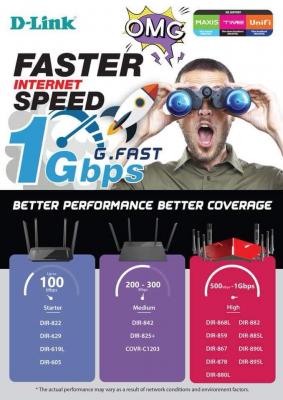
D-Link has released their recommendation too


Attached thumbnail(s)
Attached Image
SilentVampire
post Sep 20 2018, 01:29 PM

Networking Enthusiast
*******
Senior Member
5,714 posts

Joined: Mar 2007


QUOTE(matow @ Sep 20 2018, 01:14 PM)
The Archer C7 V2, after I bought it and set it up last year, I did not do any firmware upgrades after that.
Do you think I need to do any firmware upgrades or other settings?
*
V2 is considered old. It is already V5 now.

QUOTE(xperiaVuser @ Sep 20 2018, 01:20 PM)
before that, check if you enabled QOS, disable it if it's on.

For 5Ghz wifi, set to 80mhz and test again. For example, Redmi Note 5 won't go more than 300Mbps
*
No point setting to 80MHz, if your device does not support the MIMO required for the turbo speed.
mastedo
post Sep 20 2018, 01:30 PM

Getting Started
**
Junior Member
92 posts

Joined: Jan 2010


park
MGM
post Sep 20 2018, 01:46 PM

10k Club
********
All Stars
18,400 posts

Joined: Oct 2010
QUOTE(mastedo @ Sep 20 2018, 01:30 PM)
park
*
Isn't parking a kopitiam culture not suitable for a serious topic?
xperiaVuser
post Sep 20 2018, 02:03 PM

Regular
******
Senior Member
1,201 posts

Joined: Jul 2013
QUOTE(SilentVampire @ Sep 20 2018, 01:29 PM)
V2 is considered old. It is already V5 now.
No point setting to 80MHz, if your device does not support the MIMO required for the turbo speed.
*
Yup not a lot of phone/tablet has 2x2

This post has been edited by xperiaVuser: Sep 20 2018, 02:03 PM
silver311
post Sep 20 2018, 08:33 PM

Getting Started
**
Junior Member
191 posts

Joined: Mar 2008
Do you guys know any sellers for the Tp-link Archer C3150 V2? Went to a number of shops, cant seemed to find any selling it.
TSblacktubi
post Sep 20 2018, 08:40 PM

-
Group Icon
Elite
8,399 posts

Joined: Jul 2008

QUOTE(silver311 @ Sep 20 2018, 08:33 PM)
Do you guys know any sellers for the Tp-link Archer C3150 V2? Went to a number of shops, cant seemed to find any selling it.
*
Currently out of stock in the entire market. Somehow the demand for this model is super good. sweat.gif
silver311
post Sep 20 2018, 08:44 PM

Getting Started
**
Junior Member
191 posts

Joined: Mar 2008
QUOTE(blacktubi @ Sep 20 2018, 08:40 PM)
Currently out of stock in the entire market. Somehow the demand for this model is super good. sweat.gif
*
Haha. was afraid of that. Heard it is quite affordable for the performance it is giving cry.gif

What do you think of the Archer C5400? How much of a performance upgrade can I expect from the C5400? Does it have a further house wifi coverage (both 2.5ghz and 5ghz) with all those antennas it has?
TSblacktubi
post Sep 20 2018, 08:47 PM

-
Group Icon
Elite
8,399 posts

Joined: Jul 2008

QUOTE(silver311 @ Sep 20 2018, 08:44 PM)
Haha. was afraid of that. Heard it is quite affordable for the performance it is giving  cry.gif

What do you think of the Archer C5400? How much of a performance upgrade can I expect from the C5400? Does it have a further house wifi coverage (both 2.5ghz and 5ghz) with all those antennas it has?
*
C5400 is actually my daily driver for a long time now.

C5400 is literally the C3150 with an extra 5Ghz band, they are very similar device but with beefier specs.

It comes with 8 antennas. To be frank, the signal output is rather similar with C3150, what it excels is the performance when you have many devices connected.
MX510
post Sep 20 2018, 08:52 PM

Love Me Sin Hate Me Sinner
*******
Senior Member
4,038 posts

Joined: Aug 2005
From: Earth


I sold this almost 10 units to all VIP client they all love it :-)

This post has been edited by MX510: Sep 20 2018, 08:56 PM
Scissorshand
post Sep 20 2018, 09:01 PM

Regular
******
Senior Member
1,691 posts

Joined: Nov 2008
QUOTE(silver311 @ Sep 20 2018, 08:33 PM)
Do you guys know any sellers for the Tp-link Archer C3150 V2? Went to a number of shops, cant seemed to find any selling it.
*
QUOTE(silver311 @ Sep 20 2018, 08:44 PM)
Haha. was afraid of that. Heard it is quite affordable for the performance it is giving  cry.gif
What do you think of the Archer C5400? How much of a performance upgrade can I expect from the C5400? Does it have a further house wifi coverage (both 2.5ghz and 5ghz) with all those antennas it has?
*
Plenty of sellers HERE
SilentVampire
post Sep 20 2018, 09:15 PM

Networking Enthusiast
*******
Senior Member
5,714 posts

Joined: Mar 2007


QUOTE(silver311 @ Sep 20 2018, 08:33 PM)
Do you guys know any sellers for the Tp-link Archer C3150 V2? Went to a number of shops, cant seemed to find any selling it.
*
Yes, try Lelong.com.my. Still lots of sellers there.

QUOTE(blacktubi @ Sep 20 2018, 08:40 PM)
Currently out of stock in the entire market. Somehow the demand for this model is super good. sweat.gif
*
Plenty if sellers on Lelong.
TSblacktubi
post Sep 20 2018, 09:20 PM

-
Group Icon
Elite
8,399 posts

Joined: Jul 2008

QUOTE(MX510 @ Sep 20 2018, 08:52 PM)
» Click to show Spoiler - click again to hide... «


I sold this almost 10 units to all VIP client they all love it :-)
*
Good stuff, mind to link me with UBNT Malaysia so I can get a unit to play? tongue.gif

Anyway, why this instead of their normal line of APs for your clients tho?

QUOTE(SilentVampire @ Sep 20 2018, 09:15 PM)
Yes, try Lelong.com.my. Still lots of sellers there.
Plenty if sellers on Lelong.
*
Thanks for the tips. notworthy.gif
SilentVampire
post Sep 20 2018, 09:31 PM

Networking Enthusiast
*******
Senior Member
5,714 posts

Joined: Mar 2007


QUOTE(blacktubi @ Sep 20 2018, 09:20 PM)
Good stuff, mind to link me with UBNT Malaysia so I can get a unit to play? tongue.gif

Anyway, why this instead of their normal line of APs for your clients tho?

Thanks for the tips. notworthy.gif
*
No worries. Glad to help thumbup.gif

He recommended the AmplifiHD as it is the first UBNT product for home networking, instead of their normal line of APs, which could require a steep learning curve in learning and configuration, while this is designed for straight out of the box use, similar to other consumer routers. So, this is like getting an enterprise product but having the ease of use of home networking product.

See here for a comparison between this product and their enterprise product, the UniFi: https://michaelkummer.com/technology/amplif...s-unifi-review/

This post has been edited by SilentVampire: Sep 20 2018, 09:35 PM
Boy96
post Sep 20 2018, 11:51 PM

That's a tripod.
*******
Senior Member
3,848 posts

Joined: Dec 2009
From: Ampang


QUOTE(blacktubi @ Sep 17 2018, 05:08 PM)

Before you start, check that your computer and router support Gigabit Ethernet by referring to the specs sheet. Make sure you use a CAT5E cable or better.

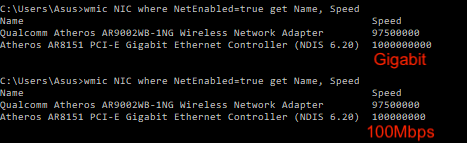
You can download this simple batch file to check your Gigabit link speed.
100000000 = 100Mbps
10000000000 = Gigabit
user posted image

Connect your computer to your router and run the file to see see if the ports are Gigabit capable and repeat it with your BTU modem. If you do not get Gigabit speed but your equipment is Gigabit capable, check your wire and rerun the test with another computer and Ethernet cable. 

If your BTU is confirmed to be a Gigabit capable BTU, contact your ISP as they may have configured it wrongly.

What about WiFi speed?
Read post #4
*
where can i download the batch file?
TSblacktubi
post Sep 21 2018, 12:16 AM

-
Group Icon
Elite
8,399 posts

Joined: Jul 2008

QUOTE(Boy96 @ Sep 20 2018, 11:51 PM)
where can i download the batch file?
*
I forget to attach that. sweat.gif

The command is this, you can just input it in any command prompt window. Doesn't work in Powershell.

wmic NIC where NetEnabled=true get Name, Speed

firecracker
post Sep 21 2018, 12:44 AM

Getting Started
**
Junior Member
97 posts

Joined: Jul 2008
QUOTE(blacktubi @ Sep 20 2018, 07:47 PM)
C5400 is actually my daily driver for a long time now.

C5400 is literally the C3150 with an extra 5Ghz band, they are very similar device but with beefier specs.

It comes with 8 antennas. To be frank, the signal output is rather similar with C3150, what it excels is the performance when you have many devices connected.
*
errr..between c5400 and asus 86u...which would u recommend?
gahkin
post Sep 21 2018, 12:47 AM

Enthusiast
*****
Senior Member
735 posts

Joined: Jan 2003
From: Selayang , Kepong


QUOTE(MX510 @ Sep 20 2018, 08:52 PM)


I sold this almost 10 units to all VIP client they all love it :-)
*
How much this cost ?
TSblacktubi
post Sep 21 2018, 12:50 AM

-
Group Icon
Elite
8,399 posts

Joined: Jul 2008

QUOTE(firecracker @ Sep 21 2018, 12:44 AM)
errr..between c5400 and asus 86u...which would u recommend?
*
Tough choice for me.

I would be more towards the C5400 as it has a better wireless coverage. I value wireless coverage over those features.

RT-AC86U still a great device coupled with AiMesh you can add another node to your network in the future. Not to mention AsusWRT is really feature rich.
gahkin
post Sep 21 2018, 12:56 AM

Enthusiast
*****
Senior Member
735 posts

Joined: Jan 2003
From: Selayang , Kepong


Asus aimesh is not pure mesh system ? Let say compate to ubnt mesh ?
firecracker
post Sep 21 2018, 01:26 AM

Getting Started
**
Junior Member
97 posts

Joined: Jul 2008
QUOTE(blacktubi @ Sep 20 2018, 11:50 PM)
Tough choice for me.

I would be more towards the C5400 as it has a better wireless coverage. I value wireless coverage over those features.

RT-AC86U still a great device coupled with AiMesh you can add another node to your network in the future. Not to mention AsusWRT is really feature rich.
*
appreciate ur thoughts icon_rolleyes.gif
thankyou
post Sep 21 2018, 01:26 AM

Regular
******
Senior Member
1,941 posts

Joined: Jan 2003
I was thinking to get ubnt amplifi or TP Link deco M9 Plus when they are on the market...

Just wonder which is better...
heidarren
post Sep 21 2018, 02:18 AM

Getting Started
**
Junior Member
248 posts

Joined: Aug 2018
QUOTE(thankyou @ Sep 21 2018, 01:26 AM)
I was thinking to get ubnt amplifi or TP Link deco M9 Plus when they are on the market...

Just wonder which is better...
*
M9 Plus is available in Sri Computer Low Yat Plaza, RM899, can negotiate if pay by cash, I just got a set of it, but 2 problems, 1st is IPv6 not working, no matter Dynamic IP or PPPoE, statefull or stateless, maybe gonna wait them to fix. 2nd is too easy to switch to 2.4GHz, maybe all mesh systems got the same problem too

Coverage is amazing, especially 2.4GHz, QoS surprisingly good, 802.11k, v, r supported, Orbi and Velop only has 802.11k, v, no r supported. Ethernet backhaul supported, but 2nd 5GHz not available for clients, only for backhaul. US selling this set for USD299, Netgear Orbi RBK40 is USD230, in Malaysia, RM899 for M9 Plus, RBK40 RM1799, if you compare the price between M5 and M9 Plus, it should be more than RM1500 for M9 Plus, I think because TP-Link is trying to grab market share in Malaysia, especially in this turbo moment.
thankyou
post Sep 21 2018, 02:53 AM

Regular
******
Senior Member
1,941 posts

Joined: Jan 2003
QUOTE(heidarren @ Sep 21 2018, 02:18 AM)
M9 Plus is available in Sri Computer Low Yat Plaza, RM899, can negotiate if pay by cash, I just got a set of it, but 2 problems, 1st is IPv6 not working, no matter Dynamic IP or PPPoE, statefull or stateless, maybe gonna wait them to fix. 2nd is too easy to switch to 2.4GHz, maybe all mesh systems got the same problem too

Coverage is amazing, especially 2.4GHz, QoS surprisingly good, 802.11k, v, r supported, Orbi and Velop only has 802.11k, v, no r supported. Ethernet backhaul supported, but 2nd 5GHz not available for clients, only for backhaul. US selling this set for USD299, Netgear Orbi RBK40 is USD230, in Malaysia, RM899 for M9 Plus, RBK40 RM1799, if you compare the price between M5 and M9 Plus, it should be more than RM1500 for M9 Plus, I think because TP-Link is trying to grab market share in Malaysia, especially in this turbo moment.
*
RM899 for 2 x M9 Plus? This is actually quite a good deal i think... I thought it's not available on the market because there's no listing @ Lazada...

I'm thinking to have it as Router or perhaps serving as AP only.

Huawei HG -> Mikrotik hEXs -> TP-Link Deco M9 Plus...
TSblacktubi
post Sep 21 2018, 02:59 AM

-
Group Icon
Elite
8,399 posts

Joined: Jul 2008

QUOTE(gahkin @ Sep 21 2018, 12:56 AM)
Asus aimesh is not pure mesh system ? Let say compate to ubnt mesh ?
*
No support for 802.11 k, r and v which is a major drawback to me. They rely on their own roaming algorithm which may or may not work that well as it depends on the client device.

The only thing great with AiMesh is the performance as their routers have some seriously powerful radio which typical off the shelf mesh system lacks.

Of course, you get the full ASUSWRT features if you are into that.

QUOTE(thankyou @ Sep 21 2018, 02:53 AM)
RM899 for 2 x M9 Plus? This is actually quite a good deal i think... I thought it's not available on the market because there's no listing @ Lazada...

I'm thinking to have it as Router or perhaps serving as AP only.

Huawei HG -> Mikrotik hEXs -> TP-Link Deco M9 Plus...
*
There is AP mode on the M9 Plus. I like the 802.11r support but it is not enabled by default, you need to enable it on the app.

If you intend to run it as a router, mind that it doesn't support HyppTV at the moment. If you already have a good setup on the Mikrotik, I feel AP mode is the way to go.

You will lose out the app control which is rather intuitive but if you use Mikrotik, you probably not into that.
heidarren
post Sep 21 2018, 03:19 AM

Getting Started
**
Junior Member
248 posts

Joined: Aug 2018
QUOTE(thankyou @ Sep 21 2018, 02:53 AM)
RM899 for 2 x M9 Plus? This is actually quite a good deal i think... I thought it's not available on the market because there's no listing @ Lazada...

I'm thinking to have it as Router or perhaps serving as AP only.

Huawei HG -> Mikrotik hEXs -> TP-Link Deco M9 Plus...
*
Yes you can have 2 options, router mode or AP mode, both r supported, can select it while setting up, choose it from the apps. RM870 for 2 X M9 Plus, that's the price I got for cash paying.
MGM
post Sep 21 2018, 06:00 AM

10k Club
********
All Stars
18,400 posts

Joined: Oct 2010
QUOTE(blacktubi @ Sep 21 2018, 12:16 AM)
I forget to attach that. sweat.gif

The command is this, you can just input it in any command prompt window. Doesn't work in Powershell.

wmic NIC where NetEnabled=true get Name, Speed
*
So to check if my BTU modem is gigabit capable I need to connect my laptop DIRECTLY to the BTU n run the above command?
unknownhost
post Sep 21 2018, 06:23 AM

New Member
*
Newbie
8 posts

Joined: Aug 2018


QUOTE(heidarren @ Sep 21 2018, 02:18 AM)
M9 Plus is available in Sri Computer Low Yat Plaza, RM899, can negotiate if pay by cash, I just got a set of it, but 2 problems, 1st is IPv6 not working, no matter Dynamic IP or PPPoE, statefull or stateless, maybe gonna wait them to fix. 2nd is too easy to switch to 2.4GHz, maybe all mesh systems got the same problem too

Coverage is amazing, especially 2.4GHz, QoS surprisingly good, 802.11k, v, r supported, Orbi and Velop only has 802.11k, v, no r supported. Ethernet backhaul supported, but 2nd 5GHz not available for clients, only for backhaul. US selling this set for USD299, Netgear Orbi RBK40 is USD230, in Malaysia, RM899 for M9 Plus, RBK40 RM1799, if you compare the price between M5 and M9 Plus, it should be more than RM1500 for M9 Plus, I think because TP-Link is trying to grab market share in Malaysia, especially in this turbo moment.
*
hey bro.. care to share some speed test results..
MX510
post Sep 21 2018, 06:36 AM

Love Me Sin Hate Me Sinner
*******
Senior Member
4,038 posts

Joined: Aug 2005
From: Earth


QUOTE(gahkin @ Sep 21 2018, 12:47 AM)
How much this cost ?
*
Retails is RM 2299 I can give RM 1999 if you want :-) with 1 year warranty
Neo|ofGeo
post Sep 21 2018, 07:39 AM

Stop Complaining and Read
Group Icon
Elite
3,142 posts

Joined: Nov 2010


hmm.gif
asking if i still need another router or not

current running AC58U,RT1200HP and N12u

i'm getting my 500mbps but as far i know none of this capable to make use of 500mbps speed on WiFI and only 1 router support gigabit lan

so should i invest on AC6X series or just get a gigabit switch
sifu please advice biggrin.gif
zher4883
post Sep 21 2018, 08:28 AM

Look at all my stars!!
*******
Senior Member
4,490 posts

Joined: Oct 2014


QUOTE(Neo|ofGeo @ Sep 21 2018, 07:39 AM)
hmm.gif
asking if i still need another router or not

current running AC58U,RT1200HP and N12u

i'm getting my 500mbps but as far i know none of this capable to make use of 500mbps speed on WiFI and only 1 router support gigabit lan

so should i invest on AC6X series or just get a gigabit switch
sifu please advice  biggrin.gif
*
Upgrade your router if you relies on wireless connection. Use RT-AC58U if you are mainly using wired connection. RT-AC58U CPU performance is pretty good I would say.
soonwai
post Sep 21 2018, 08:33 AM


********
All Stars
11,455 posts

Joined: Oct 2007
From: KL


QUOTE(Neo|ofGeo @ Sep 21 2018, 07:39 AM)
hmm.gif
asking if i still need another router or not

current running AC58U,RT1200HP and N12u

i'm getting my 500mbps but as far i know none of this capable to make use of 500mbps speed on WiFI and only 1 router support gigabit lan

so should i invest on AC6X series or just get a gigabit switch
sifu please advice  biggrin.gif
*
AC58U technically should be able to go over 500Mbps on wifi. Depends on your device too. My iPad 2017 gets 515 Mbps while the most my iPhone 6s can do is 343 Mbps. They're both 2x2 MIMO.

This post has been edited by soonwai: Sep 21 2018, 09:06 AM
Neo|ofGeo
post Sep 21 2018, 08:37 AM

Stop Complaining and Read
Group Icon
Elite
3,142 posts

Joined: Nov 2010


QUOTE(zher4883 @ Sep 21 2018, 08:28 AM)
Upgrade your router if you relies on wireless connection. Use RT-AC58U if you are mainly using wired connection. RT-AC58U CPU performance is pretty good I would say.
*
QUOTE(soonwai @ Sep 21 2018, 08:33 AM)
AC58U technically should be able to go over 500Mbps on wifi. Depends on your device too. My iPad 2017 gets 515 Mbps while the most my iPhone 6s can do is 300 Mbps. They're both 2x2 MIMO.
*
i see hmm.gif

then any recommendation on gigabit switch?
i rely more on lan cable
there's 6 computer running lan cable at home.

zher4883
post Sep 21 2018, 09:02 AM

Look at all my stars!!
*******
Senior Member
4,490 posts

Joined: Oct 2014


QUOTE(Neo|ofGeo @ Sep 21 2018, 08:37 AM)
i see  hmm.gif

then any recommendation on gigabit switch?
i rely more on lan cable
there's 6 computer running lan cable at home.
*
Just buy a cheap unmanaged gigabit switch will do.
CZero
post Sep 21 2018, 09:07 AM

Something For Nothing
*****
Senior Member
823 posts

Joined: Jun 2005
From: 0:0:0:0:0:0:7f00:1
Can confirm Mikrotik rb2011uias-2hnd-in can support 800Mbps over LAN after enabling the fasttrack. Thank you. notworthy.gif

Sharing my humble setup.

onu alcatel lucent i240g
Attached Image

mikrotik rb2011uias-2hnd-in with its wifi and lcd display disabled. use since unifi 20 era.
Attached Image

tp-link TL-SG108E Easy Smart Switch. Got light indicator showing whether the speed is 10/100 or 1Gbps. thumbsup.gif
Attached Image

tp-link Archer C9 as access point, with all antenna replaced and the 3rd one extended to cover downstairs.
Attached Image

full pic.
Attached Image


Now I only need something to replace the C9 as the access point. icon_question.gif
justin78
post Sep 21 2018, 10:21 AM

Getting Started
**
Junior Member
179 posts

Joined: Jul 2005


QUOTE(matow @ Sep 20 2018, 01:14 PM)
The Archer C7 V2, after I bought it and set it up last year, I did not do any firmware upgrades after that.
Do you think I need to do any firmware upgrades or other settings?
*
Hi, i am using the same wifi router as you, the last firmware for the Archer C7 v2, is from July2016, which i think TPLink "will" provide some kind of update to it since they have published the update to the EU and US region not long ago.
For the speed i managed to get for this wifi router, you may check at here -
https://forum.lowyat.net/index.php?showtopi...post&p=90313720
TSblacktubi
post Sep 21 2018, 11:47 AM

-
Group Icon
Elite
8,399 posts

Joined: Jul 2008

CZero
Maybe you can try placing your wireless access point somewhere as I am pretty sure your metal rack will affect the signal a little.

Archer C3150 have some pretty decent radio. smile.gif
matow
post Sep 21 2018, 11:57 AM

Getting Started
**
Junior Member
216 posts

Joined: Jan 2003
From: Klang, near Bayu


QUOTE(justin78 @ Sep 21 2018, 10:21 AM)
Hi, i am using the same wifi router as you, the last firmware for the Archer C7 v2, is from July2016, which i think TPLink "will" provide some kind of update to it since they have published the update to the EU and US region not long ago.
For the speed i managed to get for this wifi router, you may check at here -
https://forum.lowyat.net/index.php?showtopi...post&p=90313720
*
Hi Justin, thank you. I have seen your speed, they are way better than mine but most probably I'm testing with inferior receivers, that is why I'm not getting the high speeds reading.
If in that case I might as well downgrade to 100 Mbps.
Thank you again for your feedback.
nikobellic
post Sep 21 2018, 12:17 PM

Getting Started
**
Junior Member
121 posts

Joined: Apr 2012
Hi guys i have read many suggestion on Ethernet cable upgrading mainly from CAT4 or CAT5 to CAT5e and CAT6. Just wonder, higher price and over-killed issue aside, will CAT7 be better than CAT6 on performance and future-proof?
Thanks in advance for your tots.

MX510
post Sep 21 2018, 01:03 PM

Love Me Sin Hate Me Sinner
*******
Senior Member
4,038 posts

Joined: Aug 2005
From: Earth


QUOTE(CZero @ Sep 21 2018, 09:07 AM)
Can confirm Mikrotik rb2011uias-2hnd-in can support 800Mbps over LAN after enabling the fasttrack. Thank you. notworthy.gif

Sharing my humble setup.

onu alcatel lucent i240g
Attached Image

mikrotik rb2011uias-2hnd-in with its wifi and lcd display disabled. use since unifi 20 era.
Attached Image

tp-link TL-SG108E Easy Smart Switch. Got light indicator showing whether the speed is 10/100 or 1Gbps.  thumbsup.gif
Attached Image

tp-link Archer C9 as access point, with all antenna replaced and the 3rd one extended to cover downstairs.
Attached Image

full pic.
Attached Image
Now I only need something to replace the C9 as the access point.  icon_question.gif
*
Yeah fasttrack did the trick

Still need Mikrotik CAP-AC enable fastrack also :-)

Complete your setup bro

Awesome Mikrotik


Granit3Grey
post Sep 21 2018, 01:06 PM

New Member
*
Newbie
20 posts

Joined: Dec 2017
QUOTE(blacktubi @ Sep 21 2018, 11:47 AM)
CZero
Maybe you can try placing your wireless access point somewhere as I am pretty sure your metal rack will affect the signal a little.

Archer C3150 have some pretty decent radio. smile.gif
*
Hi Blacktubi - will the C3150 consume alot of electricity 24*7 ON? The power adapter seems huge sad.gif

At this price range, still undecided for C3150 or the Lazada RM899 China RT-AC86U.

Mainly because router on 1st floor but need stronger wifi 5G to house ground floor coverage on 500Mbps.
boxsystem
post Sep 21 2018, 02:48 PM

Legend
******
Senior Member
1,573 posts

Joined: Jan 2003
From: Nilai, Negeri Sembilan
QUOTE(CZero @ Sep 21 2018, 09:07 AM)
Can confirm Mikrotik rb2011uias-2hnd-in can support 800Mbps over LAN after enabling the fasttrack. Thank you. notworthy.gif

Sharing my humble setup.

onu alcatel lucent i240g
Attached Image

mikrotik rb2011uias-2hnd-in with its wifi and lcd display disabled. use since unifi 20 era.
Attached Image

tp-link TL-SG108E Easy Smart Switch. Got light indicator showing whether the speed is 10/100 or 1Gbps.  thumbsup.gif
Attached Image

tp-link Archer C9 as access point, with all antenna replaced and the 3rd one extended to cover downstairs.
Attached Image

full pic.
Attached Image
Now I only need something to replace the C9 as the access point.  icon_question.gif
*
Nice rack to place the equipment. Airy.
MGM
post Sep 21 2018, 03:00 PM

10k Club
********
All Stars
18,400 posts

Joined: Oct 2010
QUOTE(blacktubi @ Sep 21 2018, 12:16 AM)
I forget to attach that. sweat.gif

The command is this, you can just input it in any command prompt window. Doesn't work in Powershell.

wmic NIC where NetEnabled=true get Name, Speed
*
So to check if my BTU modem is gigabit capable I need to connect my laptop DIRECTLY to the BTU n run the above command? YES or NO?
Boy96
post Sep 21 2018, 03:31 PM

That's a tripod.
*******
Senior Member
3,848 posts

Joined: Dec 2009
From: Ampang


QUOTE(MGM @ Sep 21 2018, 03:00 PM)
So to check if my BTU modem is gigabit capable I need to connect my laptop DIRECTLY to the BTU n run the above command?  YES or NO?
*
Actually without that also can just check, just connect BTU straight to computer and open network adapter properties, under status

When connected BTU to laptop, my laptop shows 100mbps
Connect BTU to my desktop PC, it shows 1.0gbps..
thankyou
post Sep 21 2018, 03:43 PM

Regular
******
Senior Member
1,941 posts

Joined: Jan 2003
QUOTE(blacktubi @ Sep 21 2018, 02:59 AM)
No support for 802.11 k, r and v which is a major drawback to me. They rely on their own roaming algorithm which may or may not work that well as it depends on the client device.

The only thing great with AiMesh is the performance as their routers have some seriously powerful radio which typical off the shelf mesh system lacks.

Of course, you get the full ASUSWRT features if you are into that.
There is AP mode on the M9 Plus. I like the 802.11r support but it is not enabled by default, you need to enable it on the app.

If you intend to run it as a router, mind that it doesn't support HyppTV at the moment. If you already have a good setup on the Mikrotik, I feel AP mode is the way to go.

You will lose out the app control which is rather intuitive but if you use Mikrotik, you probably not into that.
*
QUOTE(heidarren @ Sep 21 2018, 03:19 AM)
Yes you can have 2 options, router mode or AP mode, both r supported, can select it while setting up, choose it from the apps.  RM870 for 2 X M9 Plus, that's the price I got for cash paying.
*
Thanks. Looks like M9 Plus is a good option...
luminaryxi
post Sep 21 2018, 04:12 PM

On my way
****
Senior Member
584 posts

Joined: Aug 2009
still trying to grasp things but nonetheless thankful for the guide here.

thank you !
luminaryxi
post Sep 21 2018, 08:30 PM

On my way
****
Senior Member
584 posts

Joined: Aug 2009
is it normal ac1200 cant exceed 100mbps after turbo-ed? i already shut down the modem for 10 minutes
SilentVampire
post Sep 21 2018, 08:34 PM

Networking Enthusiast
*******
Senior Member
5,714 posts

Joined: Mar 2007


QUOTE(luminaryxi @ Sep 21 2018, 08:30 PM)
is it normal ac1200 cant exceed 100mbps after turbo-ed? i already shut down the modem for 10 minutes
*
Look at the 1st page, and see what could be wrong. Could be your BTU does not support the turbo speed, or your PC does not support it. The C1200 can definitely support more than 100Mbps. See my signature as well, for more info.

This post has been edited by SilentVampire: Sep 21 2018, 08:35 PM
luminaryxi
post Sep 21 2018, 08:36 PM

On my way
****
Senior Member
584 posts

Joined: Aug 2009
yeap i read the first, btu is correct. read your sig as well. connected to 5hgz band.

i think i was not turbo-ed at all , but the CS girl confirmed i am turbo-ed.


SilentVampire
post Sep 21 2018, 08:42 PM

Networking Enthusiast
*******
Senior Member
5,714 posts

Joined: Mar 2007


QUOTE(luminaryxi @ Sep 21 2018, 08:36 PM)
yeap i read the first, btu is correct. read your sig as well. connected to 5hgz band.

i think i was not turbo-ed at all , but the CS girl confirmed i am turbo-ed.
*
What is your turbo speed? Try to test with LAN cable, Cat 5e, or Cat 6.
luminaryxi
post Sep 21 2018, 08:45 PM

On my way
****
Senior Member
584 posts

Joined: Aug 2009
QUOTE(SilentVampire @ Sep 21 2018, 08:42 PM)
What is your turbo speed? Try to test with LAN cable, Cat 5e, or Cat 6.
*
ive no lan cable to test at the moment, but i dont hope for much, i jus hope wifi can exceed 100mbps only biggrin.gif
SilentVampire
post Sep 21 2018, 08:55 PM

Networking Enthusiast
*******
Senior Member
5,714 posts

Joined: Mar 2007


QUOTE(luminaryxi @ Sep 21 2018, 08:45 PM)
ive no lan cable to test at the moment, but i dont hope for much, i jus hope wifi can exceed 100mbps only  biggrin.gif
*
Your BTU is probably misconfigured to 100Mbps.
luminaryxi
post Sep 21 2018, 09:01 PM

On my way
****
Senior Member
584 posts

Joined: Aug 2009
got a noob question here, if i use cat 6 from router to a lan port, then cat 5 from lan port to various devices, the various device will get cat 5 speed?
cyberic
post Sep 21 2018, 09:10 PM

Regular
******
Senior Member
1,127 posts

Joined: Jan 2003


QUOTE(luminaryxi @ Sep 21 2018, 09:01 PM)
got a noob question here, if i use cat 6 from router to a lan port, then cat 5 from lan port to various devices, the various device will get cat 5 speed?
*
You will be as fast as the slowest link 😅
SilentVampire
post Sep 21 2018, 09:12 PM

Networking Enthusiast
*******
Senior Member
5,714 posts

Joined: Mar 2007


QUOTE(luminaryxi @ Sep 21 2018, 09:01 PM)
got a noob question here, if i use cat 6 from router to a lan port, then cat 5 from lan port to various devices, the various device will get cat 5 speed?
*
Yes. Maybe that is why you are only getting 100Mbps.
luminaryxi
post Sep 21 2018, 09:19 PM

On my way
****
Senior Member
584 posts

Joined: Aug 2009
tmnet is weird tho, i said i want rm129 for 100mbps, now i get turbo-ed , for me to move to turbo i need to change all the lan cable to cat 6, now the btu also i dunno how to check, i read up there a forumer said can connect from btu to laptop, can teach me how?

thank you
SilentVampire
post Sep 21 2018, 10:51 PM

Networking Enthusiast
*******
Senior Member
5,714 posts

Joined: Mar 2007


QUOTE(luminaryxi @ Sep 21 2018, 09:19 PM)
tmnet is weird tho, i said i want rm129 for 100mbps, now i get turbo-ed , for me to move to turbo i need to change all the lan cable to cat 6, now the btu also i dunno how to check, i read up there a forumer said can connect from btu to laptop, can teach me how?

thank you
*
Nothing hard. Just connect your LAN cable, ideally Cat 5e or Cat 6 to the BTU LAN port 1, and see the connected speed. If it is 1Gbps, then your BTU support 1Gbps.
-oc-gassa
post Sep 22 2018, 01:03 PM

Enthusiast
*****
Senior Member
967 posts

Joined: Jan 2003
From: setapak
QUOTE(SilentVampire @ Sep 21 2018, 10:51 PM)
Nothing hard. Just connect your LAN cable, ideally Cat 5e or Cat 6 to the BTU LAN port 1, and see the connected speed. If it is 1Gbps, then your BTU support 1Gbps.
*
I think this setting (BTU LAN Port 1 setting) to see if BTU LAN port limited to 100Mbps or 1Gbps should be pinned in the page... hehe.. just suggestion..
SilentVampire
post Sep 22 2018, 02:00 PM

Networking Enthusiast
*******
Senior Member
5,714 posts

Joined: Mar 2007


QUOTE(-oc-gassa @ Sep 22 2018, 01:03 PM)
I think this setting (BTU LAN Port 1 setting) to see if BTU LAN port limited to 100Mbps or 1Gbps should be pinned in the page... hehe.. just suggestion..
*
Haha, true, but it is easy to figure out if you are capped to 100Mbps or not though, just by looking at the max speed you can get on your device, so that is unnecessary unless you want to confirm.
-oc-gassa
post Sep 22 2018, 02:45 PM

Enthusiast
*****
Senior Member
967 posts

Joined: Jan 2003
From: setapak
QUOTE(SilentVampire @ Sep 22 2018, 02:00 PM)
Haha, true, but it is easy to figure out if you are capped to 100Mbps or not though, just by looking at the max speed you can get on your device, so that is unnecessary unless you want to confirm.
*
i did not think this at 1st... then when read this thread only trigger to check LAN port speed....
mancode1009
post Sep 22 2018, 05:29 PM

Getting Started
**
Junior Member
144 posts

Joined: Aug 2008
From: Kiasu Island

My laptop wireless adaptor display 802.11bgn mean only support 2.4 Ghz ? after being turbo, using lan cable can get around 523 mbps but wireless connection only get 47 mpbs. By the way, I using stock router tp link archer c1200.
joehann
post Sep 22 2018, 11:18 PM

Casual
***
Junior Member
430 posts

Joined: Jan 2012
Hi, I just bought tenda ac18. managed to get 520mbps on wifi if close enough with the router.

Just want to ask, how come the link speed for 5ghz coneection only max on 866.7mbps on all of my device same as when I use the tplink c1200 even though it suppose to get 1300mbps link speed? device limitation?
SilentVampire
post Sep 22 2018, 11:27 PM

Networking Enthusiast
*******
Senior Member
5,714 posts

Joined: Mar 2007


QUOTE(mancode1009 @ Sep 22 2018, 05:29 PM)
My laptop wireless adaptor display 802.11bgn mean only support 2.4 Ghz ? after being turbo, using lan cable can get around 523 mbps but wireless connection only get 47 mpbs. By the way, I using stock router tp link archer c1200.
*
Yes, it only supports 2.4GHz. You need to be on 5GHz AC to enjoy turbo speed, and your router does not support 500Mbps speed by the way. Read the link on my signature, green text, to learn more and for a list of compatible routers, or read 1st page of this thread to learn more.

QUOTE(joehann @ Sep 22 2018, 11:18 PM)
Hi, I just bought tenda ac18. managed to get 520mbps on wifi if close enough with the router.

Just want to ask, how come the link speed for 5ghz coneection only max on 866.7mbps on all of my device same as when I use the tplink c1200 even though it suppose to get 1300mbps link speed? device limitation?
*
Yes, device limitation. All your devices with max of 866.7Mbps link speed only has 2x2 MIMO on 5GHz AC. 1300Mbps link speed is reserved for devices that support 3x3 MIMO in 5GHz AC. See here: https://forum.lowyat.net/topic/4658454

This post has been edited by SilentVampire: Sep 22 2018, 11:28 PM
iguana_dude_619
post Sep 23 2018, 09:19 AM

Xbox GT, PSN & Steam ID: iguanadude626
******
Senior Member
1,141 posts

Joined: Apr 2010
From: USJ


QUOTE(blacktubi @ Sep 17 2018, 05:08 PM)
» Click to show Spoiler - click again to hide... «

You can download this simple batch file to check your Gigabit link speed.
100000000 = 100Mbps
10000000000 = Gigabit
user posted image

» Click to show Spoiler - click again to hide... «
I believe for Gigabit is only 1 billion. 1,000,000,000
coz I got confuse a bit when check my cables tongue.gif
is faster than 100Mbps but slower than 1Gbps rclxub.gif

tawwoei
post Sep 23 2018, 10:23 AM

New Member
*
Newbie
6 posts

Joined: Mar 2009
i Want to ask after Turbo my speed only reach not even half of the 800mbps
http://www.speedtest.net/result/7658573879.png
i am using TP-Link AC3150
tawwoei
post Sep 23 2018, 10:24 AM

New Member
*
Newbie
6 posts

Joined: Mar 2009
<a href="http://www.speedtest.net/result/7658573879"><img src="http://www.speedtest.net/result/7658573879.png"/></a>
SilentVampire
post Sep 23 2018, 10:58 AM

Networking Enthusiast
*******
Senior Member
5,714 posts

Joined: Mar 2007


QUOTE(tawwoei @ Sep 23 2018, 10:23 AM)
i Want to ask after Turbo my speed only reach not even half of the 800mbps
http://www.speedtest.net/result/7658573879.png
i am using TP-Link AC3150
*
Too many reasons why, check the link on my signature.
TSblacktubi
post Sep 23 2018, 11:12 AM

-
Group Icon
Elite
8,399 posts

Joined: Jul 2008

QUOTE(tawwoei @ Sep 23 2018, 10:23 AM)
i Want to ask after Turbo my speed only reach not even half of the 800mbps
http://www.speedtest.net/result/7658573879.png
i am using TP-Link AC3150
*
Your speed is capped at 100Mbps, indicating that it is bottlenecked by Ethernet speed.

Can you make sure you use at least CAT5E
d0y0k
post Sep 23 2018, 12:38 PM

Getting Started
**
Junior Member
57 posts

Joined: Jul 2007
From: Bangi


Hi guys.. Previously before unifi turbo.. I'm using power line for my desktop.. now after turbo.. apparently.. no power line will achieve 800mbps.. so.. I'm thinking to use WiFi for my desktop.. do you know which usb/pcie WiFi adapter can support up to 800mbps?
Cheapest option pls.. spent a lot to upgrade router already. (Tested using LAN , can achieve 800mbps)

Router is RT-AC5300 btw

This post has been edited by d0y0k: Sep 23 2018, 12:43 PM
SilentVampire
post Sep 23 2018, 12:45 PM

Networking Enthusiast
*******
Senior Member
5,714 posts

Joined: Mar 2007


QUOTE(d0y0k @ Sep 23 2018, 12:38 PM)
Hi guys.. Previously before unifi turbo.. I'm using power line for my desktop.. now after turbo.. apparently.. no power line will achieve 800mbps.. so.. I'm thinking to use WiFi for my desktop.. do you know which usb/pcie WiFi adapter can support up to  800mbps?
Cheapest option pls.. spent a lot to upgrade router already. (Tested using LAN , can achieve 800mbps)

Router is RT-AC5300 btw
*
Yes, if you want the best chance to reach 800Mbps for your desktop, get the Asus PCE-88. It is 4x4 MIMO.

For USB wireless adapter, get the TP-Link T9UH.

This post has been edited by SilentVampire: Sep 23 2018, 12:45 PM
d0y0k
post Sep 23 2018, 02:56 PM

Getting Started
**
Junior Member
57 posts

Joined: Jul 2007
From: Bangi


TP-Link T9UH can deliver 800mbps? Is it MIMO device?
labtec
post Sep 23 2018, 02:59 PM

Regular
******
Senior Member
1,556 posts

Joined: Jan 2003
if my home got 8-10 device connecting using wifi, what spec should i look at when choosing a router?
David_78
post Sep 23 2018, 03:04 PM

Getting Started
**
Junior Member
140 posts

Joined: Dec 2008
my unifi had been upgraded from 30mbps to 300mbps, I had upgraded my router to gigabyte router ( prolink PRC3801 and the TPLINK archer C1200, i redo my back bone from main router to room router using LAN cable cat 6, ( I had two tplink power adapater 1300 mbps for sales , few month old only)

Speed with cable and gigabyte lan can to to max 300mbps,With my latest P20 pro i can get close to 290mbps when less then a meter within the router at 5 G , if i stand within 3-5 meter the speed drop to 100mbps....

Still aplenty , on 2.4G wirless max out about 90mbps... so to get max 300 is almost impossible if you not connected with LAN cat 6 cable or less then a meter.

Anyway 100mbps per device is good enough
SilentVampire
post Sep 23 2018, 04:29 PM

Networking Enthusiast
*******
Senior Member
5,714 posts

Joined: Mar 2007


QUOTE(d0y0k @ Sep 23 2018, 02:56 PM)
TP-Link T9UH can deliver 800mbps? Is it MIMO device?
*
It have the best change of doing so, and yes, it is 3x3 MIMO.

QUOTE(labtec @ Sep 23 2018, 02:59 PM)
if my home got 8-10 device connecting using wifi, what spec should i look at when choosing a router?
*
Depends on your turbo speed. Click on my sig and read green text.
d0y0k
post Sep 23 2018, 04:56 PM

Getting Started
**
Junior Member
57 posts

Joined: Jul 2007
From: Bangi


QUOTE(SilentVampire @ Sep 23 2018, 04:29 PM)
It have the best change of doing so, and yes, it is 3x3 MIMO.
Depends on your turbo speed. Click on my sig and read green text.
*
Thanks.. I'll go for TP-Link T9UH first as it is much cheaper compared to the others..
m.shah.f
post Sep 23 2018, 06:44 PM

New Member
*
Junior Member
9 posts

Joined: Jan 2010
From: Cat City


QUOTE(BlackJackE3 @ Sep 20 2018, 09:13 AM)
Alright, thanks for the info rclxms.gif  will try to factory reset my router tonight
*
So did you get better speed after factory resetting your router?
I got upgraded to 500 Mbps but can't seem to get more than 100 Mbps both on WIFI and LAN. Both router and PC LAN port already set to 1000Mbps.
Apeiron
post Sep 23 2018, 09:46 PM

Getting Started
**
Junior Member
75 posts

Joined: Sep 2018
I am simple user with 4 user at home, total not more then 10 device connected at any time.
I have TM RM129 100Mbps speed package and I have 3 router at home: -
1) Dlink dir842 - TM provided set.
2) Tplink Archer C7 V4.
3) Tmobile AC1900 flash with AsusWRT latest FW.

I tested all 3 and they all have very similar performance on both 2.4G and 5G Wifi, speed as well as range.

My question is how do i test which is better router to be put to use with my 100Mbps line. please help.

SilentVampire
post Sep 23 2018, 09:55 PM

Networking Enthusiast
*******
Senior Member
5,714 posts

Joined: Mar 2007


QUOTE(Apeiron @ Sep 23 2018, 09:46 PM)
I am simple user with 4 user at home, total not more then 10 device connected at any time.
I have TM RM129 100Mbps speed package and I have 3 router at home: -
1) Dlink dir842 - TM provided set.
2) Tplink Archer C7 V4.
3) Tmobile AC1900 flash with AsusWRT latest FW.

I tested all 3 and they all have very similar performance on both 2.4G and 5G Wifi, speed as well as range.

My question is how do i test which is better router to be put to use with my 100Mbps line. please help.
*
Simple. Go to WikiDevi and see the hardware specs. But, of all routers above, I would use the AC1900 T mobile
version or the Archer C7 v4 as a backup.
SilentVampire
post Sep 23 2018, 09:56 PM

Networking Enthusiast
*******
Senior Member
5,714 posts

Joined: Mar 2007


QUOTE(m.shah.f @ Sep 23 2018, 06:44 PM)
So did you get better speed after factory resetting your router?
I got upgraded to 500 Mbps but can't seem to get more than 100 Mbps both on WIFI and LAN. Both router and PC LAN port already set to 1000Mbps.
*
Tested your cable? Get Cat 6 for both BTU to router and router to PC.
m.shah.f
post Sep 23 2018, 10:16 PM

New Member
*
Junior Member
9 posts

Joined: Jan 2010
From: Cat City


QUOTE(SilentVampire @ Sep 23 2018, 09:56 PM)
Tested your cable? Get Cat 6 for both BTU to router and router to PC.
*
Currently using Cat5e. Will get a Cat 6 cable tomorrow and try connecting directly to BTU as well.
Even if it's a cable issue, with the default router DIR-850L, I should be able to get more than 100Mbps on wifi which I don't.
My concern is that the BTU might be configured incorrectly, which means no way around it but to wait for TM tech to come over.
Apeiron
post Sep 23 2018, 10:23 PM

Getting Started
**
Junior Member
75 posts

Joined: Sep 2018
QUOTE(SilentVampire @ Sep 23 2018, 09:55 PM)
Simple. Go to WikiDevi and see the hardware specs. But, of all routers above, I would use the AC1900 T mobile
version or the Archer C7 v4 as a backup.
*
TQVM, for pointing the direction. smile.gif
SilentVampire
post Sep 23 2018, 10:51 PM

Networking Enthusiast
*******
Senior Member
5,714 posts

Joined: Mar 2007


QUOTE(m.shah.f @ Sep 23 2018, 10:16 PM)
Currently using Cat5e. Will get a Cat 6 cable tomorrow and try connecting directly to BTU as well.
Even if it's a cable issue, with the default router DIR-850L, I should be able to get more than 100Mbps on wifi which I don't.
My concern is that the BTU might be configured incorrectly, which means no way around it but to wait for TM tech to come over.
*
Yep, sounds like you have to call them to come.

QUOTE(Apeiron @ Sep 23 2018, 10:23 PM)
TQVM, for pointing the direction.  smile.gif
*
No worries, good luck.
maru
post Sep 24 2018, 01:51 AM

Regular
******
Senior Member
1,191 posts

Joined: Sep 2004


QUOTE(d0y0k @ Sep 23 2018, 04:56 PM)
Thanks.. I'll go for TP-Link T9UH first as it is much cheaper compared to the others..
*
Kindly share the result once you try. I also in powerline but the speed limited.
St. Teh
post Sep 24 2018, 10:08 AM

Getting Started
**
Junior Member
266 posts

Joined: Jul 2008
Hi all

I just upgraded my router to Asus RT-AC68U. But after I properly set up all, the new router unable connect to internet, I have called TM and everything is working fine, thus I changed back to my old Asus Router and it still able connect to internet.

Would like to seek for advise, is there any special set up for Asus RT-AC68U?

Thank you
SilentVampire
post Sep 24 2018, 10:19 AM

Networking Enthusiast
*******
Senior Member
5,714 posts

Joined: Mar 2007


QUOTE(St. Teh @ Sep 24 2018, 10:08 AM)
Hi all

I just upgraded my router to Asus RT-AC68U. But after I properly set up all, the new router unable connect to internet, I have called TM and everything is working fine, thus I changed back to my old Asus Router and it still able connect to internet.

Would like to seek for advise, is there any special set up for Asus RT-AC68U?

Thank you
*
Did you set Unifi Home Mode on IPTV Tab on WAN tab?
St. Teh
post Sep 24 2018, 10:28 AM

Getting Started
**
Junior Member
266 posts

Joined: Jul 2008
QUOTE(SilentVampire @ Sep 24 2018, 10:19 AM)
Did you set Unifi Home Mode on IPTV Tab on WAN tab?
*
I really no idea, I just follow the step to set up the router
TSblacktubi
post Sep 24 2018, 10:51 AM

-
Group Icon
Elite
8,399 posts

Joined: Jul 2008

QUOTE(St. Teh @ Sep 24 2018, 10:28 AM)
I really no idea, I just follow the step to set up the router
*
I created this guide quite some time ago and it is still applicable for now. smile.gif

https://www.blacktubi.com/unifi/setup-asus-router-for-unifi/
St. Teh
post Sep 24 2018, 11:07 AM

Getting Started
**
Junior Member
266 posts

Joined: Jul 2008
QUOTE(SilentVampire @ Sep 24 2018, 10:19 AM)
Did you set Unifi Home Mode on IPTV Tab on WAN tab?
*
Thanks bro....i read your another solution in another thread, will try sort it out tonite


QUOTE(blacktubi @ Sep 24 2018, 10:51 AM)
I created this guide quite some time ago and it is still applicable for now. smile.gif

https://www.blacktubi.com/unifi/setup-asus-router-for-unifi/
*
THanks bro....will try it out tonite
Corsair0418
post Sep 24 2018, 04:04 PM

24K KARAT MAGIC
****
Senior Member
589 posts

Joined: Nov 2012


shifu here, i have roughly 15 tenants are staying 3 apartment units of mine, and I am staying unit 4, i have an unifi 50mbps which will be turbo-ed very soon.. so my question here, if im about to setup a wifi for them, what is the cheapest & best way to do so ? change my current modem to an expensive 1 ? or set up multiple wifi extender ?

P.S : i have a 24hours online pc, any way to setup a wifi for them & not slowing down my speed ?


your help is much appreciated ! thank you rclxm9.gif
heidarren
post Sep 24 2018, 04:56 PM

Getting Started
**
Junior Member
248 posts

Joined: Aug 2018
QUOTE(SilentVampire @ Sep 24 2018, 10:19 AM)
Did you set Unifi Home Mode on IPTV Tab on WAN tab?
*
Does it make any different? I remember home or business both r using VLAN tagging 500, the only different is home will add another VLAN tagging 600 for IPTV on LAN 4, correct me if I'm wrong, thanks ya
SilentVampire
post Sep 24 2018, 06:15 PM

Networking Enthusiast
*******
Senior Member
5,714 posts

Joined: Mar 2007


QUOTE(Corsair0418 @ Sep 24 2018, 04:04 PM)
shifu here, i have roughly 15 tenants are staying 3 apartment units of mine, and I am staying unit 4, i have an unifi 50mbps which will be turbo-ed very soon.. so my question here, if im about to setup a wifi for them, what is the cheapest & best way to do so ? change my current modem to an expensive 1 ? or set up multiple wifi extender ?

P.S : i have a 24hours online pc, any way to setup a wifi for them & not slowing down my speed ?
your help is much appreciated ! thank you  rclxm9.gif
*
See my reply to you on other thread.

QUOTE(heidarren @ Sep 24 2018, 04:56 PM)
Does it make any different? I remember home or business both r using VLAN tagging 500, the only different is home will add another VLAN tagging 600 for IPTV on LAN 4, correct me if I'm wrong, thanks ya
*
You are right, but he might not have set Unifi Home, or Unifi Business, and did not tag the ports correctly, that’s why I tell him to select either mode.
TSblacktubi
post Sep 24 2018, 06:43 PM

-
Group Icon
Elite
8,399 posts

Joined: Jul 2008

QUOTE(Corsair0418 @ Sep 24 2018, 04:04 PM)
shifu here, i have roughly 15 tenants are staying 3 apartment units of mine, and I am staying unit 4, i have an unifi 50mbps which will be turbo-ed very soon.. so my question here, if im about to setup a wifi for them, what is the cheapest & best way to do so ? change my current modem to an expensive 1 ? or set up multiple wifi extender ?

P.S : i have a 24hours online pc, any way to setup a wifi for them & not slowing down my speed ?
your help is much appreciated ! thank you  rclxm9.gif
*
Your best maintenance free option is to pull wire and connect it to router.

Repeaters are fine but you will have reliability issue and terrible speed for sure. It will be worst considering that you will need multiple repeats to reach the third unit.
robert82
post Sep 24 2018, 08:32 PM

Regular
******
Senior Member
1,924 posts

Joined: Jan 2011
So i have white BTU with DIR 850L
Connected Cat5e cable to DIR 850L however highest is 90++ MBPS

Unifi technical tried reset my port however still the same.

Login into admin of the router and check the LAN port as 1000 MBPS

Anything else I should be checking?
tommyfai
post Sep 24 2018, 10:19 PM

Casual
***
Junior Member
408 posts

Joined: Feb 2008
From: puchong


QUOTE(robert82 @ Sep 24 2018, 08:32 PM)
So i have white BTU with DIR 850L
Connected Cat5e cable to DIR 850L however highest is 90++ MBPS

Unifi technical tried reset my port however still the same.

Login into admin of the router and check the LAN port as 1000 MBPS

Anything else I should be checking?
*
tried change cable to cat6. i buy new cable then it straight jump to 700 mbps. what cable you using ? i change both cable from modem to router and router to pc.
SilentVampire
post Sep 24 2018, 10:41 PM

Networking Enthusiast
*******
Senior Member
5,714 posts

Joined: Mar 2007


QUOTE(robert82 @ Sep 24 2018, 08:32 PM)
So i have white BTU with DIR 850L
Connected Cat5e cable to DIR 850L however highest is 90++ MBPS

Unifi technical tried reset my port however still the same.

Login into admin of the router and check the LAN port as 1000 MBPS

Anything else I should be checking?
*
BTU might not support turbo speed, or misconfigurd to 100Mbps.
robert82
post Sep 25 2018, 08:38 AM

Regular
******
Senior Member
1,924 posts

Joined: Jan 2011
QUOTE(tommyfai @ Sep 24 2018, 10:19 PM)
tried change cable to cat6. i buy new cable then it straight jump to 700 mbps. what cable you using ? i change both cable from modem to router and router to pc.
*
Currently on cat5e cable (as per label on the cable itself).
I am suspecting either the cable is not cat5e or the BTU...
TSblacktubi
post Sep 25 2018, 09:38 AM

-
Group Icon
Elite
8,399 posts

Joined: Jul 2008

QUOTE(robert82 @ Sep 25 2018, 08:38 AM)
Currently on cat5e cable (as per label on the cable itself).
I am suspecting either the cable is not cat5e or the BTU...
*
Try another cable, we just got another user got conned with fake CAT6 on another thread. sweat.gif
tommyfai
post Sep 25 2018, 09:47 AM

Casual
***
Junior Member
408 posts

Joined: Feb 2008
From: puchong


QUOTE(robert82 @ Sep 25 2018, 08:38 AM)
Currently on cat5e cable (as per label on the cable itself).
I am suspecting either the cable is not cat5e or the BTU...
*
yea happens to me. mine was cat5e but probably was fake or sth so i buy another one then it works.
robert82
post Sep 25 2018, 02:09 PM

Regular
******
Senior Member
1,924 posts

Joined: Jan 2011
QUOTE(blacktubi @ Sep 25 2018, 09:38 AM)
Try another cable, we just got another user got conned with fake CAT6 on another thread. sweat.gif
*
keep you all posted tomorrow.
Ordered 3 pieces of Ugreen this morning.

tawwoei
post Sep 25 2018, 02:56 PM

New Member
*
Newbie
6 posts

Joined: Mar 2009
QUOTE(blacktubi @ Sep 23 2018, 11:12 AM)
Your speed is capped at 100Mbps, indicating that it is bottlenecked by Ethernet speed.

Can you make sure you use at least CAT5E
*
now i change the lan cable to cat 6
only can get 500 plus not 800
TSblacktubi
post Sep 25 2018, 03:56 PM

-
Group Icon
Elite
8,399 posts

Joined: Jul 2008

QUOTE(tawwoei @ Sep 25 2018, 02:56 PM)
now i change the lan cable to cat 6
only can get 500 plus not 800
*
Enable NAT Boost in your router and make sure QoS is not enabled.


skyliner66
post Sep 25 2018, 11:20 PM

Enthusiast
*****
Senior Member
726 posts

Joined: Jan 2003


need some help from experts here regarding router setting...

my setup :

- BTU : Alcatel Lucent I240G
- Router : Dlink DIR-842 (NEW)
- Cable : CAT 6
- On Unifi 500Mbps

i follow the setup wizard in the dlink router to setup my unifi for both 2.4Ghz and 5Ghz...

i use my phone to connect to 5Ghz wifi and speedtest can reach around 200mbps, which is ok for me...then i use my laptop to connect to the 2.4Ghz wifi (my laptop does not support 802.11ac), the speedtest result is disappointing in which the result only give me 25mbps for both download and upload speed... sad.gif

before this i only use my old router which is the TP Link TL-WR841HP Wireless N router, and my laptop (connect to 2.4Ghz wifi) can get constantly good speed at around 75 to 80mbps for both download and upload speed, upon change to the dlink dir-842, the speed drops a lot and never can exceed 30mbps... sad.gif

have i done something wrong on the dlink 842 router setting? or i need to do extra setting for the 2.4Ghz wifi?

really appreciate some help here...thx a lot... smile.gif
leezhijiang
post Sep 26 2018, 12:36 AM

Getting Started
**
Junior Member
272 posts

Joined: Jan 2010


QUOTE(skyliner66 @ Sep 25 2018, 11:20 PM)
need some help from experts here regarding router setting...

my setup :

- BTU : Alcatel Lucent I240G
- Router : Dlink DIR-842 (NEW)
- Cable : CAT 6
- On Unifi 500Mbps

i follow the setup wizard in the dlink router to setup my unifi for both 2.4Ghz and 5Ghz...

i use my phone to connect to 5Ghz wifi and speedtest can reach around 200mbps, which is ok for me...then i use my laptop to connect to the 2.4Ghz wifi (my laptop does not support 802.11ac), the speedtest result is disappointing in which the result only give me 25mbps for both download and upload speed... sad.gif

before this i only use my old router which is the TP Link TL-WR841HP Wireless N router, and my laptop (connect to 2.4Ghz wifi) can get constantly good speed at around 75 to 80mbps for both download and upload speed, upon change to the dlink dir-842, the speed drops a lot and never can exceed 30mbps... sad.gif

have i done something wrong on the dlink 842 router setting? or i need to do extra setting for the 2.4Ghz wifi?

really appreciate some help here...thx a lot... smile.gif
*
Try to do factory reset the router, and then manually do the setup instead of using the setup wizard. Navigate to the WiFi setting page, try to change the frequency number
fuzzly!
post Sep 26 2018, 12:53 AM

Casual
***
Junior Member
415 posts

Joined: May 2009
From: Chisel Stone.


Need help here...

How to enable 5ghz wifi? Already enabled both 2.4ghz and 5ghz on router setting, but cant find the 5ghz one.

Using dlink dir 878, unifi 100mb. Surf on laptop, note 9.

My previously dir 850L got 5ghz without problem.

Thank you.
SilentVampire
post Sep 26 2018, 09:54 AM

Networking Enthusiast
*******
Senior Member
5,714 posts

Joined: Mar 2007


QUOTE(fuzzly! @ Sep 26 2018, 12:53 AM)
Need help here...

How to enable 5ghz wifi? Already enabled both 2.4ghz and 5ghz on router setting, but cant find the 5ghz one.

Using dlink dir 878, unifi 100mb. Surf on laptop, note 9.

My previously dir 850L got 5ghz without problem.

Thank you.
*
Disable Smart Connect on Setting >Wireless. Your Smart Connect is enabled, so the router is deciding automatically which band, 2.4GHz or 5GHz, your device is connecting to. Disable it, and you will see it separate now.

See here: https://www.dlinkmea.com/upload/downloadabl...8180fa57905.pdf

Page 4.


maru
post Sep 26 2018, 11:06 AM

Regular
******
Senior Member
1,191 posts

Joined: Sep 2004


Hi all

Lazada selling rt-ac86u but Hong Kong seller , it's same ? Price difference bout rm300. As long setting fine it will work right ?
SilentVampire
post Sep 26 2018, 12:42 PM

Networking Enthusiast
*******
Senior Member
5,714 posts

Joined: Mar 2007


QUOTE(maru @ Sep 26 2018, 11:06 AM)
Hi all

Lazada selling rt-ac86u but Hong Kong seller , it's same ? Price difference bout rm300. As long setting fine it will work right ?
*
Yes, but no Asus Malaysia warranty.
noobandroid
post Sep 26 2018, 01:42 PM

Audiophile
********
All Stars
11,836 posts

Joined: Mar 2011
From: Kota Kinabalu, Sabah


QUOTE(maru @ Sep 26 2018, 11:06 AM)
Hi all

Lazada selling rt-ac86u but Hong Kong seller , it's same ? Price difference bout rm300. As long setting fine it will work right ?
*
i saw all IT selling 18xx for 2, can resell laugh.gif
ben3003
post Sep 26 2018, 04:07 PM

10k Club
********
All Stars
10,859 posts

Joined: Jan 2003
From: Sarawak


tried iphone xs max connect my ac68u can go 400+mbps, at the same time my pc adapter ac55u can only go less than 100mbps lol. at same location. so i need to change my adpater?
SilentVampire
post Sep 26 2018, 04:30 PM

Networking Enthusiast
*******
Senior Member
5,714 posts

Joined: Mar 2007


QUOTE(ben3003 @ Sep 26 2018, 04:07 PM)
tried iphone xs max connect my ac68u can go 400+mbps, at the same time my pc adapter ac55u can only go less than 100mbps lol. at same location. so i need to change my adpater?
*
Connected on 5GHz?
robert82
post Sep 26 2018, 05:29 PM

Regular
******
Senior Member
1,924 posts

Joined: Jan 2011
QUOTE(robert82 @ Sep 24 2018, 08:32 PM)
So i have white BTU with DIR 850L
Connected Cat5e cable to DIR 850L however highest is 90++ MBPS

Unifi technical tried reset my port however still the same.

Login into admin of the router and check the LAN port as 1000 MBPS

Anything else I should be checking?
*
So going back to my case, I ordered Ugreen Cat 6 cables.
BTU to DIR850L using Cat6 cable.

Wifi test not more than 100 mbps
LAN using Cat6 cable also not more than 100mbps

BTU issue?

Have tried getting unifi personnel to reset my port as well. But same result
TSblacktubi
post Sep 26 2018, 05:31 PM

-
Group Icon
Elite
8,399 posts

Joined: Jul 2008

QUOTE(robert82 @ Sep 26 2018, 05:29 PM)
So going back to my case, I ordered Ugreen Cat 6 cables.
BTU to DIR850L using Cat6 cable.

Wifi test not more than 100 mbps
LAN using Cat6 cable also not more than 100mbps

BTU issue?

Have tried getting unifi personnel to reset my port as well. But same result
*
Refer to first page misconfigured BTU

Try to test the port speed of your BTU
ben3003
post Sep 26 2018, 06:40 PM

10k Club
********
All Stars
10,859 posts

Joined: Jan 2003
From: Sarawak


QUOTE(SilentVampire @ Sep 26 2018, 04:30 PM)
Connected on 5GHz?
*
Yeah on 5ghz. Else cant get such speed
SilentVampire
post Sep 26 2018, 07:54 PM

Networking Enthusiast
*******
Senior Member
5,714 posts

Joined: Mar 2007


QUOTE(ben3003 @ Sep 26 2018, 06:40 PM)
Yeah on 5ghz. Else cant get such speed
*
Update your drivers, and if it still happening, change your adapter. Click on my link and read compatible USB wireless adapter.
fuzzly!
post Sep 26 2018, 08:01 PM

Casual
***
Junior Member
415 posts

Joined: May 2009
From: Chisel Stone.


QUOTE(SilentVampire @ Sep 26 2018, 09:54 AM)
Disable Smart Connect on Setting >Wireless. Your Smart Connect is enabled, so the router is deciding automatically which band, 2.4GHz or 5GHz, your device is connecting to. Disable it, and you will see it separate now.

See here: https://www.dlinkmea.com/upload/downloadabl...8180fa57905.pdf

Page 4.
*
Disable already, renamed my wifi to 2.4 and 5ghz so i dont confuse, but i cant find the 5ghz available on my wifi list..
SilentVampire
post Sep 26 2018, 08:02 PM

Networking Enthusiast
*******
Senior Member
5,714 posts

Joined: Mar 2007


QUOTE(fuzzly! @ Sep 26 2018, 08:01 PM)
Disable already, renamed my wifi to 2.4 and 5ghz so i dont confuse, but i cant find the 5ghz available on my wifi list..
*
Your device might not support it.
fuzzly!
post Sep 27 2018, 02:07 AM

Casual
***
Junior Member
415 posts

Joined: May 2009
From: Chisel Stone.


QUOTE(SilentVampire @ Sep 26 2018, 08:02 PM)
Your device might not support it.
*
Seems my device support it. Just now i accidentally put my note 9 above the router and suddenly got the 5ghz wifi but very weak. Just one to two bar signal.
But when i take up my phone, the signal lost. Try with another device also same.

Defect item? Should i go to the shop for exchange or claim warranty?
SilentVampire
post Sep 27 2018, 08:18 AM

Networking Enthusiast
*******
Senior Member
5,714 posts

Joined: Mar 2007


QUOTE(fuzzly! @ Sep 27 2018, 02:07 AM)
Seems my device support it. Just now i accidentally put my note 9 above the router and suddenly got the 5ghz wifi but very weak. Just one to two bar signal.
But when i take up my phone, the signal lost. Try with another device also same.

Defect item? Should i go to the shop for exchange or claim warranty?
*
Should be defect item then. Try to go to the shop to exchange.
silver311
post Sep 27 2018, 09:12 AM

Getting Started
**
Junior Member
191 posts

Joined: Mar 2008
QUOTE(blacktubi @ Sep 25 2018, 03:56 PM)
Enable NAT Boost in your router and make sure QoS is not enabled.
*
Does this apply to the TP-Link C3150 as well? Couldn't find it in the settings.
SilentVampire
post Sep 27 2018, 10:04 AM

Networking Enthusiast
*******
Senior Member
5,714 posts

Joined: Mar 2007


QUOTE(silver311 @ Sep 27 2018, 09:12 AM)
Does this apply to the TP-Link C3150 as well? Couldn't find it in the settings.
*
Nope, the TP-Link C3150 has NAT Boost applied already.
cannavaro
post Sep 27 2018, 06:07 PM

CATTENACIO
*******
Senior Member
3,008 posts

Joined: Sep 2005
From: T.T.D.I, Bukit Damansara


Found this in the tp-link official forum, about C7 v4.
user posted image
https://forum.tp-link.com/showthread.php?10...-V5-(and-older)

I'm using the C7 v4 but I am unable to test this as the account I'm using it with is only 100Mbps, and so far the router has been solid.
Will only be able to test it with 800Mbps some time next month

Any other owners can share their experience?

magnesium
post Sep 27 2018, 09:00 PM

Regular
******
Senior Member
1,130 posts

Joined: May 2006


Hi

Can recommend me budget modem router for unifi lite?
SilentVampire
post Sep 27 2018, 11:06 PM

Networking Enthusiast
*******
Senior Member
5,714 posts

Joined: Mar 2007


QUOTE(cannavaro @ Sep 27 2018, 06:07 PM)
Found this in the tp-link official forum, about C7 v4.
user posted image
https://forum.tp-link.com/showthread.php?10...-V5-(and-older)

I'm using the C7 v4 but I am unable to test this as the account I'm using it with is only 100Mbps, and so far the router has been solid.
Will only be able to test it with 800Mbps some time next month

Any other owners can share their experience?
*
That only applies if PPPoE connection drops according to the post, and TM Unifi PPPoE connections won’t drop as the default setting on WAN page is always on, so don’t worry too much about it.

QUOTE(magnesium @ Sep 27 2018, 09:00 PM)
Hi

Can recommend me budget modem router for unifi lite?
*
Get this as a minimum: TP-LINK Archer VR400. Get it from OOKAS.
TSblacktubi
post Sep 28 2018, 11:16 AM

-
Group Icon
Elite
8,399 posts

Joined: Jul 2008

QUOTE(SilentVampire @ Sep 27 2018, 11:06 PM)
That only applies if PPPoE connection drops according to the post, and TM Unifi PPPoE connections won’t drop as the default setting on WAN page is always on, so don’t worry too much about it.
Get this as a minimum: TP-LINK Archer VR400. Get it from OOKAS.
*
Does it actually work with Unifi Lite?

The last time I checked out the NETIS, it seems like a different kind of implementation as the VOIP is handled by the router IINM.
SilentVampire
post Sep 28 2018, 11:25 AM

Networking Enthusiast
*******
Senior Member
5,714 posts

Joined: Mar 2007


QUOTE(blacktubi @ Sep 28 2018, 11:16 AM)
Does it actually work with Unifi Lite?

The last time I checked out the NETIS, it seems like a different kind of implementation as the VOIP is handled by the router IINM.
*
Yes, it does. It supports ADSL and VDSL. You can see the product page here: https://www.tp-link.com/my/products/details...cher-VR400.html
TSblacktubi
post Sep 28 2018, 11:28 AM

-
Group Icon
Elite
8,399 posts

Joined: Jul 2008

QUOTE(SilentVampire @ Sep 28 2018, 11:25 AM)
Yes, it does. It supports ADSL and VDSL. You can see the product page here: https://www.tp-link.com/my/products/details...cher-VR400.html
*
In that case the user would lose VOIP I assume as calls is handled on the Netis. VR400 doesn't come with VOIP port. hmm.gif

SilentVampire
post Sep 28 2018, 11:53 AM

Networking Enthusiast
*******
Senior Member
5,714 posts

Joined: Mar 2007


QUOTE(blacktubi @ Sep 28 2018, 11:28 AM)
In that case the user would lose VOIP I assume as calls is handled on the Netis. VR400 doesn't come with VOIP port. hmm.gif
*
You are right about users losing VoIP. Am a bit surprised that the VR400 does not come with VoIP port, but TP-Link might have thought that VoIP is not that important for its users.
magnesium
post Sep 28 2018, 11:53 PM

Regular
******
Senior Member
1,130 posts

Joined: May 2006


QUOTE(SilentVampire @ Sep 27 2018, 11:06 PM)
That only applies if PPPoE connection drops according to the post, and TM Unifi PPPoE connections won’t drop as the default setting on WAN page is always on, so don’t worry too much about it.
Get this as a minimum: TP-LINK Archer VR400. Get it from OOKAS.
*
Thanks

Already chat with ookas

This modem support until 300mbps in case I get turboed

QUOTE(maru @ Sep 27 2018, 11:15 PM)
i got used and new router to sell as i upgrade my router....if interested kindly pm me
*
Thanks for ur offer

I already look at used modem for above tp link

All selling slightly lower than online for new modem


Scissorshand
post Sep 29 2018, 01:38 PM

Regular
******
Senior Member
1,691 posts

Joined: Nov 2008
Guys,

On wifi channels for 5ghz ofr DIR-842 AC1200 router...

802.11 Mode: What's the best? Mixed 802.11 a/n/ac or just 802.11 n/ac?
Wi-Fi Channel: Auto or something else?

What other security should i be vary of or set in this router?
wigneswr
post Sep 29 2018, 02:57 PM

Getting Started
**
Junior Member
84 posts

Joined: Mar 2011
Hi. I was wondering if this Archer C3150 will be good enough for 800 Mbps Unifi. Usage for Hypptv, Ps4, and a few handphone connected at the same time. No home networking or and any other fancy setup.
Please advise.
zher4883
post Sep 29 2018, 05:14 PM

Look at all my stars!!
*******
Senior Member
4,490 posts

Joined: Oct 2014


QUOTE(wigneswr @ Sep 29 2018, 02:57 PM)
Hi. I was wondering if this Archer C3150 will be good enough for 800 Mbps Unifi. Usage for Hypptv, Ps4, and a few handphone connected at the same time. No home networking or and any other fancy setup.
Please advise.
*
Archer C2300 had even more powerful CPU but you sacrifice a little on Wifi performance.
SilentVampire
post Sep 29 2018, 08:23 PM

Networking Enthusiast
*******
Senior Member
5,714 posts

Joined: Mar 2007


QUOTE(wigneswr @ Sep 29 2018, 02:57 PM)
Hi. I was wondering if this Archer C3150 will be good enough for 800 Mbps Unifi. Usage for Hypptv, Ps4, and a few handphone connected at the same time. No home networking or and any other fancy setup.
Please advise.
*
Definitely more than enough.
unknownhost
post Sep 30 2018, 08:07 PM

New Member
*
Newbie
8 posts

Joined: Aug 2018


just curious.. which 5ghz performance is better..

c3150 or c5400x
TSblacktubi
post Sep 30 2018, 08:32 PM

-
Group Icon
Elite
8,399 posts

Joined: Jul 2008

QUOTE(unknownhost @ Sep 30 2018, 08:07 PM)
just curious.. which 5ghz performance is better..

c3150 or c5400x
*
C5400X is better.
Just done my review for that router.

That router got some ridiculous specs. It boots under 30 seconds.
popice2u
post Sep 30 2018, 09:06 PM

Regular
******
Senior Member
1,337 posts

Joined: Apr 2011
for 800Mbps, router TP-Link C3150 + Tenda U12 1300Mbps this combination ok?
unknownhost
post Sep 30 2018, 09:16 PM

New Member
*
Newbie
8 posts

Joined: Aug 2018


QUOTE(blacktubi @ Sep 30 2018, 08:32 PM)
C5400X is better.
Just done my review for that router.

That router got some ridiculous specs. It boots under 30 seconds.
*
Wonderful.. many thanks for the feedback smile.gif
FusionXY
post Oct 1 2018, 12:14 AM

LAZZIE ON VACATION
*******
Senior Member
3,834 posts

Joined: Aug 2016

QUOTE(blacktubi @ Sep 30 2018, 08:32 PM)
C5400X is better.
Just done my review for that router.

That router got some ridiculous specs. It boots under 30 seconds.
*
Hi, AC5400X able to achieve 500Mbps via 5GHz further away from the router?

Thanks.
TSblacktubi
post Oct 1 2018, 12:54 AM

-
Group Icon
Elite
8,399 posts

Joined: Jul 2008

QUOTE(FusionXY @ Oct 1 2018, 12:14 AM)
Hi, AC5400X able to achieve 500Mbps via 5GHz further away from the router?

Thanks.
*
Not possible with typical AC1200 wireless adapters.

Need something with 3x3 and higher.
darksider
post Oct 1 2018, 02:31 AM

Enthusiast
*****
Senior Member
868 posts

Joined: Apr 2006
QUOTE(Mr_47 @ Sep 17 2018, 05:20 PM)
Archer C1200 can do LAN easy 500mbps but not for WIFI
*
previously i used asus router to achieve 500mbps for lan.

time gave me the ac1200 and i tested on it, and got barely 100-200mbps on lan. i used the same cable for the ac1200

anything i can do to achieve 500mbps on lan on ac1200?

i reset modem, router, and disable nat booster etc, but speed still at that range on lan cable
chocobo7779
post Oct 1 2018, 12:40 PM

Power is nothing without control
********
All Stars
14,673 posts

Joined: Sep 2010
QUOTE(darksider @ Oct 1 2018, 02:31 AM)
previously i used asus router to achieve 500mbps for lan.

time gave me the ac1200 and i tested on it, and got barely 100-200mbps on lan. i used the same cable for the ac1200

anything i can do to achieve 500mbps on lan on ac1200?

i reset modem, router, and disable nat booster etc, but speed still at that range on lan cable
*
Disable NAT boost? That's not the correct part hmm.gif

You should enable NAT boost for higher speeds icon_idea.gif

This post has been edited by chocobo7779: Oct 1 2018, 12:40 PM
joehann
post Oct 1 2018, 04:09 PM

Casual
***
Junior Member
430 posts

Joined: Jan 2012
QUOTE(darksider @ Oct 1 2018, 02:31 AM)
previously i used asus router to achieve 500mbps for lan.

time gave me the ac1200 and i tested on it, and got barely 100-200mbps on lan. i used the same cable for the ac1200

anything i can do to achieve 500mbps on lan on ac1200?

i reset modem, router, and disable nat booster etc, but speed still at that range on lan cable
*
Why not you continue using asus router?

I'm on unifi 500mbps speed, and I've used tp link ac1200 previously and can get 500mbps speed on lan with no trouble. And yeah, maximum can get 300+ on wifi with ac1200, thats why I've changed to tenda c18.
darksider
post Oct 2 2018, 02:44 AM

Enthusiast
*****
Senior Member
868 posts

Joined: Apr 2006
QUOTE(joehann @ Oct 1 2018, 04:09 PM)
Why not you continue using asus router?

I'm on unifi 500mbps speed, and I've used tp link ac1200 previously and can get 500mbps speed on lan with no trouble. And yeah, maximum can get 300+ on wifi with ac1200, thats why I've changed to tenda c18.
*
how come i cannot reach 500mbps with ac1200 with the stock setting?> cuz i wan test the wifi speed. asus one can reach 100mbps only.


spikey2506
post Oct 2 2018, 12:25 PM

Professional Bum
******
Senior Member
1,839 posts

Joined: Mar 2005


Anybody using Archer C5 for 500Mbps? Is it good?
SilentVampire
post Oct 2 2018, 12:37 PM

Networking Enthusiast
*******
Senior Member
5,714 posts

Joined: Mar 2007


QUOTE(darksider @ Oct 2 2018, 02:44 AM)
how come i cannot reach 500mbps with ac1200 with the stock setting?> cuz i wan test the wifi speed. asus one can reach 100mbps only.
*
Forget about getting 500Mbps on wireless on AC1200. Max is 300Mbps. You need a better router, with better hardware specs. You need something like the C9 or C2300.

QUOTE(spikey2506 @ Oct 2 2018, 12:25 PM)
Anybody using Archer C5 for 500Mbps? Is it good?
*
Nope. Not recommended for 500Mbps. Get something more powerful, like the C9 or the C2300.

This post has been edited by SilentVampire: Oct 2 2018, 12:38 PM
gin&tonic
post Oct 2 2018, 08:01 PM

Look at all my stars!!
*******
Senior Member
4,874 posts

Joined: Sep 2011


Can Tenda AC18 handle Time 500 Mbps well? Any reviews of this router?
SilentVampire
post Oct 2 2018, 08:35 PM

Networking Enthusiast
*******
Senior Member
5,714 posts

Joined: Mar 2007


QUOTE(gin&tonic @ Oct 2 2018, 08:01 PM)
Can Tenda AC18 handle Time 500 Mbps well? Any reviews of this router?
*
Yes, shouldn’t be a problem.
laytiong
post Oct 3 2018, 10:35 AM

p3wns noobies for bfast, lunch and dinner
*****
Senior Member
787 posts

Joined: Jan 2003
QUOTE(gin&tonic @ Oct 2 2018, 08:01 PM)
Can Tenda AC18 handle Time 500 Mbps well? Any reviews of this router?
*
I just got the AC18 from Shopee a few days back. After discounts and all abt RM255.
Setup was a breeze, less than 10 mins I'm up and running. Reboot duration is very short. About 1 min.

2.4GHz signal is STRONG. I have 100mbps line and I can easily get 50mbps on it anywhere in double storey house. Even in toilet where I'm surrounded by more than 4 walls
5GHz signal is not as strong as 2.4GHz but now it is easier for me to get 100mbps consistently around the house. The coverage area is also much bigger than my previous TPLink AC1200.

Unifi TV works on LAN port 4 with no lag.

So far it has been good, no freezing yet. Everything is snappy. Didn't want to pay upwards of RM500 for TPLink or Asus ones.


MGM
post Oct 3 2018, 11:54 AM

10k Club
********
All Stars
18,400 posts

Joined: Oct 2010
QUOTE(laytiong @ Oct 3 2018, 10:35 AM)
I just got the AC18 from Shopee a few days back. After discounts and all abt RM255.
Setup was a breeze, less than 10 mins I'm up and running. Reboot duration is very short. About 1 min.

2.4GHz signal is STRONG. I have 100mbps line and I can easily get 50mbps on it anywhere in double storey house. Even in toilet where I'm surrounded by more than 4 walls
5GHz signal is not as strong as 2.4GHz but now it is easier for me to get 100mbps consistently around the house. The coverage area is also much bigger than my previous TPLink AC1200.

Unifi TV works on LAN port 4 with no lag.

So far it has been good, no freezing yet. Everything is snappy. Didn't want to pay upwards of RM500 for TPLink or Asus ones.
*
Congrats, my plan is 300Mbps, RM255 is really cheap, which merchant?
SilentVampire
post Oct 3 2018, 02:04 PM

Networking Enthusiast
*******
Senior Member
5,714 posts

Joined: Mar 2007


QUOTE(laytiong @ Oct 3 2018, 10:35 AM)
I just got the AC18 from Shopee a few days back. After discounts and all abt RM255.
Setup was a breeze, less than 10 mins I'm up and running. Reboot duration is very short. About 1 min.

2.4GHz signal is STRONG. I have 100mbps line and I can easily get 50mbps on it anywhere in double storey house. Even in toilet where I'm surrounded by more than 4 walls
5GHz signal is not as strong as 2.4GHz but now it is easier for me to get 100mbps consistently around the house. The coverage area is also much bigger than my previous TPLink AC1200.

Unifi TV works on LAN port 4 with no lag.

So far it has been good, no freezing yet. Everything is snappy. Didn't want to pay upwards of RM500 for TPLink or Asus ones.
*
Happy to hear that works for you. Good to have other options besides TP-Link and Asus.
gin&tonic
post Oct 3 2018, 03:58 PM

Look at all my stars!!
*******
Senior Member
4,874 posts

Joined: Sep 2011


QUOTE(laytiong @ Oct 3 2018, 10:35 AM)
I just got the AC18 from Shopee a few days back. After discounts and all abt RM255.
Setup was a breeze, less than 10 mins I'm up and running. Reboot duration is very short. About 1 min.

2.4GHz signal is STRONG. I have 100mbps line and I can easily get 50mbps on it anywhere in double storey house. Even in toilet where I'm surrounded by more than 4 walls
5GHz signal is not as strong as 2.4GHz but now it is easier for me to get 100mbps consistently around the house. The coverage area is also much bigger than my previous TPLink AC1200.

Unifi TV works on LAN port 4 with no lag.

So far it has been good, no freezing yet. Everything is snappy. Didn't want to pay upwards of RM500 for TPLink or Asus ones.
*
At that price point its really is the best bang for the buck. A good budget router with good performance. Thx for the info.
laytiong
post Oct 3 2018, 04:31 PM

p3wns noobies for bfast, lunch and dinner
*****
Senior Member
787 posts

Joined: Jan 2003
QUOTE(MGM @ Oct 3 2018, 11:54 AM)
Congrats, my plan is 300Mbps, RM255 is really cheap, which merchant?
*
The famous seller ookas. It was rm290 and i applied rm20 discount voucher and deducted my free shopee shake coins during the 9.9 celebration
voltan
post Oct 3 2018, 10:57 PM

Getting Started
**
Junior Member
134 posts

Joined: Jan 2010
Hi guys, any idea? I got AC15 and with unifi speed 800MB but I only managed to get roughly 340MB if connect with cable Cat5e.
pokchik
post Oct 3 2018, 10:59 PM

I'm getting too old for this sh*t
******
Senior Member
1,304 posts

Joined: Mar 2010


Dear sifus,

I'm just being curious..

AC1300UHP is stated to be fit for 300Mbps speed, but looking at the ASUS MY youtube:


It seems that it's able to clock up to 540Mbps DL speed.

Does this mean that it's able to fit for 500Mbps Turbo option?

Or.. is it just that I'm probably missing the fact that the speedtest video is just showing 1 device connected
and with real world option where probably 4-5 simultaneous device connections may strain the AC1300UHP?
SilentVampire
post Oct 3 2018, 11:55 PM

Networking Enthusiast
*******
Senior Member
5,714 posts

Joined: Mar 2007


QUOTE(voltan @ Oct 3 2018, 10:57 PM)
Hi guys, any idea? I got AC15 and with unifi speed 800MB but I only managed to get roughly 340MB if connect with cable Cat5e.
*
Could be CPU bottleneck.

QUOTE(pokchik @ Oct 3 2018, 10:59 PM)
Dear sifus,

I'm just being curious..

AC1300UHP is stated to be fit for 300Mbps speed, but looking at the ASUS MY youtube:


It seems that it's able to clock up to 540Mbps DL speed.

Does this mean that it's able to fit for 500Mbps Turbo option?

Or.. is it just that I'm probably missing the fact that the speedtest video is just showing 1 device connected
and with real world option where probably 4-5 simultaneous device connections may strain the AC1300UHP?
*
Only if your device supports it, and in real world, it probably won’t be that fast.
popice2u
post Oct 5 2018, 07:48 AM

Regular
******
Senior Member
1,337 posts

Joined: Apr 2011
I just bought wifi adapter Tenda U12 AC1300.

What I dont understand is how come my unifi speed is lower when I use the adapter?
joehann
post Oct 5 2018, 08:55 PM

Casual
***
Junior Member
430 posts

Joined: Jan 2012
Hi, just want to ask. Currently using tenda c18. My bro connected his PC through LAN with CAT 5e wire. Package is 500mbps and my bro can achieved 500+mbps with no problem. The problem is, after some time, the speed test has been throttle at 80-90mbps (properties suddenly show link speed of 100mbps). the only fix for this is to move the wire to different port on the router and can achieved back the 500mbps speed. Anyone facing this?
soonwai
post Oct 5 2018, 09:35 PM


********
All Stars
11,455 posts

Joined: Oct 2007
From: KL


QUOTE(joehann @ Oct 5 2018, 08:55 PM)
Hi, just want to ask. Currently using tenda c18. My bro connected his PC through LAN with CAT 5e wire. Package is 500mbps and my bro can achieved 500+mbps with no problem. The problem is, after some time, the speed test has been throttle at 80-90mbps (properties suddenly show link speed of 100mbps). the only fix for this is to move the wire to different port on the router and can achieved back the 500mbps speed. Anyone facing this?
*
Cable problem? Hope it is. Cheap and easy to fix.

This post has been edited by soonwai: Oct 5 2018, 09:36 PM
SilentVampire
post Oct 5 2018, 10:55 PM

Networking Enthusiast
*******
Senior Member
5,714 posts

Joined: Mar 2007


QUOTE(joehann @ Oct 5 2018, 08:55 PM)
Hi, just want to ask. Currently using tenda c18. My bro connected his PC through LAN with CAT 5e wire. Package is 500mbps and my bro can achieved 500+mbps with no problem. The problem is, after some time, the speed test has been throttle at 80-90mbps (properties suddenly show link speed of 100mbps). the only fix for this is to move the wire to different port on the router and can achieved back the 500mbps speed. Anyone facing this?
*
Try with different cable. Cat 6 preferable, Dintek or Ugreen.
miyakochan89
post Oct 6 2018, 12:46 PM

Wut?
*******
Senior Member
6,724 posts

Joined: Aug 2008


After reading this thread, so I do need to get new CAT5e cable to check if my TIME plan has been upgraded right? Cause WiFi signals can be inaccurate.
SilentVampire
post Oct 6 2018, 01:10 PM

Networking Enthusiast
*******
Senior Member
5,714 posts

Joined: Mar 2007


QUOTE(miyakochan89 @ Oct 6 2018, 12:46 PM)
After reading this thread, so I do need to get new CAT5e cable to check if my TIME plan has been upgraded right? Cause WiFi signals can be inaccurate.
*
Yes, Cat 5e or Cat 6.
miyakochan89
post Oct 7 2018, 12:09 PM

Wut?
*******
Senior Member
6,724 posts

Joined: Aug 2008


QUOTE(SilentVampire @ Oct 6 2018, 01:10 PM)
Yes, Cat 5e or Cat 6.
*
Another question, if im laptop is already using AC wifi card, if i buy another external wifi adapter, would it help to increase its speed and receive the wifi signals better? Provided I also change the router to something that can go up to 500mbps for wifi.
SilentVampire
post Oct 7 2018, 12:21 PM

Networking Enthusiast
*******
Senior Member
5,714 posts

Joined: Mar 2007


QUOTE(miyakochan89 @ Oct 7 2018, 12:09 PM)
Another question, if im laptop is already using AC wifi card, if i buy another external wifi adapter, would it help to increase its speed and receive the wifi signals better? Provided I also change the router to something that can go up to 500mbps for wifi.
*
Yes. Get the T4U or the T9U if you can afford it. Make sure it is plugged into USB3.0, to utilise full thoroughput.
miyakochan89
post Oct 7 2018, 12:33 PM

Wut?
*******
Senior Member
6,724 posts

Joined: Aug 2008


QUOTE(SilentVampire @ Oct 7 2018, 12:21 PM)
Yes. Get the T4U or the T9U if you can afford it. Make sure it is plugged into USB3.0, to utilise full thoroughput.
*
Alright thank you. I have a laptop that doesn't detect 5GHZ wifi. So if i get this T4U, it will be able to receive 5GHZ and then utilize it right?

Chrono-Trigger
post Oct 7 2018, 12:46 PM

BY SELF ONE IS DEFILED AND PURIFIED
*******
Senior Member
4,308 posts

Joined: Aug 2013
The price of router is almost like a entry laptop these days
SilentVampire
post Oct 7 2018, 03:56 PM

Networking Enthusiast
*******
Senior Member
5,714 posts

Joined: Mar 2007


QUOTE(miyakochan89 @ Oct 7 2018, 12:33 PM)
Alright thank you. I have a laptop that doesn't detect 5GHZ wifi. So if i get this T4U, it will be able to receive 5GHZ and then utilize it right?
*
Yes.

QUOTE(Chrono-Trigger @ Oct 7 2018, 12:46 PM)
The price of router is almost like a entry laptop these days
*
But, it is a worthy invesetment.
Chrono-Trigger
post Oct 7 2018, 04:45 PM

BY SELF ONE IS DEFILED AND PURIFIED
*******
Senior Member
4,308 posts

Joined: Aug 2013
QUOTE(SilentVampire @ Oct 7 2018, 03:56 PM)
Yes.
But, it is a worthy invesetment.
*
ADSL router prices seem to drop over the years but fiber router seems to be getting pricier. Any reason for that ?
Chrono-Trigger
post Oct 7 2018, 04:46 PM

BY SELF ONE IS DEFILED AND PURIFIED
*******
Senior Member
4,308 posts

Joined: Aug 2013
QUOTE(SilentVampire @ Oct 7 2018, 03:56 PM)
Yes.
But, it is a worthy invesetment.
*
ADSL router prices seem to drop over the years but fiber router seems to be getting pricier. Any reason for that ?
SilentVampire
post Oct 7 2018, 05:09 PM

Networking Enthusiast
*******
Senior Member
5,714 posts

Joined: Mar 2007


QUOTE(Chrono-Trigger @ Oct 7 2018, 04:46 PM)
ADSL router prices seem to drop over the years but fiber router seems to be getting pricier. Any reason for that ?
*
More features and demand is higher, so price will naturally rise.
nestlebliss
post Oct 7 2018, 09:20 PM

Casual
***
Junior Member
315 posts

Joined: May 2008


im not sure where to ask but lately everytime i connect to the 5ghz wifi the whole internet disconnects... i tested with a different router and i get the same problem...

shahie
post Oct 8 2018, 06:50 AM

On my way
****
Junior Member
506 posts

Joined: Feb 2005
QUOTE(nestlebliss @ Oct 7 2018, 09:20 PM)
im not sure where to ask but lately everytime i connect to the 5ghz wifi the whole internet disconnects... i tested with a different router and i get the same problem...
*
list what router did you test? we need more clue.
TSblacktubi
post Oct 8 2018, 10:14 AM

-
Group Icon
Elite
8,399 posts

Joined: Jul 2008

Updated this post with a quick guide on post #1 and included USB WiFi adapter list.

Not full list of everything in the market but these are the adapters that I think you should buy. smile.gif

This post has been edited by blacktubi: Oct 8 2018, 10:14 AM
maru
post Oct 8 2018, 02:53 PM

Regular
******
Senior Member
1,191 posts

Joined: Sep 2004


hi all

i bought t9uh based on recommendation here, but somehow it frequent disconnected. Any advise?
mulanly
post Oct 8 2018, 03:05 PM

New Member
*
Junior Member
26 posts

Joined: Feb 2009
May I check, I just received the msg that I have been turbo for Unifi.. to 300mbps
I'm currently using TM provided DIR-850, after reading the forums, looks like I have to change router to get better wifi speed. Just to confirm will changing to TP-link AC1750 will be able to get better wifi speed? and need to use cat 6 cable?

Wanted to confirm before purchasing. Thanks

Sorry no knowledge in networking.
SilentVampire
post Oct 8 2018, 05:20 PM

Networking Enthusiast
*******
Senior Member
5,714 posts

Joined: Mar 2007


QUOTE(maru @ Oct 8 2018, 02:53 PM)
hi all

i bought t9uh based on recommendation here, but somehow it frequent disconnected. Any advise?
*
Update drivers.

QUOTE(mulanly @ Oct 8 2018, 03:05 PM)
May I check, I just received the msg that I have been turbo for Unifi.. to 300mbps
I'm currently using TM provided DIR-850, after reading the forums, looks like I have to change router to get better wifi speed. Just to confirm will changing to TP-link AC1750 will be able to get better wifi speed? and need to use cat 6 cable?

Wanted to confirm before purchasing. Thanks

Sorry no knowledge in networking.
*
Yes, it will help, and no, you can use Cat 5e cable as well.
maru
post Oct 8 2018, 07:14 PM

Regular
******
Senior Member
1,191 posts

Joined: Sep 2004


QUOTE(SilentVampire @ Oct 8 2018, 05:20 PM)
Update drivers.
Yes, it will help, and no, you can use Cat 5e cable as well.
*
i download the driver from internet and it was the latest version....currently i plugged into usb extension port, would it be the issue?
SilentVampire
post Oct 8 2018, 07:36 PM

Networking Enthusiast
*******
Senior Member
5,714 posts

Joined: Mar 2007


QUOTE(maru @ Oct 8 2018, 07:14 PM)
i download the driver from internet and it was the latest version....currently i plugged into usb extension port, would it be the issue?
*
Ah yes, probably that is the issue, the USB extension port does not have enough power for the wireless adapter.
mulanly
post Oct 8 2018, 09:49 PM

New Member
*
Junior Member
26 posts

Joined: Feb 2009
Thank you.
spikey2506
post Oct 9 2018, 07:20 AM

Professional Bum
******
Senior Member
1,839 posts

Joined: Mar 2005


QUOTE(Chrono-Trigger @ Oct 7 2018, 12:46 PM)
The price of router is almost like a entry laptop these days
*
It depends on what u want out of ur router actually. For me I am contended already with full speed via wired connection and then around 200~300 Mbps via wifi. To get that just get a basic router with AC and gigabit connection. Less than RM200
Ryutaro
post Oct 9 2018, 11:25 PM

~ Just a noob programmer ~
****
Senior Member
545 posts

Joined: Mar 2011
Hey everyone
is it true that there are no way to change Dlink DIR882 to be a AP? Time is replacing my DIR650L to DIR882 but I feel like getting TPlink AC3150 as the main router to utilize the max speed
heidarren
post Oct 10 2018, 12:42 AM

Getting Started
**
Junior Member
248 posts

Joined: Aug 2018
QUOTE(Ryutaro @ Oct 9 2018, 11:25 PM)
Hey everyone
is it true that there are no way to change Dlink DIR882 to be a AP? Time is replacing my DIR650L to DIR882 but I feel like getting TPlink AC3150 as the main router to utilize the max speed
*
Just plug the LAN cable to the LAN port not WAN port, then turn off DHCP of the dir882
Ryutaro
post Oct 10 2018, 02:19 AM

~ Just a noob programmer ~
****
Senior Member
545 posts

Joined: Mar 2011
QUOTE(heidarren @ Oct 10 2018, 12:42 AM)
Just plug the LAN cable to the LAN port not WAN port, then turn off DHCP of the dir882
*
ahh that was what i do back then as well just need to confirm that it would works got a shock when i go to their official website and they just write that it wont be supported so i thought they did some restriction
looks like its just me thinking too much thanks!
PirateKing
post Oct 10 2018, 11:50 AM

Getting Started
**
Junior Member
179 posts

Joined: Mar 2009


QUOTE(SilentVampire @ Oct 2 2018, 12:37 PM)
Forget about getting 500Mbps on wireless on AC1200. Max is 300Mbps. You need a better router, with better hardware specs. You need something like the C9 or C2300.
Nope. Not recommended for 500Mbps. Get something more powerful, like the C9 or the C2300.
*
Hi bro. how about C7? I own C7 from my previous house. When i subscribe to TIME at new home they give me C1200 but wifi speed around 300mbps only.
My package upgraded to 500mbs. With C7 can I achieve 500mbps wireless speed? (distance 5m router split by thin/plywood wall).
SilentVampire
post Oct 10 2018, 12:00 PM

Networking Enthusiast
*******
Senior Member
5,714 posts

Joined: Mar 2007


QUOTE(PirateKing @ Oct 10 2018, 11:50 AM)
Hi bro. how about C7? I own C7 from my previous house. When i subscribe to TIME at new home they give me C1200 but wifi speed around 300mbps only.
My package upgraded to 500mbs. With C7 can I achieve 500mbps wireless speed? (distance 5m router split by thin/plywood wall).
*
Yes, it is possible with C7. Just try and see how it goes. Remember that your device needs to be able to support the speed as well on 5GHz AC.
PirateKing
post Oct 10 2018, 12:10 PM

Getting Started
**
Junior Member
179 posts

Joined: Mar 2009


QUOTE(SilentVampire @ Oct 10 2018, 12:00 PM)
Yes, it is possible with C7. Just try and see how it goes. Remember that your device needs to be able to support the speed as well on 5GHz AC.
*
My wifi adapter at my pc TPLink T4UH. From what i check at TPLINK homepage it support AC. Unless..they lied tongue.gif
SilentVampire
post Oct 10 2018, 01:25 PM

Networking Enthusiast
*******
Senior Member
5,714 posts

Joined: Mar 2007


QUOTE(PirateKing @ Oct 10 2018, 12:10 PM)
My wifi adapter at my pc TPLink T4UH. From what i check at TPLINK homepage it support AC. Unless..they lied tongue.gif
*
It does. I have that too.
cannavaro
post Oct 11 2018, 10:01 AM

CATTENACIO
*******
Senior Member
3,008 posts

Joined: Sep 2005
From: T.T.D.I, Bukit Damansara


eh unifi thread suddenly missing? was reading to the next page when I got the error.. found out the thread is gone? confused.gif
noobandroid
post Oct 11 2018, 10:15 AM

Audiophile
********
All Stars
11,836 posts

Joined: Mar 2011
From: Kota Kinabalu, Sabah


i see there is the pce-ac68 and 88, but why is 68 more expensive than 88?
SilentVampire
post Oct 11 2018, 10:35 AM

Networking Enthusiast
*******
Senior Member
5,714 posts

Joined: Mar 2007


QUOTE(cannavaro @ Oct 11 2018, 10:01 AM)
eh unifi thread suddenly missing? was reading to the next page when I got the error.. found out the thread is gone? confused.gif
*
Still up? Could be a mistake?
cannavaro
post Oct 11 2018, 10:42 AM

CATTENACIO
*******
Senior Member
3,008 posts

Joined: Sep 2005
From: T.T.D.I, Bukit Damansara


QUOTE(SilentVampire @ Oct 11 2018, 10:35 AM)
Still up? Could be a mistake?
*
oh yes now it is back!
Apeiron
post Oct 13 2018, 08:25 PM

Getting Started
**
Junior Member
75 posts

Joined: Sep 2018
Tp-Link Archer C7 V4 compare to D-Link DIR-842 are having same main chip and similar spec. that is the reason for me tested them both having very similar performance on my 100Mbps TM package.

However, DIR-842 slightly better range compare to Archer C7, around 10~15% better

This post has been edited by Apeiron: Oct 13 2018, 08:58 PM


Attached thumbnail(s)
Attached Image
TSblacktubi
post Oct 14 2018, 11:11 AM

-
Group Icon
Elite
8,399 posts

Joined: Jul 2008

QUOTE(Apeiron @ Oct 13 2018, 08:25 PM)
Tp-Link Archer C7 V4 compare to D-Link DIR-842 are having same main chip and similar spec. that is the reason for me tested them both having very similar performance on my 100Mbps TM package.

However, DIR-842 slightly better range compare to Archer C7, around 10~15% better
*
Cool, when you are talking about the range, was it 5Ghz or 2.4Ghz?

The C7 is an AC1750 device with 3 streams support anyway. It will perform faster with the right client.
Apeiron
post Oct 14 2018, 12:51 PM

Getting Started
**
Junior Member
75 posts

Joined: Sep 2018
QUOTE(blacktubi @ Oct 14 2018, 11:11 AM)
Cool, when you are talking about the range, was it 5Ghz or 2.4Ghz?

The C7 is an AC1750 device with 3 streams support anyway. It will perform faster with the right client.
*
My house is double story teres and router setup near center of house.

Using DIR-842, 5G can get min 2bar signal at furthest point, speed test can get full 100mbps/50mbps DL/UL.

Using Archer C7 V4, 5G can get min 1-2bar at furthest point, also able to get full 100mbps/50mbps DL/UL speed.

Both router when Using 2.4G, can get full bar, speed test both get max 50mbps/50mbps DL/UL.

My mobile is not 2 or 3 stream, and my Unifi package is 100mbps, so, I get similar performance from both Router because Router is not the limiting factor.

Just don't know why DIR-842 getting slightly more bar on my mobile, maybe it has better antenna.

This post has been edited by Apeiron: Oct 14 2018, 04:03 PM
infrasonic
post Oct 14 2018, 07:54 PM

--
****
Senior Member
648 posts

Joined: Jun 2011


Can someone suggest me which router to buy for Unifi 800mbps? Max wifi connection should be 30 devices at once (rarely will have that much). The router will be located at the Ground Floor, in a 2-storey house

Would like to be able to get the full 800mbps, and also a stable one as previously we used a few router, which we need to restart once in a while.

Budget is RM1k, but since I'm not really sure about the market for router, I'll be glad if I can get something cheaper than my proposed budget.

Thank you guys!

This post has been edited by infrasonic: Oct 14 2018, 08:00 PM
taqu
post Oct 14 2018, 08:35 PM

Enthusiast
*****
Junior Member
864 posts

Joined: May 2005
QUOTE(infrasonic @ Oct 14 2018, 07:54 PM)
Can someone suggest me which router to buy for Unifi 800mbps? Max wifi connection should be 30 devices at once (rarely will have that much). The router will be located at the Ground Floor, in a 2-storey house

Would like to be able to get the full 800mbps, and also a stable one as previously we used a few router, which we need to restart once in a while.

Budget is RM1k, but since I'm not really sure about the market for router, I'll be glad if I can get something cheaper than my proposed budget.

Thank you guys!
*
Refer to 1st page of this thread. No problem with your budget.

With only a single router on ground floor, there's no way you can get near 800mbps upstairs. You need a second router as AP on 2nd floor, connected via CAT5E cable.
xjoshualaw29
post Oct 14 2018, 08:42 PM

Casual
***
Junior Member
304 posts

Joined: Aug 2018


Hello,

I'm using turbo 100Mbps. What is the max download speed and upload speed I should be getting. I changed from D-LINK DIR-842 C2 to Tenda AC10U. I'm using 5Ghz network and only getting 104Mbps DL and 52.3 UL. Is it TM capped my speed? Cables used are all CAT6 and same applied for LAN to desktop.
TSblacktubi
post Oct 14 2018, 08:51 PM

-
Group Icon
Elite
8,399 posts

Joined: Jul 2008

QUOTE(Apeiron @ Oct 14 2018, 12:51 PM)
My house is double story teres and router setup near center of house.

Using DIR-842, 5G can get min 2bar signal at furthest point, speed test can get full 100mbps/50mbps  DL/UL.

Using Archer C7 V4, 5G can get min 1-2bar at furthest point, also able to get full 100mbps/50mbps DL/UL speed.
 
Both router when Using 2.4G, can get full bar, speed test both get max 50mbps/50mbps  DL/UL.

My mobile is not 2 or 3 stream, and my Unifi package is 100mbps, so, I get similar performance from both Router because Router is not the limiting factor.

Just don't know why DIR-842 getting slightly more bar on my mobile, maybe it has better antenna.
*
Thanks for the feedback, considering the speed is the same so both probably performed rather similarly.

DIR-842 is a much cheaper device, kinda surprised by the performance. D-Link has come a long way. biggrin.gif

QUOTE(infrasonic @ Oct 14 2018, 07:54 PM)
Can someone suggest me which router to buy for Unifi 800mbps? Max wifi connection should be 30 devices at once (rarely will have that much). The router will be located at the Ground Floor, in a 2-storey house

Would like to be able to get the full 800mbps, and also a stable one as previously we used a few router, which we need to restart once in a while.

Budget is RM1k, but since I'm not really sure about the market for router, I'll be glad if I can get something cheaper than my proposed budget.

Thank you guys!
*
Archer C3150 or Asus Blue Cave.

800Mbps over WiFi is only possible with super good client device but of course, you can have 3 devices reaching a combined speed of 800Mbps at a same time.

QUOTE(xjoshualaw29 @ Oct 14 2018, 08:42 PM)
Hello,

I'm using turbo 100Mbps. What is the max download speed and upload speed I should be getting. I changed from D-LINK DIR-842 C2 to Tenda AC10U. I'm using 5Ghz network and only getting 104Mbps DL and 52.3 UL. Is it TM capped my speed? Cables used are all CAT6 and same applied for LAN to desktop.
*
You are using 100Mbps, your concern is the upload speed?
xjoshualaw29
post Oct 14 2018, 08:54 PM

Casual
***
Junior Member
304 posts

Joined: Aug 2018


QUOTE(blacktubi @ Oct 14 2018, 08:51 PM)
Thanks for the feedback, considering the speed is the same so both probably performed rather similarly.

DIR-842 is a much cheaper device, kinda surprised by the performance. D-Link has come a long way. biggrin.gif
Archer C3150 or Asus Blue Cave.

800Mbps over WiFi is only possible with super good client device but of course, you can have 3 devices reaching a combined speed of 800Mbps at a same time.
You are using 100Mbps, your concern is the upload speed?
*
My concern is the download speed. I saw some people getting at least 115Mbps for download speed for 100Mbps package. Even on LAN, it's the same. Maxed at 104Mbps download. haha called TM to check and talked with them. They told me they didn't put speed cap but was requesting them to check the BTU but they said already fixed. So, I thought it's my side only having this issue?
TSblacktubi
post Oct 14 2018, 08:59 PM

-
Group Icon
Elite
8,399 posts

Joined: Jul 2008

QUOTE(xjoshualaw29 @ Oct 14 2018, 08:54 PM)
My concern is the download speed. I saw some people getting at least 115Mbps for download speed for 100Mbps package. Even on LAN, it's the same. Maxed at 104Mbps download. haha called TM to check and talked with them. They told me they didn't put speed cap but was requesting them to check the BTU but they said already fixed. So, I thought it's my side only having this issue?
*
They cap it at 100Mbps.

Those users that get more than that is due to fluctuation and inaccuracy on testing tools.
xjoshualaw29
post Oct 14 2018, 09:00 PM

Casual
***
Junior Member
304 posts

Joined: Aug 2018


QUOTE(blacktubi @ Oct 14 2018, 08:59 PM)
They cap it at 100Mbps.

Those users that get more than that is due to fluctuation and inaccuracy on testing tools.
*
ah i see... but dang... I guess it's okay. No complaints then. Thanks

This post has been edited by xjoshualaw29: Oct 14 2018, 09:01 PM
dark_elvin
post Oct 14 2018, 10:23 PM

Getting Started
**
Junior Member
85 posts

Joined: Oct 2011
I just subscribe Unifi 100MB package. I am using TM TRG212M router, I notice my LAN speed can up to 96MBps but wireless speed is just around 20MBps. May I know what is going wrong? What can I do to fix it? TQ
SilentVampire
post Oct 15 2018, 10:40 AM

Networking Enthusiast
*******
Senior Member
5,714 posts

Joined: Mar 2007


QUOTE(dark_elvin @ Oct 14 2018, 10:23 PM)
I just subscribe Unifi 100MB package. I am using TM TRG212M router, I notice my LAN speed can up to 96MBps but wireless speed is just around 20MBps. May I know what is going wrong? What can I do to fix it? TQ
*
You have to change your router. That router is old. See 1st page of this thread for list of good routers that you can choose.
leezhijiang
post Oct 16 2018, 08:23 AM

Getting Started
**
Junior Member
272 posts

Joined: Jan 2010


QUOTE(infrasonic @ Oct 14 2018, 07:54 PM)
Can someone suggest me which router to buy for Unifi 800mbps? Max wifi connection should be 30 devices at once (rarely will have that much). The router will be located at the Ground Floor, in a 2-storey house

Would like to be able to get the full 800mbps, and also a stable one as previously we used a few router, which we need to restart once in a while.

Budget is RM1k, but since I'm not really sure about the market for router, I'll be glad if I can get something cheaper than my proposed budget.

Thank you guys!
*
This is how I setup for my house la.

1. Install AC86U at the living room.
2. Buy D26G Mercury Router and connect to AC88U via WDS. You may connect your PC to D26G via LAN cable.
3. If you have remaining routers just set them up as repeaters.


Everything bought from Taobao.

AC88U : RM 542 AC2600 rating
D26G: Mercury Router RM 180 AC2600 rating

If you have more budget can buy more D26G and setup around the house and place beside your work station or buy Asus AC68U and setup as Media Bridge.

not include shipping fees yet. The setup above is already adequate

I have tried the setup above, able to achieve 300 Mbps ++

This post has been edited by leezhijiang: Oct 16 2018, 08:25 AM
infrasonic
post Oct 16 2018, 09:01 AM

--
****
Senior Member
648 posts

Joined: Jun 2011


QUOTE(leezhijiang @ Oct 16 2018, 08:23 AM)
This is how I setup for my house la.

1. Install AC86U at the living room.
2. Buy D26G Mercury Router and connect to AC88U via WDS. You may connect your PC to D26G via LAN cable.
3. If you have remaining routers just set them up as repeaters.
Everything bought from Taobao.

AC88U : RM 542  AC2600 rating
D26G: Mercury Router RM 180  AC2600 rating

If you have more budget can buy more D26G and setup around the house and place beside your work station or buy Asus AC68U and setup as Media Bridge.

not include shipping fees yet. The setup above is already adequate

I have tried the setup above, able to achieve 300 Mbps ++
*
Is your D26G near to the PC? What's the difference if say instead I were to use my laptop's own wifi receiver to connect to the router downstairs? 5GHz is available on my laptop
leezhijiang
post Oct 16 2018, 09:19 AM

Getting Started
**
Junior Member
272 posts

Joined: Jan 2010


QUOTE(infrasonic @ Oct 16 2018, 09:01 AM)
Is your D26G near to the PC? What's the difference if say instead I were to use my laptop's own wifi receiver to connect to the router downstairs? 5GHz is available on my laptop
*
Yes, just beside. The speed will decrease when you connect your router down stairs directly. In my opinion and my experience, router is more powerful
K4iz3n
post Oct 17 2018, 11:09 AM

Getting Started
**
Junior Member
212 posts

Joined: May 2010
On the first page, it states that Asus RT-AC68U can reach max wifi of 500Mbps? I thought it is rather higher for wifi?
TSblacktubi
post Oct 17 2018, 11:10 AM

-
Group Icon
Elite
8,399 posts

Joined: Jul 2008

QUOTE(K4iz3n @ Oct 17 2018, 11:09 AM)
On the first page, it states that Asus RT-AC68U can reach max wifi of 500Mbps? I thought it is rather higher for wifi?
*
Realistically it can only reach that speed on most situation.
K4iz3n
post Oct 17 2018, 11:16 AM

Getting Started
**
Junior Member
212 posts

Joined: May 2010
QUOTE(blacktubi @ Oct 17 2018, 11:10 AM)
Realistically it can only reach that speed on most situation.
*
Understood, this is for wifi only correct. Over LAN it should be able 1Gbps speed yeah?
TSblacktubi
post Oct 17 2018, 11:28 AM

-
Group Icon
Elite
8,399 posts

Joined: Jul 2008

QUOTE(K4iz3n @ Oct 17 2018, 11:16 AM)
Understood, this is for wifi only correct. Over LAN it should be able 1Gbps speed yeah?
*
Yup.
leezhijiang
post Oct 18 2018, 05:29 PM

Getting Started
**
Junior Member
272 posts

Joined: Jan 2010


This is how I setup for my house la.


Everything bought from Taobao.

AC88U : RM 542 AC2600 rating Main Router place beside BTU
D26G: Mercury Router RM 180 AC2600 rating Set as WDS placed in Living Room
AC68U: RM 470 AC1900 rating : Media Bridge / AI Mesh mode in my room


I have tried the setup above, able to achieve 300 Mbps ++

Hi just to update you guys, the setup above is so OP. I still able to stream Youtube video at HD, downlaod files on my mobile via wiFi blazing fast. Did speed test and they are above 100 Mbps

This post has been edited by leezhijiang: Oct 18 2018, 05:33 PM
tomastan4134
post Oct 19 2018, 12:18 PM

Enthusiast
*****
Senior Member
830 posts

Joined: Mar 2014
anyone know the asus rt-ac88u can support unifi's playtv/hypptv? how to configure in router setting?

is there a specific lan port for unifi IPTV? coz there got 8 lan ports.

normal asus router will specify lan 4 - unifi IPTV.

please help?

This post has been edited by tomastan4134: Oct 19 2018, 12:20 PM
TSblacktubi
post Oct 19 2018, 12:20 PM

-
Group Icon
Elite
8,399 posts

Joined: Jul 2008

QUOTE(tomastan4134 @ Oct 19 2018, 12:18 PM)
anyone know the asus rt-ac88u can support unifi's playtv/hypptv?  how to configure in router setting?
*
Shameless plug of my own setup guide for Asus routers.

https://www.blacktubi.com/unifi/setup-asus-router-for-unifi/
tomastan4134
post Oct 19 2018, 12:24 PM

Enthusiast
*****
Senior Member
830 posts

Joined: Mar 2014
QUOTE(blacktubi @ Oct 19 2018, 12:20 PM)
Shameless plug of my own setup guide for Asus routers.

https://www.blacktubi.com/unifi/setup-asus-router-for-unifi/
*
noticed 87U is 4 lan port.

is there a specific lan port for unifi IPTV? coz there got 8 lan ports.

normal asus router will specify lan 4 - unifi IPTV.

please help?
Zot
post Oct 19 2018, 12:37 PM

Look at all my stars!!
*******
Senior Member
7,934 posts

Joined: Mar 2014
QUOTE(tomastan4134 @ Oct 19 2018, 12:24 PM)
noticed 87U is 4 lan port.

is there a specific lan port for unifi IPTV?  coz  there got 8 lan ports. 

normal asus router  will specify lan 4 - unifi IPTV.

please help?
*
I think even for this still Port4
TSblacktubi
post Oct 19 2018, 12:43 PM

-
Group Icon
Elite
8,399 posts

Joined: Jul 2008

QUOTE(tomastan4134 @ Oct 19 2018, 12:24 PM)
noticed 87U is 4 lan port.

is there a specific lan port for unifi IPTV?  coz  there got 8 lan ports. 

normal asus router  will specify lan 4 - unifi IPTV.

please help?
*
Refer to the settings page. It will actually tell you.


Attached thumbnail(s)
Attached Image
tomastan4134
post Oct 19 2018, 12:59 PM

Enthusiast
*****
Senior Member
830 posts

Joined: Mar 2014
QUOTE(blacktubi @ Oct 19 2018, 12:43 PM)
Refer to the settings page. It will actually tell you.
*
okie.. thanks.

i am planning to get the ac88u.

just want to confirm everything is compatible first only buy.
Remnant_T
post Oct 19 2018, 08:15 PM

New Member
*
Junior Member
24 posts

Joined: Nov 2014


Hi guys, I need some help over here, its regarding my new router TL-WR840N

I bought this router to replace the current lousy Unifi router ( TRG-212M)

However, my new TP-LINK router is unable to get the internet connection UP.
Status tab shows the IP gateway all 0.0.0.0. [B]

I have confirm the my Unifi ID and PW is correct, end up I can only disable the wifi of Unifi router, and use this TP-link router as WIFI access point.

But...now the wifi connection keeps on disconnecting every few minutes, which drives me crazy. I have tried to tweak the WIFI channel but it doesnt help..

Anyone can enlighten me on this issue ?

Thanks in advance icon_question.gif


SilentVampire
post Oct 20 2018, 12:11 AM

Networking Enthusiast
*******
Senior Member
5,714 posts

Joined: Mar 2007


QUOTE(Remnant_T @ Oct 19 2018, 08:15 PM)
Hi guys, I need some help over here, its regarding my new router TL-WR840N

I bought this router to replace the current lousy Unifi router ( TRG-212M)

However, my new TP-LINK router is unable to get the internet connection UP.
Status tab shows the IP gateway all 0.0.0.0. [B]

I have confirm the my Unifi ID and PW is correct, end up I can only disable the wifi of Unifi router, and use this TP-link router as WIFI access point.

But...now the wifi connection keeps on disconnecting every few minutes, which drives me crazy. I have tried to tweak the WIFI channel but it doesnt help..

Anyone can enlighten me on this issue ?

Thanks in advance  icon_question.gif
*
See my reply to you on other thread. VLAN settings and because of 2.4GHz interference, as your router does not support 5GHz AC. Why did you get that router anyway? It is not much better than the TRG-212M, and it has very basic hardware.

Remnant_T
post Oct 20 2018, 06:54 AM

New Member
*
Junior Member
24 posts

Joined: Nov 2014


QUOTE(SilentVampire @ Oct 20 2018, 12:11 AM)
See my reply to you on other thread. VLAN settings and because of 2.4GHz interference, as your router does not support 5GHz AC. Why did you get that router anyway? It is not much better than the TRG-212M, and it has very basic hardware.
*
Hi, thanks for your reply.

I bought this basic router due to :

1) The Unifi package speed of my unit is just 5mbps ( I am just a tenant, Unifi registered under the owner name and he dont care about the upgrade). Therefore I feel like buying a high end router is just a waste.

2) All of the devices I use only support to N, no AC feature

3) Poorfag trying to save cost as I just need a router which do the basic surfing hmm.gif


By the way, the interface of this router page doesnt have Unifi Mode (like the green firmware), I can only pick the mode in either wireless router/ access point / range extender.


SilentVampire
post Oct 20 2018, 08:27 AM

Networking Enthusiast
*******
Senior Member
5,714 posts

Joined: Mar 2007


QUOTE(Remnant_T @ Oct 20 2018, 06:54 AM)
Hi, thanks for your reply.

I bought this basic router due to :

1) The Unifi package speed of my unit is just 5mbps ( I am just a tenant, Unifi registered under the owner name and he dont care about the upgrade). Therefore I feel like buying a high end router is just a waste.

2) All of the devices I use only support to N, no AC feature

3) Poorfag trying to save cost as I just need a router which do the basic surfing hmm.gif
By the way, the interface of this router page doesnt have Unifi Mode (like the green firmware), I can only pick the mode in either wireless router/ access point / range extender.
*
Fair enough. The owner is an idiot then. I have a feeling that he is paying more for less lol. Anyway, fair enough. That router is sufficient for your needs,

Bro, every router from TP-Link has the Unifi mode. You are looking for it at the wrong place. Go to your router, look for ‘Network, then ‘IPTV’, then select mode ‘Malaysia-Unifi’. You will be be able to use it as a router then. Remember to set Operation Mode to Wireless Router to use it as a main router. By the way, what version are you using? Look at the box and see the version. Get the latest firmware here: https://www.tp-link.com/my/download/TL-WR840N.html

If you do update the firmware, you have to reconfigure it again, so have your PPPoE username and password ready, and remember to set ‘Malaysia-Unifi’ mode again.
hdd-corrupted
post Oct 20 2018, 09:23 AM

Getting Started
**
Junior Member
279 posts

Joined: Aug 2009
From: KL


anybody have experience with prolink prc8301? compare to dlink dir850l?
Remnant_T
post Oct 20 2018, 10:24 AM

New Member
*
Junior Member
24 posts

Joined: Nov 2014


QUOTE(SilentVampire @ Oct 20 2018, 08:27 AM)
Fair enough. The owner is an idiot then. I have a feeling that he is paying more for less lol. Anyway, fair enough. That router is sufficient for your needs,

Bro, every router from TP-Link has the Unifi mode. You are looking for it at the wrong place. Go to your router, look for ‘Network, then ‘IPTV’, then select mode ‘Malaysia-Unifi’. You will be be able to use it as a router then. Remember to set Operation Mode to Wireless Router to use it as a main router. By the way, what version are you using? Look at the box and see the version. Get the latest firmware here: https://www.tp-link.com/my/download/TL-WR840N.html

If you do update the firmware, you have to reconfigure it again, so have your PPPoE username and password ready, and remember to set ‘Malaysia-Unifi’ mode again.
*
You are da savior bro ! Finally i can use it as an independent wireless router and ditch the old Unifi unit rclxms.gif

Regarding the firmware, mine is V6 Build 171220, and the latest firmware available at TP-Link web is Build 180614

However, the note says its For TL-WR840N EU V6.0. (Mine is EU V6.1 )

Shall i upgrade the firmware in this case ?


Thanks again
SilentVampire
post Oct 20 2018, 10:42 AM

Networking Enthusiast
*******
Senior Member
5,714 posts

Joined: Mar 2007


QUOTE(Remnant_T @ Oct 20 2018, 10:24 AM)
You are da savior bro ! Finally i can use it as an independent wireless router and ditch the old Unifi unit  rclxms.gif

Regarding the firmware, mine is V6 Build 171220, and the latest firmware available at TP-Link web is Build 180614

However, the note says its For TL-WR840N EU V6.0. (Mine is EU V6.1 )

Shall i upgrade the firmware in this case ?
Thanks again
*
No worries. Happy to help. It is similar actually, but if it is working well, and the new firmware doesn’t seem to have new features, then just ignore it for now.
ckh83
post Oct 22 2018, 06:09 PM

Getting Started
**
Junior Member
176 posts

Joined: Jan 2003
Notice 1st page showing TPlink Archer C9 support 500mbps for wifi speed.
Is it can support up to 1gb internet speed using LAN because i read smallnetbuilder review WAN to LAN is 7xx mb?

This post has been edited by ckh83: Oct 22 2018, 07:00 PM
aezad87
post Oct 22 2018, 09:06 PM

Getting Started
**
Junior Member
86 posts

Joined: Mar 2009


how bout if lappy dont have LAN port and use ethernet adapter?

does it have to be USB3.0 like wifi usb in order to achieved ideal speed?

SilentVampire
post Oct 22 2018, 10:37 PM

Networking Enthusiast
*******
Senior Member
5,714 posts

Joined: Mar 2007


QUOTE(ckh83 @ Oct 22 2018, 06:09 PM)
Notice 1st page showing TPlink Archer C9 support 500mbps for wifi speed.
Is it can support up to 1gb internet speed using LAN because i read smallnetbuilder review WAN to LAN is 7xx mb?
*
Yes, it can.

QUOTE(aezad87 @ Oct 22 2018, 09:06 PM)
how bout if lappy dont have LAN port and use ethernet adapter?

does it have to be USB3.0 like wifi usb in order to achieved ideal speed?
*
Yes. It does need to be USB3.0, otherwise your max speed with be 400+ Mbps.
terdit
post Oct 23 2018, 01:59 PM

Getting Started
**
Junior Member
213 posts

Joined: Jan 2008


Any recommended WIFI router to replace my DIR-850L?
My current package is TIME 500Mbps
Budget RM300
SilentVampire
post Oct 23 2018, 04:03 PM

Networking Enthusiast
*******
Senior Member
5,714 posts

Joined: Mar 2007


QUOTE(terdit @ Oct 23 2018, 01:59 PM)
Any recommended WIFI router to replace my DIR-850L?
My current package is TIME 500Mbps
Budget RM300
*
Too low budget, refer to 1st page.
cannavaro
post Oct 23 2018, 05:39 PM

CATTENACIO
*******
Senior Member
3,008 posts

Joined: Sep 2005
From: T.T.D.I, Bukit Damansara


QUOTE(terdit @ Oct 23 2018, 01:59 PM)
Any recommended WIFI router to replace my DIR-850L?
My current package is TIME 500Mbps
Budget RM300
*
Tenda AC18.. RM290 or so at shoppee
Someone tested with Iphone X, can hit 500+ Mbps on wifi

terdit
post Oct 23 2018, 05:42 PM

Getting Started
**
Junior Member
213 posts

Joined: Jan 2008


QUOTE(SilentVampire @ Oct 23 2018, 04:03 PM)
Too low budget, refer to 1st page.
*
not really need to hit the max speed, but prefer something that more consistence and reliable, less problem.

QUOTE(cannavaro @ Oct 23 2018, 05:39 PM)
Tenda AC18.. RM290 or so at shoppee
Someone tested with Iphone X, can hit 500+ Mbps on wifi
*
Thanks, will have a look on that drool.gif

Search around, seems below are those that meet my requirement (budget & speed that can up to 500Mbps)
Tenda AC15
Tenda AC18
TP-Link Archer C1200

so which should i go for within this 3?
in term of consistency, reliability & durability?

This post has been edited by terdit: Oct 23 2018, 05:52 PM
cannavaro
post Oct 23 2018, 05:52 PM

CATTENACIO
*******
Senior Member
3,008 posts

Joined: Sep 2005
From: T.T.D.I, Bukit Damansara


QUOTE(terdit @ Oct 23 2018, 05:42 PM)
not really need to hit the max speed, but prefer something that more consistence and reliable, less problem. 
Thanks, will have a look on that  drool.gif
*
Since you are using TIME you can even flash to the latest firmware. From what I read the firmware for Unifi and Maxis is outdated sweat.gif
SilentVampire
post Oct 23 2018, 05:53 PM

Networking Enthusiast
*******
Senior Member
5,714 posts

Joined: Mar 2007


QUOTE(terdit @ Oct 23 2018, 05:42 PM)
not really need to hit the max speed, but prefer something that more consistence and reliable, less problem. 
Thanks, will have a look on that  drool.gif

Search around, seems below are those that meet my requirement (budget & speed that can up to 500Mbps)
Tenda AC15
Tenda AC18
TP-Link Archer C1200

so which should i go for within this 3?
in term of consistency, reliability & durability?
*
Tenda AC18 should be your best choice.
terdit
post Oct 23 2018, 05:55 PM

Getting Started
**
Junior Member
213 posts

Joined: Jan 2008


QUOTE(cannavaro @ Oct 23 2018, 05:52 PM)
Since you are using TIME you can even flash to the latest firmware. From what I read the firmware for Unifi and Maxis is outdated  sweat.gif
*
Firmware on my existing DIR-850L? confused.gif

I plan to change due to my current DIR-850L will kind of hang everyday
WIFI is there but no internet connection, need to restart the router then only back to normal

terdit
post Oct 23 2018, 05:57 PM

Getting Started
**
Junior Member
213 posts

Joined: Jan 2008


QUOTE(SilentVampire @ Oct 23 2018, 05:53 PM)
Tenda AC18 should be your best choice.
*
thumbup.gif thumbup.gif thumbup.gif
Thanks for the advise.

Do i need to setup anything after i get that (beside my WIFI, i should able to setup the WIFI myt own)?
like configure to connect to TIME?
or just plug in the cable from modem will do? blush.gif

cannavaro
post Oct 23 2018, 06:14 PM

CATTENACIO
*******
Senior Member
3,008 posts

Joined: Sep 2005
From: T.T.D.I, Bukit Damansara


QUOTE(terdit @ Oct 23 2018, 05:55 PM)
Firmware on my existing DIR-850L?  confused.gif

I plan to change due to my current DIR-850L will kind of hang everyday
WIFI is there but no internet connection, need to restart the router then only back to normal
*
I meant to say for Tenda AC18.
Tenda didn't update the AC18 firmware for Unifi/Maxis

hdd-corrupted
post Oct 23 2018, 06:16 PM

Getting Started
**
Junior Member
279 posts

Joined: Aug 2009
From: KL


QUOTE(terdit @ Oct 23 2018, 05:55 PM)
Firmware on my existing DIR-850L?  confused.gif

I plan to change due to my current DIR-850L will kind of hang everyday
WIFI is there but no internet connection, need to restart the router then only back to normal
*
https://www.dlink.com.my/dir-850l-msia/

my 850l also hang quite often.

just updated the firmware, lets hope wont have issue much.
terdit
post Oct 23 2018, 06:19 PM

Getting Started
**
Junior Member
213 posts

Joined: Jan 2008


QUOTE(cannavaro @ Oct 23 2018, 06:14 PM)
I meant to say for Tenda AC18.
Tenda didn't update the AC18 firmware for Unifi/Maxis
*
icic
that need wait till i get the router tongue.gif


QUOTE(hdd-corrupted @ Oct 23 2018, 06:16 PM)
https://www.dlink.com.my/dir-850l-msia/

my 850l also hang quite often.

just updated the firmware, lets hope wont have issue much.
*
thanks.
let me try too
But which firmware version u choose?
i see from there all written for TM only confused.gif

This post has been edited by terdit: Oct 23 2018, 06:20 PM
SilentVampire
post Oct 23 2018, 06:23 PM

Networking Enthusiast
*******
Senior Member
5,714 posts

Joined: Mar 2007


QUOTE(terdit @ Oct 23 2018, 05:57 PM)
thumbup.gif  thumbup.gif  thumbup.gif
Thanks for the advise.

Do i need to setup anything after i get that (beside my WIFI, i should able to setup the WIFI myt own)?
like configure to connect to TIME?
or just plug in the cable from modem will do?  blush.gif
*
Yes, you will need your PPPoE username and password. After that, you are free to set it however you want.
terdit
post Oct 23 2018, 06:29 PM

Getting Started
**
Junior Member
213 posts

Joined: Jan 2008


QUOTE(SilentVampire @ Oct 23 2018, 06:23 PM)
Yes, you will need your PPPoE username and password. After that, you are free to set it however you want.
*
Thanks a lot thumbsup.gif
will try to update my DIR-850L firmware and see able to solve the hang issue or not
if not solving then will go for this brows.gif
tomastan4134
post Oct 24 2018, 07:23 AM

Enthusiast
*****
Senior Member
830 posts

Joined: Mar 2014
update: on my new ac88u router.

setup last night. at the same spot as previous router (850L/n66u) at living room.

the speedtest dramatically improve over wifi both 2.4 and 5ghz.

wifi coverage also improve alot.

when connect android TV box with paid live tv via LAN no buffer or anything. previously need buffer and the picture when starting will lag abit.

my PC is in upstairs study room. previously only can get 90mbps over a 2.4ghz via repeater (PC connect to repeater via LAN cable, repeater placed at study room)
previous setup cant even get 5ghz signal

now with ac88u without repeater on 5ghz ac can get max 160mbps down 50 mbps up. coverage and speed improve alot.

at my bedroom (behind study room), wifi signal is still okie only can get 1 bar.

when using my laptop which only has 1x1 wifi ac at my bedroom. no signal at all. maybe due to the 1x1 wifi ac card. (this wifi card cannot changed).

will need to reposition the router to next to stair case. (closer to bedrooms) rather than at the edge of living room/garden. this can improve the wifi coverage to my bedroom.

my goal here is just to use only 1 router (ac88u) to cover the whole house wifi. (4500sqft 2 story) rather than using repeater.

This post has been edited by tomastan4134: Oct 24 2018, 07:36 AM


Attached thumbnail(s)
Attached Image Attached Image
hdd-corrupted
post Oct 24 2018, 10:23 AM

Getting Started
**
Junior Member
279 posts

Joined: Aug 2009
From: KL


QUOTE(terdit @ Oct 23 2018, 06:19 PM)

But which firmware version u choose?
i see from there all written for TM only  confused.gif
*
owh ya. forgot you mention you use time.

i just choose the latest v2.10

infact i just auto update the firmware via router
hdd-corrupted
post Oct 24 2018, 10:35 AM

Getting Started
**
Junior Member
279 posts

Joined: Aug 2009
From: KL


QUOTE(terdit @ Oct 23 2018, 06:19 PM)

But which firmware version u choose?
i see from there all written for TM only  confused.gif
*
owh ya. forgot you mention you use time.

i just choose the latest v2.10

infact i just auto update the firmware via router
terdit
post Oct 24 2018, 10:53 AM

Getting Started
**
Junior Member
213 posts

Joined: Jan 2008


QUOTE(hdd-corrupted @ Oct 24 2018, 10:35 AM)
owh ya. forgot you mention you use time.

i just choose the latest v2.10

infact i just auto update the firmware via router
*
use time?

i check my router, is on Ver, 2.07. click on the check update, nothing happen sad.gif
weikengwong
post Oct 25 2018, 12:38 PM

New Member
*
Junior Member
27 posts

Joined: Jun 2008


Hope someone can advise me.
Recently changed to D-Link DIR-895 AC5300 Ultra from DIR-850.
However, encountered problem to access some websites for examples:
1. Lowyat
2. Time dot com
3. App Store
jazzkobis
post Oct 25 2018, 02:41 PM

Casual
***
Junior Member
415 posts

Joined: May 2011
parking.

Gonna change plan to 100mps once my current unifi 30mbps contract finishes.

Hopefully i dont have to spend much to fully utilise the 100mbps
jimbet1337
post Oct 25 2018, 04:43 PM

meh
*******
Senior Member
2,669 posts

Joined: Sep 2006
QUOTE(jazzkobis @ Oct 25 2018, 02:41 PM)
parking.

Gonna change plan to 100mps once my current unifi 30mbps contract finishes.

Hopefully i dont have to spend much to fully utilise the 100mbps
*
The current equipment provided by Time will serve the 100mbps pkg just fine.

Came from 30mbps as well last year.
cannavaro
post Oct 26 2018, 05:49 PM

CATTENACIO
*******
Senior Member
3,008 posts

Joined: Sep 2005
From: T.T.D.I, Bukit Damansara


Anyone tried using D-Link DIR-825+? almost the same specs as the DIR-842 that TM provides for unifi but cheaper.
https://www.lazada.com.my/products/d-link-d...49fbcHvnUR&mp=3

Main difference other than the USB port is the dedicated AP or repeater mode.


jazzkobis
post Oct 28 2018, 09:47 PM

Casual
***
Junior Member
415 posts

Joined: May 2011
QUOTE(jimbet1337 @ Oct 25 2018, 04:43 PM)
The current equipment provided by Time will serve the 100mbps pkg just fine.

Came from 30mbps as well last year.
*
gonna be subscribing to unifi still. my area not supported by Time. sad.gif
alvinddm
post Oct 28 2018, 11:12 PM

Casual
***
Junior Member
443 posts

Joined: Apr 2008


Asus rt-ac1300uhp or dlink dir867 for stronger further WiFi coverage? I'm on unifi 300mbps
psyduck89
post Oct 30 2018, 11:36 AM

New Korean Member
*****
Senior Member
818 posts

Joined: Nov 2009
From: Not Your Business
hi, im using Archer C1200 from Time, and my best speedtest result with using note 8 and note 9 cant exceed 300mbps...

is there something wrong with my router???

note 9 wifi ac1.2ghz
SilentVampire
post Oct 30 2018, 05:21 PM

Networking Enthusiast
*******
Senior Member
5,714 posts

Joined: Mar 2007


QUOTE(alvinddm @ Oct 28 2018, 11:12 PM)
Asus rt-ac1300uhp or dlink dir867 for stronger further WiFi coverage? I'm on unifi 300mbps
*
Asus RT-AC1300UHP.

QUOTE(psyduck89 @ Oct 30 2018, 11:36 AM)
hi, im using Archer C1200 from Time, and my best speedtest result with using note 8 and note 9 cant exceed 300mbps...

is there something wrong with my router???

note 9 wifi ac1.2ghz
*
Try with 5GHz and not 2.4GHz.
psyduck89
post Oct 30 2018, 05:26 PM

New Korean Member
*****
Senior Member
818 posts

Joined: Nov 2009
From: Not Your Business
QUOTE(SilentVampire @ Oct 30 2018, 05:21 PM)
Asus RT-AC1300UHP.
Try with 5GHz and not 2.4GHz.
*
both already using 5ghz...
and even sit infront of the router...
slaveone
post Oct 30 2018, 05:29 PM

Regular
******
Senior Member
1,230 posts

Joined: Jan 2003
QUOTE(psyduck89 @ Oct 30 2018, 05:26 PM)
both already using 5ghz...
and even sit infront of the router...
*
same case here. but i havent dig deeper on the possible cause
SilentVampire
post Oct 30 2018, 06:01 PM

Networking Enthusiast
*******
Senior Member
5,714 posts

Joined: Mar 2007


QUOTE(psyduck89 @ Oct 30 2018, 05:26 PM)
both already using 5ghz...
and even sit infront of the router...
*
5GHz AC, set to 80MHz?

QUOTE(slaveone @ Oct 30 2018, 05:29 PM)
same case here. but i havent dig deeper on the possible cause
*
5GHz AC, set to 80MHz?
psyduck89
post Oct 30 2018, 06:28 PM

New Korean Member
*****
Senior Member
818 posts

Joined: Nov 2009
From: Not Your Business
QUOTE(SilentVampire @ Oct 30 2018, 06:01 PM)
5GHz AC, set to 80MHz?
*
I go back check 1st... i think it's by default.. i din set anything...
psyduck89
post Oct 30 2018, 08:55 PM

New Korean Member
*****
Senior Member
818 posts

Joined: Nov 2009
From: Not Your Business
QUOTE(SilentVampire @ Oct 30 2018, 06:01 PM)
5GHz AC, set to 80MHz?
*
Set to 80MHZ still same...
Attached Image

Both up n down add up got 500mbps la... laugh.gif

This post has been edited by psyduck89: Oct 30 2018, 08:56 PM
SilentVampire
post Oct 30 2018, 09:40 PM

Networking Enthusiast
*******
Senior Member
5,714 posts

Joined: Mar 2007


QUOTE(psyduck89 @ Oct 30 2018, 08:55 PM)
Set to 80MHZ still same...

Both up n down add up got 500mbps la... laugh.gif
*
Lol, time to change routers then. Otherwise, go into Safe Mode with Networking and try to test the speed. Could be processor-related throttling as a result of the Spectre mitigation.
slaveone
post Oct 31 2018, 09:45 AM

Regular
******
Senior Member
1,230 posts

Joined: Jan 2003
QUOTE(SilentVampire @ Oct 30 2018, 06:01 PM)
5GHz AC, set to 80MHz?
*
will try later tonight. thanks
taqu
post Oct 31 2018, 07:15 PM

Enthusiast
*****
Junior Member
864 posts

Joined: May 2005
Attached Image

Speedtest with TP-Link C1200 inside store room (open door though), while I'm sitting in living room with an Intel AC 9260 Wifi card. Not bad for a "crap TM router".
cikalos
post Nov 1 2018, 11:19 AM

New Member
*
Newbie
2 posts

Joined: Jan 2014
Im Unifi User
need some help..
i buy HG8245Q2 for change HG8240W™

1)firts i try connect HG8245Q2(setting ONT Authentication only) with my TP-Link router(PPPOE) ..success

but im failed setup HG8245Q2(setting ONT +PPPOE)

This post has been edited by cikalos: Nov 1 2018, 11:42 AM
SilentVampire
post Nov 1 2018, 02:46 PM

Networking Enthusiast
*******
Senior Member
5,714 posts

Joined: Mar 2007


QUOTE(cikalos @ Nov 1 2018, 11:19 AM)
Im Unifi User
need some help..
i buy HG8245Q2 for change HG8240W™

1)firts i try connect HG8245Q2(setting ONT Authentication only) with my TP-Link router(PPPOE) ..success

but im failed setup HG8245Q2(setting ONT +PPPOE)
*
Why do you buy your own BTU? It is lifetime warranty from TM lol. You can get it for free.
cikalos
post Nov 1 2018, 02:55 PM

New Member
*
Newbie
2 posts

Joined: Jan 2014
QUOTE(SilentVampire @ Nov 1 2018, 02:46 PM)
Why do you buy your own BTU? It is lifetime warranty from TM lol. You can get it for free.
*
different spec ...i want use 1 device only...

https://e.huawei.com/my/products/fixed-netw...holife-hg8245q2
SilentVampire
post Nov 1 2018, 04:25 PM

Networking Enthusiast
*******
Senior Member
5,714 posts

Joined: Mar 2007


QUOTE(cikalos @ Nov 1 2018, 02:55 PM)
different spec ...i want use 1 device only...

https://e.huawei.com/my/products/fixed-netw...holife-hg8245q2
*
Ah okay, got you. Better to have two separate device though.
Hutchy
post Nov 2 2018, 02:46 PM

New Member
*
Junior Member
35 posts

Joined: Aug 2010


Friends I have a weird experience with my Asus router. I have a Unifi Turbo 500Mbps plan and my router is Asus RT-AC55UHP and with a CAT6 ethernet cable the max speed i get is less than 250Mbps, i launched a complaint with Unifi and they sent their technicians to check and the guys who came to check the issue suggested to used my stock Unifi router which is Dlink DIR-850L and to everyones surprise i was getting 500+Mbps speed with the Dlink router.

So here is my confusion i thought the Asus RT-AC55UHP was an advanced router as compared to the DIR-850L and the technicians from unifi also agreed but none of us were able to say why the ASUS router cannot even reach 300Mbps while the Dlink obtained the speed with no issues. Any thoughts on this guys. FYI i have tried resetting my Asus router and configured it fresh but it still cannot reach the speed above 250Mbps. Is it an issue with the router itself?

This post has been edited by Hutchy: Nov 2 2018, 02:48 PM
tomastan4134
post Nov 2 2018, 03:38 PM

Enthusiast
*****
Senior Member
830 posts

Joined: Mar 2014
QUOTE(Hutchy @ Nov 2 2018, 02:46 PM)
Friends I have a weird experience with my Asus router. I have a Unifi Turbo 500Mbps plan and my router is Asus RT-AC55UHP and with a CAT6 ethernet cable the max speed i get is less than 250Mbps, i launched a complaint with Unifi and they sent their technicians to check and the guys who came to check the issue suggested to used my stock Unifi router which is Dlink DIR-850L and to everyones surprise i was getting 500+Mbps speed with the Dlink router.

So here is my confusion i thought the Asus RT-AC55UHP was an advanced router as compared to the DIR-850L and the technicians from unifi also agreed but none of us were able to say why the ASUS router cannot even reach 300Mbps while the Dlink obtained the speed with no issues. Any thoughts on this guys. FYI i have tried resetting my Asus router and configured it fresh but it still cannot reach the speed above 250Mbps. Is it an issue with the router itself?
*
try updating the asus router's firmware to the latest firmware and try again. sometimes your very old firmware cant support the speed.
cannavaro
post Nov 2 2018, 04:24 PM

CATTENACIO
*******
Senior Member
3,008 posts

Joined: Sep 2005
From: T.T.D.I, Bukit Damansara


QUOTE(Hutchy @ Nov 2 2018, 02:46 PM)
Friends I have a weird experience with my Asus router. I have a Unifi Turbo 500Mbps plan and my router is Asus RT-AC55UHP and with a CAT6 ethernet cable the max speed i get is less than 250Mbps, i launched a complaint with Unifi and they sent their technicians to check and the guys who came to check the issue suggested to used my stock Unifi router which is Dlink DIR-850L and to everyones surprise i was getting 500+Mbps speed with the Dlink router.

So here is my confusion i thought the Asus RT-AC55UHP was an advanced router as compared to the DIR-850L and the technicians from unifi also agreed but none of us were able to say why the ASUS router cannot even reach 300Mbps while the Dlink obtained the speed with no issues. Any thoughts on this guys. FYI i have tried resetting my Asus router and configured it fresh but it still cannot reach the speed above 250Mbps. Is it an issue with the router itself?
*
Is Smart QOS (or whatever QOS setting) turned on? If yes try disabling it
slaveone
post Nov 2 2018, 07:00 PM

Regular
******
Senior Member
1,230 posts

Joined: Jan 2003
tried to upgrade my TP Link Archer C1200 from TIME to V3 but failed. any ideas..?
Hutchy
post Nov 2 2018, 09:04 PM

New Member
*
Junior Member
35 posts

Joined: Aug 2010


QUOTE(tomastan4134 @ Nov 2 2018, 03:38 PM)
try updating the asus router's firmware to the latest firmware and try again.  sometimes  your very old firmware cant support the speed.
*
I checked and it has the latest firmware which is 3.0.0.4.382.50702, i have been having various issues with this router since i have bought this.
Hutchy
post Nov 2 2018, 09:05 PM

New Member
*
Junior Member
35 posts

Joined: Aug 2010


QUOTE(cannavaro @ Nov 2 2018, 04:24 PM)
Is Smart QOS (or whatever QOS setting) turned on? If yes try disabling it
*
QOS is disabled on my router by default.
cannavaro
post Nov 2 2018, 10:12 PM

CATTENACIO
*******
Senior Member
3,008 posts

Joined: Sep 2005
From: T.T.D.I, Bukit Damansara


QUOTE(Hutchy @ Nov 2 2018, 09:04 PM)
I checked and it has the latest firmware which is 3.0.0.4.382.50702, i have been having various issues with this router since i have bought this.
*
oh.. maybe you can try a 30/30/30 reset?

QUOTE

How to Perform a 30-30-30 Router Reset

Follow these three simple steps to do a hard reset on your router:

1 With the router plugged in and powered on, hold down the reset button for 30 seconds.

2 While still holding down the button, unplug the router from the power source for another 30 seconds. You can do this by unplugging the power cable from the wall or by unplugging the power cable from the router.

3 With the reset button still held down, turn the power back on and hold for yet another 30 seconds.
kevin916587
post Nov 3 2018, 11:10 AM

Getting Started
**
Junior Member
117 posts

Joined: May 2009
QUOTE(leezhijiang @ Oct 18 2018, 05:29 PM)
This is how I setup for my house la.
Everything bought from Taobao.

AC88U : RM 542 AC2600 rating Main Router place beside BTU
D26G: Mercury Router RM 180 AC2600 rating Set as WDS placed in Living Room
AC68U: RM 470 AC1900 rating : Media Bridge / AI Mesh mode in my room
I have tried the setup above, able to achieve 300 Mbps  ++

Hi just to update you guys, the setup above is so OP. I still able to stream Youtube video at HD, downlaod files on my mobile via wiFi blazing fast. Did speed test and they are above 100 Mbps
*
Hi, the router u bought from China, is it able to be use in malaysia? I worry if i purchase, i cant use it in Malaysia. Any special instructions to follow?
TSblacktubi
post Nov 3 2018, 11:57 AM

-
Group Icon
Elite
8,399 posts

Joined: Jul 2008

QUOTE(kevin916587 @ Nov 3 2018, 11:10 AM)
Hi, the router u bought from China, is it able to be use in malaysia? I worry if i purchase, i cant use it in Malaysia. Any special instructions to follow?
*
The firmware have the Unifi mode but you need to change the language.

Of course, it is really hard to claim warranty shall there be a defect.
FusionXY
post Nov 3 2018, 01:24 PM

LAZZIE ON VACATION
*******
Senior Member
3,834 posts

Joined: Aug 2016

QUOTE(slaveone @ Nov 2 2018, 07:00 PM)
tried to upgrade my TP Link Archer C1200 from TIME to V3 but failed. any ideas..?
*
What's your C1200 hardware version?

Normally TIME provide V1 to every customers.
Please do upgrade the firmware according to which version of hardware and software.

If V1 then V1
And so on.

You cannot install V3 firmware to V1 firmware.
Doing it so may brick the firmware or void the warranty from TIME.

Thanks.
slaveone
post Nov 3 2018, 01:47 PM

Regular
******
Senior Member
1,230 posts

Joined: Jan 2003
QUOTE(FusionXY @ Nov 3 2018, 01:24 PM)
What's your C1200 hardware version?

Normally TIME provide V1 to every customers.
Please do upgrade the firmware according to which version of hardware and software.

If V1 then V1
And so on.

You cannot install V3 firmware to V1 firmware.
Doing it so may brick the firmware or void the warranty from TIME.

Thanks.
*
thanks. i thought V3 would meant a later firmware version. It actually refers to the hardware version.
FusionXY
post Nov 3 2018, 02:49 PM

LAZZIE ON VACATION
*******
Senior Member
3,834 posts

Joined: Aug 2016

QUOTE(slaveone @ Nov 3 2018, 01:47 PM)
thanks. i thought V3 would meant a later firmware version. It actually refers to the hardware version.
*
TP-Link Routers have different Hardware version.

Latest version got more improvements than old version.
Some brands/models have different hardware version

TP-Link Archer C9 latest hardware version is V5 and mine is V2.
The old TP-Link logo is the full word in Capital letters while the new logo is small letters as my avatar.

Thanks.

This post has been edited by FusionXY: Nov 3 2018, 02:53 PM
Hutchy
post Nov 3 2018, 03:11 PM

New Member
*
Junior Member
35 posts

Joined: Aug 2010


QUOTE(cannavaro @ Nov 2 2018, 10:12 PM)
oh.. maybe you can try a 30/30/30 reset?
*
Tried it and now i get speeds upto 320Mbps from my earlier speed of less than 250Mbps on this router, but no where near the 500Mbps mark but the default Dlink router consistently hits 500+ Mbps.
muncheno
post Nov 3 2018, 03:29 PM

Enthusiast
*****
Senior Member
736 posts

Joined: Jun 2006
From: Ipoh
QUOTE(Hutchy @ Nov 3 2018, 03:11 PM)
Tried it and now i get speeds upto 320Mbps from my earlier speed of less than 250Mbps on this router, but no where near the 500Mbps mark but the default Dlink router consistently hits 500+ Mbps.
*
Are u running with NAT?

Attached Image
slaveone
post Nov 3 2018, 07:25 PM

Regular
******
Senior Member
1,230 posts

Joined: Jan 2003
QUOTE(FusionXY @ Nov 3 2018, 02:49 PM)
TP-Link Routers have different Hardware version.

Latest version got more improvements than old version.
Some brands/models have different hardware version

TP-Link Archer C9 latest hardware version is V5 and mine is V2.
The old TP-Link logo is the full word in Capital letters while the new logo is small letters as my avatar.

Thanks.
*
Thanks for explaining. updated with the latest correct version and not managed to exceed 300Mbps over 5GHz Wifi. No other devices connected to the router at the same time. Will try wired when i can find a cat6 cable
leezhijiang
post Nov 3 2018, 09:56 PM

Getting Started
**
Junior Member
272 posts

Joined: Jan 2010


QUOTE(kevin916587 @ Nov 3 2018, 11:10 AM)
Hi, the router u bought from China, is it able to be use in malaysia? I worry if i purchase, i cant use it in Malaysia. Any special instructions to follow?
*
No problem using it here, If you are good in networking and understand Chinese well then sure ok
StratOS
post Nov 7 2018, 08:17 PM

Berries~ Mmmm~
*********
All Stars
20,901 posts

Joined: Jan 2003
From: Miri, Sarawak


Just want to ask.

Im using TPLink C1200 Getting 39xMbps. I changed to C2300 still get the same speed. anyway to boost he speed more?
SilentVampire
post Nov 7 2018, 11:36 PM

Networking Enthusiast
*******
Senior Member
5,714 posts

Joined: Mar 2007


QUOTE(StratOS @ Nov 7 2018, 08:17 PM)
Just want to ask.

Im using TPLink C1200 Getting 39xMbps. I changed to C2300 still get the same speed. anyway to boost he speed more?
*
5GHz AC, 80MHz?
StratOS
post Nov 8 2018, 07:51 AM

Berries~ Mmmm~
*********
All Stars
20,901 posts

Joined: Jan 2003
From: Miri, Sarawak


QUOTE(SilentVampire @ Nov 7 2018, 11:36 PM)
5GHz AC, 80MHz?
*
Im using LAN. Havent try wifi coz i off it.
SilentVampire
post Nov 8 2018, 08:35 AM

Networking Enthusiast
*******
Senior Member
5,714 posts

Joined: Mar 2007


QUOTE(StratOS @ Nov 8 2018, 07:51 AM)
Im using LAN. Havent try wifi coz i off it.
*
It could be your PC limiting your speed.
luminaryxi
post Nov 8 2018, 10:59 AM

On my way
****
Senior Member
584 posts

Joined: Aug 2009
hi all, whats the matter with this router?

Attached Image
Alert_RaZO
post Nov 8 2018, 02:39 PM

On my way
****
Junior Member
601 posts

Joined: May 2013


If my setup is AC1200, Archer T9UH AC1900 and USB3.0 with 800mbos unifi, i should getting 300-500mbps, Correct?
gammer123
post Nov 10 2018, 09:20 PM

New Member
*
Junior Member
40 posts

Joined: Feb 2013
From: Cheras, Kuala Lumpur


Got upgraded to 500mbps but I'm wondering what could be the issue with my speed.. Because I'm only getting 270mbps via PC cabled connection and 170mbps on 5G Wifi

BTU: ONU Alcatel Lucent I240G
Modem: Tenda AC10U AC1200
Cable: Cat 5E
Phone: Samsung S8+

Advise would be greatly appreciated

BTU Image (credit from a YT vid)
» Click to show Spoiler - click again to hide... «


This post has been edited by gammer123: Nov 10 2018, 09:22 PM
muncheno
post Nov 10 2018, 09:25 PM

Enthusiast
*****
Senior Member
736 posts

Joined: Jun 2006
From: Ipoh
QUOTE(gammer123 @ Nov 10 2018, 09:20 PM)
Got upgraded to 500mbps but I'm wondering what could be the issue with my speed.. Because I'm only getting 270mbps via PC cabled connection and 170mbps on 5G Wifi

BTU: ONU Alcatel Lucent I240G
Modem: Tenda AC10U AC1200
Cable: Cat 5E
Phone: Samsung S8+

Advise would be greatly appreciated

BTU Image (credit from a YT vid)
» Click to show Spoiler - click again to hide... «

*
Try other lan cat 5e or 6 cable.
gammer123
post Nov 10 2018, 09:26 PM

New Member
*
Junior Member
40 posts

Joined: Feb 2013
From: Cheras, Kuala Lumpur


QUOTE(muncheno @ Nov 10 2018, 09:25 PM)
Try other lan cat 5e or 6 cable.
*
Done so.. tried with different PCs, cables and phones.. no luck sad.gif
muncheno
post Nov 10 2018, 09:27 PM

Enthusiast
*****
Senior Member
736 posts

Joined: Jun 2006
From: Ipoh
On tenda router did enable NAT?
gammer123
post Nov 10 2018, 09:28 PM

New Member
*
Junior Member
40 posts

Joined: Feb 2013
From: Cheras, Kuala Lumpur


QUOTE(muncheno @ Nov 10 2018, 09:27 PM)
On tenda  router  did enable NAT?
*
What's NAT? Is it from the default gateway ip? Where is it in?
taqu
post Nov 10 2018, 11:05 PM

Enthusiast
*****
Junior Member
864 posts

Joined: May 2005
QUOTE(luminaryxi @ Nov 8 2018, 10:59 AM)
hi all, whats the matter with this router?

Attached Image
*
Connection to Internet fails. Can be wrong Unifi password, LAN cable fault, or BTU fault.
Otharidos
post Nov 10 2018, 11:06 PM

New Member
*
Newbie
15 posts

Joined: Jan 2018
Hi sifus, I'm currently using a TP link Archer C1200 provided by TM, and its signal range is not enough to reach my room (the router is in the living room on the ground floor, and my room is on the first room about 60 feet away). I'm thinking of getting the Asus Ac1300UHP to replace, but can anyone advice if it'll be better than the Archer C1200 in terms of signal range?
iron-boy
post Nov 11 2018, 12:45 AM

New Member
*
Junior Member
9 posts

Joined: Dec 2015
Hi newbie here. Im looking for router recommendation. I need a strong long range router due to my house floor plan. It s 3 storey and the prob is the internet setting/connection is in the store room which located on the ground floor. Im currently using unifi 100mps package. Tested wifi is always 30mps +/- even at ground floor. I have tp link tl-wa855re setup in the 1st floor as an extender to 2nd floor. By the it reaches 2nd floor is 10mps or less. Thanks.

Btu: onu alcatel lucent i240g
router: rg innatech rg 4332
officeBoy
post Nov 11 2018, 01:01 AM

Enthusiast
*****
Senior Member
849 posts

Joined: Sep 2004
Good day,
I've few questions and thanks for enlightenment !

Questions :
1) What is the recommended router to support 100mb broadband connection speed?

2) What is the recommended router to support 500mb broadband connection speed?

3) I've existing Dlink DIR-615 router, which currently used for 50mb package, with the new package of 100mb, do i need to change my router in order to detect 100mb connection speed ?

Thanks
sctan1986
post Nov 11 2018, 02:02 PM

Getting Started
**
Junior Member
105 posts

Joined: Jun 2009
Anyone interest getting asus USB-AC55 AC1300 wifi adapter with taobao 1111 ORIGINAL price just RMB 209 + shipping fee to malaysia + shipping from kuantan to your home ?

PM me because i dun need it .
FusionXY
post Nov 11 2018, 07:44 PM

LAZZIE ON VACATION
*******
Senior Member
3,834 posts

Joined: Aug 2016

QUOTE(officeBoy @ Nov 11 2018, 01:01 AM)
Good day,
I've few questions and thanks for enlightenment !

Questions :
1) What is the recommended router to support 100mb broadband connection speed?

2) What is the recommended router to support 500mb broadband connection speed?

3) I've existing Dlink DIR-615 router, which currently used for 50mb package, with the new package of 100mb, do i need to change my router in order to detect 100mb connection speed ?

Thanks
*
Please read the first page of this topic.

You need to change your router in order to get the speed that you subscribed to.

Your existing router is using Wireless N technology which is very old. Wireless AC is the latest and AX will be coming in the future.
Your receiving devices should support 5GHz to achieve more than 100Mbps.

Thanks

officeBoy
post Nov 11 2018, 08:21 PM

Enthusiast
*****
Senior Member
849 posts

Joined: Sep 2004
Many thanks for guidance, really appreciated it !

QUOTE(FusionXY @ Nov 11 2018, 07:44 PM)
Please read the first page of this topic.

You need to change your router in order to get the speed that you subscribed to.

Your existing router is using Wireless N technology which is very old. Wireless AC is the latest and AX will be coming in the future.
Your receiving devices should support 5GHz to achieve more than 100Mbps.

Thanks
*
FusionXY
post Nov 11 2018, 08:28 PM

LAZZIE ON VACATION
*******
Senior Member
3,834 posts

Joined: Aug 2016

QUOTE(officeBoy @ Nov 11 2018, 08:21 PM)
Many thanks for guidance, really appreciated it !
*
You're welcome bro.

Have a nice day.


raemon
post Nov 12 2018, 09:53 AM

Getting Started
**
Junior Member
112 posts

Joined: Jun 2006


Anyone using TP-LINK AC1750? Thinking of getting one to replace AC1200.

FusionXY
post Nov 12 2018, 06:04 PM

LAZZIE ON VACATION
*******
Senior Member
3,834 posts

Joined: Aug 2016

QUOTE(raemon @ Nov 12 2018, 09:53 AM)
Anyone using TP-LINK AC1750? Thinking of getting one to replace AC1200.
*
What's your plan?

I suggest you to get AC1900 and above.
If AC1750, get the V5 from OOKAS.

Thanks.

This post has been edited by FusionXY: Nov 12 2018, 06:06 PM
raemon
post Nov 13 2018, 10:38 AM

Getting Started
**
Junior Member
112 posts

Joined: Jun 2006


QUOTE(FusionXY @ Nov 12 2018, 06:04 PM)
What's your plan?

I suggest you to get AC1900 and above.
If AC1750, get the V5 from OOKAS.

Thanks.
*
Plan is 300Mbps. Just want to replace the stock router.
FusionXY
post Nov 13 2018, 04:33 PM

LAZZIE ON VACATION
*******
Senior Member
3,834 posts

Joined: Aug 2016

QUOTE(raemon @ Nov 13 2018, 10:38 AM)
Plan is 300Mbps. Just want to replace the stock router.
*
You can get the AC1750 for your plan.

Thanks
cskean
post Nov 14 2018, 12:26 AM

Look at all my stars!!
*******
Senior Member
2,551 posts

Joined: Jan 2003
From: Cheras / Ampang


Guys, I just got myself a T9UH adapter. Just wondering should I disable my laptop built in wifi adapter after installing the T9UH? Or just leave it on?
raemon
post Nov 14 2018, 11:09 AM

Getting Started
**
Junior Member
112 posts

Joined: Jun 2006


QUOTE(FusionXY @ Nov 13 2018, 04:33 PM)
You can get the AC1750 for your plan.

Thanks
*
thumbup.gif Thank you.
TSblacktubi
post Nov 14 2018, 11:35 AM

-
Group Icon
Elite
8,399 posts

Joined: Jul 2008

QUOTE(cskean @ Nov 14 2018, 12:26 AM)
Guys, I just got myself a T9UH adapter. Just wondering should I disable my laptop built in wifi adapter after installing the T9UH? Or just leave it on?
*
Turn it off when you are using the T9UH to prevent conflict.

Windows may use the wrong adapter sometime.
cskean
post Nov 14 2018, 06:30 PM

Look at all my stars!!
*******
Senior Member
2,551 posts

Joined: Jan 2003
From: Cheras / Ampang


QUOTE(blacktubi @ Nov 14 2018, 11:35 AM)
Turn it off when you are using the T9UH to prevent conflict.

Windows may use the wrong adapter sometime.
*
Roger that~

Thanks for the suggestion~

PROVIDA2U
post Nov 15 2018, 06:08 PM

New Member
*
Newbie
5 posts

Joined: Apr 2018
Hi,

I am holding two maxis fibre account, and one of the account is not using now.

can i connect two WAN (both maxis) into single BTU unit?

Firmware lock or just not possible to make it work?
SilentVampire
post Nov 16 2018, 10:52 AM

Networking Enthusiast
*******
Senior Member
5,714 posts

Joined: Mar 2007


QUOTE(PROVIDA2U @ Nov 15 2018, 06:08 PM)
Hi,

I am holding two maxis fibre account, and one of the account is not using now.

can i connect two WAN (both maxis) into single BTU unit?

Firmware lock or just not possible to make it work?
*
Not possible.
hanaxxaru
post Nov 16 2018, 05:46 PM

Getting Started
**
Junior Member
180 posts

Joined: Nov 2010


Hi, im looking another router to be connected to my main router, archer c7.. should i buy the same model? Or other model that has good bridging function?
ebee
post Nov 16 2018, 06:41 PM

New Member
*
Junior Member
24 posts

Joined: Jan 2005


Hi, I've recently purchased Amplifi HD to replace my default D-Link DIR-850L provided by time.

I'm having hard time setting up the Amplifi HD. It will auto-disconnect and says can't detect the internet.

I've tried a few ways, can't seem to get it work.

Need help.

This post has been edited by ebee: Nov 16 2018, 06:45 PM
SilentVampire
post Nov 16 2018, 09:58 PM

Networking Enthusiast
*******
Senior Member
5,714 posts

Joined: Mar 2007


QUOTE(hanaxxaru @ Nov 16 2018, 05:46 PM)
Hi, im looking another router to be connected to my main router, archer c7.. should i buy the same model? Or other model that has good bridging function?
*
Why do you want to buy another router to connect to your main router?
ebee
post Nov 17 2018, 01:33 AM

New Member
*
Junior Member
24 posts

Joined: Jan 2005


QUOTE(ebee @ Nov 16 2018, 06:41 PM)
Hi, I've recently purchased Amplifi HD to replace my default D-Link DIR-850L provided by time.

I'm having hard time setting up the Amplifi HD. It will auto-disconnect and says can't detect the internet.

I've tried a few ways, can't seem to get it work.

Need help.
*
Solved, thanks guys.
hanaxxaru
post Nov 17 2018, 06:57 AM

Getting Started
**
Junior Member
180 posts

Joined: Nov 2010


QUOTE(SilentVampire @ Nov 16 2018, 09:58 PM)
Why do you want to buy another router to connect to your main router?
*
To expand the wireless range.. right now, im using c7 as main router and c20 as repeater (using bridging function).. wifi coverage is good but c20 has hardware limitation and cannot utilize unifi 500mbps..
FusionXY
post Nov 17 2018, 09:01 AM

LAZZIE ON VACATION
*******
Senior Member
3,834 posts

Joined: Aug 2016

QUOTE(ebee @ Nov 16 2018, 06:41 PM)
Hi, I've recently purchased Amplifi HD to replace my default D-Link DIR-850L provided by time.

I'm having hard time setting up the Amplifi HD. It will auto-disconnect and says can't detect the internet.

I've tried a few ways, can't seem to get it work.

Need help.
*
You can get the Archer C7 V5 which have Bridging function.
As C20 is limited to 100Mbps only.
Cannot guarantee will get the same speed near the router.

My suggestion is to put LAN Cable from your main router to your place that you want to expand. What's your C7 hardware version?

Let me know what are the speed results?
1. Near the router
2. Further away connect to C7
3. Further away connect to C20

Since your C7 is only AC1750, I recommend you to get AC1750 or below. What's your budget on getting new router?

Thanks
SilentVampire
post Nov 17 2018, 09:55 AM

Networking Enthusiast
*******
Senior Member
5,714 posts

Joined: Mar 2007


QUOTE(hanaxxaru @ Nov 17 2018, 06:57 AM)
To expand the wireless range.. right now, im using c7 as main router and c20 as repeater (using bridging function).. wifi coverage is good but c20 has hardware limitation and cannot utilize unifi 500mbps..
*
I suggest getting the TP-Link C3150 v2 as your main router and your coverage problem will be solved, rather than using two separate routers.
AVFAN
post Nov 17 2018, 10:50 AM

20k VIP Club
*********
All Stars
24,453 posts

Joined: Nov 2010
got a question here, hope sifus can help,TQ.

not so much of which router to give best wifi results but more of given a certain router(s), how much will change if ISP package is changed.

main router: asus rtac1300uhp
pc adaptor: asus ac55
repeater upstairs: asus rtn12hp_b1
isp: unifi 800mbps
no. of users/devices: max 4 at any one time.

my pc with wifi adaptor 5ghz at 50ft from router now is giving almost optimal results, not expecting much more:

user posted image

repeater - at the worst possible spot, i am able to get a stable 30mbps or so with 2.4ghz which is OK for even Netflix.


i really do not need 800mbps, ethernet or wifi - not planning to spend big money on new equipment.

300 or 500mbps pack is good for me. i know these aint available yet... just thinking ahead.

now, if i change package to unifi 300 or 500, how much change will i likely get?

i.e. will i still be able to get 2xx on my same pc with 300mbps package?

will i still be able to get 2x-30 at the worst spot with repeater?

or all speeds will go down accordingly?

when i was using 100mbps, the pc can get full 100mbps wifi at same distance.

but the repeater could only give 1x-20 only.


appreciate any comments, thanks.

This post has been edited by AVFAN: Nov 17 2018, 10:55 AM
hanaxxaru
post Nov 17 2018, 05:14 PM

Getting Started
**
Junior Member
180 posts

Joined: Nov 2010


QUOTE(FusionXY @ Nov 17 2018, 09:01 AM)
You can get the Archer C7 V5 which have Bridging function.
As C20 is limited to 100Mbps only.
Cannot guarantee will get the same speed near the router.

My suggestion is to put LAN Cable from your main router to your place that you want to expand. What's your C7 hardware version?

Let me know what are the speed results?
1. Near the router
2. Further away connect to C7
3. Further away connect to C20

Since your C7 is only AC1750, I recommend you to get AC1750 or below. What's your budget on getting new router?

Thanks
*
unifi notify me that i will get 500mbps in the future.. right now, the speed still 50mbps.. my c7 is v4 and LAN cable is not possible due to location problem.. so far, for 2.4ghz, both router can give 50++mbps even at the kitchen but for 5ghz, it will vary according to device range, cannot get full speed, needs to be really close or no obstacles.. my budget is around rm800 and below.. it will be nice if i can get only one router functioning, less hassle.. but it may give wifi coverage problem because my house is 2 storey bungalow..

QUOTE(SilentVampire @ Nov 17 2018, 09:55 AM)
I suggest getting the TP-Link C3150 v2 as your main router and your coverage problem will be solved, rather than using two separate routers.
*
c3150 can cover whole house? i noticed, the price is quite good for its tier..

This post has been edited by hanaxxaru: Nov 17 2018, 05:15 PM
FusionXY
post Nov 17 2018, 05:38 PM

LAZZIE ON VACATION
*******
Senior Member
3,834 posts

Joined: Aug 2016

QUOTE(hanaxxaru @ Nov 17 2018, 05:14 PM)
unifi notify me that i will get 500mbps in the future.. right now, the speed still 50mbps.. my c7 is v4 and LAN cable is not possible due to location problem.. so far, for 2.4ghz, both router can give 50++mbps even at the kitchen but for 5ghz, it will vary according to device range, cannot get full speed, needs to be really close or no obstacles.. my budget is around rm800 and below.. it will be nice if i can get only one router functioning, less hassle.. but it may give wifi coverage problem because my house is 2 storey bungalow..
c3150 can cover whole house? i noticed, the price is quite good for its tier..
*
You may get the TP-Link C3150 as SilentVampire recommended. Using one router can save electricity. You may sell the C7 and C20 once you bought new router.
Get it when he replies you about the coverage to you.

Thanks

muncheno
post Nov 17 2018, 05:58 PM

Enthusiast
*****
Senior Member
736 posts

Joined: Jun 2006
From: Ipoh
QUOTE(AVFAN @ Nov 17 2018, 10:50 AM)
got a question here, hope sifus can help,TQ.

not so much of which router to give best wifi results but more of given a certain router(s), how much will change if ISP package is changed.

main router: asus rtac1300uhp
pc adaptor: asus ac55
repeater upstairs: asus rtn12hp_b1
isp: unifi 800mbps
no. of users/devices: max 4 at any one time.
» Click to show Spoiler - click again to hide... «
Surprise to see ur repeater perform badly.
I guessed it is distance problem and ur device connecting to repeater on 2.4ghz while also repeating at 2.4g.

If distance not that bad I would recommend you to get a 2nd hand xiaomi wi mini (price in garage around rm40) and Flash to padavan.
Then if you connect to main router with 2.4ghz (link speed 300mbps) u should get around 100-160mbps on you 5ghz with your mobile devices. Or repeating at 5ghz still can get devices on 5ghz around 1XX Mbps due hardware limitations.

If you download grade to 300 Mbps package, I believe above speed still achieve able.

My point is it is more on hardware limitation.

As for your example of 100mbps plan that give lower speed on repeater, I see it like friction, there always minimum toll on speed. Again I m guessing if your speed already way above the toll on speed, you should be back ur usual 3X Mbps via your repeater on 2.4ghz.

Edited: too many typo due auto correction.

This post has been edited by muncheno: Nov 17 2018, 07:00 PM
AVFAN
post Nov 17 2018, 06:34 PM

20k VIP Club
*********
All Stars
24,453 posts

Joined: Nov 2010
QUOTE(muncheno @ Nov 17 2018, 05:58 PM)
Surprise to see ur repeat perform badly.
I guessed it distance problem and ur device connecting to repeater on 2.4ghz while also repeating at 2.4g.

If distance not that bad I would report you to get a 2nd hand xiaomi wi mini (price in garage around rm40) and Flash to padavan.
Then if you connect to main router with 2.4ghz (link speed 300mbps) u should get around 100-160mbps on you 5ghz with your mobile devices. Or repeating at 5ghz still can get devices on 5ghz around 1XX Mbps due hardware limitations.

If you download grade to 300 Mbps package, I believe above speed still achieve able.

My point is it is more on hardware limitation.

As for you example of 100mbps plan get lower speed on repeater, I see it like friction, there always minimum toll on speed. Again I m guessing if your speed already way above the toll on speed, you should be back ur usual 3X Mbps via your repeater on 2.4ghz.
*
thanks for response.

i am not sure if the repeater is doing that badly becos the 30mbps i get is at the worst possible position - longest distance (60ft) from one bottom corner to top far end corner, with many obstacles.

if it is just 5ft nearer in a better spot, i can get 50-60 with repeater 2.4ghz.

but not always possible to use better spots due to constraints from power supply points, fixtures, connections to other eqpt like home theater, etc.

for that area, all my devices are rather old, all on 2.4ghz only, so i will have to use that freq.

xiaomi wi min... i will check it up, may be useful.

thanks again.

This post has been edited by AVFAN: Nov 17 2018, 06:57 PM
ReginaJune
post Nov 18 2018, 07:51 PM

Getting Started
**
Junior Member
104 posts

Joined: May 2010
From: Kepong, Kuala Lumpur
@ dear all WiFi Router Sifu and expert,

Which one is a better Router WiFi between D-Link DIR 842 and TP-Link Archer C1200. I have a unit of both of these model and are deciding which one to use at my home Unifi 100 Mbps, stability is an important factor for me, such as able to last for a long uptime without the need of occasionally on/off the WiFi Router.

Both devices are around the same price, and both models are AC1200 lower-end budgeted Router WiFi and competing against each other directly.

According to blacktubi.com review, the D-Link DIR 842 wireless performance is tested actually faster than the TP-Link Archer C1200.
DIR-842 comes with 4 ext antenna while Archer C1200 comes with 3 ext antenna.
Archer C1200 has a more solid exterior material built than the DIR-842.

The DIR-842 comes with the MU-MIMO support while the Archer C1200 does not. However, DIR-842 lacks a USB port while the Archer C1200 comes with one USB port.

Thanks in advance.

This post has been edited by ReginaJune: Nov 18 2018, 07:57 PM
FusionXY
post Nov 18 2018, 08:02 PM

LAZZIE ON VACATION
*******
Senior Member
3,834 posts

Joined: Aug 2016

QUOTE(ReginaJune @ Nov 18 2018, 07:51 PM)
@ dear all WiFi Router Sifu and expert,

Which one is a better Router WiFi between D-Link DIR 842 and TP-Link Archer C1200. I have a unit of both of these model and are deciding which one to use at my home Unifi 100 Mbps, stability is an important factor for me, such as able to last for a long uptime without the need of occasionally on/off the WiFi Router.

Both devices are around the same price, and both models are AC1200 lower-end budgeted Router WiFi and competing against each other directly.

According to blacktubi.com review, the D-Link DIR 842 wireless performance is tested actually faster than the TP-Link Archer C1200.
DIR-842 comes with 4 ext antenna while Archer C1200 comes with 3 ext antenna.
Archer C1200 has a more solid exterior material built than the DIR-842.

The DIR-842 comes with the MU-MIMO support while the Archer C1200 does not. However, DIR-842 lacks a USB port while the Archer C1200 comes with one USB port.

Thanks in advance.
*
Hi. You said you have a unit of both means you have it or don't have?

I would suggest you try Archer C6 which just launched.
What's your budget actually?

Thanks
ReginaJune
post Nov 18 2018, 08:11 PM

Getting Started
**
Junior Member
104 posts

Joined: May 2010
From: Kepong, Kuala Lumpur
QUOTE(FusionXY @ Nov 18 2018, 08:02 PM)
Hi. You said you have a unit of both means you have it or don't have?

I would suggest you try Archer C6 which just launched.
What's your budget actually?

Thanks
*
Actually, I have a unit of both of the model. My brother applied an unifi line at his house and TM gave him the D-Link DIR-842 but my brother not using it so he passed to me, while another friend of mine applied for a TIME broadband Internet line at his house and TIME provided him a TP-Link Archer C1200, but he was not using it too, so now I got both unit of DIR-842 and Archer C1200 Router WiFi for free. biggrin.gif

Gonna replace the TM RG4223 resident gateway the square look Router WiFi that provided by TM which I am using it for almost 2 years by now.

I believe either one (the DIR-842 or the Archer C1200), although is the lower-end model, will both be a significant upgrade over my current RG4223 Router WiFi. tongue.gif tongue.gif tongue.gif

This post has been edited by ReginaJune: Nov 18 2018, 08:13 PM
FusionXY
post Nov 18 2018, 08:22 PM

LAZZIE ON VACATION
*******
Senior Member
3,834 posts

Joined: Aug 2016

QUOTE(ReginaJune @ Nov 18 2018, 08:11 PM)
Actually, I have a unit of both of the model. My brother applied an unifi line at his house and TM gave him the D-Link DIR-842 but my brother not using it so he passed to me, while another friend of mine applied for a TIME broadband Internet line at his house and TIME provided him a TP-Link Archer C1200, but he was not using it too, so now I got both unit of DIR-842 and Archer C1200 Router WiFi for free.  biggrin.gif

Gonna replace the TM RG4223 resident gateway the square look Router WiFi that provided by TM which I am using it for almost 2 years by now.

I believe either one (the DIR-842 or the Archer C1200), although is the lower-end model, will both be a significant upgrade over my current RG4223 Router WiFi.  tongue.gif  tongue.gif  tongue.gif
*
Wow! So lucky!

First thing, will you be using the USB Port?
The D-Link one got label TM?
I suppose 4 antennas got more coverage

You may try and compare both.
Which one is suitable for you.
Your stock router is single band or dual band?
If single band only then it will be good upgrade to either one.

Thanks.

ReginaJune
post Nov 18 2018, 08:35 PM

Getting Started
**
Junior Member
104 posts

Joined: May 2010
From: Kepong, Kuala Lumpur
QUOTE(FusionXY @ Nov 18 2018, 08:22 PM)
Wow! So lucky!

First thing, will you be using the USB Port?
The D-Link one got label TM?
I suppose 4 antennas got more coverage

You may try and compare both.
Which one is suitable for you.
Your stock router is single band or dual band?
If single band only then it will be good upgrade to either one.

Thanks.
*
Currently already replaced the RG4332 and using the Archer C1200 now but noticed that at one time the Router WiFi rebooted itself, I guess maybe the uptime was too long and need to reboot ?

the USB port I attached to the desk fan as of now, but it is not an important thing and a non-factor to me.

Yes, the old RG4332 is a single band of 2.4 Ghz WiFi only, some more the WiFi was not so stable, sometimes WiFi connected but no internet access, sometimes not able connect to the WiFi at all, need to on/off the Router WiFi when this issue encountered and it occurred quite frequently too.

Maybe I will use ad test the Archer C1200 for a month then try for the DIR-842 too.

FusionXY
post Nov 18 2018, 10:19 PM

LAZZIE ON VACATION
*******
Senior Member
3,834 posts

Joined: Aug 2016

QUOTE(ReginaJune @ Nov 18 2018, 08:35 PM)
Currently already replaced the RG4332 and using the Archer C1200 now but noticed that at one time the Router WiFi rebooted itself, I guess maybe the uptime was too long and need to reboot ?

the USB port I attached to the desk fan as of now, but it is not an important thing and a non-factor to me.

Yes, the old RG4332 is a single band of 2.4 Ghz WiFi only, some more the WiFi was not so stable, sometimes WiFi connected but no internet access, sometimes not able connect to the WiFi at all, need to on/off the Router WiFi when this issue encountered and it occurred quite frequently too.

Maybe I will use ad test the Archer C1200 for a month then try for the DIR-842 too.
*
Hmm... 100Mbps should be fine with C1200.
Well, I think this model have a lot of issues if more devices are connected.

Do try out the D-Link 842 later ya.

Thanks.
AVFAN
post Nov 19 2018, 01:06 AM

20k VIP Club
*********
All Stars
24,453 posts

Joined: Nov 2010
QUOTE(ReginaJune @ Nov 18 2018, 08:35 PM)
Currently already replaced the RG4332 and using the Archer C1200 now but noticed that at one time the Router WiFi rebooted itself, I guess maybe the uptime was too long and need to reboot ?
*
guess u r new to this section.

that tplink is notorious for rebooting although it doesn't happen to all.

read the associated router threads, u find lots of comments.

that dlink is not too bad, i used it for a few days, no rebooting.
slaveone
post Nov 19 2018, 10:39 AM

Regular
******
Senior Member
1,230 posts

Joined: Jan 2003
QUOTE(AVFAN @ Nov 19 2018, 01:06 AM)
guess u r new to this section.

that tplink is notorious for rebooting although it doesn't happen to all.

read the associated router threads, u find lots of comments.

that dlink is not too bad, i used it for a few days, no rebooting.
*
my issue with the router was not rebooting, but losing the 5Ghz wifi. this is after keeping it on more than a week. had to reboot it once every two weeks to get around this

AVFAN
post Nov 19 2018, 10:45 AM

20k VIP Club
*********
All Stars
24,453 posts

Joined: Nov 2010
QUOTE(slaveone @ Nov 19 2018, 10:39 AM)
my issue with the router was not rebooting, but losing the 5Ghz wifi. this is after keeping it on more than a week. had to reboot it once every two weeks to get around this
*
that, i hv also seen.

bottomline is... TM's stock routers are low level... very common to find them giving irritating problems like that.

which is why many will spend own money to buy own better router.

it is normal for a decent router to keep working good for days, weeks and months w/o need to reboot!
SilentVampire
post Nov 19 2018, 11:00 AM

Networking Enthusiast
*******
Senior Member
5,714 posts

Joined: Mar 2007


QUOTE(slaveone @ Nov 19 2018, 10:39 AM)
my issue with the router was not rebooting, but losing the 5Ghz wifi. this is after keeping it on more than a week. had to reboot it once every two weeks to get around this
*
Get a new router. That router is very notorious for problems. Once you get a new router, you won't have any problems.
slaveone
post Nov 19 2018, 11:03 AM

Regular
******
Senior Member
1,230 posts

Joined: Jan 2003
QUOTE(AVFAN @ Nov 19 2018, 10:45 AM)
that, i hv also seen.

bottomline is... TM's stock routers are low level... very common to find them giving irritating problems like that.

which is why many will spend own money to buy own better router.

it is normal for a decent router to keep working good for days, weeks and months w/o need to reboot!
*
mine's from TIME, but yeah planning to upgrade the router but not so soon
ebee
post Nov 19 2018, 05:04 PM

New Member
*
Junior Member
24 posts

Joined: Jan 2005


QUOTE(FusionXY @ Nov 17 2018, 09:01 AM)
You can get the Archer C7 V5 which have Bridging function.
As C20 is limited to 100Mbps only.
Cannot guarantee will get the same speed near the router.

My suggestion is to put LAN Cable from your main router to your place that you want to expand. What's your C7 hardware version?

Let me know what are the speed results?
1. Near the router
2. Further away connect to C7
3. Further away connect to C20

Since your C7 is only AC1750, I recommend you to get AC1750 or below. What's your budget on getting new router?

Thanks
*
I wanted to replace the default router provided by Time.

Anyway, managed to solve the issue. It's working, for now. Managed to get speed more than 400mbps. smile.gif
Kieff
post Nov 20 2018, 09:05 PM

Getting Started
**
Junior Member
80 posts

Joined: Jun 2006


Need some urgent advises!
I'm using Tp-link TL-MR6400 WIFI MODEM ROUTER DIRECT SIM, with XOX prepaid data plan. I Move around the modem router in my house and found that the best strength of signal received is only 2 bar. This making the internet performs badly. Kindly advise what are the option that I can do to improve the received signal effectively! Many thanks!
taqu
post Nov 20 2018, 09:48 PM

Enthusiast
*****
Junior Member
864 posts

Joined: May 2005
QUOTE(Kieff @ Nov 20 2018, 09:05 PM)
Need some urgent advises!
I'm using Tp-link TL-MR6400 WIFI MODEM ROUTER DIRECT SIM, with XOX prepaid data plan. I Move around the modem router in my house and found that the best strength of signal received is only 2 bar. This making the  internet performs badly. Kindly advise what are the option that I can do to improve the received signal effectively! Many thanks!
*
Use 4G booster. It may work but no guarantee.
Kieff
post Nov 20 2018, 10:13 PM

Getting Started
**
Junior Member
80 posts

Joined: Jun 2006


QUOTE(taqu @ Nov 20 2018, 09:48 PM)
Use 4G booster. It may work but no guarantee.
*
Do I need to know the band of xox mobile to buy the 4G LTE booster??
taqu
post Nov 21 2018, 07:47 AM

Enthusiast
*****
Junior Member
864 posts

Joined: May 2005
QUOTE(Kieff @ Nov 20 2018, 10:13 PM)
Do I need to know the band of xox mobile to buy the 4G LTE booster??
*
No. You can try asking xox support.
new2city
post Nov 21 2018, 08:03 AM

Getting Started
**
Junior Member
83 posts

Joined: Sep 2006


Concerning, Mesh routers, is it possible to configure the IPTV port on the secondary mesh router instead of the primary (connected to modem)?

If this is possible, the mesh router would be perfect, for me.


TSblacktubi
post Nov 21 2018, 11:08 AM

-
Group Icon
Elite
8,399 posts

Joined: Jul 2008

QUOTE(new2city @ Nov 21 2018, 08:03 AM)
Concerning, Mesh routers, is it possible to configure the IPTV port on the secondary mesh router instead of the primary (connected to modem)?

If this is possible,  the mesh router would be perfect, for me.
*
Not possible now.
kkm
post Nov 21 2018, 12:56 PM

Regular
******
Senior Member
1,258 posts

Joined: Jan 2003
QUOTE(blacktubi @ Nov 21 2018, 11:08 AM)
Not possible now.
*
I'm also eagerly awaiting such a firmware update...
kenny_nsc
post Nov 22 2018, 12:11 PM

New Member
*
Newbie
8 posts

Joined: Nov 2013


Hi all sifu here,
Would like to ask anyone here purchase router from oversea use for Unifi?
Checked the same router selling in oversea is way cheaper than Malaysia much more.
Does it compatible with our Unifi?

This post has been edited by kenny_nsc: Nov 22 2018, 12:12 PM
raemon
post Nov 22 2018, 02:59 PM

Getting Started
**
Junior Member
112 posts

Joined: Jun 2006


QUOTE(kenny_nsc @ Nov 22 2018, 12:11 PM)
Hi all sifu here,
Would like to ask anyone here purchase router from oversea use for Unifi?
Checked the same router selling in oversea is way cheaper than Malaysia much more.
Does it compatible with our Unifi?
*
You may want to be more specific with what router are you referring to.

kenny_nsc
post Nov 22 2018, 04:10 PM

New Member
*
Newbie
8 posts

Joined: Nov 2013


QUOTE(raemon @ Nov 22 2018, 02:59 PM)
You may want to be more specific with what router are you referring to.
*
The model is ASUS RT-AC86U and other ASUS as well from AliExpress also way cheaper than Malaysia. hmm.gif
firdausbhari
post Nov 22 2018, 04:29 PM

Look at all my stars!!
*******
Senior Member
2,281 posts

Joined: Feb 2012


QUOTE(kenny_nsc @ Nov 22 2018, 04:10 PM)
The model is ASUS RT-AC86U and other ASUS as well from AliExpress also way cheaper than Malaysia.  hmm.gif
*
Yeah. Most people now buy router online. Half price compared to local.
kenny_nsc
post Nov 22 2018, 05:06 PM

New Member
*
Newbie
8 posts

Joined: Nov 2013


QUOTE(firdausbhari @ Nov 22 2018, 04:29 PM)
Yeah. Most people now buy router online. Half price compared to local.
*
Compatible with Malaysia ISP?
Or need to do something like flush firmware and install Malaysia version?
Mind to share your experience?
The price really tempting.... drool.gif
firdausbhari
post Nov 22 2018, 05:14 PM

Look at all my stars!!
*******
Senior Member
2,281 posts

Joined: Feb 2012


QUOTE(kenny_nsc @ Nov 22 2018, 05:06 PM)
Compatible with Malaysia ISP?
Or need to do something like flush firmware and install Malaysia version?
Mind to share your experience?
The price really tempting....  drool.gif
*
i u really wanna buy, u can refer this thread cheap router

This post has been edited by firdausbhari: Nov 22 2018, 05:14 PM
irangan
post Nov 25 2018, 02:48 AM

Lost Soul
******
Senior Member
1,201 posts

Joined: Dec 2004
From: Kuala Lumpur


Hi guys,

I want to ask about Tp Link Deco M9 Plus; a replacement for my DIR 850L and damaged home plug. I already read the review in blacktubi but I just want to confirm whether can I still connect a LAN cable from M9 to my PC. I need a stable line for my PC. And I am using Unifi 800mb line, recommended to use M9 or I should wait for something about MESH router from Asus.

Thanks
frontierzone
post Nov 25 2018, 02:22 PM

Enthusiast
*****
Senior Member
735 posts

Joined: May 2010
What model or brand of Wifi Extender, can allow a separate SSID than the mother router?

Also for the network created under the Wifi Extender, I wish to limit the bandwidth as well.

(By wifi extender, what I have on mind is device that takes in wifi signal from the router (main router) and then rebroadcast a separate Wifi network, but bandwidth will be leeched from the main router or modem.)

This post has been edited by frontierzone: Nov 25 2018, 02:24 PM
TSblacktubi
post Nov 25 2018, 05:46 PM

-
Group Icon
Elite
8,399 posts

Joined: Jul 2008

QUOTE(irangan @ Nov 25 2018, 02:48 AM)
Hi guys,

I want to ask about Tp Link Deco M9 Plus; a replacement for my DIR 850L and damaged home plug. I already read the review in blacktubi but I just want to confirm whether can I still connect  a LAN cable from M9 to my PC. I need a stable line for my PC. And I am using Unifi 800mb line, recommended to use M9 or I should wait for something about MESH router from Asus.

Thanks
*
Yes, you can connect it to your PC

Asus is pushing hard on their AiMesh system
MX510
post Nov 25 2018, 05:49 PM

Love Me Sin Hate Me Sinner
*******
Senior Member
4,038 posts

Joined: Aug 2005
From: Earth


Anybody interested let me know

https://www.amplifi.com/gamers-edition/

Gamers edition is the latest edition

user posted image
luminaryxi
post Nov 26 2018, 11:25 AM

On my way
****
Senior Member
584 posts

Joined: Aug 2009
hi all, between asus, linksys and netgear, which brand is the best?

currently on 100mbps, using tplink c1200(from unifi) and dir850l as AP downstairs.

thought of replacing to a proper router, budget is not an issue.

Please advise sifu, thanks
luminaryxi
post Nov 26 2018, 11:25 AM

On my way
****
Senior Member
584 posts

Joined: Aug 2009
-double post-

This post has been edited by luminaryxi: Nov 26 2018, 11:26 AM
SilentVampire
post Nov 27 2018, 02:32 PM

Networking Enthusiast
*******
Senior Member
5,714 posts

Joined: Mar 2007


QUOTE(luminaryxi @ Nov 26 2018, 11:25 AM)
hi all, between asus, linksys and netgear, which brand is the best?

currently on 100mbps, using tplink c1200(from unifi) and dir850l as AP downstairs.

thought of replacing to a proper router, budget is not an issue.

Please advise sifu, thanks
*
Go for Asus high end routers, or if you want to save some money, get the TP-Link C3150 v2 or the Tp-Link C2300.
taqu
post Nov 27 2018, 06:23 PM

Enthusiast
*****
Junior Member
864 posts

Joined: May 2005
https://www.smallnetbuilder.com/tools/chart...z-profile-dn/35

Asus high-end routers pack alot of features.
irangan
post Nov 27 2018, 11:00 PM

Lost Soul
******
Senior Member
1,201 posts

Joined: Dec 2004
From: Kuala Lumpur


QUOTE(blacktubi @ Nov 25 2018, 05:46 PM)
Yes, you can connect it to your PC

Asus is pushing hard on their AiMesh system
*
Thanks for the info. Will go for AC5300 + 86U Aimesh.
musteck
post Nov 30 2018, 10:49 PM

Getting Started
**
Junior Member
91 posts

Joined: Nov 2005


Hi, not sure if it's correct place to ask, need help for Maxis Fiber setup.

I just bought a Tenda AC6 as standby unit while waiting my defected ASUS to return.
'
I follow the manual instructions, to key in correct user name, password, 'PPPOE connection', 'Maxis profile' just like I did when setting up the aforementioned ASUS router back then. However after the setup completed, the internet couldn't connect no matter how many times i reboot/reset. I'm very sure the user name & password is correct.

However when I reconnect the Maxis provided Technicolor router, it can connect without any problems.

Is that anything I did wrong during the setup? Or did I get a faulty unit?

Pls Help, thanks.
FusionXY
post Nov 30 2018, 11:33 PM

LAZZIE ON VACATION
*******
Senior Member
3,834 posts

Joined: Aug 2016

QUOTE(musteck @ Nov 30 2018, 10:49 PM)
Hi, not sure if it's correct place to ask, need help for Maxis Fiber setup.

I just bought a Tenda AC6 as standby unit while waiting my defected ASUS to return.
'
I follow the manual instructions, to key in correct user name, password, 'PPPOE connection', 'Maxis profile' just like I did when setting up the aforementioned ASUS router back then. However after the setup completed, the internet couldn't connect no matter how many times i reboot/reset. I'm very sure the user name & password is correct.

However when I reconnect the Maxis provided Technicolor router, it can connect without any problems.

Is that anything I did wrong during the setup? Or did I get a faulty unit?

Pls Help, thanks.
*
Hi. Did you connect back from where the old router is connected?
Selected Maxis profile?
Is VLAN set?

Thanks.
musteck
post Dec 1 2018, 01:53 AM

Getting Started
**
Junior Member
91 posts

Joined: Nov 2005


QUOTE(FusionXY @ Nov 30 2018, 11:33 PM)
Hi. Did you connect back from where the old router is connected?
Selected Maxis profile?
Is VLAN set?

Thanks.
*
If select Maxis profile, there's no VLAN option to set as it does it automatically

If select Manual, WAN VLAN ID is 621, then LAN VLAN ID is 823 correct?

Thanks.
FusionXY
post Dec 1 2018, 02:16 AM

LAZZIE ON VACATION
*******
Senior Member
3,834 posts

Joined: Aug 2016

QUOTE(musteck @ Dec 1 2018, 01:53 AM)
If select Maxis profile, there's no VLAN option to set as it does it automatically

If select Manual, WAN VLAN ID is 621, then LAN VLAN ID is 823 correct?

Thanks.
*
Yes. Try that.

Is your router connected to LAN 2 of the BTU?

Thanks.
musteck
post Dec 1 2018, 02:33 AM

Getting Started
**
Junior Member
91 posts

Joined: Nov 2005


QUOTE(FusionXY @ Dec 1 2018, 02:16 AM)
Yes. Try that.

Is your router connected to LAN 2 of the BTU?

Thanks.
*
Just tried that, failed sad.gif

BTU was connected at LAN1, just now changed to LAN2, still same
FusionXY
post Dec 1 2018, 02:47 AM

LAZZIE ON VACATION
*******
Senior Member
3,834 posts

Joined: Aug 2016

QUOTE(musteck @ Dec 1 2018, 02:33 AM)
Just tried that, failed  sad.gif

BTU was connected at LAN1, just now changed to LAN2, still same
*
Hmm...

You may PM me the settings you set.

Thanks.
raemon
post Dec 1 2018, 12:32 PM

Getting Started
**
Junior Member
112 posts

Joined: Jun 2006


I finally managed to find time to change the stock TP-Link AC1200 to AC1750 (bought from OOKAS). Has some initial hiccups with the settings but all is good now. Just thought I shared a strange experience with the setup.

After I have entered all the necessary settings, especially for wifi, the 2.4GHz band was 'missing' although I enabled it. Only 5GHz was visible. I thought I messed up, but after I reboot, it was available. sweat.gif rclxub.gif thumbup.gif

Just sharing.

thumbup.gif

car8on3t
post Dec 1 2018, 11:12 PM

New Member
*
Newbie
4 posts

Joined: Nov 2012
Hello,

Is Tenda AC10U suitable for 2 storey house? Current supplied tplink C1200 not stable enough. The signal seems strong, but quite slow at the upper floor. And, I greatly appreciate any recommendation for router around RM200-Rm250 budget.

Oh, I'm using the 300mbps turbo.

Appreciate your help. Thanks
TSblacktubi
post Dec 1 2018, 11:34 PM

-
Group Icon
Elite
8,399 posts

Joined: Jul 2008

QUOTE(car8on3t @ Dec 1 2018, 11:12 PM)
Hello,

Is Tenda AC10U suitable for 2 storey house? Current supplied tplink C1200 not stable enough. The signal seems strong, but quite slow at the upper floor. And, I greatly appreciate any recommendation for router around RM200-Rm250 budget.

Oh, I'm using the 300mbps turbo.

Appreciate your help. Thanks
*
I recommend the TP-Link Archer C6. One of the best affordable routers I tested.

FusionXY
post Dec 1 2018, 11:36 PM

LAZZIE ON VACATION
*******
Senior Member
3,834 posts

Joined: Aug 2016

QUOTE(car8on3t @ Dec 1 2018, 11:12 PM)
Hello,

Is Tenda AC10U suitable for 2 storey house? Current supplied tplink C1200 not stable enough. The signal seems strong, but quite slow at the upper floor. And, I greatly appreciate any recommendation for router around RM200-Rm250 budget.

Oh, I'm using the 300mbps turbo.

Appreciate your help. Thanks
*
What's your plan speed?

QUOTE(blacktubi @ Dec 1 2018, 11:34 PM)
I recommend the TP-Link Archer C6. One of the best affordable routers I tested.
*
Hi, no disconnection at all?
How's the boot time? Is it very fast? Faster than C1200?

Thanks.
taqu
post Dec 1 2018, 11:48 PM

Enthusiast
*****
Junior Member
864 posts

Joined: May 2005
C6 looks tempting but already bought D-Link DIR-868L, which is the cheapest AC1750 router I can find, and same generation as C7.
car8on3t
post Dec 2 2018, 06:55 AM

New Member
*
Newbie
4 posts

Joined: Nov 2012
QUOTE(blacktubi @ Dec 1 2018, 11:34 PM)
I recommend the TP-Link Archer C6. One of the best affordable routers I tested.
*
Alright, will look into it. Thanks!

QUOTE(FusionXY @ Dec 1 2018, 11:36 PM)
What's your plan speed?
Hi, no disconnection at all?
How's the boot time? Is it very fast? Faster than C1200?

Thanks.
*
Mine is 300 mbps.
Mart
post Dec 2 2018, 07:40 AM

Pro
******
Senior Member
1,318 posts

Joined: Jan 2003


Im currently using Asus AC66U (router) + TP LINK T9E (wifi adapter)

my package is 500mbps but with current setup, my wifi speed only top at 300mbps only.

Should i change to Asus AC86U or TP LINK C5400X for better value and performance ?
FusionXY
post Dec 2 2018, 08:11 AM

LAZZIE ON VACATION
*******
Senior Member
3,834 posts

Joined: Aug 2016

QUOTE(car8on3t @ Dec 2 2018, 06:55 AM)
Alright, will look into it. Thanks!
Mine is 300 mbps.
*
Oh OK. You may get the TP-Link Archer C6 as blacktubi recommended.

Or if you can top up and get the Tenda AC18.

QUOTE(Mart @ Dec 2 2018, 07:40 AM)
Im currently using Asus AC66U (router) + TP LINK T9E (wifi adapter)

my package is 500mbps but with current setup, my wifi speed only top at 300mbps only.

Should i change to Asus AC86U or TP LINK C5400X for better value and performance ?
*
You can get the AC2300 router.
Don't need such expensive router.

We have one guy here using Archer C9 AC1900 + TP-Link T9UH AC1900. He managed to get full 500Mbps speed on Wi-Fi.

Thanks.

This post has been edited by FusionXY: Dec 2 2018, 08:15 AM
TSblacktubi
post Dec 2 2018, 02:49 PM

-
Group Icon
Elite
8,399 posts

Joined: Jul 2008

QUOTE(Mart @ Dec 2 2018, 07:40 AM)
Im currently using Asus AC66U (router) + TP LINK T9E (wifi adapter)

my package is 500mbps but with current setup, my wifi speed only top at 300mbps only.

Should i change to Asus AC86U or TP LINK C5400X for better value and performance ?
*
It depends your distance to the router.

500Mbps is only possible when there is line of sight to the router with Archer T9E.
Mart
post Dec 4 2018, 04:50 PM

Pro
******
Senior Member
1,318 posts

Joined: Jan 2003


QUOTE(blacktubi @ Dec 2 2018, 02:49 PM)
It depends your distance to the router.

500Mbps is only possible when there is line of sight to the router with Archer T9E.
*
my router is actually in my room , next to my computer only. Basically, less than 2-3ft away only.

i just order the TP LINK TL-WDN8280...wonder if it helps
soR
post Dec 8 2018, 06:33 PM

Regular
******
Senior Member
1,140 posts

Joined: Oct 2011
just received turbo upgrade to 300mbps and still using huawei HG8240w + RG-Innatech-RG4332, was thinking of spending to get a better router to support current speed upgrade and future upgrade prolly upto 800mbps+ (anything around or below rm400 and since lazada/shopee having a 12.12 promo).

was looking at TP-Link Archer series such as C6/7/9 and also DIR-867, which one are best suited for my plan? or all of them are almost the same. also do i need to get a new modem from tm?
thanks!

cheaper option is better biggrin.gif

This post has been edited by soR: Dec 8 2018, 06:37 PM
vivaz3s
post Dec 8 2018, 09:48 PM

Getting Started
**
Junior Member
202 posts

Joined: Nov 2009
From: ~~~S0rA~~~


QUOTE(blacktubi @ Dec 1 2018, 11:34 PM)
I recommend the TP-Link Archer C6. One of the best affordable routers I tested.
*
Need helps or recommendation for my case and option below as Im a beginner in networking stuffs:

My Unifi have been Turbo-ed to 500Mbps and am searching for better router than my old TRG212M. Read on the Unifi page and this page I have narrowed down to two options. D-Link DIR882 and TP-Link C2300. I know both of this router are more than capable for 500Mbps based on reading your review also. 800Mbps also can iinm. At least in the future if I upgrade dont need to search for new router again. Cables all are already CAT6 throughout my house. There is easily 10 devices using the network, most of it over wifi and smartphones. my house is 3 storey and the BTU and router is in the 2nd floor.

Any expert views or experiences on these two model on my two choices? Or is there any more recommendation other than these two? Same or a bit higher price range is acceptable for me. Tried to consider ASUS range but it is out of my budget already.
joehann
post Dec 8 2018, 10:07 PM

Casual
***
Junior Member
430 posts

Joined: Jan 2012
I'm using tenda ac18. I'm facing ping hikes plus volatile when enable the beamfoming function. Anyone facing the same thing? If want a stable ping, I need to stay very close to the router.
FusionXY
post Dec 8 2018, 11:06 PM

LAZZIE ON VACATION
*******
Senior Member
3,834 posts

Joined: Aug 2016

QUOTE(vivaz3s @ Dec 8 2018, 09:48 PM)
Need helps or recommendation for my case and option below as Im a beginner in networking stuffs:

My Unifi have been Turbo-ed to 500Mbps and am searching for better router than my old TRG212M. Read on the Unifi page and this page I have narrowed down to two options. D-Link DIR882 and TP-Link C2300. I know both of this router are more than capable for 500Mbps based on reading your review also. 800Mbps also can iinm. At least in the future if I upgrade dont need to search for new router again. Cables all are already CAT6 throughout my house. There is easily 10 devices using the network, most of it over wifi and smartphones. my house is 3 storey and the BTU and router is in the 2nd floor.

Any expert views or experiences on these two model on my two choices? Or is there any more recommendation other than these two? Same or a bit higher price range is acceptable for me. Tried to consider ASUS range but it is out of my budget already.
*
You may read it here.

Thanks.

This post has been edited by FusionXY: Dec 8 2018, 11:07 PM
labtec
post Dec 9 2018, 10:00 AM

Regular
******
Senior Member
1,556 posts

Joined: Jan 2003
i just told i can upgrade my streamyx to 10Mbps unifi, but tm won't give me new modem.

may i know can my Dlink DSL-2750E fully utilized 5Mbps upload speed? I saw its spec mentioned 1 Mbps upstream only, else what modem i should buy?

- High-Speed internet
Latest ADSL2/2+ standards provide Internet transmission of up to 24 Mbps downstream,
1 Mbps upstream
TSblacktubi
post Dec 9 2018, 02:34 PM

-
Group Icon
Elite
8,399 posts

Joined: Jul 2008

QUOTE(vivaz3s @ Dec 8 2018, 09:48 PM)
Need helps or recommendation for my case and option below as Im a beginner in networking stuffs:

My Unifi have been Turbo-ed to 500Mbps and am searching for better router than my old TRG212M. Read on the Unifi page and this page I have narrowed down to two options. D-Link DIR882 and TP-Link C2300. I know both of this router are more than capable for 500Mbps based on reading your review also. 800Mbps also can iinm. At least in the future if I upgrade dont need to search for new router again. Cables all are already CAT6 throughout my house. There is easily 10 devices using the network, most of it over wifi and smartphones. my house is 3 storey and the BTU and router is in the 2nd floor.

Any expert views or experiences on these two model on my two choices? Or is there any more recommendation other than these two? Same or a bit higher price range is acceptable for me. Tried to consider ASUS range but it is out of my budget already.
*
I am slightly towards the C2300 due to the much better firmware.
ahaha
post Dec 9 2018, 04:59 PM

Getting Started
**
Junior Member
122 posts

Joined: Jan 2003
hi, could use some experienced suggestion...

currently using Unifi 500Mbps. need WiFi to cover a 50feet x 70feet, double storey area (with brick wall rooms). the router have to be place at one corner so the WiFi will have to cover until 85feet (diagonal). typical connections: 10ish; max connections: 20ish

no option to pull cable or use power line, must use WiFi. intention is to have reliable WiFi coverage. can accept speed drop due to distance. appreciate suggestions to best setup the WiFi? budget rm1k +/-

Googled around, currently looking at either:
1) using TP-Link AC3150 router and one of TP-Link RE650 repeater
2) using only one 'beast' router such as TP-Link AC5400 or AC5400x or D-Link DIR-895L
3) mesh is attractive alternative but i believe will likely be needing quite a few satellite units so might be expensive to setup
FusionXY
post Dec 9 2018, 05:13 PM

LAZZIE ON VACATION
*******
Senior Member
3,834 posts

Joined: Aug 2016

QUOTE(ahaha @ Dec 9 2018, 04:59 PM)
hi, could use some experienced suggestion...

currently using Unifi 500Mbps. need WiFi to cover a 50feet x 70feet, double storey area (with brick wall rooms). the router have to be place at one corner so the WiFi will have to cover until 85feet (diagonal). typical connections: 10ish; max connections: 20ish

no option to pull cable or use power line, must use WiFi. intention is to have reliable WiFi coverage. can accept speed drop due to distance. appreciate suggestions to best setup the WiFi? budget rm1k +/-

Googled around, currently looking at either:
1) using TP-Link AC3150 router and one of TP-Link RE650 repeater
2) using only one 'beast' router such as TP-Link AC5400 or AC5400x or D-Link DIR-895L
3) mesh is attractive alternative but i believe will likely be needing quite a few satellite units so might be expensive to setup
*
Hi, I may suggest you to select the option 2.

Using repeater will reduce the Internet Speed over Wi-Fi.
You may get the AC5400X.

Thanks
AVFAN
post Dec 9 2018, 06:34 PM

20k VIP Club
*********
All Stars
24,453 posts

Joined: Nov 2010
QUOTE(FusionXY @ Dec 9 2018, 05:13 PM)
Hi, I may suggest you to select the option 2.

Using repeater will reduce the Internet Speed over Wi-Fi.
You may get the AC5400X.

Thanks
*
What results can he expect with 500mbps and this router at 85ft diagonal distance with 5ghxz, different devices... 2x2, 3x3, 4x4...?
FusionXY
post Dec 9 2018, 07:23 PM

LAZZIE ON VACATION
*******
Senior Member
3,834 posts

Joined: Aug 2016

QUOTE(AVFAN @ Dec 9 2018, 06:34 PM)
What results can he expect with 500mbps and this router at 85ft diagonal distance with 5ghxz, different devices... 2x2, 3x3, 4x4...?
*
Near the router can get 500Mbps on 2X2 devices via T9UH.
Further away will be less than 500Mbps.

To get accurate full speed is by using LAN Cable connection.
It is impossible to get full 500Mbps further away from from the router.
Wait for Wireless AX. There will be more improvements over Wireless AX Router.

Thanks.
AVFAN
post Dec 9 2018, 08:06 PM

20k VIP Club
*********
All Stars
24,453 posts

Joined: Nov 2010
QUOTE(FusionXY @ Dec 9 2018, 07:23 PM)
Near the router can get 500Mbps on 2X2 devices via T9UH.
Further away will be less than 500Mbps.

To get accurate full speed is by using LAN Cable connection.
It is impossible to get full 500Mbps further away from from the router.
Wait for Wireless AX. There will be more improvements over Wireless AX Router.

Thanks.
*
err... the question was about 500mbps wifi 85ft using tplink AC5400X as u suggested.

not ethernet or next to router.

i am as interested as he is...

This post has been edited by AVFAN: Dec 9 2018, 08:15 PM
FusionXY
post Dec 9 2018, 09:14 PM

LAZZIE ON VACATION
*******
Senior Member
3,834 posts

Joined: Aug 2016

QUOTE(AVFAN @ Dec 9 2018, 08:06 PM)
err... the question was about 500mbps wifi 85ft using tplink AC5400X as u suggested.

not ethernet or next to router.

i am as interested as he is...
*
Hmm... I don't get what do you mean.
I cannot understand much what was your question about.

Thanks
soR
post Dec 9 2018, 09:44 PM

Regular
******
Senior Member
1,140 posts

Joined: Oct 2011
TP-LINK Archer C9 AC1900 or D-Link DIR-878? want good speed/stable on cable and decent wifi coverage and speed to 3-4 device, just got my unifi turbo to 300mbps and there 12.12 sale starting on lazada and looking for a replacement router for the stock unifi router that is old innatech one. and this new router will hopefully able to support 800mb on wired connection in the future.

cheaper options are arcer C6/C7 or D-link 867
thanks!

budget are around rm450 below. biggrin.gif

This post has been edited by soR: Dec 9 2018, 10:45 PM
AVFAN
post Dec 9 2018, 10:46 PM

20k VIP Club
*********
All Stars
24,453 posts

Joined: Nov 2010
QUOTE(FusionXY @ Dec 9 2018, 09:14 PM)
Hmm... I don't get what do you mean.
I cannot understand much what was your question about.

Thanks
*
he said:

currently using Unifi 500Mbps. need WiFi to cover a 50feet x 70feet, double storey area (with brick wall rooms). the router have to be place at one corner so the WiFi will have to cover until 85feet (diagonal)

u suggested he get a certain "beast" router, no repeater.

i asked what results he will get with that router.

becos wifi 85ft is difficult... will he get 20, 50, 100, 200 mbps with that router?

for 3x3 5ghz devices, 2x2 2.4ghz devices?

becos not everyone has the latest n best devices even if u have the best-best router.

i'm also looking for improvement...
TSblacktubi
post Dec 9 2018, 11:04 PM

-
Group Icon
Elite
8,399 posts

Joined: Jul 2008

QUOTE(soR @ Dec 9 2018, 09:44 PM)
TP-LINK Archer C9 AC1900 or D-Link DIR-878? want good speed/stable on cable and decent wifi coverage and speed to 3-4 device, just got my unifi turbo to 300mbps and there 12.12 sale starting on lazada and looking for a replacement router for the stock unifi router that is old innatech one. and this new router will hopefully able to support 800mb on wired connection in the future.

cheaper options are arcer C6/C7 or D-link 867
thanks!

budget are around rm450 below.  biggrin.gif
*
IMHO, go for either the C6 or DIR-867.

867/878/882 have the exact same chipset and all perform the same signal strength wise. They are just configured differently.

878 is better than C9 due to the much newer chipset and C6 is the best RM200 router you can buy now.

Only a handful of devices will benefit from the DIR-878 over the DIR-867.
FusionXY
post Dec 9 2018, 11:55 PM

LAZZIE ON VACATION
*******
Senior Member
3,834 posts

Joined: Aug 2016

QUOTE(AVFAN @ Dec 9 2018, 10:46 PM)
he said:

currently using Unifi 500Mbps. need WiFi to cover a 50feet x 70feet, double storey area (with brick wall rooms). the router have to be place at one corner so the WiFi will have to cover until 85feet (diagonal)

u suggested he get a certain "beast" router, no repeater.

i asked what results he will get with that router.

becos wifi 85ft is difficult... will he get 20, 50, 100, 200 mbps with that router?

for 3x3 5ghz devices, 2x2 2.4ghz devices?

becos not everyone has the latest n best devices even if u have the best-best router.

i'm also looking for improvement...
*
OK. I understood what do you mean.
He will get around 20 - 50 or sometimes up to 70 - 80 Mbps on 2.4GHz with 500Mbps line. ( Only Laptops ).
Phone will be around 15 - 25Mbps because the link speed until 72Mbps only on 5GHz
2.4GHz is congested with radio waves like mouse receivers and bluetooth.

Under 5GHz can get about 100Mbps or above if it is further away from the router.
Mostly every 5GHz are under 2X2 which is up to 866.7Mbps
You may read the pinned post for more info about 5GHz 2X2 and 3X3.
3X3 devices can get up to 800Mbps IRL.
Full Signal = Higher link speed.

If using repeater, won't improve the speed as bro SilentVampire told everyone here.
Stick to one router or lay the cable from main router to an access point.
Since he doesn't want to lay the cables around his house. Extend Wi-Fi Coverage in wireless way won't get exact same speed with the router. The speed will reduce.

New router generally improves the 2.4GHz speed. Before that I was using Wireless N Single Band Router with 10Mbps line.
After got upgraded to 100Mbps. The speed in my room decreases to 5Mbps and below. Then I change to Archer C9 and the speed improves, able to get full 100Mbps under 40MHz in my room. The reason I recommend AC5400X is because the coverage is very big can cover 2 or 3 story house without any problems. Old routers cannot handle higher bandwidth speed and generally will slow down. If 5GHz signal decreases will decrease link speed too. Under 2.4GHz no problem as the coverage is wider than 5GHz.

I'm using Archer C9, when my router kaput. May consider upgrading to TP-Link AC5400X or I will wait for AX Routers.
I'm using TIME 500Mbps and I can get about 70 - 80Mbps on 5GHz now.

Thanks.


soR
post Dec 10 2018, 12:13 AM

Regular
******
Senior Member
1,140 posts

Joined: Oct 2011
QUOTE(blacktubi @ Dec 9 2018, 11:04 PM)
IMHO, go for either the C6 or DIR-867.

867/878/882 have the exact same chipset and all perform the same signal strength wise. They are just configured differently.

878 is better than C9 due to the much newer chipset and C6 is the best RM200 router you can buy now.

Only a handful of devices will benefit from the DIR-878 over the DIR-867.
*
I think i will be getting the DIR-867 since it has a bit better wireless signal strength and speed, and also capable of supporting upto 800mbps over wired connection. Fit my bills for future speed upgrade on wired connection and wireless connection.
Thanks blacktubi love your review site helps alot!
ahaha
post Dec 10 2018, 12:33 AM

Getting Started
**
Junior Member
122 posts

Joined: Jan 2003
QUOTE(FusionXY @ Dec 9 2018, 05:13 PM)
Hi, I may suggest you to select the option 2.

Using repeater will reduce the Internet Speed over Wi-Fi.
You may get the AC5400X.

Thanks
*
@FusionXY and @AVFAN, thanks for the replies.

@FusionXY, couple of questions to follow-up:
1) why the AC5400X over AC5400 and DIR-895L?
- would the AC5400X be "overkill" for my purpose?
- is the hardware & WiFi performance of the AC5400X that much better than the AC5400 to justify the extra cost and footprint?
- WiFi signal strength and reliability is the primary concern. current router is breaking down so need to change ASAP

2) if i budget for the AC5400X, that's ~RM1.3k to 1.4k. is there a better alternative for that budget range?
- i'm open to suggestions of other routers or setups (mesh, etc.)

would like to ask for opinions from others as well if they have experience or suggestions for my situation

@blacktubi, could you also share your opinion? i've read your router reviews and am interested in your opinion

This post has been edited by ahaha: Dec 10 2018, 12:42 AM
AVFAN
post Dec 10 2018, 12:41 AM

20k VIP Club
*********
All Stars
24,453 posts

Joined: Nov 2010
QUOTE(FusionXY @ Dec 9 2018, 11:55 PM)
Under 5GHz can get about 100Mbps or above if it is further away from the router.
*
for 500mbps, 100mbps can be obtained for 5ghz wifi 85ft diagonal assuming typical conditions?

50-60 ft, ok.

85 ft... seems too optimistic...?


also... been wondering.... if a device 85ft away is consuming 100mbps out of 500mbps, is the 400mbps "left" still fully available with ethernet?

This post has been edited by AVFAN: Dec 10 2018, 01:07 AM
FusionXY
post Dec 10 2018, 01:09 AM

LAZZIE ON VACATION
*******
Senior Member
3,834 posts

Joined: Aug 2016

QUOTE(ahaha @ Dec 10 2018, 12:33 AM)
@FusionXY and @AVFAN, thanks for the replies.

@FusionXY, couple of questions to follow-up:
1) why the AC5400X over AC5400 and DIR-895L?
- would the AC5400X be "overkill" for my purpose?
TP-Link Firmware is easy to set up. D-Link are very basic.
What purpose you use for? Gaming, Streaming or Downloading or all in one?

- is the hardware & WiFi performance of the AC5400X that much better than the AC5400 to justify the extra cost and footprint?
Yes. AC5400X is definitely better than AC5400
AC5400 RAM is 512MB
AC5400X RAM is 1GB

- WiFi signal strength and reliability is the primary concern. current router is breaking down so need to change ASAP
Get the AC5400X so in the future don't need to buy new router.

2) if i budget for the AC5400X, that's ~RM1.3k to 1.4k. is there a better alternative for that budget range?
- i'm open to suggestions of other routers or setups (mesh, etc.)
No other alternative as ASUS is out of budget range
If speed is important then get AC5400X or if coverage then get Deco M9 PLUS.

would like to ask for opinions from others as well if they have experience or suggestions for my situation
Please state what's your receiving devices spec.
@blacktubi, could you also share your opinion? i've read your router reviews and am interested in your opinion
*
QUOTE(AVFAN @ Dec 10 2018, 12:41 AM)
for 500mbps, 100mbps can be obtained for 5ghz wifi 85ft diagonal assuming typical conditions?

50-60 ft, ok.

85 ft... seems too optimistic...?

Depends on which router. Some can cover more space. Or he can use Mesh Routers if he choose to.

*
Thanks
biggie
post Dec 10 2018, 08:50 AM

Regular
******
Senior Member
1,291 posts

Joined: Jan 2003
I just wondering why no recommendation for Asus Blue Cave router, it is newer with fast processor. Most experts still recommending AC86, which is much older and more expensive.

I like the look, and will jump to buy with good recommendation and discounts.

ahaha
post Dec 10 2018, 11:02 AM

Getting Started
**
Junior Member
122 posts

Joined: Jan 2003
@FusionXY
What purpose you use for? Gaming, Streaming or Downloading or all in one?
Mainly web surfing, streaming and downloading. Gaming not as often.

If speed is important then get AC5400X or if coverage then get Deco M9 PLUS.
Please state what's your receiving devices spec.
Remeasured the distances, actual diagonal distance is closer to 70 feet; add 10 feet buffer so coverage needed is 80 feet.
Receiving devices are the typical Smart TVs, mobile phones, tablets, laptops and security devices.

On speed vs coverage
Coverage is important since there are devices (laptops) which need reliable WiFi at 70 feet of coverage.
Speed is also preferred but i understand that a WiFi bandwidth of ~25Mbps is sufficient for 4k streaming and gaming?

1) if i use "beast" routers such as the AC5400X, what WiFi bandwidth can i reasonably expect at 70 feet, passing through 3 brick walls?
>25Mbps? which is equivalent to 3MBps... a speed i can work with

2) if i use "mesh" such as the Deco M9 Plus, how many satellites will be required?
- issue is the limitation of obstacle free line of sight between the router unit and satellite units
- there will be no reasonable location to place any satellite unit with line of sight to the router unit; brick wall obstacle
- assuming coverage area of 50x70 feet (3500 sqft) with the router at one corner, how many satellites required as a minimum?
- what is the recommended reliable obstructed distance (20 feet possible?) between the units?

Between the two options, this is my current decision thought process;
1) will purchase a "beast" if the coverage can reliably produce WiFi of ~25Mbps at 70-80 feet.
- i'm assuming if i want to boost the WiFi for more range and speed and stability(?), adding range extenders such as the RE650 is an option?
- the AC5400X features are probably overkill for the current usage but if it can provide the WiFi performance that is required, i'm ok to budget the RM1.3-1.4k

2) will consider mesh if the price to setup the system with good WiFi speed, coverage and stability is reasonable.
- comparing with the prices: one AC5400X + RE650 = ~RM1.8k which is 4 units of Deco M9 plus. which is a better option for my scenario?

Maybe if we look from the budget side, if i'm ready to budget ~RM1.3-1.4k with an additional ~RM400 to improve the system if need be, is there a better alternative than the options discussed above?

@AVFAN
also... been wondering.... if a device 85ft away is consuming 100mbps out of 500mbps, is the 400mbps "left" still fully available with ethernet?
Good question... assuming the limit is 500Mbps, then 400Mbps should be "left" available. But how to determine if 100Mbps is consumed by WiFi? If the device's speed test is say 25Mbps, is it consuming only 25Mbps or much more due to drop (signal loss) in bandwidth over the long distance.
TSblacktubi
post Dec 10 2018, 12:12 PM

-
Group Icon
Elite
8,399 posts

Joined: Jul 2008

QUOTE(ahaha @ Dec 10 2018, 12:33 AM)
@FusionXY and @AVFAN, thanks for the replies.

@FusionXY, couple of questions to follow-up:
1) why the AC5400X over AC5400 and DIR-895L?
- would the AC5400X be "overkill" for my purpose?
- is the hardware & WiFi performance of the AC5400X that much better than the AC5400 to justify the extra cost and footprint?
- WiFi signal strength and reliability is the primary concern. current router is breaking down so need to change ASAP

2) if i budget for the AC5400X, that's ~RM1.3k to 1.4k. is there a better alternative for that budget range?
- i'm open to suggestions of other routers or setups (mesh, etc.)

would like to ask for opinions from others as well if they have experience or suggestions for my situation

@blacktubi, could you also share your opinion? i've read your router reviews and am interested in your opinion
*
Law of diminishing returns apply.

C5400X will have better close distance speed but M9 Plus will have better long distance speed.

I would go for a mesh system. Sidenote: you can use M9 Plus and M5 in a network.


QUOTE(biggie @ Dec 10 2018, 08:50 AM)
I just wondering why no recommendation for Asus Blue Cave router, it is newer with fast processor. Most experts still recommending AC86, which is much older and more expensive.

I like the look, and will jump to buy with good recommendation and discounts.
*
I am a huge fan of this model. Many people don't prefer routers without antenna but this cube got really good WiFi coverage.
ahaha
post Dec 10 2018, 01:36 PM

Getting Started
**
Junior Member
122 posts

Joined: Jan 2003
QUOTE(blacktubi @ Dec 10 2018, 12:12 PM)
Law of diminishing returns apply.

C5400X will have better close distance speed but M9 Plus will have better long distance speed.

I would go for a mesh system. Sidenote: you can use M9 Plus and M5 in a network.
Thanks for the reply. A few things to add:
1) so far no suggestions to use WiFi repeaters. is it such a Taboo option?
2) from your experience of testing the AC5400X and Deco system, simple comparison of my scenario:
at 85feet from router, what bandwidth can i realistically expect with the AC5400X compared to a Deco setup (how many M9+M5)?
3) for cost efficiency wise, it is better to get the AC5400X since it's a high end router hence has longevity and if in future cabling is available, would be better option with AP setup?
4) my reservation with the Deco setup is the number of nodes needed to achieve a reliable and speedy WiFi. at ~RM1.8K it's either 4xM9 or (2xM9 + 3xM5). is that enough to achieve an "impressive" WiFi network for my scenario? also the SMART home feature is not required and i'm afraid the M9 will be outclassed by the time SMART home feature might be needed in the future
TSblacktubi
post Dec 10 2018, 01:42 PM

-
Group Icon
Elite
8,399 posts

Joined: Jul 2008

QUOTE(ahaha @ Dec 10 2018, 01:36 PM)
Thanks for the reply. A few things to add:
1) so far no suggestions to use WiFi repeaters. is it such a Taboo option?
2) from your experience of testing the AC5400X and Deco system, simple comparison of my scenario:
at 85feet from router, what bandwidth can i realistically expect with the AC5400X compared to a Deco setup (how many M9+M5)?
3) for cost efficiency wise, it is better to get the AC5400X since it's a high end router hence has longevity and if in future cabling is available, would be better option with AP setup?
4) my reservation with the Deco setup is the number of nodes needed to achieve a reliable and speedy WiFi. at ~RM1.8K it's either 4xM9 or (2xM9 + 3xM5). is that enough to achieve an "impressive" WiFi network for my scenario? also the SMART home feature is not required and i'm afraid the M9 will be outclassed by the time SMART home feature might be needed in the future
*
1) Not a fan of such implementation as repeaters are slow.
2) On similar situation, even a 3 node Deco M5 can obliterate the C5400X at long distance. TX power is limited by regulation, there's only so far you can go.
3) If you want the best experience now then that would be Deco.
4) (2xM9 + 3xM5) should give you reliable, whole home WiFi coverage with fast roaming.

Another thing worth nothing is AiMesh. They can run in Mesh WiFi mode and can run on WAN backhaul mode shall you decide to install Ethernet cable.

You can consider getting 2 GT-AC5300. Same class with C5400X but with mesh capability. Only thing bad about this is the price. laugh.gif

This post has been edited by blacktubi: Dec 10 2018, 01:43 PM
AVFAN
post Dec 10 2018, 02:38 PM

20k VIP Club
*********
All Stars
24,453 posts

Joined: Nov 2010
QUOTE(ahaha @ Dec 10 2018, 11:02 AM)
Remeasured the distances, actual diagonal distance is closer to 70 feet; add 10 feet buffer so coverage needed is 80 feet.
Receiving devices are the typical Smart TVs, mobile phones, tablets, laptops and security devices.

Coverage is important since there are devices (laptops) which need reliable WiFi at 70 feet of coverage.
Speed is also preferred but i understand that a WiFi bandwidth of ~25Mbps is sufficient for 4k streaming and gaming?

1) if i use "beast" routers such as the AC5400X, what WiFi bandwidth can i reasonably expect at 70 feet, passing through 3 brick walls?
>25Mbps? which is equivalent to 3MBps... a speed i can work with

@AVFAN
also... been wondering.... if a device 85ft away is consuming 100mbps out of 500mbps, is the 400mbps "left" still fully available with ethernet?
Good question... assuming the limit is 500Mbps, then 400Mbps should be "left" available. But how to determine if 100Mbps is consumed by WiFi? If the device's speed test is say 25Mbps, is it consuming only 25Mbps or much more due to drop (signal loss) in bandwidth over the long distance.
*
yr scenario is a fairly common one, not very diff from mine.
2 storey superlinks, semi-ds.... router at bottom corner to opposite top corner max diagonal 70-80ft.
3 storey will be more difficult - for this, i can't see which single superman krypton router can cover it all! biggrin.gif

it is unreasonable to even plan to replace all devices to new with 5ghz as typically, there are a dozen or so, can't change so easily.
so, it is very normal to try to find a "good" router than can do both 2.4 and 5ghz well for different devices, old and new at diff locations.
no need 200, 300mbps for all of them; 50-100mbps at 50-60ft, 30-40mbps at 70-80ft will be very very good!
one will be sensible enough to optimize and cope with the various limitations at various locations in the house.

for 800mbps, i am getting 30mbps at 60ft with an average router (rtac1300uhp) for 2.4ghz devices, quite acceptable.
i would like to improve it to 50-100mbps or so for those distances.
i am just not sure if a "good" router can improve to that level for my current devices.
also, i may want to downgrade from 800 to 500 or 300mbps in the near future - gotta prepare for this scenario too.


vivaz3s
post Dec 10 2018, 09:33 PM

Getting Started
**
Junior Member
202 posts

Joined: Nov 2009
From: ~~~S0rA~~~


QUOTE(FusionXY @ Dec 8 2018, 11:06 PM)
You may read it here.

Thanks.
*
thanks for the link . Based on why i read and understand, it perform quite similar with minimal differences between the two right?

QUOTE(blacktubi @ Dec 9 2018, 02:34 PM)
I am slightly towards the C2300 due to the much better firmware.
*
as per reading your review, do you mean that the C2300 firmware have more advance feature than D-link ones which have only basic feature as per your review? or do you meant that its firmware are more stable than 828 one's
sysad
post Dec 10 2018, 10:25 PM

New Member
*
Junior Member
21 posts

Joined: Mar 2006


Hi,

I’m looking for a recommendation. My unifi will be turboed to 800mbps and after some research have narrowed down my choice to between the Archer C2300 and the DIR-882. My priority is Wi-Fi signal strength and to get as high connection as possible for my mobile devices. I have my reservations on D-Link due to bad past experiences but can’t overlook the higher bandwidth. Hope to get some inputs here.
TSblacktubi
post Dec 11 2018, 11:42 AM

-
Group Icon
Elite
8,399 posts

Joined: Jul 2008

QUOTE(vivaz3s @ Dec 10 2018, 09:33 PM)
thanks for the link . Based on why i read and understand, it perform quite similar with minimal differences between the two right?
as per reading your review, do you mean that the C2300 firmware have more advance feature than D-link ones which have only basic feature as per your review? or do you meant that its firmware are more stable than 828 one's
*
More features and more stable.

QUOTE(sysad @ Dec 10 2018, 10:25 PM)
Hi,

I’m looking for a recommendation. My unifi will be turboed to 800mbps and after some research have narrowed down my choice to between the Archer C2300 and the DIR-882. My priority is Wi-Fi signal strength and to get as high connection as possible for my mobile devices. I have my reservations on D-Link due to bad past experiences but can’t overlook the higher bandwidth. Hope to get some inputs here.
*
The differences are only noticeable with 4x4 devices which only a handful of devices have it.
biggie
post Dec 11 2018, 11:58 AM

Regular
******
Senior Member
1,291 posts

Joined: Jan 2003
My 1st choice currently is still the asus blue cave for use on my 3 storey house now served with tp a 1200 on 2nd floor and got many dead ones.

However I am tempted by the mesh system. From the reviews both deco m5 and m9 do not support hypptv. Any mesh that support hypptv directly?

Else I am about experiment with tp link easy smart switch to see whether it can work. The article on blacktubi seems easy enough for dinosour like me, but comments on the article make me confused.

Or can I connect directly to the Huawei 2840 for hypptv?

No fan of antennas so that is another reason for me to get rid of tplink ac1200
TSblacktubi
post Dec 11 2018, 12:24 PM

-
Group Icon
Elite
8,399 posts

Joined: Jul 2008

QUOTE(biggie @ Dec 11 2018, 11:58 AM)
My 1st choice currently is still the asus blue cave for use on my 3 storey house now served with tp a 1200 on 2nd floor and got many dead ones.

However I am tempted by the mesh system. From the reviews both deco m5 and m9 do not support hypptv. Any mesh that support hypptv directly?

Else I am about experiment with tp link easy smart switch to see whether it can work.  The article on blacktubi seems easy enough for dinosour like me, but comments on the article make me confused.

Or can I connect directly to the Huawei 2840 for hypptv?

No fan of antennas so that is another reason for me to get rid of tplink ac1200
*
You can purchase 2 Asus Blue Cave and let them run in AiMesh mode.

Asus Blue Cave itself is a lot stronger in terms of signal coverage.

As for the Deco HyppTV, many users are having issues with the switch workaround lately. I have yet to investigate why.
zeefri
post Dec 11 2018, 03:03 PM

New Member
*
Junior Member
45 posts

Joined: Mar 2015
I'm still using stock router supplied by TM (TP-Link Archer C5 AC1200) and now turbo-ed to 300 Mbps. The router is located on the ground floor but unfortunately my main PC is on the 2nd. I can only get around 80-110 Mbps through 5 GHz using the TP-Link Archer T4U. Also, around 70-100 Mbps on my iPhone. On the ground floor, I can fully utilize the max speed (300 Mbps) with either 5 GHz or Ethernet LAN.

My question is, do I need to splurge some money to replace the router with something that would allow me to still get 300 mbps through WiFi on my 2nd floor or is it not possible or just plain waste of money?
FusionXY
post Dec 11 2018, 03:41 PM

LAZZIE ON VACATION
*******
Senior Member
3,834 posts

Joined: Aug 2016

QUOTE(zeefri @ Dec 11 2018, 03:03 PM)
I'm still using stock router supplied by TM (TP-Link Archer C5 AC1200) and now turbo-ed to 300 Mbps. The router is located on the ground floor but unfortunately my main PC is on the 2nd. I can only get around 80-110 Mbps through 5 GHz using the TP-Link Archer T4U. Also, around 70-100 Mbps on my iPhone. On the ground floor, I can fully utilize the max speed (300 Mbps) with either 5 GHz or Ethernet LAN.

My question is, do I need to splurge some money to replace the router with something that would allow me to still get 300 mbps through WiFi on my 2nd floor or is it not possible or just plain waste of money?
*
My suggestion is to extend LAN Cable to 2nd Floor and put an access point..
Because 5GHz signal is very low and if blocked with walls generally reduce the 1 bar. I'm using Archer C9 and I'm living in an apartment.
Door closed can get around 100 - 150Mbps.
Door opened can get around 200 - 210Mbps.
Near the router can get full 300Mbps.
5GHz link speed decreases when decrease 1 or 2 bars.

Thanks.


AVFAN
post Dec 11 2018, 03:48 PM

20k VIP Club
*********
All Stars
24,453 posts

Joined: Nov 2010
QUOTE(zeefri @ Dec 11 2018, 03:03 PM)
I'm still using stock router supplied by TM (TP-Link Archer C5 AC1200) and now turbo-ed to 300 Mbps. The router is located on the ground floor but unfortunately my main PC is on the 2nd. I can only get around 80-110 Mbps through 5 GHz using the TP-Link Archer T4U. Also, around 70-100 Mbps on my iPhone. On the ground floor, I can fully utilize the max speed (300 Mbps) with either 5 GHz or Ethernet LAN.

My question is, do I need to splurge some money to replace the router with something that would allow me to still get 300 mbps through WiFi on my 2nd floor or is it not possible or just plain waste of money?
*
i am of the view u r getting it quite good as it is.

spending big $ will to give small improvement... point of diminishing return.

biggie
post Dec 11 2018, 06:41 PM

Regular
******
Senior Member
1,291 posts

Joined: Jan 2003
QUOTE(blacktubi @ Dec 11 2018, 12:24 PM)
You can purchase 2 Asus Blue Cave and let them run in AiMesh mode.

Asus Blue Cave itself is a lot stronger in terms of signal coverage.

As for the Deco HyppTV, many users are having issues with the switch workaround lately. I have yet to investigate why.
*
Thank you. Just that price of Asus blue cave is more expensive then tp link deco. Therefore to make a mesh of blue cave will be out of budget.

zeefri
post Dec 11 2018, 08:03 PM

New Member
*
Junior Member
45 posts

Joined: Mar 2015
QUOTE(FusionXY @ Dec 11 2018, 03:41 PM)
My suggestion is to extend LAN Cable to 2nd Floor and put an access point..
Because 5GHz signal is very low and if blocked with walls generally reduce the 1 bar. I'm using Archer C9 and I'm living in an apartment.
Door closed can get around 100 - 150Mbps.
Door opened can get around 200 - 210Mbps.
Near the router can get full 300Mbps.
5GHz link speed decreases when decrease 1 or 2 bars.

Thanks.
*
Thanks a lot for the suggestion. Appreciate it.
I also thought that too that 5 GHz won't be able to penetrate multiple walls for full bar coverage which makes me curious if any more expensive router could be able to do so.
But now I'm thinking how to drill the wall for extending the LAN cable to 2nd floor without making a wire mess on the wall dry.gif

Does anyone ady done that neatly? Mind to share your experience?
mousqy
post Dec 11 2018, 08:06 PM

Enthusiast
*****
Senior Member
758 posts

Joined: Aug 2008


recommend using xiaomi router pro

you'll need a smart switch for vlan

user posted image

This post has been edited by mousqy: Dec 11 2018, 08:11 PM
zeefri
post Dec 11 2018, 08:13 PM

New Member
*
Junior Member
45 posts

Joined: Mar 2015
QUOTE(AVFAN @ Dec 11 2018, 03:48 PM)
i am of the view u r getting it quite good as it is.

spending big $ will to give small improvement... point of diminishing return.
*
Yeah, maybe the improvement would not be significant.
I just thought paying for 300 mbps but only can utilize less than half of it most of the time. This was never the issue before the turbo frenzy tho (last time only max at 30 mbps so even cheap router can give that speed) biggrin.gif biggrin.gif
But now we're moving to much faster and better internet experience but I guess no point of replacing the C5 for now just for a little faster WiFi speed on the 2nd floor
I also just received offer by TM to upgrade to Ultimate pack by adding RM10 monthly so now only pay for RM159 so downgrading to Unifi Lite 100 mbps seems not worth it at all
HMMaster
post Dec 12 2018, 04:16 PM

10K Club
Group Icon
Moderator
10,308 posts

Joined: Jan 2003
From: Kuala Lumpur


Planning add another router as AP to my setup. Any good suggestion? Is Dlink DIR-868L any good? (Price seems pretty low at the moment) Currently using DIR-850L, so either one will be the router, and the other will be AP.
FusionXY
post Dec 12 2018, 04:19 PM

LAZZIE ON VACATION
*******
Senior Member
3,834 posts

Joined: Aug 2016

QUOTE(HMMaster @ Dec 12 2018, 04:16 PM)
Planning add another router as AP to my setup. Any good suggestion? Is Dlink DIR-868L any good? (Price seems pretty low at the moment) Currently using DIR-850L, so either one will be the router, and the other will be AP.
*
What's your plan speed and budget?

Thanks.
HMMaster
post Dec 12 2018, 04:56 PM

10K Club
Group Icon
Moderator
10,308 posts

Joined: Jan 2003
From: Kuala Lumpur


QUOTE(FusionXY @ Dec 12 2018, 04:19 PM)
What's your plan speed and budget?

Thanks.
*
Currently on Time 500mbps plan. Budget below RM200...
FusionXY
post Dec 12 2018, 04:59 PM

LAZZIE ON VACATION
*******
Senior Member
3,834 posts

Joined: Aug 2016

QUOTE(HMMaster @ Dec 12 2018, 04:56 PM)
Currently on Time 500mbps plan. Budget below RM200...
*
Can top up a bit to get Tenda AC18 as an AP.

Thanks.
taqu
post Dec 12 2018, 06:43 PM

Enthusiast
*****
Junior Member
864 posts

Joined: May 2005
QUOTE(HMMaster @ Dec 12 2018, 04:16 PM)
Planning add another router as AP to my setup. Any good suggestion? Is Dlink DIR-868L any good? (Price seems pretty low at the moment) Currently using DIR-850L, so either one will be the router, and the other will be AP.
*
I use it as AP to cover ground floor. Yes it's good, spec-wise almost as good as Tenda AC18. You can use DD-WRT or Advance Tomato firmware.
hanaxxaru
post Dec 12 2018, 08:20 PM

Getting Started
**
Junior Member
180 posts

Joined: Nov 2010


QUOTE(SilentVampire @ Nov 17 2018, 09:55 AM)
I suggest getting the TP-Link C3150 v2 as your main router and your coverage problem will be solved, rather than using two separate routers.
*
QUOTE(FusionXY @ Nov 17 2018, 05:38 PM)
You may get the TP-Link C3150 as SilentVampire recommended. Using one router can save electricity. You may sell the C7 and C20 once you bought new router.
Get it when he replies you about the coverage to you.

Thanks
*
i bought c3150 during lazada 10-12 december sales.. arrived today and it worked flawlessly.. i'm really happy as it gives great speed and coverage.. i no longer need two router, just one to rule the house.. thumbup.gif
taqu
post Dec 12 2018, 10:09 PM

Enthusiast
*****
Junior Member
864 posts

Joined: May 2005
I use 4 routers biggrin.gif 1 as router only, the other 3 as APs, all wired. Great speed & coverage. Then added a smart switch & a Raspberry Pi 3 for network monitoring. Total price cheaper than a single Asus RT-AC68U smile.gif
SilentVampire
post Dec 13 2018, 03:44 AM

Networking Enthusiast
*******
Senior Member
5,714 posts

Joined: Mar 2007


QUOTE(hanaxxaru @ Dec 12 2018, 08:20 PM)
i bought c3150 during lazada 10-12 december sales.. arrived today and it worked flawlessly.. i'm really happy as it gives great speed and coverage.. i no longer need two router, just one to rule the house..  thumbup.gif
*
Good to hear that. Enjoy it
storky20
post Dec 14 2018, 12:36 AM

Getting Started
**
Junior Member
182 posts

Joined: Feb 2008
Hi all, just bought a second D-Link DIR-842 to cover for the top floor of the house.
Previously TM installed a DIR-842 when Turbo was implemented so I thought the setup is the same.

However, it seems that if I want to setup this second router, I need to setup using a Static IP connection instead of a PPPoE like the first router? Could anyone help give like a brief overview of what needs to be different for this second router?

Sorry if the question's a bit noob, not too familiar with networking setups.

Thanks guys.
AVFAN
post Dec 14 2018, 12:56 AM

20k VIP Club
*********
All Stars
24,453 posts

Joined: Nov 2010
QUOTE(storky20 @ Dec 14 2018, 12:36 AM)
Hi all, just bought a second D-Link DIR-842 to cover for the top floor of the house.
Previously TM installed a DIR-842 when Turbo was implemented so I thought the setup is the same.

However, it seems that if I want to setup this second router, I need to setup using a Static IP connection instead of a PPPoE like the first router? Could anyone help give like a brief overview of what needs to be different for this second router?

Sorry if the question's a bit noob, not too familiar with networking setups.

Thanks guys.
*
how u mean "cover top floor"?

u mean as a repeater (wireless) or AP (access point, wired to main router)?

i think this DIR842 cannot serve as repeater or AP.

i asked in Dlink thread before, nobody bothered to answer.
taqu
post Dec 14 2018, 12:56 AM

Enthusiast
*****
Junior Member
864 posts

Joined: May 2005
QUOTE(storky20 @ Dec 14 2018, 12:36 AM)
Hi all, just bought a second D-Link DIR-842 to cover for the top floor of the house.
Previously TM installed a DIR-842 when Turbo was implemented so I thought the setup is the same.

However, it seems that if I want to setup this second router, I need to setup using a Static IP connection instead of a PPPoE like the first router? Could anyone help give like a brief overview of what needs to be different for this second router?

Sorry if the question's a bit noob, not too familiar with networking setups.

Thanks guys.
*
Just leave them empty. Don't forget to disable DHCP, and don't connect to WAN port.

user posted image
storky20
post Dec 14 2018, 01:10 AM

Getting Started
**
Junior Member
182 posts

Joined: Feb 2008
QUOTE(AVFAN @ Dec 14 2018, 12:56 AM)
how u mean "cover top floor"?

u mean as a repeater (wireless) or AP (access point, wired to main router)?

i think this DIR842 cannot serve as repeater or AP.

i asked in Dlink thread before, nobody bothered to answer.
*
Should be as a repeater?
However, I do remember using a router using repeater mode and all it did was basically take in the primary router's wireless signal and transmit it over a wider range, albeit at a slower speed.

I've no idea on the proper definition of the word.
Just want it to connect to a telephone port and transmit.

QUOTE(taqu @ Dec 14 2018, 12:56 AM)
Just leave them empty. Don't forget to disable DHCP, and don't connect to WAN port.

user posted image
*
Oh, that's something I haven't tried.
Thanks. Will let you guys know how it works.

AVFAN
post Dec 14 2018, 01:15 AM

20k VIP Club
*********
All Stars
24,453 posts

Joined: Nov 2010
QUOTE(storky20 @ Dec 14 2018, 01:10 AM)
Should be as a repeater?
However, I do remember using a router using repeater mode and all it did was basically take in the primary router's wireless signal and transmit it over a wider range, albeit at a slower speed.

I've no idea on the proper definition of the word.
Just want it to connect to a telephone port and transmit.
Oh, that's something I haven't tried.
Thanks. Will let you guys know how it works.
*
if wireless, it's a repeater.

if wired to main router, it's AP.

do comment if u manage to do it, thanks.
storky20
post Dec 14 2018, 11:53 AM

Getting Started
**
Junior Member
182 posts

Joined: Feb 2008
QUOTE(AVFAN @ Dec 14 2018, 01:15 AM)
if wireless, it's a repeater.

if wired to main router, it's AP.

do comment if u manage to do it, thanks.
*
Googled around and tried different setups and nope, no connection.
Looks like I need something with a Wireless Bridge mode in order to connect my main router (that's hooked up to the ISP Modem) to any secondary router (which my 2.4Ghz old Asus has) that this DIR-842 is lacking,

Used this link from the DLink forums as reference.
http://forums.dlink.com/index.php?topic=66953.0

Ah, looks like I need another model. Any recommendations for a truly wireless router?

Thanks guys.
AVFAN
post Dec 14 2018, 02:05 PM

20k VIP Club
*********
All Stars
24,453 posts

Joined: Nov 2010
QUOTE(storky20 @ Dec 14 2018, 11:53 AM)
Googled around and tried different setups and nope, no connection.
Looks like I need something with a Wireless Bridge mode in order to connect my main router (that's hooked up to the ISP Modem) to any secondary router (which my 2.4Ghz old Asus has) that this DIR-842 is lacking,

Used this link from the DLink forums as reference.
http://forums.dlink.com/index.php?topic=66953.0

Ah, looks like I need another model. Any recommendations for a truly wireless router?

Thanks guys.
*
i had wanted to use that dir842 as repeater but i could not find the option to set as repeater.

that's why i think it hasn't got that feature.

repeater in general is not a good option as it loses too mcuh by the time it gets there wirelessly.

add other losses, u won't get much.

however for 2.4ghz devices, longer distances like 60-80ft, main->repeater->devices arranged to avoid major obstacles can come out better than straight main->devices.

i am using rtac1300uhp as main, rtn12hp as repeater... only becos of one spot at far corner heavily blocked by many walls and doors.

quite ok now... no plans to buy super router. biggrin.gif

dir842 in the drawer.
storky20
post Dec 14 2018, 02:21 PM

Getting Started
**
Junior Member
182 posts

Joined: Feb 2008
QUOTE(AVFAN @ Dec 14 2018, 02:05 PM)
i had wanted to use that dir842 as repeater but i could not find the option to set as repeater.

that's why i think it hasn't got that feature.

repeater in general is not a good option as it loses too mcuh by the time it gets there wirelessly.

add other losses, u won't get much.

however for 2.4ghz devices, longer distances like 60-80ft, main->repeater->devices arranged to avoid major obstacles can come out better than straight main->devices.

i am using rtac1300uhp as main, rtn12hp as repeater... only becos of one spot at far corner heavily blocked by many walls and doors.

quite ok now... no plans to buy super router. biggrin.gif

dir842 in the drawer.
*
Hahahah bro. I have the same rtn12 as a repeater in my current setup.
Reason I wanted the DIR842 is to possibly setup a repeater with 5GHz connection but I guess if not possible then I’ll just wait for a better solution.

13 Pages  1 2 3 > » Top
 

Change to:
| Lo-Fi Version
0.2171sec    0.51    6 queries    GZIP Disabled
Time is now: 1st December 2025 - 10:52 AM