

Attached thumbnail(s)
Home Networking WiFi Router Discussion Thread, Updated for 2023
|
|
 Sep 20 2018, 01:28 PM Sep 20 2018, 01:28 PM
Return to original view | Post
#1
|
 
Junior Member
248 posts Joined: Aug 2018 
|
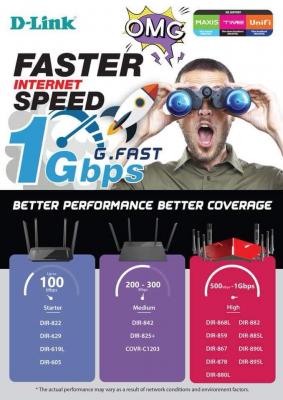
D-Link has released their recommendation too
Attached thumbnail(s)
|
|
|
|
|
|
Sep 21 2018, 02:18 AM
Return to original view | Post
#2
|
|
Junior Member
248 posts Joined: Aug 2018
|
QUOTE(thankyou @ Sep 21 2018, 01:26 AM) I was thinking to get ubnt amplifi or TP Link deco M9 Plus when they are on the market... M9 Plus is available in Sri Computer Low Yat Plaza, RM899, can negotiate if pay by cash, I just got a set of it, but 2 problems, 1st is IPv6 not working, no matter Dynamic IP or PPPoE, statefull or stateless, maybe gonna wait them to fix. 2nd is too easy to switch to 2.4GHz, maybe all mesh systems got the same problem too Just wonder which is better...  Coverage is amazing, especially 2.4GHz, QoS surprisingly good, 802.11k, v, r supported, Orbi and Velop only has 802.11k, v, no r supported. Ethernet backhaul supported, but 2nd 5GHz not available for clients, only for backhaul. US selling this set for USD299, Netgear Orbi RBK40 is USD230, in Malaysia, RM899 for M9 Plus, RBK40 RM1799, if you compare the price between M5 and M9 Plus, it should be more than RM1500 for M9 Plus, I think because TP-Link is trying to grab market share in Malaysia, especially in this turbo moment. |
|
|
Sep 21 2018, 03:19 AM
Return to original view | Post
#3
|
|
Junior Member
248 posts Joined: Aug 2018
|
QUOTE(thankyou @ Sep 21 2018, 02:53 AM) RM899 for 2 x M9 Plus? This is actually quite a good deal i think... I thought it's not available on the market because there's no listing @ Lazada... Yes you can have 2 options, router mode or AP mode, both r supported, can select it while setting up, choose it from the apps. RM870 for 2 X M9 Plus, that's the price I got for cash paying.I'm thinking to have it as Router or perhaps serving as AP only. Huawei HG -> Mikrotik hEXs -> TP-Link Deco M9 Plus... |
|
|
Sep 24 2018, 04:56 PM
Return to original view | IPv6 | Post
#4
|
|
Junior Member
248 posts Joined: Aug 2018
|
QUOTE(SilentVampire @ Sep 24 2018, 10:19 AM) Did you set Unifi Home Mode on IPTV Tab on WAN tab? Does it make any different? I remember home or business both r using VLAN tagging 500, the only different is home will add another VLAN tagging 600 for IPTV on LAN 4, correct me if I'm wrong, thanks ya |
|
|
Oct 10 2018, 12:42 AM
Return to original view | Post
#5
|
|
Junior Member
248 posts Joined: Aug 2018
|
QUOTE(Ryutaro @ Oct 9 2018, 11:25 PM) Hey everyone Just plug the LAN cable to the LAN port not WAN port, then turn off DHCP of the dir882is it true that there are no way to change Dlink DIR882 to be a AP? Time is replacing my DIR650L to DIR882 but I feel like getting TPlink AC3150 as the main router to utilize the max speed |
| Change to: |  0.0258sec 0.0258sec
 0.58 0.58
 7 queries 7 queries
 GZIP Disabled GZIP Disabled
Time is now: 3rd December 2025 - 02:59 PM |
 Quote
Quote