Welcome Guest ( Log In | Register )

Outline · [ Standard ] · Linear+

Home Networking WiFi Router Discussion Thread, Updated for 2023

views
     
lansi_raju
post Dec 5 2025, 01:08 PM

Getting Started
**
Junior Member
206 posts

Joined: May 2015
QUOTE(blacktubi @ Dec 5 2025, 12:25 PM)
You will need at least the Deco BE65 or even higher range if you wish to get 500Mbps at all coverage areas

Heck, I don't think the BE65 can do 500Mbps at the third unit
*
i see, in that case i just get a 2 unit BE65, 1 for main router, 1 on 1st floor, then use wired backhaul to 2nd floor (for my old M9plus)

This post has been edited by lansi_raju: Dec 5 2025, 01:44 PM
TSblacktubi
post Dec 5 2025, 03:44 PM

-
Group Icon
Elite
8,416 posts

Joined: Jul 2008

QUOTE(lansi_raju @ Dec 5 2025, 01:08 PM)
i see, in that case i just get a 2 unit BE65, 1 for main router, 1 on 1st floor, then use wired backhaul to 2nd floor (for my old M9plus)
*
Yup this is one option
tropik
post Dec 6 2025, 05:21 PM

On my way
****
Junior Member
502 posts

Joined: Dec 2008
QUOTE(blacktubi @ Dec 2 2025, 09:24 PM)
Dont really work that way though

Once you switched to FTTR you can only use their system
*
Not even if i off the wifi of Asus and rely entirely on Huawei units to provide the wifi?
TSblacktubi
post Dec 6 2025, 06:01 PM

-
Group Icon
Elite
8,416 posts

Joined: Jul 2008

QUOTE(tropik @ Dec 6 2025, 05:21 PM)
Not even if i off the wifi of Asus and rely entirely on Huawei units to provide the wifi?
*
No benefit to do that
Khan92
post Dec 6 2025, 09:22 PM

To live is to die
****
Junior Member
553 posts

Joined: Aug 2017


Hi guys,

anyone know if tplinkwifi cant access? i try result return timed out
TSblacktubi
post Dec 9 2025, 12:55 PM

-
Group Icon
Elite
8,416 posts

Joined: Jul 2008

QUOTE(Khan92 @ Dec 6 2025, 09:22 PM)
Hi guys,

anyone know if tplinkwifi cant access? i try result return timed out
*
Use the IP instead, it's usually 192.168.1.1
NGV22
post Dec 10 2025, 04:57 PM

On my way
****
Junior Member
615 posts

Joined: Feb 2014


Hello, I am looking for advice on Mesh Wifi, or other options if available

Current setup:
1100 sq ft condo unit
LAN ports exists in both home offices which are connected to the main modem in living room (blue X)
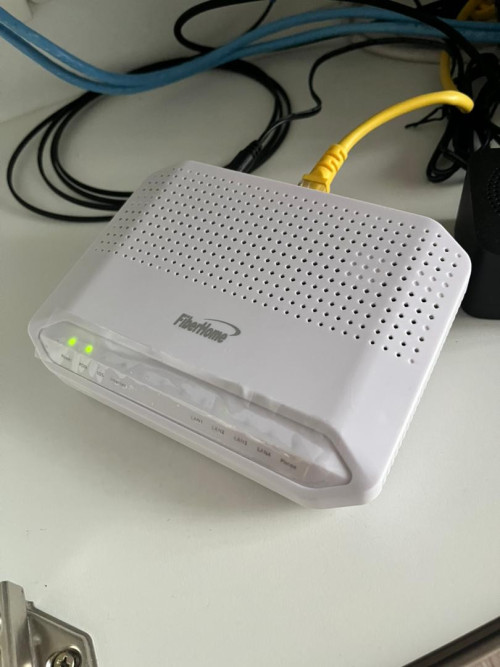
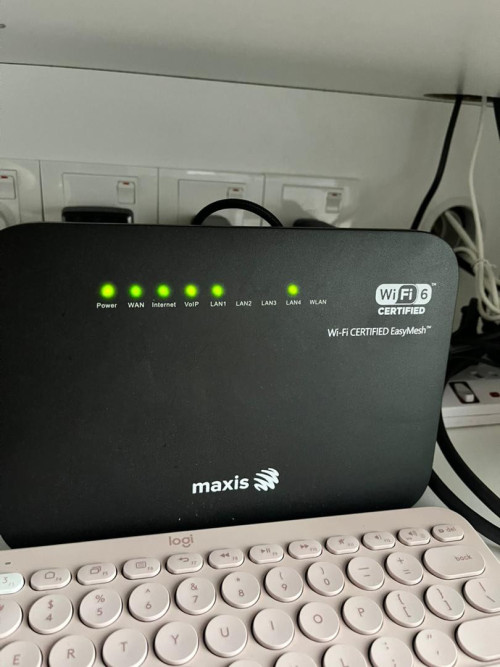
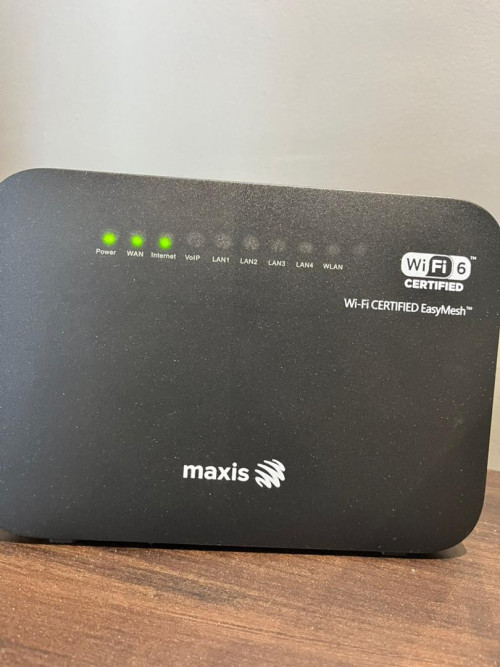
Maxis 300MBps with their own ONU modem and router and additional one router (Maxpert) in home office (blue X)
current issue: Bedroom and kitchen has dead wifi zones


user posted image

modem:

user posted image

Main router:

user posted image

Child router via maxpert

user posted image

Planned setup:
Ditch the additional maxis router Maxpert
purchase setup mesh wifis.
Blue X refers to modem, red X are the mesh nodes. Main node will be the Red X in home office 1
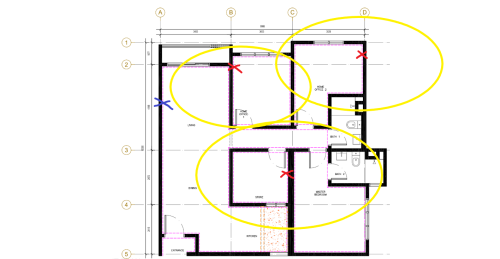


user posted image

Requirements:
1. fix current dead zones in bedroom and kitchen yard area (for washing machine and dryer)
2. Door area needs the wifi too for door smart locks/door bell

Experience:
I have experience with Deco E4 in previous house, the cheapest mesh in market but I had awful exp (disconnection, speed reduced by a lot).
I am willing to spend RM500-1k for the new mesh setup.
Or if you have alternatives feel free to suggest, thanks!

TSblacktubi
post Dec 10 2025, 05:17 PM

-
Group Icon
Elite
8,416 posts

Joined: Jul 2008

NGV22

Here's my suggestion

1x ASUS RT-BE58U as main router at living area connected to the fiber modem, make sure it's not hidden inside the cabinet, should be placed somewhere visible

It looks like you're hiding it inside currently

1x ASUS RT-BE58U configured as AiMesh node on wired LAN backhaul, placed in the Home Office 2

1x ASUS RT-BE58U configured as AiMesh node placed inside the store room on the wireless backhaul to extend the coverage into your master bedroom

With that, you should be able to get full speed in your home office 2, around 300Mbps in home office 1 and around 200Mbps in Master Bedroom. Expect signal to be weaker inside the Master Bedroom toilet.

spiderwick
post Yesterday, 09:40 AM

Casual
***
Junior Member
342 posts

Joined: Mar 2008
Hi morning shifus,

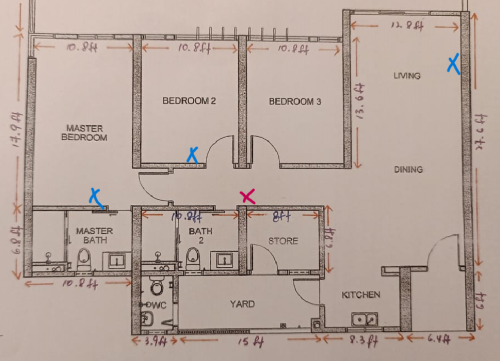
Need some guidance and advices here. My condo is 1300sqft plus. Initially I thought of buying Deco X-10 (2-Pack) AX1500 wi-fi .

One to put at living room (marked X blue) and another maybe either at Bedroom 2 or Master Bedroom as I have cupboard and plug there. Will this work?

I'm new to condo, didn't know that the wall is thick and hard to penetrate. My old house is double storey and put the modem at open area in 2nd floor didn't cause much issue.

My contractor is telling me I can opt for those ceiling type (I assume is X-50 POE) which do not need plug to power on but need to pull the cable. But location wise I went to tp-link office to check, they mentioned the best location to install this will be at the corridor, between bedroom 2 & bedroom 3 (Marked X red). Initially I thought nearer to master will be better as it's further away.

Just wondering what will be the option? And 2 units should be sufficient for my place?

Thank you so much for your time and help. Appreciate that smile.gif

user posted image

This post has been edited by spiderwick: Yesterday, 09:40 AM


Change to:
| Lo-Fi Version
0.0181sec    0.72    6 queries    GZIP Disabled
Time is now: 14th December 2025 - 02:34 PM