

if my home got 8-10 device connecting using wifi, what spec should i look at when choosing a router?
Home Networking WiFi Router Discussion Thread, Updated for 2023
Home Networking WiFi Router Discussion Thread, Updated for 2023
|
|
 Sep 23 2018, 02:59 PM Sep 23 2018, 02:59 PM
Return to original view | Post
#1
|
 
Senior Member
1,556 posts Joined: Jan 2003 
|
if my home got 8-10 device connecting using wifi, what spec should i look at when choosing a router?
|
|
|
|
|
|
Dec 9 2018, 10:00 AM
Return to original view | Post
#2
|
|
Senior Member
1,556 posts Joined: Jan 2003
|
i just told i can upgrade my streamyx to 10Mbps unifi, but tm won't give me new modem.
may i know can my Dlink DSL-2750E fully utilized 5Mbps upload speed? I saw its spec mentioned 1 Mbps upstream only, else what modem i should buy? - High-Speed internet Latest ADSL2/2+ standards provide Internet transmission of up to 24 Mbps downstream, 1 Mbps upstream |
|
|
Dec 23 2018, 12:51 PM
Return to original view | Post
#3
|
|
Senior Member
1,556 posts Joined: Jan 2003
|
Hi, i just upgrade my streamyx to unifi 10Mbps.
TMnet gave me ZTE zxhn h267a modem, but the wifi coverage not that good for my room. Is it possible to use my old D-Link DSL-2750E as wifi repeater, by connecting my Dlink to ZTE modem through LAN cable? |
|
|
Dec 23 2018, 01:32 PM
Return to original view | Post
#4
|
|
Senior Member
1,556 posts Joined: Jan 2003
|
QUOTE(FusionXY @ Dec 23 2018, 12:57 PM) Hi, how much you can afford? Below how much? o see, so i can use lan over dlink but not wifi... then have to buy wifi extender liaoThanks. Yes, you can. Just change the IP Address, disable DHCP and connect to LAN Port 1. Wi-Fi Repeater is a different thing. For example, you wanna extend coverage via Wireless. That is called as an AP. AP is known as Access Point. You can extend via LAN only. Thanks.  |
|
|
Dec 23 2018, 02:47 PM
Return to original view | Post
#5
|
|
Senior Member
1,556 posts Joined: Jan 2003
|
QUOTE(FusionXY @ Dec 23 2018, 01:41 PM) Hi. You may get a cheap extender as you're using 10Mbps. State your budget so that I can recommend you. How big is it? Thanks. QUOTE(blacktubi @ Dec 23 2018, 02:17 PM) If budget is tight then just keep the router until you can get something better. my budget is below RM150I just got a used Axtech WL559E from my relative, but i cannot connect to http://10.0.10.254 through LAN for configuration, always got page not found after try it with 3 different LAN cable on 3 PC/laptop. Is it need some different LAN cable to connect to it? I press the factory reset button for 20 seconds also nothing happen default setting of Aztech 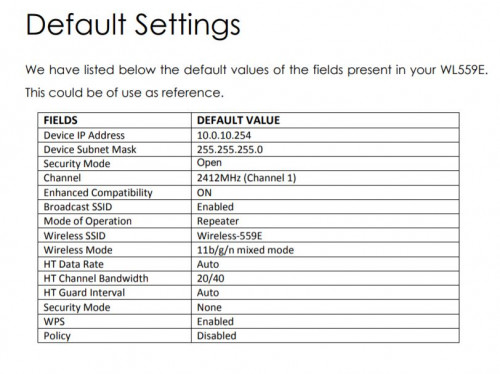 always cannot connect to http://10.0.10.254, so i tried to set the IP manually, is it correct? but also not working.... 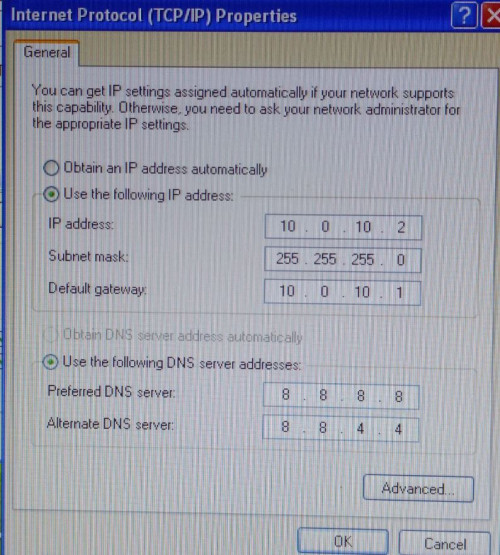 ftp://ftp.aztech.com/support/SINGAPORE/Wi...nual%20v1.3.pdf ftp://ftp.aztech.com/support/singapore/WI...20-%20v.1.1.pdf want to try upgrade the firmware also ftp://ftp.aztech.com/support/SINGAPORE/Wi...nstructions.pdf This post has been edited by labtec: Dec 23 2018, 02:55 PM |
|
|
Dec 23 2018, 02:50 PM
Return to original view | Post
#6
|
|
Senior Member
1,556 posts Joined: Jan 2003
|
QUOTE(FusionXY @ Dec 23 2018, 12:57 PM) Hi, how much you can afford? Below how much? can access point have wifi also? maybe I can set different SSID name since it cannot work like wifi repeater sharing the same SSID and password?Thanks. Yes, you can. Just change the IP Address, disable DHCP and connect to LAN Port 1. Wi-Fi Repeater is a different thing. For example, you wanna extend coverage via Wireless. That is called as an AP. AP is known as Access Point. You can extend via LAN only. Thanks. This post has been edited by labtec: Dec 23 2018, 02:52 PM |
|
|
|
|
|
Dec 27 2018, 10:15 PM
Return to original view | Post
#7
|
|
Senior Member
1,556 posts Joined: Jan 2003
|
QUOTE(FusionXY @ Dec 23 2018, 04:25 PM) Yes. Just reset the D-Link. It works!!! i use the wizard to setup and quite simple. Now have 2 different SSID to use in my house.Don't setup anything. Just connect to LAN Port 1 on the D-Link Router. Disable the DHCP. I tried using my ADSL as access point can work. Thanks. But somehow i found the internet response become slower even when i connect to my ZTE modem. once it manage to contact the website, i'm getting the internet speed i subscribe to, but first contact with the website looks very slow, is it because of the bridge or interference from 2 SSID signals? And with or without DHCP is the same for me, what is the difference actually? my Dlink setup, can i use 192.168.1.1? it is same as my ZTE modem 
This post has been edited by labtec: Dec 27 2018, 10:44 PM |
|
|
Dec 29 2018, 01:50 AM
Return to original view | Post
#8
|
|
Senior Member
1,556 posts Joined: Jan 2003
|
QUOTE(FusionXY @ Dec 27 2018, 10:45 PM) Hi, for the DHCP, it will have more IP Address. my ZTE modem is using 192.168.1.1 as the gateway address or as DHCP server address. Thanks. but right now my Dlink model which set as bridge mode connect to ZTE model port1 also set its router IP address as 192.168.1.1. Will this create any conflict? |
|
|
Dec 29 2018, 12:01 PM
Return to original view | Post
#9
|
|
Senior Member
1,556 posts Joined: Jan 2003
|
QUOTE(FusionXY @ Dec 29 2018, 08:01 AM) Best to change to 192.168.0.2 change to 192.168.0.2 not 192.168.1.2?After cannot access router settings. Thanks. let me try it. thanks for your helpful tips, I really appreciate it. |
|
|
Dec 29 2018, 03:54 PM
Return to original view | Post
#10
|
|
Senior Member
1,556 posts Joined: Jan 2003
|
QUOTE(SilentVampire @ Dec 29 2018, 12:17 PM) On 5GHz AC? thanks confirming on that, let me try it tonight and see if it solve the issue where my internet data always freeze half way when connecting to the wifi of second modem in bridge modeShould be 192.168.1.2, if it is a bridge. |
|
|
Dec 30 2018, 12:06 AM
Return to original view | Post
#11
|
|
Senior Member
1,556 posts Joined: Jan 2003
|
QUOTE(SilentVampire @ Dec 29 2018, 12:17 PM) On 5GHz AC? after i set my dlink modem in bridge mode to ip address of 192.168.1.2, it is shown as IP address of 0.0.0.0 in my ZTE modem statusShould be 192.168.1.2, if it is a bridge. and my laptop which connect to Dlink through wifi is shown as IP address of 192.168.1.6 with LAN1 connection, instead of wifi. 
|
|
|
Dec 30 2018, 01:36 AM
Return to original view | Post
#12
|
|
Senior Member
1,556 posts Joined: Jan 2003
|
QUOTE(SilentVampire @ Dec 30 2018, 12:20 AM) But you still get a connection? Ohya, I still got internet connection when connecting to my dlink modem |
|
|
Jul 15 2019, 07:13 PM
Return to original view | Post
#13
|
|
Senior Member
1,556 posts Joined: Jan 2003
|
If I want to use my old Dlink modem in bridge mode(thru LAN cable) as another wifi access point in my house, do I select ISP as Streamyx(PPPoE) or Others during the setup?

i used to setup it successfully before but after reset it, it keep having this error saying "string too long"  i also have following LAN setup already 

This post has been edited by labtec: Jul 15 2019, 07:16 PM |
|
|
|
|
|
Jul 15 2019, 08:52 PM
Return to original view | IPv6 | Post
#14
|
|
Senior Member
1,556 posts Joined: Jan 2003
|
QUOTE(FusionXY @ Jul 15 2019, 07:45 PM) Hi, you mean that you wanna make this router as an access point? I see. So my current setting is correct alreadyYou don't need to setup PPPoE. Just disable DHCP on the router which function as Access Point. Plug to LAN 1 Port on the old router. Thanks. |
|
|
Feb 10 2020, 05:38 PM
Return to original view | Post
#15
|
|
Senior Member
1,556 posts Joined: Jan 2003
|
I'm using 10Mbps unifi lite with the given ZTE ZXHN H267A modem. Can we use our own modem for this 10Mbps unifi lite broadband? and what modem is recommended?
|
|
|
Feb 10 2020, 06:31 PM
Return to original view | Post
#16
|
|
Senior Member
1,556 posts Joined: Jan 2003
|
QUOTE(blacktubi @ Feb 10 2020, 06:07 PM) The C2300 is probably the best in this price range. i see, so have to use the given modem. This modem abit slow when I use VPN from my laptop, unless i reboot it then it become fast. There is no feature that allow us to schedule daily reboot on the modem.Archer A9 from TP-Link or Tenda AC18. The A9 have a newer firmware than the AC18. You can turn the modem to run on bridge mode and use any Unifi compatible router. Any VDSL2 model should work too |
|
|
Mar 24 2020, 09:43 PM
Return to original view | Post
#17
|
|
Senior Member
1,556 posts Joined: Jan 2003
|
I'm using ZTE ZXHN H267A from tmnet on my 10Mbps unifi lite. Not sure why starting this month sometimes my samsung galaxy phone will lose the wifi connection from time to time even though it is few meters away from the modem. So thinking to purchase one new router.
Can I use a router and connected to this ZTE modem where all my wifi and LAN connection from other devices connect to this router? House type: Landed 2 storey Size of house: 2 floors (22 x 75 ft land house ) Number of devices connected to WiFi: 6-9 devices Internet Speed: Unifi lite 10Mbps Budget: RM250 This post has been edited by labtec: Mar 24 2020, 09:46 PM |
|
|
Jul 12 2020, 01:49 PM
Return to original view | Post
#18
|
|
Senior Member
1,556 posts Joined: Jan 2003
|
if i'm using unifi 30Mbps only, Archer C50 should be good enough and no need to buy the more expansive Archer A6 right?
|
|
|
Jul 12 2020, 02:50 PM
Return to original view | IPv6 | Post
#19
|
|
Senior Member
1,556 posts Joined: Jan 2003
|
QUOTE(FusionXY @ Jul 12 2020, 02:40 PM) May I know how big is your house? Hi, I'm a 2-storey house with 3 bedroom, should be 1000 sqft.Thanks. If need second router, I can set it as access point mode which should share the same ssid and password as the 1st router right? |
|
|
Jul 12 2020, 04:46 PM
Return to original view | Post
#20
|
|
Senior Member
1,556 posts Joined: Jan 2003
|
QUOTE(FusionXY @ Jul 12 2020, 03:49 PM) Yes, you can get the 2nd router and put the same SSID. so if i set the same SSID, I do not need to manually connect to second router wifi and re-key in the password again? just want to be clear, as need to help my parent to setup their devices.What's your maximum budget? I would like to recommend Archer C80 if it is within your budget. Thanks. actually I already purchase Archer C50 from lazada before i ask here but it's oky, i can purchase again. my budget is RM200, but I saw Archer C80 is RM260 on lazada, maybe can upgrade to this when I got my unifi. Does this Archer C80 able to auto select the best wifi channel by checking the nearby wifi channel from time to time or we have to manually scan and select the best wifi channel ourselves? This post has been edited by labtec: Jul 12 2020, 04:47 PM |
| Change to: |  0.2416sec 0.2416sec
 0.47 0.47
 7 queries 7 queries
 GZIP Disabled GZIP Disabled
Time is now: 1st December 2025 - 10:52 AM |
 Quote
Quote