Welcome Guest ( Log In | Register )

3 Pages  1 2 3 >Bottom

Outline · [ Standard ] · Linear+

Technical Xbox 360 and LCD monitors or ur normal tv, Feedback that'll ease ur decision making

views
     
SUSMightySmiter
post Apr 17 2006, 08:50 PM, updated 20y ago

Casual
***
Junior Member
471 posts

Joined: Jan 2003


hi guys, as the thread title is stated...i was wondering( i havent got an Xbox 360 yet but planning to get one from Djinn very very soon)....should i buy a 19inch LCD monitor to play my games or just use my regular average tv(32 inch)... sweat.gif

ive been doin "research" on the net and i would just like to get sum feed back from u proud 360 owners out there rclxms.gif

for me, im interested in getting a good resolution and getting to enjoy all the details that an xbox 360 and its games can offer. And sadly no..i dnt have the money to go buying plasma tvs cry.gif lol.....any advice would be appreciated to help me solve my dilemma.... notworthy.gif notworthy.gif

what about CRTs?better choice compared to LCDs when playin ur xbox 360?

PS: i never owned a LCD monitor b4...so i dnt knw what to expect...heheehee doh.gif

This post has been edited by MightySmiter: Nov 29 2006, 10:31 PM
psp _BOY
post Apr 17 2006, 08:55 PM

I've been lying wide awake paralyzed
******
Senior Member
1,978 posts

Joined: Mar 2005
From: winter brings the spring again


what 32" TV is it? LCD or normal TV?

u can get a philips or Dell LCD monitor,as they are one of the best in 360

but a 32" TV is enough if u wanna play games,heck my 27" TV is too big for me

but its mainly your choice
go to a shop and see for yourself smile.gif
judge-the
post Apr 17 2006, 08:58 PM

-Judge-Jury-Executioner-
*******
Senior Member
3,331 posts

Joined: Jan 2003
From: -MegaCity One-


i only bought a refurbished 21" crt monitor to play my 360. i would say the quality is much2 more better compared to my 21" normal panasonic tv in the living room.

last time played condemed in the normal tv cannot see at all but now playing in my crt monitor damn syok can see all the details/mapping.
psp _BOY
post Apr 17 2006, 09:05 PM

I've been lying wide awake paralyzed
******
Senior Member
1,978 posts

Joined: Mar 2005
From: winter brings the spring again


thats what the ppl say "The LCD monitor may look thin,sleek and shiny,but their refresh rates and graphics look better on a CRT monitor"

haha
SUSMightySmiter
post Apr 17 2006, 09:19 PM

Casual
***
Junior Member
471 posts

Joined: Jan 2003


QUOTE
psp _BOY  Posted Today, 08:55 PM
what 32" TV is it? LCD or normal TV?
normal tv la blush.gif
hehe..so fast got feed back.... rclxms.gif more more icon_rolleyes.gif
psp _BOY
post Apr 17 2006, 09:39 PM

I've been lying wide awake paralyzed
******
Senior Member
1,978 posts

Joined: Mar 2005
From: winter brings the spring again


32" either flat screen,widescreen,or round screen (dunno if i got that right)

is a lot already,big like hell hhaaha,if it has component input then better

issit slimfit tv?
SUSMightySmiter
post Apr 17 2006, 09:47 PM

Casual
***
Junior Member
471 posts

Joined: Jan 2003


lol...my 32 inch tv old wan la...sony triniton tongue.gif im guessing its wide screen coz it has a rectangular shape...long width and short breadth..lol sweat.gif
psp _BOY
post Apr 17 2006, 09:51 PM

I've been lying wide awake paralyzed
******
Senior Member
1,978 posts

Joined: Mar 2005
From: winter brings the spring again


QUOTE(MightySmiter @ Apr 17 2006, 09:47 PM)
lol...my 32 inch tv old wan la...sony triniton tongue.gif  im guessing its wide screen coz it has a rectangular shape...long width and short breadth..lol sweat.gif
*
still good right?

hows the graphics?

i suggests u get a CRT monitor anything after that sucks until the big kahuna's (37",42",50",61",80"projector,100"projector,120"projector,Cinema screen laugh.gif )
shumaky
post Apr 17 2006, 09:55 PM

PS what.?
*******
Senior Member
2,706 posts

Joined: Jan 2003
From: sunway @ middle earth


Easiest n cheapest solution is get a Large CRT screen like judge's 21".
They produce HD images over a VGA cable at a vry small price.
2nd get a TV which can display HD images like the SONY 29" I forgot its model. It's bout RM1900 for a 29" HD.
3rd get an LCD display. Go widescreen if possible as its the way to play games IMHO. 19" wide will set you back bout RM1200 for a viewsonic.
4th if you got cash to splurge.. go for LCD or PLASMA. 32" or 42" or even 50" heck ur wallet is ur limit.
No matter what display you get, You wont regret the X360. smile.gif
Cheers
psp _BOY
post Apr 17 2006, 09:56 PM

I've been lying wide awake paralyzed
******
Senior Member
1,978 posts

Joined: Mar 2005
From: winter brings the spring again


yup wait till u see some guy playing his 360 on his 10" tv (the one u bring on field trips or police use at home tongue.gif )

it will satisfy u,at least until PS3 comes out,which they say GRAW would look much better
Darkchaser
post Apr 17 2006, 10:06 PM

On my way
****
Senior Member
522 posts

Joined: Nov 2004
From: sa?


Whatever it is that you get, get a widescreen one. Trust me, you're missing a lot if you don't go widescreen with the X360 smile.gif

A CRT monitor is the best bet for the best looking graphics, but it lacks widescreen....
UnUsUaL
post Apr 17 2006, 11:33 PM

ah jek
Group Icon
VIP
2,064 posts

Joined: Jan 2003
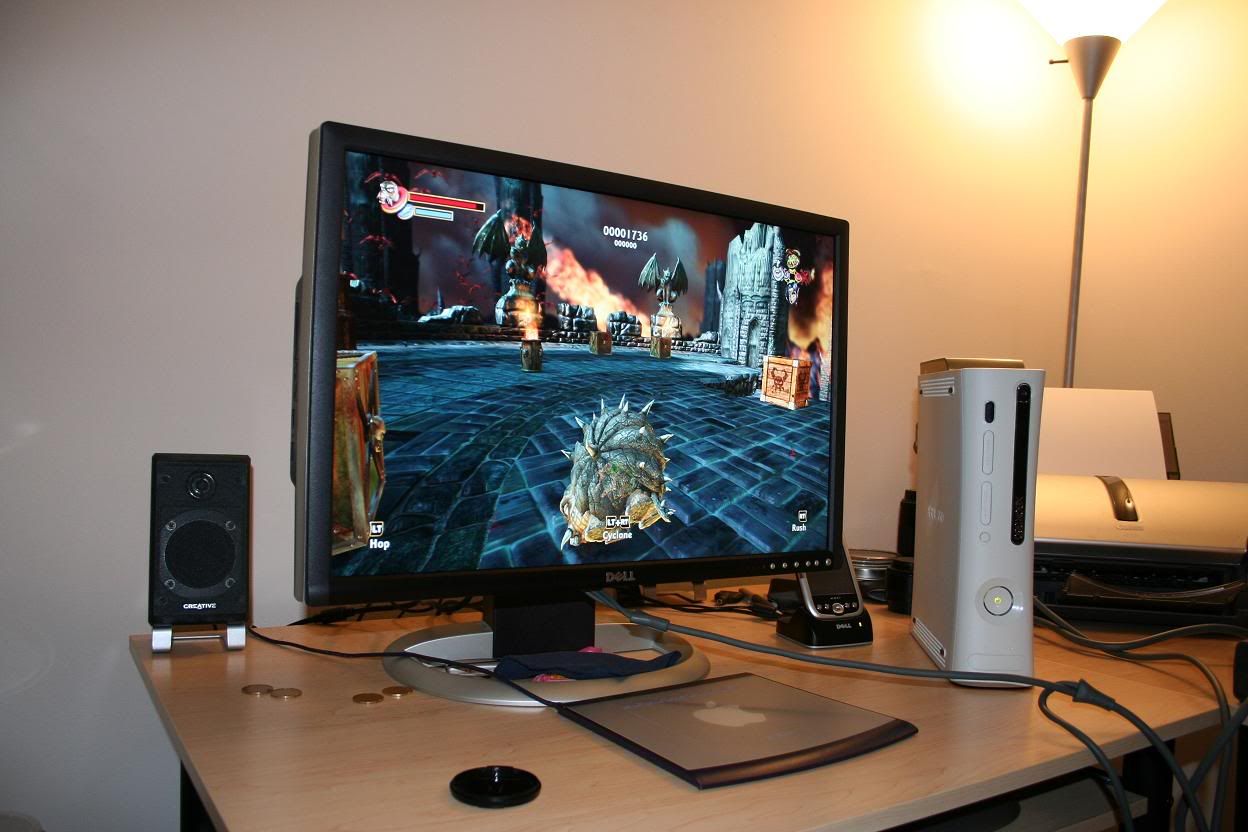
Buy dell 24" and play 360 + browse lyn at the same time rclxm9.gif

user posted image
shumaky
post Apr 18 2006, 12:09 AM

PS what.?
*******
Senior Member
2,706 posts

Joined: Jan 2003
From: sunway @ middle earth


^nice PIP...
xxboxx
post Apr 18 2006, 12:49 AM

The mind is for having ideas, not holding them
*******
Senior Member
5,261 posts

Joined: Oct 2004
From: J@Y B33


for a HD quality yet cheaps get SONY KV-DB29M61. only for RM1.8k icon_rolleyes.gif

This post has been edited by xxboxx: Apr 18 2006, 12:50 AM
SUSMightySmiter
post Apr 18 2006, 09:24 AM

Casual
***
Junior Member
471 posts

Joined: Jan 2003


thnks for all the response guys rclxms.gif
so let me get this right, a widescreen LCD is better than what any CRT monitor can provide? tongue.gif
btw, do all LCDs provide HD quality images?

This post has been edited by MightySmiter: Apr 18 2006, 09:25 AM
judge-the
post Apr 18 2006, 09:59 AM

-Judge-Jury-Executioner-
*******
Senior Member
3,331 posts

Joined: Jan 2003
From: -MegaCity One-


QUOTE(MightySmiter @ Apr 18 2006, 09:24 AM)
thnks for all the response guys rclxms.gif
so let me get this right, a widescreen LCD is better than what any CRT monitor can provide? tongue.gif
btw, do all LCDs provide HD quality images?
*
off course lah widescreen LCD far more better than normal crt monitor. you must remember also the price also far more extra $$$. hehehe i am on limited budget so for me a rm295 refurbished 21" crt monitor is so damn good already. but if you got extra budget then just go ahead with the widescreen LCD.
shumaky
post Apr 18 2006, 10:19 AM

PS what.?
*******
Senior Member
2,706 posts

Joined: Jan 2003
From: sunway @ middle earth


^ ya thats true.. both CRT monitor and LCD monitors are HD.. what matters is only the resolution that you will get how how big you wan to see your games in.
welwitchia
post Apr 18 2006, 10:24 AM

Regular
******
Senior Member
1,219 posts

Joined: Jan 2003
I've posted some images taken from a 24" DELL 2405FPW. Not exactly good pics (taken from a HP) but at least it'll give u a rough idea how they might look like on a LCD.
QUOTE(MightySmiter @ Apr 18 2006, 09:24 AM)
thnks for all the response guys rclxms.gif
so let me get this right, a widescreen LCD is better than what any CRT monitor can provide? tongue.gif
btw, do all LCDs provide HD quality images?
*
sirnevio
post Apr 18 2006, 10:26 AM

Getting Started
**
Junior Member
81 posts

Joined: Jan 2003
From: Kuala Lumpur


Where the pic?
shumaky
post Apr 18 2006, 10:31 AM

PS what.?
*******
Senior Member
2,706 posts

Joined: Jan 2003
From: sunway @ middle earth


^ look up a few post.. Unusual has a pic posted on 24" dell with Oblivion in PIP.

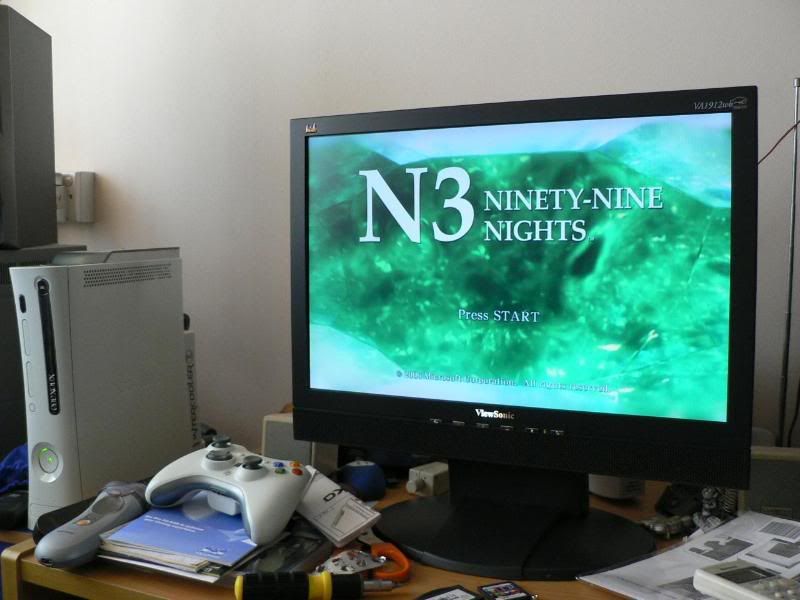
user posted image
user posted image
This is my VA1912W.

This post has been edited by shumaky: Apr 18 2006, 10:40 AM
sirnevio
post Apr 18 2006, 10:39 AM

Getting Started
**
Junior Member
81 posts

Joined: Jan 2003
From: Kuala Lumpur


how much aa this monitor cost?

shumaky
post Apr 18 2006, 10:42 AM

PS what.?
*******
Senior Member
2,706 posts

Joined: Jan 2003
From: sunway @ middle earth


Dell 24" Wide is RM 3,499
Dell 20" Wide is RM 2,199
hikaru_x
post Apr 18 2006, 10:49 AM

Getting Started
**
Junior Member
161 posts

Joined: Jan 2003
From: New Caprica


QUOTE(shumaky @ Apr 18 2006, 10:42 AM)
Dell 24" Wide is RM 3,499
Dell 20" Wide is RM 2,199
*
i'd like to add something:

the Dell 24" has component inputs, the best method to connect xb360 IMHO.
the Dell 20" only has composite, s-video, vga and dvi-i, u'd need a xb360 vga cable for this baby for HD.
sirnevio
post Apr 18 2006, 11:02 AM

Getting Started
**
Junior Member
81 posts

Joined: Jan 2003
From: Kuala Lumpur


QUOTE(judge-the @ Apr 18 2006, 09:59 AM)
off course lah widescreen LCD far more better than normal crt monitor. you must remember also the price also far more extra $$$. hehehe i am on limited budget so for me a rm295 refurbished 21" crt monitor is so damn good already. but if you got extra budget then just go ahead with the widescreen LCD.
*
can u show me the pic quality..me also here got limited budget here sad.gif.So what cable i nned to buy if i gonna use this crt monitor.Plan to buy xbox comong soon smile.gif
shumaky
post Apr 18 2006, 11:05 AM

PS what.?
*******
Senior Member
2,706 posts

Joined: Jan 2003
From: sunway @ middle earth


^ You will need a VGA cable.. get the 3rd party one if you are low on budget.
It works well enuf.
welwitchia
post Apr 18 2006, 11:08 AM

Regular
******
Senior Member
1,219 posts

Joined: Jan 2003
QUOTE(sirnevio @ Apr 18 2006, 10:26 AM)
Where the pic?
*
http://forum.lowyat.net/index.php?showtopic=274782
mikelee
post Apr 18 2006, 02:32 PM

Regular
******
Senior Member
1,419 posts

Joined: Sep 2004


Anyway guys, connecting to a normal 21 inch Panasonic TV using component inputs good quality or not? Cause out of budget to get lcd sad.gif. That panasonic tv only 600 bucks.
judge-the
post Apr 18 2006, 02:42 PM

-Judge-Jury-Executioner-
*******
Senior Member
3,331 posts

Joined: Jan 2003
From: -MegaCity One-


QUOTE(mikelee @ Apr 18 2006, 02:32 PM)
Anyway guys, connecting to a normal 21 inch Panasonic TV using component inputs good quality or not? Cause out of budget to get lcd sad.gif. That panasonic tv only 600 bucks.
*
you and me same case lah. me also before this using the normal 21" panasonic tv in the living room. if using those normal tv then you better play the 360 using your crt monitor. the quality will be much2 more better. you just need a vga cable smile.gif
mikelee
post Apr 18 2006, 02:54 PM

Regular
******
Senior Member
1,419 posts

Joined: Sep 2004


QUOTE(judge-the @ Apr 18 2006, 02:42 PM)
you and me same case lah. me also before this using the normal 21" panasonic tv in the living room. if using those normal tv then you better play the 360 using your crt monitor. the quality will be much2 more better. you just need a vga cable smile.gif
*
But i also wanna use ps2 at the same time. sad.gif Looks like CRT is not a good alternative. Anyway which model of panasonic tv you have there? Or should i get a Sony tv instead? I see both almost the same quality only that Sony is more overpriced.
judge-the
post Apr 18 2006, 02:59 PM

-Judge-Jury-Executioner-
*******
Senior Member
3,331 posts

Joined: Jan 2003
From: -MegaCity One-


QUOTE(mikelee @ Apr 18 2006, 02:54 PM)
But i also wanna use ps2 at the same time. sad.gif Looks like CRT is not a good alternative. Anyway which model of panasonic tv you have there? Or should i get a Sony tv instead? I see both almost the same quality only that Sony is more overpriced.
*
hehehe old 21" panasonic sophia...
SUSMightySmiter
post Apr 18 2006, 03:19 PM

Casual
***
Junior Member
471 posts

Joined: Jan 2003


using an LCD monitor would not require a vga cable? only crt monitors?

just wanna say thanks to all those that have posted here and shared their experiences notworthy.gif now i knw what to get....all i need is teh moneh rclxub.gif hehehe...

off-topic: what do u need other than a modem and streamyx to join xbox live and play games online? is there a charge or a monthly bill thingy needed?sorry tongue.gif still a newbie at this xbox360 thingy...hehehehe doh.gif
haflife
post Apr 18 2006, 03:49 PM

New Member
*
Junior Member
9 posts

Joined: Mar 2006


QUOTE(MightySmiter @ Apr 18 2006, 03:19 PM)
using an LCD monitor would not require a vga cable? only crt monitors?

just wanna say thanks to all those that have posted here and shared their experiences notworthy.gif  now i knw what to get....all i need is teh moneh rclxub.gif hehehe...

off-topic: what do u need other than a modem and streamyx to join xbox live and play games online? is there a charge or a monthly bill thingy needed?sorry tongue.gif still a newbie at this xbox360 thingy...hehehehe doh.gif
*
Hey,

I just got a 360 last month so i know how confusing all of this can be at first. Luckily i got some help from the people here smile.gif

First off, i visited this site a lot to understand the various ways to connect the 360 to the net.

http://www.xbox.com/en-US/support/connectt...360/default.htm

So there're many ways to connect the 360 to the Net but the easiest and the one im using now is the direct to modem connection. Basically all u need is ur ADSL modem that TM gave u when u got streamyx. U hook ur internet phone line into the modem and connect the modem to ur 360 with the cable that comes with ur 360. That's all the hardware ur gonna need. A router would be nice too though.

Now comes LIVE. With ur xbox 360 comes a free 1-month trial to Xbox Live Gold which means that u can download (some) stuff for free online like game demos and trailers, communicate with other Live people and play ur games online.

So once you've connected to xbox live, and u create ur gamertag and activate ur account, then you will have 1 month to enjoy Live Gold for free. Once that one month ends , you can either continue subscribing ( pay using credit card or buy the subscription cards from Djinn and use those) or not. If you don't want to continue, you still can connect to Xbox Live Silver but you wont get to play games online because your Gold membership has expired.

But let me tell you that Live is really great la. I don't play online as much as i want to (im having my finals now) but i love the fact that you can download and try out the games before you buy them.

So there's a bit of info from me. Hope it helps thumbup.gif

This post has been edited by haflife: Apr 18 2006, 03:52 PM
shumaky
post Apr 18 2006, 04:08 PM

PS what.?
*******
Senior Member
2,706 posts

Joined: Jan 2003
From: sunway @ middle earth


Yes you need a VGA cable to connect to both a CRT or LCD.
the diff is that some high end LCD will have component input. Then its better if you use a component cable to connect to the X360.
But standard screens use VGA.
huikb
post Apr 24 2006, 03:32 PM

Getting Started
**
Junior Member
55 posts

Joined: Jan 2003
From: Cyberjaya


Depending on your budget and you definitely want to play xbox 360 on HD. (HDTV 720p / 1080i)

32" Samsung CS-32Z30HE Slim Fit HDTV (only runs HDTV 1080i/576i/480p/480i) - price is about RM$3k+ - best bring xbox 360 to TV for testing b4 buying it.http://www.samsung.com/my/products/televis.../ws_32z30he.asp

24" Dell 2405FPW or wait for the Dell 2407WFP (6ms response time) - native HD resolution at 1920x1200

CRT and LCD pretty good for gaming. CRT is limited to 32" at the moment in the market. LCD goes all way to 65" and plasma all the way to 55".

I would balance my budget with the biggest screen for the bang of the buck.

Consider the DLP Rear Projection TV with HDTV as well. I hear prices are dropping below RM$4k for 42" or so.

This post has been edited by huikb: Apr 24 2006, 03:49 PM
SUSMightySmiter
post Apr 24 2006, 04:10 PM

Casual
***
Junior Member
471 posts

Joined: Jan 2003


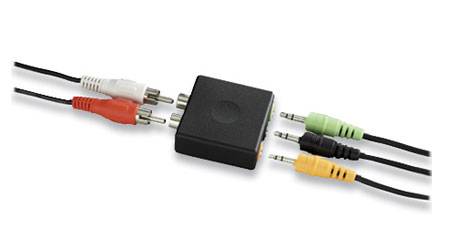
hehe...guess i'll have to aim to get a 19 inch widescreen then....im wondering what about the sound?unlike all tvs, u dnt really see monitors with in-built speakers. even if they have it its hardly even good....i do have a 4.1 creative speaker set....how do i connect this to the 360 and the monitor?or do i have to get another gadget thingy to plug it in? rclxub.gif
SUSMightySmiter
post Apr 25 2006, 11:54 PM

Casual
***
Junior Member
471 posts

Joined: Jan 2003


ooo..i have another question rclxub.gif
whats the difference if u play the 360 on an LCD monitor with DVI output and an LCD monitor with no DVI output but u use a VGA cable?


btw(an LCD with DVI output=digital LCD whereas an LCD with no DVI = analouge LCD?) notworthy.gif
chinsc
post Apr 27 2006, 09:42 AM

Enthusiast
*****
Senior Member
853 posts

Joined: Jan 2003
From: sarawak


QUOTE(MightySmiter @ Apr 25 2006, 11:54 PM)
ooo..i have another question rclxub.gif
whats the difference if u play the 360 on an LCD monitor with DVI output and an LCD monitor with no DVI output but u use a VGA cable?
btw(an LCD with DVI output=digital LCD whereas an LCD with no DVI = analouge LCD?) notworthy.gif
*
hi dude~

well, DVI will only have advantage when comes to viewing ur text on ur desktop. its a bit more clear compare to analog on your LCD.

so, i wont effect any picture performance and the respon time on gaming.


vivaldi
post Apr 27 2006, 01:27 PM

Getting Started
**
Junior Member
240 posts

Joined: Jan 2003
I'm using a Philips 150S 15" LCD monitor with 3rd party VGA cable and RCA to minijack...Feels GOOD...
arj
post Apr 30 2006, 01:04 AM

RED DEVIL
Group Icon
VIP
4,896 posts

Joined: Jan 2003
From: Kg Sg Penchala, KL


Dell 2405FPW is now only RM3099 thumbup.gif
SUSMightySmiter
post May 3 2006, 10:39 AM

Casual
***
Junior Member
471 posts

Joined: Jan 2003


once again i wanna thank all those who have contributed in making my choice easier....guess i have boiled things down to 2 choices..... notworthy.gif notworthy.gif

a) a 19 inch widescreen LCD monitor
or
b) a 20++ inch CRT monitor

which should i get? btw, are there any widescreen CRTs out there? tongue.gif
btw..im not planning to watch any movies on the monitor...primarily used for gaming..so is a widescreen really necessary? rolleyes.gif

This post has been edited by MightySmiter: May 3 2006, 03:30 PM
MK84
post May 3 2006, 11:02 AM

Walking Plague
******
Senior Member
1,477 posts

Joined: Jan 2003
If you can get widescreen, go for it.
arj
post May 3 2006, 06:26 PM

RED DEVIL
Group Icon
VIP
4,896 posts

Joined: Jan 2003
From: Kg Sg Penchala, KL


I was at HSL at The Curve just now. The Sony 50" A10 display unit is going for RM7999 rclxms.gif
marauderz
post May 3 2006, 06:43 PM

Windows Tablet War Veteran
*******
Senior Member
3,390 posts

Joined: Feb 2005


If you're on budget, you can go for a Sony TV with Progressive Scan capability, then buy component cables for the 360 and you can enable 480P which is very nice and sharp already.
MK84
post May 3 2006, 08:17 PM

Walking Plague
******
Senior Member
1,477 posts

Joined: Jan 2003
QUOTE(arj @ May 3 2006, 06:26 PM)
I was at HSL at The Curve just now. The Sony 50" A10 display unit is going for RM7999 rclxms.gif
*
I was eyeing this TV also last time, got good reviews and feedback from AVS forums.
SUSMightySmiter
post May 3 2006, 08:25 PM

Casual
***
Junior Member
471 posts

Joined: Jan 2003


lol...walaueh...im just a student la..not even working at all rclxub.gif how to afford sumthing at RM7999 tongue.gif

like i said in the earlier post, after reading all u guys awesome feedback laugh.gif
ive decided (of course this is with my budget of RM1k at the most) to get

a) a 19 inch widescreen LCD monitor
or
b) a 20++ inch CRT monitor

the question is which should i get? tongue.gif

and yeah..if i wanted to watch a movie i already have a nice dvd player with a big tv(not a hdtv la, thats why i dnt want to play my future xbox360 on it sweat.gif )
so im not sure if i need a "widescreen" feature
arj
post May 3 2006, 08:37 PM

RED DEVIL
Group Icon
VIP
4,896 posts

Joined: Jan 2003
From: Kg Sg Penchala, KL


QUOTE(MightySmiter @ May 3 2006, 08:25 PM)
lol...walaueh...im just a student la..not even working at all rclxub.gif how to afford sumthing at RM7999 tongue.gif

like i said in the earlier post, after reading all u guys awesome feedback laugh.gif
ive decided (of course this is with my budget of RM1k at the most) to get

a) a 19 inch widescreen LCD monitor
or
b) a 20++ inch CRT monitor

the question is which should i get? tongue.gif

and yeah..if i wanted to watch a movie i already have a nice dvd player with a big tv(not a hdtv la, thats why i dnt want to play my future xbox360 on it sweat.gif )
so im not sure if i need a "widescreen" feature
*
LOL... that was not directed at you, just letting you guys know what I found just now biggrin.gif

As for your question, go for the 19" widescreen as you'll loose lots of space when playing a widescreen game on a normal monitor.

marauderz
post May 3 2006, 09:17 PM

Windows Tablet War Veteran
*******
Senior Member
3,390 posts

Joined: Feb 2005


If you're a student then you've already made your decision already, save your money and just use your current computer display.
ps360
post May 7 2006, 10:18 AM

Getting Started
**
Junior Member
137 posts

Joined: Jan 2006
From: The Other Side
Hello people.

Anyone got any idea how to connect the Xbox360 and play on a Sony notebook? Checked, only got video out but no video in. Please help. Thanks. notworthy.gif
X.E.D
post May 7 2006, 02:22 PM

curmudgeonosorus emeritus
******
Senior Member
1,955 posts

Joined: Jan 2006
From: Llanfair­pwllgwyngyll­gogery­ch


QUOTE(xxboxx @ Apr 18 2006, 01:49 AM)
for a HD quality yet cheaps get SONY KV-DB29M61. only for RM1.8k icon_rolleyes.gif
*
Actually, it's ED/ PAL resolution, meaning that you can get ~576 instead of the normal 720++ lines resolved over the TV. I have a KV-DA29M61 and I'm regretting now. (New one is just a slight revision, I don't expect them to drop a super fine pitch tube inside)

THe ONLY Sony True HD CRT TVs are the KV-HR series- 3000+ ringgit.
I just realised I was ripped, emailed to Sony, got no response... somebody sue them.
xxboxx
post May 7 2006, 04:47 PM

The mind is for having ideas, not holding them
*******
Senior Member
5,261 posts

Joined: Oct 2004
From: J@Y B33


QUOTE(X.E.D @ May 7 2006, 02:22 PM)
Actually, it's ED/ PAL resolution, meaning that you can get ~576 instead of the normal 720++ lines resolved over the TV. I have a KV-DA29M61 and I'm regretting now. (New one is just a slight revision, I don't expect them to drop a super fine pitch tube inside)

THe ONLY Sony True HD CRT TVs are the KV-HR series- 3000+ ringgit.
I just realised I was ripped, emailed to Sony, got no response... somebody sue them.
*

the cheapest KV-HR models is KV-HR29M61 which is RM4k++, and it still not true HD since it is not widescreen. the plus point it have super fine pitch.

for the resolutions, i reads it somewhere KV-DA/DB upconverts 720p signal to 1080i. and i believe KV-HR also doing the same thing. the only reason KV-HR looks better than KV-DA/DB is because of super fine pitch, more dot per-inch, which makes the tv much more expensive. but the KV-DA/DB models price is only half from KV-HR.
UltramanToron
post Jun 30 2006, 11:25 AM

Getting Started
**
Junior Member
241 posts

Joined: Oct 2004
any 360 users ere using the viewsonic 20.1" vx2025?
tot of gettin it since theres offer in the bulk section.
but afraid if theres any real issue for this lcd when playin 360...

any help/review would be grateful..
thx!

edited:
i already read some reviews for 360 when googled.. they said the only drawback is its not built in scaling function or sumthin like dat..

i dont realy understand it,dats y i post just wana hear some reviewers here biggrin.gif


This post has been edited by UltramanToron: Jun 30 2006, 11:27 AM
Genosyde
post Jul 12 2006, 01:57 PM

New Member
*
Junior Member
18 posts

Joined: Apr 2005
I'm using a VX2025wm with the Xbox 360. It does not have pixel matching meaning that it will stretch any non-widescreen input to fill the entire screen instead of adding black bars on the sides.

This is not an issue with the Xbox 360 as the video signal is in widescreen. Possible problems if you use it for PC gaming and the game does not support widescreen. However, you can always enable pixel matching using your video game drivers. From what I have read from the [H]ardForums (probably the same place where Google sent you), there are issues with 7900 users as it seems the pixel matching cannot be switched on.

If you only want to use the VX2025wm with the Xbox 360 then it's not a problem. If you want to use it with your PC as well, you are ok as well unless you happen to use a 7900 video card.
JKEC
post Jul 12 2006, 05:49 PM

Getting Started
**
Junior Member
161 posts

Joined: Jul 2005


just bought xbox360 kick-off premium set. rclxm9.gif
just need an advice regards viewsonic 19" n 20.1" widescreen lcd monitor?
what are the differents for these two monitors other than just 1 inch size only? but the price of vx2025wm needs pay another RM500 of it!

Genosyde
post Jul 13 2006, 01:40 PM

New Member
*
Junior Member
18 posts

Joined: Apr 2005
If you only wish to use the Viewsonic with the Xbox 360 and save some money, the VA1912wb is probably fine. But if you wish to use it with your PC as well, I'll advise to get the VX2025wm as it has higher resolution, higher contrast and DVI input for better looking text.
SUSMightySmiter
post Jul 15 2006, 10:21 AM

Casual
***
Junior Member
471 posts

Joined: Jan 2003


QUOTE(JKEC @ Jul 12 2006, 05:49 PM)
just bought xbox360 kick-off premium set.  rclxm9.gif
just need an advice regards viewsonic 19" n 20.1" widescreen lcd monitor?
what are the differents for these two monitors other than just 1 inch size only? but the price of vx2025wm needs pay another RM500 of it!
*
well..if u can afford the 20 inch then u should definately go fr it laugh.gif im using a 19inch widescreen myself tongue.gif and ive gotta say its friggin awesome
another question u might want to ponder on is "how often will u be gaming on ur 360?" coz if ur answer is like twice a week/only during the weekends..then why waste the extra RM500 eh? wink.gif besides..LCD prices are known for dropping really fast and really steep. About a month ago the LCD model ur looking to get cost RM1700 fr the 20inch whistling.gif
hope this helps u make ur decision
squiggles
post Jul 15 2006, 12:37 PM

New Member
*
Junior Member
42 posts

Joined: Nov 2004


QUOTE(MightySmiter @ Jul 15 2006, 10:21 AM)
well..if u can afford the 20 inch then u should definately go fr it laugh.gif im using a 19inch widescreen myself tongue.gif and ive gotta say its friggin awesome
another question u might want to ponder on is "how often will u be gaming on ur 360?" coz if ur answer is like twice a week/only during the weekends..then why waste the extra RM500 eh? wink.gif besides..LCD prices are known for dropping really fast and really steep. About a month ago the LCD model ur looking to get cost RM1700 fr the 20inch whistling.gif
hope this helps u make ur decision
*
What's your brand? cuz i'm considering a 19'' wide lcd for my 360 tongue.gif
JKEC
post Jul 16 2006, 05:06 PM

Getting Started
**
Junior Member
161 posts

Joined: Jul 2005


thx ur guys.
just bought viewsonic 19" widescreen...looks awesome (value for money).

Darkchaser
post Jul 17 2006, 12:53 PM

On my way
****
Senior Member
522 posts

Joined: Nov 2004
From: sa?


Yeah, 19" widescreen is indeed value. Now I think you can get it for less than RM1000, which is amazing since I got mine about 3 months ago for RM1350 tongue.gif But no regrets, it was worth it, I can't imagine playing my 360 on a non-widescreen res laugh.gif

Now I'm just waiting for 24" to go down less than RM2K whistling.gif
judge-the
post Jul 17 2006, 01:38 PM

-Judge-Jury-Executioner-
*******
Senior Member
3,331 posts

Joined: Jan 2003
From: -MegaCity One-


QUOTE(Darkchaser @ Jul 17 2006, 12:53 PM)
Yeah, 19" widescreen is indeed value. Now I think you can get it for less than RM1000, which is amazing since I got mine about 3 months ago for RM1350  tongue.gif But no regrets, it was worth it, I can't imagine playing my 360 on a non-widescreen res  laugh.gif

Now I'm just waiting for 24" to go down less than RM2K whistling.gif
*
aiseh dont say like that lah... i am using a refurbished 21" crt monitor for my 360 only sad.gif
Darkchaser
post Jul 17 2006, 02:12 PM

On my way
****
Senior Member
522 posts

Joined: Nov 2004
From: sa?


21" CRT monitor is pretty good what..... CRT monitors will always be better than LCDs in terms of picture quality for sure. smile.gif
mzaidi
post Jul 17 2006, 04:36 PM

Jerk
******
Senior Member
1,484 posts

Joined: Jul 2005
From: Klang


I'm thinking of buying a widescreen LCD since the price now are getting more and more affordable.

A question here. IINM, LCD monitor can only achieve optimal display quality on native resolution. If I buy a 19" Widescreen LCD with a native resolution of 1440x900 and connect my Xbox 360 to it using a VGA cable, will I notice image quality loss? IINM, Xbox 360 can only display up to 1360x768 only on VGA cable, which is lower than the LCD's native resolution.
hikaru_x
post Jul 17 2006, 04:49 PM

Getting Started
**
Junior Member
161 posts

Joined: Jan 2003
From: New Caprica


QUOTE(mzaidi @ Jul 17 2006, 04:36 PM)
I'm thinking of buying a widescreen LCD since the price now are getting more and more affordable.

A question here. IINM, LCD monitor can only achieve optimal display quality on native resolution. If I buy a 19" Widescreen LCD with a native resolution of 1440x900 and connect my Xbox 360 to it using a VGA cable, will I notice image quality loss? IINM, Xbox 360 can only display up to 1360x768 only on VGA cable, which is lower than the LCD's native resolution.
*
should be ok, try this article.
windows_sux
post Jul 17 2006, 08:58 PM

Getting Started
**
Junior Member
75 posts

Joined: Mar 2006
From: Penjara Pudu


some sample of lcd photo with xbox 360..dunno if someone already posted it..

with Dell 24"
user posted image

with viewsonic 19"
user posted image

flex.gif
SUSMightySmiter
post Jul 17 2006, 09:07 PM

Casual
***
Junior Member
471 posts

Joined: Jan 2003


QUOTE(squiggles @ Jul 15 2006, 12:37 PM)
What's your brand? cuz i'm considering a 19'' wide lcd for my 360  tongue.gif
*
hehe..sorry fr late reply...mines CMV...cheapest with pretty good specs...only one down side i can see = 1 year warranty tongue.gif viewsonic gives 3 biggrin.gif
izaman
post Jul 26 2006, 10:58 AM

Getting Started
**
Junior Member
234 posts

Joined: Jan 2005
From: Puchong


guys, for those who play on crt and lcd monitors (not lcd tv), how to get sound. i'm tired of plaing wihout any sound. for time being i'm searching for this:

» Click to show Spoiler - click again to hide... «


any other sugestion?
judge-the
post Jul 26 2006, 11:05 AM

-Judge-Jury-Executioner-
*******
Senior Member
3,331 posts

Joined: Jan 2003
From: -MegaCity One-


QUOTE(izaman @ Jul 26 2006, 10:58 AM)
guys, for those who play on crt and lcd monitors (not lcd tv), how to get sound. i'm tired of plaing wihout any sound. for time being i'm searching for this:

» Click to show Spoiler - click again to hide... «


any other sugestion?
*
just buy the 2.1 pc speaker with subwoofer settle already... if you can wait then wait for pc fair on 11th august... subsribed to HWM magazine for 12 months and get a free edifier speaker. i got mine free from the previous pc fair. just paid rm144 for the 12months subscription and free rm179 edifier 2.1 speaker smile.gif
izaman
post Jul 26 2006, 11:36 AM

Getting Started
**
Junior Member
234 posts

Joined: Jan 2005
From: Puchong


thinking of fully utilised my available resouces because since my pc and xbox360 share the same monitor, i think there's no harm in sharing the speaker too. hehehe.
evilpuppy
post Aug 2 2006, 07:06 PM

Look at all my stars!!
*******
Senior Member
4,092 posts

Joined: Feb 2006
From: PENANG


Question here,

Xbox360 VGA HD AV Cable
Xbox360 D Terminal HD AV Cable ( this is my current connection )
Xbox360 Component HD AV Cable
Xbox360 S Video AV Cable

Which 1 is the best ? i have all above connection. need some comments. sweat.gif
daidzz
post Aug 2 2006, 08:14 PM

Getting Started
**
Junior Member
165 posts

Joined: Jul 2006
From: Kuala Lumpur


QUOTE(windows_sux @ Jul 17 2006, 08:58 PM)
some sample of lcd photo with xbox 360..dunno if someone already posted it..

with Dell 24"
user posted image

with viewsonic 19"
user posted image

flex.gif
*
Heyyy!! The Dell 24" Looks incredible , how much is it??

by the way, im using a LG 17" FLATRON L1750SQ monitor and a X-230 logitech speakers, can my speakers connect to the 360 and is my monitor good enough? thanks rclxms.gif

crimsonhead
post Aug 2 2006, 08:23 PM

One Of A Kind
*******
Senior Member
2,261 posts

Joined: Jun 2005
From: -H3AV3N-


QUOTE(daidzz @ Aug 2 2006, 08:14 PM)
Heyyy!! The Dell 24" Looks incredible , how much is it??

by the way, im using a LG 17" FLATRON L1750SQ monitor and a X-230 logitech speakers, can my speakers connect to the 360 and is my monitor good enough? thanks  rclxms.gif
*
um,dell 24" 2.9k,wait till next week coz got pcfair rite?maybe got dc laugh.gif
um better get widescreen,me oso drool.gif on 20" and 24" dell widescreen thumbup.gif

hikaru_x
post Aug 2 2006, 08:36 PM

Getting Started
**
Junior Member
161 posts

Joined: Jan 2003
From: New Caprica


QUOTE(crimsonhead @ Aug 2 2006, 08:23 PM)
um,dell 24" 2.9k,wait till next week coz got pcfair rite?maybe got dc  laugh.gif
um better get widescreen,me oso drool.gif on 20" and 24" dell widescreen thumbup.gif
*
the 24" is 2.6k now

*edit: sorry, that's the corporate price. just checked the web, its still 2.9k for retail

This post has been edited by hikaru_x: Aug 2 2006, 08:42 PM
crimsonhead
post Aug 2 2006, 08:44 PM

One Of A Kind
*******
Senior Member
2,261 posts

Joined: Jun 2005
From: -H3AV3N-


QUOTE(hikaru_x @ Aug 2 2006, 08:36 PM)
the 24" is 2.6k now

*edit: sorry, that's the corporate price. just checked the web, its still 2.9k for retail
*
oh ya doh.gif price drop very fast edi laugh.gif
dell website; 2.9k -> dell widescreen
daidzz
post Aug 2 2006, 09:06 PM

Getting Started
**
Junior Member
165 posts

Joined: Jul 2006
From: Kuala Lumpur


yeah but can i still use my LG flatron ? (of cuz i can but is it reccomended cuz i got no money to get a new one, still shud b orait what. im using 1280x960 and 1280x1024 res when playing on this, so can rite)

This post has been edited by daidzz: Aug 2 2006, 09:12 PM
mzaidi
post Aug 2 2006, 09:12 PM

Jerk
******
Senior Member
1,484 posts

Joined: Jul 2005
From: Klang


QUOTE(daidzz @ Aug 2 2006, 09:06 PM)
yeah but can i still use my LG flatron ? (of cuz i can but is it reccomended cuz i got no money to get a new one, still shud b orait what. im using 1280x960 and 280x1024 res when playing on this, so can rite)
*
Yes, still can. Most game can run in 4:3 aspect ratio, but some games are known to force you to run in widescreen mode, so on normal 4:3 monitor, you'll have black bars on the top and the bottom.

Game that I know that force you to use widscreen ratio is, Condemned, Lost Planet (Demo).
hikaru_x
post Aug 2 2006, 09:12 PM

Getting Started
**
Junior Member
161 posts

Joined: Jan 2003
From: New Caprica


QUOTE(daidzz @ Aug 2 2006, 09:06 PM)
yeah but can i still use my LG flatron ? (of cuz i can but is it reccomended cuz i got no money to get a new one, still shud b orait what. im using 1280x960 and 280x1024 res when playing on this, so can rite)
*
i use on my dell E173FP @ 1280x1024 occasionally.... no problem. is it an LCD? try to match the native resolution for best image quality. if CRT no problemo
daidzz
post Aug 2 2006, 09:13 PM

Getting Started
**
Junior Member
165 posts

Joined: Jul 2006
From: Kuala Lumpur


okay, so if i send u the link for my LCD monitor, can u rate it please mr chicken (avatar)?
mzaidi
post Aug 2 2006, 09:19 PM

Jerk
******
Senior Member
1,484 posts

Joined: Jul 2005
From: Klang


QUOTE(daidzz @ Aug 2 2006, 09:13 PM)
okay, so if i send u the link for my LCD monitor, can u rate it please mr chicken (avatar)?
*
You already mentioned that you're using LG FLATRON L1750SQ.

Yes, you can still use that monitor to play Xbox 360. I suggest you to use 1280x1024 resolution.

Like I said before most game can run fullscreen in 4:3 aspect ratio, but some games (example, Condemned, Lost Planet) are known to force you to run in widescreen mode, so on normal 4:3 monitor (like the one you have), you'll have black bars on the top and the bottom.

I think it's ok to just use the current LCD monitor and upgrade to widescreen LCD when you have enough money. I only have normal CRT monitor and plan to upgrade to widescreen LCD too when I have enough money. smile.gif

This post has been edited by mzaidi: Aug 2 2006, 09:21 PM
daidzz
post Aug 2 2006, 09:30 PM

Getting Started
**
Junior Member
165 posts

Joined: Jul 2006
From: Kuala Lumpur


http://www.lge.com/products/model/detail/l1750sq.jhtml

Yes that is true.... Will my monitor then lose a LOT of quality of the xbox 360? becuase i think 1280x1024 is actually really good for something temporary, when i get the money id get the dell 24" and continue using this one for my PC. I am getting my 360 this month, what games do you highly recommend to get, (including recommendation for online play) thanks alot!
mzaidi
post Aug 2 2006, 09:48 PM

Jerk
******
Senior Member
1,484 posts

Joined: Jul 2005
From: Klang


QUOTE(daidzz @ Aug 2 2006, 09:30 PM)
http://www.lge.com/products/model/detail/l1750sq.jhtml

Yes that is true.... Will my monitor then lose a LOT of quality of the xbox 360? becuase i think 1280x1024 is actually really good for something temporary, when i get the money id get the dell 24" and continue using this one for my PC. I am getting my 360 this month, what games do you highly recommend to get, (including recommendation for online play) thanks alot!
*
Nope, the highest resolution that Xbox 360 can get (on PC Monitor when using VGA-HD cable) is 1280x1024 (1.31 MegaPixel).

On HDTV, the resolution is 720p (1280x720, 0.92 MegaPixel) and also 1080i (1920x1080, 2.07 MegaPixel).

Dell 24" Widescreen support 1080i (1920x1080) when you use component cable, and not the VGA cable.

For me, released game that I like (not in particular order):

1) Dead or Alive 4.
2) Project Gotham Racing 3
3) Kameo: Elements of Power
4) Ridge Racer 6
5) Perfect Dark Zero
6) [eM] - eNCHANTED aRM -
7) Ninety-Nine Nights
8) Ghost Recon Advance Warfighter
9) The Elder Scrolls 4: Oblivion
10) Burnout Revenge

You might want to check game review, your taste might be different from mine. smile.gif
wcliang
post Aug 2 2006, 10:05 PM

9999
****
Senior Member
585 posts

Joined: Jan 2005
From: JB


QUOTE(mzaidi @ Aug 2 2006, 09:48 PM)
Nope, the highest resolution that Xbox 360 can get (on PC Monitor when using VGA-HD cable) is 1280x1024 (1.31  MegaPixel).

On HDTV, the resolution is 720p (1280x720, 0.92 MegaPixel) and also 1080i (1920x1080, 2.07 MegaPixel).

Dell 24" Widescreen support 1080i (1920x1080) when you use component cable, and not the VGA cable.

For me, released game that I like (not in particular order):

1) Dead or Alive 4.
2) Project Gotham Racing 3
3) Kameo: Elements of Power
4) Ridge Racer 6
5) Perfect Dark Zero
6) [eM] - eNCHANTED aRM -
7) Ninety-Nine Nights
8) Ghost Recon Advance Warfighter
9) The Elder Scrolls 4: Oblivion
10) Burnout Revenge

You might want to check game review, your taste might be different from mine. smile.gif
*
wonder how u rate the games since u dont even own 1.

mzaidi
post Aug 2 2006, 10:10 PM

Jerk
******
Senior Member
1,484 posts

Joined: Jul 2005
From: Klang


QUOTE(wcliang @ Aug 2 2006, 10:05 PM)
wonder how u rate the games since u dont even own 1.
*
Haha. I do own Perfect Dark Zero : LE & Kameo. tongue.gif

I rate the game based on the feedback I receive from those who have played the game, and I do like the genre of the games I listed above, that's why I said his (daidzz) taste might be different.

If everything goes the way I planned, I'll get my 360 next week rclxm9.gif

This post has been edited by mzaidi: Aug 2 2006, 10:12 PM
daidzz
post Aug 3 2006, 08:28 PM

Getting Started
**
Junior Member
165 posts

Joined: Jul 2006
From: Kuala Lumpur


Oh, im gettin my xbox 360 in 2 weeks and a half, i dont like the genre of games listed up there at all XD haha i want a FPS and another game. recommend pls
mzaidi
post Aug 3 2006, 08:42 PM

Jerk
******
Senior Member
1,484 posts

Joined: Jul 2005
From: Klang


QUOTE(daidzz @ Aug 3 2006, 08:28 PM)
Oh, im gettin my xbox 360 in 2 weeks and a half, i dont like the genre of games listed up there at all XD haha i want a FPS and another game. recommend pls
*
FPS game ...

Battlefield 2 Mordern Combat
Call of Duty 2
crimsonhead
post Aug 3 2006, 10:01 PM

One Of A Kind
*******
Senior Member
2,261 posts

Joined: Jun 2005
From: -H3AV3N-


QUOTE(daidzz @ Aug 3 2006, 08:28 PM)
Oh, im gettin my xbox 360 in 2 weeks and a half, i dont like the genre of games listed up there at all XD haha i want a FPS and another game. recommend pls
*
G.R.A.W thumbup.gif
mzaidi
post Aug 3 2006, 10:05 PM

Jerk
******
Senior Member
1,484 posts

Joined: Jul 2005
From: Klang


QUOTE(crimsonhead @ Aug 3 2006, 10:01 PM)
G.R.A.W thumbup.gif
*
I already suggested G.R.A.W and he said he don't like it.
huss_wuss
post Aug 4 2006, 12:44 PM

New Member
*
Newbie
2 posts

Joined: Jul 2006
From: Kenny Hills, KL


QUOTE(mzaidi @ Aug 2 2006, 10:10 PM)
Haha. I do own Perfect Dark Zero : LE & Kameo. tongue.gif

I rate the game based on the feedback I receive from those who have played the game, and I do like the genre of the games I listed above, that's why I said his (daidzz) taste might be different.

If everything goes the way I planned, I'll get my 360 next week rclxm9.gif
*
QUOTE(daidzz @ Aug 3 2006, 08:28 PM)
Oh, im gettin my xbox 360 in 2 weeks and a half, i dont like the genre of games listed up there at all XD haha i want a FPS and another game. recommend pls
*

same here guys. im gettng mine arnd the 3rd week of august. rclxm9.gif fps? im gettng graw. is farcry instincts predator any good? or quake 4? or bf2? (is it better on the 360 than on the pc?)

one question.. im wondering.. im planning on gettng an lcd monitor.. i've break it down to 2 monitor but still deciding.. in terms of performance, which is better between these two. Dell 2407WFP or Viewsonic vx2025 vm? need icon_question.gif. thanks guys. thumbup.gif
mzaidi
post Aug 4 2006, 12:50 PM

Jerk
******
Senior Member
1,484 posts

Joined: Jul 2005
From: Klang


QUOTE(huss_wuss @ Aug 4 2006, 12:44 PM)
one question.. im wondering.. im planning on gettng an lcd monitor.. i've break it down to 2 monitor but still deciding.. in terms of performance, which is better between these two. Dell 2407WFP or Viewsonic vx2025 vm? need icon_question.gif. thanks guys. thumbup.gif
*
For the monitor, I'll say Dell 2407WFP because it has a component input and you can go up to 1080i (1920x1080, though some gamers prefer 720p mode) where on normal VGA-HD cable, you can only go up to 1280x1024 only.

Also, it's 4" bigger than Viewsonic. tongue.gif
daidzz
post Aug 6 2006, 11:54 AM

Getting Started
**
Junior Member
165 posts

Joined: Jul 2006
From: Kuala Lumpur


Sorry mzaidi, i liked G.R.A.W but not most of the others

im thinking of getting G.R.A.W and another game, btw is graw coop compatible?
xxboxx
post Aug 6 2006, 01:06 PM

The mind is for having ideas, not holding them
*******
Senior Member
5,261 posts

Joined: Oct 2004
From: J@Y B33


QUOTE(daidzz @ Aug 6 2006, 11:54 AM)
Sorry mzaidi, i liked G.R.A.W but not most of the others

im thinking of getting G.R.A.W and another game, btw is graw coop compatible?
*
yes, graw can co-op. thru system link or over LIVE.
miniacs
post Sep 14 2006, 03:45 PM

Casual
***
Junior Member
386 posts

Joined: Nov 2005
From: KL


after few months thinking of whether to buy the monitor or not, i finally bought dell 2407 from dell website that cost me RM2449. My monitor will arrive tomorrow and I cant wait to trash it this weekend... yahoo...
necromanser
post Sep 14 2006, 04:14 PM

Getting Started
**
Junior Member
67 posts

Joined: Jan 2003
From: Seri Gombak


QUOTE(daidzz @ Aug 3 2006, 08:28 PM)
Oh, im gettin my xbox 360 in 2 weeks and a half, i dont like the genre of games listed up there at all XD haha i want a FPS and another game. recommend pls
*
Prey
GRAW
COD2
huss_wuss
post Sep 14 2006, 10:05 PM

New Member
*
Newbie
2 posts

Joined: Jul 2006
From: Kenny Hills, KL


QUOTE(miniacs @ Sep 14 2006, 03:45 PM)
after few months thinking of whether to buy the monitor or not, i finally bought dell 2407 from dell website that cost me RM2449. My monitor will arrive tomorrow and I cant wait to trash it this weekend... yahoo...
*
wah.. price went down so much? last time was 2999.. bro, whn u get it.. pls do a review yeah? & also pics tongue.gif cos planning to get it also.. but too expensive la.. another alternative i have is the Acer AL2216W 22 inch Wide Screen LC... price is at 1300... hmm...decisions, decisions..
miniacs
post Sep 15 2006, 09:59 AM

Casual
***
Junior Member
386 posts

Joined: Nov 2005
From: KL


i placed my order last Monday, somehow when i went to the dell site, it stated RM2449 so I quickly jumped into the offer. The next day, the price went back up again at RM2699. But not to worry, the price of the monitor should go down again soon, probably in two months time it could be RM1999.
mohamadfazli
post Sep 20 2006, 11:11 PM

Getting Started
**
Junior Member
80 posts

Joined: Apr 2006
xbox 360 on a 43" plasma .. really rocks..

The HD make it looks really really good..
scpt
post Sep 21 2006, 12:55 AM

Androidian
******
Senior Member
1,239 posts

Joined: Jan 2003
From: PJ/Malacca


QUOTE(mohamadfazli @ Sep 20 2006, 11:11 PM)
xbox 360 on a 43" plasma .. really rocks..

The HD make it looks really really good..
*
i envy u man
FayeChan
post Sep 21 2006, 03:13 AM

On my way
****
Senior Member
523 posts

Joined: Sep 2006
From: Kuala Lumpur, Malaysia


Doesn't plasma screens have this flaw called 'Burn In'?

For example; you leave the game paused for an extended period of time then when continuing it back again there are some parts of the game image that is burned onto the screen.

Another example would be the Astro logo or cable channel logos (i.e: HBO, CNN, ESPN) it remains on that certain upper right hand spot for some period of time and the image is 'burned' into the plasma screen.

If I were to opt for a screen for my gaming rig, I'm going for the LCD screens as it doesn't have 'burn in'.
mohamadfazli
post Sep 21 2006, 07:22 AM

Getting Started
**
Junior Member
80 posts

Joined: Apr 2006
QUOTE(FayeChan @ Sep 21 2006, 03:13 AM)
Doesn't plasma screens have this flaw called 'Burn In'?

For example; you leave the game paused for an extended period of time then when continuing it back again there are some parts of the game image that is burned onto the screen.

Another example would be the Astro logo or cable channel logos (i.e: HBO, CNN, ESPN) it remains on that certain upper right hand spot for some period of time and the image is 'burned' into the plasma screen.

If I were to opt for a screen for my gaming rig, I'm going for the LCD screens as it doesn't have 'burn in'.
*
Hmm...

Read here.. http://www.plasmatvbuyingguide.com/plasmat...atv-burnin.html

Well.. mainly i use the tv for watching DVDs and such... he he.. so no problem lar.. Spending too much time on xbox.. die man.. gotta still do work rclxub.gif


arj
post Sep 21 2006, 06:25 PM

RED DEVIL
Group Icon
VIP
4,896 posts

Joined: Jan 2003
From: Kg Sg Penchala, KL


QUOTE(FayeChan @ Sep 21 2006, 03:13 AM)
Doesn't plasma screens have this flaw called 'Burn In'?

For example; you leave the game paused for an extended period of time then when continuing it back again there are some parts of the game image that is burned onto the screen.

Another example would be the Astro logo or cable channel logos (i.e: HBO, CNN, ESPN) it remains on that certain upper right hand spot for some period of time and the image is 'burned' into the plasma screen.

If I were to opt for a screen for my gaming rig, I'm going for the LCD screens as it doesn't have 'burn in'.
*
That problem is quite common for the early generations of plasma but the technology has greatly improved since those days. Burn ins are rerely heard of nowadays with the newer plasmas.
miniacs
post Sep 21 2006, 11:44 PM

Casual
***
Junior Member
386 posts

Joined: Nov 2005
From: KL


QUOTE(mohamadfazli @ Sep 20 2006, 11:11 PM)
xbox 360 on a 43" plasma .. really rocks..

The HD make it looks really really good..
*
my father in law just bought LG 60 inch plasma tv like yesterday, and I am telling you, playing Test Drive Unlimited in 60 inch is brand new experience, can forget 42inch man... hahahahahaha... it is like me driving the car pulak.... j/k but 60 inch is bloody huge.

now try to bodek him to get me one too for my brand new house, it will be a good present. smile.gif
huss_wuss
post Sep 22 2006, 12:46 AM

New Member
*
Newbie
2 posts

Joined: Jul 2006
From: Kenny Hills, KL


QUOTE(miniacs @ Sep 21 2006, 11:44 PM)
my father in law just bought LG 60 inch plasma tv like yesterday, and I am telling you, playing Test Drive Unlimited in 60 inch is brand new experience, can forget 42inch man... hahahahahaha... it is like me driving the car pulak.... j/k but 60 inch is bloody huge.

now try to bodek him to get me one too for my brand new house, it will be a good present. smile.gif
*
haha.. how's ur 24 inch frm dell? i can imagine la ..60 inch.. 40 is not good enuff.. but for me its perfect.. alahai.. how i wish i even haf a father in law.. haha.. unsure.gif

mohamadfazli
post Sep 22 2006, 08:53 AM

Getting Started
**
Junior Member
80 posts

Joined: Apr 2006
QUOTE(miniacs @ Sep 21 2006, 11:44 PM)
my father in law just bought LG 60 inch plasma tv like yesterday, and I am telling you, playing Test Drive Unlimited in 60 inch is brand new experience, can forget 42inch man... hahahahahaha... it is like me driving the car pulak.... j/k but 60 inch is bloody huge.

now try to bodek him to get me one too for my brand new house, it will be a good present. smile.gif
*
your wife got sister kaa

whistling.gif
Kernkraft400
post Sep 25 2006, 11:29 AM

Master Chief
*******
Senior Member
2,977 posts

Joined: Sep 2006
From: 3°10'21.80"N , 101°43'17.20"E


Just wondering, which one will look better with the Xbox 360.

My 21inch JVC ( Normal TV ) or Acer 19inch monitor ?
SUSMightySmiter
post Sep 25 2006, 11:42 AM

Casual
***
Junior Member
471 posts

Joined: Jan 2003


QUOTE(Kernkraft400 @ Sep 25 2006, 11:29 AM)
Just wondering, which one will look better with the Xbox 360.

My 21inch JVC ( Normal TV ) or Acer 19inch monitor ?
*
19inch LCD or CRT?id say the monitor either ways...altho it may be 2 inches smaller than the tv but it'll be clearer
hikaru_x
post Sep 25 2006, 11:50 AM

Getting Started
**
Junior Member
161 posts

Joined: Jan 2003
From: New Caprica


definately the 19" monitor with a VGA cable!

i play on a Samsung 29" normal TV and Dell 17" FP... some games like GRAW and Dead Rising I just hv to play on the monitor coz i can't see crap on the TV.
rayy85
post Oct 5 2006, 12:22 AM

New Member
*
Validating
30 posts

Joined: Jul 2006


hi guys.. i have a real noob and stupid question.. but i need some answer.. hope u guys can jz close one eye and answer ler..hehe..

do LCD monitor has VGA input? cz i browsed dell, LG and even benQ websites for my 360 so i could use VGA input for best performance but could not see any VGA input.. only has the 5pin D-sub, DVI
welwitchia
post Oct 5 2006, 12:53 AM

Regular
******
Senior Member
1,219 posts

Joined: Jan 2003
Dsub is u'r VGA input
ImSIEBEL
post Oct 5 2006, 08:01 PM

| Mile High Club |
*****
Senior Member
755 posts

Joined: Sep 2006
From: Batu Caves


Any one here using DELL 24' LCD ?? Wanna know how great is it...Think of getting one to play Xbox360....And How izzit in a Samsung Flatscreen (not LCD but the Fat Backside)...20 Inch...Cuz currently using it now..Feedback plz..
alkt
post Oct 5 2006, 08:42 PM

^_^
Group Icon
VIP
10,231 posts

Joined: Jan 2003
From: Kuala Lumpur


Siebel,
i'm using the dell 24".talk to u about it this Sunday smile.gif
ImSIEBEL
post Oct 5 2006, 08:56 PM

| Mile High Club |
*****
Senior Member
755 posts

Joined: Sep 2006
From: Batu Caves


Waaa..ok ok !
xboxnerd
post Oct 5 2006, 11:48 PM

Getting Started
**
Junior Member
207 posts

Joined: Dec 2005
From: Washington, DC, USA.


last week i went to sony style in dallas, there are alot of places selling FULL HD1080p tv, 50 inches sony cost around USD6199.hehe.
munky
post Oct 6 2006, 06:43 PM

Regular
******
Senior Member
1,971 posts

Joined: Oct 2004


Is there any shop offering monthly installments on lcd monitors ? Not lcd tv, but monitors
unknown
post Oct 6 2006, 07:22 PM

10k Club
********
All Stars
12,012 posts

Joined: Jan 2003
From: Kuala Lumpur


Which 20" wide screen is best for Xbox 360 gaming now? Dell out of my budget now because the price RM2099.

any other brand recommend?
SUSMightySmiter
post Oct 7 2006, 09:38 AM

Casual
***
Junior Member
471 posts

Joined: Jan 2003


QUOTE(unknown @ Oct 6 2006, 07:22 PM)
Which 20" wide screen is best for Xbox 360 gaming now? Dell out of my budget now because the price RM2099.

any other brand recommend?
*
why not go for either a benQ or Viewsonic(3 year warranty)? if ur a little more "gungho" and want a cheaper but same specs(sometimes even better) why not check out CMV(1 year warranty)
perky
post Oct 8 2006, 01:59 PM

Regular
******
Senior Member
1,949 posts

Joined: Jan 2003
From: SBW/KCH/PER


Hello guys,i have a 43 inch projection tv which is hd ready but its not widescreen. Shud i just use this tv to play the 360 or should i get the 24inch dell widescreen monitor ?
samurai20
post Oct 8 2006, 02:22 PM

~~HMMMM~~
******
Senior Member
1,441 posts

Joined: Jan 2005
by the WIDESCREEn monitor... it lock great there.... than aTV... hmmm i must buy LCD monitor....grr ... dengki ngan TV kat kedai djinn shop.. HDTV... arhhhh
xxboxx
post Oct 8 2006, 02:48 PM

The mind is for having ideas, not holding them
*******
Senior Member
5,261 posts

Joined: Oct 2004
From: J@Y B33


QUOTE(perky @ Oct 8 2006, 01:59 PM)
Hello guys,i have a 43 inch projection tv which is hd ready but its not widescreen. Shud i just use this tv to play the 360 or should i get the 24inch dell widescreen monitor ?
*
43" running widescreen, should be in thirty something inches. still much bigger than 24" widescreen. i don't know about burn-in tho. tongue.gif
munky
post Oct 8 2006, 06:14 PM

Regular
******
Senior Member
1,971 posts

Joined: Oct 2004


QUOTE(samurai20 @ Oct 8 2006, 02:22 PM)
by the WIDESCREEn monitor... it lock great there.... than  aTV... hmmm i must buy LCD monitor....grr ... dengki ngan TV kat kedai djinn shop.. HDTV... arhhhh
*
djinn's shop's lcd monitor how big ar ? 19 inch ? 20 ?
brabus55
post Oct 8 2006, 06:18 PM

Getting Started
**
Validating
205 posts

Joined: Jan 2003
From: kulim
19inch widescreen LG..veli nice...1000:1 contrast ratio
munky
post Oct 8 2006, 09:38 PM

Regular
******
Senior Member
1,971 posts

Joined: Oct 2004


oo 19 inch only ? It was quite big. Looks like i dont need to go bigger than 24 inch
alkt
post Oct 9 2006, 12:14 AM

^_^
Group Icon
VIP
10,231 posts

Joined: Jan 2003
From: Kuala Lumpur


24" is even better thumbup.gif
munky
post Oct 9 2006, 01:09 AM

Regular
******
Senior Member
1,971 posts

Joined: Oct 2004


yeah im thinking of getting the dell 24 inch. Btw, dell dont have a shop is it ? From their website can only buy it online. Any other good brands that sell 24 inch ? And where can i check them out ? Lowyat ?
alkt
post Oct 9 2006, 01:12 AM

^_^
Group Icon
VIP
10,231 posts

Joined: Jan 2003
From: Kuala Lumpur


try asking forummer Winters if he still has it. i got mine from him. smile.gif
fansoption
post Oct 9 2006, 10:54 AM

Look at all my stars!!
*******
Senior Member
3,065 posts

Joined: Jan 2003
need to ask samsung 940bw 19" inch , can use for 360??? got dvi and vga support can use for 360
daidzz
post Oct 9 2006, 12:38 PM

Getting Started
**
Junior Member
165 posts

Joined: Jul 2006
From: Kuala Lumpur


munky frend. the 24" dell is the BEST monitor out in the world so far. get that or ur losing out.
munky
post Oct 9 2006, 01:15 PM

Regular
******
Senior Member
1,971 posts

Joined: Oct 2004


Yeah but if possible i wanna buy it from a shop. I suck when it comes to banking hehe
munky
post Oct 9 2006, 10:22 PM

Regular
******
Senior Member
1,971 posts

Joined: Oct 2004


QUOTE(alkt @ Oct 9 2006, 01:12 AM)
try asking forummer Winters if he still has it. i got mine from him. smile.gif
*
Bro, i searched for Winters, no such member. Only got winter, winter23, etc.

You have his contact ? thanx
redbull_y2k
post Oct 9 2006, 10:38 PM

"Viva La Revolucion!"
******
Senior Member
1,469 posts

Joined: Jan 2003
From: YOU.ESS.JAY


QUOTE(munky @ Oct 9 2006, 10:22 PM)
Bro, i searched for Winters, no such member. Only got winter, winter23, etc.

You have his contact ? thanx
*
Winters is currently not taking any orders in the time being. Maybe u can try here. Also the 2407 series have some serious issues with its component inputs, the image would be extremely dark in dark areas. The only remedy would be to use the VGA input instead. sweat.gif
Gilthoniel
post Oct 10 2006, 02:04 AM

the Doctor is IN!
******
Senior Member
1,718 posts

Joined: Jan 2003
hey guys,

How do I share a monitor between my PC and an XBox 360? I have a 19" Dell LCD which has DVI output. I'm currently using DVI for my PC, so is it possible to plug the VGA cable into the VGA port? How do I switch views or do I have to turn on one machine only at one time?

How much is an XBox 360 at the moment?

How do I share sounds with my speakers (which are attached to my PC. they are actually a very old Sony HiFi which I do an RCA - Minijack connection) if I wanna use it with my XBox 360? Is there such a connector?

I'm so sorry for all the newbie questions but I've not been updating myself with the console world since the old Dreamcast days due to studies and now work.

Hope you guys can help me out. Thank you in advance for all your help.

Cheers!
squiggles
post Oct 10 2006, 02:23 AM

New Member
*
Junior Member
42 posts

Joined: Nov 2004


QUOTE(Gilthoniel @ Oct 10 2006, 02:04 AM)
hey guys,

How do I share a monitor between my PC and an XBox 360? I have a 19" Dell LCD which has DVI output. I'm currently using DVI for my PC, so is it possible to plug the VGA cable into the VGA port? How do I switch views or do I have to turn on one machine only at one time?

How much is an XBox 360 at the moment?

How do I share sounds with my speakers (which are attached to my PC. they are actually a very old Sony HiFi which I do an RCA - Minijack connection) if I wanna use it with my XBox 360? Is there such a connector?

I'm so sorry for all the newbie questions but I've not been updating myself with the console world since the old Dreamcast days due to studies and now work.

Hope you guys can help me out. Thank you in advance for all your help.

Cheers!
*
Dell should have a button for you to switch your viewscreen between DVI & ANALOG (somewhere near the power button) btw, You must buy 360's VGA cable to connect to your PC via Analog, and your PC via DVI. for speaker, connect 360's RCA (Red & white) to your Hifi, and connect your PC's audio cable (green) to your Hifi's minijack.. and voila!
squiggles
post Oct 10 2006, 02:23 AM

New Member
*
Junior Member
42 posts

Joined: Nov 2004


ups.. sorry, double post sweat.gif

This post has been edited by squiggles: Oct 10 2006, 02:24 AM
daidzz
post Oct 10 2006, 10:30 AM

Getting Started
**
Junior Member
165 posts

Joined: Jul 2006
From: Kuala Lumpur


Yeah click the button on ur dell screen and voila!
munky
post Oct 10 2006, 09:38 PM

Regular
******
Senior Member
1,971 posts

Joined: Oct 2004


i checked dell website, the price has gone up to RM2899 !!

When is the next pc fair or kl av show ?
JKEC
post Oct 11 2006, 12:11 AM

Getting Started
**
Junior Member
161 posts

Joined: Jul 2005


juz tested x360 on my fren's dell 2407(A02) monitor..component input was really suckz..doh.gif n VGA's black color is not 100% black, somemore grey effect that same as my viewsonic 1912w monitor ..really disappointed. cry.gif

thought i would save some money now then invest to 32" LCD TV.. smile.gif
munky
post Oct 11 2006, 10:46 AM

Regular
******
Senior Member
1,971 posts

Joined: Oct 2004


oh lucky i didnt buy it yet. Is it that bad ?
JKEC
post Oct 11 2006, 11:27 AM

Getting Started
**
Junior Member
161 posts

Joined: Jul 2005


QUOTE(munky @ Oct 11 2006, 10:46 AM)
oh lucky i didnt buy it yet. Is it that bad ?
*
actually i tend to buy 2407 monitor..but i hold my decision..
i'm using ori vga n component cables to do the testing. i assume i was doing a wrong way, cheat my eyes, but it was not. maybe my fren's 2407 is defect...haha

fyi, if 2407 connect to pc; there is not problem for dvi n vga input. the images as good as it can. thumbup.gif


munky
post Oct 11 2006, 11:43 AM

Regular
******
Senior Member
1,971 posts

Joined: Oct 2004


Ohh, but the 24 inch price has gone up la. I think im gonna wait, since benq is gonna release their 24inch lcd
ImSIEBEL
post Oct 11 2006, 12:37 PM

| Mile High Club |
*****
Senior Member
755 posts

Joined: Sep 2006
From: Batu Caves


How about LG...The one like in DJINN new shop...Also great for Xbox360..But his is 17" if im not mistaken...Get the 24" then..Cheaper then Dell !.. blush.gif
SUScarnbyresurrected
post Oct 11 2006, 01:05 PM

Getting Started
**
Junior Member
263 posts

Joined: Sep 2005
What bout the latest 1" LG then....i heard the contrast rato is 2000:1.
Is this true...and the price is RM800....hmmmm..
stringfellow
post Oct 11 2006, 01:22 PM

Ultrawide | 4K | VR
********
Senior Member
11,305 posts

Joined: Jan 2003
QUOTE(carnbyresurrected @ Oct 11 2006, 01:05 PM)
What bout the latest 1" LG then....i heard the contrast rato is 2000:1.
Is this true...and the price is RM800....hmmmm..
*
1 inch LG =

user posted image

laugh.gif
munky
post Oct 11 2006, 02:02 PM

Regular
******
Senior Member
1,971 posts

Joined: Oct 2004


i checked from lg malaysia website, no 24 inch. There's 20 inch and 32, 42, etc
ImSIEBEL
post Oct 11 2006, 03:42 PM

| Mile High Club |
*****
Senior Member
755 posts

Joined: Sep 2006
From: Batu Caves


go for 20 lar...or not higher tongue.gif ..There is one..Cant remember how many inch but got NFS MW picture one...That one is GooooD
daidzz
post Oct 11 2006, 03:50 PM

Getting Started
**
Junior Member
165 posts

Joined: Jul 2006
From: Kuala Lumpur


There is 24" la. u hav to check under the 20" one there's 24" also. hellooo i hv a 20" n i saw a 24" at pc fair. there IS a 24" i knw it

munky
post Oct 11 2006, 04:14 PM

Regular
******
Senior Member
1,971 posts

Joined: Oct 2004


I checked on lg malaysia website, there's no 24inch, but global website there are two 23inch.
daidzz
post Oct 11 2006, 05:00 PM

Getting Started
**
Junior Member
165 posts

Joined: Jul 2006
From: Kuala Lumpur


hmm. dont knw but i knw there is a 24"
redbull_y2k
post Oct 11 2006, 06:16 PM

"Viva La Revolucion!"
******
Senior Member
1,469 posts

Joined: Jan 2003
From: YOU.ESS.JAY


LG doesn't make any 24" LCD panels, they have 23" instead. That's why the 24" Dell is using Samsung panel. smile.gif
chinsc
post Oct 11 2006, 06:27 PM

Enthusiast
*****
Senior Member
853 posts

Joined: Jan 2003
From: sarawak


is any body know that the benq have this monitor???

http://www.benq.com.my/products/LCD/?product=812

this is my next target before PS3~~~ HDMI support!
munky
post Oct 11 2006, 06:54 PM

Regular
******
Senior Member
1,971 posts

Joined: Oct 2004


Yeah i know about it. I asked the benq sales person yesterday, he said coming soon.
redbull_y2k
post Oct 11 2006, 06:55 PM

"Viva La Revolucion!"
******
Senior Member
1,469 posts

Joined: Jan 2003
From: YOU.ESS.JAY


QUOTE(chinsc @ Oct 11 2006, 06:27 PM)
is any body know that the benq have this monitor???

http://www.benq.com.my/products/LCD/?product=812

this is my next target before PS3~~~ HDMI support!
*
haven't released here yet, and estimated to cost upwards of RM2.8k. sweat.gif

chinsc
post Oct 11 2006, 08:45 PM

Enthusiast
*****
Senior Member
853 posts

Joined: Jan 2003
From: sarawak


QUOTE(redbull_y2k @ Oct 11 2006, 06:55 PM)
haven't released here yet, and estimated to cost upwards of RM2.8k.  sweat.gif
*
got price already. and stock ready. it's about RM3200.... sweat.gif
XenoFr3ak
post Oct 11 2006, 08:59 PM

Bazooka Joe
******
Senior Member
1,393 posts

Joined: Jan 2003
From: Dust


I was thinking of buying this ..

Acer AL1916W LCD monitor for my Xbox360

http://www.acer.com.my/product/prod_overvi...AL1916%20Series

I have read most of the review, most of them say its a good budget deal. Any suggestions b4 i go buy this ??
redbull_y2k
post Oct 11 2006, 09:22 PM

"Viva La Revolucion!"
******
Senior Member
1,469 posts

Joined: Jan 2003
From: YOU.ESS.JAY


QUOTE(chinsc @ Oct 11 2006, 08:45 PM)
got price already. and stock ready. it's about RM3200.... sweat.gif
*
might as well add some more and get a 32" LCDTV laugh.gif

QUOTE(XenoFr3ak @ Oct 11 2006, 08:59 PM)
I was thinking of buying this ..

Acer AL1916W LCD monitor for my Xbox360

http://www.acer.com.my/product/prod_overvi...AL1916%20Series

I have read most of the review, most of them say its a good budget deal. Any suggestions b4 i go buy this ??
*
Only thing lacking on this lcd is the DVI input, why not consider Samsung, BenQ or Viewsonic. Most are around RM800 or though. icon_rolleyes.gif
munky
post Oct 11 2006, 09:50 PM

Regular
******
Senior Member
1,971 posts

Joined: Oct 2004


32inch lcd tv cheapest can get how much ? Doesn't matter what brand
redbull_y2k
post Oct 11 2006, 10:01 PM

"Viva La Revolucion!"
******
Senior Member
1,469 posts

Joined: Jan 2003
From: YOU.ESS.JAY


QUOTE(munky @ Oct 11 2006, 09:50 PM)
32inch lcd tv cheapest can get how much ? Doesn't matter what brand
*
That would be SOYO. You can get it from Jln Pasar for about..... *drum rolls*.... RM2299!! But no HDMI of coz.... only VGA, DVI and component. tongue.gif
munky
post Oct 11 2006, 10:14 PM

Regular
******
Senior Member
1,971 posts

Joined: Oct 2004


wah that's cheap. Even dell's 24" lcd doesnt have hdmi. Got warranty ar ? haha warranty is important. What about those brands like akira, etc ?
redbull_y2k
post Oct 11 2006, 11:09 PM

"Viva La Revolucion!"
******
Senior Member
1,469 posts

Joined: Jan 2003
From: YOU.ESS.JAY


QUOTE(munky @ Oct 11 2006, 10:14 PM)
wah that's cheap. Even dell's 24" lcd doesnt have hdmi. Got warranty ar ? haha warranty is important. What about those brands like akira, etc ?
*
Sure got warranty. Not sure bout Akira but at least Soyo was once a reputable motherboard brand for the PC last time. tongue.gif
XenoFr3ak
post Oct 11 2006, 11:34 PM

Bazooka Joe
******
Senior Member
1,393 posts

Joined: Jan 2003
From: Dust


QUOTE(redbull_y2k @ Oct 11 2006, 09:22 PM)
might as well add some more and get a 32" LCDTV  laugh.gif
Only thing lacking on this lcd is the DVI input, why not consider Samsung, BenQ or Viewsonic. Most are around RM800 or though.  icon_rolleyes.gif
*
I still would prefer Samsung but my budget is around RM800. I check the Samsung LCD monitor, mostly the ones that cost RM800+ are not wide screen but this Acer version is wide screen.

redbull_y2k
post Oct 12 2006, 12:15 AM

"Viva La Revolucion!"
******
Senior Member
1,469 posts

Joined: Jan 2003
From: YOU.ESS.JAY


QUOTE(XenoFr3ak @ Oct 11 2006, 11:34 PM)
I still would prefer Samsung but my budget is around RM800. I check the Samsung LCD monitor, mostly the ones that cost RM800+ are not wide screen but this Acer version is wide screen.
*
Don't fret, let me point u to this direction then. RM795 only. rclxms.gif

Samsung 940BW
user posted image

This post has been edited by redbull_y2k: Oct 12 2006, 12:15 AM
munky
post Oct 12 2006, 12:16 AM

Regular
******
Senior Member
1,971 posts

Joined: Oct 2004


Htkaki, is selling samsung 27inch lcd tv for RM3090. I think it's quite cheap, considering dell's 24inch is now 2900. Add RM200 and u get 3 inches more, and it's a tv

What do u guys think ?
JKEC
post Oct 12 2006, 12:50 AM

Getting Started
**
Junior Member
161 posts

Joined: Jul 2005


in my opinion;
if only for x360 or ps3, go n buy LCD TV or plasma.

LCD Monitor?? haiz..


scpt
post Oct 12 2006, 01:30 AM

Androidian
******
Senior Member
1,239 posts

Joined: Jan 2003
From: PJ/Malacca


QUOTE(redbull_y2k @ Oct 12 2006, 12:15 AM)
Don't fret, let me point u to this direction then. RM795 only. rclxms.gif

Samsung 940BW
user posted image
*
damn la it's so cheap, too bad i don't have the money to upgrade
brabus55
post Oct 13 2006, 11:17 PM

Getting Started
**
Validating
205 posts

Joined: Jan 2003
From: kulim
i use acer al19w wth my xbox..damn..it looks horrible..i think i should change my lcd..any suggestion for a good lcd not more than 2k?
squiggles
post Oct 13 2006, 11:22 PM

New Member
*
Junior Member
42 posts

Joined: Nov 2004


Dell 2007WFP. perfect match with my 360 tongue.gif

This post has been edited by squiggles: Oct 13 2006, 11:26 PM
samurai20
post Oct 13 2006, 11:25 PM

~~HMMMM~~
******
Senior Member
1,441 posts

Joined: Jan 2005
20" or 21" dont have ka??.. hmmm lagi besor lagi bagus... for my work loo....biggrin.gif
brabus55
post Oct 13 2006, 11:31 PM

Getting Started
**
Validating
205 posts

Joined: Jan 2003
From: kulim
using dell,u set the resolution to 720?no jaggies?
squiggles
post Oct 13 2006, 11:45 PM

New Member
*
Junior Member
42 posts

Joined: Nov 2004


QUOTE(brabus55 @ Oct 13 2006, 11:31 PM)
using dell,u set the resolution to 720?no jaggies?
*
i set my 360's resolution to 1280x768, everything looks clear & no jaggies to me smile.gif you can ask bro redbull_y2k about this, cuz he is using same monitor like mine.
arj
post Oct 14 2006, 12:36 AM

RED DEVIL
Group Icon
VIP
4,896 posts

Joined: Jan 2003
From: Kg Sg Penchala, KL


QUOTE(samurai20 @ Oct 13 2006, 11:25 PM)
20" or 21" dont have ka??.. hmmm lagi besor lagi bagus... for my work loo....biggrin.gif
*
If you want bigger then go straight for the 24" tongue.gif
squiggles
post Oct 14 2006, 12:38 AM

New Member
*
Junior Member
42 posts

Joined: Nov 2004


QUOTE(arj @ Oct 14 2006, 12:36 AM)
If you want bigger then go straight for the 24" tongue.gif
*
or maybe 30" tongue.gif
arj
post Oct 14 2006, 12:50 AM

RED DEVIL
Group Icon
VIP
4,896 posts

Joined: Jan 2003
From: Kg Sg Penchala, KL


QUOTE(squiggles @ Oct 14 2006, 12:38 AM)
or maybe 30" tongue.gif
*
Dell 30" only have DVI input so cannot use with the 360 laugh.gif
squiggles
post Oct 14 2006, 12:55 AM

New Member
*
Junior Member
42 posts

Joined: Nov 2004


QUOTE(arj @ Oct 14 2006, 12:50 AM)
Dell 30" only have DVI input so cannot use with the 360 laugh.gif
*
Oowww.. i didn't know that. my bad sweat.gif
arj
post Oct 14 2006, 01:05 AM

RED DEVIL
Group Icon
VIP
4,896 posts

Joined: Jan 2003
From: Kg Sg Penchala, KL


QUOTE(squiggles @ Oct 14 2006, 12:55 AM)
Oowww.. i didn't know that. my bad sweat.gif
*
If anybody wanna go for bigger screens they can always go with LCD TVs that have multiple inputs biggrin.gif
ben3003
post Oct 15 2006, 12:39 AM

10k Club
********
All Stars
10,859 posts

Joined: Jan 2003
From: Sarawak


i might use cmv 19inch widescreen for xbox360 but how about the samsung one? Can anyone who using 19inch widescreen post some gameplay pics up for comparision? Thanks.
panafone
post Oct 15 2006, 01:00 AM

Casual
***
Junior Member
426 posts

Joined: Jan 2003
From: somewhere over the rainbow


hi all, been reading this forum for a while, never really contributed though, on account of me not having an xbox. but that is soon to change, and in liew of the HD capabilities of 360 am getting a new lcd monitor as well (just managed to scrape enough for the dell 2407fpw, and boy did it take a long time).

but maybe its just me (i'm not the sharpest tool in the shed), but with a pc lcd monitor how do you get the sound from the 360? do you have to connect it to your sound card some way?

if it's a dumb question, sorry. but i swear i've searched the forum and i couldn't find an answer.
maximsilentfoot
post Oct 15 2006, 01:03 AM

Getting Started
**
Junior Member
149 posts

Joined: Nov 2005
From: Silom Road, City of Angels


hi guys,new to this thread. i neither own an lcd or a 360...however i was wondering that should i get a 360, will it work in my lg f700B flat crt monitor? i heard there is a converter thingy that allows u to use it on normal monitors. my question is, are all 360 games widescreen? cuz if it is then i will get those black bars on the top and bottom right? i dont care that my monitor isnt big or uber anything...will it work properly is all i'm asking. thanks for any input!!
munky
post Oct 15 2006, 01:17 AM

Regular
******
Senior Member
1,971 posts

Joined: Oct 2004


Not all games are widescreen. Im currently using a normal 4:3 tv and i played both dead rising and perfect dark zero, and it's full screen. No black bars.

But i think it is recommended to play in widescreen. Correct me if im wrong
munky
post Oct 15 2006, 01:23 AM

Regular
******
Senior Member
1,971 posts

Joined: Oct 2004


QUOTE(panafone @ Oct 15 2006, 01:00 AM)
hi all, been reading this forum for a while, never really contributed though, on account of me not having an xbox. but that is soon to change, and in liew of the HD capabilities of 360 am getting a new lcd monitor as well (just managed to scrape enough for the dell 2407fpw, and boy did it take a long time).

but maybe its just me (i'm not the sharpest tool in the shed), but with a pc lcd monitor how do you get the sound from the 360? do you have to connect it to your sound card some way?

if it's a dumb question, sorry. but i swear i've searched the forum and i couldn't find an answer.
*
Bro, perhaps the answer you're looking for is in page 7. Must use speaker i think..

panafone
post Oct 15 2006, 09:21 AM

Casual
***
Junior Member
426 posts

Joined: Jan 2003
From: somewhere over the rainbow


thanks for the reply munky, but the suggestion was to connect the 360 to a hi-fi system. i don't have one, and no more budget to get one (bloody expensive lcd).

what do you guys think, take the plunge and get the dell or save for a few more months and just buy an lcd tv.

waiting for ps3 to come out to see what kind of 360 promotions there'll be. hope to get some great deals.

planning to get it from djinn as i bought my ps2 from him. 2 years down the road it's still running great. in djinn we trust, hehe.
munky
post Oct 15 2006, 01:00 PM

Regular
******
Senior Member
1,971 posts

Joined: Oct 2004


Bro, the dell is RM2900 right ? Im getting a samsung 27inch lcd with that price. Paid deposit already. Go search in the bulk orders. But mine is for only 1 unit. THe real price is RM3090. But i think it's still cheap, considering it's a tv, and 3 inches bigger.
ben3003
post Oct 15 2006, 03:32 PM

10k Club
********
All Stars
10,859 posts

Joined: Jan 2003
From: Sarawak


i saw there is also resolution for those 17inch lcd monitor, how is the image quality compare to widescreen? Is it true tat in future all the games will be made in widescreen?
singleguy
post Oct 17 2006, 11:39 AM

relax lah!
******
Senior Member
1,090 posts

Joined: Jan 2003
From: Malaysia~Singapore


currently im playing with my 19" dell. Not widescreen. Everything works well, not strech or anything, as long u set the settings in xbox properly.
singleguy
post Oct 17 2006, 11:44 AM

relax lah!
******
Senior Member
1,090 posts

Joined: Jan 2003
From: Malaysia~Singapore


QUOTE(arj @ Oct 14 2006, 12:50 AM)
Dell 30" only have DVI input so cannot use with the 360 laugh.gif
*
any converter for it?
ben3003
post Oct 23 2006, 02:29 PM

10k Club
********
All Stars
10,859 posts

Joined: Jan 2003
From: Sarawak


how is the image quality comparing both widescreen and non-widescreen lcd?
arj
post Oct 23 2006, 03:26 PM

RED DEVIL
Group Icon
VIP
4,896 posts

Joined: Jan 2003
From: Kg Sg Penchala, KL


QUOTE(singleguy @ Oct 17 2006, 11:44 AM)
any converter for it?
*
No converters for them. The Dell 30" uses dual link DVI.
munky
post Oct 23 2006, 09:43 PM

Regular
******
Senior Member
1,971 posts

Joined: Oct 2004


QUOTE(ben3003 @ Oct 23 2006, 02:29 PM)
how is the image quality comparing both widescreen and non-widescreen lcd?
*
i dont think there's any difference, except that the normal lcd might have 2 black bars on top n bottom of the screen (that is if the game runs only in widescreen)

Correct me if im wrong
ben3003
post Oct 27 2006, 01:11 PM

10k Club
********
All Stars
10,859 posts

Joined: Jan 2003
From: Sarawak


are there many games out there having widescreen-only resolution? Becos planning to get dell 19inch ultra sharp which doesnt have widescreen support. Cant afford those 1k above de screen le..
arj
post Oct 27 2006, 01:16 PM

RED DEVIL
Group Icon
VIP
4,896 posts

Joined: Jan 2003
From: Kg Sg Penchala, KL


QUOTE(ben3003 @ Oct 27 2006, 01:11 PM)
are there many games out there having widescreen-only resolution? Becos planning to get dell 19inch ultra sharp which doesnt have widescreen support. Cant afford those 1k above de screen le..
*
Yup, majority of games are in widescreen so my advice would be for you to save up for a widescreen. Trust me, it'll be worth the wait biggrin.gif

Playing widescreen games on a non-widescreen display is the ultimate potong-stim experience laugh.gif

This post has been edited by arj: Oct 27 2006, 01:17 PM
terencey
post Oct 27 2006, 04:03 PM

Getting Started
**
Junior Member
119 posts

Joined: Jun 2006
From: PJ


Yes. Sooooo much difference to play on a widescreen. I played on my 32" LCD and it is superb. I went back home town last week and brought my xbox360 along. I hook it up to my parent's 36" standard TV and was very dissapointed by the quality. The image is not sharp and games are in letterbox mode.

If any1 has the budget, widescreen is the way to go. SERIOUSLY!

This post has been edited by terencey: Oct 27 2006, 04:03 PM
scpt
post Oct 27 2006, 09:12 PM

Androidian
******
Senior Member
1,239 posts

Joined: Jan 2003
From: PJ/Malacca


QUOTE(terencey @ Oct 27 2006, 04:03 PM)
Yes. Sooooo much difference to play on a widescreen. I played on my 32" LCD and it is superb. I went back home town last week and brought my xbox360 along. I hook it up to my parent's 36" standard TV and was very dissapointed by the quality. The image is not sharp and games are in letterbox mode.

If any1 has the budget, widescreen is the way to go. SERIOUSLY!
*
even playing on non-widescreen monitors are way better than normal TV's, although the colors on TV are much nicer to look at

This post has been edited by scpt: Oct 27 2006, 09:13 PM
ben3003
post Oct 27 2006, 11:03 PM

10k Club
********
All Stars
10,859 posts

Joined: Jan 2003
From: Sarawak


but if i buy a 19inch widescreen for xbox360, which its native is 1440x900, there arent any option for that resolution. So which reso you guys normally use on a widescreen?
SUSMightySmiter
post Oct 28 2006, 09:52 AM

Casual
***
Junior Member
471 posts

Joined: Jan 2003


QUOTE(ben3003 @ Oct 27 2006, 11:03 PM)
but if i buy a 19inch widescreen for xbox360, which its native is 1440x900, there arent any option for that resolution. So which reso you guys normally use on a widescreen?
*
for 19 inch u can reach 720p for the 360...pretty nice smile.gif
ben3003
post Oct 28 2006, 04:03 PM

10k Club
********
All Stars
10,859 posts

Joined: Jan 2003
From: Sarawak


kk. then i will plan my budget for xbox360 soon smile.gif
munky
post Oct 31 2006, 02:56 PM

Regular
******
Senior Member
1,971 posts

Joined: Oct 2004


My new samsung 27" lcd rclxms.gif

Save a bit more and get the widescreen. Worth every cent thumbup.gif


Attached thumbnail(s)
Attached Image
UltramanToron
post Nov 8 2006, 12:28 AM

Getting Started
**
Junior Member
241 posts

Joined: Oct 2004
QUOTE(munky @ Oct 31 2006, 02:56 PM)
My new samsung 27" lcd  rclxms.gif

Save a bit more and get the widescreen. Worth every cent  thumbup.gif
*
how much did u bought it?
tis model got 32" oso rite? its like 1k cheaper than the 32" r series.
have u tried conect to pc? can post some pic? lol..
tot of gettin it soon too.. rclxub.gif
munky
post Nov 8 2006, 12:44 AM

Regular
******
Senior Member
1,971 posts

Joined: Oct 2004


Nah, pc display picture. Sorry for the bad quality coz i used camera phone.

Bought it for RM2900 brand new. That price i got was an offer. The real price is RM3090. Bought it from a forummer here. Go to the bulk orders section, and search for it. He sells many lcd and plasma tvs. His nick is htkaki. Tell him munky or fariz recommend, maybe can get cheaper icon_idea.gif

I think 32" got, but dunno if he's selling it.


Attached thumbnail(s)
Attached Image
UltramanToron
post Nov 8 2006, 12:57 AM

Getting Started
**
Junior Member
241 posts

Joined: Oct 2004
QUOTE(munky @ Nov 8 2006, 12:44 AM)
Nah, pc display picture. Sorry for the bad quality coz i used camera phone.

Bought it for RM2900 brand new. That price i got was an offer. The real price is RM3090. Bought it from a forummer here. Go to the bulk orders section, and search for it. He sells many lcd and plasma tvs. His nick is htkaki. Tell him munky or fariz recommend, maybe can get cheaper  icon_idea.gif

I think 32" got, but dunno if he's selling it.
*
owh.. dats quite a nice price.. alamak.. nk buat decision yg susah ni... dem..
u know outside how much sellin or not? lol..
plus.. if use for comp puas hati o not.. since kenot see ur pic clearly tongue.gif
calvin
post Nov 8 2006, 01:00 AM

Tech Enthusiast
******
Senior Member
1,865 posts

Joined: Jan 2003
From: XBOX Live


i'm planning to get the dell 20" ultrasharp widescreen LCD.... anyone here using it ? the max it can do is 720p right ?
sunauto
post Nov 8 2006, 01:34 AM

<< Blu-Ray Rocks >>
*******
Senior Member
4,017 posts

Joined: Jun 2006
From: Georgetown, Penang


Well, the contract and brighter for Dell's widescreen LCD is a bit disappointing, it's too dark and colours are muddy. Have you tried running Ridge Racer 6 on it. If no, do so and you'll get what I mean. It's best to get Samsung or Sony LCD tv, they're a better choice for HD gaming.


QUOTE(calvin @ Nov 8 2006, 01:00 AM)
i'm planning to get the dell 20" ultrasharp widescreen LCD.... anyone here using it ? the max it can do is 720p right ?
*
munky
post Nov 8 2006, 01:52 AM

Regular
******
Senior Member
1,971 posts

Joined: Oct 2004


QUOTE(UltramanToron @ Nov 8 2006, 12:57 AM)
owh.. dats quite a nice price.. alamak.. nk buat decision yg susah ni... dem..
u know outside how much sellin or not? lol..
plus.. if use for comp puas hati o not.. since kenot see ur pic clearly tongue.gif
*
Beli je takyah pikir hahaha. rclxm9.gif
I went to Best (the electrical goods shop, like senq, sen heng,etc) in OU and checked the price for a 26inch R7 model, and the price is RM3900+ sweat.gif And it looks like 24inch, seriously it looks small. I dunno why, maybe im so used to my lcd hehehe. S7 model, like mine, i dunno, coz they're not selling it. If im not mistaken S7 is older model.

But if u go here htkaki is selling the 32inch S7 model for the same price as that 26inch R7. With warranty from samsung summore. And the specs between the S7 and R7 is exactly the same (i did compare before). The only difference i think is the design. So you decide which one you wanna get. Seriously i would get the 32inch from htkaki for its very cheap price

P/S: The only thing i dont like about my lcd is the sound. It's not that good. Very little bass. Maybe i couldnt find the right EQ. But since im using it with my PC, i used my altec speakers, which is better thumbup.gif

This post has been edited by munky: Nov 8 2006, 01:55 AM
DjiNn
post Nov 8 2006, 01:57 AM

~||Noob Game Console Advisor||~
*******
Store Representative
7,931 posts

Joined: Jan 2003
From: PJ, Malaysia


QUOTE(calvin @ Nov 8 2006, 01:00 AM)
i'm planning to get the dell 20" ultrasharp widescreen LCD.... anyone here using it ? the max it can do is 720p right ?
*
any LCD monitor which is below 23" only can display 720p only.

above 24" then only can support 1080p
sunauto
post Nov 8 2006, 11:38 AM

<< Blu-Ray Rocks >>
*******
Senior Member
4,017 posts

Joined: Jun 2006
From: Georgetown, Penang


You're wrong about that, it's 1080i and not 1080P, very few HD panels support 1080P (native mode, not upscaling mode). Even Panasonic's Viera accepts 1080P signals but it is not in native mode. If you want a true 1080P panel running in native mode, there are a few brands in the market from Sony Bravia X, Samsung (forgot which model), Sharp (the 46 inch model). Of course, the prices are above $10K or more.

Dun get mixed up with 1080i and 1080P, they're not the same and even the HD set mentions that it accepts 1080P signals, it doesn't mean that it has all the pixels to display the image in 1080P. It can be done via upscaling from the video processor. Well, for XBOX 360, some games will lag a little when running in 1080i / 1080P mode like PDZ, King Kong, NFS Most Wanted. The best is running at 720P. smile.gif
MK84
post Nov 8 2006, 11:55 AM

Walking Plague
******
Senior Member
1,477 posts

Joined: Jan 2003
I believe Djinn was referring to LCD monitors, not LCD TVs. Most widescreen LCD monitors above 24" has a native res of 1920 x 1200. Which is more than enough to run 1080P. Most 20" widescreen LCD has a native res of 1680 x 1050, a tad short for full 1080P.

Most LCD TVs on the market now has a panel native res of 1366x768 (WXGA). Enough for 720P.
calvin
post Nov 8 2006, 12:18 PM

Tech Enthusiast
******
Senior Member
1,865 posts

Joined: Jan 2003
From: XBOX Live


i see..thanks guys for the reply...now that clear things up in my mind biggrin.gif
UltramanToron
post Nov 17 2006, 01:25 AM

Getting Started
**
Junior Member
241 posts

Joined: Oct 2004
Pls help me, im gettin lcdtv this weekend, bt still dont know which to buy.
which one will u choose if u got 5k+ ?
using it mainly for gaming + pc mebe + astro.

1. Viewsonic n3260w 32" LCDTV - RM3999
2. Samsung LA32S71B - RM3950
3. Samsung LA32R71B - RM4299
4. Sharp 32" LCD TV LC32BX5M - RM3699
5. Viewsonic 37" LCD TV - RM4599

pls state if there are other brands thats good that i missed, under 5k

thx.
un9ku
post Nov 17 2006, 09:53 AM

Casual
***
Junior Member
335 posts

Joined: Jan 2003
From: Milo
^
u can ask string, hes getting a bravia IF he can sell off his current hdtv for rm3k rclxub.gif

This post has been edited by un9ku: Nov 17 2006, 09:58 AM
arj
post Nov 17 2006, 10:41 AM

RED DEVIL
Group Icon
VIP
4,896 posts

Joined: Jan 2003
From: Kg Sg Penchala, KL


QUOTE(UltramanToron @ Nov 17 2006, 01:25 AM)
Pls help me, im gettin lcdtv this weekend, bt still dont know which to buy.
which one will u choose if u got 5k+ ?
using it mainly for gaming + pc mebe + astro.

1. Viewsonic n3260w 32" LCDTV - RM3999
2. Samsung LA32S71B - RM3950
3. Samsung LA32R71B - RM4299
4. Sharp 32" LCD TV LC32BX5M - RM3699
5. Viewsonic 37" LCD TV - RM4599

pls state if there are other brands thats good that i missed, under 5k

thx.
*
The Samsung R7 gets my vote. Good specs + every greater look = awesome TV thumbup.gif
sunauto
post Nov 17 2006, 12:31 PM

<< Blu-Ray Rocks >>
*******
Senior Member
4,017 posts

Joined: Jun 2006
From: Georgetown, Penang


I prefer Sony Bravia's X Series, the first full HD LCD from Sony but must wait for the price to go down first, at $15,000 for the 40 inch model, I can get a heart attack immediately. Hehehe.
UltramanToron
post Nov 17 2006, 12:31 PM

Getting Started
**
Junior Member
241 posts

Joined: Oct 2004
QUOTE(un9ku @ Nov 17 2006, 09:53 AM)
^
u can ask string, hes getting a bravia IF he can sell off his current hdtv for rm3k  rclxub.gif
*
QUOTE(arj @ Nov 17 2006, 10:41 AM)
The Samsung R7 gets my vote. Good specs + every greater look = awesome TV thumbup.gif
*
been eyeing for the r7 quite some time.. but i might get fr string if get the chance.. hmm wat do u guys think? hmm
munky
post Nov 17 2006, 03:18 PM

Regular
******
Senior Member
1,971 posts

Joined: Oct 2004


Sony is always good, but freaking expensive sweat.gif
arj
post Nov 17 2006, 04:44 PM

RED DEVIL
Group Icon
VIP
4,896 posts

Joined: Jan 2003
From: Kg Sg Penchala, KL


QUOTE(UltramanToron @ Nov 17 2006, 12:31 PM)
been eyeing for the r7 quite some time.. but i might get fr string if get the chance.. hmm wat do u guys think? hmm
*
Personally I'm not a big fan of projection TV because of the size plus the fact that you need to change the bulb every 2000 hours and the cost over RM1000 a pop doh.gif
UltramanToron
post Nov 18 2006, 02:46 AM

Getting Started
**
Junior Member
241 posts

Joined: Oct 2004
QUOTE(arj @ Nov 17 2006, 04:44 PM)
Personally I'm not a big fan of projection TV because of the size plus the fact that you need to change the bulb every 2000 hours and the cost over RM1000 a pop doh.gif
*
wat about lcdtv.. oso got expire date rite?
silencer
post Nov 18 2006, 02:49 AM

AnyThiN GoEs
******
Senior Member
1,846 posts

Joined: Jan 2003
From: City^of^Anggerik


QUOTE(UltramanToron @ Nov 18 2006, 02:46 AM)
wat about lcdtv.. oso got expire date rite?
*
I don think so.....just like a normal TV..but u can always try to spill liquid inside it..just kidding
arj
post Nov 18 2006, 03:05 AM

RED DEVIL
Group Icon
VIP
4,896 posts

Joined: Jan 2003
From: Kg Sg Penchala, KL


QUOTE(UltramanToron @ Nov 18 2006, 02:46 AM)
wat about lcdtv.. oso got expire date rite?
*
Yup...... more than 10 years if it's switched on 4-5 hours per day laugh.gif
UltramanToron
post Nov 18 2006, 03:17 AM

Getting Started
**
Junior Member
241 posts

Joined: Oct 2004
QUOTE(arj @ Nov 18 2006, 03:05 AM)
Yup...... more than 10 years if it's switched on 4-5 hours per day laugh.gif
*
ooo dem.. nvm.. lcdtv still quite expensive for me for now..

n i got some prob with my vga connection, it says out of range when connect to 360.
but no prob when connet to pc.. any1 got any idea? i cant find the solution in google..
Kabadi84
post Nov 18 2006, 08:27 AM

weeeeeee..................
******
Senior Member
1,012 posts

Joined: Feb 2005
From: Denai Alam , Shah Alam


aik there never a problem using my r7 hmmm i use composite btw arj what is better composite or vga to ur r7...... weh ninja u tak gi ke lan party
DjiNn
post Nov 18 2006, 09:17 AM

~||Noob Game Console Advisor||~
*******
Store Representative
7,931 posts

Joined: Jan 2003
From: PJ, Malaysia


QUOTE(Kabadi84 @ Nov 18 2006, 08:27 AM)
aik there never a problem using my r7 hmmm i use composite btw arj what is better composite or vga to ur r7...... weh ninja u tak gi ke lan party
*
as everybody knows my front LCD tv is a sumsung 40 inch R7~ (for anybody who haven't see R7 before just contact me lo~ I show you demo )
UltramanToron
post Nov 18 2006, 10:59 AM

Getting Started
**
Junior Member
241 posts

Joined: Oct 2004
QUOTE(Kabadi84 @ Nov 18 2006, 08:27 AM)
aik there never a problem using my r7 hmmm i use composite btw arj what is better composite or vga to ur r7...... weh ninja u tak gi ke lan party
*
bila lanparty? ada apa? laugh.gif
Kabadi84
post Nov 18 2006, 11:06 AM

weeeeeee..................
******
Senior Member
1,012 posts

Joined: Feb 2005
From: Denai Alam , Shah Alam


ari nie laaa kat djinn punye place come la i dont have a ride there bole tumpang u punye kelisa huhuhhuhh
munky
post Nov 18 2006, 12:30 PM

Regular
******
Senior Member
1,971 posts

Joined: Oct 2004


Eh why u use composite ? Why not use component ? U dont have the component cable is it ?
chinsc
post Nov 20 2006, 06:32 PM

Enthusiast
*****
Senior Member
853 posts

Joined: Jan 2003
From: sarawak


hi, any dell 24' user? i cant use 1080p on my xbox360, blank coming up... any ideal?
azherlan
post Nov 20 2006, 07:23 PM

New Member
*
Junior Member
20 posts

Joined: Sep 2006


i'm not well-versed with LCD thing. im gonna buy a LCD monitor to suit with my 360 (cant afford LCDTV biggrin.gif ). what refresh rate should i go for? smallest or greatest rms?

wut do you all think of Acer AL2216wide s -23" ?the heck is i found it in Sri Comp brochure.
azherlan
post Nov 20 2006, 08:01 PM

New Member
*
Junior Member
20 posts

Joined: Sep 2006


QUOTE(azherlan @ Nov 20 2006, 07:23 PM)
i'm not well-versed with LCD thing. im gonna buy a LCD monitor to suit with my 360 (cant afford LCDTV  biggrin.gif ). what refresh rate should i go for? smallest or greatest rms?

wut do you all think of Acer AL2216wide s -23" ?the heck is i found it in Sri Comp brochure.
*
my error..its 22"
LiLBoy
post Nov 20 2006, 08:05 PM

Casual
***
Junior Member
319 posts

Joined: Aug 2006
From: blek


QUOTE(azherlan @ Nov 20 2006, 07:23 PM)
i'm not well-versed with LCD thing. im gonna buy a LCD monitor to suit with my 360 (cant afford LCDTV  biggrin.gif ). what refresh rate should i go for? smallest or greatest rms?

wut do you all think of Acer AL2216wide s -23" ?the heck is i found it in Sri Comp brochure.
*
Get Dell 2407FPW,it can support PS3 1080p..and 2407 resolution is 1920x1200
redbull_y2k
post Nov 20 2006, 09:28 PM

"Viva La Revolucion!"
******
Senior Member
1,469 posts

Joined: Jan 2003
From: YOU.ESS.JAY


QUOTE(chinsc @ Nov 20 2006, 06:32 PM)
hi, any dell 24' user? i cant use 1080p on my xbox360, blank coming up... any ideal?
*
Did u connect your xbox360 using VGA or component cables? U need to use vga cable for 1080p to work on Dell 2407FPW.
azherlan
post Nov 20 2006, 09:53 PM

New Member
*
Junior Member
20 posts

Joined: Sep 2006


QUOTE(LiLBoy @ Nov 20 2006, 08:05 PM)
Get Dell 2407FPW,it can support PS3 1080p..and 2407 resolution is 1920x1200
*
wow wuts the price? it looks expensive
squiggles
post Nov 20 2006, 09:58 PM

New Member
*
Junior Member
42 posts

Joined: Nov 2004


QUOTE(azherlan @ Nov 20 2006, 09:53 PM)
wow wuts the price? it looks expensive
*
Check Dell.com.my, currently is RM2599
arj
post Nov 20 2006, 10:21 PM

RED DEVIL
Group Icon
VIP
4,896 posts

Joined: Jan 2003
From: Kg Sg Penchala, KL


QUOTE(Kabadi84 @ Nov 18 2006, 08:27 AM)
aik there never a problem using my r7 hmmm i use composite btw arj what is better composite or vga to ur r7...... weh ninja u tak gi ke lan party
*
VGA is a lot better compared to composite. If you meant VGA and component, IMO they're pretty equal on my 26".
chinsc
post Nov 21 2006, 11:17 PM

Enthusiast
*****
Senior Member
853 posts

Joined: Jan 2003
From: sarawak


QUOTE(redbull_y2k @ Nov 20 2006, 09:28 PM)
Did u connect your xbox360 using VGA or component cables? U need to use vga cable for 1080p to work on Dell 2407FPW.
*
oh, means that if using the component, the 1080p wont works... and VGA cable when switch to 1900x1xxx(forgot the resolution size) then it's same with 1080P quality, is it?
LiLBoy
post Nov 21 2006, 11:23 PM

Casual
***
Junior Member
319 posts

Joined: Aug 2006
From: blek


QUOTE(redbull_y2k @ Nov 20 2006, 09:28 PM)
Did u connect your xbox360 using VGA or component cables? U need to use vga cable for 1080p to work on Dell 2407FPW.
*
How about BenQ FP241W Full HD LCD WIDESCREEN Monitor?still need vga cable for 1080p?
prazole
post Nov 21 2006, 11:41 PM

Sleepyhead..
******
Senior Member
1,513 posts

Joined: Nov 2004
From: Kuching - Klang


QUOTE(LiLBoy @ Nov 21 2006, 11:23 PM)
How about BenQ FP241W Full HD LCD WIDESCREEN Monitor?still need vga cable for 1080p?
*
wow i check the specs for benQ looks nice..
wuts the market price for this in malaysia lilboy?

does the Dell24 WS also has 1080p support?
LiLBoy
post Nov 21 2006, 11:47 PM

Casual
***
Junior Member
319 posts

Joined: Aug 2006
From: blek


QUOTE(prazole @ Nov 21 2006, 11:41 PM)
wow i check the specs for benQ looks nice..
wuts the market price for this in malaysia lilboy?

does the Dell24 WS also has 1080p support?
*
I think so...maybe has becoz some website recommend Dell24 WS monitor for PS3 and Xbox 360. About BenQ 24WS.....this is surely Full HD rclxub.gif rclxub.gif and market price is around RM2800-RM3000++(maybe cheaper). smile.gif
prazole
post Nov 22 2006, 12:14 AM

Sleepyhead..
******
Senior Member
1,513 posts

Joined: Nov 2004
From: Kuching - Klang


wow...
more exp than dell..
but it has hdmi interface..

still i heard the problem with this DELL and BenQ is the fact that they display image at 16:10 ratio..
which means movies will have black bars..
game should be alright i guess
LiLBoy
post Nov 22 2006, 08:12 AM

Casual
***
Junior Member
319 posts

Joined: Aug 2006
From: blek


QUOTE(prazole @ Nov 22 2006, 12:14 AM)
wow...
more exp than dell..
but it has hdmi interface..

still i heard the problem with this DELL and BenQ is the fact that they display image at 16:10 ratio..
which means movies will have black bars..
game should be alright i guess
*
I think buy Dell 2407WFP better icon_rolleyes.gif
alkt
post Nov 22 2006, 09:56 AM

^_^
Group Icon
VIP
10,231 posts

Joined: Jan 2003
From: Kuala Lumpur


Dell 2407WFP's components gave me problem when i use it with my xbox360. can see little dots a.k.a artifacts doh.gif
stringfellow
post Nov 22 2006, 10:11 AM

Ultrawide | 4K | VR
********
Senior Member
11,305 posts

Joined: Jan 2003
BenQ FP240W supports 1080p , i was considering this before going for Bravia. U nfortunately, it wont be available until the end of this month at the earliest, with price of RM3299.
un9ku
post Nov 22 2006, 11:25 AM

Casual
***
Junior Member
335 posts

Joined: Jan 2003
From: Milo
QUOTE(stringfellow @ Nov 22 2006, 10:11 AM)
BenQ FP240W supports 1080p , i was considering this before going for Bravia. U nfortunately, it wont be available until the end of this month at the earliest, with price of RM3299.
*
Unfortunately the Bravia is 5 times the price sweat.gif
stringfellow
post Nov 22 2006, 11:27 AM

Ultrawide | 4K | VR
********
Senior Member
11,305 posts

Joined: Jan 2003
QUOTE(un9ku @ Nov 22 2006, 11:25 AM)
Unfortunately the Bravia is 5 times the price  sweat.gif
*
But looking at 1080p on a 24in screen is like trying to locate stripes on a housefly's abdomen using naked eye. At such size, it doesnt make any difference whether it's 720p, 1080i or 1080p.
un9ku
post Nov 22 2006, 11:37 AM

Casual
***
Junior Member
335 posts

Joined: Jan 2003
From: Milo
QUOTE(stringfellow @ Nov 22 2006, 11:27 AM)
But looking at 1080p on a 24in screen is like trying to locate stripes on a housefly's abdomen using naked eye. At such size, it doesnt make any difference whether it's 720p, 1080i or 1080p.
*
but.. but.. but..... i wanna find those stripes on that housefly's abs. cry.gif tapi takde duit. now look at my sig or get chainsaw-ed nonetheless. lol
whatabout r7 32" ? that one ok? ive got some money left, good news coz after i grad, gonna get a new car, n parents r paying for the d/p. n oso lounge tv is dead last few days, more reasons to buy a new tv.
stringfellow
post Nov 22 2006, 11:44 AM

Ultrawide | 4K | VR
********
Senior Member
11,305 posts

Joined: Jan 2003
We have to get bro Arj to comment on the R7. 720p max IIANM.
alkt
post Nov 22 2006, 11:56 AM

^_^
Group Icon
VIP
10,231 posts

Joined: Jan 2003
From: Kuala Lumpur


1080i capable also IINM smile.gif
munky
post Nov 22 2006, 12:13 PM

Regular
******
Senior Member
1,971 posts

Joined: Oct 2004


R7 can display 1080i, so do S7 model
stringfellow
post Nov 22 2006, 12:23 PM

Ultrawide | 4K | VR
********
Senior Member
11,305 posts

Joined: Jan 2003
I stand corrected, thanks guys. biggrin.gif
zio
post Nov 22 2006, 12:30 PM

RAWRR!
*******
Senior Member
4,889 posts

Joined: Jan 2005
From: Kelana Jaya


Man, I wanted to contribute something about my LCD TV model but its kinda sad when I can't even find the listing on Sony website anymore sad.gif
arj
post Nov 22 2006, 12:32 PM

RED DEVIL
Group Icon
VIP
4,896 posts

Joined: Jan 2003
From: Kg Sg Penchala, KL


QUOTE(un9ku @ Nov 22 2006, 11:37 AM)
but.. but.. but..... i wanna find those stripes on that housefly's abs.  cry.gif  tapi takde duit. now look at my sig or get chainsaw-ed nonetheless. lol
whatabout r7 32" ? that one ok? ive got some money left, good news coz after i grad, gonna get a new car, n parents r paying for the d/p. n oso lounge tv is dead last few days, more reasons to buy a new tv.
*
IMO the R7 series is among the top 3 720p/1080i LCD TV in terms of specs and performance while being the best looking one. You can't go wrong with the R7
redbull_y2k
post Nov 22 2006, 03:19 PM

"Viva La Revolucion!"
******
Senior Member
1,469 posts

Joined: Jan 2003
From: YOU.ESS.JAY


QUOTE(chinsc @ Nov 21 2006, 11:17 PM)
oh, means that if using the component, the 1080p wont works... and VGA cable when switch to 1900x1xxx(forgot the resolution size) then it's same with 1080P quality, is it?
*
yup, 1080p = 1920x1080. Dell 2407WFP can only accept 1080p thru VGA, and up to 1080i on component since the built-in scaler doesn't support 1080p thru component.

As, for the BenQ lcd, we're most likely gonna get the updated version, model FP241WZ. Almost similar specs but added a new feature to minimize ghosting. Some may say 1080p is useless on a 24" LCD, but in this case since it's an lcd monitor, when you're sitting so near, the difference would still be visible.

Samsung R7 and most LCDTVs accepts 1080i but scaled to their native panel res, 1366x768 (slightly higher than 720p). icon_rolleyes.gif

This post has been edited by redbull_y2k: Nov 22 2006, 03:25 PM
SHOfrE3zE
post Nov 22 2006, 04:33 PM

Drop It Like It's Hot
******
Senior Member
1,895 posts

Joined: Jan 2003
From: Shah Alam


hey guys, i have a question :

i'm using a 19" widescreen lcd and planning 2 buy the vga cable for the 360. should i get the official cable or the 3rd party cable? i'm a bit on a budget. does the 3rd party cable have any difference in terms of video output?
MK84
post Nov 22 2006, 04:34 PM

Walking Plague
******
Senior Member
1,477 posts

Joined: Jan 2003
Probably not much difference on 19". Maybe 40" and above.
azherlan
post Nov 23 2006, 11:08 PM

New Member
*
Junior Member
20 posts

Joined: Sep 2006


where can get tht component > VGA converter, and how much?

nerd
post Nov 23 2006, 11:11 PM

another brick in the wall.
*******
Senior Member
3,373 posts

Joined: Jan 2003
From: My House


Hmm, I got my 3rd party cable today. A little bit on the pricey side but looks very similar to the original, I think worth the price I paid.

Playing on a Samsung SyncMaster 753DFX only, so I just put the resolution at 1024x768 tongue.gif
SHOfrE3zE
post Nov 24 2006, 01:08 AM

Drop It Like It's Hot
******
Senior Member
1,895 posts

Joined: Jan 2003
From: Shah Alam


^ may i know how much u paid for it and which brand?
DjiNn
post Nov 24 2006, 08:26 AM

~||Noob Game Console Advisor||~
*******
Store Representative
7,931 posts

Joined: Jan 2003
From: PJ, Malaysia


QUOTE(SHOfrE3zE @ Nov 22 2006, 04:33 PM)
hey guys, i have a question :

i'm using a 19" widescreen lcd and planning 2 buy the vga cable for the 360. should i get the official cable or the 3rd party cable? i'm a bit on a budget. does the 3rd party cable have any difference in terms of video output?
*
there is no different if you take the third party or the original~ both output has the same quality of all output~.

but as for original~ it looks nice~ (well not just nice.. tongue.gif ) it comes with a Y Adapter Stereo 3.5mm jack (for pc speaker) and a VGA Gender Changer (for those which support vice versa)

QUOTE(azherlan @ Nov 23 2006, 11:08 PM)
where can get tht component > VGA converter, and how much?
*
you can get from me~ but currently I'm out of stock at the moment~ left back original ones. laugh.gif

QUOTE(SHOfrE3zE @ Nov 24 2006, 01:08 AM)
^ may i know how much u paid for it and which brand?
*
third party or Local Are roughly around RM 50 or RM 60.

original however is around RM 130 - RM 149
azherlan
post Nov 24 2006, 10:43 PM

New Member
*
Junior Member
20 posts

Joined: Sep 2006


how's the sound quality when connected to external speaker?
if pc we already noticed as the sound card works it.
munky
post Nov 24 2006, 10:47 PM

Regular
******
Senior Member
1,971 posts

Joined: Oct 2004


The sound quality is great. At least for me. Same like playing games on the PC. It all depends on your speaker system. If u use those crappy RM20 speakers, it'll sound like crap. Use hi fi or 5.1 speakers sure cun
arj
post Nov 24 2006, 10:47 PM

RED DEVIL
Group Icon
VIP
4,896 posts

Joined: Jan 2003
From: Kg Sg Penchala, KL


QUOTE(azherlan @ Nov 24 2006, 10:43 PM)
how's the sound quality when connected to external speaker?
if pc we already noticed as the sound card works it.
*
The console is able to output Dolby Digital 5.1 surround sound so the quality of the audio depends entirely on your audio setup.
azherlan
post Nov 24 2006, 11:36 PM

New Member
*
Junior Member
20 posts

Joined: Sep 2006


currently altec lansing 2ch. later if not satisfy i just go for 5ch
well, everything seems good now.... rclxm9.gif
QUDERN
post Nov 26 2006, 06:06 PM

Getting Started
**
Junior Member
68 posts

Joined: Apr 2005
From: No WheRe


Was just wondering if anyone is using a Sony Bravia LCD TV. I just got one and I'm so damn disappointed at the quality of images when playing Gears of War. My blacks just totally suck.

I just wanna make sure whether that it's just the case of Bravia tv's or is mine an isolated case. By the way, the model I'm using is KLV-32V200A, it's a 32 incher.
stringfellow
post Nov 26 2006, 06:09 PM

Ultrawide | 4K | VR
********
Senior Member
11,305 posts

Joined: Jan 2003
QUOTE(QUDERN @ Nov 26 2006, 06:06 PM)
Was just wondering if anyone is using a Sony Bravia LCD TV. I just got one and I'm so damn disappointed at the quality of images when playing Gears of War. My blacks just totally suck.

I just wanna make sure whether that it's just the case of Bravia tv's or is mine an isolated case. By the way, the model I'm using is KLV-32V200A, it's a 32 incher.
*
bravia x user here and damn bloody satisfied impressed with it.
QUDERN
post Nov 26 2006, 06:18 PM

Getting Started
**
Junior Member
68 posts

Joined: Apr 2005
From: No WheRe


QUOTE(stringfellow @ Nov 26 2006, 06:09 PM)
bravia x user here and damn bloody satisfied impressed with it.
*
I know those X series are good. Problem is they only start at 46 inch in Malaysia and that's just too big for me. Anyone else using S series or V series like mine? Problem i have is really the blacks. I just couldn't believe the difference it shows when compared to a PC monitor. Should've just went for the Dell 24 incher instead.. sigh...
stringfellow
post Nov 26 2006, 06:55 PM

Ultrawide | 4K | VR
********
Senior Member
11,305 posts

Joined: Jan 2003
QUOTE(QUDERN @ Nov 26 2006, 06:18 PM)
I know those X series are good. Problem is they only start at 46 inch in Malaysia and that's just too big for me. Anyone else using S series or V series like mine? Problem i have is really the blacks. I just couldn't believe the difference it shows when compared to a PC monitor. Should've just went for the Dell 24 incher instead.. sigh...
*
46? mine's 40. unsure.gif
gnome
post Nov 26 2006, 07:36 PM

- We game, do you? -
*******
Senior Member
4,925 posts

Joined: Jan 2003
Hmmm....looks like i have to cancel my LCD tv plan and go for a lcd monitor instead sad.gif

Tempted to get a dslr sweat.gif
MK84
post Nov 27 2006, 11:31 AM

Walking Plague
******
Senior Member
1,477 posts

Joined: Jan 2003
QUDERN, use Avia or DVE and get it calibrated. Probably the settings is waaay off.

I just realised something regarding the VGA cables. On displays less than 50 inches you probably won't notice any difference between the original cables and third party ones. But once you go beyond that size you'll start to notice differences in picture quality. I had problems with ghosting and double images with the third-party cables, once change to original cable the problems goes away.
QUDERN
post Nov 27 2006, 12:05 PM

Getting Started
**
Junior Member
68 posts

Joined: Apr 2005
From: No WheRe


QUOTE(MK84 @ Nov 27 2006, 11:31 AM)
QUDERN, use Avia or DVE and get it calibrated. Probably the settings is waaay off.

I just realised something regarding the VGA cables. On displays less than 50 inches you probably won't notice any difference between the original cables and third party ones. But once you go beyond that size you'll start to notice differences in picture quality. I had problems with ghosting and double images with the third-party cables, once change to original cable the problems goes away.
*
OK. I've just messed with some picture settings. Initially I tried every damn setting there is except for one "Sharpness", not thinking that would make any difference. I've crank down my sharpness setting all the way to "0" and wholla! It looks alot better now.

I suppose it'll never be as good as a monitor but at least now, I don't feel like throwing it down 18 floors.

MK84, I'm only using a 32" and using the Monster Gamelink cables (component) which are suppose to be the good, so I think now, I'm getting the best out of my Bravia after setting it right and stuff. Was still expecting a little more from something that that cost that high though.
MK84
post Nov 27 2006, 12:12 PM

Walking Plague
******
Senior Member
1,477 posts

Joined: Jan 2003
The only time sharpness levels needs to be tweaked is when dealing with Composite/S-Video signals. Otherwise it's best to leave it to off setting.
stringfellow
post Nov 27 2006, 01:03 PM

Ultrawide | 4K | VR
********
Senior Member
11,305 posts

Joined: Jan 2003
QUOTE(QUDERN @ Nov 27 2006, 12:05 PM)
OK. I've just messed with some picture settings. Initially I tried every damn setting there is except for one "Sharpness", not thinking that would make any difference. I've crank down my sharpness setting all the way to "0" and wholla! It looks alot better now.

I suppose it'll never be as good as a monitor but at least now, I don't feel like throwing it down 18 floors.

MK84, I'm only using a 32" and using the Monster Gamelink cables (component) which are suppose to be the good, so I think now, I'm getting the best out of my Bravia after setting it right and stuff. Was still expecting a little more from something that that cost that high though.
*
Try settings from these two posts in AVSForum, it made my Bravia looked better than ever!

http://www.avsforum.com/avs-vb/showthread....27&page=6&pp=30
Post #152

http://www.avsforum.com/avs-vb/showthread....27&page=7&pp=30
Post #204

All credits goes to that poster, Petmic and also to PSP_boy for pointing it out to me thumbup.gif

I have the AVIA HDTV Calibration DVD if you like to use. I use the setting from both posts above, it worked better than my AVIA DVD though, with slight tweaking.

This post has been edited by stringfellow: Nov 27 2006, 01:03 PM
Sd-RawK-Cab25
post Nov 27 2006, 09:51 PM

Yiw maaaaaader!
****
Senior Member
595 posts

Joined: Jun 2005
From: Some lady's bush


hey guys..just wanna ask for your recommendations:

what's the cheapest widescreen lcd monitor i can get, that is great for primarily x360 gaming, and tht supports component inputs (as well as vga) and has built in speakers preferably?

i'm eyeing on VA1912wb but then i thought analog input meant component..it isn't, no?

thanks in advance for your recommendations/answers!~ biggrin.gif rclxms.gif
QUDERN
post Nov 28 2006, 12:32 AM

Getting Started
**
Junior Member
68 posts

Joined: Apr 2005
From: No WheRe


QUOTE(stringfellow @ Nov 27 2006, 01:03 PM)
Try settings from these two posts in AVSForum, it made my Bravia looked better than ever!

http://www.avsforum.com/avs-vb/showthread....27&page=6&pp=30
Post #152

http://www.avsforum.com/avs-vb/showthread....27&page=7&pp=30
Post #204

All credits goes to that poster, Petmic and also to PSP_boy for pointing it out to me thumbup.gif

I have the AVIA HDTV Calibration DVD if you like to use. I use the setting from both posts above, it worked better than my AVIA DVD though, with slight tweaking.
*
Thank you for the links. But it doesn't work for my V series with those settings. I think cause the V series don't have any white balance controls or something. Anyway, I've messed with almost all combinations I can think of. It does looks alot better now but still just can't match my monitor. Thanks for the help string.
MK84
post Nov 28 2006, 02:54 AM

Walking Plague
******
Senior Member
1,477 posts

Joined: Jan 2003
You can go to AVSForum and look for the tweakers/official thread of your particular LCD TV model. You're gonna have to dig through the postings but it's definitely worthwhile.

Finally found a setting that I'm comfortable with for the HD70 there.
MK84
post Nov 28 2006, 02:57 AM

Walking Plague
******
Senior Member
1,477 posts

Joined: Jan 2003
QUOTE(Sd-RawK-Cab25 @ Nov 27 2006, 09:51 PM)
hey guys..just wanna ask for your recommendations:

what's the cheapest widescreen lcd monitor i can get, that is great for primarily x360 gaming, and tht supports component inputs (as well as vga) and has built in speakers preferably?

i'm eyeing on VA1912wb but then i thought analog input meant component..it isn't, no?

thanks in advance for your recommendations/answers!~  biggrin.gif  rclxms.gif
*
Cheapest widescreen monitor to fit your requirements would be the Dell 24-inch series. AFAIK all 19 inch and 20 inch widescreen monitors doesn't come with Component input. At most only composite input.

Composite, Component, S-Video. RGB (VGA), all these are Analog inputs.

Digital inputs would DVI and HDMI.
deepan84
post Nov 28 2006, 03:24 AM

White Rider
*******
Senior Member
2,199 posts

Joined: Mar 2006
From: OKR KL


u guys heard of da new panasonic plasma 42" TH-42PA60H edtv (480P)? jus bought it but feel da image. wen watchin astro, its da worst experience.. images has shadows.. and sum colors tend 2 go slow.. like red n green.. havent tried dvd yet..but i feel da tv a letdown compared 2 samsung..
hikaru_x
post Nov 28 2006, 09:36 AM

Getting Started
**
Junior Member
161 posts

Joined: Jan 2003
From: New Caprica


QUOTE(Sd-RawK-Cab25 @ Nov 27 2006, 09:51 PM)
hey guys..just wanna ask for your recommendations:

what's the cheapest widescreen lcd monitor i can get, that is great for primarily x360 gaming, and tht supports component inputs (as well as vga) and has built in speakers preferably?

i'm eyeing on VA1912wb but then i thought analog input meant component..it isn't, no?

thanks in advance for your recommendations/answers!~  biggrin.gif  rclxms.gif
*
analog input would be the normal VGA (that blue 15 pin dsub connector), digital would be DVI (white connector).

i bought a Dell E207WFP 20.1" widescreen LCD for rm1088 a few weeks ago. some might argue viewsonic/benq is cheaper but i can't get those price here in Penang and i kinda like the 4 year next business day warranty that comes with my unit.

anyway, i'm using 3rd party VGA cable (dragon brand? bought from PA) at 1280x768. it's the only 16:10 output for the VGA cable hence the closest match to the panel's native resolution and aspect ratio 1680x1050/16:10. despite the scaling, GOW looks so damn beautiful compared to my previous Dell E173FP (17" 4:3 VGA). IMO, this monitor did a better job at scaling compared to my old LCD.

it doesn't have component inputs like the 24" 2407WFP, but my local game shop recommends VGA cable because they've tried the 2407WFP on component cables before and they said the colours are a bit too bright (i dunno?). plus i don't know how the monitor would handle 16:9 component input when the panel is 16:10 (someone with a 2407WFP on component cable enlighten us please?)

and oh, no built in speakers but can add a sound bar for additional rm184. i passed since i have speakers for my pc already.

This post has been edited by hikaru_x: Nov 28 2006, 09:51 AM
jaylike7
post Nov 28 2006, 01:53 PM

Gears Of War addicts!
*******
Senior Member
2,164 posts

Joined: Jan 2003
From: I'm from Locust
@hikaru_x,

i just ordered my dell 2007WFP from dell (now waiting for delivery)

and also currently im running in 17" lcd panel, and using 1280x1024 with vga cable, and i can see there is a setting for 720p(1360x768) can it be set for a 20" wide screen monitor (2007WFP)? coz if set to 1280x768 means not 720p right?

can anyone clear my doubt?

hikaru_x
post Nov 28 2006, 04:47 PM

Getting Started
**
Junior Member
161 posts

Joined: Jan 2003
From: New Caprica


720p is just a number tongue.gif the true 720p resolution would be 1280x720. however, 1280x720 and 1360x768 are 16:9 aspect ratio. OK for LCD TVs and plasma but PC widescreen LCDs are 16:10 (most of them are, i haven't seen 16:9 PC LCDs before, but if there is, forgive me for my ignorance).

if you choose a 16:9 resolution, your LCD would still be able display it, but it will be scaled and vertically stretched to fill 16:10; things will be a little bit tall. some might not even notice it, but i can't stand it tongue.gif i had to use 1280x768, the only 16:10 aspect ratio available to match my 16:10 LCD smile.gif

so far everything looks great, games and hd videos fill up the entire screen without being stretched and it sure looks HD to me tongue.gif

for a reference of the available resolutions for the 360 VGA HD cable, see this teamxbox article
*edit: the article was written before the 1080p upgrade. now the 1920x1080 (1080p 16:9) resolution is available.

This post has been edited by hikaru_x: Nov 28 2006, 04:55 PM
Sd-RawK-Cab25
post Nov 28 2006, 09:02 PM

Yiw maaaaaader!
****
Senior Member
595 posts

Joined: Jun 2005
From: Some lady's bush


thx for all the info guys!

gee i wonder if they actually sell 3rd party x360 vga cables at pcfair? blink.gif
Raven-X
post Nov 29 2006, 02:33 PM

New Member
*
Junior Member
35 posts

Joined: Nov 2006
any1 using 19" widescreen lcd with their 360? what resolution do u guys use with it? i can't find 1440 x 900 from the menu.
Critical
post Nov 29 2006, 02:41 PM

Getting Started
**
Junior Member
258 posts

Joined: Jun 2006


QUOTE(hikaru_x @ Nov 28 2006, 09:36 AM)
analog input would be the normal VGA (that blue 15 pin dsub connector), digital would be DVI (white connector).

i bought a Dell E207WFP 20.1" widescreen LCD for rm1088 a few weeks ago. some might argue viewsonic/benq is cheaper but i can't get those price here in Penang and i kinda like the 4 year next business day warranty that comes with my unit.

anyway, i'm using 3rd party VGA cable (dragon brand? bought from PA) at 1280x768. it's the only 16:10 output for the VGA cable hence the closest match to the panel's native resolution and aspect ratio 1680x1050/16:10. despite the scaling, GOW looks so damn beautiful compared to my previous Dell E173FP (17" 4:3 VGA). IMO, this monitor did a better job at scaling compared to my old LCD.

it doesn't have component inputs like the 24" 2407WFP, but my local game shop recommends VGA cable because they've tried the 2407WFP on component cables before and they said the colours are a bit too bright (i dunno?). plus i don't know how the monitor would handle 16:9 component input when the panel is 16:10 (someone with a 2407WFP on component cable enlighten us please?)

and oh, no built in speakers but can add a sound bar for additional rm184. i passed since i have speakers for my pc already.
*
hmmm.... the dell monitor sound bar got the red & white input meh?
hikaru_x
post Nov 29 2006, 04:39 PM

Getting Started
**
Junior Member
161 posts

Joined: Jan 2003
From: New Caprica


QUOTE(Critical @ Nov 29 2006, 02:41 PM)
hmmm.... the dell monitor sound bar got the red & white input meh?
*
of coz u need that RCA to mini jack converter la, MS VGA cable has it. i'm using the one i got with my altec lansing.

This post has been edited by hikaru_x: Nov 29 2006, 04:44 PM
Darkchaser
post Nov 29 2006, 05:40 PM

On my way
****
Senior Member
522 posts

Joined: Nov 2004
From: sa?


QUOTE(Raven-X @ Nov 29 2006, 02:33 PM)
any1 using 19" widescreen lcd with their 360? what resolution do u guys use with it? i can't find 1440 x 900 from the menu.
*
There's no setting for 1440x900. I think the closest is 1360x768 or 1280x720, I'm currently using 1360x768 on my Viewsonic 19" smile.gif

This post has been edited by Darkchaser: Nov 29 2006, 05:41 PM
ben3003
post Nov 29 2006, 07:03 PM

10k Club
********
All Stars
10,859 posts

Joined: Jan 2003
From: Sarawak


how is xbox360 on a 19inch? Looks ok? CAn post pics?
munky
post Nov 29 2006, 07:56 PM

Regular
******
Senior Member
1,971 posts

Joined: Oct 2004


It looks good. Can go to gamer's hideout and check it out
Sd-RawK-Cab25
post Nov 29 2006, 09:59 PM

Yiw maaaaaader!
****
Senior Member
595 posts

Joined: Jun 2005
From: Some lady's bush


thought of getting a 19" viewsonic monitor myself..gonna check out the price during pcfair this weekend.

say u guys can recommend good shops in lowyat that sells x360 stuff? wanna look for a good deal for 3rd party vga cable..djinn currently out of stock. smile.gif
scpt
post Nov 29 2006, 10:50 PM

Androidian
******
Senior Member
1,239 posts

Joined: Jan 2003
From: PJ/Malacca


QUOTE(Sd-RawK-Cab25 @ Nov 29 2006, 09:59 PM)
thought of getting a 19" viewsonic monitor myself..gonna check out the price during pcfair this weekend.

say u guys can recommend good shops in lowyat that sells x360 stuff? wanna look for a good deal for 3rd party vga cable..djinn currently out of stock.  smile.gif
*
i suggest u go straight to LYP n buy ur monitor
PC fair prices are normally more or less the same/more expensive than in LYP
Sd-RawK-Cab25
post Nov 29 2006, 11:20 PM

Yiw maaaaaader!
****
Senior Member
595 posts

Joined: Jun 2005
From: Some lady's bush


QUOTE(scpt @ Nov 29 2006, 10:50 PM)
i suggest u go straight to LYP n buy ur monitor
PC fair prices are normally more or less the same/more expensive than in LYP
*
oh serious? thx for info bro! hmm..well any good shop recommendations? ones that are providing good prices AND services? smile.gif
scpt
post Nov 29 2006, 11:45 PM

Androidian
******
Senior Member
1,239 posts

Joined: Jan 2003
From: PJ/Malacca


QUOTE(Sd-RawK-Cab25 @ Nov 29 2006, 11:20 PM)
oh serious? thx for info bro! hmm..well any good shop recommendations? ones that are providing good prices AND services?  smile.gif
*
good services: Czone & Cycom but the price there all almost the same. the shop with the lowest price i think might be PCzone
munky
post Nov 30 2006, 01:02 AM

Regular
******
Senior Member
1,971 posts

Joined: Oct 2004


anybody knows how to connect 4.1 speakers to the tv and PC together ? Any ideas ? My current setup only allows me to use the front speakers+woofer for the tv and rear speakers+woofer for PC. I want them both to use all speakers

I hope someone will answer me
hikaru_x
post Nov 30 2006, 09:02 AM

Getting Started
**
Junior Member
161 posts

Joined: Jan 2003
From: New Caprica


erm.. can plug-in the tv/360 sound into the soundcard line-in, but one drawback is u need the pc to be turned on when watching tv
munky
post Nov 30 2006, 09:58 AM

Regular
******
Senior Member
1,971 posts

Joined: Oct 2004


aiya like that ar. Hmm might not be a problem coz i always turn it on. Any other ways ?
hikaru_x
post Nov 30 2006, 10:04 AM

Getting Started
**
Junior Member
161 posts

Joined: Jan 2003
From: New Caprica


i dunno, im using that method when playing 360 on my pc LCD. one nice thing is can hear sounds from both source at once. i can hear if someone msn/skype me, can quickly go answer then switch back to my game, heheh tongue.gif
munky
post Nov 30 2006, 10:36 AM

Regular
******
Senior Member
1,971 posts

Joined: Oct 2004


Err bro, all sound cards have line in ar ?

What colour is it ? Im a n00b when it comes to this

This post has been edited by munky: Nov 30 2006, 10:38 AM
hikaru_x
post Nov 30 2006, 01:51 PM

Getting Started
**
Junior Member
161 posts

Joined: Jan 2003
From: New Caprica


usually line-in is blue, can use mic-in also = red/pink. then check the volume levels in ur sound control panel, make sure the line u choose is not muted or too low.

one thing i just realised u r using 4.1 means u got plug 2 jack into the soundcard/mobo... some mobo only got 3 jacks so if u use 4.1/5.1 the line-in and mic jacks will be converted to rear & center/sub. im not very sure about this coz im using soundcard with individual jack for everything, check ur mobo/soundcard manual for details.
munky
post Nov 30 2006, 03:24 PM

Regular
******
Senior Member
1,971 posts

Joined: Oct 2004


I'll try if it works. Btw i dunno where the manuals are haha. Old pc maa hehe

EDIT :
Alright it's working. My sound card got 5 jacks. Plugged it in to the blue colour jack. But for the xbox, only the front speakers + woofer is producing sounds, even after i try selecting 5.1 digital output. No problems whatsoever for the PC

This post has been edited by munky: Nov 30 2006, 03:35 PM
hzwasy
post Nov 30 2006, 04:36 PM

New Member
*
Newbie
2 posts

Joined: Aug 2006


Any of you using 20.1 inch widscreen lcd with 360? Since the native resolution(1680 x 1050) isn't supported by that cable how does it look?

And any suggested model for 20.1 inch with 2-4ms response time?

Thanks
hikaru_x
post Nov 30 2006, 05:10 PM

Getting Started
**
Junior Member
161 posts

Joined: Jan 2003
From: New Caprica


QUOTE(munky @ Nov 30 2006, 03:24 PM)
I'll try if it works. Btw i dunno where the manuals are haha. Old pc maa hehe

EDIT :
Alright it's working. My sound card got 5 jacks. Plugged it in to the blue colour jack. But for the xbox, only the front speakers + woofer is producing sounds, even after i try selecting 5.1 digital output. No problems whatsoever for the PC
*
seems like ur soundcard doesn't upmix the 2 channel input into 4.1 (i dont know whether soundcards are supposed to do this also, i think not).

anyway, even if u get the rear speakers to work for your 360, it wont be true rear surround channels, just clone... if u want real surround then hv to use optical out.
munky
post Nov 30 2006, 05:50 PM

Regular
******
Senior Member
1,971 posts

Joined: Oct 2004


Oooo optical out pulak

Hahaha nvm la, the sound is good enough
azherlan
post Nov 30 2006, 09:43 PM

New Member
*
Junior Member
20 posts

Joined: Sep 2006


I saw Philips 29PT8845 Pixel Plus 29" crt tv at Carrefour Wangsamaju selling at RM13++. gouchh..nice picture shown out..beating the others! vivid picture as i looked at the subtitle of each.
anybody own this tv pair with xbox huh? is it nice?
it has component output laugh.gif


tot31
post Dec 1 2006, 08:05 AM

I DON'T GIVE A DAMN
*******
Senior Member
2,451 posts

Joined: Jan 2003
From: GOD's Land


QUOTE(azherlan @ Nov 30 2006, 09:43 PM)
I saw Philips 29PT8845 Pixel Plus 29" crt tv at Carrefour Wangsamaju selling at RM13++. gouchh..nice picture shown out..beating the others! vivid picture as i looked at the subtitle of each.
anybody own this tv pair with xbox huh? is it nice?
it has component output  laugh.gif
*
I'm using a Panasonic 29" normal TV with component input. I just got a X360 2 days ago and was afraid that it wouldn't look that nice on my TV but last night when I hooked it up to my tv set, the picture is really nice. I tried GoW, DOA4 and RR6, all of them give a quite good graphics. So I think a normal 29" TV with component input is sufficient enough to play the x360. I'm going to try this weekend on my 3yr old Phillips 17" LCD monitor to compare the picture quality with my 29" tv.
ben3003
post Dec 1 2006, 10:05 PM

10k Club
********
All Stars
10,859 posts

Joined: Jan 2003
From: Sarawak


btw, the samsung slim fit series say they are 1080i or 1080p i forget liao. Is really tat clear? Look alike those HDTV?
Critical
post Dec 2 2006, 03:28 PM

Getting Started
**
Junior Member
258 posts

Joined: Jun 2006


Anyone use 360 with Samsung 940bw? How's the picture quality?
Sd-RawK-Cab25
post Dec 3 2006, 11:36 AM

Yiw maaaaaader!
****
Senior Member
595 posts

Joined: Jun 2005
From: Some lady's bush


QUOTE(tot31 @ Dec 1 2006, 08:05 AM)
I'm using a Panasonic 29" normal TV with component input. I just got a X360 2 days ago and was afraid that it wouldn't look that nice on my TV but last night when I hooked it up to my tv set, the picture is really nice. I tried GoW, DOA4 and RR6, all of them give a quite good graphics. So I think a normal 29" TV with component input is sufficient enough to play the x360. I'm going to try this weekend on my 3yr old Phillips 17" LCD monitor to compare the picture quality with my 29" tv.
*
heh i'm currently hooking my 360 to an old sony 21" with composite inputs (tv doesn't have component) and it STILL looks good! well..to me eyes at least.

couldn't wait to migrate to lcd monitor! smile.gif
judge-the
post Dec 3 2006, 11:41 AM

-Judge-Jury-Executioner-
*******
Senior Member
3,331 posts

Joined: Jan 2003
From: -MegaCity One-


QUOTE(Sd-RawK-Cab25 @ Dec 3 2006, 11:36 AM)
heh i'm currently hooking my 360 to an old sony 21" with composite inputs (tv doesn't have component) and it STILL looks good! well..to me eyes at least.

couldn't wait to migrate to lcd monitor!  smile.gif
*
another forumer bought acer 19" wide lcd rm655 pcfair
Sd-RawK-Cab25
post Dec 3 2006, 11:43 AM

Yiw maaaaaader!
****
Senior Member
595 posts

Joined: Jun 2005
From: Some lady's bush


QUOTE(judge-the @ Dec 3 2006, 11:41 AM)
another forumer bought acer 19" wide lcd rm655 pcfair
*
oh hell, serious? hmm nvm la bro..i think i'll wait till i'm reaaally 'cleared' to go buy viewsonic..somehow still want vs.. biggrin.gif

how's the acer's rating btw?
judge-the
post Dec 3 2006, 12:01 PM

-Judge-Jury-Executioner-
*******
Senior Member
3,331 posts

Joined: Jan 2003
From: -MegaCity One-


QUOTE(Sd-RawK-Cab25 @ Dec 3 2006, 11:43 AM)
oh hell, serious? hmm nvm la bro..i think i'll wait till i'm reaaally 'cleared' to go buy viewsonic..somehow still want vs..  biggrin.gif

how's the acer's rating btw?
*
not sure about the rating for acer... but i am pretty happy with my viewsonic that with builtin speaker coz my 2nd pc just use the dvi and no need extra speaker smile.gif
Sd-RawK-Cab25
post Dec 3 2006, 12:05 PM

Yiw maaaaaader!
****
Senior Member
595 posts

Joined: Jun 2005
From: Some lady's bush


QUOTE(judge-the @ Dec 3 2006, 12:01 PM)
not sure about the rating for acer... but i am pretty happy with my viewsonic that with builtin speaker coz my 2nd pc just use the dvi and no need extra speaker smile.gif
*
yea..exactly what i was thinkin of! with viewsonic i can use vga for x360 + current pc speakers. pc i just use dvi and built in speakers already sufficient.

tunggu financial more stable la bro..hehe smile.gif
liaw82
post Dec 6 2006, 09:40 PM

Getting Started
**
Junior Member
97 posts

Joined: Nov 2005
From: Petaling Jaya


QUOTE(judge-the @ Dec 3 2006, 11:41 AM)
another forumer bought acer 19" wide lcd rm655 pcfair
*
I'm using Acer AL1916W, currently searching info to c this LCD monitor performs well to XB360 or not. But read thru until here, looks like no one is using acer brand LCD on XB360 sad.gif

Is there any DVI HD AV cable instead of VGA HD AV cable?
Maniac
post Dec 7 2006, 09:21 AM

That Tech Guy Who Use Nikon For Video
Group Icon
VIP
5,938 posts

Joined: Jan 2003
From: Now In The City of Merlion


QUOTE(liaw82 @ Dec 6 2006, 09:40 PM)
I'm using Acer AL1916W, currently searching info to c this LCD monitor performs well to XB360 or not. But read thru until here, looks like no one is using acer brand LCD on XB360 sad.gif

Is there any DVI HD AV cable instead of VGA HD AV cable?
*
I am on the AL1917W, wait 1916W got DVI meh? I tot 1917 only got.

Speaking after using 3 LCD monitors, Dell 2005, Dell 2407 and this Acer 1917.


2005 - Best Color Rendition
2407 - Best Viewing angle, Best Brightness
1917 - Best Budget Monitor, cheap wud. But the quality very lousy exspecially the tone.
lexasp
post Dec 7 2006, 10:32 AM

Getting Started
**
Junior Member
229 posts

Joined: Jan 2003


ok guys, I got a Dell 17" LCD (E177FP), but it only have 1 vga input, so is there a way to share the LCD monitor with my PC?
I mean would it be possible to switch the display between Xbox360 and PC? coz I just hate pluging the cable in and out switching them. Please enlighthen me.

Thanks for the help.

p.s. ya, I know, my LCD sux, but I can't really afford anything better than that currently.
Maniac
post Dec 7 2006, 11:02 AM

That Tech Guy Who Use Nikon For Video
Group Icon
VIP
5,938 posts

Joined: Jan 2003
From: Now In The City of Merlion


buy the KVM Swicth box, not cheap either.
LiLBoy
post Dec 7 2006, 11:08 AM

Casual
***
Junior Member
319 posts

Joined: Aug 2006
From: blek


Which LCD Monitor is the best For xbox 360?? give some details pls,need multi function de
un9ku
post Dec 7 2006, 01:00 PM

Casual
***
Junior Member
335 posts

Joined: Jan 2003
From: Milo
i just got this at pc fair for rm1288. its ok considering the price
http://www.viewsonic.com/products/desktopd...eries/vx2235wm/
Kent82
post Dec 7 2006, 02:08 PM

Casual
***
Junior Member
322 posts

Joined: Jan 2003
From: Kay El
anyone who wants to get Xbox 360 VGA cables, do look for me signature. hehe..
Critical
post Dec 7 2006, 02:19 PM

Getting Started
**
Junior Member
258 posts

Joined: Jun 2006


I might choose this one, LG L194WT, see the contrast ratio, 2000:1
liaw82
post Dec 7 2006, 08:20 PM

Getting Started
**
Junior Member
97 posts

Joined: Nov 2005
From: Petaling Jaya


QUOTE(Maniac @ Dec 7 2006, 09:21 AM)
I am on the AL1917W, wait 1916W got DVI meh? I tot 1917 only got.

Speaking after using 3 LCD monitors, Dell 2005, Dell 2407 and this Acer 1917.
2005 - Best Color Rendition
2407 - Best Viewing angle, Best Brightness
1917 - Best Budget Monitor, cheap wud.  But the quality very lousy exspecially the tone.
*
AL1916W has DVI ah. It comes with VGA and DVI cable. Have u tried to use your monitor to play XB360? how izzit?
redbull_y2k
post Dec 7 2006, 08:24 PM

"Viva La Revolucion!"
******
Senior Member
1,469 posts

Joined: Jan 2003
From: YOU.ESS.JAY


Belkin KVM switch with ps/2 port is about, RM129, while KVM with USB ports is RM229. sweat.gif
lexasp
post Dec 8 2006, 10:04 AM

Getting Started
**
Junior Member
229 posts

Joined: Jan 2003


QUOTE(redbull_y2k @ Dec 7 2006, 08:24 PM)
Belkin KVM switch with ps/2 port is about, RM129, while KVM with USB ports is RM229.  sweat.gif
*
............ really not cheap.
liaw82
post Dec 8 2006, 07:32 PM

Getting Started
**
Junior Member
97 posts

Joined: Nov 2005
From: Petaling Jaya


For those who wanna know hows the performance of Acer LCD monitor.

http://www.neoseeker.com/Articles/Hardware...ral1916w/6.html
liaw82
post Dec 10 2006, 09:13 AM

Getting Started
**
Junior Member
97 posts

Joined: Nov 2005
From: Petaling Jaya


Got my 360!!!! with my Acer monitor. quality geng chao chun~~~ tongue.gif
ps360
post Dec 10 2006, 10:06 PM

Getting Started
**
Junior Member
137 posts

Joined: Jan 2006
From: The Other Side
Am using Viewsonic VA1912wb with my Xbox360. Picture alright. But
just felt that the BLACK is not BLACK enough. Today, tried connecting
the Xbox360 to a Dell 2405FPW Ultra Sharp Panel Monitor. The picture
quality was very washed out / bright. But the funny thing was, the
setting box that pops up - has very BLACK ...erm, black. But the
game area's BLACK look more like grey.

Anyone using Dell 2405FPW here? Tried to play around with the
settings, but not much difference. Anyone got some pointers?
Thanks .....

Xbox360 / VGA Cable / Dell 2405FPW

Question : Why the pop-up can display dark & rich BLACK but game area can't?

user posted image


KEY FEATURES

Monitor Type Flat Panel LCD TFT (Active Matrix)
Size 24 inch
Contrast Ratio 1,000:1
Aspect Ratio 16:9
Max. Resolution 1920 x 1200
Brightness 450 cd/m²
Response Time 6 ms
Dot Pitch 0.27 mm
Color Depth 24-bit (16.7M Colors)
Viewable Picture Size 24 in.
Technical Features
Form Factor Desktop
Digital Video Input Standard DVI-D
Max. Viewing Angle - Horizontal 89
Max. Viewing Angle - Vertical 89
Native (Recommended) Resolution 1920 x 1200


This post has been edited by ps360: Dec 11 2006, 07:00 AM
munky
post Dec 11 2006, 12:29 AM

Regular
******
Senior Member
1,971 posts

Joined: Oct 2004


What's the contrast ratio of the dell ? If it has high ratio should be very black. Correct me if im wrong
Gurdian
post Dec 11 2006, 01:19 AM


******
Senior Member
1,648 posts

Joined: Jan 2003
From: PJ, Malaysia
how much of a quality difference is there between the original xbox vga cable and the third party ones such as the ones sold by kent82?

is there like a better thirdparty vga cable among all these thirdparty brands?
Gurdian
post Dec 12 2006, 10:56 PM


******
Senior Member
1,648 posts

Joined: Jan 2003
From: PJ, Malaysia
^^

anybody?
bem69
post Dec 12 2006, 11:13 PM

K-Bem
*******
Senior Member
2,658 posts

Joined: Jan 2003
From: Given Not
Just a question, how do u get optical out with VGA?
prazole
post Dec 12 2006, 11:15 PM

Sleepyhead..
******
Senior Member
1,513 posts

Joined: Nov 2004
From: Kuching - Klang


QUOTE(bem69 @ Dec 12 2006, 11:13 PM)
Just a question, how do u get optical out with VGA?
*
i have the 1st party VGA output.. it does have optical out..
silencer
post Dec 12 2006, 11:32 PM

AnyThiN GoEs
******
Senior Member
1,846 posts

Joined: Jan 2003
From: City^of^Anggerik


Wonder if anyone seen the sharp aquos LC-42D62U >>> http://www.sharpusa.com/products/ModelDeta...1,1761-,00.html > in malaysia yet....just looking only....it gets good rating esp with it 2 hDMI input...
Gurdian
post Dec 12 2006, 11:51 PM


******
Senior Member
1,648 posts

Joined: Jan 2003
From: PJ, Malaysia
QUOTE(Gurdian @ Dec 11 2006, 01:19 AM)
how much of a quality difference is there between the original xbox vga cable and the third party ones such as the ones sold by kent82?

is there like a better thirdparty vga cable among all these thirdparty brands?
*
can anybody answer my question?
mikelee
post Dec 13 2006, 12:18 AM

Regular
******
Senior Member
1,419 posts

Joined: Sep 2004


QUOTE(Gurdian @ Dec 12 2006, 11:51 PM)
can anybody answer my question?
*
I have been reading through this thread. Here is what i found:

QUOTE
QUDERN, use Avia or DVE and get it calibrated. Probably the settings is waaay off.

I just realised something regarding the VGA cables. On displays less than 50 inches you probably won't notice any difference between the original cables and third party ones. But once you go beyond that size you'll start to notice differences in picture quality. I had problems with ghosting and double images with the third-party cables, once change to original cable the problems goes away.


QUOTE
there is no different if you take the third party or the original~ both output has the same quality of all output~.

but as for original~ it looks nice~ (well not just nice.. tongue.gif ) it comes with a Y Adapter Stereo 3.5mm jack (for pc speaker) and a VGA Gender Changer (for those which support vice versa)


Hope it helps.

This post has been edited by mikelee: Dec 13 2006, 12:37 AM
carimari
post Dec 13 2006, 12:26 AM

New Member
*
Junior Member
38 posts

Joined: Sep 2006
QUOTE(silencer @ Dec 12 2006, 11:32 PM)
Wonder if anyone seen the sharp aquos LC-42D62U  >>> http://www.sharpusa.com/products/ModelDeta...1,1761-,00.html > in malaysia yet....just looking only....it gets good rating esp with it 2 hDMI input...
*
hello bro, that model will never be released in malaysia. but if you're still curious goto
http://asia.cnet.com ; they usually review spore LCD (with prices).. which 'cam biasala' takes month to arrive in our shore.

from that spec.. the equivalent will be either aquos P7 or G7 series (>10k RM sweat.gif rclxub.gif )
Gurdian
post Dec 13 2006, 01:04 AM


******
Senior Member
1,648 posts

Joined: Jan 2003
From: PJ, Malaysia
thanks mikelee, appreciate you digging through the thread for me
munky
post Dec 13 2006, 02:17 AM

Regular
******
Senior Member
1,971 posts

Joined: Oct 2004


QUOTE(ps360 @ Dec 10 2006, 10:06 PM)
Am using Viewsonic VA1912wb with my Xbox360. Picture alright. But
just felt that the BLACK is not BLACK enough. Today, tried connecting
the Xbox360 to a Dell 2405FPW Ultra Sharp Panel Monitor. The picture
quality was very washed out / bright. But the funny thing was, the
setting box that pops up - has very BLACK ...erm, black. But the
game area's BLACK look more like grey.

Anyone using Dell 2405FPW here? Tried to play around with the
settings, but not much difference. Anyone got some pointers?
Thanks .....

Xbox360 / VGA Cable / Dell 2405FPW

Question : Why the pop-up can display dark & rich BLACK but game area can't?

user posted image
KEY FEATURES

Monitor Type  Flat Panel LCD TFT (Active Matrix) 
Size  24 inch 
Contrast Ratio  1,000:1 
Aspect Ratio  16:9 
Max. Resolution  1920 x 1200 
Brightness  450 cd/m² 
Response Time  6 ms 
Dot Pitch  0.27 mm 
Color Depth  24-bit (16.7M Colors) 
Viewable Picture Size  24 in. 
Technical Features
Form Factor  Desktop 
Digital Video Input Standard  DVI-D 
Max. Viewing Angle - Horizontal  89 
Max. Viewing Angle - Vertical  89 
Native (Recommended) Resolution  1920 x 1200
*
I just noticed that mine is not that black as well for Gears of War. I guess it's the game. Nothing's wrong with ur monitor. Coz on my pc black looks very black
silencer
post Dec 13 2006, 02:28 AM

AnyThiN GoEs
******
Senior Member
1,846 posts

Joined: Jan 2003
From: City^of^Anggerik


QUOTE(carimari @ Dec 13 2006, 12:26 AM)
hello bro, that model will never be released in malaysia. but if you're still curious goto
http://asia.cnet.com ; they usually review spore LCD (with prices).. which 'cam biasala' takes month to arrive in our shore.

from that spec.. the equivalent will be either aquos P7 or G7 series (>10k RM  sweat.gif rclxub.gif )
*
i'm aware for the price..just want to find an option beside the bravia X...thnx for the answer...
mikelee
post Dec 13 2006, 09:56 AM

Regular
******
Senior Member
1,419 posts

Joined: Sep 2004


QUOTE(Gurdian @ Dec 13 2006, 01:04 AM)
thanks mikelee, appreciate you digging through the thread for me
*
Sure no problem. smile.gif
xxboxx
post Dec 13 2006, 07:41 PM

The mind is for having ideas, not holding them
*******
Senior Member
5,261 posts

Joined: Oct 2004
From: J@Y B33


QUOTE(munky @ Dec 13 2006, 02:17 AM)
I just noticed that mine is not that black as well for Gears of War. I guess it's the game. Nothing's wrong with ur monitor. Coz on my pc black looks very black
*
heard that using vga connection, the colour will look washed out a bit. like the orange will become red, and black is not really black.
UnUsUaL
post Dec 13 2006, 09:14 PM

ah jek
Group Icon
VIP
2,064 posts

Joined: Jan 2003
Xbox360 / Original Component HD AV Cable / Dell 2405FPW

user posted image

Looks pretty ok for me, sorry i dont have VGA cable.
aegis`-
post Dec 13 2006, 09:20 PM

Regular
******
Senior Member
1,480 posts

Joined: Jan 2003
From: Sunway


sooooo
imm getting my 24inch dell widescreen
after reading thru i shld use vga cable to fully utilize my 1080p hd pictures?
prazole
post Dec 13 2006, 10:00 PM

Sleepyhead..
******
Senior Member
1,513 posts

Joined: Nov 2004
From: Kuching - Klang


QUOTE(aegis`- @ Dec 13 2006, 09:20 PM)
sooooo
imm getting my 24inch dell widescreen
after reading thru i shld use vga cable to fully utilize my 1080p hd pictures?
*
yep VGA can do 1080p smile.gif
aegis what is the price now?
silencer
post Dec 13 2006, 10:05 PM

AnyThiN GoEs
******
Senior Member
1,846 posts

Joined: Jan 2003
From: City^of^Anggerik


QUOTE(prazole @ Dec 13 2006, 10:00 PM)
yep VGA can do 1080p smile.gif
aegis what is the price now?
*
prazole..come on join the gold membership..really looking forward playing with u.....
prazole
post Dec 13 2006, 10:38 PM

Sleepyhead..
******
Senior Member
1,513 posts

Joined: Nov 2004
From: Kuching - Klang


QUOTE(silencer @ Dec 13 2006, 10:05 PM)
prazole..come on join the gold membership..really looking forward playing with u.....
*
i have the reload card.. tapi saya exam coming la after that only activate..
if not rugi cool2.gif

oh btw my reload card is from sg.. but my account is US.. still can?
aegis`-
post Dec 13 2006, 10:44 PM

Regular
******
Senior Member
1,480 posts

Joined: Jan 2003
From: Sunway


its 2449 right now
the price is a promotional price valid till 18/12/2006
get it before then tongue.gif
discount 1250RM
which is alot
original price shld be 3500+
silencer
post Dec 13 2006, 10:44 PM

AnyThiN GoEs
******
Senior Member
1,846 posts

Joined: Jan 2003
From: City^of^Anggerik


QUOTE(prazole @ Dec 13 2006, 10:38 PM)
i have the reload card.. tapi saya exam coming la after that only activate..
if not rugi  cool2.gif

oh btw my reload card is from sg.. but my account is US.. still can?
*
alamak...dunno what to comment.. long time agoooo, can......i heard now..cannot..if asian..need to use asian reload card ..and vise versa....correct me if im wrong here...
UnUsUaL
post Dec 13 2006, 11:10 PM

ah jek
Group Icon
VIP
2,064 posts

Joined: Jan 2003
yup, asian reload card cannot be use on US account. i tried before.

Edit: oh wait, that was ms point reload card. blush.gif

This post has been edited by UnUsUaL: Dec 13 2006, 11:18 PM
welwitchia
post Dec 13 2006, 11:13 PM

Regular
******
Senior Member
1,219 posts

Joined: Jan 2003
For those using VGA on the Dell 2405, I'm sure u'll noticed that the colors are all washed out compared to the components. However, there is a way to "fix" it.

Below is what i got from Hardforums.
------------
It requires going into the service menu while the vga is connected. Under the special factory settings hidden screen there are some settings for adjusting vga signals.

offset1: R G B
offset2: R G B
Gain : R G B.

I found that droping the values of offset1/offset2, slightly boosting gain helped get the vga blacks looking black, which offcourse brought the richness in the colours back in to the vga signal. then you can just tweak the brightness/constrast to your liking. Obviously changing these settings in the service menu will screw the colours on normal pc vga signals so if you do change these value write down the original defaults if you wish to set things back to normal.
-----------------


To get into the service menu, turn off u'r LCD. Then press MENU, +, and the POWER button. U'll get into the service menu.

Here's a screenshot on how mine looks like after the "fix".

user posted image
UnUsUaL
post Dec 13 2006, 11:21 PM

ah jek
Group Icon
VIP
2,064 posts

Joined: Jan 2003
^ Is there any graphic quality improvements in 1080p VGA?
welwitchia
post Dec 13 2006, 11:37 PM

Regular
******
Senior Member
1,219 posts

Joined: Jan 2003
^ Honestly.. nope.
I was just hoping to free the component inputs for a PS3..that's if I ever get one. cool2.gif
tailgunner
post Dec 14 2006, 12:16 AM

Getting Started
**
Junior Member
293 posts

Joined: Jan 2006
From: Kuantan


QUOTE(welwitchia @ Dec 13 2006, 11:37 PM)
^ Honestly.. nope.
I was just hoping to free the component inputs for a PS3..that's if I ever get one.  cool2.gif
*
i know why the black not looks black it bcos it have a layer of brightness in there which is happen to xbox360 connect to lcd or crt
prazole
post Dec 14 2006, 12:18 AM

Sleepyhead..
******
Senior Member
1,513 posts

Joined: Nov 2004
From: Kuching - Klang


QUOTE(welwitchia @ Dec 13 2006, 11:37 PM)
^ Honestly.. nope.
I was just hoping to free the component inputs for a PS3..that's if I ever get one.  cool2.gif
*
ya la.. i guess not much different in a 24"
if 40" sure got diff..

for <30 i think 720p is darn good already
ps360
post Dec 14 2006, 06:47 AM

Getting Started
**
Junior Member
137 posts

Joined: Jan 2006
From: The Other Side
QUOTE(xxboxx @ Dec 13 2006, 08:41 PM)
heard that using vga connection, the colour will look washed out a bit. like the orange will become red, and black is not really black.
*
Yeah. I have the official Xbxo360 VGA cable and the pictures are very bright and colours washed out. Blacks not rich and turned out gray.


QUOTE(UnUsUaL @ Dec 13 2006, 10:14 PM)
Xbox360 / Original Component HD AV Cable / Dell 2405FPW

Looks pretty ok for me, sorry i dont have VGA cable.
*
QUOTE(welwitchia @ Dec 14 2006, 12:13 AM)
For those using VGA on the Dell 2405, I'm sure u'll noticed that the colors are all washed out compared to the components. However, there is a way to "fix" it.

Below is what i got from Hardforums.
------------
[i]It requires going into the service menu while the vga is connected. Under the special factory settings hidden screen there are some settings for adjusting vga signals.

offset1: R G B
offset2: R G B
Gain : R G B.
I tried connecting the Dell using the component cable that came with my unit. The colours look great and rich! Blacks are darker and almost matching the black in the pop-up settings menu. But I think the cable I have is not right for my monitor.

The cable that I have
user posted image

Is this the cable that I need?
user posted image

Because with my current component cable that came with my machine, I can only achive 420p. It says HDTV output disabled. "Your Xbox360 component HD AV cable is currently set to TV" But when I switch to HD, the screen goes blank.
user posted image


Any help will be appreciated. Thank you.

This post has been edited by ps360: Dec 15 2006, 11:39 AM
xxboxx
post Dec 14 2006, 08:42 AM

The mind is for having ideas, not holding them
*******
Senior Member
5,261 posts

Joined: Oct 2004
From: J@Y B33


the cable that you have is the composite cable, which consist of yellow jack for video. yup, you need the second picture cable, the component cable.
Gurdian
post Dec 14 2006, 08:47 AM


******
Senior Member
1,648 posts

Joined: Jan 2003
From: PJ, Malaysia
looks like vga on the 2407 is gonna be bright and washed out...goddemmit...

how bad is the 'graininess' using component with 2407? any pics?
ps360
post Dec 14 2006, 08:47 AM

Getting Started
**
Junior Member
137 posts

Joined: Jan 2006
From: The Other Side
QUOTE(xxboxx @ Dec 14 2006, 09:42 AM)
the cable that you have is the composite cable, which consist of yellow jack for video. yup, you need the second picture cable, the component cable.
*
I see. So, by getting the component cable, my Dell would be able to display 720p?


ps360
post Dec 14 2006, 08:52 AM

Getting Started
**
Junior Member
137 posts

Joined: Jan 2006
From: The Other Side
QUOTE(Gurdian @ Dec 14 2006, 09:47 AM)
looks like vga on the 2407 is gonna be bright and washed out...goddemmit...

how bad is the 'graininess' using component with 2407? any pics?
*
Gonna get myself a component cable later and give a report.

This post has been edited by ps360: Dec 14 2006, 09:45 AM
silencer
post Dec 14 2006, 08:55 AM

AnyThiN GoEs
******
Senior Member
1,846 posts

Joined: Jan 2003
From: City^of^Anggerik


QUOTE(ps360 @ Dec 14 2006, 08:47 AM)
I see. So, by getting the component cable, my Dell would be able to display 720p?
*
I geuss the answer is yes....and with vga..it can even goes to 1080p. .
ps360
post Dec 14 2006, 08:57 AM

Getting Started
**
Junior Member
137 posts

Joined: Jan 2006
From: The Other Side
QUOTE(silencer @ Dec 14 2006, 09:55 AM)
I geuss the answer is yes....and with vga..it can even goes to 1080p. .
*
But with VGA, the colours are .... bad.
At least, on my Dell.


This post has been edited by ps360: Dec 14 2006, 08:58 AM
carimari
post Dec 14 2006, 11:18 AM

New Member
*
Junior Member
38 posts

Joined: Sep 2006
dell 2407 will stretch the image vertically to fill the additional (vertical)120 pixel. blink.gif
err in layman's term it doesnt look good doh.gif (for 1080p materials). but for a normal computer use.. that 2407 rocks. notworthy.gif and its only 2.5k (online price) shocking.gif

This post has been edited by carimari: Dec 14 2006, 11:20 AM
ben3003
post Dec 14 2006, 11:32 AM

10k Club
********
All Stars
10,859 posts

Joined: Jan 2003
From: Sarawak


the dell 20inch ultrasharp good or not? I can live up my budget abit... but 16ms will have ghosting effect? I play FPS one le..
hikaru_x
post Dec 14 2006, 11:45 AM

Getting Started
**
Junior Member
161 posts

Joined: Jan 2003
From: New Caprica


the ultrasharp(tm) term is over rated tongue.gif get the entry E207WFP, rm~1k only... response is 5ms.
stringfellow
post Dec 14 2006, 11:46 AM

Ultrawide | 4K | VR
********
Senior Member
11,305 posts

Joined: Jan 2003
QUOTE(ps360 @ Dec 14 2006, 08:52 AM)
Gonna get myself a component cable later and give a report.
*


Shouldnt you have the HD AV cable already, which comes with all 360 by the way?It's the VGA HD cable that had to be purchased separately. blink.gif

If you need one, i have mine though. I can let you have it, im using Monster Cable HD Component on mine.
hikaru_x
post Dec 14 2006, 11:50 AM

Getting Started
**
Junior Member
161 posts

Joined: Jan 2003
From: New Caprica


QUOTE(stringfellow @ Dec 14 2006, 11:46 AM)
Shouldnt you have the HD AV cable already, which comes with all 360 by the way?It's the VGA HD cable that had to be purchased separately. blink.gif

If you need one, i have mine though. I can let you have it, im using Monster Cable HD Component on mine.
*
i think he got a Jap unit, the bundled HD AV cable have D-Terminal connectors instead of component RCA connectors.
ps360
post Dec 14 2006, 01:31 PM

Getting Started
**
Junior Member
137 posts

Joined: Jan 2006
From: The Other Side
QUOTE(stringfellow @ Dec 14 2006, 12:46 PM)
Shouldnt you have the HD AV cable already, which comes with all 360 by the way?It's the VGA HD cable that had to be purchased separately. blink.gif

If you need one, i have mine though. I can let you have it, im using Monster Cable HD Component on mine.
*
Thanks. Will PM you for payment details.


QUOTE(hikaru_x @ Dec 14 2006, 12:50 PM)
i think he got a Jap unit, the bundled HD AV cable have D-Terminal connectors instead of component RCA connectors.
*
Yeah. I have the Japanese unit.

This post has been edited by ps360: Dec 14 2006, 03:03 PM
ben3003
post Dec 14 2006, 05:48 PM

10k Club
********
All Stars
10,859 posts

Joined: Jan 2003
From: Sarawak


not ultrasharp better meh? I mean in term of image quality.. any pro please guide me which to buy. I also don wan ghosting as i will use it to play fps on pc.
aegis`-
post Dec 14 2006, 06:02 PM

Regular
******
Senior Member
1,480 posts

Joined: Jan 2003
From: Sunway


imm using a normal viewsonic 19inch right now
i notice when i play gears of war they shrink the vertical size to play in widescreen mode
will that happen on my new 24inch widescreen from dell? or it will adjust to fit fully on the screen itself
redbull_y2k
post Dec 14 2006, 06:57 PM

"Viva La Revolucion!"
******
Senior Member
1,469 posts

Joined: Jan 2003
From: YOU.ESS.JAY


QUOTE(aegis`- @ Dec 14 2006, 06:02 PM)
imm using a normal viewsonic 19inch right now
i notice when i play gears of war they shrink the vertical size to play in widescreen mode
will that happen on my new 24inch widescreen from dell? or it will adjust to fit fully on the screen itself
*
There's an option to scale 1:1 instead of Fill fullscreen, so it wont stretch the image. icon_rolleyes.gif
UnUsUaL
post Dec 14 2006, 07:00 PM

ah jek
Group Icon
VIP
2,064 posts

Joined: Jan 2003
QUOTE(redbull_y2k @ Dec 14 2006, 06:57 PM)
There's an option to scale 1:1 instead of Fill fullscreen, so it wont stretch the image.  icon_rolleyes.gif
*
IIRC dell 2407 does not have 1:1 feature anymore, only 2405FPW have it.
hikaru_x
post Dec 14 2006, 07:01 PM

Getting Started
**
Junior Member
161 posts

Joined: Jan 2003
From: New Caprica


QUOTE(aegis`- @ Dec 14 2006, 06:02 PM)
imm using a normal viewsonic 19inch right now
i notice when i play gears of war they shrink the vertical size to play in widescreen mode
will that happen on my new 24inch widescreen from dell? or it will adjust to fit fully on the screen itself
*
ur viewsonic 5:4 or 16:10 ? many games do that if ur playing in non-widescreen
redbull_y2k
post Dec 14 2006, 07:08 PM

"Viva La Revolucion!"
******
Senior Member
1,469 posts

Joined: Jan 2003
From: YOU.ESS.JAY


QUOTE(UnUsUaL @ Dec 14 2006, 07:00 PM)
IIRC dell 2407 does not have 1:1 feature anymore, only 2405FPW have it.
*
i tot it still does but labelled as 4:3 instead. Will check back later... since my 2007WFP had the option to scale while maintaining the aspect ratio.
hikaru_x
post Dec 14 2006, 07:12 PM

Getting Started
**
Junior Member
161 posts

Joined: Jan 2003
From: New Caprica


QUOTE(UnUsUaL @ Dec 14 2006, 07:00 PM)
IIRC dell 2407 does not have 1:1 feature anymore, only 2405FPW have it.
*
QUOTE(redbull_y2k @ Dec 14 2006, 07:08 PM)
i tot it still does but labelled as 4:3 instead. Will check back later... since my 2007WFP had the option to scale while maintaining the aspect ratio.
*
i know my E207WFP don't hv such functions... have to live with 1280x768 (16:10), not complaining tho... what to do, tight budget blush.gif

This post has been edited by hikaru_x: Dec 14 2006, 07:13 PM
ps360
post Dec 15 2006, 12:07 AM

Getting Started
**
Junior Member
137 posts

Joined: Jan 2006
From: The Other Side
QUOTE(stringfellow @ Dec 14 2006, 12:46 PM)
If you need one, i have mine though. I can let you have it, im using Monster Cable HD Component on mine.
*
Just wanna say a big thank you to stringfellow for his generosity.
Got the component cable from him FOC.
Thanks man!

Will do a report for component on Dell in the morning.

This post has been edited by ps360: Dec 15 2006, 12:08 AM
mikelee
post Dec 15 2006, 12:43 AM

Regular
******
Senior Member
1,419 posts

Joined: Sep 2004


QUOTE(ps360 @ Dec 15 2006, 12:07 AM)
Just wanna say a big thank you to stringfellow for his generosity.
Got the component cable from him FOC.
Thanks man!

Will do a report for component on Dell in the morning.
*
Wow bro string is such a good person. rclxms.gif
Anyway I will stay tune for the report later in the morning. smile.gif
stringfellow
post Dec 15 2006, 12:55 AM

Ultrawide | 4K | VR
********
Senior Member
11,305 posts

Joined: Jan 2003
QUOTE(ps360 @ Dec 15 2006, 12:07 AM)
Just wanna say a big thank you to stringfellow for his generosity.
Got the component cable from him FOC.
Thanks man!

Will do a report for component on Dell in the morning.
*

No problem lah, as long as it is put to a good use. Now where is double-agent? He needs his VGA cable.
ps360
post Dec 15 2006, 07:17 AM

Getting Started
**
Junior Member
137 posts

Joined: Jan 2006
From: The Other Side
user posted image

Finally! With a component cable (thanks again, stringfellow) - now am able to
experience not 720p but 1080i with Xbox360 on my Dell monitor!! You
know how sometimes, when you walk around in Best Denki, you see those
HD tvs on demo mode - you'll would go ... Wahhhhh, so sharp. Thats exactly
how I felt when I saw Dead Of Alive intro scene. The water, characters, and
everything else looks .... crisp and colours are topnotch.
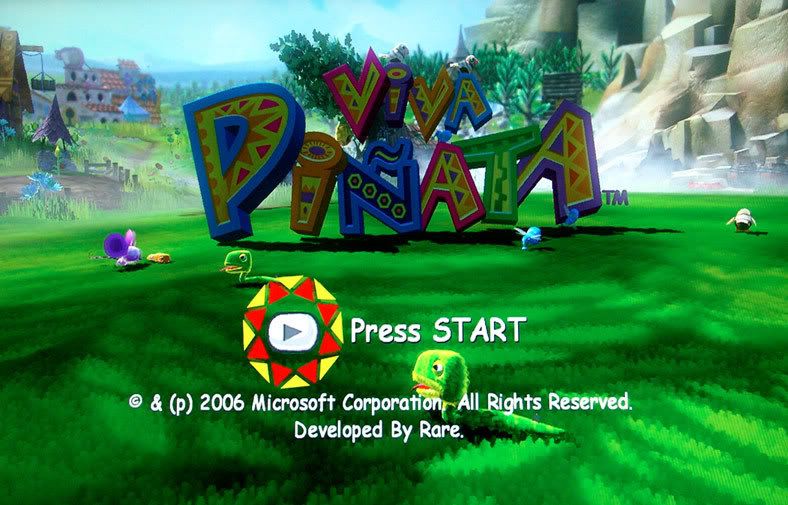
user posted image

Popped in Viva Pinata, never seen the characters so colourful and sharp before.
I have not seen how the Xbox360 / PS3 on a Sony Bravia, so I cannot compare
the results. But from what I see - if you have budget constraints (like me) and not
willing to fork out RM4000 for a 32' HD Ready LCD tv (or God forbids, RM15K for
a Bravia X, Drool, Drool, Drool) - then do give the Dell a try.
user posted image

Blacks are rich and deep. Colours are natural. Text are razor sharp. But maybe its
my imagination, I felt in certain fight scenes with Dead Of Alive, the characters
seems to be .... how should I say, lets say it moves from A position to C,
somehow, B was missing. (but its like a milisecond kinda thing) But could be my
imagination and prejudice after reading so much about 16ms vs 8ms etc etc.
Maybe others with the same monitor can confirm?

But on Dell's website, it says "Response Time 16 ms ( black to white) / 6 ms ( grey
to grey )". What does that mean????

This post has been edited by ps360: Dec 15 2006, 11:49 AM

squiggles
post Dec 15 2006, 08:06 AM

New Member
*
Junior Member
42 posts

Joined: Nov 2004


Hey PS360. i'm just curious, why did you blur your Gamertag? blink.gif i mean, we all here showing our GT to each other and probably some new ppl might add your GT to their friendlist smile.gif
ps360
post Dec 15 2006, 08:46 AM

Getting Started
**
Junior Member
137 posts

Joined: Jan 2006
From: The Other Side
QUOTE(squiggles @ Dec 15 2006, 09:06 AM)
Hey PS360. i'm just curious, why did you blur your Gamertag? blink.gif i mean, we all here showing our GT to each other and probably some new ppl might add your GT to their friendlist smile.gif
*
Hahaha. Thats the thing, I've had too many requests but now I am no longer on
XboxLive. So, didn't want people to think that I am ignoring their requests.
No special reason lah ....

actually, my GT is still listed somewhere on this site lah rolleyes.gif

This post has been edited by ps360: Dec 15 2006, 08:51 AM
deodorant
post Dec 15 2006, 10:24 AM

Surfing LYN instead of Working.
*******
Senior Member
5,691 posts

Joined: Mar 2006


Does HD make that much difference? I currently do all my gaming on a 32" non-HD TV. Planning to buy a 360 over the weekend, I do kind of have extra budget available for maybe one of the 20" Dells.

Thing is though I'm not a big computer gaming fan, so the Dell would be used only as a display for the 360, and be wasted as a PC monitor. Within a budget of ~1.5k, would you guys recommend I go for the 20" Dell anyway? Or save up for the 24" one? I'm sure the picture quality would be better, but wouldn't the gaming experience be better with a 50% larger (but non HD) screen?
ps360
post Dec 15 2006, 10:33 AM

Getting Started
**
Junior Member
137 posts

Joined: Jan 2006
From: The Other Side
QUOTE(deodorant @ Dec 15 2006, 11:24 AM)
Does HD make that much difference? I currently do all my gaming on a 32" non-HD TV. Planning to buy a 360 over the weekend, I do kind of have extra budget available for maybe one of the 20" Dells.

Thing is though I'm not a big computer gaming fan, so the Dell would be used only as a display for the 360, and be wasted as a PC monitor. Within a budget of ~1.5k, would you guys recommend I go for the 20" Dell anyway? Or save up for the 24" one? I'm sure the picture quality would be better, but wouldn't the gaming experience be better with a 50% larger (but non HD) screen?
*
I am not a tech savvy person when it comes to these things. But I was playing
Xbox360 on my 19" Viewsonic and I never got this experience. To me, it really
felt like from having okay images to super duper sharp and vibrant images on
screen.


madmoz
post Dec 15 2006, 10:37 AM

New Member
*******
Senior Member
4,250 posts

Joined: Nov 2006


QUOTE(deodorant @ Dec 15 2006, 10:24 AM)
Does HD make that much difference? I currently do all my gaming on a 32" non-HD TV. Planning to buy a 360 over the weekend, I do kind of have extra budget available for maybe one of the 20" Dells.

Thing is though I'm not a big computer gaming fan, so the Dell would be used only as a display for the 360, and be wasted as a PC monitor. Within a budget of ~1.5k, would you guys recommend I go for the 20" Dell anyway? Or save up for the 24" one? I'm sure the picture quality would be better, but wouldn't the gaming experience be better with a 50% larger (but non HD) screen?
*
HDTV makes a difference, trust me... but to be honest i see no difference between 720p and 1080i. Ask some tech junkie unsure.gif
squiggles
post Dec 15 2006, 11:04 AM

New Member
*
Junior Member
42 posts

Joined: Nov 2004


QUOTE(ps360 @ Dec 15 2006, 08:46 AM)
Hahaha. Thats the thing, I've had too many requests but now I am no longer on
XboxLive. So, didn't want people to think that I am ignoring their requests.
No special reason lah ....

actually, my GT is still listed somewhere on this site lah  rolleyes.gif
*
Hehe alright biggrin.gif
MK84
post Dec 15 2006, 11:51 AM

Walking Plague
******
Senior Member
1,477 posts

Joined: Jan 2003
The real difference is when you go from standard 4:3 screen to 16:9 widescreen. After that you'll see the difference as you go with bigger HDTVs.
DjiNn
post Dec 15 2006, 12:11 PM

~||Noob Game Console Advisor||~
*******
Store Representative
7,931 posts

Joined: Jan 2003
From: PJ, Malaysia


QUOTE(madmoz @ Dec 15 2006, 10:37 AM)
HDTV makes a difference, trust me... but to be honest i see no difference between 720p and 1080i. Ask some tech junkie  unsure.gif
*
for our naked eye.. can't see much different..

but for tech terms and calculation... there is a different
madmoz
post Dec 15 2006, 12:21 PM

New Member
*******
Senior Member
4,250 posts

Joined: Nov 2006


QUOTE(DjiNn @ Dec 15 2006, 12:11 PM)
for our naked eye.. can't see much different..

but for tech terms and calculation... there is a different
*
Which one is 'technically' better?
prazole
post Dec 15 2006, 02:00 PM

Sleepyhead..
******
Senior Member
1,513 posts

Joined: Nov 2004
From: Kuching - Klang


QUOTE(ps360 @ Dec 15 2006, 10:33 AM)
I am not a tech savvy person when it comes to these things. But I was playing
Xbox360 on my 19" Viewsonic and I never got this experience. To me, it really
felt like from having okay images to super duper sharp and vibrant images on
screen.
*
wow.. the dell screen is nice..
u ordered from dell site i suppose?
ps360
post Dec 15 2006, 02:51 PM

Getting Started
**
Junior Member
137 posts

Joined: Jan 2006
From: The Other Side
QUOTE(prazole @ Dec 15 2006, 03:00 PM)
wow.. the dell screen is nice..
u ordered from dell site i suppose?
*
Yes. Bought through Dell's website 8 months ago.
Doesn't belong to me lah. But hijacked it last week. Now it's mine!
Haha. Don't ask how and where and who ..... biggrin.gif

This post has been edited by ps360: Dec 15 2006, 04:04 PM
gnome
post Dec 15 2006, 04:16 PM

- We game, do you? -
*******
Senior Member
4,925 posts

Joined: Jan 2003
Hey guys got a question, does the Dell 2007fpw has 1:1 picture features thingy? and does 360 games strecth on it? (since the monitor is 16:10 compared to 16:9 for 360 games)

Maybe getting it next month or so blush.gif so thanks for any help smile.gif
xxboxx
post Dec 15 2006, 04:36 PM

The mind is for having ideas, not holding them
*******
Senior Member
5,261 posts

Joined: Oct 2004
From: J@Y B33


QUOTE(deodorant @ Dec 15 2006, 10:24 AM)
Does HD make that much difference? I currently do all my gaming on a 32" non-HD TV. Planning to buy a 360 over the weekend, I do kind of have extra budget available for maybe one of the 20" Dells.
*
even a jump from 480i to 480p makes alot of difference. the graphic look so sharp. if 720p/1080i, it's like 3-5 times better.

last time i choose to play my xbox1 on 19" monitor @ 480p instead of my 29" tv @ 480i. thats how good it look like. icon_rolleyes.gif

QUOTE(madmoz @ Dec 15 2006, 10:37 AM)
HDTV makes a difference, trust me... but to be honest i see no difference between 720p and 1080i. Ask some tech junkie  unsure.gif
*

1080i/p only looks better than 720p when you are using tv bigger than 40"

QUOTE(madmoz @ Dec 15 2006, 12:21 PM)
Which one is 'technically' better?
*

technically 720p is better coz it has more pixel. but if you have tv that can accept 1080i signal and display it as 1080p, it would look much better.
redbull_y2k
post Dec 15 2006, 04:59 PM

"Viva La Revolucion!"
******
Senior Member
1,469 posts

Joined: Jan 2003
From: YOU.ESS.JAY


QUOTE(gnome @ Dec 15 2006, 04:16 PM)
Hey guys got a question, does the Dell 2007fpw has 1:1 picture features thingy? and does 360 games strecth on it? (since the monitor is 16:10 compared to 16:9 for 360 games)

Maybe getting it next month or so blush.gif so thanks for any help smile.gif
*
U can scale the image without stretching to 16:10 if u select the image scaling as 4:3 in the menu. icon_rolleyes.gif
gnome
post Dec 15 2006, 05:32 PM

- We game, do you? -
*******
Senior Member
4,925 posts

Joined: Jan 2003
QUOTE(redbull_y2k @ Dec 15 2006, 04:59 PM)
U can scale the image without stretching to 16:10 if u select the image scaling as 4:3 in the menu.  icon_rolleyes.gif
*
Actually i dont want the picture to strecth laugh.gif

Anyways got the confirmation from my friend from the other forum that you can set letter box for 2007fpw. This is good news for me biggrin.gif
fair-pley
post Dec 15 2006, 05:35 PM

Getting Started
**
Junior Member
131 posts

Joined: May 2006
From: Selayang Baru, Selangor.


QUOTE(xxboxx @ Dec 15 2006, 04:36 PM)
technically 720p is better coz it has more pixel. but if you have tv that can accept 1080i signal and display it as 1080p , it would look much better.
*
Im confuse. Mine LCD TV support up to 1080i signal. Q is, how the hell i know it can display as 1080p?? blink.gif

Furthermore mine got HDMI input. I'm assume the HDMI usually support to 1080p no??

This post has been edited by fair-pley: Dec 15 2006, 05:37 PM
ben3003
post Dec 15 2006, 05:40 PM

10k Club
********
All Stars
10,859 posts

Joined: Jan 2003
From: Sarawak


my question has been left unanswered for 1pages.. wuhuhu.. Btw, my question is i wanted to buy 20inch dell lcd but i duno which to buy, is ultrasharp worth to get? I scare ultrasharp got ghosting effect that might give me an headache. Or can recommend other brand?
redbull_y2k
post Dec 15 2006, 06:09 PM

"Viva La Revolucion!"
******
Senior Member
1,469 posts

Joined: Jan 2003
From: YOU.ESS.JAY


QUOTE(gnome @ Dec 15 2006, 05:32 PM)
Actually i dont want the picture to strecth laugh.gif

Anyways got the confirmation from my friend from the other forum that you can set letter box for 2007fpw. This is good news for me biggrin.gif
*
That's what i meant la. sweat.gif If u dun want it to stretch, but scale while maintaining the aspect ratio, select 4:3 in the image scaling options. Selecting 1:1 u'll get an image in the middle of the panel with border all around.

QUOTE(fair-pley @ Dec 15 2006, 05:35 PM)
Im confuse. Mine LCD TV support up to 1080i signal. Q is, how the hell i know it can display as 1080p??  blink.gif

Furthermore mine got HDMI input. I'm assume the HDMI usually support to 1080p no??
*
HDMI supports 1080p but your LCDTV isn't, so your only choice is 720p. All 26" lcdtv currently are using 1366x768 panels, so obviously u won't get 1080p. tongue.gif

QUOTE(ben3003 @ Dec 15 2006, 05:40 PM)
my question has been left unanswered for 1pages.. wuhuhu.. Btw, my question is i wanted to buy 20inch dell lcd but i duno which to buy, is ultrasharp worth to get? I scare ultrasharp got ghosting effect that might give me an headache. Or can recommend other brand?
*
Dell 2007WFP is marketed as 16ms but that is with a Black to White rating, while most lcds rate their response time in grey-to-grey. The equivalent grey-to-grey for Dell 2007WFP is 6ms. Trust me, there's no such ghosting at all, even a camera with 1/1000 shutter speed can barely see any ghosting on the panel. If u can see any ghosting then i guess u have some super eyes. laugh.gif
deodorant
post Dec 16 2006, 03:15 AM

Surfing LYN instead of Working.
*******
Senior Member
5,691 posts

Joined: Mar 2006


OK another question. Of all the LCDs on this Dell page, which one is the best value for money product? Obviously the 2407WFP is the best, but it's also almost twice as expensive as the 2007 WFP. Which one then gives the most "bang for the buck?"
Maniac
post Dec 16 2006, 09:43 AM

That Tech Guy Who Use Nikon For Video
Group Icon
VIP
5,938 posts

Joined: Jan 2003
From: Now In The City of Merlion


207wfp! Best bang for the buck !
deodorant
post Dec 19 2006, 11:57 PM

Surfing LYN instead of Working.
*******
Senior Member
5,691 posts

Joined: Mar 2006


OK ... I need some expert advice ... after getting my 360 I realize it's not reaching it's full potential without HD.

Now, I've narrowed it down basically to the Dell 2007 WFP, mostly because the 24-incher is a little out of my budget. However, the 2007WFP has no component inputs, so how will I connect the 360 to the LCD? The description says:

QUOTE
... with Digital DVI-D (HDCP) ...


I'm assuming I'll need a seperately-purchased cable for this?

Which is better, 360 --> VGA or 360 --> Component?
xxboxx
post Dec 20 2006, 12:31 AM

The mind is for having ideas, not holding them
*******
Senior Member
5,261 posts

Joined: Oct 2004
From: J@Y B33


QUOTE(deodorant @ Dec 19 2006, 11:57 PM)
OK ... I need some expert advice ... after getting my 360 I realize it's not reaching it's full potential without HD.

Now, I've narrowed it down basically to the Dell 2007 WFP, mostly because the 24-incher is a little out of my budget. However, the 2007WFP has no component inputs, so how will I connect the 360 to the LCD? The description says:
I'm assuming I'll need a seperately-purchased cable for this?

Which is better, 360 --> VGA or 360 --> Component?
*
for 360, component looks better than vga. it has something to do with how the color being output.

whats up with everyone wanna buy DELL? i saw Acer 19" widescreen monitor go for 0.7k only.
deodorant
post Dec 20 2006, 12:35 AM

Surfing LYN instead of Working.
*******
Senior Member
5,691 posts

Joined: Mar 2006


QUOTE(xxboxx @ Dec 20 2006, 12:31 AM)
whats up with everyone wanna buy DELL? i saw Acer 19" widescreen monitor go for 0.7k only.
*
Hmm you know, you've got a point. I wanted Dell at first cos the 2407WFP has component inputs. But if I've decided it's out of budget, and the lower monitors have no component, then there's no real compelling reason to buy Dell, is there?

Hmmm ... time to take a visit to Lowyat (the mall, not the forum).
redbull_y2k
post Dec 20 2006, 12:37 AM

"Viva La Revolucion!"
******
Senior Member
1,469 posts

Joined: Jan 2003
From: YOU.ESS.JAY


QUOTE(xxboxx @ Dec 20 2006, 12:31 AM)
for 360, component looks better than vga. it has something to do with how the color being output.

whats up with everyone wanna buy DELL? i saw Acer 19" widescreen monitor go for 0.7k only.
*
bcoz with Dell there's a scaler so u can maintain the 16:9 aspect ratio but the rest will stretch it to 16:10. Also, for Dell 2407WFP, VGA looks better than component, but that's simply bcoz the 2407 series had issues with the component input. But then again, if one had a 2407, it's better to use VGA and 1080p output option anyways. tongue.gif tongue.gif

This post has been edited by redbull_y2k: Dec 20 2006, 12:39 AM
xxboxx
post Dec 20 2006, 12:45 AM

The mind is for having ideas, not holding them
*******
Senior Member
5,261 posts

Joined: Oct 2004
From: J@Y B33


QUOTE(redbull_y2k @ Dec 20 2006, 12:37 AM)
bcoz with Dell there's a scaler so u can maintain the 16:9 aspect ratio but the rest will stretch it to 16:10. Also, for Dell 2407WFP, VGA looks better than component, but that's simply bcoz the 2407 series had issues with the component input. But then again, if one had a 2407, it's better to use VGA and 1080p output option anyways. tongue.gif tongue.gif
*

but for the 20" also have the scaler?
1080p @ 24"? i think it has been proven screen size less than 50" won't see any difference between 720p or 1080i/p.
redbull_y2k
post Dec 20 2006, 01:14 AM

"Viva La Revolucion!"
******
Senior Member
1,469 posts

Joined: Jan 2003
From: YOU.ESS.JAY


QUOTE(xxboxx @ Dec 20 2006, 12:45 AM)
but for the 20" also have the scaler?
1080p @ 24"? i think it has been proven screen size less than 50" won't see any difference between 720p or 1080i/p.
*
yes... just to maintain the 16:9 aspect ratio. I'm using Dell 2007WFP remember? Also, yes there is a difference when u choose the 1080p option even on a 24" lcd. Why? Well since lcd works best at native res, choosing 1080p will give u the sharpest image over 720p which give a slightly blurry output, most obvious are the text. Yeah, for movies maybe one can't see much of a difference, but with games which involves a lot of text dialogs and HUDs, it's quote obvious really. If one can't see any difference of 1080p on a 24", then why would any PC users opt to use 1920x1200 as desktop res instead of let's say..... 1280x720? The difference is there, u just had to experience it yourself. sweat.gif
xxboxx
post Dec 20 2006, 01:39 AM

The mind is for having ideas, not holding them
*******
Senior Member
5,261 posts

Joined: Oct 2004
From: J@Y B33


QUOTE(redbull_y2k @ Dec 20 2006, 01:14 AM)
yes... just to maintain the 16:9 aspect ratio. I'm using Dell 2007WFP remember? Also, yes there is a difference when u choose the 1080p option even on a 24" lcd. Why? Well since lcd works best at native res, choosing 1080p will give u the sharpest image over 720p which give a slightly blurry output, most obvious are the text. Yeah, for movies maybe one can't see much of a difference, but with games which involves a lot of text dialogs and HUDs, it's quote obvious really. If one can't see any difference of 1080p on a 24", then why would any PC users opt to use 1920x1200 as desktop res instead of let's say..... 1280x720? The difference is there, u just had to experience it yourself.  sweat.gif
*

well i suppose the difference is noticeable since it is monitor that has more dot per-inch than standard tv. some more sitting very close to it. but bumping it up to such high resolution won't the text become too small? like running 1024x768 at 15" monitor.
redbull_y2k
post Dec 20 2006, 02:05 AM

"Viva La Revolucion!"
******
Senior Member
1,469 posts

Joined: Jan 2003
From: YOU.ESS.JAY


QUOTE(xxboxx @ Dec 20 2006, 01:39 AM)
well i suppose the difference is noticeable since it is monitor that has more dot per-inch than standard tv. some more sitting very close to it. but bumping it up to such high resolution won't the text become too small? like running 1024x768 at 15" monitor.
*
yeah.... sitting close to a 24" lcd monitor is more or less the equivalent to sitting on a couch watching a 50" tv. laugh.gif Text aren't exactly that small, more readable than running 1280x1024 on 17" LCD. smile.gif
xxboxx
post Dec 20 2006, 12:10 PM

The mind is for having ideas, not holding them
*******
Senior Member
5,261 posts

Joined: Oct 2004
From: J@Y B33


QUOTE(fair-pley @ Dec 15 2006, 05:35 PM)
Im confuse. Mine LCD TV support up to 1080i signal. Q is, how the hell i know it can display as 1080p??  blink.gif

Furthermore mine got HDMI input. I'm assume the HDMI usually support to 1080p no??
*

somehow miss your post earlier. what i meant was if your tv support upscale 1080i signal and display it as 1080p, that would look better. but since redbull has said that your tv max display is 1366x768, thats mean if you put it as 1080i, the tv would downscale it to 720p.
k8118k
post Dec 20 2006, 02:32 PM

Look at all my stars!!
*******
Senior Member
3,658 posts

Joined: Jan 2003


tonight xbox 360 + dell 2407wfp....later seek for sound system base on optical cable...
ps360
post Dec 20 2006, 03:10 PM

Getting Started
**
Junior Member
137 posts

Joined: Jan 2006
From: The Other Side
http://i10.photobucket.com/albums/a101/mac...pg?t=1166598381

24" Dell with 1:1 ratio.
Note the black bar at the top and bottom of the screen.
Don't mind the black bar, cuz images and text are razor sharp.


This post has been edited by ps360: Dec 20 2006, 03:12 PM
carimari
post Dec 20 2006, 04:14 PM

New Member
*
Junior Member
38 posts

Joined: Sep 2006
^^ woops. i dont think it was possible. are you sure its 1080 config?
as far as i can recall there's no 1:1 for 1080 resolution.. only 720p (on dell 2407)

plus only 2405 can do that 1:1 properly.. the newer 2407 cannot perform this feat. and on the bad side is 2407 is using various panel providers (its not single sourced from one vendor). so your quality can be hit/miss depending on the source.

again i could be wrong as im not using dell. sad.gif
UnUsUaL
post Dec 20 2006, 04:22 PM

ah jek
Group Icon
VIP
2,064 posts

Joined: Jan 2003
QUOTE(carimari @ Dec 20 2006, 04:14 PM)
^^ woops. i dont think it was possible. are you sure its 1080 config?
as far as i can recall there's no 1:1 for 1080 resolution.. only 720p (on dell 2407)

plus only 2405 can do that 1:1 properly.. the newer 2407 cannot perform this feat. and on the bad side is 2407 is using various panel providers (its not single sourced from one vendor). so your quality can be hit/miss depending on the source.

again i could be wrong as im not using dell. sad.gif
*
The pic showing he is using 2405.
carimari
post Dec 20 2006, 04:28 PM

New Member
*
Junior Member
38 posts

Joined: Sep 2006
QUOTE(UnUsUaL @ Dec 20 2006, 04:22 PM)
The pic showing he is using 2405.
*
an i thought so too. sweat.gif lucky him.
ps360
post Dec 20 2006, 04:32 PM

Getting Started
**
Junior Member
137 posts

Joined: Jan 2006
From: The Other Side
QUOTE(carimari @ Dec 20 2006, 05:14 PM)
^^ woops. i dont think it was possible. are you sure its 1080 config?
as far as i can recall there's no 1:1 for 1080 resolution.. only 720p (on dell 2407)

plus only 2405 can do that 1:1 properly.. the newer 2407 cannot perform this feat. and on the bad side is 2407 is using various panel providers (its not single sourced from one vendor). so your quality can be hit/miss depending on the source.

again i could be wrong as im not using dell. sad.gif
*
Mine is not 2407. Mine is 2405.
You can differentiate by the stand.
smile.gif


aegis`-
post Dec 20 2006, 06:16 PM

Regular
******
Senior Member
1,480 posts

Joined: Jan 2003
From: Sunway


so what is it gonna be
ill be getting my 2407 this friday vga or component ?
ps360
post Dec 20 2006, 07:15 PM

Getting Started
**
Junior Member
137 posts

Joined: Jan 2006
From: The Other Side
QUOTE(aegis`- @ Dec 20 2006, 07:16 PM)
so what is it gonna be
ill be getting my 2407 this friday vga or component ?
*
I had the original Xbox360 HD VGA cable but when I connect it to the Dell,
I got bright / washed out images. Blacks are not deep and rich.
But when I got a component cable from Stringfellow, the picture
and colours are brilliant. But as someone here mentioned, he
has no problems with VGA and it can get you 1080p while
Component can only achieve 1080i. But for a 24", 1080i
or 1080p - sama sama according to some sifus here.
So ..... are you more confused now? Haha ...
rclxub.gif
aegis`-
post Dec 20 2006, 08:05 PM

Regular
******
Senior Member
1,480 posts

Joined: Jan 2003
From: Sunway


whats the diff of 1080i and p? tongue.gif
ps360
post Dec 20 2006, 08:24 PM

Getting Started
**
Junior Member
137 posts

Joined: Jan 2006
From: The Other Side
QUOTE(aegis`- @ Dec 20 2006, 09:05 PM)
whats the diff of 1080i and p? tongue.gif
*
Visit this site for a detailed explanation.
Click Here

This post has been edited by ps360: Dec 20 2006, 08:25 PM
k8118k
post Dec 21 2006, 09:16 AM

Look at all my stars!!
*******
Senior Member
3,658 posts

Joined: Jan 2003


mine is xbox360>>component>>>dell2407 a02

hmmm..choose 720p or 1080i better?
deodorant
post Dec 21 2006, 09:18 AM

Surfing LYN instead of Working.
*******
Senior Member
5,691 posts

Joined: Mar 2006


Hmm, this is a bit off topic, but any recommendations for a budget 4.1 or 5.1 speaker system? Preferably for Computer, but also usable for 360.
carimari
post Dec 21 2006, 09:53 AM

New Member
*
Junior Member
38 posts

Joined: Sep 2006
QUOTE(k8118k @ Dec 21 2006, 09:16 AM)
mine is xbox360>>component>>>dell2407 a02

hmmm..choose 720p or 1080i better?
*
can you post a pic of your 2407 A02 in either 720 / 1080i ? hmm.gif

im also curious how much stretching is there.. im also itchy for 2407 considering
the (nice icon_rolleyes.gif ) ups and downs of the 2407 online price lately thumbup.gif
k8118k
post Dec 21 2006, 01:58 PM

Look at all my stars!!
*******
Senior Member
3,658 posts

Joined: Jan 2003


QUOTE(carimari @ Dec 21 2006, 09:53 AM)
can you post a pic of your 2407 A02 in either 720 / 1080i ? hmm.gif

im also curious how much stretching is there.. im also itchy for 2407 considering
the (nice icon_rolleyes.gif ) ups and downs of the 2407 online price lately  thumbup.gif
*
okay tonight i post up 2 setting

1 is using component cble
another 1 using vga cable

and

try on 720p and 1080i

smile.gif biggrin.gif tongue.gif rclxms.gif cool2.gif flex.gif hands.gif rclxm9.gif

hmmm......dell lowest price i saw is rm2349 free 5 years advnce warranty

This post has been edited by k8118k: Dec 21 2006, 01:59 PM
squiggles
post Dec 21 2006, 02:00 PM

New Member
*
Junior Member
42 posts

Joined: Nov 2004


nice, that would be very helpful smile.gif
k8118k
post Dec 22 2006, 08:59 AM

Look at all my stars!!
*******
Senior Member
3,658 posts

Joined: Jan 2003


QUOTE(UnUsUaL @ Dec 14 2006, 07:00 PM)
IIRC dell 2407 does not have 1:1 feature anymore, only 2405FPW have it.
*
but isaw my monitor setting got

""1.1", "...."and "fill" selection

can help?
matty
post Dec 22 2006, 09:08 AM

Casual
***
Junior Member
347 posts

Joined: Aug 2006
From: Kuala Lumpur


guys, im planning to get a new display for my xbox360. any suggestion on which lcd to get with a budget ok only 1.5k???
k8118k
post Dec 22 2006, 10:45 AM

Look at all my stars!!
*******
Senior Member
3,658 posts

Joined: Jan 2003


tested with component cable and vga cable on dell 2407 reva02

camera phone = n73

plug in component...come out resolution setting is 480..720p...1080i

plug in vga....come out 640*480 till 1366*768

f1 pic=component resolution setting
f2 pic=gow run on 1080i component
f3 pic=640*480 on vga
f4 pic=1280*1024 on vga
f5 pic=1366*768 on vga
f6 pic=gow with vga cable at highest resolution
f7 pic=f6
f8 pic=gow with component cable at highest resolution
f9 pic=f8

Thanks


This post has been edited by k8118k: Dec 22 2006, 11:08 AM
mzaidi
post Dec 22 2006, 10:52 AM

Jerk
******
Senior Member
1,484 posts

Joined: Jul 2005
From: Klang


^ Why you didn't have 1920x1080 in the VGA cable's option? You haven't download the Fall update?
jaylike7
post Dec 22 2006, 10:59 AM

Gears Of War addicts!
*******
Senior Member
2,164 posts

Joined: Jan 2003
From: I'm from Locust
@K8118K,

when u using vga cable, what resolution using in the setting? i can see you are using 1386x768. how bout try this setting? select 1280x1024 then set to widescreen format, i believe it will look much better.
k8118k
post Dec 22 2006, 11:10 AM

Look at all my stars!!
*******
Senior Member
3,658 posts

Joined: Jan 2003


QUOTE(mzaidi @ Dec 22 2006, 10:52 AM)
^ Why you didn't have 1920x1080 in the VGA cable's option? You haven't download the Fall update?
*
smile.gif biggrin.gif tongue.gif i just bought yesterday and my gamescore just 10g
........
now canot online

i using ICS.........xbox antenna cant detect my wifi signal....

wait i go download....
k8118k
post Dec 22 2006, 11:13 AM

Look at all my stars!!
*******
Senior Member
3,658 posts

Joined: Jan 2003


QUOTE(jaylike7 @ Dec 22 2006, 10:59 AM)
@K8118K,

when u using vga cable, what resolution using in the setting? i can see you are using 1386x768. how bout try this setting? select 1280x1024 then set to widescreen format, i believe it will look much better.
*
okay okay
will try it tonight

Gurdian
post Dec 22 2006, 12:29 PM


******
Senior Member
1,648 posts

Joined: Jan 2003
From: PJ, Malaysia
hey k8118k, there were reports that the x360 on component with 2407 provides grainy artifacts or something like that...could you confirm this? or is it crispy clear in your opinion on component with a 2407?

fast fast get the fall update and show us 1080p vga....really hoping my 2407 can use for x360 without washed out colours
k8118k
post Dec 22 2006, 12:34 PM

Look at all my stars!!
*******
Senior Member
3,658 posts

Joined: Jan 2003


QUOTE(Gurdian @ Dec 22 2006, 12:29 PM)
hey k8118k, there were reports that the x360 on component with 2407 provides grainy artifacts or something like that...could you confirm this? or is it crispy clear in your opinion on component with a 2407?

fast fast get the fall update and show us 1080p vga....really hoping my 2407 can use for x360 without washed out colours
*
\\y no u try ur self......coz i cant get wat u mean....
Gurdian
post Dec 22 2006, 12:47 PM


******
Senior Member
1,648 posts

Joined: Jan 2003
From: PJ, Malaysia
i no try myself cuz no x360 tongue.gif

basically i just wanna know what you think about the image quality using component with 2407 cuz they were ppl saying that it has a certain 'graininess' to it.

the vga apparently provides crisp clear images but at the cost of washed out colours...

so basically:

component - perfect colours, but possibility of grainy images
vga - perfect image, but washed out colours

do note that the 2407 is the only model plagued with grainy component images...the 2405 is not...which is why alotta ppl feel shortchanged buying the 2407 as the component input is somewhat 'crippled' and it doesn't do 1:1 scaling for 1080p
matty
post Dec 22 2006, 06:04 PM

Casual
***
Junior Member
347 posts

Joined: Aug 2006
From: Kuala Lumpur


QUOTE(k8118k @ Dec 21 2006, 09:16 AM)
mine is xbox360>>component>>>dell2407 a02

hmmm..choose 720p or 1080i better?
*
k8118k, how much it cost u for the dell2407? im looking for a display for my 360 too.
aegis`-
post Dec 22 2006, 06:10 PM

Regular
******
Senior Member
1,480 posts

Joined: Jan 2003
From: Sunway


ow thats bad i just ordered my 2407
k8118k
post Dec 22 2006, 10:44 PM

Look at all my stars!!
*******
Senior Member
3,658 posts

Joined: Jan 2003


omg......2407 didnt support 1080p...................
Gurdian
post Dec 22 2006, 11:21 PM


******
Senior Member
1,648 posts

Joined: Jan 2003
From: PJ, Malaysia
QUOTE(k8118k @ Dec 22 2006, 10:44 PM)
omg......2407 didnt support 1080p...................
*
you sure bout that dude?

alotta ppl have already got 1080p working with the 2407...

make sure you got the fall update, and using vga cuz component won't do 1080p

u might wanna check this out:
http://forums.us.dell.com/supportforums/bo...essage.id=68504

This post has been edited by Gurdian: Dec 22 2006, 11:27 PM
aegis`-
post Dec 22 2006, 11:29 PM

Regular
******
Senior Member
1,480 posts

Joined: Jan 2003
From: Sunway


whats fall update?

bah whats the use if u get 1080p if u get stretched image it sux to e c0re

This post has been edited by aegis`-: Dec 22 2006, 11:36 PM
mzaidi
post Dec 22 2006, 11:37 PM

Jerk
******
Senior Member
1,484 posts

Joined: Jul 2005
From: Klang


QUOTE(aegis`- @ Dec 22 2006, 11:29 PM)
whats fall update?
*
Xbox 360's system update released last month.
silencer
post Dec 23 2006, 04:27 PM

AnyThiN GoEs
******
Senior Member
1,846 posts

Joined: Jan 2003
From: City^of^Anggerik


Really needs help here..as I'm eyeing for a 42" lcd tv with 1080p support that will be released here next month. The problem is there isn't any vga input connector, and just one DVI connector, as the 1080p will only be supported by 360 through the vga connection.
Is there any possibility that the same resolution of 1080p can be mantained by using the vga connection through "vga and dvi adapter" for my 360.
Any comment??? Thanks

This post has been edited by silencer: Dec 23 2006, 04:27 PM
redbull_y2k
post Dec 23 2006, 06:01 PM

"Viva La Revolucion!"
******
Senior Member
1,469 posts

Joined: Jan 2003
From: YOU.ESS.JAY


QUOTE(silencer @ Dec 23 2006, 04:27 PM)
Really needs help here..as I'm eyeing for a 42" lcd tv with 1080p support that will be released here next month. The problem is there isn't any vga input connector, and just one DVI connector, as the 1080p will only be supported by 360 through the vga connection.
Is there any possibility that the same resolution of 1080p can be mantained by using the vga connection through "vga and dvi adapter" for my 360.
Any comment??? Thanks
*
that would hardly be possible unless the dvi input is DVI-I. Most likely it's DVI-D, which is digital only, no analog input.
deodorant
post Dec 23 2006, 09:23 PM

Surfing LYN instead of Working.
*******
Senior Member
5,691 posts

Joined: Mar 2006


Hey guys, I just got my Dell 2007FPW delivered today.

Native res is 1600x1050, so what's the best resolution to choose from? I recall there's 12**x768 and 13**x768, which one is better?

Also, I haven't taken a pic yet but the quality of the picture is ... pretty bad. It's like, not sharp, the text is a bit blurry and there's "ghosting." I'll take a pic later on to show, but any ideas why? Using 3rd party VGA cable (but I hear that on small LCDs should be no difference from ori VGA cable).

[edit] Here's what I mean. The picture quality is mostly crap cos my camera phone sucks, but you can clearly see the "blurring" in between the text.

user posted image

Also, there's a constant, erm, wavy field moving downwards of blur ... most noticeable during loading screens when all black.

This post has been edited by deodorant: Dec 23 2006, 09:42 PM
loko02
post Dec 23 2006, 10:47 PM

Getting Started
**
Junior Member
58 posts

Joined: Jan 2003
QUOTE(deodorant @ Dec 23 2006, 09:23 PM)
Hey guys, I just got my Dell 2007FPW delivered today.

Native res is 1600x1050, so what's the best resolution to choose from? I recall there's 12**x768 and 13**x768, which one is better?

Also, I haven't taken a pic yet but the quality of the picture is ... pretty bad. It's like, not sharp, the text is a bit blurry and there's "ghosting." I'll take a pic later on to show, but any ideas why? Using 3rd party VGA cable (but I hear that on small LCDs should be no difference from ori VGA cable).

[edit] Here's what I mean. The picture quality is mostly crap cos my camera phone sucks, but you can clearly see the "blurring" in between the text.

user posted image

Also, there's a constant, erm, wavy field moving downwards of blur ... most noticeable during loading screens when all black.
*
Just bought my samsung synmaster 205BW. Why? becoz gameaxis said so. Wen to Low Yat twice. Keep going back and forth between Dell, Samsung and Benq.

Just like you, im trying to figure out whats best for my monitor. So my advise is keep the faith and continue to tinker. I played GOW, awesome dudes...sharp as hell. I played fifa on the same resolution, ok lah. the screen not as sharp, a bit soft and blury. I played NBA2k7, awesome. I guess it also depends on the game. Anyway, if anyone else is using the same monitor and can advise me on how to get the best from this monitor, its much appreciated (especially the folks at Gameaxis! and i know you guys are monitoring this). Hope you guys were not influenced by the advertising money you got from Samsung! hehehe just joking fellas. dont have a cow...cheers.

squiggles
post Dec 23 2006, 11:50 PM

New Member
*
Junior Member
42 posts

Joined: Nov 2004


@deodorant. wow, that's pretty awful. i'm using 2007WFP & my 360 connected via original MS VGA cable, it looks very sharp & clear

user posted image

user posted image

user posted image

I guess different brand provides different quality. About the resolution, honestly i can't tell the differences between 1280X720 and 1368X720, looks the same. but i've been using 1280X720 all the time. hope this helps

This post has been edited by squiggles: Dec 24 2006, 01:22 AM
deodorant
post Dec 24 2006, 02:52 AM

Surfing LYN instead of Working.
*******
Senior Member
5,691 posts

Joined: Mar 2006


Well I've figured out part of the problem. The "drop shadow" effect is still there, but it's only really noticeable on text, so no big deal.

However the "interference" pattern is due to my amp. For some reason the moment I plug the red/white audio into my amp, the interference pattern comes in (even though the amp is off). No idea why this is, I wonder if using the ori vga cable would make any difference.

How much does it cost, anyway?
Gurdian
post Dec 24 2006, 04:04 AM


******
Senior Member
1,648 posts

Joined: Jan 2003
From: PJ, Malaysia
oh man...to think i was gonna buy a 3rd party cable...

if the quality like that i'm gonna stay away from it. Thanks for the heads up deodorant.

Anybody got 2nd hand ori vga cable for sale? PM me pls...tq
un9ku
post Dec 24 2006, 05:31 AM

Casual
***
Junior Member
335 posts

Joined: Jan 2003
From: Milo
for 22" 1280X720 got some black bars on the left. 1368X720 perfectly fills up the screen. anyway i think im goin blind d. sittin too close to the monitor. its a viewsonic vx2235wm for rm1288, cheap considering dell2407 is rm2300++, which is twice the price for that extra 2".

PS: dont flame me bout the extra component input or PIP n all that, coz in the end i got a new PC for the extra moolah.
DjiNn
post Dec 24 2006, 08:04 AM

~||Noob Game Console Advisor||~
*******
Store Representative
7,931 posts

Joined: Jan 2003
From: PJ, Malaysia


QUOTE(deodorant @ Dec 24 2006, 02:52 AM)
Well I've figured out part of the problem. The "drop shadow" effect is still there, but it's only really noticeable on text, so no big deal.

However the "interference" pattern is due to my amp. For some reason the moment I plug the red/white audio into my amp, the interference pattern comes in (even though the amp is off). No idea why this is, I wonder if using the ori vga cable would make any difference.

How much does it cost, anyway?
*
current leakage may also cause these problem.

Evirober
post Dec 24 2006, 10:18 AM

On my way
****
Junior Member
636 posts

Joined: Mar 2006
From: KL


DjiNn,
What can be done for current leakage ?? I noticed this by accident, take a test pen and then touch the reflective sides walls of the Xbox HDD and the test pen will light up. Is this normal ?? thanks

This post has been edited by Evirober: Dec 24 2006, 10:18 AM
Maniac
post Dec 24 2006, 10:40 AM

That Tech Guy Who Use Nikon For Video
Group Icon
VIP
5,938 posts

Joined: Jan 2003
From: Now In The City of Merlion


u using ur amp on multi gang plug? i notice a lot of time, it was caused by these plugs, change them or plug directly see if the leakage still there
carimari
post Dec 24 2006, 11:16 AM

New Member
*
Junior Member
38 posts

Joined: Sep 2006
QUOTE(silencer @ Dec 23 2006, 04:27 PM)
Really needs help here..as I'm eyeing for a 42" lcd tv with 1080p support that will be released here next month. The problem is there isn't any vga input connector, and just one DVI connector, as the 1080p will only be supported by 360 through the vga connection.
Is there any possibility that the same resolution of 1080p can be mantained by using the vga connection through "vga and dvi adapter" for my 360.
Any comment??? Thanks
*
well in reality the 360 is using an internal scaler (very good quality imho because its scaling directly from source) to scale the output to 1080p.
now if you doesnt have that but still insist on 1080(i), then you could try any of the available scalers in the market or just plug it into any capable HT receivers for the same effect.

btw, may i know what lcd model are you talking about?
DjiNn
post Dec 24 2006, 11:19 AM

~||Noob Game Console Advisor||~
*******
Store Representative
7,931 posts

Joined: Jan 2003
From: PJ, Malaysia


QUOTE(Evirober @ Dec 24 2006, 10:18 AM)
DjiNn,
What can be done for current leakage ?? I noticed this by accident, take a test pen and then touch the reflective sides walls of the Xbox HDD and the test pen will light up. Is this normal ?? thanks
*
this is not normal~. mostly these happen can be a lot of thing.. some amps leak current via the audio video cable. but as Maniac said.. try his method.. if these does not work. you have to go through on which of your electrical apps is giving out the voltage leakage.

QUOTE(Maniac @ Dec 24 2006, 10:40 AM)
u using ur amp on multi gang plug?  i notice a lot of time, it was caused by these plugs, change them or plug directly see if the leakage still there
*
jaylike7
post Dec 24 2006, 11:56 AM

Gears Of War addicts!
*******
Senior Member
2,164 posts

Joined: Jan 2003
From: I'm from Locust
for dell 2007wfp user,

please try this setting..found out this setting is much much better than 12**x768 and 13**x768.

Resolution : 1280x1024
format : Wide Screen

this setting is far more better than above 2 settings...
deodorant
post Dec 24 2006, 02:30 PM

Surfing LYN instead of Working.
*******
Senior Member
5,691 posts

Joined: Mar 2006


I don't understand ... 1280x1024 is not a widescreen reso ... so you'd have quite a bit of stretching going on ...
Evirober
post Dec 24 2006, 06:06 PM

On my way
****
Junior Member
636 posts

Joined: Mar 2006
From: KL


DjiNn and guys: On Current leakage.

I have unplugged all Video and Audio cables. Xbox 360 is directly hooked up to the wall socket. Xbox is NOT turned on used the test pen and it still lights up. Any advise ? Unattached and reattached Xbox HDD ?? any other advise ?? Thanks guys...

Test conducted: icon_question.gif icon_question.gif icon_question.gif

1) Removal of HDD and touch the metal surface of the HDD connection. NOTE: NOT the connector but the other metal casing of the XBox.

Result: Test pen lights up.

2) Touch other other metal parts from the removed HDD area. NOTE: Inner metal casing not the outer changeable area.

Result: Test pen lights up.

3) Other parts of the XBox 360. The back panel other side (Vertical Standing) and front panel. All metal surface.

Result: Test pen DOES NOT lights up.


This post has been edited by Evirober: Dec 24 2006, 06:12 PM
un9ku
post Dec 24 2006, 07:20 PM

Casual
***
Junior Member
335 posts

Joined: Jan 2003
From: Milo
wats a test pen? issit that screw driver thingy that when u press a "button" at its tail, the thing will light up?
jaylike7
post Dec 24 2006, 08:23 PM

Gears Of War addicts!
*******
Senior Member
2,164 posts

Joined: Jan 2003
From: I'm from Locust
QUOTE(deodorant @ Dec 24 2006, 02:30 PM)
I don't understand ... 1280x1024 is not a widescreen reso ... so you'd have quite a bit of stretching going on ...
*
nah, try it out before posting your comment...if you find the imaage stretching, come and chop my headoff in GOW,k tongue.gif ?

anyway, above statement is just kidding, thats why i mentioned in my previous posted msg,

resolution : 1280 x 1024
screen format : Wide Screen
aegis`-
post Dec 24 2006, 09:05 PM

Regular
******
Senior Member
1,480 posts

Joined: Jan 2003
From: Sunway


that means doing it with vga cables?
bahhhhhh i was thinking of going components on my 2407
i dont care abt 1080p anymore doesnt bother me
i just want a full screen good no stretching image
ed1001
post Dec 24 2006, 09:42 PM

Getting Started
**
Junior Member
68 posts

Joined: Jan 2005


QUOTE(Evirober @ Dec 24 2006, 06:06 PM)
DjiNn and guys: On Current leakage.

I have unplugged all Video and Audio cables. Xbox 360 is directly hooked up to the wall socket. Xbox is NOT turned on used the test pen and it still lights up. Any advise ? Unattached and reattached Xbox HDD ?? any other advise ?? Thanks guys...

Test conducted:  icon_question.gif  icon_question.gif  icon_question.gif

1) Removal of HDD and touch the metal surface of the HDD connection. NOTE: NOT the connector but the other metal casing of the XBox.

Result: Test pen lights up.

2) Touch other other metal parts from the removed HDD area. NOTE: Inner metal casing not the outer changeable area.

Result: Test pen lights up.

3) Other parts of the XBox 360. The back panel other side (Vertical Standing) and front panel. All metal surface.

Result: Test pen DOES NOT lights up.
*
hey.. can you try the xbox 360 power socket on other socket.... (means other power point)
mzaidi
post Dec 24 2006, 09:49 PM

Jerk
******
Senior Member
1,484 posts

Joined: Jul 2005
From: Klang


Yay, just got my Widescreen LCD. Bought Samsung 940BW. rclxm9.gif
Maniac
post Dec 24 2006, 11:02 PM

That Tech Guy Who Use Nikon For Video
Group Icon
VIP
5,938 posts

Joined: Jan 2003
From: Now In The City of Merlion


was wondering why i read somewhere u guy were saying DTS problem with xbox?

i checked it works with normal DTS, DTS ES, DTS 96/24 also. using toslink to my receiver, playing the DTS demo disc by yamaha
redbull_y2k
post Dec 25 2006, 12:30 AM

"Viva La Revolucion!"
******
Senior Member
1,469 posts

Joined: Jan 2003
From: YOU.ESS.JAY


QUOTE(jaylike7 @ Dec 24 2006, 08:23 PM)
nah, try it out before posting your comment...if you find the imaage stretching, come and chop my headoff in GOW,k tongue.gif ?

anyway, above statement is just kidding, thats why i mentioned in my previous posted msg,

resolution : 1280 x 1024
screen format : Wide Screen
*
yea man.... text are much sharper compared to 1360x768 reso option. rclxms.gif
Evirober
post Dec 25 2006, 01:08 AM

On my way
****
Junior Member
636 posts

Joined: Mar 2006
From: KL


Latest Update on Current leakage:

Change to different power point but yield same result. =/

deodorant
post Dec 25 2006, 02:13 AM

Surfing LYN instead of Working.
*******
Senior Member
5,691 posts

Joined: Mar 2006


QUOTE(jaylike7 @ Dec 24 2006, 08:23 PM)
nah, try it out before posting your comment...
*
You're right, it's good.

Actually I do find that with *x768 and *x720 there is some image tearing (like VGA not synced properly), but with 1280x1024 there's none.

BTW those of you with 2007's, what settings do you use? Under image modes got Desktop/Multimedia/Gaming ... I use Desktop for GOW cos seems like the contrast is better .... with Gaming mode there's like no black, gray only.
skidd
post Dec 25 2006, 07:19 AM

Getting Started
**
Junior Member
254 posts

Joined: Jan 2003
QUOTE(mzaidi @ Dec 24 2006, 09:49 PM)
Yay, just got my Widescreen LCD. Bought Samsung 940BW.  rclxm9.gif
*
hi i'm using that too
what setting are u using ? 1280x720?
un9ku
post Dec 25 2006, 07:23 AM

Casual
***
Junior Member
335 posts

Joined: Jan 2003
From: Milo
user posted image
alamak munky u better get a new table la, seriously. that thing is bent out of shape d.

This post has been edited by un9ku: Dec 25 2006, 07:26 AM
imreezm
post Dec 25 2006, 07:43 AM

Getting Started
**
Junior Member
63 posts

Joined: Dec 2004
From: Subang Jaya


Haier 32" Plasma TV L32A9A - can anyone point me to a review of this display? anyone of you using it?
mzaidi
post Dec 25 2006, 12:44 PM

Jerk
******
Senior Member
1,484 posts

Joined: Jul 2005
From: Klang


QUOTE(skidd @ Dec 25 2006, 07:19 AM)
hi i'm using that too
what setting are u using ? 1280x720?
*
Screen Resolution : 1280 x 1024
Screen Format : Widescreen
aegis`-
post Dec 25 2006, 01:35 PM

Regular
******
Senior Member
1,480 posts

Joined: Jan 2003
From: Sunway


so whats the best setting for 2407? dell ultrasharp

vga or component imm still deciding sad.gif
monitor is arriving this wednesday

This post has been edited by aegis`-: Dec 25 2006, 01:35 PM
pAnGuInDa
post Dec 25 2006, 01:57 PM

Getting Started
**
Junior Member
87 posts

Joined: Dec 2006
From: Sarawak


I'm using Dell UltraSharp 2405FPW for my Xbox 360 and using the component display, is abit dark at first but with adjusting is look just fine on 720p and 1080i, i have bad experience with vga cable since i get the third party one.... I think your dell ultrasharp 2407 should give you good picture on component input. I was trying to get the original vga cable for testing but no luck, the shop around my place is not selling, which i end up buying the third party cable which really really sucks. avoid avoid... please... shakehead.gif
aegis`-
post Dec 25 2006, 02:29 PM

Regular
******
Senior Member
1,480 posts

Joined: Jan 2003
From: Sunway


ok thx for the reply
ill be using component then
since its widescreen
it fills up the whole screen right?
pAnGuInDa
post Dec 26 2006, 09:06 AM

Getting Started
**
Junior Member
87 posts

Joined: Dec 2006
From: Sarawak


Mine fill up the whole screen.. look so good.. but you will need adjusting for brght and contrast... then is really nice.. especially you hook up on 5.1 system... smile.gif
Maniac
post Dec 26 2006, 09:56 AM

That Tech Guy Who Use Nikon For Video
Group Icon
VIP
5,938 posts

Joined: Jan 2003
From: Now In The City of Merlion


both 1366 x 768 and 1280 x 720 are wide screen format.

in ratio, 1366 x 768 = 16:9 while 1280 x 720 also a 16:9.
how to get the figure?

1366 / 16 ~ 85 and 1280 / 16 = 80
768 / 9 ~ 85 and 720 / 9 = 80

both are wide screen format, except that most LCD panel will scretch the 16:9 ratio to 16:10, which is native for most LCD Wide-Panel, theorically 1366x768 should be better than 1280 x 720, since we know higher pixels number = more details thus sharper. But since so many of you were saying 1280x720 is sharper, I think it has something to do with the Upscaler in Xbox, since 1280x720 is native for 720P sources, what the console need to do is just pass thru the stream instead of upscaling/enlarge them to 1366x768, which is around 6% increased in number of pixels.

correct me if I am wrong, personally i am using 1366x768 now, will try 1280x720 asap.
munky
post Dec 26 2006, 10:02 AM

Regular
******
Senior Member
1,971 posts

Joined: Oct 2004


QUOTE(un9ku @ Dec 25 2006, 07:23 AM)
user posted image
alamak munky u better get a new table la, seriously. that thing is bent out of shape d.
*
eh bro manade bent. That small 'table' is curved at the front, that's why u see like it is bent laugh.gif
silencer
post Dec 26 2006, 10:27 AM

AnyThiN GoEs
******
Senior Member
1,846 posts

Joined: Jan 2003
From: City^of^Anggerik


Anyone here mind to share any experience with the Japanese lcd TV model that requires step down transformer in Malaysia. Found out that the new sony bravia x model just been released there with an acceptable price list, and going to tokyo..next month too...and how much normally the custom will charge for the duty of lcd tv...

This post has been edited by silencer: Dec 26 2006, 10:29 AM
singleguy
post Dec 26 2006, 10:29 AM

relax lah!
******
Senior Member
1,090 posts

Joined: Jan 2003
From: Malaysia~Singapore


QUOTE(aegis`- @ Dec 25 2006, 01:35 PM)
so whats the best setting for 2407? dell ultrasharp

vga or component imm still deciding sad.gif
monitor is arriving this wednesday
*
I have no problem with vga. look fairly good to me.. I didnt use component because i dun wan so many cables running around.

Heres sum forumer review
http://www.hardforum.com/showthread.php?t=1073048

But ours will be revision A03, this is only A02, maybe got improvement? Duno where i put my component cables dy.

Anyway, if u were to use vga, try buy ori.. dun use 3rd party.. hard to say sumtimes u get good ones and bad ones.
ps360
post Dec 26 2006, 10:34 AM

Getting Started
**
Junior Member
137 posts

Joined: Jan 2006
From: The Other Side
QUOTE(silencer @ Dec 26 2006, 11:27 AM)
Anyone here mind to share any experience with the Japanese lcd TV model that requires step down transformer in Malaysia. Found out that the new sony bravia x model just been released there with an acceptable price list, and going to tokyo..next month too...and how much normally the custom will charge for the duty of lcd tv...
*
Bro! I salute you kuat kuat ...........
Please do share your import experience next month
Thx


silencer
post Dec 26 2006, 10:38 AM

AnyThiN GoEs
******
Senior Member
1,846 posts

Joined: Jan 2003
From: City^of^Anggerik


QUOTE(ps360 @ Dec 26 2006, 10:34 AM)
Bro! I salute you kuat kuat ...........
Please do share your import experience next month
Thx
*
Hahahaha..I am a bit scared lah...on the price side...much much lower than here in malaysia with the new model (dunno when it will arrive here)..but scared if i burn more thna rm10k for nothing...thats why needs some advise about its workability here...
matty
post Dec 26 2006, 10:51 AM

Casual
***
Junior Member
347 posts

Joined: Aug 2006
From: Kuala Lumpur


the estimated drop of lcd and plasma tv will drop another 20% - 30% by the 2nd half of next yr. one of my fren who work at sony malaysia told me la. how true, itu i also dunno... hehehe..... so can we wait that long ?
lexasp
post Dec 26 2006, 01:19 PM

Getting Started
**
Junior Member
229 posts

Joined: Jan 2003


I went through the thread, but I am still not sure what is the best resolution for 2007wfp. sweat.gif
can someone care to advice.

1) 1280 x 720,
2) 1280 x 768,
3) 1360 x768, or
4) 1280 x 1024?

LiLBoy
post Dec 26 2006, 02:06 PM

Casual
***
Junior Member
319 posts

Joined: Aug 2006
From: blek


QUOTE(lexasp @ Dec 26 2006, 01:19 PM)
I went through the thread, but I am still not sure what is the best resolution for 2007wfp. sweat.gif
can someone care to advice.

1) 1280 x 720,
2) 1280 x 768,
3) 1360 x768, or
4) 1280 x 1024?
*
1280 x 1024 is better,but i will choose 1360 x 768
imreezm
post Dec 26 2006, 05:10 PM

Getting Started
**
Junior Member
63 posts

Joined: Dec 2004
From: Subang Jaya


QUOTE(LiLBoy @ Dec 26 2006, 02:06 PM)
1280 x 1024 is better,but i will choose 1360 x 768
*
just curious... if 1280 x 1024 is better, why choose 1360 x 768?
xxboxx
post Dec 26 2006, 07:20 PM

The mind is for having ideas, not holding them
*******
Senior Member
5,261 posts

Joined: Oct 2004
From: J@Y B33


QUOTE(silencer @ Dec 26 2006, 10:27 AM)
Anyone here mind to share any experience with the Japanese lcd TV model that requires step down transformer in Malaysia. Found out that the new sony bravia x model just been released there with an acceptable price list, and going to tokyo..next month too...and how much normally the custom will charge for the duty of lcd tv...
*

electronic stuff if not mistaken is taxed 30%


QUOTE(matty @ Dec 26 2006, 10:51 AM)
the estimated drop of lcd and plasma tv will drop another 20% - 30% by the 2nd half of next yr. one of my fren who work at sony malaysia told me la. how true, itu i also dunno... hehehe..... so can we wait that long ?
*

it's true, lcd price was expected to drop by 40% next year. and now even china brand also come out with lcd tv, those branded company sure have to lower the price to keep competing.
wcliang
post Dec 26 2006, 07:44 PM

9999
****
Senior Member
585 posts

Joined: Jan 2005
From: JB


QUOTE(xxboxx @ Dec 26 2006, 07:20 PM)
electronic stuff if not mistaken is taxed 30%
it's true, lcd price was expected to drop by 40% next year. and now even china brand also come out with lcd tv, those branded company sure have to lower the price to keep competing.
*
yo really?.....so probably next year will be the best time to buy LCD TV? drool.gif cool2.gif

wait...wait.....wait rolleyes.gif
deodorant
post Dec 26 2006, 08:39 PM

Surfing LYN instead of Working.
*******
Senior Member
5,691 posts

Joined: Mar 2006


Well, a lot of the main LCD companies being investigated for price fixing now, aren't they? If they get a guilty verdict I'm sure prices will drop.

Other than that ... prices are always dropping man, if you want to wait you'll never get an LCD.
LiLBoy
post Dec 26 2006, 09:03 PM

Casual
***
Junior Member
319 posts

Joined: Aug 2006
From: blek


QUOTE(imreezm @ Dec 26 2006, 05:10 PM)
just curious... if 1280 x 1024 is better, why choose 1360 x 768?
*
Reason:I love 1360(number)
wcliang
post Dec 27 2006, 09:05 AM

9999
****
Senior Member
585 posts

Joined: Jan 2005
From: JB


QUOTE(deodorant @ Dec 26 2006, 08:39 PM)
Well, a lot of the main LCD companies being investigated for price fixing now, aren't they? If they get a guilty verdict I'm sure prices will drop.

Other than that ... prices are always dropping man, if you want to wait you'll never get an LCD.
*
haha ...40% to u maybe nothing...it's big amount to me cool2.gif ...and dont worry i still remember my economics lecturer teach me abt the theory of how to make rational choices about how much to buy in order to maximize our utility...kekeke
jaylike7
post Dec 27 2006, 10:40 AM

Gears Of War addicts!
*******
Senior Member
2,164 posts

Joined: Jan 2003
From: I'm from Locust
QUOTE(LiLBoy @ Dec 26 2006, 09:03 PM)
Reason:I love 1360(number)
*
i'm loled laugh.gif

ok,

i found out there are 2 reso are quite good with 2007wfp

1. 1280 x 768
2. 1280 x 1024, wide screen format.


but i found out 1280x1024 better..

aegis`-
post Dec 27 2006, 06:09 PM

Regular
******
Senior Member
1,480 posts

Joined: Jan 2003
From: Sunway


dammit today wanna test power with my 2407
they said imm supppose to get my lcd today
but they said ill get on friday and the lcd is already in KL
then later they call again ur LCD still on the ship at sea will be coming on saturday

i fk kau dell upside down u delay till after xmas which they promise me on 21st ill get my lcd then they call again they say passing thru custom gonna take some time so ill get my lcd on tuesday sad.gif
GOD BLESS ME sad.gif(((((((((
k8118k
post Dec 27 2006, 06:11 PM

Look at all my stars!!
*******
Senior Member
3,658 posts

Joined: Jan 2003


tonite go back play with my 2407 liao......

wohohohohoh
aegis`-
post Dec 27 2006, 06:37 PM

Regular
******
Senior Member
1,480 posts

Joined: Jan 2003
From: Sunway


QUOTE(k8118k @ Dec 27 2006, 06:11 PM)
tonite go back play with my 2407 liao......

wohohohohoh
*
sad.gif say until like that meh
LiLBoy
post Dec 27 2006, 10:43 PM

Casual
***
Junior Member
319 posts

Joined: Aug 2006
From: blek


QUOTE(aegis`- @ Dec 27 2006, 06:37 PM)
sad.gif say until like that meh
*
Wow,2407.....do you know what is the price difference between Dell 2407 and Samsung 244T?? Samsung cheaper or Dell cheaper? flex.gif
aegis`-
post Dec 27 2006, 11:43 PM

Regular
******
Senior Member
1,480 posts

Joined: Jan 2003
From: Sunway


oh i duno wor
imreezm
post Dec 28 2006, 12:05 AM

Getting Started
**
Junior Member
63 posts

Joined: Dec 2004
From: Subang Jaya


QUOTE(jaylike7 @ Dec 27 2006, 10:40 AM)
i'm loled laugh.gif

ok,

i found out there are 2 reso are quite good with 2007wfp

1. 1280 x 768
2. 1280 x 1024, wide screen format.
but i found out 1280x1024 better..
*
wide mode set as fill or 4:3? either res my pva 2007wfp looks horrible (well, not really but it's not up to expectations)
jaylike7
post Dec 28 2006, 07:47 AM

Gears Of War addicts!
*******
Senior Member
2,164 posts

Joined: Jan 2003
From: I'm from Locust
QUOTE(imreezm @ Dec 28 2006, 12:05 AM)
wide mode set as fill or 4:3? either res my pva 2007wfp looks horrible (well, not really but it's not up to expectations)
*
dude,
the widescreen format setting can be set in the 360 not from the panel itself....

just leave the panel setting other than the color configuration..

if its not up to your expectation, think you better return to dell (within 13 day after delivered) or upgrade to 24"/30" 1....
InLove
post Jan 1 2007, 09:23 AM

Getting Started
**
Junior Member
142 posts

Joined: Jan 2003
izit ok to buy VGA xbox360 cable for my 17" LCD Flatron LG LCD?
poor guy here lol
k8118k
post Jan 1 2007, 09:28 AM

Look at all my stars!!
*******
Senior Member
3,658 posts

Joined: Jan 2003


QUOTE(InLove @ Jan 1 2007, 09:23 AM)
izit ok to buy VGA xbox360 cable for my 17" LCD Flatron LG LCD?
poor guy here lol
*
can also

i sell at pasar malam...can check there

differ between component cable is

componenet cable darker but color very good

vga cable brighter but color wash out ady....
InLove
post Jan 1 2007, 09:30 AM

Getting Started
**
Junior Member
142 posts

Joined: Jan 2003
componenet cable izit for the normal TV?
DjiNn
post Jan 1 2007, 09:56 AM

~||Noob Game Console Advisor||~
*******
Store Representative
7,931 posts

Joined: Jan 2003
From: PJ, Malaysia


QUOTE(InLove @ Jan 1 2007, 09:30 AM)
componenet cable  izit for the normal TV?
*
nope~. Composite is mostly all tv have it~. but most of 29 inch TV above does comes with component input already..

but don't think can go 720p ... only 480p
xxboxx
post Jan 1 2007, 12:35 PM

The mind is for having ideas, not holding them
*******
Senior Member
5,261 posts

Joined: Oct 2004
From: J@Y B33


QUOTE(DjiNn @ Jan 1 2007, 09:56 AM)
nope~. Composite is mostly all tv have it~. but most of 29 inch TV above does comes with component input already..

but don't think can go 720p ... only 480p
*

mostly tv that HD only got 480p. the normal tv, only 480i even tho got component input.
prazole
post Jan 1 2007, 01:21 PM

Sleepyhead..
******
Senior Member
1,513 posts

Joined: Nov 2004
From: Kuching - Klang


QUOTE(DjiNn @ Jan 1 2007, 09:56 AM)
nope~. Composite is mostly all tv have it~. but most of 29 inch TV above does comes with component input already..

but don't think can go 720p ... only 480p
*
most tv has component input but only 480i.. not even 480p..
but with component the image are much sharper and colors are better too..
InLove
post Jan 1 2007, 03:11 PM

Getting Started
**
Junior Member
142 posts

Joined: Jan 2003
ok now i have put component for my TV ... so i switch it to HDTV rite?
now there is no sound? sad.gif

i do plug the three colors red , blue , green....

This post has been edited by InLove: Jan 1 2007, 03:13 PM
welwitchia
post Jan 1 2007, 03:17 PM

Regular
******
Senior Member
1,219 posts

Joined: Jan 2003
^ Did u plug in the audio cables? (White and red)
InLove
post Jan 1 2007, 03:43 PM

Getting Started
**
Junior Member
142 posts

Joined: Jan 2003
oh i need plug all the 6 cables?

EDIT: my tv support 480ip..but when i see the quality is diff from the screen u capture in ur guys tv sad.gif
not veri good quality (veri bright) haih..duno my 17" LCD better?

QUOTE
  TX-34P180MK
user posted image

# Type 34 Flat Colour TV Full 100Hz Digital Scan/Progressive Scan
# Digital AI Naturalizer
# DPNR (Digital Picture Noise Reduction)
# Twin Digital Comb Filter (PAL/NTSC)
# Digital VM Circuit
# Wing-Type Stereo 2-Speakers
# Audio Output: 20W (max.)
# 5-Band Equalizer
# Two Component Video (DVD) Inputs
# Universal Remote Control
This post has been edited by InLove: Jan 1 2007, 04:08 PM
welwitchia
post Jan 1 2007, 04:52 PM

Regular
******
Senior Member
1,219 posts

Joined: Jan 2003
6 cables?

Video - Red, Green , Blue
Audio - Red, White (These 2 are tied together)

So should be only 5 inputs that u have to deal with.

Your 17" LCD monitor will definitely give u a sharper picture.
InLove
post Jan 1 2007, 05:00 PM

Getting Started
**
Junior Member
142 posts

Joined: Jan 2003
QUOTE(welwitchia @ Jan 1 2007, 04:52 PM)
6 cables?

Video - Red, Green , Blue
Audio - Red, White (These 2 are tied together)

So should be only 5 inputs that u have to deal with.

Your 17" LCD monitor will definitely give u a sharper picture.
*
really? mayb i would get a VGA Cable ...
480p or VGA better?
480p more rich colors?

This post has been edited by InLove: Jan 1 2007, 05:01 PM
welwitchia
post Jan 1 2007, 05:18 PM

Regular
******
Senior Member
1,219 posts

Joined: Jan 2003
err.. when u have the VGA cable, u would be dealing with different res other than VGA resolutions.. I believe jaylike recommended some settings.. read a few pages back.

tailgunner
post Jan 2 2007, 02:41 PM

Getting Started
**
Junior Member
293 posts

Joined: Jan 2006
From: Kuantan


Hey guys i see ghost shadow at my CRT monitor does this mean my monitor gonna die soon? tongue.gif normally is LCD only right? but i saw it on my CRT and some wave too.
prazole
post Jan 2 2007, 04:20 PM

Sleepyhead..
******
Senior Member
1,513 posts

Joined: Nov 2004
From: Kuching - Klang


QUOTE(InLove @ Jan 1 2007, 05:00 PM)
really? mayb i would get a VGA Cable ...
480p or VGA better?
480p more rich colors?
*
VGA is better la of coz...
the resolution is > 480p

Mr. Alby
post Jan 4 2007, 01:27 PM

Getting Started
**
Junior Member
128 posts

Joined: Dec 2006
From: KL


Hey guys...wat do u think of the brand Plaxio?...i read from the previous topic (april 2k6) that bro MK84 use that brand rite?......so...how wuz it bro til now?....

...i'm thinking to get this bcoz my friend said can get for me the 32 inc lcd tv for Rm1500.....staff price.....i wuz like wat??!!....r u serius?!!...i ask abt the 37inch model but that model is not manufactured in Msia.......

Anyway....i wuz so contemplating btween the Bravia or Aquos, and suddenly my friend drop the bombshell..... rclxub.gif

my friend also said that the 42 inch plasma (sd) can get for rm3700 and the 42 inch plasma (HD) for rm4000........

I havent seen it personally and still trying to ask my friend is there any showroom for this products......mayb the plaxio not up there as the big boys, but wit that kind of budget....well...its very tempting. sweat.gif .....and all the products have warranty as stated at the website..(aic.com.my)
acougan
post Jan 4 2007, 01:33 PM

On my way
****
Senior Member
590 posts

Joined: Aug 2005
QUOTE(Mr. Alby @ Jan 4 2007, 01:27 PM)
.....

...i'm thinking to get this bcoz my friend said can get for me the 32 inch lcd tv for Rm1500.....staff price.....

..........
huh!? i think even china lcd prices hasn't dropped that drastically. u sure its not a display unit? RM1500 with hardware warranty will be the deal of the year!! rclxms.gif
Mr. Alby
post Jan 4 2007, 01:36 PM

Getting Started
**
Junior Member
128 posts

Joined: Dec 2006
From: KL


QUOTE(acougan @ Jan 4 2007, 01:33 PM)
huh!? i think even china lcd prices hasn't dropped that drastically. u sure its not a display unit? RM1500 with hardware warranty will be the deal of the year!!  rclxms.gif
*
thats y i ask my friend to check again whether its not a display model......maybe staff price can get that kind of cheap................if its true.....im certainly mught consider it...
munky
post Jan 4 2007, 01:48 PM

Regular
******
Senior Member
1,971 posts

Joined: Oct 2004


the response time is 18ms. Dont know if that's good for gaming. Better ask the sifus
Mr. Alby
post Jan 4 2007, 01:54 PM

Getting Started
**
Junior Member
128 posts

Joined: Dec 2006
From: KL


QUOTE(munky @ Jan 4 2007, 01:48 PM)
the response time is 18ms. Dont know if that's good for gaming. Better ask the sifus
*
thats wat i'm worried.....18ms... sad.gif

3 Pages  1 2 3 >Top
 

Change to:
| Lo-Fi Version
0.1434sec    0.71    6 queries    GZIP Disabled
Time is now: 1st December 2025 - 11:18 AM