Welcome Guest ( Log In | Register )

Bump Topic Topic Closed RSS Feed
5 Pages  1 2 3 > » Bottom

Outline · [ Standard ] · Linear+

Unifi Official TM UniFi High Speed Broadbrand Thread V9, save RM200 from 16 February - 31 March !

views
     
TSCalvin871989
post Feb 15 2011, 10:08 PM, updated 15y ago

Im Batman
******
Senior Member
1,256 posts

Joined: May 2008
From: Gotham City


UniFi

user posted image


* Have any useful information that will able to help our fellow unifi users and feels the need to be included in this post ? sent me a pm.
* Got a poll question and/or along with the poll choices related to Unifi that you want to see feature in the next thread ? sent me a pm.

Note: Only selected poll will be choosen if any | Poll status submitted by users for thread V10: 0


IMPORTANT NOTES (MUST READ)


Internal Wiring
Minimal drilling is required for fibre installation to the premise to allow fibre cable entrance into the house. Internal concealed wiring will not be carried out by TM. However, customers can arrange their own or choose from TM’s authorised list of contractors at their own expense. TM shall propose the recommended list of contractor for the concealed wiring (wall or ceiling). As this is beyond the job scope of RNO, customer will deal and make payment directly to the contractor. Operationally, reappointment is to be arranged when the conceal wiring is completed. Customer is required to inform TM for installation appointment.
Premise currently under renovation
During installation day, TM will not proceed if the customer premise is under renovation unless insist by customer, TM will charge customer accordingly if request for other appointment time. Customers who are having their home renovated are advised to inform TM prior setting service installation appointment. TM shall not be responsible for any damages resulted from construction and renovation done by customer through third party during or after the installation.
Customer Unreachable and Change of Appointment
Premise inaccessibility or deferment of installation appointment upon the installation team’s arrival at a customer’s premise will be subject to a charge of RM100. Re-appointment will be subject to time slot availability.
High-Rise VDSL & FTTH
For high-rise (condos, apartment, office building) ,TM would require to access the MDF/SDF room to physically activate the port which normally locked by the Building Management/Maintenance. Therefore, customers are required to communicate and make arrangement with your Building Management/Maintenance Office to ensure someone is available to grant the access to TM UniFi Installer to MDF/SDF room during the installation time. Without the access to MDF/SDF room, installation cannot be performed and TM has to revisit which will incur unnecessary cost to customer.
In the case of copper wired building that uses VDSL2 technology, successful delivery of UniFi services is subject to technical testing. TM has the right to cancel the order should the building copper wire is deemed as not passing the technical test or not ready to deliver the service.


UniFi Service Guide
The easy steps on knowing UniFi services.

1.Residential Service Guide
[attachmentid=2044583]

2.Business Service Guide
[attachmentid=2044586]

3.MCMC Anti Spamming Toolkit
[attachmentid=2044587]

4.MCMC Press Release Anti Spamming Toolkit
[attachmentid=2044588]

5.Third Party E-mail Setting
[attachmentid=2044590]

6.HyppTV Service Guide
http://www.unifi.my/Files/ServiceGuide/Hyp...0%2001%2011.pdf

UniFi Equipments User Manual
You may download the user manual as for your reference.

1.Optical Network Unit.
[attachmentid=2044597]

2.VDSL2 Modem.
[attachmentid=2044599]

3.Residential @ Business Gateway.
http://www.unifi.my/files/usermanual/RG%20...ser%20Guide.pdf

4.HyppTV Set-Top-Box (STB).
[attachmentid=2044603]

5.Cordless / DECT Phone.
http://www.unifi.my/files/usermanual/Panas...er%20Manual.PDF

Wireless Technology - An Understanding
[attachmentid=2044605]


The fibre of UniFi: http://www.themalaysianinsider.com/feature...fibre-of-unifi/
Getting Unified – A walkthrough: http://www.themalaysianinsider.com/feature...-a-walkthrough/
The Unifi Installation – My Experience: http://www.shaolintiger.com/2010/12/29/the...-my-experience/


* Thanks to TM twitter for the tweets, links to the article, blog (ShaolinTiger) & video (TheXMagellan)


http://www.mikrotik.com/
http://routerboard.com/pricelist.php?showProduct=101
http://www.landasan.com.my/mikrotik/index.htm

Mikrotik RB250GS

For those who want to get MikroTik, please check out the latest PayPal promo price from Soliton below specially for LYN members.
Quite a bit discount on shipping cost! thumbup.gif


[attachmentid=2044572]

* credit to klseet for the information above, thanks! notworthy.gif


user posted image

http://klseet.com/

klseet website for information on TM-Unifi

TM-UniFi Related

- About TM-UniFi
- Replacement Option Summary
- My Setup
- DD-WRT for UniFi
- MikroTik RB250GS
- MikroTik RB750 / 750G
- TP-Link TL-WR841N / ND V7.x

DD-WRT Related

- About DD-WRT
- Setup Walk Through
- TP-Link
- Buffalo
- ASUS

OpenWrt Related

- About OpenWrt
- TL-WR741ND Ver1.8

Tomato Related

- About Tomato
- Buffalo WHR-HP-G54

Information

- SoPhone Vs iPhone4 [HK eZone 20Jan2011]
- TP-Link PA-211 HomePlug AV (3rd Generation) [by HK eZone 20Jan2011]
- HomePlug - 9 Products Comparison (Chinese)

* When there's rizvanrp the expert, then came a newbie who's now slowly making a name for himself. thank you, klseet ! notworthy.gif


user posted image

http://unifi.athena.my/

rizvanrp website of the unofficial HSBB (Unifi) "handbook".

UPDATE 27th January 2011 : Updated the site with details regarding the new 7.09 router firmware. Added port forwarding guide to the Router Config section
UPDATE 20th January 2011 : Added the official TM DIR-615 G2/7.05B firmware file to the Downloads page (untested).
UPDATE 15th January 2011 : Happy new year! Added a Router Compatibility List (with configuration information) for routers that natively work with Unifi. Do drop me a PM if you have any updates for the list
UPDATE 31st October 2010 : Switched to lite UI due to security issues.
UPDATE 14th October 2010 : Added DIR-615 config.bin file format spec to the router password dumping guide.
UPDATE 10th October 2010 : Added router password dumping guide for the TM DIR-615 G1/G2 which is compatible with all firmware revisions as of now (7.05 + 7.05b). Don't bother calling the TM support hotline for your account/router details anymore smile.gif!
UPDATE 3rd October 2010 : TM has upgraded the stock router to rev G2 (DIR-615 G2) with Firmware 7.05B. Current guides are not compatible with this new model AFAIK. Do not attempt to downgrade/reflash as the hardware revision change may indicate a different platform.Thanks to LYN-er IcEMoCHa for this information!
UPDATE 23rd August 2010 : Added the MikroTik RB250GS Unifi configuration guide. It completely replaces the DIR-615 G1 without any issues. Thanks klseet!
UPDATE 9th August 2010 : Added a Router Config (DIR-615) section for info/guides related to the DIR-615 stock firmware. Fixed the iPod/iTouch/iPad w/ TM DIR-615 G1 bug!
UPDATE 9th August 2010 : Due to popular demand, I've added a DD-WRT firmware flashing and configuration guide for the TM DIR-615 G1 router.
UPDATE 28 July 2010 : Unifi/TM is sending out text messages to customers telling them that it is 'encouraged' to enable the remote management option for troubleshooting issues. This should only be enabled when you call in to perform troubleshooting and they request access to your router and immediately disabled after that. The router firmware itself is bugged and allows an attacker to download the configuration file off your router without using the correct username/password combination so it is recommended that you DO NOT enable this option.
UPDATE 19th June 2010 : Unifi network seems to be okay again. Massive network downtime from 4pm 18th June till about 1pm today due to some 'load balacing' issues (?). ( http://forum.lowyat.net/topic/1407338/+1100 )
UPDATE 12th June 2010 : Added a new security notification to the router security (DIR-615) guide & added DIR-615 G1 stock factory firmware to downloads section
UPDATE 11th June 2010 : Switched over to a nicer webhost smile.gif Thanks for the suggestion mylinear !
UPDATE 9th June 2010 : Added Method 2 to custom router configuration guide
UPDATE 9th June 2010 : Added IPTV information and configuration article
UPDATE 5th June 2010 : Added firewall configuration to the DIR-615 security configuration guide
UPDATE 4th June 2010 : Added FTTH wiring information and pics from old LYN threads
UPDATE 3rd June 2010 : Included removal of TR-069 protocol in the DIR-615 security configuration guide
UPDATE 31st May 2010 : Added custom router guide (1st method) for TM DIR-615 VLAN bridging
UPDATE 30th May 2010 : Highlighted DIR-615 security flaw + added security configuration guide

* A very big thank you to rizvanrp for his guides & contribution! notworthy.gif


LYN Unifi users list

VIP5

Calvin871989
djhenry91
iZim
klseet
heizad
jaylatias
+Newbie+
j0n8
vergas
yoda
BlueWind
pr0di9y
otosan
digipaq
adamw
sapekman
boonykun
saiya
HoNeYdEwBoY
IwanAGP
rg470
KuzumiTaiga
pronaz
NoobboyZzZ
deunan
vin_ann
playsafe69
raimy_m9
solemn_86
coconutzz
carbonfibre
jAkUn
Bigbonez
codex
adzyan
efarhan

VIP10

DzX
AMDAthlon
YouDontKnowMyName
fat cat
tHeRiDdLeR
old_and_slow
raifalove
kuekss

VIP20

angelofro
outdoorxplorer
-pWs-
xavier7
meLi
calvin
StanleYz
Aim@n
ytchoong
Rithrade
doremon

BIZ5

MX510
vivre

BIZ10

kuekss

BIZ20


* Want to see your name in the list ? then give me a shout out in your post or sent me a private message
To give me a shout out, please follow the format below.
example,

Unifi list: Calvin871989 - VIP5


http://forum.lowyat.net/index.php?showuser=58779

QUOTE
user posted image

Since you are here, you already definitely know what UniFi is all about. Want to apply and don't want to go through the hassle of queuing up in TM Point's, looking for a parking and traffic jam.

Thanks to one of authorized reseller who is also an active member of LYN forum, you can now apply for UniFi just from home or your office.

PM "rattan" and you will get a reply on how to go around it.

Or you can just PM "rattan" with subject : UniFi application with the details filled in. Form is below, its as simple as that smile.gif

Details required (all information is compulsory and must be current Streamyx account holder name) :-
Name as per IC (Full name) :
IC number (NEW):
Full Address as per bill :
Email (must be a valid email address) :
H/p no (must be valid, for TM to call) :
Streamyx Telephone no :
Streamyx userid :
Preferred unifi username 5-8 characters (please provide 3 options just in case 1 is used): 1) 2) 3)
Installation Prefer weekday or aweekend (someone must be at home to explain to contractor where you want to place your system) : Weekend or Weekday, please indicate.
Termination- Telephone line only, Streamyx only /or BOTH :
Package (VIP5, VIP10 or VIP20) :


TM UniFi High Speed Broadbrand News

(21 January 2011) http://twitter.com/TMCorp/status/28417285165158400
UniFi installation promo 15 Jan-15 Feb.RM200 installation fee waived 4all new successful subscriber registrations

(12 January 2011) http://twitter.com/TMCorp/status/25338087773052928
Online registration for UniFi now available.Customers who reg. online get a FREE 1 mnth UniFi package subscription fee.

(28 September 2010) http://twitter.com/TMCorp/status/25777240517
Current Promotion - VIP 20 and BIZ20 packages will have the installation fee waived until 31 December 2010.

(22 September 2010) http://twitter.com/TMCorp/status/25182201785
Beginning 1 October 2010, an installation fee of RM200 will be imposed for UniFi installation orders.

(30 August 2010) http://twitter.com/TMCorp/status/22508389157
Get UNIFI before 30 September and enjoy RM200 off! TM to begin charging for installation from 1 October.

(26 March 2010) http://twitter.com/TMCorp/status/11073868275
LATEST: NO volume cap 4 all #unifi packages 4 now.Decision due to public feedback.TMwill only monitor usage pattern 4 time being


Important: Please read the Frequently Asked Questions (FAQ) & Terms & Conditions (T&C), Thank You.


user posted image user posted image

Welcome To The Official TM UniFi High Speed Broadbrand Thread V9

V1 V2 V3 V4 V5 V6 V7 V8

Official TM Website
Official UniFi Website
Official UniFi Youtube
Official TM Twitter
UniFi HyppTV
UniFi Wikipedia
myUniFi
myEMAIL

user posted image

Help & Support

How To Subscribe

It’s easy to subscribe to the UniFi package of your choice. Just follow these simple steps:

1. Check for UniFi service availability in your area at the Check Service Availability page
2. If your location is serviceable, just walk in to to seected TMpoint to subscribe to UniFi.
3. You may also subscribe by calling TM UniFi Centre at 1 300 88 1222 or email us at unifi@tm.com.my

TMpoint

For general enquiries, or for more info on UniFi, please visit your nearest TMpoint Centre:

Central Region

TMpoint Bangsar
No.8 & 10,
Tingkat Bawah,
Jalan Telawi 5,
Bangsar Baru,
59100 Kuala Lumpur

TMpoint Damansara Utama
No. 91-93, Jln. SS 21/1A,
Damansara Utama
47400 Petaling Jaya
Selangor

TMpoint Menara
Tkt Bawah, Menara TM
Jalan Pantai Bharu
50672 Kuala Lumpur
MONDAY - FRIDAY
8.30am - 5.30pm
SATURDAY & SUNDAY CLOSED

TMpoint Shah Alam
Bangunan TM Shah Alam
Persiaran Damai,
Seksyen 11
40000 Shah Alam
Selangor

TMpoint Taipan
No.27 & 29,
Jalan USJ 10/1A
47620 Subang Jaya
Selangor

TMpoint Muzium
Bangunan Muzium TM
Jalan Raja Chulan
50200 Kuala Lumpur
MONDAY - FRIDAY
8.30am - 5.30pm
SATURDAY & SUNDAY CLOSED

TMpoint Jalan TAR
No. 374, Tingkat Bawah
Wisma CS Holiday
Jalan Tuanku Abdul Rahman
50100 Kuala Lumpur

TMpoint Pandan Indah
L1/O2, Tingkat Bawah
Menara Maxisegar
Jalan Pandan Indah 4/2
Pandan Indah,
55100 Kuala Lumpur

TMpoint Setapak
Ibusawat TM Setapak
44, Persiaran Kuantan
53200 Kuala Lumpur

TMpoint Ampang
42, Jln Mamanda 7
Ampang Point
68000 Ampang
Selangor

TMpoint Kepong
No 67, Jalan Metro Perdana Barat 1
Taman Usahawan Kepong Utara
52100 Kepong
Kuala Lumpur

TMpoint Rawang
Lot 21, Jalan Maxwell
48000 Rawang
Selangor

TMpoint Bukit Raja
Jalan Meru,
41050 Kelang
Selangor

TMpoint Port Klang
No. 57 & 59, Jalan Cungah,
42000 Port Klang
Selangor

TMpoint Petaling Jaya
No. 22 & 24 Jalan Yong Shook Lin
46050 Petaling Jaya
Selangor

TMpoint Kajang
No 37 & 38
Jalan Tun Abdul Aziz
43000 Kajang
Selangor

TMpoint Taman Desa
Tkt Bawah, Wisma TM Taman Desa
Jalan Desa Utama
58100 Kuala Lumpur

TMpoint Cyberjaya
Ground Floor, TM IT Complex
3300 Lingkaran Usahawan 1 Timur
60000 Cyberjaya
Selangor

TMpoint Serdang
No. 36, Jalan Dagang SB 4/2
Taman Sungai Besi Indah
43300 Seri Kembangan
Selangor

TMpoint Kelana Jaya
Unit 109B Ground Floor
Kelana Park View Tower
No. 1 Jalan SS 6/2
47301 Kelana Jaya
Selangor

TMpoint Puchong
No. 12 & 13, Jalan Kenari 5,
Bandar Puchong Jaya,
47100 Puchong,
Selangor

TMpoint Sunway Damansara
Tkt Bawah & Tingkat 1, Unit C-08,
Jalan PJU 5/17, Dataran Sunway,
47810 Kota Damansara
Selangor

Southern Region

TMpoint Seremban

No. 176 & 177, Tingkat Bawah
Jalan Dato' Bandar Tunggal
70000 Seremban

TMpoint Skudai
No 17 & 19, Jalan Laksamana 1,
Taman Ungku Tun Aminah,
81300 Skudai
Johor

TMpoint Kluang
No 1 & 2,
Jalan Dato Teoh Siew Khor
86000 Kluang

TMpoint Kulai
Lot 435, Jln Kenanga 29/11,
Taman Indah Putra,
81100 Kulai
Johor

TMpoint Pasir Gudang
No 23 A, Tingkat Bawah
Jalan Bandar Pusat Perdagangan
81700 Pasir Gudang

Northern Region

TMpoint Kulim
No 4 & 5, Jalan Tunku Asaad,
09000 Kulim
Kedah

TMpoint Bayan Baru
No. 68, Jln. Mahsuri
11950 Bayan Baru
Pulau Pinang

TMpoint Butterworth
Wisma TM Butterworth
Ground Floor, Jalan Bagan Luar
12000 Butterworth
Pulau Pinang

TMpoint Bukit Mertajam
Jalan Arumugam Pillai,
14000 Bkt. Mertajam
Pulau Pinang

user posted image

Installation Guide

From making an appointment to the signing-off of the Service Acceptance Form, here is a complete step-by-step process of how we bring UniFi into your home or office.

Step 1: Appointment

Appointment is made at the point of registration. You may choose your preferred date and time for UniFi installation but please note that installation for FTTx (Fibre to the Home or Office) is expected to take between 4-8 hours, and for VDSL2, 2-3 hours.

24 hours prior to the agreed installation date and time, the TM UniFi Centre will call you for a final confirmation. Our UniFi technician will also call you just before he goes to the agreed address of installation.

Step 2: Site Assessment

Upon arrival at your home or office, our technician will brief you on the step-by-step process of the entire installation. This includes:

(i) Site assessessment (outdoor and indoor)
(ii) Cable entrance (drilling point for FTTx)
(iii) Equipment termination point
(iv) Route of wiring

In the case of FTTx installation, our technician will determine the location of the Fibre Distribution Point (FDP), whether it is located on an overhead pole, or underground. If the underground fibre access is blocked due to any home or office renovation, it may require a longer installation period than for overhead fibre access installation.

For VDSL2, site assessment is much quicker since our technician need only access the building’s MDF room and perform the necessary cabling there.
Note: VDSL2 - your existing Streamyx or Business Broadband access will be disabled during this exercise.

Step 3: Installation

It's time to complete the installation process. As part of this process, some minimal drilling may be required. After laying the cables we will determine which modem is suitable for your home. Indoor installation requires more time as our technician needs to lay the internal fibre optic cable. Cables of sufficient length will be provided. However, in cases where additional cable lengths are required, some minimal charges will be incurred. To prevent unsightly wiring, wires and cables will be housed in proper casings.

However, if you wish it to be a drill-free installation, and if the fibre optic cables are required to be pulled through your home or office ceiling, we have a panel of contractors that you can work with, the costs of which will be borne by you.

VDSL2 does not require drilling since UniFi connection will come from the existing phone jack in your home or office. For this premise type, indoor installation requires minimal setup time.

Step 4: Equipment Setup

After laying all the cables, it’s time to connect the equipment. Our technician will first set up the BTU followed by Premise Gateway, Set-top-Box (for Residential package only) and DECT Phone. Once the equipment is tested and works properly, our technician will then show you that all the services are in working order.

Step 5: Completion

You are required to sign-off a Service Acceptance Form (SAF) as part of the process to complete the installation work. For a complete understanding of what TM UniFi service is, please read the terms and conditions in your service agreement. If you require more information or encounter any problems with the services, please contact us through any of the following avenues:
TM Unifi centres – call 1 300 88 1221
Email us at unifi@tm.com.my
Your nearest TMpoint outlet

Technical Assistance 24/7

24/7 Technical Assistance

We are ready to assist you 24/7. Please call our Technical Support team: 1 300 88 1221

Initial steps you can take:

If possible, always try to troubleshoot or do a quick check by yourself first, such as:

1. Ensure that all equipment are switched on and properly connected to the power points.
2. Ensure that all equipment are correctly connected to each other, no loose cable connections.
3. If you think your Internet connection is slow or erratic, you may want to test your Internet speed at the UniFi Speedtest first.
+ If the results return as normal, the problem may be caused by the website or server you are accessing.
+ If the results return as unsatisfactory, call us immediately for assistance.

Things you SHOULD NOT DO:

Do not carry out any of the following without any advice from the TM UniFi Centre or TM Technicians:

1. Hard reset or reconfigure the following equipment:
+ Broadband Termination Unit (BTU)
+ Residential/Premise Gateway (RG/PG)
+ Set-Top-Box (STB)

2. Hard resetting the above equipment may cause service interruption
3. Unplug or move existing wiring especially cables that connect the Fibre Wall Socket (FWS) to the BTU and BTU to the RG/BG.

Frequently Asked Questions -> http://www.unifi.my/unifi/index.php?option...d=51&Itemid=203
UniFi RESIDENTIAL GENERAL TERMS AND CONDITIONS -> http://www.unifi.my/unifi/index.php?option...d=68&Itemid=214

user posted image


HyppTV

Official HyppTV Website

user posted image

Frequently Asked Questions -> http://www.unifi.my/hypptv/index.php?optio...id=48&Itemid=64


This post has been edited by Calvin871989: Apr 4 2011, 11:03 AM
NoobboyZzZ
post Feb 15 2011, 10:14 PM

Casual
***
Junior Member
317 posts

Joined: Apr 2010
From: cheras


1st ^^ add me in noobboyzzz
LeoLilieno
post Feb 15 2011, 10:16 PM

On my way
****
Senior Member
542 posts

Joined: Oct 2008


New thread...... Repost my question here....

I will have my Unifi installed this sunday and I stay in highrise condo. Will the technician ask me to pay additional charges as I am under the promotion of "free installation" Pls advice as most of my friends who stayed in double link house were being asked to pay even though they also suppose to enjoy the free installation promo. Pls advice.
TSCalvin871989
post Feb 15 2011, 10:16 PM

Im Batman
******
Senior Member
1,256 posts

Joined: May 2008
From: Gotham City


QUOTE(NoobboyZzZ @ Feb 15 2011, 10:14 PM)
1st ^^ add me in noobboyzzz
*
VIP5 ?
NoobboyZzZ
post Feb 15 2011, 10:17 PM

Casual
***
Junior Member
317 posts

Joined: Apr 2010
From: cheras


QUOTE(Calvin871989 @ Feb 15 2011, 10:16 PM)
VIP5 ?
*
yea just register
IwanAGP
post Feb 15 2011, 10:24 PM

Nothing is Possible!
*******
Senior Member
9,590 posts

Joined: Jan 2008
From: S'wak||KL||SG


QUOTE(LeoLilieno @ Feb 15 2011, 10:16 PM)
New thread...... Repost my question here....

I will have my Unifi installed this sunday and I stay in highrise condo. Will the technician ask me to pay additional charges as I am under the promotion of "free installation" Pls advice as most of my friends who stayed in double link house were being asked to pay even though they also suppose to enjoy the free installation promo. Pls advice.
*
I think additional charges are for extra cables. There's a list that consists of all the length of cables that should be provided. The additional charges are for the cables i guess. For high rise, you don't need extra cables. High rise buildings uses vdsl in which you connect to unifi through the telephone port on ur wall. Besides that, installation fee can only be paid through official TM bill, means included in the first 5 months tm bill @ RM40 per month. Since u registered during free installation period, this will be waived.
NoobboyZzZ
post Feb 15 2011, 10:26 PM

Casual
***
Junior Member
317 posts

Joined: Apr 2010
From: cheras


QUOTE(IwanAGP @ Feb 15 2011, 10:24 PM)
I think additional charges are for extra cables. There's a list that consists of all the length of cables that should be provided. The additional charges are for the cables i guess. For high rise, you don't need extra cables. High rise buildings uses vdsl in which you connect to unifi through the telephone port on ur wall. Besides that, installation fee can only be paid through official TM bill, means included in the first 5 months tm bill @ RM40 per month. Since u registered during free installation period, this will be waived.
*
hey , actualy i register my unifi yesterday , its still promotion time , by them time there come to install for me do there will charge me?
IwanAGP
post Feb 15 2011, 10:30 PM

Nothing is Possible!
*******
Senior Member
9,590 posts

Joined: Jan 2008
From: S'wak||KL||SG


QUOTE(NoobboyZzZ @ Feb 15 2011, 10:26 PM)
hey , actualy i register my unifi yesterday , its still promotion time , by them time there come to install for me do there will charge me?
*
I have not registered within the period and they din request any payment from me too. Installation fee of 200 bucks is incurred in the first five months bill which is RM40x5. In short, NO. Unless you ask them to do special recabling for you la... Different case. Just get ready a 4-socket-extension for them to plug in all the devices (voip phone, dir-615 router, btu and stb connected to TV). And... think where they should install all the devices before they come, just to make life simpler. Consider the location of your tv and ur wall socket(the telephone port).
NoobboyZzZ
post Feb 15 2011, 10:37 PM

Casual
***
Junior Member
317 posts

Joined: Apr 2010
From: cheras


QUOTE(IwanAGP @ Feb 15 2011, 10:30 PM)
I have not registered within the period and they din request any payment from me too. Installation fee of 200 bucks is incurred in the first five months bill which is RM40x5. In short, NO. Unless you ask them to do special recabling for you la... Different case. Just get ready a 4-socket-extension for them to plug in all the devices (voip phone, dir-615 router, btu and stb connected to TV). And... think where they should install all the devices before they come, just to make life simpler. Consider the location of your tv and ur wall socket(the telephone port).
*
ok sir ,
LeoLilieno
post Feb 15 2011, 10:38 PM

On my way
****
Senior Member
542 posts

Joined: Oct 2008


Since they are using the existing copper line, it means that its not using the fibre optic then. In this case, its same as streamyx albeit higher capacity. Am I right?
IwanAGP
post Feb 15 2011, 11:15 PM

Nothing is Possible!
*******
Senior Member
9,590 posts

Joined: Jan 2008
From: S'wak||KL||SG


QUOTE(LeoLilieno @ Feb 15 2011, 10:38 PM)
Since they are using the existing copper line, it means that its not using the fibre optic then. In this case, its same as streamyx albeit higher capacity. Am I right?
*
Should be the same concept... Not very sure on this technical thingy. hahaha
For vdsl, the latency is higher than FTTH... Not good for gamers
Yea... My ping to kl/penang is 60ms+-... Overseas goes 500ms++. I think this is not for every high rise building. I saw some ppl with better ping than mine. I think my area has a higher latency.

This post has been edited by IwanAGP: Feb 15 2011, 11:17 PM
deunan
post Feb 15 2011, 11:18 PM

New Member
*
Junior Member
13 posts

Joined: Nov 2009


Hi Calvin

New Unifi-er.. Username deunan

user posted image


Hi everyone..

My new DIR615 comes with 7.09 firmware. The option to change the PPPOE mode to Bridging Mode so that I can use my own custom-router is missing. sad.gif

Tried to do away with DIR615 and use PFSense. I've tagged WAN interface with VLAN 500.. But the PFSense's PPPOE Dialler refuses to connect.. I tried to put in the PFSense WAN interface with the MAC address from DIR615's WAN interface (the one stated on the sticker underneath the D-Link) - No go.

The only thing I haven't tried is changing the password for my unifi access - "username@unifi". I've a feeling that the password for "username@unifi" which is hard-coded in the DIR615 is different than the one they emailed me.. Anyone knows how I can verify this? Can't risk changing it in the D-Link, I'd be lockout from the internet then..

Another option - downgrade the firmware to 7.05b. Should I ?

Even another option - junk it for a different router.. A bit pricey but am willing to consider.. Any recommendations?


Thank you guys!
boxsystem
post Feb 15 2011, 11:21 PM

Legend
******
Senior Member
1,573 posts

Joined: Jan 2003
From: Nilai, Negeri Sembilan
QUOTE(LeoLilieno @ Feb 15 2011, 10:38 PM)
Since they are using the existing copper line, it means that its not using the fibre optic then. In this case, its same as streamyx albeit higher capacity. Am I right?
*
it is fiber optics. from their exchange to your building. inside your building will be copper as per built.

you might want to read here.

http://www.praibroadband.com/2010/11/tm-un...or-residential/

or here.
http://www.unifi.my/unifi/index.php?option...d=69&Itemid=218


I suggest that all new subscribers/subscribers-to-be to read first before signing anything. Otherwise, later all complaint like there's no tomorrow.


Added on February 15, 2011, 11:29 pm
QUOTE(deunan @ Feb 15 2011, 11:18 PM)
Hi Calvin

New Unifi-er.. Username deunan

user posted image
Hi everyone..

My new DIR615 comes with 7.09 firmware.  The option to change the PPPOE mode to Bridging Mode so that I can use my own custom-router is missing.  sad.gif

Tried to do away with DIR615 and use PFSense. I've tagged WAN interface with VLAN 500..  But the PFSense's PPPOE Dialler refuses to connect.. I tried to put in the PFSense WAN interface with the MAC address from DIR615's WAN interface (the one stated on the sticker underneath the D-Link) - No go.

The only thing I haven't tried is changing the password for my unifi access - "username@unifi". I've a feeling that the password for "username@unifi" which is hard-coded in the DIR615 is different than the one they emailed me..  Anyone knows how I can verify this? Can't risk changing it in the D-Link, I'd be lockout from the internet then..

Another option - downgrade the firmware to 7.05b.  Should I ?

Even another option - junk it for a different router..  A bit pricey but am willing to consider..  Any recommendations?
Thank you guys!
*
I don't think that they would change the account password without telling you. They aren't supposed to anyway. You might want to check the modem/router's log? esp on PPPoE part.

I am not sure on bridging as I've thrown out that DIR-615 completely out of the picture. Thanks to the sifus, I'm satisfied with mikrotik now.

This post has been edited by boxsystem: Feb 15 2011, 11:29 PM
rizvanrp
post Feb 15 2011, 11:33 PM

Getting Started
Group Icon
Elite
195 posts

Joined: Sep 2006


QUOTE(deunan @ Feb 15 2011, 11:18 PM)
Hi Calvin

New Unifi-er.. Username deunan

user posted image
Hi everyone..

My new DIR615 comes with 7.09 firmware.  The option to change the PPPOE mode to Bridging Mode so that I can use my own custom-router is missing.  sad.gif

Tried to do away with DIR615 and use PFSense. I've tagged WAN interface with VLAN 500..  But the PFSense's PPPOE Dialler refuses to connect.. I tried to put in the PFSense WAN interface with the MAC address from DIR615's WAN interface (the one stated on the sticker underneath the D-Link) - No go.

The only thing I haven't tried is changing the password for my unifi access - "username@unifi". I've a feeling that the password for "username@unifi" which is hard-coded in the DIR615 is different than the one they emailed me..  Anyone knows how I can verify this? Can't risk changing it in the D-Link, I'd be lockout from the internet then..

Another option - downgrade the firmware to 7.05b.  Should I ?

Even another option - junk it for a different router..  A bit pricey but am willing to consider..  Any recommendations?
Thank you guys!
*
pfSense should work fine with Unifi as long as you setup VLAN 500 and designate it as your WAN interface, never had any issues with it. There's no MAC address authentication so it's not necessary to change it. If you don't want to mess with the DIR-615 firmware and just want to check out the login credentials, you can use the Windows VLAN forwarder tool (http://unifi.athena.my/downloads.html) so you can setup your own PPPoE dialer in Windows and connect that to Unifi. Another option would be to just navigate to the user/pass page in the DIR-615 web interface and view source -- scroll down/CTRL+F your username and you should be able to see the password in plaintext.
IwanAGP
post Feb 15 2011, 11:54 PM

Nothing is Possible!
*******
Senior Member
9,590 posts

Joined: Jan 2008
From: S'wak||KL||SG


QUOTE(rizvanrp @ Feb 15 2011, 11:33 PM)
pfSense should work fine with Unifi as long as you setup VLAN 500 and designate it as your WAN interface, never had any issues with it. There's no MAC address authentication so it's not necessary to change it. If you don't want to mess with the DIR-615 firmware and just want to check out the login credentials, you can use the Windows VLAN forwarder tool (http://unifi.athena.my/downloads.html) so you can setup your own PPPoE dialer in Windows and connect that to Unifi. Another option would be to just navigate to the user/pass page in the DIR-615 web interface and view source -- scroll down/CTRL+F your username and you should be able to see the password in plaintext.
*
oh my god... how can they let us view the password like that. Lolz
rizvanrp
post Feb 16 2011, 12:01 AM

Getting Started
Group Icon
Elite
195 posts

Joined: Sep 2006


QUOTE(IwanAGP @ Feb 15 2011, 11:54 PM)
oh my god... how can they let us view the password like that. Lolz
*
All routers are like that. I guess the Windows dialer save password feature is more secure as its encrypted in memory.. but you can still just run wireshark while it's connecting and pick up the password.
lala_cai
post Feb 16 2011, 12:08 AM

Getting Started
**
Junior Member
153 posts

Joined: May 2005


hi guys,

anyone having the same problem like pronaz and rumahadam_afiq?
I'm having exactly the same issue.
all direct downloads are very very slow for unifi about (10k -20k)
my streamyx line able to dl full speed.
got my unifi less than 1 month.
pronaz
post Feb 16 2011, 12:24 AM

Getting Started
**
Junior Member
78 posts

Joined: Mar 2005
[reposting because of new thread]

QUOTE(rumahadam_afiq @ Feb 6 2011, 01:53 PM)
Hi guys,

Pls advice!!
I just switch over to Unifi VIP 5 Mbps.

I tested via Unifi Speedtest, I can get:-
Download Speed: 4743 Kbps (593 KB/sec transfer rate)
Upload Speed: 4357 Kbps (545 KB/sec transfer rate)

I often use Rapidshare/Hotfile...etc to donload movies...etc. Before switch to Unifi my transfer rate always get around ~120KB/sec.

Unfortunatley after switch to UNIFI, it seems more and more and more slower than that. MAx i can get around 35KB/sec.

I call TM Unifi technical team. According to them since speed test was OK, then it must be the traffic causing this slow transfer rate to that server. BUT I still cannot get it. Why when using streamyx (Package 1Mbps), I always get around 100~KB/sec.
I really dissapointed now caused I need to wait for more than 1 hour for 100mb file.

Please help or advice me if someone had the same problem??
*
Hi all, please add me to the subscriber list. (Thanks Calvin871989!)

Username: pronaz
Package: VIP5

I have something to share with you guys. I'm facing the same problem as stated by rumahadam_afiq and a few others here. So I went thru all 100+ pages of this thread last nite (4hrs!!) and found that no one has done any tests (correct me if I'm wrong but I don't have time to check on prev vers of this thread). So I decided to run some simple tests to check.

Here's the situation. I was a Streamyx 1mb user before (capped at 1.5mb/s), and I was regularly getting 100kB/s from direct download sites like RS, HF, FS etc. After switching to Unifi on 12 Feb (3 days ago), I'm now getting 15-30kB/s. I have tested this on several different direct download servers with different files and the problem is the same. So, it doesn't appear to be due to a "busy server".

My browsing and YouTube speeds are superb, it's only direct download speeds that are affected. I have tested with both Unifi IP ranges 175.xxx.xxx.xxx and 110.xxx.xxx.xxx and the problem remains. My Unifi 5mb speeds should not be lower than my previous Streamyx 1mb speeds. So here's wot I did:

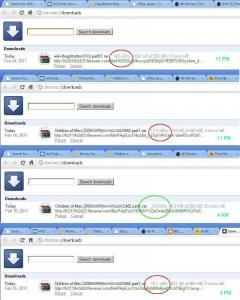
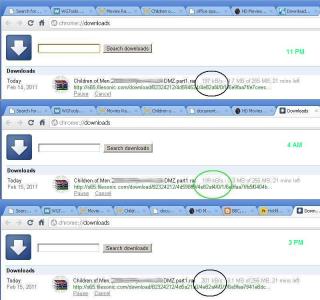
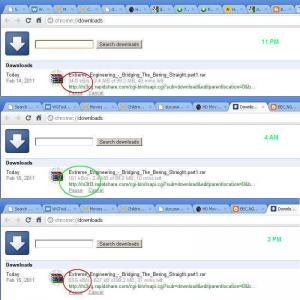
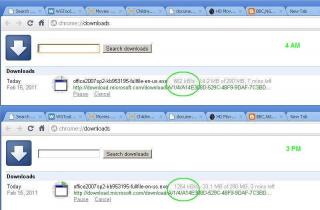
Tests were done on wired connection using CAT6 cable, with no background processes, and with all other PCs in the house shutdown. I used plain vanilla Google Chrome instead of any download managers for a fair result. Files were selected and downloaded using the same sites at 3 different times of the day. As I'm not a premium account holder, all tests were done using Slow/Free downloads and full 500kB/s speeds weren't possible. All were done on the same IP and the range was 110.159.xxx.xxx. Here are the results (click on spoiler for screenies):

Fileserve.com
14 Feb 11pm testfile A: 14.8 kB/s
14 Feb 11pm testfile B: 17.3 kB/s
15 Feb 04am testfile B: 213.0 kB/s
15 Feb 03pm testfile B: 18.1 kB/s
» Click to show Spoiler - click again to hide... «

Filesonic.com
14 Feb 11pm testfile B: 197.0 kB/s
15 Feb 04am testfile B: 199.0 kB/s
15 Feb 03pm testfile B: 201.0 kB/s
» Click to show Spoiler - click again to hide... «

Hotfile.com
14 Feb 11pm testfile D: 34.3 kB/s
14 Feb 11pm testfile B: 24.5 kB/s
15 Feb 04am testfile B: 234.0 kB/s
15 Feb 03pm testfile B: 54.9 kB/s
» Click to show Spoiler - click again to hide... «

Rapidshare.com
14 Feb 11pm testfile C: 34.0 kB/s
15 Feb 04am testfile C: 151.0 kB/s
15 Feb 03pm testfile C: 53.6 kB/s
» Click to show Spoiler - click again to hide... «

Microsoft.com (added reference)
15 Feb 04am testfile E: 662.0 kB/s
15 Feb 03pm testfile E: 1254.0 kB/s
» Click to show Spoiler - click again to hide... «

Here's my Speedtest:
user posted image
My setup:
RG - DIR 615 (fw 7.05B)
VDSL - HG 655a
Elevation - 10th Floor Condo
DNS - Google DNS

All direct download sites were heavily throttled at 11pm and 3pm with the exception of Filesonic which we'll take as the reference point. The other 3 download sites have noticeably increased in speed at 4am.

It appears that there is some type of traffic shaping/throttling on my Unifi account. If Unifi is a premium service as advertised, and there is the application of Fair Usage Policy, then there should not be any kind of throttling on my account as I have only just subscribed and am not a heavy downloader previously while using Streamyx.

My Unifi service was installed on 12 Feb 2011, and it is just 3 days old. The so-called FUP states that traffic management will not impact customers who do not exhibit unfair usage behavior. Am I to believe that within these 3 days I have been using the service unfairly? Or has my account been throttled from the beginning?

Bottomline is, I'm now paying for a "premium High Speed Broadband" service that downloads slower than my old Streamyx slowband. I've started the usual round of support reports with the cust care and will update on the outcome. Hope this info helps those of you who are planning to subscribe and it would be good if the rest could run some tests and share the results. Thanks for reading smile.gif

This post has been edited by pronaz: Feb 16 2011, 12:50 AM
rattan
post Feb 16 2011, 03:00 AM

Droid
Group Icon
Trade Dispute
3,379 posts

Joined: Apr 2006
From: KL


Selayang got coverage already. I just applied 5MB, appointment on the net when registering says only in March can install. Terrible sad.gif


Added on February 16, 2011, 4:09 amby the way i cant find unifi voip call rates. Local calls, outstation calls, landline to landline, unifi voip to mobile phone call rates ?

They dun have it on their site.

This post has been edited by rattan: Feb 16 2011, 04:09 AM
IwanAGP
post Feb 16 2011, 06:48 AM

Nothing is Possible!
*******
Senior Member
9,590 posts

Joined: Jan 2008
From: S'wak||KL||SG


QUOTE(rattan @ Feb 16 2011, 03:00 AM)
Selayang got coverage already. I just applied 5MB, appointment on the net when registering says only in March can install. Terrible sad.gif


Added on February 16, 2011, 4:09 amby the way i cant find unifi voip call rates. Local calls, outstation calls, landline to landline, unifi voip to mobile phone call rates ?

They dun have it on their site.
*
For VIP packages
"Free calls to TM fixed lines nationwide"
"FLAT RATE 10sen/min to all mobile and other fixed line numbers"

Source: http://www.unifi.my/unifi/index.php?option...d=76&Itemid=206
djhenry91
post Feb 16 2011, 08:22 AM

Slow and Steady
*******
Senior Member
6,779 posts

Joined: Jan 2009
From: SEGI Heaven


ohh yeah...finally new thread.. i spot tm router got new firmware...
one question..i use 7.05b can terus upgrade to 7.09 rite?
vin_ann
post Feb 16 2011, 10:17 AM

10k Club
********
All Stars
10,912 posts

Joined: Feb 2006
dear TS,

Im VIP 5 user.

pls add me.

Gentle reminder to Unifi user, have you effectively terminated your Streamyx line?

Here's my Unifi installation experience! A very GOOD experience of mine!


klseet
post Feb 16 2011, 11:17 AM

Getting Started
**
Junior Member
130 posts

Joined: Mar 2008
RB750/750G users & sifu out there,

Just setup rather basic dummy QoS based on Firewall Mangle & Queue Tree priority:
http://klseet.com/index.php?option=com_con...id=45&Itemid=42

Not sure whether this is the right direction, really need your expert advice/comment to make it better notworthy.gif :
On the Layer7 thing, still not sure, my concern it's too complicated and it does take up while heavy resource on CPU....

On the Firewall part, thanks Riz for your sharing through PM, will need to check whether I have left out or overlook ! nod.gif
Appreciate others can advise/comment further on this section as well, thanks ! smile.gif
codex
post Feb 16 2011, 11:43 AM

Getting Started
**
Junior Member
231 posts

Joined: Jan 2003
From: Old Klang Road


some said watching iptv will reduce the speed of the unifi itself,
is it true?
Acrisius
post Feb 16 2011, 11:48 AM

New Member
*
Junior Member
9 posts

Joined: Jun 2007
From: A place which took me A thousand square feet.


QUOTE(codex @ Feb 16 2011, 11:43 AM)
some said watching iptv will reduce the speed of the unifi itself,
is it true?
*
It's not true. VOIP and IPTV had their own dedicated bandwidth, without affected your INTERNET connection.
There was no speed degraded if you watching IPTV.
I still able to get 20Mbps, with watching IPTV or making calls as well biggrin.gif

This post has been edited by Acrisius: Feb 16 2011, 11:49 AM
poyol
post Feb 16 2011, 11:58 AM

Casual
***
Junior Member
481 posts

Joined: Mar 2009
guys, i'm still suffering from disconnections... my connection can never stay connected for 2-days straight.. usually after about 16-18hrs it will drop.

once dropped i have to Off and On the modem again to reconnect.....

any idea on what is causing this? and how to solve it?
codex
post Feb 16 2011, 12:01 PM

Getting Started
**
Junior Member
231 posts

Joined: Jan 2003
From: Old Klang Road


let say i have 2 unifi package, 1 biz at office and 1 residential at home..

my question is :-

1. can i use my office username at home so that my internet wont be cap at 60gb every month coz office package is unlimited rite? can we do this?
skyliner66
post Feb 16 2011, 12:02 PM

Enthusiast
*****
Senior Member
726 posts

Joined: Jan 2003


[quote=boxsystem,Feb 15 2011, 11:21 PM]
it is fiber optics. from their exchange to your building. inside your building will be copper as per built.

you might want to read here.

http://www.praibroadband.com/2010/11/tm-un...or-residential/

or here.
http://www.unifi.my/unifi/index.php?option...d=69&Itemid=218
I suggest that all new subscribers/subscribers-to-be to read first before signing anything. Otherwise, later all complaint like there's no tomorrow.


Want to ask something here...since the unifi is still using the copper in the building, will i still able to gain the high speed of unifi if my build in copper already have problem? (as told by streamyx CS last time tat my copper wire hv some problem which they need to upgrade my streamyx from 512KB to 2MB in order to get a stable connection. And FYI, my direct download speed is at max 50kb only at all time).

Hope all sifu can help me here.

Thanks... smile.gif

chding
post Feb 16 2011, 12:02 PM

On my way
****
Senior Member
556 posts

Joined: Jan 2003
QUOTE(rattan @ Feb 16 2011, 03:00 AM)
Selayang got coverage already. I just applied 5MB, appointment on the net when registering says only in March can install. Terrible sad.gif
which part of selayang?
codex
post Feb 16 2011, 12:05 PM

Getting Started
**
Junior Member
231 posts

Joined: Jan 2003
From: Old Klang Road


QUOTE(skyliner66 @ Feb 16 2011, 12:02 PM)
I suggest that all new subscribers/subscribers-to-be to read first before signing anything. Otherwise, later all complaint like there's no tomorrow.
Want to ask something here...since the unifi is still using the copper in the building, will i still able to gain the high speed of unifi if my build in copper already have problem? (as told by streamyx CS last time tat my copper wire hv some problem which they need to upgrade my streamyx from 512KB to 2MB in order to get a stable connection. And FYI, my direct download speed is at max 50kb only at all time).

Hope all sifu can help me here.

Thanks... smile.gif
*
i suggest you to change the copper cable that bring the line up to your house 1st =)

This post has been edited by codex: Feb 16 2011, 12:06 PM
JinXXX
post Feb 16 2011, 01:13 PM

Look at all my stars!!
*******
Senior Member
2,516 posts

Joined: Feb 2007
From: Uarla Umpur


QUOTE(codex @ Feb 16 2011, 11:43 AM)
some said watching iptv will reduce the speed of the unifi itself,
is it true?
*
who is that "some one" said ???

QUOTE(poyol @ Feb 16 2011, 11:58 AM)
guys, i'm still suffering from disconnections... my connection can never stay connected for 2-days straight.. usually after about 16-18hrs it will drop.

once dropped i have to Off and On the modem again to reconnect.....

any idea on what is causing this? and how to solve it?
*
router hang / over heat ???
skyliner66
post Feb 16 2011, 01:15 PM

Enthusiast
*****
Senior Member
726 posts

Joined: Jan 2003


QUOTE(codex @ Feb 16 2011, 12:05 PM)
i suggest you to change the copper cable that bring the line up to your house 1st =)
*
means i nid to change the copper cable from the telephone pole outside to my house?do i nid to change my house internal cable also?thx... smile.gif
JinXXX
post Feb 16 2011, 01:16 PM

Look at all my stars!!
*******
Senior Member
2,516 posts

Joined: Feb 2007
From: Uarla Umpur


QUOTE(boxsystem @ Feb 15 2011, 11:21 PM)
I suggest that all new subscribers/subscribers-to-be to read first before signing anything. Otherwise, later all complaint like there's no tomorrow.
Want to ask something here...since the unifi is still using the copper in the building, will i still able to gain the high speed of unifi if my build in copper already have problem? (as told by streamyx CS last time tat my copper wire hv some problem which they need to upgrade my streamyx from 512KB to 2MB in order to get a stable connection. And FYI, my direct download speed is at max 50kb only at all time).

Hope all sifu can help me here.

Thanks... smile.gif
*
streamyx copper line upgrade from 512 to 2mbps. ?? to get stable connection ?

thats crazy.. usually for stability the will downgrade the speed.. as that the snr will be higher and atten will be lowered a bit...

check ur current streamyx SNR and when you get unifi VDSL *assuming your condo based* it will be the same.. as they just jumper it to
another dslam for unifi...


Added on February 16, 2011, 1:17 pm
QUOTE(skyliner66 @ Feb 16 2011, 01:15 PM)
means i nid to change the copper cable from the telephone pole outside to my house?do i nid to change my house internal cable also?thx... smile.gif
*
why you worry abt the copper line /?? if ur house is landed they will pull and new line FIBER line to ur house..

This post has been edited by JinXXX: Feb 16 2011, 01:17 PM
skyliner66
post Feb 16 2011, 01:28 PM

Enthusiast
*****
Senior Member
726 posts

Joined: Jan 2003


QUOTE(JinXXX @ Feb 16 2011, 01:16 PM)
streamyx copper line upgrade from 512 to 2mbps. ?? to get stable connection ?

thats crazy.. usually for stability the will downgrade the speed.. as that the snr will be higher and atten will be lowered a bit...

check ur current streamyx SNR and when you get unifi VDSL *assuming your condo based* it will be the same.. as they just jumper it to
another dslam for unifi...


Added on February 16, 2011, 1:17 pm

why you worry abt the copper line /?? if ur house is landed they will pull and new line FIBER line to ur house..
*
tats wht streamyx cs told me last year since my line is slow n not stable...

but since u say they will pull a new fibre line to landed house,then i guess i can just ignore the copper line la...thx for the clarification,really appreciate the help... smile.gif
expl0it
post Feb 16 2011, 02:48 PM

On Letting Go
******
Senior Member
1,213 posts

Joined: Jan 2003
Anyone else still experiencing poor speeds + packet loss? Only started recently.
JinXXX
post Feb 16 2011, 03:21 PM

Look at all my stars!!
*******
Senior Member
2,516 posts

Joined: Feb 2007
From: Uarla Umpur


QUOTE(expl0it @ Feb 16 2011, 02:48 PM)
Anyone else still experiencing poor speeds + packet loss? Only started recently.
*
how you quantify the packet loss ?? you use what to measure ???

poor speed ? to where ??
flyguy
post Feb 16 2011, 03:58 PM

Getting Started
**
Junior Member
222 posts

Joined: May 2006
just installed Unifi.. but the STB produce an error.. erro 9820.. i havent input username n pin yet.. cuz my lan cable wasnt long enough to connect to TV. i just bought.. and connect.. (everything is at the right port FYI). but i still get the error.. the STB screen shows INIT.. thats all.. iinternet is okay, voip is okay.. but not the STB.. called UNIFI hotline and they dont know shit..

anyone can enlighten me? thanks
NoobboyZzZ
post Feb 16 2011, 04:23 PM

Casual
***
Junior Member
317 posts

Joined: Apr 2010
From: cheras


wondering does there need to pull a new wire to my house ? since i am on apartment
expl0it
post Feb 16 2011, 04:41 PM

On Letting Go
******
Senior Member
1,213 posts

Joined: Jan 2003
QUOTE(JinXXX @ Feb 16 2011, 03:21 PM)
how you quantify the packet loss ?? you use what to measure ???

poor speed ? to where ??
*
bad crc's when downloading, connection timeout to websites. Direct downloads are slow (for example : downloading itunes from the apple website @ 20 KB/s).
rjb123
post Feb 16 2011, 04:53 PM

Regular
******
Senior Member
1,820 posts

Joined: May 2010
From: Kuala Lumpur


QUOTE(NoobboyZzZ @ Feb 16 2011, 04:23 PM)
wondering does there need to pull a new wire to my house ? since i am on apartment
*
If you're in a high rise condo/apartment they will usually provide VDSL through existing phoneline.
Bigbonez
post Feb 16 2011, 05:21 PM

New Member
*
Junior Member
45 posts

Joined: Dec 2009
From: Serdang , Selangor


same here why is direct dl slower than streamyx
JinXXX
post Feb 16 2011, 05:27 PM

Look at all my stars!!
*******
Senior Member
2,516 posts

Joined: Feb 2007
From: Uarla Umpur


QUOTE(expl0it @ Feb 16 2011, 04:41 PM)
bad crc's when downloading, connection timeout to websites. Direct downloads are slow (for example : downloading itunes from the apple website @ 20 KB/s).
*
QUOTE(Bigbonez @ Feb 16 2011, 05:21 PM)
same here why is direct dl slower than streamyx
*
you all on unifi fiber or unifi vdsl ?
fenixtx
post Feb 16 2011, 05:45 PM

Getting Started
**
Junior Member
120 posts

Joined: Feb 2006


anyone knows how much do they charge if i want to move my unifi to another house?

currently staying in apartment. going to move out to landed.

only used for about 5months?
happymonk
post Feb 16 2011, 05:58 PM

On my way
****
Senior Member
640 posts

Joined: Nov 2009
QUOTE(fenixtx @ Feb 16 2011, 05:45 PM)
anyone knows how much do they charge if i want to move my unifi to another house?

currently staying in apartment. going to  move out to landed.

only used for about 5months?
*
Relocation requests can be made at select TMPoints or through the TM UniFi Centre. Generally, relocation is possible but is subject to service availability. A relocation fee of RM300 shall apply.
Bigbonez
post Feb 16 2011, 06:02 PM

New Member
*
Junior Member
45 posts

Joined: Dec 2009
From: Serdang , Selangor


im on fiber.. landed house.
expl0it
post Feb 16 2011, 06:47 PM

On Letting Go
******
Senior Member
1,213 posts

Joined: Jan 2003
^same for me.
rjb123
post Feb 16 2011, 07:45 PM

Regular
******
Senior Member
1,820 posts

Joined: May 2010
From: Kuala Lumpur


Even though there's maintenance on the international pipe apparently, everything still OK today also (I'm on VDSL)

Download:
Downloaded in 55 minutes 16 seconds at an average of 2.06 MB/s

This was for 6.67 GB

Pingtest :

user posted image

This post has been edited by rjb123: Feb 16 2011, 07:48 PM
badai
post Feb 16 2011, 08:38 PM

Enthusiast
*****
Senior Member
998 posts

Joined: Jan 2003
i want to use DIR-615 as normal wifi router. possible to backup current firmware + config?
flyguy
post Feb 16 2011, 08:41 PM

Getting Started
**
Junior Member
222 posts

Joined: May 2006
Anyone can help me by answering my ques? sad.gif


Added on February 16, 2011, 8:41 pmAnyone can help me by answering my ques? sad.gif

This post has been edited by flyguy: Feb 16 2011, 08:41 PM
msgundam
post Feb 16 2011, 09:21 PM

New Member
*
Newbie
3 posts

Joined: Apr 2007
Anyone have try to register online for Unifi. I have try to register for more then a week but each time it will show "connection to server disconnect" or something like that.
FauxHawk
post Feb 16 2011, 10:23 PM

<3
******
Senior Member
1,340 posts

Joined: Sep 2006
From: Selangor


Tmr they coming. Wish me luck and smooth sailing.

p.s - i bought a pair of tp link homeplug, tested with my sis laptop, speed same as desktop for my streamyx XD even through a surge protector
vivre
post Feb 16 2011, 10:27 PM

No need to look at these stars ....
*****
Senior Member
826 posts

Joined: Jan 2003


Registered last Monday, and this Friday they are coming to install! Super fast! TM the best! biggrin.gif
charymsylyn
post Feb 16 2011, 10:28 PM

On my way
****
Junior Member
500 posts

Joined: May 2007
From: Kuala Lumpur
QUOTE(expl0it @ Feb 16 2011, 04:41 PM)
bad crc's when downloading, connection timeout to websites. Direct downloads are slow (for example : downloading itunes from the apple website @ 20 KB/s).
*
Bad CRC's and packet loss has not been an issue with Unifi for some time:
user posted image

Updates from Apple is usually at full speed for me. Was slow yesterday night but tonight is OK. Note that direct downloads from sites like Apple or Microsoft or Youtube are from a CDN network. Which server you end up getting the file from and the network path to you from it determines the speed you get more than anything else.
expl0it
post Feb 16 2011, 10:52 PM

On Letting Go
******
Senior Member
1,213 posts

Joined: Jan 2003
QUOTE(charymsylyn @ Feb 16 2011, 10:28 PM)
Bad CRC's and packet loss has not been an issue with Unifi for some time


I know... I don't know what to tell you though. Inconsistent speeds and bad routing since around 2-3 days ago. The Apple download was just an example. Give me a link to something that's fast for you and I'll try it on my end.

This post has been edited by expl0it: Feb 16 2011, 10:53 PM
msgundam
post Feb 16 2011, 10:52 PM

New Member
*
Newbie
3 posts

Joined: Apr 2007
QUOTE(vivre @ Feb 16 2011, 10:27 PM)
Registered last Monday, and this Friday they are coming to install! Super fast! TM the best! biggrin.gif
*
where u register? online?
xavier7
post Feb 16 2011, 11:06 PM

On my way
****
Senior Member
546 posts

Joined: Nov 2004
Anyone from Puchong area? I'm bdr bkt puchong 2, since evening no connection at all.
YouDontKnowMyName
post Feb 16 2011, 11:22 PM

Regular
******
Senior Member
1,189 posts

Joined: Dec 2009
Anyone else getting ticked off by the slower-than-1mbps-streamyx download speeds from file hosting servers? >_>
FauxHawk
post Feb 16 2011, 11:50 PM

<3
******
Senior Member
1,340 posts

Joined: Sep 2006
From: Selangor


QUOTE(vivre @ Feb 16 2011, 10:27 PM)
Registered last Monday, and this Friday they are coming to install! Super fast! TM the best! biggrin.gif
*
I register online last tuesday, tmr they coming..though i chose installation date for this tuesday tongue.gif
namez
post Feb 17 2011, 12:00 AM

Getting Started
**
Junior Member
91 posts

Joined: Mar 2008
From: Selangor


QUOTE(YouDontKnowMyName @ Feb 16 2011, 11:22 PM)
Anyone else getting ticked off by the slower-than-1mbps-streamyx download speeds from file hosting servers? >_>
*
few days ago very slow.
today start fast abit, can up 300kbps but not stable.

heard connection to euro is problem.
rclxub.gif
YouDontKnowMyName
post Feb 17 2011, 12:02 AM

Regular
******
Senior Member
1,189 posts

Joined: Dec 2009
QUOTE(namez @ Feb 17 2011, 12:00 AM)
few days ago very slow.
today start fast abit, can up 300kbps but not stable.

heard connection to euro is problem.
rclxub.gif
*
yeah true.
i just did a speedtest to a newyork server and speed came up to be 0.8Mbps download and 1.1Mbps upload whereas i got a 10mbps/10mbps speed from cyberjaya server
KuzumiTaiga
post Feb 17 2011, 12:03 AM

Spends too much time with mechanical keyboards
*******
Senior Member
3,313 posts

Joined: Jun 2008
From: Cheras ~ London WC1E 7HU~ Shenzhen


VIP5 here, why do I get full speed (700kB/s) in the first few seconds of any Youtube video I watch? And after a few seconds it goes on a constant 200kB/s speed until the end of the video, is there a fix to this? Using Google Chrome.
moe6
post Feb 17 2011, 01:44 AM

Getting Started
**
Junior Member
224 posts

Joined: Oct 2004
From: PJ


QUOTE(vivre @ Feb 16 2011, 10:27 PM)
Registered last Monday, and this Friday they are coming to install! Super fast! TM the best! biggrin.gif
*
f*** wei, my area must have alot of requests. I applied last week on Thursday, install date is March 1st sleep.gif.
vivre
post Feb 17 2011, 06:50 AM

No need to look at these stars ....
*****
Senior Member
826 posts

Joined: Jan 2003


QUOTE(msgundam @ Feb 16 2011, 10:52 PM)
where u register? online?
*
Yeap, online! wink.gif

QUOTE(moe6 @ Feb 17 2011, 01:44 AM)
f*** wei, my area must have alot of requests. I applied last week on Thursday, install date is March 1st sleep.gif.
*
Hahaha! Rezeki gua lol! biggrin.gif
Can't wait to see my BIZ5 in action! Operation download-the-internet will begin within 27 hours time.. Hehe!

neskafeice
post Feb 17 2011, 09:27 AM

New Member
*
Junior Member
41 posts

Joined: May 2008
QUOTE(msgundam @ Feb 16 2011, 09:21 PM)
Anyone have try to register online for Unifi. I have try to register for more then a week but each time it will show "connection to server disconnect" or something like that.
*
i somehow realised that the site has some browser compatibility issue. try to use chrome or internet explorer, instead of firefox. otherwise.. you just need to keep trying.
coconutzz
post Feb 17 2011, 09:27 AM

Regular
******
Senior Member
1,109 posts

Joined: Mar 2007
Hello All,

THey are installing my VIP5 on this Saturday. I have a few questions and hope u guys can help :-

1) What is the very first thing I need to do after installation, ie. securing my Unifi? How?

Thanks guys


IwanAGP
post Feb 17 2011, 10:49 AM

Nothing is Possible!
*******
Senior Member
9,590 posts

Joined: Jan 2008
From: S'wak||KL||SG


QUOTE(YouDontKnowMyName @ Feb 17 2011, 12:02 AM)
yeah true.
i just did a speedtest to a newyork server and speed came up to be 0.8Mbps download and 1.1Mbps upload whereas i got a 10mbps/10mbps speed from cyberjaya server
*
http://nazham.com/2010/06/01/things-to-do-...net-unifi-hsbb/

Credit to... the author of the article?


______

Some test results

user posted image

user posted image

user posted image

user posted image

user posted image

In condo.

Hotfile
Attached Image
Rapidshare
Attached Image
Both on free account

This post has been edited by IwanAGP: Feb 17 2011, 11:07 AM
FauxHawk
post Feb 17 2011, 12:16 PM

<3
******
Senior Member
1,340 posts

Joined: Sep 2006
From: Selangor


Done liao, came at 10, now finish biggrin.gif
user posted image


Added on February 17, 2011, 1:07 pmiptv plug into which port on router ah


Now all channels also satellite logo, connection fail ah? Using homeplug, directly to wall socket, coz surge protector earlier block.

This post has been edited by FauxHawk: Feb 17 2011, 01:19 PM
rjb123
post Feb 17 2011, 02:35 PM

Regular
******
Senior Member
1,820 posts

Joined: May 2010
From: Kuala Lumpur


But if you actually download larger files from US based servers, once it has a minute or so to reach full speed, still possible to max out connection. If I run a speedtest to US server, shows slow speed. If I download from US based Usenet server, can still max out to 2mb/s on VIP20
fisherman10
post Feb 17 2011, 03:15 PM

Regular
******
Senior Member
1,372 posts

Joined: Dec 2007


QUOTE(rjb123 @ Feb 17 2011, 02:35 PM)
But if you actually download larger files from US based servers, once it has a minute or so to reach full speed, still possible to max out connection. If I run a speedtest to US server, shows slow speed. If I download from US based Usenet server, can still max out to 2mb/s on VIP20
*
erm...shouldnt it be 20mbps?
rjb123
post Feb 17 2011, 03:17 PM

Regular
******
Senior Member
1,820 posts

Joined: May 2010
From: Kuala Lumpur


QUOTE(fisherman10 @ Feb 17 2011, 03:15 PM)
erm...shouldnt it be 20mbps?
*
2mb/s as in 2000kb/s , 20mbps smile.gif
fabianz03
post Feb 17 2011, 03:28 PM

Look at all my stars!!
*******
Senior Member
4,649 posts

Joined: Aug 2008
From: Tāmaki Makaurau
QUOTE(rjb123 @ Feb 17 2011, 03:17 PM)
2mb/s as in 2000kb/s , 20mbps smile.gif
*
Nono, 20 Mbits/s = 2.5 megabytes / second
and 2.5 megabytes is 2560 kilobytes / second
rjb123
post Feb 17 2011, 03:30 PM

Regular
******
Senior Member
1,820 posts

Joined: May 2010
From: Kuala Lumpur


QUOTE(fabianz03 @ Feb 17 2011, 03:28 PM)
Nono, 20 Mbits/s = 2.5 megabytes / second
and 2.5 megabytes is 2560 kilobytes / second
*
Ok Ok, I know its not exact - but close enough tongue.gif


ayamstim
post Feb 17 2011, 03:34 PM

Getting Started
**
Junior Member
122 posts

Joined: Jun 2008


QUOTE(rjb123 @ Feb 17 2011, 03:30 PM)
Ok Ok, I know its not exact - but close enough tongue.gif
*
Not exact? It's nowhere close enough. He's correcting your incorrent interpretation of Mbps and MB/s.

This post has been edited by ayamstim: Feb 17 2011, 03:34 PM
deitylord
post Feb 17 2011, 03:54 PM

Getting Started
**
Junior Member
248 posts

Joined: Aug 2005
I see many are complaining about direct download speed

is this normal? my friend who just got his unifi also said his speed is just like 1mb streamyx for direct downloads

is this normal or just occured recently?
rjb123
post Feb 17 2011, 03:58 PM

Regular
******
Senior Member
1,820 posts

Joined: May 2010
From: Kuala Lumpur


QUOTE(ayamstim @ Feb 17 2011, 03:34 PM)
Not exact? It's nowhere close enough. He's correcting your incorrent interpretation of Mbps and MB/s.
*
I always get confused between them, but the point I was trying to make initially is that I'm able to max out my connection downloading from international servers.
ayamstim
post Feb 17 2011, 05:21 PM

Getting Started
**
Junior Member
122 posts

Joined: Jun 2008


QUOTE(rjb123 @ Feb 17 2011, 03:58 PM)
I always get confused between them, but the point I was trying to make initially is that I'm able to max out my connection downloading from international servers.
*
No worries. We know you were just trying to help. Just... try not to confuse the rest of us. smile.gif
dejiar
post Feb 17 2011, 05:27 PM

Casual
***
Junior Member
487 posts

Joined: Feb 2010


Hello, may i noe any coverage at block C at Platinum Hill (PV3), Melati Utama?
rjb123
post Feb 17 2011, 05:35 PM

Regular
******
Senior Member
1,820 posts

Joined: May 2010
From: Kuala Lumpur


QUOTE(dejiar @ Feb 17 2011, 05:27 PM)
Hello, may i noe any coverage at block C at Platinum Hill (PV3), Melati Utama?
*
Unifi website only seems to show Block A+B, maybe best to give them a call to confirm availability for Block C.
bsb85my
post Feb 17 2011, 08:31 PM

╮(╯_╰)╭
*****
Senior Member
744 posts

Joined: Oct 2004
From: ~Somewhere on Earth~


QUOTE(rjb123 @ Feb 17 2011, 05:35 PM)
Unifi website only seems to show Block A+B, maybe best to give them a call to confirm availability for Block C.
*
Same with PV6. Block A & B os available but not in Block C.


BTW, i would like sifus here to help me. Currently I have a Linksys WRT54GL router with Victek Tomato Firmware. I plan to subscribe Unifi very soon.
My question is, can i use my Linksys router on Unifi system? Is the router compatible with Unifi device/modem? I would like to attach the Linksys router with Unifi device because I need the function of it. And i heard that i can use the bridge mode.
Please advice me. Thanks!
azwan92
post Feb 17 2011, 09:16 PM

Casual
***
Junior Member
358 posts

Joined: Sep 2009


guys, which is fastest to get unifi installed?
online or tm point or branch?

im in subang btw.
dejiar
post Feb 17 2011, 11:13 PM

Casual
***
Junior Member
487 posts

Joined: Feb 2010


call to tm d~they say got unifi at block c~lolz~
msgundam
post Feb 17 2011, 11:33 PM

New Member
*
Newbie
3 posts

Joined: Apr 2007
QUOTE(neskafeice @ Feb 17 2011, 09:27 AM)
i somehow realised that the site has some browser compatibility issue. try to use chrome or internet explorer, instead of firefox. otherwise.. you just need to keep trying.
*
Somehow IE or Chrome is not working. Been trying more then a week but no able to apply yet through web.
FauxHawk
post Feb 17 2011, 11:57 PM

<3
******
Senior Member
1,340 posts

Joined: Sep 2006
From: Selangor


I applied online with chrome, no problem.
cherroy
post Feb 18 2011, 12:02 AM

20k VIP Club
Group Icon
Staff
25,802 posts

Joined: Jan 2003
From: Penang


QUOTE(bsb85my @ Feb 17 2011, 08:31 PM)
Same with PV6. Block A & B os available but not in Block C.
BTW, i would like sifus here to help me. Currently I have a Linksys WRT54GL router with Victek Tomato Firmware. I plan to subscribe Unifi very soon.
My question is, can i use my Linksys router on Unifi system? Is the router compatible with Unifi device/modem? I would like to attach the Linksys router with Unifi device because I need the function of it. And i heard that i can use the bridge mode.
Please advice me. Thanks!
*
Check the 1st page of this thread, got stated by rizvanrp.
http://unifi.athena.my/

I don't think the Linksys WRT54GL can, as you need a router that able to VLan tagging.
expl0it
post Feb 18 2011, 12:35 AM

On Letting Go
******
Senior Member
1,213 posts

Joined: Jan 2003
So I take it there are still others experiencing the recent slowness in speed? :/


namez
post Feb 18 2011, 01:11 AM

Getting Started
**
Junior Member
91 posts

Joined: Mar 2008
From: Selangor


QUOTE(expl0it @ Feb 18 2011, 12:35 AM)
So I take it there are still others experiencing the recent slowness in speed? :/
*
yeah, slow
speed like streamyx 1Mb
sweat.gif
cherroy
post Feb 18 2011, 01:20 AM

20k VIP Club
Group Icon
Staff
25,802 posts

Joined: Jan 2003
From: Penang


Btw, still have 2 account (aka admin and operator) for firmware 7.09?

Currently on Streamyx, just want to re-confirm about the 7.09 firmware.
IwanAGP
post Feb 18 2011, 03:04 AM

Nothing is Possible!
*******
Senior Member
9,590 posts

Joined: Jan 2008
From: S'wak||KL||SG


QUOTE(cherroy @ Feb 18 2011, 12:02 AM)
Check the 1st page of this thread, got stated by rizvanrp.
http://unifi.athena.my/

I don't think the Linksys WRT54GL can, as you need a router that able to VLan tagging.
*
Linksys WRT54GL can be flashed with DD-WRT which means that it CAN do vlan tagging. I don't know exactly on this technical thingy but got one forumer using it, flashed with dd-wrt to do vlan tagging. But in that case, you will lose IPTV. Only internet
playsafe69
post Feb 18 2011, 03:49 AM

Getting Started
**
Junior Member
130 posts

Joined: May 2006
From: Malaysia


Anyone able to login to the BTU, the VDSL version (for appartment)? Mine is Huawei HG655a. Try telecomadmin/admintelecom or admin/admin but no luck. But I'm able to telnet into it with admin/admin, and look through the defaultcfg.xml, try username n password that wrote inside, but still cannot.. wonder what have I done wrong.. just not feeling secure. sad.gif

Anyway, pls add me to the list Calvin.
playsafe69 -- VIP5 -- Wangsa Maju -- Dlink bridge with custom router

rclxm9.gif
expl0it
post Feb 18 2011, 10:07 AM

On Letting Go
******
Senior Member
1,213 posts

Joined: Jan 2003
Was hoping the speed would be back to normal, but nope :/

Has anyone contacted Unifi or have they made a statement or something? If so, please post the info here. Thanks
knight_EM
post Feb 18 2011, 10:35 AM

New Member
*
Junior Member
19 posts

Joined: May 2006
Anyone here using SIP software thru Unifi?
raimy_m9
post Feb 18 2011, 10:35 AM

Getting Started
**
Junior Member
174 posts

Joined: Jun 2009
u can add me to the list..

raimy_m9 on vip 5

ps: no time to download...btw im gonna upgrade to vip 20 sometime in the middle of the year..or maybe after my salary increase...
JinXXX
post Feb 18 2011, 11:09 AM

Look at all my stars!!
*******
Senior Member
2,516 posts

Joined: Feb 2007
From: Uarla Umpur


QUOTE(knight_EM @ Feb 18 2011, 10:35 AM)
Anyone here using SIP software thru Unifi?
*
you need to pipe that vlan to the pc and that pc can only access the phone and not the internet.. unless

you can find a way to , separate the vlan traffic up the osi stack on the pc..


Added on February 18, 2011, 11:10 am
QUOTE(raimy_m9 @ Feb 18 2011, 10:35 AM)
ps: no time to download...btw im gonna upgrade to vip 20 sometime in the middle of the year..or maybe after my salary increase...
*
better wait for the news on the cap... might be more worth it if upgrade to biz5 for unlimited... just in case...

no point rushing....

This post has been edited by JinXXX: Feb 18 2011, 11:10 AM
rjb123
post Feb 18 2011, 11:26 AM

Regular
******
Senior Member
1,820 posts

Joined: May 2010
From: Kuala Lumpur


QUOTE(knight_EM @ Feb 18 2011, 10:35 AM)
Anyone here using SIP software thru Unifi?
*
I'm using SIP software (XLite/eybeam softphone) but with seperate SIP account - not the number provided by Unifi.

This post has been edited by rjb123: Feb 18 2011, 11:27 AM
knight_EM
post Feb 18 2011, 11:44 AM

New Member
*
Junior Member
19 posts

Joined: May 2006
QUOTE(rjb123 @ Feb 18 2011, 11:26 AM)
I'm using SIP software (XLite/eybeam softphone)  but with seperate SIP account - not the number provided by Unifi.
*
If i use my mobile phone using wifi, is it possible for me to use SIP via Unifi..TQ

rjb123
post Feb 18 2011, 11:49 AM

Regular
******
Senior Member
1,820 posts

Joined: May 2010
From: Kuala Lumpur


QUOTE(knight_EM @ Feb 18 2011, 11:44 AM)
If i use my mobile phone using wifi, is it possible for me to use SIP via Unifi..TQ
*
Don't see any reason why this shouldn't work - haven't tried it myself on Unifi but never had any issues on any other wifi connections.
RayKazansky
post Feb 18 2011, 11:54 AM

Jell'o Legs
******
Senior Member
1,081 posts

Joined: Sep 2006
From: Alpha Centauri
OMG, my unifi downloads are so slow like 512-Streamyx speed!!! Have they started the CAP thingy?
ic3johan
post Feb 18 2011, 01:01 PM

Getting Started
**
Junior Member
108 posts

Joined: Jan 2003
From: kelana jaya / putrajaya


anyone hv this problem, low to non existent connection in a room,

wtf, tm set normal prob for unifi. need to buy repeater they said, anyone care to help?
solemn_86
post Feb 18 2011, 01:23 PM

Getting Started
**
Junior Member
155 posts

Joined: Oct 2006
From: Putar Jaya


Hi Calvin, put me in the list thx tongue.gif

Unifi list: solemn_86 - VIP5
TSCalvin871989
post Feb 18 2011, 01:25 PM

Im Batman
******
Senior Member
1,256 posts

Joined: May 2008
From: Gotham City


aite, added the three of you guys to the list smile.gif
swks26
post Feb 18 2011, 02:22 PM

CEO RM20k/day
*****
Senior Member
942 posts

Joined: Jan 2007
Hmm, last night I had a problem. My laptop and my dads could not detect the wireless.

But funny thing my sister's macbook could. My nokia5800 could. So did an iphone.

ubeyou
post Feb 18 2011, 02:41 PM

DreamX
****
Senior Member
697 posts

Joined: Oct 2007
From: Zimbabwe


QUOTE(swks26 @ Feb 18 2011, 02:22 PM)
Hmm, last night I had a problem. My laptop and my dads could not detect the wireless.

But funny thing my sister's macbook could. My nokia5800 could. So did an iphone.
*
change the channel of the router. go manual wireless setup, then disable automatic channel and choose any lower than 11.
azwan92
post Feb 18 2011, 02:51 PM

Casual
***
Junior Member
358 posts

Joined: Sep 2009


ah, just applied vip10, appointment is early march, woohoo
swks26
post Feb 18 2011, 03:01 PM

CEO RM20k/day
*****
Senior Member
942 posts

Joined: Jan 2007
QUOTE(ubeyou @ Feb 18 2011, 02:41 PM)
change the channel of the router. go manual wireless setup, then disable automatic channel and choose any lower than 11.
*
Awesome!
Thanks!!
cherroy
post Feb 18 2011, 03:49 PM

20k VIP Club
Group Icon
Staff
25,802 posts

Joined: Jan 2003
From: Penang


I just found that the newer firmware 7.09, got both admin and operator account.

Actually what is the difference between admin account and operator account.

Admin account still can access certain features and changing it, although far less.

Don't quite understand on the statement.
QUOTE
The 'operator' and 'admin' accounts can access the management interface. The operator has read/write access and can change passwords, while the user has read-only access.

rizvanrp
post Feb 18 2011, 03:59 PM

Getting Started
Group Icon
Elite
195 posts

Joined: Sep 2006


QUOTE(cherroy @ Feb 18 2011, 03:49 PM)
I just found that the newer firmware 7.09, got both admin and operator account.

Actually what is the difference between admin account and operator account.

Admin account still can access certain features and changing it, although far less.

Don't quite understand on the statement.
*
The original D-Link firmware had two accounts, 'admin' and 'user'. The 'user' account had a lower level of access to the router while the 'admin' account had full access. In the TM firmware, the roles are swapped. 'user' (old firmware) becomes 'admin' (new firmware) and 'admin' (old firmware) becomes 'operator'. This was done so that the TM callcenter staff could have full access to the router via the operator account while the user was limited to whatever was in the admin account.

The operator account has access to advanced features like VLAN management, SSH/telnet management whereas the admin account only has access to wifi/PPPoE settings.
deunan
post Feb 18 2011, 04:01 PM

New Member
*
Junior Member
13 posts

Joined: Nov 2009


QUOTE(cherroy @ Feb 18 2011, 03:49 PM)
I just found that the newer firmware 7.09, got both admin and operator account.

Actually what is the difference between admin account and operator account.

Admin account still can access certain features and changing it, although far less.
Anyway to discover the 'operator' password ?

I got the config.bin, tried to use the routerpassview but it didn't work on the firmware 7.09


Regards
cherroy
post Feb 18 2011, 04:07 PM

20k VIP Club
Group Icon
Staff
25,802 posts

Joined: Jan 2003
From: Penang


QUOTE(rizvanrp @ Feb 18 2011, 03:59 PM)
The original D-Link firmware had two accounts, 'admin' and 'user'. The 'user' account had a lower level of access to the router while the 'admin' account had full access. In the TM firmware, the roles are swapped. 'user' (old firmware) becomes 'admin' (new firmware) and 'admin' (old firmware) becomes 'operator'. This was done so that the TM callcenter staff could have full access to the router via the operator account while the user was limited to whatever was in the admin account.

The operator account has access to advanced features like VLAN management, SSH/telnet management whereas the admin account only has access to wifi/PPPoE settings.
*
Thanks for the clarification, the admin account is no longer the admin. wink.gif

I found that in operator account, TR-069 is enabled.
But all remote management is disable, including SSH, Telnet.

So do I need to disable the TR-069?


QUOTE(deunan @ Feb 18 2011, 04:01 PM)
Anyway to discover the 'operator' password ?

I got the config.bin, tried to use the routerpassview but it didn't work on the firmware 7.09
Regards
*
I just tries with the password posted by forumers , h566UniFi, viola. notworthy.gif
rizvanrp
post Feb 18 2011, 04:08 PM

Getting Started
Group Icon
Elite
195 posts

Joined: Sep 2006


QUOTE(deunan @ Feb 18 2011, 04:01 PM)
Anyway to discover the 'operator' password ?

I got the config.bin, tried to use the routerpassview but it didn't work on the firmware 7.09
Regards
*
7.09 has a new config.bin format, if your pass isn't one of the two defaults you can :

1) Reset the router and reconfigure the PPPoE settings manually (operator should default back to one of the two default passwords)

2) Access the router via a RS232-TTL connector on the router board and perform a dump of /dev/mem

I could also probably extract it out of your config.bin for you but I don't like handling peoples PPPoE credentials :3
rootlinux
post Feb 18 2011, 05:53 PM

Enthusiast
*****
Senior Member
898 posts

Joined: Jan 2003
From: ph/sbj/slgr
This is freaking ridiculous. I registered online on Feb 9, 2011. Put in installation from 230pm to 730pm on Feb 18, 2011 which is today.

Received confirmation of installation on Feb 15, 2011 and waited for 3 freaking hours today. No one turn up for installation.

Guess what? I need to call 1300 88 1221 to check my account installation status. Now they need to check here and there for technician.

Silap haribulan ni sad.gif


DT8
post Feb 18 2011, 06:20 PM

In Trance We Trust
*****
Senior Member
851 posts

Joined: May 2005


Ok.

I have just got my Unifi service.

BTU ---> Phone ----> TP-Link TL-WR841N ---> LAN 1 for Aztech/TP Link Homeplug
LAN 4 as usual for IPTV


Will this work? Because I want to achieve speed stability from using homeplug.


ps: Wireless USB adapter 802.11b/g does not support the D-link unifi router? Because it seems it cannot detect.

This post has been edited by DT8: Feb 18 2011, 06:44 PM
JinXXX
post Feb 18 2011, 07:04 PM

Look at all my stars!!
*******
Senior Member
2,516 posts

Joined: Feb 2007
From: Uarla Umpur


QUOTE(DT8 @ Feb 18 2011, 06:20 PM)
Ok.

I have just got my Unifi service.

BTU ---> Phone ----> TP-Link TL-WR841N ---> LAN 1 for Aztech/TP Link Homeplug
                                                                    LAN 4 as usual for IPTV
Will this work? Because I want to achieve speed stability from using  homeplug.
ps: Wireless USB adapter 802.11b/g does not support the D-link unifi router? Because it seems it cannot detect.
*
you should be able to use homeplug for the lan..
LAN1 > homeplug >> HOMEPLUG >> PC/DESKTOP...

im NOT SURE IF YOU CAN

LAN1 > HOMEPLUG > HOMEPLUG >> PC/DESKTOP
LAN4 > HOMEPLUG > HOMEPLUG >> IPTV

in the same house.. meaning you using 4 homeplugs...


Added on February 18, 2011, 7:05 pm
QUOTE(rootlinux @ Feb 18 2011, 05:53 PM)
This is freaking ridiculous. I registered online on Feb 9, 2011. Put in installation from 230pm to 730pm on Feb 18, 2011 which is today.

Received confirmation of installation on Feb 15, 2011 and waited for 3 freaking hours today. No one turn up for installation.

Guess what? I need to call 1300 88 1221 to check my account installation status. Now they need to check here and there for technician.

Silap haribulan ni sad.gif
*
did you receive the email with the installation date ??

if can screw kau them and ask them waive the the 200 bux installation...


This post has been edited by JinXXX: Feb 18 2011, 07:05 PM
DT8
post Feb 18 2011, 07:16 PM

In Trance We Trust
*****
Senior Member
851 posts

Joined: May 2005


Jinxxx,

ps: Wireless USB adapter 802.11b/g does not support the D-link unifi router? Because it seems it cannot detect.

Can help on this issue?
charymsylyn
post Feb 18 2011, 07:29 PM

On my way
****
Junior Member
500 posts

Joined: May 2007
From: Kuala Lumpur
QUOTE(DT8 @ Feb 18 2011, 07:16 PM)
Jinxxx,

ps: Wireless USB adapter 802.11b/g does not support the D-link unifi router? Because it seems it cannot detect.

Can help on this issue?
*
Please clarify what you mean by supported. If you just mean is it supposed to work, then yes, it should work since it's a certified 802.11n Draft 2.0 unit. If you actually meant to ask why it doesn't work, then we can't help you because you didn't supply enough info.
DT8
post Feb 18 2011, 07:39 PM

In Trance We Trust
*****
Senior Member
851 posts

Joined: May 2005


QUOTE(charymsylyn @ Feb 18 2011, 07:29 PM)
Please clarify what you mean by supported. If you just mean is it supposed to work, then yes, it should work since it's a certified 802.11n Draft 2.0 unit. If you actually meant to ask why it doesn't work, then we can't help you because you didn't supply enough info.
*
Resolved.

Btw, if I use TP link 841, should I port forward for better performance in torrenting?

This post has been edited by DT8: Feb 18 2011, 07:54 PM
charymsylyn
post Feb 18 2011, 07:54 PM

On my way
****
Junior Member
500 posts

Joined: May 2007
From: Kuala Lumpur
QUOTE(DT8 @ Feb 18 2011, 07:39 PM)
I think there's no other mode selection I can choose from say b/g/n or bgn mixed etc in 192.168.0.1 Unifi D link router. Hence I guess this is the reason why my aztech wireless adapter which is b/g mode couldn't detect the wireless signal.

Can resolve?
*
DIR615 supports bgn, bg or n-only operation. This is set at Advanced Wireless page. I presume you are not just experiencing the famous DIR615 wireless drop off issue, meaning wifi works up to some random period and then stops working. But even with this issue, the wifi network is still detectable in my experience.

Edited to add bg mode operation.

This post has been edited by charymsylyn: Feb 18 2011, 08:12 PM
bai1101
post Feb 18 2011, 08:15 PM

I am Pervert
******
Senior Member
1,613 posts

Joined: Feb 2008
From: Sg Long/Serdang


hi my area currently have unifi available already and i wish to ask few question regarding unifi installation

My Unifi FTTH box is locate at the pole behind my house and wish to know how much job there will drill here and there if i need my modem at my living room?

Cause currently this is a rent unit and i worry if the installation need too much drill job i have hard time to explain to my owner later on ><
deunan
post Feb 18 2011, 08:57 PM

New Member
*
Junior Member
13 posts

Joined: Nov 2009


QUOTE(cherroy @ Feb 18 2011, 04:07 PM)
Thanks for the clarification, the admin account is no longer the admin.  wink.gif

I found that in operator account, TR-069 is enabled.
But all remote management is disable, including SSH, Telnet.

So do I need to disable the TR-069?
I just tries with the password posted by forumers , h566UniFi, viola.    notworthy.gif
*
That works!

Thank you kind sir.. ;-)
orenzai
post Feb 18 2011, 09:01 PM

Look at all my stars!!
*******
Senior Member
3,114 posts

Joined: Dec 2006


I am pretty sure that the throttling has begun. I'm using a VIP10 line in my condo at setapak. Daytime, My line will only be as high as 2.5mbps. After 1AM or so, the line goes back to normal. I'm pretty sure its not that cable fault or whatsoever because TM's own speedtest shows slow speed.
lightonokira
post Feb 18 2011, 09:28 PM

Enthusiast
*****
Senior Member
788 posts

Joined: Nov 2007
From: 127.0.0.1


@orenzai, im getting that also.. but after restart router it all goes away..

when i get that the server is located at either brunei/indonesia
cherroy
post Feb 18 2011, 09:32 PM

20k VIP Club
Group Icon
Staff
25,802 posts

Joined: Jan 2003
From: Penang


QUOTE(bai1101 @ Feb 18 2011, 08:15 PM)
hi my area currently have unifi available already and i wish to ask few question regarding unifi installation

My Unifi FTTH box is locate at the pole behind my house and wish to know how much job there will drill here and there if i need my modem at my living room?

Cause currently this is a rent unit and i worry if the installation need too much drill job i have hard time to explain to my owner later on ><
*
You just a tiny hole to let the optic fiber to go through.
zacknistelrooy
post Feb 18 2011, 10:00 PM

Regular
******
Senior Member
1,033 posts

Joined: Dec 2009
Does unifi cap internet speed after exceeding the fair usage policy since I am a heavy multiplayer gamer and i watch a lot of HD videos on youtube

Thank you

This post has been edited by zacknistelrooy: Feb 18 2011, 10:05 PM
vivre
post Feb 18 2011, 10:10 PM

No need to look at these stars ....
*****
Senior Member
826 posts

Joined: Jan 2003


My installation date is today..

0830 : A guy from TM Unifi called me to confirm the installation date and time (930 am)

0930: My Streamyx DSL light was suddenly blinking..

1015: The DSL backed online (steady light, no blinking), but I couldn't connect my Streamyx..

1030: They came to my apartment and began the installation.

1100: Finished setting up and asked me to sign the SAF.

Comment: Very friendly and very fast service, considering I just registered last Monday. In fact they said I am the first in this area (Air Panas, Setapak)... Haha! The speed is so far very good! Direct download speed hovering around 550 - 600 KBps.

Im on BIZ5 anyway.

FauxHawk
post Feb 19 2011, 12:43 AM

<3
******
Senior Member
1,340 posts

Joined: Sep 2006
From: Selangor


QUOTE(JinXXX @ Feb 18 2011, 07:04 PM)
you should be able to use homeplug for the lan.. 
LAN1 > homeplug >> HOMEPLUG >> PC/DESKTOP...

im NOT SURE IF YOU CAN

LAN1 > HOMEPLUG > HOMEPLUG >> PC/DESKTOP
LAN4 > HOMEPLUG > HOMEPLUG >> IPTV

in the same house.. meaning you using 4 homeplugs...


Added on February 18, 2011, 7:05 pm

did you receive the email with the installation date ??

if can screw kau them and ask them waive the the 200 bux installation...
*
LAN4>Homeplug...>...Homeplug>STB

works
streamyxkl
post Feb 19 2011, 12:56 AM

New Member
*
Junior Member
13 posts

Joined: Jan 2008
is there any capping on p2p for VIP package?
ic3johan
post Feb 19 2011, 01:01 AM

Getting Started
**
Junior Member
108 posts

Joined: Jan 2003
From: kelana jaya / putrajaya


hi anyone here from putrajaya, im willing to pay for whoever can set my tl-wr941nd to be my bridge since my 3rd floor cant get wireless.

im at dead end 3 hours seting n nothing loll

basiclly i want to do this

3.Using the DIR-615 as a VLAN bridge. This is the method I would recommend. It basically uses the DIR-615 firmware solely to perform VLAN tagging which is required for the PPPoE connection. The VLAN ID 500 is mapped to a physical port on the router, where your own custom router which does not operate with VLAN tagging will be plugged into. This causes the DIR-615 to tag/untag traffic as necessary in the background, creating a transparent VLAN-physical port bridge so that you are able to use your own hardware.

http://unifi.athena.my/custom_routers.html <--- thhhhhxxxxxxxx

This post has been edited by ic3johan: Feb 19 2011, 01:04 AM
JinXXX
post Feb 19 2011, 01:53 AM

Look at all my stars!!
*******
Senior Member
2,516 posts

Joined: Feb 2007
From: Uarla Umpur


QUOTE(FauxHawk @ Feb 19 2011, 12:43 AM)
LAN4>Homeplug...>...Homeplug>STB

works
*
that one for sure works la.. i'm refer to more of mixing the lan...
mghong
post Feb 19 2011, 02:06 AM

Casual
***
Junior Member
450 posts

Joined: Nov 2005


For those existing DSL user , what else is not more compatible after change to Unifi ?

Modem - confirm out
Wifi-router ?
Fax machine ?
I using 2 dect phone to link up my 3 storey house , wonder will i need to add something or not ?
bai1101
post Feb 19 2011, 02:11 AM

I am Pervert
******
Senior Member
1,613 posts

Joined: Feb 2008
From: Sg Long/Serdang


hmm i am currently using 4mbps ADSL combo pack

VIP 5 have big different compare to 4mbps? not to mention the upload speed
i mean regular use since i just am normal animation downloader + online mmorpg and some china site drama
rattan
post Feb 19 2011, 02:39 AM

Droid
Group Icon
Trade Dispute
3,379 posts

Joined: Apr 2006
From: KL


Guys good news, I finally got my dealership for UniFi after trying hard. Now you guys can apply unifi with me. Free installation till the 15march 2011. Application must reach me by the 15th March. (Home and Office application welcome)

Will also help you to terminate your existing streamyx contract if any. Fresh UniFi application welcome. smile.gif

Discussion on Unifi application is strictly via PM only.
deunan
post Feb 19 2011, 02:58 AM

New Member
*
Junior Member
13 posts

Joined: Nov 2009


Dear All

Thank you to rizvanrp, cherroy, Calvin and everyone else..

After wrestling with PFSense VLAN tagging unsuccessfully, I gave up and used rizvanrp's tested and proven http://unifi.athena.my/custom_routers.html instead. It worked flawlessly on a 7.09 firmware! Caveat on the new config.bin and decoding the operator password..

The trouble I encountered was in trying to get IPTV VLAN working.. Tried creating separate OPT1 interface with VLAN600 and bridging it with PPPOEVLAN500 using the same NIC but no go.. mad.gif

PPPOEVLAN500 was working fine but without IPTV is not acceptable, the spouse would not let me get the Plasma TV without it! cry.gif and I want the FashionTV HD! drool.gif

So, I took the easy way out..

I still want to do away with that crappy DIR-615 though. Anyone with a working standalone PFSense w/IPTV working care to share their methodology?

I am curious however about the Mikrotik's RB250GS as mentioned via KLSeet's website. Dropped an inquiry to Soliton Singapore via their web-form but no answer for the past couple of days!! Wonder whether they're interested in doing business..


Regards

user posted image
user posted image

This post has been edited by deunan: Feb 19 2011, 03:26 AM
calvin_yit
post Feb 19 2011, 03:27 AM

New Member
*
Junior Member
36 posts

Joined: Aug 2005


probably a noob question. Am "thinking" of getting vip20. My mobo does not have gigabit lan i think. So, i need to get a pci solution to use vip20 rite?
And regarding that tplink wireless router recommended by klseet, i saw the details from tplink website, it does not really support gigabit lan, just wireless N, am i correct. So, if i am going for vip20, tplink will not really cut it for me huh??? (gonna be using ethernet for my pc)

This post has been edited by calvin_yit: Feb 19 2011, 03:28 AM
Icehart
post Feb 19 2011, 03:40 AM

72.55.191.6
********
All Stars
14,899 posts

Joined: Apr 2005
From: Kuala Lumpur & Selangor


QUOTE(streamyxkl @ Feb 19 2011, 12:56 AM)
is there any capping on p2p for VIP package?
*
Nope as far as I'm concerned.
shahada
post Feb 19 2011, 05:02 AM

New Member
*
Junior Member
41 posts

Joined: Sep 2006
QUOTE(calvin_yit @ Feb 19 2011, 03:27 AM)
probably a noob question. Am "thinking" of getting vip20. My mobo does not have gigabit lan i think. So, i need to get a pci solution to use vip20 rite?
And regarding that tplink wireless router recommended by klseet, i saw the details from tplink website, it does not really support gigabit lan, just wireless N, am i correct. So, if i am going for vip20, tplink will not really cut it for me huh??? (gonna be using ethernet for my pc)
*
Why do you feel you need a Gigabit LAN (1000Mbps) to support a VIP20 (20Mbps) line?
I believe with a Fast Ethernet (100Mbps) or even Wireless-G (54Mbps) you're still capable of saturating the VIP20 line speed.


Added on February 19, 2011, 5:15 am
QUOTE(zacknistelrooy @ Feb 18 2011, 10:00 PM)
Does unifi cap internet speed after exceeding the fair usage policy since I am a heavy multiplayer gamer and i watch a lot of HD videos on youtube

Thank you
*
Not today (Read through http://www.unifi.my/unifi/index.php?option...=51&Itemid=203).

But tomorrow maybe.
Or week after.
Or month after.
Or next year.

rclxm9.gif

But don't worry. As long as you keep following this thread, someone will ask again in two or three days time, so you don't have to repeat your question.

doh.gif


This post has been edited by shahada: Feb 19 2011, 05:15 AM
vivre
post Feb 19 2011, 07:37 AM

No need to look at these stars ....
*****
Senior Member
826 posts

Joined: Jan 2003


QUOTE(shahada @ Feb 19 2011, 05:02 AM)
Why do you feel you need a Gigabit LAN (1000Mbps) to support a VIP20 (20Mbps) line?
I believe with a Fast Ethernet (100Mbps) or even Wireless-G (54Mbps) you're still capable of saturating the VIP20 line speed.


Added on February 19, 2011, 5:15 am

Not today (Read through http://www.unifi.my/unifi/index.php?option...=51&Itemid=203).

But tomorrow maybe.
Or week after.
Or month after.
Or next year.

rclxm9.gif

But don't worry. As long as you keep following this thread, someone will ask again in two or three days time, so you don't have to repeat your question.

doh.gif
*
Heavy sarcasm detected! tongue.gif

VDSL does have hing ping (about 60 ms to KL server) ,that's unavoidable ya?
Andy72
post Feb 19 2011, 08:23 AM

Getting Started
**
Junior Member
106 posts

Joined: Dec 2008
QUOTE(deunan @ Feb 19 2011, 02:58 AM)
Dear All

Thank you to rizvanrp, cherroy, Calvin and everyone else..

After wrestling with PFSense VLAN tagging unsuccessfully, I gave up and used rizvanrp's tested and proven http://unifi.athena.my/custom_routers.html instead.  It worked flawlessly on a 7.09 firmware! Caveat on the new config.bin and decoding the operator password..

The trouble I encountered was in trying to get IPTV VLAN working.. Tried creating separate OPT1 interface with VLAN600 and bridging it with PPPOEVLAN500 using the same NIC but no go..  mad.gif
 
PPPOEVLAN500 was working fine but without IPTV is not acceptable, the spouse would not let me get the Plasma TV without it!  cry.gif  and I want the FashionTV HD!  drool.gif

So, I took the easy way out..

I still want to do away with that crappy DIR-615 though. Anyone with a working standalone PFSense w/IPTV working care to share their methodology?

I am curious however about the Mikrotik's RB250GS as mentioned via KLSeet's website.  Dropped an inquiry to Soliton Singapore via their web-form but no answer for the past couple of days!!  Wonder whether they're interested in doing business..

Regards

user posted image
user posted image
*
Hi, if you want to get the MikroTik RB250GS, you can buy it at Landasan Teknologi Sdn Bhd at Dataran Prima, PJ. Cash and carry. Price RM160. I got 1 unit a few days ago.
bai1101
post Feb 19 2011, 10:27 AM

I am Pervert
******
Senior Member
1,613 posts

Joined: Feb 2008
From: Sg Long/Serdang


by the way i got few friend complain that unifi not good for gaming. It is true or just minority that have connection problem
cherroy
post Feb 19 2011, 10:50 AM

20k VIP Club
Group Icon
Staff
25,802 posts

Joined: Jan 2003
From: Penang


Under Biz package, I have one domain provided.

It tells me to login https://cp.netmyne.net/ for the account control panel.

Guess what, when I clicked into the link. doh.gif
QUOTE

There is a problem with this website's security certificate.

The security certificate presented by this website has expired or is not yet valid.

Security certificate problems may indicate an attempt to fool you or intercept any data you send to the server. 


FauxHawk
post Feb 19 2011, 11:20 AM

<3
******
Senior Member
1,340 posts

Joined: Sep 2006
From: Selangor


QUOTE(JinXXX @ Feb 19 2011, 01:53 AM)
that one for sure works la.. i'm refer to more of mixing the lan...
*
Why not? Just need to pair the home plugs.
ayamstim
post Feb 19 2011, 11:51 AM

Getting Started
**
Junior Member
122 posts

Joined: Jun 2008


QUOTE(bai1101 @ Feb 19 2011, 10:27 AM)
by the way i got few friend complain that unifi not good for gaming. It is true or just minority that have connection problem
*
False. UniFi is excellent for gaming. They either have connection and/or configuration problems.
hazairi
post Feb 19 2011, 11:54 AM

Look at all my stars!!

*******
Senior Member
2,694 posts

Joined: Feb 2007
From: KL


hi guys, i just registered unifi.
Maybe they will install in another 2 weeks? sad.gif

any tips on what should i prepare? I'm living in an apartment in Bdr Sunway.

My pc, tv and phone line is very near to each other..
cherroy
post Feb 19 2011, 11:59 AM

20k VIP Club
Group Icon
Staff
25,802 posts

Joined: Jan 2003
From: Penang


QUOTE(hazairi @ Feb 19 2011, 11:54 AM)
hi guys, i just registered unifi.
Maybe they will install in another 2 weeks? sad.gif

any tips on what should i prepare? I'm living in an apartment in Bdr Sunway.

My pc, tv and phone line is very near to each other..
*
Nothing.

Just ensure enough power supply socket.
hazairi
post Feb 19 2011, 12:09 PM

Look at all my stars!!
*******
Senior Member
2,694 posts

Joined: Feb 2007
From: KL


QUOTE(cherroy @ Feb 19 2011, 11:59 AM)
Nothing.

Just ensure enough power supply socket.
*
thanks. At 1st i just wanna register streamyx 1mbps. But the cost for that is more than rm100+ including the rent of the phone. Why TM never reduce the streamyx price for about many years already? Haiyoo, monopolization.
So, i think it's more worth to take the minimum unifi package with it's free installation now.
kaiser_falco
post Feb 19 2011, 12:24 PM

the world wanderer
******
Senior Member
1,167 posts

Joined: Mar 2005
From: sunway/petaling jaya


apart from mikrotik any other router compatible with unifi i just need something that i can pick up on the shelf at some pc shop go back and configure it...mikrotik have to order and that sux seriously need it today..
JinXXX
post Feb 19 2011, 12:24 PM

Look at all my stars!!
*******
Senior Member
2,516 posts

Joined: Feb 2007
From: Uarla Umpur


QUOTE(cherroy @ Feb 19 2011, 10:50 AM)
Under Biz package, I have one domain provided.

It tells me to login https://cp.netmyne.net/ for the account control panel.

Guess what, when I clicked into the link.  doh.gif
*
what are the details of the certificate ?? ownself generate certificate or they got it from digicert and so on one ???

QUOTE(FauxHawk @ Feb 19 2011, 11:20 AM)
Why not? Just need to pair the home plugs.
*
no idea.. not sure how they will handle the vlan... thinggy...
rattan
post Feb 19 2011, 12:55 PM

Droid
Group Icon
Trade Dispute
3,379 posts

Joined: Apr 2006
From: KL


For new and migration from streamyx to unifi. Streamyx can be terminated when upgrading to unifi. Customer have the choice to keep their existing telephone number or terminate the telephone line and use the telephone number bundled with unifi.

Benefit of terminating the copper telephone line is to save on the monthly rental chargers. Unifi telephone number is cheaper as there is no monthly rental, free calls to TM numbers and cheaper call rates.

PM me address to check for availability in your area.
coconutzz
post Feb 19 2011, 01:17 PM

Regular
******
Senior Member
1,109 posts

Joined: Mar 2007
Hi all,

I read a lot about Mikrotik here. Can I ask what is the purpose of it?


cherroy
post Feb 19 2011, 01:40 PM

20k VIP Club
Group Icon
Staff
25,802 posts

Joined: Jan 2003
From: Penang


QUOTE(rattan @ Feb 19 2011, 12:55 PM)
For new and migration from streamyx to unifi. Streamyx can be terminated when upgrading to unifi. Customer have the choice to keep their existing telephone number or terminate the telephone line and use the telephone number bundled with unifi.

Benefit of terminating the copper telephone line is to save on the monthly rental chargers. Unifi telephone number is cheaper as there is no monthly rental, free calls to TM numbers and cheaper call rates.

*
There is one disadvantage, you cannot use the phone without turning on the BTU.
It is using voip.
Not the same/like with streamyx.

My company wish to keep the number, but they said cannot, so now with another new number.

One advantage of using streamyx, is that can pull the copper wire on our own, cut, connect, at your wish.

Fiber optic, cannot connect like copper.
Even they installed time, they need to use alcohol to wash the exposed fiber optic (when doing the plastic joint part for connection with DB).
gmchun83
post Feb 19 2011, 01:50 PM

Getting Started
**
Junior Member
57 posts

Joined: May 2007
From: KL


For those want to register unifi,please go www.oneunifi.com....I have subscribe 5mb with oneunfi.com...at least their got help us follow up......your guys should that telekom or tmpoint customer services really suck.....
JinXXX
post Feb 19 2011, 02:41 PM

Look at all my stars!!
*******
Senior Member
2,516 posts

Joined: Feb 2007
From: Uarla Umpur


QUOTE(coconutzz @ Feb 19 2011, 01:17 PM)
Hi all,

I read a lot about Mikrotik here. Can I ask what is the purpose of it?
*
do you know what is it first or not ?? if not you finding actually what is mikrotik.. then only we can move on from there
cherroy
post Feb 19 2011, 02:47 PM

20k VIP Club
Group Icon
Staff
25,802 posts

Joined: Jan 2003
From: Penang


QUOTE(coconutzz @ Feb 19 2011, 01:17 PM)
Hi all,

I read a lot about Mikrotik here. Can I ask what is the purpose of it?
*
It is another router out there that can be used for Unifi.
deunan
post Feb 19 2011, 02:48 PM

New Member
*
Junior Member
13 posts

Joined: Nov 2009


QUOTE(cherroy @ Feb 19 2011, 01:40 PM)
Fiber optic, cannot connect like copper.
Even they installed time, they need to use alcohol to wash the exposed fiber optic (when doing the plastic joint part for connection with DB).
Heh, I got the spouse to prepare the pipe-trunking through the roof and dropped it down to the server room ;-)

UniFi guys came and simply tie the fibre cable to the string which my spouse laid through the trunking and pulled it through to the other side straight to the server room.

I definitely heard they asked my spouse - "Encik kerja bidang network ya?".. No lar, its simply planning (and someone else who did the hardwork :-P ). At least no holes drilled through the walls or anything icon_rolleyes.gif


Regards
kaiser_falco
post Feb 19 2011, 02:55 PM

the world wanderer
******
Senior Member
1,167 posts

Joined: Mar 2005
From: sunway/petaling jaya


cool tp link router does it magic,thanks klseet for those brilliant post and thaks for those who pm me to the right direction...no regret gettingwr841nd ver7.2 c zone digital mall pj ss14..they are kind enough to flash the bios all together just tell them you want to use for unifi..
skyliner66
post Feb 19 2011, 04:04 PM

Enthusiast
*****
Senior Member
726 posts

Joined: Jan 2003


the unifi contractor come ndo the installation today...n i hv been told tat the free installation apply for 1st floor only(my house is a double storey),n i wan to install the btu at 2nd floor,so tats going to be a charge of rm200 to the contractor...i wonder whts the point of free installation here...
charymsylyn
post Feb 19 2011, 04:10 PM

On my way
****
Junior Member
500 posts

Joined: May 2007
From: Kuala Lumpur
QUOTE(skyliner66 @ Feb 19 2011, 04:04 PM)
the unifi contractor come ndo the installation today...n i hv been told tat the free installation apply for 1st floor only(my house is a double storey),n i wan to install the btu at 2nd floor,so tats going to be a charge of rm200 to the contractor...i wonder whts the point of free installation here...
*
Not sure if you just got conned or you just exceeded the free wire length quota?
cherroy
post Feb 19 2011, 04:21 PM

20k VIP Club
Group Icon
Staff
25,802 posts

Joined: Jan 2003
From: Penang


QUOTE(charymsylyn @ Feb 19 2011, 04:10 PM)
Not sure if you just got conned or you just exceeded the free wire length quota?
*
Installation of fiber cable is done by third party contractor. (at least for my installation)
(Exchange until the DB in your house)

The TM installer only done wiring for the internal part after the DB, aka DB to your BTU.

From DB to your BTU, they only give 15m free, more than that Rm50 per 5m.

skyliner66
post Feb 19 2011, 04:25 PM

Enthusiast
*****
Senior Member
726 posts

Joined: Jan 2003


QUOTE(charymsylyn @ Feb 19 2011, 04:10 PM)
Not sure if you just got conned or you just exceeded the free wire length quota?
*
i dun think my internal fiber is exeeding,cos i just use the std 15m length...is tat outdoor wire they nid to charge...i call unifi centre n the cs told me the same thing also...i din think the unifi will cheat me on tis also...maybe i m the one unlucky here...
ic3johan
post Feb 19 2011, 04:30 PM

Getting Started
**
Junior Member
108 posts

Joined: Jan 2003
From: kelana jaya / putrajaya


QUOTE(kaiser_falco @ Feb 19 2011, 02:55 PM)
cool tp link router does it magic,thanks klseet for those brilliant post and thaks for those who pm me to the right direction...no regret gettingwr841nd ver7.2 c zone digital mall pj ss14..they are kind enough to flash the bios all together just tell them you want to use for unifi..
*
ahhh. bought TL-WR941ND izzit compitable? i tried athena guide but to no avail, 6 hour of sleepness priduce norhing sad.gif
cherroy
post Feb 19 2011, 04:34 PM

20k VIP Club
Group Icon
Staff
25,802 posts

Joined: Jan 2003
From: Penang


If there are rules already in place until 1st storey, then no choice.

Think further if someone house is 4th storey high, then they need to climb until 4th storey to pull the wire.

Too be fair to them, higher level/storey means more work, and troublesome and time may be needed.
But may be the charges can be negotiable?
skyliner66
post Feb 19 2011, 04:57 PM

Enthusiast
*****
Senior Member
726 posts

Joined: Jan 2003


QUOTE(cherroy @ Feb 19 2011, 04:34 PM)
If there are rules already in place until 1st storey, then no choice.

Think further if someone house is 4th storey high, then they need to climb until 4th storey to pull the wire.

Too be fair to them, higher level/storey means more work, and troublesome and time may be needed.
But may be the charges can be negotiable?
*
i know the contractor hv to climb up to 2nd floor to do the wiring...wht i not happy with is the Unifi CS never told me anything about this condition when they call me to confirm the installation date n time yesterday... sad.gif

n when i call the Unifi again just now...they also not so sure about this issue n ask me to lodge a complain to them after the installation is done...n they will enquire the contractor wht is the charges for...guess tats the only thing i can do la...but i dun think there will be any feedback from them lo... sad.gif

n yes, after a long negotiation, the contractor agree to reduce the fee to RM160... sad.gif
carbonfibre
post Feb 19 2011, 05:42 PM

PSN ID : ericgohsw
*****
Senior Member
944 posts

Joined: Aug 2008
From: Planet Earth

Just got VIP5 and they completed installation but i was using a normal b/g router now the one they give comes with N but the signal strength in my room is still 2 bars ?? O_O
Location of router same spot.

My router model is D-LINK DIR 615
deunan
post Feb 19 2011, 06:55 PM

New Member
*
Junior Member
13 posts

Joined: Nov 2009


QUOTE(carbonfibre @ Feb 19 2011, 05:42 PM)
Just got VIP5 and they completed installation but i was using a normal b/g router now the one they give comes with N but the signal strength in my room is still 2 bars ?? O_O
Location of router same spot.

My router model is D-LINK DIR 615
*
Practically everyone's looking for way out of the crappy DIR-615.. The thing's antenna seems not powerful enough.
rattan
post Feb 19 2011, 08:00 PM

Droid
Group Icon
Trade Dispute
3,379 posts

Joined: Apr 2006
From: KL


Alot of people asking about BIZ5 package for home. Some claim the gateway is better/faster.

Is this true or there is a better explanation ?
KenDiriwan
post Feb 19 2011, 08:19 PM


*******
Senior Member
2,277 posts

Joined: Sep 2007
From: It's a tarp


Hello all, what are the highest kbps you ever obtain from downloading?
Direct/Torrent
Browser/Download Manager
bai1101
post Feb 19 2011, 08:43 PM

I am Pervert
******
Senior Member
1,613 posts

Joined: Feb 2008
From: Sg Long/Serdang


QUOTE(rattan @ Feb 19 2011, 08:00 PM)
Alot of people asking about BIZ5 package for home. Some claim the gateway is better/faster.

Is this true or there is a better explanation ?
*
there asking it because biz 5 package will no have data cap in near future compare to vip5 which is only temporary no limit.

coconutzz
post Feb 19 2011, 11:55 PM

Regular
******
Senior Member
1,109 posts

Joined: Mar 2007
I have just got my installation done today...after 3 hours.....

So far speed is consistently maxing out up and down about 5Mbps. But I realised my latency is about 200ms even pinging a server in KL. Will that be a problem?

Another problem I have is, I realised when I turn on my Unifi Router, my parents Room's TV will flicker, i guess the signal is too strong affecting the tv ? Anyone having the same problem or solution?

thanks
azzrul
post Feb 20 2011, 12:27 AM

Casual
***
Junior Member
431 posts

Joined: Aug 2009


QUOTE(KenDiriwan @ Feb 19 2011, 08:19 PM)
Hello all, what are the highest kbps you ever obtain from downloading?
Direct/Torrent
Browser/Download Manager
*
VIP5 user here....

638KB/s for direct download/torrent......... rclxms.gif rclxms.gif rclxms.gif
IwanAGP
post Feb 20 2011, 12:33 AM

Nothing is Possible!
*******
Senior Member
9,590 posts

Joined: Jan 2008
From: S'wak||KL||SG


QUOTE(coconutzz @ Feb 19 2011, 11:55 PM)
I have just got my installation done today...after 3 hours.....

So far speed is consistently maxing out up and down about 5Mbps. But I realised my latency is about 200ms even pinging a server in KL. Will that be a problem?

Another problem I have is, I realised when I turn on my Unifi Router, my parents Room's TV will flicker, i guess the signal is too strong affecting the tv ? Anyone having the same problem or solution?

thanks
*
High rise or landed property? I got 60ms to penang and sometimes kl server... Seri kembangan and kl server hosted by yes always give me 500ms+ ping...
KL, by YES
user posted image
Seri Kembangan, by Largerserver solution?
user posted image
Cyberjaya, by TM
user posted image
Penang...
user posted image
SG
user posted image

I don't know why this happens... Might be filing a complaint on this!

Btw, few days back, my IP dropped into 110.XX range. Before that, keep getting 175 range.

This post has been edited by IwanAGP: Feb 20 2011, 12:35 AM
charymsylyn
post Feb 20 2011, 12:38 AM

On my way
****
Junior Member
500 posts

Joined: May 2007
From: Kuala Lumpur
QUOTE(IwanAGP @ Feb 20 2011, 12:33 AM)
High rise or landed property? I got 60ms to penang and sometimes kl server... Seri kembangan and kl server hosted by yes always give me 500ms+ ping...
I don't know why this happens... Might be filing a complaint on this!
Btw, few days back, my IP dropped into 110.XX range. Before that, keep getting 175 range.
*
Have you done a traceroute to and from you to see the cause of the high pings? (doesn't need to be the same path)
chinkw1
post Feb 20 2011, 12:44 AM

Look at all my stars!!
Group Icon
Elite
3,156 posts

Joined: Sep 2005


Dear all,

I m planning to get unifi vip5 installed.
I m staying landed property double storey.
Question:

1. TM says they will install decoder, modem wireless router, deck phone, TV decoder.
How is the quality of their wireless modem router?
2. Can i use back my existing Belkin wireless modem router bcoz i afraid their modem wireless router is not as good?
3. After they install unifi, how can i change the unifi password?
4. After they install unifi, how can i change the wireless (WIFI password) such as WEP etc.... ?
5. I have a desktop computer, if i want my desktop computer to connect to the unifi thru wifi instead of using the LAN cable, what do i need to buy? Is it the usb wifi dongle?

6. The equipments they install, still belongs to them right? So if got problem, they will come to my house and fix it??

Advise plssss
IwanAGP
post Feb 20 2011, 12:54 AM

Nothing is Possible!
*******
Senior Member
9,590 posts

Joined: Jan 2008
From: S'wak||KL||SG


QUOTE(charymsylyn @ Feb 20 2011, 12:38 AM)
Have you done a traceroute to and from you to see the cause of the high pings? (doesn't need to be the same path)
*
Mind teaching? Don't know much about such techny thingy
rjb123
post Feb 20 2011, 12:55 AM

Regular
******
Senior Member
1,820 posts

Joined: May 2010
From: Kuala Lumpur


QUOTE(chinkw1 @ Feb 20 2011, 12:44 AM)
Dear all,

I m planning to get unifi vip5 installed.
I m staying landed property double storey.
Question:

1. TM says they will install decoder, modem wireless router, deck phone, TV decoder.
How is the quality of their wireless modem router?
2. Can i use back my existing Belkin wireless modem router bcoz i afraid their modem wireless router is not as good?
3. After they install unifi, how can i change the unifi password?
4. After they install unifi, how can i change the wireless (WIFI password) such as WEP etc.... ?
5. I have a desktop computer, if i want my desktop computer to connect to the unifi thru wifi instead of using the LAN cable, what do i need to buy? Is it the usb wifi dongle?

6. The equipments they install, still belongs to them right? So if got problem, they will come to my house and fix it??

Advise plssss
*
1. The feedback of the router provided DIR-615 is not good, quite a few complaints if you read around on the board. Mine broke - I didn't bother to get a replacement from TM but bought an alternative (TP Link)
2. I believe you need to still use provided router as a bridge, unless your router supports VLAN tagging, otherwise IPTV won't function
3. I don't know if the Unifi password can be changed (PPPoe password that is) anyway there's no need as it gets saved on the router anyway
4. You can login to the provided router or your own router, to change the WEP password
5. You would need WiFi USB dongle, or PCI card.
6. Not 100% sure , but I guess the equipment still belongs to them , so should be able to replace/fix if any issue. With faulty router I just replaced myself as I was worried the same thing would happen again to DIR-615


Added on February 20, 2011, 1:01 am
QUOTE(IwanAGP @ Feb 20 2011, 12:54 AM)
Mind teaching? Don't know much about such techny thingy
*
Start > Run > cmd > Tracert IPHERE

Eg.

tracert 8.8.8.8

This will show the traffic route Eg.

1 <1 ms <1 ms <1 ms 192.168.1.1
2 22 ms 23 ms 21 ms 132.115.in-addr.arpa [115.132.109.218]
3 * * * Request timed out.
4 * * * Request timed out.
5 * * * Request timed out.
6 * * * Request timed out.

This post has been edited by rjb123: Feb 20 2011, 01:01 AM
nabielz
post Feb 20 2011, 01:19 AM

cbr_akra
*****
Senior Member
903 posts

Joined: May 2009


QUOTE(bai1101 @ Feb 19 2011, 08:43 PM)
there asking it because biz 5 package will no have data cap in near future compare to vip5 which is only temporary no limit.
*
but now both dun have cap.


Added on February 20, 2011, 1:20 am
QUOTE(azzrul @ Feb 20 2011, 12:27 AM)
VIP5 user here....

638KB/s for direct download/torrent......... rclxms.gif  rclxms.gif  rclxms.gif
*
lucky u.
mine only 605kbps

This post has been edited by nabielz: Feb 20 2011, 01:20 AM
IwanAGP
post Feb 20 2011, 01:41 AM

Nothing is Possible!
*******
Senior Member
9,590 posts

Joined: Jan 2008
From: S'wak||KL||SG


QUOTE(rjb123 @ Feb 20 2011, 12:55 AM)
1. The feedback of the router provided DIR-615 is not good, quite a few complaints if you read around on the board. Mine broke - I didn't bother to get a replacement from TM but bought an alternative (TP Link)
2. I believe you need to still use provided router as a bridge, unless your router supports VLAN tagging, otherwise IPTV won't function
3. I don't know if the Unifi password can be changed (PPPoe password that is) anyway there's no need as it gets saved on the router anyway
4. You can login to the provided router or your own router, to change the WEP password
5. You would need WiFi USB dongle, or PCI card.
6. Not 100% sure , but I guess the equipment still belongs to them , so should be able to replace/fix if any issue. With faulty router I just replaced myself as I was worried the same thing would happen again to DIR-615


Added on February 20, 2011, 1:01 am

Start > Run > cmd > Tracert IPHERE

Eg.

tracert 8.8.8.8

This will show the traffic route Eg.

1    <1 ms    <1 ms    <1 ms  192.168.1.1
2    22 ms    23 ms    21 ms  132.115.in-addr.arpa [115.132.109.218]
3    *        *        *    Request timed out.
4    *        *        *    Request timed out.
5    *        *        *    Request timed out.
6    *        *        *    Request timed out.
*
Tracing route to genesis.lowyat.net [210.5.46.17]
over a maximum of 30 hops:

1 35 ms 29 ms * 219.93.218.177
2 * * * Request timed out.
3 * * * Request timed out.
4 * * * Request timed out.
5 * * * Request timed out.
6 * * * Request timed out.
7 * * * Request timed out.
8 * *

Any other site to trace???
ruffstuff
post Feb 20 2011, 02:12 AM

Look at all my stars!!
*******
Senior Member
3,345 posts

Joined: Jan 2003
tracert is blocked by tm by default. try linux/unix machine to do tracert/tracepath
crittertoo
post Feb 20 2011, 02:35 AM

Getting Started
**
Junior Member
64 posts

Joined: Oct 2008
do you guys know if tm throttle p2p? my utorrent is only getting about 14kb/s!!!! i am on vip20. sad.gif

This post has been edited by crittertoo: Feb 20 2011, 02:35 AM
JinXXX
post Feb 20 2011, 08:07 AM

Look at all my stars!!
*******
Senior Member
2,516 posts

Joined: Feb 2007
From: Uarla Umpur


QUOTE(crittertoo @ Feb 20 2011, 02:35 AM)
do you guys know if tm throttle p2p? my utorrent is only getting about 14kb/s!!!! i am on vip20. sad.gif
*
how many peers are u connected to ??? and how many seeder does ur torrent have...


coconutzz
post Feb 20 2011, 08:39 AM

Regular
******
Senior Member
1,109 posts

Joined: Mar 2007
QUOTE(IwanAGP @ Feb 20 2011, 12:33 AM)
High rise or landed property? I got 60ms to penang and sometimes kl server... Seri kembangan and kl server hosted by yes always give me 500ms+ ping...
KL, by YES
user posted image
Seri Kembangan, by Largerserver solution?
user posted image
Cyberjaya, by TM
user posted image
Penang...
user posted image
SG
user posted image

I don't know why this happens... Might be filing a complaint on this!

Btw, few days back, my IP dropped into 110.XX range. Before that, keep getting 175 range.
*
I m on a Double Story..the weird thing is, if I ping a Server in Singapore. Latency is about 15ms...

By the way, can I ask, what other Routers are compatible to Unifi?
JinXXX
post Feb 20 2011, 09:09 AM

Look at all my stars!!
*******
Senior Member
2,516 posts

Joined: Feb 2007
From: Uarla Umpur


QUOTE(coconutzz @ Feb 20 2011, 08:39 AM)
By the way, can I ask, what other Routers are compatible to Unifi?
*
all routers are compatible.. the only different/problem causing thing is the VLAN ....

the best so far is mikrotik.... rb750/rb750g or you can get

rb250gs to do the vlan management and you can use and kind of after market router you want...
coconutzz
post Feb 20 2011, 09:24 AM

Regular
******
Senior Member
1,109 posts

Joined: Mar 2007
QUOTE(JinXXX @ Feb 20 2011, 09:09 AM)
all routers are compatible.. the only different/problem causing thing is the VLAN ....

the best so far is mikrotik.... rb750/rb750g or you can get

rb250gs to do the vlan management and you can use and kind of after market router you want...
*
Thanks bro

Btw i have one more problem since installation yesterday. Today I was able to try out the Wifi on my notebook.

I realised when i m in my room (where the router is) I can get connected to the wifi. but when i m downstairs in living room despite Full Signal Bar, i cant get connected.

Any idea?

This post has been edited by coconutzz: Feb 20 2011, 10:07 AM
klseet
post Feb 20 2011, 11:01 AM

Getting Started
**
Junior Member
130 posts

Joined: Mar 2008
May I know if any Huawei HG655a VDSL user here actually bought a TL-WR841ND V7.x (with beta firmware) ?

I’ve been trying to seek for someone to help collect test data for TP-Link engineer to trouble-shoot, as I don’t have a HG655a with me, I’m still looking for a volunteer to perform this task.

Pre-requisite:
1. Currently using HG655a VDSL (high-rise)
2. Already bought a TL-WR841ND V7.x
3. Require a Ethernet hub and some cat cables
4. Prefer to have a WinXP computer
5. Use WireShark to capture data
6. Once confirmed, I’ll email the detail test scenario

I believe currently this is the only BTU that the beta firmware unable to work well, appreciate if someone out there is kind enough to help to improve the beta firmware and also help the community here, credit will definitely goes to you! nod.gif

Please either PM or email me: klseet@gmail.com

Thanks in advance! smile.gif

rjb123
post Feb 20 2011, 11:46 AM

Regular
******
Senior Member
1,820 posts

Joined: May 2010
From: Kuala Lumpur


I'm using the XTE VDSL modem unfortunately, otherwise I'd help sad.gif


IwanAGP
post Feb 20 2011, 01:31 PM

Nothing is Possible!
*******
Senior Member
9,590 posts

Joined: Jan 2008
From: S'wak||KL||SG


QUOTE(klseet @ Feb 20 2011, 11:01 AM)
May I know if any Huawei HG655a VDSL user here actually bought a TL-WR841ND V7.x (with beta firmware) ?

I’ve been trying to seek for someone to help collect test data for TP-Link engineer to trouble-shoot, as I don’t have a HG655a with me, I’m still looking for a volunteer to perform this task.

Pre-requisite:
1. Currently using HG655a VDSL (high-rise)
2. Already bought a TL-WR841ND V7.x
3. Require a Ethernet hub and some cat cables
4. Prefer to have a WinXP computer
5. Use WireShark to capture data
6. Once confirmed, I’ll email the detail test scenario

I believe currently this is the only BTU that the beta firmware unable to work well, appreciate if someone out there is kind enough to help to improve the beta firmware and also help the community here, credit will definitely goes to you!  nod.gif

Please either PM or email me: klseet@gmail.com

Thanks in advance!  smile.gif
*
Too bad I don't own the tp-link. KLseet, maybe you can find someone with hg655a then do test at his condo/high rise? I got the hg655a but not the tp-link.

LeoLilieno
post Feb 20 2011, 01:32 PM

On my way
****
Senior Member
542 posts

Joined: Oct 2008


Unifi done installing at my condo. Speed wise is excellent. Hope it continues. My username is leolilieno..
IwanAGP
post Feb 20 2011, 01:36 PM

Nothing is Possible!
*******
Senior Member
9,590 posts

Joined: Jan 2008
From: S'wak||KL||SG


QUOTE(LeoLilieno @ Feb 20 2011, 01:32 PM)
Unifi done installing at my condo. Speed wise is excellent. Hope it continues. My username is leolilieno..
*
the format would be ur package with ur username

eg:

vip5- iwanagp
coconutzz
post Feb 20 2011, 01:47 PM

Regular
******
Senior Member
1,109 posts

Joined: Mar 2007
Pls add me"--

VIP5 - coconutzz
TSCalvin871989
post Feb 20 2011, 02:47 PM

Im Batman
******
Senior Member
1,256 posts

Joined: May 2008
From: Gotham City


QUOTE(LeoLilieno @ Feb 20 2011, 01:32 PM)
Unifi done installing at my condo. Speed wise is excellent. Hope it continues. My username is leolilieno..
*
VIP5 ?

QUOTE(coconutzz @ Feb 20 2011, 01:47 PM)
Pls add me"--

VIP5 - coconutzz
*
added nod.gif
carbonfibre
post Feb 20 2011, 03:39 PM

PSN ID : ericgohsw
*****
Senior Member
944 posts

Joined: Aug 2008
From: Planet Earth

vip5-carbonfibre
ic3johan
post Feb 20 2011, 04:28 PM

Getting Started
**
Junior Member
108 posts

Joined: Jan 2003
From: kelana jaya / putrajaya


hey klseet thx a lot for the guide, priceless internet exprience now
coconutzz
post Feb 20 2011, 04:39 PM

Regular
******
Senior Member
1,109 posts

Joined: Mar 2007
QUOTE(Calvin871989 @ Feb 20 2011, 02:47 PM)
VIP5 ?
added nod.gif
*
Thanks smile.gif

By the way, what is the purpose of adding ar? eheheh..sorry noob


Added on February 20, 2011, 4:42 pmHey guys, just wanna ask, in TM's page , for VIP5 we are also entitled to :-

1) Streamyx Zone ID
2) Online Infoblast account
3) Online Guard Plus
4) iShield Plus

But the Technicians didnt tell me anything about it? And where can we activate it?

Thanks in advance

This post has been edited by coconutzz: Feb 20 2011, 04:42 PM
IwanAGP
post Feb 20 2011, 05:16 PM

Nothing is Possible!
*******
Senior Member
9,590 posts

Joined: Jan 2008
From: S'wak||KL||SG


QUOTE(coconutzz @ Feb 20 2011, 04:39 PM)
Thanks smile.gif

By the way, what is the purpose of adding ar? eheheh..sorry noob


Added on February 20, 2011, 4:42 pmHey guys, just wanna ask, in TM's page , for VIP5 we are also entitled to :-

1) Streamyx Zone ID
2) Online Infoblast account
3) Online Guard Plus
4) iShield Plus

But the Technicians didnt tell me anything about it? And where can we activate it?

Thanks in advance
*
Tm should have sent you an email, to the email address you filled in the application form.
contreasjun27
post Feb 20 2011, 06:07 PM

On my way
****
Senior Member
542 posts

Joined: Jul 2006
hey sifu sifu I just bought the TP-Link TL-WR841N Router...but I dont know how to configure the router...it keep fail? is not step by step meh??? need help...feel so devastating..and my current lousy DLink Router sux to the max!!! only got connection at 1st floor...2nd floor is terrible...
kaiser_falco
post Feb 20 2011, 06:10 PM

the world wanderer
******
Senior Member
1,167 posts

Joined: Mar 2005
From: sunway/petaling jaya


QUOTE(contreasjun27 @ Feb 20 2011, 06:07 PM)
hey sifu sifu I just bought the TP-Link TL-WR841N Router...but I dont know how to configure the router...it keep fail? is not step by step meh??? need help...feel so devastating..and my current lousy DLink Router sux to the max!!! only got connection at 1st floor...2nd floor is terrible...
*
read the first page for klseet guide page..
jAkUn
post Feb 20 2011, 06:25 PM

Casual
***
Junior Member
326 posts

Joined: Jan 2005
From: Damansara

pls add me too, VIP5 - jAkUn
IwanAGP
post Feb 20 2011, 06:30 PM

Nothing is Possible!
*******
Senior Member
9,590 posts

Joined: Jan 2008
From: S'wak||KL||SG


QUOTE(contreasjun27 @ Feb 20 2011, 06:07 PM)
hey sifu sifu I just bought the TP-Link TL-WR841N Router...but I dont know how to configure the router...it keep fail? is not step by step meh??? need help...feel so devastating..and my current lousy DLink Router sux to the max!!! only got connection at 1st floor...2nd floor is terrible...
*
Do you actually know you need to flash its firmware before using it? You can't just buy it from the shop then use its default firmware
azzrul
post Feb 20 2011, 07:05 PM

Casual
***
Junior Member
431 posts

Joined: Aug 2009


QUOTE(contreasjun27 @ Feb 20 2011, 06:07 PM)
hey sifu sifu I just bought the TP-Link TL-WR841N Router...but I dont know how to configure the router...it keep fail? is not step by step meh??? need help...feel so devastating..and my current lousy DLink Router sux to the max!!! only got connection at 1st floor...2nd floor is terrible...
*
The easiest way is to retain dir-615 for vlan.............
farhannordin
post Feb 20 2011, 07:27 PM

Getting Started
**
Junior Member
74 posts

Joined: May 2008


i have problem... since... the optic cable at my kitchen side... so let say if i want my router at my living room do i get an extra charge ? hope lyn member can answer sweat.gif
klseet
post Feb 20 2011, 07:28 PM

Getting Started
**
Junior Member
130 posts

Joined: Mar 2008
QUOTE(ic3johan @ Feb 20 2011, 04:28 PM)
hey klseet thx a lot for the  guide, priceless internet exprience now
*
QUOTE(contreasjun27 @ Feb 20 2011, 06:07 PM)
hey sifu sifu I just bought the TP-Link TL-WR841N Router...but I dont know how to configure the router...it keep fail? is not step by step meh??? need help...feel so devastating..and my current lousy DLink Router sux to the max!!! only got connection at 1st floor...2nd floor is terrible...
*
Guys, I believe some IT shops out there started to sell TL-WR841ND "pre-loaded" with the beta firmware.

I'm not sure whether those IT shops out there give any warning, please take note again, the beta firmware DOES NOT work properly on Huawei HG655a VDSL ! shakehead.gif

And that's the reason I'm looking for a volunteer to help collect data for further trouble-shooting ! icon_question.gif

If you bought a unit without the beta firmware, you may download it from: http://www.4shared.com/file/QetQoguC/TL-WR841-UniFi.html
and refer setup here: http://klseet.com/index.php?option=com_con...e&id=7&Itemid=6

This post has been edited by klseet: Feb 20 2011, 07:28 PM
coconutzz
post Feb 20 2011, 07:40 PM

Regular
******
Senior Member
1,109 posts

Joined: Mar 2007
One more question, does anyone know why when do speed test (using speedtestnet) to KL Servers, I get very high latency, whereas to Singapore I get very low. Below is the result :-

1) KL - about 400-600ms
2) Singapor - about 15ms

Any idea? will it affect?

Speed is consistently about 5Mbps Up and Down
rootlinux
post Feb 20 2011, 07:42 PM

Enthusiast
*****
Senior Member
898 posts

Joined: Jan 2003
From: ph/sbj/slgr
May I know anyone here using other than Huawei BTU? My UniFi is using Alcatel-Lucent I-240G-P BTU and the optical LED is red light.

After 12 hours of my installation, my UniFi is down now and I can't open a support ticket as my account is still not complete at their end.

Btw, does anyone know the default IP, username and password for this Alcatel-Lucent BTU?

Neptern
post Feb 20 2011, 08:23 PM

On my way
****
Junior Member
518 posts

Joined: Aug 2005
If tm really cap us at 60GB(for vip5),are we really dead in the water?
ruffstuff
post Feb 20 2011, 08:26 PM

Look at all my stars!!
*******
Senior Member
3,345 posts

Joined: Jan 2003
QUOTE(rootlinux @ Feb 20 2011, 07:42 PM)
May I know anyone here using other than Huawei BTU? My UniFi is using Alcatel-Lucent I-240G-P BTU and the optical LED is red light.

After 12 hours of my installation, my UniFi is down now and I can't open a support ticket as my account is still not complete at their end.

Btw, does anyone know the default IP, username and password for this Alcatel-Lucent BTU?
*
PM me your email, ill send something to you. This onu don't have web access. Only command line/telnet.
Icehart
post Feb 20 2011, 08:43 PM

72.55.191.6
********
All Stars
14,899 posts

Joined: Apr 2005
From: Kuala Lumpur & Selangor


QUOTE(Neptern @ Feb 20 2011, 08:23 PM)
If tm really cap us at 60GB(for vip5),are we really dead in the water?
*
If you have subscribed to VIP 5, your option is to upgrade to VIP 10 or live with the capped speed (still unsure at what speed they'll cap if you hit your monthly cap).
cherroy
post Feb 20 2011, 09:00 PM

20k VIP Club
Group Icon
Staff
25,802 posts

Joined: Jan 2003
From: Penang


QUOTE(coconutzz @ Feb 20 2011, 07:40 PM)
One more question, does anyone know why when do speed test (using speedtestnet) to KL Servers, I get very high latency, whereas to Singapore I get very low. Below is the result :-

1) KL - about 400-600ms
2) Singapor - about 15ms

Any idea? will it affect?

Speed is consistently about 5Mbps Up and Down
*
Test with with several KL servers.

High chance is some route (to KL server) having some technical difficulty, as if Sg ping time is ok, then it just show your line is perfect ok.


billytong
post Feb 20 2011, 09:02 PM

Lord Sauron
*******
Senior Member
4,522 posts

Joined: Jan 2003
From: Mordor, Middle Earth.


It is likely the cap will be higher than the current one, since most of us do not like 60Gb cap for VIP 5. I think I can live with 150GB.
JinXXX
post Feb 20 2011, 09:12 PM

Look at all my stars!!
*******
Senior Member
2,516 posts

Joined: Feb 2007
From: Uarla Umpur


QUOTE(billytong @ Feb 20 2011, 09:02 PM)
It is likely the cap will be higher than the current one, since most of us do not like 60Gb cap for VIP 5. I think I can live with 150GB.
*
just make sure the cap is for international and not local....

local traffic should be unlimited...
Icehart
post Feb 20 2011, 09:20 PM

72.55.191.6
********
All Stars
14,899 posts

Joined: Apr 2005
From: Kuala Lumpur & Selangor


QUOTE(JinXXX @ Feb 20 2011, 09:12 PM)
just make sure the cap is for international and not local....

local traffic should be unlimited...
*
Is this true?
If that is so, by subscribing to local VPN, then we can surf with unlimited usage loh.. shocking.gif
bai1101
post Feb 20 2011, 09:45 PM

I am Pervert
******
Senior Member
1,613 posts

Joined: Feb 2008
From: Sg Long/Serdang


want to ask if i not intense to use iptv can i pair my BTU with different router? (the router must have vlan tag function?)

This post has been edited by bai1101: Feb 20 2011, 10:10 PM
Neptern
post Feb 20 2011, 09:50 PM

On my way
****
Junior Member
518 posts

Joined: Aug 2005
QUOTE
Is this true?
If that is so, by subscribing to local VPN, then we can surf with unlimited usage loh.. shocking.gif


I sure hope so...

seesawseen2k
post Feb 20 2011, 10:00 PM

Getting Started
**
Junior Member
268 posts

Joined: Jun 2007
Weird speedtest...
Just few days ago, VIP5.
Using custom router (linksys WRT54G), connected using d-link wifi dongle 150m away from AP...

user posted imageuser posted image
coconutzz
post Feb 20 2011, 10:46 PM

Regular
******
Senior Member
1,109 posts

Joined: Mar 2007
can i ask. does anyone know how to turn on/off the Dlink DIR-615 router?

The only way i m turning it off/on is by switching the power.

Hope someone knows how..

thanks
cannavaro
post Feb 20 2011, 11:12 PM

CATTENACIO
*******
Senior Member
3,008 posts

Joined: Sep 2005
From: T.T.D.I, Bukit Damansara


Don't know if this has been talked about or not, but it seems now you can finally change the unifi password via the unifi portal (occ.unifi.my).


IwanAGP
post Feb 20 2011, 11:14 PM

Nothing is Possible!
*******
Senior Member
9,590 posts

Joined: Jan 2008
From: S'wak||KL||SG


QUOTE(coconutzz @ Feb 20 2011, 10:46 PM)
can i ask. does anyone know how to turn on/off the Dlink DIR-615 router?

The only way i m turning it off/on is by switching the power.

Hope someone knows how..

thanks
*
Plug off the adapter cable and plug it back
cool2.gif
it's the same btw... haha
contreasjun27
post Feb 21 2011, 12:23 AM

On my way
****
Senior Member
542 posts

Joined: Jul 2006
QUOTE(IwanAGP @ Feb 20 2011, 06:30 PM)
Do you actually know you need to flash its firmware before using it? You can't just buy it from the shop then use its default firmware
*
done flashing the firmware and now my TP-Link is working perfect...but right now the problem is with my phone...is keeps showing base 1, and I couldnt call out with my unifi sob sob icon_question.gif icon_question.gif icon_question.gif
IwanAGP
post Feb 21 2011, 12:55 AM

Nothing is Possible!
*******
Senior Member
9,590 posts

Joined: Jan 2008
From: S'wak||KL||SG


QUOTE(contreasjun27 @ Feb 21 2011, 12:23 AM)
done flashing the firmware and now my TP-Link is working perfect...but right now the problem is with my phone...is keeps showing base 1, and I couldnt call out with my unifi sob sob icon_question.gif  icon_question.gif  icon_question.gif
*
never encounter that prob... on ur BTU, the voip/phone led light what colour? And... which model is ur BTU?
alexng2208
post Feb 21 2011, 12:59 AM

Why my warn is 0%? i miss my high warn
*******
Senior Member
4,789 posts

Joined: Jul 2007
The dlink 615 i received from tmnet keeps dc...

any other option?? and how do i set it up? (i am total absolute networking noob)
carbonfibre
post Feb 21 2011, 01:08 AM

PSN ID : ericgohsw
*****
Senior Member
944 posts

Joined: Aug 2008
From: Planet Earth

Anybody exceeded the 60GB for VIP5 ? And didn't kena throttle for it please tell me , KL Area..

Im worried to let loose my torrents now =_= later hit the roof then throttle..
RayKazansky
post Feb 21 2011, 01:12 AM

Jell'o Legs
******
Senior Member
1,081 posts

Joined: Sep 2006
From: Alpha Centauri
QUOTE(carbonfibre @ Feb 21 2011, 01:08 AM)
Anybody exceeded the 60GB for VIP5 ? And didn't kena throttle for it please tell me , KL Area..

Im worried to let loose my torrents now =_= later hit the roof then throttle..
*
I think I am starting to get it. Dwnlds are slower than normal.
klseet
post Feb 21 2011, 01:42 AM

Getting Started
**
Junior Member
130 posts

Joined: Mar 2008
QUOTE(contreasjun27 @ Feb 21 2011, 12:23 AM)
done flashing the firmware and now my TP-Link is working perfect...but right now the problem is with my phone...is keeps showing base 1, and I couldnt call out with my unifi sob sob icon_question.gif  icon_question.gif  icon_question.gif
*
What BTU are you using? Can you use the phone if using DIR-615?

The VOIP vlan.400 is handled by the BTU, that beta firmware on the TL-WR841ND only handle vlan.500 & 600 for internet & IPTV, it should not affect VOIP.

QUOTE(carbonfibre @ Feb 21 2011, 01:08 AM)
Anybody exceeded the 60GB for VIP5 ? And didn't kena throttle for it please tell me , KL Area..
Im worried to let loose my torrents now =_= later hit the roof then throttle..
*
QUOTE(RayKazansky @ Feb 21 2011, 01:12 AM)
I think I am starting to get it. Dwnlds are slower than normal.
*
I've downloaded about 110G through uTorrent since 1Feb, so far never encounter any slow down, everything seem to be ok! nod.gif
user posted image
JinXXX
post Feb 21 2011, 08:36 AM

Look at all my stars!!
*******
Senior Member
2,516 posts

Joined: Feb 2007
From: Uarla Umpur


QUOTE(klseet @ Feb 21 2011, 01:42 AM)
What BTU are you using? Can you use the phone if using DIR-615?

The VOIP vlan.400 is handled by the BTU, that beta firmware on the TL-WR841ND only handle vlan.500 & 600 for internet & IPTV, it should not affect VOIP.
I've downloaded about 110G through uTorrent since 1Feb, so far never encounter any slow down, everything seem to be ok!  nod.gif
user posted image
*
yeah me too downloaded tons of stuff , but sometimes speed fluctuate here and there but no big deal, cause nature of networking

you should expect some shit here and there especially with telekom and unifi.....

we all just have to wait and see, when the cap is implemented...

maybe then can upgrade to biz5 and possible ala-cart the iptv... smile.gif
klseet
post Feb 21 2011, 09:36 AM

Getting Started
**
Junior Member
130 posts

Joined: Mar 2008
Yeah, before they cap, download kuat-kuat now! tongue.gif

I haven't really decide whether to go Biz5 if they start capping as I really want the IPTV, such a dilemma .... sad.gif

The only thing I hope they don't throttle P2P .... nod.gif
billytong
post Feb 21 2011, 10:10 AM

Lord Sauron
*******
Senior Member
4,522 posts

Joined: Jan 2003
From: Mordor, Middle Earth.


QUOTE(JinXXX @ Feb 20 2011, 09:12 PM)
just make sure the cap is for international and not local....

local traffic should be unlimited...
*

It is mentioned by TM local is unlimited.

I am actually more interested on the local speed. It wouldnt cost TM much if they allow 100mbps/1gbps between Unifi users, even SG ISP are giving 100mbps at local speed.

As for the cap, I wouldnt want to know what kind of stuff u guys DL actually but if iti s movie/music, can u actually got time to finish/keep up lol, I find that 100GB DL alone is more than sufficient. Infact right now I couldnt have time to even finish what I have DLed.

it is only this month that I exceeded 100GB DL alone.
contreasjun27
post Feb 21 2011, 10:17 AM

On my way
****
Senior Member
542 posts

Joined: Jul 2006
QUOTE(IwanAGP @ Feb 21 2011, 12:55 AM)
never encounter that prob... on ur BTU, the voip/phone led light what colour? And... which model is ur BTU?
*
My btu light is yellowish green. And my
Voip light is stable.

This post has been edited by contreasjun27: Feb 21 2011, 10:18 AM
klseet
post Feb 21 2011, 10:58 AM

Getting Started
**
Junior Member
130 posts

Joined: Mar 2008
QUOTE(billytong @ Feb 21 2011, 10:10 AM)
...Infact right now I couldnt have time to even finish what I have DLed.....
Same here, been buying HDD to keep those downloaded stuff, really have no time to watch/enjoy it ! sweat.gif

I guess eventually the cap may make me to "behave" a bit ! tongue.gif
coconutzz
post Feb 21 2011, 11:08 AM

Regular
******
Senior Member
1,109 posts

Joined: Mar 2007
Anyone knows of any FREE Bandwidth / Download monitoring tool ?
Icehart
post Feb 21 2011, 11:37 AM

72.55.191.6
********
All Stars
14,899 posts

Joined: Apr 2005
From: Kuala Lumpur & Selangor


QUOTE(JinXXX @ Feb 21 2011, 08:36 AM)
yeah me too downloaded tons of stuff , but sometimes speed fluctuate here and there but no big deal, cause nature of networking

you should expect some shit here and there especially with telekom and unifi.....

we all just have to wait and see, when the cap is implemented...

maybe then can upgrade to biz5 and possible ala-cart the iptv...  smile.gif
*
You cannot upgrade from VIP 5 to BIZ 5 lah, that's what I've been told by TM staff. But you can upgrade to VIP 10 biggrin.gif

QUOTE(billytong @ Feb 21 2011, 10:10 AM)
It is mentioned by TM local is unlimited.

I am actually more interested on the local speed. It wouldnt cost TM much if they allow 100mbps/1gbps between Unifi users, even SG ISP are giving 100mbps at local speed.

As for the cap, I wouldnt want to know what kind of stuff u guys DL actually but if iti s movie/music, can u actually got time to finish/keep up lol, I find that 100GB DL alone is more than sufficient. Infact right now I couldnt have time to even finish what I have DLed.

it is only this month that I exceeded 100GB DL alone.
*
Do you have any link to support for the TM local bandwidth is unlimited? I am interested to VIP but I need some black and white sources that state VIP packages's cap is only applicable for international bandwidth.
JinXXX
post Feb 21 2011, 11:40 AM

Look at all my stars!!
*******
Senior Member
2,516 posts

Joined: Feb 2007
From: Uarla Umpur


QUOTE(Icehart @ Feb 21 2011, 11:37 AM)
You cannot upgrade from VIP 5 to BIZ 5 lah, that's what I've been told by TM staff. But you can upgrade to VIP 10  biggrin.gif
*
you sure ?? some ppl say can upgrade vip5 to biz5, cause its a higher package...

ur been told by which "TM Staff" ???
Icehart
post Feb 21 2011, 12:07 PM

72.55.191.6
********
All Stars
14,899 posts

Joined: Apr 2005
From: Kuala Lumpur & Selangor


QUOTE(JinXXX @ Feb 21 2011, 11:40 AM)
you sure ?? some ppl say can upgrade vip5 to biz5, cause its a higher package...

ur been told by which "TM Staff" ???
*
Telephone operator for UNIFI. Basically he said that residential package can only upgrade to higher residential package and so on but for business you can only upgrade to higher business package. No cross upgrade available. sad.gif

This post has been edited by Icehart: Feb 21 2011, 12:07 PM
billytong
post Feb 21 2011, 12:46 PM

Lord Sauron
*******
Senior Member
4,522 posts

Joined: Jan 2003
From: Mordor, Middle Earth.


QUOTE(Icehart @ Feb 21 2011, 11:37 AM)
You cannot upgrade from VIP 5 to BIZ 5 lah, that's what I've been told by TM staff. But you can upgrade to VIP 10  biggrin.gif
Do you have any link to support for the TM local bandwidth is unlimited? I am interested to VIP but I need some black and white sources that state VIP packages's cap is only applicable for international bandwidth.
*

Some dude already conduct interview with Tm personal + some member to confirm this through email TM directly too, I dont see any reason why they should count local bandwidth into cap.

Why not just call TM urself.
rattan
post Feb 21 2011, 12:52 PM

Droid
Group Icon
Trade Dispute
3,379 posts

Joined: Apr 2006
From: KL


QUOTE(Icehart @ Feb 21 2011, 12:07 PM)
Telephone operator for UNIFI. Basically he said that residential package can only upgrade to higher residential package and so on but for business you can only upgrade to higher business package. No cross upgrade available.  sad.gif
*
Yes that is correct. Cannot cross. blink.gif
joe444
post Feb 21 2011, 01:44 PM

New Member
*
Junior Member
14 posts

Joined: Aug 2006
dear all,

how long u guys get the installation after applied for it? i applied on 15/02/11 and get reply from Unifi that installation appointment on 19/04/2011? 2 months to get it? omg.....
BlueWind
post Feb 21 2011, 02:14 PM

Sianzation
*******
Senior Member
2,901 posts

Joined: Jan 2007


QUOTE(klseet @ Feb 21 2011, 10:58 AM)
Same here, been buying HDD to keep those downloaded stuff, really have no time to watch/enjoy it !  sweat.gif

I guess eventually the cap may make me to "behave" a bit !  tongue.gif
*
Dude download kuat kuat now then when the cap starts, then share with us in the DC hub la.. tongue.gif
MX510
post Feb 21 2011, 03:40 PM

Love Me Sin Hate Me Sinner
*******
Senior Member
4,038 posts

Joined: Aug 2005
From: Earth


Soon p2p will also be throttled tongue.gif
Icehart
post Feb 21 2011, 03:44 PM

72.55.191.6
********
All Stars
14,899 posts

Joined: Apr 2005
From: Kuala Lumpur & Selangor


QUOTE(MX510 @ Feb 21 2011, 03:40 PM)
Soon p2p will also be throttled tongue.gif
*
You're using Biz 5 package right? Can I know how is it so far for you?
hazairi
post Feb 21 2011, 03:46 PM

Look at all my stars!!
*******
Senior Member
2,694 posts

Joined: Feb 2007
From: KL


last week i registered for unifi at TM Point.
But i noticed that if register online, I can get free 1-month subscription.
So, i registered online just now and was successful.

So, will i get the free installation + free 1 month subscription?
jackyyong
post Feb 21 2011, 04:06 PM

Casual
***
Junior Member
431 posts

Joined: Aug 2007
QUOTE(klseet @ Feb 21 2011, 10:58 AM)
Same here, been buying HDD to keep those downloaded stuff, really have no time to watch/enjoy it !  sweat.gif

I guess eventually the cap may make me to "behave" a bit !  tongue.gif
*
Hahahaa .... u're right, I can't consume as much and as fast as I download. No time really. Back when I was on Streamyx 1 MB Unlimited, I download 24x7, but still cannot finish consuming all the stuffs. Now that I am capped at 20 GB per month (using P1 now), I learn to prioritize what I really need, and practise a little self-discipline. I call that broadband-abstinence! biggrin.gif
rattan
post Feb 21 2011, 05:18 PM

Droid
Group Icon
Trade Dispute
3,379 posts

Joined: Apr 2006
From: KL


Tm is getting quite efficient. I sent in application for my customer (VIP5 package) and they manage to slot him for next week installation.

Very fast now days, specially if dealers sends the application direct to TM. smile.gif
StanleYz
post Feb 21 2011, 05:39 PM

New Member
*
Newbie
2 posts

Joined: Apr 2010
New Unifi user here.
VIP 20 - StanleYz
Pls add me to the list.

user posted image
fjoru103
post Feb 21 2011, 06:26 PM

On my way
****
Junior Member
645 posts

Joined: Sep 2005
Today unifi staff just install my 5MB package
And i try speedtest.net to see hows the speed going...
user posted image

P/S: Does the IPTV will affect my speed? like i on iptv and internet simultanenously, ty

This post has been edited by fjoru103: Feb 21 2011, 06:27 PM
hazairi
post Feb 21 2011, 06:28 PM

Look at all my stars!!
*******
Senior Member
2,694 posts

Joined: Feb 2007
From: KL


QUOTE(fjoru103 @ Feb 21 2011, 06:26 PM)
Today unifi staff just install my 5MB package
And i try speedtest.net to see hows the speed going...
user posted image

P/S: Does the IPTV will affect my speed? like i on iptv and internet simultanenously, ty
*
nope. it uses different band i guess..
deunan
post Feb 21 2011, 06:33 PM

New Member
*
Junior Member
13 posts

Joined: Nov 2009


QUOTE(fjoru103 @ Feb 21 2011, 06:26 PM)
Today unifi staff just install my 5MB package
And i try speedtest.net to see hows the speed going...
user posted image

P/S: Does the IPTV will affect my speed? like i on iptv and internet simultanenously, ty
*
No it does not.

Your router/VDSL devices are capable of more than 5/10/20mbps speeds of the UniFi.. The IPTV basically works on a different stream level (VLAN tag 600) independent from the data stream of the UniFi (VLAN tag 500). So is the Voice over IP Phone (VLAN tag 400 ?!).

Go ahead knock yourself out rclxub.gif with unlimited downloads and never worry about your IPTV ;-)


Regards
fjoru103
post Feb 21 2011, 06:35 PM

On my way
****
Junior Member
645 posts

Joined: Sep 2005
QUOTE(hazairi @ Feb 21 2011, 06:28 PM)
nope. it uses different band i guess..
*
Alright ty
I will read on 1st page see what else i need to know in deepth:)
ty
skyliner66
post Feb 21 2011, 07:12 PM

Enthusiast
*****
Senior Member
726 posts

Joined: Jan 2003


anybody experience slow loading mainly for china website?...thx... smile.gif
Gh-x
post Feb 21 2011, 10:11 PM

Casual
***
Junior Member
475 posts

Joined: Nov 2006
From: Kuala Lumpur


guys, i live in high rise building so i would like to know how is the connection for those who are living in high rise building? got any prob with the connection?
playsafe69
post Feb 21 2011, 10:17 PM

Getting Started
**
Junior Member
130 posts

Joined: May 2006
From: Malaysia


QUOTE(Gh-x @ Feb 21 2011, 10:11 PM)
guys, i live in high rise building so i would like to know how is the connection for those who are living in high rise building? got any prob with the connection?
*
No problem so far. Only the BTU is different with others.
IwanAGP
post Feb 21 2011, 10:30 PM

Nothing is Possible!
*******
Senior Member
9,590 posts

Joined: Jan 2008
From: S'wak||KL||SG


QUOTE(playsafe69 @ Feb 21 2011, 10:17 PM)
No problem so far. Only the BTU is different with others.
*
+ higher ping...
Aurora Boreali
post Feb 22 2011, 12:05 AM

Casual
***
Junior Member
470 posts

Joined: Aug 2006
Has anyone paid their bill on occ.unifi.my?

I tried today, because I realised it's the payment due date already.

So I went to their website to pay. Payment was successful as indicated by the receipt.
user posted image

When I went back to the bill tab, to my dismay, it freaking said the payment wasn't successful! F-UCK!
user posted image

Their billing department is not on call now sad.gif I have to wait till tomorrow before I can check. But WTF!!! Who did the retarded system?!
FauxHawk
post Feb 22 2011, 12:32 AM

<3
******
Senior Member
1,340 posts

Joined: Sep 2006
From: Selangor


Hey everybody, does ur phone have like a 10 second delay before calling?
Icehart
post Feb 22 2011, 12:35 AM

72.55.191.6
********
All Stars
14,899 posts

Joined: Apr 2005
From: Kuala Lumpur & Selangor


QUOTE(Aurora Boreali @ Feb 22 2011, 12:05 AM)
Has anyone paid their bill on occ.unifi.my?

I tried today, because I realised it's the payment due date already.

So I went to their website to pay. Payment was successful as indicated by the receipt.
user posted image

When I went back to the bill tab, to my dismay, it freaking said the payment wasn't successful! F-UCK!
user posted image

Their billing department is not on call now sad.gif I have to wait till tomorrow before I can check. But WTF!!! Who did the retarded system?!
*
It just write processed there laugh.gif
charymsylyn
post Feb 22 2011, 12:39 AM

On my way
****
Junior Member
500 posts

Joined: May 2007
From: Kuala Lumpur
QUOTE(Aurora Boreali @ Feb 22 2011, 12:05 AM)
Their billing department is not on call now sad.gif I have to wait till tomorrow before I can check. But WTF!!! Who did the retarded system?!
*
The system might not be working correctly, but you didn't notice in your screenshot the payment was only authorised and did not complete? This means that you probably wasn't charged. Call your bank to check first before calling Unifi.
cherroy
post Feb 22 2011, 12:42 AM

20k VIP Club
Group Icon
Staff
25,802 posts

Joined: Jan 2003
From: Penang


Processed /= the payment go through.


msgundam
post Feb 22 2011, 12:51 AM

New Member
*
Newbie
3 posts

Joined: Apr 2007
seem i am the only one having issue with register online for the unifi. any special way to regster it online.
eddie_lim
post Feb 22 2011, 01:04 AM

You Never Walk Alone
Group Icon
Elite
4,024 posts

Joined: Jan 2003
From: In the deepest part of your heart !


never trusted the payment anyway, use bank's https is better for any payment
bai1101
post Feb 22 2011, 01:24 AM

I am Pervert
******
Senior Member
1,613 posts

Joined: Feb 2008
From: Sg Long/Serdang


subscribe to unifi already now wait them to confirm the installation date so i can take leave to wait them ><

Need start to save money for TP-Link TL-WR841N already
(how much it cost exactly?)
MX510
post Feb 22 2011, 02:15 AM

Love Me Sin Hate Me Sinner
*******
Senior Member
4,038 posts

Joined: Aug 2005
From: Earth


QUOTE(Icehart @ Feb 21 2011, 03:44 PM)
You're using Biz 5 package right? Can I know how is it so far for you?
*
I am using Torrentflux and VPN no issues :-) max it 24/7
cannavaro
post Feb 22 2011, 02:23 AM

CATTENACIO
*******
Senior Member
3,008 posts

Joined: Sep 2005
From: T.T.D.I, Bukit Damansara


QUOTE(Aurora Boreali @ Feb 22 2011, 12:05 AM)
Has anyone paid their bill on occ.unifi.my?

I tried today, because I realised it's the payment due date already.

So I went to their website to pay. Payment was successful as indicated by the receipt.
user posted image

When I went back to the bill tab, to my dismay, it freaking said the payment wasn't successful! F-UCK!
user posted image

Their billing department is not on call now sad.gif I have to wait till tomorrow before I can check. But WTF!!! Who did the retarded system?!
*
I've been using it to pay my bill ever since they upped the site. Had a problem only once, when two of my payments were not registered in their system.
Solved it by calling their billing dept and giving the bank approval code for the transactions.
assaopi
post Feb 22 2011, 04:31 AM

Getting Started
**
Junior Member
167 posts

Joined: Jan 2005

I got a called from TM regarding Unifi offer, the offer was waived installation fees for VIP5 but I'm still hesitating since I'm living in apartment. My question is there any issues with Unifi since I read that the setup are different(for apartments) and it might affect the speed and ping.

Anyone care to share their experience?

This post has been edited by assaopi: Feb 22 2011, 04:39 AM
JinXXX
post Feb 22 2011, 08:14 AM

Look at all my stars!!
*******
Senior Member
2,516 posts

Joined: Feb 2007
From: Uarla Umpur


QUOTE(assaopi @ Feb 22 2011, 04:31 AM)
I got a called from TM regarding Unifi offer, the offer was waived installation fees for VIP5 but I'm still hesitating since I'm living in apartment. My question is there any issues with Unifi since I read that the setup are different(for apartments) and it might affect the speed and ping.

Anyone care to share their experience?
*
only diff is fiber and vdsl...and extra latency...

did you read the first page ????
assaopi
post Feb 22 2011, 08:22 AM

Getting Started
**
Junior Member
167 posts

Joined: Jan 2005

QUOTE(JinXXX @ Feb 22 2011, 08:14 AM)
only diff is fiber and vdsl...and extra latency...

did you read the first page ????
*
I did read, but i wanted to know is that "extra latency" tolerable sweat.gif

billytong
post Feb 22 2011, 08:30 AM

Lord Sauron
*******
Senior Member
4,522 posts

Joined: Jan 2003
From: Mordor, Middle Earth.


just curious where u do guys check the bandwidth usage in the Unifi portal? or there isnt any of them? I cant seems to find them.
IwanAGP
post Feb 22 2011, 08:36 AM

Nothing is Possible!
*******
Senior Member
9,590 posts

Joined: Jan 2008
From: S'wak||KL||SG


QUOTE(FauxHawk @ Feb 22 2011, 12:32 AM)
Hey everybody, does ur phone have like a 10 second delay before calling?
*
Yes. Every time i dialed, I leave it off my ear first... Quite a long time before it actually dials!

QUOTE(bai1101 @ Feb 22 2011, 01:24 AM)
subscribe to unifi already now wait them to confirm the installation date so i can take leave to wait them ><

Need start to save money for  TP-Link TL-WR841N already
(how much it cost exactly?)
*
RM95 @ shops in lowyat
But you must know that the beta firmware released for the tp-link is not fully compatible with HG655a huawei BTU(BTU for vdsl system-high rise building)

QUOTE(assaopi @ Feb 22 2011, 08:22 AM)
I did read, but i wanted to know is that "extra latency" tolerable  sweat.gif
*
That extra latency is actually quite "extra". If you're on landed property, you'll probably get 5~10ms to KL server but my test shows 60~70ms. This is not a big deal if you're not going for serious online gaming. Ping to foreign country for me is very bad though. At least 500ms. Oh ya... I'm in a condo. However, if ping is your concern, you got no other options too. Since it's vdsl system, streamyx will have similar or higher ping too. You can't head for broadband(p1/yes/digi/...) because their ping is high too. Speed wise, VDSL won't affect ur speed. You can get full speed on it. I'm describing my case, can't apply for all though.
Aurora Boreali
post Feb 22 2011, 08:48 AM

Casual
***
Junior Member
470 posts

Joined: Aug 2006
QUOTE(Icehart @ Feb 22 2011, 12:35 AM)
It just write processed there  laugh.gif
*
QUOTE(charymsylyn @ Feb 22 2011, 12:39 AM)
The system might not be working correctly, but you didn't notice in your screenshot the payment was only authorised and did not complete? This means that you probably wasn't charged. Call your bank to check first before calling Unifi.
*
Called the bank and it's charged already by bank but unifi can't find my payment. Although it says 'authorized' only but unifi's status should say 'pending' or something, instead of 'unsuccessful' because it sure is hell is successful.


QUOTE(cannavaro @ Feb 22 2011, 02:23 AM)
I've been using it to pay my bill ever since they upped the site. Had a problem only once, when two of my payments were not registered in their system.
Solved it by calling their billing dept and giving the bank approval code for the transactions.
*
Thanks, called the bank and got the approval code. Unifi's CS said she will get back to me, hopefully will later.
clearcase
post Feb 22 2011, 08:55 AM

Getting Started
**
Junior Member
143 posts

Joined: Mar 2010
From: kamfet zon™

QUOTE(hazairi @ Feb 21 2011, 03:46 PM)
last week i registered for unifi at TM Point.
But i noticed that if register online, I can get free 1-month subscription.
So, i registered online just now and was successful.

So, will i get the free installation + free 1 month subscription?
*
yes, but make sure you cancel the previous registration.
coconutzz
post Feb 22 2011, 09:22 AM

Regular
******
Senior Member
1,109 posts

Joined: Mar 2007
QUOTE(IwanAGP @ Feb 22 2011, 08:36 AM)
Yes. Every time i dialed, I leave it off my ear first... Quite a long time before it actually dials!
RM95 @ shops in lowyat
But you must know that the beta firmware released for the tp-link is not fully compatible with HG655a huawei BTU(BTU for vdsl system-high rise building)
That extra latency is actually quite "extra". If you're on landed property, you'll probably get 5~10ms to KL server but my test shows 60~70ms. This is not a big deal if you're not going for serious online gaming. Ping to foreign country for me is very bad though. At least 500ms. Oh ya... I'm in a condo. However, if ping is your concern, you got no other options too. Since it's vdsl system, streamyx will have similar or higher ping too. You can't head for broadband(p1/yes/digi/...) because their ping is high too. Speed wise, VDSL won't affect ur speed. You can get full speed on it. I'm describing my case, can't apply for all though.
*
My Ping to KL Server = 600ms
My Ping to Singapore = 15ms

Sighzzz
moe6
post Feb 22 2011, 11:11 AM

Getting Started
**
Junior Member
224 posts

Joined: Oct 2004
From: PJ


Awesome, they moved up my install date to today instead of March 1st, without me even asking them.

Good thing I happen to be free this afternoon hahah.
bai1101
post Feb 22 2011, 11:16 AM

I am Pervert
******
Senior Member
1,613 posts

Joined: Feb 2008
From: Sg Long/Serdang


QUOTE(IwanAGP @ Feb 22 2011, 08:36 AM)
Yes. Every time i dialed, I leave it off my ear first... Quite a long time before it actually dials!
RM95 @ shops in lowyat
But you must know that the beta firmware released for the tp-link is not fully compatible with HG655a huawei BTU(BTU for vdsl system-high rise building)
That extra latency is actually quite "extra". If you're on landed property, you'll probably get 5~10ms to KL server but my test shows 60~70ms. This is not a big deal if you're not going for serious online gaming. Ping to foreign country for me is very bad though. At least 500ms. Oh ya... I'm in a condo. However, if ping is your concern, you got no other options too. Since it's vdsl system, streamyx will have similar or higher ping too. You can't head for broadband(p1/yes/digi/...) because their ping is high too. Speed wise, VDSL won't affect ur speed. You can get full speed on it. I'm describing my case, can't apply for all though.
*
don't worry i am land property i am just thinking either get tp link or flash the tm one to dd wrt since the iptv will sure eat dust in my store for momment kakaka. Since iptv no offer any interest channel also
jjkoi
post Feb 22 2011, 03:04 PM

New Member
*
Junior Member
5 posts

Joined: Feb 2011
Hi All sifu, for high rise building do we need a additional cabling same as landed property coz i don't like any drilling or additonal cabling inside my house. Can installation just using back the existing telephone port.
rjb123
post Feb 22 2011, 03:17 PM

Regular
******
Senior Member
1,820 posts

Joined: May 2010
From: Kuala Lumpur


QUOTE(jjkoi @ Feb 22 2011, 03:04 PM)
Hi All sifu, for high rise building do we need a additional cabling same as landed property coz i don't like any drilling or additonal cabling inside my house. Can installation just using back the existing telephone port.
*
Existing phone line used smile.gif
ljf123
post Feb 22 2011, 03:50 PM

Regular
******
Senior Member
1,061 posts

Joined: Sep 2009


I want to subscribe the mutv.. But how ar? Payment in the unifi bill right?and how to cancel the channel?
StanleYz
post Feb 22 2011, 06:07 PM

New Member
*
Newbie
2 posts

Joined: Apr 2010
calvin871989
Im using VIP20, at the unifi list is listed VIP 5.
Please correct me to VIP 20. Thx. thumbup.gif
MX510
post Feb 22 2011, 06:24 PM

Love Me Sin Hate Me Sinner
*******
Senior Member
4,038 posts

Joined: Aug 2005
From: Earth


http://www.tm.com.my/about-tm/media-centre...PEWARRANTY.aspx

CPE WARRANTY


Telekom Malaysia Berhad ™ wishes to thank you for being one of TM UniFi’s High Speed Broadband pioneer customers. As a pioneer who has taken the initial steps in the revolutionized era of communication, we hope UniFi has enhanced your surfing experience for the past 12 months.

As per indicated in the Terms and Conditions of service as well as the Service Guide provided during installation, the warranty period for all Customer Premise Equipment (CPE) provided under the UniFi packages are for a 1 year period from the start date of the service contract term.

Customers who require replacement of any of the equipment after the expiration of the warranty period may contact our TM UniFi Center at 1 300 88 1221 to arrange for the delivery and replacement of the equipment.

Do note that the following charges shall apply:

CPE

Price / Unit

Set-top-box (STB) RM 450

Remote Gateway (RG) RM 150

DECT Phone RM 79


Onsite Install each product RM 50

We hope you will continue to enjoy a pleasant surfing experience with UniFi enabling you to connect, communicate and collaborate via a whole new world of rich digital content, applications and services.

For further enquiries, please visit www.tm.com.my or email us at unifi@tm.com.my.

Thank you.

I thought STB was lifetime warranty?
amirsubhi
post Feb 22 2011, 06:24 PM

The Power Is IN Your Hand!
******
Senior Member
1,472 posts

Joined: Apr 2005
From: SumwHeRe In MaLaYsIa


FTV now in 3d... on certain time only
fjoru103
post Feb 22 2011, 08:19 PM

On my way
****
Junior Member
645 posts

Joined: Sep 2005
I wonder why my download speed is 10kb... subscribing 5mb pacakge
And this is what i get from speedtest.net
user posted image
Any advice?
old_and_slow
post Feb 22 2011, 08:22 PM

Regular
******
Senior Member
1,602 posts

Joined: Jun 2010
From: Malaysia


QUOTE(fjoru103 @ Feb 22 2011, 08:19 PM)
I wonder why my download speed is 10kb... subscribing 5mb pacakge
And this is what i get from speedtest.net
user posted image
Any advice?
*
u download what? from which server?
fjoru103
post Feb 22 2011, 08:24 PM

On my way
****
Junior Member
645 posts

Joined: Sep 2005
QUOTE(old_and_slow @ Feb 22 2011, 08:22 PM)
u download what? from which server?
*
Ops not from torrent from hotfile....
old_and_slow
post Feb 22 2011, 08:34 PM

Regular
******
Senior Member
1,602 posts

Joined: Jun 2010
From: Malaysia


try to download files from other server like download.com, if still slow i think theres problem with your cabling, need to call tm sweat.gif

on the other hand...
can i put btu, modem, and dect phone 5 meters away from the set top box? cause my tv rack is already full of things.
IwanAGP
post Feb 22 2011, 08:39 PM

Nothing is Possible!
*******
Senior Member
9,590 posts

Joined: Jan 2008
From: S'wak||KL||SG


QUOTE(old_and_slow @ Feb 22 2011, 08:34 PM)
try to download files from other server like download.com, if still slow i think theres problem with your cabling, need to call tm sweat.gif

on the other hand...
can i put btu, modem, and dect phone 5 meters away from the set top box? cause my tv rack is already full of things.
*
U need to buy urself a 5meter long lan cable? That's all you need i think.
fjoru103
post Feb 22 2011, 08:50 PM

On my way
****
Junior Member
645 posts

Joined: Sep 2005
Er i called TM and it seems my LAN connection is 100MBPS HALF DUPLEX!!! FFS!
CAble problem or?
vchenv
post Feb 22 2011, 09:03 PM

Getting Started
**
Junior Member
121 posts

Joined: Nov 2004

Was wondering, do you all get smooth IPTV transmission? Mine was grainy with black boxes for all channels. Fiberhome LAN light was blinking. Any comments?
IwanAGP
post Feb 22 2011, 09:10 PM

Nothing is Possible!
*******
Senior Member
9,590 posts

Joined: Jan 2008
From: S'wak||KL||SG


QUOTE(vchenv @ Feb 22 2011, 09:03 PM)
Was wondering, do you all get smooth IPTV transmission? Mine was grainy with black boxes for all channels. Fiberhome LAN light was blinking. Any comments?
*
Mine as smooth as normal tv or astro. Clear too.
TSCalvin871989
post Feb 22 2011, 09:41 PM

Im Batman
******
Senior Member
1,256 posts

Joined: May 2008
From: Gotham City


QUOTE(StanleYz @ Feb 22 2011, 06:07 PM)
calvin871989
Im using VIP20, at the unifi list is listed VIP 5.
Please correct me to VIP 20. Thx. thumbup.gif
*
sorry about that bro, ive changed you to VIP20 smile.gif
Icehart
post Feb 22 2011, 09:51 PM

72.55.191.6
********
All Stars
14,899 posts

Joined: Apr 2005
From: Kuala Lumpur & Selangor


QUOTE(MX510 @ Feb 22 2011, 02:15 AM)
I am using Torrentflux and VPN no issues :-) max it 24/7
*
Thanks for the feedback. smile.gif
poyol
post Feb 23 2011, 12:43 AM

Casual
***
Junior Member
481 posts

Joined: Mar 2009
Anyone having unifi issues? I can't connect at all. Orange light on the router.. Tried restarting, off/on, unplug plug back.

Nothing works..zzzzzz
IwanAGP
post Feb 23 2011, 02:28 AM

Nothing is Possible!
*******
Senior Member
9,590 posts

Joined: Jan 2008
From: S'wak||KL||SG


QUOTE(poyol @ Feb 23 2011, 12:43 AM)
Anyone having unifi issues? I can't connect at all. Orange light on the router.. Tried restarting, off/on, unplug plug back.

Nothing works..zzzzzz
*
On your BTU try plug into a different port? Sometimes that works for me...
Bigbonez
post Feb 23 2011, 04:25 AM

New Member
*
Junior Member
45 posts

Joined: Dec 2009
From: Serdang , Selangor


add me up Bigbone - VIP5
hellsoldier33
post Feb 23 2011, 07:38 AM

New Member
*
Junior Member
33 posts

Joined: Feb 2011
From: Sabah KK


guys when does unifi cover east malaysia?
jjkoi
post Feb 23 2011, 09:22 AM

New Member
*
Junior Member
5 posts

Joined: Feb 2011
QUOTE(MX510 @ Feb 22 2011, 06:24 PM)
http://www.tm.com.my/about-tm/media-centre...PEWARRANTY.aspx

CPE WARRANTY
Telekom Malaysia Berhad ™ wishes to thank you for being one of TM UniFi’s High Speed Broadband pioneer customers. As a pioneer who has taken the initial steps in the revolutionized era of communication, we hope UniFi has enhanced your surfing experience for the past 12 months.

As per indicated in the Terms and Conditions of service as well as the Service Guide provided during installation, the warranty period for all Customer Premise Equipment (CPE) provided under the UniFi packages are for a 1 year period from the start date of the service contract term. 

Customers who require replacement of any of the equipment after the expiration of the warranty period may contact our TM UniFi Center at 1 300 88 1221 to arrange for the delivery and replacement of the equipment.

Do note that the following charges shall apply:

CPE

Price / Unit

Set-top-box (STB) RM 450

Remote Gateway (RG) RM 150

DECT Phone RM 79


Onsite Install each product  RM 50

We hope you will continue to enjoy a pleasant surfing experience with UniFi enabling you to connect, communicate and collaborate via a whole new world of rich digital content, applications and services.

For further enquiries, please visit www.tm.com.my or email us at unifi@tm.com.my.

Thank you.

I thought STB was lifetime warranty?
*
Only BTU are life time warranty, the rest of equipment are only 1 years warranty.
TSCalvin871989
post Feb 23 2011, 09:27 AM

Im Batman
******
Senior Member
1,256 posts

Joined: May 2008
From: Gotham City


http://www.tm.com.my/about-tm/media-centre...AXREVISION.aspx

QUOTE
SERVICE TAX REVISION
 
Telekom Malaysia Berhad ™ would like to inform our customers that in accordance with the Budget 2011, we are revising our service tax charges effective 1 January 2011. The service tax charges are being revised as follows: 

A.    For telephony services 

TM will be imposing a service tax of 6% on our telephony services effective 1 January 2011. However, the 6% service tax will only be charged for bills effective from 1 February 2011 onwards in view that the January 2011 bill would include charges for December 2010. 

B.    For leased line and other services:

TM will be imposing a service tax of 6% on our leased line and other services effective 1 January 2011.  

C.    For UniFi:

TM will be imposing a service tax of 6% will be charged on our UniFi service effective 1 January 2011. For UniFi customers, as TM will be charging the 6% service tax in January 2011 bills, TM will provide a rebate of 1% tax charge (6% - 1% = 5% only) for January which will be reflected in February 2011 bill.

If you have any queries, please do not hesitate to email at help@tm.com.my  for telephony/leased lines/other services or unifi@tm.com.my for UniFi customers.


This post has been edited by Calvin871989: Feb 23 2011, 09:27 AM
bai1101
post Feb 23 2011, 09:46 AM

I am Pervert
******
Senior Member
1,613 posts

Joined: Feb 2008
From: Sg Long/Serdang


i have to wait till 9 march for unifi installation >< but the tm operator say only take 1-3 hours to install O.o since when unifi installation become so fast i though at least take 3-5 hours to finish ????
JinXXX
post Feb 23 2011, 10:04 AM

Look at all my stars!!
*******
Senior Member
2,516 posts

Joined: Feb 2007
From: Uarla Umpur


QUOTE(bai1101 @ Feb 23 2011, 09:46 AM)
i have to wait till 9 march for unifi installation >< but the tm operator say only take 1-3 hours to install O.o since when unifi installation become so fast i though at least take 3-5 hours to finish ????
*
cause they install alot of installation already so all kinds of mistaken that should be made.. already made..

thats why can install faster already...
poyol
post Feb 23 2011, 10:15 AM

Casual
***
Junior Member
481 posts

Joined: Mar 2009
QUOTE(IwanAGP @ Feb 23 2011, 02:28 AM)
On your BTU try plug into a different port? Sometimes that works for me...
*
hmmm I've not tried that... will do so tonight.
Already sent a report to their CS, awaiting reply.. icon_question.gif
GameFr3ak
post Feb 23 2011, 12:27 PM

Look at all my stars!!
*******
Senior Member
3,849 posts

Joined: Oct 2006
From: Your Location


guys, In my understanding, TM will pull fiber optic to your house and to your mediaconverter in ur house's compound right

but

does it work the same for condos/apartments ?
charymsylyn
post Feb 23 2011, 12:40 PM

On my way
****
Junior Member
500 posts

Joined: May 2007
From: Kuala Lumpur
QUOTE(GameFr3ak @ Feb 23 2011, 12:27 PM)
guys, In my understanding, TM will pull fiber optic to your house and to your mediaconverter in ur house's compound right

but

does it work the same for condos/apartments ?
*
Please refer Unifi site or at least first page of this thread.
doremon
post Feb 23 2011, 01:37 PM

eMPtiNess =`(
*******
Senior Member
2,619 posts

Joined: Jan 2005


Wanna ask something. If we ask them to install only the modem,router & phone should be ok right? The tvbox keep it? Because if I install all of it, wow my room going to be havoc like tihs huhuhu
BlueWind
post Feb 23 2011, 01:48 PM

Sianzation
*******
Senior Member
2,901 posts

Joined: Jan 2007


Can. I'm not using STB anyway.
doremon
post Feb 23 2011, 02:06 PM

eMPtiNess =`(
*******
Senior Member
2,619 posts

Joined: Jan 2005


QUOTE(BlueWind @ Feb 23 2011, 01:48 PM)
Can. I'm not using STB anyway.
*
Really, thank bro. So u keep the box under your bed or in store tongue.gif

BlueWind
post Feb 23 2011, 02:07 PM

Sianzation
*******
Senior Member
2,901 posts

Joined: Jan 2007


On top of my shelve lol
coconutzz
post Feb 23 2011, 03:09 PM

Regular
******
Senior Member
1,109 posts

Joined: Mar 2007
QUOTE(Bai1101)
i have to wait till 9 march for unifi installation >< but the tm operator say only take 1-3 hours to install O.o since when unifi installation become so fast i though at least take 3-5 hours to finish ????

*
my installation was done last saturday...took about 3 hours with a troupe of 3 ppl


Added on February 23, 2011, 3:10 pm
QUOTE(doremon @ Feb 23 2011, 01:37 PM)
Wanna ask something. If we ask them to install only the modem,router & phone should be ok right? The tvbox keep it? Because if I install all of it, wow my room going to be havoc like tihs huhuhu
*
During installation, they just tested the TV setup box. after they cabut, I kept the box back into the paper box and it's now resting below my table smile.gif

No use if u have astro smile.gif

This post has been edited by coconutzz: Feb 23 2011, 03:12 PM
cherroy
post Feb 23 2011, 03:28 PM

20k VIP Club
Group Icon
Staff
25,802 posts

Joined: Jan 2003
From: Penang


QUOTE(poyol @ Feb 23 2011, 12:43 AM)
Anyone having unifi issues? I can't connect at all. Orange light on the router.. Tried restarting, off/on, unplug plug back.

Nothing works..zzzzzz
*
Check the BTU whether the link and auth light all light up or not.
dEviLs
post Feb 23 2011, 03:37 PM

Three Suns~
*******
Senior Member
2,811 posts

Joined: Jan 2003
From: Selayang


I got an email from unifi confirming my order, but when taking a detail look. The Taman stated in the email is wrong - my taman is Taman Selayang Jaya but the email states Taman selayang bahagia. not sure if there's a mistake althought the two taman is just next to each other. doh.gif
Ash
post Feb 23 2011, 03:53 PM

Legend
******
Senior Member
1,697 posts

Joined: Jan 2003
From: KL


sad.gif I saw unifi booth in front of maybank in selayang jaya just now. Poor me still no unifi in Selayang Baru yet sad.gif
wwkkww
post Feb 23 2011, 04:09 PM

Getting Started
**
Junior Member
61 posts

Joined: Jan 2008
Just installed BIZ5 in my office. Fileserve premium average speed is 590KB/s. rclxms.gif

Cant wait for the VIP10 to my house next week. rclxm9.gif

This post has been edited by wwkkww: Feb 23 2011, 04:09 PM
xavier7
post Feb 23 2011, 05:49 PM

On my way
****
Senior Member
546 posts

Joined: Nov 2004
QUOTE(poyol @ Feb 23 2011, 12:43 AM)
Anyone having unifi issues? I can't connect at all. Orange light on the router.. Tried restarting, off/on, unplug plug back.

Nothing works..zzzzzz
*
yes, check the Huawei BTU (the black box), is the Link and Auth light ON?

if not just call up Unifi, my area (Puchong) had this problem last week, they only manage to solve it about 3 days later.
chinkw1
post Feb 23 2011, 08:05 PM

Look at all my stars!!
Group Icon
Elite
3,156 posts

Joined: Sep 2005


Hi bro,

Intend to get VIP5 for my landed double storey house.

After tm install unifi in my house, what is the recommended things i should do to ensure the connections are all GOOD?
Is it to change to a better router?
Anything else i should do?

I just wanna make sure what ever i can do or upgrade is done, including upgrade the equipment they provided.

Pls help a noob in unifi.

To avoid massive wiring internal my house, i was thinking of putting all the equipments at my back store room, and connect my PC and Notebook using wifi.
The distance is about 15meter, dunno got problem or not?
sidewinderz
post Feb 23 2011, 09:30 PM

Long Live UV!!!
*******
Senior Member
3,966 posts

Joined: Jan 2003
From: Kuala Lumpur


any1 facing slow browsing at night for unifi? at hartamas area?
skyliner66
post Feb 23 2011, 10:06 PM

Enthusiast
*****
Senior Member
726 posts

Joined: Jan 2003


QUOTE(sidewinderz @ Feb 23 2011, 09:30 PM)
any1 facing slow browsing at night for unifi? at hartamas area?
*
i also face slow browsing between 7pm to 11pm...but i m in cheras area...maybe too many ppl use / downloading during that time... smile.gif
rattan
post Feb 24 2011, 03:06 AM

Droid
Group Icon
Trade Dispute
3,379 posts

Joined: Apr 2006
From: KL


So guys what wireless router u guys suggest best? Microtek or TPLink ?
nabielz
post Feb 24 2011, 03:39 AM

cbr_akra
*****
Senior Member
903 posts

Joined: May 2009


QUOTE(rattan @ Feb 24 2011, 03:06 AM)
So guys what wireless router u guys suggest best? Microtek or TPLink ?
*
mikrotik for sure.
advance router
sidewinderz
post Feb 24 2011, 08:09 AM

Long Live UV!!!
*******
Senior Member
3,966 posts

Joined: Jan 2003
From: Kuala Lumpur


QUOTE(skyliner66 @ Feb 23 2011, 10:06 PM)
i also face slow browsing between 7pm to 11pm...but i m in cheras area...maybe too many ppl use / downloading during that time... smile.gif
*
hmm...guess every1 is facing the problem...geez...this is such a let down...high speed internet and its like streamyx...
oumind
post Feb 24 2011, 08:14 AM

Casual
***
Junior Member
388 posts

Joined: Oct 2006
From: lrtwey
QUOTE(sidewinderz @ Feb 23 2011, 09:30 PM)
any1 facing slow browsing at night for unifi? at hartamas area?
*
Most Malaysia ISPs implement some form of bandwidth throttling
pricess girlz
post Feb 24 2011, 11:11 AM

New Member
*
Newbie
0 posts

Joined: Feb 2011
wau~~!!~~!!~~have a lot user for UNIFI now~~
so happy for this~~
anyone intrested~~hmmmm~~~
think to put unifi also~~~ biggrin.gif
RayKazansky
post Feb 24 2011, 11:49 AM

Jell'o Legs
******
Senior Member
1,081 posts

Joined: Sep 2006
From: Alpha Centauri
QUOTE(pricess girlz @ Feb 24 2011, 11:11 AM)
wau~~!!~~!!~~have a lot user for UNIFI now~~
so happy for this~~
anyone intrested~~hmmmm~~~
think to put unifi also~~~ biggrin.gif
*
Most of us already using it. tongue.gif
supercharger
post Feb 24 2011, 11:54 AM

New Member
*
Junior Member
46 posts

Joined: Nov 2008
can't wait for unifi installation this Saturday biggrin.gif
dannygeni
post Feb 24 2011, 11:57 AM

Regular
******
Senior Member
1,804 posts

Joined: Jun 2009


great, my area at jalan kelang lama just has unifi. subcribe and fixing next month..
han2nd
post Feb 24 2011, 12:27 PM

New Member
*
Junior Member
21 posts

Joined: Aug 2008
I had register on 15th Feb online, it give me choose only install on 17th April ? other people only 1 to 2 week ?shakehead.gif mad.gif vmad.gif cry.gif
dannygeni
post Feb 24 2011, 01:06 PM

Regular
******
Senior Member
1,804 posts

Joined: Jun 2009


QUOTE(han2nd @ Feb 24 2011, 12:27 PM)
I had register on 15th Feb online, it give me choose only install on 17th April ? other people only 1 to 2 week ?shakehead.gif  mad.gif  vmad.gif  cry.gif
*
what area u in..? i register yesterday appoinment on 21 march next month..
DT8
post Feb 24 2011, 01:15 PM

In Trance We Trust
*****
Senior Member
851 posts

Joined: May 2005


QUOTE(rattan @ Feb 24 2011, 03:06 AM)
So guys what wireless router u guys suggest best? Microtek or TPLink ?
*
Depends on your budget and needs actually. I'm using TP Link happily. Microtik is not even an all-in-one device, apart from it, you'll need a wireless N router. And, you won't utilize all the features in Mikrotik.
han2nd
post Feb 24 2011, 01:41 PM

New Member
*
Junior Member
21 posts

Joined: Aug 2008
QUOTE(dannygeni @ Feb 24 2011, 01:06 PM)
what area u in..? i register yesterday appoinment on 21 march next month..
*
I stay at jalan Gombak Prima setapak
Neptern
post Feb 24 2011, 01:53 PM

On my way
****
Junior Member
518 posts

Joined: Aug 2005
Just registered online for unifi.I put the installation at 9th of March.Hope there's no changes to it.
poyol
post Feb 24 2011, 02:48 PM

Casual
***
Junior Member
481 posts

Joined: Mar 2009
QUOTE(poyol @ Feb 23 2011, 10:15 AM)
hmmm I've not tried that... will do so tonight.
Already sent a report to their CS, awaiting reply.. icon_question.gif
*
I'm happy to report that the TM CS personnel managed to come through and solve my connectivity issue yesterday.
Made report in the early noon. Then between 2pm - 8pm I received 3 calls from TM telling me that the problem has been solved and they want me to confirm it.
But because I was still at work, I couldn't confirm.

Got home around midnight, and true enough..my internet is back on rclxms.gif
It was late so I couldn't confirm with TM that my issue has been solved.

This morning around 9AM, I received another call from TM enquiring on whether my issue has been solved or not thumbup.gif

I'm quite impressed.
bijanto
post Feb 24 2011, 04:45 PM

New Member
*
Junior Member
44 posts

Joined: Jul 2005
From: Puchong
i just installed unify but the IPTV is not working...i'm using the TP-Link home plug since my router is in my study room while the tv is in the living room.there is satellite icon...anybody have the same problem? how should i go about?
JinXXX
post Feb 24 2011, 04:56 PM

Look at all my stars!!
*******
Senior Member
2,516 posts

Joined: Feb 2007
From: Uarla Umpur


QUOTE(bijanto @ Feb 24 2011, 04:45 PM)
i just installed unify but the IPTV is not working...i'm using the TP-Link home plug since my router is in my study room while the tv is in the living room.there is satellite icon...anybody have the same problem? how should i go about?
*
if you try directly with cable how ???

port 4 > stb ??

if can means ur tplink cacat kua..


bijanto
post Feb 24 2011, 05:04 PM

New Member
*
Junior Member
44 posts

Joined: Jul 2005
From: Puchong
QUOTE(JinXXX @ Feb 24 2011, 04:56 PM)
if you try directly with cable how ???

port 4 > stb ??

if can means ur tplink cacat kua..
*
never try with cable yet...need to buy cable first..long one..i guess around 20 meter or so..

yeah...port 4..i even tried to change to another point..same result...dem..

i just wonder.. does anybody experience the same...never tried to use home plug before..this is my first time..
rattan
post Feb 24 2011, 05:41 PM

Droid
Group Icon
Trade Dispute
3,379 posts

Joined: Apr 2006
From: KL


QUOTE(bijanto @ Feb 24 2011, 05:04 PM)
never try with cable yet...need to buy cable first..long one..i guess around 20 meter or so..

yeah...port 4..i even tried to change to another point..same result...dem..

i just wonder.. does anybody experience the same...never tried to use home plug before..this is my first time..
*
Home plug connected to notebook can surf internet ?
IwanAGP
post Feb 24 2011, 06:09 PM

Nothing is Possible!
*******
Senior Member
9,590 posts

Joined: Jan 2008
From: S'wak||KL||SG


QUOTE(bijanto @ Feb 24 2011, 05:04 PM)
never try with cable yet...need to buy cable first..long one..i guess around 20 meter or so..

yeah...port 4..i even tried to change to another point..same result...dem..

i just wonder.. does anybody experience the same...never tried to use home plug before..this is my first time..
*
It's possible that you're in different phase and causes the homeplug fails to work. Do troubleshoot with the method above

"Home plug connected to notebook can surf internet ?"

to test whether there's connection through your homeplug.
bijanto
post Feb 24 2011, 06:13 PM

New Member
*
Junior Member
44 posts

Joined: Jul 2005
From: Puchong
QUOTE(rattan @ Feb 24 2011, 05:41 PM)
Home plug connected to notebook can surf internet ?
*
tried with laptop...ok woo..speed as per expected.
but iptv no picture... why? hmm.gif

rattan
post Feb 24 2011, 06:15 PM

Droid
Group Icon
Trade Dispute
3,379 posts

Joined: Apr 2006
From: KL


QUOTE(bijanto @ Feb 24 2011, 06:13 PM)
tried with laptop...ok woo..speed as per expected.
but iptv no picture...  why? hmm.gif
*
If notebook can surf, then VLAN not configured properly. smile.gif
bijanto
post Feb 24 2011, 06:20 PM

New Member
*
Junior Member
44 posts

Joined: Jul 2005
From: Puchong
QUOTE(rattan @ Feb 24 2011, 06:15 PM)
If notebook can surf, then VLAN not configured properly. smile.gif
*
owhh...ok..thank you...
let me godek2 first...later fail i come back here.. biggrin.gif

sakuraki
post Feb 24 2011, 06:26 PM

New Member
*
Newbie
2 posts

Joined: Jun 2007


Hi all,

Just installed unifi 10mb this morning. 1 TM guy came and less than 45 mins all gao tim!

disappointed with Default Dlink wireless performance, went digital mall bought the TP-WR1043ND. Now utorrent is flying at full speed.. biggrin.gif
rattan
post Feb 24 2011, 06:37 PM

Droid
Group Icon
Trade Dispute
3,379 posts

Joined: Apr 2006
From: KL


QUOTE(sakuraki @ Feb 24 2011, 06:26 PM)
Hi all,

Just installed unifi 10mb this morning. 1 TM guy came and less than 45 mins all gao tim!

disappointed with Default Dlink wireless performance, went digital mall bought the TP-WR1043ND. Now utorrent is flying at full speed.. biggrin.gif
*
Landed property or apartment ? How long u waited to get installation appointment after applying ?
bai1101
post Feb 24 2011, 06:40 PM

I am Pervert
******
Senior Member
1,613 posts

Joined: Feb 2008
From: Sg Long/Serdang


T_T sad sad sad

Due to outstanding of an account that under my name but used by my family and there forget to paid bill recently my appointment been delay gao gao to 26 march

cry.gif cry.gif cry.gif cry.gif cry.gif
sakuraki
post Feb 24 2011, 06:40 PM

New Member
*
Newbie
2 posts

Joined: Jun 2007


QUOTE(rattan @ Feb 24 2011, 06:37 PM)
Landed property or apartment ? How long u waited to get installation appointment after applying ?
*
Kelana Mahkota Condo at kelana jaya. application got processed after CNY (Can't remember which date) but installation two weeks later due to no slot?
rattan
post Feb 24 2011, 07:13 PM

Droid
Group Icon
Trade Dispute
3,379 posts

Joined: Apr 2006
From: KL


QUOTE(sakuraki @ Feb 24 2011, 06:40 PM)
Kelana Mahkota Condo at kelana jaya. application got processed after CNY (Can't remember which date) but installation two weeks later due to no slot?
*
VDSL possible. For landed property issue for no port is still very very minimal.

This post has been edited by rattan: Feb 24 2011, 07:13 PM
lightbringer
post Feb 24 2011, 08:25 PM

Casual
***
Junior Member
395 posts

Joined: Jan 2003


Anyone having trouble making payment through the UNIFI customer portal? I clicked at "Make Payment", and then the window pop up where I'm suppose to fill in the details, but its not loading the page at all.
bijanto
post Feb 24 2011, 10:07 PM

New Member
*
Junior Member
44 posts

Joined: Jul 2005
From: Puchong
Problem solved. now can view IPTV already. later terminate astro ler..

operation suck hard2 begin tongue.gif

user posted image

drool.gif drool.gif
kalo forever speed like this kan best...


HenDa
post Feb 24 2011, 10:23 PM

Getting Started
**
Junior Member
178 posts

Joined: Nov 2007


connection to CHINA web is slow like turtle.........
even sux than 512kbps...
msgundam
post Feb 24 2011, 10:44 PM

New Member
*
Newbie
3 posts

Joined: Apr 2007
still having problem with online registration, call to the unifi also they have issue with registering for me. anyone having same issue like mine
bai1101
post Feb 24 2011, 10:56 PM

I am Pervert
******
Senior Member
1,613 posts

Joined: Feb 2008
From: Sg Long/Serdang


QUOTE(HenDa @ Feb 24 2011, 10:23 PM)
connection to CHINA web is slow like turtle.........
even sux than 512kbps...
*
exactly speed to china sites are average but what we suffering now is it have too many packet loss compare to link to USA or Europe
klseet
post Feb 24 2011, 11:31 PM

Getting Started
**
Junior Member
130 posts

Joined: Mar 2008
RB750/750G users & sifu:

Does anyone managed to update the latest version v4.16 on your RB base on WinBox method?

I can only upgrade through FTP method which I just posted here:
http://www.klseet.com/index.php?option=com...id=46&Itemid=43

Please comment/suggest further, thanks! smile.gif


QUOTE(bijanto @ Feb 24 2011, 10:07 PM)
...operation suck hard2 begin  tongue.gif
user posted image
drool.gif  drool.gif
kalo forever speed like this kan best...
*
Walua-er, you are so damn lucky man, really can download gao-gao liao la!! flex.gif sweat.gif

Win7 SP1 is out already, better go download the complete pack (32+64) quickly!
JinXXX
post Feb 25 2011, 12:01 AM

Look at all my stars!!
*******
Senior Member
2,516 posts

Joined: Feb 2007
From: Uarla Umpur


QUOTE(klseet @ Feb 24 2011, 11:31 PM)
RB750/750G users & sifu:

Does anyone managed to update the latest version v4.16 on your RB base on WinBox method?

I can only upgrade through FTP method which I just posted here:
http://www.klseet.com/index.php?option=com...id=46&Itemid=43

*
well i upgraded to latest version using winbox method..

drag and drop and reboot the router smile.gif
rattan
post Feb 25 2011, 12:19 AM

Droid
Group Icon
Trade Dispute
3,379 posts

Joined: Apr 2006
From: KL


QUOTE(JinXXX @ Feb 25 2011, 12:01 AM)
well i upgraded to latest version using winbox method..

drag and drop and reboot the router smile.gif
*
How is the latest fw update ? Makes router more stable ?
whojen
post Feb 25 2011, 12:25 AM

Regular
******
Senior Member
1,207 posts

Joined: Feb 2006
From: PENANG


still not available in PG? zzz
rattan
post Feb 25 2011, 12:31 AM

Droid
Group Icon
Trade Dispute
3,379 posts

Joined: Apr 2006
From: KL


QUOTE(whojen @ Feb 25 2011, 12:25 AM)
still not available in PG? zzz
*
Only Bayan Lepas, Juru, BM & Simpang Ampat

This post has been edited by rattan: Feb 25 2011, 12:32 AM
JinXXX
post Feb 25 2011, 12:34 AM

Look at all my stars!!
*******
Senior Member
2,516 posts

Joined: Feb 2007
From: Uarla Umpur


QUOTE(rattan @ Feb 25 2011, 12:19 AM)
How is the latest fw update ? Makes router more stable ?
*
read the firmware change logs.. it will tell you what is being added/changed/modified/enhanced...
rattan
post Feb 25 2011, 01:20 AM

Droid
Group Icon
Trade Dispute
3,379 posts

Joined: Apr 2006
From: KL


Guys pls stop PM me asking to help u guys get an earlier appointment for unifi installation. I can only do it if application is done with me. My best record is within 5 days, installation done. smile.gif
bai1101
post Feb 25 2011, 02:01 AM

I am Pervert
******
Senior Member
1,613 posts

Joined: Feb 2008
From: Sg Long/Serdang


QUOTE(deora @ Feb 25 2011, 01:44 AM)
hi guys..wanna ask something about unifi,,,is it true we can only use the modem router provided by TM and cant use our own?..what if next time spoilt?...we need to go back TM and get another 1??..cant just simply go lowyat and get 1?
*
read the 1st post~~~~~
IwanAGP
post Feb 25 2011, 02:08 AM

Nothing is Possible!
*******
Senior Member
9,590 posts

Joined: Jan 2008
From: S'wak||KL||SG


QUOTE(deora @ Feb 25 2011, 01:44 AM)
hi guys..wanna ask something about unifi,,,is it true we can only use the modem router provided by TM and cant use our own?..what if next time spoilt?...we need to go back TM and get another 1??..cant just simply go lowyat and get 1?
*
You can't just simply get one. You can choose to take the original router as bridge to your own router or get a microtik/tp-link tl-wr841nd, else a router that support dd-wrt but you'll lose the iptv capability. All this because of the vlan tagging usually done by the orange router given by tm. Spoilt? Get one of the router listed in first page of this thread or get a replacement from tm. However, DIR-615, the orange router given by tm is known to have wireless issue in which i'm experiencing it badly... My laptop keeps disconnect from the router even though the router is right behind the wall of my room. Unfortunately, i have a hg655a which has compatibility issue with that tl-wr841nd.

GameFr3ak
post Feb 25 2011, 02:38 AM

Look at all my stars!!
*******
Senior Member
3,849 posts

Joined: Oct 2006
From: Your Location


hey guys, I was wondering on how Unifi would perform in a highrise building. I've read somewhere that unifi is working 100% for terrace houses while only 70-80% of overall performance for highrise buildings due to the old copper line installed within the building....

Is this true? cry.gif
IwanAGP
post Feb 25 2011, 02:54 AM

Nothing is Possible!
*******
Senior Member
9,590 posts

Joined: Jan 2008
From: S'wak||KL||SG


QUOTE(GameFr3ak @ Feb 25 2011, 02:38 AM)
hey guys, I was wondering on how Unifi would perform in a highrise building. I've read somewhere that unifi is working 100% for terrace houses while only 70-80% of overall performance for highrise buildings due to the old copper line installed within the building....

Is this true?  cry.gif
*
Answering questions is really tiring... Please look at first page else read 10~15 pages back and you'll see ping/speedtest result posted by me. This question is asked for 4 to 5 times in i previous 20pages...
ytchoong
post Feb 25 2011, 04:37 AM

New Member
*
Junior Member
40 posts

Joined: Feb 2008


QUOTE(han2nd @ Feb 24 2011, 12:27 PM)
I had register on 15th Feb online, it give me choose only install on 17th April ? other people only 1 to 2 week ?shakehead.gif  mad.gif  vmad.gif  cry.gif
*
I registered by called up CS at Unifi centre on 15/2 and get an installation appointment on 14/3.
I stay at Prima setapak Condo, Jalan genting Kelang too.
Surprisingly i was given a very special phone number like this : 03-4bcaaaaa thumbup.gif
klseet
post Feb 25 2011, 08:20 AM

Getting Started
**
Junior Member
130 posts

Joined: Mar 2008
QUOTE(JinXXX @ Feb 25 2011, 12:01 AM)
well i upgraded to latest version using winbox method..
drag and drop and reboot the router smile.gif
*
I'm using Win7 with latest WinBox, it always show "router disconnect" after I drag the file onto the File list, after re-login again, it only show the file with zero size.
I don't know what's wrong, suspecting either the Firewall rules or Services which I disabled ..... unsure.gif

QUOTE(rattan @ Feb 25 2011, 12:19 AM)
How is the latest fw update ? Makes router more stable ?
*
You may check the change log here:
http://www.mikrotik.com/download/CHANGELOG_4

It's recommended to upgrade newer Stable version when become available.
JinXXX
post Feb 25 2011, 08:28 AM

Look at all my stars!!
*******
Senior Member
2,516 posts

Joined: Feb 2007
From: Uarla Umpur


QUOTE(klseet @ Feb 25 2011, 08:20 AM)
I'm using Win7 with latest WinBox, it always show "router disconnect" after I drag the file onto the File list, after re-login again, it only show the file with zero size.
I don't know what's wrong, suspecting either the Firewall rules or Services which I disabled ..... unsure.gif
*
ur winbox is what version ? i also using w7 x64, my wbox version is 2.2.16..

you connect to ur rb.. using mac address method or ip address ?

klseet
post Feb 25 2011, 08:41 AM

Getting Started
**
Junior Member
130 posts

Joined: Mar 2008
My WinBox is v2.2.18 on Win7 x32
connect using MAC address method
Are you using similar Firewall rules and did you disable all of those services?

This post has been edited by klseet: Feb 25 2011, 08:42 AM
JinXXX
post Feb 25 2011, 08:48 AM

Look at all my stars!!
*******
Senior Member
2,516 posts

Joined: Feb 2007
From: Uarla Umpur


QUOTE(klseet @ Feb 25 2011, 08:41 AM)
My WinBox is v2.2.18 on Win7 x32
connect using MAC address method
Are you using similar Firewall rules and did you disable all of those services?
*
well i got the default windows firewall and when i first you there was that popup i click allow.. then no problem.. already

did you try changing to using IP address method to connect instate of mac address to do the update ??

maybe you can try download the older winbox to test and see
unknownhammie
post Feb 25 2011, 09:10 AM

Casual
***
Junior Member
399 posts

Joined: Aug 2008
From: Hell


Is CODEX an agent?

Replied him i interested to apply.Provide my details d, then say will provide me reference number but till now no news. Pmed twice no reply. Making me doubt him @@
bai1101
post Feb 25 2011, 09:45 AM

I am Pervert
******
Senior Member
1,613 posts

Joined: Feb 2008
From: Sg Long/Serdang


dONT WORRY as long as u no send him a copy of ic is enough or u will in doom ><

BTW u can always call TM CS to check whatever there is application under ur name or not.

This post has been edited by bai1101: Feb 25 2011, 09:45 AM
unknownhammie
post Feb 25 2011, 10:05 AM

Casual
***
Junior Member
399 posts

Joined: Aug 2008
From: Hell


QUOTE(bai1101 @ Feb 25 2011, 09:45 AM)
dONT WORRY  as long as u no send him a copy of ic is enough or u will in doom ><

BTW u can always call TM CS to check whatever there  is application under ur name or not.
*
He no ask for my IC wor. I just provide him my details in text.


Added on February 25, 2011, 10:05 am
QUOTE(bai1101 @ Feb 25 2011, 09:45 AM)
dONT WORRY  as long as u no send him a copy of ic is enough or u will in doom ><

BTW u can always call TM CS to check whatever there  is application under ur name or not.
*
He no ask for my IC wor. I just provide him my details in text.

This post has been edited by unknownhammie: Feb 25 2011, 10:05 AM
rattan
post Feb 25 2011, 11:03 AM

Droid
Group Icon
Trade Dispute
3,379 posts

Joined: Apr 2006
From: KL


Any local supplier that have microtik routers ready in hand ?
moon*
post Feb 25 2011, 11:08 AM

Do you have a Honda?
********
All Stars
11,927 posts

Joined: Jan 2003
From: KL / PJ


guys wanna check, have the cap been implemented???

and also those new sign up unifi user, is there a monthly capped applied???

tq. smile.gif
ruffstuff
post Feb 25 2011, 11:21 AM

Look at all my stars!!
*******
Senior Member
3,345 posts

Joined: Jan 2003
QUOTE(rattan @ Feb 25 2011, 11:03 AM)
Any local supplier that have microtik routers ready in hand ?
*
http://mikrotik.landasan.com.my/
vergas
post Feb 25 2011, 02:33 PM

Regular
******
Senior Member
1,488 posts

Joined: Oct 2004


QUOTE(moon* @ Feb 25 2011, 11:08 AM)
guys wanna check, have the cap been implemented???

and also those new sign up unifi user, is there a monthly capped applied???

tq. smile.gif
*
Just tested yesterday, still no cap. smile.gif
Prevail
post Feb 25 2011, 02:46 PM

Getting Started
**
Junior Member
199 posts

Joined: Sep 2010
199 should i go for biz5 or vip10 at home??? hypptv is really something worth to go for or biz5 for unlimited usage ??


Added on February 25, 2011, 2:54 pmif i apply unifi thru forumer rattan, is it means no 1 month free subscription and installation fees??

rattan can you check if i apply now , how soon can i get it??

This post has been edited by Prevail: Feb 25 2011, 02:54 PM
doremon
post Feb 25 2011, 02:56 PM

eMPtiNess =`(
*******
Senior Member
2,619 posts

Joined: Jan 2005


Tomorrow is the installation day for my VIP20. My heart is pounding like mad Huhuhuhu. Any last minute advise =(
hazairi
post Feb 25 2011, 03:31 PM

Look at all my stars!!
*******
Senior Member
2,694 posts

Joined: Feb 2007
From: KL


QUOTE(doremon @ Feb 25 2011, 02:56 PM)
Tomorrow is the installation day for my VIP20. My heart is pounding like mad Huhuhuhu. Any last minute advise =(
*
Deym, i can imagine how u feel.

When did you register?
And where is your location?
Prevail
post Feb 25 2011, 03:56 PM

Getting Started
**
Junior Member
199 posts

Joined: Sep 2010
Vip20 in pj is okie if kl my friend said disaapointed with the performance


Added on February 25, 2011, 3:57 pmBtw somebody pls tell me what to pick? Biz5 or vip10

This post has been edited by Prevail: Feb 25 2011, 03:57 PM
doremon
post Feb 25 2011, 04:01 PM

eMPtiNess =`(
*******
Senior Member
2,619 posts

Joined: Jan 2005


QUOTE(hazairi @ Feb 25 2011, 03:31 PM)
Deym, i can imagine how u feel.

When did you register?
And where is your location?
*
Register at Lowyat Plaza (2 weeks back) and my location at Lembah Keramat (Zoo Negara Area)


Added on February 25, 2011, 4:03 pm
QUOTE(Prevail @ Feb 25 2011, 03:56 PM)
Vip20 in pj is okie if kl my friend said disaapointed with the performance


Added on February 25, 2011, 3:57 pmBtw somebody pls tell me what to pick? Biz5 or vip10
*
Aiya bro. Which one u prefer. Unlimited call (land line only) or unlimited download usage?

This post has been edited by doremon: Feb 25 2011, 04:03 PM
daryl.k
post Feb 25 2011, 04:21 PM

Casual
***
Junior Member
467 posts

Joined: Feb 2007


QUOTE(vergas @ Feb 25 2011, 02:33 PM)
Just tested yesterday, still no cap. smile.gif
*
i seem to be having a wee bit of problem with my unifi VIP5..

1 week ago i started downloading using direct download service by RS using IDM. in this 1 week, i've downloaded approx 100GB of files.

until about 2 days ago, my DL speed has been quite consistent, clocking about 600-650kBps...but now, its more like 200-250kBps...

i'm wondering if they have implemented the cap on me since i've downloaded heavily over the past week or so. i'm still downloading, but at the slower speed. if the cap is not implemented, what could be the problem? i'm in Damansara Perdana area.

also, this is quite funny really...

when Unifi tech installed the service for my apartment, they found the speed not up to specs. after they did some minor troubleshooting, they say quality of the phone line from the riser to my unit is not good...and they advise me to repair it. also, they say i shouldn't sign on the paper to 'Accept' the installation as i'm not getting the speed i'm paying for.

that was 3-4 months ago. and because of that, i'm yet to be billed over this 3-4 months. every month the bill came and amount due is RM0

i was happy the few couple of months, but now i'm getting worried. should i give them a call and they them they haven't billed me since the installation? or should i just keep quiet?

will they like back charge me 1 shot suddenly for few months of services?


Prevail
post Feb 25 2011, 04:24 PM

Getting Started
**
Junior Member
199 posts

Joined: Sep 2010
Not about call..its about hypptv or unlimited usage..5mbps scared later become 1mbps lidat only..if vip 10 got 10mbps, maybe after if slow also got around 4mbps? So stucked
hazairi
post Feb 25 2011, 05:01 PM

Look at all my stars!!
*******
Senior Member
2,694 posts

Joined: Feb 2007
From: KL


Constant 5Mbps downloads can reach 60GB in a mere few days. Hope they cap the speed from 5Mbps to just 1Mbps. If lower than 1Mbps, that would be a devastation.
chinkw1
post Feb 25 2011, 06:59 PM

Look at all my stars!!
Group Icon
Elite
3,156 posts

Joined: Sep 2005


Hi friend,

To upgrade the router, which brand and model is the best?
Kindly recommend pls.

Is this one of the best and reliable ones? TL-WR1043ND

This post has been edited by chinkw1: Feb 25 2011, 08:34 PM
payebudu
post Feb 25 2011, 08:09 PM

New Member
*
Junior Member
32 posts

Joined: Oct 2006
From: Kuala Lumput


How come www.hypp.tv got al jazeera but not in unifi Hypp TV ?
Mikeshake
post Feb 25 2011, 08:28 PM

Getting Started
**
Junior Member
85 posts

Joined: Aug 2010
QUOTE(chinkw1 @ Feb 25 2011, 06:59 PM)
Hi friend,

To upgrade the router, which brand and model is the best?
Kindly recommend pls.
*
Dude read the thread you got everything in page 1.


Prevail
post Feb 25 2011, 08:37 PM

Getting Started
**
Junior Member
199 posts

Joined: Sep 2010
Sigh nobody can help me answer my dilemma
StanleYz
post Feb 25 2011, 09:55 PM

New Member
*
Newbie
2 posts

Joined: Apr 2010
QUOTE(deora @ Feb 25 2011, 09:47 PM)
i have just register online for this unifi service..however my installation date will be next month..in the confirmation email..i was given a username and password for both myUnifi account and myEmail...however..i only manage to login to myUnifi account..i cant login to the unifi myEmail account...what is wrong?..do i need to wait until my official intallation date only i can access the unifi myEmail account?
*
U can log in now with the one time password,and u must follow the capital to log in.

This post has been edited by StanleYz: Feb 25 2011, 09:57 PM
Mokuton
post Feb 25 2011, 10:04 PM

Getting Started
**
Junior Member
51 posts

Joined: Dec 2008
From: Earth
QUOTE(doremon @ Feb 25 2011, 02:56 PM)
Tomorrow is the installation day for my VIP20. My heart is pounding like mad Huhuhuhu. Any last minute advise =(
*
heart pounding for 120GB/month limit or maybe 2 years contract?

This post has been edited by Mokuton: Feb 25 2011, 10:05 PM
chinkw1
post Feb 25 2011, 10:27 PM

Look at all my stars!!
Group Icon
Elite
3,156 posts

Joined: Sep 2005


QUOTE(doremon @ Feb 25 2011, 02:56 PM)
Tomorrow is the installation day for my VIP20. My heart is pounding like mad Huhuhuhu. Any last minute advise =(
*
Congrats.

U use TL-WR1043ND or TL-WR841ND router??
Heard that the router supplied by TM is not so good.
Riddhy
post Feb 25 2011, 10:50 PM

Regular
******
Senior Member
1,956 posts

Joined: May 2008


whats the speed cap
pronaz
post Feb 25 2011, 11:01 PM

Getting Started
**
Junior Member
78 posts

Joined: Mar 2005
QUOTE(deora @ Feb 25 2011, 10:53 PM)
still can't wor....weird
*
Your email and other value added services won't be activated until after the installation. For now, you may only login to the cust service portal.
Prevail
post Feb 25 2011, 11:09 PM

Getting Started
**
Junior Member
199 posts

Joined: Sep 2010
Biz5 or vip10?
digipaq
post Feb 25 2011, 11:10 PM

New Member
*
Junior Member
23 posts

Joined: Jun 2010
QUOTE(bijanto @ Feb 24 2011, 10:07 PM)
Problem solved. now can view IPTV already. later terminate astro ler..

operation suck hard2 begin  tongue.gif

user posted image

drool.gif  drool.gif
kalo forever speed like this kan best...
*
Hi bijanto,

How did you resolve your problem? Ironically my friend is having a similar problem as yours, but I can't help him resolve. Check the setting in STB everything ok, and the STB can even obtain an IP, just that there isn't any picture but a satellite with a cross. Hope you can share more.

Thanks.
Prevail
post Feb 25 2011, 11:12 PM

Getting Started
**
Junior Member
199 posts

Joined: Sep 2010
Wahh which package u subscribed? 168Mbps download?
charymsylyn
post Feb 26 2011, 12:37 AM

On my way
****
Junior Member
500 posts

Joined: May 2007
From: Kuala Lumpur
QUOTE(Prevail @ Feb 25 2011, 08:37 PM)
Sigh nobody can help me answer my dilemma
*
Dude, you are the one paying the money, decide for yourself whether you can live with any kind of future capping or not. take the effort to read back if you want the opinion of others.
Prevail
post Feb 26 2011, 12:39 AM

Getting Started
**
Junior Member
199 posts

Joined: Sep 2010
Hmm..okieee..any vip10 user feed back pls? Biz5 feedback too plsss..
doremon
post Feb 26 2011, 03:05 AM

eMPtiNess =`(
*******
Senior Member
2,619 posts

Joined: Jan 2005


QUOTE(Mokuton @ Feb 25 2011, 10:04 PM)
heart pounding for 120GB/month limit or maybe 2 years contract?
*
None. I heard the cap will only activated once more then 50% unifi usage in Malaysia. Now only 25% (According to them). Btw, they will make an official announcement if the cap valid.

QUOTE(chinkw1 @ Feb 25 2011, 10:27 PM)
Congrats.

U use TL-WR1043ND or TL-WR841ND router??
Heard that the router supplied by TM is not so good.
*
I'm using direct connection coz I be the only person using it. The hell with TV and phone. Only land line free and I never call people using land line. Nowadays all 101% hp tongue.gif .

Prevail
post Feb 26 2011, 03:16 AM

Getting Started
**
Junior Member
199 posts

Joined: Sep 2010
Hmmm..then should i take vip10 or biz5 since now no cap still
cherroy
post Feb 26 2011, 01:43 PM

20k VIP Club
Group Icon
Staff
25,802 posts

Joined: Jan 2003
From: Penang


QUOTE(Prevail @ Feb 26 2011, 12:39 AM)
Hmm..okieee..any vip10 user feed back pls? Biz5 feedback too plsss..
*
What feedback you want? laugh.gif
I am on Biz 5
No IPTV for Biz.

Business premise will go under Biz package, cannot subscribe VIP package.
Residential, all VIP. (I don't know whether can use Biz package)


YouDontKnowMyName
post Feb 26 2011, 02:24 PM

Regular
******
Senior Member
1,189 posts

Joined: Dec 2009
i've been using VIP10 now for about 2 months and so far i've never had any problems with my unifi.
but i'm worried about when TM is gonna impose the download cap.

i'm just wondering if VIP10 to BIZ5 is considered an upgrade?
i might wanna switch to BIZ5 when TM imposes the download cap
doremon
post Feb 26 2011, 02:30 PM

eMPtiNess =`(
*******
Senior Member
2,619 posts

Joined: Jan 2005


Just installed my VIP20. Installation was superb took less than 1 hour. Just try out the speedtest for download got only 19.48 =(. I wan 20 ngam2 huhuhu. So far completed most of my series download less than 3 minutes per episode. Oklah for now. Not sure how consistent the speed going to be. Will update for time to time =)

QUestion2 can unifi modem link directo to pc or notebook? Or have to use router also?
chinkw1
post Feb 26 2011, 03:12 PM

Look at all my stars!!
Group Icon
Elite
3,156 posts

Joined: Sep 2005


For unifi, which is better?

TL-WR1043ND or TL-WR841ND router better?


Added on February 26, 2011, 3:13 pm
QUOTE(chinkw1 @ Feb 26 2011, 03:12 PM)
For unifi, which is better?

TL-WR1043ND or TL-WR841ND router better?
*
From router wireless to pc is 20meter, pass through 2 walls.

This post has been edited by chinkw1: Feb 26 2011, 03:13 PM
vivre
post Feb 26 2011, 03:47 PM

No need to look at these stars ....
*****
Senior Member
826 posts

Joined: Jan 2003


I had some pronlem with my unifi (Biz5/VDSL)

The internet was down last Thursday,so i did the standard troubleshooting; replugged the cable and restarted the modem/router but problem was not solved. I called Ubifi tech team,but they said the report could nit be created since my application was still procrssing. Frustated by the answer,i turned off both BTU/router..

When i was going to go to bed,which was about 30 minutes after the incident,i turned both equipment, and suprisingly,the internet went back online. I was very excited. However,it didnt last long as 5 minutes later, the internet went down again sad.gif

The next day I lodged again a report with TM. They asked me to check on the phone for dial tone, and there was dial tone. She asled me to changed some setting on DLINK setup page (wireless channel,to be specific) and I did. But it didnt help to solve the problem.

Now,is my conclusion correct that the root cause is the router? How can I access the Huawei to check my DSL status and parameters? If i were to flash it with DDWRT,will it help tp solve it.. I dont have the IPTV, so not an issue. Plus ive been using DDWrt for many years.. And was very satisfied with it..

Anybody here has similar problem like me?

Thanks..

doremon
post Feb 26 2011, 04:25 PM

eMPtiNess =`(
*******
Senior Member
2,619 posts

Joined: Jan 2005


Question2. Can unifi modem link direct to to pc or notebook? Or have to use router also? Is router that necessary for a single user using it? I just hate the router causes a massive wiring issue in my room =(
vivre
post Feb 26 2011, 05:14 PM

No need to look at these stars ....
*****
Senior Member
826 posts

Joined: Jan 2003


QUOTE(doremon @ Feb 26 2011, 04:25 PM)
Question2. Can unifi modem link direct to to pc or notebook? Or have to use router also? Is router that necessary for a single user using it? I just hate the router causes a massive wiring issue in my room =(
*
The router is needed for the VLAN tagging. Riz came out with a small program to the tagging but it is suitable for troubleshooting purposes only. Not meant for prolonged usage as it compomises the performance.
rattan
post Feb 26 2011, 05:21 PM

Droid
Group Icon
Trade Dispute
3,379 posts

Joined: Apr 2006
From: KL


Finally my UniFi is installed. VIP5. Quite awesome. Haha

user posted image

Loc : Selayang

This post has been edited by rattan: Feb 26 2011, 05:21 PM
how5day
post Feb 26 2011, 07:06 PM

Getting Started
**
Junior Member
89 posts

Joined: May 2006


QUOTE(rattan @ Feb 26 2011, 05:21 PM)
Finally my UniFi is installed. VIP5. Quite awesome. Haha

user posted image

Loc : Selayang
*
which part of selayang u staying in? my appointment date 7th April sad.gif so long more to wait
doremon
post Feb 26 2011, 09:06 PM

eMPtiNess =`(
*******
Senior Member
2,619 posts

Joined: Jan 2005


QUOTE(vivre @ Feb 26 2011, 05:14 PM)
The router is needed for the VLAN tagging. Riz came out with a small program to the tagging but it is suitable for troubleshooting purposes only. Not meant for prolonged usage as it compomises the performance.
*
Meaning router is a must have for unifi to work? With router, unifi will not connect?
vivre
post Feb 26 2011, 09:18 PM

No need to look at these stars ....
*****
Senior Member
826 posts

Joined: Jan 2003


QUOTE(doremon @ Feb 26 2011, 09:06 PM)
Meaning router is a must have for unifi to work? With router, unifi will not connect?
*
Yes,you a need a router that capable of doing VLAN 500 tagging.. Otherwise you may need couple other router with the existing TM router for VLAN tagging
doremon
post Feb 26 2011, 09:23 PM

eMPtiNess =`(
*******
Senior Member
2,619 posts

Joined: Jan 2005


QUOTE(vivre @ Feb 26 2011, 09:18 PM)
Yes,you a need a router that capable of doing VLAN 500 tagging.. Otherwise you may need couple other router with the existing TM router for VLAN tagging
*
Ok. Thank you bro. One more question, how can I disable the wireless function? 6 of my neighbor is using it my wifi. So annoying vmad.gif

Please help me cry.gif
vivre
post Feb 26 2011, 09:25 PM

No need to look at these stars ....
*****
Senior Member
826 posts

Joined: Jan 2003


QUOTE(cherroy @ Feb 26 2011, 01:43 PM)
What feedback you want?  laugh.gif
I am on Biz 5
No IPTV for Biz.

Business premise will go under Biz package, cannot subscribe VIP package.
Residential, all VIP. (I don't know whether can use Biz package)
*
Residential can go for BIZ5. im very certain since im on BIZ5 smile.gif


Added on February 26, 2011, 9:36 pm
QUOTE(doremon @ Feb 26 2011, 09:23 PM)
Ok. Thank you bro. One more question, how can I disable the wireless function? 6 of my neighbor is using it my wifi. So annoying  vmad.gif

Please help me  cry.gif
*
Set WPA key so that they cannot join your network/wifi.. In other word set up password to protect it.. smile.gif

This post has been edited by vivre: Feb 26 2011, 09:36 PM
doremon
post Feb 26 2011, 09:38 PM

eMPtiNess =`(
*******
Senior Member
2,619 posts

Joined: Jan 2005


QUOTE(vivre @ Feb 26 2011, 09:25 PM)
Set WPA key so that they cannot join your network/wifi.. In other word set up password to protect it.. smile.gif
*
Lol, useless bro. They can crack it. I never inform them I got unifi. So how do I disable it (unplug the router antenna)?
vivre
post Feb 26 2011, 09:43 PM

No need to look at these stars ....
*****
Senior Member
826 posts

Joined: Jan 2003


QUOTE(doremon @ Feb 26 2011, 09:38 PM)
Lol, useless bro. They can crack it. I never inform them I got unifi. So how do I disable it (unplug the router antenna)?
*
Generally, WPA is very strong already compared to WEP,unless you are using easy password.. Anyway,you can disable the wireless in the admin page

This post has been edited by vivre: Feb 26 2011, 09:43 PM
doremon
post Feb 26 2011, 09:52 PM

eMPtiNess =`(
*******
Senior Member
2,619 posts

Joined: Jan 2005


QUOTE(vivre @ Feb 26 2011, 09:43 PM)
Generally, WPA is very strong already compared to WEP,unless you are using easy password.. Anyway,you can disable the wireless in the admin page
*
Well all I want is to disable 100% wireless. Meaning there no wireless sign on what so ever. I edit to the admin page, disable everything and switch everything. Then on my pc test on my hp still there's there's wireless sign. Wonder y is there. I was thinking to get a knife and cut off the router antenna to disable wireless. So annoying people can get my wifi for free vmad.gif .
chinkw1
post Feb 26 2011, 11:30 PM

Look at all my stars!!
Group Icon
Elite
3,156 posts

Joined: Sep 2005


TP Link TL-WR1043ND wireless router. I read the website below, but couldn't find Vlan tagging capability. Did i miss out something ??


http://www.tp-link.com/products/productDet...del=TL-WR1043ND
IwanAGP
post Feb 26 2011, 11:34 PM

Nothing is Possible!
*******
Senior Member
9,590 posts

Joined: Jan 2008
From: S'wak||KL||SG


QUOTE(doremon @ Feb 26 2011, 09:52 PM)
Well all I want is to disable 100% wireless. Meaning there no wireless sign on what so ever. I edit to the admin page, disable everything and switch everything. Then on my pc test on my hp still there's there's wireless sign. Wonder y is there. I was thinking to get a knife and cut off the router antenna to disable wireless. So annoying people can get my wifi for free  vmad.gif .
*
You should actually just use wpa to solve your problem. And... Always monitor your router and see which wireless device connected. If it's not your device, just block their access. But this can't kill the problem to the root.

Since you know how to get into admin page, if you insist to disable wireless, just go under SETUP TAB-->WIRELESS SETUP-->MULTIPLE WIRELESS NETWORK NAME SETUP and untick the box on the left of your SSID. This should do the job.
doremon
post Feb 27 2011, 02:03 AM

eMPtiNess =`(
*******
Senior Member
2,619 posts

Joined: Jan 2005


QUOTE(IwanAGP @ Feb 26 2011, 11:34 PM)
You should actually just use wpa to solve your problem. And... Always monitor your router and see which wireless device connected. If it's not your device, just block their access. But this can't kill the problem to the root.

Since you know how to get into admin page, if you insist to disable wireless, just go under SETUP TAB-->WIRELESS SETUP-->MULTIPLE WIRELESS NETWORK NAME SETUP and untick the box on the left of your SSID. This should do the job.
*
Thanks a lot bro notworthy.gif . Should mention earlier tongue.gif . How I can get full potential of this package HEHEHE. U the best thumbup.gif
IwanAGP
post Feb 27 2011, 02:17 AM

Nothing is Possible!
*******
Senior Member
9,590 posts

Joined: Jan 2008
From: S'wak||KL||SG


QUOTE(doremon @ Feb 27 2011, 02:03 AM)
Thanks a lot bro  notworthy.gif . Should mention earlier  tongue.gif . How I can get full potential of this package HEHEHE. U the best  thumbup.gif
*
I actually still suggest to use wpa if you got wireless devices... If you're just connecting 1-to-1 to ur desktop, then disabling wireless do no harm to you. So far my monitoring on wireless devices connected to the router shows that no one other than my housemates is connecting to the wifi.

oh... for disabling wifi, credit goes to rizvanrp (hope no spelling error here)

http://unifi.athena.my/custom_routers.html

This post has been edited by IwanAGP: Feb 27 2011, 02:20 AM
doremon
post Feb 27 2011, 02:48 AM

eMPtiNess =`(
*******
Senior Member
2,619 posts

Joined: Jan 2005


QUOTE(IwanAGP @ Feb 27 2011, 02:17 AM)
I actually still suggest to use wpa if you got wireless devices... If you're just connecting 1-to-1 to ur desktop, then disabling wireless do no harm to you. So far my monitoring on wireless devices connected to the router shows that no one other than my housemates is connecting to the wifi.

oh... for disabling wifi, credit goes to rizvanrp (hope no spelling error here)

http://unifi.athena.my/custom_routers.html
*
Thank to all parties involved. Really appreciate it very much. But still a little bit disappointed cause still have to use 2 devices to run unifi sad.gif (Modem and router). My table now very messy sweat.gif . Have to figure out how to reorganized everything huhu
codex
post Feb 27 2011, 04:35 AM

Getting Started
**
Junior Member
231 posts

Joined: Jan 2003
From: Old Klang Road


getting 7mb for a 5mb package is a good sign =)
i love my unifi =)
vivre
post Feb 27 2011, 06:48 AM

No need to look at these stars ....
*****
Senior Member
826 posts

Joined: Jan 2003


QUOTE(vivre @ Feb 26 2011, 03:47 PM)
I had some pronlem with my unifi (Biz5/VDSL)

The internet was down last Thursday,so i did the standard troubleshooting; replugged the cable and restarted the modem/router but problem was not solved. I called Ubifi tech team,but they said the report could nit be created since my application was still procrssing. Frustated by the answer,i turned off both BTU/router..

When i was going to go to bed,which was about 30 minutes after the incident,i turned both equipment, and suprisingly,the internet went back online. I was very excited. However,it didnt last long as 5 minutes later, the internet went down again sad.gif

The next day I lodged again a report with TM. They asked me to check on the phone for dial tone, and there was dial tone. She asled me to changed some setting on DLINK setup page (wireless channel,to be specific) and I did. But it didnt help to solve the problem.

Now,is my conclusion correct that the root cause is the router? How can I access the Huawei to check my DSL status and parameters? If i were to flash it with DDWRT,will it help tp solve it.. I dont have the IPTV, so not an issue. Plus ive been using DDWrt for many years.. And was very satisfied with it..

Anybody here has similar problem like me?

Thanks..
*
Bump! Just wondering if anybody can help me on this? TQ


This post has been edited by vivre: Feb 27 2011, 07:00 AM
wdarke
post Feb 27 2011, 09:31 AM

Casual
***
Junior Member
376 posts

Joined: Jan 2003
DIR-615 router must really suck. I can't surf if I download more than 2 torrents at a time. Even the QoS does not help! Any other settings that I should be looking at?
bijanto
post Feb 27 2011, 10:18 AM

New Member
*
Junior Member
44 posts

Joined: Jul 2005
From: Puchong
QUOTE(digipaq @ Feb 25 2011, 11:10 PM)
Hi bijanto,

How did you resolve your problem? Ironically my friend is having a similar problem as yours, but I can't help him resolve. Check the setting in STB everything ok, and the STB can even obtain an IP, just that there isn't any picture but a satellite with a cross. Hope you can share more.

Thanks.
*
i done nothing actually..
i unplug all the cable...restart the router. tried connecting with my lappy via homeplug..

then switch back to IPTV..and suddenly picture out...no more crossing satellite signal.. laugh.gif


rattan
post Feb 27 2011, 11:53 AM

Droid
Group Icon
Trade Dispute
3,379 posts

Joined: Apr 2006
From: KL


I tried downloading iTunes, my connection maxed at 600KB/sec for a VIP5 package. Anyone on 10MB or 20MB package can shed some light if they get higher speed ?

Note : Downloaded without IDM

This post has been edited by rattan: Feb 27 2011, 11:54 AM
IwanAGP
post Feb 27 2011, 02:14 PM

Nothing is Possible!
*******
Senior Member
9,590 posts

Joined: Jan 2008
From: S'wak||KL||SG


QUOTE(deora @ Feb 27 2011, 02:40 AM)
hi guys..if im still using old tv without hdmi port...i want to connect the set top box hdmi cable to the tv..what do i need?..is there some kind of switch or something?
*
Old tv just use RCA. Set top box got RCA, the one with red, white and yellow cables.
digipaq
post Feb 27 2011, 03:02 PM

New Member
*
Junior Member
23 posts

Joined: Jun 2010
QUOTE(bijanto @ Feb 27 2011, 10:18 AM)
i done nothing actually..
i unplug all the cable...restart the router. tried connecting with my lappy via homeplug..

then switch back to IPTV..and suddenly picture out...no more crossing satellite signal.. laugh.gif
*
Thanks...if this is the case, feel so sorry for my friend. Seems like he had done all this..... tongue.gif

Cheers!!!
ldragon
post Feb 27 2011, 03:37 PM

Regular
******
Senior Member
1,026 posts

Joined: Jan 2003
From: Kuala Lumpur, Malaysia
rattan,
5Mbps = 500 ~ 600KB/s
10Mbps = 1000 ~ 1200KB/s (1MB ~ 1.2MB/s)
20Mbps = 2000 ~ 2400KB/s (2MB ~ 2.4MB/s)
AMDAthlon
post Feb 27 2011, 04:13 PM

The future is Fusion
*******
Senior Member
5,221 posts

Joined: Aug 2007
From: Deneb star


Anyone pay bill using occ.unifi website?

Why i keep getting Payment Unsuccessful?


IwanAGP
post Feb 27 2011, 06:11 PM

Nothing is Possible!
*******
Senior Member
9,590 posts

Joined: Jan 2008
From: S'wak||KL||SG


Guys...
To pay the bill, which corporate name should i choose if i'm using public bank e-banking? From the guide HERE, only maybank2u is stated and the corporate name is Telekom Malaysia Berhad - UniFi while in PBeBank, I can only see TMNet and Telekom Malaysia Berhad(TMB). How to pay it? I don't wish to use my maybank account to pay because my maybank account contains my "spare"/emergency money... Don't wish to touch it! Enlighten me please, anyone who is paying using PBeBanking!! Thx!!
charymsylyn
post Feb 27 2011, 06:23 PM

On my way
****
Junior Member
500 posts

Joined: May 2007
From: Kuala Lumpur
QUOTE(klseet @ Feb 15 2011, 01:15 AM)
20~22Mbps = 2.5~2.8MB/s
either you've set it as NG-mixed or wall too thick or time to consider another USB dongle .... tongue.gif


I've finally set up another computer with fresh Windows 7 SP1 install and TP-LINK N150 USB adapter and tested Windows single 2GB file copy. The Windows 7 SP1 source computer is connected to the router using 100Mbps Cat6 UTP and the destination computer was tested using both 100Mbps Cat5e UTP and the TP-LINK wireless adapter located about 1m from the router. Router was set to N300 mode with WPA2 AES security on channel 12.

The wired connection achieved around 90Mbps sustained while the wireless connection achieved around 80-85Mbps sustained. Will retry the test after the computer is placed at it's final location downstairs (distance about 5m straight line).


Added on February 27, 2011, 6:30 pm
QUOTE(IwanAGP @ Feb 27 2011, 06:11 PM)
Guys...
To pay the bill, which corporate name should i choose if i'm using public bank e-banking? From the guide HERE, only maybank2u is stated and the corporate name is Telekom Malaysia Berhad - UniFi while in PBeBank, I can only see TMNet and Telekom Malaysia Berhad(TMB). How to pay it? I don't wish to use my maybank account to pay because my maybank account contains my "spare"/emergency money... Don't wish to touch it! Enlighten me please, anyone who is paying using PBeBanking!! Thx!!
*
If Unifi is not listed separately in online banking site, don't use it to pay. Unifi is still separate payment system than the rest of TM. Unifi is not even accepted for TM Autopay or the TMpoint payment kiosks. What I currently do is wait until I am 2 months overdue and go to TMpoint and pay 4 months.

This post has been edited by charymsylyn: Feb 27 2011, 06:30 PM
ruffstuff
post Feb 27 2011, 07:59 PM

Look at all my stars!!
*******
Senior Member
3,345 posts

Joined: Jan 2003
QUOTE(IwanAGP @ Feb 27 2011, 06:11 PM)
Guys...
To pay the bill, which corporate name should i choose if i'm using public bank e-banking? From the guide HERE, only maybank2u is stated and the corporate name is Telekom Malaysia Berhad - UniFi while in PBeBank, I can only see TMNet and Telekom Malaysia Berhad(TMB). How to pay it? I don't wish to use my maybank account to pay because my maybank account contains my "spare"/emergency money... Don't wish to touch it! Enlighten me please, anyone who is paying using PBeBanking!! Thx!!
*
pay through posonline. they have pbebank and others as well. I've been doing this since i don't have maybank2u. So far no problem.
xavier7
post Feb 27 2011, 08:37 PM

On my way
****
Senior Member
546 posts

Joined: Nov 2004
wow the speed in puchong at night is unbearable lol.

how are you guys doing?
vivre
post Feb 27 2011, 08:50 PM

No need to look at these stars ....
*****
Senior Member
826 posts

Joined: Jan 2003


Just wondering whether or not it's possible to log in into the VDSL modem. I know it's in bridge mode, but im interested to know whether the dsl is up or down. Im confused with what im facing right now.
cksia
post Feb 27 2011, 09:02 PM

Getting Started
**
Junior Member
62 posts

Joined: Feb 2008
The unifi fellars came by this afternoon, but I aborted the installation because the internal installers drilled into the concealed air cond duct, the gas was fizzling out of the hole all the time!!

Sigh...really disappointed by their oversight.. those installers look so novice as if they dont know what they are doing..I wonder if TM is gonna compensate for the damages incurred. Really disappointed with the outcome...
IwanAGP
post Feb 27 2011, 09:24 PM

Nothing is Possible!
*******
Senior Member
9,590 posts

Joined: Jan 2008
From: S'wak||KL||SG


QUOTE(cksia @ Feb 27 2011, 09:02 PM)
The unifi fellars came by this afternoon, but I aborted the installation because the internal installers drilled into the concealed air cond duct, the gas was fizzling out of the hole all the time!!

Sigh...really disappointed by their oversight.. those installers look so novice as if they dont know what they are doing..I wonder if TM is gonna compensate for the damages incurred. Really disappointed with the outcome...
*
Sad for your case. I think you should straight ask the technician to pay for that else you say you'll complain to tm for what they did.
Chiweezy
post Feb 27 2011, 09:46 PM

New Member
*
Junior Member
8 posts

Joined: Jun 2010
Hey peeps, i've been experiencing slow dl speeds from itunes and steam, so i went and did a speedtest, and it says im located in sabah??? How can this be? Using unifi vip 5
IwanAGP
post Feb 27 2011, 09:54 PM

Nothing is Possible!
*******
Senior Member
9,590 posts

Joined: Jan 2008
From: S'wak||KL||SG


QUOTE(Chiweezy @ Feb 27 2011, 09:46 PM)
Hey peeps, i've been experiencing slow dl speeds from itunes and steam, so i went and did a speedtest, and it says im located in sabah??? How can this be? Using unifi vip 5
*
Speedtest determine your location base on the ip address. Maybe the ip address you're on is previously located at sabah then tm relocated it for unifi. Something like that...
bijanto
post Feb 27 2011, 10:09 PM

New Member
*
Junior Member
44 posts

Joined: Jul 2005
From: Puchong
QUOTE(xavier7 @ Feb 27 2011, 08:37 PM)
wow the speed in puchong at night is unbearable lol.

how are you guys doing?
*
bad...my download speed drop to 40kbps...
darn...it take daysssss to complete 1 muvi....
this is frustrating.. cry.gif

IwanAGP
post Feb 27 2011, 10:17 PM

Nothing is Possible!
*******
Senior Member
9,590 posts

Joined: Jan 2008
From: S'wak||KL||SG


QUOTE(bijanto @ Feb 27 2011, 10:09 PM)
bad...my download speed drop to 40kbps...
darn...it take daysssss to complete 1 muvi....
this is frustrating.. cry.gif
*
Streaming youtube 480p flawlessly whistling.gif
quick_shaq
post Feb 28 2011, 12:27 AM

Enthusiast
*****
Senior Member
872 posts

Joined: Dec 2006
From: subang jaya-shah alam


im having the same prob..damn slow..sigh..y lar..
rattan
post Feb 28 2011, 02:20 AM

Droid
Group Icon
Trade Dispute
3,379 posts

Joined: Apr 2006
From: KL


Just 1 day now. Still testing my 5MB connection. All seems good.

Only thing I realize is during night, Normal & full HD videos on youtube loads way way slower. Is this common ?

Only 1 PC is connected to the router via wifi. No background downloads.

Stock Dlink router
IP address : 175.139.9.xxx
Location : Selayang.

This post has been edited by rattan: Feb 28 2011, 02:20 AM
fazryle
post Feb 28 2011, 02:49 AM

Getting Started
**
Junior Member
219 posts

Joined: Dec 2005
From: around selangor


any reseller here? .. got question .. why my neighbour go unifi line but my house dont have? my area, shah alam , 40300 .. when i check at occ.unify.my, why my house poscode is 40000 not 40300

This post has been edited by fazryle: Feb 28 2011, 03:18 AM
zack2terer
post Feb 28 2011, 04:04 AM

Getting Started
**
Junior Member
51 posts

Joined: Jan 2003
From: Koo-Waa-Laa-Loom-Purr


just got mine unifi vip5 yesterday...i believe i dont have the all id n password..should they provided right?..i saw from the installer bring the details and forgot to check back when they leave
fazryle
post Feb 28 2011, 04:13 AM

Getting Started
**
Junior Member
219 posts

Joined: Dec 2005
From: around selangor


QUOTE(zack2terer @ Feb 28 2011, 04:04 AM)
just got mine unifi vip5 yesterday...i believe i dont have the all id n password..should they provided right?..i saw from the installer bring the details and forgot to check back when they leave
*
they should provide.u call cust service / the technician to re-confirm back the ID..
zack2terer
post Feb 28 2011, 04:19 AM

Getting Started
**
Junior Member
51 posts

Joined: Jan 2003
From: Koo-Waa-Laa-Loom-Purr


oic...gonna call back the technician...there is lot of id n password for email,hypptv,blast sms etc...i remember i already ask if they provide it...i thought they leave it inside the boxes..when i check it there its gone
fazryle
post Feb 28 2011, 04:33 AM

Getting Started
**
Junior Member
219 posts

Joined: Dec 2005
From: around selangor


usually the id n pass at the paper that u sign.
doremon
post Feb 28 2011, 07:28 AM

eMPtiNess =`(
*******
Senior Member
2,619 posts

Joined: Jan 2005


So far at Lembah Keramat area, I got 19.51mb/s for download and 17.39mb/s for upload. Quite consistent up till today. The white box outside my house (which connected to unifi) currently 2 ports occupied. I heard only 8 ports available for each white boxes right? So if the white boxes fully occupied meaning the speed will be a bit less? No?

Another thing, I heard 8 ports mean 8 for 8 houses. If once house gets 3, remaining 5. So how for the remaining houses want to install it in the future?

Cause my brother going to get another VIP20 and my sister getting VIP20 as well. Each of us wants private speed lol. My family is download freak LOL
jAkUn
post Feb 28 2011, 09:45 AM

Casual
***
Junior Member
326 posts

Joined: Jan 2005
From: Damansara

QUOTE(doremon @ Feb 28 2011, 08:28 AM)
So far at Lembah Keramat area, I got 19.51mb/s for download and 17.39mb/s for upload. Quite consistent up till today. The white box outside my house (which connected to unifi) currently 2 ports occupied. I heard only 8 ports available for each white boxes right? So if the white boxes fully occupied meaning the speed will be a bit less? No?

Another thing, I heard 8 ports mean 8 for 8 houses. If once house gets 3, remaining 5. So how for the remaining houses want to install it in the future?

Cause my brother going to get another VIP20 and my sister getting VIP20 as well. Each of us wants private speed lol. My family is download freak LOL
*
actually 16..
xavier7
post Feb 28 2011, 09:53 AM

On my way
****
Senior Member
546 posts

Joined: Nov 2004
QUOTE(IwanAGP @ Feb 27 2011, 10:17 PM)
Streaming youtube 480p flawlessly  whistling.gif
*
try 720p. heh.
IwanAGP
post Feb 28 2011, 10:00 AM

Nothing is Possible!
*******
Senior Member
9,590 posts

Joined: Jan 2008
From: S'wak||KL||SG


QUOTE(xavier7 @ Feb 28 2011, 09:53 AM)
try 720p. heh.
*
Attached Image
whistling.gif
720p flawless but 1080p get hiccups!
FauxHawk
post Feb 28 2011, 10:20 AM

<3
******
Senior Member
1,340 posts

Joined: Sep 2006
From: Selangor


should watch this one in original mode.

http://www.youtube.com/watch?v=9dgSa4wmMzk
rattan
post Feb 28 2011, 12:14 PM

Droid
Group Icon
Trade Dispute
3,379 posts

Joined: Apr 2006
From: KL


QUOTE(IwanAGP @ Feb 28 2011, 10:00 AM)
Attached Image
whistling.gif
720p flawless but 1080p get hiccups!
*
Surprisingly when first day after apply 1080p was loading super fast, now quite slow. Only 2 days now.
abubin
post Feb 28 2011, 12:27 PM

10k Club
********
All Stars
10,429 posts

Joined: Jan 2003


Anyone got error when trying to apply unifi online? It says my name already have existing streamyx and I cannot proceed eventhough my area have coverage.

How do I apply using my streamyx account? I already searched through the whole unifi site and login to my streamyx account but there are no option for application.

Please help....
xavier7
post Feb 28 2011, 12:49 PM

On my way
****
Senior Member
546 posts

Joined: Nov 2004
1080p is ok in the morning, when night comes its all snail mode biggrin.gif
GagakMan
post Feb 28 2011, 01:21 PM

Getting Started
**
Junior Member
105 posts

Joined: Apr 2010


QUOTE(abubin @ Feb 28 2011, 12:27 PM)
Anyone got error when trying to apply unifi online? It says my name already have existing streamyx and I cannot proceed eventhough my area have coverage.

How do I apply using my streamyx account? I already searched through the whole unifi site and login to my streamyx account but there are no option for application.

Please help....
*
first, clear your browser's cookies. then, go to Unifi's main page. select myunifi > select ur preferred package by clicking "get it now" on the bottom part of the page > u should land to a page where there are 2 options available. 1st, for existing streamyx of TM Home Line customers, and 2nd, new customers.

hope that helps.

This post has been edited by GagakMan: Feb 28 2011, 01:22 PM
Boomeraangkid
post Feb 28 2011, 01:57 PM

Behind You
*******
Senior Member
2,696 posts

Joined: Nov 2007
From: forum.lowyat.net


guys i want to enquire if my area has unifi as i saw a unifi booth near my area. cant find my area on the unifi check area.
wwkkww
post Feb 28 2011, 02:02 PM

Getting Started
**
Junior Member
61 posts

Joined: Jan 2008
just install VIP10 this morning biggrin.gif
Boomeraangkid
post Feb 28 2011, 02:05 PM

Behind You
*******
Senior Member
2,696 posts

Joined: Nov 2007
From: forum.lowyat.net


guys how to subscribe? call tmpoint?
yslysl
post Feb 28 2011, 02:07 PM

Casual
***
Junior Member
313 posts

Joined: Aug 2009


Unifi still got download limit or haven't imposed yet?
galantorian7116
post Feb 28 2011, 02:47 PM

Casual
***
Junior Member
304 posts

Joined: Jun 2005
From: Kuala Lumpur


I am thinking of getting Unifi, but there is no one at home for the installation during weekdays. Me and my wife are at home on weekends only. Would the technician work on weekends ?
DiabolicaL
post Feb 28 2011, 03:14 PM

Getting Started
**
Junior Member
177 posts

Joined: Sep 2010


can i know the montly cap acoording to the billing date or?

billing date 12 feb to 12 march 60gb per month
or acoording to MONTH 1 feb to 28 feb?
owc
post Feb 28 2011, 03:20 PM

Generous in Sharing Knowledge
******
Senior Member
1,240 posts

Joined: Aug 2008
From: Other World Computing

QUOTE(DiabolicaL @ Feb 28 2011, 03:14 PM)
can i know the montly cap acoording to the billing date or?

billing date 12 feb to 12 march  60gb per month
or acoording to MONTH 1 feb to 28 feb?
*
If I not mistaken, is not yet implement the monthly Download CAP.


Added on February 28, 2011, 3:22 pm
QUOTE(galantorian7116 @ Feb 28 2011, 02:47 PM)
I am thinking of getting Unifi, but there is no one at home for the installation during weekdays. Me and my wife are at home on weekends only. Would the technician work on weekends ?
*
June or July only for weekend, you can try the "available installation day slot"
Perhaps, you can sick for that day rclxms.gif

This post has been edited by owc: Feb 28 2011, 03:22 PM
BlueHeng
post Feb 28 2011, 04:07 PM

Senior Member
******
Senior Member
1,604 posts

Joined: Dec 2006
From: Petaling Jaya


QUOTE(owc @ Feb 28 2011, 03:20 PM)
If I not mistaken, is not yet implement the monthly Download CAP.


Added on February 28, 2011, 3:22 pm

June or July only for weekend, you can try the "available installation day slot"
Perhaps, you can sick for that day rclxms.gif
*
On the contrary, my Unifi was just installed yesterday (Sunday). Some of the contractors will work on weekends. It depends.
abubin
post Feb 28 2011, 04:24 PM

10k Club
********
All Stars
10,429 posts

Joined: Jan 2003


QUOTE(GagakMan @ Feb 28 2011, 01:21 PM)
first, clear your browser's cookies. then, go to Unifi's main page. select myunifi > select ur preferred package by clicking "get it now" on the bottom part of the page > u should land to a page where there are 2 options available. 1st, for existing streamyx of TM Home Line customers, and 2nd, new customers.

hope that helps.
*
ahh..got it!! thanks bro. However, it shows my address does not have unifi yet. So I called them and they said my Jalan only first few houses have unifi. The rest have to wait until next month. I am stunned...same road but some got and some don't have.
KenDiriwan
post Feb 28 2011, 04:28 PM


*******
Senior Member
2,277 posts

Joined: Sep 2007
From: It's a tarp


Just applied for Unifi 5mb package day of a few ago.
Awaiting for arrival of installation yay rclxms.gif
Boomeraangkid
post Feb 28 2011, 04:42 PM

Behind You
*******
Senior Member
2,696 posts

Joined: Nov 2007
From: forum.lowyat.net


5Mb fast enough or 10? hmmm. so if im an existing 1mbps broadband customer,whats the process of subscribing to unifi?
wira4ce
post Feb 28 2011, 04:46 PM

Getting Started
**
Junior Member
190 posts

Joined: May 2005
From: 𝔒𝔲𝔱𝔢𝔯𝔰𝔭𝔞𝔠𝔢


got my unifi install. work like charm..but still hoping tat unifi not implement their fup. I want to enjoy my download experience with this shining stuff. hehe..

by the way, i got my steamyx zone id, is tat mean i can use streamyx zone for free? or i need 2 pay?

This post has been edited by wira4ce: Feb 28 2011, 04:47 PM
sil3ntHunt3r
post Feb 28 2011, 04:50 PM

S.H.I.E.L.D
*****
Senior Member
877 posts

Joined: Jan 2003


QUOTE(Boomeraangkid @ Feb 28 2011, 04:42 PM)
5Mb fast enough or 10? hmmm. so if im an existing 1mbps broadband customer,whats the process of subscribing to unifi?
*
Fast enough for me. Moderate downloader. Youtube stream smooth enough for all resolution except 1080p (Need to pause, wait a lil bit, then resume play)

You use Streamyx right? Easy way, just call Unifi CS to subscribe. For termination of your Streamyx acc, need to do it manually by visiting TM Point (based on my experience la..not sure if now change)

Happy enough with my VIP5.
skymade
post Feb 28 2011, 05:26 PM

Casual
***
Junior Member
303 posts

Joined: Jan 2003
From: Cheras


No offence but i'm not go for Unifi with download quota... shakehead.gif

Take a look and do your own math: http://info.singtel.com/personal/communica...eam/price-plans rclxub.gif
owc
post Feb 28 2011, 05:47 PM

Generous in Sharing Knowledge
******
Senior Member
1,240 posts

Joined: Aug 2008
From: Other World Computing

QUOTE(skymade @ Feb 28 2011, 05:26 PM)
No offence but i'm not go for Unifi with download quota... shakehead.gif

Take a look and do your own math: http://info.singtel.com/personal/communica...eam/price-plans  rclxub.gif
*
Please subscribe the business package 5mb for RM199.....
No quota just disadvantages only no TV box
lamusiqa
post Feb 28 2011, 06:11 PM

Casual
***
Junior Member
397 posts

Joined: Feb 2007
Anybody experiencing terrible wireless connection on the default TM DIR-615 router should upgrade to TP-Link TL-WR841N router and use the beta firmware provided by KLSeet.. Just upgraded and now everything is smooooth~ and has better signal quality.

This post has been edited by lamusiqa: Feb 28 2011, 06:12 PM
abubin
post Feb 28 2011, 06:53 PM

10k Club
********
All Stars
10,429 posts

Joined: Jan 2003


QUOTE(skymade @ Feb 28 2011, 05:26 PM)
No offence but i'm not go for Unifi with download quota... shakehead.gif

Take a look and do your own math: http://info.singtel.com/personal/communica...eam/price-plans  rclxub.gif
*
yes...i am concern with this also. Would like to know when they start implementing this, would they cap the connection speed to slower or make it totally unusable???
HarimauMuda
post Feb 28 2011, 07:02 PM

Getting Started
**
Junior Member
56 posts

Joined: Dec 2010
sifus..my unifi installation date is next month.will tmnet terminate my account once the installation is done or do i have to go to tmnet centre and terminate it manually?

thanks:)
Boomeraangkid
post Feb 28 2011, 07:07 PM

Behind You
*******
Senior Member
2,696 posts

Joined: Nov 2007
From: forum.lowyat.net


QUOTE(owc @ Feb 28 2011, 05:47 PM)
Please subscribe the business package 5mb for RM199.....
No quota just disadvantages only no TV box
*
oh yeah hor, no quota all subscribe BIZ5 package haha. well i dont wanna terminate my tmnet acc, i wanna upgrade it to unifi, so just call Unifi CS?
Neptern
post Feb 28 2011, 07:50 PM

On my way
****
Junior Member
518 posts

Joined: Aug 2005
Gonna install my unifi next week too.I really do hope the FUP will be very fair and not counting local bandwidth.International bandwidth hoping way more than 60gb for vip5.Maybe someday can unbundle iptv too...
AjkR06
post Feb 28 2011, 08:24 PM

that's me
******
Senior Member
1,548 posts

Joined: Oct 2006
From: ugly kingdom


QUOTE(doremon @ Feb 28 2011, 07:28 AM)
So far at Lembah Keramat area, I got 19.51mb/s for download and 17.39mb/s for upload. Quite consistent up till today. The white box outside my house (which connected to unifi) currently 2 ports occupied. I heard only 8 ports available for each white boxes right? So if the white boxes fully occupied meaning the speed will be a bit less? No?

Another thing, I heard 8 ports mean 8 for 8 houses. If once house gets 3, remaining 5. So how for the remaining houses want to install it in the future?

Cause my brother going to get another VIP20 and my sister getting VIP20 as well. Each of us wants private speed lol. My family is download freak LOL
*
plus your family are damn RICH ! thumbup.gif notworthy.gif
MX510
post Feb 28 2011, 08:44 PM

Love Me Sin Hate Me Sinner
*******
Senior Member
4,038 posts

Joined: Aug 2005
From: Earth


Should take one Biz20 for 3 users for that amount so unlimited download usage :-) not 3 VIP 20 :-)


Boomeraangkid
post Feb 28 2011, 09:19 PM

Behind You
*******
Senior Member
2,696 posts

Joined: Nov 2007
From: forum.lowyat.net


if i wanna subscribe Unifi, will they ask my dads TMnet acc?
JinXXX
post Feb 28 2011, 09:45 PM

Look at all my stars!!
*******
Senior Member
2,516 posts

Joined: Feb 2007
From: Uarla Umpur


QUOTE(MX510 @ Feb 28 2011, 08:44 PM)
Should take one Biz20 for 3 users for that amount so unlimited download usage :-) not 3 VIP 20 :-)
*
i also wan biz 20...
BlueHeng
post Feb 28 2011, 09:45 PM

Senior Member
******
Senior Member
1,604 posts

Joined: Dec 2006
From: Petaling Jaya


QUOTE(Boomeraangkid @ Feb 28 2011, 09:19 PM)
if i wanna subscribe Unifi, will they ask my dads TMnet acc?
*
If you're putting it under your name and you're paying the bills, they won't ask for your dad's account because it's a separate line altogether. New phone line, new internet. =)
Boomeraangkid
post Feb 28 2011, 09:47 PM

Behind You
*******
Senior Member
2,696 posts

Joined: Nov 2007
From: forum.lowyat.net


QUOTE(BlueHeng @ Feb 28 2011, 09:45 PM)
If you're putting it under your name and you're paying the bills, they won't ask for your dad's account because it's a separate line altogether. New phone line, new internet. =)
*
but im only 16 and i cant pay bills. so if its under my dads acc i have to give acc name and stuff?
rajulkabir
post Feb 28 2011, 09:54 PM

Regular
Group Icon
Elite
1,428 posts

Joined: Oct 2004


QUOTE(deora @ Feb 28 2011, 07:58 PM)
wanna ask something bout unifi..if got thunder storm..do you need to unplug the fibre optic cable from the BTU?..when thunder strikes, will it create spikes in fibre optic?
*
No, it is not an electrical connection, there's no possibility of power spikes entering through a piece of glass.

However, nearby lightning strikes may still cause high-current induction in wires in your home, so you may still want to disconnect equipment from any long metal cables during storms that are right overhead.
BlueHeng
post Feb 28 2011, 10:06 PM

Senior Member
******
Senior Member
1,604 posts

Joined: Dec 2006
From: Petaling Jaya


QUOTE(Boomeraangkid @ Feb 28 2011, 09:47 PM)
but im only 16 and i cant pay bills. so if its under my dads acc i have to give acc name and stuff?
*
Oh then yes, you'll need your dad to fill in the details. =)
Boomeraangkid
post Feb 28 2011, 10:15 PM

Behind You
*******
Senior Member
2,696 posts

Joined: Nov 2007
From: forum.lowyat.net


QUOTE(BlueHeng @ Feb 28 2011, 10:06 PM)
Oh then yes, you'll need your dad to fill in the details. =)
*
i just plan to call them, need to give them details so fast? my dad is the kind of dad which ask the son to do lol shakehead.gif
heng991
post Feb 28 2011, 10:52 PM

New Member
*
Junior Member
26 posts

Joined: Aug 2008


The D-Link router's Wi-Fi signal strength was terrible! Thanks to rizvanrp's guidebook I managed to connect my Linksys WRT160N to the D-Link DIR-615 Residential Gateway and the signal is much better.

Thank you so much!
wdarke
post Mar 1 2011, 12:36 AM

Casual
***
Junior Member
376 posts

Joined: Jan 2003
Anybody managed to connect the IPTV box to a PC monitor via DVI-HDMI converter? Tried with mine, didn't work...
donnie.dgr
post Mar 1 2011, 01:07 AM

New Member
*
Junior Member
43 posts

Joined: Jan 2010
Yes, i am using TL-WR841ND, it is really good!! haha
QUOTE(lamusiqa @ Feb 28 2011, 06:11 PM)
Anybody experiencing terrible wireless connection on the default TM DIR-615 router should upgrade to TP-Link TL-WR841N router and use the beta firmware provided by KLSeet.. Just upgraded and now everything is smooooth~ and has better signal quality.
*
hazardcradle
post Mar 1 2011, 01:14 AM

Getting Started
**
Junior Member
77 posts

Joined: Mar 2008
From: Sesame Street


hey guys, would like to ask some question for all of you.

how crappy is DIR-615 that has been provided by TM?It seems ok when i'm using it with pc (normal surfing, youtubing, dowloading) but when i playing online with xbox live, i can't get full bars. sometimes i can get three bars of signal(yellow color), 4 bars (green - once in a blue moon) and one bar (frequent- red). playing black ops can be very frustrating because you have already shoot the opponent with full clip yet they still running around and kill you back.

I'm thinking to change my router to a better one but i'm not sure whether i'm going to ditch the DIR-615 completely and get Mikrotik switch with good router or just do the VLAN tagging with DIR-615 to another router. any significant improvement for these 3:

1- xbox>>DIR615 (crappy)
2- xbox>>>Router>>>DIR-615 (any improvement?)
3- xbox>>router>>mikrotik (any improvement?)

i'm quiet satisfied with the speed i got when using DIR-615 with pc, that's why i asked if any of you can give me the answer for my problem. Thanks.


p/s: my xbox is wired to DIR-615, not wireless.

p/p/s: i'm on vdsl, not ftth. yeah i know vdsl is not that good but i would be thankful if i can at least get 2 bars frequently.
BlueHeng
post Mar 1 2011, 01:24 AM

Senior Member
******
Senior Member
1,604 posts

Joined: Dec 2006
From: Petaling Jaya


QUOTE(hazardcradle @ Mar 1 2011, 01:14 AM)
hey guys, would like to ask some question for all of you.

how crappy is DIR-615 that has been provided by TM?It seems ok when i'm using it with pc (normal surfing, youtubing, dowloading) but when i playing online with xbox live, i can't get full bars. sometimes i can get three bars of signal(yellow color), 4 bars (green - once in a blue moon) and one bar (frequent- red). playing black ops can be very frustrating because you have already shoot the opponent with full clip yet they still running around and kill you back.

  I'm thinking to change my router to a better one but i'm not sure whether i'm going to ditch the DIR-615 completely and get Mikrotik switch with good router or just do the VLAN tagging with DIR-615 to another router. any significant improvement for these 3:

1- xbox>>DIR615 (crappy)
2- xbox>>>Router>>>DIR-615 (any improvement?)
3- xbox>>router>>mikrotik (any improvement?)

i'm quiet satisfied with the speed i got when using DIR-615 with pc, that's why i asked if any of you can give me the answer for my problem. Thanks.
p/s: my xbox is wired to DIR-615, not wireless.

p/p/s: i'm on vdsl, not ftth. yeah i know vdsl is not that good but i would be thankful if i can at least get 2 bars frequently.
*
Honestly I have a feeling that your problem isn't hardware related but internet related. Your Unifi's connection might be taking a different route from your previous Streamyx's (perhaps more hops or different exchange points) which might cause the problem.
hazardcradle
post Mar 1 2011, 01:45 AM

Getting Started
**
Junior Member
77 posts

Joined: Mar 2008
From: Sesame Street


QUOTE(BlueHeng @ Mar 1 2011, 01:24 AM)
Honestly I have a feeling that your problem isn't hardware related but internet related. Your Unifi's connection might be taking a different route from your previous Streamyx's (perhaps more hops or different exchange points) which might cause the problem.
*
i dont know man.. my internet connection seems ok but when it comes to online gaming...mehh....i know i can't do much but i'm considering any action/solution that is worth to try.
vergas
post Mar 1 2011, 07:48 AM

Regular
******
Senior Member
1,488 posts

Joined: Oct 2004


QUOTE(HarimauMuda @ Feb 28 2011, 07:02 PM)
sifus..my unifi installation date is next month.will tmnet terminate my account once the installation is done or do i have to go to tmnet centre and terminate it manually?

thanks:)
*
Go to TM Point to do it manually. That's the safest.
ljf123
post Mar 1 2011, 09:42 AM

Regular
******
Senior Member
1,061 posts

Joined: Sep 2009


anyone know how to pay the unifi bill at BSN/POS MALAYSIA? unifi dont have paper bill right?
djhenry91
post Mar 1 2011, 10:17 AM

Slow and Steady
*******
Senior Member
6,779 posts

Joined: Jan 2009
From: SEGI Heaven


unifi bill cant pay at pos office...nid go tm point pay
ljf123
post Mar 1 2011, 10:20 AM

Regular
******
Senior Member
1,061 posts

Joined: Sep 2009


QUOTE(djhenry91 @ Mar 1 2011, 10:17 AM)
unifi bill cant pay at pos office...nid go tm point pay
*
blink.gif

http://www.unifi.my/unifi/index.php?option...d=65&Itemid=217


saqaziz
post Mar 1 2011, 10:32 AM

New Member
*
Junior Member
25 posts

Joined: Feb 2008
Guys,

I have question?

I have installed the Unified 2 weeks ago, since last Saturday, the Huawei HG655a unable to connect. the VOIP is in RED and DSL is not light up. I have restart the device few times, and it is still same. Call TM Customer Service (1-300-88-1221) and they say need to check?

Only yesterday my Unifi is up and running but intermittent. It will disconnect after 10 or 30 mins. Call them again, they say need to check?

It they any device to boost the cable signal since I'm staying in high rise?
JinXXX
post Mar 1 2011, 10:39 AM

Look at all my stars!!
*******
Senior Member
2,516 posts

Joined: Feb 2007
From: Uarla Umpur


QUOTE(saqaziz @ Mar 1 2011, 10:32 AM)
Guys,

I have question?

I have installed the Unified 2 weeks ago, since last Saturday, the Huawei HG655a unable to connect. the VOIP is in RED and DSL is not light up.  I have restart the device few times, and it is still same. Call TM Customer Service (1-300-88-1221) and they say need to check?

Only yesterday my Unifi is up and running but intermittent. It will disconnect after 10 or 30 mins. Call them again, they say need to check?

It they any device to boost the cable signal since I'm staying in high rise?
*
hmmm.... was there some power trip or something like that ???

i experience once, was unable to authenticate.. but there is dsl signal and according to them, one of the router devices was tripped..

also experience a weird thing last time.. dsl signal was weak.. and to solve that.. they jumped a new cable from the dslam to the MDF...
WindChaseR
post Mar 1 2011, 10:51 AM

WindChaseR
*******
Senior Member
3,359 posts

Joined: Nov 2005
From: Seremban


hi guys, im using VIP5 now..few weeks ago the DL/UL speed is perfectly fine.. but recently its getting worst.. tested wit speedtest.net or even unifi's speedtest, i hardly get even 2mbps..

shud i log a report to TM about tis?
saqaziz
post Mar 1 2011, 11:13 AM

New Member
*
Junior Member
25 posts

Joined: Feb 2008
Thanks JinXXX,

There was no power trip.

Can you explain further on this statement "they jumped a new cable from the dslam to the MDF..."
doremon
post Mar 1 2011, 11:21 AM

eMPtiNess =`(
*******
Senior Member
2,619 posts

Joined: Jan 2005


Ok. Today is my third day on VIP20. So far ok just that yesterday at night around 3am to 4am, I got 40.17mb/s for download (I think minor glitch from TM side). That time downloading a 11gb file. Managed to finish it less then 30 minutes swtttttttttttttttt. If everyday like that I be the happiest man alive LOL.

Btw, wanna check with you all. The monthly payment is excluding hidden cost + government tax. So for my cast RM249++. So just get ready for a bom shock rclxub.gif

For my case, I already disable the phone. So no such additional cost will occur. Really keen to know what's their hidden cost.

This post has been edited by doremon: Mar 1 2011, 11:26 AM
JinXXX
post Mar 1 2011, 11:26 AM

Look at all my stars!!
*******
Senior Member
2,516 posts

Joined: Feb 2007
From: Uarla Umpur


QUOTE(saqaziz @ Mar 1 2011, 11:13 AM)
Thanks JinXXX,

There was no power trip.

Can you explain further on this statement "they jumped a new cable from the dslam to the MDF..."
*
meaning for me.. they change the cable that connect to the dslam to the MDF(distribution frame) where by all the telephone cables are terminated to...


Added on March 1, 2011, 11:28 am
QUOTE(doremon @ Mar 1 2011, 11:21 AM)
Ok. Today is my third day on VIP20. So far ok just that yesterday at night around 3am to 4am, I got 40.17mb/s for download (I think minor glitch from TM side). That time downloading a 11gb file. Managed to finish it less then 30 minutes swtttttttttttttttt. If everyday like that I be the happiest man alive LOL.

Btw, wanna check with you all. The monthly payment is excluding hidden cost + government tax. So for my cast RM249++. So just get ready for a bom shock  rclxub.gif

For my case, I already disable the phone. So no such additional cost will occur. Really keen to know what's their hidden cost.
*
for vip calls to landline is free only calls to mobile will cost i think 10cents per min.. so u disable/disconnect the phone only how much can you save....

the hidden cost is

stamp.. duty...
extra 1 month upfront and also the sales tax...

This post has been edited by JinXXX: Mar 1 2011, 11:28 AM
doremon
post Mar 1 2011, 11:32 AM

eMPtiNess =`(
*******
Senior Member
2,619 posts

Joined: Jan 2005


Added on March 1, 2011, 11:28 am

for vip calls to landline is free only calls to mobile will cost i think 10cents per min.. so u disable/disconnect the phone only how much can you save....

the hidden cost is

stamp.. duty...
extra 1 month upfront and also the sales tax...
*

[/quote]

Bro, reason I disable the phone is because my family sometimes make calls via hp. If 3 hours on hp how lah rclxub.gif . That's the main reason I disable lol. Additional payment for first time user, stamp duty RM10 + RM249x2=RM298 + So call sales tax = RM550 +/- ?

Bro, wanna check for my case RM249 x 2 months meaning covers March & April right?

MX510
post Mar 1 2011, 11:45 AM

Love Me Sin Hate Me Sinner
*******
Senior Member
4,038 posts

Joined: Aug 2005
From: Earth


Biz5 first bill RM 199 + RM 40 x 2 = plus tax and also some test call i made got chargers

Attached Image
coolstore
post Mar 1 2011, 11:49 AM

Regular
******
Senior Member
1,524 posts

Joined: Apr 2008
QUOTE(hazardcradle @ Mar 1 2011, 01:14 AM)
hey guys, would like to ask some question for all of you.

how crappy is DIR-615 that has been provided by TM?It seems ok when i'm using it with pc (normal surfing, youtubing, dowloading) but when i playing online with xbox live, i can't get full bars. sometimes i can get three bars of signal(yellow color), 4 bars (green - once in a blue moon) and one bar (frequent- red). playing black ops can be very frustrating because you have already shoot the opponent with full clip yet they still running around and kill you back.

  I'm thinking to change my router to a better one but i'm not sure whether i'm going to ditch the DIR-615 completely and get Mikrotik switch with good router or just do the VLAN tagging with DIR-615 to another router. any significant improvement for these 3:

1- xbox>>DIR615 (crappy)
2- xbox>>>Router>>>DIR-615 (any improvement?)
3- xbox>>router>>mikrotik (any improvement?)

i'm quiet satisfied with the speed i got when using DIR-615 with pc, that's why i asked if any of you can give me the answer for my problem. Thanks.
p/s: my xbox is wired to DIR-615, not wireless.

p/p/s: i'm on vdsl, not ftth. yeah i know vdsl is not that good but i would be thankful if i can at least get 2 bars frequently.
*
maybe just wait for the TP-Link 841ND unifi supported firmware then use 841ND completely replacing the dir615?
rattan
post Mar 1 2011, 12:27 PM

Droid
Group Icon
Trade Dispute
3,379 posts

Joined: Apr 2006
From: KL


I called up UniFi , asking them to block the phone from being able to call mobile numbers. To my surprise they said cannot do such thing.

OMG sad.gif
Prevail
post Mar 1 2011, 12:32 PM

Getting Started
**
Junior Member
199 posts

Joined: Sep 2010
Of course they tell u cant do so
.because this can bring them profit ..u r asking them to do something from stopping them from making more profit hehe
saqaziz
post Mar 1 2011, 12:39 PM

New Member
*
Junior Member
25 posts

Joined: Feb 2008
thanks jixxx.
pupp82
post Mar 1 2011, 12:41 PM

Getting Started
**
Junior Member
57 posts

Joined: Oct 2007


Hey, im a tech noob, hope can get some help from you guys, been reading around, end still confused. My installation appointment is on 12 March 2011. Hope to get a clearer picture before they come.

1) I would like to know, does the installation provide wifi adapter? (My desktop don't have one atm)
- If yes, its free or how much they charge?
- If no, can anyone recommend me which brand/model/type to buy?

2) If the box thing (wifi router??) is located just 4m away from my desktop, but between a wall (same floor, room behind my living), would the signal be much of a difference if using wireless?

3) Referring to Q2, i read about homeplugs, would it make any significant difference if i used that for my desktop which is located in the room next to the living?

4) My place is new so i haven't buy my tv, any particular things i need to make sure they provide me so i can install myself when i buy one? Or its just a plug in thing.

Thanks in advance~ Replies appreciated =)

This post has been edited by pupp82: Mar 1 2011, 12:41 PM
doremon
post Mar 1 2011, 12:50 PM

eMPtiNess =`(
*******
Senior Member
2,619 posts

Joined: Jan 2005


QUOTE(rattan @ Mar 1 2011, 12:27 PM)
I called up UniFi , asking them to block the phone from being able to call mobile numbers. To my surprise they said cannot do such thing.

OMG sad.gif
*
Bro, just unplug the phone from the modem and sell off the phone. I got RM150 by selling it LOL.
djhenry91
post Mar 1 2011, 01:22 PM

Slow and Steady
*******
Senior Member
6,779 posts

Joined: Jan 2009
From: SEGI Heaven


QUOTE(ljf123 @ Mar 1 2011, 10:20 AM)
no idea..last time i go pos office pay unifi and other bills,thy say unifi tak boleh..lol.....
so fed up terus online bankin pay..
WindChaseR
post Mar 1 2011, 01:23 PM

WindChaseR
*******
Senior Member
3,359 posts

Joined: Nov 2005
From: Seremban


QUOTE(WindChaseR @ Mar 1 2011, 10:51 AM)
hi guys, im using VIP5 now..few weeks ago the DL/UL speed is perfectly fine.. but recently its getting worst.. tested wit speedtest.net or even unifi's speedtest, i hardly get even 2mbps..

shud i log a report to TM about tis?
*
shud i? or any1 had experiences wit this?

This post has been edited by WindChaseR: Mar 1 2011, 01:23 PM
rattan
post Mar 1 2011, 01:43 PM

Droid
Group Icon
Trade Dispute
3,379 posts

Joined: Apr 2006
From: KL


Another successful story for me. One member from Selayang submitted application to me yesterday and I got him an installation date on 3/03/2011 which is this coming Thursday.

Guess what ? Customer so happy bcos TM told him he will only be able to get his installation appointment in April.

The best part is customer was so happy, he gave me ang pow of RM50. haha

This post has been edited by rattan: Mar 1 2011, 01:43 PM
Boomeraangkid
post Mar 1 2011, 01:54 PM

Behind You
*******
Senior Member
2,696 posts

Joined: Nov 2007
From: forum.lowyat.net


eh you can do? im interested in upgrading to unifi. under my dads acc.

This post has been edited by Boomeraangkid: Mar 1 2011, 01:57 PM
rattan
post Mar 1 2011, 02:02 PM

Droid
Group Icon
Trade Dispute
3,379 posts

Joined: Apr 2006
From: KL


QUOTE(Boomeraangkid @ Mar 1 2011, 01:54 PM)
eh you can do? im interested in upgrading to unifi. under my dads acc.
*
yes can. U got PM.

5 Pages  1 2 3 > » Top
Topic ClosedOptions
 

Change to:
| Lo-Fi Version
0.2241sec    0.16    7 queries    GZIP Disabled
Time is now: 5th December 2025 - 06:32 PM