

Old thread is waaaaaaaaaaaaaay old at 2900 postings. Version 2.0 here.
This post has been edited by ianho: May 21 2007, 11:32 PM
Widescreen Thread V2.0, All widescreen discussions here
Widescreen Thread V2.0, All widescreen discussions here
|
|
 May 21 2007, 11:28 PM, updated 19y ago May 21 2007, 11:28 PM, updated 19y ago
Show posts by this member only | Post
#1
|
 
VIP
15,705 posts Joined: Mar 2005 From: Tg. Rambutan 
|
Old thread is waaaaaaaaaaaaaay old at 2900 postings. Version 2.0 here.
This post has been edited by ianho: May 21 2007, 11:32 PM |
|
|
|
|
|
May 21 2007, 11:30 PM
Show posts by this member only | Post
#2
|
 
All Stars
10,530 posts Joined: Nov 2004 From: Petaling Jaya & Mid Valley 
|
QUOTE what are the types of lcd that supports 1:1 scaling? yah yah...me interested to know this too |
|
|
May 21 2007, 11:31 PM
Show posts by this member only | Post
#3
|

Senior Member
2,378 posts Joined: Jan 2003 From: Miri,Sarawak,Malaysia Status: Dead! 
|
Sorry for the blurry pic, using my K750i to snap one.
 Still finding how to set the color.  Added on May 21, 2007, 11:32 pmI would say, find the LCD review to know whether it support 1:1 pixel mapping, This post has been edited by Hyde`fK: May 21 2007, 11:32 PM |
|
|
May 21 2007, 11:34 PM
Show posts by this member only | Post
#4
|
|
All Stars
10,530 posts Joined: Nov 2004 From: Petaling Jaya & Mid Valley
|
wah.....since u wanna pimp ur monitor...i oso wanna pimp mine la
  dont mind the image on the screen....the LCD is perfectly fine...having problems with my GC....more details of the problem can be read HERE This post has been edited by mADmAN: May 21 2007, 11:35 PM |
|
|
May 21 2007, 11:42 PM
Show posts by this member only | Post
#5
|
|
VIP
15,705 posts Joined: Mar 2005 From: Tg. Rambutan
|
QUOTE(mADmAN @ May 21 2007, 11:34 PM) wah.....since u wanna pimp ur monitor...i oso wanna pimp mine la So dark ler ur pic. Cant even c the loooooooooooooooovely monitor.dont mind the image on the screen....the LCD is perfectly fine...having problems with my GC....more details of the problem can be read HERE  |
|
|
May 21 2007, 11:50 PM
Show posts by this member only | Post
#6
|
|
All Stars
10,530 posts Joined: Nov 2004 From: Petaling Jaya & Mid Valley
|
|
|
|
|
|
|
May 22 2007, 12:00 AM
Show posts by this member only | Post
#7
|

Senior Member
1,140 posts Joined: Sep 2005 From: Equine Park
|
wow version 2 dy.. damn nice u all got nice 22" widescreen LCD... i don't know wanna spend more on GC or spend more on LCD.. haih..
|
|
|
May 22 2007, 12:18 AM
Show posts by this member only | Post
#8
|
|
Senior Member
2,378 posts Joined: Jan 2003 From: Miri,Sarawak,Malaysia Status: Dead!
|
You have to spend both. Using a big size monitor, you will need a good GC as well.
|
|
|
May 22 2007, 12:25 AM
Show posts by this member only | Post
#9
|
|
Senior Member
1,140 posts Joined: Sep 2005 From: Equine Park
|
hehe, so meaning that no point getting a big screen with lousy GC.. so GC come 1st.. btw im thinking to get a 1950pro and samsung 226BW, or else i'll go for 8800GTS and choose a cheaper and smaller LCD.. budget just doesn't allow me to spend both..
|
|
|
May 22 2007, 12:35 AM
|
|
VIP
15,705 posts Joined: Mar 2005 From: Tg. Rambutan
|
|
|
|
May 22 2007, 12:35 AM
|
|
Senior Member
2,378 posts Joined: Jan 2003 From: Miri,Sarawak,Malaysia Status: Dead!
|
QUOTE(nicholas_1213 @ May 22 2007, 12:25 AM) hehe, so meaning that no point getting a big screen with lousy GC.. so GC come 1st.. btw im thinking to get a 1950pro and samsung 226BW, or else i'll go for 8800GTS and choose a cheaper and smaller LCD.. budget just doesn't allow me to spend both.. But for me, I guess what I can afford and what I need. No need to spend so much. Get what you like. |
|
|
May 22 2007, 12:54 AM
|
|
Senior Member
1,140 posts Joined: Sep 2005 From: Equine Park
|
QUOTE(ianho @ May 22 2007, 12:35 AM) I reckon buy monitor 1st is always better. U can still enjoy ur movies n surfing on a much bigger screen. Then after u haf the monitor u can gauge what ur requirements r for gaming n buy an appropriate card for ur budget. Buying a super gfx card 1st n using it on a small monitor just doesnt make sense. hey.. yeah never thought bout that before.. u give me a new idea hehe.. and the price of GC drop faster than the monitor as well rite.. hehe really thanks for your word  |
|
|
May 22 2007, 01:21 AM
|

Senior Member
6,410 posts Joined: Jan 2003 From: MLK
|
Lol i play GE too.
  Glad to see the thread already reaching V2.  |
|
|
|
|
|
May 22 2007, 08:52 AM
|

Senior Member
7,689 posts Joined: Jul 2005 From: The Land of No Return
|
Lol..I still remember last time out i am craving for a 17" LCD worth around RM2k. Never thought i could own one as well until recently i stumbled upon the Dell promotion..Great..
|
|
|
May 22 2007, 09:01 AM
|

Senior Member
1,779 posts Joined: Jan 2003
|
QUOTE(Joseph Hahn @ May 22 2007, 01:21 AM) Lol i play GE too. what is this games???MMORPG type??seem nice...Glad to see the thread already reaching V2. |
|
|
May 22 2007, 09:15 AM
|
|
Senior Member
7,689 posts Joined: Jul 2005 From: The Land of No Return
|
Anyone care to list out the potential drivers/softwares to check a new monitor for any defects?I got one already from the previous thread.Is there any other?
|
|
|
May 22 2007, 09:28 AM
|

Junior Member
420 posts Joined: Mar 2007
|
got ppl know westinghouse widescreen LCD?
could i find it in malaysia? |
|
|
May 22 2007, 09:49 AM
|
|
Senior Member
6,410 posts Joined: Jan 2003 From: MLK
|
I noticed that brand is popular in the west, but i wonder about the availability here.
QUOTE(squall_12 @ May 22 2007, 09:01 AM) what is this games???MMORPG type??seem nice... Yeah MMORPG, just started open beta last Thursday. Refer to the thread if you're interested.  http://forum.lowyat.net/topic/395953 http://forum.lowyat.net/topic/395953 |
|
|
 May 22 2007, 10:26 AM May 22 2007, 10:26 AM
|

Senior Member
1,197 posts Joined: Apr 2007
|
I am planning to get a Wide Screen LCD for my computer....
 And here is the problem I would like to find out anout wide screen.. The GC I'm using is Shapphire 9550 Turbo with DVI, S-Video and Normal output, Driver unknown...  Gaming Counter-Strike Source 1. Will the wide screen function? 2. will shows only in the middle of the screen with 2 blank space at each side?  3. will I be able to look wider then normal monitor, can view wider space then noraml? 4. Does my GC support it? 5. OR does it require new driver update?  6. or does it need some software to enabled it? 7. or will the character in the game looks like Dwarft as it will stretch to the side? 8. or you have more information? please let me know... Thanks. |
|
|
May 22 2007, 10:44 AM
|
|
Senior Member
7,689 posts Joined: Jul 2005 From: The Land of No Return
|
First of all, not all game are able to utilize widescreen. Therefore, you will need to get a widescreen LCD with a 1:1 ration support or else, the game is going to be stretched. If it is able to perform 1:1 ratio support, then yes, it will be in the middle with 2 black lines on the side.
|
|
|
May 22 2007, 10:59 AM
|
|
Senior Member
1,197 posts Joined: Apr 2007
|
QUOTE(akachester @ May 22 2007, 10:44 AM) First of all, not all game are able to utilize widescreen. Therefore, you will need to get a widescreen LCD with a 1:1 ration support or else, the game is going to be stretched. If it is able to perform 1:1 ratio support, then yes, it will be in the middle with 2 black lines on the side. Thanks bro, this helps alot...  Thanks. |
|
|
May 22 2007, 11:07 AM
|

Senior Member
545 posts Joined: Nov 2006
|
QUOTE(akachester @ May 22 2007, 10:44 AM) First of all, not all game are able to utilize widescreen. Therefore, you will need to get a widescreen LCD with a 1:1 ration support or else, the game is going to be stretched. If it is able to perform 1:1 ratio support, then yes, it will be in the middle with 2 black lines on the side. i think there are some ways to tweak the registry or certain patch for games so that it can fit to the wide screen mode... check around the net... you might find something... or if worst come, experience the 2 black strip at the side.... ha ha ha... i think some games tend to stretch the pic to wide screen too... |
|
|
May 22 2007, 11:11 AM
|
|
Senior Member
2,378 posts Joined: Jan 2003 From: Miri,Sarawak,Malaysia Status: Dead!
|
Westinghouse 30"? Quite popular in [H]ard
This post has been edited by Hyde`fK: May 22 2007, 11:11 AM |
|
|
May 22 2007, 11:38 AM
|
|
Senior Member
7,689 posts Joined: Jul 2005 From: The Land of No Return
|
QUOTE(jeromeccm @ May 22 2007, 11:07 AM) i think there are some ways to tweak the registry or certain patch for games so that it can fit to the wide screen mode... check around the net... you might find something... or if worst come, experience the 2 black strip at the side.... ha ha ha... i think some games tend to stretch the pic to wide screen too... The black stripes is only applicable to LCD that have 1:1ration support as what told by other forummers here. Therefore, if your LCD does not support it, your game will still be displayed but with be stretched to fill up the whole LCD which makes it not nice..lol..Anyway, not many people wana tweak with registry though.. |
|
|
May 22 2007, 11:41 AM
|
 
Elite
14,576 posts Joined: May 2006 From: Sarawak
|
Might be thinking of going wide screen.
Does the LCD specs tell you that it supports 1:1 ratio or do we have to find it out ourselves?  |
|
|
May 22 2007, 11:46 AM
|
|
Senior Member
7,689 posts Joined: Jul 2005 From: The Land of No Return
|
QUOTE(kmarc @ May 22 2007, 11:41 AM) Might be thinking of going wide screen. I didnt know as well. I just get to know this when people here tell me that Dell doesnt have 1:1 ratio..Didnt remember seeing this feature at their website as well. So my guess, it should be stated in the specs if supported.Does the LCD specs tell you that it supports 1:1 ratio or do we have to find it out ourselves? |
|
|
May 22 2007, 11:48 AM
|

Senior Member
1,356 posts Joined: Nov 2006 From: An Illuminati organization ..
|
Most LCDs made in the last 1 year should have the 1:1 aspect function. I bought my 20" wide (Dell Ultrasharp) in late-2005, and it has no problems with 1:1 gaming on software that does not support 1680x1050 resolutions.
This post has been edited by laksamana: May 22 2007, 11:54 AM |
|
|
May 22 2007, 11:55 AM
|
|
Elite
14,576 posts Joined: May 2006 From: Sarawak
|
Then I think it would be wise the ensure the widescreen that we're going to buy actually supports 1:1!
|
|
|
May 22 2007, 12:00 PM
|
|
Senior Member
2,378 posts Joined: Jan 2003 From: Miri,Sarawak,Malaysia Status: Dead!
|
QUOTE(laksamana @ May 22 2007, 11:48 AM) Most LCDs made in the last 1 year should have the 1:1 aspect function. I bought my 20" wide (Dell Ultrasharp) in late-2005, and it has no problems with 1:1 gaming on software that does not support 1680x1050 resolutions. Not quite true in the fact Dell E228WFP is also new, and it doesn't support 1:1 pixel mapping as well. |
|
|
May 22 2007, 12:04 PM
|
|
Senior Member
1,356 posts Joined: Nov 2006 From: An Illuminati organization ..
|
QUOTE(Hyde`fK @ May 22 2007, 12:00 PM) Not quite true in the fact Dell E228WFP is also new, and it doesn't support 1:1 pixel mapping as well. I assume it's not Ultrasharp, but Dell's Entry line? |
|
|
May 22 2007, 12:21 PM
|

Senior Member
6,562 posts Joined: Jan 2003
|
QUOTE(laksamana @ May 22 2007, 12:04 PM) I assume it's not Ultrasharp, but Dell's Entry line? You are right. Let's just put it this way. Entry line=Please do not demand too much out of your LCD. Don't expect to have all the functions of a high end LCD by paying less than RM1k.1:1 mapping should be available at most mid-high end LCDs. |
|
|
May 22 2007, 12:22 PM
|

Senior Member
5,464 posts Joined: Jan 2003 From: Ãœber Special Forces Gaming Room
|
no need to tweak registry. u wont go wrong choosing wide. because nowadays most games support widescreen except some lazy arse developers saying widescreen would actually be a "cheat"..cough* EA*.
so far, the some games that doesn't support WS are from EA. but BF2142 doesnt look so bad stretched a lil. you can actually change ur res using a command. i've been gaming with WS for almost a year. man, those games sure looks beautiful and natural in WS mode. 4:3 square ratio is so yesterday. your GC might support it quite well, depends on games u play. btw, my LCD no 1:1, but i dont think i need them now. because the games i play from FPS, RTS to racing games, all supports WS 16:10 ratio. i forgot to add: playing CSS in WS is a plus. you can see those with the advantage of ur widescreen that those 4:3 users cant see. your view area is wider that way. I've been playing CSS for a long time using WS. and the source engine supports 16:10 no problem. i'm not sure ur GC 1950Pro difference with my card, but i've all settings on highest except HDR cos i dont like the bright surface caused by HDR. This post has been edited by SpikeTwo: May 22 2007, 12:25 PM |
|
|
May 22 2007, 12:25 PM
|
|
Elite
14,576 posts Joined: May 2006 From: Sarawak
|
QUOTE(SpikeTwo @ May 22 2007, 12:22 PM) no need to tweak registry. u wont go wrong choosing wide. because nowadays most games support widescreen except some lazy arse developers saying widescreen would actually be a "cheat"..cough* EA*. Wei, don't make me so far, the some games that doesn't support WS are from EA. but BF2142 doesnt look so bad stretched a lil. you can actually change ur res using a command. i've been gaming with WS for almost a year. man, those games sure looks beautiful and natural in WS mode. 4:3 square ratio is so yesterday. your GC might support it quite well, depends on games u play. btw, my LCD no 1:1, but i dont think i need them now. because the games i play from FPS, RTS to racing games, all supports WS 16:10 ratio.  la. Very tempting to go widescreen so that I can game like you!!! la. Very tempting to go widescreen so that I can game like you!!!But for now, my 19" is enough la |
|
|
May 22 2007, 12:29 PM
|
|
Senior Member
5,464 posts Joined: Jan 2003 From: Ãœber Special Forces Gaming Room
|
more gaming on WS can be found here. All your questions will be answered.
www.widescreengamingforum.com read, and get poisoned. LOL...  yeah...if u already got a monitor is ok edi..unless u wanna experiece WS. haha...if buyiing new, i suggest go WS all the way. cos now 22 incher already RM900+ less than 1k. of course do not expect all functions like kianwee said. i bought mine 20" rm1300 last time. sob sob* btw, i think this thread should go into WS v2.0. This post has been edited by SpikeTwo: May 22 2007, 12:33 PM |
|
|
May 22 2007, 12:30 PM
|
|
Senior Member
6,562 posts Joined: Jan 2003
|
QUOTE(synn @ May 22 2007, 09:28 AM) got ppl know westinghouse widescreen LCD? Nope, you can't get that here. If you can, let me know I would be the first one to get it.could i find it in malaysia? In fact, there are a lot of good LCDs out there, NEC high end series/EIZO/Mitsubishi/SONY just to name a few, it is not available here, but you have to import it in yourself. Or else just get what we have here locally like Samsung/DELL like majority of the forumers. |
|
|
May 22 2007, 12:31 PM
|
|
Senior Member
2,378 posts Joined: Jan 2003 From: Miri,Sarawak,Malaysia Status: Dead!
|
Well, Dell 22" only have one model. Its not about the product line, but not newer LCD will have 1:1 support, like Samsung 226BW for example. So best to know is to find reviews for models that interested you and see if they get to mention any support for 1:1. I find forums to be more reliable on this, most reviews only cares about the color/quality.
Added on May 22, 2007, 12:34 pmWith WS, gaming are superb. Really satisfied man. This post has been edited by Hyde`fK: May 22 2007, 12:34 PM |
|
|
May 22 2007, 12:37 PM
|
|
Elite
14,576 posts Joined: May 2006 From: Sarawak
|
QUOTE(SpikeTwo @ May 22 2007, 12:29 PM) more gaming on WS can be found here. All your questions will be answered. If I upgrade, definitely going for WS. But not anytime soon. Guess I have to sell of my 19" then. Anybody interested in a Dell 19" Narrow screen? www.widescreengamingforum.com read, and get poisoned. LOL... yeah...if u already got a monitor is ok edi..unless u wanna experiece WS. haha...if buyiing new, i suggest go WS all the way. cos now 22 incher already RM900+ less than 1k. of course do not expect all functions like kianwee said. i bought mine 20" rm1300 last time. sob sob* btw, i think this thread should go into WS v2.0.  Compared to previous prices of computer parts, I guess todays prices are better. Like you said, previous computer parts are damn expensive. My Samsung 17" 172x used to be rm17xx!!!  |
|
|
May 22 2007, 01:10 PM
|
|
Senior Member
1,356 posts Joined: Nov 2006 From: An Illuminati organization ..
|
QUOTE(SpikeTwo @ May 22 2007, 12:22 PM) i've been gaming with WS for almost a year. man, those games sure looks beautiful and natural in WS mode. 4:3 square ratio is so yesterday. Absolutely agree! Driving and RPG games are absolutely AWESOME on wide mode!Wide screen is great because it caters to the natural vision perspective of humans, which makes it very comfortable. |
|
|
May 22 2007, 01:40 PM
|
|
Senior Member
7,689 posts Joined: Jul 2005 From: The Land of No Return
|
Gosh, so tempted to try it soon. But even with it arriving in the next few days, i am still not able to power it up due to lack of GC...lol..
Anyone knows where to get the Versa Wall Mount or anything related to it?I need something that all me to mount the LCD to the wall... |
|
|
May 22 2007, 01:43 PM
|
|
Senior Member
2,378 posts Joined: Jan 2003 From: Miri,Sarawak,Malaysia Status: Dead!
|
QUOTE(akachester @ May 22 2007, 01:40 PM) Gosh, so tempted to try it soon. But even with it arriving in the next few days, i am still not able to power it up due to lack of GC...lol.. There you go.Anyone knows where to get the Versa Wall Mount or anything related to it?I need something that all me to mount the LCD to the wall... http://forum.lowyat.net/index.php?showtopic=349952&hl= |
|
|
May 22 2007, 01:54 PM
|
|
All Stars
10,530 posts Joined: Nov 2004 From: Petaling Jaya & Mid Valley
|
QUOTE(Hyde`fK @ May 22 2007, 01:43 PM) strongbaby doesnt have stock anymore....i asked about 2-3 weeks ago...hes supposed to lemme know when theres stock...havent received any news yet |
|
|
May 22 2007, 02:06 PM
|
|
Senior Member
2,378 posts Joined: Jan 2003 From: Miri,Sarawak,Malaysia Status: Dead!
|
QUOTE(mADmAN @ May 22 2007, 01:54 PM) strongbaby doesnt have stock anymore....i asked about 2-3 weeks ago... Hmm, I see. Try ask ngbh or vCool, maybe they got lubang.hes supposed to lemme know when theres stock...havent received any news yet |
|
|
May 22 2007, 02:22 PM
|

Senior Member
2,389 posts Joined: Jan 2003 From: Kota Kinabalu
|
QUOTE(ianho @ May 22 2007, 12:35 AM) I reckon buy monitor 1st is always better. U can still enjoy ur movies n surfing on a much bigger screen. Then after u haf the monitor u can gauge what ur requirements r for gaming n buy an appropriate card for ur budget. Buying a super gfx card 1st n using it on a small monitor just doesnt make sense. I was going to disagree with this - but I think it's a matter of priority. If you're primarily a gamer, go for the graphics card. (Though personally I've decided that I will wait for the second generation of DX10.) However if you watch movies and tv shows a lot, the monitor will be the better investment. Also don't forget that your monitor is a much more long term investment than the graphics card. Therefore to me it's always worth it to spend more money on your monitor rather than your graphics card. |
|
|
May 22 2007, 07:37 PM
|

Junior Member
95 posts Joined: May 2007
|
Anyone know there is chance for Samsung 225MS and BenQ F222WH sales in Malaysia? Both LCD are just release if I not mistake.
This post has been edited by singung: May 22 2007, 07:40 PM |
|
|
May 22 2007, 07:38 PM
|
|
Senior Member
2,389 posts Joined: Jan 2003 From: Kota Kinabalu
|
singung, any info on this 226MS? Haven't heard even a whisper of that model! I'm intrigued.
|
|
|
May 22 2007, 07:42 PM
|
|
Junior Member
95 posts Joined: May 2007
|
Sorry, typing mistake, it should be 225ms, here are the detail. Malaysia only can find FP222W version, but not FP222WH one.
Samsung 225MS This post has been edited by singung: May 22 2007, 07:44 PM |
|
|
May 22 2007, 10:01 PM
|
|
Senior Member
2,389 posts Joined: Jan 2003 From: Kota Kinabalu
|
The 226bw is superior to that, unless I've missed something.
|
|
|
May 22 2007, 10:42 PM
|
|
Junior Member
95 posts Joined: May 2007
|
I saw china, hong kong or taiwan also sell that 225ms, just wonder will it sold in malaysia soon?
|
|
|
May 22 2007, 10:56 PM
|

Senior Member
4,717 posts Joined: Jan 2003
|
yeah.... if your GC can support WS resolution la... so for those already own a decent GC, then better get monitor first...
i'm still in awe of my 226BW monitor... worth every single cent paid for it.... then later only upgrade to better GC... what for buy 8series card and then use small CRT monitor? hehe... QUOTE(ianho @ May 22 2007, 12:35 AM) I reckon buy monitor 1st is always better. U can still enjoy ur movies n surfing on a much bigger screen. Then after u haf the monitor u can gauge what ur requirements r for gaming n buy an appropriate card for ur budget. Buying a super gfx card 1st n using it on a small monitor just doesnt make sense. |
|
|
May 22 2007, 11:15 PM
|

Senior Member
3,943 posts Joined: Jan 2003 From: - Johore -
|
i would suggest buy monitor first then u will proceed to buy a GC cause it cannot support the large monitor
|
|
|
May 22 2007, 11:51 PM
|
|
Senior Member
1,140 posts Joined: Sep 2005 From: Equine Park
|
QUOTE(bryan @ May 22 2007, 02:22 PM) I was going to disagree with this - but I think it's a matter of priority. If you're primarily a gamer, go for the graphics card. (Though personally I've decided that I will wait for the second generation of DX10.) However if you watch movies and tv shows a lot, the monitor will be the better investment. Yeah same thinking.. btw, since there's so many samsung 226BW user here, does it support 1:1 ratio? bcos planning to get it..Also don't forget that your monitor is a much more long term investment than the graphics card. Therefore to me it's always worth it to spend more money on your monitor rather than your graphics card. This post has been edited by nicholas_1213: May 23 2007, 12:05 AM |
|
|
May 23 2007, 12:32 AM
|
|
Senior Member
2,389 posts Joined: Jan 2003 From: Kota Kinabalu
|
No it doesn't support 1:1 pixel mapping.
|
|
|
May 23 2007, 04:15 AM
|

Senior Member
2,162 posts Joined: Sep 2004
|
225MS is different as it has build in speakers , of course the spec is lower than 226BW =)
|
|
|
May 23 2007, 06:54 AM
|
|
Senior Member
1,140 posts Joined: Sep 2005 From: Equine Park
|
QUOTE(bryan @ May 23 2007, 12:32 AM) No it doesn't support 1:1 pixel mapping. It doesn't support 1:1? ah what a let down  .. then how about the LG 226WTQ?? any 22" inch LCD that support 1:1ratio? i don't wanna buy a wrong thing later.. .. then how about the LG 226WTQ?? any 22" inch LCD that support 1:1ratio? i don't wanna buy a wrong thing later.. |
|
|
May 23 2007, 08:33 AM
|
|
Senior Member
7,689 posts Joined: Jul 2005 From: The Land of No Return
|
QUOTE(nicholas_1213 @ May 23 2007, 06:54 AM) It doesn't support 1:1? ah what a let down .. then how about the LG 226WTQ?? any 22" inch LCD that support 1:1ratio? i don't wanna buy a wrong thing later.. |
|
|
May 23 2007, 11:52 AM
|
|
Senior Member
2,378 posts Joined: Jan 2003 From: Miri,Sarawak,Malaysia Status: Dead!
|
I searched in the net previously, hardly can see much LCD can support 1:1, even if there're, most of them are top of the line, which you have to spend >RM1k.
|
|
|
May 23 2007, 01:01 PM
|

Junior Member
470 posts Joined: Jan 2003
|
hey guys.. i just roughly go thru the previous topics, i noticed that 20' to 22' actually can't feel that is a huge diff being human sight.
but i'm wondering, they r in same max screen resolution (1680x1050), then will the 20' is looks sharper than the 22', since the 22' is bigger but with same resolution?  |
|
|
May 23 2007, 01:12 PM
|

Senior Member
1,513 posts Joined: Nov 2004 From: Kuching - Klang
|
QUOTE(davidgm16 @ May 23 2007, 01:01 PM) hey guys.. i just roughly go thru the previous topics, i noticed that 20' to 22' actually can't feel that is a huge diff being human sight. mathematically yes..but i'm wondering, they r in same max screen resolution (1680x1050), then will the 20' is looks sharper than the 22', since the 22' is bigger but with same resolution? side by side u probably can tell the difference.. but also consider the distance where ur monitor is placed.. my opinion is get the 22" |
|
|
May 23 2007, 02:04 PM
|
|
Junior Member
335 posts Joined: Jan 2003
|
you might not be able to see more details in 22", given the fact that their native resolution is the same.
in fact, 22" monitor will be 'blurer' than a 20" because of d the dots distance (i might not be using a technical term). QUOTE(davidgm16 @ May 23 2007, 01:01 PM) hey guys.. i just roughly go thru the previous topics, i noticed that 20' to 22' actually can't feel that is a huge diff being human sight. but i'm wondering, they r in same max screen resolution (1680x1050), then will the 20' is looks sharper than the 22', since the 22' is bigger but with same resolution? |
|
|
May 23 2007, 02:49 PM
|
|
Senior Member
2,162 posts Joined: Sep 2004
|
QUOTE(nicholas_1213 @ May 23 2007, 06:54 AM) It doesn't support 1:1? ah what a let down .. then how about the LG 226WTQ?? any 22" inch LCD that support 1:1ratio? i don't wanna buy a wrong thing later.."switching from 1:1 mode to native resolution and back turns off 1:1 completely. so every time i have to go back to 1:1 alt-tabing in a non-widescreen game gets tedious since i do it a lot." From HardForum |
|
|
May 23 2007, 03:08 PM
|
|
Senior Member
2,389 posts Joined: Jan 2003 From: Kota Kinabalu
|
That same thread also says:
QUOTE The strange backlighting issue on the 2407 is just a characteristic that has been "accepted" as normal, unfortunately. Unless you really look for, you don't notice most of the time. Mine is A02, so I cannot do 1:1 in DVI or VGA Added on May 23, 2007, 3:20 pmI would advice you, seeing as how there's so little information on the net, that you email LG directly and ask them if it supports pixel mapping or not. This post has been edited by bryan: May 23 2007, 03:20 PM |
|
|
May 23 2007, 03:26 PM
|

Junior Member
454 posts Joined: Dec 2006 From: Mars
|
Samsung 226BW user, kindly go through the below link and check wether the C panel are same as the A panel.
http://www.behardware.com/articles/667-1/s...he-verdict.html TY |
|
|
May 23 2007, 04:15 PM
|
|
All Stars
10,530 posts Joined: Nov 2004 From: Petaling Jaya & Mid Valley
|
QUOTE(ariesto @ May 23 2007, 03:26 PM) Samsung 226BW user, kindly go through the below link and check wether the C panel are same as the A panel. great find! http://www.behardware.com/articles/667-1/s...he-verdict.html TY thanks....n on the site they compared A panel and S panel...they only briefly mentioned the C Panel.it was a long read... but in the end....the difference is too minimal to make so much noise about. |
|
|
May 23 2007, 04:22 PM
|
|
Junior Member
470 posts Joined: Jan 2003
|
QUOTE(prazole @ May 23 2007, 01:12 PM) mathematically yes.. side by side u probably can tell the difference.. but also consider the distance where ur monitor is placed.. my opinion is get the 22" QUOTE(youngmasterho @ May 23 2007, 02:04 PM) you might not be able to see more details in 22", given the fact that their native resolution is the same. hhmm... seems it may detected by human's eye. in fact, 22" monitor will be 'blurer' than a 20" because of d the dots distance (i might not be using a technical term). but if come to a situation, will u guys choose to have a sharper pics but slightly smaller the screen, or blurer pics but slightly bigger the screen? and btw, DELL E228WFP and samsung 226BW, will these 2 LCD have a big step diff between each? coz thier price not really a BIG diff, (probably $300+-) |
|
|
May 23 2007, 04:49 PM
|
|
Senior Member
2,389 posts Joined: Jan 2003 From: Kota Kinabalu
|
300 plus not a big difference when the average price of each item is about 1000? That's 30%!
If money is no problem get the Sammy. |
|
|
May 23 2007, 04:52 PM
|
|
Senior Member
7,689 posts Joined: Jul 2005 From: The Land of No Return
|
QUOTE(bryan @ May 23 2007, 04:49 PM) 300 plus not a big difference when the average price of each item is about 1000? That's 30%! But what does the Sammy have better in comparison with the Dell?I know contrast ratio but what does contrast ratio affects?If money is no problem get the Sammy. |
|
|
May 23 2007, 04:58 PM
|
|
Junior Member
454 posts Joined: Dec 2006 From: Mars
|
QUOTE(akachester @ May 23 2007, 05:52 PM) But what does the Sammy have better in comparison with the Dell?I know contrast ratio but what does contrast ratio affects? http://www.behardware.com/articles/662-7/2...ond-coming.htmlRead |
|
|
May 23 2007, 05:21 PM
|
|
Junior Member
454 posts Joined: Dec 2006 From: Mars
|
Model: Samsung 2232GW
Size: 22" Wide Color support: 16.7M Pixel Pitch: 0.282mm Brightness: 300cd/m2 Contrast: 4000:1 Viewing angle: 170/160 Response time: 2ms Signal Input: D-Sub, DVI-DHDCP, HDCP 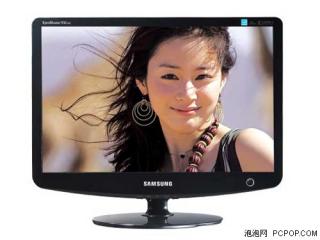

|
|
|
May 23 2007, 05:30 PM
|
|
Junior Member
470 posts Joined: Jan 2003
|
QUOTE(ariesto @ May 23 2007, 04:58 PM) WOW.. this is a nice article.. no argue at all already.. i'm reading now.. |
|
|
May 23 2007, 05:55 PM
|
|
Senior Member
2,162 posts Joined: Sep 2004
|
QUOTE(mADmAN @ May 23 2007, 04:15 PM) great find! Yeap, some forumers in the [H]ardForum just spice things up and make a big noise about this S vs A panel comparison ,in the end, I dont see any big different that makes ppl stray away from A and also C panel thanks....n on the site they compared A panel and S panel...they only briefly mentioned the C Panel.it was a long read... but in the end....the difference is too minimal to make so much noise about. Yes S panel is better factory default but NOT MUCH and if you think you got S panel and you have the best LCD, you are wrong, TN panel is still inferior too other panel type like S-IPS, S-PVA bla bla |
|
|
May 23 2007, 06:23 PM
|
|
Junior Member
454 posts Joined: Dec 2006 From: Mars
|
Thats normal for people who cannot escape from the grey jumping here and
there,exspecially things concern to money.  |
|
|
May 23 2007, 07:51 PM
|
|
Senior Member
1,140 posts Joined: Sep 2005 From: Equine Park
|
QUOTE(s[H) sIkuA,May 23 2007, 02:49 PM]Yes it does support 1:1 Oh thanks man.. so i can forget about samsung and go for LG.. even though i prefer samsung's design.. "switching from 1:1 mode to native resolution and back turns off 1:1 completely. so every time i have to go back to 1:1 alt-tabing in a non-widescreen game gets tedious since i do it a lot." From HardForum This post has been edited by nicholas_1213: May 23 2007, 08:03 PM |
|
|
May 23 2007, 08:04 PM
|
|
Senior Member
7,689 posts Joined: Jul 2005 From: The Land of No Return
|
QUOTE(nicholas_1213 @ May 23 2007, 07:51 PM) Oh thanks man.. so i can forget about samsung and go for LG.. even though i prefer samsung's design.. Yea, same as what i was feeling before. I always wanted the 226BW but it seems the difference is minimal and i rather save more.. |
|
|
May 23 2007, 08:20 PM
|
|
Senior Member
1,140 posts Joined: Sep 2005 From: Equine Park
|
QUOTE(akachester @ May 23 2007, 08:04 PM) Yea, same as what i was feeling before. I always wanted the 226BW but it seems the difference is minimal and i rather save more.. Hehe, save more for?? anyway what r u using now le? i mean monitor.. |
|
|
May 23 2007, 09:23 PM
|
|
Senior Member
4,717 posts Joined: Jan 2003
|
i tried on mine...
the service function menu pop out...but the don't have the panel info...so i can't check what panel i'm using... QUOTE(ariesto @ May 23 2007, 03:26 PM) Samsung 226BW user, kindly go through the below link and check wether the C panel are same as the A panel. http://www.behardware.com/articles/667-1/s...he-verdict.html TY |
|
|
May 23 2007, 10:42 PM
|
|
Senior Member
2,389 posts Joined: Jan 2003 From: Kota Kinabalu
|
QUOTE(ariesto @ May 23 2007, 05:21 PM) Model: Samsung 2232GW Oh thanks for the info. Seen some pics before but did not know it was supposed to have a higher contrast ratio. Of course that must be with MagicBright? Any info on what the contrast ratio is without MagicBright? Size: 22" Wide Color support: 16.7M Pixel Pitch: 0.282mm Brightness: 300cd/m2 Contrast: 4000:1 Viewing angle: 170/160 Response time: 2ms Signal Input: D-Sub, DVI-DHDCP, HDCP
Also, the back of that monitor is fugly, and doesn't look VESA compatible. |
|
|
May 23 2007, 10:44 PM
|

Senior Member
1,870 posts Joined: Dec 2004
|
I'm not sure if it's only me or not..
I always feel that the design of Samsung is always failed... Samsung did made some great looking LCD, but they cost like fark.. Selling point is the design.. |
|
|
May 23 2007, 11:07 PM
|
|
Senior Member
2,389 posts Joined: Jan 2003 From: Kota Kinabalu
|
Huh don't get your reasoning, first you say design fail, but right after you say they are great looking?
Seems that Samsung is the premier LCD vendor now? |
|
|
May 24 2007, 02:18 PM
|
|
Junior Member
454 posts Joined: Dec 2006 From: Mars
|
Samsung is still the Best in the market atm eventhough there is a slight differences of the A, S and C panel.
http://www.behardware.com/articles/662-6/2...ond-coming.html About the LG L226WTQ user, do you all notice very bad ghosting issue? User from anandtech advised to get the L226WT, w/o Q and with 5ms respond time is better. http://forums.anandtech.com/messageview.as...6&enterthread=y http://forums.anandtech.com/messageview.as...MVIEWTMP=Linear |
|
|
May 24 2007, 02:23 PM
|
|
Senior Member
7,689 posts Joined: Jul 2005 From: The Land of No Return
|
QUOTE(nicholas_1213 @ May 23 2007, 08:20 PM) Hehe, save more for?? anyway what r u using now le? i mean monitor.. In a sense of save more for a better GC to power up the monitor..LOL..Anyway, i am using the Samsung 753DFX 17" CRT Monitor.I am sure jumping towards 22" LCD would be a huge step. Its estimated to arrive at 28 May though.. |
|
|
May 24 2007, 02:29 PM
|
|
All Stars
10,530 posts Joined: Nov 2004 From: Petaling Jaya & Mid Valley
|
QUOTE(akachester @ May 24 2007, 02:23 PM) In a sense of save more for a better GC to power up the monitor..LOL..Anyway, i am using the Samsung 753DFX 17" CRT Monitor.I am sure jumping towards 22" LCD would be a huge step. Its estimated to arrive at 28 May though.. it is....damn huge...i just did that muhself.currently running on 6800 Vanilla. end of the month itll be 8800GTS 320MB  now just need to wait for gaji to come out |
|
|
May 24 2007, 02:31 PM
|
|
Senior Member
7,689 posts Joined: Jul 2005 From: The Land of No Return
|
QUOTE(mADmAN @ May 24 2007, 02:29 PM) it is....damn huge...i just did that muhself. LOL..I am eagerly awaiting to get that feeling..And YES, i am also waiting for my salary to get a new GC..lol..currently running on 6800 Vanilla. end of the month itll be 8800GTS 320MB now just need to wait for gaji to come out |
|
|
May 24 2007, 06:30 PM
|
|
Senior Member
2,378 posts Joined: Jan 2003 From: Miri,Sarawak,Malaysia Status: Dead!
|
How about from 17" LCD to 24" WS?
I sit quite near to my monitor, when click start or close windos, I have to move head up and down. |
|
|
May 24 2007, 06:38 PM
|
|
Senior Member
6,562 posts Joined: Jan 2003
|
QUOTE(Hyde`fK @ May 24 2007, 06:30 PM) How about from 17" LCD to 24" WS? You need to put that 24" further. My 30" is 2 feet from my keyboard.I sit quite near to my monitor, when click start or close windos, I have to move head up and down. |
|
|
May 24 2007, 07:32 PM
|
|
Senior Member
2,378 posts Joined: Jan 2003 From: Miri,Sarawak,Malaysia Status: Dead!
|
QUOTE(kianwee @ May 24 2007, 06:38 PM) You need to put that 24" further. My 30" is 2 feet from my keyboard. I wish I can, but my current table isn't that big, keyboard is about 1 feet away from monitor. I guess the distance between me and monitor is less 1m apart. |
|
|
May 24 2007, 07:45 PM
|
|
Senior Member
7,689 posts Joined: Jul 2005 From: The Land of No Return
|
QUOTE(Hyde`fK @ May 24 2007, 07:32 PM) I wish I can, but my current table isn't that big, keyboard is about 1 feet away from monitor. I guess the distance between me and monitor is less 1m apart. LOL..Since you could get a 24 incher, get another new table as well..lol.. |
|
|
May 24 2007, 07:59 PM
|
|
Senior Member
2,162 posts Joined: Sep 2004
|
QUOTE(akachester @ May 24 2007, 07:45 PM) LOL..Since you could get a 24 incher, get another new table as well..lol.. Yealor 24" somemore want save table $ |
|
|
May 24 2007, 08:16 PM
|

Junior Member
292 posts Joined: Sep 2006 From: Kuching, Sarawak, Malaysia
|
QUOTE(davidgm16 @ May 23 2007, 04:22 PM) hhmm... seems it may detected by human's eye. In my opinion, I think I would choose the first option which is 20"WS over 22"WS, like Samsung 206BW over 226BW, but if come to a situation, will u guys choose to have a sharper pics but slightly smaller the screen, or blurer pics but slightly bigger the screen? but the problem is the price which seems to be not very value for money, as RM900 vs RM9++ only! No sign of price drop for 20" also!!! |
|
|
May 24 2007, 08:35 PM
|
|
Senior Member
2,378 posts Joined: Jan 2003 From: Miri,Sarawak,Malaysia Status: Dead!
|
QUOTE(s[H]sIkuA @ May 24 2007, 07:59 PM) Yealor 24" somemore want save table $ Still looking for one ler. Cannot be too big as my room is small. |
|
|
May 24 2007, 09:19 PM
|

Senior Member
1,166 posts Joined: Jan 2003
|
QUOTE(badguy86 @ May 24 2007, 08:16 PM) In my opinion, I think I would choose the first option which is 20"WS over 22"WS, like Samsung 206BW over 226BW, whoooooaaaa 226BW for rm9++????? where where??? please share, i wanna buy one too. but the problem is the price which seems to be not very value for money, as RM900 vs RM9++ only! No sign of price drop for 20" also!!! thanks. |
|
|
May 24 2007, 09:28 PM
|
|
Senior Member
7,863 posts Joined: May 2007 From: highbury
|
which brand widescreen lcd is better?
acer,samsung,viewsonic,lg,benq,dell?? |
|
|
May 24 2007, 09:50 PM
|
|
Senior Member
2,378 posts Joined: Jan 2003 From: Miri,Sarawak,Malaysia Status: Dead!
|
QUOTE(fcuk90 @ May 24 2007, 09:28 PM) which brand widescreen lcd is better? Too many to consider, narrow down the models instead. 19"? 20"? 22"? 24"? 27"? 30"?acer,samsung,viewsonic,lg,benq,dell?? Added on May 24, 2007, 10:15 pmWanna ask those users with Dell widescreen LCD + 8800 cards, can you use 1:1 scaling on DVI? I can't seem to get work. The option for wide mode in my Dell's OSD are grayed out. This post has been edited by Hyde`fK: May 24 2007, 10:18 PM |
|
|
May 25 2007, 12:00 AM
|
|
Senior Member
1,140 posts Joined: Sep 2005 From: Equine Park
|
|
|
|
May 25 2007, 01:29 AM
|

Senior Member
841 posts Joined: Jan 2005 From: Penang > Parit Buntar > Bagan Serai > Taiping 
|
|
|
|
May 25 2007, 08:04 AM
|
|
Junior Member
78 posts Joined: May 2007
|
|
|
|
May 25 2007, 08:08 AM
|
|
Senior Member
6,562 posts Joined: Jan 2003
|
|
|
|
May 25 2007, 09:23 AM
|
|
Senior Member
7,689 posts Joined: Jul 2005 From: The Land of No Return
|
QUOTE(nicholas_1213 @ May 25 2007, 12:00 AM) Oh that was a promotion offered by strongbaby in the bulk sales, RM950.. all kena sapu dy lo.. but now has promotion RM999, dunno still available anot. Lol..Trust me, the price is very competitive now.If you are going to wait, by that time, you will say " yes, price for 22" drop like crazy, but look, price for 24" also drop.Maybe aim for 24" now"...Then the wait continues..lol..hehe, cant wait to get one also.. but if wait till end of jun or july, will the price be cheaper? now dunno get LG 22" or Samsung 22".. initially aiming for samsung, but after hearing that it doesn't support 1:1 ratio, i guess i'll get the LG one.. QUOTE(Phoenixwunin @ May 25 2007, 01:29 AM) I'm currently are using a very chipalang 19" X2Gen (Likom) 12ms LCD... sometimes I do have some thinking of upgrading to a widescreen LCD. Around 900+ for Samsung ones i guess.19" i have seen as low as Rm600+.Not sure where already..lol..Tell me.. how much is a 19" and 20" widescreen now usually cost?? Maybe Samsung, BenQ or LG. Just want to survey first... |
|
|
May 25 2007, 10:28 AM
|
|
Junior Member
454 posts Joined: Dec 2006 From: Mars
|
QUOTE(nicholas_1213 @ May 25 2007, 01:00 AM) Oh that was a promotion offered by strongbaby in the bulk sales, RM950.. all kena sapu dy lo.. but now has promotion RM999, dunno still available anot. If you plan to get an LG LCD, make sure u are not getting the WTQ version, hehe, cant wait to get one also.. but if wait till end of jun or july, will the price be cheaper? now dunno get LG 22" or Samsung 22".. initially aiming for samsung, but after hearing that it doesn't support 1:1 ratio, i guess i'll get the LG one.. its alot of complaint about ghosting issue. Those pro outhere advise to get the WT(w/o Q) version eventhough it is 5ms repond time. For those who plan to buy the LG WTQ version, below site is for your information, Good Luck. http://forums.anandtech.com/messageview.as...6&enterthread=y http://forums.anandtech.com/messageview.as...MVIEWTMP=Linear |
|
|
May 25 2007, 11:29 AM
|
|
Senior Member
2,389 posts Joined: Jan 2003 From: Kota Kinabalu
|
People take note, judging from what I've read no panels can do 2ms without some tricks. Specifically this is called Overdrive, which is, IIRC, ramping up the voltages to achieve the faster response time. Both LG and Samsung employ overdrive to get their stated 2ms response time.
It seems that Samsung's implementation of overdrive (MagicSpeed) is superior to LG's. |
|
|
May 25 2007, 12:04 PM
|
|
All Stars
10,530 posts Joined: Nov 2004 From: Petaling Jaya & Mid Valley
|
QUOTE(ariesto @ May 23 2007, 03:26 PM) Samsung 226BW user, kindly go through the below link and check wether the C panel are same as the A panel. http://www.behardware.com/articles/667-1/s...he-verdict.html TY QUOTE(bryan @ May 25 2007, 11:29 AM) People take note, judging from what I've read no panels can do 2ms without some tricks. Specifically this is called Overdrive, which is, IIRC, ramping up the voltages to achieve the faster response time. Both LG and Samsung employ overdrive to get their stated 2ms response time. from the link posted above....it seems the 226BW overdrive thingy is for the A Panels coz its not a native 2ms so they boosted it up to make it 2 ms. cant remember about the S Panels though...C Panels werent even tested in the article coz there were no C Panels yet at the time.It seems that Samsung's implementation of overdrive (MagicSpeed) is superior to LG's. |
|
|
May 25 2007, 12:18 PM
|
|
Senior Member
2,389 posts Joined: Jan 2003 From: Kota Kinabalu
|
No MagicSpeed is a feature on their 226bw so they employ overdrive on all panels, their own included.
edit: It's called RTA QUOTE It was interesting to note that without RTA, the A and S were no better than the 225BW. They all become equally slow when deactivating this function and the 2 ms appears to be a 5 ms with an optimised overdrive. This post has been edited by bryan: May 25 2007, 12:21 PM |
|
|
May 25 2007, 12:40 PM
|
|
All Stars
10,530 posts Joined: Nov 2004 From: Petaling Jaya & Mid Valley
|
oooooooooooo......that one...ok...got it...thanks
looks like theyre all native 5ms and boosted to 2ms. EDIT: 226BW owners....can anyone tell me whats the use of the CD? i havent installed mine and was just wondering if theres anything worth installing on the cd This post has been edited by mADmAN: May 25 2007, 12:42 PM |
|
|
May 25 2007, 03:37 PM
|
|
Senior Member
2,156 posts Joined: Apr 2005
|
anyone if the Asus PW191a or the Asus PW191s is available here or not? and if yes, how much? thanks.
|
|
|
May 25 2007, 05:29 PM
|
|
Senior Member
841 posts Joined: Jan 2005 From: Penang > Parit Buntar > Bagan Serai > Taiping
|
guys... how good/value for money is this monitor compared with other brand (including the price):
DELL E207WFP 20" Wide |
|
|
May 25 2007, 06:04 PM
|
|
Senior Member
2,378 posts Joined: Jan 2003 From: Miri,Sarawak,Malaysia Status: Dead!
|
QUOTE(kianwee @ May 25 2007, 08:08 AM) Yes, no problem here on 8800GTX SLI, tested on 2007WFP and 2407WFP. But on native resolution, the OSD are grayed out. How to get it work? Let's say I want to play CS 1.6 using 800 x 600. How to set? I tried set the monitor resolution to 800x600, and ingame same resolution, but wide mode in OSD still greyed out. |
|
|
May 25 2007, 11:42 PM
|
|
Senior Member
841 posts Joined: Jan 2005 From: Penang > Parit Buntar > Bagan Serai > Taiping
|
eh guys... what is the equivalent of Dell E207WFP 20" for Samsung??
Want to widen my choices. |
|
|
May 25 2007, 11:58 PM
|

Senior Member
3,159 posts Joined: Dec 2004 From: >Taiping,Perak< 
|
BenQ 19" FP92W [ WIDE ] - RM 590
LG 19" 194WT [ WIDE ] - RM 630 Samsung 19" 940BW [ WIDE ] - RM 620 Guys,from the 3 19" Wide above,which one is the best buy? |
|
|
May 26 2007, 09:06 AM
|
|
Senior Member
841 posts Joined: Jan 2005 From: Penang > Parit Buntar > Bagan Serai > Taiping
|
Samsung 940BW I assume?? Heard it was the official monitor for WCG last year (or the year before)...
Just wondering mr. kingmaker... is there any good shops selling LCD monitor in Taiping?? I tried surveying a little in Penang... and even PC Depot's best is only 19"... no 20" This post has been edited by Phoenixwunin: May 26 2007, 09:07 AM |
|
|
May 26 2007, 02:40 PM
|

Senior Member
1,362 posts Joined: Nov 2005 From: k.terengganu.. alone.. with my bass...play.. alone
|
so u guys are wide screen user,... how is gaming wit with wide lcd..... games got stretch? Samsung 19" 940BW is my choice to buy, afraid if play games and stretch....
This post has been edited by PVCpipe: May 26 2007, 02:42 PM |
|
|
May 26 2007, 03:49 PM
|

Senior Member
628 posts Joined: Oct 2006
|
QUOTE(Hyde`fK @ May 25 2007, 06:04 PM) How to get it work? Let's say I want to play CS 1.6 using 800 x 600. How to set? I tried set the monitor resolution to 800x600, and ingame same resolution, but wide mode in OSD still greyed out. cs 1.6 support ws format ah??? i play 1.6 too... but a bit stretch...  |
|
|
May 26 2007, 07:13 PM
|
|
Senior Member
2,378 posts Joined: Jan 2003 From: Miri,Sarawak,Malaysia Status: Dead!
|
QUOTE(HaHaNoCluE @ May 26 2007, 03:49 PM) cs 1.6 support ws format ah??? i play 1.6 too... but a bit stretch... There is WS support, but I don't like it.I've read through forums and sites, those using 8800, using new drivers will have trouble in 1:1 pixel scaling for WS LCD. The reason behind is that even when you set the desktop resolution to a 4:3 aspect ratio, the monitor will think its still on its native resolution, eg 24" WS 1920 x 1200, that's why unable to select wide mode for my LCD. Some stated 97.XX prove to be able to work with 1:1 scaling, I'm yet to test it out. I've tested 158.22 and 160.XX, no scaling. |
|
|
May 27 2007, 12:41 AM
|
|
Senior Member
841 posts Joined: Jan 2005 From: Penang > Parit Buntar > Bagan Serai > Taiping
|
what is the current price for Samsung 206BW?? And anyone knows where I can find it in Penang??
|
|
|
May 27 2007, 02:53 AM
|
|
Senior Member
2,162 posts Joined: Sep 2004
|
QUOTE(kingmaker_20 @ May 25 2007, 11:58 PM) BenQ 19" FP92W [ WIDE ] - RM 590 LG , just better overall =)LG 19" 194WT [ WIDE ] - RM 630 Samsung 19" 940BW [ WIDE ] - RM 620 Guys,from the 3 19" Wide above,which one is the best buy? QUOTE(PVCpipe @ May 26 2007, 02:40 PM) so u guys are wide screen user,... how is gaming wit with wide lcd..... games got stretch? Samsung 19" 940BW is my choice to buy, afraid if play games and stretch.... Depends on games, newer games that suppport WS resolution won't look stretch. Games like warcraft 3 though will be stretch, or there will be a black bar on both side (depending on your graphic setting)QUOTE(Phoenixwunin @ May 27 2007, 12:41 AM) what is the current price for Samsung 206BW?? And anyone knows where I can find it in Penang?? AFAIK, there are no 206BW now , out of stock |
|
|
May 27 2007, 02:54 AM
|
|
Senior Member
3,159 posts Joined: Dec 2004 From: >Taiping,Perak<
|
QUOTE(Phoenixwunin @ May 26 2007, 09:06 AM) Samsung 940BW I assume?? Heard it was the official monitor for WCG last year (or the year before)... Taiping?Lol...saw some shops selling 19" but haven't saw anything above that.The price are about RM50-RM100 more that lowyat.net price.Just wondering mr. kingmaker... is there any good shops selling LCD monitor in Taiping?? I tried surveying a little in Penang... and even PC Depot's best is only 19"... no 20" Anymore suggestion?I like the Benq because of the square stand design.But i assume Samsung is the top seller for 19" WS.Why?because it's 4MS?Is it really 4MS or somekinda native thinggy? |
|
|
May 27 2007, 02:39 PM
|
|
Senior Member
841 posts Joined: Jan 2005 From: Penang > Parit Buntar > Bagan Serai > Taiping
|
QUOTE(kingmaker_20 @ May 27 2007, 02:54 AM) Taiping?Lol...saw some shops selling 19" but haven't saw anything above that.The price are about RM50-RM100 more that lowyat.net price. Aye... poor us Perak/Penang people... so hard to find 20" monitor here... Anymore suggestion?I like the Benq because of the square stand design.But i assume Samsung is the top seller for 19" WS.Why?because it's 4MS?Is it really 4MS or somekinda native thinggy? Anyway, Guys... need your opinion on this... after some thinking I think 20" wide is kinda too big for me to bring to my college... so... I want to ask a few opinion.. Currently I am using X2Gen (OEM by LIKOM) LCD monitor 19". Only VGA... no DVI port... 12ms response time... and resolution of 1280x1024 @ 75Hz.If I were to change to Samsung 940BW... which is also 19" (the only difference being it is widescreen) with 4ms response time... is the change noticeable?? I mean... is it worth it to change from 19" to 19" widescreen?? Cause 940BW got DVI port as well.. which I believe is superior in every aspect from VGA port. It is 4ms (in contrast with my current 12ms monitor).. and it is wide... What do you guys think?? Is it a good choice to take 940BW over my current monitor or just stick with my current one for now... because basically both are 19"... just that one is wide while the other one is normal flat 19" panel. This post has been edited by Phoenixwunin: May 27 2007, 02:49 PM |
|
|
May 27 2007, 03:59 PM
|
|
Senior Member
2,162 posts Joined: Sep 2004
|
QUOTE(Phoenixwunin @ May 27 2007, 02:39 PM) Aye... poor us Perak/Penang people... so hard to find 20" monitor here... No, in fact you will see shorter n wider panel, but won't be so much improvement Anyway, Guys... need your opinion on this... after some thinking I think 20" wide is kinda too big for me to bring to my college... so... I want to ask a few opinion.. Currently I am using X2Gen (OEM by LIKOM) LCD monitor 19". Only VGA... no DVI port... 12ms response time... and resolution of 1280x1024 @ 75Hz.If I were to change to Samsung 940BW... which is also 19" (the only difference being it is widescreen) with 4ms response time... is the change noticeable?? I mean... is it worth it to change from 19" to 19" widescreen?? Cause 940BW got DVI port as well.. which I believe is superior in every aspect from VGA port. It is 4ms (in contrast with my current 12ms monitor).. and it is wide... What do you guys think?? Is it a good choice to take 940BW over my current monitor or just stick with my current one for now... because basically both are 19"... just that one is wide while the other one is normal flat 19" panel. 1280x1024 vs 1400x900, not really a big improvement huh |
|
|
May 27 2007, 06:26 PM
|
|
Senior Member
841 posts Joined: Jan 2005 From: Penang > Parit Buntar > Bagan Serai > Taiping
|
aha... then the best choice is to get 20" wide...
Hm.. guess no choice then... I'll have to search for 20"... and if fail... I guess I'll go to you sIkuA.. |
|
|
May 27 2007, 06:56 PM
|
|
Senior Member
7,689 posts Joined: Jul 2005 From: The Land of No Return
|
QUOTE(Phoenixwunin @ May 27 2007, 06:26 PM) aha... then the best choice is to get 20" wide... Why not make a bigger jump by going towards 22". I dont see alot of price difference between 20" and 22"..Hm.. guess no choice then... I'll have to search for 20"... and if fail... I guess I'll go to you sIkuA.. |
|
|
May 27 2007, 07:06 PM
|
|
Senior Member
3,159 posts Joined: Dec 2004 From: >Taiping,Perak<
|
QUOTE(Phoenixwunin @ May 27 2007, 06:26 PM) aha... then the best choice is to get 20" wide... Did you try ask acecombat?Hm.. guess no choice then... I'll have to search for 20"... and if fail... I guess I'll go to you sIkuA.. If i'm you,i won't get another 19",will aim for the 22". |
|
|
May 27 2007, 07:09 PM
|
|
Senior Member
1,140 posts Joined: Sep 2005 From: Equine Park
|
QUOTE(akachester @ May 27 2007, 06:56 PM) Why not make a bigger jump by going towards 22". I dont see alot of price difference between 20" and 22".. yeah, agree.. just get 22" if u wanna get 20" IMO |
|
|
May 27 2007, 07:57 PM
|
|
Senior Member
841 posts Joined: Jan 2005 From: Penang > Parit Buntar > Bagan Serai > Taiping
|
QUOTE(akachester @ May 27 2007, 06:56 PM) Why not make a bigger jump by going towards 22". I dont see alot of price difference between 20" and 22".. too big lar 22"... afraid I wouldn't be able to fully utilize my gc to play games later on due to increased resolution... Eh... wait a minute... 20" and 22" are using the same resolution rite?? Is that mean there is no performance hit in-game between 20" and 22"?? |
|
|
May 27 2007, 08:01 PM
|
|
Senior Member
7,689 posts Joined: Jul 2005 From: The Land of No Return
|
Yes, both of them uses the same native resolution.
|
|
|
May 27 2007, 08:04 PM
|
|
Senior Member
841 posts Joined: Jan 2005 From: Penang > Parit Buntar > Bagan Serai > Taiping
|
|
|
|
May 27 2007, 08:07 PM
|
|
Senior Member
7,689 posts Joined: Jul 2005 From: The Land of No Return
|
QUOTE(Phoenixwunin @ May 27 2007, 08:04 PM) So no performance hit lar rite?? Like that better I take 22" lorr... LOL..the 22" Dell LCD is going on promotion now for only RM899. You are off by RM99 for now.Save more..Do check out their website.. But if that is my choice...guess I'll have to save up a little bit more... RM1000+ is kinda off my budget for now. Only have RM800 in pocket for new LCD.Thanks for the advice... |
|
|
May 27 2007, 08:09 PM
|

Senior Member
1,898 posts Joined: Jan 2003 From: N.S.A
|
Yea, no diffs in resolution for 20" and 22"..
But for those "picky" ppl, it might annoyed them since 20" and 22" has same resolution, meaning 22" pixels will look "bigger"... meaning not as sharp as 20" due screen size, if u know what i mean.. Juz my 0.01sen Cheers  This post has been edited by TomatomanzSeedlezz: May 27 2007, 08:09 PM |
|
|
May 27 2007, 08:18 PM
|
|
Senior Member
841 posts Joined: Jan 2005 From: Penang > Parit Buntar > Bagan Serai > Taiping
|
QUOTE(akachester @ May 27 2007, 08:07 PM) LOL..the 22" Dell LCD is going on promotion now for only RM899. You are off by RM99 for now.Save more..Do check out their website.. Ahha... I have posted several question regarding the offer here in both Widescreen and LCD thread... but no one answered. So I guess it is either 1) No one knows the answer... 2) The LCD is actually a bad choice Why dun I ask again here..: Dell LCD Offer Based on the website... there are two model that gets my attention: DELL E207WFP 20" Entry Widescreen - RM799 and, DELL E228WFP 22" Entry Widescreen - RM899 1. Is this both model a good choice. After wandering in the land of Google a few days... I found out both are TN panels. Unfortunately I know nothing of this TN, I-PVS and whatever panel. Anyone can enlighten me?? Is this a good buy?? 2. How to buy online without credit card arr??? Can do online transfer through maybank2u arr?? Anyone did it before??QUOTE(TomatomanzSeedlezz @ May 27 2007, 08:09 PM) Yea, no diffs in resolution for 20" and 22".. Ahha.. this is definitely the thing I have been wondering too... so 22" isn't as sharp as 20"?? Anyone with 22" LCD wide can clarify this to me?? But for those "picky" ppl, it might annoyed them since 20" and 22" has same resolution, meaning 22" pixels will look "bigger"... meaning not as sharp as 20" due screen size, if u know what i mean.. Juz my 0.01sen Cheers |
|
|
May 27 2007, 09:15 PM
|
|
Senior Member
7,689 posts Joined: Jul 2005 From: The Land of No Return
|
Well, i just purchased it and arrives last thursday. Too bad its in my hometown or else i could test it for you..(wait, i got no GC to test as well..LOL)..Anyway, comments from my cousin was (yes, we bought 2 together), the LCD is great. Nice vibrant color and a great shock to jump from a 17" CRT. Color might not be as good as those on the Samsung but it is a worthit buy for RM899. And we got a free webcam as well..LOL..
If i were you, and i could afford another RM100, just go and get the 22". I dont think you will regret anyway... |
|
|
May 27 2007, 09:23 PM
|
|
Senior Member
1,140 posts Joined: Sep 2005 From: Equine Park
|
Hemm regarding the 22" isn't as sharp as 20".. just imagine like that.. same amount of pixel in 20" and 22", which one will look nicer?
erm.. or imagine like this.. u put the same amount of sand in 2 plates, one is bigger and one is smaller.. for the smaller plate one, the distance between the sand will be closer than the bigger plate one rite? i imagine like that lo.. but not sure whether it's the same story for 20" and 22" with same rev.. Added on May 27, 2007, 9:25 pmoh.. or maybe the pixel is 'bigger' in 22" and smaller in 20".. so smaller pixel, for the edge it'll look sharper ( since 1 pixel only displace 1 colour).. This post has been edited by nicholas_1213: May 27 2007, 09:25 PM |
|
|
May 27 2007, 09:40 PM
|
|
Senior Member
3,159 posts Joined: Dec 2004 From: >Taiping,Perak<
|
QUOTE(Phoenixwunin @ May 27 2007, 08:04 PM) So no performance hit lar rite?? Like that better I take 22" lorr... Yup,save up more till RM1k ++ and go for 22".Suggest you to get the samsung 226BW. But if that is my choice...guess I'll have to save up a little bit more... RM1000+ is kinda off my budget for now. Only have RM800 in pocket for new LCD.Thanks for the advice... |
|
|
May 27 2007, 10:00 PM
|
|
Senior Member
2,162 posts Joined: Sep 2004
|
Acer 22" the cheapest 22" currently =)
|
|
|
May 27 2007, 10:40 PM
|
|
Senior Member
1,140 posts Joined: Sep 2005 From: Equine Park
|
hey, have another noob question.. what is the difference between dynamic contrast and normal contrast? bcos i saw some specification such as samsung 226BW, the contrast ratio is 2000 : 1 (DC), but for those acer LCD such as Acer AL2216W, the contrast is 700:1.
|
|
|
May 27 2007, 10:43 PM
|

Senior Member
2,967 posts Joined: May 2006
|
bro
let me correct that samsung is 3000:1 others are still 700:1 - acer,benq and lg i dunno what its for but i heard the higher the contrast ratio, the better the colours are... |
|
|
May 27 2007, 10:43 PM
|
|
Senior Member
841 posts Joined: Jan 2005 From: Penang > Parit Buntar > Bagan Serai > Taiping
|
Hmm
Guys... when will the offer in Dell website ended?? For both 20" and 22"... both are promotional prices right?? When will it end?? Can't seem to find the date on the website |
|
|
May 27 2007, 10:54 PM
|
|
Senior Member
1,140 posts Joined: Sep 2005 From: Equine Park
|
QUOTE(gtoforce @ May 27 2007, 10:43 PM) bro Oh thanks for the correction... yeah i know that higher contrast ratio produce better colours, but what is the difference between the dynamic contrast with the normal contrast le??let me correct that samsung is 3000:1 others are still 700:1 - acer,benq and lg i dunno what its for but i heard the higher the contrast ratio, the better the colours are... |
|
|
May 27 2007, 11:21 PM
|
|
Senior Member
2,162 posts Joined: Sep 2004
|
QUOTE(gtoforce @ May 27 2007, 10:43 PM) bro The real contrast for Samsung 226 is 1000:1let me correct that samsung is 3000:1 others are still 700:1 - acer,benq and lg i dunno what its for but i heard the higher the contrast ratio, the better the colours are... The 3000 rating is in Dynamic Contrast , which they actually rate it higher than normal Contrast , example all LG lcd uses Dynamic Contrast to rate like the 20",22" and 24" From Wiki http://en.wikipedia.org/wiki/Contrast_ratio QUOTE It is also common to market only the dynamic contrast ratio capability of a display (when it is better than its static contrast ratio), which should not be directly compared to the static contrast ratio. A plasma display with a static 5000:1 contrast ratio will show superior contrast to an LCD display with 5000:1 dynamic and 1000:1 static contrast ratio when the input signal contains full range of brightnesses from 0 to 100% simultaneously. However they will be on par when input signal ranges only from 0 to 20% brightness. |
|
|
May 27 2007, 11:57 PM
|
 
Moderator
10,308 posts Joined: Jan 2003 From: Kuala Lumpur
|
QUOTE(Phoenixwunin @ May 27 2007, 08:18 PM) Ahha... I have posted several question regarding the offer here in both Widescreen and LCD thread... but no one answered. So I guess it is either 1) No one knows the answer... 2) The LCD is actually a bad choice 1. If you can google for the panel of the lcd, why not just google for the comparison for ips and tn panel?Why dun I ask again here..: Dell LCD Offer Based on the website... there are two model that gets my attention: DELL E207WFP 20" Entry Widescreen - RM799 and, DELL E228WFP 22" Entry Widescreen - RM899 1. Is this both model a good choice. After wandering in the land of Google a few days... I found out both are TN panels. Unfortunately I know nothing of this TN, I-PVS and whatever panel. Anyone can enlighten me?? Is this a good buy?? 2. How to buy online without credit card arr??? Can do online transfer through maybank2u arr?? Anyone did it before??http://en.wikipedia.org/wiki/TFT_LCD#Types http://www.pchardwarehelp.com/guides/lcd-panel-types.php (easy to understand) 2. iirc, dell accept bank draft (?) they'll come to your home and collect it. better call dell and ask them about it. |
|
|
May 28 2007, 01:27 AM
|
|
Senior Member
841 posts Joined: Jan 2005 From: Penang > Parit Buntar > Bagan Serai > Taiping
|
QUOTE(HMMaster @ May 27 2007, 11:57 PM) 1. If you can google for the panel of the lcd, why not just google for the comparison for ips and tn panel? Ah... thank you a lot for the guide on lcd type. I tried to google but most of the result is forums with lots of people arguing between TN and S-IPS http://en.wikipedia.org/wiki/TFT_LCD#Types http://www.pchardwarehelp.com/guides/lcd-panel-types.php (easy to understand) 2. iirc, dell accept bank draft (?) they'll come to your home and collect it. better call dell and ask them about it. Well.. for now I'll just take the cheapest I can take (you get what you paid for).. A friend of mine says that online transfer is possible... I think I'll better call them like you suggest and ask them further bout it... |
|
|
May 28 2007, 09:03 AM
|

Senior Member
2,850 posts Joined: Aug 2006 From: Stellar Nursery
|
A lot of videos files, dvd included look real crappy on widescreens that's 24 inches because the limited "width x height" is stretched far beyond what it was originally intended for.
So until everything gets encoded in HD, what's a good workaround to make viewing these legacy video files more bearable? |
|
|
May 28 2007, 09:07 AM
|
|
Senior Member
7,689 posts Joined: Jul 2005 From: The Land of No Return
|
How to check the panel of the LCD?I have yet to check mine though..
Dell accepts bank draft for sure.Just call up their customer service and check with them.. |
|
|
May 28 2007, 09:32 AM
|
|
Senior Member
2,162 posts Joined: Sep 2004
|
QUOTE(Polaris @ May 28 2007, 09:03 AM) A lot of videos files, dvd included look real crappy on widescreens that's 24 inches because the limited "width x height" is stretched far beyond what it was originally intended for. View those files in original resolution ?So until everything gets encoded in HD, what's a good workaround to make viewing these legacy video files more bearable? Lol |
|
|
May 29 2007, 04:50 PM
|
|
Senior Member
1,898 posts Joined: Jan 2003 From: N.S.A
|
QUOTE(Polaris @ May 28 2007, 09:03 AM) A lot of videos files, dvd included look real crappy on widescreens that's 24 inches because the limited "width x height" is stretched far beyond what it was originally intended for. Not sure what are u trying to say... So until everything gets encoded in HD, what's a good workaround to make viewing these legacy video files more bearable? Izzit u meant the ratio size?... for example DVD movies (widescreen aspect) will look 'stretched' on LCD monitor rite?... Btw, it doesnt matter whether its 24inch monitors... Afaik, all widescreen monitors are 16:10 ratio widescreen, wherelse mostly widescreen movies are 16:9 or even wider aspect ratio. Sure it will look 'scretched', but at least it a widescreen monitor will look much better compared to yer typical non-widescreen monitors which its 4:3 or 5:4... I gotta say at times i pretty much pissed-off abt.. "WHY IN THE WORLD THEY MAKE LCD MONITOR (16:10) ASPECT RATIO DIFFERENT TO LCD TV (which its 16:9)!?..." ... okok.. rant off Cheers This post has been edited by TomatomanzSeedlezz: May 29 2007, 04:54 PM |
|
|
May 29 2007, 05:18 PM
|
|
Senior Member
2,162 posts Joined: Sep 2004
|
QUOTE(TomatomanzSeedlezz @ May 29 2007, 04:50 PM) Not sure what are u trying to say... What he meant is all most of the video files are in eg. 640x480 where 24" resolution is 19xx , doesnt matter widescreen or notIzzit u meant the ratio size?... for example DVD movies (widescreen aspect) will look 'stretched' on LCD monitor rite?... Btw, it doesnt matter whether its 24inch monitors... Afaik, all widescreen monitors are 16:10 ratio widescreen, wherelse mostly widescreen movies are 16:9 or even wider aspect ratio. Sure it will look 'scretched', but at least it a widescreen monitor will look much better compared to yer typical non-widescreen monitors which its 4:3 or 5:4... I gotta say at times i pretty much pissed-off abt.. "WHY IN THE WORLD THEY MAKE LCD MONITOR (16:10) ASPECT RATIO DIFFERENT TO LCD TV (which its 16:9)!?..." ... okok.. rant off Cheers Well if u ask me , it would be take too long to encode a video in such a large resolution (even HD format is not 19xx) and takes too much processing power when viewing |
|
|
May 29 2007, 06:30 PM
|
|
Senior Member
2,389 posts Joined: Jan 2003 From: Kota Kinabalu
|
Actually you'll find that HD IS 1920 x 1080
|
|
|
May 29 2007, 06:31 PM
|
|
Senior Member
841 posts Joined: Jan 2005 From: Penang > Parit Buntar > Bagan Serai > Taiping
|
em.. apart from this one:
http://www.hardforum.com/showthread.php?t=1064635 Is there any other comparison for LCD size?? I want to see and compare the size of 19" normal, 19" wide, 20" wide and 22" wide. Wanna see how big improvement is compared to 19" flat panel (i'm using that now)... The picture there only have 20.1", 21" and straight away to 23" for wide... |
|
|
May 29 2007, 07:04 PM
|
|
Senior Member
2,162 posts Joined: Sep 2004
|
QUOTE(bryan @ May 29 2007, 06:30 PM) Actually you'll find that HD IS 1920 x 1080 1080p but most of em still in 720p which is 1280x720But most of the files are still way lower than that |
|
|
May 29 2007, 08:53 PM
|

Senior Member
566 posts Joined: Sep 2005 From: Compulsive Disorder Land
|
[can someone clarify since we can get LCD TV that can display input from the PC, why do we still want to buy LCD monitor
is it because of the price? or some technical differences? What is the reason ALso what is the pro and cons using LCD monitor for PC compare to using LCD TV? |
|
|
May 30 2007, 10:45 AM
|
|
Junior Member
454 posts Joined: Dec 2006 From: Mars
|
Guys, do anyone of you all can show me some photos of MINOR and SERIOUS
Backlight bleeding? Any link to share with? TY I found 1 of the backlight bleed photo, mine looks quite similar to the photo shown but less bleed, can i claim a 1 to 1 warranty in this case? I bought it 3 days ago. Please advise. TY This post has been edited by ariesto: May 30 2007, 11:07 AM Attached thumbnail(s) 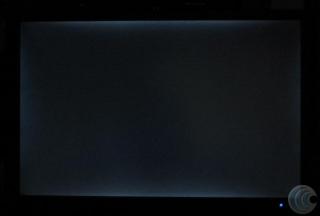
|
|
|
May 30 2007, 01:33 PM
|

Junior Member
196 posts Joined: Apr 2006 From: PJ, Malaysia
|
That looks like a normal amount of backlight bleed to me. I doubt that backlight bleeding is covered by warranty though, it's pretty much accepted as par for the course with the 22 inch monitors. Gotta be a reason why they're 1k cheaper than the 24 inchers right? Couldn't hurt to try though.
|
|
|
May 30 2007, 01:41 PM
|
|
Senior Member
7,689 posts Joined: Jul 2005 From: The Land of No Return
|
QUOTE(ariesto @ May 30 2007, 10:45 AM) Guys, do anyone of you all can show me some photos of MINOR and SERIOUS Alot of LCD have backlight bleeding problem as far as i know. I have personally ask Dell before regarding this matter and yes, no warranty is covered for backlight bleeding as told by them..Backlight bleeding? Any link to share with? TY I found 1 of the backlight bleed photo, mine looks quite similar to the photo shown but less bleed, can i claim a 1 to 1 warranty in this case? I bought it 3 days ago. Please advise. TY |
|
|
May 30 2007, 03:31 PM
|

Junior Member
277 posts Joined: Apr 2006 From: PJ 
|
Hey guys, stumbled upon this on a web site.: Its a new LCD being showcased from DELL.
 Clear bezel and touch-sensitive controls! Not really relevant but I liked how good it looked and thought of sharing it with you guys. |
|
|
May 30 2007, 04:39 PM
|
|
Senior Member
2,378 posts Joined: Jan 2003 From: Miri,Sarawak,Malaysia Status: Dead!
|
^ Already been discussed.
|
|
|
May 30 2007, 06:14 PM
|
|
Senior Member
2,162 posts Joined: Sep 2004
|
I find the clear bezel abit distracting don't you think? When you look at your LCD, sometime can look your own face
|
|
|
May 30 2007, 06:49 PM
|
|
Senior Member
6,562 posts Joined: Jan 2003
|
QUOTE(X-Zen @ May 29 2007, 08:53 PM) [can someone clarify since we can get LCD TV that can display input from the PC, why do we still want to buy LCD monitor That is because LCD TV's resolution is low. Imagine running 1366x768 on a 32" or even larger LCD TV. Huge screen, but abysmal font quality. Try comparing that to my ACD 30" resolution at 2560 x 1600, I can view 4 x lowyat.net full screen page at one screen.is it because of the price? or some technical differences? What is the reason ALso what is the pro and cons using LCD monitor for PC compare to using LCD TV? |
|
|
May 30 2007, 07:00 PM
|

Senior Member
1,287 posts Joined: Jan 2003 From: JB
|
QUOTE(Phoenixwunin @ May 27 2007, 08:18 PM) » Click to show Spoiler - click again to hide... « 2. How to buy online without credit card arr??? Can do online transfer through maybank2u arr?? Anyone did it before??» Click to show Spoiler - click again to hide... « QUOTE(HMMaster @ May 27 2007, 11:57 PM) » Click to show Spoiler - click again to hide... « 2. iirc, dell accept bank draft (?) they'll come to your home and collect it. better call dell and ask them about it. By the way, don't know got anyone mentioned before, DELL just come out a new 19" wide screen LCD, look cool, but i wonder the resolution nice or not ... DellTM SE198WFP 19" Widescreen LCD Monitor Stylish Widescreen Flat Panel with Analogue and Digital (HDCP ) 1440 x 900 @ 60 Hz - RM 639 (Price after RM260 Instant Cash Redemption & Delivery) 
edit:typo at 07:01 PM This post has been edited by StupidZ: May 30 2007, 07:01 PM |
|
|
May 30 2007, 08:00 PM
|

All Stars
10,475 posts Joined: Jan 2003 From: Sarawak
|
the front looks a bit like the 27incher
|
|
|
May 30 2007, 09:07 PM
|
|
Senior Member
841 posts Joined: Jan 2005 From: Penang > Parit Buntar > Bagan Serai > Taiping
|
QUOTE(StupidZ @ May 30 2007, 07:00 PM) DELL will accept bankdraft, as long as the name of recipient is correctly written. I bought my one by using bankdraft. And they did provide collecting service. So all u need to do is just call/click on net, place order, they come get ur payment, then deliver the LCD to you. I am thinking of calling them tomorrow morning. But now that you mentioned this I will straight away order it tomorrow and choose payment through bank draft. By the way, don't know got anyone mentioned before, DELL just come out a new 19" wide screen LCD, look cool, but i wonder the resolution nice or not ... DellTM SE198WFP 19" Widescreen LCD Monitor Stylish Widescreen Flat Panel with Analogue and Digital (HDCP ) 1440 x 900 @ 60 Hz - RM 639 (Price after RM260 Instant Cash Redemption & Delivery) |
|
|
May 31 2007, 12:09 AM
|

Junior Member
239 posts Joined: May 2005
|
heard so many bad reviews on the net about dell 2007wfp regarding color banding issue.....any 2007wfp user here can give comment.
|
|
|
May 31 2007, 08:04 AM
|
|
Senior Member
6,562 posts Joined: Jan 2003
|
QUOTE(Jusoh @ May 31 2007, 12:09 AM) heard so many bad reviews on the net about dell 2007wfp regarding color banding issue.....any 2007wfp user here can give comment. That only applies to the first batch, earlier revision. |
|
|
May 31 2007, 09:34 AM
|
|
Junior Member
239 posts Joined: May 2005
|
how they're fixed da prob,thru firmware upgrade to disable desktop mode or chip itself?
|
|
|
May 31 2007, 11:20 AM
|
|
Senior Member
684 posts Joined: Apr 2006 From: FPSO kwame nkrumah
|
anyone used the dell 2007wfp..
can tell me the pros and cons of this... thanks... |
|
|
May 31 2007, 12:41 PM
|
|
Senior Member
6,562 posts Joined: Jan 2003
|
QUOTE(Jusoh @ May 31 2007, 09:34 AM) how they're fixed da prob,thru firmware upgrade to disable desktop mode or chip itself? Firmware upgrade that disable the faroudja chip in desktop mode. |
|
|
May 31 2007, 05:03 PM
|
|
Senior Member
2,378 posts Joined: Jan 2003 From: Miri,Sarawak,Malaysia Status: Dead!
|
|
|
|
May 31 2007, 08:52 PM
|
|
Senior Member
566 posts Joined: Sep 2005 From: Compulsive Disorder Land
|
QUOTE(kianwee @ May 30 2007, 06:49 PM) That is because LCD TV's resolution is low. Imagine running 1366x768 on a 32" or even larger LCD TV. Huge screen, but abysmal font quality. Try comparing that to my ACD 30" resolution at 2560 x 1600, I can view 4 x lowyat.net full screen page at one screen. so any difference if use it for watching video or playing games? |
|
|
Jun 1 2007, 04:14 AM
|
|
Senior Member
3,159 posts Joined: Dec 2004 From: >Taiping,Perak<
|
I'm getting this one:
http://www.samsung.com/ca/products/monitor/lcd_digital/ls19mewsfxaa.asp?page=Specifications What say you? |
|
|
Jun 1 2007, 04:26 AM
|
|
Junior Member
96 posts Joined: Dec 2004
|
hi every sifu/expert here...
i planning to buy a 19' wide screen LCD without built in speaker what r ur guy's comment for viewsonic? i just heard that viewsonic is cheaper and good from ppl... wanna hear some user review or comment.... pls help me thank x 100000000 Added on June 1, 2007, 4:28 ammy budget is rm600 to rm700... forgot to mention this..hehe This post has been edited by ykmy: Jun 1 2007, 04:28 AM |
|
|
Jun 1 2007, 05:24 AM
|

Junior Member
264 posts Joined: Jan 2003
|
Hello guys, i am planning to get Dell E228WFP 22"
Any one using this monitor? i need some comment on it. Is it ok for gaming? especially playing WoW And another question is i am using GE force 6600 graphic card. If i such of sudden use such a big monitor will it effect the respond on the monitor slower? lets assume i put it to higher resolution can my graphic card handle it or do i need to upgrade to a better graphic card? |
|
|
Jun 1 2007, 08:10 AM
|
|
Senior Member
6,562 posts Joined: Jan 2003
|
QUOTE(X-Zen @ May 31 2007, 08:52 PM) so any difference if use it for watching video or playing games? Depends on what type of gaming you are referring to. There are very limited PC titles with 16:9 support. PS2/PS3 are more suitable on a LCD TV. |
|
|
Jun 1 2007, 08:56 AM
|
|
Junior Member
196 posts Joined: Apr 2006 From: PJ, Malaysia
|
QUOTE(X-Zen @ May 31 2007, 08:52 PM) so any difference if use it for watching video or playing games? Yeah, you'll have to run your games at lower resolution(1024 x 768 or 1280 x 768 if the game supports widescreen), but if you're sitting sufficiently far away from your tv it probably wouldn't look too jaggy. I guess if you're going to be watching movies and playing games most of the time then using an lcd tv as a monitor might make sense. Also I don't know how many tvs support 1:1 pixel mapping which is important because you'll end up with a distorted image if the game's aspect ratio is different from the tv's. |
|
|
Jun 2 2007, 03:17 PM
|
|
Senior Member
2,670 posts Joined: Sep 2006
|
Is there any S-IPS/S-PVA 22 inch (W) available in the market? Any brand?
I'm not a gamer so I don't bother about response time. Only color depth and viewing angle is crucial for me. Why the hell that Dell doesn't produce 22Wide Ultrasharp? |
|
|
Jun 3 2007, 10:13 AM
|

Junior Member
38 posts Joined: Jul 2006 From: kelantan
|
I've just buy 931BW. satisfy with it
but if i play a movie, the picture looks like "pecah2", why ar? |
|
|
Jun 3 2007, 10:35 AM
|

Senior Member
2,352 posts Joined: Jan 2003 From: Pixelgasm
|
QUOTE(jimbet1337 @ Jun 2 2007, 03:17 PM) Is there any S-IPS/S-PVA 22 inch (W) available in the market? Any brand? Dell doesn't produce LCDs panels that's why. Dell just out source the cheapest panel they can get their hands on and make them their own.I'm not a gamer so I don't bother about response time. Only color depth and viewing angle is crucial for me. Why the hell that Dell doesn't produce 22Wide Ultrasharp? |
|
|
Jun 3 2007, 04:37 PM
|

Junior Member
34 posts Joined: Sep 2004
|
sorry noob question ....
i got ps2 and i got a 19" ws benQ lcd... so what cable i need to use to connect to lcd? and what about the sound? and quality? |
|
|
Jun 3 2007, 04:55 PM
|
|
Senior Member
7,689 posts Joined: Jul 2005 From: The Land of No Return
|
QUOTE(turk-s- @ Jun 3 2007, 04:37 PM) sorry noob question .... Unless you have an LCD that comes with speakers, you will need to output the sound elsewhere...i got ps2 and i got a 19" ws benQ lcd... so what cable i need to use to connect to lcd? and what about the sound? and quality? |
|
|
Jun 3 2007, 04:58 PM
|

Senior Member
3,593 posts Joined: Feb 2005 From: ***Penang***
|
Akachester, how long you get your Dell E226WFP 22" after ordering it ??
I am thinking to get one...but i need it quite fast... |
|
|
Jun 3 2007, 05:02 PM
|
|
Senior Member
7,689 posts Joined: Jul 2005 From: The Land of No Return
|
QUOTE(LittleLinnet @ Jun 3 2007, 04:58 PM) Akachester, how long you get your Dell E226WFP 22" after ordering it ?? 4 days. Ordered it on Monday (deadline for the promotion), received a call on tuesday regarding some error in the credit card processing. After that, problem is solved the same day, and received a call from credit card company regarding the confirmation on wednesday, and wahlah...LCD arrived on Thursday 2pm. Great service and delivery. If without the problem, i guess it would only take 3 days. However, their website did state that the delivery time may vary from 3 days to 20 days. Do give their customer service a call. I guess you can ask them to deliver it quick as you are urgent.. I am thinking to get one...but i need it quite fast... |
|
|
Jun 3 2007, 05:08 PM
|
|
Senior Member
841 posts Joined: Jan 2005 From: Penang > Parit Buntar > Bagan Serai > Taiping
|
QUOTE(redken @ Jun 3 2007, 10:35 AM) Dell doesn't produce LCDs panels that's why. Dell just out source the cheapest panel they can get their hands on and make them their own. Is it?? I only know this stuff now.. so meaning the 228WFP 22" Wide isn't DELL's at first... maybe BenQ or Samsung's but was taken and rebranded DELL. Is it like that?? Can someone clarify it to me??QUOTE(akachester @ Jun 3 2007, 05:02 PM) 4 days. Ordered it on Monday (deadline for the promotion), received a call on tuesday regarding some error in the credit card processing. After that, problem is solved the same day, and received a call from credit card company regarding the confirmation on wednesday, and wahlah...LCD arrived on Thursday 2pm. Great service and delivery. If without the problem, i guess it would only take 3 days. However, their website did state that the delivery time may vary from 3 days to 20 days. Do give their customer service a call. I guess you can ask them to deliver it quick as you are urgent.. If using bank draft... they will come and pick-up the bank draft arr?? Someone told me that they themselves (DELL.. not poslaju or GDex or whatever) will come home and send the LCD.. and later pick the bank draft. I forgot where and who told me... but can anyone confirm this again??Will order tomorrow morning... |
|
|
Jun 3 2007, 05:16 PM
|
|
Senior Member
7,689 posts Joined: Jul 2005 From: The Land of No Return
|
QUOTE(Phoenixwunin @ Jun 3 2007, 05:08 PM) Is it?? I only know this stuff now.. so meaning the 228WFP 22" Wide isn't DELL's at first... maybe BenQ or Samsung's but was taken and rebranded DELL. Is it like that?? Can someone clarify it to me?? That i am not too sure about..Anyway, mine was sent by DHL instead. Not sure which delivery company that they use..But they are surely quick. Last week i have a problem with my laptop LCD, called their support, very helpful and courteous, and they came the next day to fix it on the spot..If using bank draft... they will come and pick-up the bank draft arr?? Someone told me that they themselves (DELL.. not poslaju or GDex or whatever) will come home and send the LCD.. and later pick the bank draft. I forgot where and who told me... but can anyone confirm this again?? Will order tomorrow morning... |
|
|
Jun 3 2007, 05:24 PM
|
|
Senior Member
2,378 posts Joined: Jan 2003 From: Miri,Sarawak,Malaysia Status: Dead!
|
4 days is fast. Mine took 7 days, Monday payment confirmed, next Monday arrived.
|
|
|
Jun 3 2007, 06:04 PM
|
|
Senior Member
3,593 posts Joined: Feb 2005 From: ***Penang***
|
ordered mine.
Will phone them tomorrow to rush them |
|
|
Jun 3 2007, 06:14 PM
|
|
Senior Member
7,689 posts Joined: Jul 2005 From: The Land of No Return
|
QUOTE(LittleLinnet @ Jun 3 2007, 06:04 PM) ordered mine. LOL..good one. Are they still on the RM899 promotion?Will phone them tomorrow to rush them |
|
|
Jun 3 2007, 06:20 PM
|
|
Senior Member
3,593 posts Joined: Feb 2005 From: ***Penang***
|
899 for 3 years warranty without free gift...i think the price will stays at 899 ?
no idea |
|
|
Jun 3 2007, 06:32 PM
|
|
Senior Member
7,689 posts Joined: Jul 2005 From: The Land of No Return
|
QUOTE(LittleLinnet @ Jun 3 2007, 06:20 PM) 899 for 3 years warranty without free gift...i think the price will stays at 899 ? Yea, they drag the promotion when i ordered it on the last day with free gift. Not sure when they end though. My best guess, it will stay that way for now or maybe a RM100 increment..no idea |
|
|
Jun 4 2007, 12:39 PM
|

Junior Member
111 posts Joined: Jan 2006
|
hi,
I been thinking of getting Dell ultrasharp 2007WFP or Samsung 226BW. I mainly using for doing Web/Graphic Design, movie, web surfing & also some gaming need. Need opinion from u'all thx |
|
|
Jun 4 2007, 12:47 PM
|
|
Senior Member
6,562 posts Joined: Jan 2003
|
QUOTE(demomode @ Jun 4 2007, 12:39 PM) hi, 2007WFP FTW.I been thinking of getting Dell ultrasharp 2007WFP or Samsung 226BW. I mainly using for doing Web/Graphic Design, movie, web surfing & also some gaming need. Need opinion from u'all thx |
|
|
Jun 5 2007, 09:34 AM
|

Senior Member
807 posts Joined: Dec 2005 From: Seri Kembangan
|
QUOTE(demomode @ Jun 4 2007, 12:39 PM) hi, For web design, wide-screen monitor is not suitable la, but for graphic design wide-screen is really cool I been thinking of getting Dell ultrasharp 2007WFP or Samsung 226BW. I mainly using for doing Web/Graphic Design, movie, web surfing & also some gaming need. Need opinion from u'all thx Go for 2007WFP for the brilliant colors  |
|
|
Jun 5 2007, 10:15 AM
|
|
Junior Member
470 posts Joined: Jan 2003
|
QUOTE(kianwee @ Jun 4 2007, 12:47 PM) 2007WFP FTW. QUOTE(ckkean @ Jun 5 2007, 09:34 AM) For web design, wide-screen monitor is not suitable la, but for graphic design wide-screen is really cool Go for 2007WFP for the brilliant colors i start confusing when saw these 2 threat coming out... i was currently using 2007WFP, and now my dad is planning to get a wide screen too, so i just have a "bad" idea that i give him my 2007WFP and get my new 226BW.. but u guys stopped me from doing that now.. may i know wat is the reason u guys suggest tat? really the color has the big diff between 2007WFP and 226BW? i'm using the LCD mainly for gaming and movies too, and ofcourse for working (programming) when burning mid nite oil is needed. This post has been edited by davidgm16: Jun 5 2007, 10:17 AM |
|
|
Jun 5 2007, 10:24 AM
|
|
Senior Member
6,562 posts Joined: Jan 2003
|
QUOTE(davidgm16 @ Jun 5 2007, 10:15 AM) i start confusing when saw these 2 threat coming out... i was currently using 2007WFP, and now my dad is planning to get a wide screen too, so i just have a "bad" idea that i give him my 2007WFP and get my new 226BW.. but u guys stopped me from doing that now.. may i know wat is the reason u guys suggest tat? really the color has the big diff between 2007WFP and 226BW? i'm using the LCD mainly for gaming and movies too, and ofcourse for working (programming) when burning mid nite oil is needed. |
|
|
Jun 5 2007, 10:26 AM
|
|
Senior Member
841 posts Joined: Jan 2005 From: Penang > Parit Buntar > Bagan Serai > Taiping
|
if I'm not mistaken... 2007WFP is using S-IPV (or whatever panel that is of a higher quality) but 226BW is using TN Panel.
Does this play the roles in determining the image quality in both panels?? |
|
|
Jun 5 2007, 10:29 AM
|
|
Senior Member
6,562 posts Joined: Jan 2003
|
QUOTE(Phoenixwunin @ Jun 5 2007, 10:26 AM) if I'm not mistaken... 2007WFP is using S-IPV (or whatever panel that is of a higher quality) but 226BW is using TN Panel. S-IPS - Super In-Plane SwitchingDoes this play the roles in determining the image quality in both panels?? And YES to your question. |
|
|
Jun 5 2007, 10:30 AM
|
|
Senior Member
2,162 posts Joined: Sep 2004
|
QUOTE(Phoenixwunin @ Jun 5 2007, 10:26 AM) if I'm not mistaken... 2007WFP is using S-IPV (or whatever panel that is of a higher quality) but 226BW is using TN Panel. Yes. Btw its S-IPS Does this play the roles in determining the image quality in both panels?? but some users are getting S-PVA 2007 tooDifference between panel > http://www.hardforum.com/showthread.php?t=1039222 |
|
|
Jun 5 2007, 11:05 AM
|
|
Junior Member
470 posts Joined: Jan 2003
|
QUOTE(kianwee @ Jun 5 2007, 10:24 AM) It depends on how good your eyes can tell a difference. I can see a huge difference in color reproduction and viewing angle between this two. This may be subjective because there are folks that can't see any difference, trust me. i dun really get a side by side compare... but now i'm quite suffering on setting the color of 200WFP.. i'd like to know how u guys configure it? is it u have the profile that can change when u want to watch movie, or gaming or maybe typing in ms document. coz if i raise up the brightness from monitor, gaming n movie looks nice but it will too bright when looking at a white page (eg: ms word) so i might need to set the contrast and gamma using nvidia control panel. i feel this is a bit troublesome.. |
|
|
Jun 5 2007, 02:14 PM
|

Junior Member
491 posts Joined: May 2005
|
QUOTE(davidgm16 @ Jun 5 2007, 11:05 AM) i dun really get a side by side compare... but now i'm quite suffering on setting the color of 200WFP.. i'd like to know how u guys configure it? is it u have the profile that can change when u want to watch movie, or gaming or maybe typing in ms document. coz if i raise up the brightness from monitor, gaming n movie looks nice but it will too bright when looking at a white page (eg: ms word) so i might need to set the contrast and gamma using nvidia control panel. i feel this is a bit troublesome.. Can u tell me is any large improvement if I switch from my current 19" Widescreen Viewsonic to 20" Widescreen Dell -Entry Level monitor? |
|
|
Jun 5 2007, 04:34 PM
|
|
Senior Member
6,562 posts Joined: Jan 2003
|
QUOTE(carjack18 @ Jun 5 2007, 02:14 PM) Hi guys, What u will get is a higher resolution panel. Not much difference in size.Can u tell me is any large improvement if I switch from my current 19" Widescreen Viewsonic to 20" Widescreen Dell -Entry Level monitor? |
|
|
Jun 5 2007, 05:42 PM
|
|
Junior Member
111 posts Joined: Jan 2006
|
|
|
|
Jun 5 2007, 06:03 PM
|
|
Senior Member
2,378 posts Joined: Jan 2003 From: Miri,Sarawak,Malaysia Status: Dead!
|
QUOTE(demomode @ Jun 5 2007, 05:42 PM) Ysterday was at lowyat, i was comparing samsung lcd 20" 205bw & 22" 226bw 22" has bigger size compared with 20". Thus you can see the pixel bigger on 22".wit same resolution. Display on the 20" is much more sharper than 22", while 22" is a bit blur tho. tat is wat is see btw i have order my dell 2007WFP today |
|
|
Jun 5 2007, 06:51 PM
|
|
Senior Member
841 posts Joined: Jan 2005 From: Penang > Parit Buntar > Bagan Serai > Taiping
|
eh... 22" less sharper than 20"... very noticeable arr?? Not good lar if it is like this...
*I already order the 228WFP from DELL just now |
|
|
Jun 5 2007, 07:14 PM
|

Senior Member
1,429 posts Joined: Jan 2003 
|
well u cant compare 20" s-ips/pva panels to 22" tn panels
its quite obvious if u put it side by side then again some of the masses cant differentiate it at all unless for those with good eyes |
|
|
Jun 5 2007, 07:48 PM
|

Senior Member
2,061 posts Joined: Jan 2003 From: Jabaronie to Astaka Status: ��..?
|
QUOTE(Hyde`fK @ Jun 5 2007, 06:03 PM) 22" has bigger size compared with 20". Thus you can see the pixel bigger on 22". so which is good..? 20" or 22"..? |
|
|
Jun 5 2007, 08:10 PM
|
|
Senior Member
2,378 posts Joined: Jan 2003 From: Miri,Sarawak,Malaysia Status: Dead!
|
QUOTE(mdzaboy @ Jun 5 2007, 07:48 PM) so which is good..? 20" or 22"..? Depends on what model you're comparing with. But for now all 22" uses TN panel. Any panel for 20" beside TN panel will be better than 22". |
|
|
Jun 5 2007, 10:20 PM
|
|
Junior Member
239 posts Joined: May 2005
|
QUOTE(demomode @ Jun 4 2007, 12:39 PM) hi, I been thinking of getting Dell ultrasharp 2007WFP or Samsung 226BW. I mainly using for doing Web/Graphic Design, movie, web surfing & also some gaming need. Need opinion from u'all thx QUOTE(kianwee @ Jun 4 2007, 12:47 PM) 2007WFP FTW. kianwee,i guess 2007WFP better than 226BW bcoz 2007WFP have smaller dot pitch....izzit right???my guess la... |
|
|
Jun 5 2007, 11:07 PM
|
|
Senior Member
6,562 posts Joined: Jan 2003
|
QUOTE(Jusoh @ Jun 5 2007, 10:20 PM) kianwee, Exactly. That and the 2007WFP has a better panel, so you will get a better viewing angle and richer color as well. i guess 2007WFP better than 226BW bcoz 2007WFP have smaller dot pitch....izzit right???my guess la... |
|
|
Jun 6 2007, 10:31 AM
|
|
Junior Member
470 posts Joined: Jan 2003
|
QUOTE(kianwee @ Jun 5 2007, 11:07 PM) Exactly. That and the 2007WFP has a better panel, so you will get a better viewing angle and richer color as well. kianwee... can u kindly get a screen snap 4 the 2007WFP and 226BW side by side? i really want to see whether my crap's eye can see the diff or not.. coz i really like the 226BW so much (the outlook design, and the magic bright function) |
|
|
Jun 6 2007, 10:59 AM
|
|
Junior Member
239 posts Joined: May 2005
|
QUOTE(Jusoh @ Jun 5 2007, 10:20 PM) kianwee, i guess 2007WFP better than 226BW bcoz 2007WFP have smaller dot pitch....izzit right???my guess la... QUOTE(kianwee @ Jun 5 2007, 11:07 PM) Exactly. That and the 2007WFP has a better panel, so you will get a better viewing angle and richer color as well. QUOTE(davidgm16 @ Jun 6 2007, 10:31 AM) kianwee... can u kindly get a screen snap 4 the 2007WFP and 226BW side by side? i really want to see whether my crap's eye can see the diff or not.. for samsung LCD...i see so many LYNians choose 226BW rather than 206BW...from size aspect sure 226BW win....but from performance aspect i think 206BW will win...yaa bcoz smaller dot pitch.... coz i really like the 226BW so much (the outlook design, and the magic bright function) i'm quite impress with 2007WFP spec....almost same with 20' apple cinema display...great viewing angle(178/178),small dot pitch(.258mm) and many more... |
|
|
Jun 6 2007, 11:01 AM
|
|
Senior Member
841 posts Joined: Jan 2005 From: Penang > Parit Buntar > Bagan Serai > Taiping
|
considering both monitor (20" and 22") is of a TN-panel... is the difference between them very noticeable.
I can accept the 2007WFP vs 226BW situation since 226BW is of a TN-panel. What if both are TN-panel?? (asked this question before but the answer I receive.. aren't satisfying ) |
|
|
Jun 6 2007, 02:45 PM
|
|
Senior Member
6,562 posts Joined: Jan 2003
|
QUOTE(davidgm16 @ Jun 6 2007, 10:31 AM) kianwee... can u kindly get a screen snap 4 the 2007WFP and 226BW side by side? i really want to see whether my crap's eye can see the diff or not.. I'm sorry but my 2007WFP is not in the same room I put my 226BW now. coz i really like the 226BW so much (the outlook design, and the magic bright function) But if you can see a difference between the pics below, then you will definitely see a difference between the two panels.     *Credit to TurboJAzn for the images. |
|
|
Jun 6 2007, 02:46 PM
|
|
Junior Member
507 posts Joined: Apr 2005 From: Kuala Lumpur
|
i m planning to get a new 19" widescreen LCD or 20" 2nd hand widescreen LCD....
anyone have good suggestion on the selection model of the LCD? thx~ |
|
|
Jun 6 2007, 02:53 PM
|
|
Senior Member
3,593 posts Joined: Feb 2005 From: ***Penang***
|
@kianwee
OMFG the difference is quite obvious.... |
|
|
Jun 6 2007, 02:54 PM
|
|
Senior Member
6,562 posts Joined: Jan 2003
|
QUOTE(LittleLinnet @ Jun 6 2007, 02:53 PM) @kianwee Well, bottom line is you get what you pay for. OMFG the difference is quite obvious.... |
|
|
Jun 6 2007, 03:02 PM
|
|
Senior Member
2,389 posts Joined: Jan 2003 From: Kota Kinabalu
|
Sorry I might have missed it but which monitor is which, kianwee? The one on the left is the Samsung?
|
|
|
Jun 6 2007, 03:05 PM
|
|
Senior Member
6,562 posts Joined: Jan 2003
|
QUOTE(bryan @ Jun 6 2007, 03:02 PM) Sorry I might have missed it but which monitor is which, kianwee? The one on the left is the Samsung? That is not a comparison between Samsung 226BW and 2007WFP.That is just an example, the monitor on the left is Viewsonic 2012WB. |
|
|
Jun 6 2007, 03:07 PM
|
|
Senior Member
841 posts Joined: Jan 2005 From: Penang > Parit Buntar > Bagan Serai > Taiping
|
The promotion LCD in DELL website... 228WFP has increased in price to RM999 now. Lucky me I order it the day before.. and pay only RM899 for it...
|
|
|
Jun 6 2007, 03:11 PM
|
|
Junior Member
292 posts Joined: Sep 2006 From: Kuching, Sarawak, Malaysia
|
How about Dell 2007WFP vs Samsung 206BW? *Both are 20" widescreen so no smaller dot pitch different.
|
|
|
Jun 6 2007, 03:14 PM
|
|
Junior Member
507 posts Joined: Apr 2005 From: Kuala Lumpur
|
i m planning to get a new 19" widescreen LCD or 20" 2nd hand widescreen LCD....
anyone have good suggestion on the selection model of the LCD? thx~ p/s: anyone wanna sell his or her 20" WS LCD~ tell me ur best price ya~ |
|
|
Jun 6 2007, 03:27 PM
|
|
Senior Member
2,389 posts Joined: Jan 2003 From: Kota Kinabalu
|
QUOTE(kianwee @ Jun 6 2007, 03:05 PM) That is not a comparison between Samsung 226BW and 2007WFP. Oh you showing the difference between TN and what panel? S-IPS?That is just an example, the monitor on the left is Viewsonic 2012WB. |
|
|
Jun 6 2007, 03:51 PM
|
|
Senior Member
6,562 posts Joined: Jan 2003
|
QUOTE(bryan @ Jun 6 2007, 03:27 PM) Oh you showing the difference between TN and what panel? S-IPS? Yes. You are correct. |
|
|
Jun 6 2007, 04:03 PM
|
|
Senior Member
2,389 posts Joined: Jan 2003 From: Kota Kinabalu
|
Any idea if they're gonna come up with a S-IPS 22 inch?
|
|
|
Jun 7 2007, 11:16 PM
|
|
Junior Member
16 posts Joined: Nov 2006
|
QUOTE(Phoenixwunin @ Jun 6 2007, 03:07 PM) The promotion LCD in DELL website... 228WFP has increased in price to RM999 now. Lucky me I order it the day before.. and pay only RM899 for it... When is your expected delivery time?I ordered on June 6, just hours before the 899 promotion ended. My estimated delivery time is 29 June.. Is it really going to take that long? nearly 3 weeks? |
|
|
Jun 7 2007, 11:48 PM
|
|
Senior Member
841 posts Joined: Jan 2005 From: Penang > Parit Buntar > Bagan Serai > Taiping
|
QUOTE(cvcmind3d @ Jun 7 2007, 11:16 PM) When is your expected delivery time? I don't have the eta yet... but your is 3 weeks??? I ordered on June 6, just hours before the 899 promotion ended. My estimated delivery time is 29 June.. Is it really going to take that long? nearly 3 weeks? OMG... I wonder how long will they process mine.. since I'm paying using cheque and they just sent ABX courier to collect it this evening. Definitely longer then yours.. Do update us here on your progress though... I'll let you know once I received my eta. *But the fella who emailed me told me it will only takes around 4 to 8 days after my cheque has been cashed by them. |
|
|
Jun 8 2007, 12:25 AM
|
|
Junior Member
16 posts Joined: Nov 2006
|
QUOTE(Phoenixwunin @ Jun 7 2007, 11:48 PM) I don't have the eta yet... but your is 3 weeks??? I was expecting around 1 week+ max coz I'm in KL..saw the ETA and OMG... I wonder how long will they process mine.. since I'm paying using cheque and they just sent ABX courier to collect it this evening. Definitely longer then yours.. Do update us here on your progress though... I'll let you know once I received my eta. *But the fella who emailed me told me it will only takes around 4 to 8 days after my cheque has been cashed by them. Btw, I just send them an email asking if there's any way they can deliver it earlier. |
|
|
Jun 8 2007, 01:03 AM
|
|
Senior Member
3,593 posts Joined: Feb 2005 From: ***Penang***
|
QUOTE(cvcmind3d @ Jun 7 2007, 11:16 PM) When is your expected delivery time? I ordered mine on 3th June and my ETA is on 18th I ordered on June 6, just hours before the 899 promotion ended. My estimated delivery time is 29 June.. Is it really going to take that long? nearly 3 weeks? going to college tomorrow but no LCD I emailed, they didn't reply me  This post has been edited by LittleLinnet: Jun 8 2007, 01:04 AM |
|
|
Jun 8 2007, 01:50 AM
|
|
Senior Member
841 posts Joined: Jan 2005 From: Penang > Parit Buntar > Bagan Serai > Taiping
|
this doesn't sound good
I thought there is someone here who bought another DELL widescreen lcd here.. can tell me how long does it takes for you to receive it?? If I'm not mistaken.. akachester?? Or is it someone else?? |
|
|
Jun 8 2007, 01:51 AM
|
|
Senior Member
3,593 posts Joined: Feb 2005 From: ***Penang***
|
there are many who bought dell LCD here, tonnes of them
Well, akachester was lucky, only took 4 days...... Just went dell website, and I saw QUOTE Extended delivery timeline This post has been edited by LittleLinnet: Jun 8 2007, 01:56 AM |
|
|
Jun 8 2007, 03:38 AM
|

Senior Member
1,657 posts Joined: Jan 2003 From: Klawang stage 1
|
Guys, wondering which ratio got more view? 16:10 or 16:9? Thx.
|
|
|
Jun 8 2007, 03:48 AM
|

Senior Member
3,910 posts Joined: Jun 2005 From: Andy @ London.com Status: N/A
|
QUOTE(Taman Linkin @ Jun 8 2007, 03:38 AM) Guys, wondering which ratio got more view? 16:10 or 16:9? Thx. Should be 16:10 ?I'm not sure about others , but my setting for Full resolution is at 16:10 1440 x 900. |
|
|
Jun 8 2007, 06:05 AM
|

Senior Member
1,365 posts Joined: Jan 2003
|
QUOTE(LittleLinnet @ Jun 8 2007, 01:51 AM) there are many who bought dell LCD here, tonnes of them i'm also one of the lucky one... took 3 days from ordering up to the point i met with my new 22" lcd hehehehehWell, akachester was lucky, only took 4 days...... Just went dell website, and I saw |
|
|
Jun 8 2007, 08:32 AM
|
|
Senior Member
7,689 posts Joined: Jul 2005 From: The Land of No Return
|
Wow...So long the delay?I might have been very very lucky then. You can always check the ETA at Dell website after your order have been processed. But according to DELL website (IIRC), it states around 3 - 20days.How can it be that long?
Anyway, my best advice is to call up Dell and ask..Would be better. Even Hyde`fK got it in 3 days IIRC.. This post has been edited by akachester: Jun 8 2007, 08:40 AM |
|
|
Jun 8 2007, 09:45 AM
|

Senior Member
5,362 posts Joined: Jan 2003 From: Johor Bahru
|
QUOTE(LittleLinnet @ Jun 8 2007, 01:03 AM) I ordered mine on 3th June and my ETA is on 18th I order mine on May 26 and ETA June 8. But later get a email saying shipment delayed to June 15. Anyway, I just got a call from them yesterday saying it will be delivered today. I emailed them complaining about the delay and they reply by next day. I heard the shipment is from Korea. Most likely the panel is OEM by Samsung or LG. going to college tomorrow but no LCD I emailed, they didn't reply me I think you will probably get it 1 week earlier than their estimated date of delivery. |
|
|
Jun 8 2007, 10:23 AM
|
|
Senior Member
7,689 posts Joined: Jul 2005 From: The Land of No Return
|
I think you can always call over to Dell and rush them over there. Give them some reason to process your orders ealier i guess..How can i check whats the panel they use?
|
|
|
Jun 8 2007, 07:49 PM
|
|
Junior Member
16 posts Joined: Nov 2006
|
This is dell's reply to my email regarding the 3 weeks ETA. Guess I have no choice but to wait..
 » Click to show Spoiler - click again to hide... « Shortage of monitors worlwide they say? This post has been edited by cvcmind3d: Jun 8 2007, 07:51 PM |
|
|
Jun 8 2007, 08:33 PM
|
|
Senior Member
841 posts Joined: Jan 2005 From: Penang > Parit Buntar > Bagan Serai > Taiping
|
dmn...
I just received the eta for my LCD... 25 June Oh my god... dmn lar. akachester and da gang... you guys are very lucky lorr... |
|
|
Jun 8 2007, 08:43 PM
|

Senior Member
3,466 posts Joined: Jan 2003 From: PJ, Malaysia
|
how come now suddenly everyone into dell lcd?
previously everyone was into samsung.. btw...dell 22" user here... |
|
|
Jun 8 2007, 08:47 PM
|
|
Senior Member
841 posts Joined: Jan 2005 From: Penang > Parit Buntar > Bagan Serai > Taiping
|
the promotion DELL offer I guess... RM899 and a 22" widescreen. That's awesome
|
|
|
Jun 8 2007, 09:04 PM
|
|
Junior Member
16 posts Joined: Nov 2006
|
QUOTE(Phoenixwunin @ Jun 8 2007, 08:33 PM) dmn... I can consider you lucky lorrr earlier 4 days than mine... I just received the eta for my LCD... 25 June Oh my god... dmn lar. akachester and da gang... you guys are very lucky lorr... Since the price is now RM999 and we got it at Rm100 cheaper +gift so that compensates a bit for the waiting time... |
|
|
Jun 8 2007, 11:45 PM
|
|
Senior Member
7,689 posts Joined: Jul 2005 From: The Land of No Return
|
Well, then maybe i was really lucky to receive it that early..LOL..I still remember myself rushing to buy one on the last day of the promotion itself...
|
|
|
Jun 11 2007, 11:29 AM
|

Junior Member
316 posts Joined: Jan 2003 From: PG/IPOH
|
QUOTE(Taman Linkin @ Jun 8 2007, 03:38 AM) Guys, wondering which ratio got more view? 16:10 or 16:9? Thx. 16:9 is for LCV TV.LCD monitor is for widescreen LCD monitors. 16:9 stretch longer on the horizontal axis than 16:10 of a comparable size, ie. 16:9 would seemed wider. |
|
|
Jun 11 2007, 12:45 PM
|
|
Senior Member
6,562 posts Joined: Jan 2003
|
QUOTE(weeluvmal @ Jun 11 2007, 11:29 AM) 16:9 is for LCV TV. 16:9 doesn't mean it is for LCD TV. There are laptops using 16:9 screen as well.LCD monitor is for widescreen LCD monitors. 16:9 stretch longer on the horizontal axis than 16:10 of a comparable size, ie. 16:9 would seemed wider. |
|
|
Jun 11 2007, 12:56 PM
|
|
Senior Member
841 posts Joined: Jan 2005 From: Penang > Parit Buntar > Bagan Serai > Taiping
|
since 16:9 is wider than 16:10.. is it lower in heights than 16:10??
|
|
|
Jun 11 2007, 01:35 PM
|
|
Senior Member
2,378 posts Joined: Jan 2003 From: Miri,Sarawak,Malaysia Status: Dead!
|
QUOTE(Phoenixwunin @ Jun 11 2007, 12:56 PM) since 16:9 is wider than 16:10.. is it lower in heights than 16:10?? Definitely correct. If to watch 16:9 ratio movie on a 16:10 LCD, you will have two black bars on the top and bottom on the screen. |
|
|
Jun 11 2007, 02:01 PM
|
|
Senior Member
7,689 posts Joined: Jul 2005 From: The Land of No Return
|
Any good 17" LCD for recommendation in around the RM500 range?Thanks..
|
|
|
Jun 11 2007, 02:14 PM
|
|
Senior Member
2,378 posts Joined: Jan 2003 From: Miri,Sarawak,Malaysia Status: Dead!
|
BenQ 17" FP71G+ - RM 490 from s[H]sIkuA.
|
|
|
Jun 11 2007, 02:22 PM
|
|
Senior Member
7,689 posts Joined: Jul 2005 From: The Land of No Return
|
QUOTE(Hyde`fK @ Jun 11 2007, 02:14 PM) BenQ 17" FP71G+ - RM 490 from s[H]sIkuA. Well, i asked him before yesterday and he did qoute me a very nice price on the Samsung 17" but not sure how good that LCD is though..Is there such thing as a 17" WS LCD? |
|
|
Jun 11 2007, 02:32 PM
|
|
Senior Member
841 posts Joined: Jan 2005 From: Penang > Parit Buntar > Bagan Serai > Taiping
|
eh akachester??
You already have a good 22" Wide... why need another 17" ?? |
|
|
Jun 11 2007, 04:42 PM
|
|
Senior Member
7,689 posts Joined: Jul 2005 From: The Land of No Return
|
QUOTE(Phoenixwunin @ Jun 11 2007, 02:32 PM) eh akachester?? Nah, just helping a friend of mine building a new rig. Have limited budget to spend so is limited to roughly RM500 for a new LCD monitor..LOL..Dont worry, i am not getting another secondary screen. Unless it dropped down to RM300, then i might consider..LOL...You already have a good 22" Wide... why need another 17" ?? When is yours coming? This post has been edited by akachester: Jun 11 2007, 04:42 PM |
|
|
Jun 11 2007, 07:00 PM
|

All Stars
10,859 posts Joined: Jan 2003 From: Sarawak
|
where is the cheapest place to get lcd monitor without wait for bulk? Currently all it sell viewsonic 1912wb for rm619, i saw a philips one selling around 620-650 forget oleidi. Is philips good? And lg 19wt is around 700 which is blood-sucking lolz..
|
|
|
Jun 11 2007, 07:46 PM
|
|
Senior Member
2,162 posts Joined: Sep 2004
|
QUOTE(Hyde`fK @ Jun 11 2007, 02:14 PM) BenQ 17" FP71G+ - RM 490 from s[H]sIkuA. Lol thanks for advertising But if you ask me, for 17" range I'll take the Samsung 732N It has DVI unlike most of the 17" out there , for the price, its a nice buyThe price of LCD is going up soon, or so I heard from my supplier. |
|
|
Jun 11 2007, 08:32 PM
|
|
Senior Member
7,689 posts Joined: Jul 2005 From: The Land of No Return
|
QUOTE(s[H]sIkuA @ Jun 11 2007, 07:46 PM) Lol thanks for advertising LOL..I know cause i got the qoutation from you. As of now, i am just trying to see some options before making my mind for my friend on which to take. Samsung seems promising with DVI but how does it compare to the other 17" at the same price range?But if you ask me, for 17" range I'll take the Samsung 732N It has DVI unlike most of the 17" out there , for the price, its a nice buyThe price of LCD is going up soon, or so I heard from my supplier. |
|
|
Jun 11 2007, 08:41 PM
|
|
Senior Member
2,162 posts Joined: Sep 2004
|
QUOTE(akachester @ Jun 11 2007, 08:32 PM) LOL..I know cause i got the qoutation from you. As of now, i am just trying to see some options before making my mind for my friend on which to take. Samsung seems promising with DVI but how does it compare to the other 17" at the same price range? Acer 17 with speakers, quality wise, you know BenQ 17 FP73G (Been using it for a long time) 5ms, very nice but it cost abit more Samsung 740N - 8ms , spec inferior than 732N which has 5ms + 700:1 contrast LG - Not really sure about the 17" |
|
|
Jun 11 2007, 08:45 PM
|
|
Senior Member
7,689 posts Joined: Jul 2005 From: The Land of No Return
|
QUOTE(s[H]sIkuA @ Jun 11 2007, 08:41 PM) Acer 17 with speakers, quality wise, you know Wow..thanks for the info there bro. Will see some review later and check out which comes out more suitable..BenQ 17 FP73G (Been using it for a long time) 5ms, very nice but it cost abit more Samsung 740N - 8ms , spec inferior than 732N which has 5ms + 700:1 contrast LG - Not really sure about the 17" |
|
|
Jun 12 2007, 12:35 AM
|
|
Junior Member
111 posts Joined: Jan 2006
|
I just got my Dell 2007WFP, I notice there a few red dot on my screen.
Izzit stuck pixel or wat. How do i fix it? |
|
|
Jun 12 2007, 01:51 AM
|
|
Senior Member
2,162 posts Joined: Sep 2004
|
QUOTE(demomode @ Jun 12 2007, 12:35 AM) I just got my Dell 2007WFP, I notice there a few red dot on my screen. Try to use some cloth and press on it for a few sec and see if its gone , it might be a stuck pixel ,if its still there, then most probably its a dead pixel ,call Dell to see if its able to exchange a new one for you Izzit stuck pixel or wat. How do i fix it? |
|
|
Jun 12 2007, 08:28 AM
|
|
Senior Member
7,689 posts Joined: Jul 2005 From: The Land of No Return
|
QUOTE(s[H]sIkuA @ Jun 12 2007, 01:51 AM) Try to use some cloth and press on it for a few sec and see if its gone , it might be a stuck pixel ,if its still there, then most probably its a dead pixel ,call Dell to see if its able to exchange a new one for you But some people are saying Dell only accept 1 to 1 exchange for 7 dead pixel or less. Maybe someone need to clarify this.. |
|
|
Jun 12 2007, 09:36 AM
|
|
Senior Member
6,562 posts Joined: Jan 2003
|
QUOTE(s[H]sIkuA @ Jun 12 2007, 01:51 AM) Try to use some cloth and press on it for a few sec and see if its gone , it might be a stuck pixel ,if its still there, then most probably its a dead pixel ,call Dell to see if its able to exchange a new one for you It is a stuck pixel, not a dead pixel. A dead pixel is always black. Stuck pixel is usually red or green. And the rubbing and pressing method don't usually work. I tried that on more than 20 LCD with stuck pixel, only fixed a dot so far. |
|
|
Jun 12 2007, 09:54 AM
|
|
Senior Member
2,389 posts Joined: Jan 2003 From: Kota Kinabalu
|
There are some programs that you can run that can unstuck the pixel. Google for it.
|
|
|
Jun 12 2007, 12:59 PM
|
|
Junior Member
111 posts Joined: Jan 2006
|
I was using Stuck pixel program to fix it, it just wont work out.
Izzit Red Pixel = Stuck Pixel & Black = Dead Pixel ? Call to Dell just now, they said u only got exchnge with at least 7 dead pixels.  |
|
|
Jun 12 2007, 01:04 PM
|
|
Senior Member
6,562 posts Joined: Jan 2003
|
QUOTE(demomode @ Jun 12 2007, 12:59 PM) I was using Stuck pixel program to fix it, it just wont work out. Don't even bother trying the program. Majority of the time it won't work. If the pixel is colored it is a stuck pixel. If it is completely black, it is dead.Izzit Red Pixel = Stuck Pixel & Black = Dead Pixel ? Call to Dell just now, they said u only got exchnge with at least 7 dead pixels. |
|
|
Jun 12 2007, 01:43 PM
|
|
Senior Member
7,689 posts Joined: Jul 2005 From: The Land of No Return
|
QUOTE(demomode @ Jun 12 2007, 12:59 PM) I was using Stuck pixel program to fix it, it just wont work out. Yes, dead pixel wise, dell have a policy of exchanging 1 to 1 only for 7 dead pixel and above. Maybe you could as them to RMA?Izzit Red Pixel = Stuck Pixel & Black = Dead Pixel ? Call to Dell just now, they said u only got exchnge with at least 7 dead pixels. |
|
|
Jun 12 2007, 02:00 PM
|
|
Junior Member
111 posts Joined: Jan 2006
|
QUOTE(akachester @ Jun 12 2007, 01:43 PM) Yes, dead pixel wise, dell have a policy of exchanging 1 to 1 only for 7 dead pixel and above. Maybe you could as them to RMA? the pixel shown Red color with white background. Mayb just try to fix again using program. Else i had to request for refund & bought again |
|
|
Jun 12 2007, 02:04 PM
|
|
Senior Member
7,689 posts Joined: Jul 2005 From: The Land of No Return
|
QUOTE(demomode @ Jun 12 2007, 02:00 PM) the pixel shown Red color with white background. I seriously dont think Dell is going to refund you in any way. I am not sure whats the problem but other people have stated it is due to stuck pixel. Maybe get some oppinion from them on what to do or even better, give Dell a direct call on how to solve the problem. Maybe they could send a technician over to check out the problem... Mayb just try to fix again using program. Else i had to request for refund & bought again |
|
|
Jun 12 2007, 06:54 PM
|

Senior Member
7,284 posts Joined: Jan 2003 From: Hong Kong / Malaysia
|
QUOTE(akachester @ Jun 12 2007, 02:04 PM) I seriously dont think Dell is going to refund you in any way. I am not sure whats the problem but other people have stated it is due to stuck pixel. Maybe get some oppinion from them on what to do or even better, give Dell a direct call on how to solve the problem. Maybe they could send a technician over to check out the problem... If I'm not mistaken u can get full refund within 30 days of the item received but u gotta pay for the courier fee for Dell to repick the item back from u. Once u get back ur refund for returned purchase, u can reorder again from Dell .This happened before 2 years ago when many returned their 24" LCD to get PC Fair's bargain |
|
|
Jun 12 2007, 07:08 PM
|
|
Senior Member
841 posts Joined: Jan 2005 From: Penang > Parit Buntar > Bagan Serai > Taiping
|
|
|
|
Jun 13 2007, 01:08 AM
|
|
Junior Member
224 posts Joined: Mar 2005
|
may i know how is the viewing angle of Dell E228WFP 22" Entry Wide Screen Flat Panel LCD Monitor....
can anyone show the picture of its view from different angle.... thanks..... |
|
|
Jun 13 2007, 09:32 AM
|
|
Senior Member
7,689 posts Joined: Jul 2005 From: The Land of No Return
|
QUOTE(Phoenixwunin @ Jun 12 2007, 07:08 PM) I never knew that.. it really is possible to refund back?? Do we need any definite absolute reason to give them or they just refund the money back.. LOL...Dont worry, good thing comes slowly. You will be enjoying yours when its here..*gee... 25 June.. still a long way to go before I got my 22"... |
|
|
Jun 13 2007, 10:57 AM
|
|
All Stars
10,859 posts Joined: Jan 2003 From: Sarawak
|
is lg 196wtq a good buy? Or i just buy viewsonic va1912wb is ok enuf?
|
|
|
Jun 13 2007, 11:42 AM
|
|
Senior Member
807 posts Joined: Dec 2005 From: Seri Kembangan
|
QUOTE(Togepy @ Jun 13 2007, 01:08 AM) may i know how is the viewing angle of Dell E228WFP 22" Entry Wide Screen Flat Panel LCD Monitor.... E228WFP is TN panel, viewing angle is 160°. So when you view the monitor from side, top or bottom, the screen will look a lot darker.can anyone show the picture of its view from different angle.... thanks..... |
|
|
Jun 13 2007, 01:14 PM
|
|
Junior Member
196 posts Joined: Apr 2006 From: PJ, Malaysia
|
QUOTE(demomode @ Jun 12 2007, 12:59 PM) Call to Dell just now, they said u only got exchnge with at least 7 dead pixels. That really sucks man. If I had known their dead pixel policy was so shitty I never would have taken the risk getting my 2407. Luckily there were no problems with my monitor, but seriously seven dead pixels!??! Shake the monitor until something breaks inside and say it was ruined during handling. |
|
|
Jun 13 2007, 01:34 PM
|
|
Senior Member
807 posts Joined: Dec 2005 From: Seri Kembangan
|
QUOTE(demomode @ Jun 12 2007, 12:59 PM) I was using Stuck pixel program to fix it, it just wont work out. View your screen on a solid white color background. If you see small black dot pixel, it is DEAD pixel. Stuck pixel (Red, Green or Blue color pixel) may gone after a while or they will stay there forever.Izzit Red Pixel = Stuck Pixel & Black = Dead Pixel ? Call to Dell just now, they said u only got exchnge with at least 7 dead pixels. My E228WFP also got some dead pixels problem, but not as much as 7 dead pixels. I was lucky enough to get my LCD replacement for dead-pixels claim. This post has been edited by ckkean: Jun 13 2007, 01:37 PM |
|
|
Jun 13 2007, 01:48 PM
|
|
Senior Member
6,562 posts Joined: Jan 2003
|
QUOTE(foogray @ Jun 13 2007, 01:14 PM) That really sucks man. If I had known their dead pixel policy was so shitty I never would have taken the risk getting my 2407. Luckily there were no problems with my monitor, but seriously seven dead pixels!??! Shake the monitor until something breaks inside and say it was ruined during handling. If you know how DELL warranty claim works, you don't even have to do that. Just call them and tell them you have 10 dead pixels, or even hundred. They will send a replacement unit right away. Their dispatch will not examine your unit. In the end, your 1-dead-pixel LCD will end up in some box and will be sent out as refurbished unit for the next lucky guy that demands for a RMA.If I were you people, I would not b1tch about one, two or even three dead or stuck pixels, unless it is really obvious and bothers you. You demand a RMA - you get a refurbished unit. I have received countless refurbished unit from DELL and majority of the units are filthy. You can see finger prints, oil smudges and even ink stains on them. |
|
|
Jun 13 2007, 02:11 PM
|
|
Senior Member
841 posts Joined: Jan 2005 From: Penang > Parit Buntar > Bagan Serai > Taiping
|
hm..
Guys.. how long usually does one-on-one exchange applicable?? Until when?? And when we call for warranty claims.. will they send in courier to take the unit back or they themselves come in and pick-up the item?? But wow.. kianwee.. you got so many LCD arr?? This post has been edited by Phoenixwunin: Jun 13 2007, 02:12 PM |
|
|
Jun 13 2007, 02:46 PM
|
|
Senior Member
6,562 posts Joined: Jan 2003
|
QUOTE(Phoenixwunin @ Jun 13 2007, 02:11 PM) hm.. They will send 3rd party dispatch to pick up from your house. The one to one exchange applies throughout the warranty period.Guys.. how long usually does one-on-one exchange applicable?? Until when?? And when we call for warranty claims.. will they send in courier to take the unit back or they themselves come in and pick-up the item?? But wow.. kianwee.. you got so many LCD arr?? |
|
|
Jun 13 2007, 03:29 PM
|

Senior Member
1,056 posts Joined: Oct 2004
|
wonder watz the better option for below rm 1200
|
|
|
Jun 13 2007, 03:38 PM
|
|
Senior Member
2,389 posts Joined: Jan 2003 From: Kota Kinabalu
|
I have to say this: Next time you make a large purchase like this, it's really totally up to you to look into the terms and conditions. Always check the return policy.
|
|
|
Jun 13 2007, 05:25 PM
|
|
Senior Member
7,689 posts Joined: Jul 2005 From: The Land of No Return
|
QUOTE(hz428 @ Jun 13 2007, 03:29 PM) wonder watz the better option for below rm 1200 With that budget, i personally recommends Samsung 226BW |
|
|
Jun 13 2007, 08:12 PM
|
|
All Stars
10,859 posts Joined: Jan 2003 From: Sarawak
|
how about my question... i seeking advice from u all also..
"is lg 196wtq a good buy? Or i just buy viewsonic va1912wb is ok enuf? " |
|
|
Jun 14 2007, 12:22 AM
|

Senior Member
861 posts Joined: Feb 2006
|
QUOTE(akachester @ Jun 13 2007, 05:25 PM) With that budget, i personally recommends Samsung 226BW Agreed! I currently using that. |
|
|
Jun 14 2007, 12:25 AM
|

Junior Member
599 posts Joined: May 2005 From: Sabah
|
QUOTE(hz428 @ Jun 13 2007, 03:29 PM) wonder watz the better option for below rm 1200 DELL 2007WFP RM1199 + free webcamThis post has been edited by johnnycp: Jun 14 2007, 12:25 AM |
|
|
Jun 14 2007, 01:09 AM
|
|
Junior Member
111 posts Joined: Jan 2006
|
QUOTE(ckkean @ Jun 13 2007, 01:34 PM) View your screen on a solid white color background. If you see small black dot pixel, it is DEAD pixel. Stuck pixel (Red, Green or Blue color pixel) may gone after a while or they will stay there forever. Call to Dell again & asking for exchnge due to stuck pixel problem,My E228WFP also got some dead pixels problem, but not as much as 7 dead pixels. I was lucky enough to get my LCD replacement for dead-pixels claim. they said no, then i had no choice but to ask for refund. , & i had to pay 80bucks for pick up charges . |
|
|
Jun 15 2007, 07:44 AM
|
|
All Stars
10,859 posts Joined: Jan 2003 From: Sarawak
|
931bw and lg 196wtq which is a better buy? Or i get 940bw also same performance with 931bw? Recommend me one 19inch lcd plz...
|
|
|
 Jun 15 2007, 08:50 AM Jun 15 2007, 08:50 AM
|

Senior Member
866 posts Joined: Jan 2003 From: "Pak Pak Kangku Noh"
|
planning to get samsung 931bw soon..
|
|
|
Jun 15 2007, 09:40 AM
|
|
Senior Member
807 posts Joined: Dec 2005 From: Seri Kembangan
|
QUOTE(demomode @ Jun 14 2007, 01:09 AM) Call to Dell again & asking for exchnge due to stuck pixel problem, Oh, then i must be really lucky to get my replacement LCD. Actually i call Dell, then they pass the line to the technician department, then the technician ask me to post the screen-shot of my screen(i use digital camera) and send through email. Two days later, the technician reply my email and i get my replacement LCD from Singapore.they said no, then i had no choice but to ask for refund. , & i had to pay 80bucks for pick up charges .This post has been edited by ckkean: Jun 15 2007, 09:43 AM |
|
|
Jun 15 2007, 07:09 PM
|
|
Junior Member
108 posts Joined: Apr 2007
|
anyone heard of samsung 961bw this model? i saw it at april pc fair, but now disappear already, any idea??
http://www.itpromo.net/promo/monitor_samsung_961bw~125759#uh Added on June 15, 2007, 7:17 pm QUOTE(ben3003 @ Jun 15 2007, 07:44 AM) 931bw and lg 196wtq which is a better buy? Or i get 940bw also same performance with 931bw? Recommend me one 19inch lcd plz... i would suggest you to get 931bw because it is better than 940bw. Go to samsung official website to read their specs. i don't know much about LG.This post has been edited by weikai_ng: Jun 15 2007, 07:18 PM |
|
|
Jun 15 2007, 07:37 PM
|

Junior Member
244 posts Joined: Sep 2006
|
VX2235wm user here
...come here if u r viewsonic user |
|
|
Jun 15 2007, 07:44 PM
|
|
Senior Member
3,159 posts Joined: Dec 2004 From: >Taiping,Perak<
|
QUOTE(weikai_ng @ Jun 15 2007, 07:09 PM) anyone heard of samsung 961bw this model? i saw it at april pc fair, but now disappear already, any idea?? Yeah.Just received my Samsung 931BW.All i can say,i love it.Nice glossy panel with 2Ms and very bright.RM690 for a 19" WS with 2Ms,great deal isn't it? http://www.itpromo.net/promo/monitor_samsung_961bw~125759#uh Added on June 15, 2007, 7:17 pm i would suggest you to get 931bw because it is better than 940bw. Go to samsung official website to read their specs. i don't know much about LG. |
|
|
Jun 15 2007, 08:54 PM
|
|
All Stars
10,859 posts Joined: Jan 2003 From: Sarawak
|
they say lg 196wtq is LG panel which is better than samsung becos samsung not using their own one for their lower end model.
|
|
|
Jun 15 2007, 11:27 PM
|

Senior Member
863 posts Joined: Mar 2007 From: Tanjung Segitiga Masonic Lodge
|
QUOTE(beruang05 @ Jun 15 2007, 07:37 PM) VX2235wm user here hullo fellow viewsonic user.. the only reason why i bought this nice monitor is to make sure itfits well with my VX962.. same bazel design.. the twin terrors!! ...come here if u r viewsonic user |
|
|
Jun 15 2007, 11:33 PM
|
|
Senior Member
2,156 posts Joined: Apr 2005
|
QUOTE(kingmaker_20 @ Jun 15 2007, 07:44 PM) Yeah.Just received my Samsung 931BW.All i can say,i love it.Nice glossy panel with 2Ms and very bright.RM690 for a 19" WS with 2Ms,great deal isn't it? haha, that was wat i was planning. but got a deal for a 206bw with slightly better specs and a little bit larger for just 10 bucks more than u. tho its used for 3 months lah. |
|
|
Jun 16 2007, 04:01 AM
|
|
Junior Member
244 posts Joined: Sep 2006
|
QUOTE(obefiend @ Jun 15 2007, 11:27 PM) hullo fellow viewsonic user.. the only reason why i bought this nice monitor is to make sure itfits well with my VX962.. same bazel design.. the twin terrors!! yeahh....viewsonic lcd is big n stylish....sharp text...good for gaming..no ghosting issue |
|
|
Jun 16 2007, 12:05 PM
|
|
Senior Member
841 posts Joined: Jan 2005 From: Penang > Parit Buntar > Bagan Serai > Taiping
|
QUOTE(kingmaker_20 @ Jun 15 2007, 07:44 PM) Yeah.Just received my Samsung 931BW.All i can say,i love it.Nice glossy panel with 2Ms and very bright.RM690 for a 19" WS with 2Ms,great deal isn't it? Waa.. congartz for your new toys... Where you bought it?? Any shop in Taiping or from mister sikua?? |
|
|
Jun 16 2007, 01:23 PM
|
|
Junior Member
108 posts Joined: Apr 2007
|
QUOTE(kingmaker_20 @ Jun 15 2007, 07:44 PM) Yeah.Just received my Samsung 931BW.All i can say,i love it.Nice glossy panel with 2Ms and very bright.RM690 for a 19" WS with 2Ms,great deal isn't it? wow!! you buy from where? so cheap?? i thought is RM700+ |
|
|
Jun 16 2007, 03:23 PM
|
|
Senior Member
628 posts Joined: Oct 2006
|
QUOTE(beruang05 @ Jun 15 2007, 07:37 PM) VX2235wm user here same here... ...come here if u r viewsonic user |
|
|
Jun 16 2007, 04:28 PM
|
|
All Stars
10,859 posts Joined: Jan 2003 From: Sarawak
|
i got my 196wtq from all it for rm715... nice screen.. i love the design. Later i will tune it. Currently too bright lolz..
|
|
|
Jun 17 2007, 02:34 AM
|
|
Junior Member
127 posts Joined: Feb 2007
|
guys.. wanna check with u all. how do u clean or wipe the lcd screen? especially finger prints and dust. do u all use some kind of liquid or just cloth to wipe it?
|
|
|
Jun 17 2007, 02:56 AM
|
|
Senior Member
565 posts Joined: Jan 2003 From: KL,IPOH.
|
which WS LCD is good now?
LG 22" or Samsung 22". is dell 24" better than them? ty. |
|
|
Jun 17 2007, 03:11 AM
|
|
Senior Member
2,156 posts Joined: Apr 2005
|
QUOTE(leahcim @ Jun 17 2007, 02:34 AM) guys.. wanna check with u all. how do u clean or wipe the lcd screen? especially finger prints and dust. do u all use some kind of liquid or just cloth to wipe it? my lcd comes included with a cloth for me to clean it with. something similar to the cloths u get to wipe ur glasses/spectacles.QUOTE(yanjinowa @ Jun 17 2007, 02:56 AM) which WS LCD is good now? 24" is considerably much more expensive than 22". just have a look at both sizes and see which size u are more comfortable with. some ppl dun like too big screens while some ppl give them 30" also not enuff.LG 22" or Samsung 22". is dell 24" better than them? ty. its a personal preference, u cant say that 24" is "better" than 22" or not. afterall, they are in different classes. |
|
|
Jun 17 2007, 08:15 AM
|
|
Senior Member
7,689 posts Joined: Jul 2005 From: The Land of No Return
|
Just saw my LCD yesterday and gosh, crazy DELL sent them in 3 different boxes. Even those small cables need one additional BIG box..LOL...
Tested it for dead pixel with "dead pixel buddy" and luckily, there is none..Absolutely beautiful screen and conversion from 17in CRT is absolutely amazing..Backlight bleeding was at a bare minimum as wel.. Too bad when i launched movies now, they are somehow pixelated. Maybe because the resolution is too high. This post has been edited by akachester: Jun 17 2007, 08:52 AM |
|
|
Jun 17 2007, 06:00 PM
|
|
Senior Member
4,717 posts Joined: Jan 2003
|
haha...bro...yeah... sure pixelated if you run movies... cause the resolution too high...
i'm having the same issue as well...but try sitting further away from ur screen...the movies will look better... QUOTE(akachester @ Jun 17 2007, 08:15 AM) Just saw my LCD yesterday and gosh, crazy DELL sent them in 3 different boxes. Even those small cables need one additional BIG box..LOL... Tested it for dead pixel with "dead pixel buddy" and luckily, there is none..Absolutely beautiful screen and conversion from 17in CRT is absolutely amazing..Backlight bleeding was at a bare minimum as wel.. Too bad when i launched movies now, they are somehow pixelated. Maybe because the resolution is too high. Added on June 17, 2007, 6:02 pmi'm a user of samsung 226BW now...it's one hell of a great LCD... the only problem i can complain about the monitor is the poor viewing angle...you shift a little bit to the right or left...the edge of the monitor starts to turn yellowish thingie... so this is only the problem la...but i already expect this since i read TN panels the VA is not good... LG and Samsung? in my opinion, you might not really notice the performance between both monitor...best is try demo urself... else...get the cheaper between two...or whichever design you like best... my 2 cents only... QUOTE(yanjinowa @ Jun 17 2007, 02:56 AM) which WS LCD is good now? This post has been edited by kevyeoh: Jun 17 2007, 06:02 PMLG 22" or Samsung 22". is dell 24" better than them? ty. |
|
|
Jun 17 2007, 06:19 PM
|
|
Senior Member
2,378 posts Joined: Jan 2003 From: Miri,Sarawak,Malaysia Status: Dead!
|
QUOTE(akachester @ Jun 17 2007, 08:15 AM) Just saw my LCD yesterday and gosh, crazy DELL sent them in 3 different boxes. Even those small cables need one additional BIG box..LOL... Finally have your LCD + 8800GTS up eh. Great that you enjoy it. Now run some with with max settings and 1680x1050. Tested it for dead pixel with "dead pixel buddy" and luckily, there is none..Absolutely beautiful screen and conversion from 17in CRT is absolutely amazing..Backlight bleeding was at a bare minimum as wel.. Too bad when i launched movies now, they are somehow pixelated. Maybe because the resolution is too high. |
|
|
Jun 17 2007, 06:34 PM
|

All Stars
10,688 posts Joined: Jan 2005
|
lol.. sure all those cable come with another smaller box when u buy their WS lcd
QUOTE(Hyde`fK @ Jun 17 2007, 06:19 PM) Finally have your LCD + 8800GTS up eh. Great that you enjoy it. Now run some with with max settings and 1680x1050. how bout u br0, also setting 1680x1050 with ur 24" lcd? |
|
|
Jun 17 2007, 06:50 PM
|

All Stars
10,596 posts Joined: Jan 2003 From: Hinamizawa
|
what is the best 22'' lcd monitor beside viewsonic and samsung?
|
|
|
Jun 17 2007, 07:11 PM
|
|
Senior Member
841 posts Joined: Jan 2005 From: Penang > Parit Buntar > Bagan Serai > Taiping
|
dell maybe?? Cheaper I guess...
|
|
|
Jun 17 2007, 07:49 PM
|
|
Senior Member
2,378 posts Joined: Jan 2003 From: Miri,Sarawak,Malaysia Status: Dead!
|
QUOTE(gengstapo @ Jun 17 2007, 06:34 PM) lol.. sure all those cable come with another smaller box when u buy their WS lcd Depends on game. Stalker with 1920x1200 is unplayable, but 1680x1050 is good. GTX is a must if to run on native resolution, unless disable some eye candy effect. Other than STALKER, other games I've tested run smooth.how bout u br0, also setting 1680x1050 with ur 24" lcd? QUOTE(jasonkwk @ Jun 17 2007, 06:50 PM) what is the best 22'' lcd monitor beside viewsonic and samsung? Consider LG 226WTQ. |
|
|
Jun 17 2007, 09:49 PM
|
|
Junior Member
127 posts Joined: Feb 2007
|
thanks for replying.. after digging through some forum.. manage to find out some information on cleaning the lcd. wat i use to clean my lcd was my specs cleaner liquid with a clean soft cloth. the liquid did a good job removing finger prints
QUOTE(awh85 @ Jun 17 2007, 03:11 AM) my lcd comes included with a cloth for me to clean it with. something similar to the cloths u get to wipe ur glasses/spectacles. 24" is considerably much more expensive than 22". just have a look at both sizes and see which size u are more comfortable with. some ppl dun like too big screens while some ppl give them 30" also not enuff. its a personal preference, u cant say that 24" is "better" than 22" or not. afterall, they are in different classes. |
|
|
Jun 17 2007, 10:47 PM
|
|
Senior Member
565 posts Joined: Jan 2003 From: KL,IPOH.
|
oic, i like dell LCD,
currently using the Dell 17" ultrasharp, for me it is very nice ald, now jz that my family wan to upgrade the CRT to LCD. so im in dilema choosing the right LCD lor. 22" for me is quite decent, but for 24" the price leap bout 1K. i personally like the design of samsung 226BW, but is it available is lowyat now? |
|
|
Jun 17 2007, 10:48 PM
|

Senior Member
707 posts Joined: Sep 2004 From: K.L
|
I just bought Samsung 226BW yesterday. I don't see any panel type printed at the back of LCD. So how to identify ler? Is that because too many argument between S & C until they decide not to disclose or any other reason behind it?
Below is the information I get from back LCD. Model: 226BW Type No: GH22WS Model Code: LS22MEWSFV/XME Manufactured: May 2007 Added on June 17, 2007, 10:49 pm QUOTE(yanjinowa @ Jun 17 2007, 10:47 PM) oic, i like dell LCD, ya is available but very limited. I need to get the sales person in LYP to reserve for me.currently using the Dell 17" ultrasharp, for me it is very nice ald, now jz that my family wan to upgrade the CRT to LCD. so im in dilema choosing the right LCD lor. 22" for me is quite decent, but for 24" the price leap bout 1K. i personally like the design of samsung 226BW, but is it available is lowyat now? This post has been edited by alextee1881: Jun 17 2007, 11:11 PM |
|
|
Jun 18 2007, 12:39 AM
|
|
Senior Member
2,162 posts Joined: Sep 2004
|
QUOTE(alextee1881 @ Jun 17 2007, 10:48 PM) I just bought Samsung 226BW yesterday. I don't see any panel type printed at the back of LCD. So how to identify ler? Is that because too many argument between S & C until they decide not to disclose or any other reason behind it? The new batch of Samsung 226BW don't have any panel type on the back of the LCD anymore Below is the information I get from back LCD. Model: 226BW Type No: GH22WS Model Code: LS22MEWSFV/XME Manufactured: May 2007 |
|
|
Jun 18 2007, 01:16 AM
|
|
Senior Member
2,389 posts Joined: Jan 2003 From: Kota Kinabalu
|
QUOTE(BeHardware) You don't need a screwdriver, but rather an odd combination of keys displays the info via a hidden menu. In other words, this is something that no one could have guessed, and it was probably kindly disclosed by a Samsung technician. Here it is: Link here.- Set contrast and brightness to 0 - Press the « Menu » button - Press the « Source » button for 5 seconds (the second one on the right) A hidden ''Service Function'' menu will appear including Panel Info on the bottom which clearly indicates the panel's origin and reference. The series A screen is indeed an AU Optronics panel. For the « S », it's less clear. The listed reference is AMLCD 220M1, while the Samsungs are called LTM220M1. There is, however, more of a chance that they are related as other panel manufacturers AU (M220EW01), CMO (M220Z1) and LG-Philips (LM220WE1) didn't opt for the 220M1 suffix. |
|
|
Jun 18 2007, 02:39 AM
|
|
All Stars
10,596 posts Joined: Jan 2003 From: Hinamizawa
|
how good is the viewsonic 22'' lcd monitor speaker?
|
|
|
Jun 18 2007, 09:39 AM
|
|
Senior Member
807 posts Joined: Dec 2005 From: Seri Kembangan
|
QUOTE(leahcim @ Jun 17 2007, 09:49 PM) thanks for replying.. after digging through some forum.. manage to find out some information on cleaning the lcd. wat i use to clean my lcd was my specs cleaner liquid with a clean soft cloth. the liquid did a good job removing finger prints yup...me too using cleaner liquid. Very easy & safe to clean LCD screen. Just spray on the screen and gently wipe off with a soft cloth. The liquid just cost about RM10, very cheap |
|
|
Jun 18 2007, 10:00 AM
|
|
Senior Member
7,689 posts Joined: Jul 2005 From: The Land of No Return
|
QUOTE(kevyeoh @ Jun 17 2007, 06:00 PM) haha...bro...yeah... sure pixelated if you run movies... cause the resolution too high... LOL..I know but i do hope to sit in front of the monitor and enjoy my 22" mar..LOL..Too bad it becomes pixelated. Need to wait for better version of movies or maybe HDTV..lol...i'm having the same issue as well...but try sitting further away from ur screen...the movies will look better... QUOTE(Hyde`fK @ Jun 17 2007, 06:19 PM) Finally have your LCD + 8800GTS up eh. Great that you enjoy it. Now run some with with max settings and 1680x1050. Ran once yesterday using C&C3. Full setting, everything at max and thank god C&C3 have WS feature for gaming..AA at Level 4. Smoothly done. But thats on 1v1 game. Have yet to test it with 1000units on screen..LOL...I am enjoying every last bit in this LCD.Very worthy purchase... QUOTE(gengstapo @ Jun 17 2007, 06:34 PM) lol.. sure all those cable come with another smaller box when u buy their WS lcd LOL..THe problem with Dell is, they are like having too many boxes. When my LCD came, it came in 3 different boxes. 1 big one for LCD, 1 medium for only 1 power cord, and another med box is for the webcam..I mean med box is the size of those mid range GC..LOL...how bout u br0, also setting 1680x1050 with ur 24" lcd? |
|
|
Jun 18 2007, 04:11 PM
|
|
Senior Member
3,593 posts Joined: Feb 2005 From: ***Penang***
|
screw dell.....they said there will be 2 weeks more for my LCD to arrive
and today is the ETA they promissed. WTF... |
|
|
Jun 18 2007, 04:15 PM
|

Senior Member
2,042 posts Joined: Jan 2003 From: KL
|
I think of upgrading to 20" widescreen coz need higher res. But suddently price increased in the past 2 weeks.
|
|
|
Jun 18 2007, 06:23 PM
|
|
Senior Member
841 posts Joined: Jan 2005 From: Penang > Parit Buntar > Bagan Serai > Taiping
|
QUOTE(LittleLinnet @ Jun 18 2007, 04:11 PM) screw dell.....they said there will be 2 weeks more for my LCD to arrive When did you order it??and today is the ETA they promissed. WTF... I hope the 25 June date they gave is correct... or else I will be monitor-less in my college when I'm back there on 1 July... |
|
|
Jun 18 2007, 08:43 PM
|
|
All Stars
10,596 posts Joined: Jan 2003 From: Hinamizawa
|
LG 226WTQ and Samsung 226BW , which one is better in gaming and watching movies.
|
|
|
Jun 19 2007, 02:53 AM
|

Junior Member
164 posts Joined: Feb 2006 From: Garbage Bin 
|
QUOTE(jasonkwk @ Jun 18 2007, 08:43 PM) LG 226WTQ and Samsung 226BW , which one is better in gaming and watching movies. its good for work and movies only. gaming....try smaller scale model or the sammy 961bf or 961bw.   |
|
|
Jun 19 2007, 07:31 AM
|
|
Junior Member
417 posts Joined: Jun 2005
|
i wan to ask wat is HC for the 24" LCD?
http://www1.ap.dell.com/content/products/c...bsd1&l=en&s=bsd thinking to buy the 24" since dirt cheap. |
|
|
Jun 19 2007, 09:00 AM
|
|
Senior Member
2,389 posts Joined: Jan 2003 From: Kota Kinabalu
|
Wow that really is so cheap - I'm tempted. The thing is, at that native resolution, you are gonna need to buy the high end cards every generation, and that isn't very palatable to me. Don't get a 24 inch if you're a gamer.
|
|
|
Jun 19 2007, 09:14 AM
|
|
Junior Member
417 posts Joined: Jun 2005
|
QUOTE(bryan @ Jun 19 2007, 09:00 AM) Wow that really is so cheap - I'm tempted. The thing is, at that native resolution, you are gonna need to buy the high end cards every generation, and that isn't very palatable to me. Don't get a 24 inch if you're a gamer. i think is a typo...when i wan to place order the price change to RM1999 |
|
|
Jun 19 2007, 09:22 AM
|
|
Senior Member
3,466 posts Joined: Jan 2003 From: PJ, Malaysia
|
yupe typo...
cannot get RM 1,199 |
|
|
Jun 19 2007, 09:28 AM
|
|
Junior Member
292 posts Joined: Sep 2006 From: Kuching, Sarawak, Malaysia
|
QUOTE(more69 @ Jun 19 2007, 09:14 AM) i think is a typo...when i wan to place order the price change to RM1999 wow, RM1199 and RM1999 is quite a lot, man.  So the price will change every week izit? Will the price keep on goes down every week? Plan to get 1 from Dell. So the price will change every week izit? Will the price keep on goes down every week? Plan to get 1 from Dell. |
|
|
Jun 19 2007, 09:52 AM
|
|
Senior Member
841 posts Joined: Jan 2005 From: Penang > Parit Buntar > Bagan Serai > Taiping
|
QUOTE(more69 @ Jun 19 2007, 07:31 AM) i wan to ask wat is HC for the 24" LCD? Dmn... http://www1.ap.dell.com/content/products/c...bsd1&l=en&s=bsd thinking to buy the 24" since dirt cheap. Same price with 20" Ultra-Sharp panel This post has been edited by Phoenixwunin: Jun 19 2007, 09:53 AM |
|
|
Jun 19 2007, 10:16 AM
|

Senior Member
1,895 posts Joined: Jan 2003 From: Shah Alam
|
err, y do u said that a 22" lcd is not good for gaming? i have 1 at home and it looks better due 2 bigger screen and lower response time..
|
|
|
Jun 19 2007, 10:28 AM
|
|
Senior Member
841 posts Joined: Jan 2005 From: Penang > Parit Buntar > Bagan Serai > Taiping
|
eh?? Who said 22" not good for gaming??
If bryan.. he said 24" lorr.. not 22".. But it is kinda logic there... in order to maintain a higher resolution in most game we play.. which will increase in graphic quality and so on.. we will need to have a high end graphic cards all the time for every generation released. Not really a good idea to own a 24" but stuck on 8800GTX for another 2 years when a newer generation of gc and game is available... |
|
|
Jun 19 2007, 10:52 AM
|
|
Senior Member
707 posts Joined: Sep 2004 From: K.L
|
24" is expensive like hell...ideally 22" if affordable would be great for gaming compared to 19".
|
|
|
Jun 19 2007, 10:56 AM
|
|
Senior Member
7,689 posts Joined: Jul 2005 From: The Land of No Return
|
The 24" price is definitely a typo by Dell. Check out the price of their 20" Ultra Sharp. Its already Rm1199. If the 24" is also the same price, there is something wrong already..LOL...
|
|
|
Jun 19 2007, 11:03 AM
|
|
Senior Member
707 posts Joined: Sep 2004 From: K.L
|
cheapest can get oso aleast RM2.6K. those who can afford might as well grab it while they hv typo error in this case...hahahaha
 This post has been edited by alextee1881: Jun 19 2007, 11:13 AM |
|
|
Jun 19 2007, 11:07 AM
|
|
Senior Member
2,378 posts Joined: Jan 2003 From: Miri,Sarawak,Malaysia Status: Dead!
|
Most likely Dell will not honour it since they have the rights not to sell at that price.
@akachester Btw, tried C&C3 last night, everything max, but AA level 1, 1920x1200, quite smooth. |
|
|
Jun 19 2007, 11:12 AM
|
|
Senior Member
7,689 posts Joined: Jul 2005 From: The Land of No Return
|
QUOTE(Hyde`fK @ Jun 19 2007, 11:07 AM) Most likely Dell will not honour it since they have the rights not to sell at that price. Wow..Very nice to hear that. I did another round of gaming yesterday. This time, on Level 8 AA. Lagging and almost unplayable if you love to play games on smooth fps. Anyway, since my resolution is maxed out, Level 4 AA + 22" native is the way to go for me as off now..Love how a WS performs during gaming..@akachester Btw, tried C&C3 last night, everything max, but AA level 1, 1920x1200, quite smooth. Do you have backlight bleeding problem and how different do you think between getting an Ultra Sharp version and a normal version..? This post has been edited by akachester: Jun 19 2007, 11:15 AM |
|
|
Jun 19 2007, 11:53 AM
|
|
Junior Member
599 posts Joined: May 2005 From: Sabah
|
1920x1200 or 1680x1050. u gonna need uber graphic card to play game smooth. otherwise if u reduce ur resolution, the graphic quality will reduce. Causing the screen abit blur.
so i guess ppl who have x1950pro/7950gt, 19" LCD @ 1440x900 will do good. btw, guys i seen alot "instant cash redemption" on DELL website. what is it means? This post has been edited by johnnycp: Jun 19 2007, 11:54 AM |
|
|
Jun 19 2007, 12:01 PM
|
|
Senior Member
7,689 posts Joined: Jul 2005 From: The Land of No Return
|
QUOTE(johnnycp @ Jun 19 2007, 11:53 AM) 1920x1200 or 1680x1050. u gonna need uber graphic card to play game smooth. otherwise if u reduce ur resolution, the graphic quality will reduce. Causing the screen abit blur. Most of the price listed by Dell are on the "Instant Cash Redemption" policy. What that means is, IF the price listed is RM799 with a label instant cash redemption of RM200, the original price of the thing is RM999. Meaning, they will directly deduct RM200 from the original price hence, instant cash redemption. Do look closely as Dell ALWAYS state below that the price stated is AFTER the instant cash redemption policy..so i guess ppl who have x1950pro/7950gt, 19" LCD @ 1440x900 will do good. btw, guys i seen alot "instant cash redemption" on DELL website. what is it means? About the resolution wise, i think most people who have a 512MB DDR3 GC are able to handle 22" Native fairly easily without any problem... |
|
|
Jun 19 2007, 12:09 PM
|
|
Senior Member
2,378 posts Joined: Jan 2003 From: Miri,Sarawak,Malaysia Status: Dead!
|
QUOTE(akachester @ Jun 19 2007, 11:12 AM) Wow..Very nice to hear that. I did another round of gaming yesterday. This time, on Level 8 AA. Lagging and almost unplayable if you love to play games on smooth fps. Anyway, since my resolution is maxed out, Level 4 AA + 22" native is the way to go for me as off now..Love how a WS performs during gaming.. Will try totally max see how it goes, sure gonna have some slideshows. Do you have backlight bleeding problem and how different do you think between getting an Ultra Sharp version and a normal version..? Backlight bleeding, only abit, not bright till you'll be annoyed. I will snap a shot on it soon to let you compare with yours if you want to. |
|
|
Jun 19 2007, 12:14 PM
|
|
Senior Member
7,689 posts Joined: Jul 2005 From: The Land of No Return
|
QUOTE(Hyde`fK @ Jun 19 2007, 12:09 PM) Will try totally max see how it goes, sure gonna have some slideshows. Ok great if that is possible. Will try to do so with mine tonight but mine was just slight bleeding. Nothing major. Is backlight bleeding a problem for most LCD?Backlight bleeding, only abit, not bright till you'll be annoyed. I will snap a shot on it soon to let you compare with yours if you want to. |
|
|
Jun 19 2007, 12:21 PM
|

Senior Member
630 posts Joined: Jan 2003
|
my current 19" wide LCD is on RMA now, now itching to get another LCD - main purpose is gaming
my rig is so so only Sempron based with 6800 ultra, gaming on a 1440x900 is ok, normally cannot go maximum details, and minimum AA 1. i dunno if i should get one of those 20-22" wide lcd - whether my rig can handle the higher reso?? 2. btw dell 2007 which was plagued with banding problem previously (did they ever really solve it?) and is the 16ms response is it good enuff for gaming? sorry if this has been discussed before, i may hav missed it. thx in advance |
|
|
Jun 19 2007, 12:35 PM
|
|
Senior Member
2,378 posts Joined: Jan 2003 From: Miri,Sarawak,Malaysia Status: Dead!
|
QUOTE(akachester @ Jun 19 2007, 12:14 PM) Ok great if that is possible. Will try to do so with mine tonight but mine was just slight bleeding. Nothing major. Is backlight bleeding a problem for most LCD? Every LCD will have I guess, just that have to see how serious it is.QUOTE(kimi @ Jun 19 2007, 12:21 PM) my current 19" wide LCD is on RMA now, now itching to get another LCD - main purpose is gaming If you want to go for 1680x1050, suggest that you should upgrade your current system. Even if you get a powerful GC, your proc will definitely bottleneck the performance.my rig is so so only Sempron based with 6800 ultra, gaming on a 1440x900 is ok, normally cannot go maximum details, and minimum AA 1. i dunno if i should get one of those 20-22" wide lcd - whether my rig can handle the higher reso?? 2. btw dell 2007 which was plagued with banding problem previously (did they ever really solve it?) and is the 16ms response is it good enuff for gaming? sorry if this has been discussed before, i may hav missed it. thx in advance |
|
|
Jun 19 2007, 12:38 PM
|
|
Senior Member
6,562 posts Joined: Jan 2003
|
QUOTE(Hyde`fK @ Jun 19 2007, 12:35 PM) Every LCD will have I guess, just that have to see how serious it is. Majority DELL LCD will have backlight bleed. Not so much on ACD/NEC Professional series. By the way, the 24" NEC LCD2490WUXi is officially brought in by NEC Malaysia. Any NEC fans out there? Time to get one.If you want to go for 1680x1050, suggest that you should upgrade your current system. Even if you get a powerful GC, your proc will definitely bottleneck the performance. |
|
|
Jun 19 2007, 12:45 PM
|
|
Senior Member
2,378 posts Joined: Jan 2003 From: Miri,Sarawak,Malaysia Status: Dead!
|
QUOTE(kianwee @ Jun 19 2007, 12:38 PM) Majority DELL LCD will have backlight bleed. Not so much on ACD/NEC Professional series. By the way, the 24" NEC LCD2490WUXi is officially brought in by NEC Malaysia. Any NEC fans out there? Time to get one. Any LCD without any backlight bleeding at all? Just curious. And the 13 set of LCDs, you own it all? If so, possible to snap a shot on all of it? |
|
|
Jun 19 2007, 01:51 PM
|
|
Senior Member
3,593 posts Joined: Feb 2005 From: ***Penang***
|
QUOTE(Phoenixwunin @ Jun 18 2007, 06:23 PM) When did you order it?? I ordered i on 3rd jun, which is earlier than you and they replied me saying will reach before 20 July which is damn long.I hope the 25 June date they gave is correct... or else I will be monitor-less in my college when I'm back there on 1 July... Thinking to get 19" wide or cancel the order. Just too damn long. |
|
|
Jun 19 2007, 02:31 PM
|
|
Senior Member
6,562 posts Joined: Jan 2003
|
QUOTE(Hyde`fK @ Jun 19 2007, 12:45 PM) Any LCD without any backlight bleeding at all? Just curious. And the 13 set of LCDs, you own it all? If so, possible to snap a shot on all of it? So far, only ACD, NEC and my first RevA00 banding 2007WFP has zero backlight bleed. |
|
|
Jun 19 2007, 02:33 PM
|
|
Senior Member
3,466 posts Joined: Jan 2003 From: PJ, Malaysia
|
price for the 24" Dell changed from RM1199 to RM1999
|
|
|
Jun 19 2007, 02:51 PM
|
|
Senior Member
2,378 posts Joined: Jan 2003 From: Miri,Sarawak,Malaysia Status: Dead!
|
QUOTE(kianwee @ Jun 19 2007, 02:31 PM) So far, only ACD, NEC and my first RevA00 banding 2007WFP has zero backlight bleed. I see. ACD cost a bomb. |
|
|
Jun 19 2007, 03:03 PM
|
|
Senior Member
6,562 posts Joined: Jan 2003
|
QUOTE(Hyde`fK @ Jun 19 2007, 02:51 PM) I see. ACD cost a bomb. Well, you pay for the Brand and the Aluminium Bezel. |
|
|
Jun 19 2007, 03:12 PM
|
|
Senior Member
2,378 posts Joined: Jan 2003 From: Miri,Sarawak,Malaysia Status: Dead!
|
QUOTE(kianwee @ Jun 19 2007, 03:03 PM) Well, you pay for the Brand and the Aluminium Bezel. Haha yea, but its way over my limit and requirement.Added on June 19, 2007, 4:30 pmNew Dell 24" HC seems nice. I bought it one month earlier. http://forums.vr-zone.com/showthread.php?t=161478 This post has been edited by Hyde`fK: Jun 19 2007, 04:30 PM |
|
|
Jun 22 2007, 12:08 AM
|

Senior Member
2,588 posts Joined: Jan 2003 From: KL-Skudai
|
what's the best brand for 19" ws lcd in terms of warranty? like long warranty period and low count dead pixel warranty (<5 dead pixel)?
|
|
|
Jun 22 2007, 08:23 AM
|
|
Senior Member
6,562 posts Joined: Jan 2003
|
QUOTE(Hyde`fK @ Jun 19 2007, 03:12 PM) Haha yea, but its way over my limit and requirement. You didn't know this HC version is coming before you bought yours? Forgotten to do homework ehh I guess? Added on June 19, 2007, 4:30 pmNew Dell 24" HC seems nice. I bought it one month earlier. http://forums.vr-zone.com/showthread.php?t=161478 The news is out about 2 months earlier. It costs exactly the same with the older version. |
|
|
Jun 22 2007, 09:10 AM
|
|
Junior Member
292 posts Joined: Sep 2006 From: Kuching, Sarawak, Malaysia
|
I wish to ask fellow sifu how to buy LCD from Dell using Telegraphic Transfer / Interbank Transfers? Is that I need to make the money transfer before I place order (cause at the payment option section, dell is asking for Amount MYR and Transfer/Payment Date, but the order not place yet progress is only 50%) so what should I fill for the date?
Hope someone can help clear my doubt, many thanks in advance. |
|
|
Jun 22 2007, 03:11 PM
|
|
Junior Member
123 posts Joined: Apr 2005
|
QUOTE(kianwee @ Jun 22 2007, 08:23 AM) You didn't know this HC version is coming before you bought yours? Forgotten to do homework ehh I guess? This new model uses new panel?The news is out about 2 months earlier. It costs exactly the same with the older version. |
|
|
Jun 22 2007, 03:50 PM
|
|
Senior Member
6,562 posts Joined: Jan 2003
|
|
|
|
Jun 22 2007, 06:15 PM
|
|
Junior Member
123 posts Joined: Apr 2005
|
QUOTE(kianwee @ Jun 22 2007, 03:50 PM) They changed the backlight and that officially changes the ability to produce color. Wonder whether the firmware fixes are implemented in this new model? The old model is already in revision A04, if not mistaken. |
|
|
Jun 22 2007, 08:42 PM
|
|
Senior Member
841 posts Joined: Jan 2005 From: Penang > Parit Buntar > Bagan Serai > Taiping
|
Now I'm furious...
 Stupid DELL.. they just e-mail me about the status of my 22" widescreen 228WFP... and guess what?? They have it delayed again until 12 July... Dmn.. I won't be home anymore by that time... very stupid la dell... Guys.. any suggestion on what am I supposed to do now?? |
|
|
Jun 22 2007, 08:54 PM
|
|
Senior Member
2,389 posts Joined: Jan 2003 From: Kota Kinabalu
|
Ask for a refund, that's all you can do.
|
|
|
Jun 22 2007, 09:38 PM
|
|
Senior Member
3,593 posts Joined: Feb 2005 From: ***Penang***
|
QUOTE(bryan @ Jun 22 2007, 08:54 PM) Ask for a refund, that's all you can do. Just like what I did |
|
|
Jun 22 2007, 09:41 PM
|

Senior Member
1,898 posts Joined: Jan 2003 From: Kuala Lumpur
|
aih, hoping for a solution for making black bars appear for 4:3 games on my 226bw. Other than that, it's all good.
|
|
|
Jun 22 2007, 10:40 PM
|
|
Senior Member
841 posts Joined: Jan 2005 From: Penang > Parit Buntar > Bagan Serai > Taiping
|
guys.. what is the procedure for refund from dell arr?? Need to email or call them???
|
|
|
Jun 22 2007, 11:40 PM
|
|
Senior Member
2,378 posts Joined: Jan 2003 From: Miri,Sarawak,Malaysia Status: Dead!
|
QUOTE(NickedAsy @ Jun 22 2007, 09:41 PM) aih, hoping for a solution for making black bars appear for 4:3 games on my 226bw. Other than that, it's all good. Download link in first post.http://forum.lowyat.net/topic/456301 |
|
|
Jun 23 2007, 12:35 AM
|
|
Senior Member
841 posts Joined: Jan 2005 From: Penang > Parit Buntar > Bagan Serai > Taiping
|
okay.. I'm kinda thinking to ask for refund now as well.. a few people suggested me to do so.
But then where in Penang can I get a 22" wide monitor?? Any idea guys?? |
|
|
Jun 23 2007, 03:12 AM
|
|
Senior Member
7,689 posts Joined: Jul 2005 From: The Land of No Return
|
If you can wait, i do feel its possible to change the delivery address as well...
But if you need it urgent, then refund would be a good choice.. |
|
|
Jun 23 2007, 08:12 AM
|

Senior Member
3,760 posts Joined: Oct 2005
|
QUOTE(Phoenixwunin @ Jun 23 2007, 12:35 AM) okay.. I'm kinda thinking to ask for refund now as well.. a few people suggested me to do so. Strange, I got mine on the 3rd days right after I ordered it via internet. Delivery is fast and efficient. Received the unit and condition is excellent without dead/stuck pixels. But then where in Penang can I get a 22" wide monitor?? Any idea guys?? This post has been edited by Thrust: Jun 23 2007, 08:13 AM |
|
|
Jun 23 2007, 08:36 AM
|

Senior Member
2,747 posts Joined: Jan 2006 From: Unhealthy Earth
|
When u all facing the 22' widescreen for long time, u all will headache mah?
|
|
|
Jun 23 2007, 10:02 AM
|
|
Senior Member
2,389 posts Joined: Jan 2003 From: Kota Kinabalu
|
QUOTE(Thrust @ Jun 23 2007, 08:12 AM) Strange, I got mine on the 3rd days right after I ordered it via internet. Delivery is fast and efficient. Received the unit and condition is excellent without dead/stuck pixels. When did you order your monitor? Probably before this sudden explosion in demand. |
|
|
Jun 23 2007, 11:55 AM
|
|
Senior Member
4,717 posts Joined: Jan 2003
|
i bought my samsung 22" monitor from one shop beside gembira parade...
forgot the name already...but the shop is just beside US Pizza shop... QUOTE(Phoenixwunin @ Jun 23 2007, 12:35 AM) okay.. I'm kinda thinking to ask for refund now as well.. a few people suggested me to do so. But then where in Penang can I get a 22" wide monitor?? Any idea guys?? |
|
|
Jun 23 2007, 12:54 PM
|
|
Senior Member
1,898 posts Joined: Jan 2003 From: Kuala Lumpur
|
QUOTE(Hyde`fK @ Jun 22 2007, 11:40 PM) ATI user here. 96xt only summore  Which is why I'm thinking of switching back to nvidia once i get my new compy with PCIE. Guess my 96xt will be my first and last venture into the ati world. |
|
|
Jun 23 2007, 01:52 PM
|
|
Senior Member
7,689 posts Joined: Jul 2005 From: The Land of No Return
|
Guys,
Having a trouble. My Dell 22" WS LCD is having a trouble. When i am using the monitor for roughly about 30minutes to 1 hour, the LCD will automatically power down and show that it is entering power safe mode. Then, even by pressing keyboard or mouse, it wont return back to normal. What is the problem here? I need to force shut down the whole PC and then restart in order for the LCD to start again..What might be the error here? Could this be my LCD or my GC? |
|
|
Jun 23 2007, 01:56 PM
|
|
Senior Member
2,378 posts Joined: Jan 2003 From: Miri,Sarawak,Malaysia Status: Dead!
|
QUOTE(NickedAsy @ Jun 23 2007, 12:54 PM) ATI user here. AFAIK, 226BW can't support 1:1 pixel mapping. 96xt only summore Which is why I'm thinking of switching back to nvidia once i get my new compy with PCIE. Guess my 96xt will be my first and last venture into the ati world. |
|
|
Jun 23 2007, 02:24 PM
|
|
Senior Member
841 posts Joined: Jan 2005 From: Penang > Parit Buntar > Bagan Serai > Taiping
|
LG 226WTQ la... that one support 1:1 pixel mapping (now still looking for this awesome LCD in Penang..)
|
|
|
Jun 23 2007, 03:01 PM
|
|
Senior Member
1,140 posts Joined: Sep 2005 From: Equine Park
|
Yeah LG 226WTQ supports 1:1, and that's the only reason that made me prefer LG than samsung..
|
|
|
Jun 23 2007, 03:23 PM
|
|
Senior Member
2,389 posts Joined: Jan 2003 From: Kota Kinabalu
|
As long as you the driver supports 1:1, doesn't really matter. You only need hardware 1:1 if you hook up your console to it.
|
|
|
Jun 23 2007, 04:27 PM
|
|
Senior Member
3,760 posts Joined: Oct 2005
|
I ordered just last week which was on sunday. Dated 10th of June 07. This post has been edited by Thrust: Jun 23 2007, 04:28 PM |
|
|
Jun 23 2007, 05:41 PM
|
|
Junior Member
208 posts Joined: Dec 2005
|
recommend 3 of the best 22" lcd ^^ I need to buy 22"
|
|
|
Jun 23 2007, 05:53 PM
|
|
Senior Member
841 posts Joined: Jan 2005 From: Penang > Parit Buntar > Bagan Serai > Taiping
|
QUOTE(rice @ Jun 23 2007, 05:41 PM) recommend 3 of the best 22" lcd ^^ I need to buy 22" DELL E228WFP - coz it's cheaper?? but the best is thing is their warranty I supposeSamsung 226BW - it's a Samsung.. LG 226WTQ - 1:1 Pixel Mapping ======================== Guys... in many aspect... how would LG 226WTQ and DELL E228WFP fare with each other?? Leaving the 1:1 pixel mapping behind though... I mean.. the quality and picture and so on... is DELL comparable to LG in that aspect?? |
|
|
Jun 23 2007, 06:10 PM
|
|
All Stars
10,530 posts Joined: Nov 2004 From: Petaling Jaya & Mid Valley
|
i doubt the dell can be compared with the LG or the samsung. dell is their entry level and the other 2 are their higher end monitors....i saw someone posting pix comparing side by side the dell with the LG. and the dell was friggin dark and wasnt that clear either when compared to the LG. i think it was in this forum...forgot liao.
|
|
|
Jun 23 2007, 06:17 PM
|
|
Senior Member
841 posts Joined: Jan 2005 From: Penang > Parit Buntar > Bagan Serai > Taiping
|
okay... you just manage to convince me to ask for refund from DELL..
now I'm definitely going to do this.Seems like I will have to look for someone to help me buy the LG 226WTQ from LowYat Plaza now... |
|
|
Jun 23 2007, 06:20 PM
|
|
Senior Member
2,389 posts Joined: Jan 2003 From: Kota Kinabalu
|
|
|
|
Jun 23 2007, 06:31 PM
|
|
Senior Member
841 posts Joined: Jan 2005 From: Penang > Parit Buntar > Bagan Serai > Taiping
|
Yup.. I'm getting from him I think.. PM him edy.. only needs to wait for my refund process to finish first... maybe Monday to Tuesday.
LittleLinnet... how long did DELL process your refund?? This post has been edited by Phoenixwunin: Jun 23 2007, 06:31 PM |
|
|
Jun 23 2007, 10:19 PM
|

Senior Member
951 posts Joined: Nov 2005 From: Jager Bomb
|
Hello,
I'm using my aging CRT rite now n might think to change for LCD but i dont know nothing bout lcd nor widescreen, recently i stumbled upon Dell offers, SE198WFP for RM599, is it a good buy?? i've search for reviews but not much on the net, 5ms refresh rate n 1000:1, how about 19" compared to 20", are they any huge diff among both, thanx |
|
|
Jun 24 2007, 12:13 AM
|

Junior Member
46 posts Joined: Mar 2007
|
QUOTE(rastablank @ Jun 23 2007, 10:19 PM) Hello, ViewSonic VA1703 is a nice LCD. if u dont mind 17"I'm using my aging CRT rite now n might think to change for LCD but i dont know nothing bout lcd nor widescreen, recently i stumbled upon Dell offers, SE198WFP for RM599, is it a good buy?? i've search for reviews but not much on the net, 5ms refresh rate n 1000:1, how about 19" compared to 20", are they any huge diff among both, thanx |
|
|
Jun 24 2007, 12:18 AM
|
|
Senior Member
2,588 posts Joined: Jan 2003 From: KL-Skudai
|
QUOTE(nicholas_1213 @ Jun 23 2007, 03:01 PM) Yeah LG 226WTQ supports 1:1, and that's the only reason that made me prefer LG than samsung.. how about LG 19" 196WTQ? |
|
|
Jun 24 2007, 12:50 AM
|
|
Senior Member
7,689 posts Joined: Jul 2005 From: The Land of No Return
|
Damnit, starting to face problem with my Dell. Tried to call them today but to no avail as Dell is off on saturday. Will test my system again tomorrow and see what is happening..
The LCD suddenly went on standby, stating that its on power saving mode. When press the button on the LCD, its stating LCD on power saving, press power button, or move mouse to reactivate. But even after i did that, nothing happens and LCD still at standby mode..Worried that it might either be the LCD or GC..Gosh.. |
|
|
Jun 24 2007, 12:54 AM
|
|
Senior Member
2,389 posts Joined: Jan 2003 From: Kota Kinabalu
|
Browsing through some forums researching LCDs, I've seen that problem mentioned a few times. From what I read the people had to RMA them.
|
|
|
Jun 24 2007, 01:10 AM
|
|
Senior Member
841 posts Joined: Jan 2005 From: Penang > Parit Buntar > Bagan Serai > Taiping
|
oh my... hope your LCD is fine... that is really bad.
I'm still in a doubt whether to opt for LG or stay with DELL... I've PM'ed s[h]sIkuA and it seems than... ETA for the LCD if I buy from him is the same too.. around 8 to 12 July as his supplier is having holiday now. So basically time is not an issue anymore since at any rate.. I will still receive it after my admission to UUM So now let's talk about quality, warranty, and everything else excluding time factor since I'm not buying to get it before 1 July. About those two product.. DELL 228WFP and LG 226WTQ. Shud I stay with DELL or instead opt for LG?? And another thing that caught my attention is the "Entry Level" stuff. I understand that DELL 228WFP is an entry level monitor. How about LG 226WTQ?? From my understanding... this entry level thing is because DELL is using TN panel for their 228WFP. But then as far as I know... all 22" wide in the universe is using TN panel as well... including LG's 226WTQ. So does this means LG 226WTQ is also an Entry Level monitor??? If however LG 226WTQ is not an entry level monitor.. than that would definitely be one plus point for LG over DELL. A few thing that I understand from both monitors: DELL 228WFP - Entry Level. The picture is rumoured to be inferior than its LG and Samsung counterpart... but the plus point here is definately the warranty and the ability to warranty abuse it. Like kianwee said before... only one dead pixel and despite their Dead Pixel Policy.. we can just ask for warranty and the person who pick it up won't check it anyway. And their 30 days money back guarantee is cool too. DELL 228WFP is good in terms of warranty but quality I'm not so sure. LG 226WTQ - I dunno what level is this... entry level too maybe?? Picture quality is said to comparable with Samsung 226BW and one of their strongest point is 1:1 pixel mapping which means I don't have to worry about my games not supporting widescreen anymore. And there is no issue of 'lottery panel' like those Samsung since they build their own panel with Philips. But the thing I'm worried about is the warranty... if I need to claim for warranty for dead pixel.. then I will have to really follow their dead pixel's policy. One dead pixel and I will just have to live with it. And no one-on-one and 30 days money back guarantee. So guys... please recommend me something... says something. Which one should I get?? ::EDITED:: Oh.. and guys.. what's so great about "Vista Certified" monitors?? I've noticed that both LG 226WTQ and Samsung 226BW has it but not DELL 228WFP And also.. just read this from some forum. It seems that the LG 226WTQ has some serious ghosting issues?? Anyone can clarify?? This post has been edited by Phoenixwunin: Jun 24 2007, 01:31 AM |
|
|
Jun 24 2007, 02:20 AM
|
|
Senior Member
7,689 posts Joined: Jul 2005 From: The Land of No Return
|
QUOTE(bryan @ Jun 24 2007, 12:54 AM) Browsing through some forums researching LCDs, I've seen that problem mentioned a few times. From what I read the people had to RMA them. Gosh, does not feel wana RMA it though..Need to recheck it tomorrow and see how the problem is..Anyway, if RMA is really needed, can i ask them to collect at a different location than the first location where the delivery was made? |
|
|
Jun 24 2007, 02:33 AM
|

Senior Member
1,747 posts Joined: Nov 2004 From: serdang selangor
|
what is 1:1 pixel mapping?
viewsonic vx922 got this function? |
|
|
Jun 24 2007, 02:45 AM
|
|
Senior Member
841 posts Joined: Jan 2005 From: Penang > Parit Buntar > Bagan Serai > Taiping
|
QUOTE(akachester @ Jun 24 2007, 02:20 AM) Gosh, does not feel wana RMA it though..Need to recheck it tomorrow and see how the problem is.. Hm.. is one-on-one still applicable for you?? How long have you received this monitor anyway??Anyway, if RMA is really needed, can i ask them to collect at a different location than the first location where the delivery was made? I think for RMA you need to give them address again.. so just give them your new address... QUOTE(arafat @ Jun 24 2007, 02:33 AM) what is 1:1 pixel mapping? 1:1 pixel mapping means that... those games which doesn't have support for widescreen won't be strecth. Instead two black bars will appear beside the picture and you can still play the game normally as if the monitors is not a widescreen monitor...viewsonic vx922 got this function? So such games like Battlefield and Need For Speed Underground/U2/Most Wanted/Carbon won't look bad on your widescreen (all from EA )...==================================== Found this website just now... http://www.behardware.com/articles/662-1/2...ond-coming.html Now adding another in my head.. they listed DELL 228WFP as a second winner after Samsung 226BW. Lose only becoz the response time of DELL is 5ms while Samsung has 2ms.But I doubt we can see the difference even on 5ms... so response time really doesn't count that much. Too bad though since they don't have LG 226WTQ in the review... Gee... hardchoice here.. DELL 228WFP becoz of the warranty and also cause I've already ordered it. LG 226WTQ for its 1:1 Pixel Mapping which is very This post has been edited by Phoenixwunin: Jun 24 2007, 03:25 AM |
|
|
Jun 24 2007, 09:36 AM
|

Senior Member
1,777 posts Joined: Jan 2003
|
anybody know whether via built-in gprahic support wide screen at 1440 x 900 or not? Plan to get 1 19" wide screen LCD.
|
|
|
Jun 24 2007, 09:45 AM
|
|
Senior Member
2,156 posts Joined: Apr 2005
|
QUOTE(mengfui @ Jun 24 2007, 09:36 AM) anybody know whether via built-in gprahic support wide screen at 1440 x 900 or not? Plan to get 1 19" wide screen LCD. what mobo or built in graphics are u using? |
|
|
Jun 24 2007, 10:01 AM
|
|
Senior Member
7,689 posts Joined: Jul 2005 From: The Land of No Return
|
QUOTE(Phoenixwunin @ Jun 24 2007, 02:45 AM) Hm.. is one-on-one still applicable for you?? How long have you received this monitor anyway?? I think for RMA you need to give them address again.. so just give them your new address... I think Dell's warranty is always 1 to 1 right within the warranty period? I will try and call them tomorrow and see whether the problem is solved or not. AFAIK, if they could not fix it on the stop, they will give me a replacement LCD but might be a refurbished unit though..Just need to check whether the problem still persist or not. Have yet to power up my desktop after the incidents.. Personally, Dell is very efficient when it comes to warranty. I totally love their warranty policy after i get their products. Last time, i really hear alot of bad stuff about Dell that makes me stay away but to be honest, their after sales service are top notch. Its a matter of you willing or not to sacrife some performance issue or not... I am not sure how should i differentiate an LCD in the first place and neither did any real comparison between many LCD before. All i can say about the Dell was, it was good enough for me. Color is nice, brightness is good, everything satisfied me as well...Having 1 : 1 mapping is indeed good buy that would only be slight problem for those that doesnt have.. |
|
|
Jun 24 2007, 11:46 AM
|
|
Senior Member
841 posts Joined: Jan 2005 From: Penang > Parit Buntar > Bagan Serai > Taiping
|
Thanks a lot for the comment akachester
Now after thinking for quite some time.. I've decided to just stick with DELL. One reason why I want to get refund was because I urgently need an 22" monitor before 1 July. But then judging from the situation... I will have to settle for 19" if I choose to get a refund and get a monitor before 1 July. So instead of "Time Attack".. it became a hunt for a better LCD now since for both option.. the monitor will only arrive around 12 to 14 July too. So thinking to get the LG instead because of the 1:1 pixel mapping... until I found and read a little thing about 22" LCD comparison in BeHardware.Wow... DELL 228WFP actually is one of the best monitor for its color production... I dunno how credible the review is... it seems to me its very credible indeed. But the DELL 228WFP seems to not be a bad choice at all So now I'll stick with DELL unless... someone can give me an option to get an 22" before 1 July. Now I don't care what brand anymore... if I can get it before 1 July... Viewsonic is also acceptable... |
|
|
Jun 24 2007, 01:56 PM
|
|
Senior Member
2,389 posts Joined: Jan 2003 From: Kota Kinabalu
|
Why do you need 1:1 mapping so much? You have a console you plan to hook it up to?
I think BeHardware is pretty respectable. |
|
|
Jun 24 2007, 02:09 PM
|

Senior Member
3,726 posts Joined: Sep 2005
|
QUOTE(mengfui @ Jun 24 2007, 09:36 AM) anybody know whether via built-in gprahic support wide screen at 1440 x 900 or not? Plan to get 1 19" wide screen LCD. onboard 6100 support ws, no problem QUOTE(Phoenixwunin @ Jun 24 2007, 11:46 AM) Thanks a lot for the comment akachester haha....Dell E 228wfp definitely the choice besides Samsung 226bwNow after thinking for quite some time.. I've decided to just stick with DELL. One reason why I want to get refund was because I urgently need an 22" monitor before 1 July. But then judging from the situation... I will have to settle for 19" if I choose to get a refund and get a monitor before 1 July. So instead of "Time Attack".. it became a hunt for a better LCD now since for both option.. the monitor will only arrive around 12 to 14 July too. So thinking to get the LG instead because of the 1:1 pixel mapping... until I found and read a little thing about 22" LCD comparison in BeHardware.Wow... DELL 228WFP actually is one of the best monitor for its color production... I dunno how credible the review is... it seems to me its very credible indeed. But the DELL 228WFP seems to not be a bad choice at all So now I'll stick with DELL unless... someone can give me an option to get an 22" before 1 July. Now I don't care what brand anymore... if I can get it before 1 July... Viewsonic is also acceptable... its good that you read Chow. |
|
|
Jun 24 2007, 03:02 PM
|
|
Senior Member
765 posts Joined: Aug 2006
|
QUOTE(bryan @ Jun 24 2007, 01:56 PM) Why do you need 1:1 mapping so much? You have a console you plan to hook it up to? 1:1 pixel mapping on the monitor is pretty useful when drivers cannot support 1:1 (for example, ATI drivers, IINM). I think BeHardware is pretty respectable. Speaking of 1:1 mapping, has anyone tried this on a monitor that cannot support it? goldfries mentioned that 1:1 is possible with nVidia drivers, but i cant seem to find the option in my NV CP. Of course, this could be due to the non-widescreen monitor hooked up to my GC. |
|
|
Jun 24 2007, 04:11 PM
|

Senior Member
4,237 posts Joined: Sep 2006
|
This is My LCD not popular But 5 ms consider good than others ! and Windows vista Certified
Added on June 24, 2007, 4:24 pmThis is my lcd not a common brand in asian but common in taiwan normal lcd 22 inch is 5 ms 1:01 This post has been edited by johnkor: Jun 24 2007, 04:24 PM |
|
|
Jun 24 2007, 08:23 PM
|
|
Senior Member
1,777 posts Joined: Jan 2003
|
QUOTE(awh85 @ Jun 24 2007, 09:45 AM) what mobo or built in graphics are u using? I'm using Abit IP-95 built-in VIA UniChrome Pro graphic. Anybody can confirm whether this can support WS LCD? |
|
|
Jun 24 2007, 09:59 PM
|
|
Senior Member
765 posts Joined: Aug 2006
|
QUOTE(johnkor @ Jun 24 2007, 04:11 PM) This is My LCD not popular But 5 ms consider good than others ! and Windows vista Certified Erm, all i see is a black attachment. What is the brand of your LCD? ChiMei?Added on June 24, 2007, 4:24 pmThis is my lcd not a common brand in asian but common in taiwan normal lcd 22 inch is 5 ms 1:01 |
|
|
Jun 24 2007, 10:41 PM
|
|
Junior Member
16 posts Joined: Nov 2006
|
QUOTE(Phoenixwunin @ Jun 24 2007, 11:46 AM) Thanks a lot for the comment akachester My order for the 22" is still ETA on Jun 29th , we'll see if Dell changes the date later on this week.. Now after thinking for quite some time.. I've decided to just stick with DELL. One reason why I want to get refund was because I urgently need an 22" monitor before 1 July. But then judging from the situation... I will have to settle for 19" if I choose to get a refund and get a monitor before 1 July. So instead of "Time Attack".. it became a hunt for a better LCD now since for both option.. the monitor will only arrive around 12 to 14 July too. So thinking to get the LG instead because of the 1:1 pixel mapping... until I found and read a little thing about 22" LCD comparison in BeHardware.Wow... DELL 228WFP actually is one of the best monitor for its color production... I dunno how credible the review is... it seems to me its very credible indeed. But the DELL 228WFP seems to not be a bad choice at all So now I'll stick with DELL unless... someone can give me an option to get an 22" before 1 July. Now I don't care what brand anymore... if I can get it before 1 July... Viewsonic is also acceptable... If they do, I might be thinking to change my order to the RM599 19"inch. The review at BeHardware was the one that helped me in choosing the 22" in the first place. |
|
|
Jun 25 2007, 12:29 AM
|
|
Senior Member
2,156 posts Joined: Apr 2005
|
QUOTE(mengfui @ Jun 24 2007, 08:23 PM) I'm using Abit IP-95 built-in VIA UniChrome Pro graphic. Anybody can confirm whether this can support WS LCD? googling for VIA UniChrome Pro 1440 900 came out a few related matters on ur IGP and the resolution. a lot of ppl are saying that its not supported but most of those posts are in late 2006. up till now dunno if got solution or not yet. |
|
|
Jun 25 2007, 01:15 AM
|
|
Senior Member
1,747 posts Joined: Nov 2004 From: serdang selangor
|
QUOTE(mengfui @ Jun 24 2007, 08:23 PM) I'm using Abit IP-95 built-in VIA UniChrome Pro graphic. Anybody can confirm whether this can support WS LCD? bro.. i suggest to you to buy a grahic card if you planning to play game..not need expensive one but a least have gc |
|
|
Jun 25 2007, 09:46 AM
|

Senior Member
5,366 posts Joined: Aug 2005
|
between 19" and 22" , any noticeable difference apart from different resolution? Will there be smaller words appearing on 19" wide?
can give me the measurements of the width and height for the 19" wide screen ? hmm.. lazy to use calculate .. |
|
|
Jun 25 2007, 10:04 AM
|
|
Senior Member
7,689 posts Joined: Jul 2005 From: The Land of No Return
|
QUOTE(Phoenixwunin @ Jun 24 2007, 11:46 AM) Thanks a lot for the comment akachester Well, you really need to wait and see whether you make a good decision or not. I just called Dell to check whether i can RMA my LCD or not. The technical support is absolutely helpful. Even without the order num etc, they are still helping me finding my solution. Now after thinking for quite some time.. I've decided to just stick with DELL. One reason why I want to get refund was because I urgently need an 22" monitor before 1 July. But then judging from the situation... I will have to settle for 19" if I choose to get a refund and get a monitor before 1 July. So instead of "Time Attack".. it became a hunt for a better LCD now since for both option.. the monitor will only arrive around 12 to 14 July too. So thinking to get the LG instead because of the 1:1 pixel mapping... until I found and read a little thing about 22" LCD comparison in BeHardware.Wow... DELL 228WFP actually is one of the best monitor for its color production... I dunno how credible the review is... it seems to me its very credible indeed. But the DELL 228WFP seems to not be a bad choice at all So now I'll stick with DELL unless... someone can give me an option to get an 22" before 1 July. Now I don't care what brand anymore... if I can get it before 1 July... Viewsonic is also acceptable... Too bad my LCD is not here so i could not do direct testing. Will be emailing them to continue the testing purposes..Very satisfied by their after sales services even though the LCD "MIGHT" not be the best around. (still best i have owned so far).. |
|
|
Jun 25 2007, 11:39 AM
|

Senior Member
540 posts Joined: Jun 2007
|
helped my company to order few unit LCD from Dell last Friday,
As dell telesale person told me currently their are shartage of LCD in worldwide order. now their are not allow to sell only LCD monitor to public. all LCD need to bundle in to their desktop. for those fren here think to buy Dell mayb need to reconsider again. any fren here can double confirm again |
|
|
Jun 25 2007, 12:15 PM
|
|
Senior Member
6,447 posts Joined: Jan 2006
|
i dont think got such thing ....dell is doing promotion on their LCD 19' widescreen at Rm599...
if they r shortage of LCD , they wont hav such a promotion .... |
|
|
Jun 25 2007, 12:31 PM
|
|
Senior Member
841 posts Joined: Jan 2005 From: Penang > Parit Buntar > Bagan Serai > Taiping
|
QUOTE(akachester @ Jun 25 2007, 10:04 AM) Well, you really need to wait and see whether you make a good decision or not. I just called Dell to check whether i can RMA my LCD or not. The technical support is absolutely helpful. Even without the order num etc, they are still helping me finding my solution. I see.. that is really convincing to hear that from you. Well.. I'll just wait for my LCD then on 12 July. No need to ask refund anymore since I don't have any other option anyway.Too bad my LCD is not here so i could not do direct testing. Will be emailing them to continue the testing purposes..Very satisfied by their after sales services even though the LCD "MIGHT" not be the best around. (still best i have owned so far).. And the BeHardware review really manage to convince me to get 22" from DELL QUOTE(joonming @ Jun 25 2007, 11:39 AM) helped my company to order few unit LCD from Dell last Friday, Yup that is correct. A DELL sales person called me just now to explain the situation and why my LCD has been delayed again... she also told me that currently even the 19" and 20" are not available to.. incase I want to change my order. But she never told me anything about the need to bundle with desktop. Only that both 19" and 20" are also having quantity problem.. shortage.As dell telesale person told me currently their are shartage of LCD in worldwide order. now their are not allow to sell only LCD monitor to public. all LCD need to bundle in to their desktop. for those fren here think to buy Dell mayb need to reconsider again. any fren here can double confirm again |
|
|
Jun 25 2007, 01:33 PM
|
|
Senior Member
7,689 posts Joined: Jul 2005 From: The Land of No Return
|
Need to ask here before i decided to RMA my LCD..
Is it possible to ask Dell to replace my LCD (since its a 1 to 1 exchange policy from Dell) to a NEW one rather than REFURBISHED unit? I have came across people stating that if you RMA your LCD with Dell, they will exchange it with a refurbished unit which i do not wish to get. Therefore, is it possible to ask them to get me a new unit even if i have to wait?Thanks.. |
|
|
Jun 25 2007, 01:57 PM
|
|
Junior Member
238 posts Joined: Dec 2004
|
how about the dell 19" widescreen LCD rm599 now. damm cheap
|
|
|
Jun 25 2007, 02:06 PM
|
|
Junior Member
196 posts Joined: Apr 2006 From: PJ, Malaysia
|
I highly doubt that Dell would entertain any such request. They'll probably brush you off with a "We have no way of specifying which version you'll get" comment of some kind. People get that a lot during the uncertain period when a new revision comes out. Why so worried about getting a refurbished unit anyway? I bet that they are actually much more common than most people think. I mean apart from the occasional obviously-recently-handled unit with smudges and or scratches on it, how do people know whether their monitor has been reconditioned or not?
I'm guessing that everytime someone returns a monitor to Dell over minor issues like wanting a newer revision or dead pixels they probably flash the firmware to the latest version and repair it and send it back out as "new". All I'm saying is: If you can't obviously tell its been reconned just treat it as new. |
|
|
Jun 25 2007, 02:36 PM
|
|
Senior Member
2,389 posts Joined: Jan 2003 From: Kota Kinabalu
|
That is why it's a pretty good idea to go to a store and look at the monitor for yourself. I know Dell doesn't have any brick and mortar - you might wanna consider another monitor. Honestly this is the main reason why I'm leery of buying LCD's online.
|
|
|
Jun 25 2007, 03:16 PM
|
|
Senior Member
7,689 posts Joined: Jul 2005 From: The Land of No Return
|
QUOTE(foogray @ Jun 25 2007, 02:06 PM) I highly doubt that Dell would entertain any such request. They'll probably brush you off with a "We have no way of specifying which version you'll get" comment of some kind. People get that a lot during the uncertain period when a new revision comes out. Why so worried about getting a refurbished unit anyway? I bet that they are actually much more common than most people think. I mean apart from the occasional obviously-recently-handled unit with smudges and or scratches on it, how do people know whether their monitor has been reconditioned or not? Well, its a matter of getting something that you paid for. I knew refurbished unit are not anything lesser than new units because i own refurbished unit that looked exactly like new before but to be honest, this LCD had been used for less than 2 weeks by me. Sending it back for warranty and getting a refurbished unit doesnt seem good to me..Imagine you bought something that is not cheap, broke down in a few weeks and they replace it for you with a refurbished unit..Doesnt sound too good though..I would really rather wait longer to get a new unit back..I'm guessing that everytime someone returns a monitor to Dell over minor issues like wanting a newer revision or dead pixels they probably flash the firmware to the latest version and repair it and send it back out as "new". All I'm saying is: If you can't obviously tell its been reconned just treat it as new. Anyway, i will try and request with them and see how it goes. If i get a refurbished unit that is totally like new (no smudges, scratches), i will close one eye and accept that but if its totally noticeable, i will definitely request for another unit..All and all, i will wait and see how Dell will respond to this. A good time to test out their after sales service as well. |
|
|
Jun 25 2007, 04:58 PM
|
|
Senior Member
540 posts Joined: Jun 2007
|
That Dell sales told be "maybe" only cos i'm her regular customer, always buy office equipment from dell & look for her.
Just to confirm again, Dell is not accept any PO for LCD only mayb a month +/- |
|
|
Jun 25 2007, 06:55 PM
|
|
Senior Member
1,777 posts Joined: Jan 2003
|
QUOTE(awh85 @ Jun 25 2007, 12:29 AM) googling for VIA UniChrome Pro 1440 900 came out a few related matters on ur IGP and the resolution. a lot of ppl are saying that its not supported but most of those posts are in late 2006. up till now dunno if got solution or not yet. Thanks for your effort and help..appreciate it. Added on June 25, 2007, 6:58 pm QUOTE(arafat @ Jun 25 2007, 01:15 AM) bro.. i suggest to you to buy a grahic card if you planning to play game.. I'm not plan to play games. Just that my birthday is around the corner and my wife wanna buy me a wide screen 19" LCD as a present. So I'm eager to know abour the resolution support lo. not need expensive one but a least have gc This post has been edited by mengfui: Jun 25 2007, 06:58 PM |
|
|
Jun 25 2007, 07:05 PM
|

Senior Member
3,345 posts Joined: Jan 2003
|
QUOTE(bryan @ Jun 25 2007, 02:36 PM) That is why it's a pretty good idea to go to a store and look at the monitor for yourself. I know Dell doesn't have any brick and mortar - you might wanna consider another monitor. Honestly this is the main reason why I'm leery of buying LCD's online. Few models such as E22 and 2407 currently can be found brick and mortar. Since 2407 received quite an upgrade, might as well existing user can 'create' some issues and ask for a new unit. You might be lucky of getting a new HC version. The 92% color gamut is quite a jump. |
|
|
Jun 25 2007, 07:39 PM
|
|
All Stars
10,596 posts Joined: Jan 2003 From: Hinamizawa
|
canu use 1:1 pixel mapping on games that have lower resolution than native resolution.
|
|
|
Jun 25 2007, 09:44 PM
|
|
Senior Member
3,466 posts Joined: Jan 2003 From: PJ, Malaysia
|
QUOTE(akachester @ Jun 25 2007, 01:33 PM) Need to ask here before i decided to RMA my LCD.. there is no way you can get a brand new monitor...Is it possible to ask Dell to replace my LCD (since its a 1 to 1 exchange policy from Dell) to a NEW one rather than REFURBISHED unit? I have came across people stating that if you RMA your LCD with Dell, they will exchange it with a refurbished unit which i do not wish to get. Therefore, is it possible to ask them to get me a new unit even if i have to wait?Thanks.. unless your model is really old (like 5 years ago) and they don't have any replacement... if all RMA change to new one, I'm sure there will be 1000's ppl send for RMA every year.... |
|
|
Jun 25 2007, 11:06 PM
|

Junior Member
277 posts Joined: Dec 2006 From: Ampang/Puchong
|
Hi,
I'm planning to buy a 22" widescreen LCD monitor but its quite difficult to get the Samsung one, the 226BW model. How is the LG L226WTQ compared to the Samsung 226BW monitor? Is it any better? I've compared the specs from the official website and its almost the same. I just want to know, if I can't get the Samsung one, is the LG one a good substitute? Thanks. |
|
|
Jun 25 2007, 11:37 PM
|
|
Senior Member
841 posts Joined: Jan 2005 From: Penang > Parit Buntar > Bagan Serai > Taiping
|
Samsung.. panel lottery. LG is better.. but I heard the Q version of LG 226WT has some serious ghosting problem.. but lots of people claimed that the ghosting problem has been resolved.
If I were you and the choice is either 226BW or 226WTQ... I would take LG 226WTQ for the sole purpose of 1:1 pixel mapping that the LG have. Samsung... I think the only plus point is it is sexier and looks cool.. more than the LG |
|
|
Jun 26 2007, 01:08 AM
|
|
Junior Member
277 posts Joined: Dec 2006 From: Ampang/Puchong
|
The Samsung 226BW got different versions such as C, A, and S panel.. does the LG 226WTQ have different versions as well? If it does have, is it any different?
|
|
|
Jun 26 2007, 01:12 AM
|

Senior Member
2,659 posts Joined: Sep 2006 From: Miri, PJ & KL
|
My suggestion...wait a while longer, and then splash out your moolah on 24".
|
|
|
Jun 26 2007, 08:31 AM
|
|
Senior Member
7,689 posts Joined: Jul 2005 From: The Land of No Return
|
QUOTE(iZuDeeN @ Jun 25 2007, 09:44 PM) there is no way you can get a brand new monitor... Well, for a first, Dell have a policy of having 1 to 1 exchange for defect parts if you wanted to RMA their item. And i have read somewhere from Dell that it "MIGHT" be a used part aka Refurbished unit. With that said, i think its more like a lottery of getting either new or refurbished unit. Besides, i have yet to own this LCD for one month.Maybe i could do such request and see how it goes..No harm trying right..LOL...unless your model is really old (like 5 years ago) and they don't have any replacement... if all RMA change to new one, I'm sure there will be 1000's ppl send for RMA every year.... |
|
|
Jun 26 2007, 08:40 AM
|
|
Senior Member
2,389 posts Joined: Jan 2003 From: Kota Kinabalu
|
You're quite likely to get a refurbished unit unless your monitor is very new. Just think about it this way. It's simply more economical for them to send out refurbished rather than fully new units.
|
|
|
Jun 26 2007, 08:43 AM
|
|
Senior Member
7,689 posts Joined: Jul 2005 From: The Land of No Return
|
QUOTE(bryan @ Jun 26 2007, 08:40 AM) You're quite likely to get a refurbished unit unless your monitor is very new. Just think about it this way. It's simply more economical for them to send out refurbished rather than fully new units. Yea, i guess the chances of me getting refurbished unit are quite high. But then, i will still try to make a request since my LCD is less than 1 month old..Anyway, how can i detect whether i am getting refurbished unit or not? |
|
|
Jun 26 2007, 08:50 AM
|

Senior Member
5,065 posts Joined: Jan 2003 From: Taman Tun, KL
|
Interesting comment about the 226BW on BeHardware:
QUOTE On the one hand, Samsung feels bad about the bad press, notably with us, following the polemic surrounding its SyncMaster 226BW. On the other, they recognize that this is a record selling screen after the 913N from two years ago, and that sales in France are noticeably below the international average. In the end, they will take the occasion to complete this product range to finish off the competition, which lacks innovation for this successful screen size. At the end of the month, they will first release a clone of the current 226BW, the 223BW, for less expensive but it won't be as reactive. It will have a 5 ms panel, and theoretically no possibility of activating the overdrive to go to 2 ms. Its expected price is around 300 euros, compared to the recommended 370 of the 226BW. While we know that the latter is found for as low as 335 euros, this could mean some good things for those who might opt for this younger sibling. Samsung specifies that all production of the 223BW will be with Samsung panels. The SyncMaster 226BW continues on its way with just one change. Samsung now assures us that supplies arriving in stores are all with Samsung panels. So, the A and C versions are finished. At the end of July, the SyncMaster 2232WG will arrive. It uses the Samsung 2 ms panel of the 226BW, but is in a new bezel inspired by TV models from this manufacturer. Finally, the SyncMaster 226CW will come to stores with its 2 ms and wide gamut tubes. Samsung's hopes are not as great here as the difference in price between the base and extended gamut model may give consumers cold feet. If this pans out as Samsung says, then it'll solve the panel lottery problem. Personally though, using a TN panel at the moment, I can't stand them anymore. Sure, the 226BW might be one of the best TN panels out there ATM, but if I ever decide to switch from my Dell I'm definitely going for IPS or VA. 2007WFP @ RM1199 springs to mind immediately. |
|
|
Jun 26 2007, 09:37 AM
|
|
Senior Member
2,389 posts Joined: Jan 2003 From: Kota Kinabalu
|
I doubt Samsung will release all S panels. They're just gonna stop putting any panel info on the monitor or hidden menus, which they've already done.
Also, Dell is subject to panel lottery as well. Added on June 26, 2007, 9:55 amAnd just when you think you were safe... you're not. from the Hardforums. Dell Censors Panel lottery info. Share info here. This post has been edited by bryan: Jun 26 2007, 09:55 AM |
|
|
Jun 26 2007, 10:36 AM
|
|
Senior Member
841 posts Joined: Jan 2005 From: Penang > Parit Buntar > Bagan Serai > Taiping
|
Gee... is the difference between each panel is really that noticeable???
I don't really know about panel lottery and I hardly care about them... is it like the difference between TN vs S-IPS?? C panel.. A panel.. S panel.. all this thing gives me lots of headache... |
|
|
Jun 26 2007, 10:44 AM
|
|
Senior Member
2,389 posts Joined: Jan 2003 From: Kota Kinabalu
|
Difference is pretty subjective. Nothing beats the good old side by side comparison.
|
|
|
Jun 26 2007, 11:00 AM
|
|
Senior Member
6,562 posts Joined: Jan 2003
|
QUOTE(akachester @ Jun 26 2007, 08:43 AM) Yea, i guess the chances of me getting refurbished unit are quite high. But then, i will still try to make a request since my LCD is less than 1 month old.. 1. Refurbished units come in a big tall brown box as compared to short flat box for new units.Anyway, how can i detect whether i am getting refurbished unit or not? 2. Brand new replacement has a blue 'BRAND NEW' sticker on it. 3. The stand is already attached to the panel if it is a refurbished unit. 4. Enter the service menu and see the number of hours used. New panel most likely has less than 24 hours. I have received a refurbished unit that ran 60 days. But DELL can reset that number. So beware. |
|
|
Jun 26 2007, 11:02 AM
|
|
Junior Member
196 posts Joined: Apr 2006 From: PJ, Malaysia
|
Yeah but you can always tell a TN panel from the more expensive ones by the TN's poor viewing angle.
|
|
|
Jun 26 2007, 12:00 PM
|

Junior Member
360 posts Joined: Dec 2006
|
Hi,
I was scouting around for LCD 19 wide and a sales person directed me to the Samsung 93BW or something like that. AFter that, he pointed me towards Asus, which looked DAMN good, even better than Samsung's one. I can't remember the model, but the price is RM740. Anyone have any experience with Asus monitors? Any things I should know about? VW192G I think is the model... This post has been edited by Rithrade: Jun 26 2007, 05:13 PM |
|
|
Jun 26 2007, 01:07 PM
|
|
Senior Member
5,065 posts Joined: Jan 2003 From: Taman Tun, KL
|
Yeah Dell has panel lottery too. But like I said, IPS or VA, I'd take either over a TN. TN is fine when viewing normal and if you're not trying to watch movies from different angles, but the moment you turn it into portrait mode for some work/surfing, the viewing angles kill you. Everything looks a different shade from top to bottom. That alone has stopped me from using my 1907FP in portrait mode more often.
 |
|
|
Jun 26 2007, 03:00 PM
|
|
Senior Member
2,389 posts Joined: Jan 2003 From: Kota Kinabalu
|
QUOTE Dell UltraSharp 2007WFP (panel lottery, PVA panel of poor quality). The S-IPS version belongs above the VX2025WM in the Multimedia section. Those who are willing to take the gamble and exchange until they get an S-IPS are welcome to, but because of this panel lottery it can't be recommended to the general public. The dethroning is extremely unfortunate because the S-IPS version is the flagship of 20" widescreen LCDs, second only to the NEC 20WMGX2. The PVA version doesn't even come close (it's bad even for PVA, you'd probably prefer a TN). Taken from here |
|
|
Jun 26 2007, 04:28 PM
|
|
Senior Member
5,366 posts Joined: Aug 2005
|
I am interested in this Dell http://dellstore05.sg.dell.com/public/cart...576109943761164
SE198WFP 19" Widescreen LCD Monitor Now only RM599 after redemption question is, can I deal with them by cash? They come to my place, I pay them cash... ? |
|
|
Jun 26 2007, 04:42 PM
|
|
Senior Member
6,562 posts Joined: Jan 2003
|
QUOTE(dattebayo @ Jun 26 2007, 04:28 PM) I am interested in this Dell http://dellstore05.sg.dell.com/public/cart...576109943761164 No cash payment dude.SE198WFP 19" Widescreen LCD Monitor Now only RM599 after redemption question is, can I deal with them by cash? They come to my place, I pay them cash... ? |
|
|
Jun 26 2007, 04:49 PM
|
|
Senior Member
707 posts Joined: Sep 2004 From: K.L
|
Just use any of the credit card from ur family member to purchase...simple as that....
u still can choose to bank in before they process ur order but this definitely takes longer time. QUOTE(dattebayo @ Jun 26 2007, 04:28 PM) I am interested in this Dell http://dellstore05.sg.dell.com/public/cart...576109943761164 SE198WFP 19" Widescreen LCD Monitor Now only RM599 after redemption question is, can I deal with them by cash? They come to my place, I pay them cash... ? |
|
|
Jun 26 2007, 06:18 PM
|
|
Senior Member
841 posts Joined: Jan 2005 From: Penang > Parit Buntar > Bagan Serai > Taiping
|
QUOTE(alextee1881 @ Jun 26 2007, 04:49 PM) Just use any of the credit card from ur family member to purchase...simple as that.... Not everyone have credit card... u still can choose to bank in before they process ur order but this definitely takes longer time. my parents have teached me not to get my hands on those.. and I've personally see the bad things credit card can cause.. to my parents before You can do what I do though... go to maybank.. create a bank draft. The DELL sales person will email you to arrange the collection of the bank draft / cheque (by ABX courier)... just tell them that it is ready. The next day.. ABX person will call you and depend on which time you free that day.. will come and collect it. A day later... your order can be tracked after they have approved your payment. If you didn't buy DELL 228WFP... than around the next day you'll get your monitor (couriered by SkyNet). Usually it will take less than 5 days. But in the case where you decided to order DELL 228WFP.. then that might take a month.. just like my case Anyway.. if anyone here decided to get a 19" from DELL... better to do it now. The sales person I keep on pressuring to send my order earlier than 12 July told me... the 19" monitor will soon join the 22" bandwaggon. Shortage of supplies.. |
|
|
Jun 26 2007, 07:45 PM
|
|
Senior Member
5,366 posts Joined: Aug 2005
|
hmm.. Dell use skynet to send out the stocks? I think they will dispatch people to our house one
between dell SE198WFP 19" and samsung 940BW, which one is better ? Samsung one looks cool, it has reflective mirror finishing does LYP has Samsung service center? This post has been edited by dattebayo: Jun 26 2007, 07:45 PM |
|
|
Jun 26 2007, 08:13 PM
|
|
Senior Member
1,140 posts Joined: Sep 2005 From: Equine Park
|
QUOTE(dattebayo @ Jun 26 2007, 07:45 PM) hmm.. Dell use skynet to send out the stocks? I think they will dispatch people to our house one I think there is Samsung service center in LYP if i remember correct.. same floor with AllIT (3rd floor). been a while since i last went LYP between dell SE198WFP 19" and samsung 940BW, which one is better ? Samsung one looks cool, it has reflective mirror finishing does LYP has Samsung service center? |
|
|
Jun 26 2007, 08:15 PM
|
|
Senior Member
5,366 posts Joined: Aug 2005
|
I think that Samsung 931BW doesn't bundle with a DVI cable
how much is for one dvi cable if buy separately ... |
|
|
Jun 26 2007, 08:21 PM
|
|
Senior Member
2,162 posts Joined: Sep 2004
|
QUOTE(dattebayo @ Jun 26 2007, 08:15 PM) I think that Samsung 931BW doesn't bundle with a DVI cable RM40-50 how much is for one dvi cable if buy separately ... |
|
|
Jun 26 2007, 08:21 PM
|
|
Senior Member
5,065 posts Joined: Jan 2003 From: Taman Tun, KL
|
QUOTE(bryan @ Jun 26 2007, 03:00 PM) Haha yeah I've read that before. But opinions on that vary and I still believe the VA version would be better than a TN panel. High price is the only problem la considering places that still have the VX2025WM (VA panel) typically set it at about 800+ oni. |
|
|
Jun 26 2007, 09:43 PM
|
|
All Stars
10,596 posts Joined: Jan 2003 From: Hinamizawa
|
anyone know how to calibrate the monitor? how to check a thing called banding?
Added on June 26, 2007, 10:18 pmis there any way to check what panel my monitor using? This post has been edited by jasonkwk: Jun 26 2007, 10:18 PM |
|
|
Jun 27 2007, 08:26 AM
|
|
Senior Member
7,689 posts Joined: Jul 2005 From: The Land of No Return
|
Yea, i am curiously wanting to know what is the panel of my Dell LCD. What are the panels that they have?
Cause at the back of my LCD, there is a sticker stating that the model is E228WFPc. By any chance the "c" means C Panel? EDITED: Great news from Dell. Their response is absolutely something to be praised about. I called them regarding this issue on Monday evening. Due to the problem of me not in front of my LCD, they could not solve some problem. Instead, they emailed me during the night, and the day after (due to the fact that i didnt check my email that day ). After a confirmation email with them about my faulty LCD on yesterday night, they called me just now regarding this issue..In their part, they say that they will be sending me a "BRAND NEW" LCD tomorrow via a courier service. Well, i double confirmed with them and they still say its brand new. Therefore, i MIGHT really get a brand new one. Anyway, just in case, how do i check whether its refurbished or not? This post has been edited by akachester: Jun 27 2007, 09:11 AM |
|
|
Jun 27 2007, 09:25 AM
|
|
Senior Member
6,562 posts Joined: Jan 2003
|
QUOTE(akachester @ Jun 27 2007, 08:26 AM) Yea, i am curiously wanting to know what is the panel of my Dell LCD. What are the panels that they have? Read post #420 dude.Cause at the back of my LCD, there is a sticker stating that the model is E228WFPc. By any chance the "c" means C Panel? EDITED: Great news from Dell. Their response is absolutely something to be praised about. I called them regarding this issue on Monday evening. Due to the problem of me not in front of my LCD, they could not solve some problem. Instead, they emailed me during the night, and the day after (due to the fact that i didnt check my email that day ). After a confirmation email with them about my faulty LCD on yesterday night, they called me just now regarding this issue..In their part, they say that they will be sending me a "BRAND NEW" LCD tomorrow via a courier service. Well, i double confirmed with them and they still say its brand new. Therefore, i MIGHT really get a brand new one. Anyway, just in case, how do i check whether its refurbished or not? |
|
|
Jun 27 2007, 09:27 AM
|
|
Senior Member
7,689 posts Joined: Jul 2005 From: The Land of No Return
|
QUOTE(kianwee @ Jun 27 2007, 09:25 AM) Read post #420 dude. Ouh...Sorry, missed that post. Thanks alot for the help there. I will keep an eye on that especially dead pixels. |
|
|
Jun 27 2007, 09:29 AM
|
|
Senior Member
6,562 posts Joined: Jan 2003
|
QUOTE(akachester @ Jun 27 2007, 09:27 AM) Ouh...Sorry, missed that post. Thanks alot for the help there. I will keep an eye on that especially dead pixels. Finger crossed and good luck. |
|
|
Jun 27 2007, 09:32 AM
|
|
Senior Member
2,389 posts Joined: Jan 2003 From: Kota Kinabalu
|
Taken from here
QUOTE There was a discussion of Dell panel lottery over on Dell support boards, but they got censored to bits. The gist of the info, Dell often starts out with S-IPS panels and then later (after reviews) quietly switches over to cheaper PVA panels. After the second panel is introduced, they seem to put in whatever they get cheaper that month. Some history: Dell released the 2001fp with S-IPS, by the end switched to PVA. Dell released the 2007fp with S-IPS, then soon switched to PVA. Dell released the 2007wfp with S-IPS. They are just now switching to PVA (PVAs seen in Austrailia, Asia and North America.). Also on the 1907, the panels were consistently TN but different manufacturers. Starting with the A03 release Dell has started to obscure the Panel information. This seems to be thier solution to panel lottery complaints. Hide the panel information. A list of new Dell panel codes was starting to be compiled when they were removed: 2007 WFP A03 - Panel code RT803: S-IPS LG.Philips LM201W01: - Overwhelming evidence) 2007 WFP A03 - Panel code PM330: S-PVA Samsung LTM201M1: Strong evidence) 2007 FP A03 - Panel Code UW473: S-PVA Samsung LTM201U1: Proof, someone disassembled ) 2007 FP A03 - Panel Code HN210: S-IPS LG.Philips LM201U05: Suspected, process of elimination. If you get an A03 Dell, share your Panel info from the service menu, so we can translate dells codes back into panel info. Especially if you are sure you know what type of panel you have, or even better you have taken it apart to confirm. NOTE: If you have an older panel, the panel name is not obscured, it will directly tell you which panel you have. To see the service menu(panel info on top line): Turn off the monitor. Hold down "menu" and the "+" while powering up the monitor. When monitor is fully powered and the input graphic disappears: release "menu" and "+" then press the "-" button It appears that not so many hoops are needed. The serial number reveals who manufactures your panel look at the last character it should be a letter: My returned Dell 2007fp with Samsung PVA ended in "S". "S" for Samsung (PVA in 2007 series). "L" for LG (S-IPS in 2007 series). QUOTE(akachester @ Jun 27 2007, 08:26 AM) Yea, i am curiously wanting to know what is the panel of my Dell LCD. What are the panels that they have? Cause at the back of my LCD, there is a sticker stating that the model is E228WFPc. By any chance the "c" means C Panel? EDITED: Great news from Dell. Their response is absolutely something to be praised about. I called them regarding this issue on Monday evening. Due to the problem of me not in front of my LCD, they could not solve some problem. Instead, they emailed me during the night, and the day after (due to the fact that i didnt check my email that day ). After a confirmation email with them about my faulty LCD on yesterday night, they called me just now regarding this issue..In their part, they say that they will be sending me a "BRAND NEW" LCD tomorrow via a courier service. Well, i double confirmed with them and they still say its brand new. Therefore, i MIGHT really get a brand new one. Anyway, just in case, how do i check whether its refurbished or not? |
|
|
Jun 27 2007, 09:38 AM
|
|
Senior Member
7,689 posts Joined: Jul 2005 From: The Land of No Return
|
QUOTE(kianwee @ Jun 27 2007, 09:29 AM) Finger crossed and good luck. LOL..If they were to really give me a refurbished model, it better be dead pixel free and not more than 1 month of use. If it really is, i am going to call Dell and give them a big screw up. LOL...QUOTE(bryan @ Jun 27 2007, 09:32 AM) Well, thats for the 2007. Does this applicable with E228WFP?Cause as i know, most of the E228WFP is still on Rev A00.. |
|
|
Jun 27 2007, 10:24 AM
|

Junior Member
441 posts Joined: Nov 2004
|
QUOTE(bryan @ Jun 27 2007, 09:32 AM) Can you stop quoting everything you read from other website? Those are really really old news and it has already been discussed in V1. Thank you. |
|
|
Jun 27 2007, 10:55 AM
|
|
Senior Member
2,389 posts Joined: Jan 2003 From: Kota Kinabalu
|
No, I won't stop. I haven't read the the V1 version.
|
|
|
Jun 27 2007, 11:16 AM
|
|
Junior Member
441 posts Joined: Nov 2004
|
QUOTE(bryan @ Jun 27 2007, 10:55 AM) No, I won't stop. I haven't read the the V1 version. Welcome to 2007. The article you posted from hardforum is dated 10-19-2006, 07:55 AM. It was discussed a million times in V1. Now who gives a crap on 2007WFP panel? It was so last year. Everyone is talking about cheap 22" TN now. |
|
|
Jun 27 2007, 11:24 AM
|
|
Senior Member
3,345 posts Joined: Jan 2003
|
QUOTE(Sony Trinitron @ Jun 27 2007, 11:16 AM) Welcome to 2007. The article you posted from hardforum is dated 10-19-2006, 07:55 AM. It was discussed a million times in V1. Now who gives a crap on 2007WFP panel? It was so last year. Some might find those information relevant to the current event and use it as a guide. Doesn't necessarily everything that had been discussed previously, shouldn't be discuss again. As long as it's informative and helpful, it's good for the others. Not everyone into E22WFP and the thread is not only about one particular product. Everyone is talking about cheap 22" TN now. |
|
|
Jun 27 2007, 01:27 PM
|
|
Senior Member
6,562 posts Joined: Jan 2003
|
 Samsung 2232WG. Should arrive around early August here. Bezel used same as the LCD TV series. 2ms, should be using the same panel as 226BW. |
|
|
Jun 27 2007, 03:19 PM
|

Junior Member
119 posts Joined: Aug 2005 From: Kuala Lumpur
|
Dell 19" Widescreen LCD monitor (SE198WFP) going for RM599. I wonder if it's a good buy?
|
|
|
Jun 27 2007, 03:52 PM
|
|
Senior Member
5,366 posts Joined: Aug 2005
|
QUOTE(vyzc @ Jun 27 2007, 03:19 PM) Dell 19" Widescreen LCD monitor (SE198WFP) going for RM599. I wonder if it's a good buy? definitely a good buy the specs is better than Samsung 940BW, better looks and contrast ratio the offer lasts until next week only, so be quick to place an order. |
|
|
Jun 27 2007, 03:59 PM
|
|
Senior Member
7,689 posts Joined: Jul 2005 From: The Land of No Return
|
QUOTE(dattebayo @ Jun 27 2007, 03:52 PM) definitely a good buy LOL..By that time, Dell would put out something like Extended Time for Promotion like what they did for the E228WFP. But of course, they removed the freebie.the specs is better than Samsung 940BW, better looks and contrast ratio the offer lasts until next week only, so be quick to place an order. Anyway, just realised that the E228WFP are now under Extended Delivery Time which might mean the delay in delivery the LCD as happened to some of them already.. |
|
|
Jun 27 2007, 04:27 PM
|
|
Senior Member
707 posts Joined: Sep 2004 From: K.L
|
If can wait for another month till PC Fair, price will gonna drop again.
By that time 19" would the entry level for lcd market. |
|
|
Jun 27 2007, 05:21 PM
|

Junior Member
310 posts Joined: Jun 2006
|
cant wait for pc fair to come in august. i am interested to see how much can d 19" lcd monitor prices drop. haha. anyone check out mac monitor yet?
|
|
|
Jun 27 2007, 08:25 PM
|
|
Junior Member
16 posts Joined: Nov 2006
|
QUOTE(akachester @ Jun 27 2007, 03:59 PM) LOL..By that time, Dell would put out something like Extended Time for Promotion like what they did for the E228WFP. But of course, they removed the freebie. My order made on June 6 for the E228WFP is arriving tomorow... Anyway, just realised that the E228WFP are now under Extended Delivery Time which might mean the delay in delivery the LCD as happened to some of them already.. The ETA was supposed to be 29th June. Lucky they did not extend the ETA for me. Someone from Dell called me in the afternoon to confirm the delivery. I'm getting all excited once again after almost 3 weeks waiting.. |
|
|
Jun 27 2007, 08:31 PM
|

Junior Member
387 posts Joined: May 2007 From: Pahang,Sentul,MMU Malacca
|
I need ur help guys.
I wanna know,how much a 22" Samsung/Viewsonic LCD will be cheaper compared to market price during PIKOM PC Fair based on ur past experience? Thanks! |
|
|
Jun 27 2007, 09:05 PM
|

Senior Member
3,569 posts Joined: Apr 2007
|
QUOTE(kianwee @ Jun 27 2007, 01:27 PM) Samsung 2232WG. Should arrive around early August here. Bezel used same as the LCD TV series. 2ms, should be using the same panel as 226BW. QUOTE(dattebayo @ Jun 27 2007, 03:52 PM) definitely a good buy GRAB IT before offer ends the specs is better than Samsung 940BW, better looks and contrast ratio the offer lasts until next week only, so be quick to place an order. |
|
|
Jun 27 2007, 09:17 PM
|
|
Senior Member
5,366 posts Joined: Aug 2005
|
QUOTE(The Scent LYN @ Jun 27 2007, 08:31 PM) I need ur help guys. but is that recommended to buy LCD in pc fair? I wanna know,how much a 22" Samsung/Viewsonic LCD will be cheaper compared to market price during PIKOM PC Fair based on ur past experience? Thanks! because the booth are smaller, and more people are coming, I don't think they will allow you to test it on the spot |
|
|
Jun 27 2007, 10:16 PM
|
|
Senior Member
6,562 posts Joined: Jan 2003
|
QUOTE(ronaldjoe @ Jun 27 2007, 09:05 PM) Mind posting the link of the product specs?? The product is not launched yet, only have leaked image so far. No spec yet but my speculation is same panel with 226BW. |
|
|
Jun 27 2007, 11:02 PM
|
|
Senior Member
2,389 posts Joined: Jan 2003 From: Kota Kinabalu
|
Yeah it's just a product refresh, not a change in bezel from what I've read.
|
|
|
Jun 28 2007, 05:07 AM
|
|
Senior Member
2,659 posts Joined: Sep 2006 From: Miri, PJ & KL
|
PC Fair~? Don't go there. Go Lowyat. Less traffic and more parking. And guess what? They have sales there as well...some cheaper than those in PC Fair.
|
|
|
Jun 28 2007, 08:25 AM
|
|
Senior Member
7,689 posts Joined: Jul 2005 From: The Land of No Return
|
Guys, need some advice here..
Since Dell is only offering 1 - 1 exchange for more than 7 dead pixel, if the unit i recieve later are having only 1 - 2 dead pixel, how could i request for a new unit?I know they wont entertain me if i say only 1 - 2 dead pixel but is there any other way to request an exchange? |
|
|
Jun 28 2007, 08:29 AM
|
|
Senior Member
6,562 posts Joined: Jan 2003
|
QUOTE(akachester @ Jun 28 2007, 08:25 AM) Guys, need some advice here.. Call them and tell them you have 10 DP.Since Dell is only offering 1 - 1 exchange for more than 7 dead pixel, if the unit i recieve later are having only 1 - 2 dead pixel, how could i request for a new unit?I know they wont entertain me if i say only 1 - 2 dead pixel but is there any other way to request an exchange? |
|
|
Jun 28 2007, 08:35 AM
|
|
Senior Member
7,689 posts Joined: Jul 2005 From: The Land of No Return
|
QUOTE(kianwee @ Jun 28 2007, 08:29 AM) Call them and tell them you have 10 DP. LOL..That will work?They dont check the LCD? |
|
|
Jun 28 2007, 08:54 AM
|
|
Senior Member
6,562 posts Joined: Jan 2003
|
QUOTE(akachester @ Jun 28 2007, 08:35 AM) LOL..That will work?They dont check the LCD? The dispatch just pick up the LCD. They don't check. |
|
|
Jun 28 2007, 08:56 AM
|
|
Senior Member
7,689 posts Joined: Jul 2005 From: The Land of No Return
|
QUOTE(kianwee @ Jun 28 2007, 08:54 AM) The dispatch just pick up the LCD. They don't check. Alright. Great. Thanks for the info there kianwee. |
|
|
Jun 28 2007, 09:04 AM
|
|
Senior Member
6,562 posts Joined: Jan 2003
|
QUOTE(akachester @ Jun 28 2007, 08:56 AM) Alright. Great. Thanks for the info there kianwee. What's with your new replacement? DP problem? |
|
|
Jun 28 2007, 09:07 AM
|
|
Senior Member
7,689 posts Joined: Jul 2005 From: The Land of No Return
|
QUOTE(kianwee @ Jun 28 2007, 09:04 AM) What's with your new replacement? DP problem? Nah, it will come today around 4pm i guess. Not at home to receive the item but there will be people helping me with it. Therefore, i could not check for problem on the spot. Need to recheck it tonight and hopefully, no DP problem.Anyway, as said before, i have emailled Dell regarding the refurbished issue and asked them to send me a brand new one instead of refurbish. Lets wait and see what they are going to do about it and whether i recieve a new one or not today.. |
|
|
Jun 28 2007, 09:31 AM
|
|
Senior Member
5,366 posts Joined: Aug 2005
|
akachester, whats ur first Dell LCD's problem? They re replacing u a 2nd one?
|
|
|
Jun 28 2007, 09:34 AM
|

Senior Member
2,403 posts Joined: Jan 2003 From: Sarawak / United Kingdom
|
guys , is this a good buy >> DellTM SE198WFP 19" ?
was aiming for the 22inch at 1st .. but waiting time is 6 weeks |
|
|
Jun 28 2007, 09:37 AM
|
|
Senior Member
7,689 posts Joined: Jul 2005 From: The Land of No Return
|
QUOTE(dattebayo @ Jun 28 2007, 09:31 AM) akachester, whats ur first Dell LCD's problem? They re replacing u a 2nd one? Well, the first one is having standby problem. What happen was, sometimes, when i am using the LCD, it went into power saving mode and can never wake up from there. Moved the mouse, keyboard etc and it wont turn back on. Led is in orange indicating standby. All i can do was to turn off my pc, restart it and it went back to normal..But the problem only happen once in a while. So far, its only been 3 times. I called them the other day explaining about the problem and they promised to send me a new replacement unit today. They even emailled me yesterday regarding the replacement and requested me to check my graphic card as well in case that might be the source if the problem reoccur again.. |
|
|
Jun 28 2007, 02:59 PM
|
|
Senior Member
5,366 posts Joined: Aug 2005
|
guys, between 19" LG L196WTQ-WF and Samsung 931BW, which one is better ?
L196WTQ has 3000:1 contrast ratio compare to Samsung's 2000:1 , will that be enough to judge that LG is better than Samsung? and what's the difference between L196WTQ and L196WT? design wise, Samsung is way nicer though, pricewise, LG is cheaper by rm30 This post has been edited by dattebayo: Jun 28 2007, 03:22 PM |
|
|
Jun 28 2007, 05:40 PM
|
|
All Stars
10,475 posts Joined: Jan 2003 From: Sarawak
|
QUOTE(akachester @ Jun 28 2007, 09:07 AM) Nah, it will come today around 4pm i guess. Not at home to receive the item but there will be people helping me with it. Therefore, i could not check for problem on the spot. Need to recheck it tonight and hopefully, no DP problem. Dell has the right to give u a refurbished unit as stated in the terms and conditions.Anyway, as said before, i have emailled Dell regarding the refurbished issue and asked them to send me a brand new one instead of refurbish. Lets wait and see what they are going to do about it and whether i recieve a new one or not today.. |
|
|
Jun 28 2007, 05:42 PM
|
|
Senior Member
7,689 posts Joined: Jul 2005 From: The Land of No Return
|
QUOTE(Skylinestar @ Jun 28 2007, 05:40 PM) Dell has the right to give u a refurbished unit as stated in the terms and conditions. Yea, i know that. But i am just trying my luck in requesting them to give me a brand new one if possible. Hopefully they grant my wish..LOL... |
|
|
Jun 28 2007, 06:05 PM
|
|
Senior Member
841 posts Joined: Jan 2005 From: Penang > Parit Buntar > Bagan Serai > Taiping
|
well.. akachester.. have you received the LCD??
Strange... DELL called me yesterday informing me that I will receive my LCD today. But have been waiting until now and still no sign of it... |
|
|
Jun 28 2007, 06:26 PM
|
|
Senior Member
5,366 posts Joined: Aug 2005
|
now I still not clear about it, how Dell deliver stuff to our place? Using courier or dispatching people to our place?
|
|
|
Jun 28 2007, 06:34 PM
|

Senior Member
1,661 posts Joined: Jan 2003
|
using courier
|
|
|
Jun 28 2007, 06:36 PM
|
|
Senior Member
841 posts Joined: Jan 2005 From: Penang > Parit Buntar > Bagan Serai > Taiping
|
Skynet Courier...
|
|
|
Jun 28 2007, 06:54 PM
|
|
Senior Member
5,366 posts Joined: Aug 2005
|
QUOTE(westthen @ Jun 28 2007, 06:34 PM) using courier QUOTE(Phoenixwunin @ Jun 28 2007, 06:36 PM) Skynet Courier... then I better to buy other brand in lyp, test kao kao before carry back  |
|
|
Jun 28 2007, 07:40 PM
|
|
Senior Member
841 posts Joined: Jan 2005 From: Penang > Parit Buntar > Bagan Serai > Taiping
|
hm.. check wif the onlie order number just now..
Seems like my LCD is with the local courier (SkyNet) now. |
|
|
Jun 28 2007, 08:33 PM
|
|
Senior Member
3,466 posts Joined: Jan 2003 From: PJ, Malaysia
|
QUOTE(kianwee @ Jun 28 2007, 08:54 AM) The dispatch just pick up the LCD. They don't check. they will do verification over a photo send to them....if indeed more that 10 pixels they'll exchange it |
|
|
Jun 28 2007, 08:48 PM
|
|
Junior Member
16 posts Joined: Nov 2006
|
QUOTE(Phoenixwunin @ Jun 28 2007, 07:40 PM) hm.. check wif the onlie order number just now.. Received mine today... Seems like my LCD is with the local courier (SkyNet) now. It seems that DELL kept their promises to deliver within the ETA. |
|
|
Jun 28 2007, 09:24 PM
|
|
Senior Member
841 posts Joined: Jan 2005 From: Penang > Parit Buntar > Bagan Serai > Taiping
|
what time did you received it?? Very lucky la you...
I really hope it will arrive by tomorrow... else it will be hard for me to retrieve it anymore... |
|
|
Jun 28 2007, 09:41 PM
|
|
Senior Member
6,562 posts Joined: Jan 2003
|
QUOTE(iZuDeeN @ Jun 28 2007, 08:33 PM) they will do verification over a photo send to them.... You must be having a bad day. I've exchanged more than 10 times and non of them ask me to submit a photo. Straight 1 to 1 exchange without question asked.if indeed more that 10 pixels they'll exchange it |
|
|
Jun 28 2007, 09:48 PM
|
|
Junior Member
16 posts Joined: Nov 2006
|
QUOTE(Phoenixwunin @ Jun 28 2007, 09:24 PM) what time did you received it?? Very lucky la you... Around 3pm today..I was at work..my brother received it for me...I really hope it will arrive by tomorrow... else it will be hard for me to retrieve it anymore... I think after setting it up.. I can say that is was worth the wait.. |
|
|
Jun 28 2007, 10:01 PM
|
|
Senior Member
2,389 posts Joined: Jan 2003 From: Kota Kinabalu
|
I got no prior experience with kianwee, but I doubt they need a photo. I mean anyone can doctor a photo to show dead pixels. Photoshop, baby!
|
|
|
Jun 28 2007, 10:19 PM
|
|
Senior Member
6,562 posts Joined: Jan 2003
|
QUOTE(bryan @ Jun 28 2007, 10:01 PM) I got no prior experience with kianwee, but I doubt they need a photo. I mean anyone can doctor a photo to show dead pixels. Photoshop, baby! Exactly. Any rookie can do it. Just a dot. Put a baby at the mouse and start clicking! |
|
|
Jun 28 2007, 10:25 PM
|
|
Senior Member
7,689 posts Joined: Jul 2005 From: The Land of No Return
|
QUOTE(Phoenixwunin @ Jun 28 2007, 06:05 PM) well.. akachester.. have you received the LCD?? Yes, i received it today. It was scheduled to come at 5pm today and they came earlier than that. My friend was at home to receive the LCD. Strange... DELL called me yesterday informing me that I will receive my LCD today. But have been waiting until now and still no sign of it... QUOTE(dattebayo @ Jun 28 2007, 06:26 PM) now I still not clear about it, how Dell deliver stuff to our place? Using courier or dispatching people to our place? I received mine through courier. Both time is also courier. First time was Skynet while the replacement unit is unknown one as i am not there to notice it..---- I also do not think Dell would need any photo as evidence. Today, when Dell arrives, my friend ask the courier person whether they need to check the LCD problem or not first before replacing it but they say no need. Straight pack it into the box and replace with another unit... I have just checked my LCD just now and luckily, it does not have any dead pixel. I do strongly feel i received a brand new unit. My friend told me that the box is exactly the same size as my first LCD box. Too bad i am not there to check properly. My new E228WFP is now REV01 instead of the REV00. Do not know the difference though but i have a slight feeling (maybe wrong feeling) that the REV00 had better colors than the REV01. LOL..ANyway, i am happy it arrives. So far, no problem had happened. |
|
|
Jun 28 2007, 10:27 PM
|
|
Senior Member
2,389 posts Joined: Jan 2003 From: Kota Kinabalu
|
Actually I meant I got no prior experience like kianwee. Whoops!
|
|
|
Jun 28 2007, 10:48 PM
|

Senior Member
1,379 posts Joined: Oct 2004 From: => cyberjaya <=
|
QUOTE(dattebayo @ Jun 28 2007, 06:54 PM) then I better to buy other brand in lyp, test kao kao before carry back Viewnet is selling Dell in their price list.DELL E177FP 17" 8MS - - 554 DELL E197FP 19" 8MS - - 659 DELL SE198WFP 19" 5MS DVI HDCP 639 DELL SP1908FP 19" 5MS DVI USB 699 DELL E228WFP 22" 5MS DVI HDCP 949 DELL 2407WFP U.SHARP 24" 6MS DVI INPUT 1999 |
|
|
Jun 28 2007, 10:52 PM
|
|
Senior Member
7,689 posts Joined: Jul 2005 From: The Land of No Return
|
Will Dell entertain units that are not bought directly from Dell themselves?I mean, would they still provide all these services to buyer that bought from local shop?
To be honest, i am pleasantly happy with the service and response given by Dell during this time. They are indeed very courteous and good manner during this moment. I really rate their customer service very high..Good job by Dell even though their LCD might not be one of the best around.. |
|
|
Jun 28 2007, 10:54 PM
|
|
Senior Member
5,366 posts Joined: Aug 2005
|
QUOTE(heterosapiens @ Jun 28 2007, 10:48 PM) Viewnet is selling Dell in their price list. beware that those might be refurbished unit. As Dell will not sell any of their new products through any outlets. This means that the LCD sold in there might not have Dell full warranty.DELL E177FP 17" 8MS - - 554 DELL E197FP 19" 8MS - - 659 DELL SE198WFP 19" 5MS DVI HDCP 639 DELL SP1908FP 19" 5MS DVI USB 699 DELL E228WFP 22" 5MS DVI HDCP 949 DELL 2407WFP U.SHARP 24" 6MS DVI INPUT 1999 |
|
|
Jun 28 2007, 11:05 PM
|
|
Senior Member
7,689 posts Joined: Jul 2005 From: The Land of No Return
|
QUOTE(dattebayo @ Jun 28 2007, 10:54 PM) beware that those might be refurbished unit. As Dell will not sell any of their new products through any outlets. This means that the LCD sold in there might not have Dell full warranty. And its even cheaper than the one on sale at Dell website..LOL.. |
|
|
Jun 28 2007, 11:20 PM
|

Senior Member
1,659 posts Joined: Feb 2005
|
I have a question here. Will a 32" inch lcd tv act as good as a 22" lcd monitor? What are the difference other than one is tv and another is a monitor? Can a 22" LCD be a good tv for playing playstation and watching astro?
|
|
|
Jun 28 2007, 11:28 PM
|
|
Senior Member
807 posts Joined: Dec 2005 From: Seri Kembangan
|
QUOTE(akachester @ Jun 28 2007, 10:25 PM) I also do not think Dell would need any photo as evidence. Today, when Dell arrives, my friend ask the courier person whether they need to check the LCD problem or not first before replacing it but they say no need. Straight pack it into the box and replace with another unit... My E228WFP got 2 to 4 dead/stuck pixels within the few days of arrival, so i called up DELL. They did ask me to take photo of the dead pixel on my screen by using digital camera and send e-mail to the technician. And, i got my E228WFP replacement. |
|
|
Jun 29 2007, 12:32 AM
|
|
VIP
15,705 posts Joined: Mar 2005 From: Tg. Rambutan
|
QUOTE(vincent_ng86 @ Jun 28 2007, 11:20 PM) I have a question here. Will a 32" inch lcd tv act as good as a 22" lcd monitor? What are the difference other than one is tv and another is a monitor? Can a 22" LCD be a good tv for playing playstation and watching astro? A 32" LCD TV is 1 megapixel. A 30" monitor is 4 megapixels. Big Big Big difference between TVs n Monitors. |
|
|
Jun 29 2007, 01:23 AM
|

Junior Member
178 posts Joined: Nov 2004 From: malaysia
|
QUOTE(ianho @ Jun 29 2007, 12:32 AM) A 32" LCD TV is 1 megapixel. A 30" monitor is 4 megapixels. Big Big Big difference between TVs n Monitors. could you explain more? or lead me to any site that could answer the question asked? |
|
|
Jun 29 2007, 03:17 AM
|
|
Senior Member
2,378 posts Joined: Jan 2003 From: Miri,Sarawak,Malaysia Status: Dead!
|
QUOTE(c2v4l @ Jun 29 2007, 01:23 AM) could you explain more? or lead me to any site that could answer the question asked? A 32" LCD TV will have a maximum resolution at 1366 x 768k, while a 30" LCD will have 2560 x 1600.1366 x 768 = 1049088 = 1.049088 megapixel 2560 x 1600 = 4096000 = 4.096 megapixel Its like a photo, higher resolution will gives you crisper/sharper images. Same goes to screen resolution as well. Imagine watching a image on your monitor right infront of you and a distance in between. |
|
|
Jun 29 2007, 04:31 AM
|
|
Senior Member
2,659 posts Joined: Sep 2006 From: Miri, PJ & KL
|
QUOTE(dattebayo @ Jun 28 2007, 10:54 PM) beware that those might be refurbished unit. As Dell will not sell any of their new products through any outlets. This means that the LCD sold in there might not have Dell full warranty. Really? Update your facts. |
|
|
Jun 29 2007, 06:05 AM
|
|
Senior Member
1,379 posts Joined: Oct 2004 From: => cyberjaya <=
|
QUOTE(akachester @ Jun 28 2007, 10:52 PM) Will Dell entertain units that are not bought directly from Dell themselves?I mean, would they still provide all these services to buyer that bought from local shop? Indeed, that is the million dollar question, that I've been waiting to heard from this thread. LoL To be honest, i am pleasantly happy with the service and response given by Dell during this time. They are indeed very courteous and good manner during this moment. I really rate their customer service very high..Good job by Dell even though their LCD might not be one of the best around.. The question of buying dell online is almost out of reach for those who do not have credit card or do not have someone with credit card that willing to help out to "swipe" his/her card. So, the service doesn't even comes to mind just yet. QUOTE(dattebayo @ Jun 28 2007, 10:54 PM) beware that those might be refurbished unit. As Dell will not sell any of their new products through any outlets. This means that the LCD sold in there might not have Dell full warranty. I wonder, if that is really the case, how the hell did the shop get a refurbished unit of Dell's monitors? Since all warranty and service is done independently by Dell by themself.QUOTE(clayclws @ Jun 29 2007, 04:31 AM) Pardon him for not knowing, thanks for the link. Anyway, I do wonder, why only Viewnet have it for now? Is it really that Dell have gone retail in Malaysia?. |
|
|
Jun 29 2007, 07:12 AM
|
|
Senior Member
841 posts Joined: Jan 2005 From: Penang > Parit Buntar > Bagan Serai > Taiping
|
QUOTE(heterosapiens @ Jun 29 2007, 06:05 AM) Indeed, that is the million dollar question, that I've been waiting to heard from this thread. LoL I don't have a credit card... and it won't be so long without it too. Only around one to two days longer. So if usually the item arrive within 3 days... it might takes 4 to 5 days without credit card. The question of buying dell online is almost out of reach for those who do not have credit card or do not have someone with credit card that willing to help out to "swipe" his/her card. So, the service doesn't even comes to mind just yet. |
|
|
Jun 29 2007, 08:03 AM
|
|
Senior Member
5,366 posts Joined: Aug 2005
|
QUOTE(clayclws @ Jun 29 2007, 04:31 AM) my bad but here QUOTE Dell indicated that it was already in touch with several big-box retailers and that there would be an aggressive push into the retail channel. can any LYP store can be called as "big-box" retailers? Does Dell Malaysia has followed the decisions of their HQ? its still a better idea to ask that ViewNet before buying. This post has been edited by dattebayo: Jun 29 2007, 08:05 AM |
|
|
Jun 29 2007, 08:34 AM
|
|
Senior Member
1,379 posts Joined: Oct 2004 From: => cyberjaya <=
|
QUOTE(Phoenixwunin @ Jun 29 2007, 07:12 AM) I don't have a credit card... and it won't be so long without it too. Only around one to two days longer. So if usually the item arrive within 3 days... it might takes 4 to 5 days without credit card. My bad, unintentionally neglected the other payment methods that Dell accept. What payment method you've used - Cheque/Bank Draft/Direct Deposit at Citibank? Is it convenience (I mean how Dell handle's the cheque mailed or the deposit advice slip faxed to them and the order made)?QUOTE(dattebayo @ Jun 29 2007, 08:03 AM) its still a better idea to ask that ViewNet before buying. It will be less-intelligent act to not ask them before buying. Any LYP's frequenter up to this mission? @akachester below this post. Thanks, will be waiting for your update This post has been edited by heterosapiens: Jun 29 2007, 08:37 AM |
|
|
Jun 29 2007, 08:35 AM
|
|
Senior Member
7,689 posts Joined: Jul 2005 From: The Land of No Return
|
QUOTE(ckkean @ Jun 28 2007, 11:28 PM) My E228WFP got 2 to 4 dead/stuck pixels within the few days of arrival, so i called up DELL. They did ask me to take photo of the dead pixel on my screen by using digital camera and send e-mail to the technician. And, i got my E228WFP replacement. Oh, they wanted you to do that? And they exchange to you even with 2 -4 dead pixel?I thought Dell policy for Dead Pixel is at least 7? Anyway, for my case, they did not ask for anything. No testing, no powering up the monitor. Straight exchange for them...QUOTE(heterosapiens @ Jun 29 2007, 06:05 AM) Indeed, that is the million dollar question, that I've been waiting to heard from this thread. LoL Well, maybe i could email them and ask whether viewnet is a direct reseller for their LCD or not and whether the warranty is covered during the period. Will inform you after i have done so, probably this weekend.. The question of buying dell online is almost out of reach for those who do not have credit card or do not have someone with credit card that willing to help out to "swipe" his/her card. So, the service doesn't even comes to mind just yet. I wonder, if that is really the case, how the hell did the shop get a refurbished unit of Dell's monitors? Since all warranty and service is done independently by Dell by themself. Pardon him for not knowing, thanks for the link. Anyway, I do wonder, why only Viewnet have it for now? Is it really that Dell have gone retail in Malaysia?. Anyway, retested the monitor. So far so good.. |
|
Topic ClosedOptions
|
| Change to: |  0.9429sec 0.9429sec
 0.22 0.22
 6 queries 6 queries
 GZIP Disabled GZIP Disabled
Time is now: 6th December 2025 - 09:22 AM |
 Quote
Quote