Welcome Guest ( Log In | Register )

Bump Topic Topic Closed RSS Feed
6 Pages  1 2 3 > » Bottom

Outline · [ Standard ] · Linear+

 The SSD Thread V5, Solid State Drive

views
     
TShmwgbworld
post Mar 6 2015, 07:41 PM, updated 11y ago

Look at all my stars!!
*******
Senior Member
3,375 posts

Joined: Apr 2012
From: Sarawak


Official SSD Discussion Thread

Introduction
A solid-state drive (SSD) (sometimes improperly referred to as a "solid-state disk" or "electronic disk") is a data storage device that uses integrated circuit assemblies as memory to store data persistently. SSD technology uses electronic interfaces compatible with traditional block input/output (I/O) hard disk drives. SSDs do not employ any moving mechanical components, which distinguishes them from traditional magnetic disks such as hard disk drives (HDDs) or floppy disks, which are electromechanical devices containing spinning disks and movable read/write heads. Compared with electromechanical disks, SSDs are typically less susceptible to physical shock, are silent, and have lower access time and latency, but are, at 2011 market prices, more expensive per unit of storage. The prices have continued to decline in 2012.

SSDs share the I/O interface technology developed for hard disk drives, thus permitting simple replacement for most applications.
As of 2010, most SSDs use NAND-based flash memory, which retains data without power. For applications requiring fast access, but not necessarily data persistence after power loss, SSDs may be constructed from random-access memory (RAM). Such devices may employ separate power sources, such as batteries, to maintain data after power loss.

Hybrid drives combine the features of SSDs and HDDs in the same unit, containing a large hard disk drive and an SSD cache to improve performance of frequently accessed data. These devices may offer near-SSD performance for many applications.

The SSD Optimization Guide
http://thessdreview.com/ssd-guides/optimiz...zation-guide-2/

SSD related Tools and Ultilities
HDDTune ~ http://www.hdtune.com/download.html
AS SSD Benchmark ~ http://alex-is.de/PHP/fusion/downloads.php...4&download_id=9
ATTO Disk Brench ~ http://www.attotech.com/products/product.p...=Disk_Benchmark
CrystalDiskMark ~ http://crystalmark.info/software/CrystalDi...rk/index-e.html
Intel SSD toolbox ~ http://downloadcenter.intel.com/Detail_Des...Y&DwnldID=18455
SSDlife ~ http://ssd-life.com/eng/download-ssdlife.html

SSD Performance Chart
All SSD Charts 2012 [benchmarks] - http://www.tomshardware.com/charts/ssd-cha...hmarks,129.html
All SSD RAID 0 Charts 2011 [benchmarks] - http://www.tomshardware.com/charts/ssd-rai...hmarks,120.html
Best SSDs For The Money (Auto Update) - http://www.tomshardware.com/reviews/ssd-re...hmark,3269.html
SSD Reviews - http://www.techpowerup.com/forums/showthread.php?t=150954

Source
http://www.anandtech.com/print/2829
http://benchmarkreviews.com/index.php?opti...d=444&Itemid=60
http://www.bit-tech.net/hardware/storage/2...sd-controller/1
http://en.wikipedia.org/wiki/Solid-state_drive

SSD Controllers
Some Basic idea about SSD and SSD controller
» Click to show Spoiler - click again to hide... «


SSD Firmware and Updates
OCZ - http://www.ocztechnology.com/ssd_tools/
Corsair - http://forum.corsair.com/v3/forumdisplay.php?f=206
Crucial - http://www.crucial.com/support/firmware.aspx
Intel - http://downloadcenter.intel.com/Detail_Des...Y&DwnldID=18455
Kingston - http://www.kingston.com/en/support/technical/search
Plextor - http://www.goplextor.com/asia/index.php/download
Samsung - http://www.samsung.com/us/support/downloads

Previous Thread
The Solid State Storage Thread
The SSD Thread V2, Faster Better Greener Unbreakable!
The SSD Thread V3, The Speed You Need
TShmwgbworld
post Mar 6 2015, 07:42 PM

Look at all my stars!!
*******
Senior Member
3,375 posts

Joined: Apr 2012
From: Sarawak


Some Tutorials & FAQs about SSD (Solid State Drive)

Updated on 6 July 2013
Some correction on the answers provided from website

How to Install an SSD (Solid State Drive)
» Click to show Spoiler - click again to hide... «


So what is it that makes an SSD so much faster than an HDD?
» Click to show Spoiler - click again to hide... «


I have read that SSDs have very limited write cycles, and they don't last long. Is this true?
» Click to show Spoiler - click again to hide... «


I have read that SSDs slow down after prolonged use. Is this true?
» Click to show Spoiler - click again to hide... «


How does Internal Secure Erase work on an SSD?
» Click to show Spoiler - click again to hide... «


Over-provisioning. What is it, and how does it work?
» Click to show Spoiler - click again to hide... «


Why do smaller capacity SSDs tend to be slower than higher capacity drives?
» Click to show Spoiler - click again to hide... «


What about services or programs in my operating system such as indexing, pre-fetching, write-caching, defrag etc?
» Click to show Spoiler - click again to hide... «


What is TRIM?
» Click to show Spoiler - click again to hide... «


What settings do I need to adjust in my system BIOS for optimal SSD performance?
» Click to show Spoiler - click again to hide... «


Are SSDs compatible with SATA I & II ?
» Click to show Spoiler - click again to hide... «


What is the difference between SLC and MLC flash memory chips?
» Click to show Spoiler - click again to hide... «


If I'm using an older OS such as Vista or XP, will I still get the performance benefits of SSDs?
» Click to show Spoiler - click again to hide... «


What is the life expectancy of my SSD?
» Click to show Spoiler - click again to hide... «


How can I move my data onto my new SSD?
» Click to show Spoiler - click again to hide... «


How long will my SSD last?
» Click to show Spoiler - click again to hide... «


Does benchmarking my SSD decrease lifespan?
» Click to show Spoiler - click again to hide... «


Will my SSD get hot?
» Click to show Spoiler - click again to hide... «


Do I need to format my SSD? Why doesn't the drive appear in "My Computer" (Windows) or in "Finder" (Mac)?
» Click to show Spoiler - click again to hide... «


How do I find out the firmware version on my SSD?
» Click to show Spoiler - click again to hide... «


Reference Links
1. http://club.myce.com/f138/what-ssd-ssd-faq-297856/
2. http://ocz.com/consumer/ssd-guide/ssd-faqs

TShmwgbworld
post Mar 6 2015, 07:42 PM

Look at all my stars!!
*******
Senior Member
3,375 posts

Joined: Apr 2012
From: Sarawak


Updated on 6 July 2013

The FAQs continue on here with YouTube videos...
I do realize sometimes it is hard to understand by just read all of the sources through websites/articles. So some short videos are provided as below and hope that they can help to save you some time by just watching tongue.gif .

The Intel SSD Advantage
» Click to show Spoiler - click again to hide... «


SSD vs Hard Drive Performance
» Click to show Spoiler - click again to hide... «


Windows 7 install and SSD upgrade
» Click to show Spoiler - click again to hide... «


How to properly configure the SSD as boot drive and HDD as storage drive
» Click to show Spoiler - click again to hide... «


How to Transfer your Boot Drive to your New Intel SSD - Data Migration
» Click to show Spoiler - click again to hide... «


What is TRIM and Why Does Your SSD Need It?
» Click to show Spoiler - click again to hide... «


The benefits of using a SSD
» Click to show Spoiler - click again to hide... «

Sentinel92
post Mar 6 2015, 08:09 PM

20000% Chinaman Certified Discount Hunter.
*******
Senior Member
3,573 posts

Joined: Nov 2013
From: The Deathlands of Audio Poisoning.


Congrats!
horns
post Mar 6 2015, 08:17 PM

\m/
*******
Senior Member
3,038 posts

Joined: Nov 2009
nice!
NightFelix
post Mar 6 2015, 09:23 PM

Samsung Exynos
********
All Stars
17,467 posts

Joined: May 2008
From: Lazada


Finally a new version! Parking in here. smile.gif

Thank you hmwgbworld TS for organizing this thread. smile.gif
SinclairZ
post Mar 6 2015, 11:31 PM

Getting Started
**
Junior Member
75 posts

Joined: Sep 2012
Planning to get my 1st SSD, but i dunno which 1 to get

Budget is around 400ish

plz give some suggestions

thx in advance
horns
post Mar 7 2015, 01:44 AM

\m/
*******
Senior Member
3,038 posts

Joined: Nov 2009
QUOTE(SinclairZ @ Mar 6 2015, 11:31 PM)
Planning to get my 1st SSD, but i dunno which 1 to get

Budget is around 400ish

plz give some suggestions

thx in advance
*
with that budget you can get liteon ssd s900 or transcend ssd370 256gb, both about MYR 380.00. imo liteon s900 is the better choice.
smallcrab
post Mar 7 2015, 01:59 AM

Getting Started
**
Junior Member
139 posts

Joined: Jul 2007
From: Puchong


Just managed to clone my multi partition HDD tp SSD (have issues from the last thread https://forum.lowyat.net/topic/2874570/+2540)

Found Drive Clone 11 (Farstone) , free for personal use.
Excellent! So far this the only software i know that can clone multi partitions and auto resize it. Damn easy to use.

http://www.farstone.com/software/drive-clone.php

I don't have to reinstall all my licensed program again.

Ok. my SSD upgrade review.

So far, the boot up time of Win 7 Pro is much quicker (now only took 30% loading time vs my old HDD, and programs load up faster as well on my Transcend370 256GB SSD.

Money well spent ! This is after all budget class SSD.
horns
post Mar 7 2015, 10:14 AM

\m/
*******
Senior Member
3,038 posts

Joined: Nov 2009
QUOTE(smallcrab @ Mar 7 2015, 01:59 AM)
Just managed to clone my multi partition HDD tp SSD (have issues from the last thread https://forum.lowyat.net/topic/2874570/+2540)

Found Drive Clone 11 (Farstone) , free for personal use.
Excellent! So far this the only software i know that can clone multi partitions and auto resize it. Damn easy to use.

http://www.farstone.com/software/drive-clone.php

I don't have to reinstall all my licensed program again.

Ok. my SSD upgrade review.

So far, the boot up time of Win 7 Pro is much quicker (now only took 30% loading time vs my old HDD, and programs load up faster as well on my Transcend370 256GB SSD.

Money well spent ! This is after all budget class SSD.
*
nice and thanks for sharing smile.gif

well, fyi for general use, you can hardly notice the performance differences between mainstream and enthusiast ssds. this is why it's sufficient to get mainstream drives. it's cheaper, and you get more space to use.
NightFelix
post Mar 7 2015, 10:42 AM

Samsung Exynos
********
All Stars
17,467 posts

Joined: May 2008
From: Lazada


QUOTE(horns @ Mar 7 2015, 10:14 AM)
nice and thanks for sharing smile.gif

well, fyi for general use, you can hardly notice the performance differences between mainstream and enthusiast ssds. this is why it's sufficient to get mainstream drives. it's cheaper, and you get more space to use.
*
I do agree at your point. Only notice big different if you moving from HDD to SSD. brows.gif
horns
post Mar 7 2015, 11:46 AM

\m/
*******
Senior Member
3,038 posts

Joined: Nov 2009
QUOTE(NightFelix @ Mar 7 2015, 10:42 AM)
I do agree at your point. Only notice big different if you moving from HDD to SSD. brows.gif
*
yes for common usage, consumer sata ssds are almost the same these days. you hardly feel the differences.

once my new gpus are here, i will do sata raid0 setup also because of pcie lane limitations (making use of my old 840 pro). i'm glad i have plenty of sata ports lol!
NightFelix
post Mar 7 2015, 02:13 PM

Samsung Exynos
********
All Stars
17,467 posts

Joined: May 2008
From: Lazada


QUOTE(horns @ Mar 7 2015, 11:46 AM)
yes for common usage, consumer sata ssds are almost the same these days. you hardly feel the differences.

once my new gpus are here, i will do sata raid0 setup also because of pcie lane limitations (making use of my old 840 pro). i'm glad i have plenty of sata ports lol!
*
840 Pro is last 2 years products only.. not that old anyway... sweat.gif
horns
post Mar 7 2015, 04:23 PM

\m/
*******
Senior Member
3,038 posts

Joined: Nov 2009
QUOTE(NightFelix @ Mar 7 2015, 02:13 PM)
840 Pro is last 2 years products only.. not that old anyway... sweat.gif
*
to me as long as the outcomes are ok, whether it's old or not it doesn't really matter hehe


christina1
post Mar 7 2015, 08:00 PM

Never stop learning, because life never stops teaching.
*******
Senior Member
2,104 posts

Joined: Sep 2008
Hi All,

Planning to get liteon s900 120GB or transcend ssd370 120GB ?

What you guys suggest since I dont plan to get Samsung Pro or Evo

SUSngkhanmein
post Mar 7 2015, 09:00 PM

カラカラ Karakara
*******
Senior Member
7,727 posts

Joined: Jan 2010
From: Ara Damansara, Petaling Jaya & Batu Pahat, Johor.


QUOTE(christina1 @ Mar 7 2015, 08:00 PM)
Hi All,

Planning to get  liteon s900 120GB or transcend ssd370 120GB ?

What you guys suggest since I dont plan to get Samsung Pro or Evo
*
liteon
horns
post Mar 7 2015, 10:15 PM

\m/
*******
Senior Member
3,038 posts

Joined: Nov 2009
QUOTE(christina1 @ Mar 7 2015, 08:00 PM)
Hi All,

Planning to get  liteon s900 120GB or transcend ssd370 120GB ?

What you guys suggest since I dont plan to get Samsung Pro or Evo
*
go for liteon s900 256gb. as a plextor and liteon user of some of their drives, imo they are more than good in terms of stability and reliability (as an addition to my previous reply to your thread).

to me, brands like plextor/liteon and crucial look for stability and reliability in their ssds more than performance. the controllers and nand flash they use are of decent quality and have proven quality records. as a long-time manufacturer of oem drives for high-end systems, i think it's in liteon's core values that their products must meet certain levels of confidence to convince their oem partners so that they can take up good volumes of their products regularly (apart from attractive pricing)

this is different from samsung, which produce retail drives based on new technologies most of the times.


SUSngkhanmein
post Mar 7 2015, 10:53 PM

カラカラ Karakara
*******
Senior Member
7,727 posts

Joined: Jan 2010
From: Ara Damansara, Petaling Jaya & Batu Pahat, Johor.


QUOTE(horns @ Mar 7 2015, 10:15 PM)
go for liteon s900 256gb. as a plextor and liteon user of some of their drives, imo they are more than good in terms of stability and reliability (as an addition to my previous reply to your thread).

to me, brands like plextor/liteon and crucial look for stability and reliability in their ssds more than performance. the controllers and nand flash they use are of decent quality and have proven quality records. as a long-time manufacturer of oem drives for high-end systems, i think it's in liteon's core values that their products must meet certain levels of confidence to convince their oem partners so that they can take up good volumes of their products regularly (apart from attractive pricing)

this is different from samsung, which produce retail drives based on new technologies most of the times.
*
nod.gif notworthy.gif

liteon used to be very popular on dvd-rw

horns
post Mar 8 2015, 12:40 AM

\m/
*******
Senior Member
3,038 posts

Joined: Nov 2009
QUOTE(ngkhanmein @ Mar 7 2015, 10:53 PM)
nod.gif  notworthy.gif

liteon used to be very popular on dvd-rw
*
yes, their reputation in optical drive industry has overshadowed their ventures in ssd industry for quite some times.

crucial and plextor/liteon have always been the main force to drive aggressive price cuts. i think the latter is more impressive that they don't produce their own nand flash or controllers but yet can offer very affordable drives without sacrificing quality.


skylinelover
post Mar 8 2015, 06:46 AM

Future Crypto Player😄👊Driver Abamsado😎😎
********
All Stars
11,245 posts

Joined: Jul 2005
QUOTE(NightFelix @ Mar 7 2015, 02:13 PM)
840 Pro is last 2 years products only.. not that old anyway... sweat.gif
*
QUOTE(horns @ Mar 7 2015, 04:23 PM)
to me as long as the outcomes are ok, whether it's old or not it doesn't really matter hehe
*
840 pro owner reporting in laugh.gif i buy right at the EOL stage too along with i7 rclxms.gif total damage 2.9k sweat.gif rclxub.gif
NightFelix
post Mar 8 2015, 09:30 AM

Samsung Exynos
********
All Stars
17,467 posts

Joined: May 2008
From: Lazada


QUOTE(skylinelover @ Mar 8 2015, 06:46 AM)
840 pro owner reporting in laugh.gif i buy right at the EOL stage too along with i7 rclxms.gif total damage 2.9k sweat.gif  rclxub.gif
*
Cheaper than 850 pro how much?
horns
post Mar 8 2015, 10:02 AM

\m/
*******
Senior Member
3,038 posts

Joined: Nov 2009
QUOTE(skylinelover @ Mar 8 2015, 06:46 AM)
840 pro owner reporting in laugh.gif i buy right at the EOL stage too along with i7 rclxms.gif total damage 2.9k sweat.gif  rclxub.gif
*
haha nice biggrin.gif doing upgrades to your rig eh?
skylinelover
post Mar 8 2015, 11:18 AM

Future Crypto Player😄👊Driver Abamsado😎😎
********
All Stars
11,245 posts

Joined: Jul 2005
QUOTE(NightFelix @ Mar 8 2015, 09:30 AM)
Cheaper than 850 pro how much?
*
50 plus i think

QUOTE(horns @ Mar 8 2015, 10:02 AM)
haha nice biggrin.gif doing upgrades to your rig eh?
*
heck yeah

i7 4790k
msi z97 gaming 7
2 pieces 4 gig ram
ssd 250gb

brows.gif
horns
post Mar 9 2015, 12:09 AM

\m/
*******
Senior Member
3,038 posts

Joined: Nov 2009
QUOTE(skylinelover @ Mar 8 2015, 11:18 AM)
heck yeah

i7 4790k
msi z97 gaming 7
2 pieces 4 gig ram
ssd 250gb

brows.gif
*
sweet man biggrin.gif

if you have extras i suggest you add more ram (like 32gb) and use ram disk and cache. personally, for my use cases i 'feel' better system responsiveness compared to bare ssd-only.
stromae
post Mar 9 2015, 12:20 AM

Getting Started
**
Junior Member
247 posts

Joined: Sep 2014
guys kingston v300 120gb ok or not?


horns
post Mar 9 2015, 09:23 AM

\m/
*******
Senior Member
3,038 posts

Joined: Nov 2009
QUOTE(stromae @ Mar 9 2015, 12:20 AM)
guys kingston v300 120gb ok or not?
*
no it's not ok. if you haven't done research even on this single option, i really suggest you do so. although it might be fine for people who are getting their first ssd because of the massive performance improvements over hdd, i still think it's wiser to get others than v300 for your money.

in short, when there are a lot of options using sync nand flash, skip async nand. even though the drive performance is subject to mainly controller, imo there is no need to challenge physical differences between these two types of nand, and still go for the much slower option. (unless you are really having no choice)

you can consider liteon s900, transcend ssd370, or toshiba q series pro at 120gb range. as of now, know that the actual sweet spot is 240gb range.
icecreamcake
post Mar 9 2015, 09:28 AM

Casual
***
Junior Member
307 posts

Joined: Aug 2012
hi guys,

crucial m500 240gb vs liteon s900 240gb

which better in terms of reliability and performance ?

both are same price.
dun_panic
post Mar 9 2015, 09:32 AM

Casual
***
Junior Member
433 posts

Joined: Nov 2008
From: Kay Bee~Kay Eyy


guys ur old SSD still ok? mine already >2 years
horns
post Mar 9 2015, 09:32 AM

\m/
*******
Senior Member
3,038 posts

Joined: Nov 2009
QUOTE(icecreamcake @ Mar 9 2015, 09:28 AM)
hi guys,

crucial m500 240gb vs liteon s900 240gb

which better in terms of reliability and performance ?

both are same price.
*
they are the same imo. my preference is liteon s900 because it's newer.
horns
post Mar 9 2015, 09:34 AM

\m/
*******
Senior Member
3,038 posts

Joined: Nov 2009
QUOTE(dun_panic @ Mar 9 2015, 09:32 AM)
guys ur old SSD still ok? mine already >2 years
*
yes, for my drives that are more than 2 years old, they are still 100% good health lol!
dun_panic
post Mar 9 2015, 09:40 AM

Casual
***
Junior Member
433 posts

Joined: Nov 2008
From: Kay Bee~Kay Eyy


QUOTE(horns @ Mar 9 2015, 09:34 AM)
yes, for my drives that are more than 2 years old, they are still 100% good health lol!
*
100?? lol really, my <1year imac already 9+ haha
horns
post Mar 9 2015, 09:54 AM

\m/
*******
Senior Member
3,038 posts

Joined: Nov 2009
QUOTE(dun_panic @ Mar 9 2015, 09:40 AM)
100?? lol really, my <1year imac already 9+ haha
*
yeah. my ocz vertex 4 (256gb), plextor m5pro xtreme (512gb), and plextor m5m (256gb) are all 2 years+ old.

it depends on usage actually. i think if you apply the common ssd optimizations, tips and tricks found on the first page of this thread, it's very likely your ssd can survive for quite some times.

furthermore, i download my stuff into hdd. i also use ram cache and ram disk.


limadekad
post Mar 9 2015, 01:42 PM

:)
****
Senior Member
608 posts

Joined: Oct 2008
Good afternoon, i just installed a lite-on ssd to my system but i am not feeling any great speed boost at all. Is it normal?
SUSngkhanmein
post Mar 9 2015, 01:43 PM

カラカラ Karakara
*******
Senior Member
7,727 posts

Joined: Jan 2010
From: Ara Damansara, Petaling Jaya & Batu Pahat, Johor.


QUOTE(limadekad @ Mar 9 2015, 01:42 PM)
Good afternoon, i just installed a lite-on ssd to my system but i am not feeling any great speed boost at all. Is it normal?
*
boot OS need more than 10sec? transferring files slow?
SUSngkhanmein
post Mar 9 2015, 01:44 PM

カラカラ Karakara
*******
Senior Member
7,727 posts

Joined: Jan 2010
From: Ara Damansara, Petaling Jaya & Batu Pahat, Johor.


QUOTE(horns @ Mar 9 2015, 09:54 AM)
yeah. my ocz vertex 4 (256gb), plextor m5pro xtreme (512gb), and plextor m5m (256gb) are all 2 years+ old.

it depends on usage actually. i think if you apply the common ssd optimizations, tips and tricks found on the first page of this thread, it's very likely your ssd can survive for quite some times.

furthermore, i download my stuff into hdd. i also use ram cache and ram disk.
*
wah ur OCZ still alive? shakehead.gif
TristanX
post Mar 9 2015, 01:49 PM

Where is my stars?
Group Icon
Elite
24,334 posts

Joined: Nov 2004
From: Setapak, Kuala Lumpur


QUOTE(limadekad @ Mar 9 2015, 01:42 PM)
Good afternoon, i just installed a lite-on ssd to my system but i am not feeling any great speed boost at all. Is it normal?
*
Is your previous drive a SSD? You won't feel the difference switching brands.
limadekad
post Mar 9 2015, 02:00 PM

:)
****
Senior Member
608 posts

Joined: Oct 2008
QUOTE(ngkhanmein @ Mar 9 2015, 01:43 PM)
boot OS need more than 10sec? transferring files slow?
*
iinm the boot time is longer than 10 sec. Haven't tried file transfer yet.

QUOTE(TristanX @ Mar 9 2015, 01:49 PM)
Is your previous drive a SSD? You won't feel the difference switching brands.
*
Nope, was using a WD Green previously.

Is it just me? I've upgraded my ram to 8 gb as well.
SUSngkhanmein
post Mar 9 2015, 02:01 PM

カラカラ Karakara
*******
Senior Member
7,727 posts

Joined: Jan 2010
From: Ara Damansara, Petaling Jaya & Batu Pahat, Johor.


QUOTE(limadekad @ Mar 9 2015, 02:00 PM)
iinm the boot time is longer than 10 sec. Haven't tried file transfer yet.
Nope, was using a WD Green previously.

Is it just me? I've upgraded my ram to 8 gb as well.
*
impossible. i'm using 128gb plextor m6s
NightFelix
post Mar 9 2015, 02:06 PM

Samsung Exynos
********
All Stars
17,467 posts

Joined: May 2008
From: Lazada


QUOTE(limadekad @ Mar 9 2015, 01:42 PM)
Good afternoon, i just installed a lite-on ssd to my system but i am not feeling any great speed boost at all. Is it normal?
*
List your PC spec and see. hmm.gif OS Win7 or Win8.1?
limadekad
post Mar 9 2015, 02:13 PM

:)
****
Senior Member
608 posts

Joined: Oct 2008
QUOTE(ngkhanmein @ Mar 9 2015, 02:01 PM)
impossible. i'm using 128gb plextor m6s
*
QUOTE(NightFelix @ Mar 9 2015, 02:06 PM)
List your PC spec and see. hmm.gif OS Win7 or Win8.1?
*
Intel G2020
Asrock H71M-DGS
Team Elite 4gb 1600 x2
Lite-on 256 SSD
Asus Nvidia GeForce 650Ti Boost 2gb
Win 8.1 Pro 64 bit

This post has been edited by limadekad: Mar 10 2015, 05:26 PM
horns
post Mar 9 2015, 02:33 PM

\m/
*******
Senior Member
3,038 posts

Joined: Nov 2009
QUOTE(ngkhanmein @ Mar 9 2015, 01:44 PM)
wah ur OCZ still alive?  shakehead.gif
*
yes. i will do a secure erase to it when i am free these days. it's been quite some times i am running the machine 24/7 hehehe

my ocz vertex 3 is also still alive and kicking biggrin.gif

ssd optimizations, ram-based enhancements, and using hdd as downloads an data storage can make sure your ssd have a very long life.
horns
post Mar 9 2015, 03:24 PM

\m/
*******
Senior Member
3,038 posts

Joined: Nov 2009
QUOTE(limadekad @ Mar 9 2015, 02:13 PM)
Intel G2020
Asrock H71-DGS
Team Elite 4gb 1600 x2
Lite-on 256 SSD
Asus Nvidia GeForce 650Ti Boost 2gb
Win 8.1 Pro 64 bit
*
uh? with w8.1 it should be even faster. the first thing to check is to run crystal diskmark and see if it runs at advertised speed. if it's lower, check if you're connected to intel sata3 port. have you updated the firmware?
flazeroth4th
post Mar 9 2015, 03:29 PM

Getting Started
**
Junior Member
120 posts

Joined: Jul 2013


QUOTE(dun_panic @ Mar 9 2015, 09:32 AM)
guys ur old SSD still ok? mine already >2 years
*
will turn 3 in another month, i'm using ocz vertex3.. running smooth no problem whatsoever..

but then, in the hindsight, my ocz petrol runs for only 3 month.. zzzz...
TristanX
post Mar 9 2015, 03:33 PM

Where is my stars?
Group Icon
Elite
24,334 posts

Joined: Nov 2004
From: Setapak, Kuala Lumpur


QUOTE(limadekad @ Mar 9 2015, 02:00 PM)
iinm the boot time is longer than 10 sec. Haven't tried file transfer yet.
Nope, was using a WD Green previously.

Is it just me? I've upgraded my ram to 8 gb as well.
*
The more drive you install, the longer it boots due to drive detection. You might wanna optimize some settings. It should be significantly faster than WD Green.
arifhasim85
post Mar 9 2015, 03:51 PM

Casual
***
Junior Member
351 posts

Joined: Sep 2010
From: alor setar, kedah


QUOTE(limadekad @ Mar 9 2015, 02:00 PM)
iinm the boot time is longer than 10 sec. Haven't tried file transfer yet.
Nope, was using a WD Green previously.

Is it just me? I've upgraded my ram to 8 gb as well.
*
becnhmark your ssd using crystaldiskmark and post the result here..
limadekad
post Mar 9 2015, 05:05 PM

:)
****
Senior Member
608 posts

Joined: Oct 2008
QUOTE(horns @ Mar 9 2015, 03:24 PM)
uh? with w8.1 it should be even faster. the first thing to check is to run crystal diskmark and see if it runs at advertised speed. if it's lower, check if you're connected to intel sata3 port. have you updated the firmware?
*
firmware? mobo firmware is the latest.
limadekad
post Mar 9 2015, 05:06 PM

:)
****
Senior Member
608 posts

Joined: Oct 2008
QUOTE(TristanX @ Mar 9 2015, 03:33 PM)
The more drive you install, the longer it boots due to drive detection. You might wanna optimize some settings. It should be significantly faster than WD Green.
*
any pointers?

QUOTE(arifhasim85 @ Mar 9 2015, 03:51 PM)
becnhmark your ssd using crystaldiskmark and post the result here..
*
at work right now, will do later
skylinelover
post Mar 9 2015, 08:43 PM

Future Crypto Player😄👊Driver Abamsado😎😎
********
All Stars
11,245 posts

Joined: Jul 2005
QUOTE(horns @ Mar 9 2015, 12:09 AM)
sweet man biggrin.gif

if you have extras i suggest you add more ram (like 32gb) and use ram disk and cache. personally, for my use cases i 'feel' better system responsiveness compared to bare ssd-only.
*
Haha ohkayz will consider it down the road laugh.gif
horns
post Mar 9 2015, 09:13 PM

\m/
*******
Senior Member
3,038 posts

Joined: Nov 2009
QUOTE(limadekad @ Mar 9 2015, 05:05 PM)
firmware? mobo firmware is the latest.
*
i mean the ssd firmware. for now just focus on crystal diskmark results and intel port check first.

limadekad
post Mar 9 2015, 09:19 PM

:)
****
Senior Member
608 posts

Joined: Oct 2008
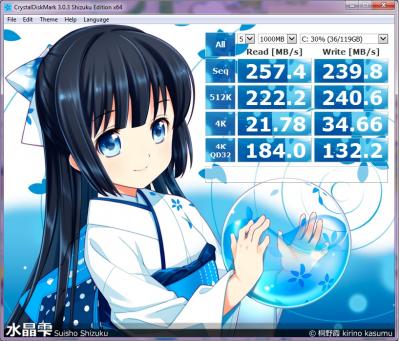
user posted image

this one issit?
horns
post Mar 9 2015, 09:46 PM

\m/
*******
Senior Member
3,038 posts

Joined: Nov 2009
QUOTE(limadekad @ Mar 9 2015, 09:19 PM)
user posted image

this one issit?
*
yes. just checked your mobo manual (i took a look at h71m-dgs; couldn't find h71-dgs at asrock website), the mobo has only sata2 ports. there is no sata3 ports.

from your diskmark test, your ssd is actually running at full sata2 speed. that's nothing wrong with it.
limadekad
post Mar 9 2015, 09:53 PM

:)
****
Senior Member
608 posts

Joined: Oct 2008
QUOTE(horns @ Mar 9 2015, 09:46 PM)
yes. just checked your mobo manual (i took a look at h71m-dgs; couldn't find h71-dgs at asrock website), the mobo has only sata2 ports. there is no sata3 ports.

from your diskmark test, your ssd is actually running at full sata2 speed. that's nothing wrong with it.
*
sorry it's h71m-dgs, my bad. so the speed i'm experiencing is perfectly normal? kinda disappointing though
NightFelix
post Mar 9 2015, 09:55 PM

Samsung Exynos
********
All Stars
17,467 posts

Joined: May 2008
From: Lazada


QUOTE(limadekad @ Mar 9 2015, 09:53 PM)
sorry it's h71m-dgs, my bad. so the speed i'm experiencing is perfectly normal? kinda disappointing though
*
Hmmm... My Plextor SSD can boot my Windows 7 in less than 10seconds, why can't yours? Hmmmm
SUSngkhanmein
post Mar 9 2015, 10:17 PM

カラカラ Karakara
*******
Senior Member
7,727 posts

Joined: Jan 2010
From: Ara Damansara, Petaling Jaya & Batu Pahat, Johor.


i didn't enable the asrock instant boot cos i worried too fast until i can't get used to it. brows.gif

so far less than 10 sec consider standard already.

This post has been edited by ngkhanmein: Mar 9 2015, 10:20 PM
horns
post Mar 9 2015, 11:05 PM

\m/
*******
Senior Member
3,038 posts

Joined: Nov 2009
QUOTE(limadekad @ Mar 9 2015, 09:53 PM)
sorry it's h71m-dgs, my bad. so the speed i'm experiencing is perfectly normal? kinda disappointing though
*
yes that's normal. it's the sata2 bottleneck that hinders the performance of your ssd.

don't get the wrong idea that when you have a ssd then you must be able to cold-boot it faster than a hdd, especially when you are running w8.x. (like TristanX pointed out, there are things that need time to load during boot time. the more hardware you put in, the long time it takes) the more important part imo is always when you use a computer, e.g. loading apps/games, and working on stuff. it should be more responsive than before with a ssd. sorry but i don't get the part that you are disappointing to have a ssd in your system.

QUOTE(NightFelix @ Mar 9 2015, 09:55 PM)
Hmmm... My Plextor SSD can boot my Windows 7 in less than 10seconds, why can't yours? Hmmmm
*
QUOTE(ngkhanmein @ Mar 9 2015, 10:17 PM)
i didn't enable the asrock instant boot cos i worried too fast until i can't get used to it. brows.gif

so far less than 10 sec consider standard already.
*
maybe you guys should share some pointers to limadekad on how you make it run fast smile.gif


limadekad
post Mar 10 2015, 11:11 AM

:)
****
Senior Member
608 posts

Joined: Oct 2008
QUOTE(horns @ Mar 9 2015, 11:05 PM)
yes that's normal. it's the sata2 bottleneck that hinders the performance of your ssd.

don't get the wrong idea that when you have a ssd then you must be able to cold-boot it faster than a hdd, especially when you are running w8.x. (like TristanX pointed out, there are things that need time to load during boot time. the more hardware you put in, the long time it takes) the more important part imo is always when you use a computer, e.g. loading apps/games, and working on stuff. it should be more responsive than before with a ssd. sorry but i don't get the part that you are disappointing to have a ssd in your system.
maybe you guys should share some pointers to limadekad on how you make it run fast smile.gif
*
well, i was hoping for a noticable speed bump when i upgraded my system with an ssd and additional ram.
what option do i have? upgrade my mobo?
NightFelix
post Mar 10 2015, 11:26 AM

Samsung Exynos
********
All Stars
17,467 posts

Joined: May 2008
From: Lazada


QUOTE(horns @ Mar 9 2015, 11:05 PM)
yes that's normal. it's the sata2 bottleneck that hinders the performance of your ssd.

don't get the wrong idea that when you have a ssd then you must be able to cold-boot it faster than a hdd, especially when you are running w8.x. (like TristanX pointed out, there are things that need time to load during boot time. the more hardware you put in, the long time it takes) the more important part imo is always when you use a computer, e.g. loading apps/games, and working on stuff. it should be more responsive than before with a ssd. sorry but i don't get the part that you are disappointing to have a ssd in your system.
maybe you guys should share some pointers to limadekad on how you make it run fast smile.gif
*
QUOTE(limadekad @ Mar 10 2015, 11:11 AM)
well, i was hoping for a noticable speed bump when i upgraded my system with an ssd and additional ram.
what option do i have? upgrade my mobo?
*
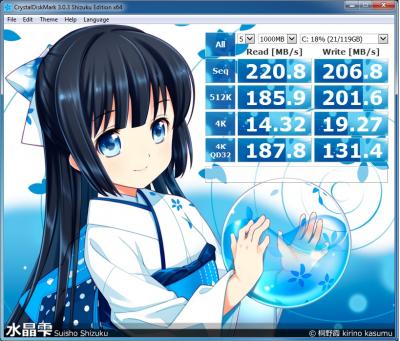
Here is mine result.
[attachmentid=4366479]
arifhasim85
post Mar 10 2015, 11:31 AM

Casual
***
Junior Member
351 posts

Joined: Sep 2010
From: alor setar, kedah


QUOTE(limadekad @ Mar 10 2015, 11:11 AM)
well, i was hoping for a noticable speed bump when i upgraded my system with an ssd and additional ram.
what option do i have? upgrade my mobo?
*
well tbh, the sata 2 port really holding you back.. your ssd should give double the speed especially the read speed of your current setup.. even a good hdd can give 150 - 190mb/s of read speed.. by just upgraded to 270mb/s of read speed, the speed gain is insignificant. since you already have a ssd, why not just get a mobo that can support sata 3 to fully utilize the ssd performance.. thumbup.gif
rav3n82
post Mar 10 2015, 12:10 PM

I find your lack of faith disturbing!
*******
Senior Member
7,084 posts

Joined: Feb 2011
From: Penang


QUOTE(NightFelix @ Mar 10 2015, 11:26 AM)
Here is mine result.
*
Which Plextor SSD are you using? Win 7 or 8?
NightFelix
post Mar 10 2015, 12:30 PM

Samsung Exynos
********
All Stars
17,467 posts

Joined: May 2008
From: Lazada


QUOTE(rav3n82 @ Mar 10 2015, 12:10 PM)
Which Plextor SSD are you using? Win 7 or 8?
*
Change mobo to support Sata3.

Mine is Win7 64Bits Ultimate. SSD Plextor 128GB M5Pro. You see me used up 72% still capable to boot my OS in less than 10seconds.
SUSngkhanmein
post Mar 10 2015, 12:34 PM

カラカラ Karakara
*******
Senior Member
7,727 posts

Joined: Jan 2010
From: Ara Damansara, Petaling Jaya & Batu Pahat, Johor.


QUOTE(limadekad @ Mar 10 2015, 11:11 AM)
well, i was hoping for a noticable speed bump when i upgraded my system with an ssd and additional ram.
what option do i have? upgrade my mobo?
*
check whether ur plug cable connected to sata 3 6gb/s & check ur bios setting. make sure is ACHI & SSD

enable TRIM
limadekad
post Mar 10 2015, 05:31 PM

:)
****
Senior Member
608 posts

Joined: Oct 2008
QUOTE(ngkhanmein @ Mar 10 2015, 12:34 PM)
check whether ur plug cable connected to sata 3 6gb/s & check ur bios setting. make sure is ACHI & SSD

enable TRIM
*
as mentioned by horns, my mobo only support sata 2. trim is enabled
SUSngkhanmein
post Mar 10 2015, 06:02 PM

カラカラ Karakara
*******
Senior Member
7,727 posts

Joined: Jan 2010
From: Ara Damansara, Petaling Jaya & Batu Pahat, Johor.


QUOTE(limadekad @ Mar 10 2015, 05:31 PM)
as mentioned by horns, my mobo only support sata 2. trim is enabled
*
if like that performance dropped half is normal. don't worry that much cos it still perform better than hdd.
NightFelix
post Mar 11 2015, 11:33 AM

Samsung Exynos
********
All Stars
17,467 posts

Joined: May 2008
From: Lazada


250GB Samsung EVO 850 @ US Amazon 99.00$ only. (30% discount from its original 149$)

This post has been edited by NightFelix: Mar 11 2015, 12:01 PM
Effy92
post Mar 11 2015, 11:57 AM

Getting Started
**
Junior Member
294 posts

Joined: Apr 2010
From: Malaysia


Hi, does Crucial M500 120gb is a good buy for Rm209?
kherel77
post Mar 11 2015, 11:59 AM

Noobie
******
Senior Member
1,435 posts

Joined: Apr 2011
From: Blank Space


QUOTE(limadekad @ Mar 10 2015, 05:31 PM)
as mentioned by horns, my mobo only support sata 2. trim is enabled
*
Should be grateful as your Liteon SSD + SATA2 is faster than mine; Agility3 + SATA3 notworthy.gif

user posted image
NightFelix
post Mar 11 2015, 12:00 PM

Samsung Exynos
********
All Stars
17,467 posts

Joined: May 2008
From: Lazada


QUOTE(Effy92 @ Mar 11 2015, 11:57 AM)
Hi,  does Crucial M500 120gb is a good buy for Rm209?
*
I think the price is standard one? no? hmm.gif
Effy92
post Mar 11 2015, 12:04 PM

Getting Started
**
Junior Member
294 posts

Joined: Apr 2010
From: Malaysia


Yea, just curious is there any other model better for rm200 ssd ?
NightFelix
post Mar 11 2015, 12:21 PM

Samsung Exynos
********
All Stars
17,467 posts

Joined: May 2008
From: Lazada


QUOTE(Effy92 @ Mar 11 2015, 12:04 PM)
Yea, just curious is there any other model better for rm200 ssd ?
*
LITE-ON 900S 128GB (M5PRO) is a rebadge Plextor products. RM240.
Effy92
post Mar 11 2015, 12:31 PM

Getting Started
**
Junior Member
294 posts

Joined: Apr 2010
From: Malaysia


QUOTE(NightFelix @ Mar 11 2015, 12:21 PM)
LITE-ON 900S 128GB (M5PRO) is a rebadge Plextor products. RM240.
*
I see, thanks for highlighting. icon_rolleyes.gif
cherroy
post Mar 11 2015, 02:25 PM

20k VIP Club
Group Icon
Staff
25,802 posts

Joined: Jan 2003
From: Penang


QUOTE(ngkhanmein @ Mar 10 2015, 06:02 PM)
if like that performance dropped half is normal. don't worry that much cos it still perform better than hdd.
*
I used SSD in a Sata 2 mobo to replace HDD (blue), the performance indeed show significant performance.
Loading window faster, opening program instantly instead waiting it loading, despite being bottled neck by Sata 2.
(even run in ide mode as the mobo showed significant lagging in detecting ACHI drive, don't know why, as well problem in detecting Cd-rom, so installed in IDE mode to give it a try).


Replacing HDD with SSD is one of most significant improvement that user can feel on the upgrade.


This post has been edited by cherroy: Mar 11 2015, 02:28 PM
limadekad
post Mar 11 2015, 04:05 PM

:)
****
Senior Member
608 posts

Joined: Oct 2008
QUOTE(arifhasim85 @ Mar 10 2015, 11:31 AM)
well tbh, the sata 2 port really holding you back.. your ssd should give double the speed especially the read speed of your current setup.. even a good hdd can give 150 - 190mb/s of read speed.. by just upgraded to 270mb/s of read speed, the speed gain is insignificant. since you already have a ssd, why not just get a mobo that can support sata 3 to fully utilize the ssd performance..  thumbup.gif
*
QUOTE(NightFelix @ Mar 10 2015, 12:30 PM)
Change mobo to support Sata3.

Mine is Win7 64Bits Ultimate. SSD Plextor 128GB M5Pro. You see me used up 72% still capable to boot my OS in less than 10seconds.
*
what mobo would you recommend? m-atx form factor if possible, and cheap.

QUOTE(cherroy @ Mar 11 2015, 02:25 PM)
I used SSD in a Sata 2 mobo to replace HDD (blue), the performance indeed show significant performance.
Loading window faster, opening program instantly instead waiting it loading, despite being bottled neck by Sata 2.
(even run in ide mode as the mobo showed significant lagging in detecting ACHI drive, don't know why, as well problem in detecting Cd-rom, so installed in IDE mode to give it a try).
Replacing HDD with SSD is one of most significant improvement that user can feel on the upgrade.
*
i dunno, i just don't feel the speed bump, maybe because i used to tweak the start-up for faster boot time. back in the old days when i upgraded my ram from 512mb to 2gb, the speed increase felt significant.
cherroy
post Mar 11 2015, 04:54 PM

20k VIP Club
Group Icon
Staff
25,802 posts

Joined: Jan 2003
From: Penang


QUOTE(limadekad @ Mar 11 2015, 04:05 PM)
what mobo would you recommend? m-atx form factor if possible, and cheap.
i dunno, i just don't feel the speed bump, maybe because i used to tweak the start-up for faster boot time. back in the old days when i upgraded my ram from 512mb to 2gb, the speed increase felt significant.
*
Loading window, won't be instant as with Sata 3, (have another Sata 3 with win 8.1, pretty fast, just press the button, wait a few second, can use already) but it reduces significant time, aka when window page appear time, you don't need to wait, instantly can click on program already, unlike in HDD, the mouse cursor still spinning in circle.
stromae
post Mar 11 2015, 05:07 PM

Getting Started
**
Junior Member
247 posts

Joined: Sep 2014
hi guys which is better...

my maximum budget is rm300..

LITE-ON 900S 128GB (M5PRO) 92K/82K 540/330 RM240

KINGSTON HYPER X 120G 20K/60K 555/510 RM275

TRANSCEND 370 128GB 75K/75K 570/470 RM219

PLEXTOR M6S 128GB 88K/75K 520/300 RM289

btw in my mind is transcend 370... btw my pc will bottleneck.. since still using SATA 3Gbps port..

thx..

TristanX
post Mar 11 2015, 05:11 PM

Where is my stars?
Group Icon
Elite
24,334 posts

Joined: Nov 2004
From: Setapak, Kuala Lumpur


QUOTE(stromae @ Mar 11 2015, 05:07 PM)
hi guys which is better...

my maximum budget is rm300..

LITE-ON 900S 128GB (M5PRO) 92K/82K 540/330 RM240

KINGSTON HYPER X 120G 20K/60K 555/510 RM275

TRANSCEND 370 128GB 75K/75K 570/470 RM219

PLEXTOR M6S 128GB 88K/75K 520/300 RM289

btw in my mind is transcend 370... btw my pc will bottleneck.. since still using SATA 3Gbps port..

thx..
*
Yeah, you can use the best SSD in the world and still bottleneck. Just get the cheapest. Unless you have upgrade plan for CPU and motherboard soon.
stromae
post Mar 11 2015, 05:22 PM

Getting Started
**
Junior Member
247 posts

Joined: Sep 2014
QUOTE(TristanX @ Mar 11 2015, 05:11 PM)
Yeah, you can use the best SSD in the world and still bottleneck. Just get the cheapest. Unless you have upgrade plan for CPU and motherboard soon.
*
i plan to change cmos battery on my mobo...already almost 7 years.. will it cause problem when i install windows/change on ssd.. thx
aliesterfiend
post Mar 11 2015, 05:38 PM

Red Dragon
******
Senior Member
1,193 posts

Joined: Mar 2008


This is my mobo. Can use SSD ?

http://www.foxconnchannel.com/ProductDetai...&U=en-us0000520
NightFelix
post Mar 11 2015, 06:04 PM

Samsung Exynos
********
All Stars
17,467 posts

Joined: May 2008
From: Lazada


QUOTE(limadekad @ Mar 11 2015, 04:05 PM)
what mobo would you recommend? m-atx form factor if possible, and cheap.
i dunno, i just don't feel the speed bump, maybe because i used to tweak the start-up for faster boot time. back in the old days when i upgraded my ram from 512mb to 2gb, the speed increase felt significant.
*
Try ask Sifu here for quicker responds about the hardware recommendation. smile.gif
Rig Suggestion Q&A Thread V8!

QUOTE(stromae @ Mar 11 2015, 05:22 PM)
i plan to change cmos battery on my mobo...already almost 7 years.. will it cause problem when i install windows/change on ssd.. thx
*
I thought changing CMOS battery only effect all date/time only? hmm.gif
air_pull91
post Mar 11 2015, 07:42 PM

Getting Started
**
Junior Member
275 posts

Joined: Sep 2011
hi guy..
i use raid 0 for my ssd but partition it for OS and games..
does it ok or it will decrease the speed read/write performance?
or i should use ram cache only?
btw, im using 2x samsung 840 pro 128gb (raid 0)
horns
post Mar 11 2015, 07:50 PM

\m/
*******
Senior Member
3,038 posts

Joined: Nov 2009
QUOTE(limadekad @ Mar 10 2015, 11:11 AM)
well, i was hoping for a noticable speed bump when i upgraded my system with an ssd and additional ram.
what option do i have? upgrade my mobo?
*
i did use ssd with sata2 connections before. like others pointed out, it's still better than a hdd, because what matters most is the user experience when you use a computer. hdd is the slowest storage component in a computer. it has very low iops that results in much lower responsiveness than ssd.

no, ram upgrade (8gb and above) will not show significant performance improvements as much as ssd upgrade.

QUOTE(stromae @ Mar 11 2015, 05:07 PM)
hi guys which is better...

my maximum budget is rm300..

LITE-ON 900S 128GB (M5PRO) 92K/82K 540/330 RM240

KINGSTON HYPER X 120G 20K/60K 555/510 RM275

TRANSCEND 370 128GB 75K/75K 570/470 RM219

PLEXTOR M6S 128GB 88K/75K 520/300 RM289

btw in my mind is transcend 370... btw my pc will bottleneck.. since still using SATA 3Gbps port..

thx..
*
like what TristanX said, just get the cheaper ones will do (liteon or transcend).

arifhasim85
post Mar 11 2015, 08:05 PM

Casual
***
Junior Member
351 posts

Joined: Sep 2010
From: alor setar, kedah


QUOTE(stromae @ Mar 11 2015, 05:07 PM)
hi guys which is better...

my maximum budget is rm300..

LITE-ON 900S 128GB (M5PRO) 92K/82K 540/330 RM240

KINGSTON HYPER X 120G 20K/60K 555/510 RM275

TRANSCEND 370 128GB 75K/75K 570/470 RM219

PLEXTOR M6S 128GB 88K/75K 520/300 RM289

btw in my mind is transcend 370... btw my pc will bottleneck.. since still using SATA 3Gbps port..

thx..
*
please be noted that transcend ssd370 128gb version have write speed kinda low.. only at 170mb/s.. 470mb/s write is only for 512gb and 1tb version. i think the best is lite-on 900s 128gb.

edit: source http://www.anandtech.com/show/8792/transce...gb-512gb-review

This post has been edited by arifhasim85: Mar 11 2015, 08:06 PM
stromae
post Mar 11 2015, 08:15 PM

Getting Started
**
Junior Member
247 posts

Joined: Sep 2014
QUOTE(arifhasim85 @ Mar 11 2015, 08:05 PM)
please be noted that transcend ssd370 128gb version have write speed kinda low.. only at 170mb/s.. 470mb/s write is only for 512gb and 1tb version. i think the best is lite-on 900s 128gb.

edit: source http://www.anandtech.com/show/8792/transce...gb-512gb-review
*
actually i compare this 2.. btw thx..
horns
post Mar 11 2015, 08:19 PM

\m/
*******
Senior Member
3,038 posts

Joined: Nov 2009
QUOTE(arifhasim85 @ Mar 11 2015, 08:05 PM)
please be noted that transcend ssd370 128gb version have write speed kinda low.. only at 170mb/s.. 470mb/s write is only for 512gb and 1tb version. i think the best is lite-on 900s 128gb.

edit: source http://www.anandtech.com/show/8792/transce...gb-512gb-review
*
Nice thanks for bringing this up smile.gif i thought of editing my previous post but you have answered it lol!

Edit: when i checked out the recent garage sales threads, i stumbled upon a seller who offers the pcie m.2 ssd adapter by asus, which is compatible upto pcie 3.0 x4 nvme ssd. If your mobo doesn't have a m.2 slot, you can use this adapter to mount and run it. For better effects you can add a heat sink on top of your ssd. (I am thinking of using plastic clips or rubber bands to secure it hehe)

This post has been edited by horns: Mar 11 2015, 08:35 PM
Momo2014
post Mar 11 2015, 09:58 PM

Getting Started
**
Junior Member
85 posts

Joined: Dec 2014
Hi,will be getting my first ssd and would like to know if buying an Intel 530 120gb is still worth even though it is quite old.
Lotus1109
post Mar 11 2015, 10:08 PM

Regular
******
Senior Member
1,124 posts

Joined: Feb 2011


QUOTE(NightFelix @ Mar 11 2015, 11:33 AM)
250GB Samsung EVO 850 @ US Amazon 99.00$ only. (30% discount from its original 149$)
*
thanks for sharing this but my question is, does it cover warranty in Malaysia so that I don't have to send back to US if something happen to it?

so far in my mind I know intel 730 and sandisk extreme cover int warranty...
andykok
post Mar 11 2015, 11:46 PM

Getting Started
**
Junior Member
240 posts

Joined: Feb 2014
QUOTE(Momo2014 @ Mar 11 2015, 09:58 PM)
Hi,will be getting my first ssd and would like to know if buying an Intel 530 120gb is still worth even though it is quite old.
*
enough . although speed is not the fastest but not the slowest, but very reliable ssd.
jump from hdd to ssd, i will feel like wao ~
NightFelix
post Mar 11 2015, 11:57 PM

Samsung Exynos
********
All Stars
17,467 posts

Joined: May 2008
From: Lazada


QUOTE(Lotus1109 @ Mar 11 2015, 10:08 PM)
thanks for sharing this but my question is, does it cover warranty in Malaysia so that I don't have to send back to US if something happen to it?

so far in my mind I know intel 730 and sandisk extreme cover int warranty...
*
No idea.. By the way, they just reduce from 30% to 23% today.
Momo2014
post Mar 12 2015, 09:03 PM

Getting Started
**
Junior Member
85 posts

Joined: Dec 2014
Hi,need to ask how to install windows again on a new ssd.I want to do a clean install.I'm on a laptop that came with windows 8.Will I just need to replace my hdd and then put ssd and install windows?What I'm confused is if I can still reinstall the oem w8 that came with my laptop into my new ssd.I heard it is tied to the motherboard.
marfccy
post Mar 12 2015, 09:12 PM

Le Ponyland!!!
*******
Senior Member
4,254 posts

Joined: Nov 2011


QUOTE(Momo2014 @ Mar 12 2015, 09:03 PM)
Hi,need to ask how to install windows again on a new ssd.I want to do a clean install.I'm on a laptop that came with windows 8.Will I just need to replace my hdd and then put ssd and install windows?What I'm confused is if I can still reinstall the oem w8 that came with my laptop into my new ssd.I heard it is tied to the motherboard.
*
are you installing from pendrive or old school DVDs?

just remove old HDD, plug in SSD, run the laptop, select boot device as pendrive/DVD, then its pretty much straightforward already

as for the windows to motherboard, youre still using the same motherboard, i dont see an issue unless youre reusing old key for new PC
Momo2014
post Mar 12 2015, 09:18 PM

Getting Started
**
Junior Member
85 posts

Joined: Dec 2014
QUOTE(marfccy @ Mar 12 2015, 09:12 PM)
are you installing from pendrive or old school DVDs?

just remove old HDD, plug in SSD, run the laptop, select boot device as pendrive/DVD, then its pretty much straightforward already

as for the windows to motherboard, youre still using the same motherboard, i dont see an issue unless youre reusing old key for new PC
*
So I need to download a copy of w8 and put it on a pendrive?and when installing it will automatically detect the cd key?
marfccy
post Mar 12 2015, 09:24 PM

Le Ponyland!!!
*******
Senior Member
4,254 posts

Joined: Nov 2011


QUOTE(Momo2014 @ Mar 12 2015, 09:18 PM)
So I need to download a copy of w8 and put it on a pendrive?and when installing it will automatically detect the cd key?
*
yes you need to if youre opting for fresh installation. and not just copy and paste into the pendrive, youll need to 'prep' the pendrive first. use the Windows 7 USB Tool (works with W8)

CD key wise, no. youll need your own set to input before installing
Momo2014
post Mar 12 2015, 09:40 PM

Getting Started
**
Junior Member
85 posts

Joined: Dec 2014
How do I find my w8 cd key?
DeepMemory
post Mar 12 2015, 10:36 PM

Regular
******
Senior Member
1,805 posts

Joined: Oct 2010
QUOTE(Momo2014 @ Mar 12 2015, 09:40 PM)
How do I find my w8 cd key?
*
If you are using the oem Windows 8.1 it will automatically activate or you need to go to control panel to activate it. Else the key is at the bottom of your laptop.
horns
post Mar 12 2015, 11:35 PM

\m/
*******
Senior Member
3,038 posts

Joined: Nov 2009
QUOTE(Momo2014 @ Mar 12 2015, 09:03 PM)
Hi,need to ask how to install windows again on a new ssd.I want to do a clean install.I'm on a laptop that came with windows 8.Will I just need to replace my hdd and then put ssd and install windows?What I'm confused is if I can still reinstall the oem w8 that came with my laptop into my new ssd.I heard it is tied to the motherboard.
*
QUOTE(Momo2014 @ Mar 12 2015, 09:40 PM)
How do I find my w8 cd key?
*
the better way to install os is to use usb drive. it's much faster, and is usually error-free.

first of all, run slmgr /dlv in admin command prompt, it will tell you which version of w8 the laptop is running on. the common ones are windows core, or single language. the laptop should run in uefi mode (gpt disk type). for new ssd, you just let the windows install media to do the job for you (make the ssd a gpt disk, and populate the appropriate partitions for uefi install). the key step to install windows in uefi mode is to use fat32-formatted usb drive, and extract the contents of downloaded w8 iso (the correct version based on the results of slmgr), and use the usb drive to install the os. (alternatively you can use marfccy's way to do it too) when you boot, select uefi type of your usb drive. (it will be labelled as something like 'uefi: <usb.drive.name>' in the boot media selection menu) by default, as long as you are using the right windows version, the key in bios will be used automatically during the installation.

as for cd key, machines that come with w8 or above don't have stickers under the laptop or inside the battery compartment anymore. it's embedded in the bios. you can use belarc advisor or rweverything to view it. (for backup purposes) if somehow you cannot activate the windows with this key, you can call microsoft for help. (did this before)

QUOTE(marfccy @ Mar 12 2015, 09:24 PM)
yes you need to if youre opting for fresh installation. and not just copy and paste into the pendrive, youll need to 'prep' the pendrive first. use the Windows 7 USB Tool (works with W8)

CD key wise, no. youll need your own set to input before installing
*
no, there is no need to prep imo. you can actually format the usb drive with fat32 (for uefi mode installation; or ntfs for bios mode installation), then extract the contents of w8 iso into the drive. the structure since w8 can boot in uefi or bios mode depending on the type of filesystem format. for w7, you can do the same but an additional firmware file must be put in the right directory structure to make it work.

Momo2014
post Mar 13 2015, 07:11 AM

Getting Started
**
Junior Member
85 posts

Joined: Dec 2014
QUOTE(horns @ Mar 12 2015, 11:35 PM)
the better way to install os is to use usb drive. it's much faster, and is usually error-free.

first of all, run slmgr /dlv in admin command prompt, it will tell you which version of w8 the laptop is running on. the common ones are windows core, or single language. the laptop should run in uefi mode (gpt disk type). for new ssd, you just let the windows install media to do the job for you (make the ssd a gpt disk, and populate the appropriate partitions for uefi install). the key step to install windows in uefi mode is to use fat32-formatted usb drive, and extract the contents of downloaded w8 iso (the correct version based on the results of slmgr), and use the usb drive to install the os. (alternatively you can use marfccy's way to do it too) when you boot, select uefi type of your usb drive. (it will be labelled as something like 'uefi: <usb.drive.name>' in the boot media selection menu) by default, as long as you are using the right windows version, the key in bios will be used automatically during the installation.

as for cd key, machines that come with w8 or above don't have stickers under the laptop or inside the battery compartment anymore. it's embedded in the bios. you can use belarc advisor or rweverything to view it. (for backup purposes) if somehow you cannot activate the windows with this key, you can call microsoft for help. (did this before)
no, there is no need to prep imo. you can actually format the usb drive with fat32 (for uefi mode installation; or ntfs for bios mode installation), then extract the contents of w8 iso into the drive. the structure since w8 can boot in uefi or bios mode depending on the type of filesystem format. for w7, you can do the same but an additional firmware file must be put in the right directory structure to make it work.
*
Ok tthank you very much
NightFelix
post Mar 13 2015, 08:19 AM

Samsung Exynos
********
All Stars
17,467 posts

Joined: May 2008
From: Lazada


QUOTE(horns @ Mar 12 2015, 11:35 PM)
the better way to install os is to use usb drive. it's much faster, and is usually error-free.

first of all, run slmgr /dlv in admin command prompt, it will tell you which version of w8 the laptop is running on. the common ones are windows core, or single language. the laptop should run in uefi mode (gpt disk type). for new ssd, you just let the windows install media to do the job for you (make the ssd a gpt disk, and populate the appropriate partitions for uefi install). the key step to install windows in uefi mode is to use fat32-formatted usb drive, and extract the contents of downloaded w8 iso (the correct version based on the results of slmgr), and use the usb drive to install the os. (alternatively you can use marfccy's way to do it too) when you boot, select uefi type of your usb drive. (it will be labelled as something like 'uefi: <usb.drive.name>' in the boot media selection menu) by default, as long as you are using the right windows version, the key in bios will be used automatically during the installation.

as for cd key, machines that come with w8 or above don't have stickers under the laptop or inside the battery compartment anymore. it's embedded in the bios. you can use belarc advisor or rweverything to view it. (for backup purposes) if somehow you cannot activate the windows with this key, you can call microsoft for help. (did this before)
no, there is no need to prep imo. you can actually format the usb drive with fat32 (for uefi mode installation; or ntfs for bios mode installation), then extract the contents of w8 iso into the drive. the structure since w8 can boot in uefi or bios mode depending on the type of filesystem format. for w7, you can do the same but an additional firmware file must be put in the right directory structure to make it work.
*
Great advice, I thought we were not able to retrieve the embedded win8 key.
horns
post Mar 13 2015, 09:30 AM

\m/
*******
Senior Member
3,038 posts

Joined: Nov 2009
QUOTE(Momo2014 @ Mar 13 2015, 07:11 AM)
Ok tthank you very much
*
no problem. once you have completed all the driver install and windows updates, have windows activated, and have essential applications installed and updated, and confirmed everything is working fine, you can create a system image using the built-in tool. the apparent advantage of this method is to create a working snapshot of the os in its up-to-date form. this way, you do not need to go through all software installs, updates and patches again and again. (it's gigabytes these days, so it's a rather painful and time-consuming process) note that the windows activation tokens are also preserved in this process, so you don't need to call up Microsoft every time you do the system restore. all things that you need can be restored with less time, if something bad happens.

all you need is an external storage for system images, and a bootable and compatible windows install media.

QUOTE(NightFelix @ Mar 13 2015, 08:19 AM)
Great advice, I thought we were not able to retrieve the embedded win8 key.
*
haha yeah i thought the same initially, until i searched the web out of curiosity lol
NightFelix
post Mar 13 2015, 11:15 AM

Samsung Exynos
********
All Stars
17,467 posts

Joined: May 2008
From: Lazada


QUOTE(horns @ Mar 13 2015, 09:30 AM)
no problem. once you have completed all the driver install and windows updates, have windows activated, and have essential applications installed and updated, and confirmed everything is working fine, you can create a system image using the built-in tool. the apparent advantage of this method is to create a working snapshot of the os in its up-to-date form. this way, you do not need to go through all software installs, updates and patches again and again. (it's gigabytes these days, so it's a rather painful and time-consuming process) note that the windows activation tokens are also preserved in this process, so you don't need to call up Microsoft every time you do the system restore. all things that you need can be restored with less time, if something bad happens.

all you need is an external storage for system images, and a bootable and compatible windows install media.
haha yeah i thought the same initially, until i searched the web out of curiosity lol
*
Talking about we use create system image on previous HDD/SSD using Windows built-in-tool, what was the software name? hmm.gif

And also, why not we use 3rd Party Software like Clonezilla? hmm.gif
SUSngkhanmein
post Mar 13 2015, 11:50 AM

カラカラ Karakara
*******
Senior Member
7,727 posts

Joined: Jan 2010
From: Ara Damansara, Petaling Jaya & Batu Pahat, Johor.


https://rufus.akeo.ie/
horns
post Mar 13 2015, 11:58 AM

\m/
*******
Senior Member
3,038 posts

Joined: Nov 2009
QUOTE(NightFelix @ Mar 13 2015, 11:15 AM)
Talking about we use create system image on previous HDD/SSD using Windows built-in-tool, what was the software name? hmm.gif

And also, why not we use 3rd Party Software like Clonezilla? hmm.gif
*
i use administrative powershell command, wbAdmin. the actual command is 'wbAdmin start backup -backupTarget:<target.backup.drive.letter>: -include:C: -allCritical -quiet' (without quotes)

change <target.backup.drive.letter> to the location where you wanna store your system image (e.g. external hdd). it's better to store at the top level, i.e. x:\, assuming your external drive has a drive letter of x) what it does is to back up the os, and related system partitions only, without anything else (i.e. the minimum to restore a working system)

actually i don't use the gui version. it's in the control panel (for w8.1, it's under file history, click on system image backup to proceed)

yes you can use other software for the same purpose. to me the tool is built-in and it preserves everything i need, including system tweaks, ram cache and ram disk. so i just use it all the times biggrin.gif
NightFelix
post Mar 13 2015, 11:58 AM

Samsung Exynos
********
All Stars
17,467 posts

Joined: May 2008
From: Lazada


QUOTE(ngkhanmein @ Mar 13 2015, 11:50 AM)
This can backup our current system image and create a bootable? hmm.gif
SUSngkhanmein
post Mar 13 2015, 12:18 PM

カラカラ Karakara
*******
Senior Member
7,727 posts

Joined: Jan 2010
From: Ara Damansara, Petaling Jaya & Batu Pahat, Johor.


guys, should i enable or disable? Optimize Start Menu Cache Files

can cause any harm to ssd?


did u guys disable superfetch & prefetch on win8.1?

This post has been edited by ngkhanmein: Mar 13 2015, 12:22 PM
horns
post Mar 13 2015, 12:38 PM

\m/
*******
Senior Member
3,038 posts

Joined: Nov 2009
QUOTE(ngkhanmein @ Mar 13 2015, 12:18 PM)
guys, should i enable or disable? Optimize Start Menu Cache Files

can cause any harm to ssd?

did u guys disable superfetch & prefetch on win8.1?
*
tbh there is no serious harm done without disabling this. without it the system still runs fine and as speedy as what i want. to me it's better to disable them. (save some writes)

yes i have disabled those too. apart from that, i move user temporary folder to ram disk. there are a lot of background writes that make use of temp folders that we are not aware of in daily use. these temp files are usually can be discarded safely upon reboot.

SUSngkhanmein
post Mar 13 2015, 02:06 PM

カラカラ Karakara
*******
Senior Member
7,727 posts

Joined: Jan 2010
From: Ara Damansara, Petaling Jaya & Batu Pahat, Johor.


QUOTE(horns @ Mar 13 2015, 12:38 PM)
tbh there is no serious harm done without disabling this. without it the system still runs fine and as speedy as what i want. to me it's better to disable them. (save some writes)

yes i have disabled those too. apart from that, i move user temporary folder to ram disk. there are a lot of background writes that make use of temp folders that we are not aware of in daily use. these temp files are usually can be discarded safely upon reboot.
*
but i thought it auto disable for ssd on win8.1 whereas we still got hdd that need superfetch & prefetch rite? i know no improvement for ssd but hdd got different.
1024kbps
post Mar 13 2015, 02:21 PM

李素裳
*******
Senior Member
6,012 posts

Joined: Feb 2007


QUOTE(NightFelix @ Mar 13 2015, 11:58 AM)
This can backup our current system image and create a bootable? hmm.gif
*
Juse use Acronis TrueImage WD edition, or windows own backup utility.
The Rufus one only can create bootable disk from Windows 7/8 disc or Linux discs.
NightFelix
post Mar 13 2015, 02:35 PM

Samsung Exynos
********
All Stars
17,467 posts

Joined: May 2008
From: Lazada


QUOTE(horns @ Mar 13 2015, 12:38 PM)
tbh there is no serious harm done without disabling this. without it the system still runs fine and as speedy as what i want. to me it's better to disable them. (save some writes)

yes i have disabled those too. apart from that, i move user temporary folder to ram disk. there are a lot of background writes that make use of temp folders that we are not aware of in daily use. these temp files are usually can be discarded safely upon reboot.
*
Maybe I should move my temporary file to ram too. I got 16GB RAM while with 128GB SSD as my primary SSD partition.

QUOTE(1024kbps @ Mar 13 2015, 02:21 PM)
Juse use Acronis TrueImage WD edition, or windows own backup utility.
The Rufus one only can create bootable disk from Windows 7/8 disc or Linux discs.
*
Thank you. I will look into it.
horns
post Mar 13 2015, 04:31 PM

\m/
*******
Senior Member
3,038 posts

Joined: Nov 2009
QUOTE(ngkhanmein @ Mar 13 2015, 02:06 PM)
but i thought it auto disable for ssd on win8.1 whereas we still got hdd that need superfetch & prefetch rite? i know no improvement for ssd but hdd got different.
*
I am not sure because it's my routine to disable them first after fresh install, along with system restore.

QUOTE(NightFelix @ Mar 13 2015, 02:35 PM)
Maybe I should move my temporary file to ram too. I got 16GB RAM while with 128GB SSD as my primary SSD partition.

*
I think you should. You can start with 1 or 2gb ram disk. You should also move web browser cache locations to it.

I suggest softperfect ramdisk, free, very easy to set it up, one of the fastest.
SUSngkhanmein
post Mar 13 2015, 04:45 PM

カラカラ Karakara
*******
Senior Member
7,727 posts

Joined: Jan 2010
From: Ara Damansara, Petaling Jaya & Batu Pahat, Johor.


QUOTE(horns @ Mar 13 2015, 04:31 PM)
I am not sure because it's my routine to disable them first after fresh install, along with system restore.
I think you should. You can start with 1 or 2gb ram disk. You should also move web browser cache locations to it.

I suggest softperfect ramdisk, free, very easy to set it up, one of the fastest.
*
by the way, i also disable superfetch & prefetch laugh.gif

This post has been edited by ngkhanmein: Mar 13 2015, 04:45 PM
horns
post Mar 14 2015, 09:15 AM

\m/
*******
Senior Member
3,038 posts

Joined: Nov 2009
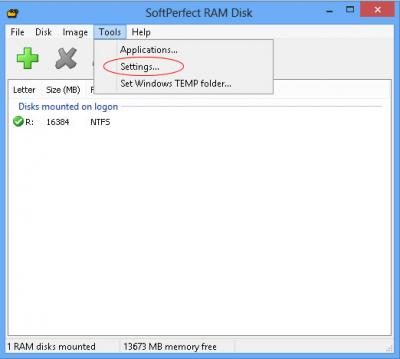
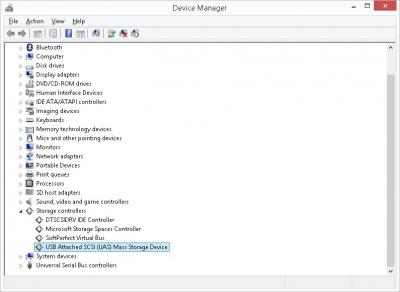
off-topic notes: how to set up a ram disk with softperfect ram disk. this is for those who are interested in doing so.

what you need and do is very simple:

1. install the software and create a ramdisk, and set it up accordingly; the size is up to you. you can start with a small one, then adjust it when it's insufficient for your usage.

Attached Image
Attached Image
Attached Image
Attached Image
Attached Image
Attached Image

2. map user temporary folder, and web broswer cache folders to ram disk.

note that i use the option that creates the ramdisk and directory structures on-the-fly; i do not create a ramdisk image that can be reused (i.e. preserve the state of ram disk contents and reloaded upon next boot). to me, this is good enough. please consult the user manual for more complex setups.
slimfox
post Mar 14 2015, 10:00 AM

Casual
***
Junior Member
392 posts

Joined: Dec 2010


QUOTE(horns @ Mar 14 2015, 09:15 AM)
off-topic notes: how to set up a ram disk with softperfect ram disk. this is for those who are interested in doing so.
» Click to show Spoiler - click again to hide... «

*
Thanks. So your pagefile is still in c:?
horns
post Mar 14 2015, 10:12 AM

\m/
*******
Senior Member
3,038 posts

Joined: Nov 2009
QUOTE(slimfox @ Mar 14 2015, 10:00 AM)
Thanks. So your pagefile is still in c:?
*
my pagefile is 0. i haven't faced any issues for some years now without pagefile. i have 32gb of ram. i do adjustments according to my ram usage, i.e. i turn my ram disk, ram cache off if i need to. so far so good.

edit: to be safer, you can adjust the pagefile size accordingly until the level that you don't have problems running anything (in this case, the pagefile is in ssd). you can start with a minimal 1gb. or, you can also move it to hdd. (less optimal but you can put it as large as you want biggrin.gif)

This post has been edited by horns: Mar 14 2015, 10:25 AM
skylinelover
post Mar 14 2015, 10:24 AM

Future Crypto Player😄👊Driver Abamsado😎😎
********
All Stars
11,245 posts

Joined: Jul 2005
Lolz. Looks like i need 2 add more ram 4 trying out this ram disk thing. The more the merrier. laugh.gif rclxms.gif
horns
post Mar 14 2015, 10:34 AM

\m/
*******
Senior Member
3,038 posts

Joined: Nov 2009
QUOTE(skylinelover @ Mar 14 2015, 10:24 AM)
Lolz. Looks like i need 2 add more ram 4 trying out this ram disk thing. The more the merrier. laugh.gif rclxms.gif
*
yeah the idea is to make full use of excess resources in the system to make it run smoother, but please don't do this for the sake of using ram disk only. to me ram disk is a bonus when i don't use a lot of ram for my work. my common usage only requires 8gb, so i have plenty to play with hehe

edit: finally, they are all dead now, http://techreport.com/review/27909/the-ssd...theyre-all-dead


This post has been edited by horns: Mar 14 2015, 10:40 AM
icecreamcake
post Mar 14 2015, 12:58 PM

Casual
***
Junior Member
307 posts

Joined: Aug 2012
I plan to get a liteon s900 256gb next week, and put inisde my laptop.

The question is since my laptop is dos version, after i replace my hdd to ssd and insert a win7 dvd to fresh install, do i need to optimize any things to fully utilize the ssd??
SUSngkhanmein
post Mar 14 2015, 03:24 PM

カラカラ Karakara
*******
Senior Member
7,727 posts

Joined: Jan 2010
From: Ara Damansara, Petaling Jaya & Batu Pahat, Johor.


QUOTE(skylinelover @ Mar 14 2015, 10:24 AM)
Lolz. Looks like i need 2 add more ram 4 trying out this ram disk thing. The more the merrier. laugh.gif rclxms.gif
*
currently i got 8gb ram only. wait i add another 8gb only can try with dataram ramdisk but it is worth? hmm.gif

http://www.ghacks.net/2010/06/10/use-a-ram...d-state-drives/

This post has been edited by ngkhanmein: Mar 14 2015, 03:40 PM
horns
post Mar 14 2015, 03:38 PM

\m/
*******
Senior Member
3,038 posts

Joined: Nov 2009
QUOTE(icecreamcake @ Mar 14 2015, 12:58 PM)
I plan to get a liteon s900 256gb next week, and put inisde my laptop.

The question is since my laptop is dos version, after i replace my hdd to ssd and insert a win7 dvd to fresh install, do i need to optimize any things to fully utilize the ssd??
*
yes you do. check out the first post for more information. actually, the first few posts have all the basic but good information that you can learn about ssd.
skylinelover
post Mar 14 2015, 07:44 PM

Future Crypto Player😄👊Driver Abamsado😎😎
********
All Stars
11,245 posts

Joined: Jul 2005
QUOTE(ngkhanmein @ Mar 14 2015, 03:24 PM)
currently i got 8gb ram only. wait i add another 8gb only can try with dataram ramdisk but it is worth? hmm.gif

http://www.ghacks.net/2010/06/10/use-a-ram...d-state-drives/
*
itchy hands here laugh.gif doh.gif so i create this already with RAMDISK utility haha

[attachmentid=4372609]

This post has been edited by skylinelover: Mar 14 2015, 07:45 PM
SUSngkhanmein
post Mar 14 2015, 08:41 PM

カラカラ Karakara
*******
Senior Member
7,727 posts

Joined: Jan 2010
From: Ara Damansara, Petaling Jaya & Batu Pahat, Johor.


QUOTE(skylinelover @ Mar 14 2015, 07:44 PM)
itchy hands here laugh.gif doh.gif so i create this already with RAMDISK utility haha

[attachmentid=4372609]
*
haha lazy but now i enable superfetch & prefetch. since ssd can last quite long so i don't care.
air_pull91
post Mar 14 2015, 09:30 PM

Getting Started
**
Junior Member
275 posts

Joined: Sep 2011
is it ok if i use 2GB from 4GB ram available?
i use old laptop with sata2 port only..

This post has been edited by air_pull91: Mar 14 2015, 09:30 PM
horns
post Mar 14 2015, 09:37 PM

\m/
*******
Senior Member
3,038 posts

Joined: Nov 2009
QUOTE(air_pull91 @ Mar 14 2015, 09:30 PM)
is it ok if i use 2GB from 4GB ram available?
i use old laptop with sata2 port only..
*
no it's better don't :/ you must have more than enough system ram first, then you can consider using ram disk.
skylinelover
post Mar 15 2015, 10:35 AM

Future Crypto Player😄👊Driver Abamsado😎😎
********
All Stars
11,245 posts

Joined: Jul 2005
QUOTE(air_pull91 @ Mar 14 2015, 09:30 PM)
is it ok if i use 2GB from 4GB ram available?
i use old laptop with sata2 port only..
*
2gb out of 8gb should be safe haha
SUSngkhanmein
post Mar 15 2015, 01:44 PM

カラカラ Karakara
*******
Senior Member
7,727 posts

Joined: Jan 2010
From: Ara Damansara, Petaling Jaya & Batu Pahat, Johor.


QUOTE(skylinelover @ Mar 15 2015, 10:35 AM)
2gb out of 8gb should be safe haha
*
ramdisk suitable for those who got extra more ram. i still thinking whether to sell my ram & buy another 2x8gb kit.
makky
post Mar 15 2015, 10:04 PM

Casual
***
Junior Member
314 posts

Joined: Jul 2009


Rm199 for liteon 128gb ok or not? My pc setup almost finish without harddrive or ssd only...if i using pc only 3 hour a day for web surfing and some game, how long the ssd would last?
SUSngkhanmein
post Mar 15 2015, 10:10 PM

カラカラ Karakara
*******
Senior Member
7,727 posts

Joined: Jan 2010
From: Ara Damansara, Petaling Jaya & Batu Pahat, Johor.


QUOTE(makky @ Mar 15 2015, 10:04 PM)
Rm199 for liteon 128gb ok or not? My pc setup almost finish without harddrive or ssd only...if i using pc only 3 hour a day for web surfing and some game, how long the ssd would last?
*
don't worry that much just enjoy. let them take ur money & everything talk later. thumbup.gif
DeepMemory
post Mar 15 2015, 10:40 PM

Regular
******
Senior Member
1,805 posts

Joined: Oct 2010
QUOTE(makky @ Mar 15 2015, 10:04 PM)
Rm199 for liteon 128gb ok or not? My pc setup almost finish without harddrive or ssd only...if i using pc only 3 hour a day for web surfing and some game, how long the ssd would last?
*
The price for the LiteOn S900 is very good. The SSD will last longer than you expect so no worries. Anyways, mind sharing where you get to buy the ssd at that price? tongue.gif
horns
post Mar 15 2015, 11:37 PM

\m/
*******
Senior Member
3,038 posts

Joined: Nov 2009
QUOTE(makky @ Mar 15 2015, 10:04 PM)
Rm199 for liteon 128gb ok or not? My pc setup almost finish without harddrive or ssd only...if i using pc only 3 hour a day for web surfing and some game, how long the ssd would last?
*
don't worry about the lifespan. with that usage, plus proper ssd optimizations, it will last for quite some times. it's better to go for 256gb. it has more space for you.
SSJBen
post Mar 15 2015, 11:47 PM

Stars deez nuts.
*******
Senior Member
4,522 posts

Joined: Apr 2006


Oh God, people need to stop being so paranoid about SSD life... like seriously, stop.

http://techreport.com/review/27909/the-ssd...eyre-all-dead/4

This post has been edited by SSJBen: Mar 15 2015, 11:47 PM
SUSHuman10
post Mar 16 2015, 02:02 AM

Look at all my stars!!
*******
Senior Member
6,774 posts

Joined: Nov 2010
QUOTE(SSJBen @ Mar 15 2015, 11:47 PM)
Oh God, people need to stop being so paranoid about SSD life... like seriously, stop.

http://techreport.com/review/27909/the-ssd...eyre-all-dead/4
*
Haha, lastly the experiment came to an end... sweat.gif

But it do sounds some warning, particularly for Samsung's drive. Both their drives (TLC and MLC) suffered from spontaneous failure without pre-warning, that is something to take note bout though.
horns
post Mar 16 2015, 08:40 AM

\m/
*******
Senior Member
3,038 posts

Joined: Nov 2009
QUOTE(SSJBen @ Mar 15 2015, 11:47 PM)
Oh God, people need to stop being so paranoid about SSD life... like seriously, stop.

http://techreport.com/review/27909/the-ssd...eyre-all-dead/4
*
right biggrin.gif imo the abuse of "limited lifespan" without giving a meaningful context of how long it is kind of the main reason of why people keep asking about this.

There are many such persons. I just hope they can one day get the facts right lol!

QUOTE(Human10 @ Mar 16 2015, 02:02 AM)
Haha, lastly the experiment came to an end... sweat.gif

But it do sounds some warning, particularly for Samsung's drive. Both their drives (TLC and MLC) suffered from spontaneous failure without pre-warning, that is something to take note bout though.
*
I think they will be retired long before that point of time is reached.

SSJBen
post Mar 16 2015, 08:49 AM

Stars deez nuts.
*******
Senior Member
4,522 posts

Joined: Apr 2006


QUOTE(Human10 @ Mar 16 2015, 02:02 AM)
Haha, lastly the experiment came to an end... sweat.gif

But it do sounds some warning, particularly for Samsung's drive. Both their drives (TLC and MLC) suffered from spontaneous failure without pre-warning, that is something to take note bout though.
*
True, but that's after how many TB of writes? Their testing conditions were continuous, for nearly 18 months. In a typical consumer work load, even for those who torrent 24/7 will not reach that kind of writes any time soon.

Apply the same kind of continuous workload on a traditional HDD, it's quite obvious which will come out the winner.
SUSHuman10
post Mar 16 2015, 08:54 AM

Look at all my stars!!
*******
Senior Member
6,774 posts

Joined: Nov 2010
QUOTE(SSJBen @ Mar 16 2015, 08:49 AM)
True, but that's after how many TB of writes? Their testing conditions were continuous, for nearly 18 months. In a typical consumer work load, even for those who torrent 24/7 will not reach that kind of writes any time soon.

Apply the same kind of continuous workload on a traditional HDD, it's quite obvious which will come out the winner.
*
I do get that the workload is far beyond what a normal consumer will do, but there are still 2 issues.

- there will be exceptional consumers which indeed have such an insane amount of write on daily basis. Alternatively there may be programs/malwares which assist users achieving such insane amount of write.
https://www.google.com.my/search?q=drm+kill...3OJSIuwSdg4CYAg

- the issue isn't about how much will fail, but the issuing of warning signal b4 failing.

This post has been edited by Human10: Mar 16 2015, 08:56 AM
SSJBen
post Mar 16 2015, 09:47 AM

Stars deez nuts.
*******
Senior Member
4,522 posts

Joined: Apr 2006


- Users who need enterprise class workloads should go for enterprise SSDs. If they want to save cost because they cannot afford to pay for the premium, then who's to blame if something goes wrong? Same for those who uses consumer class HDDs for continuous workloads in tight server racks.

- It is people's responsibility to keep their own drives clean, no 2 ways about this IMO.

- I do agree that a SSD should signal something before failure. But you and I know that there are symptoms to a failing drive right before they actually just go dead. I do hope there are more comprehensive controllers in the future that will allow users to monitor their usage in exact through SSD apps.
horns
post Mar 16 2015, 10:13 AM

\m/
*******
Senior Member
3,038 posts

Joined: Nov 2009
what SSJBen said. yes a signal to warn drive failure is good, but imo a more practical way is to do backups. you don't write a lot in backup drives/storage, except for backing up stuff. for now, backups in hdd still makes sense.
NightFelix
post Mar 16 2015, 10:29 AM

Samsung Exynos
********
All Stars
17,467 posts

Joined: May 2008
From: Lazada


QUOTE(makky @ Mar 15 2015, 10:04 PM)
Rm199 for liteon 128gb ok or not? My pc setup almost finish without harddrive or ssd only...if i using pc only 3 hour a day for web surfing and some game, how long the ssd would last?
*
If you tight on Budget.

Get 128GB + 1TB HDD or else 256GB which are more likely recommended. PS. RM199 Liteon 128GB where you get that price? Cheapest I saw is RM205.
-oc-gassa
post Mar 16 2015, 10:34 AM

Enthusiast
*****
Senior Member
967 posts

Joined: Jan 2003
From: setapak
Any news on the availability Crucial MX200 or BX100?
streetfighter2020
post Mar 17 2015, 04:18 PM

New Member
*
Newbie
1 posts

Joined: Mar 2015
hey guys, is there any significant difference between the samsung 850 pro and 840 pro besides the price?

saw this article: http://www.lowyat.net/2015/03/ssds-in-benc...nyone-expected/

and wanna replace my laptop's hdd with ssd.
horns
post Mar 17 2015, 04:52 PM

\m/
*******
Senior Member
3,038 posts

Joined: Nov 2009
QUOTE(streetfighter2020 @ Mar 17 2015, 04:18 PM)
hey guys, is there any significant difference between the samsung 850 pro and 840 pro besides the price?

saw this article: http://www.lowyat.net/2015/03/ssds-in-benc...nyone-expected/

and wanna replace my laptop's hdd with ssd.
*
in general the differences are slight bumps of performance, warranty period, controller, and nand flash. additionally 840 pro is proven to survive for quite some times.
limadekad
post Mar 17 2015, 06:23 PM

:)
****
Senior Member
608 posts

Joined: Oct 2008
user posted image

The ssd is not even a month. sad.gif
How to fix this?
SUSTheHitman47
post Mar 17 2015, 06:43 PM

Nuke
******
Senior Member
1,053 posts

Joined: Sep 2009
From: In Your Mind


QUOTE(limadekad @ Mar 17 2015, 06:23 PM)
user posted image

The ssd is not even a month. sad.gif
How to fix this?
*
oh no, i hope this is not a big issue.
im particularly want to add that SSD

edit

after a quick research, i just found out that could be HD Tune error.
also the same would be problem if it was on HDD, with SSD its a different story.

here are some link to look at.

1st discussion
2nd discussion

This post has been edited by TheHitman47: Mar 17 2015, 06:49 PM
ashraf095
post Mar 17 2015, 07:15 PM

Regular
******
Senior Member
1,259 posts

Joined: Mar 2014


QUOTE(limadekad @ Mar 17 2015, 06:23 PM)
user posted image

The ssd is not even a month. sad.gif
How to fix this?
*
Try other benchmark 1st.
limadekad
post Mar 17 2015, 07:27 PM

:)
****
Senior Member
608 posts

Joined: Oct 2008
QUOTE(ashraf095 @ Mar 17 2015, 07:15 PM)
Try other benchmark 1st.
*
which one? suggestion?
ashraf095
post Mar 17 2015, 08:09 PM

Regular
******
Senior Member
1,259 posts

Joined: Mar 2014


QUOTE(limadekad @ Mar 17 2015, 07:27 PM)
which one? suggestion?
*
I'm using Crystaldiskmark and AS SSD benchmark.
horns
post Mar 17 2015, 09:51 PM

\m/
*******
Senior Member
3,038 posts

Joined: Nov 2009
QUOTE(limadekad @ Mar 17 2015, 07:27 PM)
which one? suggestion?
*
in general. it's better to use the ssd management software from the manufacturers. the thing is that there is no standardization in smart information for ssd yet. manufacturers define and use their smart attributes for their ssd (especially for special features in their ssds). also, not all manufacturers release their list of smart attributes to public. (many do but not all. you might need to dig deeper on the internet for more information) the closest that i can refer to is the smartctl database. (tbh their ssd database is not really complete)

i never used this hd tune pro, so i'm not sure if they provided updated vendor-specific smart information regularly. you can try hdd guardian and see how it goes, https://hddguardian.codeplex.com/ (run it as administrator, and remember to update the smartctl database)


wahdiao
post Mar 17 2015, 11:36 PM

Getting Started
**
Junior Member
59 posts

Joined: Apr 2014
any recommendation for ssd about 250gb? samsung 850 evo ok? I saw some ppl buy liteon s900 seems cheaper but performance dont know how is it.
horns
post Mar 18 2015, 12:15 AM

\m/
*******
Senior Member
3,038 posts

Joined: Nov 2009
QUOTE(wahdiao @ Mar 17 2015, 11:36 PM)
any recommendation for ssd about 250gb? samsung 850 evo ok? I saw some ppl buy liteon s900 seems cheaper but performance dont know how is it.
*
liteon s900 is one of the best buy currently. performance wise, it's good enough for general use.

for the similar price, i will always go for mlc nand flash instead of tlc. (unless that mlc is a vanilla asynchronous nand hehe)
SUSHuman10
post Mar 18 2015, 05:58 AM

Look at all my stars!!
*******
Senior Member
6,774 posts

Joined: Nov 2010
QUOTE(streetfighter2020 @ Mar 17 2015, 04:18 PM)
hey guys, is there any significant difference between the samsung 850 pro and 840 pro besides the price?

saw this article: http://www.lowyat.net/2015/03/ssds-in-benc...nyone-expected/

and wanna replace my laptop's hdd with ssd.
*
850 pro = new tech (3D V-nand) and among the best one can get for consumer SSD on terms of durability, warranty and speed.

The only concern is its price, LOL...

This post has been edited by Human10: Mar 18 2015, 05:59 AM
SUSpakji
post Mar 18 2015, 04:38 PM

Regular
******
Senior Member
1,386 posts

Joined: Nov 2012


SSD EVER BEST

This post has been edited by pakji: Mar 21 2015, 12:38 AM
Neomax3
post Mar 18 2015, 06:27 PM

Enthusiast
*****
Senior Member
981 posts

Joined: Feb 2005


Hi guys!

Need some advice here.. Will 120GB SSD storage for C suffice? Will install OS, programs and some FPS games here..
Read that SSD will not be so efficient if its 3/4 full.. Is it true?
Please help..

This post has been edited by Neomax3: Mar 18 2015, 06:28 PM
horns
post Mar 18 2015, 07:56 PM

\m/
*******
Senior Member
3,038 posts

Joined: Nov 2009
QUOTE(Neomax3 @ Mar 18 2015, 06:27 PM)
Hi guys!

Need some advice here.. Will 120GB SSD storage for C suffice? Will install OS, programs and some FPS games here..
Read that SSD will not be so efficient if its 3/4 full.. Is it true?
Please help..
*
er you should know the answer better. only you know the total size of your 'programs' and 'fps games' (especially games. bf4 alone is about 56+ gb?). if it's solely for os and some productivity suites, yes it should be fine.

normally yes but it depends on the type of activities (reads or writes. usually availability of free space affects writes more). when the ssd space is getting filled up, there will be a point that the ssd controller needs to do extra work in order to sustain writes performance (e.g. moving data around to free up space for further writes. the time needed to complete the same task become longer, hence you feel the slowdown of performance). this is why as a practice we purposely set over provisioning up in a ssd so that there will be some reserved space for the controller to work with. note that some drives already have additional OP done so you don't need to do that.

if the activities involves more reads than writes (os booting, app loading, etc.), it should be no problem even if the drive is 90% full.
again, for general use, you might not experience that.
NightFelix
post Mar 19 2015, 12:27 AM

Samsung Exynos
********
All Stars
17,467 posts

Joined: May 2008
From: Lazada


QUOTE(Neomax3 @ Mar 18 2015, 06:27 PM)
Hi guys!

Need some advice here.. Will 120GB SSD storage for C suffice? Will install OS, programs and some FPS games here..
Read that SSD will not be so efficient if its 3/4 full.. Is it true?
Please help..
*
Most of my stuff store at D except those important program like my productivity like Ms Office, Adobe PS/AI stuff.. Only took 40%. No games at all.
Neomax3
post Mar 19 2015, 11:39 AM

Enthusiast
*****
Senior Member
981 posts

Joined: Feb 2005


QUOTE(horns @ Mar 18 2015, 07:56 PM)
er you should know the answer better. only you know the total size of your 'programs' and 'fps games' (especially games. bf4 alone is about 56+ gb?). if it's solely for os and some productivity suites, yes it should be fine.

normally yes but it depends on the type of activities (reads or writes. usually availability of free space affects writes more). when the ssd space is getting filled up, there will be a point that the ssd controller needs to do extra work in order to sustain writes performance (e.g. moving data around to free up space for further writes. the time needed to complete the same task become longer, hence you feel the slowdown of performance). this is why as a practice we purposely set over provisioning up in a ssd so that there will be some reserved space for the controller to work with. note that some drives already have additional OP done so you don't need to do that.

if the activities involves more reads than writes (os booting, app loading, etc.), it should be no problem even if the drive is 90% full.
again, for general use, you might not experience that.
*
Thank You for your reply! thumbup.gif My concern is that some games won't let you install in other directory other than C drive.. If it is not the case than based on my current software and usage patterns 120GB is enough..


QUOTE(NightFelix @ Mar 19 2015, 12:27 AM)
Most of my stuff store at D except those important program like my productivity like Ms Office, Adobe PS/AI stuff.. Only took 40%. No games at all.
*
Thank You for your reply! thumbup.gif
NightFelix
post Mar 19 2015, 12:26 PM

Samsung Exynos
********
All Stars
17,467 posts

Joined: May 2008
From: Lazada


QUOTE(Neomax3 @ Mar 19 2015, 11:39 AM)
Thank You for your reply!  thumbup.gif My concern is that some games won't let you install in other directory other than C drive.. If it is not the case than based on my current software and usage patterns 120GB is enough..
Thank You for your reply!  thumbup.gif
*
Another things is, I turn off my System Restore to prevent it sucks up my storage. whistling.gif
Sentinel92
post Mar 20 2015, 02:20 AM

20000% Chinaman Certified Discount Hunter.
*******
Senior Member
3,573 posts

Joined: Nov 2013
From: The Deathlands of Audio Poisoning.


My Samsung 840 Evo Read and Random Read speeds are above what was advertised but my Write and Random Write speeds have dropped almost 30%. I have already run the Performance restoration download to counter the old files bug but I really don't know what's going on. This happened after I moved from Windows Defender to Kaspersky as well as updated my AMD drivers. I think the fact I fixed BF4 5-6 times due to DirectX errors have something to do with it.
horns
post Mar 20 2015, 11:04 AM

\m/
*******
Senior Member
3,038 posts

Joined: Nov 2009
QUOTE(Sentinel92 @ Mar 20 2015, 02:20 AM)
My Samsung 840 Evo Read and Random Read speeds are above what was advertised but my Write and Random Write speeds have dropped almost 30%. I have already run the Performance restoration download to counter the old files bug but I really don't know what's going on. This happened after I moved from Windows Defender to Kaspersky as well as updated my AMD drivers. I think the fact I fixed BF4 5-6 times due to DirectX errors have something to do with it.
*
the drive is a victim of the second wave bug i think.

i have plenty of dx errors in bf4 also :/ and the recent bugs are really depressing. go in, then killcam bug. great.
Shirleykame
post Mar 20 2015, 11:08 AM

Getting Started
**
Junior Member
95 posts

Joined: Dec 2012
anyone can recommend the cheapest liteon s900 here? thx
SUSHuman10
post Mar 20 2015, 11:16 AM

Look at all my stars!!
*******
Senior Member
6,774 posts

Joined: Nov 2010
QUOTE(Shirleykame @ Mar 20 2015, 11:08 AM)
anyone can recommend the cheapest liteon s900 here? thx
*
This probably the cheapest "stated price" I saw around already. Whether still negotiable or not I no idea as never deal with him before.
https://forum.lowyat.net/index.php?showtopic=3431674&hl=
Sentinel92
post Mar 20 2015, 12:01 PM

20000% Chinaman Certified Discount Hunter.
*******
Senior Member
3,573 posts

Joined: Nov 2013
From: The Deathlands of Audio Poisoning.


QUOTE(horns @ Mar 20 2015, 11:04 AM)
the drive is a victim of the second wave bug i think.

i have plenty of dx errors in bf4 also :/ and the recent bugs are really depressing. go in, then killcam bug. great.
*
So do I redo the Performance restoration again? The read speeds are all fantastically above what samsung advertised but write is not. Sigh. But otherwise there is no fully noticeable hit on overall performance though. I do notice my browsers taking a tiny slight longer time to open.

And yeah, the constant crashing happens after the recent patch. I gave up fixing the game so I deleted the whole bloody file and just reinstalled. My regret was upgrading to newer Omega drivers in the process. Now BF4 stutters like mad.

The killcam bug pisses me off the most. I'll be having a fantastic game on a epic kill spree and this thing on schedule Will hit me. Like WTF.
horns
post Mar 20 2015, 02:42 PM

\m/
*******
Senior Member
3,038 posts

Joined: Nov 2009
QUOTE(Sentinel92 @ Mar 20 2015, 12:01 PM)
So do I redo the Performance restoration again? The read speeds are all fantastically above what samsung advertised but write is not. Sigh. But otherwise there is no fully noticeable hit on overall performance though. I do notice my browsers taking a tiny slight longer time to open.

And yeah, the constant crashing happens after the recent patch. I gave up fixing the game so I deleted the whole bloody file and just reinstalled. My regret was upgrading to newer Omega drivers in the process. Now BF4 stutters like mad.

The killcam bug pisses me off the most. I'll be having a fantastic game on a epic kill spree and this thing on schedule Will hit me. Like WTF.
*
i think you better wait for the second fix since it doesn't have terrible impacts to your usage yet. i thought the current fix can only run once. i'm not sure.

ah that's bad. i will not play bf4 with stuttering going on. it's depressing :/ maybe you should clean the gpu driver first and revert to the older drivers (using ddu, http://www.wagnardmobile.com/DDU/ or other better ones sorry i am not familiar with amd gpu)

haha same here when i got better scores usually it will happen biggrin.gif this is by far the worst patch we have. netcode bugs are also very common these days.

edit: a new tool, ssd-z, http://aezay.dk/aezay/ssdz/


This post has been edited by horns: Mar 20 2015, 03:01 PM
NightFelix
post Mar 20 2015, 03:54 PM

Samsung Exynos
********
All Stars
17,467 posts

Joined: May 2008
From: Lazada


QUOTE(Shirleykame @ Mar 20 2015, 11:08 AM)
anyone can recommend the cheapest liteon s900 here? thx
*
I bought from him:
https://forum.lowyat.net/index.php?showtopic=3391491&hl=

Best Price RM370 + Shipping RM8. 256GB variant.
llk
post Mar 20 2015, 09:52 PM

Look at all my stars!!
*******
Senior Member
4,157 posts

Joined: Jan 2003
From: KL
New software tool for SSD information

http://aezay.dk/aezay/ssdz/

user posted image


Sentinel92
post Mar 21 2015, 02:50 AM

20000% Chinaman Certified Discount Hunter.
*******
Senior Member
3,573 posts

Joined: Nov 2013
From: The Deathlands of Audio Poisoning.


QUOTE(horns @ Mar 20 2015, 02:42 PM)
i think you better wait for the second fix since it doesn't have terrible impacts to your usage yet. i thought the current fix can only run once. i'm not sure.

ah that's bad. i will not play bf4 with stuttering going on. it's depressing :/ maybe you should clean the gpu driver first and revert to the older drivers (using ddu, http://www.wagnardmobile.com/DDU/ or other better ones sorry i am not familiar with amd gpu)

haha same here when i got better scores usually it will happen biggrin.gif this is by far the worst patch we have. netcode bugs are also very common these days.

edit: a new tool, ssd-z, http://aezay.dk/aezay/ssdz/
*
I found the issue to all my problems. It's my damned TP Link Wifi dongle and it's drivers. It keeps causing random internet connection or speed drops, leading to GPU driver crashes as it can't keep up, and also BSOD my PC 3-4 times already.

My SSD is pretty much back to normal now except random write which is still 40% lower than stated but everything else is faster than advertised.

BF4 doesn't stutter much now. 2-3KD per round easy.

air_pull91
post Mar 21 2015, 10:53 AM

Getting Started
**
Junior Member
275 posts

Joined: Sep 2011
hi guys..
if i use raid 0 on my SSD..
should i care about over provision too?
horns
post Mar 21 2015, 11:49 AM

\m/
*******
Senior Member
3,038 posts

Joined: Nov 2009
QUOTE(Sentinel92 @ Mar 21 2015, 02:50 AM)
I found the issue to all my problems. It's my damned TP Link Wifi dongle and it's drivers. It keeps causing random internet connection or speed drops, leading to GPU driver crashes as it can't keep up, and also BSOD my PC 3-4 times already.

My SSD is pretty much back to normal now except random write which is still 40% lower than stated but everything else is faster than advertised.

BF4 doesn't stutter much now. 2-3KD per round easy.
*
oh haha

well i guess samsung is very careful this time. (it's been a while since the report about the second wave of report) it's really bad for them to unable to provide proper fix during the first time.

QUOTE(air_pull91 @ Mar 21 2015, 10:53 AM)
hi guys..
if i use raid 0 on my SSD..
should i care about over provision too?
*
yes, over provisioning is to provide unused space for trim and garbage collection operations by the controllers. you can do it 2 ways, but normally the first one is easier to manage:

1. creating the raid array with all the space available. after windows install, use disk management to shrink the partition so that there are unallocated space for op;
2. creating the smaller raid array with some space unused.
SUSngkhanmein
post Mar 21 2015, 12:06 PM

カラカラ Karakara
*******
Senior Member
7,727 posts

Joined: Jan 2010
From: Ara Damansara, Petaling Jaya & Batu Pahat, Johor.


QUOTE(Sentinel92 @ Mar 21 2015, 02:50 AM)
I found the issue to all my problems. It's my damned TP Link Wifi dongle and it's drivers. It keeps causing random internet connection or speed drops, leading to GPU driver crashes as it can't keep up, and also BSOD my PC 3-4 times already.

My SSD is pretty much back to normal now except random write which is still 40% lower than stated but everything else is faster than advertised.

BF4 doesn't stutter much now. 2-3KD per round easy.
*
avoid TP link product. even TM default modem also TP LINK
NightFelix
post Mar 21 2015, 12:08 PM

Samsung Exynos
********
All Stars
17,467 posts

Joined: May 2008
From: Lazada


QUOTE(ngkhanmein @ Mar 21 2015, 12:06 PM)
avoid TP link product. even TM default modem also TP LINK
*
Offtopic, if I use TP link products due to a closed friend of mine are selling this as their main brand networking products.
What other brand you recommend?
SUSngkhanmein
post Mar 21 2015, 12:11 PM

カラカラ Karakara
*******
Senior Member
7,727 posts

Joined: Jan 2010
From: Ara Damansara, Petaling Jaya & Batu Pahat, Johor.


QUOTE(NightFelix @ Mar 21 2015, 12:08 PM)
Offtopic, if I use TP link products due to a closed friend of mine are selling this as their main brand networking products.
What other brand you recommend?
*
asus or belkin. u still can get TP link but choose the more expensive one should be ok. i got trauma with the particular brand.

seriously like adata ssd u give me i also won't use.
Sentinel92
post Mar 21 2015, 12:23 PM

20000% Chinaman Certified Discount Hunter.
*******
Senior Member
3,573 posts

Joined: Nov 2013
From: The Deathlands of Audio Poisoning.


Sorry off topic as well, but damn man even Windows themselves said the TP Link drivers and configuration tools are incompatible. Problem started after a recent Windows update where everything went to shits. Sigh. Using powerline now, I get slower speeds but I get back my very badly missed stability. Will upgrade the power lines and internet cables to better ones. Will sell of my d link router and tp link dongle.

As for samsung, I do hope they come out with a further patch to solve my random write speed drops. Sometimes I only get 30K IOPS which is half of what was advertised.
SUSngkhanmein
post Mar 21 2015, 12:26 PM

カラカラ Karakara
*******
Senior Member
7,727 posts

Joined: Jan 2010
From: Ara Damansara, Petaling Jaya & Batu Pahat, Johor.


QUOTE(Sentinel92 @ Mar 21 2015, 12:23 PM)
Sorry off topic as well, but damn man even Windows themselves said the TP Link drivers and configuration tools are incompatible. Problem started after a recent Windows update where everything went to shits. Sigh. Using powerline now, I get slower speeds but I get back my very badly missed stability. Will upgrade the power lines and internet cables to better ones. Will sell of my d link router and tp link dongle.

As for samsung, I do hope they come out with a further patch to solve my random write speed drops. Sometimes I only get 30K IOPS which is half of what was advertised.
*
sell u evo get pro. i think samsung pro is the best. i'm currently using 32GB microsd samsung evo. i also didn't get what they advertised.
air_pull91
post Mar 21 2015, 01:05 PM

Getting Started
**
Junior Member
275 posts

Joined: Sep 2011
thanks bro..
now another question..
i tried to secure erase my ssd but this problem always occured..
already done the instruction given but still the same error appeared :'(

edit: its done..i know how to do it smile.gif

user posted image

This post has been edited by air_pull91: Mar 21 2015, 03:45 PM
Fjive
post Mar 21 2015, 02:59 PM

Casual
***
Junior Member
398 posts

Joined: Jan 2003
Anyone know where can buy crucial mx100/200 SSD in KL/PJ area?
Shirleykame
post Mar 21 2015, 04:38 PM

Getting Started
**
Junior Member
95 posts

Joined: Dec 2012
HYPER X FURY (240GB) & liteon s900 (256GB) which one better? there both almost the same price
horns
post Mar 21 2015, 07:06 PM

\m/
*******
Senior Member
3,038 posts

Joined: Nov 2009
QUOTE(Fjive @ Mar 21 2015, 02:59 PM)
Anyone know where can buy crucial mx100/200 SSD in KL/PJ area?
*
no idea.

QUOTE(Shirleykame @ Mar 21 2015, 04:38 PM)
HYPER X FURY (240GB) & liteon s900 (256GB) which one better? there both almost the same price
*
liteon s900. relatively, hyperx fury should be slower i think.
marfccy
post Mar 21 2015, 07:10 PM

Le Ponyland!!!
*******
Senior Member
4,254 posts

Joined: Nov 2011


QUOTE(Sentinel92 @ Mar 21 2015, 12:23 PM)
Sorry off topic as well, but damn man even Windows themselves said the TP Link drivers and configuration tools are incompatible. Problem started after a recent Windows update where everything went to shits. Sigh. Using powerline now, I get slower speeds but I get back my very badly missed stability. Will upgrade the power lines and internet cables to better ones. Will sell of my d link router and tp link dongle.

As for samsung, I do hope they come out with a further patch to solve my random write speed drops. Sometimes I only get 30K IOPS which is half of what was advertised.
*
cucuk LAN cable only, wifi is unreliable due to high latency

> me
> using wireless, shit speed 1/2 of what was advertised
> change to homeplugs
> speed actually reach its top advertised speed
Sentinel92
post Mar 21 2015, 07:50 PM

20000% Chinaman Certified Discount Hunter.
*******
Senior Member
3,573 posts

Joined: Nov 2013
From: The Deathlands of Audio Poisoning.


QUOTE(marfccy @ Mar 21 2015, 07:10 PM)
cucuk LAN cable only, wifi is unreliable due to high latency

> me
> using wireless, shit speed 1/2 of what was advertised
> change to homeplugs
> speed actually reach its top advertised speed
*
You lucky you. Mine is between two evils.

Wifi:
- unstable as fark.
- retarded BSOD causing drivers
- but full 2MBps real download speed.

Homeplug
- Stable
- instant connection
- but speed drops to 600KBps.

marfccy
post Mar 21 2015, 08:17 PM

Le Ponyland!!!
*******
Senior Member
4,254 posts

Joined: Nov 2011


QUOTE(Sentinel92 @ Mar 21 2015, 07:50 PM)
You lucky you. Mine is between two evils.

Wifi:
- unstable as fark.
- retarded BSOD causing drivers
- but full 2MBps real download speed.

Homeplug
- Stable
- instant connection
- but speed drops to 600KBps.
*
how in the.. rclxub.gif
Sentinel92
post Mar 21 2015, 09:26 PM

20000% Chinaman Certified Discount Hunter.
*******
Senior Member
3,573 posts

Joined: Nov 2013
From: The Deathlands of Audio Poisoning.


QUOTE(marfccy @ Mar 21 2015, 08:17 PM)
how in the.. rclxub.gif
*
Homeplug bro, the 150Mbps one with CAT5e cables. Ain't the fastest thing out of the box. :'(
marfccy
post Mar 21 2015, 09:45 PM

Le Ponyland!!!
*******
Senior Member
4,254 posts

Joined: Nov 2011


QUOTE(Sentinel92 @ Mar 21 2015, 09:26 PM)
Homeplug bro, the 150Mbps one with CAT5e cables. Ain't the fastest thing out of the box. :'(
*
still, those are LAN speeds, not internet hmm.gif

CAT5e theoretical bandwidth is also way beyond what Msian internet can provide for average consumer as well (1Gbps)

you sure youre plugged into the right LAN port on the router?

my homeplugs can support 1MB/s Maxis Fibre no issue with CAT5e (granted i bought 600Mbps homeplugs)
SUSngkhanmein
post Mar 22 2015, 01:03 AM

カラカラ Karakara
*******
Senior Member
7,727 posts

Joined: Jan 2010
From: Ara Damansara, Petaling Jaya & Batu Pahat, Johor.


streamyx line with 1mbps using http://www.mi.com/miniwifi/ with 150Mbps

guys u need to update the latest driver http://station-drivers.com/index.php/bios-...meres/17-asrock
Sentinel92
post Mar 22 2015, 02:08 AM

20000% Chinaman Certified Discount Hunter.
*******
Senior Member
3,573 posts

Joined: Nov 2013
From: The Deathlands of Audio Poisoning.


QUOTE(marfccy @ Mar 21 2015, 09:45 PM)
still, those are LAN speeds, not internet hmm.gif

CAT5e theoretical bandwidth is also way beyond what Msian internet can provide for average consumer as well (1Gbps)

you sure youre plugged into the right LAN port on the router?

my homeplugs can support 1MB/s Maxis Fibre no issue with CAT5e (granted i bought 600Mbps homeplugs)
*
I think it was first day kinda thing. Now my speed has doubled back after testing. Haha. Still slower than my 5Ghz Dual Band wifi speed though. But good enough. Finally got the stability I missed for months. Easily wrecking people in BF4 like heck for the last two days with 3-4KD.
marfccy
post Mar 22 2015, 04:30 AM

Le Ponyland!!!
*******
Senior Member
4,254 posts

Joined: Nov 2011


QUOTE(Sentinel92 @ Mar 22 2015, 02:08 AM)
I think it was first day kinda thing. Now my speed has doubled back after testing. Haha. Still slower than my 5Ghz Dual Band wifi speed though. But good enough. Finally got the stability I missed for months. Easily wrecking people in BF4 like heck for the last two days with 3-4KD.
*
i think its just that day youre getting trolled by ISPs. my first few days with Maxis wasnt great at all, enough to pull hair off sweat.gif

but over the days, seems like all went okay. as long as its stable and delivers, im good

back in the days, i rmb TM streamyx trolled the fuk out of me. 1 1/2 week of no internet laugh.gif
icecreamcake
post Mar 22 2015, 01:02 PM

Casual
***
Junior Member
307 posts

Joined: Aug 2012
hi i just bought liteon s900 256gb few days ago.

here is the benchmarks after fresh install windows 7 and some drivers

Attached Image

do it consider normal ?
Momo2014
post Mar 22 2015, 05:13 PM

Getting Started
**
Junior Member
85 posts

Joined: Dec 2014
hi,if i buy a 120gb 850 evo from amazon/newegg does the warranty cover us only or international?

This post has been edited by Momo2014: Mar 22 2015, 05:14 PM
horns
post Mar 22 2015, 05:46 PM

\m/
*******
Senior Member
3,038 posts

Joined: Nov 2009
QUOTE(icecreamcake @ Mar 22 2015, 01:02 PM)
hi i just bought liteon s900 256gb few days ago.

here is the benchmarks after fresh install windows 7 and some drivers

Attached Image

do it consider normal ?
*
yes it's fine.

QUOTE(Momo2014 @ Mar 22 2015, 05:13 PM)
hi,if i buy a 120gb 850 evo from amazon/newegg does the warranty cover us only or international?
*
it's likely international. (send back to the seller for warranty claims)
Kaka23
post Mar 22 2015, 10:48 PM

Look at all my stars!!
*******
Senior Member
8,259 posts

Joined: Sep 2009


QUOTE(smallcrab @ Mar 7 2015, 02:59 AM)
Just managed to clone my multi partition HDD tp SSD (have issues from the last thread https://forum.lowyat.net/topic/2874570/+2540)

Found Drive Clone 11 (Farstone) , free for personal use.
Excellent! So far this the only software i know that can clone multi partitions and auto resize it. Damn easy to use.

http://www.farstone.com/software/drive-clone.php

I don't have to reinstall all my licensed program again.

Ok. my SSD upgrade review.

So far, the boot up time of Win 7 Pro is much quicker (now only took 30% loading time vs my old HDD, and programs load up faster as well on my Transcend370 256GB SSD.

Money well spent ! This is after all budget class SSD.
*
Bro.. Did the farstone software ask for the OS lisense key?

I am asking because i cant remember mine!


Kaka23
post Mar 22 2015, 10:50 PM

Look at all my stars!!
*******
Senior Member
8,259 posts

Joined: Sep 2009


How to check if my 5 year old laptop running windows vista able to change to SSD?

smallcrab
post Mar 22 2015, 11:05 PM

Getting Started
**
Junior Member
139 posts

Joined: Jul 2007
From: Puchong


QUOTE(Kaka23 @ Mar 22 2015, 10:48 PM)
Bro..  Did the farstone software ask for the OS lisense key?

I am asking because i cant remember mine!
*
Farstone was free for personal use.

Or you mean license key for other software that was cloned?
Only 1 proprietary software required re-enter (non Microsoft), others no need.
Kaka23
post Mar 22 2015, 11:35 PM

Look at all my stars!!
*******
Senior Member
8,259 posts

Joined: Sep 2009


QUOTE(smallcrab @ Mar 23 2015, 12:05 AM)
Farstone was free for personal use.

Or you mean license key for other software that was cloned?
Only 1 proprietary software required re-enter (non Microsoft), others no need.
*
Haha.. My meaning is the previous Windows OS key. No need to re typed again right?

So till now happy with the performamce?

smallcrab
post Mar 22 2015, 11:44 PM

Getting Started
**
Junior Member
139 posts

Joined: Jul 2007
From: Puchong


QUOTE(Kaka23 @ Mar 22 2015, 11:35 PM)
Haha..  My meaning is the previous Windows OS key. No need to re typed again right?

So till now happy with the performamce?
*
windows OS /MS office key no need.

Performance good enough for me, OS loading startup / resume time obviously fast.

Sentinel92
post Mar 23 2015, 03:09 AM

20000% Chinaman Certified Discount Hunter.
*******
Senior Member
3,573 posts

Joined: Nov 2013
From: The Deathlands of Audio Poisoning.


QUOTE(marfccy @ Mar 22 2015, 04:30 AM)
i think its just that day youre getting trolled by ISPs. my first few days with Maxis wasnt great at all, enough to pull hair off sweat.gif

but over the days, seems like all went okay. as long as its stable and delivers, im good

back in the days, i rmb TM streamyx trolled the fuk out of me. 1 1/2 week of no internet laugh.gif
*
Meh, I think I'll just get new Powerlines since this ones belong to my boss and is one of the older models.

One thing I did notice though. From cold start to Windows is faster now. But it takes slightly longer to shut down. Dafuq is with my PC.

But yeah, no more crashes, BSOD or software glitches ever since I got rid of the TP Link drivers.
marfccy
post Mar 23 2015, 03:24 AM

Le Ponyland!!!
*******
Senior Member
4,254 posts

Joined: Nov 2011


QUOTE(Sentinel92 @ Mar 23 2015, 03:09 AM)
Meh, I think I'll just get new Powerlines since this ones belong to my boss and is one of the older models.

One thing I did notice though. From cold start to Windows is faster now. But it takes slightly longer to shut down. Dafuq is with my PC.

But yeah, no more crashes, BSOD or software glitches ever since I got rid of the TP Link drivers.
*
hmm wireless drivers affecting SSD perf. might give a heads up to a friend who's using SSD with one TP Link USB wifi adapter hmm.gif

shutting down usually takes longer than start up, dont they usually?
Kaka23
post Mar 23 2015, 06:59 AM

Look at all my stars!!
*******
Senior Member
8,259 posts

Joined: Sep 2009


QUOTE(smallcrab @ Mar 23 2015, 12:44 AM)
windows OS /MS office key no need.

Performance good enough for me, OS loading startup / resume time obviously fast.
*
Hmm.. Only during startup and resume. Can feel significantly faster on browsing? Doing Microsoft office stuff?

SUSHuman10
post Mar 23 2015, 08:44 AM

Look at all my stars!!
*******
Senior Member
6,774 posts

Joined: Nov 2010
QUOTE(Kaka23 @ Mar 23 2015, 06:59 AM)
Hmm..  Only during startup and resume.  Can feel significantly faster on browsing?  Doing Microsoft office stuff?
*
Running and loading of programs also will be faster.

In short, your PC feel more responsive.

As for your question on upgrade on your vista lappy, yeah it should work.

But I bet your lappy is SATA2 (or older perharps), so the speed will be capped accordingly. But economical and convenience sake, just go out and grab SATA3 HDD.

This post has been edited by Human10: Mar 23 2015, 08:45 AM
Kaka23
post Mar 23 2015, 09:07 AM

Look at all my stars!!
*******
Senior Member
8,259 posts

Joined: Sep 2009


QUOTE(Human10 @ Mar 23 2015, 09:44 AM)
Running and loading of programs also will be faster.

In short, your PC feel more responsive.

As for your question on upgrade on your vista lappy, yeah it should work.

But I bet your lappy is SATA2 (or older perharps), so the speed will be capped accordingly. But economical and convenience sake, just go out and grab SATA3 HDD.
*
Will I feel the difference using SATA3 HDD?

I will Youtube out these in these few days.. tongue.gif
SUSHuman10
post Mar 23 2015, 09:11 AM

Look at all my stars!!
*******
Senior Member
6,774 posts

Joined: Nov 2010
QUOTE(Kaka23 @ Mar 23 2015, 09:07 AM)
Will I feel the difference using SATA3 HDD?

I will Youtube out these in these few days.. tongue.gif
*
The speed will be capped, but still far faster than HDD.
http://forum.crucial.com/t5/image/serverpa...BD46E0?v=mpbl-1
horns
post Mar 23 2015, 09:11 AM

\m/
*******
Senior Member
3,038 posts

Joined: Nov 2009
QUOTE(Sentinel92 @ Mar 23 2015, 03:09 AM)
Meh, I think I'll just get new Powerlines since this ones belong to my boss and is one of the older models.

One thing I did notice though. From cold start to Windows is faster now. But it takes slightly longer to shut down. Dafuq is with my PC.

But yeah, no more crashes, BSOD or software glitches ever since I got rid of the TP Link drivers.
*
that's an interesting side effect about tp link stuff.

QUOTE(marfccy @ Mar 23 2015, 03:24 AM)
hmm wireless drivers affecting SSD perf. might give a heads up to a friend who's using SSD with one TP Link USB wifi adapter hmm.gif

shutting down usually takes longer than start up, dont they usually?
*
maybe he should remove the adapter first before shutting the computer down. it should be faster.
Shirleykame
post Mar 23 2015, 09:21 AM

Getting Started
**
Junior Member
95 posts

Joined: Dec 2012
QUOTE(icecreamcake @ Mar 22 2015, 01:02 PM)
hi i just bought liteon s900 256gb few days ago.

here is the benchmarks after fresh install windows 7 and some drivers

Attached Image

do it consider normal ?
*
hey where did you get your s900? tongue.gif
air_pull91
post Mar 23 2015, 11:33 AM

Getting Started
**
Junior Member
275 posts

Joined: Sep 2011
my plextor m5pro running in old laptop..bought in 2009
using sata2..
user posted image
air_pull91
post Mar 23 2015, 11:33 AM

Getting Started
**
Junior Member
275 posts

Joined: Sep 2011
my plextor m5pro running in old laptop..bought in 2009
using sata2..
user posted image
air_pull91
post Mar 23 2015, 11:33 AM

Getting Started
**
Junior Member
275 posts

Joined: Sep 2011
my plextor m5pro running in old laptop..bought in 2009
using sata2..
user posted image
air_pull91
post Mar 23 2015, 11:34 AM

Getting Started
**
Junior Member
275 posts

Joined: Sep 2011
my plextor m5pro running in old laptop..bought in 2009
using sata2..
user posted image
NightFelix
post Mar 23 2015, 12:47 PM

Samsung Exynos
********
All Stars
17,467 posts

Joined: May 2008
From: Lazada


Buying an new SSD and upgrade on my laptop is like a brand new Laptop. So speedy and fluid. biggrin.gif
icecreamcake
post Mar 23 2015, 05:05 PM

Casual
***
Junior Member
307 posts

Joined: Aug 2012
QUOTE(Shirleykame @ Mar 23 2015, 09:21 AM)
hey where did you get your s900?  tongue.gif
*
Viewnet LYP brows.gif
icecreamcake
post Mar 23 2015, 05:07 PM

Casual
***
Junior Member
307 posts

Joined: Aug 2012
QUOTE(NightFelix @ Mar 23 2015, 12:47 PM)
Buying an new SSD and upgrade on my laptop is like a brand new Laptop. So speedy and fluid. biggrin.gif
*
yup, install ssd into laptop have total different speed from hdd biggrin.gif

Shirleykame
post Mar 24 2015, 08:39 AM

Getting Started
**
Junior Member
95 posts

Joined: Dec 2012
QUOTE(icecreamcake @ Mar 23 2015, 05:05 PM)
Viewnet LYP  brows.gif
*
Viewnet got? How much you bought? brows.gif
icecreamcake
post Mar 25 2015, 03:17 PM

Casual
***
Junior Member
307 posts

Joined: Aug 2012
I get it by 370 tongue.gif
NightFelix
post Mar 25 2015, 03:22 PM

Samsung Exynos
********
All Stars
17,467 posts

Joined: May 2008
From: Lazada


QUOTE(icecreamcake @ Mar 25 2015, 03:17 PM)
I get it by 370  tongue.gif
*
I bought same price as yours from ETechPC. Shipping add RM8.
Shirleykame
post Mar 26 2015, 11:33 AM

Getting Started
**
Junior Member
95 posts

Joined: Dec 2012
is intel 520 series 240GB @ rm350 a good deal? or liteon s900 256gb better?
Sup2Nic
post Mar 26 2015, 11:41 AM

Better Than Money
******
Senior Member
1,278 posts

Joined: Jan 2013
From: Gaya Land


im thinking to upgrade my current SSD @ Samsung EVO 840 120GB to something better.

but currently in dilemma and i don't know which one is the best for budget around RM350.
NightFelix
post Mar 26 2015, 11:53 AM

Samsung Exynos
********
All Stars
17,467 posts

Joined: May 2008
From: Lazada


QUOTE(Shirleykame @ Mar 26 2015, 11:33 AM)
is intel 520 series 240GB @ rm350 a good deal? or liteon s900 256gb better?
*
I would pick whichever value for GB/RM.
Quick Google found that Intel520series came out around 2012Q1 while LiteonS900(M5Pro) are around 2012Q3. But obviously Liteon are newer based on manufacturing.

QUOTE(Sup2Nic @ Mar 26 2015, 11:41 AM)
im thinking to upgrade my current SSD @ Samsung EVO 840 120GB to something better.

but currently in dilemma and i don't know which one is the best for budget around RM350.
*
I don't think you can get any upgrade version of Samsung SSD at budget RM350.
Sup2Nic
post Mar 26 2015, 12:00 PM

Better Than Money
******
Senior Member
1,278 posts

Joined: Jan 2013
From: Gaya Land


QUOTE(NightFelix @ Mar 26 2015, 11:53 AM)
I would pick whichever value for GB/RM.
Quick Google found that Intel520series came out around 2012Q1 while LiteonS900(M5Pro) are around 2012Q3. But obviously Liteon are newer based on manufacturing.
I don't think you can get any upgrade version of Samsung SSD at budget RM350.
*
i mean any other brand will do.


NightFelix
post Mar 26 2015, 01:01 PM

Samsung Exynos
********
All Stars
17,467 posts

Joined: May 2008
From: Lazada


QUOTE(Sup2Nic @ Mar 26 2015, 12:00 PM)
i mean any other brand will do.
*
Performance more or less same. I would look for 250GB at your budget range
Sup2Nic
post Mar 26 2015, 01:10 PM

Better Than Money
******
Senior Member
1,278 posts

Joined: Jan 2013
From: Gaya Land


QUOTE(NightFelix @ Mar 26 2015, 01:01 PM)
Performance more or less same. I would look for 250GB at your budget range
*
could you recommend me best SSD in terms of overall performance for 256GB?
NightFelix
post Mar 26 2015, 02:26 PM

Samsung Exynos
********
All Stars
17,467 posts

Joined: May 2008
From: Lazada


QUOTE(Sup2Nic @ Mar 26 2015, 01:10 PM)
could you recommend me best SSD in terms of overall performance for 256GB?
*
Currently best bang for bucks is Liteon S900 128/256GB. A rebadge products of Plextor M5Pro. You even see those sifu at Rig Recommendation thread suggest to take this model as well.
horns
post Mar 26 2015, 04:14 PM

\m/
*******
Senior Member
3,038 posts

Joined: Nov 2009
QUOTE(Sup2Nic @ Mar 26 2015, 01:10 PM)
could you recommend me best SSD in terms of overall performance for 256GB?
*
liteon s900 256gb. for general use, it's more than sufficient. it's a newer, good drive imo.
Eithanius
post Mar 26 2015, 05:53 PM

::+::KukuNius(tm)::+::
*******
Senior Member
3,952 posts

Joined: Apr 2005
From: Sector 1921B, Delta Quadrant


QUOTE(horns @ Mar 26 2015, 04:14 PM)
liteon s900 256gb. for general use, it's more than sufficient. it's a newer, good drive imo.
*
Liteon S900 no 512GB...? unsure.gif unsure.gif

Any good brands for 480GB and above...?

This post has been edited by Eithanius: Mar 26 2015, 05:54 PM
horns
post Mar 26 2015, 06:15 PM

\m/
*******
Senior Member
3,038 posts

Joined: Nov 2009
QUOTE(Eithanius @ Mar 26 2015, 05:53 PM)
Liteon S900 no 512GB...?  unsure.gif  unsure.gif

Any good brands for 480GB and above...?
*
there are plenty, e..g plextor m6s/m6pro, crucial mx100/m550, and samsung 850 pro. the cheapest of all for now is transcend ssd370.
imbibug
post Mar 26 2015, 09:53 PM

Regular
******
Senior Member
1,699 posts

Joined: Jan 2013


QUOTE(NightFelix @ Mar 26 2015, 11:53 AM)
I would pick whichever value for GB/RM.
Quick Google found that Intel520series came out around 2012Q1 while LiteonS900(M5Pro) are around 2012Q3. But obviously Liteon are newer based on manufacturing.
......
*
The date of manufacture tells very little. Even newer is not better with ssds since newer tlc memory and smaller process nodes have a shorter lifespan.

The big difference is that the Intel 520 is using a sandforce controller and has had issues with it int the past. Liteon is using newer 19nm nand and is faster in sequential writes with incompressible data.
imbibug
post Mar 26 2015, 09:56 PM

Regular
******
Senior Member
1,699 posts

Joined: Jan 2013


Any recommendations for a cheaper ssd? Looking at Liteon Mu series 256Gb for RM359, S900 for RM380, Transcend 370, Adata SP610.

ronron
post Mar 27 2015, 12:23 PM

Casual
***
Junior Member
423 posts

Joined: Dec 2011
From: Kota Kinabalu, Sabah


QUOTE(imbibug @ Mar 26 2015, 09:56 PM)
Any recommendations for a cheaper ssd? Looking at Liteon Mu series 256Gb for RM359, S900 for RM380, Transcend 370, Adata SP610.
*
Idealtech have sell Intel 530 120GB RM299 5 years warranty.
NightFelix
post Mar 27 2015, 12:48 PM

Samsung Exynos
********
All Stars
17,467 posts

Joined: May 2008
From: Lazada


QUOTE(ronron @ Mar 27 2015, 12:23 PM)
Idealtech have sell Intel 530 120GB RM299 5 years warranty.
*
He looking for 250GB one. sweat.gif
BOTAK_WAI
post Mar 27 2015, 09:22 PM

Blow Water First Class
*******
Senior Member
4,146 posts

Joined: Jan 2003
From: Cheras, KL


www.anandtech.com/show/9114/intelmicron-share-additional-details-of-their-3d-nand

Intel and Micron are into the 3d nand after Samsung
Momo2014
post Mar 28 2015, 10:38 PM

Getting Started
**
Junior Member
85 posts

Joined: Dec 2014
Got my first ssd,crucial m550 128gb.Best upgrade i've ever gotten for a laptop.


Attached thumbnail(s)
Attached Image
Exeunt
post Mar 28 2015, 11:20 PM

Enthusiast
*****
Senior Member
828 posts

Joined: Nov 2010


hai guys..wanna buy ssd in melaka or any shop tht have posting service sell cheap ssd
...lowyat is too far ... or anyone know good place in melaka sell cheap ssd ..

thanks
christina1
post Mar 29 2015, 10:05 AM

Never stop learning, because life never stops teaching.
*******
Senior Member
2,104 posts

Joined: Sep 2008
Hi Guys,

Just got Plextor M6 Pro 128GB..How to check what firmware version I am using for this SSD.

Do I need to update the firmware?

horns
post Mar 29 2015, 12:37 PM

\m/
*******
Senior Member
3,038 posts

Joined: Nov 2009
QUOTE(Exeunt @ Mar 28 2015, 11:20 PM)
hai guys..wanna buy ssd in melaka or any shop tht have posting service sell cheap ssd
...lowyat is too far ... or anyone know good place in melaka sell cheap ssd ..

thanks
*
Alternatively you can opt for online sellers at garage sales.

QUOTE(christina1 @ Mar 29 2015, 10:05 AM)
Hi Guys,

Just got Plextor M6 Pro 128GB..How to check what firmware version I am using for this SSD.

Do I need to update the firmware?
*
Usually the box or ssd label have firmware version info. You can also use crystal diskinfo to get the firmware version.

You can download new firmware from goplextor.com. The update procedure is simple, and is normally non-destructive. For safety's sake, just do a data backup first. Create a usb bootable with the iso via rufus/pendrivelinux tool and use it to boot and apply the update.

The need to update the firmware depends on issues on the current firmware. it's optional if your drive works well.


Kaka23
post Mar 29 2015, 01:21 PM

Look at all my stars!!
*******
Senior Member
8,259 posts

Joined: Sep 2009


QUOTE(air_pull91 @ Mar 23 2015, 12:33 PM)
my plextor m5pro running in old laptop..bought in 2009
using sata2..
user posted image
*
Can feel improvement in speed on old laptop? Run hot?
Kaka23
post Mar 29 2015, 01:23 PM

Look at all my stars!!
*******
Senior Member
8,259 posts

Joined: Sep 2009


QUOTE(icecreamcake @ Mar 23 2015, 06:05 PM)
Viewnet LYP  brows.gif
*
Go to Lowyat and buy from them? I wanted to go, but thinking of Lowyat in KL, lazy to go... tongue.gif
SUSngkhanmein
post Mar 29 2015, 01:28 PM

カラカラ Karakara
*******
Senior Member
7,727 posts

Joined: Jan 2010
From: Ara Damansara, Petaling Jaya & Batu Pahat, Johor.


QUOTE(christina1 @ Mar 29 2015, 10:05 AM)
Hi Guys,

Just got Plextor M6 Pro 128GB..How to check what firmware version I am using for this SSD.

Do I need to update the firmware?
*
http://www.goplextor.com/asia/index.php/do...egory&catid=227
Kaka23
post Mar 29 2015, 01:28 PM

Look at all my stars!!
*******
Senior Member
8,259 posts

Joined: Sep 2009


QUOTE(NightFelix @ Mar 25 2015, 04:22 PM)
I bought same price as yours from ETechPC. Shipping add RM8.
*
Warranty they give is 3 years?

How long need to wait after u confirm to ship to you?
Kaka23
post Mar 29 2015, 01:30 PM

Look at all my stars!!
*******
Senior Member
8,259 posts

Joined: Sep 2009


QUOTE(Momo2014 @ Mar 28 2015, 11:38 PM)
Got my first ssd,crucial m550 128gb.Best upgrade i've ever gotten for a laptop.
*
why you choose Crucial? This is quite pricey tongue.gif ...
Momo2014
post Mar 29 2015, 01:42 PM

Getting Started
**
Junior Member
85 posts

Joined: Dec 2014
QUOTE(Kaka23 @ Mar 29 2015, 01:30 PM)
why you choose Crucial? This is quite pricey tongue.gif ...
*
I got it for rm240 including postage.Thats a steal for me.
bylkw2
post Mar 29 2015, 01:54 PM

Getting Started
**
Junior Member
217 posts

Joined: Nov 2013
Hi everyone here, i need some suggestions, noobie here...
Im using lenovo y510p, im looking forward to add 1 ssd into my laptop.
It now has 1tb hdd on the board and a m.2(ngff) slot,
1) If i buy a normal 2.5" ssd to replace the hdd inside, n shift the hdd to my ultrabay (with the purchase of hdd caddy), will the warranty get voided? do i have to reformat my windows if i were to use the ssd as my windows boot up drive?
2) if i buy a m.2(ngff) ssd n slot it in, could it be the windows boot up drive or only act as a storage drive?

Budget is kinda limited, i saw m.2(ngff) ssd is so expensive, it is like 3x the price of normal 2.5' ssd sad.gif

*extra question, when i just starting up my windows 8.1 laptop (or sometimes randomly), the disk usage get 100% for like 5-10minutes, why is it like this? is it that i torrent too much n hurt the hdd? sad.gif
christina1
post Mar 29 2015, 02:16 PM

Never stop learning, because life never stops teaching.
*******
Senior Member
2,104 posts

Joined: Sep 2008
QUOTE(horns @ Mar 29 2015, 12:37 PM)
Alternatively you can opt for online sellers at garage sales.
Usually the box or ssd label have firmware version info. You can also use crystal diskinfo to get the firmware version.

You can download new firmware from goplextor.com. The update procedure is simple, and is normally non-destructive. For safety's sake, just do a data backup first. Create a usb bootable with the iso via rufus/pendrivelinux tool and use it to boot and apply the update.

The need to update the firmware depends on issues on the current firmware. it's optional if your drive works well.
*
Are you using Plextor SSD as well?
christina1
post Mar 29 2015, 02:16 PM

Never stop learning, because life never stops teaching.
*******
Senior Member
2,104 posts

Joined: Sep 2008
QUOTE(ngkhanmein @ Mar 29 2015, 01:28 PM)
Are you using Plextor SSD as well?
SUSngkhanmein
post Mar 29 2015, 02:29 PM

カラカラ Karakara
*******
Senior Member
7,727 posts

Joined: Jan 2010
From: Ara Damansara, Petaling Jaya & Batu Pahat, Johor.


QUOTE(christina1 @ Mar 29 2015, 02:16 PM)
Are you using Plextor SSD as well?
*
nod.gif m6s
christina1
post Mar 29 2015, 02:32 PM

Never stop learning, because life never stops teaching.
*******
Senior Member
2,104 posts

Joined: Sep 2008
QUOTE(ngkhanmein @ Mar 29 2015, 02:29 PM)
nod.gif m6s
*
Hows the performance? Can this m6s fit on laptop ?

Dont see much of performance difference compare to my Samsung 128GB Evo
SUSngkhanmein
post Mar 29 2015, 02:38 PM

カラカラ Karakara
*******
Senior Member
7,727 posts

Joined: Jan 2010
From: Ara Damansara, Petaling Jaya & Batu Pahat, Johor.


QUOTE(christina1 @ Mar 29 2015, 02:32 PM)
Hows the performance? Can this m6s fit on laptop ?

Dont see much of performance difference compare to my Samsung 128GB Evo
*
majority ssd will be fit on any lappy. performance more or less the same. if u wanna buy samsung just go for PRO instead EVO.

i'm using 32GB Samsung EVO on S3. cool2.gif my ssd is bundle with GPU together so no much choice.

Kaka23
post Mar 29 2015, 02:47 PM

Look at all my stars!!
*******
Senior Member
8,259 posts

Joined: Sep 2009


QUOTE(Momo2014 @ Mar 29 2015, 02:42 PM)
I got it for rm240 including postage.Thats a steal for me.
*
Oh.. Mind to share whete u bought it?

Kaka23
post Mar 29 2015, 04:18 PM

Look at all my stars!!
*******
Senior Member
8,259 posts

Joined: Sep 2009


QUOTE(horns @ Mar 9 2015, 10:46 PM)
yes. just checked your mobo manual (i took a look at h71m-dgs; couldn't find h71-dgs at asrock website), the mobo has only sata2 ports. there is no sata3 ports.

from your diskmark test, your ssd is actually running at full sata2 speed. that's nothing wrong with it.
*
How to look st the test speed? The first row result is the most important?

icecreamcake
post Mar 29 2015, 05:34 PM

Casual
***
Junior Member
307 posts

Joined: Aug 2012
QUOTE(Kaka23 @ Mar 29 2015, 01:23 PM)
Go to Lowyat and buy from them? I wanted to go, but thinking of Lowyat in KL, lazy to go... tongue.gif
*
Ya, just go there and tell the model u wan smile.gif

If u stay far from KL, suggest u buy from online shop, the price almost the same.
Kaka23
post Mar 29 2015, 06:50 PM

Look at all my stars!!
*******
Senior Member
8,259 posts

Joined: Sep 2009


QUOTE(icecreamcake @ Mar 29 2015, 06:34 PM)
Ya, just go there and tell the model u wan  smile.gif

If u stay far from KL, suggest u buy from online shop, the price almost the same.
*
Thinking to buy online or some fella that can cod near my place.. 😜
air_pull91
post Mar 29 2015, 07:33 PM

Getting Started
**
Junior Member
275 posts

Joined: Sep 2011
QUOTE(Kaka23 @ Mar 29 2015, 01:21 PM)
Can feel improvement in speed on old laptop? Run hot?
*
yes..no doubt i feel the improvement
it was like using i5 proc right now..hahaha

andykok
post Mar 29 2015, 10:03 PM

Getting Started
**
Junior Member
240 posts

Joined: Feb 2014
QUOTE(ngkhanmein @ Mar 29 2015, 02:38 PM)
majority ssd will be fit on any lappy. performance more or less the same. if u wanna buy samsung just go for PRO instead EVO.

i'm using 32GB Samsung EVO on S3. cool2.gif my ssd is bundle with GPU together so no much choice.
*
is it adding a memory ,same model as u, my phone will become more smooth / fast?

btw,i am using s3 too.

SUSngkhanmein
post Mar 29 2015, 10:35 PM

カラカラ Karakara
*******
Senior Member
7,727 posts

Joined: Jan 2010
From: Ara Damansara, Petaling Jaya & Batu Pahat, Johor.


QUOTE(andykok @ Mar 29 2015, 10:03 PM)
is it adding a memory ,same model as u, my phone will become more smooth / fast?

btw,i am using s3 too.
*
mostly i stored dramas, apk, rom etc. my 8GB adata kantoi so i bought this one. sandisk too many fake out there. transfer speed not exactly the same they stated but so far ok. importantly made in korea expect the adapter made in china.
christina1
post Mar 30 2015, 07:15 AM

Never stop learning, because life never stops teaching.
*******
Senior Member
2,104 posts

Joined: Sep 2008
QUOTE(ngkhanmein @ Mar 29 2015, 10:35 PM)
mostly i stored dramas, apk, rom etc. my 8GB adata kantoi so i bought this one. sandisk too many fake out there. transfer speed not exactly the same they stated but so far ok. importantly made in korea expect the adapter made in china.
*
how many SSD you are having?
wahdiao
post Mar 30 2015, 08:03 AM

Getting Started
**
Junior Member
59 posts

Joined: Apr 2014
Hi I just bought an ssd and clone with my hdd, now I want to use the hdd as second drive in optical drive bay do I need to format the hdd that with windows inside?
horns
post Mar 30 2015, 09:23 AM

\m/
*******
Senior Member
3,038 posts

Joined: Nov 2009
QUOTE(bylkw2 @ Mar 29 2015, 01:54 PM)
Hi everyone here, i need some suggestions, noobie here...
Im using lenovo y510p, im looking forward to add 1 ssd into my laptop.
It now has 1tb hdd on the board and a m.2(ngff) slot,
1) If i buy a normal 2.5" ssd to replace the hdd inside, n shift the hdd to my ultrabay (with the purchase of hdd caddy), will the warranty get voided? do i have  to reformat my windows if i were to use the ssd as my windows boot up drive?
2) if i buy a m.2(ngff) ssd n slot it in, could it be the windows boot up drive or only act as a storage drive?

Budget is kinda limited, i saw m.2(ngff) ssd is so expensive, it is like 3x the price of normal 2.5' ssd sad.gif

*extra question, when i just starting up my windows 8.1 laptop (or sometimes randomly), the disk usage get 100% for like 5-10minutes, why is it like this? is it that i torrent too much n hurt the hdd? sad.gif
*
1) for warranty claims, just put stock parts back in their original places. honestly when i modify my laptops, i keep stock parts untouched. i then buy new parts (ssd, hdd, ram, wifi card, etc.) and replace them.

2) usually it can be a boot drive, but you should wait for a more definitive answer from other y510p owners.

if you still used the stock os with stock bloatwares, that might be the case. normally bloatwares will add services in the background and they might add more reads/writes to hdd. also know that even a plain, non-optimized os can cause 100% usage of hdd. you should do some system optimizations, and throw away bloatwares that you don't use. the better way is to do a fresh os install and build your system up from scratch.

QUOTE(christina1 @ Mar 29 2015, 02:16 PM)
Are you using Plextor SSD as well?
*
m5pro, m5m.

QUOTE(wahdiao @ Mar 30 2015, 08:03 AM)
Hi I just bought an ssd and clone with my hdd, now I want to use the hdd as second drive in optical drive bay do I need to format the hdd that with windows inside?
*
yes, it's better to avoid potential issues like mixing up boot orders of your computer.
wahdiao
post Mar 30 2015, 09:25 AM

Getting Started
**
Junior Member
59 posts

Joined: Apr 2014
okay, but how do I format the hdd since I have 2 partition I was thinking to make it become one partition only
horns
post Mar 30 2015, 09:31 AM

\m/
*******
Senior Member
3,038 posts

Joined: Nov 2009
QUOTE(wahdiao @ Mar 30 2015, 09:25 AM)
okay, but how do I format the hdd since I have 2 partition I was thinking to make it become one partition only
*
first back up your stuff first before you do anything else.

then use disk management to do it. alternatively at administrative command prompt run diskpart, select disk that you wanna make changes (sel disk x, where x is a number), and issue the command clean.

there are plenty of tutorials if you googled about it smile.gif
subrok007
post Mar 30 2015, 10:30 AM

Squirtle
******
Senior Member
1,632 posts

Joined: Oct 2007
From: Sea


hi all sifu,

this Adata SP900 premium pro, good or not?
wahdiao
post Mar 30 2015, 10:31 AM

Getting Started
**
Junior Member
59 posts

Joined: Apr 2014
okay I will try it 1st thanks
horns
post Mar 30 2015, 11:00 AM

\m/
*******
Senior Member
3,038 posts

Joined: Nov 2009
QUOTE(subrok007 @ Mar 30 2015, 10:30 AM)
hi all sifu,

this Adata SP900 premium pro, good or not?
*
it's very rare (like none) to see a user with that ssd. it's better you checked online user comments from other sources about it before purchase, particularly local warranty.
NightFelix
post Mar 30 2015, 11:44 AM

Samsung Exynos
********
All Stars
17,467 posts

Joined: May 2008
From: Lazada


QUOTE(Kaka23 @ Mar 29 2015, 01:28 PM)
Warranty they give is 3 years?

How long need to wait after u confirm to ship to you?
*
Yes. Ship on the same days after my payments. Warranty ship back to him.

QUOTE(bylkw2 @ Mar 29 2015, 01:54 PM)
Hi everyone here, i need some suggestions, noobie here...
Im using lenovo y510p, im looking forward to add 1 ssd into my laptop.
It now has 1tb hdd on the board and a m.2(ngff) slot,
1) If i buy a normal 2.5" ssd to replace the hdd inside, n shift the hdd to my ultrabay (with the purchase of hdd caddy), will the warranty get voided? do i have  to reformat my windows if i were to use the ssd as my windows boot up drive?
2) if i buy a m.2(ngff) ssd n slot it in, could it be the windows boot up drive or only act as a storage drive?

Budget is kinda limited, i saw m.2(ngff) ssd is so expensive, it is like 3x the price of normal 2.5' ssd sad.gif

*extra question, when i just starting up my windows 8.1 laptop (or sometimes randomly), the disk usage get 100% for like 5-10minutes, why is it like this? is it that i torrent too much n hurt the hdd? sad.gif
*
Never use torrent on SSD. Read/Write not worth to spend on that usage. Use HDD for torrenting.

If low on budget, follow my style. Buy 2.5" SSD and put inside and swap the 1TB to caddy. As for warranty you have to refer back to Lenovo. Not sure they honor the warranty or not if you DIY.

PS. I'm a Lenovo Z400T user, there are void warranty sticker on it if you DIY. So you have to ask Lenovo service center.

QUOTE(andykok @ Mar 29 2015, 10:03 PM)
is it adding a memory ,same model as u, my phone will become more smooth / fast?

btw,i am using s3 too.
*
Smartphone won't go faster or smooth by adding better SDCard.

ROM and the eMMc are main culprit.

QUOTE(wahdiao @ Mar 30 2015, 08:03 AM)
Hi I just bought an ssd and clone with my hdd, now I want to use the hdd as second drive in optical drive bay do I need to format the hdd that with windows inside?
*
Do Clean installation are recommended.

This post has been edited by NightFelix: Mar 30 2015, 11:46 AM
SUSngkhanmein
post Mar 30 2015, 02:07 PM

カラカラ Karakara
*******
Senior Member
7,727 posts

Joined: Jan 2010
From: Ara Damansara, Petaling Jaya & Batu Pahat, Johor.


QUOTE(christina1 @ Mar 30 2015, 07:15 AM)
how many SSD you are having?
*
haha 1 & only. not rich.. wink.gif
NightFelix
post Mar 30 2015, 02:52 PM

Samsung Exynos
********
All Stars
17,467 posts

Joined: May 2008
From: Lazada


After using SSD on my workstation and my personal laptop as well, last night open back my couple years ago laptop running HDD feel so like snail. sweat.gif
horns
post Mar 30 2015, 05:39 PM

\m/
*******
Senior Member
3,038 posts

Joined: Nov 2009
QUOTE(NightFelix @ Mar 30 2015, 02:52 PM)
After using SSD on my workstation and my personal laptop as well, last night open back my couple years ago laptop running HDD feel so like snail. sweat.gif
*
lol! we can see how patient we were in those days, compared to now, after having ssds biggrin.gif

kingston, despite their previous fiasco of 'bait and switch', has released in the market their pci-e 2.0 x4 m.2 ssd, hyperx predator, featuring marvell's controller and toshiba toggle nand (i don't think they will switch this combo. this is a premium stuff after all)

if you cannot find xp941, this one is a good option. it's said the overheating issues of its controller is not a serious concern even without heat sink. it's much better than xp941.
christina1
post Mar 30 2015, 06:31 PM

Never stop learning, because life never stops teaching.
*******
Senior Member
2,104 posts

Joined: Sep 2008
QUOTE(horns @ Mar 30 2015, 09:23 AM)
1) for warranty claims, just put stock parts back in their original places. honestly when i modify my laptops, i keep stock parts untouched. i then buy new parts (ssd, hdd, ram, wifi card, etc.) and replace them.

2) usually it can be a boot drive, but you should wait for a more definitive answer from other y510p owners.

if you still used the stock os with stock bloatwares, that might be the case. normally bloatwares will add services in the background and they might add more reads/writes to hdd. also know that even a plain, non-optimized os can cause 100% usage of hdd. you should do some system optimizations, and throw away bloatwares that you don't use. the better way is to do a fresh os install and build your system up from scratch.
m5pro, m5m.
yes, it's better to avoid potential issues like mixing up boot orders of your computer.
*
Is there any software to check hard disk health status.I mean beside software like Seagate Tools for Windows.
horns
post Mar 30 2015, 07:44 PM

\m/
*******
Senior Member
3,038 posts

Joined: Nov 2009
QUOTE(christina1 @ Mar 30 2015, 06:31 PM)
Is there any software to check hard disk health status.I mean beside software like Seagate Tools for Windows.
*
normally it's better to use the software published by manufacturers. to get a general idea of health status, you can try crystal disk info, or hdd guardian. both are based on smart information.
NightFelix
post Mar 31 2015, 11:23 AM

Samsung Exynos
********
All Stars
17,467 posts

Joined: May 2008
From: Lazada


QUOTE(christina1 @ Mar 30 2015, 06:31 PM)
Is there any software to check hard disk health status.I mean beside software like Seagate Tools for Windows.
*
I use Speecy by Piriform (same company as CCleaner)
ejoeflizzow
post Mar 31 2015, 05:11 PM

Getting Started
**
Junior Member
204 posts

Joined: Mar 2009
From: Wangsa Maju


Anybody knows where can i claim warranty for Kingston V300? Seller didnt provide the receipt.

last time CONVERGENT DISTRIBUTION located at 4th floor if im not mistaken but moved out already.

This post has been edited by ejoeflizzow: Mar 31 2015, 05:13 PM
horns
post Mar 31 2015, 06:10 PM

\m/
*******
Senior Member
3,038 posts

Joined: Nov 2009
QUOTE(ejoeflizzow @ Mar 31 2015, 05:11 PM)
Anybody knows where can i claim warranty for Kingston V300? Seller didnt provide the receipt.

last time CONVERGENT DISTRIBUTION located at 4th floor if im not mistaken but moved out already.
*
maybe call the number in the listing at kingston and ask about it? http://www.kingston.com/en/company/warranty

SUSHuman10
post Mar 31 2015, 06:29 PM

Look at all my stars!!
*******
Senior Member
6,774 posts

Joined: Nov 2010
QUOTE(ejoeflizzow @ Mar 31 2015, 05:11 PM)
Anybody knows where can i claim warranty for Kingston V300? Seller didnt provide the receipt.

last time CONVERGENT DISTRIBUTION located at 4th floor if im not mistaken but moved out already.
*
By right should be same as RAM,
https://forum.lowyat.net/topic/505086
Exeunt
post Apr 2 2015, 11:31 PM

Enthusiast
*****
Senior Member
828 posts

Joined: Nov 2010


hai guys just bought liteon ssd 128gb and installed it in my acer 4820tg
already set ahci mode in bios and trim enabled ..
so the following pic normal ka speed?


Attached thumbnail(s)
Attached Image
SUSHuman10
post Apr 2 2015, 11:41 PM

Look at all my stars!!
*******
Senior Member
6,774 posts

Joined: Nov 2010
QUOTE(Exeunt @ Apr 2 2015, 11:31 PM)
hai guys just bought liteon ssd 128gb and installed it in my acer 4820tg
already set ahci mode in bios and trim enabled ..
so the following pic normal ka speed?
*
Normal, your notebook is old and on SATA2 IINM (similar to my notebook, only SATA2).

One of the most significant characteristic of SATA2 you can notice is the number won't breach 300.
Exeunt
post Apr 2 2015, 11:46 PM

Enthusiast
*****
Senior Member
828 posts

Joined: Nov 2010


QUOTE(Human10 @ Apr 3 2015, 12:41 AM)
Normal, your notebook is old and on SATA2 IINM (similar to my notebook, only SATA2).

One of the most significant characteristic of SATA2 you can notice is the number won't breach 300.
*
Thanks for the insight..

just want to make sure the result of the benchmark is same level to other laptop that on sata2 .. biggrin.gif

i saw on youtube about ssd write caching indexing thingy ...those thing really necessary ahh??


horns
post Apr 3 2015, 08:58 AM

\m/
*******
Senior Member
3,038 posts

Joined: Nov 2009
after kingston hyperx predator, intel 750 is coming. pcie 3.0 x4 nvme!

http://www.anandtech.com/show/9090/intel-s...-for-the-client
http://techreport.com/review/28050/intel-7...-drive-reviewed
http://www.thessdreview.com/our-reviews/in...e-the-industry/

QUOTE(Exeunt @ Apr 2 2015, 11:46 PM)
Thanks for the insight..

just want to make sure the result of the benchmark is same level to other laptop that on sata2 ..  biggrin.gif

i saw on youtube about ssd write caching indexing thingy ...those thing really necessary ahh??
*
write caching can be enabled because it helps to boost performance. for client systems, it's good to have it. for a safer side, do not enable the feature that turn off write cache flushing. disabling indexing reduces writes to ssd. it's good too.

it's better you check the ssd optimizations at the first post.
subrok007
post Apr 3 2015, 09:46 AM

Squirtle
******
Senior Member
1,632 posts

Joined: Oct 2007
From: Sea


kingston hyperX 3k 120gb reliable or not?
NightFelix
post Apr 3 2015, 09:58 AM

Samsung Exynos
********
All Stars
17,467 posts

Joined: May 2008
From: Lazada


QUOTE(Exeunt @ Apr 2 2015, 11:31 PM)
hai guys just bought liteon ssd 128gb and installed it in my acer 4820tg
already set ahci mode in bios and trim enabled ..
so the following pic normal ka speed?
*
How was your booting up time? biggrin.gif
subrok007
post Apr 3 2015, 09:01 PM

Squirtle
******
Senior Member
1,632 posts

Joined: Oct 2007
From: Sea


hi all sifu,

recently i just bought kingston hyperX 3k 120gb.

here is my crystal disk mark.. mine is SATA 2 only.

is it correct speed? but of course not as advertised speed due to SATA 2...

BTW, my Kingston SSD toolbox cant detect my SSD.. why?

Attached Image

This post has been edited by subrok007: Apr 3 2015, 09:01 PM
horns
post Apr 4 2015, 01:12 AM

\m/
*******
Senior Member
3,038 posts

Joined: Nov 2009
QUOTE(subrok007 @ Apr 3 2015, 09:01 PM)
hi all sifu,

recently i just bought kingston hyperX 3k 120gb.

here is my crystal disk mark.. mine is SATA 2 only.

is it correct speed? but of course not as advertised speed due to SATA 2...

BTW, my Kingston SSD toolbox cant detect my SSD.. why?

Attached Image
*
uh? it's more like sata1 to me. what's your mobo?
subrok007
post Apr 4 2015, 09:14 AM

Squirtle
******
Senior Member
1,632 posts

Joined: Oct 2007
From: Sea


QUOTE(horns @ Apr 4 2015, 01:12 AM)
uh? it's more like sata1 to me. what's your mobo?
*
Asus P5N-D, its LGA 775 platform. Btw, my bios cant set AHCI mode. only enable SMART. cry.gif

any tweak?
horns
post Apr 4 2015, 10:31 AM

\m/
*******
Senior Member
3,038 posts

Joined: Nov 2009
QUOTE(subrok007 @ Apr 4 2015, 09:14 AM)
Asus P5N-D, its LGA 775 platform. Btw, my bios cant set AHCI mode. only enable SMART.  cry.gif

any tweak?
*
checked the specs of your mobo, now it makes sense that the ssd can only run at sata1 speed max even if it's connected to sata2 ports. the bottleneck is from the mobo.

you can try sata3 addin card, but i am not sure if it works well for your system, especially when you put ssd as boot drive.
subrok007
post Apr 4 2015, 03:16 PM

Squirtle
******
Senior Member
1,632 posts

Joined: Oct 2007
From: Sea


QUOTE(horns @ Apr 4 2015, 10:31 AM)
checked the specs of your mobo, now it makes sense that the ssd can only run at sata1 speed max even if it's connected to sata2 ports. the bottleneck is from the mobo.

you can try sata3 addin card, but i am not sure if it works well for your system, especially when you put ssd as boot drive.
*
but my mobo is SATA 2... Arent the speed shall SATA 2 speed instead of SATA 1 speed.. what cause that drag the speed?
NightFelix
post Apr 4 2015, 04:04 PM

Samsung Exynos
********
All Stars
17,467 posts

Joined: May 2008
From: Lazada


QUOTE(subrok007 @ Apr 4 2015, 03:16 PM)
but my mobo is SATA 2... Arent the speed shall SATA 2 speed instead of SATA 1 speed.. what cause that drag the speed?
*
Mobo firmware? hmm.gif
subrok007
post Apr 4 2015, 04:06 PM

Squirtle
******
Senior Member
1,632 posts

Joined: Oct 2007
From: Sea


QUOTE(NightFelix @ Apr 4 2015, 04:04 PM)
Mobo firmware? hmm.gif
*
updated the latest.. no more published from Asus after that.
clawhammer
post Apr 4 2015, 04:11 PM

///M
Group Icon
VIP
8,788 posts

Joined: Jan 2003
From: Kuala Lumpur


QUOTE(subrok007 @ Apr 4 2015, 04:06 PM)
updated the latest.. no more published from Asus after that.
*
You're probably running SATA 2 with IDE mode? It will definitely make a huge difference in terms of speed. You need to enable AHCI. Time for a new motherboard?
horns
post Apr 4 2015, 06:11 PM

\m/
*******
Senior Member
3,038 posts

Joined: Nov 2009
QUOTE(subrok007 @ Apr 4 2015, 03:16 PM)
but my mobo is SATA 2... Arent the speed shall SATA 2 speed instead of SATA 1 speed.. what cause that drag the speed?
*
sorry i should have stated clearly, yeah my thought was what clawhammer said. running sata2 in ide mode. with ahci you should get about double the speed, but there is no ahci option in the mobo.

i spent some time to google the similar issue. while most of them are bad news, this might be a good one. there were people saying that there were success running ssds at sata2 speed. the trick is using msahci driver, by uninstalling nvidia chipset/stoage controller driver. http://www.overclock.net/t/828683/looking-...-750i-sli-board

try that out and see if it helps.

edit: here is another one. http://answers.microsoft.com/en-us/windows...c4-947ad1b47243

This post has been edited by horns: Apr 4 2015, 06:16 PM
subrok007
post Apr 5 2015, 10:53 AM

Squirtle
******
Senior Member
1,632 posts

Joined: Oct 2007
From: Sea


QUOTE(horns @ Apr 4 2015, 06:11 PM)
sorry i should have stated clearly, yeah my thought was what clawhammer said. running sata2 in ide mode. with ahci you should get about double the speed, but there is no ahci option in the mobo.

i spent some time to google the similar issue. while most of them are bad news, this might be a good one. there were people saying that there were success running ssds at sata2 speed. the trick is using msahci driver, by uninstalling nvidia chipset/stoage controller driver. http://www.overclock.net/t/828683/looking-...-750i-sli-board

try that out and see if it helps.

edit: here is another one. http://answers.microsoft.com/en-us/windows...c4-947ad1b47243
*
Thanks for the great info.

Result: after following this website http://answers.microsoft.com/en-us/windows...c4-947ad1b47243 my SSD speed drop drastically especially READ. But good thing is my Kingston SSD Toolbox can detect my SSD status. I decided to change back to nforce driver.

hmm.gif is time for me to change new platform. thumbup.gif
horns
post Apr 5 2015, 11:42 AM

\m/
*******
Senior Member
3,038 posts

Joined: Nov 2009
QUOTE(subrok007 @ Apr 5 2015, 10:53 AM)
Thanks for the great info.

Result: after following this website  http://answers.microsoft.com/en-us/windows...c4-947ad1b47243 my SSD speed drop drastically especially READ. But good thing is my Kingston SSD Toolbox can detect my SSD status. I decided to change back to nforce driver.

hmm.gif is time for me to change new platform.  thumbup.gif
*
oh worst haha

yes, it's good to change the platform for much better performance. at least for main computers, imo it's better to do it every 5 years to take up newer technologies and better compatibilities.
Exeunt
post Apr 5 2015, 09:03 PM

Enthusiast
*****
Senior Member
828 posts

Joined: Nov 2010


QUOTE(NightFelix @ Apr 3 2015, 10:58 AM)
How was your booting up time? biggrin.gif
*
well the booting time improve a lot ...

this is the benchmark after i follow the ssd optimization and update my driver using driver pack solution..


Attached thumbnail(s)
Attached Image
horns
post Apr 6 2015, 10:07 AM

\m/
*******
Senior Member
3,038 posts

Joined: Nov 2009
QUOTE(Exeunt @ Apr 5 2015, 09:03 PM)
well the booting time improve a lot ...

this is the benchmark after i follow the ssd optimization and update my driver using driver pack solution..
*
it's running at good speed. yeah even if it's a sata2, the key thing about replacing hdd with ssd in this case is about the very much improved access time in ssd.
kyo_shilang
post Apr 6 2015, 10:27 AM

New Member
*
Junior Member
28 posts

Joined: Dec 2008
Hi,

i would like to get some opinion for SSD selection.
Between these 3 models, which one would you recommend?

1. Lite-on S900 128GB (read: 530 MB/s; write 290 MB/s)
2. Kingston SSDNOW V300 120GB (read: 450 MB/s; write: 450 MB/s)
3. ADATA Premier Pro SP900 128GB (read: 550 MB/s; write: 530 MB/s)

Lite-on is the newest (2015) compare to the other 2. Adata SP900 having good read and write to but quite old model (2013) i think.
rav3n82
post Apr 6 2015, 10:45 AM

I find your lack of faith disturbing!
*******
Senior Member
7,084 posts

Joined: Feb 2011
From: Penang


QUOTE(horns @ Mar 29 2015, 12:37 PM)
Usually the box or ssd label have firmware version info. You can also use crystal diskinfo to get the firmware version.

You can download new firmware from goplextor.com. The update procedure is simple, and is normally non-destructive. For safety's sake, just do a data backup first. Create a usb bootable with the iso via rufus/pendrivelinux tool and use it to boot and apply the update.

The need to update the firmware depends on issues on the current firmware. it's optional if your drive works well.
*
Hi, I noticed that there are two versions of the firmware, one is in .ISO format which I presume would need to create a bootable USB drive like you mentioned above. How about the other in .exe format? I can just copy it to the desktop, click it and let it run right?

My SSD is Plextor M6S, currently still running at stock firmware, I think it's not the latest 1.07.
http://www.goplextor.com/asia/index.php/in...egory&catid=225
rav3n82
post Apr 6 2015, 10:47 AM

I find your lack of faith disturbing!
*******
Senior Member
7,084 posts

Joined: Feb 2011
From: Penang


QUOTE(kyo_shilang @ Apr 6 2015, 10:27 AM)
Hi,

i would like to get some opinion for SSD selection.
Between these 3 models, which one would you recommend?

1. Lite-on S900 128GB (read: 530 MB/s; write 290 MB/s)
2. Kingston SSDNOW V300 120GB (read: 450 MB/s; write: 450 MB/s)
3. ADATA Premier Pro SP900 128GB (read: 550 MB/s; write: 530 MB/s)

Lite-on is the newest (2015) compare to the other 2. Adata SP900 having good read and write to but quite old model (2013) i think.
*
Hands down the Liteon S900.
kyo_shilang
post Apr 6 2015, 10:51 AM

New Member
*
Junior Member
28 posts

Joined: Dec 2008
QUOTE(rav3n82 @ Apr 6 2015, 10:47 AM)
Hands down the Liteon S900.
*
But it come with just one year warranty. is it true?
NightFelix
post Apr 6 2015, 10:59 AM

Samsung Exynos
********
All Stars
17,467 posts

Joined: May 2008
From: Lazada


QUOTE(kyo_shilang @ Apr 6 2015, 10:51 AM)
But it come with just one year warranty. is it true?
*
I would stay away from Kingston V300 after you reading this:
An Update to Kingston SSDNow V300: A Switch to Slower Micron NAND

And I bought the Liteon 900S 256GB from him ETechPC with 3years warranty.
horns
post Apr 6 2015, 11:21 AM

\m/
*******
Senior Member
3,038 posts

Joined: Nov 2009
QUOTE(kyo_shilang @ Apr 6 2015, 10:27 AM)
Hi,

i would like to get some opinion for SSD selection.
Between these 3 models, which one would you recommend?

1. Lite-on S900 128GB (read: 530 MB/s; write 290 MB/s)
2. Kingston SSDNOW V300 120GB (read: 450 MB/s; write: 450 MB/s)
3. ADATA Premier Pro SP900 128GB (read: 550 MB/s; write: 530 MB/s)

Lite-on is the newest (2015) compare to the other 2. Adata SP900 having good read and write to but quite old model (2013) i think.
*
go for liteon s900. if possible, get 256gb. it has a 3-year warranty.

QUOTE(rav3n82 @ Apr 6 2015, 10:45 AM)
Hi, I noticed that there are two versions of the firmware, one is in .ISO format which I presume would need to create a bootable USB drive like you mentioned above. How about the other in .exe format? I can just copy it to the desktop, click it and let it run right?

My SSD is Plextor M6S, currently still running at stock firmware, I think it's not the latest 1.07.
http://www.goplextor.com/asia/index.php/in...egory&catid=225
*
imo basically they are the same, however i never tried the windows executable version before (i have older models, and they were all in iso formats). for firmware updates, i still think it's safer to use bootable usb stick instead of windows executable.

edit: one more thing, although it has stated that they are non-destructive, it's a good practice to back your full data up first. it maybe seem paranoid, and although i haven't had any bad experience with brands like plextor, crucial and samsung in this regard, it's better safe than sorry.

This post has been edited by horns: Apr 6 2015, 11:27 AM
Exeunt
post Apr 6 2015, 03:40 PM

Enthusiast
*****
Senior Member
828 posts

Joined: Nov 2010


QUOTE(kyo_shilang @ Apr 6 2015, 11:27 AM)
Hi,

i would like to get some opinion for SSD selection.
Between these 3 models, which one would you recommend?

1. Lite-on S900 128GB (read: 530 MB/s; write 290 MB/s)
2. Kingston SSDNOW V300 120GB (read: 450 MB/s; write: 450 MB/s)
3. ADATA Premier Pro SP900 128GB (read: 550 MB/s; write: 530 MB/s)

Lite-on is the newest (2015) compare to the other 2. Adata SP900 having good read and write to but quite old model (2013) i think.
*
i recommend you buy liteon because i bought one for myself and i am happy with the performance also i bought it from etech pc and 3 years warranty with it

do update your driver and follow the ssd optimization guide...

SUSngkhanmein
post Apr 6 2015, 05:46 PM

カラカラ Karakara
*******
Senior Member
7,727 posts

Joined: Jan 2010
From: Ara Damansara, Petaling Jaya & Batu Pahat, Johor.


QUOTE(rav3n82 @ Apr 6 2015, 10:45 AM)
Hi, I noticed that there are two versions of the firmware, one is in .ISO format which I presume would need to create a bootable USB drive like you mentioned above. How about the other in .exe format? I can just copy it to the desktop, click it and let it run right?

My SSD is Plextor M6S, currently still running at stock firmware, I think it's not the latest 1.07.
http://www.goplextor.com/asia/index.php/in...egory&catid=225
*
get the plextool v1.1.7 for fw update to v1.08 (current latest)
rav3n82
post Apr 6 2015, 06:34 PM

I find your lack of faith disturbing!
*******
Senior Member
7,084 posts

Joined: Feb 2011
From: Penang


QUOTE(horns @ Apr 6 2015, 11:21 AM)
imo basically they are the same, however i never tried the windows executable version before (i have older models, and they were all in iso formats). for firmware updates, i still think it's safer to use bootable usb stick instead of windows executable.

edit: one more thing, although it has stated that they are non-destructive, it's a good practice to back your full data up first. it maybe seem paranoid, and although i haven't had any bad experience with brands like plextor, crucial and samsung in this regard, it's better safe than sorry.
*
QUOTE(ngkhanmein @ Apr 6 2015, 05:46 PM)
get the plextool v1.1.7 for fw update to v1.08 (current latest)
*
Great, thanks!
NightFelix
post Apr 6 2015, 08:34 PM

Samsung Exynos
********
All Stars
17,467 posts

Joined: May 2008
From: Lazada


QUOTE(Exeunt @ Apr 6 2015, 03:40 PM)
i recommend you buy liteon because i bought one for myself and i am happy with the performance also i bought it from etech pc and 3 years warranty with it

do update your driver and follow the ssd optimization guide...
*
Liteon SSD got no driver right isnt?
Exeunt
post Apr 6 2015, 09:59 PM

Enthusiast
*****
Senior Member
828 posts

Joined: Nov 2010


QUOTE(NightFelix @ Apr 6 2015, 09:34 PM)
Liteon SSD got no driver right isnt?
*
what i meant was update your pc or laptop driver .. biggrin.gif
i see speed increment in ssd performance through benchmark after i updated all driver in acer 4820tg ... well small increment la ..see my previous post biggrin.gif
btfan
post Apr 8 2015, 11:52 PM

Lowyat.NET #1 Fan
******
Senior Member
1,292 posts

Joined: Jan 2003
From: The Land Before Time
Finally bought the Lite-on S900 256GB SSD that was highly recommended here from IPmart.com.
RM362.25 + RM22.34 (GST) + RM10 (Delivery) = RM394.59

Speed tested on SATA2 motherboard.

This post has been edited by btfan: Apr 8 2015, 11:55 PM


Attached thumbnail(s)
Attached Image
NightFelix
post Apr 9 2015, 09:53 AM

Samsung Exynos
********
All Stars
17,467 posts

Joined: May 2008
From: Lazada


QUOTE(btfan @ Apr 8 2015, 11:52 PM)
Finally bought the Lite-on S900 256GB SSD that was highly recommended here from IPmart.com.
RM362.25 + RM22.34 (GST) + RM10 (Delivery) = RM394.59

Speed tested on SATA2 motherboard.
*
Good Price you get there. biggrin.gif Liteon is best bang for bucks yet.
udin901
post Apr 9 2015, 05:52 PM

Enthusiast
*****
Senior Member
743 posts

Joined: Jun 2008
From: Penang


i got my Liteon S900 256gb without GST. hehehe..
NightFelix
post Apr 9 2015, 07:01 PM

Samsung Exynos
********
All Stars
17,467 posts

Joined: May 2008
From: Lazada


QUOTE(udin901 @ Apr 9 2015, 05:52 PM)
i got my Liteon S900 256gb without GST. hehehe..
*
Where is your sos? brows.gif
yonghong
post Apr 9 2015, 09:43 PM

On my way
****
Junior Member
551 posts

Joined: Jan 2011


Hi all,

which ssd is the best with budget below rm300? storage doesnt matter, speed is most important. Thanks.
udin901
post Apr 10 2015, 02:28 AM

Enthusiast
*****
Senior Member
743 posts

Joined: Jun 2008
From: Penang


QUOTE(NightFelix @ Apr 9 2015, 07:01 PM)
Where is your sos? brows.gif
*
direct be friend with any pc shop owner..hehe
Zdi-Tyen
post Apr 10 2015, 08:50 PM

Getting Started
**
Junior Member
55 posts

Joined: Dec 2014
Hey guys .smile.gif
Is it possible to make/use a ssd as an external?
If so, where can I get the nessasary accessories (cables,etc)?
Planning to make a samsung evo 850 as an external.

horns
post Apr 10 2015, 10:09 PM

\m/
*******
Senior Member
3,038 posts

Joined: Nov 2009
QUOTE(Zdi-Tyen @ Apr 10 2015, 08:50 PM)
Hey guys .smile.gif

Is it possible to make/use a ssd as an external?
If so, where can I get the nessasary accessories (cables,etc)?
Planning to make a samsung evo 850 as an external.
*
yeah i'm using some, housed inside common usb-based hdd enclosures that can be found in the market. it's not running at full speed of course but i can live with that. (around 190MB/s only)

in near future we will have better stuff like usb 3.1. the speed should be much better. i hope hehe

Zdi-Tyen
post Apr 10 2015, 10:56 PM

Getting Started
**
Junior Member
55 posts

Joined: Dec 2014
QUOTE(horns @ Apr 10 2015, 10:09 PM)
yeah i'm using some, housed inside common usb-based hdd enclosures that can be found in the market. it's not running at full speed of course but i can live with that. (around 190MB/s only)

in near future we will have better stuff like usb 3.1. the speed should be much better. i hope hehe
*
190Mb/s is still better tongue.gif
anyway, How about the cabling? Can use cable that is provided with the hdd enclosures?
How about power source? They use from usb also eh?(cause i read ssd need external power source or maybe this is a tottally different thing?)

Thanks!
horns
post Apr 10 2015, 11:02 PM

\m/
*******
Senior Member
3,038 posts

Joined: Nov 2009
QUOTE(Zdi-Tyen @ Apr 10 2015, 10:56 PM)
190Mb/s is still better  tongue.gif

anyway, How about the cabling? Can use cable that is provided with the hdd enclosures?
How about power source? They use from usb also eh?(cause i read ssd need external power source or maybe this is a tottally different thing?)

Thanks!
*
i just use the common hdd enclosure, with the bundled cable that comes with it. there is no need for power source.

maybe there are better enclosures for ssd i don't know lol
Zdi-Tyen
post Apr 10 2015, 11:12 PM

Getting Started
**
Junior Member
55 posts

Joined: Dec 2014
QUOTE(horns @ Apr 10 2015, 11:02 PM)
i just use the common hdd enclosure, with the bundled cable that comes with it. there is no need for power source.

maybe there are better enclosures for ssd i don't know lol
*
Ok! this helps alot .
Ty!
horns
post Apr 10 2015, 11:13 PM

\m/
*******
Senior Member
3,038 posts

Joined: Nov 2009
QUOTE(Zdi-Tyen @ Apr 10 2015, 11:12 PM)
Ok! this helps alot .
Ty!
*
you're welcome smile.gif
swgiant
post Apr 11 2015, 04:17 AM

Extravagance RUINS Your Life !!!
******
Senior Member
1,414 posts

Joined: Jan 2003
From: 47300


currently iam using Intel 520 120g ssd, want to upgrade to a bigger capacity, like 500gb. So what is your opinion between Samsung 850 evo & 850 pro ? Speed wise, evo almost par with pro but pro is much more expensive! How about the reliability issue? Since evo is using TLC which infamous for its speed drops bug.
horns
post Apr 11 2015, 10:37 AM

\m/
*******
Senior Member
3,038 posts

Joined: Nov 2009
QUOTE(swgiant @ Apr 11 2015, 04:17 AM)
currently iam using Intel 520 120g ssd, want to upgrade to a bigger capacity, like 500gb. So what is your opinion between Samsung 850 evo & 850 pro ? Speed wise, evo almost par with pro but pro is much more expensive! How about the reliability issue? Since evo is using TLC which infamous for its speed drops bug.
*
between the two, i suggest you go for 850 pro. with that kind of money it's best to go for at least mlc nand chip. based on reviews/user comments on the internet, correction about the samsung evo speed drop thing: it only happens to 840 evo.

generally speaking, they're reliable. however for new drives, it's hard to tell the actual reliability part of the drive, because there are no prior records supporting this.

a word of caution: DO NOT USE SAMSUNG MAGICIAN TO UPDATE SSD FIRMWARE! or rather, if there is a firmware iso files for you to create bootable dvd/usb, use that instead.

about that recent incident of 850 pro 'death' (actually it's reversible with a firmware that is available in the wild), it was caused by the convenience of samsung magician's firmware auto update feature. if you used the conventional way (bootable usb/dvd) to do the update, everything is fine. for now that new firmware was taken down after the incident.

with all that cleared, now what's your usage? if it's for common usage or gaming only, i think you should go for mainstream drives instead. normally you don't feel significant differences between mainstream and performance sata ssds. (the differences are there, but you might need more than common usage to feel it)
marfccy
post Apr 11 2015, 12:02 PM

Le Ponyland!!!
*******
Senior Member
4,254 posts

Joined: Nov 2011


QUOTE(swgiant @ Apr 11 2015, 04:17 AM)
currently iam using Intel 520 120g ssd, want to upgrade to a bigger capacity, like 500gb. So what is your opinion between Samsung 850 evo & 850 pro ? Speed wise, evo almost par with pro but pro is much more expensive! How about the reliability issue? Since evo is using TLC which infamous for its speed drops bug.
*
why not Intel 750? laugh.gif


horns
post Apr 11 2015, 12:31 PM

\m/
*******
Senior Member
3,038 posts

Joined: Nov 2009
QUOTE(marfccy @ Apr 11 2015, 12:02 PM)
why not Intel 750? laugh.gif

*
nice right? biggrin.gif i wish we have such ports built-in and compatible hdd bays (look at that size of the 2.5" version) in our laptops lol!

if you have a desktop computer, imo it's good to have that biggrin.gif


swgiant
post Apr 11 2015, 02:10 PM

Extravagance RUINS Your Life !!!
******
Senior Member
1,414 posts

Joined: Jan 2003
From: 47300


wow wow wow, my motherboard got empty slot for PCIe 2.0 x4. Its time for $ saving now!

This post has been edited by swgiant: Apr 11 2015, 02:11 PM
swgiant
post Apr 11 2015, 04:11 PM

Extravagance RUINS Your Life !!!
******
Senior Member
1,414 posts

Joined: Jan 2003
From: 47300


OMG! it needs pcie 3.0 x4. My wild guess for 400G maybe sell at RM1700!
SUSHuman10
post Apr 11 2015, 08:19 PM

Look at all my stars!!
*******
Senior Member
6,774 posts

Joined: Nov 2010
QUOTE(swgiant @ Apr 11 2015, 04:11 PM)
OMG! it needs pcie 3.0 x4. My wild guess for 400G maybe sell at RM1700!
*
Welll, it gonna it in the bandwidth for your GPU, so I hope you don't mind it at first, LOL...
horns
post Apr 11 2015, 11:09 PM

\m/
*******
Senior Member
3,038 posts

Joined: Nov 2009
QUOTE(Human10 @ Apr 11 2015, 08:19 PM)
Welll, it gonna it in the bandwidth for your GPU, so I hope you don't mind it at first, LOL...
*
the better system is x99. for z97 you need to be a bit picky on mobo. i will switch mobo later to use this and keep my sli lol
SUSHuman10
post Apr 11 2015, 11:11 PM

Look at all my stars!!
*******
Senior Member
6,774 posts

Joined: Nov 2010
QUOTE(horns @ Apr 11 2015, 11:09 PM)
the better system is x99. for z97 you need to be a bit picky on mobo. i will switch mobo later to use this and keep my sli lol
*
Yup, I always find X99 is much superior to Z97 (especially when high end Z97 cost as much as entry X99).

Even the crippled 5820k also have 28 PCIE 3.0 lanes, easily 12 more than the best Z97 can offer, LOL...

This post has been edited by Human10: Apr 11 2015, 11:48 PM
horns
post Apr 11 2015, 11:34 PM

\m/
*******
Senior Member
3,038 posts

Joined: Nov 2009
QUOTE(Human10 @ Apr 11 2015, 11:11 PM)
Yup, I always find X99 is much superior to Z97.

Even the crippled 5820k also have 28 PCIE 3.0 lanes, easily 12 more than the best Z97 can offer, LOL...
*
yeah smile.gif x99 is actually better because of more pcie lanes. for z97 it's kind of painful because you need to check out their pcie lane distribution.

nemesis94
post Apr 12 2015, 12:36 AM

Casual
***
Junior Member
446 posts

Joined: Feb 2008


Is there any reason for me to choose a Samsung 840 EVO/Pro SSD rather than a Lite-on S900 which is priced 1/2 than the former? After googling for abit, I noticed that people listed the Samsung SSD as one of the best performing SSD out there while I can't really find much review on the S900. I'm thinking of buying a 256gb SSD and while price isn't really an issue, I'll probably go for the S900 if they perform pretty much the same as the Samsung. Any help would be appreciated, thanks. smile.gif
horns
post Apr 12 2015, 12:46 AM

\m/
*******
Senior Member
3,038 posts

Joined: Nov 2009
QUOTE(nemesis94 @ Apr 12 2015, 12:36 AM)
Is there any reason for me to choose a Samsung 840 EVO/Pro SSD rather than a Lite-on S900 which is priced 1/2 than the former? After googling for abit, I noticed that people listed the Samsung SSD as one of the best performing SSD out there while I can't really find much review on the S900. I'm thinking of buying a 256gb SSD and while price isn't really an issue, I'll probably go for the S900 if they perform pretty much the same as the Samsung. Any help would be appreciated, thanks.  smile.gif
*
yes, there are some reasons that you need to consider. samsung 840 evo is still suffering from slow read bugs for old data, and samsung 840 pro is expensive (if you can still find one. the latest model is 850 pro, which is also expensive)

if your usage is more about common usage and gaming, most likely mainstream drives like s900 is sufficient for you. the differences between mainstream and performance drives are actually very vague in these types of usage. (meaning you feel no obvious differences)
nemesis94
post Apr 12 2015, 12:50 AM

Casual
***
Junior Member
446 posts

Joined: Feb 2008


QUOTE(horns @ Apr 12 2015, 12:46 AM)
yes, there are some reasons that you need to consider. samsung 840 evo is still suffering from slow read bugs for old data, and samsung 840 pro is expensive (if you can still find one. the latest model is 850 pro, which is also expensive)

if your usage is more about common usage and gaming, most likely mainstream drives like s900 is sufficient for you. the differences between mainstream and performance drives are actually very vague in these types of usage. (meaning you feel no obvious differences)
*
I see. So what are the circumstances that will make the Samsung perform better than the Lite-on?
TristanX
post Apr 12 2015, 01:18 AM

Where is my stars?
Group Icon
Elite
24,334 posts

Joined: Nov 2004
From: Setapak, Kuala Lumpur


QUOTE(nemesis94 @ Apr 12 2015, 12:50 AM)
I see. So what are the circumstances that will make the Samsung perform better than the Lite-on?
*
Like synthetic benchmarks. You won't feel the difference on real world.
horns
post Apr 12 2015, 01:27 AM

\m/
*******
Senior Member
3,038 posts

Joined: Nov 2009
QUOTE(nemesis94 @ Apr 12 2015, 12:50 AM)
I see. So what are the circumstances that will make the Samsung perform better than the Lite-on?
*
when you do more than common usage. for instance, using it for storage purposes. with 20% overprovisioning (op, based on my usage as storage. i delete and store gigabytes of accumulative data backups every week), samsung 840 pro can have pretty stable r/w speeds (around 450MB/s).

like i said, the differences might not be very obvious.

edit: TristanX is right, another one is synthetic benchmarks. normal human usually cannot do that lol!

This post has been edited by horns: Apr 12 2015, 01:32 AM
SUSngkhanmein
post Apr 13 2015, 08:57 PM

カラカラ Karakara
*******
Senior Member
7,727 posts

Joined: Jan 2010
From: Ara Damansara, Petaling Jaya & Batu Pahat, Johor.


QUOTE(nemesis94 @ Apr 12 2015, 12:50 AM)
I see. So what are the circumstances that will make the Samsung perform better than the Lite-on?
*
almost the same.. but i don't trust samsung evo. samsung pro is good but not evo.
ashraf095
post Apr 13 2015, 10:24 PM

Regular
******
Senior Member
1,259 posts

Joined: Mar 2014


Any news about Crucial BX100? Planning to get 250gb one if the price is good.
horns
post Apr 15 2015, 04:31 PM

\m/
*******
Senior Member
3,038 posts

Joined: Nov 2009
finally. the second fix (hopefully the final one) to cure the slow read bug of old data in 840 evo by samsung is on the way.

further reads:
http://www.techspot.com/news/60362-samsung...ic-refresh.html
http://www.pcper.com/reviews/Storage/Samsu...w-Finally-Fixed


Lotus1109
post Apr 15 2015, 04:34 PM

Regular
******
Senior Member
1,124 posts

Joined: Feb 2011


Sifu, I installed my windows on my Intel 530. So far so good.

But recently I can't search any Windows update, nor update my windows security center. Yesterday I was playing Dota 2 (installed in the same ssd) and it just suddenly hang and I power off it and now when I start up my pc. It only goes to Windows repair and end up a black screen with my mouse cursor.

Can I say if ssd causes this and can I rma it only with the ssd and receipt? I lost the box..
horns
post Apr 15 2015, 05:39 PM

\m/
*******
Senior Member
3,038 posts

Joined: Nov 2009
QUOTE(Lotus1109 @ Apr 15 2015, 04:34 PM)
Sifu, I installed my windows on my Intel 530. So far so good.

But recently I can't search any Windows update, nor update my windows security center. Yesterday I was playing Dota 2 (installed in the same ssd) and it just suddenly hang and I power off it and now when I start up my pc. It only goes to Windows repair and end up a black screen with my mouse cursor.

Can I say if ssd causes this and can I rma it only with the ssd and receipt? I lost the box..
*
er what made you think it's the issue caused by ssd, and not os- or software- or other hardware-related?

i believe you can do rma with the ssd and receipt only. (not sure because i never do rma before)
Lotus1109
post Apr 15 2015, 08:31 PM

Regular
******
Senior Member
1,124 posts

Joined: Feb 2011


QUOTE(horns @ Apr 15 2015, 05:39 PM)
er what made you think it's the issue caused by ssd, and not os- or software- or other hardware-related?

i believe you can do rma with the ssd and receipt only. (not sure because i never do rma before)
*
HI it's just my suspect, I had done clean format just now. The windows seem to be not bootable (my motherboard can detect the sad though) and leave blank black after the windows logo sad.gif

If it's software I don't think I can't boot even after clean format
horns
post Apr 15 2015, 08:40 PM

\m/
*******
Senior Member
3,038 posts

Joined: Nov 2009
QUOTE(Lotus1109 @ Apr 15 2015, 08:31 PM)
HI it's just my suspect, I had done clean format just now. The windows seem to be not bootable (my motherboard can detect the sad though) and leave blank black after the windows logo sad.gif

If it's software I don't think I can't boot even after clean format
*
blank black screen? may i know your pc's specs? which windows version is this?

so now the ssd contains only os that was not yet personalized?
Lotus1109
post Apr 15 2015, 08:46 PM

Regular
******
Senior Member
1,124 posts

Joined: Feb 2011


QUOTE(horns @ Apr 15 2015, 08:40 PM)
blank black screen? may i know your pc's specs? which windows version is this?

so now the ssd contains only os that was not yet personalized?
*
Windows 8.1 Pro student edition Bukan pirate
Intel xeon 1231 v3
Gigabyte h97n WiFi
Gigabyte 7970 gc
8gb ram
650W psu

Yup it only contain the os which I didn't ever boot into it yet..
Black screen is after the windows logo and the loading, after the windows logo is gone. My screen just left nothing.

One thing to note is about my ssd before I format. From what I see before I format, it shows 11x gb of free space where my sad capacity is only 120gb. This is totally impossible because I have my system and games inside...

Very headache now haihs
horns
post Apr 15 2015, 09:12 PM

\m/
*******
Senior Member
3,038 posts

Joined: Nov 2009
QUOTE(Lotus1109 @ Apr 15 2015, 08:46 PM)
Windows 8.1 Pro student edition Bukan pirate
Intel xeon 1231 v3
Gigabyte h97n WiFi
Gigabyte 7970 gc
8gb ram
650W psu

Yup it only contain the os which I didn't ever boot into it yet..
Black screen is after the windows logo and the loading, after the windows logo is gone. My screen just left nothing.

One thing to note is about my ssd before I format. From what I see before I format, it shows 11x gb of free space where my sad capacity is only 120gb. This is totally impossible because I have my system and games inside...

Very headache now haihs
*
the os installation is uefi or legacy bios mode? it sounded like uefi issue to me. can you check in the bios if the first boot order is windows boot manager or something else?

if all failed maybe you can try to use commandline diskpart to clean up all partitions and start over.
Lotus1109
post Apr 15 2015, 10:54 PM

Regular
******
Senior Member
1,124 posts

Joined: Feb 2011


QUOTE(horns @ Apr 15 2015, 09:12 PM)
the os installation is uefi or legacy bios mode? it sounded like uefi issue to me. can you check in the bios if the first boot order is windows boot manager or something else?

if all failed maybe you can try to use commandline diskpart to clean up all partitions and start over.
*
I am not sure about the os installation but what i found from my motherboard is I ticked "uefi and legacy"
I just used diskpart to clean up and reinstalling Windows again.. Hope it works smile.gif

BTW I found out that Intel ssd has a very good aluminium finish at the front plate. But back plate is like a lot of scratches and imperfect finish. Is it common to all ssd? I know it won't affect the performance but it looks ugly imo
horns
post Apr 16 2015, 12:23 AM

\m/
*******
Senior Member
3,038 posts

Joined: Nov 2009
QUOTE(Lotus1109 @ Apr 15 2015, 10:54 PM)
I am not sure about the os installation but what i found from my motherboard is I ticked "uefi and legacy"
I just used diskpart to clean up and reinstalling Windows again..  Hope it works smile.gif

BTW I found out that Intel ssd has a very good aluminium finish  at the front plate. But back plate is like a lot of scratches and imperfect finish. Is it common to all ssd? I know it won't affect the performance but it looks ugly imo
*
if you used diskpart, the system partitions with previous uefi settings will be removed so you should be good. normally i do diskpart clean to get rid of everything in the os drive before a fresh install, it's the least problematic (well, like none)

ah it's just cosmetic haha some of mine are scratched also. (different brands) as long as the internals are intact i am all good biggrin.gif
kerolzarmyfanboy
post Apr 16 2015, 05:19 PM

On my way
****
Junior Member
575 posts

Joined: Feb 2013
hello guys, i'm new to this thread and interested to get my first SSD wave.gif

so i have two SSD in my sight, the Kingston HyperX Fury and Liteon 900S

i was looking at this seller's thread here: sale

it seems the price for 240GB for both of them doesn't differ much (only RM10)

which is better in your opinion sifus? i'm going to purchase one soon notworthy.gif
horns
post Apr 16 2015, 06:11 PM

\m/
*******
Senior Member
3,038 posts

Joined: Nov 2009
QUOTE(kerolzarmyfanboy @ Apr 16 2015, 05:19 PM)
hello guys, i'm new to this thread and interested to get my first SSD wave.gif

so i have two SSD in my sight, the Kingston HyperX Fury and Liteon 900S

i was looking at this seller's thread here: sale

it seems the price for 240GB for both of them doesn't differ much (only RM10)

which is better in your opinion sifus? i'm going to purchase one soon  notworthy.gif
*
nice. it seemed the price is still pre-gst. maybe you should check with the seller first.

these two should do well in general use/gaming. i will go for liteon s900 mainly because it has faster read speed, higher iops, and its controller can handle incompressible data better, and it's MYR 10.00 cheaper hehe

i am not sure why kingston still use the old sandforce-2281 controller in hyperx fury.

horns
post Apr 20 2015, 12:45 AM

\m/
*******
Senior Member
3,038 posts

Joined: Nov 2009
this happened to crucial before, now it's here again. this time it's mx100.

http://forum.crucial.com/t5/Crucial-SSDs/M...mes/td-p/158815
http://forum.crucial.com/t5/Crucial-SSDs/F...100/td-p/165974

whenever a ssd is popular it tends to have more issues (maybe because they are exposed to far more variety of systems and usage)
Mochan
post Apr 20 2015, 08:29 PM

New Member
*
Junior Member
42 posts

Joined: Oct 2008
From: Ampang, Selangor
I'm new to SSD and first time buying one, should I go for Liteon 900s 256gb or Samsung 850 evo 250gb, 850 has many good reviews all over the net like Amazon, while 900s seems very popular here plus it's cheaper rclxub.gif
air_pull91
post Apr 20 2015, 11:35 PM

Getting Started
**
Junior Member
275 posts

Joined: Sep 2011
QUOTE(Mochan @ Apr 20 2015, 08:29 PM)
I'm new to SSD and first time buying one, should I go for Liteon 900s 256gb or Samsung 850 evo 250gb, 850 has many good reviews all over the net like Amazon, while 900s seems very popular here plus it's cheaper  rclxub.gif
*
if you have money go for samsung 850 evo..bcoz i own 2 of samsund drive..
but both of them are 840 PRO..no issues until now rclxm9.gif
horns
post Apr 21 2015, 12:41 AM

\m/
*******
Senior Member
3,038 posts

Joined: Nov 2009
QUOTE(Mochan @ Apr 20 2015, 08:29 PM)
I'm new to SSD and first time buying one, should I go for Liteon 900s 256gb or Samsung 850 evo 250gb, 850 has many good reviews all over the net like Amazon, while 900s seems very popular here plus it's cheaper  rclxub.gif
*
liteon s900 has a very good price-performance ratio. for general use/gaming, it's good enough.

since 2 years ago, most sata-based ssds have reached the limit of sata bandwidth. that means almost all mainstream ssds have similar speeds. compared to samsung 850 evo, liteon s900 is considered being 'slower' on paper. however for common usage, i bet you will never feel the differences between the two. the same applies to mainstream vs. performance ssds like 840 pro within the scope of common usage.

for sata drives, i suggest you go for mainstream with higher capacity instead.

edit: liteon s900 uses mlc synchronous nand from toshiba. when you have to choose between mlc and tlc, get mlc. when you have to choose between synchronous and asynchronous nand, get synchronous. nand flash is the most expensive component in a ssd. you should get the highest physical quality nand possible with the same amount of money.

This post has been edited by horns: Apr 21 2015, 08:45 AM
Ronin_Amin
post Apr 22 2015, 01:40 AM

Casual
***
Junior Member
490 posts

Joined: Aug 2008


Guys, I'm planning to buy a 256 gb ssd. Which is the cheapest but still considered good?
horns
post Apr 22 2015, 06:40 PM

\m/
*******
Senior Member
3,038 posts

Joined: Nov 2009
QUOTE(Ronin_Amin @ Apr 22 2015, 01:40 AM)
Guys, I'm planning to buy a 256 gb ssd. Which is the cheapest but still considered good?
*
liteon s900 256gb. it's the only decent one that is below MYR 400.00 for 240gb range currently.

This post has been edited by horns: Apr 22 2015, 06:41 PM
NightFelix
post Apr 23 2015, 09:24 AM

Samsung Exynos
********
All Stars
17,467 posts

Joined: May 2008
From: Lazada


QUOTE(Ronin_Amin @ Apr 22 2015, 01:40 AM)
Guys, I'm planning to buy a 256 gb ssd. Which is the cheapest but still considered good?
*
Liteon S900 256GB, price/performance ratio are best bang for bucks. tongue.gif
horns
post Apr 23 2015, 03:21 PM

\m/
*******
Senior Member
3,038 posts

Joined: Nov 2009
update: samsung magician 4.6 is out, but you cannot get it now for some reasons :/

Magician version 4.6 features a number of improvements over version 4.5:
- New model support : 850 EVO mSATA, 850 EVO M.2
- Advanced Performance Optimization feature for 840 EVO; New firmware is required to use Advanced Performance Optimization
- Update Magician GUI and Help file

edit: it's up biggrin.gif applied the firmware update (only for sata version, not msata version), then the advanced performance feature will appear. when you run the advanced performance feature, it's best to leave the machine alone. everything will become slow during the optimization process.

it will take some time to complete.

This post has been edited by horns: Apr 23 2015, 05:31 PM
air_pull91
post Apr 24 2015, 01:02 AM

Getting Started
**
Junior Member
275 posts

Joined: Sep 2011
QUOTE(horns @ Apr 23 2015, 03:21 PM)
update: samsung magician 4.6 is out, but you cannot get it now for some reasons :/

Magician version 4.6 features a number of improvements over version 4.5:
- New model support : 850 EVO mSATA, 850 EVO M.2
- Advanced Performance Optimization feature for 840 EVO; New firmware is required to use Advanced Performance Optimization
- Update Magician GUI and Help file

edit: it's up biggrin.gif applied the firmware update (only for sata version, not msata version), then the advanced performance feature will appear. when you run the advanced performance feature, it's best to leave the machine alone. everything will become slow during the optimization process.

it will take some time to complete.
*
thanks bro..
damn samsung..
"We apologize for your inconvenience
Please try again within 24 hours"
btw can you upload it to other hosting?

This post has been edited by air_pull91: Apr 24 2015, 01:03 AM
horns
post Apr 24 2015, 08:53 AM

\m/
*******
Senior Member
3,038 posts

Joined: Nov 2009
QUOTE(air_pull91 @ Apr 24 2015, 01:02 AM)
thanks bro..
damn samsung..
"We apologize for your inconvenience
Please try again within 24 hours"
btw can you upload it to other hosting?
*
here is the mirror hosted by techspot. use direct download, as the external mirror is the original site from samsung.

http://www.techspot.com/downloads/5345-sam...d-magician.html

alternatively:
http://www.majorgeeks.com/files/details/sa...d_magician.html
https://mega.co.nz/#!iAQzESgD!Aps6u...Rt738PytbdUl7Fs

file checksums, if you're worried about people putting something else inside the zip file:
File: Samsung_Magician_Setup_v46.zip
Size: 17,295,270 bytes
CRC-32: 60367088
MD4: 7e6d851762004fb9c56b165174af2870
MD5: 9e280367506209149595e16190bd4eb9
SHA-1: 5ca33a4835717a973b2cb4640cf531841ec2d9d0

sha1sum.exe can be downloaded at ftp://ftp.gnupg.org/gcrypt/binary/sha1sum.exe


This post has been edited by horns: Apr 24 2015, 08:54 AM
air_pull91
post Apr 24 2015, 08:34 PM

Getting Started
**
Junior Member
275 posts

Joined: Sep 2011
QUOTE(horns @ Apr 24 2015, 08:53 AM)
here is the mirror hosted by techspot. use direct download, as the external mirror is the original site from samsung.

http://www.techspot.com/downloads/5345-sam...d-magician.html

alternatively:
http://www.majorgeeks.com/files/details/sa...d_magician.html
https://mega.co.nz/#!iAQzESgD!Aps6u...Rt738PytbdUl7Fs

*
thanks bro..
but i dunno whats the different..hahaha
btw i got 2 of samsung 840 PRO drive..
the weird thing is that the more i use the est lifetime is longer than the one i dont really use based on SSDLife PRO v2.5.82

user posted image
user posted image

This post has been edited by air_pull91: Apr 24 2015, 10:48 PM
horns
post Apr 24 2015, 10:27 PM

\m/
*******
Senior Member
3,038 posts

Joined: Nov 2009
QUOTE(air_pull91 @ Apr 24 2015, 08:34 PM)
thanks bro..
but i dunno whats the different..hahaha
btw i got 2 of samsung 840 PRO drive..
the weird thing is that the more i use the est time is longer than the one i dont really use based on SSDLife PRO v2.5.82
» Click to show Spoiler - click again to hide... «

*
to unaffected models, samsung magician 4.6 is just software version update, nothing important. to 840 evo, there is a new firmware update for sata version (not msata version), and the advanced performance tab.

wow that's really weird. i have no experience with ssdlife pro, i'm not sure what's wrong.

air_pull91
post Apr 24 2015, 10:56 PM

Getting Started
**
Junior Member
275 posts

Joined: Sep 2011
QUOTE(horns @ Apr 24 2015, 10:27 PM)
to unaffected models, samsung magician 4.6 is just software version update, nothing important. to 840 evo, there is a new firmware update for sata version (not msata version), and the advanced performance tab.

wow that's really weird. i have no experience with ssdlife pro, i'm not sure what's wrong.
*
do let me know if you want..
LOL
horns
post Apr 24 2015, 11:17 PM

\m/
*******
Senior Member
3,038 posts

Joined: Nov 2009
QUOTE(air_pull91 @ Apr 24 2015, 10:56 PM)
do let me know if you want..
LOL
*
haha thanks

i normally use tools like crystal diskinfo or hdd guardian for reference. it's easier to find comparable results online.

to me i just use the ssd as usual, with some system optimizations. at the rate based on these smart information, it will outlast my system easily.

edit: ho ho ho 128gb (8x 16gb) quad channel ddr4 was announced by g.skill!

This post has been edited by horns: Apr 24 2015, 11:30 PM
alfiejr
post Apr 25 2015, 02:28 PM

Gaming~
******
Senior Member
1,294 posts

Joined: Feb 2012
From: Taman Rasa Sayang, Cheras


Is there any different between the Liteon L9S and the S900 model? I kinda confuse between the two.
horns
post Apr 25 2015, 03:03 PM

\m/
*******
Senior Member
3,038 posts

Joined: Nov 2009
QUOTE(alfiejr @ Apr 25 2015, 02:28 PM)
Is there any different between the Liteon L9S and the S900 model? I kinda confuse between the two.
*
they are different imo but still under the family of L9S. i suspect the L9S as advertised at liteonit.com is for oem (model number: LCS-256L9S), while S900 is for retail (model number: SCS-256L9S)

S900 is slightly faster. (comparisons: L9S vs. S900)
alfiejr
post Apr 25 2015, 03:19 PM

Gaming~
******
Senior Member
1,294 posts

Joined: Feb 2012
From: Taman Rasa Sayang, Cheras


QUOTE(horns @ Apr 25 2015, 03:03 PM)
they are different imo but still under the family of L9S. i suspect the L9S as advertised at liteonit.com is for oem (model number: LCS-256L9S), while S900 is for retail (model number: SCS-256L9S)

S900 is slightly faster. (comparisons: L9S vs. S900)
*
Thnx for the reply ☺ , i was searching the s900 model in the garage sales but couldn't find any , there are a few sellers selling the L9S . Guess i will go L9S model 😌
NightFelix
post Apr 25 2015, 04:48 PM

Samsung Exynos
********
All Stars
17,467 posts

Joined: May 2008
From: Lazada


QUOTE(alfiejr @ Apr 25 2015, 03:19 PM)
Thnx for the reply ☺ , i was searching the s900 model in the garage sales but couldn't find any , there are a few sellers selling the L9S . Guess i will go L9S model 😌
*
Are you sure?
ETechPC @ Garage Sale
SUSpakji
post Apr 25 2015, 04:59 PM

Regular
******
Senior Member
1,386 posts

Joined: Nov 2012


who still need 1TB SSD I SELLING https://forum.lowyat.net/index.php?showtopic=3522845&hl=

i looking sell fast urgent need money
horns
post Apr 25 2015, 08:49 PM

\m/
*******
Senior Member
3,038 posts

Joined: Nov 2009
QUOTE(alfiejr @ Apr 25 2015, 03:19 PM)
Thnx for the reply ☺ , i was searching the s900 model in the garage sales but couldn't find any , there are a few sellers selling the L9S . Guess i will go L9S model 😌
*
you need to dig deeper. as NightFelix pointed out, normally the sellers in garage sales do have it smile.gif

QUOTE(pakji @ Apr 25 2015, 04:59 PM)
who still need 1TB SSD I SELLING https://forum.lowyat.net/index.php?showtopic=3522845&hl=

i looking sell fast urgent need money
*
why do you wanna sell them? like many ssds that have bad incidents, although imperfect, they are still good drives.
SUSpakji
post Apr 25 2015, 10:12 PM

Regular
******
Senior Member
1,386 posts

Joined: Nov 2012


QUOTE(horns @ Apr 25 2015, 08:49 PM)
you need to dig deeper. as NightFelix pointed out, normally the sellers in garage sales do have it smile.gif
why do you wanna sell them? like many ssds that have bad incidents, although imperfect, they are still good drives.
*
why i want sell because i wanted get M.2 SSD hehe
horns
post Apr 25 2015, 11:15 PM

\m/
*******
Senior Member
3,038 posts

Joined: Nov 2009
QUOTE(pakji @ Apr 25 2015, 10:12 PM)
why i want sell because i wanted get M.2 SSD hehe
*
oh. ok then smile.gif


SUSpakji
post Apr 25 2015, 11:17 PM

Regular
******
Senior Member
1,386 posts

Joined: Nov 2012


QUOTE(horns @ Apr 25 2015, 11:15 PM)
oh. ok then smile.gif
*
u want buy SSD 1TB ???
horns
post Apr 25 2015, 11:40 PM

\m/
*******
Senior Member
3,038 posts

Joined: Nov 2009
QUOTE(pakji @ Apr 25 2015, 11:17 PM)
u want buy SSD 1TB ???
*
no sir thanks for asking smile.gif i am aiming for m.2 ssd also. for sata ssds, i still have some spares hehe


SUSpakji
post Apr 26 2015, 12:12 AM

Regular
******
Senior Member
1,386 posts

Joined: Nov 2012


QUOTE(horns @ Apr 25 2015, 11:40 PM)
no sir thanks for asking smile.gif  i am aiming for m.2 ssd also. for sata ssds, i still have some spares hehe
*
ohh its ok i waiting someone buy ssd

i need money
horns
post Apr 26 2015, 12:31 AM

\m/
*******
Senior Member
3,038 posts

Joined: Nov 2009
QUOTE(pakji @ Apr 26 2015, 12:12 AM)
ohh its ok i waiting someone buy ssd

i need money
*
good luck on your sale. if i were you i just keep them for own use. the new firmware updade and advanced performance mode in magician 4.6 is most likely the right remedy for the short comings of 840 evo.
skylinelover
post Apr 27 2015, 02:52 AM

Future Crypto Player😄👊Driver Abamsado😎😎
********
All Stars
11,245 posts

Joined: Jul 2005
Haha. Gonna testing soon. Hehe. Its quite a long while i last open the ssd software already. laugh.gif sweat.gif
horns
post Apr 27 2015, 11:49 PM

\m/
*******
Senior Member
3,038 posts

Joined: Nov 2009
i wonder when we can have this kind of warranty support?

http://ocz.com/shieldplus

i forgot ocz vertex 4 has a 5-year warranty.
Harold2009
post Apr 28 2015, 12:04 AM

On my way
****
Junior Member
531 posts

Joined: Feb 2009


QUOTE(horns @ Mar 9 2015, 02:33 PM)
yes. i will do a secure erase to it when i am free these days. it's been quite some times i am running the machine 24/7 hehehe

my ocz vertex 3 is also still alive and kicking biggrin.gif

ssd optimizations, ram-based enhancements, and using hdd as downloads an data storage can make sure your ssd have a very long life.
*
thumbup.gif thumbup.gif Yeah, I agree with you, mine SSD near 3 years old, just format once because migrate from win 7 lanun to ori win 8.1 pro use till today smooth like butter. biggrin.gif

Attached Image

This post has been edited by Harold2009: Apr 28 2015, 12:05 AM
horns
post Apr 28 2015, 12:22 AM

\m/
*******
Senior Member
3,038 posts

Joined: Nov 2009
QUOTE(Harold2009 @ Apr 28 2015, 12:04 AM)
thumbup.gif  thumbup.gif Yeah, I agree with you, mine SSD near 3 years old, just format once because migrate from win 7 lanun to ori win 8.1 pro use till today smooth like butter.  biggrin.gif

Attached Image
*
that corsair force 3 is a 60gb version? as boot drive it will last for some time even if it's small hehe


Harold2009
post Apr 28 2015, 12:37 AM

On my way
****
Junior Member
531 posts

Joined: Feb 2009


QUOTE(horns @ Apr 28 2015, 12:22 AM)
that corsair force 3 is a 60gb version? as boot drive it will last for some time even if it's small hehe
*
Buang page files (no prob for me cos 16 GB RAM) & hibernate. brows.gif brows.gif

Before format HDD and install windows, first go to BIOS set AHCI mode, then,
Booting and partitioning of MBR for Windows 7/ 8.1:
1. Boot from the Windows 7 DVD/USB
2. After booting you see the Install Windows 7/ 8.1 screen, press Shift + F10 to open a command prompt.
3. At the command prompt, Type diskpart, press Enter
4. Type lis dis, press Enter
5. Type sel dis X (where X is the number your drive shows up as), press Enter
6. Type cle, press Enter
7. Type convert mbr, press Enter (do this step if you previously used the GPT guide)
8. Type cre par pri align=4096 (1024 is default), press Enter
Note: If you are using multiple drives in RAID 0 use 1024 for the alignment instead of 4096 for best performance.
9. Type for quick fs=ntfs, press Enter
10. Type act, press Enter
11. Type exi, press Enter
12. Close the Command Window, and click the Install button.
13. Proceed to install Windows 7/ 8.1 and perform a normal installation using the "Custom (advanced)" type of installation. Do not format it the partitions again during the installation.
After installing windows:
- Type powercfg -h off and press enter to delete it or type powercfg -h -size 50 and press enter to shrink it
- Turn off page files, then restart windows
- Install mobo drivers
- Install newest SATA and chipset drivers
- Run windows updates
- Restart PC when required

Change power option
1. Open the Start Menu, in the search line, type Power Options and press Enter
2. Select the High performance power plan
3. Click "change plan settings"
4. Click "change advanced power settings"
5. Expand the Hard disk option and change setting to "never"
6. Expand the Sleep option and change setting to "never"
7. Click OK

Check to see if the TRIM command is being issued
1. Open the Start Menu, type CMD
2. Right click the icon and Run as Administrator
3. Type fsutil behavior query disabledeletenotify
DisableDeleteNotify = 1 (Windows TRIM commands are disabled)
DisableDeleteNotify = 0 (Windows TRIM commands are enabled)

Disable Prefetch and Superfetch
1. Open the Start Menu, type Services.msc, press Enter
2. Scroll down until you see the "SuperFetch" entry
3. Double-click on it, and choose "Disabled" from the list

Rest research by your self. wink.gif


Godek
post Apr 28 2015, 12:38 AM

On my way
****
Senior Member
543 posts

Joined: Nov 2005
From: Shah Alam


Hi Guy,

I wanted to get recommendation on portable SSD ? Any brand or model to consider ?

Just normal day to day workload (Use as main drive to store data & work between workstation/laptop), a value for money option. (Cost/GB)

Thanks
1024kbps
post Apr 28 2015, 10:16 AM

李素裳
*******
Senior Member
6,012 posts

Joined: Feb 2007


QUOTE(Godek @ Apr 28 2015, 12:38 AM)
Hi Guy,

I wanted to get recommendation on portable SSD ? Any brand or model to consider ?

Just normal day to day workload (Use as main drive to store data & work between workstation/laptop), a value for money option. (Cost/GB)

Thanks
*
Grab a cheap SSD and put it into a 2.5inch hdd enclosure? or SATA to USB 3 adapter, im using one with USAP support, but with 320GB hdd only sweat.gif
horns
post Apr 28 2015, 11:56 AM

\m/
*******
Senior Member
3,038 posts

Joined: Nov 2009
QUOTE(Harold2009 @ Apr 28 2015, 12:37 AM)
» Click to show Spoiler - click again to hide... «


Rest research by your self.  wink.gif
*
nice smile.gif

in general there is no need to do 4k alignment like that. (perhaps w7 needs it, but i never do that on w8.x) usually i just do diskpart > clean > proceed with installation (w8.x; gpt disk; uefi mode). i haven't encountered any 4k alignment issues.

QUOTE(1024kbps @ Apr 28 2015, 10:16 AM)
Grab a cheap SSD and put it into a 2.5inch hdd enclosure? or SATA to USB 3 adapter, im using one with USAP support, but with 320GB hdd only  sweat.gif
*
bro do you mind to share the information about your hdd enclosure? i wanna get some noctua fans at lyp, so if possible i just grab some hdd enclosures too.
1024kbps
post Apr 28 2015, 03:43 PM

李素裳
*******
Senior Member
6,012 posts

Joined: Feb 2007


QUOTE(horns @ Apr 28 2015, 11:56 AM)
nice smile.gif

in general there is no need to do 4k alignment like that. (perhaps w7 needs it, but i never do that on w8.x) usually i just do diskpart > clean > proceed with installation (w8.x; gpt disk; uefi mode). i haven't encountered any 4k alignment issues.
bro do you mind to share the information about your hdd enclosure? i wanna get some noctua fans at lyp, so if possible i just grab some hdd enclosures too.
*
Eh, im using my HDD naked sweat.gif
the SATA to USB3 adapter is made by Asus. if you want to grab you, better find the enclosure that support UASP mode.
horns
post Apr 28 2015, 03:55 PM

\m/
*******
Senior Member
3,038 posts

Joined: Nov 2009
QUOTE(1024kbps @ Apr 28 2015, 03:43 PM)
Eh, im using my HDD naked  sweat.gif
the SATA to USB3 adapter is made by Asus. if you want to grab you, better find the enclosure that support UASP mode.
*
oh lol! i am using normal hdd enclosure. the max it can go is 190MB/s

yeah the problem is that enclosures with uasp are rare here :/
1024kbps
post Apr 28 2015, 06:53 PM

李素裳
*******
Senior Member
6,012 posts

Joined: Feb 2007


QUOTE(horns @ Apr 28 2015, 03:55 PM)
oh lol! i am using normal hdd enclosure. the max it can go is 190MB/s

yeah the problem is that enclosures with uasp are rare here :/
*
190MB/s is damn fast already, i'm not sure if UASP going to increase the performance further. sweat.gif
Too bad i dont have spare SSD to test the UASP mode vs the normal mode.

Or just get it from amazon http://www.amazon.com/gp/product/B00E1JAB3...d=ATVPDKIKX0DER
SUSngkhanmein
post Apr 28 2015, 07:48 PM

カラカラ Karakara
*******
Senior Member
7,727 posts

Joined: Jan 2010
From: Ara Damansara, Petaling Jaya & Batu Pahat, Johor.


QUOTE(Harold2009 @ Apr 28 2015, 12:04 AM)
thumbup.gif  thumbup.gif Yeah, I agree with you, mine SSD near 3 years old, just format once because migrate from win 7 lanun to ori win 8.1 pro use till today smooth like butter.  biggrin.gif

Attached Image
*
i won't return to win 7 again cos slow. i'm waiting win 10.1 whistling.gif

ssd don't perform so great on win 7 so just use win 8.1
skylinelover
post Apr 28 2015, 08:52 PM

Future Crypto Player😄👊Driver Abamsado😎😎
********
All Stars
11,245 posts

Joined: Jul 2005
QUOTE(ngkhanmein @ Apr 28 2015, 07:48 PM)
i won't return to win 7 again cos slow. i'm waiting win 10.1  whistling.gif 

ssd don't perform so great on win 7 so just use win 8.1
*
haha so true laugh.gif rclxms.gif thumbup.gif
SUSsupersound
post Apr 29 2015, 12:15 AM

10k Club
********
Senior Member
11,554 posts

Joined: Aug 2009
Need some advise, I accidentally damage the power supply connector of my when installing a new HDD. The plastic on top of the pin damaged.
Now I still able to use it(have to use tape to secure it), should I send it for repair?

horns
post Apr 29 2015, 01:45 AM

\m/
*******
Senior Member
3,038 posts

Joined: Nov 2009
QUOTE(1024kbps @ Apr 28 2015, 06:53 PM)
190MB/s is damn fast already, i'm not sure if UASP going to increase the performance further. sweat.gif
Too bad i dont have spare SSD to test the UASP mode vs the normal mode.

Or just get it from amazon http://www.amazon.com/gp/product/B00E1JAB3...d=ATVPDKIKX0DER
*
hm.. after reading through the right way to get that good speed, i think i will just sit this one out, and wait for usb 3.1.

i just remembered that some one in this forum have told me about the complete compatibility of usb 3.0 enclosures with uasp support. actually you need a compatible host also. uasp was implemented in older mobo's before (z77, z87 mobos. need to check out the actual implementations), but i guess for cost reasons and the limited availability of uasp-capable enclosures, that part was absent in new mobos (most z97 in the market, except for some that are from asus).

without the whole set, you will never get close to full speed, which is pointless imo.

QUOTE(supersound @ Apr 29 2015, 12:15 AM)
Need some advise, I accidentally damage the power supply connector of my when installing a new HDD. The plastic on top of the pin damaged.
Now I still able to use it(have to use tape to secure it), should I send it for repair?
*
first, back your data up while you can.

i am not sure if there is any place to fix the damaged part. maybe someone else have something to share.
1024kbps
post Apr 29 2015, 02:25 AM

李素裳
*******
Senior Member
6,012 posts

Joined: Feb 2007


QUOTE(horns @ Apr 29 2015, 01:45 AM)
hm.. after reading through the right way to get that good speed, i think i will just sit this one out, and wait for usb 3.1.

i just remembered that some one in this forum have told me about the complete compatibility of usb 3.0 enclosures with uasp support. actually you need a compatible host also. uasp was implemented in older mobo's before (z77, z87 mobos. need to check out the actual implementations), but i guess for cost reasons and the limited availability of uasp-capable enclosures, that part was absent in new mobos (most z97 in the market, except for some that are from asus).

without the whole set, you will never get close to full speed, which is pointless imo.
first, back your data up while you can.

i am not sure if there is any place to fix the damaged part. maybe someone else have something to share.
*
i rarely change mobo and CPU so i wouldn't know much sweat.gif
i'm using Asus M5A99X for years, here are the fast inaccurate benchmark with UASP mode on and off:
» Click to show Spoiler - click again to hide... «


USB3 Thumbdrives are supported, tested with verbatim OTG and Sandisk extreme, both aren't even mention any "UASP" mode or boost feature on their package, i guess all of them work out of box.
i have yet to try the 1TB WD passport.

So far most of the ASUS board support this feature, i checked gigabyte mobo, some models does not seems to mention any of the USB3 boost related function sweat.gif
horns
post Apr 29 2015, 09:16 AM

\m/
*******
Senior Member
3,038 posts

Joined: Nov 2009
QUOTE(1024kbps @ Apr 29 2015, 02:25 AM)
i rarely change mobo and CPU so i wouldn't know much sweat.gif
i'm using Asus M5A99X for years, here are the fast inaccurate benchmark with UASP mode on and off:
» Click to show Spoiler - click again to hide... «


USB3 Thumbdrives are supported, tested with verbatim OTG and Sandisk extreme, both aren't even mention any "UASP" mode or boost feature on their package, i guess all of them work out of box.
i have yet to try the 1TB WD passport.

So far most of the ASUS board support this feature, i checked gigabyte mobo, some models does not seems to mention any of the USB3 boost related function sweat.gif
*
haha a lot of us don't do that either.

for uasp compatibility, it's kind of like a buzz thing at that point of time. moving forward, i guess usb3.1 is one of the good choices in near future.

right, only asus is persistent in having this on their mobos.
SUSsupersound
post Apr 29 2015, 09:23 AM

10k Club
********
Senior Member
11,554 posts

Joined: Aug 2009
QUOTE(horns @ Apr 29 2015, 01:45 AM)
hm.. after reading through the right way to get that good speed, i think i will just sit this one out, and wait for usb 3.1.

i just remembered that some one in this forum have told me about the complete compatibility of usb 3.0 enclosures with uasp support. actually you need a compatible host also. uasp was implemented in older mobo's before (z77, z87 mobos. need to check out the actual implementations), but i guess for cost reasons and the limited availability of uasp-capable enclosures, that part was absent in new mobos (most z97 in the market, except for some that are from asus).

without the whole set, you will never get close to full speed, which is pointless imo.
first, back your data up while you can.

i am not sure if there is any place to fix the damaged part. maybe someone else have something to share.
*
Already talk to the Kingston tech support and they requested a photo for it and see what they can do.
horns
post Apr 29 2015, 10:27 AM

\m/
*******
Senior Member
3,038 posts

Joined: Nov 2009
QUOTE(supersound @ Apr 29 2015, 09:23 AM)
Already talk to the Kingston tech support and they requested a photo for it and see what they can do.
*
that's nice to hear man smile.gif it's good to know that someone official still care about us consumers.

off topic:after reading through threads about bad rma things, like this pinned topic, https://forum.lowyat.net/topic/861703 (looking at how sellers responded to it), and asus complaint topics, i am really not happy to let local shops and distributors to earn my money.

i especially feel annoyed about local distributors that handle rma process for their own goods. (money they take, service they don't deliver properly. wtf?) the rma processes are so bad that at some point of time i thought that it was pointless to get stuff locally (lengthy, takes months for them to get their asses up to fulfill; no guarantee that the replaced unit will work; on top of that we need to pay to get things moving. another wtf?). there is no difference between being eligible for rma but getting abused by them, and getting stuff elsewhere and get disqualified for warranty. (for the latter you don't feel anything bad because it's one of the calculated risks)

sorry for whining about something unrelated. it's in my head for some years, and i never complained about local sellers here about being slow, late, unresponsive, sometimes kind of arrogant, with missing parts in goods they sent, etc. yeah for the livelihood of local markets, i still choose to spend here. i believe i have done my part. all i ask is just deliver what you have promised.
SUSsupersound
post Apr 29 2015, 12:13 PM

10k Club
********
Senior Member
11,554 posts

Joined: Aug 2009
QUOTE(horns @ Apr 29 2015, 10:27 AM)
that's nice to hear man smile.gif it's good to know that someone official still care about us consumers.

off topic:after reading through threads about bad rma things, like this pinned topic, https://forum.lowyat.net/topic/861703 (looking at how sellers responded to it), and asus complaint topics, i am really not happy to let local shops and distributors to earn my money.

i especially feel annoyed about local distributors that handle rma process for their own goods. (money they take, service they don't deliver properly. wtf?) the rma processes are so bad that at some point of time i thought that it was pointless to get stuff locally (lengthy, takes months for them to get their asses up to fulfill; no guarantee that the replaced unit will work; on top of that we need to pay to get things moving. another wtf?). there is no difference between being eligible for rma but getting abused by them, and getting stuff elsewhere and get disqualified for warranty. (for the latter you don't feel anything bad because it's one of the calculated risks)

sorry for whining about something unrelated. it's in my head for some years, and i never complained about local sellers here about being slow, late, unresponsive, sometimes kind of arrogant, with missing parts in goods they sent, etc. yeah for the livelihood of local markets, i still choose to spend here. i believe i have done my part. all i ask is just deliver what you have promised.
*
Worst case will be, I strip out my old SATA HDD's connection and put to this SSD. I just need an electronic repairman to do the soldering works.
horns
post Apr 29 2015, 01:04 PM

\m/
*******
Senior Member
3,038 posts

Joined: Nov 2009
QUOTE(supersound @ Apr 29 2015, 12:13 PM)
Worst case will be, I strip out my old SATA HDD's connection and put to this SSD. I just need an electronic repairman to do the soldering works.
*
if it's worth to try why not? good luck.

all in all, just maintain regular multiple system and data backups at all times. multiple backups are critical for important data. if you have at least 2 copies of them, you should be safe from almost any failure. (just don't put them in the same machine) i had several cases of hardware failure due to improper handling. that simple backup plan saved me a lot of time and efforts.

if possible, encrypt the drives. if the storage is faulty, you don't need to worry about its contents and you can do rma straightaway. (ok if you had the chance, wipe it clean before rma. but if you don't get that chance, it can help prevent certain levels of malicious data rediscovery by someone else) there are always pro's and con's in encrypted drives, but again multiple backup copies will save you from terrible experience, i.e. unable to recover data properly because of encryption.


SUSsupersound
post Apr 29 2015, 01:24 PM

10k Club
********
Senior Member
11,554 posts

Joined: Aug 2009
QUOTE(horns @ Apr 29 2015, 01:04 PM)
if it's worth to try why not? good luck.

all in all, just maintain regular multiple system and data backups at all times. multiple backups are critical for important data. if you have at least 2 copies of them, you should be safe from almost any failure. (just don't put them in the same machine) i had several cases of hardware failure due to improper handling. that simple backup plan saved me a lot of time and efforts.

if possible, encrypt the drives. if the storage is faulty, you don't need to worry about its contents and you can do rma straightaway. (ok if you had the chance, wipe it clean before rma. but if you don't get that chance, it can help prevent certain levels of malicious data rediscovery by someone else) there are always pro's and con's in encrypted drives, but again multiple backup copies will save you from terrible experience, i.e. unable to recover data properly because of encryption.
*
As read on Kingston's tech support, they will on the spot clear all the data before starting the repair works, so no issues on this.
Remember, SSD will last longer compare to conventional HDD, so as long as the repair cost does not > 50% of buying price, I think still worth a try icon_rolleyes.gif
horns
post Apr 29 2015, 03:53 PM

\m/
*******
Senior Member
3,038 posts

Joined: Nov 2009
QUOTE(supersound @ Apr 29 2015, 01:24 PM)
As read on Kingston's tech support, they will on the spot clear all the data before starting the repair works, so no issues on this.

Remember, SSD will last longer compare to conventional HDD, so as long as the repair cost does not > 50% of buying price, I think still worth a try icon_rolleyes.gif
*
ok smile.gif yeah it's up to you to trust a third party or not regarding data handling. i just do my part to make myself feel better lol!

as for repair costs, if it's fair, i guess it's good to go. after all, all we need is a functional unit.

updates: for those who are affected, you might wanna keep an iso version of samsung 840 evo that is compatible with samsung magician 4.6 new advanced performance feature. http://www.samsung.com/global/business/sem.../downloads.html

SUSsupersound
post Apr 29 2015, 04:01 PM

10k Club
********
Senior Member
11,554 posts

Joined: Aug 2009
QUOTE(horns @ Apr 29 2015, 03:53 PM)
ok smile.gif yeah it's up to you to trust a third party or not regarding data handling. i just do my part to make myself feel better lol!

as for repair costs, if it's fair, i guess it's good to go. after all, all we need is a functional unit.

updates: for those who are affected, you might wanna keep an iso version of samsung 840 evo that is compatible with samsung magician 4.6 new advanced performance feature. http://www.samsung.com/global/business/sem.../downloads.html
*
Well, he does not deal with PC, more on TV, amp repairs.
1024kbps
post Apr 29 2015, 05:47 PM

李素裳
*******
Senior Member
6,012 posts

Joined: Feb 2007


QUOTE(horns @ Apr 29 2015, 09:16 AM)
haha a lot of us don't do that either.

for uasp compatibility, it's kind of like a buzz thing at that point of time. moving forward, i guess usb3.1 is one of the good choices in near future.

right, only asus is persistent in having this on their mobos.
*
The UASP is kinda gimmicky sweat.gif i've tried both my external HDD, no transfer rate improvement except lower CPU utilization(like 3%)...
Now you know why most mobo maker didnt even bothered to add the functions tongue.gif

Turbo mode(different from UASP) does help a lot with flash storage though, free performance upgrade for old thumbdrive lol


horns
post Apr 29 2015, 06:56 PM

\m/
*******
Senior Member
3,038 posts

Joined: Nov 2009
QUOTE(supersound @ Apr 29 2015, 04:01 PM)
Well, he does not deal with PC, more on TV, amp repairs.
*
Ok then haha

QUOTE(1024kbps @ Apr 29 2015, 05:47 PM)
The UASP is kinda gimmicky sweat.gif i've tried both my external HDD, no transfer rate improvement except lower CPU utilization(like 3%)...
Now you know why most mobo maker didnt even bothered to add the functions tongue.gif

Turbo mode(different from UASP) does help a lot with flash storage though, free performance upgrade for old thumbdrive lol
*
Thanks for this helpful insights about usb storage.

For now i can live with the current speed. Just hope usb 3.1 will populate at better rate so that we can use ssd as storage with that 2x usb 3.0 speed. It's really cheaper to get a small ssd instead of multiple usb sticks for quick backups.

lulz
post May 10 2015, 10:01 PM

New Member
*
Junior Member
25 posts

Joined: Jul 2008


Are there any pci-e ssd with sata 3 speed limitation or other feature cuts for it to be sold cheap?
horns
post May 10 2015, 10:10 PM

\m/
*******
Senior Member
3,038 posts

Joined: Nov 2009
QUOTE(lulz @ May 10 2015, 10:01 PM)
Are there any pci-e ssd with sata 3 speed limitation or other feature cuts for it to be sold cheap?
*
no i don't think so. pcie ssd is supposed to overcome sata6 speed limit.
lulz
post May 10 2015, 10:13 PM

New Member
*
Junior Member
25 posts

Joined: Jul 2008


QUOTE(horns @ May 10 2015, 10:10 PM)
no i don't think so. pcie ssd is supposed to overcome sata6 speed limit.
*
Dang, I dont like putting more cables inside my already full small case. Bad cable management some more tongue.gif . Can only hope for the bigger and cheaper ssd to come out fast then maybe the pcie ssd will come down too then.
horns
post May 11 2015, 12:03 AM

\m/
*******
Senior Member
3,038 posts

Joined: Nov 2009
QUOTE(lulz @ May 10 2015, 10:13 PM)
Dang, I dont like putting more cables inside my already full small case. Bad cable management some more  tongue.gif  . Can only hope for the bigger and cheaper ssd to come out fast then maybe the pcie ssd will come down too then.
*
it will take a while for the price of pcie ssd to go down. you should just go for larger sata ssds.


horns
post May 12 2015, 11:09 AM

\m/
*******
Senior Member
3,038 posts

Joined: Nov 2009
- a heads-up, ssd might not be good enough for storage purposes in unpowered state and in unfavorable environments: http://www.extremetech.com/computing/20538...s-without-power

- 6tb sata ssd is coming in July 2015: http://www.extremetech.com/extreme/205362-...arket-this-july


Fjive
post May 12 2015, 11:41 PM

Casual
***
Junior Member
398 posts

Joined: Jan 2003
anyone knows where to get crucial mx100/200 SSDs in KL/PJ?
breonwei
post May 13 2015, 10:27 AM

Casual
***
Junior Member
427 posts

Joined: Jun 2005
Installed Kingston m.2 SM2280S3 120G for my Intel NUC 515RYH last week. First look the m.2 is fast on Win 7. Using HDTune read speed is 400-420Mb/s
kherel77
post May 13 2015, 10:50 AM

Noobie
******
Senior Member
1,435 posts

Joined: Apr 2011
From: Blank Space


QUOTE(lulz @ May 10 2015, 10:13 PM)
Dang, I dont like putting more cables inside my already full small case. Bad cable management some more  tongue.gif  . Can only hope for the bigger and cheaper ssd to come out fast then maybe the pcie ssd will come down too then.
*
Use this:

SEDNA - PCI Express SATA III (6G) SSD Adapter with 1 SATA III port

user posted image

Bit slower than SATA3 & use Asmedia chipset...


horns
post May 13 2015, 02:24 PM

\m/
*******
Senior Member
3,038 posts

Joined: Nov 2009
found the uasp compliant usb3 hdd enclosure @viewnet. damn all this while it's there but i never visited that part of the store hehe

Attached Image

now the transfer speed is slightly bumped to 200MB/s with ssd.


icecreamcake
post May 14 2015, 08:54 PM

Casual
***
Junior Member
307 posts

Joined: Aug 2012
QUOTE(horns @ May 13 2015, 02:24 PM)
found the uasp compliant usb3 hdd enclosure @viewnet. damn all this while it's there but i never visited that part of the store hehe

Attached Image

now the transfer speed is slightly bumped to 200MB/s with ssd.
*
how much u bought ?
horns
post May 14 2015, 09:08 PM

\m/
*******
Senior Member
3,038 posts

Joined: Nov 2009
QUOTE(icecreamcake @ May 14 2015, 08:54 PM)
how much u bought ?
*
60+ i think. The brand is hotway rock mobile disk. Outside the box it terang terang states that it supports uasp hehe

edit:

- update to the potential data loss of ssd, internet people are reading it wrongly biggrin.gif http://www.pcworld.com/article/2925173/deb...-after-all.html
- intel ssd toolbox 3.3.0, https://downloadcenter.intel.com/download/1...e-Drive-Toolbox


This post has been edited by horns: May 21 2015, 11:02 PM
Maxieos
post May 22 2015, 02:19 AM

Look at all my stars!!
*******
Senior Member
3,756 posts

Joined: May 2008
I saw some article mention if SSD did not power up for 1 week , all data will get erase and gone and cannot start sad.gif
Is it true ? which brand happen ?
NightFelix
post May 22 2015, 10:15 AM

Samsung Exynos
********
All Stars
17,467 posts

Joined: May 2008
From: Lazada


never heard of it before. hmm.gif
SUSHuman10
post May 22 2015, 10:46 AM

Look at all my stars!!
*******
Senior Member
6,774 posts

Joined: Nov 2010
QUOTE(Maxieos @ May 22 2015, 02:19 AM)
I saw some article mention if SSD did not power up for 1 week , all data will get erase and gone and cannot start sad.gif
Is it true ? which brand happen ?
*
Those are based on some extreme worst condition for enterprise server.
http://www.extremetech.com/computing/20538...s-without-power

Do read up about the follow up comment by other parties
http://www.pcworld.com/article/2925173/deb...-after-all.html

For typical consumers, we don't need to be as paranoid. Just do your regular optimizing, checking and backup.

This post has been edited by Human10: May 22 2015, 10:49 AM
horns
post May 22 2015, 12:27 PM

\m/
*******
Senior Member
3,038 posts

Joined: Nov 2009
QUOTE(Maxieos @ May 22 2015, 02:19 AM)
I saw some article mention if SSD did not power up for 1 week , all data will get erase and gone and cannot start sad.gif
Is it true ? which brand happen ?
*
yeah. people misinterpreted without proper understandings. it's like many user comments, they don't actually check the 'when' of scenarios. the original author talked about what happens at the end-of-life of a ssd. the rest of the world thought it happens just like that.
NightFelix
post May 27 2015, 01:15 PM

Samsung Exynos
********
All Stars
17,467 posts

Joined: May 2008
From: Lazada


Must read!
SanDisk Releases Z400S SSD for Mainstream PCs & Embedded Applications
TLDR?
- 20x faster than HDD
- Same price as HDD
- as low as 32GB up to 256GB
SUSngkhanmein
post May 27 2015, 02:22 PM

カラカラ Karakara
*******
Senior Member
7,727 posts

Joined: Jan 2010
From: Ara Damansara, Petaling Jaya & Batu Pahat, Johor.


QUOTE(NightFelix @ May 27 2015, 01:15 PM)
Must read!
SanDisk Releases Z400S SSD for Mainstream PCs & Embedded Applications
TLDR?
- 20x faster than HDD
- Same price as HDD
- as low as 32GB up to 256GB
*
i prefer sandisk > samsung, adata, toshiba & kingston
air_pull91
post May 28 2015, 12:23 AM

Getting Started
**
Junior Member
275 posts

Joined: Sep 2011
Has anyone tried galax ssd..
Speed read n write quite good!
And only cost rm250 for 120gb..
Can consider as a good deal?

This post has been edited by air_pull91: May 28 2015, 12:24 AM
goldfries
post May 28 2015, 01:17 AM

40K Club
Group Icon
Forum Admin
44,415 posts

Joined: Jan 2003


http://www.goldfries.com/hardware-reviews/...0gb-ssd-review/

I have them with me. Value for money. The read speed is very fast but write speed isn't as fast as many other SSDs in the market but it trails very closely.


horns
post May 29 2015, 12:29 PM

\m/
*******
Senior Member
3,038 posts

Joined: Nov 2009
i thought i was dreaming just now. after several tests, i think it's real. this is the transfer speed when i do a transfer from my computer to an external ssd (in a hdd enclosure with uasp support. ssd to ssd) in w10 tech preview (build 10125):

Attached Image

the transfer speed from the external ssd to computer is lower, i.e. avg. 198MB/s. (the normal speed in w8.1)

ChocChristy
post Jun 3 2015, 10:33 PM

Casual
***
Junior Member
307 posts

Joined: Aug 2011


Hi Sifus,

I was wondering if Lite-On MU series would be a decent SSD compared to 900S? It is cheaper than 900S it seems
horns
post Jun 4 2015, 01:37 PM

\m/
*******
Senior Member
3,038 posts

Joined: Nov 2009
QUOTE(ChocChristy @ Jun 3 2015, 10:33 PM)
Hi Sifus,

I was wondering if Lite-On MU series would be a decent SSD compared to 900S? It is cheaper than 900S it seems
*
for common use, it should work.

I just checked the price, the difference is just about MYR40.00 max. For that difference i still suggest you get 900s.

Sometimes, i believe 'you get what you pay for'.
craxors
post Jun 4 2015, 04:25 PM

Look at all my stars!!
*******
Senior Member
2,528 posts

Joined: Dec 2007
will there be much different in access speed;
OS and Application in 1 SSD, but data in another normal 7200rpm hdd.
vs
all in 1 SSD

sweat.gif
NightFelix
post Jun 4 2015, 04:30 PM

Samsung Exynos
********
All Stars
17,467 posts

Joined: May 2008
From: Lazada


QUOTE(craxors @ Jun 4 2015, 04:25 PM)
will there be much different in access speed;
OS and Application in 1 SSD, but data in another normal 7200rpm hdd. 
vs
all in 1 SSD

sweat.gif
*
If you are not video/photo editor, really doesn't feel the different.
craxors
post Jun 4 2015, 04:38 PM

Look at all my stars!!
*******
Senior Member
2,528 posts

Joined: Dec 2007
QUOTE(NightFelix @ Jun 4 2015, 04:30 PM)
If you are not video/photo editor, really doesn't feel the different.
*
noted.

tq.

smile.gif
mizi28
post Jun 10 2015, 01:04 PM

Casual
***
Junior Member
423 posts

Joined: Mar 2007
From: Seoul
Havent do housekeeping for my crucial m4 for 3 years..shud i be worry?
First time bought very excited do this and that optimizatio.but now so lazy since it still work and plenty fast oso.

I had two m4s before.1 died suspect due to stupid psu.
yeah guys.stupid psu may kill ur ssd.

horns
post Jun 10 2015, 02:13 PM

\m/
*******
Senior Member
3,038 posts

Joined: Nov 2009
QUOTE(mizi28 @ Jun 10 2015, 01:04 PM)
Havent do housekeeping for my crucial m4 for 3 years..shud i be worry?
First time bought very excited do this and that optimizatio.but now so lazy since it still work and plenty fast oso.

I had two m4s before.1 died suspect due to stupid psu.
yeah guys.stupid psu may kill ur ssd.
*
if there is nothing important on that ssd, no. there is not much that we have to do for house keeping anyway (other than regular backups for important data).

i guess older drives lacked of decent power protection. one of my oldest ssds lost all its data because of sudden power loss too hehe (it's not dead but it's like being secure erased) after reinitialized, everything is still working, the health is still good.
Maxieos
post Jun 13 2015, 02:20 AM

Look at all my stars!!
*******
Senior Member
3,756 posts

Joined: May 2008
Can ssd format with MBR rather than GPT ? because if Install window XP will it have problem or not perform well ?
horns
post Jun 13 2015, 10:46 AM

\m/
*******
Senior Member
3,038 posts

Joined: Nov 2009
QUOTE(Maxieos @ Jun 13 2015, 02:20 AM)
Can ssd format with MBR rather than GPT ? because if Install window XP will it have problem or not perform well ?
*
sure. mbr or gpt have no effects to ssd performance.

Maxieos
post Jun 16 2015, 03:14 AM

Look at all my stars!!
*******
Senior Member
3,756 posts

Joined: May 2008
I saw goldfries review on SSD Galax gamer ssd but no info on this ssd reliability and chip.
What's the drawback for this ssd ? 2 years warranty ?
goldfries
post Jun 16 2015, 10:22 AM

40K Club
Group Icon
Forum Admin
44,415 posts

Joined: Jan 2003


All new stuff, very hard to try their reliability.

We'll have to wait a while and see what Disti thinks based on the # sold vs # returned.
hianz86
post Jun 16 2015, 10:24 AM

On my way
****
Senior Member
643 posts

Joined: May 2007
Hmm guys, i am using Liteon L9s...after install...i feel the speed same like conventional HDD. Am i missing something?
goldfries
post Jun 16 2015, 10:27 AM

40K Club
Group Icon
Forum Admin
44,415 posts

Joined: Jan 2003


Try running some benchmark like CrystalDiskMark or Atto?

The desktop experience is pretty much the same. What you'll notice would be the loading time - OS boot, software launch, data reading (large file, no different on small files).
hianz86
post Jun 16 2015, 10:34 AM

On my way
****
Senior Member
643 posts

Joined: May 2007
QUOTE(goldfries @ Jun 16 2015, 10:27 AM)
Try running some benchmark like CrystalDiskMark or Atto?

The desktop experience is pretty much the same. What you'll notice would be the loading time - OS boot, software launch, data reading (large file, no different on small files).
*
Loading time eh? let me try more loading intense game and test it out again. Will run benchmark and share over here. Btw, is OEM version recommended to get? I get it because it is quite cheap. RM330 for 256GB. Mind to share me your input? Kentang goreng?
SUSHuman10
post Jun 16 2015, 10:53 AM

Look at all my stars!!
*******
Senior Member
6,774 posts

Joined: Nov 2010
QUOTE(hianz86 @ Jun 16 2015, 10:34 AM)
Loading time eh? let me try more loading intense game and test it out again. Will run benchmark and share over here. Btw, is OEM version recommended to get? I get it because it is quite cheap. RM330 for 256GB. Mind to share me your input? Kentang goreng?
*
Hi, mind share where you find it RM330?
hianz86
post Jun 16 2015, 10:55 AM

On my way
****
Senior Member
643 posts

Joined: May 2007
QUOTE(Human10 @ Jun 16 2015, 10:53 AM)
Hi, mind share where you find it RM330?
*
Don't mind at all. UGPM. Disclaimer....not me selling yo
SUSHuman10
post Jun 16 2015, 10:56 AM

Look at all my stars!!
*******
Senior Member
6,774 posts

Joined: Nov 2010
QUOTE(hianz86 @ Jun 16 2015, 10:55 AM)
Don't mind at all. UGPM. Disclaimer....not me selling yo
*
Haha thanks.
SUSngkhanmein
post Jun 16 2015, 11:52 AM

カラカラ Karakara
*******
Senior Member
7,727 posts

Joined: Jan 2010
From: Ara Damansara, Petaling Jaya & Batu Pahat, Johor.


Plextor M7V coming with TLC (budget) hmm.gif

http://www.kitguru.net/components/ssd-driv...lc-nand-memory/
horns
post Jun 16 2015, 02:11 PM

\m/
*******
Senior Member
3,038 posts

Joined: Nov 2009
QUOTE(hianz86 @ Jun 16 2015, 10:34 AM)
Loading time eh? let me try more loading intense game and test it out again. Will run benchmark and share over here. Btw, is OEM version recommended to get? I get it because it is quite cheap. RM330 for 256GB. Mind to share me your input? Kentang goreng?
*
yeah mainly load time should be improved. there are others but it really depends on your setup and usage (e.g. file copy - ssd to ssd, not ssd to hdd or hdd to ssd - i.e. anything that is related directly to reads and writes).

oem ssds are actually similar to retail units with minor adjustments to suit oem orders. the main difference is warranty. this is the only sacrifice and risk that you need to make and take. if you're concerned about warranty, then don't go for it.

i have some sata oem drives. so far they work as good as retail units. they are very affordable so i made my own 'warranty' thing: get a few more as backups. the total costs are still lower than retail units.

QUOTE(ngkhanmein @ Jun 16 2015, 11:52 AM)
tlc era is coming smile.gif

hianz86
post Jun 16 2015, 03:25 PM

On my way
****
Senior Member
643 posts

Joined: May 2007
QUOTE(horns @ Jun 16 2015, 02:11 PM)
yeah mainly load time should be improved. there are others but it really depends on your setup and usage (e.g. file copy - ssd to ssd, not ssd to hdd or hdd to ssd - i.e. anything that is related directly to reads and writes).

oem ssds are actually similar to retail units with minor adjustments to suit oem orders. the main difference is warranty. this is the only sacrifice and risk that you need to make and take. if you're concerned about warranty, then don't go for it.

i have some sata oem drives. so far they work as good as retail units. they are very affordable so i made my own 'warranty' thing: get a few more as backups. the total costs are still lower than retail units.
tlc era is coming smile.gif
*
Thanks for giving me the comment. Appreciate it. Since it's like a beta version / demo and test the SSD, i don't really care about the warranty. I only store my stuff in the HDD. SSD only for game in steam. Everything well taken care of by gaben. So it should be alright for me.

Really cheap i would say. Almost the lower price x2. laugh.gif I was eyeing on Samsung Pro 256GB version.
horns
post Jun 16 2015, 03:43 PM

\m/
*******
Senior Member
3,038 posts

Joined: Nov 2009
QUOTE(hianz86 @ Jun 16 2015, 03:25 PM)
Thanks for giving me the comment. Appreciate it. Since it's like a beta version / demo and test the SSD, i don't really care about the warranty. I only store my stuff in the HDD. SSD only for game in steam. Everything well taken care of by gaben. So it should be alright for me.

Really cheap i would say. Almost the lower price x2.  laugh.gif I was eyeing on Samsung Pro 256GB version.
*
yeah it depends on how you see things. tbh, my oldest ssd is an oem drive. (i couldn't afford spanking new retail units at that time, so my friend sold me a used oem at very low price smile.gif) it's been many years, and today it's one of my main storage ssds. there is no sign of health issues yet even if i use it to transfer very large files frequently.
Maxieos
post Jun 17 2015, 02:32 AM

Look at all my stars!!
*******
Senior Member
3,756 posts

Joined: May 2008
goldfries because it's too great for price vs performance , I plan to get it for normal usage , actually not much on gaming.

So maybe if you have time can do some SSD endurance experiment stress test 200TB w/r biggrin.gif

btw , what's the differnet between intel ssd 335 vs 330 for 120GB ? Same firmware and fixed ?
em0ti0n
post Jun 17 2015, 02:51 PM

Casual
***
Junior Member
438 posts

Joined: Aug 2008

Hi, what software/method are suitable to secure erase liteon l9s ssd?

If samsung, got its own software, but i cant find one for liteon.. googled it, but not sure which one is for liteon...

Thanks in advanced. smile.gif
NightFelix
post Jun 17 2015, 03:46 PM

Samsung Exynos
********
All Stars
17,467 posts

Joined: May 2008
From: Lazada


QUOTE(em0ti0n @ Jun 17 2015, 02:51 PM)
Hi, what software/method are suitable to secure erase liteon l9s ssd?

If samsung, got its own software, but i cant find one for liteon.. googled it, but not sure which one is for liteon...

Thanks in advanced. smile.gif
*
I thought just wipe it and thats it? hmm.gif
horns
post Jun 17 2015, 03:59 PM

\m/
*******
Senior Member
3,038 posts

Joined: Nov 2009
QUOTE(em0ti0n @ Jun 17 2015, 02:51 PM)
Hi, what software/method are suitable to secure erase liteon l9s ssd?

If samsung, got its own software, but i cant find one for liteon.. googled it, but not sure which one is for liteon...

Thanks in advanced. smile.gif
*
the simplest way is to use disk management to produce similar outcome. the method uses built-in garbage collection (gc) and trim. all you need to do is to select the disk you wanna clean up, and delete everything (volume, partitions, etc.) in disk management. the drive will become unallocated fully. then leave it alone for 1 to 2 hours (some suggested leaving it overnight). if you're familiar with diskpart, the same can be done with 'clean'.

after the above, you can manually issuing trim to ssd again (e.g. optimize drive in w8.x) to make sure controller processes the command once more.

Maxieos
post Jun 17 2015, 05:16 PM

Look at all my stars!!
*******
Senior Member
3,756 posts

Joined: May 2008
Sorry I dont understand about this SSD problem test , https://blog.algolia.com/when-solid-state-d...not-that-solid/

Wanted to know whether Intel 330 or 335 affected ?
em0ti0n
post Jun 17 2015, 06:20 PM

Casual
***
Junior Member
438 posts

Joined: Aug 2008

QUOTE(NightFelix @ Jun 17 2015, 03:46 PM)
I thought just wipe it and thats it? hmm.gif
*
i want to reformat it, so need to reset it to factory.. hmm.. ur means by wipe is? delete everything?

QUOTE(horns @ Jun 17 2015, 03:59 PM)
the simplest way is to use disk management to produce similar outcome. the method uses built-in garbage collection (gc) and trim. all you need to do is to select the disk you wanna clean up, and delete everything (volume, partitions, etc.) in disk management. the drive will become unallocated fully. then leave it alone for 1 to 2 hours (some suggested leaving it overnight). if you're familiar with diskpart, the same can be done with 'clean'.

after the above, you can manually issuing trim to ssd again (e.g. optimize drive in w8.x) to make sure controller processes the command once more.
*
thanks.. i will recheck on ur method.. btw, is using parted magic safe? i saw some video on youtube using it.
horns
post Jun 17 2015, 11:13 PM

\m/
*******
Senior Member
3,038 posts

Joined: Nov 2009
QUOTE(Maxieos @ Jun 17 2015, 05:16 PM)
Sorry I dont understand about this SSD problem test , https://blog.algolia.com/when-solid-state-d...not-that-solid/

Wanted to know whether Intel 330 or 335 affected ?
*
thanks for this article. it's a good read, bringing me back to those old code-reading days (supervise is still one of my favorite tools to be used in linux boxes lol!)

back to the topic, tl;dr; it's about ssds from samsung (the whole 8 series), certain crucial/micron, ocz, intel, etc. being blacklisted in linux's ata driver (along with other storage types and models), because of non-compliance to standards that involves disabling queued trim on them. (from that article, un-queued trim was used and caused issues too)

imo, it's really depends on usage. those are scenarios and workloads in heavy duty linux servers running 24/7. (those lines of codes can be translated into this, in terms of ssd: in mission critical systems, don't ever use consumer ssds, mainstream or enthusiast; and don't enable trim in linux if the ssd is listed). in reality, our computing loads will certainly not reach that level. i know the key point is still about trim in linux. how many of us have trim issues before that caused data corruption? i have crucial m500, and most of the samsung 8 series in that list. i have no issues so far. (maybe because they are running windows) of course, if you're running linux in your machine, i think it's better to avoid those blacklisted drives, or just disable trim if you insisted.

as for your question, yes, at least 330 is affected. (the answer is not obvious but it's in a link from that page, http://www.aerospike.com/docs/operations/p...ification.html)

QUOTE(em0ti0n @ Jun 17 2015, 06:20 PM)
thanks.. i will recheck on ur method.. btw, is using parted magic safe? i saw some video on youtube using it.
*
i am not sure about this, but if it's using the similar method that handles hdd's secure erase, then it's not safe imo.

edit: buggy link fixed.

This post has been edited by horns: Jun 18 2015, 12:15 PM
em0ti0n
post Jun 17 2015, 11:23 PM

Casual
***
Junior Member
438 posts

Joined: Aug 2008

QUOTE(horns @ Jun 17 2015, 11:13 PM)
i am not sure about this, but if it's using the similar method that handles hdd's secure erase, then it's not safe imo.
*
well, i check on the method that u shared.. it is only applicable to the non bootable ssd sad.gif
looks like need to gamble with the software... or maybe need to do more research on this, or hear one or two comment from l9s users..
horns
post Jun 17 2015, 11:55 PM

\m/
*******
Senior Member
3,038 posts

Joined: Nov 2009
QUOTE(em0ti0n @ Jun 17 2015, 11:23 PM)
well, i check on the method that u shared.. it is only applicable to the non bootable ssd  sad.gif
looks like need to gamble with the software... or maybe need to do more research on this, or hear one or two comment from l9s users..
*
uh? you're doing secure erase, right? of course you can do that to a bootable drive. just boot from windows install media and do it.

imo unless the ssd is slower than usual, there is no need to do secure erase often. i just do every few months (up to a year) when i think it's time to reformat the drive and have a clean install/system restore.
em0ti0n
post Jun 18 2015, 06:37 AM

Casual
***
Junior Member
438 posts

Joined: Aug 2008

QUOTE(horns @ Jun 17 2015, 11:55 PM)
uh? you're doing secure erase, right? of course you can do that to a bootable drive. just boot from windows install media and do it.

imo unless the ssd is slower than usual, there is no need to do secure erase often. i just do every few months (up to a year) when i think it's time to reformat the drive and have a clean install/system restore.
*
yeah, im doing secure erase.. according to here
QUOTE
As long as the SSD is not being used as the boot drive, you can do this in Windows using the Disk Management utility

does it means i cannot do it on current ssd instal with OS or i need to boot from another drive? hmm.gif
horns
post Jun 18 2015, 08:21 AM

\m/
*******
Senior Member
3,038 posts

Joined: Nov 2009
QUOTE(em0ti0n @ Jun 18 2015, 06:37 AM)
yeah, im doing secure erase.. according to here

does it means i cannot do it on current ssd instal with OS or i need to boot from another drive?  hmm.gif
*
That part referrred to a running system in which os in the boot drive is active. It simply means to do a secure erase on it you can either boot the computer with another tool (e.g. windows install media, or simply the tool created with ssd management software), or you put the boot drive to another computer via sata cable as non-booting drive.
em0ti0n
post Jun 18 2015, 11:36 AM

Casual
***
Junior Member
438 posts

Joined: Aug 2008

QUOTE(horns @ Jun 18 2015, 08:21 AM)
That part referrred to a running system in which os in the boot drive is active. It simply means to do a secure erase on it you can either boot the computer with another tool (e.g. windows install media, or simply the tool created with ssd management software), or you put the boot drive to another computer via sata cable as non-booting drive.
*
oh now i understand... thanks for clarifying.. smile.gif
horns
post Jun 18 2015, 03:03 PM

\m/
*******
Senior Member
3,038 posts

Joined: Nov 2009
QUOTE(em0ti0n @ Jun 18 2015, 11:36 AM)
oh now i understand... thanks for clarifying..  smile.gif
*
no problem. good luck biggrin.gif


Maxieos
post Jun 19 2015, 02:11 AM

Look at all my stars!!
*******
Senior Member
3,756 posts

Joined: May 2008
em0ti0n Thanks for the explanation , which means

Windows = Any ssd will do ( trim enable )
Linux with ext4 = Particular model ( trim disable ) Will a newer kernal fix it ? http://www.military-technologies.net/2015/...ially-released/

Guess avoid linux system on ssd first until problem fix but for window any SSD will do right ?
Normal usage , just for loding window faster and program faster , beside it's slow , everytime load something I can hear my Sgate hard disk seeking sound sad.gif

So which SSD do you recommend , budget not more than rm 350
NightFelix
post Jun 19 2015, 10:07 AM

Samsung Exynos
********
All Stars
17,467 posts

Joined: May 2008
From: Lazada


QUOTE(Maxieos @ Jun 19 2015, 02:11 AM)
em0ti0n Thanks for the explanation , which means

Windows = Any ssd will do ( trim enable )
Linux with ext4 = Particular model ( trim disable ) Will a newer kernal fix it ? http://www.military-technologies.net/2015/...ially-released/

Guess avoid linux system on ssd first until problem fix but for window any SSD will do right ?
Normal usage , just for loding window faster and program faster , beside it's slow , everytime load something I can hear my Sgate hard disk seeking sound sad.gif

So which SSD do you recommend , budget not more than rm 350
*
I think I bought my Liteon 900S 256GB SSD @ RM380
horns
post Jun 19 2015, 10:17 AM

\m/
*******
Senior Member
3,038 posts

Joined: Nov 2009
QUOTE(Maxieos @ Jun 19 2015, 02:11 AM)
em0ti0n Thanks for the explanation , which means

Windows = Any ssd will do ( trim enable )
Linux with ext4 = Particular model ( trim disable ) Will a newer kernal fix it ? http://www.military-technologies.net/2015/...ially-released/

Guess avoid linux system on ssd first until problem fix but for window any SSD will do right ?
Normal usage , just for loding window faster and program faster , beside it's slow , everytime load something I can hear my Sgate hard disk seeking sound sad.gif

So which SSD do you recommend , budget not more than rm 350
*
you're confused with the ext4 fix with queued trim blacklist patches for libata. they are different. from libata-related patches (libata-blacklist-queued-trim-on-samsung-ssd-850-pro.patch, libata-update-crucial-micron-blacklist.patch) they just updated the blacklist to add 850 pro (and 850 pro only, not entire 8 series like upstream).

note that i didn't say that os other than linux have bug-free trim. i meant to say, literally, i haven't encountered data corruption issues with trim in windows based on usage as a user.

also note that it's not about file systems like ext4 (it's a different issue). the blacklist is in libata, the ata driver. (in debian 8.1's kernel 3.16.7-ctk11, actually debian just added 850 pro into the list, and updated crucial/micron's listing based on upstream) i suspect it cannot be fixed entirely via kernel patches, but it must involve manufacturers (e.g. to fix firmware issues). there are news that samsung was contacted about this. it was said crucial has done something to its firmware too.

well you can wait until there are proper fix. tbh, there were already a lot of user comments about nothing were affected significantly for common usage with linux. you can choose to use windows with any ssd; or, use linux with ssd not listed; or use linux with ssd listed, without trim.

liteon s900 256gb should be good enough for you but the price might be over 350. take a look at the ssd section in garage sales. you might find something worthy there.
skylinelover
post Jun 20 2015, 08:20 AM

Future Crypto Player😄👊Driver Abamsado😎😎
********
All Stars
11,245 posts

Joined: Jul 2005
it is 4 months already since i camp in 256gb zone

now gatal 2 change 500GB or even 1TB SSD laugh.gif doh.gif hoping big price drop in another 4 months time

damm i love tech life...it is always WAIT WAIT WAIT THEN *BAM* BUY and repeat cycle over again laugh.gif rclxub.gif
stevenlee
post Jun 20 2015, 08:25 AM

look @ my Star *o* ...hoho
*******
Senior Member
3,158 posts

Joined: Apr 2005
From: -Butterworth, Penang-


guy,
I got myself 2x512 GB Liteon L9M and V2S series...
what I need to do for the first time assembly in to system?

This post has been edited by stevenlee: Jun 20 2015, 08:26 AM
merinyu
post Jun 21 2015, 12:04 PM

New Member
*
Junior Member
23 posts

Joined: Apr 2014


Just to share my experience with 256GB Liteon LS9. First it's small and my desktop bracket is too big. Only screwed to one side of the bracket. Second speed test it didn't reached the published speed. Finally found out that my old MB Marvell SATA slot doesn't support the full capability. Switched to Intel SATA slot and it did reached the published speed.

If you do have the budget, it's worth to tryout and I do feel some increased speed in windows bootup and loading of applications.
horns
post Jun 21 2015, 05:38 PM

\m/
*******
Senior Member
3,038 posts

Joined: Nov 2009
QUOTE(skylinelover @ Jun 20 2015, 08:20 AM)
it is 4 months already since i camp in 256gb zone

now gatal 2 change 500GB or even 1TB SSD laugh.gif doh.gif hoping big price drop in another 4 months time

damm i love tech life...it is always WAIT WAIT WAIT THEN *BAM* BUY and repeat cycle over again laugh.gif rclxub.gif
*
haha that's why it's better to save more and get the largest possible.

QUOTE(stevenlee @ Jun 20 2015, 08:25 AM)
guy,
I got myself 2x512 GB Liteon L9M and V2S series...
what I need to do for the first time assembly in to system?
*
hm there is not much you have to do. you can try look for firmware updates first and apply them. if it's w8.x, there is really nothing you have to do.

QUOTE(merinyu @ Jun 21 2015, 12:04 PM)
Just to share my experience with 256GB Liteon LS9. First it's small and my desktop bracket is too big. Only screwed to one side of the bracket. Second speed test it didn't reached the published speed. Finally found out that my old MB Marvell SATA slot doesn't support the full capability. Switched to Intel SATA slot and it did reached the published speed.

If you do have the budget, it's worth to tryout and I do feel some increased speed in windows bootup and loading of applications.
*
maybe your casing is older. new casings normally come with 2.5" caddies also.
nik91
post Jun 22 2015, 12:33 AM

Getting Started
**
Junior Member
96 posts

Joined: Aug 2011


Hai... I need some suggestions.. I need to get my first ever SSD for my Asus laptop.. (GL552)

So, there is a lot of brand to choose for M.2 2280 SATA3 SSD i.e Kingston, ADATA, Plextor, Transcend...

Which one is the best in term of reliablity and performance? Are those SSDs compatible with my laptop? Are they comes with screw?

I heard that Plextor is good because they only pick high-quality components to build their SSDs? Is it true??
horns
post Jun 22 2015, 03:14 PM

\m/
*******
Senior Member
3,038 posts

Joined: Nov 2009
QUOTE(nik91 @ Jun 22 2015, 12:33 AM)
Hai... I need some suggestions.. I need to get my first ever SSD for my Asus laptop.. (GL552)

So, there is a lot of brand to choose for M.2 2280 SATA3 SSD i.e Kingston, ADATA, Plextor, Transcend...

Which one is the best in term of reliablity and performance? Are those SSDs compatible with my laptop? Are they comes with screw?

I heard that Plextor is good because they only pick high-quality components to build their SSDs? Is it true??
*
i checked the laptop's specs, it's said that it supports sata 2280 m.2 ssd. (not pcie ssd) your choices should be among those sata-based m.2 bare drives, like plextor m6g. i'm not sure if it comes with a screw (plextor m5m msata unit does come with a screw)

mainstream sata ssds these days should run at similar speeds (m6g should be like m6s). for reliability, my preferences are plextor and crucial. (note that this doesn't mean other brands are relatively bad)
nuekkacak
post Jun 25 2015, 05:17 AM

Getting Started
**
Junior Member
109 posts

Joined: Mar 2009
Hai my friend.. 2 question need to be answered..

1) sorry for off topic.. I just want to ask about the reability of SSHD.. Since SSHD have a nearly speed like SSD and bigger space per RM, i think i want to consider to buy SSHD..

Currently my rig have plextor 128gb SSD + 1TB Hdd.. That Hdd kind of slowing down my ssd like need to wake up when i click at Hdd partition..

2) Any suggestion SSD suitable for my old compaq CQ40 since it only have sata II..

TQ in advance

This post has been edited by nuekkacak: Jun 25 2015, 05:19 AM
horns
post Jun 25 2015, 01:34 PM

\m/
*******
Senior Member
3,038 posts

Joined: Nov 2009
QUOTE(nuekkacak @ Jun 25 2015, 05:17 AM)
Hai my friend.. 2 question need to be answered..

1) sorry for off topic.. I just want to ask about the reability of SSHD.. Since SSHD have a nearly speed like SSD and bigger space per RM, i think i want to consider to buy SSHD..

Currently my rig have plextor 128gb SSD + 1TB Hdd.. That Hdd kind of slowing down my ssd like need to wake up when i click at Hdd partition..

2) Any suggestion SSD suitable for my old compaq CQ40 since it only have sata II..

TQ in advance
*
1) never used any sshd before. as for hdd delays, in power configurations just turn 'turn off hdd' option to never (0), and it should do the trick.

2) any mainstream sata3 ssds should be fine. they're cheaper also.
nuekkacak
post Jun 25 2015, 01:42 PM

Getting Started
**
Junior Member
109 posts

Joined: Mar 2009
QUOTE(horns @ Jun 25 2015, 01:34 PM)
1) never used any sshd before. as for hdd delays, in power configurations just turn 'turn off hdd' option to never (0), and it should do the trick.

2) any mainstream sata3 ssds should be fine. they're cheaper also.
*
Can u eleborate more on power config for hdd delay please? Computer noob here
horns
post Jun 25 2015, 03:39 PM

\m/
*******
Senior Member
3,038 posts

Joined: Nov 2009
QUOTE(nuekkacak @ Jun 25 2015, 01:42 PM)
Can u eleborate more on power config for hdd delay please? Computer noob here
*
it's in control panel > power options > click 'change plan settings' in the current power profile > click 'change advanced power settings' > select had disks > select 'turn off hard disk after' > edit the value to 0

Attached Image
nuekkacak
post Jun 25 2015, 05:26 PM

Getting Started
**
Junior Member
109 posts

Joined: Mar 2009
QUOTE(horns @ Jun 25 2015, 03:39 PM)
it's in control panel > power options > click 'change plan settings' in the current power profile > click 'change advanced power settings' > select had disks > select 'turn off hard disk after' > edit the value to 0

Attached Image
*
TQ horns rclxms.gif notworthy.gif
horns
post Jun 25 2015, 05:32 PM

\m/
*******
Senior Member
3,038 posts

Joined: Nov 2009
QUOTE(nuekkacak @ Jun 25 2015, 05:26 PM)
TQ horns  rclxms.gif  notworthy.gif
*
no problem. that's a part of basic ssd optimizations.
skylinelover
post Jun 25 2015, 08:28 PM

Future Crypto Player😄👊Driver Abamsado😎😎
********
All Stars
11,245 posts

Joined: Jul 2005
QUOTE(horns @ Jun 21 2015, 05:38 PM)
haha that's why it's better to save more and get the largest possible.
*
haha well said

i use samsung ssd and i will buy another samsung ssd

i am huge samsung kaki from the galaxy note smartphone,,,huge LED tv and now SSD hahahaha
Skidd Chung
post Jun 26 2015, 12:48 AM

Casual
***
Junior Member
479 posts

Joined: May 2010


LAZADA Singapore having 20% sale for Maybank cards.

Transcend SSD370 256GB going for less than SGD100 after discount. That is around RM280 or less.
UserU
post Jun 26 2015, 01:20 AM

CSONLINE2.NET - FREE COUNTER-STRIKE
Group Icon
Elite
5,093 posts

Joined: Mar 2009
From: Land of make believe

Hi guys, I'm getting my first SSD. For 120GB, would the Intel 320 be a good choice? Lazada's selling it for RM199 now.
SUSHuman10
post Jun 26 2015, 01:21 AM

Look at all my stars!!
*******
Senior Member
6,774 posts

Joined: Nov 2010
QUOTE(UserU @ Jun 26 2015, 01:20 AM)
Hi guys, I'm getting my first SSD. For 120GB, would the Intel 320 be a good choice? Lazada's selling it for RM199 now.
*
Intel 320 is soooooooooooooooooo old... It also not among the top performer during its time.

I rather gamble on OEM drives by Liteon/Hynix in garage sale than it. sweat.gif

This post has been edited by Human10: Jun 26 2015, 01:22 AM
UserU
post Jun 26 2015, 01:31 AM

CSONLINE2.NET - FREE COUNTER-STRIKE
Group Icon
Elite
5,093 posts

Joined: Mar 2009
From: Land of make believe

QUOTE(Human10 @ Jun 26 2015, 01:21 AM)
Intel 320 is soooooooooooooooooo old... It also not among the top performer during its time.

I rather gamble on OEM drives by Liteon/Hynix in garage sale than it. sweat.gif
*
Any model(s) to recommend for 80/120GB? I'm just using it for rendering purposes and quicker Windows bootup. Not too pricey as I'm on a limited budget

This post has been edited by UserU: Jun 26 2015, 01:31 AM
SUSHuman10
post Jun 26 2015, 02:21 AM

Look at all my stars!!
*******
Senior Member
6,774 posts

Joined: Nov 2010
QUOTE(UserU @ Jun 26 2015, 01:31 AM)
Any model(s) to recommend for 80/120GB? I'm just using it for rendering purposes and quicker Windows bootup. Not too pricey as I'm on a limited budget
*
If on budget, Transcend 370 seems to be the cheapest option around (but they are also relatively slower compared to other top dogs).

But at least you get a proper 3 years warranty from Transcend than getting an EOLed old drive by Intel with unknown warranty.
skylinelover
post Jun 26 2015, 06:08 AM

Future Crypto Player😄👊Driver Abamsado😎😎
********
All Stars
11,245 posts

Joined: Jul 2005
QUOTE(NightFelix @ Jun 25 2015, 09:55 PM)
Laundry machine, refrigerator, vacuum, air conditioning, what else?
*
haha those were other brands laugh.gif tongue.gif if entertainment sets,,,then different story lulz laugh.gif tongue.gif
horns
post Jun 26 2015, 08:41 AM

\m/
*******
Senior Member
3,038 posts

Joined: Nov 2009
QUOTE(UserU @ Jun 26 2015, 01:20 AM)
Hi guys, I'm getting my first SSD. For 120GB, would the Intel 320 be a good choice? Lazada's selling it for RM199 now.
*
it's too old, and it's eol. transcend ssd370 is much better.

edit: for those who are interested in samsung sm951, there is a seller selling it in garage sales section, namely, https://forum.lowyat.net/topic/3593258

This post has been edited by horns: Jun 26 2015, 08:43 AM
NightFelix
post Jun 26 2015, 09:22 AM

Samsung Exynos
********
All Stars
17,467 posts

Joined: May 2008
From: Lazada


QUOTE(UserU @ Jun 26 2015, 01:31 AM)
Any model(s) to recommend for 80/120GB? I'm just using it for rendering purposes and quicker Windows bootup. Not too pricey as I'm on a limited budget
*
Not sure but at that capacity and budget would be best opt for Kingston. Kingston have 60GB / 120GB iinm.

QUOTE(skylinelover @ Jun 26 2015, 06:08 AM)
haha those were other brands laugh.gif tongue.gif if entertainment sets,,,then different story lulz laugh.gif  tongue.gif
*
The quote you replied already reported by someone and deleted already. whistling.gif

QUOTE(horns @ Jun 26 2015, 08:41 AM)
it's too old, and it's eol. transcend ssd370 is much better.

edit: for those who are interested in samsung sm951, there is a seller selling it in garage sales section, namely, https://forum.lowyat.net/topic/3593258
*
By the way, I thought M2 slot only exists on Laptop? Now even modern Mobo have too?

Another question is, how does PCIE SSD compare to M2 SSD and as well SATA SSD?
horns
post Jun 26 2015, 10:08 AM

\m/
*******
Senior Member
3,038 posts

Joined: Nov 2009
QUOTE(NightFelix @ Jun 26 2015, 09:22 AM)
By the way, I thought M2 slot only exists on Laptop? Now even modern Mobo have too?

Another question is, how does PCIE SSD compare to M2 SSD and as well SATA SSD?
*
it's been in new desktop mobos since at least a year ago if not more. (starting from asrock z97 extreme6)

the obvious difference is that pcie ssd uses pcie lanes, while sata ssd uses sata connection. m.2 is just a form factor. (m.2 has many sizes. the common one is 2280) that means, besides 2.5" sata ssds, we also have m.2 sata ssds. an example in local market is plextor m6e (m.2 pcie ssd) and plextor m6g (m.2 sata ssd). the previous ones are bare m.2 drives, and can be used with compatible m.2 slots.

Attached Image

you can also put these m.2 bare drives into a compatible hhhl pcie adapter and plug it into a pcie slot that has sufficient pcie lanes. an example of m.2 ssd that comes with an adapter is plextor m6e black edition (a pcie 2.0 x2). normally this type of ssd is sometimes called a hhhl form factor (because it comes with a half-height half-length adapter).

Attached Image
(adaptor only. the above is asus addin card, a pcie 3.0 x4)

Attached Image
(plextor m6e black edition is covered with a heat sink to help dissipate heat properly. without the heat sink it looks like this:)

Attached Image

the true hhhl ssd is not the m.2 + pcie adapter combo, but the whole pcie unit is a ssd.

Attached Image

edit: yes it looks complicated, but in reality it's just checking out the mobo manual for actual supported m.2 ssd spec if you wanna use m.2 slots. if not, just grab hhhl and make use of available pcie slots.

This post has been edited by horns: Jun 26 2015, 10:30 AM
distributor
post Jun 26 2015, 03:38 PM

Getting Started
**
Junior Member
167 posts

Joined: Oct 2009
is it bootable from this hhhl SSD. Anyone tried to install OS on it to boot from PC ?
UserU
post Jun 26 2015, 05:47 PM

CSONLINE2.NET - FREE COUNTER-STRIKE
Group Icon
Elite
5,093 posts

Joined: Mar 2009
From: Land of make believe

QUOTE(horns @ Jun 26 2015, 08:41 AM)
it's too old, and it's eol. transcend ssd370 is much better.
QUOTE(NightFelix @ Jun 26 2015, 09:22 AM)
Not sure but at that capacity and budget would be best opt for Kingston. Kingston have 60GB / 120GB iinm.
I did a comparison between the Kingston V300 and SSD370. For slightly above RM20, the SSD370 packs a bigger punch so I'll go for it.

Thanks for your opinions!
horns
post Jun 26 2015, 09:23 PM

\m/
*******
Senior Member
3,038 posts

Joined: Nov 2009
QUOTE(distributor @ Jun 26 2015, 03:38 PM)
is it bootable from this hhhl SSD. Anyone tried to install OS on it to boot from PC ?
*
it depends on several things, like mobo supports, and availability of boot code in the ssd itself. it's better to check out and verify this part before purchase. for instance, xp941 has no boot code, so mobos that depend on this will have issues.

edit: a good place to start might be https://www.ramcity.com.au/blog/how-to-inst...xp941-ss/138296 check out their m.2 compatibility list.

QUOTE(UserU @ Jun 26 2015, 05:47 PM)
I did a comparison between the Kingston V300 and SSD370. For slightly above RM20, the SSD370 packs a bigger punch so I'll go for it.

Thanks for your opinions!
*
no problem. kingston's bait and switch thing for v300 is still not so comforting at least to me tbh.

on the other hand, we saw some happy owners of transcend ssds here. i personally think recent ssds should work quite well for common usage.

This post has been edited by horns: Jun 26 2015, 09:31 PM
UserU
post Jun 27 2015, 02:40 AM

CSONLINE2.NET - FREE COUNTER-STRIKE
Group Icon
Elite
5,093 posts

Joined: Mar 2009
From: Land of make believe

QUOTE(horns @ Jun 26 2015, 09:23 PM)
no problem. kingston's bait and switch thing for v300 is still not so comforting at least to me tbh.

on the other hand, we saw some happy owners of transcend ssds here. i personally think recent ssds should work quite well for common usage.
*
Thank goodness I skipped that exact controversial model shocking.gif The reviews kinda saved me at the last minute.
This post has been edited by UserU: Jun 27 2015, 02:40 AM
nuekkacak
post Jun 27 2015, 06:31 AM

Getting Started
**
Junior Member
109 posts

Joined: Mar 2009
I got quote 680 for liteon 512gb.. good to be true?
Anyone got experience with liteon ssd?
Since I heard rebadge from plextor..
Performance not far behind samsung evo 850 rite?
horns
post Jun 27 2015, 10:31 AM

\m/
*******
Senior Member
3,038 posts

Joined: Nov 2009
QUOTE(UserU @ Jun 27 2015, 02:40 AM)
Thank goodness I skipped that exact controversial model shocking.gif The reviews kinda saved me at the last minute.
*
when you really have bad budgets, v300 could be an option. it's still good comparing to hdd.

QUOTE(nuekkacak @ Jun 27 2015, 06:31 AM)
I got quote 680 for liteon 512gb.. good to be true?
Anyone got experience with liteon ssd?
Since I heard rebadge from plextor..
Performance not far behind samsung evo 850 rite?
*
i think it's a good buy, but which liteon ssd is this? what's the model number? i believe liteon ssd are as good as plextor's, minus some cosmetics and component differences. i have an old oem drive which was equivalent to plextor m3s 512gb here. it's still all good (as storage).

in general, most recent sata ssds are at the saturated point of sata speed limit. there are no apparent differences in performance in real world common usage. to me the only difference to samsung 850 evo is warranty. (because i use primocache to take care of the rapid mode part)

also for those who have tight budgets, i think it makes more sense to spend on capacity than speed.

This post has been edited by horns: Jun 27 2015, 10:34 AM
UserU
post Jun 27 2015, 12:41 PM

CSONLINE2.NET - FREE COUNTER-STRIKE
Group Icon
Elite
5,093 posts

Joined: Mar 2009
From: Land of make believe

QUOTE(horns @ Jun 27 2015, 10:31 AM)
when you really have bad budgets, v300 could be an option. it's still good comparing to hdd.
True that. If it wasn't for Lazada's sale, I would have gone for the V300. tongue.gif

horns
post Jun 27 2015, 01:36 PM

\m/
*******
Senior Member
3,038 posts

Joined: Nov 2009
QUOTE(UserU @ Jun 27 2015, 12:41 PM)
True that. If it wasn't for Lazada's sale, I would have gone for the V300. tongue.gif
*
haha i will still suggest you save a bit more and go for others. there are plenty of options around, and with proper care and use, recent ssds should outlast your current system and still offer good speed in the long run.

imo in general ssd development has reached another level in consumer markets. now we have pcie ssd as highest end of all (for enthusiasts and professionals), and sata ssd will continue to be more more common and affordable (mainstream).

tbh, sata ssd is sufficient enough to fulfill most general use.


UserU
post Jun 27 2015, 01:45 PM

CSONLINE2.NET - FREE COUNTER-STRIKE
Group Icon
Elite
5,093 posts

Joined: Mar 2009
From: Land of make believe

QUOTE(horns @ Jun 27 2015, 01:36 PM)
haha i will still suggest you save a bit more and go for others. there are plenty of options around, and with proper care and use, recent ssds should outlast your current system and still offer good speed in the long run.

imo in general ssd development has reached another level in consumer markets. now we have pcie ssd as highest end of all (for enthusiasts and professionals), and sata ssd will continue to be more more common and affordable (mainstream).

tbh, sata ssd is sufficient enough to fulfill most general use.
*
Okay, I will consider SATA SDDs as I read that their prices will not drop down much as long as HDDs continue to dominate the market. Thanks!
NightFelix
post Jun 27 2015, 02:33 PM

Samsung Exynos
********
All Stars
17,467 posts

Joined: May 2008
From: Lazada


QUOTE(nuekkacak @ Jun 27 2015, 06:31 AM)
I got quote 680 for liteon 512gb.. good to be true?
Anyone got experience with liteon ssd?
Since I heard rebadge from plextor..
Performance not far behind samsung evo 850 rite?
*
No no. Don't get mistaken. The re-badge Plextor version of Liteon model is 900S which only have 128GB and 256GB. The 512GB is not 900S Series, and it don't exists!
Ops. Did a quick research, it may exists, but make sure the part number is LCS-512L9S.

Liteon 900S
128GB: LCS-128L9S
256GB: LCS-256L9S
512GB: LCS-512L9S

This post has been edited by NightFelix: Jun 27 2015, 04:49 PM
Traveler
post Jun 27 2015, 03:37 PM

Mad HD and SSD Collector
Group Icon
Elite
811 posts

Joined: Jan 2003
From: Aemon's Field


Is anyone using heatsinks on their Samsung XP941 SSDs? I read a review saying these run really hot. I bought a few copper heatsinks meant for the Raspberry Pi as they are small enough to just stick on to the XP941. But been too busy lately to actually open up my rig to do it.


horns
post Jun 27 2015, 08:36 PM

\m/
*******
Senior Member
3,038 posts

Joined: Nov 2009
QUOTE(Traveler @ Jun 27 2015, 03:37 PM)
Is anyone using heatsinks on their Samsung XP941 SSDs? I read a review saying these run really hot. I bought a few copper heatsinks meant for the Raspberry Pi as they are small enough to just stick on to the XP941. But been too busy lately to actually open up my rig to do it.
*
yes i do that. using bplus m2p4a, http://www.bplus.com.tw/Adapter/M2P4A.html
cheesycake
post Jun 28 2015, 12:34 AM

Casual
***
Junior Member
302 posts

Joined: Oct 2004
Looking for a SSD under Rm 300. Can't decide whether I should get the Galax Gamer, Liteon S900, Kingston HyperX Fury or Transcend S370. Performance wise I think the Galax Gamer and S900 is ahead? But can't find direct comparison of them.
nuekkacak
post Jun 28 2015, 06:40 AM

Getting Started
**
Junior Member
109 posts

Joined: Mar 2009
QUOTE(NightFelix @ Jun 27 2015, 02:33 PM)
No no. Don't get mistaken. The re-badge Plextor version of Liteon model is 900S which only have 128GB and 256GB. The 512GB is not 900S Series, and it don't exists!
Ops. Did a quick research, it may exists, but make sure the part number is LCS-512L9S.

Liteon 900S
128GB: LCS-128L9S
256GB: LCS-256L9S
512GB: LCS-512L9S
*
This is the answer from seller.. need clarification from all otai..
QUOTE
Not L9S. It's better lite-on M3S(plextor m6s)


horns
post Jun 29 2015, 12:11 AM

\m/
*******
Senior Member
3,038 posts

Joined: Nov 2009
QUOTE(cheesycake @ Jun 28 2015, 12:34 AM)
Looking for a SSD under Rm 300. Can't decide whether I should get the Galax Gamer, Liteon S900, Kingston HyperX Fury or Transcend S370. Performance wise I think the Galax Gamer and S900 is ahead? But can't find direct comparison of them.
*
do a bit of homework yourself might be useful in this case. they are all mainstream ssds. the differences aren't much between them. i will go for liteon because of personal preference.

QUOTE(nuekkacak @ Jun 28 2015, 06:40 AM)
This is the answer from seller.. need clarification from all otai..
*
if you have the ssd what's the model number from the sticker at the back of the ssd?

This post has been edited by horns: Jun 29 2015, 12:12 AM
nuekkacak
post Jun 29 2015, 12:09 PM

Getting Started
**
Junior Member
109 posts

Joined: Mar 2009
QUOTE(horns @ Jun 29 2015, 12:11 AM)
if you have the ssd what's the model number from the sticker at the back of the ssd?
*
No.. I dont have the item in hand..

This post has been edited by nuekkacak: Jun 29 2015, 12:10 PM
horns
post Jun 29 2015, 12:51 PM

\m/
*******
Senior Member
3,038 posts

Joined: Nov 2009
QUOTE(nuekkacak @ Jun 29 2015, 12:09 PM)
No.. I dont have the item in hand..
*
oh. maybe the seller is kind enough to take a photo of the sticker.

we are well aware of liteon ssd sellers that don't actually sell the same drive that we refer to (which is l9s, also available in retail market), but other versions of their oem ssds. (maybe they're trying to ride on the reputation of l9s) imo they should provide at least the correct model number to buyers to do further research (like this guy, https://forum.lowyat.net/topic/3621708 at least you know you can get a firmware upgrade from dell because they use the same in their systems, http://www.dell.com/support/home/us/en/19/...driverId=7DK2R).

it's not that old drives are bad. at least to me i wanna know what i am buying. (liteon is just a brand. it's the model number that we should look at also)

This post has been edited by horns: Jun 29 2015, 12:52 PM
NightFelix
post Jun 29 2015, 05:24 PM

Samsung Exynos
********
All Stars
17,467 posts

Joined: May 2008
From: Lazada


Meanwhile:
» Click to show Spoiler - click again to hide... «


This post has been edited by NightFelix: Jun 29 2015, 05:25 PM
nuekkacak
post Jun 29 2015, 07:36 PM

Getting Started
**
Junior Member
109 posts

Joined: Mar 2009
QUOTE(horns @ Jun 29 2015, 12:51 PM)
oh. maybe the seller is kind enough to take a photo of the sticker.

we are well aware of liteon ssd sellers that don't actually sell the same drive that we refer to (which is l9s, also available in retail market), but other versions of their oem ssds. (maybe they're trying to ride on the reputation of l9s) imo they should provide at least the correct model number to buyers to do further research (like this guy, https://forum.lowyat.net/topic/3621708 at least you know you can get a firmware upgrade from dell because they use the same in their systems, http://www.dell.com/support/home/us/en/19/...driverId=7DK2R).

it's not that old drives are bad. at least to me i wanna know what i am buying. (liteon is just a brand. it's the model number that we should look at also)
*
Yeah.. i think that lite-on ssd that seller trying to to sell as same as kuroro88 selling but 512GB M3S.. is it new or old model?
horns
post Jun 29 2015, 08:51 PM

\m/
*******
Senior Member
3,038 posts

Joined: Nov 2009
QUOTE(NightFelix @ Jun 27 2015, 02:33 PM)
No no. Don't get mistaken. The re-badge Plextor version of Liteon model is 900S which only have 128GB and 256GB. The 512GB is not 900S Series, and it don't exists!
Ops. Did a quick research, it may exists, but make sure the part number is LCS-512L9S.

Liteon 900S
128GB: LCS-128L9S
256GB: LCS-256L9S
512GB: LCS-512L9S
*
bro actually your previous statement was correct. the max for s900 is 256gb. http://www.liteonssd.com/tw/datasheet/S900...onalChinese.pdf

note that s900's model number starts with scs, not lcs.

QUOTE(nuekkacak @ Jun 29 2015, 07:36 PM)
Yeah.. i think that lite-on ssd that seller trying to to sell as same as kuroro88 selling but 512GB M3S.. is it new or old model?
*
if it's the same drive (m3s), it should be released since 2012. although it's old, it's still good tbh.
ashraf095
post Jun 29 2015, 08:52 PM

Regular
******
Senior Member
1,259 posts

Joined: Mar 2014


QUOTE(horns @ Jun 29 2015, 12:11 AM)

if you have the ssd what's the model number from the sticker at the back of the ssd?
*
I am using the OEM Liteon SSD, model number exactly the same: LCS-256L9S
horns
post Jun 29 2015, 09:07 PM

\m/
*******
Senior Member
3,038 posts

Joined: Nov 2009
QUOTE(ashraf095 @ Jun 29 2015, 08:52 PM)
I am using the OEM Liteon SSD, model number exactly the same: LCS-256L9S
*
this one is a new one. i think you can find this in dell or lenovo systems that have ssd. note that these manufacturers usually use multiple suppliers.

NightFelix
post Jun 29 2015, 09:38 PM

Samsung Exynos
********
All Stars
17,467 posts

Joined: May 2008
From: Lazada


QUOTE(horns @ Jun 29 2015, 08:51 PM)
bro actually your previous statement was correct. the max for s900 is 256gb. http://www.liteonssd.com/tw/datasheet/S900...onalChinese.pdf

note that s900's model number starts with scs, not lcs.
if it's the same drive (m3s), it should be released since 2012. although it's old, it's still good tbh.
*
Kinda confuse. I dig Internet is LCS, but I check my case back in home are SCS.
ashraf095
post Jun 29 2015, 09:54 PM

Regular
******
Senior Member
1,259 posts

Joined: Mar 2014


QUOTE(horns @ Jun 29 2015, 09:07 PM)
this one is a new one. i think you can find this in dell or lenovo systems that have ssd. note that these manufacturers usually use multiple suppliers.
*
Not that new lah. I bought it before liteon s900 available in our market.
horns
post Jun 29 2015, 10:06 PM

\m/
*******
Senior Member
3,038 posts

Joined: Nov 2009
QUOTE(NightFelix @ Jun 29 2015, 09:38 PM)
Kinda confuse. I dig Internet is LCS, but I check my case back in home are SCS.
*
yeah it's better to check the model number first hehe

QUOTE(ashraf095 @ Jun 29 2015, 09:54 PM)
Not that new lah. I bought it before liteon s900 available in our market.
*
i know. i am referring to the liteon ssd website. that's the latest from liteon in that category smile.gif
nuekkacak
post Jul 1 2015, 12:21 PM

Getting Started
**
Junior Member
109 posts

Joined: Mar 2009
Hai guys.. is this model ok? APACER AST680S THUNDERBIRD SSD
horns
post Jul 1 2015, 02:44 PM

\m/
*******
Senior Member
3,038 posts

Joined: Nov 2009
QUOTE(nuekkacak @ Jul 1 2015, 12:21 PM)
Hai guys.. is this model ok? APACER AST680S THUNDERBIRD SSD
*
this is a new drive which is still lacking of reviews i guess.

the product information is kind of confusing. in the product specification page it's said it uses mlc nand flash. (http://ap.apacer.com/products/specification/Solid-State-Drive-Thundebird-AST680S) however in the product catalog it's said it uses tlc chip. (available at the download page of the same product) not sure which is which hehe.

wait for a proper review first if you're interested.
sixshot
post Jul 3 2015, 10:37 PM

Casual
***
Junior Member
464 posts

Joined: Apr 2010
From: Des Plaines


hi,

may i know what's the best bang for buck 120gb ssd right now?
NightFelix
post Jul 4 2015, 06:45 PM

Samsung Exynos
********
All Stars
17,467 posts

Joined: May 2008
From: Lazada


QUOTE(sixshot @ Jul 3 2015, 10:37 PM)
hi,

may i know what's the best bang for buck 120gb ssd right now?
*
Maybe the Liteon 900S 128GB?
SUSngkhanmein
post Jul 4 2015, 07:37 PM

カラカラ Karakara
*******
Senior Member
7,727 posts

Joined: Jan 2010
From: Ara Damansara, Petaling Jaya & Batu Pahat, Johor.


QUOTE(nuekkacak @ Jul 1 2015, 12:21 PM)
Hai guys.. is this model ok? APACER AST680S THUNDERBIRD SSD
*
avoid apacer. trust me. doh.gif
nuekkacak
post Jul 4 2015, 09:30 PM

Getting Started
**
Junior Member
109 posts

Joined: Mar 2009
QUOTE(ngkhanmein @ Jul 4 2015, 07:37 PM)
avoid apacer. trust me.  doh.gif
*
Why is that? You got bad experience with apacer ssd?
koinmove
post Jul 4 2015, 11:27 PM

Getting Started
**
Junior Member
76 posts

Joined: May 2007
Hi everyone, i did some research in SSD but i need some advice because i am still confuse on which brand is reliable due to my latest storage device experience is SSHD in my MACbook pro...

i planing to get a laptop, primary M.2 SSD will be 512GB Samsung 850evo in RM880 (it only provide Samsung...). Not sure the new TLC technology ok anot. Or i will get other brand and install by myself.
And primary HDD bay i am planing to get a Transcend 370 512GB because the price around RM670 or top up to 850evo 512GB.
Researched in different forums some say 850evo should be ok but some say TLC cant be trusted... Any better to advice?

MY setup will be Primary M.2 ssd separate to 2 OS, MAC OS and Window.
the primary HDD bay will formatted in NTFS for Data use.

Please advice. THX

This post has been edited by koinmove: Jul 4 2015, 11:35 PM
horns
post Jul 5 2015, 11:04 AM

\m/
*******
Senior Member
3,038 posts

Joined: Nov 2009
QUOTE(koinmove @ Jul 4 2015, 11:27 PM)
Hi everyone, i did some research in SSD but i need some advice because i am still confuse on which brand is reliable due to my latest storage device experience is SSHD in my MACbook pro...

i planing to get a laptop, primary M.2 SSD will be 512GB Samsung 850evo in RM880 (it only provide Samsung...). Not sure the new TLC technology ok anot. Or i will get other brand and install by myself.
And primary HDD bay i am planing to get a Transcend 370 512GB because the price around RM670 or top up to 850evo 512GB.
Researched in different forums some say 850evo should be ok but some say TLC cant be trusted... Any better to advice?

MY setup will be Primary M.2 ssd separate to 2 OS, MAC OS and Window.
the primary HDD bay will formatted in NTFS for Data use.

Please advice. THX
*
first, sshd is not ssd. what's wrong with your sshd by the way?

about reliability, from my limited experience, ssd is reliable for day-to-day usage, as long as you have a better practice in managing and optimizing them (e.g. ssd optimizations; good over provisioning; use hdd for downloads and storage only; use ramdisk to house temp and web cache folders, etc.). none of my ssds fail in terms of general use. none give me data loss. (laptops and desktops. some of them are more than 3 years old, and they are still at 100% health. one example is the plextor m5 pro xtreme 512gb) all in all, you get what you pay for. btw is your m.2 ssd a pcie type or sata?

as for tlc technology, the fact is that it will be replacing almost all mainstream drives really soon. again for general use, no issues so far (based on 840 evo. yeah it has some tlc-related bugs which was fixed in the latest firmware upgrade. tbh if they were careful enough, we consumers will most likely never found that out). the supporting technologies around tlc are getting better these days, via things like rapid mode, slc emulations. all these are bringing tlc performance very close to mlc chips. however, if you have the option to choose between tlc or mlc now, get synchronous mlc drives, for several reasons. (i.e. better physical characteristics, higher p/e cycles and things like that) it's not that tlc technology cannot be trusted. it's the company that produce it failed to give a timely firmware fix, and a win-win solution to resolve things when bad things happened to their products. samsung 840 evo happened to be the most favorable consumer drive before the news broke out.


y4ng
post Jul 6 2015, 09:06 AM

Kambing Lembu
****
Junior Member
639 posts

Joined: Oct 2007
hello sifus..i read through this v5 forum..i kinda got the conclusion of:

- lite-on 900s choice for everyone (general use)
- v300 not worth the cash

I got an offer for GSkill Phoenix 120gb at RM190 each (thinking of RAID, or buy 2 so one dedicated for gaming one for windows).
Never heard of GSkill except for their ripjaws i own

so which should i go for if I want to prepare for this November Nuclear Holocaust,

- Samsung 850 EVO 250gb
- LiteOn 900S 256gb
- Others?

Budget can be higher but of course, prefer lower...RM500-600..

Thank you.


horns
post Jul 6 2015, 10:44 AM

\m/
*******
Senior Member
3,038 posts

Joined: Nov 2009
QUOTE(y4ng @ Jul 6 2015, 09:06 AM)
hello sifus..i read through this v5 forum..i kinda got the conclusion of:

- lite-on 900s choice for everyone (general use)
- v300 not worth the cash

I got an offer for GSkill Phoenix 120gb at RM190 each (thinking of RAID, or buy 2 so one dedicated for gaming one for windows).
Never heard of GSkill except for their ripjaws i own

so which should i go for if I want to prepare for this November Nuclear Holocaust,

- Samsung 850 EVO 250gb
- LiteOn 900S 256gb
- Others?

Budget can be higher but of course, prefer lower...RM500-600..

Thank you.
*
in short, as of now, liteon is a good buy, especially its relative price points, and their many advantages (e.g. reputation, internal components, etc.)

what's the exact model for that g.skill ssd? it might be the older sata2 (3Gb/s) model (max r/w speed around 250MB/s. it might be lower). if you're getting a phoenix iii at myr 190, then you have gotten a good deal. it's selling at usd 188+ at newegg.

This post has been edited by horns: Jul 6 2015, 11:17 AM
nuekkacak
post Jul 6 2015, 12:27 PM

Getting Started
**
Junior Member
109 posts

Joined: Mar 2009
Hai guy.. i already decided to buy liteon 900s 256gb.. if i go to lowyat, which recommended shop selling this item?
y4ng
post Jul 6 2015, 01:05 PM

Kambing Lembu
****
Junior Member
639 posts

Joined: Oct 2007
QUOTE(horns @ Jul 6 2015, 10:44 AM)
in short, as of now, liteon is a good buy, especially its relative price points, and their many advantages (e.g. reputation, internal components, etc.)

what's the exact model for that g.skill ssd? it might be the older sata2 (3Gb/s) model (max r/w speed around 250MB/s. it might be lower). if you're getting a phoenix iii at myr 190, then you have gotten a good deal. it's selling at usd 188+ at newegg.
*
hmm..so it goes down to 900S or Phoneix III, can I know how good is G Skill? Not much review here in Malaysia =\

6 Pages  1 2 3 > » Top
Topic ClosedOptions
 

Change to:
| Lo-Fi Version
0.6398sec    0.30    6 queries    GZIP Disabled
Time is now: 2nd December 2025 - 12:00 AM