Welcome Guest ( Log In | Register )

Outline · [ Standard ] · Linear+

Streamyx Things to do / Self-investigation (streamyx only), *updated - what to do when mis-capped

views
     
TSSnoWFisH
post Jun 15 2005, 01:19 AM, updated 16y ago

Look at all my stars!!
*******
Senior Member
2,250 posts

Joined: Jan 2003
From: Penang / Bentong, Pahang / Genting


I just realised most of the time calling tech support for network (espec streamyx) takes a very long time to solve the problem, and usually a frustrating process (not to mention causing "heart attacks" and "hypertension" and "strangling t*n*t's neck syndrome). Here are things which I found out and it helps greatly espec for the technical support side and yourself. At least it would speed up the the process on getting the appropriate actions done.

All this is taken from ZTE ADSL 831 Modem webpage. You can get the info via telnet too but i don't think everyone knows telnet sweat.gif .

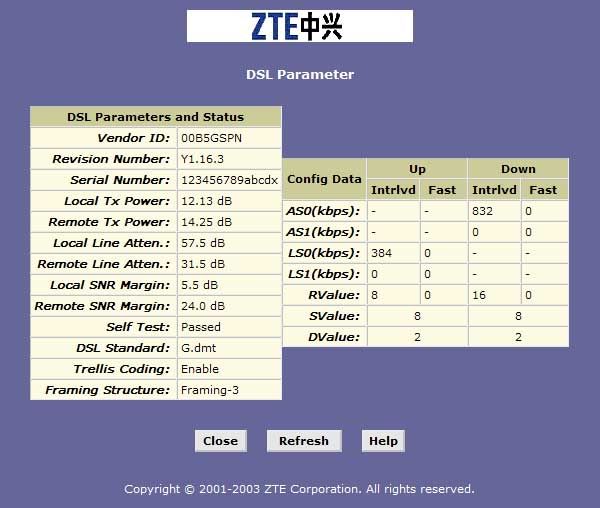
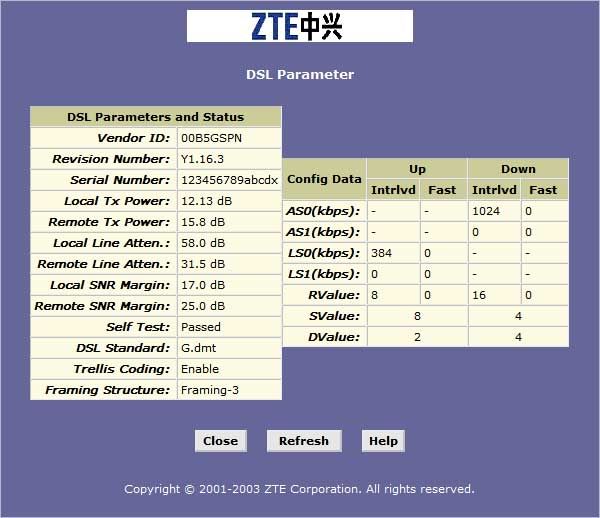
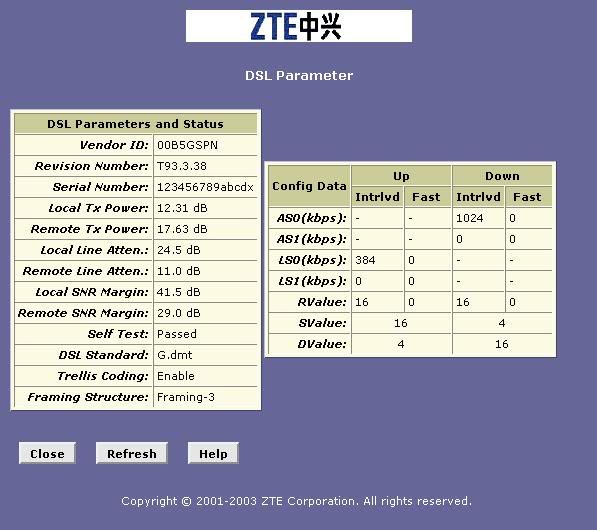
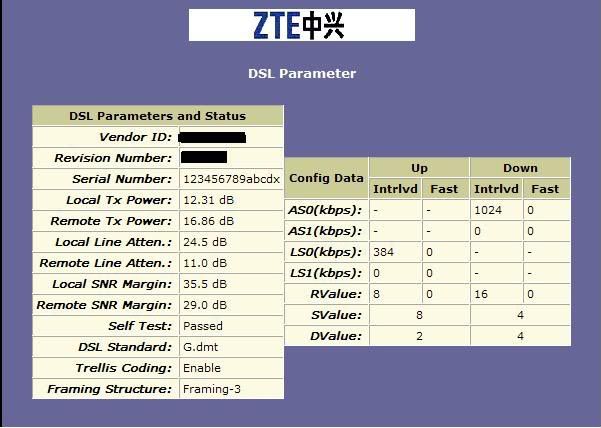
1. If your case is having frequent disconnections, meaning suddenly got signal and no signal, first thing u should is check ur SNR ratings in ur DSL Param.

Attached Image

Check your local and remote SNR margin. the higher the better. the ratings below is for local SNR margin.

30 and above = Good, u shouldnt have disconnections problems.

15 - 30 = Maybe a few when peak time, probably your line needs to be changed

15 and below = Very FREQUENT disconnections. You should consult telekom to have your line checked, most cases are because the line are too old and once they are changed they're fine (the lines on the telephone poles). If you're using a lightning surge protector. REMOVE it. they are known to weaken the signal by around 50-70% in order to prevent the surge on devices.

I found this under WAN -> DSL -> DSL param

ADSL filters does not affect the signal quality for streamyx connections. they only filter out noise for your telephone. Using it or not shouldn't affect your data transfer at all.

As for attenuation, the lower the better. but i don't know the effects other than these yet anyway it shouldn't go above 40dB....most of the time attenuation increases with the decrease of SNR wink.gif .

2. I have DSL signal but I can't login =(.


Check your ppp details.

Attached Image

Check your last fail cause.

Last Fail Cause: Indicates the action that ended the previous PPP session:

No Valid PADO Recvd: The unit initiated a PPoE handshake but did not receive a packet in reply from the ISP.

No Valid PADS Recvd: After the initial handshake, the unit did not receive a confirmation packet from the ISP.

Stopped by User: The user stopped the connection (for example, by changing the Configuration Manager settings for the PPP interface.)

No Activity: The PPP communication timed out, in accordance with the timeout period specified on the PPP Configuration page.

Auth Failure: The ISP could not authorize the connection based on the user name and/or password provided.

PADT recvd: The ISP issued a special packet type to terminate the PPP connection.

VC down: The Virtual Circuit between the unit and the ISP is down.

Internal failure: A system software failure occurred.

This is found under Routing -> PPP -> click the magnifying glass.

3. I can login but i can't surf!


Be sure to set your DNS servers...
202.188.0.132, 202.188.0.133, 202.188.1.5

4. I can't even login to my router page now, sometimes I can't even get ip address and i can't ping it.

Attached Image

Chances are you got into your router's blacklist......disable and clear it...remember to commit the changes. use another pc to login to it.

Try changing network cables too...for some reason it doesn't like CAT5 cables very much....i'm using CAT 5e cables now even though my CAT 5 cable is working fine with another network sweat.gif .

this is found in Services -> Firewall

For username and password for the modem...check under the pinned router transformation guide.

5. For more troubleshooting to find out which link is causing problem (gateway,dns server, international link)
Open cmd window, and type: (-t denotes infinite)

ping 219.93.218.177 -t
this would ping streamyx gateway infinitely,this is to test the link between u and TMNET gateway. if there's a lot of timeouts here, then u knw where the problem lies. typical ping here is around 50-80ms

if there's no problem, then do this
ping 202.188.0.133 -t
this would ping the DNS server infinitely, to test connection to DNS servers (typical ping is around 80-150ms)

ping google.com -t
this would ping google.com or any other sites, to test international links. for google.com its about 300-400ms.

basically the route path is
You -> Gateway (219.93.218.177) -> DNS server (202.188.0.133) -> Destination

Other DNS server ip
202.188.0.132
202.188.1.5 (my personal choice)

Latency needed to get data across the pacific is around 300ms.

6. Mis-capped case - how can i get back my "actual" bandwidth?


1. Save a screenshot of your router page with the upload and download bandwidth.
2. Make a call to streamyx hotline.
3. Tell them that you have been mis-capped.
4. Tell them that you are sure it has been mis-capped because :
i) you discovered about it when u accessed your router configuration page (IMPORTANT!). And make sure the screenshot includes the date on the taskbar so that you can ask for a rebate (you don't have this they say they cant check bla bla bla and say you cant rebate cuz in their system its correct since the day its been activated)
ii) you have a screenshot of it if they demand proof and u say u will send it thru email to them if necessary
iii) add frustration and unsatisfactory tone (VERY IMPORTANT TOO)
iv) be confident that you have been mis-capped. dont let the technician think ur a newbie
5. wait for 2-3 days, should be fixed by then. if not. continue to call, or just go to clickers and demand them to change on the same day or see their manager.

- I was a victim of mis-capped case too 2 years ago, got 512k instead of 1M. unfortunately i had to resort to step 5. Remember, you're the customer, dont need to be "understanding" to them. after all, this is their mistake, not yours.

*** tip by masamura! ***

By the way.. I'm here to let you guys know what to do if you are miscapped. Recently through my own experience of TMNet's crazy mood of purposely downgrading my 1Mbps link to 512Kbps, I've taken some steps that assured my restoration of speed. So here goes:

1) Make a report through 1300-88-9515
2) Call them once a day with the SAME report number that you initially got.
3) Call them till it's the 3rd *working* day.
4) Call them again on the 4th working day and tell them that you've just got "Suruhanjaya Komunikasi dan Multimedia Malaysia's" complain form and if the problem is not fixed by 7th day, you'll post it through POS-DAFTAR.
5) Continue to call them and also write e-mail to custcare@tm.net.my and tell them that you are going to complain to MCMC on the 7th day.
6) On the 7th day if they haven't fixed your problem(which I assure you, they will by now...) Go to http://www.mcmc.gov.my/consumer/complaint.asp and download the form, fill it in and send it to MCMC via POS-DAFTAR (for confirmation purpose).
7) MCMC will write a letter back to you within 3 working days. Scan this letter, attach it to custcare@tm.net.my and call 1300-88-9515 with the MCMC reference and let them know and tell them to update it to your report that you've complained to MCMC (it's part of MCMC's proceedure).

Finally..

Sit back. Continue to call them everyday.. be nice and talk to them nicely. Within 15 days, MCMC will call you and tell you that TMNet is going to send their technician the next working day + refund your lost of speed for that amount of time.. hehe! Personal experience!

Anyway, lesson to learn here is... Complaining at TMNet and LowYat do no good. If you *really* want to complain, go to MCMC!

>>> http://www.mcmc.gov.my <<<

p/s: As for me.. the technician came on a Sunday night and TMNet's senior engineer called me on the same night to confirm with me if my line have been upgraded to 1Mbps package. Took me about 1 month to get them to upgrade my line back + refund!

****************************
hope this helps......and please post here for extra suggestions here too.

p/s : i'm just a normal college student, i have no affliations with tmnet or whatso-ever.

This post has been edited by SnoWFisH: Dec 14 2005, 01:38 PM
WLFung
post Jun 15 2005, 11:55 AM

Getting Started
**
Junior Member
137 posts

Joined: Jan 2003
From: Kuala Lumpur
Is my StreamyX OK?
user posted image

This post has been edited by WLFung: Jun 15 2005, 11:57 AM


Attached thumbnail(s)
Attached Image
sennheiser
post Jun 15 2005, 02:53 PM

无名大侠
******
Senior Member
1,662 posts

Joined: Jan 2003
From: Manchester, UK
QUOTE(WLFung @ Jun 15 2005, 11:55 AM)
Is my StreamyX OK?
user posted image
*
Quite normal...i guess u live quite far frm the xchange smile.gif
strynch
post Jun 15 2005, 03:47 PM

Getting Started
**
Junior Member
254 posts

Joined: Jan 2003


downstream is ok i guess..

but my upstream? blink.gif
TSSnoWFisH
post Jun 15 2005, 04:20 PM

Look at all my stars!!
*******
Senior Member
2,250 posts

Joined: Jan 2003
From: Penang / Bentong, Pahang / Genting


WLFung : pretty much average...maybe u'll have some problems in surfing during peak times =.=.

strynch : at least ur downstream is good...upstream...oklar...not so bad

strynch
post Jun 15 2005, 04:25 PM

Getting Started
**
Junior Member
254 posts

Joined: Jan 2003


i see.. thanks bro
tthm
post Jun 15 2005, 04:42 PM

Death of Blue Screen
Group Icon
VIP
1,342 posts

Joined: Jun 2005


Good guide you made there. thumbup.gif

Maybe you can add the procedure/question Streamyx Support will ask caller?

If you have frequent dc like i had after transferring my Streamyx to another area phone system, try to contact Telekom 1st to check out the phone line quality 1st. Next if can, bring your modem+splitter to another friend house with Streamyx to confirm your modem is working correctly. Try to use your login name and password to confirm your account is not blacklisted. If you've confirmed your modem, account and phone line is A OK and still dc, call them up and request for technician to check at their site. Do mention all the testing you have done by yourself.

Btw, depends on the technician, if he's lazy abit then your problem will drag on for quite some time. Mine took 2 weeks plus to be solved. Rang their support till they put me to highest level of complaint...hehehe....
cubchai
post Jun 15 2005, 04:45 PM

Casual
***
Junior Member
322 posts

Joined: Oct 2004

i cant seem to login using firefox. is it normal?
pingchen23
post Jun 15 2005, 05:13 PM

Casual
***
Junior Member
318 posts

Joined: Apr 2005
From: Kuching, Sarawak


Me too!I even worse!After configuring it(ZTE831) to router mode,I can't access other configuration page using any other browser beside the main configuration page!
SincerePrayer
post Jun 15 2005, 05:26 PM

love to pray
Group Icon
Elite
1,120 posts

Joined: Jun 2005
amazing guide, will have it try at my house.

the streamyx helpline always ask you to do some self-check. below are some of the areas i can recall
1. try bypass the splitter and direct connect
2. if switch/hub exist, try bypass them as well

have to admit, their questions are very standard and is catle for commoner, not for those with technical knowledge. smile.gif
TSSnoWFisH
post Jun 15 2005, 06:09 PM

Look at all my stars!!
*******
Senior Member
2,250 posts

Joined: Jan 2003
From: Penang / Bentong, Pahang / Genting


yeah ADSL filters/splitters affects a lot of they are spoilt, including disconnections when u pick up the phone or no dial tone to phone.

anyway, use internet explorer to login to the modem website. it doesn't load correctly in firefox most of the time.
kei18kun
post Jul 9 2005, 09:25 PM

Coconut in the sea(TM)
*******
Senior Member
5,195 posts

Joined: Jan 2003
From: 500 year old rock ADHD™


very useful guide smile.gif
siaush
post Jul 9 2005, 10:40 PM

Getting Started
**
Junior Member
246 posts

Joined: Jan 2005
is there any problem with mine?

QUOTE
DSL Parameters and Status
Vendor ID:            0039
Revision Number: Y.1.31.1
Serial Number:          KAV2PM200410
Local Tx Power:          11.95 dB
Remote Tx Power:      17.22 dB
Local Line Atten.:    43.0 dB
Remote Line Atten.: 22.5 dB

Local SNR Margin:  37.0 dB
Remote SNR Margin:    27.0 dB
Self Test:              Passed
DSL Standard:          T1.413
Trellis Coding:            Enable
Framing Structure:  Framing-3
my atten seems so high, anyway to fix it?

and check this out too http://en.wikipedia.org/wiki/Attenuation

This post has been edited by siaush: Jul 9 2005, 10:43 PM
gold3knight
post Jul 9 2005, 11:55 PM

Regular
******
Senior Member
1,672 posts

Joined: Jun 2005


Modem Status

Modem Status
Link Status Connected
Us Rate (Kbps) 384
Ds Rate (Kbps) 1024
US Margin 23
DS Margin 25
Modulation MMODE
LOS Errors 0
DS Line Attenuation 44
US Line Attenuation 52
Path Mode Interleaved


DSL Statistics
Near End F4 Loop Back Count 0
Near End F5 Loop Back Count 0


This is my data, has always been like this for as long as i know. Used aztech 305 before but now changed to 600e
anyway i could improve on it??
[W]HIT3_@NG3L
post Jul 10 2005, 01:37 AM

Look at all my stars!!
*******
Senior Member
2,104 posts

Joined: Nov 2004
i hope u can help me out
recently i face thiz problems
i hav this
CRC: 426
HEC: 241
how 2 fix this thing??
las time my CRC error only 2 if i on9 for 1 day
now on9 1 hour oredi got so much
SUSdarkjedi
post Jul 11 2005, 01:37 PM

Network Administrator
******
Senior Member
1,054 posts

Joined: Jan 2003
From: Planet Tatooine-Planet Naboo-Planet Mustafar-Earth


user posted image

Here is my office lines rite now
AmpBuster
post Jul 12 2005, 12:34 PM

Getting Started
**
Junior Member
145 posts

Joined: Jul 2005
From: Johor Bahru, Johor, Malaysia


look at my stats.. sure shock u to death LOL
dc every 5 mins loh.. and still 512/128
user posted image


Attached thumbnail(s)
Attached Image
timothyy
post Jul 12 2005, 06:57 PM

Do Not Underestimate the "Pawa" of the Dark Side
*******
Senior Member
4,504 posts

Joined: Jul 2005
From: Planet Naboo
Is this good?

I am having some disconnection sometime. Suka-suka kinda thing.
Especially when I leave the comp over night.

I am using Streamyx 2MB ADSL

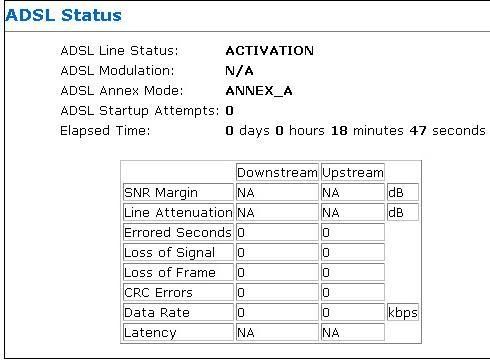
ADSL Status
--------------------------------------------------------------------------------


ADSL Line Status: SHOWTIME
ADSL Modulation: G.dmt
ADSL Annex Mode: ANNEX_A
ADSL Startup Attempts: 1
Elapsed Time: 0 days 0 hours 10 minutes 15 seconds

Downstream Upstream
SNR Margin 39.8 25.0 dB
Line Attenuation 5.3 0.0 dB
Errored Seconds 0 1
Loss of Signal 0 0
Loss of Frame 0 0
CRC Errors 0 1
Data Rate 2048 384 kbps
Latency INTERLEAVED INTERLEAVED


ATM Status
--------------------------------------------------------------------------------


Tx Bytes 354676
Rx Bytes 1214548
Tx Cells 6692
Rx Cells 0
Rx HEC Errors 0
Tx Mgmt Cells 3
Rx Mgmt Cells 2
Tx CLP0 Cells 6692
Rx CLP0 Cells 22916
Tx CLP1 Cells 0
Rx CLP1 Cells 0
Rx Errors 0
Tx Errors 0
Rx Misrouted Cells 0


TCP Status
--------------------------------------------------------------------------------


Total Packets Sent 7257
Data Packets Sent 3956
Data Bytes Sent 1700399
Total Packets Received 6670
Packets Received in-sequence 1669
Bytes Received in-sequence 317926
Out of Order Bytes 0
Packets disgarded for bad checksum 0
Packets disgarded for bad header offset 0
Packets disgarded because too short 0
Connections Initiated 13
Connections Accepted 808
Connections Established 821
Connections Closed 757


Please help me too...

This post has been edited by timothyy: Jul 12 2005, 06:59 PM
s[H]sIkuA
post Jul 13 2005, 09:48 PM

live in the present
*******
Senior Member
2,162 posts

Joined: Sep 2004


for those who cant login to your router page with web browser

try this , go to Start => Run => type telnet

then inside the dos , type Open 10.0.0.2 (varies depending on your router ip)

then type your password

after that , just choose Save Selection and Reset your modem inside it
(I not sure whether all router are same anot but my one is like this smile.gif )

oh yah after the router is resetted than u can login with your web browser already. forget to add this line , silly me tongue.gif

This post has been edited by s[H]sIkuA: Jul 13 2005, 10:04 PM
Morpheusyeng
post Jul 13 2005, 09:56 PM

On my way
****
Senior Member
652 posts

Joined: Jan 2003
From: Johor Bahru


anyone knows whether can access aztech modem status? <- which dont have router function i guess
wk1168
post Jul 15 2005, 07:45 AM

myLensDB.com
*****
Senior Member
778 posts

Joined: Jul 2005
From: Penang langggg


Is mine normal? Cause after sometimes even if i still connected i cannot surf the net. After i dc manually and reconnect back from the dial-up connection there, i can surf again.. Lame... any problem here? cry.gif


Attached thumbnail(s)
Attached Image
yyteik
post Jul 15 2005, 11:46 AM

..::Upgraded::..
******
Senior Member
1,172 posts

Joined: Oct 2004
From: 7th Heaven
is my connection ok???? can pls help me out...
i suffer from frequent disconnection.. and also internet down...
sharing my connection with 4 others...
thanks
yyteik
post Jul 15 2005, 12:04 PM

..::Upgraded::..
******
Senior Member
1,172 posts

Joined: Oct 2004
From: 7th Heaven
y my revision number is different from the other posted prints??? izzit mine older???
TSSnoWFisH
post Jul 15 2005, 10:10 PM

Look at all my stars!!
*******
Senior Member
2,250 posts

Joined: Jan 2003
From: Penang / Bentong, Pahang / Genting


siaush : i think urs quite ok leh..despite the high attenuation, ur SNR is still quite high. u shouldnt have many dc problems.

gold3knight : Try connecting direct without filter. if still no improvement, you have to wait until telekom come and change ur cables...

[W]HIT3_@NG3L : CRC error ar? CRC very hard to say wor...might be streamyx might be the router that ur data hopped on got errors or attenuation....

ampbuster and darkjedi : WAH........omg...so high..the stats same like my streamyx connection back in my hometown.....dc every few mins and then have to wait over 1 hour only can connect back ><. are u using any lightning surge protector?

timothyy: 2MB ADSL? *jaws dropped. ur SNR looks quite ok ak....make sure ur modem doesnt autostop when there's no data transmitting lor....

Morpheusyeng: if u want to access ur router via telnet, u have to go into the web interface first,make a username and password in authentication (i think). den run hyperterminal or cmd -> telnet ip address and enter ur username and password that u created. aztech telnet is a bit hard to use though, so be careful when u fiddle wif stuff via telnet. as of modem status, u check ur web interface -> under dsl, there should be a status about what ur modem is doing....

wk1168 and yyteik : ur SNR a bit low...maybe thats y always dc or got packet drop lor....is ur modem directly connected from the wall port or it got split at a filter /telephone splitter. if not, maybe ur line old oredi lor...check with ur frens nearby about the SNR margin and see....


timothyy
post Jul 19 2005, 04:09 PM

Do Not Underestimate the "Pawa" of the Dark Side
*******
Senior Member
4,504 posts

Joined: Jul 2005
From: Planet Naboo
2MB ...

I mean 2.0mbps. He! He!. My IT knowledge very "cha" one.

I will try to turn off the auto off.

Don't think I can turn it off. It says Reconnect when no signal then 1 empty box for you to fill in, and max is 32767 seconds. Previously was 0. So, I changed it to 32767 now.
Correct ah?


This post has been edited by timothyy: Jul 19 2005, 11:59 PM
irzani2001
post Jul 20 2005, 03:20 AM

Getting Started
**
Junior Member
60 posts

Joined: Jan 2003


how about mine?what's the different between interleaved and fast latency?any different? sweat.gif

user posted image
reeyon
post Jul 20 2005, 06:47 PM

On my way
****
Senior Member
692 posts

Joined: Dec 2004
From: Johor Bahru


erm .. i think if u wanna get higher SNR Margin or low Line Atten...
just move ur house closer to Exchange .... hehe ...
if next door to Exchange still get low SNR margin .. then cabling problem ....
check phone line ... shorter better ...
unics
post Jul 20 2005, 11:48 PM

New Member
*
Junior Member
14 posts

Joined: Jan 2005


is there any way to check my DSL parameters and status without the router?
thanks

SUSdarkjedi
post Jul 21 2005, 01:17 AM

Network Administrator
******
Senior Member
1,054 posts

Joined: Jan 2003
From: Planet Tatooine-Planet Naboo-Planet Mustafar-Earth


SnowFish look at mine

user posted image

Any comments on this?
mhchai45
post Jul 22 2005, 02:26 AM

Regular
******
Senior Member
1,208 posts

Joined: Jan 2003
From: Kuching


wow! maximum download is 5184 and upload is 416, it will never reach 8mbps max. i saw the reading from the tester that a technician used.
SUSdarkjedi
post Jul 25 2005, 07:50 PM

Network Administrator
******
Senior Member
1,054 posts

Joined: Jan 2003
From: Planet Tatooine-Planet Naboo-Planet Mustafar-Earth


Dear XXXXXXXXXXXXXX,

Thank you for your e-mail to TM Net.

Referring to your query on upgrading, we are glad to inform you that your package have been successfully upgraded to Streamyx G.Lite Home 512K Basic 77 on 20th July 2005. Kindly be informed that your new charges will be reflects on the next bill onwards.

We hope the above reverts to your query.

Please feel free to contact us should you require further assistance either via e-mail at streamyx@tm.net.my or call us at 1-300-88-9515.

Mr. XXXXXXl, we thank you for taking the time to write to us and look forward to serve you better.


Regards,
Customer Care Support,
TM Net Sdn. Bhd.

Downgrade done ! smile.gif
the_third_kind
post Jul 27 2005, 08:34 PM

New Member
*
Junior Member
35 posts

Joined: Jul 2005
From: Kota Bharu, Kelantan


ermmm....
after seeing you people's DSL parameter.... i cant help but wonder about mine...

user posted image

izzit normal to have 0.0dB on both Local and Remote Tx power??
BTW whats Tx power??
izzit good??

my connection is okay.. no DC at all... highest DL speed 40Kbps on Azureus downloading Linux torrent...

any comment??

thanx...
SUSdarkjedi
post Jul 27 2005, 09:59 PM

Network Administrator
******
Senior Member
1,054 posts

Joined: Jan 2003
From: Planet Tatooine-Planet Naboo-Planet Mustafar-Earth


QUOTE(the_third_kind @ Jul 27 2005, 08:34 PM)
ermmm....
after seeing you people's DSL parameter.... i cant help but wonder about mine...

user posted image

izzit normal to have 0.0dB on both Local and Remote Tx power??
BTW whats Tx power??
izzit good??

my connection is okay.. no DC at all... highest DL speed 40Kbps on Azureus downloading Linux torrent...

any comment??

thanx...
*
Unless the lines is ok go for it do u use any ADSL surge line protector?
the_third_kind
post Jul 27 2005, 11:08 PM

New Member
*
Junior Member
35 posts

Joined: Jul 2005
From: Kota Bharu, Kelantan


yup... why?? does it have sumthing to do with the 0.0 dB Tx Power??
izzit true the lightning/surge protector can affect my DL performance?? if it does, then i guess better take it out...
SUSdarkjedi
post Jul 27 2005, 11:21 PM

Network Administrator
******
Senior Member
1,054 posts

Joined: Jan 2003
From: Planet Tatooine-Planet Naboo-Planet Mustafar-Earth


Yes it can take out ur download performance try the same things did u see an differences?
slamdafunk
post Jul 31 2005, 01:27 PM

Getting Started
**
Junior Member
172 posts

Joined: Jan 2003
From: Melaka, Near MMU


I've noticed that if i set the modem to T1.413, i have SNR download 45++ and SNR upload 25++, but if in G.dmt mode, SNR download 43++ and the SNR upload is around 4/5
DOes the handshake protocol affect my connection? Whats the differentce between those two aside from the speed supported?
akash
post Aug 2 2005, 01:30 AM

AK Da BEAR
******
Senior Member
1,368 posts

Joined: Oct 2004
From: Mandalorian


I am juz curios....What is this (rounded in red...)What is the erros...n mine is OK...but y i getting dc every time..??any reason...

user posted image
mhchai45
post Aug 9 2005, 12:17 PM

Regular
******
Senior Member
1,208 posts

Joined: Jan 2003
From: Kuching


don't give it a see, who cares? as long as the connection is stable.
amenlo9
post Aug 18 2005, 02:46 AM

Look at all my stars!!
*******
Senior Member
2,627 posts

Joined: Jan 2003
From: Sepang,Cheras,Jupiter


my snr margin was very low,the onli way to increase it is ask tmnet to change the line?i just facing dc problem since this week.last 2 month no problem at all.

Attached Image

This post has been edited by amenlo9: Aug 18 2005, 02:47 AM
TSSnoWFisH
post Aug 20 2005, 04:21 AM

Look at all my stars!!
*******
Senior Member
2,250 posts

Joined: Jan 2003
From: Penang / Bentong, Pahang / Genting


amenlo9:a lot of thunderstorms around ur area? how about construction?

CRC errors generally are due to the data are changed/damaged/loss en route to ur. maybe due to attenuation or routers error. each data packet has a crc checksum for the router recalculate to see if the data packet received is 100% complete. if its not, it will be discarded. basically there's nothing much u can do about crc error,most of the time the cause is due to the fault of the transmission medium. in other words, ur telephone line (most probably).

interleaved - slower but less error
fast - fast but might have more error
these are posted somewhere in the forums but i cant recall....

i try to answer the rest of the questions later k...i doing assignment now......hard disk kena bad sector today just got replacement sweat.gif

This post has been edited by SnoWFisH: Aug 20 2005, 04:24 AM
ck2055
post Aug 21 2005, 03:36 PM

Getting Started
**
Junior Member
251 posts

Joined: Jan 2003
From: Kanon


need more info in crc error


This post has been edited by ck2055: Aug 21 2005, 03:55 PM
amenlo9
post Aug 22 2005, 06:13 PM

Look at all my stars!!
*******
Senior Member
2,627 posts

Joined: Jan 2003
From: Sepang,Cheras,Jupiter


QUOTE(SnoWFisH @ Aug 20 2005, 04:21 AM)
amenlo9:a lot of thunderstorms around ur area? how about construction?

CRC errors generally are due to the data are changed/damaged/loss en route to ur. maybe due to attenuation or routers error. each data packet has a crc checksum for the router recalculate to see if the data packet received is 100% complete. if its not, it will be discarded. basically there's nothing much u can do about crc error,most of the time the cause is due to the fault of the transmission medium. in other words, ur telephone line (most probably).

interleaved - slower but less error
fast  - fast but might have more error
these are posted somewhere in the forums but i cant recall....

i try to answer the rest of the questions later k...i doing assignment now......hard disk kena bad sector today just got replacement  sweat.gif
*
yeap,my modem become dc frequently after a ligthening struck!!so now it will be always dc and snr margin is low.i wonder how come u know that?
ck2055
post Aug 22 2005, 06:27 PM

Getting Started
**
Junior Member
251 posts

Joined: Jan 2003
From: Kanon


how about loss of signal and what the ideal number for line
atteunation


amadeo
post Aug 23 2005, 05:58 PM

Mafia
*******
Senior Member
3,503 posts

Joined: Jan 2003
From: ..Whenever i may roam...
QUOTE(ck2055 @ Aug 22 2005, 06:27 PM)
how about loss of signal and what the ideal number for line
attenuation
*
Pls refer to http://forum.lowyat.net/index.php?showtopi...dpost&p=4561212
davidsk2002
post Aug 25 2005, 04:34 AM

Enthusiast
*****
Senior Member
890 posts

Joined: Jan 2003
From: Penang


i would like to ask that do my download stream SNR margin still ok r?and also the line attenuation?

thank alot.
mfa333
post Aug 25 2005, 11:24 PM

Huhah!
*******
Senior Member
2,588 posts

Joined: Jan 2003
From: KL-Skudai

lower SNR means slower speed??
TSSnoWFisH
post Aug 26 2005, 12:42 AM

Look at all my stars!!
*******
Senior Member
2,250 posts

Joined: Jan 2003
From: Penang / Bentong, Pahang / Genting


SNR means the stability of ur connection, it does not have anything to do with ur connection speed. connection speed depends on latency and bandwidth.

davidsk2002 : should be quite stable..maybe 1 day 1-2 times dc......are u connecting directly to ur phone port?

amenlo9: hehe..thats the common cause tongue.gif.
BlitzAce
post Aug 26 2005, 03:40 PM

Fanboy? Naw.
******
Senior Member
1,061 posts

Joined: Jan 2003
From: Don't know.


These are mine..

Vendor ID: 00B5GSPN
Revision Number: Y.1.31.1
Serial Number: KAV2PM200409
Local Tx Power: 11.75 dB
Remote Tx Power: 15.19 dB
Local Line Atten.: 53.0 dB
Remote Line Atten.: 31.5 dB
Local SNR Margin: 11.5 dB
Remote SNR Margin: 23.0 dB
Self Test: Passed
DSL Standard: G.dmt
Trellis Coding: Enable
Framing Structure: Framing-3

Currently makes me feel like user posted image user posted image Any comments are greatly appreciated.
unstoppable
post Aug 29 2005, 10:05 PM

Casual
***
Junior Member
451 posts

Joined: Jun 2005

this is mine..what a crap sad.gif
but i never face disconnect problem smile.gif

This post has been edited by unstoppable: Aug 29 2005, 10:05 PM


Attached thumbnail(s)
Attached Image
amenlo9
post Aug 31 2005, 03:27 PM

Look at all my stars!!
*******
Senior Member
2,627 posts

Joined: Jan 2003
From: Sepang,Cheras,Jupiter


my snr margin will drop after online for a long time,is this normal?i on my pc 24/7.initially i will get 31db,after that my snr margin will drop slowly....besides,my attenuation is 46db
amenlo9
post Aug 31 2005, 03:28 PM

Look at all my stars!!
*******
Senior Member
2,627 posts

Joined: Jan 2003
From: Sepang,Cheras,Jupiter


QUOTE(unstoppable @ Aug 29 2005, 10:05 PM)
this is mine..what a crap sad.gif
but i never face disconnect problem smile.gif
*
how about your speed?fast or not?
bluesky87
post Sep 3 2005, 05:08 PM

Enthusiast
*****
Senior Member
965 posts

Joined: Mar 2005
From: Pluto


uhh, doh...i've been struggling for more than 2month...da problem is dat i couldnt sign in to my hotmail acc...i could enter www.hotmail.com, but after i've type out my email add n pass, it came out 'da page couldnt b display'...n when i click 'back', itz written there 'da page has expired'... shakehead.gif

i called tmnet, they asked me to do stuff like :
tool > internet option > delete cookies,
create a new network connection,
try using other browser like firefox, netscape, etc (i'm currently using msn explorer which i couldnt even sign in also)
reset modem, unplug replug etc
change DNS num, proxy
try using yahoo mail (it work) only hotmail couldnt sign in

alright, it wouldnt work no matter wurt... doh.gif until 2day i still couldnt sign in my msn explorer or check my mail...btw, di important point is dat i could surf to other website very well, no probz at all...any solution pls ? sad.gif
TSSnoWFisH
post Sep 4 2005, 09:40 PM

Look at all my stars!!
*******
Senior Member
2,250 posts

Joined: Jan 2003
From: Penang / Bentong, Pahang / Genting


BlitzAce : looks like telephone line problem lor...........the port quite far from ur area?

amenlo9 : there are many factors due to SNR drops, it doesn stay stable all the time, but it shouldnt have much drastic change, unless something drastic happens.

unstoppable: thats good smile.gif

bluesky87: never liked hotmail....i think its the routing problem...since yahoo mail can open.

anyway guys, try this.
open ur cmd window, type

ping 219.93.218.177 -t
this would ping streamyx gateway infinitely, u can see whether the problem lies where. if there's a lot of timeouts here, then u knw where the problem lies. typical ping here is around 50-80ms

if there's no problem, then do this
ping 202.188.0.133 -t
this would ping the DNS server infinitely, to test connection to DNS servers

ping google.com -t
this would ping google.com, to test international links

basically the route path is
You -> Gateway (219.93.218.177) -> DNS server (202.188.0.133) -> Destination

Other DNS server ip
202.188.0.132
202.188.1.5 (my personal choice)

updated first page with this info.

for crc error, please do a google on it. i think u can find more accurate information abt it. (sorry im just not good at explaining tongue.gif)

This post has been edited by SnoWFisH: Sep 4 2005, 09:46 PM
ixiel
post Sep 4 2005, 11:27 PM

Getting Started
**
Junior Member
152 posts

Joined: Jun 2005

QUOTE
Reply from 219.93.218.177: bytes=32 time=22ms TTL=126
Reply from 219.93.218.177: bytes=32 time=24ms TTL=126
Request timed out.
Reply from 219.93.218.177: bytes=32 time=22ms TTL=126
Reply from 219.93.218.177: bytes=32 time=21ms TTL=126
Reply from 219.93.218.177: bytes=32 time=22ms TTL=126
Reply from 219.93.218.177: bytes=32 time=38ms TTL=126
Reply from 219.93.218.177: bytes=32 time=24ms TTL=126
Request timed out.
Reply from 219.93.218.177: bytes=32 time=24ms TTL=126
Reply from 219.93.218.177: bytes=32 time=22ms TTL=126
Reply from 219.93.218.177: bytes=32 time=381ms TTL=126
Request timed out.
Request timed out.
Reply from 219.93.218.177: bytes=32 time=36ms TTL=126
Reply from 219.93.218.177: bytes=32 time=42ms TTL=126
Reply from 219.93.218.177: bytes=32 time=53ms TTL=126
Request timed out.
SnowFish,

What may cause the timeout request error when i ping to the gateway? (219.93.218.177) and what should i do..? My internet is very slow lately.. but when downloading/uploading files its quite fast.. only on http request..

hope u can help me troubleshoot b4 i report to tmnet.. my IP is start from 219.xxx

Is it bcoz of my modem+router? Thinking of getting a new one but not sure it's worth it to buy.

thanx..
ixiel
post Sep 4 2005, 11:31 PM

Getting Started
**
Junior Member
152 posts

Joined: Jun 2005

QUOTE
Reply from 219.93.218.177: bytes=32 time=22ms TTL=126
Reply from 219.93.218.177: bytes=32 time=24ms TTL=126
Request timed out.
Reply from 219.93.218.177: bytes=32 time=22ms TTL=126
Reply from 219.93.218.177: bytes=32 time=21ms TTL=126
Reply from 219.93.218.177: bytes=32 time=22ms TTL=126
Reply from 219.93.218.177: bytes=32 time=38ms TTL=126
Reply from 219.93.218.177: bytes=32 time=24ms TTL=126
Request timed out.
Reply from 219.93.218.177: bytes=32 time=24ms TTL=126
Reply from 219.93.218.177: bytes=32 time=22ms TTL=126
Reply from 219.93.218.177: bytes=32 time=381ms TTL=126
Request timed out.
Request timed out.
Reply from 219.93.218.177: bytes=32 time=36ms TTL=126
Reply from 219.93.218.177: bytes=32 time=42ms TTL=126
Reply from 219.93.218.177: bytes=32 time=53ms TTL=126
Request timed out.
SnowFish,

What may cause the timeout request error when i ping to the gateway? (219.93.218.177) and what should i do..? My internet is very slow lately.. but when downloading/uploading files its quite fast.. only on http request..

hope u can help me troubleshoot b4 i report to tmnet.. my IP is start from 219.xxx

Is it bcoz of my modem+router? Thinking of getting a new one but not sure it's worth it to buy.

thanx..
bluesky87
post Sep 5 2005, 01:41 AM

Enthusiast
*****
Senior Member
965 posts

Joined: Mar 2005
From: Pluto


alright snowfish, thx for ur reply...i noe i'm kinda noob n slow in dis, but will u mind explaining wat do u mean by ' i think its the routing problem ' ?

pls help cry.gif thx
mfa333
post Sep 5 2005, 06:16 PM

Huhah!
*******
Senior Member
2,588 posts

Joined: Jan 2003
From: KL-Skudai

my param:

user posted image

my snr so low.i know my old telephone line is quiet old.so far no dc.only ard once a mth.any other way to increase that except changing telephone line?and,can u guys check other prob with my param??
mhchai45
post Sep 5 2005, 09:04 PM

Regular
******
Senior Member
1,208 posts

Joined: Jan 2003
From: Kuching


this is my line within 1.02km from the exchange, i did got fast dl and interleave ul when it got activated.


Attached thumbnail(s)
Attached Image
amenlo9
post Sep 5 2005, 10:43 PM

Look at all my stars!!
*******
Senior Member
2,627 posts

Joined: Jan 2003
From: Sepang,Cheras,Jupiter


how to know the distance between our line and exchange?
mhchai45
post Sep 5 2005, 10:55 PM

Regular
******
Senior Member
1,208 posts

Joined: Jan 2003
From: Kuching


QUOTE(amenlo9 @ Sep 5 2005, 10:43 PM)
how to know the distance between our line and exchange?
*
i knew my distance from the exchange when i did online registration.
voice0fnation
post Sep 6 2005, 02:25 AM

Getting Started
**
Junior Member
104 posts

Joined: Aug 2005


QUOTE(bluesky87 @ Sep 3 2005, 05:08 PM)
uhh, doh...i've been struggling for more than 2month...da problem is dat i couldnt sign in to my hotmail acc...i could enter www.hotmail.com, but after i've type out my email add n pass, it came out 'da page couldnt b display'...n when i click 'back', itz written there 'da page has expired'... shakehead.gif

i called tmnet, they asked me to do stuff like :
tool > internet option > delete cookies,
create a new network connection,
try using other browser like firefox, netscape, etc (i'm currently using msn explorer which i couldnt even sign in also)
reset modem, unplug replug etc
change DNS num, proxy
try using yahoo mail (it work) only hotmail couldnt sign in

alright, it wouldnt work no matter wurt... doh.gif  until 2day i still couldnt sign in my msn explorer or check my mail...btw, di important point is dat i could surf to other website very well, no probz at all...any solution pls ?  sad.gif
*
I also had the same problem, but it's nothing to do with TMnet it's all in your compuer config..
I had this cuz i was using a software to block adult sites and it was blocking the hotmail site as HOT_mail or you can also check out your internet options>security settings and restore default in Advance tab..
outdoorxplorer
post Sep 6 2005, 11:23 AM

~Money Only Bring Pleasures When You Spent It WISELY!~
*******
Senior Member
2,028 posts

Joined: Jan 2003
From: Kuala Lumpur, MYS


I wonder how is mine..

Please enlightnen me...

Many thanks..


Attached thumbnail(s)
Attached Image
TSSnoWFisH
post Sep 6 2005, 01:06 PM

Look at all my stars!!
*******
Senior Member
2,250 posts

Joined: Jan 2003
From: Penang / Bentong, Pahang / Genting


bluesky87: routing means the way tmnet direct ur packets....
in simpler sense : the road u take when travelling, maybe the road u take got road block or got landslide, so got delay.


mhchai45
post Sep 6 2005, 06:28 PM

Regular
******
Senior Member
1,208 posts

Joined: Jan 2003
From: Kuching


QUOTE(outdoorxplorer @ Sep 6 2005, 11:23 AM)
I wonder how is mine..

Please enlightnen me...

Many thanks..
*
you're warned man, there's someone already got sued because of miscapped, don't show off here.
prasys
post Sep 6 2005, 07:32 PM

Heros Never Die
Group Icon
VIP
12,925 posts

Joined: Mar 2005
From: Kuala Lumpur
yeah..watch out , if you think tmnet misccaped , then call them ask to cap them back..seriously , you could be in trouble later (you may never know)

topic on uncapping(s) (no..not how-to , but the legal issues)

www.dslreports.com/forum/remark,663327

www.cable-modems.org/articles/uncapping/

Well.....you must be thankfull to TM dude..biggrin.gif
broken_string
post Sep 7 2005, 06:41 PM

人生, 如何說得失, è«–æˆæ•— ?
*******
Senior Member
7,258 posts

Joined: Jan 2003
anybody hav the link to "how to set up zte modem to router mode?"

i cant find the thread liao sad.gif
bluesky87
post Sep 7 2005, 09:19 PM

Enthusiast
*****
Senior Member
965 posts

Joined: Mar 2005
From: Pluto


thx to voiceofnation for ur guide,
thx to snowfish for ur defination,

and

thx to prasys for those webbie...

hehe btw, i had a solution already, thumbup.gif di ultimate solution of all biggrin.gif i cant stand it n i had juz formatted my pc, everything is fine now, i can finally check my mail n log in my msn explorer...does dat consider as a solution ? hmm, should b da laziest way to handle problem... whistling.gif
SeeD
post Sep 8 2005, 08:09 PM

I Love Bubbles
*******
Senior Member
6,728 posts

Joined: Jan 2003
From: YOUR HOUSE


BUMP ~~
well i have a question here ...
a few days ago i was having this problem ... which is like ...
I could connect to streamyx, but i cant download anything(download rate < 1kbps)
very slow that is smile.gif

but well i phoned that dude and he told me to
1. unplug all the wires of the modem
2. wait 10 minutes
3. plug in
4. Create a new connection
5. set DNS (streamyx connection) 202.188.0.133 (preferred), 202.188.1.5(alternate)
6. connect to the internet.

and its working fine now ...
the problem is i want to know why izzit like that ?
javeyho
post Sep 8 2005, 10:20 PM

★☆★☆★☆★☆★☆★
*******
Senior Member
2,561 posts

Joined: Jan 2003
QUOTE(SeeD @ Sep 8 2005, 08:09 PM)
BUMP ~~
well i have a question here ...
a few days ago i was having this problem ... which is like ...
I could connect to streamyx, but i cant download anything(download rate < 1kbps)
very slow that is smile.gif

but well i phoned that dude and he told me to
1. unplug all the wires of the modem
2. wait 10 minutes
3. plug in
4. Create a new connection
5. set DNS (streamyx connection) 202.188.0.133 (preferred), 202.188.1.5(alternate)
6. connect to the internet.

and its working fine now ...
the problem is i want to know why izzit like that ?
*
maybe more concentrate on a fix domain, it will guide ur connection to d right gua... haha, just my opinion...

And now my problem is i can online and download/upload as well...

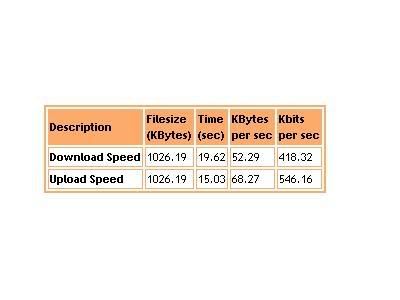
but i did check my bandwidth speed... my download speed are abnormal... according to technician from tmnet, i suppose to get over 600Kbits for register 1Mb package. but i just manage to get 42x.xx Kbits. Later i follow their instruction like wat did SeeD said tat 6 steps, but i still cannot configure it over 600Kbits.

Quite dissapointed cuz i already dialed there 3 times, and waste RM1x.xx for my h.p... everytimes diff ppl ask same questions and give alike answer... doh.gif

Need Help, thanks!!!
skevelim
post Sep 10 2005, 11:32 AM

a WHITE cLOWN
****
Senior Member
571 posts

Joined: Jan 2003
From: PJ


Guys, wanna ask for some advice.

I have a very low rating Local SNR Margin at NIGHT, I can't even connect properly. This only happened at night and the line connection works great at day.

At day, the Local SNR Margin can achieve to 25-30, at night, it only has <15. I have gave a call to 100 and the person told me that their technician doesn't provide internal wiring. They suggest me to find the construtor or any specialist to change the internal phone line. So where I can these specialist? Do I need to change the external phone line too?
osxchd
post Sep 10 2005, 11:16 PM

Am I a Freak?
******
Senior Member
1,083 posts

Joined: Jan 2003
From: "New" Klang Road, Kuala Lumpur


user posted image

i hate this, juz got dc 1M times only got back to post this stupid result... what do u pros think? should i lodge a report to ask tm ppl come and hav a look? vmad.gif
TSSnoWFisH
post Sep 12 2005, 03:54 AM

Look at all my stars!!
*******
Senior Member
2,250 posts

Joined: Jan 2003
From: Penang / Bentong, Pahang / Genting


osxchd : u have a very big problem there...nothing wrong with tmnet...i think u should telekom to come have a look at ur wire...u staying at a very old housing estate?

SeeD: weird stuff happens sometimes....like my distribution box last time terbakar also i dunno...change it and i got 40++ SNR already.....got a shock when i open it that time yawn.gif.
artline
post Sep 12 2005, 01:10 PM

New Member
*
Junior Member
22 posts

Joined: Sep 2005
hurm...
look at mine.
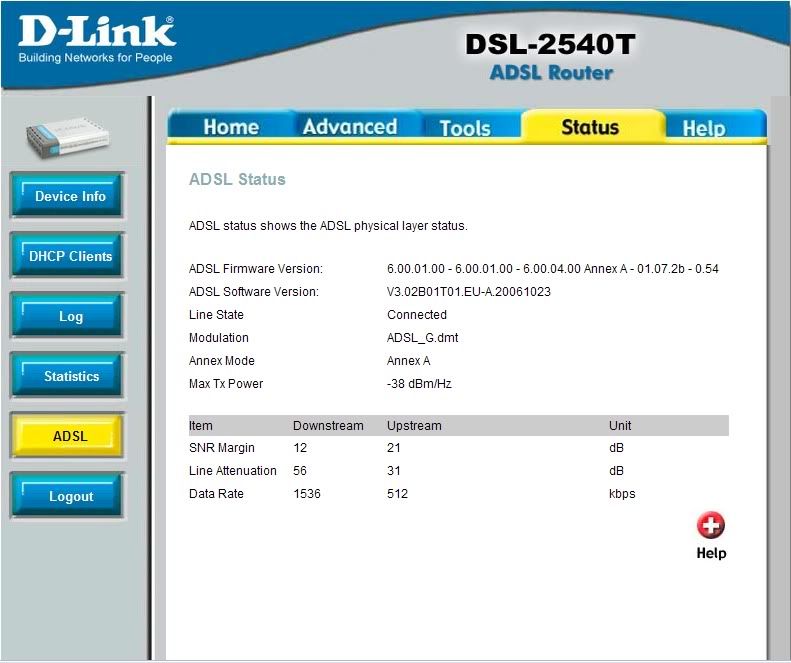
i subsribe with 1mbps, yet see what i get 512kbps downstream..
i had call tmnet, they ask me to do the same thing, bypass, flushdns, and etc...
is this named by miscap? they told me that they had upgrade.. is there something wrong wif my modem? dsl3100r


Attached thumbnail(s)
Attached Image Attached Image
JonnY
post Sep 14 2005, 04:08 PM

Beginner
****
Senior Member
584 posts

Joined: Jun 2005
From: Heaven & Hell

QUOTE(artline @ Sep 12 2005, 01:10 PM)
hurm...
look at mine.
i subsribe with 1mbps, yet see what i get 512kbps downstream..
i had call tmnet, they ask me to do the same thing, bypass, flushdns, and etc...
is this named by miscap? they told me that they had upgrade.. is there something wrong wif my modem? dsl3100r
*
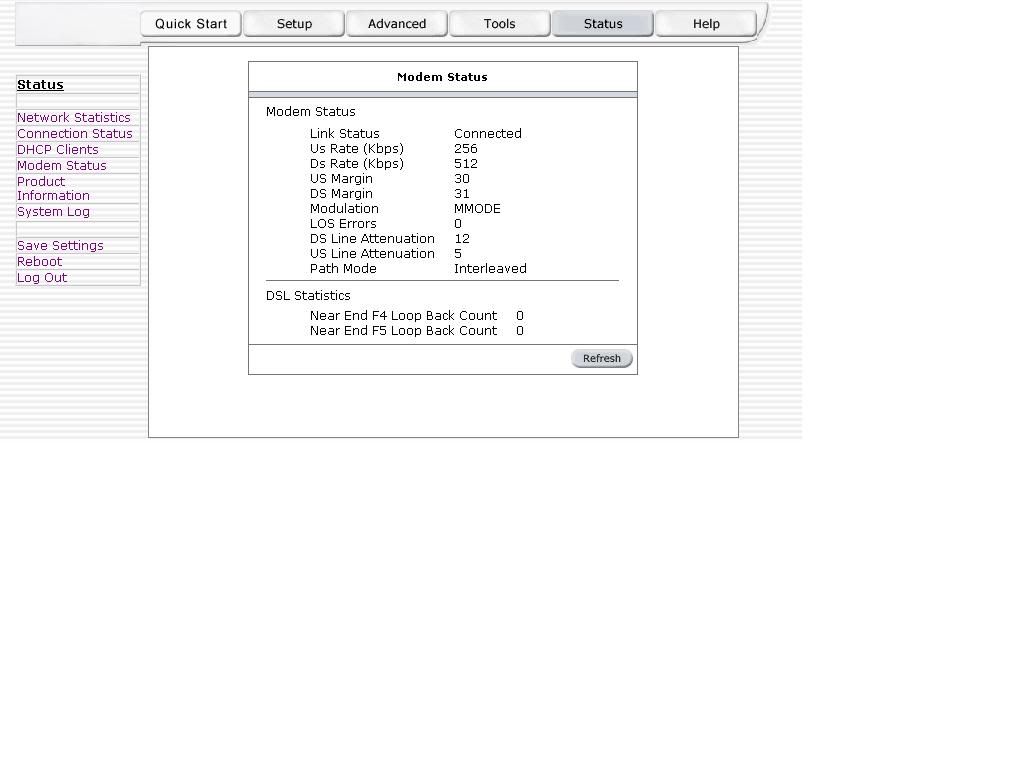
I had this problem too.... my modem status show this

Modem Status
Link Status Connected
Us Rate (Kbps) 256
Ds Rate (Kbps) 512 <-----
US Margin 25
DS Margin 31
Modulation MMODE
LOS Errors 0
DS Line Attenuation 8
US Line Attenuation 5
Path Mode Interleaved

I'm using 1Mbps package... call tmnet they say they had upgrade..... already been like this for more than half year. when complaining through email.. they just ask me test speedometer again and again and again.....

mwtang
post Sep 14 2005, 11:07 PM

Enthusiast
*****
Senior Member
765 posts

Joined: May 2005
i had the same prob, apply for 1MB but got 512, what i did was call them up and give them a piece of my mind, and demand for rebate....

to my surprise, within a week it went up to 1mb.
lwlim
post Sep 15 2005, 12:06 AM

Getting Started
**
Junior Member
73 posts

Joined: Jan 2003
user posted image

i think mine is gonecase sweat.gif shocking.gif doh.gif
so the main cause is outside telephone wiring right?
sad.gif
mhchai45
post Sep 15 2005, 04:06 PM

Regular
******
Senior Member
1,208 posts

Joined: Jan 2003
From: Kuching


QUOTE(lwlim @ Sep 15 2005, 12:06 AM)
user posted image

i think mine is gonecase  sweat.gif  shocking.gif  doh.gif
so the main cause is outside telephone wiring right?
sad.gif
*
you can try T1.413 mode
lwlim
post Sep 16 2005, 01:55 AM

Getting Started
**
Junior Member
73 posts

Joined: Jan 2003
QUOTE(mhchai45 @ Sep 15 2005, 04:06 PM)
you can try T1.413 mode
*
can you teach me how to set?
i'd searched google and also browse thru my modem admin but couldn't find where to set it.

thank you
mhchai45
post Sep 16 2005, 02:35 AM

Regular
******
Senior Member
1,208 posts

Joined: Jan 2003
From: Kuching


QUOTE(lwlim @ Sep 16 2005, 01:55 AM)
can you teach me how to set?
i'd searched google and also browse thru my modem admin but couldn't find where to set it.

thank you
*
http://www.broadbandreports.com/forum/rema...64?hilite=glite

the command should be modify dsl config T1413, commit, reboot.

This post has been edited by mhchai45: Sep 16 2005, 02:36 AM
lwlim
post Sep 16 2005, 03:09 AM

Getting Started
**
Junior Member
73 posts

Joined: Jan 2003
QUOTE(mhchai45 @ Sep 16 2005, 02:35 AM)
http://www.broadbandreports.com/forum/rema...64?hilite=glite

the command should be modify dsl config T1413, commit, reboot.
*
after i'd changed it,my adsl link light went off totally.
now back to glite
thanks for your help
wink.gif
osxchd
post Sep 17 2005, 08:58 PM

Am I a Freak?
******
Senior Member
1,083 posts

Joined: Jan 2003
From: "New" Klang Road, Kuala Lumpur


i've made a report asking technician come... hopefully can help abit... sad.gif
TSSnoWFisH
post Sep 18 2005, 01:37 AM

Look at all my stars!!
*******
Senior Member
2,250 posts

Joined: Jan 2003
From: Penang / Bentong, Pahang / Genting


artline : very obvious is miscapped case lor...and remember to print a screenshot of ur whole router page, and forward it to tmnet for rebate...dont be like me last time want to claim but forgot to print screen..no proof to show that they miscapped me sad.gif.
goliath
post Sep 19 2005, 03:33 PM

* * * * * * *
*******
Senior Member
5,532 posts

Joined: Jan 2003
From: Kuala Lumpur
hi there,

comment bout my line, pls...have been getting disconnected frequently for the past week. not sure why. worse of all, i can't send e-mail with attachment (100kB to 1MB or more) in it. is it due to my phone line or my modem problem? i'm using Aztech DSL305L. it's been 3 years now.

Downstream Upstream
SNR Margin 39.4 27.0 dB
Line Attenuation 46.8 22.0 dB
Errored Seconds 0 1
Loss of Signal 0 0
Loss of Frame 0 0
CRC Errors 0 1
Data Rate 512 256 kbps
Latency INTERLEAVED INTERLEAVED

sry, can't upload screenshot , as i said.. i can't upload a single sh*t.... vmad.gif

side note : i'm using Belkin wireless router for a laptop and desktop. do i have to set the DNS (202.188.0.133 & 202.188.1.5) inside the router? what else do i need to set? thx for ya help.
lemon_lime
post Sep 19 2005, 04:45 PM

Getting Started
**
Junior Member
86 posts

Joined: Apr 2005


My line very frequently gets disconnected. What could be the prob? I've checked and it shows that Local line attenuation is 35.5 dB and remote line attenuation is 15.0 dB

Could the high attenuation be the prob? Getting very frustrated with the connection! vmad.gif

What can be done to rectify this problem?
blackbox
post Sep 20 2005, 09:26 AM

Getting Started
**
Junior Member
133 posts

Joined: Jul 2005
From: Malaysia


Hi guys, i'm using Aztech DSL600E, how am i going to check the parameter?
edu
post Sep 21 2005, 06:10 PM

Getting Started
**
Junior Member
287 posts

Joined: Jan 2003
From: Kay Ell
need some help...sometimes, when i'm turn off my modem and then on it back, it can't login..actually i've set my modem(kasda) to be autodial and the problem is that my connection is not totally disconnected when i first turn it off. when calling TMNET, they will reset/kill the connection and then i just can reconnect immediately...is there any other way rather than calling TMNET to kill my previous connection....
osxchd
post Sep 23 2005, 03:45 PM

Am I a Freak?
******
Senior Member
1,083 posts

Joined: Jan 2003
From: "New" Klang Road, Kuala Lumpur


QUOTE(osxchd @ Sep 17 2005, 08:58 PM)
i've made a report asking technician come... hopefully can help abit... sad.gif
*
stupid techinical went to the exchange resetted 4 me, the problem still there, at least 5 times dc a day... i did another complaint to them asking the technician to come over to my house. yet again... hopefully the so called "technicial" knows what's he's doin... vmad.gif
TSSnoWFisH
post Sep 25 2005, 05:21 AM

Look at all my stars!!
*******
Senior Member
2,250 posts

Joined: Jan 2003
From: Penang / Bentong, Pahang / Genting


osxchd: what exactly did the technician do?

those having frequent dc problems, please refer to my first post on the ping test..that way u'll knw where the fault lies....

edu: just wait for abt 5 mins.that should kill ur connection...
edu
post Sep 26 2005, 07:21 AM

Getting Started
**
Junior Member
287 posts

Joined: Jan 2003
From: Kay Ell
SnoWFisH: can explain more??when should i wait for abt 5 mins??
rainbow6
post Sep 26 2005, 07:49 AM

On my way
****
Senior Member
532 posts

Joined: Sep 2005
From: Kuala Lumpur
QUOTE(edu @ Sep 26 2005, 07:21 AM)
SnoWFisH: can explain more??when should i wait for abt 5 mins??
*
This the time needed by the access server to reset your session login. Though sometimes it will do it very quickly.
mhchai45
post Sep 26 2005, 10:48 AM

Regular
******
Senior Member
1,208 posts

Joined: Jan 2003
From: Kuching


QUOTE(edu @ Sep 21 2005, 06:10 PM)
need some help...sometimes, when i'm turn off my modem and then on it back, it can't login..actually i've set my modem(kasda) to be autodial and the problem is that my connection is not totally disconnected when i first turn it off. when calling TMNET, they will reset/kill the connection and then i just can reconnect immediately...is there any other way rather than calling TMNET to kill my previous connection....
*
this is what those tmnet ppl called hang session, it happens once in a while, there are no ways on your side can do about it, it's up to the ppl in tmnet to delete your session.
huruhara
post Sep 29 2005, 08:22 PM

5 star porn
******
Senior Member
1,045 posts

Joined: Jan 2003
From: gombak, subang, setapak, canberra,


QUOTE(blackbox @ Sep 20 2005, 09:26 AM)
Hi guys, i'm using Aztech DSL600E, how am i going to check the parameter?
*
me oso..how.?
Maxter
post Sep 29 2005, 11:23 PM

Getting Started
**
Junior Member
68 posts

Joined: Jan 2003
im geeting dc like once every 15 mins and getting really pissed now.. anyone know whats the cause...
[W]ee[D]
post Sep 30 2005, 06:54 PM

Getting Started
**
Junior Member
203 posts

Joined: Jul 2005
From: Norwich, UK


Can anyone help me with this..i just apply a 1mb but this is the output i recieve from the modem..kinda bothers me abit


This post has been edited by [W]ee[D]: Sep 30 2005, 06:54 PM


Attached thumbnail(s)
Attached Image
TSSnoWFisH
post Oct 3 2005, 11:01 PM

Look at all my stars!!
*******
Senior Member
2,250 posts

Joined: Jan 2003
From: Penang / Bentong, Pahang / Genting


[W]ee[D]: miscapped case, go call telekom and tell them they miscapped ur line . REMEMBER TO TELL THEM THAT U KNOW ITS MISCAPPED FROM THE ROUTER CONFIGURATION PAGE. if not, they won't bother correcting it.
those having Aztech DSL600E, sorry i cant help u with it cuz i nvr use it before.if anyone use it before and know how to obtain parameters and information please post it together with pictures....if permitted i will merge it together with the first post.
osxchd
post Oct 4 2005, 04:47 PM

Am I a Freak?
******
Senior Member
1,083 posts

Joined: Jan 2003
From: "New" Klang Road, Kuala Lumpur


after bunch of complains, the technician from tm finally came yesterday... drool.gif

due the the cable connected to my house is exposed to "everything" the quality was affected. the technician tried to hide the cables under my house roof and all went better, there's no disconnection till now (hopefully will last). attached before and after service photos for reference. thumbup.gif

before
user posted image

after
user posted image

PS: THANKS SnoWFisH 4 the tips he posted notworthy.gif

This post has been edited by osxchd: Oct 4 2005, 04:49 PM
stevenlys
post Oct 4 2005, 08:18 PM

Enthusiast
*****
Senior Member
846 posts

Joined: Apr 2005
From: Subang Jaya


How about mine???
I can't get online pass 2 weeks which keep on DC. After complaining so many times those lazy techician finally came over my house and fix it for me. WHat's bugging me is that i still get DC sometimes(3-2days once). Here my ADSL stats.
Currently using Aztech 300e DSL bridge modem. My SNR is quite low... huh.gif
SHould i change the telephone cable which located out side(The cable which attach the roof) ??Is 100 the phone No. to ask those wire man to fix it for me>?
user posted image
TSSnoWFisH
post Oct 4 2005, 10:36 PM

Look at all my stars!!
*******
Senior Member
2,250 posts

Joined: Jan 2003
From: Penang / Bentong, Pahang / Genting


osxchd : hehheeh good to hear...ur SNR went up by tonnes ^^. i share the same experience too, the technician came onli to find that my telephone cable was real BLACK and after i touch it half the cable crumbled to ashes ><.

stevenlys : 2-3 days dc once is quite random,but ur snr is still pretty low, and ur having a lot of crc error. try running the ping test so isolate the problem. CRC errors are quite remote and hard to isolate as they can happen anywhere along the data path.
stevenlys
post Oct 5 2005, 12:25 AM

Enthusiast
*****
Senior Member
846 posts

Joined: Apr 2005
From: Subang Jaya


I try the ping the few of the Ip you gave and i got no problem with it. The time for it is about 80-200ms. Got any other method to solve the CRC error? Cause everytime i ping it the CRC error will increase.
How about the SNR problem? Should i call 100 for those contrator to check my line??
Sorry for asking so many noobs question...
Currently live in USJ
user posted image
blackamikaze
post Oct 5 2005, 12:25 AM

Trooper Rank: BIG HEAD SERGEANT
*******
Senior Member
2,671 posts

Joined: Jul 2005
From: Bestine, the capital of Tatooine


QUOTE(blackbox @ Sep 20 2005, 09:26 AM)
Hi guys, i'm using Aztech DSL600E, how am i going to check the parameter?
*
after u log in to modem page.. click status n select modem status..
Jehuty
post Oct 5 2005, 09:52 AM

look at what stars??
*******
Senior Member
2,321 posts

Joined: Jan 2003


i've getting alot of random halts on my streamyx lately ..

what could be the cause huh ?

my US is 29 and my DS is 28

i called tmnet support, all they tell me is to check on my switch, and my phone line .. is it really gotta to with any of those hardware ? instead it's just streamyx's problem?
osxchd
post Oct 5 2005, 11:43 PM

Am I a Freak?
******
Senior Member
1,083 posts

Joined: Jan 2003
From: "New" Klang Road, Kuala Lumpur


UPDATES: more than 24 hours without disconnection

think this is a better sign... 4 those of u who confirm that your local snr margin is very low, try to keep on complain to tm 100 asking them to ask technician to go to ur house to check them out. thumbup.gif
TSSnoWFisH
post Oct 7 2005, 10:03 AM

Look at all my stars!!
*******
Senior Member
2,250 posts

Joined: Jan 2003
From: Penang / Bentong, Pahang / Genting


Jehuty : it could be anything. its hard to pinpoint the problem exactly without doing trouble shooting. well most of the time, and sadly, the problem lies in faulty / old phone lines.

osxchd : CONGRATULATIONS ! biggrin.gif
phantom opera
post Oct 7 2005, 04:29 PM

LiverpoolFC FOREVER
*****
Senior Member
836 posts

Joined: Jan 2003
From: Anfield Drive, Sibu


Any comment on this:

DSL Parameters and Status
Vendor ID: 00B5GSPN
Revision Number: T93.3.38
Serial Number: 123456789abcdx
Local Tx Power: 11.75 dB
Remote Tx Power: 18.11 dB
Local Line Atten.: 52.5 dB
Remote Line Atten.: 25.5 dB
Local SNR Margin: 33.5 dB
Remote SNR Margin: 31.0 dB
Self Test: Passed
DSL Standard: G.dmt
Trellis Coding: Enable
Framing Structure: Framing-3

Is't my local and remote attenuation normal? And what is the best rate for attenuation?
SUS3den
post Oct 8 2005, 03:02 AM

Casual
***
Junior Member
388 posts

Joined: Mar 2005
my Aztech router get freq hang...when it hang i will not able to access the router page...must on-off the router then back to normal.....but lately...it happened to freqeuntly...one nite 10 time at least.....any one can help me?
TSSnoWFisH
post Oct 8 2005, 03:24 AM

Look at all my stars!!
*******
Senior Member
2,250 posts

Joined: Jan 2003
From: Penang / Bentong, Pahang / Genting


3den: very common with aztech routers when there's too much load...always happens with my fren's router (argh he still refuses to lend me his to do "software dissecting", if he lends me i might be able to come out with a guide for u aztech router users out there.) the web commander version is the same for all aztech routers right?

phantom opera: despite ur high attenuation, ur SNR is ok, so i dont think u'll have any problem perhaps only 1 dc every 1-2 days
SUS3den
post Oct 8 2005, 11:07 AM

Casual
***
Junior Member
388 posts

Joined: Mar 2005
QUOTE(SnoWFisH @ Oct 8 2005, 03:24 AM)
3den:  very common with aztech routers when there's too much load...always happens with my fren's router (argh he still refuses to lend me his to do "software dissecting", if he lends me i might be able to come out with a guide for u aztech router users out there.) the web commander version is the same for all aztech routers right?

phantom opera: despite ur high attenuation, ur SNR is ok, so i dont think u'll have any problem perhaps only 1 dc every 1-2 days
*
snowfish....yeap i think all the same....i remember the shop owner said the if tht case happend needd to change router liau..last nite i am totally pissed off with this Fcuk aztech router....it is hang so many time..i have to go to down stair to restart my router...i think i will change my router sweat.gif ....i already have prolink hurricane in my hand.....hope to change it today....fcuk aztech..~!

what you mean by software dissectin?
is there any side teach us how to do tht?

do you think D-link modem+router can handle heavy load?
pirateguy
post Oct 9 2005, 10:22 PM

Regular
******
Senior Member
1,409 posts

Joined: Jan 2005


Previously my connection sucks. I did the following:

1. Replace the telephone cable (50 ft) to a better quality.

2. Replace the phone jack (the small box that connects your telephone to the telephone line outside your house).

Up until now I suffer very little disconnection, and my download rate is almost always hit at 50Kb/s (I'm 512kbp package).
stevenlys
post Oct 10 2005, 04:24 PM

Enthusiast
*****
Senior Member
846 posts

Joined: Apr 2005
From: Subang Jaya


Just dial to 100 to tell them that my Internet connection got very low SNR signal and what they tell me is they ask me to call tmnet helpdesk for help. (WEIRD) Afterthat i dial to tmnet 9515 and they tell me to call 100 for help. SO WEIRD~~!!! (CONFUSING)

i got no DC for 3 weeks for my connection but my SNR is low

This post has been edited by stevenlys: Oct 10 2005, 04:26 PM
Anderson
post Oct 10 2005, 10:53 PM

I save humanity and stop bullets.
******
Senior Member
1,258 posts

Joined: Jan 2003


Vendor ID: 00B5GSPN
Revision Number: Y1.16.3
Serial Number: 123456789abcdx
Local Tx Power: 12.13 dB
Remote Tx Power: 16.45 dB
Local Line Atten.: 44.0 dB
Remote Line Atten.: 25.0 dB
Local SNR Margin: 31.5 dB
Remote SNR Margin: 26.0 dB
Self Test: Passed
DSL Standard: G.dmt
Trellis Coding: Enable
Framing Structure: Framing-3

My fren using ZTE ADSL 831 Get such result
although Local SNR MAargin is more than 30..
but
his modem signal alwaz on and off and dl stuff through bt or normal dl slow.( rm 88 package ) ...

Why?
TSSnoWFisH
post Oct 11 2005, 11:40 AM

Look at all my stars!!
*******
Senior Member
2,250 posts

Joined: Jan 2003
From: Penang / Bentong, Pahang / Genting


Anderson : check under the admin -> alarm. anything written there? is it congested? if it is, reduce firewall max tcp connections to abt 65.
phantom opera
post Oct 11 2005, 12:34 PM

LiverpoolFC FOREVER
*****
Senior Member
836 posts

Joined: Jan 2003
From: Anfield Drive, Sibu


One question, actually in our modem configuration, we'll see NAT. am i right? so, what is actually the functioin of NAT? What happen if we disable it and what happen if we enable it?
prasys
post Oct 11 2005, 03:16 PM

Heros Never Die
Group Icon
VIP
12,925 posts

Joined: Mar 2005
From: Kuala Lumpur
NAT = Routing , if you want to turn your modem into router......on certain modems , you nee to enable that to allow you to torrent and some people who wishes to convert their modem into router (by buying a switch , so that they can connect up to 4 pcs) , they can do that. but if you got 1 pc only , then no need
Anderson
post Oct 11 2005, 04:29 PM

I save humanity and stop bullets.
******
Senior Member
1,258 posts

Joined: Jan 2003


QUOTE(SnoWFisH @ Oct 11 2005, 11:40 AM)
Anderson : check under the admin -> alarm. anything written there?  is it congested? if it is, reduce firewall max tcp connections to abt 65.
*
it shows...
Thu Jan 02 09:01:41 2003 : STATUS ALARM : PPP Interface Up : Interface - ppp-0
Thu Jan 02 09:01:40 2003 : STATUS ALARM: PPP Authorization Successful : Interface - ppp-0
Thu Jan 02 09:01:40 2003 : STATUS ALARM : PPPoE Up : Interface - ppp-0
Thu Jan 02 09:01:40 2003 : STATUS ALARM : ATM VC Up : Interface - aal5-0, PortId=7, Vpi=0, Vci=35
Thu Jan 02 09:01:40 2003 : STATUS ALARM : ATM Interface Up : Interface - atm-0
Thu Jan 02 09:01:40 2003 : STATUS ALARM : DSL Interface Up
Thu Jan 02 09:01:28 2003 : STATUS ALARM : System Up

so anything wrong ???
phantom opera
post Oct 11 2005, 04:55 PM

LiverpoolFC FOREVER
*****
Senior Member
836 posts

Joined: Jan 2003
From: Anfield Drive, Sibu


tq prasys for the explanation..
jason5191
post Oct 11 2005, 08:58 PM

Getting Started
**
Junior Member
57 posts

Joined: Jan 2003


[deleted]

This post has been edited by jason5191: May 12 2014, 02:17 AM
Ryusei
post Oct 12 2005, 03:44 AM

New Member
*
Junior Member
13 posts

Joined: Aug 2005


user posted image

Is this ok? Well, since the past few days, something is going wrong with my DSL, once my place gets heavy rains and/or rain, my DSL light will start to blink, very often too. But then, my computer connection to the internet wont DC sweat.gif Well this is very frustrating as my DSL keeps DC'ing every time the wind or rain comes, wind at my place is quite frequent these few days. What's wrong with it? cry.gif cry.gif
jayhan
post Oct 12 2005, 05:54 PM

7 ☆ DSLR noob
Group Icon
Elite
2,707 posts

Joined: Feb 2005
From: KL
hmm, nowadays my router was becoming crazy, before that i was pleased because everything's going fine, but nowadays, i hardly smoothly connect to the internet, until 1.5 to 2 hours of hardwork then only can connect, then when telephones coming in, it will auto disconnect! what the heck??

but, the download and upload speed oso seems become crazy nowadays, last time download movie trailers can go up to 500kb/s??! and use free download manager can go up to 155kb/s, while use bitcomet upload can go up to 80kb/s.... while i was just purchase basic 512 package!

today i go check my dsl gateway and i found out this

user posted image
whoa, wat is going on? shud i happy or sad? happy for the "upgrade", biggrin.gif hate for the unstability! mad.gif

This post has been edited by jayhan: Oct 12 2005, 06:11 PM
unstoppable
post Oct 12 2005, 07:24 PM

Casual
***
Junior Member
451 posts

Joined: Jun 2005

user posted image

this is mine..before that i dint face any disconnection & now always disconnect..pls help

using SMC barricade modem
cajun2de
post Oct 14 2005, 08:51 AM

de Reaper
*******
Senior Member
2,791 posts

Joined: Sep 2005
From: Ipoh/Melaka


QUOTE
hmm, nowadays my router was becoming crazy, before that i was pleased because everything's going fine, but nowadays, i hardly smoothly connect to the internet, until 1.5 to 2 hours of hardwork then only can connect, then when telephones coming in, it will auto disconnect! what the heck??

but, the download and upload speed oso seems become crazy nowadays, last time download movie trailers can go up to 500kb/s??! and use free download manager can go up to 155kb/s, while use bitcomet upload can go up to 80kb/s.... while i was just purchase basic 512 package!


u got upgraded huh......hmm......heard bout dem upgradin n all.....but nuthin here yet.....ma fren in penang enjoyin 3mb line......me here 512k n waitin 4 tha upgrade.....damn.....dunno wen deyr gonna do it......

AngelSlayer
post Oct 16 2005, 12:42 PM

Yoyoyo~~~
*****
Senior Member
702 posts

Joined: Jan 2003
From: Singapore/KL/Ipoh


can anyone help me bout this? i subscribe the 1mb package and get this...


Attached thumbnail(s)
Attached Image
justints
post Oct 17 2005, 08:51 AM

Getting Started
**
Junior Member
135 posts

Joined: Jun 2005


GUYsssSsSsssSSssSs...... Help!!!!!!!!!!!!
My streamyx a lil coo choo......

I conncting via wi-fi at home. I'm using a modem as well.
Problem: One day it works fine... the next....... it'll say low or rescrited connectivity. Then cannot surf... cannot anything....

osxchd
post Oct 17 2005, 09:35 AM

Am I a Freak?
******
Senior Member
1,083 posts

Joined: Jan 2003
From: "New" Klang Road, Kuala Lumpur


QUOTE(justints @ Oct 17 2005, 08:51 AM)
GUYsssSsSsssSSssSs...... Help!!!!!!!!!!!!
My streamyx a lil coo choo......

I conncting via wi-fi at home. I'm using a modem as well.
Problem: One day it works fine... the next....... it'll say low or rescrited connectivity. Then cannot surf... cannot anything....
*
what is ur router brand and model?

i face this problem using baffalo router as well...

RAIN FRIED MY D-LINK!!! cry.gif
narutokun83
post Oct 23 2005, 12:43 AM

Look at all my stars!!
*******
Senior Member
2,108 posts

Joined: Jan 2003


i'm a 1MB subscriber and i got this when i went through the modem page

user posted image

clearly i'm being mis-capped
so lets say that i have already made a report... do i still need to flush my DNS to refresh the latest speed or does it refresh by itself?
smwah
post Oct 23 2005, 10:44 PM

Glad to be Here
Group Icon
Elite
1,701 posts

Joined: Jan 2003
From: Setia Alam


Hi i using the problink huricane with router built in but no firewall. There days I had difficulty accesing the router and worse when doing transfer files via network it is very slow. Can anyone suggest what happen to my network?
I had a very bad
SNR: downstream - 10.5 and upstream - 15.0
Linte Att: downstream - 42.4 and upstream - 26.0

Ahlok
post Oct 25 2005, 12:25 AM

NERF THIS!
******
Senior Member
1,088 posts

Joined: Jan 2003
From: xxxBarcodexxx Status: Shuffling


i'm using 1 mb package
n i got this for the streamyx test
miscapped, is it? need advise, thanks

user posted image
izzani
post Oct 25 2005, 02:18 PM

Getting Started
**
Junior Member
178 posts

Joined: Oct 2005
From: Johor Bahru


QUOTE(Ahlok @ Oct 25 2005, 12:25 AM)
i'm using 1 mb package
n i got this for the streamyx test
miscapped, is it? need advise, thanks

user posted image
*
SINGLE MODEM CHECKED.. if router find ur own router guide..
erm... ok if u r using tmnet free modem aztech dsl300, open browser go to 192.168.1.1, username admin
pass admin

check DSL page.. if 1 mb datarate should be 1024 mbps download 512 upload, if true ur packages capped correctly. if not bring mortar go TMnet kedai telekom or clickers LOL

This post has been edited by izzani: Oct 25 2005, 02:19 PM
izzani
post Oct 25 2005, 02:23 PM

Getting Started
**
Junior Member
178 posts

Joined: Oct 2005
From: Johor Bahru


QUOTE(narutokun83 @ Oct 23 2005, 12:43 AM)
i'm a 1MB subscriber and i got this when i went through the modem page

user posted image

clearly i'm being mis-capped
so lets say that i have already made a report... do i still need to flush my DNS to refresh the latest speed or does it refresh by itself?
*
Should be refresh itself. Obviously miscapped. Call 1515 make report. If not go report at kedai telekom, ask them make sure fixed today. No action go tmnet bring yellow form (grade A goverment officer) sure come to ur house before u arrived after report made!

This post has been edited by izzani: Oct 25 2005, 02:27 PM
izzani
post Oct 25 2005, 02:27 PM

Getting Started
**
Junior Member
178 posts

Joined: Oct 2005
From: Johor Bahru


QUOTE(smwah @ Oct 23 2005, 10:44 PM)
Hi i using the problink huricane with router built in but no firewall. There days I had difficulty accesing the router and worse when doing transfer files via network it is very slow. Can anyone suggest what happen to my network?
I had a very bad
SNR: downstream - 10.5 and upstream - 15.0
Linte Att: downstream - 42.4 and upstream - 26.0
*
1. Check if u install personal firewall that blocked network
2. Scan for virus and spyware
3. Try ping ur router. should be less than <1ms than ok
4. Check ur Lan cable.. make sure no wire stuck behind door
5. Make ur home-network wizard again.
6. Cannot? reset ur router to factory setting and start from beginning. PPP setting.
7. Last test with different PCs. Try and error.
freako
post Oct 25 2005, 06:42 PM

Enthusiast
*****
Senior Member
885 posts

Joined: Apr 2005


SNR

downstream =29dB
upstream = 30dB

Line Attenuation

downstream = 17dB
upstream = 2dB

im running on 512k package... and im getting frequent timeouts... but nvr dc b4.... how? is it ok?
freako
post Oct 25 2005, 10:20 PM

Enthusiast
*****
Senior Member
885 posts

Joined: Apr 2005


QUOTE(osxchd @ Oct 17 2005, 09:35 AM)
what is ur router brand and model?

i face this problem using baffalo router as well...

RAIN FRIED MY D-LINK!!! cry.gif
*
upgrade your router.. and restart the device... then try..
briangan
post Oct 25 2005, 11:11 PM

Getting Started
**
Junior Member
211 posts

Joined: Jan 2003
From: Kuala Lumpur


QUOTE(strynch @ Jun 15 2005, 03:47 PM)
downstream is ok i guess..

but my upstream? blink.gif
*

user posted image
wanna ask... his LATENCY and mine what is the DIFF...
his one is FAST while my one is INTERLEAVED...
some guru's explain...

user posted image

This post has been edited by briangan: Oct 25 2005, 11:16 PM
songhan89
post Oct 27 2005, 03:42 PM

-Hankerchizf-
******
Senior Member
1,104 posts

Joined: Sep 2004
From: NUS,Singapore


the latency is the delay between the data packets transfer from the internet to your computer. Actually,it is not noticable when surfing but the latency only comes into play for online gaming like Counter Strike, which a mili second of delay can cause inaccurate bullet registration. Don't worry about your latency, it is normal . My 1mbps is also on interleaved
bennyhwl
post Oct 28 2005, 12:11 AM

Getting Started
**
Junior Member
225 posts

Joined: Oct 2005


hello...I am using the same modem....
My house now connect to streamyx by using this zxte831 modem and 1 switch..
I found a problem tat always dc la...
Can u teach me how to set the modem page???I never set it,i just enter username and password to connect,other thing i do not touch.
xjukie
post Oct 28 2005, 07:01 AM

Blogger photographer
******
Senior Member
1,238 posts

Joined: Sep 2005
From: Kota Bharu - Klang Valley


Need help, newbie here how was my connection status? is it too bad or? how to solve this?
[attachmentid=77140][attachmentid=77141]

This post has been edited by xjukie: Oct 28 2005, 07:04 AM
freako
post Oct 28 2005, 02:11 PM

Enthusiast
*****
Senior Member
885 posts

Joined: Apr 2005


QUOTE(xjukie @ Oct 28 2005, 07:01 AM)
Need help, newbie here how was my connection status? is it too bad or? how to solve this?
[attachmentid=77140][attachmentid=77141]
*
waa.. almost same as mine but my SNR is higher.. ermm... do u get any dc or timeouts?
xjukie
post Oct 28 2005, 02:18 PM

Blogger photographer
******
Senior Member
1,238 posts

Joined: Sep 2005
From: Kota Bharu - Klang Valley


QUOTE(freako @ Oct 28 2005, 02:11 PM)
waa.. almost same as mine but my SNR is higher.. ermm... do u get any dc or timeouts?
*
Rite now, connection ok no dc or timeouts. Some say that if SNR Margin the higher the better and Line Attenuation the below is much better rite? newbie here, correct me if im wrong and help me to solve this probs. thanks
Chartry
post Oct 28 2005, 04:43 PM

In the mood of love
******
Senior Member
1,616 posts

Joined: Jan 2005


QUOTE(YSHP @ Oct 16 2005, 12:42 PM)
can anyone help me bout this? i subscribe the 1mb package and get this...
*
Atleast you've got a nice upstream speed. The fastest way to solve the prob is contact your contractor. If you don't have one call the Tmnut hotline.
freako
post Oct 28 2005, 04:44 PM

Enthusiast
*****
Senior Member
885 posts

Joined: Apr 2005


yes u r rite...
my line sux... first day i get streamyx ( like 2 weeks ago) untill now still got timeout.. eeeeSSSHH!!
Chartry
post Oct 28 2005, 04:47 PM

In the mood of love
******
Senior Member
1,616 posts

Joined: Jan 2005


QUOTE(izzani @ Oct 25 2005, 02:18 PM)
SINGLE MODEM CHECKED.. if router find ur own router guide..
erm... ok if u r using tmnet free modem aztech dsl300, open browser go to 192.168.1.1, username admin
pass admin

check DSL page.. if 1 mb datarate should be 1024 mbps download 512 upload, if true ur packages capped correctly. if not bring mortar go TMnet kedai telekom or clickers LOL
*
Upload 512kbps is normal???
gstoh
post Oct 29 2005, 12:18 PM

INTJ
******
Senior Member
1,282 posts

Joined: Dec 2004
From: penang
hey guy.. refer to the guide in first page..
i think my SNR margin is quite low...no wonder my internet connection alwasy DC..
so , can i make a complaint to TMNET ?
i have tried many ways to get high SNR margin.. such as conect modem directly to phone line...seems no any improvement


here is the SNR margin SS,
may i know what is line attenuation ?? higher is better ?or lower is better ?
user posted image
wan to ask a stupid question, does the modem influence the SNR margin ??

recently, a lot of ppl are facing slow internet connection problem ..
i am of the victims also...
i m using 1mbps streamyx packge ,my connection speed shown in console page is 1024kbps
but i tested at tmnet speedometer test there... i only got half of the speed
user posted image
the problem still remain ..until now.. no changes, it has been 2 weeks liao...


chiggy
post Oct 29 2005, 12:19 PM

Sleepy
*******
Senior Member
2,745 posts

Joined: Dec 2004
From: Kelana Jaya


Bought Streamyx-in-a-box thinking that it is easy to install. Took up the 1MB package at RM88 (free modem) and need to add RM2 for 1 year adsl modem warranty (total RM90 per month)

Just got activated yesterday. Some problems are fixed. Now for some others cry.gif

As usual a newbie like me (streamyx newbie), we just follow the guide. So, I connect using the tmnet streamyx shortcut. At the Modem Status (DSL600E), it displays Us Rate and Ds Rate at 256kps. Ok, this sucks. Then I tried to set the modem to auto login. Now checked, Us Rate at 256kps and Ds Rate at 512kps. Ok, I shall call them on Monday to have this fixed! It should bbe 1024kps right?

Anyway, here is my modem status. Appreciated info to assist me enchance my broadband enjoyment notworthy.gif
Link Status Connected
Us Rate (Kbps) 256
Ds Rate (Kbps) 512
US Margin 31
DS Margin 29
Modulation MMODE
LOS Errors 0
DS Line Attenuation 39
US Line Attenuation 48
Path Mode Fast Path

My ping to the modem is "time=1ms". Is this normal?

Some other info
Win98SE
Updated NDIS.VXD (as suggested by tmnet)
Aztech DSL600E

-----

Called 9515 about the mis-capped. Here are the list of things I need to do (must do according to their procedure)
1. Off modem and computer
2. On back everything after 5-10 minutes
3. Run speedometer and call them back to give both download and upload results
4. Then they file a report
5. They said, within 24 hours check again (heh, hope so)
6. If still happen, asked me not to call technical department and call activation department because it is still under 14 days warranty (whatever that means).

Lets see how tomorrow goes. thumbup.gif

This post has been edited by chiggy: Oct 29 2005, 07:29 PM
ngjx
post Oct 29 2005, 10:06 PM

Getting Started
**
Junior Member
282 posts

Joined: Oct 2005
From: Penang


i've run the ping test
the 1st test, i get 10ms-100+ms
the 2nd test i get 20-30ms
the 3rd test i get 500+ms with a few timeouts
From the result, the range is totally out from the normal 1....
y is it like this n how do i fix it???
below is the dsl parameters
[attachmentid=77318]


is it normal??
everyday i'll get at least 1 dc especially at night vmad.gif vmad.gif ... very hard to get connected..
i'm using D-link 500G modem. Its a router modem and connected to 2 computers

chiggy
post Oct 30 2005, 07:49 PM

Sleepy
*******
Senior Member
2,745 posts

Joined: Dec 2004
From: Kelana Jaya


Hahha.... as usual, things not get done again. Mine still mis-capped at 512k. Called them, activation department, and they say to call technical department. Yesterday, technical department ask me to call activation department because its still under 14 days warranty. Aiyo... they just love to pass the buck!

Yesterday, tech department say they will make a report to activation department. Now activation department say no such report received. Another Aiyo.... So, now activation say will make a report and it would be fixed in 3 days. That is Wednesday!

I was downloading today, 110MB took me 2 hours. Aiyo.....

freako
post Nov 1 2005, 10:45 PM

Enthusiast
*****
Senior Member
885 posts

Joined: Apr 2005


QUOTE(chiggy @ Oct 30 2005, 07:49 PM)
Hahha.... as usual, things not get done again. Mine still mis-capped at 512k. Called them, activation department, and they say to call technical department. Yesterday, technical department ask me to call activation department because its still under 14 days warranty. Aiyo... they just love to pass the buck!

Yesterday, tech department say they will make a report to activation department. Now activation department say no such report received. Another Aiyo.... So, now activation say will make a report and it would be fixed in 3 days. That is Wednesday!

I was downloading today, 110MB took me 2 hours. Aiyo.....
*
tried asking for a rebate? biggrin.gif
chiggy
post Nov 2 2005, 05:13 PM

Sleepy
*******
Senior Member
2,745 posts

Joined: Dec 2004
From: Kelana Jaya


Wednesday already, still not solved.
Called them, they ask me to do a flushdns via "ipconfig /flushdns". Not really related right? Anyway, I'm on Win98, and this option is not available.

Call them again and ask what happen to my previous report. They say according to the technician's report, he has went to the exchange and checked my port. It has already upgraded to 1 MB package. Heh, don't whether true or not. I'm still getting download of 512mb on modem status (even after rebooting modem) and speedometer of 428.32 kbits per sec.

Now they say, "I will file another report for you. In 24-48 hours working days, if not solved, called again. The technician will go to the exchange and check again. If still the same, the technician would pay a visit at your place. He will call first. In your speedometer you should be getting around 700 kbits per sec".

Aiyo, like that 24-48 hours working days, this week raya holidays, have to wait till next monday. 700 kbits per sec, hey, that is not 1 MB. Sigh
chiggy
post Nov 5 2005, 04:03 PM

Sleepy
*******
Senior Member
2,745 posts

Joined: Dec 2004
From: Kelana Jaya


Updates:
Last night they callled me and say to check whether has my miscapped been fixed. Then I test, nope, still the same. Then I reboot the modem and then modem hang. Then I reboot again, gone case. I think the modem went kaput because my computer cannot get the DHCP IP from the modem. Tried ipconfig /release and it give me address 169.x.x.x

OK, after some calls here and there, the tmnet technician came. They used their notebook and check - yeap, their notebook can't get IP from modem. Then they used their ZTE modem. Able to get to IP and then access internet. Then fixed the ZTE modem to my PC. OK, everything looks OK. Speed is also OK. From ZTE model status, it shows 1024/384.

So, now they replaced my 10 days old AZTECH DSL600E modem with their ZTE 831 modem. Here is the best part. According to them, eventhough they still provide me with a one year warranty (minus 10 days), the ZTE modem is actually a buffer unit - a unit that has been repaired by tmnet. They cannot give me a new unit eventhough it is only 10 days old. Now that sucks.

Anyway, they also said that alot of aztech modems provided by tmnet sucks. This ZTE model is better and stable. Hopefully all goes well.
blackbox
post Nov 6 2005, 01:13 AM

Getting Started
**
Junior Member
133 posts

Joined: Jul 2005
From: Malaysia


This is my modem status, is my connection fine?? Thanks!


Attached thumbnail(s)
Attached Image
Praetor
post Nov 8 2005, 05:21 PM

<insert custom member title here>
******
Senior Member
1,794 posts

Joined: Jan 2003
From: int lo0/0


The miscapped connection is pretty much horsecrap. I found out about it like last month. After my first bill came, and I've already paid my second bill. At first i found out they capped me at 512/256. so I filed in a report. that was back on 31 Oct. Shortly after the phone call, I wrote in an e-mail to tell them to look into the matter.

1st of Nov they sent me 2 e-mails with 2 different reply towards the complain. First reply states that my port has been reconfigured. But the second reply states that my phone line has problem. The 2 e-mail was sent by different staff. So which is true? My port has been reconfigured or my line has a problem?

Few days later I call them up again, and this time they told me that they've reset the port. So I asked them why is my connection still capped at 512K even after you've reset the port. So again I was put on hold, after that the technical support staff came back and told me the stupidest thing yet. He told me that I lodged a wrong report. I lodge a complain about slow connection instead of miscapped connection. Again he told me that the tehnical staff will look into it and to check it back afrer 24 to 48 working hours. After that I wrote in an e-mail again calling them to look into it. I don't think they didn't even bother to read through my mail and just send me a reply from one of their "Reply to Customer E-Mail Template"

On the next day about 1am midnight I check my Modem stats again and guess what. This time it shows 32K / 256K. Just what I needed. So I didn't care much and went to bed. I went over to genting on the same day and hoping that it'll be okay after I come back.

And guess what again. I came back yesterday and checked my modem stats again. This time it shows a "slight improvement" they gave me 64K / 256K! Good job! And the previous e-mail that I sent, the subject of the reply was [SPAM] Complain regarding getting 512K package instead of Basic 1M package. So I called TMNet just now. Another different answer. They told me that they've reset my port but yet I still get back the same connection, So they've got to take time to verify this problem properly. After she said the "take their time" to verify the problem, I'm just wordless. It shows how much commitment they put into their work.

From tomorrow onwards I'm going call them once everyday until they've fix my problem. I'm getting seriously pissed here.
anakmelayu
post Nov 9 2005, 01:13 AM

Getting Started
**
Junior Member
70 posts

Joined: Nov 2005
From: ngine street, sax alam


the technician need to act 48 hours prior to reports they get, if they dun act u can complain wat!
spikey2506
post Nov 10 2005, 04:00 PM

Professional Bum
******
Senior Member
1,839 posts

Joined: Mar 2005


My "last fail cause" was VC down. How to fix it? Could not connect since morning.. cry.gif cry.gif cry.gif

This post has been edited by spikey2506: Nov 10 2005, 05:07 PM
osxchd
post Nov 10 2005, 05:48 PM

Am I a Freak?
******
Senior Member
1,083 posts

Joined: Jan 2003
From: "New" Klang Road, Kuala Lumpur


QUOTE(freako @ Oct 25 2005, 10:20 PM)
upgrade your router.. and restart the device... then try..
*
newest firmware oridy, anyway, my d-link is fine LOL, juz that the ac adapter burnt... so now continue surfing with d-link, long time nv come here reply... sorry ar notworthy.gif
eddyann
post Nov 19 2005, 02:24 PM

Gold Miner
******
Senior Member
1,981 posts

Joined: Jan 2003
From: ||| Royal Creek |||


mine:

DS: 512
US: 256

The Upstream
relative capacity occupation: 33%
noise margin upstream: 31.0 db
output power downstream: 19.5 dbm
attenuation upstream: 27.5 db

The Downstream
relative capacity occupation: 12%
noise margin downstream: 37.0 db
output power upstream: 9.5 dbm
attenuation downstream: 46.0 db

so which one is SNR??? my connection good or not, but i rarely seen any frequent dc though.
dingding
post Nov 19 2005, 11:45 PM

Getting Started
**
Junior Member
248 posts

Joined: Oct 2005


QUOTE(SnoWFisH @ Aug 26 2005, 12:42 AM)
SNR means the stability of ur connection, it does not have anything to do with ur connection speed. connection speed depends on latency and bandwidth.

davidsk2002 : should be quite stable..maybe 1 day 1-2 times dc......are u connecting directly to ur phone port?

amenlo9: hehe..thats the common cause tongue.gif.
*
below is my modem readings....my snr values are low....but i never get disconnected from streamyx....but recently i've been suffering from slow speed...even when tested on the tmnet speedometer....the snr values wont affect the speed? then that means there are other problems causing the slow speed instead of the low snr value? i am using the 1mbit package but is getting around 600-700+kbps speed when tested on the tmnet speedometer....


Attached thumbnail(s)
Attached Image
eric_tan
post Nov 21 2005, 08:57 PM

Getting Started
**
Junior Member
264 posts

Joined: Feb 2005


My new Dlink 504T seems slower than my previous Router/Modem Combo.

Anyone updated to the latest firmware?

http://www.dlink.com.au/tech/drivers/files...rs/dsl504t.htm#
wise123456wise
post Nov 23 2005, 09:22 PM

New Member
*
Newbie
4 posts

Joined: Jul 2005
IS the noise margin in new ZTE interface means SNR?
snowcrash
post Nov 24 2005, 07:57 PM

Mortal Sword
****
Senior Member
662 posts

Joined: Jan 2003
From: KL


Just moved to KL and got my streamyx here. It's the aztech modem, so took me a while to figure out how to get the user interface up. My connection is currently annoyingly slow (max 50k on Azureus). Decided to check the status. This is what I got:
CODE
Modem Status
Modem Status

Link Status   Connected
Us Rate (Kbps)  896
Ds Rate (Kbps)  4096
US Margin  14
DS Margin  29
Modulation  MMODE
LOS Errors  0
DS Line Attenuation  25
US Line Attenuation  25
Path Mode  Fast Path
DSL Statistics

Near End F4 Loop Back Count   0
Near End F5 Loop Back Count  0
Whiskey Tango Foxtrot, over? No way the speed is that high. Should I be concerned over any of the other values (Attenuation, Path Mode, Margin etc?) and is there any alterations that Aztech DSL600EU users have found that improve their connection performance?
masamura
post Nov 24 2005, 08:28 PM

Casual
***
Junior Member
384 posts

Joined: Feb 2005
From: Bahamut's Lair


Um... I think you got a 4Mbps cap... don't complain. tongue.gif
snowcrash
post Nov 24 2005, 08:59 PM

Mortal Sword
****
Senior Member
662 posts

Joined: Jan 2003
From: KL


QUOTE(masamura @ Nov 24 2005, 08:28 PM)
Um... I think you got a 4Mbps cap... don't complain. tongue.gif
*

That would be nice if it was true, but....

Over the last 2 hours, my Azureus has not gone above 40ks and the upload bounces frequently between 10ks and 20ks, so it's NOT a bonus for me...
masamura
post Nov 25 2005, 12:30 AM

Casual
***
Junior Member
384 posts

Joined: Feb 2005
From: Bahamut's Lair


Have you tried doing test on TMNet's speed 'o' meter? BT speed can fluctuate depending what you are downloading. Assuming if you are downloading stuffs that have lots of International seeders around, expect slow speed thanks to TMNet's courtesy of letting us have slow international link speed.

However if you download stuffs like "Bleach" or "Naruto" and get those kind of speed.. yeah you got an issue there.
masamura
post Nov 25 2005, 12:40 AM

Casual
***
Junior Member
384 posts

Joined: Feb 2005
From: Bahamut's Lair


By the way.. I'm here to let you guys know what to do if you are miscapped. Recently through my own experience of TMNet's crazy mood of purposely downgrading my 1Mbps link to 512Kbps, I've taken some steps that assured my restoration of speed. So here goes:

1) Make a report through 1300-88-9515
2) Call them once a day with the SAME report number that you initially got.
3) Call them till it's the 3rd *working* day.
4) Call them again on the 4th working day and tell them that you've just got "Suruhanjaya Komunikasi dan Multimedia Malaysia's" complain form and if the problem is not fixed by 7th day, you'll post it through POS-DAFTAR.
5) Continue to call them and also write e-mail to custcare@tm.net.my and tell them that you are going to complain to MCMC on the 7th day.
6) On the 7th day if they haven't fixed your problem(which I assure you, they will by now...) Go to http://www.mcmc.gov.my/consumer/complaint.asp and download the form, fill it in and send it to MCMC via POS-DAFTAR (for confirmation purpose).
7) MCMC will write a letter back to you within 3 working days. Scan this letter, attach it to custcare@tm.net.my and call 1300-88-9515 with the MCMC reference and let them know and tell them to update it to your report that you've complained to MCMC (it's part of MCMC's proceedure).

Finally..

Sit back. Continue to call them everyday.. be nice and talk to them nicely. Within 15 days, MCMC will call you and tell you that TMNet is going to send their technician the next working day + refund your lost of speed for that amount of time.. hehe! Personal experience!

Anyway, lesson to learn here is... Complaining at TMNet and LowYat do no good. If you *really* want to complain, go to MCMC!

>>> http://www.mcmc.gov.my <<<

p/s: As for me.. the technician came on a Sunday night and TMNet's senior engineer called me on the same night to confirm with me if my line have been upgraded to 1Mbps package. Took me about 1 month to get them to upgrade my line back + refund!

This post has been edited by masamura: Nov 25 2005, 12:43 AM
Suk
post Nov 25 2005, 05:23 PM

Look at all my stars!!
*******
Senior Member
2,330 posts

Joined: Jan 2003
From: 192.168.1.2


QUOTE(SnoWFisH @ Jun 15 2005, 01:19 AM)
5. wait for 2-3 days, should be fixed by then. if not. continue to call, or just go to clickers and demand them to change on the same day or see their manager.

- I was a victim of mis-capped case too 2 years ago, got 512k instead of 1M. unfortunately i had to resort to step 5. Remember, you're the customer, dont need to be "understanding" to them. after all, this is their mistake, not yours.
hope this helps......and please post here for extra suggestions here too.

p/s : i'm just a normal college student, i have no affliations with tmnet or whatso-ever.
*
i got the same situation last time..
i went to the clicker and talk to them..
they checked my connection was mis-capped
but CustomerCare there can't Check
stanny
post Nov 26 2005, 09:34 PM

Getting Started
**
Junior Member
206 posts

Joined: Nov 2005


Hi guys, under my modem status it says 512/256 kbps but I am using 1mbps service. Is there anyway to change it? I am using Aztech 600e. I called them and they launch a report already. I was wondering if there is something wrong with my modem settings instead.
snowcrash
post Nov 26 2005, 09:35 PM

Mortal Sword
****
Senior Member
662 posts

Joined: Jan 2003
From: KL


Nope. Fault is on their end.
CKW008
post Nov 28 2005, 12:18 AM

Getting Started
**
Junior Member
116 posts

Joined: Jun 2005
QUOTE
Modem Status
Link Status Connected
Us Rate (Kbps) 384
Ds Rate (Kbps) 1024
US Margin 18
DS Margin 23
Modulation MMODE
LOS Errors 0
DS Line Attenuation 40
US Line Attenuation 32
Path Mode Interleaved


DSL Statistics
Near End F4 Loop Back Count 0
Near End F5 Loop Back Count 0


This is my modem status...an AZTECH(forgot wat model).....the main problem is or kinda strange....oni frequent dc at night btw time 10pm-12am....after 12,maybe once..then all return to normal...during daytime...or other time (start 12am-9pm)...there is no prb of dc at all....

is it my modem prb?area prb...or perhaps line prb??
lcyeap90
post Nov 28 2005, 04:31 AM

Casual
***
Junior Member
392 posts

Joined: Jul 2005
From: car junk...


QUOTE(irzani2001 @ Jul 20 2005, 03:20 AM)
how about mine?what's the different between interleaved and fast latency?any different? sweat.gif

user posted image
*
sorry actually wat is this...i ady mark in the pic....
how can i get it in my modem setup there??i'm usin the aztech DSL600E modem... sweat.gif sweat.gif


Attached thumbnail(s)
Attached Image
nVidiaFX
post Nov 28 2005, 04:18 PM

you can't handle the truth.
*******
Senior Member
4,880 posts

Joined: Jan 2003
From: KL/PJ


Anyone know how to check for my ArtNET modem? I tried 192.168.1.1 from the user guide but couldn't.
lcyeap90
post Nov 28 2005, 07:13 PM

Casual
***
Junior Member
392 posts

Joined: Jul 2005
From: car junk...


QUOTE(Suk @ Nov 25 2005, 05:23 PM)
i got the same situation last time..
i went to the clicker and talk to them..
they checked my connection was mis-capped
but CustomerCare there can't Check
*
wow...i think i oso mis-capped liao...i pay RM88 a month...but get this speed....
i got call to clicker then they say they canot fix it wa...and tell me to call the 9515...dammit..after that i call to 9515...the ppl say my area is upgrading service...then my account will slow...but my fren who oso live in the same area...still can get his speed....512kbps..how come me can't get 1024kbps?? cry.gif
damn that ppl....then she say no need do a report... vmad.gif vmad.gif vmad.gif
what should i do...and how is my modem status???do it okay??

user posted image

This post has been edited by lcyeap90: Nov 28 2005, 07:24 PM
lcyeap90
post Nov 28 2005, 07:22 PM

Casual
***
Junior Member
392 posts

Joined: Jul 2005
From: car junk...


QUOTE(Suk @ Nov 25 2005, 05:23 PM)
i got the same situation last time..
i went to the clicker and talk to them..
they checked my connection was mis-capped
but CustomerCare there can't Check
*
i oso mis=capped ...1M package but just only get 512kbps.. doh.gif doh.gif
me phone to clicker there...they say can't fix and tell me phone to 9515..
after i phone to 9515...more than 5 time shakehead.gif shakehead.gif ...they only let me do a report!! vmad.gif vmad.gif
and say will check my internet port in the exchange there...and will take 1 to 2 working days...aih...now see wat will the tmnet do..... cool.gif

do my connection ok??
user posted image
gahkin
post Nov 30 2005, 02:01 PM

Enthusiast
*****
Senior Member
735 posts

Joined: Jan 2003
From: Selayang , Kepong


my phone line was connect with the alarm . it will auto call to my phone if the alarm was ring. i was apply the streamyx and try to plug the modem yesterday, it will show NOT DSL signal at all. now i would like to ask izzit the phone line connect with the alarm will effect the signal of the DSL???? i was call the streamyx technical but he not yet give me the better solution, he said maybe my phone line got connect with alarm maybe will effect it, but i wan to said this phone line is just fresh wiring since this is the new house and all phone line also was juzx fresh wiring.. so somebody can give me the better solution abt this, TQ.
Joey-kun
post Nov 30 2005, 04:37 PM

no avatar plagarism plz, foxboy sez nuz
*******
Senior Member
4,662 posts

Joined: Jan 2003
From: Pandan Indah


I'm using a aztech 600EU and well, eveyrthings ok except that the PPP light dosent turn on. I checked the log and it says this:

CODE

Got connection: cf16
Saved Session ID: 0
Session ID Used: cf16
Connect: ppp0 {--} nas0
Couldn't increase MTU to 1500.
Couldn't increase MRU to 1500
PAP authentication failed
Couldn't increase MTU to 1500.
Couldn't increase MRU to 1500
Failed to Authenicate
Connection terminated.
Doing disconnect
pppd 2.4.1 started by root, uid 0
Got connection: e216
Saved Session ID: 0
Session ID Used: e216
Connect: ppp0 {--} nas0
Couldn't increase MTU to 1500.
Couldn't increase MRU to 1500
No response to PAP authenticate-requests
Couldn't increase MTU to 1500.
Couldn't increase MRU to 1500
Failed to Authenicate
Connection terminated.
Doing disconnect
pppd 2.4.1 started by root, uid 0
Got connection: 3e17
Saved Session ID: 0
Session ID Used: 3e17
Connect: ppp0 {--} nas0
Couldn't increase MTU to 1500.
Couldn't increase MRU to 1500


tried using bridge mode to connect online but I get errors with the numbers 7xx (any error within the 7xx range) so help...
Shinisme
post Dec 2 2005, 10:48 PM

New Member
*
Junior Member
18 posts

Joined: Sep 2005
Help needed please
Ive been having frequent disconnection since I first install streamyx
Last time I checked my local snr margin it was 9-11 dB
But now it dropped to 5-6 dB
Here's my dsl param
user posted image
I've tried many ways like bypassing the filter and it never helped
I will call tmnet tomorrow and likely to hope some wayout to my problem here
Thanks in advance!
lcyeap90
post Dec 3 2005, 01:33 AM

Casual
***
Junior Member
392 posts

Joined: Jul 2005
From: car junk...


QUOTE(lcyeap90 @ Nov 28 2005, 07:22 PM)
i oso mis=capped ...1M package but just only get 512kbps.. doh.gif  doh.gif
me phone to clicker there...they say can't fix and tell me phone to 9515..
after i phone to 9515...more than 5 time shakehead.gif  shakehead.gif ...they only let me do a report!! vmad.gif  vmad.gif
and say will check my internet port in the exchange there...and will take 1 to 2 working days...aih...now see wat will the tmnet do..... cool.gif

do my connection ok??
user posted image
*
yeah...my problem hv been by tmnet on thursday...1/12/2005
i just phone them for 4 days...then problem solve...they ady re-cap me to 1mbps...tq 4 the information in here...if not i won't knw that i got the mis-cap problem...tq 4 all... thumbup.gif thumbup.gif
CKW008
post Dec 3 2005, 03:48 AM

Getting Started
**
Junior Member
116 posts

Joined: Jun 2005

QUOTE
Modem Status
Link Status Connected
Us Rate (Kbps) 384
Ds Rate (Kbps) 1024
US Margin 18
DS Margin 23
Modulation MMODE
LOS Errors 0
DS Line Attenuation 40
US Line Attenuation 32
Path Mode Interleaved


DSL Statistics
Near End F4 Loop Back Count 0
Near End F5 Loop Back Count 0


QUOTE(CKW008 @ Nov 28 2005, 12:18 AM)
This is my modem status...an AZTECH(forgot wat model).....the main problem is or kinda strange....oni frequent dc at night btw time 10pm-12am....after 12,maybe once..then all return to normal...during daytime...or other time (start 12am-9pm)...there is no prb of dc at all....

is it my modem prb?area prb...or perhaps line prb??
*
any1 can giv any advice or comments pls...wat shud i do...call streamyx?or check line myself??

This post has been edited by CKW008: Dec 3 2005, 03:49 AM
March05
post Dec 3 2005, 12:38 PM

Certified Lowyat.NUT
*******
Senior Member
2,171 posts

Joined: Mar 2005
From: Subang Jaya


My Streamyx line is not working at all now, no DNS Server detected.

Left a message with TMNet Customer Care hours ago, no reply as expected. Called their Customer Care line 18001-300-88-9515, got a recorded message saying that streamyx service is currently down in KL and Cheras. But i'm in Subang Jaya.

Anyone knows what's happening?
Is anyone in this area also having this problem?

BTW, there's an announcement on TMNet Website that the Call Centre was down for repairs from 12.00am to 8.00am this morning. So the Call Centre is now working, but the Service is not? What a mess!

InSplre
post Dec 3 2005, 01:35 PM

Look at all my stars!!
*******
Senior Member
2,816 posts

Joined: Jan 2003
From: kat situ kat sana


QUOTE(Joey-kun @ Nov 30 2005, 04:37 PM)
I'm using a aztech 600EU and well, eveyrthings ok except that the PPP light dosent turn on. I checked the log and it says this:

CODE

Got connection: cf16
Saved Session ID: 0
Session ID Used: cf16
Connect: ppp0 {--} nas0
Couldn't increase MTU to 1500.
Couldn't increase MRU to 1500
PAP authentication failed
Couldn't increase MTU to 1500.
Couldn't increase MRU to 1500
Failed to Authenicate
Connection terminated.
Doing disconnect
pppd 2.4.1 started by root, uid 0
Got connection: e216
Saved Session ID: 0
Session ID Used: e216
Connect: ppp0 {--} nas0
Couldn't increase MTU to 1500.
Couldn't increase MRU to 1500
No response to PAP authenticate-requests
Couldn't increase MTU to 1500.
Couldn't increase MRU to 1500
Failed to Authenicate
Connection terminated.
Doing disconnect
pppd 2.4.1 started by root, uid 0
Got connection: 3e17
Saved Session ID: 0
Session ID Used: 3e17
Connect: ppp0 {--} nas0
Couldn't increase MTU to 1500.
Couldn't increase MRU to 1500


tried using bridge mode to connect online but I get errors with the numbers 7xx (any error within the 7xx range) so help...
*
check ur username and password..


March05
post Dec 5 2005, 09:16 AM

Certified Lowyat.NUT
*******
Senior Member
2,171 posts

Joined: Mar 2005
From: Subang Jaya


Sometime this morning, my Streamyx line quietly came back into service. The guy on the Care line mentioned that there was something wrong with my port and that it would take 24-36 hours to fix.

By my estimate, it took less than 24 hours, and i'm relieved they resolved the problem.

Sometimes TMNut can surprise you. Thanks to the guy who took my call.
March05
post Dec 5 2005, 10:17 AM

Certified Lowyat.NUT
*******
Senior Member
2,171 posts

Joined: Mar 2005
From: Subang Jaya


Oops, another look at my clock, and it was actually more like 40 hours before i got back my service. TMNut lives up to their reputation!

ayiesz
post Dec 5 2005, 10:02 PM

Selamat Hari Raya
*******
Senior Member
2,778 posts

Joined: Jan 2003
From: about:robots
i subscribed for 1024 package and i got 384???
wtf is tmnet purposely downgrading people automatically?
unless they check within the modem, nobody is going to realise about that

and my attenuation is so bad.

QUOTE
Modem Status
Link Status  Connected
Us Rate (Kbps) 224
Ds Rate (Kbps) 384
US Margin 7
DS Margin 2147483647
Modulation MMODE
LOS Errors 0
DS Line Attenuation 63
US Line Attenuation 63
Path Mode Fast Path
Chartry
post Dec 6 2005, 02:41 AM

In the mood of love
******
Senior Member
1,616 posts

Joined: Jan 2005


QUOTE(ayiesz @ Dec 5 2005, 10:02 PM)
i subscribed for 1024 package and i got 384???
wtf is tmnet purposely downgrading people automatically?
unless they check within the modem, nobody is going to realise about that

and my attenuation is so bad.
*
make a report.
Wan
post Dec 8 2005, 10:19 PM

Glory Hunter
Group Icon
Elite
4,174 posts

Joined: Jan 2003
From: Gua


What to do when I can't enter the modem page? I have zte 831.. tried all the password and tried to reset it(how to properly reset it?), still not working :/...


Ngto
post Dec 8 2005, 11:56 PM

Look at all my stars!!
*******
Senior Member
4,350 posts

Joined: Sep 2005
I am a new streamyx user. I managed to get this info from the modem page. I am a bit confused about the Attenuation part. Can someone tell me why mine is normal? btw I am using the Aztech 600EU modem.

Modem Status
Link Status Connected
Us Rate (Kbps) 256
Ds Rate (Kbps) 512
US Margin 29
DS Margin 31
Modulation MMODE
LOS Errors 0
DS Line Attenuation 6
US Line Attenuation 5
Path Mode Interleaved


DSL Statistics
Near End F4 Loop Back Count 0
Near End F5 Loop Back Count 0

This post has been edited by Ngto: Dec 8 2005, 11:58 PM
dEviLs
post Dec 9 2005, 12:00 AM

Three Suns~
*******
Senior Member
2,811 posts

Joined: Jan 2003
From: Selayang


I just wonder why both my DNS server n default gateway are 192.168.1.1
i thought it shud have be 202.188.0.133 and another?
Darkmage12
post Dec 9 2005, 12:13 AM

shhhhhhhhh come i tell you something hehe
********
All Stars
17,053 posts

Joined: Jan 2003

another is 202.188.1.5
jeffbeh
post Dec 9 2005, 11:09 AM

Getting Started
**
Junior Member
251 posts

Joined: Jan 2003
From: Kuala Lumpur


may i know what is the email address to make a complaint. customer care or something similiar to that. Thanks

i have a mis-capped line.

This post has been edited by jeffbeh: Dec 9 2005, 11:10 AM
Darkmage12
post Dec 9 2005, 05:23 PM

shhhhhhhhh come i tell you something hehe
********
All Stars
17,053 posts

Joined: Jan 2003

call this line 1300889515
newbieockids
post Dec 10 2005, 05:19 PM

Regular
******
Senior Member
1,405 posts

Joined: Jun 2005


user posted image
this mine on 1mbps package.. is there any prob with the connection?.. unsure.gif any comment please?..

[edited] found now it is miscaps.. going to make a report now.. by the way izzit true i can get any rebate for this?.. thanx.. smile.gif

This post has been edited by newbieockids: Dec 10 2005, 07:03 PM
Darkmage12
post Dec 11 2005, 01:13 AM

shhhhhhhhh come i tell you something hehe
********
All Stars
17,053 posts

Joined: Jan 2003

can la u just tell them i order for 1mbps u giving me 512 so i wan to pay only 512 speed
number8
post Dec 11 2005, 04:08 PM

It's Not About The Number, It's About The Position...
******
Senior Member
1,220 posts

Joined: Aug 2005
From: Selangor Darul Ehsan


noob queation... how do you check your actual bandwidth? what software do you use? where to download? i tried checking using the speedometer on streamyx website... do not understand the table or wheteher it is true?

shadow
post Dec 13 2005, 12:02 PM

Getting Started
**
Junior Member
50 posts

Joined: Jun 2005
hi..im using d zte modem frm tm..i cant log in to my router page..used to be fine..but now it says..'operation timed out while connecting to 192.168.1.1' and also dwn at my toolbar it shows..'limited or no connectivity'..wat does it mean...
thx in advance.
Attached Image
rewlie
post Dec 14 2005, 02:38 AM

Getting Started
**
Junior Member
163 posts

Joined: Oct 2004


just wanna share --

u can find them ( if u using zte ) just behind the 1024/384 colum

fast - u connected straight to the exchange , no pizza box, should be fast enough with ya line rate ( ya package ).

interleaved - u are 5 km away from the exchange and they use pizza box to repeat the signal, that's why u got interleaved.

THE VERY IMPORTANT AND FAQ :-

U subscribe to 1mb, u got 512, call ya installer ( them who come to your house and install it for you ), ask them to call NOC, and upgrade the speed for you, they should know the rest of what they should do, if not, log a complaint !!

IF u perform self installation - go to clickers, give ya phone number, one that u use to subscribe streamyx on, ya login, ask them to call NOC, and do the upgrade for u, u actually no need for the screenshot, they allready have all the data .
number8
post Dec 14 2005, 02:40 AM

It's Not About The Number, It's About The Position...
******
Senior Member
1,220 posts

Joined: Aug 2005
From: Selangor Darul Ehsan


QUOTE(rewlie @ Dec 14 2005, 02:38 AM)
just wanna share --

u can find them ( if u using zte ) just behind the 1024/384 colum

fast - u connected straight to the exchange , no pizza box, should be fast enough with ya line rate ( ya package ).

interleaved - u are 5 km away from the exchange and they use pizza box to repeat the signal, that's why u got interleaved.

THE VERY IMPORTANT AND FAQ :-

U subscribe to 1mb, u got 512, call ya installer ( them who come to your house and install it for you ), ask them to call NOC, and upgrade the speed for you, they should know the rest of what they should do, if not, log a complaint !!

IF u perform self installation - go to clickers, give ya phone number, one that u use to subscribe streamyx on, ya login, ask them to call NOC, and do the upgrade for u, u actually no need for the screenshot, they allready have all the data .
*
even after we complain, the bandwitdh will not be actually the same with our actual subscription right?

rewlie
post Dec 14 2005, 02:50 AM

Getting Started
**
Junior Member
163 posts

Joined: Oct 2004


if they do the upgrade, yes it will be, but if not, then it will never be, just make sure they do it by checking inside ya modem .

make sure u dont misunderstand between this two, the line rate and and bandwidth .. line rate should show 1024/384 if u pay for 88, but when u test it, it will only get 70% from the line rate .. 700kbps or something on download .. but if dont get 70%, then other problem occur, old cable from the exchange to ya house, damage port due to thunder ..

This post has been edited by rewlie: Dec 14 2005, 02:53 AM
Wan
post Dec 14 2005, 09:54 AM

Glory Hunter
Group Icon
Elite
4,174 posts

Joined: Jan 2003
From: Gua


I call the 1-300-* number... then yesterday someone call me and said they already reset it, but the speed still the same... sad.gif

How?
TSSnoWFisH
post Dec 14 2005, 01:40 PM

Look at all my stars!!
*******
Senior Member
2,250 posts

Joined: Jan 2003
From: Penang / Bentong, Pahang / Genting


dEviLs : i think ur gateway(192.168.1.1) is set as a relay dns server, thats why ur dns server is ur gateway. as long u set those 202.188.x.x ip's in ur gateway there shouldnt be any problem.

shadow: i think u need to off and on ur modem...the modem prolly over-worked...


p/s : i updated the first post with masamura's miscapped tip, i admit most of the tests and tips in the first post might be outdated, will update them when i have time (busy with compiler assg now). btw, tmnet's service is getting lousier and lousier from day to day, after i saw a slight glint of hope in their service a few months ago...


This post has been edited by SnoWFisH: Dec 14 2005, 01:43 PM
rewlie
post Dec 15 2005, 12:56 AM

Getting Started
**
Junior Member
163 posts

Joined: Oct 2004


202.188.0.xx in gateway ? they should be in dns server colum, not gateway.

1-300 number ? they know nothing bout the speed, serious ! you should consult any clickers for that, ask for their executive .. i'm inside tmnut but i wont reveil who really i am .. that's too dangerous if some other tmnut staff found out who am i here , saying all this .. hehe smile.gif
TSSnoWFisH
post Dec 15 2005, 08:19 PM

Look at all my stars!!
*******
Senior Member
2,250 posts

Joined: Jan 2003
From: Penang / Bentong, Pahang / Genting


rewlie : what i meant is

your pc : DNS server : 192.168.1.1, gateway : 192.168.1.1
your gateway / router : DNS relay mode : on / true, dns servers : <dns server ip>
Wan
post Dec 16 2005, 06:44 PM

Glory Hunter
Group Icon
Elite
4,174 posts

Joined: Jan 2003
From: Gua


Made another report today. They pickup very fast this time, no waiting.
Hopefully that will be the last.

This post has been edited by Wan: Dec 16 2005, 06:50 PM
Darkmage12
post Dec 17 2005, 11:01 AM

shhhhhhhhh come i tell you something hehe
********
All Stars
17,053 posts

Joined: Jan 2003

@wan
so your problem solved?
Wan
post Dec 17 2005, 12:25 PM

Glory Hunter
Group Icon
Elite
4,174 posts

Joined: Jan 2003
From: Gua


Not yet... hopefully it will be.

The guy on the phone said they'll have to check with the DSLAM(or something) thing..
guest18
post Dec 20 2005, 04:24 PM

hisap hisap hisap
*******
Senior Member
2,236 posts

Joined: Jan 2003


12/19/2005 21:17:58> PPP1 Session is up.
12/19/2005 21:17:58> No Static Session Information is defined.
12/19/2005 21:17:58> Initialized NAT Virtual Servers.
12/19/2005 21:17:58> NAT/NAPT Session Start: interface ppp1, WAN IP is 60.49.32.52
12/19/2005 21:17:58> PPP1: DNS Secondary IP address is 202.188.1.5
12/19/2005 21:17:58> PPP1: DNS Primary IP address is 202.188.0.133
12/19/2005 21:17:58> PPP1: PPP Gateway IP address is 219.93.218.177
12/19/2005 21:17:58> PPP1: PPP IP address is 60.49.32.52
12/19/2005 21:17:58> PPP PAP Authentication success
12/19/2005 21:17:54> PPP1 PPPoE Session is established.
12/19/2005 21:17:30> ADSL connected
12/19/2005 21:17:30> ATM layer is up, cell delineation achieved
12/19/2005 21:17:30> ATM Connected
12/19/2005 21:17:24> ADSL detected
12/19/2005 21:14:51> NAT/NAPT Session Stop: interface ppp1
12/19/2005 21:14:51> PPP1 Session is down.
12/19/2005 21:14:48> ADSL disconnected
12/19/2005 21:14:48> ATM Disconnected
12/19/2005 21:13:50> Received time from Time Server 128.138.140.44
1/1/1970 0:0:59> PPP1 Session is up.
1/1/1970 0:0:59> No Static Session Information is defined.
1/1/1970 0:0:59> Initialized NAT Virtual Servers.
1/1/1970 0:0:59> Initialized Dynamic NAPT.
1/1/1970 0:0:59> NAT/NAPT Session Start: interface ppp1, WAN IP is 218.111.30.50
1/1/1970 0:0:59> PPP1: DNS Secondary IP address is 202.188.1.5
1/1/1970 0:0:59> PPP1: DNS Primary IP address is 202.188.0.133
1/1/1970 0:0:59> PPP1: PPP Gateway IP address is 219.93.218.177
1/1/1970 0:0:59> PPP1: PPP IP address is 218.111.30.50
1/1/1970 0:0:59> PPP PAP Authentication success
1/1/1970 0:0:54> PPP1 PPPoE Session is established.
1/1/1970 0:0:28> ADSL connected
1/1/1970 0:0:28> ATM layer is up, cell delineation achieved
1/1/1970 0:0:28> ATM Connected
1/1/1970 0:0:0> Washer - washer_reg called!
1/1/1970 0:0:0> CfgMgr: 'Washer.dlz' module loaded.
1/1/1970 0:0:0> CfgMgr: 'Shtm.dlz' module loaded.
1/1/1970 0:0:0> Dynamic NAPT is enabled
1/1/1970 0:0:0> ATM: Setting up vcc0, VPI=0, VCI=35
1/1/1970 0:0:0> ATM: Detected
1/1/1970 0:0:0> Ethernet Device 0 Detected

this is my modem log ... I dont have any problem until few day ago
and now I got dc-ed with blinking adsl line status every now and then
is this tmnet problem or my com problem or what ?
should I call them ? I lazy to waste money calling them
need to know what cause it first hand before deciding anything


Attached thumbnail(s)
Attached Image
Wan
post Dec 29 2005, 02:48 AM

Glory Hunter
Group Icon
Elite
4,174 posts

Joined: Jan 2003
From: Gua


Call them up on Tuesday, then yesterday(wednesday) they check the port and set it properly biggrin.gif

My line is back to normal now
Confession
post Dec 30 2005, 08:39 PM

Enthusiast
*****
Senior Member
729 posts

Joined: Dec 2005


How to check whether my streamyx account is miscapped ? I'm using Aztech DSL 305E modem.
OKLY
post Dec 30 2005, 09:46 PM

The Penguin Vader
Group Icon
Staff
12,090 posts

Joined: Dec 2004
From: Malaysia


Login to your modem. Goto http://10.0.0.1

If it doesn't work, goto http://10.0.0.2

I forgotten which is the one for DSL305E.
Confession
post Dec 31 2005, 02:07 PM

Enthusiast
*****
Senior Member
729 posts

Joined: Dec 2005


QUOTE(hardyboyz888 @ Dec 30 2005, 09:46 PM)
Login to your modem. Goto http://10.0.0.1

If it doesn't work, goto http://10.0.0.2

I forgotten which is the one for DSL305E.
*
Izzit like this ?

user posted image

This post has been edited by Confession: Dec 31 2005, 02:07 PM
Ngto
post Jan 1 2006, 02:27 AM

Look at all my stars!!
*******
Senior Member
4,350 posts

Joined: Sep 2005
QUOTE(Confession @ Dec 31 2005, 02:07 PM)
Izzit like this ?

user posted image
*
That means you are capped at 1Mbps Downstream at the port. But don't depend on that. Nowadays they cap by user name too, so if they mistakenly or knowingly cap your user name at 512kbps then it will override the settings at the port.

Do the Tmnet speedometer test. You must get at least 700kbps to enusure you are really getting the 1Mbps you paid for.

runeer
post Jan 4 2006, 08:35 PM

New Member
*
Junior Member
25 posts

Joined: Jan 2006


Did u manage to meet the manager or person in charge?
I'm fed up with their service and attitude too

thanx anyway
AnimeAsia
post Jan 5 2006, 11:13 PM

Casual
***
Junior Member
358 posts

Joined: Jun 2005
From: Selangor


I just got my line. Took me 2 weeks to get it done. Streamyx staff insists my pc should get the error 691 only they'll activate my line. I got really pissed off as my pc always get error 678. I got really angry and asked them to activate my line immediately. They activated my line and I'm here now online.

1st problem
I've applied for Package 77 which is 1Mbps yet I'm miscapped. user posted image

Called them AGAIN, guess what they ask me to do? Create a new connection, restart the pc and connect again. -.-" Fair enough they asked me to bypass the splitter.

2nd problem
I got myself a LinkSys router (BEFSR41). Tried to go into the router using IE but can't go in. Ping also no response. Why is this so?


Thanks.
Wan
post Jan 8 2006, 01:11 AM

Glory Hunter
Group Icon
Elite
4,174 posts

Joined: Jan 2003
From: Gua


Call them up again and tell them that you already did the troubleshooting stuff. They then should reset the port.

Should tell them to check the port at your place too(DSLAM thing).

I had to call them up 3 to 4 times before they get it done. But it's worth it biggrin.gif
AnimeAsia
post Jan 8 2006, 11:41 PM

Casual
***
Junior Member
358 posts

Joined: Jun 2005
From: Selangor


Yeah, I've called them up many times already and mentioned that I've did all the trouble-shooting. They gave me a report no. though and ask me to wait.

Thanks for the info.
imgaylord
post Jan 15 2006, 10:04 PM

Getting Started
**
Junior Member
245 posts

Joined: Feb 2005
Hi guys, I'm a new user of TMnet Streamyx. I paid RM77 per month for the 1Mbps (Holiday Promotional Package) and I get this....

user posted image

Is TMnut sucking my blood for more than 1 month and now only I realise it?

This post has been edited by imgaylord: Jan 15 2006, 10:08 PM
scorps
post Jan 15 2006, 11:03 PM

Something you call love, but I call sex
*******
Senior Member
9,572 posts

Joined: Jun 2005
From: Terengganu Darul Iman


QUOTE(imgaylord @ Jan 15 2006, 11:04 PM)
Hi guys, I'm a new user of TMnet Streamyx. I paid RM77 per month for the 1Mbps (Holiday Promotional Package) and I get this....

user posted image

Is TMnut sucking my blood for more than 1 month and now only I realise it?
*
go quickly to tm ponit or kedai telekom,
don't wait any more ,
make a report as soon as possible..

they always make a mistake and mistake,
like they don't have more knowlegde about this problem..
very very bad service... vmad.gif
overruled23
post Jan 15 2006, 11:57 PM

Getting Started
**
Junior Member
293 posts

Joined: Jul 2005
From: theatre of dreams


sorry wrong..deleted

This post has been edited by overruled23: Jan 16 2006, 12:30 AM
overruled23
post Jan 15 2006, 11:58 PM

Getting Started
**
Junior Member
293 posts

Joined: Jul 2005
From: theatre of dreams


what is VPI n VCI for
should i modify anything?
tq
scorps
post Jan 16 2006, 01:32 AM

Something you call love, but I call sex
*******
Senior Member
9,572 posts

Joined: Jun 2005
From: Terengganu Darul Iman


QUOTE(overruled23 @ Jan 16 2006, 12:58 AM)
what is VPI n VCI for
should i modify anything?
tq
*
not..
Typical settings for ADSL in the UK are as follows:

VPI = 0, VCI = 38

and for malaysia :
VPI = 0, VCI = 35
overruled23
post Jan 16 2006, 03:25 AM

Getting Started
**
Junior Member
293 posts

Joined: Jul 2005
From: theatre of dreams


thanks for answering my mail earlier scorps
this is mine

Modem Status

Link Status Connected
Us Rate (Kbps) 384
Ds Rate (Kbps) 1024
US Margin 16
DS Margin 7
Modulation MMODE
LOS Errors 0
DS Line Attenuation 63
US Line Attenuation 63
Path Mode Interleaved

DSL Statistics

Near End F4 Loop Back Count 0
Near End F5 Loop Back Count 0

any comments appreciated
looks like my atten are really high compared to others
how to fix those?

This post has been edited by overruled23: Jan 18 2006, 04:56 PM
imgaylord
post Jan 16 2006, 10:13 AM

Getting Started
**
Junior Member
245 posts

Joined: Feb 2005
QUOTE(scorps @ Jan 15 2006, 11:03 PM)
go quickly to tm ponit or kedai telekom,
don't wait any more ,
make a report as soon as possible..

they always make a mistake and mistake,
like they don't have more knowlegde about this problem..
very very bad service... vmad.gif
*
Thx for the reply. I had already made a report. Now just need to wait...

Btw, may i know wat is US Margin, DS Margin, DS Line Attenuation and US Line Attenuation?
scFoong
post Jan 17 2006, 01:56 AM

On my way
****
Senior Member
616 posts

Joined: Jan 2003
From: Penang


Hi all,

I am facing this problem for a week of "Keep_Calling_to_TMNET_Streamyx"!!!
I am suscribing for the RM66 package but try to look at this:


user posted image

I had created a reported and they claimed that it already closed as the technician already reset the port but why i am still facing this 384 upload?? shouldn't it at least abt 400+?

I have checked the banwidth test and got an average speed of 300Kbps.... BTW, i am using prolink H9000P router modem...

Is there anything that i can do on my side? Starting to dissapointing here... shakehead.gif


This post has been edited by scFoong: Jan 17 2006, 02:05 AM


Attached thumbnail(s)
Attached Image
rewlie
post Jan 24 2006, 01:49 AM

Getting Started
**
Junior Member
163 posts

Joined: Oct 2004


i will write one more time ..

i see there's a lot of you here keep blaming tmnut for the miscapped, miscapped straight blaming tmnut, i'm not their dia hard fan but i used to work under them before,the problem..

IS IT'S THE INSTALLER, IF U REQUEST STREAMYX WITH INSTALLATION, ASK THE INSTALLER TO UPGRADE YOUR SPEED, THEY HAVE THE DATA AND ACCESS TO DO SO,IT'S JUST THEY ARE LAZY ENOUGH IF THEY DID NOT UPGRADE IT ON THE SPOT,THE TERMS IN THEIR CONTRACT CLEARLY SAYS THAT, ALSO THE REGIONAL EXEC OF TMNUT OLEDI INFORM THEM TO DO SO , IF U PERFORM SELF INSTALLATION, ASK THEIR EXEC TO DO THAT FOR U, NOT THE CUST-SERV THAT U CALL 1-300-88-9515 NOR THE TECHNICIAN, THEY DID'NT HAVE ACCESS TO DO SO.

Reply me if u have any enquiries .

L3NG_zAi
post Jan 24 2006, 04:21 PM

New Member
*
Junior Member
13 posts

Joined: Jan 2006


I am using Huawei SmartAX MT800A,anyone know how to connect to internet once i on the modem power???
Coz it quite waste my time...

fatfat
post Jan 26 2006, 01:13 AM

Getting Started
**
Junior Member
140 posts

Joined: Jan 2003
I also apply a 1MB pakage then all i got is 512...
Called them few times finally got a report number, but wait for few days no respose...

Since then can't call them any more bcoz the line is always bz....

What should I do now???? :(
urgo88
post Jan 26 2006, 09:18 AM

Getting Started
**
Junior Member
67 posts

Joined: Mar 2005
From: Bukit Mertajam
QUOTE(fatfat @ Jan 26 2006, 01:13 AM)
I also apply a 1MB pakage then all i got is 512...
Called them few times finally got a report number, but wait for few days no respose...

Since then can't call them any more bcoz the line is always bz....

What should I do now???? sad.gif
*
Personal visit to TmPoint or Clickers will help
bZBuDdy
post Feb 17 2006, 02:18 PM

New Member
*
Newbie
1 posts

Joined: Feb 2006
I dunno why my modem so easily disconnected
im using USB modem wif streamyx 256/512
can anyone tell me how to fix it
it usually disconnected after 1 hour or more
but sometimes it will disconnect after a few mins

daron
post Feb 17 2006, 05:09 PM

Casual
***
Junior Member
375 posts

Joined: Nov 2005
I don't know whether I got any problems or not so wanna ask opinion from you guys..
I was on 512 package last time... upgraded 1 year + ago. At that time, didn't care much about the speed that I got. I did complaint I couldn't get 1 Mbps but response I got was best effort basis wor.. so can't do anything about it.
Now after reading on LYN, I checked my ASDL link speed... only 384/544.
Is this a miscapped or just bad connection?
I'm only able to max at around 65kB/s and that's on BT..
I'm in OUG area..
Help here please.
notworthy.gif
fatfat
post Feb 17 2006, 06:08 PM

Getting Started
**
Junior Member
140 posts

Joined: Jan 2003
after many x 99999 times calling the 1300 88 9515.....

report many x 999999 times.....

finally got my speed back to 1 MB liao...
daron
post Feb 17 2006, 06:53 PM

Casual
***
Junior Member
375 posts

Joined: Nov 2005
no one can help?
whassup
post Feb 18 2006, 10:11 AM

Getting Started
**
Junior Member
192 posts

Joined: Jan 2003
i've investigate it myself and came here to confirm my findings. I did a tracert and ping the gateway like you suggested in step #5 , there's alot of timeouts....

this is my modem status.

Modem Status
Link Status Connected
Us Rate (Kbps) 512
Ds Rate (Kbps) 2048
US Margin 20
DS Margin 31
Modulation MMODE
LOS Errors 0
DS Line Attenuation 10
US Line Attenuation 0
Path Mode Fast Path

yes 2048 smile.gif but screw the timeouts... here's a ping test [updated]

Ping statistics for 219.93.218.177:
Packets: Sent = 724, Received = 625, Lost = 99 (13% loss),
Approximate round trip times in milli-seconds:
Minimum = 12ms, Maximum = 131ms, Average = 19ms

what should I do if I'm getting all this timeouts..

can't WoW from home vmad.gif vmad.gif vmad.gif

This post has been edited by whassup: Feb 18 2006, 11:18 AM
scorps
post Feb 18 2006, 11:10 AM

Something you call love, but I call sex
*******
Senior Member
9,572 posts

Joined: Jun 2005
From: Terengganu Darul Iman


QUOTE(daron @ Feb 17 2006, 06:09 PM)
I don't know whether I got any problems or not so wanna ask opinion from you guys..
I was on 512 package last time... upgraded 1 year + ago. At that time, didn't care much about the speed that I got. I did complaint I couldn't get 1 Mbps but response I got was best effort basis wor.. so can't do anything about it.
Now after reading on LYN, I checked my ASDL link speed... only 384/544.
Is this a miscapped or just bad connection?
I'm only able to max at around 65kB/s  and that's on BT..
I'm in OUG area..
Help here please.
notworthy.gif
*
what package that you using now???
if using 1mbps,
you need to report this case to tmnet..
if not, they don't know u got the speed connection problem

ok??
glabb
post Feb 18 2006, 04:19 PM

Casual
***
Junior Member
394 posts

Joined: Jan 2003
Hey guys, how do I access the modem settings page again?

I'm using the same ZTE modem as the thread starter's.

I remember there used to be a guide on how to do it, but can't seem to find it anymore.

Thanks in advance.
RadyCool
post Feb 24 2006, 08:29 PM

Getting Started
**
Junior Member
210 posts

Joined: Mar 2005
From: BM kia


recently my DL / UP has increased to 1024kbps/512kbps.

how ever, my SNR dropped to below 6dB. And facing frequent disconnection.

could this because of my telephone line?
or im too far from the thing?

And what should i do? cant surf smoothly.
mastervj
post Feb 27 2006, 01:02 PM

Reigning in Blood
*****
Senior Member
866 posts

Joined: Nov 2004
From: The Deep Pit of the Mind


hi guys, i using the ZXDSL 831 modem and find that my BT download speeds are quite slow recently (10-30kbps), below is the upstream and downstream data for my modem, it's showing 4608 for 'down' and 896 for 'up', is this normal for my 1Mb RM88 package ?

user posted image

should i do port forwarding for this modem ? (will it help in increasing the speed ? ), i've done the prot forwarding for the previous modems but for this one i'm a bit of confused on where to set it, i tried the method posted previously in this thread but it didn't work (the setting to router guide)-->http://forum.lowyat.net/index.php?showtopic=253144

This post has been edited by mastervj: Feb 27 2006, 01:02 PM
kinyu
post Mar 2 2006, 11:45 AM

Casual
***
Junior Member
423 posts

Joined: Jan 2003
From: Cyberjaya/PJ


QUOTE(whassup @ Feb 18 2006, 10:11 AM)

yes 2048 smile.gif but screw the timeouts... here's a ping test [updated]

Ping statistics for 219.93.218.177:
    Packets: Sent = 724, Received = 625, Lost = 99 (13% loss),
Approximate round trip times in milli-seconds:
    Minimum = 12ms, Maximum = 131ms, Average = 19ms

what should I do if I'm getting all this timeouts..

can't WoW from home  vmad.gif  vmad.gif  vmad.gif
*
you're not alone. i'm getting quite a lot of timeouts too. i'm on 60.XX address. i've tried reconnecting to get a different set of IP, mainly 218.XX or 219.XX. no luck sad.gif

btw, how do u send stop packet sendings and get the report on like how u posted it? i typed ping 219.93.218.177 -t in my run window but the packet sending wont stop. how do u make it stop to get a report? sorry ya me noob.
smwah
post Mar 3 2006, 12:43 AM

Glad to be Here
Group Icon
Elite
1,701 posts

Joined: Jan 2003
From: Setia Alam


I got this problem. I manage to connecto to tmnet, but I can't acces internet. There is not retrive data from tmnet. I had connect and reconnect, manage to get different IP but still can't access. I use the modem tool to ping, it failed. I using the d link 504.
xeno
post Mar 4 2006, 01:12 PM

Enthusiast
*****
Senior Member
938 posts

Joined: Jan 2003


QUOTE(smwah @ Mar 3 2006, 12:43 AM)
I got this problem. I manage to connecto to tmnet, but I can't acces internet. There is not retrive data from tmnet. I had connect and reconnect, manage to get different IP but still can't access. I use the modem tool to ping, it failed. I using the d link 504.
*
Did you mean you can connect to www.tm.net.my buy you can't access to other webpage www.google.com ?.
Did you try to ping www.tm.net.my ?.Commanly there's a lot of maintanes ,refer to this section (http://forum.lowyat.net/index.php?showtopic=253074&st=380)

If you never did anything with your router before and having access problem ,don't change anything it's tmnet side not your problem.

Anyway try and check your configuration of your modem see whether tmnet for ensuring.So can you go online today?

siaokia
post Mar 11 2006, 09:41 AM

HIii.. HikHikHik!!
Group Icon
VIP
1,811 posts

Joined: Jan 2003
From: ...too mUch...


Streamyx down... Why?

1) Raining Day
2) Heavy download with too much peer . Solution, download fewer jobs if peer is too much
3) Using Phone
4) Streamyx server problem
5) Cable problem

Siaokia Theory only appliable if and only if there is no cable problem and the modem and swicth/router in working condition.


Siaokia's Theory 1 sweat.gif
Pick up ur phone that share line with the streamyx.. Make a Call to any place.. Eg:miss call ur own HP


solved: line get bck stable.. but still can't run at proper speed


Siaokia's Theory 2 sweat.gif
Unplug the RJ11 head from the main splitter( Telephone line to RJ 11) touch the metal part at the main splitter with a metal or any conductor..


Solved: line get bck stable... Run at aspected speed. eg: bck to 1Mbps. if u are the 1Mbps user.

Happy Trying and Try at ur own risk. It works MOST of the time!! Spread it if appliable..this is my investigation smile.gif

This post has been edited by siaokia: Mar 11 2006, 09:46 AM
r0_01
post Mar 14 2006, 10:48 PM

Getting Started
**
Junior Member
113 posts

Joined: Mar 2006


Hi, can somone please help me

Recently my streamyx frequently gets disconnected. It was "better" (only occasionally) a few months ago.

It seems like everytime i open something like photoshop or when i pick up the phone, i get disconnected. i also experience more disconnections when i use opera compared to firefox. Weird, right?

I am using an old aztech DSL306U modem. is the modem the cause of the problem?

This post has been edited by r0_01: Mar 14 2006, 10:50 PM
speedoom
post Mar 15 2006, 02:36 PM

Casual
***
Junior Member
471 posts

Joined: Jul 2005


how bout mine?

user posted image

is't ok?

and also i heard, my 'zte zxdsl 831' modem is the worst modem, one could get? cry.gif

This post has been edited by speedoom: Mar 15 2006, 03:24 PM
smwah
post Mar 18 2006, 01:38 PM

Glad to be Here
Group Icon
Elite
1,701 posts

Joined: Jan 2003
From: Setia Alam


QUOTE(xeno @ Mar 4 2006, 01:12 PM)
Did you mean you can connect to www.tm.net.my buy you can't access to other webpage www.google.com ?.
Did you try to ping www.tm.net.my ?.Commanly there's a lot of maintanes ,refer to this section (http://forum.lowyat.net/index.php?showtopic=253074&st=380)

If you never did anything with your router before and having access problem ,don't change anything it's tmnet side not your problem.

Anyway try and check your configuration of your modem see whether tmnet for ensuring.So can you go online today?
*
It just can't connect to any website. I never change the setting. Because at first it can online then later can't. Strange hor?
I check my snr at first is 6db then i became infinity 234567..
sranua
post Mar 20 2006, 05:41 PM

Enthusiast
*****
Senior Member
784 posts

Joined: Feb 2005
From: Selangor


I can't connect to my ZTE ZXDSL 831 modem webpage. What should I do? Any kind soul to help me. Thanks in advance.
demonibus
post Mar 28 2006, 12:54 PM

New Member
*
Junior Member
30 posts

Joined: Mar 2006


DSL STATUS

DSL Parameters and Status
Vendor ID: 00B5GSPN
Revision Number: T93.3.44
Serial Number:
Local Tx Power: 11.55 dB
Remote Tx Power: 13.88 dB
Local Line Atten.: 63.5 dB
Remote Line Atten.: 31.5 dB
Local SNR Margin: 11.0 dB
Remote SNR Margin: 20.0 dB
Self Test: Passed
DSL Standard: G.dmt
Trellis Coding: Enable
Framing Structure: Framing-3

Local Remote
Intrlvd Fast Intrlvd Fast
FEC: 0 0 0 0
CRC: 0 5936 0 1
NCD: 0 0 0 0
OCD: 0 27 - -
HEC: 0 1571 0 1
SEF: 0 0
LOS: 0 0
Failures Local Remote
NCD: 0 28
SEF: 1961 9
LOS: 1406 13
LCD: 5898 5898
LCD: 5898 5898

Up Down
Speed Latency Speed Latency
384 Kbps Fast 608 Kbps Fast


Copyright © 2002 D-Link, Inc. All rights reserved.

Pinging 219.93.218.177 with 32 bytes of data :
reply from 219.93.218.177 : bytes 32 time=189ms ttl=126
reply from 219.93.218.177 : bytes 32 time=21ms ttl=126
reply from 219.93.218.177 : bytes 32 time=25ms ttl=126
reply from 219.93.218.177 : bytes 32 time=17ms ttl=126
Ping statistic for 219.93.218.177 :
packets : Sent = 4 . received = 4 , lost 0
approximate round trip times in milli-seconds :
minimum = 17ms, maximum = 189ms , average 63ms

this ping i test few times... average is 40-140ms ...

i m using rm 88 permonth package ...

This post has been edited by demonibus: Mar 28 2006, 01:20 PM
achok
post Mar 28 2006, 11:15 PM

Getting Started
**
Junior Member
286 posts

Joined: Oct 2005
From: Dusk Till Dawn


-DELETE-

sorry,

This post has been edited by achok: Mar 29 2006, 11:33 AM
sonfor
post Apr 14 2006, 12:01 PM

New Member
*
Newbie
2 posts

Joined: Apr 2006


HIYA im new here, snowfish im glad i found ur post can u help me out and tell me if my connection is good it is in my attactment THXAttached File  untitled.bmp ( 1.01mb ) Number of downloads: 19

ywkwy
post Apr 14 2006, 02:16 PM

Enthusiast
*****
Senior Member
868 posts

Joined: Dec 2005
er, i wanna ask smth, izit the snr margin also control by tmnet?? my snr margin is realy low, 2-6 onli

This post has been edited by ywkwy: Apr 14 2006, 02:16 PM
sonfor
post Apr 19 2006, 08:54 AM

New Member
*
Newbie
2 posts

Joined: Apr 2006


[SIZE=7] something keeps bothering me the line attenuation thing was it suppose to be that high > higher than 40 as mention in the first post i really dont get these things im a computer dummy
streamline
post Apr 20 2006, 12:30 AM

Casual
***
Junior Member
424 posts

Joined: Jan 2003
QUOTE(ywkwy @ Apr 14 2006, 02:16 PM)
er,  i wanna ask smth, izit the snr margin also control by tmnet?? my snr margin is realy low, 2-6 onli
*
no. it's depend to your phone line. try consult with telekom at your area or call 100 issuing them about this.

sonfor > bad. kindly refer the pinned "SNR Margin thread."
StormZ
post Apr 21 2006, 01:55 PM

Getting Started
**
Junior Member
160 posts

Joined: Feb 2005


really havin hard time gettin good speed out of my connection ...normally using BT , the speed is about 50-60kb....for a few weeks now , its always at 15/16kb...and SOMETIMES it goes up to 50 , but 30 second later it drops back again...

Im subscribed to 512kbps line...

this is my modem status..dsl600e

Modem Status
Link Status Connected
Us Rate (Kbps) 512
Ds Rate (Kbps) 1024
US Margin 27
DS Margin 31
Modulation MMODE
LOS Errors 0
DS Line Attenuation 36
US Line Attenuation 42
Path Mode Fast Path

DSL Statistics
Near End F4 Loop Back Count 0
Near End F5 Loop Back Count 0

.............i really really need help..damn stress bcoz of this....hope u all can help me out...thankz in advance............. icon_question.gif icon_question.gif icon_question.gif icon_question.gif icon_question.gif icon_question.gif icon_question.gif icon_question.gif icon_question.gif icon_question.gif icon_question.gif icon_question.gif icon_question.gif
10071985
post Apr 23 2006, 11:32 PM

Workaholic
*******
Senior Member
2,744 posts

Joined: Jan 2003
From: Seremban


guys
if my dns server time =800++
izzit a big problem??
will downloading stuff affect the time when i ping?
Hoodlums
post May 6 2006, 02:44 AM

On my way
****
Senior Member
598 posts

Joined: Sep 2004


Hurms my Streamyx always DC laa vmad.gif
Status now :-

DSL Parameters and Status
Vendor ID: 00B5GSPN
Revision Number: T93.3.38
Serial Number: 123456789abcdx
Local Tx Power: 11.75 dB
Remote Tx Power: 14.59 dB
Local Line Atten.: 63.5 dB
Remote Line Atten.: 31.5 dB
Local SNR Margin: 8.0 dB
Remote SNR Margin: 18.0 dB
Self Test: Passed
DSL Standard: G.dmt
Trellis Coding: Enable
Framing Structure: Framing-3

Modem : ZTE ZXDSL 831
Radius : 5.5KM
Foxngn
post May 7 2006, 08:56 AM

sup,nikka
******
Senior Member
1,111 posts

Joined: Jan 2005
From: somewhere in the universe
excuse me, im using Aztech 906EU, but i can't find any parameter inside my router page, even margin..how to access to it?
takercena
post May 10 2006, 10:26 PM

Casual
***
Junior Member
327 posts

Joined: Mar 2006
Last year for 3 month, i only get 512 while my package is 1mb. They say they miscapped. After the problem solved, i still get the same speed. After i calling them dumb, stupid, etc, they finally come to my house. Finally they realize that it was their mistake. The problem is the wiring. I don't know about it, but after i get an explanation, on thing on my mind. 3 month they make me think as a stupid person, at last they prove themself as more stupid.

This post has been edited by takercena: May 10 2006, 10:27 PM
UNDERGROUND
post May 13 2006, 12:02 AM

â–ˆ REMEMBER MY NAME â–ˆ
*******
Senior Member
2,308 posts

Joined: Jan 2003
From: -----Penang Lang-----


Sometimes (few hours or few days) i met disconnection , really don't understand why since my SNR Margin met the average rate ... doh.gif doh.gif doh.gif

My BT speed never exceed 20kb/sec too , maybe something wrong with my stupid old USB modem ... vmad.gif vmad.gif vmad.gif

[Aztech DSL Turbo 100 - used 3 years]

user posted image
Nosferatu
post May 13 2006, 03:45 PM

Casual
***
Junior Member
308 posts

Joined: Dec 2004


i just helped my friend made a complain call to tmnet coz her snr is pretty bad. Anyway she already called tmnet last week and they told her that they are going to send a techinician to check it out around tuesday or wednesday evening 5pm which apparently he didnt showup. But then earlier this morning, someone from tmnet called and told her that the phone line is fixed..and guess what ? it isnt! So i called and told person on the other line about wat happened and this is how it went at the end...

tm staff: "ok i'll make a report now" *tooot tooot tooot tooot*
me: .....

before i could even ask any further she hangs up right after she said "now" and she also never asked if i have any further questions.. wtf?!

really poor customer service.. shakehead.gif vmad.gif

edit-
lol i am calling them now and no one is answering my call for like 15mins plus.. mad.gif vmad.gif

This post has been edited by Nosferatu: May 13 2006, 03:46 PM
UNDERGROUND
post May 13 2006, 07:31 PM

â–ˆ REMEMBER MY NAME â–ˆ
*******
Senior Member
2,308 posts

Joined: Jan 2003
From: -----Penang Lang-----


She called the 1300-88-9515 or 100 ?

The technician maybe just fix/check the port by the tiang and told her that her line was fixed but actually it is not ...

I guess the problem mostly is her house's wiring , maybe inside her house or the outside primary cable ...
Nosferatu
post May 13 2006, 10:58 PM

Casual
***
Junior Member
308 posts

Joined: Dec 2004


called 100
UNDERGROUND
post May 13 2006, 11:22 PM

â–ˆ REMEMBER MY NAME â–ˆ
*******
Senior Member
2,308 posts

Joined: Jan 2003
From: -----Penang Lang-----


Then should've cal the technician check her house wiring (inside) ...
Nosferatu
post May 13 2006, 11:46 PM

Casual
***
Junior Member
308 posts

Joined: Dec 2004


The tech's coming over on monday, gotta wait for the result i guess, my friends all suggests to change the phone cable(the cable outside). See how it goes first.
Really wish she can surf smoothly ..
UNDERGROUND
post May 14 2006, 01:25 AM

â–ˆ REMEMBER MY NAME â–ˆ
*******
Senior Member
2,308 posts

Joined: Jan 2003
From: -----Penang Lang-----


Im calling the technician coming to my house this week , my connection kept troubling me ... Especially when it's raining ... The streamyx center told me they checked the port already and found out that no problem in the port and it's wiring problem ... I just rewired my house's tel. line last 2 months and mostly it's primary cable problem i think ...
-r|E'|quad-
post May 14 2006, 12:33 PM

Getting Started
**
Junior Member
155 posts

Joined: Jan 2003
From: Pearl of Orient


wat is the DSL Standard: G.dmt ?
i'm using multi mode. but dono wats the difference between g.dmt and multi mode
UNDERGROUND
post May 16 2006, 06:39 PM

â–ˆ REMEMBER MY NAME â–ˆ
*******
Senior Member
2,308 posts

Joined: Jan 2003
From: -----Penang Lang-----


Since there's a free upgrade , my problem on disconnection occur since then ...
Im a basic 512 user and getting 1MBPS speed

Average SNR Margin but HIGH Line Attenuation ... Jesus ...
Besides , unstable upstream , it will change from 352-384-416-480 ... werid ...
Anyone can help me ? Please tell me why my SNR normal but attenuation sux like hell ??? doh.gif

user posted image
UNDERGROUND
post May 17 2006, 04:01 PM

â–ˆ REMEMBER MY NAME â–ˆ
*******
Senior Member
2,308 posts

Joined: Jan 2003
From: -----Penang Lang-----


Just now the tecnician came already and change the wire's connector that seems dehydrated by the sun , the plastic was like ashes ... The one connected to the outside pole ... But things still the same , my Line Attenuation stil 63 / 31.5 DBa ... Mayday !!!
sixfooter
post May 21 2006, 09:51 PM

Getting Started
**
Junior Member
247 posts

Joined: Oct 2005
From: Anywhere


My account is actually 512Kbps but recently dunno why my modem/router detected the line is 1Mbps. But they still billed me at 512K price. And the problem begins now, I am having serious problem with my connection. The connection speed is very inconsistent and never achieve over 180Kbps. Check out my router configuration below. And my latest result on the TMnut Speedometer is at 19.84Kbps for DOWNLOAD...!!! WTF and 251.2Kbps for UPLOAD. rclxub.gif icon_question.gif

user posted image

user posted image

Any problem with my router configuration?


Hoodlums
post May 22 2006, 11:06 AM

On my way
****
Senior Member
598 posts

Joined: Sep 2004


Aduss Streamyx slalu je DC bila hujan @ lepas hujan @ lembab..
Memang line problem kan?Tak syok laa camnie.Perlu report ke 100 ker camner eh?
nabelon
post May 23 2006, 01:42 AM

Walk of Life
******
Senior Member
1,714 posts

Joined: Aug 2005
From: Taman Pekaka, Sg. Dua, Gelugor, Penang


my download is speed is much lower than my upload speed..wth is wrong !!
nabelon
post May 23 2006, 02:18 AM

Walk of Life
******
Senior Member
1,714 posts

Joined: Aug 2005
From: Taman Pekaka, Sg. Dua, Gelugor, Penang


Modem Status

Link Status Connected
Us Rate (Kbps) 480
Ds Rate (Kbps) 160
US Margin 6
DS Margin 12
Modulation MMODE
LOS Errors 0
DS Line Attenuation 61
US Line Attenuation 63
Path Mode Fast Path
DSL Statistics

Near End F4 Loop Back Count 0
Near End F5 Loop Back Count 0

what about my status ? why the upload is much more than dl ! oh why !!!!!
UNDERGROUND
post May 23 2006, 07:55 PM

â–ˆ REMEMBER MY NAME â–ˆ
*******
Senior Member
2,308 posts

Joined: Jan 2003
From: -----Penang Lang-----


QUOTE(Hoodlums @ May 22 2006, 11:06 AM)
Aduss Streamyx slalu je DC bila hujan @ lepas hujan @ lembab..
Memang line problem kan?Tak syok laa camnie.Perlu report ke 100 ker camner eh?
*
Same here ... Should've call those uncle to check your line's quality ...

I saw them holiding some kind of DAI GO DAI thingy with 1 positive 1 negative terminal connected with clip wire ... I guess they use that thing to measure the line's quality or noise distortion ...
IcEMoCHa
post Jun 10 2006, 06:31 PM

~本田~
******
Senior Member
1,988 posts

Joined: Aug 2005
From: Puchong, Selangor


did u guys off all downloads,messengers,antivirus,firewall etc before checking the speed on speedometer?
stsh90
post Jun 24 2006, 10:21 PM

Enthusiast
*****
Senior Member
824 posts

Joined: Apr 2006
From: KL


wah. tonight streamyx dunno what problem. Feel like bombing the telekom >.<
stupid connection. I'm subscribing the RM66 basic 512K package. Just now I tested my speed (download).. super slow!! I tested for a few times on www.testmy.net (server1).. Here are the latest results:
QUOTE
:::.. Download Stats ..:::
Download Connection is:: 32 Kbps about 0.03 Mbps (tested with 97 kB)
Download Speed is:: 4 kB/s
Tested From:: http://testmy.net/ (Server 1)
Test Time:: 2006/06/24 - 7:16am
Bottom Line:: 1X faster than 56K 1MB Download in 256 sec
Tested from a 97 kB file and took 24.99 seconds to complete
Download Diagnosis:: May need help : running at only 9.76 % of your hosts average (net.my)
D-Validation Link:: http://testmy.net/stats/id-ASFPE31X6
User Agent:: Mozilla/5.0 (Windows; U; Win98; en-US; rv:1.8) Gecko/20051111 Firefox/1.5 [!]
Another one using server2:
QUOTE
:::.. Download Stats ..:::
Download Connection is:: 18 Kbps about 0.02 Mbps (tested with 97 kB)
Download Speed is:: 2 kB/s
Tested From:: http://testmy.net/ (Server 2)
Test Time:: 2006/06/24 - 9:18am
Bottom Line:: 0X faster than 56K 1MB Download in 512 sec
Tested from a 97 kB file and took 44.11 seconds to complete
Download Diagnosis:: May need help : running at only 5.49 % of your hosts average (net.my)
D-Validation Link:: http://testmy.net/stats/id-UBN7G9CLT
User Agent:: Mozilla/5.0 (Windows; U; Win98; en-US; rv:1.8) Gecko/20051111 Firefox/1.5 [!]
Just now (since 8pm), I keep on reconnecting and tested again and again.. I even reboot my system.. stupid la thing streamyx... Slow like what shit!! It's worse than dial-up... damn. I hope it'll be fine besok >.< usually dont have such prob one..
sharpman
post Jun 25 2006, 04:35 PM

Veteran LYN Forumer
******
Senior Member
1,110 posts

Joined: Jan 2003


Hello guys..

I'm in Melaka and I just activated my streamyx today..
subscribing 1mbps package..

I wanna ask is my reading normal? particularly the Max Tx Power section..
here, take a look

So far no disconnection problem, download speed is ok, 120kbps++


Attached thumbnail(s)
Attached Image
joeboto
post Jun 26 2006, 08:19 AM

insert title
*****
Senior Member
913 posts

Joined: Jun 2006


if no dc probs then ok lah, and your line is uncapped i see.... good! however, even your line is uncapped, your account is still capped, so no chance to get 200kbps in download.
sharpman
post Jun 26 2006, 12:50 PM

Veteran LYN Forumer
******
Senior Member
1,110 posts

Joined: Jan 2003


you're correct, i am aware that TMNet caps our account based on username.. almost all of new applicants get uncapped line nowadays (based on my findings thru friends, relatives etc)
Ctrl-Alt
post Jul 3 2006, 02:57 PM

Getting Started
**
Junior Member
194 posts

Joined: Jun 2005
From: Welcome to the Suck.
Here's my experience with the TM Streamyx lately.
Modem AZTECH DSL600EW.
Suspects: Modem, wiring, connection to TM...

From the Aztech modem:
Connection Status Connected
US Rate(Kbps) 448
DS Rate(Kbps) 2048
US Margin 7
DS Margin 31
Modulation MMODE
LOS Errors 0
DS Line Att 16
US Line Att 5
Path Mode Fast Path

Near end F4 loop back count 0
Near end F5 loop back count 0

Occasionally the line would be good for browsing, gaming, etc.. which will only last from anywhere from 30mins to 180mins. Then it'll return to its sluggish crawl.

Swapped a a friend's ZTE modem in to verify:

Local Line Att 15.0 dB
Remote Line Att 4.0 dB
Local SNR margin 27.5 dB
Remote SNR margin 8.0 dB
Self test Passed
DSL Standard G.Lite
Trellis Coding Disable
Framing Structure Framing-3

AS0(kbps) Down (Fast - 2048)
LS0(kbps) Up (Fast - 512)

Pings to Gateway still has time-outs. Tested with 100 packets, ranges from 15% - 30% losses.
Area: Near Kelana Jaya Exchange
Reported matter to 9515, and after a week of bumming around, i finally have a reply saying they have problem with their DSLAM...

Annoying MAX!!!

SUSdattebayo
post Jul 4 2006, 09:15 PM

Look at all my stars!!
*******
Senior Member
5,366 posts

Joined: Aug 2005


pls rate my connection~~

what it means by US/DS margin and US/DS line attnuation??


Attached thumbnail(s)
Attached Image
strace
post Jul 28 2006, 09:33 PM

Ayy
*****
Senior Member
700 posts

Joined: Aug 2005
How do I complain to streamyx hotline if my ping to 219.93.218.177 / 219.93.218.176 gateway has a lot of request time out aka lost packets? The last time they gave me the reason is that packet loss is a common thing. My SNR is above 30 & att below 10, DSL signal should be ok.
BluedweeB
post Aug 5 2006, 07:19 PM

New Member
*
Newbie
3 posts

Joined: Jul 2006


How's my streamyx connection?
I usually get download rate of 30kbps.
I'm using DAP to download my files.
Is there any way to boost my d/l rates?
Thanx.


Attached File(s)
Attached File  untitled.bmp ( 1.12mb ) Number of downloads: 1
BluedweeB
post Aug 5 2006, 07:21 PM

New Member
*
Newbie
3 posts

Joined: Jul 2006


How's my streamyx connection?
I usually get download rate of 30kbps.
I'm using DAP to download my files.
Is there any way to boost my d/l rates?
Thanx.


Attached File(s)
Attached File  untitled.bmp ( 764k ) Number of downloads: 1
nakata101
post Aug 30 2006, 03:47 PM

*******(PES&WE)******* Play Like Champion
*******
Senior Member
2,423 posts

Joined: Jan 2003
From: Alor Star & Changlun


How about this.... ?? sweat.gif package 77...


Attached thumbnail(s)
Attached Image
munky
post Oct 6 2006, 02:22 PM

Regular
******
Senior Member
1,971 posts

Joined: Oct 2004


Ermm guys, im having problem with my connection. Using modem router (prolink).
THe connection after a while, always no respond, and i have to off and on the modem to reconnect. How do solve this ?
Hoodlums
post Oct 14 2006, 02:45 PM

On my way
****
Senior Member
598 posts

Joined: Sep 2004


Kenapa jadi camnie?
QUOTE
Modem Status
Link Status  Connected
Us Rate (Kbps) 128
Ds Rate (Kbps) 1024
US Margin 29
DS Margin 31
Modulation MMODE
LOS Errors 0
DS Line Attenuation 13
US Line Attenuation 8
Path Mode Interleaved

US Rate sepatutnya 512Kbps. Patch Mode sepatutnya Fast Patch.
Jadi camnie sejak September 2006. Pakej 512Kbps/256Kbps.
Using Aztech DSL 600EU.
vmad.gif


InfiniteX
post Oct 15 2006, 02:27 PM

Getting Started
**
Junior Member
256 posts

Joined: Jan 2003
From: Kota Kinabalu, Sabah


I think my internet line is the worse around... what can i do?
user posted image
see the Ds Rate 960kbps and the Ds Margin 6 only sleep.gif
user posted image
sometime even worse Ds Rate 896kbps and the Ds Margin 3 only icon_question.gif
Currently using 512kbps package, any idea?

This post has been edited by InfiniteX: Oct 15 2006, 02:37 PM
archonixm
post Oct 15 2006, 03:02 PM

Enthusiast
*****
Senior Member
774 posts

Joined: Jan 2003
From: Prontera's Inn


QUOTE(InfiniteX @ Oct 15 2006, 02:27 PM)
I think my internet line is the worse around... what can i do?
user posted image
see the Ds Rate 960kbps and the Ds Margin 6 only sleep.gif
user posted image
sometime even worse Ds Rate 896kbps and the Ds Margin 3 only  icon_question.gif
Currently using 512kbps package, any idea?
*
Either you are to far from DSLAM or your copper wire between your modem and DSLAM may be too old.
bobtiang
post Oct 17 2006, 09:26 PM

I live in a 6 STARS Hotel
******
Senior Member
1,788 posts

Joined: Jan 2003
From: 冰城

plese help to check my ADLS modem settings:

i think the SNR is quite low here.. sad.gif
Attached Image

jckwlw
post Oct 31 2006, 10:27 PM

Getting Started
**
Junior Member
154 posts

Joined: Jan 2003
From: Selangor


This is my info. is it ok?

sniper69
post Nov 5 2006, 12:39 PM

.: One Shot One Kill :. .+|Level 9 Type Shit|+.
*******
Senior Member
7,173 posts

Joined: Jan 2003
From: PCH


is my SnR ok? i wonder how to read it as i saw on most of you guys screenies, so different...wink.gif

user posted image
Smackers
post Nov 5 2006, 02:55 PM

On my way
****
Senior Member
657 posts

Joined: May 2005


[attachmentid=151047]


Guys...please help me check it out...My connection speed isn't constant.
OKLY
post Nov 5 2006, 03:13 PM

The Penguin Vader
Group Icon
Staff
12,090 posts

Joined: Dec 2004
From: Malaysia


Isn't constant but when downloading is the speed consistent enough ?
Smackers
post Nov 6 2006, 12:58 AM

On my way
****
Senior Member
657 posts

Joined: May 2005


nope...you can see my SNR Margin and local line attn.freaking hell!!!only like now i managed to download at 110kbps from emule.
miccy
post Nov 7 2006, 06:21 PM

Getting Started
**
Junior Member
292 posts

Joined: Nov 2006


user posted image

why streamyx cap me at 2mbps when i subscribed 1m shocking.gif btw, how to activate the nat as i can't connect to ftp ( port 21 ) ? please help me icon_question.gif ... thanks thumbup.gif
liquidoice
post Nov 27 2006, 11:25 AM

Getting Started
**
Junior Member
105 posts

Joined: Sep 2005


my modem is also zte 831
but i cant see any page with DSL parameter
i followed your steps.
WAN -> DSL -> DSL param.
no see DSL. section
Status -> ADSL line got la.

line status as seen here got these. also no see SNR margin .

ADSL Line Status

Current adsl line status is as the below.

Line Mode G.dmt Line State Show Time
Latency Type Fast Line Up Time Duration 05:21:14:40
Line Coding Trellis On Line Up Count 4

Statistics Downstream Upstream
Line Rate 512 Kbps 256 Kbps
Attainable Line Rate 1248 Kbps 896 Kbps
Noise Margin 13.9 dB 24.0 dB
Line Attenuation 63.0 dB 31.5 dB
Output Power 11.8 dBm 15.4 dBm
K 17 9
R 0 0
S 1 1
D 1 1
Super Frames 29909812 29909810
Super Frame Errors 2314 4
RS Words 0 0
RS Correctable Errors 0 0
RS Uncorrectable Errors 0 0
HEC Errors 718 0
OCD Errors 0 0
LCD Errors 0 0
ES Errors 0 0

thanks!
Mascon
post Dec 9 2006, 07:52 PM

Getting Started
**
Junior Member
99 posts

Joined: Mar 2005
From: KL


Im under streamyx 1mb plan. Here is my DSL Status (Huawei MT800 Adsl Router Modem)

Operational Status: Showtime/Data Standard: G.dmt
DSL Version: Y.1.28.150 / 2.1.050224e Latency: Fast
UpStream DownStream
Speed: 512 Kbps Speed: 2048 Kbps
SNR Margin: 20.0db SNR Margin: 32.5db
Line Attenuation: 0.0db Line Attenuation: 9.0db
CRC Error: 8 CRC Error: 2
FEC Error: 0 FEC Error: 0

I believe I should be getting pretty good connection speed right? I did the streamyx connection test. It shown me perfect 1mb connection.


However, when it comes to downloading softwares, files (not BitTorrent) .. My connection only manage to reach max 15kB/s most of the time. I download a 19mb antivirus software from official website took me more than 1 hour.

May I know what are the possibilities of this slow connection? sad.gif

Just try out my connection at testmy.net
:::.. Download Stats ..:::
Download Connection is:: 60 Kbps about 0.1 Mbps (tested with 97 kB)
Download Speed is:: 7 kB/s
Tested From:: http://testmy.net/ (Server 1)
Test Time:: 2006/12/09 - 5:08am
Bottom Line:: 1X faster than 56K 1MB Download in 146.29 sec
Tested from a 97 kB file and took 13.099 seconds to complete
Download Diagnosis:: May need help : running at only 14.56 % of your hosts average (net.my)
D-Validation Link:: http://testmy.net/stats/id-T4KVZLI1W
User Agent:: Mozilla/4.0 (compatible; MSIE 6.0; Windows NT 5.1; SV1; .NET CLR 1.1.4322) [!]
icon_question.gif

This post has been edited by Mascon: Dec 9 2006, 08:09 PM
Xybirium
post Dec 10 2006, 01:23 PM

Regular
******
Senior Member
1,991 posts

Joined: Apr 2006
From: Kuching
QUOTE(Mascon @ Dec 9 2006, 07:52 PM)
Im under streamyx 1mb plan. Here is my DSL Status (Huawei MT800 Adsl Router Modem)

Operational Status:    Showtime/Data Standard:  G.dmt
DSL Version:  Y.1.28.150 / 2.1.050224e Latency:  Fast
UpStream                        DownStream
Speed:  512                    Kbps Speed:  2048 Kbps
SNR Margin:  20.0db        SNR Margin:  32.5db
Line Attenuation:  0.0db  Line Attenuation:  9.0db
CRC Error:  8                  CRC Error:  2
FEC Error:  0                  FEC Error:  0

I believe I should be getting pretty good connection speed right? I did the streamyx connection test. It shown me perfect 1mb connection.
However, when it comes to downloading softwares, files (not BitTorrent) .. My connection only manage to reach max 15kB/s most of the time. I download a 19mb antivirus software from official website took me more than 1 hour.

May I know what are the possibilities of this slow connection? sad.gif

Just try out my connection at testmy.net
:::.. Download Stats ..:::
Download Connection is:: 60 Kbps about 0.1 Mbps (tested with 97 kB)
Download Speed is:: 7 kB/s
Tested From:: http://testmy.net/ (Server 1)
Test Time:: 2006/12/09 - 5:08am
Bottom Line:: 1X faster than 56K 1MB Download in 146.29 sec
Tested from a 97 kB file and took 13.099 seconds to complete
Download Diagnosis:: May need help : running at only 14.56 % of your hosts average (net.my)
D-Validation Link:: http://testmy.net/stats/id-T4KVZLI1W
User Agent:: Mozilla/4.0 (compatible; MSIE 6.0; Windows NT 5.1; SV1; .NET CLR 1.1.4322) [!]
icon_question.gif
*
Testing the speed at tmnet website is the only official version which they accept if you want to complain to them. As long as you are accessing websites within Malaysia, that is the speed you will get (fast).

However, accessing websites outside the country is a different story as can be seen by your speedtest result from www.testmy.net. Have you tried to use a proxy server? I use it for browsing and downloading (not BT) and speeds are usually above 100kBs. Also install a download manager (e.g. Download Accelerator Plus) which connects to the same server/file with more connections thus increasing your download speed.

A 19Mb file shouldn't take longer than 5 minutes on a 1mb line.

Read below for proxy thread

http://forum.lowyat.net/index.php?act=ST&f=126&t=221966

This post has been edited by Xybirium: Dec 10 2006, 01:24 PM
Mascon
post Dec 10 2006, 03:00 PM

Getting Started
**
Junior Member
99 posts

Joined: Mar 2005
From: KL


QUOTE(Xybirium @ Dec 10 2006, 01:23 PM)
Testing the speed at tmnet website is the only official version which they accept if you want to complain to them.  As long as you are accessing websites within Malaysia, that is the speed you will get (fast).

However, accessing websites outside the country is a different story as can be seen by your speedtest result from www.testmy.net.  Have you tried to use a proxy server?  I use it for browsing and downloading (not BT) and speeds are usually above 100kBs.  Also install a download manager (e.g. Download Accelerator Plus) which connects to the same server/file with more connections thus increasing your download speed.

A 19Mb file shouldn't take longer than 5 minutes on a 1mb line.

Read below for proxy thread

http://forum.lowyat.net/index.php?act=ST&f=126&t=221966
*
thumbup.gif Thankyou so much dude. After using proxies.. I've got this connection

:::.. Download Stats ..:::
Download Connection is:: 455 Kbps about 0.5 Mbps (tested with 579 kB)
Download Speed is:: 56 kB/s
Tested From:: http://testmy.net/ (Server 1)
Test Time:: 2006/12/09 - 11:58pm
Bottom Line:: 8X faster than 56K 1MB Download in 18.29 sec
Tested from a 579 kB file and took 10.425 seconds to complete
Download Diagnosis:: Looks Great : 10.44 % faster than the average for host (net.my)

Currently using this proxies 219.93.175.66:3128
Really appreciate your help. notworthy.gif
Xybirium
post Dec 10 2006, 11:06 PM

Regular
******
Senior Member
1,991 posts

Joined: Apr 2006
From: Kuching
QUOTE(Mascon @ Dec 10 2006, 03:00 PM)
thumbup.gif Thankyou so much dude. After using proxies.. I've got this connection

:::.. Download Stats ..:::
Download Connection is:: 455 Kbps about 0.5 Mbps (tested with 579 kB)
Download Speed is:: 56 kB/s
Tested From:: http://testmy.net/ (Server 1)
Test Time:: 2006/12/09 - 11:58pm
Bottom Line:: 8X faster than 56K 1MB Download in 18.29 sec
Tested from a 579 kB file and took 10.425 seconds to complete
Download Diagnosis:: Looks Great : 10.44 % faster than the average for host (net.my)

Currently using this proxies 219.93.175.66:3128
Really appreciate your help.  notworthy.gif
*
You're welcome. That is also the average I get when using the proxy server. Probably it throttles the connection. Well... at least it's better than 75kbps. biggrin.gif
vetkin_gray
post Dec 14 2006, 06:36 PM

Enthusiast
*****
Senior Member
766 posts

Joined: Jul 2006


my internet disconnects very frequently.. i'm using the zte modem. much of the time, the DSL, LAN LED light dies off.. then the PWR LED dies after a while. after once in a while, the light comes back and i'm able to login for a while before it disconnects again.. the PWR LED goes on and off..
Smackers
post Dec 17 2006, 10:05 AM

On my way
****
Senior Member
657 posts

Joined: May 2005


QUOTE(vetkin_gray @ Dec 14 2006, 06:36 PM)
my internet disconnects very frequently.. i'm using the zte modem. much of the time, the DSL, LAN LED light dies off.. then the PWR LED dies after a while. after once in a while, the light comes back and i'm able to login for a while before it disconnects again.. the PWR LED goes on and off..
*
Have you tried taking the telephone receiver off the hook and try to on your modem again?
Kheez
post Dec 17 2006, 04:08 PM

Regular
Group Icon
Elite
1,319 posts

Joined: Jan 2003
From: Serdang Raya, Malaysia


Hello and good day, how do I check my settings in a netgear router? Thank you.

Using a Netgear RP614v3
Im using a modem that looks like Aztech 600E but it's just a modem.

This post has been edited by Kheez: Dec 17 2006, 04:11 PM
Daniel89
post Dec 20 2006, 01:06 AM

Regular
******
Senior Member
1,451 posts

Joined: Jul 2005


Hi there i'm using Aztech modem DSL 305E how do i check those data ? I try to type 10.0.0.2 at internet explorer but couldn't get in wacko.gif
scorps
post Dec 20 2006, 02:50 AM

Something you call love, but I call sex
*******
Senior Member
9,572 posts

Joined: Jun 2005
From: Terengganu Darul Iman


QUOTE(Daniel89 @ Dec 20 2006, 02:06 AM)
Hi there i'm using Aztech modem DSL 305E how do i check those data ? I try to type 10.0.0.2 at internet explorer but couldn't get in wacko.gif
*
To configure your router/modem, you need to login to the router/modem using a web browser.

1. Connect the router/modem as shown in the manual.
2. Launch your web browser.
3. Type in 10.0.0.2 at the Address bar and press Enter key. (Note: 10.0.0.2 is the default IP address for Router).
4. You will prompt to login to the router. Type admin for the User name and leave the password field empty. Click OK to continue.

login with admin mode,
and then try to go for adsl status,

user posted image

This post has been edited by scorps: Dec 20 2006, 02:51 AM
Daniel89
post Dec 20 2006, 10:29 AM

Regular
******
Senior Member
1,451 posts

Joined: Jul 2005


After finish check it just close it can already right ?

user posted image

willchoong
post Jan 1 2007, 02:01 AM

Getting Started
**
Junior Member
90 posts

Joined: Jan 2006


This is my modem status:

ADSL modem Status
Item Information
Firmware version 13.9.45
Line Type Fast Mode
Line Coding ITU G.DMT mode
Line Status Showtime
ADSL Link Time 00:36:34

Item DownStream UpStream
Channel Bit Rate(Kbps) 320 512
Relative Capacity Occupation(%) 95 90
Noise Margin(dB) 5.0 8.0
Output Power(dBm) 18.5 12.0
Attenuation(dB) 40.0 24.0

=======
- I have frequently facing disconnection most of the time
- I subscibe to streamyx 1mb line but the speed is lower than what i expected
- I am currently using Level 1 All in one wireless modem
- I have called up streamyx regarding the issue earlier and then they check for me
- Some telekom guy check my line using some special tools and mentioned that there is not problem at all?
= I am still facing the similar issue. doh.gif
- What should i do? Can anyone provide me with some useful solution to resolve it?

javascript:emoticon(':x')
smilie


Hoodlums
post Jan 1 2007, 01:24 PM

On my way
****
Senior Member
598 posts

Joined: Sep 2004


Modem Status
Link Status Connected
Us Rate (Kbps) 128
Ds Rate (Kbps) 1024
US Margin 29
DS Margin 31
Modulation MMODE
LOS Errors 0
DS Line Attenuation 13
US Line Attenuation 8
Path Mode Interleaved
Modem : Aztech DSL 600EU

Upload speed jadi camtue sjak September 2006, sbelum nih 1024/512. Adehh 4 bulan rugi sbb Upload Slow, nak maintain ratio torrent pun susah. Last call pd Oktober & last action ada technician setting port jadi 512/256. Lpas setting 512/256 terus down xleh buat ape2, 1 mggu gaks down. Bila diorang reset balik port jd 1024/128 baru leh surfing dolod etc cam biasa. So camner nak atasi? Aku malas dah nak call sbb klo diorang silap setting pulak xleh guna internet laaa... Hampeh punya technician.. vmad.gif
willchoong
post Jan 1 2007, 02:07 PM

Getting Started
**
Junior Member
90 posts

Joined: Jan 2006


HI Guys,

Anyone can give me any suggestion on what i can do? I have called up streamyx and telekom. I request log a case with telekom to check on the line and also the interchange as well as the socket. Hopefuly they can fix it soon.

===========================================
QUOTE(willchoong @ Jan 1 2007, 02:01 AM)
This is my modem status:

ADSL modem Status
Item  Information
Firmware version  13.9.45
Line Type  Fast Mode
Line Coding  ITU G.DMT mode
Line Status  Showtime
ADSL Link Time  00:36:34

Item                      DownStream  UpStream
Channel Bit Rate(Kbps)  320  512
Relative Capacity Occupation(%)  95  90
Noise Margin(dB)  5.0  8.0
Output Power(dBm)  18.5  12.0
Attenuation(dB)  40.0  24.0

=======
- I have frequently facing disconnection most of the time
- I subscibe to streamyx 1mb line but the speed is lower than what i expected
- I am currently using Level 1 All in one wireless modem
- I have called up streamyx regarding the issue earlier and then they check for me
- Some telekom guy check my line using some special tools and mentioned that there is not problem at all?
= I am still facing the similar issue.  doh.gif
- What should i do? Can anyone provide me with some useful solution to resolve it?

javascript:emoticon(':x')
smilie
*
petrading
post Jan 7 2007, 05:10 AM

Getting Started
**
Junior Member
270 posts

Joined: Feb 2005


Why is it my sent packets are higher than my received packets? I'm using 512 streamyx.
wackyflik
post Jan 28 2007, 07:05 PM

Casual
***
Junior Member
347 posts

Joined: Oct 2004
From: Klang


hi, i am having this problem for few days, this is my 4th day already. my connection always disconnected suddenly. i did change my internal phone wiring last week. why i changed, it is because TM's technician told me that the internal wiring was too old and need to be changed in order to get better streamyx performance. i've read this pinned thread and some of the problems are related me. i subscribed RM88 package (1Mbps) and using Aztech DSL600EW. here are 2 pictures about my modem, streamyx. can someone give any comments to me? i would appreciate it.


Attached thumbnail(s)
Attached Image Attached Image
::MaghuL::
post Feb 7 2007, 11:32 AM

Look at my post!
****
Senior Member
513 posts

Joined: Sep 2004
From: MMU Cybertron


Im having problem to surf the net,cannot surf anything, even tmnet website, but i can connect to tmnet, that day i called customer service he ask me to change the dns server ip which i already did but seems to be the same ler. what i have to do?
hellppppp i need to upload my work sad.gif
civic98
post Feb 20 2007, 05:32 PM

Regular
******
Senior Member
1,255 posts

Joined: Aug 2006
From: Langkawi


I just recently got my Streamyx 1MB, but its really really slow, below are the details, experts please help, i called TM few times and emailed them but still the usual stuff (check cables, clean up cache, dc filter bla bla bla, all useless).

Any advice is very much appreciated.


Attached thumbnail(s)
Attached Image Attached Image Attached Image
Xybirium
post Feb 20 2007, 08:04 PM

Regular
******
Senior Member
1,991 posts

Joined: Apr 2006
From: Kuching
Your SNR Margin & Line Attenuation looks excellent!!! Almost 3 times better than mine.

Try this (but cannot confirm that it works):
1) Scan your PC (Safe mode) for viruses.
2) Try some tweaks from http://www.testmy.net/forum/t-1013
3) Defrag your hard disk, etc. etc. etc. i.e. normal maintenance programs
4) Run CCleaner from http://www.ccleaner.com/

Other than that, maybe someone else can suggest something else.
civic98
post Feb 20 2007, 08:58 PM

Regular
******
Senior Member
1,255 posts

Joined: Aug 2006
From: Langkawi


Oh.. Sorry forgot to mention, I'm on Mac (Macbook), so not much worries about virus and defrag. I do run Disk Utility occasionally.

Have been trying so many things, and will try more, anyone with any advice, please do let me know, thanks!
hazz
post Feb 20 2007, 10:11 PM

Getting Started
**
Junior Member
160 posts

Joined: Jun 2006
From: Malaysia
noob question:
where to find SNR Margin?
i m using linksys WRT54G

zamanjaafar
post Feb 20 2007, 10:32 PM

NOT DUPIN' SINCE '03
******
Senior Member
1,122 posts

Joined: Jan 2003


QUOTE(wackyflik @ Jan 28 2007, 07:05 PM)
hi, i am having this problem for few days, this is my 4th day already. my connection always disconnected suddenly. i did change my internal phone wiring last week. why i changed, it is because TM's technician told me that the internal wiring was too old and need to be changed in order to get better streamyx performance. i've read this pinned thread and some of the problems are related me. i subscribed RM88 package (1Mbps) and using Aztech DSL600EW. here are 2 pictures about my modem, streamyx. can someone give any comments to me? i would appreciate it.
*
your signal to noise ratio is low (higher is better) and line attenuation is high (lower is better)
HeHeHunter
post Feb 21 2007, 09:45 PM

On my way
****
Senior Member
664 posts

Joined: Dec 2006
Check mine!
I am definite it is not my house line problem!

Yesterday...
Modem Status

Connection Status Connected
Us Rate (Kbps) 128 <-- Why so low already? Upload cannot reach 20KB and I am seeding torrents! Used to get 512
Ds Rate (Kbps) 512 <-- Why so low already? Download speed cannot exceed 58KB at all! Used to get 1404
US Margin 24 <--Whoa! higher than last time... 11
DS Margin 17 <--Whoa! higher than last time 8
Trained Modulation ADSL_G.dmt
LOS Errors 0
DS Line Attenuation 63 <-- Never changer before at all!!!
US Line Attenuation 31 <-- Same!!!!
Peak Cell Rate 301 cells per sec
CRC Rx Fast 6
CRC Tx Fast 1
CRC Rx Interleaved 0
CRC Tx Interleaved 0
Path Mode Fast Path

Today... TM Nut guy came my house...
Modem Status

Connection Status Connected
Us Rate (Kbps) 512
Ds Rate (Kbps) 1024
US Margin 11
DS Margin 8
Trained Modulation ADSL_G.dmt
LOS Errors 0
DS Line Attenuation 63
US Line Attenuation 31
Peak Cell Rate 1207 cells per sec
CRC Rx Fast 702
CRC Tx Fast 1
CRC Rx Interleaved 0
CRC Tx Interleaved 0
Path Mode Fast Path

Note:
Yesterday...
Disconnection around 1 hour.
Download speed of 52KBps
Upload speed of 12KBps

Today...
Disconnection around 20 minutes.
Download speed of 36KBps
Upload speed of 22KBps

Can anyone teach me what to do?
My line attenuation is 63 and 31 from the cable tower to my house.

So, it has nothing to do with my in-house wiring.
Qmac
post Feb 22 2007, 10:45 AM

New Member
*
Junior Member
17 posts

Joined: Feb 2007


My modem's DSL got NO signal at all for almost 3 weeks.

DSL = DOWN
Upload = 0 kb
Download = 0 kb

What should I do now? I've called 1300889515 for weeks and my problem is still not solved yet. *sigh*

Please advise. Thanks.
philipcs
post Mar 13 2007, 09:59 PM

Look at all my stars!!
*******
Senior Member
2,581 posts

Joined: Jan 2003
i just got my line relocated from old house to new house.

when i 1st got my line, down = 384, up = 56, pengsan.

after bug tmnet for few days, now i got down = 2048, up = 512.

but i am facing frequent disconnection now sad.gif

i have compared my DSLAM stat with you guy, doesnt looks good.

If i call streamyx and tell them DSLAM stat, their agent will understand or not? i afraid at the end, they will ask me to do all the troubleshooting steps again, waste my time.

here is my stat, any comment?

Attached Image
mashimarow
post Mar 14 2007, 06:58 AM

Regular
******
Senior Member
1,742 posts

Joined: Aug 2006
From: Selangor


How do I get those SNR reading? i am using dlink DI604, modem is Hase220

This post has been edited by mashimarow: Mar 14 2007, 07:00 AM
SubKi||er
post Mar 24 2007, 11:31 AM

Newbie
******
Senior Member
1,654 posts

Joined: Jan 2003
From: Miri City, Sarawak. Mood: Missing someone~


Someone tell me how bad is this because i seem to have disconnection like mad during peak hour.

This happen after some incident that even burnt my desktop internal modem and no such things happen before. BTW, i didn't take note of the stats before this happen and after reading this thread now, i just realized my ATT and SNR seems high and the latter low.

Any advises what i can do ?

[attachmentid=208645]
scorps
post Mar 24 2007, 02:15 PM

Something you call love, but I call sex
*******
Senior Member
9,572 posts

Joined: Jun 2005
From: Terengganu Darul Iman


QUOTE(mashimarow @ Mar 14 2007, 07:58 AM)
How do I get those SNR reading? i am using dlink DI604, modem is Hase220
*
enter the modem managment and see there..


TheXxBestxX
post Mar 25 2007, 01:06 AM

...sPEeDinG t0 HeaVeN...
******
Senior Member
1,253 posts

Joined: Jan 2007
From: Columbus, Ohio
usually there are in modem status or connection status maybe line status
mashimarow
post Mar 28 2007, 01:34 PM

Regular
******
Senior Member
1,742 posts

Joined: Aug 2006
From: Selangor


QUOTE(scorps @ Mar 24 2007, 02:15 PM)
enter the modem managment and see there..
*
Hase220 don't have modem management (I mean web base, besides, I don' know how to use telnet also) neither is DI604.
qse150
post Apr 4 2007, 02:25 PM

Getting Started
**
Junior Member
287 posts

Joined: Jan 2003
From: Sibu,Swk


guys ..need some advice here. My streamyx connection has been going well until last nite. its will working well yesterday morning. Last nite i Cant connect at all. There's no rain or thunderstorm yesterday so i rule out the possibility of modem break down.

So, i call the 1800889515 this number to check my connection status. They say is okie on their side. Fyi, my DSL lite is not even blinking sad.gif

Any ideas guys???
joenjill
post Apr 4 2007, 02:39 PM

Regular
******
Senior Member
1,015 posts

Joined: Jan 2003
From: ~kUala lUmpur~
i wish to buy a new ADSL modem now, i found that in the shop price list got different modem with ADSL and ADSL2 ......what means with that?
TSSnoWFisH
post Apr 12 2007, 02:53 PM

Look at all my stars!!
*******
Senior Member
2,250 posts

Joined: Jan 2003
From: Penang / Bentong, Pahang / Genting


For those who experience downtime,
Just to save time when u call the streamyx help line. before u call please try connecting with ur windows xp dialer and note down the error number (eg. error 678). when u call the tech support, give them the error number. that would help speed things up a bit.

Those having slow connections....im not sure whether u can get this info from the operators but try asking how far is ur port from the exchange...if its 4km-5km that isnt much they can do cuz thats pretty much the limit of ADSL...
scorps
post Apr 12 2007, 03:15 PM

Something you call love, but I call sex
*******
Senior Member
9,572 posts

Joined: Jun 2005
From: Terengganu Darul Iman


QUOTE(joenjill @ Apr 4 2007, 03:39 PM)
i wish to buy a new ADSL modem now, i found that in the shop price list got different modem with ADSL and ADSL2 ......what means with that?
*
i'm using google.com and found this..
http://www.dslprime.com/a/adsl21.pdf

maybe will help you
petrading
post Apr 13 2007, 02:39 AM

Getting Started
**
Junior Member
270 posts

Joined: Feb 2005


This is wat I got from TM after I sent a mail complaining of my low speed, after following the instruction, everything just turn back to wat I'm paying for, hope no1 posted this b4.

Dear Sir/Madam,

Thank you for your e-mail to TM Net. Firstly, we would like to apologise for the late reply.

With regards to your slow connection problem, first of all, we sincerely apologise for the inconvenience caused.Therefore, we would advice you to proceed with the basic steps as below in order to streamline the problem occurred.

1) Bypass splitter/ micro filter/ fax machine/ lightning protector.

2) Stand alone connection, from wall socket to modem (No parallel line).

3) Flush DNS
a) For Win 98/ME:
- Click Start button, go to run
- Type "winipcfg" and then click OK
- Select your network card name from the adapter drop-down menu.
- Click on Release button
- The IP address should display 0.0.0.0. Then click Renew All
- Click OK to close the window

b) For Win XP/2000:
- Click on Start button, go to run
- Type "command", click OK
- Type in "ipconfig /flushdns", then press Enter
- Make sure the result is "Successfully flushed the DNS Resolver cache"
- Type "exit" and press Enter to close the window screen

4) Switch off the modem, unplug/ re-plug all cables, wait for 5 to 10 minutes before switching on the modem.

5) Create new dialer and configure Domain Name Server (DNS)
- If you are using an auto connection, we would advice you to disable the auto connection before creating dialer
- (Preferred DNS Server: 202.188.0.133 /Alternate DNS Server: 202.188.1.5)

6) Reboot computer and the modem.

7) Do a bandwidth test from our website as follows:
(http://202.188.95.52:8080/speedometer/)
However, if the result is below 70% of the required speed, please reply us by attaching the result in kbits.

If the problem still persist after doing the above steps, please revert to us by providing the details as below in order for us to forward this matter to our technical team for further investigation.

1) User name:
2) Contact Person:
3) Contact Number
- Home/Office:
- Mobile phone:
4) Operating System:
5) Modem Brand:
6) Service Number:
7) Streamyx Package:Subscription RM66 - Monthly
8) 1 Bandwidth Test Result:
9) When the problem occurred:
10) When is the best time to call you:

Should you require further assistance or would like to submit any enquiry/feedback, kindly visit www.tm.net.my and click "Need Help? Contact our Customer Service".

We thank you for taking the time to write to us and look forward to serve you better.


Regards,
Punitha Balakrishnan
Customer Care Support, Internet Services,
Customer Service Management,
TM Retails.

www.tm.net.my

This post has been edited by petrading: Apr 13 2007, 02:40 AM
jaypang84
post Apr 13 2007, 11:20 AM

New Member
*
Junior Member
7 posts

Joined: Sep 2005


what can i do if my line does alot alot of packet failaure problem
when i ping all the website what ever local or oversea also come out request time out problem more than 30%
what can i do????
joenjill
post Apr 15 2007, 12:43 AM

Regular
******
Senior Member
1,015 posts

Joined: Jan 2003
From: ~kUala lUmpur~
i have my line problem also in many request time out when i ping for sample web site like 'www.google.com'.
Usually is like in 10~15min, it will have 1min request time out like that.
i possible confirm that is disconnected already. But i check my SNR margin....it is above 30 which is normal and won't get line disconnect problem~
maybe the router/modem setting will cause the disconnection happen??
samlhc
post Apr 23 2007, 12:18 PM

Getting Started
**
Junior Member
166 posts

Joined: Apr 2005


My line so poor recently... Streamyx Enterprise 1mb
Get thousand ms. cry.gif

C:\>ping 202.188.0.133

Pinging 202.188.0.133 with 32 bytes of data:

Reply from 202.188.0.133: bytes=32 time=1476ms TTL=247
Reply from 202.188.0.133: bytes=32 time=1548ms TTL=247
Reply from 202.188.0.133: bytes=32 time=1620ms TTL=247
Reply from 202.188.0.133: bytes=32 time=1639ms TTL=247
Lemmings
post May 18 2007, 09:12 PM

On my way
****
Senior Member
522 posts

Joined: May 2007
From: Bolehland


Item Downstream Upstream Unit
SNR Margin 10 18 dB
Line Attenuation 57 31 dB
Data Rate 1536 512 kbps

wat to do cry.gif
R'des
post May 20 2007, 03:26 PM

Getting Started
**
Junior Member
95 posts

Joined: Apr 2007


what can i do if my Remote SNR Margin 9 only so low?

icon_question.gif
adriankhoo153
post May 20 2007, 10:14 PM

So many star for what?
*******
Senior Member
4,808 posts

Joined: Sep 2006
QUOTE(R'des @ May 20 2007, 03:26 PM)
what can i do if my Remote SNR Margin 9 only so low?

icon_question.gif
*
If u dun feel any dc, just live with it..Otherwise complaint itu Tmnut betul betul tongue.gif
dscythe
post May 29 2007, 09:15 PM

Getting Started
**
Junior Member
113 posts

Joined: Apr 2006
From: Kuala Lumpur


Hi,

appreciate if anyone can assist a quick check for me...

from the modem, I got upload speed of 480kbps and download speed 672 kbps,
Local SNR 17dB and remote SNR 10dB

I dun face any frequent or very frequent discon... so far connection very stable but this is opposed to what the first thread page info rclxub.gif


On the bandwidth, is it normal? any advice on SNR?
adriankhoo153
post May 29 2007, 09:46 PM

So many star for what?
*******
Senior Member
4,808 posts

Joined: Sep 2006
No problem..U r good as go..
dscythe
post May 29 2007, 10:29 PM

Getting Started
**
Junior Member
113 posts

Joined: Apr 2006
From: Kuala Lumpur


lightning arrestor unplugged and I got download 768kbps, upload didn't change (same 480kbps). Local & remote SNR down further to 9dB.
Just made a complaint and TMnut said I should get 1MB because:
1) less than 3.5km from exchange
2) they opened up my connection around 1.5Mbps (not sure about this la since they r nut)

....... latest update: change to my Aztech 600EU and wallaa thumbup.gif
check this out:
from modem: upload 512kbps download 1536kbps SNR still 9dB but no disconn so far
from speedometer: upload 383kbps and download 1278kbps whistling.gif and thats double compared when I used Riger DB102.
And after all when they said they open 1.5Mbps, they really meant it rclxms.gif

This post has been edited by dscythe: May 30 2007, 12:14 AM
cyew86
post Jun 6 2007, 10:59 PM

oh my ...
*******
Senior Member
4,251 posts

Joined: Aug 2006
my 1MB can only get max 600KB on speedtest.net sad.gif it was 400+KB b4, and 600KB is the max i can get now after i called TM, sigh

dunno whether my line has been mis-capped or not, but the modem shows DL 2048kbps and UL 512kbps
coolblade
post Jun 7 2007, 10:11 AM

Getting Started
**
Junior Member
298 posts

Joined: May 2006
From: Klang


I wish to know some information about Streamyx.

1. Is Telekom use DMT or CAP modulation?

DMT = Discrete Multitone Technique, that also known as Orthogonal Frequency-Division Multiplexing (OFDM) - that used in ADSL connections that follow the G.DMT (ITU G.992.1) standard, in which existing copper wires are used to achieve high-speed data connections.

CAP= Carrierless Amplitude Phase modulation (CAPM) is a non-standard variation of quadrature amplitude modulation (QAM). CAP was the de facto standard for xDSL deployments up until 1996, deployed in 90 percent of xDSL installs. Now it is deprecated in favour of Discrete MultiTone Modulation (DMT)

(source: www.wikipedia.org)

2. Is Telekom using an Alcatel compliant or a Cisco System DSLAM?

3. What is the domain name of Streamyx? I assume it's streamyx.com?


SeeD
post Jun 8 2007, 01:10 AM

I Love Bubbles
*******
Senior Member
6,728 posts

Joined: Jan 2003
From: YOUR HOUSE


Err i've got some questions regarding my line. Last time it was abit better until now. God damnit i cant live with this laggy line.

Line State Connected
Modulation Multi-mode
Annex Mode ANNEX_A
Max Tx Power -38 dBm/Hz
SNR Margin Downstream-15dB Upstream-13dB
Line Attenuation Downstream-4dB Upstream-2dB
Data Rate Downstream-8160kbps Upstream-864kbps

This is the info from the adsl monitor in my DSL-G640T router.

Currently used by 5 people. Like 2 months ago, the line is super stable. I can play battlenet without lagness.
But now whenever im in battlenet, people complain that my games are laggy. Lag spikes smile.gif I suppose you know what that mean ?

What causes frequent lag spikes ??

Btw im living in a condo if that makes any difference at all doh.gif
Previously the line is also very smooth until this new semester, its all the opposite ! >.<

EDIT : Im using 1 mbps package tongue.gif

This post has been edited by SeeD: Jun 8 2007, 01:11 AM
scorps
post Jun 8 2007, 03:30 AM

Something you call love, but I call sex
*******
Senior Member
9,572 posts

Joined: Jun 2005
From: Terengganu Darul Iman


QUOTE(SeeD @ Jun 8 2007, 02:10 AM)
Err i've got some questions regarding my line. Last time it was abit better until now. God damnit i cant live with this laggy line.

Line State  Connected
Modulation  Multi-mode
Annex Mode  ANNEX_A
Max Tx Power  -38 dBm/Hz
SNR Margin  Downstream-15dB Upstream-13dB
Line Attenuation Downstream-4dB Upstream-2dB
Data Rate Downstream-8160kbps Upstream-864kbps

This is the info from the adsl monitor in my DSL-G640T router.

Currently used by 5 people. Like 2 months ago, the line is super stable. I can play battlenet without lagness.
But now whenever im in battlenet, people complain that my games are laggy. Lag spikes smile.gif I suppose you know what that mean ?

What causes frequent lag spikes ??

Btw im living in a condo if that makes any difference at all doh.gif
Previously the line is also very smooth until this new semester, its all the opposite ! >.<

EDIT : Im using 1 mbps package tongue.gif
*
your Line Attenuation is poor,maybe problem with the cable

http://forum.lowyat.net/topic/222851
SeeD
post Jun 8 2007, 09:25 AM

I Love Bubbles
*******
Senior Member
6,728 posts

Joined: Jan 2003
From: YOUR HOUSE


QUOTE(scorps @ Jun 8 2007, 03:30 AM)
your Line Attenuation is poor,maybe problem with the cable

http://forum.lowyat.net/topic/222851
*
QUOTE
Line Attenuation
Measure of how much the signal has degraded between the DSLAM and the modem. Maximum signal loss recommendation is usually about 60dB. The lower the dB the better for this measurement.
> 20dB and below is outstanding
> 20dB-30dB is excellent
> 30dB-40dB is very good
> 40dB-50dB is good
> 50dB-60dB is poor and may experience connectivity issues
> 60dB or above is bad and will experience connectivity issues
is it me or you or him ?
Frankiec91
post Jun 11 2007, 09:52 PM

Getting Started
**
Newbie
253 posts

Joined: Oct 2006
From: Oil Town


QUOTE(SeeD @ Jun 8 2007, 09:25 AM)
is it me or you or him ?
*
the guide is for u (SeeD)

This post has been edited by Frankiec91: Jun 11 2007, 09:52 PM
greddy
post Jun 28 2007, 01:18 PM

Getting Started
**
Junior Member
164 posts

Joined: Jan 2003
From: Klang


guys do any of u have a copy of MCMC complaint form...
i can't access their site... so i u hav an offline copy pls PM me..
Polaris
post Jul 22 2007, 05:20 PM

Trust Fund Baby
*******
Senior Member
2,850 posts

Joined: Aug 2006
From: Stellar Nursery
I just bought a D-Link 520T and am experiencing frequent disconnection where the ADSL light disappears for about a minute.. happens quite a lot.

Which page router page should I post here? It looks different from all the ZTE screenshots here.

Also, after getting a new modem out of the box, what are the additional configuration settings that needs to be changed aside from the basic connection to ensure smooth speeds?

Can someone point me to the relevant thread here on LY?


lostasylum
post Aug 2 2007, 12:48 AM

running to stand still
******
Senior Member
1,085 posts

Joined: Jul 2007
QUOTE(samlhc @ Apr 23 2007, 12:18 PM)
My line so poor recently... Streamyx Enterprise 1mb
Get thousand ms.  cry.gif

C:\>ping 202.188.0.133

Pinging 202.188.0.133 with 32 bytes of data:

Reply from 202.188.0.133: bytes=32 time=1476ms TTL=247
Reply from 202.188.0.133: bytes=32 time=1548ms TTL=247
Reply from 202.188.0.133: bytes=32 time=1620ms TTL=247
Reply from 202.188.0.133: bytes=32 time=1639ms TTL=247
*
well, mine must take the cake then... i can still surf, with much difficulty i must add, and this is what i get when i try to ping any site.... i've tried changing the DNS address, and i've called the tmnuts about 7 times in the past 4 days. all they say is that they'll get a technician to look into it. i'm not sure what he's looking at then. and the agents don't seem to care when i tell them that i can't ping any site... they just ask me to wait for the technician.... funny thing is, i can still use torrent and messenger (ie yahoo and msn). however, surfing sucks big time. torrent speeds never go past 20kbps... port forwarding done with encryption enabled...

C:\>ping 202.188.0.133

Pinging 202.188.0.133 with 32 bytes of data:

Destination host unreachable.

Ping statistics for 202.188.0.133:
Packets: Sent = 4, Received = 0, Lost = 4 (100% loss),


these are my DSL param... :

DSL Parameters and Status
Vendor ID: 0039
Revision Number: E.37.5.5
Serial Number: 123456789abcdx
Local Tx Power: 12.3 dB
Remote Tx Power: 14.3 dB
Local Line Atten.: 55.5 dB
Remote Line Atten.: 31.5 dB
Local SNR Margin: 18.5 dB
Remote SNR Margin: 16.0 dB
Self Test: Passed
DSL Standard: T1.413
Profile: MII
Tx Line Rate: 512 Kbps
Rx Line Rate: 1216 Kbps
Framing Structure: Framing-3
Trellis Coding: Enable
Power Management Mode: L2, L3 Not Allowed


HELP!!!
Charsiupao
post Aug 10 2007, 09:09 PM

Getting Started
**
Junior Member
128 posts

Joined: Dec 2004
From: Kuala Lumpur


I have a problem that I hope somebody can help me with.

3 years ago I set up my wireless connection at home, using an Aztech modem and a Linksys router/AP. I configured the router/AP to use the modem to dial Streamyx using PPPoE and establish a connection, after which the router/AP would broadcast the signal for my PCs to use.

A few weeks back my Aztech modem started to go senile (after 3 years I'm told it's normal). It has incredible difficulty picking up a DSL signal when I turn it on, and after Streamyx very kindly sent a technician to my home to test my phone line he found out that it was my modem problem as the modem he brought with him picked it up with no problems (paiseh). I then bought a new Aztech modem.

I plug the Aztech modem into the phone line, and sure enough, the DSL indicator lights up after a few seconds. I plug in my router/AP to dial in and the Ethernet indicator lights up as well, showing that everything is working well. However, when I try to use my PC, it says that I have the wireless signal but no internet connection - even though the modem shows the Ethernet indicator on.

Is there something I need to configure? All my settings in the router/AP have not changed, including the DNS settings (and when I plug in my old modem - which still works sometimes as it can detect a DSL line one time out of maybe a 100 times I turn it on, I just don't have the patience to spend hours turning it on/off/on/off/ad infinitum - the signal works fine and I can use the net). Do I have a faulty new Aztech modem, or do I need to configure something on the new modem side to make the connection work? I don't remember ever installing anything for my old modem nor configuring any setting for the modem - they were all at the router level.


Thanks!

Pao

This post has been edited by Charsiupao: Aug 10 2007, 09:11 PM
phillys
post Aug 13 2007, 06:59 PM

New Member
*
Junior Member
20 posts

Joined: Nov 2006
Hi, I have just checked my SNR margin and apparently I got less than 10dB or so. I guess this means it's really bad, right? Take a look at my screenshot below and tell me what you think.

user posted image

Should I call TM-Net or Telekom Malaysia considering I have just changed my telephone lines roughly a month or 2 ago and have been charged RM60 for it :-/
scorps
post Aug 21 2007, 08:11 AM

Something you call love, but I call sex
*******
Senior Member
9,572 posts

Joined: Jun 2005
From: Terengganu Darul Iman


QUOTE(phillys @ Aug 13 2007, 07:59 PM)
Hi, I have just checked my SNR margin and apparently I got less than 10dB or so. I guess this means it's really bad, right? Take a look at my screenshot below and tell me what you think.

user posted image

Should I call TM-Net or Telekom Malaysia considering I have just changed my telephone lines roughly a month or 2 ago and have been charged RM60 for it :-/
*
try ask your question about snr margin at here >> http://forum.lowyat.net/topic/222851
wodenus
post Aug 26 2007, 07:10 PM

Tree Octopus
********
All Stars
14,990 posts

Joined: Jan 2003
QUOTE(lostasylum @ Aug 2 2007, 12:48 AM)
well, mine must take the cake then... i can still surf, with much difficulty i must add, and this is what i get when i try to ping any site.... i've tried changing the DNS address, and i've called the tmnuts about 7 times in the past 4 days. all they say is that they'll get a technician to look into it. i'm not sure what he's looking at then. and the agents don't seem to care when i tell them that i can't ping any site... they just ask me to wait for the technician.... funny thing is, i can still use torrent and messenger (ie yahoo and msn). however, surfing sucks big time. torrent speeds never go past  20kbps... port forwarding done with encryption enabled...

C:\>ping 202.188.0.133

Pinging 202.188.0.133 with 32 bytes of data:

Destination host unreachable.

Ping statistics for 202.188.0.133:
    Packets: Sent = 4, Received = 0, Lost = 4 (100% loss),
these are my DSL param... :

DSL Parameters and Status
Vendor ID: 0039 
Revision Number: E.37.5.5 
Serial Number: 123456789abcdx 
Local Tx Power: 12.3 dB
Remote Tx Power: 14.3 dB
Local Line Atten.: 55.5 dB
Remote Line Atten.: 31.5 dB
Local SNR Margin: 18.5 dB
Remote SNR Margin: 16.0 dB
Self Test: Passed 
DSL Standard: T1.413 
Profile: MII 
Tx Line Rate: 512 Kbps
Rx Line Rate: 1216 Kbps
Framing Structure: Framing-3 
Trellis Coding: Enable 
Power Management Mode: L2, L3 Not Allowed 
HELP!!!
*
Local line Atten. is quite bad.

This post has been edited by wodenus: Aug 26 2007, 07:29 PM
hairul
post Sep 5 2007, 01:11 AM

** Learn From The Mistake **
*****
Senior Member
944 posts

Joined: Jan 2003
From: SHAH ALAM


i cant login, all modem status ok.. here the log
Im using billion5112s... this is replacement modem i get from forumer.

NAT is Dissable, it is ok? i cant enable it...


9/5/2007 0:47:1> Accept() fail
9/5/2007 0:49:3> SNMP TRAP 2: link down
9/5/2007 0:49:3> MPOA Link Down
9/5/2007 0:49:3> mpoaChannDown: ch<0> null iface
9/5/2007 0:49:33> MPOA Link Up
9/5/2007 0:49:34> MPOA Link Down
9/5/2007 0:49:34> mpoaChannDown: ch<0> null iface
9/5/2007 0:50:14> MPOA Link Up
9/5/2007 0:50:18> ppp_ready: ch:8047d950, iface:803cc500
9/5/2007 0:50:18> SNMP TRAP 3: link up
9/5/2007 0:50:18> Accept() fail
9/5/2007 0:57:22> SNMP TRAP 2: link down
9/5/2007 0:57:22> MPOA Link Down
9/5/2007 0:57:22> mpoaChannDown: ch<0> null iface
9/5/2007 0:58:34> MPOA Link Up
9/5/2007 0:58:38> ppp_ready: ch:8047d950, iface:803cc500
9/5/2007 0:58:38> SNMP TRAP 3: link up
9/5/2007 0:58:38> Accept() fail
9/5/2007 0:58:45> SNMP TRAP 2: link down
9/5/2007 0:58:45> mpoaChannDown: ch<0> null iface
9/5/2007 0:58:46> netMakeChannDial: err=-3001 rn_p=80435e88
9/5/2007 0:58:50> ppp_ready: ch:8047d950, iface:803cc500
9/5/2007 0:58:50> SNMP TRAP 3: link up
9/5/2007 0:58:50> Accept() fail
9/5/2007 1:0:26> SNMP TRAP 2: link down
9/5/2007 1:0:26> MPOA Link Down
9/5/2007 1:0:26> mpoaChannDown: ch<0> null iface

slid3
post Sep 6 2007, 04:32 PM

New Member
*
Junior Member
41 posts

Joined: Jan 2007
Are you staying in perak or penang region. I had the same problem from 12 am today. The connection was permanently lost from then. checked router all ok. Called TM nutz today and they said service interruption in perak and affected some places in penang. Dunno if it's ok by now.


QUOTE(hairul @ Sep 5 2007, 01:11 AM)
i cant login, all modem status ok.. here the log
Im using billion5112s... this is replacement modem i get from forumer.

NAT is Dissable, it is ok? i cant enable it...
9/5/2007 0:47:1> Accept() fail
9/5/2007 0:49:3> SNMP TRAP 2: link down
9/5/2007 0:49:3> MPOA Link Down
9/5/2007 0:49:3> mpoaChannDown: ch<0> null iface
9/5/2007 0:49:33> MPOA Link Up
9/5/2007 0:49:34> MPOA Link Down
9/5/2007 0:49:34> mpoaChannDown: ch<0> null iface
9/5/2007 0:50:14> MPOA Link Up
9/5/2007 0:50:18> ppp_ready: ch:8047d950, iface:803cc500
9/5/2007 0:50:18> SNMP TRAP 3: link up
9/5/2007 0:50:18> Accept() fail
9/5/2007 0:57:22> SNMP TRAP 2: link down
9/5/2007 0:57:22> MPOA Link Down
9/5/2007 0:57:22> mpoaChannDown: ch<0> null iface
9/5/2007 0:58:34> MPOA Link Up
9/5/2007 0:58:38> ppp_ready: ch:8047d950, iface:803cc500
9/5/2007 0:58:38> SNMP TRAP 3: link up
9/5/2007 0:58:38> Accept() fail
9/5/2007 0:58:45> SNMP TRAP 2: link down
9/5/2007 0:58:45> mpoaChannDown: ch<0> null iface
9/5/2007 0:58:46> netMakeChannDial: err=-3001 rn_p=80435e88
9/5/2007 0:58:50> ppp_ready: ch:8047d950, iface:803cc500
9/5/2007 0:58:50> SNMP TRAP 3: link up
9/5/2007 0:58:50> Accept() fail
9/5/2007 1:0:26> SNMP TRAP 2: link down
9/5/2007 1:0:26> MPOA Link Down
9/5/2007 1:0:26> mpoaChannDown: ch<0> null iface
*
hairul
post Sep 6 2007, 05:51 PM

** Learn From The Mistake **
*****
Senior Member
944 posts

Joined: Jan 2003
From: SHAH ALAM


Now already ok after Reset my modem, on off, setup new connection...

Normally, if PPP No Light in modem, what is the problem?
How to make Manual Connection instead of Auto Connect?
Im using Billion Modem (Supply by TM)...
slid3
post Sep 7 2007, 10:42 AM

New Member
*
Junior Member
41 posts

Joined: Jan 2007
Anyone experiencing connection problem ( cant connect to Streamyx) these few days? Starting from Wed (5 Sept 2007) till today?

I Called Streamyx and they said they say there are service interuption in perak and affected to some areas in Penang. I am currently staying in Penang but my neighbour which staying a few meters away (same apartment block) is having no problem with the conenction. So i am wondering if anyone else experiencing the Disconenction or the problem comes from my side??

Would appreciate if anyone can give some feedback or help. Thanks.
Aoki-sama
post Sep 8 2007, 02:52 AM

New Member
*
Junior Member
16 posts

Joined: Jan 2007
Hi guys, Im currently about 7 months subscribed to TMnet. Truly its a dissatisfaction and really disappointed services / customer services.

Earlier February this year I chose package RM99 with Free Modem lease,
1 week of first connection was like hell. Everything is below 100kbits/s (10kbytes/s).

I keep calling everyday and lastly I got better speed but it just below 400kbits/s (40kbytes/s)
I still keep callings, making reports, etc but its still the same. So I thought out that probably my house if quite far from the exchange / DSLAM (whatever it is).

So I tried out my way checking my modem, status, SNR, update firmware, even update my PPPoE protocol...
Not satisfied with that, I borrowed my friend's modem, tested, using another PC, even try re-format, re-installing windows, etc.

Im almost giving up my effort about this, oh yeah at least I got to decrease my bill to RM77 now since the merdeka bash campaign (I was thinking to downgrade to package RM77 for 512k+Modem but I get RM77 for 1MBits+modem instead).

up to this day, Im still getting 40kbytes/s... using torrent? nah... I use XDCC IRC stuff for animes, at least I got max out my speed to 40kbytes/s but that is all... STILL SLOW...

Anyone having the same problem as I am?

Thats all Im using:

TMnut ScreamyX's Promotion Package 1MBits/s RM77+Modem (Merdeka Bash)

Modem Status

Link Status Connected
Us Rate (Kbps) 384
Ds Rate (Kbps) 1024
US Margin 28
DS Margin 31
Modulation MMODE
LOS Errors 0
DS Line Attenuation 33
US Line Attenuation 27
Path Mode Interleaved

Im sharing with 2 computer, using Aztech DSL600E modem, D-Link's DES-1005D switch.

Im rarely checking lowyat nowadays, but if anyone have any suggestion to solve my problem kindly please reply thanks.

EDIT: If any chance the problem WAS my location is too far from the exchange, is it possible to increase both download and upload rate so I will get the rate I suppose to get? I mean by calling the customer service...

This post has been edited by Aoki-sama: Sep 8 2007, 03:01 AM
Deslack
post Sep 8 2007, 10:16 PM

Getting Started
**
Junior Member
148 posts

Joined: Apr 2007


QUOTE(SnoWFisH @ Jun 15 2005, 01:19 AM)
...
basically the route path is
You -> Gateway (219.93.218.177) -> DNS server (202.188.0.133) -> Destination
...
*
Correction:

You -> TMnet Gateway -> Other International Gateway -> Destination

Though it might not be that simple. Your request might be relayed into a dozen or more gateways before it reaches the destination.

A suitable analogy would be you, driving to a friends place, which is the destination. Every junction and/or corner you encounter/pass through could be considered as a gateway. And the only difference here is, the junction decides which route to go to. Not you, the driver. smile.gif

The DNS server plays its part in translating name-based addresses (forum.lowyat.net) to IP address of the host (202.190.197.145). Then you will connect directly to the IP address received from the DNS server.

Your data transfer to the destination never pass through the DNS server.
Skylinestar
post Sep 28 2007, 10:57 PM

Mega Duck
********
All Stars
10,476 posts

Joined: Jan 2003
From: Sarawak
i'm asking a question for my friend. she's using a d-link wireless router and a centrino notebook. previously, she can online using the wifi. but recently, we format the notebook for a new start. it can scan the network/access point. but when connect, it shows limited connect or no connectivity although we are choosing the correct access point and entering the corret password.

my friends who go to her house also can online through wifi but she cannot.

help plz.
Reimao
post Nov 19 2007, 04:50 PM

Hola~!
*****
Senior Member
709 posts

Joined: Nov 2006


Hey guys..

Say im having a ping from tmnet and it accounts to 340++ms averagely...tat's witout including connecting to sites like youtube or streaming sites..and a while ago i checked my speed test wit speedometer streamyx and
wat shocked me is tat im getting less than 120kb/s...im subscribing 512 btw..
ttwy
post Dec 7 2007, 06:42 PM

Getting Started
**
Junior Member
214 posts

Joined: Jan 2005
From: USJ (Subang Jaya)


Hi guys! I'm having problems connecting to the internet. I just moved into this house a couple months ago and ever since I moved in, my DSL light either just blinks or won't even on when I turn on my modem unless it's after 12am till 6am and between 3pm and 4pm. What could be the problem? Is it streamyx or is it most probably my landline? By the way, I was reading the first page of this thread and I can't seem to find how to check my SNR. I'm using an Aztech 660EU by the way.

This post has been edited by ttwy: Dec 7 2007, 06:44 PM
milw0rm
post Jan 10 2008, 11:07 AM

New Member
*
Newbie
2 posts

Joined: Sep 2007


i've been a customer since 2004. no problems since. but since the end of 2007, my line is a livin nightmare for me.

i suppose its my old line, i demanded for it to be changed.

take a look at my attachment. it is really my line, right?

i dont want to be all rough to tmnet, so yeah.

Attached Image

This post has been edited by milw0rm: Jan 10 2008, 11:08 AM
Aoki-sama
post Feb 20 2008, 10:46 AM

New Member
*
Junior Member
16 posts

Joined: Jan 2007
Hi guys, glory to you all. Firstly I would like to thank you everyone for never ending support to poor people like me and some other.
I had very hard, tough, times with TMnet (now TM). Its gonna be a long story, so let me summarize it.

I've been subscribed to StreamyX basic 1Mbit for 1 year now. Ever since the beginning, I've tested, everything, my computer, modem, bandwidth's test. And to my conclusion I'm capped at 30%. It doesn't matter whats the problem is, if you tested on TMnet website with their speedometer, and you count it, and if you get result of below than 70% of what package you've subscribed to, then you can take action.

Generally you will need to report to 100, yes do that, but I will tell you to my honest experience, MY OPINION IS that customer care doest even help me solve any problem, HOWEVER you will NEED to make the report. So the report exist. The better way is to get contact number of the technician in charge, or someone from the branch.

Thanks to masamura! (on the 1st page), his tip about reporting to MCMC DOES HELPED. After waiting for months well alot of times and my money wasted, December last year I decided to be serious and let MCMC involved. After you get MCMC's reply (letter etc), Notify TM using email, phone, that you've MCMC behind you now and you will be surprise to see how much TM will bug you lol. Yes they called me alot of times just to get confirmation. And lastly they WILL put a better person in charge of your case which will come running at you in short time (well in a day or two) to help you solve any problem.

My problem was not only due to slow StreamyX, I had 3 times of stolen phone cable since last December. And TM took about 1 month just to repair back the cables despite of me calling 100 everyday (yes I did). Now I won't call to 100 anymore since I got the person in charge at my area cell phone's number, And I got cable stolen again last 5th February and they take less than a week to repair it since its CNY. And last case was better, I got it stolen yesterday, it was repaired today. I'm not even calling 100 to hear crappy script anymore lol.

So to simply all this:

1. Test, Bandwidth Test your speed yourself.
2. Unsatisfied? Report to 100, then report to MCMC and wait for MCMC reply. (Please refer to 1st post for more detail)
3. If TM doesn't solve it in a week, and u got the MCMC reply, use the MCMC's report number and tell TM.
4. They will definitely solve it in ASAP and they will send someone with better rank to solve it. (get his contact number!)


Alrite now, its rebate time!

To request rebate you will need to call 100 and go to billing area. I was told I need to go nearest TM place (where u pay the bills and all) and ask for rebate form there. And I did, and what worker in TM told me? I was then again told to write a letter / email to request rebate. Email? that 0.1% reply rate from TM. Do TM read em all?.

Alrite, the right way is to do this, Get EVERY REPORT numbers that you've been given to by phone. Write it down somewhere. And get MCMC's Report number too. Write an email, write those report numbers, MCMC's report numbers and don't forget your account detail (no need to write out you password) including your username@streamyx, account number, phone number, etc.

Send it to help@tm.com.my
TIPS: Use "MCMC" on the subject, example: Requesting Rebate and MCMC's report detail, etc

Done with email you WILL NEED to call 100 and tell the billing area's customer care, INSIST and request the rebate, tell him / her every report numbers, MCMC report, and tell that you also have sent email. BE SERIOUS and PUSHY here. I mean don't give up :3

You should get called by "someone" to tell you that they will investigate and all, and they WILL notify you how much, your rebates that you will get. By my experience, if you had alot of cases before like me, they were like, hardly want to give you rebates. I got rebated for my stolen case, and I got rebated by my slow streamyx too (that after I insist and sent 2nd email to them).

What I'm not satisfied now is that I get really low rebated for my slow streamyx's case. (I will send them 3rd email).

I hope my post here will settle and enlighten anyone who had cases like I does.
Lastly, glory to you all and don't give up, we can win this :3

And now, here my result from TMnet's speedometer and my Modem/Router's page:

user posted imageuser posted image

Jealous? what are you waiting for? go solve your own case now! YOU CAN DO IT! GAMBATE!

EDIT: I've just sent 3rd email, and called the person in charge about rebates, and yes they will investigate and count it carefully and I will get more than what have they rebated which is really low. Im happy now lol, I changed, I became pushy and insist that I'm right, you should too. Good Luck and Glory to you all :3

This post has been edited by Aoki-sama: Feb 20 2008, 11:30 AM
LuCasYew
post Feb 24 2008, 10:30 PM

New Member
*
Newbie
3 posts

Joined: Jul 2007


HI SnoWFisH,

it is my ADSL status normal? Pls advices. Thnks thumbup.gif


Attached thumbnail(s)
Attached Image
ahpek26
post Feb 25 2008, 10:57 PM

Casual
***
Junior Member
475 posts

Joined: Apr 2007


QUOTE(Aoki-sama @ Feb 20 2008, 10:46 AM)
» Click to show Spoiler - click again to hide... «

*
Holy wankers shocking.gif 8000 kbps DS rclxub.gif Nice whistling.gif
Seriously dude, where the heck do you live? Near a prison or something. They should put an electric fence around those cable I mean come on, it's like the thieves already got their calendar marked for stealing those shocking.gif .

Anyways, congratulations on your winning battle against TM. I too share the same opinion with you since most of my problems are solved instantly (no mcmc though). But maybe it's just the workers on my area are less lazier compared to others.

Good guide, will use them in desperate times, thanks thumbup.gif
Aoki-sama
post Feb 26 2008, 04:18 PM

New Member
*
Junior Member
16 posts

Joined: Jan 2007
Well IDK how much they upgraded my connection, but Im getting the speed that I supposed to get.
I live in a village, and my phone cable route crosses some bushes where there is less people live (not much houses around).
For this month, February, I got 3 cases of stolen cables (5th, 16th, and 23rd).

Seriously next time, Im gonna beat the crap out of that guy. I recognized his face, the problem is IDK where he live and when he will come again, stealing cable. I already set up an alarm. The next time, Im gonna break his arms and legs >:D /gg
SeeD
post Feb 27 2008, 05:33 PM

I Love Bubbles
*******
Senior Member
6,728 posts

Joined: Jan 2003
From: YOUR HOUSE


Look at my attenuation and the margins ...
I think it's bad ...
is it bad ?

Anyways, I'm experiencing
1. Laggy dota games ... I'm unhappy
2. Tested speedometer with download and upload. Guess what I got ..
Download Speed 1025.68 41.59 24.66 197.28
Upload test did not start due to timeout ... Damn tmnut I'm phoning them in a while after this post
3. LAG LAG LAG AND LAGS AGAIN !!
4. I can't connect to the internet for more than 24 hours already ... for more than 5 times in a month. Reported yesterday and they said it's the cable. I hope no more of these happen again.
5. FRUSTRATION

GOtta phone now ... tongue.gif Do tell me if the line is okay or not. The attenuation and the margin thingie...

This post has been edited by SeeD: Feb 27 2008, 05:44 PM


Attached thumbnail(s)
Attached Image
michaelconan
post Feb 28 2008, 01:41 PM

Casual
***
Junior Member
315 posts

Joined: Jun 2005


QUOTE(SeeD @ Feb 27 2008, 05:33 PM)
Look at my attenuation and the margins ...
I think it's bad ...
is it bad ?

Anyways, I'm experiencing
1. Laggy dota games ... I'm unhappy
2. Tested speedometer with download and upload. Guess what I got ..
Download Speed    1025.68    41.59    24.66    197.28
Upload test did not start due to timeout ... Damn tmnut I'm phoning them in a while after this post
3. LAG LAG LAG AND LAGS AGAIN !!
4. I can't connect to the internet for more than 24 hours already ... for more than 5 times in a month. Reported yesterday and they said it's the cable. I hope no more of these happen again.
5. FRUSTRATION

GOtta phone now ... tongue.gif Do tell me if the line is okay or not. The attenuation and the margin thingie...
*
hey hey, i face the same problems too, did tm cs send ppl to solve your problems? any solution for this problem?
diehachi
post Mar 13 2008, 09:52 PM

Casual
***
Junior Member
373 posts

Joined: Oct 2005
From: LCCT


QUOTE(LuCasYew @ Feb 24 2008, 10:30 PM)
HI SnoWFisH,

it is my ADSL status normal? Pls advices. Thnks  thumbup.gif
*
based on yr pic, your SNR and line attenuation are good!!!
intune
post Mar 14 2008, 03:30 PM

LOWYAT 1ST MALAYSIA 2nD
*****
Senior Member
879 posts

Joined: Jan 2003


after changing my login at tmnetbill and changing ppoe setting at my adsl modem.. now i cannot even get connected. Why is this..?

But the adsl light is on.. rclxub.gif

i just cannot login using ppoe..
warlove3
post Apr 20 2008, 12:52 AM

On my way
****
Senior Member
537 posts

Joined: Nov 2006


noise margin upstream: 10 db
output power downstream: 12 db
attenuation upstream: 14 db

noise margin downstream: 35 db
output power upstream: 19 db
attenuation downstream: 23 db

Router : ZyXEL P660HW-T1

issues : frequent dc in-game(warcraft every 30mins or so)

question : is my router ok?
Lil'Maine
post Apr 27 2008, 03:05 PM

Getting Started
**
Junior Member
289 posts

Joined: Oct 2007
From: KL
my connection is so SLOW!!!!compared to the place i rent in damansara....can any1 here help me out???
another thing is that everytime when ppl call in the DSL line keep blinking (by the way i'm using the hp all in 1 with fax line....if this affects anything la...)
help pls...i'm getting very frustrated now.....
epo
post Apr 29 2008, 10:57 AM

Enthusiast
*****
Senior Member
892 posts

Joined: Jan 2003
From: Sg Buloh


why RIGER modem doesn't provide info about SNR ratings in my DSL Param?
RIGER modem is ok or not? i just activate my streamyx 2 days ago...
do i need to change to better ADSL modem?

user posted image


roy_pck
post Apr 30 2008, 05:00 AM

You'll Never Walk Alone!
****
Senior Member
552 posts

Joined: Aug 2005
From: Anfield
Guys, i have a weird problem with screamyx. i'm taking the 1mbps package and therefore my DSL line should give me 1024kbps for downstream and 384kbps for upstream right. but then i discover my streams keep changing each time i plug out and plug in the DSL line from my modem. say now my downstream is 488kbps, then i plug out the DSL line and plug in again, it changes to say 756kbps. sweat.gif sweat.gif thus, the download/upload speed also changes in accordance with the DSL stream. by the way i don't get frequent dc once i get connected.

I've tried with different modem but the problem is still unsolved. i've called tmnut (almost 3 times a day) and according to them, they'd reset my port to its original stream (1024/384).

Has anyone experienced such problem before? What should i do guys? I'm so frustrated and pissed with screamyx already!!!

This post has been edited by roy_pck: Apr 30 2008, 05:02 AM
carpathia
post May 2 2008, 10:55 PM

Look at all my stars!!
*******
Senior Member
2,619 posts

Joined: Apr 2005
From: KL


im subscribing to 512k package but only 384kbps downstream speed? what can/should i do ? im a new streamyx user..... used to be a jaring user without all these problems : (

my location : sunway parkville , kota damansara
streamyx account : day 1 !!


Attached thumbnail(s)
Attached Image
pcm123
post May 10 2008, 02:05 PM

Casual
***
Junior Member
468 posts

Joined: Dec 2007
helo sifus ...

i m totally blur bout this stuff and my connections seems to be very unstable at certain times..

here's my modem status :

Modem Status

Link Status Connected
Us Rate (Kbps) 512
Ds Rate (Kbps) 160
US Margin 13
DS Margin 2
Modulation MMODE
LOS Errors 229
DS Line Attenuation 57
US Line Attenuation 63
Path Mode Fast Path


what should i do ? call streamyx ? or can i adjust something by myself?
everfree
post May 11 2008, 04:55 AM

New Member
*
Newbie
2 posts

Joined: May 2008
Need some help here smile.gif

I thought I'd ask here for some advices first before I make a call to the 'helpful' hotline so I know what to tell them.

user posted image


ISP/package: Streamyx 66
Location: Bintulu, Sarawak
Modem: D-Link DSL 500T
Router: D-Link DSL 500T
Firewall used: Windows firewall

Using splitter and there are two phones connected to the same phone line, no lightning surge protector and I had my router on 24/7 for about a year and half now...

Just 3days ago my dl/ul speed for HTTP download speed started to drop drastically from 30-40kbps to 5~10kbps, P2P merely reaches 5kbps or constant 0kbps, only a few local peers could be connected. I have no problem surfing international sites as of now and I rarely get d/c, only the dl/ul is very unstable. Anyone has any idea why this problem occurs? (p.s, my frequent IP range is 124.xx.xx.xx)

And my Line Attenuation and SNR Margin is very bad as you can see, the highest the downstream SNR margin would ever go is 14 *thud* This really bugs me... how to check copper cable quality, I mean how do I know if they are in good or bad condition? If I need to change them, how's the usual charge? sweat.gif

Btw, there are two celcom broadband signal towers in my area under construction, one of them just needed a 10 minutes walk from my house, does this poses any effect on my connection?

This post has been edited by everfree: May 11 2008, 06:14 AM
Xybirium
post May 11 2008, 10:35 AM

Regular
******
Senior Member
1,991 posts

Joined: Apr 2006
From: Kuching
Have you tried connecting your modem/router to phone jack directly?

Is there any crackling sound when you pick up the phone?
everfree
post May 12 2008, 04:44 AM

New Member
*
Newbie
2 posts

Joined: May 2008
QUOTE(Xybirium @ May 11 2008, 10:35 AM)
Have you tried connecting your modem/router to phone jack directly?

Is there any crackling sound when you pick up the phone?
*
No, there's no crackling sound when I pick up the phones.

I connected the modem/router to the phone jack directly (that means no phones are connected to the same line now), the SNR Margin went up to 25, that's a good sign thumbup.gif Line attenuation is the same though.

Unfortunately, downloading is still running at slow speed but the at least dl/ul ratio for P2P improved (maybe a throttling issue, I am a heavy user lol). I should wait for a few more days to see if the problem persists.

This post has been edited by everfree: May 12 2008, 04:47 AM
cupz
post May 31 2008, 09:37 PM

Getting Started
**
Junior Member
248 posts

Joined: Aug 2005


For the past few days, my line can't access quite a number of websites.
Any ideas on the problem?
It was ok then suddenly it became like that.
I restarted numerous times and nothing was tinkered with the router.
All wires are secure.
d12fren87
post May 31 2008, 11:14 PM

Enthusiast
*****
Senior Member
724 posts

Joined: Jan 2003
From: SEREMBAN/ KL


SNR Margin 0 down 22 uo dB
Line Attenuation 51 down 31 up dB
my snr margin 0 leh.
nowadays its always less than 10.
but the weird thing is i seldom dc

madfag
post Jun 1 2008, 06:02 PM

the Legend.
****
Senior Member
564 posts

Joined: Oct 2004
From: SW6


what if i can ping my router 192.168.1.1

but i cannot ping 202.188.0.133

and yet im online right now?
OKLY
post Jun 1 2008, 08:50 PM

The Penguin Vader
Group Icon
Staff
12,090 posts

Joined: Dec 2004
From: Malaysia


QUOTE(madfag @ Jun 1 2008, 06:02 PM)
what if i can ping my router 192.168.1.1

but i cannot ping 202.188.0.133

and yet im online right now?
*
Well 202.188.0.133 is just the DNS server, is everything working properly like browsing sites ? If so then you don't need to worry much.
teckhooi
post Jun 9 2008, 09:58 PM

Look at all my stars!!
*******
Senior Member
3,135 posts

Joined: Jan 2003
From: Taman Megah Kepong, Kuala Lumpur


Need Help

How Come Connection So Bad During Nite Time.
htkaki
post Jun 11 2008, 12:01 PM

Maxx Audio Visual
********
Senior Member
14,193 posts

Joined: May 2005
From: Sbn / KL


Hi, anyone here know how to disable the auto connection? I have a problem. Cant log-in. The riger modem showed all lights except 'Data' light. Called TM. They told me to use manual, which I have set. But, they said I need to send to pc shop to disable the auto.

TIA
hafiez
post Jun 16 2008, 09:13 AM

Look at all my stars!!
*******
Senior Member
2,980 posts

Joined: Jan 2007
From: Mount Chiliad


QUOTE(htkaki @ Jun 11 2008, 12:01 PM)
Hi, anyone here know how to disable the auto connection? I have a problem. Cant log-in. The riger modem showed all lights except 'Data' light. Called TM. They told me to use manual, which I have set. But, they said I need to send to pc shop to disable the auto.
TIA
what modem do u use? if Riger DB102, maybe i can help u.

deathclaw
post Jun 30 2008, 12:23 PM

Getting Started
**
Junior Member
174 posts

Joined: May 2005


Hi, I'm not sure whether this is the right thread to check on my Streamyx issue. Please forgive me if i'm in the wrong place.

SDSL 1.5M user here. My problem is some of the websites are not accessible, for instance espn.com and soccernet.com; others no problem.

My fixed ip address is in the 218.111.x.x range. Anybody here facing the same issue? I have reported the problem and TMNet is still checking on the problem.
joejee
post Jul 4 2008, 03:37 PM

Getting Started
**
Junior Member
228 posts

Joined: Apr 2007
hi, just want to ask high ping is good or low ping is good? because i try to ping to any websites and the ping results were all below 100ms. Is it good? i have been facing slow browsing this few day but the bandwidth test i've tested was normal.
Tried to call them,they said my bandwidth test result was normal and should be my computer or modem problem.
But i really hardly broswe to any website especially at night. It is sLOW!! What to do? notworthy.gif
mrsmile
post Jul 4 2008, 08:16 PM

On my way
****
Senior Member
606 posts

Joined: May 2008
how exactly do u know if u have been mis-capped?
and why i folo steps to auto-connect ad but still cant auto connect?


Added on July 4, 2008, 8:17 pmhow exactly do u know if u have been mis-capped?
and why i folo steps to auto-connect ad but still cant auto connect?
and is streamyx down tis few days? i can hardly browse the web!

This post has been edited by mrsmile: Jul 4 2008, 08:17 PM
Iylia
post Jul 5 2008, 01:05 AM

Getting Started
**
Junior Member
263 posts

Joined: Oct 2004
From: Kuala Lumpur


DSL Status: Connected
DSL Modulation Mode: MultiMode
DSL Path Mode: Fast
Downstream Rate: 2336 kbps
Upstream Rate: 640 kbps
Downstream Margin: 2147483643 db
Upstream Margin: 8 db
Downstream Line Attenuation: 43 db
Upstream Line Attenuation: 13.5 db
Downstream Transmit Power: 12 db
Upstream Transmit Power: 18 db

im on the 1Mbps package. just switched my modem/router to a linksys wag200g.
at first sync i was at 4000+kbps downstream.
then it kept losing sync and resyncing..
i also think theres a problem with my downstream margin.. it jumps quite largely with each sync. its now at 0db.

edit.
I changed the modulation mode to G.Lite and now my connection seems to be alright.
Is higher downstream/upstream margin better or lower better? not sure if its the same as SNR margin onot.
Heres my sync with the new settings

DSL Status: Connected
DSL Modulation Mode: G.lite
DSL Path Mode: Fast
Downstream Rate: 1152 kbps
Upstream Rate: 640 kbps
Downstream Margin: 2147483647 db
Upstream Margin: 7 db
Downstream Line Attenuation: 39 db
Upstream Line Attenuation: 12 db
Downstream Transmit Power: 12 db
Upstream Transmit Power: 15 db

i am syncing at lower speeds tho. and my ip address im getting is 218.111.xx.xxx range any problem with that?

This post has been edited by Iylia: Jul 5 2008, 01:30 AM
scopio124
post Jul 28 2008, 03:21 PM

New Member
*
Junior Member
23 posts

Joined: Mar 2007


Connection Status Connected
Us Rate (Kbps) 379
Ds Rate (Kbps) 669
US Margin 18
DS Margin 6
Trained Modulation ADSL_G.dmt.bis
LOS Errors 0
DS Line Attenuation 63
US Line Attenuation 44
Peak Cell Rate 893 cells per sec
CRC Rx Fast 12
CRC Tx Fast 0
CRC Rx Interleaved 0
CRC Tx Interleaved 0
Path Mode Interleaved

I'm using 1mb package from stremyx.
is this consider a bad connection?
how to overcome this problem?
Last time Tmnet had miscaped my connection to 512 per month. And after tons of complaint, they only move it back up, with no refunds at all.

anna1
post Aug 21 2008, 08:17 PM

New Member
*
Junior Member
6 posts

Joined: Oct 2006
From: NS


hi ima noob....

im using dsl billion 5112S modem+router... how to check the SNR?
totally lost here.pls help
SUSirkuysm
post Aug 23 2008, 10:22 PM

Hitsugi Of Nightmare
****
Senior Member
526 posts

Joined: Apr 2007
From: Ampang


Me also noob in this.Any 1 can help us how to check?

Btw im using 1mb package but my max dl i can get only 60kb.
Is mine being miscaped?
jamz
post Sep 26 2008, 01:11 AM

Getting Started
**
Junior Member
53 posts

Joined: Jan 2003
QUOTE(mhchai45 @ Sep 15 2005, 04:06 PM)
you can try T1.413 mode
*
thanks..its improved A LOT rclxms.gif

This post has been edited by jamz: Sep 26 2008, 02:43 AM
Yakril
post Sep 27 2008, 12:58 AM

New Member
*
Newbie
3 posts

Joined: Jun 2008


This is my modem status with linksys AM300 as my modem :

DSL Status: UP
DSL Modulation Mode: Auto
DSL Path Mode: FAST
Downstream Rate: 2048 Kbps
Upstream Rate: 96 Kbps
Downstream Margin: 11 db
Upstream Margin: 6 db
Downstream Line Attenuation: 19
Upstream Line Attenuation: 28
Downstream Transmit Power: 18
Upstream Transmit Power: 11
LOS Errors: 0

Really need u guys advice please.. icon_question.gif
Wolffeh
post Oct 4 2008, 11:45 AM

Getting Started
**
Junior Member
59 posts

Joined: Oct 2008


Hey, I'm using a Riger DB102 modem. I'm also kinda new to this tech stuff. Just wanted to know if everything was alright with my connection, cause I've been having the same old complaints almost every other streamyx user has.... You know, frequent disconnections, slow net speed


Attached thumbnail(s)
Attached Image
ken_zie
post Oct 4 2008, 03:59 PM

Enthusiast
*****
Senior Member
830 posts

Joined: Jun 2006
From: AOR <-> PJ


this is the second time i couldn't use my streamyx... the DSL light if on but the PPP light is off... when we first encountered this problem, tm net sent a technician to do the setting on the modem... is there any way i can solve this problem myself?? i had read through the 1st post, but i don't understand how to solve it... i need a help!!!
frontier2002
post Oct 14 2008, 05:28 PM

New Member
*
Junior Member
35 posts

Joined: May 2008
I have problem with Streamyx because this is my first streamyx application to my house. The phone line is very old since 1980s never change. I doubt if streamyx ever flow through it because it is very old already.

I call the streamyx but they said its ok. The status on my taskbar always show that the icon blink at the same time meaning that whatever sent and receive of the signal seems to be from my own PC itself. It send and reflect back to my PC thats why blink at the same time.

I put all the correct DNS, IP addres, whatever configuration on my D-Link modem but the problem still persist.

Anyone can solve this kind of problem? please help

enemyofgod
post Nov 13 2008, 07:11 PM

Blu-Rayâ„¢ Geek
******
Senior Member
1,431 posts

Joined: Mar 2007
From: Dark Side Of The Moon


Fantastic guide..helped me alot to improve my internet connection..
masterelr
post Nov 16 2008, 01:50 AM

Regular
******
Senior Member
1,003 posts

Joined: Jan 2003
From: KL


Ok not sure if this is the right place to ask but I'll ask anyway.
My housemate is thinking of our normal cable modem to a wireless modem.
I'm currently using the normal 1mb cable connection. If I switch my modem to a wireless modem, does that mean I can connect without any cables (like wifi)?
Or do I need to call Streamyx to tell them that I've changed to a wireless modem and let them configure stuffs on their side?
Or do I actually have to terminate my account and register for some wireless package that I hear Sreamyx are offering?

Its not that simple is it?
ahpek26
post Nov 16 2008, 02:06 AM

Casual
***
Junior Member
475 posts

Joined: Apr 2007


QUOTE(masterelr @ Nov 16 2008, 01:50 AM)
Ok not sure if this is the right place to ask but I'll ask anyway.
My housemate is thinking of our normal cable modem to a wireless modem.
I'm currently using the normal 1mb cable connection. If I switch my modem to a wireless modem, does that mean I can connect without any cables (like wifi)?
Or do I need to call Streamyx to tell them that I've changed to a wireless modem and let them configure stuffs on their side?
Or do I actually have to terminate my account and register for some wireless package that I hear Sreamyx are offering?

Its not that simple is it?
*
Yes you can connect without any cable, using wifi. No, you don't need to call streamyx or anything like that since its just a simple hardware change smile.gif . And no, you don't need to terminate or re register anything, just use the current subscribed package.

Don't forget to setup that wireless modem (if it has auto-connect function) and also don't forget to put some encryption so people aren't jacking your internet for free biggrin.gif .
masterelr
post Nov 16 2008, 01:56 PM

Regular
******
Senior Member
1,003 posts

Joined: Jan 2003
From: KL


QUOTE(ahpek26 @ Nov 16 2008, 02:06 AM)
Yes you can connect without any cable, using wifi. No, you don't need to call streamyx or anything like that since its just a simple hardware change smile.gif . And no, you don't need to terminate or re register anything, just use the current subscribed package.

Don't forget to setup that wireless modem (if it has auto-connect function) and also don't forget to put some encryption so people aren't jacking your internet for free biggrin.gif .
*
Hell yeah. Thanks for the reply!
And another thing.. if the router is placed in the living room will I still be able to connect if I'm in my own room or in the toilet (with the doors and windows closed and all)? Or do I have to be in the living room near the router to be able to connect and get good connectivity?
Once I'm able to connect I also might need to set some speed limits to some of my jack ass buddies who likes to download at full speed.

This post has been edited by masterelr: Nov 16 2008, 02:07 PM
ahpek26
post Nov 16 2008, 05:41 PM

Casual
***
Junior Member
475 posts

Joined: Apr 2007


QUOTE(masterelr @ Nov 16 2008, 01:56 PM)
Hell yeah. Thanks for the reply!
And another thing.. if the router is placed in the living room will I still be able to connect if I'm in my own room or in the toilet (with the doors and windows closed and all)? Or do I have to be in the living room near the router to be able to connect and get good connectivity?
Once I'm able to connect I also might need to set some speed limits to some of my jack ass buddies who likes to download at full speed.
*
Depends on the signal quality really. If its good then why not, give it a try. Some wireless router does have an excellent range so yeah, it is possible.

Do you WoW in toilet, all the time is it hehe biggrin.gif .

You can either QOS which limits the bandwidth for each mac address. How to do it I don't know them either since I have never used it before sweat.gif . Googling on how to do it (based on your router's brand & model) might help, good luck.

This post has been edited by ahpek26: Nov 16 2008, 05:42 PM
masterelr
post Nov 16 2008, 07:52 PM

Regular
******
Senior Member
1,003 posts

Joined: Jan 2003
From: KL


^
Thanks again for the reply. You're a great help.

EDIT: Can I use a telephone if I want to? I just need a splitter right?

This post has been edited by masterelr: Nov 17 2008, 12:06 AM
wen9x88
post Nov 16 2008, 11:57 PM

Look at all my stars!!
*******
Senior Member
2,933 posts

Joined: Nov 2007
From: Kuala lumpur


someone plz help me.
come see my thread for more detail.
thx you so much
http://forum.lowyat.net/index.php?showtopic=847652&hl=

aj4hippy
post Nov 23 2008, 05:19 PM

New Member
*
Junior Member
30 posts

Joined: Dec 2006
how do i fix the SNR margin cause i keep getting 20+ and keep on dc from the line mad.gif sad.gif
Irzani
post Nov 23 2008, 05:24 PM

Just you know why .. why u and i ...
*******
Senior Member
2,972 posts

Joined: Jul 2006
From: OSINT

QUOTE(aj4hippy @ Nov 23 2008, 05:19 PM)
how do i fix the SNR margin cause i keep getting 20+ and keep on dc from the line mad.gif  sad.gif
*
20 plus is consider good .. how about your line attenuation?
aj4hippy
post Nov 23 2008, 05:53 PM

New Member
*
Junior Member
30 posts

Joined: Dec 2006
QUOTE(Irzani @ Nov 23 2008, 05:24 PM)
20 plus is consider good .. how about your line attenuation?
*
Local Line Atten.: 41.5 dB
Remote Line Atten.: 23.0 dB

by the way...what is attenuation? any affect of it with the line?
sry...newbie here ^^"
yong ming
post Jan 11 2009, 02:58 PM

New Member
*
Newbie
1 posts

Joined: Jan 2009
Link Status Connected
Us Rate (Kbps) 512
Ds Rate (Kbps) 128
US Margin 18
DS Margin 12
Modulation MMODE
LOS Errors 0
DS Line Attenuation 60
US Line Attenuation 63
Path Mode Fast Path


DSL Statistics
Near End F4 Loop Back Count 0
Near End F5 Loop Back Count 0

This is my modem status, is it got problem with the miscapped thing? I subscribing stremyx package 1mb, some buddy can help to solve this problem, and i have report to streamyx but they call me to wait wo, anyone have same problem eit me?
liciece
post Jan 11 2009, 09:16 PM

Casual
***
Junior Member
389 posts

Joined: Jan 2003
From: Jln Klang Lama


QUOTE(yong ming @ Jan 11 2009, 02:58 PM)
Link Status  Connected
Us Rate (Kbps) 512
Ds Rate (Kbps) 128
US Margin 18
DS Margin 12
Modulation MMODE
LOS Errors 0
DS Line Attenuation 60
US Line Attenuation 63
Path Mode Fast Path


DSL Statistics
Near End F4 Loop Back Count  0
Near End F5 Loop Back Count 0

This is my modem status, is it got problem with the miscapped thing? I subscribing stremyx package 1mb, some buddy can help to solve this problem, and i have report to streamyx but they call me to wait wo, anyone have same problem eit me?
*
surely your line has some problem.Normally TM Net will take 1-2 days to check the problem and solve it for you.You just keep calling them every two days for updating your report.Good luck! wink.gif

amduser
post Jan 14 2009, 08:28 PM

Look at all my stars!!
*******
Senior Member
5,542 posts

Joined: Dec 2006


Modem Status
Link Status Connected
Us Rate (Kbps) 0
Ds Rate (Kbps) 0
US Margin 17
DS Margin 17
Modulation MMODE
LOS Errors 21
DS Line Attenuation 9
US Line Attenuation 7
Path Mode Interleaved

DSL Statistics
Near End F4 Loop Back Count 0
Near End F5 Loop Back Count 0


i'm having frequent disconnect problem just afternoon till now, suddenly the DSL light blinking, then when ok already after few mins or few secs it blink blink again, i'm using direct connection (plug directly to wall socket, no splitter), i've try the phone, and the phone hv no dial tone, i just heard the noise, the noise like when u driving at highway that kind of noise.

i try to call 1300-88-9515, seems like their phone also having problem, i just keep get "duu duu duu duu" not nobody pick up, its more like their phone problem.

when i call 100, then it say "the number u hv dial is not in service" doh.gif

need help ASAP

my modem is Aztech DSL600EU
Joey87
post Feb 12 2009, 05:46 PM

On my way
****
Senior Member
637 posts

Joined: Dec 2006


1300-88-1515

But i'm also having frequent disconnections for almost a month aldy. I've called them for countless times, they asked me to set the DNS address, changed my port, do a direct connection, technician even came up to change my modem and such. The problem is still not fix. According to the technician, my line is very beautiful with very high SNR (>30) and low attenuation (about 0.5). Now they said they told KL side to monitor my connections for 3 days to find out the problem.

Any ideas? I'm using Billion modem from streamyx btw.
KenshinX
post Feb 13 2009, 08:57 AM

New Member
*
Junior Member
42 posts

Joined: Feb 2005
From: Kuala Lumpur


user posted image

Am i being miscapped? 1MB line subscriber. This is what i get when i moved my streamyx account to a new location.


This post has been edited by KenshinX: Feb 13 2009, 08:58 AM
imrano1210
post Mar 8 2009, 12:47 PM

New Member
*
Newbie
2 posts

Joined: Dec 2008


i think mine is good enough.
mine checking??
no timeouts.

This post has been edited by imrano1210: Mar 8 2009, 12:48 PM
ejoylovers
post Mar 19 2009, 05:29 AM

Casual
***
Junior Member
337 posts

Joined: Nov 2007
From: Cheras KL


i think mine is enough...hahaha
prolog
post Mar 19 2009, 09:00 PM

Getting Started
**
Validating
244 posts

Joined: May 2008
How to check ADSL status on my router? Linksys WRT54GL


anyone knows?
flodder
post Mar 19 2009, 09:12 PM

6 batang ab numb addicted with 6 bintang
******
Senior Member
1,039 posts

Joined: Nov 2007
From: Penang Island Status: No Solidarity No Corruption


QUOTE(prolog @ Mar 19 2009, 09:00 PM)
How to check ADSL status on my router?  Linksys WRT54GL
anyone knows?
*
On router's see the tab -> Status
prolog
post Mar 19 2009, 09:31 PM

Getting Started
**
Validating
244 posts

Joined: May 2008
QUOTE(flodder @ Mar 19 2009, 10:12 PM)
On router's see the tab -> Status
*
This is all I see

user posted image
ccschua
post Mar 22 2009, 10:33 PM

Regular
******
Senior Member
1,630 posts

Joined: Jun 2006
sorry. wrong post.

This post has been edited by ccschua: Mar 22 2009, 10:47 PM
sk8erloon
post Mar 27 2009, 03:42 PM

Getting Started
**
Junior Member
68 posts

Joined: Feb 2008
From: Puchong


If i always get downstream like 64/96/128 kbps but i can still get full downstream somtimes.
SNR margin i got nvr more than 30.
line attenuation 10++

is that possible my modem problem ?
Currently i m using D-Link DSL-2640T.
andrewleewaikeong
post Apr 3 2009, 03:56 PM

Enthusiast
*****
Senior Member
848 posts

Joined: Mar 2006


Modem Status

Link Status Connected
Us Rate (Kbps) 384
Ds Rate (Kbps) 512
US Margin 20
DS Margin 4
Modulation MMODE
LOS Errors 0
DS Line Attenuation 57
US Line Attenuation 63
Path Mode Fast Path
DSL Statistics

Near End F4 Loop Back Count 0
Near End F5 Loop Back Count 0

========================================
is mine okie ? if not,where is the problem ? which should I see? Which margin ? thanks~
xMeltz
post Apr 4 2009, 11:54 PM

Getting Started
**
Junior Member
101 posts

Joined: Jan 2008
From: Petaling Jaya


Does my connection got problem? I keep getting DC.

This is what i get from my modem.

Attached Image


I really want to know what is the problem behind my frequent dc. Already 1month+ and called tm for god-know-how-many-times.
kek_ceklat
post Apr 10 2009, 12:59 AM

New Member
*
Junior Member
16 posts

Joined: Feb 2009
From: Johor Bahru


QUOTE(amenlo9 @ Sep 5 2005, 10:43 PM)
how to know the distance between our line and exchange?
*
from that i know .. from attenuation .. 13db=1km ..
gentman
post Apr 12 2009, 12:14 PM

Getting Started
**
Junior Member
94 posts

Joined: Feb 2009


TM-Streamyx
Anyone of you got problems with streaming..listening to internet radio. or even youtube...i always got the intermittances and cant get a smooth transmission. I subscribe to the 1mbps and my broadband speed test seem perfect..at least get 1.3 to 1.6m download. What am i looking for to fix this problem. Package loss while on transfer?? I cant get the streamyx people to fix it cos they dont know what my problem is.
kek_ceklat
post Apr 12 2009, 12:42 PM

New Member
*
Junior Member
16 posts

Joined: Feb 2009
From: Johor Bahru


QUOTE(gentman @ Apr 12 2009, 12:14 PM)
TM-Streamyx
Anyone of you got problems with streaming..listening to internet radio. or even youtube...i always got the intermittances and cant get a smooth transmission. I subscribe to the 1mbps and my broadband speed test seem perfect..at least get 1.3 to 1.6m download. What am i looking for to fix this problem. Package loss while on transfer?? I cant get the streamyx people to fix it cos they dont know what my problem is.
*
same with me .. they keep saying .. sharing bandwidth ..
xDjWanNabex
post Apr 13 2009, 11:13 PM

Enthusiast
*****
Senior Member
932 posts

Joined: Sep 2008
Wrong thread >< oops

This post has been edited by xDjWanNabex: Apr 13 2009, 11:14 PM
stormyz
post Apr 21 2009, 11:17 PM

Thread Killer
****
Senior Member
595 posts

Joined: Apr 2006
From: sunway


Link Status Connected
Us Rate (Kbps) 512
Ds Rate (Kbps) 2048
US Margin 18
DS Margin 4
Modulation MMODE
LOS Errors 0
DS Line Attenuation 57
US Line Attenuation 59
Path Mode Interleaved

i having crazy frequent disconnection.. does it got to do wif my line here ?
ic-klass
post May 5 2009, 05:58 PM

Enthusiast
*****
Senior Member
959 posts

Joined: Apr 2007
QUOTE(xMeltz @ Apr 4 2009, 11:54 PM)
Does my connection got problem? I keep getting DC.

This is what i get from my modem.

Attached Image
I really want to know what is the problem behind my frequent dc. Already 1month+ and called tm for god-know-how-many-times.
*
dunno true or not. Like u i used to use my dlink di-524 as my modem/router. Didnt noticed/cared so much about DC/DC before. Untill i started to download HD movies. later from this tread, i changed my di-524 to be just access point, and my billion modem as modem/router. Then i ve no more DC/DC. \
So i think the problem is with my d link. will definately stay away from them in the future.
I'm on the same IP since then - no more DC/DC (fingers cross) sweat.gif
Blackened
post May 7 2009, 10:40 AM

Regular
******
Senior Member
1,068 posts

Joined: Dec 2004
From: Madrid
This sucks. I'm getting disconnected every 10 minutes now :|
Billion chapalang modem:

Downstream Upstream

SNR Margin: 15.3 23.5 db

Line Attenuation: 21.0 10.0 db

Data Rate: 4095 511 kbps
EQs
post Aug 3 2009, 08:07 PM

New Member
*
Junior Member
47 posts

Joined: Aug 2007


I have googling around to find if there anyone have problem like mine.. my problem is strange and i never experience before. I have call streamyx about 5 times try to solve but no solutions till now.

The problem is i can't connect during day time.. but everything just back to normal at night. It like have been setup. Everyday my streamyx will disconnected around 10am and back connected around 7pm. Technician from streamyx have call me and said it such a strange problem.. anyone facing problem just like mine? please share if there any solutions for my problem..
for sure not my modem problem or desktop because i have tried two different modem that worked and different desktop with different OS..
lazyguy91
post Aug 17 2009, 02:33 PM

Getting Started
**
Junior Member
262 posts

Joined: Jul 2007


Look at this, am I capped or my modem itself has problems?
How can I settle this?
Attached Image
anangryorc
post Aug 17 2009, 06:44 PM

On my way
****
Senior Member
597 posts

Joined: May 2006


Added on August 17, 2009, 6:49 pm
QUOTE(EQs @ Aug 3 2009, 08:07 PM)
I have googling around to find if there anyone have problem like mine.. my problem is strange and i never experience before. I have call streamyx about 5 times try to solve but no solutions till now.

The problem is i can't connect during day time.. but everything just back to normal at night. It like have been setup. Everyday my streamyx will disconnected around 10am and back connected around 7pm. Technician from streamyx have call me and said it such a strange problem.. anyone facing problem just like mine? please share if there any solutions for my problem..
for sure not my modem problem or desktop because i have tried two  different modem that worked and different desktop with different OS..
*
hi, i am experiencing same prob, during day time when i try to download something, the modem dc and reconnect. which area you are in?

This post has been edited by anangryorc: Aug 17 2009, 06:50 PM
fesick
post Aug 23 2009, 11:36 PM

Serious mode
*******
Senior Member
2,009 posts

Joined: Oct 2006
From: My house
QUOTE(EQs @ Aug 3 2009, 08:07 PM)
I have googling around to find if there anyone have problem like mine.. my problem is strange and i never experience before. I have call streamyx about 5 times try to solve but no solutions till now.

The problem is i can't connect during day time.. but everything just back to normal at night. It like have been setup. Everyday my streamyx will disconnected around 10am and back connected around 7pm. Technician from streamyx have call me and said it such a strange problem.. anyone facing problem just like mine? please share if there any solutions for my problem..
for sure not my modem problem or desktop because i have tried two  different modem that worked and different desktop with different OS..
*
same problem with my friend..
solve after streamyx change her line port < whatever relate to it..
then problem solve..
aizielectreon
post Aug 28 2009, 09:12 PM

where am i???
****
Junior Member
593 posts

Joined: May 2009
From: Taman Astakona


bro i need to ask specific question here..which i duno wth izit actly...my streamyx conn is so slow..i cant go far beyond google..im using RIGER DB102 modem and 8port switch..ive check the modem config and run the diagnostic..heres what i got..

Testing Connectivity to modem
Testing Ethernet connection PASS -
Testing ADSL line for sync PASS -
Testing Ethernet connection to ATM PASS -
Testing Telco Connectivity
Testing ATM OAM segment ping PASS -
Testing ATM OAM end to end ping PASS -
Testing ISP Connectivity
Testing PPPoE server connectivity PASS -
Testing PPPoE server session PASS -
Testing authentication with server PASS -
Validating assigned IP address 60.53.193.165 PASS -
Testing Internet Connectivity
Ping default gateway 219.93.218.177 PASS -
Ping Primary Domain Name Server FAIL -
Query DNS for www.globespanvirata.com PASS -
Ping www.globespanvirata.com FAIL -

what can i do bri plz tell me..do i need to buy another modem?
i ought to upgrade to 1mbps soon... rclxub.gif
stan001
post Sep 20 2009, 08:16 PM

On my way
****
Senior Member
623 posts

Joined: Jan 2003
From: Kuala Lumpur


QUOTE(SnoWFisH @ Jun 15 2005, 01:19 AM)

By the way.. I'm here to let you guys know what to do if you are miscapped. Recently through my own experience of TMNet's crazy mood of purposely downgrading my 1Mbps link to 512Kbps, I've taken some steps that assured my restoration of speed. So here goes:

1) Make a report through 1300-88-9515
2) Call them once a day with the SAME report number that you initially got.
3) Call them till it's the 3rd *working* day.
4) Call them again on the 4th working day and tell them that you've just got "Suruhanjaya Komunikasi dan Multimedia Malaysia's" complain form and if the problem is not fixed by 7th day, you'll post it through POS-DAFTAR.
5) Continue to call them and also write e-mail to custcare@tm.net.my and tell them that you are going to complain to MCMC on the 7th day.
6) On the 7th day if they haven't fixed your problem(which I assure you, they will by now...) Go to http://www.mcmc.gov.my/consumer/complaint.asp and download the form, fill it in and send it to MCMC via POS-DAFTAR (for confirmation purpose).
7) MCMC will write a letter back to you within 3 working days. Scan this letter, attach it to custcare@tm.net.my and call 1300-88-9515 with the MCMC reference and let them know and tell them to update it to your report that you've complained to MCMC (it's part of MCMC's proceedure).

Finally..

Sit back. Continue to call them everyday.. be nice and talk to them nicely. Within 15 days, MCMC will call you and tell you that TMNet is going to send their technician the next working day + refund your lost of speed for that amount of time.. hehe! Personal experience!

Anyway, lesson to learn here is... Complaining at TMNet and LowYat do no good. If you *really* want to complain, go to MCMC!

>>> http://www.mcmc.gov.my <<<

p/s: As for me.. the technician came on a Sunday night and TMNet's senior engineer called me on the same night to confirm with me if my line have been upgraded to 1Mbps package. Took me about 1 month to get them to upgrade my line back + refund!
Thanks for the great tips, I did not know about complaining to MCMC...

Here are my experience going on for about 2 months... since end of May till end of July..

I've been a streamyx since 2003 and have been on a 1Mbps package without any issues. Last years with the new combo package ( voice line + streamyx) , I decide to downgrade my streamyx to 512Kbps and after a few months, I find it is too slow and decide to upgrade it back to 1Mbps..

This is where the problem starts... out of random 5 pppoe logins, I only got one 1Mbps speed ( confirmed by TM speedtest ) and the rest of the time, I was on 512Kbps only even with speedtest.

I called up TM Support almost everyone... gone thru all the basic troubleshooting questions... blah blah blah.. they even un-capped by line to 1.5Mbps, but still it is only 1 in every 5 or 6 times login...

So when I get 1.5Mbps, I can use it for as long as I can until the next disconnect...

I was escalated to level 2 support that will call me usually on Sat when they saw my case was still pending after 2 weeks of unresolved cases...

**** There was a time, this is the best one of all, I was on the call with one of the Support Managers, and the technician assigned to the case just CLOSE the case and told the Support Manager that I said everyone was OKAY... the Support Manager quickly re-open another Support Case but I guess no action was taken against the technician as they were from different department..

**** So beware, if your case was pending for too long, probably one of the technician would have just closed yr case without yr knowledge and TMNET Support people cannot do anything about it as they belongs to different department.

After about 2 months of ding dong without solving my issue, I gave up on TMNET, I went to Clickers, downgraded my line back to 512Kbps and request for a refund for those unused services.. but I guess I had WASTED more time and telephone calls ( luckily I was not with Celcom ) not to mention my patience dealing with the Support people at TMNET.

I would like to congratulate TMNET and their staff for the "Malaysia Boleh" attitude..

My request for refund was approved, now waiting for my this month bill to see if they refunded me or not..


Zaban
post Sep 28 2009, 09:25 PM

New Member
*
Junior Member
17 posts

Joined: Nov 2006
My upload speed is capped to 300kps = around 5-10kbs upload (normally, I get 512kbps=25-30kbs)..both snr margin on upload and download are below 10..well, apparently I do reported this shitty thing so many times to streamyx technical support. They actually fix'd my internet speed but after 2-3 months later, my internet turned shitty again..


oh gawd this is tiring DX, they fix then broke, and call them to fix again and then broke ~_~ btw, can someone link me to a streamyx page where I can report directly through massage posting? because last time I did that kind of procedure but I forgot the url..it's much more effective that way rather than calling their hot-line service.

This post has been edited by Zaban: Sep 28 2009, 09:30 PM
dreamsquall
post Oct 13 2009, 09:31 PM

Getting Started
**
Junior Member
87 posts

Joined: Apr 2006


i'm 1mbps streamyx user and i'm experiencing downstream rate dropping after few hours of connection and i have to reset my modem everything to make my downstream rate back to 1024kbps
anyone got such experience nad mind to share how to fix this?


Attached thumbnail(s)
Attached Image Attached Image
Tanakwagu_noh
post Oct 16 2009, 06:44 AM

Photographer
*****
Senior Member
866 posts

Joined: Jan 2003
From: "Pak Pak Kangku Noh"


QUOTE(dreamsquall @ Oct 13 2009, 09:31 PM)
i'm 1mbps streamyx user and i'm experiencing downstream rate dropping after few hours of connection and i have to reset my modem everything to make my downstream rate back to 1024kbps
anyone got such experience nad mind to share how to fix this?
*
mind to share ure modem setting, i am also using linkysy wag54g2 but failed to connect asdl keep blinking but if i use aztech 600er can connect smoothly... hmm.gif

This post has been edited by Tanakwagu_noh: Oct 16 2009, 06:45 AM
SUSXiia0Ban
post Oct 21 2009, 09:45 AM

Look at all my stars!!
*******
Senior Member
3,657 posts

Joined: Aug 2009
user posted image

is my connection ok??im using 1mbps streamyx
ahcheap
post Oct 22 2009, 06:22 PM

TM UniFi/Streamyx Reseller
******
Senior Member
1,466 posts

Joined: Jul 2008
From: Wherever you're


QUOTE(Xiia0Ban @ Oct 21 2009, 09:45 AM)
user posted image

is my connection ok??im using 1mbps streamyx
*
Line attenuation too high. Download SNR quite low.

Conclusion: line not very good.
SUSXiia0Ban
post Oct 23 2009, 08:55 PM

Look at all my stars!!
*******
Senior Member
3,657 posts

Joined: Aug 2009
QUOTE(ahcheap @ Oct 22 2009, 06:22 PM)
Line attenuation too high. Download SNR quite low.

Conclusion: line not very good.
*
So how???
Call streamyx?smile.gif
ahcheap
post Oct 23 2009, 11:30 PM

TM UniFi/Streamyx Reseller
******
Senior Member
1,466 posts

Joined: Jul 2008
From: Wherever you're


If ur line is not stable and experience slow connection most of the time, then you should complain to them.
SUSXiia0Ban
post Oct 24 2009, 11:11 AM

Look at all my stars!!
*******
Senior Member
3,657 posts

Joined: Aug 2009
QUOTE(ahcheap @ Oct 23 2009, 11:30 PM)
If ur line is not stable and experience slow connection most of the time, then you should complain to them.
*
ok i will if i facing this problem
twilight_fever
post Nov 4 2009, 09:10 AM

On my way
****
Junior Member
660 posts

Joined: Oct 2008
From: sunset valley
guys,wanna ask,if after i complained and the customer service agent said they will send a engineer to troubleshoot d problem at my house,do i need to pay for that service?
mugenz
post Nov 8 2009, 05:51 PM

hmmmm..
******
Senior Member
1,300 posts

Joined: Oct 2006
From: Pee Jay


Modem Status
Modem Status
Connection Status Connected
Us Rate (Kbps) 512
Ds Rate (Kbps) 1536
US Margin 17
DS Margin 12
Trained Modulation ADSL_G.dmt
LOS Errors 0
DS Line Attenuation 53
US Line Attenuation 31
Peak Cell Rate 1207 cells per sec
CRC Rx Fast 361
CRC Tx Fast 1
CRC Rx Interleaved 0
CRC Tx Interleaved 0
Path Mode Fast Path
DSL Statistics
Near End F4 Loop Back Count 0
Near End F5 Loop Back Count 0


today my router acting weird, when it disconnects my computer's LAN will have limited and no connectivity, so i need go downstairs on and off my router then no problem d..
so i think it always d/c then i check the modem status..

so i call tmnet and tell them to come fix my phone line?

This post has been edited by mugenz: Nov 8 2009, 05:54 PM
blacksp
post Nov 14 2009, 12:45 AM

New Member
*
Junior Member
30 posts

Joined: Dec 2007
From: ipoh-perak


my line look not ok ..4 (27% loss),
so what i need to do next?
please help >.<

i try ping gateway
Reply from 219.93.218.177: bytes=32 time=107ms TTL=126
Reply from 219.93.218.177: bytes=32 time=101ms TTL=126
Reply from 219.93.218.177: bytes=32 time=86ms TTL=126
Request timed out.
Reply from 219.93.218.177: bytes=32 time=86ms TTL=126
Reply from 219.93.218.177: bytes=32 time=84ms TTL=126
Reply from 219.93.218.177: bytes=32 time=87ms TTL=126
Reply from 219.93.218.177: bytes=32 time=85ms TTL=126
Reply from 219.93.218.177: bytes=32 time=87ms TTL=126
Reply from 219.93.218.177: bytes=32 time=89ms TTL=126
Reply from 219.93.218.177: bytes=32 time=92ms TTL=126
Reply from 219.93.218.177: bytes=32 time=86ms TTL=126
Request timed out.
Request timed out.
Reply from 219.93.218.177: bytes=32 time=85ms TTL=126

Ping statistics for 219.93.218.177:
Packets: Sent = 484, Received = 350, Lost = 134 (27% loss),
Approximate round trip times in milli-seconds:
Minimum = 84ms, Maximum = 977ms, Average = 103ms
xXxJeremyxXx
post Nov 17 2009, 12:22 PM

Getting Started
**
Junior Member
279 posts

Joined: Oct 2005
Any one encounter this problem before? :

Linksys WAG54G2 ADSL+ Gateway Wireless Router could not run on some certian streamyx area. On of the problem area is near Subang Mewah. But when test this at other area, the system run well.

So conculsion is that the main problem is not from hardware.

Call TM ask them to solve this problem and they reply that the problem is not their problem. WTF.

If anyone have this experince on this and how to solve it please do share with me......
tabs
post Nov 17 2009, 10:36 PM

Gadget Siao @@
*******
Senior Member
2,587 posts

Joined: Oct 2008
From: Malysia


who can teach me how to setup wireless modem in aztech DSL 605EW.. i don't know how to do it .. and keep DC with the dsl link.. who can teach??
joeroxworld
post Nov 18 2009, 02:11 PM

Casual
***
Junior Member
345 posts

Joined: May 2009
Guys .. I play online games .. Sometimes the line goes destination host unreachable .. Damn frustrating .. Anyone having dis kind of prob ? .. Usually during 6am - 10pm .. Late nite no prob ..
Lord_Ashe
post Dec 5 2009, 08:42 PM

Old Treasure Hunter Sidekick
******
Senior Member
1,495 posts

Joined: Sep 2005
From: Damansara Perdana - KL


ok, been having SUPER slow connections these past 2 days, followed the steps in post#1 and its confirmed that something is wrong with the streamyx gateway. 100% packet loss.
sahathai
post Jan 11 2010, 03:00 AM

Getting Started
**
Junior Member
174 posts

Joined: Aug 2008


i'm a 1mb subscriber but my line is miscapped to 512kb.. i've been calling and complaining for few days but nothing happen.. F#$$k streamyx!!!

how to ask for refund???
ahcheap
post Jan 11 2010, 12:28 PM

TM UniFi/Streamyx Reseller
******
Senior Member
1,466 posts

Joined: Jul 2008
From: Wherever you're


QUOTE(sahathai @ Jan 11 2010, 03:00 AM)
i'm a 1mb subscriber but my line is miscapped to 512kb.. i've been calling and complaining for few days but nothing happen.. F#$$k streamyx!!!

how to ask for refund???
*
Email to aduanskmm@cmc.gov.my.
hackwire
post Jan 21 2010, 09:55 PM

Look at all my stars!!
*******
Senior Member
4,256 posts

Joined: Jan 2005
i just subscribed to streamyx 4mb package and i just want to know if the speed i read in Tmnet Speedometer is the justified one? When i test run the broadband speed using the DSL Speedtest website , i discover that the speed of downloading from other countries such as USA cities were only 2mb plus. Is this normal for such packages? When Streamyx said 4mb , i would expect anything to be at 3Mb or slightly higher but the overseas downloading is only 2mb plus.


I like to know or heard third party opinion whether as a customer of 4mb package, we were shortchanged or not meeting the standard? Are we able to get rebate if proven that the actual download speed is less than 3mb and we are paying something for 4mb.

Can some one explain to me what i should do and whether this wasnt the problem for other users. that's mean easily can get 3mb even if download from other cities.
AAL
post Jan 26 2010, 08:45 PM

New Member
*
Junior Member
17 posts

Joined: Jan 2003
I have a similar (but not the same) problem to yours. I was subscribed to streamyx 512/256 and was getting torrent downloads of up to 55 kB/s. Recently I upgraded to 1M via the special offer. Unfortunately my torrent downloads remain at 55 kB/s. When I checked using the speedtest.tm.net.my, my dl/ul speed is 1300/420. Using international test sites results in similar (albeit 70-80%) of the speedtest site.

Does anyone has any solution to increase my torrent speed? BTW I'm using utorrent on Windows XP.

Thanks in advance.

QUOTE(hackwire @ Jan 21 2010, 09:55 PM)
i just subscribed to streamyx 4mb package and i just want to know if the speed i read in Tmnet Speedometer is the justified one? When i test run the broadband speed using the DSL Speedtest website , i discover that the speed of downloading from other countries such as USA cities were only 2mb plus. Is this normal for such packages? When Streamyx said 4mb , i would expect anything to be at 3Mb or slightly higher but the overseas downloading is only 2mb plus.
I like to know or heard third party opinion whether as a customer of 4mb package, we were shortchanged or not meeting the standard? Are we able to get rebate if proven that the actual download speed is less than 3mb and we are paying something for 4mb.

Can some one explain to me what i should do and whether this wasnt the problem for other users. that's mean easily can get 3mb even if download from other cities.
*
k90078
post Feb 20 2010, 03:08 AM

New Member
*
Newbie
1 posts

Joined: Feb 2010
QUOTE(SnoWFisH @ Jun 15 2005, 01:19 AM)

6. Mis-capped case - how can i get back my "actual" bandwidth?[/b]

1. Save a screenshot of your router page with the upload and download bandwidth.
2. Make a call to streamyx hotline.
3. Tell them that you have been mis-capped.
4. Tell them that you are sure it has been mis-capped because :
    i) you discovered about it when u accessed your router configuration page (IMPORTANT!). And make sure the screenshot includes the date on the taskbar so that you can ask for a rebate (you don't have this they say they cant check bla bla bla and say you cant rebate cuz in their system its correct since the day its been activated)
    ii) you have a screenshot of it if they demand proof and u say u will send it thru email to them if necessary
  iii) add frustration and unsatisfactory tone (VERY IMPORTANT TOO)
  iv) be confident that you have been mis-capped. dont let the technician think ur a newbie
5. wait for 2-3 days, should be fixed by then. if not. continue to call, or just go to clickers and demand them to change on the same day or see their manager.

- I was a victim of mis-capped case too 2 years ago, got 512k instead of 1M. unfortunately i had to resort to step 5. Remember, you're the customer, dont need to be "understanding" to them. after all, this is their mistake, not yours.

*** tip by masamura! ***

By the way.. I'm here to let you guys know what to do if you are miscapped. Recently through my own experience of TMNet's crazy mood of purposely downgrading my 1Mbps link to 512Kbps, I've taken some steps that assured my restoration of speed. So here goes:

1) Make a report through 1300-88-9515
2) Call them once a day with the SAME report number that you initially got.
3) Call them till it's the 3rd *working* day.
4) Call them again on the 4th working day and tell them that you've just got "Suruhanjaya Komunikasi dan Multimedia Malaysia's" complain form and if the problem is not fixed by 7th day, you'll post it through POS-DAFTAR.
5) Continue to call them and also write e-mail to custcare@tm.net.my and tell them that you are going to complain to MCMC on the 7th day.
6) On the 7th day if they haven't fixed your problem(which I assure you, they will by now...) Go to http://www.mcmc.gov.my/consumer/complaint.asp and download the form, fill it in and send it to MCMC via POS-DAFTAR (for confirmation purpose).
7) MCMC will write a letter back to you within 3 working days. Scan this letter, attach it to custcare@tm.net.my and call 1300-88-9515 with the MCMC reference and let them know and tell them to update it to your report that you've complained to MCMC (it's part of MCMC's proceedure).

Finally..

Sit back. Continue to call them everyday.. be nice and talk to them nicely. Within 15 days, MCMC will call you and tell you that TMNet is going to send their technician the next working day + refund your lost of speed for that amount of time.. hehe! Personal experience!

Anyway, lesson to learn here is... Complaining at TMNet and LowYat do no good. If you *really* want to complain, go to MCMC!

>>> http://www.mcmc.gov.my <<<

p/s: As for me.. the technician came on a Sunday night and TMNet's senior engineer called me on the same night to confirm with me if my line have been upgraded to 1Mbps package. Took me about 1 month to get them to upgrade my line back + refund!
 
****************************
hope this helps......and please post here for extra suggestions here too.

p/s : i'm just a normal college student, i have no affliations with tmnet or whatso-ever.
*
SnoWFisH, thanks for this guide. It has been incredibly helpful.

I'm a subscriber to the original 512kbs, RM 88 per month package. Way back when 1MB was first introduced, they say they would automatically upgrade whoever subscribes to the 512kb one to 1MB. This was way back in 2005.

These few days my internet speed has been very bad. Online games keep dc half way and direct downloads keep stopping mid way.

I first called Streamyx up, they just reset the port for me. Speed improves a bit, but still no way near as satisfactory. Online games still dc. Downloads still dying.

I surf the net a bit to find some guides to check... lo and behold i discovered this thread. I went in to check in my router and it shows 512kbs for download.

I called up Streamyx again to verify what's my package. At first the guy says I have a 512kbs one (checked from his system). I said then why am I paying RM 88 a month? He then says he check on another system again and confirms it's actually 1MB line. I asked then why my router is showing 512kb? He says there's currently an unannounced maintenance going on and my speed might be affected. He reset the port again for me, and says if it's still slow; at least wait till tomorrow afternoon after maintenance and it should be back to normal.

So, Friday afternoon, still getting the bad speed. Called them up again. This time the lady agent admitted that I am on the wrong line. I am suppose to be 1MB but it's also showing 512kbs at their side. She made a report for me to get it resolved.

I realised I didn't ask about the refund so I call up again. Talked to another lady agent. I asked them to check when the problem started to happen, or is it all the while my line has been 512kbs while I am paying for a 1MB line? I am calling to talk about getting refunds.

Agent couldn't understand that I am asking about the refund part even though I gave her the report number made earlier. She even said she checked in the records, i did not made any confirmation on upgrading to 1MB line. I asked her back, if there is no confirmation from me to upgrading me to a 1MB line, then shouldn't my bill be reduced to RM 66 way back in 2005? i state my purpose of calling again is not to get the problem fix, as I just made a report earlier... this time calling is to ask about refund. The lady then says they can't talk about refund and passed me to the billing department.

Described my concerns again to the billing department lady agent. She says after the problem is resolved, then only can talk about refund. The phone agents are not able to check when it happened, only the technicians can check. So, now I am waiting for the problem to be solved.

Back in December last year, I had some phone line problem, and I accessed my router to check. I remember seeing the download rate as 512kbs... but I didn't know at that time it is stating the line I have. I thought it was detecting my current speed that it is going. At that time I didn't made any screen shots as I was certain it was the phone line that was noisy that is causing the disconnections. I manage to solved that myself.

Question: Is there a way for me to check whether it was somehow mis-capped or all the while I've been using a 512kbs line? I've only have the latest screen shot. Which is taken on Friday morning. The problem started to happen on Wednesday.

I am sure they are able to check, but if it turns out to be they did not upgrade me to 1mb way back in 2005 for me, but I am paying RM 88 all this time, they could still lie to me right?

Any advise is greatly appreciated.
cruel_boy
post Mar 2 2010, 10:16 PM

BeyONd cRUelIty LieS sIVa
*****
Senior Member
913 posts

Joined: Feb 2005
From: Ampang, Kuala Lumpur, Seremban...


i m paying RM 66 a month.

My Network connection status showsn speed is 2mb.

TM speed test shows ~400kbps dwnload, ~40kbps upload

This line/acc is rarely used. But ever since i start light torenting last week, speed become noticeably slow.

Since yesterday, i'm having frequent disconnection. My download SNR as per TM wifi modem is below 10dB most of the time, never above 15, upload is between 20 n 30.

So, what should i do? I dont intend to call 100 n talk nonsense. Prefer to identify the problem first.
k-bkeat
post Mar 17 2010, 09:33 PM

Look at all my stars!!
*******
Senior Member
2,201 posts

Joined: Mar 2010
Hi im a newbie here >< blush.gif

please help me icon_question.gif

may i know how to check my local and remote SNR margin if im using dlink?

i can go in through by 192.168.1.1 but i just cant find that thing...
marky
post Apr 8 2010, 11:26 AM

xoxo
*****
Senior Member
893 posts

Joined: Nov 2004


is there any good internet monitor software?

This post has been edited by marky: Apr 8 2010, 11:26 AM
xShinji
post Apr 22 2010, 11:49 PM

Getting Started
**
Junior Member
200 posts

Joined: Jun 2009
I got a fren using rm 88 /mth which should be pppoe line...

Can streamyx miscapped to static ip line? ....pppoa....my fren could not online with pppoe but able to connect to internet with pppoa
starz92
post May 23 2010, 09:18 PM

Regular
******
Senior Member
1,679 posts

Joined: Jan 2010
From: Penang
I want to know if anyone can help me with my internet(streamyx) problem?
I got a fast youtube streaming and downloading(up to 160kbps with my 1mbps package) but i had a hard time uploading even a 1mb picture.My web surfing(AKA facebook,google,lowyat,etc) are slow too.
Thanks in advance for anyone who helped.
NightFelix
post Jun 23 2010, 01:18 AM

Samsung Exynos
********
All Stars
17,467 posts

Joined: May 2008
From: Lazada


QUOTE(starz92 @ May 23 2010, 09:18 PM)
I want to know if anyone can help me with my internet(streamyx) problem?
I got a fast youtube streaming and downloading(up to 160kbps with my 1mbps package) but i had a hard time uploading even a 1mb picture.My web surfing(AKA facebook,google,lowyat,etc) are slow too.
Thanks in advance for anyone who helped.
*
You are having good Downstream but BAD Upstream.
Orpheus1120
post Jul 14 2010, 11:31 AM

Getting Started
**
Junior Member
176 posts

Joined: Dec 2008


SnoWFisH, kindly update first post regarding MCMC.

Complaint form is currently located at http://aduan.skmm.gov.my/eaduan_c/edaftar....FTOKEN=73354168
niodenko
post Jul 17 2010, 12:15 PM

New Member
*
Junior Member
18 posts

Joined: Nov 2007


Guys, sometimes around 8pm to next morning, the line become unstable or very slow speed, during the day, the speed was around 1.3mbps to 1.6mbps.
However, during the night it can be 0.2mbps to 0.3mbps only.. BTW, im subscribing 1mb package.

If I subscribe to 4.0mbps package, will it increase the night time speed to at least 1.6mbps? or still become 0.2 to 0.3 mbps?

Anybody subscribing to 4.0mbps having slow speed to less then 1mbps?
darkreaper32
post Jul 25 2010, 03:11 PM

New Member
*
Newbie
2 posts

Joined: May 2010
guys i have a problem, i cant log in to my streamyx login website... it keeps loopback to the same page no matter hw many times i tried... found alot of solution but totally no use. anyone can help me out in this problem?
WiLeKiyO
post Sep 23 2010, 11:01 PM

Look at all my stars!!
*******
Senior Member
5,144 posts

Joined: Oct 2009
[attachmentid=1797185]

Someone help me check.

I'm using 1mbps package and I getting
user posted image
Sky.Live
post Sep 29 2010, 08:13 PM

Proctected Species
*******
Senior Member
4,390 posts

Joined: Oct 2004
From: Cheras, Malaysia


I just lodge a complaint to streamyx regarding my slow speed on specific time slot 10 - 1 am everyday.

The technician came over to my place and insist that my outbound phone line needed replacement (at your own cost). He insisted that is the line which is causing the slow connection and bad modem status value.

I argued that if the phone line is bad the connection should be bad all day long. Any idea? Should I pay the contractor to fix up my phone line? Was reluctant cause feeling to upgrade over unifi which coppperline surf no more use if Fibre optic were used..

My modem status
Up / Down Margin = 22/7
Up / Down Attenuation = 48/28
solarmystic
post Sep 29 2010, 08:26 PM

Getting Started
**
Junior Member
271 posts

Joined: Jun 2009
If you're switching to Unifi for real, then don't bother. Else i'm afraid with those line stats you are gonna have to fix up your phone line...

That attenuation is just horrendous (should be less than 20) and so is your margin (should be at least 20 both up and downstream)
Instant_noodle
post Sep 29 2010, 08:45 PM

nyaaa~~
*******
Senior Member
2,780 posts

Joined: Jun 2008
From: yokumo village
there's a reason for the slow time slot: the fookin' filtered out certain ip addresses from the pool

oh ya, you might go: 'hoi noodlez... tolking kok again ah??' but as a wow player myself, my lil' bro likes to shoot and t-beg peeps in MGO and my lil sis whose just never stops download, the ip address required to gain more 'juice' when both of us are attempt to entertain ourselves thru game (albeit some lagness) and downloads.

the set of ip that i usually acquired are

118.100.xx.xx
115.133.xx.xx
60.49.xx.xx

(some peeps might had guessed where i live...)
the connection which is moderate for me and me lil bro to play while my sis is doing her heavy duty stuff on another pc are in range of 118.100.92.xx - 118.100.95.xx, resilient range for mass information transfer from few pcs.

i did some ip reset attempts from 11pm till 1am mid night for 2 weeks and i found out that not only the range are unreachable, but all the ip blocks are actually hazardous for me to login and play as it gives high latency to a point that makes the game unplayable when more than 1 pc is doing data transfer (jootubing, downloads, file sharing), unlike the resilient range i mentioned...

i find complain is no use as they are not technical enough to understand the technical talk but instead would attempt to use it as an advantage to exploit and scare those even less tech savvy end users away.

wat to do?

/yorais is so old, he learnt and master trolling technique from real trolls before they went extinct few hundred billion years ago!!!
Sky.Live
post Sep 29 2010, 09:06 PM

Proctected Species
*******
Senior Member
4,390 posts

Joined: Oct 2004
From: Cheras, Malaysia


I cant even play my starcraft 2 now, 10pm - 1am being the only time I am free, which is the only time slot it lags..

Anyone have experience on how much to pay for the phone line fix? I afraid that Unifi might not launch that fast and my area not even being covered (Although on the official site they state Q4 of this year).

Noodles, I am having the exact Ip range as you, guess we are near =/

The technician send me a screenshot that he tried to connect few block away from my house, the line status isn't as good as I would have expect, meaning changing the phone line would only result in the modem stats as screenshot he have posted.

Noise Up/Down = 25.3/17.0
Attenuation Up/Down = 43.0/27.5

This post has been edited by Sky.Live: Sep 29 2010, 09:10 PM
ajea
post Oct 3 2010, 06:22 PM

New Member
*
Junior Member
24 posts

Joined: Feb 2007


hai i'm using linksys wag54g2 model... i already go to the status of the modem and cannot find SNR margin.. can someone helpme
Sky.Live
post Oct 4 2010, 09:10 AM

Proctected Species
*******
Senior Member
4,390 posts

Joined: Oct 2004
From: Cheras, Malaysia


You need to see ur modem page, u cant see it from a router page.. meaning you need a direct connection into your modem..
Kerry1136
post Oct 5 2010, 11:38 PM

One Decade Old
******
Senior Member
1,925 posts

Joined: Feb 2006
From: Petaling Jaya


Just upgraded from 1MB to 4MB today.

Is this okay?

user posted image

Went to streamyx.com -> Speedometer today and found my download speed is 215 KB/s
xbbshampoo
post Oct 8 2010, 09:23 PM

AudioPedoPhile : >
*****
Senior Member
869 posts

Joined: Jun 2007
From: Derp Village


Attached Image

My line frequently dc.

Can somebody help me check what is the problem with my connection..

Thanks.

This post has been edited by xbbshampoo: Oct 8 2010, 09:23 PM
Rezuan78
post Oct 13 2010, 02:35 AM

Getting Started
**
Junior Member
144 posts

Joined: Jun 2007
From: Orbit


QUOTE(xbbshampoo @ Oct 8 2010, 09:23 PM)
Attached Image

My line frequently dc.

Can somebody help me check what is the problem with my connection..

Thanks.
*
ur attenuation 54.5 is quite high, make a report to streamyx and ask them to reduce ur attenuation...
xbbshampoo
post Oct 13 2010, 07:34 PM

AudioPedoPhile : >
*****
Senior Member
869 posts

Joined: Jun 2007
From: Derp Village


QUOTE(Rezuan78 @ Oct 13 2010, 02:35 AM)
ur attenuation 54.5 is quite high, make a report to streamyx and ask them to reduce ur attenuation...
*
ok sure xD
TSSnoWFisH
post Oct 15 2010, 12:24 AM

Look at all my stars!!
*******
Senior Member
2,250 posts

Joined: Jan 2003
From: Penang / Bentong, Pahang / Genting


QUOTE(Kerry1136 @ Oct 5 2010, 11:38 PM)
Just upgraded from 1MB to 4MB today.

Is this okay?

user posted image

Went to streamyx.com -> Speedometer today and found my download speed is 215 KB/s
*
Theoritically, for your download speed of 2048 Kbps, your max fastest dl speed would be 256 kBps. Your downloaded speed is 215 kBps, so this is reasonable.

However, you mentioned you upgraded to 4MB, so your ds speed should be 4096 kbps, with a max dl 512 kBps. I don't think this is right. Even if its actual data stream, it shouldn't be that bad.

p/s: Been ages since I last look at this thread lol.

This post has been edited by SnoWFisH: Oct 15 2010, 12:27 AM
SeNnDoh-7
post Nov 17 2010, 02:27 PM

Casual
***
Junior Member
492 posts

Joined: Nov 2008
From: Boleh-Land


Attached Image
this is my router screen cap..i believe my attenuation is quite high..my snr margin also not in healthy shape..
im having frequent disconnection especially during intermediate-heavy rain and night time. Got 2 line port in my house, tested both and got similar attenuation/snr value..so planning to report bout this..

just a question though, is it i need to fork out moneh for this trouble(for tm/tech?)?..apart from telephone bill.. hmm.gif
caspersky
post Nov 17 2010, 02:40 PM

On my way
****
Senior Member
517 posts

Joined: Aug 2007
From: Melaka


Absolutely not if the problem is on their side. I am also experiencing frequent disconnections lately due to very low upstream noise margin (4db). I've called TM yesterday and a fault report was lodged. I am just waiting for a technician to come now.

We have paid for the service and we deserve a lot more better than what this crappy company is providing.
cashboy
post Nov 18 2010, 09:21 PM

Casual
***
Junior Member
455 posts

Joined: Oct 2006

Guys can help me take a look ? is my line ok or not? Because sometimes i play CERTAIN online game and it will very lag, but some others WONT. And last time i used to ping this gateway : 219.93.218.177 , but since last few months cannot already .


» Click to show Spoiler - click again to hide... «


Pls help me take a look. thank you .

and im using 1MB unipack , and sometimes normally get 0.5~0.7mbps download only , is that normal ?

and this is the ping
» Click to show Spoiler - click again to hide... «


This post has been edited by cashboy: Nov 18 2010, 09:41 PM
queenc
post Nov 22 2010, 06:50 PM

~GGMU~
******
Senior Member
1,853 posts

Joined: Feb 2010


» Click to show Spoiler - click again to hide... «


but my download speed juz 40-80kb/sec they capped my line??

i use 1mbps package...
b4 dis problems happen.my speed is 160-190kb/sec
with that speed i downloaded alot of drama n movie 20gb+/-

is tm capped my speed?

This post has been edited by queenc: Nov 23 2010, 09:51 AM
jerm57
post Nov 30 2010, 11:47 PM

Casual
***
Junior Member
405 posts

Joined: Nov 2010
From: Penis ular Bolehland


I've been getting pretty shitty speeds with Streamyx lately too. Just two weeks ago I was downloading at around 100-150kb/s but I've been stuck at 20kb/s for the past week.

ATM, I'm using a TP-LINK TD-W8901G modem/router which is properly set up and as I said was working like a charm up until last week. Anyone know what gives?
hellfried
post Jan 1 2011, 08:28 AM

Casual
***
Junior Member
436 posts

Joined: Oct 2005


2 tmnet technicians came to my house yesterday to upgrade my 512 kbps line to the 1mbps combo package (with free modem and cordless phone). they hooked up my modem to their laptop and did something not sure what. they left without doing any speed testing but assured me that my line has been upgraded. when i tried it in the evening my results on speedtest is as below :


user posted image

this is definitely lower than what i subscribed to. i am using my own linksys modem and going into the set up this is what i see (see attachment)

i called 100 and the lady confirms that i am subscribed to the 1mbps package. she tried resetting my port but to no avail. she then said that i had better call the technicians to settle my problem.
am i wrongly capped and what can i do in the next few days before i call the guys on monday?


Attached thumbnail(s)
Attached Image
mintoro
post Jan 11 2011, 08:00 PM

New Member
*
Junior Member
29 posts

Joined: Jan 2008
I subscribed for 1M, and this is what i got

user posted image
user posted image


I don't know if I should look at the "Attainable rate" or just the "Rate"
I've been calling streamyx everyday this week. They still haven't completely solve my prob.
Only sometimes my downstream will increase to what I satisfied (850-1000) but it only lasted for few hours and go down again to 4xx.

Can someone help me to have a look what is happening?
ahcheap
post Jan 12 2011, 04:26 PM

TM UniFi/Streamyx Reseller
******
Senior Member
1,466 posts

Joined: Jul 2008
From: Wherever you're


QUOTE(mintoro @ Jan 11 2011, 08:00 PM)
I subscribed for 1M, and this is what i got

user posted image
user posted image
I don't know if I should look at the "Attainable rate" or just the "Rate"
I've been calling streamyx everyday this week. They still haven't completely solve my prob.
Only sometimes my downstream will increase to what I satisfied (850-1000) but it only lasted for few hours and go down again to 4xx.

Can someone help me to have a look what is happening?
*
Your line is definitely been miscapped. Just look at ur Downstream rate, it should be at least 1024Kbps (normally will be 1536Kbps or 2048Kbps)for 1Mb user. You have to keep complaining to 100 and thru here: aduan.skmm.gov.my
thexs
post Jan 13 2011, 10:02 PM

Getting Started
**
Junior Member
202 posts

Joined: Nov 2010


I've just sent an e-mail to TM with a screenshot of my speed test results and a long complaint on why I'm sure they mis-capped me and what trouble has it brought to me:
http://img543.imageshack.us/img543/9053/speedtestresults.jpg

My subsciption is 1Mbps and I've never got speeds over 600kbps which is rather annoying.

Do you think they will care about complaint e-mails?
security1151986
post Jan 15 2011, 01:31 AM

New Member
*
Newbie
1 posts

Joined: Jan 2011


i dont know how to port forward innacomm w3400v for utorrent plz help
BlackGold
post Feb 12 2011, 06:19 PM

Getting Started
**
Junior Member
172 posts

Joined: Jan 2008
From: Kuantan


This information reflects the current status of your DSL connection.

Line Rate - Upstream (Kbps): 511
Line Rate - Downstream (Kbps): 4094
SNR Margin - Upstream (0.1 dB): 305
SNR Margin - Downstream (0.1 dB): 302
Attenuation - Upstream (0.1 dB): 99
Attenuation - Downstream (0.1 dB): 155
LAN IPv4 Address: 192.168.1.1
Default Gateway: ppp0
Primary DNS Server: 202.188.0.133
Secondary DNS Server: 202.188.1.5
LAN IPv6 Address:
Default IPv6 Gateway:

is it ok?..using 4mbps~
flyinairs
post Feb 23 2011, 10:51 AM

New Member
*
Newbie
2 posts

Joined: Feb 2011
This information reflects the current status of your DSL connection.


Line Rate - Upstream (Kbps): 507
Line Rate - Downstream (Kbps): 2048
SNR Margin - Upstream (0.1 dB): 173
SNR Margin - Downstream (0.1 dB): 315
Attenuation - Upstream (0.1 dB): 55
Attenuation - Downstream (0.1 dB): 100
LAN IPv4 Address: 192.168.1.1
Default Gateway: ppp0
Primary DNS Server: 202.188.0.133
Secondary DNS Server: 202.188.1.5
LAN IPv6 Address:
Default IPv6 Gateway:

what about mine? is it ok or not?
also i got a little problem,the tmnet technician just change my router modem last week from D-link (dsl-2640B) to Innacomm W3400V and now when using the wifi it can't seem to get ip address & default gateway the only to to get internet access is by manually sets the TCP/IPv4 settings manually sad.gif

i want to reset the router to factory setting but idk the streamyx id :/
i thought that the technician will give it to my father after he changed the modem but he didn't,the dude just go without telling anything.. mad.gif
detomaso
post Mar 21 2011, 02:28 PM

Newbie
******
Senior Member
1,896 posts

Joined: Jan 2005


Line Attenuation and SNR is logically affect due to length from ur Exchange > House... am i rite?
SUSskater_noob922
post Apr 25 2011, 04:35 PM

Getting Started
**
Junior Member
108 posts

Joined: Sep 2010
heyy u all is very lucky..look at mine..
and yes,having frequent disconnect


Attached thumbnail(s)
Attached Image
wrigleyz
post Jul 4 2011, 08:31 PM

Getting Started
**
Junior Member
111 posts

Joined: Oct 2009


QUOTE(thexs @ Jan 13 2011, 10:02 PM)
I've just sent an e-mail to TM with a screenshot of my speed test results and a long complaint on why I'm sure they mis-capped me and what trouble has it brought to me:
http://img543.imageshack.us/img543/9053/speedtestresults.jpg

My subsciption is 1Mbps and I've never got speeds over 600kbps which is rather annoying.

Do you think they will care about complaint e-mails?
*
Hey, mind to share what u did complaint to tmnet? can pm me on everything that u wrote because I'd like to complain mine as well smile.gif
cllee86
post Jul 28 2011, 12:20 AM

On my way
****
Senior Member
540 posts

Joined: Aug 2007


Hmm..according to the info in the 1st page, I think my signal reading is quite...err.....terrrible....

For SNR Margin, I constantly getting less than 7dB for downstream but my upstream is 18dB, which is borderline OK I think.

My signal attenuation is constantly more than 50dB for downstream and my upstream is about 20dB.

But even though my signal reading is quite bad from what is stated in the first page, I don't experience frequent disconnection. In fact, my connection is quite OK. There is one little issue though, the speed will not last long and will degrade over time.

I can get more than 100 kb/s download when it first started but eventually the speed will go down over some period of time and in the end, I'll be forced to restart my modem to get back the speed.
I wonder if this got something to do with my signal reading. I have been facing this kind of situation for so long that I think its normal for Streamyx. Now I'm not too sure.

Besides I'm not too sure whether my interpretation of the signal in my modem page is correct. I have attach the screen shot of my modem below. Hopefully the master here wil take a look at it and give me some advice. notworthy.gif

Btw, my Downstream Line Rate has dropped to around 1100kbps lately. When I first upgraded to 1mbps, I can easily get around 1200 ~ 1300 kbps. Sometimes I can get 1400kbps but lately its getting harder to pass 1100kbps. I'm stuck with 900kbps for a whole day when I connect during the weekends cry.gif

I'm not too sure whether I should complain to TM or not. My only concern is that they don't entertain me only.
Wonder what should I do sweat.gif

Attached Image
xk2
post Aug 11 2011, 03:54 PM

Temporary OFF
*******
Senior Member
2,910 posts

Joined: Oct 2007
From: Melaka


i have frequent disconnect and the modem shows no DSL signal at all , called TM few times and they sent technician to check , every time b4 the technician come , my line will become ok so at the end they unable to tell what the problem @.@

technician suggest me to change the telephone cable over the ceiling ( from the pillar outside to phone) , they said that is not in TM's business, have to call private contractor or they can change for me personally at RM80 :S i decide not to change at last becoz a friend of mine said he have same problem as well hmm.gif any idea ?
Becabal
post Aug 15 2011, 04:22 PM

Getting Started
**
Validating
194 posts

Joined: Jun 2011
From: MY oh MY
I want to ask is out there anyone facing the same problem like me do?
i`ve been using streamyx for 3 years plus for home and my office.
i think started 6 month ago my connection keep lost its data...which means the data led either become red or no light while my dsl keep blinking(means keep calling)
Is this some of streamyx way to promote unifi?This problem started to come arise when i receive few call from streamyx asking me to upgrade my subscription to unifi but i refuse and i get this kind of problem alot.In 1 week i might get 2 to 4 dc case and sometime 1 day i will get 3 to 4 times dc....ZZZZ
i`ve called to streamyx but no one can answer me what is my problem.ZZzzz(this service provide by them but dont know what answer????)HALLO wake up streamyx this is not the way of promoting your unifi.


Added on August 15, 2011, 4:23 pm
QUOTE(xk2 @ Aug 11 2011, 03:54 PM)
i have frequent disconnect and the modem shows no DSL signal at all , called TM few times and they sent technician to check , every time b4 the technician come , my line will become ok so at the end they unable to tell what the problem @.@

technician suggest me to change the telephone cable over the ceiling ( from the pillar outside to phone) , they said that is not in TM's business, have to call private contractor or they can change for me personally at RM80  :S  i decide not to change at last becoz a friend of mine said he have same problem as well hmm.gif  any idea ?
*
think my problem same as yours.

This post has been edited by Becabal: Aug 15 2011, 04:23 PM
setsunaf
post Aug 31 2011, 04:33 PM

New Member
*
Newbie
3 posts

Joined: Apr 2009


Hi all, I'm using TMNet Streamyx 1Mbps package. Staring from 1 month ago, my connection is pretty unstable. the connection can self disconnect for numerous times in an hour and it happens whole day long. I need to keep on off my modem. And most of the time it just show: connected but with no/limited internet access. Can any sifus here help me?
And by the way, how to check (step by step, noob here) whether i'm miscapped or not. Thanks a lot ppl!

sadaharukouya
post Oct 8 2011, 08:57 AM

New Member
*
Junior Member
49 posts

Joined: Jun 2008


Hello, i cant surf net when i turned on my pc the next day. I checked this guide and when i tried to ping the gateway of tmnet the results were all timed out. What does it mean and any idea how to solve this?
#Fly
post Oct 15 2011, 11:11 PM

Casual
***
Junior Member
318 posts

Joined: Jan 2010
From: Selangor


fixed

This post has been edited by #Fly: Jan 12 2012, 06:41 AM
hahere
post Dec 30 2011, 09:47 AM

New Member
*
Junior Member
26 posts

Joined: Mar 2006


Guys,

i have problem with the streamyx connection. my SNR margin is between 0-15dB for downstream and 15-23dB for upstream, while my line attenuation is 56dB for downstream and 35dB for upstream.

i only get internet connection if i remove the telephone handset from its base. If i put back to its base, the SNR margin will go down up to -0.7dB and subsequently loss.

i believe it is a cabling faulty from TM since my phone line is over 15 years. Should i complain to TM for the cabling replacement or any other ways to rectify this problem?

inputs are welcomed blink.gif
AdidasHaze
post Feb 15 2012, 05:43 PM

New Member
*
Junior Member
12 posts

Joined: Sep 2011
anyone can help me with my problm here..

i use streamyx 4mbps..my dsl ligth stable..but my intrnet light no light..
in my laptop wireless conected but no internet acess
got yellow warning there
leadaxer
post Mar 1 2012, 09:36 PM

EMG 81
*******
Senior Member
2,451 posts

Joined: Jan 2003
From: Darkness to Light


My router (Zyxel P-600) is having frequent disconnections when on WiFi on my Dell Latitude D630 but is fine on a Macbook. I can only surf smoothly when directly connected via cable.

I've read through the guide on 1st page but have no idea how to do all that on my router.

Can someone advice? TQ
Silfer
post Apr 23 2012, 08:35 PM

Regular
******
Senior Member
1,053 posts

Joined: Oct 2010
From: meow meow city / selangor
hi, anyone can help me here?
I cant connect my laptop or my phone to the wireless of my modem but can connect to internet via cable.
Tried troubleshooting but didn't solve my problem. icon_question.gif

monsterbot
post Jun 5 2012, 09:15 PM

New Member
*
Newbie
1 posts

Joined: Jun 2012
Device Information

Model Number : DSL1000EW(L)

Statistics -- xDSL


Mode: ADSL_G.dmt.bis
Traffic Type: ATM
Status: Up
Link Power State: L0

Downstream Upstream
Line Coding(Trellis): On On
SNR Margin (0.1 dB): 63 85
Attenuation (0.1 dB): 310 307
Output Power (0.1 dBm): 2 122
Attainable Rate (Kbps): 1128 156

Path 0 Path 1
Downstream Upstream Downstream Upstream
Rate (Kbps): 551 117 0 0

MSGc (# of bytes in overhead channel message): 59 81 0 0
B (# of bytes in Mux Data Frame): 17 3 0 0
M (# of Mux Data Frames in FEC Data Frame): 1 1 0 0
T (Mux Data Frames over sync bytes): 1 1 0 0
R (# of check bytes in FEC Data Frame): 0 0 0 0
S (ratio of FEC over PMD Data Frame length): 0.9863 0.8205 0.0 0.0
L (# of bits in PMD Data Frame): 146 39 0 0
D (interleaver depth): 1 1 0 0
Delay (msec): 0.24 0.20 0.0 0.0
INP (DMT symbol): 0.0 0.0 0.0 0.0

Super Frames: 73281 65739 0 0
Super Frame Errors: 0 0 0 0
RS Words: 0 0 0 0
RS Correctable Errors: 0 0 0 0
RS Uncorrectable Errors: 0 0 0 0

HEC Errors: 0 0 0 0
OCD Errors: 0 0 0 0
LCD Errors: 0 0 0 0
Total Cells: 1528918 323811 0 0
Data Cells: 227960 44400 0 0
Bit Errors: 0 0 0 0

Total ES: 0 1
Total SES: 0 0
Total UAS: 40 40


I'm using a 1Mbps Streamyx package, and I used to have 512kbps Upstream and 1024kbps Downstream. Currently I'm getting random values between 100~200 kbps Upstream, and 400~700kbps Downstream. I am not sure whether this could be caused by a sabotage or a failed repair as there was an event where by a technician was supposed to fix my phone line(still had internet connectivity but phone's completely down), but in turn caused my phone to fail(back to square one, as if there wasn't a repair) and my internet to slow down. Am I a victim of mis-capped bandwidth or was it due to a failed repair?

This post has been edited by monsterbot: Jun 5 2012, 09:17 PM
shellit
post Aug 8 2012, 11:34 PM

New Member
*
Junior Member
25 posts

Joined: Feb 2008
seem lot ppl wanna know about tm backbone i will upload some basic streamyx introduction to u all.. may it help u @@.... but only in da house...DONT EVER TRY TO PANJAT THE TIANG DP BY USE SELF....FAILED TO DO SO ON UR ON RISK ... hahhahahahahaha ( other dont ever think about to open the fiber optic box at ur place)

This post has been edited by shellit: Aug 8 2012, 11:37 PM
jobok
post Oct 17 2012, 09:46 PM

Getting Started
**
Junior Member
188 posts

Joined: Nov 2008
guys sorry to bother....
just want to ask....
why my internet seems slow....

i notice when, i want to watch videos at youtube or movies online....
it always buffer

but 'm the only user in the house.....

need ur help how to check whether somebody steal my wifi.....or what's wrong with my internet......

tqvm
chilskater
post Nov 11 2012, 08:44 PM

Regular
******
Senior Member
1,124 posts

Joined: Oct 2004
my internet become so slow after my dns change to 1.9.1.9...only 1-5kbps for torrents instead of 100kbps...any solution?
andyliew97
post Apr 23 2013, 06:41 PM

Casual
***
Junior Member
358 posts

Joined: Jul 2012
From: Wilayah Persekutuan Labuan


can help me with my friend's problem?
LINK to thread :
http://forum.lowyat.net/topic/2785374
dv7_sun
post Aug 6 2013, 02:02 PM

New Member
*
Junior Member
17 posts

Joined: Nov 2012


anyone here know what brand best quality phone slitter??? my was prolink and the produce hissing buzzing sound when using the phone...
Kaka23
post May 9 2014, 09:12 PM

Look at all my stars!!
*******
Senior Member
8,259 posts

Joined: Sep 2009


Anybody facing no internet connection today in PJ area? Using Streamyx.

My dsl light not there. Phone also no tone when pickup..

2 Pages  1 2 >Top
 

Change to:
| Lo-Fi Version
0.2812sec    0.64    6 queries    GZIP Disabled
Time is now: 14th December 2025 - 01:37 AM