Welcome Guest ( Log In | Register )

3 Pages  1 2 3 >Bottom

Outline · [ Standard ] · Linear+

Review ASUS RT-AC86U, Feature-packed advanced wireless router

views
     
TSJayceOoi
post Sep 1 2017, 12:00 PM, updated 4y ago

Pro Blogger
*******
Senior Member
2,741 posts

Joined: Jan 2007
Author's Note: The original review can be found at my blog - ASUS RT-AC86U Review @ JayceOoi.com.

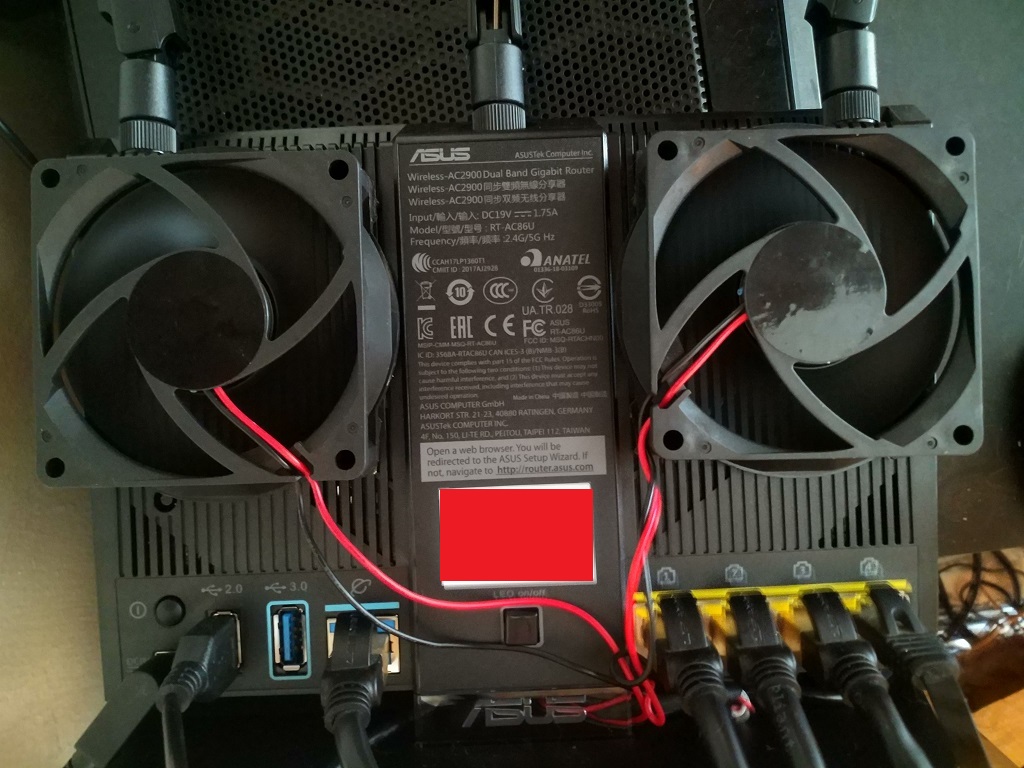
Important Note - Do buy local unit with Asus Malaysia warranty at Lazada. Install fans to avoid overheat issue.

user posted image

Introduction
A surprise gift from GearBest. I was not expecting ASUS RT-AC86U AC2900 Dual-Band Gigabit Wi-Fi Router with MU-MIMO at all. In short, ASUS RT-AC86U is the replacement for the popular ASUS RT-AC68U that serve me well for past 3 years. Loaded with built-in WTFast, faster AC2900 speeds boosted with NitroQAM, MU-MIMO, 256MB flash, 512MB RAM and newer PC-grade 1.8GHz dual-core processor. How does it perform compare to older RT-AC68U? Let's find out...

Special Thanks
This review is possible thanks to below companies. Be sure to check them out...user posted image

Package Content
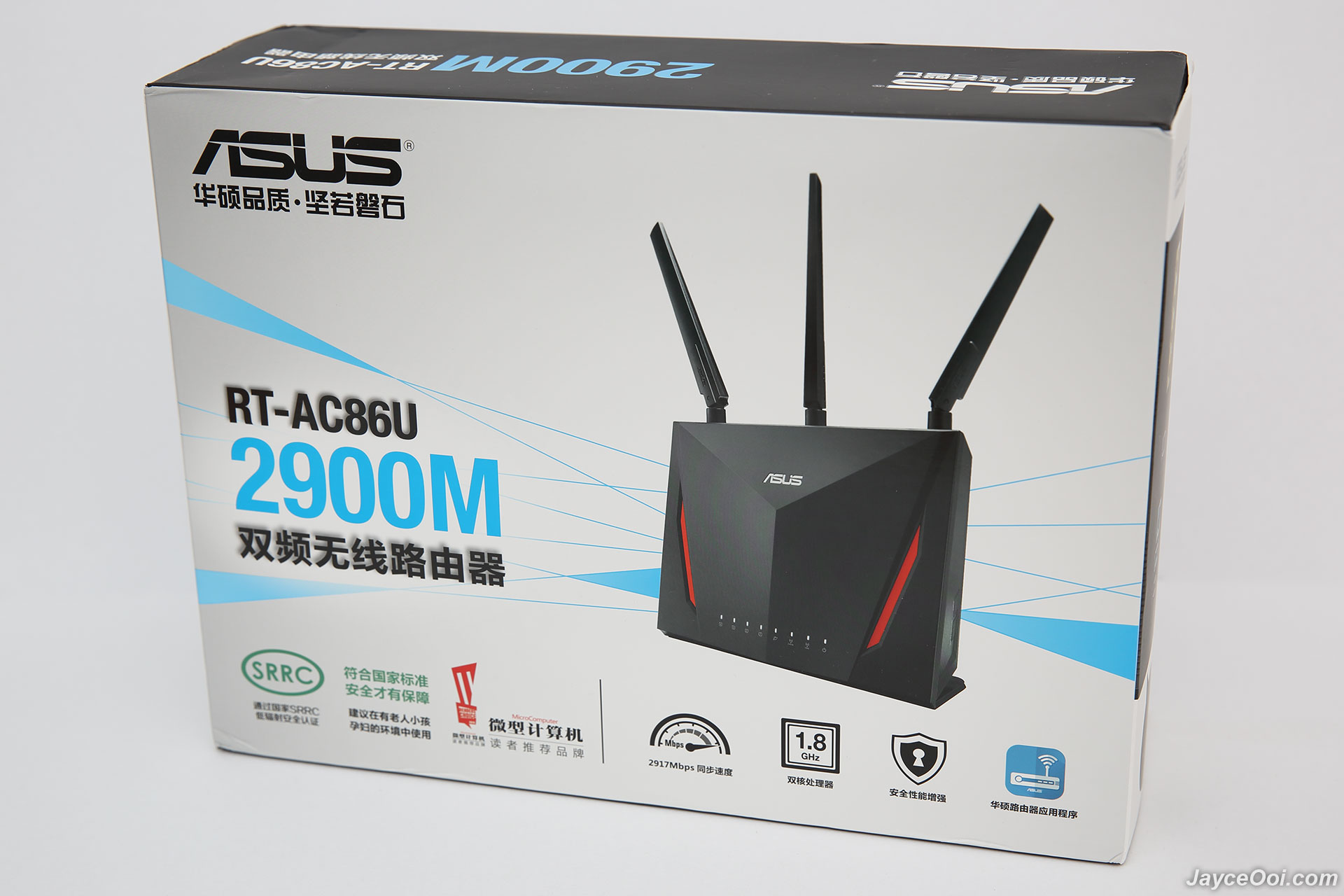
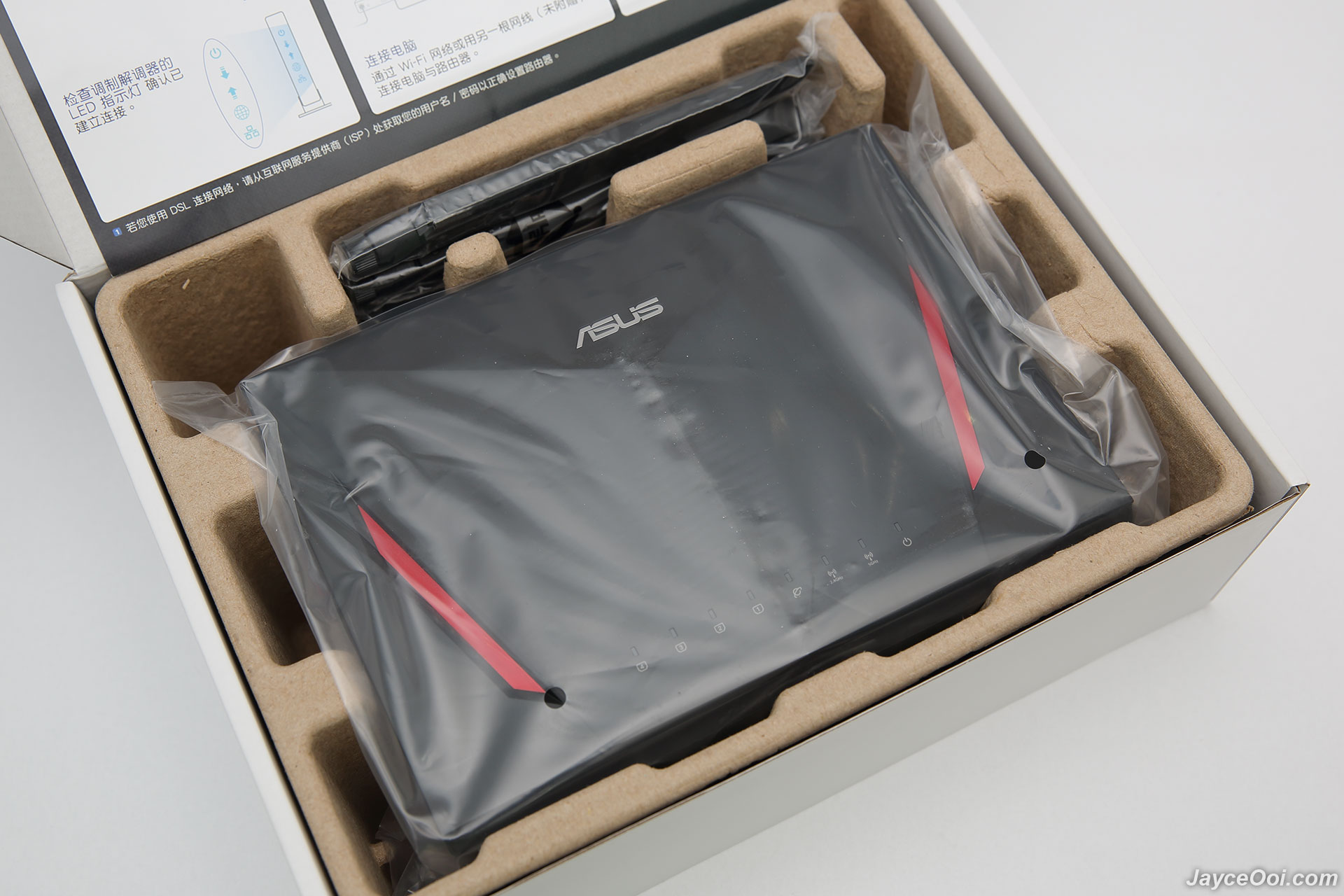
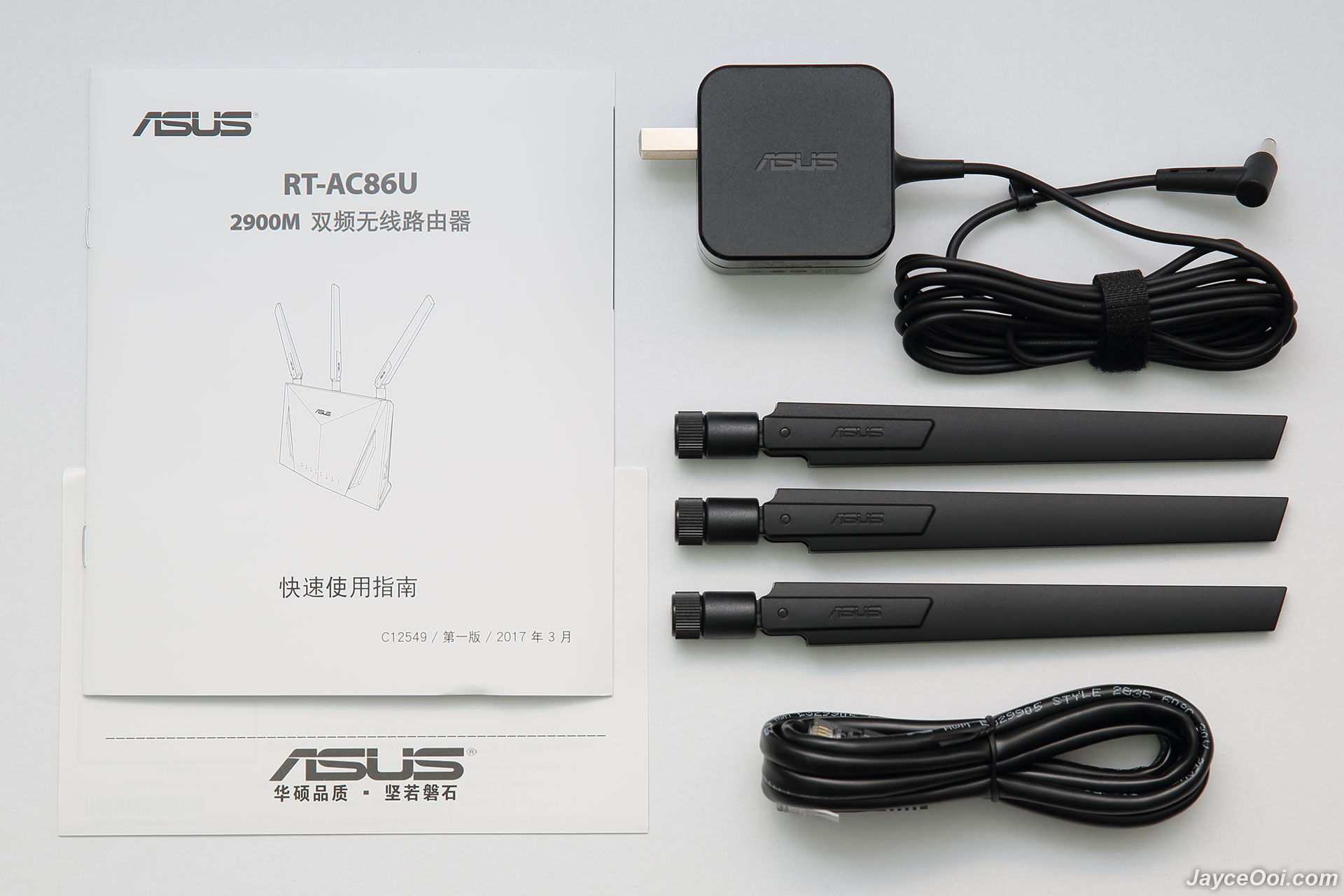
My ASUS RT-AC86U is China version as you can see. Well protected as well. In short, it shares the same packaging as my existing RT-AC68U. Once taken out RT-AC86U, you can find 3 detachable antennas, 19 V with max. 1.75 A power adaptor (US plug), RJ-45 cable, warranty info and quick start guide (in Chinese). No worry, you can download both English quick start guide and user manual at ASUS Website.

user posted image

user posted image

Build quality & Design
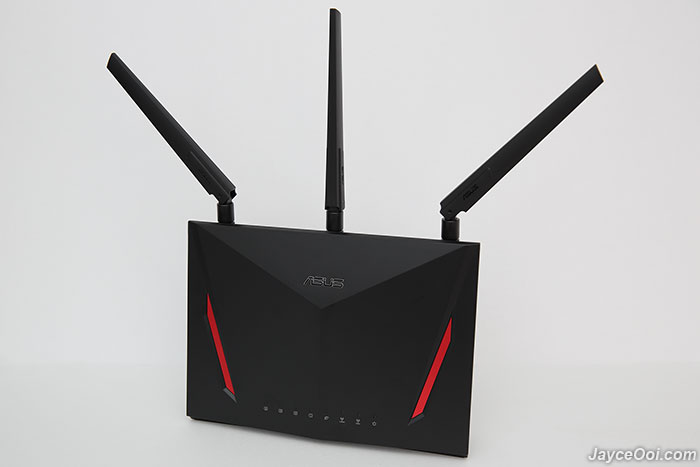
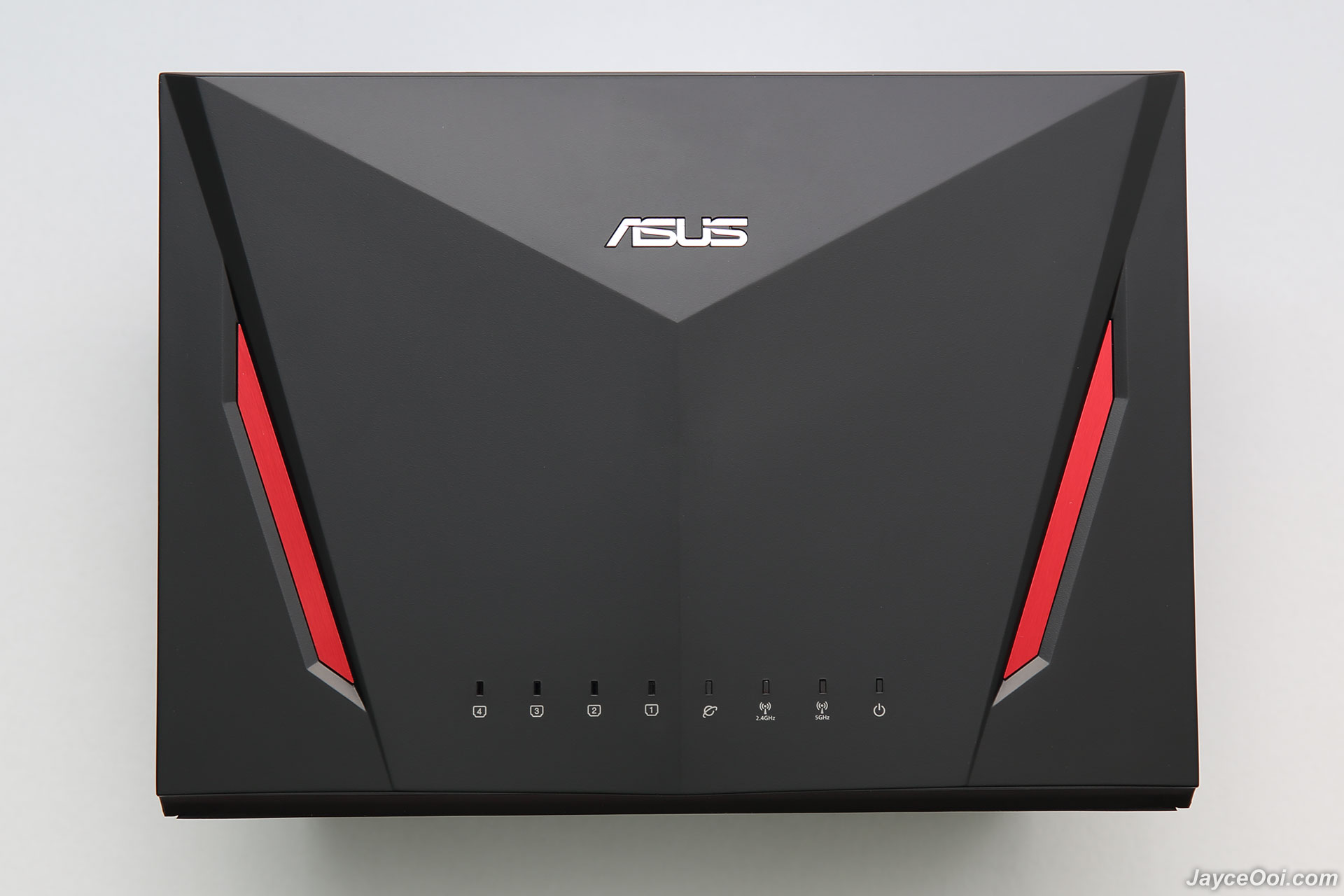
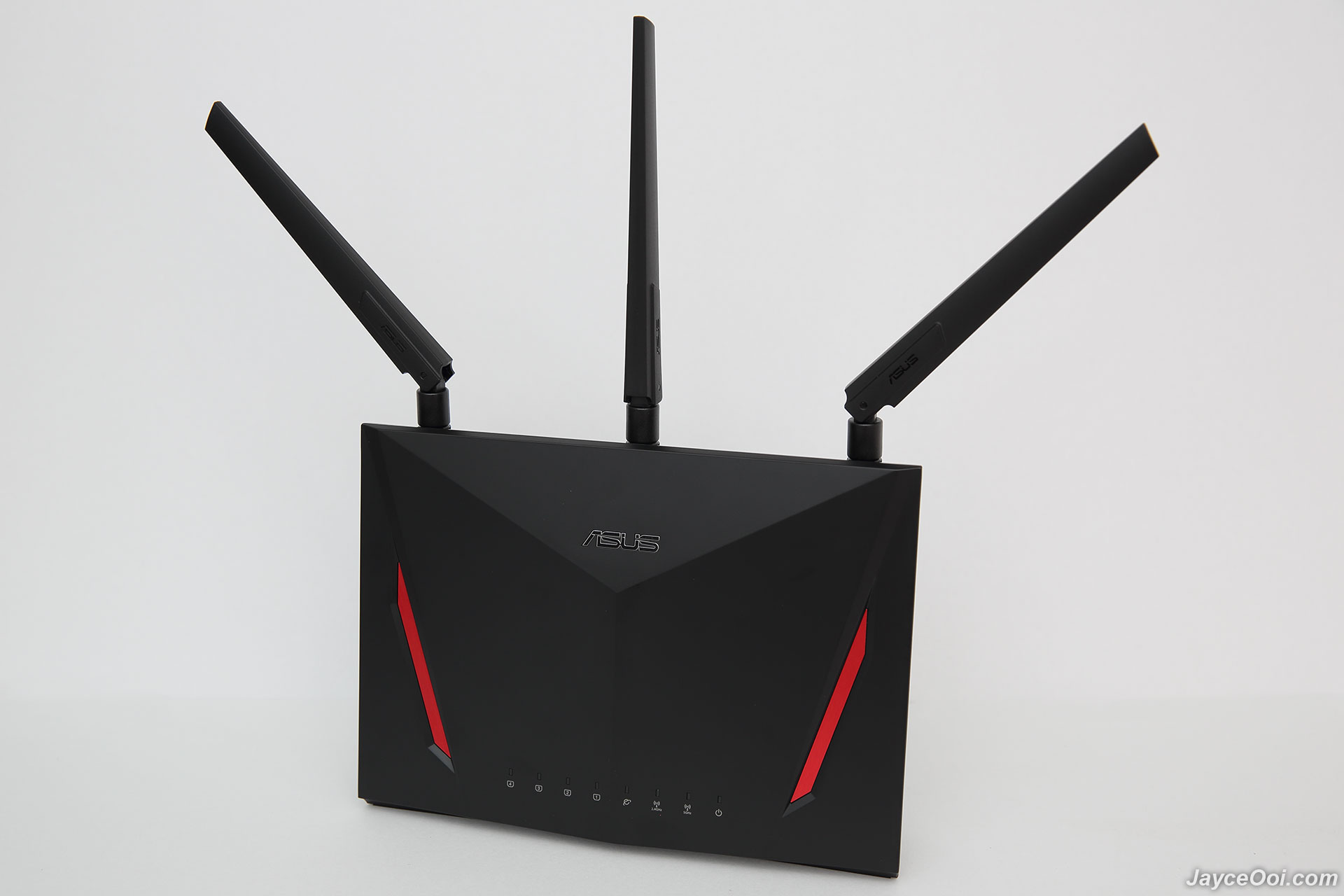
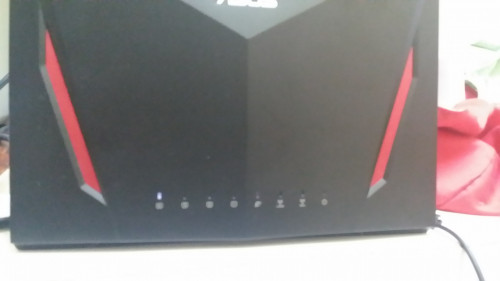
If you own / seen ASUS RT-AC68U previously, then you will familiar with RT-AC86U too. Basically, they are the same in shape and design. RT-AC86U has cooler and simpler cyber design at front while RT-AC68U has stylish diamond pattern design. By the way, RT-AC86U is a bit heavier at 872g. Having LED light indicators for 4 LAN ports, Internet WAN, 2.4GHz & 5GHz Wi-Fi and power status. Missing USB ports status from RT-AC68U. That's the major different. The rest are the same.

user posted image

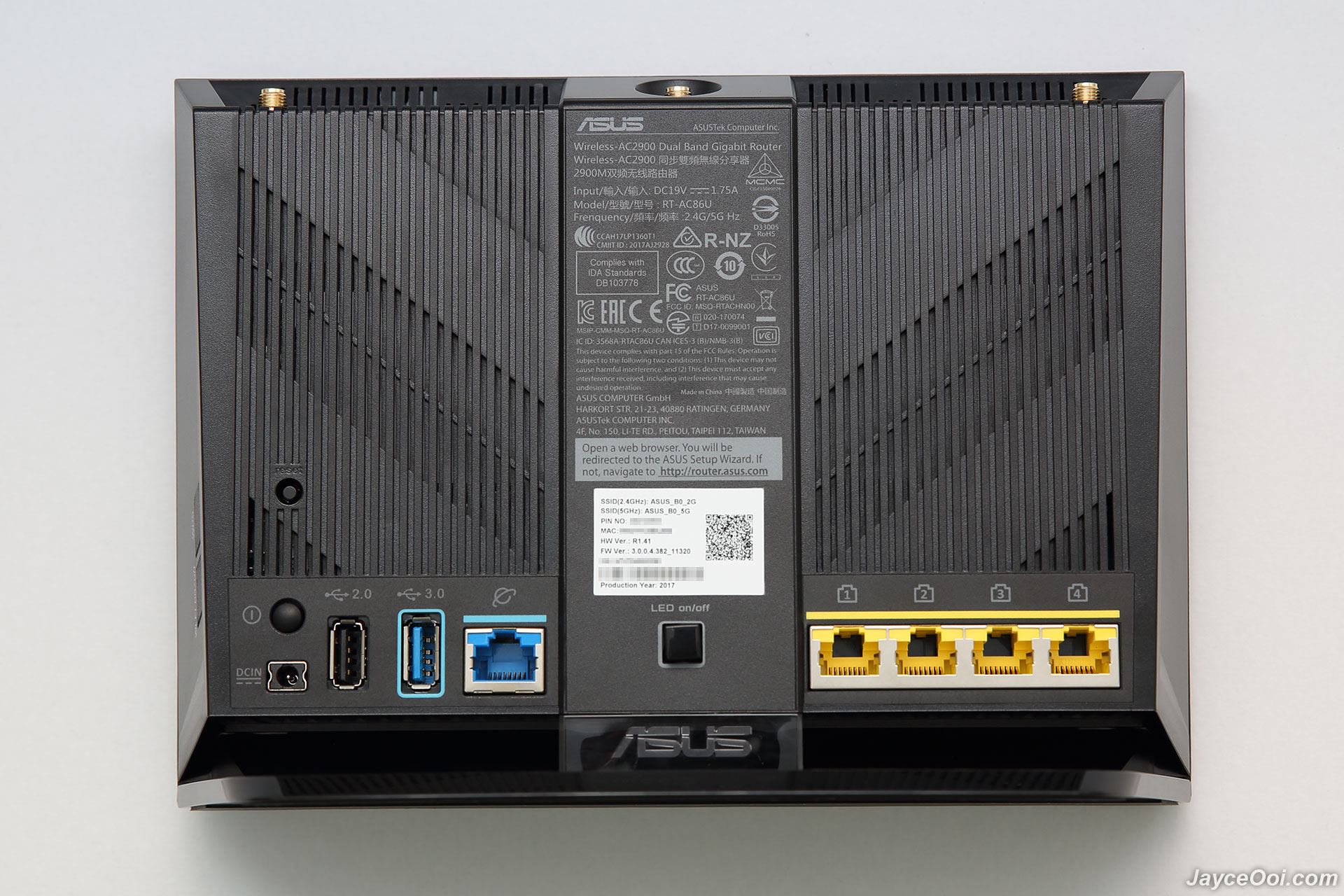
At back, there are reset button, power button, DC input, USB 2.0, USB 3.1 Gen 1 ports, WAN port, LED on/off switch and 4 Gigabit Ethernet ports. By the way, the back ASUS panel does not lit up anymore too (if you care about lighting effect).

user posted image

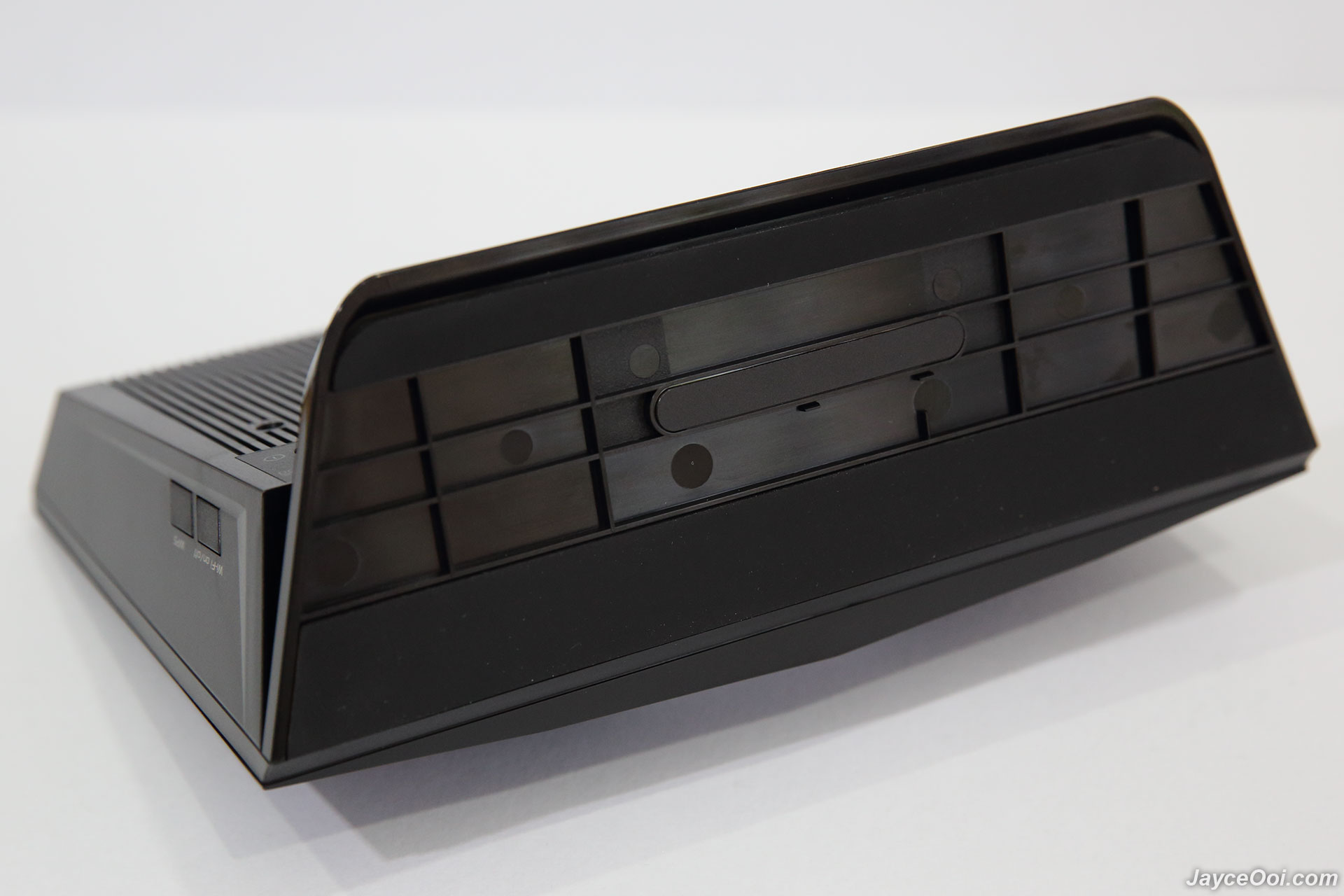
Wi-Fi on/off and WPS buttons are located at the right as usual.

user posted image

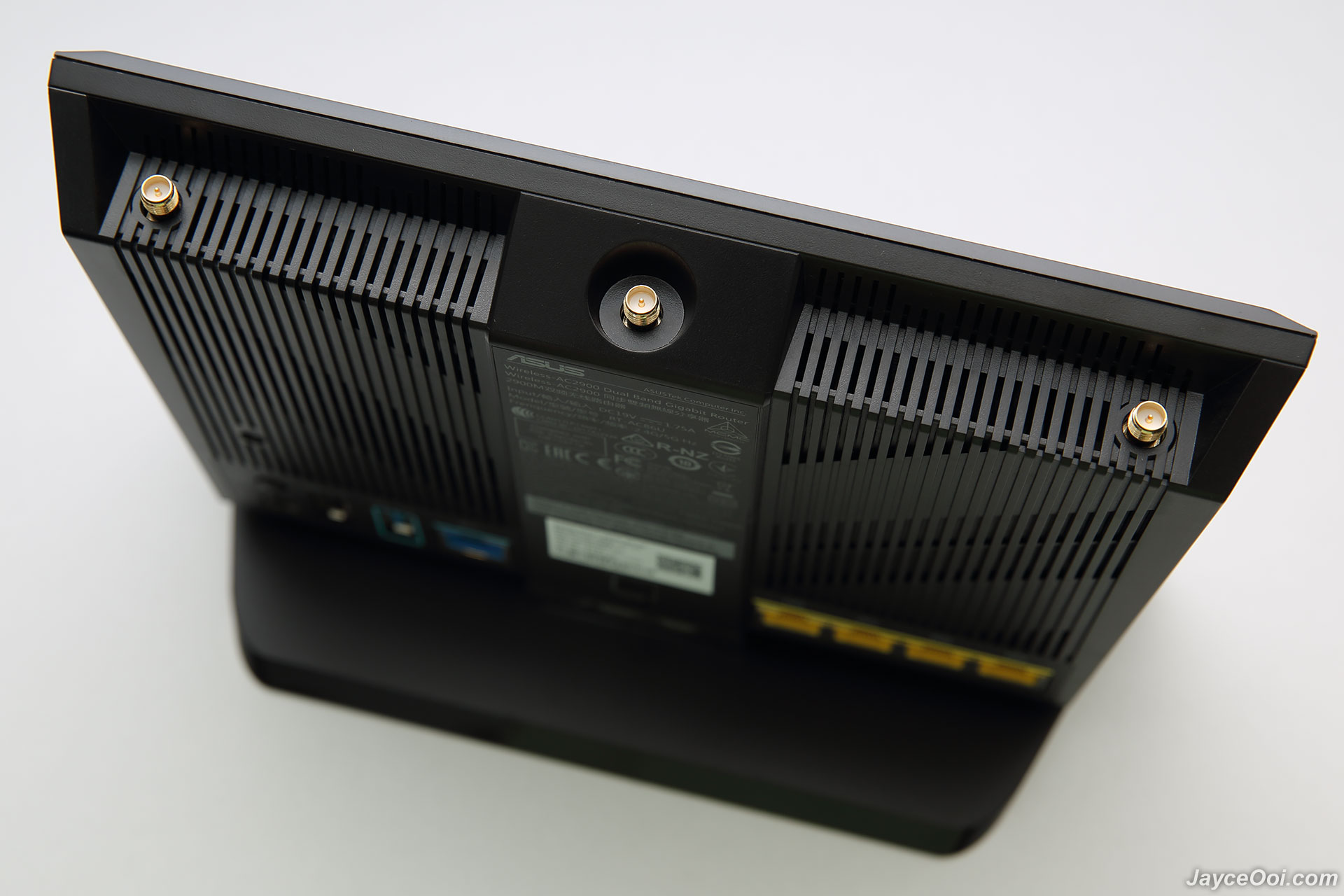
3 antenna jacks on top for detachable antennas. And another internal 3dBi antenna hidden inside for 5 GHz 4 x 4 connection.

user posted image

Finally, there are 2 long anti-skid pads at bottom to provide stability.

user posted image

This post has been edited by JayceOoi: Apr 9 2019, 03:17 PM
TSJayceOoi
post Sep 1 2017, 12:01 PM

Pro Blogger
*******
Senior Member
2,741 posts

Joined: Jan 2007
Installation
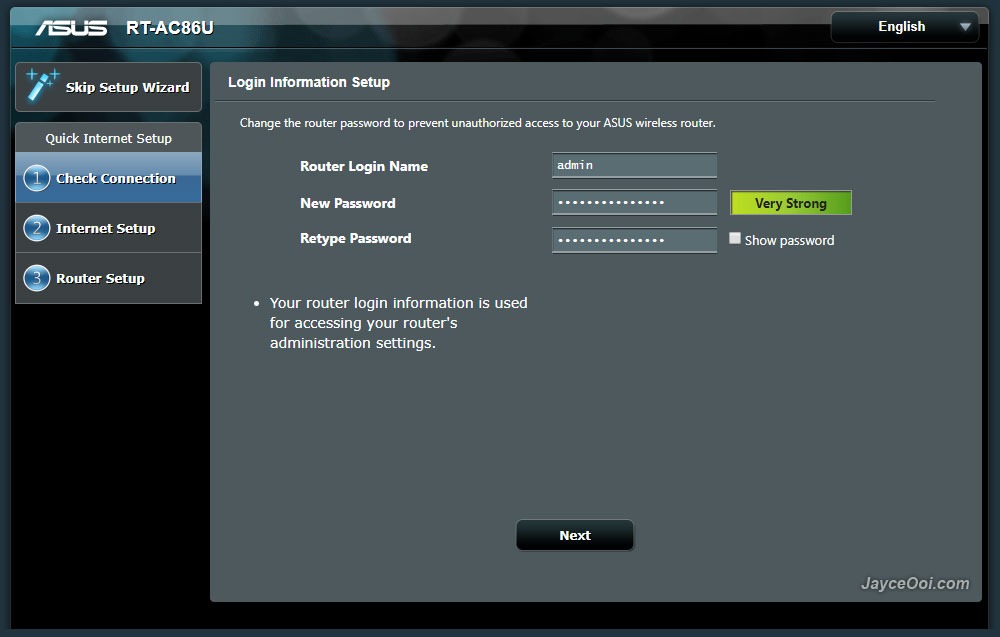
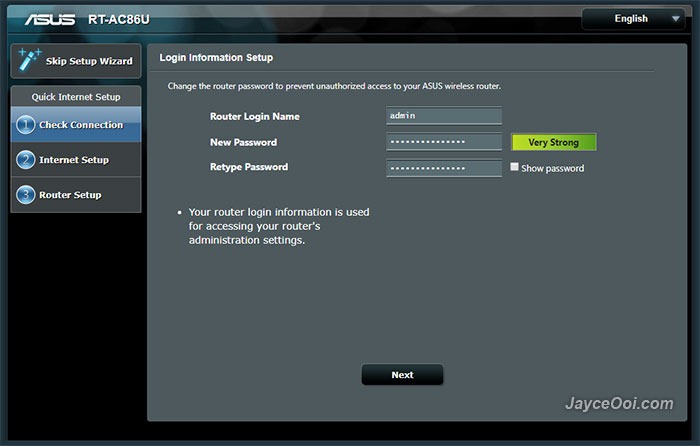
Mine is China version as you know. Therefore, the web interface is in Chinese by default. No worry, you can select the language that you prefer. ASUS Router firmware is loaded with multiple languages for all the users in the world. There are English, Japanese, and a lot more Europe countries' languages that I don't know. As for installation, it is pretty straight forward. Basically, you need to connect cable/DSL modem Internet cable to WAN port. Setup router login name and password. Then Internet setup. Follow by router configuration - network name (SSID) and password for both 2.4GHz and 5GHz. That's it. You can start using ASUS RT-AC86U wireless router to access Internet now.
user posted image

Software
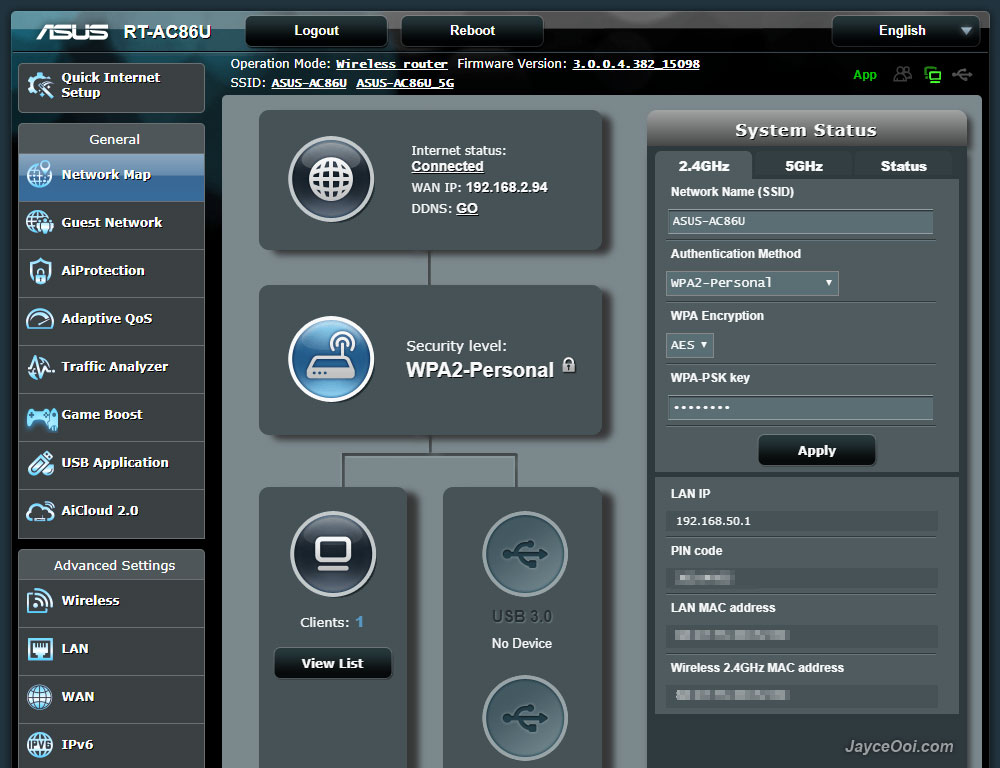
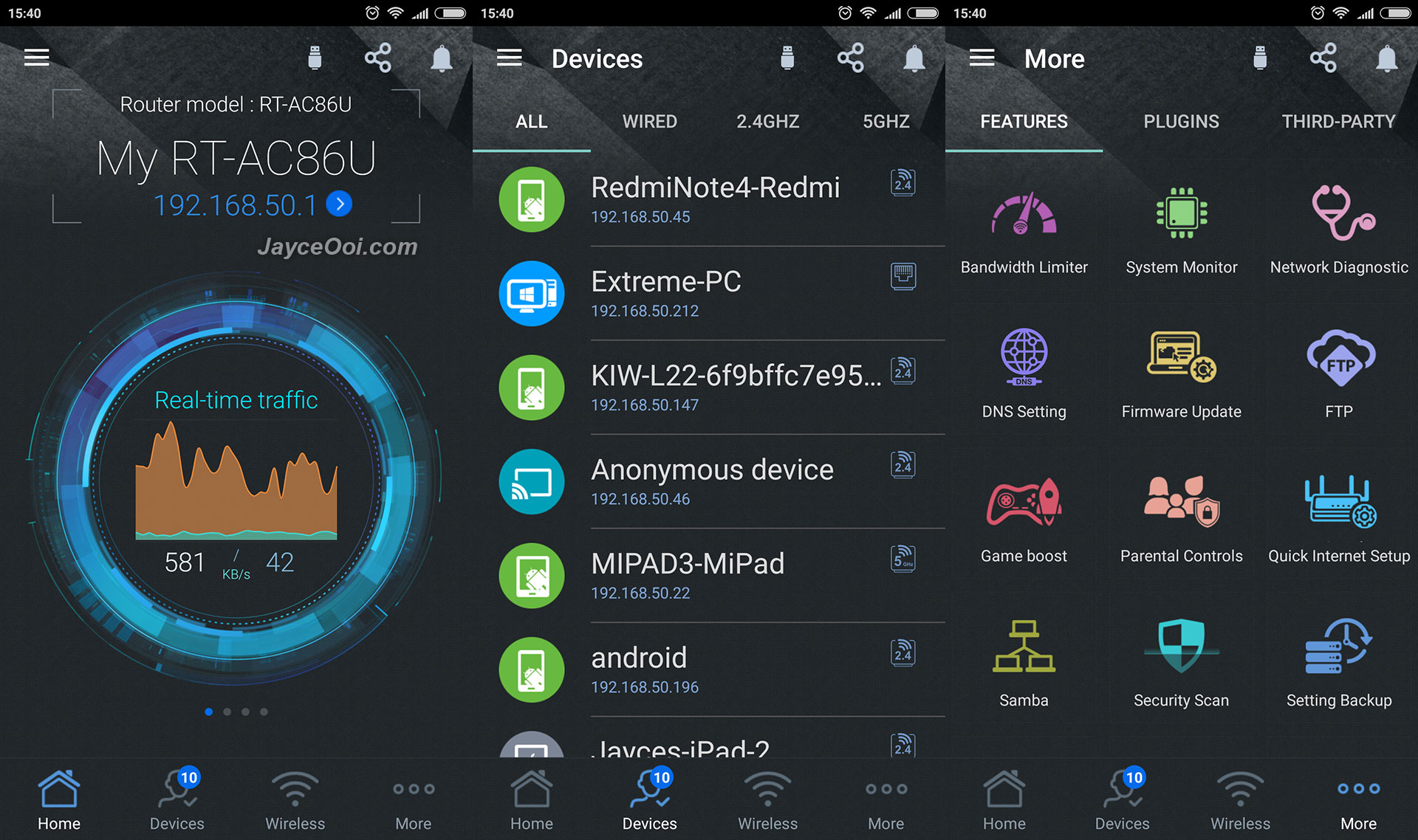
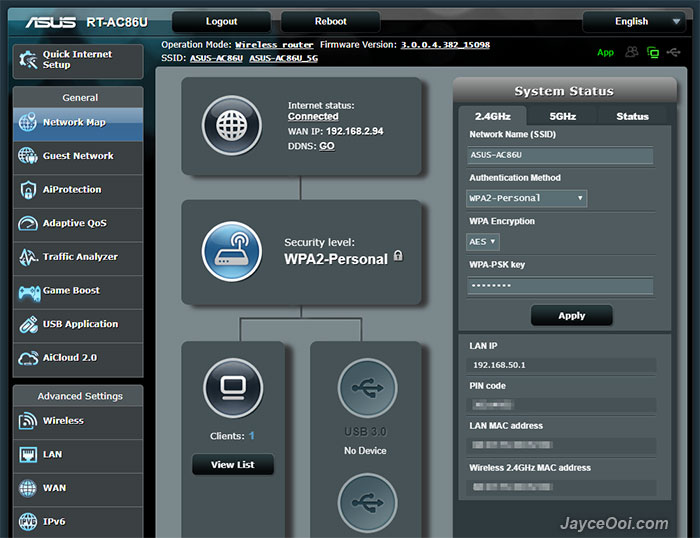
ASUS wireless router's web and mobile interfaces are the same among these 2 routers. Yup, not a stranger to me since I am using it for the past 3 years. Not an IT expert, no worry, you can start using ASUS RT-AC86U after completed installation setup. However, if you want to get all the features out of it, this is the place that you need to spend time on. By the way, do download and read the online user manual in order to know all of the functions. As usual, ASUSWRT user interface has more stuffs and details than the mobile app - ASUS Router. In short, mobile app covers the essential stuffs while web interface has all including the advanced stuffs.
user posted image

ASUS RT-AC86U Wi-Fi Router is loaded with lot of goodies and useful features. There are AiProtection with Trend Micro, Adaptive QoS, Traffic Analyzer, Game Boost (WTFast - Gamers Private Network_, USB applications like AiDisk, UPnP, iTunes, FTP, Samba, 4G modem, Android phone as a USB modem, Apple Time Machine, Download Master for BT torrent files and AiCloud 2.0. Advanced settings like IPv6, VPN and firewall can be setup as well. Can't cover all of them one by one in details here. So do check them out at ASUS Website. By the way, IPTV is supported. A great news for Malaysia users' with Maxis, UniFi and Singaporeans with Singtel and M1.

user posted image

Performance Result
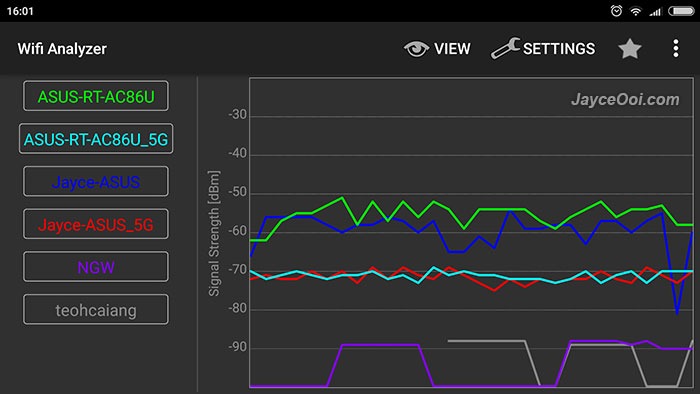
Err... Wireless range is not better / on par than existing ASUS RT-AC68U? Yes, that's the case for the new ASUS RT-AC86U Wi-Fi Router. Run lot of tests on different locations, both 2.4GHz and 5GHz wireless range does a bit shorter than previous one. Little bit disappointed no doubt with 4 dBm shorter. As usual, both of them are placed at the same spot on 1st floor. And screenshots below were taken while I was on ground floor. Note - Jayce-ASUS == RT-AC68U. Anyhow, it still can cover whole double storey house easily with 2.4GHz. 5GHz good for half the coverage as usual.
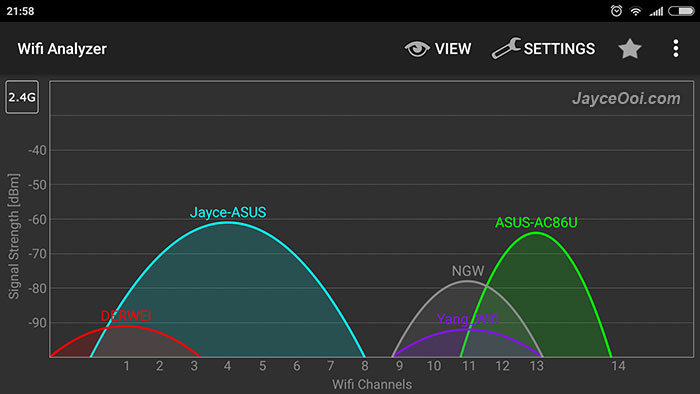
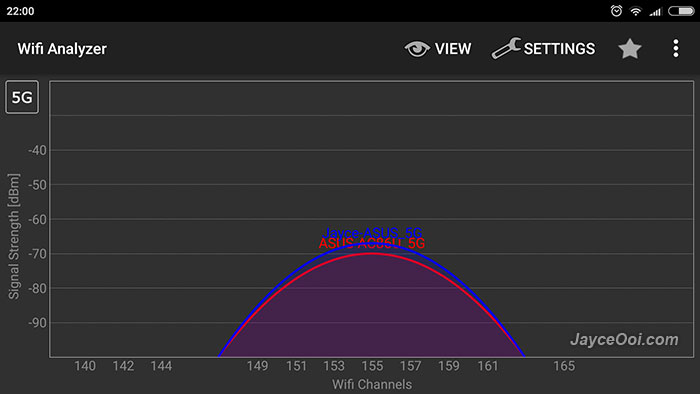
user posted image

user posted image

On the bright side, ASUS RT-AC86U has better wireless transfer rate ~ around 20 Mbit/s more than RT-AC68U based on iPerf3 tests. Yes even with shorter range, RT-AC86U has more throughput at the same location. That's great as long as it is within wireless coverage range. Therefore, on actual usage, RT-AC86U does perform slightly better no doubt. As for LAN, it performs at maximum speed that my devices support @ 960 Mbit/s.
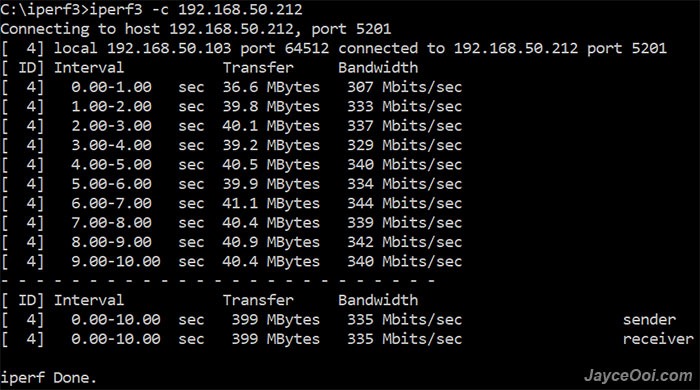
user posted image

You can throw away your network-attached storage (NAS) now. Yes, just plug in a normal USB 3.0 hard drive will do. You will get NAS alike performance with ASUS RT-AC86U. Constant reading at 110MB/s and more than 100MB/s while writing. A huge improvement when compere to RT-AC68U with around 40MB/s only. Of course, that's the result from LAN connection. Wireless transfer will be limited by wireless devices themselves.
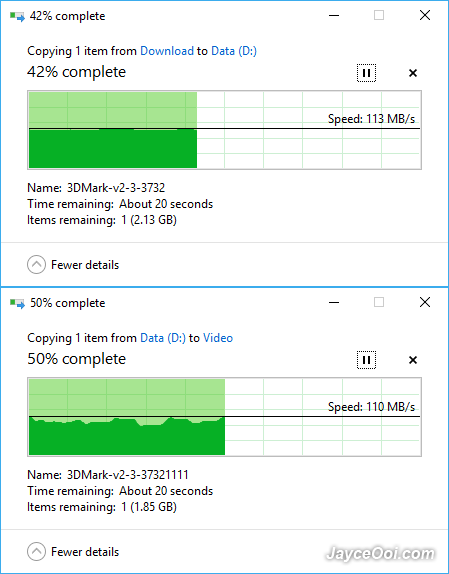
user posted image

ASUS RT-AC86U supports Wireless router, repeater, Access Point (AP) and media bridge modes. And lot of other useful features that I mentioned previously. Overall, RT-AC86U does performs faster with new 1.8 GHz dual-core processor, more RAM and storage. I hate to reboot previous RT-AC68U router when applying settings as it needs take around 2 minutes plus to do so. Guess what? RT-AC86U does it within 40 seconds. Serving 10+ devices smoothly with MU-MIMO support are piece of cake for it. Does not slow down at all when someone is transferring file to/fro USB hard drive. Yes, I am getting the lowest latency on online games like Mobile Legend thanks to Adaptive QoS. WTFast will improve more when your games are supported.

Anyway, all of these issues will be fixed ASUS for sure. Why? RT-AC68U is still getting firmware upgrade on improvements until now. RT-AC86U will get the same treatment as well. Furthermore, it will be getting Asuswrt-merlin custom firmware anytime soon too.

Update – Above issue had been solved on ASUS RT-AC86U Firmware version 3.0.0.4.382.16466. Stable for everyday use as I am using it now. Sometime, its wireless range performance is slightly better than RT-AC68U.
user posted image

Advantages
  • 4×4 MU-MIMO 802.11ac
  • Support up to 2900Mbps & Gigabit Ethernet
  • 110MB/s USB 3.0 HDD transfer speed
  • Packed with lot features
  • Built-in download manager
  • Top-notch build quality
  • Multiple languages support
  • 3 years warranty
Limitations
  • None from me
user posted image

Conclusion
ASUS RT-AC86U is a feature-packed advanced wireless router with excellent performance no doubt. Enjoy 4×4 MU-MIMO 802.11ac and NAS alike 110MB/s transfer rate. Great wireless range that suitable for both home and office. Don’t forget that it is loaded with lot of useful features too. Worry free with 3 years warranty. Interested? More information can be found at ASUS Website.

P/S – ASUS RT-AC86U is my current wireless router at home now. Highly recommended!

This post has been edited by JayceOoi: Sep 25 2017, 10:01 AM

kmrdeva
post Sep 1 2017, 05:33 PM

Look at all my stars!!
*******
Senior Member
4,776 posts

Joined: Jan 2003
Thanks for the review. Hmm, so wireless coverage is a little bit weaker than the older AC68U?

Don't understand why Asus did not put 4 external antenna for the AC86U instead of 3 external and 1 internal.

I also saw that Merlin doesn't support the AC86U as yet.
TSJayceOoi
post Sep 1 2017, 11:00 PM

Pro Blogger
*******
Senior Member
2,741 posts

Joined: Jan 2007
QUOTE(kmrdeva @ Sep 1 2017, 05:33 PM)
Thanks for the review. Hmm, so wireless coverage is a little bit weaker than the older AC68U?

Don't understand why Asus did not put 4 external antenna for the AC86U instead of 3 external and 1 internal.

I also saw that Merlin doesn't support the AC86U as yet.
*
You are most welcome. Yes, at least for my unit here.

Asus has other models with 4 external antenna already. Besides, most of the devices are using 2x2 only now. 3x3 is more than enough. 4x4 is overkill for me. biggrin.gif
soonwai
post Sep 1 2017, 11:20 PM


********
All Stars
11,455 posts

Joined: Oct 2007
From: KL


Thanks for the awesome review. The USB3 transfer speed is amazing. How much will or is it selling for?
TSJayceOoi
post Sep 2 2017, 11:13 AM

Pro Blogger
*******
Senior Member
2,741 posts

Joined: Jan 2007
QUOTE(soonwai @ Sep 1 2017, 11:20 PM)
Thanks for the awesome review. The USB3 transfer speed is amazing. How much will or is it selling for?
*
$179.99 free shipping with discount code at GB biggrin.gif
DeepMemory
post Sep 2 2017, 06:16 PM

Regular
******
Senior Member
1,805 posts

Joined: Oct 2010
Can install malaysian firmware?
drumstick62
post Sep 2 2017, 10:49 PM

Getting Started
**
Junior Member
130 posts

Joined: Nov 2014


This is must more better than the Dlink router which given by the ISP that does not need a Mi WiFI extender flex.gif
TSJayceOoi
post Sep 3 2017, 04:17 PM

Pro Blogger
*******
Senior Member
2,741 posts

Joined: Jan 2007
QUOTE(DeepMemory @ Sep 2 2017, 06:16 PM)
Can install malaysian firmware?
*
Asus router is using one firmware for all regions. At least for both routers that I own. rclxms.gif
lala_cai
post Sep 9 2017, 01:17 AM

Getting Started
**
Junior Member
153 posts

Joined: May 2005


QUOTE(JayceOoi @ Sep 2 2017, 11:13 AM)
$179.99 free shipping with discount code at GB  biggrin.gif
*
mind to share where you get the discount code?
superhuman88
post Sep 9 2017, 09:15 AM

Getting Started
**
Junior Member
73 posts

Joined: Sep 2015
The design look familiar, more like MSI GT83 / GT75 / GT73. haha
but its fine, i'm also try look wireless router also. But may i know whats the price is it?
where can i look for it?
TSJayceOoi
post Sep 9 2017, 02:17 PM

Pro Blogger
*******
Senior Member
2,741 posts

Joined: Jan 2007
QUOTE(lala_cai @ Sep 9 2017, 01:17 AM)
mind to share where you get the discount code?
*
QUOTE(superhuman88 @ Sep 9 2017, 09:15 AM)
The design look familiar, more like MSI GT83 / GT75 / GT73. haha
but its fine, i'm also try look wireless router also. But may i know whats the price is it?
where can i look for it?
*
It is listed at my blog - http://www.jayceooi.com/asus-rt-ac86u-review/
elenatec
post Sep 14 2017, 12:10 PM

New Member
*
Junior Member
32 posts

Joined: Sep 2006
HI,

I was going to buy this router later, before that how do you configure with local ISP Modem. I am using Maxis HomeFibre. I guessing Unifi will be very simple, but Maxis use the router as Unifi was it backbone.

any guides on setting up both connection with Asus Router?

Regards,
Jesh
TSJayceOoi
post Sep 14 2017, 08:19 PM

Pro Blogger
*******
Senior Member
2,741 posts

Joined: Jan 2007
QUOTE(elenatec @ Sep 14 2017, 12:10 PM)
any guides on setting up both connection with Asus Router?
*
Please follow this guide to setup Maxis Fiber
https://www.youtube.com/watch?v=iBRbk1FSFj0
TSJayceOoi
post Sep 18 2017, 01:39 PM

Pro Blogger
*******
Senior Member
2,741 posts

Joined: Jan 2007
Version 3.0.0.4.382.16466
2017/09/14 update 54.99 MBytes

ASUS RT-AC86U Firmware version 3.0.0.4.382.16466
Security fixed
- Fixed CVE-2017-12754
- Fixed CVE-2017-11345
- Fixed CVE-2017-11344
- Fixed CVE-2017-11420

Bug fixed
- Fixed networkmap wan connection issues.
- Fixed AiCloud related issues.
- Fixed AiProtection related issues.
- Fixed wireless interoperability issue.
- Fixed game boost related issues.
- Fixed ASUS router app connection issues when router does not have public WAN IP.

New
- Added HDD hibernation feature.
louiszzz
post Sep 20 2017, 12:46 PM

Getting Started
**
Junior Member
60 posts

Joined: Feb 2014
This nice , cost around how much MYR ?
possible to use on UNIFI ?
sHawTY
post Sep 20 2017, 01:17 PM

Frequent Reporter
********
All Stars
14,908 posts

Joined: Jul 2005

QUOTE(louiszzz @ Sep 20 2017, 12:46 PM)
This nice , cost around how much MYR ?
Estimated between RM800 ~ RM1.2K once it reaches Malaysian shores
QUOTE(louiszzz @ Sep 20 2017, 12:46 PM)
possible to use on UNIFI ?
Yes, definitely can use for UniFi
TSJayceOoi
post Sep 20 2017, 02:03 PM

Pro Blogger
*******
Senior Member
2,741 posts

Joined: Jan 2007
QUOTE(louiszzz @ Sep 20 2017, 12:46 PM)
This nice , cost around how much MYR ?
possible to use on UNIFI ?
*
Around RM758 + free shipping with discount code

QUOTE(sHawTY @ Sep 20 2017, 01:17 PM)
Estimated between RM800 ~ RM1.2K once it reaches Malaysian shores
Yes, definitely can use for UniFi
*
Based on Asus Malaysia pricing, it should be near RM1200. Unless they slash price for older AC68U which selling at RM900 now.
Doraku
post Sep 20 2017, 07:14 PM

Old threads digger
******
Senior Member
1,155 posts

Joined: Apr 2016


Nice!,But which moderm does you use for" streamyx"
TSJayceOoi
post Sep 21 2017, 08:25 AM

Pro Blogger
*******
Senior Member
2,741 posts

Joined: Jan 2007
QUOTE(Doraku @ Sep 20 2017, 07:14 PM)
Nice!,But which moderm does you use for" streamyx"
*
TM bundled one - Dlink DSL-2640B
Doraku
post Sep 21 2017, 01:37 PM

Old threads digger
******
Senior Member
1,155 posts

Joined: Apr 2016


QUOTE(JayceOoi @ Sep 21 2017, 08:25 AM)
TM bundled one - Dlink DSL-2640B
*
didnt know that you can use router on Moderm Router too!
TSJayceOoi
post Sep 25 2017, 10:02 AM

Pro Blogger
*******
Senior Member
2,741 posts

Joined: Jan 2007
Updated with firmware version 3.0.0.4.382.16466 result - Stable for everyday use. biggrin.gif
TSJayceOoi
post Oct 5 2017, 09:15 AM

Pro Blogger
*******
Senior Member
2,741 posts

Joined: Jan 2007
Merlin firmware is here - https://www.snbforums.com/threads/alpha-asu...-1-alpha.41380/
arslow
post Oct 8 2017, 12:50 PM

Look at all my stars!!
*******
Senior Member
3,544 posts

Joined: Sep 2008


Still not officially available here?
sHawTY
post Oct 8 2017, 01:48 PM

Frequent Reporter
********
All Stars
14,908 posts

Joined: Jul 2005

QUOTE(arslow @ Oct 8 2017, 12:50 PM)
Still not officially available here?
Should be arriving in end of November 2016
SRP around RM1500
arslow
post Oct 8 2017, 03:30 PM

Look at all my stars!!
*******
Senior Member
3,544 posts

Joined: Sep 2008


QUOTE(sHawTY @ Oct 8 2017, 01:48 PM)
Should be arriving in end of November 2016
SRP around RM1500
*
lol guess i will continue using my ac68u till i move to ubiquiti or a wireless AX asus in a few years laugh.gif


TSJayceOoi
post Oct 9 2017, 11:39 AM

Pro Blogger
*******
Senior Member
2,741 posts

Joined: Jan 2007
QUOTE(sHawTY @ Oct 8 2017, 01:48 PM)
Should be arriving in end of November 2016
SRP around RM1500
*
Why Asus Malaysia always sell so expensive? US is selling at $199.99 only. hmm.gif
sHawTY
post Oct 9 2017, 11:45 AM

Frequent Reporter
********
All Stars
14,908 posts

Joined: Jul 2005

QUOTE(JayceOoi @ Oct 9 2017, 11:39 AM)
Why Asus Malaysia always sell so expensive? US is selling at $199.99 only. hmm.gif
SRP bro, Suggested Retail Pricing
It doesn't mean you have to sell it at that price biggrin.gif

Have to wait for it to arrive first to know for sure
isr25
post Oct 15 2017, 01:55 PM

Regular
******
Senior Member
1,259 posts

Joined: Nov 2009
From: Johor Bahru


Bought from GearBest to replace my current AC66U, maybe it'll arrive in 2 weeks. Not worth buying it from Malaysia - priced too high. Just look at the current AC68U prices to estimatehow much they'll price it here.

This post has been edited by isr25: Oct 15 2017, 01:55 PM
jloke6563
post Oct 17 2017, 10:04 PM

New Member
*
Newbie
8 posts

Joined: Oct 2017
bro...i need some help pls....i dont understand about the warranty..if bought from GearBest...the router got problem ....how to i do?
xXAaronXx
post Oct 19 2017, 12:23 PM

My Love for AppleJack
******
Senior Member
1,172 posts

Joined: May 2006
From: Puchong
QUOTE(jloke6563 @ Oct 17 2017, 10:04 PM)
bro...i need some help pls....i dont understand about the warranty..if bought from GearBest...the router got problem ....how to i do?
*
I think you need to ship back to GearBest at own cost for them to help you claim warranty.
zzzhhhzzz
post Oct 20 2017, 07:59 AM

Regular
******
Senior Member
1,671 posts

Joined: Apr 2012
QUOTE(JayceOoi @ Sep 20 2017, 02:03 PM)
Around RM758  + free shipping with discount code
Based on Asus Malaysia pricing, it should be near RM1200. Unless they slash price for older AC68U which selling at RM900 now.
*
hi did you get into problem while getting this into malaysia ? any tax and SIRIM ?
TSJayceOoi
post Oct 20 2017, 08:24 AM

Pro Blogger
*******
Senior Member
2,741 posts

Joined: Jan 2007
QUOTE(zzzhhhzzz @ Oct 20 2017, 07:59 AM)
hi did you get into problem while getting this into malaysia ? any tax and SIRIM ?
*
Nope. No tax and SIRIM AP issue.
skywardsword
post Oct 22 2017, 03:05 PM

On my way
****
Junior Member
680 posts

Joined: Sep 2010
I bought one unit base on ts review. Shall see. Cannot use Ur code. Says expired. So price is $186usd. I added insurance and another item. Usd195. Hopefully it arrives. I paid with PayPal credit card. As per your recommendation.

Thanks. I did click thru Ur link.

Edit : buyers beware gearbest shipment for me got blocked at gateway. **** Unaccepted international export***

And four days later still no resolution.

This post has been edited by skywardsword: Nov 10 2017, 08:18 PM
TSJayceOoi
post Oct 23 2017, 09:27 AM

Pro Blogger
*******
Senior Member
2,741 posts

Joined: Jan 2007
QUOTE(skywardsword @ Oct 22 2017, 03:05 PM)
I bought one unit base on ts review. Shall see. Cannot use Ur code. Says expired. So price is $186usd. I added insurance and another item. Usd195. Hopefully it arrives. I paid with PayPal credit card. As per your recommendation.

Thanks. I did click thru Ur link.
*
No worry when online shopping with PayPal. It has a very good buyer protection. Covered me few time already.
https://www.paypal.com/my/webapps/mpp/paypa...uyer-protection
peguin78
post Oct 24 2017, 03:12 PM

Getting Started
**
Junior Member
162 posts

Joined: Sep 2008


QUOTE(skywardsword @ Oct 22 2017, 04:05 PM)
I bought one unit base on ts review. Shall see. Cannot use Ur code. Says expired. So price is $186usd. I added insurance and another item. Usd195. Hopefully it arrives. I paid with PayPal credit card. As per your recommendation.

Thanks. I did click thru Ur link.
*
I am also interested in this model as an upgrade for my existing 68U. Do let us know when the parcel arrivands and your reviews as well. biggrin.gif biggrin.gif
TSJayceOoi
post Oct 25 2017, 08:02 PM

Pro Blogger
*******
Senior Member
2,741 posts

Joined: Jan 2007
QUOTE(peguin78 @ Oct 24 2017, 03:12 PM)
I am also interested in this model as an upgrade for my existing 68U. Do let us know when the parcel arrivands and your reviews as well. biggrin.gif  biggrin.gif
*
It is selling at $175.99 now. Discount code at my blog as usual. smile.gif
TSJayceOoi
post Nov 3 2017, 12:49 PM

Pro Blogger
*******
Senior Member
2,741 posts

Joined: Jan 2007
Version 3.0.0.4.382.18219
2017/10/2455.48 MBytes
ASUS RT-AC86U Firmware version 3.0.0.4.382.18219
Security fixed
- Fixed KRACK vulnerability
- Fixed CVE-2017-14491: DNS - 2 byte heap based overflow
- Fixed CVE-2017-14492: DHCP - heap based overflow
- Fixed CVE-2017-14493: DHCP - stack based overflow
- Fixed CVE-2017-14494: DHCP - info leak
- Fixed CVE-2017-14495: DNS - OOM DoS
- Fixed CVE-2017-14496: DNS - DoS Integer underflow
- Fixed CVE-2017-13704 : Bug collision
- Fixed predictable session tokens, logged user IP validation, Logged-in information disclosure (special thanks for Blazej Adamczyk contribution)

Bug Fixed
- Improved compatibility for Qualcomm client card.
- Fixed IGMP snooping related issue.

Weird... This firmware was installed without my knowledge. ASUS auto install firmware on router now?
jloke6563
post Nov 3 2017, 08:41 PM

New Member
*
Newbie
8 posts

Joined: Oct 2017
bro...this latest version firmware very stable...
after upgraded u need turn off the router..not click reboot...
cos..if u click reboot...u wan color will become red..this is a bug..!!!
i tried both us and australia regions..australia range is better.....
if compare with ac68u....
ac68u range better than ac86u...haha
TSJayceOoi
post Nov 4 2017, 09:31 AM

Pro Blogger
*******
Senior Member
2,741 posts

Joined: Jan 2007
QUOTE(jloke6563 @ Nov 3 2017, 08:41 PM)
bro...this latest version firmware very stable...
after upgraded u need turn off the router..not click reboot...
cos..if u click reboot...u wan color will become red..this is a bug..!!!
i tried both us and australia regions..australia range is better.....
if compare with ac68u....
ac68u range better than ac86u...haha
*
You also got it from GearBest?
DeepMemory
post Nov 6 2017, 02:14 AM

Regular
******
Senior Member
1,805 posts

Joined: Oct 2010
QUOTE(JayceOoi @ Nov 4 2017, 09:31 AM)
You also got it from GearBest?
*
Hi is ipv6 on unifi working with this router?
TSJayceOoi
post Nov 6 2017, 09:52 AM

Pro Blogger
*******
Senior Member
2,741 posts

Joined: Jan 2007
QUOTE(DeepMemory @ Nov 6 2017, 02:14 AM)
Hi is ipv6 on unifi working with this router?
*
IPv6 is working fine on router part. Too bad that I don't have UniFi to test. You need to consult others who is using UniFi. blush.gif
xXAaronXx
post Nov 6 2017, 12:18 PM

My Love for AppleJack
******
Senior Member
1,172 posts

Joined: May 2006
From: Puchong
This router selling for RM1,569. Taobao is half the price. Gearbest is closed to Taobao price. Not sure whats happening.
skywardsword
post Nov 7 2017, 03:48 PM

On my way
****
Junior Member
680 posts

Joined: Sep 2010
I bought on 22oct. My shipment finally shipped on 2nov. But on 7nov. City link tracking says **unaccepted international export.

I think I got scammed?


It is now even cheaper....usd169.9...

Anyone else actually got theirs from gearbest? Or only smoke....


Edit: will check package tonight. If ok will not post back. Will last post.

This post has been edited by skywardsword: Nov 13 2017, 01:51 PM
TSJayceOoi
post Nov 7 2017, 04:03 PM

Pro Blogger
*******
Senior Member
2,741 posts

Joined: Jan 2007
QUOTE(skywardsword @ Nov 7 2017, 03:48 PM)
I bought on 22oct. My shipment finally shipped on 2nov. But on 7nov. City link tracking says **unaccepted international export.

I think I got scammed?
It is now even cheaper....usd169.9...

Anyone else actually got theirs from gearbest? Or only smoke....
*
Try to call Citylink to find out. No idea what is that also. Got twice using it. The rest were ABX. All okay.

Anyway, if really does not arrive. Just ask PayPal to refund. No worry. nod.gif
https://www.paypal.com/my/webapps/mpp/ua/us...greement-full#7
peguin78
post Nov 7 2017, 04:07 PM

Getting Started
**
Junior Member
162 posts

Joined: Sep 2008


Alamak.. I also just bought one last Sunday at USD169.99/. Lastest status is 'packed'. Looks like it be shipped using Kerry.

I have used Paypal before and bought items from US and Mexico but then they all prior to GST and have had no problems. Now I am also worry lor..
skywardsword
post Nov 7 2017, 04:27 PM

On my way
****
Junior Member
680 posts

Joined: Sep 2010
QUOTE(JayceOoi @ Nov 7 2017, 04:03 PM)
Try to call Citylink to find out. No idea what is that also. Got twice using it. The rest were ABX. All okay.

Anyway, if really does not arrive. Just ask PayPal to refund. No worry.  nod.gif
https://www.paypal.com/my/webapps/mpp/ua/us...greement-full#7
*
Do you have email support for gearbest?I cannot login as I don't have my password with me.

Tq.
TSJayceOoi
post Nov 7 2017, 04:47 PM

Pro Blogger
*******
Senior Member
2,741 posts

Joined: Jan 2007
QUOTE(skywardsword @ Nov 7 2017, 04:27 PM)
Do you have email support for gearbest?I cannot login as I don't have my password with me.

Tq.
*
https://www.gearbest.com/about/contact-us.html
jloke6563
post Nov 7 2017, 09:26 PM

New Member
*
Newbie
8 posts

Joined: Oct 2017
i bought it from taobao ..it came with two fan...so far so good...using latest firmware 3.0.0.4.382_18219.. thumbup.gif

This post has been edited by jloke6563: Nov 7 2017, 09:40 PM
peguin78
post Nov 8 2017, 09:44 AM

Getting Started
**
Junior Member
162 posts

Joined: Sep 2008


QUOTE(jloke6563 @ Nov 7 2017, 10:26 PM)
i bought it from taobao ..it came with two fan...so far so good...using latest firmware 3.0.0.4.382_18219.. thumbup.gif
*
Two fans? You mean free gift from Taobao? Have you tried Asus Merlin yet?
jloke6563
post Nov 8 2017, 08:52 PM

New Member
*
Newbie
8 posts

Joined: Oct 2017
QUOTE(peguin78 @ Nov 8 2017, 09:44 AM)
Two fans? You mean free gift from Taobao? Have you tried Asus Merlin yet?
*
not yet...merlin still in beta3 version...-->RT-AC86U: 382.1 Beta 3
skywardsword
post Nov 10 2017, 08:16 PM

On my way
****
Junior Member
680 posts

Joined: Sep 2010
Still no news from gearbest after four days. Buyer beware.


Edit will check package tonight.

This post has been edited by skywardsword: Nov 13 2017, 01:51 PM
peguin78
post Nov 10 2017, 08:51 PM

Getting Started
**
Junior Member
162 posts

Joined: Sep 2008


Mine also still stuck at "packed" since Sunday..sad.gif
isr25
post Nov 11 2017, 07:34 PM

Regular
******
Senior Member
1,259 posts

Joined: Nov 2009
From: Johor Bahru


Gearbest will send it late. Around 4-5 days before shipping. This is true for most products that I buy from them. You will get them, so not a scam.

http://www.hardwarezone.com.my/tech-news-a...ts-gaming-first

Malaysia official price is crazy expensive tho...

This post has been edited by isr25: Nov 11 2017, 07:34 PM
TSJayceOoi
post Nov 13 2017, 10:36 AM

Pro Blogger
*******
Senior Member
2,741 posts

Joined: Jan 2007
QUOTE(skywardsword @ Nov 7 2017, 03:48 PM)
I bought on 22oct. My shipment finally shipped on 2nov. But on 7nov. City link tracking says **unaccepted international export.

I think I got scammed?
It is now even cheaper....usd169.9...

Anyone else actually got theirs from gearbest? Or only smoke....
*
China custom so hard working lately? I got one TV box from other company with normal China Post got rejected too due to 安检不合格. confused.gif
skywardsword
post Nov 13 2017, 01:49 PM

On my way
****
Junior Member
680 posts

Joined: Sep 2010
QUOTE(JayceOoi @ Nov 13 2017, 10:36 AM)
China custom so hard working lately? I got one TV box from other company with normal China Post got rejected too due to 安检不合格.  :confused:
*
My parents just told me the package came in. Will check tonight.
skyp
post Nov 14 2017, 08:45 PM

Regular
******
Senior Member
1,287 posts

Joined: Apr 2012
Hey guys, I am looking around for a good router which can support many concurrent connected devices.
I think easily more than 10 devices including smart TV, Android box, PS4, Laptops and mobile.
Does this router support stable WiFi for that many devices?
And is the coverage wide enough for double storey landed?

Thanks

This post has been edited by skyp: Nov 14 2017, 09:09 PM
TSJayceOoi
post Nov 14 2017, 09:06 PM

Pro Blogger
*******
Senior Member
2,741 posts

Joined: Jan 2007
QUOTE(skyp @ Nov 14 2017, 08:45 PM)
Hey guys, I am looking around for a good router which can support many concurrent connected devices.
I think easily more than 10 devices including smart TV, Android box, PS4, Laptops and mobile.
Does this router support stable WiFi for that many devices?
And is the coverage wide enough for double stores landed?

Thanks
*
Yes stable, my house has more than 10 devices connected all the time. CPU is super fast. No worry about that.
Mine is double storey semiD, AC86U at middle 1st floor living room. No issue to use it at extended back kitchen (farthest part indoor). Still getting 10Mbit/s transfer rate on 5Ghz with my Mi 6. nod.gif
skyp
post Nov 14 2017, 09:09 PM

Regular
******
Senior Member
1,287 posts

Joined: Apr 2012
QUOTE(JayceOoi @ Nov 14 2017, 09:06 PM)
Yes stable, my house has more than 10 devices connected all the time. CPU is super fast. No worry about that.
Mine is double storey semiD, AC86U at middle 1st floor living room. No issue to use it at extended back kitchen (farthest part indoor). Still getting 10Mbit/s transfer rate on 5Ghz with my Mi 6.  nod.gif
*
Glad to hear that!
Thanks
peguin78
post Nov 15 2017, 10:21 AM

Getting Started
**
Junior Member
162 posts

Joined: Sep 2008


QUOTE(skywardsword @ Nov 13 2017, 02:49 PM)
My parents just told me the package came in. Will check tonight.
*
Hi..Have you received yours?
skywardsword
post Nov 15 2017, 03:55 PM

On my way
****
Junior Member
680 posts

Joined: Sep 2010
QUOTE(peguin78 @ Nov 15 2017, 10:21 AM)
Hi..Have you received yours?
*
Yes and it works. Will see when I get my VPN setup.

Btw the tracking for mine still say *unaccepted international export. Omg.....

When my heart gets better I might try to get some money to get the xiaomi laser projector

This post has been edited by skywardsword: Nov 15 2017, 03:57 PM
peguin78
post Nov 15 2017, 04:56 PM

Getting Started
**
Junior Member
162 posts

Joined: Sep 2008


QUOTE(skywardsword @ Nov 15 2017, 04:55 PM)
Yes and it works. Will see when I get my VPN setup.

Btw the tracking for mine still say *unaccepted international export. Omg.....

When my heart gets better I might try to get some money to get the xiaomi laser projector
*
Glad to hear that. Mine is still in limbo..javascript:emoticon(':cry:')

Have you tried Asus Merlin 382?
TSJayceOoi
post Nov 16 2017, 09:17 AM

Pro Blogger
*******
Senior Member
2,741 posts

Joined: Jan 2007
QUOTE(skywardsword @ Nov 15 2017, 03:55 PM)
Yes and it works. Will see when I get my VPN setup.

Btw the tracking for mine still say *unaccepted international export. Omg.....

When my heart gets better I might try to get some money to get the xiaomi laser projector
*
I also want Xiaomi laser projector. Who want to sponsor me? brows.gif

BTW, anyone try Merlin 382.1 yet?
skywardsword
post Nov 17 2017, 05:35 PM

On my way
****
Junior Member
680 posts

Joined: Sep 2010
QUOTE(peguin78 @ Nov 15 2017, 04:56 PM)
Glad to hear that. Mine is still in limbo..javascript:emoticon(':cry:')

Have you tried Asus Merlin 382?
*
Nope. Does Merlin have Aiprotection? I want ai protection because I have parents along with other devices that I dont want to just you know connect to website that is harmful.


QUOTE(JayceOoi @ Nov 16 2017, 09:17 AM)
I also want Xiaomi laser projector. Who want to sponsor me?  brows.gif

BTW, anyone try Merlin 382.1 yet?
*
Haha, Gearbest will eventually sponsor you dont worry. Might even be a True 4K Xiaomi laser projector... (I have not heard rumors, but I am hoping it will be released. ) fingers crossed.


rm8-9k is quite a bit of money. I hope I get lottery first, then that could be something to buy. Plus the latest Tesla roadster.
PowerGadget
post Nov 17 2017, 08:14 PM

Enthusiast
*****
Junior Member
821 posts

Joined: Apr 2012
Anyone has the link for taobao? Plan to get one as well
TSJayceOoi
post Nov 20 2017, 08:49 AM

Pro Blogger
*******
Senior Member
2,741 posts

Joined: Jan 2007
QUOTE(skywardsword @ Nov 17 2017, 05:35 PM)
Nope. Does Merlin have Aiprotection? I want ai protection because I have parents along with other devices that I dont want to just you know connect to website that is harmful.
Haha, Gearbest will eventually sponsor you dont worry. Might even be a True 4K Xiaomi laser projector... (I have not heard rumors, but I am hoping it will be released. ) fingers crossed.
rm8-9k is quite a bit of money. I hope I get lottery first, then that could be something to buy. Plus the latest Tesla roadster.
*
Need to wait for long long time for this sponsor amount. blush.gif
peguin78
post Nov 20 2017, 01:48 PM

Getting Started
**
Junior Member
162 posts

Joined: Sep 2008


I received mine on Friday. The tracing still said in transit up to Saturday. It's China version of course. I was worry the the item was fake since there is a typo for the supplied ethernet Lan Cable. It was spelled something like Ethymnet Cable or something. But when I checked the ethernet Cable for 68U- local set, the spelling was also wrong.

Gearbest provide an adaptor since the power suppy was a US version. But the power supply does not have the blue LED as the 68U and although it is an Asus power supply, it looks and feels cheap compared to 68U.

But upon boot up the interface was in English. There was no problem setting it up with unifi. Both Unifi Home and Business under ISP Special requirement were there. However, the internet LED remains red after I updated to the latest firmware, although i was connected to the internet. I have to switch the LED button on and off several times to make it lighted white.

Yesterday I upgraded to Asus Merlin 382.1 which gave more options to play with. I do notice that the temperatures on both radios and CPU are higher than 68U which i normally used to and the available memory is more less than half which is a bit of surprise. Of course, I am running QOS, AIprotection, Google DNS and WTF gaming mode. That could be the reason. And I also notice that the Internet LED does become white after the upgrade - probably Merlin has corrected this issue.

Coverage was better especially on the 5Ghz. One of my desktops is running on TP Link T9E. With the 68U, the max connection was around 877.5 mbps but with 86U I can easily get 1300 mbps. However, no so good on the 2.4Ghz. I could not the get the same speed as the 68U, although it now covers bigger area. I no longer need an extender for the same coverage area. I guess I still need to tweak here and there to obtain at least the same speed as the 68U.

IPV6 and Aiprotection - both running well under Merlin.

Still need time to play with it so that I can explore the whole potential of this router. I am speaking from my experience and I am very noob in this.


KIntos
post Nov 20 2017, 08:05 PM

Regular
******
Senior Member
1,132 posts

Joined: Dec 2008
So since gearbest pricing was 169.99 now. So tempted to buy one since i had a power button mechanical failure on sunday on my 3 yrs old ac66u. Was looking for either 2nd hand ac68u or this ac86u.

Dilemma. Current ac66u unable to fully cover my house area. Im extended using homeplug wifi.

peguin78
post Nov 20 2017, 08:59 PM

Getting Started
**
Junior Member
162 posts

Joined: Sep 2008


QUOTE(KIntos @ Nov 20 2017, 09:05 PM)
So since gearbest pricing was 169.99 now. So tempted to buy one since i had a power button mechanical failure on sunday on my 3 yrs old ac66u. Was looking for either 2nd hand ac68u or this ac86u.

Dilemma. Current ac66u unable to fully cover my house area. Im extended using homeplug wifi.
*
I am selling my AC68U if you are interested. :-

https://forum.lowyat.net/topic/4460123

Can always PM me for the best price.

Cant advise you on the exact coverage. But for a typical double storey house 68U provides an adequate coverage.
NecroPhilia
post Nov 21 2017, 12:35 AM

Enthusiast
*****
Senior Member
979 posts

Joined: Feb 2011


If buy from gear best, any custom tax imposed or item being held issue?

And the plug is 3 pin plug that normally we use?


TSJayceOoi
post Nov 21 2017, 09:23 AM

Pro Blogger
*******
Senior Member
2,741 posts

Joined: Jan 2007
QUOTE(NecroPhilia @ Nov 21 2017, 12:35 AM)
If buy from gear best, any custom tax imposed or item being held issue?

And the plug is 3 pin plug that normally we use?
*
As long as not using big courier like DHL, FedEx, you should be fine.

It's US plug. But UK adapter is given.
KIntos
post Nov 21 2017, 12:17 PM

Regular
******
Senior Member
1,132 posts

Joined: Dec 2008
QUOTE(peguin78 @ Nov 20 2017, 08:59 PM)
I am selling my AC68U if you are interested. :-

https://forum.lowyat.net/topic/4460123

Can always PM me for the best price.

Cant advise you on the exact coverage. But for a typical double storey house 68U provides an adequate coverage.
*
Thx for the offer but i have decided to buy ac86u for the new feature and usb3 speed
KIntos
post Nov 21 2017, 12:29 PM

Regular
******
Senior Member
1,132 posts

Joined: Dec 2008
QUOTE(JayceOoi @ Nov 21 2017, 09:23 AM)
As long as not using big courier like DHL, FedEx, you should be fine.

It's US plug. But UK adapter is given.
*
Sea express is usiing which courier? Coz i saw option for sea or air
TSJayceOoi
post Nov 21 2017, 12:57 PM

Pro Blogger
*******
Senior Member
2,741 posts

Joined: Jan 2007
QUOTE(KIntos @ Nov 21 2017, 12:29 PM)
Sea express is usiing which courier? Coz i saw option for sea or air
*
From my experience...

SEA Express = Kerry / ABX
SEA Air Line = Citylink

And ABX reaches faster than Citylink for my case.
KIntos
post Nov 21 2017, 03:21 PM

Regular
******
Senior Member
1,132 posts

Joined: Dec 2008
QUOTE(JayceOoi @ Nov 21 2017, 12:57 PM)
From my experience...

SEA Express = Kerry / ABX
SEA Air Line = Citylink

And ABX reaches faster than Citylink for my case.
*
Oic. Ya what i heard city link delivery process very slow.
woxife
post Nov 22 2017, 04:45 PM

New Member
*
Newbie
6 posts

Joined: Nov 2017


I'm use Asus for 10 year

Good Product
TSJayceOoi
post Nov 25 2017, 10:18 AM

Pro Blogger
*******
Senior Member
2,741 posts

Joined: Jan 2007
FYI... Black Friday offer @ $159.99. Discount coupon at my blog as usual.
peguin78
post Dec 3 2017, 11:23 PM

Getting Started
**
Junior Member
162 posts

Joined: Sep 2008


Asus Merlin 382.1.2 has just been released.
skyp
post Dec 4 2017, 10:20 AM

Regular
******
Senior Member
1,287 posts

Joined: Apr 2012
Just got mine on 30th Nov, ordered on 20th Nov.

Overall coverage and speed is good, need more time to study on the configuration.
Previously im using RT-14HP which quite unstable to me.

AC-68U so far so good on coverage and speed after i manually pick the Wifi channel.
Do you guys set Wifi Channel to Auto?


peguin78
post Dec 4 2017, 01:58 PM

Getting Started
**
Junior Member
162 posts

Joined: Sep 2008


QUOTE(skyp @ Dec 4 2017, 11:20 AM)
Just got mine on 30th Nov, ordered on 20th Nov.

Overall coverage and speed is good, need more time to study on the configuration.
Previously im using RT-14HP which quite unstable to me.

AC-68U so far so good on coverage and speed after i manually pick the Wifi channel.
Do you guys set Wifi Channel to Auto?
*
I set my own channel. I use the least congested one.
KIntos
post Dec 5 2017, 01:03 AM

Regular
******
Senior Member
1,132 posts

Joined: Dec 2008
ordered on 20th Nov and received on 30th Nov. Today i just setup the ac86u. yet to test performance. 2.4 ghz signal more or less similar to my ac66u. updated firmware for krack issue.
peguin78
post Dec 5 2017, 09:25 AM

Getting Started
**
Junior Member
162 posts

Joined: Sep 2008


My case is different. I got much poorer performance on 2.4 but way better on 5 ghz.
peguin78
post Dec 5 2017, 09:29 AM

Getting Started
**
Junior Member
162 posts

Joined: Sep 2008


By the way I am using the smart connect feature. Could it be the reason? Anyone using this feature as well. I use the cut off point for 2.4 at -90 and 5 ghz at -70.
skyp
post Dec 5 2017, 02:15 PM

Regular
******
Senior Member
1,287 posts

Joined: Apr 2012
QUOTE(peguin78 @ Dec 5 2017, 09:29 AM)
By the way I am using the smart connect feature. Could it be the reason? Anyone using this feature as well. I use the cut off point for 2.4 at -90 and 5 ghz at -70.
*
I used Smart connect at first, then i find it not so stable so i turn it off.

Still prefer to keep 2.4 and 5 ghz separately.

I am using manual wifi channel, auto is giving me coverage issue.
TSJayceOoi
post Dec 6 2017, 09:53 AM

Pro Blogger
*******
Senior Member
2,741 posts

Joined: Jan 2007
NitroQAM 1024QAM Wireless Test rclxms.gif


KIntos
post Dec 7 2017, 10:38 PM

Regular
******
Senior Member
1,132 posts

Joined: Dec 2008
Version 3.0.0.4.382.18848 2017/12/0655.49 MBytes

ASUS RT-AC86U Firmware version 3.0.0.4.382.18848
Release note:
- Performance Improvement.
- Fixed WAN LED issue.

new firmware released
TSJayceOoi
post Dec 8 2017, 09:23 AM

Pro Blogger
*******
Senior Member
2,741 posts

Joined: Jan 2007
QUOTE(KIntos @ Dec 7 2017, 10:38 PM)
Version 3.0.0.4.382.18848 2017/12/0655.49 MBytes

ASUS RT-AC86U Firmware version 3.0.0.4.382.18848
Release note:
- Performance Improvement.
- Fixed WAN LED issue.

new firmware released
*
Glad to know that. Just installed... thumbsup.gif
peguin78
post Dec 8 2017, 09:53 AM

Getting Started
**
Junior Member
162 posts

Joined: Sep 2008


The WAN led issue has been fixed by Merlin prior to this. But, do you know which part do they improve the performance?

This post has been edited by peguin78: Dec 8 2017, 09:53 AM
KIntos
post Dec 8 2017, 11:07 AM

Regular
******
Senior Member
1,132 posts

Joined: Dec 2008
QUOTE(JayceOoi @ Dec 8 2017, 09:23 AM)
Glad to know that. Just installed...  :thumbsup:
*
Let us know if u notice any performance improve
TSJayceOoi
post Dec 8 2017, 03:17 PM

Pro Blogger
*******
Senior Member
2,741 posts

Joined: Jan 2007
A quick range test with both latest firmware. AC68U uses Merlin while AC86U still on stock.

Attached Image

Attached Image

Attached Image
mikey8811
post Dec 17 2017, 05:34 PM

Getting Started
**
Junior Member
124 posts

Joined: Jul 2008


Hi

Do you have a working Gearbest coupon for this?

It seems to have shot up in price.

Thanks

TSJayceOoi
post Dec 18 2017, 08:38 AM

Pro Blogger
*******
Senior Member
2,741 posts

Joined: Jan 2007
QUOTE(mikey8811 @ Dec 17 2017, 05:34 PM)
Hi

Do you have a working Gearbest coupon for this?

It seems to have shot up in price.

Thanks
*
Let's me find new one for you. nod.gif
mikey8811
post Dec 19 2017, 02:05 PM

Getting Started
**
Junior Member
124 posts

Joined: Jul 2008


QUOTE(JayceOoi @ Dec 18 2017, 08:38 AM)
Let's me find new one for you.  nod.gif
*
Any luck with the coupon?
TSJayceOoi
post Dec 19 2017, 04:06 PM

Pro Blogger
*******
Senior Member
2,741 posts

Joined: Jan 2007
QUOTE(mikey8811 @ Dec 19 2017, 02:05 PM)
Any luck with the coupon?
*
Still working on it. Will PM you when I got it.
audiocool
post Dec 24 2017, 12:22 PM

On my way
****
Senior Member
587 posts

Joined: Jan 2006
finally got my ASUS RT-AC86U from tmall at RMB860 which is approximate RM533

anyone here can share all settings need to set in wireless.. i got the high ping responses as compare to my previous RT-N66U
KIntos
post Dec 24 2017, 11:19 PM

Regular
******
Senior Member
1,132 posts

Joined: Dec 2008
QUOTE(audiocool @ Dec 24 2017, 12:22 PM)
finally got my ASUS RT-AC86U from tmall at RMB860 which is approximate RM533

anyone here can share all settings need to set in wireless.. i got the high ping responses as compare to my previous RT-N66U
*
Thats real cheap with rm533 conversion.
Ebony & Ivory
post Dec 28 2017, 07:47 AM

Enthusiast
*****
Senior Member
959 posts

Joined: Jan 2016
QUOTE(audiocool @ Dec 24 2017, 12:22 PM)
finally got my ASUS RT-AC86U from tmall at RMB860 which is approximate RM533

anyone here can share all settings need to set in wireless.. i got the high ping responses as compare to my previous RT-N66U
*
hi, i am interested to get this unit as well.

can i know is it a new or refurbished unit?

can use consolidate shipping and did it need sirim permit? got tax?

thanks.

This post has been edited by Ebony & Ivory: Dec 28 2017, 07:47 AM
audiocool
post Dec 28 2017, 08:49 AM

On my way
****
Senior Member
587 posts

Joined: Jan 2006
QUOTE(Ebony & Ivory @ Dec 28 2017, 07:47 AM)
hi, i am interested to get this unit as well.

can i know is it a new or refurbished unit?

can use consolidate shipping and did it need sirim permit? got tax?

thanks.
*
is from Asus Official store in Tmall. Yes, I'm using consolidate shipping and I don't see any sirim sticker.
TSJayceOoi
post Dec 28 2017, 09:18 AM

Pro Blogger
*******
Senior Member
2,741 posts

Joined: Jan 2007
QUOTE(audiocool @ Dec 28 2017, 08:49 AM)
is from Asus Official store in Tmall. Yes, I'm using consolidate shipping and I don't see any sirim sticker.
*
Glad to know that. But why you have higher ping response? How much in number by the way?
audiocool
post Dec 28 2017, 09:29 AM

On my way
****
Senior Member
587 posts

Joined: Jan 2006
QUOTE(JayceOoi @ Dec 28 2017, 09:18 AM)
Glad to know that. But why you have higher ping response? How much in number by the way?
*
hi Jayce,

I'm connecting to 5Ghz to my iphone. Basically I need to know what is the recommended settings in Wireless so that I can get the optimal performance.
One thing I notice, with Asus firmware, I can't find the Tx Power while Merlin has.

I always confuse on 2.4ghz and 5ghz wireless setting such as channel width (20, 40, 80). Please share out your wireless setting.

Thanks.
TSJayceOoi
post Dec 28 2017, 11:45 AM

Pro Blogger
*******
Senior Member
2,741 posts

Joined: Jan 2007
QUOTE(audiocool @ Dec 28 2017, 09:29 AM)
hi Jayce,

I'm connecting to 5Ghz to my iphone. Basically I need to know what is the recommended settings in Wireless so that I can get the optimal performance.
One thing I notice, with Asus firmware, I can't find the Tx Power while Merlin has.

I always confuse on 2.4ghz and 5ghz wireless setting such as channel width (20, 40, 80). Please share out your wireless setting.

Thanks.
*
I did not try Merlin firmware on AC86U yet. Not sure it has Tx Power setting or not. But based on Merlin himself, his firmware does not improve wireless range. So same as stock.

I did not change any wireless settings. Just let it as stock.
peguin78
post Dec 29 2017, 09:26 AM

Getting Started
**
Junior Member
162 posts

Joined: Sep 2008


QUOTE(JayceOoi @ Dec 28 2017, 12:45 PM)
I did not try Merlin firmware on AC86U yet. Not sure it has Tx Power setting or not. But based on Merlin himself, his firmware does not improve wireless range. So same as stock.

I did not change any wireless settings. Just let it as stock.
*
I am using merlin but i am away from router now. I did not remember whether there was any setting for TX power unlike AC68U. But I could be wrong. Will recheck the setting later.


This post has been edited by peguin78: Dec 29 2017, 09:28 AM
audiocool
post Dec 29 2017, 02:44 PM

On my way
****
Senior Member
587 posts

Joined: Jan 2006
QUOTE(JayceOoi @ Dec 28 2017, 09:18 AM)
Glad to know that. But why you have higher ping response? How much in number by the way?
*
Finally get to know that the new Oklaa speedtext in iOS always point to Medan and it caused higher ping.
After manually select nearer server, then I got the ping response closer to LAN.
NecroPhilia
post Dec 29 2017, 02:58 PM

Enthusiast
*****
Senior Member
979 posts

Joined: Feb 2011


QUOTE(audiocool @ Dec 24 2017, 12:22 PM)
finally got my ASUS RT-AC86U from tmall at RMB860 which is approximate RM533

anyone here can share all settings need to set in wireless.. i got the high ping responses as compare to my previous RT-N66U
*
Do you mind to share the link for Tmall and did you pay any custom tax for your router or apply for SIRIM sticker?

I went to taobao but the price is 899RMB for new year sales and 999 at the moment
audiocool
post Dec 29 2017, 03:12 PM

On my way
****
Senior Member
587 posts

Joined: Jan 2006
QUOTE(NecroPhilia @ Dec 29 2017, 02:58 PM)
Do you mind to share the link for Tmall and did you pay any custom tax for your router or apply for SIRIM sticker?

I went to taobao but the price is 899RMB for new year sales and 999 at the moment
*
I just paid as usual payment made to other stuff in Tmall. Once it reach warehouse, I just paid again for the shipping fee to Malaysia.
NecroPhilia
post Dec 29 2017, 05:56 PM

Enthusiast
*****
Senior Member
979 posts

Joined: Feb 2011


QUOTE(audiocool @ Dec 29 2017, 03:12 PM)
I just paid as usual payment made to other stuff in Tmall. Once it reach warehouse, I just paid again for the shipping fee to Malaysia.
*
Thanks for your reply, audiobook.

How much is your shipping fee if you don’t mind to share.
audiocool
post Dec 29 2017, 08:39 PM

On my way
****
Senior Member
587 posts

Joined: Jan 2006
QUOTE(NecroPhilia @ Dec 29 2017, 05:56 PM)
Thanks for your reply, audiobook.

How much is your shipping fee if you don’t mind to share.
*
it is 1.57kg where less than 1kg is RMB23. i'm not sure in actual because i consolidate other items as well
NecroPhilia
post Dec 29 2017, 08:58 PM

Enthusiast
*****
Senior Member
979 posts

Joined: Feb 2011


QUOTE(audiocool @ Dec 29 2017, 08:39 PM)
it is 1.57kg where less than 1kg is RMB23. i'm not sure in actual because i consolidate other items as well
*
Okay bro. Thank you so much for your sharing. Will order it on the upcoming 31.12 sales.

Much appreciated smile.gif
audiocool
post Dec 29 2017, 10:19 PM

On my way
****
Senior Member
587 posts

Joined: Jan 2006
QUOTE(NecroPhilia @ Dec 29 2017, 08:58 PM)
Okay bro. Thank you so much for your sharing. Will order it on the upcoming 31.12 sales.

Much appreciated smile.gif
*
oh ya, the power plug is china version. u need a adapter.
usually got some discount voucher, pls grab it if there is.

This post has been edited by audiocool: Dec 29 2017, 10:19 PM
mikey8811
post Jan 4 2018, 10:30 PM

Getting Started
**
Junior Member
124 posts

Joined: Jul 2008


I just got mine too.

I tried getting it from Taobao but they do not ship outside China. I do not know how much shipping and using an agent is so net I probably paid about RM 150 more getting it from Gearbest.

Can anyone walk me through how to set it up for use with TM Unifi? What do I need to note down from the TM router settings?

Thanks
KIntos
post Jan 7 2018, 11:25 AM

Regular
******
Senior Member
1,132 posts

Joined: Dec 2008
QUOTE(mikey8811 @ Jan 4 2018, 10:30 PM)
I just got mine too.

I tried getting it from Taobao but they do not ship outside China. I do not know how much shipping and using an agent is so net I probably paid about RM 150 more getting it from Gearbest.

Can anyone walk me through how to set it up for use with TM Unifi? What do I need to note down from the TM router settings?

Thanks
*
U just need your unifi username and password. Setting choose Home-Unifi and keyed in your unifi usernama and password to complete the setting.
jloke6563
post Jan 8 2018, 11:50 PM

New Member
*
Newbie
8 posts

Joined: Oct 2017
aimesh(my 1 is ac86u and ac68u) damn great......but AiMesh node list in AiMesh system got bugs didnt show wireless connection ...need asus fixed it...lol
Vashstam82
post Jan 9 2018, 01:12 AM

New Member
*
Junior Member
45 posts

Joined: Dec 2009
Anyone know if the ac86u usb 3.0 perform better than the one on the ac88u when attached to external drive as a nas.. read in some reviews that the performance is not so good for ac88u.. thanks
TSJayceOoi
post Jan 9 2018, 09:57 AM

Pro Blogger
*******
Senior Member
2,741 posts

Joined: Jan 2007
QUOTE(Vashstam82 @ Jan 9 2018, 01:12 AM)
Anyone know if the ac86u usb 3.0 perform better than the one on the ac88u when attached to external drive as a nas.. read in some reviews that the performance is not so good for ac88u.. thanks
*
No idea about ac88u. But ac86u usb 3.0 is already max out single LAN bandwidth limit. rclxms.gif
mikey8811
post Jan 9 2018, 02:13 PM

Getting Started
**
Junior Member
124 posts

Joined: Jul 2008


QUOTE(peguin78 @ Nov 20 2017, 01:48 PM)
Of course, I am running QOS, AIprotection, Google DNS and WTF gaming mode. That could be the reason. And I also notice that the Internet LED does become white after the upgrade - probably Merlin has corrected this issue.


IPV6 and Aiprotection - both running well under Merlin.

Still need time to play with it so that I can explore the whole potential of this router. I am speaking from my experience and I am very noob in this.
*
Hi Peguin78

What are the parameters to use for QoS and IPv6?

I am using Unifi 50Mb package.

Thanks
peguin78
post Jan 9 2018, 07:28 PM

Getting Started
**
Junior Member
162 posts

Joined: Sep 2008


QUOTE(mikey8811 @ Jan 9 2018, 03:13 PM)
Hi Peguin78

What are the parameters to use for QoS and IPv6?

I am using Unifi 50Mb package.

Thanks
*
I think it is all automatic.

I am using adaptive QoS with automatic setiing and customise it. I have set mine with web surfing on top whilst File Transferring at the bottom. You should do yours accordingly.

IPV6 is on native and I am using googe DNS:-

2001:4860:4860::8888

2001:4860:4860::8844


mikey8811
post Jan 9 2018, 10:19 PM

Getting Started
**
Junior Member
124 posts

Joined: Jul 2008


QUOTE(peguin78 @ Jan 9 2018, 07:28 PM)
I think it is all automatic.

I am using adaptive QoS with automatic setiing and customise it. I have set mine with web surfing on top whilst File Transferring at the bottom. You should do yours accordingly.

IPV6 is on native and I am using googe DNS:-

2001:4860:4860::8888

2001:4860:4860::8844
*
Thanks

Do you mean 8.8.8.8 and 8.8.4.4 for the Google DNS?

Also, when I enabled IPv6, my computer says I am joined to 2 networks at the same time. Is this normal?

Thanks

TSJayceOoi
post Jan 10 2018, 10:49 AM

Pro Blogger
*******
Senior Member
2,741 posts

Joined: Jan 2007
Weird... Asus auto pushed latest firmware with AiMesh support to my AC86U again. Anyone facing the same issue?
peguin78
post Jan 10 2018, 01:35 PM

Getting Started
**
Junior Member
162 posts

Joined: Sep 2008


QUOTE(mikey8811 @ Jan 9 2018, 11:19 PM)
Thanks

Do you mean 8.8.8.8 and 8.8.4.4  for the Google DNS?

Also, when I enabled IPv6, my computer says I am joined to 2 networks at the same time. Is this normal?

Thanks
*
Yes. It is for Google DNS.

2 networks means one for ipv4 and the other one is for ipv6?
audiocool
post Jan 10 2018, 01:55 PM

On my way
****
Senior Member
587 posts

Joined: Jan 2006
QUOTE(JayceOoi @ Jan 10 2018, 10:49 AM)
Weird... Asus auto pushed latest firmware with AiMesh support to my AC86U again. Anyone facing the same issue?
*
What is your firmware version now ?
mikey8811
post Jan 10 2018, 02:18 PM

Getting Started
**
Junior Member
124 posts

Joined: Jul 2008


QUOTE(peguin78 @ Jan 10 2018, 01:35 PM)
Yes. It is for Google DNS.

2 networks means one for ipv4 and the other one is for  ipv6?
*
I can't tell.

They are Network & Network 1. They don't differentiate between IPv4 & IPv6.

I restarted my computer and it's back down to on network now with a different name. It prompted me to say if it was a home, public network etc when it restarted so i guess it is treating it like a totally new network.
TSJayceOoi
post Jan 10 2018, 03:21 PM

Pro Blogger
*******
Senior Member
2,741 posts

Joined: Jan 2007
QUOTE(audiocool @ Jan 10 2018, 01:55 PM)
What is your firmware version now ?
*
3.0.0.4.384_10007

Going to test out AiMesh with AC68U too. brows.gif
muncheno
post Jan 11 2018, 08:25 AM

Enthusiast
*****
Senior Member
736 posts

Joined: Jun 2006
From: Ipoh
QUOTE(JayceOoi @ Jan 10 2018, 03:21 PM)
3.0.0.4.384_10007

Going to test out AiMesh with AC68U too.  brows.gif
*
Possible to give a review on AiMesh vs repeater mode?
mikey8811
post Jan 11 2018, 01:38 PM

Getting Started
**
Junior Member
124 posts

Joined: Jul 2008


By the way, off topic but I found since changing to Google DNS, some websites I used to access have been blocked. the message says it doesn't comply with Malaysian regulations.
#Victor
post Jan 11 2018, 03:35 PM

Look at all my stars!!
*******
Senior Member
4,672 posts

Joined: Nov 2016
QUOTE(mikey8811 @ Jan 11 2018, 01:38 PM)
By the way, off topic but I found since changing to Google DNS, some websites I used to access have been blocked. the message says it doesn't comply with Malaysian regulations.
*
Try Quad 9 DNS by IBM.
DNS IP: 9.9.9.9
TSJayceOoi
post Jan 11 2018, 03:45 PM

Pro Blogger
*******
Senior Member
2,741 posts

Joined: Jan 2007
QUOTE(muncheno @ Jan 11 2018, 08:25 AM)
Possible to give a review on AiMesh vs repeater mode?
*
Sure. Planned to do so. But not so soon. Busy with other stuffs now... sweat.gif
isr25
post Jan 11 2018, 06:35 PM

Regular
******
Senior Member
1,259 posts

Joined: Nov 2009
From: Johor Bahru


Guys - which region did you set for your AC86U?

Wireless -> Professional -> Region

Asia
China (Default)
Europe
Korea
Singapore
US
Australia

I am currently using Asia, but problem is that my 5Ghz wireless is not detected by some of my devices (Nintendo Switch etc). Most devices (iPhone, Mate 9 etc) can detect the 5Ghz wireless without issues.

This happens for Singapore, China option as well... I could set the Wireless channel manually of course, but just wanted to know if there is a solution out there
mikey8811
post Jan 11 2018, 10:40 PM

Getting Started
**
Junior Member
124 posts

Joined: Jul 2008


QUOTE(isr25 @ Jan 11 2018, 06:35 PM)
Guys - which region did you set for your AC86U?

Wireless -> Professional -> Region

Asia
China (Default)
Europe
Korea
Singapore
US
Australia

I am currently using Asia, but problem is that my 5Ghz wireless is not detected by some of my devices (Nintendo Switch etc). Most devices (iPhone, Mate 9 etc) can detect the 5Ghz wireless without issues.

This happens for Singapore, China option as well... I could set the Wireless channel manually of course, but just wanted to know if there is a solution out there
*
I left it at the default. So far everything of mine works.

Does it really matter? I mean aren't wireless standards the same throughout?
deric88
post Jan 11 2018, 10:56 PM

Spam Ranking
******
Senior Member
1,464 posts

Joined: Dec 2004
QUOTE(isr25 @ Jan 11 2018, 06:35 PM)
Guys - which region did you set for your AC86U?

Wireless -> Professional -> Region

Asia
China (Default)
Europe
Korea
Singapore
US
Australia

I am currently using Asia, but problem is that my 5Ghz wireless is not detected by some of my devices (Nintendo Switch etc). Most devices (iPhone, Mate 9 etc) can detect the 5Ghz wireless without issues.

This happens for Singapore, China option as well... I could set the Wireless channel manually of course, but just wanted to know if there is a solution out there
*
Check your Wireless key encryption. The Switch doesn't seem to support WPA2 TKIP. It only supports the more secured WPA2 AES.

Source
isr25
post Jan 11 2018, 11:18 PM

Regular
******
Senior Member
1,259 posts

Joined: Nov 2009
From: Johor Bahru


QUOTE(mikey8811 @ Jan 11 2018, 10:40 PM)
I left it at the default. So far everything of mine works.

Does it really matter? I mean aren't wireless standards the same throughout?
*
QUOTE(deric88 @ Jan 11 2018, 10:56 PM)
Check your Wireless key encryption. The Switch doesn't seem to support WPA2 TKIP. It only supports the more secured WPA2 AES.

Source
*
Thx for the reply guys. Wireless key was WPA2-Personal+AES already. Seems that the router has a preference to always use 149 and above channels in my case - somehow the Switch does not detect the SSID. I manually selected control channel 48 for now and everything works.
jloke6563
post Jan 12 2018, 09:34 PM

New Member
*
Newbie
8 posts

Joined: Oct 2017
QUOTE(muncheno @ Jan 11 2018, 08:25 AM)
Possible to give a review on AiMesh vs repeater mode?
*
aimesh....both 2 router(example...ac86u and ac68u) ssid is same....

i.m using ac86--> lan cable connect to ac68u wan port..
ac68u as a node....then using ac86u connect it...

if using wireless connect...inside AiMesh node list didnt show anything....i think this is a bugs..
after upgraded latest firmware...it always show upgrade available ---> this also a bugs...lol

repeater mode....both 2 router...different ssid...
TSJayceOoi
post Jan 13 2018, 03:33 PM

Pro Blogger
*******
Senior Member
2,741 posts

Joined: Jan 2007
QUOTE(jloke6563 @ Jan 12 2018, 09:34 PM)
aimesh....both 2 router(example...ac86u and ac68u) ssid is same....

i.m using ac86--> lan cable connect to ac68u wan port..
ac68u as a node....then using ac86u connect it...

if using wireless connect...inside AiMesh node list didnt show anything....i think this is a bugs..
after upgraded latest  firmware...it always show upgrade available ---> this also a bugs...lol

repeater mode....both 2 router...different ssid...
*
Did you manage to setup AC68U as repeater? I failed to do so.
jloke6563
post Jan 13 2018, 11:35 PM

New Member
*
Newbie
8 posts

Joined: Oct 2017
QUOTE(JayceOoi @ Jan 13 2018, 03:33 PM)
Did you manage to setup AC68U as repeater? I failed to do so.
*
haha...u must be cant search aimesh right?

1) setup ac68u first..upgrade to latest firmware.(3.0.0.4.384_10007).. .goto Administration - Operation Mode---> select aimesh node...

2)setup ac86u ...upgrade to latest firmware.(3.0.0.4.384_10007)...goto Administration - Operation Mode---> Wireless router mode / AiMesh Router mode (Default)...


3)inside ac86u ...network map---> click aimesh node....-->search...u will see ur ac68u node...
TSJayceOoi
post Jan 14 2018, 08:22 AM

Pro Blogger
*******
Senior Member
2,741 posts

Joined: Jan 2007
QUOTE(jloke6563 @ Jan 13 2018, 11:35 PM)
haha...u must be cant search aimesh right?

1) setup ac68u first..upgrade to latest firmware.(3.0.0.4.384_10007).. .goto Administration - Operation Mode---> select aimesh node...

2)setup ac86u ...upgrade to latest firmware.(3.0.0.4.384_10007)...goto Administration - Operation Mode---> Wireless router mode / AiMesh Router mode (Default)...
3)inside ac86u ...network map---> click aimesh node....-->search...u will see ur ac68u node...
*
No, I am not taking about AiMesh. That's can be setup easily. blush.gif

It's the old repeater mode. Can't seem to get 2 of them link together.
mikey8811
post Jan 14 2018, 11:01 PM

Getting Started
**
Junior Member
124 posts

Joined: Jul 2008


Hi

OK I have experienced an issue that I haven't before with the TM Unifi Innacom RGX 44000.

One of my computers, a MacBook with a manually assigned static IP address keeps getting periodically disconnected from the the AC-86U. The IP address is outside of the DHCP pool of addresses.

How do I troubleshoot why this is happening and fix the issue?

I have the AiProtection and Adaptive QoS prioritising web surfing enabled.

I also have Dual Band Smart Connect enabled.

Before, on the Innacom router, the MacBook would occasionally switch between the 2.4 GHz and 5 GHz networks and both of them are prioritised on my Macbooks' Network Settings in Preferences.

Now with Dual Band Smart Connect, it only sees the 5 GHz network. Could it be that when the AC86U "smartly connects" the MacBook disconnects from the 5 GHz network, looks for the 2.4 GHz network, can't find it and hence just stays disconnected? This is just something that is annoying. Any help on how to fix it is much appreciated.

The other differences in settings from the Innacom router are as follows:

1. The Asus 86U is now using WPA 2 instead of WEP

2. The channel selection of both 2.4 GHz and 5 GHz bands are on "Auto" with Dual Band Smart Connect. Before, 5 GHz was on "Auto" but I seleceted the 2.4 GHz channel manually between 1, 6 and 11.

This post has been edited by mikey8811: Jan 15 2018, 12:39 AM
lalaland.<
post Jan 14 2018, 11:10 PM

Getting Started
**
Junior Member
93 posts

Joined: Aug 2015
can this support IPTV - Hypptv and what will be the setting?
jloke6563
post Jan 15 2018, 09:00 PM

New Member
*
Newbie
8 posts

Joined: Oct 2017
QUOTE(lalaland.< @ Jan 14 2018, 11:10 PM)
can this support IPTV - Hypptv and what will be the setting?
*
can...inside asus setup page...--->lan--->iptv--->Select ISP Profile...unifi-home biggrin.gif

bro...u're right....after upgraded latest firmware...the Repeater mode can not be used..it cannot connect the host...!!! cry.gif

TSJayceOoi
post Jan 23 2018, 11:35 AM

Pro Blogger
*******
Senior Member
2,741 posts

Joined: Jan 2007
Yeah... Installed Merlin firmware finally.

Official firmware can't even solve one simple issue - UPnP Media Server address always change after reboot after so many revision. Err...
audiocool
post Jan 25 2018, 01:33 PM

On my way
****
Senior Member
587 posts

Joined: Jan 2006
QUOTE(JayceOoi @ Jan 23 2018, 11:35 AM)
Yeah... Installed Merlin firmware finally.

Official firmware can't even solve one simple issue - UPnP Media Server address always change after reboot after so many revision. Err...
*
Mind to share the feature that Merlin offer and how was it perform over the official firmware in term of stability ?
TSJayceOoi
post Jan 25 2018, 04:36 PM

Pro Blogger
*******
Senior Member
2,741 posts

Joined: Jan 2007
QUOTE(audiocool @ Jan 25 2018, 01:33 PM)
Mind to share the feature that Merlin offer and how was it perform over the official firmware in term of stability ?
*
Official firmware is stable. No need to install Merlin unless it is needed. For example, OpenVPN is not working on official one (wasted lot of time on this previously). DLNA issue that I faced. Or you need to customize stuffs that not supported on official one. And so on...

Do check out snbforums for more Merlin stuffs. smile.gif
lchee
post Jan 27 2018, 01:21 PM

On my way
****
Junior Member
511 posts

Joined: Jan 2003
QUOTE(JayceOoi @ Jan 25 2018, 04:36 PM)
Official firmware is stable. No need to install Merlin unless it is needed. For example, OpenVPN is not working on official one (wasted lot of time on this  previously). DLNA issue that I faced. Or you need to customize stuffs that not supported on official one. And so on...

Do check out snbforums for more Merlin stuffs.  smile.gif
*
Hi, anyone gearbest code for discount on this router? CNY promo code?

This post has been edited by lchee: Jan 27 2018, 01:32 PM
sHawTY
post Jan 27 2018, 02:51 PM

Frequent Reporter
********
All Stars
14,908 posts

Joined: Jul 2005

If anyone wants to buy this router, you can get it from 11street
Even cheaper than buying from GearBest

http://www.11street.my/productdetail/asus-...c-wifi-59886844

With an 11street coupon, you can get this router at only RM682 (Free Shipping)

user posted image
Vashstam82
post Jan 27 2018, 08:05 PM

New Member
*
Junior Member
45 posts

Joined: Dec 2009
QUOTE(sHawTY @ Jan 27 2018, 02:51 PM)
If anyone wants to buy this router, you can get it from 11street
Even cheaper than buying from GearBest

http://www.11street.my/productdetail/asus-...c-wifi-59886844

With an 11street coupon, you can get this router at only RM682 (Free Shipping)

user posted image
*
I'm interested.. mind sharing how to get the 11st coupon for mentioned price.. btw anyone else bought from this seller b4? Appreciate the experience.. thanks
sHawTY
post Jan 27 2018, 09:13 PM

Frequent Reporter
********
All Stars
14,908 posts

Joined: Jul 2005

QUOTE(Vashstam82 @ Jan 27 2018, 08:05 PM)
I'm interested.. mind sharing how to get the 11st coupon for mentioned price.. btw anyone else bought from this seller b4? Appreciate the experience.. thanks
Just click add to cart then checkout now, there you'll receive the coupon as per the screenshot beloiw

user posted image
xperiaVuser
post Jan 27 2018, 09:49 PM

Regular
******
Senior Member
1,201 posts

Joined: Jul 2013
QUOTE(sHawTY @ Jan 27 2018, 02:51 PM)
If anyone wants to buy this router, you can get it from 11street
Even cheaper than buying from GearBest

http://www.11street.my/productdetail/asus-...c-wifi-59886844

With an 11street coupon, you can get this router at only RM682 (Free Shipping)

user posted image
*
Ships from China and lowly rated seller... I'd avoid such sellers.
lchee
post Jan 27 2018, 10:57 PM

On my way
****
Junior Member
511 posts

Joined: Jan 2003
QUOTE(sHawTY @ Jan 27 2018, 02:51 PM)
If anyone wants to buy this router, you can get it from 11street
Even cheaper than buying from GearBest

http://www.11street.my/productdetail/asus-...c-wifi-59886844

With an 11street coupon, you can get this router at only RM682 (Free Shipping)

user posted image
*
Thanks for the pointer. Made a booking for the router at 11th Street. Hope it arrives fine.
Vashstam82
post Jan 27 2018, 11:22 PM

New Member
*
Junior Member
45 posts

Joined: Dec 2009
QUOTE(sHawTY @ Jan 27 2018, 09:13 PM)
Just click add to cart then checkout now, there you'll receive the coupon as per the screenshot beloiw

user posted image
*
Thanks man.. thumbup.gif
TSJayceOoi
post Jan 28 2018, 10:26 AM

Pro Blogger
*******
Senior Member
2,741 posts

Joined: Jan 2007
Great price from 11street. And based International Shipping Policy - custom tax is borne by the global sellers. Does that include SIRIM AP as well?

Anyway, as long as it arrives safely without issue. That's good. FYI, latest firmware DOES improve AC86U 5GHz performance compare to AC68U. A lot!!! smile.gif
lchee
post Jan 28 2018, 06:45 PM

On my way
****
Junior Member
511 posts

Joined: Jan 2003
QUOTE(JayceOoi @ Jan 28 2018, 10:26 AM)
Great price from 11street. And based International Shipping Policy - custom tax is borne by the global sellers. Does that include SIRIM AP as well?

Anyway, as long as it arrives safely without issue. That's good. FYI, latest firmware DOES improve AC86U 5GHz performance compare to AC68U. A lot!!! smile.gif
*
when you say new firmware is it original asus firmware or some third party firmware like the merlin firmware?

TSJayceOoi
post Jan 28 2018, 08:22 PM

Pro Blogger
*******
Senior Member
2,741 posts

Joined: Jan 2007
QUOTE(lchee @ Jan 28 2018, 06:45 PM)
when you say new firmware is it original asus firmware or some third party firmware like the merlin firmware?
*
Performance wise. Both of them are the same. Merlin firmware won't give you extra boost on that. But does have more features. rclxms.gif
x3BabyLemon
post Feb 2 2018, 03:26 PM

Getting Started
**
Junior Member
99 posts

Joined: Jul 2013


Wtfast auto connect use or need download another software?
TSJayceOoi
post Feb 2 2018, 09:02 PM

Pro Blogger
*******
Senior Member
2,741 posts

Joined: Jan 2007
QUOTE(x3BabyLemon @ Feb 2 2018, 03:26 PM)
Wtfast auto connect use or need download another software?
*
Built-in at router. No need extra software. smile.gif
Annie@Lee
post Feb 2 2018, 09:29 PM

New Member
*
Newbie
1 posts

Joined: Dec 2017
Hey guys, I want to get this router from tb, but someone from other thread mention about this

QUOTE(chocobo7779 @ Feb 2 2018, 08:43 PM)
Just some more information:

Usually different countries have different laws on wireless frequency transmission - it's best not to import a router from other countries as the underlying firmware may transmit wireless signals at frequencies that may be forbidden here icon_idea.gif

Also the router from Taobao may have a different firmware (which may have a backdoor installed, due to government regulations) in it instead of the international firmware  icon_idea.gif
*
https://forum.lowyat.net/index.php?showtopi...post&p=87881183

This post has been edited by Annie@Lee: Feb 2 2018, 09:30 PM
TSJayceOoi
post Feb 3 2018, 10:51 AM

Pro Blogger
*******
Senior Member
2,741 posts

Joined: Jan 2007
QUOTE(Annie@Lee @ Feb 2 2018, 09:29 PM)
Hey guys, I want to get this router from tb, but someone from other thread mention about this
https://forum.lowyat.net/index.php?showtopi...post&p=87881183
*
It has several regions to select. I select Asia now. As for firmware, just install official firmware from Asus website will do. Or Merlin that I am using now. smile.gif
KIntos
post Feb 4 2018, 08:53 AM

Regular
******
Senior Member
1,132 posts

Joined: Dec 2008
Hi, was thinking about AiMesh. How goods is the system?

Looking for 2nd hand ac68u to try it out.
TSJayceOoi
post Feb 5 2018, 09:27 AM

Pro Blogger
*******
Senior Member
2,741 posts

Joined: Jan 2007
QUOTE(KIntos @ Feb 4 2018, 08:53 AM)
Hi, was thinking about AiMesh. How goods is the system?

Looking for 2nd hand ac68u to try it out.
*
Great by using cable method. Wireless performance is just like repeater but with same SSID.
may_day
post Feb 7 2018, 02:52 PM

Getting Started
**
Junior Member
92 posts

Joined: Nov 2009
Hi Sifus here, i just bought this router from Taobao. Any tutorial for set up Unifi account in this router? (including Hypptv set up) Many thanks.

lchee
post Feb 12 2018, 05:30 PM

On my way
****
Junior Member
511 posts

Joined: Jan 2003
QUOTE(may_day @ Feb 7 2018, 02:52 PM)
Hi Sifus here, i just bought this router from Taobao. Any tutorial for set up Unifi account in this router? (including Hypptv set up) Many thanks.
*
How did you manage to buy this from Taobao? I browse two weeks back Taobao was having promotion for this router, about RM500 only right. But all sellers I asked cannot ship it here. In the end ordered it from 11street for RM 680.
sHawTY
post Feb 13 2018, 03:17 PM

Frequent Reporter
********
All Stars
14,908 posts

Joined: Jul 2005

QUOTE(lchee @ Feb 12 2018, 05:30 PM)
In the end ordered it from 11street for RM 680.
Have you received it?
lchee
post Feb 13 2018, 03:43 PM

On my way
****
Junior Member
511 posts

Joined: Jan 2003
QUOTE(sHawTY @ Feb 13 2018, 03:17 PM)
Have you received it?
*
Yup, setup and it will auto download latest official firmware and using it. Signal is better than the default router by time, but not spectacular. Iphone in my room used to be zero or one bar, with asus is one bar to two bar.

p/s: I point all the antenna to the direction of my master bedroom which is furthest from my computer room where I need wifi the most cause there's multiple wall blocking it. Is that the best way to orient the antenna?

This post has been edited by lchee: Feb 13 2018, 04:33 PM


Attached thumbnail(s)
Attached Image
may_day
post Feb 14 2018, 03:30 PM

Getting Started
**
Junior Member
92 posts

Joined: Nov 2009
QUOTE(lchee @ Feb 12 2018, 05:30 PM)
How did you manage to buy this from Taobao?  I browse two weeks back Taobao was having promotion for this router, about RM500 only right.  But all sellers I asked cannot ship it here.  In the end ordered it from 11street for RM 680.
*
Just clicked the Tmall apps , then search and paid...

How to you set up unifi account?

at beginning, it unable connect to internet, even i keyed in all the correct details...

after i have selected "unifi home" at iptv setting there, it start working.

quite good router if compare with TM TP-link router.
LegendLee
post Mar 5 2018, 08:21 AM

><3LG3|\|D
Group Icon
Elite
2,718 posts

Joined: Mar 2006


QUOTE(lchee @ Feb 13 2018, 03:43 PM)
Yup, setup and it will auto download latest official firmware and using it. Signal is better than the default router by time, but not spectacular. Iphone in my room used to be zero or one bar, with asus is one bar to two bar.

p/s: I point all the antenna to the direction of my master bedroom which is furthest from my computer room where I need wifi the most cause there's multiple wall blocking it.  Is that the best way to orient the antenna?
*
According to Linus, the best way the orientate any antenna is by having them in 3 different position.

My AC86u is coming tomorrow. I hope it's better than the 5 year old AC66u I have.
My issue isn't so much the range as I've a second router as an access point. Rather it's the transfer speed between a NAS and my desktop.

This post has been edited by LegendLee: Mar 5 2018, 08:21 AM
LegendLee
post Mar 8 2018, 08:35 AM

><3LG3|\|D
Group Icon
Elite
2,718 posts

Joined: Mar 2006


Just got it.
The max speed so far is slower than the asus66u via LAN.
this is at default settings. Will go through the menu a bit more later to optimize it.

I'm getting 30-40% my Max download speed while the asus 66u can achieve 70-80% that speed.

Wifi Range is definitely better though.
TSJayceOoi
post Mar 8 2018, 10:04 AM

Pro Blogger
*******
Senior Member
2,741 posts

Joined: Jan 2007
QUOTE(LegendLee @ Mar 8 2018, 08:35 AM)
Just got it.
The max speed so far is slower than the asus66u via LAN.
this is at default settings. Will go through the menu a bit more later to optimize it.

I'm getting 30-40% my Max download speed while the asus 66u can achieve 70-80% that speed.

Wifi Range is definitely better though.
*
Hmm... LAN speed should be the same if not better. I am getting 960 Mbit/s locally.
LegendLee
post Mar 8 2018, 10:13 AM

><3LG3|\|D
Group Icon
Elite
2,718 posts

Joined: Mar 2006


QUOTE(JayceOoi @ Mar 8 2018, 10:04 AM)
Hmm... LAN speed should be the same if not better. I am getting 960 Mbit/s locally.
*
I am getting 650-800mbit from my NAS.
The NAS aka running 2 4TB in raid 0.
But it's going through an access point which is a AC56U router.

My internet speed is low though. Speedtest shows a speed of 300mbps download but I'm expecting a higher speed. Upload seems ok at 400mbps. The asus 86u is directly connected to the modem. Connecting the pc directly to the modem gives me speeds of 800mbps down/ 400mbps up.

I'll enable jumbo packets when I get back home later. I heard that might help.

This post has been edited by LegendLee: Mar 8 2018, 10:20 AM
lchee
post Mar 9 2018, 11:18 AM

On my way
****
Junior Member
511 posts

Joined: Jan 2003
QUOTE(LegendLee @ Mar 5 2018, 08:21 AM)
According to Linus, the best way the orientate any antenna is by having them in 3 different position.

My AC86u is coming tomorrow.  I hope it's better than the 5 year old AC66u I have.
My issue isn't so much the range as I've a second router as an access point. Rather it's the transfer speed between a NAS and my desktop.
*
Thanks, i pointed my router to 3 different direction. Signal strength still the same but less drop wifi connection. I think the walls are really blocking the wifi strength alot. Though distance is not far, the walls are a killer. Is there any other settings within to router to boost strength across multiple walls or to boost signal towards that one specific spot which is my master bedroom?
NecroPhilia
post Mar 31 2018, 11:50 AM

Enthusiast
*****
Senior Member
979 posts

Joined: Feb 2011


Hi everybody, I just bought the Asus router from Taobao during the sales for RMB899. When I try to set it up, the strange thing is that when setup internet connection, I don’t have the special request or option for Unifi. When I key in unifi id and password, it doesn’t work.

Anybody knows how to get it to work?
SUSsam60
post Apr 1 2018, 12:09 PM

On my way
****
Senior Member
594 posts

Joined: May 2013


QUOTE(NecroPhilia @ Mar 31 2018, 11:50 AM)
Hi everybody, I just bought the Asus router from Taobao during the sales for RMB899. When I try to set it up, the strange thing is that when setup internet connection, I don’t have the special request or option for Unifi. When I key in unifi id and password, it doesn’t work.

Anybody knows how to get it to work?
*
what do u mean it doesnt work?

This post has been edited by sam60: Apr 1 2018, 12:11 PM
llk
post Apr 13 2018, 01:43 PM

Look at all my stars!!
*******
Senior Member
4,157 posts

Joined: Jan 2003
From: KL
Just setup this router for Time broadband, did the speedtest with tplink ac1300 usb wifi adapte, the download speed is only 4mbps while upload speed 100mbps, using laptop and Note8 no problem getting 100mbps for both, previously using tplink ac1200 router also can get both 100mbps. I wonder is it compatibility issue with the asus router and tplink wifi adapter?
sHawTY
post Apr 14 2018, 12:31 AM

Frequent Reporter
********
All Stars
14,908 posts

Joined: Jul 2005

Another cheap RT-AC86U in 11Street:
https://www.11street.my/productdetail/asus-...c-wifi-60487996

With RM50 discount it'll become RM689
Not as cheap as Taobao, but for those who doesn't read Chinese, this is your best bet

user posted image
kenler
post Apr 16 2018, 01:21 PM

New Member
*
Newbie
4 posts

Joined: Jan 2013


Hi all, I have some issue with my 2.4Ghz band. Whenever I plug a USB3 device into the USB3 slot, my 2.4Ghz wifi will go missing.

I have tried enabling "Reducing USB3.0 Interference" in Wireless Professional tab, which basically just disabled the whole USB3 ports, but to my surprise, my 2.4Ghz wifi is still missing when a device is plugged in. Once I remove the device physically from the port, the 2.4Ghz wifi came back immediately.

Has anyone also seeing this issue? Or is it my HW failure that I should RMA my unit?
chengsiong80
post Apr 16 2018, 01:56 PM

Getting Started
**
Junior Member
218 posts

Joined: May 2007


i just bought an unit from taobao yesterday because they are having promo, RMB899 (around RM600). I hope it can arrive without any problem.
BladeRider88
post Apr 17 2018, 08:48 AM

On my way
****
Junior Member
554 posts

Joined: Nov 2006


QUOTE(sHawTY @ Apr 14 2018, 12:31 AM)
Another cheap RT-AC86U in 11Street:
https://www.11street.my/productdetail/asus-...c-wifi-60487996

With RM50 discount it'll become RM689
Not as cheap as Taobao, but for those who doesn't read Chinese, this is your best bet

user posted image
*
Thanks bro for sharing the info.. I just bought one unit from the seller laugh.gif
Vashstam82
post Apr 18 2018, 04:33 AM

New Member
*
Junior Member
45 posts

Joined: Dec 2009
QUOTE(BladeRider88 @ Apr 17 2018, 08:48 AM)
Thanks bro for sharing the info.. I just bought one unit from the seller  laugh.gif
*
I cant find the rm50 discount coupon.. where can i get it? Mind sharing how to get 1..
BladeRider88
post Apr 18 2018, 06:55 PM

On my way
****
Junior Member
554 posts

Joined: Nov 2006


QUOTE(Vashstam82 @ Apr 18 2018, 04:33 AM)
I cant find the rm50 discount coupon.. where can i get it? Mind sharing how to get 1..
*
I use my own RM25 discount code..
NoobHacker
post Apr 23 2018, 01:21 PM

Regular
******
Senior Member
1,753 posts

Joined: Dec 2010
QUOTE(llk @ Apr 13 2018, 01:43 PM)
Just setup this router for Time broadband, did the speedtest with tplink ac1300 usb wifi adapte, the download speed is only 4mbps while upload speed 100mbps, using laptop and Note8 no problem getting 100mbps for both, previously using tplink ac1200 router also can get both 100mbps. I wonder is it compatibility issue with the asus router and tplink wifi adapter?
*
Try reconnect with your wifi adapter. For some reason my old Galaxy Note 3 also eventually went 4mbps (It even shows low speed in the devices page) after staying connected for few days then upon reconnecting it goes back 100mbps. All other devices never suffers from this issue. However I had this issues once only.

I put my AC86U below my table and it is able to reach 600Mbps / 75MB/s while transferring movies to my S8 through FTP (Theoretical 1083.3Mbps as shown in devices page), my sd card is bottle-necking now.. lol.
The TB version uses the same firmware but upon resets it will show mandarin words again, so the software is international but after resets there is some defaults that is pre-set to china region.
llk
post Apr 23 2018, 07:08 PM

Look at all my stars!!
*******
Senior Member
4,157 posts

Joined: Jan 2003
From: KL
QUOTE(NoobHacker @ Apr 23 2018, 01:21 PM)
Try reconnect with your wifi adapter. For some reason my old Galaxy Note 3 also eventually went 4mbps (It even shows low speed in the devices page) after staying connected for few days then upon reconnecting it goes back 100mbps. All other devices never suffers from this issue. However I had this issues once only.

I put my AC86U below my table and it is able to reach 600Mbps / 75MB/s while transferring movies to my S8 through FTP (Theoretical 1083.3Mbps as shown in devices page), my sd card is bottle-necking now.. lol.
The TB version uses the same firmware but upon resets it will show mandarin words again, so the software is international but after resets there is some defaults that is pre-set to china region.
*
My problem already solved, the culprit was the TPlink wifi adapter driver, i reinstall the driver and the problem solved.
chengsiong80
post Apr 24 2018, 02:36 PM

Getting Started
**
Junior Member
218 posts

Joined: May 2007


QUOTE(chengsiong80 @ Apr 16 2018, 01:56 PM)
i just bought an unit from taobao yesterday because they are having promo, RMB899 (around RM600). I hope it can arrive without any problem.
*
received my router and use without problem. rclxms.gif
tro11
post Apr 24 2018, 03:03 PM

Getting Started
**
Junior Member
54 posts

Joined: Oct 2007
From: へび


Anyone using this router with Unifi having any issues with it? My connection seems to hang every few days requiring me to disconnect and reconnect to Unifi. I can't seem to pinpoint any reason for it happening.

Everything will work just fine without any issues and then suddenly, no incoming traffic until I reconnect.
chengsiong80
post May 2 2018, 02:38 PM

Getting Started
**
Junior Member
218 posts

Joined: May 2007


Do u guys have problem with the LAN after plug in the USB 3.0? All my LAN no connection after used the USB3.0 port. I remember I saw someone posted about this problem in LYN before, but I can't this it anymore.
jyth_82
post May 2 2018, 07:17 PM

Mr.
******
Senior Member
1,431 posts

Joined: Jan 2003
From: somewhere out there...


QUOTE(tro11 @ Apr 24 2018, 03:03 PM)
Anyone using this router with Unifi having any issues with it? My connection seems to hang every few days requiring me to disconnect and reconnect to Unifi. I can't seem to pinpoint any reason for it happening.

Everything will work just fine without any issues and then suddenly, no incoming traffic until I reconnect.
*
Hah... i thought I was the only 1. Am using 2 AC86U and 1 AC68U ; all as part of the MESH. Have been using since 20th Apr but have been getting lots of disconnect from Unifi at random.

In the system log, can't seem to find any error other then PPPoE unable to connect.


BTW, anyone using merlinwrt in the parent node and working coincide with the other node using the normal asus FW? Merlinwrt hasn't support AImesh but seems like someone in the forum has managed to get it working.
Rightslash
post May 9 2018, 10:56 PM

New Member
*
Newbie
32 posts

Joined: Oct 2014


deciding to get this router, current am using Unifi with their 50mb plan and my house is about 2000/3000 sq.feet. Would you guys recommend it?
SUSslimey
post May 10 2018, 07:50 AM


*******
Senior Member
6,914 posts

Joined: Apr 2007
QUOTE(Rightslash @ May 9 2018, 10:56 PM)
deciding to get this router, current am using Unifi with their 50mb plan and my house is about 2000/3000 sq.feet. Would you guys recommend it?
*
likely will need at least 2 router or more
sHawTY
post May 10 2018, 11:02 PM

Frequent Reporter
********
All Stars
14,908 posts

Joined: Jul 2005

QUOTE(Rightslash @ May 9 2018, 10:56 PM)
deciding to get this router, current am using Unifi with their 50mb plan and my house is about 2000/3000 sq.feet. Would you guys recommend it?
For a house that big, you will need to use Mesh network like the ASUS Lyra, not just a single router

This post has been edited by sHawTY: May 10 2018, 11:03 PM
Rightslash
post May 21 2018, 02:18 AM

New Member
*
Newbie
32 posts

Joined: Oct 2014


actually, currently using it and its not bad. i can get 20/30mbps in the bottom floor corner of the house while the router is on the 2nd floor
benghee
post Jun 11 2018, 12:18 AM

New Member
*
Junior Member
9 posts

Joined: Aug 2007


I just got AC86U from oversea, had it setting right with my unifi ID and password, Enable PPP echo detect, with Interval 6 and Max failures 10, MTU and MRU same as 1492, everything else in default settings.

Updated to latest firmware, 3.0.0.4.384_21045

Reset both main modem and AC86U multiple times....

But still no internet access as the connection LED light remains RED.

So i pop back old D-link TM free router, it connected internet perfectly!

So what goes wrong here sad.gif Anyone may guide me here, many thanks.
thamch
post Jun 11 2018, 10:02 AM

Getting Started
**
Junior Member
271 posts

Joined: Sep 2004


QUOTE(benghee @ Jun 11 2018, 12:18 AM)
I just got AC86U from oversea, had it setting right with my unifi ID and password, Enable PPP echo detect, with Interval 6 and Max failures 10, MTU and MRU same as 1492, everything else in default settings.

Updated to latest firmware, 3.0.0.4.384_21045

Reset both main modem and AC86U multiple times....

But still no internet access as the connection LED light remains RED.

So i pop back old D-link TM free router, it connected internet perfectly!

So what goes wrong here sad.gif Anyone may guide me here, many thanks.
*
Try using AsusWRT Merlin firmware. I'm using that and able to connect to my Maxis without any problem.
benghee
post Jun 11 2018, 11:47 AM

New Member
*
Junior Member
9 posts

Joined: Aug 2007


QUOTE(thamch @ Jun 11 2018, 10:02 AM)
Try using AsusWRT Merlin firmware.  I'm using that and able to connect to my Maxis without any problem.
*
So it's just purely firmware issue? Wondering anyone encountered this before...
chengsiong80
post Jun 12 2018, 09:21 AM

Getting Started
**
Junior Member
218 posts

Joined: May 2007


QUOTE(benghee @ Jun 11 2018, 12:18 AM)
I just got AC86U from oversea, had it setting right with my unifi ID and password, Enable PPP echo detect, with Interval 6 and Max failures 10, MTU and MRU same as 1492, everything else in default settings.

Updated to latest firmware, 3.0.0.4.384_21045

Reset both main modem and AC86U multiple times....

But still no internet access as the connection LED light remains RED.

So i pop back old D-link TM free router, it connected internet perfectly!

So what goes wrong here sad.gif Anyone may guide me here, many thanks.
*
I have similar problem before.
You may try this, login to your asus router page.
On the left hand side, click "LAN".
Then select "IPTV" tab, and under the "Select ISP Profile" drop down, select the option for unifi.
Hope it helps.
benghee
post Jun 13 2018, 12:11 PM

New Member
*
Junior Member
9 posts

Joined: Aug 2007


QUOTE(chengsiong80 @ Jun 12 2018, 09:21 AM)
I have similar problem before.
You may try this, login to your asus router page.
On the left hand side, click "LAN".
Then select "IPTV" tab, and under the "Select ISP Profile" drop down, select the option for unifi.
Hope it helps.
*
Thanks, have it solved. The ISP profile is a hint why it won't work as the router light back to WHITE and Internet status stated CONNECTED, yet still no internet access at all due to a TM message display the password is invalid. I contacted TM twice to reconfirm my login info and they said nothing is changed and everything looks "ok". So i pop back the good-old unifi free TP-link router to check again the UNIFI password stored inside (must updated the firmware to enable the password review option), and voila, it wasn't the same one as TM provided to me. Weird, huh?

I entered the new Unifi password into Asus router and everything goes back to normal. So its not the firmware, not the settings, and what struggling me for days is TM passwords. (I still have no idea how this new passwords come from?)

Thanks everyone for help. By the way, since i have 2 units of AC86U, the merlin firmware temporarily not supported Aimesh so i switched back the factory firmware.

rclxms.gif rclxms.gif thumbup.gif thumbup.gif thumbsup.gif thumbsup.gif
thamch
post Jun 21 2018, 05:37 AM

Getting Started
**
Junior Member
271 posts

Joined: Sep 2004


QUOTE(ROGueWan @ Jun 19 2018, 11:25 PM)
This versus ASUS RT AC5300 which one more powerful?
*
Of course AC5300
Irzani
post Jun 24 2018, 12:51 AM

Just you know why .. why u and i ...
*******
Senior Member
2,972 posts

Joined: Jul 2006
From: OSINT

Any differences on local set vs China set? I've found Lazada sell China made much much cheaper .... (one of our forumer here is the seller)
trifty
post Jun 24 2018, 09:30 AM

Getting Started
**
Junior Member
138 posts

Joined: Nov 2009
From: Selangor/Ipoh


Would you guys consider this router strong for its range in its price range? Any other routers have better wifi coverage in this price :/?
thamch
post Jun 24 2018, 04:12 PM

Getting Started
**
Junior Member
271 posts

Joined: Sep 2004


QUOTE(Irzani @ Jun 24 2018, 12:51 AM)
Any differences on local set vs China set? I've found Lazada sell China made much much cheaper .... (one of our forumer here is the seller)
*
Order directly from Taobao even cheaper.
Irzani
post Jun 24 2018, 07:06 PM

Just you know why .. why u and i ...
*******
Senior Member
2,972 posts

Joined: Jul 2006
From: OSINT

QUOTE(thamch @ Jun 24 2018, 04:12 PM)
Order directly from Taobao even cheaper.
*
Any disadvantages using the china set?

Tq
thamch
post Jun 24 2018, 08:55 PM

Getting Started
**
Junior Member
271 posts

Joined: Sep 2004


QUOTE(Irzani @ Jun 24 2018, 07:06 PM)
Any disadvantages using the china set?

Tq
*
Warranty claim will be troublesome.
audio technica
post Jul 11 2018, 11:59 PM

Getting Started
**
Junior Member
190 posts

Joined: Oct 2012
planning to get 2 of the ac86u as my mesh setup. other choice is the netgear orbi. any advice?
RAFA15
post Jul 14 2018, 12:50 PM

New Member
*
Newbie
4 posts

Joined: Jul 2018
Anyone subscribe to smart dns service like smartdnsproxy? I am subscribe to smartdnsproxy to unblock US website for US channel subscription on my apple TV. Previously, i am able to set dns manually direct to the Rt-Ac86u router. However over the past few weeks it was not functioning anymore and i have to set the dns individually to my apple tv and/or iphone to access US content. Anyone have the same problem?
OKLY
post Jul 16 2018, 12:19 AM

The Penguin Vader
Group Icon
Staff
12,089 posts

Joined: Dec 2004
From: Malaysia


For those with the US/China power adapter, just need another adapter (like travel adapter) to use it right?
thamch
post Jul 16 2018, 07:22 AM

Getting Started
**
Junior Member
271 posts

Joined: Sep 2004


Put your purchase of AC86U on hold first. My unit is having 5Ghz problem. After few days it will disabled by itself. I've tried Merlin beta firmware still having the same problem. Will try latest stock firmware and see.
stella_purple
post Jul 16 2018, 08:07 AM

Casual
***
Junior Member
392 posts

Joined: Oct 2011
QUOTE(JayceOoi @ Sep 1 2017, 12:01 PM)
Performance Result
Err... Wireless range is not better / on par than existing ASUS RT-AC68U? Yes, that's the case for the new ASUS RT-AC86U Wi-Fi Router. Run lot of tests on different locations, both 2.4GHz and 5GHz wireless range does a bit shorter than previous one. Little bit disappointed no doubt with 4 dBm shorter. As usual, both of them are placed at the same spot on 1st floor. And screenshots below were taken while I was on ground floor. Note - Jayce-ASUS == RT-AC68U. Anyhow, it still can cover whole double storey house easily with 2.4GHz. 5GHz good for half the coverage as usual.

user posted image
*
The iperf test for ac86u is perform on 5GHz with 4x4 spatial stream?

This post has been edited by stella_purple: Jul 16 2018, 08:07 AM
TSJayceOoi
post Jul 16 2018, 08:14 AM

Pro Blogger
*******
Senior Member
2,741 posts

Joined: Jan 2007
QUOTE(stella_purple @ Jul 16 2018, 08:07 AM)
The iperf test for ac86u is perform on 5GHz with 4x4 spatial stream?
*
Sorry, didn't mention in the review. 2x2 only. Don't have another 4x4 device to test.
stella_purple
post Jul 16 2018, 09:13 AM

Casual
***
Junior Member
392 posts

Joined: Oct 2011
QUOTE(JayceOoi @ Jul 16 2018, 08:14 AM)
Sorry, didn't mention in the review. 2x2 only. Don't have another 4x4 device to test.
*
thumbsup.gif no problem, may be with 4x4 device, it can reach higher speed.
Barricade
post Jul 17 2018, 10:59 AM

Look at all my stars!!
*******
Senior Member
4,143 posts

Joined: May 2005
QUOTE(thamch @ Jul 16 2018, 07:22 AM)
Put your purchase of AC86U on hold first.  My unit is having 5Ghz problem.  After few days it will disabled by itself.  I've tried Merlin beta firmware still having the same problem.  Will try latest stock firmware and see.
*
What's the outcome? Defective unit?

thamch
post Jul 18 2018, 10:16 AM

Getting Started
**
Junior Member
271 posts

Joined: Sep 2004


QUOTE(Barricade @ Jul 17 2018, 10:59 AM)
What's the outcome? Defective unit?
*
I suspected defective unit. Order AC5300. Awaiting it to arrive then see how to RMA the China unit.
Ebony & Ivory
post Jul 18 2018, 10:17 AM

Enthusiast
*****
Senior Member
959 posts

Joined: Jan 2016
QUOTE(thamch @ Jul 18 2018, 10:16 AM)
I suspected defective unit.  Order AC5300.  Awaiting it to arrive then see how to RMA the China unit.
*
which hardware rev? 1.42? hmm.gif
thamch
post Jul 18 2018, 10:22 AM

Getting Started
**
Junior Member
271 posts

Joined: Sep 2004


QUOTE(Ebony & Ivory @ Jul 18 2018, 10:17 AM)
which hardware rev? 1.42? hmm.gif
*
Will check at night.
coo|dude
post Jul 18 2018, 01:40 PM

Cool By The Pool!
******
Senior Member
1,064 posts

Joined: Oct 2008


QUOTE(thamch @ Jul 18 2018, 10:16 AM)
I suspected defective unit.  Order AC5300.  Awaiting it to arrive then see how to RMA the China unit.
*
Hello, did you buy from taobao? Mind sharing (or PM me) the taobao link? So RT-AC5300 is a better buy compared to RT-AC86U?

Also, sorry for the n00b question; what's the difference between RT and the GT model for AC5300?

This post has been edited by coo|dude: Jul 18 2018, 01:44 PM
thamch
post Jul 18 2018, 02:26 PM

Getting Started
**
Junior Member
271 posts

Joined: Sep 2004


QUOTE(coo|dude @ Jul 18 2018, 01:40 PM)
Hello, did you buy from taobao? Mind sharing (or PM me) the taobao link? So RT-AC5300 is a better buy compared to RT-AC86U?

Also, sorry for the n00b question; what's the difference between RT and the GT model for AC5300?
*
I've ordered RT-AC5300 from Shopee@RM800. Hopefully it is not a scam. Awaiting for it to arrive.
GT is gaming router and more power.

RT-AC5300 processor is slower than RT-AC86U.

RT-AC86U bought from Taobao and fly in. Total all in less than RM700. But now 5Ghz not working. The risk is there.

This post has been edited by thamch: Jul 18 2018, 02:48 PM
coo|dude
post Jul 18 2018, 04:23 PM

Cool By The Pool!
******
Senior Member
1,064 posts

Joined: Oct 2008


QUOTE(thamch @ Jul 18 2018, 02:26 PM)
I've ordered RT-AC5300 from Shopee@RM800.  Hopefully it is not a scam.  Awaiting for it to arrive.
GT is gaming router and more power.
*
RM800?! That's cheaper than Taobao. Mind sharing the link, and keep us posted when you have received and tested it?

QUOTE(thamch @ Jul 18 2018, 02:26 PM)
RT-AC5300 processor is slower than RT-AC86U.
*
Read that difference online too. I guess it's a battle between higher CPU (AC86U) vs WiFi range (AC5300). Some reviews said AC5300 has a horrible wall penetration. (I have a concrete walls at home and is contemplating on it).
thamch
post Jul 18 2018, 09:31 PM

Getting Started
**
Junior Member
271 posts

Joined: Sep 2004


QUOTE(coo|dude @ Jul 18 2018, 04:23 PM)
RM800?! That's cheaper than Taobao. Mind sharing the link, and keep us posted when you have received and tested it?

Read that difference online too. I guess it's a battle between higher CPU (AC86U) vs WiFi range (AC5300). Some reviews said AC5300 has a horrible wall penetration. (I have a concrete walls at home and is contemplating on it).
*
https://shopee.com.my/ASUS-RT-AC5300-Tri-Ba...4761.1237910274
Awaiting item to arrive. Hopefully it is genuine.

If your house is big. Go for MESH network.
Mine is a small house. Should be fine.
thamch
post Jul 18 2018, 09:48 PM

Getting Started
**
Junior Member
271 posts

Joined: Sep 2004


QUOTE(thamch @ Jul 18 2018, 10:22 AM)
Will check at night.
*
Ver 1.5
earshore
post Jul 21 2018, 03:00 PM

Casual
***
Junior Member
453 posts

Joined: Mar 2015
Does the unit got hot if p2p the whole day?
thamch
post Jul 21 2018, 08:28 PM

Getting Started
**
Junior Member
271 posts

Joined: Sep 2004


QUOTE(thamch @ Jul 18 2018, 09:31 PM)
https://shopee.com.my/ASUS-RT-AC5300-Tri-Ba...4761.1237910274
Awaiting item to arrive.  Hopefully it is genuine.

If your house is big.  Go for MESH network.
Mine is a small house.  Should be fine.
*
Item arrived today. But it is a used unit. Complaining to the seller.
Configured and it is running fine.
yaphong
post Jul 21 2018, 09:30 PM

On my way
****
Senior Member
659 posts

Joined: Apr 2005


Anyone here uses GT AC5300? How does it compared to AC86U?
coo|dude
post Jul 22 2018, 03:18 PM

Cool By The Pool!
******
Senior Member
1,064 posts

Joined: Oct 2008


QUOTE(thamch @ Jul 21 2018, 08:28 PM)
Item arrived today.  But it is a used unit.  Complaining to the seller.
Configured and it is running fine.
*
Was it supposed to be a new unit?
thamch
post Jul 22 2018, 10:21 PM

Getting Started
**
Junior Member
271 posts

Joined: Sep 2004


QUOTE(coo|dude @ Jul 22 2018, 03:18 PM)
Was it supposed to be a new unit?
*
In the description is stated NEW.
thamch
post Jul 22 2018, 10:22 PM

Getting Started
**
Junior Member
271 posts

Joined: Sep 2004


QUOTE(earshore @ Jul 21 2018, 03:00 PM)
Does the unit got hot if p2p the whole day?
*
Best modify the 12V computer fan and plug it into the USB port. No need strong wind. Just air ventilation is sufficient.
thamch
post Jul 22 2018, 10:23 PM

Getting Started
**
Junior Member
271 posts

Joined: Sep 2004


Confirmed the 5Ghz faulty even with Asus Stock Firmware.
Opening a support case with Asus and see how to RMA China unit.
boonhan
post Jul 24 2018, 01:41 AM

Reader
******
Senior Member
1,934 posts

Joined: Jul 2009


QUOTE(thamch @ Jul 22 2018, 10:23 PM)
Confirmed the 5Ghz faulty even with Asus Stock Firmware.
Opening a support case with Asus and see how to RMA China unit.
*
mine got wireless issue as well.

2g wireless seem failed to launch, and it keep rebooting.
if success to light up, it unable to connect for no reason.

reset, flashing back old firmware, whatever solution try also cant get it to work. sad.gif

return back to seller and hope for refund.
Barricade
post Jul 26 2018, 04:19 PM

Look at all my stars!!
*******
Senior Member
4,143 posts

Joined: May 2005
QUOTE(thamch @ Jul 22 2018, 10:23 PM)
Confirmed the 5Ghz faulty even with Asus Stock Firmware.
Opening a support case with Asus and see how to RMA China unit.
*
Any update on your RMA? Does ASUS malaysia fix China unit as well? I don't mind if they charge a bit.
thamch
post Jul 27 2018, 08:22 AM

Getting Started
**
Junior Member
271 posts

Joined: Sep 2004


QUOTE(Barricade @ Jul 26 2018, 04:19 PM)
Any update on your RMA? Does ASUS malaysia fix China unit as well? I don't mind if they charge a bit.
*
Asus Malaysia won't help even with small fees.
I need to try Asus Taiwan
sakuraboo
post Jul 29 2018, 04:02 AM

thereisnospoon
******
Senior Member
1,644 posts

Joined: Jan 2007
QUOTE(thamch @ Jul 22 2018, 10:23 PM)
Confirmed the 5Ghz faulty even with Asus Stock Firmware.
Opening a support case with Asus and see how to RMA China unit.
*
QUOTE(boonhan @ Jul 24 2018, 01:41 AM)
mine got wireless issue as well.

2g wireless seem failed to launch, and it keep rebooting.
if success to light up, it unable to connect for no reason.

reset, flashing back old firmware, whatever solution try also cant get it to work. sad.gif

return back to seller and hope for refund.
*
Mine just happened few hours ago with 5ghz

Initially could not even access the wifi settings without restoring to factory default

Tried off and on the radio didn't work
Tried changing region also didn't work
Tried old firmware also didn't work
The mac address for 5ghz band does not exist

Happened at just three days of usage.

Going to either return it through lazada or arrange a replacement.

What's the update on you guys?
Ebony & Ivory
post Jul 29 2018, 04:28 AM

Enthusiast
*****
Senior Member
959 posts

Joined: Jan 2016
QUOTE(sakuraboo @ Jul 29 2018, 04:02 AM)
Mine just happened few hours ago with 5ghz

Initially could not even access the wifi settings without restoring to factory default

Tried off and on the radio didn't work
Tried changing region also didn't work
Tried old firmware also didn't work
The mac address for 5ghz band does not exist

Happened at just three days of usage.

Going to either return it through lazada or arrange a replacement.

What's the update on you guys?
*
local unit?

which hardware rev?

did u cool the router with fan? because i heard other said if the router overheat, issue like this may happen.

This post has been edited by Ebony & Ivory: Jul 29 2018, 04:33 AM
boonhan
post Jul 29 2018, 09:37 AM

Reader
******
Senior Member
1,934 posts

Joined: Jul 2009


QUOTE(sakuraboo @ Jul 29 2018, 04:02 AM)
Mine just happened few hours ago with 5ghz

Initially could not even access the wifi settings without restoring to factory default

Tried off and on the radio didn't work
Tried changing region also didn't work
Tried old firmware also didn't work
The mac address for 5ghz band does not exist

Happened at just three days of usage.

Going to either return it through lazada or arrange a replacement.

What's the update on you guys?
*
I return back on lazada.
They check and confirmed defective, refunded.

Such a let down.. good router but lousy firmware.
boonhan
post Jul 29 2018, 09:40 AM

Reader
******
Senior Member
1,934 posts

Joined: Jul 2009


QUOTE(Ebony & Ivory @ Jul 29 2018, 04:28 AM)
local unit?

which hardware rev?

did u cool the router with fan? because i heard other said if the router overheat, issue like this may happen.
*
2018 rev, asus malaysia unit.
I bought ac86u and use it for 1 day and it happen.

Same placement with tm tplink c1200 work fine for months except it random reboot once in a while and poor wifi abit.
sakuraboo
post Jul 29 2018, 11:33 AM

thereisnospoon
******
Senior Member
1,644 posts

Joined: Jan 2007
QUOTE(Ebony & Ivory @ Jul 29 2018, 04:28 AM)
local unit?

which hardware rev?

did u cool the router with fan? because i heard other said if the router overheat, issue like this may happen.
*
QUOTE(boonhan @ Jul 29 2018, 09:37 AM)
I return back on lazada.
They check and confirmed defective, refunded.

Such a let down.. good router but lousy firmware.
*
Thanks for the input

Mines the same with ts China model, but bought through lazada.

Hw: r1.5 , made in 2018.

I guess they do make lemons regardless of local or not, because it's essentially the same thing apart from the power adapter. The thing is the 5ghz died when not on load, at that time was almost idle but there were 4 stuff connected to it.

And then the ui was also a bit off because I can't access the wireless segment to change any settings until I restore factory settings.

Tried fans but I guess it's at the point of no recovery

This post has been edited by sakuraboo: Jul 29 2018, 11:37 AM
thamch
post Jul 29 2018, 03:16 PM

Getting Started
**
Junior Member
271 posts

Joined: Sep 2004


Going to pack and sent it back to China
Barricade
post Jul 30 2018, 08:43 PM

Look at all my stars!!
*******
Senior Member
4,143 posts

Joined: May 2005
jayceooi yours still ok? We have disturbing amount of forumer here failed 5ghz band. I just received my unit today from Taobao as well. Now I’m scared

This post has been edited by Barricade: Jul 30 2018, 08:44 PM
peguin78
post Jul 30 2018, 09:39 PM

Getting Started
**
Junior Member
162 posts

Joined: Sep 2008


I bought from Gearbest in November last year. So far no problem. But most of time i am using dual band i.e both 2.4 and 5 ghz during weekends since weekdays there are no many people using internet at home.

The router is also on auto reboot on Mondays and Fridays and both 2.4 and 5 ghz will be on from friday evening to sunday midnights. Other than that only 2.4 will be active. Not too sure whether i can save some electricity or not.. ha ha
Barricade
post Jul 30 2018, 11:14 PM

Look at all my stars!!
*******
Senior Member
4,143 posts

Joined: May 2005
QUOTE(peguin78 @ Jul 30 2018, 09:39 PM)
I bought from Gearbest in November last year. So far no problem.  But most of time i am using dual band i.e both 2.4 and 5 ghz during weekends since weekdays there are no many people using internet at home.

The router is also on auto reboot on Mondays and Fridays  and both 2.4 and 5 ghz will be on from friday evening to sunday midnights. Other than that only 2.4 will be active.  Not too sure whether i can save some electricity or not.. ha ha
*
How u set auto reboot?

I just set the band to auto. So I don’t know if I’m connecting to 2G or 5G
Ebony & Ivory
post Jul 30 2018, 11:23 PM

Enthusiast
*****
Senior Member
959 posts

Joined: Jan 2016
QUOTE(Barricade @ Jul 30 2018, 11:14 PM)
How u set auto reboot?

I just set the band to auto. So I don’t know if I’m connecting to 2G or 5G
*
don't use auto, sometime it will select some busy channel and the connection may become not stable.

use wifi analyzer to scan and select the less congested channel.

btw, how much u bought yours including shipping from tb?

This post has been edited by Ebony & Ivory: Jul 30 2018, 11:25 PM
Barricade
post Jul 30 2018, 11:34 PM

Look at all my stars!!
*******
Senior Member
4,143 posts

Joined: May 2005
QUOTE(Ebony & Ivory @ Jul 30 2018, 11:23 PM)
don't use auto, sometime it will select some busy channel and the connection may become not stable.

use wifi analyzer to scan and select the less congested channel.

btw, how much u bought yours including shipping from tb?
*
Less than RM600
Ebony & Ivory
post Jul 31 2018, 12:25 AM

Enthusiast
*****
Senior Member
959 posts

Joined: Jan 2016
QUOTE(Barricade @ Jul 30 2018, 11:34 PM)
Less than RM600
*
i see.

i also bought an unit few weeks ago, now using it as ap. laugh.gif
TSJayceOoi
post Jul 31 2018, 08:10 AM

Pro Blogger
*******
Senior Member
2,741 posts

Joined: Jan 2007
QUOTE(Barricade @ Jul 30 2018, 08:43 PM)
jayceooi yours still ok? We have disturbing amount of forumer here failed 5ghz band. I just received my unit today from Taobao as well. Now I’m scared
*
Mine is working fine. Just need to reboot to solve Download Manager hang issue sometime.
cdspins
post Jul 31 2018, 08:16 AM

Look at all my stars!!
*******
Senior Member
2,714 posts

Joined: May 2008


QUOTE(Barricade @ Jul 30 2018, 11:14 PM)
How u set auto reboot?

I just set the band to auto. So I don’t know if I’m connecting to 2G or 5G
*
Best not to use auto, the device is not good at making selection between 2.4 and 5GHz... If you are in bedroom far away from router... better set to 2.4 and when you move close, set to 5 again... biggrin.gif
thamch
post Jul 31 2018, 10:00 AM

Getting Started
**
Junior Member
271 posts

Joined: Sep 2004


QUOTE(peguin78 @ Jul 30 2018, 09:39 PM)
I bought from Gearbest in November last year. So far no problem.  But most of time i am using dual band i.e both 2.4 and 5 ghz during weekends since weekdays there are no many people using internet at home.

The router is also on auto reboot on Mondays and Fridays  and both 2.4 and 5 ghz will be on from friday evening to sunday midnights. Other than that only 2.4 will be active.  Not too sure whether i can save some electricity or not.. ha ha
*
May I know what is the version of your router?
Barricade
post Jul 31 2018, 10:13 AM

Look at all my stars!!
*******
Senior Member
4,143 posts

Joined: May 2005
QUOTE(sakuraboo @ Jul 29 2018, 11:33 AM)
Thanks for the input

Mines the same with ts China model, but bought through lazada.

Hw: r1.5 , made in 2018.

I guess they do make lemons regardless of local or not, because it's essentially the same thing apart from the power adapter. The thing is the 5ghz died when not on load, at that time was almost idle but there were 4 stuff connected to it.

And then the ui was also a bit off because I can't access the wireless segment to change any settings until I restore factory settings.

Tried fans but I guess it's at the point of no recovery
*
I just unboxed mine yesterday night and running until now. I notice the unit is not really hot when touching it. Just slightly warm. Do you think it's due to heat problem?
Barricade
post Jul 31 2018, 10:15 AM

Look at all my stars!!
*******
Senior Member
4,143 posts

Joined: May 2005
QUOTE(thamch @ Jul 31 2018, 10:00 AM)
May I know what is the version of your router?
*
Mine is v1.5 2018 build. I realise when i upgraded to the latest firmware, 5GHz band is gone. I checked further and realise the SSID name of 2G and 5G is the same, that's why i couldn't detect it. I thought 5G was dead doh.gif
sakuraboo
post Jul 31 2018, 10:41 AM

thereisnospoon
******
Senior Member
1,644 posts

Joined: Jan 2007
QUOTE(Barricade @ Jul 31 2018, 10:13 AM)
I just unboxed mine yesterday night and running until now. I notice the unit is not really hot when touching it. Just slightly warm. Do you think it's due to heat problem?
*
QUOTE(Barricade @ Jul 31 2018, 10:15 AM)
Mine is v1.5 2018 build. I realise when i upgraded to the latest firmware, 5GHz band is gone. I checked further and realise the SSID name of 2G and 5G is the same, that's why i couldn't detect it. I thought 5G was dead doh.gif
*
Mine wasn't under any load when the 5ghz suddenly died. It was slightly warm but not hot.

I separate the 2.4 and 5 because sometimes it gets annoying when it loses connection to connect to the other one

Anyway the seller will replace the router, let's see what happens then
peguin78
post Jul 31 2018, 11:31 AM

Getting Started
**
Junior Member
162 posts

Joined: Sep 2008


QUOTE(thamch @ Jul 31 2018, 11:00 AM)
May I know what is the version of your router?
*
Need to check later. But mine is 2017
peguin78
post Jul 31 2018, 11:43 AM

Getting Started
**
Junior Member
162 posts

Joined: Sep 2008


QUOTE(sakuraboo @ Jul 31 2018, 11:41 AM)
Mine wasn't under any load when the 5ghz suddenly died. It was slightly warm but not hot.

I separate the 2.4 and 5 because sometimes it gets annoying when it loses connection to connect to the other one

Anyway the seller will replace the router, let's see what happens then
*
I also separate 2.4 and 5. I tried to use smart connect but I found that Apple 8 can lompat to 5 but not Apple 7+. Same thing with my PCE-AC88 that I used for my desktop. At the end I use them separately
Ebony & Ivory
post Jul 31 2018, 01:39 PM

Enthusiast
*****
Senior Member
959 posts

Joined: Jan 2016
QUOTE(peguin78 @ Jul 31 2018, 11:43 AM)
I also separate 2.4 and 5. I tried to use smart connect but I found that Apple 8 can lompat to 5 but not Apple 7+.  Same thing with my PCE-AC88 that I used for my desktop. At the end I use them separately
*
With pce-ac88 and ac86u, did u test with iperf what is the highest speed u can get from WiFi?

Since both of them is having 4x4 spatial stream.
peguin78
post Jul 31 2018, 04:42 PM

Getting Started
**
Junior Member
162 posts

Joined: Sep 2008


QUOTE(Ebony & Ivory @ Jul 31 2018, 02:39 PM)
With pce-ac88 and ac86u, did u test with iperf what is the highest speed u can get from WiFi?

Since both of them is having 4x4 spatial stream.
*
Have not. But I dont think the result will be good since the distance between my desktop and router is quite far. However, most of the time I am connecting at 1.3ghz (AC band) and have not noticed any drop or lag in connection.
thamch
post Jul 31 2018, 09:57 PM

Getting Started
**
Junior Member
271 posts

Joined: Sep 2004


QUOTE(peguin78 @ Jul 31 2018, 11:31 AM)
Need to check later. But mine is 2017
*
Ok. Mine is year 2018. I think they might cut some cost, perhaps using smaller heatsink causing the problem.
crixalisrox
post Jul 31 2018, 11:30 PM

On my way
****
Junior Member
556 posts

Joined: Feb 2008
From: PJ

Official Asus selling price for this router is rm1399?

I saw ALLIT selling bundles at rm 1809. Rm900 malaysia unit compare to lazada 799 imported unit.
BookerLewitt
post Aug 1 2018, 12:02 AM

New Member
*
Junior Member
32 posts

Joined: Apr 2015
QUOTE(crixalisrox @ Jul 31 2018, 09:30 AM)
Official Asus selling price for this router is rm1399?

I saw ALLIT selling bundles at rm 1809. Rm900 malaysia unit compare to lazada 799 imported unit.
*
Wah where was the bundle when i bought my 86u earlier this year. Apparently one 86u is not enough to cover the whole house.


Barricade
post Aug 1 2018, 10:03 PM

Look at all my stars!!
*******
Senior Member
4,143 posts

Joined: May 2005
Guys how do I check the temperature reading of this router?
Axelredan
post Aug 1 2018, 10:26 PM

Casual
***
Junior Member
369 posts

Joined: Feb 2017
From: Bandar Sunway, Selangor


QUOTE(crixalisrox @ Jul 31 2018, 11:30 PM)
Official Asus selling price for this router is rm1399?

I saw ALLIT selling bundles at rm 1809. Rm900 malaysia unit compare to lazada 799 imported unit.
*
Better to buy malaysia unit for 100rm more
Ebony & Ivory
post Aug 1 2018, 11:33 PM

Enthusiast
*****
Senior Member
959 posts

Joined: Jan 2016
QUOTE(Barricade @ Aug 1 2018, 10:03 PM)
Guys how do I check the temperature reading of this router?
*
Flash to merlin.

Official firmware did not provide temperature reading

This post has been edited by Ebony & Ivory: Aug 1 2018, 11:37 PM
sakuraboo
post Aug 2 2018, 11:55 PM

thereisnospoon
******
Senior Member
1,644 posts

Joined: Jan 2007
QUOTE(Ebony & Ivory @ Aug 1 2018, 11:33 PM)
Flash to merlin.

Official firmware did not provide temperature reading
*
is the temperature high without a fan?


Anyway update on my previous issue of 5ghz dead

Got replacement and put a fan

Seems working fine with a fan

Initially prior to putting a fan, the router restarts after running speed test on 5ghz
Ebony & Ivory
post Aug 3 2018, 12:32 AM

Enthusiast
*****
Senior Member
959 posts

Joined: Jan 2016
QUOTE(sakuraboo @ Aug 2 2018, 11:55 PM)
is the temperature high without a fan?
Anyway update on my previous issue of 5ghz dead

Got replacement and put a fan

Seems working fine with a fan

Initially prior to putting a fan, the router restarts after running speed test on 5ghz
*
with official firmware , there is no temp reading.

but so far i think it is quite stable, and i also using some fan to cool it.
thamch
post Aug 3 2018, 08:43 AM

Getting Started
**
Junior Member
271 posts

Joined: Sep 2004


QUOTE(sakuraboo @ Aug 2 2018, 11:55 PM)
is the temperature high without a fan?
Anyway update on my previous issue of 5ghz dead

Got replacement and put a fan

Seems working fine with a fan

Initially prior to putting a fan, the router restarts after running speed test on 5ghz
*
Can you share the picture how to install the fan?
sakuraboo
post Aug 3 2018, 09:05 AM

thereisnospoon
******
Senior Member
1,644 posts

Joined: Jan 2007
QUOTE(thamch @ Aug 3 2018, 08:43 AM)
Can you share the picture how to install the fan?
*
Actually I got this mini table usb fan from mr diy and just put it behind the router

I making some diy pc type fan to blow at the back, but the parts not in yet
peguin78
post Aug 4 2018, 11:14 AM

Getting Started
**
Junior Member
162 posts

Joined: Sep 2008


Legend: 2.4 GHz - 5 GHz - CPU
Current Temperatures: 55 °C - 60 °C - 75 °C

These are my temps under very heavy loads - torrents, gaming, youtubes etc. High?

I am not using any fans.


This post has been edited by peguin78: Aug 4 2018, 12:49 PM
llk
post Aug 4 2018, 12:10 PM

Look at all my stars!!
*******
Senior Member
4,157 posts

Joined: Jan 2003
From: KL
QUOTE(thamch @ Aug 3 2018, 08:43 AM)
Can you share the picture how to install the fan?
*
This is how i install the fan, you can get the small fan from taobao, they custom made special for this router


Attached thumbnail(s)
Attached Image
peguin78
post Aug 4 2018, 12:48 PM

Getting Started
**
Junior Member
162 posts

Joined: Sep 2008


QUOTE(llk @ Aug 4 2018, 01:10 PM)
This is how i install the fan, you can get the small fan from taobao, they custom made special for this router
*
What are your temps with and without fans?
llk
post Aug 4 2018, 12:55 PM

Look at all my stars!!
*******
Senior Member
4,157 posts

Joined: Jan 2003
From: KL
QUOTE(peguin78 @ Aug 4 2018, 12:48 PM)
What are your temps with and without fans?
*
I'm still using stock firmware. What i can feel when i used my hand to touch the router body it is very cool, without fan it feel warm
TSJayceOoi
post Aug 4 2018, 02:29 PM

Pro Blogger
*******
Senior Member
2,741 posts

Joined: Jan 2007
QUOTE(llk @ Aug 4 2018, 12:10 PM)
This is how i install the fan, you can get the small fan from taobao, they custom made special for this router
*
Fan noisy bo?
llk
post Aug 4 2018, 03:26 PM

Look at all my stars!!
*******
Senior Member
4,157 posts

Joined: Jan 2003
From: KL
QUOTE(JayceOoi @ Aug 4 2018, 02:29 PM)
Fan noisy bo?
*
Not really, only when my ear close to it otherwise almost didn't hear anything
yaphong
post Aug 5 2018, 09:41 AM

On my way
****
Senior Member
659 posts

Joined: Apr 2005


Is AC86u still a good to buy?
TSJayceOoi
post Aug 7 2018, 10:28 AM

Pro Blogger
*******
Senior Member
2,741 posts

Joined: Jan 2007
QUOTE(llk @ Aug 4 2018, 03:26 PM)
Not really, only when my ear close to it otherwise almost didn't hear anything
*
Great to know that. Going to get one to cool it down too. CPU is running at 75 °C now. biggrin.gif

QUOTE(yaphong @ Aug 5 2018, 09:41 AM)
Is AC86u still a good to buy?
*
Yes, of course. The best performance 'budget' router yet.
sakuraboo
post Aug 7 2018, 11:03 PM

thereisnospoon
******
Senior Member
1,644 posts

Joined: Jan 2007
update on 5ghz and heat issue

so yeah today the 5ghz died again because the fan fell off the shelf

i think the ambient temperature in my house is a hot 31 degrees.

it really needs a fan
pillage2001
post Aug 8 2018, 01:25 AM

Regular
******
Senior Member
1,990 posts

Joined: Jan 2003
From: Kalamazoo, MI
QUOTE(llk @ Aug 4 2018, 12:10 PM)
This is how i install the fan, you can get the small fan from taobao, they custom made special for this router
*
Not worried about dust accumulating inside?
llk
post Aug 8 2018, 09:12 AM

Look at all my stars!!
*******
Senior Member
4,157 posts

Joined: Jan 2003
From: KL
QUOTE(pillage2001 @ Aug 8 2018, 01:25 AM)
Not worried about dust accumulating inside?
*
I'm not really care, furthermore there are fan filter, just clean the filter once a while, i'm more worried if without fan the heat will make the router malfunction.
pillage2001
post Aug 8 2018, 09:37 AM

Regular
******
Senior Member
1,990 posts

Joined: Jan 2003
From: Kalamazoo, MI
QUOTE(llk @ Aug 8 2018, 09:12 AM)
I'm not really care, furthermore there are fan filter, just clean the filter once a while, i'm more worried if without fan the heat will make the router malfunction.
*
I see. I buta chinese mia. Tried to look in taobao last night but cant find it. got any direct link? biggrin.gif
llk
post Aug 8 2018, 09:42 AM

Look at all my stars!!
*******
Senior Member
4,157 posts

Joined: Jan 2003
From: KL
QUOTE(pillage2001 @ Aug 8 2018, 09:37 AM)
I see. I buta chinese mia. Tried to look in taobao last night but cant find it. got any direct link? biggrin.gif
*
You can buy from this Asus flagship store: https://detail.tmall.com/item.htm?spm=a230r...27b&abbucket=17
sHawTY
post Aug 8 2018, 09:50 AM

Frequent Reporter
********
All Stars
14,908 posts

Joined: Jul 2005

For those who install fans on their AC68U/AC86U, remember that the best way to install the fan is to suck out the hot air from the router, not blow in air into the router
Blowing in air into the router will also bring lots of particles and dust into the router that may cause short circuit

Whereas sucking hot air out from the router will reduce the number of dust going into the router
pillage2001
post Aug 8 2018, 09:57 AM

Regular
******
Senior Member
1,990 posts

Joined: Jan 2003
From: Kalamazoo, MI
QUOTE(llk @ Aug 8 2018, 09:42 AM)
You can buy from this Asus flagship store: https://detail.tmall.com/item.htm?spm=a230r...27b&abbucket=17
*
Eh wait....I mean, the link to the fan. lol. I got the AC88u. Seems hot but no issues so far even though it's been kept in a cabinet. Just wanna make sure that it doesn't die early on me. lol
llk
post Aug 8 2018, 10:39 AM

Look at all my stars!!
*******
Senior Member
4,157 posts

Joined: Jan 2003
From: KL
QUOTE(pillage2001 @ Aug 8 2018, 09:57 AM)
Eh wait....I mean, the link to the fan. lol. I got the AC88u. Seems hot but no issues so far even though it's been kept in a cabinet. Just wanna make sure that it doesn't die early on me. lol
*
Here u go https://item.taobao.com/item.htm?spm=a1z09...._u=81pnq4r749ea
TSJayceOoi
post Aug 8 2018, 11:40 AM

Pro Blogger
*******
Senior Member
2,741 posts

Joined: Jan 2007
QUOTE(llk @ Aug 8 2018, 10:39 AM)
Thanks for the link. Going to get one and install like this... rclxms.gif

user posted image
llk
post Aug 8 2018, 02:19 PM

Look at all my stars!!
*******
Senior Member
4,157 posts

Joined: Jan 2003
From: KL
Got a bad news from friend, his China AC86U just died, less than 3 months he using the router, i'm going to help him send back to China since i help him bought from Taobao.
pokchik
post Aug 8 2018, 10:18 PM

I'm getting too old for this sh*t
******
Senior Member
1,304 posts

Joined: Mar 2010


QUOTE(stella_purple @ Jul 16 2018, 09:13 AM)
:thumbsup: no problem, may be with 4x4 device, it can reach higher speed.
*
Can this be counted:

Attached Image

Tested using iPhone 7.
Phone placed just next to the router.
sHawTY
post Aug 8 2018, 10:36 PM

Frequent Reporter
********
All Stars
14,908 posts

Joined: Jul 2005

QUOTE(JayceOoi @ Aug 8 2018, 11:40 AM)
Thanks for the link. Going to get one and install like this...  rclxms.gif
Yup, that's the correct way to install the fan
Yes there are still dusts around the router but take note that the dust is outside of the router
Dato Miao
post Aug 9 2018, 06:43 PM

New Member
*
Newbie
19 posts

Joined: Jul 2018
Does anyone has the the problem with the DDNS? It caused the AICloud is not be able to use at all?
I think the problem is in the DDNS updater, it captures a wrong Public IP, because I can see my home Public IP on the whatismyip.com
when I was using the nslookup in the Asus Router to check what is the IP that my ddns name is having, it shows me a different result, which is different than the whatismyip.com
anybody facing this problem?
thamch
post Aug 9 2018, 09:18 PM

Getting Started
**
Junior Member
271 posts

Joined: Sep 2004


QUOTE(Dato Miao @ Aug 9 2018, 06:43 PM)
Does anyone has the the problem with the DDNS? It caused the AICloud is not be able to use at all?
I think the problem is in the DDNS updater, it captures a wrong Public IP, because I can see my home Public IP on the whatismyip.com
when I was using the nslookup in the Asus Router to check what is the IP that my ddns name is having, it shows me a different result, which is different than the whatismyip.com
anybody facing this problem?
*
This could be your home is not given a Public IP.

Dato Miao
post Aug 10 2018, 11:40 AM

New Member
*
Newbie
19 posts

Joined: Jul 2018
QUOTE(thamch @ Aug 9 2018, 09:18 PM)
This could be your home is not given a Public IP.
*
hi, thanks for the hint, is that possible to check am I getting a Public IP from the Unifi?
deathninjax
post Aug 13 2018, 08:32 PM

Getting Started
**
Junior Member
124 posts

Joined: Jan 2007


got this router after researching about it to replace tp link archer c7.
had to return the first unit after 5Ghz wifi became unusable after one day.
so far the 2nd unit is fine except for one problem. its hard for the hypptv stb to connect to the service.
it has the error code 108005. switching the stb off and on will get it working if lucky. already set the iptv service to unifi home in the settings using lan4.
if it does connect, hypptv is usable without any errors. just hard to connect once it is switched on from off state.
even archer c7 is better as it is instant connected. regret spending so much to buy this router with this kind of problem. the seller said to reset the router when i mentioned this problem. same problem after resetting.
wondering if anyone have any fix for this problem.
peguin78
post Aug 13 2018, 09:25 PM

Getting Started
**
Junior Member
162 posts

Joined: Sep 2008


QUOTE(deathninjax @ Aug 13 2018, 09:32 PM)
got this router after researching about it to replace tp link archer c7.
had to return the first unit after 5Ghz wifi became unusable after one day.
so far the 2nd unit is fine except for one problem. its hard for the hypptv stb to connect to the service.
it has the error code 108005. switching the stb off and on will get it working if lucky. already set the iptv service to unifi home in the settings using lan4.
if it does connect, hypptv is usable without any errors. just hard to connect once it is switched on from off state.
even archer c7 is better as it is instant connected. regret spending so much to buy this router with this kind of problem. the seller said to reset the router when i mentioned this problem. same problem after resetting.
wondering if anyone have any fix for this problem.
*
China version is it? What about hardware? Looks like many are experiencing problems on 5ghz
deathninjax
post Aug 15 2018, 09:47 PM

Getting Started
**
Junior Member
124 posts

Joined: Jan 2007


Yes. China version. Version 1.5 2018 5ghz is ok. Just having problems with hypptv. Slow or cant connect on lan 4. Previous archer c7 was almost instant after switching on the stb.
thamch
post Aug 16 2018, 05:18 PM

Getting Started
**
Junior Member
271 posts

Joined: Sep 2004


QUOTE(deathninjax @ Aug 13 2018, 08:32 PM)
got this router after researching about it to replace tp link archer c7.
had to return the first unit after 5Ghz wifi became unusable after one day.
so far the 2nd unit is fine except for one problem. its hard for the hypptv stb to connect to the service.
it has the error code 108005. switching the stb off and on will get it working if lucky. already set the iptv service to unifi home in the settings using lan4.
if it does connect, hypptv is usable without any errors. just hard to connect once it is switched on from off state.
even archer c7 is better as it is instant connected. regret spending so much to buy this router with this kind of problem. the seller said to reset the router when i mentioned this problem. same problem after resetting.
wondering if anyone have any fix for this problem.
*
Maybe you can try the Merlin firmware?
thamch
post Aug 16 2018, 05:19 PM

Getting Started
**
Junior Member
271 posts

Joined: Sep 2004


Router had reached China and getting a replacement unit.
Awaiting China to ship back to Malaysia.
deathninjax
post Aug 17 2018, 09:28 AM

Getting Started
**
Junior Member
124 posts

Joined: Jan 2007


QUOTE(thamch @ Aug 16 2018, 05:18 PM)
Maybe you can try the Merlin firmware?
*
Its on the latest merlin 384.6 firmware
x3BabyLemon
post Aug 17 2018, 10:42 AM

Getting Started
**
Junior Member
99 posts

Joined: Jul 2013


QUOTE(sHawTY @ Aug 8 2018, 10:36 PM)
Yup, that's the correct way to install the fan
Yes there are still dusts around the router but take note that the dust is outside of the router
*
i put suck in leh... sad.gif
x3BabyLemon
post Aug 17 2018, 10:43 AM

Getting Started
**
Junior Member
99 posts

Joined: Jul 2013


QUOTE(JayceOoi @ Aug 4 2018, 02:29 PM)
Fan noisy bo?
*
nope just fine and its really drop the heat
SUSstinky
post Aug 20 2018, 08:31 AM

Regular
******
Senior Member
1,436 posts

Joined: Feb 2005


QUOTE(llk @ Aug 8 2018, 02:19 PM)
Got a bad news from friend, his China AC86U just died, less than 3 months he using the router, i'm going to help him send back to China since i help him bought from Taobao.
*
Hi How much is it to send back to China?
Do you need to deal in mandarin?
llk
post Aug 20 2018, 10:43 AM

Look at all my stars!!
*******
Senior Member
4,157 posts

Joined: Jan 2003
From: KL
QUOTE(stinky @ Aug 20 2018, 08:31 AM)
Hi How much is it to send back to China?
Do you need to deal in mandarin?
*
Finally using Airpak, shipping charge is RM150, asked Yunda (China courier company in Malaysia), shipping charge is RM89 but lot of requirements eg cannot shipped power adapter, Airpak has no question asked. I need to deal with Taobao seller for checking of destination address in China and therefore Mandarin is required.
SUSstinky
post Aug 20 2018, 12:59 PM

Regular
******
Senior Member
1,436 posts

Joined: Feb 2005


QUOTE(llk @ Aug 20 2018, 10:43 AM)
Finally using Airpak, shipping charge is RM150, asked Yunda (China courier company in Malaysia), shipping charge is RM89 but lot of requirements eg cannot shipped power adapter, Airpak has no question asked. I need to deal with Taobao seller for checking of destination address in China and therefore Mandarin is required.
*
Thanks for sharing
thamch
post Aug 21 2018, 01:42 PM

Getting Started
**
Junior Member
271 posts

Joined: Sep 2004


QUOTE(stinky @ Aug 20 2018, 08:31 AM)
Hi How much is it to send back to China?
Do you need to deal in mandarin?
*
Shipping RM45. And you need write address in Chinese.
SUSstinky
post Aug 21 2018, 01:55 PM

Regular
******
Senior Member
1,436 posts

Joined: Feb 2005


QUOTE(thamch @ Aug 21 2018, 01:42 PM)
Shipping RM45.  And you need write address in Chinese.
*
smile.gif I just ordered from Tmall using google translator.

llk
post Aug 21 2018, 02:32 PM

Look at all my stars!!
*******
Senior Member
4,157 posts

Joined: Jan 2003
From: KL
QUOTE(thamch @ Aug 21 2018, 01:42 PM)
Shipping RM45.  And you need write address in Chinese.
*
What courier service are you using? I asked few the cheapest is Yunda but still RM89.
thamch
post Aug 21 2018, 06:49 PM

Getting Started
**
Junior Member
271 posts

Joined: Sep 2004


QUOTE(llk @ Aug 21 2018, 02:32 PM)
What courier service are you using? I asked few the cheapest is Yunda but still RM89.
*
Sending from M'sia to China for warranty claim is PosMalaysia RM45.
From China to Malaysia is one of the China Logistic company. Around RM40 also by Air.

This post has been edited by thamch: Aug 21 2018, 06:49 PM
SUSstinky
post Aug 22 2018, 09:02 PM

Regular
******
Senior Member
1,436 posts

Joined: Feb 2005


Hi,
I need some help here.
Can anyone help to measure the power connector size for AC86U? I need to purchase an extension cord. What is the original length of the adapter?

If I read correctly, the original barrel port on the ASUS AC/DC adapter is 4.0mm x 1.35mm, but in the market the barrel extension cable available is only 4.0mm x 1.7mm or 3.5mm x 1.35mm. Which one would fit?

This post has been edited by stinky: Aug 23 2018, 09:15 AM


Attached thumbnail(s)
Attached Image
giggs_509
post Aug 30 2018, 12:00 PM

Regular
******
Senior Member
1,475 posts

Joined: Nov 2005


QUOTE(deathninjax @ Aug 17 2018, 09:28 AM)
Its on the latest merlin 384.6 firmware
*
any update on this issue? currently considering new router to upgrade
deathninjax
post Aug 30 2018, 02:26 PM

Getting Started
**
Junior Member
124 posts

Joined: Jan 2007


I used a tp link switch to separate the internet and hypptv based on blacktubi guide. Working fine now
syyang85
post Sep 1 2018, 04:33 PM

Enthusiast
*****
Senior Member
982 posts

Joined: May 2005
Had bad experience with this router that I bought from 11street.my from a shenzhen vendor which I just received last week.

1. 5ghz wifi doesn't work since day 1
2. Updated to latest firmware 3.0.0.4.384.32797 doesn't fix 5ghz discovery problem
3. After i changed region from China to Singapore under advance wifi setting, both wifi and ethernet becomes undiscoverable.
4. After flashing latest firmware with ASUS Firmware Restoration version 2.1.0.1 tool under rescue mode, the router auto restart every 10 second.

Totally gave up on this particular router, requesting exchange. Hopefully the Shenzhen vendor responds. Too bad because I read good reviews from tech blogs but bad feedback in forums.

This post has been edited by syyang85: Sep 1 2018, 04:34 PM
SilentVampire
post Sep 1 2018, 06:37 PM

Networking Enthusiast
*******
Senior Member
5,714 posts

Joined: Mar 2007


QUOTE(syyang85 @ Sep 1 2018, 04:33 PM)
Had bad experience with this router that I bought from 11street.my from a shenzhen vendor which I just received last week.

1. 5ghz wifi doesn't work since day 1
2. Updated to latest firmware 3.0.0.4.384.32797 doesn't fix 5ghz discovery problem
3. After i changed region from China to Singapore under advance wifi setting, both wifi and ethernet becomes undiscoverable.
4. After flashing latest firmware with ASUS Firmware Restoration version 2.1.0.1 tool under rescue mode, the router auto restart every 10 second.

Totally gave up on this particular router, requesting exchange. Hopefully the Shenzhen vendor responds. Too bad because I read good reviews from tech blogs but bad feedback in forums.
*
Could be refurbished or repaired unit. You never know if you bought from an overseas seller.
SilentVampire
post Sep 1 2018, 06:38 PM

Networking Enthusiast
*******
Senior Member
5,714 posts

Joined: Mar 2007


QUOTE(deathninjax @ Aug 13 2018, 08:32 PM)
got this router after researching about it to replace tp link archer c7.
had to return the first unit after 5Ghz wifi became unusable after one day.
so far the 2nd unit is fine except for one problem. its hard for the hypptv stb to connect to the service.
it has the error code 108005. switching the stb off and on will get it working if lucky. already set the iptv service to unifi home in the settings using lan4.
if it does connect, hypptv is usable without any errors. just hard to connect once it is switched on from off state.
even archer c7 is better as it is instant connected. regret spending so much to buy this router with this kind of problem. the seller said to reset the router when i mentioned this problem. same problem after resetting.
wondering if anyone have any fix for this problem.
*
If it is China version, it could be a refurbished or repaired unit. You just never know.
gempark
post Sep 1 2018, 06:42 PM

Getting Started
**
Junior Member
127 posts

Joined: Apr 2005
QUOTE(syyang85 @ Sep 1 2018, 04:33 PM)
Had bad experience with this router that I bought from 11street.my from a shenzhen vendor which I just received last week.

1. 5ghz wifi doesn't work since day 1
2. Updated to latest firmware 3.0.0.4.384.32797 doesn't fix 5ghz discovery problem
3. After i changed region from China to Singapore under advance wifi setting, both wifi and ethernet becomes undiscoverable.
4. After flashing latest firmware with ASUS Firmware Restoration version 2.1.0.1 tool under rescue mode, the router auto restart every 10 second.

Totally gave up on this particular router, requesting exchange. Hopefully the Shenzhen vendor responds. Too bad because I read good reviews from tech blogs but bad feedback in forums.
*
Big dfference with local price set?
CAL V
post Sep 2 2018, 05:26 PM

Getting Started
**
Junior Member
277 posts

Joined: Dec 2011


QUOTE(gempark @ Sep 1 2018, 06:42 PM)
Big dfference with local price set?
*
RM5xx-6xx for China unit (taobao/tmall), RM8xx-RM1k++ for Malaysia unit.

So far only one seller in Lazada is selling Malaysia set at RM8xx, oos currently. Other units selling below RM1k is very likely to be imported sets from China.

This post has been edited by CAL V: Sep 2 2018, 05:30 PM
kennykong85
post Sep 2 2018, 06:00 PM

Getting Started
**
Junior Member
268 posts

Joined: Apr 2014
From: dont harash me
QUOTE(syyang85 @ Sep 1 2018, 04:33 PM)
Had bad experience with this router that I bought from 11street.my from a shenzhen vendor which I just received last week.

1. 5ghz wifi doesn't work since day 1
2. Updated to latest firmware 3.0.0.4.384.32797 doesn't fix 5ghz discovery problem
3. After i changed region from China to Singapore under advance wifi setting, both wifi and ethernet becomes undiscoverable.
4. After flashing latest firmware with ASUS Firmware Restoration version 2.1.0.1 tool under rescue mode, the router auto restart every 10 second.

Totally gave up on this particular router, requesting exchange. Hopefully the Shenzhen vendor responds. Too bad because I read good reviews from tech blogs but bad feedback in forums.
*
Dunno the same seller or not, but i bought 1 unit from 11st too, the one with cheapest price that shipped from china, but when i received the parcel it said from hong kong.

Anyway my unit is working fine on dual band, coverage is better on 5gb, but weaker on 2.4 band compare to my old asus 55uhp router.

My 55uhp router work best on 2.4 band wuth superb coverage area, ac86uhp seems to be weaker when i connect it on my bedroom. Maybe becoz of the double long long attenna.
enduser
post Sep 2 2018, 09:28 PM

Regular
******
Senior Member
1,280 posts

Joined: Jan 2003
QUOTE(syyang85 @ Sep 1 2018, 04:33 PM)
Had bad experience with this router that I bought from 11street.my from a shenzhen vendor which I just received last week.

1. 5ghz wifi doesn't work since day 1
2. Updated to latest firmware 3.0.0.4.384.32797 doesn't fix 5ghz discovery problem
3. After i changed region from China to Singapore under advance wifi setting, both wifi and ethernet becomes undiscoverable.
4. After flashing latest firmware with ASUS Firmware Restoration version 2.1.0.1 tool under rescue mode, the router auto restart every 10 second.

Totally gave up on this particular router, requesting exchange. Hopefully the Shenzhen vendor responds. Too bad because I read good reviews from tech blogs but bad feedback in forums.
*
Have a read at this thread... especially comment from amirsubhi

https://forum.lowyat.net/topic/3996634/+2140#bottom
syyang85
post Sep 3 2018, 01:43 PM

Enthusiast
*****
Senior Member
982 posts

Joined: May 2005
QUOTE(enduser @ Sep 2 2018, 09:28 PM)
Have a read at this thread... especially comment from amirsubhi

https://forum.lowyat.net/topic/3996634/+2140#bottom
*
Yeah. Unfortunately after i changed region from China to Singapore under advance wifi setting, the router continuously restarts itself.
But thanks the input, at least I know was in the right direction in troubleshooting.
Now I need to find a way to stop this auto-restart behavior. I'll share it once I get this sorted out.

This post has been edited by syyang85: Sep 3 2018, 01:46 PM
Nando's
post Sep 3 2018, 05:28 PM

Casual
***
Junior Member
431 posts

Joined: Dec 2012
From: Kitchen
QUOTE(thamch @ Aug 21 2018, 06:49 PM)
Sending from M'sia to China for warranty claim is PosMalaysia RM45.
From China to Malaysia is one of the China Logistic company.  Around RM40 also by Air.
*
Thanks for sharing rclxms.gif
rayken
post Sep 4 2018, 04:24 PM

Getting Started
**
Junior Member
165 posts

Joined: Jan 2003
bro for this unit do i need to flash the firmware for Unifi setting ?
rayken
post Sep 4 2018, 04:43 PM

Getting Started
**
Junior Member
165 posts

Joined: Jan 2003
QUOTE(Ebony & Ivory @ Aug 1 2018, 11:33 PM)
Flash to merlin.

Official firmware did not provide temperature reading
*
any guide to flash merlin firmware ? sorry just newbie here mind to teach ah ? want to get this beast for unifi turbo
xXAaronXx
post Sep 4 2018, 04:52 PM

My Love for AppleJack
******
Senior Member
1,172 posts

Joined: May 2006
From: Puchong
QUOTE(rayken @ Sep 4 2018, 04:43 PM)
any guide to flash merlin firmware ? sorry just newbie here mind to teach ah ? want to get this beast for unifi turbo
*
https://github.com/RMerl/asuswrt-merlin/wiki/Installation
Ebony & Ivory
post Sep 4 2018, 05:22 PM

Enthusiast
*****
Senior Member
959 posts

Joined: Jan 2016
QUOTE(rayken @ Sep 4 2018, 04:43 PM)
any guide to flash merlin firmware ? sorry just newbie here mind to teach ah ? want to get this beast for unifi turbo
*
newbie i suggest stick with asus stock firmware.

stock firmware also have many feature, except thing like temperature reading, script n etc which is not so useful for average user.

This post has been edited by Ebony & Ivory: Sep 4 2018, 05:26 PM
TSJayceOoi
post Sep 4 2018, 10:17 PM

Pro Blogger
*******
Senior Member
2,741 posts

Joined: Jan 2007
QUOTE(rayken @ Sep 4 2018, 04:43 PM)
any guide to flash merlin firmware ? sorry just newbie here mind to teach ah ? want to get this beast for unifi turbo
*

Nando's
post Sep 5 2018, 09:48 AM

Casual
***
Junior Member
431 posts

Joined: Dec 2012
From: Kitchen
Bought two units from Tmall, and received it yesterday.

Since its China set, do i need to submit any warranty form?
rayken
post Sep 5 2018, 10:42 AM

Getting Started
**
Junior Member
165 posts

Joined: Jan 2003
QUOTE(Nando's @ Sep 5 2018, 09:48 AM)
Bought two units from Tmall, and received it yesterday.

Since its China set, do i need to submit any warranty form?
*
can direct send to u without any sirim approval ?
Nando's
post Sep 5 2018, 10:54 AM

Casual
***
Junior Member
431 posts

Joined: Dec 2012
From: Kitchen
QUOTE(rayken @ Sep 5 2018, 10:42 AM)
can direct send to u without any sirim approval ?
*
Yea, direct ship
rayken
post Sep 5 2018, 10:55 AM

Getting Started
**
Junior Member
165 posts

Joined: Jan 2003
QUOTE(Nando's @ Sep 5 2018, 10:54 AM)
Yea, direct ship
*
how much together with the shipment ? i saw RMB1999 for 2 units from Tmall.
Nando's
post Sep 5 2018, 11:00 AM

Casual
***
Junior Member
431 posts

Joined: Dec 2012
From: Kitchen
Within RM1k including shipping fee for two units, i bought one unit for RMB 849 during last week school opening sales.

If you're not in rush, maybe can wait for 1111

This post has been edited by Nando's: Sep 5 2018, 11:01 AM
rayken
post Sep 5 2018, 11:01 AM

Getting Started
**
Junior Member
165 posts

Joined: Jan 2003
QUOTE(Nando's @ Sep 5 2018, 11:00 AM)
Within RM1k including shipping fee for two units, i bought one unit for RMB 849 during last week school opening sales.
*
can share the Tmall link ?
Nando's
post Sep 5 2018, 11:03 AM

Casual
***
Junior Member
431 posts

Joined: Dec 2012
From: Kitchen
QUOTE(rayken @ Sep 5 2018, 11:01 AM)
can share the Tmall link ?
*
https://detail.tmall.com/item.htm?spm=a220m...d5a6239bcb9f7cb

Currently out of stock
rayken
post Sep 5 2018, 11:10 AM

Getting Started
**
Junior Member
165 posts

Joined: Jan 2003
QUOTE(Nando's @ Sep 5 2018, 11:03 AM)
thanks bro will go check again sept 9
CAL V
post Sep 5 2018, 03:34 PM

Getting Started
**
Junior Member
277 posts

Joined: Dec 2011


Been reading this thread from where most of the issues started. Kind of torn between local units or china unit, is the problem "resolved" now or ongoing.
TSJayceOoi
post Sep 5 2018, 03:45 PM

Pro Blogger
*******
Senior Member
2,741 posts

Joined: Jan 2007
QUOTE(CAL V @ Sep 5 2018, 03:34 PM)
Been reading this thread from where most of the issues started. Kind of torn between local units or china unit, is the problem "resolved" now or ongoing.
*
Are you a risk taker? If yes, go for China set. Else pay higher for 3 years local warranty. nod.gif
CAL V
post Sep 5 2018, 04:37 PM

Getting Started
**
Junior Member
277 posts

Joined: Dec 2011


QUOTE(JayceOoi @ Sep 5 2018, 03:45 PM)
Are you a risk taker? If yes, go for China set. Else pay higher for 3 years local warranty.  nod.gif
*
That's exactly what I'm not sure about. sweat.gif
Stability is quite important as I'm not the one that will use it most of the time while away at uni, and "off-site diagnostic" had been a pain thus far. Well, local warranty can't do 1-to-1 exchange on the first year too and it sure will take awhile for local warranty claim. About a tie.
But that's almost 2 china units for 1 local unit. Maybe I should just toss a coin doh.gif
wkc5657
post Sep 6 2018, 09:31 AM

On my way
****
Junior Member
557 posts

Joined: Aug 2015
While checking the prices out of curiosity, why are these china units so cheap, up to almost 50% cheaper than local units? Can it even work on our shores?

https://www.lazada.com.my/products/asus-rt-...npuZLY&search=1

- (lazada states it is from official Asus taobao shop)
rayken
post Sep 6 2018, 10:04 AM

Getting Started
**
Junior Member
165 posts

Joined: Jan 2003
QUOTE(JayceOoi @ Sep 5 2018, 03:45 PM)
Are you a risk taker? If yes, go for China set. Else pay higher for 3 years local warranty.  nod.gif
*
What is the issue for the router ? so far i see someone complain about the 5ghz dropping only.... heat issue is depend on ur usage only
can share others ah ? RM600 vs RM900 i think worth to take risk
TSJayceOoi
post Sep 6 2018, 10:34 AM

Pro Blogger
*******
Senior Member
2,741 posts

Joined: Jan 2007
QUOTE(rayken @ Sep 6 2018, 10:04 AM)
What is the issue for the router ? so far i see someone complain about the 5ghz dropping only.... heat issue is depend on ur usage only
can share others ah ? RM600 vs RM900 i think worth to take risk
*
Just like other electronic product. Anything can go wrong. Or nothing. Totally depend on your luck. blush.gif
SilentVampire
post Sep 6 2018, 11:04 AM

Networking Enthusiast
*******
Senior Member
5,714 posts

Joined: Mar 2007


QUOTE(wkc5657 @ Sep 6 2018, 09:31 AM)
While checking the prices out of curiosity, why are these china units so cheap, up to almost 50% cheaper than local units? Can it even work on our shores?

https://www.lazada.com.my/products/asus-rt-...npuZLY&search=1

- (lazada states it is from official Asus taobao shop)
*
Yes, it can work here. Asus firmware is global. It is cheaper than local units, because local resellers increase the price, and are less problematic and comes with 3 years local warranty.
x3BabyLemon
post Sep 6 2018, 11:11 AM

Getting Started
**
Junior Member
99 posts

Joined: Jul 2013


QUOTE(wkc5657 @ Sep 6 2018, 09:31 AM)
While checking the prices out of curiosity, why are these china units so cheap, up to almost 50% cheaper than local units? Can it even work on our shores?

https://www.lazada.com.my/products/asus-rt-...npuZLY&search=1

- (lazada states it is from official Asus taobao shop)
*
yes international firmware im using now already 1 month plus more so far so good
wkc5657
post Sep 6 2018, 01:42 PM

On my way
****
Junior Member
557 posts

Joined: Aug 2015
QUOTE(SilentVampire @ Sep 6 2018, 11:04 AM)
Yes, it can work here. Asus firmware is global. It is cheaper than local units, because local resellers increase the price, and are less problematic and comes with 3 years local warranty.
*
Less problematic, meaning the product failure rate is lower for local units compared to those from china?

Don't they all come out from the same manufacturing plant?? confused.gif rclxub.gif
SilentVampire
post Sep 6 2018, 03:03 PM

Networking Enthusiast
*******
Senior Member
5,714 posts

Joined: Mar 2007


QUOTE(wkc5657 @ Sep 6 2018, 01:42 PM)
Less problematic, meaning the product failure rate is lower for local units compared to those from china?

Don't they all come out from the same manufacturing plant??  confused.gif  rclxub.gif
*
Maybe, but people who have bought this particular router from China has lots of complaints about their unit.Not sure if that meant something or not..
kennykong85
post Sep 6 2018, 04:31 PM

Getting Started
**
Junior Member
268 posts

Joined: Apr 2014
From: dont harash me
QUOTE(CAL V @ Sep 5 2018, 04:37 PM)
That's exactly what I'm not sure about.  sweat.gif 
Stability is quite important as I'm not the one that will use it most of the time while away at uni, and "off-site diagnostic" had been a pain thus far. Well, local warranty can't do 1-to-1 exchange on the first year too and it sure will take awhile for local warranty claim. About a tie.
But that's almost 2 china units for 1 local unit. Maybe I should just toss a coin  doh.gif
*
its 50 / 50 la
my unit (china) works fine so far. when i unbox it the box is like 10 yrs old, but attena together with the charger all covered in plastic sealed.

soo...depends on ur luck la~but 1 thing i dont understand , is the local set include the freekey for the registration on the WTFast?
coz i aint getting it on the china unit. i thought its free when i click into it charges annual fee... usd somemore...


CAL V
post Sep 7 2018, 01:43 AM

Getting Started
**
Junior Member
277 posts

Joined: Dec 2011


QUOTE(kennykong85 @ Sep 6 2018, 04:31 PM)
its 50 / 50 la
my unit (china) works fine so far. when i unbox it the box is like 10 yrs old, but attena together with the charger all covered in plastic sealed.

soo...depends on ur luck la~but 1 thing i dont understand , is the local set include the freekey for the registration on the WTFast?
coz i aint getting it on the china unit. i thought its free when i click into it charges annual fee... usd somemore...
*
I just noticed that on both TS post and also user posted photos on TB, there's just a quick start guide instead of the WTFast leaflet. *edit: seems like there's no code on the leaflet too
Anyway, I don't really have time to play any online games so It doesn't bother me too much, thanks for the heads up nod.gif

This post has been edited by CAL V: Sep 7 2018, 04:57 AM
rayken
post Sep 8 2018, 06:36 PM

Getting Started
**
Junior Member
165 posts

Joined: Jan 2003
anyone have got WTS key from this unit ?
ppfoong
post Sep 10 2018, 10:26 AM

On my way
****
Junior Member
555 posts

Joined: Jun 2008

To buy and use the China unit, here are some of the important thing as your checklist:

1. The current latest hardware version is R1.5. This hardware is not regionally locked and therefore you can use for Malaysia WiFi spectrum. If you get other hardware version, maybe it will work or maybe it will not work properly with WiFi devices in Malaysia.

2. For the power adapter, you just need to plug it in a universal converter, or a universal power socket. No need voltage conversion as it can be used for 240V power line.

3. Change your language to English. Download the official latest firmware from Asus support website, and flash it manually.

4. Once you flashed with the latest international firmware, it is recommended to flash with latest Merlin firmware (current version is 384.6). I found Merlin firmware to be stabler and more configurable for Malaysia environment.

5. Go to Wireless > Professional, set the Region from China to "Asia" (not Singapore). This is very important. You will see the available WiFi bands are slightly different among the regions. If your router does not have this option or unable to change it, then it is a locked hardware version.

6. Set WAN internet detection to "PPP echo". Set both MTU and MRU to 1480 (from default 1496). You will face network problem with 1496.

7. Go to LAN > IPTV, set to Unifi-Home for Unifi (set to Maxis for Maxis).

8. Go to Administration > System, set time zone to Kuala Lumpur.


Barricade
post Sep 10 2018, 01:44 PM

Look at all my stars!!
*******
Senior Member
4,143 posts

Joined: May 2005
QUOTE(ppfoong @ Sep 10 2018, 10:26 AM)
To buy and use the China unit, here are some of the important thing as your checklist:

1. The current latest hardware version is R1.5. This hardware is not regionally locked and therefore you can use for Malaysia WiFi spectrum. If you get other hardware version, maybe it will work or maybe it will not work properly with WiFi devices in Malaysia.

2. For the power adapter, you just need to plug it in a universal converter, or a universal power socket. No need voltage conversion as it can be used for 240V power line.

3. Change your language to English. Download the official latest firmware from Asus support website, and flash it manually.

4. Once you flashed with the latest international firmware, it is recommended to flash with latest Merlin firmware (current version is 384.6). I found Merlin firmware to be stabler and more configurable for Malaysia environment.

5. Go to Wireless > Professional, set the Region from China to "Asia" (not Singapore). This is very important. You will see the available WiFi bands are slightly different among the regions. If your router does not have this option or unable to change it, then it is a locked hardware version.

6. Set WAN internet detection to "PPP echo". Set both MTU and MRU to 1480 (from default 1496). You will face network problem with 1496.

7. Go to LAN > IPTV, set to Unifi-Home for Unifi (set to Maxis for Maxis).

8. Go to Administration > System, set time zone to Kuala Lumpur.
*
Can I know what's no.6 for? I didn't set like you but i can connect no problem.

Barricade
post Sep 10 2018, 01:48 PM

Look at all my stars!!
*******
Senior Member
4,143 posts

Joined: May 2005
QUOTE(wkc5657 @ Sep 6 2018, 01:42 PM)
Less problematic, meaning the product failure rate is lower for local units compared to those from china?

Don't they all come out from the same manufacturing plant??  confused.gif  rclxub.gif
*
Nonsense la. Less problematic my ass. All come out from same factory. Mine is china unit and i have no problem whatsoever.

ppfoong
post Sep 10 2018, 02:33 PM

On my way
****
Junior Member
555 posts

Joined: Jun 2008
QUOTE(Barricade @ Sep 10 2018, 01:44 PM)
Can I know what's no.6 for? I didn't set like you but i can connect no problem.
*
PPP echo is used to reconnect your Internet in case it is down. If it is not set properly, after your Internet down, it will not auto-reconnect, and you will need to manually reconnect it.

MTU and MRU are Maximum Transmission Unit and Maximum Receive Unit. For most ISP, they will be of the same value.

To get the optimum MTU/MRU, open command prompt in your Windows computer.


Run "ping -f -l 1452 8.8.8.8" (or any external server that you can ping) and you will get 0% loss.

Run "ping -f -l 1453 8.8.8.8" and you will get "packet needs to be fragment" with data loss.

If this is the case, your optimum MTU/MRU is 1452 + 28 = 1480. Because any value after 1452 will not pass the test.

You can set it to smaller value without problem, but then your Internet connection is not optimum because need to send more packets for the same amount of data.

In order to use the default 1492, run the ping test for 1492 - 28 = 1464. If you pass the ping test, then you can leave it as 1492, otherwise you will face Internet speed issue.


Barricade
post Sep 10 2018, 03:14 PM

Look at all my stars!!
*******
Senior Member
4,143 posts

Joined: May 2005
QUOTE(ppfoong @ Sep 10 2018, 02:33 PM)
PPP echo is used to reconnect your Internet in case it is down. If it is not set properly, after your Internet down, it will not auto-reconnect, and you will need to manually reconnect it.

MTU and MRU are Maximum Transmission Unit and Maximum Receive Unit. For most ISP, they will be of the same value.

To get the optimum MTU/MRU, open command prompt in your Windows computer.
Run "ping -f -l 1452 8.8.8.8" (or any external server that you can ping) and you will get 0% loss.

Run "ping -f -l 1453 8.8.8.8" and you will get "packet needs to be fragment" with data loss.

If this is the case, your optimum MTU/MRU is 1452 + 28 = 1480. Because any value after 1452 will not pass the test.

You can set it to smaller value without problem, but then your Internet connection is not optimum because need to send more packets for the same amount of data.

In order to use the default 1492, run the ping test for 1492 - 28 = 1464. If you pass the ping test, then you can leave it as 1492, otherwise you will face Internet speed issue.
*
Thank you so much for the detailed explaination. I learn something new today, and it's very technical to me. notworthy.gif
ppfoong
post Sep 10 2018, 06:45 PM

On my way
****
Junior Member
555 posts

Joined: Jun 2008
QUOTE(Barricade @ Sep 10 2018, 03:14 PM)
Thank you so much for the detailed explaination. I learn something new today, and it's very technical to me.  notworthy.gif
*
Actually it is well explained in TP-Link website:
https://www.tp-link.com/us/FAQ-190.html

maldini8289
post Sep 11 2018, 09:22 PM

New Member
*
Newbie
9 posts

Joined: Jan 2003


QUOTE(SilentVampire @ Sep 6 2018, 11:04 AM)
Yes, it can work here. Asus firmware is global. It is cheaper than local units, because local resellers increase the price, and are less problematic and comes with 3 years local warranty.
*
Hi May I check with you. You bought it through the same Lazada Taobao collection? How is it? Did you flash it with international firmware once you received it? Please advise. Thanks in advance.
maldini8289
post Sep 11 2018, 09:23 PM

New Member
*
Newbie
9 posts

Joined: Jan 2003


QUOTE(x3BabyLemon @ Sep 6 2018, 11:11 AM)
yes international firmware im using now already 1 month plus more so far so good
*
Hi May I check with you. You bought it through the same Lazada Taobao collection? How is it? Did you flash it with international firmware once you received it? Please advise. Thanks in advance.
maldini8289
post Sep 11 2018, 09:23 PM

New Member
*
Newbie
9 posts

Joined: Jan 2003


QUOTE(kennykong85 @ Sep 6 2018, 04:31 PM)
its 50 / 50 la
my unit (china) works fine so far. when i unbox it the box is like 10 yrs old, but attena together with the charger all covered in plastic sealed.

soo...depends on ur luck la~but 1 thing i dont understand , is the local set include the freekey for the registration on the WTFast?
coz i aint getting it on the china unit. i thought its free when i click into it charges annual fee... usd somemore...
*
Hi May I check with you. You bought it through the same Lazada Taobao collection? How is it? Did you flash it with international firmware once you received it? Please advise. Thanks in advance.
SilentVampire
post Sep 11 2018, 09:37 PM

Networking Enthusiast
*******
Senior Member
5,714 posts

Joined: Mar 2007


QUOTE(maldini8289 @ Sep 11 2018, 09:22 PM)
Hi May I check with you. You bought it through the same Lazada Taobao collection? How is it? Did you flash it with international firmware once you received it? Please advise. Thanks in advance.
*
I didn’t bought it, and you do not need to flash with international firmware, as Asus is global firmware.
kennykong85
post Sep 11 2018, 09:39 PM

Getting Started
**
Junior Member
268 posts

Joined: Apr 2014
From: dont harash me
QUOTE(maldini8289 @ Sep 11 2018, 09:23 PM)
Hi May I check with you. You bought it through the same Lazada Taobao collection? How is it? Did you flash it with international firmware once you received it? Please advise. Thanks in advance.
*
I bought it from 11st. Shipped from china. I dunno about the flash, but when i received it i just update the firmware to the latest version, where u can get it from asus website. Unifi works fine for me.
x3BabyLemon
post Sep 12 2018, 01:57 PM

Getting Started
**
Junior Member
99 posts

Joined: Jul 2013


QUOTE(maldini8289 @ Sep 11 2018, 09:23 PM)
Hi May I check with you. You bought it through the same Lazada Taobao collection? How is it? Did you flash it with international firmware once you received it? Please advise. Thanks in advance.
*
no i bought it from taobao asus flagship store..asus firmware is internationally can use no need flash..
lwk523
post Sep 12 2018, 10:00 PM

Premium Q Trader
******
Senior Member
1,040 posts

Joined: Mar 2006


Does anyone here use the manual VLAN configuration for unifi fibre ?

Thank you
ppfoong
post Sep 12 2018, 11:40 PM

On my way
****
Junior Member
555 posts

Joined: Jun 2008
Getting this cooling solution. Looks cool. Hopefully can fit with AC86U as well.

user posted image
ppfoong
post Sep 13 2018, 01:43 PM

On my way
****
Junior Member
555 posts

Joined: Jun 2008

I just installed the fan. Now CPU temperature reduced from over 70 degree to 50+ degree.

It arrived in 24 hours from Lazada purchase.

Attached Image


maldini8289
post Sep 13 2018, 08:29 PM

New Member
*
Newbie
9 posts

Joined: Jan 2003


QUOTE(ppfoong @ Sep 13 2018, 01:43 PM)
I just installed the fan. Now CPU temperature reduced from over 70 degree to 50+ degree.

It arrived in 24 hours from Lazada purchase.

Attached Image
*
Hi can share the link? Thanks.
maldini8289
post Sep 13 2018, 08:34 PM

New Member
*
Newbie
9 posts

Joined: Jan 2003


I have bought it eager waiting to receive it but now got further sales. doh.gif

Attached Image Attached Image
Therezino
post Sep 13 2018, 09:19 PM

New Member
*
Newbie
11 posts

Joined: Aug 2018
From: US Frisko!


QUOTE(ppfoong @ Sep 13 2018, 01:43 PM)
I just installed the fan. Now CPU temperature reduced from over 70 degree to 50+ degree.

It arrived in 24 hours from Lazada purchase.

Attached Image
*
Wow, so much?...
ppfoong
post Sep 14 2018, 12:18 AM

On my way
****
Junior Member
555 posts

Joined: Jun 2008
QUOTE(maldini8289 @ Sep 13 2018, 08:29 PM)
Hi can share the link? Thanks.
*
https://www.lazada.com.my/products/cooling-...s597610954.html

Seems out of stock now. Need to wait or find another vendor.


Nando's
post Sep 14 2018, 09:31 AM

Casual
***
Junior Member
431 posts

Joined: Dec 2012
From: Kitchen
Currently using Cooler Master U2
llk
post Sep 14 2018, 09:31 AM

Look at all my stars!!
*******
Senior Member
4,157 posts

Joined: Jan 2003
From: KL
Not sure you guys encountered same problem like me or not? I have 2 PC, 1 laptop & 3 phones connected to the router, but sometimes occasionally my PC or phone will lost connection to 5ghz, when the PC lost connection, laptop & phones are okay, when phone lost connection but PC are connected. Can someone figure out what happened to this?
SUSstinky
post Sep 15 2018, 07:09 PM

Regular
******
Senior Member
1,436 posts

Joined: Feb 2005


QUOTE(deathninjax @ Aug 13 2018, 08:32 PM)
got this router after researching about it to replace tp link archer c7.
had to return the first unit after 5Ghz wifi became unusable after one day.
so far the 2nd unit is fine except for one problem. its hard for the hypptv stb to connect to the service.
it has the error code 108005. switching the stb off and on will get it working if lucky. already set the iptv service to unifi home in the settings using lan4.
if it does connect, hypptv is usable without any errors. just hard to connect once it is switched on from off state.
even archer c7 is better as it is instant connected. regret spending so much to buy this router with this kind of problem. the seller said to reset the router when i mentioned this problem. same problem after resetting.
wondering if anyone have any fix for this problem.
*
Hello,
I have the same problem with ASUS AC86U.
The LAN4 setup for IPTV (UNIFI-HOME) is slow to detect when I switch on my IPTV box from standby mode. It takes about 60 second for the LAN4 to connect.

When I setup the router for the first time, the LAN4 usually connect within 3 seconds. However, after placing the IPTV box on standby, subsequent switch on time takes 60 seconds. I repeated and reset to factory default and retry. The same observation where first time switch on is 3 seconds after that from standby mode is 60 seconds.

So the current work around is wait for 60seconds after powering on, and wait for the LAN4 to connect (the yellow LAN warning sign will disappear), then click into Hypptv. Works all the time. Just a bit of hassle and I feedback to ASUS.


I’m already on latest firmware dated 15 Sept 2018


Attached thumbnail(s)
Attached Image
SUSstinky
post Sep 15 2018, 07:27 PM

Regular
******
Senior Member
1,436 posts

Joined: Feb 2005


QUOTE(ppfoong @ Sep 10 2018, 10:26 AM)
To buy and use the China unit, here are some of the important thing as your checklist:

1. The current latest hardware version is R1.5. This hardware is not regionally locked and therefore you can use for Malaysia WiFi spectrum. If you get other hardware version, maybe it will work or maybe it will not work properly with WiFi devices in Malaysia.

2. For the power adapter, you just need to plug it in a universal converter, or a universal power socket. No need voltage conversion as it can be used for 240V power line.

3. Change your language to English. Download the official latest firmware from Asus support website, and flash it manually.

4. Once you flashed with the latest international firmware, it is recommended to flash with latest Merlin firmware (current version is 384.6). I found Merlin firmware to be stabler and more configurable for Malaysia environment.

5. Go to Wireless > Professional, set the Region from China to "Asia" (not Singapore). This is very important. You will see the available WiFi bands are slightly different among the regions. If your router does not have this option or unable to change it, then it is a locked hardware version.

6. Set WAN internet detection to "PPP echo". Set both MTU and MRU to 1480 (from default 1496). You will face network problem with 1496.

7. Go to LAN > IPTV, set to Unifi-Home for Unifi (set to Maxis for Maxis).

8. Go to Administration > System, set time zone to Kuala Lumpur.
*
Hi PPPFong
Can you teach me how to to setup IPv6 for UNIFI?

ppfoong
post Sep 16 2018, 01:16 PM

On my way
****
Junior Member
555 posts

Joined: Jun 2008
QUOTE(stinky @ Sep 15 2018, 07:27 PM)
Hi PPPFong
Can you teach me how to to setup IPv6 for UNIFI?
*
Here is my setting:

Connection Type: Native
Interface: PPP
DHCP-PD: Enable
Release prefix on exit: Enable

Connect to DNS Server automatically: Disable
IPv6 DNS Server 1: 2606:4700:4700::1111
IPv6 DNS Server 2: 2001:4860:4860::8888
IPv6 DNS Server 3: 2606:4700:4700::1001

Enable Router Advertisement: Enable


zarchrykl
post Sep 16 2018, 02:56 PM

Getting Started
**
Junior Member
270 posts

Joined: Nov 2010


QUOTE(stinky @ Sep 15 2018, 07:09 PM)
Hello,
I have the same problem with ASUS AC86U.
The LAN4 setup for IPTV (UNIFI-HOME) is slow to detect when I switch on my IPTV box from standby mode. It takes about 60 second for the LAN4 to connect.

When I setup the router for the first time, the LAN4 usually connect within 3 seconds. However, after placing the IPTV box on standby, subsequent switch on time takes 60 seconds. I repeated and reset to factory default and retry. The same observation where first time switch on is 3 seconds after that from standby mode  is 60 seconds.

So the current work around is wait for 60seconds after powering on, and wait for the LAN4 to connect (the yellow LAN warning sign  will disappear), then click into Hypptv. Works all the time. Just a bit of hassle and I feedback to ASUS.
I’m already on latest firmware dated 15 Sept 2018
*
same as mine. i think because the igmp/multicast disable (Due to hardware limitation, IGMP proxy cannot co-exist with IPTV function.), i am using ac58 before this and no problem,... console.gif
wakhaiha
post Sep 16 2018, 05:09 PM

New Member
*
Newbie
4 posts

Joined: Jun 2013
hi. I just bought this router few weeks ago for TM TP-link wifi router replacement. I recently got unifi turbo-ed 500mbps. When speedtest using TP-link ac1300 via LAN cable, max speed i can get is only ~200mbps. thankfully after change to rt-ac86u, my speedtest using LAN is reached 500mbps. however, I am faced with 2 problems:

1) for wifi 5G, max speed I can get is only ~200mbps. I even run the test near to router to reduce the interference, but the speed result is just the same. is there is any way to improve the wifi speed?

2) I have some problem with my unifi tv after changed to this router. unifi channel load normal at the start. no problem if switch to other channel at this time. but after watch for around 30 minutes, tried to switch to other channel, the new channel will got lag, sometime just heard the voice, no video, just blackscreen. the same happen to all channels. need to turn off stb for a while to start watch unifitv again.

at the beginning, I use the official ASUS firmware, after encounter the problems above, I flash merlin firmware. However, the same problem occurred. my head is buntu right now.
SUSstinky
post Sep 16 2018, 07:45 PM

Regular
******
Senior Member
1,436 posts

Joined: Feb 2005


QUOTE(zarchrykl @ Sep 16 2018, 02:56 PM)
same as mine. i think because the igmp/multicast disable (Due to hardware limitation, IGMP proxy cannot co-exist with IPTV function.), i am using ac58 before this and no problem,... console.gif
*
So no wat to fix this? I thought ASUS said it is compatible with UNIFI.
Also can’t be only 2 of us is having issue with 86u using with Hypptv if hardware problem


This post has been edited by stinky: Sep 16 2018, 07:56 PM
SUSstinky
post Sep 16 2018, 07:55 PM

Regular
******
Senior Member
1,436 posts

Joined: Feb 2005


QUOTE(ppfoong @ Sep 16 2018, 01:16 PM)
Here is my setting:

Connection Type: Native
Interface: PPP
DHCP-PD: Enable
Release prefix on exit: Enable

Connect to DNS Server automatically: Disable
IPv6 DNS Server 1: 2606:4700:4700::1111
IPv6 DNS Server 2: 2001:4860:4860::8888
IPv6 DNS Server 3: 2606:4700:4700::1001

Enable Router Advertisement: Enable
*
Thank you sir. Will try
ppfoong
post Sep 16 2018, 09:53 PM

On my way
****
Junior Member
555 posts

Joined: Jun 2008
QUOTE(wakhaiha @ Sep 16 2018, 05:09 PM)
hi. I just bought this router few weeks ago for TM TP-link wifi router replacement. I recently got unifi turbo-ed 500mbps. When speedtest using TP-link ac1300 via LAN cable, max speed i can get is only ~200mbps. thankfully after change to rt-ac86u, my speedtest using LAN is reached 500mbps. however, I am faced with 2 problems:

1) for wifi 5G, max speed I can get is only ~200mbps. I even run the test near to router to reduce the interference, but the speed result is just the same. is there is any way to improve the wifi speed?

2) I have some problem with my unifi tv after changed to this router.  unifi channel load normal at the start. no problem if switch to other channel at this time. but after watch for around 30 minutes, tried to switch to other channel, the new channel will got lag, sometime just heard the voice, no video, just blackscreen. the same happen to all channels. need to turn off stb for a while to start watch unifitv again.

at the beginning, I use the official ASUS firmware, after encounter the problems above, I flash merlin firmware. However, the same problem occurred. my head is buntu right now.
*
Try to turn off QoS.

Also, go to System > Wireless Log to check your connected Rx/Tx speed.


wakhaiha
post Sep 16 2018, 10:31 PM

New Member
*
Newbie
4 posts

Joined: Jun 2013
QUOTE(ppfoong @ Sep 16 2018, 09:53 PM)
Try to turn off QoS.

Also, go to System > Wireless Log to check your connected Rx/Tx speed.
*
I had turned off QoS, but it just the same. tried iperf, max can get ~230Mbps. also tried move router to other area (without wan access) for wifi testing purpose, to avoid interference. but the result just the same.

wireles log:
CODE

SSID: "xxxx@unifi"
RSSI: 0 dBm SNR: 0 dB noise: -92 dBm Channel: 4
BSSID: 4C:ED:FB:AA:3E:E0 Capability: ESS ShortSlot
Supported Rates: [ 1(b) 2(b) 5.5(b) 6 9 11(b) 12 18 24 36 48 54 ]
VHT Capable:
Chanspec: 2.4GHz channel 4 20MHz (0x1004)
Primary channel: 4
HT Capabilities:
Supported MCS : [ 0 1 2 3 4 5 6 7 8 9 10 11 12 13 14 15 16 17 18 19 20 21 22 23 ]
VHT Capabilities:
Supported VHT (tx) Rates:
 NSS: 1 MCS: 0-11
 NSS: 2 MCS: 0-11
 NSS: 3 MCS: 0-11
Supported VHT (rx) Rates:
 NSS: 1 MCS: 0-11
 NSS: 2 MCS: 0-11
 NSS: 3 MCS: 0-11

Interference Level: Acceptable
Mode : AP Only

Stations List                          
----------------------------------------
idx MAC               Associated Authorized    RSSI PSM SGI STBC MUBF Tx rate Rx rate Connect Time

SSID: "xxxx@unifi_5G"
RSSI: 0 dBm SNR: 0 dB noise: -87 dBm Channel: 44/80
BSSID: 4C:ED:FB:AA:3E:E4 Capability: ESS
Supported Rates: [ 6(b) 9 12(b) 18 24(b) 36 48 54 ]
VHT Capable:
Chanspec: 5GHz channel 42 80MHz (0xe22a)
Primary channel: 44
HT Capabilities:
Supported MCS : [ 0 1 2 3 4 5 6 7 8 9 10 11 12 13 14 15 16 17 18 19 20 21 22 23 24 25 26 27 28 29 30 31 ]
VHT Capabilities:
Supported VHT (tx) Rates:
 NSS: 1 MCS: 0-11
 NSS: 2 MCS: 0-11
 NSS: 3 MCS: 0-11
 NSS: 4 MCS: 0-11
Supported VHT (rx) Rates:
 NSS: 1 MCS: 0-11
 NSS: 2 MCS: 0-11
 NSS: 3 MCS: 0-11
 NSS: 4 MCS: 0-11

Interference Level: Acceptable
Mode : AP Only

Stations List                          
----------------------------------------
idx MAC               Associated Authorized    RSSI PSM SGI STBC MUBF Tx rate Rx rate Connect Time
   D4:25:8B:DA:0A:B6 Yes        Yes         -38dBm No  Yes Yes  No    433.3M  433.3M 00:00:41


iperf result (iperf server run from PC with Gigabit wired LAN):
CODE

C:\iperf-3.1.3-win64>iperf3 -c 192.168.50.166
Connecting to host 192.168.50.166, port 5201
[  4] local 192.168.50.146 port 57009 connected to 192.168.50.166 port 5201
[ ID] Interval           Transfer     Bandwidth
[  4]   0.00-1.00   sec  24.2 MBytes   203 Mbits/sec
[  4]   1.00-2.00   sec  26.5 MBytes   222 Mbits/sec
[  4]   2.00-3.00   sec  26.6 MBytes   223 Mbits/sec
[  4]   3.00-4.00   sec  25.6 MBytes   215 Mbits/sec
[  4]   4.00-5.00   sec  26.2 MBytes   220 Mbits/sec
[  4]   5.00-6.00   sec  26.1 MBytes   219 Mbits/sec
[  4]   6.00-7.00   sec  26.5 MBytes   222 Mbits/sec
[  4]   7.00-8.00   sec  26.5 MBytes   223 Mbits/sec
[  4]   8.00-9.00   sec  26.4 MBytes   221 Mbits/sec
[  4]   9.00-10.00  sec  26.6 MBytes   223 Mbits/sec
- - - - - - - - - - - - - - - - - - - - - - - - -
[ ID] Interval           Transfer     Bandwidth
[  4]   0.00-10.00  sec   261 MBytes   219 Mbits/sec                  sender
[  4]   0.00-10.00  sec   261 MBytes   219 Mbits/sec                  receiver

iperf Done.


ppfoong
post Sep 17 2018, 01:55 AM

On my way
****
Junior Member
555 posts

Joined: Jun 2008

If you are running iperf3 using laptop, try disable any firewall (including the one in your antivirus) on both server and client side.

Also, try run iperf3 using the "-w 433M" option for your Intel wireless supporting 433 Mbps Tx/Rx rate. You might also want to try "-R" to reverse the server and client sending.


QUOTE(wakhaiha @ Sep 16 2018, 10:31 PM)
I had turned off QoS, but it just the same. tried iperf, max can get ~230Mbps. also tried move router to other area (without wan access) for wifi testing purpose, to avoid interference. but the result just the same.

wireles log:
CODE

SSID: "xxxx@unifi"
RSSI: 0 dBm SNR: 0 dB noise: -92 dBm Channel: 4
BSSID: 4C:ED:FB:AA:3E:E0 Capability: ESS ShortSlot
Supported Rates: [ 1(b) 2(b) 5.5(b) 6 9 11(b) 12 18 24 36 48 54 ]
VHT Capable:
Chanspec: 2.4GHz channel 4 20MHz (0x1004)
Primary channel: 4
HT Capabilities:
Supported MCS : [ 0 1 2 3 4 5 6 7 8 9 10 11 12 13 14 15 16 17 18 19 20 21 22 23 ]
VHT Capabilities:
Supported VHT (tx) Rates:
 NSS: 1 MCS: 0-11
 NSS: 2 MCS: 0-11
 NSS: 3 MCS: 0-11
Supported VHT (rx) Rates:
 NSS: 1 MCS: 0-11
 NSS: 2 MCS: 0-11
 NSS: 3 MCS: 0-11

Interference Level: Acceptable
Mode : AP Only

Stations List                          
----------------------------------------
idx MAC               Associated Authorized    RSSI PSM SGI STBC MUBF Tx rate Rx rate Connect Time

SSID: "xxxx@unifi_5G"
RSSI: 0 dBm SNR: 0 dB noise: -87 dBm Channel: 44/80
BSSID: 4C:ED:FB:AA:3E:E4 Capability: ESS
Supported Rates: [ 6(b) 9 12(b) 18 24(b) 36 48 54 ]
VHT Capable:
Chanspec: 5GHz channel 42 80MHz (0xe22a)
Primary channel: 44
HT Capabilities:
Supported MCS : [ 0 1 2 3 4 5 6 7 8 9 10 11 12 13 14 15 16 17 18 19 20 21 22 23 24 25 26 27 28 29 30 31 ]
VHT Capabilities:
Supported VHT (tx) Rates:
 NSS: 1 MCS: 0-11
 NSS: 2 MCS: 0-11
 NSS: 3 MCS: 0-11
 NSS: 4 MCS: 0-11
Supported VHT (rx) Rates:
 NSS: 1 MCS: 0-11
 NSS: 2 MCS: 0-11
 NSS: 3 MCS: 0-11
 NSS: 4 MCS: 0-11

Interference Level: Acceptable
Mode : AP Only

Stations List                          
----------------------------------------
idx MAC               Associated Authorized    RSSI PSM SGI STBC MUBF Tx rate Rx rate Connect Time
   D4:25:8B:DA:0A:B6 Yes        Yes         -38dBm No  Yes Yes  No    433.3M  433.3M 00:00:41


iperf result (iperf server run from PC with Gigabit wired LAN):
CODE

C:\iperf-3.1.3-win64>iperf3 -c 192.168.50.166
Connecting to host 192.168.50.166, port 5201
[  4] local 192.168.50.146 port 57009 connected to 192.168.50.166 port 5201
[ ID] Interval           Transfer     Bandwidth
[  4]   0.00-1.00   sec  24.2 MBytes   203 Mbits/sec
[  4]   1.00-2.00   sec  26.5 MBytes   222 Mbits/sec
[  4]   2.00-3.00   sec  26.6 MBytes   223 Mbits/sec
[  4]   3.00-4.00   sec  25.6 MBytes   215 Mbits/sec
[  4]   4.00-5.00   sec  26.2 MBytes   220 Mbits/sec
[  4]   5.00-6.00   sec  26.1 MBytes   219 Mbits/sec
[  4]   6.00-7.00   sec  26.5 MBytes   222 Mbits/sec
[  4]   7.00-8.00   sec  26.5 MBytes   223 Mbits/sec
[  4]   8.00-9.00   sec  26.4 MBytes   221 Mbits/sec
[  4]   9.00-10.00  sec  26.6 MBytes   223 Mbits/sec
- - - - - - - - - - - - - - - - - - - - - - - - -
[ ID] Interval           Transfer     Bandwidth
[  4]   0.00-10.00  sec   261 MBytes   219 Mbits/sec                  sender
[  4]   0.00-10.00  sec   261 MBytes   219 Mbits/sec                  receiver

iperf Done.

*
TSJayceOoi
post Sep 17 2018, 07:47 AM

Pro Blogger
*******
Senior Member
2,741 posts

Joined: Jan 2007
QUOTE(wakhaiha @ Sep 16 2018, 05:09 PM)
1) for wifi 5G, max speed I can get is only ~200mbps. I even run the test near to router to reduce the interference, but the speed result is just the same. is there is any way to improve the wifi speed?
Which wireless device are you using? Result is normal for 1x1 device. 2x2 can get around 330mbps for my case - Galaxy Note8 and OnePlus 5T. 3x3 even more. And of course 4x4 is the best. biggrin.gif
wakhaiha
post Sep 17 2018, 08:33 AM

New Member
*
Newbie
4 posts

Joined: Jun 2013
QUOTE(ppfoong @ Sep 17 2018, 01:55 AM)
If you are running iperf3 using laptop, try disable any firewall (including the one in your antivirus) on both server and client side.

Also, try run iperf3 using the "-w 433M" option for your Intel wireless supporting 433 Mbps Tx/Rx rate. You might also want to try "-R" to reverse the server and client sending.
*
Thanks. I really forgot about the firewall bangwall.gif . I will try tonight after the work.

QUOTE(JayceOoi @ Sep 17 2018, 07:47 AM)
Which wireless device are you using? Result is normal for 1x1 device. 2x2 can get around 330mbps for my case - Galaxy Note8 and OnePlus 5T. 3x3 even more. And of course 4x4 is the best.  biggrin.gif
*
I dont know how to check whether my devices support either 1x1, 2x2, or 3x3. Can you share how to check eh? btw, I run the test from different devices (Laptop with Intel® Dual Band Wireless-AC 3165; Xiaomi Mi A1, Ipad pro and Ipad Wifi, AFTV3. All give the same speed)

This post has been edited by wakhaiha: Sep 17 2018, 08:39 AM
TSJayceOoi
post Sep 17 2018, 09:32 AM

Pro Blogger
*******
Senior Member
2,741 posts

Joined: Jan 2007
QUOTE(wakhaiha @ Sep 17 2018, 08:33 AM)
I dont know how to check whether my devices support either 1x1, 2x2, or 3x3. Can you share how to check eh? btw, I run the test from different devices (Laptop with Intel® Dual Band Wireless-AC 3165; Xiaomi Mi A1, Ipad pro and Ipad Wifi, AFTV3. All give the same speed)
*
Not hard to know. Just check the maximum connected speed on your mobile device when just beside router. 433mbps for 1x1. 866mbps for 2x2. And so on...
thamch
post Sep 17 2018, 09:34 AM

Getting Started
**
Junior Member
271 posts

Joined: Sep 2004


QUOTE(wakhaiha @ Sep 16 2018, 10:31 PM)
I had turned off QoS, but it just the same. tried iperf, max can get ~230Mbps. also tried move router to other area (without wan access) for wifi testing purpose, to avoid interference. but the result just the same.

wireles log:
CODE

SSID: "xxxx@unifi"
RSSI: 0 dBm SNR: 0 dB noise: -92 dBm Channel: 4
BSSID: 4C:ED:FB:AA:3E:E0 Capability: ESS ShortSlot
Supported Rates: [ 1(b) 2(b) 5.5(b) 6 9 11(b) 12 18 24 36 48 54 ]
VHT Capable:
Chanspec: 2.4GHz channel 4 20MHz (0x1004)
Primary channel: 4
HT Capabilities:
Supported MCS : [ 0 1 2 3 4 5 6 7 8 9 10 11 12 13 14 15 16 17 18 19 20 21 22 23 ]
VHT Capabilities:
Supported VHT (tx) Rates:
 NSS: 1 MCS: 0-11
 NSS: 2 MCS: 0-11
 NSS: 3 MCS: 0-11
Supported VHT (rx) Rates:
 NSS: 1 MCS: 0-11
 NSS: 2 MCS: 0-11
 NSS: 3 MCS: 0-11

Interference Level: Acceptable
Mode : AP Only

Stations List                          
----------------------------------------
idx MAC               Associated Authorized    RSSI PSM SGI STBC MUBF Tx rate Rx rate Connect Time

SSID: "xxxx@unifi_5G"
RSSI: 0 dBm SNR: 0 dB noise: -87 dBm Channel: 44/80
BSSID: 4C:ED:FB:AA:3E:E4 Capability: ESS
Supported Rates: [ 6(b) 9 12(b) 18 24(b) 36 48 54 ]
VHT Capable:
Chanspec: 5GHz channel 42 80MHz (0xe22a)
Primary channel: 44
HT Capabilities:
Supported MCS : [ 0 1 2 3 4 5 6 7 8 9 10 11 12 13 14 15 16 17 18 19 20 21 22 23 24 25 26 27 28 29 30 31 ]
VHT Capabilities:
Supported VHT (tx) Rates:
 NSS: 1 MCS: 0-11
 NSS: 2 MCS: 0-11
 NSS: 3 MCS: 0-11
 NSS: 4 MCS: 0-11
Supported VHT (rx) Rates:
 NSS: 1 MCS: 0-11
 NSS: 2 MCS: 0-11
 NSS: 3 MCS: 0-11
 NSS: 4 MCS: 0-11

Interference Level: Acceptable
Mode : AP Only

Stations List                          
----------------------------------------
idx MAC               Associated Authorized    RSSI PSM SGI STBC MUBF Tx rate Rx rate Connect Time
   D4:25:8B:DA:0A:B6 Yes        Yes         -38dBm No  Yes Yes  No    433.3M  433.3M 00:00:41


iperf result (iperf server run from PC with Gigabit wired LAN):
CODE

C:\iperf-3.1.3-win64>iperf3 -c 192.168.50.166
Connecting to host 192.168.50.166, port 5201
[  4] local 192.168.50.146 port 57009 connected to 192.168.50.166 port 5201
[ ID] Interval           Transfer     Bandwidth
[  4]   0.00-1.00   sec  24.2 MBytes   203 Mbits/sec
[  4]   1.00-2.00   sec  26.5 MBytes   222 Mbits/sec
[  4]   2.00-3.00   sec  26.6 MBytes   223 Mbits/sec
[  4]   3.00-4.00   sec  25.6 MBytes   215 Mbits/sec
[  4]   4.00-5.00   sec  26.2 MBytes   220 Mbits/sec
[  4]   5.00-6.00   sec  26.1 MBytes   219 Mbits/sec
[  4]   6.00-7.00   sec  26.5 MBytes   222 Mbits/sec
[  4]   7.00-8.00   sec  26.5 MBytes   223 Mbits/sec
[  4]   8.00-9.00   sec  26.4 MBytes   221 Mbits/sec
[  4]   9.00-10.00  sec  26.6 MBytes   223 Mbits/sec
- - - - - - - - - - - - - - - - - - - - - - - - -
[ ID] Interval           Transfer     Bandwidth
[  4]   0.00-10.00  sec   261 MBytes   219 Mbits/sec                  sender
[  4]   0.00-10.00  sec   261 MBytes   219 Mbits/sec                  receiver

iperf Done.

*
Try open a support case with Asus.
zarchrykl
post Sep 17 2018, 12:30 PM

Getting Started
**
Junior Member
270 posts

Joined: Nov 2010


QUOTE(stinky @ Sep 16 2018, 07:45 PM)
So no wat to fix this? I thought ASUS said it is compatible with UNIFI.
Also can’t be only 2 of us is having issue with 86u using with Hypptv if hardware problem
*
I have read about it at web and its a problem to everyone
SUSstinky
post Sep 17 2018, 01:27 PM

Regular
******
Senior Member
1,436 posts

Joined: Feb 2005


QUOTE(zarchrykl @ Sep 17 2018, 12:30 PM)
I have read about it at web and its a problem to everyone
*
Thanks for the info mate
ppfoong
post Sep 17 2018, 05:46 PM

On my way
****
Junior Member
555 posts

Joined: Jun 2008
QUOTE(wakhaiha @ Sep 17 2018, 08:33 AM)
Thanks. I really forgot about the firewall  bangwall.gif . I will try tonight after the work.
I dont know how to check whether my devices support either 1x1, 2x2, or 3x3. Can you share how to check eh? btw, I run the test from different devices (Laptop with Intel® Dual Band Wireless-AC 3165; Xiaomi Mi A1, Ipad pro and Ipad Wifi, AFTV3. All give the same speed)
*
If you use Apple products such as iPad, try disable all these function in your router:

All Beamforming
Airtime fairness
MU MIMO
Roaming assistant

If you make a search in SNBForums, the place where you can find and chat with RMerlin, you will find quite a lot of discussion about Apple products compatibility issue with all kind of routers except their own AirPort.


ppfoong
post Sep 18 2018, 08:43 PM

On my way
****
Junior Member
555 posts

Joined: Jun 2008

If you are using stock firmware, try update to the latest version, as it says this version "fixed wifi stability issue".

https://www.asus.com/my/Networking/RT-AC86U/HelpDesk_BIOS/


lookie
post Sep 27 2018, 12:16 PM

Enthusiast
*****
Senior Member
852 posts

Joined: Jan 2003
2 days ago, my ac86u suddenly lost connection and the led lights went out. power cycled the router and the lights came back up briefly but went off again after few seconds. left it overnight and tried different power adapter etc same problem.

was about to send the router back to rma but found some links that mentioned similar symptoms when a firmware upgrade went wrong.

anyway last resort, tried the firmware restoration procedure mentioned in the manual. restored successfully, then reapplied the saved settings from my backup and have it up and running within 15 mins.

no idea what caused the errors though, because i wasnt flashing the firmware or anything when it happened. probably corrupted itself during a power trip or something.

just leaving this here in case anyone face similar problems in the future.
thamch
post Sep 27 2018, 01:12 PM

Getting Started
**
Junior Member
271 posts

Joined: Sep 2004


QUOTE(thamch @ Jul 22 2018, 10:23 PM)
Confirmed the 5Ghz faulty even with Asus Stock Firmware.
Opening a support case with Asus and see how to RMA China unit.
*
Received the unit and installed 2 x 70mm 12V fan connected to the USB 2.0 port.
So far running well.


Attached thumbnail(s)
Attached Image
CAL V
post Sep 27 2018, 10:10 PM

Getting Started
**
Junior Member
277 posts

Joined: Dec 2011


QUOTE(thamch @ Sep 27 2018, 01:12 PM)
Received the unit and installed 2 x 70mm 12V fan connected to the USB 2.0 port.
So far running well.
*
You sent the unit back to China right?
thamch
post Sep 28 2018, 07:33 AM

Getting Started
**
Junior Member
271 posts

Joined: Sep 2004


QUOTE(CAL V @ Sep 27 2018, 10:10 PM)
You sent the unit back to China right?
*
Yes
sunflower21
post Sep 28 2018, 11:13 AM

New Member
*
Newbie
3 posts

Joined: Jul 2017
QUOTE(thamch @ Sep 27 2018, 01:12 PM)
Received the unit and installed 2 x 70mm 12V fan connected to the USB 2.0 port.
So far running well.
*
Sorry, mind if i ask how did you check the temperature as per your thumbnail?
Nando's
post Sep 28 2018, 11:31 AM

Casual
***
Junior Member
431 posts

Joined: Dec 2012
From: Kitchen
QUOTE(sunflower21 @ Sep 28 2018, 11:13 AM)
Sorry, mind if i ask how did you check the temperature as per your thumbnail?
*
The original firmware by Asus doesn't come with the temperature feature.

You have to flash it to Merlin
sunflower21
post Sep 28 2018, 01:00 PM

New Member
*
Newbie
3 posts

Joined: Jul 2017
QUOTE(Nando's @ Sep 28 2018, 11:31 AM)
The original firmware by Asus doesn't come with the temperature feature.

You have to flash it to Merlin
*
Are there any additional benefits using merlin firmware?
Trrienty
post Sep 28 2018, 04:20 PM

New Member
*
Junior Member
49 posts

Joined: Nov 2008
How can I enable NAT acceleration for this router? Can’t seems to find it under LAN setting compare to my old AC1200G model
thamch
post Sep 28 2018, 06:29 PM

Getting Started
**
Junior Member
271 posts

Joined: Sep 2004


QUOTE(sunflower21 @ Sep 28 2018, 01:00 PM)
Are there any additional benefits using merlin firmware?
*
More features.
wick3d
post Sep 29 2018, 11:09 AM

Getting Started
**
Junior Member
151 posts

Joined: Jul 2007
I just bought the China unit. Any way for me to bypass the wizard on first boot and go directly to main page? I need to change the language first to English however there is no option to do so in the wizard page. Thanks!

edit: NVM. Navigated my way though the wizard with google translate and got to the main page.

This post has been edited by wick3d: Sep 29 2018, 11:26 AM
^monsieur^
post Sep 29 2018, 11:19 AM

On my way
****
Senior Member
605 posts

Joined: Jan 2003
From: Inside My CPU


hi guys, my wifi doesnt seem to hit 400Mbps mark. i am on 800Mbps package. is there any tuning can be done to this router. i can easily get 800Mbps-1Gbps on wired.
TSJayceOoi
post Sep 29 2018, 11:30 AM

Pro Blogger
*******
Senior Member
2,741 posts

Joined: Jan 2007
QUOTE(^monsieur^ @ Sep 29 2018, 11:19 AM)
hi guys, my wifi doesnt seem to hit 400Mbps mark. i am on 800Mbps package. is there any tuning can be done to this router. i can easily get 800Mbps-1Gbps on wired.
*
What is your wireless devices?
^monsieur^
post Sep 29 2018, 11:45 AM

On my way
****
Senior Member
605 posts

Joined: Jan 2003
From: Inside My CPU


tested wifi using imac and iphone x
TSJayceOoi
post Sep 29 2018, 12:03 PM

Pro Blogger
*******
Senior Member
2,741 posts

Joined: Jan 2007
QUOTE(^monsieur^ @ Sep 29 2018, 11:45 AM)
tested wifi using imac and iphone x
*
It's normal for 2x2 MIMO devices. You won't reach maximum WiFi speed unless you have 4x4 devices. I doubt 3x3 device can reach that too.
^monsieur^
post Sep 29 2018, 12:36 PM

On my way
****
Senior Member
605 posts

Joined: Jan 2003
From: Inside My CPU


QUOTE(JayceOoi @ Sep 29 2018, 12:03 PM)
It's normal for 2x2 MIMO devices. You won't reach maximum WiFi speed unless you have 4x4 devices. I doubt 3x3 device can reach that too.
*
understood the max speed could not be reached. but to only get less than 50% of the speed using this router is a bit sad.
llk
post Sep 29 2018, 12:45 PM

Look at all my stars!!
*******
Senior Member
4,157 posts

Joined: Jan 2003
From: KL
QUOTE(^monsieur^ @ Sep 29 2018, 12:36 PM)
understood the max speed could not be reached. but to only get less than 50% of the speed using this router is a bit sad.
*
I suggest you read this https://forum.lowyat.net/topic/4658454 to understand more why mobile phones & some laptops couldn't reached max speed.
^monsieur^
post Sep 29 2018, 12:50 PM

On my way
****
Senior Member
605 posts

Joined: Jan 2003
From: Inside My CPU


QUOTE(llk @ Sep 29 2018, 12:45 PM)
I suggest you read this https://forum.lowyat.net/topic/4658454 to understand more why mobile phones & some laptops couldn't reached max speed.
*
good stuff. thanks bro.
wick3d
post Sep 29 2018, 02:29 PM

Getting Started
**
Junior Member
151 posts

Joined: Jul 2007
Installed the Fan bought from Lzd (someone posted the link to buy in this thread).

Unfortunately the fan is made to blow air in instead of sucking air out (flipping the fan doesnt work as one of the fan side turns together with the fan, therefore only one side can be stuck onto the router. Nevertheless, a plastic filter is given so that you can at least filter the air blown into the router.

Long story short, it does work. the temp is reduced a few degrees after 10-15mins of installing. (see pic)
user posted image

Legend : 2.4 GHz 5 GHz CPU
Before : 55 °C 58 °C 73 °C
15 mins after Fan installation: 50 °C 54 °C 61 °C

This post has been edited by wick3d: Sep 29 2018, 02:29 PM
ppfoong
post Sep 30 2018, 09:37 AM

On my way
****
Junior Member
555 posts

Joined: Jun 2008
QUOTE(Trrienty @ Sep 28 2018, 04:20 PM)
How can I enable NAT acceleration for this router? Can’t seems to find it under LAN setting compare to my old AC1200G model
*
There are 2 NAT acceleration mechanisms for RT-AC86U, one is Packet Runner and another is Flow Cache.

Flow Cache should be up and running easily.

I have trouble getting Packet Runner to be active despite disabling quite a lot of functions. In the syslog, I can see it tried to get up, then immediately shut down itself after detecting something. Maybe because I didn't disable the firewall function.


ppfoong
post Sep 30 2018, 09:46 AM

On my way
****
Junior Member
555 posts

Joined: Jun 2008
QUOTE(thamch @ Sep 28 2018, 06:29 PM)
More features.
*
If you want to use AiMesh function, don't use Merlin firmware, as Merlin has taken out AiMesh because he couldn't get it working without problem at the moment.

For other differences between Merlin and stock firmware, can refer to the link below:
https://asuswrt.lostrealm.ca/features


maldini8289
post Oct 4 2018, 03:35 PM

New Member
*
Newbie
9 posts

Joined: Jan 2003


Guys/Sifus,
May I ask anyone here manage to use this router for Astro IPTV. I can use this router as Repeater mode. Can share any configuration and setup if have. Thanks in advance.
sygoh3
post Oct 4 2018, 09:41 PM

Getting Started
**
Junior Member
98 posts

Joined: May 2011
Hi all,

Does anyone facing issue setting the new router from china? during my set up i do not have quick internet setup page, it do not have an option to choose which ISP.Attached Image

This post has been edited by sygoh3: Oct 4 2018, 09:50 PM
andrew16
post Oct 6 2018, 10:48 AM

Getting Started
**
Junior Member
119 posts

Joined: Jan 2005


Hi bro,

nice review on the router.

but can anyone give me some recommendation on which router to get?

planning to buy a router for the unifi turbo upgrade to 800mbps

1) router signal must be strong enough for 2 storey house, 22x75 house
2) with mu-mimo
3) budget around RM600 +/-
4) support unifi
5) wifi speed is not a big issue for me.
6) Saw your mi router pro review, but it must have smart switch right? is it worth to get for unifi?

Thank in advance.
SilentVampire
post Oct 6 2018, 01:21 PM

Networking Enthusiast
*******
Senior Member
5,714 posts

Joined: Mar 2007


QUOTE(sygoh3 @ Oct 4 2018, 09:41 PM)
Hi all,

Does anyone facing issue setting the new router from china? during my set up i do not have quick internet setup page, it do not have an option to choose which ISP.Attached Image
*
Just configure it manually from IPTV tab from LAN tab. There will be Unifi-Home mode there.

QUOTE(andrew16 @ Oct 6 2018, 10:48 AM)
Hi bro,

nice review on the router.

but can anyone give me some recommendation on which router to get?

planning to buy a router for the unifi turbo upgrade to 800mbps

1) router signal must be strong enough for 2 storey house, 22x75 house
2) with mu-mimo
3) budget around RM600 +/-
4) support unifi
5) wifi speed is not a big issue for me.
6) Saw your mi router pro review, but it must have smart switch right? is it worth to get for unifi?

Thank in advance.
*
Click the link on my signature and see list of compatible routers for the 800Mbps speed, as well as other general info. I recommend the TP-Link C2300 for your budget.
andrew16
post Oct 6 2018, 02:30 PM

Getting Started
**
Junior Member
119 posts

Joined: Jan 2005


I have bad encounter with tplink. Any other brand and model can recommend me?
Asus maybe?
sHawTY
post Oct 8 2018, 08:09 PM

Frequent Reporter
********
All Stars
14,908 posts

Joined: Jul 2005

QUOTE(andrew16 @ Oct 6 2018, 02:30 PM)
I have bad encounter with tplink. Any other brand and model can recommend me?
Asus maybe?
You can get the RT-AC86U for RM630.20 in Lazada
There is a downside for it's cheap price: The unit is from China, so ASUS Malaysia does not provide warranty if you bought it from there
If you want to RMA, you will have to ship it back to China

Link - https://www.lazada.com.my/-i422180893-s614821814.html
Nando's
post Oct 9 2018, 09:32 AM

Casual
***
Junior Member
431 posts

Joined: Dec 2012
From: Kitchen
QUOTE(andrew16 @ Oct 6 2018, 10:48 AM)
Hi bro,

nice review on the router.

but can anyone give me some recommendation on which router to get?

planning to buy a router for the unifi turbo upgrade to 800mbps

1) router signal must be strong enough for 2 storey house, 22x75 house
2) with mu-mimo
3) budget around RM600 +/-
4) support unifi
5) wifi speed is not a big issue for me.
6) Saw your mi router pro review, but it must have smart switch right? is it worth to get for unifi?

Thank in advance.
*
Asus RT-86U brows.gif
NoobHacker
post Oct 9 2018, 03:30 PM

Regular
******
Senior Member
1,753 posts

Joined: Dec 2010
anyone has the devices list keep jumping issue with this router? it will like 22 devices then suddenly jump to 6 devices for no reason then 18 devices

AND you don't need fan for this router, AC68U was quite hot but for me this is just warm. Those arm cpu can work at 125c, putting fan just collecting dust.

My friend not really happy with dual AC86U aimesh setup, the setup was quite confusing, working with homescreen, the tabs at the right, but not working another way. Anyone had happy experience with the aimesh? or when it comes to multi nodes infra ubiquiti is still better?

This post has been edited by NoobHacker: Oct 9 2018, 03:36 PM
pokchik
post Oct 9 2018, 03:48 PM

I'm getting too old for this sh*t
******
Senior Member
1,304 posts

Joined: Mar 2010


QUOTE(NoobHacker @ Oct 9 2018, 03:30 PM)
anyone has the devices list keep jumping issue with this router? it will like 22 devices then suddenly jump to 6 devices for no reason then 18 devices
i face the same issue. kinda irked me a bit, but i don't give any thoughts about it since device connection is uninterrupted, just device list on the router webpage is ever-changing.

AND you don't need fan for this router, AC68U was quite hot but for me this is just warm. Those arm cpu can work at 125c, putting fan just collecting dust.
i somehow agree - my router has been running for the past 10mths, no overheating issue. placed in open air without airconditioning.

My friend not really happy with dual AC86U aimesh setup, the setup was quite confusing, working with homescreen, the tabs at the right, but not working another way. Anyone had happy experience with the aimesh? or when it comes to multi nodes infra ubiquiti is still better?
i can't understand so much your question - which setup was confusing?
anyhow, i'm happy with AiMesh so far - easy to setup, easy to connect, no reduction in speed/jitter/lag etc. setup with 2x AC86U.

i'm a noobie in this stuff, but AiMesh is easy for me so far without issues, though i look forward to use ubiquity infra in the future.  laugh.gif
(can't compare though - professional ubiquiti vs. layman aimesh)

*
in addition, i just found out that the latest firmware is buggy. my internet connections always lost (started with intermittent connection and then permanent disconnected).
rolled back to FW 21140 yesterday and currently monitoring.

This post has been edited by pokchik: Oct 9 2018, 03:50 PM
NoobHacker
post Oct 9 2018, 04:07 PM

Regular
******
Senior Member
1,753 posts

Joined: Dec 2010
QUOTE(pokchik @ Oct 9 2018, 03:48 PM)
i face the same issue. kinda irked me a bit, but i don't give any thoughts about it since device connection is uninterrupted, just device list on the router webpage is ever-changing.
yep I don't have issues to let it run at the backend but I'm quite concerned about it because even cheapo routers can do it properly. Especially we got speed boost from our ISP and we want to see our devices max speed. You don't want recommend your friend this router and u tell them oh this is bug in MSRP RM1.3k router right  hmm.gif Of course we have ways to buy two with that price brows.gif

i somehow agree - my router has been running for the past 10mths, no overheating issue. placed in open air without airconditioning.
I understand put a fan there somehow feels good, because that is the core of home internet infrastructure. but my old router, TpLink 1043ND v2 ,which require a fan to ensure the ping always low / no dropped packets, just too disgusting after letting the fan blows for one year. the components inside have big accumulated dusts and the fan blades are doh.gif Since it is warm and designed not to put a fan just let it be.

i can't understand so much your question - which setup was confusing?
anyhow, i'm happy with AiMesh so far - easy to setup, easy to connect, no reduction in speed/jitter/lag etc. setup with 2x AC86U.
i'm a noobie in this stuff, but AiMesh is easy for me so far without issues, though i look forward to use ubiquity infra in the future.  laugh.gif
(can't compare though - professional ubiquiti vs. layman aimesh)
Its from my friend - He click adding AiMesh from advanced settings, loading and stuck there, doesn't work. But adding through the main page is fine. The selection of routers from a phone, according to him, not as good as ubiquities. Sometimes phone upstairs will still connected to downstairs router, I don't know if AiMesh thinks that is faster (Phone direct downstairs faster than go upstairs mesh -> downstairs). From what I heard, I feel that if you going to do multiple APs ubiquiti is better.

Even ubiquiti is professional doesn't mean that will be harder - ubiquiti sees all devices in one shot and configure while aimesh have to detect and adding manually.
Their purpose is different though - ubiquiti has the central management unit but any ac86u can be an aimesh member.

But for overall experience satisfaction when it comes to multiple AP, I think ubiquiti will perform better. Obviously ubiquiti is more expensive, just for reference for people who have budget and planning for a good infra.


in addition, i just found out that the latest firmware is buggy. my internet connections always lost (started with intermittent connection and then permanent disconnected).
rolled back to FW 21140 yesterday and currently monitoring.
*
This post has been edited by NoobHacker: Oct 9 2018, 04:22 PM
pokchik
post Oct 9 2018, 04:21 PM

I'm getting too old for this sh*t
******
Senior Member
1,304 posts

Joined: Mar 2010


QUOTE(NoobHacker @ Oct 9 2018, 04:07 PM)
Its from my friend - He click adding AiMesh from advanced settings, loading and stuck there, doesn't work. But adding through the main page is fine. The selection of routers from a phone, according to him, not as good as ubiquities. Sometimes phone upstairs will still connected to downstairs router, I don't know if AiMesh thinks that is faster (Phone direct downstairs faster than go upstairs mesh -> downstairs). From what I heard, I feel that if you going to do multiple APs ubiquiti is better.

Even ubiquiti is professional doesn't mean that will be harder - ubiquiti sees all devices in one shot and configure while aimesh have to detect and adding manually.
Their purpose is different though - ubiquiti has the central management unit but any ac86u can be an aimesh member.

But for overall experience satisfaction when it comes to multiple AP, I think ubiquiti will perform better.
*
i faced 2 issues when i started with aimesh earlier this year:

1. phone app was buggy & sometimes unusable. worked fine at first, but started to show problems when i manage my network via phone.
ended up with the app uninstalled from my phone and using the standard webpage admin.

2. aimesh node unable to detect (very first settings) - made me perform factory reset, update FW, roll-back older FW before 'magically'
able to detect and add mesh node. don't know what triggered it first and not sure what solved it. laugh.gif

but once those 2 issues settled, no further issues until the latest firmware mishap.

my target is to pass over aimesh to family home and migrate to ubiquiti, and you're right - professional but doesn't seem that hard.
i've started viewing youtube vids about ubiquiti unifi solution and am planning to get that.

only the matter of $$$ & wiring planning for my 2-storey house though.
NoobHacker
post Oct 9 2018, 04:24 PM

Regular
******
Senior Member
1,753 posts

Joined: Dec 2010
QUOTE(pokchik @ Oct 9 2018, 04:21 PM)
i faced 2 issues when i started with aimesh earlier this year:

1. phone app was buggy & sometimes unusable. worked fine at first, but started to show problems when i manage my network via phone.
ended up with the app uninstalled from my phone and using the standard webpage admin.

2. aimesh node unable to detect (very first settings) - made me perform factory reset, update FW, roll-back older FW before 'magically'
able to detect and add mesh node. don't know what triggered it first and not sure what solved it.  laugh.gif

but once those 2 issues settled, no further issues until the latest firmware mishap.

my target is to pass over aimesh to family home and migrate to ubiquiti, and you're right - professional but doesn't seem that hard.
i've started viewing youtube vids about ubiquiti unifi solution and am planning to get that.

only the matter of $$$ & wiring planning for my 2-storey house though.
*
I had better experiences with AC68U firmware - the firmware never gave me problems.

For the passing thing - exactly what I'm thinking, an AI mesh unit can pass to another person anytime, and they will fully utilize it such as upgrade from stock router. A ubiquiti infra component will not that effective when passing only few component to the others.

QUOTE(andrew16 @ Oct 6 2018, 10:48 AM)
Hi bro,

nice review on the router.

but can anyone give me some recommendation on which router to get?

planning to buy a router for the unifi turbo upgrade to 800mbps

1) router signal must be strong enough for 2 storey house, 22x75 house
2) with mu-mimo
3) budget around RM600 +/-
4) support unifi
5) wifi speed is not a big issue for me.
6) Saw your mi router pro review, but it must have smart switch right? is it worth to get for unifi?

Thank in advance.
*
I second AC86U - from my perspective it's another level than xiaomi routers. They make good electronic products but when it comes to something that highly rely on software, especially networking, still not comparable with existing technologies.


EDIT: I've seen people getting around 91c on this router shocking.gif For that case, I recommend use something like 12cm fan to make the environment around it colder, attaching fans will make internal component dusty.

This post has been edited by NoobHacker: Oct 9 2018, 04:48 PM
Frankiefc
post Oct 9 2018, 07:53 PM

New Member
*
Newbie
1 posts

Joined: Oct 2018
Bought the Asus router RT-AC86U twin pack a month ago, still encounter this issue up to now even after updated to the latest firmware 3.0.0.4.384.32799

Each time switch on HyppTV cannot connect, error message displayed on TV

Error code: 102004
Network unreachable.
Please reboot set-top-box

After switch off set-top-box using remote and switch back on, HyppTV can only connect and display. A hassle every time switch on HyppTV.

Anyone found alternative solution to overcome this issue. TQ
rts_4
post Oct 9 2018, 10:37 PM

New Member
*
Newbie
5 posts

Joined: Aug 2007
QUOTE(pokchik @ Oct 9 2018, 03:48 PM)
in addition, i just found out that the latest firmware is buggy. my internet connections always lost (started with intermittent connection and then permanent disconnected).
rolled back to FW 21140 yesterday and currently monitoring.
*
I have the same issue. Do update if you found the FW 21140 performed better. Thanks
Ebony & Ivory
post Oct 9 2018, 11:40 PM

Enthusiast
*****
Senior Member
959 posts

Joined: Jan 2016
QUOTE(Frankiefc @ Oct 9 2018, 07:53 PM)
Bought the Asus router RT-AC86U twin pack a month ago, still encounter this issue up to now even after updated to the latest firmware 3.0.0.4.384.32799

Each time switch on HyppTV cannot connect, error message displayed on TV

Error code: 102004
Network unreachable.
Please reboot set-top-box

After switch off set-top-box using remote and switch back on, HyppTV can only connect and display. A hassle every time switch on HyppTV.

Anyone found alternative solution to overcome this issue. TQ
*
QUOTE(rts_4 @ Oct 9 2018, 10:37 PM)
I have the same issue. Do update if you found the FW 21140 performed better. Thanks
*
can login the router web interface and use the feedback form report to Asus.

user posted image

This post has been edited by Ebony & Ivory: Oct 9 2018, 11:41 PM
sHawTY
post Oct 11 2018, 09:07 AM

Frequent Reporter
********
All Stars
14,908 posts

Joined: Jul 2005

ASUS RT-AC86U definitely doesn't need extra cooling unlike the older ASUS RT-AC68U, but I just installed 2 fans anyway to suck the hot air out (not blow air in)

Without fans the router runs at 70°C ~ 72°C
With fans the router runs at 52°C ~ 55°C

user posted image

user posted image

This post has been edited by sHawTY: Oct 11 2018, 09:35 AM
omzeuea
post Oct 11 2018, 12:16 PM

New Member
*
Newbie
6 posts

Joined: Oct 2005
QUOTE(pokchik @ Oct 9 2018, 03:48 PM)
in addition, i just found out that the latest firmware is buggy. my internet connections always lost (started with intermittent connection and then permanent disconnected).
rolled back to FW 21140 yesterday and currently monitoring.
*
i am also facing the same problem.. is it a hardware/defect problem? how do u find using the previous fw?
TSJayceOoi
post Oct 11 2018, 12:21 PM

Pro Blogger
*******
Senior Member
2,741 posts

Joined: Jan 2007
QUOTE(omzeuea @ Oct 11 2018, 12:16 PM)
i am also facing the same problem.. is it a hardware/defect problem? how do u find using the previous fw?
*
Haha... Bug is one of the reasons that I stopped using official ASUS firmware. tongue.gif

Merlin FTW!!!
sHawTY
post Oct 11 2018, 11:16 PM

Frequent Reporter
********
All Stars
14,908 posts

Joined: Jul 2005

Anybody can get UTorrent Port Forward working on their RT-AC86U?
I've tried lots of things but the Speed Guide still failed bangwall.gif
TSJayceOoi
post Oct 12 2018, 07:08 AM

Pro Blogger
*******
Senior Member
2,741 posts

Joined: Jan 2007
QUOTE(sHawTY @ Oct 11 2018, 11:16 PM)
Anybody can get UTorrent Port Forward working on their RT-AC86U?
I've tried lots of things but the Speed Guide still failed bangwall.gif
*
Just wondering... Anything special about UTorrent than the built-in download master? No need to use PC some more with DM.
nikobellic
post Oct 12 2018, 11:23 AM

Getting Started
**
Junior Member
121 posts

Joined: Apr 2012
Should we turn on Asus smart connect?
Noticed my devices only showed connection to 2.4Ghz and not 5Ghz even i am sitting just in front of the router.
peguin78
post Oct 13 2018, 08:02 AM

Getting Started
**
Junior Member
162 posts

Joined: Sep 2008


QUOTE(nikobellic @ Oct 12 2018, 12:23 PM)
Should we turn on Asus smart connect?
Noticed my devices only showed connection to 2.4Ghz and not 5Ghz even i am sitting just in front of the router.
*
Based on my experience, devices connect to 2.4 first only then they will connect to 5 if they are supported. I don't really like the smart connect feature as i don't have control to which ssid a device connects to.
Barricade
post Oct 14 2018, 02:05 PM

Look at all my stars!!
*******
Senior Member
4,143 posts

Joined: May 2005
QUOTE(JayceOoi @ Oct 11 2018, 12:21 PM)
Haha... Bug is one of the reasons that I stopped using official ASUS firmware.  tongue.gif

Merlin FTW!!!
*
Merlin firmware can update via the interface “check for new firmware” or ASUS app?

Or every time need to go Merlin website to check?
TSJayceOoi
post Oct 14 2018, 02:13 PM

Pro Blogger
*******
Senior Member
2,741 posts

Joined: Jan 2007
QUOTE(Barricade @ Oct 14 2018, 02:05 PM)
Merlin firmware can update via the interface “check for new firmware” or ASUS app?

Or every time need to go Merlin website to check?
*
It will highlight you at admin page when there is new firmware. Still need to download manually and install then.
nikobellic
post Oct 14 2018, 05:52 PM

Getting Started
**
Junior Member
121 posts

Joined: Apr 2012
QUOTE(peguin78 @ Oct 13 2018, 08:02 AM)
Based on my experience, devices connect to 2.4 first only then they will connect to 5 if they are supported.  I don't really like the smart connect feature as i don't have control to which ssid a device connects to.
*
The problem is my 5Ghz channel is no longer available on my WiFi list including my gadgets that support 5Ghz. Just wonder am I no longer enjoying 5Ghz speed under the so call smart connect 🧐🧐

peguin78
post Oct 14 2018, 10:10 PM

Getting Started
**
Junior Member
162 posts

Joined: Sep 2008


QUOTE(nikobellic @ Oct 14 2018, 06:52 PM)
The problem is my 5Ghz channel is no longer available on my WiFi list including my gadgets that support 5Ghz. Just wonder am I no longer enjoying 5Ghz speed under the so call smart connect 🧐🧐
*
Then can you try manually disable the smart connect and set up 2.4 and 5 separately? Radio 5 malfunction?

Ebony & Ivory
post Oct 15 2018, 06:01 PM

Enthusiast
*****
Senior Member
959 posts

Joined: Jan 2016
QUOTE(nikobellic @ Oct 14 2018, 05:52 PM)
The problem is my 5Ghz channel is no longer available on my WiFi list including my gadgets that support 5Ghz. Just wonder am I no longer enjoying 5Ghz speed under the so call smart connect 🧐🧐
*
ur 5GHz and 2.4GHz is having the same ssid?

try update to latest firmware, it fix some WIFI stability issue.

or u can just flash to merlin.

This post has been edited by Ebony & Ivory: Oct 15 2018, 06:02 PM
nikobellic
post Oct 15 2018, 10:43 PM

Getting Started
**
Junior Member
121 posts

Joined: Apr 2012
QUOTE(Ebony & Ivory @ Oct 15 2018, 06:01 PM)
ur 5GHz and 2.4GHz is having the same ssid?

try update to latest firmware, it fix some WIFI stability issue.

or u can just flash to merlin.
*
Guys, sorry it was my mistake.
Did some research on Asus website. I mistakenly include 2.4Ghz in my SSID When I set the smart connect function I.e XXXX_2.4Ghz. I should just name it XXXX without the 2.4Ghz as the router will automatically connect my gadget to the most apropriate (fastest n stable) connection (I.e 2.4Ghz or 5Ghz).
As on my experience with the smart connect function - so far so good. No complain. Connection is stable. Speed is within expectation.


GRO
post Oct 18 2018, 08:33 AM

New Member
*
Newbie
2 posts

Joined: Oct 2018
Hi guys, just get my RT-AC86U yesterday and successfully connect to internet wirelessly from my desktop. However when trying to connect through WiFi from my Samsung S7 and Iphone7, both can connect to the WIFi but no internet access.

Need advise from sifu what possibly could be the problem? I suspect it could be the setting in firmware but don't know which to look at.

Btw, I already flashed with the latest firmware downloaded
from ASUS website

This post has been edited by GRO: Oct 18 2018, 08:36 AM
peguin78
post Oct 19 2018, 06:52 AM

Getting Started
**
Junior Member
162 posts

Joined: Sep 2008


QUOTE(GRO @ Oct 18 2018, 09:33 AM)
Hi guys, just get my RT-AC86U yesterday and successfully connect to internet wirelessly from my desktop. However when trying to connect through WiFi from my Samsung S7 and Iphone7, both can connect to the WIFi but no internet access.

Need advise from sifu what possibly could be the problem? I suspect it could be the setting in firmware but don't know which to look at.

Btw, I already flashed with the latest firmware downloaded
from ASUS website
*
Parental control enable?
GRO
post Oct 19 2018, 02:32 PM

New Member
*
Newbie
2 posts

Joined: Oct 2018
QUOTE(peguin78 @ Oct 19 2018, 06:52 AM)
Parental control enable?
*
Latest update. Now all my wireless devices are able to connect to the router. Just need to forget the SSID and reconnect again (I setup up using the same SSID and password as previous router). Some devices immediately recognized the SSID (including my TP-Link Repeater) but "Smartphones" however need to re-connect blush.gif . Not too "Smart" after all. Btw, I flashed to Merlin 384.7 yesterday, hope the system is stable.
TSJayceOoi
post Oct 23 2018, 11:24 AM

Pro Blogger
*******
Senior Member
2,741 posts

Joined: Jan 2007
Yeah... It's good to have 86U back from warranty claim. tongue.gif
stormaker
post Oct 23 2018, 02:07 PM

Look at all my stars!!
*******
Senior Member
3,130 posts

Joined: Jun 2006


QUOTE(JayceOoi @ Oct 23 2018, 11:24 AM)
Yeah... It's good to have 86U back from warranty claim. tongue.gif
*
What happen to ur 86U ? They replaced it with new unit ?
TSJayceOoi
post Oct 23 2018, 03:38 PM

Pro Blogger
*******
Senior Member
2,741 posts

Joined: Jan 2007
QUOTE(stormaker @ Oct 23 2018, 02:07 PM)
What happen to ur 86U ? They replaced it with new unit ?
*
Wireless strength suddenly dropped a lot for no reason. Yes, got a new one from GearBest. R1.5 now.
stormaker
post Oct 23 2018, 04:49 PM

Look at all my stars!!
*******
Senior Member
3,130 posts

Joined: Jun 2006


QUOTE(JayceOoi @ Oct 23 2018, 03:38 PM)
Wireless strength suddenly dropped a lot for no reason. Yes, got a new one from GearBest. R1.5 now.
*
I see. Im aiming for this 86U , but think might as well wait for ax88u to release 1st then decide.
hown
post Oct 23 2018, 06:12 PM

iPhone 12 mini
******
Senior Member
1,514 posts

Joined: Nov 2010
From: Penang


can use hypp tv? need do any changes to firmware?
Ebony & Ivory
post Oct 23 2018, 11:05 PM

Enthusiast
*****
Senior Member
959 posts

Joined: Jan 2016
QUOTE(hown @ Oct 23 2018, 06:12 PM)
can use hypp tv? need do any changes to firmware?
*
Can use, just select unifi home in IPTV settings.
hown
post Oct 24 2018, 08:03 AM

iPhone 12 mini
******
Senior Member
1,514 posts

Joined: Nov 2010
From: Penang


QUOTE(Ebony & Ivory @ Oct 23 2018, 11:05 PM)
Can use, just select unifi home in IPTV settings.
*
got such setting in taobao router? o.O
SUSstinky
post Oct 24 2018, 08:05 AM

Regular
******
Senior Member
1,436 posts

Joined: Feb 2005


QUOTE(hown @ Oct 24 2018, 08:03 AM)
got such setting in taobao router? o.O
*
Got
Ebony & Ivory
post Oct 24 2018, 09:20 AM

Enthusiast
*****
Senior Member
959 posts

Joined: Jan 2016
QUOTE(hown @ Oct 24 2018, 08:03 AM)
got such setting in taobao router? o.O
*
have, asus is using global firmware for all it's router.

This post has been edited by Ebony & Ivory: Oct 24 2018, 09:20 AM
wakhaiha
post Oct 26 2018, 09:39 AM

New Member
*
Newbie
4 posts

Joined: Jun 2013
Hi, currently I install entware with transmission torrent on my ac86u merlin firmware. May I know is it possible to install plex server on the same router? If yes, mind if you can guide me how. Btw, is it ok to run both plex server n torrent server in the same router?will it burden the router?
tertiary
post Oct 26 2018, 03:42 PM

On my way
****
Junior Member
664 posts

Joined: Nov 2016
QUOTE(wakhaiha @ Oct 26 2018, 09:39 AM)
Hi, currently I install entware with transmission torrent on my ac86u merlin firmware. May I know is it possible to install plex server on the same router? If yes, mind if you can guide me how. Btw, is it ok to run both plex server n torrent server in the same router?will it burden the router?
*
Suggest you ask here: https://www.snbforums.com/forums/asuswrt-merlin.42/
peguin78
post Nov 12 2018, 06:31 PM

Getting Started
**
Junior Member
162 posts

Joined: Sep 2008


I got Turbo on 31/10/18 from 30 Mbps to 300 Mbps. Wired connections can hit well pass 300 Mbps and my desktop which is located at the back room on the first floor of double storey house and uses PCE - AC88 consistently hits more than 300 Mbps. The router is located behind TV at the ground floor living area.

Unfortunately other wireless devices (several iPhones - 5 to 8) and androids) cant go beyond 280 Mbps although they located next to the router.

I guess Asus will work well with another Asus apparatus and not with the rest? Am I correct to say this or I am missing certain adjustments in the setting?
Ebony & Ivory
post Nov 12 2018, 06:55 PM

Enthusiast
*****
Senior Member
959 posts

Joined: Jan 2016
QUOTE(peguin78 @ Nov 12 2018, 06:31 PM)
I got Turbo on 31/10/18 from 30 Mbps to 300 Mbps. Wired connections can hit well pass 300 Mbps and my desktop which is located at the back room on the first floor of double storey house and uses PCE - AC88 consistently hits more than 300 Mbps. The router is located behind TV at the ground floor living area.

Unfortunately other wireless devices (several iPhones - 5 to 8) and androids)  cant go beyond 280 Mbps although they located next to the router.

I guess Asus will work well with another Asus apparatus and not with the rest? Am I correct to say this or I am missing certain adjustments in the setting?
*
Asus pce ac88 is 4x4 chains, other mobile devices like phone usually is single or dual chains.

It also depend on the wireless chipset on device, certain phone come with better chipset will have higher chance to reach higher speed.

Can refer this url.

https://forum.lowyat.net/topic/4658454


This post has been edited by Ebony & Ivory: Nov 12 2018, 06:59 PM
peguin78
post Nov 13 2018, 06:15 PM

Getting Started
**
Junior Member
162 posts

Joined: Sep 2008


Appreciate your explanation.

I guess AC86u is a keeper for the time being and 300 Mbps is the sweet spot. Just worry on its temps which normally hovers around 75'ish C. I do not use any cooling fan btw.
KIntos
post Nov 13 2018, 08:45 PM

Regular
******
Senior Member
1,132 posts

Joined: Dec 2008
QUOTE(peguin78 @ Nov 13 2018, 06:15 PM)
Appreciate your explanation.

I guess AC86u is a keeper for the time being and 300 Mbps is the sweet spot. Just worry on its temps which normally hovers around 75'ish C. I do not use any cooling fan btw.
*
Dont worry about the temp 75c is normal.
evilhomura89
post Nov 13 2018, 08:50 PM

Look at all my stars!!
*******
Senior Member
5,886 posts

Joined: Jan 2003
From: BM


QUOTE(kennykong85 @ Sep 2 2018, 06:00 PM)
Dunno the same seller or not, but i bought 1 unit from 11st too, the one with cheapest price that shipped from china, but when i received the parcel it said from hong kong.

Anyway my unit is working fine on dual band, coverage is better on 5gb, but weaker on 2.4 band compare to my old asus 55uhp router.

My 55uhp router work best on 2.4 band wuth superb coverage area,  ac86uhp seems to be weaker when i connect it on my bedroom. Maybe becoz of the double long long attenna.
*
Have you tried changing the antenna?
Ie, use the RT-AC55UHP antenna on the AC86U? Change the two antenna on the left and right side, leave the center one intact since there's only two from AC55UHP
kennykong85
post Nov 14 2018, 07:43 AM

Getting Started
**
Junior Member
268 posts

Joined: Apr 2014
From: dont harash me
QUOTE(evilhomura89 @ Nov 13 2018, 08:50 PM)
Have you tried changing the antenna?
Ie, use the RT-AC55UHP antenna on the AC86U? Change the two antenna on the left and right side, leave the center one intact since there's only two from AC55UHP
*
Tried. Didnt work out. That was my 1st thought on it since uhp55 really hav a long long attenna but well, so far i am halpy with 5gb band, covered most of my house. My bedroom has 4bar close to 5bar...seems very good to me.
xxboxx
post Nov 15 2018, 03:44 PM

The mind is for having ideas, not holding them
*******
Senior Member
5,261 posts

Joined: Oct 2004
From: J@Y B33


QUOTE(sHawTY @ Oct 11 2018, 09:07 AM)
ASUS RT-AC86U definitely doesn't need extra cooling unlike the older ASUS RT-AC68U, but I just installed 2 fans anyway to suck the hot air out (not blow air in)

Without fans the router runs at 70°C ~ 72°C
With fans the router runs at 52°C ~ 55°C

user posted image

user posted image
*

Is this stock firmware?
I can't find the temperature reading on the router page.
sHawTY
post Nov 15 2018, 04:25 PM

Frequent Reporter
********
All Stars
14,908 posts

Joined: Jul 2005

QUOTE(xxboxx @ Nov 15 2018, 03:44 PM)
Is this stock firmware?
I can't find the temperature reading on the router page.
No. It's Merlin
https://asuswrt.lostrealm.ca/

Temperature reading is not provided on stock firmwre. Never has, never will
CKKwan
post Nov 15 2018, 05:36 PM

Enthusiast
*****
Senior Member
886 posts

Joined: Dec 2004
QUOTE(chengsiong80 @ Jun 12 2018, 09:21 AM)
I have similar problem before.
You may try this, login to your asus router page.
On the left hand side, click "LAN".
Then select "IPTV" tab, and under the "Select ISP Profile" drop down, select the option for unifi.
Hope it helps.
*
Thanks, you have saved my day.

It is ridiculous to put this setting under LAN.
ppfoong
post Nov 15 2018, 09:45 PM

On my way
****
Junior Member
555 posts

Joined: Jun 2008
QUOTE(CKKwan @ Nov 15 2018, 05:36 PM)
Thanks, you have saved my day.

It is ridiculous to put this setting under LAN.
*
Haha... because it is dealing with VLAN setting in the LAN network.


CKKwan
post Nov 16 2018, 12:13 AM

Enthusiast
*****
Senior Member
886 posts

Joined: Dec 2004
Any one know where can I set the default DNS to 8.8.8.8 and 8.8.4.4 in this router?
TSJayceOoi
post Nov 16 2018, 09:09 AM

Pro Blogger
*******
Senior Member
2,741 posts

Joined: Jan 2007
QUOTE(CKKwan @ Nov 16 2018, 12:13 AM)
Any one know where can I set the default DNS to 8.8.8.8 and 8.8.4.4 in this router?
*
Advanced Settings - WAN
TSJayceOoi
post Nov 16 2018, 09:10 AM

Pro Blogger
*******
Senior Member
2,741 posts

Joined: Jan 2007
Double post... confused.gif

This post has been edited by JayceOoi: Nov 16 2018, 09:10 AM
peguin78
post Nov 16 2018, 09:12 AM

Getting Started
**
Junior Member
162 posts

Joined: Sep 2008


Hi Jayce..

How's the RMA router compared with the old ones?
TSJayceOoi
post Nov 16 2018, 10:57 AM

Pro Blogger
*******
Senior Member
2,741 posts

Joined: Jan 2007
QUOTE(peguin78 @ Nov 16 2018, 09:12 AM)
Hi Jayce..

How's the RMA router compared with the old ones?
*
I got a new router. Performance wise is the same. But it does fix DLNA issue that I faced previously on official firmware.
sHawTY
post Nov 16 2018, 11:56 AM

Frequent Reporter
********
All Stars
14,908 posts

Joined: Jul 2005

Already open an advertisement in Mudah.my to sell my one month old ASUS RT-AC86U tongue.gif
Selling because upgraded to ASUS ROG GT-AC5300 wub.gif

This post has been edited by sHawTY: Nov 16 2018, 02:19 PM
TSJayceOoi
post Nov 16 2018, 02:56 PM

Pro Blogger
*******
Senior Member
2,741 posts

Joined: Jan 2007
QUOTE(sHawTY @ Nov 16 2018, 11:56 AM)
Already open an advertisement in Mudah.my to sell my one month old ASUS RT-AC86U tongue.gif
Selling because upgraded to ASUS ROG GT-AC5300 wub.gif
*
Wider coverage?
sHawTY
post Nov 16 2018, 03:11 PM

Frequent Reporter
********
All Stars
14,908 posts

Joined: Jul 2005

QUOTE(JayceOoi @ Nov 16 2018, 02:56 PM)
Wider coverage?
No, because I got the GT-AC5300 for RM1000 (new unit) from Taobao during the 11.11 promo laugh.gif

This post has been edited by sHawTY: Nov 16 2018, 03:35 PM
xxboxx
post Nov 16 2018, 05:39 PM

The mind is for having ideas, not holding them
*******
Senior Member
5,261 posts

Joined: Oct 2004
From: J@Y B33


QUOTE(sHawTY @ Nov 15 2018, 04:25 PM)
No. It's Merlin
https://asuswrt.lostrealm.ca/

Temperature reading is not provided on stock firmwre. Never has, never will
*

No wonder I can't find it laugh.gif

One more question, Merlin firmware have Download Master like Asus firmware?
sHawTY
post Nov 16 2018, 07:53 PM

Frequent Reporter
********
All Stars
14,908 posts

Joined: Jul 2005

QUOTE(xxboxx @ Nov 16 2018, 05:39 PM)
One more question, Merlin firmware have Download Master like Asus firmware?
Yes
The only thing Merlin lacks is Mesh network
jimbet1337
post Nov 16 2018, 08:00 PM

meh
*******
Senior Member
2,669 posts

Joined: Sep 2006
QUOTE(sHawTY @ Nov 16 2018, 11:56 AM)
Already open an advertisement in Mudah.my to sell my one month old ASUS RT-AC86U tongue.gif
Selling because upgraded to ASUS ROG GT-AC5300 wub.gif
*
Yea saw the advert, flashed to Merlin?
sHawTY
post Nov 16 2018, 08:02 PM

Frequent Reporter
********
All Stars
14,908 posts

Joined: Jul 2005

QUOTE(jimbet1337 @ Nov 16 2018, 08:00 PM)
Yea saw the advert, flashed to Merlin?
Offcourse laugh.gif
xxboxx
post Nov 17 2018, 02:48 AM

The mind is for having ideas, not holding them
*******
Senior Member
5,261 posts

Joined: Oct 2004
From: J@Y B33


QUOTE(sHawTY @ Nov 16 2018, 07:53 PM)
Yes
The only thing Merlin lacks is Mesh network
*
Thanks for the info. I was thinking whether to flash Merlin fw or just stay on Asus fw.
coo|dude
post Nov 17 2018, 07:29 AM

Cool By The Pool!
******
Senior Member
1,064 posts

Joined: Oct 2008


QUOTE(sHawTY @ Nov 16 2018, 07:53 PM)
Yes
The only thing Merlin lacks is Mesh network
*
For Ai Mesh to work greatly, the 2nd router has to be in the 5ghz range of the main router? and 3rd router in the range of the 2nd?
TSJayceOoi
post Nov 17 2018, 09:45 AM

Pro Blogger
*******
Senior Member
2,741 posts

Joined: Jan 2007
QUOTE(coo|dude @ Nov 17 2018, 07:29 AM)
For Ai Mesh to work greatly, the 2nd router has to be in the 5ghz range of the main router? and 3rd router in the range of the 2nd?
*
Yes. But the best result is using cable. tongue.gif
lyc1982
post Nov 20 2018, 11:06 PM

ExpectNoMercy
*******
Senior Member
2,329 posts

Joined: Jun 2015
....

This post has been edited by lyc1982: Nov 30 2018, 10:14 PM
Garage Flower
post Nov 25 2018, 11:03 AM

New Member
*
Junior Member
46 posts

Joined: Jan 2011


Hi everyone,

Is it normal it may require a longer time for unifi tv STB to connect to NTP server?

already set to default ntp server 128.199.84.169 but it still remains longer to authenticate
coo|dude
post Nov 26 2018, 09:26 AM

Cool By The Pool!
******
Senior Member
1,064 posts

Joined: Oct 2008


Hi, I know this thread is all about AC86U, but I just want to "tumpang" this thread considering the lively and responsiveness this thread has been.

I have an AC5300 unit - just wondering:
1. Are there better antennas out there to increase the range? Or is there a setting to do this? I saw a power saving feature to decrease the range though but nothing on increasing it.
2. Any "accessories" for this beast? Is a cooling fan really needed? Is it noisy?
kopiride
post Nov 26 2018, 02:36 PM

Enthusiast
*****
Junior Member
782 posts

Joined: Jan 2003
My 3 months old ac86u from china have no light on the power LED. Was usable this morning. Weird is power led no light but the lan have light. I guess time for warranty
peguin78
post Nov 27 2018, 12:41 PM

Getting Started
**
Junior Member
162 posts

Joined: Sep 2008


My AC86U is on auto reboot on Fridays. I do notice that the Power LED blinks a few times or even switch off once the unit rebooted although the other LEDs stay lit. It takes a few seconds for all the LEDs to be on. Not sure your problem is related though
thamch
post Nov 28 2018, 09:10 AM

Getting Started
**
Junior Member
271 posts

Joined: Sep 2004


QUOTE(coo|dude @ Nov 26 2018, 09:26 AM)
Hi, I know this thread is all about AC86U, but I just want to "tumpang" this thread considering the lively and responsiveness this thread has been.

I have an AC5300 unit - just wondering:
1. Are there better antennas out there to increase the range? Or is there a setting to do this? I saw a power saving feature to decrease the range though but nothing on increasing it.
2. Any "accessories" for this beast? Is a cooling fan really needed? Is it noisy?
*
1. I'm using stock antenna. What kind of problem that you are facing?

2. Just mod a 12v 120mm computer fan and plug it to 5V USB port on the router. It will be near zero noise.
coo|dude
post Nov 28 2018, 09:14 AM

Cool By The Pool!
******
Senior Member
1,064 posts

Joined: Oct 2008


QUOTE(thamch @ Nov 28 2018, 09:10 AM)
1. I'm using stock antenna. What kind of problem that you are facing?

2. Just mod a 12v 120mm computer fan and plug it to 5V USB port on the router. It will be near zero noise.
*
No problem, just thought of extending the range so that my far kitchen signal is stronger..

Wouldn't the modded fan be causing more harm, i.e. blowing dust into the router?
thamch
post Nov 29 2018, 10:10 PM

Getting Started
**
Junior Member
271 posts

Joined: Sep 2004


QUOTE(coo|dude @ Nov 28 2018, 09:14 AM)
No problem, just thought of extending the range so that my far kitchen signal is stronger..

Wouldn't the modded fan be causing more harm, i.e. blowing dust into the router?
*
My fan is blowing out instead of blowing into the router.
CKKwan
post Dec 1 2018, 08:08 AM

Enthusiast
*****
Senior Member
886 posts

Joined: Dec 2004
How can I shutdown this router properly without logging into the WebUI?

I am afraid of damaging to the HDD attached.

naturalfool
post Dec 1 2018, 09:07 PM

Getting Started
**
Junior Member
232 posts

Joined: Dec 2015
Guys, I looking for my email that tells me my PPPoE username and password but cannot find. Found an email with the username and password for Telekom IPTV only. Is the password the same for PPPoE?

I livechat with TM and was told they need to reset my password and I will get new password by sms within 24 hrs but before I get the password, will not have internet...dang it
ppfoong
post Dec 3 2018, 10:33 PM

On my way
****
Junior Member
555 posts

Joined: Jun 2008
QUOTE(naturalfool @ Dec 1 2018, 09:07 PM)
Guys, I looking for my email that tells me my PPPoE username and password but cannot find. Found an email with the username and password for Telekom IPTV only.  Is the password the same for PPPoE?

I livechat with TM and was told they need to reset my password and I will get new password by sms within 24 hrs but before I get the password, will not have internet...dang it
*
Your username should be username@unifi
Your password will be the same if it has not been changed before.


naturalfool
post Dec 3 2018, 10:47 PM

Getting Started
**
Junior Member
232 posts

Joined: Dec 2015
QUOTE(ppfoong @ Dec 3 2018, 10:33 PM)
Your username should be username@unifi
Your password will be the same if it has not been changed before.
*
Sorry...same with what sweat.gif ? The IPTV password?

I've never changed the password. Dunno how.

This post has been edited by naturalfool: Dec 3 2018, 10:59 PM
soultaker
post Dec 4 2018, 01:58 AM

Regular
******
Senior Member
1,323 posts

Joined: Jan 2003
From: Unknown


QUOTE(naturalfool @ Dec 3 2018, 10:47 PM)
Sorry...same with what  sweat.gif ? The IPTV password?

I've never changed the password. Dunno how.
*
no, it's different. which router from TM are you using before this? if you are using dlink dir 850l, you can get the pppoe password by login into the router.
naturalfool
post Dec 4 2018, 07:05 PM

Getting Started
**
Junior Member
232 posts

Joined: Dec 2015
QUOTE(soultaker @ Dec 4 2018, 01:58 AM)
no, it's different. which router from TM are you using before this? if you are using dlink dir 850l, you can get the pppoe password by login into the router.
*
Using the TRG212M ...anyway to get it from the router itself?

Or my one and only alternative is to get TM to reset and enjoy the downtime.
soultaker
post Dec 5 2018, 03:18 AM

Regular
******
Senior Member
1,323 posts

Joined: Jan 2003
From: Unknown


QUOTE(naturalfool @ Dec 4 2018, 07:05 PM)
Using the TRG212M ...anyway to get it from the router itself?

Or my one and only alternative is to get TM to reset and enjoy the downtime.
*
I'm not sure if this method will work but you can try..

https://forum.lowyat.net/topic/3974921/all

btw, if you need to get the pppoe password from TM, do contact them via twitter. some forumer mentioned he was able to get the password quicker rather than using SMS method.
naturalfool
post Dec 5 2018, 09:45 AM

Getting Started
**
Junior Member
232 posts

Joined: Dec 2015
QUOTE(soultaker @ Dec 5 2018, 03:18 AM)
I'm not sure if this method will work but you can try..

https://forum.lowyat.net/topic/3974921/all

btw, if you need to get the pppoe password from TM, do contact them via twitter. some forumer mentioned he was able to get the password quicker rather than using SMS method.
*
Thanks for taking the time to reply. I've gone the the thread previously but I just don't understand the terms. I did try to inspect the source at a few places but couldn't find anything that looks like the password. Looks like I will just have to get it from TM.
PsychoJoe
post Dec 5 2018, 02:55 PM

Casual
***
Junior Member
334 posts

Joined: Dec 2008
My RT-AC86U is just over a year old (from Gearbest). Last week, it started hanging (Internet lost, unable to connect to the admin page even via Ethernet), fixed via power cycle only to crash again a random time later. The logs were not clear.

Thinking it was a bad flash, I tried updating the firmware again etc but no dice. Finally when I tried Merlin FW as a last resort, the temperature page alerted me that the router CPU was running extremely hot (99 degrees C!) and I finally noticed in the log that the CPU shut itself down due to thermal throttling. I'm not sure why I never noticed the line in the logs earlier (could be a line that Merlin FW added).

Communicating with Gearbest for RMA has been a bit frustrating (because of the language barrier) but they finally offered me 3 options:

1. Return the item to China at my own cost for free repair (which doesn't sound like RMA - it's not clear whether I'll be getting a new device or a refurbished one).
2. Keep the dud and get USD 30 credit in the Gearbest Wallet.
3. Keep the dud and buy a replacement from them at a "special" price of USD 150.

It's obviously a hardware problem (I have no idea what failed to trigger this series of events - I was running stock previously), but some comments seem to indicate the RT-AC86U has heat issues which means I may encounter it again.

I'm wondering whether installing those fans from Lazada that someone linked would make the dud usable, in which case it might make sense not to go for option 1.

I'm interested in what my fellow AC86U forumers think, especially those who have gone for RMA before, what was your experience etc?

This post has been edited by PsychoJoe: Dec 5 2018, 10:49 PM
Verblassen
post Dec 9 2018, 03:26 AM

Getting Started
**
Junior Member
87 posts

Joined: Feb 2013
From: Wilayah Persekutuan, KL


QUOTE(PsychoJoe @ Dec 5 2018, 02:55 PM)
My RT-AC86U is just over a year old (from Gearbest). Last week, it started hanging (Internet lost, unable to connect to the admin page even via Ethernet), fixed via power cycle only to crash again a random time later. The logs were not clear.

Thinking it was a bad flash, I tried updating the firmware again etc but no dice. Finally when I tried Merlin FW as a last resort, the temperature page alerted me that the router CPU was running extremely hot (99 degrees C!) and I finally noticed in the log that the CPU shut itself down due to thermal throttling. I'm not sure why I never noticed the line in the logs earlier (could be a line that Merlin FW added).

Communicating with Gearbest for RMA has been a bit frustrating (because of the language barrier) but they finally offered me 3 options:

1. Return the item to China at my own cost for free repair (which doesn't sound like RMA - it's not clear whether I'll be getting a new device or a refurbished one).
2. Keep the dud and get USD 30 credit in the Gearbest Wallet.
3. Keep the dud and buy a replacement from them at a "special" price of USD 150.

It's obviously a hardware problem (I have no idea what failed to trigger this series of events - I was running stock previously), but some comments seem to indicate the RT-AC86U has heat issues which means I may encounter it again.

I'm wondering whether installing those fans from Lazada that someone linked would make the dud usable, in which case it might make sense not to go for option 1.

I'm interested in what my fellow AC86U forumers think, especially those who have gone for RMA before, what was your experience etc?
*
I hope your RMA goes smoothly and hopefully yours is an isolated case. I just got my AC-86U yesterday from Taobao.
I'm a non-Chinese speaker so I had to use Chrome's auto translate to buy.
Verblassen
post Dec 9 2018, 03:32 AM

Getting Started
**
Junior Member
87 posts

Joined: Feb 2013
From: Wilayah Persekutuan, KL


[quote=JayceOoi,Sep 1 2017, 12:01 PM]
Installation
Mine is China version as you know. Therefore, the web interface is in Chinese by default. No worry, you can select the language that you prefer. ASUS Router firmware is loaded with multiple languages for all the users in the world. There are English, Japanese, and a lot more Europe countries' languages that I don't know. As for installation, it is pretty straight forward. Basically, you need to connect cable/DSL modem Internet cable to WAN port. Setup router login name and password. Then Internet setup. Follow by router configuration - network name (SSID) and password for both 2.4GHz and 5GHz. That's it. You can start using ASUS RT-AC86U wireless router to access Internet now.

user posted image


@JayceOoi I bought an AC-86U from Taobao and I didn't get this screen when I was setting up my router though. It was more of a full screen wizard and I had to go through a couple of preliminiary settings in Chinese before getting the option to switch to English under the router's main screen.
Wonder if my set up is something new? No screenshots unfortunately hmm.gif

TSJayceOoi
post Dec 9 2018, 10:18 AM

Pro Blogger
*******
Senior Member
2,741 posts

Joined: Jan 2007
[quote=Verblassen,Dec 9 2018, 03:32 AM]
[quote=JayceOoi,Sep 1 2017, 12:01 PM]
Installation
Mine is China version as you know. Therefore, the web interface is in Chinese by default. No worry, you can select the language that you prefer. ASUS Router firmware is loaded with multiple languages for all the users in the world. There are English, Japanese, and a lot more Europe countries' languages that I don't know. As for installation, it is pretty straight forward. Basically, you need to connect cable/DSL modem Internet cable to WAN port. Setup router login name and password. Then Internet setup. Follow by router configuration - network name (SSID) and password for both 2.4GHz and 5GHz. That's it. You can start using ASUS RT-AC86U wireless router to access Internet now.

user posted image
@JayceOoi I bought an AC-86U from Taobao and I didn't get this screen when I was setting up my router though. It was more of a full screen wizard and I had to go through a couple of preliminiary settings in Chinese before getting the option to switch to English under the router's main screen.
Wonder if my set up is something new? No screenshots unfortunately hmm.gif
*

[/quote]
That's the latest Asus firmware. Faced it now too. Mine is oldest one during review last year.
Verblassen
post Dec 9 2018, 10:40 AM

Getting Started
**
Junior Member
87 posts

Joined: Feb 2013
From: Wilayah Persekutuan, KL


QUOTE(JayceOoi @ Dec 9 2018, 10:18 AM)
That's the latest Asus firmware. Faced it now too. Mine is oldest one during review last year.
*
Ah.. that would explain it. The older screen was much better though. You could actually go in and change the language immediately.

I had to just "skip" through the steps until I got to my main settings page before changing it to English. After that I had to open the wizard and double check haha.

Kind of counter intuitive if you ask me doh.gif
PsychoJoe
post Dec 10 2018, 12:56 AM

Casual
***
Junior Member
334 posts

Joined: Dec 2008
QUOTE(Verblassen @ Dec 9 2018, 03:26 AM)
I hope your RMA goes smoothly and hopefully yours is an isolated case. I just got my AC-86U yesterday from Taobao.
I'm a non-Chinese speaker so I had to use Chrome's auto translate to buy.
*
Decided to go buy the fan and go for the wallet credit. Didn't trust the RMA process could fix the issue (whatever the cause) and didn't want to risk buying another dud. Assuming the wallet credit doesn't expire (it shouldn't) I can wait until the hardware stabilizes before I fork out for another.
Verblassen
post Dec 10 2018, 08:27 AM

Getting Started
**
Junior Member
87 posts

Joined: Feb 2013
From: Wilayah Persekutuan, KL


QUOTE(PsychoJoe @ Dec 10 2018, 12:56 AM)
Decided to go buy the fan and go for the wallet credit. Didn't trust the RMA process could fix the issue (whatever the cause) and didn't want to risk buying another dud. Assuming the wallet credit doesn't expire (it shouldn't) I can wait until the hardware stabilizes before I fork out for another.
*
Yeah. Heard the fans really help. I think if you put both in a pull configuration to suck the hot air out it should be fine.
peguin78
post Dec 10 2018, 09:46 PM

Getting Started
**
Junior Member
162 posts

Joined: Sep 2008


Now its' my turn...sad.gif

My AC86U suddenly died. Only the LAN 4 led lighted up. Cant access the home page etc. I tried to reset but unsuccessful. Any ideas guys?


user posted image
jimbet1337
post Dec 10 2018, 10:08 PM

meh
*******
Senior Member
2,669 posts

Joined: Sep 2006
Why AC86U so many lemon units eh?
peguin78
post Dec 11 2018, 10:56 AM

Getting Started
**
Junior Member
162 posts

Joined: Sep 2008


Below is the reply email from Gearbest:-


I am sorry to hear this issue with the product.

Please kindly check our warranty here: http://www.gearbest.com/about/warranty-and-return.html
Your item unfortunately is out of warranty as 12 months have passed since you purchased.

Therefore it cannot be repaired, refunded or exchanged.

The best we can do at this time is to offer 200 points for use on your next order.

Please confirm whether I can go ahead and update your account with this discount.

We look forward to hearing from you soon.


Best regards,

Bob_Feng

BearBest Customer Service

http://www.gearbest.com/

All the while I thought that Asus carry a 3-year warranty - no?


enduser
post Dec 11 2018, 02:07 PM

Regular
******
Senior Member
1,280 posts

Joined: Jan 2003
QUOTE(peguin78 @ Dec 11 2018, 10:56 AM)
All the while I thought that Asus carry a 3-year warranty - no?
*
Asus Malaysia yes 3 yrs warranty, but others country not sure.
peguin78
post Dec 11 2018, 03:15 PM

Getting Started
**
Junior Member
162 posts

Joined: Sep 2008


I have requested Gearbest to assist me to RMA directly with Asus China but below is the answer:-


Thank you for contacting us.


Sorry, for your country have 1 year warranty, so we can't offer help.


Thank you for your understanding.


Best regards,

Bob_Feng

GearBest Customer Service

http://www.Gearbest.com


Looks like i will accept their offer of 200 points. sad.gif


Trrienty
post Dec 11 2018, 04:57 PM

New Member
*
Junior Member
49 posts

Joined: Nov 2008
Hi guys, can anyone tell me how to enable NAT acceleration for this modem? Can’t seems to find this option compare to other Asus model
Trrienty
post Dec 11 2018, 05:26 PM

New Member
*
Junior Member
49 posts

Joined: Nov 2008
QUOTE(ppfoong @ Sep 30 2018, 09:37 AM)
There are 2 NAT acceleration mechanisms for RT-AC86U, one is Packet Runner and another is Flow Cache.

Flow Cache should be up and running easily.

I have trouble getting Packet Runner to be active despite disabling quite a lot of functions. In the syslog, I can see it tried to get up, then immediately shut down itself after detecting something. Maybe because I didn't disable the firewall function.
*
Do you mind to tell me how to enable the new mechanism, flow cache and packet runner please
kopiride
post Dec 11 2018, 06:25 PM

Enthusiast
*****
Junior Member
782 posts

Joined: Jan 2003
QUOTE(peguin78 @ Dec 10 2018, 09:46 PM)
Now its' my turn...sad.gif

My AC86U suddenly died. Only the LAN 4 led lighted up. Cant access the home page etc. I tried to reset but unsuccessful. Any ideas guys?
user posted image
*
hey bro. same case with me. use only for 3 months. I am going to pos laju saturday to ask for quote how much to send back to the seller in china for warranty. See if its worth it for such a big thing. Dang.
neuromancerx
post Dec 11 2018, 08:15 PM

Enthusiast
*****
Junior Member
879 posts

Joined: Jan 2007
QUOTE(zarchrykl @ Sep 16 2018, 02:56 PM)
same as mine. i think because the igmp/multicast disable (Due to hardware limitation, IGMP proxy cannot co-exist with IPTV function.), i am using ac58 before this and no problem,... console.gif
*
Im having this annoying issue right now with AC86U. What is the feasible workaround?
peguin78
post Dec 11 2018, 10:09 PM

Getting Started
**
Junior Member
162 posts

Joined: Sep 2008


QUOTE(kopiride @ Dec 11 2018, 07:25 PM)
hey bro. same case with me. use only for 3 months. I am going to pos laju saturday to ask for quote how much to send back to the seller in china for warranty. See if its worth it for such a big thing. Dang.
*
Please try to ask pos laju on the cost. It could be worth while to send it back for RMA. In my case, GearBest has refused to assist me. I am left with a heavy paper weight.
kopiride
post Dec 12 2018, 12:08 AM

Enthusiast
*****
Junior Member
782 posts

Joined: Jan 2003
QUOTE(peguin78 @ Dec 11 2018, 10:09 PM)
Please try to ask pos laju on the cost. It could be worth while to send it back for RMA. In my case, GearBest has refused to assist me. I am left with a heavy paper weight.
*
Yup, i will do that. In the mean i am getting from Singapore. Easier to do warranty.
AtMostFear
post Dec 12 2018, 12:13 AM

Enthusiast
*****
Senior Member
809 posts

Joined: Mar 2006
From: Ann Arbor


QUOTE(kopiride @ Dec 11 2018, 06:25 PM)
hey bro. same case with me. use only for 3 months. I am going to pos laju saturday to ask for quote how much to send back to the seller in china for warranty. See if its worth it for such a big thing. Dang.
*
QUOTE(peguin78 @ Dec 11 2018, 10:09 PM)
Please try to ask pos laju on the cost. It could be worth while to send it back for RMA. In my case, GearBest has refused to assist me. I am left with a heavy paper weight.
*
sorry to hear for both of you.

do you guys by any chance are using external fan for router cooling? tried checking your previous posts but doesnt seem to indicate any.

ppfoong
post Dec 12 2018, 12:41 AM

On my way
****
Junior Member
555 posts

Joined: Jun 2008
QUOTE(Verblassen @ Dec 10 2018, 08:27 AM)
Yeah. Heard the fans really help. I think if you put both in a pull configuration  to suck the hot air out it should be fine.
*
I think blow air in is a better position.

When you suck air out from behind, you actually suck air in from the top.

When you blow air in from behind, the air will hit the surface inside, reflected and continue to flow out from beside the fan, which you can actually feel it by putting your hand and feel the air flow. You will feel air blowing out from the router.


kopiride
post Dec 12 2018, 12:44 AM

Enthusiast
*****
Junior Member
782 posts

Joined: Jan 2003
QUOTE(AtMostFear @ Dec 12 2018, 12:13 AM)
sorry to hear for both of you.

do you guys by any chance are using external fan for router cooling? tried checking your previous posts but doesnt seem to indicate any.
*
nope. didnt know it requires to put a fan.
ppfoong
post Dec 12 2018, 12:46 AM

On my way
****
Junior Member
555 posts

Joined: Jun 2008
QUOTE(Trrienty @ Dec 11 2018, 05:26 PM)
Do you mind to tell me how to enable the new mechanism, flow cache and packet runner please
*
Both of them are auto-enabled by the kernel during boot-up.

They will auto-disable by the kernel if certain function is on, especially the QoS.

Normally, Flow Cache will keep enabled, but Runner hard to keep enabled.

You can check for the status in Tools > SysInfo screen (in Merlin firmware).


CKKwan
post Dec 12 2018, 06:33 AM

Enthusiast
*****
Senior Member
886 posts

Joined: Dec 2004
Guys, is there a way to shut this router down gracefully without damaging the HDD attached?
TSJayceOoi
post Dec 12 2018, 08:52 AM

Pro Blogger
*******
Senior Member
2,741 posts

Joined: Jan 2007
QUOTE(CKKwan @ Dec 12 2018, 06:33 AM)
Guys, is there a way to shut this router down gracefully without damaging the HDD attached?
*
Go to admin page. Then select Safely Remove disk. After you can power off router any time.
Trrienty
post Dec 12 2018, 11:23 AM

New Member
*
Junior Member
49 posts

Joined: Nov 2008
QUOTE(peguin78 @ Dec 10 2018, 09:46 PM)
Now its' my turn...sad.gif

My AC86U suddenly died. Only the LAN 4 led lighted up. Cant access the home page etc. I tried to reset but unsuccessful. Any ideas guys?
user posted image
*
I think my AC86U died after a day usage! This morning wake up all led blinking and WiFi is not working. Tried reset and no response. Can’t access to modem home leg as well.

Anyone know the cost to send back to China
Verblassen
post Dec 12 2018, 12:09 PM

Getting Started
**
Junior Member
87 posts

Joined: Feb 2013
From: Wilayah Persekutuan, KL


QUOTE(ppfoong @ Dec 12 2018, 12:41 AM)
I think blow air in is a better position.

When you suck air out from behind, you actually suck air in from the top.

When you blow air in from behind, the air will hit the surface inside, reflected and continue to flow out from beside the fan, which you can actually feel it by putting your hand and feel the air flow. You will feel air blowing out from the router.
*
Oh yeah you're right ! So used to the Pc config I forgot that the router has vents at the top as well. How about dust build up though icon_idea.gif
neuromancerx
post Dec 12 2018, 02:47 PM

Enthusiast
*****
Junior Member
879 posts

Joined: Jan 2007
So yesterday i configured for auto reboot scheduler, which will run at 5am everyday. This morning i noticed the router unable to boot up, all led were off. Luckily after i reconnect the power adapter the router able to boot up successfully.
ppfoong
post Dec 12 2018, 06:49 PM

On my way
****
Junior Member
555 posts

Joined: Jun 2008
QUOTE(Verblassen @ Dec 12 2018, 12:09 PM)
Oh yeah you're right ! So used to the Pc config I forgot that the router has vents at the top as well. How about dust build up though icon_idea.gif
*
I didn't dismantle my unit. But looking at this photo taken by somebody, dust is likely to build up at the bottom on top of those USB and LAN connectors, and around the soldiering legs of the ICs, regardless you blow air in or suck air out or without using fan.


Motherboard facing back:
user posted image

Motherboard facing front:
user posted image

The front part has a big metal piece, the ideal solution is to dig hole in front of the router, stick the fans onto the metal piece inside, and blow air out.


This post has been edited by ppfoong: Dec 12 2018, 06:58 PM

3 Pages  1 2 3 >Top
 

Change to:
| Lo-Fi Version
0.2165sec    0.71    6 queries    GZIP Disabled
Time is now: 1st December 2025 - 10:51 AM