Welcome Guest ( Log In | Register )

Outline · [ Standard ] · Linear+

Tech Support [Guide] Recovering PPPoE Password from Router

views
     
TSsoonwai
post Jun 14 2016, 04:20 PM, updated 5y ago


********
All Stars
11,456 posts

Joined: Oct 2007
From: KL


[Guide] Recovering PPPoE Password from Router

I find that this happens quite often. Perhaps you had UniFi installed some time back and decided to upgrade to a better router but have no idea what the PPPoE password is.

This guide will show you a few ways to obtain that password. I'll be using UniFi here but parts of it applies to other ISPs too.

Username and Password Example
Before we begin, here is an example of the UniFi username and password so you'll recognise it when you see it.
Username for home users: soonwai@unifi
For business users: soonwaisb@unifibiz
Password, if system generated, consists of 13 alpha and numeric characters: DRoWsSApYmTOn

Easy Low Tech Methods
Let's start with a few easy low-tech methods:

1. Look for the Service/Installation Order form
Look for the Service/Installation Order form that should have been given to you when UniFi was installed. It has the username and password on it. Maybe.

2. Call UniFi Support 100 (and other channels like Twitter and Facebook(?))
Call 100 to reset your password. After verification of your identity as the subscriber. UniFi will SMS the new system generated password to your mobile phone.

If the above didn't work then you can obtain the password from the existing router. First we'll need to gain access to the router

Logging in to the Router
Log in to the router with your router password. If you have not changed the password, you can try one of the following default passwords.

Default Router Passwords for UniFi Stock Routers
(DIR-615, TRG-212M, RG4332, L7-N-R2000)

Username: operator
Password: h566UniFi

Username: Management
Password: TestingR2

Default Router Password for Innacomm RGX4400
For the newer routers such as the Innacomm RGX4400, it's a bit different. It is:

Username: operator
Password: Opr@XXXX

where XXXX are the last 4 characters of your router's MAC address. You can get the MAC address from the box or the router's label.

Another way to get the MAC address is to log in as:

Username: admin
Password:

On the RGX4400 Router Status page, look under LAN Configuration for MAC address: 1CA532A6CC09. The last 4 characters are what you need. In this example, the password would be Opr@CC09 (in caps please)

Default Router Password for DLink DIR-850L
You don't have to enter a username. Password is on a sticker.

Password: admin@xxxx

Default Router Password for DLink DIR-850L (TIME)
You don't have to enter a username.

Password: TIMExxxx

Where xxxx are the last 4 characters of the router's MAC Address.

Default Router Password for TPLink Archer

Username: admin
Password: admin

Default Router Password for Maxis Technicolor TG784n v3
MaxisBB has a blank password.

Username: MaxisBB
Password:

For more settings you'll need the Administrator password. The default password for the Administrator account is either the Access Key or the Serial Number. Both are found on the sticker at the bottom of the router.

Username: Administrator
Password: Access Key or Serial Number

The Thomson router has one more login called tech which is used when you enable remote logins.

UniFi PPPoE Username and Password
Once you have managed to log in to the router as user "operator", the fun begins. I'll be brief for now until I have time to put in a few screenshots.

Inspect HTML Method
First, go to the WAN setup page. You can plainly see your UniFi username here and your password hidden.

1. Right click on the password and examine the HTML source of the page.
2. You may see something like this with your PPPoE password:

<input type="password" name="pppPassword" size="15" maxlength="29" value="DRoWsSApYmTOn">

Some routers try to be clever. For example, on the or RGX4400, you will see this:

<input type="password" name="pppPassword" size="15" maxlength="29" value="3487_TmPPPoE">

where 3487_TmPPPoE is not the actual password. Do a search for your username and you should find it:

it("enable", 1), new it("IpProtocol", 3), new it("ipDhcp", 0), new it("ipAddr", "0.0.0.0"), new it("remoteIpAddr", "0.0.0.0"), new it("netMask", "0.0.0.0"), new it("pppUsername", "soonwaisb@unifibiz"), new it("pppPassword", "DRoWsSApYmTOn"), new it("pppCtype", 0), new it("pppIdleTime", 0), new it("pppAuth", 0), new it("pppACName", "")

with the password next to it.

This method will work on most routers.

SSH/Telnet Method
SSH or Telnet to the router. Look for a file which may contain the PPPoE username and password. You may have to dig around. Some common files are chap-secrets and ppp-conf.

Example for RGX4400:
> cat /var/ppp/ppp.conf
CODE
if     dev   dev_v   gw phase          username                password   MRU
ppp0   PPPoE nas0_1  1  Network        soonwaisb@unifibiz    DRoWsSApYmTOn  1492


snmpwalk Method
This method works on the DIR-615. You'll get a whole bunch of SNMP results. Look for the following OIDs:

> snmpwalk -v 1 -c public 192.168.0.1 private
CODE
...
SNMPv2-SMI::enterprises.171.31.1.1.1.2.1.10.1 = STRING: "soonwaisb@unifibiz"
...
SNMPv2-SMI::enterprises.171.31.1.1.1.2.1.11.1 = STRING: "DRoWsSApYmTOn"
...


Mikrotik Routers
Mikrotik routers are very easy. Just toggle "Hide Passwords" off and you'll be able to see the passwords.

Software Method
If you have a backup of your router's config, there're a few utilities that can read the backup file and decrypt it. This works for many popular routers.

http://www.nirsoft.net/utils/router_password_recovery.html Thanks badai
http://securityxploded.com/dlink-password-decryptor.php

RouterPassView Thanks blacktubi

i dunno routers password
What if you don't know the routers password? Which means that you can't login to the router's admin page. There's one more method which I'll post later. This method requires physical access to the router, a screwdriver and a hammer drill.

This post has been edited by soonwai: Apr 6 2017, 04:08 PM
TSsoonwai
post Jun 14 2016, 04:20 PM


********
All Stars
11,456 posts

Joined: Oct 2007
From: KL


i dunno routers password
What if you don't know the routers password? Which means that you can't login to the router's admin page. There's one more method. This method assumes:

1. You have physical access to the router.
2. The router is working and connects to UniFi successfully.

PPPoE Server Method
I'll expand on this further but the basic steps are:

1. Setup a PPPoE server.
Any PPPoE server will do. One of the easiest ways is to setup a Mikrotik router as a PPPoE server.

2. Connect your router's WAN port to the above PPPoE server.

3. Check PPPoE server logs for the username & password sent by your router.
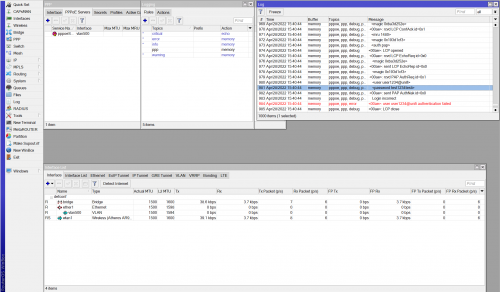
If you're using a Mikrotik router as the PPPoE server, you'll have to turn on logging for PPP in order to see the username and password being received by it.

This will work on almost any router though certain router settings can prevent this from working.

This post has been edited by soonwai: Jul 7 2016, 06:05 PM
badai
post Jun 15 2016, 01:11 PM

Enthusiast
*****
Senior Member
998 posts

Joined: Jan 2003
If you have backup your router config, can use this: http://www.nirsoft.net/utils/router_password_recovery.html
TSsoonwai
post Jun 15 2016, 06:25 PM


********
All Stars
11,456 posts

Joined: Oct 2007
From: KL


QUOTE(badai @ Jun 15 2016, 01:11 PM)
If you have backup your router config, can use this: http://www.nirsoft.net/utils/router_password_recovery.html
*
Thanks badai, I'll put that in too. I've used that a few times before. Works on DIR-615 but not on L7-N-R2000.

This post has been edited by soonwai: Jul 8 2016, 12:22 AM
weevm
post Jul 7 2016, 01:06 AM

New Member
*
Junior Member
14 posts

Joined: Sep 2014
how can i open my nat type on this router ?
TSsoonwai
post Jul 7 2016, 01:43 PM


********
All Stars
11,456 posts

Joined: Oct 2007
From: KL


QUOTE(weevm @ Jul 7 2016, 01:06 AM)
how can i open my nat type on this router ?
*
This thread isn't specific to any router. Try the RGX4400 thread.
blacktubi
post Jul 7 2016, 04:39 PM

-
Group Icon
Elite
8,402 posts

Joined: Jul 2008

I use RouterPassView.

It is compatible with a lot of routers. Maybe someone can submit a config file for them to reverse engineer.

http://www.nirsoft.net/utils/router_password_recovery.html
Anime4000
post Jul 7 2016, 11:04 PM

Look at all my stars!!
*******
Senior Member
2,399 posts

Joined: Jul 2009
From: /dev/null


on D-Link Router this method not working, it's encrypted anyways
TSsoonwai
post Jul 8 2016, 12:05 AM


********
All Stars
11,456 posts

Joined: Oct 2007
From: KL


QUOTE(Anime4000 @ Jul 7 2016, 11:04 PM)
on D-Link Router this method not working, it's encrypted anyways
*
Actually It works on "D-Link Router". Verified here. The million dollar question is "Which D-Link".
Anime4000
post Jul 8 2016, 02:50 PM

Look at all my stars!!
*******
Senior Member
2,399 posts

Joined: Jul 2009
From: /dev/null


QUOTE(soonwai @ Jul 8 2016, 12:05 AM)
Actually It works on "D-Link Router". Verified here. The million dollar question is "Which D-Link".
*
D-Link I use is DIR-820L
using "Inspect Element" I believe my pppoe password not what it show
CODE

<input default="WHR9RfbDdH" id="poe_pass_s" name="poe_pass_s" size="20" maxlength="63" value="WHR9RfbDdH" onfocus="select();" type="password">

TSsoonwai
post Jul 8 2016, 02:58 PM


********
All Stars
11,456 posts

Joined: Oct 2007
From: KL


QUOTE(Anime4000 @ Jul 8 2016, 02:50 PM)
D-Link I use is DIR-820L
using "Inspect Element" I believe my pppoe password not what it show
CODE

<input default="WHR9RfbDdH" id="poe_pass_s" name="poe_pass_s" size="20" maxlength="63" value="WHR9RfbDdH" onfocus="select();" type="password">

*
You're right. That's not the password. In fact the string "WHR9RfbDdH" never changes even if you change your password. Which means that it is not even an encrypted representation of your password. This is similar to the L7-N-R2000 (DIR-614).

For these routers, afaik, the only way that works to recover the password is the PPPoE Server method.
dwijadas
post Dec 25 2016, 02:02 AM

Enthusiast
*****
Senior Member
713 posts

Joined: Sep 2004
From: Kuala Lumpur


QUOTE(soonwai @ Jul 8 2016, 02:58 PM)
You're right. That's not the password. In fact the string "WHR9RfbDdH" never changes even if you change your password. Which means that it is not even an encrypted representation of your password. This is similar to the L7-N-R2000 (DIR-614).

For these routers, afaik, the only way that works to recover the password is the PPPoE Server method.
*
Can you elaborate the PPOE server method ?

Thank you
TSsoonwai
post Feb 22 2017, 07:48 PM


********
All Stars
11,456 posts

Joined: Oct 2007
From: KL


QUOTE(dwijadas @ Dec 25 2016, 02:02 AM)
Can you elaborate the PPOE server method ?

Thank you
*
Sorry for the late reply. It's in the 2nd post. Basically just to use a dummy PPPoE server to capture the username and password sent by the router over ether1.
Dark9
post Aug 18 2017, 11:00 AM

New Member
*
Junior Member
22 posts

Joined: Jul 2014


Port forwarding on router unifi, is it block by TM? or there got limitation?
Try using ddns but not working...
TSsoonwai
post Aug 18 2017, 11:28 PM


********
All Stars
11,456 posts

Joined: Oct 2007
From: KL


QUOTE(Dark9 @ Aug 18 2017, 11:00 AM)
Port forwarding on router unifi, is it block by TM? or there got limitation?
Try using ddns but not working...
*
Some ports are blocked by TM.
ahrasis
post Aug 21 2017, 03:35 PM

New Member
*
Newbie
47 posts

Joined: Aug 2017
QUOTE(Dark9 @ Aug 18 2017, 11:00 AM)
Port forwarding on router unifi, is it block by TM? or there got limitation?
Try using ddns but not working...
I think, except for outbound on port 25 (for sending emails directly from your email server, if you have any), other ports should portforward just fine. Ddns also should work just fine. Most probably you are not setting your router correctly. What is your router anyway?
Raipaes
post Sep 13 2017, 09:10 PM

New Member
*
Newbie
10 posts

Joined: Sep 2017
QUOTE(soonwai @ Jun 14 2016, 04:20 PM)
i dunno routers password
What if you don't know the routers password? Which means that you can't login to the router's admin page. There's one more method. This method assumes:

1. You have physical access to the router.
2. The router is working and connects to UniFi successfully.

PPPoE Server Method
I'll expand on this further but the basic steps are:

1. Setup a PPPoE server.
Any PPPoE server will do. One of the easiest ways is to setup a Mikrotik router as a PPPoE server.

2. Connect your router's WAN port to the above PPPoE server.

3. Check PPPoE server logs for the username & password sent by your router.
If you're using a Mikrotik router as the PPPoE server, you'll have to turn on logging for PPP in order to see the username and password being received by it.

This will work on almost any router though certain router settings can prevent this from working.
*
Will this method work with the Huawei HG8245H? I have tried the other methods including the XML config file. The password shows a hash. I want to bridge this router and use ASUS RT-AC68u as main router. This is no easy task in the country I live. The ISP will not help with this and won't provide any info or PPPoE password. Thank you.
TSsoonwai
post Sep 13 2017, 09:15 PM


********
All Stars
11,456 posts

Joined: Oct 2007
From: KL


QUOTE(Raipaes @ Sep 13 2017, 09:10 PM)
Will this method work with the Huawei HG8245H? I have tried the other methods including the XML config file. The password shows a hash. I want to bridge this router and use ASUS RT-AC68u as main router. This is no easy task in the country I live. The ISP will not help with this and won't provide any info or PPPoE password. Thank you.
*
Yes, it will, provided you know the vlan, if any, the Huawei is using to communicate with the pppoe server. Another condition is that the Huawei is using an unencrypted ppp authentication protocol such as PAP.
Raipaes
post Sep 13 2017, 09:42 PM

New Member
*
Newbie
10 posts

Joined: Sep 2017
QUOTE(soonwai @ Sep 13 2017, 09:15 PM)
Yes, it will, provided you know the vlan, if any, the Huawei is using to communicate with the pppoe server. Another condition is that the Huawei is using an unencrypted ppp authentication protocol such as PAP.
*
It is using PPPoE authentication. I have access to the HG8245H WAN configuration and it shows the correct user name which is my ISP customer code. When I use the easy methods such as inspect element or show the hidden password, I get a bunch of letters and numbers instead of plain text password like: 58741beaa104b9bbfb963dd1fe255bcdd61e3651ed57fed93bd0e8cca17e6f60 . I saw on a blog it is a double hash SHA256(MD5('password')). https://zedt.eu/tech/hardware/obtaining-adm...huawei-hg8247h/
I want to use my Asus router as I have more functions than the ISP supplied router. I know the Vlan on the WAN config page of the router. What tools do I need to extract the pass using the PPPoE server method which I suppose is my last option?
TSsoonwai
post Sep 13 2017, 11:26 PM


********
All Stars
11,456 posts

Joined: Oct 2007
From: KL


I'm afraid I'm not familiar with the Huawei.

If you search in the source code of the WAN config page for your pppoe username, do you see anything near it that may resemble your pppoe password?

For the pppoe server method, all you need is a pppoe server and that may be a pc setup as one or, what I usually use, a Mikrotik router configured as a PPPoE server.

btw, which country are you in? and which ISP?
Raipaes
post Sep 14 2017, 12:53 AM

New Member
*
Newbie
10 posts

Joined: Sep 2017
QUOTE(soonwai @ Sep 13 2017, 11:26 PM)
I'm afraid I'm not familiar with the Huawei.

If you search in the source code of the WAN config page for your pppoe username, do you see anything near it that may resemble your pppoe password?

For the pppoe server method, all you need is a pppoe server and that may be a pc setup as one or, what I usually use, a Mikrotik router configured as a PPPoE server.

btw, which country are you in? and which ISP?
*
When I open inspect element to show the source code and change input type=''password'' to ''whatever'' It shows on the password box: 58741beaa104b9bbfb963dd1fe255bcdd61e3651ed57fed93bd0e8cca17e6f60 , it does not reveal the real password. here is the XML config file of the Huawei HG8245H router:

<WANPPPConnection NumberOfInstances="1">
<WANPPPConnectionInstance InstanceID="1" Enable="1" Reset="0" PossibleConnectionTypes="IP_Routed,PPPoE_Bridged" ConnectionType="IP_Routed" PPPoESessionID="1" Name="INTERNET_PPPOE" AutoDisconnectTime="0" IdleDisconnectTime="180" WarnDisconnectDelay="0" RSIPAvailable="0" NATEnabled="1" Username="xxxxxx@ftth" Password="$21]V+:Jwx39xytGJ\KK5MIHVr&gt;{&gt;Zw&RL3m=&Dp:X$" PPPEncryptionProtocol="None" PPPCompressionProtocol="None" PPPAuthenticationProtocol="PAP" RemoteIPAddress="" MaxMRUSize="1492" DNSEnabled="1" DNSOverrideAllowed="0"

I have changed my user name number to xxxxxx

For the PPPoe server method do you think it would work with the Huawei ONT router? Does the Mikrotic router have input for the optical cable connector?

In this country, unfortunately it is difficult to obtain the technical support of the state communication company. I have tried before and they refuse to help with bridging the router. it is difficult even to get in contact with them

This post has been edited by Raipaes: Sep 14 2017, 12:57 AM
TSsoonwai
post Sep 14 2017, 02:20 AM


********
All Stars
11,456 posts

Joined: Oct 2007
From: KL


QUOTE(Raipaes @ Sep 14 2017, 12:53 AM)
When I open inspect element to show the source code and change input type=''password'' to ''whatever'' It shows on the password box: 58741beaa104b9bbfb963dd1fe255bcdd61e3651ed57fed93bd0e8cca17e6f60 , it does not reveal the real password. here is the XML config file of the Huawei HG8245H router:

<WANPPPConnection NumberOfInstances="1">
<WANPPPConnectionInstance InstanceID="1" Enable="1" Reset="0" PossibleConnectionTypes="IP_Routed,PPPoE_Bridged" ConnectionType="IP_Routed" PPPoESessionID="1" Name="INTERNET_PPPOE" AutoDisconnectTime="0" IdleDisconnectTime="180" WarnDisconnectDelay="0" RSIPAvailable="0" NATEnabled="1" Username="xxxxxx@ftth" Password="$21]V+:Jwx39xytGJ\KK5MIHVr&gt;{&gt;Zw&RL3m=&Dp:X$" PPPEncryptionProtocol="None" PPPCompressionProtocol="None" PPPAuthenticationProtocol="PAP" RemoteIPAddress="" MaxMRUSize="1492" DNSEnabled="1" DNSOverrideAllowed="0"

I have changed  my user name number to xxxxxx

For the PPPoe server method do you think it would work with the Huawei ONT router? Does the Mikrotic router have input for the optical cable connector?

In this country, unfortunately it is difficult to obtain the technical support of the state communication company. I have tried before and they refuse to help with bridging the router. it is difficult even to get in contact with them
*
Theoretically you can use one of the following but I won't know for sure as I've not tried.
1. An optical to UTP media converter
2. A Mikrotik router with an SFP port and an appropriate optical SFP module
3. Reconfigure the Huawei's PPPoE client to one of the ethernet ports.

Which country are you in?
Raipaes
post Sep 14 2017, 03:11 AM

New Member
*
Newbie
10 posts

Joined: Sep 2017
QUOTE(soonwai @ Sep 14 2017, 02:20 AM)
Theoretically you can use one of the following but I won't know for sure as I've not tried.
1. An optical to UTP media converter
2. A Mikrotik router with an SFP port and an appropriate optical SFP module
3. Reconfigure the Huawei's PPPoE client to one of the ethernet ports.

Which country are you in?
*
Bolivia. There are few ISPs here and even fewer, none actually
that provide good connection, so changing ISP is not an option. I'm left on my own to resolve this. Thank you for your help. I am willing to purchase the Mikrotic and give it a try as I really miss the functionality of my Asus router. If I just put the Asus behind the Huawei as an access point I will not have the full capabilities of it. The other option I read that could resolve this issue would be DMZ and port forwarding but bridging the Huawei is the best one.
Among the 3 options you gave me, which one would be the most cost efficient to give it a try?
The Huawei router screenshots and simulator: http://tracuudiem.vnpttiengiang.vn/gpon/GP...8245/remote.htm
Do you have a cheap model that could work as a PPPoe server to suggest? The media converter sounds very affordable. Is the windows pppoe server RasPPPoE? I will do a research about it. I was almost giving up this quest. Thank you very much for your time and patience.

This post has been edited by Raipaes: Sep 14 2017, 09:56 AM
TSsoonwai
post Sep 14 2017, 01:14 PM


********
All Stars
11,456 posts

Joined: Oct 2007
From: KL


I think the media converter would be the cheapest option + a cheap Mikrotik router, around USD50. The cheapest Mikrotik that has an SFP port is around USD150 and you'll still need to get the SFP module.

A good place to buy Mikrotik is euro.dk.com

Sorry not familiar with Windows.
Raipaes
post Sep 14 2017, 07:12 PM

New Member
*
Newbie
10 posts

Joined: Sep 2017
QUOTE(soonwai @ Sep 14 2017, 01:14 PM)
I think the media converter would be the cheapest option + a cheap Mikrotik router, around USD50. The cheapest Mikrotik that has an SFP port is around USD150 and you'll still need to get the SFP module.

A good place to buy Mikrotik is euro.dk.com

Sorry not familiar with Windows.
*
Is it possible to use use a media converter SFP for the router to UTP and connect eth straight to pc and use this setup for the pc pppoe server?
TSsoonwai
post Sep 14 2017, 08:56 PM


********
All Stars
11,456 posts

Joined: Oct 2007
From: KL


I believe so but I’ve not done something like this.

This post has been edited by soonwai: Sep 15 2017, 12:01 AM
Raipaes
post Sep 14 2017, 11:54 PM

New Member
*
Newbie
10 posts

Joined: Sep 2017
QUOTE(soonwai @ Sep 14 2017, 08:56 PM)
I believe so but I’ve done something like this.
*
Any mikrotik model has the pppoe server function?
I will test it and post the results. Thank you.

This post has been edited by Raipaes: Sep 15 2017, 12:13 AM
Raipaes
post Sep 15 2017, 11:22 AM

New Member
*
Newbie
10 posts

Joined: Sep 2017
QUOTE(soonwai @ Sep 14 2017, 08:56 PM)
I believe so but I’ve not done something like this.
*
Mikrotik RB750Gr3 do you think it would do the job?
TSsoonwai
post Sep 15 2017, 05:04 PM


********
All Stars
11,456 posts

Joined: Oct 2007
From: KL


QUOTE(Raipaes @ Sep 15 2017, 11:22 AM)
Mikrotik RB750Gr3 do you think it would do the job?
*
If you're using a media converter, just get the cheapest Mikrotik for example RB941-2nD
Raipaes
post Sep 15 2017, 09:35 PM

New Member
*
Newbie
10 posts

Joined: Sep 2017
QUOTE(soonwai @ Sep 15 2017, 05:04 PM)
If you're using a media converter, just get the cheapest Mikrotik for example RB941-2nD
*
Is it important to set radius server in order to see the pass in the log when the router attempts the PPP connection or I just leave only PAP authentication enabled?

This post has been edited by Raipaes: Sep 15 2017, 09:37 PM
TSsoonwai
post Sep 15 2017, 09:43 PM


********
All Stars
11,456 posts

Joined: Oct 2007
From: KL


No need radius, just ppp logging.
Raipaes
post Sep 16 2017, 01:27 AM

New Member
*
Newbie
10 posts

Joined: Sep 2017
QUOTE(soonwai @ Sep 15 2017, 09:43 PM)
No need radius, just ppp logging.
*
I have tested a non fiber router and it works, tomorow I'm going to test with the fiber using tp-link mc111cs media converter

This post has been edited by Raipaes: Sep 16 2017, 07:18 AM
Raipaes
post Sep 18 2017, 12:33 AM

New Member
*
Newbie
10 posts

Joined: Sep 2017
It does not work because the ONT has to communicate with OLT at first place. Fttx link media converter does not work. doh.gif
darrenlam
post Jun 16 2018, 10:06 AM

Getting Started
**
Junior Member
268 posts

Joined: Jul 2005
From: stuck between Hell & Heaven


This is an awesome thread!!!! 👍👍👍
prokiller1199
post Jul 19 2018, 09:06 PM

Hi there.
*****
Senior Member
966 posts

Joined: Apr 2016


inspect chg password to text?
TSsoonwai
post Jul 19 2018, 09:59 PM


********
All Stars
11,456 posts

Joined: Oct 2007
From: KL


QUOTE(prokiller1199 @ Jul 19 2018, 09:06 PM)
inspect chg password to text?
*
Yes! That’s the first thing to try. Works on most but not all.
naturalfool
post Dec 3 2018, 04:49 PM

Getting Started
**
Junior Member
232 posts

Joined: Dec 2015
QUOTE(soonwai @ Jul 19 2018, 09:59 PM)
Yes! That’s the first thing to try. Works on most but not all.
*
Hi, I am a total alien cos I don't know what language you are talking about but I need to retrieve my PPPoE password.

In your first post, you have indicated "Right click on the password and examine the HTML source of the page."

Just right click on the password and I can search through the jumble to "guess" the password? Do I need to type anything anywhere to "examine the HTML source of the page"?
System Error Message
post Dec 4 2018, 12:06 AM

Regular
******
Senior Member
1,781 posts

Joined: Jul 2010
in some routers, the passwords are stored in a file in plaintext (dlink is notorious for this). For some routers however they dont. Its super easy to recover the password for any router thanks to no ISP in malaysia bothering to disable PAP or use CHAP or MS VCHAP that is far more secure. Just so you know you can easily steal anyones login with this guide that is connected to the same cabinet.

First set up a sniffer on your PC, plug the WAN port of your router to your PC, boot it up and capture the packets. Look for PPP , you will be able to get your password as the router attempts to connect, and it will be in plaintext, yes thats how bad our country's internet setup is.
naturalfool
post Dec 5 2018, 09:42 AM

Getting Started
**
Junior Member
232 posts

Joined: Dec 2015
QUOTE(System Error Message @ Dec 4 2018, 12:06 AM)
in some routers, the passwords are stored in a file in plaintext (dlink is notorious for this). For some routers however they dont. Its super easy to recover the password for any router thanks to no ISP in malaysia bothering to disable PAP or use CHAP or MS VCHAP that is far more secure. Just so you know you can easily steal anyones login with this guide that is connected to the same cabinet.

First set up a sniffer on your PC, plug the WAN port of your router to your PC, boot it up and capture the packets. Look for PPP , you will be able to get your password as the router attempts to connect, and it will be in plaintext, yes thats how bad our country's internet setup is.
*
Thanks but this is just more alien language to me. Looks like I will just to need get it from TM.

ulala2
post Dec 5 2018, 10:00 AM

Getting Started
**
Junior Member
245 posts

Joined: Jul 2007
Last step, just call TM, they will reset the password and send u the new password via SMS.
Should be activate within 24 hours.
ky1996
post May 24 2019, 01:26 PM

Getting Started
**
Junior Member
149 posts

Joined: Dec 2013
QUOTE(ulala2 @ Dec 5 2018, 10:00 AM)
Last step, just call TM, they will reset the password and send u the new password via SMS.
Should be activate within 24 hours.
*
does it really takes that long to get the new password?

This post has been edited by ky1996: May 27 2019, 07:58 AM
ulala2
post May 27 2019, 05:45 PM

Getting Started
**
Junior Member
245 posts

Joined: Jul 2007
QUOTE(ky1996 @ May 24 2019, 01:26 PM)
does it really takes that long to get the new password?
*
to receive the password not that long, but to wait for it to activate u need wait 24 hours
7cantona
post May 28 2019, 12:57 AM

On my way
****
Junior Member
586 posts

Joined: Apr 2019
great ways to get PPPoE Password if ask tm reset the password is not an option ? hmm.gif
good job TS thumbsup.gif
GTR
post Jul 15 2019, 12:55 PM

Regular
******
Senior Member
1,422 posts

Joined: Jan 2003
Can I request TM for the PPPoE password now but only configure new router maybe 5 days later? Is there time limit to 'use' the new password? Will I lose unifi connection after new password sent and activated by TM?

Wanna request the password in advanced b4 arrival of the new router
kkm
post Jul 15 2019, 05:43 PM

Regular
******
Senior Member
1,258 posts

Joined: Jan 2003
QUOTE(GTR @ Jul 15 2019, 12:55 PM)
Can I request TM for the PPPoE password now but only configure new router maybe 5 days later? Is there time limit to 'use' the new password? Will I lose unifi connection after new password sent and activated by TM?

Wanna request the password in advanced b4 arrival of the new router
*
Apparently they will reset your pw and sms the new one to you. I suppose that's the new pw, shouldn't be a time limit, don't think TM is so rajin to follow up after that.
GTR
post Jul 18 2019, 09:00 PM

Regular
******
Senior Member
1,422 posts

Joined: Jan 2003
Just to update the Internet connection will be disconnected once the new PPPoE password is activated, u need to set up ur WAN or Internet on the router again. Jus FYI for those requestes new password b4 arrival of the new router like me.
edisoner90
post Aug 14 2019, 09:04 PM

Casual
***
Junior Member
355 posts

Joined: Sep 2013
hi guys how to extra PPPOE password from D-Link WBR2300? my existing router still working can connect to internet

NicholasHoi P
post Nov 12 2019, 04:34 PM

New Member
*
Probation
1 posts

Joined: Nov 2019
I straight away ask TM and they gave me the password ,Easy as fork
enteraname1
post Nov 16 2019, 12:41 AM

Getting Started
**
Junior Member
176 posts

Joined: Oct 2017


QUOTE(NicholasHoi @ Nov 12 2019, 04:34 PM)
I straight away ask TM and they gave me the password ,Easy as fork
*
without reset the password?
naturalfool
post Nov 18 2019, 06:07 PM

Getting Started
**
Junior Member
232 posts

Joined: Dec 2015
QUOTE(enteraname1 @ Nov 16 2019, 12:41 AM)
without reset the password?
*
First time ask no need reset password. But the CS told me if I lose the password and need to ask again then will need to reset first. Meaning they only give the password once. If forgot then only reset.
liewmf
post Nov 18 2019, 10:43 PM

Getting Started
**
Junior Member
173 posts

Joined: Feb 2014
From: Selangor
I just ask TM the password by live chat , but the live agent direct telling me they don't know the password on their end and only can reset and send sms in 24 hour.. I tried RouterPassView, but don't work on Asus RT-AC55UHP..
nike89
post Dec 11 2019, 10:21 PM

Enthusiast
*****
Senior Member
855 posts

Joined: Dec 2007
this is a lifesaver thread!

routerpassview helped!
portgasz
post Jul 11 2020, 06:09 PM

New Member
*
Junior Member
14 posts

Joined: Feb 2013
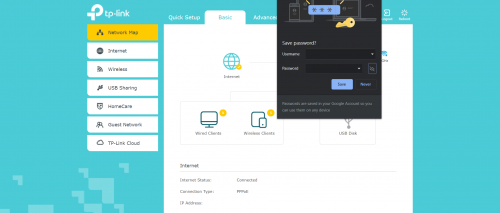
just wanna update this thread.. apparently you can get pppoe password by using this step if you are tplink user and use chrome..

first, login your tplink router account at tplinkwifi.net

after that, navigate to Advanced>Network>Internet. also work with Basic>Network>Internet.

in that section, you will find your pppoe username and also pppoe password that been hidden by default.

click on the password and type at the end of password with only one alphabet/number or whatever things you want but make sure you remember that alphabet. please do not click save for safety reason.

after that, try to move to another for eg. basic or lan section.

you might find out that google will ask you if you wanna save the new password. click on that unhide button and you will find your pppoe password + the new alphabet.

this works for me when i changing to the new router.

user posted image

This post has been edited by portgasz: Jul 11 2020, 06:09 PM
junclj
post Jul 13 2020, 05:33 PM

Look at all my stars!!
*******
Senior Member
2,347 posts

Joined: Apr 2008


Quite easy to make your browser to show password,
with google chrome, just highlight the password then right click > Inspect, look for type="password"

user posted image

then double click on the "password" then edit to "text" then boom, this is your password.

Digifriend07
post Nov 21 2020, 03:38 AM

On my way
****
Junior Member
596 posts

Joined: Nov 2007
From: Kg Pandan


QUOTE(portgasz @ Jul 11 2020, 06:09 PM)
just wanna update this thread.. apparently you can get pppoe password by using this step if you are tplink user and use chrome..

first, login your tplink router account at tplinkwifi.net

after that, navigate to Advanced>Network>Internet. also work with Basic>Network>Internet.

in that section, you will find your pppoe username and also pppoe password that been hidden by default.

click on the password and type at the end of password with only one alphabet/number or whatever things you want but make sure you remember that alphabet. please do not click save for safety reason.

after that, try to move to another for eg. basic or lan section.

you might find out that google will ask you if you wanna save the new password. click on that unhide button and you will find your pppoe password + the new alphabet.

this works for me when i changing to the new router.

user posted image
*
Thanks a lot man. You save my day!! Right now i'm config my new router : Asus TUF AX3000
cky80
post Mar 7 2021, 11:06 AM

DOMO DOMO DOMO DOMO
*****
Senior Member
761 posts

Joined: Sep 2006
From: Malaysia Island


QUOTE(junclj @ Jul 13 2020, 05:33 PM)
Quite easy to make your browser to show password,
with google chrome, just highlight the password then right click > Inspect, look for type="password"

user posted image

then double click on the "password" then edit to "text" then boom, this is your password.
*
damn, so easy with this method. Im using the AZ router in 2021 smile.gif
freshie_newbie
post May 14 2021, 07:16 PM

New Member
*
Junior Member
13 posts

Joined: Sep 2013


QUOTE(junclj @ Jul 13 2020, 05:33 PM)
Quite easy to make your browser to show password,
with google chrome, just highlight the password then right click > Inspect, look for type="password"

user posted image

then double click on the "password" then edit to "text" then boom, this is your password.
*
sorry can help to explain last step? How to edit to text?
jacktiew
post May 14 2021, 07:53 PM

Getting Started
**
Junior Member
289 posts

Joined: Sep 2012
QUOTE(freshie_newbie @ May 14 2021, 07:16 PM)
sorry can help to explain last step? How to edit to text?
*
1. Right click that line.
2. You'll see edit text / edit attribute/ edit html, click on one of that
3. Change the type="password" to type="text'.
4. Press enter
5. Now you should see the password on the password in the UI.
omg7788
post Jun 25 2021, 09:58 AM

Kampung Style Information Technology
***
Junior Member
441 posts

Joined: May 2010
From: THE FUTURE


Hi everyone, any of you came across issue like using the old pppoe password does not work with new router setup but upon calling TM unifi to reset and getting a new set of password to set in the new router then only the connection will work?
Blinklime
post Jun 25 2021, 12:25 PM

Getting Started
**
Junior Member
140 posts

Joined: Aug 2013
From: Langkawi

QUOTE(omg7788 @ Jun 25 2021, 09:58 AM)
Hi everyone, any of you came across issue like using the old pppoe password does not work with new router setup but upon calling TM unifi to reset and getting a new set of password to set in the new router then only the connection will work?
*
yes, i just assume im senile, and move on. arguing with their tech support is more frustrating. one time they just disconnect the call, have to start over again. gg waiting time.
QuantumEdge
post Jul 25 2021, 10:17 AM

Regular
******
Senior Member
1,594 posts

Joined: Jan 2016


Anyone managed to fetch Pppoe credentials from Netis router with HTML method?

-----update 19/9/2021-----
HTML Method will work on Netis router

Login to the router using admin credentials
1. Under "Setup", click on Ethernet WAN
2. ETH_Connection_1, action choose "Edit"
3. Under PPP settings, you should be able to see your user name with password (as asterisks)
4. Highlight the password, right-click inspect element
5. type="password" change to type="text" and click enter
6. Boom, your password should be unmasked

Works for Netis and DS244WSGV (White router with 2 antennas)

This post has been edited by QuantumEdge: Sep 19 2021, 12:38 PM
twtang
post Aug 18 2021, 11:40 PM

On my way
****
Junior Member
634 posts

Joined: May 2005
QUOTE(QuantumEdge @ Jul 25 2021, 10:17 AM)
Anyone managed to fetch Pppoe credentials from Netis router with HTML method?
*
any luck?
go626201
post Aug 18 2021, 11:43 PM

Regular
******
Senior Member
1,882 posts

Joined: Sep 2017
QUOTE(twtang @ Aug 18 2021, 11:40 PM)
any luck?
*
Why dont just request renew password from unifi CS,they will send the new password in 24hours.(Last time I saw my cousin only cost 5min and the sms received)
QuantumEdge
post Aug 19 2021, 12:58 AM

Regular
******
Senior Member
1,594 posts

Joined: Jan 2016


QUOTE(twtang @ Aug 18 2021, 11:40 PM)
any luck?
*
Nope, tried all the methods above.

QUOTE(go626201 @ Aug 18 2021, 11:43 PM)
Why dont just request renew password from unifi CS,they will send the new password in 24hours.(Last time I saw my cousin only cost 5min and the sms received)
*
I was helping my friend configure his Deco M9, did request for a password from CS
They sent us the password, but the Netis router never disconnected somehow...
And the M9 is unable to connect with the password provided by them doh.gif

It was back in January this year...
Gave up using PPPoE, just connect it to Netis as Access points
go626201
post Aug 19 2021, 01:29 AM

Regular
******
Senior Member
1,882 posts

Joined: Sep 2017
QUOTE(QuantumEdge @ Aug 19 2021, 12:58 AM)
Nope, tried all the methods above.
I was helping my friend configure his Deco M9, did request for a password from CS
They sent us the password, but the Netis router never disconnected somehow...
And the M9 is unable to connect with the password provided by them  doh.gif

It was back in January this year...
Gave up using PPPoE, just connect it to Netis as Access points
*
Ya the current password will still work for awhile. But just insert the new password it will works.
Sam Leong
post Aug 19 2021, 08:51 AM

On my way
****
Junior Member
665 posts

Joined: Mar 2016


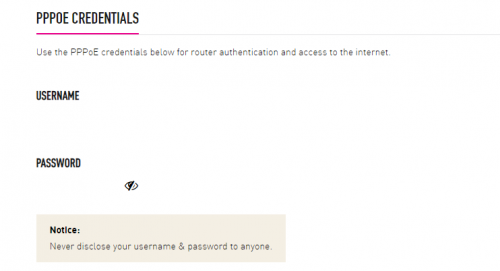
If I'm not mistaken you can directly see your PPPoE Username and Password if you are a TIME customer (at least for me) by log in to https://selfcare.time.com.my

user posted image

user posted image

yusukezz
post Aug 19 2021, 11:14 PM

New Member
*
Junior Member
21 posts

Joined: Feb 2010
been using the edit html method and its still working ! thanks! you saved my day

This post has been edited by yusukezz: Aug 19 2021, 11:16 PM
QuantumEdge
post Sep 19 2021, 12:39 PM

Regular
******
Senior Member
1,594 posts

Joined: Jan 2016


QUOTE(twtang @ Aug 18 2021, 11:40 PM)
any luck?
*
HTML Method will work on Netis router and the white Aztech

Login to the router using admin credentials
1. Under "Setup", click on Ethernet WAN
2. ETH_Connection_1, action choose "Edit"
3. Under PPP settings, you should be able to see your user name with password (as asterisks)
4. Highlight the password, right-click inspect element
5. type="password" change to type="text" and click enter
6. Boom, your password should be unmasked

This post has been edited by QuantumEdge: Sep 19 2021, 12:41 PM
HumanExtinction
post Oct 8 2021, 02:37 PM

Casual
***
Junior Member
364 posts

Joined: Jan 2018
From: Tim Apple
QUOTE(QuantumEdge @ Sep 19 2021, 12:39 PM)
HTML Method will work on Netis router and the white Aztech

Login to the router using admin credentials
1. Under "Setup", click on Ethernet WAN
2. ETH_Connection_1, action choose "Edit"
3. Under PPP settings, you should be able to see your user name with password (as asterisks)
4. Highlight the password, right-click inspect element
5. type="password" change to type="text" and click enter
6. Boom, your password should be unmasked
*
Thanks, you're a life saver notworthy.gif
Gaara92
post Nov 16 2021, 08:01 AM

Herald
****
Junior Member
612 posts

Joined: Mar 2008


QUOTE(soonwai @ Jun 14 2016, 04:20 PM)
i dunno routers password
What if you don't know the routers password? Which means that you can't login to the router's admin page. There's one more method. This method assumes:

1. You have physical access to the router.
2. The router is working and connects to UniFi successfully.

PPPoE Server Method
I'll expand on this further but the basic steps are:

1. Setup a PPPoE server.
Any PPPoE server will do. One of the easiest ways is to setup a Mikrotik router as a PPPoE server.

2. Connect your router's WAN port to the above PPPoE server.

3. Check PPPoE server logs for the username & password sent by your router.
If you're using a Mikrotik router as the PPPoE server, you'll have to turn on logging for PPP in order to see the username and password being received by it.

This will work on almost any router though certain router settings can prevent this from working.
*
I have tried the pppoe server method, apparently it didn't work.
TSsoonwai
post Nov 16 2021, 01:07 PM


********
All Stars
11,456 posts

Joined: Oct 2007
From: KL


QUOTE(Gaara92 @ Nov 16 2021, 08:01 AM)
I have tried the pppoe server method, apparently it didn't work.
*
Is the router trying to connect to the pppoe server? Didn't show the password in the logs?
Gaara92
post Nov 17 2021, 06:34 AM

Herald
****
Junior Member
612 posts

Joined: Mar 2008


QUOTE(soonwai @ Nov 16 2021, 01:07 PM)
Is the router trying to connect to the pppoe server? Didn't show the password in the logs?
*
yeah it didn't show. Btw I am using maxis fiber
TSsoonwai
post Nov 17 2021, 01:20 PM


********
All Stars
11,456 posts

Joined: Oct 2007
From: KL


QUOTE(Gaara92 @ Nov 17 2021, 06:34 AM)
yeah it didn't show. Btw I am using maxis fiber
*
Check your PPPoE server's config. Set the auth method to PAP, disable the others, that should force the password to be sent in cleartext.
PRSXFENG
post Nov 17 2021, 04:58 PM

Look at all my stars!!
*******
Senior Member
2,608 posts

Joined: Nov 2020


QUOTE(Gaara92 @ Nov 17 2021, 06:34 AM)
yeah it didn't show. Btw I am using maxis fiber
*
Which Maxis Fiber Router is it?

If it's the Archer c5v

Login as administrator/SERIAL NUMBER

go to System Tools, Backup & Restore
Backup and get the conf.bin file

Then use Nirsoft RouterPassView
https://www.nirsoft.net/utils/router_password_recovery.html
Note: Windows Defender does not like this, but it is safe

Load the conf file and search for WANPPPConnection with Ctrl + F

Should be in there somewhere

This post has been edited by PRSXFENG: Nov 17 2021, 04:58 PM
Gaara92
post Nov 17 2021, 05:14 PM

Herald
****
Junior Member
612 posts

Joined: Mar 2008


QUOTE(PRSXFENG @ Nov 17 2021, 04:58 PM)
Which Maxis Fiber Router is it?

If it's the Archer c5v

Login as administrator/SERIAL NUMBER

go to System Tools, Backup & Restore
Backup and get the conf.bin file

Then use Nirsoft RouterPassView
https://www.nirsoft.net/utils/router_password_recovery.html
Note: Windows Defender does not like this, but it is safe

Load the conf file and search for WANPPPConnection with Ctrl + F

Should be in there somewhere
*
It's archer AX20. it is using tplink sso, no username just need to enter password. The only problem is I dont know the password set up by the technician, I also dont have the technician phone number. So yeah nothing I can do.
PRSXFENG
post Nov 17 2021, 07:17 PM

Look at all my stars!!
*******
Senior Member
2,608 posts

Joined: Nov 2020


QUOTE(Gaara92 @ Nov 17 2021, 05:14 PM)
It's archer AX20. it is using tplink sso, no username just need to enter password. The only problem is I dont know the password set up by the technician, I also dont have the technician phone number. So yeah nothing I can do.
*
Actually, try using your PPPoE username + 1 (eg: A1234561) as password

For mine that is the password

If that doesn't work remove the 1 and try

If still not I guess you will have to ask Maxis Customer Support for it
Gaara92
post Nov 18 2021, 05:04 PM

Herald
****
Junior Member
612 posts

Joined: Mar 2008


QUOTE(PRSXFENG @ Nov 17 2021, 07:17 PM)
Actually, try using your PPPoE username + 1 (eg: A1234561) as password

For mine that is the password

If that doesn't work remove the 1 and try

If still not I guess you will have to ask Maxis Customer Support for it
*
I also don't know what is my pppoe username haha. maxis technician really not reliable. before this i use time fiber, they got a work sheet for it where they write down the s/n of router and onu, login, and also pppoe username/password.
PRSXFENG
post Nov 18 2021, 05:20 PM

Look at all my stars!!
*******
Senior Member
2,608 posts

Joined: Nov 2020


QUOTE(Gaara92 @ Nov 18 2021, 05:04 PM)
I also don't know what is my pppoe username haha. maxis technician really not reliable. before this i use time fiber, they got a work sheet for it where they write down the s/n of router and onu, login, and also pppoe username/password.
*
Oh sweat.gif

For me on my form the "Customer ID" is my PPPoE username

It should be AXXXXXX, with the 6 X being numbers
Then just add @home.maxis.com.my to the end of that
so
A123456@home.maxis.com.my

If you requested for Public IP, replace home with public

Gaara92
post Nov 20 2021, 11:23 PM

Herald
****
Junior Member
612 posts

Joined: Mar 2008


QUOTE(soonwai @ Nov 17 2021, 01:20 PM)
Check your PPPoE server's config. Set the auth method to PAP, disable the others, that should force the password to be sent in cleartext.
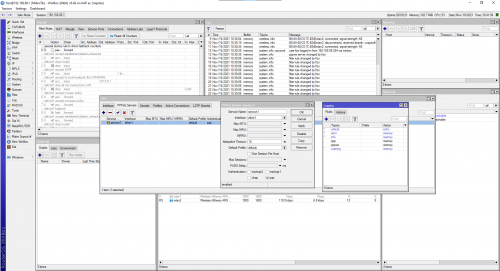
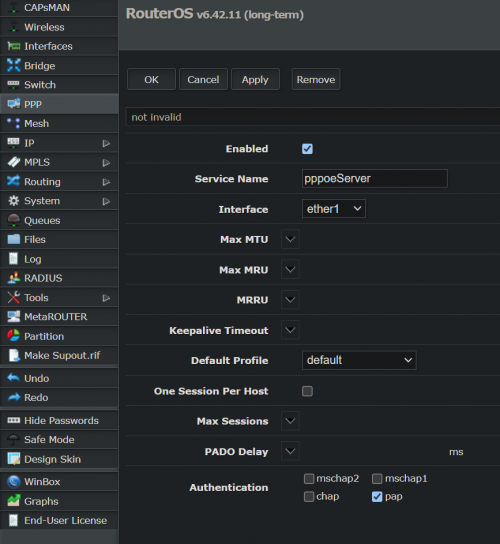
*
This is my mikrotik pppoe server setup. Still no credentials appeared on the logs.

user posted image
thesoothsayer
post Jan 9 2022, 05:07 PM

Enthusiast
*****
Senior Member
954 posts

Joined: Dec 2006


Anyone with the new PPOE SMS password being unable to access the Internet? Just got the reset password 30 minutes ago, but no internet connection from using that.

Edit: For Unifi

Edit 2: First support person reset my hypptv password instead. doh.gif Well, at least I know both now.

This post has been edited by thesoothsayer: Jan 10 2022, 05:03 AM
doublecool
post Mar 18 2022, 08:58 AM

Getting Started
**
Junior Member
67 posts

Joined: Jun 2018
Guys, for unifi, if you are changing new router, you need to reset the ppoe password by calling them/live support, if not it will not work by using the old password on new router
sgpdsmss
post Mar 18 2022, 10:25 AM

Regular
******
Senior Member
1,704 posts

Joined: Jan 2005
QUOTE(doublecool @ Mar 18 2022, 08:58 AM)
Guys, for unifi, if you are changing new router, you need to reset the ppoe password by calling them/live support, if not it will not work by using the old password on new router
*
after changing now router ..the old password still can use ?

they sent password via sms..setup now router using sms password..

then the old router password still can connect .,.
jacktiew
post Mar 18 2022, 12:54 PM

Getting Started
**
Junior Member
289 posts

Joined: Sep 2012
QUOTE(doublecool @ Mar 18 2022, 08:58 AM)
Guys, for unifi, if you are changing new router, you need to reset the ppoe password by calling them/live support, if not it will not work by using the old password on new router
*
It depends. I've changed multiple routers throughout 7 years of service. Never changed password before. Same password like what I have when I first installed unifi.
kkm
post Mar 18 2022, 01:51 PM

Regular
******
Senior Member
1,258 posts

Joined: Jan 2003
QUOTE(doublecool @ Mar 18 2022, 08:58 AM)
Guys, for unifi, if you are changing new router, you need to reset the ppoe password by calling them/live support, if not it will not work by using the old password on new router
*
Where did you get this info from? I've changed router multiple times, including sometimes reusing an old router for a while. Never had to reset the password...
doublecool
post Mar 18 2022, 02:47 PM

Getting Started
**
Junior Member
67 posts

Joined: Jun 2018
QUOTE(kkm @ Mar 18 2022, 01:51 PM)
Where did you get this info from? I've changed router multiple times, including sometimes reusing an old router for a while. Never had to reset the password...
*
i called 100, asked the guy why i cannot use old password, he told me new router need to use new password

if you can use old password, idk why
sgpdsmss
post Mar 18 2022, 06:56 PM

Regular
******
Senior Member
1,704 posts

Joined: Jan 2005
QUOTE(doublecool @ Mar 18 2022, 02:47 PM)
i called 100, asked the guy why i cannot use old password, he told me new router need to use new password

if you can use old password, idk why
*
yes ,100 told same as u ...

after reset will sms password ..use for new router ..
but the old router still using old password because router cannot see the password...

after new router setup and can connect using sms password ...

connect back old router ..old router also can connect to internet ...

i suspect sms password same as old router password ?
go626201
post Mar 18 2022, 07:14 PM

Regular
******
Senior Member
1,882 posts

Joined: Sep 2017
QUOTE(doublecool @ Mar 18 2022, 02:47 PM)
i called 100, asked the guy why i cannot use old password, he told me new router need to use new password

if you can use old password, idk why
*
QUOTE(sgpdsmss @ Mar 18 2022, 06:56 PM)
yes ,100 told same as u ...

after reset will sms password ..use for new router ..
but the old router still using old password because router cannot see the password...

after new router setup and can connect using sms password ...

connect back old router ..old router also can connect to internet ...

i suspect sms password same as old router password ?
*
When you request to reset the pppoe password,the currenct router is still connected to internet because it had been authenticated at first. (as long as you didn't reboot or disconnect your router then the internet will still work for awhile)
So after you received the new password, the system had changed password for your unifi pppoe account. (And at the same time old password is no longer to use)
It will only accept your new password for authentication to connect internet.

And if you can find the current pppoe account password,then it does not require to reset your password.
Just disconnect your current router and change to your new router with current pppoe credential then it will work.

This post has been edited by go626201: Mar 18 2022, 07:15 PM
sgpdsmss
post Mar 18 2022, 09:48 PM

Regular
******
Senior Member
1,704 posts

Joined: Jan 2005
QUOTE(go626201 @ Mar 18 2022, 07:14 PM)
When you request to reset the pppoe password,the currenct router is still connected to internet because it had been authenticated at first. (as long as you didn't reboot or disconnect your router then the internet will still work for awhile)
So after you received the new password, the system had changed password for your unifi pppoe account. (And at the same time old password is no longer to use)
It will only accept your new password for authentication to connect internet.

And if you can find the current pppoe account password,then it does not require to reset your password.
Just disconnect your current router and change to your new router with current pppoe credential then it will work.
*
during setup new router to connect successful,
need more time to configure others device so power off 1st n keep ..
then turn on old router again it also can connected .. still connected until now ..nearly a week
kkm
post Mar 19 2022, 09:45 AM

Regular
******
Senior Member
1,258 posts

Joined: Jan 2003
Unifi doesn't issue you the new credentials immediately, you may have to wait a day or two.
If you search around, there are methods to recover your existing pp/oe ID and PW if your old router is still connected.

YoungMan
post Apr 9 2022, 02:52 PM

Look at all my stars!!
*******
Senior Member
6,794 posts

Joined: Oct 2008
From: Kuala Lumpur


Just to add on, For Digi Fibre default router (Zyxel EX-3300-t0), the username is admin and password is behind the router. Unfortunately I can't figure out how to obtain the PPPoe password using the HTML method.
AdamNg
post Apr 9 2022, 03:39 PM

Getting Started
**
Junior Member
219 posts

Joined: Sep 2008
QUOTE(YoungMan @ Apr 9 2022, 02:52 PM)
Just to add on, For Digi Fibre default router (Zyxel EX-3300-t0), the username is admin and password is behind the router. Unfortunately I can't figure out how to obtain the PPPoe password using the HTML method.
*
1. Search "Google show password extension"
2. Install "Showpassword" extension
3. Open the router using chrome
4. Bring the mouse cursor to the PPPoe password...

This post has been edited by AdamNg: Apr 9 2022, 03:45 PM
YoungMan
post Apr 15 2022, 12:55 PM

Look at all my stars!!
*******
Senior Member
6,794 posts

Joined: Oct 2008
From: Kuala Lumpur


QUOTE(AdamNg @ Apr 9 2022, 04:39 PM)
1. Search "Google show password extension"
2. Install "Showpassword" extension
3. Open the router using chrome
4. Bring the mouse cursor to the PPPoe password...
*
Update: tried on the Zyxel router and it didn't work. It just show a - and that's all. Guest it's encrypted in some ways.
For the BTU, it showed tab characters for the PON password. When I try to remove the extention, edit the password by adding a random char at the end then navigate to other page, chrome save password also display the PON password as tab characters only.
That's all on the password extention for both the router and modem.

This post has been edited by YoungMan: Apr 15 2022, 01:35 PM
Rightslash
post Apr 28 2022, 12:43 PM

New Member
*
Newbie
32 posts

Joined: Oct 2014


QUOTE(Gaara92 @ Nov 21 2021, 12:23 AM)
This is my mikrotik pppoe server setup. Still no credentials appeared on the logs.

user posted image
*
Hey, have you figured out how to get it working? so far i got my self a mikrotik mAP lite just to try get the pppoe server working but still figuring out how to do so
Rightslash
post Apr 28 2022, 01:24 PM

New Member
*
Newbie
32 posts

Joined: Oct 2014


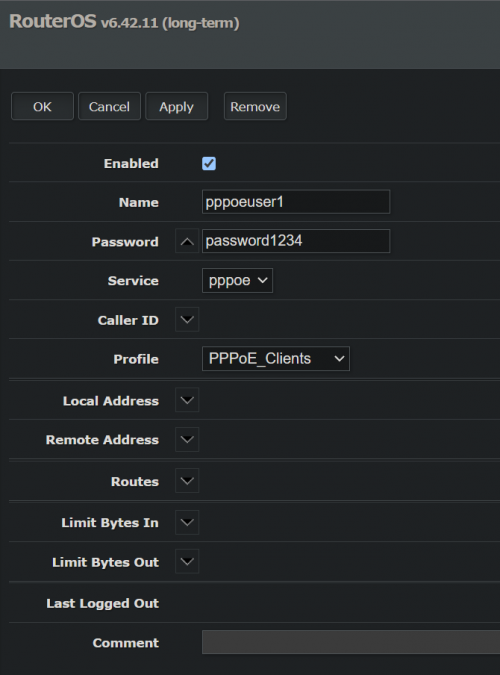
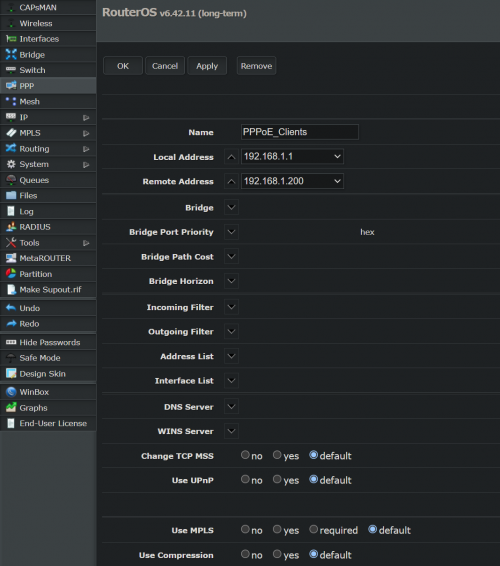
user posted image
user posted image
user posted image
user posted image
Rightslash
post Apr 28 2022, 03:25 PM

New Member
*
Newbie
32 posts

Joined: Oct 2014


user posted image

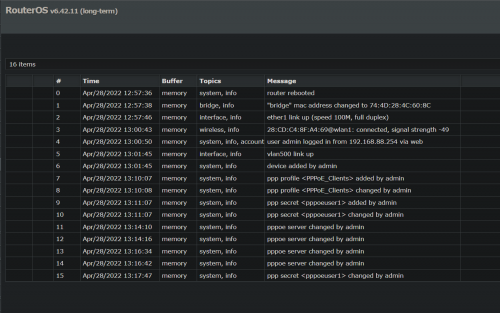
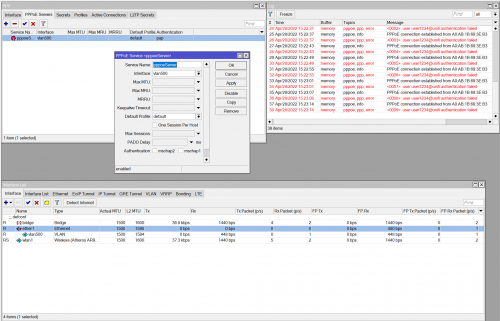
i managed to get something in the logs after creating a vlan500 but now just need to figure out how to see the password

edit: just needed to add ppp into logging and now it shows the user and password

user posted image

This post has been edited by Rightslash: Apr 28 2022, 03:42 PM
gaman
post May 11 2022, 10:39 AM

Getting Started
**
Junior Member
86 posts

Joined: Apr 2006
Anyone here know how do I "extract" my "own personal" username & password from my TM stock router, Netis DL4480V, so that I could set up my new router?

My router was set up by TM technician many years ago. The technician never gave me my "own personal" username and password.

I tried the HTML method that mentioned in previous page but the username and password are "pppoe@ccs" & "3487_TmPPPoE", which I believe are default username and password.

I tried "backup" method but the backup .xml file is encrypted.

What I see on the router's WAN Set Up is this:

Attached Image


squall0833
post Jun 15 2024, 03:01 PM

Regular
******
Senior Member
1,473 posts

Joined: Oct 2006
From: Jupiter


maybe it's just too old, just write here in case anyone who still using TP Link C1200 (v1) and need to get their unifi id password from this router without calling 100

right click pppoe password box which has the existing password, inspect element, find the following line

CODE

<input id="pppoe_password" name="password" type="text" minlength="0" class="hidden">


change the class="hidden" to class="show" and press Enter

then the unifi password will show right beside the hidden dot password

k bai
SUSEX Unseen Forces
post Jun 25 2024, 04:28 PM

Getting Started
**
Junior Member
143 posts

Joined: May 2022

I just store it on sealnote inside my phone

 

Change to:
| Lo-Fi Version
0.0285sec    0.39    6 queries    GZIP Disabled
Time is now: 3rd December 2025 - 07:20 AM