

QUOTE(stella_purple @ Jul 16 2018, 09:13 AM)
:thumbsup: no problem, may be with 4x4 device, it can reach higher speed.

Can this be counted:
Tested using iPhone 7.
Phone placed just next to the router.
Review ASUS RT-AC86U, Feature-packed advanced wireless router
|
|
 Aug 8 2018, 10:18 PM Aug 8 2018, 10:18 PM
Return to original view | Post
#1
|
 
Senior Member
1,304 posts Joined: Mar 2010  
|
QUOTE(stella_purple @ Jul 16 2018, 09:13 AM) :thumbsup: no problem, may be with 4x4 device, it can reach higher speed. Can this be counted:
Tested using iPhone 7. Phone placed just next to the router. |
|
|
|
|
|
Oct 9 2018, 03:48 PM
Return to original view | Post
#2
|
|
Senior Member
1,304 posts Joined: Mar 2010
|
QUOTE(NoobHacker @ Oct 9 2018, 03:30 PM) anyone has the devices list keep jumping issue with this router? it will like 22 devices then suddenly jump to 6 devices for no reason then 18 devices in addition, i just found out that the latest firmware is buggy. my internet connections always lost (started with intermittent connection and then permanent disconnected).i face the same issue. kinda irked me a bit, but i don't give any thoughts about it since device connection is uninterrupted, just device list on the router webpage is ever-changing. AND you don't need fan for this router, AC68U was quite hot but for me this is just warm. Those arm cpu can work at 125c, putting fan just collecting dust. i somehow agree - my router has been running for the past 10mths, no overheating issue. placed in open air without airconditioning. My friend not really happy with dual AC86U aimesh setup, the setup was quite confusing, working with homescreen, the tabs at the right, but not working another way. Anyone had happy experience with the aimesh? or when it comes to multi nodes infra ubiquiti is still better? i can't understand so much your question - which setup was confusing? anyhow, i'm happy with AiMesh so far - easy to setup, easy to connect, no reduction in speed/jitter/lag etc. setup with 2x AC86U. i'm a noobie in this stuff, but AiMesh is easy for me so far without issues, though i look forward to use ubiquity infra in the future.  (can't compare though - professional ubiquiti vs. layman aimesh) rolled back to FW 21140 yesterday and currently monitoring. This post has been edited by pokchik: Oct 9 2018, 03:50 PM |
|
|
Oct 9 2018, 04:21 PM
Return to original view | Post
#3
|
|
Senior Member
1,304 posts Joined: Mar 2010
|
QUOTE(NoobHacker @ Oct 9 2018, 04:07 PM) Its from my friend - He click adding AiMesh from advanced settings, loading and stuck there, doesn't work. But adding through the main page is fine. The selection of routers from a phone, according to him, not as good as ubiquities. Sometimes phone upstairs will still connected to downstairs router, I don't know if AiMesh thinks that is faster (Phone direct downstairs faster than go upstairs mesh -> downstairs). From what I heard, I feel that if you going to do multiple APs ubiquiti is better. i faced 2 issues when i started with aimesh earlier this year:Even ubiquiti is professional doesn't mean that will be harder - ubiquiti sees all devices in one shot and configure while aimesh have to detect and adding manually. Their purpose is different though - ubiquiti has the central management unit but any ac86u can be an aimesh member. But for overall experience satisfaction when it comes to multiple AP, I think ubiquiti will perform better. 1. phone app was buggy & sometimes unusable. worked fine at first, but started to show problems when i manage my network via phone. ended up with the app uninstalled from my phone and using the standard webpage admin. 2. aimesh node unable to detect (very first settings) - made me perform factory reset, update FW, roll-back older FW before 'magically' able to detect and add mesh node. don't know what triggered it first and not sure what solved it. but once those 2 issues settled, no further issues until the latest firmware mishap. my target is to pass over aimesh to family home and migrate to ubiquiti, and you're right - professional but doesn't seem that hard. i've started viewing youtube vids about ubiquiti unifi solution and am planning to get that. only the matter of $$$ & wiring planning for my 2-storey house though. |
|
|
Jul 13 2019, 08:25 PM
Return to original view | Post
#4
|
|
Senior Member
1,304 posts Joined: Mar 2010
|
QUOTE(bsa12 @ Jul 13 2019, 07:32 PM) hi, anyone got wifi disconnect problem after firmware upgrade to 3.0.0.4.384_45717?. My previous 3.0.0.4.384.32799 is ok (still have to reboot 3~4 weeks once) had problems with 32799 before.. https://forum.lowyat.net/index.php?showtopi...post&p=90522125and i'm still with FW 3.0.0.4.384.21140 since Oct'18 till now without any issues. |
|
|
Jan 29 2020, 09:33 AM
Return to original view | Post
#5
|
|
Senior Member
1,304 posts Joined: Mar 2010
|
QUOTE(jimbet1337 @ Jan 29 2020, 08:03 AM) It's the design that cause the heat issue. I'm using official local set & can't escape from it lol. I bought the double fan kit after 2 weeks of use & it's been 1.5 years now with peace of mind. question : what are the symptoms of overheating, since i've yet to see any issues with my current usage pattern. my experience with 2x RT-AC86U so far : - been using for 2 years, mesh wifi. - always on 24/7, once a month off it on the weekends to go back to hometown. - no issues except i have to run on older firmware (since the beginning of usage) due to newer firmware kept on having internet disconnection. - devices connected : ---- 2 Android TVs (Netflix, Youtube, Astro on The Go). ---- 3 mobile phones. ---- 1 laptop. ---- 1 desktop, connected via LAN cable. no torrenting, just some downloading perhaps ~10GB in a month (only for downloads). |
|
|
Jan 29 2020, 03:09 PM
Return to original view | Post
#6
|
|
Senior Member
1,304 posts Joined: Mar 2010
|
QUOTE(KIntos @ Jan 29 2020, 11:16 AM) Bro, which firmware you using? I felt newer firmware not stable compare to initial release version. I'm still using FW 3.0.0.4.384.21140 since Oct'18, I believe.Other FW versions just intermittently give me internet disconnect. I've shared it in my old post here: https://forum.lowyat.net/index.php?showtopi...post&p=93271257 |
|
|
Feb 18 2020, 02:58 PM
Return to original view | Post
#7
|
|
Senior Member
1,304 posts Joined: Mar 2010
|
QUOTE(squall_kay @ Feb 6 2020, 01:50 PM) Thanks for the feedback. i seem to remember my AiMesh with 2x RT-AC86U doesn't show significant drop when i connect to the Mesh node.Regarding AiMesh, if it’s that the case, thus it’s the same outcome as typical repeater mode which reduce 50% of speed. Thought the mesh can be better than repeater. For powerline, i guess need to wait AV2000 model become cheaper. Haha. problem now is that my furniture positioning changed and i disabled my Mesh node for a while. i'll share my speedtest outcome once I have it setup again. ---------------- Update : My ISP speed is 100Mbps/50Mbps DL/UL. I've tested these only when I'm firm that the connection of my phone is to the Main/Mesh nodes respectively. Mesh Node : RT-AC86U (Gnd Floor) Ping 9-10ms Jitter 6-7ms 
Main Node : RT-AC86U (1st Floor) Ping 8-9ms Jitter 1-2ms 
Dunno why the 1st trial for Main Node goes low..  Positioning : 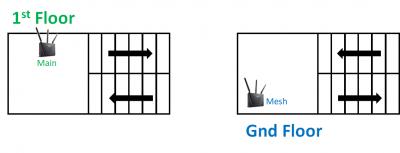
This post has been edited by pokchik: Feb 18 2020, 07:31 PM |
| Change to: |  0.0165sec 0.0165sec
 0.70 0.70
 7 queries 7 queries
 GZIP Disabled GZIP Disabled
Time is now: 2nd December 2025 - 12:19 AM |
 Quote
Quote