Welcome Guest ( Log In | Register )

Outline · [ Standard ] · Linear+

Review ASUS RT-AC86U, Feature-packed advanced wireless router

views
     
SUSstinky
post Aug 20 2018, 08:31 AM

Regular
******
Senior Member
1,436 posts

Joined: Feb 2005


QUOTE(llk @ Aug 8 2018, 02:19 PM)
Got a bad news from friend, his China AC86U just died, less than 3 months he using the router, i'm going to help him send back to China since i help him bought from Taobao.
*
Hi How much is it to send back to China?
Do you need to deal in mandarin?
SUSstinky
post Aug 20 2018, 12:59 PM

Regular
******
Senior Member
1,436 posts

Joined: Feb 2005


QUOTE(llk @ Aug 20 2018, 10:43 AM)
Finally using Airpak, shipping charge is RM150, asked Yunda (China courier company in Malaysia), shipping charge is RM89 but lot of requirements eg cannot shipped power adapter, Airpak has no question asked. I need to deal with Taobao seller for checking of destination address in China and therefore Mandarin is required.
*
Thanks for sharing
SUSstinky
post Aug 21 2018, 01:55 PM

Regular
******
Senior Member
1,436 posts

Joined: Feb 2005


QUOTE(thamch @ Aug 21 2018, 01:42 PM)
Shipping RM45.  And you need write address in Chinese.
*
smile.gif I just ordered from Tmall using google translator.

SUSstinky
post Aug 22 2018, 09:02 PM

Regular
******
Senior Member
1,436 posts

Joined: Feb 2005


Hi,
I need some help here.
Can anyone help to measure the power connector size for AC86U? I need to purchase an extension cord. What is the original length of the adapter?

If I read correctly, the original barrel port on the ASUS AC/DC adapter is 4.0mm x 1.35mm, but in the market the barrel extension cable available is only 4.0mm x 1.7mm or 3.5mm x 1.35mm. Which one would fit?

This post has been edited by stinky: Aug 23 2018, 09:15 AM


Attached thumbnail(s)
Attached Image
SUSstinky
post Sep 15 2018, 07:09 PM

Regular
******
Senior Member
1,436 posts

Joined: Feb 2005


QUOTE(deathninjax @ Aug 13 2018, 08:32 PM)
got this router after researching about it to replace tp link archer c7.
had to return the first unit after 5Ghz wifi became unusable after one day.
so far the 2nd unit is fine except for one problem. its hard for the hypptv stb to connect to the service.
it has the error code 108005. switching the stb off and on will get it working if lucky. already set the iptv service to unifi home in the settings using lan4.
if it does connect, hypptv is usable without any errors. just hard to connect once it is switched on from off state.
even archer c7 is better as it is instant connected. regret spending so much to buy this router with this kind of problem. the seller said to reset the router when i mentioned this problem. same problem after resetting.
wondering if anyone have any fix for this problem.
*
Hello,
I have the same problem with ASUS AC86U.
The LAN4 setup for IPTV (UNIFI-HOME) is slow to detect when I switch on my IPTV box from standby mode. It takes about 60 second for the LAN4 to connect.

When I setup the router for the first time, the LAN4 usually connect within 3 seconds. However, after placing the IPTV box on standby, subsequent switch on time takes 60 seconds. I repeated and reset to factory default and retry. The same observation where first time switch on is 3 seconds after that from standby mode is 60 seconds.

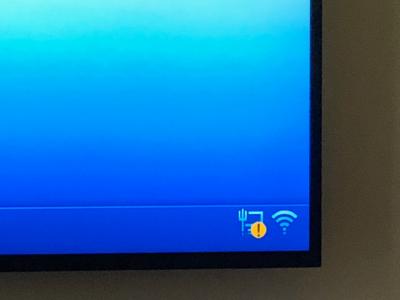
So the current work around is wait for 60seconds after powering on, and wait for the LAN4 to connect (the yellow LAN warning sign will disappear), then click into Hypptv. Works all the time. Just a bit of hassle and I feedback to ASUS.


I’m already on latest firmware dated 15 Sept 2018


Attached thumbnail(s)
Attached Image
SUSstinky
post Sep 15 2018, 07:27 PM

Regular
******
Senior Member
1,436 posts

Joined: Feb 2005


QUOTE(ppfoong @ Sep 10 2018, 10:26 AM)
To buy and use the China unit, here are some of the important thing as your checklist:

1. The current latest hardware version is R1.5. This hardware is not regionally locked and therefore you can use for Malaysia WiFi spectrum. If you get other hardware version, maybe it will work or maybe it will not work properly with WiFi devices in Malaysia.

2. For the power adapter, you just need to plug it in a universal converter, or a universal power socket. No need voltage conversion as it can be used for 240V power line.

3. Change your language to English. Download the official latest firmware from Asus support website, and flash it manually.

4. Once you flashed with the latest international firmware, it is recommended to flash with latest Merlin firmware (current version is 384.6). I found Merlin firmware to be stabler and more configurable for Malaysia environment.

5. Go to Wireless > Professional, set the Region from China to "Asia" (not Singapore). This is very important. You will see the available WiFi bands are slightly different among the regions. If your router does not have this option or unable to change it, then it is a locked hardware version.

6. Set WAN internet detection to "PPP echo". Set both MTU and MRU to 1480 (from default 1496). You will face network problem with 1496.

7. Go to LAN > IPTV, set to Unifi-Home for Unifi (set to Maxis for Maxis).

8. Go to Administration > System, set time zone to Kuala Lumpur.

*
Hi PPPFong
Can you teach me how to to setup IPv6 for UNIFI?

SUSstinky
post Sep 16 2018, 07:45 PM

Regular
******
Senior Member
1,436 posts

Joined: Feb 2005


QUOTE(zarchrykl @ Sep 16 2018, 02:56 PM)
same as mine. i think because the igmp/multicast disable (Due to hardware limitation, IGMP proxy cannot co-exist with IPTV function.), i am using ac58 before this and no problem,... console.gif
*
So no wat to fix this? I thought ASUS said it is compatible with UNIFI.
Also can’t be only 2 of us is having issue with 86u using with Hypptv if hardware problem


This post has been edited by stinky: Sep 16 2018, 07:56 PM
SUSstinky
post Sep 16 2018, 07:55 PM

Regular
******
Senior Member
1,436 posts

Joined: Feb 2005


QUOTE(ppfoong @ Sep 16 2018, 01:16 PM)
Here is my setting:

Connection Type: Native
Interface: PPP
DHCP-PD: Enable
Release prefix on exit: Enable

Connect to DNS Server automatically: Disable
IPv6 DNS Server 1: 2606:4700:4700::1111
IPv6 DNS Server 2: 2001:4860:4860::8888
IPv6 DNS Server 3: 2606:4700:4700::1001

Enable Router Advertisement: Enable
*
Thank you sir. Will try
SUSstinky
post Sep 17 2018, 01:27 PM

Regular
******
Senior Member
1,436 posts

Joined: Feb 2005


QUOTE(zarchrykl @ Sep 17 2018, 12:30 PM)
I have read about it at web and its a problem to everyone
*
Thanks for the info mate
SUSstinky
post Oct 24 2018, 08:05 AM

Regular
******
Senior Member
1,436 posts

Joined: Feb 2005


QUOTE(hown @ Oct 24 2018, 08:03 AM)
got such setting in taobao router? o.O
*
Got


Change to:
| Lo-Fi Version
0.0353sec    0.86    7 queries    GZIP Disabled
Time is now: 10th December 2025 - 05:20 PM