

QUOTE(annoymous1234 @ May 26 2025, 05:54 PM)
Anyone manage to get 500mbps for rm90 without mentioning Astro?

A few of them, can refer to previous pages.Official TM UniFi High Speed Broadband Thread V43, READ 1ST PAGE FOR RELEVANT WIFI INFO!
|
|
 May 26 2025, 06:24 PM May 26 2025, 06:24 PM
|
 
Staff
72,789 posts Joined: Sep 2005 From: KUL  
|
QUOTE(annoymous1234 @ May 26 2025, 05:54 PM) Anyone manage to get 500mbps for rm90 without mentioning Astro? A few of them, can refer to previous pages. |
|
|
|
|
|
May 26 2025, 06:52 PM
|
 
Junior Member
446 posts Joined: Nov 2015 
|
It seems the stock DLINK X3060Z router could no longer provide me speed beyond 480Mbps in my room, need to br very close to the router to get around 500Mbps
Just bought Mercusys MR80X for RM120, hopefully it solves my first world problem |
|
|
May 26 2025, 06:59 PM
|
|
Senior Member
7,791 posts Joined: Dec 2014 From: Malaysia
|
QUOTE(sygoh3 @ May 26 2025, 04:45 PM) Last week, I went to TMPoint to ask for SWU5.0. The CS went into the office and took a stack of papers, it has different offers to counter each offer. I saw a page where the 500mbps/RM99, which is to counter offer Astro 500mbps package. Retention offers like Unifi SWU are constantly changing. Whatever offers you see last month, may be replaced with new offer today. I asked for a free 6 months free bill package, they offered me RM79/100mbps but must bundle with 3 months postpaid. From the page, it didn't say it must bundle with 3 months postpaid, I suspect the postpaid is additional stuff that the centre adds on to gain more sales. I suspect the postpaid is additional stuff that the centre adds on to gain more sales. Who doesn't want their KPI to look nice...?  QUOTE(korbin @ May 26 2025, 05:03 PM) Just came back from Unifi Cyberjaya outlet, managed to get rm90 500mpbs package without the need to subscribe their mobile service. Can share what did you say to the staff? QUOTE(annoymous1234 @ May 26 2025, 05:54 PM) Anyone manage to get 500mbps for rm90 without mentioning Astro? Maybe, you tell them "I got a call from an agent from another provider, offering me 500Mbps RM90. I don't want to tell you which ISP is it."Perhaps that would help? Any particular reason why you don't want to mention Astro? This post has been edited by joshhd: May 26 2025, 06:59 PM |
|
|
May 26 2025, 08:19 PM
|

Senior Member
2,570 posts Joined: Jun 2006
|
QUOTE(neekun @ May 19 2025, 12:56 PM) With a managed switch, one has to configure the switch ? Hmmm me not technical to do it. Assuming the issue is fixed with a L2 managed switch, the issue was original caused by tm or my Asus router? Update on my slow upload case. Asus support asked me to configure https://www.asus.com/me-en/support/faq/1045126/You mentioned about TM made changes in Flow Control And QoS on their end, do you have any specific case logged with TM where I can use that as reference for checking with them ? It’s so hard communicating with their back end technical where just don’t answer any of my question. They only deal with their own technician. For archer ge800, it’s one of the model I planning to replace my Asus if all else fail, with this model and existing dlink as modem in bridge mode, you you think the upload issue will be resolved? Really appreciate your help on this. Thank you so much. After this is configured, all my uploads from my devices can get 500mbps. So does this mean Telekom had been throttling my devices upload speed based on their MAC address ?  I reopened my case with Telekom and demand an explanation from them. Cause all the while during troubleshooting the network back end team said nothing was configured and changed on their end that resulted to my slow upload issue. This post has been edited by neekun: May 26 2025, 09:58 PM k!nex, HayateAyakasi8, and 1 other liked this post
|
|
|
May 26 2025, 08:56 PM
|

Senior Member
1,341 posts Joined: Dec 2016
|
QUOTE(eugenecctan @ May 26 2025, 03:58 PM) I am using Wifi Only. Would be very happy if I can get >800mb around the house. Currently only my phone and laptop can support wifi7. Bingo. If you are just using wireless devices, then you made the right choice, also keep in mind to check firmware updates perhaps once a month, else if you set up auto firmware upgrade, then should be fine. |
|
|
May 26 2025, 09:09 PM
|

Junior Member
447 posts Joined: Aug 2009
|
QUOTE(jasontanky @ May 26 2025, 06:52 PM) It seems the stock DLINK X3060Z router could no longer provide me speed beyond 480Mbps in my room, need to br very close to the router to get around 500Mbps Don't forget to update to latest firmware.Just bought Mercusys MR80X for RM120, hopefully it solves my first world problem |
|
|
|
|
|
May 26 2025, 09:11 PM
|
|
Junior Member
446 posts Joined: Nov 2015
|
QUOTE(hsbb @ May 26 2025, 09:09 PM) Don't forget to update to latest firmware. May I know any benefits gained after update? |
|
|
May 26 2025, 09:44 PM
|
|
Junior Member
447 posts Joined: Aug 2009
|
QUOTE(jasontanky @ May 26 2025, 09:11 PM) May I know any benefits gained after update? By general, firmware update for any electronic devices include ur phone etc is:1) To fix software bugs 2) To add new features 3) To improve the stability of the equipment ** I'm a kind of person who prepare latest firmware when I buy any electronic devices so the 1st thing I do out of box is update it firmware. |
|
|
May 26 2025, 09:49 PM
|
|
Senior Member
1,432 posts Joined: Sep 2021
|
QUOTE(jasontanky @ May 26 2025, 06:52 PM) It seems the stock DLINK X3060Z router could no longer provide me speed beyond 480Mbps in my room, need to br very close to the router to get around 500Mbps DLINK X3060Z is crap and cheap router Mercusys MR80X for RM120 wont solves you problem wifi you speed will be 480Mbps less than Just bought Mercusys MR80X for RM120, hopefully it solves my first world problem due weak spec router |
|
|
May 26 2025, 09:54 PM
|
|
Senior Member
1,432 posts Joined: Sep 2021
|
QUOTE(neekun @ May 26 2025, 08:19 PM) Update on my slow upload case. Asus support asked me to configure https://www.asus.com/me-en/support/faq/1045126/ daam how you did fill MAC addressAfter this is configured, all my uploads from my devices can get 500mbps. So does this mean Telekom had been throttling my devices upload speed based on their MAC address ? I reopened my case with Telekom and demanded an explanation from them. Cause all the while during troubleshooting the network back end team said nothing was configured and changed on their end that resulted to my slow upload issue. you fill Mac address for Dlink modem router MAC address ??? |
|
|
May 26 2025, 09:57 PM
|
|
Senior Member
2,570 posts Joined: Jun 2006
|
QUOTE(tng55 @ May 26 2025, 09:54 PM) daam how you did fill MAC address I just filled in a MAC address belonging to my office laptop. According to Asus any MAC address will do. I am not sure if I filled in let say my iPad Pro MAC address, will the upload speed still throttled? It should by right since before this I can’t get full upload speed on all my devices and thst includes my iPad Pro also.you fill Mac address for Dlink modem router MAC address ??? |
|
|
May 26 2025, 10:08 PM
Show posts by this member only | IPv6 | Post
#612
|

Senior Member
1,058 posts Joined: Nov 2009
|
QUOTE(tng55 @ May 26 2025, 09:49 PM) DLINK X3060Z is crap and cheap router Mercusys MR80X for RM120 wont solves you problem wifi you speed will be 480Mbps less than Replace an AX3000 with another AX3000 may not help. But I am not sure if everyone understanding of weak spec is correct. Many many just looking at brand. If enuf budget just go for it.due weak spec router |
|
|
May 26 2025, 10:11 PM
|
|
Junior Member
447 posts Joined: Aug 2009
|
Not all expensive or cheap router have MAC clone features. Something 1st feature to check before u guys buy new router even it's wifi 7.
Btw TM Tplink AC1200 have MAC clone function.  |
|
|
|
|
|
May 26 2025, 10:23 PM
|
|
Junior Member
446 posts Joined: Nov 2015
|
QUOTE(tng55 @ May 26 2025, 09:49 PM) DLINK X3060Z is crap and cheap router Mercusys MR80X for RM120 wont solves you problem wifi you speed will be 480Mbps less than Nevermind, my main problem is ping spike even to gateway can get about 100ms-ish. Maybe I put too high hope on that router, but i sincerely hope getting that and changing it to DFS can solve this problem. Since my house's channel 100 is kinda clean but that dlink doesn't support that.due weak spec router Don't want to put in so much money on network equipments haha, if that RM120 solved my problem, I'll be glad. If it doesn't, I'll just treat it as a spare router |
|
|
May 27 2025, 12:40 AM
|
|
Junior Member
35 posts Joined: Nov 2011
|
anyone have any idea why the PON light on my ONT is flashing? it only happens at night for about 4 hours the past 2 nights, then is okay again
|
|
|
May 27 2025, 02:24 AM
Show posts by this member only | IPv6 | Post
#616
|

Senior Member
2,399 posts Joined: Jul 2009 From: /dev/null
|
It appears Unifi had updated my account VLAN profile, adding VEIP along side usual PPTP, this show in favor of AIO and make old dumb bridge ONU cannot be use if OLT say so 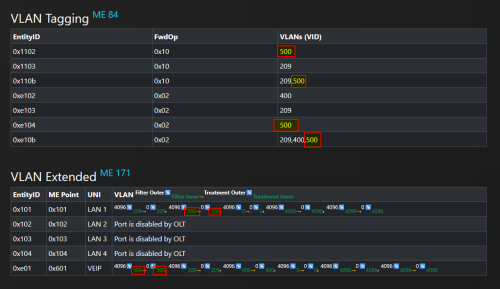 By default FwdOp from this OLT is 0x10: CODE 0x10 Action (h) (VID investigation) Discarding (c) What it does with Action H: QUOTE h) Bidirectional positive filtering by TCI: Both ingress and egress frames are filtered on investigation of the TCI fields. If and only if the specified fields in the TCI of a candidate ingress frame match an entry in the VLAN filter list, the frame is admitted into the bridge. If and only if the specified fields in the TCI of a candidate egress frame match an entry in the VLAN filter list, the frame is forwarded based on the destination MAC address, according to action a). Back to Action A:QUOTE a) Basic MAC bridge operation: All frames are accepted into the MAC bridging entity. Egress frames are forwarded from this port if either a) the frame's MAC DA is listed in the MAC bridge port bridge table data for this port or b) the frame's DA does not appear in the MAC bridge port bridge table data for any port (flooding). The contents of the VLAN filter list attribute are not meaningful. See Figure 9.3.11-3. 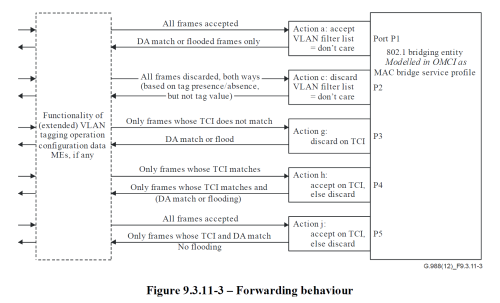 For now, I putting FwdOp 0x02 at VEIP and leave PPTP default, I need update SDK of this This post has been edited by Anime4000: May 27 2025, 02:24 AM tng55 and Moogle Stiltzkin liked this post
|
|
|
May 27 2025, 10:22 AM
Show posts by this member only | IPv6 | Post
#617
|
|
Senior Member
1,207 posts Joined: Aug 2018
|
QUOTE(Anime4000 @ May 27 2025, 02:24 AM) It appears Unifi had updated my account VLAN profile, adding VEIP along side usual PPTP, this show in favor of AIO and make old dumb bridge ONU cannot be use if OLT say so Chill chill... Nobody is killing dumb ONU.By default FwdOp from this OLT is 0x10: CODE 0x10 Action (h) (VID investigation) Discarding (c) What it does with Action H: Back to Action A: For now, I putting FwdOp 0x02 at VEIP and leave PPTP default, I need update SDK of this I think TCI filtering helps prevent a few things: 1. It prevent people with modded ONU from specifying higher priority for their traffic. 2. It prevent people with modded ONU from tagging VLAN they are not supposed to access, eg: sending on Maxis VLAN while being a Unifi subscriber. |
|
|
May 27 2025, 12:20 PM
|
|
Junior Member
407 posts Joined: Dec 2008
|
Whoever upgraded from UNIFI plan 500mbps to 800mbps, are you guys able to get speed test result close to 800mbps? Mine can not. Any thought ? Latest speed test result uploaded.  This post has been edited by slackinux: May 27 2025, 12:21 PM Qash-M liked this post
|
|
|
May 27 2025, 12:44 PM
Show posts by this member only | IPv6 | Post
#619
|

Junior Member
162 posts Joined: Sep 2011
|
QUOTE(slackinux @ May 27 2025, 12:20 PM) Whoever upgraded from UNIFI plan 500mbps to 800mbps, are you guys able to get speed test result close to 800mbps? Free speed upgrade?Mine can not. Any thought ? Latest speed test result uploaded. |
|
|
May 27 2025, 12:44 PM
Show posts by this member only | IPv6 | Post
#620
|

Senior Member
4,928 posts Joined: Feb 2008 From: /K/opitiam Pak Hang Status: Permaban 
|
QUOTE(slackinux @ May 27 2025, 12:20 PM) Whoever upgraded from UNIFI plan 500mbps to 800mbps, are you guys able to get speed test result close to 800mbps? free upgrade or how?Mine can not. Any thought ? Latest speed test result uploaded. monthly how much? |
| Change to: |  0.0185sec 0.0185sec
 0.52 0.52
 6 queries 6 queries
 GZIP Disabled GZIP Disabled
Time is now: 1st December 2025 - 08:14 PM |
 Quote
Quote