

Hi Sifus, if lightning strike and causing the modem and my owned router KO. 100% sure from the fiber optic cable. What I can do next?
Official TM UniFi High Speed Broadband Thread V43, READ 1ST PAGE FOR RELEVANT WIFI INFO!
Official TM UniFi High Speed Broadband Thread V43, READ 1ST PAGE FOR RELEVANT WIFI INFO!
|
|
 May 25 2025, 04:10 PM May 25 2025, 04:10 PM
Return to original view | IPv6 | Post
#1
|
 
Senior Member
1,058 posts Joined: Nov 2009  
|
Hi Sifus, if lightning strike and causing the modem and my owned router KO. 100% sure from the fiber optic cable. What I can do next?
|
|
|
|
|
|
May 25 2025, 04:29 PM
Return to original view | IPv6 | Post
#2
|
|
Senior Member
1,058 posts Joined: Nov 2009
|
QUOTE(hsbb @ May 25 2025, 04:19 PM) I 100% sure if u were using Streamyx & router failure due to lightning. White Color Huawei modem. I am very sure because both router and modem connecting to cyberpower UPS and Belkin surge protection plug. All devices are working except Modem and Router. |
|
|
May 25 2025, 04:57 PM
Return to original view | IPv6 | Post
#3
|
|
Senior Member
1,058 posts Joined: Nov 2009
|
QUOTE(ycs @ May 25 2025, 04:46 PM) how can fiber cable conduct electric? What material it has to prevent it from conduct electric better than coconut tree? |
|
|
May 25 2025, 05:01 PM
Return to original view | IPv6 | Post
#4
|
|
Senior Member
1,058 posts Joined: Nov 2009
|
Any sifu willing to help other than the sarcastic answer. Thanks alot. Already called TM and technician can come only after 2 days. Itis a must to renew contract for FOC?
|
|
|
May 25 2025, 05:25 PM
Return to original view | IPv6 | Post
#5
|
|
Senior Member
1,058 posts Joined: Nov 2009
|
QUOTE(hsbb @ May 25 2025, 05:10 PM) How old is ur UPS? How long it last when no electricity? Just replace 6 months ago. Can last at least 2 hours. |
|
|
May 25 2025, 08:00 PM
Return to original view | IPv6 | Post
#6
|
|
Senior Member
1,058 posts Joined: Nov 2009
|
QUOTE(hsbb @ May 25 2025, 06:33 PM) U can try to use 12V/1A adapter from other devices to test ur modem/router. Can also use usb 5V to 12V converter similar below. Both units cannot turn on. I am now using the allinone router DLINk and manage to setup successfully. Not sure if I can get another Modem replacement from UNIFI as backup. And also now I have to replacement my Xiaomi AX3600 that working perfectly all ths while.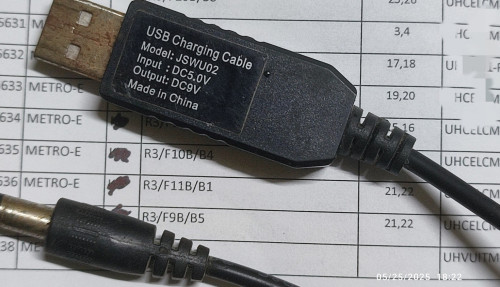 |
|
|
|
|
|
May 25 2025, 08:11 PM
Return to original view | IPv6 | Post
#7
|
|
Senior Member
1,058 posts Joined: Nov 2009
|
QUOTE(YoungMan @ May 25 2025, 08:08 PM) Unifi modem is not meant as backup. If you have existing working modem just use it. As for router, yes you can surely get free from them with 2 years contract. The 1 they gave me for 1G speed is the DLINK Router Modem. I temporary replaced both my Huawei modem and Xiaomi router with this 1. |
|
|
May 25 2025, 08:21 PM
Return to original view | IPv6 | Post
#8
|
|
Senior Member
1,058 posts Joined: Nov 2009
|
QUOTE(hsbb @ May 25 2025, 08:17 PM) He post like only have modem & router, no internet for 2 days. Didn't mention about the dlink. Your point is? I can't get it working just now due to missing PLOAM. Manage to solve it finally. But I still don't understand your point is? genz baby  |
|
|
May 25 2025, 08:25 PM
Return to original view | IPv6 | Post
#9
|
|
Senior Member
1,058 posts Joined: Nov 2009
|
QUOTE(YoungMan @ May 25 2025, 08:08 PM) Unifi modem is not meant as backup. If you have existing working modem just use it. As for router, yes you can surely get free from them with 2 years contract. Will update again when the technician come ths Tuesday. Thanks again for your advice. I am currently on the SWU with 1Gb speed for 24 months. That is the reason I don't prefer to renew 2 years contract as I may paying premium without the speed upgrade after 2 years. |
|
|
May 26 2025, 11:28 AM
Return to original view | IPv6 | Post
#10
|
|
Senior Member
1,058 posts Joined: Nov 2009
|
QUOTE(YoungMan @ May 26 2025, 09:27 AM) Most likely you get all in one ONU plus router this time. Hi Sifus,But what you can do is ask technician to configure as bridge mode, then use your own router. Question, if I use the DLINK as modem and (pppoe set at modem) router and connect LAN as AP to my own router for mesh compare to use DLINK as Modem only and set PPPOE at my own router. What are the pros n cons. Thanks. |
|
|
May 26 2025, 12:43 PM
Return to original view | IPv6 | Post
#11
|
|
Senior Member
1,058 posts Joined: Nov 2009
|
QUOTE(budaken @ May 26 2025, 11:48 AM) what router are you using? I just bought the cheapest mesh wifi mercusys BE9300. Rm700 for 2 units. Not sure good or not. Delivering.interesting.. What's the difference between private and public IP? can share some good router? better to be future proof if that's the case. also if i buy own router, how to configure back the router? i believe there should be a username password tm set. |
|
|
May 26 2025, 03:19 PM
Return to original view | IPv6 | Post
#12
|
|
Senior Member
1,058 posts Joined: Nov 2009
|
QUOTE(tng55 @ May 26 2025, 01:42 PM) that brand mercusys BE9300 no good lol Will update you as an actual user. Many also told me Xiaomi not good. But itis performing perfectly since day 1 until Pikaboom by Zues. |
|
|
May 26 2025, 03:24 PM
Return to original view | IPv6 | Post
#13
|
|
Senior Member
1,058 posts Joined: Nov 2009
|
QUOTE(eugenecctan @ May 26 2025, 11:28 AM) Hi Sifus, Any input? Thanks.Question, if I use the DLINK as modem and (pppoe set at modem) router and connect LAN as AP to my own router for mesh compare to use DLINK as Modem only and set PPPOE at my own router. What are the pros n cons. Thanks. |
|
|
|
|
|
May 26 2025, 03:58 PM
Return to original view | IPv6 | Post
#14
|
|
Senior Member
1,058 posts Joined: Nov 2009
|
QUOTE(Jjuggler @ May 26 2025, 03:56 PM) 2.GbE for all RJ45 is good bet I would say for such price. If the user is general consumer, then the unit will be sufficient, unless they are planning to run a homelab, then recommending a good brand will do. I am using Wifi Only. Would be very happy if I can get >800mb around the house. Currently only my phone and laptop can support wifi7. |
|
|
May 26 2025, 04:48 PM
Return to original view | IPv6 | Post
#15
|
|
Senior Member
1,058 posts Joined: Nov 2009
|
QUOTE(k!nex @ May 26 2025, 04:23 PM) I think if you use your own router to dial the PPPoE , you can set public DNS yourself. Should be no issue to set public DNS. Just that if using AP connection for mesh. I don't need help from Tm technical for the setup. And I can have additional AX3000 bandwidth (currently turn on 5Ghz only using 160Mhz) for Gaming purpose only in diff channel as the AP router.If you use that 2in1 modem+router that TM provides you, I have no idea whether you can set public DNS on that device as the firmware is custom made for TM. Probably you have better security on your own router as well since TM routers always have that TR-069 backdoor which I'm very uncomfortable with. And some routers do have anti virus built-in. My TPLink AX50 does. But I have no idea in terms of performance. Isit better to use the DLINK as Modem only and connect another router using PPPOE. Thanks. |
|
|
May 26 2025, 06:04 PM
Return to original view | IPv6 | Post
#16
|
|
Senior Member
1,058 posts Joined: Nov 2009
|
QUOTE(k!nex @ May 26 2025, 05:14 PM) The main reason i prefer to use my own router to dial PPPoE is because of security. I don't trust ppl working in TM . They can remotely access the modem , no problem. I don't want them to have any chance of remotely accessing my router through TR-069. I will be connecting to external router for sure. Just as LAN AP or router with PPPOE.For you though since you have 1Gbit subscription , from what i know TM provided modem+router for your package only has 2.5Gbit WAN port. All the LAN ports on the device are all 1Gbit. You might gain minimal performance on WiFi if you use TM device for wireless access because you do receive full 1Gbit from TM. Anything that goes thru the LAN port on that TM device , max out at best around 980mbps only as 1Gbit LAN port has some overhead. |
|
|
May 26 2025, 10:08 PM
Return to original view | IPv6 | Post
#17
|
|
Senior Member
1,058 posts Joined: Nov 2009
|
QUOTE(tng55 @ May 26 2025, 09:49 PM) DLINK X3060Z is crap and cheap router Mercusys MR80X for RM120 wont solves you problem wifi you speed will be 480Mbps less than Replace an AX3000 with another AX3000 may not help. But I am not sure if everyone understanding of weak spec is correct. Many many just looking at brand. If enuf budget just go for it.due weak spec router |
|
|
May 27 2025, 06:32 PM
Return to original view | IPv6 | Post
#18
|
|
Senior Member
1,058 posts Joined: Nov 2009
|
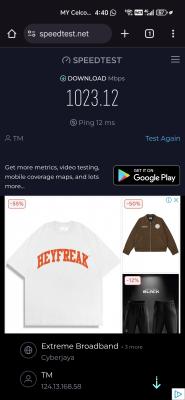
Mercusys BE9300, Infront the Mesh router can get 1000mbps, diff floor can get 500mbps. Much better than my AX3600. Just day one so no comment on stability. I turn on the AllInOne D-Link modem on 160Mhz 5Ghz for Astro, Streaming and CCTV. Remaining devices especially Wifi7 using the Mercusys mesh.
This post has been edited by eugenecctan: May 27 2025, 06:33 PM |
|
|
May 28 2025, 12:35 PM
Return to original view | Post
#19
|
|
Senior Member
1,058 posts Joined: Nov 2009
|
QUOTE(Anime4000 @ May 28 2025, 01:55 AM) didn't work, my speed not slow, just PPPoE terminate my session, been uploading 6TB of zero (uptime: 22hrs): Sharing my experience with D-Link 3060V. Do not use dynamic IP. Change to fixed IP. Previously my 2.5 also keep disconnecting. After set to fixed IP then solve the problem.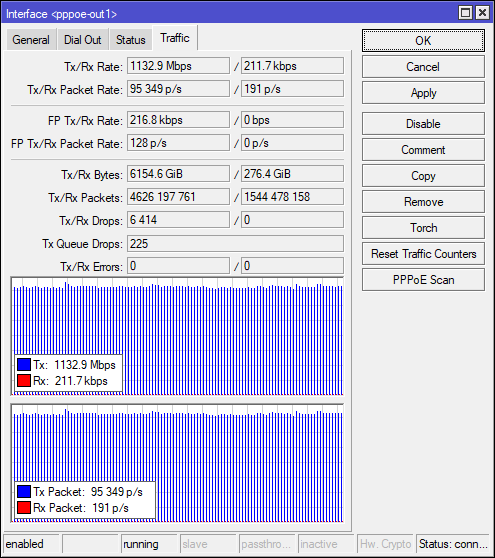 Even with this ONU that I got from tm friend still didn't work 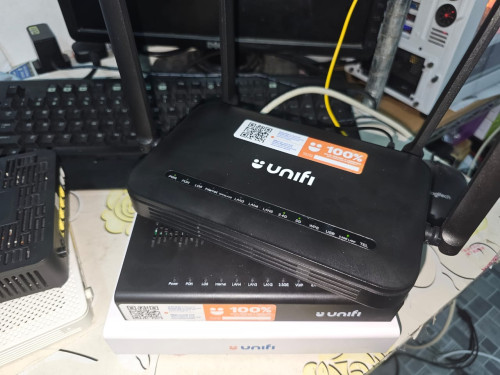 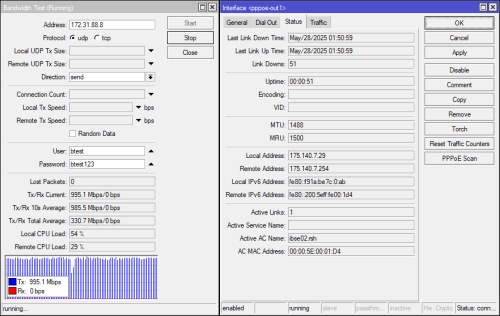 Last Saturday my friend checked something wrong with PPPoE, that is why I check now, 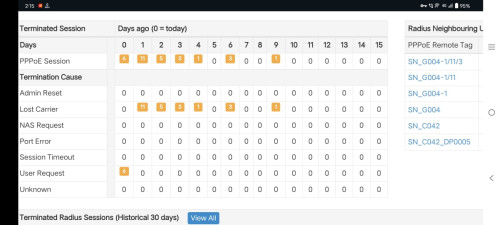  Next morning I ask him again this, and I already send email to TM with relevant documents my other friend can even choose to avoid ibse02.rsh, I ask around seem this been in service since Streamyx? 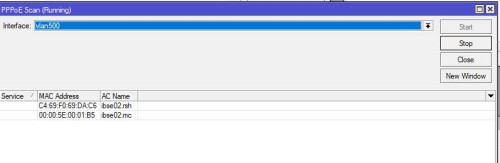 UPDATE May/28/2025 02:11:27 It's happening again  |
|
|
Jun 23 2025, 09:39 PM
Return to original view | IPv6 | Post
#20
|
|
Senior Member
1,058 posts Joined: Nov 2009
|
Mesh router cannot split 2.4G and 5G. So what I did is turn on 5Ghz using DLINK allinone modem at 160Mhz and use my old SSID naming for 2.4G on the mesh router. To avoid resetup all my devices
This post has been edited by eugenecctan: Jun 23 2025, 09:42 PM |
| Change to: |  0.0223sec 0.0223sec
 0.62 0.62
 7 queries 7 queries
 GZIP Disabled GZIP Disabled
Time is now: 10th December 2025 - 08:55 AM |
 Quote
Quote