Welcome Guest ( Log In | Register )

19 Pages  1 2 3 > » Bottom

Outline · [ Standard ] · Linear+

 Official TM UniFi High Speed Broadband Thread V43, READ 1ST PAGE FOR RELEVANT WIFI INFO!

views
     
kwss
post Apr 26 2025, 03:29 PM

Regular
******
Senior Member
1,207 posts

Joined: Aug 2018
QUOTE(baka.bakashi @ Apr 26 2025, 07:43 AM)
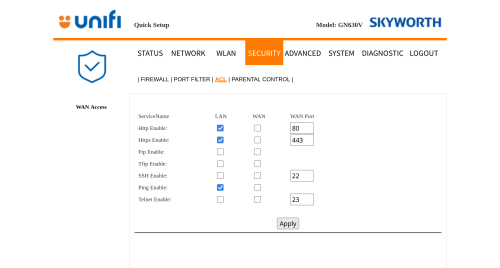
Hi guys.. want to ask can we changed the web management port for skyworth GN360V?

I have subscribed to static IP package and want to setup own webserver but when accessing the Web from public, it always go to the GN 360 page instead of my page (I suspect becos it used port 80 or 443)
*
I think you can login using tmadmin.
Click Security -> ACL.
I didn't test this out as this belongs to some cafe.
However it looks like should work.
user posted image

QUOTE(jiaen0509 @ Apr 26 2025, 08:41 AM)
Right now, my D-Link DPN-FX3060V (set to bridge mode) is getting capped at 200/50 Mbps after a few days or about a week of use.

I’ve looked through the history threads and found someone shared the firmware, versions v2.0.3 and v2.0.6.

Which version is more stable for bridge mode?

Also, is it safe to update the firmware ourselves? I’m concerned that the update might cause issues like losing network access, or if it might require a technician to reconfigure settings on their end.

Can I know is either version can solve the drop speed issue?
*
Both version will solve speed drop issue. v2.0.6 is better in my opinion since it uses a newer SDK.
The ONR do have 2 slots for firmware storage so it is supposedly quite bullet-proof but as with all firmware update, there is risk.
As long as you verify the sha256sum after download, you should be very safe, other than power outage, which should be handled by the 2 slots image.

This post has been edited by kwss: Apr 26 2025, 03:31 PM
kwss
post Apr 28 2025, 01:17 PM

Regular
******
Senior Member
1,207 posts

Joined: Aug 2018
QUOTE(Anime4000 @ Apr 28 2025, 05:37 AM)
kwss tng55 PRSXFENG
I stumble upon SDK source code, to verify what just saw

PON Stick login sessions (cookie?) can be accepted into D-Link DPN-FX3060V B1 V2.0.6


I try again by turn off D-Link just to refresh, somehow still works (as PON Stick use same GUI)

if like this, don't bother to change default password xD
*
Nice work! πŸŽ‰πŸŽ‰
Maybe can go find if they have a bug bounty program and report it.

That's how cheap IoT device works in general. Keep pumping out new model and sell them while using the reference design is the same.

Have you identified where is the vulnerability? Is it in the webserver? Or within the web-app? Or somewhere else?

EDIT:
I suspect they have a default key for the token and manufacturer is expected to change it but didn't.
Maybe you look for it and change it for your PON stick.
Most developers are not aware of such things. The most recent one being ASP.NET:
https://www.microsoft.com/en-us/security/bl...t-machine-keys/

This post has been edited by kwss: Apr 28 2025, 01:29 PM
kwss
post Apr 29 2025, 06:07 PM

Regular
******
Senior Member
1,207 posts

Joined: Aug 2018
QUOTE(Anime4000 @ Apr 28 2025, 04:23 PM)
I don't think D-Link and Skyworth are entertain such vulnerability as ISP buy cheap cheap.

I think just let it be vulnerable, typical ISP Router are like that tho
*
I mean more like report it directly to upstream but after having a look, just forget it.
https://corp.mediatek.com/security-contact

Basically they are saying you work for free until they invite you to get paid.
kwss
post Apr 29 2025, 06:12 PM

Regular
******
Senior Member
1,207 posts

Joined: Aug 2018
QUOTE(ahboy99 @ Apr 28 2025, 11:59 PM)
may i know why i'm getting strict nat while checking on call of duty?
*
This is the expected behavior for anything that uses MASQUERADE in Linux iptables.

Just DMZ your gaming device or enable UPnP or NAT-PMP.

Alternatively get router that perform CG-NAT or EIM-NAT
kwss
post Apr 29 2025, 07:09 PM

Regular
******
Senior Member
1,207 posts

Joined: Aug 2018
QUOTE(ahboy99 @ Apr 29 2025, 06:18 PM)
ermm since i running OPNsense atm, idk where to configure that

running on PC steam
*
I never use pfSense or OPNsense before but a quick search says there's a upnp plugin.
kwss
post May 2 2025, 03:02 PM

Regular
******
Senior Member
1,207 posts

Joined: Aug 2018
QUOTE(ahboy99 @ May 1 2025, 09:52 PM)
user posted image

i ask directly since i'm try to port forward my opnsense to check it.

well it all happened

ip check with public and wan is different like 170.x.x.x(censored)
*
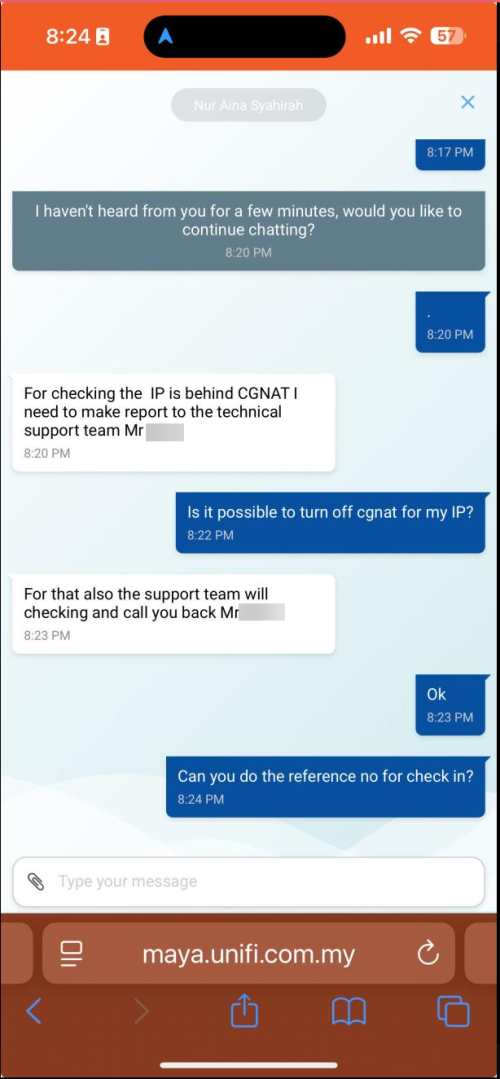
What is this? The TM staff clearly says need to file a report just to check if you are behind CGNAT.
He didn't confirm nor deny you are behind CGNAT.

1 Gbps plan definitely not CGNAT.
TM CGNAT IP all comply to RFC 6598.

Maybe OPNsense is out of your league. Just saying.
kwss
post May 2 2025, 03:17 PM

Regular
******
Senior Member
1,207 posts

Joined: Aug 2018
QUOTE(ahboy99 @ May 2 2025, 03:06 PM)
I check and configure router

and i checked it like different wan address and router is different ip instead, all stock configuration

Its cgnat

I know what im doing
*
Like all the tech bro just starting out, fake it till you make it. πŸ’ͺπŸ’ͺ
πŸ˜‚πŸ˜‚πŸ˜‚
kwss
post May 10 2025, 03:34 PM

Regular
******
Senior Member
1,207 posts

Joined: Aug 2018
QUOTE(syahpian @ May 10 2025, 02:45 PM)
same here,

already called tm to fix it, but they say using dlink black as bridge mode is outside they jobscope, since using own router  doh.gif

i tell them using old onu is ok through (test it infront of them) since using old onu is same as using brigde mode on new dlink

after that they say they gonna ask they supervisor first and come back to me later, that is 1 week ago, and support ticket already closed, gonna open new support ticket next week  icon_rolleyes.gif
*
QUOTE(neekun @ May 10 2025, 03:23 PM)
So your case could be due to the black dlink in bridge mode? Mine also using same black dlink as bridge.  I called 100 again and they said will escalate to technical team to call me in 24 hours time. Do keep me posted what’s your result when you open the case again.  Btw, you can pm me where can share case number.  Use it to tell tm that’s this issue is common and should fix it.
*
What's your black dlink firmware version? Tried upgrading to v2.0.6?
Speed drop on bridge mode is a known firmware bug.
kwss
post May 10 2025, 09:09 PM

Regular
******
Senior Member
1,207 posts

Joined: Aug 2018
syahpian neekun
The speed drop is fixed in v2.0.3 itself so it must be other problem already.
Since your old ONU works, why not just use it? The extra 100Mbps download speed is really that significant for you?
kwss
post May 10 2025, 09:31 PM

Regular
******
Senior Member
1,207 posts

Joined: Aug 2018
QUOTE(syahpian @ May 10 2025, 09:20 PM)
yup2, that what im doing now,

like what you say, there must be other problem regarding dlink bridge mode, if we not report it, i dont think TM gonna fix it

it not just about that extra 100Mbps, since all of my machine only have 1Gbps port, it just to make TM aware of the issue so they can fix it

what if this old onu suddenly die, terpaksa juga use that dlink combo lol
*
It is true. But at the same time, all the consumer hardware is like pump and dump with literally zero support.
Wish you luck.
kwss
post May 13 2025, 02:16 PM

Regular
******
Senior Member
1,207 posts

Joined: Aug 2018
QUOTE(Anime4000 @ May 13 2025, 01:33 PM)
i asked my friend that time he balik kampung, lol, no wonder I had to ship there,

well good for him not under VRRP crap, I ask to enjoy 1500 bytes MTU while he can.

so, do you have connections to TM higher staff?
possible they fix this MTU issue? and reinstated RFC4638

why I ask RFC4638?
Because I have setup PON Stick with Unifi Biz with /30 and /29 customer, giving Server real Unifi IP Address, need configure OS Ethernet MTU tu 1488.

if PPPoE with 1500 bytes MTU, no more fragmented packet and performance dropped.

default L2MTU 1600 MTU no longer enough, as VRRP and VXLAN take a lot of overhead
*
There is another problem after they allow MTU 1500.
In IPv6, the BNG will send ICMPv6 Packet Too Big even if the MRU is 1500 and big enough to receive it.
Using IPv4 doesn't face this problem. My guess is they put in this broken workaround because some of their supplied router eats ICMPv6 packet in the name of firewalling.

There are other minor issue with their BNG the last time I test them, such as the weird reuse of magic number.
I also don't quite understand why their L2MTU cannot be increased, considering TM claim's all their MPLS circuit runs 9k MTU worldwide in their marketing material.
Maybe their marketing team lied.
kwss
post May 15 2025, 03:01 PM

Regular
******
Senior Member
1,207 posts

Joined: Aug 2018
QUOTE(YoungMan @ May 14 2025, 09:03 PM)
Maybe slightly out of topic.
Are we allowed to dismantle old TM copper cable that was used for previous streamyx and landline? Do we have to call TM to come and remove those cable? How about temporary removing the TM fibre cable due to house renovation, what is the proper process if any.
*
I removed them twice. Once when renovating my front yard. Another time when doing some small renovation in my living room.
They are just quick disconnect cable. At least that's how mine is.
I keep them in zip lock bag and seal them tight with rubber band while disconnected.
Use alcohol swab to clean both side before reconnecting.
kwss
post May 15 2025, 05:04 PM

Regular
******
Senior Member
1,207 posts

Joined: Aug 2018
neekun
When you said the technician laptop can get full speed, how many run did he tried? Is it consistently getting full speed or how?

Can you try the following:
DLink as bridge. Asus as router.
Disconnect all wired devices.
Disconnect all wifi devices.
Confirm in your Asus UI only your iphone 16 is connected.
Run the speedtest.
kwss
post May 16 2025, 02:03 AM

Regular
******
Senior Member
1,207 posts

Joined: Aug 2018
QUOTE(YoungMan @ May 15 2025, 09:49 PM)
You remove the whole thing from outside to your house? I'm talking about removing the whole TM cable, not just the part that connect to modem and fibre wall socket. Also the old copper cable used for landline.
I want to rewire the fibre after reno, to place my modem at certain place.
*
Yes I removed the whole cable. They are quick disconnect cable.
kwss
post May 16 2025, 02:46 AM

Regular
******
Senior Member
1,207 posts

Joined: Aug 2018
QUOTE(tng55 @ May 16 2025, 12:38 AM)
can you explain Flow Control issue
meaning TM Flow Control issue OLT ???
how its problem asus problem or TM OLT problem
*
Flow Control is a LAN problem. Among all the stupid invention in the world of networking, Flow Control ranks very high in my list.
You connect one slow device in your network that randomly sends out a pause frame, your switch / router propagate it, then every device that does pause frame slows to a halt.

That's the first thing I kill for all deployment. You can test it by disconnecting every single device and test using WiFi or packet capture and look for the dreaded pause frame.

Since one technician laptop have no problem, then viola, very high chance that laptop has pause frame killed.
Either the driver for some random NIC has it disabled by default, or someone disabled it but forget about it.

Then the D-Link... Obviously it doesn't propagate pause frame.
Mikrotik also won't propagate pause frame by default.
kwss
post May 17 2025, 01:21 AM

Regular
******
Senior Member
1,207 posts

Joined: Aug 2018
QUOTE(neekun @ May 16 2025, 04:11 AM)
Interesting.  I try to check what are the recent devices that added to my network and try to disconnect one by one.  Btw pause frame can affect only upload instead of download also? Mine download 940mbps no issue. And flow control is supposed to be enabled or disabled?
*
Pause frame basically tells every device on your network to pause transmit. Transmit = Upload.
It should be DISABLED.

It is easier for you to just disconnect everything and test. It is a straight Yes / No if nothing is connected.
kwss
post May 18 2025, 06:54 PM

Regular
******
Senior Member
1,207 posts

Joined: Aug 2018
QUOTE(neekun @ May 17 2025, 01:32 PM)
Yea that’s what I’ve been searching too, how to disable pause frame for Asus router? But now I am not sure my case is due to pause frame since I disconnected all devices from wifi leaving my iPhone 16 pm but still same issue.
*
Not sure about how you go about disabling then as I don't use Asus and don't use Windows.
But try looking into the properties inside Device Manager.

If you have access to a Linux machine connected via wired, get me the output of:
CODE

ifstat -a

You can download Kali Linux Live Boot and just boot it using USB. If you have a macOS maybe just try and see if the command works.

Since you unplug one by one, I suspect the pause frame quanta is still in effect. It's not like you unplug and all the device will suddenly stop pausing.

If all else fail, boot Kali. Open wireshark, capture for 5 minutes without doing anything and post it here.
Just do a speedtest inside Kali to check if it's affected first.
kwss
post May 18 2025, 11:31 PM

Regular
******
Senior Member
1,207 posts

Joined: Aug 2018
QUOTE(tng55 @ May 18 2025, 10:02 PM)
kwss

can you see screenshot
[attachmentid=11513834]

do i need select Disable ??
*
Yes set it to Disabled. Then just disconnect and reconnect. Pause frame should be killed for good.
The problem with using this method is you must set on all computers.

Mikrotik has Flow Control configuration and default to disabled. Same goes for Cisco. The advantage is you don't need to set per computer as the switch / router will eat up the pause frame.
kwss
post May 19 2025, 12:43 AM

Regular
******
Senior Member
1,207 posts

Joined: Aug 2018
QUOTE(tng55 @ May 18 2025, 11:41 PM)
i will not buy asus new model any more

i planing new launch Mikrotik with all port 2.5Gbps

what you use WIFI AP like flow control disable for WIFI AP
*
I use Ubiquiti for WiFi, with self hosted controller (https://hub.docker.com/r/jacobalberty/unifi).
Basically I use L3 adoption and runs everything on AWS.

Be aware, Mikrotik is like Cisco with UI. Meaning instead of knowing what you specifically need to do + the command, you still need to know specifically what to do but can instead click around.

Eg: to configure a LAN, in every home router, you basically go to LAN page and just enter IP address.

In Mikrotik, these are the steps:
1. Go to Interfaces > VLAN. Create a new VLAN for your segment.
2. Go to Bridge > VLAN. Tie all the ports to the VLAN you created, specify which are the tagged and untagged port. This is the latest way to do things now. You will see a lot of tutorial online teach you by creating new bridge. But those method are the previous best practice which doesn't work optimally with L3 hardware offload.
3. Go to IP > Addresses to specify the virtual interface address.
4. Go to IPv6 > Addresses and repeat for IPv6.
5. Go to IP > DHCP server to create an entry for the virtual interface. Go to Network tab and create a specification. Then go to DHCP tab to create the service
6. Go to IPv6 > ND to create SLAAC for IPv6. You must also specify the MTU here since Mikrotik cannot do MTU 1492.
7. Go to Interface > Interface List. Add your new segment as LAN here or NAT won't work properly.

Assuming you do everything right and I didn't miss any steps, you should have a running network segment.
Not trying to scare anyone from buying Mikrotik and experimenting, but just trying to give you a reality of using Mikrotik.

Another example: Gaming router.
In a lot of gaming router, they default to UPnP + NAT-PMP + EIM-NAT. In Mikrotik, all of these requires manual configuration. None work out of the box. You also need to configure the conntrack UDP timeout from the default 30 seconds to something higher.

In conclusion, consider seriously before throwing money into Mikrotik. People already doing networking professionally or have passion will enjoy it.

Ubiquiti L3 Adoption (I use the DNS method):
https://help.ui.com/hc/en-us/articles/20490...doption-Layer-3

This post has been edited by kwss: May 19 2025, 12:56 AM
kwss
post May 20 2025, 02:47 PM

Regular
******
Senior Member
1,207 posts

Joined: Aug 2018
QUOTE(syahpian @ May 20 2025, 02:09 PM)
yup2 hEX Refresh is great, with arm cpu now can use docker directly on the router.

with that you can install adblocker like pi hole and adguard home directly into it  thumbup.gif
*
QUOTE(Jjuggler @ May 20 2025, 02:15 PM)
I am a person who likes to use to the bits-level of my investment when it comes to purchasing any form of computing / networking devices. I was planning to purchase the RB5009, but have to drop the plan due to other commitment. Perhaps I will soon to play with Mikrotik, again.
*
Just PSA. HEX Refresh uses an arm32v5 CPU. If your intention is to use public container image, it is extremely limited, almost useless.
If running container on Mikrotik is the goal, get arm64.

19 Pages  1 2 3 > » Top
 

Change to:
| Lo-Fi Version
0.0226sec    0.49    7 queries    GZIP Disabled
Time is now: 1st December 2025 - 04:52 PM