Welcome Guest ( Log In | Register )

246 Pages « < 31 32 33 34 35 > » Bottom

Outline · [ Standard ] · Linear+

 Official TM UniFi High Speed Broadband Thread V43, READ 1ST PAGE FOR RELEVANT WIFI INFO!

views
     
tng55
post May 27 2025, 09:28 PM

Regular
******
Senior Member
1,434 posts

Joined: Sep 2021


QUOTE(speeder_man @ May 27 2025, 01:05 PM)
My friend gave me his Skyworth GN630V combo box. Any improvement if i set it as bridge mode, replacing my Echolife HG8240H5 modem? Current plan is 500Mbps.
*
500Mbps then use Echolife HG8240H5 that huawei already more stable then Skyworth GN630V Combo box no good sometime speed will slow not 100%

i recommend Echolife HG8240H5 that huawei stable already
Anime4000
post May 27 2025, 10:08 PM

Look at all my stars!!
*******
Senior Member
2,399 posts

Joined: Jul 2009
From: /dev/null


QUOTE(kwss @ May 27 2025, 08:46 PM)
Did you revert your "Maxis" VLAN?
Can you get the debug output from:
System > Logging
Add Topic:
pppoe
ppp
debug

Where do you upload and for how long?
*
want to make a report to TM, I set D-Link as Bridge Mode, so they can use TR069
all correct VLAN

test since 3PM until today

have facing this issue in 2019 during streamyx time,
so, I redo what I did before

user posted image

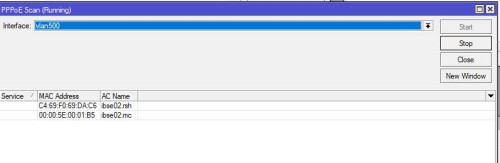
before was ibse02.mc
now was ibse02.rsh

my friend said ibse02.rsh is old where streamyx era exist

lol
Anime4000
post May 27 2025, 10:10 PM

Look at all my stars!!
*******
Senior Member
2,399 posts

Joined: Jul 2009
From: /dev/null


kwss down again

user posted image
kwss
post May 27 2025, 11:10 PM

Regular
******
Senior Member
1,207 posts

Joined: Aug 2018
QUOTE(Anime4000 @ May 27 2025, 10:10 PM)
kwss down again

user posted image
*
So today you started connecting to a different BNG and have this problem?
Did the Mikrotik debug log says something like LCP-Echo timeout or other error?
go626201
post May 28 2025, 12:24 AM

Regular
******
Senior Member
1,882 posts

Joined: Sep 2017
Looks like that occurs almost similar to my 1G upgrade in Jan/Feb.
Randomly Disconnection.


Anime4000
post May 28 2025, 12:47 AM

Look at all my stars!!
*******
Senior Member
2,399 posts

Joined: Jul 2009
From: /dev/null


QUOTE(kwss @ May 27 2025, 11:10 PM)
So today you started connecting to a different BNG and have this problem?
Did the Mikrotik debug log says something like LCP-Echo timeout or other error?
*
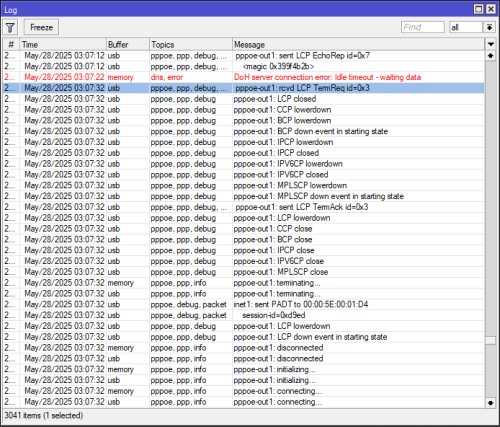
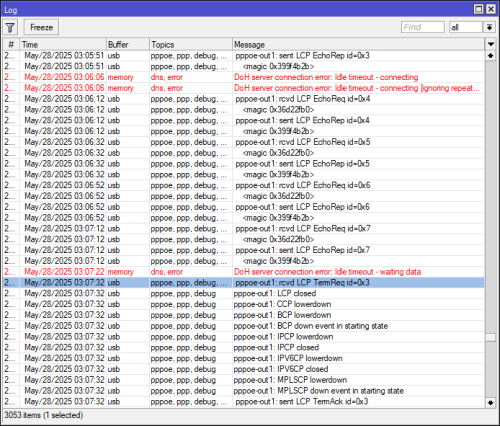
pppoe-out1: sent LCP TermAck id=0x4

what do you think?
HayateAyakasi8
post May 28 2025, 01:02 AM

On my way
****
Junior Member
646 posts

Joined: Jun 2014


QUOTE(garbanicus @ May 27 2025, 07:43 PM)
How you guys get RM90 for 500mbps package? Which unifi store?

Unifi store damansara utama today.
Lady die die said lowest for 500mbps is RM139, and COMPULSORY to sign for Unifi Mobile. She said everyone also same.

And dare I say she wasn't very pleasant at all. Quite disappointed with her actually, 2nd time got her already.  -__-
*
This one I feel like you're better off going to another Unifi Store.

QUOTE(s2000c @ May 27 2025, 08:14 PM)
I need rm90 for 500 mpbs too. Pls share how to "tekan" TM . Thanks
*
If contract over can just mention Astro agent offered 500Mbps for RM90. Otherwise like myself still in ~5 months contract, just asked them about the promo and they just gave me.
Maybe you can also say you heard online about promo for existing unifi customer. Then just tell her RM90 for 500Mbps and Disney+ Hotstar.

QUOTE(jacktiew @ May 27 2025, 08:33 PM)
Can direct cancel unifi mobile after updated? No need to wait XX months as mentioned by the staff?
*
Since there's no contract, you can just cancel anyways. You can message them via live chat first.
I told her that I want to cancel, CS at Unifi store said no contract I can cancel anytime.
CS on live chat said a few times that the discount for unifi fibre is permanent, and terminating the unifi mobile line would NOT affect unifi fibre pricing.

hsbb
post May 28 2025, 01:38 AM

Casual
***
Junior Member
447 posts

Joined: Aug 2009


Anime4000, can try what neekun already did above but with ur dlink MAC. Let see what will happen.
Anime4000
post May 28 2025, 01:55 AM

Look at all my stars!!
*******
Senior Member
2,399 posts

Joined: Jul 2009
From: /dev/null


QUOTE(hsbb @ May 28 2025, 01:38 AM)
Anime4000, can try what neekun already did above but with ur dlink MAC. Let see what will happen.
*
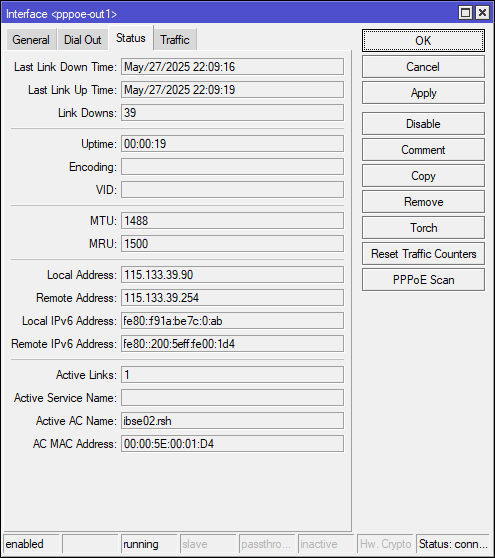
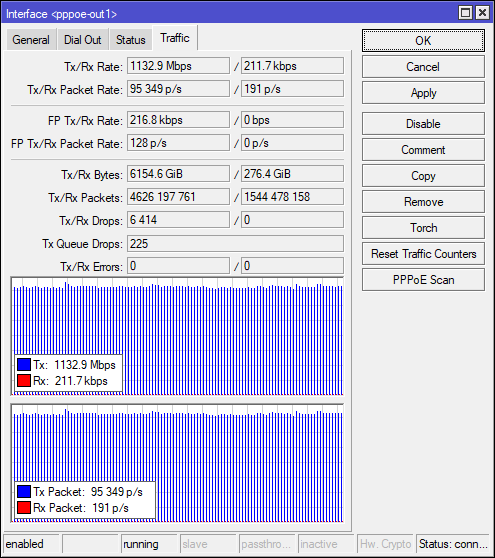
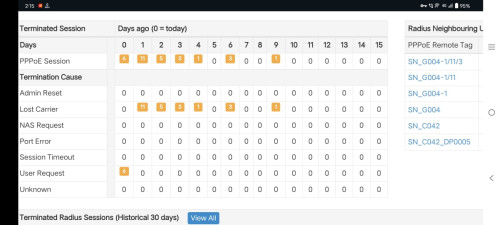
didn't work, my speed not slow, just PPPoE terminate my session, been uploading 6TB of zero (uptime: 22hrs):
user posted image

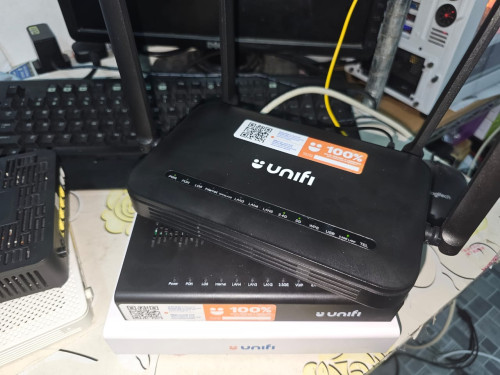
Even with this ONU that I got from tm friend still didn't work
user posted image

user posted image

Last Saturday my friend checked something wrong with PPPoE, that is why I check now,
user posted image
user posted image

Next morning I ask him again this, and I already send email to TM with relevant documents

my other friend can even choose to avoid ibse02.rsh, I ask around seem this been in service since Streamyx?
user posted image

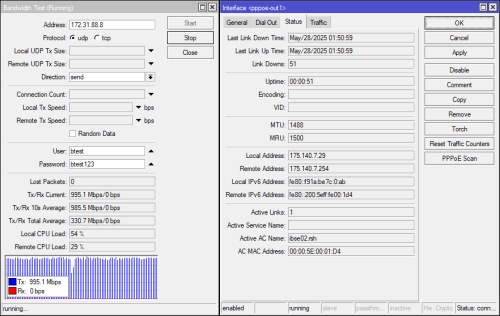
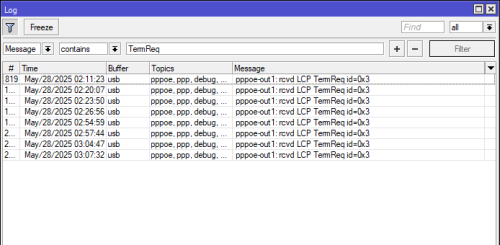
UPDATE May/28/2025 02:11:27
It's happening again
user posted image

This post has been edited by Anime4000: May 28 2025, 02:15 AM
hsbb
post May 28 2025, 02:27 AM

Casual
***
Junior Member
447 posts

Joined: Aug 2009


QUOTE(Anime4000 @ May 28 2025, 01:55 AM)
didn't work, my speed not slow, just PPPoE terminate my session, been uploading 6TB of zero (uptime: 22hrs):
user posted image

Even with this ONU that I got from tm friend still didn't work
user posted image

user posted image

Last Saturday my friend checked something wrong with PPPoE, that is why I check now,
user posted image
user posted image

Next morning I ask him again this, and I already send email to TM with relevant documents

my other friend can even choose to avoid ibse02.rsh, I ask around seem this been in service since Streamyx?
user posted image
*
SN_G004/C042/DP0005 .. dlink in combo mode also session terminated?

This post has been edited by hsbb: May 28 2025, 02:28 AM
Anime4000
post May 28 2025, 02:55 AM

Look at all my stars!!
*******
Senior Member
2,399 posts

Joined: Jul 2009
From: /dev/null


QUOTE(hsbb @ May 28 2025, 02:27 AM)
SN_G004/C042/DP0005 .. dlink in combo mode also session terminated?
*
Yes, terminated by Unifi,

Oddly enough when use 1GbE ONU like HG8240H5 that I have during Maxis time, still disconnected,

I sense that what ever PPP echo did not reach to Unifi,
and Unifi assume offline? and request terminate session

never had this issue when before with ibse02.mc

why unifi switch PPPoE AC that even worse?

Perhaps I need to limit:
2.5G Egress to 1100Mbps (match OLT)
PPPoE Upload to 1000Mbps (match Radius)

give PPP echo overhead never missed an echo

I wondering this would solve it?
might need to disable Hardware Acceleration for QoS to work

This post has been edited by Anime4000: May 28 2025, 02:58 AM
kwss
post May 28 2025, 03:25 AM

Regular
******
Senior Member
1,207 posts

Joined: Aug 2018
QUOTE(Anime4000 @ May 28 2025, 01:55 AM)
didn't work, my speed not slow, just PPPoE terminate my session, been uploading 6TB of zero (uptime: 22hrs):
user posted image

Even with this ONU that I got from tm friend still didn't work
user posted image

user posted image

Last Saturday my friend checked something wrong with PPPoE, that is why I check now,
user posted image
user posted image

Next morning I ask him again this, and I already send email to TM with relevant documents

my other friend can even choose to avoid ibse02.rsh, I ask around seem this been in service since Streamyx?
user posted image

UPDATE May/28/2025 02:11:27
It's happening again
user posted image
*
sent LCP TermAck id=0x4
This is your router acknowledging the termination request. The debug log should show the reason for termination when it receive that request. Can you find it?

Since both BNG show up in scan, you can hard code the BNG name as AC Service in pppoe. Mikrotik should be able to connect to it specifically.

From the MAC address, looks like this broken BNG is not using VRRP setup. Perhaps TM misconfigured it? I think it should be part of VRRP.
Did this BNG allow MTU 1500?

Edit:
Since it says lost carrier, could be broken OLT port or line card too. If your friend can swap your to another line card that would immediately rule it out

This post has been edited by kwss: May 28 2025, 03:32 AM
Anime4000
post May 28 2025, 03:40 AM

Look at all my stars!!
*******
Senior Member
2,399 posts

Joined: Jul 2009
From: /dev/null


QUOTE(kwss @ May 28 2025, 03:25 AM)
sent LCP TermAck id=0x4
This is your router acknowledging the termination request. The debug log should show the reason for termination when it receive that request. Can you find it?

Since both BNG show up in scan, you can hard code the BNG name as AC Service in pppoe. Mikrotik should be able to connect to it specifically.

From the MAC address, looks like this broken BNG is not using VRRP setup. Perhaps TM misconfigured it? I think it should be part of VRRP.
Did this BNG allow MTU 1500?

Edit:
Since it says lost carrier, could be broken OLT port or line card too. If your friend can swap your to another line card that would immediately rule it out
*
user posted image

user posted image

user posted image

1492 MTU not work, it will use 1480 in disappointment because VRRP
user posted image
garbanicus
post May 28 2025, 09:01 AM

Getting Started
**
Junior Member
158 posts

Joined: Aug 2013
QUOTE(HayateAyakasi8 @ May 28 2025, 01:02 AM)
This one I feel like you're better off going to another Unifi Store.
*
Yeah lol that's why I asked them which Unifi store biggrin.gif
kwss
post May 28 2025, 09:30 AM

Regular
******
Senior Member
1,207 posts

Joined: Aug 2018
Anime4000
Just looking at the log, it seems TM configured their BNG to kill the connection if it's just missing one LCP-Echo request / response pair. Default configuration for BNG is supposed to be missing 3 pairs before disconnection.

It also looks like there is a bug inside their BNG software. It didn't actually send the LCP-Echo. From your log, the Echo is no where to be found and suddenly boom, you get a termination request.

Since you are just uploading, it shouldn't block your download direction from receiving the packet. The timing for the termination request is the time slot where the echo request should be. Really looks like software bug to me more than configuration error.

I also don't quite understand why during the pppoe scan, it didn't show VRRP address but it did connect to VRRP address that's no where to be found.

This post has been edited by kwss: May 28 2025, 09:33 AM
Anime4000
post May 28 2025, 11:12 AM

Look at all my stars!!
*******
Senior Member
2,399 posts

Joined: Jul 2009
From: /dev/null


QUOTE(kwss @ May 28 2025, 09:30 AM)
Anime4000
Just looking at the log, it seems TM configured their BNG to kill the connection if it's just missing one LCP-Echo request / response pair. Default configuration for BNG is supposed to be missing 3 pairs before disconnection.

It also looks like there is a bug inside their BNG software. It didn't actually send the LCP-Echo. From your log, the Echo is no where to be found and suddenly boom, you get a termination request.

Since you are just uploading, it shouldn't block your download direction from receiving the packet. The timing for the termination request is the time slot where the echo request should be. Really looks like software bug to me more than configuration error.

I also don't quite understand why during the pppoe scan, it didn't show VRRP address but it did connect to VRRP address that's no where to be found.
*
That's what I think, ibse02.rsh is stupid bug

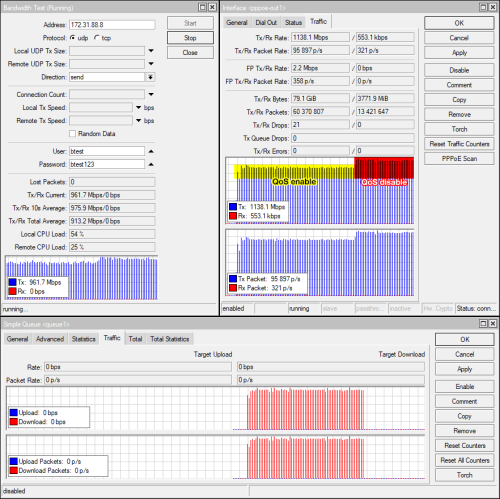
since T-CONT set to 1100Mbps and PPPoE 1000Mbps, I try do this:
sfp-sfpplus1 Egress: 1100Mbps
simple queue pppoe-out1: 1000Mbps

see what happend

user posted image
Anime4000
post May 28 2025, 11:31 AM

Look at all my stars!!
*******
Senior Member
2,399 posts

Joined: Jul 2009
From: /dev/null


kwss

Egress:
user posted image

Simple Queue (here goes my Mikrotik CPU, go up 70% when enable)
user posted image

it did limit L3, 1100Mbps T-CONT within 1024Mbps PPPoE
user posted image


eugenecctan
post May 28 2025, 12:35 PM

Wee Wang Wang
******
Senior Member
1,058 posts

Joined: Nov 2009


QUOTE(Anime4000 @ May 28 2025, 01:55 AM)
didn't work, my speed not slow, just PPPoE terminate my session, been uploading 6TB of zero (uptime: 22hrs):
user posted image

Even with this ONU that I got from tm friend still didn't work
user posted image

user posted image

Last Saturday my friend checked something wrong with PPPoE, that is why I check now,
user posted image
user posted image

Next morning I ask him again this, and I already send email to TM with relevant documents

my other friend can even choose to avoid ibse02.rsh, I ask around seem this been in service since Streamyx?
user posted image

UPDATE May/28/2025 02:11:27
It's happening again
user posted image
*
Sharing my experience with D-Link 3060V. Do not use dynamic IP. Change to fixed IP. Previously my 2.5 also keep disconnecting. After set to fixed IP then solve the problem.

Anime4000
post May 28 2025, 02:20 PM

Look at all my stars!!
*******
Senior Member
2,399 posts

Joined: Jul 2009
From: /dev/null


kwss hsbb

After I do fq_codel QoS on PPPoE Interface:
user posted image

been 2hrs no disconnect

However... This is wrong answer and wrong solution to compensate ibse02.rsh
Customer CPE are not suppose to solve bug on ibse02.rsh
I redo like before 2019 - Streamyx Internet bottleneck, The Legendary LCP terminated by peer
I keep reporting and involve MCMC which TM unable to solve this, and wrong MTU 1488 value
tng55
post May 28 2025, 02:26 PM

Regular
******
Senior Member
1,434 posts

Joined: Sep 2021


QUOTE(Anime4000 @ May 28 2025, 02:20 PM)
kwss hsbb

After I do fq_codel QoS on PPPoE Interface:
user posted image

been 2hrs no disconnect

However... This is wrong answer and wrong solution to compensate ibse02.rsh
Customer CPE are not suppose to solve bug on ibse02.rsh
I redo like before 2019 - Streamyx Internet bottleneck, The Legendary LCP terminated by peer
I keep reporting and involve MCMC which TM unable to solve this, and wrong MTU 1488 value
*
daam trouble for TM

QoS enable no good due cpu hike
need disable QoS i know
i hope you still during troubleshot more project
go ahead MCMC report with document about troubleshot PPPoE disconnect

246 Pages « < 31 32 33 34 35 > » Top
 

Change to:
| Lo-Fi Version
0.0157sec    0.62    6 queries    GZIP Disabled
Time is now: 2nd December 2025 - 11:48 AM