

QUOTE(Phonzy @ Mar 15 2019, 09:48 PM)
very slow international site speeds now. anyone else?

had been facing this issue around 1 week alreadytemporary using vpn

Unifi Official TM UniFi High Speed Broadband Thread V37, READ 1ST PAGE FOR TURBO SPEED INFO!
|
|
 Mar 16 2019, 04:42 PM Mar 16 2019, 04:42 PM
|
 
All Stars
31,608 posts Joined: Aug 2010 
|
QUOTE(Phonzy @ Mar 15 2019, 09:48 PM) very slow international site speeds now. anyone else? had been facing this issue around 1 week alreadytemporary using vpn |
|
|
|
|
|
Mar 16 2019, 04:57 PM
Show posts by this member only | IPv6 | Post
#1122
|

Senior Member
1,644 posts Joined: Dec 2017 
|
What happened to the speed? Very slow.. By the way, my IP address is 218.208.xxx.xxx
Example: NVIDIA drivers, from 1 MB/s became less than 100 KB/s. This post has been edited by emilyngsc: Mar 16 2019, 05:00 PM |
|
|
Mar 16 2019, 06:53 PM
|

Junior Member
292 posts Joined: Nov 2007 
|
hi guys i need some help, i searched internet but i think i need the answers for my situation
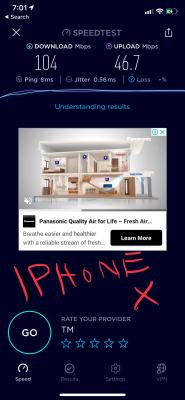
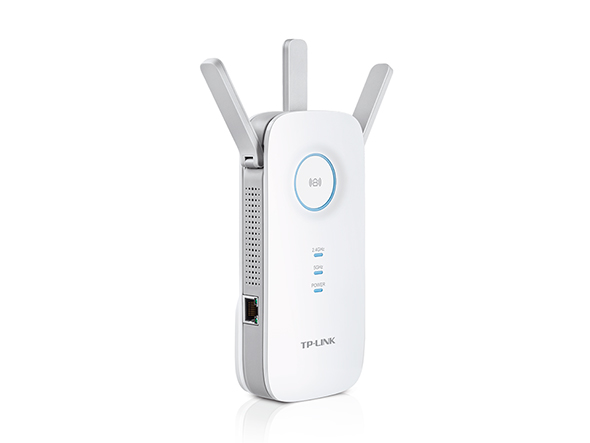
my plan : UNIFI 100mbps house : 3 storeys PC location : 2nd floor setup Router at 1st floor : UNIFI D LINK Router (AC1200) Extender at 2nd Floor : Tp Link RE450 (AC1750 ) After asking UNIFI technician to come, he replaced my Tp LINK C9 router with UNIFI's own DLINK AC 1200 router. I used my iPhone X to connect and it shows 100mbps speedtest , exactly the speed i subscribed In the second floor my room , i just build a new PC. its a MSI gaming motherboard that comes with a build in wireless AC receive capable of 433mbps. (Specification Page - Intel Wireless AC receiver model 9462 ) the problem is , my PC is connected to the TP LINK extender RE450 , i run speedtest i got like max 50mbps, average 35-40mbps speed i sit in front of my PC, i use my phone connect to the same extender, i got close to 100 mbps speed, exactly the speed i subscirbed to so whats the problem ? my build in receiver of motherboard capable of 433mbps but only gets 35mbps ... initially the technician said the extender might have speed loss, but my phone connected to it no problem it still gives 90-100mbps what do i need to do ? thanks in advance 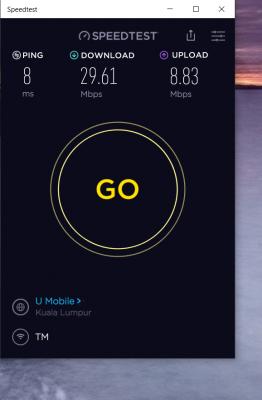
  This post has been edited by keropi88: Mar 16 2019, 07:02 PM |
|
|
Mar 16 2019, 07:30 PM
|

Senior Member
5,714 posts Joined: Mar 2007 
|
QUOTE(keropi88 @ Mar 16 2019, 06:53 PM) hi guys i need some help, i searched internet but i think i need the answers for my situation Why did you let him change the router to the D-Link router? It is worse than the C9 that you have. Anyway, the 433Mbps is just a theoretical maximum, and you won't ever get that speed. Are you connected to the 2.4GHz or 5GHz? I suggest you read the green text on 1st page, 1st post, to educate yourself in home networking basics.my plan : UNIFI 100mbps house : 3 storeys PC location : 2nd floor setup Router at 1st floor : UNIFI D LINK Router (AC1200) Extender at 2nd Floor : Tp Link RE450 (AC1750 ) After asking UNIFI technician to come, he replaced my Tp LINK C9 router with UNIFI's own DLINK AC 1200 router. I used my iPhone X to connect and it shows 100mbps speedtest , exactly the speed i subscribed In the second floor my room , i just build a new PC. its a MSI gaming motherboard that comes with a build in wireless AC receive capable of 433mbps. (Specification Page - Intel Wireless AC receiver model 9462 ) the problem is , my PC is connected to the TP LINK extender RE450 , i run speedtest i got like max 50mbps, average 35-40mbps speed i sit in front of my PC, i use my phone connect to the same extender, i got close to 100 mbps speed, exactly the speed i subscirbed to so whats the problem ? my build in receiver of motherboard capable of 433mbps but only gets 35mbps ... initially the technician said the extender might have speed loss, but my phone connected to it no problem it still gives 90-100mbps what do i need to do ? |
|
|
Mar 16 2019, 07:53 PM
|

All Stars
24,454 posts Joined: Nov 2010
|
QUOTE(keropi88 @ Mar 16 2019, 06:53 PM) hi guys i need some help, i searched internet but i think i need the answers for my situation whatever u do, dun expect great wifi results with 100mbps in 3 storey house.my plan : UNIFI 100mbps house : 3 storeys PC location : 2nd floor for a tall house, u gotta get higher speed b4 u do anything else. if not, u end up wasting $. |
|
|
Mar 16 2019, 10:04 PM
|
|
Junior Member
864 posts Joined: May 2005
|
QUOTE(keropi88 @ Mar 16 2019, 06:53 PM) hi guys i need some help, i searched internet but i think i need the answers for my situation Maybe your PC's Wifi needs latest driver. Can you check whether "Throughput Booster" is enabled?my plan : UNIFI 100mbps house : 3 storeys PC location : 2nd floor setup Router at 1st floor : UNIFI D LINK Router (AC1200) Extender at 2nd Floor : Tp Link RE450 (AC1750 ) After asking UNIFI technician to come, he replaced my Tp LINK C9 router with UNIFI's own DLINK AC 1200 router. I used my iPhone X to connect and it shows 100mbps speedtest , exactly the speed i subscribed In the second floor my room , i just build a new PC. its a MSI gaming motherboard that comes with a build in wireless AC receive capable of 433mbps. (Specification Page - Intel Wireless AC receiver model 9462 ) the problem is , my PC is connected to the TP LINK extender RE450 , i run speedtest i got like max 50mbps, average 35-40mbps speed i sit in front of my PC, i use my phone connect to the same extender, i got close to 100 mbps speed, exactly the speed i subscirbed to so whats the problem ? my build in receiver of motherboard capable of 433mbps but only gets 35mbps ... initially the technician said the extender might have speed loss, but my phone connected to it no problem it still gives 90-100mbps what do i need to do ? thanks in advance
https://www.google.com/amp/s/www.digitalcit...l-network-cards |
|
|
|
|
|
Mar 16 2019, 11:27 PM
|
|
Senior Member
1,276 posts Joined: Sep 2018 From: Ampang
|
Speed is strongly affected by how many other networks are competing for the WiFi spectrum in your house
|
|
|
Mar 16 2019, 11:40 PM
Show posts by this member only | IPv6 | Post
#1128
|

Junior Member
359 posts Joined: Mar 2008
|
Hi guys , unifi just installed 3 days then LOS red light blinking , any way to fix or have to call them ? My installer always switch off his phone .
|
|
|
Mar 16 2019, 11:52 PM
|

Junior Member
83 posts Joined: Apr 2016
|
Anyone from Subang area having internet disruption?
The service is on and off for the past few days. Contacted Unifi on Twitter and they avoided my questions. |
|
|
Mar 17 2019, 12:16 PM
Show posts by this member only | IPv6 | Post
#1130
|
|
Junior Member
427 posts Joined: Mar 2010
|
finally pulling a CAT6A cable yesterday from upstair to downstair. Tested the network speed using iperf3 managed to get closed to 1Gbps speed....
But then using tm speedo meter and speedtest.net only can get 500-600mbps download.... Already made a report to TM..... Iperf3 test result 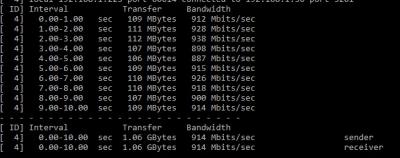
TM speedtest 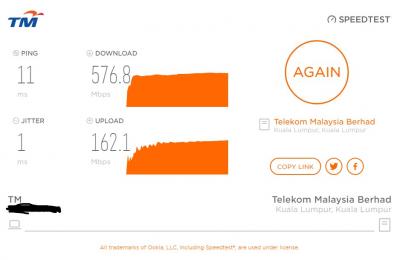
This post has been edited by cyclone2: Mar 17 2019, 12:16 PM |
|
|
Mar 17 2019, 12:44 PM
|

All Stars
11,458 posts Joined: Oct 2007 From: KL
|
QUOTE(cyclone2 @ Mar 17 2019, 12:16 PM) finally pulling a CAT6A cable yesterday from upstair to downstair. Tested the network speed using iperf3 managed to get closed to 1Gbps speed.... Try a different browser or a different server for speed tests.But then using tm speedo meter and speedtest.net only can get 500-600mbps download.... Already made a report to TM..... Iperf3 test result
TM speedtest
|
|
|
Mar 17 2019, 12:54 PM
|

Senior Member
1,001 posts Joined: Jul 2011
|
Anyone facing slow speed / constant disconnection while gaming these 2 days especially to international servers
This post has been edited by Area51SE: Mar 17 2019, 12:56 PM |
|
|
Mar 17 2019, 03:32 PM
|
 
Elite
8,409 posts Joined: Jul 2008 
|
QUOTE(keropi88 @ Mar 16 2019, 06:53 PM) hi guys i need some help, i searched internet but i think i need the answers for my situation Layman explanation ahead. iPhone X Wireless is rater at 867Mbps while your MSI is rated at 433Mbps. The WiFi chipset on your MSI is pretty old as well.my plan : UNIFI 100mbps house : 3 storeys PC location : 2nd floor setup Router at 1st floor : UNIFI D LINK Router (AC1200) Extender at 2nd Floor : Tp Link RE450 (AC1750 ) After asking UNIFI technician to come, he replaced my Tp LINK C9 router with UNIFI's own DLINK AC 1200 router. I used my iPhone X to connect and it shows 100mbps speedtest , exactly the speed i subscribed In the second floor my room , i just build a new PC. its a MSI gaming motherboard that comes with a build in wireless AC receive capable of 433mbps. (Specification Page - Intel Wireless AC receiver model 9462 ) the problem is , my PC is connected to the TP LINK extender RE450 , i run speedtest i got like max 50mbps, average 35-40mbps speed i sit in front of my PC, i use my phone connect to the same extender, i got close to 100 mbps speed, exactly the speed i subscirbed to so whats the problem ? my build in receiver of motherboard capable of 433mbps but only gets 35mbps ... initially the technician said the extender might have speed loss, but my phone connected to it no problem it still gives 90-100mbps what do i need to do ? thanks in advance Considering similar level of signal degradation, it explain why your iPhone X double the speed of your MSI motherboard. Consider getting a new PCIE wireless adapter. Get the TP-Link Archer T4E, affordable and coming out soon.  QUOTE(cyclone2 @ Mar 17 2019, 12:16 PM) finally pulling a CAT6A cable yesterday from upstair to downstair. Tested the network speed using iperf3 managed to get closed to 1Gbps speed.... What router you use? Having Gigabit LAN throughput does not mean the chipset of the router is capable of Gigabit speed. But then using tm speedo meter and speedtest.net only can get 500-600mbps download.... Already made a report to TM..... Iperf3 test result
TM speedtest
 Try Extreme Broadband speedtest server, I find it to be the most consistent. This post has been edited by blacktubi: Mar 17 2019, 03:35 PM |
|
|
|
|
|
Mar 17 2019, 03:47 PM
|

Newbie
10 posts Joined: Dec 2016
|
No slow, instead i face "internet blackout "for a week now, even though the line in the area has been recovered
|
|
|
Mar 17 2019, 05:52 PM
Show posts by this member only | IPv6 | Post
#1135
|
|
Junior Member
427 posts Joined: Mar 2010
|
QUOTE(soonwai @ Mar 17 2019, 12:44 PM) Try a different browser or a different server for speed tests. Tested different server and using windows 10 speedtest app as well, speed not consistent....Anyway oredi reported to TM. wait them to feedback.... |
|
|
Mar 17 2019, 05:54 PM
Show posts by this member only | IPv6 | Post
#1136
|
|
Junior Member
427 posts Joined: Mar 2010
|
QUOTE(blacktubi @ Mar 17 2019, 03:32 PM) Layman explanation ahead. iPhone X Wireless is rater at 867Mbps while your MSI is rated at 433Mbps. The WiFi chipset on your MSI is pretty old as well. I'm using Asus RT-AC5300, definitely tested before when upgraded to 800mbps it able to reach the speed. Now speed is not consistent, sometime reach 500mbps... sometime reach 600mbps... the max reached 700mbps when tested with different server.Considering similar level of signal degradation, it explain why your iPhone X double the speed of your MSI motherboard. Consider getting a new PCIE wireless adapter. Get the TP-Link Archer T4E, affordable and coming out soon. What router you use? Having Gigabit LAN throughput does not mean the chipset of the router is capable of Gigabit speed. Try Extreme Broadband speedtest server, I find it to be the most consistent. |
|
|
Mar 17 2019, 06:43 PM
|

Senior Member
2,364 posts Joined: Aug 2011 From: Between Heaven & Hell
|
certain site, load dam slow
|
|
|
Mar 17 2019, 06:55 PM
Show posts by this member only | IPv6 | Post
#1138
|
|
All Stars
11,458 posts Joined: Oct 2007 From: KL
|
QUOTE(cyclone2 @ Mar 17 2019, 05:52 PM) Tested different server and using windows 10 speedtest app as well, speed not consistent.... What browser?Anyway oredi reported to TM. wait them to feedback.... |
|
|
Mar 17 2019, 08:44 PM
|

Junior Member
183 posts Joined: Sep 2009 From: Petaling Jaya, Malaysia
|
Guys , I'm having a weird situation with my connection. Having Unifi 800mbps connection, using Asus rt 55uhp with my Huawei btu.both are placed on 1st floor.. Able to clock full speed on my desktop which is co , nnected via cat 7 cable ..my sharp Android TV which supports AC wifi , able to clock 115 - 120 Mbps when perform speed test. Netflix on my TV is playing fine..it require around 10 seconds max to load the full quality....
My other streaming apps like hotstar and Kodi do buffers a little .. So I'm thinking if I should upgrade to a better router or 100 + Mbps is good enough for the streaming.. Need your input on this.. Btw I tested the same apps using my OnePlus 6t hotspot.. Android TV connected to OnePlus 6t hotspot , I noticed the performance is slight better |
|
|
Mar 17 2019, 09:36 PM
|
|
All Stars
24,454 posts Joined: Nov 2010
|
QUOTE(cybercrew @ Mar 17 2019, 08:44 PM) Guys , I'm having a weird situation with my connection. Having Unifi 800mbps connection, using Asus rt 55uhp with my Huawei btu.both are placed on 1st floor.. Able to clock full speed on my desktop which is co , nnected via cat 7 cable ..my sharp Android TV which supports AC wifi , able to clock 115 - 120 Mbps when perform speed test. Netflix on my TV is playing fine..it require around 10 seconds max to load the full quality.... a better router will surely improve wifi speed.My other streaming apps like hotstar and Kodi do buffers a little .. So I'm thinking if I should upgrade to a better router or 100 + Mbps is good enough for the streaming.. Need your input on this.. Btw I tested the same apps using my OnePlus 6t hotspot.. Android TV connected to OnePlus 6t hotspot , I noticed the performance is slight better meanwhile, i think there is a beta firmware if u haven't tried. i used it for my router, can get 2xx for a similar sharp tv. but the page expired... ask asusmy here: https://forum.lowyat.net/topic/2651405/+9380?hl=ac55uhp |
|
Topic ClosedOptions
|
| Change to: |  0.0180sec 0.0180sec
 0.09 0.09
 6 queries 6 queries
 GZIP Disabled GZIP Disabled
Time is now: 7th December 2025 - 06:31 AM |
 Quote
Quote