Welcome Guest ( Log In | Register )

Bump Topic Topic Closed RSS Feed
21 Pages  1 2 3 > » Bottom

Outline · [ Standard ] · Linear+

Unifi Official TM UniFi High Speed Broadband Thread V37, READ 1ST PAGE FOR TURBO SPEED INFO!

views
     
soonwai
post Jan 31 2019, 11:30 PM


********
All Stars
11,458 posts

Joined: Oct 2007
From: KL


QUOTE(myromance123 @ Jan 31 2019, 09:19 PM)
Anyone experiencing severe download speed issues with TM Unifi right now?

Area around Melawati right now, and I'm experiencing download speeds of merely 1Mbps whilst upload  speeds are unhindered and at 200Mbps. Attached a pic of speedtest right now showing as much.
*
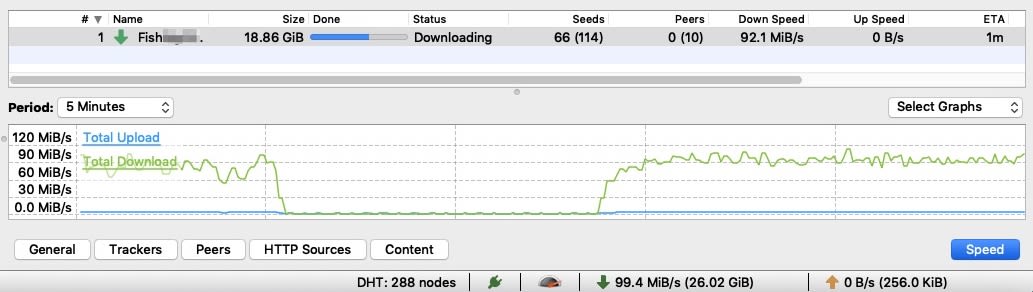
Kajang is OK. Download of 5 torrents at 10:30pm on 800Mbps.

user posted image
Each segment is 6mins in case you want to calculate the size of each torrent.

This post has been edited by soonwai: Jan 31 2019, 11:31 PM
soonwai
post Feb 1 2019, 12:49 AM


********
All Stars
11,458 posts

Joined: Oct 2007
From: KL


QUOTE(JoBigShow @ Feb 1 2019, 12:43 AM)
Thanks!

My Ethernet network is 1.0Gbps.

Will troubleshoot the cables next. It just strange though, a CAT5e cable performs like a CAT5 (100Mbps and below).
Is this common? Surely a number of people who has been upgraded still using cat5e provided by TM, meaning some of us should have reported similar issues that has become aware of?
*
Cat5e is fine. Most will go up to 10Gbps if they're of average quality. I'm sure the ones that comes with TPLink or Huawei products are OK. They're also very short.

Did you check what pandamerah suggested?

Here's a simulation of your problem, same everything...
user posted image
...except one network port set to 100Mbps.

user posted image
...said network port set back to 1000Mbps.

This post has been edited by soonwai: Feb 1 2019, 01:24 AM
soonwai
post Feb 1 2019, 01:07 AM


********
All Stars
11,458 posts

Joined: Oct 2007
From: KL


QUOTE(System Error Message @ Feb 1 2019, 12:57 AM)
Even in kajang for me i cant get 800Mb/s, only 200Mb/s from various things including TM's own internal speed tests. Definitely done the tests you mentioned, i got 100Mb/s from the file server from sg you mentioned  even if using 5 links, and its not the cable either.

Even steam sticks to 100Mb/s too.
*
When it comes to you, I think it's safe to say that you know your routers and cables. :-)

Perhaps not enough capacity going into your area? You definitely should be able to max out 800Mbps to TIME's speedtest or to OVH SG.

As for TM's speedtest servers, I think they are overloaded. I get a fluctuating 500-700 from them.

QUOTE(JoBigShow @ Feb 1 2019, 01:02 AM)
Thanks for the clarification on the cables.

The suggestion seems like the most probable, TM never called, just an sms notification about the Turbo.
They should've figure out that some of us would need proper update with the hardware and whatnot.

I'll report results after getting them to come over and configure the BTU, I suspect it's not just me with this setback.
*
It's quite common. Fruitie had that problem. TM changed her BTU when they couldn't solve it remotely. Another forumer too but his was solved with a "port reset" or whatever it is that TM does. Let them know, I'm sure you'll be at top speed in no time at all.

This post has been edited by soonwai: Feb 1 2019, 01:25 AM
soonwai
post Feb 1 2019, 08:16 AM


********
All Stars
11,458 posts

Joined: Oct 2007
From: KL


QUOTE(Doraku @ Feb 1 2019, 07:24 AM)
ohmy.gif do you use VPN then torrenting?, is private tracker torrent or public torrent??

*
For the above torrents, no VPN. They're from a public tracker.
soonwai
post Feb 1 2019, 08:14 PM


********
All Stars
11,458 posts

Joined: Oct 2007
From: KL


QUOTE(balambgarden @ Feb 1 2019, 05:04 PM)
Hi all, just wanted to know what kind of direct download speed (in mb/s) i would get for unifi 500mbps package?
I just got the thing installed recently and the highest direct download speed I get is around 20mb/s (for torrent/files/whatever)

Is that.. fine or not?
*
It depends but you should be able to get full speeds in favourable conditions.

user posted image
Torrent

user posted image
Browser Download

user posted image
FTP 5 Connections

Mine's 800 but I think you get the idea.
soonwai
post Feb 2 2019, 03:05 PM


********
All Stars
11,458 posts

Joined: Oct 2007
From: KL


QUOTE(yoongjun @ Feb 2 2019, 02:26 PM)
Recently got upgraded to 800mbps but even with gigabit router unable to reach even 500mbps. Complained to TM but they only said will send someone over to check after CNY.

Anyone got any ideas or similar issue?

Tried two Routers:
Asus RT-AC55UHP
Unifi TP-LINK Archer C1200

https://imgur.com/a/obKb0xS
*
C1200 no problem with 800Mbps on GbE lan. The Asus probably also. How you testing? PC fast enough? Make sure the other end also fast enough.
soonwai
post Feb 2 2019, 05:21 PM


********
All Stars
11,458 posts

Joined: Oct 2007
From: KL


QUOTE(yoongjun @ Feb 2 2019, 04:05 PM)
Direct lan from PC to router, not using any splitter. By PC fast enough I would assume you mean motherboard ethernet supports gigabit? If so yes.

I also tried with different Lan Cable still unable to achieve 800mbps, getting maximum around 350~
*
I mean your processor and if you have Meltdown and Spectre patches installed. Look at your cpu cores usage during the test and see if one or more cores maxes out. I don’t use Windows so will have to page johnlai for this.
soonwai
post Feb 2 2019, 10:34 PM


********
All Stars
11,458 posts

Joined: Oct 2007
From: KL


QUOTE(balambgarden @ Feb 2 2019, 10:02 PM)
May i know what torrent client you're using?
*
I'm using qBittorrent 4.1.5 MacOS.
soonwai
post Feb 8 2019, 10:56 PM


********
All Stars
11,458 posts

Joined: Oct 2007
From: KL


QUOTE(gastacopz @ Feb 8 2019, 03:27 PM)
Guys, those on Turbo Upgrade, from 30Mbps, what is the phone call package???cant find any info bout it
*
The phone call package should remain the same. At least for me it did from 100-800.
soonwai
post Feb 10 2019, 10:47 PM


********
All Stars
11,458 posts

Joined: Oct 2007
From: KL


QUOTE(CYT9999 @ Feb 10 2019, 10:03 PM)
...
Is my BTU or my D-LINK DIR842 router that bottlenecks my wired download speed? Is DIR842 router not capable enough of doing 800mbps wired Ethernet download speed ? Hope some experts here can give your input. My next course of action is to upgrade my router to higher end model D-LINK AC3150 DIR885L router and check whether my router is the culprit or my BTU inherent settings.
*
I think a default config DIR-842 should have no probs handling 800Mbps on wired LAN. Is your PC fast enough to handle 800Mbps? How are you testing? What browser? Which Speedtest site?

For a whole week, I was getting ready to complain to TM because I could only get around 650Mbps from my Turbo800. Turns out Safari and speedtest.tm.com.my weren't on friendly terms.
user posted image
soonwai
post Feb 11 2019, 12:38 AM


********
All Stars
11,458 posts

Joined: Oct 2007
From: KL


QUOTE(CYT9999 @ Feb 10 2019, 11:28 PM)
Thanks for your reply. I was testing on my rampage v edition 10 build with i7-6950x cpu overclocked to 4ghz with samsung 950pro nvme SSD drive. I think my system should be more than capable to handle that. I use Google chrome browser and also Microsoft edge browser to test and the same Speedtest.tm.com.my site as shown in your attached image. Running windows 10 1809. From google search, one chap recommeded turning off antivirus software as it lowered his speed test result. So I just  temporarily disabled  my mcafee internet security suite during testing and closed all background programs I am running. Only chrome or edge browser is running with one tap opened during Tm speed test.
*
Sounds like an awfully good Windows system. You shouldn't even have to turn off anything or ensure that speedtest is the only thing running to get 800Mbps. I did my speedtests on a much older i7-4850 (2013 MacBook Pro.)

johnlai Any chance that Spectre/Meltdown mitigations will be able to bring an i7-6950x to its knees or will it just power through them?

QUOTE(CYT9999 @ Feb 11 2019, 12:27 AM)
Shortly replying to your post, I decided to use FireFox browser since you have used it in your attached image to check whether the culprit is due to browsers. Viola!! My download speed now consistently stays at 750mbps and above. Google Chrome browser and Microsoft Edge are limiting my download speed on my windows 10 1809 system!!. I have no idea why the popular google chrome browser with the latest version is limiting my download speed on my system. Same goes to Edge browser. Thanks Bro ! I can now proceed to upgrade my router to ac3150 model to enjoy higher WiFi download speed. Thanks for mentioning about the impact of browser.  rclxm9.gif  rclxms.gif
*
I have the same experience, all Chromium based browsers (Safari, Chrome, Brave, Opera) are slower for some reason. Gecko, or is it called Quantum now, based ones such as Firefox and Waterfox fare better.

Have you tried the the speedtest app from Windows store? That should remove the browsers from the equation. Try with OVH.net SG. I get the most consistent 800Mbps speedtests with them.
user posted image

This post has been edited by soonwai: Feb 11 2019, 12:45 AM
soonwai
post Feb 11 2019, 02:43 PM


********
All Stars
11,458 posts

Joined: Oct 2007
From: KL


QUOTE(edgecrawler @ Feb 11 2019, 02:30 PM)
...
Just got a replacement modem from TM. Does anyone know the model of this device?
Thanks.
*
Should be HG8240H
soonwai
post Feb 12 2019, 12:06 PM


********
All Stars
11,458 posts

Joined: Oct 2007
From: KL


QUOTE(linkinpark @ Feb 12 2019, 07:22 AM)
Last week my BTU (located in my living room) + L7 NR2000 router (located in my room) after 7year usage finally spoil. Call TM and they replace a new modem router all in 1 Netis DL4480V1. Since my house is high-rise with copper wired that is the best they can give. Is it true? Because my room is abit far from my living room wifi 2.4ghz signal abit weak. Can i configure the Netis as BTU and add-on a new wifi router?
*
Not sure about the Netis but the TM's ZTE ZXHN-H267A all-in-one (btu, router, wifi) can be configured to pass vlan500 to your own router.
soonwai
post Feb 13 2019, 01:53 AM


********
All Stars
11,458 posts

Joined: Oct 2007
From: KL


QUOTE(acip_1992 @ Feb 12 2019, 09:37 PM)
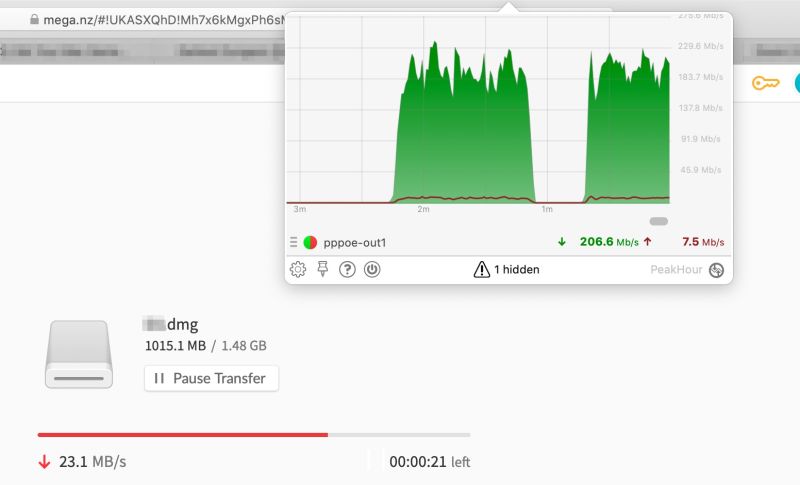
Hi, I just want to ask. Anyone else experiencing slow speed from direct download sites such as mega.nz and uptobox.com?
*
Not great speed but not too bad either.
user posted image

This post has been edited by soonwai: Feb 13 2019, 01:53 AM
soonwai
post Feb 13 2019, 01:59 AM


********
All Stars
11,458 posts

Joined: Oct 2007
From: KL


QUOTE(xjoshualaw29 @ Feb 12 2019, 06:03 PM)
Hello, My friend is using Unifi Turbo 300Mbps.

Router: TP-LINK Archer C7(V5)
BTU: Alcatel Lucent I240G(Silver)

Download speed: 228.10Mbps then can fluctuate to 35.25Mbps suddenly
Upload: 49.35Mbps then fluctuate to 35.25Mbps

Mainly wifi user.

Definitely line issue right?
*
Download what from where and how? Yesterday I had downloads which fluctuated from 800 to 400 to 500 to 200 Mbps.
user posted image
soonwai
post Feb 13 2019, 08:03 AM


********
All Stars
11,458 posts

Joined: Oct 2007
From: KL


QUOTE(xjoshualaw29 @ Feb 13 2019, 06:40 AM)
Yeah something like that. Turned off IPv6 for him. Adjusted his wifi settings yet it still has issues. So just helped him called TM to check the port and line which is to be fixed today. Wonder what's the issue as well.
*
That’s normal. Torrents tends to fluctuate a lot.
soonwai
post Feb 13 2019, 10:12 AM


********
All Stars
11,458 posts

Joined: Oct 2007
From: KL


QUOTE(lolzcalvin @ Feb 12 2019, 01:13 PM)
my home unifi has been down since 2nd of Feb, I've called the unifi hotline everyday since then, complained everyday but no one seems to be taking any action except for giving dozens of excuses e.g. unifi server down, some cards from the server are spoiled, then the cable connecting to our home is out of order, then all of the sudden say my area is down. my technical report has been "in progress" for 11 days now. what to do? The entire company seems to be operated by a bunch of lazy asses.
*
Has TM sent anyone to look at the cable going into your house? My neighbour's Unifi was down for 3 weeks when the installer for another house pulled out her optical cable from the FDP. It was apparently marked as Unused. No amount of remote troubleshooting in the first 2 weeks could find the cause of the problem. When TM sent a tech over, one look and they saw the problem.
soonwai
post Feb 13 2019, 03:26 PM


********
All Stars
11,458 posts

Joined: Oct 2007
From: KL


QUOTE(lolzcalvin @ Feb 13 2019, 01:01 PM)
like I said, nobody's taking any action at unified despite us complaining to unified call center daily, and been given dozens of different excuses. we just want a technician at our front door.
*
If you have a faulty 12V PSU, use that for your BTU, make a new report, that'll get them to come over.
soonwai
post Feb 13 2019, 09:19 PM


********
All Stars
11,458 posts

Joined: Oct 2007
From: KL


QUOTE(imcrazyz @ Feb 13 2019, 09:13 PM)
Can any TM staff assist me, please?
*
Sure, call 100. TM staff present in this forum would likely prefer to preserve their anonymity for the sake of their well-being.
soonwai
post Feb 13 2019, 10:10 PM


********
All Stars
11,458 posts

Joined: Oct 2007
From: KL


QUOTE(solarmystic @ Feb 13 2019, 09:58 PM)
Anyone else facing really high latency to US/UK right now?

Ping Plotter trace to WoW US Logon IP:-

[attachmentid=10181340]
*
Quite bad. Seeing high latency here too. 400-800ms to all US Amazon EC2 servers.

21 Pages  1 2 3 > » Top
Topic ClosedOptions
 

Change to:
| Lo-Fi Version
0.1759sec    0.55    7 queries    GZIP Disabled
Time is now: 10th December 2025 - 01:02 AM