Welcome Guest ( Log In | Register )

Bump Topic Topic Closed RSS Feed
316 Pages « < 56 57 58 59 60 > » Bottom

Outline · [ Standard ] · Linear+

Unifi Official TM UniFi High Speed Broadband Thread V37, READ 1ST PAGE FOR TURBO SPEED INFO!

views
     
TSSilentVampire
post Mar 17 2019, 09:36 PM

Networking Enthusiast
*******
Senior Member
5,714 posts

Joined: Mar 2007


QUOTE(cybercrew @ Mar 17 2019, 08:44 PM)
Guys , I'm having a weird situation with my connection. Having Unifi 800mbps connection,  using Asus rt 55uhp with my Huawei btu.both are placed on 1st floor.. Able to clock full speed on my desktop which is co , nnected via cat 7 cable ..my sharp Android TV  which supports AC wifi , able to clock 115 - 120 Mbps when perform speed test.  Netflix on my TV  is playing fine..it require around 10 seconds max to load the full quality.... 

My other streaming apps like hotstar and Kodi do buffers  a little ..

So I'm thinking if I should upgrade to a better router or 100 + Mbps is good enough for the streaming..

Need your input on this..

Btw I tested the same apps using my OnePlus 6t hotspot.. Android TV connected to OnePlus 6t hotspot , I noticed the performance is slight better
*
Please refer to 1st page, 1st post, green text, for list of recommended routers for your speed. It is actually enough for the streaming, but your router does not support 800Mbps over wifi. That doesn't really matter actually, as you will need a client that can support 4x4 MIMO. Up to you if you want to change.
cyclone2
post Mar 17 2019, 10:53 PM

Casual
***
Junior Member
427 posts

Joined: Mar 2010
QUOTE(soonwai @ Mar 17 2019, 06:55 PM)
What browser?
*
Microsoft Edge and Chrome.....both also not consistent even change different server.
blacktubi
post Mar 17 2019, 10:59 PM

-
Group Icon
Elite
8,409 posts

Joined: Jul 2008

QUOTE(cyclone2 @ Mar 17 2019, 05:54 PM)
I'm using Asus RT-AC5300, definitely tested before when upgraded to 800mbps it able to reach the speed. Now speed is not consistent, sometime reach 500mbps... sometime reach 600mbps... the max reached 700mbps when tested with different server.
*
RT-AC5300 definitely can handle 800Mbps without AiProtection enabled. Try monitor your router CPU and RAM usage when running the speedtest. Make sure you didn't disable the hardware acceleration accidentally.

Worst to worst, get TM to diagnose. Do note that they will argue with their 10% fluctuation rule.

QUOTE(cybercrew @ Mar 17 2019, 08:44 PM)
Guys , I'm having a weird situation with my connection. Having Unifi 800mbps connection,  using Asus rt 55uhp with my Huawei btu.both are placed on 1st floor.. Able to clock full speed on my desktop which is co , nnected via cat 7 cable ..my sharp Android TV  which supports AC wifi , able to clock 115 - 120 Mbps when perform speed test.  Netflix on my TV  is playing fine..it require around 10 seconds max to load the full quality.... 

My other streaming apps like hotstar and Kodi do buffers  a little ..

So I'm thinking if I should upgrade to a better router or 100 + Mbps is good enough for the streaming..

Need your input on this..

Btw I tested the same apps using my OnePlus 6t hotspot.. Android TV connected to OnePlus 6t hotspot , I noticed the performance is slight better
*
Your TV is just slow so bear with it. Try pulling an Ethernet cable see if there's any different.

Have you tried the beta firmware? Try it with a factory reset.
https://www.blacktubi.com/guide/performance...or-asus-router/
soonwai
post Mar 17 2019, 11:22 PM


********
All Stars
11,458 posts

Joined: Oct 2007
From: KL


QUOTE(cyclone2 @ Mar 17 2019, 10:53 PM)
Microsoft Edge and Chrome.....both also not consistent even change different server.
*
Both Chromium. Same as I experienced. Can you try Firefox or Waterfox?
nag
post Mar 17 2019, 11:32 PM

Casual
***
Junior Member
336 posts

Joined: Jul 2010
From: Changlun, Kedah
QUOTE(blacktubi @ Mar 17 2019, 10:59 PM)
What is '10% fluctuation rule' ?

cyclone2
post Mar 18 2019, 12:07 AM

Casual
***
Junior Member
427 posts

Joined: Mar 2010
QUOTE(soonwai @ Mar 17 2019, 11:22 PM)
Both Chromium. Same as I experienced. Can you try Firefox or Waterfox?
*
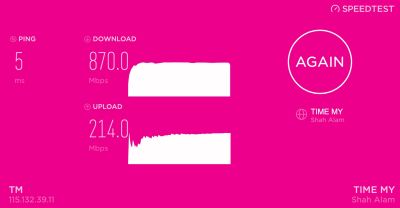
If using firefox, the auto select (Starhub SG), it able to 800mbps for download and 170mbps for upload.

I also try change server in chrome and Edge, when tested with Extreme Broadband server, only can get above 800mbps download and 200mbps for upload consistently. Even try starhub in chrome and Edge speedtest only about 550mbps

The funniest is the TM speedtest itself, I can only reach 500Mbps download and upload 200Mbps for all browsers.... bangwall.gif bangwall.gif

So confusing. rclxub.gif rclxub.gif ... tomorrow will check with TM the status.
cyclone2
post Mar 18 2019, 12:10 AM

Casual
***
Junior Member
427 posts

Joined: Mar 2010
QUOTE(blacktubi @ Mar 17 2019, 10:59 PM)
RT-AC5300 definitely can handle 800Mbps without AiProtection enabled. Try monitor your router CPU and RAM usage when running the speedtest. Make sure you didn't disable the hardware acceleration accidentally.

Worst to worst, get TM to diagnose. Do note that they will argue with their 10% fluctuation rule.
Your TV is just slow so bear with it. Try pulling an Ethernet cable see if there's any different.

Have you tried the beta firmware? Try it with a factory reset.
https://www.blacktubi.com/guide/performance...or-asus-router/
*
I did using AiProtection since start using this router. when tested the speed back in Jan after line got upgraded, the speed quite consistent. So far the setting is remain same as Jan.

I'm using direct cable to the router port, same issue. doh.gif

I didn't try beta firmware, see this weekend I got time to do it o not...

Anyway, I had open a case with TM, as I mentioned to them, TM speedtest show me 500Mbps speed only bangwall.gif bangwall.gif...
keropi88
post Mar 18 2019, 12:10 AM

Getting Started
**
Junior Member
292 posts

Joined: Nov 2007


QUOTE(SilentVampire @ Mar 16 2019, 07:30 PM)
Why did you let him change the router to the D-Link router? It is worse than the C9 that you have. Anyway, the 433Mbps is just a theoretical maximum, and you won't ever get that speed. Are you connected to the 2.4GHz or 5GHz? I suggest you read the green text on 1st page, 1st post, to educate yourself in home networking basics.
*
hi there , thanks for the reply. he came my house check check and say my C9 got problem cant give full speed, so he changed to UNIFI router. and since the UNIFI DLINK router is giving out 100mbps exact same to my subscription , i didnt bother to change it back to C9. i was thinking about it actually, to try and change it back to C9 coz im very my C9 is a better router than UNIFI's.


i am connected to the 5ghz, in fact i disabled the 2.4 ghz band just to make sure i only able to connect to the faster speed bandwidth.

keropi88
post Mar 18 2019, 12:15 AM

Getting Started
**
Junior Member
292 posts

Joined: Nov 2007


QUOTE(taqu @ Mar 16 2019, 10:04 PM)
Maybe your PC's Wifi needs latest driver. Can you check whether "Throughput Booster" is enabled?

https://www.google.com/amp/s/www.digitalcit...l-network-cards
*
hi there, thanks for the reply.

yeah i checked it and it was disabled, enabled it and it runs slightly faster , but still less than 50mbps ...
fantasy1989
post Mar 18 2019, 01:22 AM

Look at all my stars!!
*******
Senior Member
4,706 posts

Joined: May 2008


QUOTE(keropi88 @ Mar 18 2019, 12:15 AM)
hi there, thanks for the reply.

yeah i checked it and it was disabled, enabled it and it runs slightly faster , but still less than 50mbps ...
*
2.4ghz or 5ghz wifi hotspot connected?

what is the model of your PC wifi adapter?
soonwai
post Mar 18 2019, 03:42 AM


********
All Stars
11,458 posts

Joined: Oct 2007
From: KL


QUOTE(cyclone2 @ Mar 18 2019, 12:07 AM)
If using firefox, the auto select (Starhub SG), it able to 800mbps for download and 170mbps for upload.

I also try change server in chrome and Edge, when tested with Extreme Broadband server, only can get above 800mbps download and 200mbps for upload consistently. Even try starhub in chrome and Edge speedtest only about 550mbps

The funniest is the TM speedtest itself, I can only reach 500Mbps download and upload 200Mbps for all browsers.... bangwall.gif  bangwall.gif

So confusing. rclxub.gif  rclxub.gif ... tomorrow will check with TM the status.
*
Yeah it's weird. First encountered this in Jan
user posted image
https://forum.lowyat.net/index.php?showtopi...post&p=91536311
https://forum.lowyat.net/index.php?showtopi...post&p=91440635

Nowadays I use OVH SG or TIME. These 2 are quite consistent for me. Previously speedtest.tm.com.my was quite good too but I guess maybe their servers are overloaded or misconfigured.

user posted image

user posted image

This post has been edited by soonwai: Mar 18 2019, 03:46 AM
pandamerah
post Mar 18 2019, 07:25 AM

Getting Started
**
Junior Member
54 posts

Joined: Aug 2009


QUOTE(cyclone2 @ Mar 18 2019, 12:07 AM)
If using firefox, the auto select (Starhub SG), it able to 800mbps for download and 170mbps for upload.
QUOTE(soonwai @ Mar 18 2019, 03:42 AM)
Yeah it's weird. First encountered this in Jan
Looking in the dev tool, it seems firefox is using websocket, while chrome is using xhr.
Maybe the protocol difference might affect the result.
Websocket is more efficient i think hmm.gif

firefox:
user posted image

chrome:
user posted image

This post has been edited by pandamerah: Mar 18 2019, 07:36 AM
TSSilentVampire
post Mar 18 2019, 07:46 AM

Networking Enthusiast
*******
Senior Member
5,714 posts

Joined: Mar 2007


QUOTE(keropi88 @ Mar 18 2019, 12:10 AM)
hi there , thanks for the reply.  he came my house check check and say my C9 got problem cant give full speed, so he changed to UNIFI router. and since the UNIFI DLINK router is giving out 100mbps exact same to my subscription , i didnt bother to change it back to C9. i was thinking about it actually, to try and change it back to C9 coz im very my C9 is a better router than UNIFI's.
i am connected to the 5ghz, in fact i disabled the 2.4 ghz band just to make sure i only able to connect to the faster speed bandwidth.
*
The C9 is definitely better. Try updating the C9 firmware if possible, and see if that helps with getting full speed, even on 5GHz. Go to the official TP-Link product page here: https://www.tp-link.com/my/download/Archer-C9.html

Remember to check the router version and get the correct firmware for your router's version.
achong09
post Mar 18 2019, 10:28 AM

Regular
******
Senior Member
1,274 posts

Joined: Nov 2016
hi all,

recently my unifi just upgraded to turboed 500Mbps however still find that its slow. using tm unifi router Archer C1200.... all the while using their router no issue, after upgrade to turbo find out that its even slower than before upgrade. Also when call them to come out to troubleshoot, they charge RM53 just to step into my home and check the modem and 5 mins job but still no difference.. .wah lau....
AVFAN
post Mar 18 2019, 10:46 AM

20k VIP Club
*********
All Stars
24,454 posts

Joined: Nov 2010
QUOTE(achong09 @ Mar 18 2019, 10:28 AM)
hi all,

recently my unifi just upgraded to turboed 500Mbps however still find that its slow. using tm unifi router Archer C1200.... all the while using their router no issue, after upgrade to turbo find out that its even slower than before upgrade. Also when call them to come out to troubleshoot, they charge RM53 just to step into my home and check the modem and 5 mins job but still no difference.. .wah lau....
*
so, they changed nothing in the end?

u got charged most likely becos technician came n tested with their own laptop with lan cable, got 500mbps.
guess they showed u the result, right?
so, they conclude it is not their equipment problem.
when u called them to come, u were likely told beforehand u will be charged if there is no problem with TM equipment.

many users are not aware that the promised speed is only for ethernet/cable, not wifi.
wifi, it depends a lot on what device(s) u use... older handphones, pcs, etc cannot get >300.

This post has been edited by AVFAN: Mar 18 2019, 10:49 AM
cyclone2
post Mar 18 2019, 03:58 PM

Casual
***
Junior Member
427 posts

Joined: Mar 2010
QUOTE(soonwai @ Mar 18 2019, 03:42 AM)
Yeah it's weird. First encountered this in Jan
user posted image
https://forum.lowyat.net/index.php?showtopi...post&p=91536311
https://forum.lowyat.net/index.php?showtopi...post&p=91440635

Nowadays I use OVH SG or TIME. These 2 are quite consistent for me. Previously speedtest.tm.com.my was quite good too but I guess maybe their servers are overloaded or misconfigured.

user posted image

user posted image
*
TM Technician called me, already made appointment with them tomorrow morning will come over.

Will update the status tomorrow.
TSSilentVampire
post Mar 18 2019, 04:29 PM

Networking Enthusiast
*******
Senior Member
5,714 posts

Joined: Mar 2007


QUOTE(achong09 @ Mar 18 2019, 10:28 AM)
hi all,

recently my unifi just upgraded to turboed 500Mbps however still find that its slow. using tm unifi router Archer C1200.... all the while using their router no issue, after upgrade to turbo find out that its even slower than before upgrade. Also when call them to come out to troubleshoot, they charge RM53 just to step into my home and check the modem and 5 mins job but still no difference.. .wah lau....
*
That router can't support 500Mbps over wifi. It can only support it via wired connection, with RJ45 Cat 5e and above. I suggest referring to 1st page, 1st post, green text, for a quick lesson in home networking, and recommendations for a good router for your speed.
soonwai
post Mar 18 2019, 06:12 PM


********
All Stars
11,458 posts

Joined: Oct 2007
From: KL


QUOTE(cyclone2 @ Mar 18 2019, 03:58 PM)
TM Technician called me, already made appointment with them tomorrow morning will come over.

Will update the status tomorrow.
*
Seriously? Just because you can't get full speed to speediest.tm.com.my with Chrome? TM so dedicated. They should be checking their server instead. Make sure you don't get charged for their visit.

This post has been edited by soonwai: Mar 18 2019, 06:15 PM
prokiller1199
post Mar 18 2019, 07:24 PM

Hi there.
*****
Senior Member
966 posts

Joined: Apr 2016


Anyone experience TM gave dlink dir-842 can't get subscribed speed via ethernet? I'm connecting to laptop showing 1gbps link speed but maximum speed via speedtest is 80mbps. Modem is gigabit already.
taqu
post Mar 18 2019, 09:48 PM

Enthusiast
*****
Junior Member
864 posts

Joined: May 2005
QUOTE(keropi88 @ Mar 18 2019, 12:15 AM)
hi there, thanks for the reply.

yeah i checked it and it was disabled, enabled it and it runs slightly faster , but still less than 50mbps ...
*
I suppose you're connected to 5 GHz. If all else still fails, then either that Wifi card is not good or the motherboard/PC antennas are small. Perhaps you can try other Wifi external adapter.

316 Pages « < 56 57 58 59 60 > » Top
Topic ClosedOptions
 

Change to:
| Lo-Fi Version
0.0155sec    0.18    6 queries    GZIP Disabled
Time is now: 8th December 2025 - 11:08 AM