Outline ·
[ Standard ] ·
Linear+
Home Networking ASUS Malaysia Networking User & Technical Support, Managed by ASUS Malaysia Representative
|
virtua_listener
|
  Nov 7 2018, 11:41 AM Nov 7 2018, 11:41 AM
|
New Member


|
hi admin...
I'm using router Asus RT-AC66U, performance ok but now 1 of the LAN port got a prob. If
I plug in a cable, it still detects the connection but without any IPs (try both DHCP n Static). I found in youtube, there's a lot of LAN port probs when using Asus router - similar like this. Do I need to claim a warranty or etc?
This post has been edited by virtua_listener: Nov 7 2018, 11:43 AM
|
|
|
|
|
|
strafez
|
Nov 7 2018, 12:01 PM
|
Getting Started
|
QUOTE(ASUSmy @ Nov 7 2018, 10:16 AM) Hi strafez, Please double check the UNIFI account user name and password are correct. Do a factory reset and redo the setup. And try go to the WAN->Internet Connection-> MAC Address click on the MAC Clone button then apply. If the problem still persist, please PM me your system log and setting file to me. Thank you Hi, Thank you very much, will try this weekend. |
|
|
|
|
TSASUSmy
|
Nov 7 2018, 02:06 PM
|
|
|
QUOTE(virtua_listener @ Nov 7 2018, 11:41 AM) hi admin... I'm using router Asus RT-AC66U, performance ok but now 1 of the LAN port got a prob. If I plug in a cable, it still detects the connection but without any IPs (try both DHCP n Static). I found in youtube, there's a lot of LAN port probs when using Asus router - similar like this. Do I need to claim a warranty or etc? Hi virtua_listener, May I know what is your Internet package? And which LAN port are you plugged in? If UNIFI Home, please try LAN port 1 to 3 as LAN port 4 are reserved for HyppTV. If you didn't use HyppTV, please change the ISP Profile to UNIFI Business. Thank you This post has been edited by ASUSmy: Nov 7 2018, 02:07 PM |
|
|
|
|
|
AVFAN
|
Nov 7 2018, 04:14 PM
|
|
|
QUOTE(ASUSmy @ Nov 7 2018, 10:49 AM) RT-AC55UHP, RT-AC58U and the RT-AC1300UHP too. Thank you alright, good to know. just fyi, i am now not so sure if the rtac1300uhp can actually do 800mbps! becos i now think the device i used to test was rated giga but looks like it maxed out at 650mbps. the unifi guy came to test with his laptop and got 830 two unifi stock routers. didn't test with the asus, can't say. a question... if i use the rtac1300uhp as a repeater 5ghz, how much better can i expect it to do than the rtn12hp_b1 using dlink 842 as main router 800mbps? This post has been edited by AVFAN: Nov 7 2018, 04:16 PM |
|
|
|
|
|
TSASUSmy
|
Nov 7 2018, 05:03 PM
|
|
|
QUOTE(AVFAN @ Nov 7 2018, 04:14 PM) alright, good to know. just fyi, i am now not so sure if the rtac1300uhp can actually do 800mbps! becos i now think the device i used to test was rated giga but looks like it maxed out at 650mbps. the unifi guy came to test with his laptop and got 830 two unifi stock routers. didn't test with the asus, can't say. a question... if i use the rtac1300uhp as a repeater 5ghz, how much better can i expect it to do than the rtn12hp_b1 using dlink 842 as main router 800mbps? Hi AVFAN, You can use the RT-AC58U from the link below, it is compatible with RT-AC1300UHP. https://www.asuswebstorage.com/navigate/s/0...CE9F70FD61A392YRepeater using 5GHz is better that the RT-N12HP B1 in term of speed, in term of range, 2.4GHz are always better. Thank you |
|
|
|
|
|
Hutchy
|
Nov 7 2018, 06:55 PM
|
New Member
|
QUOTE(pl95077 @ Nov 5 2018, 01:54 PM) Luckily still can find the beta FW of RT-AC55UHP from previous shared, please download and upgrade from below link: https://www.asuswebstorage.com/navigate/s/B...8A1EEFE35D1B98YThanks buddy, i think this firmware did the trick, now i am able to achieve 500+ Mbps and 100Mbs+ DL/UL using a CAT6 LAN cable. my wifi speeds are 2.4 Ghz - 90/45 DL/UL 5Ghz - 320+/102 DL/UL aren't these reasonable speeds? Thanks again for the firmware:D This post has been edited by Hutchy: Nov 7 2018, 06:58 PM |
|
|
|
|
|
hghg.hg
|
Nov 7 2018, 07:19 PM
|
New Member
|
QUOTE(ASUSmy @ Nov 7 2018, 10:48 AM) Hi hghg.hg, The beta firmware are for the LAN connection speedtest that cannot reach 800Mbps. May I know what is the LAN speed that you get? And what device that you used to test the 5GHz speed. Thank you Hi ASUSmy, I just tested the lan speed it was just over 120mbps with cat5e. Tested 5GHz with huawei mate10 smartphone. Will it due to config issue or asus will have a newer beta firmware? Btw, i found that the speed on 5ghz deteriorate now with just 220mbps. Just reboot the router yesterday. |
|
|
|
|
|
AVFAN
|
Nov 7 2018, 10:27 PM
|
|
|
QUOTE(ASUSmy @ Nov 7 2018, 05:03 PM) Hi AVFAN, You can use the RT-AC58U from the link below, it is compatible with RT-AC1300UHP. https://www.asuswebstorage.com/navigate/s/0...CE9F70FD61A392YRepeater using 5GHz is better that the RT-N12HP B1 in term of speed, in term of range, 2.4GHz are always better. Thank you thanks for response. i was able to use set 12hp as repeater when using 1300uhp as main. now... how do i set 1300uhp as repeater if i use dlink dir842 as main? one is 192.168.0.1, the other 192.168.1.1. can't do other way round as this 842.. looks like it doesn't have AP/repeater mode. |
|
|
|
|
|
voncrane
|
Nov 7 2018, 11:16 PM
|
|
|
QUOTE(AVFAN @ Nov 7 2018, 10:27 PM) thanks for response. i was able to use set 12hp as repeater when using 1300uhp as main. now... how do i set 1300uhp as repeater if i use dlink dir842 as main? one is 192.168.0.1, the other 192.168.1.1. can't do other way round as this 842.. looks like it doesn't have AP/repeater mode. Taken from Blacktubi's review page.. 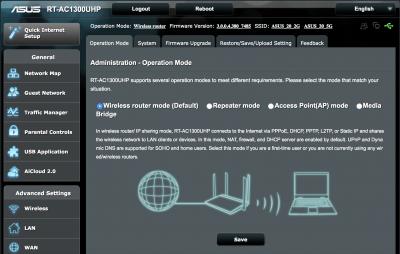 This post has been edited by voncrane: Nov 7 2018, 11:17 PM
 |
|
|
|
|
|
AVFAN
|
Nov 7 2018, 11:20 PM
|
|
|
QUOTE(voncrane @ Nov 7 2018, 11:16 PM) Taken from Blacktubi's review page..
question is how to get to that page. i.e. how to connect this asus to dlink network, use pc to do settiings? |
|
|
|
|
|
voncrane
|
Nov 7 2018, 11:29 PM
|
|
|
QUOTE(AVFAN @ Nov 7 2018, 11:20 PM) question is how to get to that page. i.e. how to connect this asus to dlink network, use pc to do settiings? Connect Asus's WAN to Dlink's LAN port.. Using a PC (ideally..mobile browser also can), Enter UI page in the router. Under Advanced Settings, Click Administration -> Operation Mode.. This post has been edited by voncrane: Nov 7 2018, 11:30 PM |
|
|
|
|
|
AVFAN
|
Nov 7 2018, 11:35 PM
|
|
|
QUOTE(voncrane @ Nov 7 2018, 11:29 PM) Connect Asus's WAN to Dlink's LAN port.. Using a PC (ideally..mobile browser also can), Enter UI page in the router. Under Advanced Settings, Click Administration -> Operation Mode.. how to access asus UI page? 192.168.1.1? |
|
|
|
|
|
SilentVampire
|
Nov 7 2018, 11:38 PM
|
|
|
QUOTE(AVFAN @ Nov 7 2018, 11:35 PM) how to access asus UI page? 192.168.1.1? Nope, use a LAN analyzer to see what would be the IP of the router, and access it via the IP. |
|
|
|
|
|
blacktubi
|
Nov 7 2018, 11:40 PM
|
-

|
QUOTE(AVFAN @ Nov 7 2018, 11:35 PM) how to access asus UI page? 192.168.1.1? Download Fing from your desired app store, it will tell you the IP of the Asus router. May need some trial and error. |
|
|
|
|
|
AVFAN
|
Nov 7 2018, 11:45 PM
|
|
|
QUOTE(SilentVampire @ Nov 7 2018, 11:38 PM) Nope, use a LAN analyzer to see what would be the IP of the router, and access it via the IP. QUOTE(blacktubi @ Nov 7 2018, 11:40 PM) Download Fing from your desired app store, it will tell you the IP of the Asus router. May need some trial and error. ok, will try that, thanks. a bit more work that the last time did asus to asus... |
|
|
|
|
|
AVFAN
|
Nov 8 2018, 12:50 AM
|
|
|
QUOTE(blacktubi @ Nov 7 2018, 11:40 PM) Download Fing from your desired app store, it will tell you the IP of the Asus router. May need some trial and error. plugged asus WAN into Dlink LAN. found the IP by just getting into Dlink page, clients. but when i tried to access (via PC wifi) the asus with the ip, it returns an error... "refused to connect" same result for both asus 1300uhp and 12hp. used chrome, ie. what may be incorrectly done? |
|
|
|
|
|
pl95077
|
Nov 8 2018, 07:56 AM
|
Getting Started
|
If your package is 500Mbps, it consider GOOD. what wifi client you are using? QUOTE(Hutchy @ Nov 7 2018, 07:55 PM) Thanks buddy, i think this firmware did the trick, now i am able to achieve 500+ Mbps and 100Mbs+ DL/UL using a CAT6 LAN cable. my wifi speeds are 2.4 Ghz - 90/45 DL/UL 5Ghz - 320+/102 DL/UL aren't these reasonable speeds? Thanks again for the firmware:D |
|
|
|
|
|
blacktubi
|
Nov 8 2018, 11:37 AM
|
-
|
QUOTE(AVFAN @ Nov 8 2018, 12:50 AM) plugged asus WAN into Dlink LAN. found the IP by just getting into Dlink page, clients. but when i tried to access (via PC wifi) the asus with the ip, it returns an error... "refused to connect" same result for both asus 1300uhp and 12hp. used chrome, ie. what may be incorrectly done? Enable this in settings. Attached thumbnail(s)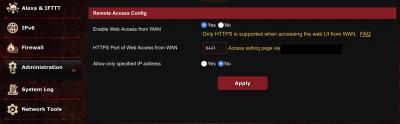
|
|
|
|
|
|
TSASUSmy
|
Nov 8 2018, 11:38 AM
|
|
|
QUOTE(hghg.hg @ Nov 7 2018, 07:19 PM) Hi ASUSmy, I just tested the lan speed it was just over 120mbps with cat5e. Tested 5GHz with huawei mate10 smartphone. Will it due to config issue or asus will have a newer beta firmware? Btw, i found that the speed on 5ghz deteriorate now with just 220mbps. Just reboot the router yesterday. Hi hghg.hg, WiFi speed should be no problem, do you have other device beside the Mate 10? The 2.4GHz is normal as it is N 300Mbps only. And the LAN should be able to get 300Mbps. Can you do a factory reset on the router and test again? Thank you |
|
|
|
|
|
ben3003
|
Nov 8 2018, 01:53 PM
|
|
|
is asus usb-ac68 a good buy? i think can get at taobao around rm200+- my ac55 can only reach max 100Mbps, my router is ac68u.. at least my iphone can go 300-400mbps at same location
|
|
|
|
|



 Quote
Quote


 0.0263sec
 0.65
0.65
 6 queries
 GZIP Disabled