

But then using tm speedo meter and speedtest.net only can get 500-600mbps download....
Already made a report to TM.....
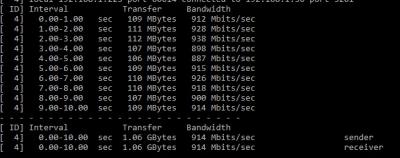
Iperf3 test result
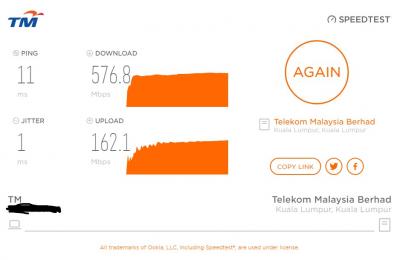
TM speedtest
This post has been edited by cyclone2: Mar 17 2019, 12:16 PM
Unifi Official TM UniFi High Speed Broadband Thread V37, READ 1ST PAGE FOR TURBO SPEED INFO!
|
|
 Mar 17 2019, 12:16 PM Mar 17 2019, 12:16 PM
Return to original view | IPv6 | Post
#1
|
 
Junior Member
427 posts Joined: Mar 2010 
|
finally pulling a CAT6A cable yesterday from upstair to downstair. Tested the network speed using iperf3 managed to get closed to 1Gbps speed....
But then using tm speedo meter and speedtest.net only can get 500-600mbps download.... Already made a report to TM..... Iperf3 test result
TM speedtest
This post has been edited by cyclone2: Mar 17 2019, 12:16 PM |
|
|
|
|
|
Mar 17 2019, 05:52 PM
Return to original view | IPv6 | Post
#2
|
|
Junior Member
427 posts Joined: Mar 2010
|
QUOTE(soonwai @ Mar 17 2019, 12:44 PM) Try a different browser or a different server for speed tests. Tested different server and using windows 10 speedtest app as well, speed not consistent.... Anyway oredi reported to TM. wait them to feedback.... |
|
|
Mar 17 2019, 05:54 PM
Return to original view | IPv6 | Post
#3
|
|
Junior Member
427 posts Joined: Mar 2010
|
QUOTE(blacktubi @ Mar 17 2019, 03:32 PM) Layman explanation ahead. iPhone X Wireless is rater at 867Mbps while your MSI is rated at 433Mbps. The WiFi chipset on your MSI is pretty old as well. I'm using Asus RT-AC5300, definitely tested before when upgraded to 800mbps it able to reach the speed. Now speed is not consistent, sometime reach 500mbps... sometime reach 600mbps... the max reached 700mbps when tested with different server.Considering similar level of signal degradation, it explain why your iPhone X double the speed of your MSI motherboard. Consider getting a new PCIE wireless adapter. Get the TP-Link Archer T4E, affordable and coming out soon.  What router you use? Having Gigabit LAN throughput does not mean the chipset of the router is capable of Gigabit speed.  Try Extreme Broadband speedtest server, I find it to be the most consistent. |
|
|
Mar 17 2019, 10:53 PM
Return to original view | IPv6 | Post
#4
|
|
Junior Member
427 posts Joined: Mar 2010
|
QUOTE(soonwai @ Mar 17 2019, 06:55 PM) What browser? Microsoft Edge and Chrome.....both also not consistent even change different server. |
|
|
Mar 18 2019, 12:07 AM
Return to original view | IPv6 | Post
#5
|
|
Junior Member
427 posts Joined: Mar 2010
|
QUOTE(soonwai @ Mar 17 2019, 11:22 PM) Both Chromium. Same as I experienced. Can you try Firefox or Waterfox? If using firefox, the auto select (Starhub SG), it able to 800mbps for download and 170mbps for upload.I also try change server in chrome and Edge, when tested with Extreme Broadband server, only can get above 800mbps download and 200mbps for upload consistently. Even try starhub in chrome and Edge speedtest only about 550mbps The funniest is the TM speedtest itself, I can only reach 500Mbps download and upload 200Mbps for all browsers....  So confusing.  ... tomorrow will check with TM the status. ... tomorrow will check with TM the status. |
|
|
Mar 18 2019, 12:10 AM
Return to original view | IPv6 | Post
#6
|
|
Junior Member
427 posts Joined: Mar 2010
|
QUOTE(blacktubi @ Mar 17 2019, 10:59 PM) RT-AC5300 definitely can handle 800Mbps without AiProtection enabled. Try monitor your router CPU and RAM usage when running the speedtest. Make sure you didn't disable the hardware acceleration accidentally. I did using AiProtection since start using this router. when tested the speed back in Jan after line got upgraded, the speed quite consistent. So far the setting is remain same as Jan. Worst to worst, get TM to diagnose. Do note that they will argue with their 10% fluctuation rule. Your TV is just slow so bear with it. Try pulling an Ethernet cable see if there's any different. Have you tried the beta firmware? Try it with a factory reset. https://www.blacktubi.com/guide/performance...or-asus-router/ I'm using direct cable to the router port, same issue.  I didn't try beta firmware, see this weekend I got time to do it o not... Anyway, I had open a case with TM, as I mentioned to them, TM speedtest show me 500Mbps speed only ... |
|
|
|
|
|
Mar 18 2019, 03:58 PM
Return to original view | Post
#7
|
|
Junior Member
427 posts Joined: Mar 2010
|
QUOTE(soonwai @ Mar 18 2019, 03:42 AM) Yeah it's weird. First encountered this in Jan TM Technician called me, already made appointment with them tomorrow morning will come over. https://forum.lowyat.net/index.php?showtopi...post&p=91536311 https://forum.lowyat.net/index.php?showtopi...post&p=91440635 Nowadays I use OVH SG or TIME. These 2 are quite consistent for me. Previously speedtest.tm.com.my was quite good too but I guess maybe their servers are overloaded or misconfigured.  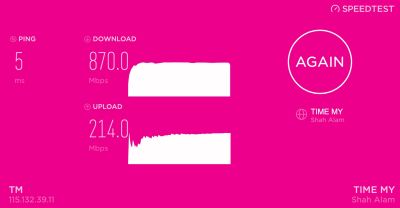 Will update the status tomorrow. |
|
|
Mar 19 2019, 12:37 PM
Return to original view | IPv6 | Post
#8
|
|
Junior Member
427 posts Joined: Mar 2010
|
QUOTE(soonwai @ Mar 18 2019, 06:12 PM) Seriously? Just because you can't get full speed to speediest.tm.com.my with Chrome? TM so dedicated. They should be checking their server instead. Make sure you don't get charged for their visit. The TM technician just came.... they just using Mozilla firefox and that's it......  able to reach the speed... able to reach the speed...they told me not to use chrome next time...  |
|
|
Mar 19 2019, 04:19 PM
Return to original view | Post
#9
|
|
Junior Member
427 posts Joined: Mar 2010
|
QUOTE(soonwai @ Mar 19 2019, 12:43 PM) Next time ask in forum first. owait. hmmm the technician didn't ask for onsite charges..... but I saw the form was mentioned about One off payment. Not sure what tat meant... Any charges for their visit? Yeah, they specifically mentioned that during my RYE100 RM10 upgrade. "Terminating Jumbo Pack or STD20 will remove discount." https://forum.lowyat.net/index.php?showtopi...&#entry87059012 Maybe I heard wrongly.  |
|
Topic ClosedOptions
|
| Change to: |  0.1931sec 0.1931sec
 0.31 0.31
 7 queries 7 queries
 GZIP Disabled GZIP Disabled
Time is now: 7th December 2025 - 12:47 PM |
 Quote
Quote