Welcome Guest ( Log In | Register )

Bump Topic Topic Closed RSS Feed

Outline · [ Standard ] · Linear+

Unifi Official TM UniFi High Speed Broadband Thread V37, READ 1ST PAGE FOR TURBO SPEED INFO!

views
     
keropi88
post Mar 16 2019, 06:53 PM

Getting Started
**
Junior Member
292 posts

Joined: Nov 2007


hi guys i need some help, i searched internet but i think i need the answers for my situation

my plan : UNIFI 100mbps
house : 3 storeys
PC location : 2nd floor

setup
Router at 1st floor : UNIFI D LINK Router (AC1200)
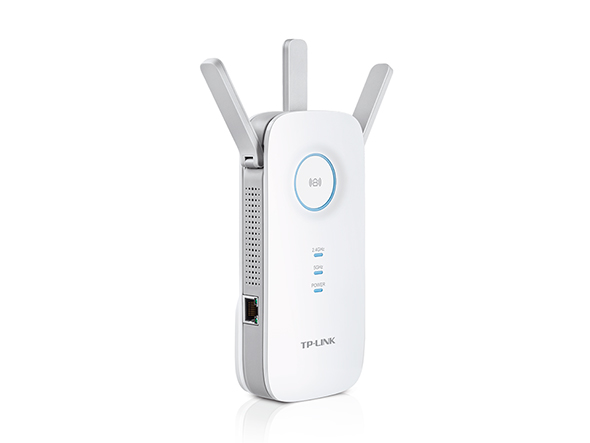
Extender at 2nd Floor : Tp Link RE450 (AC1750 )

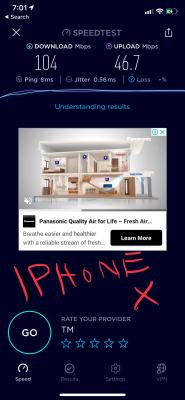
After asking UNIFI technician to come, he replaced my Tp LINK C9 router with UNIFI's own DLINK AC 1200 router. I used my iPhone X to connect and it shows 100mbps speedtest , exactly the speed i subscribed

In the second floor my room , i just build a new PC. its a MSI gaming motherboard that comes with a build in wireless AC receive capable of 433mbps. (Specification Page - Intel Wireless AC receiver model 9462 )

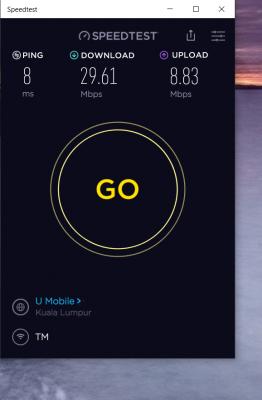
the problem is , my PC is connected to the TP LINK extender RE450 , i run speedtest i got like max 50mbps, average 35-40mbps speed

i sit in front of my PC, i use my phone connect to the same extender, i got close to 100 mbps speed, exactly the speed i subscirbed to

so whats the problem ? my build in receiver of motherboard capable of 433mbps but only gets 35mbps ...
initially the technician said the extender might have speed loss, but my phone connected to it no problem it still gives 90-100mbps


what do i need to do ?

thanks in advance
Attached Image

Attached Image

user posted image

user posted image

This post has been edited by keropi88: Mar 16 2019, 07:02 PM
keropi88
post Mar 18 2019, 12:10 AM

Getting Started
**
Junior Member
292 posts

Joined: Nov 2007


QUOTE(SilentVampire @ Mar 16 2019, 07:30 PM)
Why did you let him change the router to the D-Link router? It is worse than the C9 that you have. Anyway, the 433Mbps is just a theoretical maximum, and you won't ever get that speed. Are you connected to the 2.4GHz or 5GHz? I suggest you read the green text on 1st page, 1st post, to educate yourself in home networking basics.
*
hi there , thanks for the reply. he came my house check check and say my C9 got problem cant give full speed, so he changed to UNIFI router. and since the UNIFI DLINK router is giving out 100mbps exact same to my subscription , i didnt bother to change it back to C9. i was thinking about it actually, to try and change it back to C9 coz im very my C9 is a better router than UNIFI's.


i am connected to the 5ghz, in fact i disabled the 2.4 ghz band just to make sure i only able to connect to the faster speed bandwidth.

keropi88
post Mar 18 2019, 12:15 AM

Getting Started
**
Junior Member
292 posts

Joined: Nov 2007


QUOTE(taqu @ Mar 16 2019, 10:04 PM)
Maybe your PC's Wifi needs latest driver. Can you check whether "Throughput Booster" is enabled?

https://www.google.com/amp/s/www.digitalcit...l-network-cards
*
hi there, thanks for the reply.

yeah i checked it and it was disabled, enabled it and it runs slightly faster , but still less than 50mbps ...

Topic ClosedOptions
 

Change to:
| Lo-Fi Version
0.0326sec    0.50    7 queries    GZIP Disabled
Time is now: 8th December 2025 - 09:54 AM