Welcome Guest ( Log In | Register )

Bump Topic Topic Closed RSS Feed
453 Pages « < 357 358 359 360 361 > » Bottom

Outline · [ Standard ] · Linear+

Unifi Official TM UniFi High Speed Broadband Thread V32, Enjoy Your Speed Upgrade

views
     
TSsHawTY
post Jan 11 2018, 12:04 PM

Frequent Reporter
********
All Stars
14,909 posts

Joined: Jul 2005

QUOTE(AVFAN @ Jan 11 2018, 11:53 AM)
that's the price tag i thought i saw in one shop.

maybe i was mistaken, more like rm1.8k?
The highest price I ever saw for the RT-AC86U is RM1.5K
Whereas the lowest is RM1.3K (Original ASUS Malaysia unit)

For RM1.8K = 2K, I believe you're looking at RT-AC5300
biloxee
post Jan 11 2018, 12:07 PM

On my way
****
Senior Member
561 posts

Joined: Jul 2015
QUOTE(sHawTY @ Jan 11 2018, 12:04 PM)
The highest price I ever saw for the RT-AC86U is RM1.5K
Whereas the lowest is RM1.3K (Original ASUS Malaysia unit)

For RM1.8K = 2K, I believe you're looking at RT-AC5300
*
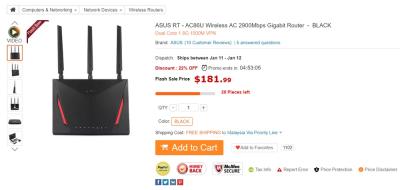
Buy online from China...USD182 ~RM750
Attached Image

This post has been edited by biloxee: Jan 11 2018, 12:09 PM
AVFAN
post Jan 11 2018, 12:08 PM

20k VIP Club
*********
All Stars
24,456 posts

Joined: Nov 2010
QUOTE(sHawTY @ Jan 11 2018, 12:04 PM)
The highest price I ever saw for the RT-AC86U is RM1.5K
Whereas the lowest is RM1.3K (Original ASUS Malaysia unit)

For RM1.8K = 2K, I believe you're looking at RT-AC5300
*
ar... it must be that ac5300... price tag was 2.2k in one shop!
may_day
post Jan 11 2018, 12:53 PM

Getting Started
**
Junior Member
92 posts

Joined: Nov 2009
QUOTE(biloxee @ Jan 11 2018, 12:07 PM)
Buy online from China...USD182 ~RM750
Attached Image
*
Trust? Can use it for here?

This is really a good price tongue.gif
biloxee
post Jan 11 2018, 12:58 PM

On my way
****
Senior Member
561 posts

Joined: Jul 2015
QUOTE(may_day @ Jan 11 2018, 12:53 PM)
Trust? Can use it for here?

This is really a good price  tongue.gif
*
Read...
https://forum.lowyat.net/topic/4399963/


TSsHawTY
post Jan 11 2018, 01:42 PM

Frequent Reporter
********
All Stars
14,909 posts

Joined: Jul 2005

QUOTE(biloxee @ Jan 11 2018, 12:07 PM)
Buy online from China...USD182 ~RM750
I already know about that, I didn't mention it because if you buy from Gearbest, there is no warranty from ASUS Malaysia
If anything you need to send back to China
biloxee
post Jan 11 2018, 01:56 PM

On my way
****
Senior Member
561 posts

Joined: Jul 2015
QUOTE(sHawTY @ Jan 11 2018, 01:42 PM)
I already know about that, I didn't mention it because if you buy from Gearbest, there is no warranty from ASUS Malaysia
If anything you need to send back to China
*
I have 7 old routers, 4 killed by lightning. No warranty.
The other 3 in cupboard or I used to use it as AP.

From my experience, I don't need local warranty.
And if I do, the savings will be more than enough to cover postage to China...
SilentVampire
post Jan 11 2018, 02:03 PM

Networking Enthusiast
*******
Senior Member
5,714 posts

Joined: Mar 2007


QUOTE(AVFAN @ Jan 11 2018, 11:53 AM)
to me, it is, done enough tests.

50mbps... easy, most can do, max out with 2.4ghz.

100mbps for me... need 5ghz; 2.4... max out 70-80.

i live in a place where my router can detect 5 neighbor users typically - front, back, sides.

can even get into them with their password!

but does not disrupt my wifi at all.

so, "interference" - walls or other users - is not a big problem, imo.
that's the price tag i thought i saw in one shop.

maybe i was mistaken, more like rm1.8k?
*
To be honest it does disrupt your WiFi, in the 2.4GHz band but not the 5GHz. You can actually still get 100Mbps but you need to increase your channel bandwidth lol, and in doing that impacting on your neighbor WiFi haha, but better to stick on 5GHz.

You must have seen the AC5300 or RT-AC88U for the price tag.

QUOTE(AVFAN @ Jan 11 2018, 12:08 PM)
ar... it must be that ac5300... price tag was 2.2k in one shop!
*
Yes, it is one of the best router from Asus, and the one that you use if you are serious about your networking lol.

QUOTE(sHawTY @ Jan 11 2018, 01:42 PM)
I already know about that, I didn't mention it because if you buy from Gearbest, there is  no warranty from ASUS Malaysia
If anything you need to send back to China
*
Deifinitely not. I wouldn’t get it, as there are many other local options.

QUOTE(biloxee @ Jan 11 2018, 01:56 PM)
I have 7 old routers, 4 killed by lightning. No warranty.
The other 3 in cupboard or I used to use it as AP.

From my experience, I don't need local warranty.
And if I do, the savings will be more than enough to cover postage to China...
*
To each their own. It might last you for a long time if you are lucky, and don’t need to claim for warranty.

Alpha_Tay
post Jan 11 2018, 05:39 PM

Beware The Spammer Star!
******
Senior Member
1,725 posts

Joined: Jan 2003
TM and singapore valve steam dota 2 server peering issue?‏ unifi fibre and streamyx ping from 10ms+- to 100ms+-

it just happen today to unifi fibre and streamyx. tested both. the ping is still normal at early morning today 10ms+- with unifi fibre, and now it is 100ms+- with unifi fibre.

server is valve steam dota 2 hosted at singapore

trace route result with unifi fibre, using PingPlotter latest version 5.5.7.3827

UPDATE: forgot to mention already email to TM and e-club malaysia about it

Target Name: sgp-1.valve.net
IP: 103.28.54.16
Date/Time: 1/11/2018 5:18:10 PM - 1/11/2018 5:28:10 PM

Hop Sent PL% Min Max Avg Host Name / [IP]
1 121 0 3.54 30.61 6.83 10.233.97.36 [10.233.97.36]
2 121 0 8.46 97.73 13.61 10.55.96.105 [10.55.96.105]
3 121 0 82.38 107.26 96.70 103.10.124.246 [103.10.124.246]
4 121 0 108.68 525.48 162.56 192.168.152.9 [192.168.152.9]
5 121 0 83.69 110.77 98.77 sgp-1.valve.net [103.28.54.16]


Target Name: sgp-2.valve.net
IP: 103.10.124.1
Date/Time: 1/11/2018 5:18:42 PM - 1/11/2018 5:28:42 PM

Hop Sent PL% Min Max Avg Host Name / [IP]
1 4 0 5.98 18.75 12.39 10.233.97.36 [10.233.97.36]
2 4 0 9.07 11.78 10.88 10.55.96.105 [10.55.96.105]
3 4 0 90.80 100.25 93.25 103.10.124.246 [103.10.124.246]
4 4 0 104.04 110.41 108.37 sgp-2.valve.net [103.10.124.1]


Target Name: 45.121.184.1
IP: 45.121.184.1
Date/Time: 1/11/2018 5:19:12 PM - 1/11/2018 5:29:12 PM

Hop Sent PL% Min Max Avg Host Name / [IP]
1 4 0 4.05 6.04 4.56 10.233.97.36 [10.233.97.36]
2 4 0 10.97 12.37 11.68 10.55.96.105 [10.55.96.105]
3 3 0 103.31 107.10 104.57 103-10-124-246.valve.net [103.10.124.246]
4 3 0 113.68 122.09 116.48 45.121.184.1 [45.121.184.1]


Target Name: 45.121.185.1
IP: 45.121.185.1
Date/Time: 1/11/2018 5:19:27 PM - 1/11/2018 5:29:27 PM

Hop Sent PL% Min Max Avg Host Name / [IP]
1 3 0 5.96 6.08 6.04 10.233.97.36 [10.233.97.36]
2 3 0 10.87 10.92 10.90 10.55.96.105 [10.55.96.105]
3 3 0 95.77 97.42 96.87 103-10-124-246.valve.net [103.10.124.246]
4 3 0 115.79 239.66 198.37 192.168.152.5 [192.168.152.5]
5 3 0 108.32 109.25 108.63 45.121.185.1 [45.121.185.1]


Target Name: 45.121.186.1
IP: 45.121.186.1
Date/Time: 1/11/2018 5:19:44 PM - 1/11/2018 5:29:44 PM

Hop Sent PL% Min Max Avg Host Name / [IP]
1 3 0 6.00 6.99 6.35 10.233.97.36 [10.233.97.36]
2 3 0 93.74 94.54 94.25 10.55.208.173 [10.55.208.173]
3 3 0 93.88 95.23 94.50 218.100.6.132 [218.100.6.132]
4 2 100 0 0 0 [-]
5 3 0 104.82 122.13 113.91 45.121.186.1 [45.121.186.1]


Target Name: 45.121.187.1
IP: 45.121.187.1
Date/Time: 1/11/2018 5:19:58 PM - 1/11/2018 5:29:58 PM

Hop Sent PL% Min Max Avg Host Name / [IP]
1 2 0 6.09 6.17 6.13 10.233.97.36 [10.233.97.36]
2 2 0 93.19 96.85 95.02 10.55.208.173 [10.55.208.173]
3 2 0 92.17 94.56 93.37 218.100.6.132 [218.100.6.132]
4 1 100 0 0 0 [-]
5 2 0 96.62 96.70 96.66 45.121.187.1 [45.121.187.1]

This post has been edited by Alpha_Tay: Jan 11 2018, 05:43 PM
AHGS14
post Jan 11 2018, 05:41 PM

Getting Started
**
Junior Member
84 posts

Joined: Aug 2014


QUOTE(AHGS14 @ Jan 4 2018, 01:06 PM)
Thanks for the tip.  I happen to have a spare router (left over from terminating my Sg internet contract).  I take it that if I just plug it into the 2nd modem port without further configuration work, this will not work?  Relocating the TP-Link router as an option sounds good.  If no other better option, I may just give it a try and hope that the coverage downstairs is not impacted too greatly.

Once again, thank you very much.
*
Further to this topic, while I only have 1 cat5e cable running from my store room where the modem is located to my living room TV cabinet where I install my TP-Link router, would deploying a pair of Cat5 cable splitter to create a "pair" out of the single Cat5 cable worked? 1 out of the pair of split cable to be used to connect the modem in store room to the TP-Link router in TV cabinet; the remaining split cable is used to loop back to the store room and connect to the upstairs Cat5e cable installed in the store room. Workable?
JustcallmeLarry
post Jan 11 2018, 06:28 PM

Regular
******
Senior Member
1,363 posts

Joined: Jan 2010


Hey guys wta how come i have this problem? I have already tried on 2 phones both will encounter same problem, the problem is some pages and website will get error "This page isn't working"???

I don't get his problem on my laptop. Only happens on my phones. I have unifi 30mbps plan. Need advice. Already restart everything.
voncrane
post Jan 11 2018, 09:27 PM

Noir et fier!
*******
Senior Member
7,120 posts

Joined: Oct 2011
From: Wakanda


QUOTE(AHGS14 @ Jan 11 2018, 05:41 PM)
Further to this topic, while I only have 1 cat5e cable running from my store room where the modem is located to my living room TV cabinet where I install my TP-Link router, would deploying a pair of Cat5 cable splitter to create a "pair" out of the single Cat5 cable worked? 1 out of the pair of split cable to be used to connect the modem in store room to the TP-Link router in TV cabinet; the remaining split cable is used to loop back to the store room and connect to the upstairs Cat5e cable installed in the store room.  Workable?
*
If I understand your pic correctly, using the splitter in that manner won't work cuz there has to be an uninterrupted connection first between the modem and the router. Then from the router you can split off connection from one or more of the LAN ports. Also, if using single phase electric grid or sockets in both rooms are.. You could use those powerline adapters. Though nothing beats a direct connection. And since you aren't shy about running cables around the house, I'd stick to that instead.

QUOTE(JustcallmeLarry @ Jan 11 2018, 06:28 PM)
Hey guys wta how come i have this problem? I have already tried on 2 phones both will encounter same problem, the problem is some pages and website will get error "This page isn't working"???

I don't get his problem on my laptop. Only happens on my phones. I have unifi 30mbps plan. Need advice. Already restart everything.
*
What websites? Can share the link here for us to check if accessible via Unifi.
G K Lai
post Jan 11 2018, 10:43 PM

Enthusiast
*****
Senior Member
839 posts

Joined: Aug 2009


QUOTE(JustcallmeLarry @ Jan 11 2018, 06:28 PM)
Hey guys wta how come i have this problem? I have already tried on 2 phones both will encounter same problem, the problem is some pages and website will get error "This page isn't working"???

I don't get his problem on my laptop. Only happens on my phones. I have unifi 30mbps plan. Need advice. Already restart everything.
*
I prepared someone might call me an idiot blush.gif , but you can try disable your IPv6 and visit the site again.
At least disable IPv6 solved this similar problem for me.

I also don't know why, and I will be very happy if someone could tell me the culprit. hmm.gif

My primary PC at home was having this issue, while my second PC (also at home, under same network) did not.
My phone and family members' phone did not have this issue.

Example: All browser cannot display this site (as an example) -> http://www.mi.com/my/ from this PC if I enable IPv6.
Other device have no problem with it.
Disabling IPv6 and the problem is gone immediately.

No harm give it a try. smile.gif
echoesian
post Jan 11 2018, 10:48 PM

Look at all my stars!!
*******
Senior Member
3,294 posts

Joined: Dec 2005


Why UniFi are so popular here despite Maxis is giving more value with cheaper price?

This post has been edited by echoesian: Jan 11 2018, 10:49 PM
JohnLai
post Jan 11 2018, 10:54 PM

Skeptical Cat
*******
Senior Member
3,669 posts

Joined: Apr 2006
QUOTE(echoesian @ Jan 11 2018, 10:48 PM)
Why UniFi are so popular here despite Maxis is giving more value with cheaper price?
*
Because Maxis coverage is small? sad.gif

I would opt for TIME if my place has coverage....but....life is not that all to be.......
SilentVampire
post Jan 11 2018, 10:57 PM

Networking Enthusiast
*******
Senior Member
5,714 posts

Joined: Mar 2007


QUOTE(echoesian @ Jan 11 2018, 10:48 PM)
Why UniFi are so popular here despite Maxis is giving more value with cheaper price?
*
Because Maxis is rather inflexible. First, they rely on Unifi infra so if there are any problems, you have to go through them and they have to go through Unifi, so the repair can be slightly delayed. Second, their VoIP is only configurable from their router, so if you want to use your own router, you have to either bridge their router to use VoIP, or get a router than can support VoiP.
Mazda9
post Jan 11 2018, 10:59 PM

On my way
****
Junior Member
535 posts

Joined: Mar 2009
QUOTE(echoesian @ Jan 11 2018, 10:48 PM)
Why UniFi are so popular here despite Maxis is giving more value with cheaper price?
*
Given the choice:-

1) Time fibre
2) Unifi
3) Maxis (TM Infra dependent)

My area has no time coverage as mine is landed property else Long time ago I would have said bye bye to TM.
Icehart
post Jan 11 2018, 11:03 PM

72.55.191.6
********
All Stars
14,899 posts

Joined: Apr 2005
From: Kuala Lumpur & Selangor


QUOTE(Mazda9 @ Jan 11 2018, 10:59 PM)
Given the choice:-

1) Time fibre
2) Unifi
3) Maxis (TM Infra dependent)

My area has no time coverage as mine is landed property else Long time ago I would have said bye bye to TM.
*
As a customer of both TIME and UniFi, I still prefer UniFi. laugh.gif
JohnLai
post Jan 11 2018, 11:16 PM

Skeptical Cat
*******
Senior Member
3,669 posts

Joined: Apr 2006
QUOTE(Icehart @ Jan 11 2018, 11:03 PM)
As a customer of both TIME and UniFi, I still prefer UniFi.  laugh.gif
*
O.o.....

I would like to know your reasons......
echoesian
post Jan 11 2018, 11:19 PM

Look at all my stars!!
*******
Senior Member
3,294 posts

Joined: Dec 2005


QUOTE(SilentVampire @ Jan 11 2018, 10:57 PM)
Because Maxis is rather inflexible. First, they rely on Unifi infra so if there are any problems, you have to go through them and they have to go through Unifi, so the repair can be slightly delayed. Second, their VoIP is only configurable from their router, so if you want to use your own router, you have to either bridge their router to use VoIP, or get a router than can support VoiP.
*
I thought UniFi calls also using VoIP?

453 Pages « < 357 358 359 360 361 > » Top
Topic ClosedOptions
 

Change to:
| Lo-Fi Version
0.0566sec    0.64    6 queries    GZIP Disabled
Time is now: 12th December 2025 - 10:28 AM