Welcome Guest ( Log In | Register )

Bump Topic Topic Closed RSS Feed
453 Pages « < 359 360 361 362 363 > » Bottom

Outline · [ Standard ] · Linear+

Unifi Official TM UniFi High Speed Broadband Thread V32, Enjoy Your Speed Upgrade

views
     
SilentVampire
post Jan 12 2018, 02:26 PM

Networking Enthusiast
*******
Senior Member
5,714 posts

Joined: Mar 2007


QUOTE(G K Lai @ Jan 12 2018, 02:21 PM)
I agreed as SilentVampire suggested, you can do it in router, just temporary, if no different, then you can re-enable it without any harm.
Hi voncrane, that's why I said this issue so strange.
I even tried uninstall security software from my PC.  laugh.gif
Don't get me wrong, I am not blaming IPv6, I am also curious to know why.  hmm.gif
Only happened in certain device, and I believed my particular PC have something wrong, and too painful to reformat my PC to start fresh.  tongue.gif
I know, only certain devices have this issue, I have spent a long and tedious time to figure this out.
Since I don't know the exact cause and since disabling my IPv6 works, so I just do it until I found out the root cause.  smile.gif
*
Some devices are not able to implement IPv6 correctly or no support for it, who knows. Anyway, IPv6 is still very early stages in Malaysia, so I wouldn’t worry about it.
voncrane
post Jan 12 2018, 02:52 PM

Noir et fier!
*******
Senior Member
7,120 posts

Joined: Oct 2011
From: Wakanda


QUOTE(JustcallmeLarry @ Jan 12 2018, 01:53 PM)
Sorry noob here, actually what is that ipv6 for? I google it but i just can't understand is it important or what?
To be exact it is 2 different phones a cheap samsung and a xiomi phone that will have this error. My laptop and my old iphone 5 do not have this problem loading sites...
No i did not install any antivirus as i just got this xiomi phone recently and just only install 2-3 apps. Already factory reset the phone but still same problem...
So what do i do now? Kinda frustrating can't make use of the 30mbps on my phone..
*
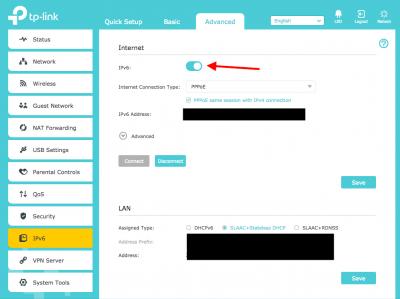
Yup, As suggested, try disabling ipv6 first.. reboot... See image for the C1200 router..
Attached Image

QUOTE(SilentVampire @ Jan 12 2018, 02:13 PM)
It could be IPv6 bro as it is not well implemented for some people and for others it seem to be fine. He did mentioned eventually, see below, that it is not only for one phone.
*
I see.. read before as just the phone.

QUOTE(G K Lai @ Jan 12 2018, 02:21 PM)
I agreed as SilentVampire suggested, you can do it in router, just temporary, if no different, then you can re-enable it without any harm.
Hi voncrane, that's why I said this issue so strange.
I even tried uninstall security software from my PC.  laugh.gif
Don't get me wrong, I am not blaming IPv6, I am also curious to know why.  hmm.gif
Only happened in certain device, and I believed my particular PC have something wrong, and too painful to reformat my PC to start fresh.  tongue.gif
I know, only certain devices have this issue, I have spent a long and tedious time to figure this out.
Since I don't know the exact cause and since disabling my IPv6 works, so I just do it until I found out the root cause.  smile.gif
*
Nah.. it's all good.. thumbup.gif
JustcallmeLarry
post Jan 12 2018, 03:44 PM

Regular
******
Senior Member
1,363 posts

Joined: Jan 2010


QUOTE(SilentVampire @ Jan 12 2018, 02:13 PM)
It could be IPv6 bro as it is not well implemented for some people and for others it seem to be fine. He did mentioned eventually, see below, that it is not only for one phone.
IPv6 is designed to replace IPv4, as IPv4 addresses have run out now and there isn’t enough to go around. So, we are starting to transition to IPv6, albeit slowly, but in Malaysia, the implementation hasn’t been smooth and it hasn’t been a standard thing for everyon. For some people, IPv6 works fine but for others, it breaks their connection. See here for a more detailed explanation: https://www.webopedia.com/DidYouKnow/Intern...difference.html. Just read there to learn more.

I told you already bro, disable IPv6 on your router. Loginto your router and find a place where there is a setting for IPv6. If it is disabled, then, it could be something else, but start there first.
*
QUOTE(G K Lai @ Jan 12 2018, 02:21 PM)
I agreed as SilentVampire suggested, you can do it in router, just temporary, if no different, then you can re-enable it without any harm.
Hi voncrane, that's why I said this issue so strange.
I even tried uninstall security software from my PC.  laugh.gif
Don't get me wrong, I am not blaming IPv6, I am also curious to know why.  hmm.gif
Only happened in certain device, and I believed my particular PC have something wrong, and too painful to reformat my PC to start fresh.  tongue.gif
I know, only certain devices have this issue, I have spent a long and tedious time to figure this out.
Since I don't know the exact cause and since disabling my IPv6 works, so I just do it until I found out the root cause.  smile.gif
*
QUOTE(voncrane @ Jan 12 2018, 02:52 PM)
Yup, As suggested, try disabling ipv6 first.. reboot... See image for the C1200 router..
Attached Image
I see.. read before as just the phone.
Nah.. it's all good..  thumbup.gif
*
Ok guys thanks a lot. Since so many here says it is bcs of IPv6 then i guess that is the problem. Just 1 more thing will this problem be fix soon with a update since you say it is bcs IPv6 is still new so have problems or will this be permanent?
lol bcs if i need to to disable it i would need to go out and buy a LAN cable to connect laptop to router..
JohnLai
post Jan 12 2018, 03:55 PM

Skeptical Cat
*******
Senior Member
3,669 posts

Joined: Apr 2006
QUOTE(JustcallmeLarry @ Jan 12 2018, 03:44 PM)
Ok guys thanks a lot. Since so many here says it is bcs of IPv6 then i guess that is the problem. Just 1 more thing will this problem be fix soon with a update since you say it is bcs IPv6 is still new so have problems or will this be permanent?
lol bcs if i need to to disable it i would need to go out and buy a LAN cable to connect laptop to router..
*
There are three sides. Permanent or temporary = it depends.

ISP side = IPv6 routing and address delegation issue.

Client side = router/client device with MTU issue (packet fragmentation, packet too large etc), phone OS with IPv6 problem (the legendary wake-lock, older android use SLAAC only), or OS/Firewall etc is blocking IGMPv6.

Server side = some servers misconfigure their IPv6 server, no route to host etc....
biloxee
post Jan 12 2018, 03:56 PM

On my way
****
Senior Member
561 posts

Joined: Jul 2015
QUOTE(JustcallmeLarry @ Jan 12 2018, 03:44 PM)

lol bcs if i need to to disable it i would need to go out and buy a LAN cable to connect laptop to router..
*
Why? Just access the router's web interface through your mobile...
Attached Image
voncrane
post Jan 12 2018, 03:57 PM

Noir et fier!
*******
Senior Member
7,120 posts

Joined: Oct 2011
From: Wakanda


QUOTE(JustcallmeLarry @ Jan 12 2018, 03:44 PM)
Ok guys thanks a lot. Since so many here says it is bcs of IPv6 then i guess that is the problem. Just 1 more thing will this problem be fix soon with a update since you say it is bcs IPv6 is still new so have problems or will this be permanent?
lol bcs if i need to to disable it i would need to go out and buy a LAN cable to connect laptop to router..
*
It's not a big issue at the moment.. Probably even for a couple years so up to TM & Co to implement properly.. So now it's not a permanent issue for the country. However, if it's due to the specific devices, then well...

No, you don't need a LAN cable to effect such change.. Can be done through wifi. Only time you'd need a LAN cable is to flash firmwares and perform initial setup.. It's recommended. Besides, if Hypptv is installed then, there must be a LAN cable at your place.
SilentVampire
post Jan 12 2018, 04:58 PM

Networking Enthusiast
*******
Senior Member
5,714 posts

Joined: Mar 2007


QUOTE(JustcallmeLarry @ Jan 12 2018, 03:44 PM)
Ok guys thanks a lot. Since so many here says it is bcs of IPv6 then i guess that is the problem. Just 1 more thing will this problem be fix soon with a update since you say it is bcs IPv6 is still new so have problems or will this be permanent?
lol bcs if i need to to disable it i would need to go out and buy a LAN cable to connect laptop to router..
*
See below for an excellent explanation from bro JohnLai. As other forumers have said, you don't need to buy a LAN cable to connect laptop to router and you can do it wirelessly.

QUOTE(JohnLai @ Jan 12 2018, 03:55 PM)
There are three sides. Permanent or temporary = it depends.

ISP side = IPv6 routing and address delegation issue.

Client side = router/client device with MTU issue (packet fragmentation, packet too large etc), phone OS with IPv6 problem (the legendary wake-lock, older android use SLAAC only), or OS/Firewall etc is blocking IGMPv6.

Server side = some servers misconfigure their IPv6 server, no route to host etc....
*
Great explanation bro. Will have to steal this to explain to some other newbies in the future lol rclxms.gif
kebeckham7
post Jan 13 2018, 09:39 AM

Regular
******
Senior Member
1,047 posts

Joined: Jun 2006
From: TerenGGanu Manchester


QUOTE(voncrane @ Jan 12 2018, 03:57 PM)
It's not a big issue at the moment.. Probably even for a couple years so up to TM & Co to implement properly.. So now it's not a permanent issue for the country. However, if it's due to the specific devices, then well...

No, you don't need a LAN cable to effect such change.. Can be done through wifi. Only time you'd need a LAN cable is to flash firmwares and perform initial setup.. It's recommended. Besides, if Hypptv is installed then, there must be a LAN cable at your place.
*
Lan needed during first time setup only right? or u can use wifi during first time setup?

soonwai
post Jan 13 2018, 09:53 AM


********
All Stars
11,458 posts

Joined: Oct 2007
From: KL


QUOTE(JohnLai @ Jan 12 2018, 03:55 PM)
...
Client side = router/client device with MTU issue (packet fragmentation, packet too large etc), phone OS with IPv6 problem (the legendary wake-lock, older android use SLAAC only), or OS/Firewall etc is blocking IGMPv6.
...
*
I'm sure it's just a typo and that you mean ICMPv6 right?
JohnLai
post Jan 13 2018, 11:10 AM

Skeptical Cat
*******
Senior Member
3,669 posts

Joined: Apr 2006
QUOTE(soonwai @ Jan 13 2018, 09:53 AM)
I'm sure it's just a typo and that you mean ICMPv6 right?
*
Indeed it was my typo, I shifted the blame to my autocorrect software. tongue.gif It is ICMPv6.

Some application firewall blocked incoming ICMPv6 and this results in loss of IPv6 connectivity.
Comodo Firewall is one of the culprit if one selects "Stealth Port".

Certain network switch also blocks ICMPv6 by default. My ex-company network switch was configured to block all type of ICMP protocol (v4 and v6).
kslian
post Jan 13 2018, 12:30 PM

Getting Started
**
Junior Member
80 posts

Joined: Jan 2008
anyone experiencing intermittent internet this morning? Damansara area. And some websites cannot be reached, including The Star and TM website. HyppTV ok.

Already reset a few times and still the same.
gsan
post Jan 13 2018, 02:20 PM

Electrical RF Engineer
*******
Senior Member
2,471 posts

Joined: Jan 2003

finally got my 30MBps unifi after long waiting time.... btw if there any premium ip such as 219 like streamyx era for unifi ?
vez
post Jan 13 2018, 02:45 PM

Look at all my stars!!
*******
Senior Member
4,622 posts

Joined: Mar 2007


QUOTE(gsan @ Jan 13 2018, 02:20 PM)
finally got my 30MBps unifi after long waiting time.... btw if there any premium ip such as 219 like streamyx era for unifi ?
*
dont think so, streamyx era should be 218 right?
but unifi i try get 175, all others seems same
i got 124/60 some others as well but mostly for my unifi i get 175/124/60

SilentVampire
post Jan 13 2018, 03:16 PM

Networking Enthusiast
*******
Senior Member
5,714 posts

Joined: Mar 2007


QUOTE(gsan @ Jan 13 2018, 02:20 PM)
finally got my 30MBps unifi after long waiting time.... btw if there any premium ip such as 219 like streamyx era for unifi ?
*
QUOTE(vez @ Jan 13 2018, 02:45 PM)
dont think so, streamyx era should be 218 right?
but unifi i try get 175, all others seems same
i got 124/60 some others as well but mostly for my unifi i get 175/124/60
*
No such thing as premium IP now. TM buy or at lease blocks of IP addresses, mostly 175, 124, and 60.
SteadyPana
post Jan 13 2018, 05:33 PM

Look at all my stars!!
*******
Senior Member
2,554 posts

Joined: Jun 2008
Why Unifi BLOCKED recruit.net ? cry.gif confused.gif

This post has been edited by SteadyPana: Jan 13 2018, 05:33 PM
SzeMeng76
post Jan 13 2018, 05:41 PM

Look at all my stars!!
*******
Senior Member
2,318 posts

Joined: Dec 2012
QUOTE(SteadyPana @ Jan 13 2018, 05:33 PM)
Why Unifi BLOCKED recruit.net ?  cry.gif  confused.gif
*
"http://malaysia.recruit.net"?
I can access.
gsan
post Jan 13 2018, 06:18 PM

Electrical RF Engineer
*******
Senior Member
2,471 posts

Joined: Jan 2003

QUOTE(vez @ Jan 13 2018, 02:45 PM)
dont think so, streamyx era should be 218 right?
but unifi i try get 175, all others seems same
i got 124/60 some others as well but mostly for my unifi i get 175/124/60
*
yaya, 218.208 or 219.92 ... today I tried few times, got 124/60/175 too
soonwai
post Jan 13 2018, 06:48 PM


********
All Stars
11,458 posts

Joined: Oct 2007
From: KL


QUOTE(SteadyPana @ Jan 13 2018, 05:33 PM)
Why Unifi BLOCKED recruit.net ?  cry.gif  confused.gif
*
OK here. 175.x.x.x, Google DNS.
user posted image
christina1
post Jan 13 2018, 07:45 PM

Never stop learning, because life never stops teaching.
*******
Senior Member
2,104 posts

Joined: Sep 2008
*Deleted *

This post has been edited by christina1: Jan 14 2018, 06:45 PM
pakmulau
post Jan 13 2018, 08:10 PM

On my way
****
Junior Member
589 posts

Joined: Mar 2016
QUOTE(christina1 @ Jan 13 2018, 07:45 PM)
Anyone facing issue with UNIFI...I'm not able to get full 100Mbps on desktop pc...Any idea...

Note 5 this is the results..  mad.gif
*
do you have any other desktop or laptop to test?

maybe the desktop itself not support up to 100Mbpas

453 Pages « < 359 360 361 362 363 > » Top
Topic ClosedOptions
 

Change to:
| Lo-Fi Version
0.0195sec    0.79    6 queries    GZIP Disabled
Time is now: 12th December 2025 - 12:09 PM