Welcome Guest ( Log In | Register )

Bump Topic Topic Closed RSS Feed
413 Pages « < 6 7 8 9 10 > » Bottom

Outline · [ Standard ] · Linear+

 Official TM UniFi High Speed Broadband Thread V39, READ 1ST PAGE FOR RELEVANT WIFI INFO

views
     
yongtjunkit
post Jan 9 2021, 09:35 PM

Look at all my stars!!
*******
Senior Member
2,516 posts

Joined: Mar 2016
QUOTE(Maxieos @ Jan 9 2021, 08:24 PM)
» Click to show Spoiler - click again to hide... «

heLL_bOy
I am also curious , how those agent still have the same promotion , maybe special privilege ?
nyunyu
Does submitting this form actually go though TM system ? IF not it'll be a waste and sending private info to other agent ?
I haven't proceed yet but there is no packages on it.

Now is Jan 2021 , totally over like 4 months.Not sure agent still will provide it ?

What is the different between agent and dealer on Unifi section ? So do you know any new incoming promotion ?
How does the bill looks like if applying the 30 trial promotion ?
*
I should make a correction to my original post,, I’m an agent as well(can only sign ppl up)

As for the 1st month bill, it would look something like this( depending on the day of installation)
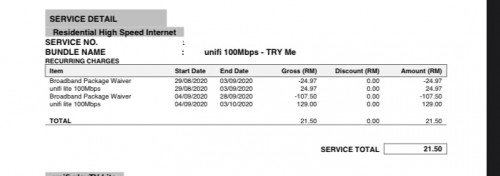
user posted image

For upcoming package wise, I don’t have any information about that

Well, the 30 day free trial promo was supposed to end on oct 31st but it got extended till Jan 31st


This post has been edited by yongtjunkit: Jan 9 2021, 09:45 PM
powerwoot
post Jan 9 2021, 09:36 PM

讨厌的 ubuntu
*******
Senior Member
2,930 posts

Joined: Jan 2007
From: Kolej Universiti Agrosains Malaysia, Melaka


I am having aneka pack together with my rm129 subscription. Asked them many times with CS if the aneka rm30 need to pay on top of my rm129. They said all included in rm129 as I am getting Extra Exclusive Promo. I guess the broadband price is only at rm99.
tungfunglaw
post Jan 10 2021, 12:24 AM

Getting Started
**
Junior Member
258 posts

Joined: Aug 2008


QUOTE(Maxieos @ Jan 9 2021, 08:24 PM)
The picture is correct ? the FTB to a BTU 15 meter ?
Does Unifi still provide FTB for houses ? I remember even FWS also cut cost.
The picture you upload looks old 2013.

Which one is correct ? What I mean at premise where the cable is
*
That's just an idea on how the installation will be done.

How to implement on your premise, need u yourself deal with tm directly.

Just apply for it, and see how it goes if you really need unifi.


tyja
post Jan 10 2021, 08:17 AM

-I Just Want To Share-
*****
Senior Member
913 posts

Joined: Dec 2008
From: Nusa Indah, Johor Bahru


My late father have an account with unifi, can it be transfer to my name without contract? As i want to retain all the details.
ahlong
post Jan 10 2021, 08:56 AM

not a debt collector
****
Junior Member
610 posts

Joined: Apr 2005
From: http://127.0.0.1:80/announce


QUOTE(tyja @ Jan 10 2021, 08:17 AM)
My late father have an account with unifi, can it be transfer to my name without contract? As i want to retain all the details.
*
I think u need to call 100 and ask them

Last time, my mothers house landline number under my late fathers name.. i request to change to my name and retain all the details and... it quite fussy steps (sop) from them.. they only can change the e-billing to my email since they implemented no fizikal bill last time..

Try ask first what document they want..
jcws87
post Jan 10 2021, 03:01 PM

Getting Started
**
Junior Member
218 posts

Joined: Aug 2020


QUOTE(tyja @ Jan 10 2021, 08:17 AM)
My late father have an account with unifi, can it be transfer to my name without contract? As i want to retain all the details.
*
QUOTE(ahlong @ Jan 10 2021, 08:56 AM)
I think u need to call 100 and ask them

Last time, my mothers house landline number under my late fathers name.. i request to change to my name and retain all the details and... it quite fussy steps (sop) from them.. they only can change the e-billing to my email since they implemented no fizikal bill last time..

Try ask first what document they want..
*
To share my experience, I went to TM Point to have it transfer (done it on Oct 2019). I just bring my dad's death certificate (not sure for other channel). On my 1st bill, TM charge me a RM10 (Caj Khas) and the remaining pro-rate. But the transfer I did was for the fixed phone line (didn't have Unifi that time).
nyunyu
post Jan 10 2021, 08:00 PM

His Royal Highness
******
Senior Member
1,393 posts

Joined: Aug 2006
From: Sungai Petani


QUOTE(tyja @ Jan 10 2021, 08:17 AM)
My late father have an account with unifi, can it be transfer to my name without contract? As i want to retain all the details.
*
Usually transferring an account will tie you up for another 24 months contract, did mine last year.
But, since you're a special case maybe you can walk in to TM and speak with an officer there.
Kelvynlim
post Jan 10 2021, 09:46 PM

Getting Started
**
Junior Member
166 posts

Joined: Sep 2009
Wonderful to finally on new thread.. congrates!

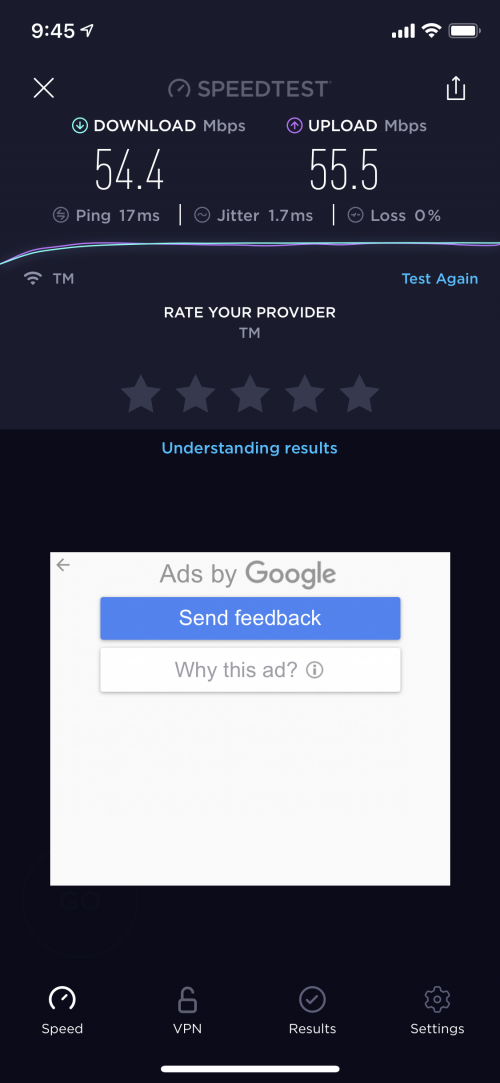
Not sure am I short change by TM, I am on 500 mbps and connected to 2.4 GHz. When I did the Speedtest on wifi and only got 50-55 download speed in the evening. The router was positioned on 1st floor and test was done on ground floor.

I am using ASUS RT AX3000.

Any advise. Sorry as this is another speed question

user posted image
yongtjunkit
post Jan 10 2021, 09:49 PM

Look at all my stars!!
*******
Senior Member
2,516 posts

Joined: Mar 2016
QUOTE(Kelvynlim @ Jan 10 2021, 09:46 PM)
Wonderful to finally on new thread.. congrates!

Not sure am I short change by TM, I am on 500 mbps and connected to 2.4 GHz. When I did the Speedtest on wifi and only got 50-55 download speed in the evening. The router was positioned on 1st floor and test was done on ground floor.

I am using ASUS RT AX3000.

Any advise. Sorry as this is another speed question

user posted image
*
That’s normal for 2.4 ghz, you must use 5ghz for the best WiFi performance, especially for high speed like 100mbps and faster
XeactorZ
post Jan 10 2021, 10:55 PM

♥ PandaDog ♥
*********
All Stars
31,607 posts

Joined: Aug 2010
QUOTE(Kelvynlim @ Jan 10 2021, 09:46 PM)
Wonderful to finally on new thread.. congrates!

Not sure am I short change by TM, I am on 500 mbps and connected to 2.4 GHz. When I did the Speedtest on wifi and only got 50-55 download speed in the evening. The router was positioned on 1st floor and test was done on ground floor.

I am using ASUS RT AX3000.

Any advise. Sorry as this is another speed question

user posted image
*
This is due to you connected to 2.4GHz
Please connect 5GHz one
go626201
post Jan 11 2021, 12:22 AM

Regular
******
Senior Member
1,882 posts

Joined: Sep 2017
QUOTE(Kelvynlim @ Jan 10 2021, 09:46 PM)
Wonderful to finally on new thread.. congrates!

Not sure am I short change by TM, I am on 500 mbps and connected to 2.4 GHz. When I did the Speedtest on wifi and only got 50-55 download speed in the evening. The router was positioned on 1st floor and test was done on ground floor.

I am using ASUS RT AX3000.

Any advise. Sorry as this is another speed question

user posted image
*
Check your android setting got something call wifi scanning or bluetooth scanning(should be in privacy setting),try disable it. And the speed for 2.4Ghz should be faster.
But better choice is just directly use 5Ghz and no more problem. (Setup Mesh Network then all good.)
sHawTY
post Jan 11 2021, 12:24 AM

Frequent Reporter
********
All Stars
14,908 posts

Joined: Jul 2005

QUOTE(Kelvynlim @ Jan 10 2021, 09:46 PM)
Not sure am I short change by TM, I am on 500 mbps and connected to 2.4 GHz. When I did the Speedtest on wifi and only got 50-55 download speed in the evening. The router was positioned on 1st floor and test was done on ground floor.
Macha, you're connected to the 2.4GHz lah
To get full 500Mb/s on WiFi, there are a few criteria
1. Your device itself must support 2x2 AC/AX
2. You need to be connected to 5GHz, not 2.4GHz
3. You need to set the 5GHz band to 80MHz
4. Don't expect to get 500Mb/s if you're far away from the router. The only way to get full 500Mb/s on WiFi even with all those criteria met, is if you're standing very close to the router. The further you go, the lower the speed will be unless you setup mesh network all around the house using Ethernet backhaul
dayojah
post Jan 11 2021, 07:49 AM

Regular
******
Senior Member
1,276 posts

Joined: Sep 2018
From: Ampang
How long are TM taking to fix dead VDSL now? Fault reported on Friday.
I suspect the ancient Huawei NT box has died
haturaya
post Jan 11 2021, 09:18 AM

Look at all my stars!!
Group Icon
Elite
2,553 posts

Joined: Jan 2003
QUOTE(sHawTY @ Jan 11 2021, 12:24 AM)
Macha, you're connected to the 2.4GHz lah
To get full 500Mb/s on WiFi, there are a few criteria
1. Your device itself must support 2x2 AC/AX
2. You need to be connected to 5GHz, not 2.4GHz
3. You need to set the 5GHz band to 80MHz
4. Don't expect to get 500Mb/s if you're far away from the router. The only way to get full 500Mb/s on WiFi even with all those criteria met, is if you're standing very close to the router. The further you go, the lower the speed will be unless you setup mesh network all around the house using Ethernet backhaul
*
And your device is the only device using the wifi...
shahie
post Jan 11 2021, 09:48 AM

On my way
****
Junior Member
506 posts

Joined: Feb 2005
QUOTE(sHawTY @ Jan 11 2021, 12:24 AM)
Macha, you're connected to the 2.4GHz lah
To get full 500Mb/s on WiFi, there are a few criteria
1. Your device itself must support 2x2 AC/AX
2. You need to be connected to 5GHz, not 2.4GHz
3. You need to set the 5GHz band to 80MHz
4. Don't expect to get 500Mb/s if you're far away from the router. The only way to get full 500Mb/s on WiFi even with all those criteria met, is if you're standing very close to the router. The further you go, the lower the speed will be unless you setup mesh network all around the house using Ethernet backhaul
*
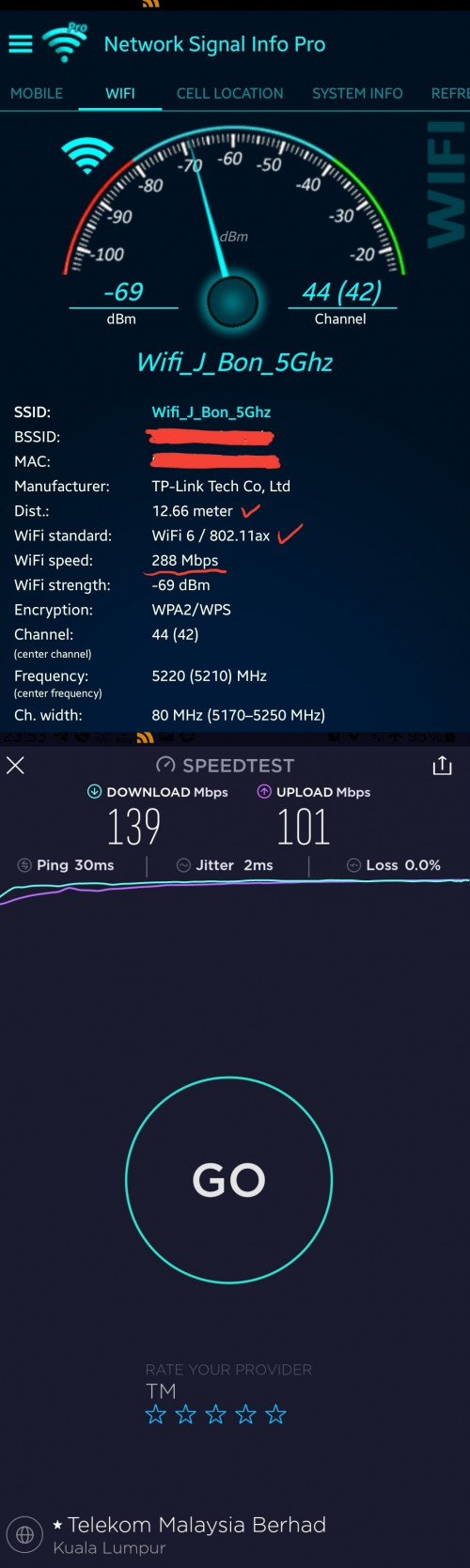
there are 2 type of ppl, someone just need an wifi with internet connection, doesn't matter what wifi speed they get and another like me, everywhere on wifi in my home i need to archive 450mbps and above (package 500mbps) thus with that, every 25 - 30 ft distance, i installed mesh wifi with ethernet backhaul, ground floor 2 mesh X60 and 1st floor 2 mesh M9 plus, if one each at X60 at ground floor and 1st floor, only get 139mbps furtherst point.

user posted image
bk5
post Jan 11 2021, 11:25 AM

New Member
*
Junior Member
12 posts

Joined: Jul 2008


QUOTE(Kelvynlim @ Jan 10 2021, 09:46 PM)
Wonderful to finally on new thread.. congrates!

Not sure am I short change by TM, I am on 500 mbps and connected to 2.4 GHz. When I did the Speedtest on wifi and only got 50-55 download speed in the evening. The router was positioned on 1st floor and test was done on ground floor.

I am using ASUS RT AX3000.

Any advise. Sorry as this is another speed question

user posted image
*
Best effort depending on the situation. Also if you are sharing with others in your household and/or you have multiple devices connected to the same router and you didn't set qouta for each user/device in router QoS settings.

Also distance and obstacles between your device(s) and the router can affect the speed. MESH could be a solution as others have pointed out in this thread.

This post has been edited by bk5: Jan 11 2021, 12:02 PM
ray8426
post Jan 11 2021, 02:26 PM

Casual
***
Junior Member
334 posts

Joined: Jul 2011
Want to ask, Unifi installation enquire...

1. Must have 1 fiber equipment with multiple fiber port device, then only can lay the fiber from there to own house?
That day they come over to my house and say my house too far to that equipment..... They need ask other team install that equipment in my house that road only can lay cable to my house......

2. How long they install that box/equipment ?
From my apply until now already more than 2 month... still pending..... haiz..... rclxub.gif

This post has been edited by ray8426: Jan 11 2021, 02:26 PM
sHawTY
post Jan 11 2021, 08:04 PM

Frequent Reporter
********
All Stars
14,908 posts

Joined: Jul 2005

QUOTE(ray8426 @ Jan 11 2021, 02:26 PM)
From my apply until now already more than 2 month... still pending.....
Eleh, baru 2 bulan
There are those in here who had to wait for years before TM proceeded to install another DP in their road
enduser
post Jan 11 2021, 08:41 PM

Regular
******
Senior Member
1,280 posts

Joined: Jan 2003
QUOTE(ray8426 @ Jan 11 2021, 02:26 PM)
Want to ask, Unifi installation enquire...

1. Must have 1 fiber equipment with multiple fiber port device, then only can lay the fiber from there to own house?
That day they come over to my house and say my house too far to that equipment..... They need ask other team install that equipment in my house that road only can lay cable to my house......

2. How long they install that box/equipment ?
From my apply until now already more than 2 month... still pending..... haiz..... rclxub.gif
*
1.Do ur homework, email or chk with all other provider...celcom fiber, digi, allo, maxis fiber etc.

2. From that feedback put official complain to mcmc

3. Follow up, might take time though

Btw where r u located?
supergen3
post Jan 11 2021, 11:03 PM

Getting Started
**
Junior Member
134 posts

Joined: May 2010


Hi. I have a question about the time required for TM to bring on-line a new FDP installation. My Taman just got it's FDPs installed yesterday on 10 Jan. TM contractors started work on 23 Nov 2020 pulling fiber cable. I went to maxis and Digi stores to apply for fiber broadband today. They cannot find my Taman in the availablity port list. Anyone can share how long to wait for TM HSBB to release the new ports?

413 Pages « < 6 7 8 9 10 > » Top
Topic ClosedOptions
 

Change to:
| Lo-Fi Version
0.0275sec    0.50    6 queries    GZIP Disabled
Time is now: 4th December 2025 - 07:35 PM