Welcome Guest ( Log In | Register )

302 Pages « < 150 151 152 153 154 > » Bottom

Outline · [ Standard ] · Linear+

Home Networking WiFi Router Discussion Thread, Updated for 2023

views
     
soonwai
post Jan 13 2021, 12:28 PM


********
All Stars
11,459 posts

Joined: Oct 2007
From: KL


QUOTE(fkinmeng @ Jan 13 2021, 09:15 AM)
ya i know M9 is better, but my budget only allow for either 2x M9 or 3x M5.
nope.
*
If not wired, better use M9 or anything with 3 radios so it can uplink with one of the 5Ghz radios and the other is used for your devices. Since you’re limited to 2 units, note that you can’t put them too far apart otherwise it’ll fallback to the 2.4Ghz radio as the uplink then you end up with the same speed as M4 or M5.

If wired, M4 and M5 are quite close in performance while M9 is a bit faster if your device supports 3 streams.
XeactorZ
post Jan 13 2021, 12:38 PM

♥ PandaDog ♥
*********
All Stars
31,612 posts

Joined: Aug 2010
QUOTE(Noname95 @ Jan 13 2021, 11:01 AM)
Would be nice if any vendors could share link again that day or during CNY promo  rclxms.gif  rclxms.gif

Thank you. Hahaha
*
Look for seller like mono digital, ookas and asus official store
hlmilk112
post Jan 13 2021, 09:47 PM

Getting Started
**
Junior Member
106 posts

Joined: Sep 2010
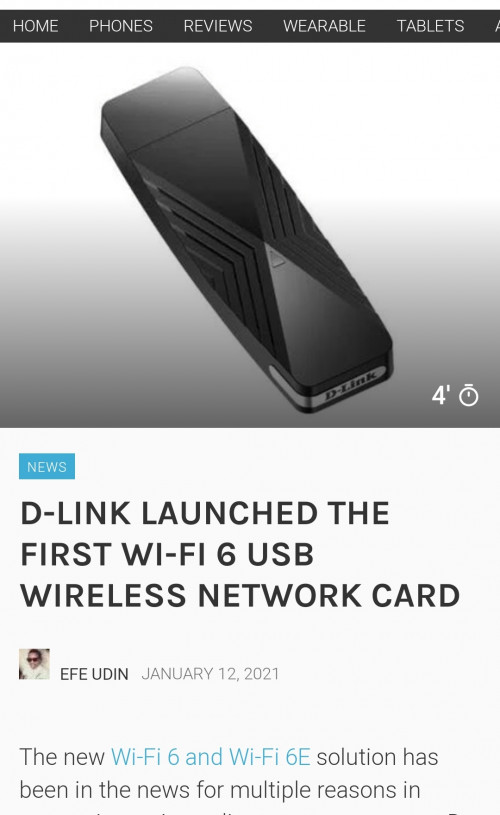
Dunno Malaysia will cost how much for this stuff. Wonder about its performance also

user posted image
ckimsem
post Jan 13 2021, 10:09 PM

Regular
******
Senior Member
1,132 posts

Joined: Jun 2011
From: Perak.


QUOTE(hlmilk112 @ Jan 13 2021, 10:47 PM)
Dunno Malaysia will cost how much for this stuff. Wonder about its performance also

user posted image
*
I preferred PCIe wireless network card because most of the USB wireless adapter appear on the removable devices which you might accidentally removed it when you're trying to removed any USB drive. Furthermore, some USB wireless adapter won't be detected on booting up PC.
KenDiriwan
post Jan 14 2021, 01:51 AM


*******
Senior Member
2,277 posts

Joined: Sep 2007
From: It's a tarp


Need recommendation for upgrade, just installed unifi 30mbps.
Surprised it came with 2in1 Modern+Router.

Any affordable upgrade to be considered? Im fine with even separating modem and router apart. Possible to have it done within RM400?


Alpha_Tay
post Jan 14 2021, 05:34 PM

Beware The Spammer Star!
******
Senior Member
1,725 posts

Joined: Jan 2003
Intel® Wireless Bluetooth® Package version = 22.20.0

Driver version 22.20.0.3: For Windows® 10 using AX210, AX201, AX200, 9560, 9462, 9461, 9260, 8260, 18260, 8265, 18265

Driver version 20.100.7.1: For Windows® 10 using 3168, 3165, 7265, 17265

Intel® Wireless Bluetooth® 22.20.0 driver has been updated to include functional and security updates. Users should update to the latest version.

January 2021

Release Notes

Intel® Wireless Bluetooth® 22.20.0

Key Issues Fixed and Changes on package version 22.20.0

Description of Key Issue

On some systems, Bluetooth device may show a yellow bang in Device Manager after resuming from
Hibernation mode.


On some systems, a Bluetooth mouse may show disconnection after resuming from Modern Standby mode.

Intel® Wireless Bluetooth® 22.20.0 driver has been updated to include functional and security updates. Users
should update to the latest version


Note: Key issues fixed in the OS indicated in the table above.

https://downloadmirror.intel.com/30121/eng/..._BT_22.20.0.pdf

https://downloadcenter.intel.com/download/3...-for-Windows-10

The 22.20.0 package installs the Windows® 10 Wi-Fi drivers for the following Intel® Wireless Adapters:

22.20.0.6 for AX210/AX201/AX200/9560/9260/9462/9461 (Only available in 64-bit version)

20.70.19.1 for 8265/8260 (Only available in 64-bit version)

19.51.31.1 for 7265(Rev. D)/3165/3168

January 2021

Release Notes

Intel® PROSet/Wireless Software 22.20.0

Key Issues Fixed and Changes: Package Version 22.20.0

Description of Key Issue OS

Windows* Stop Errors (BSOD) may occur which are associated the Intel Wireless driver. Win10

Windows* Stop Errors (BSOD) may occur when transferring large files from one PC connected
to a Wi-Fi 6 Access Point to another PC in a mixed mode environment (e.g. 802.11ax/ac).
Win10

When a cellphone is connected to a Wi-Fi 6 adapter system using Windows®10 mobile
Hotspot and switching system from 2.4GHz to 5GHz band, the mobile hotspot connection
may fail.
Win10

Intel® PROSet/Wireless Software 22.20.0 has been updated to include functional and security
updates. Users should update to the latest version.
Win10


Note: Key issues fixed in the OS indicated in the table above.

https://downloadmirror.intel.com/30112/eng/...iFi_22.20.0.pdf

https://downloadcenter.intel.com/download/3...reless-Adapters


shahie
post Jan 14 2021, 06:23 PM

On my way
****
Junior Member
506 posts

Joined: Feb 2005
QUOTE(KenDiriwan @ Jan 14 2021, 01:51 AM)
Need recommendation for upgrade, just installed unifi 30mbps.
Surprised it came with 2in1 Modern+Router.

Any affordable upgrade to be considered? Im fine with even separating modem and router apart. Possible to have it done within RM400?
*
TPLink AX20 wifi 6. price not come to RM300. very good performance wifi 6 among that budget.
ckimsem
post Jan 14 2021, 07:50 PM

Regular
******
Senior Member
1,132 posts

Joined: Jun 2011
From: Perak.


QUOTE(KenDiriwan @ Jan 14 2021, 02:51 AM)
Need recommendation for upgrade, just installed unifi 30mbps.
Surprised it came with 2in1 Modern+Router.

Any affordable upgrade to be considered? Im fine with even separating modem and router apart. Possible to have it done within RM400?
*
I was told by TM technicians that fiber internet comes with separate modem and router. And, we may change the router and set it up ourself, but we're not able to configure the modem.
Since you're using 2in1 modem+router, you might be running on copper-wired unifi with some tech enabled to run much higher speed. So, you had better make sure if you could change any 3rd party modem+router or not.
Anyway, I repeat that the above was what I was told, and I hope someone with the knowledge could explain it.
telohollow
post Jan 17 2021, 01:02 AM

Getting Started
**
Junior Member
75 posts

Joined: Jul 2011


need recommendation, my house is around 2200 sq ft double storey. currently using unifi 300mbps. planning to use asus ax3000 as primary and ax56u as mesh node at upstair. is it okay ? how about asus xd4 ? got any better recommendation? thanks
www.com.my
post Jan 17 2021, 09:12 PM

Getting Started
**
Junior Member
148 posts

Joined: Apr 2009

Currently I'm on unifi 300mbps and I'm thinking to change the tm router to Asus.

Any1 can advise on this 2 models?
RT-AX3000 & TUF-AX3000

waghyu
post Jan 17 2021, 09:17 PM

Look at all my stars!!
*******
Senior Member
3,389 posts

Joined: Sep 2019
I just buy cheap TP Link Repeater, enough lo.
Noname95
post Jan 18 2021, 02:55 PM

New Member
*
Junior Member
44 posts

Joined: Oct 2016
QUOTE(XeactorZ @ Jan 13 2021, 12:38 PM)
Look for seller like mono digital, ookas and asus official store
*
Shopee mono digital TUF-AX3000 RM551.10 now
wirelessbuyer
post Jan 18 2021, 03:26 PM

Casual
***
Junior Member
346 posts

Joined: Jul 2012
QUOTE(Noname95 @ Jan 18 2021, 02:55 PM)
Shopee mono digital TUF-AX3000 RM551.10 now
*
Saw that too, very tempting but sadly out of my budget. In the end, I just buy ax56u for rm303 after rm5 shop discount and before shopee coins deduction.
taqu
post Jan 18 2021, 05:48 PM

Enthusiast
*****
Junior Member
864 posts

Joined: May 2005
QUOTE(hlmilk112 @ Jan 13 2021, 09:47 PM)
Dunno Malaysia will cost how much for this stuff. Wonder about its performance also

user posted image
*
Laptop users better upgrade the stock Wifi card with Intel AX200. Quite easy to do for most laptops.
jeushyun
post Jan 18 2021, 06:07 PM

Getting Started
**
Junior Member
123 posts

Joined: Feb 2015


Hi guys, I am planning to upgrade my router and currently is using maxis fibre 300mbps with Archer C5v AC1200. Any recommendation? Still fresh and don't know how to configure the router if i buy a new one bye.gif
chkwong
post Jan 19 2021, 08:27 AM

Casual
***
Junior Member
411 posts

Joined: Mar 2013
QUOTE(jeushyun @ Jan 18 2021, 06:07 PM)
Hi guys, I am planning to upgrade my router and currently is using maxis fibre 300mbps with Archer C5v AC1200.  Any recommendation?  Still fresh and don't know how to configure the router if i buy a new one  bye.gif
*
Are you on Maxis (or Astro bundled) broadband? First take all info (either by writing down or screenshot) of your existing router. Log in as admin, using the password sticker behind the router. Make sure you capture the info correctly. The standard user login they may have provided to you doesn't have all the info when you login to the router (web) page. Then call up Maxis (or Astro), and tell them you want to replace your router with another better model, they may give you the PPoE user/pass info. Once you got it, then you are good to go to replace it. Good luck. Make sure the replacement model has VLAN functionality, to be safe.

This post has been edited by chkwong: Jan 19 2021, 08:28 AM
jeushyun
post Jan 19 2021, 10:53 AM

Getting Started
**
Junior Member
123 posts

Joined: Feb 2015


QUOTE(chkwong @ Jan 19 2021, 08:27 AM)
Are you on Maxis (or Astro bundled) broadband? First take all info (either by writing down or screenshot) of your existing router. Log in as admin, using the password sticker behind the router. Make sure you capture the info correctly. The standard user login they may have provided to you doesn't have all the info when you login to the router (web) page. Then call up Maxis (or Astro), and tell them you want to replace your router with another better model, they may give you the PPoE user/pass info. Once you got it, then you are good to go to replace it. Good luck. Make sure the replacement model has VLAN functionality, to be safe.
*
Bought 2x TP Link Deco M5 this earlier morning. Is it a good choice?
zalezale
post Jan 19 2021, 12:20 PM

Getting Started
**
Junior Member
65 posts

Joined: Sep 2019
QUOTE(taqu @ Jan 18 2021, 05:48 PM)
Laptop users better upgrade the stock Wifi card with Intel AX200. Quite easy to do for most laptops.
*
Old laptop still can upgrade this wifi card AX200? My laptop is lenovo x230 i5 3rd gen
kk131
post Jan 19 2021, 12:23 PM

On my way
****
Junior Member
566 posts

Joined: Jun 2005
From: Somewhere over the rainbow


QUOTE(zalezale @ Jan 19 2021, 12:20 PM)
Old laptop still can upgrade this wifi card AX200? My laptop is lenovo x230 i5 3rd gen
*
Lenovo limits approved Wifi cards in the BIOS, you have to search for a whitelisted BIOS and flash it.
taqu
post Jan 19 2021, 01:11 PM

Enthusiast
*****
Junior Member
864 posts

Joined: May 2005
QUOTE(kk131 @ Jan 19 2021, 12:23 PM)
Lenovo limits approved Wifi cards in the BIOS, you have to search for a whitelisted BIOS and flash it.
*
Ah yes, evil Lenovo 😡

302 Pages « < 150 151 152 153 154 > » Top
 

Change to:
| Lo-Fi Version
0.0305sec    0.45    6 queries    GZIP Disabled
Time is now: 22nd December 2025 - 02:46 PM