Welcome Guest ( Log In | Register )

Outline · [ Standard ] · Linear+

Home Networking WiFi Router Discussion Thread, Updated for 2023

views
     
Alpha_Tay
post Jul 12 2020, 05:47 PM

Beware The Spammer Star!
******
Senior Member
1,725 posts

Joined: Jan 2003
QUOTE(terradrgn @ Jul 11 2020, 08:33 PM)
I bought the AX20 from the 'Viewnet Official Store' - Link below

https://www.lazada.com.my/products/tp-link-...2951124390.html

but mine came without the plastic seal wrapping. Judging from the condition of the round sticker that seals the flap of the box opening, it looks like it has been opened before too.

Just wondering, did anyone else buy from this shop and have theirs delivered in the same condition as mine?
*
happen to me too, just receive the courier. did you ask them about it or just return it?
Alpha_Tay
post Jul 12 2020, 07:48 PM

Beware The Spammer Star!
******
Senior Member
1,725 posts

Joined: Jan 2003
those who purchase AX20 promotion, are you receiving Archer AX20(US) Ver1.20 ?
Alpha_Tay
post Jul 12 2020, 08:56 PM

Beware The Spammer Star!
******
Senior Member
1,725 posts

Joined: Jan 2003
QUOTE(NeO2 @ Jul 12 2020, 08:31 PM)
yes. i get this. Purchased from ookas
*
oic thx
Alpha_Tay
post Jul 13 2020, 02:57 PM

Beware The Spammer Star!
******
Senior Member
1,725 posts

Joined: Jan 2003
here is Viewnet Official Store replies from Lazada Messages after inquire with them. look like it's different creative answer from individual staff.

Hi, A20 production during MCO period is no seal wrapping, but inside the product is new .

QUOTE(terradrgn @ Jul 11 2020, 08:33 PM)
I bought the AX20 from the 'Viewnet Official Store' - Link below

https://www.lazada.com.my/products/tp-link-...2951124390.html

but mine came without the plastic seal wrapping. Judging from the condition of the round sticker that seals the flap of the box opening, it looks like it has been opened before too.

Just wondering, did anyone else buy from this shop and have theirs delivered in the same condition as mine?
*
QUOTE(Alpha_Tay @ Jul 12 2020, 05:47 PM)
happen to me too, just receive the courier. did you ask them about it or just return it?
*
QUOTE(terradrgn @ Jul 12 2020, 08:39 PM)
i inquired, they mentioned that their techs 'QC' to make sure device is ok. Don't know how true that is though.. Is it even necessary to do that nowadays?
Yes, the one I received is that version.
*
Alpha_Tay
post Jul 13 2020, 03:33 PM

Beware The Spammer Star!
******
Senior Member
1,725 posts

Joined: Jan 2003
if internet connection is 1gbps or even faster, internet speed of Cheap Slow CPU Speed Router was limited by Router CPU Speed, but now it seem higher priced fast CPU Speed Router would be now limited by 1gbps WAN Port, the router CPU could process much higher speed than 1gbps.

QUOTE(SoMeOnE121 @ Jul 13 2020, 10:50 AM)
user posted image

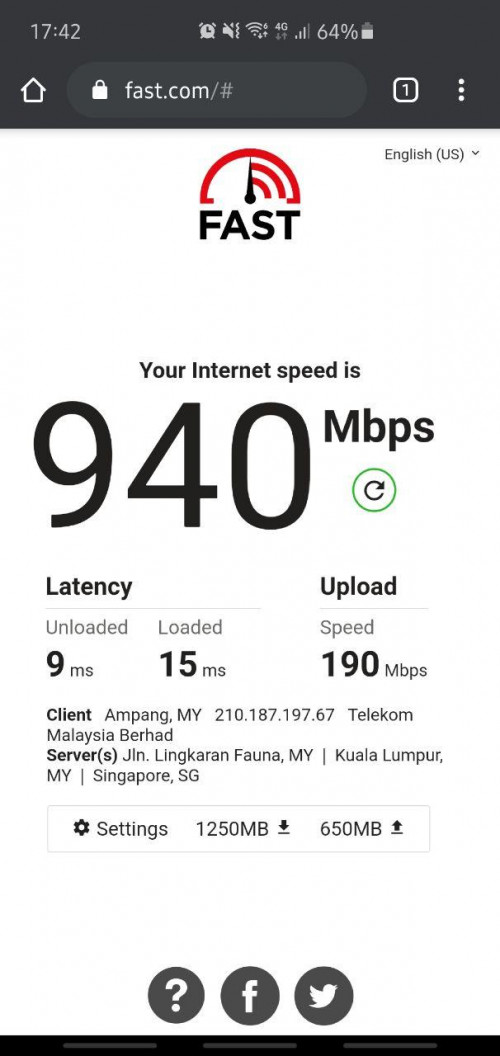
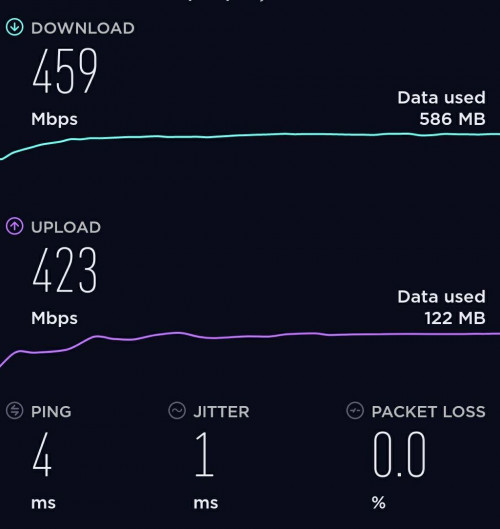
Recent WiFi test using TP-Link AX 20 about 6M away with a wall in between, This is the fastest speed I achieved. Average speeds are between 600-850 Mbps down and 150-250 Upload on WIFI 6 device. AC devices i get about 400-550mbps down 150-200 Upload which is solid IMO

2.4 Ghz i get between 150-200 Mbps down and 90-100 up I didn't combine the bands as I prefer to run separate bands because I put the 'older' machines on 2.4.

Once I hook up the AX 50 at the relative place will try again (no promises). Noticeable speed and stability on all types of devices (TV, PC,Phone, Decoder, Console, IOT devices) compared to Unifi ac1200. Even 2.4 GHZ performance is more stable and quicker.

More than the speed, the stability over the default router is really noticeable. WIFI 6 devices really seem to be enjoying a new lease of life also and behaving much better. Some have said it's marketing talk but I think real-world usage u can see the stability over AC routers really quite impressive even for legacy devices.  I guess the Quad-Core chipset really does make a difference as well. Below Pic is an example of AC device speed test 12 M away. Even resets are done under 15 seconds which is fantastic. It's no gamer level router for sure but for the price, it's super impressive. Personally find it odd the AX 20 hasn't go as much coverage as AX 10 and 50. Maybe middle child syndrome. biggrin.gif

Connection: Unifi 800 and all test are done on WiFi

user posted image
*
This post has been edited by Alpha_Tay: Jul 13 2020, 03:33 PM
Alpha_Tay
post Jul 15 2020, 08:14 PM

Beware The Spammer Star!
******
Senior Member
1,725 posts

Joined: Jan 2003
there is another promotion from D-Link

DIR-X1560

RM349 to RM259

Product Description • Smart AX1500 Wi-Fi 6 Router
Wireless Speed • 1200Mbps + 300Mbps
SDRAM • 256 MB
Flash • 128 MB

no info about chipset available.

https://www.facebook.com/pg/DLinkMalaysia/posts/

https://www.dlink.com.my/product/dir-x1560-...wi-fi-6-router/

https://www.dlink.com/en/products/dir-x1560...-wi-fi-6-router
Alpha_Tay
post Jul 20 2020, 10:52 AM

Beware The Spammer Star!
******
Senior Member
1,725 posts

Joined: Jan 2003
strange that AX20 default 5ghz channel is 157 while there is auto option there.
Alpha_Tay
post Jul 30 2020, 11:55 AM

Beware The Spammer Star!
******
Senior Member
1,725 posts

Joined: Jan 2003
for TP-Link Archer AX20 AX1800 Dual-Band Wi-Fi 6 Router, and possibility other models too, there is Total Traffic Usage for each Connected Devices at TP-Link Tether Android Apps, but these features was not available at Router Web Interface.
Alpha_Tay
post Jul 30 2020, 06:06 PM

Beware The Spammer Star!
******
Senior Member
1,725 posts

Joined: Jan 2003
according to this list, out of all the 802.11ax WiFi Router, only 4 of the models are using 16 MiB Size ROM, the other has at least 128 MiB

ASUS RT-AX56U BCM6755

TP-LINK Archer AX1500 BCM6750 BCM43217

TP-LINK Archer AX1800 BCM6755

TP-LINK TL-XDR3020 Intel (Lantiq)n PXB4583EL1600 WAV654A0;WAV654A0MC, S9344L85, SLMRS;

http://en.techinfodepot.shoutwiki.com/wiki...2.11ax_Hardware

is it really Limited ROM Size? Total Traffic Usage Data came from Router itself right? not TP-Link Tether Android Apps or TP-Link Cloud Service, the Router Web Interface just have to display it.

QUOTE(slaveone @ Jul 30 2020, 12:28 PM)
thanks for the info. one of the reason is because of the limited ROM size in the router.
*
Alpha_Tay
post Aug 2 2020, 01:35 PM

Beware The Spammer Star!
******
Senior Member
1,725 posts

Joined: Jan 2003
QUOTE(FusionXY @ Jun 30 2020, 05:03 PM)
Hello, I would like to recommend you to get AX20.
As I found out that TP-Link AX50 is using dual core CPU while AX10 is using Triple Core CPU.
And TP-Link AX20 is using Quad Core CPU. Sorry as I didn't read through the specs.

TP-Link AX10 is using same CPU as ASUS RT-AX3000
TP-Link AX20 is using same CPU as ASUS RT-AX56U

TP-Link Archer AX20

Thanks.
*
AX50 has Dual-Core 800MHz, and 2200MHz NPU.

http://en.techinfodepot.shoutwiki.com/wiki...INK_Archer_AX50

NPU with four processor cores featuring six CPUs for maximum performance, flexibility, and security
NPU subsystem with L2-cache, system-wide coherence manager, and on-chip trace unit
NPU speeds up to 2220 MHz

https://www.intel.com/content/www/us/en/con...3000-brief.html

same for

The Mi AIoT Router AX3600 is a flagship router powered by Qualcomm’s IPQ8071A chipset and paired with 512MB of RAM and 256MB of storage. The chip has four Cortex-A53 cores and is clocked at 1.0GHz. It also has a 1.7GHz dual-core NPU for network acceleration which is why it is marketed as a 6-core chip.

https://www.gizmochina.com/2020/02/13/xiaom...rt-for-wi-fi-6/


Alpha_Tay
post Aug 16 2020, 04:30 AM

Beware The Spammer Star!
******
Senior Member
1,725 posts

Joined: Jan 2003
unifi D-Link DIR-850L B1 international firmware 2.23 can reach 800mbps speedtest smoothly without issue, while unifi TP-Link C1200 v1 couldnt do it.

is it due to architecture different even though C1200 has around 36% better CPU?

RTL8197D Lexra RLX5281 500 / 660 MHz

https://forum.openwrt.org/t/support-for-dli...r-850l-b1/68569

https://wikidevi.wi-cat.ru/Realtek/SoC

Broadcom BCM47189B0 900 MHz

http://en.techinfodepot.shoutwiki.com/wiki...cher_C1200_v1.x

https://www.speedtest.net/result/c/7f65af1d...a2-4aa849c7d47d

Test Description DIR-850L
WAN - LAN 910 Mbps
LAN - WAN 907 Mbps
Total Simultaneous 312 Mbps
Maximum Simultaneous Connections 19,705
Firmware Version 1.0.7

https://www.smallnetbuilder.com/wireless/wi...eviewed?start=2

This post has been edited by Alpha_Tay: Aug 22 2020, 09:13 PM
Alpha_Tay
post Sep 9 2020, 10:30 PM

Beware The Spammer Star!
******
Senior Member
1,725 posts

Joined: Jan 2003
QUOTE(Alpha_Tay @ Sep 9 2020, 10:16 PM)
TP-Link Archer AX20 V1.20 and IPv6

Latest Firmware

IPv6 by Default is turned off.

after turn on IPv6, sometime when cold boot or reboot, the Internet IPv6 was wrong, it's LAN IPv6 FE80: , while the actual LAN IPv6 was correct, normal Internet IPv6, 2001:E68: , couldnt access IPv6 website, have to reconnect or reboot again.

if wanted to reconnect for another ip range, disconnect, and reconnect at IPv4, IPv6 wouldn't reconnect, and /Share the same PPPoE session with IPv4/ at IPv6 would untick itself.

if wanted to reconnect for another ip range, disconnect, and reconnect at IPv6, IPv4 and both IPv6 LAN and Internet would get the correct IP, but sometime the IPv6 wouldn't issue to connected client, even after connected client try to reconnect multiple time.

Solution, disconnect at IPv4, retick /Share the same PPPoE session with IPv4/ and reconnect at IPv6, IPv4 and both IPv6 LAN and Internet would get the correct IP and connected client would get correct and working IPv6, but already connected client before router reconnect for another ip range, have to disconnect and reconnect again to get the new IPv6 Internet IP Range.
*
This post has been edited by Alpha_Tay: Sep 10 2020, 08:53 PM
Alpha_Tay
post Oct 30 2020, 11:18 AM

Beware The Spammer Star!
******
Senior Member
1,725 posts

Joined: Jan 2003
AX21 vs. AX20

Improved Vent Design: Unleashes the full power of the whole machine.

https://community.tp-link.com/en/home/forum/topic/225296

https://www.tp-link.com/us/home-networking/...archer-ax21/v1/

https://www.tp-link.com/us/home-networking/...archer-ax20/v1/
Alpha_Tay
post Oct 30 2020, 07:53 PM

Beware The Spammer Star!
******
Senior Member
1,725 posts

Joined: Jan 2003
QUOTE(wcpon @ Oct 30 2020, 11:52 AM)
AX20 got overheating issues?
*
probably not that known of.
Alpha_Tay
post Nov 5 2020, 01:52 AM

Beware The Spammer Star!
******
Senior Member
1,725 posts

Joined: Jan 2003
for Archer AX20 V1 , not Archer AX20 V1.20

Archer AX20(US)_V1.0_200929

Published Date: 2020-10-28 Language: Multi-language File Size: 32.03 MB

Released Note:

New Features/Enhancement:
1. Added OneMesh feature;
2. Added Alexa Smart Home SKill;
3. Added firmware auto-upgrade feature;
4. Added System Time settings on Tether APP;
5. Added IPv6 Non-Address feature.

Bug Fixed:
1. Fixed the bug that the previous day's history log disappeared after a day;
2. Fixed the bug of incomplete display of DHCP clients under RE or AP mode;
3. Fixed the bug that the media server cannot be used or the files cannot be displayed completely after inserting some specific mobile hard disks;
4. Fixed the bug that the specific wireless schedule does not take effect;
5. Fixed the bug that the LAN side cannot be accessed through the DDNS domain name when DynDNS and RemoteControl are turned on.

Note: You will be unable to downgrade to the previous firmware version after updating this firmware.

https://www.tp-link.com/us/support/download...20/v1/#Firmware

https://www.tp-link.com/my/support/download...20/v1/#Firmware

https://www.tp-link.com/us/onemesh/product-list/

also available for,

Archer A7 V5

Archer A7(US)_V5_201029

Published Date: 2020-11-04 Language: Multi-language File Size: 15.50 MB

Modifications and Bug Fixes:
1. Add the OneMesh button;
2. Enhance device security;
3. Enhanced wireless stability;
4. Fixed the bug that if enable the daylight saving time may result in a one-hour delay to the bedtime of the parental control function;
5. Fixed the bug after rebooting the router, the 5G's channel will automatically change to the 80MHz;
6. Fixed the bug that the Router'PIN will turn on after the router reboot;
7. Fixed the bug MacOS's chrome log in exception problem;
8. Fixed the bug that 5G wireless enable the enterprise-class encryption can't be associated after reboot.

https://www.tp-link.com/us/support/download...er-a7/#Firmware

http://en.techinfodepot.shoutwiki.com/wiki..._Archer_A7_v5.x

https://deviwiki.com/wiki/TP-LINK_Archer_A7_v5.x

and,

RE305(US)_V3_200212

Published Date: 2020-03-20 Language: Multi-language File Size: 7.17 MB

New features:
1. Added OneMesh support.

Bug fixes:
1. Fixed the bug that the extender's 5Ghz cannot successfully connect some HuaWei devices' 5Ghz network.

https://www.tp-link.com/us/support/download/re305/#Firmware

RE205(US)_V3_20191011

Published Date: 2019-11-19 Language: Multi-language File Size: 8.28 MB

First firmware released for RE205(US) V3.

New Features/Enhancement:
1. Support OneMesh function.
2. Support TP-Link Cloud function.

https://www.tp-link.com/us/support/download/re205/#Firmware

RE205(US)_V2_190929

Published Date: 2019-12-12 Language: Multi-language File Size: 8.27 MB

Modifications and Bug Fixes:
New features/Enhancement:
1. Add Onemesh function.
2. Add cloud function.
3. Improve the stability of device.

Notes:
1. For RE205 V2.

https://www.tp-link.com/us/support/download...05/v2/#Firmware

RE220(US)_V1_191024

Published Date: 2020-01-10 Language: English File Size: 8.29 MB

Modifications and Bug Fixes:
1. Optimize onemesh function.
2. Optimize NTP function.
3. Improve the stability of device.

Notes:
1. For RE220(US) V1.

https://www.tp-link.com/us/support/download...20/v1/#Firmware

RE200(US)_V4_200708

Published Date: 2020-08-05 Language: Multi-language File Size: 8.12 MB

Modification and bug fixes:

1. Fixed the bug regarding OneMesh function
2. Fixed some known issues in AP mode
3. Fixed the compatibility issue with connect box in 5GHz band
4. Optimized the detection of RE200 in Tether app in a noisy environment
5. Fixed the bug regarding password setting in Tether app
6. Disabled AP steering when the router's SSID is different from that of RE200

Note: For RE200(EU/US/UK/JP/BR/EG)4.0

https://www.tp-link.com/us/support/download/re200/#Firmware

RE200(US)_V3_190731

Published Date: 2019-09-30 Language: Multi-language File Size: 8.29 MB

Modifications and Bug Fixes:
New features/Enhancement:
1. Add OneMesh function.
2. Optimize NTP funciton.
3. Improve the stability of device.

Notes:
1. For RE200(US) V3.

https://www.tp-link.com/us/support/download...00/v3/#Firmware


This post has been edited by Alpha_Tay: Nov 5 2020, 02:01 AM

Alpha_Tay
post Nov 5 2020, 07:00 PM

Beware The Spammer Star!
******
Senior Member
1,725 posts

Joined: Jan 2003
QUOTE(fkinmeng @ Nov 5 2020, 11:20 AM)
malaysia unit is v1 or v1.2?
*
Archer AX20 v1.20, Local Official Distributor Unit.
Alpha_Tay
post Nov 8 2020, 03:16 AM

Beware The Spammer Star!
******
Senior Member
1,725 posts

Joined: Jan 2003
The 1.2v gave improved wireless performance compared to the v1. The v2 changed the chipset, but performance-wise is the same as v1.2.

Tony
2 weeks ago

https://community.tp-link.com/us/home/forum/topic/232936
Alpha_Tay
post Nov 20 2020, 10:55 PM

Beware The Spammer Star!
******
Senior Member
1,725 posts

Joined: Jan 2003
Note: only v1.0 support OneMesh, v1.20 will soon support OneMesh

https://www.tp-link.com/us/home-networking/...er/archer-ax20/

Archer AX20 V1 V1.20 support to be released

AX1800 Dual-Band Wi-Fi 6 Router

https://www.tp-link.com/us/onemesh/product-list/

This post has been edited by Alpha_Tay: Nov 20 2020, 11:31 PM
Alpha_Tay
post Nov 29 2020, 12:10 AM

Beware The Spammer Star!
******
Senior Member
1,725 posts

Joined: Jan 2003
Archer AX20 V1.20

Archer AX20(US)_V1.2_201023

Published Date: 2020-11-24 Language: Multi-language File Size: 32.03 MB
Released Note:

New Features/Enhancement:
1. Added OneMesh feature;
2. Added Alexa Smart Home Skill;
3. Added firmware auto-upgrade feature;
4. Added System Time settings on Tether APP;
5. Added IPv6 Non-Address feature;
6. Added Smart Connect switch under AP mode.

Bug Fixed:
1. Fixed the bug that the previous day's history log disappeared after a day;
2. Fixed the bug of incomplete display of DHCP clients under RE or AP mode;
3. Fixed the bug that the media server cannot be used or the files cannot be displayed completely after inserting some specific mobile hard disks;
4. Fixed the bug that the specific wireless schedule does not take effect;
5. Fixed the bug that the LAN side cannot be accessed through the DDNS domain name when DynDNS and RemoteControl are turned on.

Note: You will be unable to downgrade to the previous firmware version after updating this firmware.

https://www.tp-link.com/my/support/download...v1.20/#Firmware
Alpha_Tay
post Dec 3 2020, 05:18 PM

Beware The Spammer Star!
******
Senior Member
1,725 posts

Joined: Jan 2003
Intel® Wireless Bluetooth® Package version = 22.10.0

Driver version 22.10.0.2: For Windows® 10 using AX210, AX201, AX200, 9560, 9462, 9461, 9260, 8260, 18260, 8265, 18265

Driver version 20.100.7.1: For Windows® 10 using 3168, 3165, 7265, 17265

Intel® Wireless Bluetooth® 22.10.0 driver has been updated to include functional and security updates. Users should update to the latest version.

December 2020

Release Notes

Intel® Wireless Bluetooth® 22.10.0

Key Issues Fixed and Changes on package version 22.10.0

Description of Key Issue

On some systems with multiple Bluetooth devices (e.g. mouse, keyboard, headset or stylus) connected
simultaneously, some devices may stop working or lose connection while in the middle of use.

Some devices may experience “No Advertisement” problem after some period of BLE scanning while using the
TruU application.

On some systems, Bluetooth device may show a yellow bang in Device Manager after rebooting or resuming
from Sleep/ Hibernation mode.

On some systems, rarely Bluetooth device may show a yellow bang, or it may disappear in Device Manager after
resuming from long hours in idle mode.


Intel® Wireless Bluetooth® 22.10.0 driver has been updated to include functional and security updates. Users
should update to the latest version.

Note: Key issues fixed in the OS indicated in the table above.

https://downloadmirror.intel.com/30061/eng/..._BT_22.10.0.pdf

https://downloadcenter.intel.com/download/3...?product=189347

The 22.0.0 package installs the Windows® 10 Wi-Fi drivers for the following Intel® Wireless Adapters:

22.10.0.7 for AX210/AX201/AX200/9560/9260/9462/9461 (Only available in 64-bit version)

20.70.19.1 for 8265/8260 (Only available in 64-bit version)

19.51.31.1 for 7265(Rev. D)/3165/3168

December 2020

Release Notes

Intel® PROSet/Wireless Software 22.10.0

Key Issues Fixed and Changes: Package Version 22.10.0

Description of Key Issue OS

When playing online videos, random disconnections might occur. Win10

Windows* Stop Errors (BSOD) may occur which are associated the Intel Wireless driver. Win10

RCPI 802.11K improper beacon measurement report. Win10

Yellow Bang warning in device manager associated to the Intel® Wireless adapter. Win10

Intel® PROSet/Wireless Software 22.10.0 has been updated to include functional and security
updates. Users should update to the latest version.
Win10

Note: Key issues fixed in the OS indicated in the table above.

https://downloadmirror.intel.com/30057/eng/...iFi_22.10.0.pdf

https://downloadcenter.intel.com/download/3...?product=189347

This post has been edited by Alpha_Tay: Dec 3 2020, 05:30 PM

2 Pages  1 2 >Top
 

Change to:
| Lo-Fi Version
0.1701sec    1.55    7 queries    GZIP Disabled
Time is now: 24th December 2025 - 03:45 PM