Outline ·
[ Standard ] ·
Linear+
Home Networking WiFi Router Discussion Thread, Updated for 2023
|
waghyu
|
 May 8 2020, 03:41 AM May 8 2020, 03:41 AM
|

|
QUOTE(dexterzl @ May 3 2020, 10:40 AM) House type: Condo Size of house: 1300 sf Features required: stable and faster Number of devices connected to WiFi: 3 wifi and 2 lan Internet Speed: Time 500mb Budget: RM500 +- Currently using Time free modem + router , what i face is when i was in room the signal are 2 bar , speed test is below 100mbs and the is not stable while playing game . Put cheap TP-Link repeater every room. Work well. Each repeater RM60 like that. No need highest end product, 50-300 mbps solution is cheap and reliable. |
|
|
|
|
|
waghyu
|
May 12 2020, 11:58 PM
|
|
|
Xiomi router good? 4A model
|
|
|
|
|
|
waghyu
|
May 28 2020, 12:19 AM
|
|
|
Xiomi 4A very goooddd.
|
|
|
|
|
|
waghyu
|
May 28 2020, 12:23 AM
|
|
|
QUOTE(RagingCandy @ May 22 2020, 03:41 PM) Size: 1100sqft condo. Internet:Time 100mbps. Problem: My PC located at last room hardly get good signal. Thinking to upgrade my current C1200 (provided by time). Is Ax10 better choice or should i stay with AC with Wave2? Just add cheapo TP-Link repeater RM60 at strategic place. |
|
|
|
|
|
waghyu
|
May 28 2020, 12:24 AM
|
|
|
QUOTE(Just2centslah @ May 24 2020, 11:05 PM) I have a question. I use router provided by UniFi TM. It makes trouble occassionally. Not frequently yet randomly. Today I had problems but last time trouble was like three months ago. I always turn it on. Is there a perfect router without any problem at all? or my router is decent enough? Tenda ok. Never turn off on unless got thundercatt. |
|
|
|
|
|
waghyu
|
Jun 12 2020, 02:37 AM
|
|
|
QUOTE(Imp Bron @ Jun 12 2020, 02:31 AM) Hello sifus, need recommendation. Please help me House type: Landed Size of house: 1080 Square feet, 2 point Features required: QoS if possible, 2-mesh point, acceptable speed for video conferencing in 2nd floor Number of devices connected to WiFi: maybe like 12 at peak Internet Speed: unifi 100mpbs Budget: preferably around rm300 with max rm400 Note: mesh point 1 and point 2 are adjacent to each other, maybe need to pass more than 2 walls With this budget just deploy multi-repeater setup. Cheap reliable fast |
|
|
|
|
|
waghyu
|
Jun 12 2020, 03:27 AM
|
|
|
QUOTE(Imp Bron @ Jun 12 2020, 03:04 AM) I'm planning to buy 2 mesh point just not decided on which model yet. Got some suggestions? Mesh expensive. Just get cheap TP link repeater RM60 price range, buy 2-3 units. Make looping whole house or direct to main router whichever give lowest latency. |
|
|
|
|
|
waghyu
|
Jun 12 2020, 02:21 PM
|
|
|
QUOTE(budakoye @ Jun 12 2020, 02:13 PM) any suggestion cheap 5ghz repeater? Example https://s.lazada.com.my/s.bN73l2.4Ghz or 5.0Ghz no gurantee good response, what matters is low latency then only speed. 5 mbps also feel fast if wifi latency is low. I buy this in lowyat for about RM60 |
|
|
|
|
|
waghyu
|
Jun 12 2020, 11:57 PM
|
|
|
QUOTE(Imp Bron @ Jun 12 2020, 11:36 PM) I read more about repeater, two disadvantage that concern me are first it's cannot jump between network automatically, it's still good for standstill device. But for mobile device it will be a headache to change to nearest access point each time. Most newer device are smart enough to jump automatically if the SSID and password is the same but I don't want to gamble on that. One scenario that I'm trying to avoid if I'm playing online game on mobile phone and then it suddenly reconnect to other access point causing few seconds lag. Other than that, I read that repeater will half the bandwidth, that coupled with wireless efficiency loss I'm not sure I will get a good speed upstairs for my requirements. These two reasons why I prefer to have mesh setup. That's for good suggestion. But exceed my budget a little bit😂 I guess I will just order two nodes Deco M4. If those two nodes can't connect properly, I might need to use Ethernet backhaul. I'm unsure which is better, 2 nodes Deco m4 or 1 Archer a6 + mesh repeater. They are about the same price and fit my budget Name you SSID by region within house. That's compromise of cheap-effective-easy deploy solution repeaters vs much more expensive true mesh. Repeater will not half bandwidth. Mesh, ready for RM1-2k setup. Better spend RM2-3 ratus vs RM1-2k right ? Soon or later new devices also will know which signal is having highest quality as well. That's the whole marketing of mesh, to profit more from you. |
|
|
|
|
|
waghyu
|
Jun 12 2020, 11:58 PM
|
|
|
QUOTE(miss mandy @ Jun 12 2020, 08:01 PM) Hi just changed to Asus AC59U. Current internet plan is 500mbps. Using lan can get 500mbps but wifi from computer can only get 200mpbs. Router is in upstairs living room and the computer is just next door. My wifi card can only support up to 300mbps. Shall i change my wifi card? Any recommendation? Thank you Yes wifi card is old standard that you have. Put those Wifi 6 spec. You can go 1000 mbps even |
|
|
|
|
|
waghyu
|
Jun 13 2020, 12:13 AM
|
|
|
QUOTE(Imp Bron @ Jun 13 2020, 12:11 AM) I found budget mesh for my need. 2 nodes Deco m4 2pack cost about rm380 or Archer A6 + one mesh range extender around rm345. There are also cheaper option from Tenda MW3 rm230 for two pack, tenda MW6 two pack rm320 and Tplink Deco m3 less than rm250 Wow great, please share review later. |
|
|
|
|
|
waghyu
|
Jun 15 2020, 12:32 PM
|
|
|
QUOTE(miss mandy @ Jun 15 2020, 12:05 PM) by changing a wifi card can improve my wireless connection speed? Yes, provided router also latest revision. Else pc wifi card will go whichever router spec setting, next bottleneck is layout of your house/place. |
|
|
|
|
|
waghyu
|
Jun 16 2020, 04:05 PM
|
|
|
QUOTE(Imp Bron @ Jun 16 2020, 04:03 PM) https://imgur.com/a/R3WDH2WIt seems like the wireless is too good, my requirements can be archived with only one router. Even one unit Deco m4 can reach full speed of100mpbs at room B for 5ghz newer devices. With the help of 2nd node Deco m4 room A can reach 90mpbs. 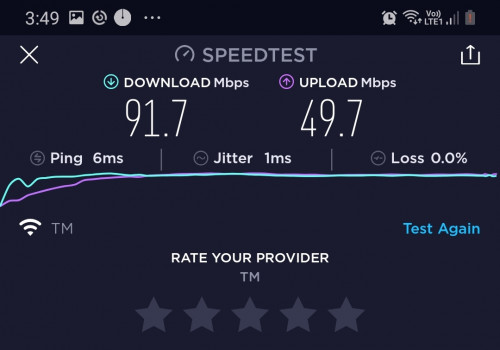 The set up a bit hidden. There is no settings to set Vlan at the beginning. Have to go advance settings to set to unifi vlan 500 profile if want to connect to PPOE directly without using the old router like Tp-Link Malaysia video guide. One downside is older device cannot be connected anymore. My aunty can't connect her old Nokia pre-android Nokia asha 501. We already recommend her to switch to Android phone but she hate new learning curve. Anyone know why Nokia asha can't connect to the mesh network? Or any advance settings that I can tinker so her Nokia Asha can be connected to the Deco M4 mesh Remind me, what you add after last setup ? Extra repeaters ? |
|
|
|
|
|
waghyu
|
Jan 17 2021, 09:17 PM
|
|
|
I just buy cheap TP Link Repeater, enough lo.
|
|
|
|
|



 Quote
Quote
 0.0250sec
 0.73
0.73
 7 queries
 GZIP Disabled