Welcome Guest ( Log In | Register )

4 Pages  1 2 3 > » Bottom

Outline · [ Standard ] · Linear+

Home Networking WiFi Router Discussion Thread, Updated for 2023

views
     
kk131
post Mar 29 2020, 06:53 PM

On my way
****
Junior Member
566 posts

Joined: Jun 2005
From: Somewhere over the rainbow


QUOTE(Sky.Live @ Mar 28 2020 @ 10:05 AM)
Anyone tried to upgrade their laptop wifi card to take advantage of newer wireless protocol? My mom laptop is still not able to connect to 5ghz channel despite not being a very old model, 2.4ghz wireless is quite dead end now..
QUOTE(blacktubi @ Mar 28 2020, 12:53 PM)
Yes it is possible. Make sure you get the right card.

They are really cheap on AliExpress.
*
Make sure the card is supported by your laptop BIOS, for instance a lot Lenovo laptops blacklist a lot of wifi cards. There are some patched BIOS files available that work around the restrictions.
kk131
post Nov 17 2020, 08:21 AM

On my way
****
Junior Member
566 posts

Joined: Jun 2005
From: Somewhere over the rainbow


QUOTE(jimbet1337 @ Nov 15 2020, 11:42 PM)
Is it good to restart a router even after the uptime has been quite long? I didn't feel any degradation of service/performance but just having a thought. Uptime as of today is 143 days. AC86U.
*
I think Asus has released new firmware within that period, so maybe yes to upgrade firmware. They have a new firmware version in beta at the moment, so you may want to hold off until that is released.
kk131
post Nov 17 2020, 11:20 AM

On my way
****
Junior Member
566 posts

Joined: Jun 2005
From: Somewhere over the rainbow


QUOTE(sejukbai @ Nov 17 2020, 10:37 AM)
Sifus,

Grateful for any thoughts and advices.

I recently completed the renovation of a double storey semi detached 30 year old house.

After a number of grievances given due to no port available, Unifi is now fully installed.

I opted for 300mbps.

The Unifi supplied GPON Terminal and DLink DIR842 C2 router is placed in my master bedroom, along with the CCTV DVR. The master bedroom is located on the first floor.

The TV area and the study room is located on the ground floor, where I have 6 units of Sonoff Smart Switches.

The issue I have now is, the WIFI signal is approximately halved at the ground floor and the TV Area.

The study room, which is located at the back end of the house, the wifi signal is about 1/2 bars (2.4ghz).

I am now intending to run a CAT 6 RJ45 Cable from the master bedroom all the way to the TV area. I will then purchase a new router, to act as repeater.

This will therefore increase the WIFI signal within the ground floor and the study area. Additionally, this will allow me to connect my TV, PS4 (and PS5 hopefully!) etc. to the router directly.

I am hoping that Sifus can advice me on the best and most cost effective setup.

1. Am I better off keeping the router in the master bedroom, and purchase a wifi mesh system?

2. Place the Router at the TV Area wired to the GPON Terminal via the RJ45 cable? Live with less wifi signal at the first floor and connect the CCTV DVR and TV in the Masterbedroom to the GPON Terminal straight away via RJ45?

3. If my initial idea of putting a second router as a repeater and leave it in the TV area is the best/most cost effective. What router would you recommend between TP Link Archer AX20 or Asus AC59u? Or would it be of benefit to break the bank and go four Asus AX55 or eve Asus AX86u?

Just to help at worst case scenario there will be 25 gadgets utilizing the WIFI at one time.

I thank you Sifus in advance and sorry for the long post.
*
I don't know how many neighbours you have but you'll probably find the 2.4GHz band is too congested and will have to reduce the bandwith to 20MHz. I don't have any experience running mesh systems, my main router is an Asus AC68U with 2 ethernet cabled repeaters aound the house (all AC). My preference is for Asus as most of their models are well supported by 3rd party firmware (I use Merlin) which enables many extra features such as DNS over TLS (DOT), DNS ad blocking, better QOS settings, additional firewall parameters. I much prefer ethernet for video and gaming - don't get the WiFi contention delays for one thing. I would also keep in mind that depending how into tech you are, you may want to install maybe a NAS in your study, so an ethernet port would be useful there.

This post has been edited by kk131: Nov 17 2020, 11:25 AM
kk131
post Nov 17 2020, 12:02 PM

On my way
****
Junior Member
566 posts

Joined: Jun 2005
From: Somewhere over the rainbow


QUOTE(sejukbai @ Nov 17 2020, 11:56 AM)
Thank you for your input bro.

Seems like my initial intention - to purchase another router and utilise it as a repeater, is likely the best option.

I am going to consider Asus thoroughly now that you've highlighted the pros.
*
I would use the Asus as the router and the Unifi Dlink as an access point.
kk131
post Nov 18 2020, 02:40 PM

On my way
****
Junior Member
566 posts

Joined: Jun 2005
From: Somewhere over the rainbow


QUOTE(sejukbai @ Nov 18 2020, 09:39 AM)
Out of curiousity (a very noobie query) aside from the telephone, are we able to plug in a second router directly to Unifi GPON Terminal?

Not managed to try this due to only owning 1 router.
*
What would be the purpose of having 2 routers be, to have 2 separate networks? You can configure some routers to provide a separate isolated guest network.

This post has been edited by kk131: Nov 18 2020, 02:41 PM
kk131
post Nov 25 2020, 04:37 PM

On my way
****
Junior Member
566 posts

Joined: Jun 2005
From: Somewhere over the rainbow


QUOTE(phantommvp @ Nov 25 2020, 04:17 PM)
Hi sifus,

I am currently staying in a 1500sqft condo, and using stock Maxis router (500mbps), am thinking if I should upgrade the router to AX20 or Huawei AX3, as I am having very bad signals in the bedroom (1 wall from router). Will either of the routers improve my current wifi coverage?

Thanks in advance!
*
Short answer is no, AX provides an increase in transmission speeds (WiFi6) and you'll need AX clients. First step is to do a WiFi survey either with your phone or PC, WinFi is a very good software for this https://www.helge-keck.com. Maybe you have interference from your neighbours that can be improved by changing the transmission channels on your router.
kk131
post Nov 26 2020, 11:36 AM

On my way
****
Junior Member
566 posts

Joined: Jun 2005
From: Somewhere over the rainbow


QUOTE(QuickFire @ Nov 26 2020, 11:14 AM)
The stock router on AP mode will be able to connect via WiFi to the AX20 router? Would the SSID be the same or different?

I prefer it being under one network like a mesh but I can walk to any room and I don't have to reconnect to the strongest network.

Thanks!
*
Set the same SSID on both routers, recommend that you have different SSID for 2.4GHz & 5GHz.
kk131
post Nov 30 2020, 03:59 PM

On my way
****
Junior Member
566 posts

Joined: Jun 2005
From: Somewhere over the rainbow


QUOTE(sejukbai @ Nov 30 2020, 11:19 AM)
Sifus,

Grateful for any tips and advices for a newbie like me.

I am currently on Unifi 300mbps fibre. I am using the supplied DLink DIR842 C.

I live in a two storey semi detached house, with the DLink located upstairs in the master bedroom, cannot move lah.

The problem now is, although I am getting good speed etc. I am not getting good 2.4ghz signal downstairs.

Having gotten some advices from this forum/thread, I am now about to pull the trigger on a new main router. I will use the Dlink as AP.

My predicament now is either to purchase Asus AX56u for RM458 or TPLink Archer AX50 A3000 for RM299.

Which one would you sifus advice and why?

Thank you so much sifusss
*
If you can hold out, wait for the Wifi6E routers. If you're not getting a strong signal on 2.4GHz band then a 5GHz will be even weaker.
kk131
post Dec 1 2020, 02:23 PM

On my way
****
Junior Member
566 posts

Joined: Jun 2005
From: Somewhere over the rainbow


QUOTE(JadenFongV @ Nov 30 2020, 10:34 PM)
Good day all,

Anyone know how to setting up an old wifi router, turn it into a wifi repeater/extender ?

I got the following modem :-

- DLINK DSL-2640B  - Old router, can act as wifi repeater/extender
- DLINK DIR 842        - Unifi modem, currently using for Unifi

I find info from the google, but some setting is quite different , i afraid i would setting up wrongly and caused no internet connection.  biggrin.gif
*
Set the DSL-2640B to AP mode and then bridge to the DIR 842, you shouldn't have to change anything on the
DIR 842. I found this post on the d-link forum http://forums.dlink.com/index.php?topic=59005.0 . If your network is not 192.168.1.0, you'll have to change the ip addresses given in the instructions.
kk131
post Dec 1 2020, 07:06 PM

On my way
****
Junior Member
566 posts

Joined: Jun 2005
From: Somewhere over the rainbow


QUOTE(JadenFongV @ Dec 1 2020, 05:02 PM)
This is what i have found previously, do i need to follow the IP address?  Will have internet issue if i edit ip address or not (i afraid of this because once before i changed some setting caused unable to access internet).
Ps, my main router DIR 842 default ip address is 192.168.0.1
*
You can change your internal network to any private range, at the moment your network is 192.168.0.0 that's OK, you can maintain that, then your second router would be 192.168.0.2 following the dlink forum. Alternatively you can change to 192.168.1.0 like the dlink forum example, it won't affect your internet access.

kk131
post Dec 6 2020, 06:36 PM

On my way
****
Junior Member
566 posts

Joined: Jun 2005
From: Somewhere over the rainbow


QUOTE(ckimsem @ Dec 6 2020, 05:52 PM)
Does router really need fan cooler? Or does it have any effect on the router like performance or life span?
If anyone uses it, mind telling why?
[attachmentid=10713848]
*
Broadcom chips (used in a lot of Asus routers) are designed to run at up to 90 degC, they will throttle if the design temperature is exceeded.

One reference - https://www.snbforums.com/threads/my-experi...211/post-145258


kk131
post Dec 7 2020, 09:39 AM

On my way
****
Junior Member
566 posts

Joined: Jun 2005
From: Somewhere over the rainbow


QUOTE(ckimsem @ Dec 6 2020, 08:51 PM)
Do you turn off the router at sleeping time or run it 24/7?
If it is the latter, can last 3 years that's acceptable without fan. Plus, the TP Link router I bought comes with 3 years warranty.
I'm using TP Link one, not sure it'll be like Asus or not. Well, I think fan cooler is really not needed.
*
I bought my RT-AC66u when they were launched in Malaysia, maybe 2012/13. It's been running 24/7 since then with a short retirement a couple of years ago and now back in service as an AP. Only the WiFi chip temperatures are shown in the interface, interestingly they're a couple of degrees higher than the AC68U I'm running as a router. My opinion is that it's better to avoid thermal cycling if possible, so run 24/7.
kk131
post Dec 7 2020, 05:03 PM

On my way
****
Junior Member
566 posts

Joined: Jun 2005
From: Somewhere over the rainbow


QUOTE(eriklim @ Dec 7 2020, 01:45 PM)
currently using RT-AC66U, but as i moved and the new place have 6 LAN cables, planning to switch to RT-AX88U.
Can I check if there is better area coverage for AX88U comparatively?
Thanks!
*
Have you considered buying an 8 port gigabit switch, e.g. TL-SG108E for around RM100?

This post has been edited by kk131: Dec 7 2020, 05:04 PM
kk131
post Dec 8 2020, 01:48 PM

On my way
****
Junior Member
566 posts

Joined: Jun 2005
From: Somewhere over the rainbow


QUOTE(eriklim @ Dec 8 2020, 10:50 AM)
bought, installed but speed dropped from 500mbps when connect direct to router to 100mbps max when using switch.
was a DLINK unmanaged switch.
*
You should be able to check the port speed in the switch admin web interface. As others have suggested try connecting a laptop to the switch with a known good ethernet cable and see what speed is reported. The Ethernet cabling in your house may not support gigabit.
kk131
post Dec 9 2020, 08:08 AM

On my way
****
Junior Member
566 posts

Joined: Jun 2005
From: Somewhere over the rainbow


QUOTE(eriklim @ Dec 9 2020, 02:52 AM)
the ports installed are all cat6, have tested connecting the switch to router via 5e cable, no avail. still running direct from router seems to solve the issue.

what is the ip to connect to the interface? it is a DGS-108.

would still need to get a better router for wifi coverage, a lot of dead spots near the rooms. just thinking if using a switch can solve this, then can get the AX-86U instead.

thanks!
*
I don't think a 'better router'will help you with coverage. Better to get another router and use both your existing and new routers (1 as an AP with the ethernet backhaul).

kk131
post Dec 10 2020, 09:23 AM

On my way
****
Junior Member
566 posts

Joined: Jun 2005
From: Somewhere over the rainbow


QUOTE(sukhoi35mk @ Dec 9 2020, 11:57 PM)

now i am very tempted to get AX50 during 12.12 to max out 160Mhz with promise wifi speed of 2.4Gbps...  tongue.gif
*
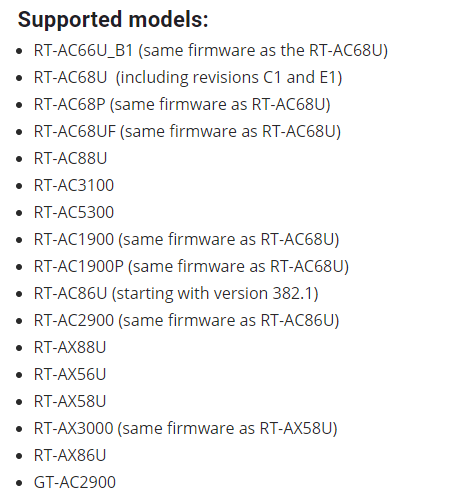
My advice would be to buy an Asus router that's supported by Merlin's firmware, here's the current list:

user posted image

It opens up a lot more possiblities for your router.
kk131
post Jan 4 2021, 08:09 AM

On my way
****
Junior Member
566 posts

Joined: Jun 2005
From: Somewhere over the rainbow


Starting to see WiFi6E devices being rolled out, this one by Xiaomi https://www.gsmarena.com/xiaomi_demos_its_w...-news-46996.php

This post has been edited by kk131: Jan 4 2021, 08:09 AM
kk131
post Jan 6 2021, 11:29 AM

On my way
****
Junior Member
566 posts

Joined: Jun 2005
From: Somewhere over the rainbow


QUOTE(EpsilonStar @ Jan 6 2021, 09:03 AM)
thanks.
*
I don't have any experience with mesh networks, I'm using an AC68U with an AC66u & a Mi-mini as AP's with ethernet backhaul. You can buy an Asus AX router and use your AC68U as a node. Running ethernet between the 2 will give you more wireless bandwidth as you're not using the WiFi for backhaul.

I see promotion of mesh systems as more a marketing tactic, it does have some advantages to simplify set-up.
kk131
post Jan 6 2021, 01:07 PM

On my way
****
Junior Member
566 posts

Joined: Jun 2005
From: Somewhere over the rainbow


QUOTE(EpsilonStar @ Jan 6 2021, 11:59 AM)
So you mean that if i have network cable to 2nd floor from my 68u down stairs, just adding a wired access point at 2nd floor would work better? No compromise to the wifi speed right? Both can set the same SSID so i can go up and down and my mobile can seamlessly switch between them?
*
Yes if you're using ethernet backhaul, you're not using the wireless bandwidth so more WiFi throughput to clients. Yes use same SSID, I would advise to use separate SSID for 2.4GHz and 5Ghz.

Your router handles the DHCP, etc. the AP just refers the requests to the router.
kk131
post Jan 11 2021, 06:46 AM

On my way
****
Junior Member
566 posts

Joined: Jun 2005
From: Somewhere over the rainbow


There's an AX68U value router coming https://www.guru3d.com/news-story/asus-valu...ty-spotted.html

If you're buying into Asus then this is likely to get Merlin firmware support, which means you can install several add-ons including ad-blocking on the router.

This post has been edited by kk131: Jan 11 2021, 06:51 AM

4 Pages  1 2 3 > » Top
 

Change to:
| Lo-Fi Version
0.0369sec    0.42    7 queries    GZIP Disabled
Time is now: 1st December 2025 - 10:40 PM