Welcome Guest ( Log In | Register )

826 Pages « < 544 545 546 547 548 > » Bottom

Outline · [ Standard ] · Linear+

Home Networking ASUS Malaysia Networking User & Technical Support, Managed by ASUS Malaysia Representative

views
     
blacktubi
post Jan 24 2020, 08:34 PM

-
Group Icon
Elite
8,415 posts

Joined: Jul 2008

QUOTE(shaktiv8 @ Jan 24 2020, 06:27 PM)
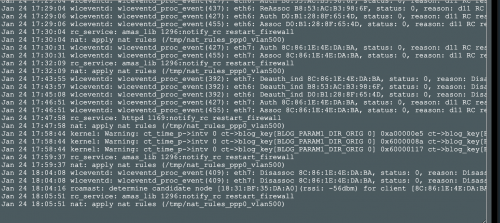
Hi, i am noticing something weird with my AX88U, i saw in the logs today that it keeps saying apply nat rules vlan 500, and it restarts the firewall very frequently. Tried resetting but still the same, thought i was getting hacked so turned on aiprotection but it is still the same and aiprotection says nothing is wrong

why would the firewall keep restarting? whats wrong with the nat too? ive attached a screenshot of the log
user posted image
*
Do you use AiMesh?
sHawTY
post Jan 24 2020, 08:53 PM

Frequent Reporter
********
All Stars
14,909 posts

Joined: Jul 2005

QUOTE(nasilemaksedap @ Jan 24 2020, 05:30 PM)
What? They won't repaird even if im willing to PAY the money?
Sape suruh beli dari China
shaktiv8
post Jan 24 2020, 08:57 PM

Casual
***
Junior Member
363 posts

Joined: Sep 2014


QUOTE(blacktubi @ Jan 24 2020, 08:34 PM)
Do you use AiMesh?
*
Yes I do use it. With a 86u I think. The red fang ones haha
blacktubi
post Jan 25 2020, 12:10 AM

-
Group Icon
Elite
8,415 posts

Joined: Jul 2008

QUOTE(shaktiv8 @ Jan 24 2020, 08:57 PM)
Yes I do use it. With a 86u I think. The red fang ones haha
*
Firewall restart seems to be triggered by AiMesh.

I wouldn't pay too much attention to it and nobody really know how AiMesh work. laugh.gif
SUSpakji
post Jan 25 2020, 02:03 AM

Regular
******
Senior Member
1,386 posts

Joined: Nov 2012


QUOTE(sHawTY @ Jan 24 2020, 08:53 PM)
Sape suruh beli dari China
*
waste i never buy China taobao its not good
my old router RT-AC68U bought Local long time ago since 2013 i think still strong i don't use coiling fan its no need it

i wait upgrade new high end router and waiting 800mbps unifi launch
chocobo7779
post Jan 26 2020, 12:22 AM

Power is nothing without control
********
All Stars
14,674 posts

Joined: Sep 2010
QUOTE(blacktubi @ Jan 24 2020, 01:03 PM)
wlceventd is just a WiFi logging, don't bother with that.

Try to check if any of your devices blasting the router with DHCP request.
*
How do I find this out? hmm.gif

Also I did change the IP address of my router so could it affect the DHCP server of my router? hmm.gif

blacktubi

This post has been edited by chocobo7779: Jan 26 2020, 09:23 PM
wjgoh2001 P
post Jan 26 2020, 12:41 PM

New Member
*
Probation
11 posts

Joined: Jan 2020
QUOTE(ASUSmy @ Jan 23 2020, 12:16 PM)
Hi wjgoh2001,

Have you try to update the router firmware?

Thank you
*
Hi, did upgrade to new firmware. Is there any manual setting I need to do? My 5G can’t get up to 100M, I using maxis 300plan. If I use ap mode the rt AC86U work fine

user posted image
vez
post Jan 26 2020, 01:51 PM

Look at all my stars!!
*******
Senior Member
4,622 posts

Joined: Mar 2007


QUOTE(pakji @ Jan 25 2020, 02:03 AM)
waste i never buy China taobao its not good
my old router RT-AC68U bought Local long time ago since 2013 i think still strong i don't use coiling fan its no need it

i wait upgrade new high end router and waiting 800mbps unifi launch
*
AC68U should be release on 2014 hmm.gif late Nov-Dec 2013 maybe
AC68U confirm cannot support 800Mbps, even 500Mbps is not stable
i have enable NAT Acceleration when using AC68U for my 500Mbps, else unable to reach 500Mbps sweat.gif
wjgoh2001 P
post Jan 26 2020, 03:28 PM

New Member
*
Probation
11 posts

Joined: Jan 2020
QUOTE(vez @ Jan 26 2020, 01:51 PM)
AC68U should be release on 2014  hmm.gif late Nov-Dec 2013 maybe
AC68U confirm cannot support 800Mbps, even 500Mbps is not stable
i have enable NAT Acceleration when using AC68U for my 500Mbps, else unable to reach 500Mbps sweat.gif
*
Hi, can you let me know what setting have to setup? Coz I have maxis fiber 300Mbps but I only get 100plus Mbps only. I use RT AC-86u
vez
post Jan 26 2020, 05:05 PM

Look at all my stars!!
*******
Senior Member
4,622 posts

Joined: Mar 2007


QUOTE(wjgoh2001 @ Jan 26 2020, 03:28 PM)
Hi, can you let me know what setting have to setup? Coz I have maxis fiber 300Mbps but I only get 100plus Mbps only. I use RT AC-86u
*
using LAN cable? if yes (speed test only accurate using LAN, to test able to achieve max or not laugh.gif) try this settings, go to LAN > Switch Control > NAT Acceleration (choose AUTO if not mistaken, i just change to tplink router, unable to print screen for you)
i remembered this setting is bugged previously, if you apply it no effect, try apply second time and restart router smile.gif

previously my UniFi upgraded from 100Mbps to 500Mbps also unable to reach 500Mbps, someone in UniFi forum teach me to enable NAT Acceleration

some reference https://routerguide.net/nat-acceleration-on-or-off/

i am not pro in networking, but seems previous router AC68U (just retired two weeks ago), after enable NAT acceleration, can achieve 500Mbps in speed test

This post has been edited by vez: Jan 26 2020, 05:05 PM
SUSpakji
post Jan 27 2020, 11:05 PM

Regular
******
Senior Member
1,386 posts

Joined: Nov 2012


ASUS RT-AC68U i looking PORT 4 Iptv Remove

because unifiplus tv wont work port 4 iptv but white tv box tm iptv will work port 4


seen tm already disable port 4 iptv for unifiplus tv

how to remove port 4 iptv and port 4 will be internet can use unifiplus tv
firdausbhari
post Jan 28 2020, 12:21 AM

Look at all my stars!!
*******
Senior Member
2,281 posts

Joined: Feb 2012


QUOTE(pakji @ Jan 27 2020, 11:05 PM)
ASUS RT-AC68U i looking PORT 4 Iptv Remove

because unifiplus tv wont work port 4 iptv but white tv box tm iptv will work port 4
seen tm already disable port 4 iptv for unifiplus tv

how to remove port 4 iptv and port 4 will be internet can use unifiplus tv
*
Change isp profile to unifi business
wcboy
post Jan 29 2020, 12:06 PM

New Member
*
Newbie
8 posts

Joined: Aug 2017
QUOTE(pakji @ Jan 25 2020, 02:03 AM)
waste i never buy China taobao its not good
my old router RT-AC68U bought Local long time ago since 2013 i think still strong i don't use coiling fan its no need it

i wait upgrade new high end router and waiting 800mbps unifi launch
*
Don't ANTI china product or taobao staff no good major electronic are manufacturer from china , every product are the same no matter local or/china asus product only the firmware/hardware might abit not same.Not every one like you got money to buy local product with the price higher.i do believe user here also got facing local product problem and alot ppl also using china asus included me .so far no problem. We are here to share out our problem no matter buy from china or local product asus.

This post has been edited by wcboy: Jan 29 2020, 12:07 PM
Jjuggler
post Jan 29 2020, 01:38 PM

Narcissistic Genius
******
Senior Member
1,341 posts

Joined: Dec 2016
QUOTE(vez @ Jan 26 2020, 01:51 PM)
AC68U confirm cannot support 800Mbps, even 500Mbps is not stable
*
Ermmm. You sure bro?

Asus-merlin + Scripts[Diversion + ntpmerlin + skynet (firewall)]


[During Speedtest - CPU & Memory Usage] and the end result of the speedtest.
[attachmentid=10414765]
wcboy
post Jan 29 2020, 01:58 PM

New Member
*
Newbie
8 posts

Joined: Aug 2017
QUOTE(nasilemaksedap @ Jan 24 2020, 05:30 PM)
What? They won't repaird even if im willing to PAY the money?

Are you serious?
*
Yours is mfg 2018 or ?so far i claim once before unit 2018 mfg than now after claim 2019 so far so good
TSASUSmy
post Jan 29 2020, 02:01 PM

Look at all my stars!!
*******
Senior Member
2,319 posts

Joined: Mar 2010
QUOTE(wjgoh2001 @ Jan 26 2020, 12:41 PM)
Hi, did upgrade to new firmware. Is there any manual setting I need to do? My 5G can’t get up to 100M, I using maxis 300plan. If I use ap mode the rt AC86U work fine

user posted image
*
Hi wjgoh2001,

When you change the Rt-AC86U as main router, can you go to the router GUI and at the Network Map->Status(at the right side). You will see something like the image below, can you take an image of the Ethernet ports?

Thank you


Attached thumbnail(s)
Attached Image
vez
post Jan 29 2020, 02:12 PM

Look at all my stars!!
*******
Senior Member
4,622 posts

Joined: Mar 2007


QUOTE(Jjuggler @ Jan 29 2020, 01:38 PM)
Ermmm. You sure bro?

Asus-merlin + Scripts[Diversion + ntpmerlin + skynet (firewall)]
[During Speedtest - CPU & Memory Usage] and the end result of the speedtest.
[attachmentid=10414765]
*
you ask Asus lol, they mentioned like this https://www.asus.com/my/News/xu24QThvcLHGYJ1a
yours custom firmware, you try official firmware only talk about this

blacktubi
post Jan 29 2020, 02:38 PM

-
Group Icon
Elite
8,415 posts

Joined: Jul 2008

QUOTE(vez @ Jan 29 2020, 02:12 PM)
you ask Asus lol, they mentioned like this https://www.asus.com/my/News/xu24QThvcLHGYJ1a
yours custom firmware, you try official firmware only talk about this
*
RT-AC68U is capable of 800Mbps++ on Ethernet with CTF NAT acceleration enabled on stock ASUSWRT.

The WiFi speed peaks at around 500Mbps++ as per ASUS claims.

Note: NAT acceleration will be disabled when some features are enabled.

user posted image
My RT-AC68U purchased over 5 years ago still going strong.
TSASUSmy
post Jan 29 2020, 02:42 PM

Look at all my stars!!
*******
Senior Member
2,319 posts

Joined: Mar 2010
QUOTE(vez @ Jan 29 2020, 02:12 PM)
you ask Asus lol, they mentioned like this https://www.asus.com/my/News/xu24QThvcLHGYJ1a
yours custom firmware, you try official firmware only talk about this
*
Hi vez,

The speedtest are based on WiFi, may I know what is your LAN speedtest?

Thank you
vez
post Jan 29 2020, 02:50 PM

Look at all my stars!!
*******
Senior Member
4,622 posts

Joined: Mar 2007


QUOTE(blacktubi @ Jan 29 2020, 02:38 PM)
RT-AC68U is capable of 800Mbps++ on Ethernet with CTF NAT acceleration enabled on stock ASUSWRT.

The WiFi speed peaks at around 500Mbps++ as per ASUS claims.

Note: NAT acceleration will be disabled when some features  are enabled.

user posted image
My RT-AC68U purchased over 5 years ago still going strong.
*
QUOTE(ASUSmy @ Jan 29 2020, 02:42 PM)
Hi vez,

The speedtest are based on WiFi, may I know what is your LAN speedtest?

Thank you
*
i am not on 800Mbps package, unable to test, but without NAT acceleration enable, my 500Mbps unable to achieve 500Mbps smile.gif
and some forumer teach me to apply NAT acceleration more than once, previously the latest firmware also buggy, if i enabled NAT Acceleration once, eventhough can achieve peak 500Mbps, after few days the speed will drop, and drop until become 20Mbps++ (i resolved this by apply few times NAT Acceleration enable, just save the settings multiple time it resolved laugh.gif)
btw, i have retired the Asus 68U, cannot try to test anymore

826 Pages « < 544 545 546 547 548 > » Top
 

Change to:
| Lo-Fi Version
0.0346sec    0.62    6 queries    GZIP Disabled
Time is now: 11th December 2025 - 03:55 AM