Outline ·
[ Standard ] ·
Linear+
Home Networking ASUS Malaysia Networking User & Technical Support, Managed by ASUS Malaysia Representative
|
wjgoh2001 P
|
 Jan 23 2020, 07:15 AM Jan 23 2020, 07:15 AM
|
New Member


|
QUOTE(mztang52 @ Jan 22 2020, 04:03 PM) Which model of router are you using? RT-AC68U?? Do you have such problem previously? Or is it a newly bought router? Have you tried to give it a Factory Reset? Hi, I use RT-AC88U, maxis fiber 300m. I has been using I since last year may on tm pre-unifi 8m until last week change to maxis fiber 300m. When using on pre unifi time only problem is evertime reboot the router it need to reboot few time to get back the internet, it happen this problem after 5months I using it. I did factory reset few time already, still the same. The 2.4g and 5g are very unstable, 5g always get download speed from 0m to 50m only and upload speed sometimes will get 0.1m. If I setup as ap mode using maxis stock router everything are fine. |
|
|
|
|
|
sHawTY
|
Jan 23 2020, 07:55 AM
|
|
|
ASUSmy this firmware download always ends up corrupted no matter how many times I download it. Doesn't happen with other firmware versions Please check 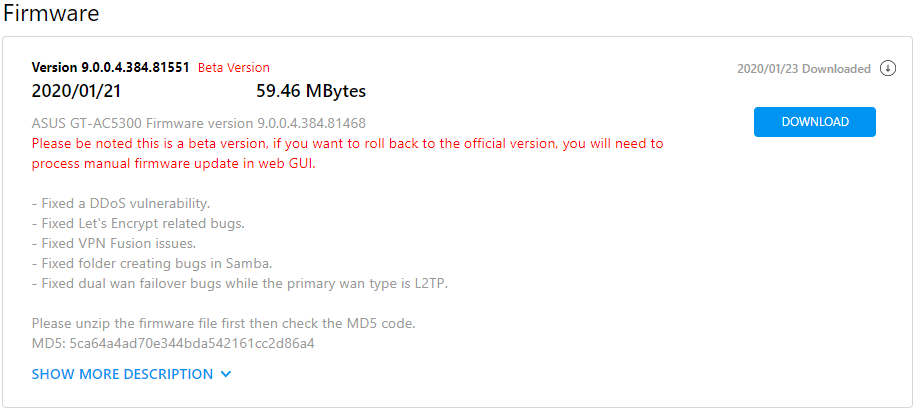
|
|
|
|
|
TSASUSmy
|
Jan 23 2020, 12:07 PM
|
|
|
QUOTE(sHawTY @ Jan 23 2020, 07:55 AM) ASUSmy this firmware download always ends up corrupted no matter how many times I download it. Doesn't happen with other firmware versions Please check Hi sHawTY, Sorry they have removed the firmware. Thanks for the feedback. Thank you This post has been edited by ASUSmy: Jan 23 2020, 12:08 PM |
|
|
|
|
|
TSASUSmy
|
Jan 23 2020, 12:16 PM
|
|
|
QUOTE(wjgoh2001 @ Jan 23 2020, 07:15 AM) Hi, I use RT-AC88U, maxis fiber 300m. I has been using I since last year may on tm pre-unifi 8m until last week change to maxis fiber 300m. When using on pre unifi time only problem is evertime reboot the router it need to reboot few time to get back the internet, it happen this problem after 5months I using it. I did factory reset few time already, still the same. The 2.4g and 5g are very unstable, 5g always get download speed from 0m to 50m only and upload speed sometimes will get 0.1m. If I setup as ap mode using maxis stock router everything are fine. Hi wjgoh2001, Have you try to update the router firmware? Thank you |
|
|
|
|
|
mztang52
|
Jan 23 2020, 01:45 PM
|
|
|
QUOTE(wjgoh2001 @ Jan 23 2020, 07:15 AM) Hi, I use RT-AC88U, maxis fiber 300m. I has been using I since last year may on tm pre-unifi 8m until last week change to maxis fiber 300m. When using on pre unifi time only problem is evertime reboot the router it need to reboot few time to get back the internet, it happen this problem after 5months I using it. I did factory reset few time already, still the same. The 2.4g and 5g are very unstable, 5g always get download speed from 0m to 50m only and upload speed sometimes will get 0.1m. If I setup as ap mode using maxis stock router everything are fine. I think it's firmware issue. Have you tried to contact Asus for a RMA unit? |
|
|
|
|
|
sHawTY
|
Jan 23 2020, 07:44 PM
|
|
|
QUOTE(ASUSmy @ Jan 23 2020, 12:07 PM) Sorry they have removed the firmware. Thanks for the feedback. It's still there LOL The download link is still alive 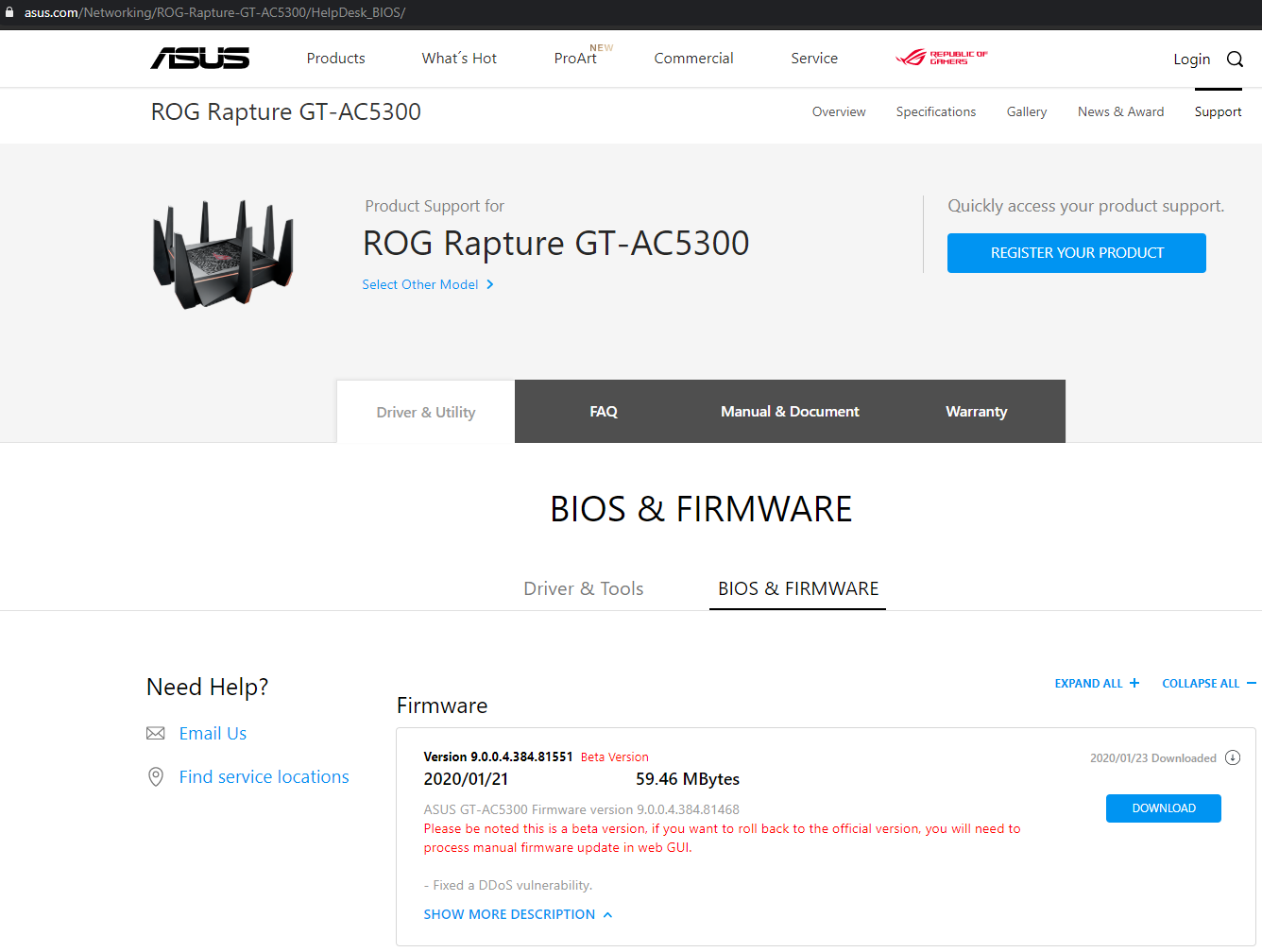 This post has been edited by sHawTY: Jan 23 2020, 07:48 PM This post has been edited by sHawTY: Jan 23 2020, 07:48 PM |
|
|
|
|
|
Alviss00
|
Jan 23 2020, 10:56 PM
|
New Member
|
Hi @ASUSmy, can u recommend a good firmware version for rt-ac68u? I bought it recently and upgraded the firmware directly, used for a few weeks and it start having modem hangup issue around once a week, unsure what's the issue.
This post has been edited by Alviss00: Jan 23 2020, 10:57 PM
|
|
|
|
|
|
chocobo7779
|
Jan 23 2020, 11:22 PM
|
|
|
ASUSmy Currently my RT-AX88U has this issue: None of my devices will connect to my WiFi network unless I manually set a static IP address to the device. This is my log file: CODE Jan 23 23:19:33 wlceventd: wlceventd_proc_event(427): eth7: Auth xx:xx:xx:xx:xx:xx, status: 0, reason: d11 RC reserved (0)
Jan 23 23:19:33 wlceventd: wlceventd_proc_event(455): eth7: Assoc xx:xx:xx:xx:xx:xx, status: 0, reason: d11 RC reserved (0)
Jan 23 23:20:10 wlceventd: wlceventd_proc_event(392): eth7: Deauth_ind xx:xx:xx:xx:xx:xx, status: 0, reason: Deauthenticated because sending station is leaving (or has left) IBSS or ESS (3)
The problem will go away temporarily if I rebooted the router, but the problem will come back after a few days. Any idea why this happens? blacktubiThis post has been edited by chocobo7779: Jan 23 2020, 11:34 PM
|
|
|
|
|
|
SUSnasilemaksedap
|
Jan 24 2020, 12:18 AM
|
Getting Started
|
QUOTE(sHawTY @ Jan 23 2020, 07:44 PM) It's still there LOL The download link is still alive Wait got new firmware put for rog router? Ax11000 got? |
|
|
|
|
|
sHawTY
|
Jan 24 2020, 12:22 AM
|
|
|
QUOTE(Alviss00 @ Jan 23 2020, 10:56 PM) Hi @ASUSmy, can u recommend a good firmware version for rt-ac68u? I bought it recently and upgraded the firmware directly, used for a few weeks and it start having modem hangup issue around once a week, unsure what's the issue. 1. Use Asuswrt-Merlin to see if you are still having the same issue. Also, you can check the router temperature with Asuswrt-Merlin 2. Use cooling fan to cool the router. RT-AC68U is known to have overheating issues |
|
|
|
|
|
Alviss00
|
Jan 24 2020, 07:56 AM
|
New Member
|
QUOTE(sHawTY @ Jan 24 2020, 12:22 AM) 1. Use Asuswrt-Merlin to see if you are still having the same issue. Also, you can check the router temperature with Asuswrt-Merlin 2. Use cooling fan to cool the router. RT-AC68U is known to have overheating issues Hey thanks for the advice, I will try to use it and see the result, I have been using a USB fan to try lower the temp for a while. |
|
|
|
|
|
sHawTY
|
Jan 24 2020, 09:47 AM
|
|
|
QUOTE(nasilemaksedap @ Jan 24 2020, 12:18 AM) Ax11000 got? Cari sendiri in ASUS website la  |
|
|
|
|
|
SUSnasilemaksedap
|
Jan 24 2020, 09:49 AM
|
Getting Started
|
QUOTE(sHawTY @ Jan 24 2020, 09:47 AM) Cari sendiri in ASUS website la Looks like only in beta lol |
|
|
|
|
|
blacktubi
|
Jan 24 2020, 01:03 PM
|
-

|
QUOTE(chocobo7779 @ Jan 23 2020, 11:22 PM) ASUSmy Currently my RT-AX88U has this issue: None of my devices will connect to my WiFi network unless I manually set a static IP address to the device. This is my log file: CODE Jan 23 23:19:33 wlceventd: wlceventd_proc_event(427): eth7: Auth xx:xx:xx:xx:xx:xx, status: 0, reason: d11 RC reserved (0)
Jan 23 23:19:33 wlceventd: wlceventd_proc_event(455): eth7: Assoc xx:xx:xx:xx:xx:xx, status: 0, reason: d11 RC reserved (0)
Jan 23 23:20:10 wlceventd: wlceventd_proc_event(392): eth7: Deauth_ind xx:xx:xx:xx:xx:xx, status: 0, reason: Deauthenticated because sending station is leaving (or has left) IBSS or ESS (3)
The problem will go away temporarily if I rebooted the router, but the problem will come back after a few days. Any idea why this happens? blacktubi wlceventd is just a WiFi logging, don't bother with that. Try to check if any of your devices blasting the router with DHCP request. |
|
|
|
|
|
xinjiechew
|
Jan 24 2020, 01:15 PM
|
Getting Started
|
Hi, anyone know can asus malaysia service centre able to fix my taobao bought ac86u? today woke uo my router is off and when i turned on only lan 4 light very dim...i tried press reset button and no luck...other than sending back to china was wondering anyone can repair it locally?
Thanks and Happy Chinese New Year
|
|
|
|
|
|
SzeMeng76
|
Jan 24 2020, 02:38 PM
|
|
|
QUOTE(xinjiechew @ Jan 24 2020, 01:15 PM) Hi, anyone know can asus malaysia service centre able to fix my taobao bought ac86u? today woke uo my router is off and when i turned on only lan 4 light very dim...i tried press reset button and no luck...other than sending back to china was wondering anyone can repair it locally? Thanks and Happy Chinese New Year No other way, just send back to China. ASUS Malaysia wont entertain any unit bought outside Malaysia. If your unit still have warranty in China just send back to them with some courier fees. |
|
|
|
|
|
tertiary
|
Jan 24 2020, 05:19 PM
|
|
|
QUOTE(xinjiechew @ Jan 24 2020, 01:15 PM) Hi, anyone know can asus malaysia service centre able to fix my taobao bought ac86u? today woke uo my router is off and when i turned on only lan 4 light very dim...i tried press reset button and no luck...other than sending back to china was wondering anyone can repair it locally? Thanks and Happy Chinese New Year No choice but to send it back to China. See my post: https://forum.lowyat.net/index.php?showtopi...&#entry93300720If you want details of how I did it, PM me. |
|
|
|
|
|
SUSnasilemaksedap
|
Jan 24 2020, 05:30 PM
|
Getting Started
|
QUOTE(SzeMeng76 @ Jan 24 2020, 02:38 PM) No other way, just send back to China. ASUS Malaysia wont entertain any unit bought outside Malaysia. If your unit still have warranty in China just send back to them with some courier fees. What? They won't repaird even if im willing to PAY the money? Are you serious? |
|
|
|
|
|
blacktubi
|
Jan 24 2020, 05:37 PM
|
-
|
QUOTE(nasilemaksedap @ Jan 24 2020, 05:30 PM) What? They won't repaird even if im willing to PAY the money? Are you serious? ASUS Malaysia provide one to one exchange with new sealed unit.  |
|
|
|
|
|
shaktiv8
|
Jan 24 2020, 06:27 PM
|
|
|
Hi, i am noticing something weird with my AX88U, i saw in the logs today that it keeps saying apply nat rules vlan 500, and it restarts the firewall very frequently. Tried resetting but still the same, thought i was getting hacked so turned on aiprotection but it is still the same and aiprotection says nothing is wrong why would the firewall keep restarting? whats wrong with the nat too? ive attached a screenshot of the log 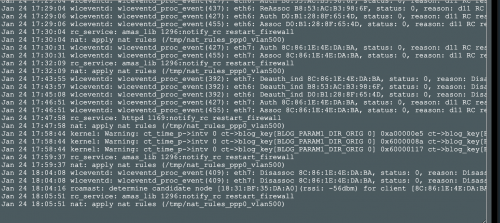 |
|
|
|
|



 Quote
Quote





 0.0271sec
 0.46
0.46
 6 queries
 GZIP Disabled