Outline ·
[ Standard ] ·
Linear+
Home Networking ASUS Malaysia Networking User & Technical Support, Managed by ASUS Malaysia Representative
|
wjgoh2001 P
|
 Jan 22 2020, 03:00 PM Jan 22 2020, 03:00 PM
|
New Member


|
Hi, I have the latest firmware , and i have also chosen the correct Maxis under special requirement from iSP. username and password for the maxis fiber is also input correctly. But I keep getting in stable internet connection, 2.4g & 5g can’t getting very bad internet speed most of time 1m upload speed. If I setup AP mode as the maxis stock router as primary. Pls help, THANKS
|
|
|
|
|
|
wjgoh2001 P
|
Jan 22 2020, 03:03 PM
|
New Member
|
QUOTE(wjgoh2001 @ Jan 22 2020, 03:00 PM) Hi, I have the latest firmware , and i have also chosen the correct Maxis under special requirement from iSP. username and password for the maxis fiber is also input correctly. But I keep getting in stable internet connection, 2.4g & 5g can’t getting very bad internet speed most of time 1m upload speed. If I setup AP mode as the maxis stock router as primary. Pls help, THANKS If I setup as ap mode everything run fine |
|
|
|
|
|
wjgoh2001 P
|
Jan 22 2020, 03:27 PM
|
New Member
|
QUOTE(BlackWoods @ Jan 22 2020, 07:56 AM) Where can I send my ASUS router RT-AC86U to repair in Penang? Bought from a seller who apparently imported it from China. Advancent penang no.105-08-02 (8TH Floor),hexagon tech park,jalan gurdwara,10300,penang |
|
|
|
|
|
wjgoh2001 P
|
Jan 23 2020, 07:15 AM
|
New Member
|
QUOTE(mztang52 @ Jan 22 2020, 04:03 PM) Which model of router are you using? RT-AC68U?? Do you have such problem previously? Or is it a newly bought router? Have you tried to give it a Factory Reset? Hi, I use RT-AC88U, maxis fiber 300m. I has been using I since last year may on tm pre-unifi 8m until last week change to maxis fiber 300m. When using on pre unifi time only problem is evertime reboot the router it need to reboot few time to get back the internet, it happen this problem after 5months I using it. I did factory reset few time already, still the same. The 2.4g and 5g are very unstable, 5g always get download speed from 0m to 50m only and upload speed sometimes will get 0.1m. If I setup as ap mode using maxis stock router everything are fine. |
|
|
|
|
|
wjgoh2001 P
|
Jan 26 2020, 12:41 PM
|
New Member
|
QUOTE(ASUSmy @ Jan 23 2020, 12:16 PM) Hi wjgoh2001, Have you try to update the router firmware? Thank you Hi, did upgrade to new firmware. Is there any manual setting I need to do? My 5G can’t get up to 100M, I using maxis 300plan. If I use ap mode the rt AC86U work fine 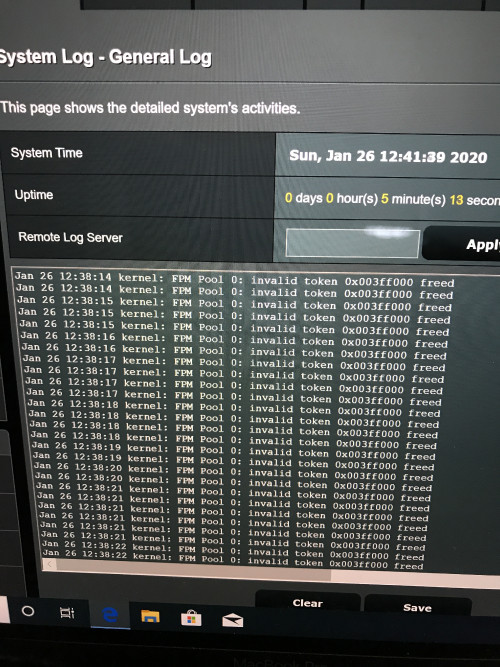 |
|
|
|
|
|
wjgoh2001 P
|
Jan 26 2020, 03:28 PM
|
New Member
|
QUOTE(vez @ Jan 26 2020, 01:51 PM) AC68U should be release on 2014  late Nov-Dec 2013 maybe AC68U confirm cannot support 800Mbps, even 500Mbps is not stable i have enable NAT Acceleration when using AC68U for my 500Mbps, else unable to reach 500Mbps  Hi, can you let me know what setting have to setup? Coz I have maxis fiber 300Mbps but I only get 100plus Mbps only. I use RT AC-86u |
|
|
|
|
|
wjgoh2001 P
|
Jan 29 2020, 08:42 PM
|
New Member
|
QUOTE(ASUSmy @ Jan 29 2020, 02:01 PM) Hi wjgoh2001, When you change the Rt-AC86U as main router, can you go to the router GUI and at the Network Map->Status(at the right side). You will see something like the image below, can you take an image of the Ethernet ports? Thank you 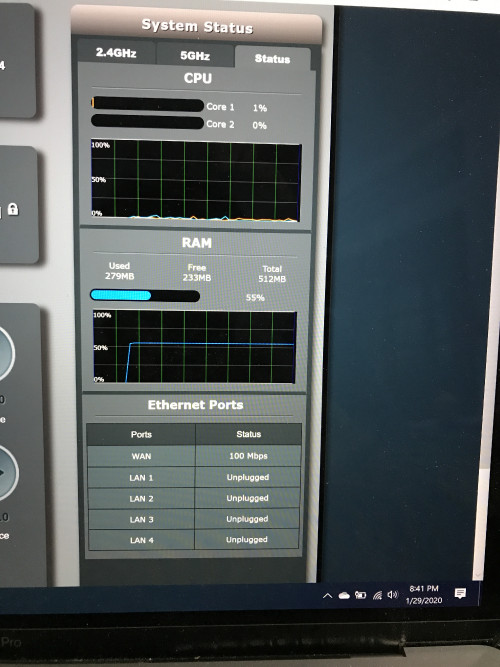 |
|
|
|
|
|
wjgoh2001 P
|
Jan 29 2020, 09:16 PM
|
New Member
|
QUOTE(blacktubi @ Jan 29 2020, 08:45 PM) Your WAN speed is capped at 100Mbps. Try using another Ethernet cable or you can purchase a new CAT6 Ethernet cable off Lazada. 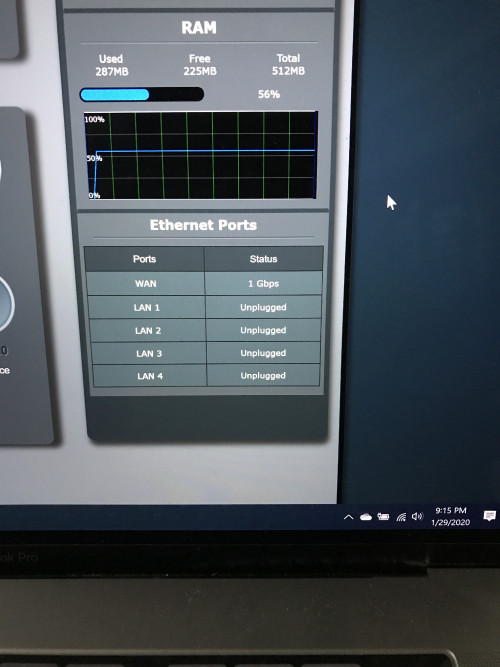 Just plug and unplugged. It will go back to 1Gbps. Dun know why? But my internet speed still can’t get more than 100Mbps |
|
|
|
|
|
wjgoh2001 P
|
Feb 5 2020, 01:42 PM
|
New Member
|
Hi, anyone know how to setup the TM modem huawei HG4280H in bridge mode in order for the router to function properly in router (default) mode. The Asus CS keep say my TM huawei modems is at router wan that why I only get 20- 50Mbps. I using maxis fiber 300Mbpd
|
|
|
|
|



 Quote
Quote

 0.0355sec
 0.46
0.46
 7 queries
 GZIP Disabled