Welcome Guest ( Log In | Register )

826 Pages « < 545 546 547 548 549 > » Bottom

Outline · [ Standard ] · Linear+

Home Networking ASUS Malaysia Networking User & Technical Support, Managed by ASUS Malaysia Representative

views
     
Jjuggler
post Jan 29 2020, 02:52 PM

Narcissistic Genius
******
Senior Member
1,341 posts

Joined: Dec 2016
QUOTE(vez @ Jan 29 2020, 02:12 PM)
you ask Asus lol, they mentioned like this https://www.asus.com/my/News/xu24QThvcLHGYJ1a
yours custom firmware, you try official firmware only talk about this
*
I believe the official firmware able to support up to 800Mbps as well. I know because before I flash to merlin, I used the stock firmware. Just merlin fw fits my usage more. The link they give is the recommended wireless router range for your ISP's package i.e. 100Mbps - 1Gbps. For LAN users, if the wireless speed doesn't matter, then the AC68U still a good choice for users like me. Of course if you're a power user, a higher router class is needed to fit the scenarios both for wired and wireless (only if you have a good wireless client to utilize the wireless throughput).
blacktubi
post Jan 29 2020, 02:59 PM

-
Group Icon
Elite
8,415 posts

Joined: Jul 2008

QUOTE(vez @ Jan 29 2020, 02:50 PM)
i am not on 800Mbps package, unable to test, but without NAT acceleration enable, my 500Mbps unable to achieve 500Mbps smile.gif
and some forumer teach me to apply NAT acceleration more than once, previously the latest firmware also buggy, if i enabled NAT Acceleration once, eventhough can achieve peak 500Mbps, after few days the speed will drop, and drop until become 20Mbps++ (i resolved this by apply few times NAT Acceleration enable, just save the settings multiple time it resolved laugh.gif)
btw, i have retired the Asus 68U, cannot try to test anymore
*
Yes, NAT acceleration is required to achieve Gigabit speed for 90% of the consumer routers in the market.

You probably enabled some features that break hardware NAT. QoS Speed limiter is known to be one of them.
vez
post Jan 29 2020, 03:23 PM

Look at all my stars!!
*******
Senior Member
4,622 posts

Joined: Mar 2007


QUOTE(blacktubi @ Jan 29 2020, 02:59 PM)
Yes, NAT acceleration is required to achieve Gigabit speed for 90% of the consumer routers in the market.

You probably enabled some features that break hardware NAT. QoS Speed limiter is known to be one of them.
*
unlikely laugh.gif i even try reset router and configure only unifi profile with LAN only and without on wifi to test for 1-2 weeks, with NAT acceleration on, the speed drop after days over days... with the only solution tested worked is apply more than once the settings sweat.gif (someone here teach me)

» Click to show Spoiler - click again to hide... «

wjgoh2001 P
post Jan 29 2020, 08:42 PM

New Member
*
Probation
11 posts

Joined: Jan 2020
QUOTE(ASUSmy @ Jan 29 2020, 02:01 PM)
Hi wjgoh2001,

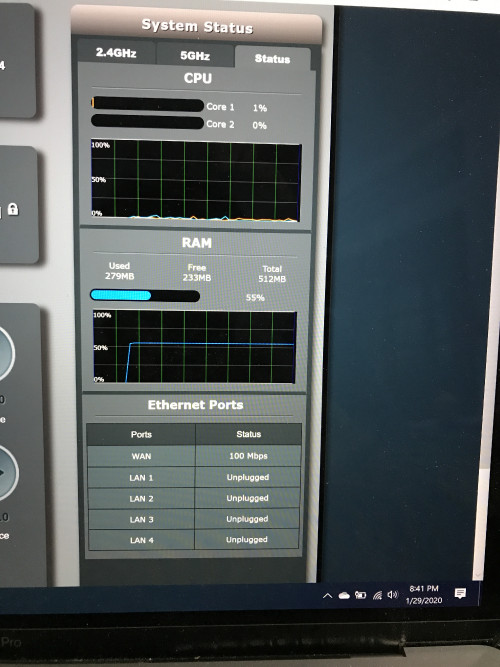
When you change the Rt-AC86U as main router, can you go to the router GUI and at the Network Map->Status(at the right side). You will see something like the image below, can you take an image of the Ethernet ports?

Thank you
*
user posted image
blacktubi
post Jan 29 2020, 08:45 PM

-
Group Icon
Elite
8,415 posts

Joined: Jul 2008

QUOTE(wjgoh2001 @ Jan 29 2020, 08:42 PM)
user posted image
*
Your WAN speed is capped at 100Mbps.

Try using another Ethernet cable or you can purchase a new CAT6 Ethernet cable off Lazada.
wjgoh2001 P
post Jan 29 2020, 09:16 PM

New Member
*
Probation
11 posts

Joined: Jan 2020
QUOTE(blacktubi @ Jan 29 2020, 08:45 PM)
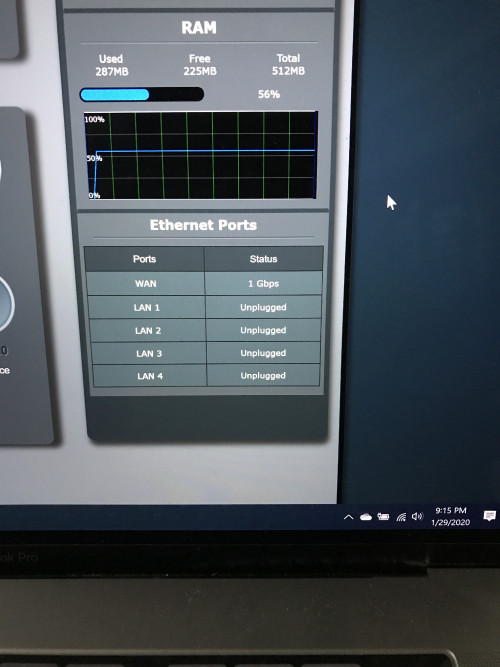
Your WAN speed is capped at 100Mbps.

Try using another Ethernet cable or you can purchase a new CAT6 Ethernet cable off Lazada.
*
user posted image
Just plug and unplugged. It will go back to 1Gbps. Dun know why? But my internet speed still can’t get more than 100Mbps
blacktubi
post Jan 29 2020, 10:24 PM

-
Group Icon
Elite
8,415 posts

Joined: Jul 2008

QUOTE(wjgoh2001 @ Jan 29 2020, 09:16 PM)
user posted image
Just plug and unplugged. It will go back to 1Gbps. Dun know why? But my internet speed still can’t get more than 100Mbps
*
I suggest you swap a new WAN cable as it seems like the current one has degraded.


SUSnasilemaksedap
post Feb 3 2020, 12:38 AM

Getting Started
**
Junior Member
120 posts

Joined: Sep 2019


No ax11000 owner here

Seems nobody posted got new firmware for it
Added wpa3 support and some other fix

Ac5300 still in beta
SUSpakji
post Feb 4 2020, 01:47 AM

Regular
******
Senior Member
1,386 posts

Joined: Nov 2012


QUOTE(nasilemaksedap @ Feb 3 2020, 12:38 AM)
No ax11000 owner here

Seems nobody posted got new firmware for it
Added wpa3 support and some other fix

Ac5300 still in beta
*
i waiting ax11000 new model more powerful then GT-AX11000
and waiting 8 Port but that model GT-AX11000 for 4 Port i need more port so have to wait future proof new model

SUSnasilemaksedap
post Feb 4 2020, 08:30 AM

Getting Started
**
Junior Member
120 posts

Joined: Sep 2019


QUOTE(pakji @ Feb 4 2020, 01:47 AM)
i waiting ax11000 new model more powerful then GT-AX11000
and waiting 8 Port but that model GT-AX11000 for 4 Port i need more port so have to wait future proof new model
*
Ledi got I posted before the ax89x is considered higher and got 8port

U planing to buy it rm4k! provide review when u buy! looking forward to it.

Difinately super future proof lol.


asellus
post Feb 4 2020, 09:24 AM

#gompusas
Group Icon
Elite
4,541 posts

Joined: Jan 2003
From: BSRPPG51 Access Concentrator


QUOTE(nasilemaksedap @ Feb 4 2020, 08:30 AM)
Ledi got I posted before the ax89x is considered higher and got 8port

U planing to buy it rm4k! provide review when u buy! looking forward to it.

Difinately super future proof lol.


*
From what I have seen at ASUS RT-AX89X spec page, this router isn't even future proof. If it was me, I will wait for APs that support the upcoming Wifi6e 802.11ax (6GHz) standard.
hongli.11.hongli
post Feb 4 2020, 09:33 AM

Getting Started
**
Junior Member
54 posts

Joined: Sep 2017
QUOTE(asellus @ Feb 4 2020, 09:24 AM)
From what I have seen at ASUS RT-AX89X spec page, this router isn't even future proof. If it was me, I will wait for APs that support the upcoming Wifi6e 802.11ax (6GHz) standard.
*
Technology upgrade time to time it will be forever waiting...... biggrin.gif biggrin.gif biggrin.gif biggrin.gif biggrin.gif
Hummingbird
post Feb 4 2020, 01:21 PM

Regular
******
Senior Member
1,007 posts

Joined: Nov 2006


QUOTE(blacktubi @ Jan 29 2020, 02:38 PM)
RT-AC68U is capable of 800Mbps++ on Ethernet with CTF NAT acceleration enabled on stock ASUSWRT.

The WiFi speed peaks at around 500Mbps++ as per ASUS claims.

Note: NAT acceleration will be disabled when some features  are enabled.

user posted image
My RT-AC68U purchased over 5 years ago still going strong.
*
It's still a good router but it lacks certain standard features such as band steering...

And also i realize the temperature can be very high when running over long time... So I put a fan at the back
Alviss00
post Feb 4 2020, 10:16 PM

New Member
*
Newbie
8 posts

Joined: May 2010


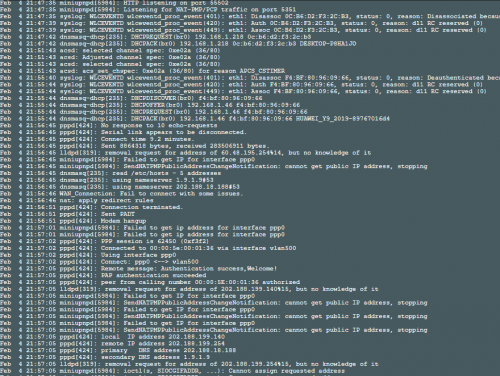
Hi, I need some advice, currently using asuswrt merlin firmware 384.14_2 on RT-AC68U, sometimes my desktop have random disconnect from wifi, other devices is fine, is there any settings i need to fine tune in order for it to work smoothly? I had switch off nat acceleration , change the 2.4G wireless mode to N only, wps off, qos off. The modem hangup some times too, it was more frequent when it was using the official firmware, which makes me switch to merlin now. The router had a usb fan beside it to regulate the heat. So far just not sure what else to tweak before i go for a waranty claim. I had the router around 1 month +


user posted image
SUSraynman
post Feb 4 2020, 11:12 PM

Look at all my stars!!
*******
Senior Member
4,333 posts

Joined: Jan 2003


user posted image

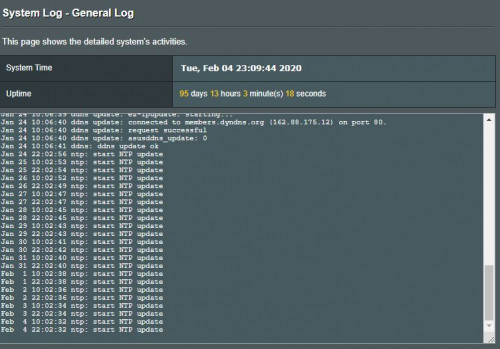
Mine is quite stable. smile.gif
SUSpakji
post Feb 4 2020, 11:15 PM

Regular
******
Senior Member
1,386 posts

Joined: Nov 2012


QUOTE(nasilemaksedap @ Feb 4 2020, 08:30 AM)
Ledi got I posted before the ax89x is considered higher and got 8port

U planing to buy it rm4k! provide review when u buy! looking forward to it.

Difinately super future proof lol.


*
yes i already saw you post before
that model RT-AX89X is = AX6000 and GT-AX11000 = AX11000

that compare AX6000 VS AX11000 all effect

so batter i wait future proof AX11000 and upcoming Wifi6e 802.11ax (6GHz) standard

i not urgent buy new router

because unifi still no launch 800MBPS

that why 100mbps overkill waste

have to wait 800mbps then i buy new router

i using RT-AC68U enough for 100mbps

blacktubi
post Feb 5 2020, 11:09 AM

-
Group Icon
Elite
8,415 posts

Joined: Jul 2008

QUOTE(Alviss00 @ Feb 4 2020, 10:16 PM)
Hi, I need some advice, currently using asuswrt merlin firmware 384.14_2 on RT-AC68U, sometimes my desktop have random disconnect from wifi, other devices is fine, is there any settings i need to fine tune in order for it to work smoothly? I had switch off nat acceleration , change the 2.4G wireless mode to N only, wps off, qos off. The modem hangup some times too, it was more frequent when it was using the official firmware, which makes me switch to merlin now. The router had a usb fan beside it to regulate the heat. So far just not sure what else to tweak before i go for a waranty claim. I had the router around 1 month +


user posted image
*
Don’t switch off NAT Acceleration.

Have you considered a new WiFi adapter?

Alviss00
post Feb 5 2020, 11:56 AM

New Member
*
Newbie
8 posts

Joined: May 2010


QUOTE(blacktubi @ Feb 5 2020, 11:09 AM)
Don’t switch off NAT Acceleration.

Have you considered a new WiFi adapter?
*
My desktop is assembled last year so I consider it to be quite new. I will try to open NAT acceleration tonight.
wjgoh2001 P
post Feb 5 2020, 01:42 PM

New Member
*
Probation
11 posts

Joined: Jan 2020
Hi, anyone know how to setup the TM modem huawei HG4280H in bridge mode in order for the router to function properly in router (default) mode. The Asus CS keep say my TM huawei modems is at router wan that why I only get 20- 50Mbps. I using maxis fiber 300Mbpd
areankim
post Feb 11 2020, 11:18 PM

"Live Life Cool"
*******
Senior Member
3,705 posts

Joined: Jan 2003
From: Planet Earth


Anyone here has any success with aimesh? Mine has been unstable to a point it's useless.

My setup Ac86U + RP55AC

826 Pages « < 545 546 547 548 549 > » Top
 

Change to:
| Lo-Fi Version
0.0327sec    0.64    6 queries    GZIP Disabled
Time is now: 11th December 2025 - 05:18 AM