

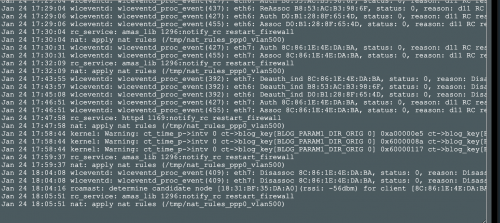
why would the firewall keep restarting? whats wrong with the nat too? ive attached a screenshot of the log
Home Networking ASUS Malaysia Networking User & Technical Support, Managed by ASUS Malaysia Representative
|
|
 Jan 24 2020, 06:27 PM Jan 24 2020, 06:27 PM
Return to original view | Post
#1
|
 
Junior Member
363 posts Joined: Sep 2014  
|
Hi, i am noticing something weird with my AX88U, i saw in the logs today that it keeps saying apply nat rules vlan 500, and it restarts the firewall very frequently. Tried resetting but still the same, thought i was getting hacked so turned on aiprotection but it is still the same and aiprotection says nothing is wrong
why would the firewall keep restarting? whats wrong with the nat too? ive attached a screenshot of the log |
|
|
|
|
|
Jan 24 2020, 08:57 PM
Return to original view | Post
#2
|
|
Junior Member
363 posts Joined: Sep 2014
|
QUOTE(blacktubi @ Jan 24 2020, 08:34 PM) Do you use AiMesh? Yes I do use it. With a 86u I think. The red fang ones haha |
|
|
Feb 25 2020, 09:08 PM
Return to original view | IPv6 | Post
#3
|
|
Junior Member
363 posts Joined: Sep 2014
|
QUOTE(WaNaWe900 @ Feb 22 2020, 01:04 AM) Just checking if some others had same configuration as myself; UniFi new mode+router set as bridge to RT-AC86U If you can access through the app means you might have enabled https only Then I cannot login to the AC86U using wifi in my computer for configuration. But still able to using hp Asus apps. Last setting during configuring both the UniFi modem+routers to the AC86U using LAN cable  Now the UniFi modem+routers cannot access using LAN cable pulak  the address know not usable.. the address know not usable..and AC86U cannot login thru browser over wifi (address invalid too) |
|
|
Feb 25 2020, 09:13 PM
Return to original view | IPv6 | Post
#4
|
|
Junior Member
363 posts Joined: Sep 2014
|
Hi guys i'm having issue with my iPhone 11 Pro and wifi since i've bought the phone.
Im using an Asus AX88U with an AC86U as an AiMesh and everyday my iPhone will drop the network connection. It will not disconnect from the wifi, rather stay connected but no access to the router webpage or to the internet A quick disconnect and reconnect of the wifi from settings fixes it for a few hours. It is worse when AiMesh is disabled, and it has gotten worse after the latest firmware update to the router. Anyone experience this kind of connected to wifi but no internet issue on iPhone, and how do i fix it? Thanks |
|
|
Feb 27 2020, 02:20 PM
Return to original view | IPv6 | Post
#5
|
|
Junior Member
363 posts Joined: Sep 2014
|
QUOTE(blacktubi @ Feb 26 2020, 10:55 AM) shaktiv8 Oh thank you for the info! Didn't know seamless roaming was a thing. What happened to your phone is it is still stuck to the old access point even when you are at signal edge or left the coverage area. Make sure both models are running the latest firmware like what ASUS rep said. Secondly, go to Wireless > Professional and make sure roaming assistant is enabled for both 2.4G and 5G. While you are at it, I suggest enabling the smart connect feature. It should help a bit. Thirdly, submit a feature request to ASUS requesting for seamless roaming feature. They will put it on a higher priority when there are more request for it. Would this also affect networks with AiMesh enabled but with the nodes disconnected? |
|
|
Feb 27 2020, 02:21 PM
Return to original view | IPv6 | Post
#6
|
|
Junior Member
363 posts Joined: Sep 2014
|
QUOTE(ASUSmy @ Feb 26 2020, 09:19 AM) Hi shaktiv8, Hello, yes they are the same firmware as stated aboveHave you try update the firmware to the latest? The current firmware for both the model is as below. RT-AX88U - 3.0.0.4.384.7977 RT-AC86U - 3.0.0.4.384.81351 Thank you |
|
|
|
|
|
Mar 20 2020, 08:27 PM
Return to original view | IPv6 | Post
#7
|
|
Junior Member
363 posts Joined: Sep 2014
|
Guys I’m getting these weird logs after restarting my ax88u. I have an ainode but it is turned off , anybody knows what is this kernel warnings , bwdpi and the constant apply nat rules ?
Sorry I’m a bit paranoid 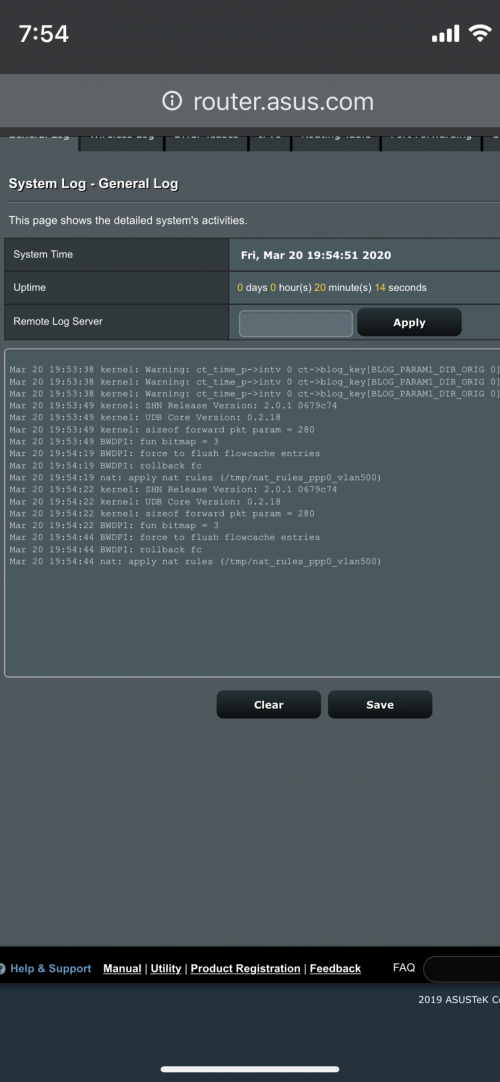 |
|
|
Apr 11 2020, 11:25 PM
Return to original view | Post
#8
|
|
Junior Member
363 posts Joined: Sep 2014
|
Hi, I’m using AX88U and when I’m trying to update the firmware it says firmware downloading for like 5 minutes then errors out saying can’t reach ASUS server and to retry
Mind you, my internet is still working and the router reboots after this message |
|
|
Apr 12 2020, 02:45 PM
Return to original view | IPv6 | Post
#9
|
|
Junior Member
363 posts Joined: Sep 2014
|
QUOTE(sHawTY @ Apr 12 2020, 01:22 AM) Sometime (very rarely) there's a bug in a certain firmware that prevents firmware download to be completed Thank you i've done it with your steps!!Download the latest firmware from ASUS RT-AX88U website in the link below, extract it & update the firmware manually https://www.asus.com/Networking/RT-AX88U/HelpDesk_BIOS/ Once you've extracted the firmware, do the manual firmware update by going through: Administration > Firmware Upgrade > Manual firmware update > Upload Use a computer that's connected directly to the router using Ethernet cable to do the firmware update 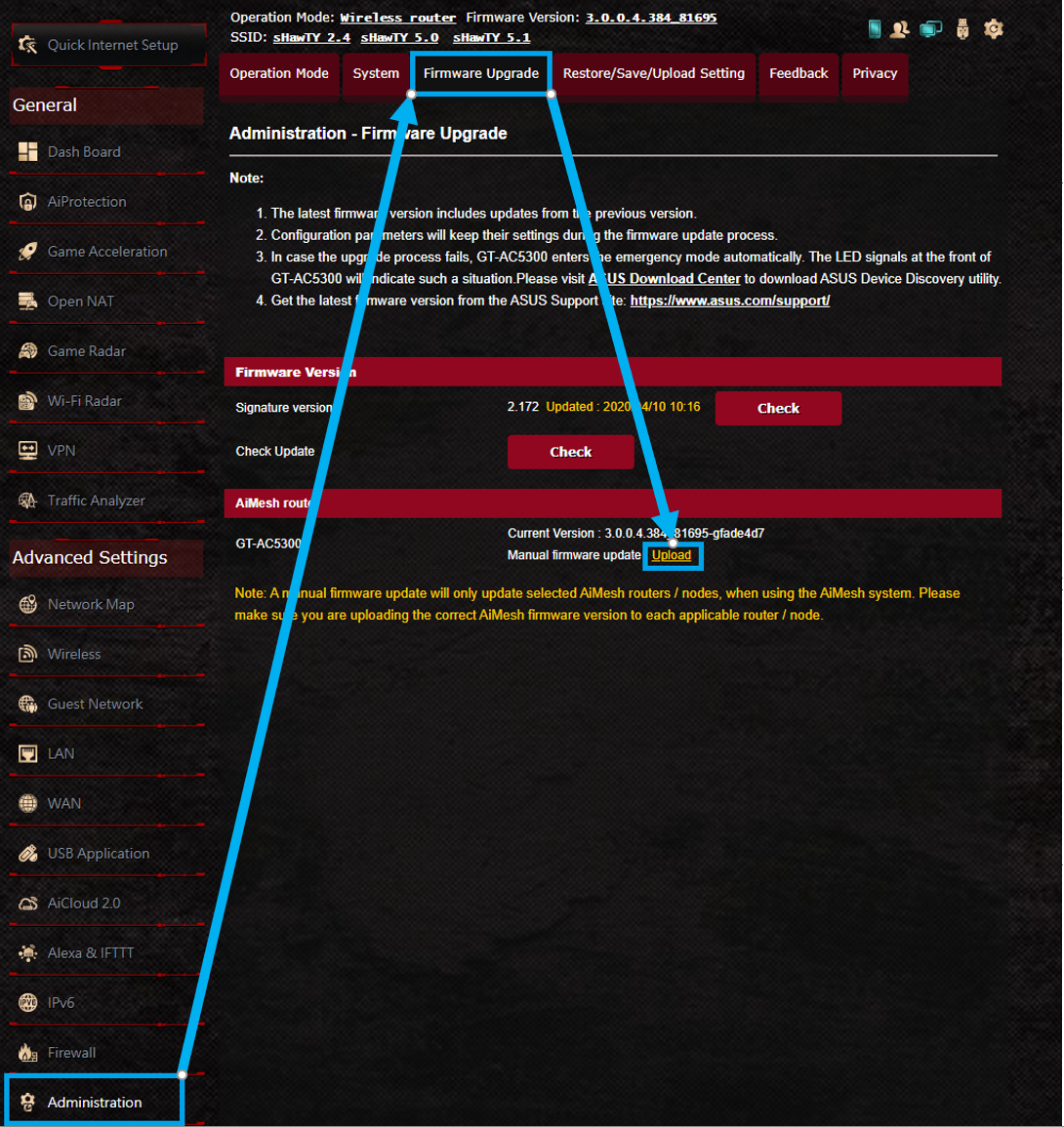 btw, the new QOS options are very helpful when using Zoom, no more lag when full house using the WiFi |
|
|
Apr 22 2020, 11:18 PM
Return to original view | IPv6 | Post
#10
|
|
Junior Member
363 posts Joined: Sep 2014
|
Hello sifus, i've got a question.
My internet connection died twice today for the first time, the first time it went off i got a Failed to send DHCPV6 message to ff02::1:2 message and then a Timeout waiting for PADO packets message. Uptime was only 6 hours then. Now when it just went off, I see different messages all of which I have never seen before. Is there anything wrong? My neighbours don't seem to have issues with their internet. The internet did not restore itself (without reset )in the afternoon but the night one restored itself I'm using an AX88U, latest software on Unifi 800 MBPS 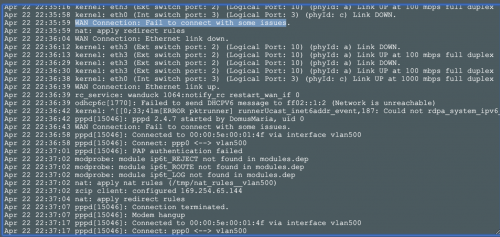 |
|
|
May 3 2020, 02:46 PM
Return to original view | IPv6 | Post
#11
|
|
Junior Member
363 posts Joined: Sep 2014
|
Hello guys, my AX88U is dropping wan connections much more frequently than it did before the latest update
Happening about 4 times a week now Is this a known issue ? 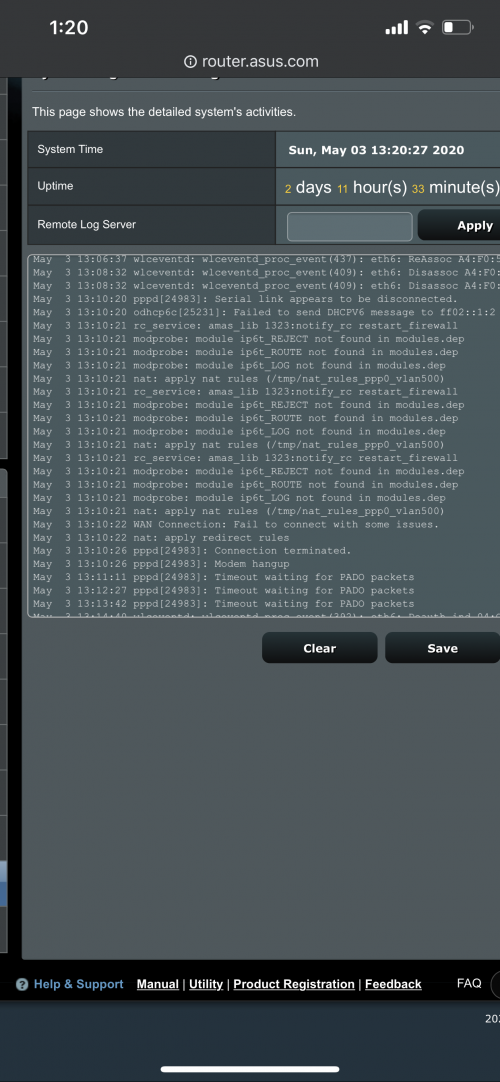 |
|
|
May 5 2020, 01:51 PM
Return to original view | Post
#12
|
|
Junior Member
363 posts Joined: Sep 2014
|
QUOTE(ASUSmy @ May 4 2020, 10:35 AM) Hi shaktiv8, Hello thanks for the reply ! From the log it seen like it cannot detect the signal from the modem, try do a factory reset on the RT-AX88U and redo the setup. Go to WAN->Internet Connection->Special requirement from ISP->Click on MAC Clone and click Apply. Monitor the modem LED signal when the problem happen again. Thank you It just happened today after an uptime of only 24 minutes, I also noticed that when this happens I can’t access the router directly from the AX88U. But if I connect to the aimesh node, I can access the routers web configuration Weird that WiFi drops when the wan drops too (Aimesh is Ethernet backhaul) Just did a hard reset, will monitor the issues |
|
|
May 14 2020, 02:36 PM
Return to original view | IPv6 | Post
#13
|
|
Junior Member
363 posts Joined: Sep 2014
|
hello, i've been having this firmware issue for a few days, tried resetting and everything. how do i fix this ya?
The router cannot connect to ASUS server to check for the firmware update. After reconnecting to the Internet, go back to this page and click Check to check for the latest firmware updates. |
|
|
|
|
|
Jun 3 2020, 11:13 AM
Return to original view | IPv6 | Post
#14
|
|
Junior Member
363 posts Joined: Sep 2014
|
Hello, I am still having trouble with my AX88U.
After the recent update, the random freezing and wan disconnects are happening daily now. And when they wan disconnects and the red light comes on, it also doesn’t allow access to the routers webpage. I have contacted tm and they say it’s not their fault, and I don’t have this issue when I use a tp link deco. Isn’t it supposed to reset its own wan IP address even if it is an ip reset from tm? Why would it be constantly stuck in failure to get pado packets ? I also only set the router to reset everyday at 5AM, so there is no excuse for it to hang and freeze everyday 😢 Any suggestions? 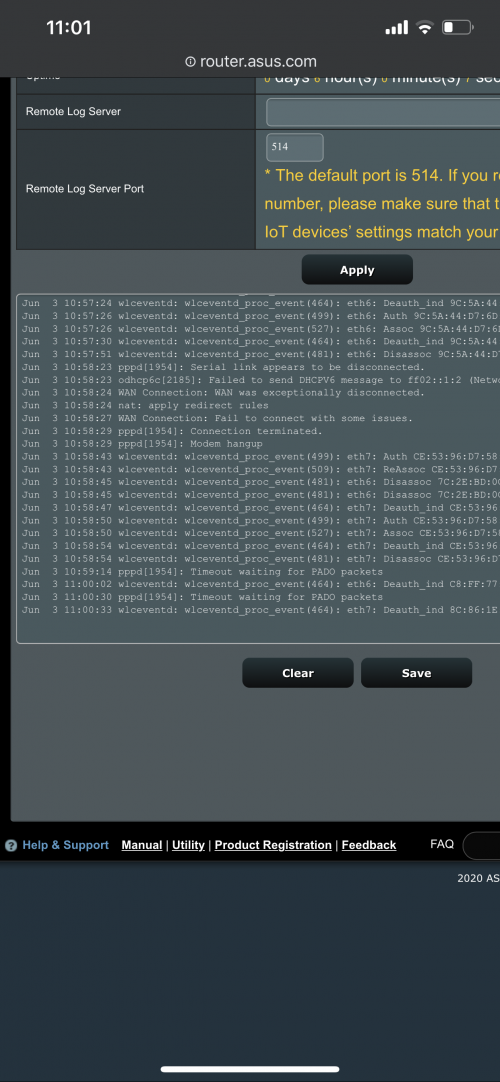 |
|
|
Jun 6 2020, 01:36 PM
Return to original view | Post
#15
|
|
Junior Member
363 posts Joined: Sep 2014
|
QUOTE(junclj @ Jun 6 2020, 10:24 AM) If you have install some others custom ROMs (Merlin) before, that may causing your router firmware became abnormal. I think you need to reformat and clean reflash the router (not the usual reset only, you need to go into recovery mode of the router). Hello, You need to download the ASUS Firmware Restoration version 2.1.0.2 from official website - https://www.asus.com/us/Networking/RT-AX88U...pDesk_Download/ follow the method as below, skip to 4:23 nope I did not install any other custom ROM before this I did a full factory reset and kept ipv6 disabled, so far no issues |
|
|
Jul 27 2020, 10:08 PM
Return to original view | IPv6 | Post
#16
|
|
Junior Member
363 posts Joined: Sep 2014
|
Hello!
I'm having reboot issues with my AX88U, random issues and drops all WAN, LAN and WLAN connections but the system uptime does not reset. Does anybody know what all these things in the log mean? I've never seen them before and I don'y know what they are. Issues started at " FW trap has happened" what does that mean ? 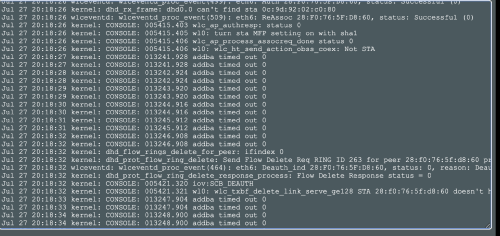 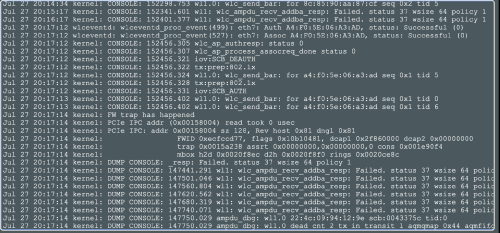 |
|
|
Jul 29 2020, 10:37 PM
Return to original view | IPv6 | Post
#17
|
|
Junior Member
363 posts Joined: Sep 2014
|
QUOTE(ASUSmy @ Jul 29 2020, 03:57 PM) Hi shaktiv8, Hello, thanks for the reply!Can you try updating the firmware to the latest and do a factory reset on the router and redo the setup? If the reboot issue still continue, can you send a feedback using the router GUI and PM me your email address. Thank you I disabled SmartConnect and the console messages stopped, so i'm guessing thats the issue. Still wondering about the FW error, will try the new update and see if the issue still persists, thank you. |
|
|
Aug 21 2020, 05:24 PM
Return to original view | Post
#18
|
|
Junior Member
363 posts Joined: Sep 2014
|
Hey guys I’ve got a question
Using AX88U, stability issues aside my WiFi used to be very fast all the time Since the last update I’ve noticed most of my devices that used to have link speeds of 1300mbps are not limited to 288mbps or less What could be the issue here ? |
|
|
Aug 24 2020, 11:49 PM
Return to original view | Post
#19
|
|
Junior Member
363 posts Joined: Sep 2014
|
QUOTE(ASUSmy @ Aug 24 2020, 10:50 AM) Hi shaktiv8, Thank you, factory reset seems to have fixed the issue for now 1) You can try changing the WiFi channel on the router. 2) Try do some speedtest to see the whether there are speed different. 3) Try do a factory reset if still same after changing the WiFi channel. 4) You can downgrade back the firmware to see whether there is different. Thank you  |
|
|
Sep 22 2020, 02:12 PM
Return to original view | IPv6 | Post
#20
|
|
Junior Member
363 posts Joined: Sep 2014
|
*solved*
This post has been edited by shaktiv8: Sep 24 2020, 11:34 AM |
| Change to: |  0.0427sec 0.0427sec
 0.50 0.50
 7 queries 7 queries
 GZIP Disabled GZIP Disabled
Time is now: 9th December 2025 - 10:44 PM |
 Quote
Quote