

QUOTE(blacktubi @ Nov 26 2025, 02:19 PM)
Looks like 5GHz DFS radar hit to me, try using non DFS 5GHz channel

Where to turn off this DFS?Home Networking ASUS Malaysia Networking User & Technical Support, Managed by ASUS Malaysia Representative
|
|
 Nov 27 2025, 11:00 AM Nov 27 2025, 11:00 AM
|
 
Senior Member
603 posts Joined: Apr 2011 
|
QUOTE(blacktubi @ Nov 26 2025, 02:19 PM) Looks like 5GHz DFS radar hit to me, try using non DFS 5GHz channel Where to turn off this DFS? |
|
|
|
|
|
Nov 27 2025, 11:16 AM
|
 
Elite
8,407 posts Joined: Jul 2008 
|
QUOTE(mostwanted82 @ Nov 27 2025, 11:00 AM) Where to turn off this DFS? Just fix your 5GHz WiFi channel to channel 149, it will solve this |
|
|
Nov 27 2025, 12:54 PM
|
|
Junior Member
107 posts Joined: Sep 2007
|
QUOTE(blacktubi @ Nov 27 2025, 11:16 AM) Just fix your 5GHz WiFi channel to channel 149, it will solve this Hi, on my TUF AX GAMING ROUTER 4200, I do not have channel 149. Is channel 149 available to all router or only some? Thanks |
|
|
Nov 27 2025, 01:03 PM
|
|
Elite
8,407 posts Joined: Jul 2008
|
QUOTE(qkchuah @ Nov 27 2025, 12:54 PM) Hi, on my TUF AX GAMING ROUTER 4200, I do not have channel 149. Is channel 149 available to all router or only some? Thanks Do you buy your router from Malaysia? |
|
|
Nov 27 2025, 02:21 PM
|
|
Junior Member
107 posts Joined: Sep 2007
|
QUOTE(blacktubi @ Nov 27 2025, 01:03 PM) Do you buy your router from Malaysia? Yes. |
|
|
Nov 27 2025, 04:05 PM
|
|
Elite
8,407 posts Joined: Jul 2008
|
QUOTE(qkchuah @ Nov 27 2025, 02:21 PM) Yes. That's weird, original ASUS Malaysia unit? |
|
|
|
|
|
Nov 27 2025, 04:30 PM
|
|
Junior Member
107 posts Joined: Sep 2007
|
QUOTE(blacktubi @ Nov 27 2025, 04:05 PM) That's weird, original ASUS Malaysia unit? Here is my router information Registration Date : 2023-12-14 TUF Gaming AX4200 Warranty : Valid until 2026-10-30 Registration Date : 2023-12-14 TUF Gaming AX4200 Warranty : Valid until 2026-10-30 Warranty just over  |
|
|
Nov 27 2025, 05:56 PM
|
|
Elite
8,407 posts Joined: Jul 2008
|
QUOTE(qkchuah @ Nov 27 2025, 04:30 PM) Here is my router information If you choose 80Mhz, do you see channel 149 option? Registration Date : 2023-12-14 TUF Gaming AX4200 Warranty : Valid until 2026-10-30 Registration Date : 2023-12-14 TUF Gaming AX4200 Warranty : Valid until 2026-10-30 Warranty just over |
|
|
Nov 27 2025, 10:27 PM
|
|
Junior Member
107 posts Joined: Sep 2007
|
QUOTE(blacktubi @ Nov 27 2025, 05:56 PM) If you choose 80Mhz, do you see channel 149 option? Yes. Have channel 149 in 80Mhz |
|
|
Nov 28 2025, 09:20 AM
|
|
Elite
8,407 posts Joined: Jul 2008
|
QUOTE(qkchuah @ Nov 27 2025, 10:27 PM) Yes. Have channel 149 in 80Mhz And that's working as intendedCh149 only available on 80MHz mode |
|
|
Nov 28 2025, 10:00 AM
|
|
Junior Member
107 posts Joined: Sep 2007
|
QUOTE(blacktubi @ Nov 28 2025, 09:20 AM) And that's working as intended Thanks. Ok.Ch149 only available on 80MHz mode |
|
|
Nov 28 2025, 10:06 AM
|
|
Senior Member
603 posts Joined: Apr 2011
|
QUOTE(blacktubi @ Nov 27 2025, 11:16 AM) Just fix your 5GHz WiFi channel to channel 149, it will solve this It is not helping at all, still encounter frequently disconnected (wifi restart itself).Should I install the latest firmware for BE86? (Improve wireless stability) 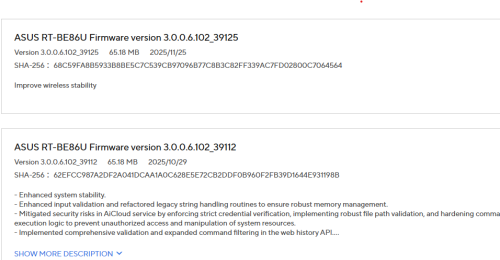 This post has been edited by mostwanted82: Nov 28 2025, 10:14 AM |
|
|
Nov 28 2025, 10:20 AM
Show posts by this member only | IPv6 | Post
#16513
|
|
All Stars
19,320 posts Joined: Jan 2003 From: Klang 
|
QUOTE(mostwanted82 @ Nov 28 2025, 10:06 AM) It is not helping at all, still encounter frequently disconnected (wifi restart itself). No harm tryingShould I install the latest firmware for BE86? (Improve wireless stability) |
|
|
|
|
|
Dec 1 2025, 10:51 AM
Show posts by this member only | IPv6 | Post
#16514
|

Senior Member
3,217 posts Joined: Dec 2006 From: City of Neko~~Nyaa~
|
Wanr to ask...
RT AX 57 can support 1gbps unifi? |
|
|
Dec 2 2025, 01:08 AM
|

Junior Member
520 posts Joined: Jul 2008
|
hi.
just got zenwifi ct8 router. 2 unit. i try to set up for my digi fiber. but after awhile, it will disconnect. any idea why? if refer to log, got show this ; Serial link disconnect |
|
|
Dec 2 2025, 08:35 AM
|
|
Elite
8,407 posts Joined: Jul 2008
|
QUOTE(Coldf3ar @ Dec 2 2025, 01:08 AM) hi. Assuming you're using PPPOEjust got zenwifi ct8 router. 2 unit. i try to set up for my digi fiber. but after awhile, it will disconnect. any idea why? if refer to log, got show this ; Serial link disconnect Firmware update to latest and use a better cable from main unit to modem |
|
|
Dec 2 2025, 10:01 AM
|
|
Junior Member
520 posts Joined: Jul 2008
|
QUOTE(blacktubi @ Dec 2 2025, 08:35 AM) Assuming you're using PPPOE firmware already updated to latest version. cable also change to new one. Firmware update to latest and use a better cable from main unit to modem this morning try to change ppp echo interval. will see later today stable or not. |
|
|
Yesterday, 09:36 PM
|
|
Junior Member
520 posts Joined: Jul 2008
|
QUOTE(Coldf3ar @ Dec 2 2025, 10:01 AM) firmware already updated to latest version. cable also change to new one. changing the echo interval seem fixed the issue.this morning try to change ppp echo interval. will see later today stable or not. BUT this morning got disconnection.. Dec 4 06:40:44 WAN Connection: Fail to connect with some issues. Dec 4 06:40:48 pppd[1108]: Connection terminated. then Dec 4 06:41:05 WAN Connection: WAN was restored. down for 20 second. try ask gemini, answer is ISP renew IP. possible? other than that, its all good |
| Change to: |  0.0243sec 0.0243sec
 0.31 0.31
 6 queries 6 queries
 GZIP Disabled GZIP Disabled
Time is now: 5th December 2025 - 02:12 PM |
 Quote
Quote