

QUOTE(areankim @ Feb 11 2020, 11:18 PM)
Anyone here has any success with aimesh? Mine has been unstable to a point it's useless.
My setup Ac86U + RP55AC

Force channel 36 on RT-AC86U, remove RP-AC55, add again.My setup Ac86U + RP55AC
Home Networking ASUS Malaysia Networking User & Technical Support, Managed by ASUS Malaysia Representative
|
|
 Feb 12 2020, 10:40 AM Feb 12 2020, 10:40 AM
|
 
Elite
8,415 posts Joined: Jul 2008  
|
QUOTE(areankim @ Feb 11 2020, 11:18 PM) Anyone here has any success with aimesh? Mine has been unstable to a point it's useless. Force channel 36 on RT-AC86U, remove RP-AC55, add again.My setup Ac86U + RP55AC |
|
|
|
|
|
Feb 13 2020, 08:09 AM
|
 
Junior Member
40 posts Joined: Aug 2007 From: Orang Kelate
|
any best firmware for gt-ac5300?
now was 384.32799 |
|
|
Feb 13 2020, 09:47 AM
|

Senior Member
2,348 posts Joined: Apr 2008 
|
QUOTE(wjgoh2001 @ Feb 5 2020, 01:42 PM) Hi, anyone know how to setup the TM modem huawei HG4280H in bridge mode in order for the router to function properly in router (default) mode. The Asus CS keep say my TM huawei modems is at router wan that why I only get 20- 50Mbps. I using maxis fiber 300Mbpd You cannot configure the ONU because it was locked. Its the problem of your Asus router. Please upgrade to a higher end Asus router, at least RT-AC68U. Beside that, please try to avoid 2.4GHz wireless connection. If you found that your neighborhood are using a powerful router, their wifi connection may interfering your home wifi connection. That's why you may found only 20mbps on wifi speed. Better is upgrade to RT-AC86U and use the smart connect rule. Turn the 2.4GHz and 5GHz into one SSID only.This post has been edited by junclj: Feb 13 2020, 09:57 AM |
|
|
Feb 15 2020, 10:53 AM
|
|
Newbie
8 posts Joined: May 2010
|
Hi blacktubi, previously i took your advice and switch on NAT acceleration, it was fine for 2 weeks, but its happening again
 Any advice, should i upgrade to merlin 384.15 or its just a faulty router. 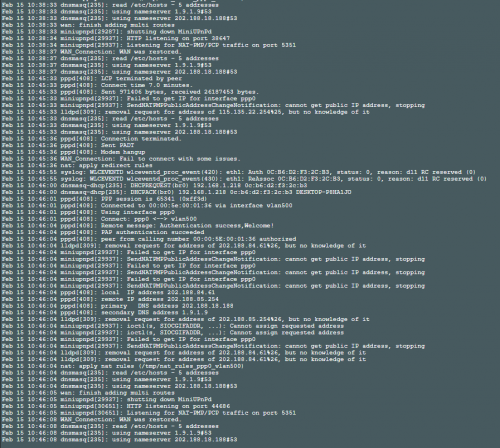 This post has been edited by Alviss00: Feb 15 2020, 10:58 AM |
|
|
Feb 15 2020, 11:25 AM
|

All Stars
14,909 posts Joined: Jul 2005
|
QUOTE(Alviss00 @ Feb 5 2020, 11:56 AM) My desktop is assembled last year so I consider it to be quite new. I will try to open NAT acceleration tonight. Just becaue the desktop is new, doesn't mean it doesn't have issues. Manufacturing error can always happen in any factory lineWhat is the model of WiFi adaptor used in your desktop? I would suggest Intel as I rarely have issues with Intel WiFi adapters QUOTE(Alviss00 @ Feb 15 2020, 10:53 AM) Any advice, should i upgrade to merlin 384.15 or its just a faulty router. You need to try everything. Not just flashing firmware, you also need to try changing the channel and bandwidth as well, can't just give up after 1 or 2 triesAlso, have you tried replacing the Ethernet cable that's connecting the modem to the router And what is the CPU temperature on your RT-AC68U (you can only check the temperature if you are using Merlin. You can't see the temperatures with stock firmware). Install Merlin then check for the temperatures Eitherway, I would still advise you to install some fans at the back of the router as RT-AC68U is known to run hot. Even worse if the place the router in a very bad ventilation area with no airflow This post has been edited by sHawTY: Feb 15 2020, 11:30 AM |
|
|
Feb 15 2020, 11:38 AM
|
|
Newbie
8 posts Joined: May 2010
|
QUOTE(sHawTY @ Feb 15 2020, 11:25 AM) Just becaue the desktop is new, doesn't mean it doesn't have issues. Manufacturing error can always happen in any factory line It wasn't just desktop disconnect currently, all device including IPTV affected, Ethernet cable used is from the router itself , tried the old ones too. Temperature is regulated with a USB fan. Currently using merlin 384.14_2. Changing channel hardly do anything.What is the model of WiFi adaptor used in your desktop? I would suggest Intel as I rarely have issues with Intel WiFi adapters You need to try everything. Not just flashing firmware, you also need to try changing the channel and bandwidth as well, can't just give up after 1 or 2 tries Also, have you tried replacing the Ethernet cable that's connecting the modem to the router And what is the CPU temperature on your RT-AC68U (you can only check the temperature if you are using Merlin. You can't see the temperatures with stock firmware). Install Merlin then check for the temperatures Eitherway, I would still advise you to install some fans at the back of the router as RT-AC68U is known to run hot. Even worse if the place the router in a very bad ventilation area with no airflow I bought this router since december last year, i have been trying since then This post has been edited by Alviss00: Feb 15 2020, 11:48 AM |
|
|
|
|
|
Feb 15 2020, 02:02 PM
Show posts by this member only | IPv6 | Post
#10947
|
|
Elite
8,415 posts Joined: Jul 2008
|
QUOTE(Alviss00 @ Feb 15 2020, 10:53 AM) Hi blacktubi, previously i took your advice and switch on NAT acceleration, it was fine for 2 weeks, but its happening again Since you mentioned that the issue have gotten worst where wired devices are experiencing disconnection, I suggest just send it back to RMA. Any advice, should i upgrade to merlin 384.15 or its just a faulty router. ASUS have 6 service locations nationwide. |
|
|
Feb 15 2020, 02:23 PM
|
|
All Stars
14,909 posts Joined: Jul 2005
|
QUOTE(Alviss00 @ Feb 15 2020, 11:38 AM) It wasn't just desktop disconnect currently, all device including IPTV affected, Ethernet cable used is from the router itself , tried the old ones too. Temperature is regulated with a USB fan. Currently using merlin 384.14_2. Changing channel hardly do anything. If that's a new router just send it for RMAI bought this router since december last year, i have been trying since then If it's an ASUS Malaysia unit, you just have to send it back to ASUS service center in Lowyat Plaza If it's ASUS China unit, then you'll have to send it back to China, ASUS Malaysia doesn't provide warranty for imported units If you bought a used unit, then you're out of luck |
|
|
Feb 15 2020, 02:28 PM
Show posts by this member only | IPv6 | Post
#10949
|
|
Elite
8,415 posts Joined: Jul 2008
|
QUOTE(sHawTY @ Feb 15 2020, 02:23 PM) If that's a new router just send it for RMA IINM, they don’t accept wireless router at the Lowyat Plaza.If it's an ASUS Malaysia unit, you just have to send it back to ASUS service center in Lowyat Plaza If it's ASUS China unit, then you'll have to send it back to China, ASUS Malaysia doesn't provide warranty for imported units If you bought a used unit, then you're out of luck That’s for notebook and some component only. The list of service center is available on first page. |
|
|
Feb 15 2020, 02:38 PM
|
|
All Stars
14,909 posts Joined: Jul 2005
|
QUOTE(blacktubi @ Feb 15 2020, 02:28 PM) IINM, they don’t accept wireless router at the Lowyat Plaza. I stand corrected  |
|
|
Feb 18 2020, 12:02 PM
Show posts by this member only | IPv6 | Post
#10951
|

Senior Member
1,547 posts Joined: May 2007 From: Selangor
|
Hi all, Do you think should I get AX56 router for more future proof or AC86 for better performance? I could see the price range is quite similar.
|
|
|
Feb 18 2020, 03:00 PM
|

Senior Member
1,341 posts Joined: Dec 2016
|
QUOTE(bananalow @ Feb 18 2020, 12:02 PM) Hi all, Do you think should I get AX56 router for more future proof or AC86 for better performance? I could see the price range is quite similar. The ax56U comes with 1.5ghz (Quad-core) processor while the ac86U (dual-core) comes with 1.8GHz processor. I will still pick the ac86U over the ax56u, but since we're heading towards Wi-Fi 7 era then most likely our home network should be future-proofed as well. My verdict, AC86U (mid - level ac router) > AX56U (Entry level ax-router)This post has been edited by Jjuggler: Feb 18 2020, 03:01 PM |
|
|
Feb 18 2020, 04:01 PM
|
|
All Stars
14,909 posts Joined: Jul 2005
|
QUOTE(bananalow @ Feb 18 2020, 12:02 PM) Hi all, Do you think should I get AX56 router for more future proof or AC86 for better performance? I could see the price range is quite similar. RT-AC86U is a Wireless AC 3x3. But devices with 3x3 receivers are very hard to come by. Even the highest end gaming laptops still uses 2x2RT-AX56U is a Wireless AX 2x2, this has more usage as a lot of laptops, phones & tablet supports 2x2 |
|
|
|
|
|
Feb 18 2020, 04:18 PM
|
|
Senior Member
2,348 posts Joined: Apr 2008
|
QUOTE(bananalow @ Feb 18 2020, 12:02 PM) Hi all, Do you think should I get AX56 router for more future proof or AC86 for better performance? I could see the price range is quite similar. I'm waiting RT-AX86U, if possible that ASUS is launching this model in the future. |
|
|
Feb 19 2020, 12:06 AM
|
|
Senior Member
1,547 posts Joined: May 2007 From: Selangor
|
QUOTE(junclj @ Feb 18 2020, 04:18 PM) I'm waiting RT-AX86U, if possible that ASUS is launching this model in the future. That could one way provided you currently using a decent router, but I just wondering when they will launch it... *million dollars question*  Anyway, I hope they would launch it soon. Anyway, I hope they would launch it soon.QUOTE(sHawTY @ Feb 18 2020, 04:01 PM) RT-AC86U is a Wireless AC 3x3. But devices with 3x3 receivers are very hard to come by. Even the highest end gaming laptops still uses 2x2 RT-AX56U is a Wireless AX 2x2, this has more usage as a lot of laptops, phones & tablet supports 2x2 QUOTE(Jjuggler @ Feb 18 2020, 03:00 PM) The ax56U comes with 1.5ghz (Quad-core) processor while the ac86U (dual-core) comes with 1.8GHz processor. I will still pick the ac86U over the ax56u, but since we're heading towards Wi-Fi 7 era then most likely our home network should be future-proofed as well. My verdict, AC86U (mid - level ac router) > AX56U (Entry level ax-router) Both of you have your points, i guess it would be down to personal preferences.  This post has been edited by bananalow: Feb 19 2020, 12:08 AM |
|
|
Feb 19 2020, 10:26 AM
|
|
Senior Member
2,348 posts Joined: Apr 2008
|
QUOTE(bananalow @ Feb 19 2020, 12:06 AM) That could one way provided you currently using a decent router, but I just wondering when they will launch it... *million dollars question* This is the rumor design of RT-AX86U Anyway, I hope they would launch it soon.Both of you have your points, i guess it would be down to personal preferences.  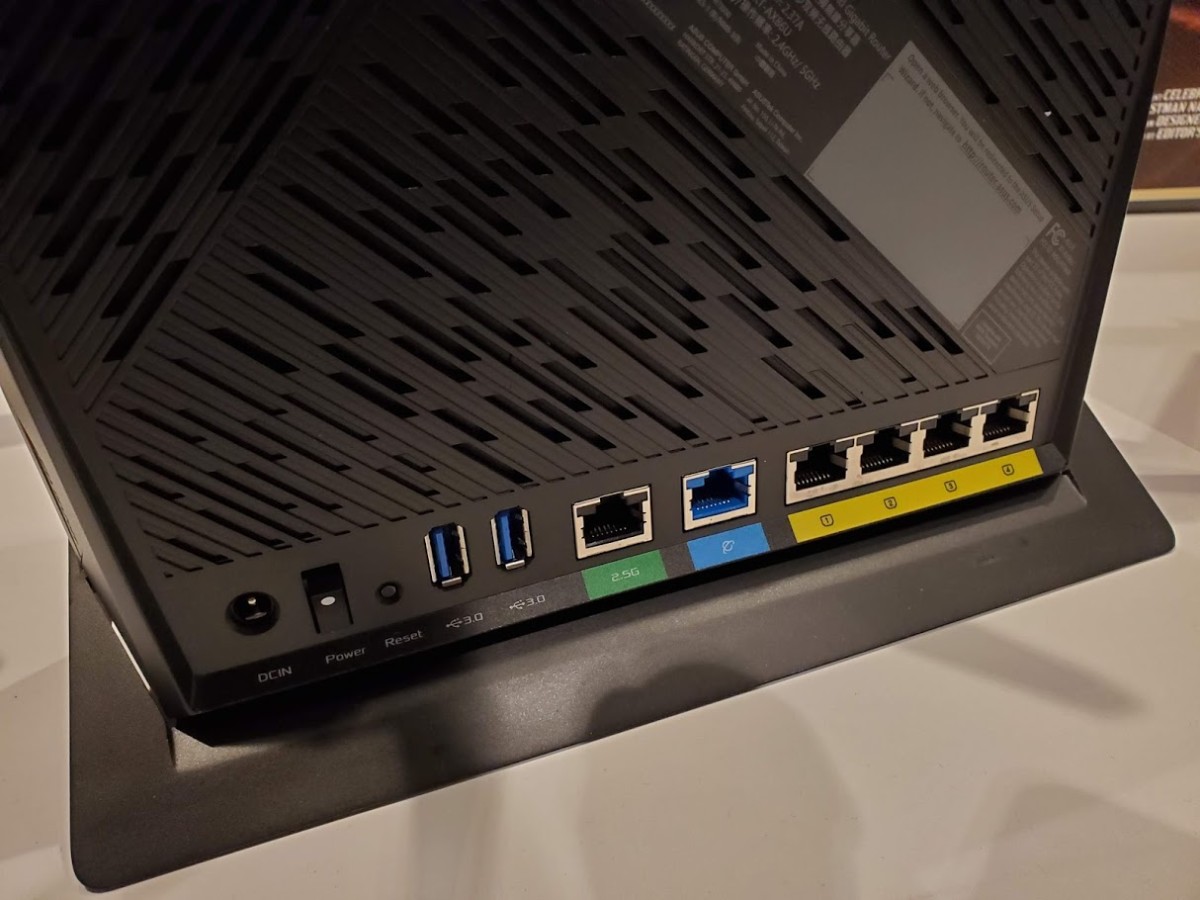 This post has been edited by junclj: Feb 19 2020, 10:33 AM |
|
|
Feb 19 2020, 10:45 AM
|
|
All Stars
14,909 posts Joined: Jul 2005
|
QUOTE(bananalow @ Feb 19 2020, 12:06 AM) but I just wondering when they will launch it... Then tag ASUS lorASUSmy is the RT-AX86U in the production pipeline?  |
|
|
Feb 19 2020, 11:16 AM
|
|
Senior Member
699 posts Joined: May 2006
|
QUOTE(junclj @ Feb 13 2020, 09:47 AM) You cannot configure the ONU because it was locked. Its the problem of your Asus router. Please upgrade to a higher end Asus router, at least RT-AC68U. Beside that, please try to avoid 2.4GHz wireless connection. If you found that your neighborhood are using a powerful router, their wifi connection may interfering your home wifi connection. That's why you may found only 20mbps on wifi speed. Better is upgrade to RT-AC86U and use the smart connect rule. Turn the 2.4GHz and 5GHz into one SSID only. I find the Smart Connect rule rather confusing. What is the recommended configurations? |
|
|
Feb 19 2020, 12:48 PM
Show posts by this member only | IPv6 | Post
#10959
|
|
Newbie
6 posts Joined: Apr 2010
|
Hi , anyones know Asus RT-AC88U Import Set from china or Us set malaysia can use ?
|
|
|
Feb 19 2020, 01:04 PM
Show posts by this member only | IPv6 | Post
#10960
|

Senior Member
1,940 posts Joined: Nov 2004 From: Soviet Sarawak
|
QUOTE(bao5221 @ Feb 19 2020, 12:48 PM) Hi , anyones know Asus RT-AC88U Import Set from china or Us set malaysia can use ? this question has been answered in your own threadhttps://forum.lowyat.net/topic/4908247 but in short, yes, usable. |
| Change to: |  0.0262sec 0.0262sec
 0.64 0.64
 6 queries 6 queries
 GZIP Disabled GZIP Disabled
Time is now: 11th December 2025 - 05:18 AM |
 Quote
Quote