Welcome Guest ( Log In | Register )

Outline · [ Standard ] · Linear+

 Fundamentals of Overclocking, NEWBIES PLS READ THIS BEFORE POSTING

views
     
TSiBorg
post Nov 20 2003, 12:10 AM, updated 16y ago

呵呵
Group Icon
VIP
1,021 posts

Joined: Jan 2003
From: Hang Zhou, China


( Thread hijacked by PCcrazy for sorting out purpose)

This thread will be updated/cleaned as necessary. PM me to report any dead links


General posting guidelines:-

* Try to keep this thread clean, refrain from posting messages such as "How to overclock?", "thanks", "This ram sucks" etc... Unconstructive posts will be deleted without notice
* Avoid posting long description of the guides, link us to the page instead.


Index


* Lowyat.NET 3DMARKS/AQUAMARK DATABASE, (LowEnd,MidRange,TopEnd)
* Lowyat.NET Super PI Scaling/Ranking, A64/AXP/Prescott/Northwood
* XTREME COOLING: Phase Change, Introduction and How to's
* XTREME COOLING: Pelt + Watercooling, Lots of pics and step by step
* XTREME COOLING : Dry Ice Party
* Q&A As Well As Guides For Graphic Benchmarks
* Tips and tricks for watercooling users, Come share with us your workable tips
* AMD 64/SEMPRON ---- OC DATABASE
* SANDRA 2005 MEMORY OVERCLOCKING CHALLENGE, OVERCLOCKED MEMORY COLLECTION

AMD 64 Related

* Study of Athlon 64 Overclocking Techniques
* Overclocking AMD Athlon64 101
* Jarad's Guide to Overclocking
* A64 940, 754, 939 CPU Models, OPN code, rating

Theories Related to Overclocking

* Upping Vcore and Overvolting Explained.(My Favourite)
* HyperThreading On Desktop.
* SMP (dually setup) , Is It Really worth it?
* BIOS for beginners

Stability Test Program

* Prime95
* Folding@Home
* SiSoft Sandra (Benchmark and burn-in)
* memtest86
* 3DMark
* LinX

-------------------------------------Still Under Construction--------------------------------------

This post has been edited by metsatsu: Sep 3 2010, 11:47 PM
kucingfight
post Nov 21 2003, 05:55 AM

Look at all my stars!!
Group Icon
Elite
5,784 posts

Joined: Jan 2003
From: Shah Alam


AMD Optimal BIOS settings + Overclocking Guide

To those who ain't sure bout memory timings and getting the max out from ur AMD setup, have a read, it will help a lot smile.gif
vbNooB
post Jan 6 2004, 10:45 AM

Regular
Group Icon
Elite
1,163 posts

Joined: Jan 2003


QUOTE(daze @ Jan 6 2004, 10:27 AM)
I'm a newbie here...

the question might be silly..
HOW to clock RAM??
i got 1Gb Twin Corsair XMS pc3200 400mhz

Definition: -Clock- : An object that tells time.
Definition: -Clocked- : "Something" that is running at a specified speed.
Definition: -Overclock- : Forcing "something" to run higher than specified speed.

From you post I notice you dont have any knowledge of overclocking at all. Do check out THE LINK provided by kucingfight in the first page to learn about the basics of overclocking on AMDs.

Basically, check out every links about overclocking in this thread.
HERE is a site where you can get your basic overclocking knowledge and advance lessons as well.

Have fun flex.gif
ikanayam
post Feb 6 2004, 06:32 AM

there are no pacts between fish and men
********
Senior Member
10,544 posts

Joined: Jan 2003
From: GMT +8:00

Overclocking/RAM tweaking guide for newbies:

[24 feb 2004] Recently moved my guides to a new server. Here is the link:

MY OVERCLOCKING AND RAM TWEAKING GUIDES


EDIT: DON'T ASK ME ANYTHING AFTER READING THIS REALLY. I DON'T DO ANY HANDHOLDING.

This post has been edited by ikanayam: Dec 9 2008, 06:42 PM
XTREME
post Apr 3 2004, 09:45 PM

 
*******
Senior Member
4,599 posts

Joined: Jan 2003


This post has been edited by XTREME: Apr 19 2009, 02:15 PM
enCORe
post Apr 27 2004, 06:05 PM

Gadget lovers
*******
Senior Member
5,301 posts

Joined: Jan 2003
From: Ampang - Putrajaya


EDITED

How to unlock AMD Tbred 2400+ (Wiring Trick)
http://www.ocworkbench.com/2002/amd/unlock...locktbredp1.htm

This post has been edited by enCORe: Apr 27 2004, 06:31 PM
xtorm
post May 26 2004, 03:00 PM

^O....OO.....ooo^
*******
Senior Member
3,160 posts

Joined: Jan 2003
From: KLANG!
http://www.bleedinedge.com/guides/psu_3.3v...3v_mod_pg5.html

some comparison b4 n after voltmoting ur psu
dragonajie
post Jul 16 2004, 12:09 PM

dragonpapa, father of a cute little dragonbaby
******
Senior Member
1,420 posts

Joined: Jan 2003
From: Dragonmount, Island of Tar Valon


What I understood from studying and reading this past few weeks, some summary and facts:

1) Processor speed is Multiplier x FSB.
2) First, leave memory setting at auto and overclock the processor to the highest FSB it can achieve.
3) Then, tweak RAM. In very lucky ideal cases (and if you are bloody rich and have uber expensive RAMS), we can get 1:1 ratio (synchronious) of FSB:RAM at tight timings. If not, look for the most stable setting between higher FSB and tight timings, running the RAM asynchroniously with dividers.
4) More often than not tight timings prevails over higher FSB for RAM.
5) Vcore limit is around 1.8V.
6) Vdimm limit is dependant on your motherboard and RAM. Usually RAM can eat up a whole lot of voltage.
7) Processor temperature should not exceed 60 C, keep it between 55 C and 60 C.
8) The best RAM timings for nForce2 boards are arguably 2-2-2-5 and 2-2-2-11. Experiment yourself.
9) Barton 2500+ is unlocked up to multiplier 12.5. Edit: Confused on how to access higher multiplier though... humm...
10) Always test for stability. Use SiSoft Sandra, 3Dmark03, 3Dmark01SE, Prime95, memtest86, CPU-Z, wcpuid.
11) Overclock your graphic card with RIVA Tuner.
12) Artifacts (picture quality defects) in your 3Dmark tests means the graphic card OC is not stable.

There. Hope it will be easier for newbies like me to understand. So, am I ready to OC yet or what? laugh.gif Please correct me if I'm wrong ok senpai? Thanks.

This post has been edited by dragonajie: Jul 17 2004, 07:32 AM
nVidiaFX
post Oct 24 2004, 12:54 AM

you can't handle the truth.
*******
Senior Member
4,880 posts

Joined: Jan 2003
From: KL/PJ


Umm dude, u shouldnt just copy and paste or at least state the author or link...

btw here's a nice newbie guide too http://www.thetechzone.com/articles/how_to...ing/index.shtml
kucingfight
post Nov 23 2004, 03:06 PM

Look at all my stars!!
Group Icon
Elite
5,784 posts

Joined: Jan 2003
From: Shah Alam


Newbies read>>>>> HERE
datto
post Jan 28 2005, 05:31 PM

a.k.a. datsun turbo
******
Senior Member
1,079 posts

Joined: Jan 2003
From: s'ban | KL
cpu overclocking utilities
cpufsb
clockgen

i need more. this is only what i can find. crappy chip magazine also review this.
pls add more if u know any that supports more chipset. but not the one that created by mobo manufacturers eg: uGURU, asus AI Overclocking, etc
arj
post Feb 9 2005, 05:01 PM

RED DEVIL
Group Icon
VIP
4,896 posts

Joined: Jan 2003
From: Kg Sg Penchala, KL


A64 Overclocking

Overclocking AMD Athlon64 101

Jarad's Guide to Overclocking

The Ultimate CPU GUIDE (Overclocking & Cooling) (free registration required)
wenloong78
post Mar 5 2005, 05:16 PM

Enthusiast
*****
Senior Member
794 posts

Joined: Jan 2003


Some Overclocking Faq

hopes that help
smile.gif smile.gif
HMMaster
post Apr 3 2005, 10:57 PM

10K Club
Group Icon
Moderator
10,308 posts

Joined: Jan 2003
From: Kuala Lumpur


Study of Athlon 64 Overclocking Techniques
KeonG118
post May 18 2005, 03:46 AM

- Do as Infinity -
******
Senior Member
1,156 posts

Joined: Mar 2005
From: * Care-L *


[ Guide ]

1.) Intel Pentium 4 Overclocking 101

2.) Step by Step OC Athlon 64 - by dave164
QUOTE
1.) This guide is a general guide mostly based on Athlon 64's, overclocking is basically the same for the rest of the Athlon series.
2.) We cannot predict what your chip can do, it depends on quality of the core, the hardware and the cooling that you have.
3.) What temperatures are dangerous? Well for A64's, 60c load is the absolute most, my old 3000+ Clawhammer once spiked to 60c and I couldn't get past post and my BIOS said bad cpu temperature, etc.. 30-40c is normal idle for it, I've seen many 25c - 30c and personally if its any higher than that idle, get some airflow or better cooling!!!!

Its helpful to start off with decent hardware and cooling to overclock with, I don't mind threads being made on this as it changes a lot.

Main

Well with all that said and done, and providing you have what you need heres the primary information to overclock your cpu:

1. To start off with you need to get into the BIOS, this is where you control everything your computer does more or less. You do this usually by pressing the Del key when you've restarted / started up. Usually your prompted at start-up saying which key to press to get in.
2. Turn off Cool n' Quiet and any cooling methods you have set in your BIOS such as this and Q'fan control.
3. With the majority of s754 boards especially the ASUS dont have pci/agp locks so you cant go as far as you would like. The DFI s754 boards do i believe. All s939 boards do as far as i know. Set the AGP / pci locks at 33(pci)/66(agp). I have heard that when people have increased there CPU Frequency there agp has auto moved from 66 to a differnt number, so they set it to 67 and it stayed there.
4. Go to the section which is named either Jumper free settings, advanced chipset features, or sometimes can be completely different, that's what I can remember.
5. In that section there should be a bit called CPU Frequency that is set to 200Mhz. This is what you raise when you want to increase the clock speed of the CPU.
6. I recommend raising this by 5Mhz at a time, this is infact about 50Mhz for the actual clock speed (to find out what it is for you times the CPU Frequency by the multiplier of the CPU.
7. Exit and save, see if you can get into Windows, if so run a benchmarking program such as 3DMark03/05 or SiSoft Pro 2005. If the computer doesn't crash or you don't get any artefacts then you can class it as stable.
8. Keep repeating processes 5-6 untill the computer crashes, you cant get into windows, doesn't go past post, or games randomly freeze. At this point you can play with the RAM timings and voltages.

Timings

To take your CPU further it helps to have RAM with the timings 2-2-2-5 or RAM that can take big voltages.

1. Go to Advanced options again; there should be some options to change your memory settings. If there isn't any try pressing ctrl + f1.
2. Change the timings to 2.5-3-3-7 at the lowest if you have timings default at 2-2-2-5. If you don't have 2-2-2-5 or close you may as well stop reading this and go to the next section on upping the voltage
3. When this is changed up the CPU Frequency bit by bit more like in steps 5-6

This should get you further as there is less strain on the RAM.

Voltage

To get the RAM & CPU further it's sometimes ok to raise the voltage on the chips. For RAM otherwise stated I wouldn't go over 2.7. I know my OCZ Platinum Rev2 can do 2.8 and it says on the OCZ site it can do 2.9, so check out what other people have been able to do. Also for the Athlon 64s I wouldn't go over 1.6 / 1.65v, My Clawhammer could do 1.7 on air, but I wouldn't advise anyone to do that.

RAM

To raise the voltages of the RAM it could be called RAM Voltage, DDR Voltage or vdimm, I haven't seen anything else yet. You should be able to set it to 2.6/2.7/2.8 or even higher on the DFI motherboards.

CPU

To raise the voltage of the CPU is could be called vcore or CPU voltage. It goes up by .025 so 1.4, 1.425, 1.45, 1.475, etc.. Like I said above don't go over 1.6/1.65 with the A64's unless you have proper cooling! But even then it can fry your chip.

HT

Sometimes the CPU can have to much strain on the HT so lower it from 5x (1000Mhz for s939) or 4x (800mhz for s754) to the step below (800Mhz for s939, 600Mhz for s754)


Credits for Mr. dave164 notworthy.gif


[ Software ]

1.) PC Wizard - Download link

Description
CODE
PC WIZARD 2005 is a powerful utility designed especially for detection of hardware, but also some more analysis. It's able to identify a large scale of system components and supports the latest technologies and standards. This tool is periodically updated (usually once per month) in order to provide most accurate results. Besides, It can analyze and benchmark many kinds of hardware, such as CPU performance, Cache performance, RAM performance, Hard Disk performance, CD/DVD-ROM performance, Removable/FLASH Media performance, Video performance, MP3 compression performance.


2.) ClockGen - Download Link

Description
CODE
ClockGen: Make sure your get the version for your Chipset. This program allows you to Overclock from within windows. Not always as reliable as physically changing BIOS settings, but gives you an easy way to play with your settings without dozens of reboots.


This post has been edited by KeonG118: Jul 21 2005, 05:24 PM
PCcrazy
post May 18 2005, 06:36 AM

Milanista
*******
Senior Member
3,224 posts

Joined: Jan 2003
From: B.B.Bangi


PLS note, if you are already a pro, don't bother to read okay.

Overclocking common problems

Things to consider before or when stuck on your way achieving the limit.

Since countless of overclocking problems were replied time after time, I'm going to write down basics steps overclockers need to address before proceeding with overclocking.

1. My motherboard has overclocking functions on the fly setting utilities in Windows, but using it causes a lot of restart to occur, why is this happening?
Most of time, motherboard manufacturers such as Abit or Asus did come with overclocking on the fly utilities. A lot of times these don't actually set correct values at the higher end and you won't be able to boot. But overclocking is actually best done through BIOS due to many features that can be tweaked to ensure stability.

2. It should be noted that CPU: DRAM is the standard typically set in Intel system. This means if you apply the ratio system other than 1:1, your RAM will not be running synchronously with the CPU.

3.Iincreasing the FSB corrupts my HDD data and causes graphics card instability, why?

This has always being mentioned in all overclocking guides. And I quoted them back, in order to achieve high overclock without corrupting any data or getting artifacts one must lock the frequency of AGP and PCI. Typically 66 Mhz is for AGP and 33 Mhz for PCI.
Don't bother overclocking PCI and AGP frequency; you will not get any performance advantage but only harms the stability.

4. Increasing vcore will not help, is there anything I can do?
Monitor the voltage fluctuation on the vcore, if the values fluctuates too much that would be probably because of low amp supplied to 12v rails. Typically in Malaysia, on a basic system without the SLI most of the people achieve decent overclock with Enlight 420W which have 12v rails of 18amp, more is always better. If u want to know if the stability of overclocking is affected by insufficient power, you can always unplug everything such as CD-ROM drive, extra HDD, fans (please leave the proc fan and NB fan running though). If this result in a little increment in stability, it may tell that your system is actually crying for more juices.

5. I have Intel board, can I overclock?

Unfortunately Intel board doesn't allow overclocking since they restrict anyone from modifying the BIOS options. In other words BIOS don't have the tools needed to perform overclocking functions. I did not mention it was impossible though, how? Google dude.

6. When I set the proc and ram to run over specification the rig wouldn't boot no matter what I do, how to fired it up again?
As usual, every motherboard has a jumper to set clear the CMOS, it has 3 prongs, and a jumper is connecting two of the prongs. Get rid of the jumper and connect the middle prong with the other prong that wasn't used. Let the jumper there about couple of seconds, and then put the jumper back to where it was before. Provided you can't find the manual, just plug the battery off. When clearing CMOS please make sure to unplug power cable to prevent any shorting to occur.

7. What configuration is considered tight timing and which RAM is capable of pulling that?

Typical KVR has loose timing at stock (3-3-3-8), increasing the FSB even by small margin need to loose the timing to (3-4-4-8). Configuring the timing to 3-5-5-11 wouldn't help scaling the value higher. This applies to Btd43 and some Dtd43 as well as normal KVR. The only difference is that normal KVR can only do not more than 225 fsb/htt typically while d43's manage to pull out 250++ at loose timing of (3-4-4-8). Please note that if you are lucky you might as well bump into 250++ capable d43 at respectable timing of (3-3-3-8). Back to the question, tight timing is actually a configuration of no less than 2-2-2-5. Most chipset needs high vdimm in order to scale the timing at higher fsb/htt. OCZ VX and most of the BH5, CH5 is capable of doing something similar.

8. What is the safe temperature for my proc?
Anything around 60 degrees at full load priming for AMD64 and possibly around 70 degrees for P4 Prescott is considered safe. Please noted that the cooler your proc run, the higher the potential of getting more speed. (I'm not going to explain this as it will be too long).

9. Heard there is some bug about AMD64 memory controller, what is it?
Memory running on AMD64 system is quite fussy unlike those of Intel. Running all four DIMMS is no good as the on die memory controller might downclock your RAM frequency and command rate resulting in loss of huge bandwidth.

10. When you overclock, the settings in the BIOS all should manually set to prevent unnecessary CMOS clearing. For example most of the problem occurred when ram timing is set to turbo, it means that raising FSB normally result in no boot up.

11. If all matters raising the HTT/FSB fail, updating BIOS may resolve the issues. I had one Neo2 unable to boot even from 2.0 GHz to 2.1 GHz, updating BIOS solve the issue.

12. FX-55 multi is unlocked while other AMD64 is locked upwards. When overclocking make sure you dont exceed the board HTT specification of 1000. LDT (5) x HTT (200) is equivalent = 1000 (at stock). Unless you're using an 8x multiplier, there shouldn't be much reason to go far above 300MHz in many cases.

Welcome into the world of overclocking, (problems can be a nuisance and sucess is definitely a cure)
At this particular time, above is all I can remember.
I will keep coming back for more newbie's tips. I hope by making this would attract more forumers being interested in overclocking, anything wrong please mention it okay.
Actually I got more coming in, but since this is already too long, maybe later on will appear with the shorter revision. Guys if you encounter any sort of problems with the solution please share.

Enjoy,
PCcrazy

I did noticed many of broken links. So I cleared it up to make things easy for newbies to refer.
SUSceo684
post May 24 2005, 12:42 AM

Component Burner
********
All Stars
11,667 posts

Joined: Jan 2003
From: Klang/Subang


Bit-Tech AMD Processor Stepping Guide

http://vb3.forums.bit-tech.net/showpost.ph...224&postcount=7
tachlio
post Jun 25 2005, 01:44 AM

de~sign "ing"
*******
Senior Member
3,102 posts

Joined: May 2005
From: Penang *̡͌l̡*̡̡
still noob about OCz ,and when seaching the way about OC finding this side
hope got help to those OCz...
it got so many link here~~


This post has been edited by tachlio: Feb 4 2006, 10:19 AM
Westley
post Aug 3 2005, 02:07 PM

Night Crawler...
****
Store Representative
679 posts

Joined: Jan 2003
From: PG/KL/CYBERJAYA


OCCT, another cpu stability testing and burn-in software

http://www.ocbase.com/downocct.html
PCcrazy
post Aug 9 2005, 01:57 PM

Milanista
*******
Senior Member
3,224 posts

Joined: Jan 2003
From: B.B.Bangi


QUOTE(joylay83 @ Aug 9 2005, 03:05 AM)
is there any software to measure ram temperature? coz last time when my fren oc his abit the ram temp go up also even if he oc his proc. i using asus board. thanks
*
No software can measure the temperature if there is no hardware/external sensor temperatures via optional probes installed. Some motherboards either do not show exact figures or do not support RAM temperature monitoring at all. So,we make use of lay a hand on technique most of the time and formulate educated estimation about it. Btw, before touching the RAM please make sure to ground yourself first as to avoid static charge. smile.gif
rzonealley
post Aug 20 2005, 10:44 PM

Freude Am Fahren
*****
Senior Member
968 posts

Joined: Dec 2004
From: Papar/K.Kinabalu


QUOTE(PCcrazy @ Aug 9 2005, 01:57 PM)
No software can measure the temperature if there is no hardware/external sensor temperatures via optional probes installed. Some motherboards either do not show exact figures or do not support RAM temperature monitoring at all. So,we make use of lay a hand on technique most of the time and formulate educated estimation about it. Btw, before touching the RAM please make sure to ground yourself first as to avoid static charge.  smile.gif
*
the ram heat quite annoying afaik n all the time heat makes ur
prime test or memtest failed
as to avoid overheated prob. atleast make sure the casing air flow
is good, but better if just cool it with some good cfm fan.

but just like pccrazy said the touch using ur hand is owez trusted xD
splinter
post Sep 20 2005, 05:21 PM

New Kid In Town
*******
Senior Member
2,120 posts

Joined: Jan 2003
From: In front my PC


How to comfirm my CPU pass prime95 test?

Pentium 4 HT enable. When running one prime95, its only around 50% cpu resource. Do i need to run two prime95 at the same times? I seem cant running two prime at the same time.
PeowYong
post Sep 20 2005, 05:35 PM

PeowYong
*******
Senior Member
2,263 posts

Joined: Jan 2003
From: MMU Cyberjaya, Sandakan


yup...
u need to run 2 prime at the same time to make ur pc usage 100%


install and open 2 prime, 1 of it set the affinity to 0, another set to 1

to do this,
advanced->affinity-> UNTICK "let program run on any CPU"->Specific CPU to run on set to "0"

then the another prime also the same, but change the "Specific CPU to run on" to 1

then use torture test to test both.... 1 using small FFTs and another 1 use large FFTs
PCcrazy
post Sep 21 2005, 01:56 AM

Milanista
*******
Senior Member
3,224 posts

Joined: Jan 2003
From: B.B.Bangi


QUOTE(splinter @ Sep 20 2005, 09:53 PM)
Ya, since they put Prime95 on stability download links.. why dont give some guide on how to use it. I know its easy, execute n run, but for p4 users is slightly different. need to set the CPU 0 - 1 (Thanks to PeowYong) or else i still running 1 prime and feel i happy safe with 50%cpu resource running.

SOrry if i posting at wrong place. Since its an easy Q for pro OC to answer with. No need create new threat.
*
I will do that, this thread is still under construction. I'm busy this few months. smile.gif
Meanwhile please don't discuss in here. You can only post guidelines and stuffs.
Evogenix
post Sep 24 2005, 03:57 PM

I Missed LYN Grey Skin T_T
******
Senior Member
1,809 posts

Joined: Jan 2003


Dear mod, i create this thread at overclock section because i felt its more suitable at here than software section.
But, feel free to move it if it really breaking any rules of lyn.


Just start my collage holiday, flex.gif flex.gif
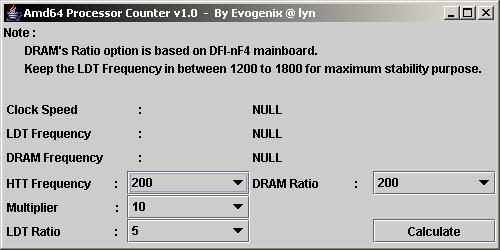
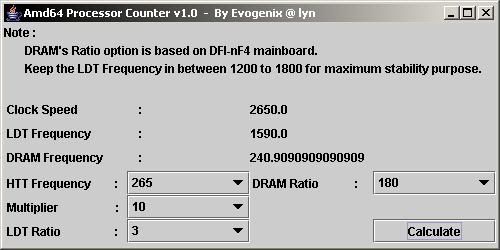
so, i start with this simple software so called " amd64 Processor's Counter V1.0" for those that needed. rolleyes.gif

It's a simple java GUI application that use to calculate/estimate System's ClockSpeed, LDT frequency and Memory Frequency
before you start wacking those setting into your BIOS. laugh.gif laugh.gif

note :
1. DRAM' ratio was based on my DFI-ultra-D BIOS 7.04bta by BigToe. notworthy.gif
2. Memory frequency output was compared with memory table that made by Oska Wu. notworthy.gif
3. Since i'm using java language on this application, so you need JavaEnvironment to execute the file. [ most of the pc should support this file ]
4. Application ziped, @ 5.6KB of size.
5. Feel free to PM me, if any bug[s] found on this application.

Here's some screenies of my application,

Screenshot #1 :
user posted image

Screenshot #2 :
user posted image

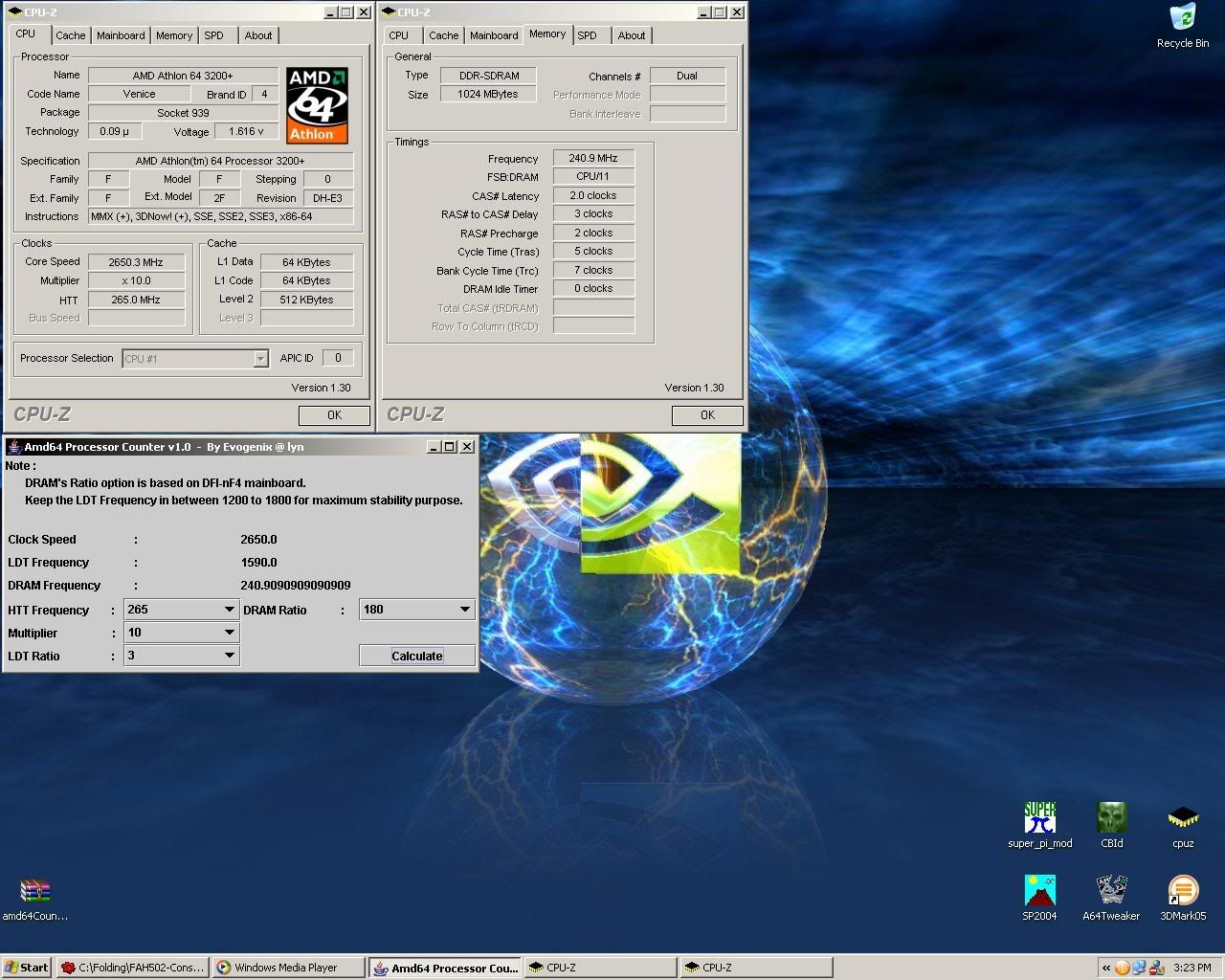
Screenshot #3 : Comparing the estimated frequency and the real life frequency from cpu-z 1.3
user posted image


More deteils on RAM's Ratio :
100 = RAM/FSB : 01/02
120 = RAM/FSB : 03/05
133 = RAM/FSB : 02/03
140 = RAM/FSB : 07/10
166 = RAM/FSB : 05/06
180 = RAM/FSB : 09/10
200 = RAM/FSB : 01/01
233 = RAM/FSB : 07/06
250 = RAM/FSB : 05/04


updated v1.1 :
Attached File  amd64CounterV1.1.zip ( 5.6k ) Number of downloads: 162


Evogenix

This post has been edited by Evogenix: Sep 27 2005, 12:00 AM
PCcrazy
post Sep 26 2005, 11:14 PM

Milanista
*******
Senior Member
3,224 posts

Joined: Jan 2003
From: B.B.Bangi


BIOS for beginners,

http://www.tomshardware.com/cpu/20050922/index.html

QUOTE
The Basic Input-Output System (BIOS) is an essential set of routines in a PC, which is stored on a chip on the motherboard. It acts as an intermediary between a computer's hardware and its operating system. Without the BIOS, the PC's operating system would have no way to communicate with, or take control of, the hardware.

In other words, the BIOS is a crucial component of any computer. If its options are set incorrectly, the BIOS could slow your computer down by as much as 40%. Unfortunately, as new processors and motherboard chipsets are released, BIOS options continue to get even more confusing. As a result, many seasoned technicians are still baffled by the jargon-laced and confusing options available in a modern computer's BIOS setup program.


Another helpful guides into BIOS

http://www.wimsbios.com/

http://computer.howstuffworks.com/bios.htm

http://en.wikipedia.org/wiki/BIOS
PCcrazy
post Sep 28 2005, 10:48 PM

Milanista
*******
Senior Member
3,224 posts

Joined: Jan 2003
From: B.B.Bangi


QUOTE(joylay83 @ Sep 28 2005, 08:52 PM)
i intend to use this software on my new NF4 mobo (Asus? DFI? MSI?) next month when i buy it.

but this software dosen't work very well on my current Abit NF2 mobo. It gives me blue screens after i OC about 10%. (edit: is it due to my hardware?)

Is there any way to increase the overclockability of this software? I understand that Abit guru performs much better. I wanna do software OC coz then i can OC only when i need it, and also dun need to reboot. Takes less time too. I dun mind the fluctuation in speed or the spread spectrum, with enough cooling it should be good.  notworthy.gif
*
ClockGen anyone? rolleyes.gif

http://www.cpuid.org/clockgen.php

QUOTE
The ClockGen serie consists in a set of overclocking software that allow to change the clock of some of your system devices on-the-fly : CPU, memory, AGP, PCI Express, PCI. Each of these software is dedicated to one or several motherboards.


Oh, btw in reply to this,
QUOTE
I dun mind the fluctuation in speed or the spread spectrum, with enough cooling it should be good.


Pls bear in mind that good cooling is not enough, RAM settings? PCI lock? Dividers? I will not recommend software overclocking anyday anytime. Your system is not stable most of the time. Furthermore there are too much tweaks you missed by using software overclocking utility.
PCcrazy
post Sep 28 2005, 11:11 PM

Milanista
*******
Senior Member
3,224 posts

Joined: Jan 2003
From: B.B.Bangi


QUOTE
When I OC my system, anything more then 210MHz external clock (840FSB) and In 3DMark03 CPU test benchmark, artifect are everywhere.....only that benchmark, normal 3D benchmark, application all runs well. CPU stress test also didn't crash, running for few hours, CPU temp max about 50c, mobo temp max 45c

Anyone knows where the problem lies?


this is the common issue for 865 chipset when u use 1gb ram to oc

http://www.cpuid.org/download/Tw865.zip

download this, change the dram latency parameter from 00 to 01
hope this help

Credits to zt_lee

QUOTE
thanks everybody that contributed their time and effort to help...i've solved the problem via tweak865. the downside of this software is you have to manually change the value from 00 to 01 everytime botting into the window, but i've found another way to remove that pain step. i dunno whether this method has been adopted and published in the forum or not yet but here it goes:

step 1:
after unzipped the software to the desired directory,change the dram latency parameter from value 00 to 01, click apply and save the setting.you will be prompted to save the setting in a notepad format.

step2:
create the shortcut for the execution file name tweak865.exe and move it to c:\documents and settings\"USER NAME"\start menu\programs\startup.

step 3:
right click the shortcut and click on the properties. you'll noticed the "target" directory of the origin tweak865.exe location in your hard drive. after the target directory ends, press space bar and then add in this phrase ( -file=tw865.txt )excluding the bracket. for example: "c:\program files\tweak865\tw865.exe" -file=tw865.txt and press ok

step 4:
to check that you have successfully add the program to startup, press start, all programs, startup, shortcut to tw865. if the shortcut exist there, it should be no problem anymore.

step 5:
restart your computer, the next time you boot into windows again, the tweak865.exe should be in the msconfig under startup tab.

and there you go, the problem should be solved. say bye bye to tearing effect. forgive me if my explanation is not good enough, i could've use some photos to show you as it will be more easier to understand as the old saying goes: a picture can represents a thousand words but sadly i dun have any webcam or digicam. hope this helps to those who are still suffering from this problem.


credit to sonic_darknight
This post has been edited by PCcrazy: Mar 3 2006, 05:41 PM
joylay83
post Nov 9 2005, 02:03 AM

Enthusiast
*****
Senior Member
854 posts

Joined: Jun 2005
From: N9


QUOTE(PCcrazy @ Sep 28 2005, 10:48 PM)
ClockGen anyone?  rolleyes.gif

http://www.cpuid.org/clockgen.php
Oh, btw in reply to this,
Pls bear in mind that good cooling is not enough, RAM settings? PCI lock? Dividers? I will not recommend software overclocking anyday anytime. Your system is not stable most of the time.  Furthermore there are too much tweaks you missed by using software overclocking utility.
*
i see what you mean. you can't adjust the voltages and dividers and latencies in any software overclocking. smile.gif i'd rather restart and overclock in the bios. <-- tried this in an Abit machine.
misao
post Dec 3 2005, 12:38 PM

Casual
***
Junior Member
324 posts

Joined: Jul 2005
From: P.J.


Umm, I can't seem to find this anywhere..

What are the -risks- or disadvantages of overclocking RAM? Assuming that you keep the temp at a safe range? Will your RAM burn out faster, will it overstress your processor, etc?
joylay83
post Dec 4 2005, 01:53 AM

Enthusiast
*****
Senior Member
854 posts

Joined: Jun 2005
From: N9


i am not very sure bout this, but try googling for 'overvolting'. hope you will find some info. will do this myself later too sweat.gif

btw afaik value rams are at higher risk of burning compared to performance ram. but currently i am using 512x2 kvr overclock from ddr266 to ddr300, 2.8v. so far no problem. no temp monitoring. cool.gif

This post has been edited by joylay83: Dec 4 2005, 01:55 AM
shinja_82
post Dec 12 2005, 01:48 PM

New Member
*
Junior Member
30 posts

Joined: Oct 2005

hi ... just wanna ask something
i just flash my pci-e bios
my original card is x700 pro
but after flashing it using x700xt bios .. it turn to x700se
how far it change my graphic quality
n why it become x700se
can somebody help me


ohmy.gif blink.gif cry.gif

This post has been edited by shinja_82: Dec 17 2005, 12:06 AM
gengstapo
post Jan 12 2006, 11:17 AM

Retired enthusiast
********
All Stars
10,688 posts

Joined: Jan 2005
dunno where to put my noob question.. sound goes like this

"what is this Bank Interleave??"
"which wan better, 2-banks or 4-banks etc??"


thanks brows.gif
Survivor
post Jan 17 2006, 05:59 PM

I will survive...
*****
Senior Member
795 posts

Joined: Jan 2003


I dunno whether anyone has posted this before but as a newbie i think this is quite useful so i decided to share...if someone already bring this out in the pass then i m very sorry tongue.gif

Check this out--->Bios A-Z

This post has been edited by Survivor: Jan 17 2006, 05:59 PM
low yat 82
post Feb 16 2006, 10:08 PM

time is nearing to end
*******
Senior Member
4,081 posts

Joined: Aug 2005


some guide from our own forummer..deeppow
dunno where to post... mod plz move this to d correct place..

http://www.deep-powder.net/OC_Guide/Mem_Mo...cking_Guide.htm

This post has been edited by low yat 82: Feb 16 2006, 10:09 PM
nickken
post May 15 2006, 03:53 PM

New Member
*
Junior Member
36 posts

Joined: May 2006
From: Malacca

i just run the memtest86 i boot it from my A drive, buy half way my pc restarts.... over and over again without finishing the test...
is my RAM damaged or is it part of the test??
newbieockids
post May 16 2006, 07:18 PM

Regular
******
Senior Member
1,405 posts

Joined: Jun 2005


QUOTE(nickken @ May 15 2006, 03:53 PM)
i just run the memtest86  i boot it from my A drive, buy half way my pc restarts.... over and over again without finishing the test...
is my RAM damaged or is it part of the test??
*
at what setting?..
default?..
siauann
post May 16 2006, 07:48 PM

Music-Movies-Coffee
*******
Senior Member
3,375 posts

Joined: May 2005
From: MeeRee


wanna ask y i run 2 sp2004 test at the same time but the cpu resource oso show 50%?

newbieockids
post May 17 2006, 12:28 AM

Regular
******
Senior Member
1,405 posts

Joined: Jun 2005


QUOTE(siauann @ May 16 2006, 07:48 PM)
wanna ask y i run 2 sp2004 test at the same time but the cpu resource oso show 50%?
*
since ur procs got HT tech.. assign each app for each core..

siauann
post May 17 2006, 06:46 PM

Music-Movies-Coffee
*******
Senior Member
3,375 posts

Joined: May 2005
From: MeeRee


QUOTE(newbieockids @ May 17 2006, 12:28 AM)
since ur procs got HT tech.. assign each app for each core..
*
i'v done tat...one set to 0..and the other one set to 1..but thn whn i run it wif blend test it only shows 50%... sweat.gif
siauann
post May 17 2006, 08:13 PM

Music-Movies-Coffee
*******
Senior Member
3,375 posts

Joined: May 2005
From: MeeRee


btw one more thg wanna ask...do u guys run prime test thn stil do other stuff wif the pc? or izit better to jz run the prime test? im priming while doin other stuff oso... sweat.gif
nelza_ax
post May 17 2006, 11:21 PM

i am me
*****
Senior Member
889 posts

Joined: Sep 2005
From: Malacca


QUOTE(siauann @ May 17 2006, 08:13 PM)
btw one more thg wanna ask...do u guys run prime test thn stil do other stuff wif the pc? or izit better to jz run the prime test? im priming while doin other stuff oso... sweat.gif
*
i do many thing when priming tongue.gif .. sumtimes watching movies, foobar blush.gif
Mooneyes
post May 28 2006, 09:56 PM

Time heals
*******
Senior Member
2,731 posts

Joined: Dec 2005
From: Hell


how do i change the fsb:dram timing...cant see any option to change in BIOS..using msi 845pe max mobo...btw how to install 2 prime95 bcoz it ask me to uninstall the 1st 1

This post has been edited by Mooneyes: May 28 2006, 10:06 PM
newbieockids
post May 28 2006, 10:56 PM

Regular
******
Senior Member
1,405 posts

Joined: Jun 2005


QUOTE(Mooneyes @ May 28 2006, 09:56 PM)
how do i change the fsb:dram timing...cant see any option to change in BIOS..using msi 845pe max mobo...btw how to install 2 prime95 bcoz it ask me to uninstall the 1st 1
*
Advance Chipset Features>DRAM Timing Setting>DRAM Frequency(AUTO/200/266/333).. that is ur divider setting..

u dun need to installl 2 copy of prime95 for dat.. just run the app twice..
Mooneyes
post May 29 2006, 12:11 AM

Time heals
*******
Senior Member
2,731 posts

Joined: Dec 2005
From: Hell


QUOTE(newbieockids @ May 28 2006, 10:56 PM)
Advance Chipset Features>DRAM Timing Setting>DRAM Frequency(AUTO/200/266/333).. that is ur divider setting..

u dun need to installl 2 copy of prime95 for dat.. just run the app twice..
*
which 1 should i choose when oc...i have 384mb ddr...how long should i run prime 95 to see wether my sys stable sweat.gif

This post has been edited by Mooneyes: May 29 2006, 12:12 AM
newbieockids
post May 29 2006, 12:26 AM

Regular
******
Senior Member
1,405 posts

Joined: Jun 2005


QUOTE(Mooneyes @ May 29 2006, 12:11 AM)
which 1 should i choose when oc...i have 384mb ddr...how long should i run prime 95 to see wether my sys stable sweat.gif
*
6hour at least to assure that it is completely stable..
n more detail about ur ram n procs?..
Mooneyes
post May 29 2006, 12:28 AM

Time heals
*******
Senior Member
2,731 posts

Joined: Dec 2005
From: Hell


my proc is 2.4b n my ram is ddr266 n using all standard hsf n psu
newbieockids
post May 29 2006, 12:47 AM

Regular
******
Senior Member
1,405 posts

Joined: Jun 2005


QUOTE(Mooneyes @ May 29 2006, 12:28 AM)
my proc is 2.4b n my ram is ddr266 n using all standard hsf n psu
*
so just use the 266... and u'll run them as 1:1 divider..
forget about the hsf n psu first..
futher disscusion u should post it here dude..

bobtiang
post Jul 22 2006, 11:48 PM

I live in a 6 STARS Hotel
******
Senior Member
1,788 posts

Joined: Jan 2003
From: 冰城

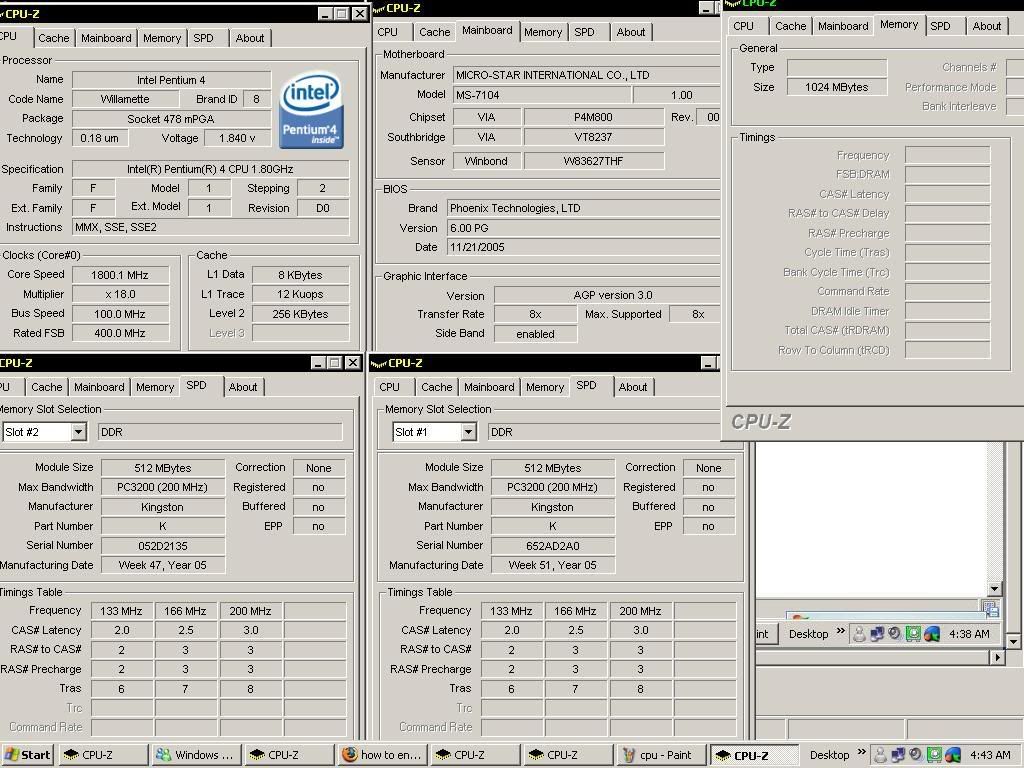
hi all gurus...
hope to get some advice. thanks in advance.

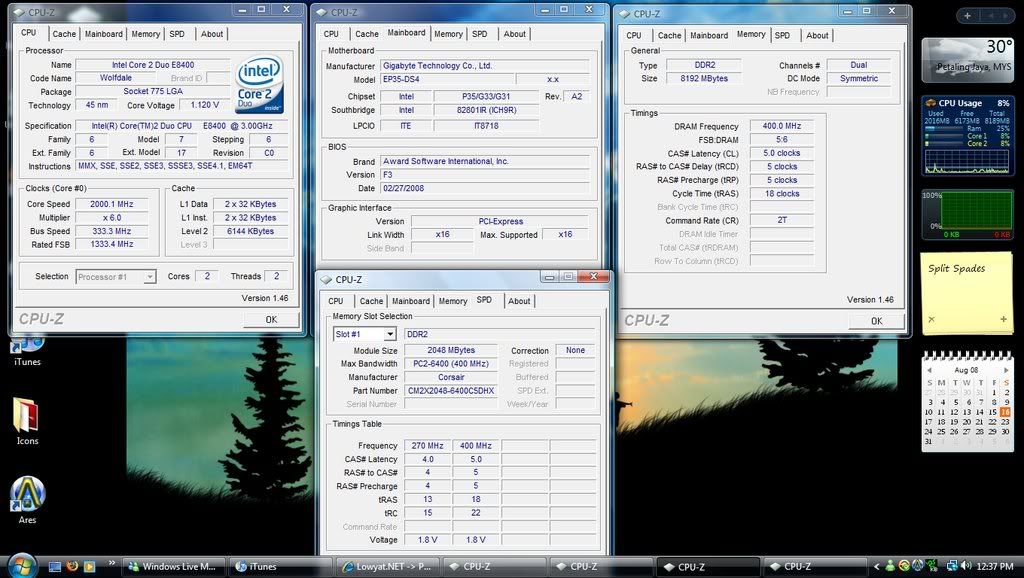
here's some info of my P4 captured with CPU-Z, anything I can tweak to serve me better? smile.gif

CPU
Attached Image

Mobo
Attached Image

RAM
Attached Image

SPD
Attached Image

I think the RAM speed is a bit low.. isn't? please advice.
toda6866
post Jul 28 2006, 03:48 PM

Casual
***
Junior Member
303 posts

Joined: May 2006
guys one noob question here, i cant find the option in BIOS to overclock my proc/memory (mayb my mobo doesnt support?)

running P4 1.7Ghz, 768Mb pc2100 ddr, Ati9500

I hav successfully overclock my ATI easily with the help of rivatuner/ ATI tools but can this simple way apply to overclock the FSB, proc, memory? if yes, wats the software

TY notworthy.gif

This post has been edited by toda6866: Jul 28 2006, 03:50 PM
lazo
post Aug 5 2006, 03:42 PM

Civil Engineer
*****
Senior Member
797 posts

Joined: Mar 2006
From: Bukit Mertajam, Penang


Need some ideas/intro about the RAM timing and about the maximum volt input before the hardware spoilt
m_redz
post Aug 17 2006, 08:45 AM

Getting Started
**
Junior Member
54 posts

Joined: Feb 2005
can my mobo ASUS P4GPL-X adjust the timing ram?
go to 2-2-2-5?
nelza_ax
post Aug 17 2006, 08:57 AM

i am me
*****
Senior Member
889 posts

Joined: Sep 2005
From: Malacca


QUOTE(m_redz @ Aug 17 2006, 08:45 AM)
can my mobo ASUS P4GPL-X adjust the timing ram?
go to 2-2-2-5?
*
find the menu in ur bios
2-2-2-5 depend on ur ram too blush.gif

This post has been edited by nelza_ax: Aug 17 2006, 08:59 AM
m_redz
post Aug 17 2006, 10:29 AM

Getting Started
**
Junior Member
54 posts

Joined: Feb 2005
anyone know is there any software can display total watt computer use?

This post has been edited by m_redz: Aug 17 2006, 11:38 AM
Hayase
post Sep 17 2006, 11:47 PM

Getting Started
**
Junior Member
114 posts

Joined: Aug 2006
From: Multimedia University


anyone using gigabyte m55sli-s4 here? encounter any problems during OC?
yu_8200
post Sep 23 2006, 12:24 AM

Getting Started
**
Junior Member
50 posts

Joined: May 2005
From: Petaling Jaya


QUOTE(Hayase @ Sep 17 2006, 11:47 PM)
anyone using gigabyte m55sli-s4 here? encounter any problems during OC?
*
This board not allow me to overclock, i'm noop in overclocking... can somebody help us...

This post has been edited by yu_8200: Sep 23 2006, 12:24 AM
J-Slade
post Oct 25 2006, 04:01 PM

|[ Phenom II ]|
*******
Senior Member
2,823 posts

Joined: Jun 2006
From: West Malaysia


QUOTE(m_redz @ Aug 17 2006, 10:29 AM)
anyone know is there any software can display total watt computer use?
*
I have found a very good watt calculator... hope the moderator can pin this up

eXtreme Power Supply Calculator

Its not even a software.. no need to download anything, just key in the hardware you are using and they will estimate the amount of power needed... cheers laugh.gif


enCORe
post Nov 22 2006, 01:11 PM

Gadget lovers
*******
Senior Member
5,301 posts

Joined: Jan 2003
From: Ampang - Putrajaya


hello sempai, I need advise

I having dillemma to upgrade graphic card or system. My current specs is as you see on my sig. Now I got O/c my (lock) Barton2500+ to 3200+ (2.2Ghz @ 200Fsb)

Should I upgrade to AM2 system (3500+) or to upgrade graphic accelarator from Radeon96xt TO nV 6800GT ?.

have my CPU gone bottleneck ? Will my AM2 system leap ahead my Radeon96xt to the max OR should my current setup with nV6800gt would have major performances?


SUSPVCpipe
post Dec 15 2006, 11:19 PM

custom made
******
Senior Member
1,362 posts

Joined: Nov 2005
From: k.terengganu.. alone.. with my bass...play.. alone


guys... can u guys tell me more bout testing ram... i heard this thing, err.. ram burning.. i dont get it why hav to burn the ram.. and i oso tried to dload this ram burning /testing prog called memtest... but dont know how to use it....
vailance
post Dec 24 2006, 01:40 PM

wat??
*****
Senior Member
841 posts

Joined: Feb 2005
From: Melaka>KL


i hav read some guide for ocing ram for my ddr400. seems lik my mobo has the diff menu from wat hav i read..
see:
user posted image

and this is the info of my ram
user posted image

how do i determine the
CAS latency time
RAS# to CAS# delay
RAS# Precharge
Act to Precharge Delay

based on my mobo..? rclxub.gif
J-Slade
post Dec 24 2006, 01:50 PM

|[ Phenom II ]|
*******
Senior Member
2,823 posts

Joined: Jun 2006
From: West Malaysia


RAM Handbook

QUOTE
In most motherboards, numerous settings can be found to optimize your memory. These settings are often found the Advanced Chipset section of the popular award bioses. In certain instances, the settings maybe placed in odd locations, so please consult your motherboard manual for specific information. Below are common latency options:
Command rate - is the delay (in clock cycles) between when chip select is asserted (i.e. the RAM is selected) and commands (i.e. Activate Row) can be issued to the RAM. Typical values are 1T (one clock cycle) and 2T (two clock cycles).

CAS (Column Address Strobe or Column Address Select) - is the number of clock cycles (or Ticks, denoted with T) between the issuance of the READ command and when the data arrives at the data bus. Memory can be visualized as a table of cell locations and the CAS delay is invoked every time the column changes, which is more often than row changing.

tRP (RAS Precharge Delay)
- is the speed or length of time that it takes DRAM to terminate one row access and start another. In simpler terms, it means switching memory banks.

tRCD (RAS (Row Access Strobe) to CAS delay) - As it says it's the time between RAS and CAS access, ie. the delay between when a memory bank is activated to when a read/write command is sent to that bank. Picture an Excel spreadsheet with a number across the top and along the left side. They numbers down the left side represent the Rows and the numbers across the top represent the Columns. The time it would take you, for example, to move down to Row 20 and across to Column 20 is RAS to CAS.

tRAS (Active to Precharge or Active Precharge Delay) - controls the length of the delay between the activation and precharge commands ---- basically how long after activation can the access cycle be started again. This influences row activation time which is taken into account when memory has hit the last column in a specific row, or when an entirely different memory location is requested.
These timings or delays occur in a particular order. When a Row of memory is activated to be read by the memory controller, there is a delay before the data on that Row is ready to be accessed, this is known as tRCD (RAS to CAS, or Row Address Strobe to Column Access Strobe delay). Once the contents of the row have been activated, a read command is sent, again by the memory controller, and the delay before it starts actually reading is the CAS (Column Access Strobe) latency. When reading is complete, the Row of data must be de-activated, which requires another delay, known as tRP (RAS Precharge), before another Row can be activated. The final value is tRAS, which occurs whenever the controller has to address different rows in a RAM chip. Once a row is activated, it cannot be de-activated until the delay of tRAS is over.


This post has been edited by J-Slade: Dec 24 2006, 01:50 PM
vailance
post Dec 24 2006, 02:41 PM

wat??
*****
Senior Member
841 posts

Joined: Feb 2005
From: Melaka>KL


woot! thx.. ive done my ram oc.. now running test.. dunno stable or not.. manage to go 2-3-2-6 .. if go for 2-2-2-5 will boot for a while only then restart.. maybe i need to set voltage to high? current is normal state.
or i set to auto?
SUSPVCpipe
post Dec 24 2006, 06:37 PM

custom made
******
Senior Member
1,362 posts

Joined: Nov 2005
From: k.terengganu.. alone.. with my bass...play.. alone


how do u test the ram ?.... why people burn ram?
bobtiang
post Dec 29 2006, 04:54 PM

I live in a 6 STARS Hotel
******
Senior Member
1,788 posts

Joined: Jan 2003
From: 冰城

hi guys, i have a trouble booting up my PC after trying to mod the timing from 2.5, 3, 3, 6 to 2.5, 2, 2, 6

now it just show me big black blank screen... sad.gif
how do i tell the mobo to reset?

take out CMOS battery or dunno what jumper thingy?
please help ..... i lost my lovely desktop ...
karom
post Dec 30 2006, 09:44 PM

Hello everybody
******
Senior Member
1,262 posts

Joined: Aug 2006
From: Butterworth, Penang


I am a AMD FX-62 user. I suddenly faced system crashed problem as my CPU clock rise 5% from its original clock. May i know the how to properly clock the CPU without crashing the system?
And to what certain extend do i have to check in order to make sure that the clock is already stable.
akachester
post Jan 1 2007, 05:47 PM

Its Life. Live with it!
*******
Senior Member
7,689 posts

Joined: Jul 2005
From: The Land of No Return


I just recently change my processor to the AMD Opteron 165.I heard that the Opteron is quite a good OCer but i am a pure noob in term of OC.Can anyone give me some guidelines on where should i start and what i need?

I have read the first few post which was really helpful.Would those AMD64 OCing guide can still be applied to the Opteron?
akachester
post Jan 4 2007, 07:47 PM

Its Life. Live with it!
*******
Senior Member
7,689 posts

Joined: Jul 2005
From: The Land of No Return


Hi, i had recently tried to OC my Opty 165.I never tried OC before and had read several article posted in the first post to learn how to do so.Anyway, from what i learned, i could OC my proc simply by changing the Clock Frequency of my proc which is at default 200Mhz..

Anyway, there is a problem.When i pushed my Clock Frequency to 210Mhz, it already cant boot into windows.Keep on restarting.What might be the problem now?What else should i change in order to clock even higher?What might be holding my OC from going up?

This is my spec :

AMD Opteron 165
2 * 512 Corsair PC3200 Pro LED (3-3-3-8)
Gigabyte K8N-SLI
kalakatu
post Jan 5 2007, 01:09 AM

Insanely Addictive
*******
Senior Member
2,323 posts

Joined: Apr 2006
From: Somewhere I Belong


QUOTE(bobtiang @ Dec 29 2006, 04:54 PM)
hi guys, i have a trouble booting up my PC after trying to mod the timing from 2.5, 3, 3, 6 to 2.5, 2, 2, 6

now it just show me big black blank screen...  sad.gif
how do i tell the mobo to reset?

take out CMOS battery or dunno what jumper thingy?
please help ..... i lost my lovely desktop ...
*
both methods also can do..but juz do either one only..
normally when u set ur ram timing lower,u have to lower ur ram frequency also..unless if u use a high performance ram..
so lower ur frequency,maybe to 266mhz,133mhz or lower..
gtoforce
post Jan 8 2007, 12:38 AM

SPAM AND BECOME A SENIOR MEMBER
*******
Senior Member
2,967 posts

Joined: May 2006


believe it or not
i never oc my fx
i dunno bout the unlocked multiplier
haha
but never really believed in oc'ing

*just spamming*
haha

thanx
bye
sHawTY
post Jan 8 2007, 12:58 AM

Frequent Reporter
********
All Stars
14,909 posts

Joined: Jul 2005

Guys, one question here, before this, i'm using an ATI X1800XL card, so i can use ATI Tool to manage the card, however, i didn't use ATI Tool to overclock my graphic card as i'm afraid of losing my graphic card... sweat.gif

**However, my afraid of overclocking doesn't attached to overclocking CPU & Rams laugh.gif

The question is, i can use ATI Tool to set my graphic card heatsink fan to run at maximum speed 24/7, this is my question, is there any software that i can use to set my graphic card heatsink fan to run at maximum speed just like what ATI Tool did for my X1800XL?

Can i use ATI Tool for that purpose? blink.gif

Help me... icon_question.gif
goldfries
post Jan 8 2007, 01:14 AM

40K Club
Group Icon
Forum Admin
44,415 posts

Joined: Jan 2003


QUOTE(sHawTY @ Jan 8 2007, 12:58 AM)
The question is, i can use ATI Tool to set my graphic card heatsink fan to run at maximum speed 24/7, this is my question, is there any software that i can use to set my graphic card heatsink fan to run at maximum speed just like what ATI Tool did for my X1800XL?

Can i use ATI Tool for that purpose? blink.gif

Help me... icon_question.gif
*
ouhh kay. can you help us understand what you just said? biggrin.gif

1. i can use ATI Tool to set my graphic card heatsink fan to run at maximum speed 24/7,
2. is there any software that i can use to set my graphic card heatsink fan to run at maximum speed just like what ATI Tool did for my X1800XL

erm........me confused.
sHawTY
post Jan 8 2007, 01:20 AM

Frequent Reporter
********
All Stars
14,909 posts

Joined: Jul 2005

QUOTE(goldfries @ Jan 8 2007, 01:14 AM)
ouhh kay. can you help us understand what you just said? biggrin.gif

1. i can use ATI Tool to set my graphic card heatsink fan to run at maximum speed 24/7,
2. is there any software that i can use to set my graphic card heatsink fan to run at maximum speed just like what ATI Tool did for my X1800XL

erm........me confused.
*
Hmm...
How can i explain it sweat.gif

Ok, before this, i'm using an ATI X1800XL card for my pc, and i'm using ATI Tool to control the heatsink fan speed to run at the maximum speed all the time when the pc is turned on...

And right now, i've changed my X1800XL to Nvidia 7900GT, my question is, is there any software that can do the job like the ATI tool?

What i meant is, is there any software that can be used to control the fan speed on my stock heatsink fan for my 7900GT?

Right now, i'm using Riva Tuner, but i don't quite understand that program as it's rather confusing me more than the ATI tool, ATI tool is quite easy to understand while Riva Tuner is bringing me a headache... rclxub.gif

Ni kalau soalan aku still memeningkan, terpaksa la aku tulis dalam bahasa melayu plak... laugh.gif

Edit: Can i use ATI Tool on my Nvidia 7900GT card?
I'm not going to overclock my card, as i'm afraid of losing my graphic card, i just want the fan speed on the stock heatsink to run at maximum speed, that's all... notworthy.gif

This post has been edited by sHawTY: Jan 8 2007, 01:26 AM
goldfries
post Jan 8 2007, 01:26 AM

40K Club
Group Icon
Forum Admin
44,415 posts

Joined: Jan 2003


QUOTE(sHawTY @ Jan 8 2007, 01:20 AM)
And right now, i've changed my X1800XL to Nvidia 7900GT, my question is, is there any software that can do the job like the ATI tool?

What i meant is, is there any software that can be used to control the fan speed on my stock heatsink fan for my 7900GT?
tu la, you change to 7900GT but you didn't say mah. biggrin.gif your siggy also not updated......still MSI ATI Radeon X1800XL Crossfire :: Arctic Cooling Accelero X2 tongue.gif

now you understand why confusing? smile.gif

anyway, have you tried nVidia Control Panel? it allows you to set 2D / 3D mode fan speed.
sHawTY
post Jan 8 2007, 01:29 AM

Frequent Reporter
********
All Stars
14,909 posts

Joined: Jul 2005

QUOTE(goldfries @ Jan 8 2007, 01:26 AM)
tu la, you change to 7900GT but you didn't say mah. biggrin.gif your siggy also not updated......still MSI ATI Radeon X1800XL Crossfire :: Arctic Cooling Accelero X2 tongue.gif

now you understand why confusing? smile.gif

anyway, have you tried nVidia Control Panel? it allows you to set 2D / 3D mode fan speed.
*
I'm trying to understand the control panel, but there's too many tabs, and i can't find it, where does it stated?

Sorry, newbie sangat ni, dalam hidup aku baru dua kali aku guna Nvidia nye graphic card... sweat.gif

Help me... icon_question.gif icon_question.gif

Edit: one more question:
Can i use SLi 7900GT on my Asus P5WD2-E Premium motherboard?
[It's using Intel 975X chipset and it only supports crossfire but not SLi]
I've heard that there is some motherboard bios modification that can be done to enable my motherboard to run SLi mode rather than just Crossfire.
Or is it Nvidia Driver mod? blink.gif

Help Me, really newbie in using Nvidia Cards... sweat.gif sweat.gif

This post has been edited by sHawTY: Jan 8 2007, 01:33 AM
goldfries
post Jan 8 2007, 01:44 AM

40K Club
Group Icon
Forum Admin
44,415 posts

Joined: Jan 2003


QUOTE(sHawTY @ Jan 8 2007, 01:29 AM)
I'm trying to understand the control panel, but there's too many tabs, and i can't find it, where does it stated?


erm. yeah that darn panel very confusing. keep a look out for Adjust GPU Setting. you might have to click Change Display Configuration or whater first. smile.gif

i donno about the SLI part.


sHawTY
post Jan 8 2007, 02:33 AM

Frequent Reporter
********
All Stars
14,909 posts

Joined: Jul 2005

QUOTE(goldfries @ Jan 8 2007, 01:44 AM)
erm. yeah that darn panel very confusing. keep a look out for Adjust GPU Setting. you might have to click Change Display Configuration or whater first. smile.gif

i donno about the SLI part.
*
Can't find it... sweat.gif
Before this, i've used a 7600GT before, IINM, even the overclocking menu can be easily found, but right now after i've switched to 7900GT, it's nowhere to be found... sweat.gif

Anyone can help me by giving a screenshot on where should i find that thing? sweat.gif
goldfries
post Jan 8 2007, 03:06 AM

40K Club
Group Icon
Forum Admin
44,415 posts

Joined: Jan 2003


QUOTE(sHawTY @ Jan 8 2007, 02:33 AM)
Can't find it... sweat.gif
Before this, i've used a 7600GT before, IINM, even the overclocking menu can be easily found, but right now after i've switched to 7900GT, it's nowhere to be found... sweat.gif

Anyone can help me by giving a screenshot on where should i find that thing? sweat.gif
*
hehe. i face same problem with you. my previous interface and current interface like different tongue.gif

mine's using Forceware 91.31 and Control Panel 1.2.1.32
s[H]sIkuA
post Jan 8 2007, 06:32 AM

live in the present
*******
Senior Member
2,162 posts

Joined: Sep 2004


QUOTE(goldfries @ Jan 8 2007, 03:06 AM)
hehe. i face same problem with you. my previous interface and current interface like different tongue.gif

mine's using Forceware 91.31 and Control Panel 1.2.1.32
*
BTW goldfries, the CP u mean is the new nvidia 1, why got different version? The new CP is so confusing for me too rclxub.gif , I still using the old CP (can choose) btw tongue.gif

And shawty, I am 99.999% sure your board won't run SLI , AFAIK, 965/975x dont support SLI ,only Xfire wink.gif

This post has been edited by s[H]sIkuA: Jan 8 2007, 06:34 AM
goldfries
post Jan 8 2007, 06:36 AM

40K Club
Group Icon
Forum Admin
44,415 posts

Joined: Jan 2003


QUOTE(s[H]sIkuA @ Jan 8 2007, 06:32 AM)
BTW goldfries, the CP u mean is the new nvidia 1, why got different version? The new CP is so confusing for me too  rclxub.gif , I still using the old CP (can choose) btw  tongue.gif
*
i donno ler. it's something i install with the card and never bother to open. tongue.gif

in fact i never liked NV's CP. there's classic version some more........... that one you access using Desktop > Properties > Advanced blabalbal while another you use something that come out like Windows folders.
s[H]sIkuA
post Jan 8 2007, 06:39 AM

live in the present
*******
Senior Member
2,162 posts

Joined: Sep 2004


Yes, the windows folders interface ,that one is darn confusing , with all the eye candy , i still prefer the old and easy Tab version thumbup.gif
sHawTY
post Jan 8 2007, 11:02 AM

Frequent Reporter
********
All Stars
14,909 posts

Joined: Jul 2005

QUOTE(s[H]sIkuA @ Jan 8 2007, 06:39 AM)
Yes, the windows folders interface ,that one is darn confusing , with all the eye candy , i still prefer the old and easy Tab version thumbup.gif
*
Where to find the old version? cry.gif
goldfries
post Jan 8 2007, 02:37 PM

40K Club
Group Icon
Forum Admin
44,415 posts

Joined: Jan 2003


QUOTE(s[H]sIkuA @ Jan 8 2007, 06:39 AM)
Yes, the windows folders interface
*


hehe. i went lost before.

anyway, see if this attachment helps you.


Attached thumbnail(s)
Attached Image
s[H]sIkuA
post Jan 8 2007, 04:22 PM

live in the present
*******
Senior Member
2,162 posts

Joined: Sep 2004


QUOTE(sHawTY @ Jan 8 2007, 11:02 AM)
Where to find the old version? cry.gif
*
see the goldfries picture and choose classic lor biggrin.gif dont be fooled by nvidia by using the newer interface tongue.gif , I also dont know what extra thing that darn interface offer
sHawTY
post Jan 9 2007, 12:36 AM

Frequent Reporter
********
All Stars
14,909 posts

Joined: Jul 2005

I'm using the classic control panel also, but it seems like the driver that i got from Nvidia is...

Wait, i think i've posted in the wrong thread... sweat.gif

Goldfries, i'll continue this on the VGA overclocking thread under the pinned topics...

Hope you can help me there... sweat.gif

I'll continue here: http://forum.lowyat.net/index.php?showtopi...dpost&p=9898305

This post has been edited by sHawTY: Jan 9 2007, 12:45 AM
heizad
post Jan 11 2007, 11:15 AM

~ Harimau Malaya ~
******
Senior Member
1,743 posts

Joined: Jul 2006
From: Shah Alam


just wanna ask...can original kingston chipset ram overclocked?? tried to oc my pc to 2.45 but after a minute i entered windows my pc restart...still n0ob in oc...
SUSPVCpipe
post Jan 20 2007, 03:03 AM

custom made
******
Senior Member
1,362 posts

Joined: Nov 2005
From: k.terengganu.. alone.. with my bass...play.. alone


noticed u r using same mobo wit me... 965pt... i just burnt the mobo nb after manage to do 2.5g.... hehe... oso newb in oc... gud luck...
SUSPVCpipe
post Jan 20 2007, 03:04 AM

custom made
******
Senior Member
1,362 posts

Joined: Nov 2005
From: k.terengganu.. alone.. with my bass...play.. alone


---double post---- poor wifi

This post has been edited by PVCpipe: Jan 20 2007, 03:15 AM
akachester
post Jan 21 2007, 11:47 AM

Its Life. Live with it!
*******
Senior Member
7,689 posts

Joined: Jul 2005
From: The Land of No Return


May i ask, i am a noob in OC.I tried to learn about OC now and did change some configuration in my bios.Ok, this is what i did.I change the CPU frequency from the original 200Mhz to maybe around 210Mhz (using Opteron 165).But when i try to push it higher than 210Mhz, it cant load the Windows.In fact, it keeps on restarting at the bios.

My question is, what might cause this problem to happen?What should i do next?Increase the voltage?Change the Ram setting?or any other area i should look at?

And, is it normal for a PC to start restarting at a mere 10Mhz OC?or this is because of a limitation of my own PC?My spec is Gigabyte K8N SLi, and Corsair PC3200 C2 Pro Led (3338).
zamanjaafar
post Jan 22 2007, 03:33 AM

NOT DUPIN' SINCE '03
******
Senior Member
1,122 posts

Joined: Jan 2003


hi, just need some opinion.

Im not exactly a oc noob. Maybe just lite oc fella. oc my sempron 2600+ socket a to 188 fsb ( and then lower to 180 bcoz cannot complete divx encoding), configure my KVR to 2.5-3-3-7, up volt cpu and mem, vga core and mem oc, that range of stuff i do. Just so u guys can expect what i know and what i dont.

ill be getting a c2d setup soon, what im asking is do u OC fellas, those who do the e6300 until 3ghz and above, leave on your system 24 hours for maybe few days? Is it advisable to 24/7 a OC'ed system that has acceptable temp range?

Thanks.

This post has been edited by zamanjaafar: Jan 22 2007, 07:50 AM
newbieockids
post Jan 22 2007, 10:38 AM

Regular
******
Senior Member
1,405 posts

Joined: Jun 2005


QUOTE(zamanjaafar @ Jan 22 2007, 03:33 AM)
hi, just need some opinion.

Im not exactly a oc noob.  Maybe just lite oc fella.  oc my sempron 2600+ socket a to 188 fsb ( and then lower to 180 bcoz cannot complete divx encoding), configure my KVR to 2.5-3-3-7, up volt cpu and mem, vga core and mem oc, that range of stuff i do.  Just so u guys can expect what i know and what i dont.

ill be getting a c2d setup soon, what im asking is do u OC fellas, those who do the e6300 until 3ghz and above, leave on your system 24 hours for maybe few days?  Is it advisable to 24/7 a OC'ed system that has acceptable temp range?

Thanks.
*
my P4 2.4C was running @ 3.4ghz for 24/7 since early 2004.. it almost 3 year already and still running like charm right nw..
my advise if u wanna run 'em for 24/7, find ur procs max speed while using default VCore, and use that setup..
J-Slade
post Jan 22 2007, 11:55 AM

|[ Phenom II ]|
*******
Senior Member
2,823 posts

Joined: Jun 2006
From: West Malaysia


QUOTE(newbieockids @ Jan 22 2007, 10:38 AM)
my P4 2.4C was running @ 3.4ghz for 24/7 since early 2004.. it almost 3 year already and still running like charm right nw..
my advise if u wanna run 'em for 24/7, find ur procs max speed while using default VCore, and use that setup..
*
I have heard.... no wait, actually I have seen myself! My friends who on their PC 24/7 for 1 year (non-OC). Then one day they shut down, and the PC refuse to start again. To me, I still think its best that you shutdown ur PC periodically after maybe 4-5days.

But if you still have to, then yes what newbieockids said is true. Use your procs default vCore... and also not forgetting sufficient cooling.
goldfries
post Jan 29 2007, 03:11 PM

40K Club
Group Icon
Forum Admin
44,415 posts

Joined: Jan 2003


i ran my XP1700+ with more than 50% OC and vcores raised to 1.7 - 1.8 range for years and running 24/7 with 100% processing. no problem.

IMO it's all about how you take care of them and knowing your limits. smile.gif
karom
post Feb 3 2007, 02:24 AM

Hello everybody
******
Senior Member
1,262 posts

Joined: Aug 2006
From: Butterworth, Penang


Is there anyone already surpass Asus M2N32-SLi Deluxe Memory RAM timing? Im still finding how to surpass the fix Mobo timing.
sHawTY
post Feb 7 2007, 01:27 AM

Frequent Reporter
********
All Stars
14,909 posts

Joined: Jul 2005

Should i increase the voltage of my northbridge after doing some freak oc'ing on my Pentium D processor?

I oc'ed my Pentium D 945 to 4.25GHz, increased the vcore from 1.30volts to 1.31volts
Then the DDR2 800MHz overclocked to DDR2 1000MHz, increased the vdimm from 1.8Volts to 2.15Volts [Timing at 4-4-4-10]

My question is, should i increase the voltage of my northbridge? blink.gif

Need some professional's advise here... icon_question.gif
raymond5105
post Feb 7 2007, 06:35 PM

Newbie
*******
Senior Member
5,341 posts

Joined: Jan 2003
QUOTE(sHawTY @ Feb 7 2007, 01:27 AM)
Should i increase the voltage of my northbridge after doing some freak oc'ing on my Pentium D processor?

I oc'ed my Pentium D 945 to 4.25GHz, increased the vcore from 1.30volts to 1.31volts
Then the DDR2 800MHz overclocked to DDR2 1000MHz, increased the vdimm from 1.8Volts to 2.15Volts [Timing at 4-4-4-10]

My question is, should i increase the voltage of my northbridge? blink.gif

Need some professional's advise here... icon_question.gif
*
Your nothbridge hot or not?If nor really hot then can let it be. Cool your proc and RAM can run on such high speed. notworthy.gif
kevyeoh
post Feb 15 2007, 11:27 AM

Look at all my stars!!
*******
Senior Member
4,720 posts

Joined: Jan 2003


guys,

what software should i use to monitor my CPU temperature at windows?
thanks
byfc2010
post Feb 19 2007, 12:22 AM

Enthusiast
*****
Senior Member
947 posts

Joined: Nov 2005
From: Penang


i nid ur helps guy?
can i max out my ram summore?
this is my spec...
i am not familiar wif this mobo's bios...
Attached Image Attached Image

This post has been edited by byfc2010: Feb 20 2007, 01:46 PM
jy14
post Mar 8 2007, 09:29 AM

**New 5-star General**
*****
Senior Member
824 posts

Joined: Oct 2006
From: P J


Hi guys,

I need an advice on where to find the program super pi 32m test ?
Anyone with a good link to get the program please do share, mayb post it in the front page too. Or did I missed it in the front page ?

Thank you in advance.
mfcm
post Mar 8 2007, 03:57 PM

Look at all my stars!!
*******
Senior Member
2,765 posts

Joined: Nov 2005
From: **Hornbills**


u can try google for it..or can get it in 3d guru smile.gif
jy14
post Mar 9 2007, 04:19 PM

**New 5-star General**
*****
Senior Member
824 posts

Joined: Oct 2006
From: P J


QUOTE(mfcm @ Mar 8 2007, 03:57 PM)
u can try google for it..or can get it in 3d guru smile.gif
*
Got it. THanks for sharing the file bro notworthy.gif notworthy.gif notworthy.gif

I tested my S939 3000+ Venice Core with everything at default, got about 47.++ms, normal ?
akachester
post Mar 25 2007, 03:24 PM

Its Life. Live with it!
*******
Senior Member
7,689 posts

Joined: Jul 2005
From: The Land of No Return


Need some guide here guys...

I always have an idea that OCing is about pushing your hardware to a higher point whereby it would be able to perform something faster..

Ok, here is the confusion for me.When i OC my processor (keep in mind that i am a noob in this), all i do is always pushing the Mhz to a higher number (by default is 200Mhz).Which means, the higher i push, the higher Ghz of proc speed i am going to get...For example, pushing it to 250Mhz..

Now, the problem is, i have seen people doing something rather different.They not only push the Mhz higher, they also push the multiplier to a lower level.Assuming the original is 9x multiplier and 200Mhz resulting in 1.8Ghz, i have seen people doing something like pushing the Mhz to 300 and lowering the multiplier to 6x which in the end, also resulting in 1.8Ghz...

Wat i wanted to know is, what difference actually does it make in doing that way?Is there alot of difference if compared to the original setting (9x, 200Mhz)?And what about comparing it with just pushing the Mhz higher (9x, 250Mhz = 2.25Ghz)?Thanks alot for clarifying my doubts here...

This post has been edited by akachester: Mar 25 2007, 03:25 PM
ktek
post Mar 25 2007, 08:15 PM

小喇叭
********
All Stars
13,214 posts

Joined: Jul 2006
for memory bandwidth , i think .
xixo_12
post Apr 13 2007, 08:10 PM

i!Retired!i
*******
Senior Member
7,318 posts

Joined: Nov 2006
From: Pulau Sipadan

how to adjust the ram timing.. noob bout this.. some kind of motherboarddidnt spport high vdimm..let says ,i want to use high perfomances ram.. need high vdimm. but my mobo didnt support.. how r?? i dun understand bout (e.g 2-2-2-10)
and like that la... what it stand for??

i'm not the oc people

This post has been edited by xixo_12: Apr 13 2007, 08:17 PM
Amedion
post Apr 13 2007, 08:20 PM

It's a bird! No, it's a plane! No, it's star
*******
Senior Member
3,377 posts

Joined: Jul 2005
From: Klang


QUOTE(xixo_12 @ Apr 13 2007, 08:10 PM)
how to adjust the ram timing.. noob bout this.. some kind of motherboarddidnt spport high vdimm..let says ,i want to use high perfomances ram.. need high vdimm. but my mobo didnt support.. how r?? i dun understand bout (e.g 2-2-2-10)
and like that la... what it stand for??

i'm not the oc people
*
What motherboard u using?
xixo_12
post Apr 13 2007, 08:22 PM

i!Retired!i
*******
Senior Member
7,318 posts

Joined: Nov 2006
From: Pulau Sipadan

QUOTE(Amedion @ Apr 13 2007, 08:20 PM)
What motherboard u using?
*
msi k9nu neo.. i wanted to use xms2 corsair.. i heard default setting to high.. how to low it back so it will suitable for my system??
Amedion
post Apr 13 2007, 08:24 PM

It's a bird! No, it's a plane! No, it's star
*******
Senior Member
3,377 posts

Joined: Jul 2005
From: Klang


http://www.andrew.cmu.edu/user/fma/P4tweakRAM2.htm

I'm not very good at OCing but all i know about RAM timing is :-

- The lower ( Tight ) the better ur performance
- If want more frequency then have to sacrifice timing. Set it higher ( more relax / loosen )
- Have to push more vdimm to RAM in order to get low timing so it will be more stable ( Generate more heat also )
- Tight timing and high frequency will surely boost ur performance but will become more unstable. Try to balance it but people prefer frequency over timing

This post has been edited by Amedion: Apr 13 2007, 08:28 PM
FcukChick
post Apr 23 2007, 04:49 AM

Getting Started
**
Junior Member
204 posts

Joined: Mar 2006


hey sifu sifu here sorry for being noob but i google here and there also i can't find a way to OC.
maybe because my bios is different from others and one more thing is i cant enable dual channel.
my mobo on the box is named pm8m-v

can anyone teach me how to OC here or got link to it if can pls show me smile.gif
thank u rclxms.gif rclxms.gif

icon_question.gif icon_question.gif

here is my detail of my comp

user posted image
kmarc
post May 16 2007, 02:13 PM

The future is here - Cryptocurrencies!
Group Icon
Elite
14,576 posts

Joined: May 2006
From: Sarawak


Basic overclock guide for 939/AM2 - Overclocking (OC) in windows!!
Dual & Single-core!

Facts about this guide:
---For beginners (not meant for serious overclockers)
---One of MANY methods to OC (by no means the best way)
---No need multiple reboots (OC done in windows)
---If something goes wrong, just reboot computer and all settings will be as normal
---OC for CPU only (no RAM OC, maybe another guide?? whistling.gif )
---OC at your own risk (It is WELL-KNOWN that OC can damage your computer)

Example rig:
3800+ X2 939 (Multiplier 10x, HTT multiplier 5x, FSB 200, vcore 1.35v)

Things to ensure before OC
1) Your SATA harddisk is connected to a locked SATA port
----- e.g. for K8N Neo2, SATA 1 & 2 ports are unlocked. Have to connect to SATA 3/4. If not, you'll get corrupted windows!!!
2) You have a good CPU cooler (not stock cooler!)
3) A good PSU
3) Know how to reset bios

Things to do in bios
1) Lock your AGP to 67 Mhz (PCI-E need locking at 100Mhz)
--- Note : In PCI-E, Nvidia & ATI cards may need different Mhz for locking - nvidia @ 101 Mhz, ATI @ 105 Mhz (need confirmation!)
2) Disable all the following:
--- Cool & Quiet
--- Spread spectrum
--- Any auto-overclocking features
3) Use a ram divider (instead of 200Mhz, select 133Mhz or lower)
4) Set the HTT to 3x (HTT x FSB should never be more than 1000 Mhz)

Settings at default
1) FSB at 200 Mhz (will be increased in windows)
2) Multiplier at 10x
3) Vcore at 1.35v

Software that you need (Hyperlinks soon....)
1) CPU-Z Click here
2) Orthos (for stress dual-core CPUs) Click here
3) Clockgen Click here
4) Core temp (newest version can cause random reboots!) Click here

OC in windows (This is where the fun begins!!!)
1) Run CPU-Z, ensure
-----core speed is 2000 Mhz
-----voltage (vcore) around 1.35v
-----HT link <1000 Mhz (should be at 600Mhz)
-----Memory frequency <200Mhz (should be at 133Mhz)

2) Run Core Temp
-----Check TCaseMax (for 3800+ it is 67'c)(That's the maximum core temperature!)
-----Important : Not recommended to reach near this temp during OC

3) Run Clockgen (this is where the OC starts!!!)
-----Select "Clocks", then "Get values"
-----HTT should come out at 200Mhz
-----DO NOT touch the AGP settings!!!
-----Increase HTT to 205 Mhz
-----Click "Set values" - current CPU speed should be 2050 Mhz

4) Once CPU speed increased, run Orthos (make sure it is set to "Small FFTs - stress CPU")
-----if no error after 15 min, stop orthos
-----increase HTT by 5 Mhz (to 210 Mhz (CPU speed to 2100 Mhz))
-----rerun orthos for another 15 minutes

Note : No need to reboot yet!

5) Repeat steps 4 until Orthos fails (has error). Once error occurs:
-----Reduce HTT by 5 Mhz
-----Run Orthos, if no failure, stress CPU for 6-12 hours (for "rock stable" CPUs, recommended to stress for at least 24 hours)
-----If Orthos still failed during prolonged stressing, reduce another 5 Mhz and rerun orthos

6) Once CPU stable, this is roughly your max CPU OC (note down the HTT frequency)
-----e.g. Max CPU OC : HTT 250 (250 x 10 = 2500 Mhz)
-----reboot
-----set HTT to 250 in bios
-----reboot and see whether you can boot into windows
-----if can, run some benchmarking programs to make sure everything is stable e.g. 3DMark
-----if cannot boot into windows, then the OC is not stable, reduce HTT by 5 Mhz & reboot, if possible, then run benchmarking programs

Important : Always keep an eye on core temperature when OC!!!

Regarding CPU Vcore
For X2, Vcore can usually be kept at stock
If need more OC, can increase Vcore but not recommended to increase more than 0.05-0.10v (unless you have good coolers and you are a hardcore overclocker!)

Example
-----For 3800+ X2, can usually keep at stock Vcore 1.35v
-----If want more OC, can increase Vcore to 1.40-1.45v

Returning other parameters to near normal
RAM - your RAMs may be running at a lower speed
-----if your HTT is at 230, then you have OC you HTT up by 30 (230-200=30)
-----your RAMs will be running at 163Mhz (Original 133Mhz + 30 = 163 Mhz)
-----So, the RAMs are not running at the stock speed of 200Mhz
-----In this case, you can change the RAM divider in BIOS to 166Mhz
-----So, 166+30 = 196Mhz (which is closer to 200Mhz)

Note : If your RAMs can run at 230 Mhz, then you can set the RAM divider to 1:1 (200 Mhz)

HTT - HTT may be running at lower speed
-----if your HTT is 230, then your mobo is running at 230 x 3 (multiplier) = 690Mhz
-----you can change the HTT multiplier to 4x
-----So, your HTT will be running at 230 x 4 = 960 Mhz (which is closer to 1000 Mhz)

Single-core 939 - Differences in OC
Basically the same, except that you need to use Stress Prime 2004 instead of Orthos
----Stress Prime 2004 is the single-core version (both created by the same author)
----Download here

AM2/DDR2 - Differences in OC
Overclocking AM2 CPU is also basically the same.
Just that AM2 uses DDR2.
For DDR2, you need to see your rated DDR2-RAM and reduce it a step or two (Just like when you reduce your DDR400 from 200 Mhz to 133Mhz)

Rated DDR2----------Reduce to (in bios)
DDR2-800-------------667 @ 533 Mhz
DDR2-667-------------533 @ 400 Mhz

Basically, you don't want to overclock your RAMs above the rated value (unless you know your RAMs can be overclocked!)

Example
If HTT is 230 Mhz, the DDR2-800 (which was dropped down to 667 Mhz) will be running at 727Mhz (667 x 30 x 2), which is still below 800Mhz.

Remember : This thread is about overclocking the CPU. NOT the RAMs.

Fine-tuning your OC (If you really want to squeeze ever MHz out of your CPU!!!)
Once CPU stable, you can squeeze more Mhz by increasing you HTT by 1 Mhz interval instead of 5 Mhz.
e.g. HTT 240 Mhz --> 241 Mhz --> 242 Mhz
After each increase, orthos until stable
This way, you'll know your max CPU speed to the last 1 Mhz!!!

Fine-tuning your OC (whether to OC from windows or BIOS)
Coming soon!

_____________________________________________________________________


If anybody has any suggestions/corrections, please inform me. Thx!
I will update this guide if new info is available.

This post has been edited by kmarc: May 18 2007, 09:27 PM

LittleLinnet
post May 17 2007, 09:07 PM

Iophobia
*******
Senior Member
3,593 posts

Joined: Feb 2005
From: ***Penang***
Overclock by using divider cant get huge performance gain IIRC.
Someone might correct me if i am wrong in this.


kmarc
post May 17 2007, 09:39 PM

The future is here - Cryptocurrencies!
Group Icon
Elite
14,576 posts

Joined: May 2006
From: Sarawak


QUOTE(LittleLinnet @ May 17 2007, 09:07 PM)
Overclock by using divider cant get huge performance gain IIRC.
Someone might correct me if i am wrong in this.
*
Why post are you referring too? Is the the RAM overclock or CPU overclock?
LittleLinnet
post May 18 2007, 02:15 AM

Iophobia
*******
Senior Member
3,593 posts

Joined: Feb 2005
From: ***Penang***
QUOTE(kmarc @ May 17 2007, 09:39 PM)
Why post are you referring too? Is the the RAM overclock or CPU overclock?
*
referring to the post above my post which is your post tongue.gif
overclock using divider mainly focus on CPU overclock.
But then, it is still the only way to get most out of your processors since if the rams cant keep up with the FSB.


This post has been edited by LittleLinnet: May 18 2007, 02:16 AM
kmarc
post May 18 2007, 06:38 AM

The future is here - Cryptocurrencies!
Group Icon
Elite
14,576 posts

Joined: May 2006
From: Sarawak


QUOTE(LittleLinnet @ May 18 2007, 02:15 AM)
referring to the post above my post which is your post tongue.gif
overclock using divider mainly focus on CPU overclock.
But then, it is still the only way to get most out of your processors since if the rams cant keep up with the FSB.
*
Errr..... pls look at the guide again. It is clearly stated that the guide was on CPU overclocking and NOT ram overclocking! tongue.gif


LittleLinnet
post May 18 2007, 02:10 PM

Iophobia
*******
Senior Member
3,593 posts

Joined: Feb 2005
From: ***Penang***
QUOTE(kmarc @ May 18 2007, 06:38 AM)
Errr..... pls look at the guide again. It is clearly stated that the guide was on CPU overclocking and NOT ram overclocking!  tongue.gif
*
I know, that's why I said, you might not getting huge performance gain compared to 1:1 since the RAM is not running syn with FSB. Which is, at other ratio other than 1:1.
Basically, CPU overclocking will be involving RAM overclocking because the FSB is running 1:1 with RAM.
Since it is using divider, RAM speed is slower than FSB thus slower bandwidth.
kmarc
post May 18 2007, 02:28 PM

The future is here - Cryptocurrencies!
Group Icon
Elite
14,576 posts

Joined: May 2006
From: Sarawak


QUOTE(LittleLinnet @ May 18 2007, 02:10 PM)
I know, that's why I said, you might not getting huge performance gain compared to 1:1 since the RAM is not running syn with FSB. Which is, at other ratio other than 1:1.
Basically, CPU overclocking will be involving RAM overclocking because the FSB is running 1:1 with RAM.
Since it is using divider, RAM speed is slower than FSB thus slower bandwidth.
*
OIC, sorry for misunderstanding you.

Ya, it's true. Definitely in overclocking, it is preferable for the RAM to run in sync with the CPU (i.e. 1:1). However, in some cases, the RAM may not be able to reach the Mhz of the CPU, and thus the role of RAM divider. This is especially true in X2, where a lot of them are great overclockers and can be overclocked by 40-50 Mhz on the HTT/FSB (e.g. 250 Mhz on HTT). Many beginner's rig only have value ram and most of them can't even go 5-10 Mhz above baseline!!! (i.e. 205-210 Mhz).

Hmmm..... maybe I should come up with a beginner's guide to RAM overclocking.... hmm.gif whistling.gif whistling.gif
LittleLinnet
post May 18 2007, 10:05 PM

Iophobia
*******
Senior Member
3,593 posts

Joined: Feb 2005
From: ***Penang***
QUOTE(kmarc @ May 18 2007, 02:28 PM)
OIC, sorry for misunderstanding you.

Ya, it's true. Definitely in overclocking, it is preferable for the RAM to run in sync with the CPU (i.e. 1:1). However, in some cases, the RAM may not be able to reach the Mhz of the CPU, and thus the role of RAM divider. This is especially true in X2, where a lot of them are great overclockers and can be overclocked by 40-50 Mhz on the HTT/FSB (e.g. 250 Mhz on HTT). Many beginner's rig only have value ram and most of them can't even go 5-10 Mhz above baseline!!! (i.e. 205-210 Mhz).

Hmmm..... maybe I should come up with a beginner's guide to RAM overclocking....  hmm.gif  whistling.gif  whistling.gif
*
but still really dont know the the difference also.
Like @ 4:5 HTT 250MHz, RAM 200MHz vs 1:1 HTT 210MHz, RAM 210MHz
Bandwidth or processing speed? Tough choice XD

kmarc
post May 18 2007, 11:28 PM

The future is here - Cryptocurrencies!
Group Icon
Elite
14,576 posts

Joined: May 2006
From: Sarawak


QUOTE(LittleLinnet @ May 18 2007, 10:05 PM)
but still really dont know the the difference also.
Like @ 4:5 HTT 250MHz, RAM 200MHz vs 1:1 HTT 210MHz, RAM 210MHz
Bandwidth or processing speed? Tough choice XD
*
Of course the 4:5 HTT 250Mhz, RAM 200Mhz! The amount of CPU speed is more as compared to the amount of bandwidth that you gain from 200Mhz to 210Mhz!

There's a lot of review of the impact of higher CPU speed or higher RAM bandwidth.... Now, let's see whether I can find those review..... sweat.gif
sherdil
post May 19 2007, 01:23 AM

Knowledge the key to Heaven
******
Senior Member
1,571 posts

Joined: Jan 2003
From: Somewhere between Past and Present.
QUOTE(kmarc @ May 18 2007, 11:28 PM)
Of course the 4:5 HTT 250Mhz, RAM 200Mhz! The amount of CPU speed is more as compared to the amount of bandwidth that you gain from 200Mhz to 210Mhz!

There's a lot of review of the impact of higher CPU speed or higher RAM bandwidth.... Now, let's see whether I can find those review.....  sweat.gif
*
Anyways you have done a good amount of
work by explaining the basics..thanks..

Cheers

kmarc
post May 20 2007, 09:09 PM

The future is here - Cryptocurrencies!
Group Icon
Elite
14,576 posts

Joined: May 2006
From: Sarawak


Advance overclocking - BIOS OC but windows running C&Q!

Recent polls indicate that many of our forumers overclock their rig 24/7 but the computer is either idling or only doing minimal work e.g. BT, surfing

This is a disadvantage as you are:
1) Using more electricity, thus more $$$
2) Unnecessarily stressing your rig, thus shorter lifespan
3) Bad for environment
4) errr... anything else?

Facts about this guide
- Overclock 24/7 in BIOS (C&Q disabled) but able to run C&Q in windows!
- For advance overclockers, as this method can DAMAGE your rig if you don't know what you're doing!!!
- If any happens, can just reboot and your settings back to original BIOS OC
- For AMD systems (I don't have Intel CPU, sorry)
- Do it at your OWN risk
- You DO NOT have to use this feature if you don't want to

Example of what this guide will teach you to do:
System (will use my specs for this guide):
AMD X2 4200+
----- Stock : 2.2 Ghz (200x11), 1.35v
----- BIOS OC @ 2530 Mhz (230x11), 1.35v (Stock Vcore)
----- DDR400 ram (OC at 230 Mhz)
In windows
If no need OC, can run the rig as normal (with C&Q!):
---Load : Stock clock 2.2 Ghz, 1.35v
---Idle : 1.0 Ghz, 1.1v
If need OC, can:
---Turn off C&Q (in windows without reboot!)
--- Set to OC settings : 2530 Mhz (in windows without reboot!)

Programs that you need:
1) Rightmark CPU clock (RMCC)- very useful and powerful program, be careful when using it!!!
2) CPU-Z
3) A64info
4) Orthos
5) Clockgen

Note : You can also use other programs/apps if you know how to.

Before you start :
1) Know your stock CPU speed & Vcore- both at idle and load (under C&Q)
2) RAM speed at OC
3) Rig already OC in BIOS

Let's get started!!!
1) Launch all the apps stated above

2) In windows, set windows power scheme to RMclock power management (See Figure 1 below)

3) In Clockgen
-----Set HTT back to 200 Mhz (Stock clock : 200x11 = 2.2 Ghz)
Important : Reason to set back to stock speed: Not recommended to run C&Q + OC

4) In RMCC (there's many ways to set this up)
-----Select Profiles tab- choose AC Power Profile : Performance on Demand (see Figure 2)
-----Uncheck Index 0 (FID 4x) (As 4200+ x2 has 5x as the lowest CPU multiplier)
-----Check the rest : Index 1 to 7 + Auto-adjust intermediate VIDs
-----Make sure that in Index 1 - VID = 1.100v
-----Make sure that in Index 7 - VID = 1.350v
-----Click apply
-----Select Profiles>Performance on Demand tab (see figure 3)
-----Check "Use P-State Transitions (PST)"
-----Make sure all Index 1-7 is checked
-----Click apply (and voila!!! You have C&Q running!!!!)

5) Fine-tuning Vcore (to make sure Vcore is correctly set)
-----Look at your Vcore in CPU-z at idle (1.0 Ghz, 1.1v) and load (2.2 Ghz, 1.35v)
-----Use orthos to load the CPU
-----If your Vcore is not similar, you can adjust it in RMCC
-----In RMCC>Profiles tab - AC power profile : Performance on Demand
-----Click on Index 1 (for idle) or Index 7(for load) to adjust the Vcore (VID select) (either upwards or downwards depending on the discrepancy shown in CPU-Z)
--------Example: CPU-Z shows Vcore idle 1.075v (normal 1.1v) and load 1.37v (1.35v)
----------So for Index 1 - increase VID select from 1.100v to 1.125v (increases 0.025v)
----------So for index 7 - decrease VID select from 1.350v to 1.325v (decreases 0.025v)
-----Click apply
-----Recheck CPU-Z to ensure correct Vcore at idle and load

And there you have it! You computer is running C&Q function!!!
BUT, not yet finished......

6) Setting Maximum Performance
-----In RMCC>Profiles>Maximal Performance
-----Check "Use P-State Transitions (PST)
-----Check only Index 7
-----Make sure all other index 1-6 is unchecked
-----Click apply

7) So now, if you want C&Q function - select Performance on Demand in Profiles>AC power profiles

8) If you want full overclocked PC as in BIOS, select Maximal performance
-----Then use clockgen to increase HTT to you previous overclocked HTT (i.e. 230 Mhz in this rig)

Important - Please READ:
Return your HTT to normal before you enable the C&Q feature
Switch off C&Q first before increasing HTT to OC settings
----If not, your computer might hang or reboot!!!
If you want to switch off your rig or reboot, switch RMCC back to maximal performance (i.e. C&Q off!!!) - if not, during the boot process, your system might hang while booting into windows when RMCC is loaded and C&Q kicks in!!!
-----Just in case you reboot with C&Q function on, just set the BIOS to normal, boot to windows and select back the default "Maximum Performance"

RAM adjustment
Coming soon!

Command line interface/short-cuts
Coming soon! (If I can find them!)

What if OC vcore higher?
Coming soon!

Advance RMCC features/settings
Coming soon!

Other settings
You can actually try different settings in RMCC, like limiting your rig to idle mode only!!!
You can also do it the other way - BIOS normal, windows C&Q or windows overclocked!

Is it possible to use C&Q features when OCing
Generally not recommended
However, if required, can still use C&Q features!! Coming soon

Lastly
I think I have the steps correct. If there is anything wrong with the guide, pls inform me.
Any advices or suggestions, kindly inform me also.

To be continued/updated.....

This post has been edited by kmarc: May 22 2007, 09:19 PM


Attached thumbnail(s)
Attached Image Attached Image Attached Image
emilz
post May 20 2007, 11:13 PM

Regular
******
Senior Member
1,377 posts

Joined: Jan 2003
From: Nothing special


Rightmark CPU clock (RMCC)- very useful and powerful program, be careful when using it!!!
y need to be careful when using it
e-jump
post May 20 2007, 11:28 PM

┐( ¯3¯)┌
*******
Senior Member
4,784 posts

Joined: Sep 2004
From: MY


QUOTE(emilz @ May 20 2007, 11:13 PM)
Rightmark CPU clock (RMCC)- very useful and powerful program, be careful when using it!!!
y need to be careful when using it
*
because you dont want to set ur vcore too low for idle or you wont even boot into os, or hang the in os due due lack of juice (idle mode)

This post has been edited by e-jump: May 20 2007, 11:29 PM
edwin3210
post May 20 2007, 11:45 PM

lll
*****
Senior Member
808 posts

Joined: Jan 2007
ya, that is why i was shocking.gif when most "tech-enthusiast" OC their pc and doing 24/7 BT with minimum stuff doh.gif

well, ur guide is well documented, but it lacks examples and pictures, some newbies may get confused.
kmarc
post May 21 2007, 06:46 AM

The future is here - Cryptocurrencies!
Group Icon
Elite
14,576 posts

Joined: May 2006
From: Sarawak


QUOTE(e-jump @ May 20 2007, 11:28 PM)
because you dont want to set ur vcore too low for idle or you wont even boot into os, or hang the in os due due lack of juice (idle mode)
*
Yup. Or set it too high on load!

However, if accidentally set too low in idle, or set to C&Q mode on reboot, can correct this by booting to dos and rename the RMCC folder so that it won't load during windows. Boot to windows and delete the registry/configuration files in RMCC folder.

Errr.... Anybody knows which one is the config files?

QUOTE(edwin3210 @ May 20 2007, 11:45 PM)
ya, that is why i was  shocking.gif  when most "tech-enthusiast" OC their pc and doing 24/7 BT with minimum stuff  doh.gif

well, ur guide is well documented, but it lacks examples and pictures, some newbies may get confused.
*
Good idea, will post some pictures later.

However, as I have mentioned, it is preferably NOT for newbies as they may run into problems and don't know how to overcome it!!!
c38y50y70
post May 21 2007, 08:55 AM

Getting Started
**
Validating
140 posts

Joined: Dec 2005
From: R&D Center & Home


QUOTE(kmarc @ May 20 2007, 10:09 PM)
Advance overclocking – BIOS OC but windows running C&Q!

Facts about this guide
- Overclock 24/7 in BIOS (C&Q disabled) but able to run C&Q in windows!
- For advance overclockers, as this method can DAMAGE your rig if you don’t know what you’re doing!!!
*
In fact the guides are wrong.CnQ can be enabled when we overclock CPU even in the BIOS

IMHO, advanced overclocking can be divided into at least 2 categories:
1. extreme overclocking which will reduce the lifespan significantly.
2. optimized overclocking which will has a balance of speed, lifespan and power.

If you are considering only option [2] in this guide, the most important thing is cpu Vcore. At best, tweaking and tuning MUST be done only at stock voltage, and BIOS overclocking is always the BEST approach.
kmarc
post May 21 2007, 05:43 PM

The future is here - Cryptocurrencies!
Group Icon
Elite
14,576 posts

Joined: May 2006
From: Sarawak


Haiyaa....disappointing....my first guide was closed then moved after appeal. Now my other guide got moved here...... How to discuss???

Guess any contributions are regarded as not useful..... sad.gif

Anyway, back to the topic at hand. It is known that C&Q can be enabled when overclocking your rig. Note the keyword : NOT ADVISABLE ("It is not advisable to run C&Q when overclocking")

When I had my AMD64 3500+, I had C&Q running from bios and had no problems whatsoever overclocking my rig.

However, when I upgraded to X2 4200+, I found that anything above 2530 Mhz would cause my rig to hang if C&Q is enabled.

And imaging your CPU suddenly going from load 2.9Ghz 1.5v to 1.0Ghz 1.1v or vice versa. Might put a huge strain on the CPU???


e-jump
post May 21 2007, 07:52 PM

┐( ¯3¯)┌
*******
Senior Member
4,784 posts

Joined: Sep 2004
From: MY


QUOTE(c38y50y70 @ May 21 2007, 08:55 AM)
In fact the guides are wrong.CnQ can be enabled when we overclock CPU even in the BIOS

IMHO, advanced overclocking can be divided into at least 2 categories:
1. extreme overclocking which will reduce the lifespan significantly.
2. optimized overclocking which will has a balance of speed, lifespan and power.

If you are considering only option [2] in this guide, the most important thing is cpu Vcore. At best, tweaking and tuning MUST be done only at stock voltage, and BIOS overclocking is always the BEST approach.
*
His point is, manual C&Q, where user control the raw power at will
using bios/auto C&Q may make ur proc speed/multi jump up and down controlled by OS
kmarc
post May 21 2007, 10:46 PM

The future is here - Cryptocurrencies!
Group Icon
Elite
14,576 posts

Joined: May 2006
From: Sarawak


Right, I've added some pictures in the guide. Any other suggestions?

Wished I had a dedicated thread for discussing this guide (and the other guides too!!!) sad.gif

If anybody have any tips, kindly advice. Thx.
charge-n-go
post May 22 2007, 12:46 PM

Look at all my stars!!
*******
Senior Member
4,060 posts

Joined: Jan 2003
From: Penang / PJ

QUOTE(kmarc @ May 21 2007, 05:43 PM)
However, when I upgraded to X2 4200+, I found that anything above 2530 Mhz would cause my rig to hang if C&Q is enabled.
And imaging your CPU suddenly going from load 2.9Ghz 1.5v to 1.0Ghz 1.1v or vice versa. Might put a huge strain on the CPU???
*
No, it won't strain the CPU at all, and it will not go to 1.0GHz. The lowest clock speed you can get is 5xHTT.
The reason why you get hang in C&Q beyond 2530MHz is because ur idle CPU clock speed cannot run at 1.1V.

QUOTE(e-jump @ May 21 2007, 07:52 PM)
His point is, manual C&Q, where user control the raw power at will
using bios/auto C&Q may make ur proc speed/multi jump up and down controlled by OS
*
OS control is much better & efficient IMHO, as the FID and VID is changed very quickly and safely as compared to manual changes using 3rd party / mobo provided software.

This post has been edited by charge-n-go: May 22 2007, 12:47 PM
kmarc
post May 22 2007, 01:59 PM

The future is here - Cryptocurrencies!
Group Icon
Elite
14,576 posts

Joined: May 2006
From: Sarawak


QUOTE(charge-n-go @ May 22 2007, 12:46 PM)
No, it won't strain the CPU at all, and it will not go to 1.0GHz. The lowest clock speed you can get is 5xHTT.
The reason why you get hang in C&Q beyond 2530MHz is because ur idle CPU clock speed cannot run at 1.1V.
*
OIC, you mean to say that if I overclock my CPU at HTT 240 (2.64 Ghz), the idle speed is 240x5=1.2 Ghz, which would require more voltage, right? (Instead of 1.1v which is suppose to run at 1.0Ghz)

Hmmm..... hmm.gif good tip! Thx. thumbup.gif Will try it when I get back.


b0oDak_Ba1k
post Jun 30 2007, 12:59 AM

Getting Started
**
Junior Member
176 posts

Joined: Jun 2005
can someone teach me about ram divider...
what is the relation between the divider with proc...

i still cant understand how does it goes when i want to overclock.
when i read guide, looks like every of it use a same "language" which i cant understand.. sad.gif
SlayerXT
post Jul 2 2007, 10:42 AM

PRIDE!
*******
Senior Member
2,042 posts

Joined: Jan 2003
From: KL


ben3003
post Jul 3 2007, 10:45 AM

10k Club
********
All Stars
10,859 posts

Joined: Jan 2003
From: Sarawak


SlayerXT
post Jul 3 2007, 11:44 PM

PRIDE!
*******
Senior Member
2,042 posts

Joined: Jan 2003
From: KL


How bout u make use of 4 slots? If using 3 u wont run double channel...
ben3003
post Jul 4 2007, 07:10 AM

10k Club
********
All Stars
10,859 posts

Joined: Jan 2003
From: Sarawak


dual channel and single really make big difference? Becos no money buy 2 more...
SlayerXT
post Jul 4 2007, 07:55 AM

PRIDE!
*******
Senior Member
2,042 posts

Joined: Jan 2003
From: KL


Single channel will halved ur memory performance in bandwidth. Ive tried on gaming, superPi etc. Single Channel really effect performance.
ben3003
post Jul 4 2007, 10:27 AM

10k Club
********
All Stars
10,859 posts

Joined: Jan 2003
From: Sarawak


oh, aiyo.. then must buy 2x1gb oleidi... thanks for ur info then!
skod
post Jul 9 2007, 10:36 PM

Regular
******
Senior Member
1,038 posts

Joined: Jan 2003
From: K . L . I . A


guys plz help me on this

user posted image

i am trying to set command rate at 1T. which 1 of those actually command rate. or is it hidden or something?


Added on July 9, 2007, 10:54 pmfound it!

ctrl + f1 in the main bios

go to advanced chipset features

1t/2t dram timing <- here it is biggrin.gif

This post has been edited by skod: Jul 9 2007, 10:54 PM
ezir
post Jul 11 2007, 01:28 AM

New Member
*
Junior Member
4 posts

Joined: Jun 2007
Hello, I'm pretty new to overclocking and already understand most aspects of it by reading the posts and google, but what have been confusing me are the FSB and MCH voltages.

Can someone please explain to me how will I know if I need to increase them?

For example, say I overclock an e6400 to 3.2 ghz (400 mhz) with 1.35 vcore, I run some tests (orthos, small ffts) and it fails.

I've run memtest on my memory with the timings I want overnight at 800 mhz and there were no errors.

Now what I know so far is that here is where I up my vcore and try again, until I get it stable without failing orthos.

So my question is :

1) When exactly do I need to up my FSB or MCH voltages? How will I know? Or is it just guess work?

2) Will upping my FSB or MCH allow me to run at a lower vcore ? Or it does not work that way?

3) If yes, FSB/MCH voltage vs. Vcore, which one is the better one to decrease/increase in terms of being safer, more stable, long term usage, etc. (i.e +0.1V on FSB is better than having to increase +0.05V on Vcore, something like that, if it works that way anyway)

Will really appreciate it if someone can answer these questions rclxub.gif

Thanks in advance
cyberloner
post Jul 11 2007, 01:55 AM

Regular
******
Senior Member
1,560 posts

Joined: May 2005
From: Penang


QUOTE(ezir @ Jul 11 2007, 01:28 AM)
Hello, I'm pretty new to overclocking and already understand most aspects of it by reading the posts and google, but what have been confusing me are the FSB and MCH voltages.

Can someone please explain to me how will I know if I need to increase them?

For example, say I overclock an e6400 to 3.2 ghz (400 mhz) with 1.35 vcore, I run some tests (orthos, small ffts) and it fails.

I've run memtest on my memory with the timings I want overnight at 800 mhz and there were no errors.

Now what I know so far is that here is where I up my vcore and try again, until I get it stable without failing orthos.

So my question is :

1) When exactly do I need to up my FSB or MCH voltages? How will I know? Or is it just guess work?
It is a guess work... increasing MCH voltage is needed if overclocking on INTEL chipset board.... normally oc more than 3ghz MCH must be increase to gain stable pc else u will love to see BSOD.

2) Will upping my FSB or MCH allow me to run at a lower vcore ? Or it does not work that way?
No way.. CPU and Chipset Core is not working that way... want a fast car running more speed and want to save petrol? =x
unless the car itself can running faster with low vcore then it is fine.. consider lucky you

3) If yes, FSB/MCH voltage vs. Vcore, which one is the better one to decrease/increase in terms of being safer, more stable, long term usage, etc. (i.e +0.1V on FSB is better than having to increase +0.05V on Vcore, something like that, if it works that way anyway)
Wanna overclock make sure cpu heatsink is not original and better cooling...
good pure power supply is needed and if it is intel it is MORE needed a better power supply if wanna clock...
no body can know how my cpu need how much vcore to gain how much overclock i can...
at first clock cpu until u think it is fine with good prime 24 hours... stable...
when gaming or something else pc hang .... that might cause mch have not enough power.... so increasing it will helps to gain stable system... easy word ( if original 1.20 u need up 1.40 something)
so u need more reading on that topic...read more is the key ..
some ppl like to try give cpu more fsb 1st and increase vcore with it slowly...
some like direct give a power vcore shot and gain top cpu speed .... then drop down vcore slowly and prime it... stability test... ( that is me too ) so need make sure u have good cooling ...

That's what i know

Will really appreciate it if someone can answer these questions  rclxub.gif

Thanks in advance
*
Good Luck
fesick
post Jul 13 2007, 10:32 AM

Serious mode
*******
Senior Member
2,009 posts

Joined: Oct 2006
From: My house
may i ask something..in bios,some mob,when we try to increase the cpu vcore..it will show a max cpu vcore by highlight the word wif red color..can we still force abit the vcore?
SlayerXT
post Jul 13 2007, 07:01 PM

PRIDE!
*******
Senior Member
2,042 posts

Joined: Jan 2003
From: KL


Simple, u need better cooling of course.
kmarc
post Jul 13 2007, 07:55 PM

The future is here - Cryptocurrencies!
Group Icon
Elite
14,576 posts

Joined: May 2006
From: Sarawak


QUOTE(fesick @ Jul 13 2007, 10:32 AM)
may i ask something..in bios,some mob,when we try to increase the cpu vcore..it will show a max cpu vcore by highlight the word wif red color..can we still force abit the vcore?
*
What CPU are you using?
fesick
post Jul 13 2007, 08:02 PM

Serious mode
*******
Senior Member
2,009 posts

Joined: Oct 2006
From: My house
only pentium D 2.6ghz
kmarc
post Jul 14 2007, 07:50 AM

The future is here - Cryptocurrencies!
Group Icon
Elite
14,576 posts

Joined: May 2006
From: Sarawak


QUOTE(fesick @ Jul 13 2007, 08:02 PM)
only pentium D 2.6ghz
*
OIC. So sorry, I don't have experience with pentium D CPUs.....
SlayerXT
post Jul 15 2007, 07:28 PM

PRIDE!
*******
Senior Member
2,042 posts

Joined: Jan 2003
From: KL


QUOTE(fesick @ Jul 13 2007, 08:02 PM)
only pentium D 2.6ghz
*
What mobo do u use? Just upgrade lor. PD 4.8GHz just the same as stock E6600. If ur mobo cant support C2D then it cant be helped.
ciohbu
post Jul 15 2007, 08:25 PM

Group: Senior Member
*******
Senior Member
2,104 posts

Joined: Oct 2006
QUOTE(layerXT @ Jul 15 2007, 07:28 PM)
What mobo do u use? Just upgrade lor. PD 4.8GHz just the same as stock E6600. If ur mobo cant support C2D then it cant be helped.
*
PD 4.8?...hehehe..typo error oo..tongue.gif...oh ya..wanna ask..i oc my PD 2.66 to 3.0 by increasing the fsb to 150Mhz..then i check my vcore with everest, it show fluctuation between 1.344 to 1.392..with 1.35 is the default vcore..so izzit ok?

fesick
post Jul 15 2007, 10:53 PM

Serious mode
*******
Senior Member
2,009 posts

Joined: Oct 2006
From: My house
QUOTE(ciohbu @ Jul 15 2007, 08:25 PM)
PD 4.8?...hehehe..typo error oo..tongue.gif...oh ya..wanna ask..i oc my PD 2.66 to 3.0 by increasing the fsb to 150Mhz..then i check my vcore with everest, it show fluctuation between 1.344 to 1.392..with 1.35 is the default vcore..so izzit ok?
*
asus p5k of course can support..but hehe..use this proc oredi make my vista run smoothly..
for ur question.. this might help u.. why dont u set the vcore to 1.4v..now the highers i get is bout 3.3 wif 1.4 ..but last night i try set higher than 1.4v..can go 3.7 on air..but still curious..will it die next month..hehe

This post has been edited by fesick: Jul 15 2007, 10:54 PM
ciohbu
post Jul 15 2007, 11:05 PM

Group: Senior Member
*******
Senior Member
2,104 posts

Joined: Oct 2006
QUOTE(fesick @ Jul 15 2007, 10:53 PM)
asus p5k of course can support..but hehe..use this proc oredi make my vista run smoothly..
for ur question.. this might help u.. why dont u set the vcore to 1.4v..now the highers i get is bout 3.3 wif 1.4 ..but last night i try set higher than 1.4v..can go 3.7 on air..but still curious..will it die next month..hehe
*
hmm..changing the vcore is a lot of risk, coz u have to consider ur psu also..and also the temp..
fesick
post Jul 15 2007, 11:12 PM

Serious mode
*******
Senior Member
2,009 posts

Joined: Oct 2006
From: My house
mm..ya la ..but pd default vcore around 1.4 also kan?temperature ok je..
ciohbu
post Jul 15 2007, 11:34 PM

Group: Senior Member
*******
Senior Member
2,104 posts

Joined: Oct 2006
QUOTE(fesick @ Jul 15 2007, 11:12 PM)
mm..ya la ..but pd default vcore around 1.4 also kan?temperature ok je..
*
but from wat i see the default is 1.35 wor..
fesick
post Jul 15 2007, 11:51 PM

Serious mode
*******
Senior Member
2,009 posts

Joined: Oct 2006
From: My house
mm..hve u read at the box? here say max 1.40v
ciohbu
post Jul 15 2007, 11:52 PM

Group: Senior Member
*******
Senior Member
2,104 posts

Joined: Oct 2006
QUOTE(fesick @ Jul 15 2007, 11:51 PM)
mm..hve u read at the box? here say max 1.40v
*
hmm..i get the default vcore from my bios reading...
fesick
post Jul 16 2007, 12:25 AM

Serious mode
*******
Senior Member
2,009 posts

Joined: Oct 2006
From: My house
which one better?1 stick=1gbram or 2 stick=1gbram?

This post has been edited by fesick: Jul 31 2007, 08:08 PM
ciohbu
post Aug 1 2007, 08:43 AM

Group: Senior Member
*******
Senior Member
2,104 posts

Joined: Oct 2006
for me..if ur mobo can support dual channel then better take 2 stick = 1gb...
SlayerXT
post Aug 1 2007, 10:05 AM

PRIDE!
*******
Senior Member
2,042 posts

Joined: Jan 2003
From: KL


QUOTE(fesick @ Jul 16 2007, 12:25 AM)
which one better?1 stick=1gbram or 2 stick=1gbram?
*
If ur buying DDR2 straight away go for 2GB, cheap already. Furthermore 1GB module has better value for the future(if u want to throw it to garage sale).
Kenny4820
post Aug 3 2007, 11:52 AM

Getting Started
**
Junior Member
193 posts

Joined: Jan 2003


some question to ask after reading those thread, for abit motherboard kn8 ultra is overclocking available with nforce software? as i read through i find that overclocking using software is available as well, so just wants to find out whether it can be used, anyone using the same system with me, whats the spec u get for ur system? can share
harmeet15
post Aug 4 2007, 07:18 PM

Winners don't make excuses
*******
Senior Member
2,729 posts

Joined: Oct 2005
From: Gotham City


kinda a noob question here...
does any1 do over clocking as a profession, ie can i pay for doin tat?
kmarc
post Aug 4 2007, 07:27 PM

The future is here - Cryptocurrencies!
Group Icon
Elite
14,576 posts

Joined: May 2006
From: Sarawak


QUOTE(harmeet15 @ Aug 4 2007, 07:18 PM)
kinda a noob question here...
does any1 do over clocking as a profession, ie can i pay for doin tat?
*
Lol. I don't think there is somebody overclocking as a profession. Most do it as a hobby though some are extreme overclockers.

You are really willing to pay for helping you overclock your rig??? shocking.gif
harmeet15
post Aug 4 2007, 07:31 PM

Winners don't make excuses
*******
Senior Member
2,729 posts

Joined: Oct 2005
From: Gotham City


QUOTE(kmarc @ Aug 4 2007, 07:27 PM)
Lol. I don't think there is somebody overclocking as a profession. Most do it as a hobby though some are extreme overclockers.

You are really willing to pay for helping you overclock your rig???  shocking.gif
*
well...i dun really mind
but i wanna noe if it really makes a diff 2 my rig
kmarc
post Aug 4 2007, 07:42 PM

The future is here - Cryptocurrencies!
Group Icon
Elite
14,576 posts

Joined: May 2006
From: Sarawak


QUOTE(harmeet15 @ Aug 4 2007, 07:31 PM)
well...i dun really mind
but i wanna noe if it really makes a diff 2 my rig
*
Depends on what you are using your rig for.

Anyway, you could probably learn how to overclock by yourself.

Look at my sig below titled "OC in windows". It'll get you started.

BTW, you should refer to the 1st page of "fundamentals of overclocking" for further references. smile.gif
SlayerXT
post Aug 5 2007, 02:27 AM

PRIDE!
*******
Senior Member
2,042 posts

Joined: Jan 2003
From: KL


I think all overclockers do it for hobby and maybe for extreme sifus like shamino from Vr-Zone he maybe get side income by promoting enthusiast hardware to public.
antudegil
post Aug 5 2007, 09:28 PM

Getting Started
**
Junior Member
147 posts

Joined: Jun 2005
anybody in here using p5b deluxe wifi with intel e6750? how far u can OC it? currently mine is 3.2G (thanks to shawty who made it). can anybody give your best template of setting?

p/s : cant screen shot. dont have PCI card. waiting my GC lorr.. sad.gif
SlayerXT
post Aug 5 2007, 10:19 PM

PRIDE!
*******
Senior Member
2,042 posts

Joined: Jan 2003
From: KL


If p5k-duluxe somebody already made E6850 @ 4GHz @ 1.47v. Really impressive. I have high expectation on ur mobo too. thumbup.gif
longhorn30
post Aug 12 2007, 08:14 PM

New Member
*
Junior Member
15 posts

Joined: Jul 2007
From: Kluang Johor


my mobo is msi k8n neo2 plat, question here is how to make vdimm voltage high than 2.85 volt?? any bios update here..?
sniper69
post Aug 12 2007, 08:47 PM

.: One Shot One Kill :. .+|Level 9 Type Shit|+.
*******
Senior Member
7,173 posts

Joined: Jan 2003
From: PCH


QUOTE(longhorn30 @ Aug 12 2007, 08:14 PM)
my mobo is msi k8n neo2 plat, question here is how to make vdimm voltage high than 2.85 volt?? any bios update here..?
*
apart from modding the vMEM, there's no other way than replacing your mobo to a better mobo... smile.gif, AFAIK, Abit, DFI to name a few that provide overvoltage for vDIMM... up to 3.4~3.6vDIMM...
longhorn30
post Aug 13 2007, 08:49 AM

New Member
*
Junior Member
15 posts

Joined: Jul 2007
From: Kluang Johor


well... sleep.gif its time to switch to dfi i think.. laugh.gif
SlayerXT
post Aug 30 2007, 04:57 PM

PRIDE!
*******
Senior Member
2,042 posts

Joined: Jan 2003
From: KL


I remember when DDR on AMD which OCZ had overvoltage separate hardware.
saksoba
post Sep 17 2007, 10:29 PM

Casual
***
Junior Member
478 posts

Joined: Nov 2006


how bout gigabyte P965-S3 with E6420? mine only can get 2.64ghz.. anyone got higher?
SlayerXT
post Sep 21 2007, 11:18 PM

PRIDE!
*******
Senior Member
2,042 posts

Joined: Jan 2003
From: KL


There should be somthing wrong. Even with value ram and and 8x multiplier E6420 the oc should go higher than urs. Try playing with divider.
IcEMoCHa
post Oct 25 2007, 11:24 AM

~本田~
******
Senior Member
1,988 posts

Joined: Aug 2005
From: Puchong, Selangor


Does vMCH and vFSB need adjustments if you want to increase the FSB ? Other than the vCore...
nx7010
post Nov 1 2007, 01:37 AM

Getting Started
**
Junior Member
148 posts

Joined: Nov 2005
Hi peeps.. i wanna know something.
i'm not sure if it is normal or not.

Hope all the sifus and tailo's here can help on this.
Simple but i'm not sure if it's safe.

E6600 with Abit F-190HD ( i know this is not a great mobo for OC )
Kingston value ram 1GB X 2 667MHz

VCore 1.4V
Ram 2V
running at 333MHz X 9 = 3GHz

Able to do SuperPI 32M stable. No hang.
but report on Core Temp 0.95.4 program reports :

Temperature readings :
at idle surfing lowyat.net
TJunction : 100 deg C
Core #0 : 65 deg C
Core #1 : 63 deg C
Is this consider high?

when i run SuperPI it will go up to around 72-75 deg C

I'm not sure if this will kill the processor or any other components in my system.. need your advice. if it is, then i'm going to declock it. lol... but so far the system runs stably ler..

Thanks for the advice...
kmarc
post Nov 1 2007, 02:10 AM

The future is here - Cryptocurrencies!
Group Icon
Elite
14,576 posts

Joined: May 2006
From: Sarawak


Something is wrong. Idling at 65'c??!???! rclxub.gif

You should check to see whether your heatsink is seated properly or not. It is generally recommended not to go above 60'c when overclock, and that's for LOAD!!! smile.gif
IcEMoCHa
post Nov 1 2007, 04:33 PM

~本田~
******
Senior Member
1,988 posts

Joined: Aug 2005
From: Puchong, Selangor


wahh.. 1.4 vcore for 3.0ghz very high leh... and 65 at idle? too high la.. get a good cooler... im running 3.4GHz full speed @ 56C... using TTBTVX
SlayerXT
post Nov 1 2007, 10:31 PM

PRIDE!
*******
Senior Member
2,042 posts

Joined: Jan 2003
From: KL


From now my e6600 loading at 67C for 3.6GHz @ 1.5v. Hopefully this will not kill my proc for 24/7 usage. Fail orthos but ok for gaming for hours.
IcEMoCHa
post Nov 2 2007, 07:04 PM

~本田~
******
Senior Member
1,988 posts

Joined: Aug 2005
From: Puchong, Selangor


67 quite high adi lor... recomended to keep below 65...
xixo_12
post Nov 5 2007, 04:14 PM

i!Retired!i
*******
Senior Member
7,318 posts

Joined: Nov 2006
From: Pulau Sipadan

@slayer..
better try to pass the orthos first..
then use it..

SlayerXT
post Nov 21 2007, 01:33 AM

PRIDE!
*******
Senior Member
2,042 posts

Joined: Jan 2003
From: KL


Now even @ 1.52v only passed just over 30 minutes. But when gaming for hours dont have any problem. Kinda weired.
wodenus
post Nov 21 2007, 01:39 AM

Tree Octopus
********
All Stars
14,990 posts

Joined: Jan 2003
QUOTE(layerXT @ Nov 21 2007, 01:33 AM)
Now even @ 1.52v only passed just over 30 minutes. But when gaming for hours dont have any problem. Kinda weired.
*
Not really weird... If you have TM2 on it will drop the multiplier after 60c.

http://processorfinder.intel.com/details.aspx?sspec=sl9s8

Did you check your actual speed with CPU-Z ? smile.gif


csfeeder
post Nov 22 2007, 08:39 PM

New Member
*
Junior Member
41 posts

Joined: Feb 2006
i am going to lowyat next week...
plan to oc my amd x2 3800 f2 (oc to 2.3ghz with stock hsf)
what cooler i can get for budget rm150+- in lowyat ? and which shop?
is that easy to remove hsf from processor? it stick tightly with the processor ?

i am newbie icon_question.gif

This post has been edited by csfeeder: Nov 22 2007, 08:39 PM
wodenus
post Nov 24 2007, 03:19 PM

Tree Octopus
********
All Stars
14,990 posts

Joined: Jan 2003
QUOTE(csfeeder @ Nov 22 2007, 08:39 PM)
i am going to lowyat next week...
plan to oc my amd x2 3800 f2 (oc to 2.3ghz with stock hsf)
what cooler i can get for budget rm150+- in lowyat ? and which shop?


Not so sure about that.

QUOTE(csfeeder @ Nov 22 2007, 08:39 PM)
is that easy to remove hsf from processor? it stick tightly with the processor ?


Just lift the lever (the black one on the HSF) and then remove the two latches on either side.


This post has been edited by wodenus: Nov 24 2007, 03:19 PM
SlayerXT
post Dec 4 2007, 02:11 AM

PRIDE!
*******
Senior Member
2,042 posts

Joined: Jan 2003
From: KL


QUOTE(wodenus @ Nov 21 2007, 01:39 AM)
Not really weird... If you have TM2 on it will drop the multiplier after 60c.

http://processorfinder.intel.com/details.aspx?sspec=sl9s8

Did you check your actual speed with CPU-Z ? smile.gif
*
The multiplier will not drop since I disabled the feature. The speed was 3.6GHz
nate_nightroad
post Dec 5 2007, 12:08 AM

Endless numbered days...
*******
Senior Member
3,639 posts

Joined: Mar 2007


hey guys, saw tis thing in asus p5n-e sli mobo, there is tis option for nb core voltage and Vcore offset voltage...can someone explain wat is the function for both the nb core voltage and Vcore offset voltage?

also under wat condition should ppl adjust the nb core voltage and Vcore offset voltage value?wat voltage value is the best?
hickups
post Dec 6 2007, 11:31 PM

Casual
***
Junior Member
477 posts

Joined: Jan 2003
From: Klang


ermmm noob question
how to know which cpu can overclock or not to ?

like mine can overclock


Attached thumbnail(s)
Attached Image
contreasjun27
post Dec 7 2007, 11:17 PM

On my way
****
Senior Member
542 posts

Joined: Jul 2006
can i overclocked intel core 2 duo T7300 processor?is a laptop btw thanx
wodenus
post Dec 7 2007, 11:34 PM

Tree Octopus
********
All Stars
14,990 posts

Joined: Jan 2003
QUOTE(layerXT @ Dec 4 2007, 02:11 AM)
The multiplier will not drop since I disabled the feature. The speed was 3.6GHz
*
Both the EIST and C1E ? What kind of games do you play ?

This post has been edited by wodenus: Dec 7 2007, 11:35 PM
jeromeccm
post Dec 13 2007, 12:29 PM

On my way
****
Senior Member
545 posts

Joined: Nov 2006
Hi Guys..

noob here.. he he..
actually i have been following up the OC K8 for quite a while. Never tried to OC but once i OC i got addicted..
I have quite a number of question here, so dont mind if i can bombard the question to get more understanding..

My RIG
AMD X2 5200+ @ 2.6GHz stock with Zalman S8700 heatsink and fan.
Biostar TF7050-M2
2GHz Kingston RAM DDR667 (running pair-1GHz each)
Zotac 8800GT amp! (700/2000) stock cooler.


I finally tried to Oc yesterday and here is what i've got.

I am using the default OC software given by Biostar to OC the buss speed.
Here is what i did before OC the buss speed.
- Lower the HT Lnk to X4
- Reduce the RAM speed to 566MHz
During OC time, the incremental of the Buss speed is 5MHz each time and test Ortho for 15m. If stable then increase 5MHz again.

I didnt change the voltage at first.
Multiplier remain at X13.
My RAM speed was about 297MHz.

However when i hit 230MHz, my PC black out and restart by it self. Then suddenly it jump into blue screen for 1/2sec and restart again. This time, the Bus speed have been automatically change to 215MHz once i boot to window. MY HTT was 920MHz.

Hence i have reduce the buss speed to 225MHz as shown in the picture below.

My question is,
1) since my RAM is DDR667, the actual clock is 333Mhz. During the OC can the memory frequency go beyond 333MHz? I assume 333MHz is the limit and anything go beyond that is consider OC.
2) What if the memory is beyond the 333MHz, will there be a risk that the memory will burn?
3) I notice some people said lowering the CPU multiplier able to push the bus speed further.. Why is that so?
4) What will be my safe margin of the CPU temp when OC. some says 50C, some say 55C and some even said 60C.. confuse.
5) Yesterday my bus speed hit 230MHz, CPU Multiplier is 13, HT link 920MHz, and the Memory speed is about 300MHZ, i tested with Ortho for 6 hours.. stable and no error. But when i tested with the 3Dmark03, the graphic teste was ok.. but when come to the CPU test where the Orgs were playing stone game, the PC black out and reboot.... may i know why? I thought the Ortho already stressing the CPU and should be fine in running other programs...

Please please provide me advise how to clock it further... below is a snap shot of my current setting..
Please comment... thanks...


Attached thumbnail(s)
Attached Image
syazwanreno
post Dec 14 2007, 03:19 PM

Won (*3*) Chu Kiss Me?
******
Senior Member
1,269 posts

Joined: Apr 2007
From: Shah Alam


ok, i confuse about voltage...

Voltage / Effect

1) CPU v = PROC

2) Memory v = RAM

3) HT v = ???

4) NB/SB v = ???


can anyone answer my questions???

thanks notworthy.gif
sHawTY
post Dec 14 2007, 03:32 PM

Frequent Reporter
********
All Stars
14,909 posts

Joined: Jul 2005

3) HT v = ??? <-- HTT Voltages [Only on AMD processors] Correct me if i'm wrong guys since my knowledge on AMD is a little low. blush.gif

4) NB/SB v = ??? <-- Northbridge & Southbridge Voltages

This post has been edited by sHawTY: Dec 14 2007, 03:33 PM
syazwanreno
post Dec 14 2007, 03:35 PM

Won (*3*) Chu Kiss Me?
******
Senior Member
1,269 posts

Joined: Apr 2007
From: Shah Alam


QUOTE(sHawTY @ Dec 14 2007, 03:32 PM)
3) HT v = ??? <-- HTT Voltages [Only on AMD processors] Correct me if i'm wrong guys since my knowledge on AMD is a little low. blush.gif

4) NB/SB v = ??? <-- Northbridge & Southbridge Voltages
*
oh thx, btw i only wtk its effect.......
decarusz
post Dec 28 2007, 02:06 AM

Getting Started
**
Junior Member
225 posts

Joined: Dec 2006
From: Kuantan


wanna ask alittlebit....my pentiumd 805 2.66ghz overclocked to 3.2ghz..
the temperature still at 42c when torture test with 2 prime95.. any1 got this thing before?
Cpu voltage = 1.159 v - 1.221 v

and isit the multiplier is lock for this pentium?


Added on December 28, 2007, 2:16 amand also... my motherboard only supports ram up to 667mhz...
can i overclock my ram over that limit?....


This post has been edited by decarusz: Dec 28 2007, 02:16 AM
a1098113
post Jan 4 2008, 10:36 PM

~Retired~
*******
Senior Member
3,119 posts

Joined: May 2007
From: Home


multipliers arent locked for intel processors.. i believe so.. unless the motherboard locks it for you.

Yes you can overclock your ram depending on chipset of the ram. The one specified on the mobo is just a hardware requirement. but u can get lower freqs and oc it higher.

EDIT: Intel Processors dont have locked multipliers meaning there is a range of about 2 degrees. For example like the E6750 has the range of 6-8* for its multiplier, thus i consider it has not locked to 8

Dun mistaken this with extreme procs with Unlocked multipliers this guys have a bigger range, of multipliers.

I am clarifying this so that some person doesnt make a fool of what i said.

This post has been edited by a1098113: Jan 6 2008, 09:01 AM
masrost
post Jan 10 2008, 05:08 PM

New Member
*
Junior Member
13 posts

Joined: Apr 2006


Sorry for this noob question sweat.gif .I try to OC my computer but it wont boot went I restart.I dont want OC too much.If my computer can go at least 2300 MHz-2500MHz I am happy.I'm use stock cooling only.Here is my comp spec
user posted image

This post has been edited by masrost: Jan 10 2008, 05:16 PM
IcEMoCHa
post Jan 10 2008, 07:39 PM

~本田~
******
Senior Member
1,988 posts

Joined: Aug 2005
From: Puchong, Selangor


DDR ram weird clock ? doh.gif

This post has been edited by IcEMoCHa: Jan 10 2008, 07:41 PM
dj.eRicZzz
post Jan 19 2008, 09:03 PM

Diet plan, TOMORROW!
******
Senior Member
1,701 posts

Joined: Jul 2006
From: Malaysia


QUOTE(masrost @ Jan 10 2008, 05:08 PM)
Sorry for this noob question sweat.gif .I try to OC my computer but it wont boot went I restart.I dont want OC too much.If my computer can go at least 2300 MHz-2500MHz I am happy.I'm use stock cooling only.Here is my comp spec
user posted image
*
your voltage looks high
lichyetan
post Jan 19 2008, 09:07 PM

*****
*******
Senior Member
2,295 posts

Joined: Jan 2005
From: Penang


QUOTE(dj.eRicZzz @ Jan 19 2008, 09:03 PM)
your voltage looks high
i think its ok, 1.3xv for a amdx2
SlayerXT
post Jan 24 2008, 12:27 PM

PRIDE!
*******
Senior Member
2,042 posts

Joined: Jan 2003
From: KL


QUOTE(wodenus @ Dec 7 2007, 11:34 PM)
Both the EIST and C1E ? What kind of games do you play ?
*
Yes both of it. I like FPS and RTS genre.

QUOTE(lichyetan @ Jan 19 2008, 09:07 PM)
i think its ok, 1.3xv for a amdx2
*
Still, 1.4v++ should be ok.
TCservices_ERIC
post Jan 25 2008, 02:30 AM

New Member
*
Junior Member
16 posts

Joined: Jan 2008


hi, i need some pros help me or teach me to overclock this spec,


currently:
-C2D E4500 2.2MHz (runining 2.2mhz(1.1v)/2.6mhz(1.2v) in stable mode)
-Abit FP-IN9 SLI
-2 GB DDR2 667MHZ (5-5-5-15)
-450 Watts

who got this same spec with me or who can try help me overclock to higher n stable speed? thanks !!

This post has been edited by TCservices_ERIC: Jan 25 2008, 02:30 AM
SlayerXT
post Jan 25 2008, 08:57 PM

PRIDE!
*******
Senior Member
2,042 posts

Joined: Jan 2003
From: KL


Gotcha, I should notice u that E4500 nowadays has multiplier locked. So hope can oc fsb only. If u r lucky can get 3.2GHz on air. icon_rolleyes.gif
TCservices_ERIC
post Jan 26 2008, 03:21 AM

New Member
*
Junior Member
16 posts

Joined: Jan 2008


QUOTE(layerXT @ Jan 25 2008, 08:57 PM)
Gotcha, I should notice u that E4500 nowadays has multiplier locked. So hope can oc fsb only. If u r lucky can get 3.2GHz on air. icon_rolleyes.gif
*
hmm...i can adjust the multiplier but when i put it 290Mhz x10... it still can log in windows but when play game will jump out blue sreen stated that memory problem..
SlayerXT
post Jan 26 2008, 04:13 PM

PRIDE!
*******
Senior Member
2,042 posts

Joined: Jan 2003
From: KL


I told u b4, its really locked. 290x11=3.19GHz. Sure still bootable and will give u blue screen coz not enuf power. Now try 333x8. I am sure u cant boot coz it actually runs 333x11.
tnhafiz
post Feb 9 2008, 12:40 AM

Getting Started
**
Junior Member
276 posts

Joined: Dec 2007
From: GOMBAK


HI GUYS.....IM NEW HERE.I HAV 1 QUESTION.RECENTLY I BRING MY CPU TO MY HOME N CONNECTED WITH OLD CRT MONITOR.B4 THIS I USE AT HOSTEL WIT LCD 19".I HAVE DONE OC IT AT HOSTEL.BUT WHEN I USE FOR THAT CRT MONITOR,PC DETECTED FOR NEW RESOLUTION.THEN WHEN I RUN 3DMARK,AQUAMARK N TRY TO PLAY CRYSIS,MY PC HANG FOR A WHILE.WHY?HELP ME PLEASE....
imiharrima
post Feb 9 2008, 03:21 AM

Getting Started
**
Junior Member
182 posts

Joined: Jan 2008
From: Segamat,Johor or Shah Alam


newbie here..intel mobo is good for OC or not?
OC4/3
post Feb 10 2008, 01:42 AM

.
Group Icon
Elite
4,746 posts

Joined: Dec 2007
From: Speed rule


QUOTE(imiharrima @ Feb 9 2008, 03:21 AM)
newbie here..intel mobo is good for OC or not?
*
Intel board no good for oc.Bios no oc option,only can use setfsb to oc.Not too bad,manage to get a E6550 on Intel G33 to 420x7,22hours occt stable.

cstkl1
post Feb 10 2008, 01:46 AM

Look at all my stars!!
Group Icon
Elite
6,799 posts

Joined: Jan 2003

QUOTE(nate_nightroad @ Dec 5 2007, 12:08 AM)
hey guys, saw tis thing in asus p5n-e sli mobo, there is tis option for nb core voltage and Vcore offset voltage...can someone explain wat is the function for both the nb core voltage and Vcore offset voltage?

also under wat condition should ppl adjust the nb core voltage and Vcore offset voltage value?wat voltage value is the best?
*
vcore offset voltage aka FSB termination Voltage aka Cpu VTT aka HT-Link...
now do the powah of google..


QUOTE(jeromeccm @ Dec 13 2007, 12:29 PM)
Hi Guys..

noob here.. he he..
actually i have been following up the OC K8 for quite a while. Never tried to OC but once i OC i got addicted..
I have quite a number of question here, so dont mind if i can bombard the question to get more understanding..

My RIG
AMD X2 5200+ @ 2.6GHz stock with Zalman S8700 heatsink and fan.
Biostar TF7050-M2
2GHz Kingston RAM DDR667 (running pair-1GHz each)
Zotac 8800GT amp! (700/2000) stock cooler.
I finally tried to Oc yesterday and here is what i've got.

I am using the default OC software given by Biostar to OC the buss speed.
Here is what i did before OC the buss speed.
- Lower the HT Lnk to X4
- Reduce the RAM speed to 566MHz
During OC time, the incremental of the Buss speed is 5MHz each time and test Ortho for 15m. If stable then increase 5MHz again.

I didnt change the voltage at first.
Multiplier remain at X13.
My RAM speed was about 297MHz.

However when i hit 230MHz, my PC black out and restart by it self. Then suddenly it jump into blue screen for 1/2sec and restart again. This time, the Bus speed have been automatically change to 215MHz once i boot to window. MY HTT was 920MHz.

Hence i have reduce the buss speed to 225MHz as shown in the picture below.

My question is,
1) since my RAM is DDR667, the actual clock is 333Mhz. During the OC can the memory frequency go beyond 333MHz? I assume 333MHz is the limit and anything go beyond that is consider OC.
2) What if the memory is beyond the 333MHz, will there be a risk that the memory will burn?
3) I notice some people said lowering the CPU multiplier able to push the bus speed further.. Why is that so?
4) What will be my safe margin of the CPU temp when OC. some says 50C, some say 55C and some even said 60C.. confuse.
5) Yesterday my bus speed hit 230MHz, CPU Multiplier is 13, HT link 920MHz, and the Memory speed is about 300MHZ, i tested with Ortho for 6 hours.. stable and no error. But when i tested with the 3Dmark03, the graphic teste was ok.. but when come to the CPU test where the Orgs were playing stone game, the PC black out and reboot.... may i know why? I thought the Ortho already stressing the CPU and should be fine in running other programs...

Please please provide me advise how to clock it further... below is a snap shot of my current setting..
Please comment... thanks...
*
hey i know u.. tongue.gif and ure gf::kekeke


QUOTE(syazwanreno @ Dec 14 2007, 03:19 PM)
ok, i confuse about voltage...

Voltage / Effect

1) CPU v = PROC

2) Memory v = RAM

3) HT v = ???

4) NB/SB v = ???
can anyone answer my questions???

thanks  notworthy.gif
*
answer at the top

QUOTE(tnhafiz @ Feb 9 2008, 12:40 AM)
HI GUYS.....IM NEW HERE.I HAV 1 QUESTION.RECENTLY I BRING MY CPU TO MY HOME N CONNECTED WITH OLD CRT MONITOR.B4 THIS I USE AT HOSTEL WIT LCD 19".I HAVE DONE OC IT AT HOSTEL.BUT WHEN I USE FOR THAT CRT MONITOR,PC DETECTED FOR NEW RESOLUTION.THEN WHEN I RUN 3DMARK,AQUAMARK N TRY TO PLAY CRYSIS,MY PC HANG FOR A WHILE.WHY?HELP ME PLEASE....
*
what has this got to do with overclocking..
wrong section.

akuinsan
post Feb 10 2008, 02:42 AM

Getting Started
**
Junior Member
253 posts

Joined: Oct 2004
From: Bangi/Kajang


mobo ga-p35-ds3 / dual core e2140 / value ddr2 667 kingston

my setting in bios
-fsb 350mhz oc at 75% my proc at 2800MHz - default voltage 1.1
-dram freq 420 at ddr2 840MHz @ 5-5-5-11 - default voltage 1.8
-pcie freq set to manual 100mhz
-idle temp 30'c (at room temp 23-24'c) / 36'c (at room temp 26'c)
-full loaf temp 48'c (at room temp 23-24'c) / 55'c (at room temp 26'c)

is that my setting OK, my RAM timing/freq..my fsb..

alive88
post Feb 15 2008, 03:58 AM

Pata Pata Pon! Pon Pon Pata Pon!!
******
Senior Member
1,406 posts

Joined: Jun 2007


thats gud..temp is good..others also good,but need to tweak ram timing,make it tighter brows.gif
but u need to provide ss..than sifus here can help u better
naTTan
post Feb 20 2008, 11:47 PM

Regular
******
Senior Member
1,138 posts

Joined: Sep 2005


Just getting into the habit of OC, i really no nothing, i tried reading a few articles but i am confused.

Hexus Guide To OC Core 2 Cuo

So the last thing i read was the above one. So it says here i should sync my RAM first before doing any adjustment to FSB and such. Which part should i try and OC first?


a1098113
post Feb 21 2008, 06:38 AM

~Retired~
*******
Senior Member
3,119 posts

Joined: May 2007
From: Home


well, firstly the right hardware to OC, then learn about the fundamentals of your hardware before playing with it. Then once u learn, u will understand any OC guide easily
naTTan
post Feb 21 2008, 09:27 AM

Regular
******
Senior Member
1,138 posts

Joined: Sep 2005


I think i roughly got the right hardware, and i am right now just exploring the computer and bios. I've read several guide, about CPU and RAM and timings and dividers and stuff. And i guess i understand what is going on to a certain extent. What i want to know now is

1) If i am on divider, do i have to sync the RAM frequency to the FSB?

2)If i do change the ratio to 1:1, what will happen? Will the RAM follow the FSB or the FSB follow the RAM?

3)If i do overclock either one, will the counterpart follow suit? Meaning if i overclock the FSB by 50MMhz, will the RAM speed also increase by 50Mhz on 1:1 ratio?

4)What should i actually start of first? Increase the FSB with dividers or sync it first?
kmarc
post Feb 21 2008, 09:38 AM

The future is here - Cryptocurrencies!
Group Icon
Elite
14,576 posts

Joined: May 2006
From: Sarawak


QUOTE(naTTan @ Feb 21 2008, 09:27 AM)
I think i roughly got the right hardware, and i am right now just exploring the computer and bios. I've read several guide, about CPU and RAM and timings and dividers and stuff. And i guess i understand what is going on to a certain extent. What i want to know now is

1) If i am on divider, do i have to sync the RAM frequency to the FSB?

2)If i do change the ratio to 1:1, what will happen? Will the RAM follow the FSB or the FSB follow the RAM?

3)If i do overclock either one, will the counterpart follow suit? Meaning if i overclock the FSB by 50MMhz, will the RAM speed also increase by 50Mhz on 1:1 ratio?

4)What should i actually start of first? Increase the FSB with dividers or sync it first?
*
1) The RAMs will only run in synchronous mode if it is at 1:1

2) The ram & CPU frequency usually follow the FSB speed

3) No, it depends on your ram multiplier/divider/ratio

4) Up to you, depending on the limits of your OC of each component

You can read my new guide on "Understanding your computer" to better understand the relation of FSB to RAMs and CPU. It is still not yet finished as I have no time currently..... maybe have to wait until my rig is down again.... laugh.gif

See here : http://forum.lowyat.net/topic/633097
cyberfly
post Mar 3 2008, 12:57 PM

Web Dev Zero to Hero
*****
Senior Member
706 posts

Joined: Dec 2006


QUOTE(naTTan @ Feb 21 2008, 09:27 AM)
I think i roughly got the right hardware, and i am right now just exploring the computer and bios. I've read several guide, about CPU and RAM and timings and dividers and stuff. And i guess i understand what is going on to a certain extent. What i want to know now is

1) If i am on divider, do i have to sync the RAM frequency to the FSB?

2)If i do change the ratio to 1:1, what will happen? Will the RAM follow the FSB or the FSB follow the RAM?

3)If i do overclock either one, will the counterpart follow suit? Meaning if i overclock the FSB by 50MMhz, will the RAM speed also increase by 50Mhz on 1:1 ratio?

4)What should i actually start of first? Increase the FSB with dividers or sync it first?
*
Hi,what is your hardware?
It is more easy for sifus here to guide you by stating your hardware.

First of all,u should start experimenting rather than reading more and more guide.
That will make u become more confious.

Try and u will understand OC more.
To avoid confusion,print the guide by Kmarc and follow step by step. laugh.gif
His guide is one of the best i found in the internet. flex.gif notworthy.gif
Aquariusdenz
post Mar 6 2008, 06:09 AM

Regular
******
Senior Member
1,533 posts

Joined: Aug 2007


yups.. i like his guide.. smile.gif
a1098113
post Mar 6 2008, 10:17 AM

~Retired~
*******
Senior Member
3,119 posts

Joined: May 2007
From: Home


his guide is alright, but substancial for starters
DeathChaosX
post Mar 6 2008, 08:03 PM

Getting Started
**
Validating
264 posts

Joined: Aug 2006
From: Cheras


is it true that a cpu with lower multiplier and higher fsb is faster than a cpu with higher multiplier and lower fsb?

eg: a cpu with 300mhz fsb and 10x multiplier is faster than a cpu with 200mhz fsb and 15x multiplier?
a1098113
post Mar 6 2008, 08:10 PM

~Retired~
*******
Senior Member
3,119 posts

Joined: May 2007
From: Home


generally hmm. thats a very good question. In theory, a higher fsb is better than a lower fsb, but in real time use, it doesnt make a difference, maybe in benchmarks yes. Expert opinions welcomed here.
someone_stupid
post Mar 6 2008, 11:42 PM

Regular
******
Senior Member
1,205 posts

Joined: May 2007


umm pros pls tell me tat i do not hav an unclockable mobo;
palit n68s
*pray for luck*
alive88
post Mar 7 2008, 01:32 AM

Pata Pata Pon! Pon Pon Pata Pon!!
******
Senior Member
1,406 posts

Joined: Jun 2007


unclockable as if cant OC?AFAIK,only intel mobo or dell or hp wont allowed OCing.but is it a budget mobo or what?
someone_stupid
post Mar 7 2008, 01:33 AM

Regular
******
Senior Member
1,205 posts

Joined: May 2007


budget ah nt really? bt i seriously canot find the option to change the cpu speed or anything like tat...
Wolf516
post Mar 7 2008, 01:56 AM

On my way
****
Senior Member
589 posts

Joined: Jul 2007
From: The Reality Known As Hell


rclxms.gif Hello guyz , mind if I come to ask wisdom from you all?

As in my siggy my spects of my new pc is

E8400
8800GT
P5N-T Deluxe
2x2gb Xms2 6400
320 W.D Hdd
ST56F

OS : Vista Ultimate


Current progress

Crysis : 25-40 fps average at 1680x1050 with some high and medium settings
Unreal Tournament : 30-35 fps with everything maxed out
World In Conflict : 30-40 fps with high settings

3D Mark 06 benchmark scores = 11205

Temperature

Graphic Card i)Idle = 50-53c ii)Game = 70-75c
Cores ii)Idle = 45-50c ii)Game = 65-68c

Alright guyz.... what simple OC that I can use utilize to improve my pc performances?

*NooBie Alert* brows.gif
a1098113
post Mar 7 2008, 09:15 AM

~Retired~
*******
Senior Member
3,119 posts

Joined: May 2007
From: Home


use windows to OC your proc la brows.gif sure can one.
someone_stupid
post Mar 7 2008, 10:09 AM

Regular
******
Senior Member
1,205 posts

Joined: May 2007


umm may i ask wat software to use?
rosihan
post Mar 7 2008, 11:19 AM

*\(-_-)/*
******
Senior Member
1,223 posts

Joined: May 2006
From: Klang


my rig listed below
fsb can go higher arr if use KVR?
tnhafiz
post Mar 7 2008, 12:50 PM

Getting Started
**
Junior Member
276 posts

Joined: Dec 2007
From: GOMBAK


yeah....kvr also can.but make sure u not too high....add cooler for better result.smile.gif
someone_stupid
post Mar 7 2008, 12:52 PM

Regular
******
Senior Member
1,205 posts

Joined: May 2007


bro can advice on wat software are available tat can be used to overclock my stupid palit n68s
bryanyeo87
post Mar 7 2008, 01:07 PM

Below the Belt
*******
Senior Member
3,175 posts

Joined: May 2006
QUOTE(Wolf516 @ Mar 7 2008, 10:48 AM)
before you shut off this thread, why not just give a few advice on which one to OC?
*
which one to OverClock?

OverClock the CPU, OverClock the GPU, Overclock the Rams smile.gif
rosihan
post Mar 7 2008, 01:19 PM

*\(-_-)/*
******
Senior Member
1,223 posts

Joined: May 2006
From: Klang


QUOTE(tnhafiz @ Mar 7 2008, 12:50 PM)
yeah....kvr also can.but make sure u not too high....add cooler for better result.smile.gif
*
Dude my mobo got cool mempipe brows.gif
sure cool one
a1098113
post Mar 7 2008, 11:24 PM

~Retired~
*******
Senior Member
3,119 posts

Joined: May 2007
From: Home


nothing works better than bare rams on air being blown by a fan smile.gif And Kvrs now.. are hopeless, unless u have this

1.DDR2 533 rams coz these have D9GCT(godlike)
2.Hynix FP-5Y rev. A, B or C
3.Elpida 6E-E
OC4/3
post Mar 8 2008, 02:04 AM

.
Group Icon
Elite
4,746 posts

Joined: Dec 2007
From: Speed rule


QUOTE(someone_stupid @ Mar 7 2008, 01:33 AM)
budget ah nt really? bt i seriously canot find the option to change the cpu speed or anything like tat...
*
Use window to oc.Setfsb is a good place to start.
someone_stupid
post Mar 8 2008, 09:28 PM

Regular
******
Senior Member
1,205 posts

Joined: May 2007


setfsb is nt compatible wif the chipset it says chipset error worr
khaispell2
post Mar 10 2008, 11:03 PM

New Member
*
Junior Member
12 posts

Joined: Dec 2007


Can anyone give me a handbook or something 4 overclock my rig?
im using AMD dual core 4400,mobo AN52S,ram values select corsair 1GB, GC XFX 8500GT 256MB
a1098113
post Mar 10 2008, 11:34 PM

~Retired~
*******
Senior Member
3,119 posts

Joined: May 2007
From: Home


you cant learn OCing with handbooks. You learn by reading it and searching it by yourself. NO one is kind enough tio give you handbooks... by the way Kmarc has a good guide.. and search for his threads. By the way u wont get much from the specs you have.
tnhafiz
post Mar 14 2008, 05:57 PM

Getting Started
**
Junior Member
276 posts

Joined: Dec 2007
From: GOMBAK


hi guy....which 1 give more accurate temp readg,core temp or cpu right mark?i hav this problm at high temp.somtimes it gives 3degree different readg.smile.gif
OC4/3
post Mar 15 2008, 04:13 PM

.
Group Icon
Elite
4,746 posts

Joined: Dec 2007
From: Speed rule


QUOTE(tnhafiz @ Mar 14 2008, 05:57 PM)
hi guy....which 1 give more accurate temp readg,core temp or cpu right mark?i hav this problm at high temp.somtimes it gives 3degree different readg.smile.gif
*
Try real temp,need to calibrate through.As long as the DTS is not faulty,is is very accurate. brows.gif
tnhafiz
post Mar 16 2008, 09:11 AM

Getting Started
**
Junior Member
276 posts

Joined: Dec 2007
From: GOMBAK


real temp?is it a software or what?
OC4/3
post Mar 16 2008, 12:17 PM

.
Group Icon
Elite
4,746 posts

Joined: Dec 2007
From: Speed rule


QUOTE(tnhafiz @ Mar 16 2008, 09:11 AM)
real temp?is it a software or what?
*
A new software.Find in XS. thumbup.gif
tnhafiz
post Mar 16 2008, 11:39 PM

Getting Started
**
Junior Member
276 posts

Joined: Dec 2007
From: GOMBAK


hello to all oc expert....hehe:)

i hav a problem.1st u see my rig settg below.now i already oc to 3.2.but when i run orthos,temp reach 72'degree(stable).so,do u hav suggestion to help me reduce d temp?

core speed:3204.2
multiplier:x9
bus speed:356
vcore:1.44v
dram fre:356
vdimm:2.0v

This post has been edited by tnhafiz: Mar 16 2008, 11:40 PM
kmarc
post Mar 17 2008, 07:09 AM

The future is here - Cryptocurrencies!
Group Icon
Elite
14,576 posts

Joined: May 2006
From: Sarawak


QUOTE(tnhafiz @ Mar 16 2008, 11:39 PM)
hello to all oc expert....hehe:)

i hav a problem.1st u see my rig settg below.now i already oc to 3.2.but when i run orthos,temp reach 72'degree(stable).so,do u hav suggestion to help me reduce d temp?
Reduce your vcore or your overclock. Get better 3rd party HSF. Open your side casing panel or better casing airflow....
tnhafiz
post Mar 17 2008, 08:01 PM

Getting Started
**
Junior Member
276 posts

Joined: Dec 2007
From: GOMBAK


i used thermalright ultima-90.
i already try to reduce d vcore....but d oc bcome unstable.smile.gif
when u reduce d fsb or oc,i become unhappy....hehe.

so,now ill try open my casing for good airflow....smile.gif
mfcm
post Mar 17 2008, 11:29 PM

Look at all my stars!!
*******
Senior Member
2,765 posts

Joined: Nov 2005
From: **Hornbills**


QUOTE(tnhafiz @ Mar 17 2008, 08:01 PM)
i used thermalright ultima-90.
i already try to reduce d vcore....but d oc bcome unstable.smile.gif
when u reduce d fsb or oc,i become unhappy....hehe.

so,now ill try open my casing for good airflow....smile.gif
*
hehe myb ur ultima didnt make nice contact with ur proc blush.gif
tnhafiz
post Mar 18 2008, 12:25 AM

Getting Started
**
Junior Member
276 posts

Joined: Dec 2007
From: GOMBAK


didnt make nice contact with proc?
so,what should i do?
SlayerXT
post Mar 18 2008, 11:57 AM

PRIDE!
*******
Senior Member
2,042 posts

Joined: Jan 2003
From: KL


QUOTE(khaispell2 @ Mar 10 2008, 11:03 PM)
Can anyone give me a handbook or something 4 overclock my rig?
im using AMD dual core 4400,mobo AN52S,ram values select corsair 1GB, GC XFX 8500GT 256MB
*
For me when first time I oc I just get into the bios and play around. Make sure not to set voltage unnecessarily. Increase the FSB step by step. For amd u need to get the HTT multiplier according to fsb increase. Naturally X2 HTT should not over 1GHz but some mobo can handle it. Gd luck.
naq_saviola
post Mar 20 2008, 04:21 PM

Casual
***
Junior Member
394 posts

Joined: Aug 2007
From: putrajaya


alo2,
when suitable time to oc?
after 1day running default?1wek?5min?
tnhafiz
post Mar 20 2008, 04:47 PM

Getting Started
**
Junior Member
276 posts

Joined: Dec 2007
From: GOMBAK


anytime u can oc as long u got cool pc...smile.gif
mfcm
post Mar 20 2008, 04:51 PM

Look at all my stars!!
*******
Senior Member
2,765 posts

Joined: Nov 2005
From: **Hornbills**


QUOTE(naq_saviola @ Mar 20 2008, 04:21 PM)
alo2,
when suitable time to oc?
after 1day running default?1wek?5min?
*
suitable time if when u finined assamble all ur important hardware for running complete system n install os,driver,softwares laugh.gif laugh.gif tongue.gif btw yeah anytime u can oc..but prefer u boot ur rig 1st after u install all of it..incase u got faulty or prob with ur setup
naq_saviola
post Mar 20 2008, 04:56 PM

Casual
***
Junior Member
394 posts

Joined: Aug 2007
From: putrajaya


QUOTE
suitable time if when u finined assamble all ur important hardware for running complete system n install os,driver,softwares    btw yeah anytime u can oc..but prefer u boot ur rig 1st after u install all of it..incase u got faulty or prob with ur setup


yeke? doh.gif
tnhafiz
post Mar 20 2008, 08:14 PM

Getting Started
**
Junior Member
276 posts

Joined: Dec 2007
From: GOMBAK


yup.thats for your pc safety.....
naq_saviola
post Mar 22 2008, 09:27 AM

Casual
***
Junior Member
394 posts

Joined: Aug 2007
From: putrajaya


runing 1.41Vcore, 1.3V fsb 24/7 its ok?can short proc life span?
a1098113
post Mar 22 2008, 09:52 AM

~Retired~
*******
Senior Member
3,119 posts

Joined: May 2007
From: Home


anything above stock specs and mismanaged temp controlmwill result in a shorter life span, i think its a pretty obvious answer, just think about a human being which u stress to run every single moment, sure will die faster lor.
DeathChaosX
post Mar 31 2008, 12:58 AM

Getting Started
**
Validating
264 posts

Joined: Aug 2006
From: Cheras


Hey guys, say if I'm overclocking my proc at stock voltage, will it still reduce my proc life span? And I'm using biostar ta690g mobo, this mobo issit auto lock pcie?
tnhafiz
post Mar 31 2008, 03:39 AM

Getting Started
**
Junior Member
276 posts

Joined: Dec 2007
From: GOMBAK


the life span of proc will reduce if we let it in d high temp.so,if u oc but the temp not go too high,it is ok.but if it go high...better u buy 3rd party cooler.
bakkutt3h
post Mar 31 2008, 09:37 AM

Getting Started
**
Junior Member
153 posts

Joined: Mar 2006
guyz...i'm using abit x38 quatgt board and e8200, i clock it to 3.0ghz yesterday for fun and put it back to default after few hours.

but the computer properties there still showing

e8200 @ 2.66ghz 2.72ghz

it should be show e8200 @ 2.66ghz

is this normal ?


Added on March 31, 2008, 9:38 amshould i reset the bios by pressing the reset button at the motherboard ?

This post has been edited by bakkutt3h: Mar 31 2008, 09:38 AM
DeathChaosX
post Mar 31 2008, 11:59 AM

Getting Started
**
Validating
264 posts

Joined: Aug 2006
From: Cheras


QUOTE(tnhafiz @ Mar 31 2008, 03:39 AM)
the life span of proc will reduce if we let it in d high temp.so,if u oc but the temp not go too high,it is ok.but if it go high...better u buy 3rd party cooler.
*
I see, thanks.

Anyone know is there a overclocking software for biostar ta690g? I tried using clockgen, but not working.
tnhafiz
post Mar 31 2008, 02:11 PM

Getting Started
**
Junior Member
276 posts

Joined: Dec 2007
From: GOMBAK


QUOTE(bakkutt3h @ Mar 31 2008, 09:37 AM)
guyz...i'm using abit x38 quatgt board and e8200, i clock it to 3.0ghz yesterday for fun and put it back to default after few hours.

but the computer properties there still showing

e8200 @ 2.66ghz 2.72ghz

it should be show e8200 @ 2.66ghz

is this normal ?


Added on March 31, 2008, 9:38 amshould i reset the bios by pressing the reset button at the motherboard ?
*
yeah...thats better if u want to set it default back. smile.gif
OC4/3
post Mar 31 2008, 10:53 PM

.
Group Icon
Elite
4,746 posts

Joined: Dec 2007
From: Speed rule


IS CPUZ voltage reading trustable?I set 1.425 in bios and only 1.24 under load in CPUZ.My temp when load is 74 C,1.425V and Freezer 7 Pro which is along the line of what i except for 1.425v.
tnhafiz
post Apr 1 2008, 11:41 AM

Getting Started
**
Junior Member
276 posts

Joined: Dec 2007
From: GOMBAK


QUOTE(OC4/3 @ Mar 31 2008, 10:53 PM)
IS CPUZ voltage reading trustable?I set 1.425 in bios and only 1.24 under load in CPUZ.My temp when load is 74 C,1.425V and Freezer 7 Pro which is along the line of what i except for 1.425v.
*
hi bro...ur load temp is 74c?is it still ok?may i know what is d limit for our proc temp?

bakkutt3h
post Apr 1 2008, 02:29 PM

Getting Started
**
Junior Member
153 posts

Joined: Mar 2006
what software can check temperature on every hardware ? or most
Amedion
post Apr 1 2008, 02:38 PM

It's a bird! No, it's a plane! No, it's star
*******
Senior Member
3,377 posts

Joined: Jul 2005
From: Klang


QUOTE(OC4/3 @ Mar 31 2008, 10:53 PM)
IS CPUZ voltage reading trustable?I set 1.425 in bios and only 1.24 under load in CPUZ.My temp when load is 74 C,1.425V and Freezer 7 Pro which is along the line of what i except for 1.425v.
*
Normal for Intel ... It's called vdroop.. You set 1.425v in bios.. You don't get that vcore.. BUT ur 1.24v is too low..

I don't know about ur processor but for my E2160 @ 1.425v... 74c is quite high .. What thermal paste u use?

QUOTE(bakkutt3h @ Apr 1 2008, 02:29 PM)
what software can check temperature on every hardware ? or most
*
Everest & speedfan ...
bakkutt3h
post Apr 1 2008, 02:55 PM

Getting Started
**
Junior Member
153 posts

Joined: Mar 2006
thanks a lot....=)
BuLaNaR
post Apr 8 2008, 12:24 AM

penyair sepi
*****
Senior Member
777 posts

Joined: Sep 2007
From: bandar baru bangi


basically,wut is the max vcore sggested??
ysh_kobe
post Apr 9 2008, 11:59 PM

Regular
******
Senior Member
1,091 posts

Joined: Mar 2008
From: Borneo(Sabah & Sarawak)-Selangor(Seri Kembangan)


Guys, I'm in need of some help here. My Q6600 on stock cooling on EP35C-DS3R achieve around 48'C at idle at 65'C at load under Prime95 at stock speed. I'm thinking that it's too hot.... Is it? How can I improve the situatioN? I'm still waiting for my cpu cooler to arrive maybe in a week time.... I dun even dare to OC seeing such condition.... Is there any possiblity that I'm not mounting the stock fan correctly? I had some difficulties mounting the stock fan and I remount it after clipping it to the place.... I remove the whole stock fan and put it back... Will this be a problem? Btw I'm using Lian-Li PC007 and i had those temperatures with my side panel opened
OC4/3
post Apr 10 2008, 08:32 PM

.
Group Icon
Elite
4,746 posts

Joined: Dec 2007
From: Speed rule


QUOTE(BuLaNaR @ Apr 8 2008, 12:24 AM)
basically,wut is the max vcore sggested??
*
Depend on 45nm or 65nm.45nm is 1.4v and 65nm is 1.55v,the vcore i mean is for 24/7 usage icon_idea.gif

cstkl1
post Apr 24 2008, 01:59 AM

Look at all my stars!!
Group Icon
Elite
6,799 posts

Joined: Jan 2003

QUOTE(OC4/3 @ Mar 31 2008, 10:53 PM)
IS CPUZ voltage reading trustable?I set 1.425 in bios and only 1.24 under load in CPUZ.My temp when load is 74 C,1.425V and Freezer 7 Pro which is along the line of what i except for 1.425v.
*
hero spotted

QUOTE(ysh_kobe @ Apr 9 2008, 11:59 PM)
Guys, I'm in need of some help here. My Q6600 on stock cooling on EP35C-DS3R achieve around 48'C at idle at 65'C at load under Prime95 at  stock speed. I'm thinking that it's too hot.... Is it? How can I improve the situatioN? I'm still waiting for my cpu cooler to arrive maybe in a week time.... I dun even dare to OC seeing such condition.... Is there any possiblity that I'm not mounting the stock fan correctly? I had some difficulties mounting the stock fan and I remount it after clipping it to the place.... I remove the whole stock fan and put it back... Will this be a problem? Btw I'm using Lian-Li PC007 and i had those temperatures with my side panel opened
*
nah dude thats cause of intel stock cooler thermal paste..

its not good and its too thick
if ures is a G0 which normalyl it is nowadays
get a thermal paste and reapply.. ( check the thermal paste guides..etc.. on how much too put.. which is very little actually )
and should be no worries after that

also good airflow with no cable clutters to block the airflow from the front to the back of the casing will improve
opening the side of the case with cable clutters will not make a difference

This post has been edited by cstkl1: Apr 24 2008, 02:01 AM
OC4/3
post Apr 24 2008, 09:49 PM

.
Group Icon
Elite
4,746 posts

Joined: Dec 2007
From: Speed rule


QUOTE(cstkl1 @ Apr 24 2008, 01:59 AM)
hero spotted
nah dude thats cause of intel stock cooler thermal paste..

I am actually using some generic paste but that is the limitation of Artic cooler with that tiny flow fan sweat.gif Now using Xigmatek already icon_rolleyes.gif
cstkl1
post Apr 24 2008, 10:58 PM

Look at all my stars!!
Group Icon
Elite
6,799 posts

Joined: Jan 2003

QUOTE(OC4/3 @ Apr 24 2008, 09:49 PM)
I am actually using some generic paste but that is the limitation of Artic cooler with that tiny flow fan sweat.gif Now using Xigmatek already icon_rolleyes.gif
*
blind man spotted.. oops sorry blind kid spotted
read again ..

thermal paste response not for u
its the voltage for air cooling..

OC4/3
post Apr 25 2008, 01:02 AM

.
Group Icon
Elite
4,746 posts

Joined: Dec 2007
From: Speed rule


QUOTE(cstkl1 @ Apr 24 2008, 10:58 PM)
blind man spotted.. oops sorry blind kid spotted
read again ..

thermal paste response not for u
its the voltage for air cooling..
*
It is actually 1.24v due to old bios sweat.gif Now updated and now is doing 1.37V set(Drop to 1.34V) 4ghz 24/7 laugh.gif
SUSnonick
post May 5 2008, 06:46 PM

New Member
*
Junior Member
19 posts

Joined: Apr 2007
sorry, not sure i can post here.

The problem is i fail to OC cpu above 3.5Ghz, CPU fail to boot, or blue screen.
it that the max OC for pentium D? or my PSU no good enough?
fail to boot vcore above 1.35v.

my rig:
Pentium D 820
Abit IP35P
Cooler Master 460Watt
Ram: Corsair 1066
NViDIA Quadro NVS 285
3units 120mm fan.
1 unit sata 320Gb hitachi HDD
1 unit sata dvd-rw drive


Please help...
lightonokira
post Jun 1 2008, 01:17 AM

Enthusiast
*****
Senior Member
788 posts

Joined: Nov 2007
From: 127.0.0.1


just wondering

wat is the max temp for

Foxconn MARS northbridge

coz mine often goes up to 60 degrees

just oc the cpu 10% and mobo oc 18%

wonder why izzit normal??

any tips?

my Gcard : Gecube HD3870 Turbo III
CPU : E8400


Added on June 1, 2008, 2:51 amok already reset the clocks

and still the nortbridge is hot

This post has been edited by lightonokira: Jun 1 2008, 02:51 AM
lightonokira
post Jun 1 2008, 03:09 AM

Enthusiast
*****
Senior Member
788 posts

Joined: Nov 2007
From: 127.0.0.1


see my screeniee weird ma default clocks but crazy temps
tnhafiz
post Jun 1 2008, 09:40 AM

Getting Started
**
Junior Member
276 posts

Joined: Dec 2007
From: GOMBAK


QUOTE(nonick @ May 5 2008, 06:46 PM)
sorry, not sure i can post here.

The problem is i fail to OC cpu above 3.5Ghz, CPU fail to boot, or blue screen.
it that the max OC for pentium D? or my PSU no good enough?
fail to boot vcore above 1.35v.

my rig:
Pentium D 820
Abit IP35P
Cooler Master 460Watt
Ram: Corsair 1066
NViDIA Quadro NVS 285
3units 120mm fan.
1 unit sata 320Gb hitachi HDD
1 unit sata dvd-rw drive
Please help...
*
I THINK U HAV TO GET BETTER PSU FOR OC.smile.gif
THEN SHOULD BE ABLE TO GET ABOVE 1.35V FOR VCORE.... biggrin.gif
slash
post Jun 23 2008, 07:37 PM

Warcraft 3 Champion - Lan Party 2003
******
Senior Member
1,081 posts

Joined: Jan 2003


whats a locked sata port?
How do i know if the port is locked?
Mobo as per signature
kmarc
post Jun 23 2008, 08:10 PM

The future is here - Cryptocurrencies!
Group Icon
Elite
14,576 posts

Joined: May 2006
From: Sarawak


QUOTE(slash @ Jun 23 2008, 07:37 PM)
whats a locked sata port?
How do i know if the port is locked?
Mobo as per signature
*
Locked SATA ports means that the ports will not be overclocked when you overclock you mobo/CPU/rig....

If the SATA port is not locked, you will get corrupted data when you overclock your rig...

You can either check your mobo's manual or google it on the net....

For example, I was previously using a MSI K8N Neo2 mobo which had locked SATA ports 3 & 4..... so I just plug my harddisk into those ports, rather than ports 1 & 2.....
tnhafiz
post Jun 24 2008, 11:26 AM

Getting Started
**
Junior Member
276 posts

Joined: Dec 2007
From: GOMBAK


ooo....now i know hdd can lock.smile.gif
Five_Soul
post Jul 9 2008, 04:37 PM

Getting Started
**
Junior Member
53 posts

Joined: Nov 2004
From: Stay in Jenderam Hilir and work in Serdang.


this is how i done it..i ll show it 2 u.
1st, i enter into CMOS setup utility by pressing delete button when i on the pc. Then, i went to advance chipset features (refer to the pic below).
user posted image

Ater that, i make sure my system performance in auto mode. im not professional. then, i changed CPU FSB Clock, step by step. Save & Exit and restart my pc. when my pc restart with no problem, then i increased the CPU FSB Clock until max.i monitor my cpu heat also. no overheart.
user posted image

Before
user posted image

Did i do the right thing?or that is not overclock?


Added on July 9, 2008, 4:39 pmAfter
user posted image

This is my rig:
MSI K7N2 mobo + 1GB RAM + AMD Sempron 2400+ 1.66GHz

This post has been edited by Five_Soul: Jul 9 2008, 04:39 PM
wlp9185
post Jul 11 2008, 06:26 PM

sleeping not so beauty
*****
Senior Member
729 posts

Joined: Jan 2008


my expert bro, i'm newbie here n need recommendation to OC my tracer 4x1gb 800mhz with P5N32E-SLI n QX6700. minimum setting will do because never OC before. i tried oredi but cannot boot my vista la...................

my setting is in the tweaker extreme window, AI Overclock [AI OC] n SLI ready [CPUOC 1%]. is that all that i have to set?

should i follow this setting? but where to set the CPU OC?
AI Overclock: Manual
CPU Ratio: 8
FSB Strap: 333
FSB frequency: 400
PCI-E Frequency: 100
DRAM: DDR2 800MHz
Dram Command: 2
dram timing: Auto 5-5-5-18-3-42-6-3-3
Dram static Enabled
Transaction booster: Auto ( At 400fsb it will find the lowest.. so no worries)
CPU Voltage: 1.35
CPU PLL: 1.6
FSB Termination: 1.2/1.3 try both (until u can load into windows)
NB: 1.4v
Clockovercharging voltage: Disabled
Load line calibration (i think this is voltage dampener): Enabled
CPU GTL Voltage: 0.67
NB GLL Voltage Reference: Auto
Spread spectrum for both cpu and gpu disabled
rosihan
post Jul 16 2008, 05:49 PM

*\(-_-)/*
******
Senior Member
1,223 posts

Joined: May 2006
From: Klang


this OC ing really confusing rclxub.gif
it like mega_shok.gif .................. innocent.gif

This post has been edited by rosihan: Jul 16 2008, 05:49 PM
FoxNope
post Jul 29 2008, 11:41 AM

On my way
****
Senior Member
571 posts

Joined: Jun 2008
From: Perth


I Need some help here.
What is the A.B.C.D means in System Memory Multiplier ? While i try to make it to 2.40 then the system wont boot and restore everythings to default.
Can some one also help me to check out anythings wrong with my OC... Please

user posted image
user posted image
user posted image
tkh_1001
post Jul 29 2008, 02:41 PM

Look at all my stars!!
*******
Senior Member
2,547 posts

Joined: Oct 2007


the ram speed will be too high on CAS 4 if u put it to multi 2.4....dont think the 4gb kit will be able do so high on CL4... try with CAS 5 thumbup.gif

btw, always tune from low speed to high speed slowly ba....like that u ma can know how far ur max speeds is with certain voltage lo...ur gigabyte got OC software to use in window ma thumbup.gif

system memory multiplier is the divider of ur proc:ram speed

2.0 is 1:1 ratio....
FoxNope
post Jul 29 2008, 09:07 PM

On my way
****
Senior Member
571 posts

Joined: Jun 2008
From: Perth


QUOTE(tkh_1001 @ Jul 29 2008, 02:41 PM)
the ram speed will be too high on CAS 4 if u put it to multi 2.4....dont think the 4gb kit will be able do so high on CL4...  try with CAS 5 thumbup.gif

btw, always tune from low speed to high speed slowly ba....like that u ma can know how far ur max speeds is with certain voltage lo...ur gigabyte got OC software to use in window ma thumbup.gif

system memory multiplier is the divider of ur proc:ram speed

2.0 is 1:1 ratio....
*
Not really understand what u meaning... but let me guess .. so i got to change to 5-5-5-18 then i can make it to 2.4?

yeah.. gigabyte having windows overclock.. but.. some pro told me dun use that to oc ... so .. i got to learn how to do it on bios ..


tkh_1001
post Jul 29 2008, 09:35 PM

Look at all my stars!!
*******
Senior Member
2,547 posts

Joined: Oct 2007


yeap.. i am trying to say use 5-5-5-15 settings actually blush.gif

just use the oc software to find max speed slowly brows.gif


FoxNope
post Jul 29 2008, 09:37 PM

On my way
****
Senior Member
571 posts

Joined: Jun 2008
From: Perth


I used the easyTune 5(i actually created a thread before..got closed by someone).. the max only got 3.6ghz ... while i oc in bios.. got 3.75 the max while get 3.8ghz .. cant boot..
tkh_1001
post Jul 29 2008, 09:42 PM

Look at all my stars!!
*******
Senior Member
2,547 posts

Joined: Oct 2007


did u add vcore?

n to find max mem speed...u can do so by reducing ur proc multiplier so ur clock wont be so high on high fsb...
FoxNope
post Jul 29 2008, 10:11 PM

On my way
****
Senior Member
571 posts

Joined: Jun 2008
From: Perth


sorry... what you means by "clock wont be so high" .. paiseh.. i am really newbie alot here
tkh_1001
post Jul 29 2008, 11:16 PM

Look at all my stars!!
*******
Senior Member
2,547 posts

Joined: Oct 2007


erm..sory for being not clear....

by using lower proc multiplier, ur proc clock is lower on the same proc fsb speed....

read here for more understanding...

http://forum.lowyat.net/index.php?act=ST&f...0#entry15451675
http://forum.lowyat.net/topic/626450
http://forum.lowyat.net/topic/627600
FoxNope
post Jul 30 2008, 10:00 AM

On my way
****
Senior Member
571 posts

Joined: Jun 2008
From: Perth


The first thread answer everythings that i need to know Awesome.. notworthy.gif
Haven got time to go through the 2nd and 3rd one...
Thank tkh_1001.
tkh_1001
post Jul 30 2008, 06:45 PM

Look at all my stars!!
*******
Senior Member
2,547 posts

Joined: Oct 2007


QUOTE(FoxNope @ Jul 30 2008, 10:00 AM)
The first thread answer everythings that i need to know Awesome.. notworthy.gif
Haven got time to go through the 2nd and 3rd one...
Thank tkh_1001.
*
no probs bro...

hopefully those thread can be moved n pinned here brows.gif
Federer
post Jul 31 2008, 11:01 AM

Getting Started
**
Junior Member
290 posts

Joined: May 2008
A question here. How should i know the voltage needed to add to cpu voltage when overclock? And how much should i add to overclock E8400 from 3GHz to 4GHz?
tnhafiz
post Jul 31 2008, 12:32 PM

Getting Started
**
Junior Member
276 posts

Joined: Dec 2007
From: GOMBAK


easy.if u want to oc higher,u need to add vcore.thats d fact.let say ur cpu is 350x10=3.5ghz at 1.35v very stable.but when u try to push at 360x10=3.6ghz n ur oc fail,here u must up d vcore.smile.gif
OC4/3
post Jul 31 2008, 12:36 PM

.
Group Icon
Elite
4,746 posts

Joined: Dec 2007
From: Speed rule


QUOTE(Federer @ Jul 31 2008, 11:01 AM)
A question here. How should i know the voltage needed to add to cpu voltage when overclock? And how much should i add to overclock E8400 from 3GHz to 4GHz?
*
You need to add voltage when your system start to get unstable.
Here is some setting that should work:
500x8
1:1 divider
1.35vcore(Less or more,try yourself as it differ from chip)
1.33vmch
1.9~2vdimm(5-5-5-12)
And test stability using orthos.Just change the vcore to the lowest that will pass orthos in this setting:Custom,Priority 8,Large FFT=6144,FFT in place for 30minutes first until you can get the lowest vcore then do it for 12hours.
Good luck brows.gif
FoxNope
post Jul 31 2008, 01:41 PM

On my way
****
Senior Member
571 posts

Joined: Jun 2008
From: Perth


is.... what is actually means by unstable ? is that means the pc wont boot up or what?

and i got very very little knowledge on OC RAM... just wonder, is 5-5-5-12 compare to 4-4-4-12 is a big diff?


OC4/3
post Jul 31 2008, 07:39 PM

.
Group Icon
Elite
4,746 posts

Joined: Dec 2007
From: Speed rule


QUOTE(FoxNope @ Jul 31 2008, 01:41 PM)
is.... what is actually means by unstable ? is that means the pc wont boot up or what?

and i got very very little knowledge on OC RAM... just wonder, is 5-5-5-12 compare to 4-4-4-12 is a big diff?
*
Unstable could be a lot of thing.Could be cannot post,but most of the time is the rig start to act up.Sudden program crash or something like that is the sign of instability.
For daily use,timing difference is minimum.The difference only show in certain benchmark laugh.gif For daily,better to use low vdimm and looser timing icon_rolleyes.gif
One more thing,4GB kit cannot do 1000 C4 sweat.gif It does however can do 11xx C5 so c5 is what you should use on your ram.

This post has been edited by OC4/3: Jul 31 2008, 07:41 PM
a1098113
post Aug 2 2008, 11:49 AM

~Retired~
*******
Senior Member
3,119 posts

Joined: May 2007
From: Home


cl5 have lower bandwidth readings than cl4 when it comes to subtimings. In ram overclocking, its not about the speed and how tight your timings can be, its also about how much bandwidth you gain from an overclock.

What is bandwidth? It is in layman terms defined to be the amount of information being able to be carried per second. So for example, if i have a ram which is ddr2 800 in rating at cl5-5-5-15, my memory bandwidth is generally rated at 6400MB/s or lower(there are other factors involved too).

So for example if i tighten my timings to cl4-4-4-12, my bandwidth actually is increased to around 7000~8000MB/s. This is a gain in bandwidth smile.gif This is what overclockers in general want. smile.gif Ill give u an screenshot of what i mean smile.gif

Stability is simple. If the computer doesnt run like you want it to run like, its not stable. smile.gif There are many ways to test stability, one easiest method, is, running heavy programs, or softwares. That can be a good test, or the simple SuperPi32M test smile.gif

Notice the Memory bandwidths and latency

what u get on stock
Attached Image


and... what u get when u overclock
Attached Image


This post has been edited by a1098113: Aug 2 2008, 11:58 AM
tkh_1001
post Aug 2 2008, 12:34 PM

Look at all my stars!!
*******
Senior Member
2,547 posts

Joined: Oct 2007


ah bro ar..... ur divider n proc clock for both bench is not the same wor... like that compare where got fair tongue.gif
a1098113
post Aug 2 2008, 12:49 PM

~Retired~
*******
Senior Member
3,119 posts

Joined: May 2007
From: Home


just a comparison of bandwidth only. No specific indication on dividers whatsoever.. i just wanted to show what overclocking actually do
tkh_1001
post Aug 2 2008, 06:05 PM

Look at all my stars!!
*******
Senior Member
2,547 posts

Joined: Oct 2007


QUOTE(FoxNope @ Jul 31 2008, 01:41 PM)
is.... what is actually means by unstable ? is that means the pc wont boot up or what?

and i got very very little knowledge on OC RAM... just wonder, is 5-5-5-12 compare to 4-4-4-12 is a big diff?
*
actually from the 2nd n 3rd link i gave u got explain the effect of CL4 and CL5... go read up bro... the explaination there very detailed thumbup.gif
lytros
post Aug 5 2008, 08:43 AM

Casual
***
Junior Member
401 posts

Joined: Oct 2005
Not sure if this question has been asked before...

If I were to increase my fsb frequency from 333MHz to 350MHz, it will increase my processor clock, but will it affect my other hardware such as PCIE, PCI cards and ram? Is there a risk of damaging other hardware other than the CPU?
Federer
post Aug 5 2008, 10:47 AM

Getting Started
**
Junior Member
290 posts

Joined: May 2008
One more noob question i want to ask smile.gif . To calculate vdrop it's [(bios set vcore) - (CPUz vcore at idle]). Where to check the bios set vcore? I use Biostar TPower i45.
a1098113
post Aug 5 2008, 01:23 PM

~Retired~
*******
Senior Member
3,119 posts

Joined: May 2007
From: Home


QUOTE(tlts @ Aug 5 2008, 01:18 PM)
oic
*
again.. wanna get free post counts ah sweat.gif
lytros
post Aug 5 2008, 01:33 PM

Casual
***
Junior Member
401 posts

Joined: Oct 2005
QUOTE(tlts @ Aug 5 2008, 01:18 PM)
oic
*
This guy is spamming in a lot of threads... Mods unleash ban hammer now!
tkh_1001
post Aug 5 2008, 07:25 PM

Look at all my stars!!
*******
Senior Member
2,547 posts

Joined: Oct 2007


QUOTE(lytros @ Aug 5 2008, 08:43 AM)
Not sure if this question has been asked before...

If I were to increase my fsb frequency from 333MHz to 350MHz, it will increase my processor clock, but will it affect my other hardware such as PCIE, PCI cards and ram? Is there a risk of damaging other hardware other than the CPU?
*
yes ur proc clock will increase if u increase ur proc fsb... ur ram speed will increase together as well as u increase ur fsb... pls read the links i posted above to get more understand thumbup.gif

QUOTE(Federer @ Aug 5 2008, 10:47 AM)
One more noob question i want to ask  smile.gif . To calculate vdrop it's [(bios set vcore) - (CPUz vcore at idle]). Where to check the bios set vcore? I use Biostar TPower i45.
*
erm..bios set vcore u ma check in ur bios lo laugh.gif


dro
post Aug 12 2008, 08:41 PM

N00B1E5
****
Senior Member
558 posts

Joined: Jun 2006
From: KL Sentral - Segamat


hi guys

i have 1 Q
all this while i simply play around wit it
but i would like to know
wen do u actually up the vNB?
and generally......what are the safe limits for NB?
ip35E user here icon_idea.gif
almostthere
post Aug 12 2008, 08:44 PM

Kepala abah ko
Group Icon
VIP
3,773 posts

Joined: Jan 2003
From: Anywhere lah...as long got Kopi-O


QUOTE(dro @ Aug 12 2008, 08:41 PM)
hi guys

i have 1 Q
all this while i simply play around wit it
but i would like to know
wen do u actually up the vNB?
and generally......what are the safe limits for NB?
ip35E user here icon_idea.gif
*
You try not to...in fact it's the last choice in memory clocking stabillity unless you trying to run out of spec memory strappings (particularly when you're going for insane memory clock speeds on dividers)
a1098113
post Aug 12 2008, 08:51 PM

~Retired~
*******
Senior Member
3,119 posts

Joined: May 2007
From: Home


wow. its been awhile almostthere.. smile.gif welcome back smile.gif
almostthere
post Aug 12 2008, 09:18 PM

Kepala abah ko
Group Icon
VIP
3,773 posts

Joined: Jan 2003
From: Anywhere lah...as long got Kopi-O


QUOTE(a1098113 @ Aug 12 2008, 08:51 PM)
wow. its been awhile almostthere.. smile.gif welcome back smile.gif
*
hahahaha don't laaa...just that I've shifted towards efficiency in design. Actually don't OC that much anymore after since realizing that kepping proc within stock design parameter's (upto 1333Mhz bus speed) and maximizing bandwidth at a set memory clockspeed yielded more tangible gains for day to day use (i.e faster boot times, smoother HD playback processing, and more)
a1098113
post Aug 12 2008, 09:20 PM

~Retired~
*******
Senior Member
3,119 posts

Joined: May 2007
From: Home


i agree on that, i am doing the same at the moment, though the itchy hands do take over sometimes.... to push it to the max and get corrupted os in the process laugh.gif
almostthere
post Aug 12 2008, 10:19 PM

Kepala abah ko
Group Icon
VIP
3,773 posts

Joined: Jan 2003
From: Anywhere lah...as long got Kopi-O


QUOTE(a1098113 @ Aug 12 2008, 09:20 PM)
i agree on that, i am doing the same at the moment, though the itchy hands do take over sometimes.... to push it to the max and get corrupted os in the process laugh.gif
*
lol that was a long time ago for me.....like AthlonXP long time ago when clock speed was the only way to increase performance, but now with less clockspeed hungry proc designs, becoming less of a factor. Maybe just for that bling factor, yeah it never hurts. Sigh still remember when my 9600XT made a nuisance out of 9800 users

» Click to show Spoiler - click again to hide... «


This post has been edited by almostthere: Aug 12 2008, 10:19 PM
a1098113
post Aug 12 2008, 10:22 PM

~Retired~
*******
Senior Member
3,119 posts

Joined: May 2007
From: Home


yeah ur an old fart... sweat.gif hahahahaha. Hmm so really theres nothing u have missed here. except for new gadgets thats all.
azrinarizz
post Aug 16 2008, 02:11 PM

Made in Malaysia!
*******
Senior Member
2,448 posts

Joined: Jul 2008


user posted image
I made a topic http://forum.lowyat.net/index.php?showtopic=768047
The guy asked em to post here. Sorry for the Double Post blush.gif
Hi, i am looking for someone that could help me overclock my pc rclxms.gif rclxms.gif
My temperature of my pc for core 0: 55 Degree and core 1: 56 degree cry.gif
I would like to ask on your opinion on how i can overclock my pc and lower down the temperature icon_question.gif icon_question.gif
You can give me details on what i need to do or you could come to my house
Pros who aree out there help me please rclxms.gif rclxms.gif
I bought my pc around 3 months ago at low yat around 2500
Whole CPU custom build which can do gaming+entertainment:lol:

Thanks
tkh_1001
post Aug 16 2008, 04:51 PM

Look at all my stars!!
*******
Senior Member
2,547 posts

Joined: Oct 2007


u will need a cpu cooler if u wana OC high....good ones shud be sunbeam conre contact freezer or ocz vendetta II or xigmatek s1283...those will give u big improvement over u temp compared to intel stock heatsink...

where do u live btw?


chchyong89
post Aug 17 2008, 08:26 AM

shittie mittie
******
Senior Member
1,293 posts

Joined: Mar 2005
From: Ladang


» Click to show Spoiler - click again to hide... «


wuah 8 GB RAM. then vista nvr consume up to 15% of ur memory? drool.gif
xhacker
post Aug 17 2008, 07:18 PM

Getting Started
**
Junior Member
209 posts

Joined: Dec 2006
From: Selangor


hey guys.. i wan to ask something..

u all said that oc will make the hardware lifespan bcome lesser.. so,i need to know.. how long? let say, a core 2 duo e6550 can last for 10 years.. will it decrease to 5 years? or?

sory for my nubness :-x
kmarc
post Aug 17 2008, 10:49 PM

The future is here - Cryptocurrencies!
Group Icon
Elite
14,576 posts

Joined: May 2006
From: Sarawak


Most experts will say that the reduction in lifespan is not really significant as you'd probably change CPU before the lifespan is over....

In terms of years, a normal CPU can last for 10 years? 20 years? 30 years? I dont' think anybody can tell you the right answer as each individual CPU has a different lifespan....

Even the 3 year warranty period is not for certain, as certain CPU can rarely kaput before that period, even at stock clock... wink.gif
a1098113
post Aug 17 2008, 10:59 PM

~Retired~
*******
Senior Member
3,119 posts

Joined: May 2007
From: Home


technology would have flown so fast that e6550 will be like pentium 2 about 10 yrs ago smile.gif. so lifespans are... not significant, as most of us would live out a processor after 2~3 yrs.
chchyong89
post Aug 18 2008, 01:58 AM

shittie mittie
******
Senior Member
1,293 posts

Joined: Mar 2005
From: Ladang


lol... a1098113... ur signature..
» Click to show Spoiler - click again to hide... «


by the way.. i think b4 ur processor die, u changed another pc ady... laugh.gif
so long, i just died an E2180 oem from pinpinmiao coz unknown issue.. doh.gif
xhacker
post Aug 18 2008, 03:13 AM

Getting Started
**
Junior Member
209 posts

Joined: Dec 2006
From: Selangor


ohohoho.. so there's no problemo if we wan to keep our satisfied oc forever? forever here i mean is until i buy new pc..

anyway,thanks so much for u all feedback.. appreciate that!
ee7han
post Sep 11 2008, 08:32 PM

Casual
***
Junior Member
317 posts

Joined: Jan 2008
From: Your Face.

Noob question: Can Laptop be overclocked?

fesick
post Sep 12 2008, 06:50 PM

Serious mode
*******
Senior Member
2,009 posts

Joined: Oct 2006
From: My house
found there are few can be overclock
efilah
post Sep 14 2008, 01:48 AM

Getting Started
**
Junior Member
217 posts

Joined: Jun 2008
From: Kuala Lumpur


Anyone got any tips/experience to OC this proc on EP43-DS3L?

Any help/thoughts/tips/experince sharing is highy appreciated. smile.gif
zer0hour
post Sep 14 2008, 05:38 AM

Unlike Any Other
******
Senior Member
1,864 posts

Joined: Jun 2008
I'd say just ramp up the FSB 10Mhz at a time, stop each time to run Intel Burn Test. If pass, ramp up next step. If fail, increase Vcore one step, retest. If still fail, ramp up Vtt or Vmch one step. Like that. Repeat until you hit either a. The speed you want, b. Temp limit, or c. Voltage limit.
tgairborne
post Sep 14 2008, 02:57 PM

Getting Started
**
Junior Member
244 posts

Joined: Feb 2005


Hi,

My Cpu-z shows my core speed is 2.3ghz where else my bios is showing it running at 2.66ghz.. I am running Vista 64bits. Is it cpu-z not compatible with vista 64bits?

Thanks
tkh_1001
post Sep 14 2008, 05:18 PM

Look at all my stars!!
*******
Senior Member
2,547 posts

Joined: Oct 2007


go to ur bios n set ur multiplier to 8..

then disable C1E and EIST or something like Intel Speed Step...

i am using 64bit too n there is no problem with the cpuz
efilah
post Sep 15 2008, 08:44 PM

Getting Started
**
Junior Member
217 posts

Joined: Jun 2008
From: Kuala Lumpur


QUOTE(zer0hour @ Sep 14 2008, 05:38 AM)
I'd say just ramp up the FSB 10Mhz at a time, stop each time to run Intel Burn Test. If pass, ramp up next step. If fail, increase Vcore one step, retest. If still fail, ramp up Vtt or Vmch one step. Like that. Repeat until you hit either a. The speed you want, b. Temp limit, or c. Voltage limit.
*
which one is Vtt actually? all the name not always the same.im confuse lol hmm.gif

_______________

owh ok.it is termination voltage isnt it? sweat.gif blush.gif

This post has been edited by efilah: Sep 15 2008, 09:13 PM
tkh_1001
post Sep 15 2008, 10:31 PM

Look at all my stars!!
*******
Senior Member
2,547 posts

Joined: Oct 2007


iirc for gigabyte mobo it is known as Vfsb ...its the same as Vtt... jsut that u might not have GTL ref option....


cipsmor
post Nov 6 2008, 04:21 PM

Getting Started
**
Junior Member
118 posts

Joined: Oct 2008
From: Sungai Petani


im nubee here, btw just wanna ask something,
how do we know which stepping for the proc is the best for OC...
tkh_1001
post Nov 6 2008, 07:12 PM

Look at all my stars!!
*******
Senior Member
2,547 posts

Joined: Oct 2007


its differs for every the proc models...

like e8 series is said to have better OCing ability with E0 stepping compared to C0...

while q6600 is said to be better OC n running cooler on G0 compared to B3....

for those comparison, it doesnt mean that C0 cannot clock better than E0.... most of the time its down to the ability of the proc itself imho.... just that getting the better stepping increases ur chance of getting a more OCable proc...

my 2cents...
cipsmor
post Nov 6 2008, 07:54 PM

Getting Started
**
Junior Member
118 posts

Joined: Oct 2008
From: Sungai Petani


QUOTE(tkh_1001 @ Nov 6 2008, 07:12 PM)
its differs for every the proc models...

like e8 series is said to have better OCing ability with E0 stepping compared to C0...

while q6600 is said to be better OC n running cooler on G0 compared to B3....

for those comparison, it doesnt mean that C0 cannot clock better than E0.... most of the time its down to the ability of the proc itself imho.... just that getting the better stepping increases ur chance of getting a more OCable proc...

my 2cents...
*
let say im using a p4 630 proc with N0 stepping, but from what i heard from my friend the best stepping for OC is G0 stepping because from my understanding the stepping or revision is to show the improvement of the proc? is it? just asking and correct me if im wrong. icon_question.gif
tkh_1001
post Nov 6 2008, 08:50 PM

Look at all my stars!!
*******
Senior Member
2,547 posts

Joined: Oct 2007


not sure bout old models bro.... what i know is only from current models....

u are right new steppings normally comes with improvement.....try google for q6600 G0 vs q6600 B3 and u shud be able to get a picture of what difference it brings already....


bonedragon
post Nov 7 2008, 08:14 AM

Casual
***
Junior Member
351 posts

Joined: Dec 2006
From: Selangor


Hey guys, so far I only mamaged to overclock my e8400 proc to 3.15GHz..(1400 FSB). Weird thing is, when I try smaller increments (1410, 1450 etc) I won't even get to the POST screen sometimes after restart but if I go straight to 1600 Mhz, then I get to the point where windows finishes booting ( the moving bars thing disappear) but the next screen fail to display. Right now my cpu temperature is around 45C with intel stock cooler (lazy to buy cooler la..)

So the thing is, I dont' think it's the heat right? Could it be not enough voltage? I see most ppl can oc their e8400 to quite high, at least 3.6ghz.
tkh_1001
post Nov 7 2008, 06:33 PM

Look at all my stars!!
*******
Senior Member
2,547 posts

Joined: Oct 2007


well...try increaase the vcore then... shud do the job for u... donot put the vcore on auto
LYR
post Nov 8 2008, 12:37 PM

No one is indispensable
******
Senior Member
1,866 posts

Joined: Apr 2006
overclocking my E6320 B2 stepping. only able to push it till 2.3GHz with my Thermaltake Mars 9 even i have increased vCore . i ran orthos and prime95. both of stopped half way and said hardware failure. is it my processor not stable with the clock speed?

This post has been edited by LYR: Nov 8 2008, 12:54 PM


Attached thumbnail(s)
Attached Image
OC4/3
post Nov 8 2008, 07:21 PM

.
Group Icon
Elite
4,746 posts

Joined: Dec 2007
From: Speed rule


QUOTE(LYR @ Nov 8 2008, 12:37 PM)
overclocking my E6320 B2 stepping. only able to push it till 2.3GHz with my Thermaltake Mars 9 even i have increased vCore . i ran orthos and prime95. both of stopped half way and said hardware failure. is it my processor not stable with the clock speed?
*
Could be your ram holding you back
sheenho
post Nov 14 2008, 12:52 AM

On mah way! :D
****
Senior Member
688 posts

Joined: Nov 2008
From: SIK


newbie here... ive been reading the guide in OC since while ago.. basically ive understood the theory about how does it go...
however, thr's still one thg i cant get... i dun understand the ram timing and divider thing.. can someone xplain it? thx in advance...
kmarc
post Nov 14 2008, 07:23 AM

The future is here - Cryptocurrencies!
Group Icon
Elite
14,576 posts

Joined: May 2006
From: Sarawak


QUOTE(sheenho @ Nov 14 2008, 12:52 AM)
newbie here... ive been reading the guide in OC since while ago.. basically ive understood the theory about how does it go...
however, thr's still one thg i cant get... i dun understand the ram timing and divider thing.. can someone xplain it? thx in advance...
*
There's some explanation of these settings in my guide. Take a look here:
http://forum.lowyat.net/topic/626450
http://forum.lowyat.net/topic/627600
sheenho
post Nov 14 2008, 05:53 PM

On mah way! :D
****
Senior Member
688 posts

Joined: Nov 2008
From: SIK


wow... those guide and fact rily help me out... thx alot dude...


Added on November 15, 2008, 9:47 pmermmm... im getting confused again...
is the ram and ratio thing works the same way for both amd and intel?

This post has been edited by sheenho: Nov 15 2008, 09:47 PM
seanlimys
post Nov 18 2008, 09:46 AM

Look at all my stars!!
*******
Senior Member
2,751 posts

Joined: Jan 2003
From: Taiping


used to play amd in the past and currently oni intel..i tink its the same...juz that using different term..
huzai
post Nov 26 2008, 07:50 PM

Getting Started
**
Junior Member
197 posts

Joined: Apr 2005
From: Shah Alam


i cant understand at all with these oc

can someone help me?
i just assemble my new rig which is as below
Q9400
DFI LT X48 TR2
DDR2 667

my cpu clock only detected as 2.0Ghz why?

and , did my proc support till x8 mulltiplier?

IM NOOB
tkh_1001
post Nov 26 2008, 08:12 PM

Look at all my stars!!
*******
Senior Member
2,547 posts

Joined: Oct 2007


yes.... ur q9400 has max multi of 8....

the clock is detected as 2ghz most possibly due to C1E or EIST functions... disable those n it shall be 2.66ghz again....

if not, check ur multiplier settings in ur bios to see if its set to 8.....

to start OCing, read all these basic first thumbup.gif

http://forum.lowyat.net/index.php?act=ST&f...0#entry15451675

http://forum.lowyat.net/topic/626450

http://forum.lowyat.net/topic/627600

huzai
post Nov 27 2008, 01:56 AM

Getting Started
**
Junior Member
197 posts

Joined: Apr 2005
From: Shah Alam


thanks tkh, thats help alot
btw, for my rig.. should i upgrade my current ram to high performance ram? what would you suggest? i mean which one, i need 4GB for my work\
thanks in advance
tkh_1001
post Nov 27 2008, 08:29 PM

Look at all my stars!!
*******
Senior Member
2,547 posts

Joined: Oct 2007


hmm...normally a 2x2gb 800mhz ram wud suffice since quad core fsb normally will be walled at 450-470 like that....

value ram can OC oso if u want...just that u will have to run at loose timing tongue.gif

if u want performance ram for 4gb kit, iirc it shud be at a price tag of around rm300-400 in garage sales.... generally performance 4gb will OC to 9xx at CL4 and 1xxx at CL5


kmarc
post Nov 27 2008, 09:53 PM

The future is here - Cryptocurrencies!
Group Icon
Elite
14,576 posts

Joined: May 2006
From: Sarawak


QUOTE(tkh_1001 @ Nov 27 2008, 08:29 PM)
hmm...normally a 2x2gb 800mhz ram wud suffice since quad core fsb normally will be walled at 450-470 like that....

value ram can OC oso if u want...just that u will have  to run at loose timing tongue.gif

if u want performance ram for 4gb kit, iirc it shud be at a price tag of around rm300-400 in garage sales.... generally performance 4gb will OC to 9xx at CL4 and 1xxx at CL5
*
Personally, I feel that the price of performance ram does not justify it's performance gains. A minimal gain in performance (probably 3-4%??) for a huge gain in price....

Like tkh_1001 said, 2x2gb at 800mhz would be sufficient...... even a 2x2gb at 667mhz won't make much real-world difference....

Of course, that's my opinion smile.gif
huzai
post Nov 29 2008, 02:21 AM

Getting Started
**
Junior Member
197 posts

Joined: Apr 2005
From: Shah Alam


oh no, i just bought OCZ OCZ2RPR10662GK DDR2 1066Mhz PC2-8500 Reaper 2GB Dual Channel (2 X 1GB) 5-5-5-15 two set

... sad.gif( money floating around lalala sad
kmarc
post Nov 29 2008, 07:32 AM

The future is here - Cryptocurrencies!
Group Icon
Elite
14,576 posts

Joined: May 2006
From: Sarawak


QUOTE(huzai @ Nov 29 2008, 02:21 AM)
oh no, i just bought OCZ OCZ2RPR10662GK DDR2 1066Mhz PC2-8500 Reaper 2GB Dual Channel (2 X 1GB) 5-5-5-15 two set

... sad.gif( money floating around lalala sad
*
No need to be sad la... if you have money, go for the best! thumbup.gif

Just remember that 4 sticks of ram (4 x 1gb) is more difficult to overclock than 2 sticks (2 x 2gb).
huzai
post Nov 29 2008, 06:07 PM

Getting Started
**
Junior Member
197 posts

Joined: Apr 2005
From: Shah Alam


QUOTE(kmarc @ Nov 29 2008, 07:32 AM)
No need to be sad la... if you have money, go for the best!  thumbup.gif

Just remember that 4 sticks of ram (4 x 1gb) is more difficult to overclock than 2 sticks (2 x 2gb).
*
i should asking around before buying lah next time, thanks for the info! rclxms.gif
cstkl1
post Nov 29 2008, 06:21 PM

Look at all my stars!!
Group Icon
Elite
6,799 posts

Joined: Jan 2003

QUOTE(huzai @ Nov 29 2008, 02:21 AM)
oh no, i just bought OCZ OCZ2RPR10662GK DDR2 1066Mhz PC2-8500 Reaper 2GB Dual Channel (2 X 1GB) 5-5-5-15 two set

... sad.gif( money floating around lalala sad
*
it isnt..
if u look at most of my clocks are all 4x1gb..
aint hard at all.


QUOTE(kmarc @ Nov 29 2008, 07:32 AM)
No need to be sad la... if you have money, go for the best!  thumbup.gif

Just remember that 4 sticks of ram (4 x 1gb) is more difficult to overclock than 2 sticks (2 x 2gb).
*
nope it isnt..
infact 2x2gb is hard and inferior
dont expect to get 2x2gb running up to 566-600fsb
4x1gb not that hard.


Added on November 29, 2008, 6:23 pm
QUOTE(huzai @ Nov 29 2008, 06:07 PM)
i should asking around before buying lah next time, thanks for the info!  rclxms.gif
*
dont believe everything ppl say.. especially when they dont have that much experience doing it..
been clocking 4x1gb for years.
not a problem with the current p45/x38/x48's/780/790
except for x48 ddr3.


Added on November 29, 2008, 6:29 pmoh yeah and also make sure when u buy 2 kits their serial numbers are just few digits off.so the binning is the same

This post has been edited by cstkl1: Nov 29 2008, 06:29 PM
huzai
post Nov 30 2008, 12:19 AM

Getting Started
**
Junior Member
197 posts

Joined: Apr 2005
From: Shah Alam


QUOTE(cstkl1 @ Nov 29 2008, 06:21 PM)
it isnt..
if u look at most of my clocks are all 4x1gb..
aint hard at all.
nope it isnt..
infact 2x2gb is hard and inferior
dont expect to get 2x2gb running up to 566-600fsb
4x1gb not that hard.


Added on November 29, 2008, 6:23 pm
dont believe everything ppl say.. especially when they dont have that much experience doing it..
been clocking 4x1gb for years.
not a problem with the current p45/x38/x48's/780/790
except for x48 ddr3.


Added on November 29, 2008, 6:29 pmoh yeah and also make sure when u buy 2 kits their serial numbers are just few digits off.so the binning is the same
*
wah really bro? im really noob here in overclocking, you just lighten up my day~
im so takut to adjust vcore blush.gif
cstkl1
post Nov 30 2008, 01:44 AM

Look at all my stars!!
Group Icon
Elite
6,799 posts

Joined: Jan 2003

QUOTE(huzai @ Nov 30 2008, 12:19 AM)
wah really bro? im really noob here in overclocking, you just lighten up my day~
im so takut to adjust vcore  blush.gif
*
dude its not hard..
nothing is hard if u spend some time understanding ure hardware limitations .
heck everybody says running 4x1gb on ddr3 2000mhz CL8/9 on x48 is impossible..
nothing is
just that they all are just like to plug and play mobo and just know how to up voltages and run test.
but none of them even know what each test faults means.
heck i wouldnt even give them my torrent rig to set up..kekeke..


whats ure mobo..
if any of the above that i mentioned no issue..
just takes time.

This post has been edited by cstkl1: Nov 30 2008, 01:45 AM
huzai
post Nov 30 2008, 02:05 AM

Getting Started
**
Junior Member
197 posts

Joined: Apr 2005
From: Shah Alam


waa i cant understand the part about 2000mhz lol

im using dfi lt x48 tr2 , is there any link that i could read about limitation? or i should try and error? and, how? biggrin.gif
cstkl1
post Nov 30 2008, 11:05 PM

Look at all my stars!!
Group Icon
Elite
6,799 posts

Joined: Jan 2003

QUOTE(huzai @ Nov 30 2008, 02:05 AM)
waa i cant understand the part about 2000mhz lol

im using dfi lt x48 tr2 , is there any link that i could read about limitation? or i should try and error? and, how? biggrin.gif
*
nice mobo..
but definitely not for newbie...

use www.clunk.org for help on dfi mobo's
ure going to need it for skew adjustment
and use www.anandtech.com review for the mobo for clocking
he use'd if i am not mistaken 4x1gb cellshocks pc2-1000 for 1200mhz CL5 tRD 8 at 500fsb
hehehe i did 1200mhz CL5 tRD 7 tongue.gif.. its somewhere here in lyn for the settings.. at 500fsb with lower vtt at 1.2v but higher vnb than him.
has to do a lot of skew adjustments. and the new bios with the mch drive strength was the key. and having a dmm to measure the gtl values was also crucial..

if ure serious about this board
get a digital multi meter.
measure the voltages for the gtl and clock accordingly..

cons for this board was..
still pissed until today was couldnt use my Asus HD3870x2 ROG which was one of the first one that was sold in the world that time..
only gamed with that gc for like 1 week on the maximus before i changed to the dfi...
pissed man .. super pissed.

the issue was dfi backward compaitability with pcie 2.0
every other manufactorer out there sets the bios at pcie 1.1 and then when the card is put in it goes to pcie 2.0
dfi starts with pcie 1.0a.

so a lot of the ati pcie 2.0 cards had issue.. the after market pcb;s ones...
kaiserfalco's sapphire hd3870x2 also had a issue i think.

huzai
post Dec 1 2008, 01:19 AM

Getting Started
**
Junior Member
197 posts

Joined: Apr 2005
From: Shah Alam


QUOTE(cstkl1 @ Nov 30 2008, 11:05 PM)
nice mobo..
but definitely not for newbie...

use www.clunk.org for help on dfi mobo's
ure going to need it for skew adjustment
and use www.anandtech.com review for the mobo for clocking
he use'd if i am not mistaken 4x1gb cellshocks pc2-1000 for 1200mhz CL5 tRD 8 at 500fsb
hehehe i did 1200mhz CL5 tRD 7 tongue.gif.. its somewhere here in lyn for the settings.. at 500fsb with lower vtt at 1.2v but higher vnb than him.
has to do a lot of skew adjustments. and the new bios with the mch drive strength was the key. and having a dmm to measure the gtl values was also crucial..

if ure serious about this board
get a digital multi meter.
measure the voltages for the gtl and clock accordingly..

cons for this board was..
still pissed until today was couldnt use my Asus HD3870x2 ROG which was one of the first one that was sold in the world that time..
only gamed with that gc for like 1 week on the maximus before i changed to the dfi...
pissed man .. super pissed.

the issue was dfi backward compaitability with pcie 2.0
every other manufactorer out there sets the bios at pcie 1.1 and then when the card is put in it goes to pcie 2.0
dfi starts with pcie 1.0a.

so a lot of the ati pcie 2.0 cards had issue.. the after market pcb;s ones...
kaiserfalco's sapphire hd3870x2 also had a issue i think.
*
thanks bro, but im newbie thats the problem lol

i logged to www.clunk.org and it seem the website its not about overclocking or computer related biggrin.gif i think maybe the website u mentioned changed their address, oh im reading right now and watching the movie, thanks for the link bro! but one problem, im using Q9400, not E8500 and with stock cooler some more biggrin.gif

bro, cant seem to find your post for the settings! can you please remember or find those screenshot lol biggrin.gif

wah, the new bios still doesnt fix the problem?

and, CF really worth it? someone in LYN said that CF only worked with some games, not all the games, is it true?

again, thanks for the info, i'll get the digital multi meter and i'll need your help again haha
ericmaxman
post Dec 1 2008, 09:33 AM

-
*******
Senior Member
7,951 posts

Joined: Sep 2005
hi all.

i just wanna ask why would it be that when oc-ing a intel cpu, the RAM has to be downclocked to a lower speed?
wouldn't that slow the system down?
i need some help on this.thanks all.
cstkl1
post Dec 1 2008, 11:25 AM

Look at all my stars!!
Group Icon
Elite
6,799 posts

Joined: Jan 2003

QUOTE(huzai @ Dec 1 2008, 01:19 AM)
thanks bro, but im newbie thats the problem lol

i logged to www.clunk.org and it seem the website its not about overclocking or computer related biggrin.gif i think maybe the website u mentioned changed their address, oh im reading right now and watching the movie, thanks for the link bro! but one problem, im using Q9400, not E8500 and with stock cooler some more biggrin.gif

bro, cant seem to find your post for the settings! can you please remember or find those screenshot lol biggrin.gif

wah, the new bios still doesnt fix the problem?

and, CF really worth it? someone in LYN said that CF only worked with some games, not all the games, is it true?

again, thanks for the info, i'll get the digital multi meter and i'll need your help again haha
*
www.clunk.org.uk
will try but seriously thats one difficult board to clock. i cant even remember what i did. it was so complicated.

dunno dude this was awhile back for that mobo
well pro and cons of cf

1. fast when it works

cons
1. a lot of power consumption.. ure electricty bill will go up quite a bit for that second card.
2. Heat for ure motherboard NB /SB. Also makes life a difficult for clocking.

actually although a lot of ppl say crossfire has better scaling.. i agree
except i find that sli has better min fps increase than crossfire
which is actually more important.

ericmaxman
post Dec 4 2008, 11:02 AM

-
*******
Senior Member
7,951 posts

Joined: Sep 2005
no one answer my question? cry.gif

This post has been edited by ericmaxman: Dec 4 2008, 11:02 AM
sinki87
post Dec 9 2008, 11:57 AM

Getting Started
**
Junior Member
125 posts

Joined: Nov 2008
From: shah alam
hello..
i'm newbie here..
i wan to know wat i need to oc cpu,ram n gc.
tkh_1001
post Dec 9 2008, 12:05 PM

Look at all my stars!!
*******
Senior Member
2,547 posts

Joined: Oct 2007


QUOTE(ericmaxman @ Dec 4 2008, 11:02 AM)
no one answer my question?  cry.gif
*
QUOTE(sinki87 @ Dec 9 2008, 11:57 AM)
hello..
i'm newbie here..
i wan to know wat i need to oc cpu,ram n gc.
*
read these first

http://forum.lowyat.net/index.php?showtopic=633097&hl=
http://forum.lowyat.net/topic/623648
http://forum.lowyat.net/topic/626450
http://forum.lowyat.net/topic/627600
sinki87
post Dec 9 2008, 01:03 PM

Getting Started
**
Junior Member
125 posts

Joined: Nov 2008
From: shah alam
wah..wah..
tq..
nice guide line bro. biggrin.gif


Added on December 9, 2008, 6:01 pmlol..i'm so newbie..so,can u solve my problem?coz i folo in that link u gave to me but when i wan do it it have a lot of different than my mobo.but then i folo 1 of in this tread but the core speed become lower.why?

i use C2D e7400 2.8GHz,mobo asus P5QL pro.

hopefully can u help me tkh_1001?

This post has been edited by sinki87: Dec 9 2008, 06:13 PM
pl4tinum
post Dec 12 2008, 07:41 PM

Getting Started
**
Junior Member
218 posts

Joined: Oct 2008
From: Kuching


Guys can i ask what is the acceptable temperature for a Q6600 at max load after oc'ing? 70 is normal right?
kmarc
post Dec 13 2008, 06:57 AM

The future is here - Cryptocurrencies!
Group Icon
Elite
14,576 posts

Joined: May 2006
From: Sarawak


QUOTE(pl4tinum @ Dec 12 2008, 07:41 PM)
Guys can i ask what is the acceptable temperature for a Q6600 at max load after oc'ing? 70 is normal right?
*
There's is no "acceptable temperature" or "safe temperature" for processors.... the lower, the better....

However, if you want a range, 60-65'c at load might be a safe bet... wink.gif
pl4tinum
post Dec 13 2008, 10:30 AM

Getting Started
**
Junior Member
218 posts

Joined: Oct 2008
From: Kuching


Oh... okay thanks for the clarification. Btw the onboard OC function of ur mobo does not give you a stable OC is it? Coz i was playing round wif my mobo and i noticed that gigabyte offers the easy tune program that automatically clocks to 3.2 Ghz for you.
kmarc
post Dec 13 2008, 12:24 PM

The future is here - Cryptocurrencies!
Group Icon
Elite
14,576 posts

Joined: May 2006
From: Sarawak


QUOTE(pl4tinum @ Dec 13 2008, 10:30 AM)
Oh... okay thanks for the clarification. Btw the onboard OC function of ur mobo does not give you a stable OC is it? Coz i was playing round wif my mobo and i noticed that gigabyte offers the easy tune program that automatically clocks to 3.2 Ghz for you.
*
Are you directing the question to me? If so, the answer is yes, my mobo's OC function is functioning well. I can either OC from bios or easytune.... why do you ask? hmm.gif
pl4tinum
post Dec 13 2008, 12:35 PM

Getting Started
**
Junior Member
218 posts

Joined: Oct 2008
From: Kuching


Lol anyone that can answer my problem oso can help. Since ur the only one answeirng so i guess i'll just bug you for now tongue.gif
Neways i was just wondering, coz easy tune seems a bit to easy for overclocking, just click on the desired speed and it'll do it all for u. Easy tune's settings are confirmed stable ones is it? Or does it just provide you with a base and you need to fine tune from there? Thanks for the help ya.
kmarc
post Dec 13 2008, 01:05 PM

The future is here - Cryptocurrencies!
Group Icon
Elite
14,576 posts

Joined: May 2006
From: Sarawak


QUOTE(pl4tinum @ Dec 13 2008, 12:35 PM)
Lol anyone that can answer my problem oso can help. Since ur the only one answeirng so i guess i'll just bug you for now  tongue.gif
Neways i was just wondering, coz easy tune seems a bit to easy for overclocking, just click on the desired speed and it'll do it all for u. Easy tune's settings are confirmed stable ones is it? Or does it just provide you with a base and you need to fine tune from there? Thanks for the help ya.
*
Easytune is just using software to overclock. The advantage is that you can easily overclock without rebooting. You can definitely overclock from BIOS, but you would need to reboot everytime you want to overclock more.

For me, I use easytune to find my maximum acceptable overclocking speed, then set it in BIOS for a permanent overclocked setting.... wink.gif
BOURN3
post Dec 17 2008, 10:16 AM

Getting Started
**
Junior Member
87 posts

Joined: Oct 2008
good day to all forumers....

im still noob in OCing. here i got a few questions:

1. if the mobo only support 800mhz ram, what would happen if i install 800mhz ram and OC it to 960mhz? is it gonna run only at 800mhz or it will run at OC speed?

2. my cpu multiplier is locked. then how can i OC my ram without OC cpu too high? happy.gif

hope can get some answers from OCing guru... notworthy.gif
hilmiangah
post Dec 17 2008, 02:34 PM

Kongsi Gelap Elite Ramadass
Group Icon
Elite
5,602 posts

Joined: Jul 2007
From: The Holiest Of Hole


QUOTE(BOURN3 @ Dec 17 2008, 10:16 AM)
good day to all forumers....

im still noob in OCing. here i got a few questions:

1. if the mobo only support 800mhz ram, what would happen if i install 800mhz ram and OC it to 960mhz? is it gonna run only at 800mhz or it will run at OC speed?

2. my cpu multiplier is locked. then how can i OC my ram without OC cpu too high?  happy.gif

hope can get some answers from OCing guru... notworthy.gif
*
the answer is

1.ur ram will run at the oc speed unless the fsb is set at either 1333 or 1600 then u can set it at 800mhz.

2.use the provided divider.
BOURN3
post Dec 19 2008, 12:26 PM

Getting Started
**
Junior Member
87 posts

Joined: Oct 2008
tq hilmiangah..... hehe

cheers.gif

i already consider to buy a new performance ram to substitute my value ram that i use right now... tongue.gif

then i keep thinkin' wut to do with the value one. maybe its time to play with it a lil bit brows.gif

anyway...thx again notworthy.gif notworthy.gif
hilmiangah
post Dec 19 2008, 05:45 PM

Kongsi Gelap Elite Ramadass
Group Icon
Elite
5,602 posts

Joined: Jul 2007
From: The Holiest Of Hole


if by play u mean run it at insane voltage till it burns then i guess its fun.
BOURN3
post Dec 30 2008, 03:00 PM

Getting Started
**
Junior Member
87 posts

Joined: Oct 2008
aiya sifooo....

i already bought new high performance ram, and change cpu cooler. but when i increase my fsb by 3, my pc wont start...until i reset the bios (by turn on while holding insert button).

why it happens??? this thing make me confuse rclxub.gif rclxub.gif

by the way im still using pentium 4 ht (prescott) and gigabyte GA-8I945P-G mobo.... tongue.gif


Added on January 8, 2009, 11:37 ami think i already found out the coz of my prob..... when i start my pc, nothing displayed on my monitor. shocking.gif shocking.gif

the problem is my ram. after i take off 1 of them (4gb kit runs at dual channel), it went back to normal. rclxms.gif rclxms.gif

so right now im using onli 1 piece of ram..... did somebody know how to solve this??? hmm.gif


This post has been edited by BOURN3: Jan 8 2009, 11:37 AM
xelnamikaze
post Jan 11 2009, 01:23 PM

i ♥ to workout
******
Senior Member
1,892 posts

Joined: Oct 2008


QUOTE(BOURN3 @ Dec 30 2008, 04:00 PM)
aiya sifooo....

i already bought new high performance ram, and change cpu cooler. but when i increase my fsb by 3, my pc wont start...until i reset the bios (by turn on while holding insert button).

why it happens??? this thing make me confuse rclxub.gif  rclxub.gif

by the way im still using pentium 4 ht (prescott) and gigabyte GA-8I945P-G mobo....  tongue.gif


Added on January 8, 2009, 11:37 ami think i already found out the coz of my prob..... when i start my pc, nothing displayed on my monitor.  shocking.gif  shocking.gif

the problem is my ram. after i take off 1 of them (4gb kit runs at dual channel), it went back to normal.  rclxms.gif  rclxms.gif

so right now im using onli 1 piece of ram..... did somebody know how to solve this??? hmm.gif
*
tell us your pc spec ..
BOURN3
post Jan 12 2009, 12:57 PM

Getting Started
**
Junior Member
87 posts

Joined: Oct 2008
owh...my bad. i already change my ram to crucial performance ram. but i let them work at stock vdimm doh.gif doh.gif

forgot to increase vdimm to 2.0v. hehe biggrin.gif

(just figured it out yesterday...)
maxburnz
post Jan 22 2009, 03:26 PM

On my way
****
Senior Member
698 posts

Joined: Jun 2008

i see my cpu-z, the multiplier change from 6 to 8.hate this becoz it make my proc go to 2.4ghz whicich mean i underclock my proc.weird or any setting to be play?already set the ratio at bios to 8
hilmiangah
post Jan 22 2009, 04:18 PM

Kongsi Gelap Elite Ramadass
Group Icon
Elite
5,602 posts

Joined: Jul 2007
From: The Holiest Of Hole


QUOTE(maxburnz @ Jan 22 2009, 03:26 PM)
i see my cpu-z, the multiplier change from 6 to 8.hate this becoz it make my proc go to 2.4ghz whicich mean i underclock my proc.weird or any setting to be play?already set the ratio at bios to 8
*
its intel EIST at work.

it automatically lower the multiplier when the processor is idle to save energy.
maxburnz
post Jan 22 2009, 05:13 PM

On my way
****
Senior Member
698 posts

Joined: Jun 2008

ooo...already closed it.thx.
goin to post my cpu-z later hoping to get feedback on how to improve my result
B u B u
post Jan 25 2009, 08:38 PM

chill
******
Senior Member
1,479 posts

Joined: Nov 2008


Just when I finally got the time to learn OCing the guides were deleted =( Anyone has a guide i can use? Total noob here.


tq
xixo_12
post Jan 25 2009, 08:39 PM

i!Retired!i
*******
Senior Member
7,318 posts

Joined: Nov 2006
From: Pulau Sipadan

oc intel/ oc amd?
B u B u
post Jan 25 2009, 09:39 PM

chill
******
Senior Member
1,479 posts

Joined: Nov 2008


QUOTE(xixo_12 @ Jan 25 2009, 08:39 PM)
oc intel/ oc amd?
*
Intel C2Q Extreme QX6800
Asus P5QL-PRO
2gbx2 kingston
Sapphire HD4850
Cooler Master Extreme 550watt
tkh_1001
post Jan 25 2009, 10:26 PM

Look at all my stars!!
*******
Senior Member
2,547 posts

Joined: Oct 2007


QUOTE(B u B u @ Jan 25 2009, 09:39 PM)
Intel C2Q Extreme QX6800
Asus P5QL-PRO
2gbx2 kingston
Sapphire HD4850
Cooler Master Extreme 550watt
*
read this bro smile.gif

http://forum.lowyat.net/index.php?act=ST&f...0#entry15451675
~Rogue~
post Feb 11 2009, 05:38 AM

megane fettish
******
Senior Member
1,333 posts

Joined: Dec 2005
From: World of Fettish


guys, 1st time doing OC! if i OC my sapphire 4830(stock cooler) is it ok?
Dickong
post Feb 11 2009, 11:09 AM

Regular
******
Senior Member
1,689 posts

Joined: Jan 2003
I dont think any problem, becos mine 4870 oc n using default cooler for nine months already so far no problem except u wont be comfortable when u look at the temp that worry u.
ZeneticX
post Feb 11 2009, 11:53 PM

stars for what
********
All Stars
12,413 posts

Joined: Jan 2008
From: KL - Cardiff - Subang - Sydney


1 question bout oc here.as we all noe before oc we have to disable some functions like EIST,C1E,C1A2 for stability.but after we have done overclocking or reach a stable peak,is it ok to enable back all the functions?
hsienhsien
post Feb 21 2009, 01:11 PM

Safe Trader
******
Senior Member
1,490 posts

Joined: Feb 2008
From: somewhere around u


anyone know how to oc with laptop?
deep_hunter
post Mar 5 2009, 03:32 AM

Getting Started
**
Junior Member
282 posts

Joined: Jan 2009
oledi oc my pc but it restart by itself...why?spec like my sig
only increase vdimm to 2.0v and oc proc from 1.86ghz to 2.1ghz.up vcore to 1.4v...not enough voltage?
ktek
post Mar 5 2009, 12:10 PM

小喇叭
********
All Stars
13,214 posts

Joined: Jul 2006
@ZeneticX: no, not recommended.
@hsienhsien: no, not recommended.

QUOTE(deep_hunter @ Mar 5 2009, 03:32 AM)
oledi oc my pc but it restart by itself...why?spec like my sig
only increase vdimm to 2.0v and oc proc from 1.86ghz to 2.1ghz.up vcore to 1.4v...not enough voltage?
*

did you use divider to drop memory speed?
AceCombat
post Mar 5 2009, 08:28 PM


Group Icon
Elite
5,434 posts

Joined: Dec 2006


QUOTE(ZeneticX @ Feb 11 2009, 11:53 PM)
1 question bout oc here.as we all noe before oc we have to disable some functions like EIST,C1E,C1A2 for stability.but after we have done overclocking or reach a stable peak,is it ok to enable back all the functions?
*
argee with ktek,sometime it will cause BSOD,i face this personally.
a1098113
post Mar 11 2009, 10:54 AM

~Retired~
*******
Senior Member
3,119 posts

Joined: May 2007
From: Home


hello, i am noob here for oc. Can someone teach me how to oc.. ? What does EIST and C1E do?
ktek
post Mar 11 2009, 11:45 AM

小喇叭
********
All Stars
13,214 posts

Joined: Jul 2006
is this a tarp? hmm.gif
OC4/3
post Mar 11 2009, 04:20 PM

.
Group Icon
Elite
4,746 posts

Joined: Dec 2007
From: Speed rule


QUOTE(a1098113 @ Mar 11 2009, 10:54 AM)
hello, i am noob here for oc. Can someone teach me how to oc.. ? What does EIST and C1E do?
*
Hey vig,how about dblooi mobo sweat.gif
Settle that case ASAP laugh.gif
a1098113
post Mar 13 2009, 08:15 PM

~Retired~
*******
Senior Member
3,119 posts

Joined: May 2007
From: Home


@oc4/3
what case are you talking about sweat.gif long time already that one.. sweat.gif ....
OC4/3
post Mar 14 2009, 02:21 AM

.
Group Icon
Elite
4,746 posts

Joined: Dec 2007
From: Speed rule


QUOTE(a1098113 @ Mar 13 2009, 08:15 PM)
@oc4/3
what case are you talking about sweat.gif long time already that one.. sweat.gif ....
*
AFAIK from dblooi,you still haven't help him rma the board

a1098113
post Mar 15 2009, 01:08 PM

~Retired~
*******
Senior Member
3,119 posts

Joined: May 2007
From: Home


@oc4/3
1. I cant help RMA, coz i dont have a spare TPower to lend him(AFAUK, ive sold all my stuff)
2. Maybe you shouldnt be so kaypoh, this is between Looi and me. Same thing goes for your KayPoh act on "lolhalol" the last time by posting his pic up, when u didnt have to do it.

Got the idea? good sweat.gif
AceCombat
post Mar 15 2009, 08:01 PM


Group Icon
Elite
5,434 posts

Joined: Dec 2006


QUOTE(a1098113 @ Mar 11 2009, 10:54 AM)
hello, i am noob here for oc. Can someone teach me how to oc.. ? What does EIST and C1E do?
*
here you go smile.gif
» Click to show Spoiler - click again to hide... «


a1098113
post Mar 17 2009, 01:39 PM

~Retired~
*******
Senior Member
3,119 posts

Joined: May 2007
From: Home


QUOTE(AceCombat @ Mar 15 2009, 08:01 PM)
here you go smile.gif
» Click to show Spoiler - click again to hide... «

*
lol abang oi... i cannot play2 ka laugh.gif
OC4/3
post Mar 17 2009, 02:05 PM

.
Group Icon
Elite
4,746 posts

Joined: Dec 2007
From: Speed rule


QUOTE(a1098113 @ Mar 17 2009, 01:39 PM)
lol abang oi... i cannot play2 ka laugh.gif
*
Yeah whistling.gif
laugh.gif laugh.gif
xixo_12
post Mar 17 2009, 02:08 PM

i!Retired!i
*******
Senior Member
7,318 posts

Joined: Nov 2006
From: Pulau Sipadan

haha.. baru nak kasi hantam dia.. n00b konon.. whistling.gif
AceCombat
post Mar 17 2009, 07:28 PM


Group Icon
Elite
5,434 posts

Joined: Dec 2006


Ace meimei always the fastest one rclxs0.gif

@Vig
i just play play,boleh tak? laugh.gif
cartack
post Apr 16 2009, 06:21 PM

Getting Started
**
Junior Member
151 posts

Joined: Dec 2007
can anyone here pls tell me, which one is better. small multiplier with higher FSB or bigger multiplier with lower FSB?
K-r-e-X
post Apr 17 2009, 12:25 PM

Getting Started
**
Junior Member
76 posts

Joined: Mar 2009
how to o/c my mobo dont have many opt ==
stormsniper
post May 16 2009, 02:47 AM

Getting Started
**
Junior Member
81 posts

Joined: May 2009
From: None of your concern!


can Phenom X4 940 reach to 4.0Ghz just by using the V10 cooler? what the voltage stable for 3.9 and 4.0 Ghz? i'm using crosshair formula II mobo..yet,still can't find the suitable voltage.. =( will someone help me here?


Added on May 16, 2009, 1:47 pmPhenom II X4 940...still can't find a stable voltage to running at 3.9Ghz & 4.0Ghz


Added on May 16, 2009, 1:50 pm
QUOTE(Westley @ Aug 3 2005, 02:07 PM)
OCCT, another cpu stability testing and burn-in software

http://www.ocbase.com/downocct.html
*
suggest you Prime 95.. =)


Added on May 16, 2009, 1:51 pmsuggest you Prime 95..


Added on May 18, 2009, 2:29 amhello...i'm using an Asus board..so,i use the asus probe to check my system temp...but i also use other software to measure my system temp..why are they diffrent? which one i should trust?

This post has been edited by stormsniper: May 18 2009, 02:29 AM
hazairi
post Jun 13 2009, 06:09 AM

Look at all my stars!!
*******
Senior Member
2,694 posts

Joined: Feb 2007
From: KL


Guys,
Here is a website that gives nice explanation regarding the optimum timings, CAS for your memory. It also gives u excel sheet on the optimum configuration for your CPU and memory.

http://www.thetechrepository.com/showthread.php?t=195

Donno whether our forumers have posted this.
Just to share! wink.gif
kilowatt
post Aug 18 2009, 09:13 PM

AysNdj
*****
Senior Member
717 posts

Joined: Nov 2007
From: meLaka-kaYheLL


just want to share with all of u about using SuperPi on Vista or had any crashed..

ReFer HeRE

-----------------------------------------------------------------------------------------------
edited

here's another tips for Blend Test on Prime95

>>Prime 95 Blend Test<<

This post has been edited by kilowatt: Aug 24 2009, 02:53 PM
chris0709
post Aug 26 2009, 06:16 PM

Getting Started
**
Junior Member
126 posts

Joined: May 2009


Hi i am newbid..trying to overcolck my system..
will overclock harm my hardware? or make hardware life become shorter lifetime?? any comment?
one important noob question.. how to overclock..hahaha never try..
i using
Intel E8400 3.00 GHz, 1333 MHz FSB,6MB Cache
Corsair XMS2-6400 1024MB 800MHz 4-4-4-12 *2
Asus 8800GTS 320MB GDDR3 320BIT Graphic Card
Asus P5N-E SLI Board
Icute 430W Power Supply
it is enought power to overclock?

RodexMonkey
post Oct 19 2009, 12:01 PM

New Member
*
Newbie
1 posts

Joined: Oct 2009
hi, i'm a noob on OC 2....need some pointer...(i nvr done OC b4)
here is my spec = Asus M4A78-E
AMD Phenom IIx4 940 Black Edition
XFX 4870 1gb XXX
Corsair XMS 2gb 800mhz
Seagate 320gb HDD
Silverstone ST60F 600W Modular

wat should i do to start OCing ?

SUSyong_lin94
post Oct 24 2009, 12:19 PM

Getting Started
**
Junior Member
254 posts

Joined: Oct 2009
for me it is easy to get the fsb , multiplier , vcore , but really headache is ram , i think it is the most confuse ..... can't understand ram .... wtf
ktek
post Oct 24 2009, 02:30 PM

小喇叭
********
All Stars
13,214 posts

Joined: Jul 2006
QUOTE(yong_lin94 @ Oct 24 2009, 12:19 PM)
for me it is easy to get the fsb , multiplier , vcore , but really headache is ram , i think it is the most confuse ..... can't understand ram .... wtf
*

u want more confuse? AMD don't have FSB laugh.gif
ok, athlon2 240 run 2800MHz (14x 200bus speed, BCLK)
lets say u use DDR800, so it run 400MHz using 2:1 memory divider (ratio to BCLK as 400:200)
when you increase the bus speed to 250MHz, CPUx14 become 3500MHz. nice!
but then
because of 2:1 divider, RAM speed also increase to DDR1000 <- this is a problem if ur DDR800 RAM cannot handle this speed.
so you lower down the divider, to 10:6 a.k.a. DDR667 or 333MHz. it will become DDR833 <- still ok
btw, still got this 2 things to read:
NB speed, HTT speedlink
kInOzAwA
post Oct 24 2009, 02:49 PM

LYN Ninja
*******
Senior Member
2,889 posts

Joined: Jul 2006
From: Intranet & Internet

QUOTE(RodexMonkey @ Oct 19 2009, 12:01 PM)
hi, i'm a noob on OC 2....need some pointer...(i nvr done OC b4)
here is my spec = Asus M4A78-E
                          AMD Phenom IIx4 940 Black Edition
                          XFX 4870 1gb XXX
                          Corsair XMS 2gb 800mhz
                          Seagate 320gb HDD
                          Silverstone ST60F 600W Modular

wat should i do to start OCing ?
*
[bios terms laugh.gif ]
know your mobo's bios well before you can start OC
if you're familiar with the bios then you can do OC...

there's two choices on how you can start oc, either in the bios or by using the 3rd party software produced by processor company itself or other company in your windows OS...
SUSyong_lin94
post Oct 24 2009, 05:42 PM

Getting Started
**
Junior Member
254 posts

Joined: Oct 2009
after ur explaination , i understand a bit than b4 . but i confuse is the clock
wat 2-2-2-5 , 9-9-9-27 or something else like this ... , blur
xixo_12
post Oct 24 2009, 05:46 PM

i!Retired!i
*******
Senior Member
7,318 posts

Joined: Nov 2006
From: Pulau Sipadan

u have cpuz? launch it, click at memory tab.. does u know what the value indicate?

please list it one by one based on your observation.
i teach u step by step.. but please have a read first, make sure u understand the meaning.
kInOzAwA
post Oct 24 2009, 06:15 PM

LYN Ninja
*******
Senior Member
2,889 posts

Joined: Jul 2006
From: Intranet & Internet

QUOTE(yong_lin94 @ Oct 24 2009, 05:42 PM)
after ur explaination , i understand  a bit than b4 . but i confuse is the clock
wat 2-2-2-5 , 9-9-9-27 or something else like this ... , blur
*
that's call memory timing for RAM. The numerical is known as CL, tRCD, tRP, tRAS. If you do not understand what's the function for the matter, here a good guide for you to understand:

http://www.hardwaresecrets.com/article/26

If you already know what's the meaning behind RAM timing and wish to overclock it, you can read some article via here:

http://www.techenclave.com/guides-and-tuto...guide-2457.html


here's another good article about RAM overclocking:

How-to overclock
http://www.geekstogo.com/forum/How-t...ck-t11177.html

Memory Overclocking
http://www.hardwaresecrets.com/article/152

Beginners Guides: Overclocking the CPU, Motherboard & Memory
http://www.pcstats.com/articleview.cfm?articleID=1804


hope this help smile.gif
SUSyong_lin94
post Oct 24 2009, 06:50 PM

Getting Started
**
Junior Member
254 posts

Joined: Oct 2009
lol ... still can't understand ... the clock timing so blur
nvm ~~ , i just want oc the 2.8 to 3.0 above only , myb no need touch the ram gua
the áthlon ll 64x2 240 2.8ghz , next week buy le i try 1st , if got any oc blems baru i come here ask happy.gif
kInOzAwA
post Oct 24 2009, 09:13 PM

LYN Ninja
*******
Senior Member
2,889 posts

Joined: Jul 2006
From: Intranet & Internet

if you only need to oc the proc then, just do it... the term is easy like i said before if you didn't familiar with the bios you need to learn it first before you can set any of the function, just to make sure that you know what are you doing if not it getting more worse than ever. Keep reading the manual if you're not familiar with the function ..... biggrin.gif
SUSyong_lin94
post Oct 25 2009, 09:38 AM

Getting Started
**
Junior Member
254 posts

Joined: Oct 2009
lol.... just change a bit of the multiplier dunno can or not .. bcoz some games now need 2.8 or above and i dun want just arm~arm~ 2.8 or something else like that . and boot up or format pc also fast a bit mah smile.gif
ktek
post Oct 25 2009, 02:28 PM

小喇叭
********
All Stars
13,214 posts

Joined: Jul 2006
no, 240 2.8GHz max multiplier is 14X.
you cannot do anything about it, AMD lock it.
else 245 14.5X and 250 15X how to sell?
kInOzAwA
post Oct 25 2009, 04:05 PM

LYN Ninja
*******
Senior Member
2,889 posts

Joined: Jul 2006
From: Intranet & Internet

QUOTE(yong_lin94 @ Oct 25 2009, 09:38 AM)
lol.... just change a bit of the multiplier dunno can or not .. bcoz some games now need 2.8 or above and i dun want just arm~arm~ 2.8 or something else like that . and boot up or format pc also fast a bit mah smile.gif
*
actually the one you state 2.8ghz above for minimum requirement for the games is based on the old proc.. not a new proc.. actually biggrin.gif
hahantu
post Nov 28 2009, 11:37 PM

Getting Started
**
Junior Member
169 posts

Joined: Nov 2009


hye all..can i ask a question? what is the max can i get from a athlon II x2 250 when i oc it? thanks in advance smile.gif
SUSmato89
post Nov 28 2009, 11:53 PM

Casual
***
Junior Member
342 posts

Joined: Apr 2009


i am using gigabyte x58 extreme, is the limit of bclk is 180? if i go beyond that i will fail, i tried lowering the ram speed to 1200mhz, qpi speed is 7.2 ghz, voltage for vcore and qpi i've increased but still won't go beyond 4ghz, btw ram is corsair dominator ddr3 cl8, and i7 920 co/c1... where did i go wrong?

This post has been edited by mato89: Dec 5 2009, 01:44 PM
hahanep
post Jan 31 2010, 04:23 PM

Getting Started
**
Junior Member
124 posts

Joined: Aug 2007
From: johor...


hye..newb here..just unlock 4th core of my 720be..thinking of oc a bit to 3ghz but dono how..can sum1 help me..mobo m4a77td pro..thx
kInOzAwA
post Jan 31 2010, 04:29 PM

LYN Ninja
*******
Senior Member
2,889 posts

Joined: Jul 2006
From: Intranet & Internet

QUOTE(hahanep @ Jan 31 2010, 04:23 PM)
hye..newb here..just unlock 4th core of my 720be..thinking of oc a bit to 3ghz but dono how..can sum1 help me..mobo m4a77td pro..thx
*
go ask in AMD overclocking thread as well..
daisuke
post Jun 14 2010, 06:38 PM

Casual
***
Junior Member
455 posts

Joined: Jul 2006


i need help,i got a xps1640 T9600 2.8G HD4670 4gig ddr3 ram

i wanna oc my gpu but all the progrmas suggested giv the same responce,either cant set clock speed or enter program too laggy,is there anything i need to do b4 i oc?

can i oc my processor? if so by how much?

i m using zalman nc2000 to cool my laptop tats all,thanks sifus out there

i hav rivatuner,AMD GPU clock tool,techpowerup gpu clock tool installed and none of it works...
gizacku
post Aug 13 2010, 12:27 AM

New Member
*
Junior Member
27 posts

Joined: Mar 2010


can old pc be overclock?
xixo_12
post Aug 13 2010, 05:01 AM

i!Retired!i
*******
Senior Member
7,318 posts

Joined: Nov 2006
From: Pulau Sipadan

QUOTE(gizacku @ Aug 13 2010, 12:27 AM)
can old pc be overclock?
*
got function of oc, u always can
verdict
post Aug 13 2010, 04:45 PM

Time is Flying By
*******
Senior Member
2,458 posts

Joined: Apr 2008
From: M A N C A V E


QUOTE(gizacku @ Aug 13 2010, 01:27 AM)
can old pc be overclock?
*

You can try check the bios version. And flash it with a latest one. cool2.gif

Auraguy
post Oct 26 2010, 03:12 AM

Getting Started
**
Junior Member
297 posts

Joined: Nov 2006


I got a problem.
Intel E6300
Asus P5B
Cooler Master GX650W
Ati 5670
Corsiar Gaming DDR2-800MHz 2x2GB (dual channel interleaved)

by default, e6300 is 266, and 800MHz (FSB:DRAM 2:3)
Why is it recommended that overclock at 1:1?
When i increase fsb, the dram goes 1000MHz and doesnt boot. (PC-6400 mode)
There`s possible to run in (PC-4300) but I wan the ram run in full potential.
any help/suggestion will be appreciated.

SUSPromoting4you
post Nov 16 2010, 12:42 PM

New Member
*
Junior Member
16 posts

Joined: Nov 2010
From: Kay Elle


Ts, bios for beginner , that link content is dead pls update thanks
leslielee91
post Nov 17 2010, 02:30 PM

New Member
*
Junior Member
6 posts

Joined: Oct 2010


I'm NewBee in overclocking ~
erm... may i know got any software is using to overclock ?
thank you ... and sorry ...
leyley
post Nov 22 2010, 12:45 PM

Look at all my stars!!
*******
Senior Member
2,096 posts

Joined: May 2008
QUOTE(leslielee91 @ Nov 17 2010, 02:30 PM)
I'm NewBee in overclocking ~
erm... may i know got any software is using to overclock ?
thank you ... and sorry ...
*
You want overclock Intel or AMD? There are a few threads here teaching you how to do it

This post has been edited by leyley: Nov 22 2010, 12:45 PM
synchronyzablemie
post Jan 30 2011, 11:39 PM

New Member
*
Junior Member
35 posts

Joined: Jan 2011
im also new in overclocking, is there any reference here to help me in overclocking, especially in UEFI BIOS
kuntawakaw
post Jan 30 2011, 11:43 PM

imma tag fag!
*******
Senior Member
3,795 posts

Joined: Nov 2008
From: Varies....


head here http://forum.lowyat.net/topic/1709431
check 1st page.. got guides i think...and make sure u have an unlocked proc..
devilrider88
post Apr 22 2011, 01:26 PM

New Member
*
Junior Member
20 posts

Joined: Jul 2010


wow, nice. tq!
MoBo0710
post Aug 29 2011, 07:10 AM

New Member
*
Junior Member
18 posts

Joined: May 2009


Hi Im newbie....I want to ask is HFS is good enough to do OC?
eg.

2.9ghz > 3.6ghz AMD A8 3850 (i want to buy this proc.and try to OC it but i dono if i should buy better cooling,if so i will include in my budget)...
kuntawakaw
post Aug 30 2011, 01:30 AM

imma tag fag!
*******
Senior Member
3,795 posts

Joined: Nov 2008
From: Varies....


QUOTE(MoBo0710 @ Aug 29 2011, 07:10 AM)
Hi Im newbie....I want to ask is HFS is good enough to do OC?
eg.

2.9ghz > 3.6ghz AMD A8 3850 (i want to buy this proc.and try to OC it but i dono if i should buy better cooling,if so i will include in my budget)...
*
i think that processor is quite hot.. so yes.. u need better cooler.. include it in ur budget
knight_t
post Sep 8 2011, 01:57 AM

Getting Started
**
Junior Member
131 posts

Joined: Jan 2009
From: Penang


http://www.cyb3rglitch.com/tutorials/Overclock-CPUs-RAM/

really usefull link..but im still confused at ram..@_@

edit : added another link

http://www.cyb3rglitch.com/tutorials/

This post has been edited by knight_t: Sep 13 2011, 12:33 AM
viva la fared
post Sep 12 2011, 10:31 AM

New Member
*
Junior Member
28 posts

Joined: Sep 2011


very helpful C:
Try4e
post Feb 8 2012, 09:17 AM

Getting Started
**
Junior Member
65 posts

Joined: Feb 2012
From: Bumi Kenyalang


Pay to unlock CPU features ?

http://www.zdnet.com/blog/hardware/facepal...u-features/9742

wordtalks
post Apr 6 2012, 12:21 AM

ɾıɥƃɟǝpɔqɐŕ�
*****
Senior Member
718 posts

Joined: Mar 2011
From: 2 holes
Hi guys, i got a Dell Dimension E520, back in a few months, i upgrade my ram from 1GB to 3GB.

But after few weeks, its feeling heavier again... do you think i should overclock?

I dont feel like spending anymore for this PC because it cost alot. Tell me what do you think.
ashSDPC
post Apr 8 2012, 03:16 AM

New Member
*
Junior Member
10 posts

Joined: Jan 2012
From: Shah Alam


need help..

i am using MOBO=MSI 870-G45 | PROC= athlon x 2 255(cooler master geminII) | GC= XFX 5770 | PSU =CORSAIR GS 600watt..

using button AUTO OC GENIE,i oc to 20% when i turn on my pc can run normaly..but when i run something heavy it will be bluescreen....
before this i using normal GC msi 210,oc to 20% n then turn on my pc it running normal n i can play anything i want without blueescreen..after i change my GC i cant OC to 20%..if i oc to 20%it will be bluescreen..right now i only oc 15%..realy need help to solve this problem icon_question.gif icon_question.gif ..why i can oc to 20%???

(sory for broken english)
patienceGNR
post Apr 8 2012, 05:51 AM

♥ Ride All Day ♥
*******
Senior Member
2,058 posts

Joined: Mar 2011
From: Today: 9:03 AM


It is better if you overclock manually because there might be some settings the "Auto OC Genie" doesn't do.
patienceGNR
post Apr 8 2012, 06:02 AM

♥ Ride All Day ♥
*******
Senior Member
2,058 posts

Joined: Mar 2011
From: Today: 9:03 AM


Am running this rather old system and am playing Battlefield on it (not bad lah, boleh main at 800x600)

CPU : Intel Dual-Core E2140 1.6GHz
PSU : Vantec ION2+ 600W
Mobo : ASUS P5QL-Pro
GPU : Zotac 9600GT AMP! Edition

Days before this I overclocked my PC to 2.4GHz, it was stable and about few minutes ago, I pushed it further to 2.7GHz with only stock cooler (waiting for Venomous X) and am getting 70-ish degree Celcius running full load with Prime95. hmm.gif

Idle : 39`c
Load : ~70`c

Re-run the Prime95 test on full load again, temp goes up to 60ish only. Which is 10 degree lesser than earlier. hmm.gif

This overclocking is fine, right Sifus?
engtao93
post Apr 16 2013, 06:35 AM

New Member
*
Junior Member
4 posts

Joined: Mar 2012
Nid sifu here,
I am very noob on Overclock, what i do is just follow the tutorial from youtube here the link: <http://www.youtube.com/watch?v=R0wN3W_BzhY>

Today try to follow the tutorial overclock my processor to 4.0 Ghz, luckily it work. I will list out what i did on BIOS, Sifu please have a look is there any wrong?
1. CPU ration (Auto>Manual) set to 40
2. Internal PPL OverVoltage (Disable to Enable)
3.Turbo boots power limit (Auto> Manual)
3.1 Short Duration Power Limit set to 150
3.2 Long Duration Power Limit set to 150
4.Spread Spectrum (Auto>Disable)
5.Cpu Core Voltage (Auto>Offset Mode)
5.1 Offset Voltage +0.015V

Tat all i mod in BIOS Setting. Currently PC is running 4000.07 Mhz from Real Temps GT. Also, i run Prime95 as well. But i dunno exactly what to choose for the setting. I just choose Blend.

My spec is:
MB: Asrock Z68 Extreme 4
CPU: i7-2600k

Please sifu give some recommendation
exspade
post Aug 13 2013, 04:22 PM

Getting Started
**
Junior Member
74 posts

Joined: Aug 2012
From: Shah Alam, Selangor
Hi im new to overclock
I have a i5-3570k and Asus p8z77v-lx
Have i met the requirement to oc my proc ?
Anyone can give me simple steps to oc my proc around 4.0ghz ?
My room is currently not that hot cause got ceiling fans and aircond
Btw i'm using a cm v6gt cooler notworthy.gif icon_question.gif Thanks
kptmams
post Sep 14 2013, 08:11 AM

Getting Started
**
Junior Member
64 posts

Joined: Dec 2011


can some one help me, im very nood in OC,
i've ran the auto OC on my pc,
then i want to go back to the default setting so that my proc become un OC again,
so can anyone tell me the info of the default setting for change back to not OC again?

my spec:
Phenom II x4 960T
Asus M5A97

i notice that when Auto oc, the mobo just change the
cpu bus Frequency, cpu voltage and cpu/NB voltage.
so may i know the default value for those?
the cpu bus freq is 200 in default right?
how about the voltages?
notworthy.gif icon_question.gif
wordtalks
post Sep 29 2013, 01:52 PM

ɾıɥƃɟǝpɔqɐŕ�
*****
Senior Member
718 posts

Joined: Mar 2011
From: 2 holes
want to start learning overclock but pc is stock dell, cant overclock right?

any other parts that i can overclock?
verdict
post Oct 3 2014, 05:34 PM

Time is Flying By
*******
Senior Member
2,458 posts

Joined: Apr 2008
From: M A N C A V E


QUOTE(wordtalks @ Sep 29 2013, 02:52 PM)
want to start learning overclock but pc is stock dell, cant overclock right?

any other parts that i can overclock?
*

You can clock your GC but it does require special tools. Google for it.

Bare in mind that you will void your machine warranty as well.

wordtalks
post Oct 4 2014, 11:50 PM

ɾıɥƃɟǝpɔqɐŕ�
*****
Senior Member
718 posts

Joined: Mar 2011
From: 2 holes
QUOTE(verdict @ Oct 3 2014, 05:34 PM)
You can clock your GC but it does require special tools. Google for it.

Bare in mind that you will void your machine warranty as well.
*
Thanks for giving me hope, although that was the idea 1 year ago.

Currently manage to upgrade to 4GB ram. But my 1.86GHz CPU always left behind.
But I think I'll not overclock my stock dell now as the cooling system wasnt that impressive, enough of invest in it already. icon_rolleyes.gif
delsoo
post Dec 24 2014, 01:03 PM

Look at all my stars!!
*******
Senior Member
3,187 posts

Joined: Nov 2013
Can I overclock my desktop? here's the spec btw. I have heard some said that branded PC doesnt support overclock . Is it true?


Attached thumbnail(s)
Attached Image
DarkNite
post Jan 2 2015, 06:07 PM

ФĻĐ ИΞШB!Ξ
********
All Stars
11,058 posts

Joined: Jun 2008
Sifu, I blur blur at OC
but I wanna know if this i7 4790k is OC and at what speed?

In the cpu-z it shows : -

Clocks (Core#0)
Core speed 4497.34 Mhz
Multiplier x 45.0 ( 8- 45)
Bus Speed 99.94 Mhz
legenderycity
post Jan 5 2017, 04:42 PM

Regular
******
Senior Member
1,017 posts

Joined: Aug 2009
From: PJ
Newbie to overclock here. Now considering whether to buy i7 or i5 for gaming. Am curious will i5 overclock better than i7? Since it has lower temps thus it should able to reach higher clock speeds than the i7 right?
goldfries
post Jan 6 2017, 12:05 AM

40K Club
Group Icon
Forum Admin
44,415 posts

Joined: Jan 2003


Not necessarily, for example Kaby Lake i7 7700K out of the box already has faster base and boost clock compared to Core i5 7600K.
leekaisuen69
post Jan 16 2017, 10:50 PM

Getting Started
**
Junior Member
123 posts

Joined: Dec 2009


any sifu's mind sharing how to overclock my laptop. i7 6820hk, 980m graphics. 4x8gb ddr4 ram. Do i need more ram? currently on 1tb+256m.2 ssd. ssd need upgrading? turbo boost cpu n gpu fans running on 3500-3800rpm at ard 40degrees after few hours of gaming.
audiocool
post Jul 6 2017, 01:51 PM

On my way
****
Senior Member
587 posts

Joined: Jan 2006
Own a i7 7700k with Asus Maximus IX Hero, Corsair Vengeance LPX LED DDR4 RAM 3200Mhz.

My desktop is connector to Panasonic TV.

I encounter once in the while, the PC won't boot up after press power button. All light is up and I saw blank screen in my TV.

So far I had run Memtest64 for 40 minutes, and it did not throw any errors.

Is this related bios setting. Kindly guide me through as I'm not really familiar on DDR4 RAM voltage things.

Thanks.
andrewtong1998
post Aug 3 2017, 11:40 PM

New Member
*
Newbie
2 posts

Joined: Jul 2017


Nice!

emmajoy
post Aug 7 2018, 03:12 AM

New Member
*
Newbie
8 posts

Joined: Jul 2018
Great learning guys I'm planning to do an OC for my upcoming build.
Verblassen
post Dec 9 2018, 12:30 PM

Getting Started
**
Junior Member
87 posts

Joined: Feb 2013
From: Wilayah Persekutuan, KL


QUOTE(legenderycity @ Jan 5 2017, 04:42 PM)
Newbie to overclock here. Now considering whether to buy i7 or i5 for gaming. Am curious will i5 overclock better than i7? Since it has lower temps thus it should able to reach higher clock speeds than the i7 right?
*
Don't quote me on this, but I've seen somewhere on the net that the i5s are better binned to handle overclocks. One comment by someone pointed this out. But to be honest you're only getting 6 cores and threads at that speed where as you're getting the same cores and 2x the threads for the sake speed. The sample size to conclude that an i5 OCs better than an i7 is probably too small to be significant. I know your post was a year ago but if you're still wondering between the two, get the i7. Better longevity after overclocking.

QUOTE(emmajoy @ Aug 7 2018, 03:12 AM)
Great learning guys I'm planning to do an OC for my upcoming build.
*
All the best! What specs are you looking at. brows.gif
mcknn
post Dec 9 2018, 05:46 PM

New Member
*
Newbie
7 posts

Joined: Nov 2018
Not a fan of OC and don't know where to be used, but it's still worth reading a thread like this I understand / learning a 1 or 2, and it can be reference for my future build, kudos to all!
cstkl1
post Dec 9 2018, 09:18 PM

Look at all my stars!!
Group Icon
Elite
6,799 posts

Joined: Jan 2003

QUOTE(mcknn @ Dec 9 2018, 05:46 PM)
Not a fan of OC and don't know where to be used, but it's still worth reading a thread like this I understand / learning a 1 or 2, and it can be reference for my future build, kudos to all!
*
nothing here dude...


jeaneallenn P
post Jul 24 2019, 02:06 PM

New Member
*
Probation
16 posts

Joined: Mar 2019


Don't mind me here folks. I have been into this area for quite some time and I am loving it. Go on.
QuerolousDancer P
post Mar 6 2023, 06:43 PM

New Member
*
Probation
17 posts

Joined: Feb 2023
Well done
combox P
post May 1 2023, 12:12 AM

New Member
*
Probation
2 posts

Joined: Jan 2023
keep it moving guys


Change to:
| Lo-Fi Version
0.1779sec    0.48    6 queries    GZIP Disabled
Time is now: 18th December 2025 - 04:37 AM