Welcome Guest ( Log In | Register )

Bump Topic Topic Closed RSS Feed

Outline · [ Standard ] · Linear+

Unifi Official TM UniFi High Speed Broadband Thread V42, READ 1ST PAGE FOR RELEVANT WIFI INFO!

views
     
jiaen0509
post Jun 25 2024, 02:05 PM

Look at all my stars!!
*******
Senior Member
3,307 posts

Joined: Dec 2012
I set my router to reboot automatically everyday at 5am.

I notice sometimes the WAN IP will randomly change, sometimes stay with same IP until restart the Modem.

Anyone know how this WAN IP will change? Because sometimes without restart the modem, the WAN IP change. Sometimes wont change
YoungMan
post Jun 25 2024, 02:07 PM

Look at all my stars!!
*******
Senior Member
6,825 posts

Joined: Oct 2008
From: Kuala Lumpur


QUOTE(Godhand73 @ Jun 25 2024, 01:31 PM)
My speed is 300 mbps but it's around 90mbps atm. This shit has been happening since the beginning of this month. Restarting the modem doesn't help. They reset the port once and it was stable for a few days. I'm sick of this shit. I pay monthly according to time but unifi service is complete garbage. No compensation whatsoever.
*
Get them to send technician to your house. Probably issue with the infra or speed capped.
Make sure you get what you paid for.
Godhand73
post Jun 25 2024, 02:13 PM

New Member
*
Newbie
20 posts

Joined: Oct 2015


QUOTE(YoungMan @ Jun 25 2024, 02:07 PM)
Get them to send technician to your house. Probably issue with the infra or speed capped.
Make sure you get what you paid for.
*
I've contacted unifi on twitter and no reply yet. i doubt it's the issue with my line. seems like lots of people are experiencing this. before this month, unifi is decently stable except during evening. the speed shows normal but loading time on discord, twitter etc gets terribly slow and ping increases.
sHawTY
post Jun 25 2024, 03:50 PM

Frequent Reporter
********
All Stars
14,909 posts

Joined: Jul 2005

QUOTE(aniq8676 @ Jun 24 2024, 10:30 PM)
UNIFI SMART DEVICE now has many options, also offering a 24/36 month contract.
Is anyone else unable to see any SMART DEVICES in their UniFi account app or web interface? Even MESH devices are missing.

The only things visible are the UniFi TV box, UniFi TV packages, and streaming apps.

I'm a UniFi Home 1Gbps - Pro Upgrade user, paying RM189. I've always paid on time, so it's really strange that this is happening.

Talking to their live chat is frustrating—they just keep repeating the same stuff and don't understand my issue.
rifles
post Jun 25 2024, 05:00 PM

Look at all my stars!!
*******
Senior Member
2,284 posts

Joined: Jun 2008
QUOTE(alexwsk @ Jun 22 2024, 12:17 PM)
hi, how much is your monthly bill?
I'm on RM104.95 including SST for 300Mbps, getting email free 3 mths renew contract 2 yrs, want to explore what othe options I hv  icon_idea.gif
*
RM139+sst
lamusiqa
post Jun 25 2024, 05:46 PM

Casual
***
Junior Member
397 posts

Joined: Feb 2007
QUOTE(Godhand73 @ Jun 25 2024, 01:31 PM)
My speed is 300 mbps but it's around 90mbps atm. This shit has been happening since the beginning of this month. Restarting the modem doesn't help. They reset the port once and it was stable for a few days. I'm sick of this shit. I pay monthly according to time but unifi service is complete garbage. No compensation whatsoever.
*
Recently upgraded last weekend to 1Gbps with black Dlink combo modem+router. Now its on bridge mode and connected to my TP-Link AX73 router. Bandwidth speed went down to 300mbps just a day after and had it restored to 1Gbps after getting a cust service agent reset the port. That fix didn't last more than 2 days before going down to 300mbps again. Should I call Unifi again and have a technician look at the provided modem+router combo?

I'm actually suspecting it's a thermal throttling issue because it runs at 1Gbps again after restarting the modem+router.
blacktubi
post Jun 25 2024, 05:49 PM

-
Group Icon
Elite
8,420 posts

Joined: Jul 2008

QUOTE(lamusiqa @ Jun 25 2024, 05:46 PM)
Recently upgraded last weekend to 1Gbps with black Dlink combo modem+router. Now its on bridge mode and connected to my TP-Link AX73 router. Bandwidth speed went down to 300mbps just a day after and had it restored to 1Gbps after getting a cust service agent reset the port. That fix didn't last more than 2 days before going down to 300mbps again. Should I call Unifi again and have a technician look at the provided modem+router combo?

I'm actually suspecting it's a thermal throttling issue because it runs at 1Gbps again after restarting the modem+router.
*
You can try to add a fan but from what I know, it's not a thermal issue.
Godhand73
post Jun 25 2024, 06:30 PM

New Member
*
Newbie
20 posts

Joined: Oct 2015


QUOTE(lamusiqa @ Jun 25 2024, 05:46 PM)
Recently upgraded last weekend to 1Gbps with black Dlink combo modem+router. Now its on bridge mode and connected to my TP-Link AX73 router. Bandwidth speed went down to 300mbps just a day after and had it restored to 1Gbps after getting a cust service agent reset the port. That fix didn't last more than 2 days before going down to 300mbps again. Should I call Unifi again and have a technician look at the provided modem+router combo?

I'm actually suspecting it's a thermal throttling issue because it runs at 1Gbps again after restarting the modem+router.
*
I'm experiencing the exact same thing. They did port reset earlier and the speed is now back to normal. But the issue will come back again after a few days. That's been the norm for me this month. I don't think it's modem/ router issue. But maybe give them a call yeah. This didn't happen before. It started early this month for me.
Doraku
post Jun 25 2024, 07:13 PM

Old threads digger
******
Senior Member
1,155 posts

Joined: Apr 2016


QUOTE(Anime4000 @ Jun 25 2024, 01:08 PM)
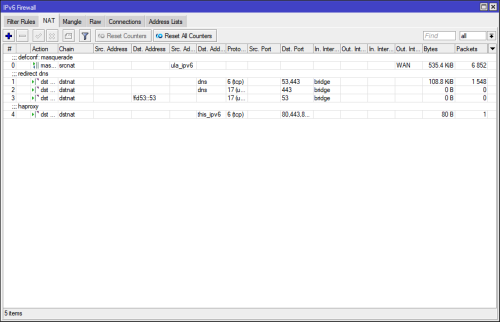
I agree, right now for my 2nd and 3rd subnet for IoT had to use NAT'ed IPv6, which is defeat purpose of using IPv6 in first place (i repeat)
user posted image

OS refuse to use ULA Address as Internet Route-able, OS treated fc00::/7 like LAN Route Segment
*
It is possible to use NPTv6 to translate your ULA prefix to Global prefix? confused.gif
Oltromen Ripot
post Jun 25 2024, 08:26 PM

👍 999999 person Likes this member
*******
Senior Member
4,034 posts

Joined: Dec 2019
i'm fed up with the offering on market.
on a journey of building my own internet router appliance using Ryzen3200G desktop.

was sanity testing newly-purchased 4-port gbe card.
just leaving this 1-port speedtest over 2Gbps unifi subscription. white ONR. nampak cantik, kan? at least i know what the link is capable before bad international routing in telco space comes into play.

user posted image
lamusiqa
post Jun 26 2024, 10:00 AM

Casual
***
Junior Member
397 posts

Joined: Feb 2007
QUOTE(Oltromen Ripot @ Jun 25 2024, 08:26 PM)
i'm fed up with the offering on market.
on a journey of building my own internet router appliance using Ryzen3200G desktop.

was sanity testing newly-purchased 4-port gbe card.
just leaving this 1-port speedtest over 2Gbps unifi subscription. white ONR. nampak cantik, kan? at least i know what the link is capable before bad international routing in telco space comes into play.

user posted image
*
Can you get 2Gbps speed over a single Cat7 cable? Or do you have to split into 2 LAN ports (ie. aggregated offering)
yenchenje
post Jun 26 2024, 10:58 AM

Enthusiast
*****
Junior Member
932 posts

Joined: Dec 2019
QUOTE(lamusiqa @ Jun 26 2024, 10:00 AM)
Can you get 2Gbps speed over a single Cat7 cable? Or do you have to split into 2 LAN ports (ie. aggregated offering)
*
Not possible unless he has the black D-Link ONR, will only be max of 940
abemin
post Jun 26 2024, 12:11 PM

New Member
*
Junior Member
44 posts

Joined: Aug 2012
QUOTE(Khan92 @ Jun 22 2024, 03:00 AM)
What app is this boss?
*
Grafana dashboard. its web based.
lamusiqa
post Jun 26 2024, 03:33 PM

Casual
***
Junior Member
397 posts

Joined: Feb 2007
QUOTE(yenchenje @ Jun 26 2024, 10:58 AM)
Not possible unless he has the black D-Link ONR, will only be max of 940
*
I have the black Dlink ONR which has the 2.5Gbe WAN port. Will I be able to get 2gbps speed via a single Cat7 cable (10gbps) if my router and PC has 2.5Gb ethernet?
yenchenje
post Jun 26 2024, 06:34 PM

Enthusiast
*****
Junior Member
932 posts

Joined: Dec 2019
QUOTE(lamusiqa @ Jun 26 2024, 03:33 PM)
I have the black Dlink ONR which has the 2.5Gbe WAN port. Will I be able to get 2gbps speed via a single Cat7 cable (10gbps) if my router and PC has 2.5Gb ethernet?
*
Yes, granted that you have a 2.5G router and/or 2.5G switch
yenchenje
post Jun 26 2024, 06:48 PM

Enthusiast
*****
Junior Member
932 posts

Joined: Dec 2019
Edit*

This post has been edited by yenchenje: Jun 26 2024, 06:48 PM
The.Lucas.DaY
post Jun 26 2024, 10:16 PM

On my way
****
Junior Member
671 posts

Joined: May 2019

Is it possible to change my IP without reboot router? My IP was 110.x yesterday night, but it is now 115.x without reboot the router hmm.gif
coolguy_0925
post Jun 26 2024, 10:23 PM

Look at all my stars!!
*******
Senior Member
4,552 posts

Joined: Jan 2003
QUOTE(The.Lucas.DaY @ Jun 26 2024, 10:16 PM)
Is it possible to change my IP without reboot router? My IP was 110.x yesterday night, but it is now 115.x without reboot the router  hmm.gif
*
Another way is by going into your router page look for page that controls internet settings

Click disconnect and wait a few secs then click connect
The.Lucas.DaY
post Jun 26 2024, 10:32 PM

On my way
****
Junior Member
671 posts

Joined: May 2019

QUOTE(coolguy_0925 @ Jun 26 2024, 10:23 PM)
Another way is by going into your router page look for page that controls internet settings

Click disconnect and wait a few secs then click connect
*
You mean the ipv4 internet page? Only that page got connect & disconnect hmm.gif
coolguy_0925
post Jun 26 2024, 10:37 PM

Look at all my stars!!
*******
Senior Member
4,552 posts

Joined: Jan 2003
QUOTE(The.Lucas.DaY @ Jun 26 2024, 10:32 PM)
You mean the ipv4 internet page? Only that page got connect & disconnect hmm.gif
*
The page that you keyed in your @unifi username and pwd

Ya if you saw the buttons those are for you to connect & dc from internet

So should get a new IP everytime you get reconnected

Topic ClosedOptions
 

Change to:
| Lo-Fi Version
0.0250sec    1.30    6 queries    GZIP Disabled
Time is now: 17th December 2025 - 08:23 PM