Sent ONU stick over to Mr Anime for configuration now, hopefully I can move to ONU SFP for good

Unifi Official TM UniFi High Speed Broadband Thread V42, READ 1ST PAGE FOR RELEVANT WIFI INFO!
|
|
 Dec 11 2023, 03:29 PM Dec 11 2023, 03:29 PM
Return to original view | Post
#1
|
 
Junior Member
932 posts Joined: Dec 2019 
|
Finally got a replacement D-Link ONR from TM
Sent ONU stick over to Mr Anime for configuration now, hopefully I can move to ONU SFP for good |
|
|
|
|
|
Dec 11 2023, 08:10 PM
Return to original view | Post
#2
|
|
Junior Member
932 posts Joined: Dec 2019
|
QUOTE(aniq8676 @ Dec 11 2023, 05:29 PM) Wait for TM to release a new modem router with a 2.5Gigabit port. (Expected next year) Asked the technician when he was over, he said that they have yet to receive any news regarding new equipment for Unifi Ultra For now, TM only releases 2.5Gigabit modems for Maxis fiber users.  |
|
|
Dec 11 2023, 10:45 PM
Return to original view | IPv6 | Post
#3
|
|
Junior Member
932 posts Joined: Dec 2019
|
 Still fine at JB, trace route to a US Verizon Business IP is about on avg 340ms which is a bit higher compared with TM's international peering ping 180.72.x.x IP pool here |
|
|
Dec 12 2023, 03:51 PM
Return to original view | Post
#4
|
|
Junior Member
932 posts Joined: Dec 2019
|
QUOTE(Oltromen Ripot @ Dec 12 2023, 03:16 PM) Yes GeForceNOW vs Unifi NUT  |
|
|
Dec 13 2023, 01:17 PM
Return to original view | Post
#5
|
|
Junior Member
932 posts Joined: Dec 2019
|
QUOTE(eclectice @ Dec 13 2023, 09:40 AM) TM should consider offering GFN instead of BlackNut to reduce the long-standing GFN queue issues due to high demand globally. Pretty sure it’s cuz Yes having exclusive contract with GFN that they’re the only provider in Malaysia |
|
|
Dec 13 2023, 04:59 PM
Return to original view | IPv6 | Post
#6
|
|
Junior Member
932 posts Joined: Dec 2019
|
QUOTE(eclectice @ Dec 13 2023, 03:50 PM) GFN services are available in Japan through two GFN Alliance Partner providers - Softbank and au Japan. To my knowledge, there have been no news reports indicating that YES is the exclusive GFN service provider in Malaysia. It was only announced that YES was offering exclusive BETA for their YES customers to try until 10 April 2023 before it opened the service to non-YES customers. Therefore, there should be no issues accessing GFN services from multiple providers in the same country or region. Starhub GFN Singapore covers Malaysia as well. I believe YES is willing to invest in a new NVIDIA AI data center running on the latest NVIDIA DGX H100 costing billions of ringgit in Johor Bahru next year, to upgrade their infrastructure. TM fails to see that as well since its One Cloud Alpha data center is based on the Huawei platform. Yet, China is rushing to get NVIDIA RTX 4090 GPUs to power up its AI tech before the US sanctions. Or TM has already signed an obligation with blacknut to host their services and is exclusive until it expires since Blacknut came to Malaysia first (Idk this exactly I’m just spitballing)https://nvidia.custhelp.com/app/answers/det...-geforce-now%3F https://www.tmone.com.my/resources/news/tm-...cture-provider/ https://techwireasia.com/11/2023/can-huawei...allenge-nvidia/ Currently I’ve tried both StarHub GFN and Yes GFN, both I have had no issues with queues (Which having multiple providers will help a lot). So maybe NVIDIA still don’t see a need currently to expand it unless they can’t keep up with the customer demands for VMs Monopoly? Yes very much so, Yes charges RM20 more for non Yes customers, and Yes subscribers can only use credit card to pay for it, and non Yes customers can pay for it with debit for RM20 more But you can technically save a bit by using StarHub’s, but I believe their traffic is higher so the queue will be longer, but in the short time that I’ve used it, I never had the in queue message popped up And also, from a Reddit post, Malaysia GFN are using CC150 + Tesla P10, StarHub GFN is probably also comparable since they’re alliance partners as well as supposed to Nvidia’s own data center. So specs wise, they’re probably very much comparable to Blacknut or maybe better (I can’t find their specs unfortunately) But I will agree that having TM hosting the VMs will definitely help a lot considering their peering routes are probably like 10x better compared to Yes’s peering to local telco/ISP |
|
|
|
|
|
Dec 14 2023, 02:05 PM
Return to original view | Post
#7
|
|
Junior Member
932 posts Joined: Dec 2019
|
QUOTE(eclectice @ Dec 13 2023, 05:14 PM) I subscribed to GFN via Starhub before YES GFN was available. I still use Starhub Premium with a grandfathered price SGD 9.99/month as it is cheaper (now it is SGD 12.99/month for new users; they will receive 50 hours of priority queue, compared to the the legacy 40 hours). Sounds about right for Yes When comparing host latency between Starhub and YES GFN services using the Nmap tool in Malaysia via Celcom 5G mobile network: Starhub GFN: 15 ms latency CODE bash@developer:~$ nmap -p 10000-20000,49003-49006 npa-str-sin-01.str.geforcenow.nvidiagrid.net Starting Nmap 7.80 ( https://nmap.org ) at 2023-12-13 16:50 +08 Nmap scan report for npa-str-sin-01.str.geforcenow.nvidiagrid.net (203.118.26.198) Host is up (0.015s latency). Other addresses for npa-str-sin-01.str.geforcenow.nvidiagrid.net (not scanned): 203.118.26.200 203.118.26.199 203.118.26.202 203.118.26.197 Not shown: 9998 filtered ports PORT STATE SERVICE 12653/tcp open unknown 13783/tcp open netbackup 13918/tcp open unknown 14987/tcp open unknown 15146/tcp open unknown 16438/tcp open unknown 18682/tcp open unknown Nmap done: 1 IP address (1 host up) scanned in 272.03 seconds YES GFN: 18 ms latency CODE bash@developer:~$ nmap -p 10000-20000,49003-49006 npa-yes-kul-01.yes.geforcenow.nvidiagrid.net Starting Nmap 7.80 ( https://nmap.org ) at 2023-12-13 17:02 +08 Nmap scan report for npa-yes-kul-01.yes.geforcenow.nvidiagrid.net (183.78.14.231) Host is up (0.018s latency). Other addresses for npa-yes-kul-01.yes.geforcenow.nvidiagrid.net (not scanned): 183.78.14.238 183.78.14.229 183.78.14.230 Not shown: 10004 filtered ports PORT STATE SERVICE 14739/tcp open unknown Nmap done: 1 IP address (1 host up) scanned in 178.02 seconds Would expect TM performance to be on par comparing to StarHub as well if NVIDIA ever partners with TM QUOTE(eclectice @ Dec 14 2023, 01:56 PM) Your Unifi private IP protects your CCTV system from hackers, but it also means you need a new way to access them remotely. Two options: set up a VPN (secure tunnel to your network) by using a third-party VPN provider that can be set up in your home router or subscribe to a cloud-based CCTV solution (remote viewing and recording). VPN requires tech setup, cloud has fees - choose what best fits your skills and budget. Pretty sure he’s currently on public IP now, so just gotta port forward his NVR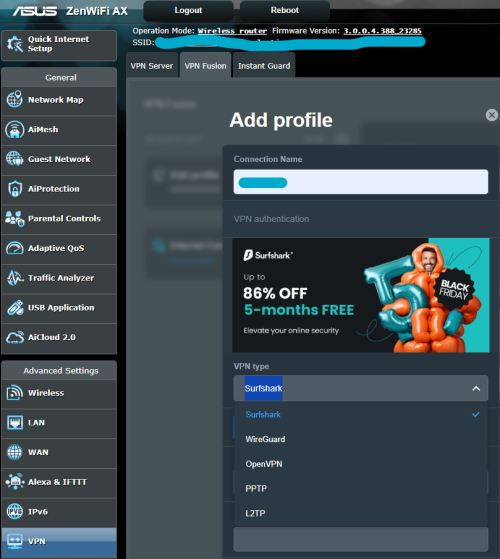 |
|
|
Dec 14 2023, 04:32 PM
Return to original view | IPv6 | Post
#8
|
|
Junior Member
932 posts Joined: Dec 2019
|
QUOTE(eclectice @ Dec 14 2023, 02:08 PM) If he hasn't changed his forwarding port settings in his router, he should be able to access his CCTV system just as before. Unless he’s also accessing it from local with public IP lolIt's possible that NVIDIA is interested in investing in the official Geforce Now service using YES data center infrastructure. I hope so, ehehehe ehehehe. However, I doubt that TM will upgrade its TM One Cloud Alpha data center from the Huawei platform to the NVIDIA platform; the cost would be too high. Yeah I don’t expect they upgrade it, at most just another alliance partner, but I can piggyback off StarHub for now since I’m in JB |
|
|
Dec 14 2023, 04:32 PM
Return to original view | IPv6 | Post
#9
|
|
Junior Member
932 posts Joined: Dec 2019
|
**Edited**
This post has been edited by yenchenje: Dec 14 2023, 04:33 PM |
|
|
Dec 14 2023, 04:38 PM
Return to original view | IPv6 | Post
#10
|
|
Junior Member
932 posts Joined: Dec 2019
|
QUOTE(tropik @ Dec 14 2023, 02:50 PM) Wondering if Synology NAS can work behind a private IP? No, if you want external without using VPN, reverse SSH tunnel to any cloud VPS or use IPv6If not, is it a valid request to TM to demand for a public IP arrangement? But if you don’t mind VPN, tailscale, ZeroTier works great If you don’t have any 2FA, go tailscale, ZeroTier for maximum security If you do, you can go reverse SSH tunnel or IPv6, but I generally don’t recommend opening your NAS port directly to the internet at large If you can tackle some tinkering, do reverse proxy with your own DDNS domain to only open 80/443 to the internet at large, downside is you can’t track what IP is accessing your services and all will just show RFC1918 addresses |
|
|
Jan 1 2024, 07:55 PM
Return to original view | IPv6 | Post
#11
|
|
Junior Member
932 posts Joined: Dec 2019
|
QUOTE(andrekua2 @ Jan 1 2024, 07:40 PM) LoL Don’t need to entertain him too much, dude purposely types like he’s perpetually having a stroke and spew out random shit that has 0 correlation sometimes U have serious memory problem? Didnt you said 5G cant torrent? Yesterday speed was not good... Around 320mbps or so. NooBiE888 liked this post
|
|
|
Jan 3 2024, 11:22 AM
Return to original view | Post
#12
|
|
Junior Member
932 posts Joined: Dec 2019
|
QUOTE(Susuwatari @ Jan 2 2024, 05:10 PM) Is the upgrade confirmed to be 1gbps or is it 2gbps? Honestly from all the info currently, I won’t be surprised if 800 is only pumped to 1GCuz 1G all for sure is pumped to 2G, but more 2G customers means that TM have to probably buff up their OLT side of equipment, hence more money, you know TM with their cost cutting method anyway |
|
|
Jan 3 2024, 08:26 PM
Return to original view | IPv6 | Post
#13
|
|
Junior Member
932 posts Joined: Dec 2019
|
QUOTE(aa123aa @ Jan 3 2024, 05:08 PM) For the free upgrade from 800mbps to 1/2Gbps later, need to change to the D-LINK ONR thing? Mandatory, or else won't be able to get past 940Mbps with TCP/IP overhead, but you can use back your OLD ONU if wanted, just you won't get anything beyond 940MbpsIs having a single d-link ONR better than the current modem + router setting? Thanks And TM wants to convince you that it is indeed true 1Gbps/2Gbps since they cheaped out on the ONU, so you can only get beyond 1Gbps/2Gbps with WiFi 6, and not LAN |
|
|
|
|
|
Jan 4 2024, 08:09 AM
Return to original view | Post
#14
|
|
Junior Member
932 posts Joined: Dec 2019
|
QUOTE(aa123aa @ Jan 4 2024, 12:04 AM) Currently using all asus router (main router and 2 mesh router); very convenient cz can use app to control and monitor everything. If switch to dlink, afraid can’t use anymore. Read that the given dlink quality is also bad as usual la... wonder is there like similar ONR but it’s asus brand out there?? You can put ONR into bridge mode, but max you'll get is only 940Mbps since you're going through gigabit port, if 2Gbps, you have to do LACP (I think) to get the "full" 2Gbps on 3rd party router. D-Link doesnt support thatAnd no, I dont think ASUS makes any ONR, as far as im aware. |
|
|
Jan 4 2024, 01:58 PM
Return to original view | Post
#15
|
|
Junior Member
932 posts Joined: Dec 2019
|
QUOTE(simmarjit @ Jan 4 2024, 01:50 PM) wait so no difference ONR and old ONU? Pretty sure no, except that TM expects that you can utilize >1G fully over WiFi 6 alone and not LAN, since all older ONU is basically a fiber converter and ATAAnd maybe their special sauce for their 1 + 1 config for 2Gbps |
|
|
Jan 4 2024, 08:56 PM
Return to original view | IPv6 | Post
#16
|
|
Junior Member
932 posts Joined: Dec 2019
|
QUOTE(go626201 @ Jan 4 2024, 08:43 PM) OVH SG is okay,and got private peering with TM. (Downside-limited quota bandwidth,and lower max speed can hit(250M-2G) Can attest to DO/Linode when I used to have a virtual windows VPS on either of them, ping okay and speed also all acceptable. Never tried to test top speed thoHosthatch SG also okay,but the routing and connection will be good for how long i not sure. (1-10G) Leaseweb SG routing not longer 1st grade,TM or Leaseweb change the routing for few months ago,If this back to 10ms+- then this is good. (1-10G) Equinix SG- I currently do not have any vps with this network,but i check my smokeping,looks like smooth in recent time. (1-10G) Vultr/DigitalOcean/Linode looks like also okay. (I didn't have cloud server on those platform, should can get more than 10G,if i am not wrong) |
|
|
Jan 8 2024, 12:56 PM
Return to original view | Post
#17
|
|
Junior Member
932 posts Joined: Dec 2019
|
Still waiting for TM to flip a switch for the 1 to 2 upgrade here
Don’t tell me gotta wait till July |
|
|
Jan 10 2024, 06:39 PM
Return to original view | IPv6 | Post
#18
|
|
Junior Member
932 posts Joined: Dec 2019
|
QUOTE(crazyissac @ Jan 10 2024, 04:52 PM) any help please how to use 3th party router on TM 1gbps onu ? Are you already using new ONR?If so, go to Setup > Ethernet WAN > Connection_0 - Edit > PPPoE drop down change to bridge > to whichever router you want (From ETH port 1 to another router WAN) You’ll turn the ONR into basically ONU again, it’s just handling VLAN segregation from TM (209,400,500) and ATA (VoIP), you can also leave the 5GHz WiFi band turned on so that you can connect to the WiFi to configure whenever when needed and no need to use any LAN cable I’d find my post of screenshots but should be quite easily understandable Also a reminder that doing this will limit your top speed to 940mbps due to TCP/IP transport overhead due to the presence of 1G port instead of 2.5G, so you won’t get the up to 1030Mbps limit of DL speed if you’re on 1Gbps plan and was expecting that This post has been edited by yenchenje: Jan 10 2024, 06:45 PM |
|
|
Jan 12 2024, 05:26 PM
Return to original view | Post
#19
|
|
Junior Member
932 posts Joined: Dec 2019
|
QUOTE(leezhijiang @ Jan 12 2024, 04:31 PM) 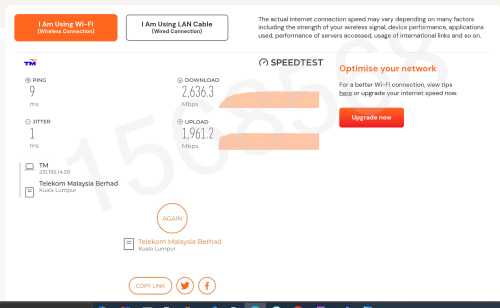 My Unifi Speed XD ! Just realzied this while doing speed test |
|
|
Jan 25 2024, 12:33 AM
Return to original view | IPv6 | Post
#20
|
|
Junior Member
932 posts Joined: Dec 2019
|
Hm interesting, my Unifi app, that has my mom’s account logged in shows “Uh oh! Something went wrong” in the my account tab, anyone experiencing the same issue?
I did just request a relocation of service 2 days ago(?), wondering if that might be affecting it QUOTE(yongtjunkit @ Jan 24 2024, 10:44 PM) Anyone here is experiencing slow internet connection with high ping? What plan are you on? 1Gbps here still is fine, maybe check Unifi site reports for possible outage?I've already tried restarting router and got similiar results  |
|
Topic ClosedOptions
|
| Change to: |  0.1860sec 0.1860sec
 0.68 0.68
 7 queries 7 queries
 GZIP Disabled GZIP Disabled
Time is now: 11th December 2025 - 02:36 AM |
 Quote
Quote