Outline ·
[ Standard ] ·
Linear+
Unifi Official TM UniFi High Speed Broadband Thread V42, READ 1ST PAGE FOR RELEVANT WIFI INFO!
|
lamusiqa
|
 Jun 24 2024, 10:06 AM Jun 24 2024, 10:06 AM
|

|
QUOTE(wiwi @ Jun 24 2024, 10:03 AM) texted the unifi installer. They said the 2in1 Skyworth modem+router. Cant swap to other 3rd party router. I dont really believe la..! That's what they told me but when they came and installed the modem+router combo, I just went to the settings and set the device as GPON Bridge only instead of GPON Bridge+Router. Connected it to my TP-Link AX73 router and voila, it works. The only annoyance Ive been facing since then is slow speed (300mbps) which I suspect coming from their end. Had them reset my port and speed went back to normal (1gbps) but this morning back to slow speed again. This post has been edited by lamusiqa: Jun 24 2024, 10:14 AM |
|
|
|
|
|
lamusiqa
|
Jun 24 2024, 10:09 AM
|
|
|
QUOTE(wiwi @ Jun 24 2024, 10:02 AM) I actually changed the Unifi Skyworth Network to "Bridge". My new Asus router, i set in PPPOE pw and user. Weird no internet. I attached some pics. Did I miss any setting? Thanks 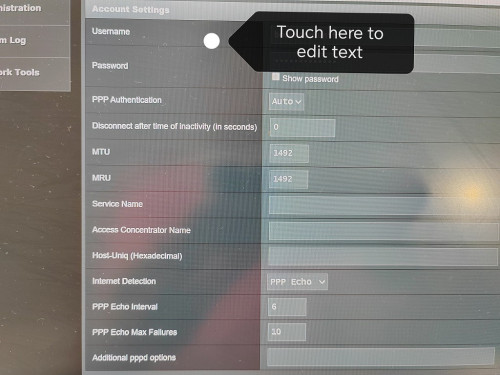 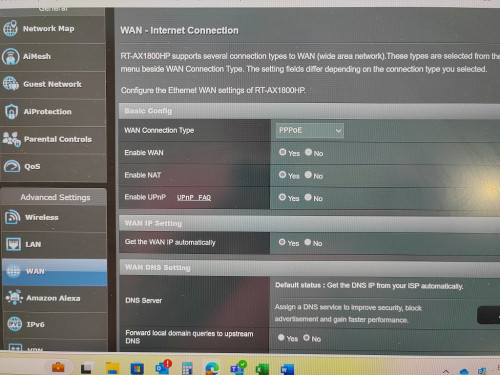 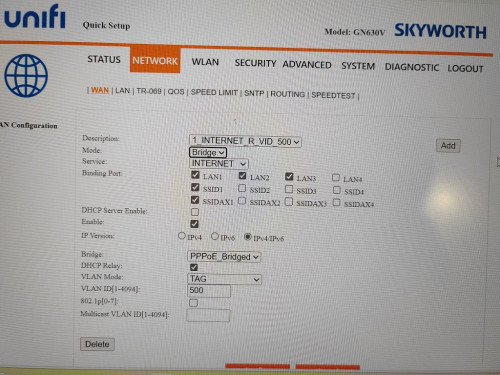 For some routers, they will only connect to Unifi if you run a setup wizard and select Unifi preset. Some of your LAN ports will be tagged for IPTV and VOIP but you can change that in the settings later. |
|
|
|
|
|
lamusiqa
|
Jun 24 2024, 10:24 AM
|
|
|
QUOTE(wiwi @ Jun 24 2024, 10:17 AM) Where/ which tab to change to GPON bridge only setting? Thanks Can't help you there. I got the black D-link combo device that has 2.5Gb WAN port. The menu is different than your Skyworth combo. Try running a setup wizard and see if there's an option for GPON+bridge. If not, you have to go to the Advanced menu and select WAN or Network option to see if you can change it manually. |
|
|
|
|
|
lamusiqa
|
Jun 25 2024, 05:46 PM
|
|
|
QUOTE(Godhand73 @ Jun 25 2024, 01:31 PM) My speed is 300 mbps but it's around 90mbps atm. This shit has been happening since the beginning of this month. Restarting the modem doesn't help. They reset the port once and it was stable for a few days. I'm sick of this shit. I pay monthly according to time but unifi service is complete garbage. No compensation whatsoever. Recently upgraded last weekend to 1Gbps with black Dlink combo modem+router. Now its on bridge mode and connected to my TP-Link AX73 router. Bandwidth speed went down to 300mbps just a day after and had it restored to 1Gbps after getting a cust service agent reset the port. That fix didn't last more than 2 days before going down to 300mbps again. Should I call Unifi again and have a technician look at the provided modem+router combo? I'm actually suspecting it's a thermal throttling issue because it runs at 1Gbps again after restarting the modem+router. |
|
|
|
|
|
lamusiqa
|
Jun 26 2024, 10:00 AM
|
|
|
QUOTE(Oltromen Ripot @ Jun 25 2024, 08:26 PM) i'm fed up with the offering on market. on a journey of building my own internet router appliance using Ryzen3200G desktop. was sanity testing newly-purchased 4-port gbe card. just leaving this 1-port speedtest over 2Gbps unifi subscription. white ONR. nampak cantik, kan? at least i know what the link is capable before bad international routing in telco space comes into play.  Can you get 2Gbps speed over a single Cat7 cable? Or do you have to split into 2 LAN ports (ie. aggregated offering) |
|
|
|
|
|
lamusiqa
|
Jun 26 2024, 03:33 PM
|
|
|
QUOTE(yenchenje @ Jun 26 2024, 10:58 AM) Not possible unless he has the black D-Link ONR, will only be max of 940 I have the black Dlink ONR which has the 2.5Gbe WAN port. Will I be able to get 2gbps speed via a single Cat7 cable (10gbps) if my router and PC has 2.5Gb ethernet? |
|
|
|
|
|
lamusiqa
|
Jun 28 2024, 11:25 PM
|
|
|
QUOTE(lamusiqa @ Jun 25 2024, 05:46 PM) Recently upgraded last weekend to 1Gbps with black Dlink combo modem+router. Now its on bridge mode and connected to my TP-Link AX73 router. Bandwidth speed went down to 300mbps just a day after and had it restored to 1Gbps after getting a cust service agent reset the port. That fix didn't last more than 2 days before going down to 300mbps again. Should I call Unifi again and have a technician look at the provided modem+router combo? I'm actually suspecting it's a thermal throttling issue because it runs at 1Gbps again after restarting the modem+router. Tested this thermal throttle theory by resetting the combo modem/router whenever speed is low (always at 300mbps DL/200mbps UL for some reason) and it works every time (back to 1gbps DL/500mbps UL). I just bought a laptop cooler to cool the combo modem (which I had to flip upside down due to vents being on top of the device) so lets see tomorrow morning if the speed goes down to 300mbps again despite the new cooling solution. |
|
|
|
|



 Quote
Quote
 0.1099sec
 0.33
0.33
 7 queries
 GZIP Disabled