

 Jun 10 2024, 11:31 AM


QUOTE(jiaen0509 @ Jun 9 2024, 05:51 PM)
1. Let TM fully configure and set up the Combo Box. Ensure the;
• Internet is up
• VoIP is working
2. Thank the technician, belanja a air tin/kotak, and goodbye.
3. Connect a LAN cable from the LAN 1 port on the D-Link Combo Box to the WAN port on my Asus Router.
4. Access the D-Link WebUI via 192.168.0.1.
5. Go to the “Wizard” and change the [WAN Mode] to “GPON Mode,” then apply the changes. See reference below;
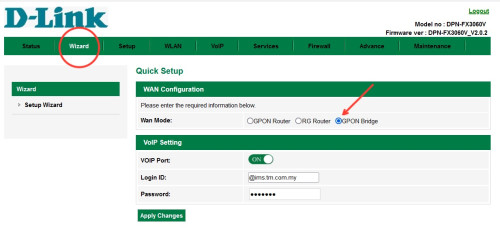
6. Wait a few seconds, and the internet on my Asus Router will be up.
Disclaimer: The steps and information provided here are based on my personal experience. Results may vary and attempts these changes are at your own risk; this information does not constitute legal or professional advice of any kind and cannot be used as the basis for any legal proceedings.
Note: My PPPoE information was already configured on my Asus Router before the Combo Box was installed, so the above steps do not involve setting up or configuring PPPoE. Once “Bridge Mode” on Combo Box is set. It will take some time to up the internet.
I am aware of a previously reported issue where the internet speed drops after a certain number of hours, requiring a restart of the Combo Box to resolve. For my case, after more than five days of monitoring, I haven’t encountered any speed drop issues.

Do you mind sharing your router specs? is it 2.5Gb WAN port?• Internet is up
• VoIP is working
2. Thank the technician, belanja a air tin/kotak, and goodbye.
3. Connect a LAN cable from the LAN 1 port on the D-Link Combo Box to the WAN port on my Asus Router.
4. Access the D-Link WebUI via 192.168.0.1.
5. Go to the “Wizard” and change the [WAN Mode] to “GPON Mode,” then apply the changes. See reference below;
6. Wait a few seconds, and the internet on my Asus Router will be up.
Disclaimer: The steps and information provided here are based on my personal experience. Results may vary and attempts these changes are at your own risk; this information does not constitute legal or professional advice of any kind and cannot be used as the basis for any legal proceedings.
Note: My PPPoE information was already configured on my Asus Router before the Combo Box was installed, so the above steps do not involve setting up or configuring PPPoE. Once “Bridge Mode” on Combo Box is set. It will take some time to up the internet.
I am aware of a previously reported issue where the internet speed drops after a certain number of hours, requiring a restart of the Combo Box to resolve. For my case, after more than five days of monitoring, I haven’t encountered any speed drop issues.
Mine peak at 930Mbps.
I have tested both :
- direct connect to combo box 2.5Gb port peak at 930Mbps
- direct connect using old devices (modem+router-tplink-ax73) peak at 930Mbps
Both using cat6 cable.
Should i try the bridge mode or confirm this is on TM end so i need to inform them.
I saw the technician speedtest can get 1Gbps. However after they left, my speedtest won’t go near 1Gbps.
 Quote
Quote


 0.0272sec
 0.67
0.67
 7 queries
 GZIP Disabled