Outline ·
[ Standard ] ·
Linear+
Unifi Official TM UniFi High Speed Broadband Thread V42, READ 1ST PAGE FOR RELEVANT WIFI INFO!
|
Doraku
|
 Jun 25 2024, 01:11 AM Jun 25 2024, 01:11 AM
|

|
QUOTE(Anime4000 @ Jun 22 2024, 06:12 AM) ISP especially Unifi should give /56 for home and /48 for business for creating different subnet. currently my 2nd subnet using NAT'ed IPv6 (fd10::/64 ▶️ 2001::e68...) which defeats the IPv6 purpose 🤣 at least allow to request /56 Even by APNIC standard /56 prefix size is bare minimum and should be avoided, IIRC a APNIC blog post I once read before, recommend just assigning to everyone a persistent /48 prefix and just requesting a new /32 block once you ran out But TM decided to just request a single /32 block and assign everyone /64 prefix provisioned by a stateless DHCPv6-PD  The ridiculous thing is /32 block is large enough to assign every single Unifi customer with /56 prefix;16 Million /56 Instead of this wacky dynamic /64 prefix  |
|
|
|
|
|
SUSnonamer
|
Jun 25 2024, 08:23 AM
|
Getting Started

|
remove
This post has been edited by nonamer: Jun 25 2024, 09:32 AM
|
|
|
|
|
|
raizer99
|
Jun 25 2024, 08:31 AM
|
New Member
|
My unifi speed is 500mbps (SWU3.0 300mbps with free upgrade), but recently it left only around 100mbps download when downloading/run speedtest, while the upload speed is normal which is 100mbps(for 500mbps package). Restarting router does not fix it and QOS is not enabled on router. Last time is able to reach 500mbps just recently drop to 100mbps.Any idea how to solve this issue?
|
|
|
|
|
|
failed.hashcheck
|
Jun 25 2024, 10:08 AM
|
|
|
QUOTE(Doraku @ Jun 25 2024, 01:11 AM) Even by APNIC standard /56 prefix size is bare minimum and should be avoided, IIRC a APNIC blog post I once read before, recommend just assigning to everyone a persistent /48 prefix and just requesting a new /32 block once you ran out But TM decided to just request a single /32 block and assign everyone /64 prefix provisioned by a stateless DHCPv6-PD The ridiculous thing is /32 block is large enough to assign every single Unifi customer with /56 prefix;16 Million /56 Instead of this wacky dynamic /64 prefix :confused: They probably wanted to limit the use for residential IP, making it less appealing for doing hosting business and such, when they have more expensive business package to sell. |
|
|
|
|
|
YoungMan
|
Jun 25 2024, 10:47 AM
|
|
|
QUOTE(raizer99 @ Jun 25 2024, 08:31 AM) My unifi speed is 500mbps (SWU3.0 300mbps with free upgrade), but recently it left only around 100mbps download when downloading/run speedtest, while the upload speed is normal which is 100mbps(for 500mbps package). Restarting router does not fix it and QOS is not enabled on router. Last time is able to reach 500mbps just recently drop to 100mbps.Any idea how to solve this issue? If restarting modem doesn't help, call 100 to report. Probably need TM to reconfigure your profile to the correct speed. |
|
|
|
|
|
PRSXFENG
|
Jun 25 2024, 12:49 PM
|
|
|
QUOTE(raizer99 @ Jun 25 2024, 08:31 AM) My unifi speed is 500mbps (SWU3.0 300mbps with free upgrade), but recently it left only around 100mbps download when downloading/run speedtest, while the upload speed is normal which is 100mbps(for 500mbps package). Restarting router does not fix it and QOS is not enabled on router. Last time is able to reach 500mbps just recently drop to 100mbps.Any idea how to solve this issue? 94Mbps or beyond? like 100 to 110mbps if its 94Mbps then you are limited by 10/100 ethernet, check cables, disconnect and reconnect em if beyond 94Mbps, then maybe they accidentally capped you, contact them and complain |
|
|
|
|
|
Anime4000
|
Jun 25 2024, 01:08 PM
|
|
|
QUOTE(Doraku @ Jun 25 2024, 01:11 AM) Even by APNIC standard /56 prefix size is bare minimum and should be avoided, IIRC a APNIC blog post I once read before, recommend just assigning to everyone a persistent /48 prefix and just requesting a new /32 block once you ran out But TM decided to just request a single /32 block and assign everyone /64 prefix provisioned by a stateless DHCPv6-PD The ridiculous thing is /32 block is large enough to assign every single Unifi customer with /56 prefix;16 Million /56 Instead of this wacky dynamic /64 prefix I agree, right now for my 2nd and 3rd subnet for IoT had to use NAT'ed IPv6, which is defeat purpose of using IPv6 in first place (i repeat) 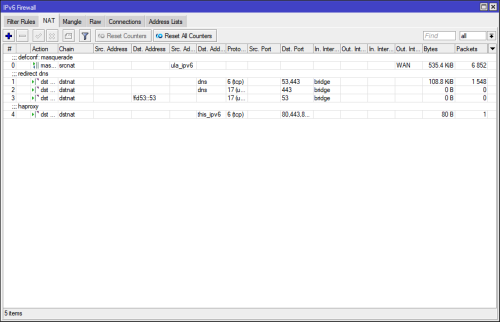 OS refuse to use ULA Address as Internet Route-able, OS treated fc00::/7 like LAN Route Segment |
|
|
|
|
|
Godhand73
|
Jun 25 2024, 01:31 PM
|
New Member
|
QUOTE(raizer99 @ Jun 25 2024, 08:31 AM) My unifi speed is 500mbps (SWU3.0 300mbps with free upgrade), but recently it left only around 100mbps download when downloading/run speedtest, while the upload speed is normal which is 100mbps(for 500mbps package). Restarting router does not fix it and QOS is not enabled on router. Last time is able to reach 500mbps just recently drop to 100mbps.Any idea how to solve this issue? My speed is 300 mbps but it's around 90mbps atm. This shit has been happening since the beginning of this month. Restarting the modem doesn't help. They reset the port once and it was stable for a few days. I'm sick of this shit. I pay monthly according to time but unifi service is complete garbage. No compensation whatsoever. |
|
|
|
|
|
raizer99
|
Jun 25 2024, 02:03 PM
|
New Member
|
QUOTE(PRSXFENG @ Jun 25 2024, 12:49 PM) 94Mbps or beyond? like 100 to 110mbps if its 94Mbps then you are limited by 10/100 ethernet, check cables, disconnect and reconnect em if beyond 94Mbps, then maybe they accidentally capped you, contact them and complain i using wifi and the wifi is quite stable (can reach 500mbps last time,few month no issue) but recently only left around 90-110mbps |
|
|
|
|
|
jiaen0509
|
Jun 25 2024, 02:05 PM
|
|
|
I set my router to reboot automatically everyday at 5am.
I notice sometimes the WAN IP will randomly change, sometimes stay with same IP until restart the Modem.
Anyone know how this WAN IP will change? Because sometimes without restart the modem, the WAN IP change. Sometimes wont change
|
|
|
|
|
|
YoungMan
|
Jun 25 2024, 02:07 PM
|
|
|
QUOTE(Godhand73 @ Jun 25 2024, 01:31 PM) My speed is 300 mbps but it's around 90mbps atm. This shit has been happening since the beginning of this month. Restarting the modem doesn't help. They reset the port once and it was stable for a few days. I'm sick of this shit. I pay monthly according to time but unifi service is complete garbage. No compensation whatsoever. Get them to send technician to your house. Probably issue with the infra or speed capped. Make sure you get what you paid for. |
|
|
|
|
|
Godhand73
|
Jun 25 2024, 02:13 PM
|
New Member
|
QUOTE(YoungMan @ Jun 25 2024, 02:07 PM) Get them to send technician to your house. Probably issue with the infra or speed capped. Make sure you get what you paid for. I've contacted unifi on twitter and no reply yet. i doubt it's the issue with my line. seems like lots of people are experiencing this. before this month, unifi is decently stable except during evening. the speed shows normal but loading time on discord, twitter etc gets terribly slow and ping increases. |
|
|
|
|
|
sHawTY
|
Jun 25 2024, 03:50 PM
|
|
|
QUOTE(aniq8676 @ Jun 24 2024, 10:30 PM) UNIFI SMART DEVICE now has many options, also offering a 24/36 month contract. Is anyone else unable to see any SMART DEVICES in their UniFi account app or web interface? Even MESH devices are missing. The only things visible are the UniFi TV box, UniFi TV packages, and streaming apps. I'm a UniFi Home 1Gbps - Pro Upgrade user, paying RM189. I've always paid on time, so it's really strange that this is happening. Talking to their live chat is frustrating—they just keep repeating the same stuff and don't understand my issue. |
|
|
|
|
|
rifles
|
Jun 25 2024, 05:00 PM
|
|
|
QUOTE(alexwsk @ Jun 22 2024, 12:17 PM) hi, how much is your monthly bill? I'm on RM104.95 including SST for 300Mbps, getting email free 3 mths renew contract 2 yrs, want to explore what othe options I hv  RM139+sst |
|
|
|
|
|
lamusiqa
|
Jun 25 2024, 05:46 PM
|
|
|
QUOTE(Godhand73 @ Jun 25 2024, 01:31 PM) My speed is 300 mbps but it's around 90mbps atm. This shit has been happening since the beginning of this month. Restarting the modem doesn't help. They reset the port once and it was stable for a few days. I'm sick of this shit. I pay monthly according to time but unifi service is complete garbage. No compensation whatsoever. Recently upgraded last weekend to 1Gbps with black Dlink combo modem+router. Now its on bridge mode and connected to my TP-Link AX73 router. Bandwidth speed went down to 300mbps just a day after and had it restored to 1Gbps after getting a cust service agent reset the port. That fix didn't last more than 2 days before going down to 300mbps again. Should I call Unifi again and have a technician look at the provided modem+router combo? I'm actually suspecting it's a thermal throttling issue because it runs at 1Gbps again after restarting the modem+router. |
|
|
|
|
|
blacktubi
|
Jun 25 2024, 05:49 PM
|
-

|
QUOTE(lamusiqa @ Jun 25 2024, 05:46 PM) Recently upgraded last weekend to 1Gbps with black Dlink combo modem+router. Now its on bridge mode and connected to my TP-Link AX73 router. Bandwidth speed went down to 300mbps just a day after and had it restored to 1Gbps after getting a cust service agent reset the port. That fix didn't last more than 2 days before going down to 300mbps again. Should I call Unifi again and have a technician look at the provided modem+router combo? I'm actually suspecting it's a thermal throttling issue because it runs at 1Gbps again after restarting the modem+router. You can try to add a fan but from what I know, it's not a thermal issue. |
|
|
|
|
|
Godhand73
|
Jun 25 2024, 06:30 PM
|
New Member
|
QUOTE(lamusiqa @ Jun 25 2024, 05:46 PM) Recently upgraded last weekend to 1Gbps with black Dlink combo modem+router. Now its on bridge mode and connected to my TP-Link AX73 router. Bandwidth speed went down to 300mbps just a day after and had it restored to 1Gbps after getting a cust service agent reset the port. That fix didn't last more than 2 days before going down to 300mbps again. Should I call Unifi again and have a technician look at the provided modem+router combo? I'm actually suspecting it's a thermal throttling issue because it runs at 1Gbps again after restarting the modem+router. I'm experiencing the exact same thing. They did port reset earlier and the speed is now back to normal. But the issue will come back again after a few days. That's been the norm for me this month. I don't think it's modem/ router issue. But maybe give them a call yeah. This didn't happen before. It started early this month for me. |
|
|
|
|
|
Doraku
|
Jun 25 2024, 07:13 PM
|
|
|
QUOTE(Anime4000 @ Jun 25 2024, 01:08 PM) I agree, right now for my 2nd and 3rd subnet for IoT had to use NAT'ed IPv6, which is defeat purpose of using IPv6 in first place (i repeat) OS refuse to use ULA Address as Internet Route-able, OS treated fc00::/7 like LAN Route Segment It is possible to use NPTv6 to translate your ULA prefix to Global prefix? |
|
|
|
|
|
Oltromen Ripot
|
Jun 25 2024, 08:26 PM
|
|
|
i'm fed up with the offering on market. on a journey of building my own internet router appliance using Ryzen3200G desktop. was sanity testing newly-purchased 4-port gbe card. just leaving this 1-port speedtest over 2Gbps unifi subscription. white ONR. nampak cantik, kan? at least i know what the link is capable before bad international routing in telco space comes into play.  |
|
|
|
|
|
lamusiqa
|
Jun 26 2024, 10:00 AM
|
|
|
QUOTE(Oltromen Ripot @ Jun 25 2024, 08:26 PM) i'm fed up with the offering on market. on a journey of building my own internet router appliance using Ryzen3200G desktop. was sanity testing newly-purchased 4-port gbe card. just leaving this 1-port speedtest over 2Gbps unifi subscription. white ONR. nampak cantik, kan? at least i know what the link is capable before bad international routing in telco space comes into play. Can you get 2Gbps speed over a single Cat7 cable? Or do you have to split into 2 LAN ports (ie. aggregated offering) |
|
|
|
|



 Quote
Quote





 0.0208sec
 0.49
0.49
 6 queries
 GZIP Disabled