Welcome Guest ( Log In | Register )

Bump Topic Topic Closed RSS Feed
495 Pages « < 170 171 172 173 174 > » Bottom

Outline · [ Standard ] · Linear+

Unifi Official TM UniFi High Speed Broadband Thread V42, READ 1ST PAGE FOR RELEVANT WIFI INFO!

views
     
podrunner
post Jun 23 2024, 11:12 PM

Look at all my stars!!
*******
Senior Member
2,214 posts

Joined: Feb 2009
QUOTE(Epic_winner091 @ Jun 23 2024, 06:22 PM)
Just that if you are able to max out the WiFi 6 connection it'd be limited to 940 Mbps because the DIR-X3060Z only has Gigabit Ethernet LAN and WAN ports.

EDIT:

Also the white combo box only has Gigabit LAN so you'll be capped to 940 Mbps on Ethernet also.
*
Thanks for replying. So not necessary to change then?
wiwi
post Jun 24 2024, 10:02 AM

Getting Started
**
Junior Member
280 posts

Joined: Jan 2003
From: HOME
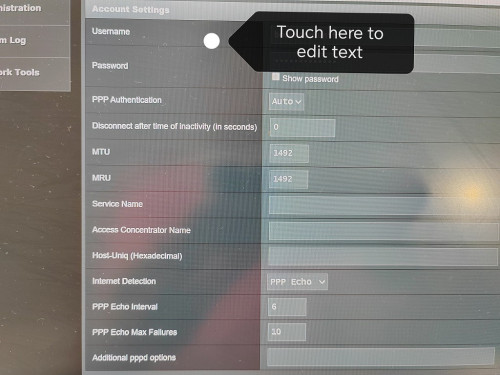
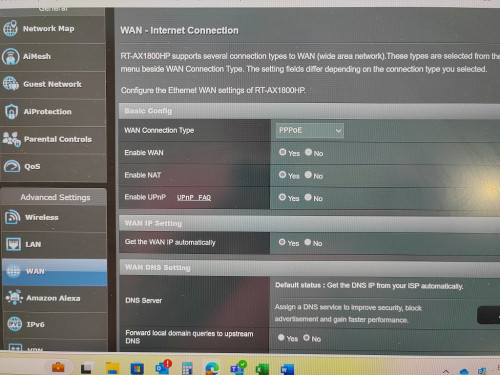
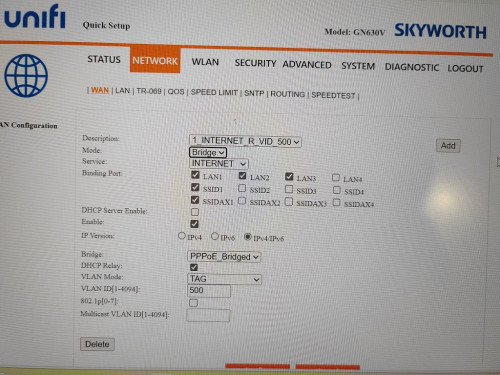
I actually changed the Unifi Skyworth Network to "Bridge".

My new Asus router, i set in PPPOE pw and user.

Weird no internet.

I attached some pics.
Did I miss any setting?

Thanks

user posted image
user posted image
user posted image
wiwi
post Jun 24 2024, 10:03 AM

Getting Started
**
Junior Member
280 posts

Joined: Jan 2003
From: HOME
texted the unifi installer.
They said the 2in1 Skyworth modem+router.
Cant swap to other 3rd party router.

I dont really believe la..!
lamusiqa
post Jun 24 2024, 10:06 AM

Casual
***
Junior Member
397 posts

Joined: Feb 2007
QUOTE(wiwi @ Jun 24 2024, 10:03 AM)
texted the unifi installer.
They said the 2in1 Skyworth modem+router.
Cant swap to other 3rd party router.

I dont really believe la..!
*
That's what they told me but when they came and installed the modem+router combo, I just went to the settings and set the device as GPON Bridge only instead of GPON Bridge+Router. Connected it to my TP-Link AX73 router and voila, it works.

The only annoyance Ive been facing since then is slow speed (300mbps) which I suspect coming from their end. Had them reset my port and speed went back to normal (1gbps) but this morning back to slow speed again.

This post has been edited by lamusiqa: Jun 24 2024, 10:14 AM
lamusiqa
post Jun 24 2024, 10:09 AM

Casual
***
Junior Member
397 posts

Joined: Feb 2007
QUOTE(wiwi @ Jun 24 2024, 10:02 AM)
I actually changed the Unifi Skyworth Network to "Bridge".

My new Asus router, i set in PPPOE pw and user.

Weird no internet.

I attached some pics.
Did I miss any setting?

Thanks

user posted image
user posted image
user posted image
*
For some routers, they will only connect to Unifi if you run a setup wizard and select Unifi preset. Some of your LAN ports will be tagged for IPTV and VOIP but you can change that in the settings later.
wiwi
post Jun 24 2024, 10:17 AM

Getting Started
**
Junior Member
280 posts

Joined: Jan 2003
From: HOME
QUOTE(lamusiqa @ Jun 24 2024, 10:06 AM)
That's what they told me but when they came and installed the modem+router combo, I just went to the settings and set the device as GPON Bridge only instead of GPON Bridge+Router. Connected it to my TP-Link AX73 router and voila, it works.

The only annoyance Ive been facing since then is slow speed (300mbps) which I suspect coming from their end. Had them reset my port and speed went back to normal (1gbps) but this morning back to slow speed again.
*
Where/ which tab to change to GPON bridge only setting?

Thanks

This post has been edited by wiwi: Jun 24 2024, 10:19 AM
lamusiqa
post Jun 24 2024, 10:24 AM

Casual
***
Junior Member
397 posts

Joined: Feb 2007
QUOTE(wiwi @ Jun 24 2024, 10:17 AM)
Where/ which tab to change to GPON bridge only setting?

Thanks
*
Can't help you there. I got the black D-link combo device that has 2.5Gb WAN port. The menu is different than your Skyworth combo. Try running a setup wizard and see if there's an option for GPON+bridge. If not, you have to go to the Advanced menu and select WAN or Network option to see if you can change it manually.
laihuhng
post Jun 24 2024, 11:41 AM

On my way
****
Junior Member
603 posts

Joined: Jun 2005


QUOTE(wiwi @ Jun 24 2024, 10:02 AM)
I actually changed the Unifi Skyworth Network to "Bridge".

My new Asus router, i set in PPPOE pw and user.

Weird no internet.

I attached some pics.
Did I miss any setting?

Thanks

user posted image
user posted image
user posted image
*
Using Quick Setup Wizard. Select Unifi's profile.
danielx90
post Jun 24 2024, 11:47 AM

Getting Started
**
Junior Member
70 posts

Joined: Jan 2011
From: Malacca
QUOTE(rifles @ Jun 21 2024, 12:57 PM)
At least i got it free upgrade from 300 to 500mbps + 6 months free when i walk in tmpoint last april.

[attachmentid=11497742]
*
Walk-in to tmpoint, disappointed that to eligible for 6mth free waiver, it said compulsory to signup their unifi mobile 39 plan (at least 3mth).

Hindsight should have visit other tmpoint branches to confirm and do comparison, and if this lady was bullshitting with me.

so if i happened to passby another tmpoint will consult to terminate that useless mobile plan earlier to minimise my loss.

Current plan:
300mbps: 129

Quoted:
300mbps: 119 + 6mth free waiver + wifi6 router
500mbps: 139 + 6mth free waiver + wifi6 router

Result:
stay with 300mbps. approx. 5mth free waiver (deduct mobile plan) + wifi6 router (unknown brand wait for technician to come)

This post has been edited by danielx90: Jun 24 2024, 11:49 AM
biggie
post Jun 24 2024, 12:11 PM

Regular
******
Senior Member
1,291 posts

Joined: Jan 2003
Just got the free upgrade to 1gb last weekend. Unfortunately only been given the dlink combo box.

I got old mesh tenda mw6, now already having to restart now and then. However, no issues in setting it as bridge to the combo box.

Any suggestions to renew the mesh? My hiuse is a3storey house with lots of brick wall
LiQuID2
post Jun 24 2024, 12:21 PM

Getting Started
**
Junior Member
273 posts

Joined: Dec 2021


Unifi app is so useless. Download app but web based. Cant stay login.
evilhomura89
post Jun 24 2024, 12:27 PM

Look at all my stars!!
*******
Senior Member
5,886 posts

Joined: Jan 2003
From: BM


QUOTE(wiwi @ Jun 24 2024, 10:02 AM)
I actually changed the Unifi Skyworth Network to "Bridge".

My new Asus router, i set in PPPOE pw and user.

Weird no internet.

I attached some pics.
Did I miss any setting?

Thanks
» Click to show Spoiler - click again to hide... «

*
Check under IPTV tab in LAN setting
Make sure the ISP profile is set to Unifi

This post has been edited by evilhomura89: Jun 24 2024, 12:28 PM
NagaK
post Jun 24 2024, 01:29 PM

Regular
******
Senior Member
1,188 posts

Joined: Sep 2018


QUOTE(wiwi @ Jun 24 2024, 10:02 AM)
I actually changed the Unifi Skyworth Network to "Bridge".

My new Asus router, i set in PPPOE pw and user.

Weird no internet.

I attached some pics.
Did I miss any setting?

Thanks

user posted image
user posted image
user posted image
*
On IPTV profile set to Unifi profile then it will connect internet
hyperwavedrift
post Jun 24 2024, 03:00 PM

Getting Started
**
Junior Member
88 posts

Joined: Mar 2017
So anybody found workaround for internet going slow at night yet?
bugipunch
post Jun 24 2024, 03:09 PM

Getting Started
**
Junior Member
172 posts

Joined: Jul 2021
QUOTE(hyperwavedrift @ Jun 24 2024, 03:00 PM)
So anybody found workaround for internet going slow at night yet?
*
vpn
jiaen0509
post Jun 24 2024, 04:44 PM

Look at all my stars!!
*******
Senior Member
3,305 posts

Joined: Dec 2012
Nowadays I no longer receive the TM Unifi marketing call. Thinking to get offer to upgrade higher speed.


sHawTY
post Jun 24 2024, 05:49 PM

Frequent Reporter
********
All Stars
14,908 posts

Joined: Jul 2005

QUOTE(wiwi @ Jun 24 2024, 10:02 AM)
SNIP
LAN > IPTV > Select ISP Profile > UniFi Home or UniFi Business (either one is fine)

UniFi Home: For users who are still using the old UniFi IPTV box that uses an Ethernet cable.
UniFi Business: Frees up the additional Ethernet port that would otherwise be used by the UniFi IPTV box.
hyperwavedrift
post Jun 24 2024, 06:44 PM

Getting Started
**
Junior Member
88 posts

Joined: Mar 2017
QUOTE(bugipunch @ Jun 24 2024, 03:09 PM)
vpn
*
any good vpn without forking out money?
YoungMan
post Jun 24 2024, 08:13 PM

Look at all my stars!!
*******
Senior Member
6,793 posts

Joined: Oct 2008
From: Kuala Lumpur


QUOTE(danielx90 @ Jun 24 2024, 11:47 AM)
Walk-in to tmpoint, disappointed that to eligible for 6mth free waiver, it said compulsory to signup their unifi mobile 39 plan (at least 3mth).

Hindsight should have visit other tmpoint branches to confirm and do comparison, and if this lady was bullshitting with me.

so if i happened to passby another tmpoint will consult to terminate that useless mobile plan earlier to minimise my loss.

Current plan:
300mbps: 129

Quoted:
300mbps: 119 + 6mth free waiver + wifi6 router
500mbps: 139 + 6mth free waiver + wifi6 router

Result:
stay with 300mbps. approx. 5mth free waiver (deduct mobile plan) + wifi6 router (unknown brand wait for technician to come)
*
Still worht the switch. Yes most Tmpoint do ask to sign up for the Unifi mobile plan, but you can just terminate after 3 months. Earlier ppl can even terminate the day itself.

QUOTE(hyperwavedrift @ Jun 24 2024, 06:44 PM)
any good vpn without forking out money?
*
Better don't use free VPn. You do not know what could be behind it collecting your data.

PRSXFENG
post Jun 24 2024, 10:55 PM

Look at all my stars!!
*******
Senior Member
2,607 posts

Joined: Nov 2020


QUOTE(hyperwavedrift @ Jun 24 2024, 06:44 PM)
any good vpn without forking out money?
*
the only 2 free ones that I may trust is ProtonVPN and Windscribe
but of course being free, you are limited

otherwise, cloudflare warp might help, its not exactly a vpn, but it may help

495 Pages « < 170 171 172 173 174 > » Top
Topic ClosedOptions
 

Change to:
| Lo-Fi Version
0.0198sec    0.32    6 queries    GZIP Disabled
Time is now: 2nd December 2025 - 08:28 AM