Outline ·
[ Standard ] ·
Linear+
Official TM UniFi High Speed Broadband Thread V39, READ 1ST PAGE FOR RELEVANT WIFI INFO
|
QuantumEdge
|
 Feb 21 2021, 10:10 AM Feb 21 2021, 10:10 AM
|

|
QUOTE(axxer @ Feb 21 2021, 01:27 AM) Just got 30mbps installed yesterday afternoon. They gave me huawei modem and fiberhome router. The router already problematic after installation. Can't login to wifi, timeout error. Called the contractor back, lucky they're still around the area doing 2-3 more installation. The guy blamed me for using the wps button to pair. Since my phone couldn't connect even with correct pw, timeout error left and right, of course I'll test with wps pairing. The guy sqid some bullshit like "lain kali jangan tekan butang tu, seting wifi lari".. wtf man. What is the wps button purpose if I can't use it  Should've get the PPPOE details from the contractor, can swap the fiberhome router to something better lol Never use ISP's stock router, unless you're using TIME or Allo's |
|
|
|
|
|
yongtjunkit
|
Feb 21 2021, 10:55 AM
|
|
|
QUOTE(axxer @ Feb 21 2021, 01:27 AM) Just got 30mbps installed yesterday afternoon. They gave me huawei modem and fiberhome router. The router already problematic after installation. Can't login to wifi, timeout error. Called the contractor back, lucky they're still around the area doing 2-3 more installation. The guy blamed me for using the wps button to pair. Since my phone couldn't connect even with correct pw, timeout error left and right, of course I'll test with wps pairing. The guy sqid some bullshit like "lain kali jangan tekan butang tu, seting wifi lari".. wtf man. What is the wps button purpose if I can't use it That sounds like the next level of “ewaste router” |
|
|
|
|
|
soonwai
|
Feb 21 2021, 01:56 PM
|
|
|
QUOTE(sadlyfalways @ Feb 21 2021, 02:43 AM) Anyone facing Unifi going down around 1am everyday? And it’s not like normal ip change because it needs a manual restart to get everything back to normal I live in the petaling Jaya area Nothing like that here in Kajang area. |
|
|
|
|
|
axxer
|
Feb 21 2021, 02:05 PM
|
|
|
QUOTE(QuantumEdge @ Feb 21 2021, 10:10 AM) Should've get the PPPOE details from the contractor, can swap the fiberhome router to something better lol Never use ISP's stock router, unless you're using TIME or Allo's Obviously i did... I can reset and reconfigure it myself before the contractor guy came again but i just wanna make sure the modem and router is working 100% before actually tinker with it. Insta changed to adguard dns to block ads network wide after they guy left lol |
|
|
|
|
|
rylim
|
Feb 21 2021, 03:15 PM
|
Getting Started

|
I tried to replace the cheap router (Aztech DS244) given by Unifi to Asus router, but I was told by the Unifi support that they can't provide me the password because they never keep the password, is this true? What she can do is to reset the password
|
|
|
|
|
|
go626201
|
Feb 21 2021, 03:17 PM
|
|
|
QUOTE(rylim @ Feb 21 2021, 03:15 PM) I tried to replace the cheap router (Aztech DS244) given by Unifi to Asus router, but I was told by the Unifi support that they can't provide me the password because they never keep the password, is this true? What she can do is to reset the password Yes they can only give you the password by resetting the password and send the new password by sms within 24 hours.(Normally within 30min can receive the new password) |
|
|
|
|
|
QuantumEdge
|
Feb 21 2021, 05:04 PM
|
|
|
QUOTE(go626201 @ Feb 21 2021, 03:17 PM) Yes they can only give you the password by resetting the password and send the new password by sms within 24 hours.(Normally within 30min can receive the new password) Not really, you can grab all the details from the abang during installation Done that when installing mine, told many other friends when they're doing installations. |
|
|
|
|
|
rylim
|
Feb 21 2021, 05:29 PM
|
Getting Started
|
QUOTE(go626201 @ Feb 21 2021, 03:17 PM) Yes they can only give you the password by resetting the password and send the new password by sms within 24 hours.(Normally within 30min can receive the new password) By the way, should I enable the IPv6 and what setting should I use? QUOTE(QuantumEdge @ Feb 21 2021, 05:04 PM) Not really, you can grab all the details from the abang during installation Done that when installing mine, told many other friends when they're doing installations. Tried that, but the abang said he can't give me and I had to contact Unifi to get it |
|
|
|
|
|
sonicmaster
|
Feb 21 2021, 05:49 PM
|
|
|
QUOTE(axxer @ Feb 21 2021, 01:27 AM) Just got 30mbps installed yesterday afternoon. They gave me huawei modem and fiberhome router. The router already problematic after installation. Can't login to wifi, timeout error. Called the contractor back, lucky they're still around the area doing 2-3 more installation. The guy blamed me for using the wps button to pair. Since my phone couldn't connect even with correct pw, timeout error left and right, of course I'll test with wps pairing. The guy sqid some bullshit like "lain kali jangan tekan butang tu, seting wifi lari".. wtf man. What is the wps button purpose if I can't use it Seems like they don't standardized the brand of router |
|
|
|
|
|
John42
|
Feb 21 2021, 05:58 PM
|
Getting Started
|
QUOTE(axxer @ Feb 21 2021, 01:27 AM) Just got 30mbps installed yesterday afternoon. They gave me huawei modem and fiberhome router. The router already problematic after installation. Can't login to wifi, timeout error. Called the contractor back, lucky they're still around the area doing 2-3 more installation. The guy blamed me for using the wps button to pair. Since my phone couldn't connect even with correct pw, timeout error left and right, of course I'll test with wps pairing. The guy sqid some bullshit like "lain kali jangan tekan butang tu, seting wifi lari".. wtf man. What is the wps button purpose if I can't use it When my house was under copper I used to get the orange Netis VDSL modem router. The crappiest shit I have ever got from Unifi. Then the moment I upgraded to fibre on last August, I got the Az tech router. The WiFi range is quiet bad if you are not sitting near to the router. Then at December got the TP link AC 1200 3 antenna router. The WiFi range is good but it does auto reboot randomly. Then on Wednesday I called unifi to upgrade the firmware from the 202000306 version to the latest available version. They told me there's a new firmware version available for this router. Then they told me the support department will upgrade the firmware. Within less than an hour the firmware has updated. Now its already been 4 days since the new firmware version and till now there's no auto reboot yet. |
|
|
|
|
|
aniq8676
|
Feb 21 2021, 07:20 PM
|
|
|
QUOTE(rylim @ Feb 21 2021, 03:15 PM) I tried to replace the cheap router (Aztech DS244) given by Unifi to Asus router, but I was told by the Unifi support that they can't provide me the password because they never keep the password, is this true? What she can do is to reset the password only TM experts know your internet password . You can request your password through them, not customer service |
|
|
|
|
|
aneip
|
Feb 21 2021, 07:42 PM
|
|
|
QUOTE(rylim @ Feb 21 2021, 03:15 PM) I tried to replace the cheap router (Aztech DS244) given by Unifi to Asus router, but I was told by the Unifi support that they can't provide me the password because they never keep the password, is this true? What she can do is to reset the password Yes. You will received the password through sms. |
|
|
|
|
|
YoungMan
|
Feb 21 2021, 08:01 PM
|
|
|
QUOTE(rylim @ Feb 21 2021, 06:29 PM) By the way, should I enable the IPv6 and what setting should I use? Tried that, but the abang said he can't give me and I had to contact Unifi to get it Actually you could also login to the router and try to get the password from there. Some of their router, the password are shown not mask with *** |
|
|
|
|
|
brianklc
|
Feb 21 2021, 10:41 PM
|
|
|
TM nowadays every efficient. Thursday morning live chat to enquire abt the 300mbps upgrade and CS says route it to marketing dept. Friday by 11am marketing called and I confirmed the upgrade. Sunday 1pm upgrade completed.
|
|
|
|
|
|
scflyk
|
Feb 22 2021, 08:41 AM
|
New Member
|
QUOTE(brianklc @ Feb 21 2021, 10:41 PM) TM nowadays every efficient. Thursday morning live chat to enquire abt the 300mbps upgrade and CS says route it to marketing dept. Friday by 11am marketing called and I confirmed the upgrade. Sunday 1pm upgrade completed. can share what package/offer you got from them? |
|
|
|
|
|
ray8426
|
Feb 22 2021, 10:42 AM
|
|
|
QUOTE(John42 @ Feb 22 2021, 03:32 AM) Unifi has recently giving out this new D link router for new installation. Anyone have any experience with this model? 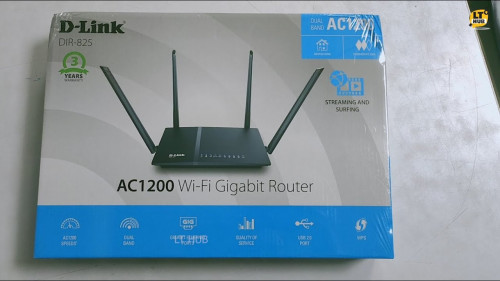 i saw from FB group, some are getting this new router... I still get old version Dlink router. |
|
|
|
|
|
taqu
|
Feb 22 2021, 10:49 AM
|
|
|
Still old router compare to DIR-842.
|
|
|
|
|
|
brianklc
|
Feb 22 2021, 11:01 AM
|
|
|
QUOTE(scflyk @ Feb 22 2021, 08:41 AM) can share what package/offer you got from them? Same as others RM159 |
|
|
|
|
|
jpong1
|
Feb 22 2021, 11:31 AM
|
Getting Started
|
QUOTE(John42 @ Feb 21 2021, 05:58 PM) When my house was under copper I used to get the orange Netis VDSL modem router. The crappiest shit I have ever got from Unifi. Then the moment I upgraded to fibre on last August, I got the Az tech router. The WiFi range is quiet bad if you are not sitting near to the router. Then at December got the TP link AC 1200 3 antenna router. The WiFi range is good but it does auto reboot randomly. Then on Wednesday I called unifi to upgrade the firmware from the 202000306 version to the latest available version. They told me there's a new firmware version available for this router. Then they told me the support department will upgrade the firmware. Within less than an hour the firmware has updated. Now its already been 4 days since the new firmware version and till now there's no auto reboot yet. can we upgrade TP link AC 1200 f/w ourselves to the latest firmware ? if yes, where to get link ? thanks |
|
|
|
|



 Quote
Quote


 0.0274sec
 0.52
0.52
 6 queries
 GZIP Disabled