Welcome Guest ( Log In | Register )

Bump Topic Topic Closed RSS Feed
413 Pages « < 42 43 44 45 46 > » Bottom

Outline · [ Standard ] · Linear+

 Official TM UniFi High Speed Broadband Thread V39, READ 1ST PAGE FOR RELEVANT WIFI INFO

views
     
sonicmaster
post Feb 22 2021, 11:39 AM

Casual
***
Junior Member
431 posts

Joined: Sep 2015
From: Shah Alam
QUOTE(John42 @ Feb 21 2021, 05:58 PM)
When my house was under copper I used to get the orange Netis VDSL modem router. The crappiest shit I have ever got from Unifi. Then the moment I upgraded to fibre on last August, I got the Az tech router. The WiFi range is quiet bad if you are not sitting near to the router. Then at December got the TP link AC 1200 3 antenna router. The WiFi range is good but it does auto reboot randomly. Then on Wednesday I called unifi to upgrade the firmware from the 202000306 version to the latest available version. They told me there's a new firmware version available for this router. Then they told me the support department will upgrade the firmware. Within less than an hour the firmware has updated. Now its already been 4 days since the new firmware version and till now there's no auto reboot yet.
*
Yes the router it's quite unstable.
aniq8676
post Feb 22 2021, 11:43 AM

Regular
******
Senior Member
1,524 posts

Joined: Dec 2020
From: Perak


QUOTE(jpong1 @ Feb 22 2021, 11:31 AM)
can we upgrade  TP link AC 1200 f/w ourselves to the latest firmware ? if yes, where to get link ? thanks
*
yes you can install the firmware, but the firmware for TP-Link Archer C1200 v1 you need to request from TM itself. Because the firmware for the router has been modified by TM itself and not from tplink.

Latest firmware 1.0.0 Build 20200306 rel.15999
laihuhng
post Feb 22 2021, 12:26 PM

On my way
****
Junior Member
603 posts

Joined: Jun 2005


user posted image

Anyone received this? Any idea what is the so called "exclusive" price for 800Mbps? If I were to click on the given link, it straight asking me to fill up info and submit. And, worst is, after submitting, the order is CONFIRMED. WTH.
John42
post Feb 22 2021, 12:29 PM

Getting Started
**
Junior Member
256 posts

Joined: Aug 2019
QUOTE(jpong1 @ Feb 22 2021, 11:31 AM)
can we upgrade  TP link AC 1200 f/w ourselves to the latest firmware ? if yes, where to get link ? thanks
*
Nope you need to call the customer service and ask them for the latest firmware version. They will send your request to their support team for them to upgrade the firmware remotely from their side. Mine was done within less than an hour. The latest firmware version is 1.0.0 Build 20201103 rel.11985(EU).
jpong1
post Feb 22 2021, 12:47 PM

Getting Started
**
Junior Member
292 posts

Joined: Jun 2016
QUOTE(aniq8676 @ Feb 22 2021, 11:43 AM)
yes you can install the firmware, but the firmware for TP-Link Archer C1200 v1 you need to request from TM itself. Because the firmware for the router has been modified by TM itself and not from tplink.

Latest firmware 1.0.0 Build 20200306 rel.15999
*
They come to house or send by email the link of f/w ?
Secondly, can we not use TM f/w and using TP Link f/w to connect to UniFi fibre ?

thanks
jpong1
post Feb 22 2021, 12:49 PM

Getting Started
**
Junior Member
292 posts

Joined: Jun 2016
QUOTE(John42 @ Feb 22 2021, 12:29 PM)
Nope you need to call the customer service and ask them for the latest firmware version. They will send your request to their support team for them to upgrade the firmware remotely from their side. Mine was done within less than an hour. The latest firmware version is 1.0.0 Build 20201103 rel.11985(EU).
*
wow...they can update remotely !!! surprise....means thay can control your router and all activities online.

yongtjunkit
post Feb 22 2021, 12:56 PM

Look at all my stars!!
*******
Senior Member
2,516 posts

Joined: Mar 2016
QUOTE(jpong1 @ Feb 22 2021, 12:49 PM)
wow...they can update remotely !!! surprise....means thay can control your router and all activities online.
*
Basically any ISP provided router have the ability for the ISP to remote in for diagnostic/troubleshooting/ update firmware…. Not just TM


aniq8676
post Feb 22 2021, 01:08 PM

Regular
******
Senior Member
1,524 posts

Joined: Dec 2020
From: Perak


QUOTE(jpong1 @ Feb 22 2021, 12:47 PM)
They come to house or send by email the link of f/w ?
Secondly, can we not use TM f/w and using TP Link f/w to connect to UniFi fibre ?

thanks
*
QUOTE(jpong1 @ Feb 22 2021, 12:49 PM)
wow...they can update remotely !!! surprise....means thay can control your router and all activities online.
*
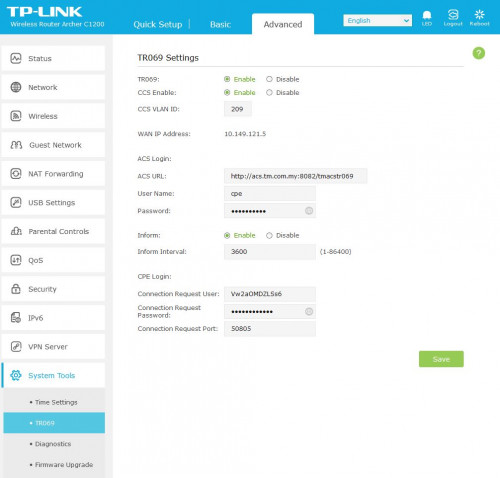
yes, they update the firmware from the center. if you enable this function

user posted image

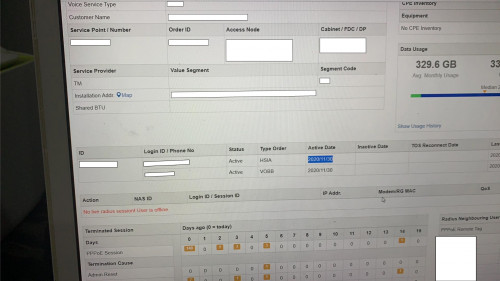
by activating this function, tm expert can know your internet status, your total usage everymonth, can know how many times your internet has been reboot

user posted image

if your internet has a problem, they can monitor it remotely.
ray8426
post Feb 22 2021, 01:10 PM

Casual
***
Junior Member
334 posts

Joined: Jul 2011
QUOTE(aniq8676 @ Feb 22 2021, 01:08 PM)
yes, they update the firmware from the center. if you enable this function

user posted image

by activating this function, tm expert can know your internet status, your total usage everymonth, can know how many times your internet has been reboot

user posted image

if your internet has a problem, they can monitor it remotely.
*
if we have change to our own router, then they unable check that already right?
icon_idea.gif


aniq8676
post Feb 22 2021, 01:14 PM

Regular
******
Senior Member
1,524 posts

Joined: Dec 2020
From: Perak


QUOTE(ray8426 @ Feb 22 2021, 01:10 PM)
if we have change to our own router, then they unable check that already right?
icon_idea.gif
*
Yes, but if you have internet connection problems, you cannot blame TM 100%, because they can't know the status of your router.
johnnyg
post Feb 22 2021, 01:24 PM

Getting Started
**
Junior Member
289 posts

Joined: Jul 2008
QUOTE(laihuhng @ Feb 22 2021, 12:26 PM)
user posted image

Anyone received this? Any idea what is the so called "exclusive" price for 800Mbps? If I were to click on the given link, it straight asking me to fill up info and submit. And, worst is, after submitting, the order is CONFIRMED. WTH.
*
I’ve also received this. Wonder what is the promo package.

ray8426
post Feb 22 2021, 02:12 PM

Casual
***
Junior Member
334 posts

Joined: Jul 2011
QUOTE(aniq8676 @ Feb 22 2021, 01:14 PM)
Yes, but if you have internet connection problems, you cannot blame TM 100%, because they can't know the status of your router.
*
Change back TM router if got issue.... brows.gif
ray8426
post Feb 22 2021, 02:14 PM

Casual
***
Junior Member
334 posts

Joined: Jul 2011
QUOTE(johnnyg @ Feb 22 2021, 01:24 PM)
I’ve also received this. Wonder what is the promo package.
*
register email? or billing email? hmm.gif
haturaya
post Feb 22 2021, 02:33 PM

Look at all my stars!!
Group Icon
Elite
2,553 posts

Joined: Jan 2003
QUOTE(laihuhng @ Feb 22 2021, 12:26 PM)
user posted image

Anyone received this? Any idea what is the so called "exclusive" price for 800Mbps? If I were to click on the given link, it straight asking me to fill up info and submit. And, worst is, after submitting, the order is CONFIRMED. WTH.
*
And the price? hmm.gif
laihuhng
post Feb 22 2021, 02:34 PM

On my way
****
Junior Member
603 posts

Joined: Jun 2005


QUOTE(johnnyg @ Feb 22 2021, 01:24 PM)
I’ve also received this. Wonder what is the promo package.
*
Tried to call them at 100.

Was told everything follows existing package. But, speed upgade:
500mbps - RM199 (w/o unifi TV)
800mbps - RM239 (w/o unifi TV)

Forgotten to ask if MESH included. But, most likely not. I'm not convinced even after talked to CS. Better go TMpoint with black and white from them.

taqu
post Feb 22 2021, 02:35 PM

Enthusiast
*****
Junior Member
864 posts

Joined: May 2005
QUOTE(ray8426 @ Feb 22 2021, 01:10 PM)
if we have change to our own router, then they unable check that already right?
icon_idea.gif
*
TM can check your total usage, internet status, which sites you go, what apps you use, even if using own router. Even if you use VPN they still know how much bandwidth you use.

We live in a twilight world sweat.gif
soonwai
post Feb 22 2021, 02:37 PM


********
All Stars
11,456 posts

Joined: Oct 2007
From: KL


QUOTE(ray8426 @ Feb 22 2021, 02:12 PM)
Change back TM router if got issue.... brows.gif
*
Yes, that's the best way. When I did my RM10 upgrade from 50 to 100mbps. I put back the old DIR-615. The contractor took pity on me and gave a free C1200. LOL.
haturaya
post Feb 22 2021, 02:37 PM

Look at all my stars!!
Group Icon
Elite
2,553 posts

Joined: Jan 2003
QUOTE(ray8426 @ Feb 22 2021, 01:10 PM)
if we have change to our own router, then they unable check that already right?
icon_idea.gif
*
Of course TM know. They own the network. whistling.gif
ray8426
post Feb 22 2021, 02:38 PM

Casual
***
Junior Member
334 posts

Joined: Jul 2011
QUOTE(laihuhng @ Feb 22 2021, 12:26 PM)
user posted image

Anyone received this? Any idea what is the so called "exclusive" price for 800Mbps? If I were to click on the given link, it straight asking me to fill up info and submit. And, worst is, after submitting, the order is CONFIRMED. WTH.
*
you are existing turbo plan 2018 user? hmm.gif
xCryptik
post Feb 22 2021, 02:45 PM

On my way
****
Junior Member
584 posts

Joined: May 2013
QUOTE(laihuhng @ Feb 22 2021, 01:26 PM)
user posted image

Anyone received this? Any idea what is the so called "exclusive" price for 800Mbps? If I were to click on the given link, it straight asking me to fill up info and submit. And, worst is, after submitting, the order is CONFIRMED. WTH.
*
Where is the details for that -> *T&C apply

413 Pages « < 42 43 44 45 46 > » Top
Topic ClosedOptions
 

Change to:
| Lo-Fi Version
0.0217sec    0.65    6 queries    GZIP Disabled
Time is now: 4th December 2025 - 02:13 PM