

I assume firewall / iptables still works in Mikrotik with Fasttrack on?
Official TM UniFi High Speed Broadband Thread V39, READ 1ST PAGE FOR RELEVANT WIFI INFO
Official TM UniFi High Speed Broadband Thread V39, READ 1ST PAGE FOR RELEVANT WIFI INFO
|
|
 Jan 2 2021, 11:44 PM Jan 2 2021, 11:44 PM
Return to original view | Post
#1
|
 
Junior Member
864 posts Joined: May 2005 
|
I assume firewall / iptables still works in Mikrotik with Fasttrack on?
|
|
|
|
|
|
Jan 3 2021, 12:12 AM
Return to original view | Post
#2
|
|
Junior Member
864 posts Joined: May 2005
|
QUOTE(soonwai @ Jan 2 2021, 11:59 PM) Yes. When a new connection is made, it goes through the firewall as usual. Once it's accepted and established then only can it get fasttracked. Once fasttracked, the connection will bypass a few things such as simple queues (ie: no more bandwidth control). My Tomato-powered router skips iptables when CTF enabled. Not blaming the developers they already did amazing work, but proper hardware & software still rules. I still have another Tomato-powered router currently running as printer server. Probably can put that as firewall between router & LAN 😬 |
|
|
Jan 3 2021, 12:44 PM
Return to original view | Post
#3
|
|
Junior Member
864 posts Joined: May 2005
|
QUOTE(powerwoot @ Jan 3 2021, 12:33 PM) Thank goodness, TM guys came in the morning and reconnected back my fibre to the house. They said the disruption due to monkeys is pretty common as these animal used cables as their highway to move from pole to pole or house. Feel sorry for you, as it may happen again. I guess it's not possible to relocate the fibre cable & bury it underground.I said to them ask TM to look for cable that have stronger reinforce metal wire lah. Since this is a standard installation from pole direct to the BTU, they said no additional charges no matter how many times snapped. |
|
|
Jan 3 2021, 10:35 PM
Return to original view | Post
#4
|
|
Junior Member
864 posts Joined: May 2005
|
It's over a year since I use Pi-Hole as my DNS server. While looking for latest development of Pi-Hole, I found another similar ad-blocking DNS server: Adguard Home. It supports both DOH & DOT natively. Config & dashboard in GUI. I like it so far.

|
|
|
Jan 5 2021, 07:38 PM
Return to original view | Post
#5
|
|
Junior Member
864 posts Joined: May 2005
|
I suffered similar experience recently? Router in store room, HyppTV STB & AP on living room, from TP-Link SG108E in store room, 1 cable carries VLAN 500 & 600 to living room, where a single TP-Link SG105E split it to AP & STB. It worked flawlessly for years until last month. Unable to make it work again, and un-willing to pull a second cable just for the STB, I gave up & bought Mi Box S to run Unifi TV app.
This post has been edited by taqu: Jan 5 2021, 07:40 PM |
|
|
Jan 5 2021, 08:08 PM
Return to original view | Post
#6
|
|
Junior Member
864 posts Joined: May 2005
|
QUOTE(winter01942 @ Jan 5 2021, 07:43 PM) yeah probably something similar like mine, baguslah you got extra bandwidth to run Unifi TV app, I not looking forward to cut another 7~8Mbps from my 30Mbps line Due to that, my monthly total bandwidth exceeded 1 TB for first time  |
|
|
|
|
|
Jan 6 2021, 01:43 PM
Return to original view | Post
#7
|
|
Junior Member
864 posts Joined: May 2005
|
QUOTE(soonwai @ Jan 6 2021, 02:00 AM) I still have mine too, the orange/white DIR-615 right? So strange. I wonder why. If I get this problem I'll wireshark to see what's coming from the BTU LAN 1. Maybe can get a hint of the incompatibility. When my HyppTV failed, I re-config my router for standard VLAN 600 (previously done at switch), and connect my router to STB using a very long cable. It worked, but I don't want to route a 15-meter cable from store to living room. And I'm a Wireshark noob Much easier to go Android TV route  |
|
|
Jan 13 2021, 08:09 AM
Return to original view | Post
#8
|
|
Junior Member
864 posts Joined: May 2005
|
QUOTE(QuantumEdge @ Jan 12 2021, 09:45 PM) Any tool/ways to extract PPPoE password from Netis DL4480V1? Either get the password from the browser's password manager (if saved), otherwise call TM again.My friend requested the password from TM, they sent him the password 3 days ago....so far his Netis router still able to access the internet without the need of entering the new password. Meanwhile, he cant setup his deco m9 with the provided password |
|
|
Jan 15 2021, 04:41 PM
Return to original view | Post
#9
|
|
Junior Member
864 posts Joined: May 2005
|
Normally 42.188, sometimes 75, once I got 219
|
|
|
Jan 15 2021, 08:50 PM
Return to original view | Post
#10
|
|
Junior Member
864 posts Joined: May 2005
|
QUOTE(Harapan @ Jan 15 2021, 08:32 PM) Does it make any difference? No difference to me. |
|
|
Jan 19 2021, 11:45 AM
Return to original view | Post
#11
|
|
Junior Member
864 posts Joined: May 2005
|
QUOTE(Maxieos @ Jan 19 2021, 06:37 AM) Anyone know a good brand or reliable CAT 5e cable for 100mbps above ? A good CAT 5E eg Dintek can even run 10 gbps for short distance. But no reason to get CAT 5E nowadays, as you may actually get 100 mbps CAT 5 cables if bought online. Better buy CAT 6 cables, no problem for 1 gbps or even 10 gbps.Just curious CAT 5e is enough for 300mbps ? |
|
|
Jan 19 2021, 08:47 PM
Return to original view | Post
#12
|
|
Junior Member
864 posts Joined: May 2005
|
QUOTE(Maxieos @ Jan 19 2021, 06:37 AM) Anyone know a good brand or reliable CAT 5e cable for 100mbps above ? I use white CAT 6 flat cables from 20 cm to 5m, bought from SubTel Shopee. Easy to bend and look nice too.Just curious CAT 5e is enough for 300mbps ? 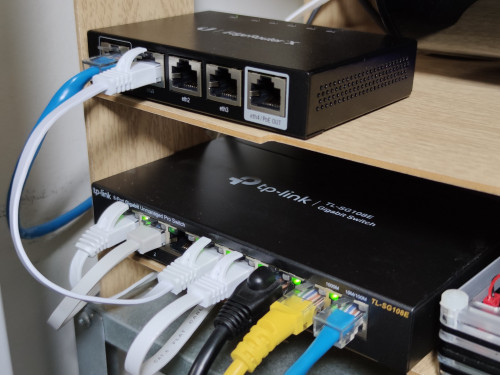 |
|
|
Jan 20 2021, 09:47 AM
Return to original view | Post
#13
|
|
Junior Member
864 posts Joined: May 2005
|
QUOTE(odin140 @ Jan 19 2021, 10:28 PM) Any suggestions on a router that suits 800mbps unifi? around 10 devices connected. 1 iptv and mostly wifi connected. Current Tp-link from tmnet only giving 100mbps through wifi. What model of TP-Link you use? Some entry level TP-Link are limited to 100 mbps. What routers recommended? Depends on you home size/layout, your budget, and what features you want eg parental control / QOS / traffic monitor etc. Plenty of forummers here are advance / super-advance so we use SOHO equipment eg Mikrotik / Ubiquiti / PFSense |
|
|
|
|
|
Jan 22 2021, 11:37 AM
Return to original view | Post
#14
|
|
Junior Member
864 posts Joined: May 2005
|
QUOTE(sadlyfalways @ Jan 22 2021, 11:05 AM) Hey guys anybody faced issue with zoom connecting and failed to singapore sever? No wonder my kid couldn't connect his Zoom ..Today i was on 175 ip and zoom refused to connect on all devices, saying it couldn't connect to the service eventhough internet was working fine at 600mbps+++ It only worked after i reset the modem and got new ip what could have caused this? |
|
|
Feb 2 2021, 08:01 AM
Return to original view | Post
#15
|
|
Junior Member
864 posts Joined: May 2005
|
QUOTE(Maxieos @ Feb 2 2021, 05:54 AM) I need longer cable over 10meter , does CAT 6 able to support with longer distance ? CAT 6 can go upto 100 meter. |
|
|
Feb 3 2021, 10:44 AM
Return to original view | Post
#16
|
|
Junior Member
864 posts Joined: May 2005
|
QUOTE(Jjuggler @ Feb 3 2021, 09:42 AM) Nice router there... EdgeRouter X. What internet package you are using btw? Thanks. On 500 Mbps plan. |
|
|
Feb 6 2021, 09:33 PM
Return to original view | Post
#17
|
|
Junior Member
864 posts Joined: May 2005
|
QUOTE(sadlyfalways @ Feb 6 2021, 09:07 PM) Is anyone here able to access www.macrumors.com on IPv4? Can't open the website, from Celcom also can't. Ping is ok & from VPN is fine though. |
|
|
Feb 8 2021, 06:44 PM
Return to original view | Post
#18
|
|
Junior Member
864 posts Joined: May 2005
|
QUOTE(askm @ Feb 8 2021, 02:42 PM) Recently, unifi THROTTLE the speed on peak hours. on my side, I can only got 30% of the speed (around 90mbps of my package 300mbps). I had pay attention on this speed reading, it's very constant not more not less exactly the number 90 everytime i tested, that mean reading was already under controlled by something or been setted to their required amount. No speedtest/heavy download, today, but today, my network reached 160-180 Mbps at times.Call TM few times, but useless. They use re-set port "title" to adjust back your normal speed. This normal speed can only last few hours then be throttled again. |
|
|
Feb 9 2021, 10:43 AM
Return to original view | Post
#19
|
|
Junior Member
864 posts Joined: May 2005
|
QUOTE(askm @ Feb 8 2021, 02:42 PM) Recently, unifi THROTTLE the speed on peak hours. on my side, I can only got 30% of the speed (around 90mbps of my package 300mbps). I had pay attention on this speed reading, it's very constant not more not less exactly the number 90 everytime i tested, that mean reading was already under controlled by something or been setted to their required amount. Speedtest at 10 AMCall TM few times, but useless. They use re-set port "title" to adjust back your normal speed. This normal speed can only last few hours then be throttled again. 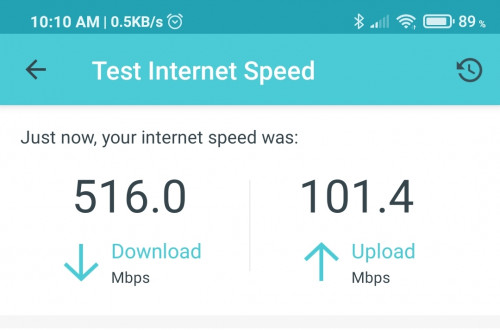 |
|
|
Feb 21 2021, 08:04 AM
Return to original view | Post
#20
|
|
Junior Member
864 posts Joined: May 2005
|
QUOTE(sadlyfalways @ Feb 21 2021, 02:43 AM) Anyone facing Unifi going down around 1am everyday? And it’s not like normal ip change because it needs a manual restart to get everything back to normal Mine down recently but I think bcoz I forgot to pay my bill lol.I live in the petaling Jaya area |
|
Topic ClosedOptions
|
| Change to: |  0.2117sec 0.2117sec
 0.25 0.25
 7 queries 7 queries
 GZIP Disabled GZIP Disabled
Time is now: 3rd December 2025 - 06:59 AM |
 Quote
Quote