I just change my cable to Cat 6, my router only support 300mbps but my package 800mpbs. Now I only manage to get 100mbps even after change to Cat 6
Windows 8
Press the Windows key and the X key at the same time, then let go.
Click on Device Manager.
Find your Network Card in the list of devices.
Right click on your Network Card and go to Properties.
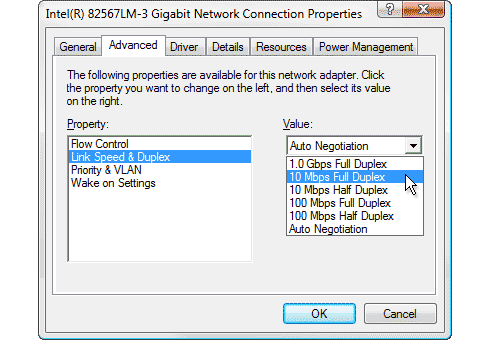
Click on the Advanced tab.
In the list on the left, scroll and select "Speed & Duplex"
You will most likely see "Auto Negotiation" on the right hand side under Value. Pull down the list.
If you see "1.0 Gbps Full Duplex" then your Network Card will be able to handle speeds up to 1 Gbps (1000 Mbps).
If you see "100 Mbps Full Duplex" then your Network Card will be able to handle speeds up to 100 Mbps.
Windows 7
Click on Start, then Control Panel
Click on Device Manager.
Find your Network Card in the list of devices.
Right click on your Network Card and go to Properties.
Click on the Advanced tab.
In the list on the left, scroll and select "Speed & Duplex"
You will most likely see "Auto Negotiation" on the right hand side under Value. Pull down the list.
If you see "1.0 Gbps Full Duplex" then your Network Card will be able to handle speeds up to 1 Gbps (1000 Mbps).
If you see "100 Mbps Full Duplex" then your Network Card will be able to handle speeds up to 100 Mbps.


 Feb 13 2019, 05:21 PM


 Quote
Quote






 0.0366sec
 0.59
0.59
 6 queries
 GZIP Disabled